#ue4-general
1 messages · Page 851 of 1
 dense gate
I have a custom ability system, the Event Cast should be your own Event Shoot for example
Depending on your weapon, you might want to add a specific recoil time
And do it as you find suitable for your game
A large sniper rifle will have a long recoil time and a bigger recoil rotation for example
But an SMG will have short time and small rotation
The end result is this, the simulated gun is 300 RPM
dense gate
Well, if you're a designer, it's not so cursed
 weak cypress
i am a programmer @dense gate
 plush yew
@dense gate how does your cast node look like that?
dense gate
@plush yew it's my own custom system for units (pawns) and abilities
So there's some differences
 chilly olive
Wsit
dense gate
Depends on your own implementation
chilly olive
Yea prob
dense gate
My map isn't even finished yet sometimes with RTX on I get an out of video memory crash
chilly olive
Loll
dense gate
And I have 2 more GB than the 1660Ti
 clear coyote
hello! I've got a little question about unreal and git. I've noticed that when using unreal 2 people should never change the same blueprint "at the same time", so doing some research I've seen that there is some kind of feature/program that let you "lock" a blueprint so that no one else can touch it on the meantime. could anyone show me how to enable this?
plush yew
@dense gate made in C++? im guessing thats why it doesnt say custom event
dense gate
It's almost entirely BP
dense gate
It's a renamed custom event
And also it's a child BP
It says custom event only in the parent BP
Or at least for 4.23, I'm upgrading to 4.26 soon
plush yew
oh I see I didnt know that interesting interesting uses didnt realized custom events could be called like that only thought functions could
it is just an override for custom events?
dense gate
When you create a custom event, you can click on the Custom Event text to rename it
In child BPs you can override
plush yew
I know I didnt mean renaming meant all the other part
dense gate
And if you want to keep the old functionality, right click on the override event and "add call to parent function"
If you've done networking, it's second nature at this point
plush yew
yeah I learned about overrides awhile ago just only for functions didnt realize you could do that for custom events which is nice always been curious about what stuff I could do like this
like this
and this
wonder if im missing some shortcuts
/bp cleanliness
dense gate
I think functions that return nothing are counted as events under the hood
You've probably noticed it if you've tried creating an override for one
BP is good tho
Quite useful for quick prototyping
Though performance wise it's not so bad either
plush yew
nativizing 🙂
dense gate
The biggest issue I had with it is honestly enabling modding
But maybe that's all my fault
plush yew
player modding?
dense gate
Complete modding
The ability for a player to add custom maps, gamemodes, characters, etc
plush yew
I think that is just a not so easy to do thing straight out of the box but the UGC plugin for creating would help
dense gate
Though also changing the clientside animations, particle effects, HUD
I did it without UGC
Keep in mind I'm on 4.23
UGC doesn't work for it
 scenic fox
ummm my output log keeps warning me that something the %APPDATA% unreal folder is corrupt what do i do
 light thunder
There's no way to send a command to open a file outside of unreal is there? I'm generating an excel file for example and it would be super handy to be able to open it automatically
 crude rock
Hey, Does anyone know why my FPS caps out at around 90, but CPU usage is 45% and GPU at 30%... Vsync is disabled and no fps cap in either
(in editor)
light thunder
I have a function containing a loop - if I have a DoOnce in that loop - it will only execute the Do Once item, once obviously - but if I call the function again, it will run the DoOnce again correct? Will I have to manually reset it or is it reset each time the function is run?
Use Case is looping through an array of items on a spreadsheet and the entire array I want the same color but I want to change the color each time the function is run
 restive yarrow
I duplicated my game level, and its taking ages to unfreeze, any tips on hwat i should do?
chilly olive
Wut is a decent graphics card beside rtx
 covert hedge
in 2020? 
 worldly gate
hello! I've got a little question about unreal and git. I've noticed that when using unreal 2 people should never change the same blueprint "at the same time", so doing some research I've seen that there is some kind of feature/program that let you "lock" a blueprint so that no one else can touch it on the meantime. could anyone show me how to enable this?
@clear coyote
If it can it would be something called like check out. Last time I used GIT with Unreal I thought it had something like that already perhaps?
Perforce I guess does this lock file function, but as far as I know GIT cannot do that in the same manner...
 blazing turtle
How do we know from which part of the body the character is damaged with the least amount of resources in the game? for example being shot in the hip with a bullet
only physic assets come to my mind
is there any other way ?
 autumn forge
Seemingly horrible community for getting answers...
 static bane
@autumn forge I get good answers 80% of the time. Not bad for me 👍
for the cheap price of free and the speed I think it's ok.
autumn forge
That's good. I'm not speaking on my behalf, just new to the community and scrolled scrolled scrolled to see what the interactions are like and it is, I'll use this word again, seemingly not much in the way of getting answers to most questions asked. 😋
static bane
Noticed that for some channels, this one here is quite general.
If you go into specifics, skilled people will tend to answer your question (assuming there will be people who know how to fix your problem).
I run a big(ish) discord server and it's a similar pattern to ours.
clear coyote
@clear coyote
If it can it would be something called like check out. Last time I used GIT with Unreal I thought it had something like that already perhaps?
Perforce I guess does this lock file function, but as far as I know GIT cannot do that in the same manner...
@worldly gate just saw this. I think it might be a UE feature, where you can add a source control and then it might be able to lock it down
I've heard perforce works nicely with UE4 compared to GIT. BUT it's a paid service, and it is not cheap :/
 grim ore
perforce is free for local use/personal server for a small # of users
clear coyote
oh really? I'll check that out then
 gleaming creek
Anyone have a good workflow for working with Quixel Megascans / Bridge?
Specifically, I'm having a stupidly hard time getting the materials and textures to work properly automatically.
I wanted to use channel packing (AO/Rough/Metal in one map), but it refuses to automatically put that packed texture into the material, even if I match the map name to the parameter name. It just always leaves that slot blank.
Also I'm a but puzzled at the fact that if you just use the default (non-packed), it doesn't include AO at all. It's as if they don't want you to use the AO maps, but many assets do include them
scenic fox
PackagingResults: Warning: HierarchicalDerivedDataBackend: Put failed, keeping in memory copy TEXTURE_564290F8998644E39A2118D5C683187B_BC5_7F22F21E47DA2DD94BFA82B713AB2582___3A991B2EABDB2E9A9B213CDFC232EFDA4DD23242.
PackagingResults: Error: 0 (The operation completed successfully.)
what does this mean?
anyone?
gleaming creek
Might try asking that in #packaging
scenic fox
ooooh thanks
gleaming creek
Decent for what? The one you can afford.
UE4 generally needs no more GPU power than it takes to run the UE4 games, so get one that can run the kind of games you want to make at max settings
You're probably better off looking at something like the Tom's Hardware Guide "best GPU for the money" lists
 lucid grove
Heya
can someone help me with GPU stats? Im trying to find what eating so much of my fps.
Line by line its something about 8ms, but overall almost 20ms
I have a feeling that im missing something
light thunder
Use the other profiler
They updated it to make it easier to use but in the past I think you hit Shortcut: Ctrl+Shift+
grim ore
try stat scenerendering and look at the draw calls for example
light thunder
I think if you type ProfileGPU in console it helps
 bitter iris
why sometimes when i load a level, does the static meshes on that 1 tile move??
its pissing me off
 timid pilot
Hi, I get a lot of PCHCore.h has been modified since the precompiled header PCHMygame.h.gch was built. It happen only on Linux (Ubuntu 20.04). I can compile on Windows. What is wrong ?
 mild agate
Hey guys, I got the invite from Miroslav Filipovic from youtube, I asked bout how to do replays in UE4, and he said to ask for a gentleman called Marco
covert hedge
when is the free for the month collection updated? it's the same as last month 
grim ore
first tuesday of the month
covert hedge
thanks
 full lodge
HI! I am wondering how to properly clone a whole project in UE4. I cloned it from Epic Games Launcher but I got a lot of target build error. Any ideas? Grateful of help given
grim ore
clone? if you mean a copy a UE4 project is self contained in a folder just copy the folder completely
full lodge
Mathew, copying a whole project via copy past isint a proper way
I found a solution. Pasted here for future
grim ore
why not?
what you are showing above is copy/pasting the project into a new folder which is what I said, its step #1
full lodge
Ahh damn sorry. My way of thinking today is on slow mode
I read it differently forgive me. Thanks for help!
 silk sleet
So if you don't have a camera on your pawn or player controller, the engine seems to make one for you w/ default settings
I'm going to be displaying everything with render targets and ui, is there a way to disable that camera entirely so it's not rendering the scene? Do I need to worry about that?
grim ore
you still need a camera, it represents the viewport basically. IF you are laying UI over it then you don't really need to worry about what it displays
I've never tried it but you could always get the camera manager, get the camera it is managing, and setting it to not active.. curious what that might do lol
autumn forge
@static bane 💯
grim ore
yep doesnt work, can't disable the camera at all lol
silk sleet
so i might as well just point it at a brush w/ the render target mat and use that as the display then huh lmao
 cosmic cove
what are your fames @lucid grove
grim ore
@silk sleet the solution most people seem to recommend is to move the default camera to somewhere far away but honestly if you aren't rendering anything in the scene anyways that the camera can see then you should be fine. others suggest pointing the camera at a box with a blank black material as well
 mortal quarry
Hey all, what's the best way to deselect an object in the viewport ?
grim ore
escape key?
mortal quarry
tried that, doesnt seem to do it 😦
using G for now, although that's not really a deselect 😄
grim ore
select another item in the world outliner?
escape should work unless its an item that is always selected for the mode you are in
mortal quarry
dont think I set anything like that, just an object in the normal default viewport
sorry, not too clued up with unreal terminology 😄
seems escape is working, just didnt want to in the moment for some reason, perhaps I wasnt focused on the window
cosmic cove
you were scared to hit the escape key ?
mortal quarry
no?
grim ore
what I meant is like if you are painting on something it would keep the something highlighted while painting on it, stuff like that
mortal quarry
@cosmic cove when I tried escape, it didnt work, I tried it a second time and it still didnt work, that's when I came to ask if there was a way to do it (was pretty sure escape was it, but since it wasnt working, it confused me slightly as I only work in Unreal as a hobbyist and work in other applications during work hours.)
After doing a quick light build, I tested escape again and it worked.
This is why I said perhaps I was not focused on the window previously.
Thanks.
lucid grove
what are your fames @lucid grove
@cosmic cove something about 54 fps on fullscreen (1920x1080) - Epic settings. And 80 on borderless.
light thunder
I have no shaders compiling. I exit the editor. I restart the editor, no shaders compiling, then I run some code that crashes it (no level loading code that would create the need for compiling shaders) ...when I restart the level, it begins to compile shaders again
cosmic cove
yea your scene appears to be working properly and not over loaded.
cosmic cove
sure can.
 pallid crypt
thanks
im following this youtube tutorial
but ive selected first person template instead of third person template
is that why i can't find the modes menu?
 nocturne solstice
Hello :3
pallid crypt
i have a place actors menu instead
nocturne solstice
Most likely!
That or the video is using an old version of the engine
and it's changed places since!
lucid grove
@cosmic cove something about 54 fps on fullscreen (1920x1080) - Epic settings. And 80 on borderless.
@lucid grove little update -not borderless, but in-engine window.
pallid crypt
ah no i still cant find it
is there an easy "search" option in unreal?
im very new to it
cosmic cove
um @pallid crypt
your modes is present on current screen shot.
personally i would update to 25.3 mostly because of how settings and where they are have changed quite a bit
scenic fox
my shading compiling is stuck somebody help please
grim ore
the modes menu is introduced in the latest version of the engine
cosmic cove
again your modes is present in the current screen shot lol
scenic fox
my shading compiling is stuck what do i do
pallid crypt
but i cant see "bsp" in the modes on my screen
scenic fox
bruh
pallid crypt
which is what he's clicking on 
grim ore
that video you are watching is super old is why
pallid crypt
sorry im very new
scenic fox
and click brush editing
simple
then click a BSP
can anybody help me? my shading compiling is stuck
grim ore
it sounds like you are missing your place actors window, go to windows -> place actors to get it back @pallid crypt
also in the latest versions BSP is now called Geometry
pallid crypt
i still can't see bsp, but i will wait for your problem to be solved first 😄
i didnt mean to interrupt sorry
thanks mathew
scenic fox
how do i fix my shading compiling being stuck/
grim ore
you can also go back to default layout, for some reason the new templates in .25 dont open the default layout
scenic fox
how do i fix shading compiling being stuck/no progress or very slow?
cosmic cove
you will most likely need to upgrade your potato
scenic fox
was that for me?
cosmic cove
yes
cosmic cove
yea thats fine.
light thunder
I have no shaders compiling. I exit the editor. I restart the editor, no shaders compiling, then I run some code that crashes it (no level loading code that would create the need for compiling shaders) ...when I restart the level, it begins to compile shaders again
grim ore
define stuck or no progress? what does the log show? also what does task manager show
scenic fox
the log shows nothing new
cosmic cove
typically your only in trouble if ue4 says not responding
and even a slow pc can jump in and out of that
scenic fox
It's not saying that
grim ore
what does task manager show for the editor and shader compiling? it could also take a while if its a complex material like a landscape
scenic fox
well i can't find a task called shader compiling
plush yew
in what channel i can ask for help?
grim ore
does it still show packaging in the bottom right ?
scenic fox
yes
grim ore
guess you wait or cancel it and start it up again
has it always been this slow or just recently?
scenic fox
just recently
it was compiling before it was slow but it compiled pretty well
Btw a lot of my output log is giving warnings on corrupt .temp files
is that a problem?
plush yew
I would just wait awhile
grim ore
i would close the project, delete the intermediate and binaries folder, and then start again
at the worst its a clean start
scenic fox
what does deleting them do?
grim ore
gets rid of the temporary files uses when packaging or building
scenic fox
man a lot of weird thing s happened when i uninstalled 4.25 and installed 4.25.3
plush yew
well, thats the end of @cosmic matrix XD
 cosmic matrix
seams to be a bug XD i just close and reopen the window and the "asset" is shown
😅
scenic fox
ok i repackaged it and now its compiling
plush yew
ok, does anyone know how to move a cubes face?
i can find a tutorial on AI and RAY-TRAICING, but cant find anything on BASIC MESH EDITTING
 raven sand
what's a good way to debug why my AI MoveTo is not working for one character but works for a different blueprint, yet they both have AIController set?
I've even literally copy pasted the same random roam blueprint but the character is not moving
it has to be something in the actor setup, but I'm checking them side by side and they seem identical 😕
 alpine jolt
Hey guys, how do people edit the same map in UE4 at the same time? Me and my friend both have multi-user editing enabled but we don't know how to actually edit the same time.
Any help would be appreciated
grim ore
@plush yew are you trying to edit a STATIC MESH or a GEOMETRY BRUSH inside the editor?
scenic fox
what does this mean
LogDerivedDataCache: Warning: HierarchicalDerivedDataBackend: Put failed, keeping in memory copy TEXTURE_564290F8998644E39A2118D5C683187B_DXT1_00313D7F4767FEBCCC69659D7148A0EC__06C93EC0AD37F7687A3C6369575125176E076FFC.
plush yew
i dont know the difference @grim ore i just added default cube from starter content
scenic fox
anyone can help me?
 sturdy trench
it stucks for hours, is there any way how can i debug whats going on?
grim ore
that is a static mesh then, you need to enable the geometry editing tools to edit it. Geometry editing is not normally something you do inside of the engine, its meants for stuff like blender or maya @plush yew
@sturdy trench open up task manager and see what percent the ue4 editor and shader compilers are at
cpu use
sturdy trench
its %0 on ue4
grim ore
do you have visual studio installed?
grim ore
did you install incredibuild when you installed visual studio?
sturdy trench
ok
but i've used visaul studio with ue4 before a lot, is it normal that this is happening today?
grim ore
it's not, maybe close the program and try re opening it
grim ore
then I would look at incredibuild personally. alternately delete the intermediate and build folders from the project and the DCC caches from Appdata and let it build them again
sturdy trench
okay thanks
 fleet cosmos
someone can help? When I open my Project Settings in the editor it crashs the editor
[2020.10.02-18.02.15:295][750]LogCompression: Error: FCompression::UncompressMemory - Failed to uncompress memory (1068/2340) from address 000001ECE454F200 using format LZ4, this may indicate the asset is corrupt!
silk sleet
is there a way to find out where in 2d screen space an object is relative to a SceneCaptureComponent's view? Like, if the object is in the center of the render target get (0.5, 0.5)
right now i'm just using a dummy camera w/ the same projection settings and doing ConvertWorldToScreen on that, but that's wasteful
 worthy fox
Can I create a Static Mesh from a Skeletal Meshfrom within the UE editor?
scenic fox
@grim ore how do i delete the intermediate and the binaries folders u were talking bout
silk sleet
@worthy fox yup
 faint grotto
Can somebody help me on how to export a Shot that has Animation of a "Character and Camera" from UE to Maya in a correct way that the location comes exactly the same as both ? 😄
grim ore
@scenic fox close the project, open the folder where the project is, delete folders
 worthy flint
Anyone else got trouble getting UE4.25 started in debug mode? I get the project window up but upon creating a project, it loads to around 95% and just shuts off without any errors in debugger
scenic fox
Will it corrupt my project?
worthy flint
The only thing I do get while debugging is a break point at three stops: Shader type was loaded after engine init, use ELoadingPhase::PostConfigInit on your module to cause it to load earlier
but it continues after that
grim ore
all of the files in intermediate and binaries are temporary and can be removed
scenic fox
But do I delete the folder or the files in the folder
grim ore
either one
sturdy trench
Whats your lightmass settings?
 tight prawn
the elements in the background are lighted properly, however the truck is not much so
both use the same material (texture atlas for everything) but the truck is spawned on runtime, while the rest of the map is setup as static meshes (and light is built in the level)
chilly olive
Wut is a decent graphics card beside rtx
tight prawn
Whats your lightmass settings?
@sturdy trench where do i find that 😅
sturdy trench
World Settings on the right
grim ore
if you build lighting, static lighting, that lighting will not change at runtime. when you spawn in an object all of the lighting will be dynamic on it. yes they will not look the same
chilly olive
Wut is a decent graphics card beside rtx???
grim ore
GTX 710 because why not
chilly olive
??
grim ore
no one can answer that question, find the best one you can afford.
tight prawn
grim ore
there are 10s if not hundreds of websites out there with gpu rankings, find the highest one based on your budget
tight prawn
I don't remember exactly if i set it up like this or not
chilly olive
Well who is better 1660 ti or the 1050 ti
grim ore
which one has higher numbers in the benchmarks?
chilly olive
1660 ti
tight prawn
just to be precise, the entire "warehouse" is totally closed, and there is no skylight or anything interfering, just the point lights used beneath the lightbars
grim ore
@tight prawn you are mixing dynamic and static lighting, this is the result. You will have to adjust your realtime lights to look like what you want when you spawn in realtime actors.
tight prawn
this is my lights' blueprint
and it is set to stationary
so the entire level only has stationary lights if that's what you are telling me i'm mixing
grim ore
you are building lights, building lights makes a giant texture and slaps it on everything.
then you are spawning in an item, it does not use that texture at all it just uses whatever lighting is in the level at that time in that location
building of lights, using static lighting, does not look the same as dynamic lighting, or lighting that is calculated each frame
tight prawn
understood
is there a workaround or a trick? because using baked lighting is better performance wise (this is a mobile title)
grim ore
you will have to drop the truck into the level and play with your lights to try and get the look you want, or adjust the lighting that is being built to be more like the dynamic lighting
no real trick, maybe adjust your materials to make it "look" more like the built lighting. for the truck
does that truck move at all? if not you could have it in the scene baked out and instead of spawning it in you have it hidden and then show it
sturdy trench
MathewW, this is my log, it stucks on "multicast", i've been developing for multiplayer. Do you have any ideas?
tight prawn
preferably I'd have it move, as to animate it entering the warehouse and leaving
grim ore
yeah if its going to move you wont be able to use static lighting really. You could try stationary lighting like you have, build it out with it in the scene, then hide/show it and move it like suggested above
it might allow you to keep the baked lighting and still move it without it looking weird
@sturdy trench is that when opening it?
sturdy trench
yeah when its on %75 and stuck
last log message was what happening on %75
i was mixing cpp and blueprints i guess thats why this happened but still no idea
 civic charm
grim ore
civic charm
grim ore
for me opening a project after this I get plugin info and source control info as it keeps loading. without more logs 😦
civic charm
Anyone can help on this
grim ore
did you try deleting the intermediate and binaries and ddc caches just to give it a good clean try?
sturdy trench
yes
i found its about consructerhelpers
gonna try deleting them, i hope it works
12th time my projects crashes lol
grim ore
@civic charm your not giving us an actual problem
 weak echo
So I am looking at the shooter game example project, and I can see all the cpp files in the content browser. In my project I can't. Any idea why? I have the same view options
 quiet token
if i habe it ship dock and it show to regen all shield how to make it not spam ????
grim ore
its literally a produce identifier
the product identifier from iTunes Connect or the Google Play Developer console
from the page you are on
@weak echo C++ code is in the source folder in your project, are you looking in content?
weak echo
@grim ore I am. The content browser doesn't show the public/private folders
grim ore
or do you mean in your project you arent seeing your C++ files that you have in your project?
oh it wont
the content browser does not work that way
civic charm
OK got that then if we made a purchase that you need to buy this how it get price and and name as you can see it brakes what if feeding does price or name
grim ore
what does your project look like on your drive?
weak echo
the content browser does not work that way
@grim ore I saw that in another post, but now it doesn't make sense
inside source is public & private folders
grim ore
@civic charm ? the page shows you the code. are you asking how to break the return from read in app purchas info? if so you right click and break it after you get the one you want
@weak echo is that screenshot the shooter game or yours? or are you saying you see a screnshot showing that somewhere but your local copy of shooter game doesnt show the folders?
 crisp thicket
Hello can anyone help me with AdMob?
weak echo
@grim ore This is the example project from unreal. Not mine. I thought that public & private folders are hidden in the content browser. In this example game, they are not
In my project, they are hidden
plush yew
@grim ore wait a second....
sturdy trench
yeah he is a legend lol
grim ore
@weak echo I just checked and i have a feelings its not really doing what you think. IF you are using private/public folders for class/headers then the .h(eaders) are what you are seeing. In my shooter game yes it shows a "privat" fodler but navigating down in it the only things I see in the actual content browser are .header files
which makes sense, its hiding the actual private .cpp parts
and in my project which has proper public/private setup without any .h in the private folder it shows just the public folder as expected
from what I can tell epic just included full classes inside the .h files in the private folder which is what you are seeing lol
and the content browser is designed to show the classes
I dunno its weird, i think you are just seeing an older example that is not perfect since its now 25 versions old and stuff has changed lol
weak echo
@grim ore Thanks for the info. And the more you know.gif
 deep viper
Are the log files for UE4 editor crashes located inside my project directory or some other central directory?
dense gate
Project directory/Saved/CrashLogs
 vague scaffold
Is there a way to remove the screen clutter from my CameraCut? This particular object does not seem to have a Render flag or Hide In Game check box.
plush yew
that looks so good :V
fleet cosmos
where I can find the engine config that are not in \Epic Games\UE_4.25
can't open Project Settings in any of my projects, even a clean one
vague scaffold
There is a Config fodler inside your project folder. There are some ini files that contain some settings.
fleet cosmos
a clean project is crashing too
fleet cosmos
It was opening before, but started to crash for some reason
fleet cosmos
I did some console commands yes
dense gate
I personally get crash on move in viewport in 4.26 if r.HZBOcclusion is 1
I skipped 4.25 tho
fleet cosmos
ok
vague scaffold
I think I found it. Turn off Draw Spline Point Numbers!
silk sleet
i'm scaling a render target texture by multiplying the texcoord by a scalar (like 0.025, really far) and it's producing this blur. How do i get a nearest-neighbor style scaling with hard edges instead?
dense gate
What's the resolution in your RT asset?
silk sleet
2048x2048
i'm testing out a weird rendering system where basically the whole map is captured at once by one scene capture, and the players just zoom in super far to pan around (like in an rts)
it's fine that it's low-res i just would like it to be sharp
dense gate
Is the capture camera set to isometric?
silk sleet
it's set to perspective with a super low fov (because shadows don't work at all in orthogonal projection mode)
dense gate
I'd assume the box from the screenshot is in the third quadrant (lower left part)
silk sleet
you're a really smart guy
dense gate
Weird why in isometric there's no shadows
I'll have to check out how I worked around it last time
silk sleet
it just tripped me out because sometimes the blur looks like it's happening sub-pixel-ly
the corners in this shot, at dead center
dense gate
The pixels from the "blur" are just the walls of that box
If you color them in a different color, you should see a difference
silk sleet
the shadow seems smaller than the pixel width fsr though
pallid crypt
sorry to interrupt, but would somebody be able to point me on the direction of a video or something that can explain how unreal's file organisation works and what the difference between a map and a level is
silk sleet
the reason I'm doing it is to have just one huge RT instead of like 8, 1 for each player
dense gate
Map is just a generic name that has appeared
silk sleet
unless that wouldn't actually be faster
dense gate
Did you manage to get the Va Fog Of War from the marketplace when it was free?
silk sleet
actually yeah
dense gate
I think it applies a decal on spots you can't see
And that circumvents shadows in a way
Back when I was on my laptop with 2 GB VRAM, setting an RT to 2048x2048 caused an instant crash
silk sleet
it'd probably be worth it to switch to iso and then add some custom shadow thing later
dense gate
If your current VRAM is >2, consider testing at 2
silk sleet
could even do it in the material
dense gate
I'll see if I can reproduce this no shadow bug
Should take me a bit
Yeah, it seems like isometric doesn't have shadows
silk sleet
so this is in orthogonal, and it's still blurry. am I mistaken or shouldn't this be sharper?
like, what would be causing the rounding at the corners you think?
dense gate
Lemme see how I can replicate it
I can see the blur and I'm almost sure there was some way of fixing it
 whole quarry
@pallid crypt try to google first before asking here, being able to help your self is very important; https://answers.unrealengine.com/questions/253540/map-level-and-world-whats-the-difference.html
silk sleet
with a normal texture, usually you set the scaling mode to be nearest-neighbor or whatever
i'm thinking maybe UE has some scaling it introduces when you hook texcoord into the texture uv param
i'll see if I can do some floor rounding somewhere and get it to stop
plush yew
Hey I have a question
About UE4 UObject
People say there is a “property” field of the UOBject class
What is it called in UObject class?
silk sleet
eh whatever that's close enough. would be nice to just shut it off though
 narrow mauve
Is there a channel I can put my discord up for my project or is that prohibited? Thanks
silk sleet
@plush yew you might be thinking of 'class settings' or 'class defaults'
plush yew
omg reflections look so good in ue4 with ray tracing x) i never tried it before
pallid crypt
@whole quarry yeah, sorry, good shout
worthy fox
Is there a way to change import settings on skeletal meshes "Added to project" from the Marketplace?
 faint musk
Anyone know if you can use UE4 to make a splash screen with transparency like this?
making one without alpha is pretty straightforward but i'm wondering if there's some settings i can set to allow the desktop to show through
lucid grove
heya
Im stuck with stupid thing
I have a windbill and have rotator for it
windmill*
plush yew
@faint musk idk anything about unreal engine, but you could make a transparent launcher like that with c# and wpf, which would launch your game :V thats probably how they did it too ;/
lucid grove
My basic solution was use setworldrotation + getworldrotation and tick
But i guess i limited to 90* angle
So i made a check that if Yaw > 89 set it to zero and start rotation again
And this is the result lol
Why does it happen?
plush yew
XDDDDDDDDDD that looks so funny
lucid grove
gonna try it
thx
ah and something i want to share, i was so happy when i did it
I just made my first UI for RPG and was kinda upset that i cant add sparks effect on Widget screen without external plugins or materials deep learning.
And after all i did it!
Check this out
plush yew
looks very good :V
lucid grove
So i took my background image (the black one) and added fire sparks green screen video over it ha
And background of widget is just a video. I know there is more proper ways to do it
plush yew
trying to make witcher 4? D:
lucid grove
More like Gothic Remake ha
 stiff dome
Hey guys, if im experiencing an issue, where do I ask about it?
alpine jolt
paypaling 1$ to whoever can help me out in trying to solve the multi user editing thing work. dm me please
plush yew
@stiff dome here i think
@lucid grove what did u use to build your map? external program or ue4?
lucid grove
@lucid grove what did u use to build your map? external program or ue4?
@plush yew just UE4. There is a lot of cool components in market but since im leraning UE4 only for a 6 months at this moment - first i try vanilla and then something else.
plush yew
i see ;/ ty for replying.
cuz i never used such clumsy and just bad world editor in my life XD (first time using ue4)
and i cant get two cubes aligned xD i thought maybe everyone was using something else but nvm i guess ;/////
lucid grove
You might wanna see what marketplace have to offer you. There a lot of cool stuff
plush yew
hmmm, good idea, maybe there is a proper snap tool ;/
lucid grove
Once I bought a component that I couldn't use because of my low skill level. I still have it in my bins. So if you understand that you are uncomfortable - it really makes sense to look.
I swear i have seen lots of cool stuff regarding world editiong and morphing
lucid grove
At least you can pin for yourself something interesting. Lots of sales in marketplace.
plush yew
i dont even know what to type in search xD
ever used blender/maya or 3d max? i want that in ue4 xD
 cedar jetty
anyway to loop several wav sounds on one audio cue?
so like when i shoot my shotgun once it plays one wav and then goes to the next
plush yew
@cedar jetty idk anything about ue4, but shouldnt that be easily done with blueprints? maybe it could pick random sound ;/
cedar jetty
@plush yew blueprint in soundcue is diffrent then for example level blueprint
plush yew
i see ;/ after i finish aligning these cubes i will look into that D:
lucid grove
@plush yew blueprint in soundcue is diffrent then for example level blueprint
@cedar jetty you can use play cue with flip flop or select function
and cue you can use random
cedar jetty
found it
lucid grove
this way
yeah right
random minus is that you can get same sound twice in a row
in conc - row
cedar jetty
i want it to be random since they all sound almost the same just slight diffrences
cedar jetty
true but ill see how this works out for now
 fossil trellis
sky atmosphere not working?
not for me
that why i needing help
nvm i get working it
how i create key in unreal engine cinematic?
 latent sedge
Is there anyone I can help me with anim montage?
 cold vortex
What about anim montages?
 prisma marlin
Omg this is the worst day of my life
lucid grove
^there is a build in rotation component. dont remember what its called, but it might work if youre just trying to rotate that
@plush yew Thank you, worked like a charm
prisma marlin
My whole drive got corrupted and 3 of my projects are gone
lucid grove
Damn man...
Any luck restore data?
I was in the same situation. 1 terabyte of working data, but the service center restored the information from it to the donor.
 azure coral
I am a newbie at UE4
prisma marlin
Like how
So I'm so depressed right now
I was literally about to finish one of my big project and this happen
It took me months and months to complete and it was supposed to be my portfolio ☹️
 bright wharf
i tried importing animations from blender but then they won't show up, like the animation file will, but the animations wont play
its stuck on the first frame of animation :/
i had to select the retarget base pose option to make the mesh show if that changes anything
 dire sentinel
https://cdn.discordapp.com/attachments/371740260607983616/761735632615112714/unknown.png
anyone know why my colision doesnt work?
my character just phases through it

 signal jetty
@dire sentinel need help
dire sentinel
ha?
signal jetty
I’m guess u don’t know how to do it
dire sentinel
nope
dire sentinel
auto convex?
signal jetty
Yeah
signal jetty
Do it send me. Pic
dire sentinel
i did
signal jetty
Are they max out
signal jetty
Did u got that 3D model from Megascans
signal jetty
No ur probably doing something wrong
One second I’ll Open up my UE4
I need a 3090
@dire sentinel
Ok bye
dire sentinel
what
signal jetty
I thought u left
dire sentinel
....
signal jetty
From there
signal jetty
I’m on my phone
dire sentinel
that is not the problem
that works
the custom mesh made in blender doesnt
nvm
forget it
signal jetty
U know when ur exporting it u need to export it UCX_
signal jetty
Oh ok
signal jetty
I duplicated it then one is mesh the other one Is collision
Don’t know what’s up with urs
azure coral
So I'm trying to match a weapon with my character's hands during animation. I have it socketed to my character's right hand (if this is the best method, it made the most sense to me), but when I move the guns' location in the skeleton mesh, the gun in the viewport isn't in the same location. How can I fiix this?
plush yew
anyone know why this happens on client game version but not server game version? https://i.gyazo.com/6778cacc5c9ec920c2ac950874d2e4a9.jpg knife gets stuck in your hand if you spam knife button and shoot at the same time
 deep viper
What is the convention for setting variables to the nullptr/null value in [Blueprints] ?
 rich furnace
how do I import a C++ source folder into the C++ classes folder in UE4 editor?
simply moving the files in explorer doesn't show up in editor
 limber mesa
question, if you have a magic ability such as earth quake how would you go about applying damage
 quiet finch
anyone got any good tutorials for a top down strategy game?
deep viper
@quiet finch I'm not familiar with specific tutorials. Just as a starting point, I'd recommend looking into how to move pawns around. (Lerp + Timelines so you can easily control how an Actor can move from point A to point B, and how fast)
quiet finch
yeah
plus i want to have like you fight to in a small area
so thats going to be a pain
 sacred sun
@limber mesa get a bp add a collider, put the collider wherever you attack. Use the get all overlapping actors and loop through the array it returns looking for damagable targets, apply damage.
Could use an interface
 lunar meadow
I am following a tutorial where I see this in the UI, but it is not present in the latest version. How can I show it?
 autumn elbow
Suggestion for getting the shortest path between 2 points, through a obstacle course. I would like a spline component to go from point A to B, avoiding some objects.
plush yew
can you make a fully explorable planet in ue4? if so does anybody have a great tutorial to recomend me?
autumn elbow
@plush yew https://youtu.be/otOPdOHWqWY

In this tutorial we will create a planet and add a surface to this planet and animate between the surface of the planet and space in Unreal Engine. We will also go over how you can implement this as a gameplay feature within your Unreal Engine 4 projects! We are using Earth te...
 fierce forge
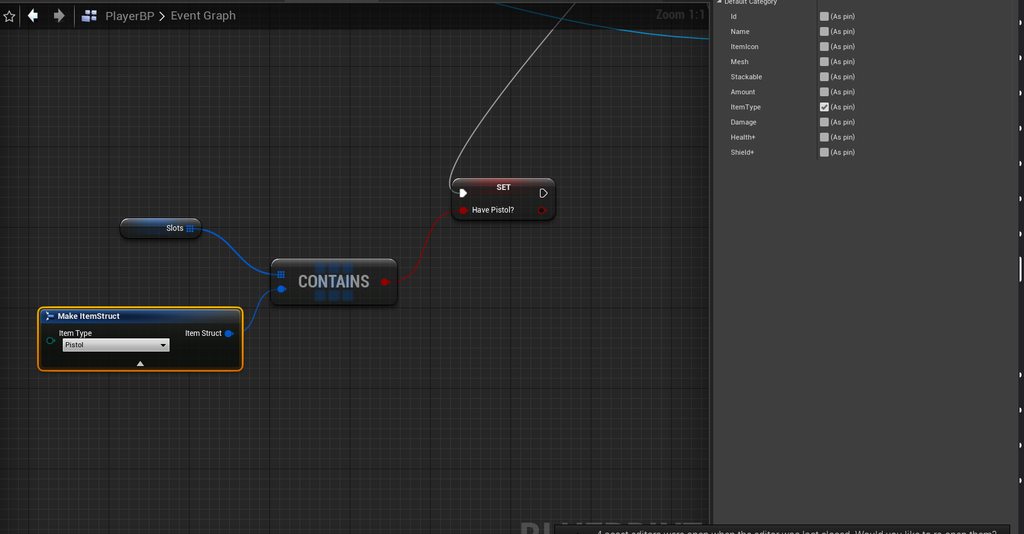
is there a way to get from a array if the item struct contains just one thing from the struct ? , something like this but this is not working : https://imgur.com/a/AnEUf7W
 plush yew
just found out that this node has been returning 0 the whole time, I assume it's because I need to plug something into Nav data or Filter Class?
scenic fox
If I delete my binaries and intermediate folder and reopen my project what will happen
@grim ore once I delete my binaries and my intermediate do I have to open the project
fierce forge
why are you deleting them ?
scenic fox
Because my shading compiling is stuck, and also cause some of my .temp files went corrupt in the output log
fierce forge
ok
cedar jetty
anyway to create a damage system? i already have one put in place but my issue is i want diffrent damages for a specific weapons any idea how to do that?
plush yew
@cedar jetty look up how to make and use an enumerator that's how I do it
cedar jetty
@plush yew looks like i already have a weapon structure as well as a weapon enum
i do have something in weponmaster_bp but i highly doubt its gonna do any damage if i remove this
as i thought removing it just makes them not die
i dont know where the actual damage values would be coming from but im still looking
plush yew
add a damage variable to your gun struct and then change the value of it for each gun thats what I do
scenic fox
/AppData/Local/UnrealEngine/Common/DerivedDataCache/2/5/4/temp.DE63B715479CD02D67796A85B41ED154! Error: 1392 (The file or directory is corrupted and unreadable.) what does this mean anybody? its from when i was packaging ?
cedar jetty
@plush yew so i would just plug that variable into event any damage r?
plush yew
its like after hours for most americans and that's a more technical question so the odds that someone will recognize that problem are pretty low right now. I'd try making a forum post or something
grim ore
@scenic fox did you clear out your cache directory as well like it says ?
scenic fox
No how do i do that?
plush yew
https://cdn.discordapp.com/attachments/225448446956404738/761801103972106240/unknown.png
I still can't find any information on this node
 scenic fox
its saying that the .temp file in the dervied cache in the appdata is corrupted and unreadable @grim ore
grim ore
`/AppData/Local/Unrealengine/
@scenic fox
scenic fox
I may have to reinstall the engine again
grim ore
Delete that folder
grim ore
No it’s the cache folder
scenic fox
im going to close the project
grim ore
You should always do that yes
grim ore
Yep
scenic fox
ok im starting unreal ill tell you what happens
@grim ore it's still saying the same exact thing in the output log
im going to reinstall unreal? is that a good idea?
grim ore
So you deleted the folder completely, the project opened and remade the cache, and still the same error?
If so I guess reinstalling can’t hurt but that’s super weird if so and reinstalling won’t touch the cache
scenic fox
@grim ore what the hell when i delete the folder it doesn't go away in the file explorer
its like creating the folder again and again and again
there's also a folder called UnrealEngineLauncher
grim ore
All that matters is the derived data cache folder but the entire unreal engine one is easier to make sure you get it all.
Make sure the launcher is closed as well.
scenic fox
it is
why is it doing this
?
im going to uninstall the engine and then try deleting it
grim ore
I have no idea it’s your machine.
But it’s probably related to you not being able to package
scenic fox
It doesn't even uninstall. What is going on? i hit uninstall and it just goes back to Launch
Might have to close the launcher
And then try
 radiant sleet
Does anyone have any recources on how animations work in unreal
Like what is an animation in 3D software? Like what is the heirachy?
My understanding is the top armetrue would be a skelatal mesh
and it takes in the armature and mesh
but I have more questions like can I just import and armeture and apply it to mesh already in unreal
What is this subclass called pose?
Can I have multiple of these
What is this animation armeture aciton
Is there a scource any of you have that made this make sense?
Im new so your patients is very well appreciated
 worn granite
#animation seems to be a decent spot to start.
So, blender armatures map to ue4 skeletons. This should be a fairly automatic process. You would export the mesh and armature into the same FBX - if a suitably identical armature has already been imported via another mesh you can select the already-imported skeleton.
radiant sleet
@worn granite Much thanks!
plush yew
does anyone know how i can make a minimap like this? i already got the ui for it and the round map but how would i do the inside
 surreal laurel
@plush yew Do you mean how to get it working with routes, objectives, markers, and all that jazz? Cause that's pretty involved
At the very least you'd want to mask off the map in the circle, and feed your players position and forward vector into the map to get it aligned as you move around
scenic fox
@grim ore do I have to delete /AppData/Roaming/Unreal Engine ?
plush yew
i mean like i want the gta 4 map in the hud cause i have part of the gta 4 map and i want it like how it is in the game
dunno if this is wrong
like this yeh
like this works but then the png is showing ingame
 vernal thicket
Anyone any ideas on how to move players location from current world to new over a period of time?
I've tried a few different things getting some weird af results
also trying to rotate but.. yeah that's interesting
rich furnace
anybody know how I can import C++ files into Unreal Engine? I've been asking this for the past 24 hours but I can't seem to find a solid answer
I can only "create C++" I can't import them
I moved the files to source folder, deleted binaries, intermediaries, .vs, .sln and clicked regenerate but now it wont run
restive yarrow
@rich furnace you should ask in the #cpp section maybe they got an answer ]
@plush yew where did you get niko from?
plush yew
a website
hes the beta version
also how come he seems so dark but in blender hes got better textures
restive yarrow
what website?
plush yew
i forgot
restive yarrow
Lol
plush yew
did u want him
tight prawn
is it possible to build the light with a specific static mesh in scene and then bake the "lighted" material ?
restive yarrow
@plush yew yeah and are there more like him?
plush yew
anyone awake familiar with this node and why I'm getting 0? I assume I need to plug some sort of nav data in there but where do I get that?
tight prawn
https://cdn.discordapp.com/attachments/225448446956404738/761801103972106240/unknown.png
@plush yew you probably need a nav mesh in your map
 regal mulch
Do you need a Navigational Path or just the direct distance?
regal mulch
Then use the Distance Node
plush yew
though it would be nice to know how to get the path as well
regal mulch
I can't answer that atm. I never had to use that node
Not in reach of source code atm so can't look
plush yew
Distance doesn't work for my situation since they could get nodes through walls. I can't do a LOS check because they often won't be able to see any nodes though walls
no problem just thought I'd ask
yeh nash
regal mulch
Yeah then you need the a NavPath and the length of that
So that should be correct
Stupid question though: You made sure your Actor Locations are different, right? :D
plush yew
I should probably avoid this function tbh it's apparently pretty resource intensive and there's acceptable workarounds that will likely take up less resources. Still, it'd be nice to know how to get this to work
haha yeah at the moment I set it back to a flat distance node, the distances are accurate and it's measuring the right actors
well, actually no this will be pretty imprtant for me to learn. In my current scenario I can go without it but in the future I'm gonna need to figure out how to get path lengths and paths through blueprints
regal mulch
ENavigationQueryResult::Type UNavigationSystemV1::GetPathLength(const FVector& PathStart, const FVector& PathEnd, float& OutPathLength, const ANavigationData* NavData, FSharedConstNavQueryFilter QueryFilter) const
{
    SCOPE_CYCLE_COUNTER(STAT_Navigation_QueriesTimeSync);

    if (NavData == NULL)
    {
        NavData = GetDefaultNavDataInstance();
    }

    return NavData != NULL ? NavData->CalcPathLength(PathStart, PathEnd, OutPathLength, QueryFilter) : ENavigationQueryResult::Error;
}
It grabs the NavData so you shouldn't need to supply one.
Unless that Default one is invalid too, but then you should get error as a result on it
Did you check the return value?
plush yew
I'll check it out now, one sec. I've definitely got a navmesh down I can see it when I enable it on the display menu and the pawns navigate appropriately and all that
regal mulch
The RecastNavMesh should be the NavData they will try to grab
plush yew
It's returning "fail"
could it be that I need my start and end points to be on the ground? They're using actor location so they're a capsule'
s half height in the air
plush yew
fails even if it's totally on the ground, damn. What does an internal fail mean?
I think I might see what's happening here
regal mulch
That it fails somewhere in the query
plush yew
It's returning non-zero for two nodes, I think the issue might be that I'm discarding every value if it isn't lower than the newest path. So when it can't path to a node it returns a 0 which then replaces the node it should've been going for
regal mulch
Yeah it can report Fail but still a length if it was a Partial Path
plush yew
I can work around this by ignoring values of zero. I'd ignroe it based on the result but even the partial lengths are failing
regal mulch
But other then that I can't give much more info. It goes very quickly very far down the rabbit hole before you see another "FAIL" being returned
plush yew
Thanks for the help I should be able to work with this
regal mulch
Is it failing if both locations are very close to each other on the same nav poly?
plush yew
all of the locations are pretty spread out, the zombie is just trying to reach the window which is 2m away. There's several other windows that it should be passing over due to this one being the closest
regal mulch
Might want to play around with AgentSizes and NavLinks
But that goes beyond what I ever did with Navigation
Current project has an AI programmer on it, so I don't have to care :D
plush yew
haha that sounds nice. yeah I'm ignoring values of zero now which I thought would fix it but now the zombie (top right) is convinced that this window is the closest. Very bizarre I'll just try to use other nodes for now. I haven't even put in any navlinks yet
regal mulch
I wonder, isn't there a node to get a path instead of just the length?
That should allow you to loop over the path points and debug "print" them via spheres
And then you could just messure the distance yourself + you have a better understanding of what path the engine is trying to force on you
plush yew
good thinking I'll try that now
regal mulch
Saturday morning brain had the first coffee, hehe
plush yew
currently trying to display the path, I've never done it before and I'm trying to find a forum on it but if you happen to know how it'd be great to hear it
plush yew
yeah I can get the sync version and get the length there but I'm still having difficulty with how I'd trace the path with debug objects
found it
"get path points"
haha yeah it's trying to path off the edge. I tried blocking this with a BSP cube but it doesn't solve the problem. I'm not using links or anything I'll look at my navigation data and see why this is happening. I think what's going on is that every single path is around the same length going one way, but it can path as close to that far window as possible by walking backwards. Which means that in terms of path lengths that window is the closest. So my issue is just that I allow incomplete paths to be options, which I need to do since every path is a failure. What I can do instead is redo the "location" value to be something obtainable and then hopefully that won't return a failure and I can use the successful one as the node. Thanks a lot you fully solved my issue I can absolutely move forward on my own from here
yep, all fixed now, thanks again!
surreal laurel
What's the easiest way to get a rotator of an actor in relation to the player character? Specifically, when an actor is sideways in relation to the players location Edit: figured it out
 queen wasp
Having had issues for a while with loading a level and the baked lighting not getting loaded, now when I load that level/map in the editor it does show the baked lighting, but when I stream it in in a separate "persistentmap" with all maps as persistent levels loaded by blueprint, the baked lighting on additional mountains doesn't load (in game)... :S
I have only one light in each level, a dynamic directional light. It is the same in each landscape map, it is not world composition there is just one map at a time (think 1km x 1km RTS maps)
So each level has the same dynamic directional light, no other lights. I read somewhere you could make a separate level with one light and just keep it loaded at all times but.. is that needed to fix my issue? will it? I'd rather like to be able to load each level/map also separately in editor with the light.. hmm..
Basically when you enter the map you load to play on, loaded by blueprint with background level streaming, the extra mountains are dark (not baked-lit), while when loading that one level/map in editor it is fine.
I also have texturestreaming off
Any advice/help would be appreciated 🙂
The MainMenu map has also got the same light, I can open both the map in question with the mountains, and the mainmenu map and view them in persistentmap, no dark mountains, I unload/hide mainmenu, only one light stays, still no dark mountains in editor, the lights have the same ID but it works. But when I play in separate window and stream in the map with the mountains, the mountains are dark .. OK I'll stop ranting about it, if anyone has any ideas cool, if not, I hope to figure it out..
queen wasp
It is, a general idea 🙂 Have done it a few times before.. Not sure if that'd help this but who knows. before the mountains were dark (supposed to be light) when loading the level too, except if it was the default level. Now that seems fixed, but not in game...
scenic fox
try it but like.......im no expert mate
queen wasp
Weirder is that I have other static meshes with the same material that are correct lighted.. the difference is that the mountains are hollow displaced planes, the meshes that are correct are closed
I might as a last resort 🙂 takes time.. but thanks
scenic fox
ok you're welcome
queen wasp
Well, not displaced planes but FBX made in 3dsmax from a while back. The working ones are FBX meshes coming from Blender.
And sort of planes, just a plane with extruded geometry anyways, hollow in that they're not closed..
Another time consuming thing I could try is to export all the mountain pieces, import them in blender, close them, remap UVs, and export and import in the game again... and render lighting again..
scenic fox
unreal has been weird in the 4.25.3 ngl
queen wasp
Yeah, most things have been stable for me, though sometimes there are some quirks, I had to try several times to get my project to 4.25, finally went OK, had to reinstall engine then too. I still can't cook my project f.ex. it crashes.. I have to figure that out too... But I got 1-2 years.. 🙂
I think I'll just note down ideas and go on with the dark mountains, it is only on one map and might be suddenly fixed in a future version of UE, the in-editor same issue was fixed suddenly so..
A fun discovery when I went for dynamic lighting is that I got better performance, wasn't expecting that.. Went from stationary to fully dynamic and got a 20fps performance boost
scenic fox
🆗
 faint maple
trying to create a portal that i can throw on walls, got it looking the way i like it, but i cant figure out how to get rid of the black edges, anyway to?
queen wasp
@south ridge thanks for the tip of using a better font, and outlines/dropshadows, major improvement.
 potent bridge
What am I supposed to put in object types? I'm basically looking for any actor which has the "Level" tag
the goal of this is to detect the players current position and target position, and check if it collides with an object with an object with the Level tag or not.
 restive eagle
drag from object types and type "make array"
then add the objects you want to check
potent bridge
And how would I add those objects?
 void barn
anyone know why my chara keep falling from ground
this is ue4 free asset
medieval dungeon
worthy fox
Anyone here using the Competitive Shooter HUD by Piontek (or what he calls himself)? 😁 I’m having trouble spawning a crosshair in multiplayer; it generates an BP error and I’m using the Get Shooter Hud Manager from Controller node as explained in the docs, but it still doesn’t work.
restive eagle
@potent bridge do a branch for "blocking hit" and only execute on true
worthy fox
@light condor I’ve sent a friend request so we can discuss in DM if that’s okay.
 gilded dove
 fervent sigil
hi guys, I'm reading a document about perlin noise and at the last part they mention:
The reference implementation uses six recursive lookups into the permutation table to generate the initial four hash values. The obvious way to implement this on the GPU is as six texture lookups into a 1D texture, but instead we can precalculate a 256x256-pixel RGBA 2D texture that contains four values in each texel, and use a single 2D lookup.
the six lookups are:
    float A = perm(P.x) + P.y;
    float B =  perm(P.x + 1) + P.y;
    float AA = perm(A) + P.z;            //
    float AB = perm(A + 1) + P.z;         //
    float BA = perm(B) + P.z;            //
    float BB = perm(B + 1) + P.z;        //
Any idea how can that be transformed into a single 2d lookup ? That is, what is the key? if you simply use P.X and P.Y for the coordinates - you're missing the P.z value.
lucid grove
Bloody hell, just noticed another height fog
 jolly rivet
what object type is a box brush?
lucid grove
Can anyone give some basic advice about hiding edges of water surface? Fog did the trick but it also covers play area and i didnt like it. At the moment i have huge shader area that took almost 7 fps and i want just hide those edges with something.
Maybe some smoke? Any advices?
worthy fox
Mountains
lucid grove
Gonna try it now. Thank you. Any others?
plush yew
My project crash at startup at 95% due to acess violation at 0xFFFFF...
What could cause the crash?
light thunder
Does anyone have a good HLOD generation settings for a map like this?
plush yew
What does this mean?
civic charm
Hello Guys,
I Am Having Isssue With FMOD. I Package My Project Then I Found That Sound Is Not Working That Issue Is Only From FMOD Can Anyone Help Me To Fix This Issue. That Package For Android Please Help Me
 drifting shale
Does UE5 have any changes in its API? Will it be hard to migrate from UE4 to UE5?
I'm new so I don't know if I should wait for UE5 to start learning or if I should start with UE4 itself
please ping me guys
 misty owl
Just start.
If you keep looking for excuses not to start, you'll always find one.
Always. Just start. Versions change. You'll learn and adapt.
drifting shale
yeah thats true but i also want to try out other things.. will there be any breaking changes?
 autumn grail
Hello , how to change socket of a child actor
misty owl
Probably.
autumn grail
i want to get my sword in the back of the character
fervent sigil
hi guys, I'm reading a document about perlin noise and at the last part they mention:
The reference implementation uses six recursive lookups into the permutation table to generate the initial four hash values. The obvious way to implement this on the GPU is as six texture lookups into a 1D texture, but instead we can precalculate a 256x256-pixel RGBA 2D texture that contains four values in each texel, and use a single 2D lookup.
the six lookups are:
    float A = perm(P.x) + P.y;
    float B =  perm(P.x + 1) + P.y;
    float AA = perm(A) + P.z;            //
    float AB = perm(A + 1) + P.z;         //
    float BA = perm(B) + P.z;            //
    float BB = perm(B + 1) + P.z;        //
Any idea how can that be transformed into a single 2d lookup ? That is, what is the key? if you simply use P.X and P.Y for the coordinates - you're missing the P.z value.
 left arrow
Can someone please tell me what node this guy is makeing at 2:19 https://www.youtube.com/watch?v=UIycCZl4lYE&list=WL&index=15&t=57s

Previous Videos:
Hide Texture Repetition: https://www.youtube.com/watch?v=mP8eHwVEA0o
Auto Material: https://www.youtube.com/watch?v=mP8eHwVEA0o
Download the free final landscape auto material:
https://gumroad.com/unrealsensei#gubEb
The secret to creating realistic landscape...
This one
 somber crown
Is there a way to run a script before a packaged build is made? to make my level selection screen I use a DataTable which has multiple level names and then want to add those to the List of Maps to be included in Project Settings automatically.
fervent sigil
@left arrow It's a constant node. You can hold key '1' and left click the mouse button to create it
left arrow
@fervent sigil thank you!
autumn grail
someone know how to change the socket used in the event graph?
scenic fox
guys my pc is lagging when im packaging my project
and um unreal keeps crashing
so is that cause my pc is lagging?
autumn grail
found attach component to component node
scenic fox
can anyone answer me?
civic charm
@scenic fox
is any error or somthing?
something?
@scenic fox https://www.youtube.com/watch?v=leBOiBArV9k

https://www.softwareacademy.co.uk/ This tutorial teaches you how to finish your game and save it as an executable file. .
Sponsor: http://www.softwareacademy.co.uk/
this will help you
scenic fox
no it crashed cause of some query thing
im not sure
hold on
my pc is lagging a lot when i use unreal wtf
it doesn't do this normally
 wanton lotus
@scenic fox what has changed recently? Maybe a plugin was updated and that is causing the problems?
 zinc shore
How can I change an actor’s owner to be an actor from a streamed level so it will unload when that level unloads
 vale bone
Hi, I've started getting an error when launching in Standalone: "... cannot be saved as the package is locked because you are in play on PC mode". It applies to any file I modify. The play window is definitely not open. I've tried restarting my pc but problem persists. I can fix it by running in PIE but that's just a workaround. Any thoughts?
potent bridge
Question, is it possible to ignore an integer in a value? So 1.5 becomes .5?
 balmy basin
maybe just use floats
potent bridge
that wouldn't do much for me.
I want to make a health bar like Kingdom Hearts, I'm doing that by trying to ignore the integer, the integer just defines how many bars of health instead.
that works perfectly, thanks @plush yew
 hearty walrus
how long does this usually take?
 thick herald
About 2 banana's and a brass monkey.
hearty walrus
thanks
thick herald
How are we meant to know what you are rig you are using and all that fun stuff, so my answer stands.
 wispy raven
i'd like to keep the camera rotation lag
but if i enable "use pawn rotation" this happens
 lone ridge
Heya, I'm trying to use light shafts, but they disappear at all angles apart from when you're looking directly into them. Yes, I've added ExponentialHeightFog and enabled Volumetric Fog.
 vital jay
hello, I always get this error message when I want to delete an map:
World /Game/Maps/City_Map.City_Map is in use.
Running the editor with '-NoLoadStartupPackages' may help if the object is loaded at startup.
External referencers of World /Game/Maps/City_Map.City_Map:
GCObjectReferencer /Engine/Transient.GCObjectReferencer_0 (root) (2)
0) [[native reference]]
1) [[native reference]]
Does someone know how to fix. The argument tip doesnt work
civic charm
I Am Having Issue With FMOD. I Package My Project Then I Found That Sound Is Not Working That Issue Is Only From FMOD Can Anyone Help Me To Fix This Issue. That Package For Android Please Help Me
 maiden kindle
How the hell did UE4 stay running with the same PID, same crashed state, and same damn file locks, after a hard windows reboot?
I shutdown specifically because I couldn't terminate this crashed UE4 instance, and it's still there, locking all the files which were open... tf?
 fresh eagle
Lol thats weird
thick herald
looks to the left and wonders what all these different channels might be for? Hmmm.
 woeful arrow
Not sure if this is the right place for this (Animation channel seems more about animation creation) but does anyone have a source for unarmed (specifically unarmed) prone crawling animations? Not necessarily looking for free, I just can't find any at all, strangely. Even placeholder ones would be fine for now.
cosmic cove
o.0 @thick herald
 proven mauve
Hi! Trying to cap frame-rate
All I can find is dead links and some weird stuff about smoothed frame rate.
Any suggestions?
I can set FixedFramerate, but thats not really that helpful since then it can't go bellow, right?
zinc shore
How can I set a window to be borderless or bordered at runtime
vital jay
Does someone know how to fix assertion failed: world or World /Game/Maps/City_Map.City_Map is in use.
 fresh bay
Do you guys have a guide to a good landscape material? I can do a regular one but it looks pretty lame and i want better results but most of the tutorials are "Do this" or "I did it like this" without explaining why and what are some alternatives
zinc shore
how can i spawn or move actors to a streamed level at runtime
 south ridge
@queen wasp can you show a screenshot btw? I'm just curious
 iron hinge
Can anyone help explain the process to creating a delegate? I need the same delegate for oncomponentbeginoverlap but with another INT as an argument. I've never made delegates, only used it for overlap functions.
Basically an int is passed by reference in the function that the overlap delegate calls
queen wasp
@south ridge I can, in a bit 🙂 "rendering", that is, I've been troubled with some level streaming issues with baked lighting..
south ridge
With C++, you can make custom new nodes
vale bone
So when I run a standalone version of my multiplayer game and shut it down, I can no longer save as the editor thinks it's still running. This is in my task manager; is something not shutting down properly?
 vital cosmos
why is my nav mesh so broken? I'm using dynamic nav mesh generation with nav invokers
civic charm
zinc shore
@vale bone play your game in PIE and then close it, that usually fixes it after playing standalone
vale bone
permanently? I've already tried rebooting twice
zinc shore
I think this is a bug with UE it’s happened to me to
After closing standalone just open it again in pie and close to make UE think it’s closed for now
vale bone
do you have to do that every time?
 lethal bison
@vital cosmos check collsion debug which shows all colliders verify if any misplacwd collider is messing it up
zinc shore
I haven’t had it happen every time but it sometimes happens if it’s running as a separate process
vale bone
@zinc shore I just tried that and issue still persists. If I open task manager I can see a window still open, I have to close that to be able to save again. This is a really bad issue
zinc shore
It’s happened to me since UE 2.25
So when you quit your game is it still running in task manager
vale bone
yeah
zinc shore
Are you closing it through game or title bar or through editor
vale bone
the windows exit button
zinc shore
If you use any code to close it do you still get the same results
vale bone
yeah
maiden kindle
Why does UE4 KEEP BECOMING UNKILLABLE ffs
It's repeatedly freezing, and then surviving anything short of a hard motherboard reset
zinc shore
Hmm I’m not sure what could be caused great this I’ve had this happen sun times but usually after playing in pie it fixes it for me although I’ve had problems in the past with standalone working weirdly
maiden kindle
Anomaly if you try to end process does it work?
zinc shore
For UE editor or standalone
maiden kindle
Either
zinc shore
Usually it kills it but sometimes when it freezes I have to restart to kill it
maiden kindle
Right now UE4 editor for me won't let me kill it in any way (taskkill, taskmgr, wmic, pskill) and it's surviving windows restarts
zinc shore
I’ve had that same issue recently to it might be a bug
maiden kindle
I didn't even know it was possible for an entire process to survive a reboot
zinc shore
Same I have only had this happen on windows but not yet on Linux so maybe a windows issue but idk
maiden kindle
Apparently, this issue is related to a driver Cough NVIDIA not letting go of a process
I say nvidia it's actually equally possible that it's my mouse driver 🤔
 barren flume
Yeah it goes up more and more I make changes to a material
 mental apex
In BlendSpace both Key and Apply are grayed out,I am new to unreal and I would appreciate some help
barren flume
How do I stop this? Whenever I look at a light, everything will get dark besides the light https://gyazo.com/d123ea7eb6d20224854947ac007dfdf2
 exotic thicket
Not sure but have you turned off eye adaptation in post process settings?
left arrow
Can someone help me please. Why does that happen when I try to load my materials with a heatmap?
civic charm
LogFMOD: Error: Failed to load plugin 'C:\Users\ankit\OneDrive\Documents\FMOD Studio\Car1', sounds may not play
I Am Having Issue With FMOD. I Package My Project Then I Found That Sound Is Not Working That Issue Is Only From FMOD Can Anyone Help Me To Fix This Issue. That Package For Android Please Help Me
civic charm
what you need to
 rotund yew
but when i package my game, instead of oppening the level it just restarts teh game
civic charm
can you show blueprint work
civic charm
this not enough to tell you answer
rotund yew
What else can i sned?
rotund yew
Yes
it restarts my game
where as when i play the game in editor it switched the level perfectly fine
civic charm
wait where you put the custom event event
civic charm
it that sequence is closing on level load?
rotund yew
what?
 lime gull
Anyone know how to make sprites not look so bright
Wanna make them look like that in game
civic charm
@rotund yew sorry i didn't get it properly you will find another guy who will help you
better than me
 warm hornet
Browsing various Unreal github repos came across https://github.com/nxrighthere/UnrealCLR
As an experienced Unity C# dev this caught my attention. Has anyone reading this used this plugin-framework? Will it allow me to leverage any of my C# code or skillsets directly in UE4? Is there a performance penalty?
Thanks for any replies!

GitHub
Unreal Engine 4 .NET 5 integration. Contribute to nxrighthere/UnrealCLR development by creating an account on GitHub.
plush yew
I would avoid unless maybeit gets something like an epic megagrant
great developer and from their own benchmarks it looks good. But you will be better off picking up C++ in the long run
sacred sun
@lime gull add a post process volume set it to unbound and play around with the saturation and other color values.
lime gull
Alright sounds good
 tardy depot
does anyone know how to create perlin noise onto spheres
 viscid plinth
thoughts on surface texture?
its the sun
define broken
right is the real sun's surface, left is mine made with substance
I couldn
couldn't get the shapes i wanted from a reference of pictures of the sun as a whole, so I am doing layers and hopefully get more control
fierce forge
is there a command like the render distance in minecraft ?
 worldly stump
anyone has a guide to separate dedi server files with client files?
I don't want client to have database login info and some server side stuff
 weak harness
Does anyone launch on another machine? For example my VR rig is where I test and I have to go and pull from our scm to test. UE4 has the tool to test on other devices, but I'm curious if anyone has got it working for Windows?
 dawn bloom
uh my wall has no collision boxes, yet objects still don't go past it
not sure how that is happening
fierce forge
can somebody help me ?
rich furnace
when should you use anim montage vs FSM ?
seems like it is easier to just use anim montage sometimes
rather than setting up FSM
cedar jetty
im having a werid issue where when i add a SpiderAI to my game they are smaller than the zombies obviously but for whatever reason because of that size diffrence the speed is way faster than the zombies and i have no idea what speed to set the value too
 hard quarry
Hey guys, I have a little problem.
I have an actor which spawns another Child Actor Component inside the construction script.
Now in the world outline I want to select the ChildActorComponent, but everytime I select it it gives me the parent actor.
Is there a way to select the ChildActor in the editor and not get the parent?
 solid gazelle
Any reason you're using a ChildActorComponent and not just a separate Actor?
or the created actor as a member variable?
just curious why it needs to be a ChildActorComponent
hard quarry
@solid gazelle The Problem is I cannot spawn another actor inside an actor
UE does not allow that
solid gazelle
Does the Component have to be an Actor?
Ah construction script, I see.
Does it have to be an Actor?
hard quarry
Maybe I can explain it better with a picture, 1 sec
dawn bloom



not sure what I'm doing wrong
the chair goes through my platform here
I tried adding a new box collider to the platform, but it doesn't seem to do anything
I put the collider way above where the ground should be to test if its doing anything at all, but the chair goes ignores it as it falls to the ground
solid gazelle
Right on, I think I understand what you're trying to do. Depending on what your exact use case is, you might be better off using a Component rather than an Actor
hard quarry
@solid gazelle So the goal is, that the wire gets automatically created if I select the object inside another actor.
In the front you can see, that everything works.
But the problem is , that this object is part of another object (the thing in the back), there I cannot select this object because it gives me the parent, but the object needs to implement a specific interface which returns the object of the clamps so the wire can get created.
solid gazelle
My question is - Can the wire be a Component or must it be an Actor and attached to the parent via a ChildActorComponent
hard quarry
If there is a Component which can implement an interface or some functions, I could use a component as well.
Idk, can a normal Scene implement something like an interface?
Just checked, a scene cannot hold things like meshes, so I cannot use a scene
solid gazelle
Yeah I'm not entirely sure the best way to approach what you're trying to do given I don't know all the use cases, but I do know that ChildActorComponents do come with some caveats like what you're encountering in in the editor viewport, so seeing if a Component would handle it instead as they're generally easier to work with.
Right on,