#ue4-general
1 messages · Page 811 of 1
 haughty moth
for example in roblox studio you can't export a model whit mora than 10.000 tris and the optimization is the worst. In this engine you cant do a GTA V
The engine in some cases reallly affects
Is my opinion
 open gorge
3
 dreamy sleet
can someone help me i cant launch my game to test it
haughty moth
3
oh. I only have learning about UE4 1 day
can someone help me i cant launch my game to test it
@dreamy sleet whats the problem
haughty moth
Oh really strange
dreamy sleet
what do i do
 barren flume
I was wondering how I would use an alpha and fresnel texture in my material?
 kindred tusk
i accidentily clicked the close button on the viewport for one of my blueprints and i dont know how to get it back
haughty moth
control + z ?
kindred tusk
i tired that
 shy totem
I always drag tabs that open in a new window back to the main one. Can I prevent this from happening?
haughty moth
and the blueprint it isn't in the world outliner ?
 somber quail
Window > Viewport
haughty moth
look for the blueprint in the world outliner
somber quail
@kindred tusk
kindred tusk
Ahhh thank you very much
 modern sinew
Can someone help me with the various bugs my Ziplines are having? For reference, I followed Ryan Laley's tutorial series
My three problems that I noted are:
- Preplaced Ziplines teleport players to the top of the Zipline on starting the game
- Placing a zipline (a function I added) shoves the player into the floor
- The player cannot drop from the zipline, even though the Drop event is triggering
 radiant jasper
Does anyone know how to make it so when looping a media player, theres no gap?
cuz when I loop it, it pauses at the end for half a second
can someone help me please
barren flume
This is so annoying
it happens randomly after importing animations
I gotta start saving right after I finish
radiant jasper
get more ram
radiant jasper
get a better graphics card
radiant jasper
what version
barren flume
I've been importing 20 things at once and it was fine
dreamy sleet
is there a way to let others edit your game
barren flume
but now all of a sudden it just crashes
@dreamy sleet source control
You need to choose a provider too
perforce is good
dreamy sleet
ok
radiant jasper
does anyone know how to loop a media player
 halcyon flame
does anyone know what I will need to do to address this error with a plug-in's variables? I'm converting from 4.22 to 4.25 (had the same error with an attempted 4.24 conversion)
radiant jasper
lol
 nocturne bane
just my personal opinon (But its right)
radiant jasper
can someone help me with looping a media player
it pauses at the end for half a second before playing again
open gorge
@halcyon flame are you using the 4.25 version of the plugin?
they could have fixed it
otherwise you need to go in and fix it yourself
halcyon flame
I have a new engine version and installed the plugin via the Epic Games Launcher
intalled plugin to new engine version. EGS will install the correct version of the plugin, correct?
@open gorge
open gorge
yeah it should
worse comes to worse you just DL it from the github and install it manually
halcyon flame
you mean dL the engine or the plugin?
open gorge
the plugin
just throw that in your project/plugins folder
compile your project
should work
halcyon flame
should the AdvancedSessionsPlugin-master folder be in Plugins or should it be the inset folder AdvancedSessions or AdvancedSteamSessions?
 elder viper
Hi all, I imported a model into UE4 using datasmith export from max, and now when I send it to Substance Painter, it is not tranfering textures. The live link seems to be not working. I am getting this error --
[Plugin - dcc-live-link] No defined association with the exported '$mesh_$textureSet_BaseColor(.$udim)' map
[Plugin - dcc-live-link] No defined association with the exported '$mesh_$textureSet_Normal(.$udim)' map
[Plugin - dcc-live-link] No defined association with the exported '$mesh_$textureSet_OcclusionRoughnessMetallic(.$udim)' map
open gorge
@halcyon flame just AdvancedSessions and AdvancedSteamSessions should be in the plugin folder
as they are technically separate plugins
halcyon flame
ok. it seems to have worked after I left just the -master folder
compiled in VS is now 96% open via the editor
open gorge
🤞
kindred tusk
how do i change the gun modle for the first person shooter template. i know it has to be a obj file but when i parent it to the arms and then compile it. it undos all of the ajustments i have made to get it to fit in the hands of the fps Charecter
open gorge
It may be hard-coded in cpp
kindred tusk
what does cpp standfor
dreamy sleet
when i go on the perforce website do i get any of them
open gorge
c++
it's interchangable
but C Plus Plus
@dreamy sleet you're attempting to use perforce?
dreamy sleet
yes
open gorge
Any particular reason you want to use Perforce?
kindred tusk
oh so i would need to change that part of the code
open gorge
are you working with a team or just want source control?
@kindred tusk yes
or at least check the constructor
since that's likely where it's setup
dreamy sleet
team
kindred tusk
how do i see the constructor i havent done anything with c++ during this game so far
open gorge
you can setup your own perforce server, but that can be costly
if you're not working in a large team you can just use a private git
with LFS
@kindred tusk find the class in the code, should be like AShooterCharacter, the constructor should be something like AShooterCharacter::AShotterCharacter
 ornate forge
You can use the free tier of Amazon Web Services for your own Perforce server
It's not difficult to set up, Perforce provides instructions for this exact scenario
 thin tendon
Using auto LOD for a skeletal mesh. Is there a way I can adjust how quickly it transitions from LOD 0 to LOD 1 etc without doing the whole thing manually? I just want to tweak it so I can get higher LODs at a shorter distance
 hardy cedar
FYI Be careful when deleting used variables for gameplay tags. Just created an infinite crash loop on a behavior tree task. Only way to fix it was to recreate the variable by name and type so I could open up the BTT and delete the erroneous node by hand.
 midnight cloak
hi all im new here in this discord
i have i probleme with my anim Blueprint
seems like he .... not... start?
 spare sierra
Hey all! I've got some questions about code licensing
In some of my game code I've taken existing Unreal Engine code and modified it in overridden virtual functions (i.e. I take the copy the original function source and replace portions as needed). How should I list that in my source files and what is the licensing on code like that?
ornate forge
The licensing is proprietary, I don't think you need to list that in any special way
Provided your game is running on Unreal Engine
spare sierra
It is, but I'm sharing this portion of the source code via an open source license
ornate forge
You can put // Copyright Epic Games, Inc. All Rights Reserved. at the top of the files
spare sierra
Okay, seems good!
ornate forge
Just don't use any GPL license, iirc they are specifically disallowed
 rough knoll
? im trying to make the beretta actor disappear when i switch to the ump
i define isUMP and its set correctly in the variable settings to the ump45 model
i have no idea why its saying accessed none
 brisk urchin
What might be causing the engine to get stuck at 98% when building lighting??
I even made a empty map and once it gets quickly to 98% it just get stuck there.
 fast berry
im trying to turn on toolbox on the side, in 25.5.3, I did window>toolbar and clicked it but it didnt work, i also tried Window>Editor Modes and nothing shows up
how can i do it
halcyon flame
just converted a project from 4.22 to 4.25 and my level has what seems to be a post-process filter on it during PIE... does anyone know what this might be?
thin tendon
shaders compiling probably
halcyon flame
what do I need to do to just compile all the shaders? I'm building lighting atm
but I noticed an unrelated exhaust material wasn't shading properly, do I need to open these individually and recompile?
thin tendon
I usually just use the build all and wait it out
 elder crest
So I found this guy on YouTube. Hes called beefalo bart gaming. Hes shows how to do all the paragon rigging and stuff but it seems his discord and social media has been turned off o.o
halcyon flame
@thin tendon how do you build all? is it going to recompile all materials?
 marsh chasm
how do i make fortnite terrain just like unreal fest 2020
halcyon flame
that sounds good
thin tendon
just hit the build button at the top instead of selecting the drop down for lighting etc
halcyon flame
ok, I just did that and this weird post-process effect is still here
actually it seems the engine might have froze
is it maybe just loading the lighting build for the first time (on this version)?
 native wharf
I'm currently trying to build the engine, but having a problem where I'm continuously getting this error from ".\Setup.bat"
Failed to download 'http://cdn.unrealengine.com/dependencies/UnrealEngine-7441010-2fae5eda84844084ac602dd9bc66bcbe/33500fd8a597fff43ada9ca1859308b07a1917ca': The specified path, file name, or both are too long. The fully qualified file name must be less than 260 characters, and the directory name must be less than 248 characters. (PathTooLongException)
@halcyon flame Once you press it. It will rebuild everything. It will look frozen from time to time. This is called hanging. Unreal will sometimes do this if doing something that requires a ton of the computers resources. Just wait it out. The post process is to let you know its doing something important and to wait.
halcyon flame
@thin tendon thanks, I guess I'll let it hang.
does this look like a standard PP shader to inform you that the engine is working? it was photorealistic in the prior version (and it looked like this before I built the lighting)
thin tendon
to me that looks like a stylized cell shader like a cartoon shader
halcyon flame
indeed. I don't have any real post-process assets in the project and the level never looked like this in the past, including multiple version changes
will you basically wait out the engine 'hanging' as long as it doesn't say (Not Responding) in the task manager?
 plush yew
i usually look at the output log to see if a task is running. the engine never hangs usually in my dev cases unless im doing landscape stuff
halcyon flame
this one's going on ten minutes, and I don't have the output log open at all...
I think I'm going to close this out and try to start again from the backup. I don't understand how this is so difficulty
plush yew
look at the output log in the unreal game project folder or the unreal engine folder if the engine doesn't let you see it in the ui Engine\Saved\Logs\ or ProjectName\Saved\Logs\ might want to review Unreal Engine 4 Documentation > Engine Features > Directory Structure for more details on it.
halcyon flame
what can you use to open those documents that will allow them to update?
plush yew
how do you open a .log file? you would use notepad 🗒️
halcyon flame
I also see the task CrashReportClientEditor is open in the task manager although no crash window has come up
this is I think the fourth or fifth hard crash for 4.25 that won't even kill with the task manager, I need to restart. (log shows that the activity ended at 01:59 (whatever timezone that is) when I first noticed the hangup
anyone else have almost crippling consistency issues w/ 4.25?
plush yew
if the editor is stalling or has crashed, checking the logs will provide insight. my 4.25.3 works great.
halcyon flame
brb
fast berry
im trying to turn on toolbox on the side, in 25.5.3, I did window>toolbar and clicked it but it didnt work, i also tried Window>Editor Modes and nothing shows up
how can i do it
 quick shell
is thier a donut tutorial for ue?
plush yew
@quick shell you can make a donut in a FOSS program like blender and import it into UE as a static mesh. Blender Beginner Tutorial - Part 1 by Blender Guru has a tutorial on a torus (donut); you can also easily make a torus as a native object in that blender program.
quick shell
no i meant like a begineer tutorial to know where everything is
plush yew
yep you can goto the unreal youtube channelor look at the unreal academy - unreal engine online learning courses for resources
also check Unreal Engine 4 Documentation > Get Started with UE4 in documentation
 gilded ridge
i just got udemys how to make your first two games and its pretty good so far, plus i think its still on sale
marsh chasm
how do i fix the landscape textures
 sleek solar
What is wrong with it?
marsh chasm
that
quick shell
https://www.youtube.com/watch?v=hi7A6D0TDfQ can this be in a game?

Tune in for an extensive breakdown on Wednesday June 12th at 7PM CET: https://www.youtube.com/watch?v=ooBaESJCH0o
Try out Megascans, Bridge and Mixer for Free: http://bit.ly/2nvvGD5
For a detailed breakdown check out our Medium article: https://medium.com/quixel-ab/democratiz...
or is it too much
 dense hatch
what are you asking?
like are the textures too complex/large for a game? or like are you allowed to release a game that's a copy of counter strike
open gorge
the answer to that is a hazy no
rough knoll
how do i line trace out of a socket?
 opal totem
I want to implement a mechanic like wrapping a cord around a mesh like in star wars with the at-ats. Any ideas where to start? I'm wondering if splines would be a good idea
rough knoll
i have this here
i dont know how to specify a socket name though
for reference im trying to line trace from the iron sights when the player is adsing
i have a socket named "fire" that i want it to line trace out of instead of the center of the screen
thin tendon
@rough knoll If you are line tracing out of a socket. The sockets location is the starting point. And then you will need to figure out the forward vector and distance calculations to find the end point
that picture is starting the trace at 0,0,0 not the location of the socket
 unreal palm
Hi, does anyone know where GEngineIni got its value?
rough knoll
@thin tendon i understand. i planned on hooking up the start at the location of the socket
but the socket is on the gun and i need to know how to get a socket by name
 deep stump
Question, I'm trying to make a First person survival type game but I'm stuck at the animations. I'm currently using ALS as a placeholder but I'm not entirely sure how FPP Arms work or how their replicated because I'm looking for; idel(with/without gun), walking, shooting, aiming etc. But i'm not 100% where to look. Any suggestions?
I'm open to any assets on ue4 as well if anyone has any recommendations
open gorge
you shouldn't replicate the FPP arms themselves, nor the weapon they're holding
you replicate the firing though
deep stump
Would I just retarget that onto a skeleton mesh then?
I was kind of looking at something like this? https://www.unrealengine.com/marketplace/en-US/product/fps-animated-arms

AAA FPS Arms 4-pack: Rigged & animated , 4K textures & LODs
(So you / other players can see the body)
thin tendon
@rough knoll if the socket is a child of the gun. Just get a reference to the gun object then drag out from that and get the socket. This will be easier if it has a unique name
deep stump
I'm just confused on how I would connect the arms to a body
open gorge
you don't
you have a first person mesh and a third person mesh
you also have 2 weapons
you set the first weapon so that only the owner can see
and you set the third person weapon so the owner can't see it
deep stump
Ah, That makes sense.
I'll look around. Thank you man
That makes a much more clear lol
So I would need third person animations on top of the arms?
and replicate the third person animations only?
deep stump
Geesh, That makes a lot more sense. Thank you man
 north stream
what does the Multiply function do in the Material Editor ?
and what does it mean to multiply a base color by a texture (for instance) ?
north stream
oh ok
thin tendon
@north stream if you want a little less colour you could multiply the colour. Then multiply that by the texture. The first multiply value would control the strength of the tint
I also think a lerp might work the same
north stream
doesnt Lerp blend between 2 colors using a texture ?
i mean blend between 2 inputs
nevermind i got it
thank you guys
 outer cosmos
simple scene built and launched, nothing happens just freeze and cpu running high, please help.
north stream
looks like you nvidia started updating
outer cosmos
no, i just wanted to take screenshot but accidently Nvidia started.
 idle hearth
How to capture a video for passes in unreal
deep stump
@open gorge sorry to bug you again, but would I need complete separate animations for third person?
plush yew
@outer cosmos that is weird, is it a big world.. or just started? cause i did it before on a i54460 with a 1050ti. now on a i710th gen rtx 2060
open gorge
@deep stump yup
outer cosmos
@plush yew no its just small boxes in the screenshot, even if i make a box and launch it will freeze
plush yew
isn't you're pc overheating? what are the temp?
deep stump
@open gorge So I can get this; https://unrealengine.com/marketplace/en-US/product/fps-animated-arms/questions and merge it maybe with ALS v3?
AAA FPS Arms 4-pack: Rigged & animated , 4K textures & LODs
outer cosmos
@plush yew i could make 30 models with light in unreal and launch it within seconds. now i dont know what is the problem
plush yew
Unreal Engine Forums
General discussion about the game industry and the Unreal Engine community.
@outer cosmos
try those options
outer cosmos
@plush yew thanks, let me try and see
plush yew
🙂
open gorge
mid game give me a few @deep stump
deep stump
No worries.
outer cosmos
@plush yew checked the core temp, they look normal, what do you think
open gorge
@deep stump ok, so you should just use the shooter game animations, at least until you feel you need something better
they're free which is a huge plus
they also are based off of the UE4 skeleton
deep stump
The epic game shooter game?
The problem I'm having though is not really the animations but the interactive between them. Since the player won't always be holding a gun. I need animations for everything even without a gun.
open gorge
ah in that case you may need those
but you can always make sure you have the shooting stuff in order before buying it
it's easy to swap anims once you have a system in place
deep stump
Well I have the First person Multiplayer template 3.0, I was thinking on using that as a the base. Do you think that might be easy enough to switch out?
plush yew
@outer cosmos do you have enough storage for the engine? it is weird that it is taking so much, re-install unreal os te last option i guess.
open gorge
oh that BP one?
not a fan of that personally
but if you don't know C++, it's decent
deep stump
No, I like c++ better lol
rough knoll
@thin tendon ?
deep stump
Yeah, if you don’t mind, I might give it a shot
rough knoll
wdym get a reference to the gun object and drag it out to get the socket
deep stump
Lol take your time
rough knoll
is there a node that you can get sockets with?
by name*
this is as far as i can get
and idk how to get the return value to the vector
deep stump
Sweet. Thanks man
rough knoll
any idea abt my issue riff
rough knoll
i cannot find anything online abt it
all i can find is making it go from cameras
and i really dont feel the need of going through the hassle of setting up a really small camera right at the iron sights tip
open gorge
use the get socket function
open gorge
rough knoll
you have to get the skeletal mesh to get the socket from the skeletal mesh, no?
oh nvm i think i get what you're saying
open gorge
if you have the skeletal mesh, then you can get the socket location using the node I screenshotted
outer cosmos
@plush yew only yesterday i reinstalled os and got all the software and there is still 160gb left in my ssd.
 frank oar
is it possible to use C++ when you originally selected Blueprint ?
and is it possible to use blueprint when you originally used C++
or will those projects be locked into which ever yo chose (not counting nativization).
open gorge
all C++ projects can use BP's
you often do
BP only projects can only use BP, but you can easily convert to a C++ project by creating a new C++ class
@rough knoll socket is probably backwards
rough knoll
nah i flipped it and it didnt work
i just ended up changing 15000 to -15000
while you're here whats up with this
outer cosmos
@plush yew here is another one i did, temperature looks normal
rough knoll
why is it not able to change the visibility to invisible
and why is it accessing none
when it is shown what to access right there in the last ss
frank oar
thank you @open gorge I am trying to learn C++ So I was considering making a C++ game and using BP when ever I struggle to make something with code.
That sound like an ok idea or silly ?
open gorge
it's a good idea
I often use BP's to prototype C++ code
you can always generate your BP code to C++
but be warned it's a clusterfuck
plush yew
@frank oar you can always add CPP to blueprint projects and compile in vs 2019 just fine. CPP can be used for optimization features like optimizing math functions and for loops, things like that. Once you get more advanced you can start porting over your Blueprints to CPP and compile them as needed.
rough knoll
one more.. where are the textures?
open gorge
you likely need to just fix them
they probably just imported improperly
and you're looking for material, not texture
frank oar
thank you @open gorge and @plush yew !
rough knoll
nvm i can just remove the skeletal mesh and it looks fine lmao
what about my visibility stuff
nvm i cant just remove the skeletal mesh because then the firing doesnt work lmao
still though, i dunno whats going on with the visibility
open gorge
i'd check your materials and make sure they actually are compiling correctly and you have no errors
rough knoll
talking about visibility or mats
because i got rid of the problem by just making it hidden in game and showing the properly colored static mesh only
for the missing material ump
i just want to know why it wont change the visibility to not visible and its accessing none
open gorge
hidden in game doesn't help lol
rough knoll
the missing mats is no longer my problem
my only problem now is the visibility of the mesh being shown when it should not
i turned on hidden in game to hide the skeletal mesh
i have it properly definedd
its appearing like this
open gorge
you may need to restart editor
open gorge
it's attached to your character yeah?
rough knoll
yeah its attached to a socket
the mesh is set to invisible whenever the game starts though so thats why i dont understand whats up
 midnight flame
Hello Everyone I am trying to make an fps but one of my hands wont attach to the under barrel of the gun
How do I fix this?
 hot pine
@wheat burrow accept friend request please, I am interested in your offer in #looking-for-talent
rough knoll
@open gorge any idea lmao
oh haha
i fixed it
sometimes just fucking with stuff works
i had to change the ump reference to static mesh
plush yew
Hi all.
I am working on 1st game - a VR flight game.
I am having issues in accessing my actors in a smart way - specifically now I wan to signal posts on the level to send info to the aircraft so I can show it on screen.
Can I define my Aircraft actor so it can be simply called from any BP? where should I do this?
(I am working on a single player but want to keep things multiplayer compatible when possible.
This is where I left it before my summer holiday.
https://www.youtube.com/watch?v=tVkMFEXufW0&

Hi guys, my physic body is colliding with visibility channel, anyway to disable that?
 proud narwhal
I have a skylight, atmosphericfog, and a directional light but the inside of my building is still pitch black, is there a global light I can turn on anywhere?
plush yew
@proud narwhal have u ramp up the intensity for skylight?
proud narwhal
here is an example of it on 50
plush yew
is there a window where the light can go thru?
i mean, clearly not since it's pitch black
proud narwhal
well there is a window behind the current view that’s why the immediate area is super bright, that light would pass through into the adjacent corridor in real life
there is also a few doors in that area with windows that light would also pass through
hot pine
Build lighting
proud narwhal
rebuilding it again now, its a very complex scene so takes a while to do
Can I exclude objects from the light building? the scene I am working on is a datasmith import so there are, for example, pipes that cannot be seen by the player, it would make sense that they were ignored by the light building process
 glad loom
Hello, is there a way to make a setting default for all objects of that type? I want all "texture" types to have their filter to "nearest" when the default is "default ( from texture group ) "
plush yew
@outer cosmos weird man, i should re-install unreal. make sure to back-up you're game.
 supple totem
@glad loom I think you need to edit engine code for that. But you can search for all textures on content browser, highlight all, asset actions, edit matrix
You could also look into editor scripting, maybe you can code something that loops through all textures and does what you want.
glad loom
Alright, thank you, I'll look into that!
 restive yarrow
Need some tips on HLOD, if anyones willing to help, let me know , thanks in advance
 austere scroll
Im really starting to question wether i do like game dev or not , i like the idea of it and i have fun and feel accomplished when doing it .
But im not motivated or always excited to do it
Is this normal
austere scroll
Ok I'll take notice of that
 gentle crypt
what happened to the DOF post process? I cant seem to have as much control over it as it used to be. where can i control the amount of blur?
 tacit cypress
proud narwhal
tacit cypress
proud narwhal
Is there any way to make every object in my scene collideable with the player in one go?
 hushed dune
Is it normal that most of the documentation on unreal its made out of blueprint?
Trying to figure out all pieces i have to put together
But its almost all bp impelemntation
hot pine
If fortnite ever gets a space update, perhaps ue4 will get one too
 ocean island
Hi all, does anyone have any experience with sequence recorder? I have a first person character that is being recorded, which has a spring arm with a camera as its child. For some reason the sequence recorder is not recording the up and down rotation of the camera, only the left and right is. It seems the springarm is not meant to go up and down, yet when I press play it works, but with the recorder it isnt? Is there a way to record the camera without the springarm?
the springarm is necessary due to camera lag and camera rotation lag to smoothen it out
 timber minnow
Does anyone knows why i have this problem in play mode ? ( some landscape are not at their respective place )
i use world compo
plush yew
Hello guys, I have a lot shaders on my landscape when I see it ion Wireframe mode
what I can do to optimize it?
 dusky inlet
free assets day ❤️ should be online in 1-2 hours I think no?
 west mirage
what is the name of this target mesh
dusky inlet
every first Tuesday of the month ~5 new free asset packs are released on the marketplace @plush yew
plush yew
link?
dusky inlet
Visit the Marketplace for free and paid assets for your next project.
 dusky inlet
nah you'll manage to find them, you have 1 month lol
dusky inlet
yes I cant
dusky inlet
agreed
thats why I dont do it
(the news channel will ping it too so you'll be fine)
plush yew
oke then
Hello guys, I have a lot shaders on my landscape when I see it ion Wireframe mode
what I can do to optimize it?
deep stump
You're Welcome
 thorn vector

Unreal Engine
Get ready for the long haul with a new batch of free tools and assets for menu creation, animation support, and world building!
 untold swallow
Hey I wanted to package my game for android multi, it took 10+ hours and still it didn't package, what shall I do?
Can anyone let me know what shall I do ????
plush yew
#packaging @untold swallow
 river mesa
Where is the best place to ask about crashes in the packaged builds?
plush yew
again in #packaging
river mesa
oki thanks
plush yew
you are welcome 🙂
untold swallow
Okay thanks
 plain pagoda
ran into a small problem
why are these arrows rotated?😅
the scale arrows seem fine
but not the move arrows
 tight prawn
how can i remove this shining effect from my material ?
or in better words, what causes this shining effect in material ?
I discovered its related to roughness in the material
however I have it set to 1
so it should be matte, but it is not reflected on my models ?
 rocky radish
why are these arrows rotated?😅
@plain pagoda because thats the transform relative to the world, and the scale arrows are relative to the object, to fix it just press the cube (or planet, it depends on what mode you're on) icon and that will be fixed
plain pagoda
@plain pagoda because thats the transform relative to the world, and the scale arrows are relative to the object, to fix it just press the cube (or planet, it depends on what mode you're on) icon and that will be fixed
@rocky radish Thanks, I got it :D
or in better words, what causes this shining effect in material ?
@tight prawn Specular or Metal or Roughness
tight prawn
Specular + Metal = 0
Roughness = 1
this is how i have it setup in my material
i've set them all to 1 and this is the result
when the camera is far, this shining effect happens
rocky radish
@rocky radish Thanks, I got it :D
@plain pagoda np
tight prawn
nvm that's an error from my part😅
 forest holly
Does anyone else have issues with slow performance/responsiveness using the launcher to manage engine installs, plugins, and projects? I've always dealt with pretty significant delays simply waiting for a click or scroll to register, which might not seem like much looking at it on a case by case basis, but it adds up to a lot of wasted time. I have a few peers I know have the same issue, but we've just been shrugging it off for the longest time. If anyone had a similar issue and managed to solve it, I'd love to hear what your fix was.
plush yew
@forest holly This happens with unattended installs / launcher installs. It can indeed add up over time. The solution is simply to install unreal from source and use source built versions automated with batch scripts (I posted some examples in #engine-source )
 frosty minnow
I need help, when I import skeleton to unreal engine 4, I get incorrect results.
 meager bough
i couldnt find anything explicit in the documentation about this, so: what can insights record? i mean what kind of build configurations? can i record performance data from a shipping build? or what should i use?
 sweet relic
@frosty minnow try setting 'retargeting mode' to 'skeleton'
frosty minnow
@sweet relic can you give a few examples, as you mean .
 rare heart
where can I ask a question on an issue I am having?
sweet relic
@frosty minnow I think the option is in the skeletal mesh settings
@frosty minnow Actually it is in the skeletal retargeting settings. look here for how to enable it:
Examples of how to set up and use Retargeted Animations for multiple characters.
Basically, open the skeleton. At the top of the tree there is an "Options" dropdown, turn on 'Show Retargeting Options'
then set the "Translation Retargeting" mode to skeleton
not sure if it will fix what your issue. But I have seen a similar problem with our skelmeshes and that seemed to fix it for us
plush yew
@hearty walrus could be a missing texture or improper material code or an error in the material code. you would have to check the editor log for any warning or error . the file is in ProjectName\Saved\Logs\
 hearty walrus
MY EYES
plain pagoda
Is Maya hard to learn?
 gusty dune
Are Megascans assets heavy on performance compared to other average market assets?
 small pewter
How to switch version for your project properly please ? I mean I have a project that was created in 4.24 and I want to switch it to 4.25 properly and without only doing a copy 🙂
dense hatch
I'm pretty sure you just change the engine version in your project and point it to an updated engine
you can do it from right clicking your project and using a different engine ver
rocky radish
Are Megascans assets heavy on performance compared to other average market assets?
@gusty dune depends on the asset
hot pine
What are subsystems used for?
small pewter
@dense hatch When I right click on the project it doesn't show me that I can open it with another version of the engine
dense hatch
@small pewter
small pewter
Oh in the project folder ^^ I thought it was in the Epic Games Unreal Projects
dense hatch
Oh from the epic games launcher you can right click show in folder then right click the .uproject file for that menu :)
 jaunty cedar
How does auto instancing work?
Do I have to enable it or will it go automatically?
My level is built from a lot of identical static meshes and it would be a life saver if they were automatically converted to instanced.
marsh chasm
how do i texture terrain with my own textures
plush yew
@marsh chasm check Unreal Engine 4 Documentation > Engine Features > Landscape Outdoor Terrain > Landscape Quick Start Guide > 5. Painting Landscape Materials in documentation
 wispy breach
Hello, do the physics when manipulating terrain get updated immediately via tools seen in this video https://www.youtube.com/watch?v=gqrVEn-P-Kg ? If so, what's the performance of updating the collision data each frame?
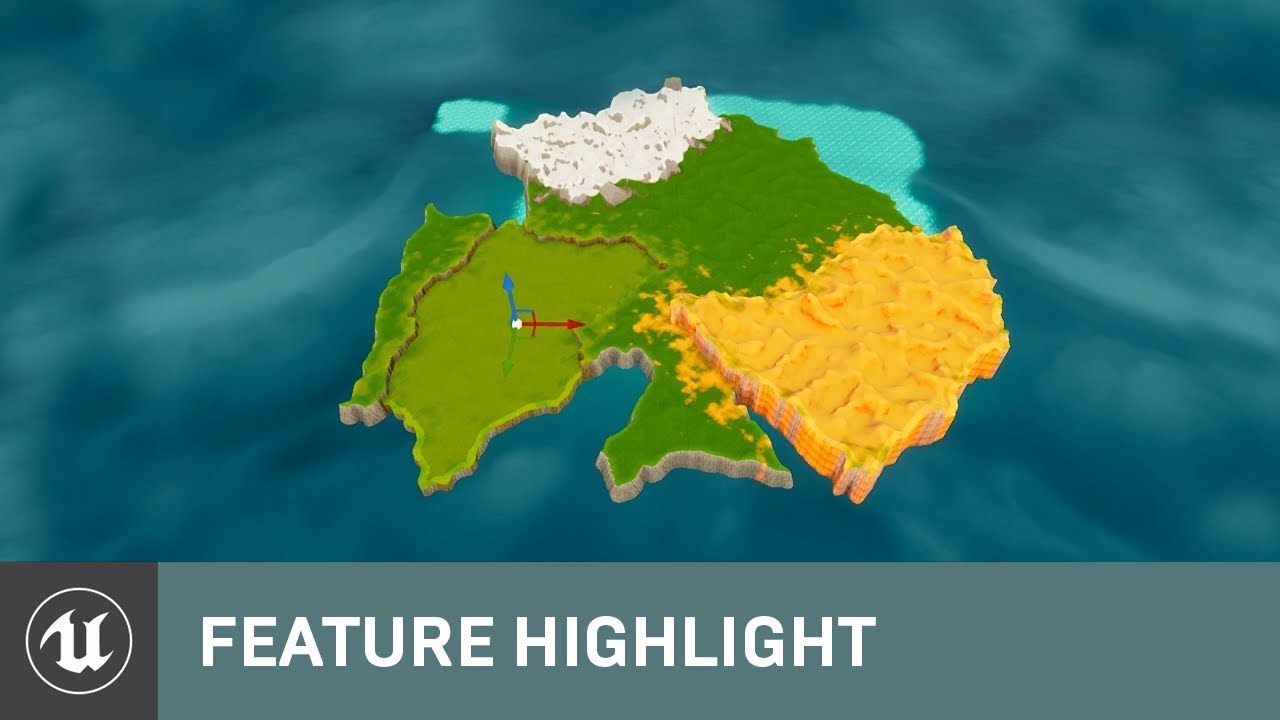
Create and edit large terrains directly within the Unreal Editor with the new ability to add multiple height maps and paint layers to a landscape, and to edit them independently of each other. Plus, use Blueprint to create unique custom brushes, such as one that automatically ...
 woeful wadi
quick shell
woeful wadi
quick shell
why are they darker?
 scarlet oar
Not quite sure where to ask this, but if I have a number of soft references and I am cooking a build, should I be placing my assets that are referenced in this way in a folder like /Game/MyGame/AlwaysCook/... blah blah?
The reason I ask is because I have to add those folders to always be included in the cook. Does anyone have any suggestions?
plush yew
@scarlet oar i do not do this. i only add directores not to cook via Project Settings -> Packaging -> Directories to never cook
usually all your references will need to be added to the game anyway. if you want to exclude files from being packaged because you want to trim the size of the compressed cooked package, then this makes sense to use Directories never to cook.
scarlet oar
I see! @plush yew does that mean I should put my assets that shouldn't be cooked in separate directories like that too? I like the inversion
plush yew
You do not have to explictly name them, no
what i do is this - i have them as imports from marketplace, right? like stuff i get from other sources
i dont want to include all that big heavy stuff in my game. so i simply exclude it.
you just explicitly state each full path in the exclusion array settings
rather than having a NeverCook directory
because that would take a long time to organize your stuff in that directory like that
scarlet oar
And stuff you take say from the marketplace you would place in a folder you know is not excluded?
plush yew
let unreal do the exclusion test for you
no
i do not do that
i do not have always cook or never cook directories in my game
scarlet oar
I meant only if you want it in game, not the whole thing
plush yew
by setting directories to never cook you are ensuring it will not be cooked. so no i do not set explicit directories like that via path name.
scarlet oar
oh ok I think I got it, appreciate the explanation
marsh chasm
how do i add water to the rivers
plush yew
@marsh chasm usually done via adding a plane with a water material on it. UE4 - Tutorial - Cartoon Water Shader! by Dean Ashford on youtube might have the water material you are looking for. I remember this being particularly good for Water. he also has another one called UE4 - Tutorial - Water Planes! [UPDATE IN DESCRIPTION]
 thorn scarab
@distant totem many people asked me about it, some even bidding cash lol 🙂 I'll leave it for one of my ips 😉
@distant totem but if you feel adventurous, you can try figure out. the hint is, this is a result of equation
 shell mountain
Some help with shadows, trying to get them to bounce for a scene. The light is set a stationary and now all the shadows are square blobs.
quick shell
is thier a default foliage
 prisma wolf
has anyone tried using trueSky? Is it possible to get an alpha of the clouds out? thanks
thorn scarab
@prisma wolf what do you mean?
@prisma wolf i have their licenses just not sure what you mean by "alpha of the clouds out"
prisma wolf
@thorn scarab sorry, is it possible to render out EXRs with alpha channel of the clouds
thorn scarab
i don't think it's related to the clouds itself, you can write a blueprint for it
barren flume
Is there a way I could create a black hole type thing? It can suck ragdolls inside or something (pull ragdoll to the black hole actor idk)
thorn scarab
@barren flume yes, i did something like that recently
prisma wolf
@thorn scarab I'm quite new to all of this, what do you mean
brisk urchin
Quick question on packaging a project. On Game Default map I would set it to the main menu correct?? Also, in my project I only have one map that will be player but I have 2 other maps I used for grayboxing and testing meshes. Will those also be packaged??
 alpine laurel
how do you completely rename a c++ project in ue 4.25. all the tutorials i found are from 2018-19 and fail
thorn scarab
@prisma wolf if you just in the beginning, you could do in two passes.
prisma wolf
CloudVisibilityRT texture/material has the look of a potential alpha, is there a way to output that?
thorn scarab
CloudVisibilityRT texture/material has the look of a potential alpha, is there a way to output that?
@prisma wolf yes you can try this way
 zinc shore
Why doesn’t on actor begin over lap trigger if the player spawns inside the volume
halcyon flame
4.25.3 seems to freeze very consistently and can't even be killed through a script or the task manager. what in the world might be causing this?
@thin tendon the app according to task mgr has a dynamic cpu usage but memory usage is clearly stuck at the same amount. this is not the engine hanging isn't it? will a fresh install likely fix this? I installed this version a week ago or so and it never really worked for me
zinc shore
@halcyon flame I’ve had this same issue recently and restarting the computer and doing driver updates seemed to fix it for me also set Ue4 in settings to have best performance enabled
zinc shore
I had a graphics driver update recently
 proud verge
Question: while playing in PIE, spawned AI actors lower FPS pretty fast, as little as 100 spawned AI actors can cause FPS to drop from 60fps to to 20FPS; Question: is this fps drop only happening during PIE play? or this FPS drop is also going to happen In-game after packaging the game? Since FPS is always faster while playing a packaged game than PIE, maybe it will, since it's logicall, but not as heavy as PIE so it wont be such a great factor and FPS and we should use it without worry
halcyon flame
@proud verge my inclination is that you should see if there's a way to stop abrupt PIE performance drops when they first crop up.
proud verge
I know, but my questions is, since FPS drops faster in PIE, is it safe to spawn AI actors, even if this drops happen, since after, packaging they wont matter, because packaged games, run faster?
or are they also going to have a heavy impact after packaging
halcyon flame
ultimately if they only have an impact in PIE then it shouldn't be a problem
zinc shore
I’m using a laptop and when it’s not plugged in UE performance drops for me cause this
rocky radish
do pillars not work as foliage?
@quick shell you need to enable it as a foliage brush
halcyon flame
if your dev cycle supports commonly building and you aren't seeing a hint of these issues with the built version
 distant totem
@thorn scarab so what's the most recent bid? haha jk, and no worries, one day when I have more time I'll have a crack at it
quick shell
wheres that
thorn scarab
@distant totem that would be not too modest to say it out loud 🙂 You definitely will. Just keep in mind it's algebraical task, not just UE thing
 weary basalt
Ive recently updated to 4.25.3
halcyon flame
do you know what kind of driver issue would cause this kind of mini nightmare?
 halcyon flame
same issue here @weary basalt
proud verge
UE 4.25 is horrible..... lights are terrible
halcyon flame
@zinc shore
weary basalt
Dingoman, do you have dual monitors?
weary basalt
Do you have a fix? lol
halcyon flame
no, I was hoping it was a driver issue. I've seen this in multiple engine versions
weary basalt
Ive had it in 4.22.1 but not this severe.
halcyon flame
same
weary basalt
Its almost unusable now.
halcyon flame
yes
proud verge
yes, i had a project with perfect lights, but i updated from UE 4.24 to 4.25 and all my lights were ruined, super bright and not realistic, so i droped the idea of updating to UE4.25
Maybe DV ruined lights by working on the new light system they want to implement for UE5
and i´m not alone, lights in UE4.25 are not working for other devs
weary basalt
Im making a bug report with this video.
proud verge
i was so glad i had backup from my UE4.24 project
weary basalt
Its actually pretty painful.
I thought it might have been tied to GSync, but disabling that hasnt done anything
halcyon flame
you can add mine if you want
 grim ore
@halcyon flame disable menu window animations in editor settings if they are on
halcyon flame
trying to open editor preferences from the main window just caused a crash
this is a fresh 4.25.3 install from the past week. is there any reason that uninstalling and reinstalling would help this? having a ton of issues w/ crashes left right and center
grim ore
99% of the time that is due to high dpi issues and menu animations being on
Try repair instead of reinstalling
weary basalt
Oh jesus @grim ore
grim ore
Eep
grim ore
It's been like that for a while now I would guess there is one or 20 lol
Menu animations should default to off now so maybe a regression in a minor release
weary basalt
Ive had it forever, but id say my settings have always been carried over so its been retained.
grim ore
Yeah that was my thought
weary basalt
Bug report submitted.
I doubt it will get fixed considering there is a workaround.
lol
rocky radish
yes, i had a project with perfect lights, but i updated from UE 4.24 to 4.25 and all my lights were ruined, super bright and not realistic, so i droped the idea of updating to UE4.25
@proud verge isn't it because of the new auto exposure in 4.25?
 vestal copper
im having a rather annoying issue which is probably due to me being completely inexperienced with the program but i cant find any help anywhere
 eternal rain
What kind of issue?
vestal copper
trying to work on the map terrain using world composition, i saved and exited the program and came back to it, tried to resume editing the terrain, but i cant get the levels/landscapes to appear in the world. i clicked "load" on all of them and they wont even appear in the world comp panel
eternal rain
ah ok. I haven't had a chance to study that part yet; hopefully someone here has
 sinful osprey
Anyone know what file in UE4 saves all the Content Browser settings like favorites, folder colors, etc? It's not saving for me and I'm thinking it might be checked in to P4 and needs to be checked out.
vestal copper
i cant find any help on the web or anywhere else on discord and ive just been trying to get the landscape to show up in the world all night, i was meant to have this all dont by tonight lol
 dire fjord
I'm having issues with a plugin. Our company purchase allright animation rig 2.0 to use on a project. It installs as an engine plugin, and we always move these into the project directory so that they can be maintained in the repo so that everyone working on it can use the plugin. I've done this with other programs and there is no issue. Allright Animation rig just causes the project to crash on open as soon as it is put in the plugin directory. Has anyone encountered anything like this before? I have removed it from the engine itself, so there is only 1 copy (and the engine copy wasn't even enabled for the project before this)
The error itself seems rather generic UE4Editor_CoreUObject!UStruct::Serialize() [d:\build\++ue4\sync\engine\source\runtime\coreuobject\private\uobject\class.cpp:1304] UE4Editor_CoreUObject!UClass::Serialize() [d:\build\++ue4\sync\engine\source\runtime\coreuobject\private\uobject\class.cpp:3548] UE4Editor_Engine!UBlueprintGeneratedClass::Serialize() [d:\build\++ue4\sync\engine\source\runtime\engine\private\blueprintgeneratedclass.cpp:1629]
quick shell
what allows me to paint a rust path on this concrete world
brisk urchin
If I have an item that follows the player when it is picked up, is there a way to have that item ignore collision from walls? The problem i'm having is that the player uses a teleporter while holding that item. When the player teleports that item tries to fly to the player's new location.
 jaunty forum
proud verge
jaunty forum
proud verge
@proud verge isn't it because of the new auto exposure in 4.25?
@rocky radish I did try to make it work, because i wanted to use UE4.25, but it was impossible, lights were so awefull in UE4.25 and i spent so many time trying to make them work that i just decided to stay in UE4.24
I think they ruined lights because they are trying to implement lumen, and i belive its not working, since i read that there has been some complains during dev in UE5 testings, and i think they even had to drop the use of it, for now at least
And i wanted to use UE4.25 because Niagara is already finished
"production ready"
barren flume
Darn I forgot again how to get the viewport controls to show up like perspective and the scale
I don't know what I pressed
these things
 quiet token
L I T
 pliant rose
i wish to learn your opinions regarding following statement related to my work: Prime Nature of the Project CyberSpace is to push an idea that CyberSpace is a dimension that exists alongside the Reality and Astral. what do you think about this statement?
 exotic thicket
Ugh the fucking UE crash reporter crashed and left a zombie UE4 process in the background, which was then preventing me from saving my level 🤦
 latent hemlock
Hey speaking of Niagara
Does anyone know ho to use a BW heightmap to control particle position in a grid?
I've only been able to use a scenecapture2d which embeds height in the alpha so far
Just trying to use an RT with a BW image, should be simple but super stuck
 kindred orbit
I can't find any vids explaining all the blueprints and what they do
Anyone know of any?
latent hemlock
yeah
@kindred orbit https://www.youtube.com/channel/UCOVfF7PfLbRdVEm0hONTrNQ

YouTube
This channel is dedicated to exploring Unreal Engine 4 and the Blueprint programming language that it uses. You can think of it as a companion to the API doc...
dude goes over almost everything
kindred orbit
However I'm guessing this isn't the best way to learn
 tender pecan
"best way" is very broad, and not everyone learns at the same pace, nor does the same techniques work well with everyone, but generally speaking learning and doing examples to reinforce and repetition helps. anything where you are creating and doing or following along from basic building blocks to achieve a measurable end goal is progress and could be considered educational. if formal is not an option of course.
 carmine tree
big question, does unreal engine support lua
latent hemlock
@kindred orbit personally, I just go through tutorials and learn from the process (which is what I'm doing now acutally)
kindred orbit
Same
Learn quite a bit from it
RN I just can't seem to wrap my head around the logics of line tracer
latent hemlock
Same, but for extracting color and translating to position in niagara lol
plush yew
does anyone know how to do this
 regal hollow
Specular shouldn't be adjusted dude
but you can multiply it with a constant
@plush yew
pliant rose
Best way is time.. After 1.5 years of aimlessly copy pasting, brain gained understanding of some concepts of programming, and now Im able to animate the lightball within BP xD
pliant rose
yes until your brain will auto forge and strengthern the connections for you and give you the result
kindred orbit
I just never knew it was helpful
pliant rose
i mean i am glad for the time - result im getting. Obviously not a professional but able to get some shi t done
it is..
ive noticed it when I at some point when I was on holiday in ukraine for 6th month, at some point chinese words that I could not remember when I were learning them, suddently occured on my mind. Im pretty sure its periodic, like 6month after or smth like that.. same with this.. I guess im dumb a little, or retrded, but happy lol
 prisma plank
How to paint with quixel straight line normal? Ctrl not working
 worldly rose
Is there a special name for the main viewport in the editor, like Level Viewport or something like that, to separate it from all the other viewports in the Blueprint edtior and so on.
tight prawn
I need to have a couple of models intersecting, but this choppy glitch is unwanted, is there a way to fix it ?
 restive eagle
i dont know if you can do anything inside the material, but you could try moving one of the objects by couple of pixels to front/back
tight prawn
I need them intersecting at the same position, not hack it and move them a pixel apart from each other
 ember cliff
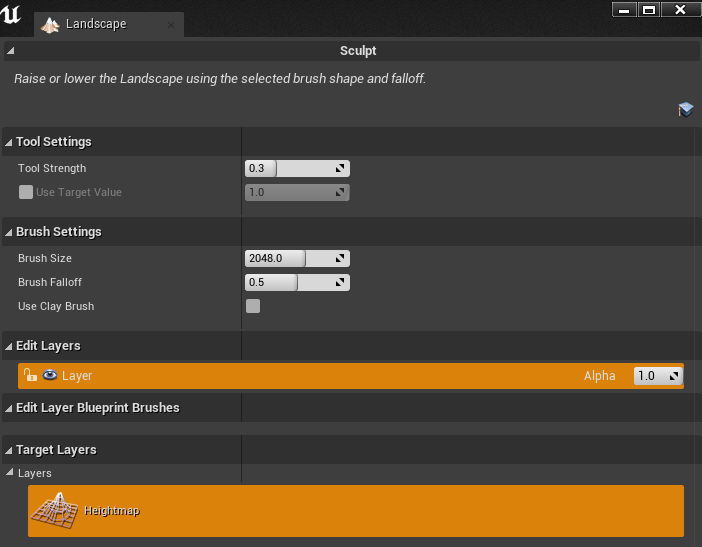
Uh, anyone else having problems with the landscape editing tools only giving you the sculpt mode? (Latest release)
 proud narwhal
I am looking at turbosquid for some models for a VR project we are working on, is there anything I need to keep in mind when picking out the ones we like? other than being in .fbx or the unreal model format?
 stuck linden
rocky radish
stuck linden
rocky radish
I need them intersecting at the same position, not hack it and move them a pixel apart from each other
@tight prawn then it will always happen, i really doubt you can fix that unless you move it a few pixels back
 near iris
hello guys I'm new in Unreal Engine, I have 2 questions, can we develop via Unreal Engine with low/medium pc? And can we combine C++ and python in the same project using Unreal Engine?
kindred orbit
@near iris what do you mean by low/medium PC? What's your specs?
near iris
i5 3350p and 8gb ram
@kindred orbit
and I have them from 2014-2015 if it can help in somehow
kindred orbit
Should be able to run
near iris
alright
kindred orbit
What gpu?
kindred orbit
Yup that'll do
kindred orbit
You probably could
near iris
and if both in same project = big thing
kindred orbit
I guess
rough knoll
whats the difference?
rocky radish
whats the difference?
@rough knoll on clicked is when you pressed and released the button
on pressed is while you're pressing the button
rough knoll
ok
rough knoll
im casting tho
what is this about
nvm
just had to compile thirdpersoncharacter lmao
 late loom
guys how do i prevent cloth from stretching
near iris
so guys yk if we can use C++ and python in same Unreal Engine project?
restive yarrow
Can anyone give me tips on HLOD, I have 2 large cities and about 4 towns and im not sure how much radius I need to have, or how many buildings i need to have merged already
 whole quarry
@tight prawn that "glitch" is called Z fighting and is not really a bug but the result of 2 images being in the same space. In the real world you would trigger an apocalyptic paradox, but computers are nicer and solve it this way. The easiest solution is to have them differ in size by 1 pixel (like 1 is 1 pixel thicker or thinner then the other) or by moving 1 just 1 pixel forward or backward. Another solution would be using world position for UV or making some masking system.
rough knoll
sorry if how i say this is not easy to understand
I have a gate that i made to only allow something to run once
all i want to run once is the spawning of my UMP model whenever it is unlocked
everything runs smoothly except i cannot set the visibility to true whenever it is unlocked
so i have to swap weapons back and forth to get it to show up
how do i make it show up the first time
 glad basin
Could you guys recommend some other good channels for me?
 trim trail
hey, I just saw yesterday that blender addons for exporting meshes and rigs were released on github few weeks ago, which is wonderful news to me, but got 2 questions 1. seeing github access requires linking ue4 account to github, is blender addon some official script (as in, maintained by epics)? 2. will it become eventually a live link for seamless world building/modifying? From what I quickly googled, there's no stable live link, there was one person who did a prototype long time ago
rough knoll
i know how i could fix my problem but i really do not feel like doing it
i'd have to make a new actor that sets the weapon as unlocked
and i would have to replace basically all of my casts
 thick gazelle
protip: if you add ActionMappings in DefaultInput.ini manually you need to write "One" "Two" etc. instead of "1" "2" etc. you won't find this problem thought because the project settings dialog happily displays everything correctly
// DefaultInput.ini
+ActionMappings=(ActionName="Test",bShift=False,bCtrl=False,bAlt=False,bCmd=False,Key=5) // does not work
+ActionMappings=(ActionName="Test",bShift=False,bCtrl=False,bAlt=False,bCmd=False,Key=Five) // works
How can I make my HLOD's LOD level 1 clusters also be in LOD level 2 and 3?
exotic thicket
If an actor gets destroyed, do you have to unbind any events you've bound manually? Or do they get cleaned up with the destroyed actor automatically? Using BP's in case that makes any difference
thick gazelle
@exotic thicket no need to unbind events use weak pointers
exotic thicket
okay, thanks :)
 jolly jungle
my input axis doesnt work, i have left and right keys give a value of -1 and 1 respectively but it just always outputs 0
 full thunder
nobody can help you
exotic thicket
ah yes the best way is to ping 10 000 people who I'm sure have nothing better to do
full thunder
sorry i have to go walk my fish, can't help
rocky radish
my input axis doesnt work, i have left and right keys give a value of -1 and 1 respectively but it just always outputs 0
@jolly jungle can you show a screenshot?
jolly jungle
did this just as a test and it doesnt say test even when i press the buttons
rocky radish
are you sure you're playing with this exact character class you created?
jolly jungle
yes
positive
it has a cylinder and camera and both of those show up when playing
also other things i have done in this character work
just not inputs
rocky radish
and are you sure you're pressing A and D keys?
rocky radish
hmm... 🤔
jolly jungle
im gonna try a normal action mapping and see if that works
oh im an actual idiot
i am the stupidest idiot on the entire planet
i hadnt been clicking for mouse control
now everything looks great
sorry for wasting ur time
rocky radish
lol its fine
plush yew
anyone know how to fix this? s (64-bit)): ERROR: Unable to compile source files i deleted my intermediate folder but it still gives the errors and i have checked my files in vs and there is no errors
nvm found the error
 odd lava
can I simulate physics on a mesh component of an actor without propagating its movement to the actor itself? I want physics to change the relative location of the mesh to the actor
 viscid coral
hi i'm new to unreal. any advice?
 cedar wave
Get started
 quaint fox
can i force a recompile through the project file somehow
 fierce rampart
I wish there was a better solution for decals on skinned characters.
 dire moth
Spawn Decal Attached?
fierce rampart
That's the thing I'm looking for the better solution for. Spawning a decal attached to a bone don't work good.
dire moth
I guess I could see it not working well if you have a very large decal. For smaller decals such as bullet holes or small blood splats it seems to work just fine
I haven't done larger decals on skeleton meshes yet so can't help ya there
fierce rampart
Right now I've got a system that's based on Tom Looman's system which works a bit better but I'm still searching for a better solution.
untold swallow
Hey anyone Up?
I was trying to package a game for android and I got some warnings , shall I show what are they?
It was something like the data cache is slow
Can anyone help?
 sand bobcat
Does anybody know why Umodel doesn't extract sound files? But can export models.
dire moth
on a character? or a skeleton mesh etc?
character like a player, AI, etc -> Launch Character
skeleton mesh -> simulate physics, add force
plush yew
Hello, how does lighting work in unreal?
LIGHTNING NEEDS TO REBUILD (... items )
But when i add lights, the number is going up.. XD
 misty owl
@plush yew https://www.youtube.com/watch?v=FsjqVIyr0O4

In this video we show you how you can use all of the different lighting & environmental components to light your scene from scratch. We also cover some of the best practices when implementing your environment to make sure your scene is both visually and performance pleasing.
...
In Unreal you only have to rebuild the lighting once. After that, you'll just have to rebuild the lighting, then rebuild the lighting. Once the lighting has been rebuilt, you can rebuild the lighting, finish up a few other things, like rebuilding the lighting. Then you should be ready. To start rebuilding the lighting.
There is only rebuilding the lighting. There is only compiling the shaders. We compile. We rebuild.
midnight flame
@dire moth Here is the problem. Im making a tank game and I want it to self destruct by pressing a button but I have no Idea how to do that
But my mesh isnt technicaly a character
dire moth
well if you want it to actually destruct, you can do that by doing Destroy Actor
you could also do other stuff prior to that; depends on how you have the tank mesh set up
if it's simulating physics, you can add Force from underneath the tank and have it flip over etc, then destroy actor later
midnight flame
When i try to simulate physics it says that I need to link something as the character
This blueprint (self) is not a PrimitiveComponent, therefore ' Target ' must have a connection.
Thats what is says
Actualy Wait now it works thanks
Well I have one more problem
Even tho simulate physics works add force does not
odd lava
is it possible to have a client/server setup where the server sends the levels to the client without requiring them to get a client update for minor level changes?
 thick knoll
Hey guys! I have a masking issue -- I have this unwanted color burn affect when blending 2 materials with a lerp. On first glance I feel like this setup should be fine as it is taking a BW input for alpha. What is it I am doing wrong?
 next badger
@thick knoll lerp can be negative too, use saturate on your alpha input to clamp it
 compact sail
I have no idea why my control rig looks like this in ue4 to rigify, can anyone hazard a guess?
next badger
UE4 and Blender #animation
thick knoll
@next badger thanks for the help worked great 🙂
next badger
@thick knoll lerp is not clamped...it can be -inf..inf+
thick knoll
ah ok awesome thanks!
on a visual level what is going on? In my mind an alpha is white or black, how do I go "over white / black"
next badger
if you lerp some texture above 1 it will bloom in emissive
thick knoll
ahh I see!
next badger
@thick knoll i see no where you alpha comes from
 bitter iris
I watched this video, of multi user editing, https://www.youtube.com/watch?v=MEKACTnXLJ0

On this livestream, we walk through how to get started with Multi-User Editing and explore our cinematic content pipeline. Learn how to connect multiple instances of Unreal Editor together to work collaboratively in a shared editing session, building a single virtual world tog...
how are they doing it over internet does anyone know
lan only for me :/
thick knoll
@next badger ah just for convenience I didn't SS it so it was not too small to read. It's a combination of Normal based + world based gradient to get detailed blending
next badger
@bitter iris it's ue4 feature...and it requires server to be run, also it's slow over internet (relatively slow)
bitter iris
slow if bad internet connection or just slow?
next badger
it designed for LAN, so you guess
 marble hazel
Hey everybody, I am having this problem when I am importing this csv of sound cues. When I import it to be a data table none of the sound names in the csv link to the ones in the table in unreal. It was working yesterday but I added more entries and re imported and now it's not. Does anyone know why that could be?
It's saying that the columns were not found is the error I am getting. It is exactly as it was yesterday but I added more rows with more data today
plush yew
@misty owl i does not work, it still says lightning needs to rebuild, i want to light up a wall.. but i can't light it up, or it will say lightning needs to rebuild
misty owl
You have to rebuild the lighting after you modify the scene.
If you add/move/scale/rotate something
 steady zodiac
Anyone who made a hover vehicle had this issue before?
https://streamable.com/lo6asq
 misty owl
Click the little down-facing arrow next to the Play button at the top of the window
top option should be "Build Lighting Only"
You can make a lot of edits to your scene, and just rebuild once at the end. Just get used to seeing that friendly RED MESSAGE at the top of your window 😄
plush yew
aah okay, thanks for you're help
do you know how to make you're game phone ready? i need to have a jump and move option, but i don't know how to add 😦
i already made a simple logo on evry format. but i need to make it phone ready.
misty owl
I do not, but skimming this video seems to be a good place to start: https://www.youtube.com/watch?v=zfwORDtQDUg

Read the post: http://andauth.co/Unreal7Min | In this video, Adam Sinicki will explain how to create a (very) simple 2D platformer in Unreal for Android. It's not much - but you'll have your own character running around with their own animations, navigating a level you designe...
Especially that last minute where he goes over packaging the game. Should give you a good place to start googling from.
steady zodiac
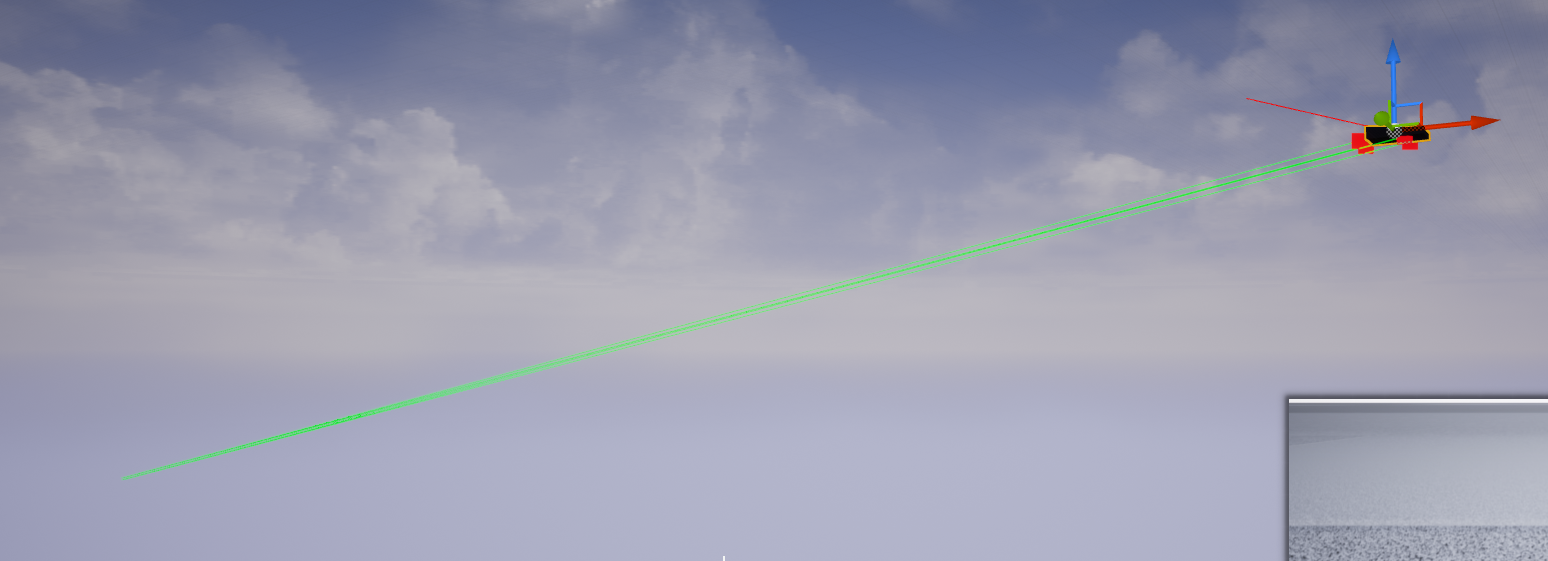
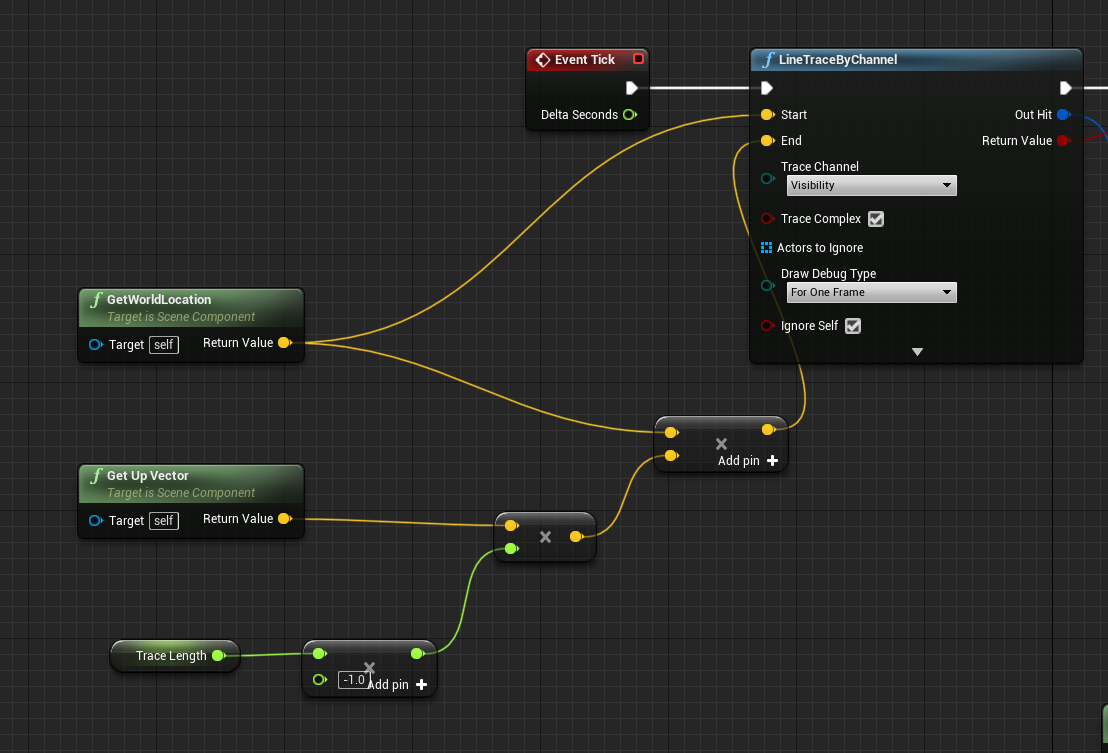
I want the raycast to go down, but the farther I go the more the raycast rotates. I guess it has something to do with local / world space? The mesh is not rotation though
https://i.imgur.com/Ef0PkKK.png


 thick knoll
sigh, how do I get the options on the left hand side back when I click on things...managed to make it disappear >.>
It's weird, details in this material is always blank, but if I go to others the options appear like normal
tight prawn
i'm switching from using Layer Blends in landscape
to direct material usage
how do i substitute this height blend layer in my material ?
 hollow obsidian
This boi needs the basic assistance
Real noob question..
I can apply materials/textures to things by dragging/dropping...
What is the fast way.. of doing that for multiple (if not hundreds) surfaces ?
(also.. am i in the wrong chat ^^; ) .. i dont see a "assistance/help" chat
plush yew
does someone have experience launching a mobile game?
i want to launch my game on my phone for a test run, but i can't figure out how to do it
Hey guys, how does one get the weapon to animate in sync to an animation? EX- R makes the character reload, but the gun is static. I've made the gun animated and the rig animated separately in blender. Watched countless tutorials, but only found ones that show the rig. For what its worth, I am using a "True" first person setup so I'm not sure if that makes animating the rig different
thanks
 keen moss
the decal function in unreal, is there something similar to that possible in max?
plush yew
i got 2 problems..
-
I can't figure out how to launch a mobile game, on my device in developer mode..
-
i can't figure out to save progress, in the same level.. 😦
@plush yew Have you read this yet? https://docs.unrealengine.com/en-US/Platforms/Mobile/index.html
Information for developers creating mobile games.
 shadow violet
is it possible to convert ue3 particles to u4 particles?
plush yew
@plush yew its been 1,5 hours, watched evry video on youtube.. and nvidia won't work, cause i can't make a account..
email verivication won't work, sdk won't work..

Video covers how to set up Unreal Engine for being able to develop and package for mobile, specifically Android.
Unreal Android Quick Start - https://docs.unrealengine.com/en-US/Platforms/Mobile/Android/GettingStarted/index.html
i am watching this right now, i can't figure out the first step already... 😦
You need an NVIDIA account? Hm. I dont have UE4 open now but i swore i saw an option to test for phone
there is, but if i launch it it will crash..
you need to have a program, that unreal can launch you're game on you're phone
idk what to do anymore.. 😦
Hm. Sorry, I don't know. I would keep trying for the verification to get that app, it sounds like its essential to have
i can't get a account from nvidia, it will ask a vericication mail.. but i won't get it
i tried 3 diffrent mails, and tried to forgot password option on a existing account
Check junk/Spam folders maybe
 sonic tinsel
Anyone know why nothing would be showing up here? trying to connect my epic account to github
 lime gull
Is it possible to get a camera actor to follow a spline? All the tutorials I see use the players camera, but Im using a camera I placed in the level
plush yew
thank you, it was there.. hope i can do something now @plush yew
I wish you the best of luck boyos
 willow plank
guys is it bad for performance or any fps if i overlap uv's if needed
what about movable objects?
like a character
then okay thank you
uhum, understood, thanks man!
plush yew
I wish you the best of luck boyos
@plush yew
i finially downloaded the program, but now it is saying errors again.. im fking done..
just wasted all my time, can't even launch my own game i spend weeks on.
Shit man, sorry to hear that. I hope you can figure it out, may have to restart which sucks ass :/ just chose to restart myself as well
take a break and chip away slowly so it doesnt feel like a drag
naah man, i don't want to restart.. this is not my fault or something.. i just can't figure out why it is not working.. but i'm just done with mobile games
i'll make it freaking steam hopefully..
but i still have no option to save progress... 😦
 quick plover
Hi all, I have a character with earrings, in order to animate them, an also other accesories, should I animate them before importing to UE? or there's a way of running a rigid body simulation inside UE? or something for these matters?
I'm thinking of; when the character moves to the right, the earrings moves too with a delay, that kind of secondary animations
grim ore
@quick plover there are animation stuff you can use in engine to do that, look for dangly bits info in the docs and videos. They show it in use for fornite and paragon
plush yew
I'm not sure if this would work, but https://www.youtube.com/watch?v=dbEqWp-Z-bo

This describes and explains how to create and apply hair physics for simulation in UE4. This works well for hair and works in the same way for clothing, as you can select the clothing and apply cloth simulation to it.
I hope this helps everyone, and if it did please like and...
grim ore
https://www.youtube.com/watch?v=5h5CvZEBBWo AnimDynamics is the real name lol
quick plover
ooh thank you very much I didn't even know how to call them
grim ore
dangly bits is the general animation term lol
 low brook
so im trying to download the blender addon but its giving me a page not found. I know that means i have to connect my accounts but i have done that so im not sure what now
why is that message lookin weird
quick shell
is thier an audio program like thier is blender?
 onyx rivet
hello guys, i need some quick help please, i'm building a multiplayer game based on a dedicated server, and i couldn't figure out how to use the voice chat, because i'm not using steam or anything, who's familiar with this? i need some help :/
plush yew
i want to download my game for my mobile phone.. but i can't download the software
nvidia codeworks ^^
 hollow briar
hello, i don't know if its correct room, but I'm looking for people whose want to learn and practise creating games in ue4. This is not a job offer, but I just simply want to invite you to develop simple tower defense game with me
 muted sequoia
Whenever i open a project on unreal engine it just freezes, and i have reset my whole computer, and reinstall every single app.I have verified my engine and I do not know what i should do.This is happening to all my projects, and the new projects I create.I have use unreal 4.25.3 and 4.24.3, i om currently trying it on the latest unreal engine.
plush yew
How to make a loadout gun attachments menu
 willow river
is it possible to implement wxWidgets in UE4?
 ornate ice
One question, is it possible to do Distance Matching with In-Place animations?
ornate forge

YouTube
UE to Rigify is a Blender addon that uses constraints defined by visual nodes to drive any rig and its animation with the Rigify modular rigging system. In t...
 harsh tiger
hello everyone, i want to take a screenshot in game and have it save to my desktop (this is working perfectly) however, i want to add a watermark to these screenshots. which would be the best way to approach this?
ornate forge
@harsh tiger You can download GIMP and use it to paste your watermark
harsh tiger
i want the watermark to be automatically added for the user
so the player can hit screenshot and post it to twitter or facebook etc, an the watermark be added to the picture. without them having to do the GIMP method
 iron wadi
hey guys, what's your day to day in engine work memory usage like? do you get PIEs in the range of 10+GBs?
harsh tiger
this was one suggestion
ornate forge
@harsh tiger Use the method described here https://answers.unrealengine.com/questions/593872/use-screenshot-as-material-during-runtime.html to get a screenshot into a material, then blend it with your watermark in the material
harsh tiger
that looks like this, but i somehow have to add the watermark to "Capture Component" before the export render target
ornate forge
You need to create a new material, use the generated texture above and the watermark as its inputs
harsh tiger
the frustrating part is, what your saying makes perfect sense. i just have no clue where to start 😂
near iris
hi guys, I would need some help
I know we can code via blueprints and C++ but at the beginning when I'm creating my project I can't choose between those (I'm using 4.25 version) you guys have got any idea about how can I put the entire project on C++ or in blueprints? would be very helpful
grim ore
why cant you choose?
its the top left drop down box after you select the template you want to use @near iris
 runic fern
Hey Guys
How its going
Please I need advice Everytime iam Updating From Master
Im getting Index.lock in .git folder
its locking the repository how can i fix this and how can i update the branch without any problems
grim ore
did you select a template and hit next?
near iris
ohhhhhhh
okkkkkk
I see now
thanks brother
okk now it makes sense
I watched a video
and it wasn't like that
grim ore
yep it was updated in .24
runic fern
and can i use a " Simulator " Name beside my Project Name ?
 next coral
hey!
if i wanted to make a game mechanic in vr where basically you look at a source of water and you press a button, an invisible rope attaches to your hand and attaches to a ball of water. It pulls it to you and you can like fling it around
how would i do that?
 last dove
physics
do a line trace that goes out of the forward vector from the camera, if it hits water, grab the water
harsh tiger
this button can be clicked in game. an takes a screenshot. but in the designer it isn't connected to a clicked or pressed event. does anyone know how this could be firing when clicked without an event
seems like a bug or something
last dove
it has to be connected to something
last dove
is it possibly happening when you press the left mouse button anywhere?
harsh tiger
nope, just on the "take photo" button
harsh tiger
 grim ore
search blueprints for the code that is doing the screenshot event
harsh tiger
thats the details panel
this is what fires when i click that button
but that actor ^ is a child actor within the character blueprint
grim ore
search for what calls the take picture event
harsh tiger
search for the actor or the actual event?
grim ore
search all blueprints for TakePicture
harsh tiger
i think this is doing it just for the actor thats open. how would i do it for all blueprints, sorry, never done this search all before
grim ore
you can also right click that TakePicture event, find references then click the little binocular icon on the right to search all blueprints
and find is not the same as search
harsh tiger
grim ore
in that find results in the top right of that text box is the search all blueprints shortcut
harsh tiger
ahhh, thank you
grim ore
welp thats all the stuff that calls it so one of those is firing off for some reason
runic fern
Mr Mathew How are you
lime gull
How can I disable the camera moving from the mouse
 warped silo
Anyone got a bead on when 4.26 should drop?
grim ore
@quick shell a main menu is normally screen spac and would be a widget
quick shell
what is a screen space?
hearty walrus
so create a blank level with nothing but the main menu widget
quick shell
the left side of the screen is where all the objects are for widgets
grim ore
screen space is what you see on the screen. your monitor space basically, the viewport