#ue4-general
1 messages · Page 795 of 1
 open wadi
 still moat
People be like:
"Hey guys can someone help me out with this one bug?"
 dapper idol
 boreal wyvern
Question: If I want to make a widget disappear OnClick, what is the recommended node for making the widget disappear?
@open wadi
Just disappear, but not be destroyed. Probably just ref the widget and 'set visibility' to hidden. Then when you need it again ref it and 'set visibility' back to true or w/e I'm on mobile and no where near UE.
open wadi
Here's a question - I can leverage "Remove from Parent" to make a widget disappear, but how do I make a different one appear? What's the node? I don't see a "add to parent"
Google offering some subpar results here.
Add to Viewport, right?
boreal wyvern
Remove from parent destroys the widgets. Add to viewport just attached to... For lack of a better word... The HUD.
When create a widget you can promote it to a variable. You can use that variable to toggle it's visibility. If you remove from parent the widget is destroyed and has to be recreated if you want to use it again.
open wadi
@boreal wyvern Ok, appreciated. So yes, perhaps it's just toggling visibility, but what I have here are 3 widgets - a Main Menu navigation, and two subnavigations for option 1 (in main nav) and option 2 (in main nav).
 tiny sonnet
for some reason my displacement map is working on everything except the landscape, any reason why? https://gyazo.com/b37555b28e9870c5d2bb399e2144b32d
 open wadi
It appears remove from parent does what I want it to do, but I"m guessing that could cause memory issues if the user goes crazy and starts clicking option 1 and option 2 over and over.
 smoky sonnet
anyone here from austria?
open wadi
What node should I leverage the first time a widget is loaded, that will only be called that one time?
boreal wyvern
In a widget you can use other user made widgets. So make a main menu widget then use the 'Widget Switcher' to swap between widgets.
open wadi
Interesting, ok.
Watching one of the great MathewW's videos on the widget switcher.
So in this example, the main nav appears at the top of the screen and stays there all the time. When Option 1 is clicked, the subnav 1 appears beneath it with some options. Same with Option 2.
boreal wyvern
I'm assuming you are creating the widget in your level blueprints.
Level Blueprint -> event begin play -> create widget main menu -> add widget to viewport.
In the main menu widget add a widget switcher to the hierarchy. In the hierarchy add your other widgets OR add a canvas and build the widget on the canvas in the switcher. Within those widgets you can have them pass an int then in the main menu widget change the 'widget switcher'
open wadi
With that being the case, why would I not simply say,
- When option 1 is clicked, I remove from parent subnav 2 and ensure subnav 1 is added to viewport
- When option 2 is clicked, the same thing - remove subnav 1 from parent and ensure subnav 2 is added to viewport?
What are the potential issues with that?
boreal wyvern
Data loss if they contain something you need to persist. Other than that nothing really. If it works it works. You'll just need to keep creating widgets and adding them to viewport when you want them to be visible. I'm not 100% sure if removing from parent completely removed it from memory.
open wadi
Well, I am getting an error.
boreal wyvern
I wish I was at my computer I could be actually helpful it's hard to describe these things. 🤣
open wadi
It works on play, but I get the error "The widget 'W_VMainMenu_SubN_Community_C' already has a parent widget. It can't also be added to the viewport!"
Community is option 2, FYI.
And yes you were correct, I"m adding the main menu (primary navigation) widget to the viewport in the level blueprint.
It's interesting because it does appear to work, I just receive that error after cancelling play.
boreal wyvern
Is the main menu creating the other widgets or is it all contained in the main menu or are you creating the other widgets in the level blueprints with the main menu?
open wadi
The other widgets are isolated widgets, but the main menu has them added to the canvas on load.
boreal wyvern
That error wants you to test if the widget has a parent before adding it to viewport I guess? You can get a ref to the widget and then use the get parent node and if it's null ads it to viewport if not idk. 🤣
open wadi
Yes, I need to add some sort of test.
Before adding to viewport.
What node would I leverage to see if it's present in the viewport prior to adding to viewport?
boreal wyvern
So within your main menu on construct it creates 2 other widgets and adds them to itself?
open wadi
Correct.
Which I suppose isn't necessary.
But I use the references to them in the event graph.
For adding / removing from the viewport.
boreal wyvern
Yeah I think just getting their ref and toggling visibility would work better. You can also add them to the hiearchy instead of building them on construct. Just tick the is a variable check box.
open wadi
This is my canvas. The final two entries are the submenu widgets in question.
For reference, "Option 1" is called "Program" and option 2 in the main nav is called "Community"
Hence the naming convention.
So it's just loading both subnavigations by default.
Will toggling visibility cause a problem with user interaction? Both subnavs appear in the same place.
boreal wyvern
No shouldn't. If it does set a slight delay before making them visible.
Set Visibility
That's the node.
open wadi
For example, if they're not visible, can a user still click the buttons within?
Great, thank you.
boreal wyvern
Null sweat glad I could be helpful. 😁
open wadi
The last step is setting both subnavs to invisible on main nav widget load.
Event Construct - is that node called when the widget is created?
Let's find out!
That did it.
Terrific.
boreal wyvern
It happens when it's created. In the hiearchy you can select them then I their details panel set them to hidden.
Then you'd only need to hide them both again when you return to the main menu or one of the other options.
open wadi
I have several buttons in a canvas I want to mass alter the names of, is there a quick bulk way to do that? Such as a find / replace operation?
Or do I have to go one by one and edit the names, for example?
Which is what I'm currently doing
tiny sonnet
I'm not any good with materials but for some reason my displacement map is working on everything except the landscape, any reason why? https://gyazo.com/b37555b28e9870c5d2bb399e2144b32d
Left is a cube, right is the landscape
boreal wyvern
Manually I'm afraid. There are ways you could make it more efficient, but idk how to describe it.
@tiny sonnet wish I could help. I'm not a material guy. Sorry.
boreal wyvern
No it should work with landscapes. I believe, however, it has something to do with tessellation of your landscape.
open wadi
Question: I'm using source control with p4v and one single widget is failing to save.
No other widget I'm editing is reporting that error.
Source control appears to be working fine, I can certainly connect to it.
Why on earth.
No further metadata I can find on why this single widget isn't saving.
Just "can't save"
Storage on the target source control box is fine.
"Submit to source control" reports no errors.
boreal wyvern
Is the error in p4v or ue?
open wadi
The error is generated by UE4 when I hit Ctrl + Alt + S
To mass save.
Just this one widget won't save.
boreal wyvern
Okay. Crtl+shift+esc click more details then in background processes look for a ue crash report or ue process. End them then retry.
If you can't find anything I'm not sure. That error usually occurs when you close ue and something gets hung up while closing. Next time you open the project you'll get random can't save errors.
open wadi
Hmm.
Well I copied the widget in the project as a backup.
Apologies, I meant Ctrl + Shift + S
 barren tiger
how to scale a bone without scaling children?
open wadi
For mass save.
@barren tiger In the wrong context, that sentence could get you arrested.
@boreal wyvern So here's what's interesting - I closed the project, I re-opened the project, and just this one single widget won't save, still.
Guess I'll power cycle and see what happens.
boreal wyvern
Yeah restart and try again 🤣
 median peak
omg... I feel so dumb about this one... but it's killin me... "Cannot open include file 'PlayerWorldKnownList.h': No such file or directory... but it is in my .sln under Games/Source/PlayerWorldKownList.h. The line causing the issue is simply: #include "PlayerWorldKnownList.h"
boreal wyvern
@open wadi you can open ue using w/e your directory is \Engine\Binaries\Win64\UE4Editor.exe <projectpath> -log
when you close it after launching it that way it will close everything regardless of what is happening.
omg... I feel so dumb about this one... but it's killin me... "Cannot open include file 'PlayerWorldKnownList.h': No such file or directory... but it is in my .sln under Games/Source/PlayerWorldKownList.h. The line causing the issue is simply: #include "PlayerWorldKnownList.h"
@median peak I'm not sure. I know there is some weird fixes for #include errors. Double check spelling of everything; check the spelling of the .h file?
open wadi
Still not saving.
What on God's green earth.
Why would one single widget decide it can never be saved again?
I can't even rename it.
 next sedge
Hi all, is there an answer to this: https://answers.unrealengine.com/questions/702728/view.html ?
open wadi
lol, now I'm getting this:
The asset '/Game/VLevels/L_VMainMenu_BuiltData' (L_VMainMenu_BuiltData.uasset) failed to save.
Cancel: Stop saving all assets and return to the editor.
Retry: Attempt to save the asset again.
Continue: Skip saving this asset only.
So now, even though I'm not editing it whatsoever, my VMainMenu level is suddenly read-only and failed to save.
The hell is going on with this?
I'm using source control for one single project that only I am working on.
 mossy nymph
that can happen for few reasons, but it usually comes with "linked to an object in transient package"
open wadi
This is the rest of the error:
Unable to save package to ../../../../../../ght/code/workspaces/MyProject/Content/VLevels/L_VMainMenu.umap because the file is read-only!
Why the hell is the file suddenly read-only.
A file I wasn't even editing.
Could source control be syncing in the background?
Anywhere I can find further metadata on what exactly is going on?
mossy nymph
haven't seen that one before
usually its another instance of editor being open or someone referencing an instance of the object which is not a default subobject from the CDO
either will refuse to save
 mint heath
i need help with making a car that you can repair by finding parts like friday the 13th
 lament star
Am I the only who was hoping for a new UI in UE5?
median peak
@plush yew Seems that you should not add files to the solution via visual studios but through the Unreal Engine
open wadi
Anyone ever get an "error checking control status" for P4V?
Failed checking source control status.
There is literally one entry on the entirety of the internet, per Google, where someone else reports "Failed checking source control status" for UE4.
And that guy's question was on the UE forums and never received an answer.
This is incredibly odd - I can connect to Perforce source control via P4V, the server is up, I can SSH to it, storage isn't an issue.
 round sorrel
Dear Programmers, is there a way to check what your game needs to run efficiently? I'm looking at renting a dedicated server to test my multiplayer game and I don't know which specs I need. knowledge appreciated, thank you.
 exotic thicket
You can try to guesstimate based on how it runs on your PC
Otherwise you'll just have to experiment and see how much CPU time it's using on some server
 still grail
Any easy way to duplicate a StaticMesh without building the renderdata? Running out of memory on my 64gb box when processing a 2 million vert mesh.
This is just for the editor only
dragging the mesh into PIE, doesn't seem to cause any increased memory usage, but calling duplicateobject on it, it starts allocating 10s of gb of memory when building the renderdata. I think it might have something to do with it trying to cache the renderdata when duplicateobject is called, but not sure.
tiny sonnet
is there a way to reduce the obvious tiling https://gyazo.com/cf6ef61032b8e76695e6a5816dd9abb7

 upper karma
Tried to install the blender to UE4 addon to 2.79 and get this. WHat's up?
upper karma
But .83 fucks up my riiiggg :(
 queen bough
hi guys do any of you have tutorials on how to make an appearing effects like integrating? Thanks so much!
 plush yew
Is there any info on the automatic imposter generation for ue5?
More specifically would it be possible if you imported a static mesh with material during runtime, it would just create an HLOD and imposter for said mesh then and there during runtime for everyone? Or if you changed a material during runtime would it fix imposter material to new one? Or would it just work for imported static meshes in editor?
 misty owl
I love UE ❤️
 hushed hare
so do we
upper karma
ok I fixed my model but now I get this
 odd yarrow
when I put the metalic node texture in , in turns my entire mesh black
mint heath
in the latest version of ue4, is attach to component gone
odd yarrow
if in a new project it works, but in my old project , the metalic texture makes everything black , and flashy
fixes?
 sage blade
hello I have question. Can I ask a question here? This is a basic question
 eternal urchin
yeap that was a basic question 
tiny sonnet
Does anyone know why the paint layers arent showing up https://gyazo.com/cd299163cecf189d558e64adc386a286

 night eagle
How do I blueprint racism into the game ?
sage blade
datasmith can no longer be used?
I want to import one fbx file have multiple objects(each with transform animation) When I tried it, it appears as a separate actor. How can I bundle the whole fbx at once and put it on the scene?
 eternal rain
So if I have a few very similar looking menus, say 1 to Use Items, and 1 to Drop them, it seems like the easy method is to just duplicate my Use Item menu and adapt it for the Drop items menu, but would I be saving RAM/Game Size by using the same menu for both and having a variable differentiates them?
eternal rain
that makes sense.
plush yew
Just don't bind your widgets to things, make them event based
odd yarrow
Guys why does the metalic texture turn my object black? And how do I fix it? Pls? @ me if you know the fix, thank you.

It started when I got the new version of UE4
it used to work , I never had problems with it
 dark depot
needs reflection captures
metal reflects just black if there isnt anything to reflect
eternal rain
Can you clarify what 'Binding Widgets to things' means?
plush yew
Like values i.e. bind widget to health
It ticks the function and having all your widgers tick will decrease performance
Say you have a text if you look and where you set it there is a bind function next to it where you'd put logic to set the text to the health var for example
odd yarrow
@dark depot But the thing is, that if I make a new level and test the same object, the metallic texture works, and it displays the object as expected without using a reflection capture. But on this main level on which I've been working recently the problem always appears when there is an item with metallic textures.
eternal rain
oh okay. I have some texts on the Widgets that do Bind to variable values that are updated on Event ticks, so the currently chosen character's Face picture and Inventory will show on the Pause Menu, and update when the player moves up and down the list of characters currently on the team
dark depot
@odd yarrow the new level has a skylight i imagine?
you can preview your reflection by setting the engine from lit to reflection
odd yarrow
what is skylight i image?
And adding a reflection capture seems to affect the surroundings too, with a different colour shading
if its a sphere reflection it makes that circle on the ground with a different shading
its frustrating actually :), been trying for like 3 hours to understand why, and now that I know, can't fix it
 clear coyote
does anyone know why does this happen?
plush yew
Two ue4s open maybe
clear coyote
oh, true. I had the one opened by myself and the one when compiling in VS. thanks!
 peak latch
Hey everyone, literal noob here (only started using UE about 2 hours ago), and i have a question, when i import an FBX i have, it says theres no skeleton with it
plush yew
I think you need to select something when importing regarding the skeleton
In import menu
peak latch
the only skeleton was the one for the default third person perspective character and when i used that my model looked like this
plush yew
What skeleton did you use in the program
plush yew
Is there a root bone
peak latch
yes
plush yew
hey guys I have a question, how can I load a map directly? whenever I try to load a scene from unreal library, it just brings me up to FirstPersonExampleMap and I have to load the level up by File>Open>Project Folder>Scene>Open.
Is this the only way?
 kindred viper
what do you mean by "a scene from unreal library"? Do you mean a project?
You can set the starting map for Editor and Game though in the Project Settings. Usually it's preset to a default if you use a specific typed project from the launcher. Being the First Person Example, it would have that map set as the Editor Map and probably Game Map too.
 valid agate
@upper karma Do you have unreal open, as well as enabled remote scripting?
@upper karma I've pass through that issue following the quick start guide: https://github.com/EpicGames/BlenderTools/wiki/Send-to-Unreal-Quickstart
All, I have an issue with this Blender Tools for Unreal - Send to Unreal. I follow all the steps on the manual, and got stuck on the following error:
 wispy magnet
ayo guys
valid agate
wispy magnet
how do i make an actual loading screen
stuff that only loads in on the press of a button
plush yew
@kindred viper
by "a scene from unreal library" I mean a scene I created.
It was a bsp blockout of a hospital room, and the project was named "Hopsital scene". But whenever I try to load that project, the UE editor brings me to the FirstPerson Map and I have to load the hospital from there.
Hope that makes sense
You can set the starting map for Editor and Game though in the Project Settings. Usually it's preset to a default if you use a specific typed project from the launcher. Being the First Person Example, it would have that map set as the Editor Map and probably Game Map too.
ohhhh
 brisk echo
Riot games released some assets files from their cinematics, I wonder if it's possible to use it in unreal engine

Season 2020 has fully started. To celebrate, we are releasing an Asset Pack of our new Warriors remix cinematic. Download and create with 3D weapon models, high res stills, and concept art of some of League’s most iconic champions.
I'm newbie ._.
 bleak torrent
Ive used previous versions of UE4 I have found in 4.25 there is no such thing as a biome volume any more how would i go about adding them?
 proper stump
Hey, converting box brush to static mesh... where is the option to do that? cant seem to find it
found it, there's a bug i 4.25 where it's not showing in the brush details panel until you click on some checkboxes...
weird
bleak torrent
yeah 4.25 has some weird stuff happening with it
wispy magnet
guys are any of you familiar with blender
theres a certain feature called node wrangler
so now i have a bunch of rocks
with textures
i had to use node wrangler so i can make the texture, much more "realistic" per se
question is
does the node wrangler "stuff" transfer over to unreal engine
 glad loom
How do I make it in a level that is ui only ( menu or death etc ) so the player doesn't spawn? Where do I change that?
 ancient tangle
This is an alembic animation imported as geometry cache into UE4
As you can see the mesh is constantly changing on every frame. Is there a way (like with a material blending setup) with which I can set a material for the sliced/flat parts and another material for the rest of the shape?
https://streamable.com/ayp2zt

 maiden tartan
How can I set the default layout?
I have got it so when I'm editing a blueprint, the detail panels and stuff are on my second monitor, but then if I open up a new blueprint those changes aren't there
Ideally, I could be able to setup 2 different layouts, one for the viewport, and a second for the blueprint editors
for example
This is my layout for a blueprint
but if I open a new blueprint, it just resets to default
 tribal raft
Usually, I set my layout on a single tab, then I close it and when I re-open a blueprint, it keeps the last used layout.
But it will work only if you have only one tab open
maiden tartan
And will that stay when I reopen the editor?
I can save the layout
but the blueprint specific layouts and such
nvm, just tested it
works perfectly
even after restart
thanks @tribal raft
tribal raft
You're welcome @maiden tartan :)
My turn to ask a question, about the Sequencer this time.
Let's imagine I have 3 Shot tracks, each are 2 second long.
When I shrink the 1st Shot track to 1sec, I have a gap of 1 second between the 1st and the 2nd track.
First question : is there a solution to automatically "kill gaps" between two shots ?
Second case : now, I'm working on the 2nd Shot track and I need it to be 4 second long. I need it to be longer without croping the 3rd Shot track : I need the 2nd Shot Track to push the 3rd Shot track further.
Is that possible ?
Basically, my question is : is there a way to automatically adapt the distance and position of shots when you shrink / stretch one of them ?
upper karma
@upper karma Do you have unreal open, as well as enabled remote scripting?
@valid agate Oh no, where is that exactly?
valid agate
@upper karma you need to make sure you perform all these steps: https://github.com/EpicGames/BlenderTools/wiki/Send-to-Unreal-Quickstart
@upper karma The particular one I was referring to is in the Project Settings -> Python Remote Execution -> Enable Remote Execution
@upper karma
upper karma
Oh thank you!!
 oblique tangle
Been prototyping a sort of freeflow combat system and I'm pretty happy with it so far, one thing I haven't been able to nail that something like the Arkham games does really well is moving to the enemy, I've got the logic for detecting the nearest based on keyboard inputs and mouse movement, but I don't know how I can make the player actually moving to the enemy smoother! Any help would be greatly appreciated, thanks!
proper stump
other than the isValid funtion in blueprints, is there a way to check if a variable is set ? in other word is there a way to compare to Null or something similar?
 eager ingot
Heya !
I am having trouble finding back the property coloration marking in UE4. In fact I can't find ressource about in in the documentation. Any idea ?
@proper stump this ?
wispy magnet
now that i think about it
theres literally no way unity should even be alive
in terms of 3d, ue4 has beaten it: better graphics, visual coding, unbeatable pricing, community, and a lot more things i wont get into. and plus unity is known to be the engine for bad games
in terms of 2d, gamemaker studio
nothin else
upper karma
🤔
I mean....... you're kinda right.
Plus UE4 is more user friendly from what I've experienced.
The only thing is DL size and that not everyone has a decent PC to run UE
wispy magnet
Plus UE4 is more user friendly from what I've learned.
@upper karma yes indeed. all features for an unbeatable price ($0 (5% after youve made your first million afaik))
The only thing is DL size and that not everyone has a decent PC to run UE
@upper karma well yes theres that
upper karma
But that's p much an easy work around
wispy magnet
But that's p much an easy work around
@upper karma and idk wut sorta developer would make a game with a potato and expect it to get 10/10 on steam
upper karma
The shit I did in Unreal wouldve taken me months in Unity and thats just with the third person stuff alone. Plus UE has more proper tools like an actual way to loop music at certain times. You don't need a 20 dollar addon to actually do that.
@MarbleQand idk wut sorta developer would make a game with a potato and expect it to get 10/10 on steam
fair enough sweats
wispy magnet
The shit I did in Unreal wouldve taken me months in Unity and thats just with the third person stuff alone. Plus UE has more proper tools like an actual way to loop music at certain times. You don't need a 20 dollar addon to actually do that.
@upper karma and plus playmaker doesnt even compare to ue4
and the best thing of all: dark ui
ue4's doesnt burn your eyes
upper karma
It's a slider only which sucks if you have a texture thats only glossy in certain areas- yeah exactly.
plush yew
wispy magnet
and although c# is a good programming language, c++ would still be the way to go cuz speed and it has a loww margin of error
upper karma
They keep updating it like "look guys! We updated it so that this feature thats in every basic rendering/game engines in Unity! Come try unity guys!"
"cool what about roughness maps"
"what the fuck are those anyways Post processing!!"
wispy magnet
(at least, that's what i thought)
They keep updating it like "look guys! We updated it so that this feature thats in every basic rendering/game engines in Unity! Come try unity guys!"
"cool what about roughness maps"
"what the fuck are those anyways Post processing!!"
@upper karma lmaooooo
upper karma
@plush yew BRO LMFAOOOO
wispy magnet
although more people flock to unity cuz, aYo ItS a PoPuLaR gAmE eNgInE uNiTy GoOd
i for one dont want my game to be made with an engine that is used in shitty gta ripoffs
as much as i want to make my own engine, it doesnt make much sense to rebuild the wheel
upper karma
Not to mention, and Ik this isnt a thing specific to unity, but like it always seems like the boring """"low-poly"""" no texture kinda games are always on unity.
wispy magnet
Not to mention, and Ik this isnt a thing specific to unity, but like it always seems like the boring """"low-poly"""" no texture kinda games are always on unity.
@upper karma YES!!! about time someone addressed this stuff
i could tolerate it, but jesus it kinda looks tooo flat
although i fw stylized games; thats the only low poly stuff ill tolerate
 proud narwhal
dumb question, but I added a plugin from the marketplace https://forums.unrealengine.com/community/released-projects/1540542-free-autosizecomments how do I actually activate it in the editor? I went to the plugins window and it's not in there...
Unreal Engine Forums
A small plugin that adds resizing comment boxes
Settings for the plugin are under Edit > Editor Preferences > Plugins > Auto Size Comments
Hold alt to
upper karma
I complain about this all the time but there's always some kind of "low poly earthboundinspired[game from the n64 era] inspired game" thats always so low-effort looking. Plus they never get the proper n64 feel right and instead its just low poly dude with no face walking around being a store clerk or something like that.
wispy magnet
I complain about this all the time but there's always some kind of "low poly
earthboundinspired[game from the n64 era] inspired game" thats always so low-effort looking. Plus they never get the proper n64 feel right and instead its just low poly dude with no face walking around being a store clerk or something like that.
@upper karma if they wanna try going low poly then they might as well release the game on a cartridge
upper karma
Stylized games are amazing, but there's a difference between style and making your game look like well....a unity game.
Yeah see exactly.
wispy magnet
Stylized games are amazing, but there's a difference between style and making your game look like well....a unity game.
@upper karma and plus the standard blue and white-horizon skybox
distasteful.
upper karma
dumb question, but I added a plugin from the marketplace https://forums.unrealengine.com/community/released-projects/1540542-free-autosizecomments how do I actually activate it in the editor? I went to the plugins window and it's not in there...
I think you go to Epic games and install the plugin from there or go to edit > plugin settings maybe?
Unreal Engine Forums
A small plugin that adds resizing comment boxes
Settings for the plugin are under Edit > Editor Preferences > Plugins > Auto Size Comments
Hold alt to
distasteful.
Sometimes its not even that. Its just some black light blue skybox, some ovaline thats supposed to be a tree or whatever
wispy magnet
Sometimes its not even that. Its just some black light blue skybox, some ovaline thats supposed to be a tree or whatever
@upper karma lmfaooo yea
and plus you have more accessibility with your materials in ue4
upper karma
I never understood the low-poly aesthetic to be real with you. Also that too. And you can set up materials just like in Blender with nodes, which Unity has too but it's not as simple or easy(ish) to work with.
wispy magnet
whenever someone tells me unity is better for triple a games (idk who would say that but whatever), i just direct them to the infiltrator demo
much more realistic than any unity game ever made; and the shaders look cool too
plush yew
unity is more for 2d games right?
wispy magnet
unity is more for 2d games right?
@plush yew yes but id rather take gamemaker studio over it
plush yew
hehe
wispy magnet
hyper light drifter was made on it
upper karma
whenever someone tells me unity is better for triple a games (idk who would say that but whatever), i just direct them to the infiltrator demo
See, I'd be incluned to believe it was if people made more than low-poly games on it. I tried to make games on it and it was THE most archaic shit ever.
wispy magnet
and hotline miami
hyper light drifter was made on it
@wispy magnet
upper karma
Normals barely worked (because unity would kill them), scripts randomly broke, no actual proper material setup options
complex lighting took hours to bake and shadows too
wispy magnet
the normals dont even show lmao it makes it look like a texture plastered on a plane
upper karma
THIS THOUGH!!!
wispy magnet
and plus, the low poly stuff doesnt look like effort was put in it
Use Low Poly Strategy Prototyper from beffio to elevate your next project. Find this & more Packs and templates on the Unity Asset Store.
this is the only example ive seen that actually aesthetically looks great
plush yew
why dose verifying a new unreal installation take so much time with a 1000 mb/s fast storage ?
 fierce forge
how i can change this with blueprint ?
wispy magnet
unity is about to get slaughtered when ue5 comes out
 fiery mortar
Hey everbody, I have a model with 300 morph target I created in daz 3d but when I import to ue4 morph targets simply doesn't come with them anyone have any idea why?
 tight prawn
hey there fellas
is it possible to send new maps/levels to users without them having to update ?
wispy magnet
dlc
its not considered an update, more of a "tuning pack", per se, or like an expansion pack
updates usually mean that you would be fixing bugs and what not
updating doesnt have to be just about adding content
plush yew
do meshes still have t obe made out of q uads?
wispy magnet
either that or triangles
but usually density is measured by way of triangles
btw are there any epic employees on here
*in
tight prawn
say i want to add new levels to the game
wispy magnet
mhm
tight prawn
same content, same rules, just the maps are different
tight prawn
it's a puzzle game, so the only dynamic thing is adding levels (puzzles)
wispy magnet
try this
Unreal Engine Forums
This is the place to show, share, and link to your stuff!
but usually i would just suggest going for updates because otherwise there wouldnt be a way for your players to download it
tight prawn
hummmm
what if i serialize the said levels, host them on my server, and have the game check for new levels on start
if they exist the game downloads the serialized level and saves it in persistent storage
wispy magnet
hmmm
so what youre trying to say is: when hooked on the internet the game will download new levels when available
well that is actually possible; thats how gta v works afaik
tight prawn
yes, no need for google store or apple's itunes
tight prawn
is there a way for the said patching method to be deployed via the game ?
wispy magnet
hmm lemme check
tight prawn
like for example, the newly generated xxx_p.pak is the patch file, can the game apply it to itself ?
wispy magnet
im not too sure about that
try asking in the forums cuz i havent found anything about that yet
 solemn orbit
hello
i have a question
is there a way to move and animate certain bones in the u4 sequencer?
plush yew
seriously.. i dont wanna change manually lod settings for dozens of meshes
its 12 types of meshes
soo demotivating
smoky sonnet
why is there like no uptodate good tutorial for ingame purchases
 frank oar
Does anyone understand these errors ?
I am trying to build to my quest for the first time.
 oak elk
A wall I made in Blender. How come the shadows are so bad? Am I doing something wrong?
frank oar
If you figure it out @oak elk I would love to know, anything I make in blender turns out like that XD
oak elk
Alrighty will do! Hopefully someone on here can help me out
glad loom
I have redesigned my old enemy because I wanted to make him with the CharacterMovement component which is inherited, so I copied pasted my player and changed all the blueprints and components to match the old one's. However, now all the newly placed enemies simply disappear whenever I hit play without a trace of them even being placed before, without any reason why ( afaik ). Maybe it's something because I copied pasted my main player blueprint?
 calm crow
Hi do you know if there is a french translation of this document : https://www.unrealengine.com/en-US/eula/publishing ?
Thanks

Unreal Engine
Unreal Engine 4 is a suite of integrated tools for game developers to design and build games, simulations, and visualizations.
only the english version have legal weight ?
Ok
Do you know if there is still a good translation that could help just to read general terms (even if it is not official) ?
Ok, i justed asked because i found others terms translated on the website https://www.unrealengine.com/en-US/eula-reference/twinmotion-fr
Unreal Engine
Unreal Engine is the world’s most open and advanced real-time 3D creation platform for photoreal visuals and immersive experiences.
Yes, it's not official as legal paper
but to better understand as human who don't speak verry fluently non native language juridical sentences, it can help
Ok, guess i'll have to spend more time to read it to fully understand it then...
thanks 🙂
fiery mortar
guys when create montage from animations the character starts to hover
anyone know how can I fix this?
 honest rune
Hey, epic added blueprint support for UENUMs that are based on integrals other than just uint8 and int32 now right?
like if I want to use uint16, that can be exposed to BP now right?
(c++ created UENUM just to clarify)
solemn orbit
does someone why, when i copy content from a another project to another project and i open a map from the other project it doesnt have textures? even tho i copied all the contents with material, textures everything?
honest rune
boo. thanks
 dim merlin
Hi, so anything regarding a packaged game crash goes into #packaging ?
honest rune
@solemn orbit what method are you using to "copy" them? If your copying the asset files within windows explorer, you can't. You need to "migrate" the assets from within the editor
 next badger
@solemn orbit have you used "migrate" ?
honest rune
Bump Offset node
@midnight gate https://docs.unrealengine.com/en-US/Engine/Rendering/Materials/HowTo/BumpOffset/index.html
Guide for using the Bump Offset node in your Materials.
honest rune
check the docs I sent you
 midnight gate
they say nothing about the bump map itself
if i plug in the bump map its broken
if i dont it doesnt do anything obsly
[SM5] (Node BumpOffset) Arithmetic between types float2 and float are undefined
 grim ore
you are trying to plug in 4 channels is why
midnight gate
so how do i fix it
grim ore
look at the node in the web page and look at yours, yours has an extra output on the texture that you are using
you are using RGBA not the A like the example
midnight gate
the example was using the same one
grim ore
look again
then look again
it also says in the docs "connect the Alpha output of the Texture into the Height input of the Bump Offset Material Expression. "
next badger
i don't think it's has to be alpha...but whatever
bump offset reads float value as height map
honest rune
whatever channel you pack yeah, alpha is just their example
next badger
each channel in image is a float
grim ore
it doesnt have to be alpha no, just saying it cant be a float 4 like they had
midnight gate
why does it mess up the normals
midnight gate
well how do i fix it?
grim ore
"Bump Offset mapping give a surface the illusion of depth by modifying the UV coordinates in a creative way to help further displace the texels from the surface of the object, giving the illusion that the surface has more details than it really does. " " BumpOffset materials use a grayscale heightmap to give depth information."
solemn orbit
@solemn orbit have you used "migrate" ?
@next badger no how do i use it?
grim ore
soo....... read the docs
midnight gate
this is so stupid that ue4 supports normal maps so easily but its such a pain to use bump maps
next badger
@solemn orbit select assets, or folder in one project, right click -> migrate
solemn orbit
okay i will try
honest rune
if it makes you feel any better, they even do their own thing for normals 😦 lol
and UVs
rebels
 glacial arch
So quick question - now that I've come up with a good name for the game, any idea how I can switch the project name from the dev name I was using beforehand? Is there a utility to swap out all references and such?
 abstract anvil
@midnight gate It's because normals are generally considered better than bump maps, and using things like parallax occlusion mapping produce a better effect than bump maps, and considering the hardware we're working with, you could easily use a high poly mesh instead of bump mapping or POM as long as you're not doing micro details.
next badger
@glacial arch is it cpp?
glacial arch
Thats right yeah
next badger
grim ore
@midnight gate bump maps need more work is why, they are not a standard for texturing like normal maps have been for over a decade. With a little work you can make bump maps work fine
glacial arch
@next badger thanks a lot!
next badger
@glacial arch also https://www.youtube.com/watch?v=cmK-A8Dh_Ms

EDIT!!!
Here is a new very simple Project Renamer Program!
Simply place it within your project root folder and run it.
https://www83.zippyshare.com/v/sxyCsJra/file.html
This tutorial is now outdated. It used to be the way, it's simply much easier now!
This video is a quick...
glacial arch
lifesaver!
 fleet wraith
everytime i open my project it tells me New Plugins Available! but i have already selected all of them. There aren't any new ones. but they all have the New tag...
next badger
@fleet wraith new plugins are plugins that are exist in folder but are not added to uproject file, you need to save uproject to remove this message
it's hard to do on version control projects as well -_-
fleet wraith
yeah it's annoying all of us lol
midnight gate
fine ill just convert it to normal map
 silk sluice
what do you guys think of unreal engine tutorials on udemy
next badger
2 of them i know...one by Ben, and another by Tom...both are great
they are for beginners in c++ however
silk sluice
thats sounds good but who is ben and who is tom?
next badger
Ben Tristem and Tom Looman
grim ore
I would say exhaust the existing Epic courses first before moving on to a pay course because money
then get a specific focused one on Udemy if you need 🙂
 gaunt cairn
I want to do a toony rig and im wondering how one can get transforms like this to work in unreal? In a skeletal hierachy so i can animate them.
grim ore
that looks like what you would traditionally do in a material, making a texture pan across another
gaunt cairn
yeah That would work in this case! Let say this is the simplest possible and i want to do it on a whole face that is bouncing around like a ball, see what i mean?
grim ore
normally you would do the animation with the skeleton in your DCC and bring it into ue4 and then just use it. You can animate bones in UE4 directly but it's not simple and not really a normal thing to do at runtime
if you are not going to be animating it with the skeleton then it sounds like you could just bring in separate items as normal static meshes and animate them inside of the engine by moving them around as needed
gaunt cairn
So i take it there is no simple button click to get this to work. Could one maybe have a custom attribute in the rig that drives a scale transform in ue4?
grim ore
yes you can look into blend shapes or morph targets in ue4
and use curves in the animation to drive them
tight prawn
how would one go about spawning a bp actor inside a bp actor
working on that procedural generation, started out using instanced mesh
now I need to switch to proper bp that contain actual logic
dim merlin
u should use child actors ?
tight prawn
Goal variable is an object reference to BP_Goal
BP_Goal is an actor class
it doesn't show up in the viewport
proper stump
You can allow public variable in Blueprint that allow the user to set their value for each object in the scene.
I have a blueprint, with an actor component inside it which is another BP with a public variable. how can I expose that variable in the parent BP to be set for each parent?
 winter hollow
if anyone is savvy about behavior trees and AI im in the support voice channel
I have a ,hopefully, simple issue that I need a keen mind's help with
 wild tendon
i am new and i have a question
How do i make a shortcut to my project on my desktop?
grim ore
to the compiled project or the one you use in the editor?
if the project, right click it and create shortcut. If the engine, click the drop down and click create shortcut
 dawn gull
Hey, sorry if I am interrupting, I fixed my model so its facing the right directions but when i change the Y value of rotation in the code it actually changes the Z Value? Why is that
fleet wraith
why are level blueprints the only thing in the entire engine i have to reference by name, not a dropdown like anything else?
wild tendon
thx
grim ore
@fleet wraith I would assume due to the fact they don't really exist as an object in the project
 wheat hare
@dawn gull you flipped them when you exported it maybe
dawn gull
ok
fleet wraith
that seems arbitrary. it's pretty clearly an object with objects in it like any other blueprint
grim ore
its not an object, its part of the level
its always tied to the level, you can't just move it or use it anywhere else
that is the inherent issue with level blueprints, they are not modular or re usable and are a legacy item from how kismet used to work
fleet wraith
interesting
proper stump
I have two quite different materials, I need to be able to apply them both (not at the same time) to a mesh at runtime, should i be using parameters to switch between them? the materials are not similar in structure, so im not sure how easily it can be achieved with parameters
grim ore
so you want to be able to swap materials at runtime?
proper stump
yes
grim ore
you can set the current material a mesh uses at runtime, if these are completely different materials then that might be best
proper stump
thanks, will try, i was under the impression it's not possibel to change material at runtime
grim ore
what makes you think you cant change the material at runtime?
proper stump
i seem to remember epic depracated that some time ago.... maybe they brought that back 🙂
wheat hare
I have a background scene that changes the colors of materials randomly and assigns them when the level builds
fleet wraith
speaking of levels, if i'm using level streaming and sublevels, do i always have access to all sublevel's level bps?
grim ore
nope there is no issue with changing materials, the Set Material node will allow you do do that on the mesh component
proper stump
can a material have "States" ?
grim ore
there are switches you can use in a material yes
you can also use an if node
heck you can have quality nodes as well I guess if needed
proper stump
thanks
 waxen imp
Hi i am new here, sorry for interrupting. I am looking for a tips or tutorial for mounted combat, holding and aiming a weapon like sword or lance while riding horse.. I managed to create the mounting system, but have problem to blend the attack and mount animation. Anyone know of any? let me know please.
plush yew
ue4 4.26 Is it possible to access early?
solemn orbit
hello
i dont understand how can i move and animate certain bones in the ue4 sequencer?
grim ore
you really cant do that, you can create a new animation and set it up to play back in sequencer or you can use the control rig
solemn orbit
how can i use control rig where can i find that
grim ore
it's a plugin you can enable, and there are docs for it in the docs pages
 tender flume
Is it efficient to use LOD on every object or only those which have plenty of poly counts?
grim ore
depends on the project and how low the last LOD will be and how many would be on the screen. In general you are asking if putting less polys on the screen would be better and it depends is the answer
tender flume
50+. Still okay?
grim ore
50+ meshes or polys?
and again depends, target platform. target fps. Its best to get your project running and then work on optimizing. It's only 1 click in a mesh to use the auto LOD system and try them out to see if they help as well
 lost leaf
little question , should i always start with blank project or i should use a template ?
plush yew
how do i place this without a flat ground?
 daring tundra
Hi all. Can someone pin point me in the right direction for this:
I have two Vectors (Start & EndPoint). Now I want to draw several points along the path between them but in a curved fashion (like a Bezier Curve).
Actually the Cable Component does exactly that. The issue there being that I can't disable the simulation and also don't have too much control over the arc. What I want are the blue dots as Vectors.
 hard quarry
Everytime I move materials arround in the content browser the material gets broken, all the connections are getting disconnected.
Can I somehow move files and their connections to other files e.g. textures?
 chilly tundra
Is there a console command to check CPU and GPU usage %? I saw stat cpuLoad but entering it always says "Command not recognized". Is it deprecated? Is that even the right one to be using?
 dense hatch
little question , should i always start with blank project or i should use a template ?
@lost leaf "always" is a strong word. if you know what you are doing then a blank project would be fine. if you want some starter stuff then use the template. different solutions for different people :D
plush yew
hey guys can i use a scene capture as a mirror
i.e. can i update it per tick so the player can see himself in it
dawn gull
How do I get access to this web browser?
https://docs.unrealengine.com/en-US/Engine/UMG/UserGuide/WidgetTypeReference/WebBrowser/index.html
Overview of using the Web Browser widget to create in-game web browsing functionality.
In 4.25 or 4.20
grim ore
did you do this ? "The Web Browser widget can be created through a Widget Blueprint or in C++ using Slate code and, as mentioned above, is currently considered experimental so the feature will need to be enabled from Edit menu under Plugins menu. Under Widgets, click Enabled on the Web Browser plugin to enable it."
dense hatch
hey guys can i use a scene capture as a mirror
@plush yew yes, you will make a new render target and make a material to use that render target and apply it to a shape (probably plane for a mirror). You might also look into box and planar reflections
dawn gull
yes, that worked! Thank you
plush yew
thanks lyric
dense hatch
Is there a console command to check CPU and GPU usage %? I saw
stat cpuLoadbut entering it always says "Command not recognized". Is it deprecated? Is that even the right one to be using?
@chilly tundra cpuLoad seems to be either broken or deprecated, and I don't think there is another command like it. best I can recommend is to use task manager to see. if you're doing optimizations you could use profiles instead (stat startfile,stat stopfile)
chilly tundra
@dense hatch Gotcha, thanks for confirming!
dawn gull
How can I set the text of a text in a widget in the blueprints?
dense hatch
Hi all. Can someone pin point me in the right direction for this:
I have two Vectors (Start & EndPoint). Now I want to draw several points along the path between them but in a curved fashion (like a Bezier Curve).
Actually the Cable Component does exactly that. The issue there being that I can't disable the simulation and also don't have too much control over the arc. What I want are the blue dots as Vectors.
@daring tundra you could use a parabola. use the following formula y = c(x^2 - r^2), where y is the output height, c is your curvature, x is the input (like left or right, which you can sample however many times you want) and r is the distance from the center to either B or A
How can I set the text of a text in a widget in the blueprints?
@dawn gull make the text block a variable and then in blueprints drag out from it and type set text, you will see the node
daring tundra
@dense hatch Many thanks will have a look at that
dawn gull
How do i make it a variable?
dense hatch
@daring tundra yeah np! i also made a model of it on desmos if you want to get a feel for how it works https://www.desmos.com/calculator/q3vmklcgfo
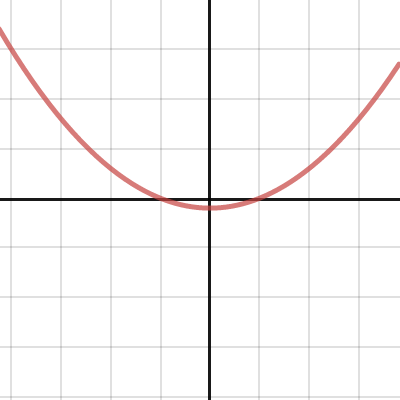
Desmos
 untold cipher
How can I make it so if I walk into a wall it's like a normal wall where I cant walk through it but it a different actor walks into the same wall that actor can walk right through it
dense hatch
@dawn gull here
dawn gull
Thank you!
grim ore
you can use Collision channels and filtering https://www.unrealengine.com/en-US/blog/collision-filtering?sessionInvalidated=true
valid agate
Hi All, just to loop back on my ask this morning around the BlenderTools - Send to Unreal. I'm a Mac user, and it has been confirmed that the Address Already in use is a bug on the plugin on Mac. If you wish to have updates on this, you can check on the link: https://github.com/EpicGames/BlenderTools/issues/9
hushed hare
is my editor glitched?
i restarted the editor and it still wont move
if i change the number directly it lags bad
 mystic island
Anyone know how to request a valve index from valve for development purposes?
grim ore
the next question then is what are you moving?
grim ore
so if you put a cube in the viewport and try to drag it, it won't move?
a cube in a new blank scene
hushed hare
lemme test
tender flume
UV overlapping errors are usually related to lightmap resolution no?
grim ore
my guess would be you have a construction script running somewhere perhaps so testing a cube in a blank scene would let you know
tender flume
It's on 64 for mine
grim ore
UV overlapping is related to UV's overlapping
2 faces on a wall might occupy the same space for example
hushed hare
when i imported a mesh from blender
grim ore
@hushed hare did you restart the editor since then?
hushed hare
yes
grim ore
@tender flume you can fix it in blender, or you can have ue4 create a lightmap for you.
are you sure you tried this in a new level, it looks like you are in an existing level?
hushed hare
oh lemme test htat
hushed hare
grim ore
if it still happens in a new level, try a new blank project to see if its the project or the engine. usually snapping does that
grim ore
and all you did was import a new mesh?
hushed hare
imported a change to the mesh
i resized and rotated it in blender
my snapping is at 1 unit
grim ore
does it do that when rotating as well?
hushed hare
no
grim ore
unclick surface snapping a well, it shouldnt be causing it, the other orange icon on the top right near move snapping
hushed hare
didnt work
man
if my project is somehow corrupted
im not gonna be happy
ive been working on this since like
february
grim ore
did it happen right after you updaed the mesh or did you restart?
hushed hare
immediately after
grim ore
so going to new level, choosing the default one with the floor, clicking the floor, then dragging it right or left causes it to jump but rotating or scaling does not?
hushed hare
dragging doesnt move it at all
when i slide the values in the details tab it jumps and lags
lost leaf
@dense hatch thank you
grim ore
ok so I didnt think this would do it but it might be the cause, did you ever change the near clip plane?
hushed hare
yeah but it didnt do this when i changed it
grim ore
yeah but you did change it, is it 0?
hushed hare
its 0.00001
grim ore
yeah thats your issue
it doesnt take effect immediately, you normally have to restart. set it back
hushed hare
i changed it yesterday
my clip plane needs to be low tho
because ur walking through portals in my project
grim ore
well if its too low that will happen
i couldnt tell because I couldnt see the rest of the interface, it has a side effect of making viewport icons flat
hushed hare
man thats dumb i need the players clip plane to be pretty much 0
why cant i change only the players clip plane
grim ore
well set it to 0 then when building it or testing as needed
but setting it to 0 causes issues in the editor
hushed hare
well that fixed it
grim ore
well atleast you have the reason why now
chilly tundra
As a follow up to my og question re: figuring out how to display CPU and GPU usage %, I discovered stat AndroidCPU (I'm currently testing on Android). There's basically no documentation I can find anywhere on this though... Does anyone have any insight into this or has anyone used this before?
next badger

Console commands specific to displaying game statistics.
 digital nova
I don't suppose anyone knows of any workarounds or fixes for landscapes disappearing after touching the "desired max draw distance" on them that doesn't involve deleting the old landscape and making a new one? (UE-76822)
next badger
@digital nova question, is it visible in other modes, like wareframe or player collision?
digital nova
nope
digital nova
or well, collision still works, it's just not rendering at all
next badger
so, collision works but it's not visible in player collision pass?
digital nova
It looks fine in editor and simulate modes, but it's invisible through cameras. collision still exists
the only thing I did was set the max draw distance to a value other than 0 and then back. Also even super high values will still make it disappear. https://i.gyazo.com/2b3084786484aabef8a648637e46b052.png
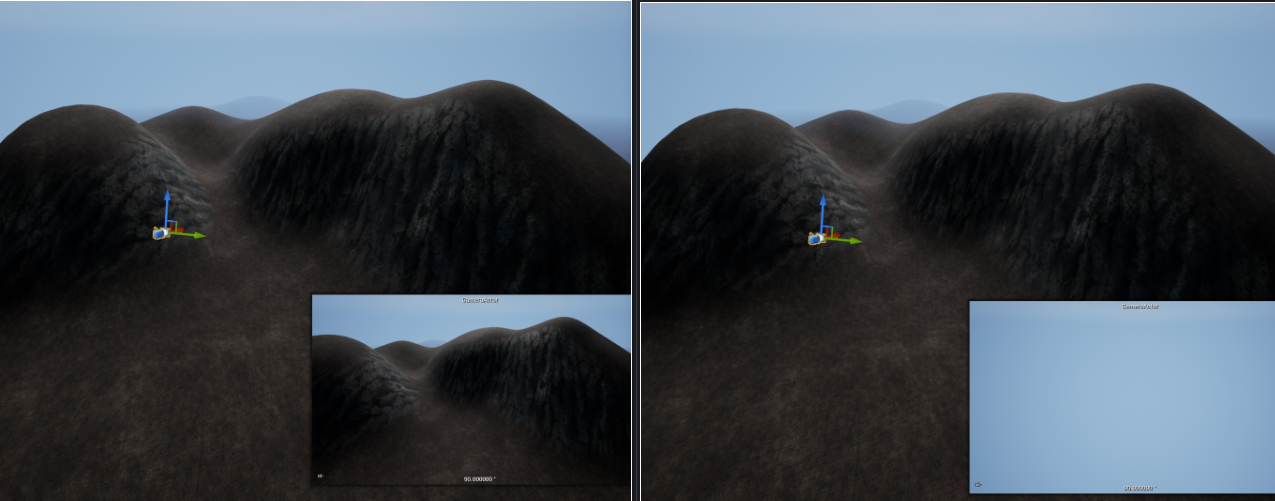
the player character can still walk on it, but even in wireframe mode there's no triangles or anything rendered
chilly tundra
@next badger Checked there already, I don't think it's there unless I have ctrl-f blindness
untold cipher
How can I make it so if I walk into a wall it's like a normal wall where I cant walk through it but if a different actor walks into the same wall that actor can walk right through it
dense hatch
@untold cipher #ue4-general message
 abstract sundial
heyo
dense hatch
hi o/
abstract sundial
how ar eyou doing?
abstract sundial
good to hear
 elder viper
Anti-aliasing turning my render blurred. How do I solve it? Please help!
next badger
@chilly tundra Engine/Build/Android/Java/src/com/epicgames/ue4/GameActivity.java.template
 tropic jasper
Got an issue atm, trying to spawn an actor in direction of my mouse cursor, currently when i click spawn my projectile fires forward and only forward, i can't get it to fire in direction of my mouse, any ideas? (using the top down BP as well)
 ancient lotus
any ideas why my animation montage is breaking my firing animation? looking at the animation montage in the editor it looks fine and the animation is playing as intended, but when i go to play it in game the animation breaks as the left hand thats holding the rifle moves inward and is jerky. ill post some examples.
 dry moon
How can I use a UFUNCTION with a void having the FActorSpawnParameters type in the params
it causes an unrecognized type
Unrecognized type 'FActorSpawnParameters' - type must be a UCLASS, USTRUCT or UENUM
UFUNCTION(BlueprintCallable, Category = "Object Pool") void SpawnPooledActor(FVector const Location, FRotator const Rotation, FActorSpawnParameters* SpawnParameters);
is the function I got
plush yew
mossy nymph
@dry moon blueprints don't tolerate pointers to structs
next badger
@ancient lotus montage has blending time
ancient lotus
ive adjusted the blending time, even set them to 0 to see and it still has the same issue
dry moon
@mossy nymph Well I did & at the end too, same issue
dry moon
void SpawnPooledActor(FVector Location, FRotator Rotation, FActorSpawnParameters & SpawnParameters);
plush yew
Is there still no way to force collapsed nodes in the world outliner?
next badger
@plush yew force what?
if you shift click arrow it will collapse/uncollapse whole tree
plush yew
Yeah but on play it expands all the collapsed nodes
next badger
no it doesnt
dry moon
Anyone know why I get Unrecognized type 'FActorSpawnParameters' - type must be a UCLASS, USTRUCT or UENUM enough though I have #include "Engine/World.h" included in the header.
next badger
@plush yew if you press play it will show new spawned world, if you pick Editor instead of Auto it will always show your Editor tree
better image
 copper pike
Are parameter changes in blendspace applied automatically? I can't find a button in a (possibly older version) tutorial, where its asking me to Apply Parameter Changes
Im not sure if they're automatic or something now
dense hatch
Got an issue atm, trying to spawn an actor in direction of my mouse cursor, currently when i click spawn my projectile fires forward and only forward, i can't get it to fire in direction of my mouse, any ideas? (using the top down BP as well)
@tropic jasper sounds like you are going to want to calculate the direction that your mouse is in relative to the source of the projectile. so mouse position minus source position. you'll want to give it velocity in that direction
copper pike
Wulf, do you know if parameter changes are automatically saved?
Or if they have to be applied manually
grim ore
did you try it?
copper pike
I searched it in details, but didnt find an option for that
I just got past the stumbling block of Division and range
It said Once you have set the values for both the X and Y Axis, click the Apply Parameter Changes button. I dont see that button in Parameters, nor trying to find it in Details
grim ore
I beleive its auto now, when you change it
copper pike
Oh ok thank you
grim ore
you should see the change when you change them immediately
copper pike
Where?
dense hatch
Anyone know why I get
Unrecognized type 'FActorSpawnParameters' - type must be a UCLASS, USTRUCT or UENUMenough though I have#include "Engine/World.h"included in the header.
@dry moon If i had to guess, it's probably because FActorSpawnParameters is not a blueprint-exposed type (it's a struct, not a Ustruct. so you can't interact with that in blueprints. SeeSource/Runtime/Engine/Classes/Engine/World.hfor the declaration.
You will have to create your own wrapper for this type with the same properties to make a BP function with it
dry moon
Ahh, I see. Thank you!
dense hatch
np!
Anyone know how to request a valve index from valve for development purposes?
@mystic island if that was available anywhere it would be at https://partner.steamgames.com/. They have done developer kit programs for controllers before but you'd have to check about the Index
tropic jasper
@tropic jasper sounds like you are going to want to calculate the direction that your mouse is in relative to the source of the projectile. so mouse position minus source position. you'll want to give it velocity in that direction
@dense hatch What BP would this be done in, the "projectile", "top down character" or the "top down controller", Im somewhat new to all of this and can't for the life of me figure it out.
dense hatch
@tropic jasper I'm not super familiar with that exact template, sorry, but I can suggest it doesn't "really" matter where you put it, as long as it's somewhere that has access to your character
(or where ever your projectile source will be)
tropic jasper
Okidoki, ill try my best 🙂 thank ya
elder viper
Anti-aliasing turning my render blurred. How do I solve it? Please help! I have tried different AA modes in project settings but still get the same results. Is there a tutorial I can follow to get clean AA edges and high quality renders?
next badger
@elder viper are you sure that's only AA is off, as it seems like bloom gone too
elder viper
@next badger the only difference between the 2 renders is the AA settings I turned on/off . not sure whats going on 😦
next badger
turn it on and then open console and type
ShowFlag.AntiAliasing 0
abstract anvil
Does anyone know how to create an editor tutorial? Googling "unreal engine editor tutorial" is kind of useless when it comes to this.
elder viper
@next badger did that. and rendered, still blurred. 😦
elder viper
oh
elder viper
ok done. It feels a bit better now. and I also went to my camera settings and clicked the dropper tools and clicked on the car.
still a bit blurred
next badger
@elder viper do you need dof at all?
elder viper
but in the render preview (low quality) it shows very clear preview
@next badger no. how do I turn it off?. Should I turn Focus Method to disabled?
elder viper
@next badger oh yes!! much much clearer!
Still there is slight blurredness though. but that might be due to the bloom
next badger
it may be
ShowFlag.Bloom 0
if you need bloom, you can turn one ON, and in PP volume set the bloom parameters so Tint 1, 2 is black
elder viper
@next badger ah ok. thats good to know. the bloom being off didnt help with the blurredness though. lemme attach a screenshot
next badger
size scale is multiplied by # size and that's your bloom area, there are 6 layers of bloom in total
elder viper
the license plate still feels a bit blurred compared to the wheels
could be abberation
ah there is no abberation turned on
next badger
are you rendering video or static?
elder viper
its an animated camera.
rendering one frame from the timelines
so it might be mblur. but not sure how to turn it off
next badger
you can ask for advice in #aec-visualization they do know stuff
 dire sentinel
how do i change parameter group order? I want to flip grass and rock settings
https://cdn.discordapp.com/attachments/371740260607983616/733070810897580132/unknown.png

 regal magnet
A couple of strange questions regarding pairing my static meshes to sockets... I imported some objects I created in blender, and the size was scaled to the character and rig. When importing the objects to Unreal Engine, they are normal size in the level as static meshes, but when I attach them to the rig sockets, they become absolutely massive and fly off way into the distance; if I change their transform from "moveable" to "static," they revert to the normal size, but of course, don't move with the rig. I can't seem to scale them properly, or scale the sockets properly? What would cause this? (e.g. if I just set the socket to the rig bone, the same problem occurs as with the socket I created for that bone/part of the rig)
next badger
@dire sentinel in material shader?
dire sentinel
material editror?
or wdym
like
these groups
how do i order them
i can order parameters in teh grouio
but i cant oder groups
next badger
groups are sorted alphanumarically
it's not like ue4 game only engine, but having so many parameters often a bad sign of possible performance issues
 left pelican
What makes a game look rly good and realistic? Is it more so graphics, models, texture quality, etc?
Id say all obviously, but what most
next badger
textures/lighting
 brisk spire
definitely lighting
left pelican
Is it, alright. Then my level designer will have to increase the quality of the lighting
next badger
good lighting + even plain PBR texture and you can make whole level
 restive zinc
i have a question does any one know how to do a smooth culling distance i dont really like things just popping maybe smoothly do guys know what i mean
next badger
@restive zinc in materials enable this
open wadi
I have... a relatively unique question.
I have a navigation widget, and upon clicking that widget, I would like a series of videos to appear vertically, as options to play.
Or rather, upon clicking a button within that widget, I would like this to occur.
Might anyone have a specific tutorial or direction to look? I'm reading the UE4 documentation on "playing a video file", but it is a bit lacking for this type of functionality.
next badger
to play a video, you need to create a media texture
then you can use this texture in material, and this material can be used in UMG
open wadi
Yes, I would normally ask in #umg, but the response rate in many of the subchannels is far inferior to the primary channel here.
As such, I often find myself asking in a specific subchannel, waiting for as much as a day or two, giving up, then returning here.
But I am looking into media textures, thank you much @next badger
next badger
just right click content browser and add media texture, then add it to new material, set it to ui domain
open wadi
Perfect, thank you very much.
dry moon
Is there any way to make a projectmovement fire again? Seems to just drop to the floor
open wadi
@next badger So, of note, this is what the documentation refers to: https://docs.unrealengine.com/en-US/Engine/MediaFramework/HowTo/FileMediaSource/index.html
Illustrates how you can play a video file inside a level on a Static Mesh with the File Media Source asset.
They have you creating a "File Media Source" asset.
Is this not recommended?
next badger
i think it's outdated docs
When dragging the Media Texture onto the Static Mesh in the level, it will automatically create a new Material in the Content Browser and apply it to the mesh in the level.
so it's just not describes the process properly
 golden shoal
Anyone ever dealt with event dispatchers from soft variable references? Finding it tricky to remote and bind events at the right time because of the level streaming so the soft actor references may not be valid. A while loop checking is valid is the only solution I've thought of. Would love to hear some ideas or criticism.
next badger
@open wadi in your case you are creating the material manually
next badger
@golden shoal soft references do not exist before loaded...
wispy magnet
will i get in some trouble
abstract anvil
You shouldn't use pirated software for anything other than evaluation
next badger
substance plugin is free afaik, if you plan to use it
abstract anvil
$20 a month or $150 for a preputial license on steam, and it goes on sale like 4 times a year
next badger
@abstract anvil afaik 2020 was last year to get perpetual
wispy magnet
;--;
next badger
*is
abstract anvil
They still update it on steam @next badger
open wadi
@next badger I will do it your way, thank you.
wispy magnet
btw is quixel mixer like substance designer or nah
next badger
nah
abstract anvil
Mixer is more like Alchemist
wispy magnet
oooof
dang
i was looking to make custom textures, but ig beggars cant be choosers
abstract anvil
You can make custom material in Mixer, though not the same way you do in Designer
You start from a wide selection of premade materials and change parameters
abstract anvil
It's a good program, but it has some limitations.
wispy magnet
aha
next badger
shame Quixel dropped Suite -_-
wispy magnet
oof
so i can make textures in mixer from scratch, yes
or i can only combine existing ones to make a new one
abstract anvil
You have to combine them to create new ones
wispy magnet
aha
golden shoal
@next badger Thanks. Yes that's an issue I'
abstract anvil
You can also create textures in UE4 using the material editor then bake the textures. Blender is another node-based shader editor which allows you to create textures in a similar, albeit more limited, way to Designer.
@wispy magnet
next badger
there's free node editor for textures, like SD
https://galloscript.itch.io/texgraph
 golden shoal
I'm running into. Short term fix was to setup remote events from the objects level blueprint to the bind event of the soft reference - but it only works if the levels are loaded in that order.
wispy magnet
there's free node editor for textures, like SD
https://galloscript.itch.io/texgraph
@next badger oh hell yea i can finally make some rocks
wispy magnet
well yea but- oh wait nevermind i could just remix textures and such
this is for more artifical stuff
@next badger aha got you
next badger
quixel megascans are free with epic games account
wispy magnet
not for commercial use afaik
next badger
commercial
abstract anvil
only if you use them with UE4
wispy magnet
aha
abstract anvil
Yeah, but how many people read that
next badger
me? =)))
abstract anvil
Yes, as do I, but a lot of people just getting started are probably like "yep, cool, whatever"
next badger
to be fair, blender now has quite good tools for texturing, as alternative to SP
hushed hare
man it sucks knowing what you need to do but not knowing how to do it
abstract anvil
@hushed hare ?
hushed hare
not talking about anyone here
wispy magnet
ayo thanks for the help guys; i used to think the unreal-quixel partnership was only limited to non-commerical projects and the such
abstract anvil
I kind of figured
wispy magnet
guess that cuts down production time
next badger
@hushed hare it actually sucks when you know how, but not sure what...artist's slump or block -_-
abstract anvil
Tell me about it... I have to do level design, which I can't stand. I know what I need to do, but man it is mentally exhausting.
wispy magnet
Tell me about it... I have to do level design, which I can't stand. I know what I need to do, but man it is mentally exhausting.
@abstract anvil idk, but what i would do is just make the thing out of primitive shapes
then test gameplay
then if it works it works; replace the shapes with the actual stuff
abstract anvil
We've already done the blockout, now it's a matter of placing the meshes and making it feel lived in, you know, clutter, and stuff like that
abstract anvil
No. Clutter is an essential part of any genre in which you control a character/pawn.
wispy magnet
"lived in"
but thats what i took from it
as stubborn as i am, i fr still wanna make some of my own rocks
im no masochist, i really just find it cathartic for one to recreate nature and whatnot
hushed hare
is it possible to make some objects ignore clipping planes?
i thought something with these 2
but it didnt work
abstract anvil
@hushed hare What do you mean by "clipping planes"
next badger
still wanna make some of my own rocks
Make sure, you won't end up with only the rocks being made
hushed hare
@abstract anvil the near clipping plane specifically of a camera
abstract anvil
@hushed hare Yes, but I'm not going to pretend to remember how it's done
next badger
@hushed hare NO...clipping plane is ALL, it's GOD, ALPHA and OMEGA
hushed hare
i want an object to render even if its not in the camera frustum
grim ore
make the bounds of the item larger?
but near clip plane really can't be ignored as its when it has to stop drawing so the camera can show something
next badger
clipping plane is how the graphics engine converts the visible image in to GBuffer while not overflowing it
*transforms
hushed hare
next badger
not sure what i'm looking at, even with a description
hushed hare
its a portal
that uses scene captures
theres frames and you see the other portals frame on the inside because of how i did the inside of the portal
basically its 2 meshes, a frame and an inverted box that was cut in half
so that when you go through the portal you get immersed in the view before being teleported to make it seamless
so on the inside of the portal you see the other portal's frame
but the clipping plane is cutting part of it off
what i need to do is make the clip plane start at the bounds of the object dynamically
open wadi
If you want to play videos within your project, such as tutorial videos launched from the main nav, do the videos actually need to reside in Content/Movies specifically?
Or can the .mp4 videos be located in a specified subdirectory, etc?
next badger
afaik you can't make dynamic CP in ue4
hushed hare
you can in scene captures
hushed hare
@open wadi it needs to be in the movies folder
open wadi
Really. Every single movie needs to be contained within Content/Movies. What kind of basicness is this?
next badger
@open wadi yep, afaik all video files only loaded form movies folder, it's a limitation thanks to mobiles
hushed hare
you can thank probably old code for that
hushed hare
good luck if you're making an interactive story game
open wadi
Well how odd they would allow you to specify a path for the media source in these assets, yet there's no point, as no path works except /Movies.
That's quite ghetto.
open wadi
Old ghetto code.
hushed hare
the entire video system in unreal is pretty primitive
open wadi
lol, really.
How so?
Are you saying there's no standard progress bar and what not?
I want to have a series of videos in a tutorial section.
These won't be used in the game itself.
wispy magnet
wack
btw how does one make an actual loading bar in ue4; or any game engine for that matter
bullshitting people into waiting for your game to "load" doesnt really seem like a great idea, only gonna leave you with a 1/10 rating on steam and whatnot
hushed hare
@open wadi i really have no clue if theres a progress bar for loading
if i had to guess you prob have to make your own
but for that you would have to make your own loading system
a blueprint that loads the level and updates the progress bar as it loads things
boreal wyvern
@open wadi when you package your project make sure in your project settings you add the videos under maps and modes. Otherwise they will not work.
wispy magnet
my inherent lack of c++ skills prevent me from doing so lmao
the only programming languages im p good in is html, css and javascript
 open eagle
Why does perforce attempt to submit files from my system that dont exist
and then it has issues because they don't exist
 gaunt rover
hey does anyone know what the sensor size on the unreal camera is? I'm trying to match my FPS view in Blender to the UE4 camera
kindred viper
@wispy magnet If you can learn javascript you can learn C++. Im not saying it's as easy (because that would be lying) but if you know what vars, arrays, conditionals etc are (ie. the basics of programming) then you can transfer that to C++ easily. Especially in the context of UE4's API in C++
gaunt rover
@boreal wyvern thanks! The blender camera has this odd setting "sensor size" i'm not entirely sure how this effects the image. It's default is 35. I wonder if I can figure it out based on aspect ratio
kindred viper
@open eagle possible redirects I dunno. Never seen that
boreal wyvern
@gaunt rover sensor determines focal length. I think?
Doesn't effect fov directly. I think
hushed hare
i can see why this channel sees more questions than any other channel
it gets faster answers
 dusky hound
@boreal wyvern Focal Length and Sensore size very very much create the FOV
That are actualy the two variables the directly create the FOV
Lens distortion can push 0-1mm but thats only if your taking lens distortion into account
@boreal wyvern I am a tracker for my day job so if you gots any camera questions hit me up ^_^
 unique timber
How do i enable vsync for my project?
dusky hound
@boreal wyvern The math is a bit of a head twister but here is the basics of it
@unique timber https://www.youtube.com/watch?v=93K6F4uBWFo

What is the Game User Settings: VSync Enabled Node in Unreal Engine 4
Source Files: https://github.com/MWadstein/wtf-hdi-files
@unique timber
Mathew Wadstein is god level help in UE4 . Just always first go onto youtube and type "WTF is" then the thing you are wondering about
unique timber
not blueprints, sorry
project settings or C++?
i just dont want to always have to type r.VSync 1 every time i run, is there a way to change the default from 0 to 1?
dusky hound
@unique timber https://docs.unrealengine.com/en-US/API/Runtime/Engine/GameFramework/UGameUserSettings/index.html
Stores user settings for a game (for example graphics and sound settings), with the ability to save and load to and from a file.
I think its bUseVSync
unique timber
How to access UGameUserSettings in C++?
 weary basalt
Anyone every come across this error?
Error: GetAndOrCreateGraphicsPipelineState RenderTarget check failed with: 504 !
 carmine sorrel
Does Chaos still require a separate branch for 4.25? I see all the plugins, but the Fracture Editor is still not in the 'Modes' menu.
 toxic zephyr
Where are the custom keybindings stored at that I make in editor? Not the game ones, the ones for editor itself?
grim ore
@carmine sorrel yes 4.25 requires a source compile to enable chaos fully
plush yew
anyone know how to turn off the shader hdri background?
carmine sorrel
@grim ore Thank you!
 marsh garnet
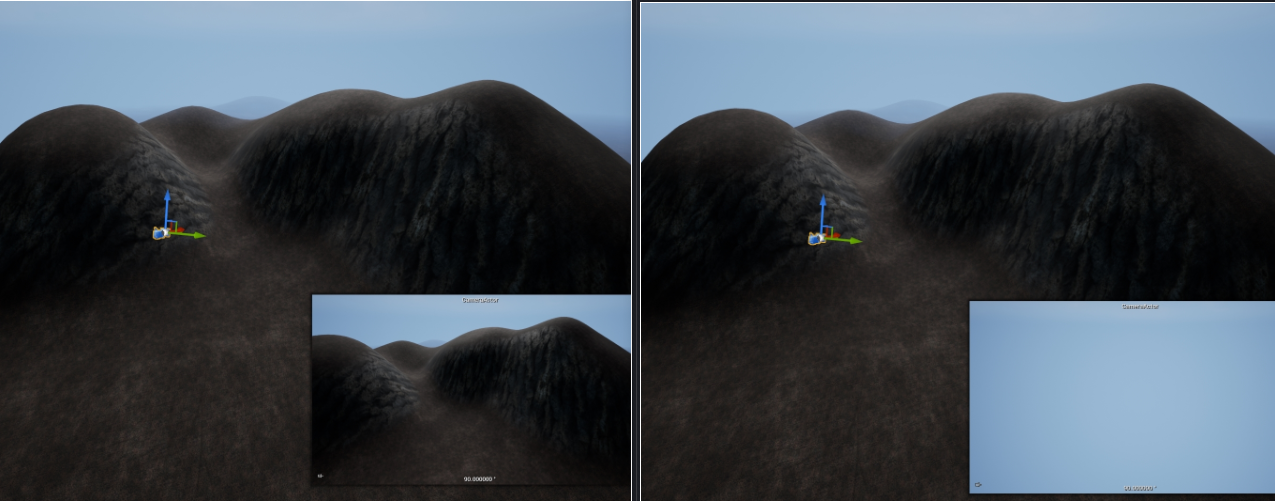


Hey does anyone know why my graphics settings aren't saving? It does write to the file but I don't see anything in there about anti-aliasing or post-processing
unique timber
found what i needed ./MyProject/Config/DefaultEngine.ini, add r.VSync 1
open wadi
As mentioned, I need to be able to play a series of training videos within a widget. Roughly 3-4, I presume, stacked vertically.
I am told UE4 has "very basic" video playing functionality. I'm having trouble finding information on this. Is this correct? Does UE4 not support a progress bar, play / pause button, etc? Or does UE4 have good video playing functionality?
And if it doesn't, is it possible to insert a component that will pull, for example, an iframe from a source like Vimeo, Wistia or YouTube that will allow a remote video to be inserted with full player functionality?
exotic thicket
iirc there is a Chromium based web browser widget but it might be experimental
dusky hound
@unique timber Doh! I'm a lunk head. Sorry I did not think of that first
grim ore
@open wadi the built in system for playing back videos does not have controls that are exposed to the user, there is no "movie player" widget for example. You can play back movies in the UI system, you can also create your own UI to interface with it as all the controls are exposed such as play/pause/stop, etc. There are progress bar widgets that can be used as well. You would basically have to roll your own video player if that was the goal.
untold cipher
So I have a normal first person camera that I made from the third person camera (so i could get true first person), and I have an ADS camera so I can aim down the sights of my gun, the way I did it was deactivating the first person camera then activating the ads camera when the right mouse button is clicked, but with that system the transition is snapping from first person to ads, how would I make it smooth?
grim ore
look into using the set view target with blend node, otherwise you would have to manually move the camera over time from one to the other using a lerp or timeline or something similar rather than disabling one camera and enabling another in the same frame
 void barn


i cant open this
at all
its so small
is there a way to reset back to default
nvm
found it
untold cipher
look into using the set view target with blend node, otherwise you would have to manually move the camera over time from one to the other using a lerp or timeline or something similar rather than disabling one camera and enabling another in the same frame
@grim ore could you explain a bit more
grim ore
There is a node called set view target with blend that will blend over time from one camera actor to another
otherwise just use one camera and move it from your one location to the other
untold cipher
Do I do this in the third person character BP class?
grim ore
if you are just turning off a camera and turning off another you are not going to get a smooth transition
untold cipher
So when RMB is pressed I do set view target with blend with get player controller as the target, what do I put as the new view target?
grim ore
its not going to work out of the box due to you having them as camera actors in the blueprint, you will have to find another way to make them actors. if the camera is on the same object its probably easier to just move it from one position to another since that is what you want
if it was say one camera on the player and another on the weapon, which is another actor, then using set view target would be fine settings it to go from the player camera to the weapon camera
untold cipher
If I want to use one camera how would I move it to my gun area when RMB is pressed and then back when it's released
median peak
From a default scene I have a Player Start, attached to the player start is a camera, the camera says 'Auto receive Input': Player 0... In the bottom right I have a view port labeled "Player Start" that shows the screen as I would Like it displayed on game start. But When I start the game it does not use that camera...
restive zinc
are blueprint and c++ the same or is one better and faster
median peak
From what I understand, blueprints are converted to cpp source then compiled... so the same... however, the same argument could be asked about asm vs cpp since technically you could write a more efficent algorithm in asm if you didn't have to worry about how c constructed the instruction set
restive zinc
so the same just compiled differently?
median peak
No compiled the same. Except the cpp is auto generated from a description provided by the blue print... instead of explicitly defined by a human.... it's not more then an interesting point really
restive zinc
oh ok
median peak
But then again... An apple is an apple after you take a bite out of it... but after how many bites does it become an apple core instead? If the fastest way to write a program is Asm, and we go Blueprint->UE4Cpp->CrossplatformLanguage->PlatformAsm.... of course... simply remapping instructions doesn't inheriently imply a loss of performance... so tricky questions.
open wadi
@grim ore Regarding rolling your own video player, might you be aware of any example of such? Has anyone ever built anything like this in UE4?
 sturdy vortex
Could someone help me with an error? When ever I create a new project and use "Film, Television, and Live Events" it always crashes no matter what. The error is:
Fatal error!
Unhandled Exception: EXCEPTION_ACCESS_VIOLATION reading address 0x00000008
0x00007ffacc4114d7 UE4Editor-WmfMedia.dll!UnknownFunction []
0x00007ffab4d559c8 UE4Editor-AppleProResMedia.dll!UnknownFunction []
0x00007ffb0d2e9a7e UE4Editor-Core.dll!UnknownFunction []
0x00007ffb15b5b433 UE4Editor-Projects.dll!UnknownFunction []
0x00007ffb15b6ef97 UE4Editor-Projects.dll!UnknownFunction []
0x00007ffb15b5b1f3 UE4Editor-Projects.dll!UnknownFunction []
0x00007ff7bc212dd1 UE4Editor.exe!UnknownFunction []
0x00007ffadaea25b0 UE4Editor-UnrealEd.dll!UnknownFunction []
0x00007ff7bc22b8fb UE4Editor.exe!UnknownFunction []
0x00007ff7bc22bb5a UE4Editor.exe!UnknownFunction []
0x00007ff7bc23e31d UE4Editor.exe!UnknownFunction []
0x00007ff7bc24145a UE4Editor.exe!UnknownFunction []
0x00007ffb27736fd4 KERNEL32.DLL!UnknownFunction []
0x00007ffb290fcec1 ntdll.dll!UnknownFunction []
open wadi
Sorry Hydra, please continue, just wanted to say, this looks promising: https://www.unrealengine.com/marketplace/en-US/product/umg-video-player

Customizable UMG Video Player for Unreal Engine 4
Hydra, I know EXCEPTION_ACCESS_VIOLATION is a generic error UE4 throws and doesn't help narrow it down.
sturdy vortex
Alright, is there anything i can try before reinstalling?
 tawny hare

 lucid socket
@median peak @restive zinc That's not correct. Blueprints are perform slower than C++. If you use Blueprints correctly, the performance isn't game breaking. Use them incorrectly, and they can get pretty bad pretty fast. You can nativize Blueprints by letting Unreal convert them into C++ during packaging.
lucid socket
https://docs.unrealengine.com/en-US/Engine/Blueprints/TechnicalGuide/NativizingBlueprints/index.html

Technical guide for programmers exposing gameplay elements to Blueprints.
Nativization removes the overhead of using the virtual machine, aka the underlying scripting language.
restive zinc
@lucid socket how do i package it into c++