#ue4-general
1 messages · Page 793 of 1
 fleet wraith
 grim ore
they arent, they are stylized 2d textures
fleet wraith
Lol
grim ore
you would make your textures look the way you want, baking in the lighting and such, and then use that as the texture
UI that exists in the world is diegetic
but thats not what they want
if its "in" the world, its diegetic but it sounds like they want prettier normal UI
fleet wraith
Sure but then they still look like pictures and have no material instance variables, meaning I have to make and bake a new UI for every material I want
So if I change the UI element I have to now re bake it for every material
grim ore
well if you have an example of what you are wanting to do we might be able to help you do it, or #graphics
I mean there is nothing stopping you from making a full 3d "ui" and attaching it to the camera, or putting it somewhere else and rendering it out to a texture and plastering that onto your UI
grim ore
the 2nd one has the issue where if it's somewhere else the lighting wont match, the first one being ui is generally intended to convey info and well... not being able to see the info because of environment would suck
fleet wraith
Yeah I doubt I’ll do it that way
grim ore
and a swirling lava globe as an example doesnt seem hard to do on a normal ui
you like make the lava texture and tell it to swirl and use that on your ui
fleet wraith
That’s where I’m stuck. My material is what makes it swirl and glow at varying rates
But when o convert to UI it loses all of those properties
Because UI materials only have color and opacity
grim ore
well the swirl part should still work, but yes the glow if you are using emissive would be gone
but that can be simulated with good art
fleet wraith
Yeah just a shame UI materials are so basic that you lose all of the cool stuff in t he material editors anyways.
Well thanks for the info I’ll get back to the drawing board for now
 rugged raven
I'll ask again. But does anyone know how to make per poly collision work for a player character?
grim ore
i mean like this is all UI https://youtu.be/ka2jpbU8J0c
fleet wraith
Yeah that's the kind of video iw as looking for
my UI is inspired by the diablo 3 one,
but it would be cool to change all of that stone to like a brushed metal
or glowing lava
grim ore
yep and that d3 ui is 100% 2d
fleet wraith
yeah but if i want to change the materials i have to re bake it instead of just using the materials for metal and glass and steel etc
grim ore
textures with noise and movement to simulate the globes for energy and health
what do you mean by change?
fleet wraith
like you see how the gargoyles are made of stone
if i wanted it to be wood, or metal, or glass
it's not just a simple parameter change anymore, it sounds like it's a whole new image bak
bake*
grim ore
no it could be a material change, thats like saying if you wanted it to be red or green you would have to rebake the material
fleet wraith
hmm i guess i just dont have a good understanding yet, i got some learning to do
PS i love all of your videos, they've been so insanely helpful. Fantastic work
grim ore
the gargoyles made out of stone could be made out of nothing, just the "depth" as a greyscale mask
then the "stone" is just a "stone" noise texture placed ontop of it, blended in to the appropriate channel
fleet wraith
yeah that's true
grim ore
but thats a proper and skilled artwork
fleet wraith
yea
grim ore
but even if not, what you suggested about changing the materials is not out of the question either. I wouldnt doubt that most games like that just have different ui sets as needed
its why the AAA games are AAA and cost money lol
fleet wraith
lol yeah
 surreal viper
is it possible to store/reference a widget class without loading all the resources it references into memory? 🤦♂️
because if I simply store an UClass variable RIP, everything is loaded
is there something like a soft object ptr to a uclass or idk? 🤔
nvm I can use enum/fname and build a map runtime if needed
surreal viper
but I need to store the class
and not the object
(because it is not spawned yet)
 zenith flower
Is there a way to get this camera view out of my way when I click on my boat?
This has to be one of the most annoying default features that I cannot for the life of me find a way to get rid of
This is retarded
Another way is to switch between Default and Cinematic
grim ore
zenith flower
At the very least there should be a big X on the top right to close it out
grim ore
I've never thought to close it, I like it lol
but mine isnt 3/4 the viewport so I dont notice it most of the time
zenith flower
I have multiple monitors, some with different scaling, unreal does not handle it very well.
grim ore
that is what I have heard 😦
 plush yew
Anyone else wonder what new built in features will be included in ue5?
grim ore
nope
 half plank
is it possible to rename a project
 carmine garnet
i want my blueprint to be able to recieve an event from a niagara emitter
 brisk spire
So I'm not really sure where to ask this and I can't find anything about it online... Does anyone know the copyright situation of Mahjong, or Shogi, or chess, or similar popular board games? As far as I can tell, the pieces and art are copyrighted, but the specific movements and rules are not
Basically asking if it's possible to add a mahjong mini game to my game
 lucid socket
IANAL, but as far as I know chess, mahjong and shogi are all public domain as they are hundreds of years old.
brisk spire
Yeah, I'm just worried it's like a grim fairytale situation, where Disney picked up a bunch and now almost everything about it is copyrighted because of their "adaptations"
I found info on chess saying that the pieces, box art, and rulebook are copyrighted, but the game itself is not, so I have to assume it is the same
lucid socket
You can still make an adaptation of those grim fairy tales, for example American McGee's Alice is an adaptation. Disney can't sue for that.
However, Disney can still take you to court and tie you up in legal litigation.
brisk spire
Right, but tencent probably wouldn't take me to court for making a mahjong adaptation as long as I don't do anything to upset them
lucid socket
Mahjong existed long before Tencent existed.
brisk spire
Yeah but they've got a lot of really popular mahjong adaptations
So similar to Disney
They could be like "hey this game piece is similar to our game piece go to hell" even if they have no legal grounds
Not that they ever would, but still
lucid socket
Depends, I mean the pieces and their design have been around for a long time as well.
brisk spire
Right but even with like.. Poker adaptations, the cards have to be changed from the typical design even though the design was created in like the 1800s
Because the art is copyrightable
Same with chess pieces, apparently
But all you have to do is draw the symbols yourself instead of copy pasting and you're fine in that department
I wish there was a cut and dry answer, lol
Maybe I should go to the legal section of stack exchange
lucid socket
There never is with legal stuff unfortunately.
There is always a "it depends" answer.
brisk spire
😭
Ah well, thanks for giving me some fuel for thought @lucid socket
I've asked the question on stack exchange, I'll come back later if I get an answer in case anyone would find it interesting
 unreal comet
Is it possible to select a few of my painted foliage actors and save them into a blueprint or group them? I made a nice vegetable market scene by painting vegetables and carefully editing them. Now I want to save the scene so I can duplicate it around my city.
 turbid bobcat
Hi, one small silly question
Is there any way to set the max ammount of decimals to 3 or something like that?
 floral knoll
hey I have a big level and a light mass I am getting this error when building and my save times are 30 mins+
could someone please help
 modern sinew
@grim ore Do you know how to fix this? The circular progress bar can be rather inaccurate (followed your tutorial on them a while back to make this one)
floral knoll
can anyone hope in to a call and help us the error is above you don't need to understand it but if you think you might be able to help by looking then that would be great thanks
 hot pine
Compile
hot pine
Now I look dumb because he deleted his messages :/
 uneven fractal
Not enough bugs in your project?
Try using the console command slomo 5 or slomo .5 to see what breaks
 stuck linden
Is it possible to when i press a button and it brings me a non-possesed pawn i press another one (fire) and it posseses the pawn
 restive yarrow
Reducing actor counts in my level will make it load faster yes?
 light coyote
@stuck linden what do you mean by conect to bp ?
stuck linden
connect to branch i meant* @light coyote
stuck linden
I want to press E to equip a drone then when i press my fire button i want to possess it
light coyote
Whatever has to happen will go after the press action
stuck linden
Thats the point its already after another input press action (R)
light coyote
@stuck linden you have to explain more, or show your bp
You can check Was input key just pressed
That will guive you a boolean
 idle knoll
Hey! I'm new here and I'm really impressed by the size of Unreal community on this channel! Awesome place to gather some knowledge and get inspired. I've been working in Unreal for a few weeks now and I stumble upon a recurring problem that really bugs me and I can't find a solution anywhere on the internet or in the manuals. Almost each time I reopen a level that I've previously worked on, after rebuilding lighting it looks different. Meaning - lights are either way significantly brighter or darker and I have to delete all lights and rebuild everything from scratch to get the look that I had previously. Seriously, what am I doing wrong. Any ideas? I'd be really thankful for any tips or ideas where can I find an answer to this question.
light coyote
@idle knoll maybe is just the eye adaptation
idle knoll
@idle knoll maybe is just the eye adaptation
@light coyote Thanks, but I've already checked that, Min and Max Brightness are already set to 1
light coyote
Depending on how bright or dark it is where you are it will adapt
@idle knoll go to, 1 min
light coyote
@idle knoll sorry im in the bar ordering a coffee
stuck linden
i sent you a pm
light coyote
There are 2 places to turn it off
stuck linden
@light coyote
light coyote
Go to the small arrow in the viewer
Arround there somewhere there is an option called eye adaptation, you have to disable it
idle knoll
light coyote
Yes
light coyote
@idle knoll did it work?
idle knoll
@idle knoll did it work?
@light coyote I'm pretty sure that I've done it before but I'll run a few test and let you know. Thanks for your time!
 upper karma
When exporting a model with anims in Blender, do I export in DAE or FBX?
 silk sleet
is there like an easy way to get a procedural foliage spawner to spawn on procedural meshes?
i think im missing something here
restive yarrow
@upper karma fbx always
upper karma
Thanks!
restive yarrow
Np :)
upper karma
Is there anything I need to do to make sure the anims export too? Cause last time I did they didn't export in too
wait nvm
stuck linden
Can anyone help me with something real quick (boolean and blueprint related)
pm me pls
 runic fern
Hello Guys im getting this error when trying to build my project
ERROR: TeamProject modifies the value of GlobalDefinitions. This is not allowed, as TeamProject has build products in common with UE4Game.
what does it mean
restive yarrow
5 min 26 seconds to load up the editor
And 16 mins to load my level that im working on
Is this normal? Thats 21 mins gone to waste
I need a fix
stuck linden
Does anyone know why is not working?
just created the blueprint btw
do i have to do anything before?
restive yarrow
@stuck linden where have you placed this? In your current player blueprint or something else like the level bp?
plush yew
I see black in my viewport. How to fix?
restive yarrow
@stuck linden you need you player character to call that event, because your gun is not possessed
stuck linden
Do i make the blueprint a pawn then instead of an actor? @restive yarrow
plush yew
does someone have an answer on my question?
restive yarrow
@stuck linden not really, just make a variable called weapon owner that references to your character and inside your character bp make Z call the event to the gun actor
@plush yew try loading another level
plush yew
okay
plush yew
still not loading.
restive yarrow
@plush yew that screen doesnt look pitch black
plush yew
its not working
restive yarrow
Its like the slider of a window has hidden the viewport
Go on world settings
Or something
Details pannel
And click on viewport
If its there
plush yew
yea thanks got it
restive yarrow
👍
plush yew
help guys my ue4.25.1 crashes
when i press light building
or when i make class
pls help someone
plush yew
Hi, I have an animation blueprint nested inside a character blueprint, I have a bool that determines the state the anim blueprint state machine is in. I have set it to repnotify - is there a way now to access it from the character blueprint so that I can execute logic when the notify occurs?
 sand spruce
@plush yew ask in the blueprint channel?
 idle compass
hi everyone, so I have a kitbash3d set for c4d octane, how do I import it to unreal engine without plugging in all the textures one by one ?because there are lots of part and it would take a long time to finish
plush yew
Unhandled Exception: EXCEPTION_ACCESS_VIOLATION reading address 0x00000020 pls help
 frank oar
How important is RAM for unreal ?
what kind of speed do I need for good performance and how much do I need overall ?
I noticed my pc struggles after a few hours in unreal and begins to lag...
 alpine laurel
why does 25.1 keep crashing on me?
idle compass
also why is the vertex painting currently has this red thingy ?it is really hard to draw, sometimes the cursor is just gone
 autumn cove
Hey guys, this might be a noob question. Somehow my scenes are all off. Every camera shot is filmed a little bit more to the left than I actually intented it to be. Now I noticed that the pivot angle of the camera is also a little bit off. I have no idea how I did that, but I'd love to undo it. Someone got an idea how to fix this back to normal?
 regal path
Hello fellow UE4 user ! Does someone has some experience on creating an sdk for users to create mods ?
Pavlov VR has an template http://wiki.pavlov-vr.com/index.php?title=Getting_Started
How do you create those kind of sdk without exposing all of your code
 austere scroll
im having this problem in my latest models that i make in blender , that the model isnt straight when i inittialy import it , i checked the import settings they are fine
even the rotation is 0 so it should be straight
my problem with this is that , when i try to rotate it , it doesnt rotate where the X or Y or Z is, it rotates and also tilts to the right
as you can see here i only moved the X rotation but it tilited to the right
anyone ?
restive yarrow
@austere scroll change pivot from global to local? Or local to global
@frank oar RAM is the biggest deal for UE4
 chilly roost
 prisma plank
On this channel any contests with UE4?
 fluid bronze
Does anyone know how to reply to someone on answerhub with a bunch of code but not exceed the character limit?
 shy sundial
newbie here . is there a way that i can view the scene components in the viewport ?
 wooden heath
hi freind! is there a way for delete all unused assests (3d objects , textures,materials...) from a project if you have a lot and can't delete one by one ?
 runic iron
Apparently there are some python scripts for that on that repo https://github.com/mamoniem/UnrealEditorPythonScripts
Seems like there's some marketplace plugin for that too https://www.unrealengine.com/marketplace/en-US/product/assets-cleaner-project-cleaning-tool/reviews
 umbral ferry
can someone explain to me what mean number of sample in AA ?
 soft panther
If someone want to create a game with me and a couple of ppl so dm me for more details
@everyone
wooden heath
@runic iron Thank you
 solemn orbit
 fiery mortar
guys why is it my animation's place completely moves when ı turn into a montage?
silk sleet
Anyone know how to get a Procedural Foliage Spawner to work on Procedural Meshes?
plush yew
Hello
Pls help
I need to know how to make camera like in tekken 7
Anyone knows how?
 ember star
i broke something. i have no idea how i did this or how to fix it
 next badger
what it says here?
next badger
Unreal Engine Forums
For gameplay programmers writing C++ code.
next badger
@ember star yep, alt+4 is lit view
@silk sleet not in a simple way...it's better to write own one
plush yew
@next badger isnt there way how to do it in blueprint?
next badger
well, you can recreate that code in bp...i see nothing c++ specific out there
next badger
read the code, understand it, make same logic in BP...
i have not seen any other 3d fighting games examples for ue4, so this one is your best shot imo
fleet wraith
Does Re Save All compile everything as well?
plush yew
Hey ! Does anyone use iClone here ? I'd like to animate a character from blender into iClone. I can import it no problem but I can't access to the animation options (Face Puppet, Face Key, Motion Puppet, Direct Puppet, Device Mocap, etc...)
Should I go through 3DXChange to have the animation options ??
 inner cloak
Someone know why Q to straighten does not work
 soft idol
hey peeps! need some ideas&Concept related FPS multiplayer game!!
what elements should be consider while making FPS multiplayer game?
 thick herald
Servers.
soft idol
ahan!
and other than servers what other elements can be consider?
oh i was not aware of that-_-'
thick herald
What I meant was that the quality of dedicated server vs locally hosting a multiplayer game plays a big factor in creating content.
So which are we dealing with? How many people per instance? etc.etc.
soft idol
it could be like 5 vs 5
soft idol
yup
its PVP
not pve!
so i have collected two elements 1
- PVP mode ( 5 vs 5 )
- Servers
please share your other thoughts related FPS multiplayer
 storm venture
which online services you'll be using (steam, epic, aws, your own, etc)
crossplatform vs one platform vs multiplatform
you'll have to design every mechanic with networking in mind, going back to change it is a pain, so regular multiplayer testing is a must
where are servers hosted? can players host servers? etc
grim ore
@plush yew that video looks like a normal overhead, the artwork is just designed to get that look
yes that is exactly what they did, the sprites are rotated the playfield is top down
you could do the same I guess, just rotate the meshes themselves if your blueprints to give the same look
ember star
my player controller BP doesn't seem to be firing begin play or capturing key events, what did i do
grim ore
are you using that player controller?
unreal comet
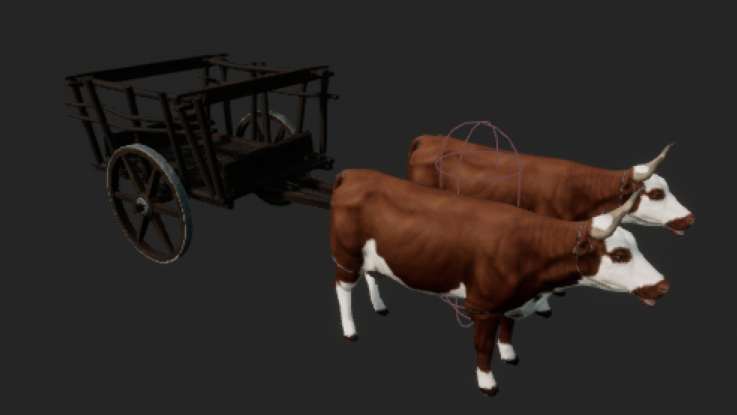
Does anyone know theoretically how to make a horse and buggy? Not for players to control but just for looks, either an AI, or a pre scripted actor that rides through a town. Would the buggy use physics? Or would that be too buggy? IK? I'm just lookin to be pointed in the right direction.
 ember star
its set as defaulty conroller in map settings
 frosty maple
You had one job garbage collector, one job!
Infinite amounts of bombs are being spawned lmao
Swear the fps went from 60fps to 10fps
grim ore
@ember star so in the world settings you have override the default game mode and set it as the controller? or did you do this in maps and modes in the project settings?
ember star
i did, and it was working for a while
then i created a camera and maybe messed up somethign else, now the controller seems dead
i edited level BP
 supple totem
@unreal comet just taking a guess here. I wouldnt do physics probably, I'd probably do some vector and rotation math based on what the cows are doing. It depends on the fidelity you want really
I'm sure Rockstar has mind blowing systems for RDR2 buggys
unreal comet
Yea this is just for looks. Just want to bring my town to life a little bit. I'll see if I can play with the rotation. If all else fails, I'll only place them in flat areas lol
plush yew
is it common that highspeed meshes go thru other meshes in unreal?
ember star
the begin play on my player controller isnt even firing, how did i break this so bad
 fast hinge
What's the best workflow if you want to have assets/materials in multiple packages? For instance, if I bring Megascans assets into Maya, perform my entire layout and basic shaders there, then export everything into unreal. Can I keep basic shader assignments with textures?
I see there is python scripting in unreal now so I would assume someone has written a script
 icy fjord
I am doing a course on Udemy and it says to use 4.10 even though it’s not even near the newest one especially since unreal 5 is coming out. What do I do and how does that work out? Plz @ me
 echo zealot
Hey yall! Am i the only game dev who smokes weed?
 steady rivet
Hi guys.I'm new to unreal engine. I have a small doubt. I downloaded the latest version 4.25 today.Most of my asset pack are compatibility with version 4.24.I downloaded around 12gb and installed it.
Do i need to download 12gb again to get previous version or it takes the files from the version 4.25 i downloaded?
grim ore
@icy fjord you can always download .10 if you want 100% compatibility, otherwise there is no way of knowing what has and has not changed on that course without doing it. Chances are if you user a newer version someone will mention the fixes in the notes for the course.
@steady rivet it depends on the assets. If they are mainly meshes and stuff, non code, more than likely you can add them as is into your .25 project. If they contain code they might not work in you force import them up a version
icy fjord
K I’ll check the notes
grim ore
@plush yew it is common for that in any engine due to the way physcis work. Look into using continuous collision and physics substepping if you need that
 frail mist
Does anyone else have issues with rendering movies from the sequencer? I found many threads in the forum about it but nothing really helped. I just want to make a gameplay trailer by recording footage with the sequence recorder.
steady rivet
@grim ore ok.i just installed now and what I meant to ask was do ver 4.24 take 12gb to download again in epic store?Or it just verify 4.25 file and add the 4.24 version launcher without downloading again
my main problem is downloading 4.2 for 12gb again when I have version 4.25
grim ore
@steady rivet do you mean marketplace assets in the vault or the launcher?
grim ore
if you are talking about multiple version of the engine, they are different. if you have .25 and .24 installed of the engine it's 2 separate sets of files
frail mist
With issues I mean very bad resolution when I have the cinematic scalability checked and bleeding between frames even when unchecked (hence rendering with PIE scalability).
grim ore
marketplace assts can be separate or not depending on how they are created, it might take up space for .25 and .24 for the same asset in your vault
steady rivet
so I need to download version 4.24 of the engine again for 12gb right?
grim ore
if you want multiple engines you will download whatever you need for it yes, I cant say the size I dont know what you are downloading
there are options to make the engine bigger or smaller
steady rivet
i can dm you tomorrow morning with the screenshot of the installation page detail
if that's ok with you
grim ore
wont change what I said
if yours says 12gb for what you want to install then yes you will have to download that again
steady rivet
ok thank you for the help mathew
 spare sun
how is vegetation done nowadays? Transparent planes or actual 3d meshes?
And I mean grass and such
grim ore
you can probably put your .24 assets into the .25 engine if they are just meshes and stuff, no need to download .24 engine
both are used , depends on the project and target platforms
spare sun
could you elaborate please
spare sun
yea ive read it but on demo he's still using planes whilst talking meshes with volume
frail mist
Does anyone else have issues with rendering movies from the sequencer? I found many threads in the forum about it but nothing really helped. I just want to make a gameplay trailer by recording footage with the sequence recorder. With issues I mean very bad resolution when I have the cinematic scalability checked and bleeding between frames even when unchecked (hence rendering with PIE scalability).
grim ore
@spare sun well I can say that the stuff he is talking about are definitely meshes and not planes
spare sun
ok thanks, just wanted to confirm
grim ore
you can download his stuff from the marketplace and look at it if you want an example.
icy fjord
@grim ore I checked and no one mentioned the changes for the newer versions, the course is 3 years old so I’m not sure how good it will be but if u have any other recommendations on how to make something I’m all ears
grim ore
large parts of the engine have not changed over the years so it could be perfectly valid, it just depends on the content
icy fjord
ok ill try it out then im download .10 rn but i can send the course links if u need
plush yew
Why tf my camera is in my Chars head
Only when i hit play
But when im modifying the scéne there IS no camera in his head
Wtf?
Pls help
grim ore
is there no camera at all in your default character?
if not the player camera manager is going to add one by default since you need something to look out of for your viewport
 zinc basin
alright, real question about Replication in Multiplayer:
IF something is replicated; say something as simple as a light turning off an on at random times (like in a spooky horror flick) - that blueprint would exist on every client. Now if The Game is Dedicated server, or Host->client, would the host settings be replicated to the clients.... with the clients' personal instances being disabled so they only take cues from the host?
Is that what happens?
is that a default behaviour, or does it have to be set specifically?
and presuming that's true; if the game was true P2P and had no host (not even sure if that's a valid structure anymore) does that mean that each client's light flicker be independant again/>
I still have a way to go before I get there, but I'm trying to understand all these damned buttons in the blueprints section
plush yew
Hi
plush yew
I want to make a game
zinc basin
don't we all? 🙂
plush yew
But i want to make a better game
zinc basin
heh. dont we all?
 smoky snow
How can I add someone to the channel please
zinc basin
how might we be able to help you today, young padawin
plush yew
I want to make the best game
zinc basin
@smoky snow right click the chat #ue4-general under the General heading on the Left Hand Side; the find the Invite option?
plush yew
My dad is rich
He knows everything about games
My dad said this is good discord
Hes very very rich
zinc basin
well, @plush yew this is just my opinion; but a great game begins with excellent design.
ONCE you have that, then learning to code or program it, THEN learning to do art for the game to match the intended 'feel'
That's probably a good start, and close to your priority list.
Ofc, no matter how good a game is, if you want people to play it, Marketing your game is a science all on it's own.
plush yew
Can you make the best game for me for free?
zinc basin
@plush yew when you say he knows everything about games, do you mean from a consumers' perspective, or a designers?
zinc basin
then why are you asking me? I'm a pleb?
If you have access to the best in the business, go and use that contact; Ask him!!!
zinc basin
I'm just going to say this then leave it;
Someone can show you every skill and every technique they know, without any fear of someone being bettr than them; because knowing how to make assets and make them move around a level is a VERY different thing to designing a good game.
Besides, if he can teach you the fundamentals of design and a core gameplay loop without giving away any secrets.
something doesn't sound right to me.
zinc basin
OK, Jackson.
plush yew
You mean micheal jackson?

 final fiber
that means you're worthy. pogchamp
zinc basin
lol
oh so are you the restuarant gamer?
plush yew
I’m THE robloxmaster
final fiber
prove it, ur pfp is not roblox
final fiber
final fiber
- well shit.
Its the best game ever
zinc basin
@maiden swift on that subject, my question got buried;
can I repost it without 'being a spammer;?
plush yew
This is off-topic discussion. Please take it to #lounge.
@maiden swift sorry i dont trust links in messages
final fiber
Thats... not a link though
plush yew
You mean a hacker?
 maiden swift
@plush yew It's a link to the channel you should be using.
plush yew
Sorry @maiden swift but i trust you but my phone is really expensive and i dont want it broken
zinc basin
@plush yew oh well, that's neat; way over my head, but neat;
You don't have some kind of instersecting mesh, do you? like even a lighting actor or something that 'borders' the level?
maiden swift
@plush yew That's fine. Please take it to #lounge so folks can use this channel for help with Unreal, as it's intended to be.
 fluid lance
@plush yew OrthoWidth maybe?
plush yew
Okay
maiden swift
@zinc basin Yes, feel free to repost your question. 👍
zinc basin
thanks! I'll let equinox have his limelight tho
grim ore
your questions should go in #multiplayer btw @zinc basin , it wasnt buried it was really not meant for general
zinc basin
thanks matt, I didnt see that channel!
I'll head over there soon
spare sun
if your camera is in perspective, it would be out of camera bounds right
fluid lance
@plush yew maybe I'm getting what you are trying to do wrong, but why do you have an angle to your ortho cam? you need it that way? it's what's causing the culling really
plush yew
I can help you
fluid lance
@plush yew but then it obviously culls anything which falls out of the 45% angle...
zinc basin
^ignore it, I'm guessing
fluid lance
so move it forward so that you get the whole thing within the angle and see if it's still culling
plush yew
What game are you using to make games?
zinc basin
yeah so you'd have to move the whole camera 'down'
zinc basin
@plush yew really? I was using the DOOM64 engine
i'm off to MP channel, thanks guys!
nice to meet you, middle-of-summer guy!
plush yew
But is there a children version?
zinc basin
@plush yew I think Duke has you sorted my man.
fluid lance
@plush yew np
zinc basin
@fluid lance skillz bro
plush yew
What game do i need to make games? @fluid lance
Plese helep
@grim ore no there isnt any camera
zinc basin
@grim ore thanks man, the pinned tutorials in that section look like they are exactly what I need as a starting point; let the learning begin (continue?)
plush yew
Plese help me
@grim ore Can u pls help me?
😭dm me if you want to help me. Tank yu so much
grim ore
@plush yew if there is no camera the engine will create one, you need a camera to see thru when playing.
maiden swift
Anyone else excited for Unreal Fest Online this Tuesday? Only two days away. 👀
grim ore
no because it's not GDC and I am sad it's not GDC
plush yew
Yu can helep me?
maiden swift
@grim ore But new UE5 goodies!
zinc basin
@maiden swift I know tha tI should be, but I'm still new and got so much learngin to get done that the idea of that thing is a bit daunting ATM
Besides, I'm pretty sure it's just a disguised advert for 5
grim ore
UE5 is still a year away, until I can play with goodies are just teasing
plush yew
Nobudy want help me
maiden swift
@zinc basin It's true there will be new UE5 info there, but the majority of the content will apply to UE4 as far as I can tell.
plush yew
Plese help me!!
Plese!
HELP!!!
ME!!!
PLESE!!
Sorey its almost 7PM and i’m still on phone. I really need to go bye!
grim ore
I think I am just going to sit in the networking lounge and harass people that day @maiden swift lol
final fiber
Does this C++ tutorial still work as of today? https://www.youtube.com/watch?v=KXeoh2hT7xk I'm stuck at the "#include ''InteractionInterface.h''" line where it's not compiling my code correctly in-engine (using 4.24.3)

UE4 C++:
This playlist covers various aspects of working with C++ inside of the Unreal Engine.
This Video:
In this video, we create an Interface class in C++ which we'll be expanding on over the next couple of tutorials.
Links:
The beginning of this playlist: http://bit.ly...
the playlist of these has worked up to this point
 narrow mauve
99% of every unreal engine 4 tutorial . "How to make gun shoot, shoot stuff, enemy shoot you, make actor go away after shoot, what is an actor, what is a gun, what is a bullet, shoot the bullet, shoot the enemy and make effects when he got shot" ....me: "learns nothing important"
final fiber
that's why I do the programming with the tutorial, instead of watching and trying to program from memory off the tutorial.
narrow mauve
The problem I am finding as a beginner trying to learn is there seems to be a huge lack of fundamentals. It's all specific things that mean nothing to me like "shoot the bad guy derpa"
final fiber
It takes me a bit to understand what the code actually does and I miss 99% of stuff, but in the end it works.
zinc basin
@final fiber I take it that 0.75 and 0.25 are good buddies of yours?
final fiber
in percentages of what I understand in literally any lesson I've been in (real life and online). yes.
zinc basin
ahahalol
I mean replay speed; but i feel like you knew that
final fiber
yea, lol
zinc basin
it's amazing how much stuff 'basic' tutorials can skip over
"create a static mech actor then do"
Boom uses some keyboard shortcut
How TF that that fully rigged and animated Actor get there? @narrow mauve
The tutorial on realistic procedurally generated grass was pretty damned cool tho
storm venture
considering unreal engine's poster child growing up was a first person shooter, i think its fitting for first person shooters to be the example projects used in tutorials
final fiber
but anyway. the InteractInterface.h thing seems to kill my compile for me.
zinc basin
@storm venture absolutely; in fact it's the reason i switched.
well that and Unity's MP is literally non existant;
They literally say on the store "MP is not supported any longer and will be removed"
MP will be re added at a later date
Oh and BTW MP i a paid subscription.
final fiber
what's the alternative in 4.24.3? I can't find a damn word about it anywhere
narrow mauve
the only way to really learn is to just do everything yourself
storm venture
@zinc basin unity said MP is not supported?? woah that seems bad
zinc basin
they said that they are discontinuing their current iterationa nd will not support it, yeah thats how i remember it
final fiber
the only way to really learn is to just do everything yourself
@narrow mauve
Me trying to learn by myself: uuuuUUUUHHHH....
seriously, what the fuck does all this mean?
zinc basin
honestly Unreals documentation is good, their tutorials SUCK
storm venture
@zinc basin hopefully theyre replacing it with something better because to just cut out mp seems pretty odd lol
zinc basin
and thy just go do this then this thisen thsi then this without explaining anything and just drilling so deep down menus' i've never seen before
final fiber
when you understand it it isn't.
narrow mauve
As a beginner.....seeing most things in unreal engine and code to me basically is like FJKODSGNUIREG*(%MJGH*()MJG#($UJGM()G*)(MJG)#(GJM#()$GJ$#(GJ$#*()G<J#G
What I mean is..it's total jibberish
zinc basin
lol @narrow mauve
Perfect
narrow mauve
I've only been learning for a month though..I'm a baby XD
zinc basin
did you copy and paste that code from somewhere?
storm venture
i personally love looking up the documentation for some "Node X" and seeing a single sentence on the docs describing it as "Node X: Does X"
like, yup, thanks epic, i got that much
zinc basin
 thick herald

Unreal Engine
Unreal Online Learning is a free learning platform that offers hands-on video courses and guided learning paths.
zinc basin
@storm venture
literally the entry reads
Multiplayer and Networking
Note: UNet is deprecated, and will be removed from Unity in the future. A new system is under development. For more information and next steps see this blog post and the FAQ.
storm venture
oh unity.. lol
narrow mauve
lmao ...unreals sign in has me flipping animals upright as the captcha
zinc basin
that's literally 2/3 of the game market
oh i had that
coz an AI can't learn what legs look like in about 3 seconds
narrow mauve
My thing is I am not bad at materials ..and landscaping and level design comes naturally to me. ..I caught on fast with source engine a decade ago..made a bunch of maps for a mod called zombie panic source..and did some work on contagion
but I havent touched game development in a decade
zinc basin
ohoh
i played that
narrow mauve
It's like learning allover again..and source engine is baby stuff compared to unreal
its the coding..the logic...the blueprints
I have these nice effects..now..how tf do I get it to do what I want
zinc basin
yeah that's the stuff i like,,,, but im learning it from scratch RN
narrow mauve
Especially when it's as complicated as what I am trying to do
zinc basin
I struggle with building the pretty world in the first place
narrow mauve
see that stuff is easyyyyyyyyyyyy
zinc basin
I'm too logical
final fiber
same.
narrow mauve
I am wanting to make a storm chasing game
final fiber
that's why I let my brother do level design, then I do the programming behind it. or I try at least.
So far, I've used a tutorial and copied the code of their characters to the letter and it's worked
zinc basin
I feel like BP were made to supplement C++ and were written by c++ rogrammers; not made to make it easier for non programmers
i mean to use a node you already need to know what it's for
final fiber
If you're good at C++ anyway, then it's not too much of a deal to start learning how to get the engine to do what you want it to. It's just more functions to learn, right?
 vagrant cliff
I had came across this riggin in Unreal, had anyone set it up before on a character? https://www.unrealengine.com/en-US/tech-blog/learn-how-to-create-a-character-animation-rig-with-unreal-engine-s-new-control-rig-mannequin-sample?sessionInvalidated=true
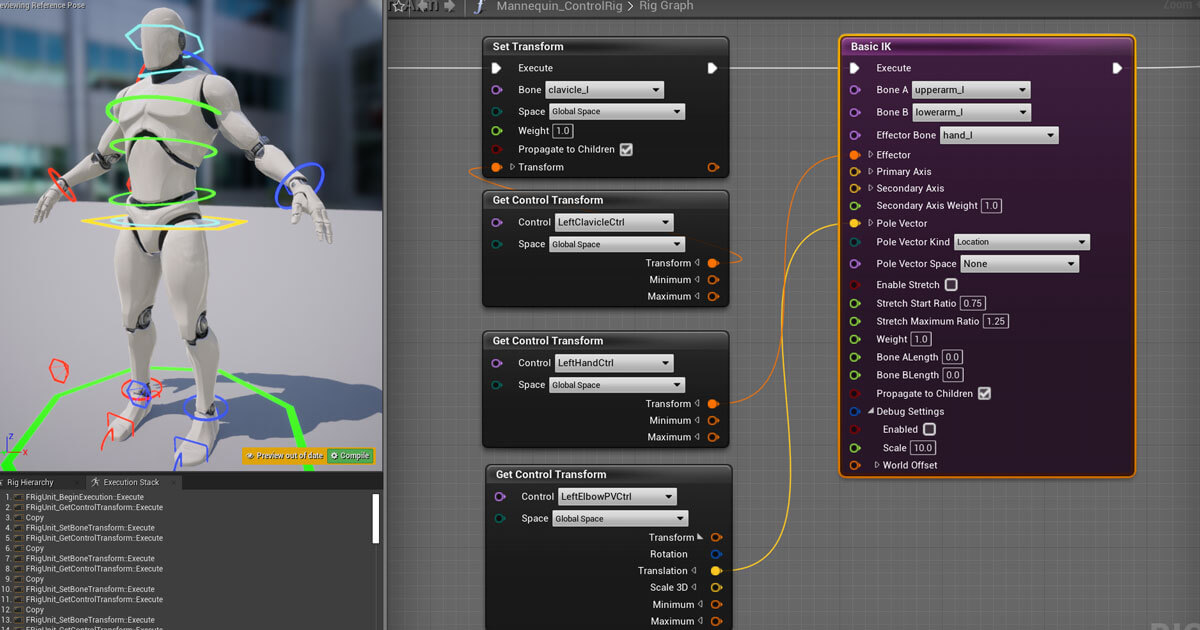
Unreal Engine
With the addition of Control Rig, users can now fully rig and animate characters directly in Unreal.
zinc basin
no
narrow mauve
hah
final fiber
._.
vagrant cliff
or is there a sub chart that is good to discuss rigging and such
zinc basin
@final fiber i think that all the functions in BP already basically exsist in C++ anyway; basically
final fiber
you have a TREE.
zinc basin
or a coder could build the one they wanted in 3 lines of code they already know in 42 seconds anyway
narrow mauve
tornado effects was workn on turned out well but its meaningless because I can't do anything with it
final fiber
I gtg now. but can someone dm me a good tutorial series for making stuff with C++ in unreal?
zinc basin
@narrow mauve that's so cool and so far beyone me.
narrow mauve
I can make it look good...I can't do anything with it..and that is what is torturing me..because I feel there is no way to bring my vision to life
zinc basin
@narrow mauve oh man you got some skills man
final fiber
and please, one that works with 4.24.3, because my one so far is running into issues by "InteractInterface.h" being required
and that does not exist apparently
zinc basin
well I say man; woman, it's all the same when it comes to talent to me
final fiber
anyway, cya everyone!
zinc basin
@final fiber I googled and got this: https://forums.unrealengine.com/development-discussion/c-gameplay-programming/81603-c-interface-to-blueprints
Unreal Engine Forums
For gameplay programmers writing C++ code.
@final fiber besides your qustion belongs in #cpp
cya
@narrow mauve that is genuinely cool.
I can see conseptually at this point how to make that interact wtih the world, but I'm still learning this exact thing right at this moment;
but that's honestly sexy
like except for the low poly grass in the forground (and the FPS camera movement) that could easily be an IRL video
narrow mauve
Tried messing around with volumetrics for the clouds but it's far too power hungry and I am not sure how to code in such a way to tell it to 'stop rendering' when the player can't see inside of it
Then tried just making meshes....and animating noise over it...which..looks fine..except well it's a mesh..how do the clouds 'grow' and shrink etc.
And this is where I'm at now..messing around making clouds out of particles...and today I got really bummed out because I think..all of this is meaningless because I can't apply it anywhere
 hot cosmos
hey how can i get from this to the epic sotre for games
fluid lance
@narrow mauve imho, it's pointless to play around with volumetric shaders & particles if you're making a game. The cost is ridiculous. Enabling volumetric fog only will cost ~2ms on your above-average card (mine is RTX 2600 and it costs ~2ms). When you throw in a niagara particle (spawning 0 or 1 ofc) and use a volumetric mat, the costs are still way too high. As for your second vid (the one with meshes). It doesn't look great, but if you want to move, get the meshes inside a bp and play with their transform through a looping timeline or an interp/lerp function, or even a sine or whatever...
 ripe plaza
I've been reading documentation and UE4 is really starting to appeal to me, me being familiar with the Quake family of engines (Source, mostly), so I'll probably soon make a few experiments with it
Once I'd read some of the documentstion things like blueprints, actors and the gameplay framework just started to click (so THAT'S what that's for)
 digital badger
@hot cosmos Go into settings and enable it.
You/IT must have disabled the games section when installing the launcher
Should be one of the first options
If you don't find it, post screenshots of the settings menu and I'll point it out( I'm away from my PC)
plush yew
What exactly does custom time dialation do? Could I use it a sense where I have location 1 and location 2, time moves when player is at a location (current frame time) so when player isnt at the other location, time doesnt move. But when they move back to the other location, set custom time dilation to 10 until location frame time catches back up to current frame time? (Once player leaves location, last frame time is stored and used as reference)
digital badger
@narrow mauve About the particles "not rendering" - do particle effects not get culled automatically like static meshes do? But I agree with @fluid lance, you shouldn't use them for games - though perhaps making it an option in the visual settings menu for playing with top of the line GPU's
@plush yew I believe custom time dilation affects the global time manager, which makes it ineffective for the case you described
Though such logic sounds possible to program, even in blueprints
plush yew
Cant you change the actors time dilation
fluid lance
@plush yew Global time dilation dilates time for the whole world, custom time dilation is only active in the actor, which means you can independently affect how time is flowing for each individual actor. Not sure about applying both at the same time, but custom should read from current global
digital badger
Ah, didn't know there was a per actor time dilation. Never really messed around with it.
fluid lance
It's basically at the core of that shooter game (idk what it's called) but it was a pretty big hit two-three years back
digital badger
SuperHot? Time moves when you move sort of thing
fluid lance
yea
so basically, input=set custom time dilation for all to "normal speed/wahtever" and no input = set custom time dilation for everyone at 0 roughly
but based on speed (vector length/something)
ripe plaza
just remember to set a minimum if you're going to make a super hot clone, if it hits zero you can no longer move and thus can't speed back up
plush yew
How would it affect an actor ticking? If I have it at 10 does it tick 10x faster or simulate between?
digital badger
That's for SuperHot, Resonant described it based on the players location rather than velocity in his original comment
plush yew
Like substepping
fluid lance
try it out xD
printscreen on tick and do some math, look at time 😉
printstring* sry
it's 0-1 so 10 should be 10x
digital badger
For location based, you could have trigger volumes dictating your locations. Then once the player enters a trigger box you set the time to 1.0 or whatever, and on leave you set it 0.1
Though I've had issues with Loading save games when the player is in a trigger, since OnEnter never gets called when the player spawns inside
fluid lance
never 0 though, like @ripe plaza said
plush yew
Itd be like a 1 time thing
Though I've had issues with Loading save games when the player is in a trigger, since OnEnter never gets called when the player spawns inside
fluid lance
@digital badger yea, had to remake some code because of that. Initial overlap has been removed in 4.19 or something xD
digital badger
A dirty solution is checking if the player is inside at BeginPlay, then running the OnEnter function if true
But I would love something better
plush yew
Was planning on having specific actors just catch back up to the in game time of the player as they wont be active outside of overlap zone
fluid lance
nah, it's ok i'd say, fixed mine the same way 😄
plush yew
So when theyre out theyre inactive and not ticking etc but when theyre back in they go active and have dilation set to catch back up
ok so im trying to achieve a modular vehicle building simulation similar to the way it works in crossout
fluid lance
@plush yew if you're making multiplayer, better read on the thing, not sure how/where time dilation is executed and if it's not on server, you'll be in for a nasty surprise
digital badger
Guess I'm just a slave to clean code. Kinda burned out recently because I was just going over code meticulously refactoring it
Just have to stop myself lol
fluid lance
@digital badger that smells like little progress in my experience, but I know what you mean 😐
narrow mauve
does refactoring have performance benefits or is it just preference
fluid lance
depends
digital badger
Performance for code smells( i.e long long long if statements)
fluid lance
it can have MAJOR benefits if you wrote ur code like 6 months back and evolve quickly
digital badger
But mostly nitpicks like oh this variable is used only for one little thing so let's compress it into the function call
Saving 2 bytes of memory
plush yew
I just fixed up organization kinda and well redid code in the best way I could as of my new learned stuff
ripe plaza
basically don't be YandereDev, seriously use JetBrains DotPeek on Yandere Simulator and have a sick bag nearby
digital badger
Or this bool doesn't have a little b in front of it.
@ripe plaza I think that's where it started from lol, some guy posted a 2 hour code analysis on it
fluid lance
consistency
ripe plaza
Hungarian notation is not good for variables, change my mind (class names are ok, like unreal does it)
narrow mauve
whos hungry
plush yew
Whats Hungarian notation
ripe plaza
prefixes based on type
narrow mauve
bIsDead
digital badger
F, S, U, B, E, A
ripe plaza
like bActive or iLives
digital badger
Think that's all of them in the epic code style
Of course assets naming does have something similar( ue4.style ) e.g SM_
ripe plaza
However I will happily call my class AThingy and UComponent
digital badger
quickly changes comment to add A
ripe plaza
also have there been many problems with Blender 2.8s FBX exporter? That's the one thing that's been worrying me before getting started in Unreal
storm venture
this is a solid mesh, any idea why displacement maps are splitting it? the splits are based on the camera's position, the only appear at the closest edge of the camera:
plush yew
I found about the modularity of components and redid lots of my code for that because well only regular actors were getting annoying
Need more knowledge
digital badger
@ripe plaza Not really, but I think the scale might be different by default so you need to change blender units
Though I may be wrong.
ripe plaza
but the thing about Unreal that makes it attractive to me is how intuitive it is to my little Source Engine caveman brain
digital badger
I think I am, and the issue is that the blender default cube is 2x2x2m rather than 1x1x1m
Which really puts me off
ripe plaza
I tried using Unity but would often end up reinventing the wheel with event systems and stuff, I do know how to use it but I don't like it that much
digital badger
@storm venture Could be a culling issue? Seems very weird. How large is the mesh, looks like a terrain
ripe plaza
Also Dark Theme is Plus only without dubiously legal hex edits, which is painful
digital badger
Oh then not too big to cause those types of issues. I'm clueless sorry
storm venture
yeah its a really weird issue, i cant find anything online
digital badger
@ripe plaza I honestly think that Unity is a bit mismanaged, though that's not a topic for now. UE4 is really comparable to source imo, I've used Hammer a handful of times and it's similar
But I am by no means an expert
ripe plaza
Also tried the UE4 editor, messing around with BSP stuff, my god it's heaven compared to hammer
digital badger
If you ever try to solve a problem in UE4 and think your solution is too complex post it on here and even pin me if it's a ghost town. I've never had to do anything that's needlessly complex( apart from custom save archives really)
ripe plaza
But I've read a lot of the docs of UE4 and it all just fits nicely, Unity is more open ended but what I want is intuitive systems that work well together, and Unreal seems to give that, so time to make a simple game
 limber mesa
can anyone help me. i didnt make any changes and this error happened
digital badger
Yep. Not disagreeing with you
digital badger
@limber mesa Please do not use the error log. Please read through the output log generated by UBT, and find errors in there
 brazen crow
it is about ai controller
limber mesa
UBT?
brazen crow
i made a little spawner thing
and it creates these enemy characters
but i need to posses them with a new aicontroller
and i dont know how
i tried setting the default controller to my aicontroller but it doesnt seem to possess the character on spawn
event onpossess isnt getting called
digital badger
@limber mesa UBT stands for Unreal Build Tool, which builds and compiles your code. You can view the output in the output tab in Visual Studio, by default should at the bottom near the error list
@brazen crow Are they set to be possessed at spawn? Open the AICharacter and would you kindly share a screenshot of the class defaults?
digital badger
Yes.
digital badger
You're welcome :)
brazen crow
thanks
limber mesa
i did absolutely nothing except comment and i get this
digital badger
Are you using the Unreal Editor from the launcher or GitHub?
limber mesa
well was having issues with another project but this one is just my personal one, so ue4
i was tinkering with source control today with another project
digital badger
Yes but did you install it from the launcher or GitHub?
limber mesa
launcher
digital badger
Okay, please would you go into the launcher and select the UE4 version you're trying to build on and verify your files. I believe that either UBT or your editor somehow got corrupted causing that error
You can verify your files by clicking on the arrow next to your UE4 version and selecting verify. It should only take a couple of minutes
If that doesn't work, then I hope someone else can help you as it's getting late here and I'm about to go to sleep
limber mesa
i honestly think it was off of another project
im trying to get git up and running for source control
and before the it was fine
this project is just a strict ue4 project, while the other is being set up for source control
@digital badger , how would it get corrupted?
digital badger
Random processes, hardware, other software, the OS. Really corruption is never expected, and well, random at times.
limber mesa
@fringe crest was having me put in these commands into git, and idk if it did it
digital badger
Back when I had this really cheap used hard drive, I woke up one day and it stopped spinning. But I digress
ripe plaza
well if you check your commit tree and it isn't spaghetti it should be fine
digital badger
It's good practice to verify your UE4 files, so I suggest you do it even if you don't believe that your engine files were corrupted
ripe plaza
Also how well does UE4 work with Git? Unity needs external tools and things and setting Merge tools and stuff
digital badger
@ripe plaza built in plugins for it
Though obviously Subversion and Perforce work better
Since you're dealing with large binary files.
limber mesa
is subversion free to use
upper karma
Hey is there a good tutorial for making it so that certain music plays when you get in a certain velocity of an object?
ripe plaza
Does it support git-lfs?
digital badger
Yes it does.
ripe plaza
Excellent
limber mesa
@digital badger what source control do u use
digital badger
@limber mesa Yes, but you need a server.
limber mesa
oh
digital badger
I use Perforce
upper karma
omfg not velocity, vicinity
digital badger
Lol
limber mesa
@upper karma cant you do a box collision and if overlapping then play music
ripe plaza
accelerate past the record player to spin the record to play music, there's a game idea
limber mesa
idk
digital badger
Exactly what Billiams suggested
limber mesa
i actually got something right lol
digital badger
I think if you use 3D Audio you can set the radius and do it that way
upper karma
cant you do a box collision and if overlapping then play music
I think that could work but I'm not sure how to do that. Ik how to add a box collision but not how to make it play music
digital badger
@upper karma Blueprint or C++
limber mesa
go to the actor and add box collision
upper karma
Blueprint
digital badger
"Play Sound At Location"
limber mesa
oh
digital badger
Hook that up to the OnEnter event
limber mesa
Maestro its about half way done
digital badger
There's some settings on the node, make sure the location is of the actors location so you can actually hear the music
And not at 0,0,0
upper karma
What if the actor moves around?
digital badger
@limber mesa Hopefully that solves it, if not I'm not sure sorry.
digital badger
@upper karma I'm really not sure actually lol
upper karma
Like I want the music to play when the player gets near an enemy and stuff
Lmao it's fine!
digital badger
Maybe ask in #audio?
You could play a Sound 2D
Which is the same because it doesn't change volume based on your location
So for like music that's perfect but not for SFX
2nd answer seems legit. Though I haven't tried it personally
limber mesa
@upper karma just add a box collision
digital badger
That doesn't solve the moving issue.
upper karma
Right, right! That's exactly what I want cause Im basing the mechanic off KH, where music plays when you fight heartless, then plays other music when they're dead.
digital badger
Box Collision will only trigger the sound to play
But not update it if the character moves
The answerhub answer I posted seems more elegant. However I would personally create the Audio component dynamically
digital badger
Imagine this, you play the new enemy theme, but then due to an AI error the enemy runs to the other side of the level.
Since the sound stayed at that location it would seem odd
Since hey the enemy is 12 miles east but I can hear them as if they were in front of me.
upper karma
Right, yeah.
Thanks for the help!
Gonna get to work on that after I fix this camera bug.
for some reason my end result is different from the tutorials
As a matter of fact, yeah I might need help on this too.
Im following this tutorial [https://www.youtube.com/watch?v=UMcmqsMzcFg], and he sets up this node setup for the camera where t resets to behind the mesh when a button is pressed

In this tutorial we'll extend the third-person template by a quick-reset function and auto-adjustment when the player is moving (as seen e.g. in the Batman games or Dark Souls).
0:00 - Introduction
1:43 - Camera reset
11:42 - Camera auto-adjustment
I do the same thing but for some reasing it resets to being under my characters legs??
imsorrylol Is there something I did wrong here?
ripe plaza
make your character an anime girl and add this as an intentional mechanic
storm venture
he did something different
oh i see what you mean though
his other version was like yours but still worked
upper karma
actuallythankyouforthatcauseitsavesonmehavingtowatch Yeah
You think I should try the full setup?
storm venture
well if you already have a bug then i would be worried something was skipped early on, might affect other stuff down the road
maybe check out the initial rotations of some of your components, see if it matches his, etc
make sure everything is parented the same
limber mesa
@digital badger it didnt work
can anyone help me with this error message
the problem only blocks visual studio
wont let me build
upper karma
figured the camera shit out. Its cause UE flipped stuff around and I got confused and put them in the wrong points
 tiny sonnet
is there any problems with deleting files directly from file explorer so i dont have to wait 5 hours to force delete?
grim ore
only if you are sure it is safe for you to do that
as in, if you are deleting a texture and somthing uses that texture you are going to obviously break that link. If you delete a blueprint and stuff uses the blueprint or you have children of it, stuff is going to break. etc.. If you are deleting something that nothing uses then you should be fine
grim ore
should be fine then if nothing knows about them
 surreal gyro
🤔 So where should I start for making a 3D beat-em up?
fleet wraith
Does anyone know how to use seamless travel for multiplayer? I open a listen level. Clients join. I have seamless travel enabled. I use Open Level. It kicks all clients from the server and only moves the host. What am I missing? Because every tutorial and doc i can find just says use open level with seamless travel ticked but it doesn't seem to be working
plush yew
Maybe something to tell the clients to move
 analog copper
Hey, guys
I'd like to start learning about UE4, more specifically about physics and collision between body and objects like clothes, guns, etc
What should I look for to get started?
upper karma
Was editing some lights and now I can't play. How do I play and stop getting this
nvm just had to save
 winged crypt
anyone here have experience with launching to non-Windows devices directly from the editor?
frail mist
Does anyone else have issues with rendering movies from the sequencer? I found many threads in the forum about it but nothing really helped. I just want to make a gameplay trailer by recording footage with the sequence recorder. With issues I mean very bad resolution when I have the cinematic scalability checked and bleeding between frames even when unchecked (hence rendering with PIE scalability).
plush yew
What should I look for to get started?
@analog copper the collision settings in actors
 rain venture
Would it be better to make an fps player which has 2 skeletons?(one for arms and one for legs) or have only one skeleton and make the animation from arms blend with the ones that use guns while the legs keep using the usual animations?
plush yew
1 skeleton
2 sets of animations
1 for first person 1 for third person
You can make a seperate mesh with no head for first person camera still using the first person anims while showing the third person anims to other players if thats what youre trying to do
rain venture
This game that I am working on does not include third person view or multiplayer, its all story
In this game you can see your feet in third person
And the way the character is setup is that it has two skeletons for a set of animations
One skeleton for legs which play the idle, walk, run, crouch etc
And one for holding guns and shooting
plush yew
Well 1 would still be fine for that just only make first person anims
Animate it fully instead and cut the head off
Or whatever you want cut off
rain venture
The arms also use the cyclic walking and running tho
So I am guessing that using the node that blends animations from a bone to the last child bone would be much better?
Forgot whats the node called
But its used in anim blueprint
rain venture
Alright then, thanks :)
 fringe crest
@limber mesa Build > Clean in VS, then Build > Build Project
 uneven tundra
I have a supersimple mesh but im getting some weird issues. https://i.imgur.com/jHGtAiM.png
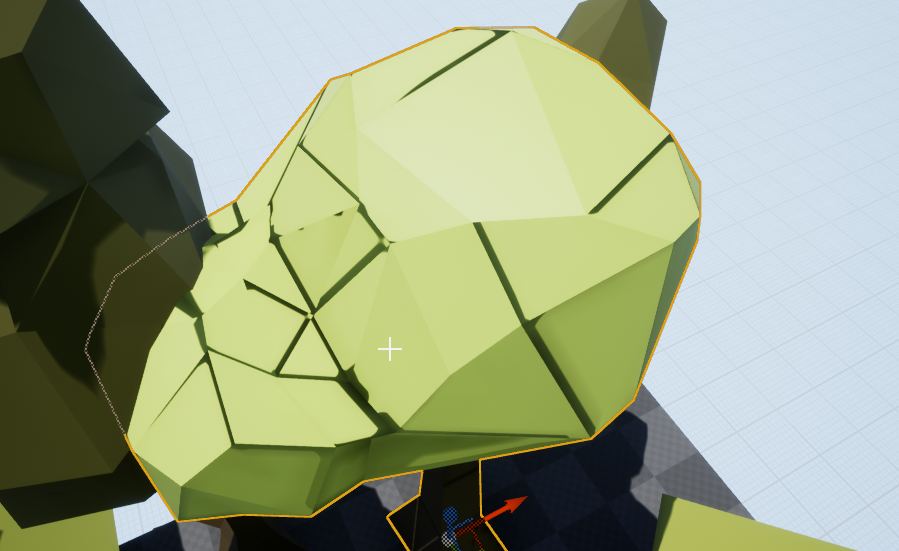
Theres not really a texture, rather just a color.
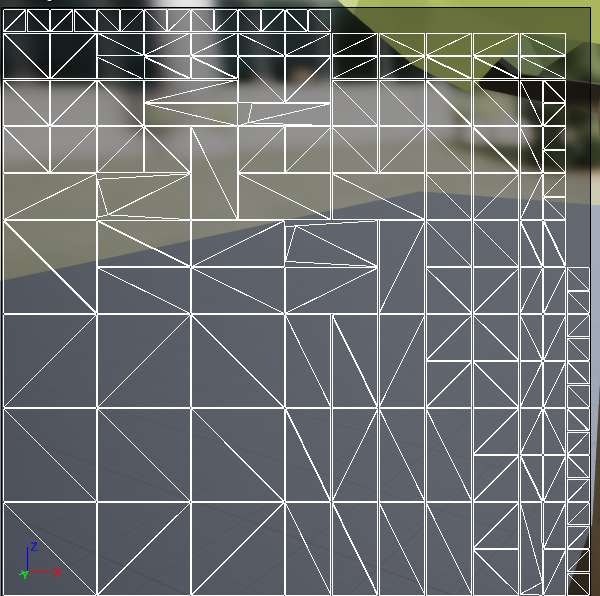
That is the light map
 peak hare
blueprint made a lot of the stuff much easier and is even easier to do it than unity imo
but what about performance issue? Is is bad?
 lucid jetty
I am having no issues and my project is full bp.
plush yew
but what about performance issue? Is is bad?
@peak hare probably fine depending how much you do but you can nativize and get close to c++ performance
lucid socket
@uneven tundra Too many seams.
ripe plaza
Learning Unreal Engine, Atmospheric Fog doesn't seem to do anything
not particularly fun when most of the basic level design tutorials make you place this thing that magically works for them but does nothing for me 😅, I've been googling and apparently need something called a "Sky Sphere" which is not mentioned in any of the tutorials nor is it ever added, nor can I find documentation of it
and I don't think it's the "Unlit" either, it doesn't work in lit mode either
ripe plaza
So it started working upon restart of the editor, now I can't find "Atmosphere Sun Light" in the directional light's options
Ah, nevermind, turns out that's hidden under advanced settings
 azure gazelle
I have a supersimple mesh but im getting some weird issues.
@uneven tundra What you see is probably due to the lack of space in-between the uv shells. It's not a great object to UV map, but this looks like simply every face has it's own shell. While this should work in UE4 it's not great performance wise. Even if it is just the lightmap UV. Short fix: reduce the size of each UV shell so there is space between them to prevent leaks from other shells. (Is it a custom Lightmap UV?)
stuck linden
does anyone know what can i do to connect the action fire to is playing?
i want to check if it is playing before playing the animation
ripe plaza
I don't believe you need to connect the action, just use the return value of IsPlaying
 civic cobalt
cant i scale all actors in the level together and not separately?
 worn cape
anybody in here, who could help me on an import problem i have ???
civic cobalt
state ur prblm
azure gazelle
@civic cobalt I guess you could group them and then scale and ungroup.
civic cobalt
doesnt work michael
worn cape
I have a Mesh Collection, i want to import, but whatever i try to put in - because it needs to split the meshes - everything is out of center, when imported, or not sized and rotated by 90° to the side.
I don't find the import settings, i would need to import it so that i can use them as objects for themselves easily ...
i can't use the things well, if i have to know their positions in the fbx file though ....
civic cobalt
you have to export fbx meshes in neutral orientation, 0 0 0 position
and move them out as you like inside the engine
azure gazelle
@civic cobalt weird... You could always go the Hierarchy route.. Create an empty actor at 0,0,0 (or the wanted center) parent everything else under it (may need to set the empty object to static instead of mobile), scale it and then move everything out of the parents and remove the empty actor
worn cape
@azure gazelle unwished ! 😉
it's a pain though ...
i see - i am looking over for some handy artist
civic cobalt
that seems too much work for a simple operation, i endedup merging all actors into static mesh, but now i cant edit
stuck linden
does anyone know whats wrong with this code? it works until play animation
 forest patrol
Guys i have a problem... when i move my character he is stuck in idle pose and he is not walking or running can you check whats wrong in the script i will send screenshot
stuck linden
well you can see whats wrong @forest patrol the orange line glows when its working, its only working until cast so thats where its wrong
forest patrol
how do i fix that
azure gazelle
@civic cobalt If you merge them into a static mesh they become a single mesh.. so you can't change it afterwards.. That's why the Hierarchy workaround is more work, but keeps everything else intact
azure gazelle
@forest patrol Casts wil always fail in Animation Preview because the preview is not of the same type you cast to. It should work in Play Mode if the cast is correct
worn cape
but different than before 😉
ripe plaza
so it took considerably less effort to create an FPS character in Unreal than it would have taken in Unity, Unreal is going pretty well thus far apart from one editor bug and one visual studio bug
azure gazelle
@worn cape For your import problem: UE4 takes the dcc's 0,0,0 point as pivot.. That's why your objects are of center.. Place them in your dcc (blender, maya, etc.) where you want them relative to the scene origin. Rotation can be fixed during export and/or import if the pivot is correct
stuck linden
can i ask you a question in PM? @azure gazelle
forest patrol
soo do u guys have any idea on how to fix this
stuck linden
@forest patrol Are u doing it off a youtube video
forest patrol
yes
stuck linden
well did you do the same things as him?
worn cape
it looks like they are. but maybe they are not. in max everything looks good. but if i set option to not take absolut, everything is scaled down to -100, flipped by 90° and cannot be changed any inside the meshs import settings, regarding transform, scale or sth.
but i am happy now, having my trap finally ... after some month ... ^^
forest patrol
i did
worn cape
thank you all for participation 😉
azure gazelle
@forest patrol What is the type of the Character that uses this animation BP? (Is it really ThirdPersonCharacter or a child thereof)?
forest patrol
its thirdperson character
azure gazelle
Then the cast should not fail.. Try complie and then use the Debug Feature to see where it actually fails
forest patrol
whats debuf feature
azure gazelle
Pause execution using Breakpoints to inspect graphs and the values of variables.
You can actually just run the game, pause it, set the Debug Filter in the animation BP to your Character and then you can see where and what it executes
forest patrol
wait
i dont get it
where is debug filter
it it the red thing
i found it
doesnt show anything
azure gazelle
If there is no entry. it means there is no instance of the anim BP at runtime which means you forgot to set the Animation BP on your Character Blueprint
forest patrol
there is some yellow arrow
that says result
and then alot of other arrows in grey
animation BP on character bp huh?
overall it says no debuging info
and how do i set animation bp on character bp
azure gazelle
forest patrol
oh
lemme try that
when i go there
it looks like this
there is no anim class
azure gazelle
Thats the anim preview in the animatino editor.. You need to open the ThirdPersonCharacter Blueprint you created where you specified the Mesh it should use. and implemented Input logic
 spice spire
Hello, Are they some changes in how Motion Blur and Time dilation are calculated in 4.25 . Basically I had object motion blur working fine with Time dilation in 4.24. 4.25 is doing something really strange where motion vectors are shifting all over the place when in time dilation
 brittle gulch
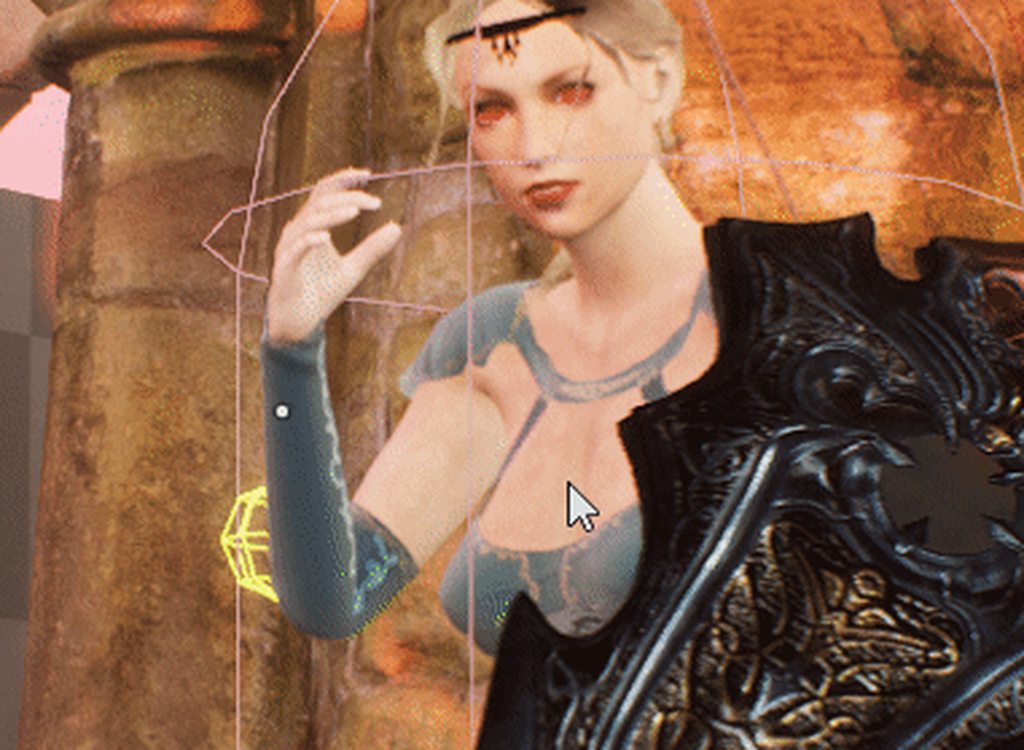
Hi there, is there a plugin, or something, that would allow to see what's inside a function in the same way we can see inside collapsed nodes? Like on this picture :
spice spire
So the issue has been there since 2017, and supposedly fixed in 4.25 but either its not part of 4.25.1 or it still affecting custom time dilation
Temporary fix is r.MotionBlur.TargetFPS 0
ripe plaza
Unreal Engine freezes whenever I click the "Launch On" button, it never launches the game standalone and completely freezes the editor
ripe plaza
I may have misunderstood what that was even for
 abstract anvil
Launch Game is typically used in times when you have a device attached to your computer and you want to play the game there. Ex. You have you phone hooked up and you want to test your game
 terse cradle
this tessellation issue is really pissing me off getting edges that freak out lol looks like unreal doesn't like zbrush displacement
 dusty epoch
halooo
 bold compass
hiya guys I'm fairly new to ue4 have been using it for about a month now and I'm currently trying to make a loot box that when opens drops random weapons like fortnite for example
I've managed to make a chest that opens on f key with progress bar ui
and i cant find much online on how to do the loot
i don't know whether im searching the wrong thing or i just cant find the right stuff
abstract anvil
I haven't played Fortnite, but I'm assuming you're talking about having issues generating random loot? @bold compass
bold compass
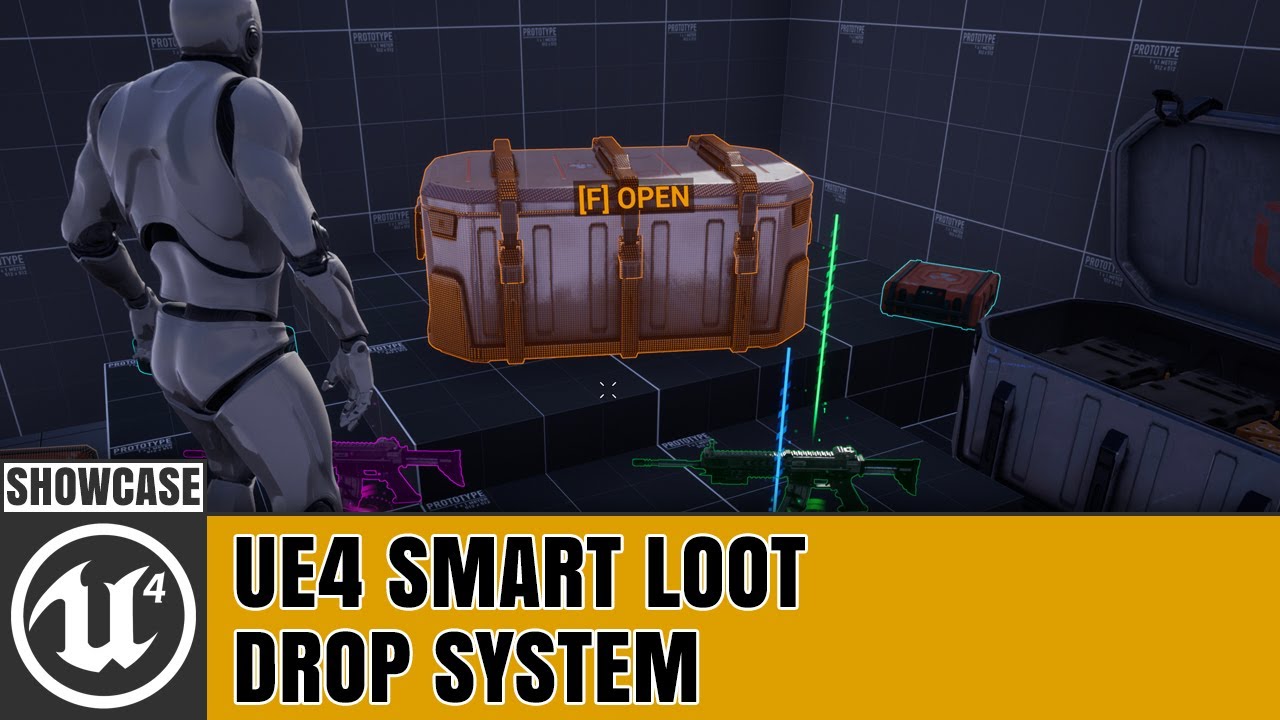
Created a spawn system which will automatically adjust its valid spawn bounds in the event of a collision to ensure the loot when spawned, doesn't clip through surfaces. On a few of the chests, i enabled debug mode which shows the bounds, and also the start/end points for the ...
something like this
abstract anvil
So which part of that are you having issues with?
bold compass
i have made a crate that opens on f key like this in the vid and am wanting to add weapons/items that eject out of the box randomly but im not sure where to start
sorry im kinda new to it so unsure what to search ive been looking for few days now trying to figure this out but I'm proper baffled lmao
abstract anvil
What I'd do is have a weapon pickup BP which randomly generates a weapon. When the player opens the chest, spawn a number of those BPs inside the chest. Because they'll be clipping with the chest, you'll have to turn off collision for the chest before you spawn them then turn it back on once the weapons are outside of the chest (there's a few ways to do this). As far as getting the weapons to fly out like that, I would have "simulate physics" ticked and just use something like "add impulse"
terse cradle
got it working the displacement sort off love the edges
frank oar
Is it dengerous to change the name of your file here ?
abstract anvil
It might mess with stuff, but do you need to change the name?
frank oar
I don't need to @abstract anvil it is just for convenience as I have several copies of the same project so I often open the wrong one
abstract anvil
Are you actively using the copies of the project, or are they backups?
frank oar
ok, I have no intention of messing it up XD
plush yew
Pls tell me how Can i make two characters + how to make them face each other
frank oar
they are backups but I have slight variations in them while I experiment with my methods..
abstract anvil
@frank oar Move the backups outside of your projects folder so the launcher isn't looking for them.
@plush yew Are you asking how to make characters look a direction / at a character?
plush yew
Yes
Also how to make 2 chars
One that u play With and one cpu
Pls help
Someone pls help me
 candid grail
Is it possible to export rigs to .fpx somehow?
 gilded needle
Are you wanting to export a skeletal mesh with the bones attached?
 hasty wharf
is there a way to drag my mouse and just select? multiple items
final fiber
I'm really struggling to understand interactions with this. I've tried following a second tutorial that doesn't work because of different versions. I also can't seem to find any alternatives to what the tutorials are showing so I am extremely lost here...
I'm also seeing people talking about 4.25 or 4.26, but I'm still in 4.24.3. Is that why I'm running into so many open include issues?
 queen bough
Hi guys, how do you make objects disappear and appear like in this video: Winx Club transformation https://youtu.be/gms5Krs4Qpg as you see the dress appear slowly..is there technique or steps for this? I needed to make this animation dress appearing. if theres tutorial it would be a great help!

© Rainbow S.r.l
© Viacom International
© Nickelodeon
© Rai Fiction
© Iginio Straffi
Winx Club™ created by Iginio Straffi © 2003-2016 Rainbow S.r.l. and Viacom International Inc. All rights reserved.
 rigid belfry
something like this? https://www.youtube.com/watch?v=-gz2YPnaDV4
 gilded needle
@final fiber are you trying to work with interfaces and linetrace to interact with actors or something else? I am not understanding the context of your question. I will admit I may have missed an earlier exchange of questions.
final fiber
My issue that I'm running into is that the tutorials I'm following are out of date and do not work with the version of the engine I am running with, but even epic's own website for teaching C++ is broken so I can't learn anything with this.
I've followed two tutorials that showed everything the same way that I was seeing it, red lines under certain parts of code, but then they compile it in-engine and theirs compiles successfully, whereas my one compiles with at least 5 errors.
gilded needle
Oh yeah, I can see that. Most of the tutorials I have been following I have to figure out what changed to make them work as well. I am just getting started on the C++ side of things. The shame is there are so few of the C++ tutorials as it is. I started digging into the Shootergame to see if I can figure things out because of the lack of good C++ tutorials out there.
 steel osprey
where have the alpha brushes in the sculpt menu gone in 4.25?
 void barn
queen bough
void barn
queen bough
@rigid belfry thanks! I’m also looking for appearing effects if there are any tutorials of it.. like in the transformation where objects appearing slowly magically?
 elder viper
Hi! Is there a way to fix these low quality motion blur edges?
 last socket
Hellooo - Can you drive Niagara with colors from a video? // create custom video effects
azure gazelle
@paper scaffold Engine integration isn't official availble yet (it seems). But you can go to: https://simplygon.com/Downloads/#free-release and use it as standalone (Simplgon UI). But it's not the new Simplygon 9 as far as I know.
Simplygon
Automated 3D content optimization replacing tedious and time-consuming manual work in 3D games content creation, saving development time and costs.
 sullen agate
Hey Anyone, if I Want to make a "Button/Attack" do Damage to a "Target" do I Make the "Button" a BP class or an Integer?
 grave radish
I would use a class with a Float for a parameter
sullen agate
@grave radish what kind of class would the Button be?
 cosmic matrix
hello,
what s the better way to make aiming systhem in a fps game where the character can customize his weapon:
make an animation for each object OR attach a camera offset for that object and attach the camera to it?
 dawn gull
Hey, sorry if I am interrupting, but how can i make it so the first time you press the T button it does something, and the second time you press it it does something different?
 covert ivy
Hello guys, is it possible to adjust a character animation within UE4 and use different adjusted animations depending on some conditions, for example the size of an enemy ? To be even more concrete : My character can punch an enemy in the face. But the enemies have different sizes. Can I just make different versions of a same animation, changing only the raising of the arm (I think about the curves especially but not sure at all as I haven't use it yet) and tell to UE4 to use this or that animation version depending on the size of the enemy ?
 rigid forum
@covert ivy I think the best way would be with an IK animation that has the punch aim for a specific point on the character which is a variable of the character height.
grim ore
@covert ivy and to follow up on that look at the Content Examples in the learn tab on the launcher and look at the Animation map. It has examples of this
 sick bloom
We, we don't have to worry 'bout nothin'
'Cause we got the fire, and we're burning one hell of a something
They, they gonna see us from outer space
Light it up, like we're the stars of the human race
When the lights turned down, they don't know what they heard
Strike the match, play it loud, giving love to the world
We'll be raising our hands, shining up to the sky
'Cause we got the fire, fire, fire, yeah we got the fire, fire, fire
And we're gonna let it burn, burn, burn, burn
We're gonna let it burn, burn, burn
We're gonna let it burn
Oh, we're gonna let it burn
We don't wanna leave, no, we just wanna be right now
And what we see, is everybody's on the floor
Acting crazy, getting loco to the lights out
Music's on, I'm waking up, we start the fire, and we burn it out
And it's over now, oh we got the love, there's no secret now
When the lights turned down, they don't know what they heard
Strike the match, play it loud, giving love to the world
We'll be raising our hands, shining up to the sky
'Cause we got the fire, fire, fire, yeah we got the fire, fire, fire
And we're gonna let it burn, burn, burn, burn
We're gonna let it burn, burn, burn, burn
We're gonna let it burn
Oh, we're gonna let it burn
When the lights turned down, they don't know what they heard
Strike the match, play it loud, giving love to the world
We'll be raising, raising our hands, shining up to the sky
'Cause we got the fire, fire, fire, yeah we got the fire
And we're gonna let it burn
Oh, we're gonna let it burn, ooh
grim ore
@plush yew what are you looking for?
plush yew
I cant find a capsule in static mesh
grim ore
the engine doesnt come with one is why
plush yew
how to get one
grim ore
you can create one in a separate program or make one using the built in geometry editing tools
grim ore
you create one and import it like any other mesh
plush yew
okay
dawn gull
When I add, for example, "Key W pressed" it wont allow me to move pressing W, how can I make it walk and do what it says for the event
grim ore
click on the event for the key w and uncheck consume input
dawn gull
Thank you!
 pliant echo
anyone working with the OSC plugin and Companion, please shoot me a dm.. Having issues debugging any input into UE from companion at all. thx!
v.4.25.1
 icy mulch
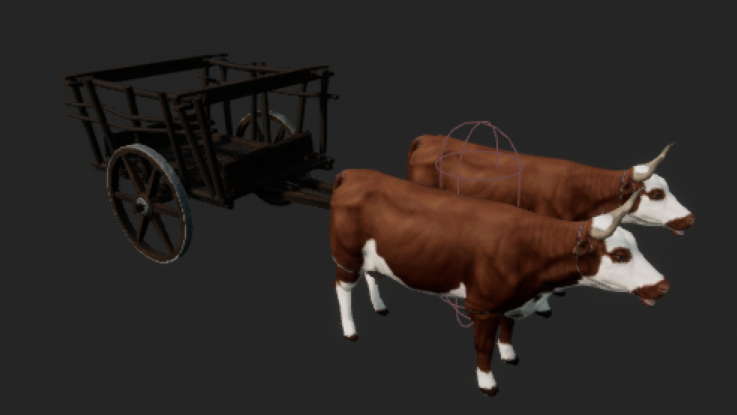


 digital badger
@icy mulch Reading the error message it seems like a driver issue with your GPU
Using the RTX 2060 as well and have not experienced such problems - try to update your drivers from GeForce Experience
 honest vale
why should I register for unreal fest? Aren't the streams going to be free to watch?
digital badger
@honest vale The streams will be available through a special service rather than Twitch
The service allows you to register for which streams you want to watch
azure gazelle
@icy mulch
Yah.. pretty sure driver issue or if you run on a Notebook check whether it really uses the dedicated gpu. Some notebooks tend to switch gpus based on battery level.