#ue4-general
1 messages · Page 764 of 1
 mellow flame
 vernal thicket
@mellow flame you making a console game ?
mellow flame
I'm just making a simple game which has to be multiplayer, otherwise it would be a useless game. and yes, I'm planning to run it also on the console (if I can)
just think like a board game, you can't play monopoly alone..
vernal thicket
Yeah, well if there's more than 1 player then there's got to be a server?
 plush yew
you want to run for the server side only?
what do you mean by when you only want it to active for the player only
vernal thicket
Client side would replicate to an individual
mellow flame
but guys i don't have client side.. i just have server side as far as i know. If i try to run it client side, players are not even spawning
 radiant leaf
When you say multiplayer, are you talking across the world or in the same room
plush yew
I don't know what kind of game u are trying to make but there are certain things that u want to replicate and things that u dont have to replicate
radiant leaf
Bit hard to follow convo above cos people with the same avatar
mellow flame
When you say multiplayer, are you talking across the world or in the same room
@radiant leaf in the same room. i said LOCAL multiplayer
in the same room and actually in the same hardware as well
plush yew
Same hardware? there isn't even replication needed
or server
one machine right? then there's no network stuff
mellow flame
exactly, that's what I'm trying to say
vernal thicket
you said you were replicating to server?
plush yew
ok lets brush those server thingy then
there is no replication or server
so what do u want to do?
mellow flame
my problem is only with the checkpoint system. everything else is working perfectly. I just need to tell the checkpoint blueprint to activate the next checkpoint for the player who overlapped it, and not for everyone
plush yew
it's hard to tell without looking at your bp
What you can do it you can assign each player a tag/id
 severe meteor
@mellow flame multiplayer is among the hardest things you can be doing
plush yew
and when the chekpoint overlap, you want to check the tag/id to get that specific player
eg player_1 or player_2
mellow flame
wait a sec
plush yew
so how do ur players play the game? Controllers?
Multiplayer is hard only when you have to do networking
mellow flame
this is the checkpoint blueprint.
I just need to find a way to tell which player just overlapped it
plush yew
What u are trying to do in that bp
make it hidden?
Ok
Just make a tag for each of your player
Or ID
mellow flame
i have it already
plush yew
ok so each player have tag?
can i see the variable
Actually we dont even need tag....
mellow flame
i have an id for the controller and for the pawn
plush yew
just get reference of the actor that overlap the trigger
You already got the pawn ref there
if i export quixel stuff via bridge to ue4 in dx12/rtx ue4 crashes cause VRAM OVERLOAD 
Why dont you make the checkpoint event on the player characater?
When the player step on the trigger, on the trigger bp cast the other actor to your player character and run that event
that way, it will only activate on the character that step on ur trigger
it will not run in any other player
mellow flame
mmmmh I can try
plush yew
you can test by making an event in the player. Call it anything and just do a print string
THen on your casting on that trigger bp. Run that event
then try to overlap in the game, it should only print when someone overlap it
mellow flame
yup, gonna try right now, thanks for the tip!
plush yew
and wont run multiple times (eg 2 times when there are 2 players present)
no worries, let me know how u go
 dim merlin
anyone knows its possible to merge foliage (trees etc) to reduce drawcalls in editor?
vernal thicket
Imagine being too lazy to set up the physics on a door and creating 28 different matinee's for different doors
plush yew
you can use timelinee instead of matinee
matinee going to be removed on future upgrade
vernal thicket
I could just leave the doors open that would be easier xD
plush yew
well I have many A.I in my game
vernal thicket
Yeah i'm using the older version
plush yew
so everything is sliding door
vernal thicket
Nice bro
vernal thicket
xD
I'm making horror
I wanted to do proper interact like grab and swing but i'm just gonna use simple press to open & close
I always found the grab and swing too buggy
There is a way to set up physics on it so you can just walk into it and push it open using collision but i couldn't figure it out
plush yew
im fan of fatal frame
i tried layers of fear, that is one good horror game
if i export quixel stuff via bridge to ue4 in dx12/rtx ue4 crashes cause VRAM OVERLOAD
😭
 brave salmon
what could be the reason notify doesn't fire on dedicated server sometimes
 zealous galleon
I'm trying to make different armor types using enumeration
3 different types, each type does different damage (like first does most damage, second less for health and third even less, it doesn't matter how)
I tried a lot of ways but it doesn't seem to work, it either go random even if I picked up the type 3 armor still goes into the second or probably randomly at that point
Any help would be appreciated
And ping me if anyone would like to help
 tight prawn
how would one go about migrating Sockets between matching skeletons ?
I have a couple skeletons, all have the same bone structure, sadly I can't migrate all my assets to use one unified skeleton
I need to move the sockets to their approriate bone structure, is this possible ?
 oak wyvern
Hi, I just started with UE. Played around a bit for the past few days so I was wondering if there are any good animation tutorials you guys can recommend.
vernal thicket
@plush yew 😦
 wary wave
 desert timber
Would this be a good software to make a game similar to getting over it
 jolly jungle
@desert timber Unreal doesn't have great 2d support so i'd recommend using something more geared towards 2d such as unity or gamemaker
also, guys i set a variable as instance editable and its not showing up in the menu for the instance
desert timber
@jolly jungle thanks
jolly jungle
np
zealous galleon
Public?? @jolly jungle
jolly jungle
maybe?
desert timber
couse i dont beleive i can make a non 2d i dont believe in my abilities
jolly jungle
@zealous galleon it doesnt say anything about public or not
o wait yes it does, it is public
o wait, nvm it works
tight prawn
why does UE4 crash everytime i select a specific Mannequin Skeleton ?
I mean, why would it even crash selecting/opening skeletons, and how to fix it if possible
zealous galleon
Maybe there's a problem in the asset?
 rigid belfry
@desert timber you could always fake 2d in unreal
desert timber
@rigid belfry I wanna make a getting over it esk game will it work like that?
rigid belfry
i have no idea. how could i know? make a new project, position the camera in such a way to fake a 2d scene and test it
jolly jungle
im trying to make portals in unreal. ive gotten to the point where the cameras move correctly, but the problem is, it is rendering the entire camera view on the other portal and i just want it to render what it sees through the other portal. https://www.youtube.com/watch?v=cWpFZbjtSQg&t=188s 3:08 explains my problem. can any1 think of a way to do this in unreal?

Experimenting with portals, for science.
The project is available here: https://github.com/SebLague/Portals/tree/master
If you'd like to get early access to new projects, or simply want to support me in creating more videos, please visit https://www.patreon.com/SebastianLague...
any1?
mellow flame
editor question: is there a way to see the items inside the array on the node without running the game everytime? a sort of preview in node?
like this?
 whole quarry
@vernal thicket there are easier ways to that :d
 uneven fractal
is there a way to clear input when entering a full focus widget?
whole quarry
what do you mean with clear input?
uneven fractal
for example if I open the widget while running I will continue to run despite losing control of the char
jolly jungle
does any1 have an answer for my question?
 surreal laurel
Hi all, array boy from last night here. happy to report that I got my character 'shadow's up and running
whole quarry
@uneven fractal easiest way is to use a boolean, hasWidgetOpen, set it to true when you have a widget open, false if closed.. At the input just check that boolean
 midnight gate
uneven fractal
midnight gate
uneven fractal
while effective I feel that it's a bit inefficent to be having the inputaxis event running that bool every tick
midnight gate
im trying to do a checkbox that sets anti alaisanging and motion blur
why does it not set
both in main menu and in game
it does not do anything
whole quarry
@uneven fractal the axis tick is running regardless, so its fine
whole quarry
isnt there a set user settings or apply user settings ?
plush yew
if I intersect geometry is there a problem compared to perfectly snapping vertexes?
whole quarry
dammit, lemme boot up ue4
uneven fractal
jolly jungle
does any1 have an answer for my question?
whole quarry
i'm procrastinating, working before 3pm is satans work ;d
uneven fractal
that node gets the game user settings object which lets you get and set user settings
midnight gate
yes thats what i used
 flint ermine
Enator18 Have you seens this video https://youtu.be/_SmPR5mvH7w?t=247

How did valve create their iconic portals? In this video I demonstrate my process of recreating the portals in Portal.
midnight gate
so do i need the same user setting?
uneven fractal
the user settings object has it's own save file
whole quarry
uneven fractal
you don't need to put the settings in your own
whole quarry
this is my screen resolution option
my vsync option, apply settings should be there
whole quarry
thats not so bad, this is mine (just having video options atm)
midnight gate
hah
so anyways how do i make the antialiasing turn on and off?
and the same with motion blur that is being controled thought post proces voluime?
whole quarry
you need to create post-processing options that control the PP setttings of the player camera
uneven fractal
I spent like a week minimizing the amount of code but there is only so much you can do when it comes to there being seperate events for everything and seperate gets ect
whole quarry
refactoring code should be a daily task
uneven fractal
🤷♂️ never going to get anything done that way
whole quarry
sure you will, old code gets improved, unused gets removed, unoptimized gets optimized
as you get further, you learn stuff, you need to apply that skill
jolly jungle
how do u make it so that a ue4 material has absolutely no shading what soever, no reflections, lighting nothing, just the texture
whole quarry
if you don't, down the road, the road will be horrible
midnight gate
OK SO I GOT THE SETTINGS TO WORK
but it also removed the other settings i had
like glare and lut
i only want to set the motion blur not overwrite everything
uneven fractal
ah ha I figured out the correct way to handle that widget focus thing
google wasn't being nice about ue4 how fix running when open inventory
so I dug through an older project
whole quarry
@jolly jungle unlit and put metalic on 0, roughness on 1, specular on 0
uneven fractal
the better solution was to entirely disable input for the charector while in an inventory
midnight gate
so ugh can somebody help me
uneven fractal
though it's probably just a boolean inside the c++
whole quarry
it just came back in my memory
uneven fractal
yeah I already was using those originally
well I still am they perform a different function then the disabling input
set input mode ui only makes it so all new input is directed to the widget instead of the player
however old input data gets stuck constantly generating unless you totally disable input for the actor
dunno why
whole quarry
maybe because it doesnt allow new input, it just sets the input to the current input
well, 'locks the input' would be better wording
midnight gate
I GOT IT GUYS
i made a second post proces volume that is responsable for the blur
so this way my main post proces volume settings are not overwriten
now how do i enable antialsiansing?
vernal thicket
@whole quarry how would you have done the doors? Physcis with constraints?
midnight gate
so i set the level and apply settings?
whole quarry
the get anti aliasing quality comes from:
whole quarry
these settings are basically done all the same way
midnight gate
ugh
is it normal that when i applied the anti alaisiaing settings from the settings menu it started to recompile ALL THE SHADERS?
im using ffaa i think?
whole quarry
that boolean check Has Initialised is only there to avoid applying those settings when the comboboxes are being filled (its a change and the event trigger registers that, which should be avoided)
midnight gate
fxaa
whole quarry
yes, thats normal, because those shaders don't exist yet (they are normally done when you package or on the fly)
midnight gate
ah i see
so this wont happen when my game is packaged thank you
so that means that everything works?
whole quarry
it shouldn't
its unreal engine after all 😄
well, hit Play PIE, try it
apply the settings
close the game
and play again and see if it was stored
 tame delta
I'm missing the panel with the editor modes, isn't this where I'm supposed to be able to open it? https://puu.sh/FUosQ/47040185cd.png

(In 4.25.1)
whole quarry
its right behind the drop down menu
tame delta
It's not here (screenshot isn't very clear about that)
But I only have the "Place Actors" tab
whole quarry
you dont have these?
tame delta
Nope
whole quarry
wtf
tame delta
And it's not anywhere else or undocked
midnight gate
well i cant really play it in the editor cuz its compliing 3k shaders lol
tame delta
@whole quarry Yeah, it still doesn't appear 😕
LogToolMenus: Warning: Menu already registered : LevelEditor.MainMenu
LogToolMenus: Warning: Menu already registered : LevelEditor.MainMenu.File
LogToolMenus: Warning: Menu already registered : LevelEditor.MainMenu.Window
LogToolMenus: Warning: Menu already registered : LevelEditor.MainMenu.Edit
LogToolMenus: Warning: Menu already registered : LevelEditor.MainMenu.Help
LogToolMenus: Warning: Menu already registered : LevelEditor.LevelEditorToolBar.SourceControl
LogToolMenus: Warning: Menu already registered : LevelEditor.LevelEditorToolBar.Cinematics
LogToolMenus: Warning: Menu already registered : LevelEditor.LevelEditorToolBar.BuildComboButton
LogToolMenus: Warning: Menu already registered : LevelEditor.LevelEditorToolBar.BuildComboButton.LightingQuality
LogToolMenus: Warning: Menu already registered : LevelEditor.LevelEditorToolBar.BuildComboButton.LightingInfo.LightingDensity
LogToolMenus: Warning: Menu already registered : LevelEditor.LevelEditorToolBar.BuildComboButton.LightingInfo.LightingResolution
LogToolMenus: Warning: Menu already registered : LevelEditor.LevelEditorToolBar.BuildComboButton.LightingInfo
LogToolMenus: Warning: Menu already registered : LevelEditor.LevelEditorToolBar.EditorModes
LogToolMenus: Warning: Menu already registered : LevelEditor.LevelEditorToolBar.CompileComboButton
LogToolMenus: Warning: Menu already registered : LevelEditor.LevelEditorToolBar.LevelToolbarQuickSettings
LogToolMenus: Warning: Menu already registered : LevelEditor.LevelEditorToolBar.OpenBlueprint
LogToolMenus: Warning: Menu already registered : LevelEditor.LevelEditorToolBar```

I do have that in my console log (bit beefy sorry)Anyone know what collision to use to stop AI Character from activating box collisions?
whole quarry
just check what actor triggers the box collision, if its equal to the actor that is allowed, then continue
vernal thicket
Maybe ignore pawn?
no that disables collision with the player
should've used a pawn not a character
whole quarry
character inherits from pawn
actor > pawn > character
@tame delta I cant find it, maybe try to verify the installation in the launcher?
vernal thicket
Oh..
Is there a way I can tell the box collision to only listen for a certain pawn?
It's an actor with a box collision that triggers UI to be created, the problem i'm facing I have my AI being destroyed under the UI and instead of being removed from parent it's freezing on the screen
vernal thicket
I know xD
I saw something with physics but my doors sizes inside the frames are absolutely fked
whole quarry
how many of those doors are visually different from the others?
vernal thicket
0 they're all the same
vernal thicket
Will it improve performance or something? I mean the code works so unless there's a good reason to change it?
whole quarry
no, you can traceline constantly everyframe
plush yew
is this light aperture effect natural?
whole quarry
without impacting the performance
midnight gate
@whole quarry wait so antialiasing just applies difrent materials to things?
i thought its just a post procces effect
whole quarry
@vernal thicket
bit clunky
but will do :p
you will have to expand on this though, like adding "Current Active Door" and putting it back to Null if the Block Hit = False
heck, you can expand this to a full system for interactable items and stuff 😛
vernal thicket
Ah looks good man I will save this screenshot for later
so you create a traceline first and that'll work for the door no matter the location
whole quarry
this little trick is credited to @obsidian nimbus, avoiding to break the hit result if it didnt hit anything
correct
it just shoots an invisible laser forward from the player
if it hits something, it checks if that something is a door, if true, it casts to that door in the level and then calls the function to open/close it
since it hit the door in the level (which is an actor instance), the linetrace will tell which actor instance it has hit
vernal thicket
Welp the other actor overlap works a treat
whole quarry
@midnight gate Anti Aliasing is a bit of a story 😄

AA or Anti Aliasing reducing the "jaggies" that make things (particularly games) look less life-like and more like a computer graphic.
FORUM LINK: http://linustechtips.com/main/topic/10860-temporary-thread-for-tech-quickie-video-suggestions/
whole quarry
its a tradeoff, either ugly but highly performaned, or beautiful but ghosts

There are many forms of anti-aliasing available... what are some of the differences between them?
Sponsor message: lynda.com is your one stop shop for learning a variety of skills online, at your own pace.
Visit http://lynda.com/techquickie to redeem your 7 day free trial and...
this guy has all those funky videos
midnight gate
hm
 next badger
Greetings!
next badger
How to check if the window has focus?
i know such function exist for widgets
but im having issue cursor captured over inactive window
next badger
?
next badger
it's not widget
whole quarry
oh
 alpine sand
Reference to sequence camera/cinecamera disappears on play?
surreal laurel
Hey, I have an actor that turns to face another actor which teleports around randomly. I am using the find look at rotation to drive this, but actor A snaps it's forward vector to instantly look at actor B each time it teleports, and i'd like to give it more of an ease. The Ease node requires a current and target, which I don't have since actor B is teleporting randomly. Is there a node that will just smoothly and constantly interp values on runtime, without being driven by an alpha?
alpine sand
by disappears I mean it turns into unknown
It seems to become unknown once you stop playing actually
next badger
@alpine sand but camera is persistent?
alpine sand
yes
next badger
i.e. has no "flash bolt" on icon
 obsidian nimbus
@whole quarry gotta love having decent memmory 😛
alpine sand
indeed
next badger
and destroyed when its not in play mode
alpine sand
trying to get it to transition into the followcamera
 wind sapphire
** emm i was looking for someone who could possibly tutor me at some point im actually going to bed but if anyone could help me out that would be great 🙂 i am friendly and i aspire to be a game developer in the future maybe posting a game to the public. please message me if you could help me out 🙂 **
alpine sand
thirdperson
next badger
i.e. if you close the sequencer it will disappear
alpine sand
how do you get it to stay in level blueprint?
next badger
you cant...you need to make persistent (non made in sequencer) one
and then reference it in sequencer
you can convert it by right clicking iirc
right click it in sequencer and there should be an option
ok, seems focus can be only checked with custom viewport class
alpine sand
yep, it does blend now
but it seems to start moving into position then restarts from a different angle
 wary heart
hey guys, while working on my character's ik system, i saw that the character was imported without a 90 offset on Z that i needed, is it possible to change that after import without having to reimport all animations that i setup with that character?
 austere scroll
im not good at animations and i dont know if u are a beginner or an expert .. assuming u are a beginner , on the top left there is a button called "Reimport" when pressed it acts like the animation/object/anything got imported again @wary heart
wary heart
semi new to unreal, thing is, if i do reimport, it just reimports the asset with the same initial config i had chosen
does not give me the option to give an import rotation on the asset
like it does the first time
vernal thicket
can anyone remember that easy way to make the body rotate with the camera?
Under animation blueprint you can blend at the spine or somehting?
 grim ore
double click the asset, scroll down to the import options on the item in the details panel, change the rotation, then click re import at the top @wary heart
vernal thicket
bend with the yaw at the spine?
grim ore
do you mean just rotating the top half of a body?
IF you do what you can do is use a Layered Blend per Bone node in the Animation Graph, and then blend between your 2 animations. One being the top half with like a pose asset or a rotation and the bottom being whatever your normal asset would be at the time say a blendscape for walk/run
wary heart
thanks @grim ore !
 blissful trail
LogPlayLevel: Error: ERROR: Android toolchain NDK r14b not supported; please use NDK r21 to NDK r23 (NDK r21b recommended)
i get this when trying to launch on android
 verbal moon
@blissful trail https://forums.unrealengine.com/development-discussion/android-development/1678244-android-toolchain-error
Unreal Engine Forums
Ive seen questions about this error all over and just now found a fix. When trying to launch my project on any device i get this error LogPlayLevel: Error:
plush yew
If BP nodes are disconnected, do they have any performance cost?
vernal thicket
Best way to Pause game without affecting Widgets on death?
@grim ore I've added 3 transforms for the 3 spine bones, and set them to rotate
to existing
grim ore
@plush yew In theory they are not compiled into the final product at runtime, so no cost
@vernal thicket you could just rotate the bones in the blueprint sure, you would need to get data from the character such as the controller rotation in order to determine where to rotate. #animation might be able to help with the math
vernal thicket
@grim ore I found a tutorial from Virtus games hub, they've got all the caluclations on his vid, I dunno how someone figured it all out but it works a charm
plush yew
thanks
grim ore
whoo nice
Aim offsets can also be used for something like that https://docs.unrealengine.com/en-US/Engine/Animation/AnimHowTo/AimOffset/index.html
vernal thicket
Yeah I see this in the past, just seems like so much messing about to get a very similar result
 rain vigil
Hey, quick question. I built a small envoirement in ue4 using the quixel megascans assets and if I run the game my gpu jumps to 90% usage. Any idea on how to fix this?
whole quarry
what resolution are the textures and how many verts do your meshes have?
grim ore
also what GPU do you have
surreal laurel
Hi all, is there a way to find the rate of change of a value?
for example, lets say an actor is randomly rotating around, i'd like to find the rate at which the rotational values are changing. not the rotation itself, but a value that represents the change rate
rain vigil
The lowest I can set in the Quixel Bridge is 2k and I have an RTX 2070 @whole quarry @grim ore
blissful trail
LogPlayLevel: Error: ERROR: Platform Android is not a valid platform to build. Check that the SDK is installed properly.
i now get this when trying to launch
whole quarry
@rain vigil open the mesh and check the amount of triangles / vertices (its in the top left corner in the mesh editor)

 whole quarry
always amazing when some bloke tries to mention 35k 40k people
rain vigil
It was also very stable but in the task manager it showed 90% gpu usage by the game. I can run it and check again, one moment
whole quarry
also www.take-a-screenshot.org
@plush yew
Windows users: Shift + Windows Key + S
jolly jungle
most cameras have a show camera model in game option, how come a scene capture 2d component doesnt
rain vigil
Its not showing the fps when I launch but its I suppose its the same as in the editor. The gpu usage is just really going up
Im sorry, im pretty new to this
 surreal laurel
Hi all, is there a way to find the rate of change of a value?
for example, lets say an actor is randomly rotating around, i'd like to find the rate at which the rotational values are changing. not the rotation itself, but a value that represents the change rate
@surreal laurel Putting a little bump on this. I realize the solution might just be a bit of basic math, but I still need some help on it
rain vigil
Thanks
surreal laurel
@surreal laurel store the value from the last frame, take the difference between that and the current value, divide by deltatime
@plush yew Thanks. What would be the best way to store the value from the last frame?
jolly jungle
this is something that has always confused me, is raytracing the same as dynamic lighting? or are the different things
tame delta
Hey, has anyone had issue accessing the "Mode" panel in UE4.25.1? It's missing for me, both option under Window > Editor Modes are greyed out, and the panel isn't anywhere else or undocked. This works just fine on 4.24.3 and I'm a bit confused https://puu.sh/FUr0J/3985ad66be.png
 surreal laurel
@plush yew Oh I didn't realize the GET was the last frame's value. Cool thx
whole quarry
raytrace is a method not a tool 😛
jolly jungle
ok
mellow flame
let's suppose i have an array for all actors of a class, let's say it has 3 items, how to get the integer index from that array 0 1 & 2 ?
jolly jungle
thats wat i was wondering, do u have to have raytracing to have dynamic lighting
 azure gazelle
@tame delta It moved.. Right between Source Control and Content in the Top Bar 🙂
jolly jungle
ok
tame delta
@azure gazelle Oh god, thank you
mellow flame
let's suppose i have an array for all actors of a class, let's say it has 3 items, how to get the integer index from that array 0 1 & 2 ?
@mellow flame i mean, without having to use the "get (a copy)" every time
plush yew
if I invert the mesh, does it invert the materials?
azure gazelle
@mellow flame Use the Find Node
tame delta
@plush yew Depends on your materials 🙂 but probably, unless they use world position
grim ore
@mellow flame are you trying to get out the data that is in the array? the 3 items? if so what do you want to do with them and is it all at the same time?
mellow flame
actually I would like to get the items in order to compare them with a variable, so that if what i get is 0 and my other variable is 0, i can get 1, and if my other variable is 1, i can get 2
i guess there are like millions way to do this, but I would like to find the most flexible one
grim ore
so you have a value, and want to see if the value is in the array?
mellow flame
i have a value, and I would like this value to get the value of the array index
grim ore
still confused. can you give an example.
plush yew
a brick wall for instance, invert the mesh, the normals are inverted too?
mellow flame
sorry, english is not my native language. I'm trying to explain my best, give me 1 sec
tame delta
@plush yew What do you mean by inverting exactly? One axis being negative?
plush yew
mirror / flip
whole quarry
@plush yew easiest way is just to try it
tame delta
Yeah, the normals would be flipped as you'd expect, provided you don't use trilinear mapping or anything fancy like that
Well, if you mean the normalmap, if you mean whether the triangle normals would suddenly point inwards, then no, they wouldn't
 little epoch
why is there a robot reading out your messages
grim ore
you turned on TTS?
little epoch
no cause i need /tts blah blah
right?
its like reading out everything
even in other channels
grim ore
disable it?
tame delta
That sounds amazing
 manic pawn
restart discord
 tiny sonnet
Are there any problems with using delays in a replicated environment ue4? Do they get messed up by lag, or player changing date/time?
whole quarry
is it only discord?
 shrewd marlin
Anyone know a workaround to SetRelativeRotation() in C++ because it can't handle degrees exceeding +/-90°?
 polar hawk
ka ka ka ka ka ka ka ka ka ka ka ka ka ka im a sprinker tts
whole quarry
% that % sounds % annoying % to % have % enabled % % % % % %
tame delta
Tommy don't listen to the voices, they aren't your friend
little epoch
allar no 😦
grim ore
@tiny sonnet Delays are not guaranteed and try their best is about the biggest issue I could see, you could always do a time stamp check as well when the delay is over to make sure its close enough
little epoch
to much shit going on
whole quarry
are you using the desktop app or the browser?
tiny sonnet
@grim ore so delays wont fck up if people change date/time? what about 24 hour timers? does the server have to run this and replicate?
whole quarry
mellow flame
@grim ore so:
- I have an array made up of actors of one class
- i have 3 actors of this class in the map, so the array will be made up of 3 items (index 0, 1, 2)
- these 3 actors have an overlap event inside
- i would like to say that actor1 (index0) can be triggered once, and before actor2. after i trigger the actor1, i can trigger the actor2, and then3, then check if all the actors were triggered in order, and repeat starting from actor1 again.
grim ore
@tiny sonnet I have no idea on changing the time but if this is server side, which it should be if you need it to be authoritative, that should not be an issue.
tiny sonnet
ok
little epoch
there still talking bit im sure itll go
grim ore
@mellow flame it sounds like you want to iterate/run/walk over all of the items in order? IF so you can use a for loop/for each loop on the array
whole quarry
oh that auto tts is neat (if only for active channel) 😛
mellow flame
@grim ore yes, I can use the for each loop, but everytime I overlap the collisionbox I set a int variable with the value which must be exactly the same as the index value of the array, so actor1 (index0) sets a int with value0, actor2 (index1) sets a int with value1, because later I have to check those values to set some bool conditions
so i need to find a way to call that array index to set this value
if I add unique all i get is the array length, and I don't know why
grim ore
the last part i dont really understand. When you call the trigger on the item in the loop you can pass in the array index so it knows what is going on?
 languid flax
Have shader compile times (and amount) changed in 4.25? UE is always on it. It sometimes freezes the editor for a long time with tiny material changes.
grim ore
or are you trying to look at the items in the array which might not be in the order you want to call them, and call them in the order they are internally (the int you are talking about in the actor)
@mellow flame it sounds like you want the actor to tell your array where it should be in the array?
then the array should loop thru them in that correct order
mellow flame
basically that's it
grim ore
then when your actor sets its number, have it talk to wherever the array is and set its array element
so Actor -> Actor with ARray -> Set Array Element
then when you loop over the array it should be in the correct order based on the actor info
mellow flame
oooh nice, gonna check now! thanks a lot
grim ore
and if you need to know what number to set in the actor, it could get the actor with the arry and get the length or last index and then set the number inside of itself then talk to the array and set itself in that array. Whenever you are done with the array (I am guessing "resetting" it to use again) you can clear the array so its set back to 0 then let the actors fill themselves back up again
grim ore
@plush yew In the past as far as I know CPU's do multiplication, not division, so that is why that is a thing. Multiply by 0.5 is faster than divide by 2
not an issue, internally It might just convert it in the compiler for example
#visual-fx might have more info tho from smart people like Luos who is well versed in these things
and I think a divide by 100 would be the same as multiply by 0.01
you should be able to replace any divide with a multiply in theory if my math holds
but again this is aaages ago and I have no idea how modern cpu's handle math
surreal laurel
@surreal laurel store the value from the last frame, take the difference between that and the current value, divide by deltatime
@plush yew why divide by delta time, and not multiply?
grim ore
its probably a placebo but hey, why not 🙂
azure gazelle
@plush yew @grim ore It actually really depends on the language and the compiler. I know that in vanilla C# Division is (used to 2 years ago) slightly slower than multiplication. But not sure how it plays out in c++/ue4
 little falcon
Is (0.5,0.5,1) consider flat normal or (0,0,1) should be flat in UE4?
I have saw some different opinions on it and it make me confused./..
grim ore
from what I am reading they are saying specifically that HLSL compilers, so the material stuff, in general prefers multiplication and most of them convert to it for you as well
plus in theory you can never divide by 0 if you never divide 🤔
azure gazelle
Oh.. On the GPU side (especially low level) you are better of with Addition and Multiplication in pretty much every case. I actually find it easier to read too but that might just be a matter of practice 😄
grim ore
@little falcon from what I can see 0,0,1 seems to be correct for UE4 due to the up direction in UE4 being what it is
azure gazelle
But I think the nodes in the material editor should more or less handle that for you. I guess I'd start optimizing once it actually becomes a (profilable) problem
 digital badger
I made a fresh source build of the engine( 4.24), however I'm getting issues with a file called "ADOSupport.cpp", when I try to build the engine. Anyone else experience this?
Seems like an actual programming error? But this is fresh from github.
little falcon
@grim ore Thanks, i have some material setting consider .5 .5 1 as flat normal ...this got me confusing, do you know where can i find any resource on explaining normal in UE4?
grim ore
well the docs would have info but this is my best reference for it from the material editor
@digital badger I am pretty sure that comes from the incorrect version of the compiler being used in your VS install
little falcon
hmmm, this make sense, since it say lerp with 0,0,1. this should be the flat.
Thnaks
digital badger
@grim ore Could you provide assistance in checking the compiler version, and setting the correct one? I'm using vs2019
grim ore
yeah im trying to update mine to get the right one, under your C++ toolchain which one do you have selected?
you can also disable it with a pragma line but I beleive one of the toolchains fixes it if you go back to an older one
digital badger
Using MSCV 14.26.28801 currently.
grim ore
its because 2019 16.5 updated to a new toolchain, its fixed in .25 but.. I want to say its 14.22 that fixes it but... waiting on VS to update lol
digital badger
Alright, I'll downgrade then
grim ore
I can confirm for sure once mine finishes in a few
digital badger
Alright, could you kindly ping me when you do?
little falcon
@grim ore I just found many people point out that the 0,0,1 should be the flat value
Thank you again
But people say in some other software its 0.5 0.5 1
grim ore
yep it depends on the axis it uses for up in the engine pretty much
tight prawn
sigh
grim ore
plus who knows what else, engines are weird
little falcon
UE4 is Z up right?
tight prawn
duplicating blocking box causes UE4 to crash
 celest creek
I'm using a single AddActorOffset with 'sweep'=True on this actor class.. yet my collisions sometimes doesn't seem to sweep and end up getting stuck (at very fast speeds mind you). Should 'sweep' not stop this from happening?
UE4 is Z up right?
@little falcon Yes
little falcon
Thnaks
azure gazelle
@celest creek Sweep is meant to move a Actor as far as it can without getting blocked. So once it gets blocked by another actor/collider it will stop
grim ore
@digital badger After looking I want to say it was .22 or .24 that should work
digital badger
Alright thanks! 🙂
grim ore
but if not you can use the pragma or toolchain fixes if you look for C4800 and UE4 in google
 sacred sluice
Hi Guys! Who made games for android?
Very interested in what limits on the number of polygons, and how can you optimize the game?
grim ore
that is going to be very subjective based on your target hardware and fps goal
but #mobile might have more answers if you have more details
 weary phoenix
i've added a widget component to my ai actor. it has a button widget blueprint that at the moment only prints a string a when pressed. the widget component is set to screen space, which is not interactable for some reason. world space is not exceptable for me, as it does provide the desired effect.
i can share screen shots if that helps with the solution
im hoping this is a simple fix
grim ore
@weary phoenix have you set up a widget interaction component on your player so it can interact with world ui elements?
weary phoenix
yes
and i've given it plenty of range
and tested with regular world space widgets
azure gazelle
@ashen vapor You might need to adjust the material in UE4.. It does not transfer material settings from Blender to UE4
 ashen vapor

 digital badger
@grim ore Once the correct version of the compiler is installed, do you know how I could point the build tool to use the correct version?
plush yew
When I run ue4 with windows 2004 version, ue4 was freezing.
I am trying with windows 10 enterprise now, there is no problem.
why is that?
grim ore
@digital badger there is a way if you edit the xml file to force a version, or you can remove the older one. I kinda remember you have to regenerate the project file tho if you want it to find it automatically. https://developercommunity.visualstudio.com/content/problem/734585/msvc-142328019-compilation-bug.html for the build tool stuff
mellow flame
@grim ore got the array thing to work! thanks for your tips! very appreciated
I was wondering, just for aesthetic reasons, is there any way to print something on a new line with a string?
just prints me \n without going on a new line.. 😄
mellow flame
but append node still prints me on the same line
gonna mess a little bit, nothing important
azure gazelle
Shift + Enter inside a text box will give you a new line in BP
mellow flame
thanks a lot!
grim ore
it depends on if you are using Text or String and if it has a processor behind the scenes, like they said Shift-Enter gives you a new line and technically you can put that into a variable and reuse it lol
azure gazelle
There is even the Format Text node for fancy stuff
not sure it exists for string.. I know it does in cpp
grim ore
I really wish there was a format string node
yeah for BP there isnt for some reason, just have to convert to string afterwards lol
mellow flame
shift+enter == new favourite thing to do debug print string 💯
azure gazelle
@mellow flame Pretty sure you will love the moment you realize you can use + - * / inside any number field (Vector/float, etc.)
mellow flame
fallen in love already 😉
 harsh tiger
any suggestions on a fix for this issue? im trying to open the demo map from a asset pack an after a while ue4 crashes
azure gazelle
I always go with "Enough Disk Space"? as a starter 😄 Sometimes it's actually the case..
grim ore
eep
azure gazelle
I'm used to it.. Happens to my students quite a few times 😄
harsh tiger
i had valorant installed on my main SSD an not my game SSD, cleared up 7GB
 sand spruce
Are displacement maps used in games?
As far as I understand it they would be very expensive and thus only bump maps are used.
azure gazelle
They are often used in combination with tessellation. Performance wise it actually depends on the texture resolution and even more on the mesh density. Using Tessellation which happens on the GPU in combination with Displacement maps is actually doable. Great to enhance visuals for ground planes, walls, etc.
Probably one more technique that will die with UE5 🤔
 kind robin
Hello, i'm trying to use a lerp node to get smooth movement on a elevator, I thought i knew how it worked but it seems like I must misunderstand something
No matter what speed I put for the alpha it is super fast
azure gazelle
@tight shell Might wanna use add offset and multiply the distance it should travel per second with deltaSeconds from the tick node (if you update during tick)
btw.. in your setup you get the world delta seconds which is normally something like 0.01 at 100fps.. if you multiply if with 0.01 it will just get somewhat smaller. I would actually expect the elevator to get slower over time given this setup :S
grim ore
the alpha is a 0 to 1, 0% of the values above it to 100% of the values above it
thats all that you really need to keep in mind
so when lerping find your start position, your end position, then figure out what % you want it to be out and update the alpha to reflect that over time
so if your always getting the "current" position as one of your values, your A, your going to have an issue because you dont have a fixed starting point to find a point between. you are always trying to find a new point between the "current" position and the "new" position doing it that way
For a use case, if doing an elevator you could use a timeline to drive the movement over time, or a sequence animation of the object and play it back if its more of a fixed movement. both work
kind robin
Ah, okay
So it should be the elevator's starting location as "A" and use something else for the alpha
I tried a timeline in my first prototype but I couldn't get the speed and distance to work with each other well because the timeline is a fixed speed at a certain distance. So higher elevators were much slower
I may have just not used it right however
 wooden forge
how do i make a widget that is compatible with different resolutions?
grim ore
might need to rethink the way you did it to make it work if you understand how it works (the timeline and lerp). if something needs to move over a fixed time a timeline tends to work well since.. its a fixed time lol
 brisk urchin
Very weird thing happened. Does the fn key have an affect on UE4?? My UE4 editor was hard stuck at 40fps even with unlocking my fps within the project settings and nvidia control panel. I pressed the fn + esc and it made my fps go higher in the editor. went from capped 40fps to 120fps.
grim ore
@brisk urchin perhaps that is a control on your machine that increases performance. I know FN-Q for example on the wifes laptop toggles between performance mode and eco mode
kind robin
Yeah, i'll try the timeline again and see if I can get it working the way I need
Thanks for all the help! 😄
brisk urchin
@grim ore Thats crazy! I was having this issues for long time with no fix in sight. Where can I check what my keybindings do like you said? To see what fn+esc is doing to my system.
grim ore
@wooden forge You would use the anchor system to make it the same "relative size". As for pure resolution differences you can load in a higher texture at higher resolutions or just use the higher textures and let the engine scale it to the relative size when using anchors
@brisk urchin well FN is usually system specific, its not a windows thing. So your computer manufacturer normally
wooden forge
@wooden forge You would use the anchor system to make it the same "relative size". As for pure resolution differences you can load in a higher texture at higher resolutions or just use the higher textures and let the engine scale it to the relative size when using anchors
@grim ore oh okay thanks
grim ore
mobile resolution stuff is just... a pain no matter what you use for the most part. Resolution scaling/DPI scaling is a system built into the engine that you can look into https://docs.unrealengine.com/en-US/Engine/UMG/UserGuide/DPIScaling/index.html
wooden forge
yeah im actually developing the game for mobile, thanks for the extra info!
 edgy depot
is it just me, or do PMs on the forum not work at all?
for the second time in a row, someone PMed me and I get a piece of the message in my email but it's blank in my inbox, so I have no idea wtf I'm responding to
even checked an alternate browser and it's still blank
celest creek
@celest creek Sweep is meant to move a Actor as far as it can without getting blocked. So once it gets blocked by another actor/collider it will stop
@azure gazelle Yes.. but my image shows two actors sitting inside of each other after a sweep translation.. so I was wondering how safe addActorTranslation is, it does not seem to work 100% at high speeds
 timber mountain
how i can get a input key as string ?
like Jump key ... that should print Space Bar for me.
is there any way ?
timber mountain
i think there is a node to return the value
edgy depot
I think the point of the action system is that you don't care about the button assignments
But yeah, I'm sure there's a node for that somehow
timber mountain
i just want to print the Jump key
edgy depot
Maybe you can get it from the event itself
yeah, if you drag off the Key from the input action event, you can get the name
vernal thicket
Yeah, Jump action > Print spring
^^^^^^^^^
@plush yew bro I found this out recently
edgy depot
@timber mountain Get Key Display Name
tight prawn
i'm having a simple issue
I can not find AnimNotify event In AnimBP
I added it to the Skeleton, and then added it to the animations
but i cannot create an event to receive said notification
vernal thicket
@tight prawn Anim notifies are for adding something to the animation under the animation editor
So you right click under notifies and add something I,e sound or particle
tight prawn
I'm trying to integrate "Footsteps with blueprints" package into my game
I've followed the instructions properly but it seems I can not get AnimNotify_step event
vernal thicket
In the event graph
Click your notify then go to graph and right click rhey should be at the top
plush yew
To make dynamic foliage.. Do i need to work it from unreal engine or blender?
azure gazelle
@azure gazelle Yes.. but my image shows two actors sitting inside of each other after a sweep translation.. so I was wondering how safe addActorTranslation is, it does not seem to work 100% at high speeds
@celest creek The image actually looked okay to me.. I simply guess it's a perspective thing because the cones do use the actual cone mesh as a collider and not a box or cylinder. Normally UE4 handles such cases quite good. Might want to check the phyics/collision settings of the moving object /project settings. If you deal with high speed you sometimes need to change how the collision detection operates (CCD - continouse collition detection would be one of those settings)
timber mountain
@timber mountain Get Key Display Name
@edgy depot i used it, its very wondering that it returns NONE !
edgy depot
weird
tight prawn
oh it finally appeared
plush yew
To make dynamic foliage.. Do i need to work it from unreal engine or blender?
timber mountain
this is my nodes
tight prawn
oh
edgy depot
@timber mountain this might help https://forums.unrealengine.com/development-discussion/blueprint-visual-scripting/44087-get-input-key-assigned-to-mapping?p=443523#post443523
Unreal Engine Forums
Build powerful visual scripts without code.
 grim tusk
Hello! 🙂
vernal thicket
@tight prawn
digital badger
@grim ore Sorry to ping you again, however I managed to install the correct compiler version, however UBT does not use it. Rather it incorrectly reports that the compiler of that version is not installed. Any ideas on how to point UBT to the correct compiler path?
 white relic
Any idea what I am doing wrong? It's streaking at the top and Idk how to fix this.....thevertexnormalWS with the mask B and inverted is displaying what I want on the sides...but for some reason is streaking on the tops...confused
celest creek
@celest creek The image actually looked okay to me.. I simply guess it's a perspective thing because the cones do use the actual cone mesh as a collider and not a box or cylinder. Normally UE4 handles such cases quite good. Might want to check the phyics/collision settings of the moving object /project settings. If you deal with high speed you sometimes need to change how the collision detection operates (CCD - continouse collition detection would be one of those settings)
@azure gazelle Gotcha. My image could've been clearer. CCD is on by default, doesn't seem like switching it off for high speeds is the way to go? Otherwise my cones are of the same class and set to block its own class. I use AddActorOffset per tick with sweep=1 only, so no physics or anything else. If you think CCD should be off or any other idea I can try I'm all ears - and thanks for your replies.
 floral knoll
How Would I make Something Like a Target Point Be Usable in a struct So That I can have a data Table with Specific Corners For My Levels I want to be able to Have A easily defined area in witch enemies spawn In a Level Leave a reply If you know thanks 🙂
 green prairie
Alright.. This problem keeps haunting me... I am casting to my Enemy character, because I need to access a boolean....
What do I put in here?
vernal thicket
@green prairie I just put get player character seems to work haha
 wraith ore
In that situation "Get Player Character" works for me as well
tight prawn
I have Material atlas
and I want to apply physical Material to each tile i've got
how would one go about that ?
green prairie
Thanks guys.. but it doesn't seem like anything is working.. It won't print Hello
vernal thicket
@green prairie the print string comes after the event
mellow flame
@green prairie what is that master_ratman_bp? actor? character? what?
green prairie
yes, actor class I think maybe
mellow flame
enemy can be a pawn, a character, whatever
floral knoll
I think he Is trying to say that It won't even work when using event begin play
(context) the string being printed when it starts
green prairie
It's a character class
vernal thicket
Get player character definitely works with that
mellow flame
so get player character should work, so after the reference you set try to "get" the variable you need
 fathom glade
I'm having trouble displaying more than one HUD at once... Is it even possible to overlay HUDS with buttons on them?
green prairie
Oh, and let me quickly say, it is absolutely fantastic to get reply SO quick.. Thank you!!! That never happens anywere else
mellow flame
moving from the blue dot
vernal thicket
Haha, I love this dicord you can learn a lot
green prairie
I can get the variables I need.. But the string wont print, so I don't think this is working at all.. It's not working ingame for sure
mellow flame
because you didnt connect the book to the string
vernal thicket
Yeah
floral knoll
maybe a variable that is that class and the use the to get what you need? @green prairie duno for shure tho
mellow flame
bool
vernal thicket
Another way to debug btw is to hit play with the blueprint open
You will see the flow through the nodes
floral knoll
How Would I make Something Like a Target Point Be Usable in a struct So That I can have a data Table with Specific Corners For My Levels I want to be able to Have A easily defined area in witch enemies spawn In a Level Leave a reply If you know thanks 🙂
vernal thicket
@floral knoll there are tutorials on YouTube for that sort of thing man
green prairie
It should say hallo no matter what, if it gets this far
floral knoll
🤦 didn't think of looking there good reminder
green prairie
IT's like the Event begin play is not triggered
vernal thicket
@green prairie you have to connect something into the print to log i think or nothing will show
Try plugging the boolean into that print to log
green prairie
it's not printing
I forgot to say that I'm a noob... So... There you have it, if I sound like an idiot 🙂
also print to log doesn't work
vernal thicket
Is that under the level blueprint/character bluepritn?
green prairie
What I'm trying to do here, is this...
I'm in the weapon.. The weapon will spawn in the enemies hands. that is working fine.. I want to weapon to read from the enemy, if the enemy is doing damage or not
grim ore
@digital badger I sent a link with the forum post on how to modify your build tool xml, did you try that?
green prairie
the damage is set ON and OFF using anim notifiers in animations
grim ore
and if so I have a feeling you need to re generate your project files from the folder
digital badger
I did. It stated that the toolchain version wasn't installed. I decided to simply install vs2017( for 4.24 and earlier)
green prairie
to string? what does that mean?
grim ore
that might work
digital badger
I was unable to generate project files, due to the same issue of it being unable to find the stated toolchain version. Which was a bit annoying
grim ore
ugh
digital badger
I'm hoping the error is all visual studios fault.
hence installing the 2017 version
mellow flame
@green prairie
grim ore
I personally would have just supressed the warning lol
green prairie
@mellow flame I tried.. IT's not printing anything
mellow flame
should print true or false
green prairie
Maybe there's never a event begin play in this situation, .. I'm spawning the weapon through blueprints
This is how the weapon is spawned
with spawn actor node
grim ore
spawn actor would trigger a begin play
green prairie
ok 🙂
azure gazelle
@azure gazelle Gotcha. My image could've been clearer. CCD is on by default, doesn't seem like switching it off for high speeds is the way to go? Otherwise my cones are of the same class and set to block its own class. I use AddActorOffset per tick with sweep=1 only, so no physics or anything else. If you think CCD should be off or any other idea I can try I'm all ears - and thanks for your replies.
@celest creek hmm.. CCD is by default off if you expand the Collision tab. Not sure how the engine deals with sweeps internally.. So adjusting physics settings might not do anything (quite possible actually). Not sure how to fix this one tbh.
green prairie
Also, the white line doesn't do anything if I hit play, and look at the BP in the background 😦
grim ore
does it have that exact blueprint that is in the world in the debug filter at the top?
mellow flame
@green prairie where is that event begin play you showed in the screenshot?
grim ore
also... always put something into the cast failed, then you will know if it failed
green prairie
This is working fine.. It prints Ticking!
so , you don't have to connect anything to the print to make it print
grim ore
you do have to connect the execute wire
green prairie
Yes 🙂
 grizzled condor
Hello guys what is this problem ? sry i dont know where i can ask for 3ds max
mellow flame
@grizzled condor you're using vray materials, which are not supported on unreal as far as I know. You have to convert the vray material to a standard material in 3dsmax before importing to unreal
grizzled condor
@mellow flame how can i convert ?i cant even see the image of material
mellow flame
This is working fine.. It prints Ticking!
@green prairie yes, because it's printing every frame. if you try to connect your "is doing damage" there you should see something printing
mellow flame
@mellow flame how can i convert ?i cant even see the image of material
@grizzled condor sorry, I can't help, I don't use 3d studio max, but basically you open the 3dstudio max project, find those 3 materials, and make a new material for them, without vray
grizzled condor
@mellow flame nvm ,but Thanks for helping 🙂
azure gazelle
@grizzled condor If it is not UE4 related I would suggest a 3ds max specific forum. If you try to import it into UE4, you may want to convert the materials to default 3ds max materials or just ignore it (as you will most likely create them in UE4 anyway). With Datasmith you should actually be able to get the vray mats into UE4 without that much work.
green prairie
It prints Fail now.. So... Again.. I suspect that it's the "get player character" that is the problem here
 still pawn
Where did Epic hide the Collab Viewer template project?
grizzled condor
@azure gazelle no, i dont want to import to ue4 i just want to open and preview it at 3ds max,but when i open the .mat file and this happened
mellow flame
@green prairie again the question: is that ratman a character?
azure gazelle
@grizzled condor I don't remember much from my old 3ds max days, but I guess you tried to render inside 3ds max and the selected renderer does not support those 3 materials that are assigned to one or more objects in the scene. (Needs vray renderer because they are vray materials)
green prairie
it says parent class CHARACTER in the top right corner...
I mean... It's a rat man running around attacking the player 😄
grizzled condor
idk,i just downloaded the model from online and i want to preview the material but when i import the .mat and cant run it
green prairie
'
grim ore
@still pawn Its under the other categories, not in the games one anymore.
green prairie
The enemy character has a boolean, that says if he is doing damage or not.. I need his weapon to get that information, cause the weapon is the one that is suppose to do the damage
ok, perhaps I need to find another way
 full dawn
How do I respawn the modes tab, to access landscapes?
green prairie
I do the exact same for the hero character.. And THAT works with the "get player character" .. Because... He IS the player character
mellow flame
because hero character is controlled by a human player, ratman is not
green prairie
It works for the hero
mellow flame
but here unfortunately I can't help, I have no clue how to interact with AI characters
vernal thicket
@green prairie why not reference the hero inside the gun actor and subtract damage from inside that blueprint?
still pawn
@grim ore Thanks for the response! It doesn't seem to be under Engine Samples nor the header projects in the Learn tab anymore.
tight prawn
as you can see on the right, i'm overriding the physical material of the selected static mesh
green prairie
the enemy needs to be able to hit many other things than the hero
vernal thicket
So you could cast to third person and create a variable, then on hit use that variable to reference health under your hero and subtract the damage from overall?
grim ore
@still pawn yeah sorry its an actual project template now in the new project window in the editor
vernal thicket
Like what? Other players etc?
tight prawn
however when playing, i set up a function to print the physical material the player is walking on
grim ore
@full dawn The modes panel is now a modes button on the top toolbar
tight prawn
it print default physical material, what am i missing here ?
grim ore
@tight prawn that was/is broke in .24 on landscapes, are you using .24?
green prairie
Thanks for the help guys... I think I need to find another way to do it with the enemy
azure gazelle
@tight prawn It's a static mesh, so it shouldn't be landscapes related.. Are you using linetrace? did you check whether you actually hit the ground and not the player character itself?
vernal thicket
@green prairie are you spawning a projectile?
green prairie
I'm spawning a sword in the hands of the enemy
still pawn
@grim ore Oh snap I forgot about new project templates. Thanks! :D
vernal thicket
I mean what causes the damage?
green prairie
the sword has a collider that overlaps, and does damage
vernal thicket
Okay
grim ore
when the sword overlaps, have it talk to the person it overlapped with (assuming player) and call take damage on it?
vernal thicket
Yeah
green prairie
I need to access the animation notifiers in the Animation blueprint
vernal thicket
@green prairie try what Mathew said
azure gazelle
the sword has a collider that overlaps, and does damage
@green prairie In that case just use the Other Actor on Overlap and apply damage.. If the actor doesn't use the Damage events he will just ignore it
grim ore
you should be able to access anything on the thing you hit and the thing you are hitting with when you do it so animation BP is not an issue
 sullen steeple
sry to interupt but could i get some help with pawn movement
tight prawn
@grim ore @azure gazelle no i'm not using .24 i'm on 25.1, also i'm not using any landscapes, every thing is a placed static mesh
sullen steeple
but i does not work
tight prawn
i've even tried editing the physical material via bulk edit and saving
green prairie
This is what I'm doing in the animation blueprint.. that also works
grim ore
"doesnt work" means the input events do not fire, or the add input nodes are not adding to the pawn?
tight prawn
yet to no avail
green prairie
tight prawn
and yes i'm using line tracing, it traces and detects the meshes properly
tight prawn
there is one static mesh that actually gets its physical material as set properly
green prairie
But "Get Owning Actor" doesn't work in the weapon blueprint
tight prawn
and it was working few minutes ago, then it just "stopped"
vernal thicket
@green prairie you would do a hit event from the collision on the sword and break the results then take from the other actor
azure gazelle
@tight prawn If it does indeed hit the correct mesh (print mesh name in addition to the physics mat), then the hit struct should return the correct physics material. Used this quite a lot to play material dependent sounds
 fiery moat
I have asked this a lot of times but can I get the projectile actors from the fps example and implement them elsewhere?
vernal thicket
@sullen steepleif thats for your character the base projects have movement already coded?
sullen steeple
no
tight prawn
@azure gazelle that's exactly what i am doing, playing sounds based on the physical material
green prairie
@vernal thicket Erhm....
sullen steeple
im following a tutorial
im a beginner
and ive done the exact same thing as him
but i cant get my pawn to move ingame
vernal thicket
Can you screenshot his blueprint and yours? @sullen steeple
vernal thicket
@green prairie ??
grim ore
soo.... same question again, Is the issue with the INPUT not firing or the ADD INPUT not working?
did you actually check to see if the input was firing
tight prawn
the linetracing gets the name of the static mesh
however the physical material is set to default material as shown in the screenshot
sullen steeple
how do i do that
grim ore
@fiery moat You can migrate pretty much any content out from one project to another, yes. Do you mean the Shooter Example from the learn tab or the FPS template?
sullen steeple
im not that good
azure gazelle
@tight prawn Just checked it in one of my scenes.. Does work as intended
grim ore
put a print string node after the input axis node and see if it prints
fiery moat
@grim ore yes
grim ore
I am willing to bet your pawn is not set up as a default pawn and is not acceping input
sullen steeple
ok
fiery moat
the bullet actors (the bouncy orbs)
green prairie
@vernal thicket Thanks.. I think I need to play around with this some more 🙂
sullen steeple
can we get in a call for 2 sek?
fiery moat
also how can I locate an actor class?
grim ore
you would have to migrate out that from the FPS template then, but the orbs are pretty simple to duplicate if you look at them. You can right click the orbs, go to asset actions, migrate, and choose the content folder to put it into @fiery moat
azure gazelle
@tight prawn Returns default on the ground and on a barrel i placed it return the barrel physics mat. So it should work 😄
sullen steeple
then i can show my hole program
fiery moat
ok thx
floral knoll
Hey Mathew If your still here I just want to thank you for the htf and wtf is videos they helped me so much and helped me go from needing a tutorial for everything to being able to do stuff without one and only using then to learn
grim ore
put a print string after your input node to see if it prints out
sullen steeple
ok
tight prawn
@azure gazelle it's the exact same code i have
now funny enough even the static meshes that used to work
vernal thicket
The wtf is tutorials?
tight prawn
are now printing default material as well
sullen steeple
floral knoll
hi
sullen steeple
it does print
grim ore
okdoke so you have input so thats a start
sullen steeple
yes
grim ore
what is this pawn that you are trying to move?
tight prawn
sullen steeple
BP_player
tight prawn
i'm losing my sanity over this "feature"
grim ore
what is inside of the BP_Player?
vernal thicket
I was gonna ask how mat knows so much I had no idea u were the wtf guy lol
Thanks for the videos man
azure gazelle
@tight prawn Hmm.. weird indeed. Have you tried turning it off and on again (restart)? Shouldn't work.. but sometimes it does <.<
sullen steeple
vernal thicket
Uhh
tight prawn
I did restart the engine twice
vernal thicket
Isn't there supposed to be a character movement component?
tight prawn
with each restart I lose more parts to the default physical material
azure gazelle
with each restart I lose more parts to the default physical material
@tight prawn Worth a try.. But that would be even stranger if it affects it
vernal thicket
@sullen steepleunder add component add a characher movement see if that fixes it?
azure gazelle
@tight prawn which engine version are you running?
vernal thicket
Character*
grim ore
@sullen steeple so looking at the node for Add Movement Input if this is just a Pawn nothing is going to happen, what video is showing this working?
see the part that says the Pawn will do nothing
sullen steeple

raywenderlich.com
In this Unreal Engine tutorial, you will be guided through installing the engine, navigating the interface and creating your first game object.
using this guide
tight prawn
@azure gazelle 4.25.1
white relic
CAn someone help me with textures streaking where they shouldnty be
See the stretching/streaking on top
I don't know how to fix it
 hearty walrus
2 questions here:
How do you expand from a game idea? I had the idea for an over-the-top Tech Support game, but I have no idea how to actually act on it.
Is there an easy way to make stylised characters that you can customise in-game?
Think something like job simulator
vernal thicket
@hearty walrusthere is no easy to anything on ue4 lll
plush yew
how do i put this in my game??
hearty walrus
correct lol
UE4 is a nightmare in the best way possible
It's mainly about designing stuff like office buildings
 digital anchor
@white relic youre using objects Z position as UV, the top part only has one Z position, so obviously its gonna happen
vernal thicket
@hearty walrus have you got blender?
@plush yew move it to the content folder under your project
 timber river
hey, so I bought this nice modular building pack and wanted to use it for chaos, however as it would turn out, chaos requires watertight modules. Is there any way I can export the modular modules of the building modules to blender so I can watertighterize them?
grim ore
@sullen steeple I just tested and it works for me. Remove your multiply and put the Axis Value from the Input right into the Add Movement Input node to eliminate that as an issue
hearty walrus
@vernal thicket yes
grim ore
then next make sure your actual input is set up to keys in the project settings
azure gazelle
@hearty walrus tbh.. If you really want to start at the basics about how to approach a game project, I would recommend Extra Credits on Youtube. They have many videos on how to start a game design, how to build a game and so on.. (Not sure what your current level is -> Extra Credit Link: https://www.youtube.com/channel/UCCODtTcd5M1JavPCOr_Uydg)
sullen steeple
ok
hearty walrus
someone else who watches Extra Credits
 late loom
hey guys is there anyway to retarget 1stperson hand animations??
azure gazelle
someone else who watches Extra Credits
@hearty walrus Well they are pretty much spot on mostly. I recommend them to my students to watch if they ever get bored 😄
vernal thicket
@hearty walrus I tend to start with level/environment design, adding characters later on tbh
grim ore
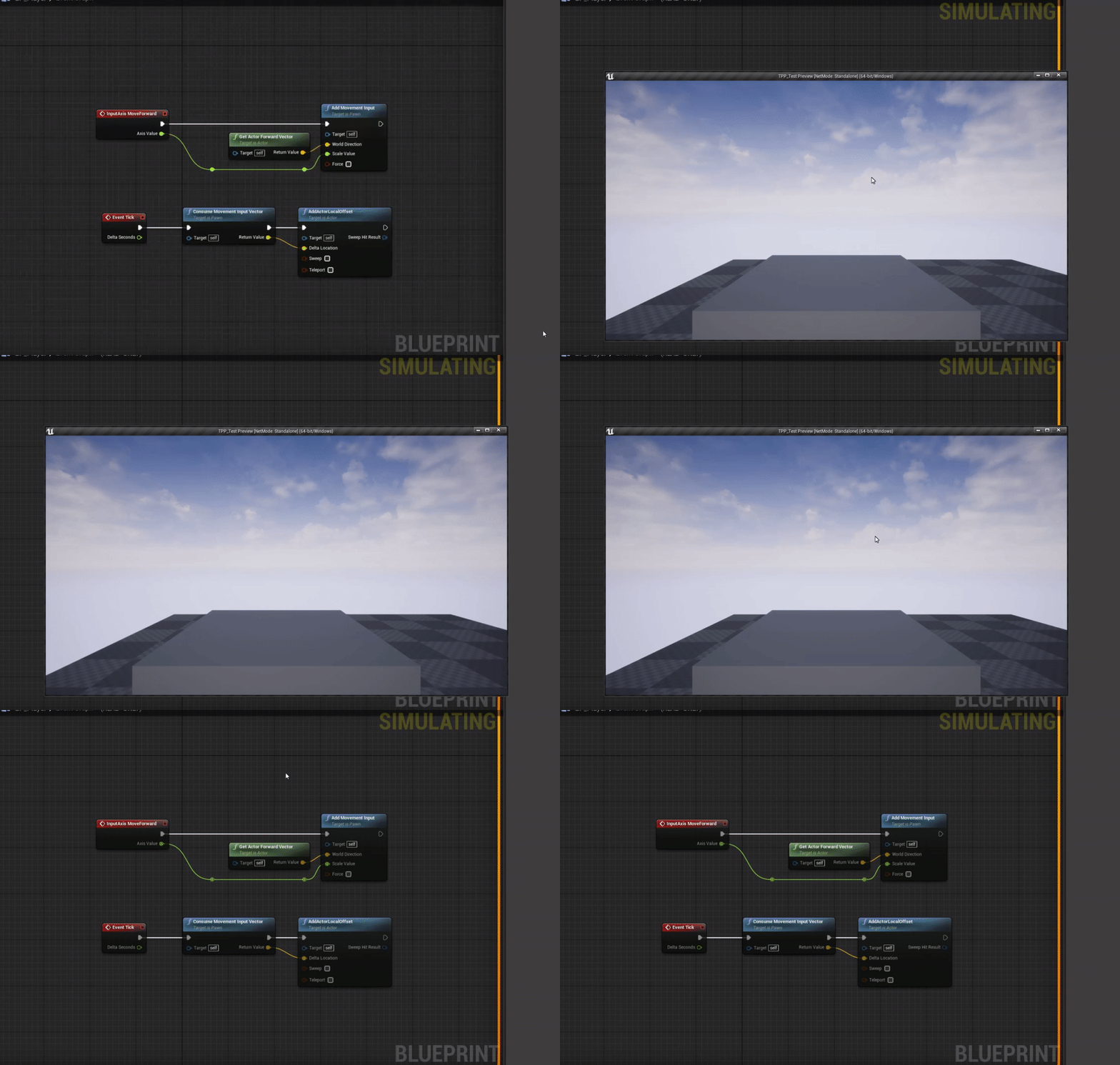
@sullen steeple I can say that this works for me as you can see and the MoveForward is mapped to W and S for me with 1.0 and -1.0 for the axis values in the project settings -> input https://i.gyazo.com/bf306e3dd5b4f5585758b345728d77ac.gif
 azure gazelle
@hearty walrus I am a Programmer that actually first did 3D stuff for like 10 years.. I mostly start with just getting the game to actually work (gameplay programming) with some boxes as assets. If this works and it is fun.. You can still take the time to create assets or buy them from others. (That's if it is a solo project)
grim ore
maybe try starting again. I did new actor -> pawn. then added the camera and the mesh. Make the mesh a cube. Added the code you can see and it worked for me.
assuming your input event was printing your input is going to that player
sullen steeple
OH WAIT
grim ore
im assuming you are using a default player start in the level and your default pawn is this blueprint (the screenshot you showed looked like it)
sullen steeple
sry caps
yes
it starts printing as soon as i start the program
i dont have to press anything
grim ore
yes that is the way the input events work
sullen steeple
oh ok
grim ore
how is this item in the world, did you just drop it in or is it using a player start?
sullen steeple
playerstart
grim ore
yep it should work then, that is how it is working for me. maybe try again from the start? I followed the code and it does work
sullen steeple
ok
grim ore
make a new level, redo the stuff and hopefully it works
sullen steeple
all of it?
grim ore
well you only need to remake the player blueprint
azure gazelle
@tight prawn tested in 4.25.1 Works exactly the same way for me.. So something must be up with your line trace or maybe not all meshes have their phys mat changed
grim ore
I would be concerned if the input was going to the blueprint but you need to set up an action input to test it
sullen steeple
ok
grim ore
actually lol
if you hook the axis value into the print string like this, drag it from axis value to the in string, it should print out 0, 1.0, or -1.0
sullen steeple
i am just gonna try and redo it
grim ore
if it only shows 0.0 when you press your W and S key its not getting input
hearty walrus
Is there a looking for people channel
azure gazelle
hearty walrus
thanks
azure gazelle
@hearty walrus never used it.. actually not sure how it works.. maybe someone else know this better^^ Edit: well it is written in the guide: https://discordapp.com/channels/187217643009212416/217006346598350848/223698808112939008 xD
green prairie
GUYS!!! @vernal thicket THIS is the solution... It works now :-)
vernal thicket
Oh an array duh lol
green prairie
Skipped through this video, and found it.. Array or not, it works 🙂
vernal thicket
I need to simply stuff more these things save hours
green prairie

#blueprint #tutorial #wildcard #cast #fail
A bunch of ways to create references to actors, widgets and others!
vernal thicket
You can use them for inventory systems etc
fiery moat
um I need help making a regenerating health mechanic
grim ore
@green prairie IF you are going to use that node, use the Get Actor of Class node so you get just the 1 result instead of the array
vernal thicket
@fiery moat what have you already got?
fiery moat
Here is my health system blueprint. the character gets his health reduced every time he gets shot but I need it to regenerate a bit every second.
green prairie
@grim ore Alright, thanks. I'll try 🙂
fiery moat
the health system works like a charm don't try to correct that
azure gazelle
@fiery moat Timeline (repeating, 1s duration) add to health everytime it's finished, cap with max health variable. (or go the begin play route without timeline and use a delay node and loop )
fiery moat
ok
vernal thicket
@azure gazellewill he need event tick?
fiery moat
could I have a very basic blueprint that fits in that comment I got?
vernal thicket
@fiery moat I use event tick, check every few seconds if health is below max health, and a simple add float to the health
azure gazelle
@azure gazellewill he need event tick?
@vernal thicket I like to work without tick^^ So you could create an event with a delay node that adds health.. It loops itself except if the max health is reached. So you could start it at begin play (in case you do not start with full health) or when the char takes damage
use a do once node to make sure they don't stack and reset once max health is reached.
should be a 10-12 node setup
vernal thicket
@azure gazelle a looping custom event?
Welp
I could just use the take damage event to trigger the check health and regen event? That would save massive on performance
But how would I get it to call more than once so it updates a bit at a time
fiery moat
I can't understand how to do it without a blueprint
I am sorry but really I am not at my best atm
vernal thicket
@fiery moat by the looks of it atm you have something triggering the death event?
fiery moat
yes when health is equal or less than 0
vernal thicket
Yeah I see
From your branch off false where it goes into reset could you add it there?
fiery moat
I just have that to keep things connected and stuff
if I remove it it won't change a thing
grim ore
@vernal thicket Start event -> Heal damage -> Is health needing to be regenned more? If so start timer to call event again after X seconds. This would repeat until you dont need to regen then never call itself again basically
and trigger the first start even whenever they take damage by checking to see if it's already running and if not, start it
vernal thicket
The call for damage
azure gazelle
Something like this.. Not sure I considered all cases correctly. But should be a starting point
grim ore
Make a custom event that gives you health. Update the event after it gives you health to check to see if you need more health. IF you need more health set a timer by function name and call that custom event again after your delay. This is all you need to basically continue regenerating health every so often
 maiden karma
hello I want to achieve something with my voluminous clouds I want the sun to pass through my clouds to achieve something like this
grim ore
Call the event in the first place whenever you get hurt. Before calling the event whenever you get hurt, see if the event is already running and if so do nothing
white relic
those rdr2 cloud slook insane
fiery moat
thx everyone
white relic
I cant get the streaking to stop on the top.
maiden karma
for now my clouds look like this
vernal thicket
@azure gazelle I'm embarrassed to screenshot any of my bps after seeing that.
jolly jungle
the texture sample node in my material with a render target for the texture is giving this error: [SM5] (Node TextureSample) TextureSample> Sampler type is Color, should be Linear Color for /Game/PortalRender1.PortalRender1
grim ore
click on the Sampler Type in the Texture Sample Details Panel @jolly jungle and change it
jolly jungle
thanks
vernal thicket
How would you guys write a flickering light? Currently got an event tick adjusting the intensity
 hybrid light
hello all
grim ore
Timeline, draw a curve to use for the light intensity, profit?
vernal thicket
Hey
hybrid light
i need help with this camera bug
vernal thicket
Got a recommended video on timelines?
hybrid light
grim ore
the docs cover timelines well
vernal thicket
Sweet will have a look thanks
hybrid light
this when i turn my mouse the camera goes all the way
vernal thicket
Wow there is a doc for flickering lights using timelines
hybrid light
in a weird way
fiery moat
um I am having trouble with that health regen blueprint, instead of regenerating my health it depletes it.
hybrid light
suppose to play slow and not all like in the video
azure gazelle
@maiden karma tbh I never really tried to get volumetric clouds into unreal engine.. I know trueSky exists and someone created a free plugin. But I'm not sure you can get quite the same effect as Read Dead Redemption without volumetric clouds.
@fiery moat xD Well there's a new gameplay mechanic for you xD Seriously though: What value did you set for health regen.. Should be positive
grim ore
@plush yew its not going to add to your bar, open up the Plugin Content in the content browser to browse to the landmass content
tight prawn
is there an easy way to change blueprints on realtime ?
fiery moat
wait
tight prawn
say I have a playerBP and enemyBP
grim ore
@plush yew
tight prawn
the difference between the two is the controller being AI
hybrid light
So
tight prawn
is there a way to switch playerBP into enemyBP ?
azure gazelle
define switch
fiery moat
now I have another problem.... It only regenerates ONCE
well that do once node is responsible I presume
azure gazelle
@fiery moat maxHealth set?
fiery moat
yep
grim ore
@plush yew also did you turn on the landscape layer support?
hybrid light
oh well
maiden karma
@maiden karma tbh I never really tried to get volumetric clouds into unreal engine.. I know trueSky exists and someone created a free plugin. But I'm not sure you can get quite the same effect as Read Dead Redemption without volumetric clouds.
@azure gazelle for now this has been my effect
azure gazelle
@fiery moat Didn't test it before sending the screenshot.. but I did now and it works for me.. So maybe you got one of the nodes wrong? > instead of < or something? not sure
azure gazelle
interesting