#ue4-general
1 messages · Page 726 of 1
 mystic holly
 quasi scaffold
@storm terrace 1 unreal unit is a cm
 storm terrace
so here does that mean I have 121meters by 121meters ??
so 12100 cm by 12100 cm?
is that correct? based on the screenshot
quasi scaffold
unreal unit, not vertices, the snap is in unreal units, if you set it to 100 and move items around, you'll move them meter by meter
 barren flume
is there a way i can have it so certain players will have a certain pawn from platform username or something like that
 scarlet birch
Your screenshot doesn't convey that information.
 abstract relic
If I recall. Default landscape is scaled 100x
 lament basin
Hi, i group a bunch of objects but how do i select the individual piece besides ungrouping?
abstract relic
Going off of that. It would be (overall resolution -1) * 100 = Xcm
 uncut vigil
@lament basin ctrl-shift-g to toggle individual selection?
lament basin
@uncut vigil ahh thanks!
barren flume
i've tried searching online but can't find anything
 static raft
Hey guys- anyone using the in-engine code editor plugin? How do you feel about it? Is there any way to modify it or customize it?
scarlet birch
@barren flume There's events you can override or you can just spawn a placeholder pawn and then pick a new spawnpoint.
barren flume
not sure how
or which
should i put in level blueprint
for when the player joins
scarlet birch
Read through the network compendium. There's a find spawn or something that's overridable.
FindPlayerStart it's in the gamemode
It's worth looking through all those and seeing what's all called and when.
scarlet birch
You can use a tag on the playerStart and then override FindPlayerStart to find the right one.
barren flume
what kind of tag
I see player start tag
oh i know
i think
do I put the other player start there
or I could have a pawn in the game already
and when the certain player joins it can possess it
okay i got the possess to work
i just need to figure out how to get the username
i know about that get platform user
but that's it
 sour sequoia
Anyone know the realease date of 4.25?
 pure stratus
I'm using 4.25 for weeks. Mind you missed something?
 mint umbra
Is it possible to select all the foliage in my level and paste it into another level?
sour sequoia
@pure stratus thats just a preview, theres the full release coming up
scarlet birch
Probably in the next two weeks but no gaurantees.
 night drift
Anyone seen a ragdoll/IK setup that gets anywhere close to this in Unreal? https://www.youtube.com/watch?v=Ylwa5lOnLKA Check out the rest of his videos too...the finger physics based grip alone is super cool

Tundra Fight School
In this weekly update video, I discuss the player character (& Bob's) anatomy, IK, and chat some about grappling/throws/takedowns/etc.
Reddit threads (additional comments):
https://www.reddit.com/r/virtualreality/comments/ganf9z/working_on_a_physics_martia...
 unique kraken
so im getting this error, i reduced my uv´s to 4 for each object. does that mean the whole character can only have 4 uv´s? https://cdn.discordapp.com/attachments/659670752630538250/706373105714593862/unknown.png

 stark pebble
Heyo, when is the 4.25 release coming out of preview?
 frail sail
did i well right? why didnt get reply back?
i sent the minimal sample project for 32bit dll bug.
should i upload google drive or they have special upload site for test projects?
my first bug submission so
 brittle gulch
Hi guys, do you know how to use input events variable and what they are?
 whole quarry
@frail sail just upload it to google drive or something and send them the link
I did the same thing when I had unexplained collision issues
They couldnt figure it out either but made me realize they offer super relaxed support
whole quarry
Np
 thin tendon
Is there a correct method for getting the edges of the viewport for a widget? So I can lock it inside the viewport.
whole quarry
Widgets are generally already using the viewport resolution
Its the components you want to lock inside the viewport I guess
thin tendon
I'm creating a system to simulate a mouse. Using a widget and a gamepad. I have everything working I can move and click on buttons. But I'm having trouble telling it that it can't exist outside the screen
thin tendon
Its to add gamepad support without using the focus system
 honest vale
FXAA does smooth edges of objects so that might look blurry to you
thin tendon
There is a node for "Is in viewport" but it does nothing
Its all good I figured it out. lol It was my fault I had a single node out of place
 thick herald
Anyone else finding 4.25p7 hard locks, so even task manager can't kill it?
honest vale
task manager should definitely kill it as long as you use the detailed process view and not the task view
thick herald
Annoyingly no, access denied apparently
 rancid lynx
if both of these are running every single frame. with 100 actors each. (For example), does anyone know which one uses more or less CPU ?
if they both run the "math" 1 time each frame, are they equal in cpu ? or is the timeline cheaper perhaps ?
ive read that timelines eat a little extra ram, so eventually that would add up. so im trying to understand best cheapest practice.
i could do 10 times a second inside a timeline, or a event tick, timelines require more ram, so if they are not cheaper on the CPU, we may as well use optimized ticks. i assume. ive only been learning google search trash for 1 year.
 dark rune
does anyone know how to do RVO avoidance in AI? there is fuck all in documentation about it.
 plush thicket
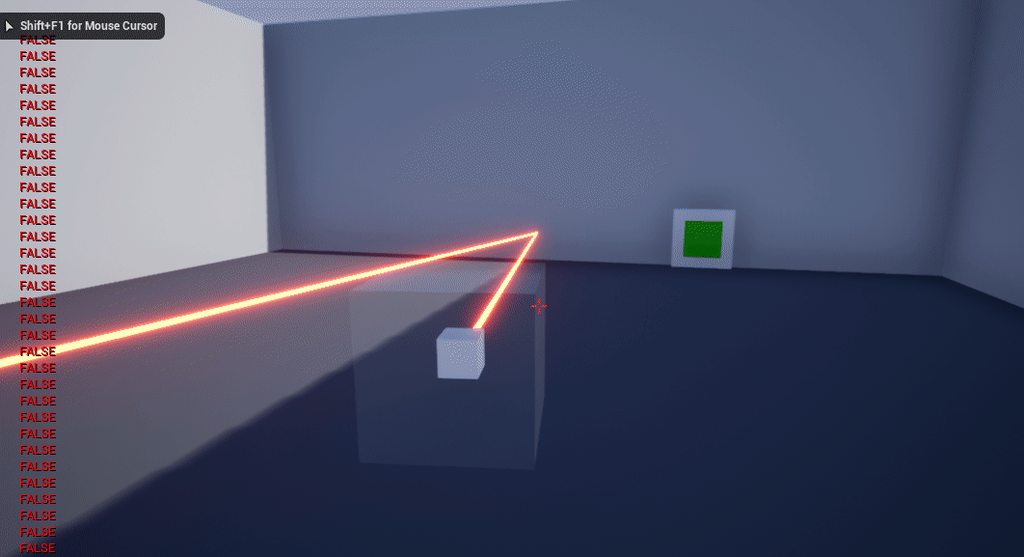
why does it output
FALSE FALSE TRUE
instead of just TRUE
it works
but the console output on the left says otherwise
 thin mantle
Hi,What could be a setting in blueprint details that make an Actor undestroyable when Destroy() is called on it??
All pieces inherit from a single class named APiece, the child classes have a description of how the piece should behave(for example move);All the pieces behave correctly, except for the knight, that won't destroy when Destory is called on it...Anyone knows what could be the cause?
 tacit onyx
There shouldn't be a setting for that. Not that I've ever been aware of anyway. The only way destroy should 'fail' is if the actor is already pending a destroy. Is the knight's destroy functionality in any way different? How are you calling it?
thin mantle
I'm getting it's reference before start,and as for all the other pieces, when I need I call Destroy() on it, the code is the same for all of them
 unreal sonnet
@rancid lynx Anecdotally, I've heard that Timelines are a bad practice to use in bulk, and that you should try to avoid them whenever you can.
Doing a line trace hundreds of times every frame is also bad, though, so if I were in your shoes I'd try to come up with some out of the box solution that won't be as accurate or good but will avoid all of that processing stuff.
I can't think of a scenario where you'd would need to do it that way, so hopefully if you brainstorm a bit you can find an alternative solution!
thick herald
Line traces are fine to use in bulk.
unreal sonnet
Yeah, don't take what I say as gospel. I could be wrong!
thin mantle
Solved my issue by deleting the knight blueprints and redoing them,now,idk why,knights work correctly
thick herald
@plush thicket you don't have a branch checking for the false print string, it will always say false.
plush thicket
Can you give me a mini example of what I should do to fix that?
 fallen elbow
so im using world composition, in which level do i need to use it?
thick herald
I'm not sure what you're trying to do, but if you're needing to do something if 'is sensor hit' is false, just add a branch and check, just like you did with the true branch.
 harsh tiger
how would i determine if the output is odd or even?
unreal sonnet
I would make a "Math Expr" node and in there I would type X % 2 == 0. It will give you a red boolean pin to say (true=even, false=odd)
And then you plug your thing into the X pin
harsh tiger
perfect. just eating my dinner atm. will give it a go shortly
 frozen mural
how do i capture the part? i rotate it but seems it doesnt fix my problem
i moved my ads cam too btw
 kindred viper
Is there a way to force Tessellation Displacement on a material to adhere to the normal / height maps so it doesn't just utterly wreck the geometry in non-spherical objects?
also it has tiling issues with mat instances at the edges as they are obviously displaced too
rancid lynx
why does this -20 z make the line trace go UP ? from the hand.
if the END location is Targets world loc -20. shouldnt it go down ?
 midnight gate
how do i set the camera to ortographic?
harsh tiger
@unreal sonnet i created a math expr node but its read only so i cant modify it?
i done this and its worked just fine
unreal sonnet
I think you weren't using the Math Expr node correctly -- instead of typing "X % 2 == 0", you appear to have just typed "Is Even"
harsh tiger
ahhhh, i've never used meth expr before. i think i know what you mean now
that's super cool! i never knew about math expressions before
whats the difference between that and
unreal sonnet
There you go! 💐
The difference is convenience. I don't know if there's a performance improvement
harsh tiger
ah okay, it is a lot cleaner than my original method. i guess if the maths was more complex it would be a lot cleaner than having multiple nodes everywhere
 brisk urchin
Is there such thing as a lighting render bug? I have 6 spot lights in a decent sized room and when I lower the candelas from 80 to 60 on all them and hit the build button it stays the same brightness after the build is done.
Found a way around this issue above. Not sure if its a known problem in the engine. FIX: go to each light source and uncheck "affect world" and hit the the "build" button. Only way to get lighting to update in the room. After that, I rechecked "affect world" with the new lighting numbers and hit "build" again.
unreal sonnet
I think there is a built-in engine limit to how many lights can affect a certain place at the same time
Try deleting one or two of the lights or moving it someplace else, then rebuild and see if that helps @brisk urchin
 sturdy star
maybe a simple/stupid question, i'm trying to create a method for rotating an object based on camera position/rotation, where you can only rotate around the cameras Up Vector and the Right Vector - eg: can spin a cube left and right, and "forward" and "backward". but the two shouldn't interfere with each other, the rotations happen independently of each other. for the life of me i can't get it to work as expected, i can get either one of the rotatiosn to work but not both at the same time without things going screwy - this is in bluepritns btw
 frozen pond
can static mesh instance be added in world space ?
brisk urchin
@unreal sonnet I see, I didn't try moving the lights. I did change the attenuation, which didn't do anything with the issue. It's just weird because that room is almost identical to another room near but the other room has no issues with updating its light settings even they they both have the same number of lights.
unreal sonnet
I know that the lightmap has a "resolution size", so instead of X number of lights affecting the same spot it's X number of lights in the same 100x100 square area... maybe your lights are overlapping too much in that 100x100 or whatever square area. 🤷 Just pitching ideas
 rich reef
sturdy star
rich reef
sturdy star
@rich reef epic provide remap value range function - that doens't get clamped - is that helpful?
frozen pond
how to fire construct script in game?
whole quarry
Its fired whenever an actor is spawned
thick herald
it fires automatically on creation
frozen pond
yeah i know that, but how to fire it again in game?
thick herald
you don't. Create a function that does it 🙂
frozen pond
so just ctrl + c ctrl + v in function
 worn granite
or move the stuff from the construction script into the function. Call the function from the construction script
 regal zephyr
Hello everyone. I have working on a group project and we have different level scenarios for each area we are working on. My problem is that i cant bake any STATIC light into the scene. Stationary and movable works obviously fine but static seems to not show up. can anyone help me?
 tiny sonnet
how do u move the camera when playing a specific animation
 agile notch
does anyone know how to permanently change the editor's max FPS from 120 to anything else? only thing i've had work successfully is to manually type eg t.MaxFps=75 on the console every time after the editor starts up... it's really annoying, but putting it in eg ConsoleVariables.ini doesn't seem to work 😦
(i also tried to make an editor startup blueprint but i couldn't seem to get it to run?)
... i've spent like the last 2 hours at least just trying to set this basic setting
 plush yew
hi just wanted to know if i make a game in ue4 creator's license and wanted to piblish is later on would i be able to migrate that game to ue4 publisher license ?
abstract relic

Create stunning real-time visuals for architecture, product design and manufacturing. Unreal Studio drastically reduces iteration time through efficient transfer of CAD and 3ds Max data into Unreal Engine.
agile notch
ahhhh i finallly figured out the solution to the editor maxfps... i had to put [/Script/UnrealEd.EditorEngine] section in my project DefaultEngine.ini, and set the SmoothedFrameRateRange value, or edit the same thing in BaseEngine.ini
plush yew
How can I check my game performance in the editor?for example to know if I'm doing too many calculations per second or if I can push more istructions to be executed in one frame?
honest vale
How to identify performance problems and fix them.
frozen pond
on asset i see export (and i got .copy) file but i dont see import in diffrent project?
tiny sonnet
since root motion isnt suitable for replication, how can i make an animation not snap back to its original position after playing.
 normal burrow
blending
theres no real better answer i could give you that would be generic enough to fit each situation, but blending/transitioning tuning would be the approach when making or timing properly animated changes aren't an option
 coarse furnace
hi!
whole quarry
Hello
coarse furnace
where do i go with questions about older versions of the unreal engine? specifically modding
whole quarry
Versions doesnt really matter but there is no specific channel for modding
coarse furnace
thanks 🙂
whole quarry
Np
barren flume
all my unreal engine projects keep saying video driver crashed
until i change the name of the project
then after awhile it does it again
brisk urchin
I feel like an idiot. 😑 I believe I know figured why my spotlights weren't updating after building. My six spotlights all had an 89 outer cone, 800 radius and 50 candelas. I would tweak those stats and nothing would happen and rebuild.
I then noticed that all those lights had an inner cone of 0. Once I raised the inner cone value the lighting was finally changing after build but not before then. This is probably why right??
 topaz marten
hey i dont know if this is right channel as im still new round here but uh i used one of the like things that gives you a thing to start with and i wanna know how to implement a new thing, but im unsure how im supposed to go about it?
objects and feature to be exact if that helps navigate me to correct channel
 noble pollen
hi all
i just finished compiling UE4 on a kubuntu 20 machine...the editor starts fine but...everything is too tiny, like if it was running at the wrong resolution...is there a switch that i can add to ./ue4editor to "force" the resolution or scaling?
 whole quarry
@topaz marten Best is to check some tutorials, maybe check the docs https://docs.unrealengine.com/en-US/Engine/Blueprints/GettingStarted/index.html, I also recommend this YT channel https://www.youtube.com/channel/UCOVfF7PfLbRdVEm0hONTrNQ

YouTube
This channel is dedicated to exploring Unreal Engine 4 and the Blueprint programming language that it uses. You can think of it as a companion to the API doc...
@topaz marten This might bring you on the right path https://www.youtube.com/playlist?list=PLSlkDq2rO1t7eEyfF8eiTsGGGtFOBz1vb

YouTube
MVP (Minimum Viable Product) Series showing you a basic introduction to Unreal Engine 4 covering most of the Editor and Engine itself. This series is intende...
topaz marten
oki will do ty ill say anything if i struggle to figure out anything
should i make a new "save" for it?
whole quarry
a new project?
whole quarry
you could learn the engine in one project, using different levels or something
or make new projects and delete unused ones
whole quarry
check that playlist
topaz marten
all ive done was retexture things
whole quarry
you got to start somewhere
topaz marten
as you can see
i send images and msgs seprately usually cuz it struggles to send other wise for me
and it failed to send the image
oh well
barren flume
Is there a way I can do something like this
have the player name float above their head
whole quarry
Sure, you can use a Text Render or create a widget
 sinful pier
@noble pollen still having issues with UI scaling?
noble pollen
@sinful pier sadly yes, i'm waiting for a hint 🙂
sinful pier
if you go to window->developer tools->Widget Reflector
there is a "Application Scale" slider in that window
but there could be other side effects, I am unsure
noble pollen
ok i am trying now. Is this setting going to stay? like.. is applicationwide and is it going to stay there for every project?
sinful pier
I think it resets every time you start the engine / project
noble pollen
tbh it is slower than its windows counterpart 😛
sinful pier
I don't know about linux / kubuntu? scaling, but the engine scales fine with my 4k screen
noble pollen
@sinful pier is there a way to launch the editor with that scaling? Like a --scale switch?
whole quarry
hi
sinful pier
I don't know
noble pollen
ok thanks 🙂
whole quarry
create a project using a template like FPS or third person @plush yew, then just migrate the needed assets to your empty project
plush yew
aight
noble pollen
thanks everybody, thanks Markus!
barren flume
@whole quarry Yeah I have a text render but just not sure how to get the text to change to the player's name
honest vale
@light lintel a reference to some actor that is actually a character under the hood
barren flume
whole quarry
@barren flume well, you store the name somewhere in a var, so use that var to set the text of the Text Render?
barren flume
 quick kelp
If I have two array variables of the same type, can I drag get array1 and connect it to set array2 and it will copy all the variables over to array 2?
whole quarry
Iirc, yes. Just try it 🙂
 sacred sluice
Hey, guys. Is it possible to do something like this on an unreal engine? Do you have any ideas how to make the enemy grab for head?
 grim ore
yes it is possible. the head can be a socket or bone for where you want the hand to match up with. Then you can play the animation of the grab and move the character as needed. Chances are for something like this it could even be scripted using sequencer
unreal sonnet
Wasn't that game made with the Unreal Engine? If so, then yes by definition it can be done in the Unreal Engine.
sacred sluice
@light lintel which one socket?
barren flume
I can get it to show date and time but that's it
nevermind I think I got it to work
since it's showing my pc name
yeah
it's working
brisk urchin
Quick question, I have a 2 floor building and my 1st floor ceiling is coming out darker than the ceiling in the 2nd floor. Both static meshes have the same settings and material used.
2nd floor is the way it should look. second pic.
barren flume
yeah I get this message
if I reopen the project
when i click the play button
and the only way to fix it is to rename the project
that i know
topaz marten
hey uh is it possible to change the texture of a thing when it gets close to another thing?
im still learning and wanna try something involving that idea but idk how it would be done
abstract relic
Expressions that deal with depth of the pixel being rendered.
topaz marten
if thats responce to what i said, the image isnt showing quite what i mean, at least i dont think it is
barren flume
it works perfectly fine
fps is above 100
16gb ram
every other project is fine
this one crashes until i change the name
then once i close it again
after i rename it
it crashes again
i think i know
i put that there to set settings automatically
for other people
plush yew
Starting to learn unreal. It's strange compared to unity due to how much it relies on node graphs
thick herald
Only if you use them, you could do most of it in cpp, but BPs are faster to get working.
barren flume
yeah
 hybrid scroll
How likely is it that packaging can get stuck without throwing an error?
I'm over 8h in, packaging something big and I'm on the second to last package (out of almost 6000)... but it hasn't updated in 30 min and is using only 5% of my CPU.. so it looks like nothing is happening. But the editor is not frozen, so it didn't crash completely.
(I know there is a #packaging channel, but nobody is there :P)
 manic pawn
just close it and start it again
if it took 8 hours I assume you had no previous ddc for some reason
so it should go way faster this time
hybrid scroll
I know it won't start over from 0, but still, I didn't want to risk it
yeah, packaging a big project for the first time, on a new engine version, so it was starting from nothing.
hybrid scroll
project is 24GB, but I do have a decent PC so yeah, it was going slower than I expected.
 lapis bronze
woah 8 hours
what kinda WoW killer are you packaging? haha
hybrid scroll
yeah, I imagine something is wrong 😛 good thing I was AFK for most of that time
hmm... counting system is broken 🙂 I restarted and now I have 2x total packages, but I started at the same number I canceled at
manic pawn
don't worry, the package counters never made any sense
the total keeps going up and down while it packages
packaging intensifies
 heady moon
Is there a difference between AController and APlayerController? C++
abstract relic
Deleting /intermediate in the packaging file usually fixes such freezes @hybrid scroll
heady moon
I want to create an object to get the player's viewpoint.
AController or APlayerController?
lapis bronze
playercontroller
heady moon
Ok
barren flume
is there a way I can add like a fake lag
like high ping
to test and see what happens to players with high ping
 wind gale
I just set up two PCs in my network as swarm agents. My main PC currently is set up as the coordinator. I see all machines in the coordinator. But when I build, only my coordinator machine bothers to work. I must be missing some step in all this to get swarm to distribute work?
 fallen marten
If you figure this out of love to hear it- I have my main PC and 5 other smaller desktops/laptops I could connect in
wind gale
I got one machine to behave... looking into the misbehaving one now
 wooden belfry
Does anyone know how to fix an issue I am having? I just tried to open a VR project (Just got Unreal Engine yesterday, im new) but the example map is spazzing out and when I look around half the screen gets covered in a green square and things are flashing everywhere
wind gale
...the one machine that was misbehaving hadn't been turned on in a while, and just got a huge Windows update... allowing it to restart... see if this will help.
wind gale
@wooden belfry sorry, my comment wasn't directed at your issue.
wooden belfry
oh lol
wind gale
...and, I wish I could help. I've been meaning to fire Unreal up into a VR project and start tinkering around as a side project distraction.
wooden belfry
I dont think its related to the VR issue, because this is in the editor
This is my issue
It's supposed to be like a display level for default VR stuff
wind gale
well, that looks... odd.
wooden belfry
indeed
wooden belfry
im moving with right click and wasd
wind gale
Like, CTRL+LMB?
 warped tundra
Hey wheres a good channel to ask about landscape help?
wind gale
hrmm... it looks like what I see when I get into Blender view mode, and I start LMB+dragging with the CTRL key held in... when the camera gets to the origin, it will begin rapidly flipping over the origin like that.
There's something else, though. Are there any special camera or scene capture actors in your scene?
@warped tundra I would think #level-design ?
warped tundra
Ah alright i was in the right chat then kinda dead in there currently 
wind gale
Yeah, post your question and walk away for a bit. 😛
warped tundra
Yeah had a question in there since 12 this morning oh well i'll wait
wooden belfry
No my issue is right when I opened the scene
wind gale
Sign in as another account and post blatantly false advice to yourself. That'll stir people up! (I kid. I kid.)
wooden belfry
I dont even know how to use unreal
Its bugging out right away. Could it because im mac?
wind gale
@wooden belfry I can't say, then. It looks like the camera flipping over the origin, or garbage video data, or like, the buffer just not bothering to refresh frame to frame.
warped tundra
Oh ah quick question is there any videos i could watch about getting started in making an open world and all that?
wooden belfry
I dont think its flipping over the origin, because I can see pictures that are supposed to represent objects, and I think the camera is properly moving around them
 reef lava
This is copied and pasted from another dev server I'm active in but here we go: Ok so, tough question, as it's quite generic and could have a lot of contributors, but I'm running 16gb of DDr4 ram with an NB freuqncy of around 3600 each right, and every time I open my main project, I'm getting a little over 80% mem usage with one bp tab open, even with it closed (all tabs besides the viewport and message log), it occurs, so is that normal? I mean the map I have open at start is nothing short of simple. It's dev testing map with nothing but a very crude landscape, and bps that run in real time, not editor code.
really suspecting a heavy mem leak in this project, but I haven't a clue where to even start anymore...
 midnight root
crude landscape you say, but are you using raytracing and what else is on landscape ?
plush yew
I have a dumb question for ya: If I make a Third Person project, is it possible to make it a first person only game down the line? Or is it locked to third person for some reason?
midnight root
no you can do what you wish
 hollow ridge
@plush yew doesnt matter you can move the camera after
plush yew
ty
hollow ridge
I have a question. It says I am generating an infinite loop. It shouldn't be infinite tho cuz every time it happens I add one and then I stop it after it gets to 10. Is there a way I can bypass the check? is that a really bad idea?
wind gale
@hollow ridge Can we see the offending code/nodes?
hollow ridge
It is very simple I am just spawning an actor that spawns more actors Ill send a screen shot if you want
wind gale
ayup
wind gale
Is the Room actor spawning other Room actors?
hollow ridge
yes
but it is adding in a different actor so they all are adding to the same vlue
value
wind gale
How do you determine which Room's RoomsCreated property to reference?
hollow ridge
no it is in a different actor not one of the rooms
wind gale
is your comparison there correct? Do you mean to check greater than or equal?
hollow ridge
that is greater than or equal right? also it wouldnt matter cuz if it were the wrong one nothing would every happen because the default value is 0
wind gale
can you scrunch all these nodes next to each other, so you can make a screengrab of the whole graph?
hollow ridge
um not really cuz there is a lot more than just that
I am doing all of that 4 times
wind gale
I don't have enough info there... I don't know where these wires go or come from.
wind gale
If you have an event calling itself in the same execution without some sort of delay or limiter, you'll get an infinite loop.
oh, new pic... standby
welp... it's a nice arrangement of wires... but without the words on the nodes... can't make heads or tails of it
wind gale
so, it is probably that particular actor being spawned is either not feeding in the value used to limit the loop of the execution, or it is calling the whole event again in the same frame, or it has its own loop of some sort within it that is not being allowed to escape.
hollow ridge
oh its cuz I am running it 2 times and choosing a random one of the spawns so there is a chance it will end
ok
reef lava
crude landscape you say, but are you using raytracing and what else is on landscape ?
@midnight root nope, just your average quality levels, etc.
with an rtx 2070 though, (rt not enabled)
it's arisen to me that this project has a severe memory handling issue, not sure what, but the next step for me is the profiler
if I can even manage to open it,
midnight root
WELL depending what else you have open, and which version of ue4 you're using, could be a memory leak I suppose as that sounds way too high for something simple in nature
 bitter iris
is there a command that can toggle cull distances?
reef lava
4.23.1
midnight root
what else are you running while this occurs
reef lava
and for some reason, speaking of versions, it doesnt allow me to compile from source on 4.24 (which is kind of not part of my whole ordeal since it's not a priority i switch yet), but weird thing is it's not even a code project rn.
as in other apps?
midnight root
yes
reef lava
discord, spotify, thats it
midnight root
does this occur on restart ?
reef lava
and then in my perf monitor ue4 will skyrocket to 80 on most circumstances via the memory usage, everything else seems quite normal.
mhm
midnight root
restart/shutdown blah
reef lava
is there a command that can toggle cull distances?
@bitter iris what are you trying to cull exactly
oh
toggling
midnight root
ya thats too high for a simple scene dunno
midnight root
mine is nowhere near that and I have a 4tile highly sculpted terrain with some complexity
world comp ^
reef lava
my main world (very large miraculously still opens, but it's a very rare occasion it will happen within 5 min at the least)
and when it does, the memory usage is quite apparently high for a reason it should not be
ive seen multiple forums on this, but oddly enough they date back several years, no one speaks of these issues any more, havent a clue why, but it seems that way.
reef lava
cant. doesn't let me switch, because when I do, (and this is the weird part) despite rebuilding in VS and rebuilding the source from the project file, it fails upon doing so, then telling me it failed to compile the source file, when my project contains no C++ in it yet.
midnight root
errors ?
reef lava
building inside of VS succeeds, but proceeds to fail on opening, resulting in the same failure to rebuild it's source
reef lava
there are none, ( may be in some logs havent checked the most recent ones yet) but it's a source rebuild failure
midnight root
no idea on that my strength atm isn't in coding
reef lava
its np, I'll get to it eventually it's just to cost me a monitor
reef lava
because im about to throw it out the window
midnight root
dunno about project, maybe export terrain, run 4.24 and import and start over see if memory improves
just odd with 16gb you should be sailing
a lot of lighting ?
reef lava
nope, simple moveable directional with your standrad fog and skyulight
all attached to a stylized sky sphere
midnight root
my 4 tile complex sun & sky7 etc. world is only at 3gb so thats very odd
as seen
just a reference
reef lava
yea, thats the thing, its only this project
midnight root
I'd start over, keeping what you have, start with just terrain, see where it goes ape on memory,,,4.24
something other than 4.23
trust me, I get wwwweird behavior in 4.24 myself, but then I'm stressing my 8gb while running edge with many tabs and blender maybe O_0
reef lava
I'm going to try adding a C++ class in 4.23 and then rebuilding on 4.24
midnight root
STILL, i never , rarely run out of ram , but ya sometimes with all that I get 80 or higher but stable most of the time
good
 midnight root
🙂
ie yet todo any c++ but I must sooner or later
I've
its just so non human readable lOL
reef lava
im just now delving in it deeper for the frst time
reef lava
however I do have a pretty solid basic understaning of it's layout so, thats good i suppose
reef lava
mhm, same here haha
midnight root
heh
Im SO used to the relative ease of c# , but oh well c++ I must try we all prob will need it at some point

Learn to make games in Unreal Engine 4 C++ in this step-by-step video!
In this getting started C++ tutorial I will quickly take you through the setup of Visual Studio and then dive straight into programming C++ with some practical gameplay examples!
Want to learn more C++? C...
I know there are others, this looks OK tome
reef lava
I love tom, he's a good instructor
reef lava
I believe he's an ex ue engineer, although it was prob some other position, nonetheless, he knows his stuff
midnight root
nnnnice
barren flume
Anyway to host an online server
midnight root
ya I need to delve into code,,my 3rd person char that comes with ue4 has some weird motion on rotating camera in some areas
barren flume
or host one over my pc
reef lava
I've set up online games across North American servers using steam but that was years ago, but is there a specific service you have in mind to use for server setup?
reef lava
it doesnt necessarily, it will just be granted the dev ID, which is space war or some crap i think dont remember entirely though, the last time I actually did any network testing through steam was prob a few months ago, when I had it on there privately for testing purposes.
 junior solstice
reef lava
junior solstice
reef lava
if you look into pyro dev's tutorials on steam functionality in ue4, they're pretty useful https://www.youtube.com/watch?v=ke3kmK6bvT0 I'd certainly look into them if you're interested in trying that sort of thing 😄 @barren flume
Hey all,
today we are gonna work on the integration of the Advanced Steam Session Plugin
[/Script/Engine.Gam...
 ruby folio
Dear lord. I just found out I could create simplified Level LOD's in bulk!
So I would have to replace all the materials by hand with material instances which have a snow buildup shader graph.
 swift spindle
yeah... you could write a replacement script however (I need to do the same thing next week)
ruby folio
I would need to replace them all with instances though. Instances which have the correct tetxures applied for the landscape coordinates...
swift spindle
lots o fun eh
ruby folio
over 700 levels
swift spindle
ANNNNND no thanks
ruby folio
yeah
swift spindle
you gota automate that stuff
ruby folio
Add it to the list of things I can do "later"
Yeah I gotta figure out how I can automate it
How would you even come up with something that does that?
 frail sun
Yo so 4.25 release tomorrow?
wooden belfry
When i hover over my VR project, it only shows the windows sign, but for a normal plain game it shows a whole list of operating systems. How do I add more operating systems to my project? I am on a mac, and that VR project is flickering and all over the place and I feel like that might be why.
Actually that might not be why, the tutorial shows that too
I still dont know why I have this issue though
barren flume
@reef lava Thank you so much
reef lava
Yea no problem man, I hope leading ya towards pyro’s tutorials on that stuff helped
He’s a real good guy and has been helpful to me when I went into steam networking in unreal for the first time, not to mention it’s very good for getting familiar with it all 🙂
swift spindle
@ruby folio I'm thinking I'll need to add a gametag bassed on existing material.. then sort by those and swap out to a different version of the material
 lavish garden
so i've made a landscape and imported a HeightMap (made in world machine), got my material from the starter content, but i can't find the third person actor to import so i cna run around. where can i find it?
well, the auto mover thingie works well enough. i can continue to work with out a character, so work i will! 8D
ruby folio
@lavish garden In the content browser click the big green button "Add New"
Then click add feature or content pack
 silk ivy
Got a quick question, is there a simple way to make the light pulse like this in-game?
plush yew
should i put player controls on the pawn or the controller?
lavish garden
thought i tried that, but i'll hammer on it till it works.
@ruby folio thank you for the response!
ruby folio
@silk ivy I dunno about simple way. I would create a blueprint, add a light to it, and control its intensity / colour via a timeline.
Either that or create a light function material
barren flume
it's doing it again
i don't know why this keeps happening
it stops when i rename it
then after awhile it happens again
i'm dumb again
i remember
abstract relic
Memory leaks?
normal burrow
Garbage collection hiccup
plush yew
to use git
plush yew
do i just create a bare repo, and push the project folder into it?
barren flume
also i'm having issues opening a level
abstract relic
Yes
barren flume
when I click the button it doesn't open up the level
I added on faliure
for print string
and the message shows up
it was working before
but now it just doesn't open the level at all
nevermind
i figured out why
no game instance set
plush yew
hey
to set up the git
what files should include
besides the source
putting the entire project folder in git doenst seem like a good idea
right now my ignore list is
/Binaries/
/Build/
/Saved/
/Intermediate/
 regal mulch
@plush yew #source-control
barren flume
i'm confused about the steam server thing
how can i change the name
when I launch it and open steam overlay it says spacewar
 still moat
 raw elk
Has anyone else experienced a bug when attempting to launch Unreal Engine 4 in Vulkan mode, the engine seems to change something in windows causing the monitor to look weird (oversaturated colors)

If UE4 is closed, the problem goes away. It only seems to occur when launching in Vulkan
barren flume
I still see edges
I have anti aliasing at highest
and that weird fuzz stuff
and if i set anti aliasing to low it still looks the same
nvidia control panel says application controlled
plush yew
well shit
epic games temporarily locked my account
i hate anti aliasing in my games, it just makes the game blurry 😛
 distant marsh
i hate anti aliasing in my games, it just makes the game blurry 😛
@plush yew don't use txaa
 quiet oak
use TXAA and use this: r.Tonemapper.Sharpen
barren flume
alright for me
turns out the anti aliasing is finer
it's just off in editor
until i play
plush yew
Is there a node that choose randomly between 5 items?
 cyan robin
hi i have a simple question
i am trying to update the HUD, i created a binding, and i'm unsure how to access this function from another script
Learn how to optimize your UI elements by driving updates through the use of Events.
i am trying to do the first simple approach: Example 1. Function Binding
 supple totem
hi all, I'm getting this crash when I launch my project and alt-tab while it loads https://images-ext-1.discordapp.net/external/GcriRbIml9sjX9ESWN9RZWM7pEZDp6D3iOTDzI7b6qc/https/ninja.is-inside.me/gsDZBNzg.png

I can alt tab in game fine, its just during initial launch this happens
where could I get to the bottom of this? thanks
 silver crown
@supple totem I suppose you don't have custom shader code
And that you're not doing custom render stuff
supple totem
nope just stock 4.24
silver crown
Is it only on your machine
supple totem
testers too
silver crown
All this is telling you is that unreal did something wrong with the GPU
But could also be the GPU being faulty (unlikely if reproducible across different machines)
Or the driver being faulty (also unlikely)
Not something you can fix on your own besides trying simple stuff like switching to windowed full screen or real full screen
Could be worth trying the 4.25 preview as well
See if it's fixed in that
supple totem
yeah I'm messing w/ windowed and fullscreen now
and I agree it looks like a deeper issue than my game code
thanks for tips 👍
thin tendon
Is there a blueprint method for determining if a number is a negative or a positive? Just wondering before I create my own way
supple totem
sign of float?
 teal egret
So everytime I reload my project, my Map and PrimaryAssetLabel keep getting duplicated in Project Settings -> Asset Manager. Any ideas why this is happening?
Fixed:
Adding to DefaultGame.ini, a removal of the 'defaults' makes it work just fine now.
-PrimaryAssetTypesToScan < blah blah > for maps and primary.
 calm sphinx
I have a feeling that 4.25 will be released today 👀
cyan robin
how do i call a function from the widget blueprint in another blueprint?
i got a reference to the function but i'm not sure how wire up
whole quarry
@thin tendon if (x < 0) { lower than 0 } else { higher than 0 }
 smoky latch
Hi guys, i'll be greatly appreciated if someone could explain the world composition layer's intended usage? I'm interested in - can I stack one level above the other in the wc setup and increase the layer number. F.e. one level holds only geometry, then the other level will be placed above it and will be holding some logic, and the other, placed above - will be holding some effects \ lighting \etc.
thick herald
Not as far as I know, it's purely for actual map tiles. You do get some degree of control if you enable landscape layers though.
smoky latch
how do i call a function from the widget blueprint in another blueprint?
@cyan robin the best way would be to use blueprint interface i think, check the docs on them
Not as far as I know, it's purely for actual map tiles. You do get some degree of control if you enable landscape layers though.
@thick herald but you actually can have one tile above the other (f.e. landscape and underneath - dungeon), for this you'll need to setup layer number appropriately - so you could select in wc preview window correct tile. Then in dungeon wc tile you could simply set the visibility of landscape tile to "hidden in game\no collision" and here you'll have a landscape tile (for example - x0y0) above, and tile with hidden landscape and dungeon geometry but on tile x100y100 below
thick herald
Yeah, it's possible to have all the tiles stacked, but for what you were asking ie having each tile contain different parts of a level.. it's not really what it's for.
Maybe if you explained why you want to do this?
smoky latch
Yeah, it's possible to have all the tiles stacked, but for what you were asking ie having each tile contain different parts of a level.. it's not really what it's for.
@thick herald i want to separate logic and geometry, f.e. i have one big tile with logic, and underneath - 9 smaller tiles with geometry to save memory. So to have only 4 of the on lod0 simultaneously
thick herald
Sounds like you need level streaming, not world composition
smoky latch
Sounds like you need level streaming, not world composition
@thick herald i thought that you cant use world compositiion and streaming volumes simultaneously - it's either one or another setup
in some old stream on level streaming - that was said, don't know maybe now it's different?
wc is very convenient for landscape
 merry gazelle
anyone else agree the play button should be moved over to the far left? It's really annoying on small or split screen that it gets hidden
thick herald
I think that's still correct it's one or the other - I don't know for sure - I guess you could use it for dungeons and the likes if the streaming distance is set up properly. But as I said earlier, not for having different parts of the same levels stuff lights/geometry. Having something hidden doesn't remove it from memory it's still there. UE4 doesn't render things that are not in view anyway, but they are in memory.
smoky latch
I think that's still correct it's one or the other - I don't know for sure - I guess you could use it for dungeons and the likes if the streaming distance is set up properly. But as I said earlier, not for having different parts of the same levels stuff lights/geometry. Having something hidden doesn't remove it from memory it's still there. UE4 doesn't render things that are not in view anyway, but they are in memory.
@thick herald if you are referring to hiden land tile for above lvl - it's memory cost is nonexistent - it doesn't renders = there is no vram cost\no draw call, it has no collision (also reduces memory), but on the other hand it's a big timesaver - you'll need to setup logic for one level instead of 9. And then in this 9 lvls you could save a lot of memory by reducing the meshes\textures amount per level, and increased level loading speed - i have already tested all of this, memory save is ~200mb on vram, and 2mb loss on ram. BUT the loading logic for wc tiles is that so if you are moving from tile 1 to tile 100 (f.e. they are near each other ) - some logic needs to be processed for other 99 tiles - so to get from 1 to 100 it's not that simply.
gains in my case
but the question stays - is it intended to use like that - there is wc layers that allow for such use, but what will be this transitional cost between tiles - I don't know
thick herald
I've said already, no it's not. Do I know for sure? No, but I've not saw anyone suggest it the way you are wanting to use it.
 heady quartz
idk where to ask but can i fill this area with the landscape tool with no seams?
cyan robin
only the first instance dragged onto the level is printing the string, what could be possibly causing this?
smoky latch
idk where to ask but can i fill this area with the landscape tool with no seams?
@heady quartz you can add\remove landscape components, check out Epics landscape stream on youtube, or landscape technical guide doc
so your land doesn't need to be square
heady quartz
is it okay to add tons of landscapes to fill the areas?
i want it to be square
i want flat landscape to paint textures in them
in the areas
smoky latch
it's your choise, you have options
1 add land component to tile
2 add separete tiles
3 use world composition
heady quartz
which one is more optimized in your opinion?
smoky latch
which one is more optimized in your opinion?
@heady quartz for very large worlds - several square km and more- world composition. less - depends on many factors, target platform\specs\how many meshes do you have\how detailed do you want landscape tile to be
heady quartz
is using landscapes like this overkill?
or is there a different way to paint in dirt / grass / sand textures ?
smoky latch
there are epics streams on youtube regardin world composition and lvl streaming, there you can find more speific answers. I can't determine anything from your screens, there are no metrics
if the size of your level 1 km - ese single level
abstract relic
You can use a plane and use vertex paint if you just want just texture. You’ll be limited to 4 textures and cannot have a heightmap however
 keen birch
Is it me or has this docs page already been sneakily updated to 4.25
Getting up and running with the basics of the Landscape System in Unreal Engine.
(Yes it has, it says so at the top :P)
abstract relic
Sneaky
plush yew
In the editor I changed material quality to low, UE4 stopped responding and crashed. Now I can't load the project because it's stuck at 83% and I don't see any material options in the DefaultEngine.ini file :-/
heady quartz
there is a seam even though the landscape and the mesh is using the same color
abstract relic
Delete /intermediate folder in your project mara
keen birch
@heady quartz Normals might not be pointing in the same direction, and specular/metalness/roughness may not be the same
plush yew
okay
midnight root
WHy is there a 'orange' circle ( update) on Library tab, when there is nothing updated, no new engine version, is this a current bug ?
 grim juniper
Check your vault assets. one of them probably has an update
smoky latch
there is a seam even though the landscape and the mesh is using the same color
@heady quartz or you need to build lighting
midnight root
I thought so too, see nothing, but ya *Ill try again
grim juniper
If you don't find anything, then I think clicking the orange dot will get rid of it
plush yew
@abstract relic Keep getting stuck
abstract relic
Time to grab logs.
[project]/Saved/Log
Use pastebin.com to post it
plush yew
 abstract relic
Do you have Incredibuild installed
plush yew
No I don't
Maybe it would be easier to just reimport everything into a new project
And not to touch material setting ever again :D
ruby folio
So I am looking to optimise my landscape material somewhat.
Currently I am using lots of material functions, each as a landscape layer. Rock, Grass, Dirt, whatever. Then blending them using a "MatLayerBlend_Standard"
Each landscape layer function is currently using 4 texture samples. Albedo, Roughness, Normal, Displacement. Just 3 channels each.
Would it be computationally cheaper to move the displacement to the normal alpha, and the Roughness to the albedo alpha?
Or should I move the displacement to the albedo alpha and use the R channel of the albedo for approximated roughness?
@ebon linden Animation blueprints for AI would be practically the same as a PC. Just depends how you want to set it up.
Are your AI going to walking diagonally, strafing and such like a player character.
But #animation #gameplay-ai
 zealous cloak
can someone help me with predict projectile path?
i hav eno idea whats happening but i dont get any path rendered
abstract relic
Incredbuild is the only cause I can find. There’s this very recent post. Hopefully someone will reply with a solution @plush yew
https://forums.unrealengine.com/community/general-discussion/1728615-i-cant-open-my-old-project
Unreal Engine Forums
Hi everyone
When I try to open an old project, it freezes at 45%.
I've check the log and last line is: Missing cached shader map for material WorldGridMaterial, compiling. Is special engine material.
Could anyone help me please?
Thanks anyway
zealous cloak
is this the right setup?
ruby folio
@ebon linden If they are using the same skeleton they can use the exact same animBP
Yeah
You may have to create a new one. Or try retarget
But again #animation
@zealous cloak There is no right setup. It depends what you want to do.
I would search for what you want + tutorial. Also #blueprint
 cobalt scaffold
why is my memory usage going up when resizing the editor layout, and never going back down
working on a single monitor from home i have to do a bunch of juggling and have to restart the editor every so often becasue it eventually eats all memory
midnight gate
WHAT CAN I CAST TO AN ACTOR NODE FOR IT TO NOT FAIL?
grim ore
CAST THE CORRECT ITEM WHEN USING THE NODE
midnight gate
I DONT KNOW WICH ITEM
im trying to plug in a simple actor but none of the "get" nodes work
grim ore
then you are not understanding what you are doing. What are you doing?
midnight gate
trying to get a custom event from the actor
grim ore
ok and where is this actor?
 honest mango
https://gyazo.com/f7d62fdf3a337b6659be676d2c7d6bc9 hello, i have problem with decals, it goes on objects and character when we go on them
 grim ore
ok so you have an actor in the level, what is trying to access the actor? something else? does that something else know about this item in the level?
honest mango
thanks i did scale ^^
@grim ore , are megascan materials free to use if i publish the game or i have to pay ? : /
grim ore
they are free to use if you have the UE4 license
honest mango
i have the ue4 liscence if i use ue4 no ?
grim ore
"You may use our Megascans assets in your project from the Unreal Unlimited plan, provided that they are incorporated as an inseparable part of the project and the end result is in UE4/Twinmotion. This project can then be used commercially as per EULA Terms."
if you sign into the bridge or quixel setup with your epic login it will convert it to the Unreal Unlimited plan for you
honest mango
that nice thanks you
 solid spade
bro
i hate the bot
give more time to wait because im literally trying to type 3 sentences and it gets canceled
my fucking god finally
 royal crest
why does ue4 compiling shaders everytime i modify something? it takes a lot of time too.
saving, changing, importing, modifying everything takes loots of time, its unusable
:/ does that happen on every game engine?
(trying to import 84 objects, and its compiling 9400 shaders)
abstract relic
Yes
royal crest
how can i speed up this?
and material editor previews are very slow too. in blender i can modify materials much faster.
abstract relic
Break down the material if you’re experimenting on new functions, make material instance if you just want to adjust values, get more ram.
normal burrow
Threads will help take the number down faster too
royal crest
which is more necessary? ram, cpu or gpu? i already have 10 gb ram i think thats enough
break down the material? threads?
abstract relic
I wish I could direct you to a hardware channel
normal burrow
Specific to shader compilation: threads. But each thread needs ram so it’s a delicate balance, and yeah sheesh
abstract relic
Right now, Material instance is going to be your go to from what I can gather from your situation.
royal crest
ok thanks im watching that 4 hour beginner tutorial and next thing hes going to show is material instances
normal burrow
Those can generate less compilation numbers (permutations) yeah. And are easier to organize
abstract relic
And again, don't do experimental stuff on a big material. Material function is another thing you should look into down the line
 hot walrus
Sorry for this really noob question haha but I added a second camera recently and there's 2 things I couldn't figure out, 1 being how to change the primary camera on my model and the other being why the camera I added is so big
This is what I'm talking about btw for reference
I can't figure a way out to delete it without just deleting the character itself
unique kraken
iv been discussing this a bunch of times alread but i just ask again bcs there never as a proper solution for that.
ue4 displays color extremly different from other softwares im using.
there has been discussions about the tonemapper and gamma but i never really found a way to properly show the true colors.
btw thats not a texture, these are color values i literally copied
just wanted to check if anyone got a solution for that
its kinda simular to blenders "filmic"


 normal burrow
have to re-export afaik
normal burrow
are you typhoon
unique kraken
oh thats his actual name
normal burrow
its okay lol
unique kraken
lel
unique kraken
yea but like, inverse correct
normal burrow
if thats what it looks like in skeletal mesh preview, try changing the preview settings
choose a different skybox
and see if that makes it any different
unique kraken
also already done
normal burrow
if its still off, then i guess maybe you need to srgb correct the vertex colors
barren flume
i'm having trouble with the advanced sessions for steam
normal burrow
iirc, those are vertex colors?
barren flume
it works perfectly fine in the editor
but in a packaged game it doesn't work
I was able to get it to work on android though
I think
unique kraken
well no, bitmap, color values i can change in ue4
 storm hemlock
@normal burrow blender :D
unique kraken
and i copied the hex from blender
normal burrow
in that case, is your bitmap in ue4 imported with srgb?
unique kraken
uhm no its pure grayscale, redid that 4 times today so this one works.
storm hemlock
Yes
normal burrow
Typhoon did you import these to blender to export them?
make small edits?
hm xxerbexx it sounds like a complicated setup but would guess its the tone mapping or srgb/linear stuff
storm hemlock
I'll try export as datasmith, because i tried to export as fbx
But thanks anyway xD
normal burrow
fbx should be fine, i'm just asking if they come from a different 3d package
you'd want to export with the same settings you imported with, if you did start with an import
storm hemlock
Okay
Thx
midnight gate

In this episode I show you how to create a more advanced minimap for your game. Part 3 shows you how to add other icons to the minimap for ANY actor. That includes, NPCs, resources, and objective markers.In fact anything you want to have an icon will work just fine.
This type...
so im doing this tutorial
and for some reason my minimap does not have size
how do i find out the size?
supple totem
is it possible to have windowless take up the full screen, at non native resolution?
grim ore
for your minimap widget, what does it show is the parent in the top right. What is the Slot
grim ore
yes. depending on how you set up your anchors will determine those values. It looks like you are using the Stretch setting so it will size itself to your offsets (full screen basically with offsets). you are not anchoring it to a position then setting a size like in the video
so you need to anchor it and then set the size, or you need to figure out your size and put it in
 radiant fable
has there been talk about having a twinmotion channel on slackers?
grim ore
Is this texture issue an issue when it's in the editor?
 devout pine
Hey, I've transferred my scene from one project to another and i dont why, but suddenly there are very small seams between the assets that only appear when you are far away from them. Does anyone know what's causing this?
grim ore
the material is not set for the correct permutation, you probably had it on a mesh first then moved it to a skm
in the material go to usage and either uncheck automatically and recheck it, or make sure the correct checkbox is checked for the item it is on.
I would assume that item is a skeletal mesh
 short vector
I’m new into this where u go for that ?
grim ore
''' in the material go to usage'''
open the material, go to the details panel, scroll down to usage
midnight root
souns like megscans ?
grim ore
epic provided epic stuff is Unreal Engine only, so its free to use in unreal engine only
it is not the same as the most other marketplace assets
abstract relic
“License for unreal engine only” is a big hint
 wary rivet
I'm having a bit of a problem with brakes in the default vehicle template, no matter what i set max brake torque to in the wheel blueprint i get no braking whatsoever until <30 kph then a huge amount of braking (without auto transmission
anyone understand how it works?
 fierce tulip
^
 sonic pagoda
is there any way to attach a player controller
to an AI pawn
I have a situation where I unpossess
a pawn
and he moves using pathfinding
but I want to keep him as my view target
 rose wyvern
Hello this happens when i hit play in mobile mode. It flickers and the controller is tracing like this. But it works normal on device. Why? (epilepsy warning)
Wtf still flickers
 maiden swift
Wow that’s annoying. I figured it wouldn’t animate under the spoiler tag. 🤔
grim ore
the player controller really doesnt matter for its location, it doesnt really physically do stuff like that
sonic pagoda
the problem i have is this
when i repossess
my pawn (that had been possessed by the AI)
he gets pushed back
to where he got unpossessed the first time by the player controller
grim ore
are you moving the actual mesh then and not the character?
sonic pagoda
the character is moving
with an ai controller
the player controller at this point is no longer controlling him
so when i repossess the pawn, i can then move around again (using my inputs and not AI move to) and when i unpossess him again , thats the location where the controller will stay at again
grim ore
welp the player controllers position shouldnt matter in terms of where the player is
sonic pagoda
ah its also because its networked
grim ore
then perhaps you are moving it on the client only
and when you repossess its now going back to where it was on the server
sonic pagoda
the thing is, i can't move it
when it becomes unpossessed
the controller itself has no movement once it becomes unpossessed from the pawn
grim ore
the player controller does not move when you move the character. The player controller is just a virtual thing that does stuff
its physical location is not connected to what it controls
sonic pagoda
i know it has a transformcomponent though
grim ore
so... what
sonic pagoda
im just going to have do it in c++ because its set to bp read only
grim ore
it could also have flashing particles, it doesnt mean anything
grim ore
when you unpossess are you doing it on the server or the client
sonic pagoda
server
grim ore
and is the AI running on the client or server?
sonic pagoda
server side as well
grim ore
then track the position of the character that is "warping back" every tick and see if the server is showing it correctly moving
 lament breach
Question. I'm on 4.22 and i know this worked pre 4.20. Whats up with editing default values when setting actors nowadays? Is there a workaround? Does it maybe work again in newer versions? Help would be appreciated.
grim ore
@lament breach if that is an actor, something that only exists in the world, there is no way to set a default in the item that does not exist in the world
sorry, if the variable is pointing to an actor
lament breach
It is, im looking to get the actor from the data table and spawn it based on the name in the datatable thats hooked to the UMG.
grim ore
sorry actors dont exist in the content browser
lament breach
Oh, that makes sense. Been wondering what that all meant after reading through pages on different forums.
grim ore
so perhaps you want the class?
lament breach
I want the class, yes, but i cant put it as variable.
grim ore
sure you can
lament breach
Oh Soft Class Path?
grim ore
when you create the variable dont choose object, choose class
sonic pagoda
yup you are right mathew
grim ore
lament breach
You're the man! Thanks alot. It was right there since the beginning haha 🙂
 misty owl
@grim ore Thanks for hanging out on this server and helping us learn UE. Your videos are great, and the fact that you're so active here is icing on the cake. I learn a lot just by seeing your answers to other people's questions.
grim ore
Actors are in the world, objects/assets are in the content browser is the easiest way to think of it. Its not 100% correct but close enough
lament breach
Yeah, makes sense. Finally figured why it got removed in 4.20 in the first place. Thanks again.
grim ore
🙂
@misty owl I do it for myself lol. I get a ton of content from helping people out so it's a mutual benefit
grim ore
thats really the only reason it shouldnt work, if your usage is not set correctly on the material
if it was a material sampler issue it would show up in the editor.
short vector
hmm i see
grim ore
when you checked out the material the first time did it show used with skeletal meshes as checked?
barren flume
yeah the advanced session steam thing isn't working on packaged build
plush yew
Can anyone help me understand the basics of unreal? I have a game idea but im not sure where to start.
maiden swift
@plush yew There are a lot of resources for this. I recommend this course from Epic. 🙂 https://www.unrealengine.com/en-US/onlinelearning-courses/your-first-hour-with-unreal-engine
 grim ore
check the pinned message in this channel as well
plush yew
Ah okay, Thank you so much!
 lusty rampart
I'm trying to make more detailed paths for where AIs can move. I've got a setup with a massive nav mesh volume, and that's fine if you want everything traversable that's relatively flat, but what if you want more specific paths? It doesn't seem like nav mesh volumes are good for making more detailed paths. Am I wrong about nav meshes? or what should I google for something more appropriate?
like imagine you want to draw dirt roads on the ground somehow and that the AIs would have to stay on the dirt roads
abstract relic
Nav mesh isn’t a one solution fix all thing
lusty rampart
right, I just don't understand what other concepts exist so I don't even know how to start googling 🙂 .
abstract relic
What people have done is make a pathing system. The ai will roam but it has a desire to stay along or near the path. How much it conforms to the paths is configured by you
It’s what nav mesh does tbh
lusty rampart
is "pathing system" an unreal term? Or are you jsut referring to building your own pathfinding system from scratch?
abstract relic
But this gives more precision if you use it in conjunction
grim ore
you could still use nav meshes then make areas that are weighted more or less, your roads could be less for example, and then the AI would prefer to go on the road if it can
lusty rampart
@grim ore that makes good sense 🙂
short vector
when you checked out the material the first time did it show used with skeletal meshes as checked?
@grim ore hmmm not sure what do you think should be the reason?
grim ore
If the material shows use with skeletal mesh and it's still not working you can look at the logs, perhaps the materials are not being packaged
for example if this material is not on the character all the time, say its a material that is loaded dynamically in code like a skin system, it might not be packaging
 toxic jolt
Hi, I asked this on multiplayer channel but I was ignored, so trying it here. I have a question. It a bad practice to use "Allow client side navigation" (in project settings) or is it OK to use it in multiplayer games? Is there anything I should know? Can it be exploited or etc..
I'm not finding much info about it. Maybe anyone here knows?
barren flume
how did you set up multiplayer
I can't get it to work correctly
i'm using steam
that session thing
lusty rampart
Any idea why my nav volume doesn't show my spline meshes as being nav'able?
kindred viper
rebuilt the navmesh after you positioned the spline? If so, you can try adding the custom mesh bits as you would with things like holes you jump through etc. It might be an issue with dynamic stuff as any movement technically rebuilds the spline I guess
lusty rampart
@kindred viper I just added a non-spline static mesh to the generation, and those get added to the nav mesh just fine...
obviously that's not what I want, but I think it shows that the spline meshes don't play nice with nav meshes... 😦
which saddens me
storm terrace
how do I fix this error?
both objects are not static, they are movable
WheelMesh->SetMobility(EComponentMobility::Movable);
any ideas?
lusty rampart
@storm terrace https://issues.unrealengine.com/issue/UE-36089?

GitHub
Hello, please don't delete this message. I have some errors while I running Word Interaction map and there is few physics spheres 1.A they are producing some errors Warning Constraint in &a...
storm terrace
my actors are not null
they are complaining they are both static (when they are both movable)
lusty rampart
read the second link
storm terrace
        dynamic_cast<UPrimitiveComponent*>(self.MassMesh),
        self.MassMesh->GetFName(),
        dynamic_cast<UPrimitiveComponent*>(self.WheelMesh),
        self.WheelMesh->GetFName()
);```Is there a way to disable refraction per-material with raytracing enabled? For instance, I have a post process volume in a level, inside the volume is a niagara emitter for some dust motes. I also have a lot of glass in this level so ray traced translucency & refraction are enabled, however this pretty much breaks the particle and turns them into small refracted squares. I've done some digging around and haven't found a way to disable it per material. Am I missing anything or is this not possible?
storm terrace
@lusty rampart I wonder if there is a way to ignore this specific warning
this bug has been around for way too long (2017???)
terrible
lusty rampart
@storm terrace welcome to UE
storm terrace
is there a way I can make it work without the error?
even if it is more code?
I found a solution, the code must go in the BeginPlay NOT the constructor.
Can someone help me understand the difference from a UE4 perspective?
kindred viper
Constructor is made at creation time. Begin Play is when the object is ready for the world and to be interacted with
storm terrace
so in that case, it sounds like, guess BeginPlay first then maybe try the constructor if need be
abstract relic
Constructor is the best way to crash your project at launch. If your code isn’t airtight
And without Is Valid nodes
storm terrace
do most ue4 programmer just delete the custom constructor?
kindred viper
no?
storm terrace
and just use beginPlay
abstract relic
No
storm terrace
so when would you use it?
kindred viper
a constructor makes the object. You seem to misunderstand. Without the constructor, there is nothing but the shell of the object
begin play is the realtime event for when the engine decides its constructed and ready to use
storm terrace
so you can't just use
ConstructorName() = default;
kindred viper
not all objects need a constructor. the class type is already defined in that sense. It's more for filling in the essentials. ie. A character class has a constructor that adds the collision capsule as the default subobject. The character would still exist without the constructor (minus the code that references it) though.
storm terrace
oh
BaseScene = ubase.CreateDefaultSubobject<USceneComponent>(FName("Base Scene"));
still needs to be in the constructor because that needs to be made before game launches
I see
 manic garnet
Hi all, I'm looking to get into learning Unreal Engine 4, however it appears that 4.25 is on the horizon. Is it worth downloading 4.24.3 or just waiting?
kindred viper
wait
4.24 has some issues fixed in 4.25. If you are starting out, its a good place to start
storm terrace
so components must be before it is spawned. so CreateDefaultSubObject must be in constructor is what it sounds like
kindred viper
yes
storm terrace
but modifying it goes in the beginPlay
so calling functions on it goes in beginPlay
that helps me understand
well all sets can't go in the constructor like the function SetConstrainedComponents
which got me thinking
normal burrow
@storm terrace @light lintel the construction script works at a time when the level is not made yet
manic garnet
@kindred viper Hi Marc, thanks for responding. Taking what you've said, is it worth the wait or would you recommend 4.25.P7? (sorry if I misunderstood!)
abstract relic
Still preview
kindred viper
@manic garnet I wouldn't recommend the preview, but if you are used to coding, there is no reason you can't start there. I would wait for the binary if you are absolutely new
normal burrow
@light lintel and @storm terrace are you talking about blueprint construction script or c++ constructor or c++ onconstruction?
storm terrace
c++ constructor
normal burrow
kewl.
manic garnet
@kindred viper Great answer, thank you! I'll keep brushing up my blender skills until then. 👍
normal burrow
c++ constructor: is not like blueprint construction script at all. the c++ equivalent of blueprint construction script is OnConstruction. c++ constructor is where you set up subobjects, components, default values. not more than that.
blueprint construction script and cpp onconstruction run at a time where you can register things for baking. so if you have an actor that genrates some procedural mesh for example in the constuction script, that mesh generated gets cooked into the level so the player doesn't have to do the expensive part of constructing it mathematically and increase load times.
just put it there tidiii
beginplay will run when the thing is made every time
kindred viper
that new blueprint baking thing is awesome btw
normal burrow
construction script for things in the level only runs in the editor
except when things are spawned at runtime, then those run construct scripts too
construction script is amazing yeah
hightide is right though, the engine is weak to crashing at that point
must be very ninja careful in there, thus why they don't let you create actors inside it.
@light lintel you basically want to use construction script when you can, you cant use construction script when you cant. which would be when you need to make another actor or search the world for anything but what the properties of the actor itself are constructed with
you can technically get past the limitation of not being able to construct actor nodes by putting things in functions, but this wont work and it will likely crash the editor tryin to invoke such thing in construction script. its completely fine to make components and add them to the constructing actor of course
so lets say you have a property for its size tidiii
and in the construction script you assign the radius to this size property on the actor
when you go to editor and change this property, you'll see the radius change with your changes to the size property
this is because the editor runs the constructor script every time a property is changed
through the details panel
if you had this in beginplay, you'd only see the change done when the game starts, adn it would be something the client would do when the level loads, it would save it with some other size, then at startup change it (with begin play)
so yeah thats the main difference, and constructor script wont run on cooked content, you'd have to use begin play to have any logic that runs on map start. think of construction script as mostly only aware of its details. you should not be looking in the world for anything inside it
nope
what i mean is, the constructor script runs in editor for things put in the level and then they are packaged
so things are packaged after the constructor script runs on them, which makes your level load faster.
the only time a constructor script will run on the packaged level is when it was something created at runtime
are you must making child blueprints for each weapon?
generally tidiii, if you can do it in the constuctor script: do it.
don't see any reason why you couldn't do what is in that screenshot in the constructor script
but sometimes you will run into things where yeah things wont work in constructor script, you just have to try. i'm pretty sure bounds is a grey area. but the transform of the object is a known at construction script time so.. try it i guess
you'd want construction script
it just depends on if you can have it or not
i'd think it'd be fine
if your using the mesh for overlaps, its probably using a capsule or sphere or box or something
check the mesh's simple collision
your using complex collision as simple?
if its using complex its just going to absorb hits and not be simulated iirc
will be slow to move
ah okay if its skeletal then your definitely not using mesh data
unless its convex
your likely using the phys asset for the mesh
yeah
no issue witht hat
sword swinging is another topic, sweeping it is a lot more involved than most would expect