#ue4-general
1 messages · Page 685 of 1
 patent fjord
 fallen marten
Yeah should be - there's pages in the docs that go through all the API as well
patent fjord
ok ty
 idle compass
Instance to be its own parent?
@fallen marten so I imported a texture from quixel but it creates an instance of a parent material which is not the texture that I want. So from this instance, I want to break the parent child relationship and make the instance a parent by its own, because I want to edit the nodes on the instance
fallen marten
Felix you should be able.to import a texture on its own, then right click on it and create a material
Timmy you have to write some functions In your character - think of it as writing a little story
idle compass
@fallen marten sorry, what I meant was when I am importing a material from quixel, it creates an instance and not a parent. How do I set it so it creates parent ?
fallen marten
Like - when enemy capsule.overlaps character capsule, character has to do such and such
 plush yew
Yes but what code?
fallen marten
Can you even use blueprints man? Do you understand what you can do with components and how to manipulate them?
Know any code concepts?
plush yew
Yes but let me tell you something
fallen marten
Hello world?
fallen marten
Make your character capsule rotate
plush yew
It doesn't always rotate the player to face the enemy
fallen marten
Use look at rotation node
plush yew
I did
Oh is it because I'm rotating just the camera? Is that why it wont face the enemy?
fallen marten
Yeah
Rotate the capsule, and your camera spring arm should rotate too
I'm doing that the camera will move with it
And you can then also set the camera rotation to face the enemy too. Use a disable input node to make sure the player can't face away fe the enemy for the duration of the attack and then enable input again or something
Just be creative man - experiment a bit and be logical
plush yew
Bruh this is fps
fallen marten
Well you didn't say that
fallen marten
The camera should move anyway if the capsule moves. Capsule moves, mesh moves, and camera with it
plush yew
Well let me say something
How can I make the player rotate to face the enemy REGARDLESS of looking direction?
Right now, the rotation is based on looking direction and I don't want that
fallen marten
The look at rotation gets your rotation, the enemy rotation and gives an amount to feed into the set rotation node so that it will look at your target
plush yew
Right now, the rotation is based on looking direction and I don't want that
Right now, the rotation is based on looking direction and I don't want that
@plush yew
fallen marten
What do you want then?
If it's fps, the camera is pointing in your forward direction
plush yew
Ok so I should've been more clear
Let's say you're facing away from the character
If you're looking to the right, it doesn't rotate the camera to be directly in front
Of the enemy
fallen marten
Basically you are going to want to rotate the player mesh, and camera toward your enemy doing the jumpscare
Do both if only one works right now
I don't know what else to say. Try add control input if you can do the math to make sure it stops where you want it
-There's no secret magic to this, just working through it logically
I'd write some BP but I'm on my phone, and I have no 1st person projects
plush yew
How can I make my enemy move to the center of the players camera regardless of where the player is looking?
patent fjord
Do most components have a "U" before them
For example, "UStaticMeshComponent"
CreateDefualtSubClass<UStaticMeshComponent>("lazy");```Get the players forward vector, multiply it by 200, get that vector and have the enemy move to that point. Then do look at rotation to set the enemy to face the player
If you want the enemy closer, make multiply by 70 or 60
fallen marten
Run the code I just said on overlap
plush yew
Like as soon as he catches you I want him at the center I don't want him to like sweep there
fallen marten
Use set location and rotation node
Check sweep false
should pretty much teleport
plush yew
So for the location get player forward vector and add vector offset?
fallen marten
Just multiply that forward vector by 70
Forward vector is the forward facing direction but is given as one unit long
So you multiply it to get a distance out in front
plush yew
So I don't need to add
 spare sun
@patent fjord yes, there is a naming convention
patent fjord
ok mty
spare sun
plush yew
hi guys, if i make a pawn i created the default in gamemode how do i get to show UI for that pawn
spare sun
Standards and conventions used by Epic Games in the Unreal Engine 4 codebase.
plush yew
i created a UI in bluepritn but it only shows up for default pawn i want it on the pawn i made as default in my own gamemode
plush yew
nvm I managed to do it. I used the event beginplay of the bp user that i used as defualt which is the child of the default pawn i wanted to use
 whole quarry
You could also spawn the UI in the GameMode after spawning the player BP
The widget uses the player controller anyways
 jolly shore
hi every body, is it possible that the same button hitting both single and combo like this video
 tired merlin
Don't you just love crashes
 tame yacht
Lol
 celest creek
@jolly shore Not quite sure if I got you right, but yes - just use timers or DEGast's suggestion... but it's really up to you, there's no checkbox to allow this per se. You'll have to implement it yourself. Not hard at all, just learn the basics of blueprints and you'll get there.
 austere scroll
i want to be able to change between cameras in a smooth transition , i heard something about "lerp time" or something ? but i dont know how to put it in a sentence to search it
anyone got an idea ??
austere scroll
thx i will see it
jolly shore
thanks of answers ,I have seeing video on internet about combo but I didn't see about this. namely, same button uses for two actions
celest creek
lerp is a linear interpolation between two values based on an alpha/weight value
celest creek
sounds fancy or odd but is a really simple concept
@austere scroll I'd go through some of those examples, I believe you'll find it's the same camera blending between 2 different positions... I'm not 100% sure here as I haven't done that in a while
And positions can be set by two other cameras... but again, I'm doubting myself here. I should look at that myself lol
celest creek
Can one get twin-motion assets and/or scenes into UE4 these days?
 drowsy turtle
how do i make an NPC look at the player?
 rotund scroll
creepily?
celest creek
@austere scroll You'll need a character or pawn with a camera (default 3rd person template has this setup) and then another camera that you've placed in the world. That BP you showed in the second image is inside the level blueprint. So create a 3rd person template, add a camera into the world, open the level blueprint and write that up just like that.
You might have to enable the level to have player input, but I'm not sure... it might receive input by default but don't think so.
rotund scroll
@drowsy turtle get look at rotation to actor
rotund scroll
it's a node
drowsy turtle
nvm
austere scroll
@celest creek why would i put a camera in hthe world if its an aiming camera , its supposed to be on the player, and btw im already using the third person template
rotund scroll
if you want just the head to turn you'll have to communicate with the animBP
 half turtle
so i have a a spaceship game, where ships are using physics for movement (force and mass) and planets thta orbit their stars however
when ships crash with the planets, the planets stop moving
and i am not sure what exactly is causing that...
rotund scroll
just like in real life then
drowsy turtle
i mean i want this guy to look at me http://prntscr.com/rjn9k9 with his head
 celest creek
@austere scroll You'll need 2 cameras for that setup you showed, one in the character and one in the world
rotund scroll
not at all creepy
celest creek
I'm not sure exactly what functionality you're looking for, just explaining how to get that to work... 🙂
Then you can just replace that 'camera from persistent world' node with whatever other camera you want - so just a first step for you to understand how it works
rotund scroll
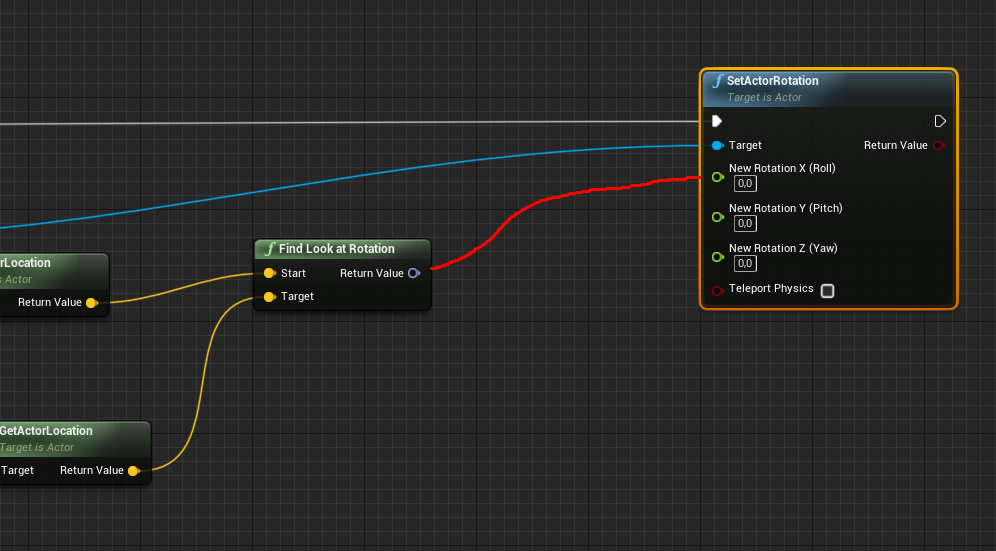
@drowsy turtle sphere volume -> on overlap component -> cast to player -> set timer by event -> find look at rotation -> set actor rotation
celest creek
@rotund scroll @drowsy turtle That'll just make the whole thing rotate tho... you're looking for a joint to rotate I'd imagine
Then you'd want that to only rotate if the angle is below e.g 45 degrees each way so it doesn't break its neck
celest creek
skeletal mesh?
drowsy turtle
nah
celest creek
Fantastic model btw
drowsy turtle
ik
celest creek
🙂
drowsy turtle
i totally didn't copy dani's turret model
celest creek
I can see your zbrush skills are top notch
celest creek
that's the one yup
drowsy turtle
don't you mean set target location?
rotund scroll
maybe
drowsy turtle
wait
drowsy turtle
ye i don't have a node such as set component rotation
half turtle
aaah... reading documentation can be so useful sometimes... nvm i found what was wrong
drowsy turtle
i've finally found out
how to do it
but
uh
i don't want him to rotate in Y offset
drowsy turtle
ok but i can't connect these .-. http://prntscr.com/rjnl8b
 fallen marten
@jolly shore my game is based off a similar game as your vid, streets of rage, and to do the punch and combo when you hit something, just make a struct that has am animation and whatever else data like spawn emitter, sound etc and array that variable to as many hits in your combo as you want. Then let the combo cycle through each array element when the first punch hits something
When you move or miss the first punch, have the combo counter reset back to the first array element
1 small line of code can produce a huge combo
jolly shore
When I first punch collosiona, I want the combo to step in.
so this is logic
can you share bluprint code
thanks
fallen marten
No I can't right now. I'm on my phone
jolly shore
do you have canal on youtube?
fallen marten
Canal?
jolly shore
channel
fallen marten
No I dont lol
Thought about it tho... Dunno how many subscribers I'd get really
Look, just make a struct
jolly shore
I subscribe to everyone who knows unreal 🙂
fallen marten
Add an animation, a bool for is it a special hit, an emitter and a sound to the struct variable list
Then add that struct to the character as a variable
Click the little thingy to make it an array
Then add as many elements as needed to make the combo
Your code would go, left click, punch (draw info from element 0 of the struct) did I hit? If yes then apply damage to enemy, cycle combo counter to draw Info from the next array element. If I miss, reset the combo counter to 0 so it goes back to drawing info from element 0 of your arrayed struct
Simple
I just summed up how to make a combo in one paragraph instead of 20mins in YouTube lol
 lime gull
When making a particle system, how would I create one that kinda explodes, and all the particles fall to the ground
 silk finch
hi, anyone can help me with a sequence's problem?
drowsy turtle
@silk finch What problem you have?
silk finch
i have a little sequence, but when the animation finish the animation turn to start again
 glass geode
If Unreal's CPU usage is changing but the ram usage isn't and it's frozen (not non-responsive) is it still working out stuff or should I end task?
silk finch
@drowsy turtle, I need my animation to stop at the last frame, but not to go back to the initial frame
 weak cypress
hmm would a higher res monitor help in game dev?
 hot grotto
how do u change the text color of a disabled button?
 kindred viper
@hot grotto not sure if you can tbh. Disabled tends to be just that. I mean, there is a core style set for default somewhere so you can modify that I guess. I would now like to know if there is a better solution to this tho
@hot grotto yep it will. But it won't define it. You can get by with a black and white tv and a kempston joystick tbh.
drowsy turtle
@hot grotto idk if you still have that problem but
in widget's blueprint create a new boolean var
name it however you want
bind the text's color
and you need to set the value as false when something that disables the button happens
 twin orchid
Hi! How can i duplicate object WITH it's animation ?
 fierce tulip
question too vague
twin orchid
I have an object that is animated in a sequencer
If i simply duplicate the object its animation doesnt duplicate.
fierce tulip
try #cinematics
lime gull
How can I trim a sound cue?
I just want it to loop one second earlier
Enveloper node doesnt seem to work
fierce tulip
basically you only disable the head-rendering for the fps camera.
no clue how, but thats generally how its done
 polar hawk
you need to render the head to simulate the eyes physics for TRUE FIRST PERSON
 dawn gull
hey, i have a .max file but i dont own 3ds max can somebody convert my max file into obj/fbx? dm me if you can. Thanks
twin orchid
try #cinematics
@fierce tulip Thanx, mate! IWe figured it out. Just copiend keys. But i'll look up for #cinematics 👍
kindred viper
@dawn gull there is a trial version you can use to do that
 cosmic veldt
hey guys how can i make sure that it only uses clockwise rotation on z when easing between two rotators?
 rough hound
How would i attach a particle effect to a mesh? I'm used to having something called attachments on my models which basically are designated points, and with code i could use those points to "root" a particle effect to it. How would i do something similar in UE4? Example: I have this mesh right now with the desired particle effects just placed in the editor where i want them. If the Mesh were to move in game the particle effects would stay obviously, what i want is for them to keep that position, bound to the meshs movement, if that makes any sense.
 digital anchor
 steel edge
Hey guys, anyone got any good vids or advice on reducing the texture streaming size and optimising textures?
 scarlet birch
Should I do anything beyond the encryption and signing found in project settings for a final distribution? I'm not talking Denuvo level stuff but asking if there's anything else anyone thinks I should reasonably do before releasing something on Steam or elsewhere.
 placid citrus
Security wise the settings in project settings are pretty good and will stop most people from breaching your files but if there is one thing I've learned about stuff like that is if someone really wants to rip something from your game or mod it they will find a way even if it takes them months to figure out how
If your doing multiplayer stuff you could always look into one of the anticheat programs out there
scarlet birch
I'm not really worried about cheating. It's not competitive. Just want to do my due diligence to protect people's work with the assets.
placid citrus
Ah well still like I said if someone really wants to rip something they will probably end up finding a way to, but the encryption and signing found in project settings will stop most people so you should be good with just that
Unless anyone else has any suggestions?
kindred viper
There is no real suggestions. If you want it, you can get it. I mean, its open source, you can even dig in the code and find the best way. Or visit one of the few unreal hacking forums and see what they say. But the general rule is, if it's in memory, its stealable
scarlet birch
That's about what I expected but thought I'd ask just in case.
 lament verge
Can i add a camera to my current view in the unreal editor?
 shy jetty
Can I change my default Unreal Projects folder from c / documents? I have my engine and everything else/vault installed on a bigger hard drive but even on clean install it defaults my unreal projects path to C documents, even after deleting the folder, it recreates on fresh install even though I selected the path to my other hard drive
My projects folder ?
Or will it just keep creating this folder
Yeah it just keeps creating the folder
 smoky sonnet
what are the benefits of 4.25?
shy jetty
No everything is installed on my other drive , but by default unreal engine makes a folder called unreal projects in C drive / documents. Even though I never chose this location
 grave nebula
4.25 is alike 4.24, but 4.25
shy jetty
It messes up my naming conventions in perforce by not having the project in that folder
 warm flicker
4.25 is basically bugfixed 4.24
 carmine garnet
so
i like
cant uncrouch
un crouch command just doesnt work
if i jump it uncrouches
thanks
 next badger
Wow. Who remember this game from UE4 jam?
https://store.steampowered.com/app/1137350/Filament/

The truth is out there. Somewhere.Board The Alabaster, one of The Filament Corporation’s flagship research vessels, and try to wrestle control back from a mysterious complication which left the ship locked down and the crew missing.With only the help of Juniper, the ships stri...
Release Date
April 23rd 2020
oh, they have it there
rough hound
What does this mean and why is it only outputting 0?
Not being in the scope means its not "Visible" right, but why is that?
 fleet cedar
Sometimes I love the documentation: https://docs.unrealengine.com/en-US/BlueprintAPI/EventDispatchers/OnAudioEnvelopeValue/index.html
kindred viper
@rough hound scope means the variable has been optimised away. eg. You have a function, within it you have local variables. When the function ends, the variables are cleaned up as they were local only.
 little warren
Hey, any one know how to update a FSlateBrush? I am setting it to an FSlateDynamicImageBrush but it only updates the first time, after that it doesn't update
 stray smelt
any idea how (or why) camera gets rotation from editor when i possess a pawn? e.g. if I rotate the camera within the editor before pressing play, the game inherits that rotation when pawn is possessed.
 raw glen
hello
I amm having trouble with adding guns into my game
how should i go about doing that
so ya
 grim ore
adding guns to your game would be very your game specific, we can't give you exact instructions
 thick herald
1st. Get guns. Probably start with that.
2nd Get game.
3rd Combine.
Helpful? No, probably not. But in these dark times - it might raise a chuckle and momentarily make someone's day a little brighter.
rough hound
How would i go about getting the AI Pawn to the Controller? I want to save the Spawn Location of the Pawn to the Blackboard.
Like using GetActorLocation, but how would i get the Pawn object.
Could i just use self even though that references the AIController and not the pawn?
rough hound
It works 😅
 peak vessel
Fellow unreal engineers.. Is there ANY way to totally remove the near plane clipping on all cameras in unreal?
Im assembling some meshes that are rather small, and its almost impossible because i cannot get close enough to see what im doing until the clipping starts...
 south ridge
@peak vessel you can bring near plane significantly closer to the camera
But it's conceptually impossible to eliminate it in full
peak vessel
How?
 summer dragon
hey quick question. how do i reset the camera view? i imported an fbx but i cant see it properly in the preview window
peak vessel
I found a setting in projects,, but it did not do anything!
south ridge
@peak vessel there is an option for it in rendering settings
peak vessel
@south ridge Cant find anything.. Just under Engine>General.. And that does jack shit im afraid
south ridge
What are you setting it to
peak vessel
i tried 0.. and 100 and everything inbetween, no change
south ridge
Try to set it to 3.0?
That's the value we use (we wanted to make it possible to rub up face against all surfaces 😄 )
peak vessel
No effect
south ridge
What are you expecting the effect to be?
Just doing a sanity check
Also, what is the typical scale of your elements?
 abstract relic
Thought you needed to restart the project when adjusting clip plan value
peak vessel
I want a damn ortho cam tbh
south ridge
Like, are you working with stuff sized to centimeters
peak vessel
Yea
south ridge
@abstract relic you do
peak vessel
Below 10 cm's
south ridge
@peak vessel use different units maybe? Instead of assuming 1 unit = 1 cm, assume 1 unit = 1 mm?
peak vessel
Trying a restart 🙂
south ridge
If your objects are such a low scale (below 10 cm), you should probably work in different units, UE4 is tailored to displaying human-sized stuff
south ridge
But that's a suggestion, it's not neccessarily gonna make it better
@peak vessel good! Now about the value itself
peak vessel
Strange it did not tell me..
south ridge
You shouldn't set it too low
peak vessel
I used 1.. Thats perfect..
south ridge
3.0 was the value we figured as optimal for us, you might wanna go down to like 1.0 - 2.0
If your objects are really ~10 cm, then 1 should be perfectly fine
peak vessel
Im not doing anything other than pre assembling some stuff
I dont touch game engines with a stick unless forced 🙂
south ridge
Yeah, that's fair. Just try to keep value as high as possible, as long as it gives you the results you want 😄
peak vessel
I need to put stuff in place,, and migrate out
 midnight bolt
i think i have found a deep UE4 issue. its driving me nuts.
create new blueprint, place for example 2 actors, static mesh twich different location and diferent names like cube1 cube2, copy it to clipboard, delete it, paste it, and it changes everything, name, location, WHY?
peak vessel
@south ridge But again, thanks for sparing me some headache mate... All the best! 🍻
 manic pawn
@south ridge what happens if you set it too low?
south ridge
@manic pawn degrading depth buffer precision, you end up with too many bits covering the area immediately in front of your near plane
You want most of your objects to sit in the higher precision area that's close to your near plane
manic pawn
hm
south ridge
You want to set near plane in such a way that most of your rendered objects in foreground will be sitting in the higher precision area of z buffer
Set it too low and you might push that dense area to distances which aren't commonly seen in your game
manic pawn
interesting
I've just been setting it as low as necessary to make the camera not go through walls when you use third person and put it right beside a wall
is this why the default third person had a HUGE probe size for the spring arm?
south ridge
Assuming the world around your character is scaled to your character, that should not give you any bad effects, just set it to the highest value where you get no artifacts and you're satisfied
@manic pawn I dunno, I've not looked at the default third person 😄
There are a few mappings of depth vs distance vs bits in depth buffer btw. That one illustrated isn't the single one
manic pawn
the default setting gives your camera a sphere that is like 2 times the size of the mannequin head
south ridge
But they all share the property of giving more density to things near the near plane
Etc
Or like this! I think this is more true to what happens in UE4, someone probably knows for sure
 mossy bay
Does anyone know why these objects here are pitch black even though I have a light shining on it? (Lighting was already built)
https://i.gyazo.com/b82903d4739002db995cc26cc8e69b2d.png
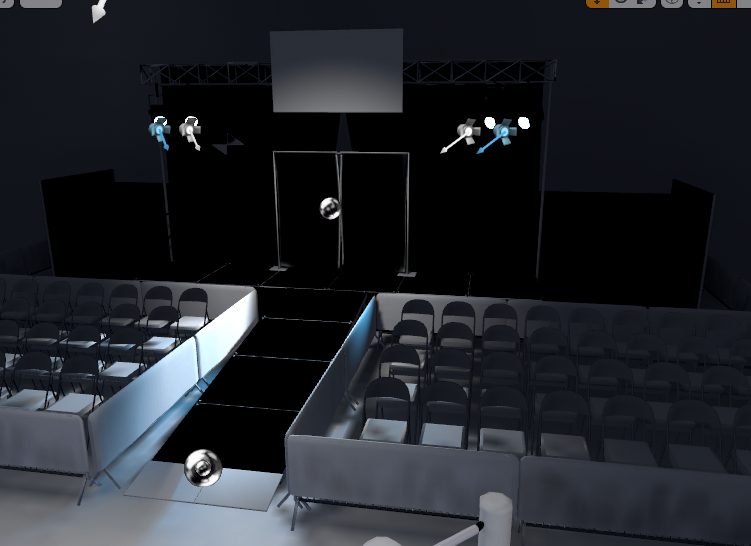
 midnight root
any chance if you rotate them they aren't in right spot causing this
depends what kind of light also it is
mossy bay
They're all currently static.
Reason for that is because I'm making a Pavlov map, and the lights can only be static.
Probably.
How can I fix it?
I'm a bit new to Unreal Engine, haha. Is that in the mesh settings?
midnight root
that TOO\well both :))
mossy bay
midnight root
at the same time
mossy bay
This'll probably help.
fierce tulip
@mossy bay google some ue4 lightmap tutorials. your meshes need properly mapped uv shells in am additional uv-channel to bake the lighting onto
midnight root
ya im stuck w/o raytracing as current rig explodes if I do so I get perf.
soon to fix I hope
midnight bolt
sorry for repost, but i think this is kinda big. where could i report this for sort of official bug report?
mossy bay
Is this one good?
https://www.youtube.com/watch?v=joKnmShAdJE
Learn the process of creating a second UV channel for static light builds in Unreal Engine 4. This tutorial covers the process of unwrapping a UV set in 3DS Max for use in Unreal Engine. This tutorial is aimed at Beginner/Intermediate engine users.
midnight root
My main issues are terrain whitewashing , but then ive been busy so need to check for that tutorial,,in additoin to 4.25 fixing some of that ??
fierce tulip
@midnight bolt repeated posts are frowned upon, and the "pin" in this channel should contain a link to properly bug report.
james B knows his stuff @mossy bay
mossy bay
Sweet, I'll give it a watch.
fierce tulip
hmm, where is that pinned message
midnight bolt
yeah i cant find it
abstract relic
New one, go
fierce tulip
Thanks for reporting a bug with the Unreal Engine 4. Here you will find information on how to submit a report and what you can expect afterwards.
rough hound
I've confused myself big time.
fierce tulip
fierce tulip
https://www.unrealengine.com/en-US/support/report-a-bug
https://epicsupport.for...
fierce tulip
any 3d tool has this functionality
mossy bay
Ok sweet.
fierce tulip
@plush yew you can, but there are various outliers where it wont work.
you cant have any mirrored of self-overlapping shells, and weird borky stretched shells will make it look ugly.
mossy bay
You know what, I think I know what might be causing the issue.
The affected meshes have "solidify" modifiers on Blender, so it doesn't have a proper UV map.
fierce tulip
if you prepare uv0 properly, uv1 is often rather easy
fierce tulip
zip the files > 1 file :p
raw glen
does anyone have any fbx files for guns I dont have any to add to my game
fierce tulip
you can find plenty on the ue4 marketplace
midnight bolt
Zip is workaround, the person reviewing will have to download and unzip... Kinda embarassing for ue i think ;l
 fair storm
is possible in unreal to make a migrate host system to avoid have a dedicated server?
 grave radish
https://i.imgur.com/SOIwlvI.png How do I get to this screen, when editing a UI Widget?
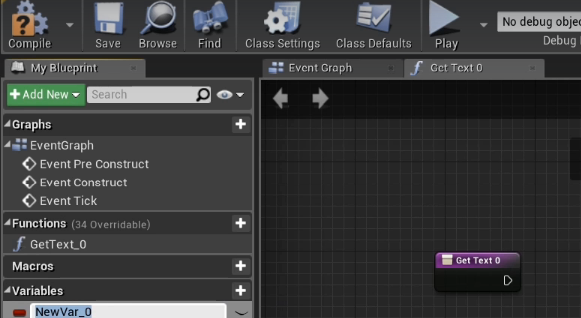
https://i.imgur.com/e6B9uFP.png Mine looks like this
 grim ore
yay looks like chaos will be enabled in the editor by default in .26. whoo 🙂
@grave radish that says its the my blueprint window, go to windows and open the my blueprint window
grave radish
That worked. Thank you @grim ore
 opaque vector
So with the introduction of ReplicationGraph, has anyone benchmarked the limit of a single server instance in the terms of max players?
 worldly axle
Can i use the landscape painting option not only on the landscapes but also on the 3d objects i import ? Or i need to use vertex painting?
 knotty vessel
can someone dm me a good swimmable water tutorial preferably a video? i cant find any that my dumb self can understand lmao
knotty vessel
oh ok ty :)
plush yew
any word on when epic will post the presentation they would have given at GDC?
grim ore
nope 😦
plush yew
dang, well hopefully it's still coming
 blissful trail
https://gyazo.com/9453db787cb947b8187290ffedc5b36c any way to fix this its a bit annoying

when i press the + it collapses everything
 frail sail
Guys that new Directx 12 Ultimate api when will implement to UE4? 2-3 year later (like DX12 stable ver. comes), or less?
or it will support any version automatically with DX12?
 white valley
mega dumb question
when I play in editor, the Details tab of the selected actor is gone.. Is there any checkboxes in preferences that Im missing?
everytime I press stop I have to find the actor in world outliner to make another edit?
pressing play de-selects the actor
next badger
@frail sail at least when it will be supported by windows
white valley
is that the default behavior?
frail sail
yeah i mean when it come to support by windows 10, then no need to upgrade engine for activate DX12U right?
because same api
just optimized and some additions
next badger
@white valley there's a lock on the top right
white valley
@white valley there's a lock on the top right
@next badger yeah but is there any preference that I can make it default without locking?
btw in any tutorial I follow, the actors details tab stays there unlocked and play wont affect the selection
extremely annoying :))
next badger
@white valley hm...try poke Epic on forums, or answerhub
cause object stays selected...its just details are not refreshed
white valley
thanks I ll install older version to check if its the same there as well @next badger
blissful trail
it crashed when it was converting to c++ project no idea how to fix this
 worldly dust
Epics perforce documentation is dated, they claim you cannot check an .ini file in through the editor and have to do it manually, but this is not the case anymore, I've tested it through a server, you can now check in .ini files and commit them to perforce, through the editor, where can we report things like this to epic?
this is now incorrect as of 4.25
 harsh tiger
https://gyazo.com/f3412111e46b8ad1950333effc1f33bf any idea why my variable is being reset when i compile? i created it in c++ as a UProperty (EditDefaultsOnly)

Unreal Engine Forums
I'm on 4.20.3.
I have a property exposed in C++ as follows:
UPROPERTY(EditDefaultsOnly)
TSubclassOf<AProjectile> ProjectileBlueprint;
This C++ class
 astral spindle
how to be able to post a request in the job part ?
mossy bay
What's the best way to import meshes from Blender to UE4 while it looks correct (textures and materials are correct).
 spark sonnet
DM the @plush yew with either LFW (Looking for work) or LFT (looking for talent) @astral spindle
 calm widget
@mossy bay Unit meters, scale 0.01 . I guess you could use CM unit scale now
half turtle
if i have a scenecapture2d component, how can i make it exclude some things from its capture? like... do not capture and render the background...
 barren pier
Been trying to build from the latest github release branch and "generate project files.bat" is throwing "Visual Studio 2019 (14.22.27905) must be installed in order to build this target"
But I've already installed and uninstalled VS 2019, installed the 14.22 MSVC Toolkit alongside it, tried using 2017, etc...
Is this a thing with the latest release? or am I missing something?
Clean installed VS 17/19 and also removed all engine versions and retried
blissful trail
unreal 4 keeps randomly crashing ive been doing litterally nothing its done this 5 times in about 1h
barren pier
Thinking about switching to unity but I've already bought marketplace content fml lmao
worldly dust
get ready to pay unity tenfold what you paid for on the marketplace lol, just to get simple functionality that unreal already has built in for free
barren pier
^And that
worldly dust
c# is very empowering, unity is not
worldly dust
no C# in unity is the only plus for me over unreal
great to use, but you are going to have to be writing plugins that epic gives for free
barren pier
Not a programmer myself but I code a little
C# is def easier
If only unreal wasn't so damn picky
files are a lot easier to manage in unity
worldly dust
yeah it can be extremely difficult to fight with unreal at times, and I definitely agree with you on that, simple file moves can hang the editor pretty bad
barren pier
Do you usually compile ue4 from source or do you use the epic launcher?
Is it a thing to compile an engine from its files from the launcher?
worldly dust
oh yeah its definitely a thing, I personally use the launcher, people have specific reasons for compiling from source, like you need a source build to use the chaos destruction system for example (may have changed in the latest version though)
barren pier
I havent really touched chaos but last I saw you could enable the plugins in the epic version
I think I'll just try using vs19 with the epic version for now
 wide prawn
Is anyone having issues with epic launcher all of a sudden freezing after about 20 seconds every single time it starts? i've reinstalled the launcher, and it doesn't make a difference. i haven't updated anything. I just woke up and it started freezing.
fierce tulip
it can be really slow, not sure i would call it freezing, but slow.. yes
wide prawn
it's completely locking up and i'm getting the spinning wheel. this is so frustrating. i can't add any bought assets or anything. been doing this for a couple days now.
fierce tulip
you could post on the forums
i think we also had a link for specific things like this
oh no, thats more marketplace related (https://marketplacehelp.epicgames.com/s/markeplace-case-form)
but you might find the right stuff there to submit a case
wide prawn
thank you
mossy bay
Lookin' better now.
 round sorrel
Hello does anybody know where I should post marketing questions?
fierce tulip
depends on what the topic is about? marketplace? game?
round sorrel
its about my marketing my game
 normal burrow
its been discussed
having a channel for such thing, but i think it was decided against
but you could ask in #server-feedback
could try other servers too, game dev league has marketing channels but not great unreal resource
round sorrel
hmm i see, is there any resource that you'd suggest for such a thing?
mossy bay
I managed to significantly reduce the errors I got while building the light. 👌🏼 @fierce tulip
round sorrel
ok thank you
 hoary locust
is there a max amount of grass outputs allowed? my two last outputs don't output any grass
 gilded plinth
Anyone happen to know how I can properly UV a cube for Unreal so that I can place a material on each side for a cube map? In Maya I reversed the normals and assigned a material to each face, but ue4 isn't doing what I want with it : /
Don't think UE4 has any kind of build in asset for cube maps with separate images per face?
next badger
assign separate materials per face in maya
 oblique tangle
Anyone able to help me out with recreating the [PROTOTYPE] or Hulk Ultimate Destruction movement system where when the player is sprinting, their rotation is altered - sort of like a car? Kinda hard to explain so I'll put in some vids

The Incredible Hulk: Ultimate Destruction - PS2 Gameplay Playthrough 1080p (PCSX2) PART 1
Subscribe for more videos: https://goo.gl/rysf1n
JohnGodgamesHD Channel subscribe: https://goo.gl/W9f1n4
Visit us at http://www.godgames-world.com for more
The Incredible Hulk: Ultimate...
@ 20:20
fallen marten
lol why is the ammo an array? make the bullet count an integer and then just subtract from it and set that result as the new value
you are 'getting' the id, and that out put is what? the amount?
manic pawn
use get(a ref) node after your get ammo array node and then a -- node
blissful trail
i figured it out :/
fallen marten
nice
manic pawn
much more complex than it needs to be
fallen marten
just a littl
blissful trail
thing is im gonna have a heap of weapons so it may make it easier in the future
to use an array
 lament yarrow
Two questions about remote compilation for iOS on Windows:
- Is it broken currently? Upon packaging it says that server name is empty, but it's not
- Is Os X Server a paid utility? Is there any way around that?
 cyan robin
hi, total noob over here
what's the best way to collaborate on a project if someone is doing the level design and i'm doing the rest
how can i import their levels?
grim ore
Normal source control would be fine such as perforce, git, etc.
cyan robin
alright, thanks
scarlet birch
Anyone know if there's a bug that prevents retargeting multiple animations at once in 4.24.3?
Nevermind. It's a problem with retargeting an additive animation.
normal burrow
Start with blueprints
normal burrow
Yes
patent fjord
Ok thank you very much
normal burrow
Yep
patent fjord
Btw, do you think that method would be faster?
normal burrow
Yea
patent fjord
Alright thanks for the help sir
blissful trail
hm anyone having an issue where unreal 4.25 randomly crashes for no reason
normal burrow
Memory?
blissful trail
me ?
normal burrow
Yea what is your memory
 icy narwhal
Anyone tried the 4.25 previews yet?
 tight needle
me
blissful trail
same
tight needle
when i package my game in unreal engine 4.25 it crashes (unknown error)
icy narwhal
XD
blissful trail
lol is this messy ??
 kindred rain
what is the maximum distance before a perceptible defect of floating point error in ue4?
 grim juniper
I imagine it varies depending on your project
idle compass
what is the difference between using a vertex painting and using the layer system in the landscape ?isn't it basically the same ?
weak cypress
@blissful trail no not at all /s
 fierce forge
how i can resolve this ?
rough hound
What does this mean and why am i getting it when i'm importing literally the same skeleton. I'm just trying to import all of my animations but UE4 is making this a fucking pain in the ass.
Do i need these?
icy narwhal
Yeah if you retarget them wouldn't recommend though, animations made specifically for first person are better D_D
 tender flume
fallen marten
tender flume
fallen marten
@fierce forge maybe try it without the static mesh in its hand
@rough hound just check to make sure the hierarchy is actually the same. And no you don't need those. When you import an animation you can choose whether to import the skel as well as the anim, so just untick the skelmesh box
rough hound
I'm assuming "walkframes" aren't a thing in UE4
What do i do with root movement in UE4?
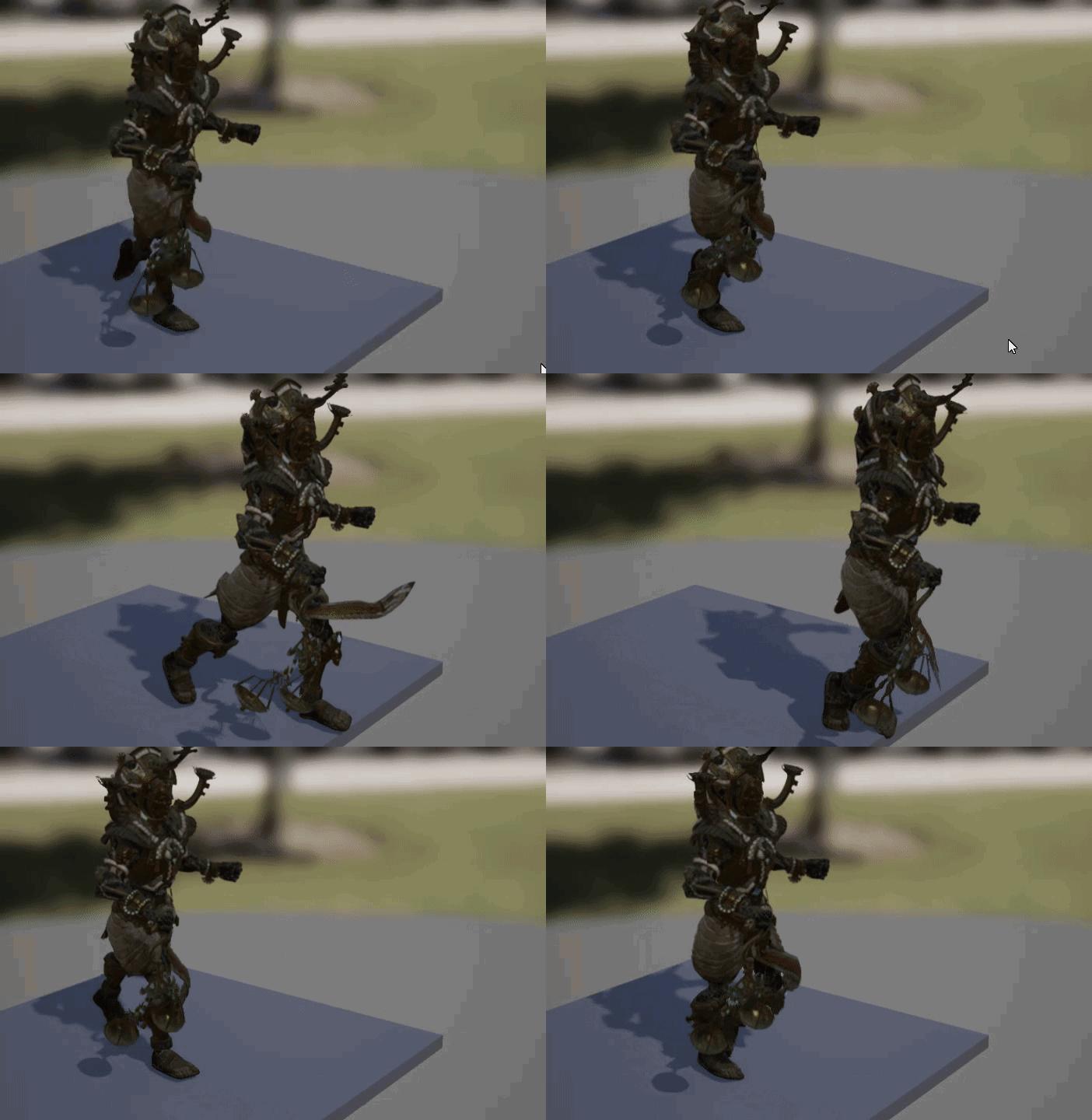
He'll just keep snapping back after the anim finishes
I want to disable it.
Think i found it
Nah that didn't work
Oh
fucking blender
 snow merlin
Is my question even relevant to this channel? I'm new here. <@&213101288538374145>
 weary basalt
Please read the #old-rules and #more-resources channels.
The channel descriptions give you a good indicator as to their purpose as well as what questions are appropriate
 wanton wadi
Hiya! 🙂 I'm working on a simple "rain" particle system, and to keep it performant (and good looking) I'm using "Distance Field Collisions". Now this works great with meshes, but I also have quite a bit of geometry in my level (big cubes / walls etc.). Now it looks like there's no signed distance fields generated for geometry - I've tried enabling "cast shadows" and this "ungreys" the "Affect Field Distance Lighting", but after building the level they still don't show up in the visualisation, and my rain doesn't collide. What would be a good solution?
@fierce forge try to make sure those colliders don't collide with themselves
fierce forge
how i can change collision presets with bp ?
fierce forge
that's not working
normal burrow
Breakpoint hits?
fierce forge
why when the character is in ragdoll this is make it to unattach ?
patent fjord
So if im correct, h files are for putting vars and funcd
Then in .cpp you define the func?
worldly axle
Hello, i've created a landscape with the landscape tool but sometimes when i zoom out the landscape goes all white, like if there was a huge fog. What causes that ?
austere scroll
im having this problem where if i import ANY fbx model (i didnt try any other file formats yet) it comes with a white material , a blank material even if it had one in the moddeling porgram like -blender-
and this is how it looked in blender
its a huge problem bcz how would i transfer this into unreal material blueprint
@plush yewahhh
ok
quick question : usually in textures , what does DISP mean ? NRM is for normal
 pure salmon
Guys, anyone experienced troubles with building default presets on clean UE installation such as on pic?
plush yew
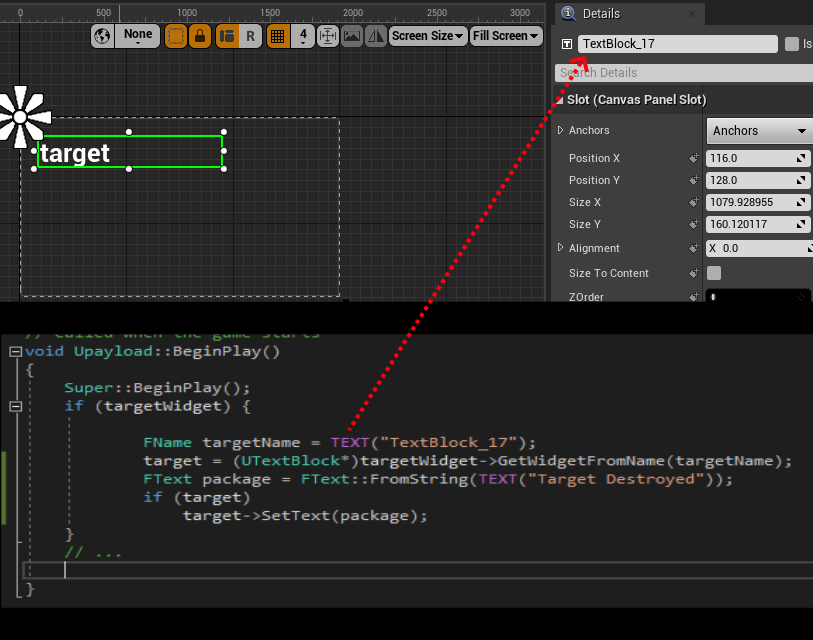
hi, i am using C++ specifically for my project; and I am trying to access a UTextBlock in my UserWidget UI...but this code is not working... is it impossible to access UserWidgets components? https://i.ibb.co/qMFXjmG/unreal1.png

 fallen wing
just a quick question, how do i change what i control in the view point?
like
i'm controlling thirdperson bp
but i want to control another bp
plush yew
@fallen wing create a new GameMode class
and then go to Project Settings under Map&Modes change Default Spawn Class
fallen wing
ty 😄
plush yew
also change the default controller
fallen wing
how do i do that?
plush yew
create another class called PlayerController
fallen wing
ok thank you 🙂
plush yew
then change your defualt player controller in Map&Modes
 still schooner
:(
plush yew
oof
it's so freakin hard to access UI elements with C++
:/
hiii, noob here, i dont want to make games, at least for now, but i'm very amazed from unreal engine and i want to create maps and enviroments, i starting to learn basic stuff, and look very friendly, i want to ask, what are the most useful add ons, assets for architeture, enviroments etc etc? fir create maps in general, thanks
 timid snow
btw whenever i ask for help i never get it on here. 😦
scarlet birch
Anyone have a good link for making a character decalerate over time. I was looking at some of the friction settings (that may be newer) under character movement but they don't seem to be working on their own. I've got some ideas but looking for any input anyone might have. I'm looking to create an effect similar to how Mario moves with acceleration and deceleration. I'm not entirely opposed to moving to a physics pawn rather than character movement.
 flat axle
Does anyone know how to solve PackagingError for not having visual studio c++ installed? - Do I have the wrong ones installed?
plush yew
@flat axle you must have visual studio 2015 or 2017 or 2019 installed
flat axle
so none of the c++ i have there are the right ones
scarlet birch
do a web search for intalling UE with C++ and install the things that have check boxes next to them in the VS installer/updater
 worn granite
Specifically the toolchain
The redistributables are for running the executable, not for building it
scarlet birch
the doc on the UE site has screenshots of what you need to do
worn granite
everybody running your game needs the right set of redistributables, or they won't be able to. That's why you need them, you're running the editor, which is a binary that needs them.
timid snow
i never get help when i need it on this discord. 😦
fierce tulip
complaining about it wont help, and you only asked three questions in your time on this discord, one got properly answered, one was too vague, and this one is really specific and blender related so the odds of someone knowing exactly whats going on between your blender and ue4 workflow and mistakes without any very detailed information is very slim.
so instead of complaining multiple times that nobody is helping you, try to help yourself and be much more thorough and detailed in what's going on.
timid snow
ok but what to do to be more detailed? thats all i can think to put
fierce tulip
if you cant explain it, you cant expect others to explain the problem either
so i'd try some more tutorials related to what you made, see what works and what not and learn from it. once you know more, you can explain better :)
plush yew
im having issues too gonna have to constantly just play with it and try everything
timid snow
i just put an image
fierce tulip
and now you wait, and/or post on ue4/blender forums, hoping someone is able to help you.
flat axle
@plush yew Thanks for the info, I had the wrong one, I'm pretty sure its working now. I'm pretty sure this is what you need if anyone else is having the same problem.
white valley
how can I set a default editor FPS so that its the same in every new project?
plush yew
There's tutorials for that 😄
white valley
console commands to engine.ini ?
simple google search gives me 7 years old youtube videos
plush yew
Oh
white valley
🙂
plush yew
IDK
 wintry apex
hey guys, do we know anything about 2020 State of Unreal? It was supposed to be on GDC, and as we all know it was cancelled. I was looking for it everywhere but with no luck so far.
There is no date for more information about future of Unreal and Epic Games Services - am I right?
scarlet birch
The braking wasn't working for me because I forgot about "braking deceleration" It's set to a high value by default.
lament yarrow
Has anyone had any issues with UE_LOG like a part of a string missing?
I haven't found any mention that UE_LOG must be called from the game thread, so it shouldn't be threading problem from the looks of it
manic pawn
lament yarrow
@manic pawn thanks! have you managed to solve it? Did you resort to using FPlatformMisc::LowLevelOutputDebugStringf()?
manic pawn
yes that worked
smoky sonnet
anyone know why i can change the volume of my audio to 0 but cant change it to 1 again?
i can mute it but cant unmute it
even with volume multiplier
 hoary geyser
Does any 1 have any news about the online services stuff EPIC was suposed to announce at GDC?
 stone light
hi can i get some simple help by anyone? nothing complicated its just i cannot for some reason import bridge assets into my project very few of them work and i dont know why. the error i keep recieving is this
a call would be amazing for me to quickly understand
 please anyone? it would be super helpful ?
@upper heart can you help me ?
abstract relic
Hint. It is frowned upon to cold ping. The moderator especially aren’t your nannies.
stone light
i wouldve assumed they understand the most or at least the ones who can give a shi7
 upper heart
yeah please don't cold pm people with technical questions like this
abstract relic
For on demand help #looking-for-talent
upper heart
You asked in the correct place, just wait for someone to respond instead of pinging people randomly
stone light
i assumed you know a little thing about his software especially since your the moderator
abstract relic
That’s not an excuse to be disrespectful. No one is obligated to do anything for anyone. People volunteer to participate in the community
stone light
disrespectful for asking for help? why is this generation so damn soft. is showing interest against rules now?
upper heart
There are 34k users in this server. Imagine if they all pinged me when they had a technical question.
wintry apex
first rule:
"Be patient when asking for help. This isn't an official support channel or a paid service. This server is run by the community, for the community. Repeatedly begging for support or sending unsolicited DMs asking for help is considered harassment and may result in an infraction or a permanent ban, depending on severity."
upper heart
Where are the fbx files coming from that you are trying to import?
stone light
bridge
abstract relic
lol Ethan
abstract relic
Delete /intermediate
stone light
what do i delete?
abstract relic
The folder
stone light
which folder?
stone light
still saying the same
it doesnt want to import the files inside the assets
i have tried everything but nothing wants to work
also tried renaming everythimg the m_gravel folder to check maybe that was beeing read more than once in other assets
but i dont think it was
still the same thing
abstract relic
Go to filter > show redirector
smoky sonnet
anyone got the same bug as me because my "GIF" as a background in my widget is working fine on my pc but on my phone its shaking?
stone light
doesnt seem like its doing anything when i fix directory on all files
dawn gull
@kindred viper my pc wont even work with max i have tried it
 thorn vector
hey guys i wanna ask does HUD replicate on the server or its only exist on the client
 lone yoke
@stone light Filter -> Other filters -> show redirectors
stone light
what does that do?
lone yoke
in the worst case try manually deleting the folders and also the project/intermediate folder
stone light
i already tried
lone yoke
it shows redirectors that have not been cleaned up
lone yoke
importing other assets from bridge works ?
abstract relic
If you don’t see redirectors, then you’re fine
You don’t want redirectors to exist
stone light
my proble mis i dotn understand the error that it give s me when my importation of the assets are c oming into ue4
which is this
but similar content? how
after it is half way importing into ue4 that pops up
abstract relic
We think it’s a conflict of files. Which is why we suggested to delete /intermediate and fix up redirectors
lone yoke
could this be a problem with the asset itself ?
stone light
i dont think so
abstract relic
Can you try on a fresh project
stone light
because bridge seems legit
lone yoke
as someone suggested earlier, manually importing could also be worth a try.
stone light
so i export to desktop than drag to content folder?
do these mean they are all redirectors?
its turned on like that right?
fierce tulip
there is a show redirectors and a "redirectors" version of the filter
the first shows redirectors along other content, the latter shows only them, and in any subfolder.
stone light
its just turning grey and black
plush yew
Hello. Absolute beginner UE4 user here. I am a QA tester for Running With Scissors on Postal 4 and would like to know more about the engine.
Mostly to help the devs sniff out what's wrong and maybe to make my own shit sometime in the future.
abstract relic
Pinned message has a care package 😉 if you have a specific question, go for it
plush yew
Sounds perfect. Thanks
I'm also taking some classes for C++, so at least I can apply them in UE4 rather than unity
I also don't like unity because the stock graphics give me PTSD of a ton of shitty games I've played
stone light
@plush yew still not able to import even on other projects wtf
lone yoke
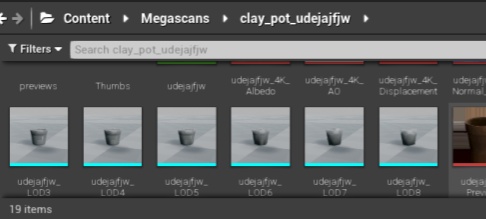
go to Documents\Megascans Library\Downloaded and try to manually import the files
stone light
i tried everything
trees roads walls
objects like plant bowl thing
oil cnas
cans
nothing worked for me
ye il try just that
abstract relic
Run a verify on the engine just incase. In the launcher’s library
lone yoke
and maybe uninstall/reinstall bridge .
lone yoke
you dont need the json. just try importing the FBX and image files.
stone light
i draged this whol file in
is that bad?
which one do i supposadly put in next time?
mesh is giving me this
i press import all and pops back up
i think its because of this i have errors
it automaticcaly asks to overide
other existing textures
@plush yew
but the pot is showing as a texture not an asset mesh
@plush yew
i imported the whole downloded file
@plush yew
 hollow niche
im willing to pay someone to make me a game
fierce tulip
fierce tulip
that is explained in #more-resources
stone light
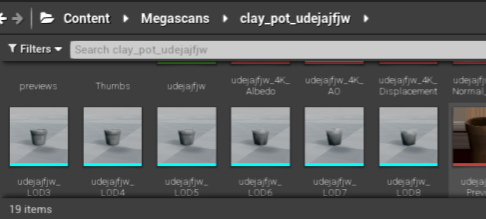
@plush yew i did but the pot isnt in 3d its a texture
and i installed the 3d model
and its only showing in textures
 stone light
which one is it suppost to be
fierce tulip
I think it would be wise to get trough some getting started documentation and tutorials first.
fierce tulip
because it doesnt have the material applied, which is something you'd learn trough getting started documentation
stone light
i know were the material is
its just not going on top of it when i apply it
the one in the circle
its been applied but isnt showing
worldly axle
Hello, why i cant use more than 3 materials for painting my landscape without its textures getting away?
 bronze cedar
hello everyone 😄
 forest tree
Is it possible to add a physics volume to an actor? I have a "water surface" actor and I'd like to parent the volume to it so there's actual water wherever I place my surface
I looked around for this but never found a way as it isn't a normal component you can add apparently
The alternative is adding a separate volume each time you add the actor to the level
wide prawn
Noob lighting question. All my maps will load, but then the cached lighting kicks in about 5 seconds after loading. I'm assuming this is normal and just requires a proper loading screen first? or is there a way to instantly load the light cache as well? Thanks!
mossy bay
Alright, it looks like some objects are still pitch black.
You can see the chairs on the right look normal but the ones on the left are pitch black.
Either that, or something else is wrong.
I fixed a majority of them
I just did this to the chair, will this do?
Since there's no actual image texture on it, I decided to just do it on the default UV map.
For the basic materials, yeah.
Since they'll pretty much look the same regardless.
For the materials with images, I would make a separate UV map for those.
plush yew
hey anyone here skilled with C++? how do you reference stuff in Content or C++ folder in your code
?
I played around FindObject and ConstructHelpers but they look like Runtime operators
fair storm
theres any tutorial for loot crates?
worn granite
hey anyone here skilled with C++? how do you reference stuff in Content or C++ folder in your code
@plush yew Subclass the native base or place it into the world to edit instances. You can make a settings object as well. There's also ini
Basically make a UPROPERTY
fair storm
NEED HELP:
I need help with making UI's like fortnite I can design them but I just can make them work.
@plush yew im doing something like it
Same
@plush yew i chat you in pvt
 swift spindle
lol... the plugins browser is a plugin also!!!!!
normal burrow
Lol
swift spindle
@plush yew your going to need to edit your uproject file in a txt editor to regain that
defaults are normally there for a good reason 🙂
find your YOUR_PROJECT_NAME.uproject open with Notepad or equiv
under plugins.. look for the plugins browser.. and change the text where it says "false" to "true"
and in future.. read the descriptions... it's never a good idea to disable stuff your unsure about unless you know how to revert that
plush yew
Something I've never really looked into before - UE4 can be used to develop webapps, right?
plush yew
Ah sorry, didn't realise there was a specific channel
mossy bay
Darn, I completely re-did the lighting maps and now all the chairs are pitch black.
@plush yew
plush yew
@mossy bay are they set to use the correct map? Had a similar issue a while back, turns out I'd just set them all to use the wrong UV map
mossy bay
Oh, well how do I set it to use the right one?
mossy bay
I think I forgot to uncheck "Generate Lightmap UVs" when I was importing the model, lol.
mossy bay
I did.
mossy bay
I just forgot to uncheck "Generate Lightmap UVs" in UE4.
Oh yeah, is there a way to make materials appear correctly when importing FBX?
Cause everytime I do it, I have to always fix the materials and reapply it correctly.
Oof.
rip
fierce tulip
dont import textures along with fbx, dont generate new materials. make a proper material, use proper textures into it.
apply properly to mesh
:p
plush yew
not sure if this'll work but
I think you should just be able to re-import the file, replacing the current one in your project
but this time don't generate the materials/lightmaps
someone correct me if I'm wrong, but
in theory that should just replace all the current instances of the object with the working version, right?
fierce tulip
.24 has an issue where you cannot disable/enable "lightmap generation" on re-import (at least I got the issue), so might need to do it in the mesh-viewer and apply changes.
mossy bay
fierce tulip
that is correct @plush yew
mossy bay
I copied the lighting from the previous map so I didn't have to re-setup the lights.
fierce tulip
please tell me each group of chairs is one mesh, or instanced :p
mossy bay
Everything came from Blender.
(This model wasn't originally made to be used in UE4, I made it months ago)
mossy bay
I did that before and it gave me issues with the chairs.
plush yew
I think importing with the lightmap gen on was the problem to begin with 😅
mossy bay
Yeah, lol.
plush yew
Hmm depends if that's all a single mesh or not
mossy bay
All those chairs you see in the last photo is all in one mesh.
plush yew
Ah. Yeah that could be it then
For texturing, that UV map should work, but
if all the chairs in the mesh are using that same map (which I think they are?), that'd be why they're all showing up as black
plush yew
basically, each individual chair is trying to use the same area of that map for lighting just one chair
and with all the overlap it.. doesn't really know what to do with it
mossy bay
Boy, light baking is a lot more difficult than I thought, lol.
plush yew
so they'll just render as black
haha yeah 😅
and yeah baking your lighting is weird at first but
worth it when it works
yeah, I'd say try it as a single chair using that map
and just instance them
it confused the hell out of me at first too
I come from a VFX background, so
I'm using to just ray-tracing everything and not worrying about lightmaps or anything
took me a while to work out where I was going wrong
mossy bay
Is there an easy way to array the chairs, similar to the array modifier in Blender, or am I gonna have to go manual there too?
plush yew
hmm, copy/paste with grid snap turned on I guess? 😅
should be able to duplicate multiple chairs/rows at once I think?
I mean, I'm by no means an expert. Someone might know a far more efficient way
 tacit onyx
Is there anywhere else that could affect the PIE framerate cap other than VSync, SetFrameRateLimit, in GameUserSettings, or using T.MaxFPS in the console? I'm having an odd time because when I launch the PIE, most of the time the FPS locks at 40, and sometimes at 30. I feel like it's capping the framerate somewhere, but neither setting the game user settings or using the t.maxfps seems to affect it above exactly 40 or 30 depending on the launch. It's very odd.
 silver crown
Profile it
maybe something dumb like rendering the list of actors in the world outliner is taking all the frame time
(already happened to me)
plush yew
Yeah, you should be able to get a breakdown of exactly what's going on during your rendering process
plush yew
How to optimize the GPU demands of your game.
 supple totem
Is it possible to attach an actor to another, but not have them move in unison when dragged in editor?
silver crown
Why attaching then 
 opaque plover
I want to have a global list of spells, should this be part of the GameMode or the GameState? The list does not change during gameplay.
normal burrow
Anytime phy
lament yarrow
Has anyone encountered a thing with packaged game when OnPostWorldInitialization is called twice?
fair storm
theres anyone who knows networking stuff?
fair storm
should I level design in unreal or use 3rd party 3d software?
@ashen frost both 2
plush yew
Am trying as i hit the tree it do some kind of shake
Any thoughts how i can do that?
Maybe using rotation?
So the trick in the material it self?
@plush yew

Is there a way to change the pivot point?
mossy bay
@plush yew
swift spindle
right click.. > Pivot > set pivot point
scarlet birch
Anyone know a way to keep movement input from causing an instant change in direction. I'd like the current acceleration to change over time. I've got it working fine for when movement input stops but a change in direction is still near instant.
I'm trying to do this with character movement
mossy bay
Not sure, I'm just placing all the chairs at the moment.
Is there a way to make the rotation thingy go in the middle of all the selected files?
 craggy flax
scarlet birch
craggy flax
scarlet birch
You could try grouping them and/or changing the rotation from world/local using the little globe icon next to the transform icons at the top right.
patent fjord
when it says AClassName::FuncName, is that basically just calling the function from that class?
or defining it?
 uneven lichen
my job posting is cancelled.
mossy bay
I think I see seams on this light bake, lol.
And for some reason now my ring canvas is a dark green.
mossy bay
Alright it's because the lightmaps for those were bad, lol.
Okay nevermind, even with a generated lightmap, it's still green for some reason.
scarlet birch
I achieved the result I wanted by replacing movement input with add force and changing a few things to work with it.
cyan robin
hi, i'm spawning a projectile
how would i enable and get the collision component to damage the player?
for the event hit documentation:
Event Hit
which one will pass the collision info to get the object hit?
fierce tulip
@plush yew which one do you mean
ahh you are asking for pirated content

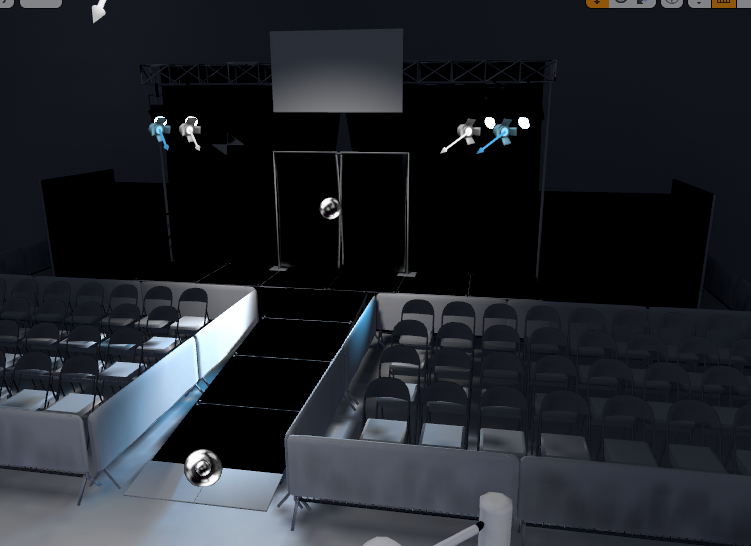


byeeee
sucker
@plush yew next time someone asks for a "free" thing, first find out if they are asking for harr harrr stuff.
so we can give them the boot
true hehe
 ashen frost
@fair storm how do i use both unreal engine and a 3d software to level design?
@fierce tulip ITS YOU!!! THE GOD!!
fierce tulip
you said that before <_<
mossy bay
Man this is such a pain, lol.
ashen frost
wow can't believe you remembered
fierce tulip
anyways, you'll need to make meshes or at least blockout shapes for level-design. though a lot of it would also be on paper. you need thorrough knowledge of flow, the gameplay, how to make a level/map flow, how the scenery/environment works with it/fits in, and much more.
cyan robin
i figured out my question, thanks
fierce tulip
<_< my 3dsmax batch rename tool had a booboo and I didnt notice it until now... so I need to rename about 400 files in editor
weak cypress
F
cyan robin
do you guys know what might be wrong with my setup
not getting output on hit event
hmmm "on begin overlap" works but not "on component hit"
normal burrow
Rip luos
fierce tulip
just finished
fierce tulip
30-ish minutes, but mainly because svn constantly had to update files.
ashen frost
ah
thats actually pretty fast
like 4 seconds for each file i think
when i transport animation into unreal, it doesn't show
normal burrow
You use svn?
fierce tulip
yuz
normal burrow
Smart
 cyan oak
i just by accident deleted a niagara system that ive been working on for hours and was so perfect... is there ANY Way to undo?
fierce tulip
version control
ashen frost
@plush yew so scale xyz to 100?
fierce tulip
@cyan oak please dont ask the same question in multiple channels. thanks.
cyan oak
of course i know ctrl z 😦 ive deleted something without an undo avail 😦
sorry @Luos, dire times and some people may not be in diff channels
fierce tulip
rules are rules
fierce tulip
the proper channel, and then be patient.
though, unless you use version control, its lost forever
@quasi furnace instead of complaining multiple times that nobody is helping you, try to help yourself and be much more thorough and detailed in what's going on, and ask in the proper channel. if your problem is too vague or unique the odds of getting an answer are slim.
and since questions get lost in a matter of a few comments, complex or vague questions are often better asked on longer-lasting boards like the official forums, reddit, etc.
ashen frost
@plush yew kay thank you
fierce tulip
bye
abstract relic
Fast way to not get help right there 😜