#ue4-general
1 messages · Page 663 of 1
 timber birch
 next badger
@teal tulip you got 10 displays for free, why complain?
 teal tulip
lol
timber birch
10 displays? open UE4 10 times 😄
 atomic onyx
do you think if could be a spec issue? im using a legion y520
teal tulip
@timber birch @next badger the 9800GTX+ worked from 2009 to 2016 best one, then the 480 that was the worst without even do 2 years, the 780 dead months later of the warranty and the 970 is about 3 years I think
 grim ore
@atomic onyx well what is "weird resizing bug"
grim ore
that does sound like dpi scaling if you mean they move around on their own when they are open like they are trying to resize but cant figure out the correct size
what is your windows DPI scaling set to, if its not 100% try changing it to 100% and restarting the machine then testing the editor again
next badger
@atomic onyx you've tested both of the chckboxes?
atomic onyx
yeah
i disabled dpi resizing anyway though
it seems like a weird bug
and after some seconds
my screen goes black several times
then crashes and ue4 closes
thats it
next badger
screen goes black in viewport of ue?
grim ore
well whats the crash error, and that sounds like the GPU going wonky
next badger
or whole screen?
atomic onyx
whole
next badger
whole screen goes black is bad sign...
atomic onyx
yeah, 4.23 works smoothly though
next badger
you should test it with some gpu monitor
atomic onyx
how would I do that?
next badger
 polar hawk
run the furry donut of death
atomic onyx
and what shall i look for?
polar hawk
FurMark - GPU stress test and graphics card benchmark
grim ore
if you have the most recent nvidia drivers you could try going backwards as well lol. I know some of the newer ones have reported issues especially with 20x0 cards
grim ore
aww 😦
atomic onyx
then i updated to the most recent one
next badger
"screen went black and i felt some melted insulation smell"
atomic onyx
and issue is still there
atomic onyx
hahah
polar hawk
depends on your insurance coverage
grim ore
one of the machines here has that issue and its a bad card 😦
polar hawk
I think I damaged my 2080ti
accidentally had it running off a single power rail and... eh
grim ore
nvidia driver kept resetting due to the card dieing. the Event viewer had more info, you might want to check that out to see if there are any nvidia driver stops
@polar hawk surprised it didnt restart on bootup lol
polar hawk
it was fine until I ran Call of Duty
grim ore
oh yeah Call of Doody will do that
we actually dont know if its the gpu or the PSU, swapped it out for an older card that only used 1 6 pin plug but hey it works now lol.
 cerulean nova
water shader less comlex then bsp brush? is there a reason? 😄
its WIP by the way
i know the waves look to simular
next badger
nope...it's just Shader complexity does not count vertex shader's instuctions
teal tulip
the reason is the water material is flat blue and the material for default material is a list of composed nodes
plus thats a BSP brush or the start box ?
next badger
the dark green is where pixel shader starts, so...i think that box has some pixel instructions
oh...btw
some cool stuff in next ue4
 smoky sonnet
how can i switch the scenes/widgets?
because with my method
i get the joysticks at my screen
smoky sonnet
mhh anyone know what i mean with a 3d viewer of an object inside of the widget (to see a "skin" in 3d view and roate it to see every shape)
if yes where are tutorials for it?
i cant find anything in the world wide web lol
grim ore
I googled "ue4 3d model in umg" and got a few results
 tawdry storm
if you can't find something for your problem, break it down into smaller problems and try to solve those
grim ore
it pretty much comes down to render targets lol
tawdry storm
^
 jade ice
Having a weird one. The particle emitter is giving me this. I want it to spawn only 1 time. So i burst 200 particles with a life time of 750 seconds. 1 loop only. But its looks like it keeps spawning.
Any ideas? have been looking for hours on google.
grim ore
I dont think anyone could tell you for sure without seeing the particle setup, but #visual-fx is the smart people for cascade and niagara
next badger
is it set to loop 1 ?
next badger
@jade ice does it have any lods?
jade ice
Not that i know of?
next badger
in cascade, there's a lod switch
you may have several particle setups for different lods
jade ice
Is the cascade within the particle setup?
next badger
cascade is a particle setup (or you are using niagara?)
grim ore
there are 2 systems built in for particles, cascade and niagara
next badger
@jade ice find your particle system in content browser
open it
click on REQUIRED
and set loops to 1
next badger
for all the emitters?
next badger
ok
jade ice
checked lods and it has 0
atomic onyx
@grim ore im using a laptop so i dont think power supply is the problem
grim ore
@atomic onyx yep probably not but who knows. If your laptop has optimus you can try forcing it to use the intel GPU instead of the Nvidia and see if it still crashes/has problems.
jade ice
in the preview window, do you see text "completed" each loop?
@next badger its not completing
grim ore
.24 has updated internals so it might be pushing the GPU harder but yeah there is a good chance its just a weird compatibility issue. No real way to know what is causing the issue without testing everything 😦
 opal lark
Hello
next badger
@jade ice look at duration and lifetime then
jade ice
This is the material im using for the fog. followed a tutorial on youtube. Have disconnected everything to test what might cause this but it kept showing the same result.
opal lark
I have a weird question in my project i have two levels. Some of my logic work in one level but not the other. If its in the same project surely its the same ?
next badger
@opal lark have you looked in level BP?
opal lark
Yeah. it an intraction key. yhe E key. work on my other level in project its odd
grim ore
One of the levels has gremlins. Probably need to run a defrag on the hard drive to get them cleaned out.
next badger
@opal lark check the worlds settings, maybe you have different settings there
 fading vector
How would one assign a value/number to a level for a next level button to be used. In my case when the player finishes the level a menu pops up with a next level button. Obviously I cant just set the next level button to just open a specified level.
next badger
grim ore
Why cant you specify a specific level?
fading vector
Because I have a lot of levels
grim ore
is it using the same end of level widget?
next badger
@grim ore i bet it's all the leftover pizza's fault...some may eat it after the midnight
fading vector
It's a widget and open level with level name would just keep opening the same level
I could in theory make a widget for each level
grim ore
so you use the same widget for all levels, you just need the open level node to know which level it is on and which level is next?
fading vector
Yeah pretty much
grim ore
does it all use the same game mode?
opal lark
Yeah world setting are fine it a level in my project so its all the same
fading vector
Maybe I can reference the number like add 1 to it
grim ore
well each level could be called levelX
grim ore
or you could have an array of level names in your game mode, get the current level name, find the index of that level in the array, add 1 to the index, get the level name from the array at that index, and use that level name
I am lazy so I would just make a level info actor in each level that just holds crap
fading vector
The array sounds similar to what I was thinking, Im not sure how to execute tho
grim ore
so each level has a BP I can set values on, level name, next level, # of monkeys in the level, etc. and I could just ask it the info I need
grim ore
thats the super lazy way I would do it because well super lazy
the uh other ways I guess might be a data table that holds all the info that you pull from based on the current level name as the key
but thats weird
game design is weird
grim ore
make a blueprint actor, call it "BP_STUFF", pop it into each level. Make variables on it, make them instance editable so they show up in the editor. Go thru each level, select the blueprint in the level, set the values and win. If you ever need them later just "Get Actor of Class (BP_STUFF) and get the value(s) you want. win win
jade ice
Well the duration is
@jade ice look at duration and lifetime then
@next badger I set the life time to 1 second now so it show the completed cycle, and as you can see in this video it still loops while having it to set loop 1.
grim ore
I dont think w can actually see that lol
next badger
@jade ice it loops in editor all the time, otherwise it would be hard to edit it
fading vector
Im still not sure how exactly this loads the next level in line
I can see how its related
but still sorta confused xD
jade ice
@jade ice it loops in editor all the time, otherwise it would be hard to edit it
@next badger Are you saying it will only do the one loop after packaging the game? And not as long as im in the unreal engine.
grim ore
@fading vector one of the variables on the actor is "NextLevel" with the name of the next level. When you want to open the next level you get that variable
each level knows the name of the next level
grim ore
the array method is smarter in that it's one item that you can re order if needed but its a bit more work to find the next item in the list. having 1 variable in each level that has the name of the next level that you set up is quick and painless
fading vector
since the scope is small and I've never used arrays I'll just go the easier path
jade ice
since the scope is small and I've never used arrays I'll just go the easier path
@fading vector For when you find the time to get in to arrays it well worth it and pretty easy. Life savers they are.
fading vector
I totally believe they are, but for the scope of what I'm doing I'll be alright
 woven cliff
Hey, I got two questions and I hope to find help around here.
1st- In world composition
once you use it and divide the landscape into smaller levels, it uses LandscapeStreamingProxies. but all of them stays on lod0 and no longer use the usual landscape Lod Distribution
unless you manually generate them in world composition level of detail. which in my case reduces the draw-calls but add more hitches to the game. and sometimes they don't load at all or cause broken dancing faces of meshes all around the map.
2nd- is there away to disable world composition and get rid of all the landscapestreamingproxies so i end up with just the landscape actor ?
Thanks!
Edit: Using UE4.23
fading vector
@grim ore So I created my blueprint, as well as a string variable for the level name. I put in level1, but if I changed that variable wont it change it for every level?
I made it public too
grim ore
its a blueprint in the level, a unique instance of that blueprint, so any changes you make inside the level to that copy of the blueprint is only for that copy in that level
atomic onyx
grim ore
you dont change the defaults, the ones when you double click on it in the content browser. You change the instance variables, the ones that show up in the detail panel when you click on it in the level. You need to make sure you click instance editable on the variable
atomic onyx
anyone knows what that is?
fading vector
Oh I see now
woven cliff
@atomic onyx is that a static lightening scene?
atomic onyx
@woven cliff what do you mean?
grim ore
fading vector
@grim ore When casting to BP stuff what object should I refer to?
woven cliff
@atomic onyx are u using lightmaps in the map you are packaging ? I got similar error by having so much meshes with high lightmap density and compress lightmaps off, if so i think u need to reduce some and use compresslightmaps check box,
if that's a dynamic lightening map or very little lightmaps, then am not sure.
grim ore
@fading vector
fading vector
Oh that works xD
grim ore
since you only have one in the level there is no issue just grabbing it once when you need it
atomic onyx
its a small map with almost no lightmaps
woven cliff
unless u have below 8gb of ram, am not sure what's the issue
opal lark
LL levels in projects use the same inputs from options is that correct
Al levels i mean
 sweet relic
@cerulean nova the smaller waves seem static maybe add panning/overlapping to the normal textures?
cerulean nova
they pan already maybe more speed
sweet relic
is it just a single texture or are you adding multiple and panning them in different directions?
a single texture will just look flat/static
grim ore
@opal lark your levels would use the same input settings correct, but each level can have it's own unique input setup such as one level gets input from the player while another gets input from the ui only
 abstract relic
The small waves aren’t following the directions of the large waves
About 90 degrees off
opal lark
So its odd that the E input works in level and not the other. I mean the E does work but not for one certain thing IN ONLY ONE LEVEL ITS WEIRD
grim ore
so then debug why it's not working. What is the "one certain thing"
how is that "one certain thing" supposed to work
does it require something to make it work that is not present in that level
etc. etc..
cerulean nova
https://i.gyazo.com/cf544f6852438ef1d2b2901ddd65f885.mp4 @sweet relic they go in the same direction
 lament saddle
@cerulean nova it also kinda looks like there's ambient occlusion darkening happening where the waterline meets the platform...? And the water looks weirdly opaque overall.
opal lark
Its just an action input to use health or a supply item
next badger
@jade ice no, i was talkign about particle editor window
jade ice
Ah ok i understand.
next badger
@jade ice you can try to delete particle form level and add it again....sometimes it glitches
jade ice
Well ive just enabled the niagera plugin so im going to learn that one.
Its better for me to use i think, it looks more streamlined in its Ui.
Thanks for the help!
cerulean nova
yeah also i need to make the waves more random im not sure on how to approach it tho 🤔
sweet relic
@cerulean nova you should add a 2nd layer to your small wave normal. Duplicate the texturesample you are using, create a new panner for it that pans in the opposite direction, and add the result to the other normal texture. That should make your small waves appear dynamic rather than static
cerulean nova
the "big" waves arent normal maps they are math based on the gerstner wave ode
model*
sweet relic
@cerulean nova ya, i understand that. The small waves are a normal right? because they look static/printed on the surface
as for the big waves it is just a matter of adding another sin wave with i different frequency/volume to one you already have
cerulean nova
🤔
the normal map for the small where panning but i guess i have to tweak the big waves first
sweet relic
ah, i see your math is a wee bit more complex than a standard sine wave, but the concept should be the similar: Add another layer to the calculation and add the results together.
although there may be a way to directly tweak the formula you implemented (you would know better than I do about that lol)
 winter zenith
How to make low poly terrain?
sweet relic
@winter zenith you can set the terrain resolution when you create a terrain. I guess you could set the resolution very low and scale the terrain itself up to get a low-poly look
 half geode
What determines which properties are keyable by sequencer? I'm not seeing any pattern on existing Unreal types.
winter zenith
@sweet relic can you show an example?
sweet relic
@half geode I believe that there is a UPROPERTY tag that determines if it is exposed to sequencer
half geode
I don't see one in the documents, and I'm not seeing anything on native unreal properties that are keyable.
@sweet relic This is the only flag I see, but it is not used by unreal properties that work in sequencer:
Interp: Indicates that the value can be driven over time by a Track in Matinee.
sweet relic
Hmm ya that was the one I was thinking of
 brave gate
AFAIK Sequencer just relies on types
having tracks like UMovieSceneFloatTrack for any basic types
 kind dew
Does anyone have any idea why these headers cant be found? This is just the advanced vehicle example project. I can find the files under external dependencies in the solution explorer
 tawdry wren
Does anyone here know much about the patching system?
kind dew
haha no im not
half geode
For a random example, point light has two floats: ShadowResolutionScale and SpecularScale. They have identical flags other than UI min/max. Sequencer can key SpecularScale, but not ShadowResolutionScale.
kind dew
is it a lot better?
brave gate
impossible to work without such plugin on huge C++ codebases
kind dew
yea....
brave gate
some people start using Resharper as recent alternative, but much more expensive 😛
brave gate
if you want to find a class easily, it's path and module, yes
although here probably you could have vehicle plugin (or whatever it is) not enabled
grim ore
is it because those classes are in a plugin now?
 zenith flower
 kind dew
They are in the PhysX Vehicles plug in
brave gate
VAX helps since you quickly find where this class resides and fixes your includes or entry in Build.cs
kind dew
is that something i have to manually enable in the engine..
kind dew
i hope its that easy but id feel so dumb
grim ore
we never have header include problems in blueprint land.. just sayin 😉
brave gate
better header include problems than Delay nodes 😛
 kindred viper
@half geode certain object properties are set to keyable but its compile time. You can list all properties flagged for it through the Property Matrix. But if you want to set object properties as keyable which are not, I would probably use a plugin or module, or edit the source directly
grim ore
who uses delay nodes? Timers ftw!
kindred viper
I use latent functions, which is kind of the same thing 🙂
kind dew
oh but wait now I cant l;aunch the project
brave gate
every-fucking-one uses delays while starting with blueprints 😛
kindred viper
delay was only ever used as a fix for my own bad timing in code terms :p
brave gate
and Tick because some moron put this as automatically created node while creating graph 😛
kindred viper
latent functions have a use tho
brave gate
@kind dew add entry to .uproject
that's what editor UI does for you
UHT will pick this up and gonna add module to used by your build target
half geode
@kindred viper How are they set, if not UPROPERTY flags?
grim ore
I will say the default advanced vehicle template, C++ version, compiled fine out of the box without having to change anything. Header includes were fine
 marsh cargo
Hi there. What’s the keyboard key for accessing the console?
sweet relic
@marsh cargo ~
half geode
Not every uproperty can be used in sequencer automatically. The digging continues.
kindred viper
being that its setup that way, it might be possible to do something with an editor utility widget but thats only an editor layer to modify it. Chances are there is a way to manually do it tho.
grim ore
heh even disabling the physx vehicle plugin I cant get the project to not compile. It doesnt load but the module compiles lol
zenith flower
edit: bad joke
Everyone knows that tick with delay nodes are superior than using a unreliable timer that may or may not fire depending on if too much is going on
 worn granite
@zenith flower can you don't
 plush yew
Hey my cursor thing where i can change the xyz of objects disappeared, anybody have any ideas?
plush yew
?
zenith flower
Its the only cursor related part I can think of
plush yew
yea that, the thing where i can change the scale, rotation, and location
zenith flower
well, thats it
plush yew
no that
grim ore
the one you see that is 3 colors in the viewport? try hitting G for game mode
zenith flower
the who9le bar is gone?
plush yew
no the bar is still there,
zenith flower
k, probably what MathewW said than
grim ore
when the player hits kill z?
grim ore
there is a destroyed function you can override and then do whatever you want
or you can call the open level after you destroy it then
grim ore
on the character, in the left is functions. If you mouse over the + you can find the overrides (built in functions) and one is destroyed. this gets called when this actor is destroyed
but if you are destroying them somewhere else you can just call open level right after
fading vector
but if the actor is destroyed how can I do anything?
grim ore
destroying an actor doesnt stop the project from running, it just destroys an actor
fading vector
Oh I see
@grim ore Works perfectly
Thank you
I do have another quick question
I am using the built in physics and for some reason objects will occasionally freak out and go flying, usually on collision but rarely do they do that.
Any idea why that happens? ^
grim ore
collision, usually penetration
two things occupying the same space normally forces them apart
fading vector
Any solution?
grim ore
figure out whats causing it and work around it. large collision volumes. lower speeds. turn on CCD
fading vector
ccd?
grim ore
some long fancy word, its in the options
fading vector
ill look around
grim ore
I think its on the object itself, it basically does more checking when physics are moving to try and prevent that
everything is in the docs or in the source for learning
lots of just finding something to do and figuring out how to do it for me
fading vector
This is what I see on one object atm
grim ore
advanced options below that, the drop down arrow
fading vector
Oh I see CCD
I will turn that on and see if it resolves the issue
Thank you again
grim ore
no idea if it will help but its a start
what is your machine, and what project are you opening?
what percent CPU use for unreal editor in the task manager?
should have child(ren) called shader compilter
yep then it shouldnt be incredibuild, whats your machine?
fading vector
so far its ok
grim ore
i mean it could be incredibuild. If you installed incredibuild with visual studio remove it lol
fading vector
Is there anyway to pause a game easily?
grim ore
use the "Set Game Paused" node https://www.youtube.com/watch?v=DNRtrVYJMpA
plush yew
How i can use InterpToMovement compoenet so the actor moves at my player location
is that possible?
 charred stirrup
Hello World. I have this ID map. How can I make the material with an instance where I can change there 3 colors, as I want? The problem arises when you need to put it all in one base color.
half geode
For those curious about sequencer, it appears you can key properties if the object also contains a function specifically named "Set" + PropertyName.
You don't even need the getter/setter UPROPERTY specifiers. It is doing a raw string concatenation.
fading vector
Slight issue
When my ball/player is destroyed I would call to create a widget, which I call the death menu. However when changing to next level the actor is destroyed anyway, any idea on that?
grim ore
if you use the open level on single levels (persistent levels) then everything in the old level is removed and the new one is created
 ripe isle
Hello, is it possible to edit configuration files in shipping build? (after it has been packaged)
Like UPROPERTY(Config) properties
fading vector
I found a solution
if the object is destroyed
then Im checking the z level
if its = to killz or below
then create death menu
 solar temple
is there a super easy material editor tut anyone knows of ? Confusing so far
solar temple
do all materials have to start with an expression?
kindred viper
something I found with material editor tutorials, is that they dont really teach you about materials. Just how they are rendered and a few cases of hook-up logic in the graph. But the real material tutorials are Shader Language tutorials. In UE4's case it would be HLSL but concepts carry across all shader languages. Once you get the hang of that, you can explore through your imagination, until then its more copy/paste stuff that you learn little from
winter zenith
Guys, i'm trying to paint foliage on my mesh but it's not letting me


this is what i'm trying to paint on
grim ore
does it have collision for it to paint on?
grim ore
double click the mesh in your content browser and look at the collision settings. The top left should say if it has collisions. You can also mouse over the mesh in the content browser and the popup will say something like "num primitive collisions"
winter zenith
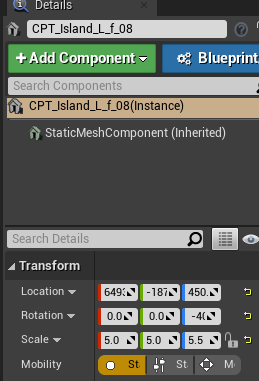 grim ore
if you dont have them, you can add them from that double click mesh editor or you can create them back in the content creation program that made the mesh. If you do have them it's a different error
winter zenith
I assume it doesn't have collisions?
opal lark
Ive added the input. but its not showing in my bp
grim ore
thats the details menu, not the editor
double click the mesh in the content browser to open it up
winter zenith
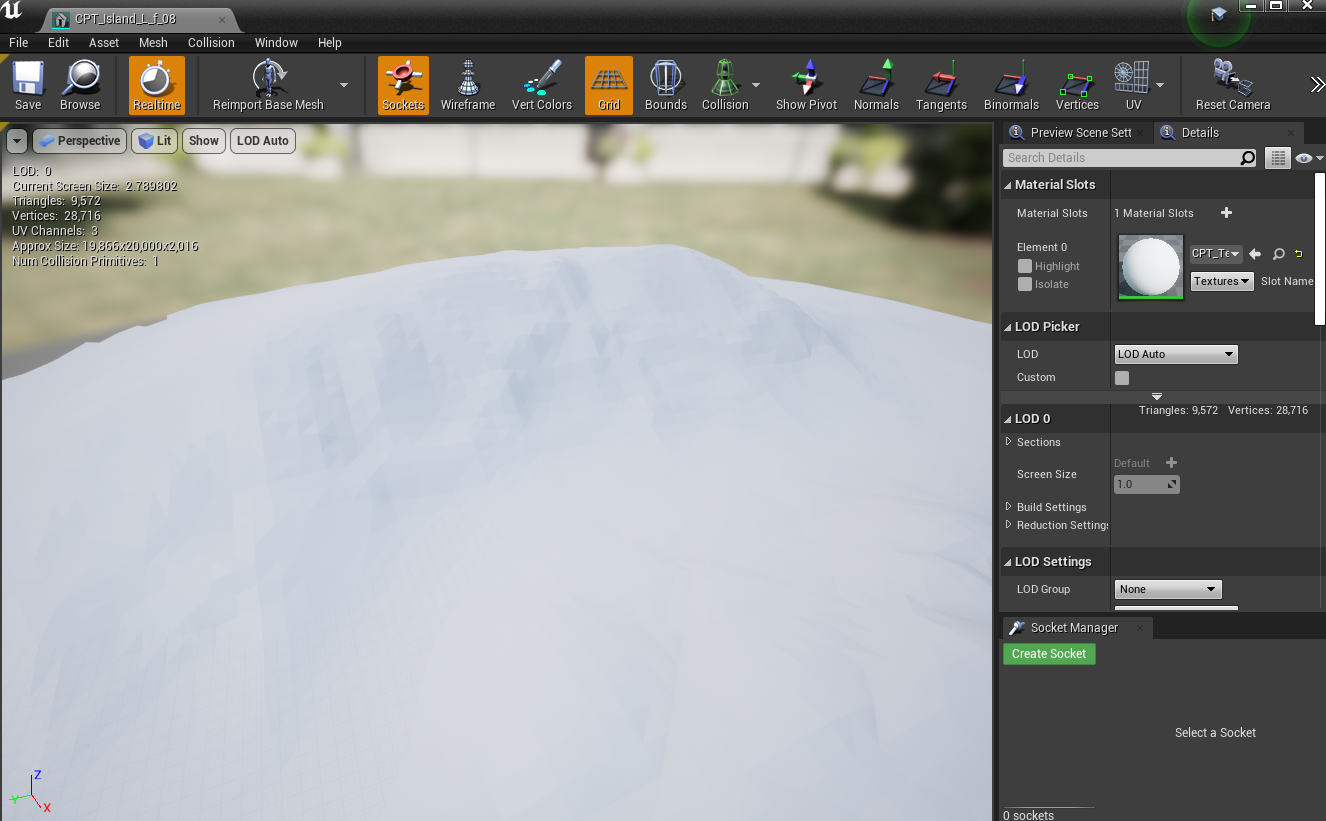 grim ore
it says it has collision so your paint issue might be something else
winter zenith
The player is falling through the terrain though as well
grim ore
then perhaps it has complex collision and not simple
winter zenith
 grim ore
find the option in that details panel for the collision settings and change it to use complex as simple
winter zenith
when showing simple
grim ore
welp thats simple
it should work the player should not fall thru
unless you have it set to something else in the details panel like use simple as complex or use complex lol
winter zenith
 grim ore
or hell the collision settings could be set to something other than block all
grim ore
the complexity settings are in the static mesh editor, when you double clicked it
 hidden aurora
Is it correct to use unreal engine for desktop aplication (Data based program, not game)
winter zenith
I found it
grim ore
but that looks like you are using simple collision and it has a simple collision so it should block the player
grim ore
oh
winter zenith
so now it's just using complex and it's perfect.
grim ore
yeah for something like that if you want you should tell it to use complex since its so detailed
winter zenith
Let me see if painting works now
opal lark
winter zenith
Yeah I came from unity so I thought there was just a mesh collider feature or something liek that
grim ore
yeah complex would be the same basically
with a simple collision being the same as a collider
opal lark
Hi matt my input is not showing in this list but ive added it have you encountered this before
grim ore
input in the project settings or what?
opal lark
yes
opal lark
its in project setting i can get nose but it does not show here
its there thats the strange thing
grim ore
you would right click and add the input event for whatever you called it in the project settings
opal lark
i have just wont show its weird
grim ore
yep that should be fine, should work just like above
you cant call input directly in UMG is why i was checking
if all else fails double check its in the input in project settings and restart and try again
opal lark
like i said it work on the other level inside sameproject
grim ore
but this item is not in the level, its in your content browser
opal lark
ii use the same characte rin the other level it just works
grim ore
but the input event is in the character if its in the other level and it disappears when you open this one?
grim ore
show the blueprint with the event that is working then the one without it
opal lark
ok
grim ore
i mean it should be the same blueprint and it should look identical just missing a part of the code for some reason when you open the other level
opal lark
yep
its going to be hard to take a picture its quite long
thats the code
if it helps
grim ore
well I dont need to see the entire thing, you say the actual input event is gone so just a screen shot of the entire open blueprint showing that working event, just the input event node and then the same screenshot with the node missing in the other level
opal lark
ok
grim ore
like this shows us what matters. The name of the blueprint, the class type, what level is open, the input event name and that it's there
and you are saying if you open a new map then open this BP that node would be gone
winter zenith
@grim ore I have one more question
Is it possible to paint the trees with like "scripts" on them
for example minable trees in a survival game
grim ore
it is but you probably don't want to do that as having that many unique blueprints would generally cause performance issues. You would look into using instances meshes and then when the player "hits" them you can remove the instanced(duplicated) dummy mesh and replace it with your custom scripted blueprint that does whatever you want when it's hit.
grim ore
i need a screenshot to see the entire thing, copying the code doesnt show you are in different maps and using the same blueprint
opal lark
ok
grim ore
what you are describing should never happen is why the confusion
 thin tendon
What mathew is saying is 100% spot on. You want a foliage script to attach to your painted foliage. Simply to identify which actor it is (Brown gum tree for example) Then have your axe hit the foliage. Detect which one it is. Remove the instance. Replace it with a scripted tree. Then give resources.
grim ore
its funny when games like conan exiles does this as they dont match the animation/size/scale on the foliage item with the spawned in item so you can see a pop when it's replaced
thin tendon
The thing people forget is unreal when removing an instanced foliage actor. Remove all of them then place them all back in minus the one you want to remove. So you have to make sure there aren't very many of that particular foliage actor to reduce the lag.
marsh cargo
Hi @sweet relic Thanks. But my keyboard is Japanese, I can't access it using ~. Is there another way to open the console?
grim ore
change it in the keyboard shortcuts in the editor preferences
marsh cargo
Thx
sweet relic
@marsh cargo it is also in the output log window
Windows > developer tools > output log
plush yew

How i can do it here
A Point is the actor place i want it to move to B place
B is my player
How i can get hes postion
sweet relic
Get actor location?
opal lark
did that bp make sence
sweet relic
Ya. You just gotta plug the track output into your lerp and give it the start/end locations
opal lark
I was asking about the bp i sent
 bleak stream
Can anyone hop in a VC with me for a little I need some help with getting started on Materials, and lighting

 hollow zinc
Is it possible to have a render text auto wrap?
 hollow zinc
like lets say I have the sentence "the quick brown fox jumped over the lazy dog"
Is it possible to have it cut off at 'fox' and start a new line?
plush yew
is that possible?
sweet relic
@hollow zinc https://m.youtube.com/watch?v=NUbSBQpUUlU

What is the String: Split Node in Unreal Engine 4
Source Files: https://github.com/MWadstein/wtf-hdi-files
hollow zinc
Can I split by word count?
Like I want every line to have 4 words only before making a new one?
 rancid lynx
whats the easiest way to swap between foliage instance actors and a bp version of that mesh? i know how to use collision or line traces to handle the swaps, but how can i say "if mesh = stone" "spawn stoneBP, if mesh = tree, spawn treeBP. i know how to brance test . but if i have 12 different trees and rocks, that seems like 20 branch tests each time i overlap a foliage instance. surely there is a more effecient way.
surely epic knows that "foliage needs to swap to bp" that shuold be a common task for unreal games, i would imagine.
sweet relic

What is the String Parse Into Array Node in Unreal Engine 4
Source Files: https://github.com/MWadstein/wtf-hdi-files
split by space and you can loop/parse the array however you want
rancid lynx
if i want to swap between 3 different hierarchiacl foliage instances and 3 differetne BPs, is branch testing mesh types the most effiecient way? or is there a smarter way via blueprints?
worn granite
I'm pretty sure there's an engine feature somewhere to do the thing you're talking about
 rustic python
Yoooo. Any1 know what the fix might be for this? When I click play on my ue4 project my lights gradually get brighter randomly. only happened after I pressed build. Didn't actually change any lighting or settings
 civic iris
I have created a GameMode inherited c++ class, why it is not listed in the world settings?
 earnest heath
Hello, I'm Russian.
Парни, кто русский?
 normal burrow
ищу русских парней?
solar temple
Based and redpilled
normal burrow
I have created a GameMode inherited c++ class, why it is not listed in the world settings?
@civic iris
Take a look at other game modes in c++. It should come up, but if your using hot reload you may need to restart editor
earnest heath
Мда, то есть вы все... из США?
civic iris
p@t, thanks, reopening editor worked
normal burrow
сказал бы, что это в основном европейцы и американцы. я использую переводчик. Пожалуйста, попросите о помощи.
 worn sparrow
has sequencer replaced matinee?
earnest heath
Постараюсь сделать так, чтобы переводчик понял.
Как происходит разработка в группе? Как они соединяют свои наработки в один проект?
abstract relic
@earnest heath с тем, что называется «контроль источника». Служба, как Github, Git, перформанс, SVN и многие другие.
Я тоже использую переводчик. Я надеюсь, что мои слова имеют смысл
normal burrow
Программное обеспечение для контроля версий необходимо при работе с командами. он работает с вами, чтобы объединить изменения, как библиотека будет проверять книги. это также позволяет путешествовать во времени, как «Назад в будущее», но с вашими активами.

 frigid needle
You'll likely have to relaunch the editor. If you're on Linux building the source, there's a known issue where the first time you build a C++ Project, it will build the project, then crash the editor.
It will open just fine the second time.
 lucid venture
@gleaming temple https://eeldev.com/index.php/steamcore-microtransactions/

Quick guide to setting up Microtransactions with SteamCore:: and SteamCore::Web SteamCore::Web Settings Make sure your SteamCore::Web Project Settings are set, don’t forget to enable “Sandbox mode” for MicroTXN Interface (this way, you won’t be charged money when testing trans...
civic iris
how to attach a c++ method for a widget button click?
plush yew
Is the mouse input in UE4 somewhat dependent on the physics sub-step?
@civic iris extend your custom class from user widget in C++. Assign the newly created custom class to your widget. And go wild in C++ :D
e.g. MyButton->OnClicked.AddDynamic(this, &MyWidget::MyButtonAction);
For more info try #umg
civic iris
@plush yew thanks
 sullen wraith
are there any 2d indie kits out there? wanting like a "stardew valley" kind of feel to a game, but looking for a good base project.
assuming it's tile based?
frigid needle
Stardew Valley would very likely be tile-based. But you may be hard-presses to get much of it done in UE4 just because their 2D Pipeline is lacking somewhat.
You’d almost be better off doing a sort of 2.5D look like Link’s Awakening for the Switch, where it’s technically 3D, but certain axes are locked and the camera doesn’t change angle.
sullen wraith
ill look into that 🙂 thanks for the information, I'm really hoping to find something on the marketplace as a good starter point, I struggle to start a project but after the initial part im fine :3
thank you 🙂
frigid needle
GL, HF
winter zenith
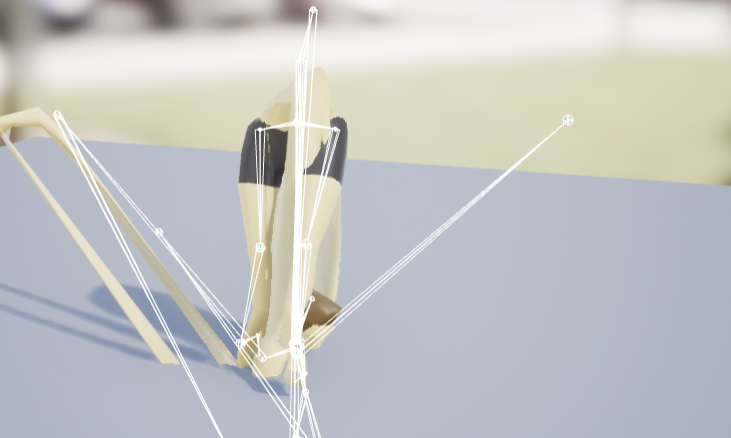
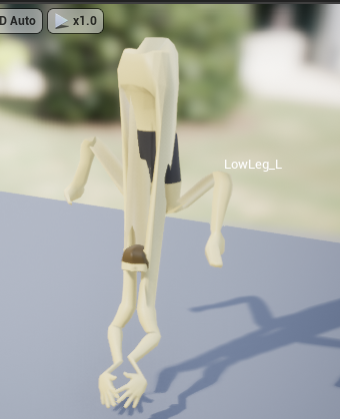
I'm having a difficult time with setting up a character skeleton correctly
Is there any easier means of doing it
Each time the character just comes out all janky
 low violet
So I migrated a level from an unreal project to another and it crashes on loading
frigid needle
I believe you would need to cast to that actor
 plush yew
I tired the casting, then how do I get the variable? I only know how to drag variables from the left
 snow crown
i dont know why you pinged me
im not an animator
also, dont ping moderators for help unless it's server moderation related
 brave salmon
Assertion failed: GetFName() == NAME_None [File:C:/Unreal/UnrealEngine-4.24.2-release/Engine/Source/Runtime/CoreUObject/Private/UObject/UObjectBase.cpp] [Line: 136]
It's UObject destructor. How is it even possible?
plush yew
Hi ! I just wanted to learn how to make a third person shooter game in ue4 (I mean complete tutorial or tutorial series) . I just want to make games like Hitman or something like that .
I don't care wether the tutorial is free or paid . I will be happy to pay but the tutorial should be completely from scratch (and in English only) . Thanks whosoever replys!!!
plush yew
how should I handle road markings? as in would a decal for every single white line on a whole road network be too much?
plush yew
wtf ?
got it ! i dont have enough space....
2 terra... and 5 normal disk xD
5gig normal
rancid lynx
are paint densities on foliage trash? even with .001 values, its spamming trees
wow... you cant edit values on 2 foliage at once
nevermind X_x
sullen wraith
Are shaders terrible for performance? I'm wanting to give all trees/objects a "cartoon" shader
 serene birch
without shaders your screen will be a flat uniform color
the only answer for you then is : is your cartoon shader more or less expensive the shader already used by UE4 🙂
you have a few shader complexity debugs you can use to check that
 manic pawn
from the marketplace?
you'll have to install a launcher engine of the same version, download the plugins to that, then copy over the folder to your custom engine
 ✅
✅
serene birch
make sure to not install any of the optional components
Linux users are even more annoyed by that since they cannot download stuff from the marketplace at all or something
how TIGHT on disk space are you?
your local copy of the engine you built yourself probably takes more space
uncheck everything, I don't think you need any of those optional elements to get a marketplace asset/plugin
well it's more like building builds all, then you clean up what you don't need
like the debugging symbols are a HUGE part of the install as you can see
(though they are super useful so don't go deleting them unless you are desperate)
 radiant haven
ERROR: Visual Studio 2017 must be installed in order to build this target.
Is taht really nessecary?
 honest vale
serene birch
honest vale
serene birch
technically
you can install the 2017 compiler in 2019
no need to install the whole older IDE version
 obsidian nimbus
any1 know how those outlines that only render in 1 eye go away in VR editor?
i disabled editor outlines but they still show
radiant haven
@serene birch how?
serene birch
select the 2017 compiler version component you want in the installer
it's in french, and it's the 2017 installer but the idea is here 😛
heck you can install the a vs2015 version that way too
serene birch
not sure what the build tool looks for then
serene birch
ah you might need a Windows SDK too
it IS strange that you are missing it
which Visual Studio install did you do?
radiant haven
2019
serene birch
what did you select initially?
radiant haven
?
serene birch
if you don't remember, just make sure some recent version of the Windows 10 SDK is installed I guess
serene birch
I think any version will do, don't install more than one for the first test though, it's a heavy weight 😛
radiant haven
serene birch
any recent enough version should work well enough I feel
serene birch
well bigger number => more recent 😛 though I'm surprised it doesn't "work" still
just get the 18362 one I suppose
radiant haven
plush yew
😦
obsidian nimbus
so these outlines make this VR editor super horrible and i find nothing about it
it hurts my eyes
civic iris
is this a valid line?
UPROPERTY(VisibleAnywhere, BlueprintReadWrite, meta=(BindWidget))
class UTextBox* TXTCombo;
getting error: unrecognized type 'UTextBox'
got it
its not UTextBox, UTextBlock
 hushed epoch
Can someone recommend an introductory programming book that would be more suitable for designers who work with blueprints?
 frail sail
Unreal insights doesn't work ? i cant see tracks
 timber minnow
Hi , for some reason , sudendly after having placed some foliage , i can't anymore select any static mesh in my scene view . i found few people having the same issue on internet but there were no solution . does anyone has one here ?
 patent ibex
has anyone experienced static fps drop with 4.24.2?
what's weird is that my fps is obviously low and stat fps reports 20+ms, while profilegpu reports 6ms
plush yew
Hello,
i have a problem with SteamVR plugin in 4.24.2.
The plugin shows up in the Built-in plugin list, it is enabled, but the Icon disappeared from the toolbar.
I cannot regenerate the input manifest/bindings.
Things that i tried:
-disabled-restart, enabled-restart the SteamVR plugin
-reinstalled the engine
-reinstalled the SteamVR
Got the latest project files from source control.
Other computers has the toolbar...
Any idea?
radiant haven
@serene birch AH IT WORKS AFTER DOWNLOADING 18GIB OF CONTENT IT FINALLY WORKS THANK YOu
timber minnow
Hi , for some reason , sudendly after having placed some foliage , i can't anymore select any static mesh in my scene view . i found few people having the same issue on internet but there were no solution . does anyone has one here ?
 lusty quartz
Hi . I am trying to compile the "dev rendering" branch from the git hub for testing some features. I get many problems and errors. Are there any workflows for this? (Using VS2017 community edition)
 fierce tulip
better computer, give a material its instances a temp master so they dont need compiling each time you edit the master material
 hazy ferry
How can I count how many times a certain key was pressed?
 shut oxide
compiling relies only on cpu?
radiant haven
@fierce tulip I guess you work often with ue (you do big games)-....
fierce tulip
cpu/ram/ssd
big games is a bit of an overstatement, but I have worked for various teams.
radiant haven
do you use task management?
 lucid lark
Hey guys, just a quick question. My Unreal Project keeps crashing when opening. On which channel should I put the crashlog and ask for help?
abstract relic
Here. Use pastebin and get logs
/saved/logs
radiant haven
@next badger its fixed thanks
fierce tulip
@radiant haven depends a bit on the team, the bigger once I worked for used jira, ive seen some trello's, and some just send me tasks for the next week or month.
radiant haven
ye cause i am still confused what sohould i choose
fierce tulip
and some just go with the flow.
radiant haven
trello is retarded
fierce tulip
iunno, either is a chore to maintain yourself hehe
fierce tulip
same, but I also dont want to maintain a trello/jira while I am also responsible for bleeploads of other things.
next badger
@fierce tulip yes....but still trello is not the best app
hazy ferry
Can someone help me?
I want a counter to go up with every spacebar press
But I a mnot quite sure on how to achieve this
lucid lark
@abstract relic Would it be okay to DM you?
next badger
@hazy ferry make a variable, use increment node
abstract relic
No
radiant haven
retarded is not allowed?
fierce tulip
im fine with it, but others might find it very offensive
 dry marsh
Hi, what is the way to debug the use of memory and cpu? what is the use of each actor in CPU and memory consume the game
next badger
@hazy ferry
hazy ferry
Sorry I am new to the program, how do I link it to space bar and make it display on the screen
hazy ferry
Strokes: (count)
next badger
button presses only active in game mode, posessed pawns and UMG widgets that have capture
@hazy ferry you want it as debug info or in actual game?
hazy ferry
In the actual game
lucid lark
Do any of you guys know what can I do for instance if my project is crashing when opening with the following error?
Assertion failed: [File:D:/Build/++UE4/Sync/Engine/Source/Runtime/CoreUObject/Private/UObject/Obj.cpp] [Line: 202] Renaming an object (PaperSpriteComponent /Game/Rooms/NewBeginningRoom.NewBeginningRoom_C:MinimapIcon_GEN_VARIABLE) on top of an existing object (PaperSpriteComponent /Game/Rooms/NewBeginningRoom.NewBeginningRoom_C:MiniMapIcon_0_GEN_VARIABLE) is not allowed
next badger
then you need to make a widget
@hazy ferry https://www.youtube.com/watch?v=XVU5vNnhgxo

This is episode 45 of my unreal engine 4 beginner tutorial series, in today's episode we go over an introduction to using user interface widgets to display text, images and more onto the HUD... having said that you'll gain the fundemental knowledge required for creating user i...
hazy ferry
Thank you
plush yew
Hello,
i have a problem with SteamVR plugin in 4.24.2.
The plugin shows up in the Built-in plugin list, it is enabled, but the Icon disappeared from the toolbar.
I cannot regenerate the input manifest/bindings.Things that i tried:
-disabled-restart, enabled-restart the SteamVR plugin
-reinstalled the engine
-reinstalled the SteamVRGot the latest project files from source control.
Other computers has the toolbar...
Any idea?
next badger
@lucid lark i think your map is screwed
lucid lark
@next badger And an idea what I can do about it?
fierce tulip
@plush yew we dont really appreciate repeating the same question over and over.
I do get the frustration of not getting an answer though, but sometimes those questions are better asked on answerhub (down atm still?)and the forums :)
plush yew
Okay, im so sorry, but i thought its more important question than incrementing a variable, and its urgent. 😦
next badger
@lucid lark go to your project\Config\DefaultEngine.ini
find there something like
EditorStartupMap=/Game/Maps/StartMap.StartMap
and change it to new one (can try non existing one)
abstract relic
No question is more important. Everyone is equal here
fierce tulip
it might be more important to you for sure, but still :)
you could try the ue4 helpdesk on facebook as well.
next badger
@plush yew ue 4.24 now has built in steamvr plugin, so you have to remove old one
it's complicated
lucid lark
@next badger Well this particular blueprint is not even contained in the map that is the start map
next badger
@lucid lark oh...then try to remove that particular bp
lucid lark
@next badger Ill see if that works
@next badger Okay so that didnt help but I called the owner of the perforce project and we just reverted the last change. Now out artist has to do some annoying stuff again but at least the project is working again.
And I was really panicking because in two days we have our deadline
timber minnow
Hi , for some reason , sudendly after having placed some foliage , i can't anymore select any static mesh in my scene view . i found few people having the same issue on internet but there were no solution . does anyone has one here ?
fierce tulip
what exactly happens when you try to select other meshes?
timber minnow
nothing , i can't
it seems it select the foliage instead
no matter where is placed the foliage
abstract relic
They could be in that landscape mode
fierce tulip
or that
frail sail
guys unreal insights works on 4.24? i cant see tracks
abstract relic
Stolen from the internet. Click on the left most icon. One that is a cube with a bulb
 pearl gorge
Hi, I'm new to this server. I have used Gamemaker Studio 2 a lot and touched on Unity and Godot sometimes. I'm interested in Unreal as my goto for 3D games, but mostly on the C++ side.
I was wondering if I am to dive into Unreal in C++, if there is any major tips or suggestions coding C++ in Unreal like should I learn more about virtual constructors/deconstructors, threads, pointers, etc.
 lapis vine
Do you have any experience with C++ at all? If no, take your time first for some generic (likely non UE-related) tutorials.
manic pawn
@frail sail launch with -cpuprofilertrace -statnamedevents
frail sail
oh damn
pearl gorge
I have taken several college courses in C++ using Visual Studios
frail sail
TYVM @manic pawn
pearl gorge
THey have gone over function/smart pointers, threads, reading files
I keep screwing up on virtual constructors/destructors in tests
lapis vine
@pearl gorge Note that c++ docs are somehow lacking, hence a tutorial on UE C++ would be good idea.
Beginner's one.
pearl gorge
I have started just watching a YT tutorial, but they are mostly on Bluerints
lapis vine
Now... There are 1-2 on Udemy (paid) and likely there are many on YT, but regretfully can't recommend one.
That also not bad approach.
Blueprints are easy and will give you general idea about UE
pearl gorge
I heard Blueprints are easy and all, but what are the upsides using the C++ side?
lapis vine
It's advanced approach. I think you really should use them first instead.
polar hawk
realization that we're in the matrix
 somber quail
C++ runs complex code faster than a BP equivalent could and also has wider access to engine funcitonality - not all functions are exposed to blueprints.
lapis vine
You will get the idea about UE and after being able to understand the whole system a bit you can dive in on how these Blueprints can be done in C++
opal lark
How would i go about making a a rain overlay that overlays a material
 grave nebula
If you already have Cpp background, Udemy course gives a good UE4-specific overview.
 maiden swift
Learn both. They’re designed to work together and you will greatly benefit from understanding how both work.
pearl gorge
I remember purchasing a Udemy Unreal C++ course online while on sale
I'll look into it I guess
maiden swift
C++ is better at complex operations, but Blueprint is better at quick iteration, particularly prototyping.
 upbeat trench
Do you have a strong code background?
pearl gorge
College courses in C++
abstract relic
Udemy is always 95% off fyi
upbeat trench
so you'll mostly be learning the UE4 API and codebase
pearl gorge
cool
polar hawk
they both are basically the same thing
normal burrow
It’s like working with the worst cpp parser in the world
lapis vine
So much attention to a newcomer. I'm... moved.
upbeat trench
waits for the swearing at UE4 to commence
 silk sluice
Im sure this question has been asked a lot but, where do i start? how was your approach
upbeat trench
It entirely depends on your existing knowledge base as to where you should start. First you need to know what it is you want to accomplish, aim small, achievable goals
lapis vine
You made me think... 🤔 I think I have started 14 with a fat book of C++.
upbeat trench
The book I started with isnt even in print anymore lol
abstract relic
Here’s your care package to get started.
https://www.raywenderlich.com/771-unreal-engine-4-tutorial-for-beginners-getting-started
https://www.unrealengine.com/en-US/onlinelearning-courses
https://m.youtube.com/channel/UCOVfF7PfLbRdVEm0hONTrNQ
https://docs.unrealengine.com/en-US/index.html
https://www.youtube.com/user/UnrealDevelopmentKit/playlists?view=50&sort=dd&shelf_id=17

raywenderlich.com
In this Unreal Engine tutorial, you will be guided through installing the engine, navigating the interface and creating your first game object.

Unreal Online Learning is a gamified learning platform that offers free, hands-on video courses and guided learning paths.

YouTube
This channel is dedicated to exploring Unreal Engine 4 and the Blueprint programming language that it uses. You can think of it as a companion to the API doc...
Complete resources for learning to use Unreal Engine 4

YouTube
Welcome to the official Unreal Engine channel! Unreal Engine 4 is a complete suite of real-time 3D tools made by developers, for developers. Create and take ...
fierce tulip
abstract relic
Here’s your care package to get started.
https://www.raywenderlich.com/771-unre...
^ ^ ^
lapis vine
Was just thinking about this, lol
silk sluice
i know some c++, some modeling, thats all... dont care too much about the interface but about the programming, last time i tried i had lots of idfficulty with blueprint concepts and such, the official video about, i didnt got it at all. Its the programming documentation i dunno how to approach, i know some basics but....
abstract relic
Yay
normal burrow
Deserving pin there
fierce tulip
guys, im new..
and someone goes !pin and it links to that pin.. be nice
abstract relic
No one reads pin anyway 😜
lapis vine
(They are addicting)
upbeat trench
Programming Quickstart
fierce tulip
now im one of the cool kids on the interwebs
 magic field
Can a Macbook be used w/ Unreal Engine??
fierce tulip
you can, just like you can use a waterwheel to generate electricity
next badger
uec++ is nowhere near c++
 willow gull
hey guys, I got a question
magic field
Urgh
willow gull
what’s the stupidest thing you’ve done with this engine?
 digital anchor
a multiplayer game
upbeat trench
Start learning it... oh wait no bad Mons
next badger
@magic field yes...it's not optimal...but can be
magic field
Is there a preferred operating system?
next badger
windows 10...
radiant haven
Where do I get roiality free fonts?
magic field
I have a Mid 2012 2.9 Ghz intel core i7
next badger
@radiant haven google fonts
radiant haven
free to use in any way?
grave nebula
The stupidest thing I've done with the engine was using poem generator to write a sonnet about the engine.
fierce tulip
lol
normal burrow
Your a cool kid on the web luos, live it up
magic field
& a Early 2015 2.7 GHz intel core i5
abstract relic
Stupidest for me was a lobby randomizer that uses a screenshot as an input
fierce tulip
i made an emitter that emitted itself twice. it was slow, but after a few hours the growth was so exponential it would crash ue4
radiant haven
stupied thing taht i made was using Tick by a HUD
 rotund scroll
i made an emitter that emitted itself twice. it was slow, but after a few hours the growth was so exponential it would crash ue4
@fierce tulip the visual form of a memory leak
next badger
Stupidest ...i made a modified ue4 version with proper camera controls
next badger
no, the proper speed movement
radiant haven
@next badger dafont?
upbeat trench
I think the stupidest thing was making a cypher puzzle game using unicode
fierce tulip
@rotund scroll ikr
willow gull
I should probably contribute too
I crashed the engine with the foliage tool and cubes
fierce tulip
oh, and having to redo the 4 uv's on each mesh (500 meshes) 4 or 5 times.
grave nebula
Darn, I'd press my techie to do that, Luos.
fierce tulip
and back in ue 2.5 era, with old 3dsmax, having to unwrap a 1m polygon mountain by hand, vert by vert
next badger
that's not stupid...that's impressive
fierce tulip
@grave nebula I didnt have a slave back then... still dont :(
though bro is still studying blueprint these last month or so
next badger
so...tech artists are lower class?
fierce tulip
I actually unwrapped all my cave-meshes again a few weeks ago to improve overal texel density
though with a new tool that did it all in one go
upbeat trench
What is a texel density and does it contribute to the mass of a vertex?
radiant haven
how can i replace this with get all actor of calss
fierce tulip
@magic field behave please
 mossy nymph
one with a working caps lock
magic field
oops
next badger
@magic field latest available
fierce tulip
@upbeat trench https://www.artstation.com/artwork/qbOqP

ArtStation
You can download the pdf here: https://gum.co/texeldensity
This time I wanted to explain another crucial topic for environment artists: Texel Density!!
I got few people to read through and they like it. hope you will like it as well.
Cheers guys, feel free to contact me if th...
magic field
Any reasons why it won't launch?
upbeat trench
User error
magic field
Is there a preferred operating system?
willow gull
well Windows works pretty good for me
magic field
Mac OS
fierce tulip
i dont agree
radiant haven
next badger
cause you can touch a texture with an eyball
fierce tulip
thats up to the artist
grave nebula
where texel density starts to lose all meaning What did I miss in VR evolution timeline ?
upbeat trench
add noise to all the things, woo photogrammetry
tawdry storm
yes noise! am I an artist yet?
upbeat trench
so real!
normal burrow
Does it tile tho?
upbeat trench
does life tile?
normal burrow
Y
tawdry storm
doesn't everything tile? it's just a matter of how noticible it is
polar hawk
no, I don't tile
next badger
i found today that SSAO texture is extremely repetitive
upbeat trench
needs more blue noise
grave nebula
You need to determine noise formula by looking at the picture. Only after that you can be considered an artist.
tawdry storm
so like looking at the noise and then be able to derive a formula that can recreate it?
grave nebula
That is most possibly correct.
tawdry storm
welp I'm out
polar hawk
I'm almost an artist then
tawdry storm
time to become a plumber or something
grave nebula
Yeah, I am almost done with welding courses. Failed artist exam last week 😭 Pesky blue noise.
upbeat trench
You'd probably make more welding aluminium than most programmers make anyway
normal burrow
Tig welding
tawdry storm
is aluminium welding such a rare skill?
upbeat trench
not so much rare just in high demand and it does take a fair bit to do it well
 paper crest
You'd probably make more welding aluminium than most programmers make anyway
@upbeat trench uh dat stabs deep 😄
upbeat trench
What you talkin bout, programmers dont have feels 😛
next badger
Deathrey can determine depth in meters by looking on inversed Z buffer
paper crest
preach brother hahaha
fierce tulip

Haven't seen anyone else mention this, but #UE4 .24 appears to have a sparkly new Spline Generation Panel to help generate basic shapes on a spline component (right-click on the spline to access it). Cool!
Likes
135

 Twitter
paper crest
Twitter
paper crest
do people even use dat many spline? i mean dayum
grave nebula
@next badger Yeah, it would be between near plane and infinity.
normal burrow
Deathrey?
 honest stone
Hey Guys i have a question, so i woked on a project at the UE4 Version 4.14.3 but now i want to open it in the newest Version of UE4 so the problem is when i want to run it in the new version it stuck at 45% can anyone help me to fix that ?
Sry for my bad english 😅
upbeat trench
It might take awhile to compile shaders with the new engine version
radiant haven
ye oi got 5k
honest stone
So you say i only need to wait ?
upbeat trench
There should be tasks running called ShaderCompilerWorker which are chewing CPU
honest stone
Yes i see it my CPU usage is at 100% 😅
upbeat trench
yup so just wait it out, might take awhile
 tender flume
next badger
tender flume
next badger
@normal burrow pipes
 hollow tusk
is it possible to track the time between two functions?
next badger
 normal burrow
Milan like profiling?
paper crest
@hollow tusk event tick?
fading vector
Are there any videos on a star collection system. Such as like you have 3 stars on a level, collect them all for bonus stuff etc.
paper crest
@fading vector i dont know any but, you can do a bp, 1 var counter and use overlap event
fading vector
Yeah, that was my idea as well
at least the overlap event part xD
If I wanted to show the 3 stars at the top right or something how would I go about displaying that?
grim ore
this sounds like a good use of the game mode, a central place to keep all of this info and events.
grim ore
event to track the stars when you collect them (starts talk to game mode -> star X collected -> game mode keeps track of it -> updates the UI)
the game mode is just another actor, like your player, that is always in the level when it starts and specific to that level (or all levels if just using the default). technically its unique to that level as it will be destroyed and remade new for the next level
fading vector
I would only want to display stars collect for that level
grim ore
look up coin collection tutorials on the internets, same basic concept
fading vector
Oh good idea
grim ore
how you want to store and display the coins would matter. Each level has X coins but you only care about them during that level? You want to store the coins collected in a save and each level has X coins and you can go back and those coins are collected and you can re collect the missing ones (similar to mario games)
etc.
if you just want them to only persist and be tracked during that single playthru and if you restart they respawn that is simple. saving state across levels is just more tracking
fading vector
Maybe a coin system would be easier lol
grim ore
lol
fading vector
Just overall how many coins are collected
grim ore
do both, it's a learning experience
fading vector
Hmm, yeah I could try both
grim ore
when it comes down to it you are just tracking data. Once you figure out how to do that it's easy
fading vector
The game isn't there yet but I would like to push it to the mobile platform
Would I need a server to store this data?
next badger
4.24.3 released
frail sail
now when 4.25? 
grim ore
it depends on what you want to do with it. Login on multiple devices and retrieve data? you might be able to use a 3rd party to store/retrieve the data. Just want it local on the device, just save to device.
4.25 will be out today!
frail sail
mean preview version on epic games launcher not about github version
 copper flicker
howdy. qvestion.
grim ore
use the split node?
next badger
heck you can grab .26 if you want
I did
fading vector
local device is easier but my concern is cheating, of course thats always the case when you store data on the device.
grim ore
@fading vector in the end does cheating matter if its single player? if it doesnt then don't waste time on it
copper flicker
no, the split node only creates 2 strings
I need a New Line
when I output this string to UI
fading vector
@grim ore Good point
grim ore
in the string itself when you put it in or in the output?
next badger
iirc \n works fine
copper flicker
I need the output to GUI, meaning.. Set Text..
the text thingy automatically wraps text
grim ore
copper flicker
can it also.. receive some New Line?
MW.. that would simply separate and reunite the string
grim ore
grim ore
look at the B input on the append
next badger
@copper flicker Ctrl+Enter
grim ore
notice its not a single height 😉
Shift-Enter in a string input field will make a new line, I just append a new line in the middle at the split
you can even turn that "new line" string into a variable and re use it
copper flicker
I don't undersand this shift enter thing.. I read about it a bit, but it makes no sense
next badger
dang it...shift...not ctrl
copper flicker
oh wow!!
shift enter it is then
it's like black magic
makes no sense
O o
but it works
grim ore
copper flicker
thank you very much MW!
very helpful and superdetailed as always!
🌞
I used to split text with a ton of SPACEs....
until now..
grim ore
you can also look into the string replace node and just swap out the \n or any other stuff with your custom string like the new space
paper crest
i assume there'll be somekind of blade comin out from down there? 😄
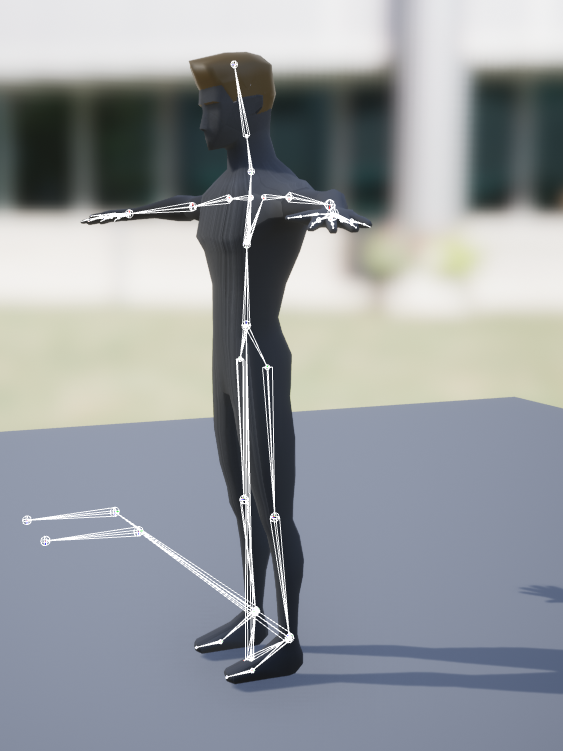
winter zenith
It’s just a normal low poly rig but I think it’s broken
paper crest
can u just remove the bone?
next badger
probably some ik bones, totally fine
 violet goblet
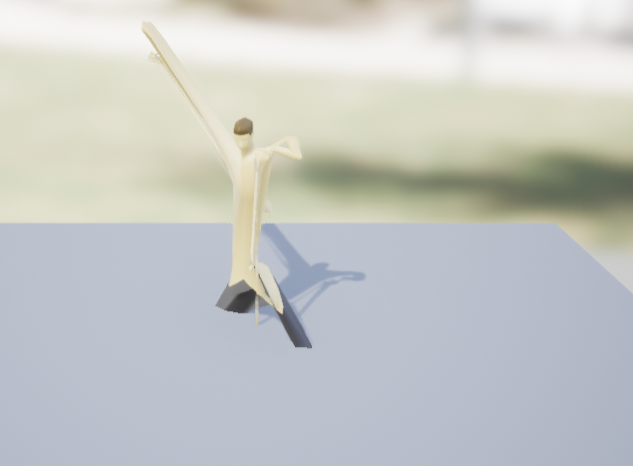
maybe a dumb question, but how do i "enable" the play/pause button after i set up a camera rig rail like in that video?
https://www.youtube.com/watch?v=CiWLYIZh7iE&feature=emb_title


 next badger
@violet goblet
winter zenith
What’s ik bones? @next badger
next badger
@winter zenith some additional bone to pass IK controls between your authoring software and game engine
it can be ik chain for rifle, or snowboard
hollow tusk