#ue4-general
1 messages · Page 645 of 1
 rancid lynx
 plush yew
@fading vector yes? What can I do for you 🙂 just remember I suck at blueprints 😄
 fiery field
I did ben's exmaple where you step on a pressure plate and the blueprint tells the door to open/close, use sound and open in a smooth steady-timed angle
plush yew
And physics, and maybe other systems, damn, I'm just average haha
 fading vector
How do you feel about blackboards and behavior trees?
fiery field
poor crypto, none of us can help
fiery field
your beyond me atm
plush yew
I feel very good about them, as long as there's no blueprints logic implemented, and all the actual logic is in C++ 😄
fading vector
let me give you a look at this
1sec
My Blackboard
thats the default moveto, which I know works
AI character
plush yew
You can troubleshoot your behavior tree in real time, Simply start your game and move the BT window on the other monitor @fading vector
You would see stuff happening
fading vector
How did you know I had 2 monitors 😛
plush yew
Just a wild guess
fading vector
hahaha
rancid lynx
if your new to blueprints, make sure you take note of "lerp" "scaling between 2 options". its a wonderfully powerful tool that can effect everything. colors, materials, movement, day light cycles,

What is the Material: Linear Interpolate (Lerp) Node in Unreal Engine 4
Source Files: https://github.com/MWadstein/wtf-hdi-files
fading vector
It's firing for sure
Didn't know BT would show like a blueprint, thats nice
I wonder why it wont move tho
plush yew
To move you actually need an NavMesh volume
fading vector
Yup, I have that. Forgot to tell you
The AI has no blueprints either
That is literally everything the AI has
plush yew
Well, you told the tree what type of key to look for
but you actually need to populate that key with an actual target of the class you specify
rancid lynx
Joel, oh hey joel.. are you working on other VR games? your name looks familure
fading vector
plush yew
because otherwise it would just return null, so silently fails
rancid lynx
i should also tell you, blueprints act impressively like c++.
fading vector
Thats the class of my character
plush yew
that's how you set the type, not how you set the content
rancid lynx
a basic understqanding of c++ will make learning blueprints muuch more impressively simple. the structures are the same.
plush yew
What you need, is to have a service before the task that attempts to identify a valid target and set the blackboard key if found
plush yew
Service finds the target. Decorator checks for the target. If found, task to move is allowed
that's the correct sequence of steps
in your case, you just told what type of object is allowed to populate that specific key
but the actual actor is found and set at runtime
fading vector

In this Unreal Engine Tutorial I show how to add an enemy with an AI Controller that follows the player.
It is a very simple AI but I introduce some basic AI components: The Blackboard, a Behavior Tree and the AI Controller blueprint.
See my social profiles here
G+: https:/...
This is what I followed
I double checked my steps
I did forgot to mention my AI controller
plush yew
That is correct, you set the content of the key at begin play. I see nothing wrong now 🙂
fading vector
That's where I'm scratching my head
plush yew
there is a target, there is a navmesh, Should be successful...
plush yew
one sec
fading vector
it did
plush yew
Just to make sure that the navmesh is not the problem
try A variation of UAIBlueprintHelperLibrary::SimpleMoveToLocation(this->GetPawn(), MyPlayer); In blueprints from the AI controller
maybe on possess
basically, when the AI controller possesses the NPC, it tells the NPC to move to the player location
if successful, we know that the navmesh is not the problem
I don't know it's equivalent in blueprints, but poke around a bit
fading vector
Looking now
fiery field
@rancid lynx forgot to mention, please send me a link, would be curious what an all-blueprint 1yr game looks like
I am right now only known for github.com/Radicalware/Libraries
fading vector
@fiery field There technically is no such thingas all blueprint
Unreal engine its self has some built in c++ features
such as a basic movement system or physics etc
fiery field
that is probably how I will use it, I am already well versed in C++ (as seen from my github) so that is probably what I will do
fading vector
blueprints are nice but not fully versatile yet
you can accomplish a ton
but not as much xD
fiery field
I wonder how many people here are like me, had a passion for hacking, found out there is no money in it and decided later it was better to go to game dev for both fun and $$
fading vector
@plush yew Got it
It was an error on my end
I dont have a player character
I have a player pawn
rancid lynx
@fiery field ok. Im about to get on a train in nagoya. Ill try and show a small video when i get home. 3 hours later
fiery field
thx, would be fun!
my applied material looks like a checkerboard, when applied, do any of you know how to smooth textures together so it doesn't look that way?
using that sample grass from ue4
 rain hound
i know this is really basic but i just started out and i was wondering if there is any way to change the color of a pre existing texture. im making a house and i want the floor to sort of look the same way as the wood floor texture but i want the color to be grey and not brown. any input would be appreciated
fiery field
i am pretty sure you need to open the blueprint for the texture to change its color
that's all I know
rain hound
i did that and im pretty sure that would be how you do it but all that is just beyond me atm
 abstract relic
Just use a hue shift node
rain hound
im sorry but could u elaborate a bit more. i literally downloaded unreal like 45 minutes ago and havent looked at any tutorials or anything outside of the basic tutorial that unreal gives u lmao
abstract relic
Functions for making adjustments to existing image textures, such as shifting contrast or hue.

What are Materials in Unreal Engine 4?
Source Files: https://github.com/MWadstein/wtf-hdi-files
rain hound
thanks my man ill check these out
rancid lynx
P @rain hound mats tutorials are amazing. 200. Each 5minutes video explaining a new topic. You can learn all you need there.
 weary basalt
@normal burrow @dim plover My issue with Async Loading was a stupid one on my part. The assets that i was trying to load were actual Blueprints, not the BlueprintGeneratedClass itself. Obviously packaged games dont have the Blueprint assets as they are an editor time thing.
Adjusting to using a SoftClassPtr instead solved the issue.
I should have known better....
 dim plover
That's interesting. I guess it shouldn't allow you to assign a BP to a SoftObjectPath/Ptr or at least warn you.
plush yew
@tender flume Impossible! has an auto save feature, double check Saved\Autosaves\Game\ Folder. It would be really bad if you actually lost 5 hours of work
 fallen marten
Compile and save often
 tender flume
@plush yew There's nothing there.
fallen marten
End of lesson
tender flume
Oh wow.
abstract relic
delete /intermediate folder and set up source control 👻
 normal burrow
subversion git or perforce 
 abstract relic
It’s the first thing you should do when creating a project
tender flume
Wha.
abstract relic
Pretty much
tender flume
Huh.
normal burrow
I feel that explanation is good enough
abstract relic
Become a timelord
normal burrow
Timelords, they don’t lose their project files.
tender flume
They go back in time.
tender flume
👌
normal burrow
Timelords probably have timemerge from master 🥁
For real though intermediate folder deletion works for a lot of weird issues on 4.24
tender flume
That's weird.
 fluid viper
I this presentation there is talk about two blueprints that do accumulative rendering (blending a lot of frames together to get a stable clean resolved image) Are these available somewhere? https://youtu.be/jyQY_MU_IEc?t=290

In this presentation from Build: Munich ’19 for Automotive, Epic Games’ Florian Dirmhirn gives some tips on optimizing your hardware setup for ray-traced automotive visualizations. To find out more about the latest real-time automotive projects being created in Unreal Eng...
 stark briar
Does someone knows what the problem is? I can't open Data Table
dim plover
Install debug symbols for more information.
stark briar
Link?
plush yew
How to rig motorcycle from blender into UE4? (I can rig Vehicle) also is there any tutorial or anyone made it before and can share fbx file. Thanks
 honest vale
@stark briar it's an install option for the engine in launcher
stark briar
Yeah, got it
 thin tendon
Does anyone know how I can translate floats that change at runtime like in these slider bars?
I have been searching online and even in the UE4 documentation when showing of localization, their little video doesn't have the numbers change either.
stark briar
@honest vale How should i use it?
 fleet stirrup
I found a clarification to a question I had earlier, regarding +X is forward in UE4
Unreal Engine Forums
Tell us how to improve Unreal Engine 4!
So it looks like both +X and -Y are forward in Unreal, depending on context
cyaoeu wrote: "There are different orientations for different situations. The animation system and stuff like PHAT expects Y so that's why they import facing that direction. The gameplay stuff (like blueprints) expects X. That's why there's an arrow component in character blueprints, you need to match the direction of the mesh and the arrow. Usually you just need to rotate your skeletal mesh component by 90 degrees and it should be fine."
...
in case anyone else was curious
stark briar
@dim plover What should i do?
honest vale
it's a mess @fleet stirrup
 mossy nymph
@stark briar go and cause the crash again, this time there will be more information in the crash report
stark briar
Ok
fleet stirrup
@honest vale also found this helpful note ...
Denny: "The skeletal meshes have a 90 degree offset because the authoring package is Autodesk Maya, which has a different coordinate system to Unreal. It's simply a limitation when converting between coordinate systems during import."
Unreal Engine Forums
Talk about Level Design, Static Meshes, Physics, and more.
So it looks like for Skeletal Meshes, in Unreal +Y is forward
But for all other actors, in Unreal +X is forward
honest vale
I refuse to believe authoring systems don't have any options to transform the mesh and anims on export
fleet stirrup
Unless, as the Unreal comments indicate, somtimes -Y is forward
honest vale
I'm guessing it's more like "Someone made it like this 8 years ago and now it's too late to change"
fleet stirrup
I don't mind 🙂
Just trying to understand all the scenarious
If +Y is fwd for Skeletal meshes, I'm good with that
If +X is fwd for Unreal cameras, I'm good with that too
just so long as I know what's what
stark briar
@mossy nymph now it doesn't show's crash report
fluid viper
@fleet stirrup When you have a Maya drummer in the band... https://youtu.be/0Usj8wVZHxo?t=70

The idea is nicked off Tommy Lee, but still worth a look.
fleet stirrup
LOL
plush yew
did a 5 hour gamejam yesterday
lost 45 minutes on the fact that the sidescroller template has a problem with casting between actors
i switched templates and casting worked immediately
talking about ue 4.19 specifcally
honest vale
probably user error 😛
 glacial belfry
Anyone has any info on how stacking RTX cards improves raytracing performance?
We're looking into raytracing in UE4 and wondering if stacking multiple cards into a machine has a big effect
stark briar
Anyone knows what the problem is?
plush yew
what is even happening to my distance fields
I've been trying to fix it for hours
should be fine?
and why the AO drunk for anything more than a few feet?
 teal tulip
Probably the mesh it too big for the resolution ?
I had a lot of problems with DFAO so drop it
Performance question: How well or bad does store vertex colors on a mesh to use them as reference in a material lets say on foliage instances all over the world ?
plush yew
DFAO, and DF at it's core is unreliable, a pain to get to work, and it doesn't ever work perfectly, in any case I've tried
Either indirect doesn't work on it, turning a huge area around the mesh grey, or the shadows themselves don't match what they should be like at all
teal tulip
It wont work as expected on big meshes as lets say an hangar or a big cave, expect to get dark areas but only work at close faces area
plush yew
The AO seems to be even worse, if I look up from a barrel on the ground, the barrel's bottom somehow gets the color from the ground bled onto it
If I look back at the barrel, it's just fine
If I look at the barrel closer, it seems how it should originally
Besides, every time I had to use df, I had to crank the resolution to get anything accurate
And with that screenshot up there, my df was set to an astounding 4k setting almost
At a res of 12 or so
A huge overshot for something that didn't even work, even on that res
I don't know, DF is just not ready
Not in the least
I found from a Google search hits back to version 17, I think, I thought it was a new feature?
Either way, it's way too glitchy for me to even dare touch it with a stick anytime soon again
What's with the beta setting though in render?
SSGI
Any good yet?
@teal tulip btw, if you go more up, I wasn't only having issues with AO
teal tulip
SSGI is just screen space, I had a huge cost drain from it
You can scale the size to cut the cost to half, but I had like 15ms cost
there is no a real GI solution for real time if you're looking for other than RT
I made myself a 2 layered SSAO but the cost was too high as well and don't help at all on my purposes 🤔
 grave nebula
@plush yew Particular mesh of your is poor candidate for DF, as you would need insane resolution to capture details.
 serene birch
seems like your mesh is too thin and you need to increase the distance field resolution for it
honest vale
that's in the architecture starter scene
the mesh that is
it has too much negative space in it for the per mesh DF to be any good
serene birch
I guess you could split it in smaller meshes that individually work better 🙂
honest vale
would be nice if the engine automatically did something like that when computing distance fields 🤔
like, it would decompose meshes into axis aligned boxes and use those for computing individual smaller distance fields for the mesh
instead of just using the actual mesh bounds
don't know how distance fields exactly work though so I'm not sure if that makes sense 😄
 lapis vine
You mean kind of adaptive resolution? Not bad as an idea, but might as well bork down the performance even further.
serene birch
more like
honest vale
yea I don't know how the "plop the mesh distance field to world space distance field" thing works
lapis vine
its combo of mesh ones
serene birch
how you sometimes want to split a non convex polygon into multiple convex ones
honest vale
yea and isn't there an upper limit to the number of mesh DFs inside the world DF?
lapis vine
Not sure, but your memory/perf is the limit.
 fierce forge
how i can add to materials some spaces like this ?
 heady moon
https://gyazo.com/061fe7b82f9db53518679ec4c3b501a5 im experiencing this issue ;C

anybody knows a solution
Wow microsoft
it is down for several users
Mk
 swift hearth
@fierce forge wouldn't that have to be done with a diffuse map?
lapis vine
Do you know what is texture and is used in materials?
swift hearth
Have you worked with materials before?
fierce forge
yes
lapis vine
That too. Check out some tutorials for UE materials. There would be tons of them, I can't link you one specific though.
swift hearth
I'd take the texture to photoshop (or something similar) and edit the colors there, then take it back to unreal
lapis vine
You may use mask with different scale or so. But really, check out some tutorials. There is so much out there which plays role too.
swift hearth
Is this material going to be an animated one? Like, you want the shaped to change in size while in play?
swift hearth
I'd suggest what ryobg is saying and find a tutorial.
Tbh I'm not a pro when it comes to mats in unreal, just know some of the basics (diffuse, bump, normal, etc). I wouldn't know how to make a shape in a mat dissolve over time
 thick herald
Sounds more like decals.
 turbid wigeon
Hey, guys.
Anyoe know why I might not be able to see the gizmos for the Two Bone IK node in the viewport?
I select the node and I can't see the realtime modifiers. But if I change the values in the node, they do update correctly when I compile. It's just extremely annoying trying to position things correctly by numbers.
 frail sail
guys its 4.24 bug?
there have 2nd UV channel but still cant set light map coordinate set 1. when i trying to set 1 it automatically reverting to 0.
plush yew
does dxdiag informatino save my ip or mac? or any other unique information which tells that this is THIS pc and not another pc?
swift hearth
Can someone help me make something recieve damage? I got a blueprint with a mesh and a box collision, I added an integer variable for its hp.
 tawdry storm
@frail sail can you show the "build settings" under the LOD0 tab?
swift hearth
I got that in the graph
I have another bp for a bullet that my character shoots, but it doesn't work. I have set the bullet's integer value to 5 and the enemy's hp integet to 10, so it should get destroyed in two hits, but nothing happens
tawdry storm
@frail sail hm okay sorry, I thought there might be something up with the source and destination lightmaps, I had a similar problem in the past and it had something to do with them, but I don't quite remember how I fixed it.
frail sail
i see. also i can set to 1 at 4.20 version. maybe that another one bug for 4.24
why all bugs exist in this version 
tawdry storm
works fine in 4.18 aswell, but I'm not sure if it's a bug, as I said, I had that happen in the past with an older version, and it was just some weird setting somewhere
frail sail
im just regret to upgrade project. now i cant back to 20, because of uassets updated. it will not work older versions.
btw i will here when u found that setting
 vocal island
hello, i have a problem, when i press play it just stays black.. its not showing the camera view
tawdry storm
yikes
lapis vine
@vocal island That kinda really not enough info of your problem. Try with another project 😄
vocal island
I just tried with a different level and it worked fine
I am not far at all and just learning so I don't mind at all to restart
But that's just running away from my problems
lapis vine
Yeah, well try to check your player start, camera position, try with different modes to play. You have a bunch of stuff to investigate first.
tawdry storm
yeah but it can be so many things.
is the player not spawning?
are there streaming levels that aren't being loaded?
is stuff loaded but some weird collision pushes you somwhere into the void?
plush yew
Anyone know of any SDKs or software that provide player supervision as anticheat that works with unreal?
 fallen gust
General question here on how to progress after completing the blueprint developer course from gamedev tv.
should i do couple more courses on blueprints or do first the C++ course from gamedev tv?
 swift heart
Hi guys,
I just wondering is it okay to bake openworld game? what pros and cons?
lapis vine
Not familiar with these courses, but if you covered some why not put it in practice? @fallen gust
swift heart
because I have a town there and want to get best lighting
fallen gust
@lapis vine you mean build my own thing, or use that knowledge on another course? i was thinking that if i take a basic c++ course i will have better and more in depth understanding of the blueprints. Right now i know JS which helped to some extend so far
lapis vine
No, you are fine with the Blueprints. Just play around with them. Consider C++ for later - its whole can of worms. You can do already a lot only with Blueprints.
fallen gust
aight! thanks for the input, appreciate it. i want to touch at some point some c++, maybe not the right time atm
lapis vine
Note if you start to do too much courses you gonna forget some things of what you have learned too. So practice is what makes it perfect 🙂
grave nebula
@exotic matrix Yeah, I can. But do I have to ?
 bold belfry
Hi I'm new here. Just like to chime in about blueprints. i struggle with c++ syntax so they are very helpful to visualize any logic. I find them very powerful. there's loads of guides to get you started. If I can use them, anyone can.
 cloud cobalt
Blueprints are the recommended tool to create your games so yeah
normal burrow
Learning blueprints can help understand c++. Engine works similarly on both fronts
Same goes for c++ and blueprints. They aren’t extremely separated
fallen gust
Great! Thanks guys
tawdry storm
does that mean I can call myself a programmer if I use blueprints? my co-workers always laugh at me 😦
 polar hawk
I want to create a 3 hour educational course on how to get started with UE4 and the final thing you do in it is simply load UE4 for the first time after a launcher install
 midnight root
@tawdry storm In Essence yes, in totality depends on how faralong you are,to me anyway as we progress and Im similarly right there with you, once one grasps how to and whereto start to create something, is when reality hits.
 worn granite
Wait so. You're saying you just slowly read the onboarding and explain it, then "realize" you didn't install while you recorded that and are now "out of time" so you just wrap up with "and now is the time to start with Virtus"? @polar hawk
I love it
grave nebula
Tutorials should be seamless, without pauses. So getting started with UE4 should involve watching whole download.
polar hawk
I want to start by making people install dosbox
and in the middle I want them to have to make a quake map
thick herald
Tutorials in the style of Zero Punctuation 😄
thick herald
D for dope?
normal burrow
sure
thick herald
totally dope dude
grave nebula
Kind Sir, but how social studies and quake 2 are interconnected ?
normal burrow
tbh, i can't remember haha
but i had made trees and a skin for the main character, brought my computer in to class. d for effort i guess
grave nebula
Unless the topic is something like "Effects of rocket explosions in confined spaces on mutant behavior patterns".
serene birch
I found out that rocket explosions don't change the Quake 2 mutant behavior patterns much, they still want to jump on me and eat my face, rockets or not
whether they are alive or not to do it was affected though 😛
normal burrow
believe it had something to do with colonies, america
 crystal ruin
hello i have q guys i have character wearing gloves and boots what i want to do is hide the skin and mask the body parts that under the clothes only and not all the body ... anyone knows how to do it ?
 crude vessel
Make a ue4 tutorial that starts with compiling the room source code and make sure undo half your work halfway through.
"oops I made a mistake but this is good because you learn to debug"
furious clicking and muttering for 15 minutes
"well I can't get this to work but it wasn't important anyway so nevermind"
True story
My favorite part about tutorials is never explaining why you do anything.
No theory, nothing, just copy what I do!
crystal ruin
@crude vessel IKR !!!!
crude vessel
@crystal ruin I just swapped the hand or arm meshes with a version with gloves using master pose but that's just me
I just built it in a way i lt would seamless use the skin/character material/mesh when not covered, I transfered normals from the non segmented characters for that
I suppose you could mask the material but that seems the worst of both worlds really
plush yew
hello guys I have question-I added the inventory package one free form the marketplace and now I modify it-I want to make when I move my mouse to move the view of my character cus in the game by default is make when you hold right button you move the view and when you loot some body to open the loot you need to hold right button and click E to interact
 grim ore
it sounds like the input mode is set to UI and Game mode instead of just Game Mode
plush yew
ok I will try to find it and I will screenshot
@grave nebula what the heck am I supposed to use DF on then?
I mean, you'd think a god damn tree was more costy and detailed than a low-poly mesh like that
Unreal Engine started crashing every half of hour,can I set something to avoid it?
@serene birch increase the res even more than 12? ._.
@honest vale negative space?
You mean empty space?
heady moon
@plush yew does it crash when you open a certain project or any project?
plush yew
Idk, I thought about using DFAO, it looked quite nice on the cherry picked example they shown on the page for it
UE makes all their features, even if they are the weirdest, glitchiest, most pain in le arse thing to set up look good
serene birch
well the mesh you used is pretty hard to compute the DF for
you know on the distance field doc pages they mention checking the DF computed per mesh if it's correct or not
plush yew
What resolution would that even need, I mean, the size literally told me 3600 in a part
2k something in the other
Checking?
How would I even check?
I mean, I visualize, I thought that's what checking was
tender flume
5 hours of previous work was done
but then i found out 5 more hours of work was lost too
so another 5 hours to spare later.
🍚
serene birch
if you can't raise the resolution enough, your mesh is a "bad" case for distance fields I guess 🙂
splitting it in smaller simpler meshes should do the trick as mentionned
distance fields have difficulties picking up thin stuff
the support bars around the glass are thin stuff
plush yew
It's not even glass, just empty space
That is horrendously weird tech though, I almost don't even see the point
tawdry storm
but Stof, in your example they didn't split anything, they just increased the DF resolution
serene birch
well the glass isn't part of the mesh in a sense for me 😛 since it doesn't cast shadows
well they can increase it until they can't
they had a mesh example they could increase it enough
Nate has a mesh he can't
¯_(ツ)_/¯
plush yew
Dude, if a 4kx2.6kx600 texture is not enough
@heady moon no,when I'm working on a project it suddendly crash,for example after a ctrl-z,or opening a material tab,removing or placing objects etc.
tawdry storm
this hasn't to do with the texture @plush yew
plush yew
I don't know if a GPU is gonna handle a project of this, man
tawdry storm
the distance field mesh that's generated might be too low res
plush yew
Distance field calculates a texture, saves it to disk or gpu, I'm guessing
tawdry storm
did you increase the Distance Field Resolution Scale in the mesh itself?
plush yew
I'don't think it's a power issue,I have 16 gb ram,ryzen 7 and a 1660 ti @plush yew
Most likely gpu, and, yes
serene birch
plush yew
I wasn't talking lightmap before, j literally increased the DF to 12
serene birch
all those small details are basically the worse case scenario for distance fields I feel
plush yew
A whopping 3600x2400x600 resolution of a DF texture
serene birch
that would start causing performance issues I bet anyway
serene birch
you didn't enable 8bit mesh distance fields btw?
plush yew
Nope
serene birch
cause it will only make the problem worse
plush yew
I didn't optimize yet
That is pure res 12 on that df
Exactly what I meant by that I almost don't see the point
And even on small objects, like a broken barrel I tried, the results are horrid
honest vale
yea you can't use that building with DF
serene birch
tried that?
Two-Sided Distance Field
For high-density meshes (like trees) where you have surface that are usually made up of a masked material that represents many holes for leaves or branches, these cannot adquately be represented as a solid surface. For this reason, you can enable the Build Setting for Two-Sided Distance Field Generation in the Static Mesh Editor. This option will work well for foliage but does come at a higher ray marching cost.
honest vale
just forget it 😄
serene birch
basically, thin surfaces can fall in the holes between the distance field 3D voxels 😛
plush yew
Especially with the barrel
serene birch
it's like you try to render a thin line in a 2D grid without AA
plush yew
Idek
serene birch
a mesh distance field is a 3D texure where each tile/voxel stores the distance from itself to the mesh
tawdry storm
yeah I would bet on too big a mesh with too small parts at this point
plush yew
Res 12, improved lightmap even on the ground and itself to rule out any lightmap issues, two sided
Idk
heady moon
@plush yew are you deleting things that shouldn't be deleted? Or when you run your project it says there's a problem with it but you run anyways it crashes?
serene birch
and the renderer will manually raytrace inside that 3D texture to see if the ray collided with the mesh or not
tawdry storm
wasn't there a way to see the mesh that's generated? that should show if it's getting the thin parts or not correctly
plush yew
Even tried on this small barrel that was just broken, and had parts out of it and stuff
serene birch
pretty sure DF are used for dynamic shadows only no? not for lightmaps anyway 🙂
plush yew
It was a small barrel, some of the planks sticking out, and it just didn't work at all
Stationary too, but, yes
But that ss was dynamic in all ways
serene birch
DF doesn't like thin details
plush yew
How can i get the duration of a randon audio wave in a cue?
I mean, I had screenshots above, @tawdry storm
I don't like how DFAO goes drunk over distance either @serene birch
It becomes a mess, easy
tawdry storm
oh so the third screenshot is the generated DF mesh?
plush yew
If I'm 5 feet away, it's just gone, might as well be artifacted AO
Third is AO, second is the DF
plush yew
Idk
As I shown in the third screenshot, it goes drunk
And, I don't think so, tbh
I messed around the settings, both while-play, and viewport
Nothing changed how drunk it got
If it was more than 5 feet away, it for sure just become weird, random splotches of black, like it was in need of severe anti aliasing
I'd kind of get needing AA for it though, since it works by the camera
serene birch
well try it with a mesh that isn't a worse case scenario for DF 😛
serene birch
if the barrel is hollow, it'll still be bad
serene birch
DF makes a voxel representation of the mesh
and raytraces through it
thin elements might disapear in the voxelisation and the raytracer will pass right through them
plush yew
What's the point of raytracing it, and not even getting a good result, I mean, that's kind of it's job
serene birch
performance? it's doing a form of raytracing (raymarching) that works on non RTX GPUs
if you want full raytracing just get a 2080 😛
tawdry storm
well it makes a voxel based mesh to be a more efficient calculation
 zealous spear
hello, how do i stop a viewport animation so i can adjust something?
tawdry storm
that comes with drawbacks
serene birch
yeah: quantization errors
tawdry storm
@zealous spear is this a sequencer animation? then there should be a pause button at the bottom of the viewport
plush yew
Res 3, two sided
Idk wth happened with it going more dark than it was, but, it did happen
Then I also enabled DF indirect lighting on it
Do you get my problem now?
With the DFAO enabled, it was even more of a mess
I instantly tried enabling the indirect on the floor and everything as well, which, worked for some, not for others
But before that, wth is this
I was looking at the barrel in the view
And I went "fucking wow, that actually looks great"
"I love that"
And then I move even the slightest cm, and it becomes a blurry mess
All details of it, gone, just by the slightest, slowest motion
Even just camera rotations
I walk up to it, the grounds' color washes on it if I look up from it, look down at it, it's normal
Get closer, it looks great, as it should originally
As I said, idk, DF is too much of a cherry pick from what I seen
It's not good in about 8 out of 10 situations, really just for indoors vis-art, things you work on for 10 hours straight at least
thick herald
@zealous spear press the pause icon within the animation, in Persona
zealous spear
i fixed it already, thanks
plush yew
Yeah, seirei answered
Also, @tawdry storm your pfp reminds me of super Mario, and idk why
tawdry storm
@plush yew that's because it is. It's the female version of boo from that super crown meme 😄
 austere scroll
is it possible to change from STATIC MESH to SKELETAL MESH without exporting and re-importimg
tawdry storm
@plush yew well to be fair, the crown itself is a very new addition to the franchise, but the overall style is VERY much mario with those eyes 😄
 lament saddle
I vaguely recall that the use normal case for DF shadows is for distant objects; transitioning to regular old shadow map cascades in the near field
rather than using it for the entire field
it solves the problem of your dynamic shadows noticeably going away past a certain distance
DF shadows fill in that gap
Distance fields have certain limitations — fidelity, skinned meshes, spline meshes, etc — that its not meant to be used as a total replacement for regular old shadow cascades
 unique kraken
hey guys, im wondering if i can adjust the anim speed of a specific anim based on the walk speed/ velocity
 minor flint
hey, unreal slackers, i need some help with something odd, idk if you guys can help, but its vague related to unreal engine and i don't have many places to get help. whos in.
or is there a room in the server i should go to
it involves pak files
tender flume
Is there a quick way to build lighting?
plush yew
HELP PLS
abstract relic
You can set target quality to something lower. Level streaming can also help.
normal burrow
gpu lightmass is a thing but i wouldn't know where to start on explaining how to use that
plush yew
Is there any tips for using BluePrints?
@heady moon no,I don't delete things that shouldn't be,I only get some uv overlapping warnings,but I don't think they are correlated
normal burrow
tiidii
is your socket not on the spine bone?
confused, is it using a socket or no?
you can change the attached socket past construction
are you doing it in the construction script?
in the construction script try, using the attach node with the sword component as target, and attach to the character using the name of the socket
try what i said tidii
tender flume
@normal burrow Send help for WM.
normal burrow
the one that takes a scene component as target and scene component as destination
plush yew
Hi currently I was working for a multiplayer (using the steam advanced session plugin) project but I'm having a little issue: when I join the server I am not possessing/pawning the first person character but a normal camera. How can I solve it?
I tried in multiple ways with blueprint but it didn't work.
normal burrow
any error?
plush yew
any error?
@normal burrow Nope
heady moon
@plush yew you probably have to always check your code/blueprints. if you rechecked everything and it still doesnt work then you will have to create a new project and copy everything from your existing project.
 edgy halo
what are my options for having a shared data cache non locally? so my team can use the same cache as me
 tribal nova
I have a widget that covers the screen in red when the players health goes down. Unfortunately when I do this the player cant click anything else (Inventory, menus, buttons etc) on other widgets. Is there a way to send the red widget to the back or have it allow clicks through to whats behind it?
grim ore
yes, change the visibility of the parent or the item you want to allow clicking thru to something that does not allow clicking (not hit testable)
tribal nova
tomatoes?!?!
 latent flume
Hi. Is there anyway to dynamically move a culling volume to a new location?
tribal nova
Worked thank you!
 pallid talon
Question - I have a Blueprint of a vehicle. I created a Child Blueprint of this vehicle. I've created a Line Trace that, when hitting the Vehicle via "Cast to Vehicle", it succeeds. But it doesn't work if it hits the Child blueprint of this Vehicle. How can I make the Cast also work when hitting the Child?
normal burrow
how confident are you that your casting to the parent type?
pallid talon
@normal burrow When the line trace hits the Parent "Cast to AI_Car_Source", it works. I've added a Breakpoint to a Bool that follows, 100% success.
"Cast to AI_Car_Source" is the parent.
normal burrow
is AI_Car_Source not a Vehicle?
pallid talon
I said Vehicle before to avoid confusion... Here's a screenshot.
So that break works when the Parent is hit.
But if a Child of "Ai_Car_Source" is hit, it fails.
normal burrow
so
i would say that the thing your getting from that function is wrong then
put a break on the cast failed
and check what Front Hit is
pallid talon
Ok
normal burrow
i'm willing to think that its giving you null rather than failing to cast
so long as your AI_Car_Source is the actual parent bp
pallid talon
The only hit that came back was "Floor". Because that's the road.
But if I put the Parent in front of the trace, it works.
Just can't get the child to work.
normal burrow
what happens when the child is in front?
the thing you should be looking for is if your given the child or not
since your saying the cast is broken
plush yew
People can resell free Assets if they add something on it?
pallid talon
Nothing, the trace didn't come back with a hit on the child.
normal burrow
what happens when the child is in front?
pallid talon
Do you want me to change my "Cast to" the child version?
The vehicle with the line trace crashes into the child because it fails.
normal burrow
i want you to verify that your child version is being returned
if its not, the problem is somewhere else
normal burrow
the child?
normal burrow
if that actual cast fails it could only mean that its not of that type
pallid talon
I think I see what's going on.. Going to test a few things. Thanks for helping me in the right direction!
normal burrow
sure thing
 solid maple
Newbie question folks: how can I apply a poseAsset to the skeletalMesh, so that is its the reference one (sort of what it's called Bind Pose in Maya)?
normal burrow
pose assets should really only be used for animated curves https://www.youtube.com/watch?v=m6QECOE0G-U
the expressions on the face there are a single pose asset. the names of the poses bind to animated curve values
that is why pose assets are likely not what your looking for. You want just a single framed animation which you can obtain by setting your animation to be only on1 frame long
plush yew
@normal burrow is there any place i can read about this BluePrint Tree components
Just to know them better
normal burrow
behavior tree?

What is the Behavior Tree in Unreal Engine 4
Source Files: https://github.com/MWadstein/wtf-hdi-files
plush yew
Yup thats it thanks mate
solid maple
thanks @normal burrow
plush yew
I opened up epic launcher to see Blender to Unreal Tools and a tear of happiness came to my eye.
 stuck steeple
In our school we have an option to make a game for a bigger grade... Would somebody reccomend UE4 or Unity for such a "project" since i dont have experience in eny of thouse two...
 coral shoal
depends on what you want to make, you can get a basic fps working right out of the box with ue4 but a unique concept takes time to build in any engine
plush yew
or could use no engine and just code it out
if ya really wanted too XD
like what are even the criteria for the game
stuck steeple
There is not really a criteria, id like to make something that has 2 players and plays only on 1 keyboard.... So something like a game from a top view if you know what I mean.... We programmed in C in my school but tbh I dont like it and in other programming languages Ive learned I dont have much experience
 silver yoke
Hey I'm a total newb at unreal & just joined the discord so forgive me if I'm not in the right room...I'm a programmer in a different industry and I've been toying with a simple turn based RPG concept, mostly menus and number crunching but I want to have a small top down 3d overworld/base to break up the menus into something more tangible for the player and add some 3d animated scenes (like a J-RPG). No need for any physics, mostly a lot of UI. What would be the best template from which to start? any 3rd party templates or libraries I should look at etc.?
plush yew
well there is the top down template from unreal @silver yoke @stuck steeple
silver yoke
yeah that's what my mouse was hovering over but I thought, let me ask and see if there is anything I should know before pulling the trigger
I started this thing in unity a few years back but had kids, now thinking unreal is probably a better engine for me
plush yew
well there is nothing to loose on pulling the trigger its a free template
silver yoke
yeah but a building is only as good as it's foundation
plush yew
how did kids make u change a engine? XD
silver yoke
I didn't get that far
plush yew
well a building in only as good as the builder who built it.
tender flume
Anyone here knows why my landscape paints white only?
Other materials work.
Will try to fix tomorrow and see how it goes hm
silver yoke
I didn't come for a pissing match, I came to see if there are any hidden options I should be aware of, real world tips for generating menus quickly and performantly, that kinda thing.
plush yew
just a quick question Unity Assets work on unreal engine?
calm down now lad only was taking a jab at the statement. I don't see anyone doing a pissing match.
checkout the RPG template @silver yoke
by epic
silver yoke
thank you
normal burrow
https://www.youtube.com/watch?v=XolvdHmo2q0 there is a matheww video for just about every subject highcalibre
We will be showing the concept of a Storyteller Object or how to do traditional JRPG text in a game. This is an easy object that we can drop into the level that allows us to interact with it and it will handle completely the display of text including a delay between lines a...
silver yoke
oh that's actually useful as well for exposition and tutorial, thanks
silver yoke
oh yeah I can probably leverage half of this RPG template stuff
 pale forge
Hello guys ... I'm getting my ass kicked here by how Physics Constraint is behaving. I started with code but have now resorted to blueprints, but I cannot figure it out.
I have a simple two mesh arrangement and a Physics Constraint joining them...
However as soon as I hit play... the attached mesh gets it location reset to 0,0,0....
This happens as soon as I enable physics on the cone mesh
Please help ... I'm going to start drinking soon
silver yoke
@plush yew You are talking about the one by Thokash or a different one? I'm finding forum posts but not links or store page stuff.
plush yew
talking about the one provided by epic
action rpg by epic games

Do you want to know more about how to make a high-end mobile game for Unreal Engine 4 (UE4) that can be deployed to both Android and iOS? Learn this and more in the Action RPG sample.
Licensed for Use Only with Unreal Engine-based Products
silver yoke
got it thanks
 brazen hull
got a problem where I cant sculpt taller
it like stops at a max heiht
height
this is max height
 patent tusk
Anyone able to let me know of any videos or solutions to this issue?
I've already reduced the lightmap resolution of everything to 8-16 and it's all green (except one of my LOD's is slightly yellow)
I'm not really sure what to deal with the 1st part of the issue with Instanced meshes don't yet support unique stating lighting for each LOD as a whole and about the only thing I can find on it is "It's not a feature yet". So I don't know if there's another option for whatever the problem is
As for the other issue with the lightmap being resolution being too large I'm also unsure how to approach that given most of them are sub-16 resolution now, and as I'm building a rather "open" set piece I can't really reduce the number of actors.
 stuck chasm
Does anyone know why my oculus go remote trigger is not responding (only in ue4 launch)?
 rotund scroll
@plush yew so actually, if you read the small size text on both of those they actually tell you exactly what they are
 wintry wing
Anyone know how to center widget on screen? on a 21:9 monitor it is offset to the left, it is not a fill screen widget
grim ore
@wintry wing what does your settings look like for it in the details panel? the top section.
@stuck chasm if you are testing with print string in VR there is a chance it's just not on the screen, it's very common to not be able to use print string debuggin easily with VR in headset
 ruby ocean
So I'm retargeting some skeletons and animations, and I noticed that this models hind legs has 2 more bones in its legs than the model I'm taking the animations form. How should I go about retargeting it?
silver yoke
any way to make a hollow cylinder in engine or do I need to make a model?
tawdry storm
There are modelling tools in the newer versions, but I'd say just do it quickly in a modelling tool
silver yoke
oh I see you have to edit it from the content window
 wooden leaf
has anyone here ever watched the tutorial videos from Ryan Laley. By chance
ok, I take that as a no,
Has anyone ever made a hotbar
fading vector
Could someone lend me a hand with this AI script? It works fine just want to re-write it to be more efficient
 fleet scroll
How do I go about using SWindow to create a new window.
I've got this
TSharedRef<SWindow> NewWindow = SNew(SWindow)
        .Title(WindowTitle)
        .ScreenPosition(WindowPosition)
        .ClientSize(FVector2D(ScreenWidth, ScreenHeight))
        .AutoCenter(EAutoCenter::PreferredWorkArea)
        .UseOSWindowBorder(UseOsWindowBorder)
        .SaneWindowPlacement(false)
        .SizingRule(ESizingRule::UserSized);
but I can't find any function to show() it
I'm also trying to make it a blueprint function
grim ore
@wintry wing The canvas panel, if it's your root, would hold the stuff inside of it. You have a problem with the stuff inside of it or is the entire widget supposed to be taking up the full screen?
wintry wing
So, the canvas is set to full screen. But I have another canvas inside of it that holds the content, including the background image for borders etc.
The intention was, to full the screen with the canvas which is transparent, but then center the content inside of the fullscreen one
grim ore
thats what It looked like, what is the settings on the inner canvas panel
grim ore
so from the looks of it you are not using any anchoring, you are making it a fixed size in a fixed position and you want a fixed size in an anchored (center) position instead?
wintry wing
Yes essentially.
I am very new to using ui widget, is there a video you recommend on anchoring so I can understand it better?
I did a lot of stuff in javaFX and Winforms, but UE4 seems a little different on how it work.
grim ore
click on the Anchor button and choose the center anchor. then choose to set it's position to 0 and 0 so it has no offeset. The nchange your alignment to 0.5 and 0.5 so it's centering from the center of that panel
wintry wing
Ok let me give that a shot.
grim ore
UMG is very similar to XAML but there are a few videos out there that explain it, the official docs should have one and the https://learn.unrealengine.com site has an intro to UMG course
fading vector
I reposted my q in #gameplay-ai if anyone could lend me a hand, I'd be very grateful 🙂
 tough sierra
Does anyone know if its possible to edit / paint on landscape layers during runtime?
abstract relic
People build their own solutions for real-time landscape sculpting as far as I’ve seen.
 winged crypt
Any way to change a particle's warm-up time on a per-instance basis?
Not sure if possible via BP
normal burrow
niagara?
winged crypt
cascade
or you mean I should use Niagara
got around it by using a warm-up time + a delay range in cascade, thankyou though 👌
normal burrow
nah was asking which, but yeah
stuck chasm
Does anyone know why my oculus go remote trigger is not responding (only in ue4 launch)?
grim ore
Are you testing it with anything other than print string in device? Print string does not work well with VR on device
stuck chasm
It does show up I tested it with trackpad touch
and i have a simple move forward function and it still doesnt work
I'm retesting it now
grim ore
weird. Maybe grap the samples from Oculus themselves and see if you can figure it out https://github.com/Oculus-VR/UnrealEngine
stuck chasm
404
grim ore
yep it requires you to login to your github account that has authorization. Have you checked out the UE4 oculus pages? https://developer.oculus.com/documentation/unreal/unreal-engine/
the docs for some reason mention oculus touch as the controller type for the go I wonder if maybe they are supposed to be that in the engine as the input type and not the oculus go ones
tough sierra
@abstract relic I'm more so interested in painting landscape layers (for your landscape material during runtime).
stuck chasm
You were right it uses oculus touch, thanks alot @grim ore for being here and taking time out of your day to help everyone
thin tendon
Is there a way I can search for blueprints with errors in them? I deleted a widget. It caused an error in another. I open reference viewer. I can see the red (boken line) but it connects to a thing called collapsed nodes. So I am having trouble finding the broken blueprint
weary basalt
Collpased nodes means your Reference Viewer settings arent deep/wide enough to show all references.
 lilac wedge
for some reason a few folders and files within folders within my ue4 engine documents have their security settings to deny on all permissions. If there a way of changing multiple folders and files permissions without having to do it one by one? (would take me hours like that)
plush yew
@lilac wedge Do you mean to change the permissions in the OS? which OS?
lilac wedge
@plush yew ok got it 🙂
plush yew
You got it! 🙂
 blissful trail
when i click sometimes my mouse double clicks so when i try and use unreal it open visual studio when im editing bp any way to fix this
?
 tawdry heath
hey guys I have my zombie character "can step on" to "no" but when he is simulating physics I add a node to "can step on" to yes but it still acts as "no." Why is that? Sorry if you did not understand this language I am bad at explaining
lilac wedge
@blissful trail only thing that comes to mind that might be the cause, of maybe you have some type of macro if you have a gaming mouse?
 ruby bloom
I just installed UE4 today and I'm having issues getting it to recognize Visual Studio Code. It keeps insisting that Visual Studio 2017 is required even though there are guides that supposedly show how to use Visual Studio Code with it.
grim ore
using it for projects or to compile source?
ruby bloom
Just trying to use it for writing code, not compiling. My experiences with VS 2017 is it's clunky and takes forever to start up (to the point of frustration when I click it by accident and have to wait for it to open to close it again.)
grim ore
open the project, go to the editor settings, change the default code editor to vs code
then go to file and tell it to generate your code project files
then it should work opening it up
ruby bloom
I did that. And when I tried to generate the project file, it gave me an error saying I need Visual Studio 2017 installed.
grim ore
how did you try and generate the project file?
VS code doesnt use SLN/project files so if you did it right clicking the uproject that will not work
ruby bloom
As you said. Project Settings, set editor to VS Code.
File > Generate Visual Studio Code Project
"Discovering modules, targets and source code for project...
WARNING: Visual Studio 2017 is installed, but is missing the C++ toolchain. Please verify that the "VC++ 2017 toolset" component is selected in the Visual Studio 2017 installation options.
ERROR: Visual Studio 2017 must be installed in order to build this target."
grim ore
you also need to make sure you have the C++ toolset installed if you dont have VS installed at all
yep you still need the toolset even if you dont have VS intalled, you need the C++ toolchain
ruby bloom
As far as I can tell, it is installed, but I'll double check.
grim ore
I think the 2019 build tools will work if not the 2017 ones are available in the bottom under older downloads
your message also says 2017 is installed, if thats true you can just use that installer to add it
ruby bloom
Oh... Okay...
So, now my project won't open at all. I tried to change it to regular visual studio then back to visual studio code. Restarted UE4 and now it says my project needs to be rebuilt, fails on rebuild and won't open without the rebuild. Good thing I didn't lose anything of value...
My mind is not clear today and all the hasty attempts to fix the problem only makes things worse.
Tried to reinstall VS2017 only to find out Microsoft doesn't let you download it unless you have a subscription. So now I have no VS2017 at all.
Maybe I should just stop before I accidentally burn my house to the ground trying to fix this issue.
plush yew
@ruby bloom Microsoft has a community free version for vs2017/19 etc
also if you right-click on your .uproject It would give you an option to generate your project files
then you can open sln
ruby bloom
All of my attempts to find it kept redirecting to 2019 installers.
plush yew
you don't have to double-click on it, the snl
right-click and choose open with
Visual Studio should also have a version selector
ruby bloom
Part of the problem is that it's forcing me to use Blueprints in the first place and I don't think it likes when you try to convert from one to the other.
ruby bloom
It's not even letting me make a C++ project because it doesn't think I have VS 2017.
plush yew
why does it look so weird anyway
ruby bloom
(Well, I don't now.)
ruby bloom
I'm having to reinstall VS right now.
plush yew
- do you need to use vs2017 Exclusively, or 2019 works just as well?
ruby bloom
I don't know. I'm installing 2019 now.
Because I couldn't find a 2017 installer. All the pages on Microsoft either redirect to 2019's download page or say I need some kind of subscription service..
plush yew
do you plan to program exclusively in blueprints, exclusively in C++ or anywhere in between?
if anywhere in between, would the focus being mostly on blueprints or mostly in C++?
ruby bloom
Mostly on C++ as I have experience with C# and C.
plush yew
wth
 dusty scroll
I'm looking for any documentation on the process of setting up modding support as in a custom editor for enduser as used by ARK, conan etc - does anyone happen to know if any exists?
tawdry heath
can someone explain why this doesn't show in game? The character is suppose to hold the knife and the node is connected to "Begin Play"
ruby bloom
I wish I could just import my C# files from Unity and convert them to C++ as I already had a decent amount of progress starting this project on Unity, but realize that I would basically have to make two copies of everything to achieve the project goals.
plush yew
@tawdry heath Double check your weapon attachment, in C++ would be something like
CurrentWeapon->AttachToComponent(GetMesh(), FAttachmentTransformRules::SnapToTargetIncludingScale, "hand_rSocket");
 dire crow
Can anyone join me in Support? I want to discuss something that is rather sensitive.
plush yew
@dire crow It's a public channel, what would be the topic? 🙂
dire crow
Are you familiar with the game Day of Dragons?
plush yew
no 😦
dire crow
The game in question has a rather unique mechanic that locks certain players from launching the game. I aim to recreate the mechanic, but I want someone with more experience to double check my work.
And before you ask, no I do not own the game, so no legal issues could arise.
fallen marten
Strange mechanic
plush yew
well, I've done semi professional reverse engineering, so to speak, so I'm curious how you actually lock the players 🙂
fallen marten
You'd have to have some kind of Mac address or IP logging to check if that machine is booting the game? I was going to ask a question about something else but this is kinda Interesting
grim ore
no issues here downloading VS 2017 Community from the Other Downloads page https://my.visualstudio.com/Downloads?q=visual studio 2017&wt.mc_id=o~msft~vscom~older-downloads
fallen marten
Well, can anyone tell me if it possible to get the eqs testing pawns query result in BP?
I'm toying with smart spawning
@grim ore? You know anything about this?
grim ore
I have not used the EQS system 😦
plush yew
@fallen marten Action RPG has some EQS https://cdn.discordapp.com/attachments/221798778208780288/674508317149626368/unknown.png I don't know is helpful to you

 ruby bloom
It seems like it's working now. I just opened a new project and it let me open it as a C++ project and it opened VS Code with it.
Sadly, my desktop is near-unusable while VS 2019 installs because it's hogging up every system resource it can. (Discord actually crashed when I just tried to switch to its window to say this a few minutes ago.)
ruby bloom
Okay. Now that VS2019 is done installing, let's see if it UE4 cooperates.
New project is opening and UE4 opened VS Code with the new project open. Looks like everything is working now.
 calm widget
Isn't ~ tilde the console key in ue? Can't get it to open
tender flume
My material is fixed 50% now.
Turns out there's some errors that i have to figure out
hm.
Can I actually do source control now when the project is still in progress?
 uncut vigil
Yes
tender flume
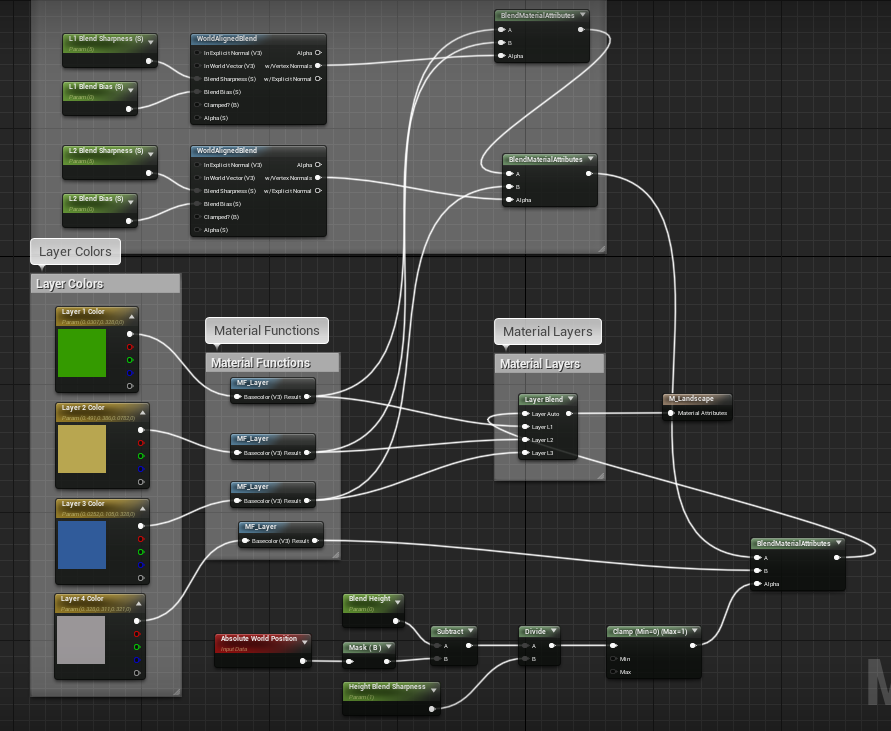
Anything wrong here for the blueprint layer?
It only shows white, but without Layer 4 it works well.

Height calculation?
Wait, you mean the terrain?
Or is the height calculation in this blueprint?
This is the only material blueprint.
I'm just following a tutorial to make this system so i don't really know much about this one.
It's slope based from what i saw?
But when I remove layer 4, it works like this back
Yikes.
Oh.
Figured it out haha

My calculation.
You were right
I used a cube and saw that the cube was way below.
If I'm doing everything as 1 person.
I need automated systems to help haha
Yes yes.
I can't spend hours on that haha
I use a cube to tell if any terrain is below it
Huhuhu.
is Source control that necessary?
plush yew
It really depends how much gray hair you want to have and how fast 😄
plush yew
Source control can be as easy as regular zipping Your project, Or as as complex as using perforce, with github in the Mix 🙂
@tender flume https://www.youtube.com/watch?v=JxXydvG4mlI

At the core of any successful project lies planning, tools, and execution. To reduce risk and improve collaboration between developers, agile teams often implement Version Control systems to record changes to files over time, allowing them to easily recall specific versions a...
Source control and version control are synonymous
or at least, they should be 😄
tender flume
This looks confusing.
What's the purpose of this actually?
Is it some cloud storage to save your projects?
cloud cobalt
Regularly zipping your project is just backups, not version control
@plush yew
Nothing alike
Version control is not even about backups
It's about tracking changes and being able to unmake them years later in seconds
plush yew
Yeah, I was just using a tongue-in-cheek broad example 🙂
like from polygon to square, they are all shapes 🙂
cloud cobalt
So serious answer to @tender flume : yes, you absolutely need version control for your project. It's entirely mandatory.
tender flume
Huh.
cloud cobalt
If only because version control gives you two things :
- ability to see exactly what changed in our entire project since you last committed your progress
- ability to roll back to a random state of your project, even two weeks ago, feature by feature, to see where you went wrong
Like you'll definitely at some point create bugs, and you'll find that the bug has been there for a month
And the bug is very hard to understand
So you just pick older versions of your project and check if the bug is there, and you'll quickly find the change that actually made it appear
cloud cobalt
Pick a version control software, spend a few days learning how to use it, and then use it
tender flume
Github is the easiest?
cloud cobalt
Gihub is one Git hosting provider
Git is definitely the hardest version control software
tender flume
Wha.
cloud cobalt
It's also not great for game content at all, but it's a common choice because free hosting
Perforce is the industry reference, no free hosting
cloud cobalt
Git has a lot of free hosting solutions
GitHub and Gitlab are the most commonly used
tender flume
Source control is the one that i'll need so i can rollback versions right?\
cloud cobalt
You also don't need hosting for version control
tender flume
Because my current method to test new stuff is by copying and pasting the same project folders
cloud cobalt
Hosting is the backup part of version control, for if you computer burns down. It's not necessary.
cloud cobalt
The important part of version control is not that you can get free hosting on the Internet somewhere, the important part is that you can see your changes and roll them back. Any version control software works for that, for free
tender flume
But is it enough to just have source control atm?
cloud cobalt
Source control and version control is the same thing
tender flume
But you said one will burn?
cloud cobalt
What I said was that you only need backups for if your computer burns down
But you need version control always even if everything goes fine
tender flume
Oo, so only version control is necessary?
Since they're both the same
Or are they different a little?
cloud cobalt
Definitely Git, but it's also definitely the hardest to learn, and it gives you a lot of room to make mistakes, so do spend a serious amount of time learning all you can.
tender flume
Alright.
 glacial pecan
Plastic SCM was pretty painless for us...
 silk delta
Hi! I asked a question yesterday in #animation about ART for Maya but no one seems to know. So I'm just bumping here. I don't know how to point to a specific post, but it's not far up the line.
lapis vine
If UE is not involved somehow, you might as well have better luck trying on Maya community.
tender flume
Most of my mistakes end up in blueprints.
Like I missed something to start an error,etc
lapis vine
Think not. mp3 has shitty license.
tender flume
.wav supports.
cloud cobalt
The license is probably not the issue
But mp3 is lossy
So you never care about that for your content
cloud cobalt
You don't use lossy formats for your art
cloud cobalt
We're talking art production here. Lossy is a no go.
Whether your product releases with lossy compression is a completely different matter
lapis vine
Man your textures are lossy. Don't think some dudes will care more about this then.
cloud cobalt
No they are not
Not when they enter the engine, they aren't
Some of them never are
lapis vine
What you see is. So why not the audio.
cloud cobalt
"Why not have all your audio lose quality before it even enters the engine" ?
Because you don't need to
lapis vine
Dont get me wrong, I'm against lossy. Dont use it. I even dislike highly mp3. My point is that, lossy is poor argument for not to be used in many games. For aa or whatever, yeah why not.
cloud cobalt
And I'm telling you the reason UE4 doesn't support MP3 is because it's completely stupid
lapis vine
No man, just reading a tech discussion. The dude says its because of the license. Or was.
cloud cobalt
And I'm telling you it's not
The editor doesn't ship
So the license is irrelevant
Your MP3 is only a MP3 until milliseconds after you hit import
lapis vine
The Editor does not ship what? Mp3? So what? You need the damn encoder/decoder to use it.
cloud cobalt
Not in the final game
lapis vine
Who cares about the final now? Point was, can we use mp3 in the editor or no?
lapis vine
Yes, and my point it was generally because of the mp3 patent. And Using lossy format is something quite acceptable.
cloud cobalt
Look
After you import, the assets is a wave file
So just import a wave file
It's faster and results in better quality than your mp3
lapis vine
I mean if you can use Ogg/Opus which are lossy already...
No need to tell me. We talk about the asset import format support.
I mean I'm also for loselless.
cloud cobalt
Anyway, feel free to use JPEG for your textures too if you think that's not the dumbest idea in the world
lapis vine
No need, I would never. But have seen many jpg textures used already, lol
 sudden agate
but but jpg is small and small is good!!!!
cloud cobalt
"This 1MB wave file is too big in my 45GB content folder, no MP3 support why ???"
lapis vine
Yeah, that true. Might be acceptable for some. I'm not familiar with the jpg compression, but you might even by as good as the unevitable bc compression - hence you won't have much of loss.
cloud cobalt
"How do I import JPEG for my 156MB PSD file ?"
BC compression is not inevitable at all
lapis vine
For most of your textures is. Depends on what you do ofc.
cloud cobalt
Lossy compression for textures in UE4 is not mandatory
sudden agate
i use uncompressed rgba. always
cloud cobalt
At all
sudden agate
if aaa titles can have 300gb, i can have it, too
cloud cobalt
Even if it was, you still do not want two different lossy compressions one after another because guess what, it makes it even worse
Same goes for sound
sudden agate
what sound compression does UE use under the hood?
cloud cobalt
i'm not even sure there is any
lapis vine
What makes sense is up to who makes the call. Yes, you likely will enter a lot of errors, but also yes. You may have nice mp3 you got for use as the only source and you wanna use it for your game - go use it.
cloud cobalt
If your only source for audio is a MP3 file, you're not the audience for UE4 so it doesn't matter really
lapis vine
Well, you know ue is not only for hi-fi products.
serene birch
Quixel Megascan gives you jpeg files 😛
lapis vine
Ooops 😄
serene birch
well you can get EXR files too
cloud cobalt
There we go
lapis vine
Also I do believe that UE might as well cook in loseless format. Ogg? Have to dig. Anyway, even if its loseless (edit: lossy), it pretty much depends on the compression what kind of quality you can have.
cloud cobalt
Lossless means there is no change in the data, so obviously it does not affect quality
That's the point of lossless
lapis vine
*lossy Sorry, typo up there.
cloud cobalt
Right
Still, you never want to pre-lossy-compress content that you know will be compressed again
lapis vine
Yeah, that understandable. Sources should be lossless.
cloud cobalt
(I actually don't know if UE4 has lossy compression for audio and my guess would be no)
lapis vine
ogg/opus I saw some dev commenting
Need to dig more, but another time. Not that I care now 🙂
cloud cobalt
Well opus is lossy (ogg is a container)
plush yew
Hello, does anyone know how Unreal handles mouse input? Does it communicates with the OS or with drivers? I was trying to send mouse movement events through windows user32.dll but unreal doesn't catch them, while it catches mouse click events
cloud cobalt
With the OS, always
 peak blade
hi @everyone can i just ask my questions over here ?
peak blade
thanks @cloud cobalt ... I want to build a touchtable application and want to know if ue4 is capable of using more than 10 touch input points !?
normal burrow
Exr for president
plush yew
With the OS, always
@cloud cobalt Then it should intercept events sent through this function https://docs.microsoft.com/en-us/windows/win32/api/winuser/nf-winuser-sendinput or what other reason there could be for it not receiving them?

Synthesizes keystrokes, mouse motions, and button clicks.
cloud cobalt
Maybe it doesn't uses that particular function.
Additionally, UE4 only uses mouse when the cursor is visible
And mouse cursor handling is a nightmare, so I wouldn't expect a simple solution
plush yew
Yeah that's for sure. if i run a webGL application it works as expected, while on the editor or a compiled windows application it doesn't. So I was thinking about the drivers
cloud cobalt
Sounds like you need to use a different method
You don't just "use the drivers"
There isn't like, a driver API
That's win32
cloud cobalt
That's quite unrelated AFAIK
plush yew
No I mean I thought unreal would handle mouse and keyboards on its own without using the OS
cloud cobalt
That's not possible
And UE4 does, absolutely, use win32 for mouse cursor control
IIRC it's literally GetCursorPos, and SetCursorPos from win32
serene birch
ah it's for the mouse cursor specifically? yeah it should be the values from the win32 events
cloud cobalt
Just read the engine code if you want to know how it does things, the source code is provided for that reason entirely 😛
plush yew
That's interesting. Anyway the whole story is, I have this device with gyroscopes and other sensors and I wanted to use it to control a first person character in a 3D environment. I successfully control the cursor movement and mouse clicks outside the game, but inside it only gets clicks
Just read the engine code if you want to know how it does things, the source code is provided for that reason entirely 😛
@cloud cobalt True, but I had just 2 hours to find a solution so I thought it would be best to ask in here in this case :p
cloud cobalt
Getting mouse movement to work well in an UE4 game can be a matter of days so hacking the engine to control the mouse cursor outside of it for any game is... not going to work in hours
Like a lot of games are going to reset the mouse cursor themselves
I know I do
plush yew
Yep true, the 2 hours thing was a choice made by others so nevermind. Thanks anyway for the support
cloud cobalt
The proper way here would be to write your own driver
And emulate a regular dumb HID mouse
This way, you won't ever have to worry about any particular game
plush yew
Yeah we'll see if they want to invest money in this direction. I doubt 😛
Anyway, thanks again
 sharp willow
Hey there - Can anyone tell me what spline input keys are?
plush yew
@sharp willow It's a key that you input on a spline :D
e.g.
fallen marten
@plush yew thanks man 👍 I'll have a look. It's a tough topic to get good Info on. I want to understand it further than the few eqs query's Ive collected along the way from other projects
plush yew
@light lintel I don't quite understand your question. It's possible that I find it quite unlikely for the Emitter To be exclusively bound to the characters skeleton, I'm pretty sure you can add A particle system component to anything including but not limited to A character or a weapon actor. Maybe I misunderstood your question 🙂
peak blade
I want to know if ue4 is capable of using more than 10 touch input points under windows 10 !?
 regal mulch
@fierce tulip that is your tutorial so you can probably answer that
Also #visual-fx
I would expect the trail to sit on the weapon. And then change per weapon asset
regal mulch
Well you can also make sure all your weapons have the same layout and bone hierarchy and then add the animtrail via code
There always ways too automate things
wooden leaf
I was editing my firstperson gamemode bp, amd I just added to it and I wanted to make some changes to it when for some reason it changed to read only. I can't edit it anymore. anyone have an idea why and how to reset so I can edit it again
never mind I for got to exit the game, I guess it's to earlier in the morning for me
plush yew
@light lintel Maybe something like this would give you an idea?
 brave shard
Guys i'm having problems in adding layers for my landscape
Tutorials say that must be a "plus" in the paint section
but i haven't
plush yew
@light lintel This is from the Action RPG template. Perhaps you can take some time to study the weapons actor blueprint from this template, it may give you some ideas. The action RPG template is free from marketplace. I'm not an artist, I just do everything in C++, but I studied this template a bit, and some things randomly stuck with me 🙂
I found it to be an amazing learning experience, but I may be interested in different systems than particles 🙂
mostly I took my time to translate the blueprints into native C++ code, to understand how things work under the hood
evil, evil people 😄
That's one of the reasons I took my time to translate the blueprints to C++
so I can basically use my own reverse engineering process to understand what's happening
it was pretty slow at first, but then I got the hang of it, and it was better 🙂
 lone citrus
Hey guys having a big issue with unreal. Had to update to 4.24.2 and now it just keeps crashing over and over giving me this error
Fatal error: [File:D:/Build/++UE4/Sync/Engine/Source/Runtime/Windows/D3D11RHI/Private/D3D11Util.cpp] [Line: 198] Unreal Engine is exiting due to D3D device being lost. (Error: 0x887A0005 - 'REMOVED').
I tried everything I could think of to fix it but nothing seems to work. Right now I'm back on 4.22 on an old commit and everything seems fine but I'm not sure where to go from here.. My team isn't having any issue with the new version 😓
tender flume
Feels so good to have optimised my terrain.