#ue4-general
1 messages · Page 454 of 1
 grim ore
 zenith flower
They disappear because the thumbnail gets updated when you hover/open them
You have an issue with a parent
What you are seeing is the thumbnail from the last successful compile
grim ore
no wait I take that back lol, @plush yew the sound asset or cue file follows the same normal rules for master mix and sound classes so if you set a master mix in the project settings and adjust it using the Set Sound Mix Class Override in a blueprint you can override the sound as it is playing in a sequencer and adjust the volume
@weary quest that looks fine? in the uniform grid panel you have the min desired slot width and min desired slot height which I changed to make the buttons the size I wanted.
is the button inside the grid set to fill for alignment?
 regal orchid
Is there a way for you to parent these missing materials back actually
grim ore
UMG is a weird system if you have not worked with other stuff like XAML. The key is the parent is in charge of the child for size and layout, the child only does what the parent says it can do
 plush yew
@grim ore is it true that blueprints can work in between levels?
grim ore
blueprints themselves are items you can re use? you can have a blueprint in one level and the same blueprint in another with different/same settings. Blueprints in general cannot persist between normal level changes if that is the question (open level -> all blueprints are destroyed, new level is loaded -> all the blueprints in that level are created)
regal orchid
The way I imported these assets is going into the Unreal Engine folder inside User Documents, the project's folder and Content
I tried to import the whole thing using UE itself, but apparently they can't seem to detect these files, nor importing a folder was an option
plush yew
ok thanks Matt
grim ore
@regal orchid you put the files directly into the content folder on your disk? if so that will not work UE4 needs to import them preferably from outside the project folder.
grim ore
unless these are .uasset files then they "might" work if you drop them into the content folder but it's far from guaranteed and should not be done as well lol
grim ore
what files were in that folder before you moved it in?
grim ore
so you have .uasset files from somewhere else and you want to use them in your project without importing/migrating them in?
regal orchid
I'm actually new to UE so I'm not sure how to import assets
grim ore
well .uassets don't get imported is the first problem, those are the files that UE4 creates from the source assets (FBX/png/ETC)
plush yew
Guys can messing around with blueprints yourself teach you or do you have to watch tutorials?
grim ore
.uassets are versioned to a specific version of the engine and can cause problems/not work if simply dropped into the folder. You need the original project these came from and use the migrate option to move them to another project.
grim ore
if it's a marketplace asset it would have a create project or import into project option. If it's the create project one you can right click -> asset actions -> migrate anything that you want to move then select the content folder in the 2nd project to move them over correctlyt
plush yew
Is there a way to maximize the viewport after you hit play?
grim ore
it looks like if you are doing PIE (play in editor) and are in the viewport F11 maximizes
 minor pulsar
Is 'texture streaming pool over xxx MiB budget' a bad thing? Or should i just raise the budget
grim ore
ah maybe it was just the file depth too long in this case
you can make the pool larger, it's a warning and you can adjust it based on your target
minor pulsar
Alright thanks again mathew 😄
grim ore
most people just seem to set it to a large number and ignore it lol
plush yew
Ok I have an issue i need help with
The third person project i changed the projectile blueprint for it to destroy the actor if it doesnt simulate physics and on hit it deletes the actor and the whole floor
minor pulsar
Oh you followed that tutorial also 😄
minor pulsar
Thanks 😄
plush yew
Ok do you guys know about fortnite?
minor pulsar
nah never heard of it
 quartz grotto
im having a hard time getting into UE4. im not sure how to approach learning it.
ive messed around with basics of C++ and learning about characters, controllers, game modes, etc.
im not sure how to go from these basics to learning about making gameplay elements, or a complete game, i guess
do most folks just learn by making small projects that focus on one or two techniques? i see a lot of people post videos on twitter of small scenes theyve made
minor pulsar
Personally at that point you should just jump in with a idea and just learn as you go
That's what I'm doing. If your ever confused on how to do something google it.
 kindred viper
Prototype. Prototype. Prototype.
minor pulsar
Dont forget. Prototype
kindred viper
when im not doing something specific for someone, I like to just make new things. Tools for the editor. Basic games. Keeps me learning new things and not getting stale on specific tasks. Also helps when you get bored of that specific task. Just let yourself run free and try stuff
quartz grotto
it took me a long time to get comfortable with the C++ and BP workflows, and know kind of when to use which. I feel pretty comfortable with that now and I guess I just need to think of stuff to try out now
I need to get a nice, simple rigged skeletal mesh that I can use for my various prototypes
kindred viper
whats wrong with the UE4 mannequin?
quartz grotto
true I can use that - I forgot about him
minor pulsar
How can i limit all of my assets and or textures to 1080p ( not 2k or 4k )
plush yew
Well im stuck
minor pulsar
:(
 vast shadow
If I want to bake lighting into a level but have objects that will be swapped out and back in again, how do I go about getting dynamic shadows on those objects without a baked shadow? I'm trying to keep performance high for VR.
 latent moth
geez "sometimes" the errors in UE are SO useful, like, how do I even (start to) solve these:
PackagingResults: Warning: Can't find file '/Game/UltraDynamicSky/Materials/moon_material' PackagingResults: Warning: Failed to load '/Game/UltraDynamicSky/Materials/moon_material': Can't find file '/Game/UltraDynamicSky/Materials/moon_material' PackagingResults: Warning: Can't find file for asset '/Game/UltraDynamicSky/Materials/moon_material' while loading NULL.
=> while loading NULL... ok? So what is being loaded that doesn't find a material that does not exist?
or
LogCollisionProfile: Warning: Profile (NoCollision) - Custom Channel Name = 'GameTraceChannel4' hasn't been found LogCollisionProfile: Warning: Profile (NoCollision) - Custom Channel Name = 'GameTraceChannel5' hasn't been found
=> hasn't been found... Who is looking for this channel, that BTW does exist in DefaultEngine.ini?
or
=== Lightmass crashed: === Assertion failed: rtcDeviceGetError(EmbreeDevice) == RTC_NO_ERROR [File:D:\Build\++UE4\Sync\Engine\Source\Programs\UnrealLightmass\Private\Lighting\Embree.cpp] [Line: 581] 0x000007fefd9da06d KERNELBASE.dll!UnknownFunction [] 0x000007fea5baed57 UnrealLightmass-Core.dll!UnknownFunction [] 0x000007fea5bb16e7 UnrealLightmass-Core.dll!UnknownFunction [] 0x000007fea5a4233a UnrealLightmass-Core.dll!UnknownFunction [] 0x000007fea59cd689 UnrealLightmass-Core.dll!UnknownFunction [] 0x000007fea59cddd9 UnrealLightmass-Core.dll!UnknownFunction []
=> UnknownFunction... ok then
latent moth
/rant, now if some enlighted soul could point me in any direction... 😃
 glacial pecan
I have a few 15k poly meshes, which isn't much, but they go basically all around the level... they are very large... does that interfere with performance in any way?
in essence, it's a race track... how do people do LODs and culling and so on with race tracks?
@latent moth looks like a #packaging question?
latent moth
not really no... the first one, yes, the second one also happens on project load and the third one relates to building lighting
my rant is more on how to get anything helpful from logs so that I can fix those. Are there other verbose logs?
 proven ivy
@latent moth actually it seems you have an issue with a material being present or not
if you moved things around you may have a broken link
latent moth
so NULL is looking for a non-existant material?
where do I even start to look? 😃
if it was a broken link, how can I solve it? I've run the redirector fixer to no avail
proven ivy
it's a c++ project or a only bp?
latent moth
BP with tiiiiny C++ and a couple of C++ plugins
if you are referring to first error: that is a self-contained BP asset with no external dependencies.
proven ivy
I would delete [Path/To/Project]/ProjectName/Intermediate/Build/Win64/UE4Editor/Inc and probably Binaries too and recompile the project
latent moth
i've already removed intermediate & saved folders and recompiled
quite frankly, that is not even the error that worries me the most, rather the 'GameTraceChannel4' hasn't been found one since it's there in DefaultEngine.
It'd be nice to know WHO is failing at doing WHAT so one can pinpoint and try to fix
These look a lot like hyundai car not found in garage but you don't own a hyundai
and you don't know who was looking for it
but then, for some reason, your garage doors won't open
proven ivy
It means mostly that you have it referenced somewhere in your code or your BP
check plugins too because it can be them
latent moth
well
of course I reference these custom object types from a BP, I can see them, I can enable the collision response I'd like etc
but then: not found on project load
so I don't get it
proven ivy
do the collision preset appear in Project Settings -> Engine -> Collision
latent moth
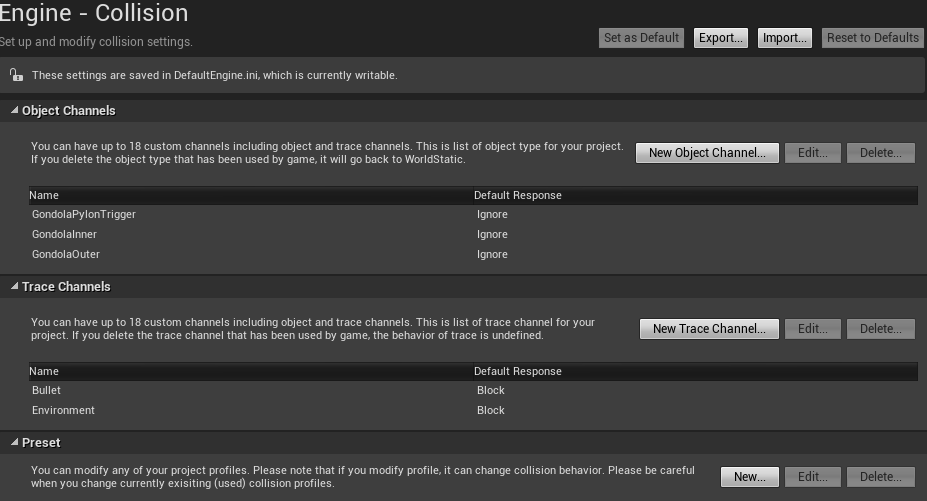
in default engine:
+DefaultChannelResponses=(Channel=ECC_GameTraceChannel1,Name="Bullet",DefaultResponse=ECR_Block,bTraceType=True,bStaticObject=False)
+DefaultChannelResponses=(Channel=ECC_GameTraceChannel2,Name="Environment",DefaultResponse=ECR_Block,bTraceType=True,bStaticObject=False)
+DefaultChannelResponses=(Channel=ECC_GameTraceChannel3,Name="GondolaPylonTrigger",DefaultResponse=ECR_Ignore,bTraceType=False,bStaticObject=False)
+DefaultChannelResponses=(Channel=ECC_GameTraceChannel4,Name="GondolaInner",DefaultResponse=ECR_Ignore,bTraceType=False,bStaticObject=False)
+DefaultChannelResponses=(Channel=ECC_GameTraceChannel5,Name="GondolaOuter",DefaultResponse=ECR_Ignore,bTraceType=False,bStaticObject=False)
but... not found.
proven ivy
Custom Channel Name = 'GameTraceChannel4' hasn't been found <= yup that's correct custom channel name is GondolaInner
latent moth
not afaik. as you can see the first GondolaPylonTrigger can be found.
and i cannot see any differences between that one and the others
i think that the internal IDS stay the same for custom ones and are the ‘channels’
proven ivy
there must be one tiny difference tho otherwise it should work,
latent moth
btw: thanks for your help... appreciated
yeah indeed
i’ve also removed/recreated, cleaned the intermediate/saved, recomplied c++, etc.
proven ivy
saved has no impact Intermediate/Build/Win64/UE4Editor/Inc and Binaries are the two that are actually affecting your game
latent moth
the weird thing is that objects are considered traces BUT with bTraceType=False...? Maybe a code legacy
ok, removed also builds binary
the whole thing
proven ivy
they are trace by default
latent moth
ok
i really don’t know what to do with these three errors.
- missing texture from NULL: will check for references but i know there aren’t any.
- object types not found: dunno, find an alternate implementation...?
- lightmass exploding: force non computation of static (all dynamic anyways)
proven ivy
sometimes I recreate a project and start from sratch importing every asset until I find the faulty one, and if there isn't any usually it solves the issue
latent moth
i had to do this a couple times alteady.
but this is a 14 months 25 GB project and quite frankly this time i don’t want to. 😃
it’s lovely to have new features but i would prioritize:
- the linker!
- structures getting broken on BP
that would solve many of these weird things, imo.
@proven ivy how do you import them? copy directories?
export from the other project?
proven ivy
just copy past
the trick is that some of them depend on others so you might have broken links
latent moth
yeah
plush yew
Should my demotivation for making a game stop me?
 cloud cobalt
Hard to say say without knowing much.
Demotivation is generally not the real issue
"I'm not motivated anymore" usually either means "I'm doing GTAV alone" or "I have a working game but it sucks"
 cloud cobalt
If it's really just the motivation, well, just do it ^
 fierce tulip
or self doubt and fear gets in the way
just, do it
motivation is just another muscle you need to train
cloud cobalt
Though it's also an opportunity to look back objectively on projects
 wary wave
I motivate myself by wanting to eat food occassionally 😄
fierce tulip
just.. EAT IT
wary wave

“Eat It” by "Weird Al" Yankovic Follow "Weird Al" Yankovic on Spotify: http://smarturl.it/WeirdAlSpotify Check out more great videos from the 00's here: http...
fierce tulip
weird is so young in that video
plush yew
Yeah my game is pretty much complete but not that good, I wanted to do a commercially viable one but might be my next as still learning
I just realized that I was given the wrong axis directions by some tutorial again. For me, Z is up and down. Same way it is in UE4, same way it is in blender. When I export from blender to UE4 what do I want to set my bone axis as?
because XZ is not it.
 regal mulch
UE4 has XForward and ZUp
That's what I set my stuff to in the FBX export settings of Blender
plush yew
Thanks, I just started messing around and that looks like it's right. I'm mainly looking for bone axis though. It looks like XY is possibly what I wanted but I'm not sure yet
 dark depot
blender export is not Z up X forward by default btw
plush yew
I'm not on the default anymore I've gone through two different export threads and it turns out the last one I was in was either outdated or wrong haha
XY is also not correct, I'll try a new axis setup now
 leaden dust
sorry I am really new to programming
But I am setting a Timer
And I want to change the value of a boolean variable
do I have to declare new functions for small things like this?
or is there a smaller way
wary wave
if you're using a timer, you'll need a function or event
leaden dust
@wary wave any other way to add delay?
plush yew
I do delay loops
plush yew
With a branch checking the value of whatever float im using to measure time
leaden dust
Just to make function for one statement
plush yew
I just hate the timer node in general so I do this. It's a lot messier but it works for me
@leaden dust
leaden dust
@plush yew you can't use delay in cpp
 honest vale
@leaden dust yea C++ sucks in the sense that you have separate header and code files
 iron merlin
Hey guys, how do i delete c++ from my project completely?
honest vale
delete the files under source folder
iron merlin
But its still there.
iron merlin
Okay thanks
 mint sequoia
@fierce tulip Discipline > motivation 😛
fierce tulip
wont argue with that
mint sequoia
I think every game has a point where the motivation fades. Starting an interesting idea/vision -> oh god this is taking ages why did I even want to make this -> game starts coming together and motivation returns
fierce tulip
sometimes you are not motivated, then discipline needs to kick in
fierce tulip
even for more experienced ones
mint sequoia
At least if you're getting paid then thats always a form of motivation hehe 🤔
 whole quarry
What is this "discipline"?
wary wave
I hear it's some kind of kink
whole quarry
Money is a driver
plush yew
hello
can some1 pls help me fast
LowLevelFatalError [File:Unknown] [Line: 6963]
LoadPackageAsync failed to begin to load a package because the supplied package name was neither a valid long package name nor a filename of a map within a content folder: ''
0x00007ffe51319129 KERNELBASE.dll!UnknownFunction []
0x00007ff641cddd97 UE4Game-Win64-Shipping.exe!UnknownFunction []
0x00007ff641c8bcb8 UE4Game-Win64-Shipping.exe!UnknownFunction []
0x00007ff641d49efe UE4Game-Win64-Shipping.exe!UnknownFunction []
0x00007ff641e81c00 UE4Game-Win64-Shipping.exe!UnknownFunction []
0x00007ff641e818f4 UE4Game-Win64-Shipping.exe!UnknownFunction []
0x00007ff642e74c24 UE4Game-Win64-Shipping.exe!UnknownFunction []
0x00007ff642e593cc UE4Game-Win64-Shipping.exe!UnknownFunction []
0x00007ff642ae5ac9 UE4Game-Win64-Shipping.exe!UnknownFunction []
0x00007ff641a0f4a3 UE4Game-Win64-Shipping.exe!UnknownFunction []
0x00007ff641a1581f UE4Game-Win64-Shipping.exe!UnknownFunction []
0x00007ff641a1592a UE4Game-Win64-Shipping.exe!UnknownFunction []
0x00007ff641a1cebd UE4Game-Win64-Shipping.exe!UnknownFunction []
0x00007ff6435a7727 UE4Game-Win64-Shipping.exe!UnknownFunction []
0x00007ffe51757974 KERNEL32.DLL!UnknownFunction []
0x00007ffe5457a271 ntdll.dll!UnknownFunction []
whats this
i exported my game but i cant play it
 languid shard
LoadPackageAsync failed to begin to load a package because the supplied package name was neither a valid long package name nor a filename of a map within a content folder: '' should give you an idea of the problem
there's a problem with the map its trying to load
plush yew
uh
wary wave
probably didn't package the map at all
wary wave
by specifying the maps to package in the packaging settings
 lusty carbon
I need help setting up a simple first person camera player in my VR project
to switch between the vrpawn and the fpscharacter
wary wave
yes
languid shard
select the map files
 sudden agate
@lusty carbon what do you have so far?
wary wave
you select the files in Windows Explorer (for some reason)
languid shard
with the "..." button next to that text box
plush yew
.umap or .uasset?
lusty carbon
@sudden agate just the VR character.. should I migrate a fps character from the template or create a new one ?
plush yew
or both of them?
wary wave
...the maps that you need in your project
languid shard
.umap
he may be talking about the assets UE generates with maps
like lightmaps and such
just the umap files suffices
sudden agate
arent maps usually included by default? 🤔
plush yew

languid shard
¯_(ツ)_/¯
plush yew
ok ok im exporting
wary wave
the whole map packaging system is awful
plush yew
i just have to be ready in 20min
wary wave
why you select them using Windows Explorer rather than the content browser is beyond me
plush yew
i also have to put it on my stick..and its 2gb
wary wave
you'll be lucky to be ready in 20 minutes
sudden agate
Pretty sure I can package without specifying the maps 🤔
wary wave
it's not impossible though, if you've already cooked and packaged once, it won't need to cook a lot of stuff again
I always have to include mine
¯_(ツ)_/¯
sudden agate
I'll take a look when I am at home :D
wary wave
I think it did at one point?
I know out current project won't package anything that isn't referenced in the ini files
languid shard
hmm
plush yew
The UE4-Projekt_Arbeit Game has crashed and will close
LowLevelFatalError [File:Unknown] [Line: 6963]
LoadPackageAsync failed to begin to load a package because the supplied package name was neither a valid long package name nor a filename of a map within a content folder: ''
OK
wtf
NOO
languid shard
welcome to gamedev
wary wave
I don't suppose you've done something stupid like include German characters in file names or something?
 manic pawn
must be very brave to start experimenting with an apparently never used before unreal feature on such a short deadline
wary wave
aye
not leaving packaging to the last minute is something every newbie learns the hard way, heh
 soft crescent
Yeah lol, it's a pain if you dont have build machines, but every day you should build
wary wave
whenever I do a game jam, packaging gets tested regularly
you don't want to get to the last minute and find everything's borked, hehe
soft crescent
yeah.. i think our build's are broken, we (despite what i said above) tried building on day 4.. failed. bunch of errors involving K2node, so I'm trying to do a build on the actual dev machine that has the steamvr drivers and such and see if that helps, tomorrow morning i'll find out
if it's not thats what im fixing first thing
manic pawn
build machine for unreal would have to be quite expensive, that's annoying
unless the build is supposed to take 5 hours
wary wave
ours take a couple of hours on dedicated build machines
manic pawn

wary wave
at one studio I was at, we were using Jenkins for continuous delivery
the server's name was Leeroy
true story
manic pawn

wary wave
it felt appropriate
manic pawn
oh god my build is completely borked
soft crescent
not that expensive aws is pretty cheap
for the essentials
in the future the aws instance will also handle some auto deployment sicne we work in custom branches pretty much all the time now
and there are issues we have to deal with regarding IT meaning we need to do complete redownload/recompiles of the engine way more than you'd think
manic pawn
does anyone know what this is about when packaging?
it seems to always re-cook everything, I don't know if that's normal
soft crescent
go to your packaging settings
theres a setting that does that
unless it's being caused by another thing but i dont know what could invalidate a cook?
wary wave
there's not much that would invalidate an existing cook
manic pawn
vs proceeds to freeze for 1 minute because the editor hit an ensure during start
hmm I'm not seeing a relevant setting
wary wave
there's a setting for fully rebuilding and another for cooking from scratch in there somewhere
manic pawn
the full rebuild is off, but I can't find the cook from scratch
wary wave
hmm
soft crescent
whats the best method of removing an outdated plugin from a project on a branch you dont have? its just some unused assets that are tied to it and some placed in a level but nothing else really
wary wave
well, mystery one:
soft crescent
can i just delete them ( i know thats not really good)
manic pawn
that one's off too
soft crescent
but im curious if i can go to 4.22 now we're not using nvidia blast
manic pawn
I think that setting is just how you get it to put everything in the pak and not just things referenced from the maps?
wary wave
it explains the discussion we had earlier about needing to include maps
but I'm sure there's cooking settings missing from here
e.g. 'Cook Like the Game'
heh, yeah, there are settings missing
there should be setting for iterative cooking
if it is not enabled, it'll recook every time
manic pawn
how would it know what needs re-cooking when you change the c++ 🤔
wary wave

but if you cook from the command line:
https://docs.unrealengine.com/en-US/Engine/Deployment/Cooking
manic pawn
I guess I can't test it while the cook is broken
it has changed the log a bit at least
wary wave
looks good
manic pawn
not that many packages
wait how
that's less things than files in the content folder
and doesn't it add some of the engine content too 🤔
I wonder what the cook on the fly is for
doesn't it make the game load slow as hell when it has to wait for each individual file to be cooked
honest vale
I think it makes the editor cook things all the time as you edit
so when you finally package the game it should be faster?
 ember notch
What is better this https://sellfy.com/p/Ho2F/ or this https://www.unrealengine.com/marketplace/en-US/slug/survival-game-kit

An easy to use highly customizable game template with advanced features. Designed from the ground up for multiplayer.
wary wave
well the second link is broken
but from the title it looks like they're too different things entirely 😐
wary wave
right, well, they look like two completely different things
so I'm not sure how anyone is supposed to compare the two
soft crescent
so is the chaos in 4.23 just destruction and niagara support?
or is it going to be a full replacement of physx 3.4, because i cant wait for that engine to be dead
 rustic imp
eventually the idea is to replace the current physx entirely with Chaos
but it will be a while before that is the case
definitely not 4.23
that's still early access chaos
wary wave
I wouldn't expect a complete PhysX replacement any time soon
I mean it's taken how many years for Niagara to not-yet replace Cascade?
 serene birch
isn't Niagara still partly in beta?
I can understand users not wanting to shift yet
soft crescent
yeah it hasnt reached feature parity yet
and also it's not quite where it needs to be in terms of performance for games
 devout gulch
@wary wave what is complete physx replacement for games ?
wary wave
Chaos
wary wave
well, everything that PhysX does
so collisions and scene queries would be included, yeah
devout gulch
to implement destruction you need to implement basic things
wary wave
if the idea is to deprecate PhysX, you gotta replace it with something, hehe
devout gulch
and I doubt most games use more advanced parts of physx
basic things are scene queries and collisions
I guess the first step is to do physics interface
and then replace parts of it with chaos
devout gulch
I bet ragdolls will be the last replaced thing, and collisions and scene queries first
I mean chaos can at least replace parts faster than niagara
niagara is just one big package 😄
devout gulch
nothing
it's not going to be integrated in unreal by epic
at that point I'm more interested where the epic OSS for online services 😄
serene birch
well everyone, even those not using the EGS should be interested by that
an API for online services that is multiplatform and store agnostic? heck yeah!
cloud cobalt
One that puts your game behind an additional login screen on every platform but EGS, though.
wary wave
that in itself is annoying to customers
cloud cobalt
And forces people to create an EGS account for their Steam/GOG/Switch game or whatever
wary wave
but it is what it is
serene birch
not really
you can get account linking I guess 😮
that's already what happens on consoles no?
serene birch
pretty sure there is Nintendo/PSN/XBox Live account linking to EGS accounts with auto login from one auth into into them
cloud cobalt
Pretty sure Nintendo, Sony or Valve aren't cool with sharing their user accounts to Epic.
serene birch
requires an account yeah
doesn't require you to login constantly to that extra one
can do the same with a game on Steam, just link Steam account to the EGS account
wary wave
nope
Steam provides an API with limited functionality for that kind of thing
so if both player profiles are public, Epic can see the friends
but Epic scraped that data dodgily from user PCs
which shouldn't have happened
if a Steam profile is not public, it would not be possible
cloud cobalt
Your players on Steam needing to create an EGS account to play your game is clearly something to keep in mind, because it will be unpopular as fuck. Of course, if you're providing console crossplay as a result, it's something to consider.
if you're going to be on Steam only, there's no point
wary wave
but all EGS does is look at the Steam data they have access to and allow you to link friend accounts on EGS already linked
serene birch
the game has the Steam auth info available
wary wave
if you have a Steam game using EOS, you'll still need an EOS account additionally
serene birch
it can then start the auth operation with any game server that knows the protocol, like EGS can
cloud cobalt
EGS will matchmake with your EGS account, not the platform account.
That's pretty much the point
wary wave
^
serene birch
crossplay is the important part of the EOS 😃
the fact it's not linked to a store basically
cloud cobalt
But of course it does come at the cost of needing an additional account if you play the game on a service that has accounts already
cloud cobalt
Nope.
serene birch
well outside of the initial EULA 😃
wary wave
Epic won't get access to platform user information
cloud cobalt
They won't.
serene birch
the game client itself has the info
cloud cobalt
It would be wildly illegal
wary wave
^
serene birch
what? no
cloud cobalt
Yes it would
serene birch
there are plenty of games that do that already
wary wave
I don't think there are
serene birch
they use your identity on Steam and basically do the whole matchmaking and accounts themselves
cloud cobalt
Every platform owner has extremely strong incentive on both legal and financial topics to not allow sharing information to Epic.
And they don't
serene birch
and use your Steam identity as an authoritative way to access your account there
that doesn't make sense
Epic only needs one thing
the game client connects to the EOS services and says "hey, I'm steam user 7516876156", the EOS will validate this request with the public API Steam provides
and then they'll say "welcome 7516876156, your EOS account is ready to use where you left it the last time"
cloud cobalt
Here's how it works : for Sony, Microsoft and Nintendo, the online subscription is a major money mover that brings in lots of revenue at an incredibly high margin. The only reason people pay that is because matchmaking is gate behind it
Letting Epic handle it for you is complete nonsense
honest vale
what's EOS?
wary wave
Epic Online Services
cloud cobalt
@serene birch Which games ?
serene birch
Elite Dangerous?
cloud cobalt
Elite Dangerous uses EOS on PS4 ?
cloud cobalt
Fortnite doesn't use the platform, that's the point
If it did, it would need the subscription
wary wave
if you play Fortnite on console you need to create an account
cloud cobalt
You don't need to be paying the PSN sub
wary wave
I don't think Fortnite even uses EOS
which means if you play on PC, you can't then play with the same account on any other platform
cloud cobalt
Epic can afford to use their own matchmaking and shit on Sony because it's fucking Fortnite, and Sony needs Fortnite even if they're going to be paying for it
serene birch
of course it does
cloud cobalt
Now that doesn't mean Sony is ready to give up on PSN
wary wave
they use their own matchmaking system
serene birch
the EOS sales pitch was basically "hey we built this for Fortnite so now it's done, all that remains is make it open"
wary wave
a lot like Rocket League
cloud cobalt
Sony has extreme $$$ to loose if every dev moves to EOS
So they're absolutely never going to be sharing the data
Making it easy etc
That would be suicide
Same goes for Microsoft, which is doing exactly the EOS move on the Switch and PC
"Just use your Microsoft account for matchmaking"
serene birch
pretty sure Rocket League on switch still needs the Nintendo subscription to be played online
plush yew
Question, where would I go for troubleshooting, regarding reinstalling the Epic Games Launcher at in here? I've been having issues reinstalling the Epic Games Launcher.
cloud cobalt
RL uses EOS ?
wary wave
no
cloud cobalt
That's why then 🤷
wary wave
they just have their own platform independent match making
serene birch
it's crossplay
you don't make sense
you already have Fortnite users linking their PSN or Nintendo online accounts to an Epic account
they probably will switch up to the EOS api once it's ready btw, I think
cloud cobalt
And you will still need your Epic account on top of your PSN account
Which is what I was saying to start with
wary wave
yup
serene birch
I don't understand what you were saying XD
of course you need
any game with any amount of crossplay, or even just with custom online services
wary wave
you were arguing that you don't 😐
serene birch
has "local" accounts that are linked to the local platform account
cloud cobalt
They don't really have to be linked.
serene birch
I was saying you don't need a "EOS login" form to play those games
cloud cobalt
They do if the platform does not cooperate.
serene birch
they are linked, your PSN account is your indentity
cloud cobalt
Only if Sony cooperates.
serene birch
the online services need at least that info to identify you and your persistant data
they are ALREADY connected
there's Steam too
and github 😄
Github matchmaking when? 😛
cloud cobalt
And any of these partners can pull the plug at any second
serene birch
practically impossible
wary wave
they've had connected accounts for most platforms for years
used to appear in your forum profile
plush yew
I've been having this error when I try to install it.
serene birch
"connecting" an account basically means "user PSN xxx has linked his PSN to this EOS account"
wary wave
I don't know that they have much access to user data outside of user names etc though
serene birch
nothing is store on the PSN servers and the like
 dim plover
But I'm pretty sure that means you still need to have an EOS account.
serene birch
but you don't NEED a login form
your PSN identity is enough to allow you to play on EOS games
once the accounts are linked
and the PS game knows your PSN identify
wary wave
eh, if the platform allows it, it allows it
cloud cobalt
Sure
serene birch
since Epic PSN identity auth comes through the same servers than Fortnite
wary wave
but you as a developer have to run all your own servers etc in these cases
serene birch
Sony would need to cut off Fortnite to cut the rest of the EOS
soft crescent
pretty sure you can access user data who play your game
wary wave
so it's kinda expensive
soft crescent
at least from my skimming of sdk docs
serene birch
yes but to be honest, you need the EOS game servers to validate the identity of the user by asking the PSN servers
soft crescent
studios build KPIs of their players and part of that is the games they play too
serene birch
without that, the game would need the standard login form combined with a "remember be" option instead
it's VERY unlikely that Sony cuts that whole service though
the one that validates users identity
cloud cobalt
They don't need to cut all of it
Just stop taking new API keys
You don't just connect to PSN auth servers lmao
serene birch
they don't need to do that
 river apex
Hi friendos, I'm trying to get a looped grain texture but get weird issues in two methods,
First one is the flipbook and a spritesheet, when played on pc it works great, but on mobile it comes out flipped and gradually losses quality.
Second method is using a MediaTexture and a MediaPlayer, tho in that method I can't make it loop seamlessly as it stutters when looped.
Anyone got a suggestion?
serene birch
they can just refuse games that use EOS
there's no need for them to go nuclear with their API
soft crescent
valve with portal 2 got some form of steam integration on ps3 actually
cloud cobalt
No one ever talked about that.
serene birch
if Sony doesn't want crossplay, they just refuse to validate a game that does crossplay already
you did XD
constantly
cloud cobalt
No.
soft crescent
sony is now allowing crossplay for certain developers
serene birch
They don't need to cut all of it
Just stop taking new API keys
You don't just connect to PSN auth servers lmao
considering the fact Epic doesn't NEED new API keys
they already got one
Sony would need to revoke the whole Epic access to stop identity linking from working
cloud cobalt
And I thought Fortnite wasn't running on EOS yet 🙄
soft crescent
epic says it is
serene birch
EOS basically IS the Fortnite system
soft crescent
There is no catch. We built these services for Fortnite and are now operating at enormous economies of scale. We also rely on these services for our store and engine, and we are happy to offer them to game developers for free with the goal of encouraging wider adoption of all of Epic’s offerings.

Epic Online Services
With Epic Online Services, we're making it easier and faster for developers to successfully manage and scale high-quality games. As a game developer ourselves, we've tackled numerous hard problems over the years. With Epic Online Services, we're sharing the fruits of our labo...
serene birch
and they clearly already have an API key for linking PSN accounts to EGS accounts
I showed you the page
cloud cobalt
Okay, I'm done here, there's just no point debating
I'm sure you know about this much better than I do
soft crescent
dumb argument to have imo since sony has allowed this already and there is no issue
serene birch
I've implemented an OAuth provider service once, and it might even be working, AMA!
plush yew
If this isn't the correct place to ask about my issue, which section would I need to go to? Because this has been going on since yesterday.
serene birch
does your windows username have any non basic ASCII chars?
plush yew
No, it does not.
serene birch
pretty weird for sure then
did you download the most recent installer? maybe it's an old one with a bug
plush yew
Yes, it was downloaded from the Unreal website itself. I did have it installed in the past, but removed it. Well, I wanted to reinstall it again, and this is where this issue has been coming from. There's a lot of old registry key entries I was deleting with Epic Games, because they were left over from the last installation.
serene birch
remove, like "brutally deleted" or using the uninstaller?
if the first, you might need to remove some registry keys to finish cleaning up
hmm yeah the windows registry is really a problem often, it gets "messy" so easily :/
plush yew
Well, I used the uninstaller to remove the Epic Games Launcher, and I also just regularly deleted the Unreal Engine Files I had, due to space reasons.
I was removing them for awhile, but I still wasn't getting anywhere with that. I think I spent up to 30 minutes maybe cleaning up the registry keys, and it still wasn't working out too well.
Hey everyone, im very new to all of this and i have a question. I download some quixel megascans files and would just like to import them/use them in unreal engine. How would i do that
wary wave
by using Bridge to export them into the proper file formats
plush yew
I guess there's no other way without clearing up the Registry keys?
If not, are there any specifics I should be on the lookout for?
grim ore
does the launcher not ask you were to install it when you try and install it?
plush yew
No, it doesn't.
grim ore
oh crud 😦 yeah nuking the registry of any entries might be the only option since it seems to be partially installed
plush yew
Does it normally take a long time? I was at for some time, and was basically wiping out anything that had "epic games" in it. With other programs that weren't Unreal Engine or Unreal Launcher, but were from Epic games.
serene birch
you could try to launch the installer while monitoring the registry keys it touches
getting down into the belly of your computer 😃
plush yew
Through Registry Editor, right?
serene birch
not sure which dev tool does that
plush yew
Oh.
Well, if anyone does know which tool does that, let me know. Because I don't have the faintest idea of which one does that.
serene birch
maybe Process Monitor does it

Monitor file system, Registry, process, thread and DLL activity in real-time.
plush yew
Well, I'll try this and hope for the best.
As I've never used this before.
I have no idea what I'm doing, so I'm just running a search with the keywords: "Epic Games".
 brisk hamlet
Hey ! Any idea how to change the default settings of a set of static meshes (For instance, change their collision profile) after that you have import them ?
Do I need to do all manually ? is there an easy solution ? Or is it possible to do automation ?
dim plover
Bibni, I don't entirely know what you're talking about. But perhaps, highlight the ones you want to edit, and then click Bulk Edit Properties or something like that.
brisk hamlet
Oh I will try
I want to edit massively the collision profile of all my static meshes
brisk hamlet
Yes it was that thanks !
 next pewter
can anyone tell me where i goofed ? as soon as i connected the multiply node to opacity mask my entire texture is gone and not just the black BG as intended
 cyan bough
When I have my item built in 3ds and want to import them as a single object with multiple materials how would I do that. I can bring then in using attach as a single item but then I can only put on a single material. I can import them as seperate peices and add materials to each but that is hard since it's a bunch of parts.
Any guides or advice would be much appreciated.
plush yew
@serene birch What process would I be specifically looking for? Because I have a lot of RegOpenKey, RegSetInfoKey,RegQueryKey, etc.
serene birch
you are connecting the whole RGBA pin? maybe you only want the A or (R, G or B) pin?
honestly, no idea 😄 but the keys the installer looks at must be the one where it found that "wrong" entry 😛
next pewter
@serene birch ❤
serene birch
that method completely relies on the fact you'd be able to parse the list because it's not too big 😃
 deep basin
Hey :)
Quick question regarding interfaces in C++
When I check for an interface implementation in C++, to call a certain function that my interface has, I still need to cast the actor I am checking to a specific childclass of actor, which in the long run kinda takes away the benfit of an interface. Is there a more generic version? Like you can do it in BP? You check for an interface and if it returns true, you can call an interface declared function?
Or does the fact that C++ is a purely compiled language destroys the proper use here and it is something to set in C++ and use in bp?
kindred viper
Interfaces aren't just to avoid casting chains, but if you need to cast, then you might have some logical issue there with your usage. A asks if B has an interface. B says yes. So A calls Interface Function with B passed in. So whatever happens in the function is where you go from there.
plush yew
Oh.
deep basin
I was implementing a damage function that only certain classes shall posses, so I though an interface would not be the worst idea.
I then created the interface giving it a take damage function and let certain classes implement said interface so I have the flexibility to let each class take damage in a different way. If I however try to check the actor I shot at, by getting the actor from the outhit and asking if it has said interface implemented, I still need to cast it. that is my actual problem here
I probably miss some syntax here I guess
plush yew
Hm, ah well.
deep basin
if(OutHit.GetActor()->Implements<UITakeDamage>())
{
UE_LOG(LogTemp, Warning, TEXT("true"))
            AAICharacter* HitActor = Cast<AAICharacter>(OutHit.Actor);
            HitActor->ITakeDamage(OutHit.BoneName, Stats.DamagePerBullet, Stats.HeadShotMultiplier);
        }
this is the code snippet and how it works, but by casting I somehow make my interface useless in that case xD
oh, found a solution. if anyone has the same problem, here it is:
IITakeDamage* HitActorInterface = Cast<IITakeDamage>(OutHit.Actor);
if(HitActorInterface)
{
UE_LOG(LogTemp, Warning, TEXT("true"))
            HitActorInterface->ITakeDamage(OutHit.BoneName, Stats.DamagePerBullet, Stats.HeadShotMultiplier);
        }
 sonic pagoda
Can anyone please explain the pooling enum at the bottom of the spawn emitter node.. there is nothing i could find on google about it... should i set it to auto for optimization ?
 mystic mortar
Sorry for that but is there anyone that can help me in DM with some JS stuff please?
fierce tulip
code > #cpp
blueprint > #blueprint
shader/graphics > #graphics
special effects > #visual-fx
hint nudge wink
:p
 obtuse birch
anyone got some good starter points on what to create for a beginner?
kindred viper
an MMO
 frail jasper
Lol no
kindred viper
ok two MMOs
kindred viper
then goto Megascans, buy some grass, trees and plants, then close your eyes, and drop them everywhere :p
frail jasper
Make sure your textures are lower of 2.
kindred viper
*power
frail jasper
^
grim ore
check out the landscape mountains example on the learn tab and try to recreate it or something similar
obtuse birch
gotcha thanks!
kindred viper
it not great that one
I mean, you can investigate how it works and stuff but its not best practice for sure. It's a specific set peice for learning, but its also old
obtuse birch
what do you think is the best practice then?
kindred viper
Ask EvilMrFrank
frail jasper
Learn your debug tools
wary wave
the Landscape Mountains example is pure arse
do not use it as an example
the landscape material is a spaghetti nightmare where half of it doesn't even do anything
kindred viper
its performance is amusing. Especially when you put it in VR
wary wave
I can imagine
grim ore
you should generate the project files the first time you need to, after that the project files (sln file) will be updated if you create your files in the editor. you shouldnt have to worry about generating it again unless you have some weird out of sync issues.
what you need to compile is based on what you change. if you change the editor, you need to compile your editor again. IF you are just working on the project you would build the module in VS or in the editor (VS is recommended with the editor closed)
 pseudo swift
Hello everyone, hope you doing good, i dont know much about making blueprints but i have this flickering light and I was wondering how I can control the speed of the random flickering?
kindred viper
I build with the editor open (hot reloading) with no real issues. I've heard the horror stories but I haven't had any issues
@warm flicker sometimes the plugins are built when you build from the solution in VS. If not, there is usually source code with the plugin and you can compile it individually with it's own sln file
well that is one way. Usually though they just require your project be compiled in VS. The plugin metadata will pickup that it's there and try recompile it with the project.
grim ore
@pseudo swift what do you mean by controlling the speed? right now it looks like you are turning it off and on within a random range
@warm flicker more than likely yes, compile/build based on if you are in VS or UE4. if you are trying to add in plugins that is going to be a larger pain in general so I would start with not having any plugins and having the project compile and run in the editor then add 1 plugin at a time based on the instructions for them. Some of them might be project specific or editor specific as well.
 coarse vector
Hi everyone, I'm currently doing a project in unreal and I need to ask some questions. Specifically about level construction, importing, texturing etc, if theres anyone that could help id be extremely grateful, i dont want to bombard this channel with spam so if you could drop me a pm that'd be amazing<3
 vale silo
any idea when 4.22.2 will be released ?
plush yew
Anyone know if fortnite uses blueprints or C++?
 snow jungle
i would also like to know
fierce tulip
it uses both, and generally it used anything the engine provides
grim ore
it depends on if it's a source plugin or compiled plugin as per here https://docs.unrealengine.com/en-us/Programming/Plugins @warm flicker
plush yew
@fierce tulip im not but if i were to recreate fortnite could i do it using only blueprints?
fierce tulip
you could, but you'd limit optimizations
plush yew
what do you mean?
zenith flower
A little help, everything in the editor is now showing up as "k2 node" x,y,z ect
grim ore
@warm flicker it doesnt hurt to generate the project files so I would say if you add things like plugins you can generate them again then open it up and compile your project.
zenith flower
I made sure this was set
grim ore
but if you are just editing your project, adding code, etc. , you have no need to re generate the solution files/project files
fierce tulip
like i said it. a lot of things that where once blueprints get converted to code for optimisations. and then the code gets refactored a bleepload of times for more performance. etc etc
plush yew
how does blueprints get converted to code?
fierce tulip
by coders
grim ore
a robot named roberto
plush yew
lol
fierce tulip
but basically, if you have to ask, you are not ready
plush yew
@grim ore you shouldve called him roboto
@fierce tulip I know im not was just asking if i could do it in general
grim ore
code in BP might be "do this thing every 2 seconds" so you then take that blueprint, make the code in C++ to do the same stuff, and replace that blueprint stuff with the C++ stuff
grim ore
C++ and BP co exist in your project
grim ore
you can add C++ to a project that was BP only, you can add BP to a C++ project, you can swap back and forth and break stuff
zenith flower
grim ore
the C++ editor is normally Visual Studio
grim ore
you read the error message and start debugging
pseudo swift
@grim ore regarding the light it is correct that i am turning it on and off, i just wonder if I can control the speed im turning it on and off
grim ore
how do you want to control it? right now it's a random number between 2 numbers
do you want to adjust those numbers in the editor? or have something else adjust them? or just make those numbers different
kindred viper
@plush yew It uses a virtual machine as a middle-man between the blueprints and the C++ compiler. So everything you can do in blueprints, would have an extra step in the process of conversion. Now it's optimised as heck, but its still a step you can remove with pure C++. That is why all (almost) blueprints can now also be converted to a kind of "internal raw C++" file for the compiler to use instead.
bear in mind, also, that the complexity of your project would create an exponential overhead with pure blueprints. This might be where optimisation internally comes into play, but the more blueprints you use, the more overhead you create.
You could tell me im wrong, and I don't mind, but I don't think even a snapshot of what Fortnite is on a cycle could be done in pure blueprints AND be fully functional
pseudo swift
i would like the light to flicker on its own, just not as dramatically as it is now, like a dying light bulb etc
is that too vague?
 coral shoal
Are you looking for fading?
plush yew
well I just made a light turn on/off on player collision
grim ore
you might want to look into a Timeline then @pseudo swift and not set the visibility but change the light intensity over time
pseudo swift
would it be tricky to change the blueprint? What do I plug where? timeline is that the name of the module?
grim ore
@pseudo swift a timeline is something that runs and does stuff over time, like changing a value from 0 to 100 which can be your light value. you would replace most of what you are doing with a single timeline node than would change the light value over however long you want it. https://docs.unrealengine.com/en-us/Engine/Blueprints/UserGuide/Timelines and it looks like there is an example of a flickering light on that page as well
pseudo swift
well how about that, juicy, thanks alot master blueprint warrior
grim ore
😃 weird coincidence it has that example
pseudo swift
haha blessed for once
 proven forum
hello
I can't solve a problem, please help
'' Launch '' I get this error in navigation
grim ore
what happens when you try and package the project, what error come up then?
proven forum
package project >windows : error @grim ore
 steep garnet
Hello everyone! I'd like to play some sound effects after some events triggered(like when your fire from pistol and it plays some cue sounds). I'd like to implement it in C++. How can I implement this? Thanks.
grim ore
@proven forum are you using the advanced sessions plugin?
grim ore
according to the internet you are supposed to put the advanced sessions plugin into the project folder and not the engine folder after 4.20
proven forum
exactly where do I need to add?
grim ore
https://answers.unrealengine.com/questions/819453/package-advanced-sessions-plugin-cant-find-part-of.html you would remove it from the engine folder and put it in your project folder in the correct place
proven forum
I am looking now
 wise lagoon
is there an equivalent to check/assert/ensure in Blueprints ?
 deft surge
Like can a normal rig made in Maya with complex facial rigging be imported into UE without breaking?
 abstract relic
Yes
fierce tulip
< non bp guy
seems like multiplier
 cursive dirge
 maiden swift
It's a float * float node, I believe.
pseudo swift
float float seems right!
thanks 😃
okay so as another non bp guy, more questions: how do I get these marked nodes?
grim ore
Its a variable that you create, a boolean
it's to prevent it from playing again when it's already playing
pseudo swift
do i need to change any of the boolean settings?
grim ore
you shouldnt, default is off. This causes it to turn on when the timeline starts then off when it stops.
pseudo swift
alright, everything seems fine now except the set brightness node which doesnt allow me to plug in my point light, idk if they changed this node
grim ore
so the bad part about that example is they don't actually show you the timeline itself 😦
pseudo swift
its referencing fog instead of my light
grim ore
drag off the light and find the node you want so its the correct one
pseudo swift
this is what i have so far
i switched the first event one also since i just want it to be on all the time
grim ore
yes you should be dragging off the item you want the node for so it gets the correct one, you got one for another item
pseudo swift
silly question but how do i 'drag off the item i dont want'?
grim ore
drag off your point light variable and search for the node you want
pseudo swift
you mean remove my point light var?
grim ore
delete the set default brightness node since it is for fog
pseudo swift
yea
grim ore
drag off the right side of your Point Light variable and type in brightness to find the one that is for that item
pseudo swift
it just says get or set ?
grim ore
the variable in your graph that you are already using
pseudo swift
this is the right side, nothing i can drag off and search with?
im sorry for being so stupid lol
i dont have a variable for my point light, i guess i create one ?
pseudo swift
sorry i do its the one on the screnshot
grim ore
yes you drag off that and get the brightness node
pseudo swift
i can drag it out the menu on the left but that doesnt help, and to the right is whats on the pic and i can interact with any of it
grim ore
the graph is the grid area in the middle
pseudo swift
yea i know but theres nothing i can drop there?
grim ore
you have a blue point light variable in your graph already right?
pseudo swift
yea i have one
 primal forum
hey, sorry to randomly hop in, but I have a (hopefully) simple help question that someone could answer?
grim ore
you already have 2 things hooked up to it, the set ies and the set light color
pseudo swift
yea
grim ore
just drag off it again for a third wire and get the brightness node
pseudo swift
but if i drag it off it only ask for set or get light?
primal forum
I just started messing around with unreal today, how to I make a box brush cast a shadow/prevent light going straight throuugh it?
grim ore
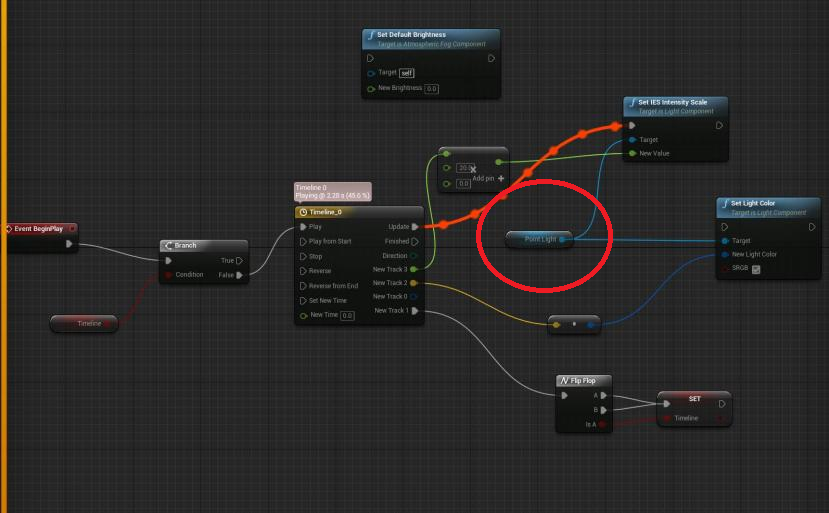
this variable, https://i.imgur.com/0YtPIzN.png
 primal forum
is that in rergard to my question ^ ?
grim ore
@primal forum right now your geometry brush allows light thru it?
primal forum
yeah, I have a box which light goes straight through
its the wall with the window
grim ore
yes a point light uses Intensity for the brightness value
pseudo swift
isnt that the one that i had in my bp?
grim ore
no, the IES intensity is not the Intensity
grim ore
@primal forum in the details panel for the brush , under brush settings, is a drop down for advanced. in there is Create Static Mesh to turn it into a mesh that should then cast shadows and block correctly
it would be Set Intensity if you want to change the brightness. Look at the light itself in the details panel and the options to see which one you want to change @pseudo swift
primal forum
the reason it's a box is because I needed a hole in the wall, turning it into a static mesh means I can put a hole in the wall for a window
box brush*
grim ore
select both of them, the window subtractive and the wall additive and then create the mesh with the hole in it
pseudo swift
i think i got the bp right but the point light vanish when i play, i might just stick with my initial bp since its a working flicker light, this might be too detailed
thanks for the help though!
must be something it doesnt like with event begin play since it works with the original node player overlap collison etc
 frank escarp
@manic pawn whats that?
manic pawn
it just appeared on the "roadmap" with no details
for 4.23
I'm assuming this is niagara stuff
pseudo swift
so i have this wheel i wanna keyframe but the rotation pivot point seem to be somewhere else than the centre even though i moved origin point bfore importing, is there a way i can change it in ue?
might be quickest to reimport maybe since its not located at world 0 even though the objects origin point is centered
 sacred inlet
I made this with brushes and want to keep the hollowness, however when I do create static mesh it turns out like this....
this is what I do with brushes
nvm got it
didnt select all the brushes
plush yew
I've got a line trace for objects that is looking for three different object types. On hit I need to know what type of object it hit but I can't figure out how to get that
grim ore
How are you looking for the 3 types?
And how are these 3 different object types? 3 different blueprints or ?
plush yew
its a mess in here but this is the basic setup. I could make three separate traces but if it's possible to differentiate with just one that'd be great
 obsidian nimbus
am i looking at a glimpse of madness? 😃
 mossy nymph
check collisionobjecttype of hit component
grim ore
plush yew
Basically I needed my characters to react to attacks before the attack hit their mesh so I made a wider capsule that only reacts to attacks
Thanks I'll check that link out. Yeah the deeper I get and the more I learn the more I realize my earlier setups are a total mess
Sequence has been helping me clean stuff up
obsidian nimbus
there is maddness down and there is madness right 😛
and the maddness comes back aswell 😛
plush yew
Wow that was fast @grim ore Thanks as always! I kept checking the out hit actor pin.
 ornate hatch
Hi everyone. Quick question, is it possible to copy a scene I already assembled in UE4 into another level ?
sacred inlet
I keep walking through a static mesh I just made... I made it so that there is collision on it
gave it complex collision
and then changed settings
 ancient lotus
did you make the mesh inside a 3d modeling program like blender?
sacred inlet
no i used brushes
sacred inlet
combined the brushes to a static mesh
ancient lotus
can you take s creenshot
ancient lotus
so you added a staticmeshcomponent to a brush?
ancient lotus
open it up and look at the collisions. im not sure if a brush will have any sort of simple collision, so you may need to force it to use the complex collision UE generates
sacred inlet
ancient lotus
looks good, is it set to use the complex collision?
sacred inlet
ancient lotus
is the object itself recognized as a static mesh? let me make a brush real quick and look
ancient lotus
hmm, mine has these options
wonder why. atleast its workin
has anyone here made fps animations with blender and put them in UE4? or even tps?
 serene oracle
 ancient lotus
when you give a democrat logic
 worn granite
Well fuck my overall neutral statement
 polar hawk
lolwat
ancient lotus
^ wert?
worn granite
nah isk
plush yew
Is a for each loop the most efficient way to check if an item is part of an array? I take the array and run a for each loop to check if the item is equal to any of the entries but is there a better way?
ancient lotus
thats probably your best bet
plush yew
Alright that's what I figured. Just wanted to see if there was an "array contains X" node or something. Thanks
ancient lotus
if there was then it would probably be doing a foreach loop inside the function anyhow. regardless that is something you will want to be performing via code if its going to be happening alot
sacred inlet
anyoone have experience with flex emitters
ancient lotus
what are flex emitters?
sacred inlet
nvidia flex
trying to spawn an infinate amount fo aprticles
particles*
but it keeps capping
kindred viper
@plush yew Array ->Contains (var)
grim ore
which just does a loop behind the scenes btw 😛
kindred viper
yeah buts its an official Epic loop so its all good :p
plush yew
based on what I post here we all know I could use it
grim ore
always found it funny it does that but what else can you do
kindred viper
the other way to do it is a hash typed array. Then you can use dictionary methods on it. But that requires structural definition in your code
I want to know why there isnt a Reverse For Each with Break in the Standard Macro lib still. Any Epic folk want to chime in on that? 😃
 fluid nexus
oes anyone here know how to animate in blender?
kindred viper
I know how to keyframe animation, but not in blender. 😦
Probably because I dont really use it but there you have it
sacred inlet
MY meshes are really shiny because I baked them
fluid nexus
i just need someone who can animate a 3d model and send it to me
sacred inlet
is there anyway to unbake
kindred viper
fire up Perforce, revert your ..... wait... do you use source control?
sacred inlet
me?
kindred viper
aye
 versed spear
not looking good 😦
 restive seal
@plush yew Yes, in C++ and BPs, there's an array function called exactly that, Contains. returns boolean if the item is in the array.
plush yew
Awesome, thank you!
restive seal
oh, just saw that my discord was behind, was answered 😊
plush yew
Still appreciate the help!
I'm basically going to rubber duck this post so if anyone sees any glaring flaws in my plan let me know, I'd appreciate it
I'm using line traces for hit detection on my weapons. I used to have the block animation play if the player was in a blocking state when struck by a weapon but that wound up looking funny. It basically went get hit by weapon -> play block animation.
To get around that, I made a big capsule called the BlockCapsule that will trigger the block animation if the player is in a blocking state and the weapon collides with that. This works great, except that the weapon now always collides with the block capsule first when tracing since the blockcapsule is bigger. So if the player isnt blocking and it collides with the capsule then the trace is ignored. If it IS blocking then the block plays as usual. So now you can never deal damage.
To get around THAT I'm going to just do two traces at a time. One for the block capsule, one for the player. That should be fine right? Line traces aren't obscenely expensive or so I've been told.
manic pawn
why? you could just check whether a player is currently blocking after the line trace
plush yew
Because as far as I can tell the trace only detects one component at a time. So if the player is blocking and the trace hits them it plays the block anim and everything is good. If they're not blocking then nothing should happen yet, snice you've essentially hit open air.
And the player is contained within the block capsule, which means that those are the only two options as far as I can tell
manic pawn
you can do a line trace multi which will return multiple overlap and one blocking hit
 vagrant flax
Hello, everyone, bit of a newb at UE4, slowly learning bits and pieces here and there, So this question may seem easy to someone, hopefully. How would I go about creating a portal effect? I cant figure out how to make the secondary camera pan with the player position, like a parallax effect? Does that make sense? Im terrible at explaining things lol
plush yew
So when you look through the portal it displays the view from the other end? Like the Portal games?
vagrant flax
Yes, exactly 😃
plush yew
I've never pulled that off, have you tried searching any tutorials?
https://www.youtube.com/watch?v=F28NKqG7ce8
I skipped to the end of this video and it doesn't look like it's as good as the Portal portals but it's the same effect and still relatively nice looking

Finally! We got around to do doing a UE4 tutorial on a topic people have been dying for, a seamless portal door effect! This one was inspired by a post we sa...
yeah he says "delay of one frame"
vagrant flax
I'll give that a try, thank you!
 rapid compass
I tried jumping right into blueprint, and....
I'm completely and utterly lost.
What.\
I don't understand what any of this means. I worked and practiced on the tutorials, but now I have no idea how to get anything done, or where to start,
How would I get a motion controller such as Touch to work?
How do I make a simple button???
im just
incredibly confused
if someone could give me some pointers or at least basic translation from programming lingo that would be great, as i'm an artist trying to make a game
i can't find my bearings
 minor rivet
Guys, anyone know why my Steam integrations not working? Isnt it just a matter of adding the steam plugin and then adding in some values to the DefaultEngine.ini file? Im following a tutorial and thats literally the only thing the tutor does. Hes able to use Steam Overlay and etc after doing this but I cant
Any help?
 coarse wigeon
Epic games is really updating the roadmap allot for 4.23 today
rapid compass
i feel dead holy cow
 hidden aurora
Nice to hear that
minor pulsar
When i import a .datasmith file For whatever reason unreal imports two of them http://prntscr.com/npln1k

Any idea's as to why this is?
 next badger
i see two different names
minor pulsar
Yes. Im not sure why its doing that?
I export using game exporter on 3dsmax.
then use the datasmith importer within unreal engine
next badger
maybe those are submeshes?
minor pulsar
Im not sure about that.

Thats what it looks like when i drag one of the mesh's out
( ignore the materials )
next badger
why not you open the mesh inspector and see what's inside
next badger
no, in the content browser, double click the imported mesh
 next badger
oh, i see now...sorry, was blind
serene oracle
I just have one thing to say
and that is:
I keed

next badger
@minor pulsar click - scene settings, then go to details - datasmith - static meshes, there should be 2 sets
 next badger
well, it looks like it has one mesh only
try to remove the datasmith scene actor from the level and add it again
minor pulsar
Already tried 4 times Still the same problem
next badger
from the content browser i mean
next badger
@minor pulsar load the scene in the datasmith viewer
minor pulsar
Datasmith viewer?
next badger
yeah, the datasmith scene viewer
minor pulsar
Is this within unreal engine? or a standalone program
next badger
um, the one you opened before
next badger
do you even looked in the content browser ?


 minor pulsar
Yeah But when i drag the mesh into the level to use. It places 2
I can't for the life of me figure out why
clicking load scene doesn't seem to do anything :0
next badger
you click load scene, it loads the list of meshes...then you click the import button (once)
and it imports the meshes in the scene
minor pulsar
Oh my bad Im extremely new to all of this
minor pulsar
Thank you for everything alexey!
WEll i build the scene and clicked the import button ( once) and it imported it into my level perfectly fine and only displays one
Will I have to do this for every single mesh? ( Last question )
next badger
@minor pulsar depends, you may assemble all the assets in 3ds max, then update the datasmith file and use the same buttons...it should replace the existing ones
minor pulsar
Awesome thank you again 😄
next badger
@minor pulsar you may verify the list of the assets once you press load (it will show all of htem in the scene preview tab
minor pulsar
Awesome 😄
next badger
"dataprep" is for scripting (like deleting unnecessary parts etc), you may ignore it so far
i also not sure if it resets or keeps all the materials defined in ue4...so be aware
test
/gone
 jade bobcat
I'm having some trouble with a tutorial
It says that I need to access the physical animation (I geuss it would be called window)
The place where you can change values for a physical animations strength and velocity, but I can't seem to find it. I am able to create the physical animation profile but I can't find out how to alter that profiles velocity and strength
If you would like me to clarify just ask, and thanks
mint sequoia
Does UE4 have any tools to validate skeletal meshes in terms of degerate triangles and other defects
 silver bone
why can't I see any curves in the curve editor
 midnight bolt
why my detail lighting view look like this? i have normal and specular textures, something has flipped cause it was fine not so long ago...
SOLVED
 wind siren
Packaging failed! ERROR: Unable to find plugin 'ApexDestruction'... I have Apex destruction installed and active, it's right there on the list as Enabled.
dark depot
are you using nativisation
wind siren
No, i'm very confused. It's literally on the menu as enabled while giving me the packaging error.