#ue4-general
1 messages · Page 423 of 1
 plush yew
 wary wave
it was great when it first came out
but then they just kept adding content rather than polish
now it's a bloated corpse, left stranded on a beach somewhere :/
 fierce tulip
is that a reference to the pirate game they made?
wary wave
pretty much, hehe
plush yew
No its the dino game
plush yew
Tameing building and tribes its an open world sandbox.
 thick knoll
I have a combined texture with RGB being 3 seperate masks, is there an efficient way to tile/pan these textures at different sizes and speeds?
plush yew
Yeah so far lots of new game content that does not work. But I really don't know of anything like it. I would never play the game if I found a game like it but that worked
 cloud cobalt
You're the one to note that the game is broken, but the reason it is broken is also because it's way too big in terms of scope
fierce tulip
@thick knoll custom uv's, or seperate textures
wary wave
Ark's scope is actually quite small
the problem is it's riddled with content piled on a broken foundation
thick knoll
Would this be efficient? -- The samples are a copy and paste of the same thing but i'd just use different channels
plush yew
Ok well I leave you be now thanks again. No need to hash on about "a bloated corpse, left stranded on a beach somewhere"😜
wary wave
I'd love to make an Ark-like game myself, but time and effort 😐
cloud cobalt
I'd love to make a space Sea of Thieves, but I really don't want to be the guy who does the online backend.
I guess we all have our dreams
wary wave
hehe, indeed
cloud cobalt
Now if seamless travel was a thing for initial server connections, we might be talking
 spark sonnet
Hello. Does anyone know how to fix this? I was just placing stuff in my new level and then my computer crashed. When I restarted the entire level wouldnt show up in the content browser. It shows in file explorer but I cant get it to show in unreal engine
fierce tulip
@thick knoll unless you want toe custom uv road, yea thats fine. make sure the textures are set to "shared wrap" in the material editor.
and that the textures itself have srgb unticked
 sullen wraith
what does this error actually mean
PIE: Error: Blueprint Runtime Error: "Accessed None trying to read property WeaponStorage". Blueprint: Enemy_CloseCombat_Fighter Function: Add Weapon Graph: AddWeapon Node: Add Weapon
im struggling to understand whats broken
spark sonnet
@sullen wraith could you send a screenshot?
spark sonnet
can you click on addweapon and send a screenshot @sullen wraith
 rapid elk
don't worry icejaff, it didn't work properly and you've already landed a job with Ubisoft or EA
hehe
sullen wraith
a job with EA? sounds about right, they can lay me off just like all their other employees.
rapid elk
haha
sullen wraith
I don't think I'm the person to hire to design loot boxes either tbh.
spark sonnet
maybe the weapon param needs a target?
rapid elk
EA Employee Requirements:
- Experience with milking people out of money to the point where it hurts
- Can bash head against a keyboard
XD
cloud cobalt
Please don't bash employees
rapid elk
i'm joking
cloud cobalt
Please don't joke about employees then, because they're people just like you, most of them with shit pay and long hours
sullen wraith
Sorry Stranger, more having a dig at EA then anything.
rapid elk
i'm aware Stranger. trust me, i'm very aware. that's why i'm joking, not flat out shit-talking
spark sonnet
But anyone who can help me with my uasset problem?
cloud cobalt
@spark sonnet Sounds like your asset is corrupted
fierce tulip

PurePolygons made the amazing procedural pack for UE4 available for everyone free of charge.
spark sonnet
so there is nothing i can do ? 😦
cloud cobalt
Well, I would start with reverting the file in source control
spark sonnet
how?
cloud cobalt
Well, are you using source control on this project ?
If you don't know you probably don't
spark sonnet
:/
cloud cobalt
Use a backup of your project to find the level then I guess
spark sonnet
Ill try
cloud cobalt
But set up source control today, too, so that you don't lose any more work
spark sonnet
I will. Thank you for the tip @cloud cobalt
thick knoll
I have never looked into source control, so to offer an alternative -- I have a master file that contains my important BPs / Tools that I migrate over to other projects when I need them. Not exactly the same thing I know but I thought I would just put it out there!
cloud cobalt
Do look into source control today though
It's seriously indispensible
@thick knoll
spark sonnet
Ok. I found an older version but I've lost alot
rapid elk
can i ask how you guys have been learning Unreal engine? just out of curiosity.
i'm admittedly really new to the whole thing and don't know super well what i'm doing, but i'm very keen to get better at it
spark sonnet
its better than anything I guess
thick knoll
an official project I am working on is getting it all sorted, so I am sure it is worth the effort! 😄
cloud cobalt
I wouldn't work more than 2 hours on anything that doesn't have source control
 dim arch
@rapid elk there are a series of tutorials on youtube
cloud cobalt
Just asking for pain at that point lmao
dim arch
watch those, then read the documentation
rapid elk
thanks yeah, well that's what i've been doing
spark sonnet
I didnt know about source control until now :/
rapid elk
problem is they only go to a certain point, and when you take the tutorials away i go "now what"
not all the time, but it's just so vastly extensive as a program, it can be really hard to get used to all the little things
thick knoll
What if I like the pain!
dim arch
once you watch the intro and bp playlists you should have a good understanding of the main systems
rapid elk
how long did it take you to feel confident with the engine? just curious
dim arch
well I have been using unreal since ut2k4
rapid elk
wow 😮
dim arch
and am still finding new parts of the engine
fierce tulip
same, and ive been using it since unreal 1 hehe
rapid elk
that's crazy
fierce tulip
but if you only use a few aspects, yea 1-2 years
spark sonnet
Ok. I found the newset autosave. Thank you for your help. Im getting source control now
😃
dim arch
if you identify the areas where you lack knowledge, make a challenge and look for the videos on the unreal yt channel you will get there
rapid elk
i want to make games independently, but there's sooooooo many areas to balance, it's hard to know where to go next
cloud cobalt
As far as i'm concerned I did some shitty custom levels on Counter strike, moved on to making shitty custom levels for UT3, and then started doing full games with UDK some years ago
dim arch
yea same here
cloud cobalt
Oh no, they were indeed shitty
dim arch
focus on blueprints because they give you a really good understanding of code, and in all honesty, these days all you need to "do" to make a game is the gameplay programming
there's a bunch of free assets available, and most systems are ready made
you just gotta be a decent LD/Gameplay Programmer
fierce tulip
start small, dream big
rapid elk
that's true. i like using my own assets for things though.
at least, the idea of it. haha
i'm a student fresh out of high school so a lot of the big boy tools like Zbrush and Substance Painter I quite honestly can't afford. and the game industry is fully 100% dead here so, you don't really get much help irl, i'm afraid
dim arch
well, the game art pipeline is constantly changing, right now you would want to learn zbrush, maya, substance, houdini etc, all those applications take a long time to master
rapid elk
yeah they do
fierce tulip
there are student versions, cant publish stuff with em but helps learning em
dim arch
learning to make good quality game assets is going to take as much time as learning to use an engine
rapid elk
yea for sure
admittedly, it takes a lot of skill and a lot of dedication
just because there's so many areas you need to cover. same with Unreal Engine as a whole really, it's just so extensive and broad, and even if you know a system after a long time learning it, there might be an update which means you have to relearn it all over again from scratch
i guess it's one of those things that you just never stop learning
cloud cobalt
Just avoid multiplayer, open-world, and complex mechanics when starting
fierce tulip
Else you end up with ARK :p
rapid elk
yeah for sure. you're not gonna create an Elder Scrolls game by yourself overnight, which is what so many new people in the industry think that they're gonna do, and then when they realise how much work it actually requires, they just give up
cloud cobalt
If you're the art type do a walking simulator, if you're the programming type do something like Tetris or a puzzle game
thick knoll
I recently found Niagra and it looks like a fantastic system to learn but its yet another thing that will take some time!
rapid elk
the lighting/visual effects thing?
 void blade
hey everyone can anyone help me with troubleshooting 4.22 preview7? crashing on launch saying my drivers aren't up to date but I have latest one installed. using a 2080, latest win10 updates installed and -dx12 launch flag is set
rapid elk
hmmmm
rapid elk
if it's crashing with launch with that version specifically, i'd honestly just say screw it and wait till stable lol
considering the nature of testing versions anyway and the fact they're not necessarily tested properly yet or feature-complete, it's not really advisable to do much with until it's actually out in my honest opinion
is there anything you need the preview version for in particular?
void blade
just really hyped for raytracing, nothing too pressing
i am using 1809
waiting for release version might be best I guess. still i'd really like to test out performance and see where the limits are on the 2080 currently
 merry gazelle
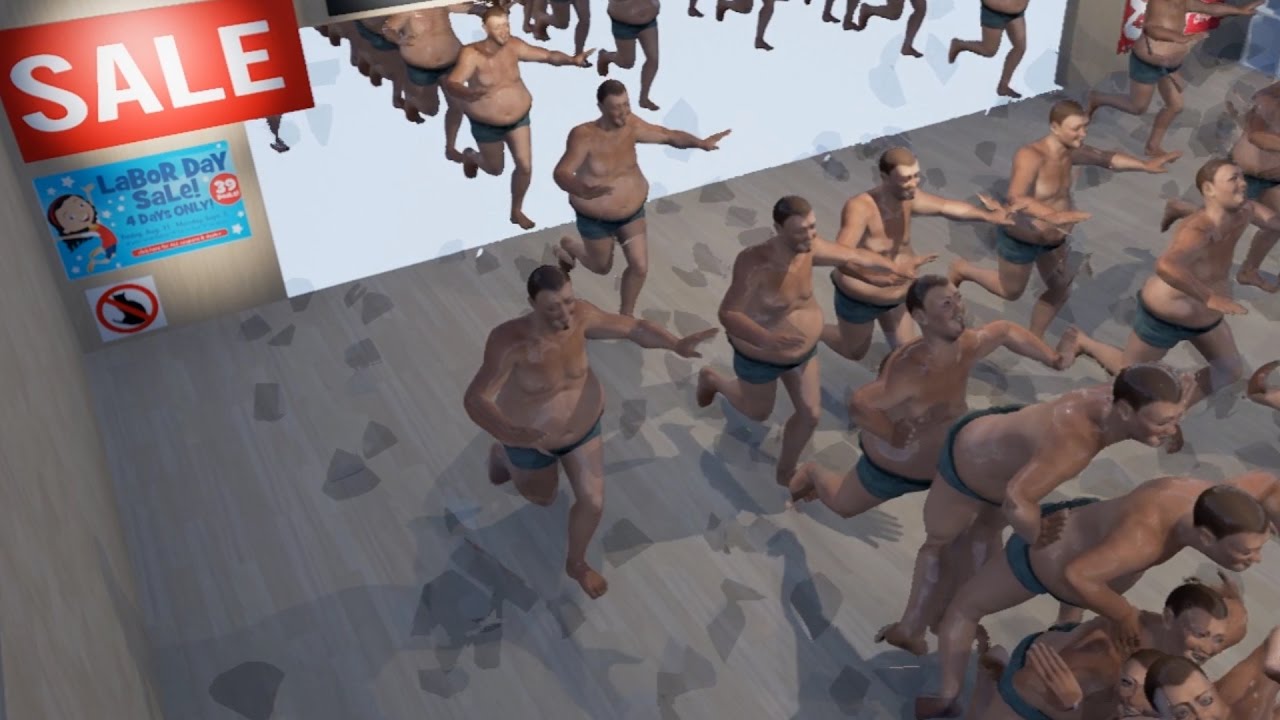
A visualisation of Black Friday in Unreal Engine 4. Song: https://www.youtube.com/watch?v=R9CNaU6Xky0 Made by BuganBoB.
rapid elk
that's nice actually
 regal mulch
That guy though
How easy is it, based on a Floor Normal as Up Vector, to compute a new Right and Forward Vector, while ensuring that the Forward Vector is always inside of a given plane?
cloud cobalt
Easy
regal mulch
Currently, I take the new Up Vector, use two crossproducts to get the new Right and then Forward vector, and that's it
But that doesn't make sure that Forward stays in a given Plane.
The Plan would be defined by the ControlRotation
E.g. this is the base rotation, Camera is what you see
(not the bottom right)
And forward is the red arrow (middle of the pawn)
Now if I rotate it on "Pitch" and "Yaw" (this is not always relative to WorldXYZ!), it might be that the Forward of the Pawn is not in the Plane that the Camera constructs with it's XZ axis
Hard to explain
cloud cobalt
I get it, I think
regal mulch
The Plane I mean is the one that slices through the camera , vertically in the middle
cloud cobalt
How about a nice cross product of Up and the plane normal to get the forward vector ?
regal mulch
THis would still be okay
It's now tilted roll and pitch
But the red arrow is still in the plane (+-)
While the current calculation could cause this
(red arrow not in the plane anymore)
That basically causes the Quat that I calculate for this Floor Normal offset to offset the forward vector of the pawn
plush yew
have an origin point and an up vector, get a plane passing through the origin with the up vector in it, make a vector perpendicular to the plane with origin at the point (right vector), cross right and up to get a forward vector
regal mulch
So if you get on straight floor again you ahve this: https://i.imgur.com/J84dUhY.png
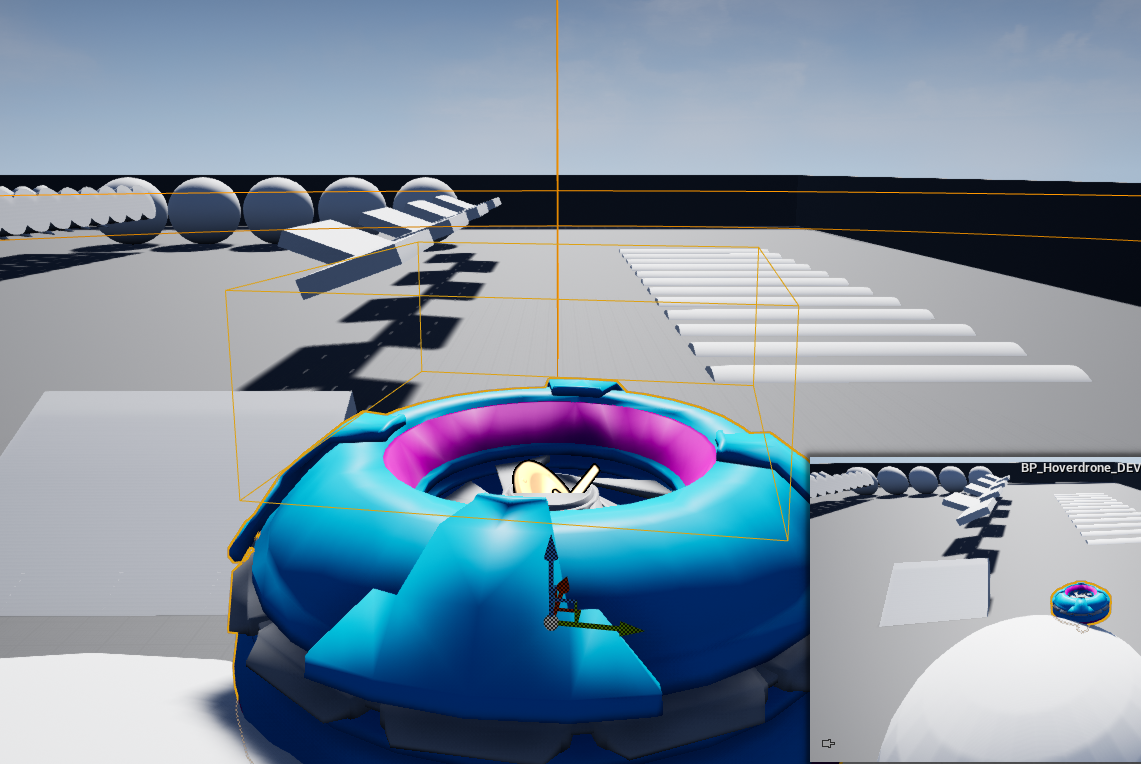
Pawn slightly rotated on yaw
I didn't notice this before cause I based the camera on the pawn rotation, but now they both use an indipendent control rotation so the problem shows
cloud cobalt
Doesn't up cross plane normal work to get the forward vector ? ?
regal mulch
const FVector OldForward = UpdatedComponent->GetForwardVector();
const FVector OldRight = UpdatedComponent->GetRightVector();
const FVector OldUp = UpdatedComponent->GetUpVector();

const FVector NewRight = (NewUp ^ OldForward).GetSafeNormal();
const FVector NewForward = (NewUp ^ OldRight).GetSafeNormal();
That produces the problem
NewForward seems to end up outside of the plane
cloud cobalt
const FVector NewRight = (NewUp ^ NewForward ).GetSafeNormal();```No, that won't work I think
regal mulch
I thought about getting NewForward
And then projecting it onto the plane
To basically keep the "Pitch" value, but remove the "Yaw" value
I hate "spamming" the server with this stuff :D sorry
void blade
anyone mind looking at my crash log for 4.22? https://forums.unrealengine.com/unreal-engine/announcements-and-releases/1583659-unreal-engine-4-22-preview?p=1600551#post1600551
Unreal Engine Forums
PREVIEW!
Preview 1 of the upcoming 4.22 release is available now on the Launcher and GitHub. We are making this Preview available so that our developer community
gl cedric 😃
regal mulch
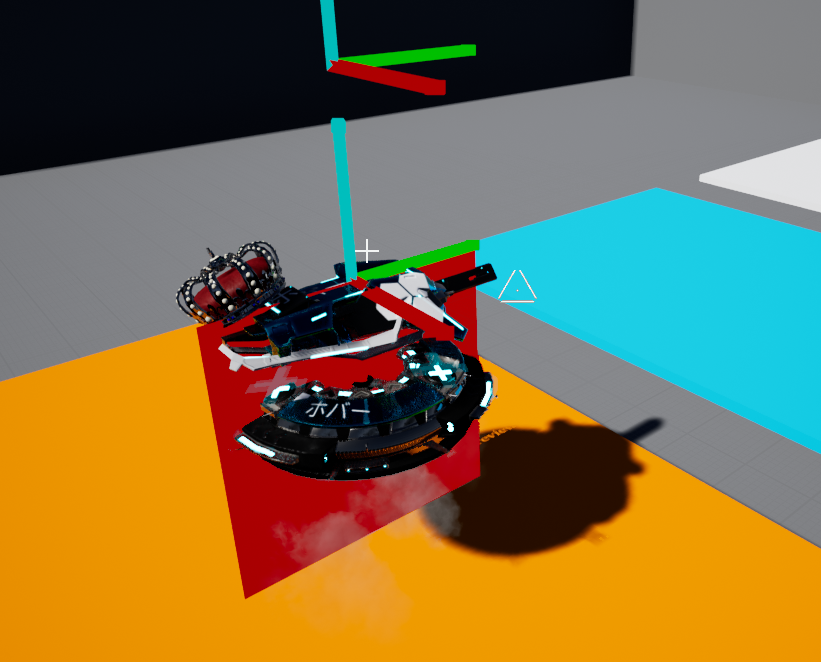
Also that's the plane I mean
Just image the camera still rock steady behind the pawn
regal mulch
Yeah, the ControlRotation basically
wary wave
@void blade - there is no crash in that log
regal mulch
FPlane ControlPlane = FPlane(UpdatedComponent->GetComponentLocation(), ControlQuat.GetRightVector());
DrawDebugSolidPlane(GetWorld(), ControlPlane, UpdatedComponent->GetComponentLocation(), FVector2D(150.f, 150.f), FColor::Red, false, DeltaTime + 0.02f, 10.f);
Right
regal mulch
I would hope so. I'm a bit drained atm
cloud cobalt
In this case, FVector::CrossProduct(Up, Right) should definitely give you a correct forward vector
Or i'm useless
regal mulch
The OldRight is teh Component one
If that is slightly different than the control one -> rip
cloud cobalt
So, take the control one ?
void blade
@wary wave hmm okay my editor crashes on startup when i use -dx12 shortcut flag
regal mulch
So Forward first with old ControlRight one
Will test (it might really be that simple)
void blade
@wary wave I don't get a send crash dialogue or anything just a window saying my drivers are out of date
cloud cobalt
It looks simple at least
wary wave
there's literally nothing in the log file
cloud cobalt
@void blade remove driver, install new driver
regal mulch
The whole CalculateQuat function has more comments than code haha
cloud cobalt
What's your GPU ?
wary wave
it looks like a manual editor quit from the log
[2019.03.29-11.58.25:676][201]Cmd: QUIT_EDITOR
 paper kernel
failsafe of sort?
paper kernel
duct tape fix
wary wave
IIRC you need to be on Windows 1809?
void blade
got win1809
removed my 2nd and 3rd gpu
reinstalled drivers
let me record a vid real quick brb
wary wave
it's literally an editor quit command :/
void blade
alright game dvr won't let me record desktop so here's a screenshot
wary wave
oh, that's not an Unreal problem
wary wave
or rather it looks more like a common Unreal / Nvidia mismatch
that it's reproducible though is unusual
void blade
wary wave
but yeah, if your driver is crashing, it explains why UE4 is just quitting
void blade
yeah
i can launch the editor without the -dx12 flag just fine
seems to be an issue with that i guess
wary wave
seems weird they'd ship a preview with a guaranteed crash like that, so I'm guessing the problem must be local somewhere :/
plush yew
I keep deleting materials in the engine, and they reappear all the time, what is this about?
void blade
cloud cobalt
What's your GPU ?
void blade
2080
wary wave
it's a 2080
plush yew
I also moved content from one directory to another and deleted the orginal folder. THe original folder also reappears all the time. How to fix this?
wary wave
it's an obvious hardware config
void blade
i have a second 2080 and a titan x aswell but i unplugged them since people on the forum had some issues with multi gpu launches
they are still in the mainboard though, i just unplugged the powercables
you think it's worth trying to remove the whole gpu? it's a bit of a hassle though getting them back in i'd prefer not to do that
cloud cobalt
If the GPU doesn't show up in device manager it' fine
void blade
yeah they don't i checked
 copper flicker
how do I make an object move from A to B.... 😄 without an AI controller.
add movement only works with player controllers
oh, and I want to use Character Movement
and all its settigns
regal mulch
You could just apply MovementInput manually
But I doubt that's better than just utilizing ais
wary wave
an AI controller doesn't need a blackboard
copper flicker
and reuse character movement
wary wave
nor does it need anything outside of BP
wary wave
literally what it says on the tin
copper flicker
but a player controller takes input from an actual input.. like a gamepad
the AI contrloller takes input from?...
plush yew
@copper flicker
plush yew
teleport object from a to b
copper flicker
that's instant?
plush yew
yes
copper flicker
I need movement from A to B
I'll try apply movement input..
whatever that means
😄
wary wave
or just 'Move To'
 whole quarry
you could use FInterp
copper flicker
move to doesn't work
wary wave
Move To works for any character
copper flicker
dunno how.. it asks for a Controller
wary wave
you should have a controller
copper flicker
I don;t
wary wave
all pawns should have an associated controller
whole quarry
get AI controller or smth?
void blade
@wary wave i'm getting a error43 in the device manager i will try a clean uninstall/reinstall of all my graphics drivers. reporting back soon thx for all the help so far peeps
wary wave
AI controller is fine
copper flicker
well, if I can figure it out
I don't understand the logic of an AI controller
since all the actual controlling I'm doing myself....
in BP
whole quarry
thats ok, just learn how to use it
wary wave
....the AI Controller IS a blueprint if you want it to be
copper flicker
ok, so there is no Apply Movement Input
there's only Add Movment Input
and that doesn't work
with AI
there's Add Input Vector..... which also doesn't seem to move anything
void blade
hmm still getting this warning sign here
i figure maybe i need to completely remove my 2nd 2080? i unplugged the pins but maybe it's getting some power through the pcie? i only checked in afterburner and only one gpu is showing up there but there are actually two in the device manager
cloud cobalt
Uh yeha remove it
It shouldn't appear at all
Or keep it plugged in and powered unless you saw issues
copper flicker
so.. how do I apply movement input to a pawn that's not controlled by the player?.. O o
I've done it before so I know it's possible
I just don't remember how
: <
void blade
@cloud cobalt did you get 4.22 to work on your machine?
cloud cobalt
Yeah
void blade
i'm sort of confused because i'm not sure what build sjoerd de jong is using in this presentation and whether you still need to set the flag on the shortcut etc or if that was only for the version on github? i figure you still need to set the flag?

As of Unreal Engine 4.22, Unreal’s renderer will support the new DXR API for real-time ray tracing. During this Unreal Engine Learning Theater session at GDC...
i'll remove my 2nd gpu and try again. brb
void blade
mhm removing 2nd gpu didn't fix my crash
i never ran into any problems so far with my gpus i use them for rendering in octane usually
i'll switch them out and see if that error persists if its the main gpu
i think it might just have showed up since it was plugged into pcie but no power was connected
don't think its actually broken tbh because in octane it works fine and i never saw that warning before i unplugged power from it
swapped gpus i think it was only because it had no power connected
 little salmon
Hey! Looking to grab a laptop for myself purely for Working while travelling.
How we feeling about a 1060, 16 Gig Ram and a i7-8750h?  This again is purely for small work while travelling.
void blade
@cloud cobalt what driver version are you using?
sounds pretty good @little salmon
not sure if there are laptop versions of the 1660 series yet but that might be worth considering
little salmon
Not that I can see in my retailers here. But I'm not looking for something way up in the price. This is just for using when I'm not at home.
void blade
oh okay so you are using 4.22 but no raytracing then
i can start the editor without the dx12 flag aswell with no errors but as soon as i use that launch flag it crashes
1660 series is kind of midrange in price, similar performance to 1070s
but lower power consumption than the 10xx series
 dapper idol
is there a way to "tesseallate" the hit box after the material got tessellated?
void blade
anyone here that got raytracing to work in 4.22 and can tell me their driver version and whether you still need the dx12 launch flag? I figure it still needs to be set because that video is only 4 days old but yeah you never know what might change i guess
because in the vid he talks about compiling it through github but i got it through the launcher so it might not be necessary anymore maybe?
 pearl saffron
 sleek spear
in 4.22 preview 4 or 5 i think, raytraced global illumination denoising was refining the image every frame, without loosing previous frame information, like a large temporal smoothing. if view didnt change for a while, the image became very clear. this behavior changed in later preview builds. does anyone know how to recreate this behavior? i tried with temporal aa and various temporal console commands but didnt do the trick
 finite slate
Just made an incredibly useful discovery that I think fellow mobile devs can benefit from
If you have a Samsung phone
and you are testing your app for Android
You can send it to your phone over wifi with Samsung Flow if you can't/don't want to hook your phone up to your computer with a wire
Instead of using Google Drive
 iron sparrow

reddit
1 vote and 4 comments so far on Reddit
 grim ore
you can adb over wifi as well if bored 😉
iron sparrow
If you can do it wired you can do it wireless with a little modification yourself always :p
iron sparrow
Montage @sullen wraith #animation
sullen wraith
hmm cheers 😃
iron sparrow
O Jeff sorry didnt see pic, use your pawns mesh to play montages. @sullen wraith
You can always backwards drag a pin over it to find out what kind of node should go into it.
plush yew
Hello fellows I've already asked this on #animation, but you know better be sorry that not having the info I want ^^ !
I'm looking for some good tutorials on procedural/physical animations, I tried to check some (the main ones you find on youtube) they are either too old to be used with 4.20 or 4.21 (the options are not the same) or the end result is like ... unusable, like most of the time it's "hey look, here you go you add physical animation and a custom profile to your character, with a bunch of stuff to tweak" look the character is doing some crazy funny shit with his arms and looks like he want someone to put an end to his suffering. Cool to share the knowledge tho, always, but not really usable in a game.
 lofty wave
Hello,
I have big problem with UE4!
I cant cook/package/launch any game i made with ue4
Can someone please help me!?
cloud cobalt
What's the error
lofty wave
ok
cloud cobalt
Looks like it should be on #packaging
cloud cobalt
np
copper flicker
and this is why there are days when I absolutely hate Unreal.....
without that small hidden obscure check, an AI won't use Character Movement
they joys.... of using a dense software with a ton of hidden features
O o
grim ore
never tried a character without a controller so glad to know that exists 😃
 supple totem
@dapper idol in the landscape actors properties, there is a checkbox to bake new collisions based on world position offset
i dunno if it works for tesselation but give it a try
supple totem
yeah, dunno if your material could use WPO for the effect rather than tesselation
dapper idol
hmm need to look, I'm not that great with mats and this is a auto landscape mat which is very complex
supple totem
ahhh i see
finite slate
I just had a miniature panic attack
I thought I lost my Google Play developer account
Out of pure luck I GUESSED the email
I tried a random email that seemed like it might be something I do
It was a real email
I tried some passwords
and it freaking worked
 azure shore
holy crap what even is that material
 restive fern
lets say u have character and weapon and want to throw it. would u do it from weapon bp and use character variables like "inHand" or do it from character bp and use weapon variables ?
maybe its more optimized if i get input only in character hmm
 thorn topaz
What is the format for epic emails? i thought it was FirstInitialLastName@epicgames.com but apparently not?
 livid haven
thorn topaz
livid haven
thorn topaz
ah, thanks
livid haven
Granted, first name may vary based on stuff like Mike/Michael and such
thorn topaz
right
livid haven
There's at least one case with two people having identical first and last names where something atypical was done. I don't recall what.
I know there were extremely recent changes to e-mail filtering. May end up in spam if they don't know you already.
 fluid stag
@dapper idol you might be able to use world position offset to counter the raising effect of the tess, I do that for POM because it drops the visual surface down
dapper idol
Wdym counter?
fluid stag
so world displacement is raising the surface to produce the bumps, WPO can be used to lower it, so you'd get the vertex normal and position, then multiply by a negative tweak value to bring it down (counter the raising of tess but not losing the bumps and stuff)
 naive junco
Hey I made a lil' thing in Blender and imported it to ue4 and it looks okay with the lights and all but if I build the lighting the whole thing goes blue/black and then when I zoom in on it it goes entirely black
I have placed a light above it
fluid stag
@naive junco go into the details of the model and increase the lightmap UV resolution
its default 64, maybe take it to 512 or something ymmv
 abstract relic
Also place a light mass important volume in the scene
fluid stag
you can edit it in the model preview window, or in the scene, if you click on it in the scene, in the list of details there should be "overridden lightmap res" in the lighting section, checkbox and value
or if you open the model preview and scroll down to static mesh settings there should be a lightmap uv value there
naive junco
with details you mean the details thing on the right, right?
fluid stag
yup
naive junco
no?
 frosty copper
🤔
naive junco
Only this
fluid stag
ahh its a BP
so you can do it inside the BP editor
or simply open up your static mesh you imported
naive junco
How?
naive junco
How do I get the BP editor?
fluid stag
there should be a blue button when you click on it "edit blueprint" but the better way is to set the resolution in the mesh like I show there
fluid stag
on the left there are a list of items, one is your mesh, click on that then the mesh details will appear
naive junco
I still don't see it
fluid stag
click on the one called circle
naive junco
okayyyyy thx
fluid stag
np
dapper idol
@fluid stag or I can lower the tessellation? Or did I missunderstand smth?
fluid stag
you can lower it by putting your heightmaps into a power node before multiplying them, and using a scalar on the power node to tweak it
naive junco
It still does this even if I set it to something like 2000
fluid stag
I would say your lightmap UVs might be messed up then or something else isn't working properly, make sure the mobility of the mesh is set to "static" in the mesh details
dapper idol
@fluid stag
fluid stag
yeah if you just lower the displacement you will lose the bumpy effect of the tessellation
using world position offset gives you a way to lower it without changing the displacement
naive junco
Hey sorry to be such a bothering noob but could maybe someone then please look at my file?😅
dapper idol
@fluid stag won't the the bumps go away as well?
 chrome summit
is there a way to disable it moving other axis?
fluid stag
@dapper idol think of it this way; world displacement is a pile of rocks you put on a table, world position offset is the table
so you are lowering the table, not flattening the rocks
naive junco
Wait does a file specifically need textures to be accept as something where light can go on in ue4
Like I made my model thing in blender but haven't put textures on it
plush yew
@chrome summit you can detach the camera from the character and just get it to match his Z axis
I think
chrome summit
@plush yew detach it with blueprint right?
plush yew
Not really detach it in your level, and then make it follow the player Z position with blueprint
In your level blueprint
chrome summit
which blueprint should i use to make it match z position
plush yew
Like you kill the follow camera of the player, add a camera in your level and in the level blueprint make a reference to your camera, a reference to your player then make the camera follow the Z position of the player
I think that would work
(or you could maybee clamp it in your camera manager but I really don't know nothing about camera manager for now 😃 )
Like maybee in your event begin play
GEt player camera manager
and Set the View Pitch min and Max
chrome summit
so i made that
when you start playing you see through the camera that i added
@plush yew
plush yew
What if you just try to activate the camera ?
plush yew
Ah sorry my bad
 dry moon
You can do tessellation through material functions right
chrome summit
actually z location
plush yew
Maybe with a set world location
Setting just the Z axis and keeping the Y and X of the original camera position
Like get world location
set world location
And from the player ref get actor location
and set the Z
By breaking and making the vector
chrome summit
i did it
now i have to make it take location z from my actor
which blueprint should i use to get z location?
grim ore
recombine the location on your target node or split the return value location struct from the get actor location node
grim ore
then split the get actor location struct
chrome summit
it works THANKS
dry moon

Does anyone know why tessellation not working here
Flat Tessellation is set, adaptive is set as well
Oh wait

Yeah setting it to world displacement, ya same issue
 delicate turtle
Does anyone know if you can switch your keyboard input from US to "US International" and still somehow use the tilde key to open the console? Because it just stops working when you switch to "US INTL".

 wild ginkgo
@delicate turtle you can add further shortcuts for the console
in project settings
"short cuts" keybindings whatever
you know what I mean
delicate turtle
It's just a shame that it is not usable.
wild ginkgo
+1
delicate turtle
German here as well, that is why I usually use US keyboards.
wild ginkgo
I think something like the home key would be more convenient as a standard
I assume it even exists on osx
naive junco
Hey how do I put a texture on a model in ue4?
wild ginkgo
double click the static mesh asset
you get a static mesh editor
or place it in the world and drag materials on top of it
not a 3d guy but I think that works for static meshes and bsp's
naive junco
Okay nice thx
wild ginkgo
sure
 cursive bridge
Is there anyone who can speak german
wild ginkgo
ja
cursive bridge
Wow
wild ginkgo
you're lucky that's all
@delicate turtle seems to talk german as well that being said
likely quite a few around here
but I would have missed the question any other moment 😃
wary wave
Bisschen
 manic pawn
🇩🇪
wary wave
Ich bin nicht fliessend
dry moon
Anyone know why landscape tessellation doesn't work but applied on a static mesh works?
wary wave
lewd, how so?
 dry shuttle
wheres the best place to go to get info on making a server for a multiplayer game and have the ability to update when the server updates.
delicate turtle
@cursive bridge hier
wild ginkgo
@dry shuttle the c++ channel
wary wave
how on Earth do you get 'wet' from fliessend?
wild ginkgo
it just sounds this way, can't help it
dry shuttle
been there
wild ginkgo
if you're about real time updates, not patches
also note, it's, afaik hero engine's strong point, without trying to advert it in any way
 true leaf
Ability to update when the server updates... You mean having a launcher that updates client files. ???
I thought typically you'd just... Build new client and server files, deploy the new server files , and then instruct the launcher to fetch the new client files on each client when they open the launcher
dry shuttle
@wild ginkgo what im looking for is when i make updates or change things in the game i can upload them to another pc that will be running the server and then send out the up date or patch to the clients.
true leaf
In general, you'd set up a 'client patching' server with an API that client launchers talk to
dry shuttle
yes
true leaf
The client launchers always ask the API for the latest version
And if it's different, it download the files from that same client patching server
Boom. Done
dry shuttle
yep thats what im looking to do
wild ginkgo
I think it's not how ue4 deals with it. Instead it would expect to have a server (not the game server) that provides downloadable content and load that in real time in the game for all clients, whereas the game server likely doesn't even care as it doesn't bother 3d content all that much. But the later part here is now what I make up, I don't do multiplayer. In any case you want to download stuff for clients, whereas you'd likely take down the server and patch it in a maintenance update, from all I understand.
dry shuttle
yea im just looking for documentation as i do read them not like some people and want the quick way out
true leaf
Yes you would take the server down and swap out the server files, and you'd also have to either 1) tell all the users to manually download new client files or 2) give the users a launcher to auto check for new versions on an API and auto download the new files for the user client
wild ginkgo
basically like with web pages, you can push new content to a live site, but you do code updates on the server side offline
true leaf
For my multiplayer game right now I am just doing #1 ... I will build a launcher and a patching server later to automate that for my users
Not a big deal though
 coral patio
Hey guys! I got a question about animation - how do I snap key frames to seconds of fractions of seconds? I activated snapping which lets me snap the range but not the keys themselves for some reason
wild ginkgo
really look at the lower portions of asset manager docs, I think that's as advanced in terms of real time update as it gets
dry shuttle
im just starting to make my game but i want to get this going so i wont have to worry about it later so i am able to test it out with a friend with the small level i have now then i can just add to it and change things
true leaf
If you are just starting out you don't need an auto patching launcher yet , I host my client files on itch
wild ginkgo
this will definitely be the tricky stuff
true leaf
Games with launchers as examples are EVE, Apex, I think Minecraft has a launcher now lol but it didn't in the beginning
dry shuttle
im not sure how itch would work though i would have to read into it and see about going that route for now, but i would still need docs for making the auto patching service for my game.
true leaf
EVE is interesting because when you download it on steam now, you are really just downloading the tiny launcher and then that fetches all of the actual client files . That way the devs don't need to reupload builds to steam
Hmm I'm not sure you will find many docs , it's kind of a custom thing .. roll your own
Maybe there's something out there , one sec
dry shuttle
kk
coral patio
Does anybody know how to snap keyframes to seconds in the Matinee? Do I have to hold a certain button to do that? The snap option doesn't work for that, just for the overall time range.. :/
 lofty hollow
 spare sun
well you had the trial 😅
 copper fable
hey guys, my material has the D-Buffer set to "None" but it is still receiving Decals
is there anything else i need to do?
naive junco
Hey if I rebuild lighting it gives this error: https://docs.unrealengine.com/en-us/Shared/Editor/MapErrors?utm_source=editor&utm_medium=docs&utm_campaign=msg_log, I still don't know what to do....... 😦
Anyone know what causes this error because this unreal website gives me headaches
 still orbit
when I middle click on a tab in UE to close it, it also moves to my other monitor. It's driving me nuts as I can't unlearn this habit of mine for closing tabs, has anybody dealt with the same issue?
copper fable
@still orbit mine works fine.
still orbit
that only makes me more frustrated
azure shore
is there a kinda doable way to optimise tf outta decals and still have them looking decent
I know some guy did it but it costs like 2 livers or something so
kiiiinda need to do it myself
either that or a way to flatten particles
as in when a particle hits a surface make it go flat against it
still orbit
thanks @copper fable , that actually helped me locate my issue, I initially assumed its a bug for everyone
display fusion was causing it , a different program
copper fable
i didn't do much haha, but glad you sorted it! 😃
still orbit
well had you not replied I'd still have had that assumption, which was fair for me to assume that
azure shore
soooo yeah
azure shore
is there a way to optimise lots of physics objects, such as stopping their simulation
ok cool
dry moon
Best bet is to make it a new BP, have tick set to some large number so it doesn't tick often
and then when the velocity is 0 once its checked, set the tick disabled and simulation to disabled
or that's what I'd do at least
 slate imp
one of the shaders doesnt compile on dx12, how can i launch the editor to find out which ?
 wild ginkgo
run via vs?
slate imp
the shader is in C:\ue4\UE422\Engine\Shaders\Private\RayTracing\BuildMipTreeCS.usf
its raytracing only, so dx12 only, why cant it find it for dx12 platform then
ill clean my projects
 mint yacht
https://gfycat.com/MerryPettyBluejay Hi everyone, so i've made a lot of progress on my tiled wall build script, and i have you and the subreddit to thanks for the tip. I got one more question though. How do i make the other tiles update if i move one?
 fierce tulip
#looking-for-talent read the pinned message
 proud verge
When is UE 4.22 going to be released? now its preview 6 and people keep talking about lots of bugs, but DEV said it was going to be release by the end of march, what do you know?
Do you think DEV team already added Directional Gravity for Charachter BP with movement component, requested since 2015?
grim ore
it is in preview 7, it will be out when its done and will have bugs. There has no been direct mention of directional gravity.
@mint yacht about all I could think of is when you detect what you are near you tell those items to update themselves as well or you have one master BP that spawns in and manages the layout
finite slate
Anyone else having issues with right clicking?
Mainly in graphs and scroll menus
This keeps happening when I right click in graphs

No, that isn't cut
It teleports my mouse back to that position
grim ore
high dpi moitor or using monitor scaling?
 fringe iris
Does anybody know a good kinda beginner ue4 course?
finite slate
The documentation
The best way to learn imo is to just go in and mess around
When you can't figure something out
Google it
Go to the documentation
azure shore
cOdInG yOuR oWn GaMeS?
, iS eAsIeR tHaN yOu ThInK
you know, you should try this online udemy course
azure shore
lol same
azure shore
I just say making
finite slate
Yeah
Because I don't even code
I am learning C++ at a rate of about 1 course a month
azure shore
yeah with ue4 realistically you dont even have to write any code to create a lot of games
abstract relic
Coding is used when they have no idea what they’re talking about 😜
finite slate
lol
Or when someone who does know what they are talking about is trying to conversate with s i m p l e t o n s
azure shore
I feel like its bad that I can barely write one line of bloody code
I mean it is bad because Im failing computer science because of it
and the fact that WE gotta learn how to do binary addition when COMPUTERS do it FOR US
mint yacht
@grim ore How would i make the copied tile update it's neighbors?
grim ore
how does the tile you are using now know it should change? how does it know it has neighbors?
mint yacht
It's using collision boxes to detect it's neighbors. It only updates it's self when it's moved. If i hit compile on the blueprint then they all update at once. That works but i'd like it so i didn't have to keep hitting compile to update all the tiles.
grim ore
when it moves and calls the code and uses a box to detect the neighbor can you not tell the neighbor to update itself?
mint yacht
I don't know how to do that
What can call to it's neighbor to tell it to update it's self?
grim ore
well what do you call now to update itself?
mint yacht
Nothing, every time the construction script is executed it goes through the process of checking it's neighbors.
grim ore
ok so move the construction script to a function in the main event graph and then call that function from the construction script
now you have a function you can call whenever you want on that item so when you check the collision on the item you moved have it talk to whoever it collided with and redo it's construction
alternately if you had one master BP that allowed you to spawn in the children it could keep track of them all then call the script when needed
mint yacht
But don't Event Graphs only execute when the game is running?
grim ore
they run whenever you call the items inside, construction script is just an event graph with one event in it which is called when it constructs the object
you can call functions from the editor if you set it up, construction script is just one way along with Blutilities and other editor functions
 thorn vector
Hi i wanna ask how do in make aoe
grim ore
Man.. Yoshi's crafted world is a really good looking and fun ue4 title on the switch.
 ornate night
Does anyone know what day 4.22 is set to be released?
 brazen forum
Hey guys I'm having trouble with something. It seams like every time I import an fbx model into unreal, there is like some kind of default effect that it puts on all of the materials that were imported by the fbx. The effect I am talking about is that all the material on the fbx appear glossy (kind of shiny) and it kind of ruins how its supposed to look.
grim ore
4.22 has no release date. When it is done. Soon.
Set the specular on the materials on the material you imported to 0
brazen forum
yeah but is there a way to set all the speculars on each material to 0 all at once?
Because my map I imported has like a billion materials lol
grim ore
Not really unless you reuse the same material
Import without materials then set them to your custom material
ornate night
Ahh, I thought I heard something from GDC that someone from epic said about it being released "next week". I think in the state of unreal video?
grim ore
They did say that. It is not released. So goes software development
If all your meshes have one material slot you can probably select them all then replace the material.
brazen forum
I'm not exactly sure what you mean by set them to your custom material.
im kind of new to materials
and my mesh uses a lot of materials
im importing a large map basicly
and it is 1 object
and has lots of materials on it
grim ore
Are these materials real materials with textures and maps or just plain colors?
And by custom material I mean you have a material that is set up how you want it then you go thru the meshes or level and replace the materials on the meshes with your custom material. If we are talking unique materials with actual textures then yes you are going to have to do it all by hand and edit the materials to remove the specular and possible set the roughness or metallic if needed.
 worn spade
might be dumb question, tryin to get back into Unreal. Why's my auto generate collision greyed out? trying to import a few simple rock meshes
 glass ingot
hey guys after successfully integrating gamelift and testing matchmaking and queues for 2 weeks now I realised that my project was android. in gamelift sdk the macro #IF WINDOWS specific ally tells that it's for Windows. but it is platform independent(gamelift). Does anyone of you have ever done android Multiplayer game. With server hosting from aws gamelift or any other service
 maiden swift
@glass ingot Please don't spam your message across multiple channels. I've deleted the others and left the one above. Thanks.
glass ingot
sorry i was looking for quick reply so....
 frail iron
Does anyone know how to attache a cable component to a socket?
 weary basalt
Set the Endpoint to the Socket location?
frail iron
I tried but since it is using world location it sets the end location to crazy values
 naive apex
Is there any way to make it so that using PlayInEditor will use a level other than the level that is currently opened?
 oblique sorrel
Quick question: if I have a plane that consists of 1000 vertices, and cover half of that with a 4-vertice plane, does Unreal render 1004 vertices, or 504?
 summer verge
Has the "My Votes" page on the issue tracker site ever worked?
naive junco
But what causes this?
wild ginkgo
build the lighting ^^
wild ginkgo
yes it takes some time
also if you move stuff after, it will want to build lighting again
wild ginkgo
that's a very broad question
https://docs.unrealengine.com/en-us/Engine/Rendering/LightingAndShadows
https://forums.unrealengine.com/unreal-engine/events/107078-training-livestream-lighting-techniques-and-guides-jan-24-live-from-epic-hq
https://forums.unrealengine.com/unreal-engine/events/113380-training-livestream-lighting-techniques-and-guides-2-dynamic-light-april-4-live-from-epic-hq
Unreal Engine Forums
Trade Shows, Livestreams, Dev Tours, Workshops, and Other Official Unreal Engine Events.
Unreal Engine Forums
Trade Shows, Livestreams, Dev Tours, Workshops, and Other Official Unreal Engine Events.
some starting points
naive junco
okay thx
wild ginkgo
there's also some channels on this server that focus visuals
brazen forum
Hey guys
i am using the already provided character movement component
and i am trying to figure out how to make it so that the character always snapps to the ground
it seams like when i go really fast over a corner my character flies off the ground and isn't able to run on it
so how can i make it snap to the ground
paper kernel
you need a linetrace for that
get normal vector of the floor, project character velocity vector on a plane using that normal
but this essentially eliminates any ability to jump
(you can still fall tho)
 dim merlin
Hi, anyone knows why this would happen:
Cannot open include file: 'CriticalSection.h': No such file or directory
Any include im missing? Should be in core right?
chrome summit
Guys i need help
am trying to launch my game through my phone but i get that errorr
 latent moth
can someone tell me which settings to check in foliage to avoid them being overlapping?
restive fern
@latent moth looks like real life tbh
latent moth
hum... well not really... plants do not come out of there
i think the issue might be the bounding boxes, by default they were set to 0.5
paper kernel
engine is getting on my nerves again
for what ever reason, calling RemovePlayer on index 3 just doesn't work
....right, because it Auto-sorts them faster than I can delete
chrome summit
Guys am making a mobile game and i want to make when i rotate my phone right and left to move my character
naive junco
Hey when I try to save it says this:
sullen wraith
how can I check to see if the animation has finished?
sofar the next node fires straight away
wild ginkgo
anim notifies
this would involve the anim graph, not sure if it can be done the way you do above
cloud cobalt
@naive junco Are you using source control ?
This usually happens when a process locks the file
naive junco
@cloud cobalt Should I use source control or not?
cloud cobalt
Yes absotutely
cloud cobalt
Depends on your project, needs, team size, $$
cloud cobalt
For $0 if you want online source control, Git + Gitlab is pretty much the only choice ; but be warned that Git isn't really the best for games, and you have a 10GB limit that's very quickly reached
Perforce is free if you're solo but it has no hosting
So it would work just on your machine
naive junco
so perforce?
cloud cobalt
Do you have more than 1 project open ?
 silver crown
Gitlab is limited to 10GB?
cloud cobalt
Delete the file manually in Windows explorer then
@silver crown The free hosting, yeah
silver crown
oops
naive junco
Like the file that causes it?
cloud cobalt
The file that files to save. It's built data, so it's not lost work, you might just need to rebuild lighting.
Don't do this for anything but "builtdata" file
 ruby salmon
Would you consider it normal to have to build 4k+ shaders to render a blank map with a floor and a skybox? (Android dev)
I've never seen anything like this just running native PC so not sure if this is to be expected. Seems to be mostly on the first run (first build taking about 30 min for a floor)
Added a cube on the second run and took about 1-2 min to compile with 30 shaders or so
fierce tulip
when you just set it to mobile preview?
first time it should, but after that it should be relatively faster
ruby salmon
Launch - Mobile
All right, That's cool then, wasn't sure if it was something wrong with my setup but if the first run is expected to take longer then i see no issue 😃
fierce tulip
speaking from my own limited experience though
 keen frigate
@ruby salmon Yeap, first build always takes longer, nothing to worry about.
paper kernel
this is something my brain can't get around
how does function go from working to not working in single restart
then you just add valid check and it works again
merry gazelle
 floral fjord
im trying make a "jump loop" but my animations 1 frame long... any advice?
 ancient birch
Hey guys, sorry to be the clueless newbie here but can anyone give me a good recommendation on specs for a pc or a recommended brand to handle ue4 to a decent degree?
floral fjord
@ancient birch sure this is what i have 8th Gen Intel® Six-Core™ i5 8600K • ASUS Z370 Chipset Motherboard
• All-In-One CPU Watercooling • NVIDIA® GeForce GTX 1070 8GBz
• 16GB G.Skill Trident Z RGB 2400MHz • Asus Internal 300Mbps Wi-Fi Card
• 250GB Solid State Drive • 2TB 7200rpm Hard Disk Drive
• NZXT S340 Case + White LED Lighting • Microsoft Windows 10 64-Bit
ancient birch
An roughly how much was the setup? And is it specified to mobile or console?
floral fjord
its a general gaming pc about $1500.05
ancient birch
Ahh I see ok that gives me something to work with
azure shore
what are the factors that cause map changes to take soooo long?
 gentle crypt
Hi im just curious can you vertex paint landscapes or does it not work?
 teal tulip


 keen frigate
As far as I know the engine does not store per vertex data when it comes to landscapes.
gentle crypt
ah ok. thanks
azure shore
any answers?
keen frigate
@azure shore Hi. What do you mean by map changes?
 woeful thorn
Guys
If i try to set some variables that are inside the game instance but i set them FROM a widget
It should work or not?
keen frigate
@woeful thorn If you cast to the game instance it should.
 supple dawn
Hi, I have a simple questions. What does the Self in picture below means? The screenshot was taken in the World Outliner
keen frigate
It means the blueprint itself.
keen frigate
@supple dawn In simple words. Some nodes require a target to send the commands. If you need to target the blueprint Gold_Test5 from within Gold_Test5 that contains said commands you are targeting itself ergo (self).
@azure shore Physics, Lighting, tris count among other things.
supple dawn
I noticed that other scene Actors (non-BP) have Instance written instead. How these two; Instance vs self differ?
grim ore
the question you should asks yourself is how am I looking at those 2 different things?
is one of them an instance, or a copy of the original item in the world, and the other the original self, or the original item not in the world?
azure shore
why would something like this possibly not work here
what could I have even done wrong
true doesnt activate when the actor is moving
keen frigate
@supple dawn An instance is something that derives/stems from an original actor/object/material etc. Like Materials and Material Instances.
grim ore
print out the values every frame instead of the branch and see what it says
or I dunno debug the branch node with a breakpoint and see what it says for why it is failing
azure shore
oh yeah, will do
yeah the velocity is fine
is it just unable to check it or something
nvm I think it was an idiot mistake with something else
🤦
woeful thorn
Guys how can i make an input enabled only when i overlap a box?
grim ore
set a boolean when you enter or exit the overlap, when the input event is fired check the boolean to see if it is true or false and then do what you want based on that
grim ore
is the C++ compiler installed? and have you restarted since you installed it
supple dawn
@keen frigate @grim ore But isn't a Blueprint on a scene also an instance? (instance of the BP asset). So, if a StaticMesh is an instance of a mesh asset, and the BP is an instance of a BP asset then why is the BP marked asself instead of Instance.
finite slate
Damn it the new update is buggy
grim ore
Weird. Which compiler is installed and are you using the default directories?
finite slate
I just worked for like an hour
watched a couple auto saves
Editor crashes
ALL OF IT IS GONE
What happened to the auto saves!?
It crashed because I hit the quit button
plush yew
no idea about default directories
grim ore
Is the auto saves folder empty?
plush yew
in what you mean
I got into preferences in blue print if it helps
auto saves folder?
finite slate
The autosaves folder has stuff in it
The stuff is from today
I am restarting my editor
Hopefully it sees them this time
grim ore
@plush yew I was asking when you installed visual studio in the c plus plus compiler if you use the default directories or not. Which cplusplus compiler did you install?
wild ginkgo
@latent compass you want source control, asap
plush yew
the one that comes default with visual studio
plush yew
uh?
wild ginkgo
it wasn't a question
finite slate
Too complicated
wild ginkgo
I said that too when I was young
grim ore
you will probably have to move the files out of the autosave directory into wherever they are supposed to be in order to get it to read them if it doesn't detect the crash it won't ask you to prompt and restore auto-saves
grim ore
@plush yew use the visual studio installer and verify which version of the compiler you have installed
delicate turtle
Source control is a must. There is no discussion. ;-)
And compared to other stuff git is actually quite simple and easy to learn.
wild ginkgo
git, svn, perforce, it's alll really easy can tell
delicate turtle
agreed
wild ginkgo
different flavors of the same dish
grim ore
this is one definite advantage that unity has with built-in collaboration where it's one click to add source control to the project and unity host it for you
plush yew
as of which
grim ore
If you open the visual studio installer which is in your start menu it opens the visual studio installer
grim ore
Click modify and scroll to the c++ section
There's also an individual section that shows all the individual parts that are installed
If you are in the main modify menu make sure you have the c plus plus section check or the section down below for game development with c plus plus
keen frigate
@supple dawn Self is always in use by blueprints, because blueprints execute code.
Picture this. If I am a blueprint (any kind of blueprint) lets call me BP_Sutorcen and I have a code that says "slap Player" and the target is "Self" ok? That means that whenever this code runs it will slap me, BP_Sutorcen. Then you put me inside a level 50 times. All 50 copies would be an instance of BP_Sutorcen and every time the command "slap Player" runs it will run only from within a BP_Sutorcen. So, there is BP_Sutorcen_1, BP_Sutorcen_2, BP_Sutorcen_3 etc in the level. If BP_Sutorcen_34 runs "slap Player" then for that blueprint instance "self" means BP_Sutorcen_34 so on and so forth. That's why a blueprint is always "self" even if it is an instance.
A static mesh does not execute code, that's why it is always an "instance" when copied.
Hope this clarifies it a bit.
plush yew
@grim ore
grim ore
Yep that all looks fine. Damn :(
grim ore
Unity doesn't use c++ sooooooo.....
plush yew
yeah I have to use c#
supple dawn
@keen frigate thanks a lot!
 lament coyote
Anyone know how to solve the windows-icon problem? The exe file has my custom icon when viewed in explorer, but when you run the game, it shows the unreal logo in the taskbar and in the window.
What could be done?
delicate turtle
did you restart windows?
plush yew
yep
ok so the issue is
unreal uses visual studio 2015 c++ compiler
currently I have 2017 only
to install visual studio 2015
I would have to uninstall 2017
first
this creates many new issues for me lol
fierce tulip
afaik yup
plush yew
what do you mean by default
if you mean latest
2019 is out in 3 days
I am gonna try and install vc++ 15 compiler
see if it fixes my issue
C++ Team Blog
点这里看中文版
The Visual C++ Build tools have been a huge success since we introduced them two years ago. The C++ Build Tools were originally released as a standalone installer that only laid down the tools required to build C++ projects without installing the Visual ...
apparantly unreal uses c++ 2015 visual studio
grim ore
2017 works fine for almost everyone else so it's not that
and you can have 2017 and 2015 side by side
 glass rapids
How should I start making games?
plush yew
then logically it will not work?
grim ore
considering the error LITERALLY says 2017 on it....
plush yew
oh thats because I changed it 😉
it did initally just say visual studio
you can change the version in the options
grim ore
uh you do know that link is from 2 years ago right?
fierce tulip
lol
grim ore
okdoke... that's a wrap on that one
plush yew
it didnt work
grim ore
it might be easier to go back to Unity at this point 😦
plush yew
yeah I am thinking the same lol
delicate turtle
At this point I wonder if format c: and reinstalling Windows might not be the best solution. Some people's system are just a mess. 😉
plush yew
yep
visual studio does that
I sussed it guys
I am a genius
oh no wait
wrong tab
still broke
😢
fierce tulip
lol
plush yew
its not funny
grim ore
it is fixed, it works for them. it works for me. I think it works for atleast 1 other person here.
your issue is with visual studio, not unreal engine.
 bitter iris
talking about fixes erm, could i get some help on upgrading to 4.21? lol
Running E:/UE_4.21/Engine/Binaries/DotNET/UnrealBuildTool.exe  -projectfiles -project="D:/SX/Project/PF/SX/SurvivorX3 4.21/SurvivorX3.uproject" -game -rocket -progress
Discovering modules, targets and source code for project...
While compiling D:\SX\Project\PF\SX\SurvivorX3 4.21\Intermediate\Build\BuildRules\SurvivorX3ModuleRules.dll:
d:\SX\Project\PF\SX\SurvivorX3 4.21\Plugins\Runtime\Substance\Source\SubstanceCore\SubstanceCore.Build.cs(143,20) : error CS0234: The type or namespace name 'Log' does not exist in the namespace 'UnrealBuildTool' (are you missing an assembly reference?)
d:\SX\Project\PF\SX\SurvivorX3 4.21\Plugins\Runtime\Substance\Source\SubstanceCore\SubstanceCore.Build.cs(143,34) : error CS0103: The name 'LogEventType' does not exist in the current context
ERROR: UnrealBuildTool Exception: Unable to compile source files.
Does that mean i just need to install it for 4.21?
grim ore
is your substance plugin updated?
bitter iris
erm lemme check
plush yew
ok whats the issue with visual studio though?
because I have followed all the instructions
plush yew
sdk?
bitter iris
yup
plush yew
can you elaborate pls?
grim ore
something on your PC is broke, it happens. I had an issue where I couldn't even run the VS Installer due to some debug commands running for Node.js on my machine. shit happens.