#ue4-general
1 messages · Page 413 of 1
 next badger
 next badger
@frosty hollow you need to launch a server first (last option)
 hollow crescent
is there a hotkey to recenter VR in UE4 when you press play?
 frosty hollow
welp that ruin my plans says it for loacal only xD
next badger
local means on "this" machine
frosty hollow
ok so how do i get the ip or link to get them to join?
next badger
multi-user settings will open project settings multiuser setup
next badger
^

 spark valve
(I haven't used the local server before but that how things generally work)
next badger
@spark valve i think no one did...it's a new feature
next badger
@frosty hollow i assume so
frosty hollow
next badger
i have only one PC so i can;t test it by myself
frosty hollow
ah im in a call with my friend that were trying to get it to work xD
well gonna try to put server name there 1st i guess then try ip,
next badger
name is useless if it's outside of WINS discovery bounds
frosty hollow
o
 coarse wigeon
What version of UE4 is that in?
frosty hollow
4.22
coarse wigeon
Got it
 oblique sorrel
Quick question: How's ReSharper C++ in comparison to Visal Assist? I assume it's better than plain IntelliSense, but does it hold a candle to VA?
 polar hawk
download the free trial
try both
pick one you like most
alternatively
VAX IS LOVE
next badger
last time i've used resharper with ue4 source it died
polar hawk
VAX IS LIFE
next badger
Epic uses VAX internally?
coarse wigeon
I like VSCode
polar hawk
Everyone uses VAX internally
 regal mulch
Never used ReSharper. Only used VAX. Never felt the need to not use VAX.
coarse wigeon
Then again I have never used VAX
 pallid compass
Once you go VAX you cant go back.
next badger
@regal mulch i still can't solve issue with VAX showing me TArray definition from the plugin -_-
polar hawk
INSTALL VIM
oblique sorrel
Epic should just buy out VAX with their Fortnite money and give it away with Unreal lol
 weary basalt
Didnt another Company buy them out?
oblique sorrel
Papa Sweeney, please 🙏
 heavy notch
Hello guys,
What is the difference in performance between blueprint that is derived from C++ class and pure C++ class?
And,
Is it good to use derived blueprints like this?
static ConstructorHelpers::FObjectFinder<UBlueprint> ItemBlueprint(TEXT("/Game/Items/Blueprints/BP_ItemTest"));?
 manic pawn
now epic needs to buy whatever idera is, obviously
regal mulch
@heavy notch 1. It depends on what you do in the BP.
C++ is always C++. The BP classes you create from Epic's parent classes are also just "BP derived from C++".
BPs are basically always derived from C++.
If you now want to know what the performance diff between C++ and BP is, then you just gotta check youtube for that.
Someone made some nice video showing the diff.
 worn granite
regal mulch
worn granite
regal mulch
But it only applies to heavy stuff. If you do some very basic coding in them, you won't feel a difference.
Now for teh FObjectFinder, I really never use that.
manic pawn
wtf
worn granite
Choosing between C++ and BP for the perf is something you should only really do if you actually know how to use the profiler.
manic pawn
it seems like idera is planning to integrate va into their own ide
their main product has even more buttons than vs 
 merry gazelle
UI is still better than blender
 teal tulip
lol
heavy notch
@regal mulch @worn granite Ok, got it. Thanks
 orchid sable
Error: Ensure condition failed: !bEnsureIsGWorld || WorldList[i].World() == GWorld [File:D:\Build\++UE4\Sync\Engine\Source\Editor\UnrealEd\Private\EditorEngine.cpp] [Line: 7006] Anyone ever seen this error? Out of nowhere two of my studios machines are crashing every time w run in editor, while all other machines are just fine with same depot.
 plush yew
VAX > Resharper by a long shot. Unless you use C#.
manic pawn
resharper is super slow so it defeats the point
next badger
i just wondering if that means new software will emerge...
btw Travis has MIT license...
spark valve
@merry gazelle Have you seen the new Blender UI tho!
merry gazelle
@spark valve I haven't but then the last time I checked I was scared for life😱
spark valve
New Blender UI
This is technically the "Beta" but a lot of people have just started to use it since it's pretty stable
It also has a game-engine type renderer that works in real time!
next badger
unfortunately still has awful ue4 integration
 mint umbra
Can you guys recommend me any good tools for making a roadmap where I can easily edit tasks etc.? Checking out Productboards atm, anything better? 🙂
mint umbra
oh right, trello is the one most people talk about, cheers! I'll check it out 🙂
frosty hollow
np
 sudden creek
Guys, I made a game to help PewDiePie defeat T-Series
frosty hollow
i use it for my projects so hope you enjoy it
teal tulip
@sudden creek but is John Malkovich on it ?
spark valve
Definitely
sudden creek
@teal tulip Haven't released it yet. Visual studio is deciding to not work. I have 2017 and 2017 C++
next badger
@mint umbra https://hacknplan.com/

Unify game design documentation and project management using the definitive tool for game production.
spark valve
Oh that looks nice
next badger
many devs here are using it for commercial projects, i've used it for many gamejams
 sullen wraith
when an enemy dies they ragdoll and fall normally, but if I change their skeletal mesh, they go flying away?
any idea why causes this
 desert jay
My unreal project was corrupted and I had to start over... I just relearned I need to use source control.
 frail sky
Does anyone know how to copy data table rows?
 grim ore
If something goes flying away with physics there is a good chance there was penetration and the engine caused it to get un penetrated and that happened
 hasty lintel
UE Newbie here, very quick question - When I press the G key in UE4 my lighting completely disappears. This used to just toggle the handle and icons within the scene but now everything goes dark, anyone know the reason for this ?
Any help is appreciated
frosty hollow
is there anway to use assets in vers were there incompatible was hoping to use the infinity blade fx for a couple things but it only supports 4.20 and down
sullen wraith
@grim ore it works with one skelatal mesh, the other one goes flying
how do I fix?
 dry moon

Anyone know why this won't overlap the world
and only affects pawns
OverlapAll does the same, won't affect the world
 sinful mountain
What do you guys prefer between cpp and blueprints?
 golden condor
Hey guys, i am having difficulty with making a pickup, anyone has 5 minutes to let me know what i am doing wrong through screen share?
i made the whole thing, its just not working, if someone can let me know where i went wrong i would really appreciate it.
 bleak widget
worked all night in the UE... sleeping at work now 😫
 raven ledge
I got this teaked and looking nice.
 hazy rivet
Hi everyone!
Well, I just want to ask is someone know if we can like... "rotate" a texture we apply on a mesh, 'cause the eyes of my twili' (the name of my mesh) are looking weird...
If you know the solution to this, please @ me.
Anyway, thanks for reading and have a nice day all ^^
 abstract relic
Use CustomRotator node. Plug the Rotated Values to your texture sample’s uv.
 leaden dust
the velocity of my projectile movement component is x: 1.0 y: 0.0 z: 0.0 and my actor rotation is the way I want it to go. but it is only going towards x direction
 proven oxide
Ok heres a question, not a problem but just is it possible, I want to be able to switch guns so all the tutorials i have seen say to have all weapons on the character and just hide the ones you don't want.
But that only works if the hand bones are in the same place on each gun, is it possible to use a physics handle to pick up guns with?
because then you can just spawn the item and then pick it up with the physicshandle meaning you can change guns at runtime?
leaden dust
@proven oxide how will you align animation
proven oxide
no idea, thats why i was asking , I have been looking at that but how can you have multiple guns of different sizes and shapes all premounted to sockets?
manic pawn
could make guns isolated actors and attach the one you want equipped to a socket on the character
proven oxide
or i suppose if you can then destroy the tpp mesh and then create a new one with the correct gun but wouldnt that make the character flicker as it is replaced with the new one
I am still going through a tutorial and just wondering how i can apply what i am learning to what i want to do
Still next game in the course is a tank battle game
then a FPS and then a battle royale
 glacial mountain
best places for free assets aside from marketplace?
proven oxide
OpenGameArt.org
 tardy stump
@proven oxide do you want different animations to be used for character picking up a gun from the ground, depending on what kind of gun is it?
 knotty storm
I need help. I was trying to make the menus from https://api.unrealengine.com/INT/Engine/UMG/QuickStart/index.html and everything works except the pause menu. when i press the key for the pause menu, the menu comes up but the mouse doesnt appear. i would appricate the help.
https://github.com/TFM110/CoralReef/tree/master/HUDTest
Getting started with using Unreal Motion Graphics in Unreal Engine 4.

GitHub
Contribute to TFM110/CoralReef development by creating an account on GitHub.
 proud verge
Hi guys, i´m having a problem with Nav Mesh, my scene is not at default height, its way higher, then Nav mesh stops creating the green color after it reaches certain height, how can i make the NAvmesh heght to reach higher than default values?
 sudden agate
what are GameplayTags used for? Are they an Editor Only thing?
proud verge
i dont use tags with navmesh
regal mulch
Are you sure that nav mesh bounds volume still surrounds your mesh?
Cause I never heard about it stopping at height xy
next badger
@proven oxide for adjusting animation you could use different tricks, like 2 bone IK, or layered blend (use #animation for specific topic)
hazy rivet
Hi everybody!
Well I just try the CustomRotator node but it still doesn't work... I search on youtube etc and nothing can help me :c
So, here's my problem:
The eyes on my Twili (my mesh) are looking really weird: she looked at her nose and i want her to look in front of her. Can someone tell me the solution? (please @ me)
anyway thanks for reading and have a nice day all!
abstract relic
You said it was a uv issue the other day. Open a 3D software of your choice and fix the mesh.
hazy rivet
@abstract relic ok I will do this, thank you
 copper fable
Can I stop motion blur from effecting some translucent materials
sudden agate
no
copper fable
Shhiiieettt
 languid shard
dafuq
abstract relic
Already spamming
regal mulch
That you are still ban evading
If you want to "apologise", accept your ban and move on.
You aren't getting help here anymore.
 wary wave
you had a last chance about 10 ban evasions ago 😐
regal mulch
Yop
sudden agate
🔨
sudden agate
you are immature.
abstract relic
Multiple times
regal mulch
Buddy, you received a ban, which we, the Moderators and Admins, have full authority on.
And if you receive a ban, then that's it. You don't get 50 chances by evading.
I won't give you any chance at all. You received a ban. Deal with it.
There are a lot of communities out there, including the forums and answerHUB which you can use for getting help on UE4 problems.
But this one here you screwed up.
wary wave
coming back over and over again in defiance of your ban is not helping
regal mulch
Yeah then you should've thought about that before ban-evading 20 times.
wary wave
you're literally just making the case for banning you stronger
 regal mulch
The correct way would have been staying banned and then asking for a second chance after some point, explaining yourself.
Not coming back 20 times and when you realize that you won't get help starting to "regret" it.
regal mulch
You shouldn't have come back the second time in the first place.
sudden agate
not everyone deserves a second chance tho.
regal mulch
Don't you realize that?
 abstract relic
No
 fierce tulip
more stuff for the discord lead admins
sudden agate
wait, that fibi guy was him?
sudden agate
rekt
plush yew
@valid knoll you already crossed two question a day limit right now
regal mulch
Can you just stop trying so hard? We aren't giving you that chance. You received a ban and even if you think this ban isn't justified, it really doesn't matter.
You don't have to agree with us on the ban reason. Discussing moderation itself is against the #old-rules.
And evading the ban over and over again, is also a reason for the ban.
So even if we give you a chance to get rid of the initial ban, you basically got yourself a lot more bans just by evading the first one.
plush yew
regal mulch
And if you think it's worth your time coming back over and over again then have fun.
We know the way you type, the way you ask questions. We know the topics you ask about etc.
And you might have realized that the users of this Server are starting to give you wrong answers.
At the end of this discussion, you'll not be on this Server anymore anyway.
And you should realize by now that we know when you are back.
For us this is literally two clicks to remove you.
fierce tulip
for me a few more, as I am collecting data to get you permabanned from discord in its entirety.
 frosty bloom
Luos hammer evolved?!
 elfin igloo
yo whenever anyone has time could one of you dm me and help me figure out how to implement this aim offset properly ive been stuck on it for 2 days and im honestly not sure if it is because my state machine is improperly setup or if the event graph is at fault.
regal mulch
You gotta learn a bit about how easy it is to identify a computer
Then stop ban evading
This is also against Discord Rules
You won't get the chance here.
Enjoy your friend's servers etc.
regal mulch
But not this one anymore. Every time you get back we record it once more.
And we pass this to the discord staff. It's your own fault.
elfin igloo
@valid knoll is going through a whole breakup with this server rn XD
worn granite
You're gonna eat a global back and you're going to keep digging?
fierce tulip
@valid knoll cant your parents contact us, so they can tell you how to properly behave?
fierce tulip
though, im scared that we then have TheCrusherDAD constantly evading bans as well
abstract relic
Parents are usually worst to deal with
worn granite
Stop feeding him ideas
fierce tulip
passes the hammer to Exi
regal mulch
If you stop violating the Discord Bans, Discord Staff won't remove you.
fierce tulip
good luck buddy
abstract relic
I am C R U S H E R for we are many
 regal mulch
Na, you won't leave. I want my piece of the cake.
languid shard
bai bai
fierce tulip
lol
worn granite
I broke this servers rules lemme report this server
tardy stump
@knotty storm regarding the menu: if you use ue4 pause mechanism, then the GUI itself (along with menu) also gets paused and becomes unusable :( I've worked this around in my game by implementing custom game-pause mechanic (stopping timers, and checking game state in Tick() methods of actors which are suppose to freeze)
languid shard
😂
regal mulch
Now, if you want to talk about this whole shitfest, move to #lounge so we can have UE4 stuff here again.
Otherwise you are free to follow him. 
elfin igloo
How do i implement the aim offset blueprint to my player. From the tutorials and shit ive seen it appeared that this was the way to do it but there is no chance to my player. Im gonna paste everything i believe is needed to help me solve this problem in some screenshots. any help would be appreciated alot
frosty bloom
I've setup some materials in a scene to update through MaterialCollectionParameter, and in the editor + Mobile Previewer everything works as expected but once launched to a Galaxy S6 it stops working. Anyone have an idea as to why?
I checked if the values gets updated in the params and everything works as intended except the materials ins't getting updated.
regal mulch
@elfin igloo I always to AnimationBPs in two stages
First I try to get it working with the Variables on the Right side to basically simulate it
And then I supply the AnimBP with the values it needs from my Character
That way I make sure that it doesn't mix up and errors aren't coming from two sides
Now which part are you struggling with?
Does your AimOffset work in the simulation?
elfin igloo
everything is set up ive made the offset and it does work in the blueprint thing
theres no errors
the only thing is there is no output
regal mulch
So changing Pitch and Yaw in the AnimBP works?
elfin igloo
the most ive made it do by playing with it is offset my entire player and point his arm in a random spot
yes
ive changed the numbers and had his arm vary from in the air to the left on the floor
it just never correlates with camera movement
if you get what i mean..
regal mulch
So the issue is having the data from the character actually working
As in, the stuff you get from the character
Lemme quickly check my offset
As I did that a few days ago
Can't give you too much time though as I still have to work :P
regal mulch
elfin igloo
later tho
regal mulch
I am home. It's my company :P
And no, call for 5 is not worth it. Then I rather help you with my free time
This is what I do for the pitch
We aren't using Yaw, as we rotate the whole character
So I sadly can't give an answer to that
elfin igloo
works for me
regal mulch
I mean we have Yaw working but not supplying it to the animBp
elfin igloo
yea thats not a problem
left and right looking isnt that necessary anyways my bullets come from the camera at the moment
regal mulch
Yeah then try the above
The Interp is used cause of this being networked
In a singleplayer game you might get away without the interp
But the update rate for teh base anim is rather low, so that would lag in a network situation
elfin igloo
i plan on making it a multiplayer game so any advice you ever give me if you can help me do whats best for multiplayer
regal mulch
Yeah then just use the stuff from the image above
That should work. It does for us at least
 cinder iron
Read his compendium, really.
regal mulch
Yeah for general UE4 Multiplayer just read the compendium
Anything else is more or less learning by doing
Like I didn't know the BaseAim stuff would be lagging, but then you just put some interpolation between the target and current value and it's fine again
elfin igloo
have you published a game ?
regal mulch
We are contractors, so if at all the people we work for publish their games.
Or not, depends on how far they get.
elfin igloo
have you worked on anything big?
regal mulch
Currently working on Hoverloop, which will be at GDC.
Yes and no. It's not all GameDev we do.
grim ore
GDC!
regal mulch
There is a lot of people who do non-gamedev stuff with UE4
And that's usually big
But not worth mentioning and NDA
regal mulch
Yeah part of the company currently does non-gamedev clients
fierce tulip
looks at his rad rodgers physical copies for pc, switch, xbox, and ps4
fierce tulip
:p
cinder iron

regal mulch
Still haven't bought it. Need to do that eventually.
@elfin igloo Would you mind experimenting with the stuff I posted you?
Then we can see if that already solves your issues.
Before this channel gets spammed again :D
next badger
@fierce tulip why would you need all of them? or they were gift from the devs?
fierce tulip
because its neat to have physical proof you worked on something :p
next badger
but all?
fierce tulip
yea
elfin igloo
so you said animations have low update rates and im not sure what interp is but like i can use my best guess and assume it means interpret so does that mean if i made a multiplayer games that relied heavily on animations between two players what would it do to the animations? is it still worth looking into?
next badger
@fierce tulip well, i can understand the feeling 😃
 ember phoenix
Trying to put some pictures in a scene and I see it's mostly done with decals. However that makes my image super washed away and faded. Read it has to do with lighting and whatnot but after playing around with different lights, nothing made it pop. If I leave the "Material Domain" (in the material blueprint) to "Surface" and use that as a normal material over a flattened cube, I get a beautiful rich picture but it's repeated on all sides. What is the better approach and is there a correct way to do it? How do I get a rich picture with decals or a non repeating one with basic material?
Would appreciate if anyone with more experience pitched in regarding how's it usually done
regal mulch
@elfin igloo It's not the animation that lags
elfin igloo
and yes i will use all of the references you showed to me
regal mulch
It's the Rotation you get back from the Node I am using in the screenshot
It doesn't get updated that often cause it's not that interesting to have
fierce tulip
@next badger yea, its for the feeling mostly.
sadly most clients ive worked with never get to the publishing stage.
regal mulch
Interpolation is the act of smoothly going from value A to value B
next badger
@fierce tulip make a selfie, sign them - sell for profit
elfin igloo
oh rotation like a physical spin in a circle?
regal mulch
If you don't do that it will update from 30 to 35 pitch (just as an example) and that just snaps then
Interpolating this would cause it to smoothly go from 30 to 35, even if all you have is the current (30) and the target (35) value
elfin igloo
i just remember playing like dark souls one and when my homie would spin in circles his dude kinda twitched
next badger
sadly most clients ive worked with never get to the publishing stage
I feel your pain
elfin igloo
so it basically does what blender does inbetween keyframes?
next badger
@elfin igloo there are no keyframes actually, time is float value
elfin igloo
i really hope the fact that i study animation software and hardware doesnt get too hard to understand it all eventually. cuz fuck you guys keep teaching me these words and im just like. lost XD
next badger
blender, maya, max, ue4 just snaps values to some "countables"
elfin igloo
ive been bullshitting it for like 2 years tho maybe ill be fine XD
grim ore
@ember phoenix the material texture wold be based on the UV's of the item it is on. If you just need a single image why not use a plane to put it on instead of a cube?
 steady owl
So how is everyone feeling about 4.22 preview so far? Starting to get stable / almost production ready?
Have those major renderer changes impacted anything noticeably?
grim ore
4.22 will be final today or tomorrow soo........ 🤞
frosty hollow
I'm liking the 4.22
ember phoenix
@grim ore don't have blender/maya so the planes I use are made of flattened cubes rather than exported proper ones
frosty hollow
Just I'm dumb and new to it so the one feature I want to learn how to use I can't figure out still xD
grim ore
what about the plane already in the engine?
ember phoenix
Media Plane?
ember phoenix
oh wait
steady owl
Oh I can’t wait for the release! Thanks
Any other gamechanging issues outstanding in general or would it be a safe upgrade from 4.21 do you think?
frosty hollow
@grim ore have you used 4.22 ? Specifically the multi user editor
wary wave
"When the player at index 0 sets its user focus it will cause other players to lose input."
frosty hollow
Trying to figure out how to connect still, someone helped me out alot yesterday with it now just can't figure out how to connect to each other's server/session
wary wave
what, what?
grim ore
I have and I have yes
wary wave
does that not just completely break games?
grim ore
the other option is to put your output into the emissive channel so it's always on and not affected by the lighting
well I mean it's affected in a general way as you would be lighting up the object but the material should still be solidly lit
regal mulch
@wary wave it's a Splitscreen issue
E.g. 2-4 splitscreen players.
Imaging they are all playing with a gamepad for example.
So Input is just Game atm.
regal mulch
Yeah I guess so, but haven't tested.
But generally if Player0 (so the primary player) opens a Widget and then focuses one of the native widgets, it kills game input for player 2-4
elfin igloo
quick quick question. nobody else ive seen has this. did i create/choose the wrong asset or is there a setting i missed?
ember phoenix
@grim ore yeah but that makes it glow a little bit, no?
I need to be able to switch between this material and another one I made (a heatmap) in real time. So basically will be capturing a heatmap of where you look on the image and just flip between those 2 materials when you want to check them. I assume that's possible with a plane yeah?
regal mulch
The other 3 can focus as much as they want
elfin igloo
regal mulch
But if player0 does that it breaks
Which for Hoverloop is currently a problem
Cause player0 can't open its pause menu without stopping the game for the other players
grim ore
if its a 1.0 emissive it should be a flat color, past 1.0 is what makes it "glow". I guess 1.0 would be more akin to a computer screen image
plush yew
i have made a weidget with tab but how can i push tab again to hide it?
cause i dont wanna hide all
regal mulch
@elfin igloo If you select the node, you can check the (i think) top right of your editor
It shows some info
Part of that is the ability to expose certain parameters to the node
Alpha might be part of that
elfin igloo
found it ❤
grim ore
@plush yew do what you did to show it but make it hide it instead? set the visibility on it back to hidden. or is the problem something else?
regal mulch
That's not being "stupid". Programming requires you to learn how to use tools to build what you need.
It's a problemsolving profession.
plush yew
ya
grim ore
when you create the widget you save the output to a variable
regal mulch
At some point you see a problem and you realise how to solve it
But that takes time.
grim ore
tab -> is widget valid? if not create it and save the variable. is widget valid and visible? if so hide it. if widget is not visible valid? show the widget. that's pretty much what you do
plush yew
oh ok
grim ore
this of course assumes you don't transfer input mode to UI only and then you have another set of problems lol 😛
grim ore
sure
you can make a blueprint with the trigger box in it and then have it call the code when they overlap/leave the trigger box
plush yew
ah
grim ore
then you expand on that and turn that into a door opening thingy that pops up "Hit E to Open" when you walk up to it
and now you have a game lol
plush yew
yeh
 dire sentinel
I really need some advice... Epic Games accused me of ripping off assets and selling them as my own work, and I have no clue how to proove it was made by me, other than textures and some gimp files already on my PC. "not enough assets" is easy to fix, but I have no hard proof that I made it myself. If I can't sell these assets because Epic games accused me of something I didn't do, is it even worth fixing the second issue, of not enough assets (leaving aside that I have more than most grass packs do)
 dawn vessel
4.22.0 Preview 5 is out.
dire sentinel
Anyone have any idea how I could proove I really made it myself?
dire sentinel
I have gimp files but not to the assets I already uploaded to their store. Since I thought I wont need them anymore, since it's alreadys uploaded
dawn vessel
2.9GB Update. @grim ore
grim ore
@dire sentinel you should always save the source files when you create something, especially for sale. it sounds like you need to just move on if you can't supply the original assets for them to verify.
dire sentinel
Would recording myself making them again be enough to proove that I've made them in the first place?
grim ore
if you have the gimp files tho can't you just recreate the images you sent to them?
dire sentinel
I have fimp files only to other ones
plush yew
ONG I DID IT MATH
dire sentinel
I already deleted ones I already finished making, thinking I wn't need to edit them again
grim ore
did you ask them what they wanted to show they are your original assets, or why they felt they were someone elses?
grim ore
.... well it says there isnt enough to be considered for publication so it sounds like that is the issue you need to fix first
dire sentinel
I asked them if just me removing the things tehy didnt like and only selling the grass would fix it they said yes
I remove the houses
they say it's not enough assets
i ask if adding more would work
they reply with htis
grim ore
welp add more assets and try again
dire sentinel
Yea. That will be the easy part to fix
the hard one will be the "the foliage textures appear to be found on other online sources and don't seem to be original content"
grim ore
you can always drop your images into google image search as well to see what comes up as a match
dire sentinel
there is no point continuing work if they're just going to say the stuff i made is not original content
I told them that. then they just started saying the quality is too low
fuck it i'll just screenshot everything
gimme a sec
grim ore
maybe the textures are just too similar to other stuff and you should use this as an opportunity to make yours stand out instead.
dire sentinel
http://prntscr.com/mwwx3t
http://prntscr.com/mwwxae
http://prntscr.com/mwwxhc
https://image.prntscr.com/image/H35eG_rkTvKZCrk1IMczJA.png
http://prntscr.com/mx9rc4


that's the thing
I already stand out
I already had many people ask me where they cna buy it
I also thought it was just another low poly asset pack, but apparently that was the appeal and the reason why people liked it
http://prntscr.com/mwwmkz
http://prntscr.com/mwwlwr
http://prntscr.com/mwwm7v
http://prntscr.com/mwwlig
http://prntscr.com/mww9ek
http://prntscr.com/mww9vs
http://prntscr.com/mwwag9
http://prntscr.com/mwwb8l
http://prntscr.com/mwwbvy


And when I shown them these screenshots they go back to the " If you are using content from other sources you will need to cite those in your long description"
plush yew
grim ore
welp make more assets and try again then. toss the ones you did make thru google search and see what comes back as a match. move on from there
plush yew
i'm wondering how many people have done things like this?
dire sentinel
also should I post the stuff I made?
plush yew
@dire sentinel in work in progress?
dire sentinel
 plush yew
or released?
dire sentinel
attempted to release...
work is done, now just waiting if the marketplace stops taking whatever tehy're taking for long enough to take a closer look and see it's original content
grim ore
there is always gumroad and other asset stores if you cannot get it on the epic games marketplace
dire sentinel
if you're buying packs/plugins for the software you're using, where will you look for packs/plugins for that software? on the marketplace made specifically for sharing packs/plugins for that software
no one is going to find it there, sicne almost no one uses gumroad to find unreal 4 asset packs there, unless I link it to them
grim ore
I know you want to complain but we are just other devs using the engine as well. Some are content creators, maybe try the
#fab for more help? alternately you can add more assets like they are requesting and see what happens.
 grave nebula
@dire sentinel You worded it as accusation of you ripping off assets, while in reality it is apparent lack of content, authored by you. These are not interchangeable.
grim ore
in the end it's their toy and if they don't want you playing with it they don't have to let you.
dire sentinel
The assets are not the main problem here, as I said I can quickly fix that.
but is there even a point, when they say that "the foliage textures aren't origianl content" and "If I used content from other sources I need to list them" @grave nebula http://prntscr.com/mxcslj

don't really see how this could be interpreted as lack of content
grim ore
if they remove the non original content, the original content is not enough. That is what they are going by on telling you no.
grim ore
we don't know, we are in the same place as you. You can ask them what is not original and try to get them to see it is original or work on making your stuff look more original or add more content or do all 3
if the reviewer says they appear to be found from other online sources then something must be causing that which is why I suggested the google image search for matches
fierce tulip
and if you got em from other sources, replace them with your own
dire sentinel
that's the thing I didnt
i made evertything myself
even the textures
Yea, that makes sence, mathew, I was confused when I looked at asset packs like these http://prntscr.com/mxcv0j that have less content that I do and theirs got through and mine didn't http://prntscr.com/mxcvqi

 fierce tulip
then submit proof 😃
dire sentinel
I was confused when they told me not enough content and there's literally packs with less content that me on the store
fierce tulip
<_< I dont like the discord smilie, it feels too sarcastic
dire sentinel
ikr
frosty hollow
Lol right
dire sentinel
that's the thing
frosty hollow
And hey all
dire sentinel
I dont have any proof
grim ore
yes but they literally say "original assets" in the response as to why there is not enough
grave nebula
Your reviewer had been given reins of making a call of acceptance or not. He is human, not a script. He might have noticed a false positive in it. He might have not. But if he did, it kinda already points to the fact that asset in question is not original enough, if it can be that easily mistaken for another one. But my advice here, in any case, keep privacy of correspondence. Pretty sure you could have worded the issue without exposing details.
regal mulch
The whole "smiley looks shitty" is the reason why I write "(:"
Cause there was a long while where that was not converted into a smiley
While ":)" was
E.g. on Facebook
dire sentinel
I could have. And I could have hit the same problem of people not beliving me
grave nebula
Don't see any issues to be fair. Rectify and re-submit.
elfin igloo
the more i work on learning to make games and shit the more i think about old games and how some shit i thought were features mighta slick just been a "fuck it its good enough" moment
dire sentinel
elfin igloo
like in ue4 you can make bullets come from anything you want
frosty hollow
Lol
dire sentinel
ignore the meme of how i tried to make it look like a post stamped letter
elfin igloo
but if you make it come from a gun with no aim then it shoots wherever the gun is pointed
i remember the old mafia game was like you gun run around and shoot your gun without aiming it
 copper flicker
help... 😬
elfin igloo
maybe it was the same shit
frosty hollow
I can see that
dire sentinel
I also get that the lighthouse might not be as detailed as they wanted it... But that's teh whole appeal of low poly , ain't it?
elfin igloo
place in the other
type player
change whoever youre testing as player 0
thats what i do
and i can have my other actor just chilling to be shot or w.e
copper flicker
I mean I don't know how to properly do this in BP
copper flicker
if Delete Actor, bad things happen
dire sentinel
yes?
elfin igloo
can you make it invisible?
frosty hollow
I mean it looks good and if it's all made by you I don't know why they wouldn't accept it,
elfin igloo
i know thats an option for alotta shit
dire sentinel
IKR
copper flicker
I mean if I delete the actor, the Player associated with it... whatever that means.... is also deleted?
frosty hollow
But it is there choice in the end, try to add more or change some things,
copper flicker
I could make it invisible, but that's only as a last resort.. it's not ok
knotty storm
I need help. I was trying to make the menus from https://api.unrealengine.com/INT/Engine/UMG/QuickStart/index.html and everything works except the pause menu. when i press the key for the pause menu, the menu comes up but the mouse doesnt appear. i would appricate it if you can take a look at my code.
https://github.com/TFM110/CoralReef/tree/master/HUDTest
Getting started with using Unreal Motion Graphics in Unreal Engine 4.
GitHub
Contribute to TFM110/CoralReef development by creating an account on GitHub.
copper flicker
because I could end up with hundreds of hidden players
copper flicker
destroy actor.. does work.. until I close the game. and then there's a crashy error
that tells me my NEW player is pending kill
dire sentinel
@frosty hollow They say it's too low quality, i send them pics of people like you saying they like it and where tehy can buy it, they say it's stolen content, so I ask if they want proof (i dont have any, I just tried to bluff my way, apparently it worked), they change the subject to "not enough content", i send them screenshots of other marketplace submitions with less content. Only wonder in what way they're going to change their story agin when they respond
copper flicker
so I have a Third Party object that spawns PLAYER NEW. and kills PLAYER OLD
and for some reason.. the old one doesn't wanna go away cleanly..
elfin igloo
im just curious. what are you doing with this?
copper flicker
also.. they share the same INDEX
umm yeah, the reason is I want to swap players in game
grim ore
spawn new character, posssess new character, delete old one? crashy?
copper flicker
yes
elfin igloo
like gta v?
copper flicker
spawn new, posses new, all works fine
elfin igloo
maybe tp the other one away for later
copper flicker
but if I ALSO delete the old player, I get errors about the NEW player pending kill
O o
maybe cuz the share the same Index?...
frosty hollow
Yeah I don't really like epic games, imo, but I love unreal engine to much to use unity
@dire sentinel
grim ore
where is the code at to change the player?
elfin igloo
i started using ue4 because DBD 😃
frosty hollow
Ooo
elfin igloo
and every unity game ive played has been a fat rip
frosty hollow
Yeah I feel unreal has the better of the 2 for new people while a lot of stuff for advanced people to take advantage of to
copper flicker
elfin igloo
unity=Building Escape
plush yew
I am still on 4.2 because I was too lazy to update to 4.21 before starting my project, if I update the version will my project be affected, or best wait till I am done
copper flicker
the Unposses at the end is a Custom Event in Player
if I put a small delay there.. and a Delete Actor, all goes well.. until Exit
what I erased in red is not in use
frosty hollow
@plush yew you can update it will ask if you want to use your 4.2 and you can make a save and covert it to the new version
Just download the new engine and open it and it will give you that option
elfin igloo
if it all works fine is it possible to just stop the script before whatever action crashes it is fired?
grim ore
I think the issue is you are doing this in the player itself, what if you did this code somewhere else like in the game mode or a separate blueprint?
plush yew
ok ty
elfin igloo
like maybe something is playing twice and shouldnt
copper flicker
yes I kill the player from within the player
frosty hollow
As for affecting anything that idk, but I have updated mine like 3-4 times already and it's fine
copper flicker
how can I kill the bastard... from without??
frosty hollow
Np
elfin igloo
its kinda like respawning right?
copper flicker
what I don't understand tho is.. it's supposed to kill only the OLD player.
copper flicker
and that code is never supposed to run in the NEW player
copper flicker
yes
elfin igloo
if its fucking them both the -100 wouldnt kill him
copper flicker
dunno how to make the player respawn basically
grim ore
make an event in the game mode that gets the player, kills it, spawns a new one, possess it. alternately... just move the player and reset him to defaults to avoid the issue.
elfin igloo
what
grim ore
well you are killing the player character right? so get the player character and plug it into the destroy actor node
otherwise you can put an input on your custom event for an actor and pass it in when you call it
elfin igloo
is the event continuously firing?
copper flicker
I'm only a bit hummmm...... about that Camera issue... wtf
elfin igloo
maybe you have to stop it
copper flicker
😄
elfin igloo
manually
copper flicker
maybe that was the only problem
grim ore
your camera is trying to find the player but not making sure the player is valid. fix that issue
copper flicker
but the damn camera is INSIDE the player
so I expect it to die
O o
with the player
grim ore
doesnt matter since destroy is not fired on the same frame it is ran
copper flicker
wut?
grim ore
always check validity before working on something never assume it is good
copper flicker
I wish I could... understand how to do that 😄
so what validity should I check
the player's?
grim ore
go to that error where it is trying to find the player and check to see if the return is valid first using is valid
there is also a boolean check for is pending kill that would work in this case if is valid does not
copper flicker
I tried to use that I think... not sure
there's some function in Unreal
oh, detach from controller pending destroy
maybe that's another thing
doesn't do anything.. in my case
next badger
1st rule of ue4, never destroy components if you don't know what you're doing
copper flicker
I wanna destroy the whole Mofo, not just its components
manic pawn
nice preview 5
next badger
once you destroy actor all components will be garbage collected
 lusty carbon
is there any rule of thumb regarding metallic surfaces in VR? my metals look like shit in vr. please tag me if you respond
next badger
and you use DestroyActor for that
copper flicker
Oui
I'm trying to figure out how to validate that camera...
it seems like it's the only issue...
although makes no sense atm
this doesn't work..
I've validated the components in the deadzone camera functoin, the one that errors
and that's the rest of the function
so just some spring arms
next badger
is that new issue or the same with the pending kill ?
copper flicker
same
I can get rid of that error if I disable the function
it's just weird..
I want to kill the Player cleanly
copper flicker
I hope.. I just wonder if there are any other functions that could error for no reason
and I get those errors only very rarely
I mean if I delete a Player I want to delete it entirely.. with all his components, and safely, without errors
next badger
@copper flicker "cleanly"?
grim ore
the error said it was on the tag actor portion so what are you doing with the tag
grim ore
i mean the error literally says the issue lol
next badger
Player will be deleted with all components no matter what, that's what garbage collection was written for
copper flicker
I dind't understand what that error said
'via property tag actor'.. those were alien words that meant nothing...
until now
😄
next badger
it said "referencing deleted player by tag"
grim ore
its all good, see if it helps lol
copper flicker
@grim ore amen!! and thank you!!
problem solved
now I'm swapping mofos like a boss
😬
next badger
pink are static geometry iirc
plush yew
yeh i need that
knotty storm
@grim ore, I was trying to make the menus from https://api.unrealengine.com/INT/Engine/UMG/QuickStart/index.html and everything works except the pause menu. when i press the key for the pause menu, the menu comes up but the mouse doesnt appear. i would appricate it if you can take a look at my code.
https://github.com/TFM110/CoralReef/tree/master/HUDTest
Getting started with using Unreal Motion Graphics in Unreal Engine 4.
GitHub
Contribute to TFM110/CoralReef development by creating an account on GitHub.
plush yew
fpr this gun
next badger
cmon people...
plush yew
LMAO
next badger
@plush yew you have no collision or it's not pink?
wary wave
it would be better if Discord didn't allow it, but eh
plush yew
well i made it a fbx from blender
next badger
@wary wave sorry?
wary wave
people having identical names
next badger
@wary wave oh, agree
knotty storm
can anyone of you guys help me? im in a hurry to finish this
its for a school project
next badger
or that guy, who had no characters in name
plush yew
lol
next badger
*no renderable characters
plush yew
?
next badger
@plush yew open your mesh in ue4 and enable simple collision preview
grim ore
@knotty storm do you have the set show mouse cursor node running properly?
next badger
@plush yew well, that's your collision...it should be visible in ue4 viewport if you switch to player collision view
plush yew
@knotty storm did u do this
knotty storm
i followed everything from the guide. i believe so. im new to this @grim ore
plush yew
yeh alex
but its still gnonna be blue tho right
if its mot pink i cant change my weapon
next badger
@plush yew color is only related to collision, nothing else...
grim ore
@knotty storm it's hard to help without seeing the code and I can't just download your code here. Part 4 step 17 is the part with the show mouse cursor being checked so make sure you have that. When the main menu comes up this should show the mouse cursor
next badger
come on
plush yew
yeh
next badger
it's not a collision color
knotty storm
@grim ore Yes
wary wave
that just means skeletal mesh
next badger
it's asset type color
wary wave
it needs to be a skeletal mesh
plush yew
yeh
next badger
you need to import a rigged mesh for it to have a magenta color
wary wave
because that is a skeletal mesh reference
next badger
then you out of luck
plush yew
rip lol
next badger
@plush yew weapon rigging is not that hard, especially when you only need to attach some elements to the existing bones
next badger
isn't rigify for bipedals?
plush yew
dunno forgot
next badger
well, blender is not my cup of tea, also you need to learn how to export skeletal meshes from it
grim ore
@knotty storm if commiting to a source control you should use a .gitignore file. Your DerivedDataCache folder should not be there along with intermediate
knotty storm
?
grim ore
andto answer the question about where your error is, you didnt follow the tutorial exactly so you are missing that node we mentioned
spark valve
@knotty storm This might work as a gitignore for you https://github.com/github/gitignore/blob/master/UnrealEngine.gitignore

GitHub
A collection of useful .gitignore templates. Contribute to github/gitignore development by creating an account on GitHub.
grim ore
part 4 step 17 has you creating the menu, adding it to the screen, and showing the cursor. You are not doing that. You need to show the mouse cursor when you show your pause menu
you pretty much skipped some stuff and it caused this. just add a set show mouse cursor node after you pause the game and it will show the mouse cursor.
knotty storm
its there
grim ore
I just opened your code and it's not
grim ore
https://i.imgur.com/S2sfWUr.png , you need to show the mouse when you show your pause menu
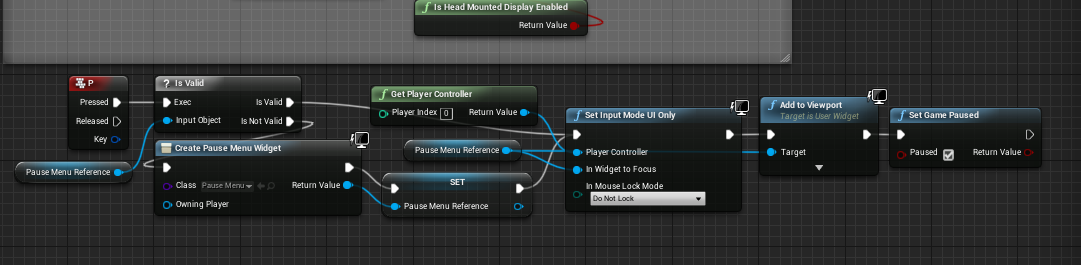
you also skipped the showing the main menu part in the beginning but that's your choice, this is what causes the mouse to not show up




you are still going to have the issue with hiding the mouse when you hide the menus as well
knotty storm
okay, thank you
plush yew
is there a way to make this text variable because I need here to be the name of the character when he start the game and enter his nickname?
grim ore
that's not the variable list
grim ore
on the left, under variables, under components should be the variable for that component
 karmic basalt
How do people usually handle the creation of UIs and in such a way to layer them properly on top of each other? I remember using a design that could best be described as a Factory approach (Only one class is allowed to call Add to ViewPort essentially and hold a ZOrder map) to do that in the past but I want to know if someone else has a different way since I have the opportunity to start fresh.
(New Project)
grim ore
there is nothing wrong with having a UI manager sure
plush yew
your videos are amazing
grim ore
your game mode could handle it all for example, or your player if it's just player ui, or your HUD could actually hold all the UI stuff
plush yew
from what time you making videos for ue 4 and how years you work with ue 4?
grim ore
don't put it in the level blueprint tho 😛
karmic basalt
I tend to stray away from level blueprint.
grim ore
I've been doing videos for a few year and working with ue4 since 4.0
karmic basalt
In my mind, Level Blueprint = Only for 1-of interactions built by designers.
grim ore
in my mind we burn the level blueprint to the ground
karmic basalt
(Triggering a particle system on proximity would be an example)
grim ore
@plush yew that is your component list, down below that in the My Blueprint panel is the variables list
 dim plover
Did you get an answer to the physics collision explosion problem?
grim ore
see I would just make that into a reusable blueprint with a trigger zone so I can reuse it
plush yew
a okay
but I want this component to can cast to it because I need to put it into my UI graph to make it when the user entered his nickname to be the same with this text above him so this text component will be his nickname-okay? @grim ore
grim ore
that is the reference to the component, that variable is the reference to the component. you would get that variable from the character and can then set text on it to set the text on it.
knotty storm
@grim ore thank you, it works
plush yew
what is the name of this variable? @grim ore
grim ore
I would assume TextRender if you never changed it
grim ore
 plush yew
yes 😃
but now hm how to do this in the third person bp?
because I have it when I start the game the nickname refresh this on the hud
with the new
but to make it with custom event? hm
grim ore
yep at this point you look into using UMG or another way of getting input and then communicating between blueprints
grim ore
the basic way would be to have a UMG widget with input, the player inputs the name and hits whatever to accept it. You then talk to the player character and tell it what it's name is and then tell it to set that overhead text.
grim ore
yeah pretty much
grim ore
you would have to set that player nickname first before you use it tho
grim ore
you are using a player nickname variable in the player to store the name, you need to set that somehow
plush yew
or like this?
aa and this I mustn't to do it with custom event
I msut to ut it after my bp on event begin play
yes?
grim ore
sorta. you are trying to do 2 things at once. First you need to allow the player to input their name. then you want to set that name in the player so they can use it. then you want to update the overhead display to that name.
plush yew
because now it can't set it because it hasn't the code
When the user set his nickname it set it on the HUD
grim ore
you can skip the settings the name in the player if you don't care about that, you can just set it overhead if you want
grim ore
first thing, do you have a way to get the name for the player from the user? using UMG or something else.
grim ore
how is the player setting that?
grim ore
you have your nickname in the game instance then, when you set it on the hud set it on the player at the same time
plush yew
how?
grim ore
player puts in text -> you set it on the hud -> you set it on the player
grim ore
where is the player putting in the name? you have to have a button or some event after they type it in.
plush yew
to copy this bp and poaste it on the player bp?
yes I have button like Start
and it starts with his nickname
I will copy this and to paste t on the button on released
and see what will happen
grim ore
woof. you kinda just jammed stuff in there at random lol
grim ore
no because you are setting the name from the player input into your player character and then trying to get the name from your game instance to show on the screen
you need to use the same variable in the same place
save the name in the game instance or the player character and keep using it from the same place. You were using it before in the game instance so no need to save it in the player now unless you need to for some other reason.
plush yew
okay
okay I will save this variable in character bp and I will call from there-right?
but in the two I have 2 different variables
in game instance I have player nickname in player bp I have the text render
hm what to do/
to move it on one place or?
grim ore
you can keep the nickname in the game instance, that is fine
grim ore
you just get it from the game instance and set the text renderer
grim ore
your not setting the text renderer, your settings the text on the text renderer
you need to get your character still like you did before, and cast it, then get the text render variable and set the text on it to what you have in your game instance
you were doing fine before you just needed to make sure you save the name they put into your game in one place and then use that same name when you set the text.
plush yew
they are one after one don't worry
I move it to be easier to understand 😃
something like this?
I know it on theory
grim ore
almost but
plush yew
where to touch it
grim ore
you are settings the Player Nickname in the player character right?
and then it looks like you are getting the Player Nickname from the Game instance...
plush yew
the variable player nickname is stored in game instance
mint umbra
How can I detect the physical material in a 3-way automated landscape material? 🤔 I.e right now I'm only able to grab the grass which affects both grass, dirt and cliffs.
grim ore
the node on the left in that picture looks like you are setting the Player Nickname from the Player Character ?
dry moon
Is it just me, or does OverlapAll not detect placed static mesh and only blueprints
grim ore
yeah so set it in the game instance not the player character and you should be fine
which is what you had originally lol
grim ore
that would work as well yes but doesnt other parts of your game need the one you were setting in the game instance? maybe just set both and be safe at this point lol
plush yew
hmm
it doesn't work
when I set my nickname it doesn't refresh it with the text render
hmm
grim ore
if this is in multiplayer then you have a completely separate issue as well
grim ore
well the code looks like it should work so make sure it is running. set a breakpoint (F9) on the Set Text node at the end and make sure it is running
but if this is multiplayer and you expect everyone to see the changes then you need to do more such as replicating the variable and setting it on the server and having it multicast out to every connected client and that is beyond the basics
dry moon
Wait even WorldStatic collision won't detect
grim ore
it should work on singleplayer yes if it's running
grim ore
you can still test it like this, just debug it and see what is happening
plush yew
it doesn't; work and for single player
😦
it doesn't show me something on the screen when I made the breakpoint
grim ore
then that is not running if it doesnt stop the game
which means your cast to the game instance is not running, or the code before it is not
grim ore
so set a breakpoint at the node before it and run it again
and keep going backwards till you find where it is broken
plush yew
a when I make this with the game instance and it doesn't work maybe
okay
to set breakpoint on gameinstance?
grim ore
yes and see if it stops on that
plush yew
now is this
I set my nickname and it transfter me to this window
when it stopped there what this means?
grim ore
that means it is getting to that point, the breakpoint fired
it also means it is failing to cast to game instance since you are not using your special one
plush yew
okay
grim ore
remove that node completely and connect the wire back up to the next one and it should work
grim ore
yep to the set text node, you are removing this node since you don't use it anymore
grim ore
remove the cast to game instance node, you are not using it
plush yew
a okay
grim ore
so it should be "set player nickname node" -> Set text node
 bronze cedar
hello Sir @grim ore
can you please help me , i got one thing to ask, i am stuck from past 20 days or more
i asked more than twice here but no one replied me
can you plz help me
plush yew
not it works cool but the text is weird-xD
bronze cedar
i am working on a game , it's a paddle , ball and brick game, what i cannot do is , like when ball hit the right side of the paddle it go to right side, if it hit in middle it go to the top and if it hit the left part of the paddle it go to the left side
i break the paddle into three parts that's left , middle and right, i also did a print string and it's working fine
hasty lintel
Anyone know why when I press "G" now within UE4 all the scene lights seem to turn off
?
bronze cedar
but i don't know how to implement that logic because i don't know what node should be used to make such logic
abstract relic
Give the edge of your collision mesh a slight angle and you’re golden Horse
bronze cedar
haha yeah , but how to define that angle, which node
haha golden Horse lol nice
ok i think i should find it on google first
thank for the help @abstract relic
angle of a projectile
plush yew
guys anyone knows how to make simillar to this?
so when I make changes to my priject to make it with different version and when I make changes to write what are the new things and before to load tthe game to show this
this is made with UI widget or?
@grim ore
grim ore
that would be a widget sure, it can get the information from the interwebs and display it
 vagrant pier
@plush yew Download that, its only like 30mb or something of the like. Dissect it, and look at the documentation
vagrant pier
The creator has a youtube channel packed with how/what you are looking for
plush yew
to add this to my project?
vagrant pier
Dissect as in piece by piece take apart/ look into it
plush yew
a okay
step by step?
but I need this to shows before to transfterme to the level not to make it in menu-okay? @vagrant pier
vagrant pier
That's what I mean, That project I linked and the creators youtube videos should provide enough knowledge/starting blocks for you to do what you were asking
vagrant pier
The main menu is a level basically, so you can apply it to whatever/whenever you want once you understand how its implemented/created