#ue4-general
1 messages · Page 412 of 1
 grim ore
 polar hawk
Have you tried deleting and starting over for a 5th time
the 5th time usually solves it
better delete everything and start over
grim ore
the first part where you are copying from is from an OLDER VERSION, it will not work. it will not work
 pallid compass
jfc
pallid compass
This is like real time* youtube comments on a ue4 tutorial, i love it.
polar hawk
start over
grim ore
you need the original file copied, renamed, and just the content changed to fit your server target
 manic pawn
can't have problems if you just delete the project folder and give up
 abstract relic
Crusher stop with the spam. Good lord
pallid compass
"how do i breathe", where will this end? 😂
abstract relic
You’re not fooling anyone
polar hawk
its also easier on 4.1
try to download 4.1
its smaller
4.1?
not 4.17
yeah thats too big
try 4.1
 flat idol
breath the pressure
flat idol
Allar you still got the cert for 4.1 only?
polar hawk
you're going to have a hard time finding someone who uses 4.18
instead of 4.1
I have every cert
for everything
flat idol
Nice!
 dim plover
4.1.
abstract relic
4.1
dim plover
It's smaller.
abstract relic
I feel like I just committed a sin
polar hawk
it might be too small for the launcher
don't know if its there
yeah
you'll get a lot more help from people on 4.1
grim ore
that won't fix the entire point of this tho which is he wants a dedicated server 😦
polar hawk
also im going on vacation for the next 2 weeks
so I won't be around
after you get 4.1
grim ore
2 weeks man? I only get 1 week off
flat idol
You can rule Allar out. With a printed ruler.
polar hawk
im literally leaving on an airplane the moment your download finishes
 tulip field
4.1 is the way to go
flat idol
4.1 has billions and billions of features in it
 misty creek
methinks the lady doth protest too much
 regal mulch
While it's all funs and stuff, if you peeps are mistaken, you are bullying the wrong person.
Just keep that in mind :P
grim ore
The reason they say/think that is the subway surfers reference
regal mulch
@grim ore What?
 whole quarry
Is he really going for ue4.1 ?
misty creek
He said this:
fibi4kaToday at 2:47 PM
small project like Subway Surfes
flat idol
I actually didnt see that, because i blocked him hours ago.
regal mulch
Isn't that an endless runner for phones?
 grave nebula
4.1 is a wise decision
flat idol
Also just added a custom css for web discord to hide the blocked message row too.
misty creek
No clue
polar hawk
I don't know who he is, but step by step is asking for 4.1
regal mulch
@grim ore Nvm. Got it.
grim ore
@regal mulch if you read the crusher a's past posts he mentioned he was working on a subway surfer clone. If you read the new guys posts he says he worked on a subway surfer clone. that is why they think they are the same person. that and well... the posts lol
regal mulch
Yeah I didn't know that. I usually can see that it's him by a lot of other factors.
grim ore
I have no idea if it is, just trying to help but he seems way lost
flat idol
Btw did it occured to anyone, he probably is one of the admins having fun?
regal mulch
You shouldn't really invest time into helping someone who evades bans. It's fine to start with help but if you realize who he is just ignore them.
@flat idol Yeah, it was me all along.
flat idol
I just knew it!
regal mulch
Actually we share the account, just to troll you. You in person.
We have nothing better to do with our time.
polar hawk
@maiden swift please ban @regal mulch for ban evasion
regal mulch
@polar hawk--
flat idol
I feel no offended, so that's there.
 maiden swift
@polar hawk--
grim ore
oh I have no idea if it is actually him, and I never had an issue with the other guy in the first place. I just help when bored at work lol
polar hawk
@polar hawk--
polar hawk
@maiden swift please ban @maiden swift for ban evasion
grim ore
We are Crusher.... Resistance is Futile
whole quarry
No trolling
I'll leave that here and wait for the discord to implode.
polar hawk
I orc
maiden swift
For the record, I'm not thrilled about the 4.1 trolling.
grim ore
what is this discord going to look like next week with all us trolls at GDC
regal mulch
 dry moon
regal mulch
dry moon
regal mulch
Basically Crusher
grim ore
you know damnit, sometimes you want to watch it in discord so you don't have to leave the chat
regal mulch
Yeah but the preview is so annoying
They should make it extend locally if you click it
regal mulch
.>
grim ore
Suhweeet. I don't need to buy a console for Kingdom Hearts 3 😃 there is going to be a booth at GDC with it on display so I can just hang out there the entire time and play it whoot
 trim night
Its weird. The folder Engine Content and Engine C+++ Classes are visible. How do I hide them from the content browser?
grim ore
the bottom right corner of the content browser is a little thingy you can click on. uncheck those options
chances are they turned on if you browsed to something that was in there like a sky sphere or other material
trim night
@grim ore Thanks!
grim ore
Yuuuup
 west spire
Is anyone familiar with licensing and royalties? I have a question regarding #6 on the "However, no royalty is owed on the following forms of revenue:" section. I have a potential client who sells a product, and was inquiring about offering a free app that utilized AR to enhance the user experience. If the AR app using UE4 is offered free(app/play stores), but is activated to do different things based on seeing a sold for profit product with the camera is this still exempt from royalty dues?
 ebon lake
i'm new in UI design. Question: i have bunch of similar but not identical UIs for interaction with objects. Regarding performance is it better to keep BPs apart or i can put them in one blueprint and use widget switcher?
 solar quarry
so I have AI that follows you
How do I make it so they can't see me if there's an item in the way of their sight?
I don't know what that is
alright alright
 lime gull
I made a damage system that converts an integer to a float and subtrats that from the health, but noe I want to show the integer on screen, but it keeps gettinng a random number
It gets a random integer, then converts it into a float and subtracts from health which works fantastic
but it doesnt display the correct number foe how much damage was taken
grim ore
where are you setting the damage text variable?
if you are connecting the In Text on the Set Text node to the output of the Random Integer in Range then yes it will be a different number
Random Integer in Range is a pure node, every time it is used it will run completely new, it does not hold any old data as it cannot change/store anything inside it from run to run. If you have 2 wires hooked up to that node then it will run twice. Since this is a random node it will give you 2 separate numbers.
lime gull
How do i make it so it gets 1 number each time
grim ore
each time it is ran it will give a unique number. If you want to use that number more than once then store it somewhere, like in a variable, to use later
lime gull
Even after storing it under a variable it gives me a different number sometimes
grim ore
then you are setting it to another number somehow
get random #, put random # in variable, use that variable.
lime gull
This worked for the most part, but then at one point it said 5 damage even though it was only 1
It seems to be working very well, so maybe I just made a mistake when doing the math
I did it in my head instead of writing it down
 weary basalt
Use PrintScreen man, those shots are horrible.
Clarity is essential when asking for help.
Your obviously using Windows 10 so try using the Snipping Tool, which you can find by searching in the Start Menu.
 sonic ruin
Hey, so any of you guys know how to get an animation where your character is rappelling from a helicopter then once he hits the ground the animation stops
abstract relic
how to get an animation or how to integrate it?
 orchid sable
Error: Ensure condition failed: !bEnsureIsGWorld || WorldList[i].World() == GWorld
Anyone seen this error before? Cant seem to find much online about it, but when playing (in VR at least) Im crashing pretty instantly...same depot on next computer over is running fine.
 dim arch
cant make sense of this, I know there is probably a BP responsible, and one of its functions is calling some cpp engine code which is locking up, is there any way to find the BP responsbile?
all I see in the call stack is a bunch of engine functions
this is when I load a certain map via console command (open mapname) however the first instance it's opened it stalls for about 20s to process, the second time it opens in a few seconds
abstract relic
Then use this. Industry standard. Maya is a popular choice. https://www.autodesk.com/
Autodesk builds software that helps people imagine, design, and make a better world.
abstract relic
Yep. Make it in there
sonic ruin
Ok, thx mate
sonic ruin
Ok thx
 plush yew
Why doesn't Unreal add a feature that allows you to convert Blueprints into C++? This would allow people to quickly develop a game in Blueprints and still have it run as fast as with C++.
 silver crown
There's one
plush yew
Is it by epic?
silver crown
Yes
flat idol
@dim arch, that entry runs 64 times, that is why it takes 2-3 seconds to execute. Probably the lods are a bit heavy on those skeletal models.
plush yew
how do you access it?
silver crown
But it's not flawless
Lots of thing can go wrong as always with BPs
@dim arch Use async load
Or whatever it's called
flat idol
In my experiences, once you nativize one single blueprint, you will likely go nativize your entire project. Without that the cooked game will crash too many times.
dim arch
Hey there! Well, it’s been a while since I’ve written something for the blog; we’ve been busy at Frima building a cool update to our Oculus Connect 2 demo, which Vincent and fellow programmer Marc-…
reading this, not sure how much applies to the current version
silver crown
Does it really matter if you have a stutter on load though?
plush yew
@silver crown Are there any drawbacks to it? Or can you create a full-fledged networked game in Blueprints and nativize them?
dim arch
well, my leader asked me to improve the load time so yea
silver crown
BP sucks 🤷
plush yew
nah
dim arch
not sure if I can call async load in bp
a lot of this needs refactoring , I got given the project and asked to optimize it
flat idol
@dim arch, then you should remove static contents from the map, and spawn them in a controlled manner that will distribute these loading times in a more favorable manner.
Load is like "hey give me everything right now my man" type of event, that's recommended but not preferred
dim arch
yea I figured as much
dim plover
You can call Async Load in BP.
flat idol
Level Streaming can also be an easy transition for you. But it depends on the distribution of these objects.
 dusk mulch
dim arch
dusk mulch
dim arch
I would probably use level streaming instead of opening new maps, because there are a bunch of actors which need to maintain their gamestate
but right now I am just optimizing before refactor/designing the codebase
I mean idk what they expect, loading a 800mb map file is gonna take time
but was curious if I could use the mechanism which caches it after the first load
because the first load takes like 20s, 2nd load takes a few seconds
flat idol
800 mbyte is quite heavy. How many painted foliage are there?
dim arch
not much foliage, it's not really a game sim but some other project
about 400mb of skeletal meshes, 200mb of BP references and 200mb of texture/mesh data
flat idol
The map file doesnt contain that type of contents, those are individual assets only.
dim arch
memory size is 3.2GiB
the map references them right?
the map file is 380kb, but it references about 800mb of disk data and 3.2GiB once loaded into memory
flat idol
Yeah. Just enable async loading, that could be a insta help.
dim arch
alright, Ill look into it, Cheers
flat idol
There.
dim arch
although there probably a bunch of BP logic which references other actors assuming they exist on the beginplay event
flat idol
That you will untangle piece by pieces. If needed.
flat idol
No it's a setting for the project's behavior, and it will load everything using an async thread
flat idol
getting better
dim arch
I think other stuff is BP related
its difficult to find which BP is causing the issue because frontend just shows the engine function which it calls, but you cant trace which BP called it
I guess thats for efficiencies sake, so it doesnt pass what bp spawned a mesh when it needs to serialize it etc
flat idol
You can click on and get a single frame to be evaluated, that can help you break this down even further.
dim plover
From the link you posted, https://blog.fatedgame.com/2015/10/22/memory-management-in-ue4/
There's a section on finding which assets are being referenced by who.
Hey there! Well, it’s been a while since I’ve written something for the blog; we’ve been busy at Frima building a cool update to our Oculus Connect 2 demo, which Vincent and fellow programmer Marc-…
dim arch
I am checking the frame, but it doesnt provide relevant information to find the problem code
this frame seems like serializing the skeletalmeshes is causing a big hitch, but I cant see which mesh that is being called on, or where that mesh is spawned from
flat idol
Ah it all happens in a single frame only. That's bad yeah.
Then you should make a guess, and put some content into separate map, then load it up later.
dim plover
obj list Class=SkeletalMesh -- maybe?
dim arch
I am doing A/B tests with clones of the map with different actors removed, but thought there may be some way to find them using the profiler
Ill check the article now @dim plover
dim plover
It's a little bit dated with the TAssetPtr stuff. They are renamed and I think there were some added stuff with regards to Asset Management.
flat idol
Toku, the profiler will grab counters most of the time, that is good for getting a summary of the events, but individual entries and details of those would be super slow to actually gather.
What is seems to be the problem is the skeletal mesh, which has at least one (or more) LODs present. Not much to go on, but that's the closest you can find.
And again, since these contents are slow, you should instantiate them manually (or via level streaming if possible) then just divide this event up this into multiple frames
dim arch
alright, yep Ill see what I can do to get the code to process across multiple frames, its mostly in BP right now
its receiving a dataset via udp then parsing it in bp, which is a huge mess
and then spawning all actors of the parsed data in one frame
flat idol
You can use timers, or put one timer into gamemode/gamestate/etc which will queue up 10 skellies a time, then waits for 5 seconds to grab the next in series. It's annoying but could work out for you.
dim arch
emm, actually thats not part of the load process
well, instead of a frame freeze, it would probably be better if it loaded the map, blurred the screen, added a progress bar and loaded the data in sequentially
flat idol
yes but you must separate these loading events into discrete steps, and allow some time to the hdd to actually catch up with the frame
otherwise you will end up stacking up the same amount of data and it wont be a visible difference really. i guess.
dim arch
should be ok, as long as the gamestate can manage spawning the actors on a level switch, instead of having them in the level already
otherwise ill have to do it in cpp
 fierce merlin
anyone have a quick tl;dr on braking friction, lateral friction, ground friction, braking friction factor, etc. and the differences between them?
dim arch
The only thing I dont understand is why it's taking up to 16s to load initially
flat idol
There is #legacy-physics for these type of questions. It will be a longenst tldr you ever read. Or didnt read.
dim arch
but the second time it loads it loads in <1s
this is PIE
PIE, if I load it up a second time from a map switch command, it loads in a few seconds
flat idol
Because editor will cache up everything, so the second time will be a flip of a switch to grab the same data from the ram again.
dim arch
right
flat idol
It's not the same with cooked game tho. But windows can be a little tricky.
dim arch
ok, thanks man Ill see what I can do :d
 crisp fable
hey for anyone using 4.22
can you make the new UMG editor widgets in the viewport?
like the snapping options
grim ore
not yet, they run in their own slate window right now
 vagrant pasture
can anyone me tell me how to make aim and shoot mechanics similar to angry birds please???????
vagrant pasture
@frosty hollow Thank You very much , having a look at it
 frosty hollow
kk
frosty hollow
idk how well it will work im working on a 3d project havent tried anything with that style before
but hope it helps
 proven oxide
ok here's a question, I have a chain link fence, up close it looks ok but when going away the lod makes it opaque, whereas in reality it should go transparent at distance, is there any way to make it go the other way when using autolod
 sudden agate
well, you need to make a separate material
 bronze prism
hi guys ! i'm new to unreal engine ! what is for you the best tutorial to start with ?
 woeful thorn
@bronze prism start with virtus tutorial to understand the basic of ue4, he makes funny and enjoyable games in ue4, search on youtube Virtus Squad ue4
woeful thorn
Fuse it's an easy way to create character, the quality of them it's not the top, but still something that you can play around
So Fuse it's a good software for who wants some fast character
bronze prism
hum ok
woeful thorn
Otherwise you have to create character and props with 3DSMax/Maya/Blender but those are more "Professional" software
bronze prism
i know a bit of blender
but there is not a software that makes more professionals character liek fuse ?
woeful thorn
You mean faster as fuse? no as far as i know no
bronze prism
not faster than fuse
or not faster as
but in the same style but with better graphics
woeful thorn
No it's unique in his genre
 boreal ingot
If you already know Blender a bit I would recommend to try to make a character in there, you would learn much more even if the character doesn't look so good
woeful thorn
+1 and Blender can help you somehow in future work experience
boreal ingot
And as a benefit your other assets will fit to the character
bronze prism
but the fact is that i have to make it quick its a school project
woeful thorn
If it's a School project, and something that hasn't to be release then.. in my opinion i would use Fuse, but keep in mind that of course it's not something "Perfect"
boreal ingot
Of course, the fastest way is to get the characters from asset store
woeful thorn
@abstract relic You mean Paragon character?
bronze prism
i know maximo
abstract relic
Yep
bronze prism
already made some animations with it
paragon ? is that a character maker ? not a game itself ?
XD Perfoon
woeful thorn
@abstract relic Resource used for paragon character are HUGE xD
So if you want to make a project that have to run on low end pc avoid them
bronze prism
ressources are not a problem
abstract relic
Epic release their Paragon assets a while back. They have characters, animation integration, all that goodie
abstract relic
You can apparently
bronze prism
it's not gonna have profit
abstract relic
So long as it stays in engine
boreal ingot
But later you should still try to make the craracter on Blender too! Once I learnt the basics of Blender I also started modeling, scultping, texturing and rigging a character. And I succeed; however, the whole process too me 90 hours including learning. So definitely not feasible even for an indie game:
woeful thorn
Looks like pubg char xD
bronze prism
yep later i will learn because i am interested to learn that !
boreal ingot
Once you can model a character you can make everything 😄
abstract relic
Give the poor model some tighty whites at least. His underwear looks dirty 😜
bronze prism
yup perfoon ty
 wary wave
alright kids, it's everyone's favourite goose again:
I'm not getting overlap events on a box collision component
Collision Preset is 'overlap all', Generate Overlap Events is true
player will not trigger an overlap, what the heck am I missing?
...and it's started working
no idea why
ffs
6+ years of working with this system and it still causes me headaches 😐
woeful thorn
@wary wave
Unreal Engine it's like Magic man!
Don't ask how something work 😂
wary wave
I know how it works - problems occur when it doesn't work
then you have to spend ages debugging the damned thing
woeful thorn
Debugging is love debugging is life, especially when it waste your time!
 ember phoenix
I want to put two pictures in a scene. I've looked into it a bit and see it's mostly done with decals. However that makes my image super washed away and faded. Read it has to do with lighting and whatnot but after placing different lights around nothing made it pop. If I leave the "Material Domain" to surface and use that as a material over a cube, I get a beautiful rich picture but it's repeated on all sides. What is the better approach and is there a correct way to do it? How do I get a rich picture with decals or a non repeating one with basic material?
 devout gulch
does both player and collider have enabled overlap events ?
 true leaf
Most of my bugs are due to null variables or not checking the right replication tick boxes
wary wave
'Replicates' tickbox is a constant bane of mine
true leaf
In lots of cases, the client will not throw a warning or error when you try to call a null pointer in blueprints
wary wave
the amount of times I've missed that damned thing
true leaf
Yeah lol
frosty hollow
Morning
 keen frigate
@frosty hollow Hey 😃
Guys I have a question. We have created an UE4 Discord server for our local community. Wondering if I could get the word out through here as well or is it against the rules?
frosty hollow
@keen frigate hey! :D
wary wave
generally speaking it's discouraged because this is a developer, not a customer community
keen frigate
@wary wave Maybe I wasn't clear. We (as in UE4 devs of vienna and not WE as hotgates)
wary wave
o right
keen frigate
so it's our UE4 Dev community
trying to gather the UE4 devs located in Vienna and Austria in general.
gather/organize
keen frigate
lol I sure hope not
there were a lot of UE4 devs during the meetups these past few weeks, but it seems noone took the time organising them in a group other than the meetup group that is.
 paper kernel
Is there a way to re-arrange material slots?
sudden agate
Unfortunately there isnt
 copper flicker
I don't know how to talk to my inventory slots..... -___-
bad day man..
😄
the horrors that can only happen when you copy someone else's system...
and you don't understand it
what's even weirder is that the system works if I create the Inventory manually.. inside a widget component
but not when I build it in BP
with create widget - set widget
the main inventory window has a bunch of slots... manually created.
and ALL the code is on the slots themselves, unfortunately
I can cast to the window... but not to the slots
O o
grim ore
are the slots in a panel?
copper flicker
yes
grim ore
can't get the panel then the children ?
copper flicker
the slot is a separate widget
referenced inside the main inv window
but the main window has no code
grim ore
does it need code?
copper flicker
in fact I don't understand the question... what do you mean by PANEL
grim ore
a panel is a type of widget, canvas panel horizontal panel etc.
it's how you organize the stuff in the widget
copper flicker
grim ore
yep in an overlay panel
copper flicker
yep
grim ore
so get the overlay panel, then get the children and you have all the children
grim ore
why not?
copper flicker
ok, wait a sec
grim ore
make the Overlay widget a variable. In another blueprint you can get the inventory widget (the parent), then get the Overlay variable from it, then get children on it, then do whatever you want.
copper flicker
grim ore
about the only issue is there is no guarantee of order and you will get more than just the inventory slots as the background and Pie10 images are there as well but you can just cast your "get children" to the inventoryslot type and it would get those
grim ore
how does #A fail?
copper flicker
umm. A fails cuz the slot can't read the player reference
if I set that manually, here
grim ore
well what is player index?
copper flicker
the system works
player index means if I have more than 1 player
for Coop
I expected that A will not fail, but will always give me an Index 0
so I'm completely puzzled..
the Slot is supposed to get a player index 0 by default
not to fail
part B is where I tried to communicate with the slot....
and nothing happens
grim ore
you are listing like multiple things not working and trying to fix them all at once lol... need to focus on one
plush yew
I am doing virtual country and i would like to know ways to make people earn some money (that i dont pay)
copper flicker
😄
well, the problem is that there are 2 things.. that fail together
but OK, let's ignore part A
 lunar bobcat
Hey does anyone know how to implement a stun mechanic in Unreal?
grim ore
does the inventory widget show up on the screen using your widget component? does that part actually work when you create the widget
and 2nd of all why are you creating the widget when it is already created as part of the widget component?
copper flicker
I would like to leave the widget component empty
and create the widget from BP..
not sure if it's necessary
I did this with the Main Menus
and it worked
oh, I guess it was because I had multiple menus 😄
this time around is not needed maybe...
lunar bobcat
welp
copper flicker
I just don't know how to cast to the widget.. without creating one...
lunar bobcat
😐
grim ore
the widget component has a widget variable that holds the widget that it is holding, so you would get the widget component variable (Inventory) then get the Widget variable from it and now you have the widget it holds. then you can do a cast to whatever to get it in the specific class it is then do whatever you want.
 wispy raven
my teleport blueprint is not working
it recives the input
but it doesn't do anything
copper flicker
I think I managed to break thru
I was casting wrong
it looks like it talks to them slots now 😄
@grim ore thx!
grim ore
welp it's a start so yay 😃
copper flicker
yeah I hope all is solved now
and I probably don't need multiple Inventories
just to send an Index
grim ore
@wispy raven what is "doesnt do anything" ? how do you know it is receiving the input
wispy raven
@grim ore i can see it on the blueprints
when i go in the trigger in viewport mode i can see on the blueprints if the node is working
the overlap event works
but the teleport block doesn't
grim ore
@wispy raven if you breakpoint (F9) on the teleport node and it triggers what does it show for the location and item it is trying to teleport?
frosty hollow
What can the unreal discord bot even do
O NVM thought that was the discord but
Lol
Just read the files
frosty hollow
Lol
grim ore
ok so... that shows the problem but does not help debug it. You need to debug it. press F9 on the Teleport node to breakpoint it and the next time you trigger it the engine will pause and go into debugging mode. you can then mouse over the inputs on the teleport node and see what they say. Make sure it is getting your player and it is getting the correct location for the teleport to start with.
 placid arrow
(im sure thats engine content)
placid arrow
ah i think i know why my plane is 32 tris
regal mulch
@placid arrow Probably due to reasons we don't know.
wary wave
so that you can actually do things with it, I assume
grim ore
yes now mouse over the target input and see what it says, do the same for the Location
wary wave
vertex colours, deformation, etc
placid arrow
its a grid of squares built of pairs of polygons, and im thinking thats so it can be deformed by shaders, but im not entirely sure. i'd need to check if its from the engine/starter content, or if its one i made or downloaded.
wispy raven
if i hover with the mouse over there, it just gives me a short info on what does the block do
wait, maybe it's the "target is actor"?
grim ore
literally move the mouse over the blue input on the left called Target and see what it says
grim ore
yes, it is showing none that is why it is not teleporting. it is teleporting nothing
grim ore
you can try that, the fact that get player character is failing to return your character is odd tho
oh
lol
ok first
you need to remove the breakpoint on the event itself
that is why it says none, you havent ran the teleport node yet for it to get the result.
so remove it from the actual overlap event so it stops on the Teleport node and not on the overlap node
wispy raven
can't i just do a frame skip?
grim ore
you can sure but no reason to stop on the overlap it's just wasting time
wispy raven
so what do i have to do?
grim ore
just breakpoint the teleport and run it again and see what it says for the Target this time
grim ore
the big red arrow shows you have it stopped before that which means anything connected to the teleport is not going to be valid yet
wispy raven
but it still doesn't teleport
grim ore
ok so that's the first part, what does it show for the location?
grim ore
the actual dest location on the teleport node
regal mulch
Yeah just to see if the Teleport node dislikes you
grim ore
and what cedric was mentioning I would try and use the set actor location node and not the teleport node after this
regal mulch
Guess Teleport is just mäh
wispy raven
😂
frosty hollow
Lol
grim ore
i dont think teleport works on items using physics
 hoary silo
how would I make a mesh in a particle system rotate with the particle?
sorry for the crappy drawing XD
grim ore
the 4.1 engine of the engine did not have a setup file, it had separate .zip files you had to download
regal mulch
@hoary silo #visual-fx
Stated on the GitHub page of 4.1
You can find that yourself
Just scroll down.
grim ore
step #3 on the instructions, yep
it's all about........ reading and following instructions
frosty hollow
@plush yew what are you trying to do?
O game servers?
I see
Is there any good way to team create? Got a friend that wants to get into unreal so wondering what's the best way to work on a single project together
hoary silo
If any of you were wondering how to put fps arms on a separate render layers in UE4, I found a way to fake it!
regal mulch
@frosty hollow #source-control
copper flicker
how do I convert an Actor to a Pawn?
meaning.. I spawn an actor
but I can only posses a pawn
how do I tell Unreal to posses an actor?
regal mulch
You can't
copper flicker
or that actor's pawn......
regal mulch
Actor != Pawn
Pawn is a child class of Actor
But possession only works on Pawns or their child classes
copper flicker
yes
so how do I know what pawn I just spawned?
cuz the Spawning part.. doesn't handle Pawns
it handles actors
SpawnActor has an Actor Obj Ref return value
and Posses has In Pawn
regal mulch
Well is the class you selected a Pawn or a ChildClass of it?
copper flicker
the class is the problem indeed
I'm trying to spawn ANY class
and then find what I just spawned
regal mulch
Well, you can always try casting
Just gets ugly if you need to test for 20 different cases
copper flicker
so instead of Spawn George, I want Goerge to be selectable as a variable
regal mulch
Well but should that always be at least a pawn?
copper flicker
casting how?
in fact I don't want an ugly solution... haha.. I already have one
switch on enum
regal mulch
What is the type of "PawnToSpawn"?
copper flicker
Well, it can be ANY player type
regal mulch
Buddy, you can only possess Pawns :P
copper flicker
all of them children of the same class
regal mulch
So what is the type of that variable
copper flicker
ummm..... Player
regal mulch
copper flicker
it's my character controller
regal mulch
Controller?
regal mulch
Well if you give that Variable a Type of .e.g Pawn
copper flicker
the BP that controls the player
regal mulch
Or whatever your pawn is
Then it will work
But it has to be either PAWN or a Child of that
copper flicker
hmmmmmmm.....
regal mulch
Doesn't have to be a direct child
copper flicker
you mean I should make PawnToSpawn not a Class but a Player var?
atm it's an Actor
I just promoted from SpawnActor
regal mulch
All classes from the red circle are fine for possessing
Blue is not
So the Purple Variable you have
Needs to be of one of the Red Bubble Types
@copper flicker Class or Reference has nothing to do with the Type
At least not with the type I mean
You can have a variable of type Pawn as a Reference (blue) or Class (purple)
What you need there is one of type Pawn as a Class
Not Actor as a Class
Not Actor as a Reference
And also not Pawn as a Reference
copper flicker
I can't change the default value of a Pawn
copper flicker
so.. what type of variable should I use?
regal mulch
That's literally all you need to do
paper kernel
the output changes based on what you select on class
paper kernel
there's no problem, that's just how it works
copper flicker
but I don't need to change the class
wary wave
your problem is that you don't understand what you're doing
copper flicker
I only want to spawn players
paper kernel
you can't spawn NONE
copper flicker
ffs.....
wary wave
you need to spawn a type of pawn
copper flicker
I want to spawn Player1
or Player2
or Player 555
I want to expose that as a variable
wary wave
you can spawn a player pawn, then assign that to a variable
but first you need to spawn a pawn
copper flicker
it should be suprebasic.. I just don't know how to convert that actor to a pawn
the problem is Player1 and Player2 are not the same.. game obejct
or class.. maybe
both inherit from Player
regal mulch
I already told you
The Variable that you have
Needs to be of type Pawn
That's all you need to do
copper flicker
It can't
regal mulch
Of course it can
regal mulch
It makes no sense cause you don't understand it :D
copper flicker
I don't understand what you're saying by that variable having to be type Pawn
wary wave
@copper flicker - do you understand what classes, types, and inheritance are?
I suspect this is the problem?
copper flicker
no, if I do that I can't select Player1 or Player2 as pawns aymore
regal mulch
Player1 and Player2 need to be children of the Pawn Class
wary wave
what even is 'Player1'?
regal mulch
Otherwise you can't use them anyway
copper flicker
they are children of class.. Player
regal mulch
And Player is child of what?
regal mulch
Which is a Character
copper flicker
yes
wary wave
if the class hierarchy is as you suggest, it should be spawnable and possessable
regal mulch
Yes and no
copper flicker
there is nothing I can do with it
wary wave
that's a variable of type pawn
regal mulch
This is a Pawn yeah
But you made it a reference
I wrote ealier that it can also be a pawn Class
regal mulch
When you select that
You get 4 different options to choose from
Go back to the drop down and locate PAWN
And hover over it an wait for the menu to extend
That will show you 4 options, where the first one is reference
And the second one is class
regal mulch
The Blue one is to save ONE instance of a Class
Where the Purple one is to save the class itself
Which you want to do
regal mulch
(:
grim ore
😃
 frail jasper
Are there any good places to read about development for Android?
regal mulch
@frail jasper #mobile might be a good start
Might have pinned messages and if not just ask around there (:
frail jasper
I just wish this was strait forward but we all know Unreal is anything but that.
I post in mobile 5 days ago and got no response not that I expected one. The thing is that with all these different gpu's possible per device it makes packaging a pain and difficult to debug.
regal mulch
Probably why fortnite only targets specific high end hardware
frail jasper
ok so I will only target asct then that way I can keep going. I been spending weeks trying to debug act and I can get templates to run fine on the act but not my project. My project will run fine on asct. Just wish things were different and worked.
 spark valve
That's part of development pain for any Android app when compared to iOS unfortunately
frail jasper
That is the understanding I was looking for though so thank you
spark valve
Do the instructions say to run the Batch file?
Could try running it as Admin
It sounds like it just makes folders so it should finish REALLY fast
regal mulch
What a sad sad story to watch
pallid compass
Lmfao
 teal tulip
lol
 frank escarp
@plush yew mate you got trolled hard
 next badger
4.1 is ancient
 shy silo
Basic question but is there an easy way to produce a game with a camera that moves like the blender/default camera in ue4 where you hold middle click to move the camera in a sphere? Sorry if it’s sort of basic
teal tulip
4.1 won't work with your visual studio etc
next badger
@plush yew why would you need a source ue4 version?
grim ore
oof. 4.22 release this week.... can anyone else feel it?
spark valve
Where does it say to use 4.1?
teal tulip
what I should feel
grim ore
GDC is next week
teal tulip
thats true
frank escarp
@plush yew if you cant read instructions to do your stuff, you have 0 chance making a multiplayer game
next badger
@frank escarp how GDC stream could be in 2 days if GDC starts on 18th?
frank escarp
becouse they do a stream the 14th
frail jasper
I managed to get all my textures streaming. 😃 I talked to others in paper 2d and they told me that the blurring of the textures is normal on first load of a given texture that is streaming. All of my npc's and characters are flipbooks that are streaming. This causes them to be blurry on first load into memory. Just wanted to clarify that the best way to avoid the user seeing the blurring would be to load all streaming texture that might be used on a given map behind the loading screen so the user does not see the blurring of the texture during gameplay while the texture is being loaded into memory. Would this be the correct way to avoid the user seeing any blurring of the textures?
next badger
kinda, pre GDC stream
grim ore
the GDC release last year was wednesday before for 4.19
teal tulip
so pre 4.22 release in order to show 4.23 features in the GDC
RTX, these light bakers and something about physics idk
and the google stream system and these things with gamepad included
 dim merlin
hey guys, ive mentioned before.. what about having editor 'themes' to change the editor look?
next badger
@dim merlin want to make one?
dim merlin
id love to make a silver theme
frosty hollow
Lol
next badger
@dim merlin thumbs up for that
spark valve
They probs won't but I'd love to get rid of the 00's icons
dim merlin
anyone could advise epic on that? id really love themes
anyhow, im good with the current theme to 😉 NP
manic pawn
there's no proper theme support
frosty hollow
I mean if it was easy like blender I'd make one
manic pawn
tons of colors and sizing is hard coded
next badger
Epic only working on what is benefit for the inner projects and fixing bugs
manic pawn
and you have to rebuild the engine to modify it
frosty hollow
Haven't looked into it tho
dim merlin
so, no theme support means? how manny files?
id put 1m on it if its possible, epic earnd enough with fortnite
manic pawn
it means trying to make a "theme" is going to be such a pain you'll stop bothering half way through
like all those attempts on the forum
dim merlin
yeah well, but a nice manager would advice on engine mods
next badger
I've spent few weeks on theming support, still not even half way through, and code probably outdated already
regal mulch
Unreal Engine Forums
Hey guys, first of all, thank you for the awesome product!
UE4 and its community are awesome!
Summary: This is a re-design of the UE4 editor.
So far the majority
manic pawn
that guy gave up too
dim merlin
@regal mulch i know that one to!
manic pawn
delete them
frail jasper
lol
manic pawn
now turn off your computer
next badger
4.1 is dead, we told you
frail jasper
download a new version
regal mulch
You must know what version you are using
spark valve
4.1 was released in 2014 mate, get rid of it
next badger
@@plush yew @grim ore didn't told you to use 4.1
grim ore
Allar told you to get 4.1 because it was easier, then he left town.
I tried to help with your current version but you kept skipping stuff and not reading so I stopped
frank escarp
allar was trolling
becouse you were being annoying
and not following instructions
polar hawk
I apologize and sympathize to the general chat for what is happening, but I don't apologize for my actions.
next badger
to use Allar's advice you need IQ 160+
that counts for any advice, not htat particular (no offense)
regal mulch
If only one wouldn't be crusher
next badger
@plush yew 4.18 is fine
frosty hollow
Lol
regal mulch
That makes it even better
frosty hollow

regal mulch
Use 4.StopEvadingYourBan
frosty hollow
Lol
polar hawk
I only use the Rocket Beta
regal mulch
It hurts
polar hawk
I only use the Rocket Beta and for UI I use Coherent UI because UMG didn't exist then
(actually I did have html5 ui in Rocket Beta)
next badger
Is coherent dead now?
frank escarp
answerhub was great back then
polar hawk
Coherent is not dead but its not taking over the world either
frosty hollow
I'm so new to this omg xD these words I feel like I need to Google them all 

frank escarp
@next badger Coherent actually has significantly better tech now
but of course, they are useless for normal UI
the main use case is embedding a internet browser into your game for some reason
frank escarp
no one wants to work with coherent for basic UIs
polar hawk
I mean I do but
polar hawk
WHY NOT 4.20
fuck
if version number literally doesn't matter
4.20 was actually a dope release
dim plover
4.20 was not dope.
frosty hollow
I like 4.20
polar hawk
read the fucking instructions
frosty hollow
:c
polar hawk
and report back when it works
if you report back before it works
you will be jettisoned out the space deck
grim ore
The issue with him using an older version is his GPU does not support SM5, he has to use an older one
frosty hollow
polar hawk
why do you even need a dedicated server
manic pawn
what toaster doesn't support sm5
polar hawk
you don't need a dedicated server to learn multiplayer
next badger
@frosty hollow hover the emoji it will show
polar hawk
cool
frosty hollow
@next badgerim on phone
polar hawk
do it after you make a multiplayer game
or
fuck it
send me $200 a month
I'll host your game's infrastructure
sudden agate
how often did this discussion turn in circles ? You are still discussing the Dedicated Server bullshift from yesterday Oo
polar hawk
im not exactly joking
manic pawn
suddenly his game has 10000 monthly users
dim plover
I think lots of people stayed on 4.19 instead of upgrading to 4.20. 4.21 is okay, I think.
frosty hollow
I'm on 4.22 rn
frank escarp
i just ported DWVR to 4.22 for experimenting
plush yew
my friend said its possible to have multiple people connected online controlling the same instance of the ue4 editor at the same time??
is this true?
frank escarp
holy shit damn thing is FAAAAAAAAAAAAAST
dim plover
Well... I tend to wait until it goes out of preview and all the hotfixes.
frank escarp
@plush yew desist
its way beyond your skill level
even making a MP game at all to begin with
frosty hollow
Then again the extent of my unreal knowledge is a 4 1/2 hr YouTube unreal vid
So I don't know a whole lot
manic pawn
@plush yew 4.22 comes with an experimental plugin that tries to do this
plush yew
can you hit play and both play in the same instance of the game
and how are assets shared
manic pawn
no clue
frosty hollow
I didn't know that need to look into that now
manic pawn
it's probably just not shared
frosty hollow
What
regal mulch
It's amazing how a person can basically ban evade and then do the same shit over and over again they got banned for in the first place.
And then not even realize that half the server just trolls them
manic pawn
pro tip: phone verification hides
regal mulch
Yeah, we "miss" every crusher with another person
Cause every crusher can't even properly speak English
frosty hollow
O nvm
plush yew
@manic pawn what is the plugin called
next badger
RemoteSession
next badger
@plush yew do you know how multiplayer works?
@plush yew good, then why are you asking if you need to have a host?
bronze prism
Hi! There is some kingdom hearts fans here ?
frosty hollow
Yeah
bronze prism
Thanks alexey
regal mulch
You don't even have a game
Why would you want to pay for hosting already
You can do all the testing locally
As well as with ListenServer
You can even host the Dedi Server on your own end
frosty hollow
^
next badger
@plush yew use port forwarding on your router, or use hamachi
next badger
@manic pawn cause some have no public ip
manic pawn
how can you have no public ip
next badger
@grim sinew that;s common in Russia
 grim sinew
?
next badger
@plush yew not ue4 related question
 next badger
@plush yew google.com
 cobalt scaffold
then ask more questions on discord
frosty hollow

grim ore
you can use Shift-F1 to release the mouse and then click on the other window
frosty hollow
Delete win 32
pallid compass
omg
 frosty hollow
XD
grim ore
aww...
 fierce tulip
crusher has violated the rules many times.
could we ask you all to ignore him as much as possible until discord staff takes care of it.
frosty hollow
 understood
 abstract relic
Damn I missed the party
 heavy notch
@plush yew Ok, sry
 low wraith
Hey, can anyone help me?
This is regarding the UE4 umg widget.
So, when I press a key that I've set, the players' perspective will change (TPP/FPP). It's all working fine. But how can I make a button, that presses this key for me, for mobile use?
next badger
@plush yew that's #ue4-general ...also article is paid
 glacial mountain
Ok so...im pretty new to ue and managed to make a map with various free assets. Im aiming to something like what never was or gone home walking simulator puzzle type of gane but i have no idea or skills to even make a light go on by clicking it...help a brother out
How to create a blueprint to examine a item, pick up, make puzzles etc
heavy notch
@low wraith make a custom event and connect it to the thing that you are doing. Then when you press a button call that event
glacial mountain
Make a music track to play when pressing a putton etc
Basically i have no gameplay, only a map to walk n
frosty hollow
There are alot of YouTube vids that can help for simple things like them. @glacial mountain
low wraith
@heavy notch I'll try. Thanks for replying.
frosty hollow
There are some decent YouTubers like game dev, or totally unreal
I can send you a vid if needed
heavy notch
@low wraith No problem, if you need more detailed explanation, fire away
grim ore
@glacial mountain https://docs.unrealengine.com/en-US/GettingStarted or https://academy.unrealengine.com/ or https://www.youtube.com/user/UnrealDevelopmentKit/playlists?view=50&sort=dd&shelf_id=17 all have sections on getting started with blueprints, making interactive objects, etc.
 golden condor
Hey, is it supposed to be hard to see 1D space blended animations?
I can't tell if its working or not, when i play my character just starts running
is it a side effect of having very short animations?
grim ore
add another point in there maybe? walk at 0 walk at 200 run at 500 type stuff?
cobalt scaffold
how long does it take to reach running speed?
abstract relic
Decrease your character acceleration and increase interpolation time to see the blending more clearly
spark valve
@grim ore Oh hey I just realized I watched a couple of your vids last week haha, nice to see you're on here.
grim ore
awesome @spark valve 😃 hopefully they helped
golden condor
@grim ore I came up with an idea to test
using a PS4 controller
i am just going to set the input and use a third party driver that works with Unreal and see if its working
if i crash and burn i'll just go back and do what you say since you never fail to give the correct responses lol
 raven ledge
Hi, I have a problem i'm unsure how to fix. I have made an animated particle using a flipbook material to have multiple frames running, but when I start the particle it plays all of them at the same time. is there a way to set them to all start at frame 1?
raven ledge
ohh, flipbook is the wrong tool for this.
fierce tulip
if you use flipbook in the material, you need to use a particle relative time, or another way to feed 0 - 1 over time. (dynamic module comes to mind)
wispy raven
hey guys, unreal remote for ios doesn't seem to work
i enabled the plugin in the engine
and put my ipv4 on the app
raven ledge
oh, yeah particle relative time worked with flipbook.
now to learn the rest of the stuff about particles
I had to use a multiply with the relative time to get it working right though
grim ore
it's a sprite sheet so I would assume so
grim ore
cough Unreal Engine Livestream - GDC 2019 Preshow - March 14 - Live from HQ - "WHAT
GDC 2019 is around the corner and Unreal Engine will once again have a strong presence on the show floor. Join us on this week's livestream as we discuss new 4.22 features, tech talks and the future of Unreal Engine."
 fast gale
Can anyone tell me what this glitch is called so I can then google it and find a fix.
When viewed from a far, the plane with the alpha masked texture has this flickering 🤔
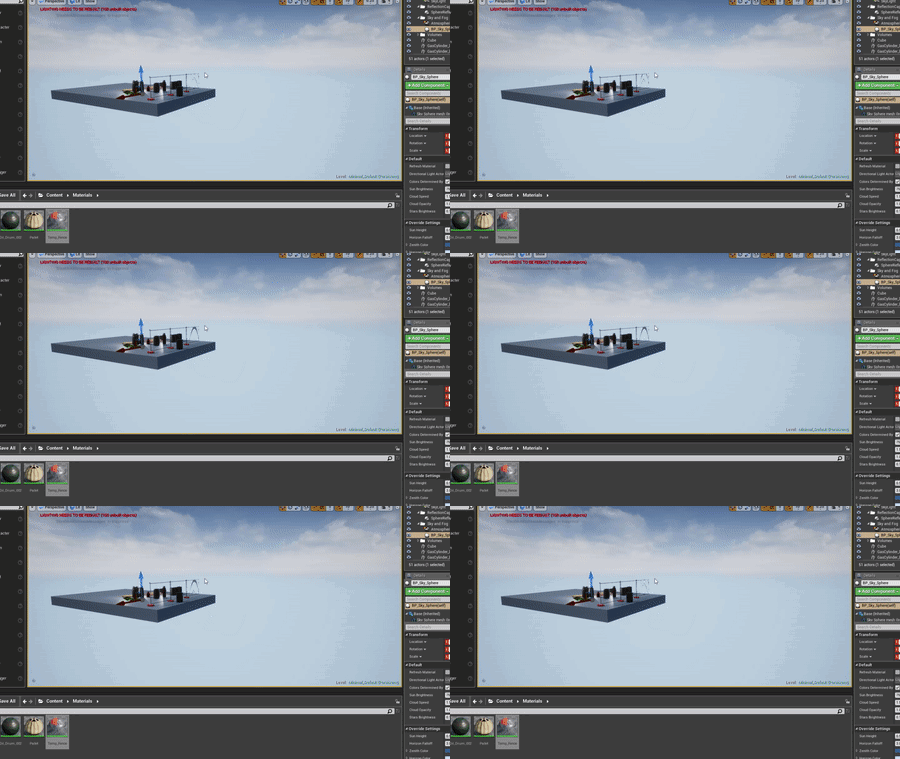
In the gif it is only on one of them, but if moving the camera around, the flickering moves across all of the fence planes that have the alpha masked texture
 raven narwhal
Hello. Maybe someone had this problem before and can help.
When i rotate my camera (VR) - shadows disapears at specific angles.
next badger
@fast gale does texture uses MIPs?
fast gale
I turned off the mips in order to try and fix my first issue - http://imgur.com/VwsJjgO
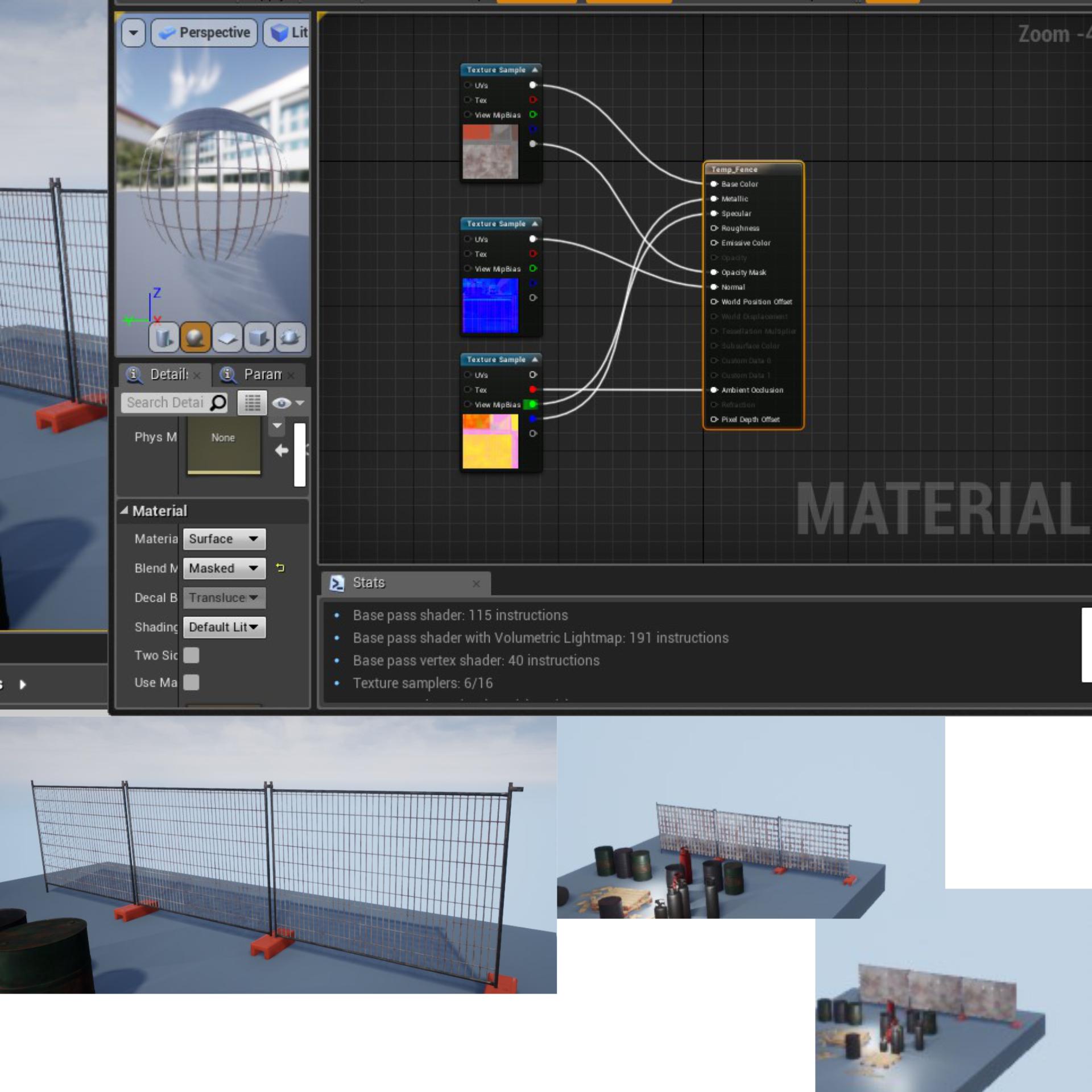
Before, when viewed from a far, the texture would become a solid plane rather than dissapear
next badger
@fast gale it's just may be that TAA and moire on hires texture causes this
fast gale
Ok, thanks, I'll look into this.
next badger
@raven narwhal may be related https://answers.unrealengine.com/questions/805692/shadows-disappear-on-camera-specific-angle.html
frosty hollow
anyone know what exactly the concert plugin doase?

wanna make sure im not miss reading this
since im new to deving dose this mean kinda like a team create?
or is it something else
next badger
@frosty hollow it allows multiple users to connect to the same instance of the editor
manic pawn
it probably crashes
plush yew
A bit confused I changed the skeletal mesh of my character and now I can't see the capsule component. I'm thinking it is an import scaling thing. Here is one character:
plush yew
here is (basically) the same character with the new mesh:
(as you can see no capsule component... even though the mesh is positioned at relative position (0,0,0)
doh. I had it set to invisible
next badger
@manic pawn does work fine, but since there are no documentation on Presence classes - it hard to understand what it could do
paper kernel
import scales are multiplied by x100 from blender
for skeletal meshes at least
skeleton needs to be 0.01 scale, while mesh has to be 1
frosty hollow
i have 3 friends that want to try it since were new were just messing around so wass hoping to find out how to download it @next badger
next badger
@frosty hollow download what?
frosty hollow
the multi user plugin
next badger
it's in 4.22 by default
next badger
it's called "Multi-User Editing"
frosty hollow
i have like 10 hrs in unreal i still barely know the ui xD im asking were to look
lol
next badger
@frosty hollow then you probably won't be able to use it...
in plugins settings