#ue4-general
1 messages · Page 410 of 1
 sullen wraith
 sudden agate
@elder moth Anim BP would be the best place I think
sullen wraith
@cloud cobalt stop trying to be a mini-mod, got an issue message one of the mods, stop wasting everyones time by responding.
 cloud cobalt
Man, you're not being nice about this
I'm just telling you this isn't the place where you'll find help
 elder moth
Thank you @sudden agate , i just needed someone with more experience to tell me if i am on the right track. Thanks so much.
 fierce tulip
 sudden agate
@elder moth haven't worked with bone-driven materials yet, but since you need Bone transforms, AnimBP would be the best bet
(personally, I'd use an Event Dispatcher to send the Bone Transforms to the Pawn and let the Pawn decide waht to do with it)
fierce tulip
@sullen wraith i can understandthe frustration coming from asking the same question multiple times, partially because we have had a few people in this chat that literally asked every 5 minutes. in this case, yes your request was an hour old, but still well within the viewing area of the chat.
and while @cloud cobalt could have said it a bit more polite, though has said it without any spite, he is right.
generally, if you cant find it on google or other resources, neither can we unless there is someone in the chat who by chance bookmarked a ship related to your needs.
hopefully that was worded right, because I just woke up and am not in a moderator mood hehe
elder moth
@sudden agate not sure yet how i will implement it fully. What i know is that i would really like some micro control on how the muscles are triggered and by how much (not simple link to a rotation of a bone, etc). But anyway, it's something i have to learn so here we go.
sudden agate
people in #animation and #graphics probably know more
fierce tulip
and having said that, unless you want completely free, there seem to be some decent pirate ships for less than 20 bucks on cgtrader.
elder moth
@sudden agate ups, you are right, probably i posted the question in the wrong place. sorry about that.
fierce tulip
just remodel em a bit, bam viking ship
 woven terrace
Hey guys o/ hope everyone's having a good Wednesday (my dudes), is this the right place to ask a question about volumetric fog in Unreal ?
fierce tulip
actually, for the same money there are at least some decent-ish viking ships
sudden agate
@woven terrace prolly #graphics or #visual-fx
sullen wraith
@fierce tulip see even that, exactly what I was after, a source and a point in the right direction, I've been lookign at sketchfab
thank you.
fierce tulip
it was one of the first google hits though :/
sullen wraith
not for me :3
woven terrace
@sudden agate righto, thanks
fierce tulip
i mean, check out this premium ship: https://www.cgtrader.com/3d-models/watercraft/other/viking-ship--2

CGTrader
Model available for download in .max .3ds .fbx .obj .mtl .stl format Visit CGTrader and browse more than 500K 3D models, including 3D print and real-time assets
fierce tulip
try "3d viking ship" next time hehe
fierce tulip
after 2 decades of trying to find free content, expecting them to be ue4 ready is a lost hope hehe. so expect some tweakings to be done in a 3d tool/texture tool
 true finch
Do any of you have the issue that closing the engine doesn't kill the process?
It is really annoying when reopening it and trying to save something. I have no clue why this happens, but it happens very often 🤔
 graceful sky
happens from time to time, not often
often related to alot of playtesting, atleast for me
true finch
I never had this issue before though. Just with the project I am currently working on
sullen wraith
whats the best way to manage large open worlds in unreal? procedureal loading or something?
cloud cobalt
Depends on your game, how large, and what you define best
World composition is a way to manage large worlds
Manual level streaming is another tool
sullen wraith
thanks for the info 😃 will do some reasearch on both of those
 calm sphinx
Epic just added features from Live++ into engine source code: https://github.com/EpicGames/UnrealEngine/commit/e1fe0cc030d004459316cc6c17debfc657b0c5a7
also it does not need a paid license, lol.
sullen wraith
404 error on page
calm sphinx
if anyone wonders what's live++ https://molecular-matters.com/products_livepp.html
Hot-reload/live code C and C++ applications.
cloud cobalt
Need to be logged in @sullen wraith
calm sphinx
You need to have access to UE4 github repo
calm sphinx
I can send the commit message here, but it's quite long
Allows fast iteration of C++ changes without restarting the application. To use, select the "Live Coding (Experimental)" mode from the drop down menu next to the editor's compile button, or type "LiveCoding" into the console for a monolithic build. Press Ctrl+Alt+F11 to find changes and compile.
Changes vs standalone Live++ version:
- UBT is used to execute builds. This allows standard UE4 adaptive unity mode, allows us to reuse object files when we do regular builds, supports using any build executor allowed by UBT (XGE, SNDBS, etc..).
- Adding new source files is supported.
- Custom visualizer for FNames is supported via a weakly linked symbol in a static library (Engine/Extras/NatvisHelpers).
- Settings are exposed in the editor's project settings dialog.
- Standalone application has been rewritten as a Slate app ("LiveCodingConsole"). There is an additional option to start the program as hidden, where it will not be visible until Ctrl+Alt+F11 is hit. Similarly, closing the window will hide it instead of closing the application.
- Does not require a standalone licensed version of Live++.
Known issues:
- Does not currently support class layout changes / object reinstancing
That's coming with 4.22
sullen wraith
quick question, im reorganising my folders inside my project, but the folders files, aren't moving to the new folder
the folders are none of the files are
fix redirections isnt doing anything
 peak dew
hello I have a question : how can i get a client memory crash dump? as in when a client crashes does it create a core dump which i can analyze? does the development client do that? thanks
 steady summit
How do I add a component to the root object?
It's always adding it insde the Camera Boom 😦
 leaden dust
@steady summit that is because I don't think that root is a physical component
Its a actor component
I need some help too
what is the best way to initialize main menu in a multiplayer game?
 next badger
@fierce tulip 200k free one: http://www.cadnav.com/3d-models/model-10961.html
the issue isit's bare geometry, but 200k is not very much, also may be crunched with decimation
Viking ship 3d model free download, The Viking ship free 3D-model available in 3ds max, jpg textures included. Very realistic 3d military watercraft model of warship, it can apply to making a ship model, ship model presentation, virtual ship museum, computer games or 3D anima...
@calm sphinx Standalone application has been rewritten as a Slate app
that is nice
 manic pawn
Custom visualizer for FNames is supported via a weakly linked symbol in a static library (Engine/Extras/NatvisHelpers).
what's this have to do with live++
fierce tulip
@next badger you might want to @sullen wraith who was looking for one.
but for a free one, it wouldnt be too hard to optimize
calm sphinx
@manic pawn I will probably checkout 4.22 branch and build it today. I will let you know if it really works.
manic pawn
I'm currently using the normal live++ with the plugin and it works perfectly
I'm not sure if what they made here is better or worse
calm sphinx
Yeah, I know it's working well.
manic pawn
if it runs ubt, it's going to be a lot slower
calm sphinx
but the license price gets a no from me.
manic pawn
but it's not going to die from misaligning uht macros
anyway it makes perfect sense for them to get a special license like this and integrate it
they published the source code for live++
that must have been expensive
 plush yew
So would it be better to use the FPS Blueprint
For FPS lmfao, I assume so
I would like to use fps and apply my stuff there
While adding a 3rd person body
But I'm unsure how I would add the body
Any ideas comrades?
 daring matrix
Unreal keeps crashing and I added the debug log but not sure how it works..
sullen wraith
I'm having troubles, when I move my folder to another location, it's not moving any of the files with it
i do fix rediretions and nothing
nevermind fixed it
was read only
 shy silo
It’s not possible to import a real city with buildings is it?
cloud cobalt
@daring matrix Install the debug symbols for the engine in the options for that engine in the launcher, and yo should have at least more information
You can try disabling Blueprints to randomly find out which one is responsible, if you're using Blueprint
I guess you're not doing C++ 😃
 dim merlin
Hi, how increase the shadow distance in unreal? it seems to be clamped on 100 or 1000 meter but i want more 😉
it also affects my foliage (no shadow is a billbaord)
 umbral apex
Currently optimizing someone else's 4.19 project, and I have had an issue twice where probably 70/100 actors that are attached to another actor in the level get their attachment removed. It is a huge pain to go back through recreating the hierarchy. Are there any known bugs that could be causing this or could there be something they did?
plush yew
hi guys I want to ask you are there courses on udemy for making multiplayer games but not local, with dedicate server?
 pallid compass
I highly doubt it, it is a very complex topic
 copper flicker
can I iterate over the contents of an Enum and make an array out of every entry?
I mean an array of all entries...
or of all indexes..
?
🤔
 grim ore
there is a foreach enum node for each enum
copper flicker
haha funny. but thanks!
yo're right
but I found a simpler way. I cast an Integer to a Byte and transform my Index into Enum Index
plush yew
Hello guys I want to ask you do I need video card to use Visual Studio 2017?
grim ore
you need a video output of some sort yes. an integrated GPU will be fine
plush yew
I have build it video card
I haven't got external video card
I have vs 2017 I run it and it works
for unity do I need?
grim ore
it all depends on your machine and processor
Atom CPU? not going to work well. i7 8th gen? it will work well enough to run the engine on low at acceptable rates
grim ore
core 2 duo will not be supported in UE4 for sure, no SM5 support. For unity it might work but I am pretty sure they are moving to DX11/SM5 as well
plush yew
just got my video card and I want to get it back so I can go out with the number I need for vs
I Know for ue 4 doesn't support
but vs 2017
What I can't run on vs 2017 without video card?
@grim ore
grim ore
VS 2017 will work on the integrated GPU
Visual Studio just needs windows to run, if you can see windows then you can use visual studio
fierce tulip
this is an ue4 channel, you might want to join a unity discord group
plush yew
okay
manic pawn
did you try reading the text?
fierce tulip
what is says.
that version of your gpu drivers has issues, update
plush yew
then go to amds website and download and install the update
 steel adder
so if i dont update i cant use it?
plush yew
dont know, but it would be wise to update
 abstract relic
Google is your friend
steel adder
not rlly
peak dew
hello I have a question : how can i get a client memory crash dump? as in when a client crashes does it create a core dump which i can analyze? does the development client do that? thanks
 keen stream
i'd like to know this too
 regal mulch
Last time I created one was via the TaskManager when the project was frozen
No idea if it creates them by itself. Usually the logs are telling enough.
 still orbit
new to unreal, hope I'm not being a moron but why is the default value for a float a boolean check box?
nvm, works as intended after restarting the engine
sudden agate
@still orbit You need to compile the Blueprint if you change the variable type :)
still orbit
good to know, thanks.
 heavy notch
Hello guys,
I crash the engine when I call this. Do you have any ideas?
Specifically i get the crash when i try to print array length. When I delete it and just print some text it is fine
 dim plover
Don't you want %d instead of %s? I don't know if this would cause you to crash, though.
pallid compass
for(auto& Con : PlayerControllers) // do a thing for each thing in PlayerController
{
    // do stuff in here
}
%d fixed it... Thanks a lot
I am sorry, I didn't want for each player. I wanted to fill the array with all player controllers from the world
 radiant roost
is it me or is epicgames.com down?
 upper heart
Does anyone else get really bad editor startup times when using source vs binary? Mine takes a long time building textures and meshes for some reason
 frozen slate
someone else having issues connecting to the epic launcher?
fierce tulip
@upper heart always
upper heart
hmm it's strange that texture building would take longer on the source build.
radiant roost
@frozen slate yep for the past hour or so
but many websites are really slow maybe amazon cloud down or so
 flat idol
erebel, when you check task manager, is it using 100% cpu or less?
 coral igloo
hello
upper heart
@flat idol yes
flat idol
well im using source editor 99% since the last 4+ years and its pretty damn slow always to compile the contents. didnt really compared to launcher version so far. but i guess it is the case indeed.
cloud cobalt
You mean baking / packaging ?
 haughty flare
Hey guys/ladies
flat idol
No, i mean textures, meshes etc takes very long to generate ddc
haughty flare
I was wondering if anyone knows whether the Vulkan renderer in 4.21.2 supports tessellation? i tried changing the renderer and it increased performance massively (Amd RX 570) but there is no longer tessellation.
grim ore
Tessellation is a DX11 feature and requires hardware that supports DX11. https://docs.unrealengine.com/en-us/Resources/ContentExamples/MaterialProperties/1_8
plush yew
not working this
flat idol
Stranger, probably it has something to do with the profile i always choose to build the editor in the first place
haughty flare
Matthew that doc is for Ue4 4.9 so very outdated
grim ore
It could be for 4.1 and not be outdated if the information did not change.
haughty flare
sure
was just hoping seeing as Vulkan api does support tessellation in of itself
i guess just not in Ue4
but also those docs have outdated information on tutorials etc so i wouldnt trust it to a T
and metal for mac supports tessellation which is not DX11 hence why im asking as i can find no solid information
grim ore
does it work when you try it in Vulkan?
haughty flare
well not with the settings i use no, world position offset works, but i dont know if there is some hidden check box in project settings or engine settings to enable it
there really is not alot of current engine information regarding Vulkan or the features, it said for 4.16 that it uses the mobile renderers path so high end features dont work.
BUT they also updated Vulkan massively with the 4.21 engine version
"DirectX 11, OpenGL 4.0 and OpenGL ES 3.1 support it"
"and is 100% feature compatible with OpenGL ES 3.1."
 zenith flower
Today in 2019 and 4.22.... we still can't copy functions to other blueprints....
haughty flare
the latest patch notes say vulkan is 100% feature compatible with es 3.1 so that means tessellation should work
this is 4.20
plush yew
Vulkan like upgraded opengl
haughty flare
i dont know all the information about vulkan , but it is pretty much upgraded opengl and takes alot of the stress off the cpu , so if youre cpu limited then you will notice increased performance and also for AMD cards supporting the feature (at least with my RX 570) the performance is double
 mortal magnet
I’m currently learning C#, although I’m not very far in, and I just noticed that UE4 uses C++. Does UE4 support C#?
Or should I just learn C++?
pallid compass
no c# support
flat idol
There is mono-ue plugins for sharping c, but the engine is actually written in cpp so you better go with that i guess
cloud cobalt
Yeah, not a great idea to rely on unofficial plugins for something that crucial
 harsh dock
Hey so before I start with ue4, how is the support of hdpi monitors for development like (e.g 4k)
fierce tulip
generally fine
 trim steeple
Hey hey, I want to know which channel I should hit for this problem -> My «Render Target 2D memory» is always increasing, but I don't have any render target in the game
plush yew
^I would also like to know which channel I should go with a question about materials. Thanks in advance
mortal magnet
@pallid compass @flat idol @cloud cobalt Okay, thanks for the input. I’ll work on C++ then.
trim steeple
@fierce tulip I'll have to investigate more I guess, maybe something related to the 4.18 I'm using
pallid compass
@mortal magnet If you dont know c++, dont try and use the engine in c++
ue4 is heavy with macros and bullshit and black magic, if you try to learn the language while using the engine you are going to have a seriously bad time
flat idol
I did just that
pallid compass
Yeah you end up with a scrambled and shit understanding of the language, and you end up suffering heavily in alot of area's because ue4's framework carries you like a child everywhere.
Took me a long time to patch up what i missed and learn to work outside the engine because i did just that.
 tacit matrix
where can i download visual studio 2015 universal CRT? i cant open my project now after attempting to create a C++ script
grim ore
it's part of the visual studio installer. if you don't want to use C++ you can remove the files and update your .uproject to remove the module you added
tacit matrix
would i have to redownload visual studio to get the universal CRT?
 umbral temple
Random question I thought I'd throw out here - I've been slaving away at make foliage using the Pivot Painter 2 tools and I finally have an efficient method/process down that finally works. That said, I personally struggled to find any useful tutorials that clearly explain the process - Are there people who are struggling with it now that are hunting for a tutorial helping with grass/smaller plants specifically?
plush yew
@tacit matrix just run VS Installer from start menu and add it there, if you have VS installed already
tacit matrix
visual studio 2015 community right? i dont see any Universal CRT there
grim ore
did you open up the modify section? or the individual components section on the modify part
tacit matrix
both
grim ore
it is under the "Compilers, build tools, and runtimes" section for me, " Windows Universal CRT SDK"
if not maybe it's time to update to VS 2017
plush yew
Yeah, VS 2017 allows to have 2015 toolchain installed too, so everything works good.
tacit matrix
would i need to have the universal windows platform development downloaded?
tacit matrix
cool okay, i got it
plush yew
You don't even need to install VS2015 toolchain.
This is what I have in Compilers, builds... section
shy silo
If I import a real world height map will it import buildings?
flat idol
height maps are grayscale images so i guess the answer will be a no
plush yew
Pyramids on the other hand...
flat idol
Yes that could work, i totally forgot about them.
fierce tulip
run the heightmap in a sophisticated substance designer setup to generate world map and buildings
abstract relic
Enjoy the videos and music you love, upload original content, and share it all with friends, family, and the world on YouTube.
You got options
grim ore
abstract relic
You forgot this

YouTube
This channel is dedicated to exploring Unreal Engine 4 and the Blueprint programming language that it uses. You can think of it as a companion to the API doc...
grim ore
mine is more for after you figure out the basics 😃
plush yew
Is it possible to move unreal engine to another computer and use it without the epic games launcher?
 harsh tiger
anyone know why mouse wheel up wont work for this?
hi @grim ore any chance you know why this doesnt work? jump with space bar works but i added mouse wheel to the project settings and even tried to hard code the node but neither have worked
plush yew
Nope. Looks fine
harsh tiger
thats what i was thinking haha, it just wont work for some reason
when i scroll up it prints a string with a print string
but doesnt fire the jump event
grim ore
Pressed and released is probably firing after each other
grim ore
Well that's a weird one lol restarted the engine?
dim plover
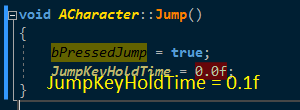
I think Jump requires you to hold down the button. There's a variable called JumpKeyHoldTime/JumpMaxHoldTime in Character.
abstract relic
tried it on my project, no go either
harsh tiger
would i have to create my own jump using launch character?
restarting didnt fix it @grim ore
made that and it works with mouse wheel now
@dim plover i think what you said might be the case haha. thanks for the help!
dim plover
You probably don't want to use Launch Character. It's quite different.
Also, this is in the comments for the Jump function.
 * If you want your character to jump according to the time that the jump key is held,
     * then you can set JumpKeyHoldTime to some non-zero value. Make sure in this case to
     * call StopJumping() when you want the jump's z-velocity to stop being applied (such
     * as on a button up event), otherwise the character will carry on receiving the
     * velocity until JumpKeyHoldTime is reached.
is that c++?
 outer plume
Hi
dim plover
No, it's just the comments for the Jump function.
harsh tiger
ah okay, i've changed it to the launch character node and its working as intended. this is only for a college project and not a proper game. so it will do for now haha, if i becomes a issue down the line i'll take another look. thanks again mate
grim ore
Never tried jump on a non button press lol, got to play with it now.
dim plover
Is it possible to implement this in BP?
https://i.imgur.com/Sci2HSj.png
Because JumpKeyHoldTime and bPressedJump are ReadOnly and thus can only be get'd in BP.
 harsh tiger
i'm not experienced enough to say @dim plover have to leave that one to @grim ore for a WTF? video haha
 whole quarry
ofcourse you can do that in BP
plush yew
I have a question
dim plover
But you can't set those variables.
plush yew
Ok so I have my 1st person and 3rd person animations ready to be put in etc...
Which template should I use
I wanma use fps because I have both 1st and 3rd person animations ready
whole quarry
so use the FPS one, you can always add the 3rd person template later
whole quarry
aye, iirc via the IMPORT button
grim ore
Use the third person, you can always add the first person template later 😂
whole quarry
lol
plush yew
I'm new lmfao so excuse my noobness
whole quarry
hey, you got to start somewhere
after years of using BP, i finally started with C++, feeling like a nooby too 😛
grim ore
C++ is scary, everyone should avoid it. It will literally kill you while you sleep.
plush yew
Lmfao
whole quarry
sounds better than waking up the next morning and be in the nightmare
plush yew
Yeah tbh
But anyways so like, how would I hook the body of the 3rd person bp to the 1st person arms if u know what I mean
whole quarry
I think, atleast I would do, from the PlayerController you spawn the FPS actor, then posses it, when switching to 3rd person spawn the 3rdPerson actor and posses it and also destroy the FPS actor
whole quarry
when you're in either 1 of them, you don't need the other to be there
plush yew
Will other players be able to see the 3rd person model
dim plover
Why not just have two skeletal mesh components in one actor? One for FPS arms, and the other for the body.
whole quarry
im not sure about that, but I would think to make the player actor for other players invisible and spawn a 3rd person actor for them regardless
i would say both animation bp's would be running, ticking for each animation update, extra expensive that could be avoided
dim plover
You could have it not tick when rendered or set the AnimBP to nothing or set the component tick rate to 0.
abstract relic
grim ore
so uh... I hooked up a mouse wheel up node to my default TPP character on the pressed wire connected to Jump and it worked out of the box lol
so I dunno why it didn't work for you but case closed, it should work fine 😛
 mint raptor
online.RestAchievements does not seem to work for stat based achievements?
I've called it many times but the one and only stat based achievement sticks around.
 earnest cape
I'm getting this issue in 4.21 and I'm not sure if anyone knows of a real answer https://answers.unrealengine.com/questions/453200/412-skylight-with-translucent-materials-broken.html
 teal tulip
Probably is broken another time
The engine had a lot of changes since 4.19 on the rendering
just reply or report it, or check if happen aswell on 4.22
earnest cape
I've been fighting with this issue for about an hour now. So far I've turned off "lower hemisphere is solid color" and that helped me hide the error
teal tulip
that will cause huge changes on the light
earnest cape
Yeah it did but the glass doesn't have this weird line in the middle where the skylight meets the solid color
 dawn vessel
I’ve heard LOD’s for Meshes aren’t that helpful when it comes to optimisation.. Why’s this ? I thought it’s good as long as you do some major tri reduction 🤷
sudden agate
Triangles are not the main factor for performance.
DrawCalls and Quad overdraw are
dawn vessel
Are LOD’s draw calls ?
sudden agate
stat scenerendering lists the amount of drawcalls a single frame processes.
dawn vessel
I only have 2 LOD’s. LOD 0 and LOD 1. LOD 1 reduces its mesh count by 85% so I mean. 1 lod and that large of a reduction is fine right ?
Ah
sudden agate
As I said Triangle Count is not that important (maybe it is on Mobile) anymore.
If you want to optimize, you need to find your bottlenecks.
Meshes with multiple Materials (High LODs should have only one Material, batch Materials together, it doesnt matter if you use different Textures for that)
Translucent Meshes (Hard to optimize. Higher LODs should use a more simpler material)
Masked Materials (Use proper cutouts instead of Quads. More vertices are better than a large transparent area of a mesh)
There are my tips
dawn vessel
Thankyou
sudden agate
Make usage of "Merge Actors". Since version 4.21, UE offers the new HLOD ProxyMesh Tool, which can transform distant sceneries into a single object with a single draw Call
 wary wave
there's a whole section in the documentation
sudden agate
dawn vessel
Oh and by the way. Isn’t Foliage a single draw call
I remember hearing something like that
wary wave
depends on your foliage
sudden agate
it is multiple drawcalls because it is clustered
dawn vessel
Ah ok
sudden agate
but its definitively better than placing grass by hand with static meshes
dawn vessel
I’ve seen side by side comparisons. Using individually spawned meshes in the world, vs instanced static mesh
Crazy
sudden agate
Instancing helps, but isnt the holy grail. You can also do a lot of wrong things with Instanced Meshes
dawn vessel
How so
sudden agate
The "default" Instanced Meshes cannot be LODd individually. Also if only one instance is rendered, all other instances are rnedered aswell
Hierarchical Instanced Meshes kinda solve these problems
But I dunno if UE has a Component for that for use to use
wary wave
it does
sudden agate
Afaik only Foiage uses it
wary wave
you can use it in blueprints etc
sudden agate
oh nice
wary wave
I make good use of it in a lot of my procedural systems
sudden agate
And how does the Clustering work?
sudden agate
Whats the difference between that and the default ISM then?
wary wave
default ISM doesn't have features like LOD support
sudden agate
If there are no batches, it's no different than ISM tho
wary wave
you have to batch ISMs if you do that yourself in blueprint or whatever too
¯_(ツ)_/¯
but also, LODs etc
the ability to billboard meshes from a distance isn't to be sniffed at, hehe
sudden agate
HISM components are useless. they LOD individual clusters, but if i need to cluster it myself with mutliple HISMCs, it's no different than ISMC, isn't it?
wary wave
random unrelated question quickly - is there a default example project with a rudimentary AI that just wanders around a nav mesh (simple as pick random point -> move -> repeat)?
ISMC doesn't support LODs at all
so it is different
sudden agate
no LODs? I always thought that all ISMs are LODd together . I.e. once all meshes would show LOD1, all ISMs pop to LOD1
see this answer
wary wave
hmm, perhaps the difference is that ISMCs LOD based on largest mesh screen space, whereas HISMCs are handled individually
this would make sense to me
I was under the impression ISMCs didn't support LODs at all
(since it makes limited sense for it to)
sudden agate
I havent used them in a long time anyway :P
Maybe ISMCs arent needed anymore thanks to the dynamic batching?
 violet cove
Why is there no material channel on here?
wary wave
yeah, dynamic batching is gonna change a lot of things
looking forwards to it
even if it makes like 90% of my custom workflow tools redundant 😄
 keen flicker
Help! My unreal engine crashes whenever I open any file except a few was working perfectly yesterday
Mention me if u answer me thnx
 rain pike
dawn vessel
rain pike
dawn vessel
YouTube
Lot's and lot's of Tutorials for UE4.
"UE4 How to start your first game"
Something along those lines.
 honest vale
is https://docs.unrealengine.com down for anyone else?
cloud cobalt
It's intended as a successor to hot reload for your C++ game code
Though right now it appears to have the same limitation with the class definition
 spare sun
well I get the c++ hot reload part, but whats the difference with the previous system
calm sphinx
It's more stable as far as I know.
and it should be faster, if they're going to use same procedure with Live++ .
cloud cobalt
It's supposed to be better in the long run yeah
calm sphinx
I don't know if you tried licensed version of Live++ with UE4 before? You can see the difference from there.
@honest vale yes, it's down.
 dire sentinel
I have a blender problem, and last time I asked it here, this discord was more helpful than blender's so I'll try my luck here again.
Limit selection to visible not working?
No matter if i tick it or not, I can't paint through my mesh.
As you can see in this pic, I have it ticked, and the same thing happens if I don't, The vertecies on his belt are still light blue after I try to paint them, since no matter what I do my weight paint won't go through the mesh.

 tardy sapphire
Does anyone know how to combine 2 landscape materials into 1 master material??
regal mulch
Which makes it even less likely to be something a button press can do
tardy sapphire
They don't share anything
Both materials have 4 layers each
I want a material with 8 layers
That combine them
Nope they don't share any names
wary wave
ergh, Epic's documentation site not responding :/
regal mulch
Yop
wary wave
using google cache instead
tardy sapphire
Alright this is a good lead 😃 Thank you @plush yew
And yeah the documentation isn't responding >.>
earnest cape
I swear this is the most annoying thing I've dealt with all week
The skylight just refuses to work right and the glass material doesn't seem to be the issue either
 rotund monolith
guys, hi, does anyone have problem with the documentation page?
i cannot go inside...
fierce tulip
its been down for a while now. read a few messages up
rotund monolith
oh, thanks
sudden agate
inb4 complete overhaul of the Docs 
sudden agate
BeginPlay of PlayerController
 noble barn
Hey there everyone! Someone here experienced with UE4's RHI / D3D implementation? I am not, but tasked with something I am not allowed to further specify due to some NDA's, but I would appreciate some help. Long story short, I need to insert some functions before rendering and after rending each frame, best via a plugin. Tried just binding to the viewports OnBeginDraw and OnEndDraw, but those are called on the GT, I would need RT equivalents.. Any help is truly appreciated!
e.g. I need to run a specific function BEFORE anything is rendered (no draw calls made), and one AFTER the last draw call has been mad
 devout gulch
noble barn
devout gulch
noble barn
I do not want to modify the render loop, I want to either bind to any eventual delegate or modify the engine if need be (in that case actually do modify the render loop, just not via a plugin)
just would prefer to solve it w/o modifiying the engine if possible, as that plugin someday may also be very handy for a lot of other people once the NDA's lifted. Surely UE4 will implement it on their own then too, but we don't have the time until then
 grave nebula
@noble barn That is too broad to give you any kind of meaningful assistance.
noble barn
@grave nebula Yeah, I try to make it as precise as possible w/o getting myself into trouble 😅 Sounds more dramatic than it is, but I just want to be careful with NDA's. Alright, let me try to get more precise in the format I can
grim ore
if anyone would know in more detail #cpp or #engine-source would have a better idea on where to hook into it
noble barn
@grim ore Yeah, usually those channels are pretty dead though.. But I'll maybe move it over there, true. Think there was a rendering channel back then, sadly that one is gone (or I am halluscinating).
But yeah, in summary I simply need to run a function (by either a plugin or modifying the engine), before any draw calls have been made, and then another one after the last draw call has been made for the game viewport.
This is the modified "instructional" that came with the API am trying to implement, removed all the specific parts. Essentially, I just try to call one function before 3.) and one after.
Application would per frame:

1. Call *** first function ***. This will mark as the start of the frame and thus *...*
2. Call Enable() specifying whether the upcoming render targets *...*
3. Perform regular draw operations
4. Call Disable() as per requirement
5. Perform post-processing as per requirement
You might want to look at the channels before making that statement
noble barn
@abstract relic I often partake in those channels, and I know they are not "dead", but since it's rather urgent with a tight deadline I figured I have better chances that someone actually from Epic reads this here. Quite frankly, it's pretty difficult these days to get a hold of someone with engine-knowledge with the gigantic popularity of UE4.
noble barn
@manic pawn Thanks for the tip, I'll try my luck there. Thought "graphics" rather means the creation of visual content.
 sharp crest
my day making UI in one image
dawn vessel
Anyone know how to create a real loading screen? Not using something like: Create Widget > Add to Viewport > Delay 10 sec > Remove from Viewport?
As I'm guessing there's a better alternative.
grim ore
there is an old plugin for loading screens, or you can use level streaming for loading screens if you actually want stuff to load. If you just mean a screen that shows stuff and annoys the user while nothing loads then your method is fine
 versed siren
how do I make my rain particles only visible within the range of light sources? they are fully lit even in pitch black currently
grim ore
are they fully lit or using unlit as the material type?
grim ore
Should be fine then, if it was unlit I could see it not working properly
grim ore
What does your material look like for the particle?
versed siren
it's just a translucent white block
fierce tulip
just in case, show the material
versed siren
grim ore
yep thats what I thought lol
emissive color is emissive...
plug the emissive into the base color, not emissive
The Emissive Color input controls which parts of your Material will appear to glow because they are emitting light. Ideally, this will receive a masked texture (mostly black, except in the areas that need to glow).
fierce tulip
81 instructions
versed siren
that worked but now the particles are black instead of blue
grim ore
the particles are now affected by the lighting around them instead of generating light themselves.
versed siren
is there some kind of middleground I can reach?
to retain their brightness but not shine through absolute darkness
fierce tulip
multiply with a low value, and plug that into emissive
keep the base color one, drag another wire from that multiply > add a multiply with a value like 0.05 or whatever.
change that value accordingly
versed siren
and put that one into emissive?
versed siren
a standalone value? no linke to color?
fierce tulip
yea, basically your opacity already has the whole shape and masked it out where needed
the base color will add the color
versed siren
so emissive just controls the glow effect?
fierce tulip
nah, also the color
but in this case you can do either
since the emissive value is so low
versed siren
emissive color tile?
fierce tulip
?
fierce tulip
show an image, or be more descriptive please.
sometimes its hard to understand someone who doesnt speak full lingo yet :p
versed siren
what is it you want me to plug into the emissive?
fierce tulip
the emissive input of the material
versed siren
I cant work on it anymore right now so i cant show you images, I can wait until later if you want
fierce tulip
either plug in a scalar with a low value, or do the multiply thing I mentioned before.
either is fine
sharp crest
@dawn vessel heres how you can do a 'real' loading screen
https://wiki.unrealengine.com/Loading_Screen
or use the plugin
https://github.com/ue4plugins/LoadingScreen
or
https://www.unrealengine.com/marketplace/en-US/loading-screen-system

GitHub
A plugin for Unreal Engine 4 to expose simple controls for managing load screens. - ue4plugins/LoadingScreen
sharp crest
ye
sharp crest
ty ||buy||
dawn vessel
LOL
sharp crest
@dawn vessel can I ask what u r doing
||I'm bored||
||even tho I should be working||
sharp crest
||for what tho||
dawn vessel
Golf Game, oh noes. I leaked 
 dawn vessel
Also currently having to make Models for the courses still but hold on.
 spark sonnet
Hello guys. Does anyone know how to fix my project? I migrated some files from another project and after that the HUD and Blendspace stopped working
sharp crest
@spark sonnet If you want help, you want to be detailed, very detailed
dawn vessel
@sharp crest This was from 2018. So Brightness changes, Color here and there, etc. This is the environment type design to expect for it.
sharp crest
'stopped working' description is how to get blocked in a development questions channel 😂
dawn vessel
Clouds were fully custom by me.
sharp crest
oh nice u made the models urself? @dawn vessel show some gameplay 
dawn vessel
Took an hour lol.
@sharp crest Nah, I wish I was that talented 😃 Just the clouds was made fully by me 😃
grim ore
@spark sonnet we can't really guess at what is the problem. "stopped working" means what? Is it possible you replaced your maps and now the settings are different? is it possible you replaced your default game mode?
dawn vessel
I can't show Gameplay yet though !
dawn vessel
Bahaha
sharp crest
it's okay I think he is writing it @grim ore xd
sharp crest
Atlas 
ARK 
Close both
Make sure to delete Eternal files and submit
on the way you know
😉
spark sonnet
Ok. So I migrated a behaviour tree and all the contents connected to that to my new project that im working on. After I migrated it my HUD wouldnt come up on the screen and my blendspace ignored everything that I told it to do. I cant find any errors in my project so I dont understand what could possibly be the problem. The only thing I did was migrating some files. The file I migrated did contain a player character from the old project but that shouldn matter. So any tips on what itr could be? Are there any automatic backups I can find somewhere or did I just break my entire project?
dawn vessel
I don't do that stuff's anymores
Dino Mods too much time.
I was on the Eternal team for a month.
Didn't take much interest.
ARK is actually doing well with their new Updates they're putting out too with their Dev Kit.
They have Unreal Engine 4.21 features in ARK now.
SOME
sharp crest
ARK modding doesn't make me a living though 😉
And neither is it's community fun to be in
grim ore
There are no real auto backups unless you used source control. Chances are you didnt break it, you can always redo what you did before you migrated again.
dawn vessel
Nope. Not for 99% of us.
I just love ARK and mod for it 🤷
I host Server's for it still.
And have been for 3 years.
sharp crest
@spark sonnet try those
grim ore
everyone wave to @elfin jacinth on the stream right now 👋
spark sonnet
thank you Ill try @sharp crest
sharp crest
is he looking here
grim ore
grim ore
no idea if he is but if he is I just harassed him lol
sharp crest
😂
if he would have looked here it would been such a perfect advertisement
@dawn vessel what can u do in ark for 3 years..

dawn vessel
I just love ARK in general with it's whole aspect of Survival and It's Mod Support.
grim ore
aww no he is just in the twitch stream I think, not in here right now
sharp crest
fancy more free stuff https://www.unrealengine.com/en-US/blog/featured-free-marketplace-content---march-2019

Unreal Engine
New free content, from beautiful materials to animation packs and mighty weapons, is now available on the Unreal Engine Marketplace. Add them to your projects today!
dawn vessel
Though the game runs like crap. Still beats many haha
I wish Epic supplied Servers like what Steam does 😦
I would be on Epic Games Store right away.
grim ore
they plan on it
dawn vessel
Sure damn hope so.
 elfin jacinth
waves to @grim ore
dawn vessel
Aha!
grim ore
hah 😃
spark sonnet
I give up 😦 I cant find any errors it just wont work
spark sonnet
The blendspace wont update and the HUD wont come up. I have add to viewport HUD in the playercontroller and it wont start. Its like it just ignores it
Here is the blendspace
grim ore
ok so your HUD is a UMG widget, not a HUD object?
spark sonnet
yes some parts of it
grim ore
breakpoint on the part that adds it to the viewport and see if it calls it?
spark sonnet
breakpoint?
grim ore
yes debugging. F9 or set a breakpoint on the node with right click. It will stop the game at that point when it calls it
if it never stops, that code is not being called. if it does stop, you can see if your code is valid
Is there a chance your default player controller was changed when you migrated?
flat idol
dang i was a bit out of sync with chat. nvm.
spark sonnet
It stopped right away when I pressed play after putting breakpoint on add to viewport and when I put it on the variable before it
grim ore
ok so the add to viewport code. mouse over the input and make sure the widget was created correctly.
while debugging
spark sonnet
Hmm ok so the variable I use to set the gun would activate either. Pic below
Its ignoring all of the variables shown 🤔
Event BeginPlay wont start at all it seems
 merry gazelle
Can someone explain this, I want to add to the "unit cost" but I can't seem to find what I need to change using reference viewer
fyi I tried changing those unit cost values to something random
The error shows up when I press the +
 rigid arrow
I really want to learn to do Cisco Ramon vibe powers
spark sonnet
Ok. I searched around and it could be something wrong with the gamestate. Where can I change that?
rigid arrow
I really want to learn to do Cisco Ramon vibe powers
I was wondering if anybody knew him or his powers and was maybe willing to help?
Or gibe tips
grim ore
@merry gazelle one of those values you see in the map, the fort base and cost or any of the others, matches the same value as the default. You need to change the default to something else, or you need to change the value that it matches in that map. Basically the map cannot have identical values, everything has to be unique and you are trying to duplicate a value in that map
 rocky prairie
UE4 : if I install the 4.22.0 preview 4 version and the full version is released should I re-download the full version or can I update the preview?
grim ore
you can do either one, it's basically the same result lol
rocky prairie
so I can update the preview version
grim ore
yes you can but I don't think UE4 has real patching so for the most part it will just redownload it all again
rocky prairie
ahhh okay
grim ore
but yes updating the version usually has no problems and is normal and preview is technically just another version
rocky prairie
👍 I was asking because I will start learning UE next week and I wanted to start downloading it from now because I have a slow connection
grim ore
if size matters tho make sure you remove the options you don't need like the other build targets, debug files, source code, etc.
you can trim quite a bit from the install size doing that
spark sonnet
Ok. I've come further in the trouble shooting. So now the problem is that nothing is getting any input from The cast to first person character node. Any ideas why?
grim ore
what does the blueprint look like? where is the blueprint
grim ore
that is running fine, your failed pin is executing
breakpoint on the cast, mouse over the input object, read what it says, fix the issue.
grim ore
you are asking the engine if your player character is of class FirstPersonCharacter and the engine is saying no.
spark sonnet
But why is it saying no? 😦
grim ore
because your player character is not a FirstPersonCharacter
which is why I said to debug it and find out what it actually is so you can fix it
whole quarry

spark sonnet
Ok. It was the firstpersoncharacter before the migration
so how do I set it to be that again?
grim ore
go to your project settings, maps and modes, default game mode, and change the default game mode to the correct one or the default pawn to the correct one.
this assumes you are not overriding it in your code or your world settings
whole quarry
in case you use a different player actor: https://docs.unrealengine.com/en-us/Engine/Blueprints/UserGuide/CastNodes
grim ore
ok then the next step is to check your code or your world settings on the map that is loaded or.... or....
12:52 PM] MathewW: breakpoint on the cast, mouse over the input object, read what it says, fix the issue.
you need to identify the issue before you can fix it
spark sonnet
Thank you for helping. But I dont understand where to mouse over
is this what you mean ?
grim ore
the left input, blue roundy thingy, on the cast to node when yo mouse over it and it's on that node it will tell you exactly what is coming in
the one that says object
spark sonnet
grim ore
so in this case since you re using Get Player Character it should give you the object that the engine is using for your player character and it will tell you which class that is and what you should be casting to. Now since you don't want to be doing this you need to figure out what is going wrong
there you go, this code is running on the AI enemy
spark sonnet
So what can I do to change that?
grim ore
well should it not be running on the AI Enemy?
there is a drop down on the top with objects you can filter out your code on. Chances are you have this code running on multiple objects which is why the cast is fine as it would just ignore the non player
spark sonnet
This cast is running inside my AI companion and the node is gettting variables from my firstpersoncharacter
grim ore
you can hit continue and see if it stops again on another object
according to that node your player is of type AI Enemy, not First Person Character
spark sonnet
I dont understnd why
grim ore
so what do your world settings show for your game mode?
grim ore
and the default pawn in that is set to first person character?
in the override settings, not in the project settings, since you are overriding the default game mode
at the worst set the override back to none since your project settings should be correct
spark sonnet
its set to firstpersoncharacter
grim ore
in the project settings btw you have the player controller set to AI Enemy Controller for some reason
spark sonnet
where?
grim ore
the screenshot you posted in your project settings for default game mode
grim ore
at this point you must have something overriding it then. run the game in Play in editor, hit Shift-F1 to release the mouse from the viewport, click on your player in the world, and see what his class is in the world outliner
plush yew
installed codeworks yesterday
grim ore
ok that screenshot shows first person game mode
but your earlier one shows a different game mode
spark sonnet
I changed it to the right one but it didnt change anything
 finite sail
greetings
grim ore
where is the code at that is not working?
spark sonnet
All the FirstpersonCharacter cast nodes are always failing
whole quarry
did you copy-paste the nodes in to the blueprint from another project?
grim ore
I don't know what else we can try then. You change stuff but I can't see the changes so it's just a guessing game. If the get player character is returning something other than your default pawn then something is changing your player at some point to the wrong thing. but you just showed a screenshot showing your player is the first person character so shrug
spark sonnet
I wish I didnt migrate that stupid behaviour tree 😕
whole quarry
i think the references are messed up then
spark sonnet
Probably but I cant find where its messed up
whole quarry
try to remake the casting nodes
spark sonnet
I'll try now
grim ore
set the default game mode back to third person character and see what happens
spark sonnet
I dont have a thirdpersoncharacter, did you mean the firstperson?
spark sonnet
It didnt do anything :/
grim ore
yeah I think your default game mode is messed up possibly as well since your default game state seems to say its the first person game mode from that picture and your default game mode being FPS Controller seems weird since it says its a controller
spark sonnet
Hmm. What should I do then?
grim ore
Make a new game mode base blueprint, use that as your default game mode, and hit play
spark sonnet
what do I write inside that gamemode?
grim ore
are you using C++ or BP to make it?
spark sonnet
BP atm
 versed solar
Any neat features you guys have seen in survival/horror games lately?
Trying to practice with blueprints by recreating mechanics.
grim ore
BP is fine, just a new one without any other options or changes
if you are using it you should not spawn in as your player at all
spark sonnet
ok so I've made it. Should I just set that to the default gamemode?
grim ore
yes your default in the project unless you are overriding it in the map
you should put the map back to none at some point if you plan on using the default mode
spark sonnet
ok done. Now I cant control my character. What now?
grim ore
so you can fly around?
spark sonnet
yes
grim ore
ok then go back to the game mode, open it up, and change the default pawn to your third person character
grim ore
double click the game mode, or go back to your project settings and change it in the list
spark sonnet
ok now I am back to the same still not anything from firstperson cast
grim ore
are you controlling the first person character?
spark sonnet
yes
grim ore
now how do you know you are controlling them?
spark sonnet
what do you mean?
grim ore
well how do you know you are controlling the first person character and not an enemy ai?
spark sonnet
because I have the camera and the guns for my firstpersoncharacter
the enemies are just pawns without anything
spark sonnet
thats one of many places its at yes
grim ore
well you have to focus on one thing to work on, jumping around won't help
grim ore
ok for that one then in the event graph for the first nodes what does it show when you debug the input object for the cast attached to try get pawn owner
grim ore
is this when running and not in the editor?
spark sonnet
when running the game yes
grim ore
then something must be broke somewhere for sure. If your anim instance is running but not running on anything then your project is broke at a basic level
spark sonnet
😦
grim ore
it makes no sense that this graph would fire an animation update if the animation graph was not on anything
grim ore
that is breaking on the wrong node
you want the node above it connected to the try get pawn owner
spark sonnet
I did both
grim ore
plus
grim ore
the top where it says preview instance needs to be your player
what does it show in that preview instance list when running, is it more than just your player?
spark sonnet
yea
grim ore
does your player mesh have an anim instance assigned to it?
anim class slot under Animation in your character blueprint
spark sonnet
Ok. I gues I'll have to start all over, again.. But thank you so much @grim ore for helping me. If you happen to think of a solution please let me know, but I dont think there are any
finite sail
Do you have a Performance Channel ?
fierce tulip
no, but generally depending on what you want to optimize, it fits in one of the other channels
finite sail
Wanted to ask the Efficiency of either 1. driving a Character with vectors to create animation. Or 2. Make the Character animate and control it from the cinematics control ? What is more efficient when running in game?
fierce tulip
probably the latter, but dont take my word for it.
You could try #animation perhaps.
finite sail
thanks
plush yew
hi
I want to ask a question
why a simple starting scene has to compile about 3000 shaders??
scene is just default with vr camera
i dont understand from where the hell all these shaders come
whole quarry
what starting screen?
plush yew
this is the scene
it takes me about 20min to compile all these shaders on my 9600k 5.1Ghz
this is so stupid
manic pawn
useless shader permutations that the engine is never going to use
plush yew
how do i disable or delete them?
manic pawn
you can't
plush yew
will they recompile when i build again?
manic pawn
every material makes like 100 more of these
plush yew
i need to test a lot and with waiting 20min just for one change this is not possible to make anything....
manic pawn
they get stored in derived data cache folder
it only compiles them if they're missing
this shouldn't take 20 minutes idk what went wrong there
more like one
or less
plush yew
oo great
cant believe this they hardcoded android ndk
cannot use new android versions
manic pawn
🚫 👏
sullen wraith
Anyone know what the cost for map makers are? providing them all assets etc
(if provided them all assets)*
 gleaming creek
That would depend heavily on what you want them to do
A rough idea might be to think of how many hours it would take them to do whatever it is that you want them to do, then apply a reasonable price per hour (for a reasonable rate of pay given their skill level, adjusted by the costs of living in the country where they are based)
 dim arch
when I switch map I get a 12s spike - but only on the first instance the level is loaded into memory
if I switch to it again, in another PIE session it loads in a few seconds, what can I do to fix that?
grim ore
does that happen for a blank map?
plush yew
anyone here use auto rig pro?
dim arch
no, it only spikes on a specific map which has a lot of data to load, but if I close the PIE session and start a new one, and switch to that map again, it loads much quicker
im trying to optimize it but cant really find which bp is responsible using the session frontend, a lot of the event calls that are taking time are in the cpp layer
grim ore
how does it perform in the actual package project? is it an actual issue
 astral pond
hm i guess its loads faster.. beause some data are still in the ram?
maybe you level is to big and you should use some Level Streaming?
big landscapes have a long load time... more information would be helpful
 drowsy quarry
idk where to post this question but i bought assets off of store and it will only let me create a project with it instead of add
abstract relic
You can migrate asset from a project to another
 solid gazelle
They should be bundled in a subfolder under content
All assets
can migrate teh whole thing, or grab a single asset and it will pull all assets in the reference chain
right click -> Migrate
Target the Content folder of the project you want to move to
plush yew
ALT is one of the binds for my game but it also seems to have some function inside of unreal, I think it frees the camera or something? Whatever it's doing, is there a way for me to turn it off? Because it's hard to test the functionality of the key when the engine is also doing things related to it
leaden dust
this is the code in my player controller
not character
giving this error per client
I just set the variable
so why is the property null
I have spent 2 hours on this error already
moving code from game instance to character to player controller
tried replication
using functions, evnets and that all
if I try and debug like this it prints "Not Valid"
why is that?
anther thing: on listen server debug it works fine
this is only in run as dedicated server mode
 spiral island
maybe the dedicated server has no screen to add things to
leaden dust
I am not running it on server
this is player controller
it exists only on client
and also
UI is not replicated as far as I know
 wise prism
I'm trying to make a flashbang effect similar to https://youtu.be/eZ6suH8uw70
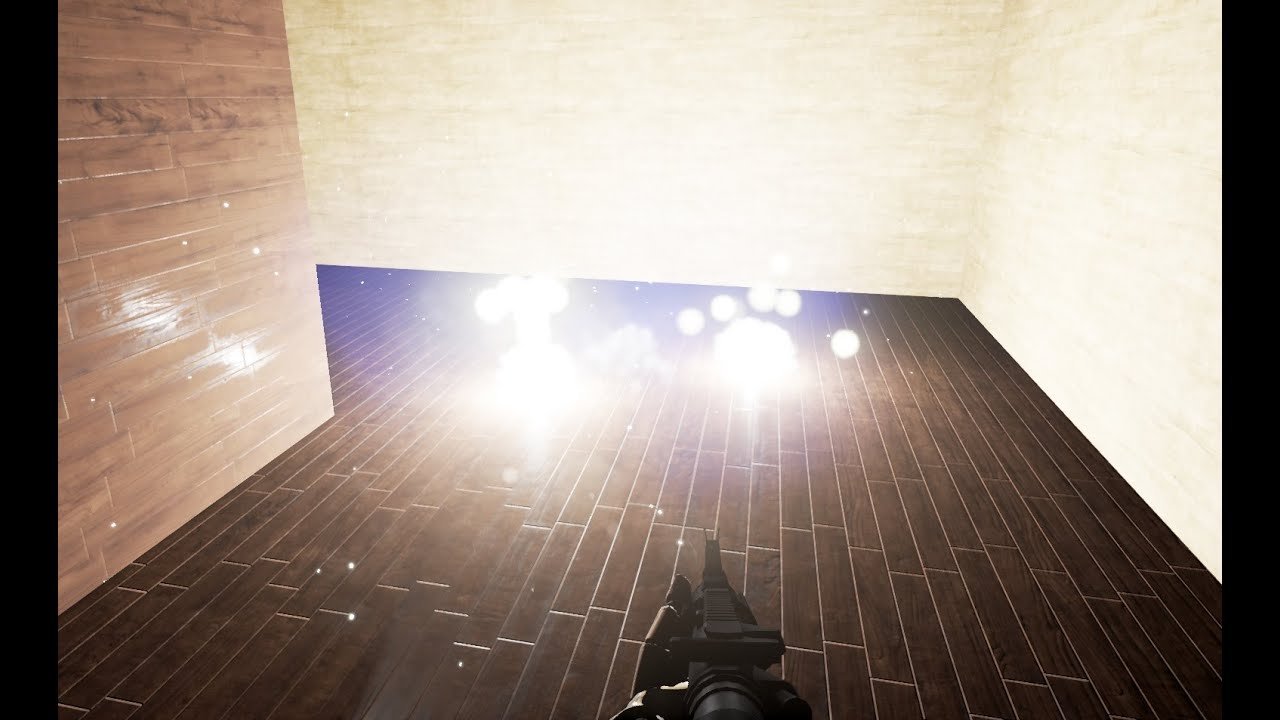
Inspired by effects from CS:GO and Insurgency :)
But I'm having trouble getting post processing effects on the widget
I have it use scene capture 2d and render target to go to a UI. But no post processing effects appear.
honest vale
are docs down again?
wary wave
seems that way
abstract relic
I can open it
abstract relic
 abstract relic
Free program to make your free asset
plush yew
oh lol
abstract relic
||look at this month marketplace content||
wary wave
^
I usually just modify the stock sky tbh
fiddle with some colours, swap some textures
 onyx nest
unreal's default skybox is pretty nice
wary wave
lol
plush yew
so should i try the default sky box? from ue4
onyx nest
it's up to you
abstract relic
The player doesn’t look up anyway 😜
plush yew
what looks better tho
onyx nest
probably the default skybox
plush yew
hmm
sudden agate
a custom HDRI skybox would be better
onyx nest
if you wanted to make something similar yourself it would take some time
plush yew
yah
onyx nest
seems like you expect a bit much
or you just want to download something
it's better to practice
plush yew
ye
onyx nest
and even if it looks bad you'll at least learn something
plush yew
true
well lemme try these two sky boxs first and ill see
if i dont like it ill try hire a dev
cause i like a skybox that is nice and bright and has vibrant colours
wary wave
colours are just colours
 cobalt scaffold
how far along are you with your project @plush yew ?
wary wave
simple material fudges and texture swaps can do a lot there
abstract relic
That’s far from halfway mate 😜
cobalt scaffold
well if you have your style locked down already, then you can probaly hire someone to get a custom sky solution that fits your game, otherwise i'd suggest postponing that .. things change during the project
cobalt scaffold
 plush yew
o
cobalt scaffold
plush yew
ok wow
the hdris heaven has good ones
whats the def from 1k to 16k
is it like realy heavy ?
cobalt scaffold
yeah
plush yew
so u need a good pc
cobalt scaffold
1k is too little for a skybox

 abstract relic
Those aren’t even seamless much less for a skybox
plush yew
what
onyx nest
yeahh
cobalt scaffold
you can use it on a sphere with correct uv's
onyx nest
those don't do what they think you do
cobalt scaffold
but you probably want to make a cubemap

Evermotion.org
Use cubemaps to create custom sky in Unreal Engine 4.
onyx nest
are you new to game development? @plush yew
plush yew
well kinda
i know abit of blueprinting
i can show u what iv done so far
ill dm u a video
onyx nest
ok
wary wave
I doubt many people use it
you'd probably be better off finding and asking in a Gaia community
wary wave
then I would expect you're just gonna have to work this stuff out
 native cradle
Can we remotely build for Mac using a windows machine
like we can for IOS?
wary wave
should be able to
 rancid lynx
Can i make particle effect size constant, no matter how far away from the camera it is ?
plush yew
Is there a way to move a character with modifier from Blender to Unreal engine 4? I have a character which has Lattice, Boolean for mouth posing, Armature and Subdivision.
I was thinking about using Blender for modeling and texturing and Unreal Engine 4 for CGI
Yes export import as fbx
If it's animated especially there's some caveats you need to follow to get the import to eork
regal mulch
I think you can export/import animations and morphtargets.
Animations either as Vertex Anims or actualy anims
But that goes beyond me
plush yew
I understand that but what about the modifiers?
+Lattice for shape deform like for cartoon eyes.
Boolean for hole cutting.
Here's my demo
Rendered in Cycles
 tepid karma
Anyone know the best place to ask lighting questions on this discord?
 ember phoenix
Hey guys I'm doing a VR based project for uni but I don't have one at home so I've been playing around in a first person project. Is there anything special I need to do to convert the fp project to VR so I don't have to start over and recreate everything?
grim ore
IF you check out the first person project you can see it has a section for handling the VR in the character, out of the box VR will just work
with that said you aren't exactly going to be interacting with anything out of the box. There is a VR Pawn you can use and a VR map you can create and you can import the VR template into that project later and get the default VR pawn with controllers set up to use in your existing project if you want.
 late olive
Is it absolutely inhuman to want to do more than one project at a time?
I’m not having fun with my current project and there’s other stuff I want to work on instead
gleaming creek
Will you be able to use functionality that you build for the second project in the first project and vice-versa?
late olive
Probably not. They’re different game modes
grim ore
having a playground project(s) is not uncommon, it helps prevent burnout
late olive
What’s a playground project?
grim ore
a project you play around in. no real goal just hey how can I do this or this and you make a buncha folder and stuff and have fun
maybe a map with some AI in it, maybe some neato materials. playing with decals on a landscape, etc.
you can always migrate out anything that has merit into another project if you want or just remake it for example
 split wedge
i have a quick question how much of this formula would i have to modify if i wanted to use it in my game, it for raising magic level by using mana points, b is a constant
1600⋅(b^mlvl)
wary wave
uh, how is anyone supposed to know?
grim ore
@late olive shouldn't be an issue especially if you keep things compact and separated. small unique parts you can re use
graceful sky
And possibly show off in your portfolio
 bright siren
Has anyone ever recreated the portal 2 gels in unreal, I’m making a puzzle that needs something that works similar to it
late olive

Finally! We got around to do doing a UE4 tutorial on a topic people have been dying for, a seamless portal door effect! This one was inspired by a post we sa...
 fleet wraith
I’m trying to make a card game that has 4 phases per turn. Do I put the stuff that handles the turn phases in the game mode blueprint? Or game instance?
 keen pawn
Quadric point+attributes evaluate detected possible degenerate. Returning 0
anyone know what this means?
bright siren
Not a portal the gels
graceful sky
If a variable is 'private' , is it allowed to return it via a function call?
graceful sky
Thats what i thought, but could look like i wasnt even able to read them
Nvm, seems like i had a fault. Thx
whole quarry
@gleaming creek bit late on reply: if its a fun/learning project as side chick is fine. I have a side project to learn c++. Its just a struggle not to get lost in to it too much
gleaming creek
That was @late olive who asked that, not me (I just replied)
coral igloo
😅
 true leaf
 sudden agate
Is there a way to have a Preconfiguration of the AWorldSettings stored in INIs?
I would like to have unified Lightmass Settings
plush yew
Can the Subtract Brush work with the characters?
teal tulip
the editor BSP thing one ?
plush yew
yes