#ue4-general
1 messages · Page 385 of 1
 next badger
 bright plume
that looks very tron like
 novel ember
problem though is the widgets that need AA'd can get very small (see the ammo counter in the bottom-right), to the point that even 16x16 textures start not working
next badger
@novel ember i mean, why it's not x2 ? gpu still adds one pixel...or that was the goal?
next badger
you could disable the mip generation for the textures
so they would be always the same size no matter how much texels they have
but i think i've already read such suggestions for your ui
*i may be wrong
novel ember
8x8 does look a little better
although i'm doing the AA texture differently than I was before
I think the original intent was optimizing the levels of opacity, i.e. only having 1px of fully-opaque image as opposed to 2x2
although it looks like that isn't necessary anymore
do you just do that via NoMipMaps in the LOD settings?
next badger
yeah, in the Mip Gen Settings dropdown
texture compression settings also better to be set to UserInterface2d
novel ember
oh weird, it looks like my old ones (5x5 etc) were already set that way
more specifically I think the hangup was that I had padding set to 1.5px with one of the elements as opposed to a whole number
since I disabled that they all look fine using the methods that had been suggested before though
bright plume
ue4 is still not responding but i kinda wanna wait for it
bright plume
if its still frozen 15 minutes from now ima close it out
 wary wave
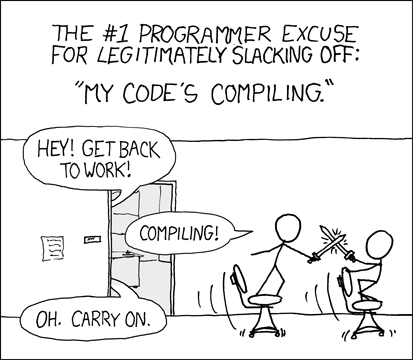
in the early UE3 days, I could lose an entire afternoon to compiling almost nothing
next badger
renaming BlackNoble to 2000BonesMan
novel ember
oh btw, do you guys have any idea why selecting a map and loading it in standalone game just crashes the window sometimes?
not the engine proper, just the standalone game
 abstract relic
Those 2000 bones just might be the cause
 grim ore
well I would assume it crashes because something broke...
novel ember
starting any given level directly via viewport works fine, it's just going from one to another that breaks it
abstract relic
Grab the logs wahrer
next badger
@novel ember um...what? selecting the level and loading it in a standalone game?
novel ember
i start out in a map in standalone game
grim ore
is going from one blank level to another blank level using the Open Level node causing it?
novel ember
let me break it and get the logs
next badger
can someone explain me "selecting" part?
you can select level in the content browser and start it?
novel ember
selecting a map via content browser and starting it in a standalone game works
I have a custom level select screen in-game though
abstract relic
I’m just as confused
novel ember
starting the standalone game and trying to load a new map via level select crashes it
grim ore
I can say that loading one level to another in 4.21.2 using Open Level does not crash my project using Standalone Game from the Menu Bar.
bright plume
derp
next badger
selecting a map via content browser and starting it in a standalone game works <- that really confuses me...
 gleaming lotus
Any idea how to see where a print string is coming from?
aside from going through all my code 😃
grim ore
do the blueprint find for the string that is printing or the node?
gleaming lotus
I guess I could do that 😛
Not sure which actor its coming from though, will the log tell me?
next badger
isnt PIE only starts the level you loaded?
 stray smelt
Blocking refuses to work for my Camera. Any ideas? I've created both blocking volumes and camera blocking volumes
those collision settings are on the capsule
abstract relic
The spring arm is where you want to look for blocking
grim ore
@gleaming lotus also if you check the Output Log you will get something like this : LogBlueprintUserMessages: [BP_MyActor_2] Hello LogBlueprintUserMessages: [Map1_C_5] Hello which shows you where the log came from assuming you didnt change it to not output to the log
gleaming lotus
[2019.01.30-17.59.45:483][214]LogBlueprintUserMessages: [BP_OreNodeRespawnManager_2] Client 1: 32
gotcha 😉
Cheers mate
grim ore
lol
novel ember
uhhhh hang on
i was recording what was going on and now it isn't going on so i may have fixed it
need to check a couple things though
next badger
dang it...i wanted to llook how to start a map w/o opening it
abstract relic
Still confused on how you can run a stand alone without running it
stray smelt
@abstract relic thanks. i need to read up on how it works. seems like it just zooms to the ground whenever a blocking on the side is hit
 plucky reef
anyone here uses leap motion project? can someone tell me how to add move functions without VR?
novel ember
okay well now it's all working completely fine and i can't replicate it so i can only assume I threw in an IsValid node somewhere in the last few days and that fixed it or something
but tl;dr my old problem was:
- load any map in content browser -> play in standalone game: works fine
- load one map in content browser -> play in standalone game -> use in-game map select to try and load in a new map: crashes during the level transition
novel ember
the in-game map select is just using the Open Level node
oh actually you know what, I think it may just be that UE4 culled some archived stuff
does UE4 fix any directory-related stuff when it updates?
because I think that may have been what did it
months and months ago some of the maps had different names, and while the strings to open the maps have always been correct, I had wondered if maybe the engine was tripping up because it was still trying to work off of old directories or something
next badger
not sure if it does, you may try to fix redirectors
novel ember
yeah I think the the 4.21.2 update fixed my issue, although I doubt that's something they actually intentionally rolled out
 coarse prawn
Yeah I don't understand why UE4 isn't able to track moving files like IDEs do for programming languages but obviously I'm not Epic 😃
novel ember
probably just that it's a lot of moving parts
next badger
@coarse prawn ide doesn't track moving files...for sure
novel ember
i love when it turns out game-breaking bugs are through no fault of my own and are some kind of engine hiccup
actually wait i wonder
let me try one last thing
coarse prawn
@next badger As in, for example moving an imported Java file from one package to another would automatically update
next badger
@coarse prawn outside of ide?
next badger
well, inside ue4 it does track them
coarse prawn
However it lets me move from outside a folder to inside
next badger
it does work both ways
next badger
you need to check if you have no stale redirectors
novel ember
gonna just say 4.21.2 did it
coarse prawn
@next badger You're able to move a file from inside a folder to outside? e.g. From /Content/SomeFolder/ to /Content/?
How does one do this in the Content Browser
next badger
@novel ember you can try go editor preferences - level editor - play, and add -log to Additional Launch Parameters for standalone game
@coarse prawn by drag and drop?
coarse prawn
RIP I didn't have the sidebar showing, didn't know that was there haha ty
next badger
there's also view options on the bottom right...just in case
@novel ember hmm...looks like session frontent log works the similar way, less hassle
 plush yew
Hey! Check us out at: https://www.youtube.com/channel/UCsiFbbU7WL5HxGo-Lu-IIzw . We'll be live streaming soon!!
 novel ember
@next badger thanks, i'll look into that
 grim sinew
@plush yew #share-your-stream Wrong channel.
plush yew
does anyone know were the world outliner is
 plush yew
thank you
im trying to make pong and when i move nothing happends 😦
IM SO CONFUSED
this is my first game btw
its supposed to be pong but it spins like mad
heres the code pls help
abstract relic
I see no issues here 😛
plush yew
did u see the vid
abstract relic
As a note, the human eye cannot track 10000+ rpm per tick. As amusing as that function is 😛
 tight harbor
is there a reason you are using add force instead of just updating location?
plush yew
i was doing a vid idk how to do that
 graceful sky
Anyone know if its possible to include some bp's in all new projects by default ?
like a macro library and such
grim ore
You can make your own custom template or feature pack and do it that way.
 worn granite
Iunno about default, but you can totally make yourself a custom template
Drat, foiled by verbosity again!
graceful sky
That means i can also add it to all the existing templates i suppose
abit troublesome tho
maybe its easier to just make a script 😛
graceful sky
feature packs?
grim ore
the green add new button, it's a template that you can add into a project.
graceful sky
At the end of the day i guess it was a dumb question. I'm not really making that much new projects that i cant put in the libs 😛
Ohhhhh
never seen that lol.
4 years..unseen Thanks! 😄
plush yew
@grim ore How do i fix this
hey there! is there a specific channel i should go to if i want to ask for help?
 fierce tulip
take a look at all them channels, pick the one closest related to your problem
plush yew
i want to know a way to detect if the player's character can see a pawn
thats my question
fierce tulip
blueprint prolly
abstract relic
plush yew
oh those
so thats what people call them
i want to make a pawn that moves if the player doesn't look at them
and stops moving if the player looks at them
abstract relic
I'd suggest running through this. Once you get the basics down, it won't be difficult to make a slender clone
Overviews and examples AI
plucky reef
sooooo what's better? VR Rift or this acer wmr?
grim ore
different items to achieve similar goals. The rift will be more compatible as it's a primary VR device for devs.
windows mixed reality devices have "support" for SteamVR but they are usually lesser devices compared to Rift and Vive
 hoary silo
Is it possible to cast shadows on only certain objects?
 plush marsh
shadow cast in properties
hoary silo
where?
I'm making FPS arms with no body, but I want the gun to cast a shadow onto the arms without casting on anything else
hoary silo
Thats not what I mean
I only want the gun to cast a shadow onto the arms, nothing else in the game (the floor, walls, ect.)
plush marsh
ah
well, in that case i donno . Use the different light channel + attach light with that channel to a gun ?
 iron linden
Quick question; I'm currently building procedural spline meshes at runtime. They do not have the ability to bake collision at runtime, so I am also creating a procedural mesh and baking collision there. The procedural mesh is not visible. Is the mesh still technically being stored in memory, or is just the collision stored in memory due to it not being visible?
 wooden thistle
Substance painter > unreal engine. Roughness is totally different, I read up they have different colour spaces so i unchecked sRGB but then the texture disappears on the mesh ... Any idea how to linearize this workflow ? Also my albedos seem over saturated.
 versed tulip
hey, im very new to ue4, how can i make a flash lightning particle trail, like in the CW show, please dm me if you can help
grim ore
you can look into something like a ribbon trail and have it follow them
there is also this which is kinda cool , https://www.youtube.com/watch?v=3SPKx7F8rVo

My new pack, that is going to be on marketplace soon. With this system, you can make actor's mesh components to cast ghost trails. Ghost trail system have so...
 safe rose
@versed tulip What made you start using UE4?
versed tulip
I just wanted to change from unity because i was getting annoyed at how complicated it was
and now i love it, its so fun to use
hoary silo
UE4 is about 10x as comlicated as Unity
versed tulip
oof
hoary silo
Reason being is that you can do a hell of a lot more
hoary silo
sure, although i'm a bit of a noob my self
versed tulip
ok
hoary silo
Does anyone know hot to create a blood effect like in Half Life 2
fierce tulip
google "ue4 blood tutorial"
hoary silo
What I mean is when you shoot something the blood sprays behind it
worn granite
ue4 blood spatter
abstract relic
But seriously, there are an incredible number of blood splatter tutorials
hoary silo
I couldn't find one to help what I needed to do 😦
fierce tulip
instant gratification is such a drug
you learn from a tutorial, so you can apply what you learned to do what you want it to do
abstract relic
Now I know you're bsing 😛
hoary silo
this is what I mean tho
fierce tulip
google "ue4 blood decal tutorial"
abstract relic
Enjoy the videos and music you love, upload original content, and share it all with friends, family, and the world on YouTube.
have fun
fierce tulip
wanna bet he goes for the free download one
hoary silo
 fierce tulip
which is fine, but if I was you, id watch the tutorials 😃
abstract relic
free things are nice 😛
hoary silo
yep
versed tulip
IGOT IT! YESSSD!!! i made it follow the player, it works very good, however sometimes the particle teleports infront of the player and the line is infront of the actual player
versed tulip
yea
hoary silo
can you show me the blueprints you made, or the particle you made
versed tulip
yea
imma try to screenshot it
i was standing still and the particle did this
usually it stays behgignd the player
and follows the hand joint
hoary silo
ok
versed tulip
so what shoul;d i do
versed tulip
versed tulip
ye
 maiden swift
With what?
 upper heart
Please don't ping mods with technical questions.
versed tulip
scroll up
im making a trail
to follow player, and i have it following the player's joint
abstract relic
really mate?
versed tulip
but sometimes it goes infront of the player
fierce tulip
really?
maiden swift
Please don't ping us for support questions.
versed tulip
oh, but can you help?
fierce tulip
Cedric! Jan! Erebel!, Luos!, Roy! with your powers combined, I am Pfist!
abstract relic
Everyone here volunteers their time. Do not treat them like support slaves running to your whims
maiden swift
It's OK. Just be sure to look over the #old-rules before posting so you know what to expect.
versed tulip
Okay
 snow crown
Additionally, you may find more help in #visual-fx or #niagara
novel ember
on a tangentially related note, googling around now
but there's nothing akin to the new amplitude envelopes but for frequency, right?
plush yew
sup guys
 steady owl
Is the level blueprint a good place to spawn main menu music?
Have tried through multiple widgets but it seems easier to remove global menu music from any specific widget
 dry moon
Create a music manager instead
so you can check the gamemode, if its main menu start X
if its normal gameplay, do Y
steady owl
Thanks!
I only really have other music in specific event based cases
So its probably easier to just spawn when specifically needed
dry moon
Not really, you can handle it all in one area and use interface to send it to the music manager to when you need it
And you won't need to tick either
steady owl
@dry moon I mean its a bit overcomplicated in the sense that the menu music always happens once on begin play of the menu map and any other music is triggered either on win state or on some other one off special event
The interface would just be an extra step to play the sound
Unless there was some shared logic in the manager
Then it might be worth it
 bold wyvern
How do I clean my SwarmCache? I really need help here please.
plush yew
Please help me why is my player start MODULE detecting collision?!
 fierce remnant
I’ve been working on a doom 2016/ portal combination game and it’s going very well so far.. the game takes place in a cheesy 80s alternate universe where you are on a game show for 1 MILLION DOLLARS just one catch to win the million, you have to go through rounds of monster killing and problem solving adventures if you seriously want that money. and then there is a final twist to the story at the last boss fight. Switching the whole happy light-hearted mood of the video game to a dark and intense atmosphere.
next badger
@primal edge Greetings! Is it possible to search for specific features of the assets via Python? Like Two Sided materials?
 primal edge
could be at some cases
but not all the engine api is exposed, an example, in python you (yet) can't get the number of emitters used in a particle system...you can't even have a huge control over anything in particle syste.
@next badger
 spark wolf
Is there a quick and easy way to view the c++ product of blueprints?
next badger
@spark wolf there's no shortcut by default, but you can set one
it's not human readable, so...
spark wolf
Hah, well. Nevermind
next badger
it may be useful for learning ue4 c++ tho, i.e. how to do some particular things in c++
spark wolf
Well I'm in the wonderful position of knowing no c++ and trying to learn to use UE4 and c++ at the same time.
Was hoping to generate something I can reverse engineer
next badger
you have to know c++ to read ue4 c++
there are many tutorials for ue4 c++ on the web
spark wolf
I know a little bit of other languages. It's not so different.
In the basics, anyways
I've been watching the tutorials for a while now. Still don't feel like I know much
 abstract marsh
@sturdy spindle can you teach @waxen wedge something?
You two should DM each other.
 dim arch
anyone know if it is possible to split a skeletal mesh by individual objects
I have a 10 meshes which needs to share the same animation file, but have to be seperate objects in the scene
 keen frigate
@dim arch Do you want to split a skeletal mesh into different objects during gameplay (like having a human lose his hand that still uses the human's animation) or simply have different objects that use the same animation?
dim arch
I think I need different objects which use the same animation
because they need to use the custom depth buffer
so have to be seperate skeletal mesh components
plush yew
@dim arch yo 😃 how are you
thought - maybe try assigning a material ID element diffrently to each different mesh segment you want in the buffer?
dim arch
hey dude, doing well, went to the global games jam last weekend, good fun
dim arch
yep
plush yew
i've never been to one of those, it must have been great.
plush yew
where was that?
dim arch
shenzhen
keen frigate
@dim arch Nice
dim arch
just me and a finnish guy
plush yew
nice!!! 😃
dim arch
were the only foreigners heh
plush yew
were you discussing unreal with all the peeps you saw? lol
i would imagine its a real chat fest
dim arch
actually, only a few people used UE4, Most were Unity
plush yew
ah
keen frigate
lol
dim arch
out of 50 projects, 3 were UE4 iirc
keen frigate
hey goth 😃
plush yew
Toku - I will DM you some stuff i found on animation it might help answer ur Question u had
hold on a sec
dim arch
Also, I need to use custom-depth per mesh because of how the BP system is setup
alright cheers
plush yew
how do I import Zbrush models into Unreal
keen frigate
@plush yew It works fine on my Ryzen 7 and 1080ti. Which UE4 version and what are you trying to do?
Have you tried this before? Anything particular in the scene you were trying to edit? Particles, high poly meshes etc?
 valid lotus
Hello,
This article doc explains nothing on how to handle multiple Aspect Ratios: https://docs.unrealengine.com/en-us/Engine/UMG/HowTo/ScalingUI
Any pointers for best pratice please? Thank you
keen frigate
@plush yew Ok let me see if I can replicate your problem. Oh another thing, how much RAM do you have installed?
fierce tulip

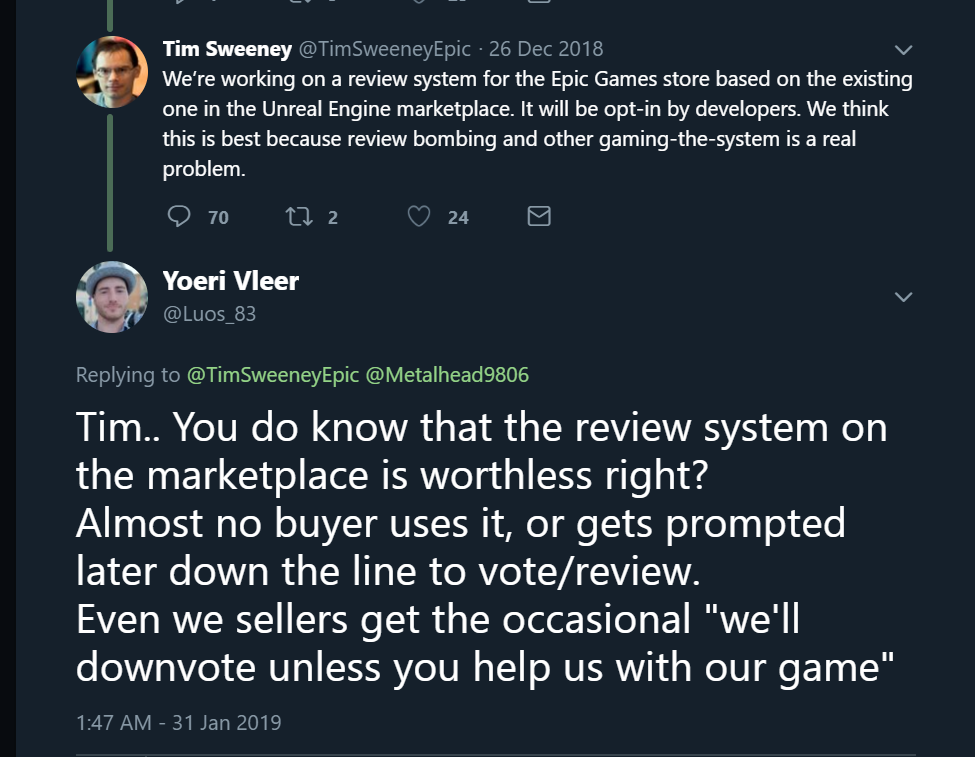
If @EpicGames handles the game store the same as the #UE4 @UnrealEngine marketplace you will be:
 Twitter
 inner mountain
Hey everyone!
Is it possible to allow the system-wide hotkeys when entering the fullscreen mode? E.g. Alt-Tab, Alt+F4 and such.
For me it does not work at all for some reason.
plush yew
does anyone have an idea why i get this when i try to build the windows server?
 atomic sandal
Hello if someone know C++ please contact me we need support cuz time is money so if some know C++ we need guy for coding based on game... Rpg please Dm me
fierce tulip
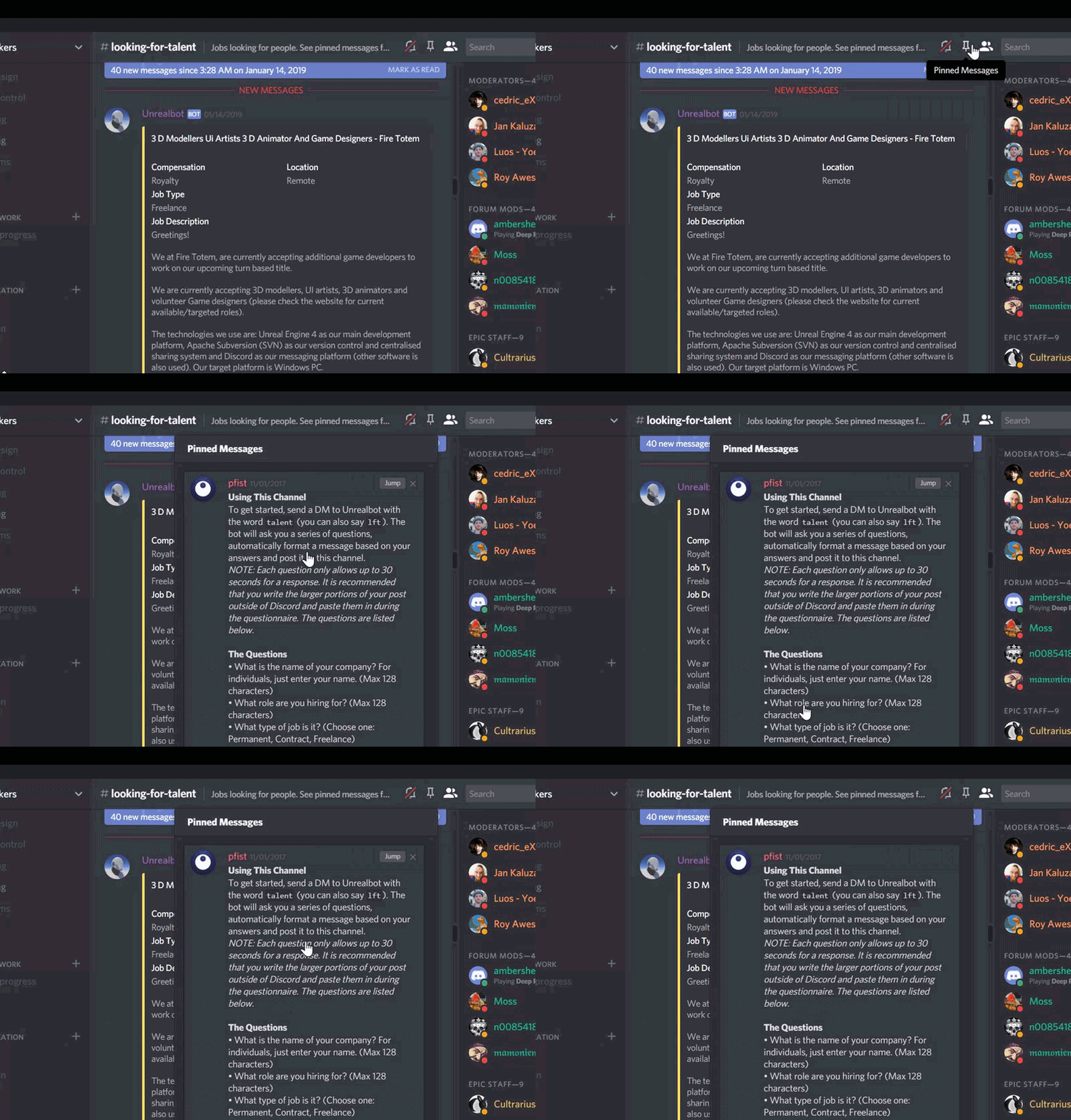
@atomic sandal #looking-for-talent
atomic sandal
@fierce tulip I cant sent
fierce tulip
read the pinned message
fierce tulip
if you read the pinned message you'd know what to do
atomic sandal
?
atomic sandal
Ye go there an sent it
 static viper
sent what
 fierce tulip
you just said you checked it O_o
 magic kettle
this could be old news but did Unreal take away the modding section as i cant find it within the launcher :S?
wary wave
the mod SDKs are (for some irrational reason) on the store page
you have to scroll past all the MAHOOSIVE IMAGES for games to get there
magic kettle
oh wow cheers, just seen it
that took a while to scroll down aha lol...they should consider moving it somewhere else
wary wave
yeah, it's really stupid
once you've installed an SDK (once ever), it appears in your game library
(I don't know why it does that, either)
magic kettle
lool
bold wyvern
Should I clean my appcache?
next badger
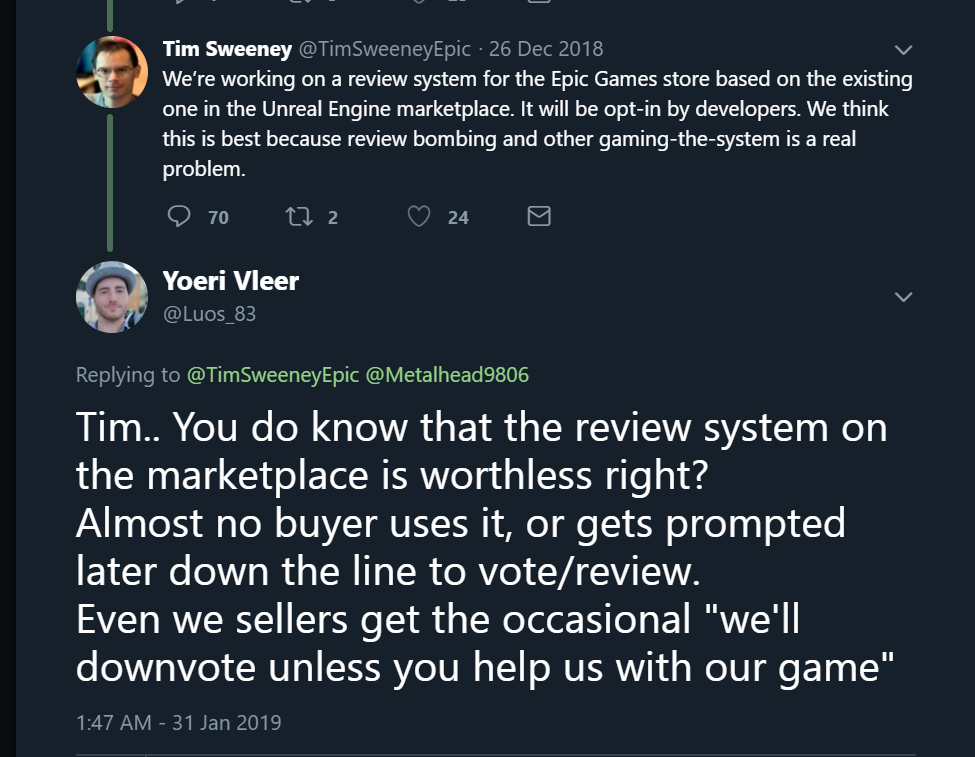
@fierce tulip what was your opinion on that tweet? worried?
fierce tulip
more like, I would like to see what they are promising to the game shop for the marketplace.
Tim even tweeted to someone saying "we want to use a same approach to the store as we do the marketplace" and that has got me significantly worried.
graceful sky
+1 worried
next badger
we want to use a same approach to the store as we do the marketplace
Ahahhaha. Well, good luck Tim!
Militaty Weapons (c)
fierce tulip
looking for the tweet so it doesnt seem im talking out of my arse
bold wyvern
@fierce tulip Should I clean my appcache? My computer is running out of memory.
fierce tulip

@Metalhead9806 We’re working on a review system for the Epic Games store based on the existing one in the Unreal Engine marketplace. It will be opt-in by developers. We think this is best because review bombing and other gaming-the-system is a real problem.
Twitter
next badger
appcache is web browsers cache?
fierce tulip
@bold wyvern you can clean the ue4 cache
C:\Users\xxxx\AppData\Local\UnrealEngine but it might fill up again.
its better to try and use disc cleanup with administrator access so you can clean as much as possible.
graceful sky
There are countless issues with the marketplace review system tho...
Its not a very good template to go by
next badger
@graceful sky there's a review system????
 next badger
the stars?
i thought they are like...legit reviews
not the Metro style
this new thing is kinda annoying...looks like legacy "lighting needs to be rebuild"
al least it has some functionality in it
bold wyvern
@fierce tulip How should I do the cleanup?
fierce tulip
in theory you can go to
C:\Users\xxxx\AppData\Local\UnrealEngine
and remove everything
though try to keep the config files
C:\Users\XXX\AppData\Local\UnrealEngine\Common\DerivedDataCache surely can be cleaned
bold wyvern
@fierce tulip I just deleted the config files.
fierce tulip
lol
bold wyvern
@fierce tulip What would be the consequence of deleting config files?
next badger
probably mine are stored in the engines directories
fierce tulip
might need to reset keyboard shortcuts, menu changes, etc
 thin stag
I have a problem, whenever i press attack the attack animation starts and ends, but then i press attack again and hes not doing anything, to put it simply: I can only attack once, what am i doing wrong?
 copper flicker
Trying to make a simple inventory....
Madness
From the beyond
O o
I wanna kill myself
jus sayin...
Nothing makes any sense....
next badger
@thin stag do you know how to debug blueprints?
thin stag
@next badger no
 frosty bloom
Buy an inventory system, get one of the free ones from the community, reverse engineer them @copper flicker
There is options
copper flicker
reverse engineer is even harder
I don't know, basically, how to adapt an inventory to my game
next badger
@copper flicker https://www.unrealengine.com/marketplace/inventory-system

A complex Drag 'n Drop inventory system with features like crafting, a hotbar, stacking, item dropping, a datatable and more!
copper flicker
ALL of them create grids
frosty bloom
@next badger Beat me to it, was just about to link it 😛
copper flicker
yea, I know, I've watched and tried that
the problem I have is.. how things communicate
cuz the Player is able to pick up things just fine
and store them
but the UI is completely another software, from another planet
I don't know how to update it
next badger
@thin stag watch few videos on YT then, once you'll get an idea you could find the reasons of issues quite easily
copper flicker
the inventory system these guys are making ALL rely on automatically creating slots
I've created them manually
frosty bloom
Follow one of the youtube tutorials from UnrealEngine @copper flicker pretty sure I've seen one or two that covers "Blueprint Communication"
copper flicker
what do u mean by BP communication...
my problem is not in BP
but with UI widgets
I'm not creating or deleting the UI on demand.. each time I open the window
frosty bloom
Interfaces/Delegates/Inheritance/Casting - If you understand all of these, you can skip my previous comment. If you do not, I can do nothing but repeat the suggestion
copper flicker
I'm using a Widget Component
yeah, Interfaces are weird stuff... I don't understand them
😄
nor do I wanna use them
frosty bloom
¯_(ツ)_/¯
next badger
Interfaces/Delegates/Inheritance/Casting - If you understand all of these there is no point of asking anything on #ue4-general then
copper flicker
casting.. I KIND OF understand it, but it's confusing as hell
frosty bloom
That's why I hinted at a "Communication" tutorial heh
frosty bloom
I won't google it for you
copper flicker
and all of them are incredibly badly covered
frosty bloom
BP Communication - All the words you need
copper flicker
okok, let me try
amazing, the first one that comes up is a 2 hours 22 min chilled ramble from Epic
Epic Live Training...
static viper
its epic
static viper
you said
you have a vague idea of unreal
and now you are the pro of deciding how to learn ue4
copper flicker
no.. not of Unreal
thin stag
ok, i solved it, the issue was that i didnt understand the Delay Time so i thought 30.0 was 30 seconds and not 30min xD
next badger
i think some streams are actually have more in depth info than even official documentation has
static viper
dont use delay for something that long
next badger
@thin stag delay is actually in seconds
copper flicker
but come on, u don't have to be Jesus to understand that Epic rambles are awful
I watched a few back in the day...
frosty bloom
Being able to do research is step 1 in GameDev
thin stag
ah ok, thx!
copper flicker
absolutely awful content
😄
they take hours to show off a bunch of features
and nothing practical
 ember hull
guys, some of the mesh are invisible in ue4, but its visible in blender, even when all of the normals are in the correct side
coarse prawn
to be fair I share the same thoughts as @copper flicker
I started UE4 around 2 weeks ago and my god those Epic Games tutorials were awful, not because they didn't teach anything (they did) but they just rambled and I get that they want to keep people engaged because (I think) it's live at the time but it isn't helpful for people watching after. Luckily I have years of programming experience so I didn't need to rely on them
coarse prawn
Yeah thought so
static viper
so people can ask questions live
copper flicker
there are much better videos on youtube. Epic content is abysmal
😄
anyway, to the point.
frosty bloom
Live Training aka it got an audience
copper flicker
anyone knows how to create an inventory that's parented to the Player?
static viper
i agree that 90% of the tutorials on youtube are garbage
yes live training got a steady audience
copper flicker
so basically.. I'm trying to make an inventory that updates when u pick something up, and it's NOT a floating window, but a Component Widget
static viper
but that is a floating window
copper flicker
well, it lives inside the player
copper flicker
ok........
static viper
show images and code then.
copper flicker
all the inventory tutorials are creating floating windows
static viper
that doesnt matter
copper flicker
and are grid based
copper flicker
I don't know what to show come on.. I have a ton of objects here
well, if I could make ONE.. slot... update
that would be EPIC
😄
static viper
you could start by showing us how it should look
like screenshots from games.
that always helps
static viper
what
copper flicker
but placed by hand, not built by code
frosty bloom
Then pretty much ALL inventory systems out there can help you. All the tutorials, all the community samples etc
static viper
you are making no sense now.
copper flicker
have u guys built inventories?
frosty bloom
Yes, i spent 6 months building a very complex one
copper flicker
okok
copper flicker
dunno how to ask.. it's complicated
static viper
seems like
copper flicker
because I don't really understand this system
copper flicker
no man, I don't understand the systems created by all these tutorials I've been following
none of them explain clearly
static viper
that might not be the main issue.
copper flicker
how things communicate between Slots and Player
static viper
i agree that tutorials are usually highly bad
but lots of people get their solutions anyways
bc they understand the basics
and know what they look at
did you ever created any inventory system before?
and sorts
in any language
copper flicker
yes
in UNity
so look, I have a BP, separate from player, that contains all the functions. it has an Add Item function, which calls an Update Slot event.
static viper
show that code
static viper
its exactly what i ask for
fierce tulip
hehe, when you suddenly end up here:
http://3dnchu.com/archives/ue4-vfx-debug-material-function/

3D人-3dnchu-
Yoeri -Luos- Vleer氏がUE4用のデバッグ用マテリアル関数を公開してます。 https://www.youtube.com/watch?v=pf9fpoaUtfU ダウンロードはRealtimeVFXのこちらのスレッドから。Debug Textures for VFX - Real Time [...]
static viper
oh luos
copper flicker
I know... but it's to complicated
static viper
its gonna get swamped away here
XD
it is VM
its complicated with you not wanna show me
you are making my life hard.
your life
copper flicker
haha.. I can't even print screen it, it's huge
static viper
you can snipping tool
copper flicker
it's wawy larger than 1 screen
grim ore
ok so whats the actual issue ignoring all the i cant show it and i dont know how to do it. The actual issue you are running into right now?
static viper
you werent trying to explain XD
you are zigzagging
and i only take my time so i can wait for my package.
copper flicker
ok, simpler, I'm following https://www.youtube.com/watch?v=81wnJaixBnQ&list=PLmKKTERcjTPKEPl0nk48Tpmj-iWmzqo_Q

In this video i will showcase an inventory system i worked on lately in Unreal Engine 4. If you are interested in seing a tutorial series on how to create a ...
and it doesn't work because I'm not building slots from scratch
static viper
mh lets see
grim ore
follow it, learn how it works, then adapt it to what you want.
copper flicker
because Im not trying to make a GRID
copper flicker
and what he makes only makes sense for a widget that's built on demand
static viper
you know
grim ore
"I want to make a car that has 4 doors but this tutorial only has one that has 2 doors. I better not learn how to do that first then change it for my needs"
copper flicker
not one that's inside the player
static viper
if you had shown me an image of deus ex...
i would have understand right away.
you are having a hard time communicating
copper flicker
Math... I did follow this tutorial
grim ore
so you finished it completely and it worked for you?
static viper
this one is slot bc it auto sorts the items in row
copper flicker
no, it doesn't work
static viper
and grid is location wise size wise
why are you doing something that complicated right away
copper flicker
haha ffs....
I don't wanna do something complciated
I need a very simple UI
Inv
copper flicker
I can't find any info on how to make a simple inventory that works for my game
grim ore
its not that. Everyone programs something different and its super hard for us to help you if we don't know what you are doing. That is why they are asking for screenshots so we know where to go from there. The way I would do it is not the same way you would.
copper flicker
I don't know how to update the slot
fierce tulip
follow some tutorials about it
grim ore
"update the slot" is very generic. I guess add child to vertical panel is what you want?
static viper
you are making your life so hard.
fierce tulip
I just googled "ue4 inventory tutorial" and got dozens.
copper flicker
add child to panel will not create a slot.. from scratch?
static viper
ofc it will
frosty bloom
^ not to mention several free examples
fierce tulip
^
static viper
if you add child you can completly create one
grim ore
what is created?
copper flicker
the slot...
fierce tulip
but its not working, so follow more documents/tutorials
copper flicker
I want to add slots manually, not with code
frosty bloom
Soooo... Skip the CREATION of the slots and use the rest of the code to update slots?
copper flicker
because showing code would be like.. snipping kilometers of code
grim ore
this is only frustrating because you want an exact answer to your exact problem and we are all literally guessing lol
static viper
how can you be angry with us... if you dont comply either?
copper flicker
I know I know... sorry
frosty bloom
I'm pretty sure i nailed it though.
grim ore
use a grid panel, drag and drop in your slots, done? uniform grid panel if you want it to be uniform?
grim ore
and what does InventoryWindow look like?
frosty bloom
You need to pass the information from whatever you are overlapping to your inventory grid
"add Item" or whatever
 gleaming star
Has anyone had this problem in 4.21:
in any blueprint graph, when you right click and bring up the search popup then press W or S, instead of typing the letter it thinks you are pressing the UP or DOWN arrows and changes focus on other UI elements!? You get a tiny dotted line moving around UI elements...
Don't know if it makes sense? I know it's weird. A few of us are having it and can't explain.
copper flicker
this is at start. on begin play, in the player
creating the Inventory BP
which contains all the functions
grim ore
and what does InventoryWidget look like in the designer
copper flicker
wait
this is AddItem....
well, part of it
just one branch
it should call a slot update
THAT.. part is where the tutorial breaks for me
this is inventory SLOT
the inventory window
no code
 honest rune
is there a way to manipulate SaveGame files into emulating datatable storage and querying/updating against it at runtiime?
copper flicker
on Inventory BP there should be more stuff.. which creates the inventory window
but I can't do that
cuz I'm doing it in the Player, with WidgetComponent
datatables r not supposed to be updated at runtime... jus sayin... 😛
honest rune
emulating datatables
copper flicker
oh I see..
copper flicker
anyway, that's most of the stuff, the rest is a bunch of functions taht I copied from the tutorial and work fine.. ish
my problem is in Inventory BP
which is supposed to have an UpdateSlotAtIndex function
honest rune
I'm hoping there is a way to store structured data that I can treat similar to datatables that could be queried/updated at runtime as well. I'm tired of fighting with the engine to get SQLite to behave properly
copper flicker
and there u go.. was it at all helpful to post a ton of Snips?
 devout gulch
build in save system is really not meant for this kind of data manipulation
it simply store binary blobs in/out
honest rune
I know but that seems to be the direction everyone points to when someone mentions packaging databases
I thought json files get cooked?
grim ore
it was helpful to me atleast, it looks like you got lost during the tutorial and never finished it so now you have half a working system that you don't know how it works 😦
devout gulch
you don't need to cook them
you can store them anywhere you want
and you can serialize any UObject into json
i do it for inventory
i simply serailize items to json
and I can store them locally or in database
honest rune
I'm fine with using json if thats the case 😃 Is there any gotchas?
honest rune
do you have an example you could link to by chance? Just something that shows doing it for arbitrary data would be great
devout gulch
`void UNxItemsComponent::SaveItemsToJson()
{
IPlatformFile& PlatformFile = FPlatformFileManager::Get().GetPlatformFile();
TSharedPtr<FJsonObject> Root = MakeShareable(new FJsonObject);

TArray<TSharedPtr<FJsonValue>> EntryItemsObjects;
for (const FNxItemEntry& Entry : ItemsArray.Items)
{
    TSharedPtr<FJsonObject> JsonEntry =  FJsonObjectConverter::UStructToJsonObject<FNxItemEntry>(Entry, CPF_SaveGame);

    TSharedPtr<FJsonObject> JsonItemContainer = MakeShareable(new FJsonObject);
    FSoftClassPath ItemClass(Entry.Item->GetClass());

    TSharedPtr<FJsonValueString> ClassType = MakeShareable(new FJsonValueString(ItemClass.GetAssetPathString()));
    TSharedRef<FJsonObject> JsonItemObject = MakeShareable(new FJsonObject);
    UStruct* asd = Entry.Item->GetClass();
    FJsonObjectConverter::UStructToJsonObject(asd
        , Entry.Item
        , JsonItemObject
        , CPF_SaveGame | CPF_Edit | CPF_BlueprintVisible
        , 0);

    TSharedPtr<FJsonObject> Dupa = JsonItemObject;
    JsonItemContainer->SetField("itemClass", ClassType);
    JsonItemContainer->SetField("itemObject", MakeShareable(new FJsonValueObject(Dupa)));

    TSharedPtr<FJsonValueObject> JsonItemEntryObjectValue = MakeShareable(new FJsonValueObject(JsonItemContainer));
    EntryItemsObjects.Add(JsonItemEntryObjectValue);
}

TSharedPtr<FJsonValueArray> ItemEntries = MakeShareable(new FJsonValueArray(EntryItemsObjects));
Root->SetField("ItemArray", ItemEntries);

FString PathMain = FPaths`
There doesnt seem to be any correct flow, you might want to rewatch the video and see what is missing. Your search free stack has a slot index that is not being used for example.
honest rune
@devout gulch thank you. I'll take a look at that. If this works well, I'll have to buy you a coffee or something lol So tired of trying to get SQLite to behave correctly
devout gulch
my advice
use database
that support json
either NoSQL
or SQL with support for json datatype
game data is exactly what the NoSQL databases are good for
honest rune
I've never used a non-relation db before. SQLite has a json extension but I had so many issues getting sqlite to work with UE4s build system
devout gulch
you need embedded database ?
honest rune
exactly 😃
honest rune
in an older version of the engine I was able to embed sqlite source directly but as of something like 4.17, .c files cause compilation to go haywire and fail. I changed to just linking pre-compiled sqlite and while I can get it to compile and package, it fails to initialize sqlite correctly and no idea why. returns nothing but null pointers
I wasted 2 weeks at least messing with it so decided to look at alternatives
atomic sandal
Failed to copy "C:/Program Files/Epic Games/UE_4.21/Templates/TP_ThirdPersonBP/Config/DefaultEditor.ini" to "C:\Users\Kevin-Lorena\Documents\Unreal Projects\MyProject1/Config/DefaultEditor.ini".
 cerulean nova
Hi im having a brainfart right now 1.5e+04 whats that in a numeric value?
wasnt e = x10 or something
wary wave
1.5x10^-4
cerulean nova
Thank you @wary wave ^^
atomic sandal
so anyone can help hello anyone have idea why i cant open
Failed to copy "C:/Program Files/Epic Games/UE_4.21/Templates/TP_ThirdPersonBP/Config/DefaultEditor.ini" to "C:\Users\Kevin-Lorena\Documents\Unreal Projects\MyProject1/Config/DefaultEditor.ini".
wary wave
please don't keep posting the same thing over and over again
it says you can't copy the file, it says nothing about opening it
grim ore
I think he means open the project perhaps
ember hull
Guys, how to change the emissive material glow distance ?
static viper
glow distance?
ember hull
my english is bad, let me show you a pic of what I mean
 paper kernel
you can't use emissive material as light source, you gotta add same color light ontop of it to get that glow "distance"
ember hull
somehow im blocked from adding pic
ember hull
not light source
wary wave
I believe it's also how Koola does his lighting
ember hull
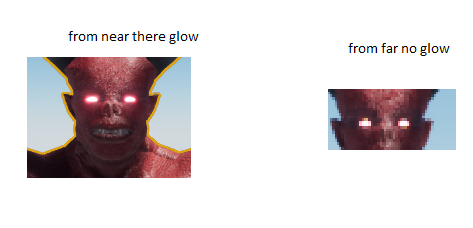
this what I mean, I meant the fake glow, when I move bit away from the model, the fake glow disapear, how can I edit the glow distance
wary wave
looks like it's emissive working as intended to me?
ember hull
yes its working, but it disapear when I move bit away from the model
I want to edit that a bit
wary wave
the 'far' shot, the eyes are something like 4 pixels across?
static viper
the bloom shader is space spaced
wary wave
I'm not sure what you're expecting to see?
static viper
so if there is not enough it cant glow
wary wave
it is glowing though
ember hull
the pink glow is gone when I move bit away from the model
plush yew
howdy, i've got a question. Using blueprints, how would i get the position of another pawn?
graceful sky
that inventory tut your following is one of the better ones imo VM
plush yew
and access it from another pawn
copper flicker
I managed to narrow the problem... I can't send info from my InventoryBP to my InventorySlot. the BP is aware of what item I picked up at Index 0. In the Slot I'm using an InventoryBP reference. and if I get item info at index.. in the BP, all's fine, in the slot it fails to see the contents of the BP. any idea....?
graceful sky
Getting any errors?
ember hull
https://gyazo.com/5315c03406f8be3cd73e6310e8b0d20f this what I mean
 graceful sky
Errrorrrs VM?
copper flicker
no
grim ore
@plush yew there are 16 different ways of getting that info but it depends on how your stuff is setup and the other pawns info so.... Get Actor Location would be the general way to get the actual position of the other pawn
 earnest cape
I wish I could just right click a bool pin and split it
copper flicker
I don't know how to send info from a BP to a UI widget.. basically
I hoped it would work with a reference
graceful sky
Hence the BP communication hint a few texts ago
copper flicker
yeah man but that's why I'm here, to ask
graceful sky
Reference is a typical way of doing it. Just make sure its set and not a nullpointer
Typicly youd be better of asking in the cotrect forum/discord tho :)
grim ore
so InventoryReference is invalid?
copper flicker
I don't know what u mean
grim ore
or it's null, or its not the right one or?
copper flicker
ok let me check
grim ore
and the better question would be where do you tell your project that "InventoryReference" is the one you are using specifically and not some other one in some other place or some other time.
copper flicker
it
oops.. it's not valid, I think...
not sure I understand ... how do I tell my UI that the inventory object I'm using is a specific one?
graceful sky
Bp comms.
plush yew
whats a good way to check if a pawn is being looked at by the players character?
grim ore
yep. if you made 5 different instances of Inventory BP with 5 different sets of info, how does this know the correct on you want?
thats BP communication, that is using references
copper flicker
exactly.. if I have 2 players
I don't understand how to use references in this context
graceful sky
They spawn their own bps
copper flicker
I need a specific inventory, that's related to player 1
graceful sky
For handling their unique inventory
copper flicker
ooooooooooooooooooooooooooooooooooooooooooooooooooooooooohhhhhhhhhhhhhhhhhhhhhhhhhhhhh
😄
so the Inventory Ref I set after begin play, on the player
graceful sky
So you create the initial referebce there yes
copper flicker
I'm making that a variable
graceful sky
Thats the first valid reference of it
graceful sky
Then you need to inform your widget about it
And i know for a fact that you spawn the widget in the player aswell
So there you have a communication route.
copper flicker
hmm.... so I need to grab somehow this ref from the player
graceful sky
Player knows of both the inventory, and the widget
copper flicker
dunno how to make the player know about the widget either... but I don't think I need that
graceful sky
Using the widget variable saved in the player, you can access the widgets variables
graceful sky
Yeah but the inventory dont inow about any widgets , as its not set up that way :)
copper flicker



the Inv indeed, doesn't know
but the code is in the slot widget
and I need to get info from the Inv
graceful sky
Yeah
So typicly youd wanna pass the reference into the main inventory to create the last latchpoint from the inventory to the slots :)
plush yew
do pawns count as actors?
im asking in terms of break hit for raytracing
i've got the break hit blueprint here and im curious to what result is for detecting a pawn
wary wave
cast to actor and find out.
copper flicker
omfg it works..
a bit crashy a bit broken.. but now I'm updating my friggin UI slots
it's like magic
😱
plush yew
thank u ambershee
works now
is there a way to comment out a blueprint block?
temporarily
grim ore
@plush yew as a hint on if a pawn counts as an actor, open up your pawn BP and look at the parent class in the top right
plush yew
ah i see
grim ore
you can pretty much count on most things "in the world" as being some sort of a child of Actor* *Your results may vary, this is not a guarantee, seek professional help if your problem lasts for more than 4 hours.
plush yew
im using the thirdpersonexample map, how do i select what "character" i play as? i seem to spawn in as a different pawn
grim ore
the "Default Pawn" is what spawns in when you spawn in normally. the "Default Pawn" is controlled by the Game Mode you are using.
plush yew
how do i change the "default pawn"
 cloud cobalt
In the game mode
grim ore
Project Settings -> Maps and Modes -> Default Game Mode -> Default Pawn if you have done nothing else
plush yew
aight i found it
thanks
can i import the firstperson example character into another project?
im not sure how
grim ore
2 ways. click on it, right click, asset actions , migrate, and select the other project
or in the new project click the green add new button, at the top add feature pack, and add the third person feature pack
 teal citrus
I added some paragon assets to my game and I start to get a texture streaming pool warning message pop up in my editor when I add them to my map
and I notice my editor RAM usage spikes to 6-7 GB
is this dangerously high? I don't know much about what kind of limits I am near in terms of texture usage, but usually my editor runs at around 2-3GB memory usage
I notice it specifically when I add grux or boris skeletal meshes to my map, haven't changed anything on their default
 maiden sundial
Please tell me that it's possible to change the amount of spawns from an emitter while runtime
fierce tulip
- that should be posted in #visual-fx
- yes, by changing the distribution to "blueprint"
maiden sundial
- I'll keep that in mind for the next time
- I'll try it 😃
cerulean nova
what could be the reason for a black texture sample?
im working with a texture obj. and a custom rotator into the UV´s
plush yew
Hi, when i wanted to compilate a little C++ code, it took me some hours, how knows what i need to upgrade in my PC ? Or there are any solves ?
 glacial pecan
unreal fortnite on mobile uses forward renderer? same as VR on desktop?
cerulean nova
@plush yew "a little C++" code doesnt take any time to compile however if ur working with the UE4 Source and compile the engine with your modified code that can take very long since the engine is "tons" of code ^^
 unkempt lotus
Hello! Is it possible to build games for IOS on windows?
cerulean nova
@unkempt lotus ofcourse...
if your in the engine just hit File -> Package Project -> iOS
unkempt lotus
I've tried that but then I get the error message that the SDK for the IOS platform is not installed and a Remote server is needed
if i press tutorial / docs in the error log a Itunes window appears, but is just installing Itunes enough to build a game for IOS?
cerulean nova
no
but there is more to it
i dont do anything for mobile maybe ask someone else ^^
unkempt lotus
no problem I only have to build it for desktops, my teachers use macbooks for god knows what reason so I'll just enable the plugins that you have as well
thank you!
unkempt lotus
hmm for me the same ones are enabled
unkempt lotus
yeah that might be better indeed, I'll search for the SDK first
but still thank you!
grim ore
because there are millions of lines of code and only 1 hamster pieces them together
@plush yew most people suggest PONG as a basic game to recreate and learn from
@unkempt lotus if you are getting the remote server message I am guessing you are on windows and there is setup to be done. It needs more than just itunes and you need access to mac OS in some form https://docs.unrealengine.com/en-US/Platforms/iOS/Windows
plush yew
is there any others
 midnight mantle
I remember someone telling me ctrl+click to orbit an object, but that doesn't seem to work anymore
did they change this?
plush yew
@plush yew you could just play through some of your favorite games and find a good genre and then begin to develop the game using a template either in the unreal project new project settings or with a marketplace template. What I did was I followed a series of tutorials and the tutorial that I was following actually helped me to make a template that I was later able to use in my game
ok
grim ore
@midnight mantle it's ALT-Left Mouse Drag to orbit a focused object
 static light
What are the pro and cons for choosing pixel streaming vs html5?
unkempt lotus
@grim ore Indeed I'm on a windows and I don't own a mac so I'll search for some more solutions but thank you for sharing the link to the documentation that is very helpful!
grim ore
A MacOS VM or a physical Mac machine will work for building out to. You could technically use a remote building server as well but shrug
unkempt lotus
a VM set up is probably the easiest I assume
or maybe at school I can find and use a mac depending if it will run ue4
though why is it so difficult to build for ios? is there a specific reason for it?
grim ore
technically you dont need the mac to run UE4 if you use the windows remote build option. It just needs XCode to build out
and it's difficult because it's apple.
cloud cobalt
@plush yew There are trick for faster builds
Basically, never include in headers unless forced
Forward declare everything
Don't include large general purpose headers
unkempt lotus
hmm interesting I'll look into setting up a remote build server, but it just depends on if I need a ios developer account for it, don't really want to spend 100 bucks just to submit a school assignment hahaha
grim ore
You don't need one unless you want it to stay on the device working for more than a week, you can get a temp certificate for 1 week builds without paying
unkempt lotus
good to know! thanks! sigh apple.... hahaha
static light
is html5 dead? not recommended ?
grim ore
pixel streaming solves a different problem. html is a 1 person viewport into the game basically, it's just a web game. Pixel streaming is remote streaming so you can have 1 game being viewed and interacted with by multiple people all with the same interface
so think of pixel streaming more like interactive twitch and less like a game
Alternately Pixel Streaming puts all the graphical rendering onto the server instead of the client so you can use it for higher quality interactive displays that are running lower end hardware (dummy terminals)
static light
then if two users are moving the same object in their individual web browser at the same time, what would happen?
grim ore
using which one?
static light
pixel streaming
grim ore
I would assume it would fight as each update comes thru. That would be up to the dev to decide what happens as they would code in the code to handle moving objects
static light
yeah, like how to manage the "state" of the interact-able objects in unreal through web trigged events
so A clicked the button to change the color of wall to blue, will B see that on the other end?
grim ore
with pixel streaming you are working on 1 game basically broadcast to everyone else so yes it should work
static light
while html5 is to create multiple instances, right?
grim ore
html would basically all be separate games yes. You could add networking but thats a separate thing
hoary silo
how do you make a line trace go through a wall but still hit it
grim ore
multi line trace
grim sinew
hoary silo
That worked, thx
 humble stag
Would like to ask if I have an AI behavior tree + blackboard + controller all setup working according to https://www.youtube.com/watch?v=h0Kb42oCoYg&t=434s

Private Tutoring & Work for hire: www.Tesla-Dev.com
I made a new folder remade a set of it again, the new one doesn't move
I named it as NPC
so the AI char can move , but the NPC char just stood there
Anyone have any idea?
grim ore
did you duplicate and rename the AI or make a new one?
humble stag
make a new one
teal citrus
does anyone have any experience with texture pool streaming limit warning messages?
I started getting some and don't know how severe it is
grim ore
there could be many things wrong, your AI controller is not set up. The AI is not set to posses on spawn or in world. The blackboard is not set to run, etc.
humble stag
If i follow the tutorial same as the AI i setup for NPC
it should not have problems right?
grim ore
yes but you didn't or it would work, right?
abstract relic
You’re forgetting human error on your part
grim ore
welp check those 3 things I suggested,
humble stag
ok great somehow deleting the whole folder worked
i changed the implementation node a little and it worked
Alright I have question on behavior tree and normal blueprint
So my game is ThirdPerson, so the character is TPS, inside the TPS blueprint I have done line trace to NPC via a cone
I would like to let my NPC character know that that the cone has hit it via the line trace.
Do I make a boolean in TPS blueprint and set it to true after line trace register a hit and access it via the NPC behavior tree's task blueprint?
Or do I do the other way round, NPC behavior tree's task blueprint make a boolean and let the TPS line trace after hit set that boolean to true and get it in the task blueprint?
grim ore
talk to the item you hit, tell it you hit it.
you can have a task in your BT on your NPC that runs and checks to see if this variable is true and then do whatever
it would be up to you to change that option at some point back to false obviously
so your 2nd option you asked about
humble stag
aye thanks! let me go work on it now
 true leaf
Honestly this is strange and hilarious. I think I've been visited by the good luck fairy. I started with UE4 one month ago and have just been straight grinding on it, learning and picking up concepts fast. Now I have a fun multiplayer MVP and about to do an alpha test with my friends this weekend. Everything I've tried to do in the editor has been a dream. I'm not really trying to do anything super crazy/hard but even still, this is amazing.
Now granted I've been making games and programming for a long time with other systems but good work Epic 👏
Likes here's an example... I wanted to put a simple map menu in my game when you press M. It took me all of one hour after I watched a YouTube Tutorial and I had no idea how to even begin. Crazy!! (I added a scenecapture2d to my character and linked it with a render material set to UserInterface mode and dragged that into UMG). bravo
humble stag
how do i make an AI move away from a player? so far I have the AI move towards the player but to do the opposite?
abstract relic
By literally doing the opposite. The AI needs to know where the player is then pick a point away from the player
humble stag
and how do i do that?
this is my task blueprint for the behavior tree
this is for movenear player
so what additional node do i need to add in to make it move away?
 hollow mesa
So if you take the difference between the AI's coordinates and the player's coordinates you get the direction of the player compared to the AI. Times that by -1 and you get the opposite direction, then add that to the AI's coordinates and plug that into getrandompointnavigableradius.
plush yew
no
hollow mesa
doesn't that mean the direction the object is looking at, not the direction of the other player?
plush yew
get the world location of both the player and the AI and then do Player - AI then that'll give you the position of the player compared to the AI
humble stag
i just need it to move away in random direction
plush yew
if you reverse the subtraction process by easily multiplying the result by -1 it'll give you the position of the AI relative to the Player
grim ore
The EQS system has a tutorial for this, https://docs.unrealengine.com/en-US/Engine/AI/EnvironmentQuerySystem/QuickStart , you can try and use that as an idea on how to use pure BT to do it.
humble stag
so if i have the move to player in random direction, i can just * -1 to that right ?
actually i'm trying to avoid EQS
because i'm doing a fast prototype for next week's playtest
plush yew
ok let me tell you something easy
grim ore
I was just saying that tutorial gives you the basic concept as well just using EQS as the method to implement it.
plush yew
try to get the location boundaries of the level (do this manually inside the level can't do this with code as far as i know) then create 3 random floats between these boundaries and take each as the X, Y and Z coordinates
then you'll have it move into a random loc
humble stag
hmm
plush yew
that's if it's an open level
else you can just use that node you used and set the origin as the AI's location
humble stag
i'm not the one designing levels yet, i'm just making simple AI for teammates lol
plush yew
ok then do this
:
instead of what i said
take the image you posted above and instead of get player pawn location
you can get the AI's location (by just typing "get world location" into the bp search thing) and then just putting that inside the origin pin
then you set the range as much as you want
cool ?
hollow mesa
I just started with unreal engine, I haven't touched audio yet