#ue4-general
1 messages · Page 377 of 1
 plush yew
 pallid compass
Compiler should optimize that out
Same thing really
20f
20.0f
Etcc
FML can't type on mobile at all
plush yew
the same thing? Then why code it as a decimal place if it isn't needed?
obvs unless it has decimal value
pallid compass
No idea I'm only a few years old engineer
 normal burrow
20f is hex 20.f is not
pallid compass
Prob legacy requirement
Ah there u go
Wait u sure?
Does compiler convert itthen
If it's in a float parameter for example
plush yew
what do you mean @normal burrow
 cursive dirge
@normal burrow you sure it's not binary
pallid compass
Hex converts to 20.f
normal burrow
my bad base32
pallid compass
Feel like I've accidentally done similar in the past
 regal mulch
The missing 0 basically
 static viper
mud channel
cursive dirge
you can't write 20f?
static viper
blocked showoff channel
cursive dirge
I actually don't know even
regal mulch
@static viper ?
normal burrow
c# world only
cursive dirge
ah
static viper
popcorn channel
plush yew
why have a hex and a float value when compared to the same object that has all float values?
regal mulch
Forget about the hex
plush yew
Non!
normal burrow
yea you need the 0x in front
cursive dirge
focus on hax
normal burrow
0x20f
cursive dirge
hax is best for gamedev
plush yew
hacking isnt developing lol
cursive dirge
ok, I go troll #lounge now
but... hacky workarounds are still at the heart of gamedev, you'll do it all the time (just ask any seasoned dev in this industry)
plush yew
I still don't get it. Why have 20.f and not a decimal value like the rest?
cursive dirge
it's just one way to mark it
cursive dirge
you save one char too
regal mulch
If the value is 20.0f, you can forget about the 0
normal burrow
theres no reason skyrip tbh, same thing as 20.0f, 20.f is
regal mulch
20.1f however you probably want the 1
regal mulch
If you want it to be an integer, yeah
normal burrow
like 20.000000f
 digital anchor
20 is an integer
plush yew
so theres a decimal, but you dont carea bout any zeros?
cursive dirge
float Value = 20 will be integer? 
regal mulch
Yeah, cause maybe you calculate later with it
plush yew
whats the reason for that
digital anchor
zeroes to the right are irrelevant, thats like third grade
pallid compass
If u leave .f off a parameter that is for float so it's basically an int does compiler auto convert it?
normal burrow
20.0d is 20.0
digital anchor
no but there will be a conversion, eighter compiler or runtime
plush yew
but if you declare it as a float, the 20f is a float......? why would you call it an integer
 warm tulip
hello 🤗
plush yew
0lento
regal mulch
You can easily read up on this via google mate
This goes beyond what #ue4-general is about
plush yew
its related
regal mulch
(: It's a final suggestion to use google for this.
warm tulip
where do i put questions to programming, just in the relating programming channel or can i also ask here, its not that big of a question atleast i don't think it is
plush yew
sure?
regal mulch
@warm tulip This channel is only for stuff that doesn't fit
cursive dirge
I'll not hire you 😄
regal mulch
So if it's c++ or Blueprint, just move there (:
warm tulip
ok 😮
pallid compass
Hire me pls
plush yew
I'm not a programmer anyway. I'm not even a scripter.
regal mulch
Who would have guessed
pallid compass
lmfao
cursive dirge
hey now, let's be civil here
pallid compass
Oh man I can't cope
normal burrow
you can do it skyrip, stick to it 😄
pallid compass
I love this discord
normal burrow
you can just do float(20) too if you prefer no decimals, thats all the .f does
cursive dirge
you can?
pallid compass
Lmfao what
cursive dirge
they have ctor on float?
plush yew
so hold on.
plush yew
If I put object = 20f it automatically knows it's a float?
normal burrow
20.f yes skyrip
cursive dirge
I've always either done (float)intValue
pallid compass
Yes spookie
plush yew
then I wouldn't need to call Float
normal burrow
yea its essentially the same thing to cast to float that way
 ancient otter
Hi guys. I saw this edit and its really good https://www.youtube.com/watch?v=lzl1obUufps 😄

Read Please BlenMiner, MCDmaker, Devostated, Fuze, TheRoundTable, Daerik I want to thank you guys for helping/teaching me, and ofc making this possible, you ...
cursive dirge
because I did that in division math usually, forcing the numerator to be always float
ancient otter
Its made with ue
plush yew
so you don't need 'float UArrowComponent::EditorScale = 1.0f', you just need UArrowComponent::EditorScale = 1.0f?
pallid compass
Are u trying to make it tiny lmfao
Love it
Hacks
Take notes boys
And girls and other
normal burrow
skyrip you might want to google it, you need the whole specifier, but theres a lot more going on than just that there
plush yew
hm?
You just said it wasn't needed, I was just confirming that's what you meant...
but now you're saying you need ... what?
normal burrow
the places where you need that float at the front, you still need it yea. but if you are just setting it no, you don't need it
pallid compass
U know u cAn just hide it in editor with 1 click
cursive dirge
seriously tho
normal burrow
if your initializing it you need to yes
plush yew
wym initializing?
cursive dirge
but since it's weekend, I'm going to just make my own judgement on this 😄
(you never see these conversations any other time)
plush yew
you mean like welding?
but seriosuly whats the point of initializing if your programming already readsthe float value, why need to state "float"
pallid compass
Get some basic skills seriously
plush yew
it can already tell the differnece...
pallid compass
Will answer everything
plush yew
but the programming already knows what a 20f is... vs just saying int 20
 queen arch
@wary wave output 2d {0,0,0,1,1,2}
pallid compass
Sometimes you just got to accept it
queen arch
it makes so much sense when someone points it out to you
pallid compass
And roll with it
 next badger
Can we have role "Special" on this discord?
pallid compass
Can I have it please
next badger
@pallid compass are you sure?

TheFreeDictionary.com
Definition, Synonyms, Translations of Special people by The Free Dictionary
pallid compass
I am very sure I'm special
 raven nest
I think the issue is that Epic Launcher doesn't like the display being in Portrait mode
next badger
@plush yew btw 20f is wrong notation, compiler will throw an error...20.f is a proper one
pallid compass
That was my mistype before because on phone
next badger
@pallid compass just looked at the code:
UArrowComponent defined in Runtime/Engine/Classes/Components/ArrowComponent.h
pallid compass
Dare u to delete it
next badger
@pallid compass probably not =)))))
pallid compass
Do it
next badger
just to be clear, i'm using master branch, so i need this file to compile the engine
pallid compass
DO IT
plush yew
Wait are we allowed to delete things from the engine? Or change values?
pallid compass
Yes
plush yew
Oh cool
pallid compass
U allowed to delete what ever you want
pallid compass
UArrowComponent defined in Runtime/Engine/Classes/Components/ArrowComponent.h
:)
It's where things oveap
And cause an event
plush yew
in what context is this overlapping?
pallid compass
Collision
pallid compass
Nope
 abstract relic
It’s sarcasm. Look in that channel. Half the post will make you laugh
 scarlet birch
Right now I'm using character movement for the player. I need the player to be pushed back by objects that are moving , rotating etc. I'm thinking I could add some kind of pushback functionality to the character or the other option I see is not using the character class anymore and setting up my own movement using physics instead of character movement. Leaning towards the second one. Any suggestions or solutions I'm not aware of?
pallid compass
Rip I suck with physics
plush yew
I mean, researching and looking up programming in google kind of defeats the purpose of Unreal Slackers tbh
abstract relic
Google is your first stop. When all hope is lost, you come here
plush yew
But it's called 'Unreal Slackers'
pallid compass
Yeah but common sense
plush yew
What I mean is, that it's too professional
abstract relic
You better have professionalism. You’ll get slapped around otherwise
abstract relic
Especially with a trout
 whole quarry
how do I make a MMO?
next badger
@limpid star just looked through #looking-for-talent
Looking for a female voice actress generally in the age of 20-25
pallid compass
pulls out large trout
plush yew
Add a lot of player slots
whole quarry
prepares for mega slap
next badger
@whole quarry you need to click on the intersection of viewports
pallid compass
Have you tried turning it off and on again
whole quarry
I did, there is now smoke coming out of the engine. Thats a good sign, right?
next badger
@whole quarry smoke and mirrors are in action
next badger
btw, i can't remember when last time i've seen depth fog being used for clipping large distances
 gleaming creek
scroll scroll scroll scroll that's one long argument about an irrelevant arrow
gleaming creek
Ah, a long quest to expand the minds of all involved
pallid compass
Yes
plush yew
Question: with online multiplayer networking and coding, all information, even movement get sent to server? So, my char sees an enemy open a door, that information from an enemy is sent from server, just like their position..... is there a way to optimize or shorten the instruction that gets sent/read from the server?
cursive dirge
educational debate? I thought this all was just beer talk
pallid compass
That is not how it works
abstract relic
Is there a difference?
next badger
@plush yew you decide which information being send, last twitch stream was about server optimization btw
pallid compass
Or should I say how u want to do it
cursive dirge
not today there's not
plush yew
No, but.... let me explain
pallid compass
Pls no
next badger
there was a book on network programming in ue4...was it by Cedric?
pallid compass
Network compendium
plush yew
You have a char with blueprint, and it has all inputs and instruction...
Can you pass that info down the line to "player has crouched", "player has pushed button", to the server instead? Is there something like that, or it can't be done?
next badger
@pallid compass thank you
 worn granite
literally RPCs
worn granite
fuck no
plush yew
without an RPC?
worn granite
Re-write the entire network system to be client authoratative
pallid compass
worn granite
cry as nobody plays your game
plush yew
makes sense
 manic pawn
cake with ketchup makes perfect sense
pallid compass
giant pork pies
pallid compass
Oh this is not lounge
 upper heart
agreed
pallid compass
Ops
next badger
@pallid compass yep, @plush yew make you fooled
plush yew
You don't need to rewrite the entire network though, only player actions and whatever you want that's client authoritive? But what I mean is having it client authoritive, without it client authoritive ykwim? Like an instruction tells the server to tell the enemy client that the char at that position made x action...? @worn granite
worn granite
Sooooooooooooooooooooo
pallid compass
Yes u do
pallid compass
Rear parking car
pallid compass
Sorrryy
plush yew
No not rpc, a separate entity
Just "this player crouched" instead "player x pushed input C and input C made crouch, player crouched" etc
plush yew
I suppose the latter
next badger
controls are not being replicated...bad example
pallid compass
Wasstt
plush yew
Or am I missing what you're referring to
next badger
@plush yew only server events being replicated, cliend request a permission to make an action, that is RPC
plush yew
Doesn't that mean networking is automatically optimized?
pallid compass
No
next badger
@plush yew you only use RPC for things that need to be synced between clients
plush yew
But otherwise inputs aren't sent anyway?
pallid compass
Input is never replicated
plush yew
Right.
pallid compass
State information is
pallid compass
No
plush yew
?
pallid compass
That makes no sense
next badger
@plush yew only if you do so, default player controller does that, but you may not use one
pallid compass
Nothing is auto optimized
plush yew
But inputs aren't sent...?
pallid compass
Yup
plush yew
So then that makes it optimized.
next badger
we need "whatever" emoji
cursive dirge
ship it
pallid compass
No one can be this potato
cursive dirge
well, it's still weekend
pallid compass
Oh ye
abstract relic
At least it isn’t as bad as, “can I mix engines?”
plush yew
But can you? 🤔
abstract relic
Get out
pallid compass
Learn some basic engineering and you will figure it out
plush yew
Meh. Just steal the code and whatever plugin and make it work with UE I suppose.
next badger

 merry gazelle
Can I get some advice, I'm wondering where gametime should be tracked. There's no tick or anything in instance
I want to bind the total time spent in game to my UMG
next badger
@merry gazelle there's variable called RealTimeSeconds in world object
you may use getWorld on actor to get world reference
Time in seconds since level began play, but IS NOT paused when the game is paused, and IS NOT dilated/clamped.
yeah but I'm just not sure where to put it, maybe the player controller?
pallid compass
Game mode or p state
merry gazelle
Right thanks, I'll use gamemode
I was wondering because I thought it would have to be in game instance to track across all levels
pallid compass
It depends on your needs really
 weary basalt
It probably will if thats the functionality you want.
GameMode only exists per session, once the level is changed the GameMode is recreated.
merry gazelle
I suppose I can cast from gamemode to game instance then
weary basalt
You can get the GameInstance from where ever you like.
merry gazelle
Works 😄
next badger
@merry gazelle nice currency you have there, in discord we could be rich already
merry gazelle
yeah my game pays in text blocks
abstract relic
Words are powerful after all
 lament star
Unreal engine needs an "Editor script" section for actors. A place to do blueprints that will fire only when you place the actor in the editor and any changes to static meshes will get baked
next badger
RTFM or GTFO!
seems compression works on those
@lament star it's called Blutility
Unreal Engine Forums
This is the place to show, share, and link to your stuff!
next badger
@lament star well, it does scripting for Editor...so i assume you may make "any" functionality
yeah, many good things for ue4 are experimental and may stop to work
like LPV
next badger
Epic team is small, and most of the people working on FN now
lament star
I guess that it isn't going to come out of experimental anytime soon :/
plush yew
FN?
lament star
Fortnite
plush yew
Whyyyyy
lament star
$
plush yew
Why not expand pubGeeee
cursive dirge
@next badger Number of employees 700[3] (2018)
lament star
?
plush yew
Yeah that's not small
lament star
@plush yew pubg is not Epic games
next badger
@cursive dirge i'm aware, most of those employees are not devs...
and many is working for UDN only
lament star
700 devs would be monumental
lament star
they would've published UE 4.42 by now
 paper sky
I'm working my way through the official UE4 third person tutorial (which does things heavily in blueprints) and I'm concurrently trying to correlate things they do in blueprints with the things that are done in the third person example C++ project generated with the editor
I'm on the portion which focuses on creating animation graphs and state machines here, and I can't seem to find out where this is done in code; there doesn't seem to be a character animation blueprint generated anywhere
Am I missing something somewhere in the C++ project, has this functionality been moved somwere else?
worn granite
You almost never actually want to handle animation graphs in C++
And I'd be surprised to see docs covering their construction in C++
paper sky
I figured that, but I can't seem to find where this project defines those either way
Maybe I'm not looking hard enough in the content structure here, I'll go look again
paper sky
Oh shit I found them
Different place in the project structure
Ohhh wow, so much more makes sense.
 hidden stream
hopefully here I can get some help. Does anyone know if the UWeb Class handles downloads and redirection? This is in Unreal Engine 2 btw.
abstract relic
That’s pretty ancient
hidden stream
true, especially Star Wars Republic Commando
which decided to not have Co-Op nor a proper downloading/redirection script for multiplayer(game was rushed)
 grim sinew
What? Rushed? I don't believe you, that last mission was in no way cut halfway through at all. /s
grim sinew
Multiplayer existed. I played it a few times, and that was it.
hidden stream
no instagib, only 4 modes, etc...
ye I know but when gamespy went down was when alot stopped playing
but we still have a scrim community that plays
grim sinew
But yeah, I actually don't know if it does handle ingame downloading, but you might want to give UT4 a try. It might have a thing for downloading custom maps if you join a server? Maybe?
I actually have no idea but it sounds like a thing that might make sense
hidden stream
well it does actually download maps, the problem is that it's slow af
grim sinew
You can thank American internet for that, still being usually 1/100th the upload as the download
That combined with the fact that Unreal maps aren't exactly small...
hidden stream
true, but many tried it too, an EU clan called TX tried too and they still had the same problems
but what i'm tryin to do is get a redirection method setup to see if that'll work much better
grim sinew
Might need to do something custom, but it's possible I just haven't heard of it. Unreal generally likes to be pretty self contained and not rely on external stuff.
Can't even read/write a text file without custom plugins
hidden stream
right, the question I was gonna ask is does the class UWeb handle that or is it solely IPDrv?
or Engine.Download?
grim sinew
I'm not sure myself, but maybe someone in #multiplayer would know? Or someone might just spot it here and answer
hidden stream
Ok, I'll ask there thanks tho
pallid compass
Search the engine source and you are sure to find what u need
hidden stream
Ok, I'll take a look
next badger
Admiral: hopefully here I can get some help. Does anyone know if the UWeb Class handles downloads and redirection? This is in Unreal Engine 2 btw.
That is one of a kind question here.
I've just took a look on it, and it seems like it's a HTTP protocol overlay. UWeb.WebConnection extends IpDrv.TcpLink.
WebRequest is GET/POST request, and WebResponse may have binary payload.
@hidden stream https://www.etc.cmu.edu/projects/coyote210/Docs/undox/
hidden stream
Ok this is a new wiki, nice, but yeah the game i'm trying to mod to mod doesn't have UWeb.u at all.
grim sinew
Class: Boulder. Mesh name: Rock. Come on Epic, fix your naming conventions from games 19 years ago!
next badger
@hidden stream it's a web manager, main network logic handled by TcpLink (or UDP if you need faster connection)
i think you could write a websocket and connect to raw tcp on ue2, however i'm not sure how much of that is exposed
oh, wait...no, if http library is not part of it, you won't be able to handshake
 rustic panther
are there any plugins like ODIN Tracker that work in 4.20?
mainly to take screenshots of full blueprints
there's https://blueprintue.com/ but it's not great
BlueprintUE
BlueprintUE.com is a tool for sharing, rendering and rating blueprints for Unreal Engine 4. UE4 is a game engine which use visual scripting called blueprint.
next badger
@rustic panther well, if you have own build of ue4, you could use this: https://github.com/EpicGames/UnrealEngine/pull/1833
next badger
BTW, am I reading that answer right?
This looks like something that could be useful to a lot of users! However, seeing as you have your own qualms with the implementation (and the fact that we don't feel it is a core functionality feature users would expect), I'd suggest you share it here: https://wiki.unrealengine.com/GitHub_Sharing_Hub. This is a portal we've set up for users to find helpful tools and source for features that we normally wouldn't adopt internally.

Thanks for you contribution!```
Means, `it's a useful feature but since we don't need it no one else needs one either` (except people who could compile own engine) ?@polar hawk sorry to poke you, but is it possible to make a plugin from that?
 sonic gust
I have a weird audio bug. I'm spawning in some sounds at different locations using "add audio component" node. When running the game in the editor everything sounds good, all the sounds are coming from the proper direction. But when launching it on my phone the same sounds suddenly become stereo. Any clue what might be causing this?
 marble saffron
I finally got some basic functionality going in my project. (Throttle, steering, fuel). What else would be cool to see in a sandbox driver?
next badger
@sonic gust audio component is a part of an actor you spawning it within...it automatically attaches to root if other is not being set
queen arch
Today was the first time that I used Blueprints instead of cpp, to create a non game program, because I was feeling lazy and bps are good enough for simple programs
rustic panther
@next badger Im working on a C++ project in 4.20
seems like a weird response, it would be useful for everyone to be able to easily screenshot a graph
adding this looks like I might break something
oh this takes source version of the engine not just a C++ project
thats too much work
and its old, does it still even work
 green urchin
Is anybody free to help me with some issues I've been having with trying to retarget animations?
next badger
@green urchin #animation
green urchin
thank you
 gilded plinth
Hey allz, I'm a bit desperate to figure out either how to get rigidbody dynamics back on sub components of a mesh in a character BP or figure out why animation blending changes don't also affect the sub-components of the main mesh in the character BP. I posted about this in the #animation channel and on the forums here: https://forums.unrealengine.com/development-discussion/animation/1574653-components-of-skeletal-mesh-in-char-bp-not-changing-animation-on-player-input-desperate-for-help
Unreal Engine Forums
Hey everyone. I'm a bit desperate to solve an animation blending puzzle. I have a modular mesh character BP, meaning I have the primary skeletal mesh and a bunch of
suffice it to say any help very welcome and if it takes some time and work I will $$
next badger
@gilded plinth
There is also the limitation that any children of the Master Bone has to be a subset with the exact matching structure, you cannot have any other extra joints or skip any joints. Since there are no Bone Buffer data for extra joints, it will render using the reference pose. Also, you cannot run any other animations or physics on any children. ```@next badger totally I read that also which leads me to believe set master pose node is something i can't use
next badger
I think Copy Pose From Mesh should work for you
gilded plinth
that's why i'm wondering about my second question more so. If I could just find a way to blend animations across all sub components of the main mesh and not just the main mesh
so that i can still use physics since i need the rigidbody dynamics
next badger
you may copy animation from base mesh to all clothing pieces
next badger
https://docs.unrealengine.com/en-us/Engine/Animation/Working-with-Modular-Characters it is described here
gilded plinth
yup, i dunno why i didn't read on to that part of the doc. ahhhh im excited. gonna try now
next badger
@gilded plinth it's mentioned there, but you sjould keep in mind this is more expensive (basically each element of the clothing will duplicate your character)
gilded plinth
ya : ( welp we'll see how my framerate goes. if i can get away with it, i'll def do it and keep the level scene light
@next badger no idea how "copy mesh" is supposed to be hooked up in the anim graph : P
i mean "copy pose from mesh"
im wondering i need a new anim bp for every clothing item now or...
next badger
@gilded plinth you need an anim bp for each respective component (they could share the same bp ofc)
gilded plinth
ya that's what i was afraid of. im currently creating the anim BP for the first piece of clothing and trying to figure out how to reference the skeletal mesh in the main mesh anim bp now
next badger
since the pose will be copied from the parent, you don;t need any other logic in it
you need to make a variable for storing the reference
gilded plinth
i don't need to cast though right? any casting needed?
grim sinew
It happens.
next badger
6 months...no wonder
@cyan burrow i'm not blaming you or telling you did wrong thing, it's just from the perspective of other people
 cyan burrow
gilded plinth
cyan burrow
gilded plinth
@next badger ya think im just newb. I created the skeletal mesh component object reference variable in my clothing component anim bp then
 wary wave
I mean, how can you be critical of someone who doesn't want to work on the project right now, if you yourself haven't worked on it for six months?
gilded plinth
then in my character bp i changed that clothing component animation mode to: the new anim bp
this happens to be hair (not clothing)
but animation didn't copy
next badger
@gilded plinth you probably forgot to set the reference component in the character blueprint
i.e. you made the variable but it's unset
gilded plinth
ah ok shoot i dunno how to set it lol
marble saffron
Hey guys. I'm modelling different road assets off my base straight. Can I add new planes to the existing uv map?
next badger
@gilded plinth
@gilded plinth this is inside your pawn bp...mesh is your root (main) mesh component
i called variable in anim BP - "my main component reference"
gilded plinth
yes i figured i did need to cast to something! i think u mean my character bp. Im not using a pawn bp
im gonna try now!
next badger
@gilded plinth yeah, character bp ofc
@gilded plinth and you cast to your clothing animation bp
next badger
@marble saffron UV's are mesh properties
UV it just texture space nothing more
each vertex has 3d position and uv position
marble saffron
I just already have a uv created for the main portion of the road. But added to it to make a turn
How can I add the new planes to the map
next badger
@marble saffron i'm confused...you what to add what to where?
marble saffron
This. I textured the base road tile. Then used that same textured road tile to build a turn off
Now I'm trying to add those white planes to the existing map
next badger
@marble saffron select the polygon ,then use planar mapping it will add the UVs to those verts, then just align the verts on the UV plane
you probably should ask that on Blender discord
marble saffron
Probably. I'll try that though. Hopefully I dont fuck it up lol
next badger
@marble saffron save, often
@marble saffron also, incremental save is a good thing (i.e. my_file_01 .. 02 etc)
gilded plinth
@next badger hmm still not animating : / here's my char bp graph
woh weird, i can't post the anim bp graph lol it says it's explicit haha
weary basalt
I dont care what it was, our #old-rules are clear, no Discord links.
I suggest you refresh yourself on what the #old-rules are.
gilded plinth
@weary basalt not sure what u mean, but let me know if i'm breaking any. i don't think so. it wasn't a link just an image. I think the algorithm thought the running man was a naked person or something so i cut it off
weary basalt
You werent breaking any rules mate its ok.
gilded plinth
hnmm think the casting is failing
next badger
@gilded plinth yeah...ofc...my bad
@gilded plinth you should get an anim bp from clothing not from root (main mesh)
gilded plinth
?
next badger
main has differen anim bp
gilded plinth
ya it does
main mesh has the bp with the animations i want to copy
clothing now has its own bp
anim bp i mean
but i dont get what we messed up?
next badger
@gilded plinth
next badger
@gilded plinth have you set the animbp for the hairs?
gilded plinth
oh wait!! no im not getting a fail
it's not animating but i think it is acting successfuly!
casting*
yes casting is sucessful. progress!
OK! rigidbody physics are not working but it is animating now and blending animations is working!
why no rigidbody physics hmm?
next badger
@gilded plinth have you added it ?
gilded plinth
@next badger I didn't add it to the hair anim bp because i thought the animation including rigidbody dynamics node is all copied?
maybe i need to add that node in the anim graph?
next badger
copy pose only copying bones afaik
gilded plinth
this worked! I needed to add the node to the new hair anim bp i guess
WE did it!!!!!!!! : P
@next badger now I just need to decide if it's really worth all this trouble to have rigidbody dynamics OMG. I need a blueprint for every clothing now... : /
next badger
you can also assign anim bp to component in the char bp
i think you can (never tried)
gilded plinth
for example, second clothing component is wings. So if I want to re-use the hair BP for the wings and other components i would have to add it to the cast object no?
@next badger wings are at the bottom there.
but how do I add them : /
next badger
@gilded plinth gimme a minute
gilded plinth
coo
@next badger this is kinda working, but for some reason the wing animation isn't working hmm
next badger
@gilded plinth does main skel has wing bones?
gilded plinth
not sure what ya mean. the main mesh imported without wing bones but the wing import has the bones that get added to the skeleton
the animation for the wings is actually just blendshapes though
can't figure out why it wouldn't work hmm
ok!
next badger
gilded plinth
i moved the wing blendshape animation from the main anim bp to the new anim BP we created and it worked
next badger
here's how you cycle all the sk components
gilded plinth
amazing! i'll try and set that up right now
@next badger what kind of variable is that?
gilded plinth
dunno how to find that array version
next badger
you could define the array right in the settings, in case you referencing some pre existing items
gilded plinth
im trying to create it as a variable
next badger
yes create one, then click the blue button on the right
so you could switch it from single variable to array
gilded plinth
OOOHH
@next badger do i have to add any elements to the array in the details?
I think that's what "add items" does no?
next badger
@gilded plinth only if you adding components dynamically
i.e. from the content browser
@gilded plinth i've used "ADD ITEMS" to add those
gilded plinth
yup!
next badger
@gilded plinth you may try, but you won't find any component in this list
cause you probably can't make skel mesh component instances in the content browser
you also could set anim bp class dynamically
next badger
@gilded plinth i think that one is right
gilded plinth
clothing isn't animating for some reason
@next badger doesn't the for each loop need to execute multiple times or no?
i dunnno just brainstorming
next badger
no, for each cycle each element in the array
@gilded plinth hm...you casting it to hair bp?
next badger
ok
gilded plinth
I assigned both the hair and the wings to it
i need to change the name once i get this working : P
next badger
this how you select animation for debug
gilded plinth
everything was working without the array thiugh
 delicate needle
I have a picky question. How do I get the editor window to always open on my second monitor, or to "remember" its last opened location. When testing out blueprints, its annoying to have the window pop up on my workspace.
gilded plinth
@next badger unfortunately i have no idea how to debug, but no idea what to look for. everything is still working if i bypass the whole array thing and just connect one clothing item to the get anim instance
so the issue i suppose must be in the array
next badger
@gilded plinth well, since you have only 2 elements just chain them, i'll test array
@delicate needle by default it opens where last tab was opened, you may have one tab opened on your 2nd screen then every other will open there
delicate needle
@next badger , I think I found the issue, there is a toggle for "always center window to screen"
@next badger Thank you!
gilded plinth
@next badger fixed it. i ditched your [make set] and the [add items]. what do you think?
@next badger now i just have one new problem doh... in order to get the heels look right i had to retarget all the bones below the foot bone from animation to skeleton. This worked great with my first anim bp. Now that I have this setup and the heels (shoes) are using the new clothing anim bp, they're folding up like they used to doh
next badger
@gilded plinth found interesting thing in copy pose, there are 2 checkboxes
1st one using source from the parent
that allows you to skip all this nonsence with arrays
2nd once allows you to copy curves (like morph)
gilded plinth
looking now
@next badger omg lol ya. i don't need to cast or setup an object reference at all!!!
next badger
@gilded plinth magic...well, it worked for me at least, hope for you too
gilded plinth
@next badger yes and copy curves works also for the blendshapes
haha so much work not needed, but i learned a lot!
gilded plinth
@next badger all good so happy! of course still kinks to figure out. Now for some reason the blendshape animation on my main mesh is not working (it's facial animation)
blendshape animation is working fine on the clothes though
next badger
@gilded plinth it should not affect main sk mesh animation
gilded plinth
@next badger but i want it too : )
gilded plinth
ya im so confused
the GCB_test is the facial animation
just blendshapes
the wing blendshape curve IS working but not the facial animation on the main mesh
in the character BP the main mesh is still set to use the first anim BP which is that screenshot. the second anim bp is just the copy mesh pose and the clothes are assigned to it
gilded plinth
play GCB_Test
p.s. i fixed the heels by using set master pose in the construction script!
since they don't use rigidbody dynamics it's fine
next badger
@plush yew the reticle one?

MVP (Minimum Viable Product) Series showing how to create the basic prototype for a FPS (First Person Shooter) from scratch in Unreal Engine 4. In Part 3 we ...
 rain storm
.
 maiden sundial
Got here a small particle problem.
They alway look at me. Can i make it a bit more const for the direction in which they look ?
 storm venture
hey so do you guys know of a way to keep the momentum of a physics object when it rescales? for example, if a small ball suddenly triples in size, it should push itself off of the floor from the resizing.
 paper kernel
@maiden sundial there's a option under "Required" tab for rendering style
Emitter Render Mode I think it's called
maiden sundial
Alright
merry gazelle
What linetrace do you suggest to setup a bomb that fires projectiles in multiple directions (sphere or random).
static viper
you can use line trace
do a sphere overlap check
get actors you want
loop with trace for hitcheck
done
might be a difficult thing
be aware
10 minutes at least
merry gazelle
:P I was trying to set it up last night, I could only get the projectile to fire once in a random direction
static viper
wait
why would you want a bomb that fires projectiles?
is that a special thing in your game?
would be ok
i thought of grenade
or csgo
merry gazelle
Well actually it spawned emmiter / sound but I might also create a radial damage BP_Bullet that acts like a projectile. The projectile could just spawn at the hit impact
merry gazelle
I tried to find a good example but basically the bomb in Resistance. It's a ball that bounces in the air, then releases a several spikes (projectiles) in 360 direction
I've already setup the bounce part
static viper
ah
so the ball bounces into air
and then explodes into projectiles
thats a mine
merry gazelle
Yep that's it
static viper
yes i do think there is a correct answer to this
merry gazelle
Yeah it's a mine I supose, in my game the player con throw it
static viper
you want to take all 3 axis for this
you should do the paper math before
like
how many projectiles you want
with a ball it could be alot
if you cut every axis into 45 tho...
or 23.5
you want to spawn up and down too?
merry gazelle
Yeah I was thinking 45
static viper
i would leave up and down
and just spoawn the outer hull
so 3 every 45
4
yes
it would be 4 times 6
mh
or maybe 6
merry gazelle
Got it, so would I need to define the translation for each direction?
static viper
yes but rather a function that eats angles
you create a function for one projectile
and then a function for a full circle
excluding up and down
and then that with rotation
what an interesting thing
i will need todo this too
merry gazelle
Yeah I'll give it ago a bit later. I will also try to make a sticky one that latched onto a surface
static viper
thats easy
you just stop physics simulation on hit
and if you want a bounce
you count the bounces with an integer
until number is reached
ha snip
5 seconds thing
merry gazelle
Cool 😎
 dim merlin
Hi, anyone knows its possible to save a screenshot ingame (like for a save system) ?
 grand knot
 tawdry basalt
im guessing they want a screenshot of their game screen when saving to display it in their load menu
dim merlin
@tawdry basalt exactly
 hushed delta
you may use a capture sphere like when you create an hdri https://www.youtube.com/watch?v=eRtX1ZqADHo

How to Create 360 Screenshots in Unreal Engine Intro | Part 1 of 3 Embed 360 scene viewers are becoming increasing popular for showing off art and environmen...
need some advice here, i'm making a game fully opaque low poly style, don't want any fancy rendering effects, no transparency, no lens flares,
no animated materials. Just meshes, textures, and single directional static light. Do you guys know of a guide or tutorial to disable all the "extra" features that ue4 has by default and are not needed for a game like that?
abstract relic
That’s a rather confusing statement. Simply don’t implement them.
static viper
you can disable some features yes
with mobile
and lower shader model
but
its not really advised
hushed delta
well i have already diisabled almost all postprocessing, but i'm pretty sure there'is more room for optimizations
static viper
not using stuff is already a great thing todo
grim sinew
If you're insane, you can use SimpleForward
static viper
and you can deactivate pp
grim sinew
Which is a dumbed down super barebones rendering mode not even exposed in the editor that's so simple it doesn't even support normal maps
static viper
oh boi i didnt know that existed
hushed delta
now that is really interesting
grim sinew
Go for it, if you want.
It'll kind of disable everything along the way, since it supports practically nothing XD
All the fancy features are out
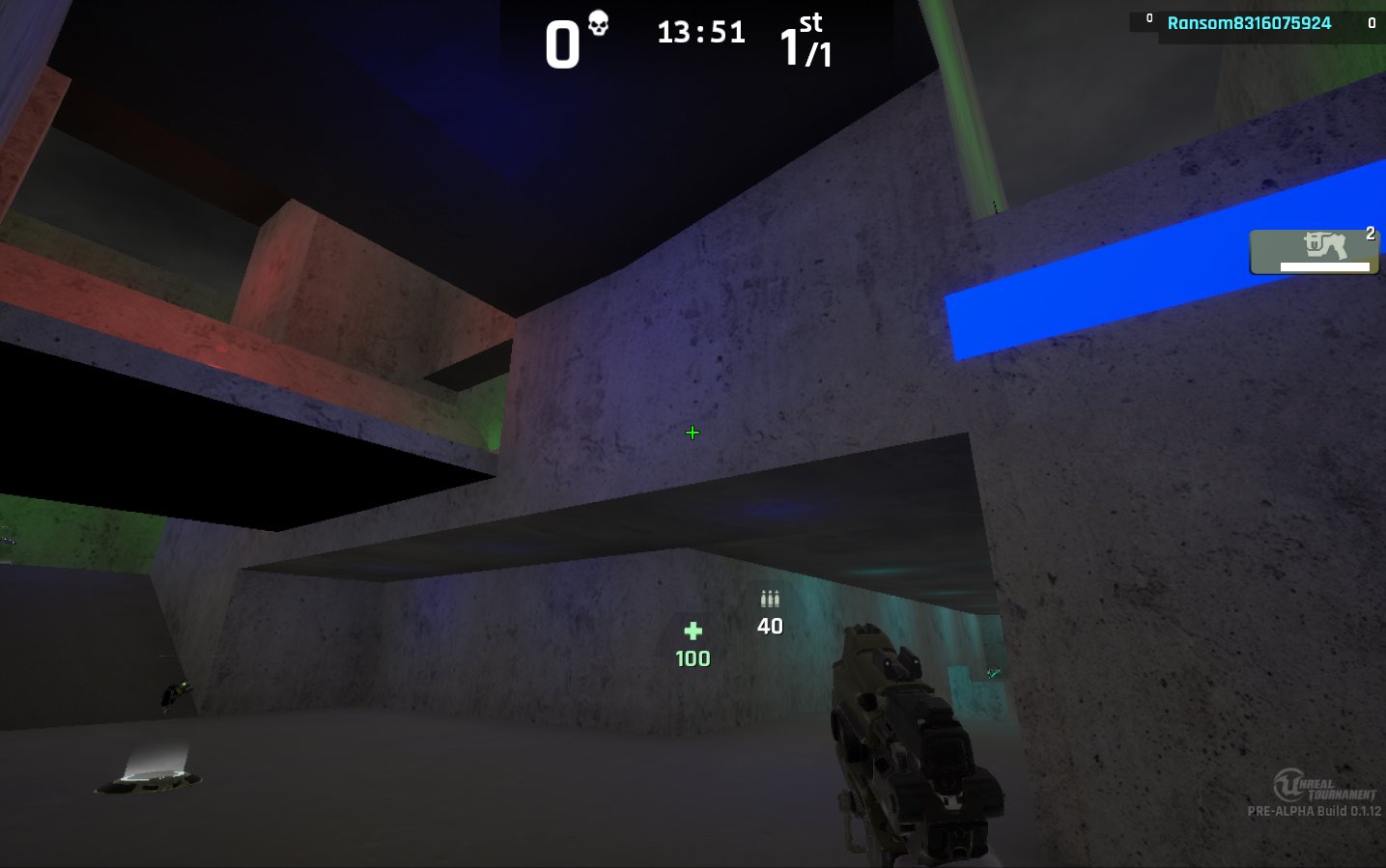
They mean it when they call it simple
grim sinew
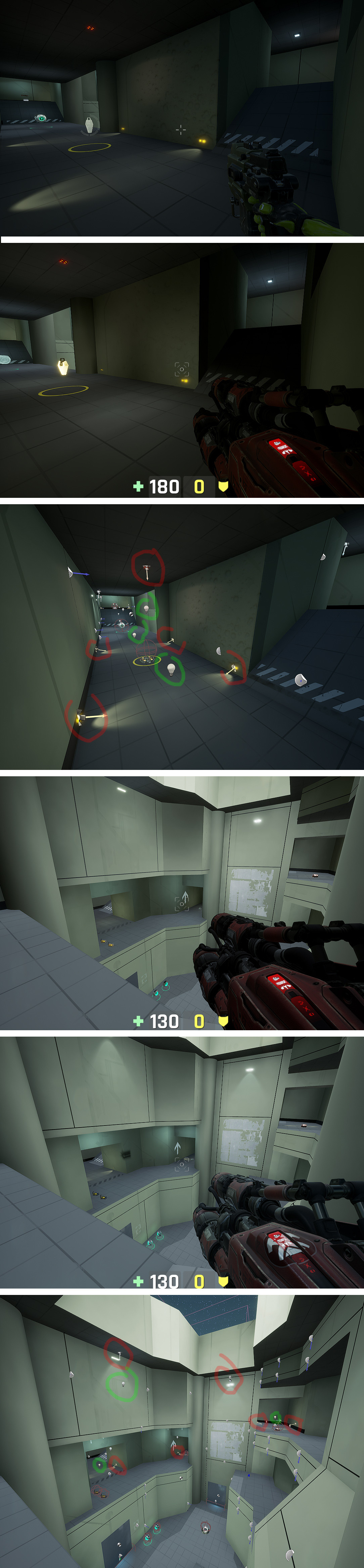

 grim sinew
They should be... but they're not. It's as simple as it gets.
So it sounds like exactly what @hushed delta wants
hushed delta
awesome
 frank escarp
thats the thing. Removing normal maps is going way too far
static viper
does that even have shadow maps??
frank escarp
simple forward is good. But normal maps? man games had those in 2004
frank escarp
lightmaps also get worse without normal maps
becouse you dont get the directional radiosity
hushed delta
maybe there are some another shaders models out there that we don't know about?
frank escarp
ive thought of modifying simpleforward so it has normals
grim sinew
Deferred, Forward, and SimpleForward.
static viper
and the shader models you can switch
frank escarp
it would have been a great mode for VR
grim sinew
UT4 supports Simpleforward, btw, if you want to see how crazy it gets
static viper
it prolly looks shit
grim sinew
Those screenshots were from the UT4 forums, people complaining that the maps they made looked like that when people turned it on
But hey, if that's the look you're deliberately going for, more power to you
abstract relic
This hurts my artist soul
static viper
mh
maybe its not that limiting
maybe with that you could have more high poly meshes
and more 4K overall
grim sinew
No, we really don't. It's complex enough as is in 3d rendering.
static viper
i really want to see a highpoly area with that shader model
 tall pendant
theres are plenty shader models in ue4.. they're just hidden.
grim sinew
And they need driver support
tall pendant
or are we talking about renderers? i mean we do have 3 or 4 of them too
hushed delta
yea renderers
grim sinew
zincr0Today at 5:20 AM
need some advice here, i'm making a game fully opaque low poly style, don't want any fancy rendering effects, no transparency, no lens flares,
no animated materials. Just meshes, textures, and single directional static light. Do you guys know of a guide or tutorial to disable all the "extra" features that ue4 has by default and are not needed for a game like that?
^That
static viper
its 3 by now
deferred forward and now simple forward
or is there more
oh boi...
this all happened 4.14
grim sinew
Well there's the mobile ones, but they aren't really for PC.
static viper
but pc should be able to handle mobile just aswell
tall pendant
theo. there is the oculus one iirc
grim sinew
PC can't magically run APIs it doesn't have, like Metal.
static viper
mh
grim sinew
Oculus is just their own forward rendering, not really much different
static viper
but i thought vulkan was a cross platform thingy now
tall pendant
true yeah
grim sinew
Vulkan is cross platform, but Metal has its own dedicated rendering stuff in the engine
Mobile is confusing. I normally just use that sentence and a little hand wave, since it's such a deep and complex topic since nobody on Mobile can agree on anything.
static viper
well
i agree some sort
id rather do a default based game with ue4
not custom stuff
grim sinew
But yeah. @hushed delta back to your question, I would just tick on either forward or simpleforward, sounds like what you would need. The one you go with obviously would depend on whether or not you really -do- need some features and just didn't think of them yet
Like losing normal maps is a huge deal
hushed delta
i'll tell u a secret guys, i was toying with opengl es 3.1 on pc and works fine, but this, this is way more interesting
grim sinew
Oh we didn't even get into APIs yet, this is just the rendering path
XD
For rendering, honestly just use DX11 in Unreal. Always. It's the only one Epic really tests thoroughly enough to be fully stable.
Unless you have a legitimate reason not to, like platform support, use DX11.
tall pendant
also how is opengl es 3.1 something you need for the game you described?
its way too fancy
hushed delta
i don't know much of the technical side
but when i use it, i pass from 45 fps to 120 fps
xd
i kind of followed this guide https://www.unrealengine.com/en-US/tech-blog/how-disc-jam-reached-60-fps-on-intel-processor-graphics-using-unreal-engine-4?sessionInvalidated=true

Unreal Engine
Hi everyone! I’m Jay from High Horse Entertainment, a two-man team based out of Los Angeles. Our first project, Disc Jam, is an arcade action sport in which timing and reflexes are critical to succes, so maintaining a high frame rate is largely important for the game exper...
but it's outdated, you can now enabled it just changing a .ini configuration
grim sinew
Yeah SimpleForward is even more low end than that
It's so low end I actively made 2 people cringe just by saying its name
😄
hushed delta
a truly potato mode it seems
grim sinew
It was on a GTX 1080, but on a test scene where I used SimpleForward, I was getting around 1,800 FPS
pallid compass
I love that video
hushed delta
mmm google only tells me how to enable forward shading
looks like simpleforward is not very popular xd
grim sinew
Yep. You're gonna need to do some digging around for it.
I could tell you, but that takes the fun out of it.
I'm convinced there's only like 4 people that know how to turn it on in the world XD
Most don't even know it exists
 novel ember
i've been meaning to see how my game looks at potato quality
hushed delta
still looking for a way to enable it, when i found it, i will post a screenshot here
meanwhile, you can toy with the opengl es 3.1 adding +TargetedRHIs=PCD3D_ES31 to your defaultengine.ini
novel ember
is there a console command to disable postprocess effects across the board?
trying to do mobile preview but i keep getting the brickwall texture
next badger
@novel ember lower the PP in scalability
novel ember
oh duh thank you
novel ember
unrelated to that i'm having a weird issue that's plaguing like half my UI now
static viper
show?
novel ember
so the ticks at the bottom are supposed to be the same white and bluish-purple that the numbers are
merry gazelle
should this setup get a random point in 360 space?
novel ember
the main two places i'm noticing it are the widget that manages the horizontal bars for those ammo ticks (think overwatch health bars), but my menus are doing it too
novel ember
the top button is being clicked, but it should be turning that blue instead of darker
novel ember
they're both having their colors assigned in the same way and bizarrely it's not an issue exclusive to just text or images
some text colors fine but some doesn't, and same goes for the images
static viper
oh
yes
i see now
thats also an issue with how thin the pixels are
i cant even make out what that is supoed to be
dim merlin
so what should be the render target setting for exporting .png?
none of them (except RGBA8) seems to work, however RGBA8 seems to add opacity all around my image
novel ember
here's another example
it doesn't appear to be explicitly related to size because there are some elements that take up a decent chunk of screen space but still have this issue
static viper
i think in general
you should go for graphics with less detail
and these cubes
they only slightly look different
but its the color really
use static borders for them
and then have different fillings
white borders
with a bit of blurred glow
that will fix it
might be worth to take this to #graphics
novel ember
kk
 gloomy acorn
anyone here uses gamelift with gamesparks?
next badger
@dim merlin render target uses inverted opacity
dim merlin
@next badger any change i could save a render target to png? what settings do i need
next badger
hushed delta
behold, the potato simpleforward render mode
there are no dynamic shadows, but i see normal maps for some reason
dim merlin
@next badger i use exact same settings, however i think something changed since i did something yesterday with another render target
it basically keeps rendering alpha
i used to render a top view camera as minimap, but since yesterday that also stopped working
not sure what caused the problem
hushed delta
here you got the settings to enable simpleforward. It gives 25fps while the opengl es 3.1 gives 45. The simple forward does have normal maps working on ue 4.21
 bronze cedar
@wary wave , haha i think i got the solution , my ball character is moving how it should be and how i want it to be, with some tweaking in projectile (ball) i got the same effect how I was looking for and now it's really reacting how it should be, i am kinda really happy, thanks to you @wary wave
 somber sonnet
hello
im trying to learn c++ but havent found any tutorials for it
i usually find blueprint tutorials ( which is not i want )
so can anyone help me by finding any c++ unreal tutorials
thanks in advance
bronze cedar
@somber sonnet on youtube or you need ebooks
wary wave
@bronze cedar - you're welcome - hopefully you've learn a lot in the process 😉
static viper
have fun with unreals "different" c++ approach
bronze cedar
yeah i am learning and want to learn so many things, haha i just want to make some games and sip coffee haha that's the main goal of my life lol haha 😃
 fresh rampart
Hey guys, so i had unreal years ago but decided to give it another go, installed it, created new project but cant even open project. Tried compiling it through Visual studio but i get The command "C...\Build\BatchFiles\Build.bat" *Editor win64 Development *.uproject exited with code -532461766. I have win10 sdk installed. Has anyone had this problem? I kinda wanted to avoid reinstalling either Visual studio or unreal engine because its so slow, but if you guys think its better
(also hi, i just joined the discord)
manic pawn
close the error list and look at the full message in output tab
it will say what the problem is
fresh rampart
Unhandled Exception: System.ComponentModel.Win32Exception: The system cannot find the file specified
2> at Tools.DotNETCommon.ManagedProcess..ctor(ManagedProcessGroup Group, String FileName, String CommandLine, String WorkingDirectory, IReadOnlyDictionary2 Environment, Byte[] Input, ProcessPriorityClass Priority) in D:\Build\++UE4\Sync\Engine\Saved\CsTools\Engine\Source\Programs\DotNETCommon\DotNETUtilities\ManagedProcess.cs:line 369 2> at UnrealBuildTool.ParallelExecutor.ExecuteAction(ManagedProcessGroup ProcessGroup, BuildAction Action, List1 CompletedActions, AutoResetEvent CompletedEvent) in D:\Build++UE4\Sync\Engine\Saved\CsTools\Engine\Source\Programs\UnrealBuildTool\Executors\ParallelExecutor.cs:line 252
2> at UnrealBuildTool.ParallelExecutor.<>c__DisplayClass8_3.<ExecuteActions>b__1() in D:\Build++UE4\Sync\Engine\Saved\CsTools\Engine\Source\Programs\UnrealBuildTool\Executors\ParallelExecutor.cs:line 166
2> at System.Threading.ExecutionContext.RunInternal(ExecutionContext executionContext, ContextCallback callback, Object state, Boolean preserveSyncCtx)
2> at System.Threading.ExecutionContext.Run(ExecutionContext executionContext, ContextCallback callback, Object state, Boolean preserveSyncCtx)
2> at System.Threading.ExecutionContext.Run(ExecutionContext executionContext, ContextCallback callback, Object state)
2> at System.Threading.ThreadHelper.ThreadStart()
manic pawn
what's above it
fresh rampart
1>------ Skipped Build: Project: UE4, Configuration: BuiltWithUnrealBuildTool Win32 ------
1>Project not selected to build for this solution configuration
2>------ Build started: Project: ArenaFighter, Configuration: Development_Editor x64 ------
2>Performing full C++ include scan (no include cache file)
2>Building 9 actions with 4 processes...
---- PRoject not selected to build? what
pallid compass
@somber sonnet then you got a fuck ton more c++ and general engineering to learn
manic pawn
do you have game dev with c++ tools installed for vs
somber sonnet
ok thanks
fresh rampart
hum, i will run the visual studio installer, but last night i did not see any option for that
manic pawn
its one of the big options right when you open the modify page
fresh rampart
I have Game development with C++
but im seeing on the right an unclicked "Unreal Engine installer".... so maybe that? 😛
fresh rampart
fair, but yeah, i have Game development with C++ checked
manic pawn
see if there's a more detailed log telling you what file is missing maybe
fresh rampart
not that i can see, i've pasted all the output logs
bronze cedar
is it possible to freeze something so that it cannot be selected, because i just get lots of things from selecting from the top view
next badger
@bronze cedar you need to see them?
if yes - sublevel is your only way, if not - you may use layers
layers or folders
bronze cedar
oh ok thanks, what i do now , i am them invisible
@next badger one more thing i am confused about, when i play when it's top mode i see two paddle and when i play from perspective view there is only one paddle character, what's that , i cannot find this why it is happening
and thanks for the help
next badger
@bronze cedar what is paddle character? also how are you switching views?
bronze cedar
ball and paddle game, paddle is just a cube, converted to mesh in UE4 itself and is a BluePrint
i change my views from the top left corner
next badger
um...but you can't play in top view set in the editor...you need camera
 lethal breach
Hey everyone, is there a way to change the project directory location for UE4 projects? I bought an External HD to back-up/Sync my project in the event something happens to my PC but when I create a Mirror folder and place the Unreal Projects folder within it (to sync any changes I make in my game instantly) I can no longer open the project in UE4
hushed delta
you mean the project doesn't show in the launcher anymore? the .uproject should always open if ue4 is installed
bronze cedar
yep i have the camera , @next badger
next badger
@bronze cedar show a screenshot of your issue pls, i'm really confused here
bronze cedar
ok sorry for that
next badger
np, i just won't be able to help if i won't understand what is happening
bronze cedar
There is no second Paddle Character
There is another Paddle Character, when running the game from Top View
it's not hurting me, because for now that's not the problem , but just want to know why it's happening
next badger
yeah, that's not screenshot i was asking for...where are you taking them from?
bronze cedar
from UE4
next badger
you can't run game from "top view"
bronze cedar
oh ok that's fine than , thanks for the help,
can you just let me know one more thing,
no matter what , i cannot make my paddle move left and right, this is really killing me, can you tell me what are the things necessary to make it move, i mean like game mode and player controller are needed
next badger
you mean this right?
bronze cedar
yeah that's right, yes
when i render the game from the perp view it's all good, but when i go to other views and make it run, things get changed, why i was doing that because i am working with top view more than other views, so i just run the game without knowing haha ,
and the results are really different
next badger
@bronze cedar i have no clue why this happening, game should not have any differences if it was run from one window or another, you may use PIE
bronze cedar
what is the easiest way to make a paddle left and right, nothing more for now haha
next badger
bronze cedar
oh ok thanks for the help , i don't know what is PIE but will find it out on google, for now i am trying to make my paddle move but i can't , don't know why 😦
oh ok thanks for the screeshot ,:D
next badger
@bronze cedar to move the paddle you need to make input events, for keys, and then feed them in to function that will change paddle position (is paddle inherited from the character class?)
bronze cedar
see what i did and doing ok , let me write
i bind the keys , that's left and right in project setting, than i made a BluePrint and gave a cube mesh to it, i scaled it so that it looks like paddle than a cube, in paddle BP i and calling input axis LeftRight and than add movement input, i just search on google and do all this because still learning haha
@next badger
i just run the mobile version and that another paddle is visible in that , haha
check this
that's not a big issue because i can make another new project , for now i am just trying and learning
but it's not showing in windows standalone
bronze cedar
oh i don't know that,
than what to do, i mean if i want to make it move with my keyboard left and right , how to do that, because all i can find is this when i searched the google
next badger
@bronze cedar oh sorry, those are project defined axis
but yes, that;s how you do it, but you also need to set the vector to move along
world direction
in your case it probably will be 0,1,0
depends if left is +1 or -1 and if you're moving along Y
abstract relic
I’d just put Get Right Vector
next badger
@abstract relic that's a proper way to do it
bronze cedar
thanks guys, i will try and keep trying until i get it work , haha that's the way i work lol
bronze cedar
hahaha yes and this is what makes me keep going lol
i just thing to do one thing everyday , it's kinda mission for me, now it's Mission Move Paddle haha
@abstract relic
😄 😃
i know i am not doing the right way how it should be in the UE4, that is what i have to find out haha , it's hard to find 2D tutorials or help because it's not that much on the web , but if you want to make a Full 3D FPS game there are so many tutorials on the web , haha 😄 😃 I think i always do what should not be done lol
next badger
@bronze cedar 2d...like ue4 2d game?
ue4 lacking 2d features cause most of them are not officially supported, even paper2d is side project of one of the employees
tall pendant
a breakout clone should be doable tho even with paper2d
bronze cedar
@tall pendant what you mean by that, is the work behind the game you are talking about
@next badger yes i understand that, but 3D games with 2D look, kinda i mean, i have been searching and searching so much and trying to learn, like for example moving left and right a character is hard to find, i mean the exact tutorial or help i mean
fresh rampart
@manic pawn Just wanted to tell you that i ran Repair on visual studio, still didnt work, then i deleted Binaries and intermediate folder, ran "generate visual studio project files" and ran build and it seems to be working. Just wanted to update you and say thanks for the help 😃
tall pendant
@bronze cedar I mean that a breakout like game should be doable in UE4. It's not that complex like an fully fledged 3d game. A good starting point into gamedev by the way.
some people here start way too ambitious
bronze cedar
and about paper 2D i think there are lots and lots of devs who want to make 2D games, i am not forcing but epic should also look that point too , i am not saying that it should be done but just my thinking
haha yes @tall pendant you are right, i was also that kind of guy before, i have been in gamedeving from past several years, was using a 2D engine before and now i switched to UE4 when i was free, i get very less time to learn but i am trying haha how much i can , yes it's doable i understand but for a noob like me is kind hard i think, so that will make me learn some of the working of UE4 and can also complete one game on the way to go for the next game or just make this game more good and so on
next badger
@tall pendant if you real game developer you should start with MMO
tall pendant
@next badger 
 cloud cobalt
Don't - some people actually take this seriously 🤷
static viper
i cant
abstract relic
fools can't take advice regardless