#ue4-general
1 messages · Page 374 of 1
 wary wave
 fierce tulip
they have it as "fixed" in 4.19 after I did some reports on it
wary wave
I suspect Epic can't reproduce it because they have everyone on a fixed hardware config
whereas us users in the real world have a variety of different display configs
fierce tulip
the more monitors you have, the worse the dpi issues get
wary wave
yup

 languid shard
boi.gif
wary wave
my personal project has been on hiatus since 4.18 😦
because it needs world to widget space transformations to work
and they don't, because DPI scaling 😦
fierce tulip
for cascade im still on 4.16 for most things, because anything after that is just..
and I get it, lots of stuff being thrown around to make niagara work but.. meh
same with animation timelines. sometimes you cant drag a notify to the end because .. reasons
and no horizontal scrollbar in cascade because.. dpi scaling?
so I cant access most emitters unless I literally span it over 4 monitors
 violet goblet
some texturing question:
are there any benefits regarding textures, when using a texture of dimensions like:
2048 x 1024
or:
2000 x 1000
?
wary wave
textures must be power of two if you want mip maps
wary wave
if you don't know what they are, you probably want to do some reading
violet goblet
i do just now
wary wave
along the lines of mip-mapping, bilinear / trilinear filtering etc
fierce tulip
 wary wave
pretty important stuff to know if you're going to be doing texture work in 3d rendering, hehe
violet goblet
alright from what i read in that short amount of time, i do want mipmaps xD
wary wave
probably
 hexed sorrel
?
wary wave
though there will also be times when you don't - so understanding what they are and what they're used for is kinda important
violet goblet
i could not imagine where i dont want anti-aliasing (i am pretty new in texturing)
 plush yew
does ue4 has any north in it's coordinates?
wary wave
what?
 nova juniper
Hey, hi @plush yew
As far as I know there is no North coordinate set on the engine. However, in the 4.21 with all the accurate sun positioning MAYBE now there is. I know a few developers using the +X or -Y for their custom coordinates. I guess is for a map, or a copmass thingy maybe ?
nova juniper
Ah... you can rotate that as you want, so.
do it your way.
this may be worth for you to check : https://docs.unrealengine.com/en-us/Engine/Rendering/LightingAndShadows/SunPositioner
since it's basically an accurate way to represent the sun.
 west quarry
Hey is it me or unreal FPS character is more clunky then in unity ?
I am not sure how to make it more specific it is to some extent subjective heh
 grim ore
@violet goblet UI stuff probably does not want mip maps for example
do you mean the FPS Sample FPS character or the Standard Assets FPS character or the Learn examples FPS character or? UE4 generally has 1 fps character in the template while Unity has no "templated" FPS character.
violet goblet
@grim ore of course 😃 (as an character artist this is something i never thought of, but always good to know!) thanks!
grim ore
yep yep. I think another normal texture one might be like the sky sphere. Would be weird to see it mip map out as you move around the world lol
violet goblet
😄
 shrewd steppe
Why does the engine need to connect to the internet in order to build lighting?
 glacial pecan
swarm?
shrewd steppe
no
the ue4 process
I just tested it
for a very long time I've been unable to build anything
it just hangs forever
today I figured I hsould try letting it connect to where it wants to as it always nags on startup
building immediately worked
this is very strange
 light thunder
How do you use delta time and delta seconds in an Event tick, when the tick is setting an event by timer with a looping delay? I imagine you have to adjust your calculations to account for the change in time difference?
 pearl shoal
Why would you use delta seconds with any timer to begin with?
wary wave
"How do you use delta time and delta seconds in an Event tick, when the tick is setting an event by timer with a looping delay?"
This sounds like madness?
also timers operate on tick anyway?
light thunder
Let's make this visual so we can reveal the problems with my understanding
wary wave
hehe
grim ore
@shrewd steppe it appears it might be due to the engine trying to connect to the local lightmass process on localhost/127.0.0.1 and if you have it not allowed to use the network it would fail. This seemed to be the issue in older version while the newer one might be sending diagnostic data which causes the issue as well.
light thunder
So, I'm calculating various elements of an actor and I need to be monitoring those, but I don't need it to perform on event tick
light thunder
So it needs to update maybe .1 a second
shrewd steppe
100B/s while its connected
wary wave
so what's wrong with just having looping timers?
shrewd steppe
I'm using 4.21 btw
light thunder
help me map this out - and why is discord fluctuating, this window looks like it's buffering?
wary wave
looping timers are no less accurate than tick
wary wave
timers operate using tick
light thunder
I need something to remove a certain amount every second, because the value is in Gallons per minute
 static viper
how are you going to prevent them then from going faster at higher rates
wary wave
eh?
light thunder
that's what I mean
static viper
144 fps and the timer ends after 30 seconds
shrewd steppe
instead of straight up blocking everything I suppose I should allow it only localhost
wary wave
removing a numerical value is easy enough
light thunder
and why is discord fluctuating like i am on a remote video feet
static viper
30 and the timer takes 2 minutes
 spare sun
normalize it
wary wave
you can get game time during a loop
static viper
do you want me todo that on every timer?
every single timer ever
with an extra time check
wary wave
if you want to do something using time it doesn't seem like a radical problem to read existing time variables....
wary wave
why would they ever be exact?
one loop of the game thread takes a specific amount of time
static viper
bc of game speed
wary wave
you can never ever go faster than that
light thunder
static viper
that was a recent issue with fo4
spare sun
dw skyrim got away with it
 livid haven
@static viper You're not making any sense. Timers are... time-based. Your frame rate doesn't change that.
wary wave
^
static viper
to my knowledge they were accurate
livid haven
The only thing that is true is that a very low framerate may cause you to end up overshooting the desired time by a larger margin. Possibly. Depends on ratios.
wary wave
@light thunder - you want to calculate your own 'delta seconds' between timer intervals
either use one of the global time variables, or I think the Timer Handle has one too
light thunder
And why is this blurry in discord, (i've restarted discord and it's not in any other application)
static viper
the thing i fear is just that i dont want my games to work faster on higher fps
spare sun
not blurry on my screen
wary wave
that's why you have delta time / delta seconds...
livid haven
@static viper Your fears are misplaced, it's 2019, this is a solved problem.
light thunder
@wary wave So what is the way to calculate it?
wary wave
but using a timer, it's going to be more accurate if it's running faster, so
wary wave
I mean, you literally just work out how much time has passed?
@light thunder ?
Time This Loop - Time That Loop?
Timer Handle may even have that built in
seems like something it might have
livid haven
@static viper Timers are "safe". Although, to be honest, I don't know what you mean by safe. Timers are based on time, not ticks, so I don't know what you ever thought was going to go wrong with them.
wary wave
Timers are based on tick
each tick, each timer gets updated
unless something has changed
static viper
and a tick is a frame
livid haven
Yes, based on in a different sense.
wary wave
a tick is not a frame
livid haven
My point is you set a timer based on a time, not on a number of ticks.
wary wave
game thread != rendering thread
static viper
its not a frame anymore
light thunder
So If I need to get a value on a per minute basis, how do I adjust for this (basically I need to convert minutes into seconds) ....
static viper
ah i think i remember
wary wave
the return value is a timer handle, use it
spare sun
wut
livid haven
Calling timers tick based when someone is worried about tick rate making timers run faster/slower is only feeding their confusion and concern. Yes, they are implemented via tick.
static viper
it doesnt make this better really XD
wary wave
@light thunder - if the timer handle doesn't have time variables that are useful, use a global time variable instead
static viper
i will just cap all my games at 60 fps.
and be done with it XD
if it runs well at 60 all is fine
spare sun
respect ma 120hz screen ree
livid haven
@static viper Why are you trying to break stuff that's not a problem? What aren't you understanding?
static viper
i am trying to make this right!
why are you not understanding XD
you need education
wait
shrewd steppe
thanks @grim ore you were right. adding an exception to localhost solved it
static viper

Game feels about ~20-30% faster at 144FPS, and well over double-speed at ~250FPS. Is this some kind of sick joke, Bethesda?
here.
tell me
spare sun
just skyrim things
livid haven
Yeah. I'll tell you that's not UE4.
And that's not working on a timer.
So what's your point?
static viper
well everything was speed up
livid haven
Yeah. Because someone did their job wrong.
grim ore
@shrewd steppe yay 😃
spare sun
yea but thats a different engine
livid haven
Which has nothing to do with UE4 or timers.
static viper
id like to not make it wrong
light thunder
How about you guys educate me on my understanding of timers and their implementation in Unreal instead of arguing 😃
@wary wave is trying !
livid haven
It's not an engine bug.
wary wave
lol
livid haven
It's someone literally deciding to do something based on ticks instead of time.
Time, like a timer does.
spare sun
im not sure, but bethesda keeps repeating this thing every game
static viper
well that is my point
wary wave
Fallout is buggy like that because they still haven't solved trivial problems that were solved in the early 90s
¯_(ツ)_/¯
livid haven
No, YOU have to do it right. And if you use timers, it will be right, because timers count elapsed time, not elapsed ticks!
static viper
then i am doing it right :3
spare sun
which means dont depend on amount of ticks, depend on time
wary wave
a timer triggers when the total elapsed time > the set time
static viper
i love this
wary wave
but because 'total elapsed time' is derived from ticks, it will be an indeterminate amount of time greater than the set time period
light thunder
750/60 = 12.5
light thunder
so the next time that break fires, it should be 505- 12.5, or 493
yes I do, it's being directly set by tick I'm not sure what to do with it
wary wave
if it's the delta time directly from event tick, it is not the delta time for your timer
livid haven
Your graph there looks right to me, assuming Delta Time is the time elapsed since the last tick.
wary wave
it's wrong because it's inside a timer
livid haven
Huh.
light thunder
livid haven
Then yeah, I guess have a variable for the last time this was ticked, get the current time when the timer goes off, compare the two to get a delta time, and update the last-tick-time.
wary wave
this should be correct, I believe
also I need a new keyboard where the 'e' key works properly xD
wary wave
I mean, it should reset
the time taken to complete one loop of the timer will be slightly different each time
livid haven
I think you're better off doing the timestamp method I mentioned, entirely based on global time.
light thunder
it's close enough but what do I do to adjust for that?
and global time will continue to rise, I just need to turn a live PER Minute amount into a Per Second amount
wary wave
global timestamp should give you the same numbers
livid haven
I revise my statement upon further consideration, I think your Elapsed Time by Handle approach is better. 😃
(I misunderstood something about it for a second)
Much simpler and concise. Better than having a global variable you need to keep updating.
light thunder
It's not working, how did I not implement this correctly? 281, the next time around it should be minus 12.5
light thunder
yes but I'm getting a bit off
That's the whole point of this, to find out what it is per second
this function isn't fired by event tick
wary wave
12.5 * delta time (from the timer) = amount changed since last timer loop
light thunder
here, from the top
livid haven
Hold on for a second.
Tick is a general term. For some passing of time, regular or irregularly.
livid haven
Every time your looping timer fires off, you could call it a "tick" of your timer function/event.
light thunder
it should have been 12.5
livid haven
Why would it be 12.5... if the elapsed time wasn't 1 second?
light thunder
every iteration or loop?
how do I make it one second when I need the loop to run faster to update more frequently
livid haven
You can make your timer loop on a shorter amount of time and it'll loop more frequently.
But that won't make it change by 12.5 every time it goes off.
livid haven
Nothing will ever make it do that. You don't want that.
light thunder
okay, I am calculating the amount of pressure and friction loss in a hose, which ultimately determine the gallons per second that come out of it
for sake of brevity, assume that is actually event based, like increasing pressure or opening a valve more
but the check can be event timer based as well
ultimately the GPM that comes out is the number we are concerned with
and I need to take that GPM and remove it from the tank in a consistent manner
wary wave
well, you're not working with seconds or minutes, so let's extrapolate backwards
light thunder
yes, i should have mentioned that
 graceful sky
GPD :p
wary wave
in any given gameplay tick, X quantity is lost based on some other rate
the rate lost per second in that gameplay tick is 1 / delta seconds * amount lost
light thunder
How do I deal with that?
wary wave
deal with it, in what respect?
light thunder
that calculating is inside the timer
wary wave
use the timer elapsed time instead of tick delta time
honestly, I don't know what you're aiming to achieve but it sounds like you're grossly overcomplicating it in your head or something
light thunder
like this ?
static viper
you say a tick has different speed
livid haven
That looks right to me.
static viper
is that a global thing or is every pc different?
wary wave
a quick glance says that will deduct the correct amount, each timer interval, yes
it's not just every PC, it's every tick
livid haven
@static viper Neither. Your tick rate is entirely variable (generally). It's effectively your frame rate (more or less).
wary wave
you can never guarantee how long a tick will take
livid haven
^This^
light thunder
yes and it's not accurate here
static viper
so its completly hardware driven at first
wary wave
how is it not accurate?
static viper
and then it drives sofware
livid haven
@light thunder Let's take a completely different situation and see where our understanding diverges.
wary wave
if you're deducting 12.5 each second, then after each loop of the timer, the amount lost should be approximately 1.25, give or take a bit
livid haven
Why do you say it's off?
livid haven
Yes
light thunder
(at least it's consistent)
light thunder
okay, how can I make some of the logic run every second
wary wave
you can't
light thunder
what about a delay node here then?
livid haven
By setting a timer for 1 second, at which point your timer will fire off every >1 second.
Nothing in the universe will make it fire off at exactly 1 second.
light thunder
then why is this value consistent?
wary wave
it shouldn't be consistent
you're doing something somewhere else that makes it so, I suspect
something funky like integer math
livid haven
Probably because you're hitting these breakpoints, causing the tick time to end up consistent. 😃
Because there's a max time that a tick is allowed to update, generally.
livid haven
If you sit long enough, you'll end up making the real time between ticks long enough that it hits a max.
light thunder
what about some function that gets the elapsed game time and when it changes by one second, it fires this event ?
livid haven
So it'll be come consistent if only because it's consistently getting capped.
@light thunder That's what a timer of 1 second would do.
Except it will generally be some fraction of a second late.
The higher your frame rate, the smaller that fraction will be, generally
light thunder
do I need to adjust for the timer if I put it inside the timer, meaning, the beginning timer is looped every .1 seconds but at the end, it sets a timer to fire every second? I feel like I need more caffeine now
wary wave
the screenshot above looked like it should work to me
livid haven
Ditto
I think you're overcomplicating things.
You have a timer updating something at some rate (well, approximately that rate).
You have calculated your gallons per second.
You then calculate how much should be removed for the elapsed time and remove it.
If you make the timer go off every 1 second, you'll just have a choppier looking experience.
And it'll still generally have inconsistent values per-timer-going-off, because it'll almost never be exactly 1 second.
light thunder
even if my breaks are going off, what if I start a timer for a minute (in real life) and see how close it is, but you are saying this should be good enough (which is fine, in real world we just have 4 lights that come on for the various ranges of the tank's water level
light thunder
oops wrong pin
livid haven
This feels reversed.
light thunder
nice catch
light thunder
okay, here's the thing, it drains the tank in 16 seconds, instead of a minute
so it is going to fast
wary wave
I've recreated it above, and the numbers are pretty much exactly what I'd expect to see
livid haven
If you have 600 gallons and you drain it at 12.5 gallons per second, it would drain in 48 seconds.
livid haven
(As in, set the timer?)
wary wave
yup
light thunder
begin play
wary wave
and nowhere else?
 coarse turtle
After I import a Mixamo character into UE4, when I run I see the teeth or eyes not syncing as I move. Also skull shows up through hair when I move or do a sudden move. I previously fixed this issue, but currently I forgot how I did that. Do you know? Could it be an option when I import?
wary wave
you ran out of memory
plush yew
impossible since I got 32gb
livid haven
Looks like whatever you're importing is corrupted.
Maybe
It's trying to allocate a very large number of bytes all in one go.
light thunder
crap, maybe this is getting called twice
wary wave
it's only 3 meg, but it does say it's run out of memory
light thunder
@wary wave I move it over here where the first timer is, and just did it on a second and this appears to work fine
wary wave
what does task manager say?
light thunder
I want it to update faster, so I can change the time to something smaller and just divide by a larger number
wary wave
um, you're setting the wrong timer handle
@plush yew - yeah, how much memory does task manager say you're using when that error pops up?
light thunder
I'm not even using it
plush yew
oh I never checked it, I can import it again and look for it
light thunder
if I know it is ticked at every .1 of a second, then I need to multiply by 10 the amount I want to take out per second
so instead of doing the divide by 60, I need to divide by 600
light thunder
I mean how far off we are getting at here?
plush yew
using 2.3 gb max atm
 worn granite
Enough for error
wary wave
well, if you look at my screenshot from earlier, you can see it's enough to be significant
light thunder
how so? I had trouble understand how much time elapsed there< seems very small
plush yew

worn granite
time elapsed is just how long its been ticking for.
pretty sure its the actual time, too
unlike relying on the hardware to tick you every .1s
light thunder
SO how would I put use that exactly? in terms of setting up a boolean or function to fire based on that?
wary wave
you do exactly what I did in my screenshot above
light thunder
well I'm glad it took this long because I caught a big bug (it was running more than once so when I put a integer to take that, I realized it was running as part of a loop instead of at the end of it
explains why your solution wasn't working either
wary wave
hehe
light thunder
so, you are saying that while this may work now, it's not as good as the method you described/pictured above?
graceful sky
In a system like this , what would be a typical way of simulating the fluids ?
light thunder
Um, it is working?
graceful sky
Having some mesh with Z scale based on fill amount in the pipes and tank sounds.. awkward but might be right ?
light thunder
@graceful sky What is the use case? most of that stuff can be cosmetic unless you are trying to recreate lab conditions
wary wave
I'm pretty sure it's not working - you're removing a fixed number X each time the loop runs
graceful sky
It would just be a visual simulator really
light thunder
i'm watching it count down and it damn near seems like it
graceful sky
I was thinking about trying to replicate some automation sensors and make it output values via modbus tcp..
wary wave
I can guarantee you it's wrong
but at the same time, it's been over an hour of trying to explain it, so I'm kinda burnt out on it
plush yew
light thunder
just look at this then, as a way to test it
light thunder
so if I have the tank start at 300 gallons full, draining 600 a minute, it should take 30 seconds, agreed?
wary wave
something like that
light thunder
is your point that it will not be on the decimal pt accurate, or will be .000x number off? this is very crude use case
wary wave
ugh, let me make the example and find out how inaccurate it is
but at the same time, I can't even guarantee how inaccurate it will be
because tick time is not exact
one one machine it may take three times as long as another
light thunder
but I'm not using tick? or are you saying that timer by event is still tick based?
worn granite
meh at this point just do good enough Blake
light thunder
story of my development life
graceful sky
Any event is on some level depending on delta time were my impression
livid haven
@light thunder This is how timer works.
When you set a timer, it's adding some info to a list.
The engine has one main loop buried in it somewhere. That is the "tick loop".
light thunder
livid haven
Well, stop reading it for a second, because you're confused about some really fundamental stuff, so let's clear that up first. 😛
worn granite
Yeah this'll be a more targeted explanation of what's really going on.
light thunder
So I could accomplish the same thing but instead make an Event tick, with a delay, that performs the similar function but may behave more accurately?
worn granite
No.
graceful sky
Lets just listen for a sec :)
livid haven
The tick loop tracks what the time was last time it looped, compares it to the current time, and uses that to calculate how much time has passed since last time.
worn granite
No it wouldn't be any more accurate. Delays are just timers internally.
light thunder
I see
So I'd have to make some logic that would maybe fire off between a change in the delta time of certain range
livid haven
Somewhere buried in this tick loop, it loops over all of these timers and says "This timer has X seconds left on it and it's been Y seconds since we last ran the main tick loop, so the remaining time is X - Y."
light thunder
like a interval delta float that, when it's 1.0 seconds greater than the previous one, fires the event, then sets itself to current delta time, and eessentially resets every single)
livid haven
No, just listen for a minute, please.
graceful sky
Thats the logic amber showed you. Taking delta time into consideration.
light thunder
👂
worn granite
If we keep interrupting it'll be harder to parse the entire sequence.
livid haven
So, the main tick loop is tracking how much time since the last time it ran. It loops through all these timers and deducts that elapsed time from the remaining time on each timer.
If that timer's remaining time, after that deduction, is 0, it will call the function/event associated with that timer.
The main tick loop runs as fast as it can. How long it takes to run varies. Be it because your processor was busy with Chrome for a bit longer or because something in the game world literally exploded and it spent extra time calculating collisions and trajectories.
wary wave
cool, so I've built both versions and run them side by side
the difference is bigger than I'm expecting, so I need to double check this xD
livid haven
Delay and Timer both work the same way internally. It's just a "X seconds left" piece of info and then, during the tick, a loop that deducts from them and then fires them off if they've reached 0. That's all.
wary wave
actually no, this is correct
the difference is huge because I tabbed into Discord and UE4 lost focus, reducing the framerate
so this is actually a great example
light thunder
👂 👂
livid haven
Even event Tick is just the main tick loop of the engine looping through every tickable object and calling their Tick event and passing along that elapsed time.
wary wave
but in this example, the 'right' implementation finished around the same time the 'wrong' one was still half-full
which is huge
graceful sky
Excellent explanation Sion ! We're on track, after all 😁
livid haven
Delay and Timer can't perfectly run at the time specified, because you can't possibly know the time has elapsed until the main tick loop gets to that timer/delay and deducts the elapsed time - at which point, inherently, it is catching up to the amount of time that has already passed since the last time the main tick loop ran.
livid haven
Literally everything in any kind of game or simulation is always happening slightly late. The simulation is always a matter of "How much time has passed? Okay, now let's calculate everything as it would be now that said time has passed."
</Explanation>
worn granite
Funnily enough, if you think about it you yourself are always living in the past also.
wary wave
...and here is the output log:
https://pastebin.com/PCWwDbL8
 worn granite
You gotta take time to perceive things and process them
light thunder

One of my favourite scenes from Spaceballs the movie
wary wave
you can see one slightly races ahead of the other - until the framerate tanked in UE4 because it lost focus
at which point the delta time version remains accurate, but the 'wrong' version starts to become wildly different
when the frame rate is low, delta time is high, so the 'correct' version is subtracting multiple liters/gallons/whatever on each loop, but the 'wrong' version keeps doing 0.1 😉
regardless of how much time actually passed
@light thunder - make sense now?
light thunder
yes but what I don't get is why the timer handle method isn't working for me, even when I have fixed the loop
worn granite
elapsed time isn't delta time
wary wave
I said before - you're using the wrong timer handle
worn granite
and maybe the wrong handle
light thunder
conceptually I understand, this is more of a syntax issue
wary wave
you have two timers and your handle is for the other one....
light thunder
ah, and it didn't work before because if the loop problem but I never tried hooking it ack
livid haven
When you showed us this, your timer handle is for this OTHER event. Not for "RemoveWaterFromTank".
light thunder
Yes, originally i made that second timer because I wanted to check if there was a problem with my loop because it's a long event chain, there was but I forgot to remove that part
graceful sky
So its working now?:)
light thunder
um, not exactly
let me figure out what I'm doing wrong blueprint wise
now that I understand the concept
livid haven
There's also like a dozen reasons numbers won't be perfect that you probably don't want me to get into right now.
light thunder
it's too early (shouuld be 30 seconds)
I only care if it is off by a whole number or so
livid haven
That's too large a margin. Something is wrong.
light thunder
yep, I'm looking at it now
livid haven
Can you share the whole set of blueprint logic, all the way through from when you set the timer?
light thunder
well, we know the time isactually working -
livid haven
We keep trying to diagnose from only a limited set of the logic, so it's possible there's some other thing we're all overlooking because we're trusting everything else is perfectly right.
light thunder
the interger is set on the number of times the loop has been executed 246 in this time, or ten times a second (baseed on this timer event)
livid haven
Unless you are starting this process on the first frame of the game, GetGameTimeInSeconds isn't going to be right.
livid haven
Also, you can pretty much guarantee that at 0.1s, the timer will run 9 times a second generally, since it's extremely unlikely that you'll get that 10th execution perfectly at 1.0 seconds elapsed time.
light thunder
actually it is off literally by the .1 delta of the lop
first pass through
handle by timer
again, we are getting a bit stuck in the weeds as I don't care of it is only .1 (which is still huge) off
livid haven
Hold on, BeginValveFrictionCalcs.
That's a function on another class, how are you getting the elapsed time there?
light thunder
that loops through a series of valve actors and yes, I understand that that will increase tick times, however, all I know is when i didn't use event timer but used a set number, it worked, (it shouldn't but it does)
livid haven
I don't see you providing the timer handle to them.
light thunder
because that function updates values on THIS bluepritn
and when that loop is finished, it executes the function that checks based on the updated values
livid haven
So the valve BPs have a reference to this BP?
light thunder
basically, it says, "hey valves, give me your outgoing GPM's" , then when loop is done it goes, "let's add up GPM's and see how much to remove from tank"
 cobalt owl
Anyone tried Paragon Sample Map? I have problem with collisions - Player Start has "BADsize" icon on it and when i spawn a character it falls down to infinity
light thunder
yes, created when they are spawned, pass through the spawn event
livid haven
Uh... I guess if that's working, alright, but this is a very bizarre architecture to have. Not sure why you're not providing only the necessary information as arguments and then getting the desired information as output from the function.
light thunder
What do you mean, the valve's have their own parameters that drive the different values resulting in their each GPM output
livid haven
It's fine, I don't want to over complicate this with a different discussion of a different subject.
light thunder
Fair enough
livid haven
So, that 0.4 vs ~0.41, interesting.
wary wave
I would very much expect decimals in any value of time
light thunder
well, if the timer started at 0, but didn't finish till .4, , it would be off by the duration of the loop?
wary wave
it would be 0.4XXX, yeah
light thunder
get game time in seconds runs when all elements are loaded correct?
wary wave
after begin play on the game mode, I think
but more or less
possibly an internal state change on the game mode, actually
but that's irrelevant
livid haven
Just in case, try logging the game time just before you set the timer.
And log it when you empty the tank.
Compare those two.
livid haven
With the timer disconnected, you'll get different results simply by doing something like losing focus of the window. Try it out for kicks - leave it without the elapsed timer thing and test how long it takes while the window has focus versus while the window doesn't have focus. You'll get dramatically different results.
light thunder
big delay I guess
let me make sure the spawn valve's event is'nt being fired that first time
or shoudl I just check the 2nd iteration through?
livid haven
Remove all your break points.
livid haven
Just copy the log output and do the math between the first time it prints and the last time it prints.
I have a meeting shortly.
light thunder
0.0 and 4.18
err 0.418
weird stuff
looks like it runs 4 times in a row
the time doesn't change even when the loop goes through 4 times? the tank amount is obviously set then, that explains why something is off with the timer event ....
what would cause this, the game time in seconds doesn't change, even with multiple passes of the loop
 bronze cedar
i can't even move my character left and right :(, trying from two days, don't know what i am doing wrong
searching net like mad , but cannot make it work, anyone who can help me
light thunder
@bronze cedar what input events are you using? make a Print string and bind an event key to make sure your controller (or wherever those key binds are on the blueprint) and make sure you are able do ANYTHING from there with your keys
light thunder
movement component is just a tool to make it easier to do things for what you are doing but not necessary, first try to have a print event that fires from your character with a keypress
bronze cedar
i am making a paddle and ball game and want to move my paddle left and right, this is really simple i know, but as a noob for me it's like a higher maths haha
i was doing that with input axis, for now i just closed that project because my mind is getting too hot 😦
haha because i cannot do that , that's why , i have been trying from the past two hours, almost
and from two days
ok i will do that, thanks for the help my friend 😄 @light thunder
light thunder
good luck
light thunder
I've disconnected most of the functionality from my blueprint and it's functions and am testing my Timer Handle - when I change the time on the Set Timer by Event node, when it is at 1 second, it is accurate in its calculates...however, when I change it to .1, it is very much off, even though I'm doing two or three extremely simple math operations (divide, multiply, then subtract) .....why is the time getting thrown off?
plush yew
is the epic launcher freeze issue known?
i get random full pc freezes that sometimes lead to a frozen bluescreen
no memory dumps nothing
but only when the launcher is installed
whats the angle of directional light to be midnight?
 abstract relic
Straight up?
plush yew
I have tried 90 and 180 both seems to be how it is in the summer at 21.30 pm
 dry moon
Is there a way to make it so one physics object can't affect a certain one
dry moon
Well I don't want it going through
I want them to stop each other
But to not influence the velocity of one
livid haven
I want them to alter each other's velocity
But I don't want them to alter each other's velocity
🤔
abstract relic
I think he wants to preserve the velocity value when if stops. Kinda like pausing it in a way
dry moon
Because if I have a physic puzzle thing in a sense of it allowing a door to open that you pick up
and throw something, it'll push it away
locking the player in
so I need to find a way to have the thrown object not affect the door locking physics mechanic, but allow it to move on platforms continually
dry moon
Basically yes
worn granite
Seems like a pain to get working
Basically you wanna filter the OnHit for particular actors (OnHit being on the door) and only apply an impulse then.
abstract relic
Run an bp interface I suppose. Would rather be brute forced though
 merry gazelle
I'm trying to print all the tags of a line trace hit actor, any idea how I go about connecting the nodes?
worn granite
You can have one item which blocks everything and has a large dampening, with another item that is used to track physics and doesn't itself collide with all things.
When the block everything item is hit, apply the impulse conditionally to the "fake" item
then adjust the loc/rot of the "real" item to the "fake" item
That'd be one way, the quickest hackiest way I can think of.
dry moon
Hmmm actually I think I can just check if the object hits that certain actor, set its velocity to 0 so it no longer pushes it and will just fall to the floor
worn granite
So yeah I guess you can zero vel, but it'd still slow the door.
bronze cedar
@light thunder this is what i am doing and it's not printing
guys am i doing something wrong, my character paddle is not moving
dry moon
I'll try it out
worn granite
Its a bit of a kludge so if you got a lot of these you'll want something not as dumb.
dry moon
Yup just zeroing the velocity of both at the same time of impact and making it delay after one second
No longer pushes it and still moves with the platform
abstract relic
@bronze cedar disable the movement node for now. See if it prints when you hit the button
dry moon
ya adding safety checks to make sure its moving fast avoids any other issues like placing it on top of it
so only checks when its something fast
thanks a lot tho
bronze cedar
@abstract relic i did with event tick , print after every one second and it's doing the job, but now with this one
abstract relic
Check your project settings. Make sure you have your game mode set, default pawn, all that good stuff
 bitter iris
Probs stupid to add but Left should be A shouldnt it? Same with right to be D? Unless this is for something else other than a keyboard
bronze cedar
oh ok , i don't have game mode,
plush yew
my directional light is 90 degrees, it is practically looking up, and I still get this purple
bronze cedar
omg , i am so noob , i want to cry if this is the problem haha, after watching 100's of tutorials i am at a zero position
bitter iris
😂
bronze cedar
@abstract relic thanks my friend, i will be doing that , thanks so much
plush yew
what about my problem 😃
 dark depot
did you hit refresh material
dark depot
well you set sun height to -1
look at the override settings
or is that what you want
plush yew
no, I want a black sky
dark depot
remove the clouds then
dark depot
did you bake the lighting
plush yew
if by bake you mean that build button, I did it right now
nothing
found the issue
damn it
it was the atmospheric fog
light thunder
I'm having an issue with my Get Timer by Elapsed Handle not being accurate - it this another way to make my own delta, and instead of using an event by timer, just fire the event when this is true?
plush yew
can you give me some context? It might help
 paper kernel
obviously it's not gonna be very accurate at low framerates
also, I don't really see the issue using timers?
wary wave
are we still on this 0_o?
but yeah, you can never be more accurate than DeltaSeconds
(so timers are fine)
 grim ore
nooope 😦
plush yew
in unreal engine 4 can u speed up the animations u put like this?

Difficulty : very strong 1 on 4 match Gogeta custom-with master roshi training and attack +2: ME Gt villains normal: CPU
dry moon
I guess I need to expose it
plush yew
can u speed up the animations in unreal engine 4?
 steady owl
plush yew
steady owl
plush yew
rate param?
 next badger
@dry moon you may use physics constraint component...if you will succeed exposing it, please write it down here, i've read that there are issues setting it dynamically
plush yew
in unreal engine 4 can you speed up the animations?
next badger
@plush yew play rate
 grim sinew
Fun fact, it's against the rules to spam the same question over and over.
Also, people answered you. It is possible. They even told you how.
 graceful edge
wow, I creatued a ThirdPerson template project and did some tidying up of the folders (they're all over the place) Certain folders can't be deleted from the editor so when I delete them manually from the harddrive and load the project again it's completely blank.
so this lead me to discovering about redirectors, and how things can get really messy if you simply rename something or move it around to a different folder. Fix up redirectors doesn't seem to work properly.. What a mess
 manic pawn
do not ever mess with the content folder from outside the editor
wary wave
Fix up redirectors works if you don't delete the folders they're in...
graceful edge
so why couldn't I delete an empty folder?
wary wave
it wasn't empty
manic pawn
because a redirector was in it
wary wave
^
graceful edge
I ticked the show redirectors filter in the content browser and there was nothing in it
this was AFTER running a fix up redirectors on the folders
wary wave
you should never see truly empty folders in the content browser
if they appear empty they usually contain at least one redirector
graceful edge
I ticked on EVERY single item in the content browser filter..
and there was NOTHING in the folder
at least visually from within the content browser
if Unreal is hiding files then wtf?
and here I was thinking Unity meta files were a bit shaky
Unreal seems a bit of a mess under the hood
manic pawn
every engine is a mess under the hood
abstract relic
Every engine is internally crying
graceful edge
That makes me externally cry
abstract relic
It’s a sacred relationship as old as time
graceful edge
True that. I remember tearing my hair out over this when we moved over to Unreal at Lionhead
That was at the beginning of Legends. I would've thought they'd fixed this shit by now
next badger
you can show redirectors???
abstract relic
With the power of imagination yes
graceful edge
Weirdly there are two separate filters for redirectors.
next badger
oh...jss really
next badger
i have one
graceful edge
] @abstract relic will have the answer I'm sure 🤣
abstract relic
It’s redacted unfortunately
graceful edge
teehee
 marble saffron
anybody willing to help a noob out?
abstract relic
Ask. For we don’t have answers to unspoken questions
marble saffron
I'm trying to make a vehicle from scratch. made and rigged the mesh in blender. imported it and set up the basics in UE, gas and steering. but on play, the car tilts forward, back wheels in the air, fronts intersecting the ground
no search or tutorial video has helped me fix it
fierce tulip
@graceful edge one is only showing them, and the other is showing them along other files like textures.
abstract relic
Sounds like a collision issue
fierce tulip
"redirectors" only shows them for easy fixing a lot of em, "show redir" is so you can spot them when moving one file.
basically
abstract relic
You’ve set up its physic asset yes?
marble saffron
yes
graceful edge
so 'show redir' only shows the redirector. That I can understand, but what of the one in the Misc folder?
What is it's purpose?
marble saffron
and when i simulate the physics asset it sits fine
abstract relic
You’re input are physic based I assume?
fierce tulip
@graceful edge opposite.
"redirectors" only shows those, no other files unless you enable multiple filters. this is handy when you select the main content folder and want to see them all in one glance.
"show redirectors" shows them along any other files, but doesnt show them when you click on ie the main content folder.
graceful edge
ah gotcha
fierce tulip
both have different usecase, though a bit confusing for sure
graceful edge
thanks for the explanation Luos
marble saffron
im not sure.
i just set inputs for wasd, and set up a bluprint with throttle and steering
graceful edge
now I just have to get my head around why the redirectors weren't showing up after moving files around
maybe I should have just left the ThirdPerson folders alone
fierce tulip
if there is no link to other files like textures > materials, or any file > blueprint they should not appear.
if they dont when they should appear, thats a bug (one I had today in 4.21)
graceful edge
I hate a messy project though
abstract relic
Screenshots mate. Show us your pride and broken joy
graceful edge
is it possible that your front wheel collisions are going through the ground plane very slightly?
try dragging it up a couple of centimetres
marble saffron
well it starts slightly above the ground and falls
graceful edge
ah ok.. just checking
marble saffron
i feel like somwhere i messed up something with the wheels
but i cant pinpoint it.
graceful edge
are you following a tutorial? maybe you missed a step
sometimes going back over with a fine tooth comb is a great way to learn
marble saffron
i checked multiple and double checked what i did, i see nothing different in mine than the mesh
graceful edge
and the collision settings are identical?
btw I'm also a noob so this is probably not the most helpful advice
marble saffron
as far as i know yea.
graceful edge
does your car have suspension or anything fancy like that?
marble saffron
if i place a mesh with no thing else it falls and sits fine
abstract relic
The lovies in #legacy-physics may have the answer
graceful edge
maybe the sa.Tnav node is broken
 verbal radish
Hey all, I'm working on a spline mesh and building out a race track. Whenever I hit "F" to Focus Selected it zooms out really far and it's been hard to edit it effectively. Any tips for solving that?
next badger
@verbal radish show the screenshot after using f
next badger
@verbal radish what the output log says when you press F ?
verbal radish
@next badger Cmd: CAMERA ALIGN ACTIVEVIEWPORTONLY
next badger
@verbal radish and this issue happens only with spline mesh?
verbal radish
yup
next badger
landscape is ok?
verbal radish
yeah, landscape works as expected
next badger
@verbal radish spline track is a custom actor right?
verbal radish
Yeah
next badger
@verbal radish but the track is just spline mesh?
verbal radish
ah sorry about that, I wasn't familiar with the difference
next badger
@verbal radish have you tried to close and open the engine?
verbal radish
yeah
next badger
i'm trying to replicate the issue here, but so far everything works as expected
verbal radish
weird, this was a project I purchased on the store that I'm modifying. Are there any settings in the blueprint I can look for to try and debug?
next badger
@verbal radish is there any particular reason why it's not using Landscape Splines?
verbal radish
@next badger I'm not sure, the track uses spline points and procedurally adds meshes, checkpoints, boostpads, etc along the spline. Is that possible with landscape splines?
The focus selected key doesn't seem to work on landscape splines either.
next badger
@verbal radish yeah, the hotkey is not available in edit mode
verbal radish
I can send over the .uasset if you'd like to look at it
next badger
@verbal radish ok, pm me
 wet berry
Does the Migrate button overwrite an asset already in the target directory?
I suppose I could test real quick
It prompts
Never mind
merry gazelle
Any suggestions how I can make this list of strings (overlapping tags) display in game? I can already use set text to replace on line dynamically no probs, however I want a multiline list (pretty much an in game version print string)
grim sinew
With actually using UMG or Slate. Debug texts like that won't show up ingame.
next badger
@wet berry no, it asks every time
@merry gazelle as Zero said, you need an UMG/Slate widget that will be rendered as part of GUI, there are many of tutorials on YT how to render text in ue4
@merry gazelle https://www.youtube.com/watch?v=af-xfV-B2rY
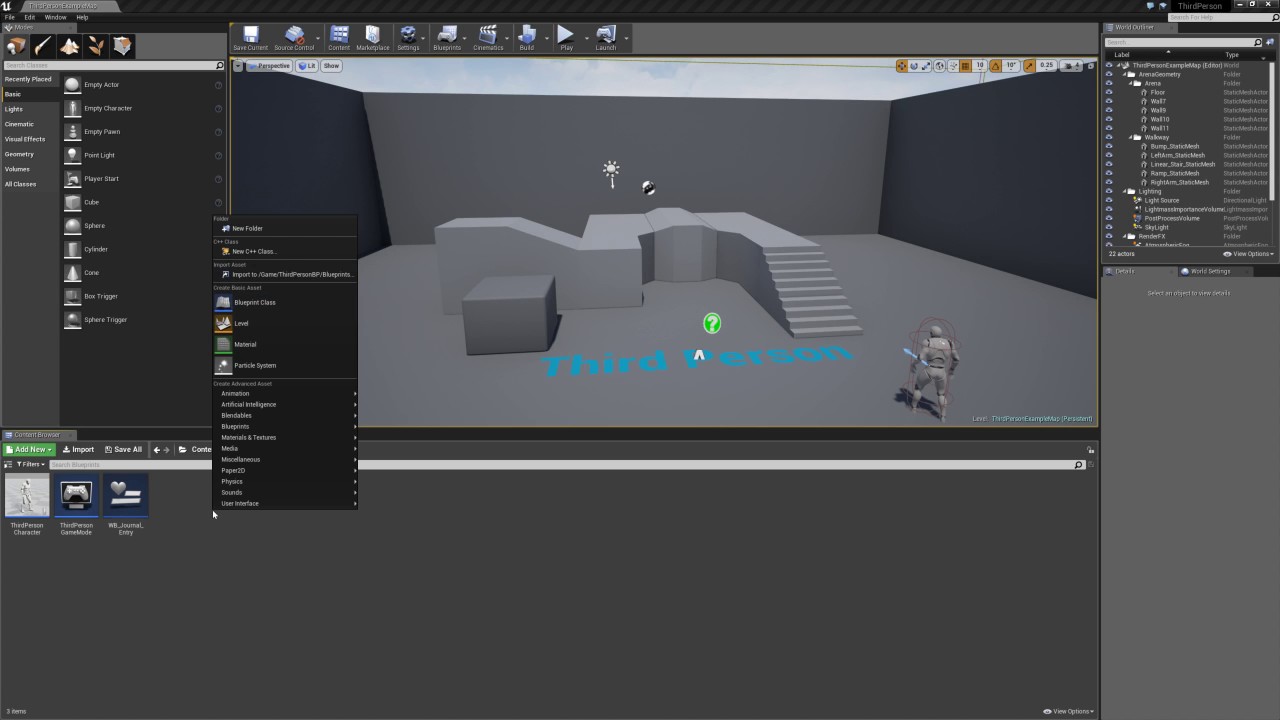
In this video we will learn how to create a UMG widget that functions like a Journal/Log/History when objects have been "picked up" in the map. After an Acto...
 strong python
Sorry if this is the wrong place, but I'm experiencing some... very unusual shadows when I load up VR preview, and it persists with the viewport until I've restarted UE4. Never happened before. https://i.imgur.com/F1WQZU9.png
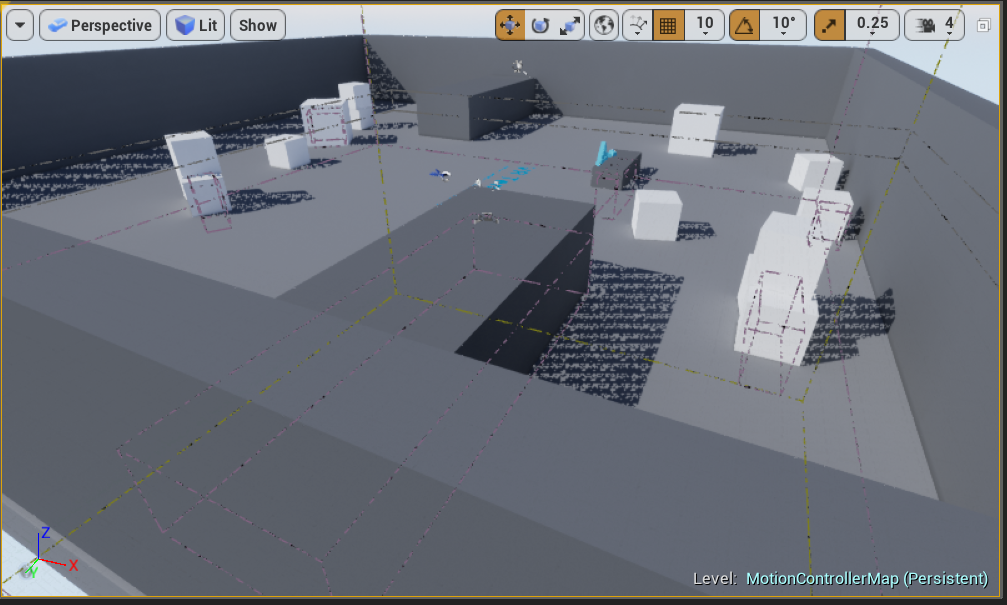 next badger
@strong python try to disable instancing rendering
strong python
How do I do that @next badger? Fairly new here, wanted to take a look at how the VR template worked though.
instanced stereo rendering?
strong python
lol
next badger
that's a vr optimization feature but may produce a lot of glitches, i haven't seen the one you experiencing however, you may also ask on #virtual-reality
strong python
Nope, same issue
next badger
@strong python you restarted the engine?
next badger
@strong python what are the scalability settings?
strong python
Cinematic. Still happens on epic
hmm
it seems that at high, its fixed, but epic-cinematic causes these issues
Specifically, if I go to 95% res, its fine. If its 100% res, it dies.
next badger
@strong python what if you lower all the settings of scalability but leave the resolution to 100?
 dim arch
is there any way to get a reference of where this event is being called from?
or do I need to make the object constructor into a widget constructor and bind a custom event
 zenith flower
Not sure where to ask this
I have a really weird bug
After trying everything I could think of, I just deleted LeftLeg bp
AND IT STILL hangs on this
whats worse, is the function that is hanging, has absolutely NO REASON to be even coming close to referencing this
I even tried calling the event will blank variables
This used to work
Here you can see that, there is no trace of Leftleg bp
I'm not sure what is referencing this imaginary bp
livid haven
Restart your session.
Also, have you been using hot reload (clicking compile in UE4 or recompiling from VS while UE4 is running)?
zenith flower
No, I only opened VS to debug.
editor and game just hangs forever, no crash or assert
This only happens if I use the "use dedicated server" option
some google search says that REINST is a dependency loop issue. But I totally removed anything that even is called leftleg without issue, and the game STILL referencing it
ProcessRemoteFunctionForChannel is the function that is looping forever
here you can see why its looping:
The next value is always itself (leftleg)
I'm confused by the .Tags part.
I just tried deleting my intermediate/binary/vs files, recompiled
same issue
 lavish sun
Hey, would anyone be willing to help my friend and I with his project in a call or DMs? We can't get attack collisions working properly with his blueprints and unfortunately we need to have this problem fixed by tonight
lavish sun
Ah okay, thanks!
zenith flower
@livid haven I dont understand why, but all I did was manually recreate the event itself, and it no longer references the ghost blueprint.....
livid haven
🤷 REINST isn't a bug. It's just not something you should be exposed to in the editor. It is something you may see while debugging.
Has to do with blueprint compilation.
 torpid compass
could one of you help me?
torpid compass
tessellation isn't working on my texture, im on mac and i dont know how to get it to work
torpid compass
ok thanks!
zenith flower
Maybe #visual-fx
zenith flower
About my bug?
I have bothered you enough
And I wasn't even sure what the issue was
And the answer was even weirder
worn granite
Yeah that's something else.
Anyway now you know deleting BP nodes is a possible solution to bugs =D
zenith flower
dude, i lost 2 days of time because of this
Like, if I could figure out who is responsible, i'd pay them a home visit 😉
zenith flower
Seriously though, how the hell would anyone have figured it out based on where the loop was stuck
The only reason I even re-created the event, was because I was going to add the variables back in one by one, until it got stuck again
and to my surprise it just worked
"It just works" (tm)
worn granite
Could be anything in that entire exec chain
dim arch
anyone have any idea regarding my question?
worn granite
It may have just been that you made a significant control flow change.
worn granite
No I mean after it cropped up, to fix it.
worn granite
Yeah.
And by doing that.
You made a huge change to the control flow.
Its an entirely different entry point.
worn granite
@dim arch I see you're trying to do procedurally populated control UI
Wrap all the basic UWidgets you want (eg, Checkbox, Button) in a custom user widget.
That's the best way to do this
Internally your WBP_Checkbox binds CheckStateChanged and it calls its own OnCustomCheckStateChanged which also passes a pointer.
So OnCustomCheckStateChanged(Self, IsChecked)
Bonus points: you can now easily change the style of ALL your checkboxes.
@zenith flower OutParm?
zenith flower
?
worn granite
responding to your question
zenith flower
I dont understand it
it was part of the stuck loop
but the function was from the inetdriver
some sort of replication thing
I don't know if it was the sending or receiving part that was getting stuck
here is the SS for the whole thing
 worn granite
Well.
I'm not super familiar with that part of replication.
But I'm pretty familiar with how OutParm stuff works
zenith flower
The NextOutParam would always be LeftLeg bp, hence the loop
worn granite
Right.
zenith flower
but I deleted leftleg bp
worn granite
Doesn't matter.
zenith flower
I deleted the intermediate and binaries
restarted ect
HOW did it have a reference to leftleg bp?
(I had no issues deleting the bp in editor)
(no references)
worn granite
Its part of a function's output somewhere.
Its package would have been deleted though so its kinda interesting how it didn't break
zenith flower
but the only part of the event that used it, was a dynamic array
worn granite
Anyway, if you get a tight loop like that then something went wrong trying to link the OutParms
So its not too surprising that having a change to the graph (read the event exec wire) fixed it.
zenith flower
Maybe, it was using an old generated link, and somehow was not re-creating the link?
worn granite
I'd have to re-reference the compiler but that's possible.
zenith flower
On a side note, how comes using the color wheel inside of a material generates hundreds to thousands of shaders to compile?
worn granite
Complicated mat?
worn granite
Pre-computed permutations
worn granite
(discarded on dirty)
zenith flower
I tried to find the perfect shade of purple, and ended up with 3000 shaders to compile
worn granite
I think there'd be a setting to disable that
Anyway, solution to that: Make a mat inst
zenith flower
sure, just bitching about workflow
I should be able to fine tune a color without compiling thousands of shaders for it
3000 shaders takes me 10 minutes
I have to write down the color values, restart the editor
type in the values, and it will only compile 10 or so
anyways, im getting off my soap box
enough crying
Time to get back to work tomorrow, now that work has actual meaning again xD
 earnest cape

reddit
1 vote and 0 comments so far on Reddit
 hoary egret
Hey
guys
how do I
do the looking-for-talent thing
I'm tryna hire
nvm I know now
plush yew
hey is anyone up for voice chat i have questions
hoary egret
Also, for my talent post thing, contact me through dm's
 cloud cobalt
@plush yew You're more likely to get answers through text here - ask your questions with details about your problem, and people might help 😃
plush yew
Hi everyone
Someone here use World Creator 2 with Unreal Engine 4 ? I need help for something
If someone see my message...
abstract relic
No answer can be given to an unasked question
abstract relic
You’d be surprised how many think we can read minds 😜
plush yew
I use World Creator 2 to generate terrains, I want to export my terrains in UE4 for add details ( grass, rocks, trees... ) I know how to export the terrain in the UE4 with the heightmaps but I have problem with the texture exportation, I don't know how to do that correctly and I can't the videos tutorials, is too " indirect " for me ( and I'm french so is more complicated lol ) so if someone here know how to do that... 😄
So my question is : How to do that ? 😄
I can't use*
 regal mulch

Trying to clean up a redirector of a renamed widget
Not quite sure why this would happen. Didn't do anything special with the widget.
It still opens properly etc.
The checkf is hit for the break
Which would mean it tries to unlink while the object needs loading.
Thought it would load the packages when trying to fix up redirectors anyway?
Ah well, lemme see if opening the widgets that use this one would solve this...
WELL, it's the other widget that causes it. Nvm I guess.
So, no idea why but some child-widgets just broke. Weren't using them anymore so I removed them via explorer.
Couldn't open or delete them anymore. No idea if the renaming caused it (never had that before) or if they were broken to begin with
plush yew
Hi Guys ,
Looking For reference material to setting a in Game Currency system
if any one can help would be awesome i was told this is the place for awesome information
violet goblet
Maya -> Unreal:
"Export a scene to Unreal Engine" via "Send To Unreal"
When choosing the unreal project, do i have to choose the main folder where the unreal project is, or do i have to select the "Mesh" folder?
torpid compass
do any of you know how to give a animated ocean collision? so you can bob up and daown with the waves?
 tawdry basalt
does unreal have a native way to connect to sessions using ip/ports, rather than using steam
plush yew
Nobody can help me ?
I use World Creator 2 to generate terrains, I want to export my terrains in UE4 for add details ( grass, rocks, trees... ) I know how to export the terrain in the UE4 with the heightmaps but I have problem with the texture exportation, I don't know how to do that correctly and I can't use the videos tutorials, is too " indirect " for me ( and I'm french so is more complicated lol ) so if someone here know how to do that... 😄
wary wave
@torpid compass - maths. Lots of maths.
you probably don't want to "give it collision"
 split wedge
for some reason when i move my game mode blueprint to a different folder and then fix up the redirctors it wont run the game mode properly
 pallid compass


 copper fable
hey guys, My game keeps crashing. The end of the log file looks like this
[2019.01.16-20.14.07:934][486]LogOutputDevice: Warning:
Script Stack (1 frames):
BP_MonsterBase_C.ReceiveTick
[2019.01.16-20.14.07:934][486]LogWindows: Windows GetLastError: The operation completed successfully. (0)
 whole quarry
the logs should tell more errors
wary wave
Looks like missing information - please post the whole last few bits of the log
(Pastebin.com is usually a good place to do so)
copper fable
@wary wave
wary wave
ta, will look in a minute