#ue4-general
1 messages · Page 352 of 1
 gleaming creek
I still don't see how that would help with the subtitles
You can set subtitles on the sound asset, which also has options of multiple subtitles per sound clip at different times
 livid haven
Just a sec.
You've went through all of this, yeah? https://docs.unrealengine.com/en-us/Engine/Audio/Dialogue
gleaming creek
I have, but it's been a while, let me refresh my memory
livid haven
Each context for a wave gets it own localization.
Each context does not get a source text because it should be the same line of dialogue, contextualized based on the speakers.
gleaming creek
That doesn't make sense
livid haven
Even if the lines are different in English based on context, that means you needs to localize your English entries. Yes, that's a thing you can do.
gleaming creek
In their example they mention a character talking to either Adam or Zoe
And that they should be more friendly to Zoe
But you can't actually change the dialogue between the two characters
just maybe the tone
because there's only one subtitle for both interactions
So you'll have to make a different dialogue wave if you want the two interactions to have different words spoken, rather than just a different tone?
livid haven
You localize the English entries per context.
The spoken text field is not the subtitle.
It is the source string that localizers need to localize, taking the dialogue context into account.
In the absence of localization, you end up with the unlocalized spoken text.
gleaming creek
So in order to use the system properly, you need to already have a localisation set up?
livid haven
No.
In order to change the subtitles based on the context, you need to fill in the localized entries for those contexts.
 clear ice
Is there a good channel to ask for recommendations on a complex project?
livid haven
"Complexity" isn't really a subject matter.
Best to ask a specific, answerable question.
And for a general catch all, there's this channel.
clear ice
Alright, I'll put it here, for the time being.
I have a project. A fairly big one, and I need some pointers on where to start.
I'm looking to make a tool to aid in my work as a VJ. (VJs are the people who run the live visuals at concerts).
I treat it as a spontaneous and highly creative artform, and my needs in software reflect that.
I want to build an application that allows me to create real-time, shaded, 3D objects that have certain mesh effects and (potentially varied) materials applied to them. My intent is to prebake tillable textures that can work for any mesh, and throw them onto objects that I can add to the scene.
Live, I want to be able to animate a camera, usually following a path or object, and create repeating arrays of meshes to generate a looping effect. Those meshes should be variable, probably dupli-parented.
I realize that this probably a huge endeavor, but I'm up for it.
There are other things, but those are the basics.
Where should I start? Are there any utilities that exist that might aid in my project?
livid haven
Doubt you'll find much in the way of pre-existing tech within UE4 for that.
But otherwise, it seems like you're just creating a bunch of pre-existing assets in terms of textures and materials, applying them to meshes, and making a simple UI for yourself to control them.
clear ice
Yeah
I basically want to create a miniature, striped down UE4 in UE4.
With custom scripts.
livid haven
Probably all doable entirely through blueprints, for what it's worth.
clear ice
Ok.
livid haven
But really, you're just going to be making a bunch of simple UI (well, as simple as you want it) that runs some blueprint logic to spawn meshes, then apply materials and textures to them.
Maybe use sequencer to animate them in some fashion and have UI to initiate those sequences.
Or even procedurally animate them, in the sense of just translating/rotating/scaling them over time.
gleaming creek
I must be blind because I can't find anywhere to enter localised entries for contexts in a dialogue wave, it just has a localisation key
livid haven
https://docs.unrealengine.com/en-us/Gameplay/Localization Localizing Audio
ExportDialogueScript
clear ice
Yeah, at it's core.
Thanks for the tips! I'll come back if and when I have a more specific question.
livid haven
NP
It'll be a bit of UI work but you'll most likely need the most hands on help with materials and sequencer, I'd imagine.
gleaming creek
So, that's exported a csv file with everything in it
Not exactly a user-friendly way to set up dialogue lines, having to run an export script and then edit a .csv file
 delicate lintel
evening
so i'm working on using the mouse cursor to drive some UI button movement , but the variable reads zero every other frame. it's zero, the value, zero, the value etc.
its the same for cursor delta, cursor position, and also for mouse delta when in-game
this is how it looks: https://gyazo.com/ec3cb755a0bb668cbc7f49c8b9a41356

this is the whole code: https://gyazo.com/a8b0699fd644c7f6f518e88e0c568d5d

 grim ore
So what is get turn?
delicate lintel
it's native i think
grim ore
Why would it give you back the mouse x?
delicate lintel
it says that " it returns the current value of input axis turn. "
grim ore
Ah that's not mouse x tho. That's an input value from the input settings.
delicate lintel
yea, i used it because it's similar to cursor delta, it acts like it
grim ore
So what are you trying to get and is it in UI only space or viewport space?
delicate lintel
but yea, it does the same with the cursor delta, i used this: https://gyazo.com/09edf1f87b701cbd6a3a658c568d7d02

https://gyazo.com/6a33fca2cc771e21d0e442c362d89557 and printed this the same way

and it also becomes zero every other frame
btw your tutorial helped, about having a whole screen invisible canvas 😃
delicate lintel
so, no one knows what may cause this?
grim ore
I can say that on mine and duplicating your event tick, get turn, print code in my player I get expected results. 0.0 when not moving the mouse and a number when moving it. With that said my values are way smaller than yours as well. With that said as well perhaps you have this same code in more than one place?
ignoring all that what is the goal of what you are trying to do and is this in viewport space or ui space?
delicate lintel
oh nice
it's in UI space, im trying to drive the animation speed of a sprite by the cursor delta X when you click on it ( a button activates it )
so the faster you drag it, the faster it rotates
i've looked at your video as well, that's actually the tutorial i used for this, and see that every frame you have some value in the cursor x and y ( as long as you move the cursor )
it doesnt become zero every second frame, so it's weird
but then again, the same thing happens with that turn value, which isn't in UI space
i guess a good idea is to try it in a fresh project
grim ore
well you will notice that I did handle the 0 delta by ignoring it
so it's just printing out when I move and it's a valid value
delicate lintel
hmmm
and what happens if you directly print this https://gyazo.com/de30a788613a5eaca80ea015fb6322b1
 grim ore
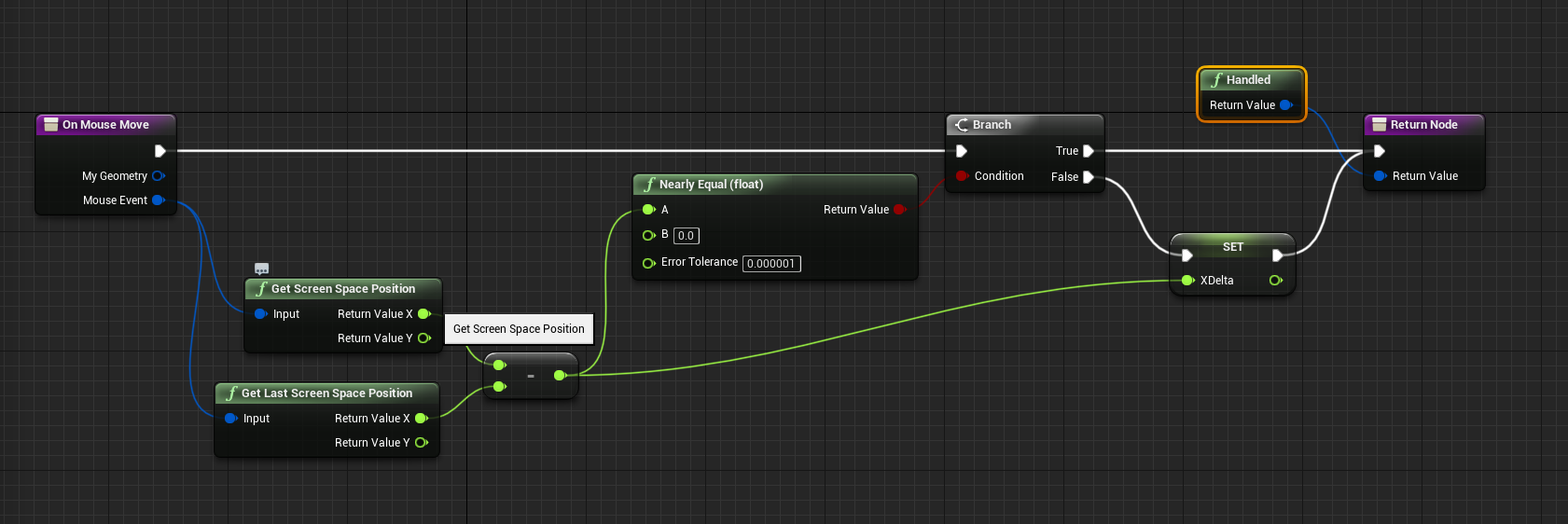
well there was no reason to not do it all in the mouse move node but printing the screen space position from the mouse event gives me the valid value every frame
delicate lintel
yes so this is a thing that happens in this project
thanks for the feedback , this is valuable
i should try it in a fresh project then
grim ore
if you slow down your fps to like 5 you will find it doesn't always return 0 every other. I think your fps is just up so high and your mouse sensitivity is just causing that to happen
and if you only care about the actual factual deltas then throwing away invalid data like nearly equal to 0 should be done anyways
delicate lintel
i have just tried that , and the resulting variable reads well, but when i hook it into the parameter it still behaves the same weirdly O_O
grim ore
well I got that basic idea working just by taking the cursor delta and adding that to the render angle on a umg element. no idea if that is what you were looking for but I don't think the 0's are going to be an issue as that would just not add anything. Alternately I guess you could get the position from the 2 frame and do it that way
delicate lintel
hmmm
so this is what i tried: https://gyazo.com/8113c35e503dbee0bc70e6ec497296e2

that time variable when you change it , it makes the sprite move faster or slower
when its 0 it's stopped
so i used this material and created a dinamic material instance for it and brought that var in UMG
but it twitches and keeps reseting when i hook the cursor x into it
how it looks like seems consistent with the delta x reseting to zero every second frame though
grim ore
which makes sense since wont it be changing it to 0 yeah, it sounds like you want it to only set it when it's a valid value that's not 0 otherwise keep it as is
Its not for flipbooks but https://i.imgur.com/LkkgoHU.png gets the delta if it's more than nothing and sets it for future use
https://i.imgur.com/kKZa8hv.png and this on tick takes that delta and adds it to the current rotation
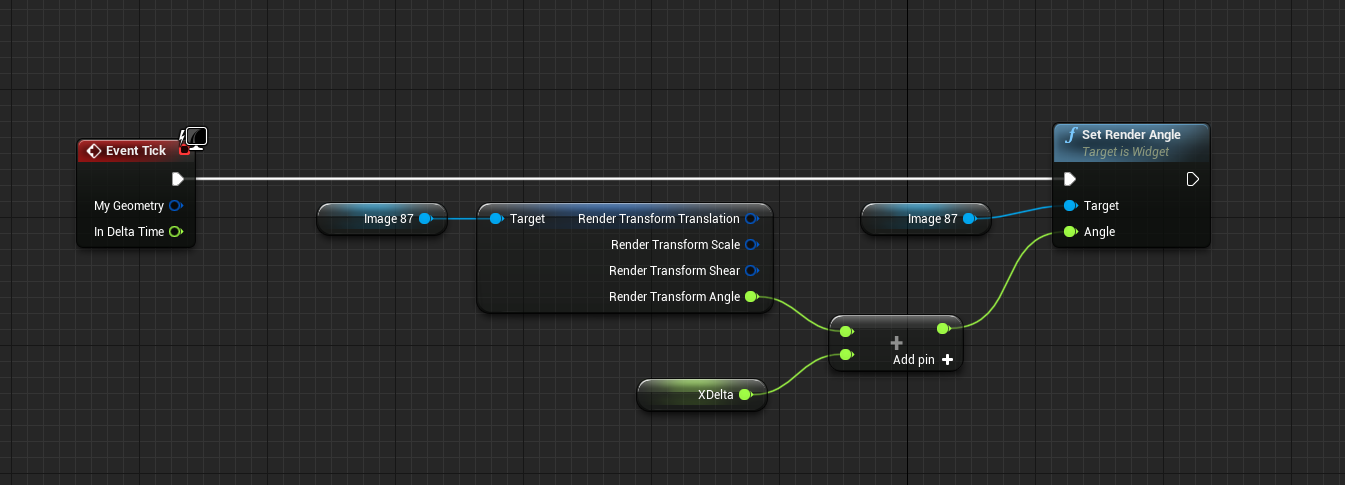
so the faster you move the mouse in a direction the more it adds to the delta which means more rotation per tick
probably not the best way but it's kinda cool lol
since it never stops rotating but a steady decrement of the delta on tick might solve that, to the blueprints!
stupid math... how do you drag a number towards another number in the right direction regardless of it being negative or positive lol
delicate lintel
im almost finished testing the cursor delta in another project
im gonna try what you posted
grim ore
it's a weird post just hoping it might show something that helps
I can guarantee this is stupid as well but it's fun lol. Added this on the delta part so it slowly brings it back down to 0 so it doesnt spin forever. https://i.imgur.com/ohga63S.png
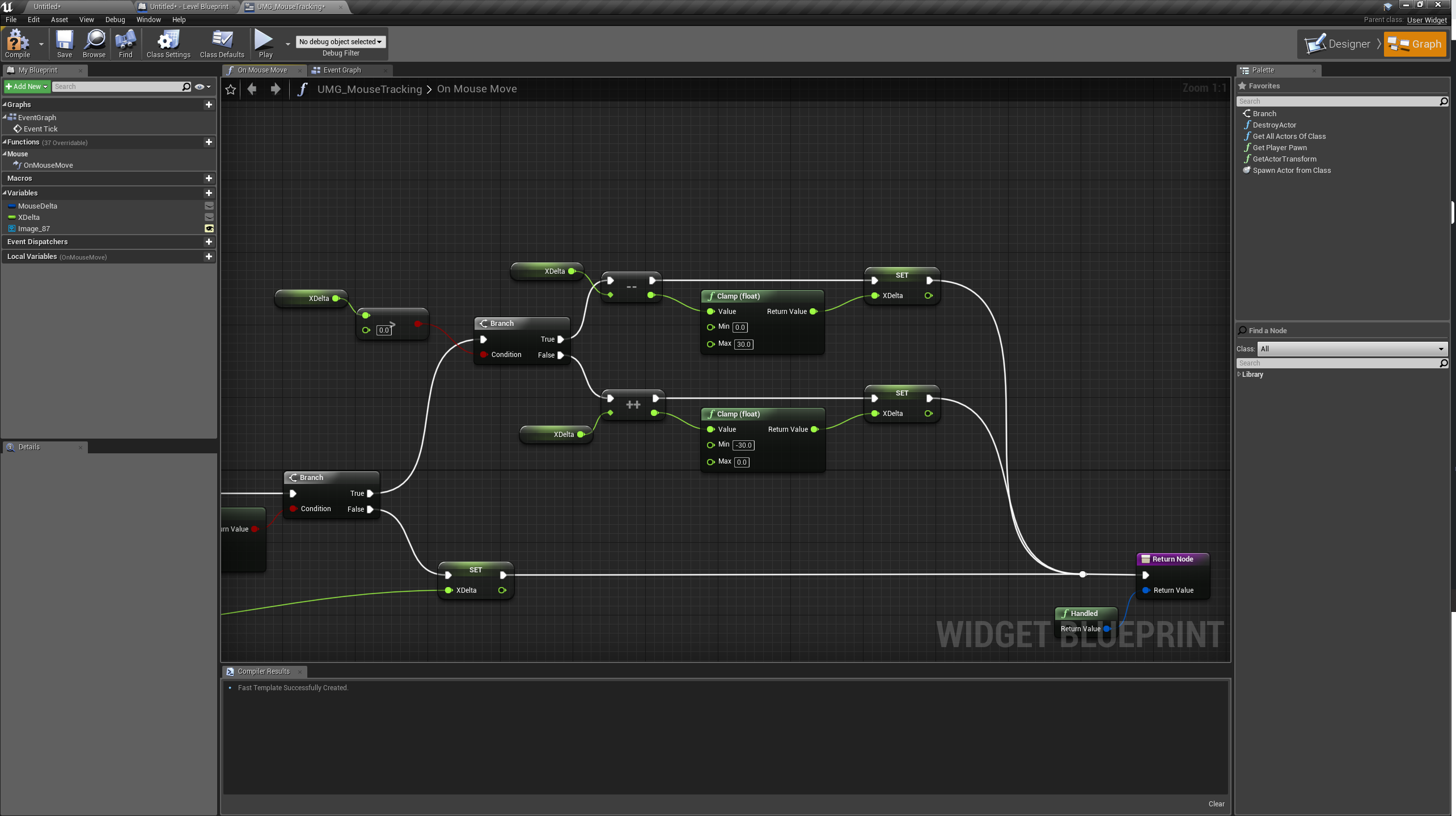
 grim ore
uh yeah setting the render angle on an image
but the concept is solid(ish). you get a positive or negative number and can apply that to adjust a value in a direction
 plush yew
@delicate lintel Gotta watch out with multiplying time by changing variable. It doesn't work as you might expect because it scales down time and results in your animation reversing
plush yew
Accumulating your delta in BP to a variable and then send that over to material. Use that to add to time instead of multiplying
delicate lintel
yea, it directly sets it
delicate lintel
ill continue tomorrow and post updates, thanks a lot!
 steel shuttle
omg i'm getting headache. how can dedicated server execute blueprint before the server shut down?
event end play and shut down did not work
plush yew
@small summit
"Hi, everyone. I'm completely new to Unreal Engine and have a keen interest in becoming a level editor. A friend told me about this channel. Looking forward to learn and help as much as I can. 🙂"
I think that what you meant was ''Level Designer''.
 dawn vessel
The Epic Games Launcher is so slow and annoying. Takes me so long to go through the Marketplace Page and look at stuff due to it's forever loading. Anyone else get this issue as well?
 grim juniper
The marketplace is slow for me, but that's most likely because I have slow-speed internet 
 fathom gust
Hey, I got a windmill fan with its pivot in the centre, I want to rotate it using a timeline but when I play the simulation its considering the centre somewhere else.
 static viper
are you sure the pivot is in the center?
 earnest cape
So I'm still trying to figure out how to use umg navigation to wrap around
I don't know why this doesn't work
earnest cape
I posted in umg last night and never got a response lol
I'll post this in there now though
static viper
N show code
fathom gust
@static viper you mean when I import it from my modelling software ? whenever I import from maya the pivot is always somewhere else so I manually set the pivot to wherever I want, in this case the centre
That is the mesh
static viper
Maya always sets the pivot in the same spot
0 0 0
You need to learn how maya works
earnest cape
I figured it out. you have to set the panel the widget objects are in to wrap
fathom gust
but other assets that I am animating using timeline are working perfectly with the offset I had set in unreal.
fathom gust
I managed to rotate it from the correct pivot, but now I have this new issue when I turn it in the world the animation is still played in previous axis.
sorry for the audio.
 spare sun
windmill rapping
 stark tulip
If you can link the fbx, I will change the pivot point to the correct place for you
fathom gust
@stark tulip Thanks but I managed to do that. The issue right now is rotation. I am rotating 360 in x-axis but then I want to rotate the windmill a bit.
Node setup
FIXED
stark tulip
@fathom gust well done
 cursive dirge
@fathom gust you don't need the position for that tho
just pick the node you used originally on the right for it
also your logic makes no sense
why would put put world location to relational location
fathom gust
I am weak at blueprints and terminology so I don't know how to do stuff but I just try different nodes and try to make it work.
 kind bolt
Hi i'm trying to make a main menu with an animated back ground. So far i have the background working with an intro at the start. Currently I'm trying to add a mouse cursor but i have no clue since im only a beginner
fathom gust
Plus I have a new issue guys, lol. I have to niagara particle systems in my scene which doesn't have a blueprint or anything else controlling them. I just drag and dropped them. When I package my scene the red one plays fine but the yellow one doesnt play, only in packaged file, it works fine in ue4.
fathom gust
oh shit, got it.
kind bolt
Hi i'm trying to make a main menu with an animated back ground. So far i have the background working with an intro at the start. Currently I'm trying to add a mouse cursor but i have no clue since im only a beginner
open level blue print so far
 severe glen
 silk torrent
Is there a way I can specify Unreal to log in some random directory on my computer?
-log LOG="test.txt" only changes the name of the file, but I want to change the entire directory
 glacial pecan
@cursive dirge could you explain a bit more what @fathom gust did wrong? I bet I'm going to run into that soon, and I'm a beginner too. My pivot point will most likely be in a separate object though, because it's setup with helpers in Max.
Or rather, no, then you'd just put the blueprint on the pivot object and not the mesh object that's supposed to rotate...
 heavy ether
if anyone cares, i managed to get publishing for vs code extensions up, so i've put my old-school UnrealScript language support for VS Code out on the VS Code market.. https://marketplace.visualstudio.com/items?itemName=EricBlade.vscode-unrealscript
Extension for Visual Studio Code - UnrealScript language for VSCode
since i want to do a tiny bit of changing to an old ass mod for a game, there's some possibility that i might even produce an extension that adds support for building old UC code
 upper heart
@frosty torrent Did you every upgrade from your i7 2600? I'm on the same and curious as to how it went for you
earnest cape
Are there any reliable upload sites I can use to post an example project?
cursive dirge
@glacial pecan he set the relative position again on each rotation, but you shouldn't need any of that, just set the mesh so that your submesh in right angle and just add relative rotation to it each tick
earnest cape
I guess I'll just use google drive
 fierce tulip
@earnest cape try dundoc
grim ore
@glacial pecan if you mean the pivot issue, the problem is even if you set one in your DCC program when you export it out to UE4 UE4 will import the pivot at the 0,0,0 (origin) point of the mesh. You can change it tho at import time/edit time if you have the original mesh if needed and don't want to fix it back in your DCC program.
plush yew
@earnest cape just make a script file
and use pastebin

@earnest cape if you're a student with a .edu address, use the github student pack. It gives you a free 50$ in digitalocean serverh osting
which equates to ~1gb of quality
earnest cape
I just used google docs. I have another email for stuff like this lol
I will look into dundoc though
Trying not to over explain things in a tutorial is not easy
Maybe I should just be like, hey here's a bunch of pictures, good luck
clear ice
Does anyone know how to prevent shadow pop-in? I’m having a lot of trouble stopping it from happening. (I’m using movable lights and objects)
I’ve messed with LOD a bunch, but it doesn’t seem to effect shadows.
earnest cape
for the directional light?
Check your shadow quality settings too
Cascaded shadow maps in the directional light might be what you're looking for
Every light also has draw distances
earnest cape
Is this set in your lights?
clear ice
No. I’ll try that
grim ore
if it's a new actor that is the default root. Replace it with a scene component and it will be blank
so basically replace the default scene root with a new one and it will go away.
you can also use a billboard component to put a sprite in to use as a replacement in the scene if you are trying to do that as well
 stray smelt
Thanks
 pseudo parrot
is UDN down right now? I get "There was an error contacting the remote service"
just wondering if anyone can cofirm its down
 chilly sun
heyos, generally hearin that sifting through the source etc is a great way of getting "friendly" (acquainted+) with it all. Wondering, is there any "recommended reading" among the source code ?
found playercontroller which gives some good insight fx
earnest cape
Good news everyone! I posted a tutorial https://forums.unrealengine.com/community/community-content-tools-and-tutorials/1559743-menu-navigation-using-gamepad-or-mouse-and-keyboard
Unreal Engine Forums
Introduction
I've seen many different methods to accomplish menu navigation and I've probably tried all of them. They're good in some ways and broken in other
chilly sun
death - (ppl can probs figure it out but) how would you "flip page" on the menu? v nice and thx ;b
 icy bone
hi anyone here know a way to use geometry shader in ue4
chilly sun
- I may not have read it closely enough
chilly sun
if it's a sound menu and u wanna goto music detail, sfx detail.. or .. main into sound or visual
yea that 😃 just saying this due to thinking all nabs like me will be asking 😃
earnest cape
The tutorial is only explaining menu navigation
chilly sun
aye fair
earnest cape
Check out this system https://github.com/RohitKotiveetil/UnrealEngine--PrototypeMenuSystem

GitHub
Main Menu System created using blueprints in Unreal Engine (v4.20). Status: Work-in-progress. - RohitKotiveetil/UnrealEngine--PrototypeMenuSystem
It will explain how to swap out widgets
Also I provided a download link to the project
chilly sun
yea I was just thinking a next step typical thing 😃
not saying change x do y correct z etc :p just quick thought feedback
earnest cape
I've been working on an even bigger tutorial that will cover just about everything to get a simple game up and running. I'll post it on the forum when it's ready
chilly sun
😮 ooooooh fancy 😃
 sudden agate
some people on 4.21 here?
If I enable the Blueprint Material / Drawing Plugin, There are no nodes in my blueprints to draw to a canvas RT
nvm. you cannot call them in a function
 lime cobalt
if I click on any blueprint node, it's going to open visual studio and visual assist X instantly
i don't see any way to disable this
 wary wave
"you cannot call them in a function" 0_o
 grave spruce
Arkane Studio's change engine form Cryengine to Unreal Engine 
 tall pendant
DH1 ran on unreal tech tho
static viper
there are weird twists here...
XD
you cannot make a fallout or elder scrolls game with ue4
but surely dishonored 3
 dark depot
well its not a fallout game without the bugs
wary wave
and it'd certainly be easier than using whatever garbage tools Bethesda use xD
static viper
it would need high engine reworks XD
from ground up
bethesda only developed garbage tools XD
wary wave
eh, I don't think it would need that much reworking at all
you'd need to implement a half decent quest management system, but the rest is more or less purely gameplay shit
dark depot
yeah its possible they just have too much dev time into their own engine
wary wave
UE4 would do a Fallout style game pretty well
grave spruce
gamebryo is old
tall pendant
did beth actually develop tools tho? afaik it's still very much gamebryo under the hood
static viper
how old do you hink gamebryo is?
tall pendant
ancient
dark depot
its the same age as unreal
static viper
the last update on it was 2010.
dark depot
no
static viper
and the gamebryo engine actually works very well
dark depot
they update it all the time just like ue4 just they have less people on it
static viper
bethesda just didnt use it properly
they slapped on alot of system
and 2010 they licensed alot of the gamebryo parts
grave spruce
the tools they made for gamebryo was for Morrowind only
static viper
parts that are still in proceed
wary wave
Gamebryo is pretty barebones
static viper
gamebryo is not at fault for any of this
wary wave
they don't provide an awful lot of tools and such -so most of what Bethesda uses will be studio-made
 dry moon
I hear great things about gamebryo
wary wave
the problem is they're operating on a sunk-cost fallacy and refuse to get rid of them
dark depot
V4 have you used the mod tools its the same engine
wary wave
I worked with Gamebryo a while back and hated it
static viper
gamebryo has alot of great games running on it
wary wave
but this was ~2006 or something
I don't think there are that many Gamebryo games out there tbh
grave spruce
yes but the modtool crash my computer
dry moon
Works for me :)
wary wave
40 is not a lot for an engine that's been around for over 20 years
tall pendant
yeah 40 titles is not much for an tech thats around ~20 years
static viper
and i never heard of it
 teal tulip
Dishonored 2 uses a custom engine
tall pendant
mind you it was NetImmerse before
static viper
they use the void engine
wary wave
I'm including NetImmerse, hehe
static viper
which seems to be a clone from cryengine
wary wave
and I'm not sure it's even as many as 40
Gamebryo (formerly NetImmerse until 2003) is a game engine. Gamebryo 3D and LightSpeed engines are owned by Gamebase Co., Ltd. and Gamebase USA and have been used by several video game developers including Atlus, Trion Worlds, 2K Games, Disney, Ubisoft, Bethesda Softworks, Fi...
teal tulip
If they choose UE4 over Cryengine, they are talking about Prey thats the only title that uses Cryengine
wary wave
wiki's list obviously isn't complete, but it is also quite short
heavy ether
boss: "hey, here's our new project (url)" ... me: clones URL ... also, me: you said this was Unreal, not Unity. boss: well, that's the project, is make it Unreal.
static viper
prey also uses void 😄
teal tulip
Prey uses Cryengine
static viper
but i assume from the engine insides that it was a cryengine clone once
tall pendant
Prey is runnin on CE yeah
static viper
it looks like cryengine tbh
tall pendant
it was developed by the US team
static viper
alot of the inner workings are just like cryengines
teal tulip
Prey uses Cryengine and 100% realtime light, don't think you can do that on UE4 right now, cause is near impossible the whole scenes change light on realtime every single time
tall pendant
games on Prey level could easily do it with UE4
static viper
you create a proper prey game
tall pendant
since Enlighten license is not an issue 😄
static viper
you wouldnt need a large amount of extra code for that
teal tulip
now the question is
wary wave
UE4's dynamic lighting isn't so bad when your scenes are built for it
a Prey style environment would probably be alright
teal tulip
how many more GB will need Prey if where made with enlighten and UE4
 silent lintel
guys, upgraded to new engine version from 4.20.x, now got this error when compiling:
Schweregrad Code Beschreibung Projekt Datei Zeile Unterdrückungszustand
Fehler MSB3073 Der Befehl ""F:\Unreal Engine\UE_4.21\Engine\Build\BatchFiles\Build.bat" StargazerEditor Win64 Development "F:\Projekte\Unreal\Stargazer\Stargazer.uproject" -WaitMutex -FromMsBuild" wurde mit dem Code -532462766 beendet. Stargazer C:\Program Files (x86)\Microsoft Visual Studio\2017\Enterprise\Common7\IDE\VC\VCTargets\Microsoft.MakeFile.Targets 44
Sorry its german, if needed i can translate it
static viper
the other questions is... do we even need proper light with gi reflections XD
i think we could do without
teal tulip
problem is that, there is not even light probes here
grave spruce
https://bethesda.net/en/article/3GOeNbl9yEuGgoKG82eSmQ/prey-mooncrash-typhon-hunter-coming-soon Prey VR is made in UE4

Bethesda.net
The free multiplayer Typhon Hunter update to Prey: Mooncrash is just around the corner. On December 11, you’ll be able to experience the game in a completely new way – with other people!
static viper
i thought mooncrash is a dlc XD
teal tulip
I mean you can add realtime lights on UE4 but there is no color difference
static viper
anyways
tall pendant
i mean we're talking about a Prey level production here
static viper
i am excited what arkane studios is doing with ue4
tall pendant
not the 1 or 2 man ue4 indie
tall pendant
AAA
tall pendant
you can't pull of an game like Prey as an 2 man studio tbfh
teal tulip
in other hand Dishonored 1 and 2 are 100% baked
static viper
hell systemshock is beeing developed by indies
how is doshonored 2 baked
the framerate is insanely low XD
that game spits of realtime light
teal tulip
idk is based on ID Tech 5 but no idea how work at all
probably isn't baked at all idk
I know some levels change but no dynamically
wary wave
Systemshock probably isn't being developed at all right now, because that was funded by Starbreeze, IIRC
static viper
they used light probes for sure
well till a point it was XD
and that team also created underworld
yee i know none of you know underworld...
how sad
 ancient ore
If I set an actor hidden in game using the function SetHiddenInGame(true); will my actor stop being rendered as a whole and will it feel like there is nothing in its place?
static viper
stop spamming your question
wary wave
it will stop being rendered
teal tulip
By the way, we are talking about this on the UE4 channel ?
static viper
no
gleaming creek
Underworld Ascendant was a disaster, now Starbreeze are going under, it doesn't look promising for SS3
And I'm not even sure if that's such a terrible thing
static viper
i havent seen a review yet sadly
noone seems to play it
or has interest
its extremly weird
gleaming creek
Of UA?
There are lots of reviews, about 65% of them negative
The actual reviews are generally negative
static viper
but on youtube?
videos that ohave over 10000 views
and not some small youtubers nobody wants
XD
gleaming creek
I don't know about video reviews
I meant written reviews
And Steam reviews
(Which are also written, but by random people rather than reviewers)
Even the Looking Glass fanbase aren't overly interested in it because it's such a disaster
I'll admit I haven't even bothered to pick up my key
static viper
i was not interested bc the gameplay looked extremly janky
and chaotic
but the artstyle was dope
not ultra tho
gleaming creek
Yeah, it was in all the betas
I hated the art style and the game felt like a clunky tech demo
improved slightly in the last beta but not by much
static viper
THEY SHOULDVE released a demo
 olive yew
Can somene help me to make artifical grass in UE4?
static viper
a demo of the game XD
gleaming creek
Because they gave beta access but didn't really listen to the feedback
gleaming creek
People were saying years ago that they needed to implement a proper save system
static viper
do they not have one?
gleaming creek
No
static viper
how does it work
gleaming creek
That's why a lot of the 65% negative reviews
Basically it resets the world
It doesn't save any world state at all
Think like GTA or something
gleaming creek
Yes, saves that
static viper
that is very sandboxy tho
but i agree
its bad
i would like to ask them about it
gleaming creek
They're working on it now
static viper
but people are to busy sucking fo76...
gleaming creek
but only after launching and getting that many reviews?
It was pretty obvious that you can't release a game without a working save system and expect people to be happy
static viper
yee
gleaming creek
There are a lot of other issues, but that's the biggest one
gleaming creek
Save system?
Someone released a free plugin on the Marketplace to handle saving, looked good but I didn't check it out yet
static viper
i am making that stuff myself :3
gleaming creek
I'll need to do that at some point, anyway, either make it myself or use the plugin
Probably something that should be done sooner rather than later
static viper
you should look at their save system yes
my save system is saving levels and stats
so you can trash one level and go into the next
quit the game
upload save somewhere else
and load save... and level is still trashed
its lovely
gleaming creek
A hub system so the levels are saved when you leave?
gleaming creek
I'm confused, isn't saving the state of a level what a save system does?
I don't get the part about uploading the save
static viper
that was just me saying that it is a real save 😄
my game is like oblivion
so you travel locations all day long
not like dishonored or thief where you are in one locations
and then go to the next
without going back
i can go back
gleaming creek
Ah, okay
I have no use for that for my current game
But a good save system should support it
Just updated my game to 4.21, don't see any obvious problems, weren't people saying 4.21 was really buggy?
static viper
i had massive issues
gleaming creek
It made me upgrade Visual Studio, that was about it
 vale silo
@gleaming creek to what version of Visual Studio ?
gleaming creek
No, I had VS2017
but an older version thereof
and it said there were known issues with it and I should upgrade
vale silo
I see
clear ice
Any suggestions on how to make a collimated light? Spot's emitter size doesn't do anything, and I want a tiny divergence on a thick light beam.
plush yew
Hello guys
i saw that Unreal engine runs SLI with forced AFR, im wondering, what is the key factory to make sure SLI is going to work on your game?
wary wave
Unreal engine runs SLI with forced AFR
...does it?
hmm, apparently so
looks like this is specifically an Nvidia thing though, I mean the docs specifically say "It is recommended to talk directly with NVIDIA to set up this functionality with their own driver."
plush yew
I see
Is just because we have those Nvidia inspector to change profiles
But if we have to contact then, that sux
teal tulip
@clear ice don't think you can do that here, probably using different spotlights with masks ?
no idea
clear ice
Ok, I'll give it a shot! Thanks
 dim scaffold
Anyone having issues with the launcher using 100% of your CPU?
clear ice
Could you get an emissive material to only emit with a Ray angle that’s 90 degrees to its normal?
 grim sinew
Emissive materials don’t emit light so technically they’re emitting 0 degrees.
The only time they do emit light is baked light when you turn on a certain checkbox nobody recommends because it has 1/10th the sample rate of normal lights so it looks horrid.
 elfin jacinth
Hey all! Join us tonight at 8:30 PM EST on our Twitch channel. We'll be hosting the Video Game Awards and chatting!
 weary basalt
Post the link in #share-your-stream as well that would be awesome!
elfin jacinth
_ nods sagely._
dark depot
^yeah ban him for posting here hehhehehehehehe
elfin jacinth
I didn't post a link. nerd 😛
dark depot
hahahaha
 rose bison
are you asking in blueprints? There really is no difference under the hood. Events are just something that start an execution path on your event graph
 abstract relic
As they said, no remarkable difference in bps. Functions are just convenient containers
 strong mesa
so it doesn't matter weather i use events or functions they are both the same thing , or do i use one in some situation and the other in some other situation
abstract relic
It’s more to prevent the bp from turning into a spider web mess
strong mesa
i can totally relate xD
 worn granite
you definitely don't want to just use one or the other
the primary difference is functions cannot do any async stuff (with a callback into them) and can have local variables, while events exist in the event graph and can do async but cannot have local variables.
strong mesa
but i noticed that the dev use them in the streams and in the tutorials a lot
both of them
worn granite
Yeah its not arbitrary
My rule of thumb is that if you don't need the event graph you should probably use a function
strong mesa
so only when i use local variables !?
strong mesa
so that is why variables are made over and over in different BP
worn granite
I'd only use events if you're going to do anything async
No, that's because you're misapplying OOP
strong mesa
what's an async xD
worn granite
tbf that's a bit harder to do in BP
strong mesa
and what is OOP
worn granite

Part of a larger series teaching programming. See http://codeschool.org/
worn granite
like if you're just copying over properties on every object you should use structs more
ofc then you'll want a function library to operate on structs of that type
strong mesa
iI'm still not that advanced
worn granite
well hey, you can still look into them.
its not an RPG
you can do things "underleveled"
you might find it easier
strong mesa
i just start coding what ever comes to mind and when i find an error i go search it and it turnes out i need to recreate my whole thing cuz i was doing it wrong (the messy way)
rose bison
well, that's the way to do it. Just keep doing that for 10 years and you'll be an expert!
 high stone
So many games have RPG mechanics these days.
strong mesa
xD i know man , that way i never forget what i learned
also it's hard learning in a different language from my first language , nut i'm trying to overcome that
icy bone
@strong mesa what was ur first language
strong mesa
... can i not say it !
strong mesa
ugh . no ...
 coarse wigeon

Hey devs! Join us this evening on the #UE4 Twitch channel https://t.co/BUHhZqYgyZ for the 2018 Video Game Awards! We'll be hanging out in chat, celebrating all of the awesome projects on display this evening. The show begins at 8:30 PM EST / 5:30 PM PST.

 Twitter
strong mesa
Twitter
strong mesa
like my actual real life language i talk
coarse wigeon
Watch party?
icy bone
@strong mesa oh ok nvm
worn granite
Sherrif that sounds a lot like how I program
strong mesa
i wish i knew coding , but that's even harder to learn in english
icy bone
a fun way to learn OOP is to program. OOP without using classes and objects, thats how i first learned the concept
strong mesa
like a coble of months now
worn granite
Okay, literally without classes its not OOP
icy bone
@worn granite yes it is still, but u gotta create the stuff urself, the mindset is really the same. Since machine code dont really know objects, OOP concepts are just syntactic sugar of arrays
u can do it using arrays, really fun
worn granite
no
strong mesa
a few years ago i was getting into it but i was really young and my English was so bad i didn't event know how to talk normal talk
worn granite
I doubt you're getting the orientation bit
like yeah, you can get object like behavior without classes or ever instantiating anything other than atomics
icy bone
@worn granite yes u do, its how objects are represented in memory anyway
u gotta write ur own allocator etc
worn granite
Yeah we're going to diagree on this cause we're arguing with different terms.
icy bone
alright
worn granite
Do you make heavy use of RAII ?
icy bone
@worn granite yes I do when i used to make my own Object initialization and destruction
but i did it only cus the language had no concept of objects
so i coded my own framework for that
elfin jacinth
@coarse wigeon Watch Party.
dry moon
Hopefully some ACTUAL gameplay for Death Stranding this time
because its been 2 years and I still don't know what the hell is going on besides walking around
coarse wigeon
IT is about being stranding in death
dry moon
I mean I get the story parts, but my focus is what the gameplay is
delicate lintel
hey dudes. im trying to have a line trace hit a character which has clothing items equipped, but i cant get the ray to hit just the clothes, it either hits the pawn collision capsule, or goes through everything . i also tried a custom collision channel, with no results
 flat stump
The Unreal website seems to switch to Japanese on me all the time
its kind of annoying
it even has en-us in the url but the main menu bar is still in japanese
icy bone
@delicate lintel did u try complex collision
dry moon
@flat stump just learn japanese
flat stump
LOL
delicate lintel
@icy bone its a skeletal mesh, i was just looking at enabling per poly collision
abstract relic
Look into it’s physic asset in that case
delicate lintel
not sure what i should do there tho
 novel mango
@flat stump do you perhaps have japanese installed as one of your languages in the OS or perhaps your browser lists it under navigator.languages?
I know that Windows Store likes giving you apps in languages based on your installed languages rather than language preference. And if it's lacking a translation in that specific language it'll jump to the next one.
Also I do remember that some sites would serve me Japanese pages when I had it installed in my OS.
flat stump
no actually I uninstalled all the non-english languages and only reinstall them if I am going to be needing to use them a lot in a short time because so many applications use ctrl shift z for undo and ctrl shift is switch language on windows and it is a major pain in the ass
novel mango
change it
well, disable it
that's what i did
you could still check your browser's navigator.languages though
 manic pawn
you can disable the silly change language shortcut somehow
I vaguely remember doing that after being very confused what kept changing the language for no reason
novel mango
yeah, you can definitely disable it
i need to have english as my top language so all the apps default to english
flat stump
oh man I have tried changing the language hotkeys but windows language support is in this weird state right now where there are "new windows 10 settings" and legacy windows settings and they are different and argh major time wasted just gave up
novel mango
instead of my native language
@flat stump i know, but at least for now, the "Additional date, time, & regional settings" button in the Region & Language menu opens up the old Clock, Language, and Region menu (because it's better!!!)
flat stump
because of this I always make both ctrl-shift-z and ctrl-y both do redo in the applications I write to save other people trouble
I used to use a Dvorak keyboard and it was like 2 years before I figured out how to get it to let me delete that layout
novel mango
https://i.imgur.com/elKzTiq.png <-- here's a picture of where you can change it
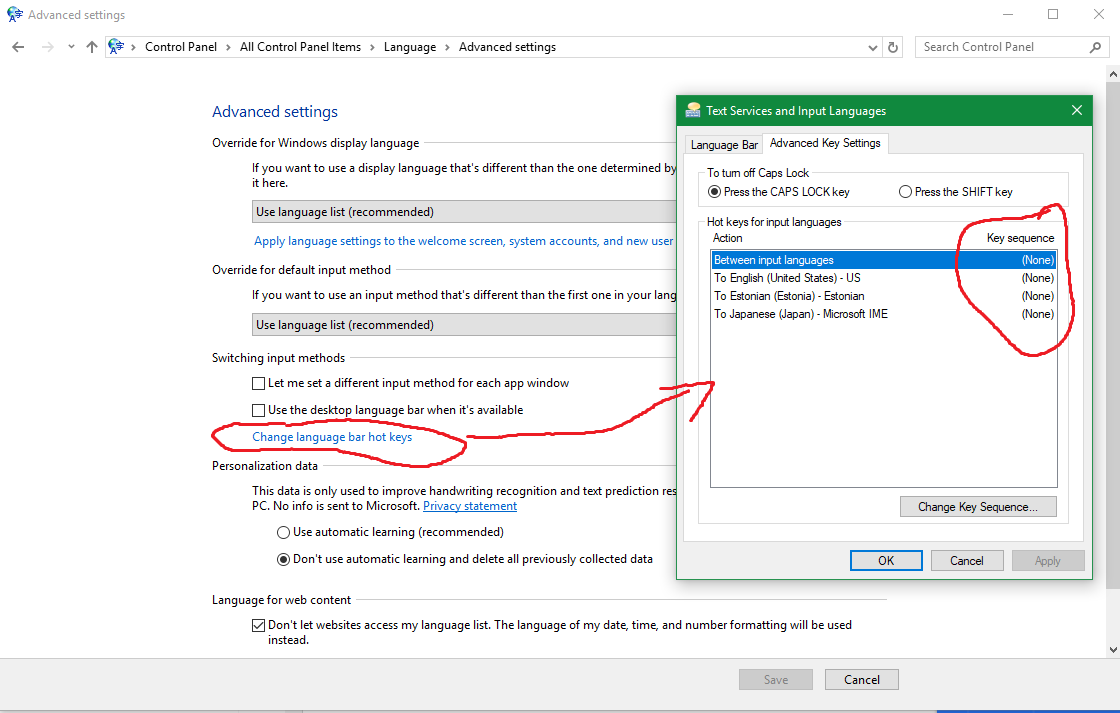
it's like 5 menus deep though
 olive edge
what would be the proper name for a line following an actor when a actor is in motion?
or proper pharasing
for example if i have a ball moving from 1 location to another how do i make a line follow the ball.
similar to tron legacy death beams behind all the vehicles
visually only
weary basalt
Ghosting?
olive edge
this affect^
the affect that follow the car
ahh found it
its called ghost trails
icy bone
@olive edge its called ribbon
@olive edge u can get this effect by using ribbon particles
olive edge
ah ok thx
dawn vessel
How do I get my Project to run at unlimited FPS by default.
grim sinew
Turn off framerate smoothing.
grim sinew
And it will stay that way.
 broken shadow
What would necessitate going higher than 120 FPS?
grim sinew
In case someone wants to do some serious gaming... in editor mode...
broken shadow
Ahhhh
I'll take that as sheer curiosity 😄
Also howdy from ARK Modding Biggums :P
dawn vessel
😛
wary wave
Unlocking the editor framerate wouldn't be representative of what the game.can do anyway
 south ridge
It would be representative of the Slate overhead in editor
😄
I dunno if it's just us or everyone, but I always see slate consuming a ton of CPU time
And I can reasonably see why
 errant chasm
where can I see linked images on the bug tracker? I had an issue with VR artifacts, and someone on the unreal subreddit linked me to a tracker page. I want to know if it's the same one I have and the description menitions screenshots but I can't see any
 manic delta
Dose anyone have Ultimate Touch Component to share?
 junior oxide
i think this is the right place to post this if not sorry
Right so im having an issue in 4.20 with reimporting, it was fine before but no clue what has happened, so when i click reimport, it says "Failed To Reimport", so i try again and it either says it again or instead it opens up the file explorer to select a file to import, this usually only happens when its source location no longer exists but in this case it still exists, so i click on the same asset that im trying to reimport in the file explorer and click open (to reimport this file) does nothing at all, doesnt update the file with new version and also get no messages or anything, basically nothing happens.
Also if i do a fresh import of the same file, it imports the updated version but if i try reimporting that file (bare in mind that when you import something it automatically stores the source location for reimporting) it does the exact same thing and breaks.
This only happens on this project, every other ue4 project is fine.
Also if i click "Open Source Location" and the source location is on the local server (Not my pc) it does nothing, but if the source location is on the local version (one on my pc which is a exact copy of the server version but the local one) it opens the source location (this is just another issue im concerned about, could be related not sure).
Also if anyone knows how to get more information onto why it failed to reimport, cause all i get is "Failed To Reimport" with no info on why it failed cause nothing goes into the output log or message log so if anyone knows how to get more info please let me know cause it might help tracking down the cause of this.
Also curious if any of you guys have ran into this issue before.
static viper
there is no place for blocktext wall XD
junior oxide
huh?
junior oxide
i know but was hoping itd make it easier to read
plus i cant add spaces otherwise ill have to do it in 2 posts
static viper
for the sake of visuals you can ofc add new lines
 languid shard
@junior oxide
Add
Spaces
With
Shift + Enter
 regal mulch
I wonder why epic made a function to break the HitResult
languid shard
why not ?
regal mulch
Cause you can't hide the unused members on it
languid shard
hmm
regal mulch
It's really annoying yeah
Wondering if you could make a custom one that has all parameters as advance listed
 junior oxide
@languid shard think that made it worse haha
languid shard
you broke your lines when it doesnt need it @junior oxide
you need to break them when you change subject or end a sentence
regal mulch


Created a Plugin, that helps bulk and auto assigning materials in @UnrealEngine. Could extend it with more useful functions in the future.
@KiaArmani @Luos_83 @UnrealAlexander
#UE4 #gamedev #indiedev #unrealdev https://t.co/WytCnDKZsv
Twitter
languid shard
huh thats cool
teal tulip
what happened with that ?
languid shard
wish we culd drag n drop a selection to the array and it filled it automagically with compatible asset types
 regal mulch
Alright, 390€ marketplace release inc
regal mulch
Just need Joe on my side to fight all the poor people, right? ...
Na jokes aside, the water plugin is nice and probably worth the price
junior oxide
done
regal mulch
I should really just redo this in C++
BREAK on functions is so annoying
Top right looks super chaotic cause you don't really want to copy paste the huge break hit result node
So all the wires come from one -.-
junior oxide
collapse the hit result node
regal mulch
To a collapsed graph?
 lucid jetty
I got a pure function that contains only the outputs i need from a break hit result so it looks way smaller 🤗
 spring sleet
hi, why Get All OverLapping actors doesn't work with instanced static meshes and always gives me none ?
grim juniper
I think if you use a break node you can actually choose which outputs are visible in the details panel with the break node selected
Works for all structs I believe
static viper
the hit result is special tho
you can split it like a normal struct
but its not an array or struct
its a list of outputs
grim juniper
Well, I know it works with structs, but it might also work with anything a break node is for. I'm just not sure
Also, I'm pretty sure hit results is a struct. The engine has a lot of premade structs for stuff. An example being splines. I've spent a lot of time messing around with splines, and I made some functions to easily copy and paste splines by saving their data to a struct which already exisits in the engine content
sudden agate
@regal mulch I didn't expect such horrible graphs from you tbh.
regal mulch
Didn't know you were in a position to expect something from me :D
grim juniper
I've wanted to share them with others on the forum and stuff, but I've just been lazy and haven't written a post for it yet. It's nice because you can just copy and paste the BP graph and you only need to manually setup the functions and create variables from a few variable nodes since the struct already exists in the engine you don't need to set one up
regal mulch
On the other hand, yes that graph isn't perfect, but I just spend an hour cleaning it up and there isn't much to change, despite adding unneccessary varaibles and sequences everywhere.
Will move the base class to c++ one day
sudden agate
I wish I had the patience for writing UE C++ :(
regal mulch
Thing is, a lot of stuff is nicer in C++ in terms of "clean graph/function"
Instead of breaking the HitResult
sudden agate
It is difficult to maintain a "readability" for blueprints
regal mulch
I can do "HitResult.Location"
teal tulip
yeah BP turn a nightmare even for just small functions to compare values all the time etc
plus the 0 control if you're out of the engine
regal mulch
We moved 90% of the GameMode and GameState stuff to C++ now
As well as the whole movement code
It just takes some time
Previously the resources weren't available to spend the extra time on it, so BPs had to be used.
- the specific graph actually came together rushed to fix a bug
regal mulch
Our GameMode alone has 1.6k lines in the cpp file
.>
Movement comp is at 2.9k without multiplayer implementation
xD also kinda horror, but better than BPs
teal tulip
well yeah that... ¯_(ツ)_/¯ xd
sudden agate
what does your gamemode contain?
@regal mulch
because I am thinking about writing GameMode and Movement in C++ aswell (CMC is too bloated for my cases).
 ruby folio
Can I be done modelling rocks now?
regal mulch
@sudden agate All settings for the GameMode. Additional MatchStates and handling those. Handling server only code, such as reacting to a kill of a pawn
plush yew
I need some serious help for a prototype. Please let me know if someone can work with blueprints and use existing Advance Vehicle Template. Thanks 👌
 bronze tree
hey
im having a problem
sphere is not plugging in that socket. it says static mesh component reference is not compaitable with instanced static mesh component
junior oxide
is that init event a custom made event or an actual node
@bronze tree
just asking cause first time seeing it haha
bronze tree
custom made?
languid shard
static mesh component =! instanced static mesh component
junior oxide
what exactly are you wanting to use the init event for whatever that is
like i would look myself but at moment im migrating a 50gb project
bronze tree
that init event, its for hovering my character
junior oxide
is it a custom event im guessing then
bronze tree
ya. I want to plug my character mesh in that mesh component socket so that it can make the character hover
bronze tree
ya
junior oxide
click on the custom event
then at the top right under output change the instanced static mesh component reference to a static mesh component reference
junior oxide
no worries
bronze tree
😀
 brave lark
is there a place I can discuss xbox and UE4 stuff? I don't see a listing for it or windows universal platform either
i'm having issues launching my packaged game on my xbox
languid shard
@brave lark consoles are under heavy NDA,
isnt there a private section of the UE4 forums for console dev ?
brave lark
no this is not the dev kit this is UWP
anyone can make and launch to an xbox one
this is a format that performs not as ideally as a dev kit build but anyone can do so and has access to it if they have an xbox
this same format can launch on your win 10 machine as well
essentially you are given a sandbox mode to test your package in and a bunch of tools to use including xbox live features
see question on UE4 forums here
the github to the custom engine version is here
unfortunately it's only 4.19, but once I can successfully launch my stuff I'll figure out how to update the engine to at least 4.20
@languid shard @junior oxide
@tough berry can you make a section for xbox/uwp under platforms?
i'm surprised more people don't know about this
languid shard
ya know kris is a forum mod
if you want to suggest new channels you have to ask in #server-feedback
brave lark
posted
 tough berry
What he said.
brave lark
^^^
well damn, does anyone know of someone here who would be knowledgeable on xbox/UWP development?
microsoft hasn't updated their github in two engine versions so I'm out of luck there
junior oxide
well i found the issue to my post so dw about it
grim ore
I know Houdini popped up a few times in regards to what we can use it for with UE4 and here is a good example of using the simulation systems to fracture a door then bringing it into UE4 as an animation. https://www.reddit.com/r/unrealengine/comments/a3y9t3/my_first_attempt_of_destruction_in_ue4/

reddit
60 votes and 6 comments so far on Reddit
 paper kernel
I can't deal with houdini
the amount of permissions they require to even run on my machine makes me uncomfortable
brave lark
@scarlet birch I'm in that program. still going through the dev kit request process
grim ore
My thought would be it lets him get it on the console for free right now rather than waiting for approval
 hushed sinew
Can I run my multiplayer game on this server: (its a virtual server) and is there any help how to do that:
https://www.ngz-server.de/vserver/vsmall/server_mieten/
Miet jetzt deinen eigenen Virtual Private Server um deine Webseiten oder Gameserver zu hosten, kleine Preise große Leistung.
grim ore
in theory you can as you can build out a linux dedicated server. https://wiki.unrealengine.com/Dedicated_Server_Guide_(Windows_%26_Linux) is a guide to making one then you just have to get it there and run it.
I personally only have experience with windows dedicated servers but the process should be similar.
hushed sinew
Ok thank you!
 vast pine
Anyone familiar or know what to search for to say sequence record a character to play itback, like say I want to for sequence wise have a character run jump a box etc then script a camera to follow it, like a cutscene
grim ore
If you check out the action rpg sample from the learn tab it has an introduction sequence using sequencer and animation playback that you might be able to pick apart.
but using sequencer to just animate a camera and animate a character should be what you want to do.
vast pine
Ok thanks
 latent moth
where is an appropriate place to discuss profiling? I've got quite the issues with some assets and I'd like to understand how to get them game ready. I did the basic profiling stuff but don't know how to proceed
 fierce swift
 grave nebula
@latent moth cpp, blueprints, and graphics. Depending on the nature.
high stone
$6,428.97 for a 6tb SSD, $403.95 for a 2tb SSD. Sigh another year of waiting for reasonable prices. Anyone familiar with the new models that are coming out this month?
abstract relic
Tesla dev tutorial/10
abstract relic
Steve then?
teal tulip
so how you did that cloud ?
I had serous problems with the lerp of colors in vertical making clouds
 warm rune
Did anyone here ever worked with Unreal Engine and rendered a tv show or vfx shot with it?
abstract relic
 abstract relic
Bucik’s is most likely a tessellated sphere, not a plane
 wispy pasture
If I have a static mesh actor, like a wall for example, can I change its size by dragging one of the faces/lines/vertices like in 3DS Max, or is the only way to do it by messing with the transform values?
abstract relic
You can get away with it using morph target, vertex colour, world displacement through materials, and the like. It's generally not practical for a simple object however. Use the Box brush if you want a quick wall with tiled uvs.
wispy pasture
Ah I see, thanks
Someone mentioned changing the origin of the object so when I scale it, for example, it'll only scale in one direction... is there any downside to doing it that way?
abstract relic
No
wispy pasture
Awesome thanks
plush yew
Hello
brave lark
@scarlet birch @grim ore my reasons involving cross play for VR and non VR as well as making use of pixel streaming when I can upgrade the build to 4.21
also matt, I was literally watching your vid when you popped in lol
 frail sail
hey guys can someone look at #packaging ? its very weird.
wispy pasture
I'm running UE4 with nvidia's gameworks build and it seems to be set up to build on a network rather than just locally, so I'm getting "swarm failed to kick off" errors. Is there a simple switch in UE4 editor I can toggle or is this going to be more complicated?
 sinful umbra
You need to build UnrealLightmass
wispy pasture
Solved in case anyone cares, had to recompile the Lightmass module in Visual Studio
Haha, thanks
I was about to start pulling hair out
 dim creek
Has anyone built a Discord API plugin yet? If not I guess I will.
I know for their beta game SDK they theorertically have soemthing but thats in limited release and has lots of functions I dont need.
 tender dome
hi! ive gotta problem. whenever i build from vs, a new instance of editor opens up. is there any way to stop it from happening?
 solemn ocean
Yo guys
 stuck orchid
Anyone can recommend a good book about (game) server architecture/game backend?
 spring blade
Does anyone know how i can check if an actor is touching static mesh
abstract relic
Use raycasting and have it report the hit result
 oak temple
Didn't find a channel for sequencer, so I figured I'd ask here. I need to export a tracked animation out of sequencer at 24 fps, but the exporter is truncating the data into 25 fps causing my frames to not align. Does anyone know how to export from sequencer at 24 fps? I can't find any settings to toggle
 wise prism
Hey guys how would I go about getting rid of this seam in the road?
Can anyone help me?
oak temple
For me I use photoshop and the spot retoucher

Medialoot
For this tutorial I wanted to revisit the topic of making seamless textures in Photoshop and share with you a new, incredibly simple technique which makes the entire process much easier than before. It even works on some textures which I would have c
wise prism
I don't have photoshop
oak temple
gimp probably has similar tools
oak temple
weird it seems to be seamless already might be lightmap issue
wise prism
I used this free road tool and set up texture coords
oak temple
Hmm I had issues with an older free road tool in the past wonder if its the same
It wasn't aligning the splines very accurately
wise prism
I tried it with a regular spline and it wouldn't tile correctly
This road tool fixes up tiling and it looks way better than Unreals spline
oak temple

Game Art Guppy
Creating a seamless texture is ridiculously easy if you use GIMP, a free program similar to Photoshop. Find out how!
 light thunder
VR is a bit dead and this should be a simple question - is it possible to set the transform/location of the actual motion controller, or the mesh itself, to "glue" the controller to a surface?
oak temple
well for now I'd try making it seemless in gimp, its a free photo editor
what kind of surface?
wise prism
@oak temple Would I have to do it to all the textures?
light thunder
I mean to actual move it's location - i'm trying to open a valve and I've heard what you need to do is attached the valve to the actor and then prevent the actor from moving otuside of a certain range
oak temple
You can start with the BC and only use that if it works there then go through the rest
wise prism
But wouldn't the texture be all messed up if I have them each different?
oak temple
possibly but you have to go through problem solving steps first, so if it fixes one texture then you know thats where the issue is
Basically solve the problem first then start worrying about layering
wise prism
Maybe its the way I UV mapped it?
oak temple
possibly
wise prism
I didn't get the verticies and edges exactly pixel by pixel, since I don't really know how to do that.
oak temple
you need a photo editor of some sort if you want it that detailed without something like substance, so I would start picking up gimp or photoshop
the way I do it for things that I am laying an image over is I bring in an image of the UV map and then overlay the texture I want to apply on that uv map
can just delete the uv map layer after and export
oak temple
you need a photo editor
wise prism
And how do you make sure that the model is up to scale witht he texture?
I'll download gimp then
oak temple
shouldn't matter uvs/textures are separate from model scale outside of like 1k vs 4k textures bigger models do better with bigger textures in that case because game engines work through rasterization where we literally lay that texture image on the geo and then what is shown is our textures
@light thunder are you just trying to turn a valve?
wise prism
I want to show you how I UV mapped it, because that might be why this is messed up
oak temple
for sure just upload a snip is fine
wise prism
I may have polished it up a bit.
Gonna export it back into Ue4 to see if its better
Might be a tiling problem
oak temple
that doesn't look right to me tbh it looks like the stock uv map for a grid which is ok if thats what you're going for but for roads what I usually do is at least two models one for interior which is a box with the front,, bottom, and end cutoff then the edges beveled and smoothed then one with an end cap for the ends. I then use a uv projection and that shoots down on it creating the uv
I can take a look at it tonight if you send me the files need to head home soon though
its a seamless texture though, just need to get your uvs right
wise prism
Did you set that up?
oak temple
ya just used those textures in the link
wise prism
Can you send me the model files? The problem may just be the raod tool itself
 honest vale
it looks like Epic's store is a shitshow when it comes to actually abiding to laws and regulations in EU
oak temple
wise prism
That's just UVs. I don't know what to do with these
oak temple
Its just a grid thats uved haha
wise prism
How does this help?
oak temple
idk I was just showing you the textures are ok its the uvs that are being problematic
wise prism
How would I properly UV then?
oak temple
depends on your software this is all I have to do in houdini
if you're doing a flat object this should be fine just have to tweak it usually so that it projects correctly
If you're doing something with curves you have to uv unwrap which involves cutting the uvs, then laying them out
 worthy oyster
guys, seems like i found a bug.. don't know if intended
but if you create a UPROPERTY from a class that inherits from UDataAsset
and make it private
(even with allowprivateaccess)
it WON'T be able to find any DataAssets created by it
but if you change to public.. all good
gleaming creek
Might want to report that via the black hole bug tracker?
worthy oyster
been a while since i reported a bug
last time was via answerhub
where do i do it now?
 blazing shore
@worthy oyster Here's an addition place to submit bugs --- >
https://epicsupport.force.com/unrealengine/s/
Anyone try benchmarking the RTX 2080ti in UE4 yet?
Thinking about getting my hands on one, to do some realtime look dev projects.
 lethal breach
Hey guys, I'm watching a UE4 tutorial on Youtube and it shows the developer's input keymaps in their BP details panel when they go to the Class Defaults. Mine does not. How do I get this to show up in the Class Defaults Details panel?
gleaming creek
If something shows up in the class defaults then it's been made as a public variable
I'm not quite sure about input keymaps, do you mean input bindings? Because those are in project settings
worthy oyster
thx man!
gleaming creek
And yes, that's the new bug tracker
I really don't like, but it's what we have to use now
 robust flume
anyone point me in direction of some technical information for Unreal Engine Game Server Hardware information.
wary wave
@honest vale what do you mean?
honest vale
they collect a ton of data on you without telling for what
as far as I can see
and generally people seem to think that Epic's store is just a way for Chinese government to get data on you 😄
 novel spire
Hm, I hate when privacy is breached too.
But whenever I'm on Windows, I assume a minimal amount of privacy ~
 molten tusk
Got a few question about lightning and volumetric lightmap, i'm in the support voice channel if someone want to take a few minutes
 wise barn


 rose bison
I think it's actually required to package with 4.21.1
 small flame
I'm a complete noob when it comes to Unreal, is this group an appropriate place to ask questions? If so, which section.
fierce tulip
depends on the question
fierce tulip
https://i.gyazo.com/d610aed309512bd749fe1793797d6662.gif animator was allowed to make a new rig, can tell he is having fun with the animations
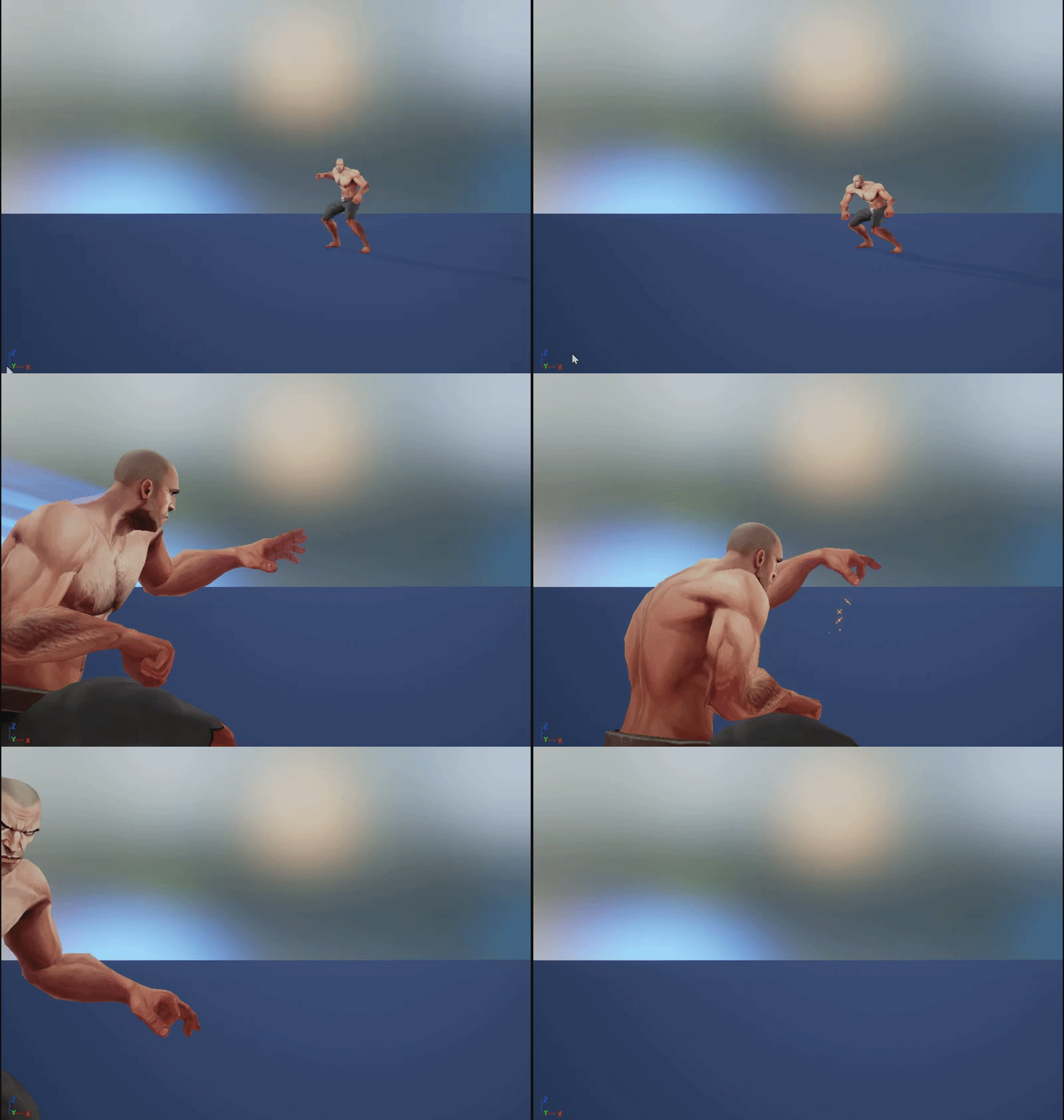
 small flame
hahah
Well, I'm starting a 2D side scroller just as a test. I have the health bar working but what I'm trying to do is when the character lands on a spike it takes damage....Like I said I'm really new lol
fierce tulip
can be done in a few ways, but either on impact with spike collision, or a volume over a spikey surface that does damage.
you prolly could ask in #blueprint
small flame
Okay thank you.
 haughty axle
Hey guys im following a tutorial on youtube using the Elemental Demo under learn in Epic Games Launcher to create a level for myself. however Im trying to use the stuff now into a third person blueprint so im able to walk around it (as I cant in level creator) Any ideas on how i can do this? Or how I can implement the mannequin into the level design and make my game from there.
 iron wadi
Hey, how are you referencing DataAssets for cooker?
I have my DataAssets in a folder hierarchy and I included the top level folder into Aditional directories to cook.
But the packaged game hangs on loading this package (it contains only a mesh and an animation BP)
 sharp pine
i need help one peaople use maya ? for cretate buildings ?
static viper
i use maya
plush yew
Well hello there people
I am trying to open ue4 project with visual studio but i i get this..
sec
sorry peeps its taking a while for it to load and throw in the error
and even when i just make a new project and open it i still dont get visual studio
and i need it because of my course
which uses c++ with visual studio and ue4
it worked just fine like 5 months ago
but when i reinstalled my pc
rip
static viper
it says what you need todo
grim ore
well it says Windows SDK 8.1 needs to be installed on the last line
plush yew
I see thank you im really noobish at this
sharp pine
@static viper we can talk mp ?
sharp pine
private
static viper
no we cannot ^^
plush yew
Well i just realised sdk 8.1 needs either windows 8.1 or 10
i am on 7
and my gpu doesnt work correctly on 8.1 or 10 ¯_(ツ)_/¯
 leaden garnet
what GPU is it
static viper
regardless of that
leaden garnet
sounds really old
plush yew
amd readon r7 200
static viper
you can install windows sdk 8.1 on windows 7.
static viper
its in the visual studio install tool.
 bitter iris
Most likely a nooby question but I'm interested so; Has Epic/UE4 released information on how to make dedicated servers without using Steam? As Epic have their own store coming up and just wondering if they have or havent yet said about server browsers like steam has (again nooby so sorry in return)
static viper
you get the error bc win sdk 8.1 is not installed
plush yew
yeah
static viper
the install tool tho is eeither there or not
plush yew
i dont really know where to find it sir
static viper
just go to your vs folder in startmenu
static viper
its called visual studio installer.
plush yew
i dont have it
plush yew
from where sir?