#ue4-general
1 messages · Page 304 of 1
 plush yew
Yes it is
 pallid compass
so heres the thing
two things
1 it needs landscape paint data to load in the landscape object in the world
the other thinh
i see more than 5 layers
unless there is some crazy compression shit going on
with RBG-A injection
that by default
passes 16 texture sample limit
or 15 w/e it is
in dx11
and when u do that, it breaks
sometimes
its dodgy af
Okay back to point
the material will be by default
full black
do u see the first
layer blend node
that goes in to base colour
plush yew
Yes
pallid compass
click it
then in the bottom left
u should see an array details panel of all them layers
there should be a preview value
give any of them layers a preview value of 1
and compile
and u should see something visually
plush yew
Do I need to do the "give any of them layers a preview value of 1" on every each one of them or just one of them?
pallid compass
just 1
i wann see if u get a visual
im assuming the default paint data for the landscape is just broken
plush yew
Alright, so now it's save and apply, right?
pallid compass
Yeah
plush yew
Well, in the map itself nothing changed but in the material preview on the top of details, I can already see some grey stuff
pallid compass
Okay
Confirmed then
Paint data is not loading for the landscape
Also that material is only for the floor
plush yew
Yep, only for the floor
pallid compass
il give u a quick fix to fix that, if u cant figure it out u should look at basic landscape painting tuts
You basically need to
Click the landscape, open the paint tab on the top left (there is a row of different things, one looks like paint brush)
then u should see a row of paint layers at the bottom
i am assuming that u need to click the drop down for each layers and click the paint data that it drops down
we are assuming that for some reason your landscape has lost reference too the paint data
if not then i got no clue
plush yew
Thanks for the help! There's now 2 types of paint brush - "Vertex Color Painting" and "Vertex Weight Painting", which one I choose?
pallid compass
vertex weight paint i think
im not even sure
u should take a look at basic's of painting landscapes
paitning landscape and vertex painting stuff
are dif

In this two part Tutorial Series we are going to create a Landscape Material that features advanced heightmap blends, tessellation and procedural puddles. Th...
u dont need watch the whole thing
but
get the basics
plush yew
Thank you, I will have a look!
 latent moth
So.. I used to have
LogOnline: Warning: STEAM: Steam API disabled!
LogOnline: Display: STEAM: OnlineSubsystemSteam::Shutdown()
Reinstalled 4.20.2, it worked. I shut down the editor, restart it, not working anymore. SAME CODE.
any pointers this is driving me NUTS
 fierce tulip
trying to package? y u no #packaging
 ebon goblet
I want to compare two floats and see if there's been a change of 50. Positive or negative.
Is there a better way than doing a > followed by a < comparison?
latent moth
@fierce tulip no, just trying to run it in standalone mode
ok i'm uninstalling. thousands of dollars of assets, 6 months of work, i'm done.
😃
fierce tulip

I'm not even sorry I made this.
latent moth
yep that's me alright
hem, no, not those blueprints
Surely nobody is forced to help, of course. And manage updates of docs. I understand very clearly that UE being open source is a way for Epic to gather gazillion ideas and then pop in when the 1/gazillion actually gets traction.
Sorry if I sound frustrated, I really did spend a lot of time and money and can't get this to work. Two days, if that sounds i'm histerical like those girls then that's ok.
 digital anchor
thousands of dollars of assets, and not 100$ to pay someone to set it up? #looking-for-talent
latent moth
fair enough
pallid compass
Are the bp debug tools in 4.19.2?
 manic pawn
wasn't that new in 4.20
manic pawn
🤔 then what changed in 4.20
pallid compass
i just wann view content of a array easily Q_Q
 grim ore
well it's not a stack trace, thats just the execution flow. The full debugging system was fleshed out in 4.20. And if you want to view the array prior to 4.20 you can watch the array during execution in the BP window
or print it out to the screen or debug log
pallid compass
Yeah no good, array with struct with array nested in it
with bits of infomation all over
guess il use vs debugger
manic pawn
I wonder how a bp struct looks in vs
pallid compass
its gross
manic pawn
idk I've never used a bp struct
latent moth
 manic pawn
🤔
latent moth
freshly downloaded.
manic pawn
restarting launcher probably fixes it
latent moth
nope
latent moth
can't. clicking on X does not do anything.
manic pawn
 /10
/10
manic pawn
isn't that some AR gear noone uses
latent moth
¯_(ツ)_/¯
 tawdry narwhal
I've read somewhere that dishonored 2's game state memory budget was around 4MB and for Uncharted 2 they had to make do with even less, 3MB. Why so little memory for something as important as game state?
grim ore
consoles
tawdry narwhal
hm I just looked it up - the PS3 only had 256MB of memory
that's ridiculously low
ok makes sense
grim ore
yep consoles had ridiculously small amounts of memory for what they can do, and still do compared to modern pc
 frank escarp
@tawdry narwhal do you know how much 3 mb of game state is?
thats going to take a while to fill if you arent in an RPG
tawdry narwhal
@frank escarp I'm about to expand my game's game state memory consumption to > 50MB
frank escarp
wtf you doing
manic pawn
guess it depends what you call "game state"
tawdry narwhal
it's to support the tactical AI - not for rendering
manic pawn
is it game state though? calling precomputed anything "game state" is like if you counted the meshes used in the world as game state
 brittle furnace
hi 🙂 Do you know if the Mesh Distance Field features hardware limitation on Intel cards is still a thing ?
wanted to give it a try, but if it means that it won't work on some end users computers, I can't...
 grim sinew
Intel stuff is not officially supported by anything in the engine afaik
Whether or not it'll work is all up to Intel, they're always weird on their drivers and support for games in general
brittle furnace
ok 😐 I figured that given they want to develop GPUs now, maybe that would be fixed someday...
 vale silo
@grim ore any chance for a tutorial about IK on arms/legs in UE4 ?
 pseudo saddle
I wanted to make a game and most of the programs I'm going to use are free, are there any expenses I don't know about where I might need a Patreon?
grim sinew
@brittle furnace Their GPUs aren't being revealed until 2020, and they'll likely require a ton of work before there's feature parity between them and existing GPU drivers.
@pseudo saddle If you use all free software, you're fine. $100 to publish a game on steam but that's nothing in the scheme of things.
grim sinew
Generally for software, you can either have good -or- free, and you need to pick one.
There are very few exceptions to that.
pseudo saddle
Yeah
grim sinew
FL Studio I know is pretty popular for low end stuff, and the cheapest version is $100. Lifetime updates on any license.
pseudo saddle
Figured, just curious I already have UE4 and Gimp for free software right now
So wanted to know for music
 static viper
how does one actuivate bluetility in unreal?
brittle furnace
it's in experimental
in project settings I guess
(don't have the editor right now)
static viper
the setting doesnt work tho in 4.20.2
brittle furnace
I tried to use it but so far I never got to make it work. (4.17.2 here)
I could make a blutility bp but never could run it 😦
static viper
mh
grim ore
@vale silo honestly I doubt there is much chance. Animation is not a strong area for me 😦
vale silo
aye, np
grim ore
I want to tho so you never know. I want to get the basics to animation covered so it's possible
 smoky stream
#plugin-dev @oblique sorrel
 oblique sorrel
Gotcha
 trim oar
i have a problem with my tiled landscape and i have a material.
on importing the tiled landscape i chose the instance of that one
so it makes a new shared assets folder containing the layer info files
and when i assign the landscape layer file to the landscape layer , ue4.19.1 crashes forever
the tiled landscape is 2017*2017 and it is 36km2 and 16 tiles
pls tell how to stop it from freezing
or any other way to assign layer info pls tag me'
 robust cedar
is there anyway to remove all unused assets ive imported into my project
trying to get the file size down
vale silo
when you package, those unused assets don't get packaged (unless you have option to package everything checked)
pallid compass
No eckhart there is not
vale silo
also I think 4.20 has a option somewhere in the menus to remove all unused assets (unless it was mock-up joke on Twitter)
 eternal veldt
hi all, first time here!
By anychance does anyone have experience with Dynamic Combat System off the Marketplace?
I ask cuz I really love it but have no clue how to replicated it properly to allow mulitplayer, any suggestions would be awesome!
 south ridge
Sometimes it feels almost as if Epic Games only cared about UE4 projects that have a chance of going viral/appeal to a very wide audience
It's their prerogative to do whatever they want, but it's a little frustrating
grim ore
It would make sense they would support the projects that would give them a return on investment, they are a business first.
south ridge
That's not what I said
Projects that would give return on investment and projects that may go viral are two different sets that only slightly intersect
It's kind of a fair approach, a silicon valley sorta approach
Invest into 100 projects, if one succeeds it'll completely overshadow the other ones etc
plush yew
hey guys is unreal engine supports the new rtx series?
 tall pendant
 high stone
Wish they just named it Rays. RTX is too similar to Rooster Teeth and Real Time Strategy.
plush yew
when you have a looking for work channel but you can't click on the perons name thats offering work to DM then
high stone
You can @ their name in the chat to DM you. That you are looking to apply.
 worn granite
It should just @ them itself.
They already know its being posted.
Maybe it can be an option or dependent on whether they want DMs.
plush yew
@south ridge it is a bit normal that they focus on projects that are more likely to succeed. they have limited resources.
south ridge
That's not what I'm saying
They are focusing on projects which have a potential to succeed, not the ones likely to succeed
plush yew
interesting
south ridge
The difference is a little subtle, but important. There's nothing to be said here as they are free to do whatever, but morally it feels more right to focus on projects likely to succeed
Rather than focusing on ones which are likely to succeed big
If you have a big pool of money, it kinda is really more profitable to invest into 100 likely cases and have 99 fail, just for the 1 remaining one to fully cover all expenses
 broken shadow
My take is that what you're saying is:
Epic so far is focusing just on the project which is estimated as being the most successful, and shelving any projects with lesser estimated profits
When those lesser projects may still have something to contribute to the bigger pool of stuff
 bitter oyster
is there anyway to have a foliage system per tiled level you stream in? we have foliage modification in our game (chopping down trees), but when we have ten's of thousands of foliage instances over a large map 8x8km map, it takes a long time to edit any of these instances in game play due to all of the instances being contained inside the one foliage system. appreciate any advice
south ridge
@broken shadow sorta. I think Epic is focused on projects which seem like very mainstream ones (successful or not, but obviously more priority to successful - that part is not a big deal), but they aren't as interested in less mainstream projects (even if they are solid)
 woeful thorn
Hello
Anyone can help me with "couldn't set association for project?" this happens when i try to open my project...
Please...
 restive basalt
How is everyone's experience with 4.20 so far? I'm seeing quite a few crashes so far...
restive basalt
Yea, I'm already swapping back to 4.19 now
 gaunt iron
and some of thhe stuff I was looking for in tutorials doesn't exist
restive basalt
Packaged game wont even open
gaunt iron
which is a pain
south ridge
I'm on 4.20+ and I haven't crashed yet
grim ore
I found if you only use the engine once a day you can never crash more than once a day 😉
gaunt iron
lol
grim ore
Base your productivity around the crashes. Take a break when it happens 😃
gaunt iron
anyway, the thing I am looking for is this:
grim ore
I will personally say I have only had it crash once on me and that was due to running out of memory lol
gaunt iron
I cannot find that block in blue print a t all
grim ore
that is in the character component
restive basalt
Yea mine is with packaged builds, and only truly upgrading for the particle system. But time is money so... I'll postpone for now
gaunt iron
@grim ore what do you mean by character component?
I am looking in FirstPersonCharacter
grim ore
on the left in your character you should have a CharacterMovement component. you can drag that in to get a reference to it
south ridge
@grim ore I have kind of a bias against crashes I guess
I always run from visual studio and if there's a crash, often I just step over it, fix it, or manually restore state so I can save stuff
I find that in 70% of crashes it's not a critical error and usually can even be ignored
Someone forgot a nullptr check sorta thing
restive basalt
Yea I'm a blueprint coder but I run perforce
gaunt iron
okay, I dragged that in
restive basalt
Its actually been pretty nice as a blueprint coder, I rarely ever have a single crash normally
south ridge
Okay, you know what
I did get a "crash" in blueprints earlier
It was an assert firing off based on some nullptr
But I could step over the assert and nothing bad happened
 turbid wave
hi, what is best performance based decision for world composition tiled build size if whole world is 8x8km
253 or 505 or should i cut to bigger pieces like 1k or 2k
 coral rock
Could someone lend me a hand with what might be a bug?
or maybe something i'm just not understanding?
or is this the wrong chat to ask those kinds of questions
 gritty matrix
What’s the problem?
coral rock
well i'm working in 4.19 and I'm trying to add a second material to my destructible mesh
But it doesn't appear to be showing up. I've lurked on the forums and have looked online for quite a while but people are either saying it's a bug, or that the mesh isn't closed? but I'm using a basic sphere right now
coral rock
alright, I'll go there.
gaunt iron
@grim ore what should I do after that? I can't find the block to input the CharacterMovmement reference
restive basalt
@coral rock Based on my knowledge I think you may need to add the material slot in an external editor for it to show up right in UE4 for destructible meshes
restive basalt
@coral rock I tried looking for the one tutorial that was good but cant find it atm, it is more of a maya tutorial or a similar program
coral rock
aaah okay I see what you mean
is this a bug unique to 4.19+? because apparently 4.18 doesn't have this problem
restive basalt
In ue4 for the most part your limited to what the model as is, but there could be advanced stuff I'm unaware of
Not sure on that one
coral rock
this forum post here claims to have fixed the issue
but I'm at a loss at what it means when they say "closed mesh"
considering i'm using the sphere supplied by the unreal engine itself
 mild tendon
basic question: what does the "super:: " demonym signify in UE?
restive basalt
I think this is the tool, much more advanced destruction details - https://developer.nvidia.com/apex-destruction-physxlab-tutorials
NVIDIA Developer
mild tendon
I'm guessing it's something to do with the superclass but I wasn't aware that C++ let you access superclasses like that bc multiple inheritance
say you have an actor class, that's a subclass of actor, no?
so super::tick() calls tick() in actor, is my thinking correct?
south ridge
Yes
It's simply UE4 C++ speak for the usual C++ syntax of Baseclass::Something()
In C++, if your class foo is derived from class base, you can call a function in the base by doing base::function_name(). Super is simply a generic name for "base class" provided by Unreal Build System
Maybe you could even call it a non-standard C++ extension
mild tendon
okay thanks
 stoic dew
do objects in unreal have sort of id built into them already? for example I have a mesh somewhere in my content folder, is there a built in way to spawn it via said id?
south ridge
You can spawn it by path or by some asset reference
stoic dew
I know but I need a way to spawn them via a number. I am using a third party network library and have embedded a scripting language to allow players to modify their servers to their liking. They do not have any client side programming available just server side so if they wanted to spawn an object somewhere it would use a lot of bandwidth passing the entire path to the object.
 tiny pier
I'm trying to make a camera like the ue4 editor has. That's to say freely flying around with mouse and wasd, basically an air vehicle, but with the vehicle part. Just an unlocked camera that I can use to fly around with in. I can't find any tutorials for it because everything I search for is a different thing. What are these kinds of camera setups called?
gaunt iron
my project wont stop crashing ._.
it seems once unreal crashes once, its prone to crashing over and over again
and the only way to make it stop crashing (for a while) is creating another project
south ridge
@gaunt iron can you post the crash log/stack trace
gaunt iron
@south ridge https://hastebin.com/uzaqivotil.php this is the one i get every single time
I get it in the blueprint editor
south ridge
Interesting! Are your drivers all up to date?
gaunt iron
yeah
my graphics drivers are
but im not sure what other drivers i would need to keep up to date?
grim ore
lets start with your PC specs. Laptop or Desktop? CPU and GPU?
gaunt iron
Laptop, intel i7-7500U, 16GB ddr3 ram @2133MHz, Nvidia 950M
grim ore
And do you know if it's using the 950 or the intel gpu when running UE4? do you have it forced to use the nvidia for example
gaunt iron
Whenever I check task manager, it is using the 950
grim ore
and does this happen when it's plugged into the wall using the corect power brick?
gaunt iron
it happens if its plugged in or not, but mostly when its' not
and yes i have the correct power brick
grim ore
yeah that sounds like a power issue. Force UE4 to use the integrated GPU and see what happens
grim ore
IF it still crashes the same way then you should be able to eliminate the GPU and power unless the power brick is completely toast
gaunt iron
the power brick is pretty decent, it still charges quickly
grim ore
which is fine but if it cant give you the required wattage when the GPU and CPU are running full tilt it's gonna be a problem. It's not an old machine so if its the original adapter it's probably fine
 dire fjord
Hey guys, is there anyway to rotate the base static mesh on a BP? Just learning now, and I've got this tank shell I'm trying to use as a projectile, but when it spawns, it spawns at a 90 degree angle and not straight as it should. Looking at the BP it's obvious that this base item is in fact set up to point the wrong way. I didn't make it, so I have no idea about how I could remodel the item to make sure it's pointing the correct way, but it seems in unreal the base item can't be rotated. Any way to straighten this out?
grim ore
you can rotate it once it spawns as an option, if it imports incorrectly you could rotate it on the import again as one of the options, you can always make a scene component as the parent on the blueprint and have the static mesh be the child which you can then rotate relative to the parent (scene component)
out of all of those re importing it and adjusting the rotation on import is the probably the most correct way of going about it
high stone
Nooo! DDR5 release date has been pushed to 2020.
 winged crypt
is a playerstate re-initialized on possess or only on start, then persists and is always valid?
plush yew
Guys
I made animation in blender, how to set that as manequin walking
in ue
xd
i did it in the past but i forgot how :C
 next sierra
Hey guys quick Q: Any reason to learn Matinee now that there is Sequencer? Did sequencer completely replace it?
 proper quiver
do you guys get crashes using instanced static meshes?
 whole quarry
no
proper quiver
I'm crashing all the time when updating them on the client from a multicast/RPC call
whole quarry
sounds #multiplayer
proper quiver
I'm not really sure if it's a multiplayer issue
crash log indicates it's happening in instanced static mesh somewhere
I looked at the C++ code and it looks fine? it's all unreal's base stuff
whole quarry
in the Saved folder there should be Logs, with a crash/error log report, maybe it has more information in there
proper quiver
yeah, checked that as well, reports the same
whole quarry
it isnt telling much
proper quiver
[2018.08.30-08.23.00:700][ 42]LogWindows: Error: [Callstack] 0x00007ffadfce6850 UE4Editor-ApplicationCore.dll!FWindowsErrorOutputDevice::Serialize() [d:\build\++ue4\sync\engine\source\runtime\applicationcore\private\windows\windowserroroutputdevice.cpp:65]
[2018.08.30-08.23.00:700][ 42]LogWindows: Error: [Callstack] 0x00007ffa8ec262ec UE4Editor-Core.dll!FOutputDevice::LogfImpl() [d:\build\++ue4\sync\engine\source\runtime\core\private\misc\outputdevice.cpp:70]
[2018.08.30-08.23.00:700][ 42]LogWindows: Error: [Callstack] 0x00007ffa8ebb51cb UE4Editor-Core.dll!FDebug::AssertFailed() [d:\build\++ue4\sync\engine\source\runtime\core\private\misc\assertionmacros.cpp:425]```well that stuff is just error reporting
[2018.08.30-08.23.00:700][ 42]LogWindows: Error: [Callstack] 0x00007ffa8881832e UE4Editor-Engine.dll!FStaticMeshInstanceBuffer::UpdateFromCommandBuffer_RenderThread() [d:\build\++ue4\sync\engine\source\runtime\engine\private\instancedstaticmesh.cpp:189]
whole quarry
how many are you spawning?
pallid compass
Assert failed
proper quiver
like, 5, 6
pallid compass
U have nullptr
proper quiver
maybe? it's crashing in UE4's codebase definitely
static viper
this might be a timing thing
you will have this alot with rpc
you need to make sure the data actually exists
proper quiver
hello owl
well.. the screwed up thing with this is that I don't even need any data to cause the crash
I can just call clear instances to crash it
proper quiver
just blueprints
you might be right, I'm isolating this specific crash to RPC with some data being passed, will keep trying thank you
it looks like this, pretty harmless...
you would think that is all very harmless...
whelp... this hack works :p prevents it from crashing... seems like a threading issue
whole quarry
delay of 0 should be sufficient
pallid compass
jfc that looks danger danger
proper quiver
😐 well according to this it's not getting fixed till next version https://issues.unrealengine.com/issue/UE-62282
static viper
what also works is when you make a function for these loop things
so that it is not important if the next already runs
that delay is a nice idea
but only shows what smurfs showed me
something isnt there at the time you need it
why not
pallid compass
delay 0 = 1 frame
proper quiver
threading
pallid compass
so it happens on next tick
proper quiver
yeah
I tried delay tick but that didn't work
or maybe it does now, I found the two locations where it crashes
whole quarry
sounds to me like a issue of order
proper quiver
nope.. crash
static viper
you clearly found something 😄
flux you need to reassemlb emaybe
my error was that i used nodes before other nodes
changing their order fixed it
proper quiver
well.. does instanced static meshes let you update transforms? because then I could just make a cache and not clear / add all the time
then it might get around this bug completely
static viper
in blueprints this is a bit troublesome
its easier to remove all and place all
:voxelthinking:
mh
proper quiver
okay, I fixed all the issues, it stems from using Hierarchical Instanced Static Mesh. I switched them all to regular Instanced Static Mesh and the crash goes away
plush yew
you guys are pro ❤
 green lake
Hey guys, before a time i was trying to make an FPS Controls and everything was right, but now for some reason Mouse Y input doesn't works i can move mouse only left/right etc everything else is set up
blueprints.. inputs.. gamemode everything is supposed to be set properly
whole quarry
did you verify that or is that a assumption?
 chrome ivy
hey
anyone here who has enabled the new audio engine in Unreal Engine 4.20 from source?
dire fjord
@grim ore I found out that exported items can be edited a bit in visual studio. I was able to export, rotate and reimport the mesh there, thanks
Anyone know what is up with this? It compiles and works fine, but I do n't like seeing this intellisense error there.
digital anchor
Intellisense doesnt work correctly on ue4
pallid compass
not unless u have a speedy af machine
dire fjord
No, that's not it.
It's working for everything else
that's a very specific kind of error
Even if you let it sit there for an hour it doesn't go way. It's not a question of not catching up. It's specifically saying that function is inaccessible, but it compiles and works fine, and the error persists after compile.
digital anchor
the public: is on bottom of the GENERATED_BODY macro
SetVelocityInLocalSpace is declared after the macro
intellisense is not expanding it correctly to understand its public and not private
so, intellisense doesnt work correctly on ue4
dire fjord
Ah I see, okay thanks.
digital anchor
if im not mistaken, they did some changes on intellisense errors on 4.20.3
dire fjord
I'm having a look at the actual source file now, i see there is a UFUNCTION right before it, that's what is messing it up?
digital anchor
no its the GENERATED_BODY
on a class, everything is private unless declared "public: "
dire fjord
Ah
digital anchor
i think the GENERATED_BODY has a "public: " already
dire fjord
I'm still somewhat new to this
But I appreciate the info. I wanted to make sure there wasn't something else I needed to set or change
digital anchor
👍
some people just disable intellisense and/or get Visual Assist, it helps, but its paid
dire fjord
Yeah, I'm not ready to drop that much on Visual Assist yet. Maybe once I finish these courses and get on to something a little more substantial. $100/year is a bit much just yet.
Question though, does the visual assist help with the "include what you use" stuff? One of the issues I'm noticing is that on older versions since everything was included, intellisense was kind of helpful in problem solving.. if you didn't know exactly what method you needed, you could type a keyword and get some that would match, now with the include what you use stuff, if you don't already know the header you might need to include the options from it don't really show up on autocomplete or search.
 frosty bloom
@dire fjord You don't have to purchase VAX once a year
digital anchor
yup, it has both, Add Include and Add Forward declaration
frosty bloom
You just don't get any more updates after a year
dire fjord
So, it'll autocomplete/search everything and then give you an option to #include if needed? that's not bad.
@frosty bloom Right, how important are the updates?
frosty bloom
It's more a matter of convenience
A lot of UE4 specific updates went out this year, so by buying it now I don't see any major game changing updates within a close future for VAX
dire fjord
What I wonder is if you're using an engine version after your updates are finished, are there going to be issues with it?
digital anchor
it even has UE4 specific stuff, like when you declare a function, and make it implement, if its a BlueprintImplementableEvent it will create the correct implementation (MyFunction_Implementation)
frosty bloom
No, VAX and VisualStudio is not bound by Unreal Engine
you can use one without the other etc
dire fjord
That doesn't sound too bad then. I've got like 7 courses on the docket, 4 of them are unreal, so when I finish the current one, which is the biggest one, I may grab it then. It might help me power through the other ones. Kind of want to prove to myself i can get through this one before I drop more money on this, you know 😉
frosty bloom
Sure thing. And if there comes a time when you want another year worth of updates (I guess missed updates are included) another 99$ barely makes you sweat
dire fjord
Especially if I'm actually doing something with it at that point. I figure if I can get through all this, I should have a pretty solid foundation.
 iron cobalt
quick question: what's a good place to get technical support for unreal engine? i've tried Answerhub, but i'm hardly getting any views...
fierce tulip
AH might occasionally take a day or more unless its a very specific or complex problem.
forums might be a good place to ask, and depending on what the problem is, one of the channels on this discord might help
iron cobalt
thanks. I've tried the discord channels here, and got some suggestions. i'll try the forums though!
iron cobalt
how long does the mod queue usually take? i'm not even sure i posted correctly 😊
fierce tulip
¯_(ツ)_/¯
iron cobalt
╔══╦╦╦═╦═╦╦╦╗╔╦╦═╦╗╔╗
╚╗╔╣═║╩║║║║═╣╚╗║║║╚╝║
═╚╝╚╩╩╩╩╩═╩╩╝...╚╩═╩══╝
plush yew
Hello fuys I have a big problem
I lost my bp in the space my function how to find it?
i lost it in the space
omg
this code was long and big please say me the way to find it
fierce tulip
you lost it in the space? what do you mean with that
plush yew
I wrote the code in bp space
and then I move it in the space in the same function in the space and I lost the code
this is called space
fierce tulip
its not, but there should be a way to highlight it
fierce tulip
that I dont know, try asking in #blueprint
plush yew
okay
 elfin jacinth
Hey, Slackers.
Just a heads up. The weekly livestream has been canceled for the day.
We'll be doing it next week tho
static viper
he means that he moved the camera so far away that the code is gone from the view
 bleak remnant
Hey guys, when I'm releasing my game for my playtesters, should I be giving them the Shipping build configuration or DebugGame build configuration for my game?
People using the shipping build have been getting kicked from the server, and unfortunately there are no dump files or crash files or logs. I have just enabled logs for shipping, but I'm not sure if crashes are available.
 proven needle
over on the left side you should see any functions or code added click on one and it should center your screen on it ? any help ilian?
 unreal spoke
My physics asset has some volumes green and other volumes red/brown. Why?
 bitter iris
What is the point in the "Restore" button after crashing? It doesn't ever restore anything.
 sturdy star
it opens windows you had previously open unless they were a level
it's not going to load from a save 1 second before a crash
unless you had an autosave 1 second before a crash
it's a slightly misleading term but... save often
not to be an apologist but, sometimes stuff crashes, and it happens in all engines, just save often and be aware that sometimes you will have to redo work, unless you save often
bitter iris
I'm not bothered about the crashes as its backed up. Just seems it has no actual function
sturdy star
ah, depends on the window i suppose - for me i have ContentBrowser and materials and BP windows on another monitor - not docked to main UE4 window - and 90% of the time it re-opens those windows
 full atlas
uum guys.. i opened the Plugins window (because packaging my project was over 400mb because of unneeded plugins) and i started disabling plugins i thought i didn't need.. So now i ended up having my Plugins window removed.. (there is no Plugin button in Edit') so i cant even enable them back... And packaging my plugin doesn't give me a the file with the icon to run the packaged project.. So anyone knows how to fix?
Perhaps resetting settings to default? Or probably moving my content to a new project? 😐 😕
smoky stream
you removed the plugin manager plugin didnt you
you should probably go into the project file and remove that by hand
it'll be called project.uproj or something like that
its basically json so its pretty easy to edit
@full atlas
full atlas
project file? where is that located?
smoky stream
its the very top level file
if you go into the project directory you cant miss it
its litteraly the first thing you see
full atlas
where?
in the project folder or packaged ? i cant see any file as you say
project.upluginmanifest ?
 livid haven
In your project's root folder
There's going to be a file named YourProjectName.uproject.
Open it in something like NotePad++, it's actually a text file using the JSON format.
It is actually what stores what plugins are enabled or not for that project.
The plugin manager is merely a plugin that exposes editor UI to modify that JSON file.
@full atlas
The ability for the plugin manager to disable the plugin manager is a uh... questionable usability choice.
full atlas
👍
 queen arch
need some direction on what to search for
I'm trying to do a static briefing screen
before a mission, some words pop up on the screen and someone reads them
the user presses the "continue" button
and the mission starts
 dark depot
you could just make a widget
queen arch
and disable all input?
dark depot
yeah
queen arch
that's what I thought, but it feels hacky for some reason
livid haven
@full atlas Internally discussing making the plugin manager either a) not allow disabling itself or b) not be a plugin at all.
full atlas
The problem is that doupted it was actually what it said it was.. I mean shouldn't the ue editor have a plug-in manager on its own? It should at least have a more intense warning.
proper quiver
what's the difference between get owning player and get owning local player?
 astral marsh
https://gyazo.com/efae380c60eccdb4156a76cf59359821.gif hey guys i made a pickup system so oncei pickup and drop it and second time i pickup this happens anyone knows how to fix this?
My blueprint
high stone
It's still grouped to the model. Ungroup or hide/remove object after it drops and have a object stand alone that drops.
high stone
The item should be attached to the model. Look for a detach option. Unfortunately I'm unfamiliar with UE4. Still getting working on high detail voxels to load textures.
astral marsh
its with the physics
not able to figure out how to fix it
anyone can help me pls ?
high stone
livid haven
@full atlas Agreed and I've been given the go ahead to convert it from a plugin of my own volition. 😃
I'll get to it. Eventually.
 candid cypress
To any of the Epic staff Could I pm to ask a couple questions about UE4?
livid haven
I wouldn't know anything about Switch.
Not sure any of the rest of us in here would either.
dark depot
@candid cypress after becoming a registered switch dev you should have access to places you can ask questions
candid cypress
well the issue we have is depending how far from the camera an object is, it gets blurred and texture resolution at that distance is getting miped. so the closes part is in focus/higher resolution, but go back an inch and it's 1/2 resolution.
@dark depot we've asked at those places and so far nothing. Thus why I was looking to see if anyone here might have an answer
Because we're not sure if it's something UE4 that could be causing it
dark depot
well you should of signed a nda which means no discussing things anywhere. but that also sounds just like a ue4 thing so maybe just dont mention the switch haha
i havent played around with mips and stuff but im pretty sure there are settings for setting when they change
candid cypress
Don't know what you're talking about lol, I didn't say anything about a switch 😉
candid cypress
one of our programmers said he's tried changing things. unless he's just bs'ing and saying that not trying to do more work.
ok, will do, thanks @dark depot !
stoic dew
What is the method for creating a landscape of a specific size?
 hot rock
Anyone know how to make a game similar to Super Smash Bros ;u;
 hasty basin
- Choose an example blueprint project that is close to what you want.
- Make a game similar to Super Smash Bro.
#restoftheowl
 wary wave
 manic pawn
w🎩
 grave nebula
This should be on blueprints from hell
robust cedar
when you cant use the AK47 so you make a EK47
wary wave
Blueprints from Hell has nothing on that
the author needs to be taken outside and shot
for their own benefit
robust cedar
what?
bitter iris
I enable volumetric fog and the moon shine/fog through the mountain lol
anyway to stop this
 polar hawk
robust cedar
polar hawk
robust cedar
my lord
worn granite
I mean it looks like it.
robust cedar
guys i keep on going to type in AK47 when i named it EK47 this is gonna be a pain
livid haven
Then rename it?
worn granite
RussianM16 and AmericanAK 
plush yew
Is there a hotkey for making the viewport in the editor go fullscreen?
grim ore
amount of stuff to light / speed of machine = lighting time
short of adding more raw horsepower and machines to make it go faster you can limit the amount of stuff to be lit, lower the lighting quality, and a few dozen other small things that affect the quality vs speed
 frail cloak
hello guys, who know how to use unreal engine with C++ and blueprints?
 weary basalt
Lots of people do
If you have a particular question, ask it in the most appropriate channel.
frail cloak
is that..... i want to learn C++ to use it in unreal engine but i have some problems because i dont know if you need to learn a specific way of programming for UE, i dont know if my knowledge gonna work, programming with UE
weary basalt
How about you watch some tutorials first to find out.
plush yew
I really wish that post-process effects affected UI.
plush yew
I want to add a very slight bloom throughout the entirety of my UI, plus an interlacing effect
worn granite
I think there's a way to get the UI to draw onto a render target, then you should be able to use that with a material.
No idea if that'd chug or not though
frail cloak
oh, with the documentation can i learn how to use UE with C++?
worn granite
that's how we did it
plush yew
@worn granite I know I can do that, and, don't see why it'd chug if I'm only rendering one widget to the actual viewport and everything is a child of it
but like
getting said render target to fit to the camera viewport is my concern
worn granite
¯_(ツ)_/¯
 polar goblet
I do nothing with UE, I guess you can call me an U n R e A l S l A c K e R
Okay im sorry
plush yew
@worn granite I figured it out
RetainerBox
does EXACTLY what I want
it renders its children to an offscreen RT and then applies a meterial to it
okay having lynda.com is useful for this lol
I'm learning the Material Editor through it.
 dim arch
hey guys I have a question
using foreachloop on beginplay to print the array contents
but it behaves differently if the printstring continues the execution flow, or if it ends at the printstring
basically some logic later in the graph is modifying the array contents, even though it doesnt fire before it
worn granite
show the graph?
dim arch
ok I fucked up.. nevermind
it was running a sequence at the same time as the loop
I thought it would resolve the loop from 'then 0' then go to 'then 1' in the sequence
worn granite
Did you use a delay at all?
plush yew
hmmm I am not sure how to create a simple interlace effect in this material
 surreal sun
does anyone know how to fix the "starting up swarm connection" stuck at 100% problem? I can see swarm in the task bar tray and also in the task manager. but it never starts building lighting. I tried building lighting for a simple level with just one cube and also tried reinstalling UE4 several times 😕
dim arch
firewall?
surreal sun
yeah i tried turning off firewall too
I searched and some of the solutions were to reinstall the windows itself which I cannot call as a solution 😕
 pallid eagle
I'm a super newbie, so sorry if this is a dumb question but. How do you make a custom shaped healthbar that depletes in it's own custom way? I saw videos where it works with gradients, the videos showed all the steps except to actually set it up to use the custom fill shape in the Widget... I can't seem to figure it out either. Any advice? I'm trying to make a spiral shaped healthbar that depletes down the spiral. Please ping me if you respond, I usually don't notice a reply unless i get a notification :P
 hard willow
I wonder if that'd take a bit of math, like drawing a colored line(of a width) that followed a spiral path. The other way I imagine is the cheap/easy way of just manually drawing frames - but that doesn't have the fluidity and stuff!
Of course even the line drawn by math should be "behind" the overlay of the health bar border-thing. Where there is a transparent window on the "front side". Also might want a back-side unless you want it fully transparent
Sadly I'm horrible at math, sure it has to do with the Golden Ratio, er... or whatever ratio matches the original spiral shape.
plush yew
I got a bloom to work in UMG
only issue is
I can't seem to set a threshold at which the bloom stops working
I mean, I can, but, it obliterates the smoothness
 cloud cobalt
It's pretty violent right now
 vivid girder
Anyone ever had an issue ctrl+LMB+Dragging to translate an actor in the editor?
Should be able to drag along 2 directions but it's only moving on one
Oh, it's based on the transform coordinate mode (relative/world)
 chrome cedar
I´m pretty new to unreal engine 4. I´ve just created a tiny project with self-made assets but what I´d love to know is: what happens with a bought "plugin" from the marketplace (like a river water tool or anything else) if it gets outdated? If I remember correctly I once tried to use downloaded content for my recent project but UE4 told me that the versions don´t match. Do I just need to wait then for the plugin to be updated? or can it be possible that I pay lots of money for a plugin and I can´t use it anymore when UE4 receives an update?
 astral pond
@chrome cedar you can wait for a update... or just try to use it... and see if something is broken/crashs... the best thing is if you buy something try to understand what you got... and in a emergency.. you can fix it yourself
chrome cedar
oh okay! hope I can do that 😛 I´m not rlly experienced with UE4 so far 😄
but ty for your answer!
astral pond
well basic logic dont get broken... pyhsic stuff and other complex things maybe get problem... but in most cases not
if unreal engine updates some nodes or something... most of the time the old nodes and stuff are still working... because bp nodes are c++... you can write your own nodes if you want
but first dont worry!... learn and have fun!
chrome cedar
ty!! 😃
plush yew
what is the question?
 sage blade
I have fbx file
It is FBX, MorPher and Skin are applied
But after importing it, Morpher is gone.
If I delete the skin when I export, Morpher will be retained.
How can I import Skin and Morpher together?
plush yew
are you exporting from autodesk tool?
sage blade
yes
plush yew
because one suggestion i might have is baking all of the vertices to the animation, so that the morpher / skin modifiers are no longer needed
once the animation is baked in with autodesk tool, then export raw fbx with animation data.
sage blade
wait
plush yew
other than that you might try #animation possibly
i use floating pawns in my game, i haven't messed around with animations for quite some time, especially within UE, so i wouldnt' be able to guide you through the exact workflow.
sage blade
I want to modify Morpher's value in Unreal
Even now I can do that (if I delete the skin modifier)
If I bake all the animation, is not it impossible?
plush yew
you would have to just do separate takes in autodesk tool?
and just keep your source file there, then import in?
sage blade
um yes?
plush yew
if you save the autodesk source, you simply have to go back. i am not sure UE allows direct editing of such a modifier unless you get a custom plugin for it. (like the one substance painter has in UE integration)
that's all i can tell you.i hope you fix it.
plush yew
i can give you one more suggestion that might help.. you can try using the datasmith plugin to import from outside maybe
sage blade
um ok
plush yew
i know it has some autodesk integration stuff
yeah
try asking your question in #animation
they might be able to help you with exact details in there

sage blade
ok
hey
how can i install
datasmith
oh i found
no
I can't found it
where is datasmith?
plush yew
I believe you have to use it in conjunction with Unreal Studio possibly.
there might be a better way for you, since datasmith is mainly use for material transfer.
i have to get back to work, i hope someone can help you.
plush yew
yes there you are
plush yew
ok try to go to https://www.unrealengine.com and then click on download.
proceed to studio download? maybe you need to get that studio application?
again - i am not even sure if data smith is something you need for this animation task of yours. it was just a suggestion.
sage blade
but i want download that
that was too good
plush yew
so you got it working?
plush yew
you want to try studio? you got to go to the download page on unrealengine.com like i said.
and accept the terms for it
then it'll give you the "studio entitlement" thing that you need to install the datasmith plugin to the engine.
anyways - i am sorry but it is late for me ok. i have to go soon.
you will fix it i am sure, just keep working.
ok?
am leaving - will be on later just direct message me maybe if you want to get it installed.
 velvet ravine
Man really Wish the would Update the Laucher vault
 autumn haven
Anyone here using VXGI 4.19?
 oblique coyote
I would have a question i have a simple vehicle would it be more costly not to use a anim bp but use different static meshes. Its a simple vehicle wich would only need to turn the turrent and move the canon up and down.?
Sp instead of rigging moveing the object inside the bp via simple set rotation.
dire fjord
4.20.2 every time I compile it just randomly rips static meshes components off my blueprints..wtf..
pallid compass
Welcome to latest ver
dire fjord
is there any work around? I'm in the middle of a class and kind of got a groove going on here but this is going to suck the life out of it soon
pallid compass
Doubtful
Most of the time u dont want to be on latest eng ver
Just have to pray and wait for
3
dire fjord
The odd thing is I've been working on this for a couple days now on 4.20.2 and it's only just now that it's started ripping off pieces. Does it have to do with what you have open when doing it?
pallid compass
Are u using hotreload?
dire fjord
Yes..maybe that was it. I had my BP open while doing compile
dire fjord
I just closed it and compiled and it was fine.
pallid compass
Use
Hot reload
Its like tearing a piece of a jet engine out and putting it back in while its still working
dire fjord
Okay.. well I'm some what new to this, can I disable it somewhere?
dire fjord
That's..tedious.
I'm doing a class and build quite frequently as new code is added and tried
re-opening the editor every few minutes would be about as frustrating as my meshes being ripped off
pallid compass
U really should not hotreload
It can cause issues u wont be able to track down
That will change everytime
dire fjord
Okay..well I'll have to see if I can figure out a way to do that that doesn't make me pull out my hair.
 somber spade
Hi All i have problem with world aligned normal. help me please ))
fierce tulip
then please do give us more information, else we cant help
somber spade
Unreal Engine Forums
Hi All i have problem with world aligned normal. When i use it and build lightmass. I get strange shadows. Attached screenshots.
fierce tulip
That is a very odd texture size hehe
besides that, just looks like a low res lightmap
dire fjord
I've compiled twice now with the blueprint closed and both times it was fine. I think that is my work around for now. I just need too frequent access to the engine
somber spade
I attached a screenshot where do not use the world aligned normal and build lightmass. Shadow looks normal
fierce tulip
im not exactly sure, it partially has to do with the resize of the normal map and you using the world aligned normal setup since that changes the maps layout. Id try doing a bake without the normal and see if that is identical to the one with the uv-mapped normal.
then again, if the mesh is unwrapped properly, why use the world aligned one?
somber spade
I want to use the world aligned normal to avoid stitches
fierce tulip
but you'll get stretching, and its more expensive.
some good unwrapping can counter that
somber spade
like this
fierce tulip
doubt anybody will really notice (besides devs)
i'd uv-paint in another layer or whatever.
or add a nice trim
somber spade
even a good uv can have seams
fierce tulip
dont have to tell me. just find places to hide them, or add trims to hide them
or blend between different uv layers (trough vertex color and multiple uv's)
pallid compass
non dev people will not notice
honestly
You only notice because you are working on it.
cloud cobalt
Yeah it took me a few seconds to notice it
Maybe erase the normals a bit at the seam
Or make it more like a real joint
somber spade
I want to use the world aligned normal, is it illegal? ))
fierce tulip
it isnt, but it is more expensive, and the result will have quite a lot of normal map stretching
not to mention it takes the uv-map of UV0 into consideration for the tangents of the normals, so you might find seams anyway
pallid compass
No its not, but you should prob listen to season'd people, or at least take a little on board.
fierce tulip
I had to make hundreds of seamless cave parts, i know the pain hehe
pallid compass
Luos is a very seasoned piece of stake, has many good tips and tricks
fierce tulip
wouldnt call me seasoned, but I have experience in this matter hehe
somber spade
I understand. but for my project I want to use the world aligned normal, and it does not work properly.
pallid compass
Then i guess it dont work :p
somber spade
this is the official reply of the presenter of Epiс ? )))
fierce tulip
sigh
anyways
you could try to clamp the blue channel, thats the only think i can think of
somber spade
It did not help((
fierce tulip
show the material
pallid compass
It looks like a UV issue to me maybe, can we see UV's too? that be super helpful
fierce tulip
^
somber spade
pallid compass
This is one of them things where if the UV's are not setup for this, u cant fit it in a material really
(i mean u can, but u end up doing insane stuff lmao)
I mean if that normal Tiles perfectly, as it looks like it does, you can allign seams on ur uv's too the edge of your uv space and have it tile perfeclty
fierce tulip
I'd just pick the seperate parts of the uv, expand the uv selection by one or two, unwrap on another uvmap and blend that in trough vertex color.
pallid compass
Oh good idea, i did not know u could do that
Not much exp with vertex color stuff
fierce tulip
had to use quite a few colors for my caves, it was insane hehe
I think me and Jan spend about a month to get it all working shader-wise.
(partially because we werent as experienced as we are now)
pallid compass
So does it just blend vertex colours at seams or something
Trying to visualise it in my head
fierce tulip
uv0 non-seam having unwrap (minus floor) so the tangents and normals work fine.
red vertex color > world aligned floor (so i dont need a uv for that)
black > general uv (uv1)
green > uv2 for blending any seams created in uv1
blue > uv3: some fixes here and there in really complex setups.
i think
hmm I think i ended up emoving blue in the end and re-uved everything
god its been a while hehe
(afk)
pallid compass
ohh wow thats nuts
chrome cedar
can I somehow change the playmode kinda interactively from 1st to 3rd person after I´ve already created my world?
grim sinew
Yes.
chrome cedar
and how? 😛
grim sinew
😃
Add a third person skeletal mesh and a second camera. Switch what camera you look through in with the hotkey along with what mesh is visible.
So you have two cameras and two skeletal meshes. The skeletal mesh setup is the same as it would be if you were making a multiplayer fps or something.
chrome cedar
aah I see! I´ll try that 😃 ty!
 sage bough
hi
I installed UE4 4.11 to migrate some assets but the EU IU does not respond. I can't click any buttons at the top or on my assets folders to migrate. I can click on the assets in my level.
Has anyone ever had this bug?
 ruby wren
restart the editor
sage bough
ty i will try
ruby wren
this bug appear sometime when UE crash or in other cases... but it's still not fixed in 4.19 i see... 😐
sage bough
not working shit !
i cannot right click on the folder
and the menu top not working :S
ruby wren
ok... it's not the same problem(in my case the whole interface is dead). I've no solution for you sorry... 😐
chrome ivy
How would I do a full rebuild of WindowsServer without enabling the Full Rebuild checkbox?
 scenic aspen
I'm looking for folk who might stumbled upon this issue: https://answers.unrealengine.com/questions/805211/unable-to-use-runuat-to-cook-a-project-with-ue420.html
For some reason a bunch of Android Manifest stuff got throw away while running UAT...
 long grotto
Anyone know when 4.20.3 is estimated to release? Got a bug with the new compiling system that is supposed to be fixed with it
sage bough
ok guys maybe it can help someone but the engine 4.11 is fully bugged on windows 10 no problem with 4.10
😉
 dim merlin
Hey, anyone is using the RMC (RuntimeMeshComponent) on 4.20 ?
brittle furnace
No, but I meant to maybe try using it someday, is it broken ?
brittle furnace
Btw, does someone here uses Alembic geometry caches ? My team's 3d artist uses them to make an animated mesh. When it's stationary everything works. As soon as it moves, it goes completely crazy 😔 Disabling motion blur greatly reduces the issue, but there are still artifacts.
I'm a bit at a loss and don't know where to look to fix that kind of issue. Since we're on 4.17, I wonder if recent engine versions fixed anything related to geometry caches...
pallid compass
Motion blur should not effect skel mesh aniamtion in any way
brittle furnace
I agree. But this isn't a skel mesh anim. It's just geometry caches and static meshes. And it seems there's a known issue between geometry caches and motion blur
I didn't know about geometry caches before so I'm sort of learning along the way 😅 doesn't help finding what's wrong
 worldly axle
that motion blur with T-AA is a disaster
i remember it not going away until i set it to 0, i don't think disabling it actually worked
motion blur should be jsut banned from games anyway
monitors and your eyes already blur things
you don't need artificial motion blur
static viper
that is very true
but there is a problem with depth i think
motion blur is a thing
but it doesnt alone work on speed
ue4s motion blur is just really bad
worldly axle
I'll have a look, been a long time since i played that
worldly axle
I styill don't like it though
it doesn't simulate how your eyes work properly at all
maybe a camera
static viper
nobody really knows how that works
worldly axle
if you turn your head rapidly you tend to move your eyes in the direction you're going to look, which cuts the motion blur
rather than looking dead ahead
static viper
motion blur is an attempt to give the eye a smoother experience
called comfy
that is why shadow penumbras are important
dof
thats what makes sound so important
the eye needs to understand the scene
worldly axle
yeah we aren't getting good sound though
very few games replicate 3d sound remotely properly
maybe RT will change that
should do
static viper
crysis 2 also had fantastic sound XD
you should really watch them again
crysis 2 is a powerhouse
and the most awesome thing is
that it isnt perfect
there is literally so much to learn
OMG
worldly axle
but the majority of monitors have motion blur built in
why double up on motion blur
static viper
dont know about that
worldly axle
it's more of a ghosting
but it's kinda motion blur
I just don't like the effect in most cases, it does not look remotely realistic
the only time I've seen things that blurry IRL is when I'm pissed
and stop with l;ens flares in FPS games
2 things that don't happen with eyes as near as much as they are shown in games
static viper
well lens flare
mh
that is a hard thing
for once unreals is pretty ugly
on the other side
worldly axle
the kind of lens flares you get with your eyes are completely different
static viper
masseffect was awesome
worldly axle
to camera lens flares
static viper

This efect is based on shader. It simulates custom lens flare effects like simple flares around light sources, sun, or anamorphic lens flares and correctly h...
dis is what i enjoy
the other stuff from unreal is just brighntess based
static viper
the n you havent played masseffect 2 😄
worldly axle
that halo you see when you see a light source, there's like an outer line on the edge of the halo, a load of rays from the center towards that halo
static viper
i am still amazed how well they used it
worldly axle
hard to describe
i have played ME2
great game
one of the few single player gaems i bother completing
Oh this is like the eye lens flare I was trying to describe
wtf link over 2k characters...

thats what an eye flare looks like
completely different to camera flares
brittle furnace
I think I fixed my issue. I needed to disable motion blur and choose another anti aliasing method than TAA
worldly axle
np
 dim topaz
anyone around to help fix a simple problem with projectiles?
 heavy falcon
Try us
dim topaz

my projectile is firing into my character in certain rotations around the Z axis, the fire point is a good bit away from the character so its not doing it all the time and the bullet doesnt curve
its attached to my character mesh, it should be inheriting the rotational value, im probably doing something obvious wrong but idk what it is
heavy falcon
Do you have visual confirmation that the fire point is rotating with it correctly?
dim topaz
yea it fires properly for about 180 degrees
heavy falcon
Put a tall cylinder at its position and spin around to check if it moves? I don't know
dim topaz
P and R don't have value changes just Y
heavy falcon
You're getting the forward vector of the rotation of the firepoint but I don't think it's rotating itself, it's position is changing relative to the center (player), isn't it?
dim topaz
forward vector for the impulse, should i be using that for my transform too?
heavy falcon
Not sure, I'm 🍹
grim sinew

The goal of this blog post is to describe how to modify the UE4 default bloom shape. This is possible with a specific console command but also by modifying the source of the engine. Usually a bloom…
Built in feature, have a look
dim topaz
collision was activated on the firepoint... yep something simple
proper quiver
any idea why this is not working? Set View Target with Blend
it's called from a unit that has a camera component
and yet when this is called, the view is at the unit's feet
heavy falcon
Are you trying to let the cam follow the player?
proper quiver
sorta, I'm trying to make the xcom style "change camera to unit's third person perspective when shooting"
so normally your camera is a pawn that you wasd on a near orthographic zoomed out perspective
and when a shot happens, I want to put the camera over the unit's shoulders
instead of adding a ton of code to transition in the camera pawn, I just made a camera component for each unit
and use set view target with blend, which normally works for camera actors
and it's supposed to work with camera components, but does not place the camera in the right place
when I eject, you can see the camera preview being correct
but not when you re-posses back into the game
proper quiver
eh, this is hacky but I just spawned a camera actor on begin play and it works 😐
 celest creek
Hey, I'm looking to create a rhythm based game but am not sure how much one can trust UE's music and input sync right now.
Let's say I'm doing a Patapon style game (press an input as close to the beat as you can.. very simple) - how would you guys recommend timing the user input to the beat?
winged crypt
@celest creek depends, im thinking guitar hero with visual indicators coming your way to dictate when the inputs are accurate. in a case like that, you could detect overlaps that set bools on and off and if an input is used when a certain bool is off, the key was missed. Or you could check for overlap on input, either way.
user stays on beat if they're in sync with the visual indicators, its how those games work anyway!
Bool A = Input 1
Bool B = Input 2
Bool C = Input 3, etc.
Indicator 1 overlaps = Bool A True, ends overlap, Bool A False
digital anchor
@celest creek or just through timing, you will need a system to build the songs anyway, so for example if a "note" is set to be played at 6 seconds into the song, on a key press you would test if the current time minus the note time is less than the error margin
Time - NoteTime <= ErrorMargin
brittle furnace
Including the calibration error margin
 wild glacier
I have a trouble with the camera rotation, it seems not be replicated on Client ---> Server
The Client camera looks locked on Z axes, it only rotates on X/Y axes
Should I try this one? https://answers.unrealengine.com/questions/181581/how-do-i-replicate-my-camera-rotation.html
Im trying to make something like that https://www.youtube.com/watch?v=WTZg0DTl7Cw&feature=youtu.be

Any opinion displayed in this video only represents the opinion of the user: Sierra216. And is not endorsed by the IP owner of any featured product. Or anyon...

Left: Server, Right: Client
plush yew
guys im noob
can someone explain how can i import a material to this obj
winged crypt
@plush yew Import the diffuse, normal etc. maps that your material needs
Right click in the content browser > create material.
Use TextureParameter nodes to assign the imported textures then connect them to the material slots for Base Color, etc. Apply material to table.
plush yew
thanks
but it didnt work
maybe i did something wrong
ill try again
 glass oxide
Beginner here, only coding experience is lua in Roblox 6 years ago. Should I start learning with a fresh install, or get some of the highly rated coding plugins?
heavy falcon
I personally just suggest blank but that's just me
 sage hinge
how to make a 2-door gate that opens with code in BP someone who knows
whole quarry
2 door gate?
wild glacier
Search on YouTube @sage hinge
Example: Press E, LineTraceForObjects,If hitted equals Door, play animation
And do a flip flop
sage hinge
open two doors with blueprints ... I'm looking for you on YouTube ... but there is only with matinee and that if done ... I want to know if it can be done with blueprints
wild glacier
Do you mean the animation?
sage hinge
of a door if I manage to do ... but the one with 2 doors I do not know how to do it ... because the part of the location where you do the rotation is only one point ... that's why I want to make some shapes or an idea of how to do with the
so far I have not seen any tutorial of two doors that open in BP with only one door there
wild glacier
And what if you make an event that call both animations doors?
 quartz grotto
hi folks. really noob question here - im just learning. im trying to code some first person shooter mechanics from scratch without really copying or looking at more than i need to. im using LineTraceSingleByChannel to detect what im shooting at. Lets say I want to now draw some sort of bullet hole there - what is it that I'd be drawing? Would that be a texture I'd just apply to whatever I hit? I'm not sure what to google for next.
 sinful umbra
@quartz grotto Decals
quartz grotto
thanks
glass oxide
I swear, every professionally made tutorial has the worst sounding mics in the world. The little popping sounds in the official UE4 tutorial are distracting me.
grim ore
Every...Single...One!
glass oxide
So blueprint seems pretty simple. Im guessing to make bigger and better things, Ive gotta learn C++?
grim ore
nope
glass oxide
Really?! Would it be advised to learn it anyway?
grim ore
Every single Blueprint Node has C++ driving it behind the scenes. IF something is missing sure you can do it in C++ or do it in C++ and expose it to BP but most people will be find using just BP
if you know a programming language, sure learn C++. If you are new to programming I would never recommend learning C++.
with that said I would never recommend anyone learn C++ if they are asking the question if they should learn C++ lol
"Should I learn how to build and pilot a space shuttle" is generally not what one starts with when learning to make stuff or drive.
glass oxide
Well all I have is luascript and basic python.
worldly axle
Java is a better place to start
easier to learn, more jobs and you will still be able to do blueprints + learn c++ later if you want
dire fjord
Hey guys, quick question. I downloaded a rigged model to use, it's from maya, and whoever made it, just left it as maya files, which I guess doesn't fully import into Unreal (obj and mb files) I read that i have to convert it to fbx. So i'm grabbing maya to convert to fbx, my question is, the obj that I imported with all the associated textures and what not, is there any point in keep that, or should I just remove that and reimport the new files after I convert from maya? (I'm pretty new to this so not sure how this all works)
 midnight mantle
is there a way to orbit a selected object instead of rotating the camera?
just ue4 camera controls, not in-game
 silver crown
Middle mouse button is to move laterally I think 🤔
manic pawn
I actually don't know 🤔
silver crown
Cuz that's the only thing that works in that new editor stuff I just added 😓
grim ore
ALT-Hold Left Mouse lets you orbit rotate
silver crown
TIL, thx
midnight mantle
@grim ore thanks 
 spiral anvil
Hey anybody knows what does this means?
weary basalt
Its the Tab docker outline.
Restart the editor and it will probably go away if its a glitch in the matrix
spiral anvil
alright thank you!
 fluid root
How do you get the unrealbot to post an ad?
plush yew
how would you recreate this flying device in ue? https://www.youtube.com/watch?v=RMeEh5OUaDs

Ikarus is a 3D-printed, Electric Ducted Fan (EDF) "rocket" that takes off and lands vertically, sort of like the Falcon 9 first stage. Based on a 90mm EDF, t...
let's start with real physics
frank escarp
@plush yew do you want to use the physics engine like a real guy, or use a more faked version that gives you a ton more control
if you are using the physics engine, you need to add forces
plush yew
like the real life version
frank escarp
so if its a thruster, you would need to apply a force in that position at that direction
plush yew
but how to make the bottom moving parts wich change directions?
frank escarp
but, to avoid it going haywire, you also need to apply atmospheric forces and gravity
thats just an animation
blendspace
frank escarp
yes
plush yew
seems.. boring?
frank escarp
yes
its also a pain to control
thats why you might want a fake version
doing the movement physics yourself
plush yew
oh okey?
frank escarp
so instead of doing forces for a rigid body
you have a normal actor without gravity nor rigid body physics
and calculate the forces
then add them to velocity
and then you update the actor with AddWorldOffset
much, much more recomended
trying to monkey around with forces is a huge pain
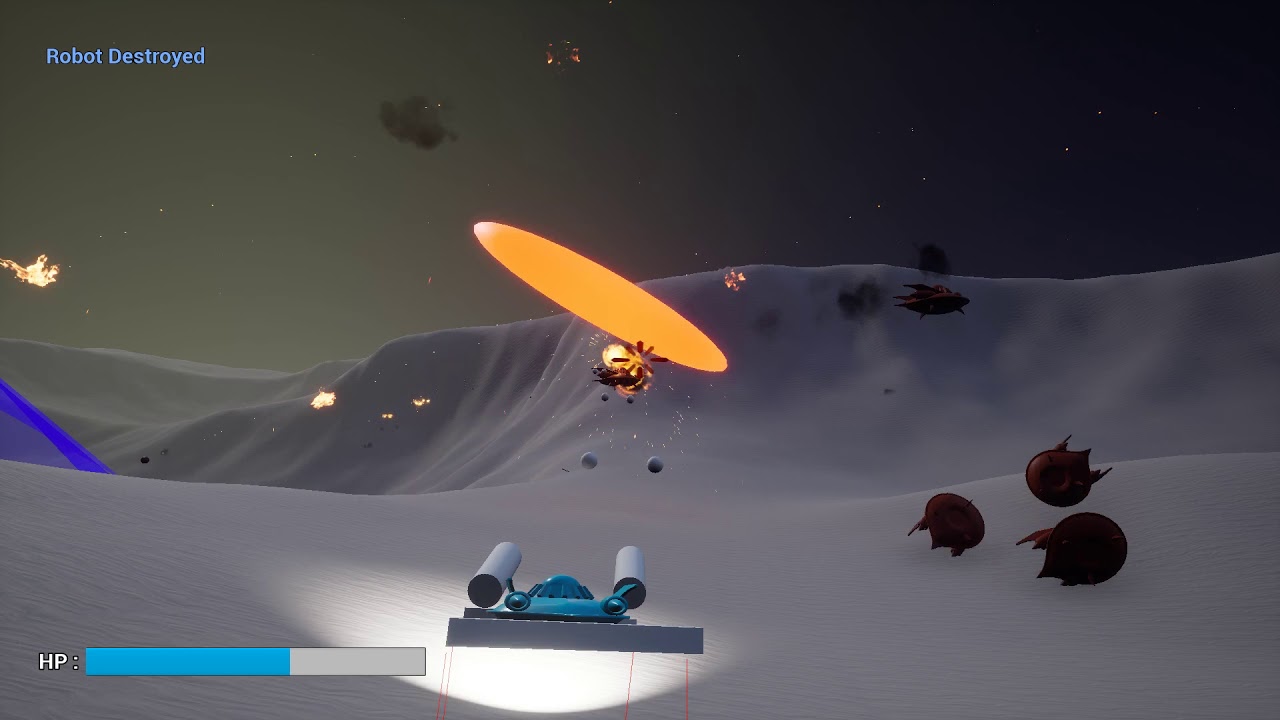


in this prototype i was monkeyng around with forces and rigidbody physics
plush yew
okey thanks! 😄 would you then also not create physics doors for players for interact with?
frank escarp
looks great, but it took a considerable while to get it to NOT flip over
and im doing a huge amount of hacks
and trickery
its a prototype so doesnt matter, but for a full game, you would do the physics yourself
plush yew
I have a maze here with dozens of doors. player interacts with them by just walking trough them and they open on their own. is this good or would something else be better?
frank escarp
physics handle would work great there