#ue4-general
1 messages · Page 283 of 1
 worn granite
What's the root component of the actor
 maiden swift
A static mesh. It used to be a blank SceneRoot. Same result in both cases.
worn granite
Any editor-only comps in the attach hierarchy ?
maiden swift
Just a static mesh and rotating movement.
Nothing experimental, either.
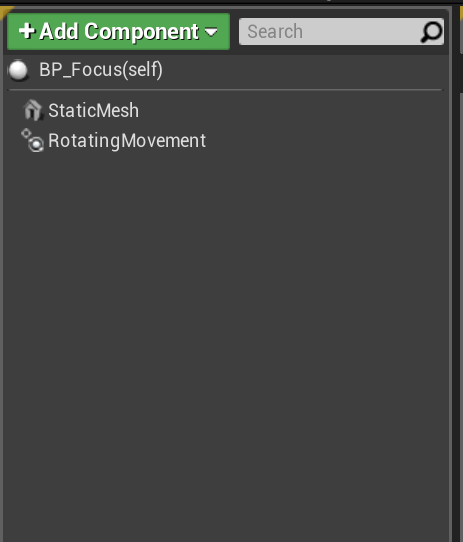
Perhaps most interesting: it was originally a really outdated Blueprint we made years ago, so I got fed up with trying to fix it and remade it from scratch. And it still does this.
So I started investigating other causes outside of the blueprint itself. Level blueprint, etc.
No leads yet.
 pallid compass
Tried using ref viewer to track anything touching it u might have forgotten boug
Bout
maiden swift
@worn granite No, never used it. Our project has no C++.
I only use VS for building.
I never even open it.
pallid compass
Check ref viewer on it
See if something touches it u have forgotten about
Just to rule it out
maiden swift
I think I already did that, but I'll do it anyway because I'm losing track of the things I've tried.
It's only being referenced once by the sub-level it's in.
maiden swift
I'm sure it will.
pallid compass
Print if any collison is triggered
Abd what with
Incase its spawning issues
Maybe
 plush yew
hmm if it was originally from an older version maybe just re-create the asset in 4.20 or whatever version you have?
pallid compass
Just an idea
maiden swift
@plush yew As I mentioned earlier, I already re-created it from scratch. It even uses different code and components. Still does the same thing.
maiden swift
Currently in 4.18, btw. Was holding off on upgrading to 4.20 until I fixed this. (Don't really need to, I just don't like upgrading with broken stuff).
plush yew
hmm maybe migrate your project to 4.20 in a copied folder, and try to make it in there? maybe its some engine related thing
worn granite
@maiden swift Ok, so my suggestion would be to build the game client from VS directly, and cook content separately. Then, you can attach the debugger in VS to your game (either directly or after you open it), and you can set a breakpoint on SetActorLocation. It'll be annoying to sort through to your actor (the first time) but you can then make the breakpoint conditional based on the address of the this pointer so it'll only break for the one object. Won't work over loads or w/e though.
That's only really going to catch if something keeps updating your actor to the wrong lco
Another place to look would be the components
might just be that your components are sitting at the origin for... some reason
maiden swift
OK, I'll look into both of those.
The real mystery to me is why this only happens in packaged builds.
worn granite
Iunno your project, could be a great many things.
maiden swift
Definitely the most bizarre bug I've ever run into.
Appreciation the insight, everyone. This has been a rough couple of days.
plush yew
what exactly is the asset? like a mesh of some sort that is rotating?
maiden swift
It's a blueprint class that represents a big, ominous sphere that just sits there and hovers and rotates in place.
worn granite
oh.... wait
 steady hinge
The sun?
worn granite
this is in a sublevel?
maiden swift
Yes.
worn granite
Try moving it to the persistent level?
maiden swift
Why?
I mean I'll do it just for kicks, but I'm curious about the rationale.
We don't like to keep gameplay objects in the persistent level.
worn granite
I'd thought it might be loading the level up in a weird offset
maiden swift
I thought about that, but it looks fine. And nothing else in the sublevel is affected.
But there's obviously something weird going on that I just haven't tracked down yet.
 winged crypt
any AWS users?
plush yew
yes sinn
maiden swift
Especially considering this is a new, from-scratch actor and it's still doing this.
plush yew
i'm one of the leading t2 micro guys here 😃
winged crypt
@plush yew you using steam subsystem with gamelift?
plush yew
no gamelift, raw ded server calls
winged crypt
damn
maiden swift
I'm going to take a break and make brownies, then come back to this later.
Thanks for all the suggestions, folks.
plush yew
worn granite
reasonable idea, that
plush yew
pfist this is how i do a rotating powerup
worn granite
Cya nick
plush yew
i ddont use rotating movement component, just that call
and i manually place it in the level
in each level it neeeds, or use spawn actor
never tried persistent level before haha not sure what it is
maiden swift
That's how we did it in the old actor.
Adding actor rotation on tick.
Still moved to world origin.
I prefer the RotatingMovement component unless I need to do easing.
And in this case I don't.
plush yew
ah
maiden swift
Appreciate the suggestion, though. 🙂
plush yew
yw
maiden swift
OK, brownies time! I need a break. lol
plush yew
lol
 marble spire
Guys
any good video about how to use anim notifies to make my dmg system better?
what should i use in the object reference when im casting to a animation blueprint
 amber sedge
in the default third person level, I have a projectile that has a capsule collision, I fire it, the walls block, but no even get's fired, any help?
maiden swift
@amber sedge What event are you expecting to be triggered by the collision? Event Hit?
amber sedge
Begin Overlap
maiden swift
A blocking hit is not an overlap.
If you want to trigger On Begin Overlap, you need to make sure both actors are set to generate overlap events and have the proper collision preset.
amber sedge
Just switched, not it does the right thing when hitting a player, but the walls are still the same thing
now*
Basically I am just trying to make a plasma launcher that applies radial damage xd
maiden swift
Check the collision settings for both the wall and the projectile. Make sure Generate Overlap Events is checked and the collision preset allows for overlap responses with their respective object types.
amber sedge
the walls are just static meshes
I didn't see any generate overlap events on the wall, just collision is set to block all
maiden swift
Can you give me an example of the effect you want this plasma launcher to have when it hits the wall?
amber sedge
just a simple particle effect the radial damage 😃
maiden swift
Just want to make sure overlapping is actually what you need here. 🙂
amber sedge
all of that is properly done when it hits a player
nvm xd
but yea, the walls don't block it
maiden swift
So the projectile goes right through the wall?
amber sedge
and damage is not applied when it hits a player directly
no
I have a capsule collision that blocks all
so it actually just sticks on the wall when it hits 😆
but doesn't generate an event 🤔
maiden swift
Oh interesting. So it continues to apply force to the projectile but doesn't go anywhere nor destroy itself?
amber sedge
yup
maiden swift
Strange... either way, you said it works when it hits the player. And that's based on an On Overlap event, not a Hit event?
amber sedge
I just changed it to hit, for a player it works for either a Hit or Overlap
maiden swift
On Hit should work for the wall, too. Since it's blocking it never overlaps with the wall.
Overlap means the two collision bodies actually cross boundaries.
amber sedge
It just sticks to the wall when it hits lol, doesn't move at all after that, kinda funny.
but for a player it hits, destroys, plays a particle effect, but radial damage is not working
maiden swift
Try using Event Hit instead of On Begin Overlap for the projectile behavior.
amber sedge
ok So
here's what's happening now
I removed the capsule collision, and changed it to sphere collision
and everything is working fine, the walls and player block it
but radial damage does not work
maiden swift
How are you applying the damage?
amber sedge
Apply Radial Damage With Falloff
Yea I really don't get how to do radial damage, there is no Damaged Actor, but then again it doesn't do anything
 next ivy
What's the most plausible shiny black stone material that medieval-era architecture? Marvel, Granite, Obsidian, ??
 chilly gale
Marble?
Can somebody clerify for me please, if I edit the reference of a Female skeleton thats the same as thos smaller build, to use the mannequin skeleton will that resize her to be the same build as the mannequin?
amber sedge
are you trying to use an Animation that was made for the Mannequin for the Female skeleton? @chilly gale
chilly gale
No I'd like to use the ones that came with it, I brought Quang Phan's Furry S1 and wanted to use ALS as the controler
amber sedge
came with what?
amber sedge
yea, and exactly what are you trying do with resizing to the mannequin?
if you want to resize your female character, all you have to do is set the scale for the mesh
and all the animations will work fine
chilly gale
No my worry is that if a do as the tutorial say's it'll rezie my char and make it the same build as the Mannequin
amber sedge
what does the tutorial say?
chilly gale
at about 1:30 1:40 on a litle https://www.youtube.com/watch?v=4pnN5OnXaSc&index=2&list=PLAR8Kc1ZLLKZjnKI_idX7Ik7mN0VORSm_
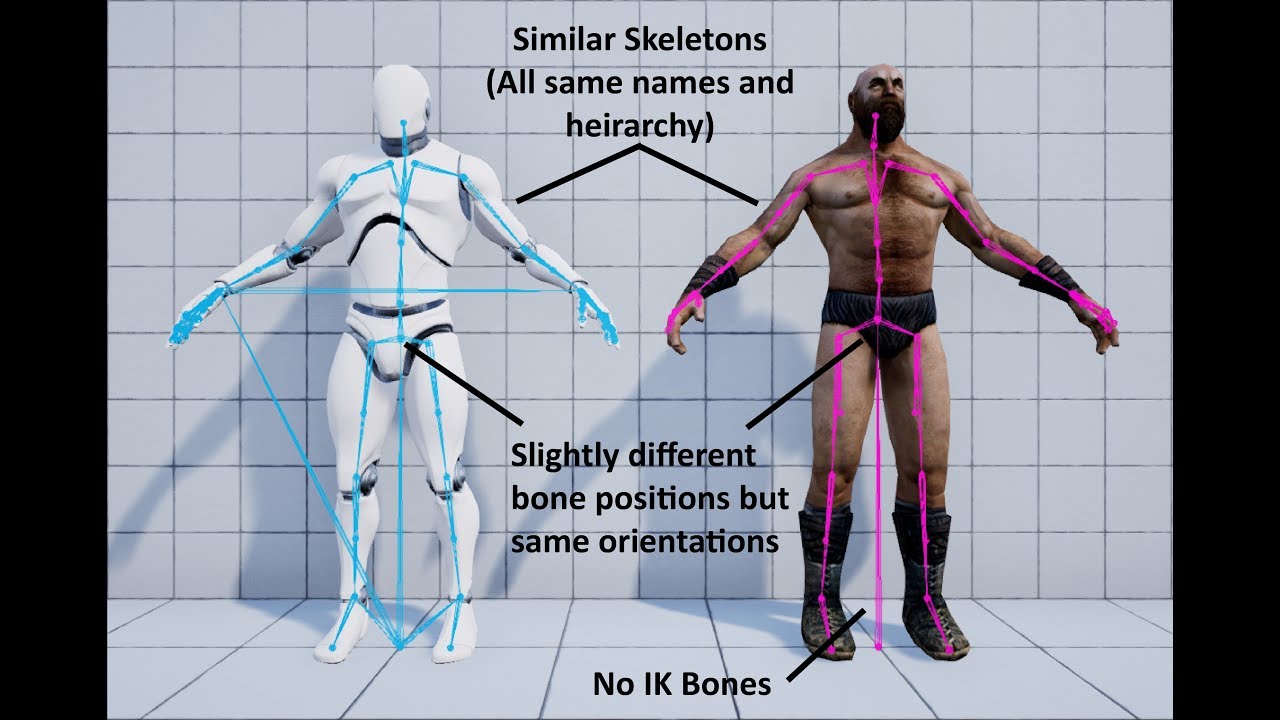
This video demonstrates how to work with a character that has a similar skeleton to the mannequin (mostly same bones, similar proportions, same hierarchy, et...
he changes the reference to the to refference the Mannequin skeleton
amber sedge
so you want animations that work for Mannequin to work for your Char?
chilly gale
No I jus want to make my char the player char using ALS
amber sedge
ALS?
chilly gale
shes much smaller build wize
amber sedge
she looks about the same tbh
amber sedge
as long as the characters have the same bones that the animation uses, everything should be fine
size doesn't matter in animations
chilly gale
Ok I was jus trying to replace the Mannequin with Furry
amber sedge
if you want to replace\
just click on the mannequin, go to where it says "Skeletal Mesh"
change it to your char
then you will need an animation class for your Char, or she'll just T-Pose
chilly gale
That i under stand, I got it working in one level and forund when I wnt to another level she loaded but not animation even tho I changed the gamemode and char
amber sedge
I don't think you need to change the character
when I loaded different levels, I just kept everything the same and my characters were fine
the gamemode only change if you actually have something different
chilly gale
Ok will have a second look and see what I missed and maybe ask in Advanced locomotion Systen Discord case I missed somit, thanks for trying to help
amber sedge
NP, sorry if I didn't really help :/ I am fairly new myself
 sullen wraith
Would anyone here want to take $60 USD to convert a skeletal mesh, to work with my current system, from what I can tell it's missing bones. Using a mesh from scifi pack, trying to get it to work with my UN4 Manequin,
 weary basalt
@sullen wraith Try making a job listing with the @plush yew you can check the #more-resources channel for instructions on how to use it.
It will appear in the #looking-for-talent channel
weary basalt
No its not we are not official.
Its community run. However Epic Staff do sometimes make an appearance when they have time.
plush yew
How's it going everyone. Quick question, is unreal better for building large cities in vr than unity?
 hot drum
I have a blocking volume here

But as you can see It doesn't work
I set the collision to block all
 thick ridge
What are you using for the player pawn? What is the collision type on your pawn?
plush yew
@plush yew with the optimizations in rendering and various instancing plugins you can find on the unreal marketplace, IMO it's better than unity for city building. whatever you do though, make sure you pick up 4.20.1 😛 4.20 has some unforseen issues with CPP. in the process of updating myself. it's a good idea to stay up to date by looking at the unreal github tags section and checking like every week.
sullen wraith
im still on 4.19, is upgrading pretty much required?
hot drum
@thick ridge He's a pawn class
plush yew
@sullen wraith yes if you want niagara / new network features and some other optimizations. in the process of making my game, i've always found keeping up to date with the latest release (not preview, but release) is always really important. and it feels good to know the stuff is optimized and running good.
hot drum
I converted my pawn to character and now it works
But now it jitters when I run into it
plush yew
just updated to 4.20.1. nice
fixed an issue i had with compiling from an outdated VS lol
 sudden agate
Does UE somehow allow having a shared (Marketplace) Content for all projects without adding each single Marketplace content to all projects?
plush yew
i always just import the stuff from launcher to the game, or add code plugins to the code plugins folder from the launcher engine plugins folder. unless you use a batch script or watch the folders i dont think its possible to auto share
 thick ridge
Just curious...are you hitting the light fixture on the ceiling?
 digital anchor
have you tried to turn on allow translucent selecion before trying to click on it?
 tight sun
@digital anchor I just restarted ue4 and its gone.. was some kind of glitch for sure
 tepid bronze
I have a really dumb question: Is it better to use even units when modeling something to scale or would you round up to the nearest whole number?
hot drum
H e l p p l z
 grim sinew
It's best to use power of 2 when modeling things modularly, to make it easier to snap. 32cm, 64cm, etc
That way you can always cut the snapping distance in half and it'll always line up perfectly
 pallid compass
How are u ment to pm people in lft when they dont give there discord name
 limpid sandal
weird bugs from 4.19 to 4.20
everything works except 2 deprecated stuff i fixed
but now, I have some camera interpolations, which make the camera shake lol
plush yew
@limpid sandal im on 4.20.1 😃
 copper tundra
Hi guys
I need some help plz
How can I make a character
And how make it holiding a weapen
digital anchor
broad questions, break it down, create a character class, make animations for it holding a weapon, attach a weapon to his hand.... quite a few days of work
digital anchor
wat xd
 misty falcon
sup
got like a thousand keys in a sequencer
on rotation.x
now I need them all rotated by 180 degrees
I can not possibly do this by hand 😅
anyone got a clue on how to 'offset' 'em all?
 bitter iris
Is UE4 4.20 stable enough to move to yet or ive seen some people struggling on it
misty falcon
found it! on the location I had to press "+ Section" -> "additive"
gl with your projects boys
 obsidian ore
is there a way to blend between sphere reflection captures? it looks as if only the nearest capture is selected, which results in a popping effect
obsidian ore
if i visualize the reflections it looks like it does not even pick the nearest
i find it hard to make sense of what's happening
bitter iris
When converting box brushes, I've made a building out of it, the collision doesnt export after "Create Static Mesh"
How can I get the collision from it
plush yew
Whats the best way to import models from blender
 bleak peak
Hi guys, Im looking for a capture the flag tutorial. but can't find any :'/ Do you guys have some?
sudden agate
how would someone implement Sequences like Summons etc. in a Turn based environment?
the older Final Fantasy Games for example use have different battle maps, but when summoning or using a special technique, a movie-like sequence is shown
How would someone create a sequence that is dynamically ?
Take for example the floor of the Brothers (FF8) Summon:
https://www.youtube.com/watch?v=rC4rqm3UyMo

Decided to redo these in HD since they're ones I found were very low quality. Also my favorite summon.
limpid sandal
Does the engine also keep backups of blueprints over time?
 trim trail
turns out orthogonal camera is bugged for 4 years 😦 https://answers.unrealengine.com/questions/31268/orthographic-camera-render-broken-402.html
limpid sandal
Power went down and now a bp doesn't open
trim trail
im not sure why they dont fix it, some devs want to make isometric games and arcvhiz would have a good usage for this type of view, for presentations
i wrote comment and voted, if you could vote too, I would appreciate it 😃
 tropic pilot
why can't i create a destructible Mesh out of the "SM_RocK"? im in 4.20 and when i right click it doesn't say "Create Destructible Mesh"...... :S
bitter iris
@tropic pilot When you select it in content browser like this. Does it not show that?
tropic pilot
@bitter iris no :/ it's weird
bitter iris
that is weird im in 4.20 too
tropic pilot
@bitter iris found it out
bitter iris
@tropic pilot What was it
sudden agate
probably disabled APEX plugin
tropic pilot
yes 😃
bitter iris
lol
tropic pilot
@bitter iris are you good at DM's?
bitter iris
Nope, its annoying to me lol
tropic pilot
xD
 tawdry raptor
WHATS THE BEST WAY TO IMPORT A RIGGED CHARACTER from cinema c4d files into unreal
sorry for caps
these files say they are rigged with animation
 sonic pagoda
@tropic pilot i once showcased ue4 for a newbie and i was like, now watch this im going to create this awesome destructible mesh and it will explode, and i went to click on the button and wtf its not there... the guy just stood there looking at me like i had no idea wtf i was doing
and yea apex was disabled by default on 4.19 so that was it
tropic pilot
that sucks :p
but yea DM's are annoying -.-
i want them to only break when they touch the spike... but when i enable gravity it breaks just by touching the floor and everything! now i have set the "Damage Threshold" to a huge number :S
got it to work
isn't it possible to set the MassInKg for a SM_Rock_DM inside an actor BP?
 tulip helm
Anyone know the general ratio of BP to C++ used in Epic's games?
sonic pagoda
you can do a couple of things, @tropic pilot you can use a static mesh and then replace it with a DM upon touching or interacting with the object that yyou wish (a switcharoo)... or you can also set it not have impact damage and then activate impact damage on overlap with desired object ...
i still dont get DM's 100% because there are so many settings to play with so generally i just do the switcharoo because its guaranteed to break when i want (which it will only break when i do the ' switcharoo' pratically spawning the DM in yhe place of the static mesh make sure the static mesh doesnt collide with DM's, and vice versa and then destroy the static mesh and apply damage to the DM making it fracture
in that order
also add a impulse component to give some explosion effect if desired
tropic pilot
i dont want an explosion effect 😃 im trying to make a "Crusher Machine" that is crushing ore (SM_Rock)
but the "SM_Rock" is way to light... when they hit the spikes sometimes they flight away -.- they get's kicked high up in the air...
i need to set the MassInKg way up so they dont do that
sonic pagoda
whats probably most likely happening is the spike is passing thru the rock and then physics is doing some crazy multiplication of force as the objects go inside each other
its probably not related to mass or weight
tropic pilot
hmmm :/
tropic pilot
cause it's not fun to watch the "Crusher" to intantly crush any ore :S as i will have different "Tiers"
sonic pagoda
if its an actor you can set in the construction script to override mass
sonic pagoda
off the spawn rock in the first picture ypu can pull kff that blue node and override mass right there
but i still think its not related to that, but still worth trying
tropic pilot
look at the 3rd picture
sonic pagoda
ahh
tropic pilot
uhm... it's asking for a bone name?
tropic pilot
oh wow xD hahaha
now it's so freaking heavy that when touching the floor or wall it instantly breaks :p
so it looks like the KG actualy works
but now i would face another problem tho
they break on impact not by touch
sonic pagoda
you can always deactivate impact damage
and then Apply Damage to the DM from an event overlap or event hit (if its simulating physics)
i think you might need to re-enable impact damage as well
but as im away from my pc i cant look at my own examples of this
make sure you are also using thr right apply damage (the dm one) and not the one for actual damage (i know its confusing) but there is a specific apply damage for destructible meshes, it will say on the node header
tropic pilot
i'll try but as you mentioned i need to re-enable impact damage?
sonic pagoda
well try with both its like 1 node anyways
i meant disable impact damage on the dm itself, and then renable by blueprint npde
on the event you are using to apply damage, and be4 applying damahe
 dire storm
I'm so excited for the next marketplace sale!... that is all
Does anyone here use UE4 on a laptop? I really wanna get another desktop since mine is getting up there in age but I'm going to school and probably should invest in a laptop for ease of access.
sonic pagoda
when is th3 n3xt sale
amber sedge
Does anyone have an idea of how to use Apply Radial Damage With Falloff, doesn't seem to work not matter what I do?
sonic pagoda
i sw3ar im not trying to be cool the 3 is just right next to the E
and im too lazy for backspace
@dire storm i started off with a 2014 macbook pro for ue4
i eventually switched to windows, and desktop because of landscapes
dire storm
The next sale if its like last year will be end of Aug timeframe
sonic pagoda
but you can also have an external gpu if you want portability
dire storm
I called it the back to school sale but I think it was just called a summer sale or something like that
yeah I would honestly much rather just buy a beast desktop but...I'll be spending so much time at school
sonic pagoda
theres a lot of super powe4ful lappies with nvidia 1080M
just be prepared for shaders compiling wait times
i have those on my 980ti windforce and it still.makes me cringe, but then again those are my.official potty breaks
dire storm
I'm pretty sure any laptop I get now will be significantly more powerful then this old desktop.. Just won't have the hard drive space.
sonic pagoda
external hdd for steam games, running on usb 3.0 you wont feel a hitch
dire storm
I'm still trying to find the legendary money tree I can shake to get both :). That and the bacon tree... cuz bacon
dire storm
I'm trying not to play any games. Don't really have the time if I'm gonna do classes and also UE4
sonic pagoda
yes, you wont have the time
i always tell myself im going to relax and play a game today and its 1 am and im still working
dire storm
although I am addicted to HOTS and darkest dungeon
there's always something that brings me back to darkest dungeon after I rage quit after losing like 5/6 teams of lvl 6s and all their trinkets... I'm a sucker for pain
sonic pagoda
whats HOTS
dire storm
Heroes of the Storm. Blizz moba
dire storm
I love the art style.... HL has become a chore and I've lost a lot of interest in the game lately... but if I accidently open it I'm prone to losing track of where I am and discovering I just did an 18 hour binge session which makes me sads
sonic pagoda
im still playing starcraft 2 that sums uo my blizzard games
dire storm
SC2 is always fun. I still go back and load up the campaign and do a playthrough like once a year
I can't play that game competitively. Its too fast paced and all these damn kids got the build orders memorized for everything. I get stressed out the first time I see a zergling in multiplayer lol
sonic pagoda
lmao, i like the multiplayer , sometimes i own and sometimes i get owned its tough because everyone has a different playstyle and its hard to account for ppl who build for late game or for those who rush... you cant defend or attack against everything so its a hit or miss thing, and with teams you get lucky have good teams or the entire team sucks its very dynamic
but thats what online gaming is about, the dynamics of different playstyles right
i also learned to not get stressed its just a game, just hit that quit button and try again theres no shame in keeping yourself free of stress
just dont disconnect
😂
@dire storm what kind of game do you plan to make in unreal or is your goal to learn first and then decide?
tropic pilot
@sonic pagoda still here?
 vast pine
https://youtu.be/5IZIlrvqBIo about 14 seconds in. I'm hoping to see how I might get a function call to do a similar hey look here target when it comes on screen

 cedar snow
if a SceneComponent (that's not necessarily the root component) generates an overlap event, does it still get relayed to the owning actor (the OnBeginOverlap method on AActor)?
tropic pilot
isn't it possible to overlap with debri from a Destructible Mesh? :/
vast pine
Wonder if even just a umg using screen space on actuaor could just be used like an animation. Not sure if it animated it'll replay the animation each time entering screen
 next badger
Newb question, is it possible to render out lower resolution from the camera than viewport has?
it is possible for render targets, but i'm talking about main camera
plush yew
hello guys Iwant to ask you how to delete the thing when you make it with brush??on the level
tropic pilot
uhm.... is there a limit on debri from a destructible mesh? cause i can see that they get removed
 soft pawn
i'm trying to do a map but that's dosen't work someone know how to do that? http://prntscr.com/kchnj9
 next badger
@soft pawn a map?
next badger
@soft pawn make a new level?
soft pawn
a first level
next badger
@soft pawn you need to make a project first
soft pawn
okay
next badger
@soft pawn i recommend 3rd person or first person as a template
 grim ore
soft pawn
grim ore
soft pawn
okie
plush yew
@soft pawn if you want to try to get some pre made stuff, dont forget unreal marketplace too. some really useful stuff on there. just got done talking with one of the devs of a marketplace asset and he got back to me in a day with a fix for his code plugin. really good people on there 😃
next badger

Full Blog Post w/Notes: http://www.worldofleveldesign.com/categories/ue4/ue4-create-new-project.php Unreal Engine 4 Tutorials List: http://www.worldoflevelde...
dire storm
@sonic pagoda I'm just learning right now. Everyone here I'm sure has a million game ideas. I'm just trying to learn how to implement stuff atm
plush yew
you dont have a genre picked out yet?
@dire storm good idea to learn first and then pick out a genre later
dire storm
eh I'm aiming for general gameplay programming so I'll be marketable to different genres. I would rather learn how to implement everything first.
plush yew
maybe when you are going thru tutorials you will find a cool idea 😃
dire storm
cool ideas are a dime a dozen
plush yew
thats what happened to me. i was looking at a 6dof tutorial and now i am almost done with my first game lol
dire storm
I have 2-3 books and tons of microsoft word documents full of "cool game ideas".
ideas are nothing if you can't implement them.
dire storm
very nice
plush yew
still fixing my net code
thank you
but i had to work at it every day with no friends for a year lol
so its a lot of work
dire storm
I'm spamming tutorials in between classes and whatnot. Just finished my summer semester so now I have a few weeks to actually learn what I want to learn and not mindless dribble.
dire storm
I feel ya. It takes alot of sacrifice to follow your dreams
plush yew
honestly i am quite lucky because i have some capital saved up from my trust fund and dont have to work - but yeah it is hard to realize a vision but once you do it it's really nice
still though i am working on my singleplayer campaign lol taking forever
i only like coding multi. single takes me so long, all the lights and everything
@soft pawn did u find a good tutorial yet? keep in mind plural sight and some other places like udemy have tuts too
soft pawn
still searching
plush yew
ok cool
tawdry raptor
is there a quick way to make these files be able to import in unreal editor? Or do I need to export them to fbx one by one???
sonic pagoda
@dire storm my favorite and first tutorial was the official twin stick shooter tutorial
it goes over every tool in ue4
and it just so happens that ive been working on a twin stick shooter for about a year and a half
mere coincidence
👀
@tawdry raptor you can look online for a batch converter for c4d to fbz
fbz
fbx dammit
i know there is a autodesk converter but i dont know if it supports c4d
next badger
@sonic pagoda FBX converter only supports 3DS, OBJ, DAE, DXF
next badger
it's only for meshes
pallid compass
I mean i remember someonr doing it but
It was like
Super unoptimised and some normal and face issues
Cant remember who was doing it
next badger
see no reasons doing that, in most cases converting to fbx is not enough
for SK meshes you have to have proper skeleton, with root bone, for LODs you need a proper grouping, etc
sonic pagoda
ive always made my own characters so inwouldnt know @tawdry raptor why dont youbjust usr something like make human or fuse
where did you source these files?
tawdry raptor
I got it working
but I have another issue
when I download the animation starter pack the files are UASSET
the tutorial im watching imports this pack as fbx
when imported in fbx it lets you choose a skeleton
but when I download the pack it installs it in my project as uasset
dire storm
random basic programming question. Everyone uses double because if you use int it just gets converted to double at compile time anyways or am I way off here?
amber sedge
Does anyone know how to get Radial damage to work? Doesn't seem to work no matter what I try
 glossy flame
@dire storm ...you're way off, lol.
dire storm
wouldn't be the first time
glossy flame
Integers and doubles are fundamentally different data types.
dire storm
😃
glossy flame
Integers represent whole numbers, whereas doubles are floating point numbers containing a decimal component (mantissa) and an exponent.
tawdry raptor
how can I make ussaet files into FXB files so I can pick my skeleton??
dire storm
I'm trying to remember one of my lectures from a few months ago from an online class (maybe UE4 related) and it had something to do with "Just use double"... but seemed wrong which is why I'm asking
dire storm
@glossy flame yup I agree with the whole numbers and floating point thingy... 😃
@plush yew ❤ the rock. Its a nice rock
plush yew
@dire storm thanks, i have about 20 variations of it, just need to fix the back being stupidly dark
dire storm
did you try lighting it 😉
dire storm
it would appear as if the light source is rotating with the rock as you rotate it around
if you painted it that way its just like.. you know.. the texture and not taking external lighting soooo maybe your textures are too dark
plush yew
@dire storm guessing you've never used substance?
plush yew
oh then nvm lol
thanks
took about 5 mins to sculpt and 10 minutes to retopo
then 10 minutes to texture
dire storm
and 45 minutes to figure out why its lighting is off?
plush yew
its not the lighting -_-
dire storm
@plush yew Best of luck figuring it out! I even tried googling it for you because it looked interesting and found myself falling into the webs of youtube
tawdry raptor
wait so I can only use the animtion starter pack on their skeleton? I cant use it for a character I bought online??
dire storm
ehh you can map the bones and whatnot
I think there's a standard mapping
Check the tutorials on UE4 animation on youtube. I recall watching one that goes over how to fix mapping issues and auto mapping and whatnot
 vivid girder
Anyone know how to make splinemeshes have more rounded connections?
amber sedge
How do you set up the character normally for first person? Change the arms, make an actual body?
 grim juniper
Set the tangents appropriately
vivid girder
grim juniper
The mesh itself also needs to have enough verticies
grim juniper
Then that's the issue
vivid girder
grim juniper
Yup
The verticies are what get moved around to make it bend, so the more verts you have along the length of the mesh, the smoother it'll be.
 inner perch
Is there any way to implement quick-save that doesn't require tons of manual work?
vivid girder
The game needs to know what you want to save
The save feature is actually very intuitive imo
worn granite
@inner perch There's a few plugins centered around the idea of automatic tagging for serialization.
You might start looking there.
inner perch
Ideally I'd like to save EVERYTHING in my level and then restore it - AI, physics, etc
Checkpoints aren't an option
worn granite
Oh.
Yeah, you can do that with one of these plugins, but it may/not require additional tweaking.
inner perch
I don't really want to tag every single variable or smth 😄
worn granite
idk what to tell you.
There isn't really a solid way to just take the entire game state and shove it into a save file.
vivid girder
That'd be a big save file
inner perch
Well, some games do that somehow
worn granite
doesn't require tons of manual work?
You're sorta SOL
Tagging/flagging stuff to be saved out is probably the least amount of work you can do.
inner perch
I don't know where to start...
vivid girder
Have you used the basic save system in-game yet?
inner perch
yes
vivid girder
Then just build upon that as much as you want
worn granite

A simple and fast tool to save any number of actors (variables and references), to a single file.

Savior Auto-Save Plugin is a C++ Plugin designed to extend UE4's generic 'SaveGame' system, providing easier to use storage framework for Developers and Designers.
These plugins, IIRC, would be a better starting point. Given that you wanna do the least amount of work possible.

With the Rama Save System Plugin you can use the power of my C++ code in BP to easily save and load the state of an entire dynamically changing world! Reload actors, multiplayer pawn positions, runtime-created world geometry, and anything else you want!
There's also this one
(there are others as well, but they tend to be more basic wrappers of SaveGame)
inner perch
Has anyone used any of those plugins?
SaveGame accepts just one object
I mean, I can't really shove the whole level in that one object
worn granite
You could theoretically do your system with SaveGame.
But it'd be tons of manual work
inner perch
I use SaveGame to save the player's loadout, but that's very simple
2 arrays and an enum 😛
worn granite
I've used SaveGame for more complex cases.
inner perch
In my case - it's either the whole level or nothing
That Savior plugin seems to be what I need, but has anyone used it?
tawdry raptor
this is my imported animattion
 gritty matrix
You don’t need to save the whole level, just the key values of various components. For example, a block that can be moved around the world just needs to know which block it is and it’s transform. Something else might want transform and heath remaining.
I’m still relativity new to UE4 but in other engines I’ve written a simple interface ISaveData (or whatever) and give it methods for SerializeSaveData and DeserializeSaveData. Have a SaveManager system deal with collecting this information and saving it, as well as allowing it to spawn / modify objects as needed.
You might be able to use reflection to make it easier to grab some information rather than the above.
It’s not a quick job, but you’ll get complete control.
tawdry raptor
this is what I want to drag and drop into my project
but I get this message, why? is it broken?
amber sedge
Cute how radial damage with falloff does not work ONE bit lmao
vivid girder
Open up the skeletal mesh and the animation in your animation studio
Make sure the bone names are all the same
amber sedge
love this engine
vivid girder
Also, the skeleton you're targeting needs to be the same
 delicate needle
I'm stuck on a very simple process. I have come close to solving it with casting, but not quite. I have an actor whose only purpose to hold an public variable array of actors in my scene (these actors are basically pawns with cameras), I would like to access that array from my main hud widget. What is the best way to do this. I know it is simple, but for some reason I'm grinding my gears.
vivid girder
You can access it through the player controller if you want
I would store the reference to the actor with the array at beginplay
gritty matrix
@delicate needle Could you setup a GameInstance instead? Easy to access this from anywhere.
amber sedge
time to try another method of getting radial damage bc have this doesn't work properly lmao
gritty matrix
@amber sedge From the docs on radial damage: “Hurt locally authoritative actors within the radius. Will only hit components that block the Visibility channel.”
Does this match your setup?
tawdry raptor
@vivid girder what do you mean the need to be the same? They all came as seperate animations c4d files I exported each one to fbx file and i get that error when I drag and drop
the fbx file into unreal
vivid girder
Animations have to be targeted to a skeleton
amber sedge
What does it mean to be visible? I can see the characters body, and I can shoot him properly. @gritty matrix
vivid girder
So, there's a different skeleton that you're trying to target
vivid girder
forget about fbx and files
 gusty trout
I should get this soon
gusty trout
XddekeieoeoeeoOoo
vivid girder
The problem is with the skeleton you're telling the animation to play on
vivid girder
That's why i was saying you should open up the skeletal mesh/skeleton fbx in c4d and then one of your animations
gusty trout
jonAsket
vivid girder
<@&213101288538374145> ^ troll
weary basalt
@gusty trout Can you keep it constructive please mate.
tawdry raptor
I opened the fbx file in c4d now I can see the animation works
weary basalt
This is #ue4-general channel. Keep it on topic please.
tawdry raptor
but how will this help me?
vivid girder
It's not that the animation doesn't work, it's that it's targeting a different skeleton than the one in unreal
I'd check your bone names first
tawdry raptor
I opened biped fire 1 first and imported this
could the problem be that im putting them in the same folder?>
and its trying to target the first one?
because the next file is called biped fire 2
vivid girder
can you send your skeletal mesh and a single animation here
i'll open them up and look
tawdry raptor
should I send the c4d file or fbx file?>
tawdry raptor
this is the first fbx file which is also an animation, thjere are 20 other files like this with different animations
yes my character was rigged to c4d and thats how the files came
its an alien
vivid girder
You'll definitely want to research your export settings
tawdry raptor
in c4d?
vivid girder
yea
tawdry raptor
why is something wrong with my fbx file?
vivid girder
You're including the full mesh in your animations
tawdry raptor
so dont include the mesh?
when I export in c4d?
or just dont import the mesh in unreal
amber sedge
Do I really have to create w sphere collision, apply regular damage, and calculate radial damage myself just because engine doodoo? xd
a*
that's not even efficient doe
Engine, pls work
vivid girder
These are some of my team's animations
The 2 highlighted were some of the first ones before we researched export settings in maya
They all have around 100 frames
amber sedge
actually it is pretty efficient to make a sphere collision
vivid girder
notice the size difference
gritty matrix
@amber sedge Visible in this case means that if you performed a trace with the Visibility channel, this actor would block the trace (doesn’t matter if you can see it or not, it’s all about collision settings).
Take a look at your actor and project collision settings. Make sure your actor is set to block the visibility channel.
vivid girder
@tawdry raptor Can you send your skeletal mesh fbx now?
tawdry raptor
I thought I did
vivid girder
nah, just the animation
gusty trout
does unreal engine cost?
amber sedge
@gritty matrix There is nothing listed for Collision Traces
tawdry raptor
oh i see this one stands with his arms out this might be the one I should import first?
vivid girder
most likely
amber sedge
@gritty matrix you're talking about the collision in Project Settings right? Like where you do Action Mappings and stuff
gusty trout
pls tell me
tawdry raptor
@vivid girder ok so im going to try to import that one and then the rest and see what happens
vivid girder
Yea, no keyframes
gusty trout
Does unreal engine cost?
vivid girder
You should start with udemy tutorials then
gritty matrix
@gusty trout All info for that is available on the UE4 site. If your revenue is more than $3000 per quarter you’ll need to pay 5% of revenue above that.
To learn, start small and look@at the same projects & tutorials.
gusty trout
@vivid girder ?
 frail sun
For umg widgets and DrawLines I need to add 2 vector2d points to the array per line, is that right?
vivid girder

Udemy
Learn C++ from scratch. How to make your first video game in Unreal engine. Gain confidence in programming.
gusty trout
thanks
gritty matrix
@amber sedge Yes, look at what your actor has as its collision settings and cross reference this with the info in the project settings. Basically, make sure your actor is blocking the visibility channel (can prob set to ‘BlockAll’ to test the radial damage).
tawdry raptor
wish me luck im going to try to drag and drop the other fbx files
damn it gave me same message
amber sedge
@gritty matrix I have my Mesh Collision set to block all, that was I can detect headshots, and my Capsule Collision is set to Pawn. But I don't really understand the Project Settings Collision things that I need to do, could you like send a screenshot
 wild glacier
gritty matrix
wild glacier
gritty matrix
@amber sedge Sorry, can’t send a screenshot now as I’m on my phone in bed (it’s 1.15am here in the UK). It sounds like you’re probably setup correctly though (at least in terms of visibility) so the issue with the radial damage is likely to be elsewhere. Might be worth creating a new project and create the most simple test case you can think of as it’s probably a setup issue rather than an engine issue (although it wouldn’t be unheard of 😉 )
amber sedge
@gritty matrix ok, thanks. Also goodnight
@gritty matrix if you're still here, I just create a new project. Just made it a first person. I made it so that when the ball hits the squares, and makes the impulse, it applies damage. I made it print a string on AnyDamage. (The amount of damage). I have the collisions set like I have in my project. Didn't work D:
grim ore
so the issue is you cant get apply radial damage to work or it wont falloff?
amber sedge
it doesn't work at all
grim ore
It's working here. do you get true or false from the output of the node?
amber sedge
didn't try that, give me one sec, I did however print messages on Event AnyDamage
grim ore
on the item getting hit right?
amber sedge
When the item hits, it applies radial damage and does other things like explosions
grim ore
I just tested with a new FPP project. Made a new actor with a static mesh in it. Hooked up Event Any Damage and Event Radial Damage and both trigger
amber sedge
just tested the output, didn't print :/
yea, I made a new project too, and I guess it did work there, printed strings, but actually printed 2
grim ore
in the projectile on the FPP Project I removed the apply impulse as it wont fire properly on a static mesh that is not movable and had it apply radial damage. I set it up to 500 radius, 100 damage, and Damge Type for the Damage Type
so it did work on the new project? if so its a collision channel or collision setup issue I would guess on the first project
amber sedge
For the mesh, on both projects I have the same thing set for both Capsule, and the Mesh
Mesh is blockall, capsule is pawn
grim ore
Is that on the projectile or the item receiving the hit? If your test project worked then we atleast know it's a working idea
amber sedge
for my first project, no one is receiving the hit. for my FPP I think it's the projectile and the First Person Character that receive the hit
grim ore
well the FPP shouldnt really be an issue unless you trying to hit yourself with it after you fire?
amber sedge
for FPP the output prints true
grim ore
and your projectile shouldnt be receiving a hit as well, just your item you set up to receive damage
amber sedge
I was trying to apply damage to myself just to see if it even works
grim ore
oh well that's weird
uh how are you trying to do that? with just the node and nothing else?
grim ore
works here
uhm
ok your trying to do it with the projectile or just with pushing the button and the node?
amber sedge
for FPP I do just the node, and in the FP class, I make it print a message, prints 2. for my main project, nothing happens
grim ore
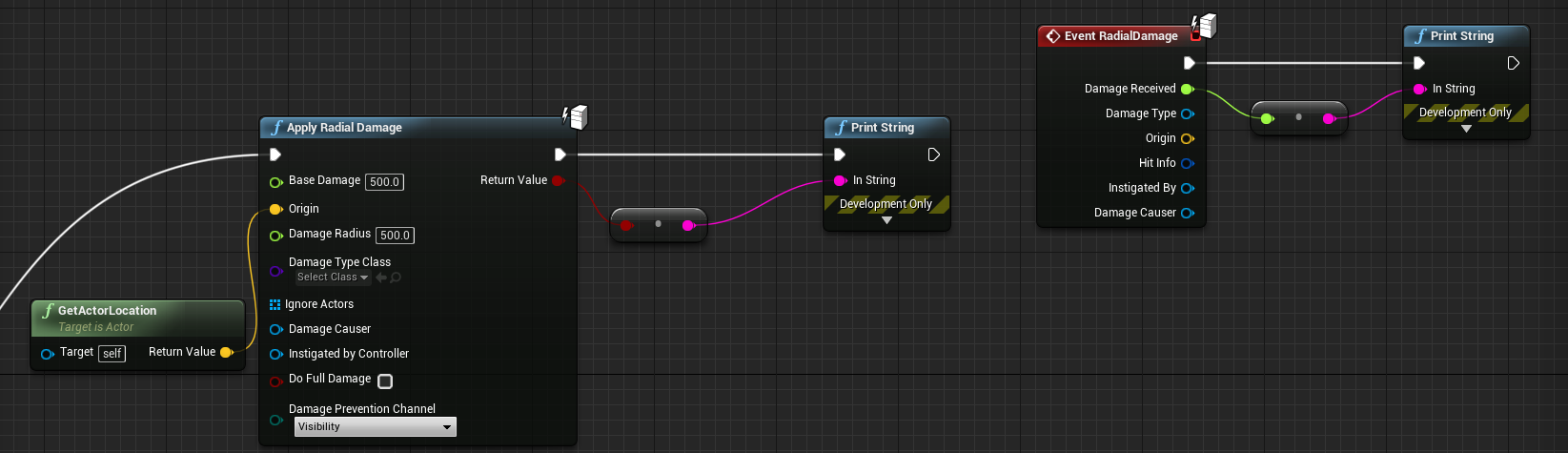
this off my InputAction Fire in the FirstPersonCharacter in a new FPP project prints true and 500 (damage amount)
amber sedge
ok just found out the projectile does NOT take damage
grim ore
This is inside my FirstPersonProjectile, I changed the event hit to this and it prints out true https://i.imgur.com/s2yIPGj.png
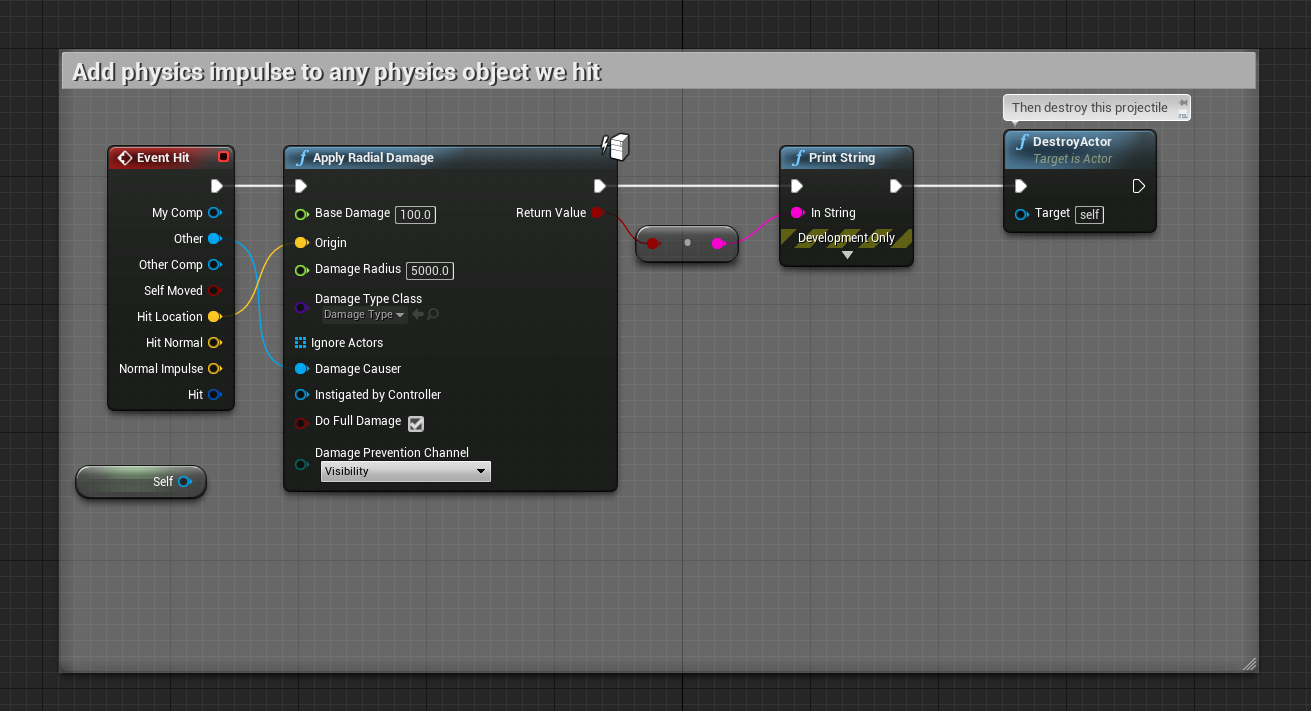
this in my BP_Damagable Wall which is just a new BP Actor with a static mesh in it, https://i.imgur.com/y9zpgDN.png prints out my damage amount
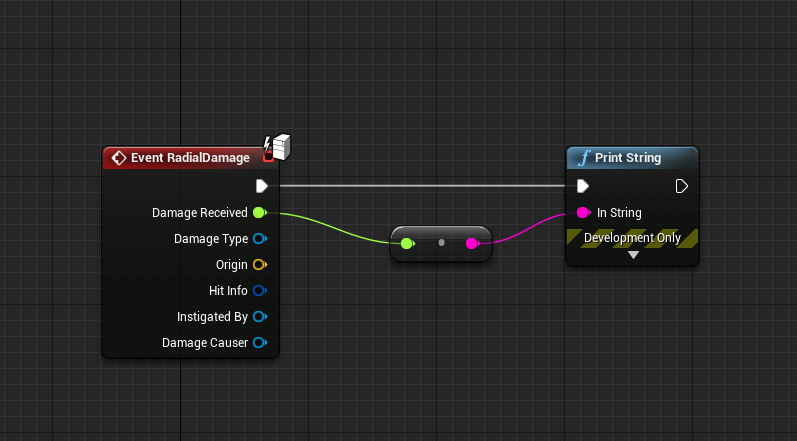
Even putting 2 of them side by side and firing near them they both print out the damage amount (need the item hit to be the damage causer on the apply radial damage or else it blocks the actual radial part and only hits that one item)
amber sedge
I am using radial damage with falloff btw
grim ore
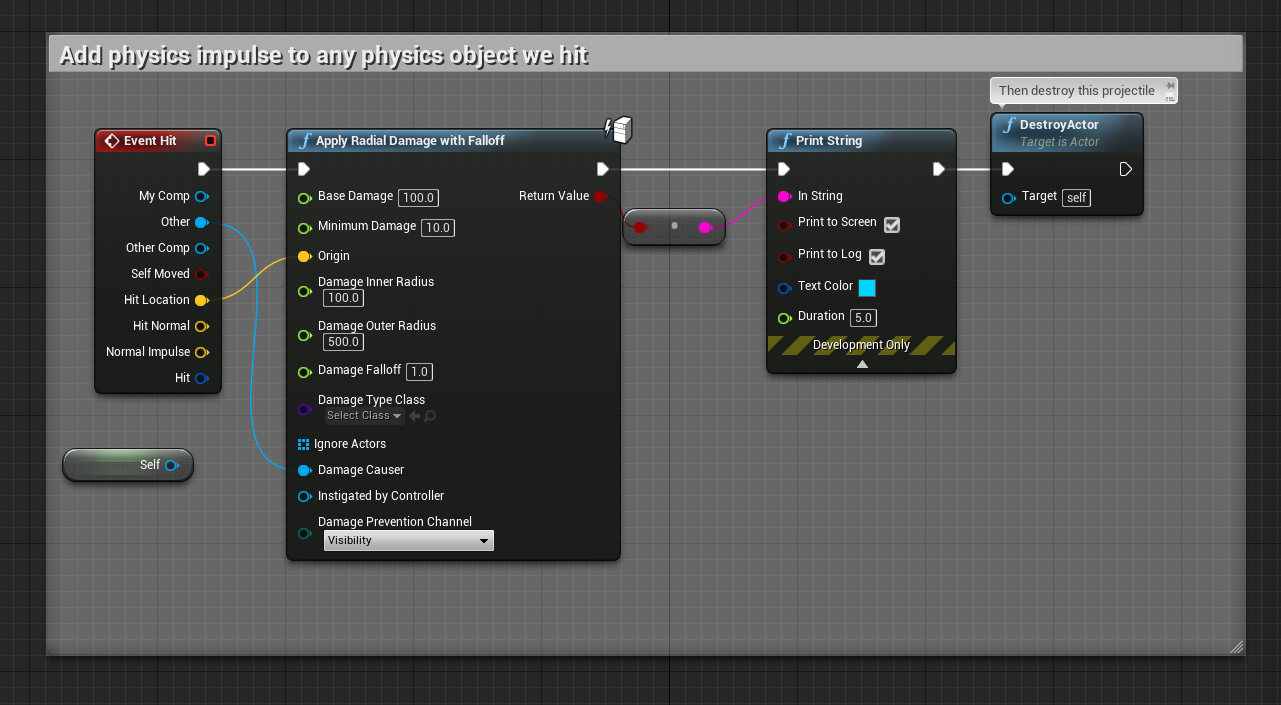
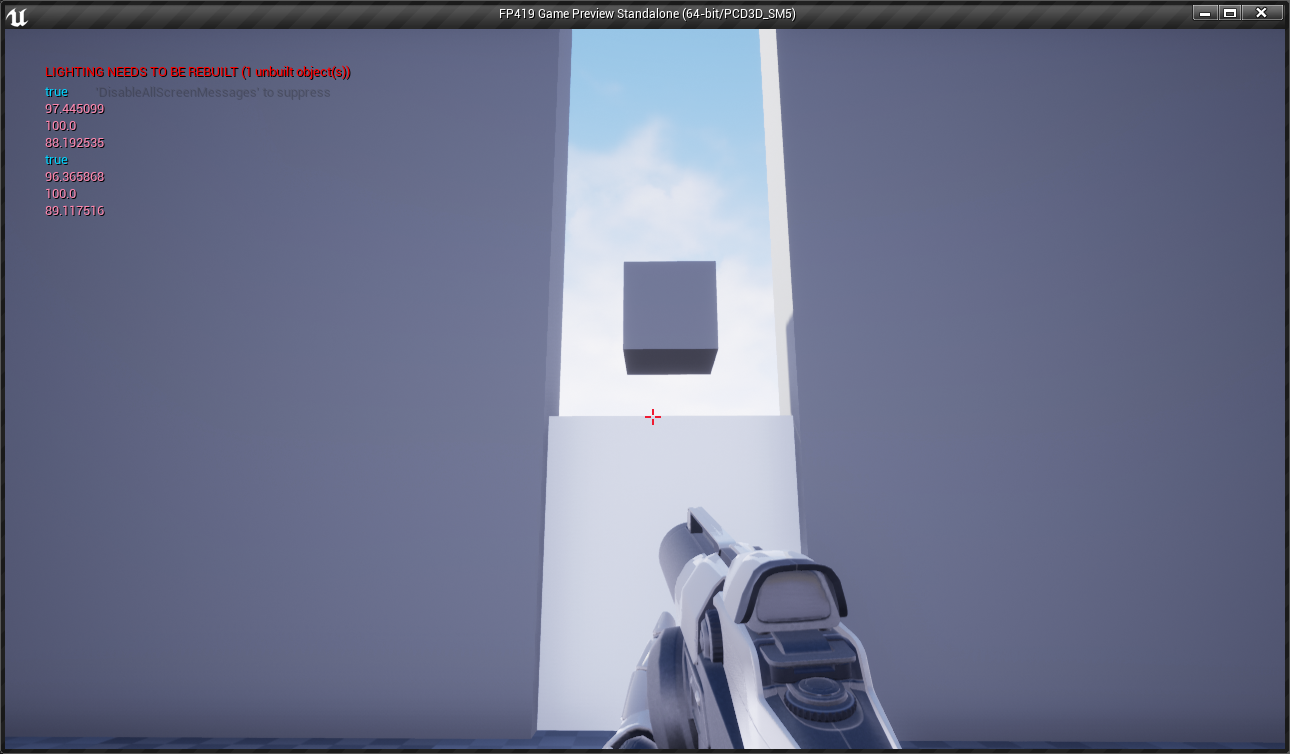
the red is the damage amounts to the grey items (the bp damagable wall actors) and the blue is the return from the apply radial damage with falloff
amber sedge
how do we take screenshots of code? I want to show you mine for both projects
grim ore
of the screen? I use ALT-PrintScreen to take a screenshot of my current window then paint to cut out what I want and imgur to upload it
tawdry raptor
im trying to Animation Retargeting (Different Skeletons) is there a way to click to see what part of a finger is what because they are not matching up would like to see it on the prop
i matched up the base body but im having problems with the finers and such
amber sedge
go to advanced
grim ore
to see the skeleton bones?
amber sedge
and set fingers there
tawdry raptor
yes but they arent named the same i need a visual representation
grim ore
you can go to Character at the top and Bones -> Bone Names. then change the option below that to be what you want to see for the bones
 frigid kernel
just quick Q: is anyone having trouble connecting to the Launcher? (its giving me WR-0001)
 oblique trench
No.
tawdry raptor
@grim ore I dont see it
I did auto map and it filled it out but im trying to see where the parts are
to make sure they match
grim ore
Are you in the screen with the double windows showing both characters or in the retarget manager in the skeleton itself?
tawdry raptor
this is all i see
i would like to make sure each finer goes in the right place as this game will be VR also
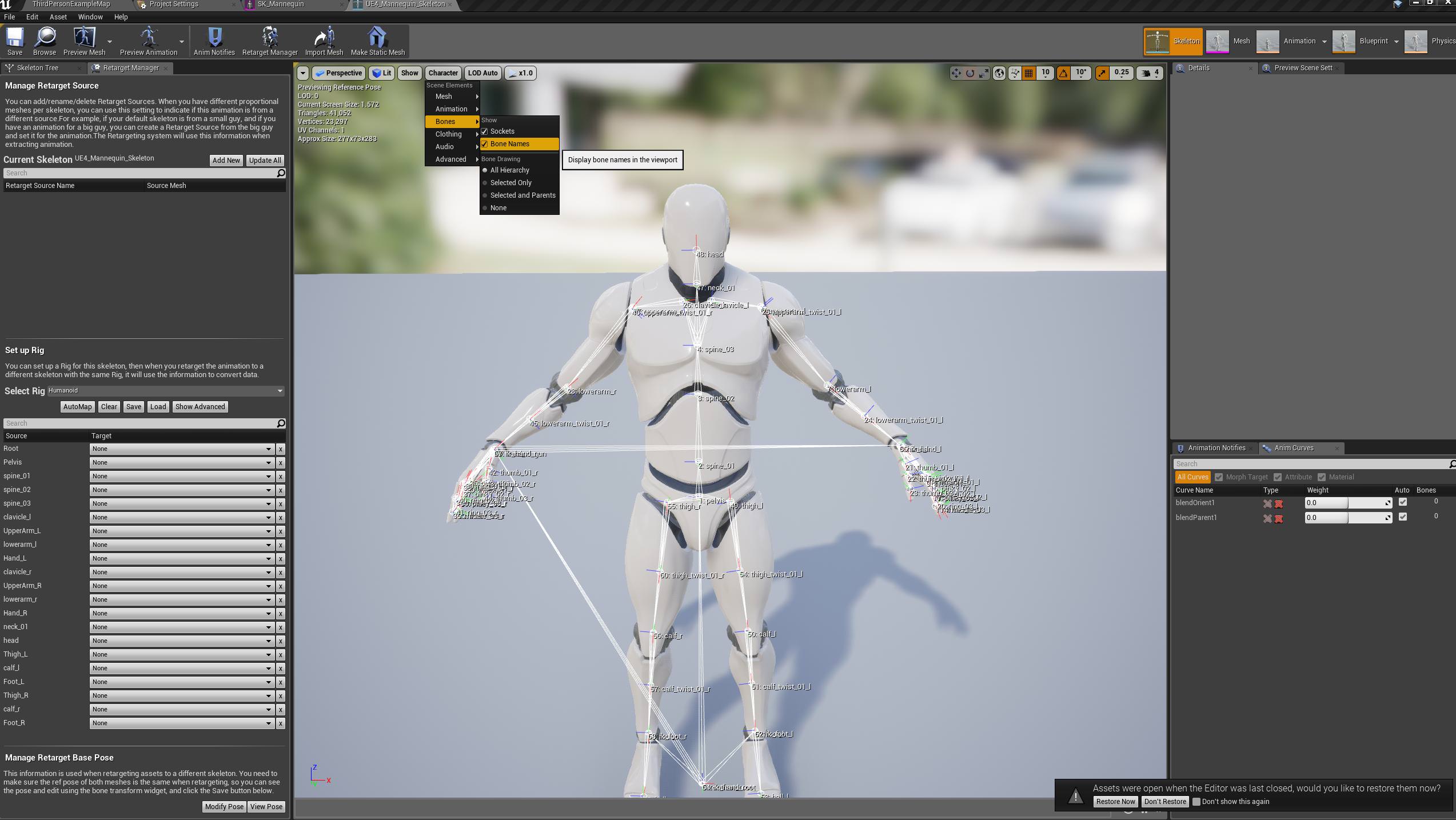 tawdry raptor
oh ok this helps greatly!
amber sedge
yea I think Imma just do the sphere method for radial damage
this engine is amazing lmao
plush yew
Does anyone know where the crash log for a launched game is stored at?
not play in editor, when you "launch" from the editor and it opens a new instance
 leaden garnet
Check the saved folder in yoyr project
Usually > Documents > MyUnrealGame > Saved >
 oblique sorrel
So
This broke
Neither the picker, nor selecting stuff from the dropdown actually puts the other actors in the array
4.19.2, BTW
I'll be upgrading to 4.20 soon, so if the solution is reinstall or upgrade, I'll simply do that ¯_(ツ)_/¯
frail sun
It's so frustrating that most of this stuff isn't documented properly.
grim ore
what are you trying to pick? and is this from the instance in the world or in the designer?
plush yew
@leaden garnet found it, it was in appdata/roaming/unreal/automation tool
dire storm
@grim ore are you the Mat with all the youtube video tutorials?
leaden garnet
Yep thats him alright
grim ore
I have a few videos up on YouTube yep
dire storm
a few as in a billion WTF is this vidoes?
leaden garnet
And HTF series
grim ore
uhmm It's a bit over 900 right now, can't get the time to push to 1k 😦
leaden garnet
K I just exposed myself as his fan boi :P
grim ore
well I don't make it hard to know, It's the same picture and name 😉
dire storm
Thanks man. Great content. I am learning alot from you. I really appreciate the time and effort you put into your videos. I have learned alot and I have a long way to go. I'm changing careers from Nuclear Power technician to general programming and your videos really help me
steady hinge
I have 'WTF Is? Projectile Path in Unreal Engine 4' opened up in by browser right now. But then I though that I should get back to focusing on my widget and not building a catapult...
grim ore
man if I had a nickle for every time someone wanted to change from nuclear tech to a game dev I would have like 2 nickles
dire storm
Meh its boring
grim ore
yeah the secret to life is most stuff is boring
steady hinge
Everything is less boring when there is a hungry tiger in the room.
grim ore
dude I have 3 cats sleeping on my desk right now, it's so not boring
dire storm
My heart wasn't in it. I did 8.5 years in the Navy and then worked for the Gov working on reactor maintenance. Its never where I wanted to end up and I was pretty unhappy so I'm jumping ship at the ripe young age of 33 and chasing my dreams 😃
tawdry raptor
so im putting together an animation and im stuck because the text over lap can anyone tell me how to see the text better so I can put the parts in the right place?
dire storm
anyways I just wanted to say thanks and keep up the good work @grim ore
steady hinge
Are you literally jumping ship? Like from a Navy ship?
grim ore
@dire storm glad to hear they are useful 😃
dire storm
I jumped off a carrier a few times for swim call if that counts @steady hinge
steady hinge
I made a data table after watching one of your videos.
dire storm
I found myself asking WTF is all of this stuff in UE4!!! There's so much!!!! then I found the videos and I was like "Jackpot!"
steady hinge
Well, today I am going to try to animate my widget... see how this goes...
oblique trench
@grim ore If you are the real one, i wanted to thank you. I learned variety things on your youtube videos.
grim ore
well it was an easy concept and I stole it from someone else so the hard work was just in learning the stuff 😃
 glacial arch
Alright here's a million dollar question
steady hinge
4
glacial arch
anybody here got experience with compute shaders?
steady hinge
Are you 3d modeling a computer? Because I can make a shader for that.
grim ore
@tawdry raptor maybe turn on the option for only showing the names on the ones you select?
glacial arch
nah im trying to figure out how to do GPU computation in UE4 for which the standard method is compute shaders
https://www.unrealengine.com/en-US/blog/how-to-add-global-shaders-to-ue4
as mentioned here

Unreal Engine
Epic Games Senior Engine Programmer Rolando Caloca Olivares walks through the simple process of creating your own custom global shaders, enabling you to have greater control over the look and feel of your project.
although no mention of what an actual workflow for that would be
like how to dispatch a compute shader and receive the values it produces after the fact.
grim ore
literally your best answer would be to find that authors email address and email him or hope he is on here and harass him =/
It's unfortunately very common for us to get a high level concept without any actual low level follow thru. It's getting a lot better but only recently
glacial arch
big oof
grim ore
yeah it's getting a ton better with 4.20 but I'm still waiting on how rich text decorators work for near 2 weeks now for example. we were told a blog was coming out last week and now we wait heh
glacial arch
yeah its a painful situation especially since im like a big ol noob
like when i need to do something in my game i just hammer my head against documentaiton until it works and its been going fine until now
grim ore
yep yep
glacial arch
but like with this GPU stuff it's getting tough because despite everything mentioning the particular flavor of shaders I need being supported they don't really say how to do it
🤔 big sad very cry
grim ore
I am not an artist and I can't math so I don't even try to understand that stuff
glacial arch
neither am I
i failed like every class in school
its not rocket surgery but it's like a lot of shit to learn
AHHA gotcha bitch
found a marching cubes implementation on github that uses a compute shader
hell yea
grim ore
heh
tawdry raptor
I was reconnecting my guy for animation and noticed that im missing some connections , do I need these IK connections?
steady hinge
I am making a dialogue interface with 6 different dialogue options.
Would it be ok if I were to close the widget after each dialogue choice and then open a new one after the dialogue plays?
The reason for opening a new one is so that separate blueprint that is handling the dialogue tree can feed the values to the widget again when the new one opens up.
I also want to be able to open different widgets depending on a variable set in the dialogue tree blueprint.
Does this all sound like a reasonable approach to pursue?
marble spire
Hello guys, i have a simple question
is a good idea to have 2 animatrions blue print, one for a "normal state" and another for a battle state?
like a mode after draw a sword
amber sedge
you should have 1 Anim Blueprint, and have states set up, so that you could switch between battle or normal state
marble spire
so is better to have all in one anim blue print ?
amber sedge
yea
amber sedge
sure
marble spire
to make my atack animations
is better to play anim montages
or set up then in the animation BP
amber sedge
NP good luck 😃
amber sedge
thanks :))
 opal ocean
Do I use the unreal bug submission form for launcher bugs?
amber sedge
I think so, Unreal Bug Submission sounds like a general bug section, so I think so.
opal ocean
the form makes it seem very engine related, not launcher... but I'm not finding anything in the forums for launcher issues.. so..
amber sedge
yea I think that section is fine
what's your bug btw?
I never really had any other than it being slow
opal ocean
makes a huge pathname logging every keypress
when I'm cloning a project, which is how I do my backups
amber sedge
that's funny 😆
opal ocean
funny the first time, really annoying :p
amber sedge
truee
opal ocean
well hopefully that bug report gets to the right people
marble spire
Is it possible to re-use the UE4 skeleton in another meshes?
using a external 3D editor
im about to buy some animation package, so i want to know i can do that xd
opal ocean
yup
opal ocean
if you're using Maya I think its pretty easy. anything else, you'll have to google. I dont know the specifics 😄
amber sedge
or that, sorry I don't use any 3D editors
marble spire
but the skeleton have to be the same, doesnt?
amber sedge
yea, the bones
marble spire
i mean, at least have the same bones name, idk
amber sedge
so that's where retargetting comes in to play
marble spire
yeah
gonna have a hard work to put the UE4 skeleton in another meshes
but gonna be nice
opal ocean
amber sedge
just annoying I guess
For Animations Slots, does anyone know how they work, and how to create slots?
tawdry raptor
dont you just hate it when your following a tutoral and the instructor picks an animation that you dont have even though you downloaded the same thing he did
marble spire
Thx m8 @opal ocean
tawdry raptor
idle aiming doesnt come with the standard animation pack
so where did this instructor get it from
steady hinge
The free one on the marketplace?
marble spire
im a little sad
both animations pack uses the Ue4 skeleton
but they said the skeleton is not compatibl
and after retarget, it get all bugged wtf
marble spire
xd
marble spire
i made it wrong, it wont even open the menu, it was a automatic i think
but let me show u something
this is the skeleton of the movement pack
and this is the skeleton of the sword animation
is literally the same
just different files
amber sedge
you're gonna have to retarget no matter what
make sure all your bones are correct, since they have the same names, it should be really e z brb
marble spire
gonna delet all the bugged ones and re-import
and then gonna try again
thanks for the attention
amber sedge
back
steady hinge
That looks painful...
amber sedge
IKR haha you could see the sockets for the fingers
amber sedge
yea
I was gonna tell you about that
they have to to be in the same pose
or at least approx the same pose
but since they're the same
you can make them the exact same pose
marble spire
i can just make it looks the same
or maybe i should ctrl c ctrl v the rotation of the things
because thats gonna be boring
marble spire
yeah, they are the same
amber sedge
;))
 long lantern


 reef jackal
Does anyone know for an FPS game, how you make and then integrate, weapon recoil animations for individual guns? Im talking about how the characters arms interact with the gun animations, and how those animations flow in with already existing animations you have for that character
marble spire
but the hand still not good
way better
i dont believe i will need to make the fingers bones to be exact the same
amber sedge
You would need to make functions for separate weapons, each containing their own things. Animations you could do with Animation Montages. To know which function to execute, you need have classes for your guns, and then check what gun they're holding, and execute the appropriate function. @reef jackal
@marble spire Ok, for this you will need to go to Advanced in your retarget manager, and set all the fingers individually.
amber sedge
it's kinda of annoying stuff to do, but worth it in the end
reef jackal
@amber sedge So the montage alows those different recoil animations to be played on top of a walking animations you already have?
amber sedge
yea, but you would have to use a Layered Blend Per Bone if you want for it to be on top of your walking animations. @reef jackal
marble spire
my head gonna explode
amber sedge
haha what's up now
marble spire
i cant change just one value of the rotation
and theres no lock
i mean, i change the Z and then all changes together
reef jackal
Im asking this cause im basically trying to get as close to COD mechanics as I can with this game. And in COD obviously different guns have different recoil anims for Hip-Fire AND ADS (and ADS zooming/anims for that matter). And those are all integrated into 1 character whose hands/arms adjust to the guns and their recoil accordingly. Im just trying to figure out how to start implementing that in UE
amber sedge
I've already started that' it's really not hard, in fact it's easy. It's these stupid bugs that I run into that hold me back. Just do as I said for the different gun and you're be fine @reef jackal
reef jackal
@amber sedge ok ill look into. Thanks for the reply 👍
amber sedge
Np, Good luck
@marble spire Once you have retargetted successfully, and the base poses are the same, there's no need for rotating 😃
 carmine wind
does someone know how can i show this in a widget?
weary basalt
Probably a good idea
You can email Epic directly and get in touch with their legal team if you have questions.
carmine wind
so if i sell my game i need to credit ue?
marble spire
idk if thats a must, but u can see the majority of the games have the UE logo
weary basalt
Its a requirement yes
marble spire
Guys
my play anim montage is not working
maybe is because im calling it outside my anim bp?
limpid sandal
@reef jackal inverse kinematics. Aside than that, just use your mini homebrew recoil framework
reef jackal
@limpid sandal Ok yes. This might be what I was looking for. So would this mean I animate the gun recoil by itself with its own skele, then import to UE and attach to a socket?
limpid sandal
Yes
marble spire
anyone know why my root motion doesnt work
it continue to blink backwards after finished
limpid sandal
Keep in mind that aesthetic recoil is different to where you trace bullets/shoot. This doesn't mean they cant be kept in sync
reef jackal
@limpid sandal Ok thanks!
 cursive dirge
@carmine wind @marble spire @weary basalt https://www.unrealengine.com/en-US/eula from 12. Proprietary Notices and Attribution:
“[Product name] uses the Unreal® Engine. Unreal® is a trademark or registered trademark of Epic Games, Inc. in the United States of America and elsewhere”

“Unreal® Engine, Copyright 1998 – xxxx, Epic Games, Inc. All rights reserved.”

No other license or right in the Epic Trademarks is granted under this Agreement. All use of the Epic Trademarks will inure to the sole benefit of Epic. You agree not to engage in any activity that could tarnish, dilute, or affect the validity or enforceability of the Epic Trademarks or cause consumer confusion or diminish any goodwill relating to any Epic Trademarks. If you wish to make further use of the Epic Trademarks, please go to https://www.unrealengine.com/branding-guidelines-and-trademark-usage```basically what that means is that you are required to put that mentioned credit in your game, but to use ANY of UE4 trademarked things, including the fancy logo on startup, you need to contact Epic first and ask permission for it
you can't just slap the logo on your product without asking
weary basalt
Fair enough. I dont speak legal very well 😃
cursive dirge
(so, logo is not requirement and it doesn't cover the credit part on the EULA)
basically all that is required is that text
@weary basalt your response wasn't actually wrong, original question was if you need to credit ue 😃
I just expanded the answer 😄
weary basalt
😃
cursive dirge
I just wanted to mention the thing about the logo as people commonly thing they can use it to promote whatever they make with UE4
you are likely to get approval for the logo use but Epic wants to stay in control on where and how their logo is presented, for example they wanted the logo gone from that mass murdering game
 grave nebula
Yeah, Epic seems pretty liberal on their logo usage. Unless something, that is using it, looks atrociously bad, it is fine.
 cloud cobalt
You need the EULA however
UE4 legal reqs include the text @cursive dirge linked, plus an EULA that includes the Epic-provided boilerplate, plus notification to them that you're shipping
Logo isn't required, but can be used if you feel like it, provided you follow their guidelines on that
 unreal shore
Hello someone can tell me how to make slender game in UE4 ?
 whole quarry
@unreal shore start with FPS template, follow tutorials and read engine documentation. Google is a powerfull tool to find more specific information.
 flat scroll
My mouse cursor turns to a simple crosshair when I hover over the preivew window in the editor. The problem is its really hard to see. Is there a way to change the cursor? Maybe I switched it somehow by mistake.
whole quarry
restarted the engine?
flat scroll
yeah
it turrns into a crosshair only over the preview window, it uses normal system cursor everywhere else
flat scroll
Sorry i'm new to unreal, I mean the main window in the editor where you place stuff in the level
 distant steeple
So I have an UE4 (4.20.1 Preview 5) editor running in HiDPI mode (which was default), and the Cascade Curve Editor Fits to selected / horizontally / vertically incorrectly because of that (it fits to 1/4 of the space it's supposed to fit). And zooming pivot is also broken. Is it a version specific bug or do I have to switch to the "pixelated" non-hidpi mode and forget about hidpi when editing particle systems? :C
sullen wraith
I need to add ik_root_foot ik_root_ hand, is it possible to do this with virtual bones or must I edit the mesh's entirely
sudden agate
I use Virtual Bones for IK
sullen wraith
how do you do that?
bitter iris
Is there a way I can call the fog towards me and away from me in a settings slider ? Just to make like a viewing distance so the fog blocks the culled objects ahead
 wary wave
anyone used a material billboard component before?
I have one on my character class, and it's fine in the blueprint viewport, but in the actual game it never seems to render
aha, it didn't like the material
how odd
marble spire
Guys, i will ask again, sorry about that
my root motion seens to not work
he continues to blink backwards after the end of animation
any idea about that?
 kindred viper
@wary wave what about the material was conflicting?
kindred viper
ahh
plush yew
whato ise the A ine AGameStato? Dus ith stend fo ACTOROOO??
plush yew
okai thankooo youo
tawdry raptor
If I download free fan made unreal maps can they be edited in unreal editor?
cloud cobalt
Generally speaking you need the editor + the game project
Maps (and the thousands of linked assets) are just part of a project with code, Blueprints, etc
Cooked maps are not editable
Source maps are editable with a new project as long as they don't have anything related to the game, and as long as all source content is provided too
marble spire
Guys
anyone here know howto make my attack does only 1 time dmg?
by anim notifys, idk how
just dont wanna let my attack cast so many times over the overlapp
nvm, done
 faint cedar
hm
there are some files in Engine/Config/PLATFORM_NAME
I imagine Game/Config/PLATFORM_NAME overrides those engine-level ones?
bitter iris
Hey, how would I go abouts changing the default First person arms to my own?
 safe rose
You could try 3d printing them
Maybe look into moving to Japan and see how their android program is going
As a last resort, I suppose going to any number of elective surgery centers and asking them to do it for a high cost
marble spire
is this right?
cause is not playing my montage when i click(when i click, it check attacking to true)
this is my anim blueprint
sudden agate
dont you want to play the animation and set "Attacking" to true afterwards?
marble spire
no
i want to play the animation when attacking is true
let me explain whats happening
the animation is a step foward + slash with a sword
my character is moving foward(a little buggy, he slides foward), but it dont play the animation itself
safe rose
I'm not going to say that you're doing this the wrong way...but if you're not doing this in an Animation BP, you are
safe rose
Good
#animation folks will be able to help you out more than here
They don't venture into random channels as much
 austere hinge
How to get anim notifiers in c++
opal ocean
I'm making a fallout-shelter styled game, sideview and all that. I dont think I"m going to be able to use things like navmesh, and therefore any of the ai moveto commands....
so, I guess I should just go with a "Pawn" instead of a "character" ?
and then make my own movement stuff?
cloud cobalt
@opal ocean That's kind of a vague question. Using Pawn vs Character is primarily a function of whether you actually have animated humanoid characters - the answer to that is probably a good start to "should I use Character"
If you have MP, then it's even more relevant because custom movement for characters in MP is nothing near easy