#ue4-general
1 messages · Page 255 of 1
 fathom frost
 leaden umbra
wat, never saw this before
 manic pawn
it's reverse engineering the shaders
 pulsar shell
Any idea why when I built lighting it made my entire landscape white? I have a grass material on it.
 plush yew
question: how can i change this image to an actual image in my content folders or a material? in tutorials i am watching there is a material/image selection box under the appearance tab
plush yew
yeah
U have to click on BRUSH
in appearance tab
@plush yew
omg i helped someone
woah
thanks
cant believe i did not notice that
 frail sun
Man, I thought the marketplace was somewhat empty compared to Unity, but after finding out about all the features it has built in it's no wonder heh
 fluid swallow
I know a lot that say that when they first move from Unity to UnrealEngine4. A lot of tools on the Unity marketplace are available within the engine already (or as plugins).
 distant river
Hey guys, I want to make a first person pickaxe animation, but I have no idea where to start. I'm a programmer so I've been making everything with physics so far. Where do I start?
 safe rose
Not here.
 pallid compass
youtube, blender, google
safe rose
But you can see if anyone in #animation would like to help ya out with any technical support
frail sun
Is it possible to have the spline mesh tool not just use a random mesh in the list, but rather all of them?
 winged crypt
Anyone know why I get these errors on project launch but the files are there? The actors referencing them even have them applied and I can see the materials just fine.
 narrow pasture
have you tried cleaning up the references?
winged crypt
Fix up redirectors?
narrow pasture
yeah that
narrow pasture
cuz those errors are normally the ones that show up when you move things in the File explorer
they show up regardless if the asset is in the right place or not from my expierence
winged crypt
Wait yeah, the file paths are wrong, there's an extra folder in there somewhere that's missing
But redirecting doesn't fix that
Do I have to move them back and then move them again (hope not)
narrow pasture
you can try doing that from within unreal
make a new folder and move then
and then fix redirectors and see if the problem persists
 dusty marlin
Ehi guys! Is there a command or something to find all subtractive brushes in the scene?
 glossy wraith
is there a good channel for discussing modeling?
 languid patrol
there isn't a channel for console discussion is there?
 grim sinew
Console discussion is NDA'd, so no. It's rare you'll find someone talk about it often.
There's a reason the forums for that are private
 coarse wigeon
 glossy wraith
anyone else make cars in unreal
 sage hinge
Does anyone know how to make the one stroke of a kick that has 50 or 80 damage blow an enemy ...? ... a boost
someone knows how to do that
 crystal lotus
Hello guys I have a problem I retargeted some animations to my character but now I get this weird pose. My body parts keep going into weird places haha
 vivid girder
Who has questions?
plush yew
JoJo, is it you?
is it possible to make RayTrace cone or somthing?
Like "ViewCone" for enemies
vivid girder
You're trying to create AI sight sensing?
plush yew
yep
I finished https://t.co/DBSzTqsE6q
Then add some pretty stuff and now I wanna make it like in other games
vivid girder
Add it and take a look
plush yew
ou, yeah, wrong drop down
vivid girder
Who else has questions?
plush yew
And how to render this sight volume?
vivid girder
plush yew
thanx
vivid girder
You need to press the numpad to toggle parts of the debug menu
plush yew
debug menu?
I check AI Debug checkbox
I really didn't get
All I've found is "press ' then 4"
But nothing happened
_EnableGDT _cheat
Doesn;t work
ok, it works, but only in simulate
 drowsy basalt
@robust grove Hey mate, so i exported the mesh from ue4, stuffed it into 3DS to check the axis. Its got z=up and x=forward. Not sure where to go from here
plush yew
I made a character and place it in level. How can I possess him at start?
Or how it happen in TopDown template?
drowsy basalt
@plush yew Its quick and dirty but you can just set the auto possess player to player 0 for testing.
Make sure you setup the game mode if you want a more permanent solution
 jaunty zephyr
Anyone got any tips for reducing the time on lighting builds
drowsy basalt
@jaunty zephyr Setup a lightmass importance volume, may help a little
grim sinew
And lower resolution lightmaps.
plush yew
@drowsy basalt yeah, thnx, already found it
drowsy basalt
Anyone good with skeletal meshes, got a second? Trying to setup a vehicle movement component
Specifically my wheels aren't turning on the correct axis. Not sure why
 bold schooner
Any idea how i would go around using charactermovementcomponent to be able to walk on walls and ceilings?
 fluid stag
rotate your whole scene \ o /
bold schooner
*in multiplayer 😛
grim sinew
Make the other players deal with it \o/
bold schooner
"Make the other players pay for it" fixt it 😄
i think i may have figured out a way though. still figuring out the implementation now. there's surprisingly little documentation about custom movement modes and what's possible and what isn't possible with how charactermovementcomponent works. and writing a custom component that plays well with multiplayer maaaaay just be (far) beyond my skill level
pallid compass
Yeah u wont get custom multiplayer movement unless u understand how it works under the hood
 paper kernel
well, you'll learn on the way
bold schooner
from what i understood it's generally a bad idea to try and replace charactermovement component with something custom if you're going multiplayer as it holds a bunch of network prediction code
pallid compass
pretty much
pallid compass
if ur going multiplayer and not experienced , dont fuck around with the CMC
paper kernel
it's not like it's even mandatory for most games
bold schooner
absolutely zero understanding of multiplayer related coding is certainly stopping me 😄
pallid compass
Yeah then dont touch it otherwise fuck storm
bold schooner
which is why i'm thinking of still using cmc but in a way that i want
i.e. i wanna be able to basically able to walk on all sides of a cube
pallid compass
nah be realistic if u dont know fuck all about netcode dont try and build ur own prediction, common sense really
skipping steps is bad, u end up with trash
paper kernel
it's only a matter of do you wanna learn it
bold schooner
actually taking the middle approach here, i won't screw with cmc for this project but i will sure as hell be playing with netcode outside of it
but as far as this project i don't want to overcomplicate things, i want to actually get it running
paper kernel
sole reason I ever started doing custom cmc is because the latency compensation code kept screwing me over
bold schooner
thing is, i have unlimited time. so i will just keep hammering at it until i get it, but i also don't want to get stuck in something that is a book's worth of skill and eventually give up on a project
 tall pendant
btw: life isn't infinite so no, you don't really have unlimited time. 😛
bold schooner
pffft!
paper kernel
again with the negative attitude 🙃
bold schooner
i mean as it stands now i can literally dedicate my entire daytime to just this
 cedar snow
having an actor with a hierarchical instanced static mesh component on it didn't reduce the draw calls
what am i doing wrong?
 robust grove
@drowsy basalt , i haven't done any ue/max/vehicle setups since UT3 but the workflow is the same, in max select the bone/wheelmesh and at the top of the mod panel click the hierarchy tab / affect pivot only, this way you can double check the axis is correct
i have a load of older videos on my youtube channel which might help https://www.youtube.com/user/ut40kgeodav?feature=mhee

YouTube
This Channel is about learning from 3ds max, blender, UT3, UDK , Unreal Engine 4 and more to come I support my tutorials on this thread https://forums.unreal...
drowsy basalt
Cheers will definitely have a look, the mesh does seem to be importing properly however the wheels (from the movement component) seem to be off and there is no rotation adjustment
 fossil ore
Does anyone know If there is a plugin/fix/anything that can copy whole transform data and transfer it to the other object?
I know that you can duplicate object... but question remains
bold schooner
hmmm.. in charactermovement component, the blueprint version, there's a dropdown for movement mode including 'custom', but i can't find any info on that elsewhere. where am i not looking?
pallid compass
i think its only for defining custom movement settings in c++
i could be wrong tho
bold schooner
if it's that, it may very well be exactly what i need 😄
grim sinew
Not you posting this in this channel. Go to #share-your-stream
pallid compass
Creating slate editor interfaces
bold schooner
custom movement? 😄
bold schooner
apparently subclassing ucharactermovementcomponent is the way to go, in case anyone else looks into this that seems to be the solution.
 agile notch
@bold schooner is that with the PhysCustom override? i noticed the SetBase() can set what the character is "walking" on, but i don't know how that works with different gravity direction... i'd also like to know how to do it properly, because i'd like to have character walking around on a ship that can fly upsidedown etc
bold schooner
@agile notch i don't know the specifics yet, but from what i understand subclassing from the movementcomponent is the way to go if you don't wanna write your own from scratch
 sinful mesa
anyone had the issue that UE4 does not compile shaders. I mean its stuck on for instance 700 shaders left to compile
and it doesnt go down at all
just stuck
and from what i see
UE4 does not spawn ShaderCompiler processes
I saw it can be the incredibuid i accidentaly installed with VS
but i completlu deleted dis package from the installation, then completly removed VS with cleanup of the leftowver files, reinstalled VS without this stupid package and it still hangs -.-
wtf
the shader compilation works perfectly fine on second PC
sinful mesa
as u can see it spawns 0 shader workers.
plush yew
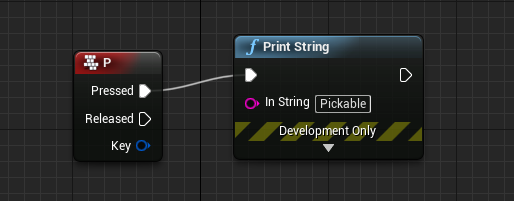
Hi maybe noob question but this thing works inside character blueprint but not from certain item blueprint, how to fix it? https://i.imgur.com/xYn5JmE.png
 livid haven
Your character is associated with a player, which is where input is routed from.
Putting input related logic in any old blueprint won't just work automatically.
It's easy to think it would, until you consider how that wouldn't make sense if supporting multiple local players, like on a console.
I don't recall how you get an object added on to the stack of things that can receive input.
I think only actors can do it and they have to have an input component, maybe?
agile notch
i think it's pawns getting possession of the input controller
livid haven
Can't be pawn-based, since you can put input components on non-pawns too, like the PC.
plush yew
Can I cast it to character?
 grim ore
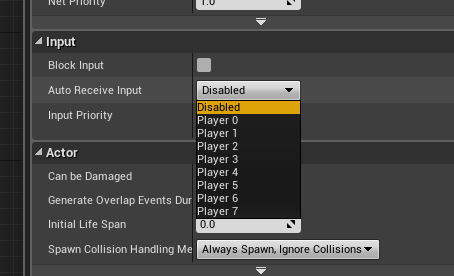
IF you want to get input on a BP that can accept input, look for the Input section on the Class defaults and set it to Auto Receive Input for player 0 https://i.imgur.com/DuegCI3.png
 grim ore
Alternately if you are just arbitrarily having random items accept input you might want to consider changing that idea as you will run into issues later if you have to manage the input
plush yew
because it didnt work when i casted character to item
grim ore
sure you can cast it to the character and that wont work
plush yew
no i mean
grim ore
you cant just cast stuff to stuff because why not
grim ore
you mean you will take the input in the character then talk to the item and tell it to do something?
plush yew
yes
grim ore
that definitely sounds more reasonable
plush yew
if i make it work, i always wonder what to put as object in casting
grim ore
object is a thing
casting turns the thing into a specific thing
so casting a cat to a dog would be silly
casting an animal to a dog would make sense
casting a car to a boat would be silly
plush yew
so animal is object?
grim ore
casting a car to a honda would make sense
and object is a thing and it can be pretty much any base thing
you would put the correct thing in the object input that would then become a specific type of object when you cast it
grim ore
that would be whatever you called it, bp_sword, sword, BP_SWORD, SWORD
whatever it is is what it is
if you have 2 swords on the ground, 1 is bp_sword1 and the other is bp_sword2
when you pick one up the game has no idea what you are picking up, just that it's something.
agile notch
character is a pawn, which is an actor, which is an object
grim ore
when you cast that something you pick up to something else you are saying hey this item i picked up is actually literally this other thing
so if you pick up sword1 and cast it to sword2 its going to fail because thats not correct
the object exists because its the base class for stuff, sword1 and 2 are both objects but sword1 and 2 could both be different types of objects
plush yew
y but if i cast from character to sword, what would be the object?
grim ore
the object would be whatever you are working with/on
agile notch
casting is like going from actor to character, or from object to actor... generally you don't need to cast the other way because you already inherited all the base stuff
grim ore
you need to start from the beginning and figure it out. How are you getting this object? are you doing a line trace and hitting it. Are you randomly getting it at random. Are you getting an item from your inventory.
a large part of programming is literally just thinking how you are doing stuff before or when you are doing it. start from the beginning and go from there or go backwards from the end till you get to the start but you have to do one or the other.
"I want to do something with this sword" is not helpful because what is something, where is the sword, how did you even know about the sword, etc..
 vague raptor
Hey, im new to the engine and im gonna be working with a friend. We're gonna be using git but i'd also like to know if there is a tool that would allow us to work on the same project in real time (maybe a VisualStudio thing)
grim ore
not really
UE4 really does not support same time same stuff but you can use source control, you can use level streaming to work on separate parts at the same time.
vague raptor
aww ok. another question i have (dont know if it should be directed towards cpp or blueprint) but I've researched and came to the conclusion that the best is to use both technologies. my question is, when to use one and when to use the other? do i make cpp classes for everything and then BP for each of them?
grim ore
There is no right answer
some things should be done in blueprints, like animation BP and uhm... particles lol
some things should be done in C++ like complex math
despite that you can do it all in C++ or BP
and when I say "should be" I just mean are more performant
or easier to do, like doing UMG/UI in C++ is just weird but doable
vague raptor
i think that is my biggest issue: what to do in what. i feel like i dont want to do something because i fear i might be doing something wrong and because of that i dont really do anything
grim ore
well I can say doing nothing is definitely wrong
at the worst if you do it all in C++ and then decide you wanted to do it in BP you learn both ways
vice versa the same learning experience
vague raptor
like, i create some individual stuff but i cant seem to start thinking bout the actual game that we wanna make
grim ore
if you are learning and you get it working I don't think you can say you even did it wrong at that point
search for a good Game Design Document or GDD and outline it all. break it down into parts. implement parts. make parts work together. publish on steam. see 0 sales. repeat.
the first couple parts are critical, breaking it down into your design then making your parts. the rest is just optional lol
vague raptor
i dont think that we are gonna be selling the game on steam tho, or at least thats not the goal xD
livid haven
I recommend making a wiki, rather than a traditional, linear document for game design.
grim ore
well then you can't fail 😃
livid haven
But you can definitely adapt a traditional GDD into a wiki format and improve on it
grim ore
yep. simply getting something is better than nothing. you lose too much if its all in your head and you don't have a place to start.
like right now I am trying to get 4.20 to compile on the laptop so I can learn niagara in bed today lol. Epic kinda forgot to release the preview =/
plush yew
i have a kind of "dumb" question... if i change the quality of my game (when you create a new project you are able to choose high quality or resizeable or something) will it reduce my project space? And what about the graphics will they be extremly bad if i change that option to resizeable ?
grim ore
in terms of space not really, when creating a project the template you choose and the starter content are what uses extra space
as for graphics all it does it change some default settings. They can be changed at anytime individually or you can even go and change the setting later after the project is created and it will change the entire group
plush yew
ok thank you sir so far
grim ore
there is a video tutorials section on the UE4 site that actually covers that question 😃 might be some others in there it can cover as well https://www.unrealengine.com/en-US/video-tutorials
the Editor Basics and the Projects and File Structures series
agile notch
hm, do you know what the smallest build size is? mine seems maybe a bit bloated for what's in it
i guess unused plugins could be disabled?
grim ore
the smallest build size is not that small. There is a post on the forums with some stuff you can remove and change to get a smaller size.
yeah plugins are a good one, only building out the shaders you need, including on maps, remove pre requisites, things like that.
plush yew
i casted successfuly but to red node (action event overlap)
i mean with this node as object
@grim ore i need a small size cause i am going to create a game for android
grim ore
yep mobile is a downside of UE4 right now in terms of size.
 worn granite
Are you just starting in UE4 or are you experienced in it?
plush yew
experienced in it
worn granite
ah
plush yew
but only in windows games XD
grim ore
There is a doc page for tappy chicken and the other mobile stuff on how to optimize it a bit for smaller size
plush yew
k i will search for that maybe if i finished my project xD
grim ore
yeah i was trying to find it but I know it's out there. A few people have put up posts on the forum as well for optimizing. Android/IOS build size is a "big" issue out of the box lol
 frank escarp
meanwhile the unity guys have demoed sub 1 mb builds
grim ore
yeah that liteweight runtime is a bit misleading but still way smaller than UE4
Unity going the route of being able to basically replace key parts of the engine at will is the way to go tho =/
frank escarp
its a very serious refactor
yeah, ECS is OP as hell
becouse you can switch out implementations easily
and you can calculate wich systems never run when you package game
and then dont compile them
grim ore
yeah the render system being replaceable is pretty fun so far
frank escarp
too bad its brooooken
as expected ofc
Lightweight Pipeline for VR, they say
cant use any postprocess
so you cant even have tonemapping
grim ore
yeah some of the out of the box renderers are a bit limited for sure, it's still super beta
but having the ability to basically add in just the feature you want will be nice one people get it understood
didnt install C++ toolchain in the laptop,, no 8.1 sdk, VS had to update. This goal to compile 4.20 is not going well today lol 😃
 winged sphinx
Don't know where exactly to ask this, but Is UE4 capable of reading 16 bit color depth bitmaps at runtime without compressing to 8bit color (without needing to create a texture from the read file) using it's FFileHelper?
plush yew
looks like a question to Dr Gadget
 tough ridge
My unreal project always fails while packaging it, can someone help me if i give you the project
 solar eagle
kek
does anyone know why this is happening?
I tried importing this model from C4D to Unreal in many ways and I always get this "missing" faces
am i exporting it incorrectly or...?
grim ore
it looks less like missing faces and more like inverted normals on that face
solar eagle
Im still very new to these programs so I have no clue about what's that xD
but does it have a solution?
grim ore
the normal is the direction that is "out" for that face or vertex
basically it looks like that face is facing the other way and since they are 1 sided you are seeing thru it
maybe go into the DCC program you are using, C4D, and check if you can see the direction normals are facing
You can also open up the static mesh in UE4, and click normals at the top and it will show you the direction they are facing
 sudden agate
it's probably because C4D draws polygons two-sided.
Either you create a Two-Sided Material or you need to model both sides of the polygons
grim ore
bah. can't seem to get 4.20 stable enough to actually try Niagara 😦
 tired island
Hey i need help
Which source engine is better Perforce or SVN?
I know SVN has unlimited space if the host can handle it
But perforce is better for accessibility?
grim ore
Perforce seems to be better for full projects based on what people mention in here, plus perforce is directly supported in the engine. With that said I have never used Either and I use GIT lol
 weary basalt
@tired island We have an #source-control channel where you can freely discuss such topics
tired island
Sorry
Its just Im setting programmers for my game
And when we stated that we were using git
They said like we are out
So now im trying to find alternatives
weary basalt
In my professional opinion as an programmer, Perforce is much better than SVN if you can manage to find an hosting solution.
pallid compass
lmao
grim ore
That seems a bit extreme lol
weary basalt
Perforce has an 5 user free license. Anymore than that and you are limited to 10GB of space from memory.
pallid compass
yeah using LFS normally displays a massive amount of exp in team management due too the shit storm of issues it can bring
tired island
Not actually its 1 gb
tired island
In SVN its unlimited or so i heard xD
tired island
Well yeah i could talk with a dev from perforce
weary basalt
Perforce is fine for small teams.
weary basalt
Right well in that case you either need to pay or find an free solution such as SVN
weary basalt
Dont change source control solutions on an whim. Find one and stick to it
tired island
Yeah i should do that
weary basalt
SVN seems like your best solution.
weary basalt
👍
grim ore
so since I am learning LFS what should I be worried about? so far it seems easy enough
tired island
Lfs?
grim ore
Git-LFS
the solution to large binary files when using GIT
what your supposed to use rather than storing binaries in straight git... like I do.... lol 😃
seems super simple so far using sourcetree
but I bet it's just due to me being solo
weary basalt
Ive not used it before, however the entire GIT workflow is distasteful for me. Ive been using P4 for years. Im biased 😛
grim ore
ah yeah I've used git for years and never P4 so I am biased. I only use for for source control so never really need advanced stuff and it works well for that
weary basalt
If thats what your used to and you understand its pros/cons then im in no position to tell you otherwise.
grim ore
nah someone earlier mentioned LFS is a pain in the bum and I was curious why
weary basalt
Ive heard similar but again, never used it, so dont know.
I just know that its rare for me to have an issue with P4 and when i do its really obscure because im doing something silly lol
grim ore
I should learn P4 at some point probably. Would you recommend a super simple windows client for idiots?
grim ore
know of a free hosted server I could use to learn with?
I use bitbucket for my git stuff
weary basalt
You can install it on your own machine and have a local server.
I run my own Server on my Build Server which sits in my Garage
grim ore
yeah that's the next option if I can't find someone else to do it for me lol 😛
weary basalt
I dont know of any free hosting solutions since i run my own Server or are connecting externally to others
grim ore
aye aye
 livid umbra
hey guys would you know if there is a fortnite channel
worn granite
@livid umbra if you're seeking support go through the official channels - this isn't one. If you mean for like the UE4 dev community to play FN together... I don't think there are any channels for that sort of thing, but #lounge is a catchall
livid umbra
i just want to know why fortnite is randomly crashing on load screen. @worn granite
on pc
grim ore
yep might be best for the official UE4 forums then
worn granite
Oh that's cause I need to clean my desk, sorry.
livid umbra
which channel is that @grim ore
livid umbra
thanks for the link @grim ore
vivid girder
Anyone know how normal maps work in Unreal?
They ever use more than 256 color values?
Trying to determine whether i need PNG-24 vs 8
@grim ore I have a good article on source control if you're interested
grim sinew
BC5 is 8 bit in R and G channels, with no B or A. So it'll never use 16 or 32 bit HDR color.
Stick to 8 bit images for normal maps when you import, it sometimes gets weird results otherwise. Unreal doesn't tonemap 16 bit to 8 bit properly a lot of the time.
Meanwhile, in the material editor itself, -that- stores all values as float, so you can do things like multiply the normal map by 0.534, 0.534, 1 and it'll work.
 lone swallow
hi i have a problem with the editor and i'm not sure where i can troubleshoot it
i deleted a blueprint when it had a memory reference and now i can't open the BP editor at all
actually nvm, resetting layout fixed all of it
 sour walrus
Anyone know if timeline finish plays if timeline stop is called?
sudden agate
@grim sinew speaking of color depth, what if I store textures in 16bit png?
or any other 16 bit format. Does UE downgrade them to 8bit?
 keen frigate
Yo everyone 😃
 visual hollow
guyz how can I group all the actor in my scene?
sudden agate
Select Actors-> Right Click-> Groups -> Group Actors
visual hollow
ok thanks
plush yew
@keen frigate hows it going
almost got ded servers working 😃
i spun up an ec2 instance and uploaded my pacagked game with sever binary and it ran
keen frigate
mneh getting pissed at people defaming other people's work on the marketplace, especially high quality ones.
plush yew
problem is the memory was 1 gb and my game is 4 gb ded lol
visual hollow
@sudden agate they are now grouped but is thier any option to see them as one in world outliner also. like having a black actor as a parent
keen frigate
@plush yew Oh so that was causing the det server issue?
sudden agate
@visual hollow you can put them in a folder in the World Outliner
plush yew
so i axed all steam code from my defaultengine.ini file
visual hollow
alright
keen frigate
hay goth let's go private we're messing up the chat
plush yew
@sudden agate still there?
sudden agate
no
keen frigate
😂
plush yew
hey you have been around the block right raildex? have you made a game before?
you seem pretty knowledgeable about your stuff.
grim sinew
@sudden agate Unreal will attempt to downgrade them to 8 bit, but it doesn't do so perfectly. The values get messed up sometimes, and things won't always look correct. As a general rule, anything should be 8 bit before you import unless you're specifically making something HDR like a render target or a skybox.
sudden agate
@plush yew i made many games. i make the best games.
grim sinew
From what I can tell, last time I saw it happen, my suspicion is Unreal actually messes up when it imports because of something SRGB related, and HDR images are always stored in linear. The consequence is things get double gamma corrected.
plush yew
still on my first myself 😃
sudden agate
There is a Legacy Gamma checkbox for textures. Shouldn't that correct this?
grim sinew
No, that's to try and emulate how pre-UE4 textures were handled I think, totally different
sudden agate
It's better to store things in Linear space anyway and not mixing it up imo.
grim sinew
" There is a new advanced property on textures, "Use Legacy Gamma". All existing textures will maintain their sRGB space as Gamma 2.2, as to not invalidate all DDCs everywhere. Unchecking that will change your textures if set to bSRGB=true, to use the new sRGB conversion and not Gamma 2.2." Yeah, different
And no, it's important to use SRGB when necessary. That's just how computer monitors and electronics work
SRGB is a hack to get around a problem with how monitors display color data, it's actually an improvement
sudden agate
wait, you use sRGB for normal maps? is that even possible?
 cloud cobalt
Normal maps obviously stay linear
grim sinew
You don't use SRGB for normal maps, that's stored in linear.
Normal maps and greyscale textures are linear
sudden agate
yeah. but why should I check srGB for anything different than Color Maps?
grim sinew
8 bit linear
cloud cobalt
Anything that represents a color should be sRGB
grim sinew
I didn't say you should.
cloud cobalt
Anything that's not a color should probably be linear
sudden agate
I keep sRGB unchecked for everything except BaseColor/Albedo
grim sinew
Right. As you should. That hasn't changed.
cloud cobalt
UE4 picks the correct setting based on the texture type FWIW. Normal maps, masks, all defaults to sRGB off
sudden agate
Ok, i got confused a bit :D
grim sinew
All I'm saying is, Unreal when trying to handle colors gets confused when you import a 16 or 32 bit image and it's expecting an 8 bit image.
Stick to 8 bit for the final output, unless you're using something for rendertarget data or a hdr skybox.
sudden agate
Maybe post a bug report
grim sinew
No point, there's no benefit in using 16 bit anyway
sudden agate
even for normal maps?
grim sinew
All the compression options will require 8 bit anyway
Debatably, even for normal maps. There ARE some engines that use 16 bit normal maps, not just a 16 bit normal gbuffer, but multiplying your texture data 10x is often a very stupid thing to do when dithering does the same job.
Even if you ignore the memory constraints, it would make textures load in significantly slower and chug the texture streaming
cloud cobalt
Even for HDR it's debatable whether 16 bits source assets have value
grim sinew
In that case, I would say, why on earth are you using a normal map to begin with
sudden agate
looks ugly af tbh
grim sinew
Model that shit.
It's actually more efficient to dump normal maps for something like that and just have the polygons.
Beveling 3 edges is cheaper than a normal map
cloud cobalt
@sudden agate Is that with UE4 ? because UE4 has very powerful smoothing that makes this issue nil
plush yew
aren't normal maps generated to show the detail without the added polys though?
grim sinew
Normal maps are expensive @plush yew and shouldn't be used to just bevel an edge
Smooth normals on the model reduces vertex count and largely compensates for the cost of beveling.
plush yew
i remember always being taught that you export normal maps from zbrush and keep your edge flow good and your polys low
cloud cobalt
More geometry + UE4 smoothing is much cheaper than a 16bit normal map
grim sinew
^^^^^^^^^^^^^^^
plush yew
wait normal maps are expensive? what? lol
sudden agate
^
cloud cobalt
A 16 bit normal map is
grim sinew
Yes. They are the most expensive type of texture, short of HDR textures.
They are 4x the memory cost of regular textures and add shader complexity.
sudden agate
make everything high poly. problem solved. No Normal Maps 
cloud cobalt
That's not what we're saying here
However, it's definitely true that geometry is much cheaper now that it was a decade ago
In particular, I'm willing to say that smoothing surfaces in UE4 shouldn't be done with normal maps
grim sinew
For something like that car body example, YES. You will actually reduce your vertex count by having smooth normals and vertex count matters just as much, if not more than polycount. If you smooth your normals and just bevel an edge or two, it'll not only look better but it'll run better.
Hard edges are costly
They double the vertex count
cloud cobalt
One hard edge basically has the same cost as a single-face bevel
grim sinew
Exactly. So for a model like that piece of the car body, it'll look and run better to bevel it.
cloud cobalt
A two-segment bevel in UE4 looks better than hard edge + normal map, and if you only use the normal map for that, it's also cheaper
plush yew
i guess you guys do a lot of hard surface modeling then
because im used to models that have detrails engrained like in zbrush models.
organic stuff.
grim sinew
No, I do. All the time. And it's not as cut and dry as you say it is.
There's a lot of grey area as to when you should and shouldn't use a normal map.
plush yew
that was from my days in the film biz tho. i actually transitioned entirely to hard sruface with my most recent proj.
cloud cobalt
I'm not saying normal maps are useless either, just that UE4 has amazing smoothing built-in, and that geometry is quite cheap today. You get million-triangles scene on consoles.
plush yew
i think probably like every single one of my models has a normal map on it
grim sinew
It's just a balance you have to strike. If you're having issues like on that car body piece, because that is a -perfect- example of what I'm talking about, just model it. You don't need micro detail on car paint's normal maps.
plush yew
with the exception of flat shaded stuff
grim sinew
Also welcome to games, even today not every mesh has normal maps in AAA games
You still fake it a lot of the time
Sometimes because you have to, sometimes because you choose to.
plush yew
so objects close to the camera dont have normal maps? 😮
grim sinew
Why on earth would you want a CAR BODY, something that needs to be perfectly smooth and have clean lines, to have hard edges up close to the camera?
cloud cobalt
Normal maps are great for actual detail that can't be geometry, no one's arguing against that. Normal maps are useless if you're just trying to smooth objects, however - geometry will look much better, and will be cheaper.
grim sinew
It's counterproductive, even if you bake that car body panel, you'll see a hard edge if you look for it up close
It looks WORSE and you pay MORE
Having the polygons actually there is always going to look better visually
plush yew
agreed stranger 😃
 wary wave
normal maps are good for curved surfaces
plush yew
ok let me ask you a question then i am curious now, what is the smoothingfunction you are referriung to? how do i use it?
wary wave
but UE4 doesn't support them with a high enough bit-depth
cloud cobalt
@plush yew Basic smoothing on import
grim sinew
@wary wave https://cdn.discordapp.com/attachments/225448446956404738/453121117641768960/va58okfw6oqb.png This is the example I'm talking about, btw.

It's higher up in the chat log
cloud cobalt
It's obviously not good quality
wary wave
if you take something like a BMW side panel where they have strong lines with subtle curves
grim sinew
If you're focusing on this vehicle, it needs a lot more polygons. There's faceting at the top, and you can bevel the hard edges closer to the camera.
cloud cobalt
^
wary wave
and yeah, this is way too low poly
grim sinew
This model, as it is right now, in this picture, would do better with no normal map and getting all that in geo
wary wave
yup
but once you're into the hundreds of thousands of tris, you're reaching the point where you need decent normals to get the detail you want in
grim sinew
Right, for the micro detail, but larger detail you can always just keep like this
At least, for this specific model
plush yew
Stranger is it in here ?
grim sinew
Like tiny scratches, you would have only the scratches on a normal map by themselves
plush yew
i dont see it in there
cloud cobalt
It's not an option
plush yew
was looooking thru docs cant find basic smoothing
cloud cobalt
It's built-in
cloud cobalt
Have you imported a mesh in UE4 ? Look at the smoothing
cloud cobalt
If the polycount is anything decent, you should already have great-looking smoothing
plush yew
and here i thought that was anti aliasing! 😛
paper kernel
any idea why floating pawn movement doesn't accept input unless local controller is present?
cloud cobalt
@paper kernel Sounds like by design
Why would there by input if there is no controller ?
paper kernel
because it takes in only vector3
so I hardly assumed it would need an actual controller to handle it
cloud cobalt
Well, controllers are the one to provide inputs in the first place so I don't get it
sudden agate
speaking of Normal maps and Polycount. Is there a way to have modular LODs?
For example my character has a total of ~200k polygons on LOD0.
However in cinematics, mostly the face is important. Is there a way to have the Face behave differently in regards of LODs without actually splitting the mesh?
cloud cobalt
@sudden agate Outside of tesselation, I don't think so
paper kernel
as in, replicated vec3 from client isn't sufficient for it
cloud cobalt
@paper kernel Let's talk in #multiplayer
grim sinew
@sudden agate Usually you would have a separate 'cinematic' model if you needed to do that used specifically for cutscenes. The advantage is you can also throw more complexity on top of it, like adding in additional bones for better face animation control that you wouldn't need in regular gameplay.
sudden agate
@grim sinew That makes sense.
visual hollow
I created an model in 3ds Max with some polygon having color, exported and imported in UE4 but during lighting build it gave me error enable error coloring to visualize
plush yew
Guys can anyone check #packaging channel please help me on that packing problem
visual hollow
Any solution ? I tried going to static mesh and the uv channel thing but didn't worked
 whole quarry
@visual hollow try google
visual hollow
tried but I didn't found any solution which I can understand. One solution said that apply UV unwrap did that but still getting it
sudden agate
@visual hollow you need to properly unwrap your model if you want to use static Lighting
 somber pendant
Hey can someone link me a good video or explain me how to create an Ai that (Moves , Deals Damage , Takes Damage , Dies) and how to Setup the animations for him?
I created an ai that can Do all the above but has the Default animations (I already have the enemy model and the animations)
 errant chasm
my build failed because I don't have visual studio 2015.. but what I DO have is visual studio 2017..
any ways to fix this without finding an outdated download for visual studio?
 silver crown
@errant chasm You can install VS 2015 compiler in VS 2017, that might help
 gaunt void
hey guys, i need to ask a stupid question and maybe somebody of you can guide me in the right direction!
I want to spawn an object when the player clicks an item
that works fine but i suck at maths and vector calculations.
lets say i want to spawn the object a bit in front of my player pawn, do i just add the offset i want onto the forward axis of the player? will this work in negative areas?
made a small pic for understanding
silver crown
Negative areas?
gaunt void
as i said, i might sound dumb with that, but im not good at math
for example when my location would be -137/-42/0
somber pendant
Negative x y z
i guess so
You can get the forward vector and add some to the x y or z?
sudden agate
Multiply the ForwardVector with your distance
somber pendant
yeah
silver crown
^
sudden agate
and add it to the actor location
somber pendant
I can send you a print screen of something similar on what you want to do
gaunt void
so i simply get the Forward vector, multiplay it by lets say 500 (if i want 500 units offset) and then i set it to the actor?
@somber pendant that would be really nice of you!
also another thing.
i probably need to have a function that prevents the object from being inside a wall etc.
my approach would be to do line tracing and check for blocking volumes. if it hits a wall id just reduce the offset until its not hitting it anymore.
does that sound okay? 😄
 main widget
ue4 version haven't change
cloud cobalt
VS version then
main widget
I use Vs code
cloud cobalt
Doesn't matter really though, open it in Visual and compile
main widget
can't find .sln file
cloud cobalt
How did you compile before ?
main widget
yes
I add some c++ file
And can't compile, then I close it , when I open again , It show that
cloud cobalt
If it's the first time you add C++ files, then you need to set your project up for C++, be sure you have the required dependencies
Look for a UE4 C++ tutorial
 tired oracle
UATHelper: Packaging (Windows (64-bit)): ERROR: Editor target not found!
whats causing this packaging error?
tired oracle
tried the google advice but nothing worked so far
wary wave
just a quick question from me - if you have an actor that has a component that uses rigid body physics, said component needs to be the root, right?
 little island
have you tried youtube @tired oracle
little island
have you tried emailing their support?
tired oracle
huh. for some reason my project got unloaded in VS lol
thats probably it
nvm still not packaging
whole quarry
Tracing
whole quarry
Let me add more info: you can use a cone trace to check if the player can see something
 digital anchor
actor forward vector - normalize(vector 2 - vector 1) < error margin i guess
@thorny cipher
this will include z tho
may want to zero it
 thorny cipher
hm
wary wave
probably
does that even work?

Game Development Stack Exchange
I have a character in a 3D world which is facing an arbitrary direction on a flat plane, the player can click on the left or right side of the character and based on which side is clicked on a diff...
this is the kind of principle you're looking for
wary wave
you'll also need to do an additional test to work out if the object is behind the player
thorny cipher
yeah that's what i want to figure out
plush yew
It'd be something like
dot(playerForwardVector, normalize(playerLocation - targetLocation))
Result should be value between -1 and 1 where -1 is behind player, 0 is to either side and 1 is in front
plush yew
Might be the other way around with -1 being in front and 1 behind
plush yew
I always get the values mixed up
plush yew
Nah pretty sure it'd be the same value
Since dot product uses all commutative operations
 vale osprey
@wary wave it has to be root to drive actor but otherwise no
It’s just simulating component will detach automatically
thorny cipher
Working good!
wary wave
ta, yeah, worked that out with some quick experimentation
more or less what I expected
which means your scripters have fun when they use a native base class and try to make a physics enabled version 😄
thorny cipher
Now my players can't pickup items behind them 
plush yew
duh drag and drop is so hard to make
seems it only applies to widgets
so ill have to spawn a widget each time i try to drag n drop item from ground to inventory
cloud cobalt
File that under "everything is hard in game dev"
plush yew
not everything
cloud cobalt
By the way you can absolutely do drag & drop without using widgets
plush yew
yeah but i want to use their built in functions
cloud cobalt
Well yeah in that case everything needs to be widgets
plush yew
you mean something like removing item on the ground and spawning similar one at cursor location when attempting drag n drop?
that would follow mouse
cloud cobalt
And the object is part of the world ?
plush yew
object is actor
cloud cobalt
In that case yeah, it's tricky, because you can't have 3D objects shown on top of the interface
plush yew
or maybe id use widgets instead of actors?
or maybe thats bad idea
for items lying on ground
plush yew
oh ok
cloud cobalt
Here's what you can try - for each object you can pick up, associate a 2D image - screenshot, or drawing of it
When you start pressing the mouse over the object, hide it, create a new UI widget on top of it with the 2D image - which you can now drag&drop
plush yew
yeah i wanted to do similar thing
cloud cobalt
If you stop pressing outside the drop zone, remove the 2D widget and make the 3D one appear back
Not sure how hard it is to create a drag&drop widget during the drag& drop though.
plush yew
so ill need an image for each of item
apart from their models
if there was way to create it automatically would be nice
cloud cobalt
The image is the easy part, you can take a few minutes to do a screenshot for each object, import it as an image, and then put the image as a property of the lootable
plush yew
yeah i can do that too
cloud cobalt
You can also set up a render target + camera to do it automatically (harder to set up, less time in the long run)
But the hard part is the create widget + drag & drop it part
Do it iteratively - dumb drag&drop with two widgets, then creating widget at mouse loc, then all together
plush yew
yeah im reading docs cause other guides didnt work out for me
cloud cobalt
@plush yew Then again, you could also have a key mapped to "take" the hovered item
Almost instantly implemented, same functionality
My "everything is hard" line is about how every functionality has a development time, which, since you can only spend so much time in dev, is time taken from other features
Be sure to spend time on stuff that is important to the game
plush yew
its just really not intuitive
in game maker you didnt even need tutorial, you knew instantly what to do. in ue4 theres drag and drop node but without looking on guide/doc you have no idea
what to do with it
but thats probably because ue4 is more complex and bigger
cloud cobalt
Well yeah, it's also because UE4 is a world-class tool meant for large teams of developers to create the top games
Working alone on a game is hardly how it's meant to be used
wary wave
"in game maker you didnt even need tutorial, you knew instantly what to do"
I opened GM Studio not that long ago, looked at it and bawked
GM Studio is far from intuitive
6.1 (many years ago) was however
whole quarry
Lol
I always saw Game Maker as Music Maker on Playstation
Crappy if you want to do something serious
plush yew
yeah
wary wave
you can do some pretty good stuff with Game Maker if you ignore the drag and drop part
plush yew
I can't see anything unreal bot posts?
whole quarry
@plush yew #looking-for-talent ?
plush yew
yeah
whole quarry
Its full to me
plush yew
idk nothing shows up for me
whole quarry
So the channel is empty?
wary wave
ah someone else had this problem in the past and it randomly resolved itself
it's weird, because the bot should be like any other user :/
plush yew
i see everything
whole quarry
Try reinstall your computer :E
plush yew
thats not gonna help
 bitter meadow
Hi people, how do i fix the offset that i get from the cameraangle, when i use the topdown template for a shooter and use the cursor for rotation input ?
I mean, the guy is not exactly looking at the cursor, i am assuming thats because the camera has a 60 degree angle
plush yew
It says UMG, is this still correct way to do it in UE4 or its deprecated? https://docs.unrealengine.com/en-us/Engine/UMG/HowTo/DragAndDrop
cloud cobalt
UMG is the Blueprint UI system in UE4
 rigid mountain
@tired island Yeah, the first one didn't have my folio link: https://www.ibrahimakinde.com

Ibrahim Akinde Game Design
My passion for designing engines that generate experiences is strongly motivated by my skill set, and my love for games.
tired island
Oh lol
 fast oak
hi guys
 frosty bloom
I believe it stands for UnrealMotionGraphics (Don't take my word for it though) @plush yew
fast oak
do you guys have any advice about good notebooks for ue ?
wary wave
generally 'don't' is my advice
cloud cobalt
Don't get one and get a desktop instead ? Unless you really really need the mobility
fast oak
i already have a goo desktop
wary wave
but if you must, go big, get a cooling station, and ensure you have a 1070 or 1080 (as they are 'proper' GPUs rather than gimped notebook editions)
gaunt void
hey guys, does somebody know where i find some documetnation on how to use a widget/umg as a material? or anything related?
im trying to make an interactive PC screen
wary wave
the biggest issue with notebooks tends to be thermal throttling murdering performance, so the larger models tend to have better cooling
fast oak
@wary wave uhm, 1070... no way to get it work properly with a 1050 ti ?
wary wave
either that or the components cook themselves to death within a year or two
1050ti might be okay
I'd consider that a bit low-spec, but it'll be functional
fast oak
for cooling issues, idk, maybe i should go for gaming notebooks, usually they have good coling system
wary wave
it'll almost certainly be a gaming notebook, yeah
just not one of the cheaper, smaller form factor ones, that's usually the mistake
cedar snow
what's the root component of a data only actor BP ?
fast oak
@wary wave thank you
cedar snow
AudioComponent->SetupAttachment(GetRootComponent());
wary wave
yeah, that should be fine
cedar snow
i construct and attach the audio component in the actor's CTOR
sudden agate
An Actor always has a SceneComponent as Root
wary wave
an actor does not always have a scene component as the root
sudden agate
it has
wary wave
^
cedar snow
it has a transform, i can move it
sudden agate
which is a scenecomponent
cedar snow
so, any idea why the field is null after the CTOR?
wary wave
well, they're subclasses of scene component, so in a polymorphic sense, yes
sudden agate
:D
@cedar snow make sure you correctly create your component
just because you declare a variable of type Component doesn't mean the Component is constructed
cedar snow
    AudioComponent = PCIP.CreateDefaultSubobject<UAudioComponent>(this, TEXT("MyAudioComponent "));
    AudioComponent ->bAutoActivate = false;
    AudioComponent ->SetupAttachment(GetRootComponent());
    AudioComponent ->SetRelativeLocation(FVector(0.0f, 0.0f, 0.0f));
stepped through the code, it's getting constructed and assigned to the instance var
cedar snow
it was a different position earlier
wary wave
fair
wary wave
does it?
cedar snow
UPROPERTY(BlueprintReadOnly, Category = "Audio")
UAudioComponent* AudioComponent ;
^
i see it on the actor
which is placed in level
cloud cobalt
I'm now questioning that notion @wary wave but yeah ? Or are components like actors which are owned by the world until destroyed ?
wary wave
I assumed components don't require ownership in the same manner as actors
so long as they are attached to something, they are fine, UProperty or not
cloud cobalt
I actually have no idea
cedar snow
i guess there;s an owner field in the component?
could check that out after construction
cloud cobalt
You're right @wary wave
According to the programming guide
Also I don't know why it's null @cedar snow
frosty bloom
Have you tried closing the project and compile & then restarting? Because UE4 Magic
gaunt void
lets say i wanted to have a kind of interactive widget, some kind of manual that the player can open up and read information in it.
and lets say i wanted to use a pdf for that.
so basically just take the pdf/hyperlink that pdf and let the player scroll through it
is that possible? any info on that? cant seem to find anything
plush yew
i just noticed i can have spaces in variable names in ue4
cloud cobalt
@gaunt void Specifically PDF is a problem
gaunt void
doesnt need to be exactly that
cloud cobalt
A web page is definitely more straightforward
And I believe that's supported in UE4
gaunt void
so id just go and set up a page where my info is sourced and then oben up that page in ue4
 dawn linden
@cedar snow If your class derives directly from AActor and you don't create any other scene components, you should make the audio component itself the root.
At the point the constructor is run, GetRootComponent will return nullptr.
cedar snow
@dawn linden oh, i'll try that
gaunt void
yeah, just found exactly the same link, thanks!
cloud cobalt
For what it's worth, I would look into a more minimalist approach - UMG has some pretty great tools, and performance might be better
You can design some pretty great stuff
But I guess it depends a lot on the style you want
gaunt void
will look into it, just researching options right now. also depends on what exactly has to be in the "manual" later on, thanks a lot!
plush yew
heh web browser in game
and make a quest where they have to give u positive comment or rating on steam for free gold
but they would probably remove game from steam for that lul
cloud cobalt
^ that part is actually explicitly forbidden by Steam
plush yew
y
grim sinew
Because Valve doesn't want developers manipulating votes
plush yew
but sharing with friends its not
so a quest "get 5 friends to play our game" would be great
grim sinew
You can try, but you're just asking to be removed
plush yew
but thats not steam related
grim sinew
Valve might not care.
If it turns into people on steam spamming their friends list
And people start reporting it
plush yew
i might not even use steam
grim sinew
If you don't use steam then do whatever you want
plush yew
y, if it will be the only skin they can get for free, then a lot of people would do it
grim sinew
If you don't see why people spamming dozens of users as part of an ingame quest is going to be a problem, no explanation I can give you will be sufficient.
plush yew
but game will not be on steam, so i assume they will just give the link to one or two fb friends
of course they wont spam on facebook
cuz people might think badly about them
frosty bloom
When you assume stuff regarding playerbase you should always assume worst case scenario
grim sinew
But that is literally what happened to facebook games. People spammed everyone they knew, EVERYONE, and everyone started hating facebook games
plush yew
yeah but they were connected to facebook
idk about others but i always hated the person who spammed these things, not the game
hmm then i will include some limitation like they can invite one person per week
frosty bloom
Spam will be spam, no matter how you coat it. May it be steam, FB, email or whatever
grim sinew
You are the most naïve person I know if you think anyone isn't going to spam stuff like that. Maybe 1 in 200 people you send the message to will actually follow up on it, the system practically requires it.
cedar snow
setting the audio component as RootComponent didn't work either, but having the default scene component in the actor and then adding the audio component, did work in the end
maybe the UAudioComponent thinks that it's SPECIAL 🤔
le sigh 😄
plush yew
i know im naive
 maiden relic
@rich sparrow Trying to DM you but don't know how
worn granite
you have to search them or tag them like you've done, then you can right click them and message. @maiden relic
its kinda dumb, the bot could tag the person who posted the listing so you wouldn't have to copy their name and search them.
Other than that, it'd be pretty limited in terms of what it can do.
Its just weird how it doesn't even bother trying to give you an ID you can actually use to DM them.
ImmutableLambda#0862 < like that.
You can take that and go to the "Find or start a conversation" thing
But nope, if there's more than one person with that name on discord, gl.
frail sun
I keep getting an error when trying to launch. "error C2338: Visual Studio 2015 Update 3 is required to compile on Windows" even after I installed that update.
cloud cobalt
Regenerate project files ?
 wraith coral
which release from the source code is currently the most reliable to download? running linux so this is how i gotta install it[i dualboot, but blender only works on linux for me and i'd just generally prefer to run it on linux]
cloud cobalt
4.19-2
wraith coral
mk thanks ^^
frail sun
@cloud cobalt How do I do that? Sorry I'm new to Unreal.
frail sun
Says I don't have any C++ files heh
cloud cobalt
BP only project you were trying to package?
frail sun
Yeah
frail sun
Ah thanks, sorry for asking in the wrong channel.
plush yew
so im following a tutorial but they say this https://i.imgur.com/Vrht8v4.png
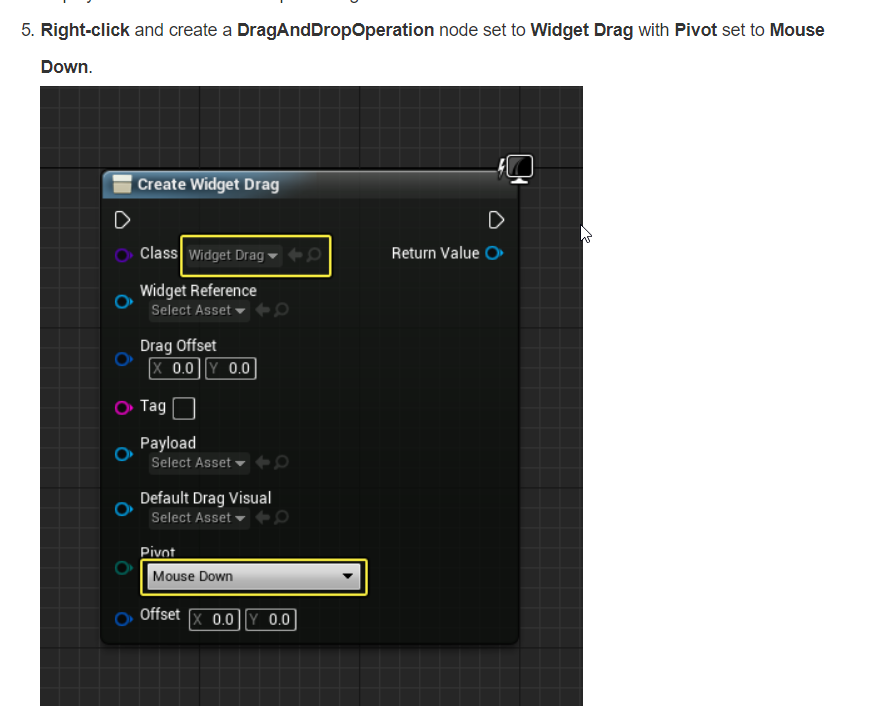
but theres no such thing as "dragAndDropOperation node" and they are showing some extended create widget form
worn granite
see if there's drag drop
plush yew
and also the class "widget drag" is a blueprint, not a widget, so it cant even be there
cause its widger creator
worn granite
and also, that class isn't meant to be a widget
plush yew
yeah i found it
idk how
oh yeah I skipped the "and" word
thanks @worn granite
you saved me lol
cloud cobalt
Don't multipost
cloud cobalt
Still don't, keep to #packaging for packaging issues
tough ridge
no ones seems to want to help and ive been working on it for days
cloud cobalt
Still don't
frosty bloom
Seriously starting to consider making some of my Components into UE4 Marketplace Assets.. For the sole reason of buying assets with whatever gets generated
 mossy kettle
Quick question, after I recompile a project code are all Blueprints created from C++ classes updated?
Seems like it does 💃
worn granite
what do you mean created from C++ classes ?
mossy kettle
This
mossy kettle
I was wondering about components but would be great if you know if it's the same for other class members
cloud cobalt
Methods always updated, defaults updated, non-overriden defaults updated
plush yew
hello guys.. is there any documentation on the USplineComponent class and the maths behind it? I can't seem to find any documentation on it
 cinder iron
the best docummentation would be checking the engine if anything
 glossy flame
Working fine on my end.
silver crown
Often like that with UE websites
Like I can't see the MP prices outside Incognito sometimes
main widget
How to fix gibberish?
worn granite
- Don't hot reload
- if you're going to do anything with text at all, use the TEXT() macro.
- Yeah don't hot reload.
 smoky stream
what a helpful error message
coarse wigeon

Today Apple announced ARKit 2 at #WWDC18, and we are shipping support for it in an Unreal 4.20 preview this month! Learn more: https://t.co/tMV3vIhFr4

 Twitter
😄
main widget
Ok, I fixed the gibberish, just compile it on vsCode
I think there are some issues in UE4Editor
coarse wigeon

 coarse wigeon
That in engine rigging demo looks awesome
 jovial nova
i'm thinking of getting into UE and I've 0 experience with this kind of stuff, design, c++, etc
i just feel randomly ambitious
any good tuts or good starter basic projects for getting familiar?
 plush yew
is it just me, or does the member-list here in discord have no more a slide to scroll down?
 cursive dirge
@keen birch been trying to reach informative ue4 c++ api docs for years but still not managed to do it
plush yew
can anyone help me with my cinema

howdo imake the lighting so the carpet dosent looks like its so bright
and the doors
 next owl
hellow i have a problem because in my blueprints i set the visebility to false than i cange the map and set the visibility to true but in game its not visible! sorry for the bat english im from germany!
*Hello
 keen birch
@cursive dirge The feels
 rose quartz
If i want to use the nvidia how can i do that?
cloud cobalt
The nvidia what ?
rose quartz
Edge
cloud cobalt
You want to use nvidia edge ?
rose quartz
Well im just looking around
cloud cobalt
I mean, edge is a competition
rose quartz
Well i see some youtube about Plugins you have to compile with the code
Well im only Did start about 4 months ago with unreal engine and loving it.
cloud cobalt
You just need to post images of your work on social media with nvidia & unrealengine hashtags
That's it
rose quartz
Oke 1 question more Then i know enough for today i think :D, Compiling a Dedicated server do you need a Github Unreal engine version or can i use the Launcher installer "Unreal engine" and add a C# script to the code?
 sinful umbra
yes you need to build from the source on github
rose quartz
oke and how do i hold it up to date with the versions like if i got 4.19 and i need to go to 4.19.1 do i need to download it all again or do something else?
cloud cobalt
You probably shouldn't worry about dedicated servers if you're beginning with UE4. Multiplayer makes everything much more complicated.
Try a simple project first to get a grip of how the engine work
rose quartz
I did get a little bit with the Bleuprints ai, healthsystem, Dragdrop and Spells, so i like to learn it and get more advange with it 😄
 astral pond
hm i have a weird problem... my array index for waypoints for ki works perfect in viewport (first waypoint/array number 0) but in standalone he choose the second waypoint... but the index for selecting the waypoint in standalone and viewport are 0
(im on 4.19.2 version) someone has a idea?
astral pond
ups totally forgot to mention it here... i forgot to sort it...
plush yew
Unreal Engine - Awsome 😃
Unreal Engine - Good Graphics
Unreal Engine - Free & Free Assets
Unreal Engine - Good Tools
Unreal Engine - Better Than Unity :))
Unreal Engine - Scratch
Unreal Engine - Blueprints
Unreal Engine - Less Coding (That Gives Time To Us)
Unreal Engine - Good Marketplace
Unreal Engine - Works On Low Systems
Unreal Engine - Foliage Editing
Unreal Engine - Visual Studio
Unreal Engine - Thank You :))
cloud cobalt
wat
 grave nebula
Apparently, one of the members of emerging Cult of The Engine.
plush yew
Hey, I create topdownBP project, then replace character with one made by me. But he doesn't rotate when he runs
And I can't find anything that rated to rotation of mesh/actor in controller and character blueprints
fixed
Yes Please
cloud cobalt
Can you stop spamming this channel ?
plush yew
yes
whole quarry
Lol
 worldly wadi


 cloud cobalt
That's very off-topic
Unity is a great engine that other devs use for other projects, and that's fine, and irrelevant to the topic of UE4 support
sudden agate
No. UE is the only engine people should use because UE> Unity
cloud cobalt
sigh
cloud cobalt
If you really want to have a discussion of which engines are best, then do that in #lounge imho. I for one couldn't care less which engines people like - Unity is a good tool for some projects, UE4 is a good tool for some projects, and I even heard people were actually fine with some other tools.
tall pendant
Yup it always depends on the project which tech you choose. But i agree thats off-topic and doesn't belong here.
wary wave
@cloud cobalt - we don't talk about those other people xD
sudden agate
Is there a planned release for 4.20?
tall pendant
june/july iirc
sudden agate
Hopefully june :P
grim sinew
Apple kinda semi-confirmed preview this month at the very least
 pulsar fractal
Hey dudes, sorry if this is the wrong place, but where can i post for some advice?
just on unreal engine
cloud cobalt
Ask your questions here if they're not super specific
pulsar fractal
Okay thanks 😃 I'm looking for a way to import a google map into unreal engine with terrain height as well - pretty much how geo location works in sketch up - I'm just wondering if you're able to point me in the right direction to find any resources so I can learn about this
ty again
cloud cobalt
Well, I had no idea google maps had height information
 bitter plover
@pulsar fractal check virtus learning hub out. Hes got a vid on that
pulsar fractal
Thankyou @bitter plover !!!
bitter plover
Np @pulsar fractal
pulsar fractal
so it doesn't look like unreal itself does it right? you gotta use other 3d software in order to create the heightmap, then import it as terrain
how does one then section the terrain so I'm able to colour stuff with like a paintbucket tool rather than just brushing grass etc
 grim juniper
I'm not sure about satellite imagery, but I know you can get real world height maps from this awesome site https://terrain.party/
pulsar fractal
tyty
i'll have a look, not entirely sure if this is what I would need - I already have the maps with the height markers etc however when I import them into Unreal it turns into a mesh rather than terrain
Just looking for a way to mass colour stuff rather than having to hand paint everything
plush yew
Hello Ladies and Gentlemen. Where did my star go? https://lh3.googleusercontent.com/-F8pGWNA0fqY/WxaAt9DXPsI/AAAAAAAADNM/f19ENObG-oIq67J3IgkhBasinqE8fpLiACHMYCw/s0/UE4Editor_2018-06-05_14-23-17.png


I can't even use WASD