#ue4-general
1 messages · Page 216 of 1
 pallid compass
well rip blender users
 frank escarp
yeah, thanks autodesk
for pushing fbx as industry standard in a way that it very specifically leaves blender behind
 feral echo
do I need to register somewhere else to launch my build on android device?
feral echo
well, I'm getting error in log : java.lang.IllegalArgumentException: Unknown package: com.YourCompany.MyProject
pallid compass
properly? if u plan to put it anywhere
feral echo
I just want to test out unreal AR template on my mobile
pallid compass
well it wont export with out u changing the default name
feral echo
oh okay. is there any specific rules? Or I can type anything I want?
pallid compass
dont take this the wrong way
but its right in front of u
and it tells you
what to do
feral echo
yeah, I know :)) I mean. maybe I should register somewhere on the google site as developer and provide ID
feral echo
yee I did it
thanks
but it does not want to start because my phone doest no support ar core
lol
damn it
 stuck kite
autodesk
i wonder how much does it JESUS CHRIST
welp, time to waste what possibly is 20 or 30 mins of my life listening to interviews ;w;
pallid compass
what?
 sharp matrix
Any unreal developers on?
pallid compass
prob everyone in here
sharp matrix
haha thats awesome
sharp matrix
CE?
 cursive dirge
Cryengine
sharp matrix
ohh true that
cursive dirge
yeah, it's true, I know who he is but not pointing fingers here
 rustic panther
I use Source
sharp matrix
Whenever I create a u property for example UPROPERTY (EditAnywhere) I get a crazy compile error saying I dont have the rights
Compiler shutting me down man
cursive dirge
if you really want help, you better drop the exact lines here that throw the error
most common reason for uproperties to fail tho is if you try to use them for types that are not supported by them
cursive dirge
well, you can ask here but don't expect c++ experts to follow this channel, if you read the actual topic, it's pretty clear what the purpose of this channel is
sharp matrix
People seem to always know whats going on in this channel.
cursive dirge
if it's not super advanced, you might get response here
but in general, it's better use the dedicated channels as usually people only follow few channels here, based on their own interests
do note that I'm not saying you can't post here, just suggesting to use the appropriate channel to maximize the odds that people who know how to solve your issue can see your messages
it's not recommended to post same issue on multiple channels, so better do it on the place where it fits the best
 golden idol
how do i fix glossy and reflective surfaces
very glossy and reflective where the material is nothing like this lol
 weary basalt
@sharp matrix As was suggested your better off moving your question to #cpp as that is an more targeted channel for your issue.
sharp matrix
Yea I got it
weary basalt
Include any code samples or error messages
Ok good to hear.
This channel is for more general UE4 chat. Not for specific issues that can be categorized into other channels.
pallid compass
Does anyone know how data validation works?
 silver crown
@pallid compass What kind of data validation?
silver crown
4.19 thing?
pallid compass
yup
cant find
a scratch of information on it
oh wait wtf
i think its from the GAS plugin
C++ Header cleanups for Actor, Pawn, Character, Controller, and PlayerController. Marked several fields as private that were accidentally exposed in 4.17.
Projects using this plugin are strongly encouraged to add a project specific subclass of UDataValidationManager. Any objects that require validation should override IsDataValid.
Overriden versions of USignificanceManager::Update will need to change signature to receive a TArrayView instead of const TArray&.```maybe?
 steady frost
Hey, is it possible to develop for iOS on Windows using Unreal? I have 2 iPhones for deployment but no Macs...
pallid compass
yeah
steady frost
that's great news for me, thanks
pallid compass
hey phyronnaz
turns out its a stand alone plugin
im trying to find where u config it tho
silver crown
Yeah saw that
pallid compass
i can use it but cant set any rules
steady frost
It looks like I'll have to sign up for Apple Dev program regardless?
I don't mind, just slight annoyance since I could sideload apps on xCode
pallid compass
Projects using this plugin are strongly encouraged to add a project specific subclass of UDataValidationManager.
any idea what they mean by that?
silver crown
@steady frost It's required to dev on iOS IIRC
steady frost
alright thanks
silver crown
@pallid compass Well create a project specific subclass of UDataValidationManager
silver crown
😉
pallid compass
i think u are ment to set
some rules
for objects
because when u try and validate its like
"cant validate no rules"
and it has ugh
UPROPERTY(config)
So i assume u make a config file for it?
but my engine is not generating one and i cant find example anywhere of it
to setup rules
oh wait
do u mean u load all ur checks in to object valid
would that not make the checker really bloated?
pallid compass
idk thats what im asking u lmao
u give it ur own rules
i just dont know how to give it rules yet
pallid compass
This is example
I want to check if anything coming from Data asset class Mob_DA_Item
has a valid Image
silver crown
Image is a property?
silver crown
Easy then
In UDataValidationManager::IsObjectValid
Check if class is Mob_DA_Item
And if it is cast and check the validity of the Image
pallid compass
wait no
i found it
aparently
all uobjects
have ugh
IsDataValid
so i assume
u override it from uobject
silver crown
👍
silver crown
yes
pallid compass
man this is gonna be awesome
silver crown
Obj.cpp
pallid compass
thank u very much for this help
ahh its called obj
no wonder i cant find it lmao
so i just override it and im good
silver crown
😉
pallid compass
my god its so fucking good
 frosty bloom
I HATE when something suddenly just works. truly dislike it wholeheartedly
Means it can come back at any time and I will never find out why
frosty bloom
Can't really move on, you know? Once you solve something it usually stays solved
pallid compass
try and break it again
frosty bloom
Am about to do just that, I hope i break it with the one thing i changed lol
Wow, yeah I broke it alright. Seems my first guess with solving the issue actually solved it. Lucky shot I guess :p
pallid compass
haha nice!
 swift hull
Anyone know how I can make this thing larger?
Too fucking tiny to see whether it is left, right, front or back

 stoic moth
guys, at lower FPS my projectile is skipping the target collision box since it's moving a bit fast, so one frame is in front of the target the second frame is past it (thus no collision) how can i fix this, Physx substepping doesn't work it seems , please @ me if you have an idea
silver crown
@stoic moth Enable continuous collisions
stoic moth
will try that as well also found this as well to work with 30 FPS
@silver crown where do i set continuous collision ?
stoic moth
aha thanks will run a few tests 😉
@silver crown checking CCD alone doesn't work, it looks like only Force Sub Stepping in Projectile Movement registers the hit between frames
stoic moth
i guess yeah, ill try and find some more articles on the net about CCD
 vale osprey
@stoic moth we talked about this yesterday in #legacy-physics
CCD might help sometimes but it's purpose is different
to make sure that everything works like a clock you need to add extra logic - doing a raytrace or a sphere trace between current and last position of your projectile
preferably in physics sub-step event
silver crown
@vale osprey What's the purpose of CCD?
stoic moth
i understand, would you keep a history of the projectile movement and trace from a previous point to the most recent one and see if the projectile went straight through ? as in let the projectile move then double check with the raycast right ?
vale osprey
correct
because even if you increase sub-steps this is what happens:
object is moving 200km/h this will be 5555.56 cm/s
when you divide this by FPS - 5555.56/60 you get 92.59266666666667
this is how far your projectile will travel in a single update
so the lower your fps the higher that value will be
even at 120 refresh rate it will be still a very large distance
@silver crown the main idea behind CCD is to detect collision with other moving objects
silver crown
👍
vale osprey
the way it's done is by tracing a "cone" of collisions by doing a sphere collision test along the trajectory of travel
which in practice can fail if density of those spheres is not large enough
if you try to make a tennis game natively with physx, it will be a nightmare as both racket and ball can travel really fast
CCD could help but you have to tune it and not everything is exposed in UE4 (might have changed in new updates)
stoic moth
much appreciated for detailing like that !
vale osprey
what is this maddness?
ohh, it have to be translucent, masked isn't the option either
 regal mulch
Anyone did some rebinding of inputs lately?
I wonder if I would need to create an Input for MoveForward and MoveBackwards to properly assign the two keys or if MoveForward with W and S is rebindable?
Cause as far as I understood, putting multiple keys on one Input is more like an alternative input
So while W (1) and S (-1) works, it the sense of rebinding keys it's seen as S is an alternative key to moving forward.
And last time I tried, epic ordered the array of keys by alphabet
So if I would display them by index 0 and 1, and the alternative key is earlier in the alphabet, it would show that one on 0 >.>
 manic pawn
why does realtime keep randomly turning off on viewports?
 spare steeple
@regal mulch do you mean rebinding keys at runtime? i was able to get that working with W and S on the same axis bind
pallid compass
ugh
i made a library
for that
iv got it somewhere
Load, reset, save, change, clear etc
 upbeat tendon
waiting for UE4 to compile is like watching paint dry
silver crown
👍
 plush yew
need heeelppp
 proven tree
hello i need some help, ue4 is being very mean
i cannot hot reload
i get an error
and my files in vs don't seem to include generated.h and are red
but i can compile just fine
how can i fix that
CompilerResultsLog: ERROR: Couldn't find target rules file for target 'YourProject' in rules assembly 'UE4Rules, Version=0.0.0.0, Culture=neutral, PublicKeyToken=null'.
pallid compass
check ur target and build.cs files
 hot ledge
I’m trying to use event hit in my blueprint but it doesn’t return anything
vale osprey
First thing to check is if GenerateHitEvents is enabled on component
 keen birch
Does anybody happen to know if it's possible for me to assign variables differently for each instance in an HISMC?
Or do they all have to share the exact same material instance and properties? That'd make sense, but I can see the former making sense as well 😛
vale osprey
there is a limited way how you can "customize" each instance, like using material for example
but you need to figureout which instance is which
keen birch
Basically, I want to do WPO depending on some stuff I figure out for each specific instance
vale osprey
yeah, that's not too straightforward
there is no such thing as instance index in the material, sadly
but you can pack it into scale of instance
so as long as your scale is not variable it should work
keen birch
Pack it into scale?
(I really don't know what I can and can't access in materials in regards to HISMC)
vale osprey
yes, you can access scale of the instance, afaik
so you can place an index or other float parameter into scale.x
I sadly don't remember nickname of the person who did that and posted here, trying seraching
keen birch
But then I'm changing my object scale, right...?
vale osprey
yes, you can change it back
basically you have to "redo" transformation of each vertex into the camera view
if its something purely random for each instance, you can try SpeedTreeRandom
keen birch
It's not
It's height variation in the object something's placed on
Huh
Actually
I could sample a height map
...
vale osprey
just take heigh of the object then
keen birch
But then I need to render that heightmap whenever the terrain changes
vale osprey
GetObjectLocation or something like that in material
keen birch
Not actually the object's location, but the position I'd get if I did a raytrace against that object straight down
So I was thinking initially that I'd do those raycasts and pass that information to the material
But if I want to render semi-efficiently I don't think I can
 fair violet
Anyone using SpeedTree for UE4 know how to tweak the LOD distances in editor? Not sure if it's just set behind the scenes by default, but it's popping way too close to the camera.
keen birch
Same way as every other asset afaik
cursive dirge
@fair violet it's set automatically by default but you can tweak the LOD levels manually too
fair violet
Doesn't seem to be
keen birch
Make sure to untick 'auto determine lod distances' first
cursive dirge
becasically each LOD should have a value how big it has to be on screen to be displayed
0.0-1.0
fair violet
I have done it lots with other assets
cursive dirge
where 1.0 = 100% = fills whole screen
keen birch
I suppose I'll go with the heightmap approach for the time being
vale osprey
@Mr4Goosey#8437 on the low level, you can pass a lot of custom data to the instanced meshes. But you will have to edit source for this, sadly Epic didn't exposed this feature.
fair violet
Though the LODs still automatically pop
cursive dirge
have they changed that recently?
they definitely let you mod the lod levels in past
fair violet
It seems they have, because I remember doing it fine before
Thanks for the help anyway, will try and see if they moved something somewhere else
cursive dirge
sometimes tho, you are better off without speedtree lods
https://www.dropbox.com/s/qkru9ay3ikfqf4c/speedtree_efficient_lod.png?raw=1
https://www.dropbox.com/s/0ik44j7vznw8kph/speedtree_efficient_lod2.png?raw=1


I know those are old but still funny 😄
those are speedtrees for ue4 sold by speedtree itself, not usermade trees
fair violet
Hahah yeah they can be janky for sure
keen birch
That's just a matter of -
fair violet
I just want the LOD0 - Billboard transition really
keen birch
I was going to say something about being competent at the software
But that's kind of...
Yeah...
😦
fair violet
Also that seems to be broken across the board- even Kite demo has massive pops now
Before it was nice and dithered
Have it checked in all materials
fair violet
😄
cursive dirge
oh right, they upgraded ue4 to speedtree 8
keen birch
Yup
cursive dirge
you can also re-export the trees without active sub on the speedtree modeler now
fair violet
Really liking the new ST8 stuff, all very cool
Just want to be able to tweak things just right
Auto defaults are never good
Might just do what Epic did for Kite Demo and use the LOD0 by itself and use their imposter generator to make those pixel depth billboards then manually set up the LODs
Kinda defeats the purpose of the automatic stuff SpeedTree does though 😄
Ok nevermind, found out how to do it: wasn't familiar with the LOD picker
Before, all LODs were displayed in a list with screen sizes available, didn't see the LOD picker change, definitely is easier to manage
plush yew
is there any info around on making a moddable game
like, new info? i looked into this last year and it wasnt really doable
there was some outdated stuff that didnt work
like, i dont just want to load some database of item data at runtime thats pretty simple, i would ideally like players to have the full editor at their disposal
 lyric owl
read how Hello Neighbor do that for example
plush yew
thats kind of a bad example, i mean you cant even use the base game executable to play the mods, from what i have read
doesnt seem like you can edit existing content either
silver crown
Release day! https://voxelplugin.com/ https://youtu.be/LhRQbaGJ8bI

voxel plugin™

LIMITED TIME OFFER 20% OFF voxel plugin™ PRO. Offer ends 05.05.2018. Get it now: https://voxelplugin.com/ Live chat: https://discord.gg/58ZqEbg Website: http...
plush yew
yeah that trailer is a bit much but the product looks awesome O___O
frank escarp
how is that website made? i would love something similar for my game
silver crown
Wordpress
frank escarp
now you are tempting me super hard to make a vr survival game
wow, voxelgraph to c++??
man thats reaaaally good
silver crown
😃
frank escarp
thats a good candidate to vectorize
i wonder if you can actually write a version that does everything in float4 or float8, and uses optimized vector instructions
given that you are creating the graph, im pretty sure it should be quite doable. but i wonder about the branching
silver crown
I looked into the SIMD version of FastNoise
But making it work with UE was way too hacky
 gleaming lotus
While moving things around the world, how to I change the pivot to be in relation to the object's rotation from the world's rotation?
Is there a keybinding for quickly switching?
 safe rose
@silver crown looks good. Might make me do a side VR project soon with that.
silver crown
😃
 cedar snow
should i use WAV or OGG for background music? benefit of the latter is less space needed in version control
cedar snow
thanks and yeah on keeping it 😃
 south ridge
Don't care about space in version control
Get more disk space if version control needs more space!
cedar snow
github/bitbucket limit repo size to ~1gb and suggest to use LFS for binary files
ofc LFS space costs extra, after IIRC the first 1gb is used
 grim sinew
Just throwing it out there, VSTS has unlimited normal and LFS space for git for free. If that's a real concern for you.
Just use what formats work best for your work, don't worry about space
 devout gulch
@silver crown Obligatory question. Can it generate planet ? (;
cedar snow
can i use it to clone Astroneer?
silver crown
cedar snow
😛
silver crown
That's 100% doable in the free version btw
Actually you could easily clone Astroneer in the free version @cedar snow 😉
cedar snow
maybe wrt to the voxels, but astroneer is so much bigger than that 😉
also cloning sucks 😛
 dense patio
 sinful pier
yup
 faint urchin
Login servers are back up now
 inland pagoda
Hey guys, where is a good place to recruit good story writers? 🤔
 trim trail
my material editor feels laggy with moving nodes and so on and im not sure why, cpu load is low, doesnt matter if realtime is on on viewport
any ideas?
plush yew
I'm not sure, but I'm working as the main writer for a Conker-esque action game
 pallid talon
There doesn't appear to be a "Lighting Channel" for "Exponential Height Fog" any work arounds? I have a light that is on Channel 2 and I only want this to effect the Fog, But the fog is only effected by any lights on channel 1.
grim sinew
If you want it to only affect fog, make it have an intensity of 1 and set the volumetric intensity to something insanely high
On channel 1
pallid talon
Good idea, will try that. Thanks @grim sinew
 weary hull
grim sinew
weary hull
grim sinew
They ignore the roadmap anyway
manic pawn
the roadmap has been useless for a while
 manic vault
my editor is stuck at 20 fps with nothing but a bp skysphere
i have a gtx 1080 and i7-3770k
any ideas why?
 floral heart
no
turn off experience overlay?
 umbral galleon
Hey Guys so i was curious if some one could hopefully illuminate an issue im having. So im exporting a character that has hair cards and cards for fur. When i export into the engine the fur geometry disappears but the hair cards dont. I even to the fbx into a empty scene in maya and the fur cards are gone as well. Would anyone here know why this could be happening?
 little token
hello, I am new here I am am interested in learning Unreal Engine 4 and I had a few questions if anyone could answer them
weary basalt
If you have questions. Ask them in the appropriate channel that best encompasses the nature of the question. If someone is around to answer them they will.
Dont forget to include as much information as you can about the question/issue to help
little token
I had a question if you should have a prior knowledge for coding or a degree in something or can you learn UE4 from scratch. I don't know what channel is appropriate for that.
weary basalt
I am self taught.
 livid haven
If there's no channel that seems to specifically cover that, this is a channel to reasonably resort to asking. Generally though, just ask your questions, rather than asking if you can ask questions.
weary basalt
^^^
livid haven
(Or, sure, this is a decent place to ask "Hey, is there a better place to ask about <X or Y>?")
weary basalt
I have been programming since i was in high school. You dont “need” an degree but it would certainly help some people.
Especially if you are looking to get into the industry on an AAA studio
livid haven
You can definitely learn UE4 "from scratch", but depending what you're trying to get in to you may want to work your way up to UE4 or do it on the side while learning some other fundamentals of what you're trying to learn to do.
weary basalt
But to learn UE4 no its not necessary
livid haven
Aye. There's really several related questions on this subject worth giving some insight in to.
weary basalt
An good idea would be to grab an book on standard C++ and start reading if you have no prior experience.
livid haven
Do you need a degree to get in to UE4? Definitely not. But it's not really about the degree, it's about the knowledge - still, no, you don't need it to get in to UE4.
livid haven
Specifically, programming? You don't want to dive right in to programming with C++ in UE4. That's really the deep end. But you totally can learn how UE4's general systems work using blueprints and self-teach yourself C++ on the side.
Right, there's the related question of "Is it worth going to college and getting a degree in gamedev/programming?"
safe rose
But, looking back, would have preferred a track geared towards Game Programming 😉
 obsidian nimbus
but .. ur pixel art 😛
livid haven
You'll get a lot of different answers on the whole "should I get a degree?" question.
safe rose
@obsidian nimbus My Pixel Art...lol
livid haven
I think what you can distill from most of them is that you can get a professional job and build a career in the game industry without a degree. Obviously, it's a little harder to self-teach than it is to pay someone else to teach you, but if you can't afford it anyways it's a no-brainer.
safe rose
good point though, I wouldn't know pixel art, or anything else about game art
but I don't get paid usually for art
livid haven
The degree itself isn't worth much, it's the knowledge and experience and a leg up on networking with fellow peers who studied with you and go on to get jobs too - they're contacts that can help you find work.
little token
Yea I was kinda talking about what knowledge you would need. I am currently in a sophomore in college, the only real computer class I took so far was a intro to javascript and it was super basic. I am currently a information Technology major but I really want to learn how to make video games
obsidian nimbus
yea, but workflow scripts.
 hidden heart
switching between UE4 c++ and STL C++ can be a bit of a mind bender early on
livid haven
Oh, great then. You've got a number of advantages there.
obsidian nimbus
you need to know ur verts and masks for sure
little token
I know some networking stuff with computers and building them but my coding skills is really lacking
livid haven
If you want to get in to game dev engineering, try some beginner C++ tutorials and mess with blueprint tutorials in UE4 at the same time.
weary basalt
The C++ Programming Language by Bjarne Stroustrup, 9780321563842, available at Book Depository with free delivery worldwide.
Grab this book
livid haven
UE4's blueprint system is a visual scripting system. You can do anything it can do in C++ as well, but you'll struggle while also learning C++. You can learn UE4's APIs (assuming you know what that term means already), general terminology, and methodology through using blueprints and later on dive in to C++ in UE4 - most of that knowledge about UE4 will transfer.
That is, if it can be done in blueprints, it can be done in C++. The opposite is not true. There's a smoother learning curve for blueprints and a lot of knowledge about UE4 will transfer to working in UE4 with C++.
hidden heart
yeah programming practices and principles is a fantastic intro
just dont get tripped up by the slighty odd way to include things with the header provided
little token
well thanks for the help everyone
weary basalt
Good luck
 cloud latch
hi all, how can I go about figuring out what's swallowing my clicks? Not having much luck putting my debugger in the right place - InputTouch on a playercontroller is where I've started, but it gets messy fast and unclear what's taking what
Weird- seems the problem was having /Game/Maps/Mapname.Mapname (loaded up, but clicks failed - happened to see error log message about not being allowed . in the name, so tried without the last .Mapname and it's all fixed)
hidden heart
hmm, did you try using a breakpoint
livid haven
@cloud latch Exactly where were you using /Game/Maps/Mapname.Mapname?
cloud latch
@livid haven well, it was my mapname specifically, but in an UGameplayStatics::OpenLevel call
livid haven
I see. That API wants the name of the package, not the object within the package.
cloud latch
Ahhh, thanks, @livid haven I've found the whole documentation on those APIs a bit confusing. Unclear what it expects, where to get the correct string from, how non-absolute are resolved, correct formatting of options.
livid haven
Unfortunately, there's a metric fuck ton of inconsistency in terminology, even within the source code and various APIs, when it comes to object/package paths/names.
cloud latch
@livid haven that makes me feel a bit less stupid, thanks 😄
livid haven
Drives me batshit and I always end up spending a bunch of time writing code to try it each way and debugging which one gets it quite right.
 hexed solstice
I have a seemingly simple but dumb question
How do I make a dome where the player is inside and moving around, but can't pass through the edges of the dome?
@here can anyone help? Is there something special I need to do?
 worn ocean
Hey what happened to LOUNGE why its gone?
 glossy flame
worn ocean
glossy flame
worn ocean
ah never mind i got the General arrow minimized
 drowsy fox
im having issues with importing into ue4 from speedtree... https://gyazo.com/da76773a774d80daa21137bdba5b9d48

ive used speedtree for the last two months without any problems. this is a new top down style game and its having those errors.
and only happens when i move them..
(directories)
hexed solstice
@here Can anyone help me with the idea of building a fighting dome? Even just a general direction of where to start would be good
safe rose
First. Glad @here and @everyone doesn't work
@hexed solstice second. What exactly are you asking?
If you don't want anything moving outside the dome, set collisions to block them
hexed solstice
I'm trying to create a fighting arena where the player is trapped inside a dome. When they run into the edge of the dome it displayers a VFX particle effect that's similar to a force field
the issue I'm running into is I can't find a way to allow the actor to move inside a sphere, or half sphere, while being blocked by the edge of the sphere
its either non-blocking, or shunts them out of the dome
I want the character inside the dome
so I can apply vfx on collision with the edge
if this isn't do-able, what would be an approach? Would I need to sculpt terrain and then place a shaped roof?
safe rose
@hexed solstice create custom collision
Or modular approach to dome
Piece by piece instead of one huge half sphere
hexed solstice
If I make it a modular approach wouldn't that end up costing more memory for the rendering?
Also, brand new to UE and game programming, but have a solid background in game system design and other coding languages
pallid talon
Question, so I followed the instructions on this document and my translucent shadows appear to be working correctly. But the effect is very weak. I've tried increasing my light source's intensity but it only washes out the effect. What do you recommend I change to make the effect of the glass's color appear STRONG on the floor it hits? https://docs.unrealengine.com/en-us/Engine/Rendering/Materials/HowTo/ColoredTransluscentShadows
 dapper obsidian
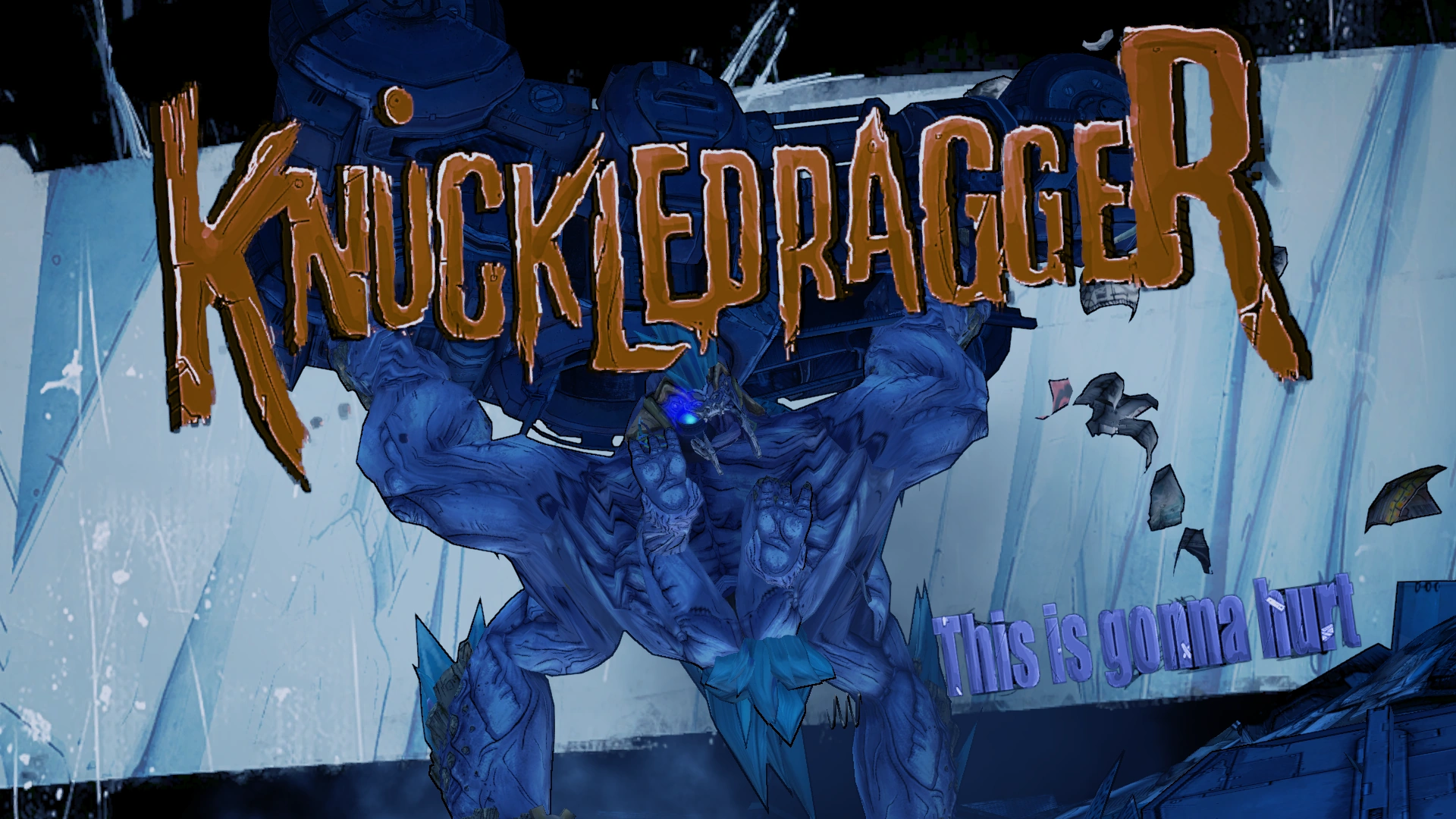
Hello All! I was wondering what the best way to render an enemy title card on screen akin to this Borderlands 2 image (https://vignette.wikia.nocookie.net/borderlands/images/a/a4/Knuckledragger.png/revision/latest?cb=20120919213305) I was thinking it through and thought, I could either model the actual lettering and toggle the static mesh. or i could render it via umg. I could disable player movement then enable it after the image plays through UMG. Which do you think would be the best way?
 golden idol
is someone able to help me?
 vale solar
most likely
golden idol
im having probs with grassy material on a landscape i imported its very reflective and glossy
vale solar
That looks beautiful tho hahah
golden idol
haha
floral heart
Save it before you replace it, might want to use it some day
vale solar
reminds me of like the terminator metal
vale solar
I do not do materials much so I wouldn't know 😮
or also #visual-fx
thats a good channel too i think
golden idol
which one would i go to tho
vale solar
Why not both? 😄
golden idol
😂
golden idol
ummm so after adding landscape my character now just keeps walking straight up
pls help lol
 zenith flower
You set gravity upside down
golden idol
how do i fix lol
zenith flower
Just messing with you lol
Are you absolutely sure that you didnt mess with anything else other than landscape?
golden idol
nope just imported it
zenith flower
(also make sure you dont have a stuck key)
Do you have a jump function for your char?
golden idol
nope dont have a stuck key
zenith flower
hmmm
zenith flower
check wireframe
golden idol
it was fine before the landscape was imported
zenith flower
also, outside of the landscape area, create a plane or box or something and spawn there, and see if your char keeps walking up
if he doesn't its the landscape for sure
zenith flower
try #level-design
golden idol
didnt have issues before when had it has a fbx height map
only when importing through landscape tool
 mint raptor
Hey guys I'm really confused by something I think should be obvious, no collisions on the UE4_Mannequin from the animation starter pack. It has its physics assets with capsules.
And I don't mean no collision as in just not hitting things, I mean the show collision command shows no collisions
zenith flower
#legacy-physics will be your best bet, may not be exactly physics related, but they sure as shit will know the answer
@golden idol Forgive me for not knowing this answer, but can you set collision on the landscape to complex?
mint raptor
@zenith flower I thought so, I posted the problem in detail like a few hours ago no one has gotten to me yet, makes me think no one knows so far
Last resort was here
zenith flower
@mint raptor In that case, lets see if I can float you some ideas
mint raptor
Here is a ref picture
 grim ore
the mannequin has no collision because it uses the capsule collider in the character for that
mint raptor
@grim ore Should I not be able to visualize the collisions though from the Physics Asset?
grim ore
if you mean the collision visualization then probably not as that would be actual collision on the mesh itself, not the physics asset which is seperate
you can easily add a collision to the mannequin in the editor to test that theory
mint raptor
Yet if you see the screenshot above two skeletal meshes both with physics assets one is visualized one is not
hexed solstice
Anyone have a good tutorial for space skyboxes?
mint raptor
@hexed solstice https://www.youtube.com/watch?v=JSRsQpRfDlk
In this tutorial we will create a space skybox using the following tools. SpaceScape: http://www.alexcpeterson.com/spacescape/ UnrealEngine 4: http://www.unr...
golden idol
no just says collison bit ammount
zenith flower
does visualize collision show anything weird?
zenith flower
that was wiremesh though?
mint raptor
The right one? No
golden idol
it doesnt even show collisions when i put it on only the boats have it
mint raptor
@golden idol in reference to me?
golden idol
no to my prob
mint raptor
@grim ore @zenith flower Well I didn't want to have to do this but I just created and assigned another physics asset (new one) and it shows
So odd, after having made it and swaping, I swapped back to the old one and its there. Most importantly I can also now use the collisions as well. For context, originally it was there assigned but not showing and not working.
I'm actually leaning to this being a minor hiccup with UE4. Really threw me off though
zenith flower
I have that happen at times myself. One example was a setting that would always revert. I would change it, compile and save. and restart the editor, and there it was, back to the wrong value. I had to recreate the character. Using duplicate, duplicated the bug. I had to recreate it by hand.... Fun times
mint raptor
oh man
zenith flower
I'm just happy its working for you now
mint raptor
As am I
Side note, the shooter game always suffered from this problem for me since 4.9 to 4.19 where trying to run the game in Editor would only last about 30 seconds before the whole thing would hang and I had to back out. As of 4.19 this has went away. Possibly 4.18 but I didn't touch the project on 4.18
Good chance it was a machine specific issue. Specs were on point though, always high end.
 hollow breach
is there anyway to change the size of the splash screen?
hexed solstice
Can anyone point me to a good VFX tutorial that shows how to have a particle display/animation on contact with a surface?
weary basalt
Not as an setting no @hollow breach
hollow breach
hmm ok ty
 polar hawk
Something no one ever really needed to know...

Here is a fun fact. When running a game that uses @nProtect_Online such as PapayaPlay's Uncharted Waters Online, @@EpicGames's @UnrealEngine's UHT will error out on compiling.
Apparently, @nProtect_Online is killing a process spawned by UHT b...
 Twitter
cursive dirge
Twitter
cursive dirge
heh
polar hawk
do what now
 wary wave
wrong channel, but yeah
 cinder iron
what
wary wave
goes to lounge
grim sinew
Pack them in substance or photoshop
pallid compass
inject in to channels ez
grim sinew
Pretty much
 grim sinew
My brain suddenly hurts, you do this @pallid compass 😛
 cloud cobalt
RMA meaning roughness metal AO ?
 sudden agate
what is rma?
grim sinew
You see the red, green, and blue dots to the right of the textures?
Those are the individual channels
cloud cobalt
Just plug red into roughness, green into metal and blue into AO
sudden agate
tip : roughness should go into the green channel when packing it
sudden agate
green has a bit more when compressing
pallid compass
really o_O
cloud cobalt
7 8 7
pallid compass
is that even noticeable
sudden agate
isn't it 565?
grim sinew
565
cloud cobalt
Yeah
sudden agate
it is noticable
 sudden agate
when your texture has a lot of changes
grim sinew
Don't forget to tick SRGB off for the packed masks
 viral herald
wheres that?
grim sinew
On the texture itself
viral herald
cant find it
grim sinew
viral herald
i dont have thatr
grim sinew
Yes you do.
viral herald
 grim sinew
That's the material, I said the texture.
viral herald
each texture
viral herald
none has anything called srgb
i click the texture right
in the details
there
right?
cloud cobalt
Open the content browser
Go to texture
Double click on it
Each asset has its own editor window in UE4
Texture settings are in the texture editor
Materials have material settings in the material editor
cloud cobalt
You're welcome
 grim sinew
How dare electricians 30 years ago mess this up for us
pallid compass
lmfao
cloud cobalt
SRGB is great
viral herald
yup
grim sinew
SRGB is terrible and shouldn't need to be a thing, but it is, because monitors
viral herald
XD
also
when i have a texture that says metalic smoothness
does that mean its a texture for both?
grim sinew
Not unless it has it in two channels
viral herald
how so 'in 2 channels'
grim sinew
Exactly how you just did it.
grim sinew
Close enough, yes.
There is no smoothness in Unreal. Smoothness is usually referring to Glossiness. You need to invert it to get Roughness.
 grim sinew
I have absolutely no idea what I'm looking at
grim sinew
a OneMinus node. But you may want to reconsider using these assets for Unreal, they're clearly not made for it.
If I had to guess, Unity, right?
grim sinew
Right, so Unity. Tell your friend to re-export it using the UE4 preset it'll work more nicely.
viral herald
ok
 hasty owl
Hey, could anyone assist me with an issue i'm having? I got an error message stating that "Save Game Object Reference is not compatible with Save Game Object Reference" and....well i have no idea xD I was just following a tutorial on saving and doing slight differences for my needs but now i'm not sure how to proceed at all, Thanks in advance for any help.
manic pawn
@silver crown how come you have "voxel plugin™ " but there's no trademark registered for it? :D
 paper kernel
soon ™
pallid compass
@hasty owl u casting to ur save game object u made?
hasty owl
yea, i'll add the screenshot one sec
pallid compass
u doing it from the live training video?
 pallid compass
two things
hasty owl
oh hadnt got to the casting yet, thats what the next node was supposed to be, using that reference
pallid compass
ur not casting from the load slot to ur custom save object
and
is that the HUD?
u really shouldnt be doing this type of thing in the HUD
u should handle it in your GameMode
Your HUD should not be responsible for anything slightly important
all the HUD is for is to represent, not to do.
Announce Post: https://forums.unrealengine.com/showthread.php?146935 Wes Bunn is back to talk about a highly requested topic: Saving and Loading. Together we...
u dont need to watch the whole thing, just skip in too where he starts
and watch the setup
hasty owl
ok, i was just trying to find a way to input data into an array faster so i made a hud to do it, but never found where everything "Should" be, i just keep guessing >.<
hasty owl
for that project i was just trying to make a calculator app for an existing game
pallid compass
The save state object is for serialising ue4 data to binary to store on storage device
hasty owl
so i need to put hundreds of items and stats for the items into an array
pallid compass
Why so much?
hasty owl
cause the game has that many items
pallid compass
But why would u store them all in memory at run time?
Sort of like a database?
of all ur items?
hasty owl
yea
hasty owl
ok good to know
pallid compass
so why dont u try this too start with
Use a bleuprint Struct
for your Stuff
which i assume you have done already to some degree
hasty owl
yea got the structs
pallid compass
Then you can make a Data Table of that struct
Then when u need Data for Item
U can pull the data from the data table
then all u need to do is store Names of items
To pull that row of information from the data table
Its by far not the most effective way but
it is a very good starting point
To Grasp information storage and usage
hasty owl
ok sweet
pallid compass
The great thing about this
Is you can do something like this
You have your Item struct right
hasty owl
i mean, the project was only gonna end up being something you click on say like, find materials with highest stat gain, where to aquire them etc
pallid compass
You can make a Item wrapper struct
Thats like
Item Name
Enum( enum of item type, Sword, Gun, Armor etc)
Stack info ( how many? )
Then u can use tmulti data tables
"How do i know what data table to pull the name from?"
enum tells you
yeah gotcha
hasty owl
is this "Gameplay Tag Table Row" in "Pick Structure" when creating a DataTable, the correct option? no other options are coming up
pallid compass
no
do u not get the option
for your struct name?
if not close ur engine
repon it
try again
hasty owl
its only just been opened
pallid compass
should get some sort of list
like so
if not try creating data table again
sometimes it bugs
hasty owl
huh, it came up with the Materials Struct this time, strangely none of my other 3 Structs appear but oh well dont need them yet, thanks for the help and insight Halcyon ^^
pallid compass
np
hasty owl
@pallid compass heh one more question about this, should i remove "Name" from the struct and use the names for the "RowName"? or just keep as is?
pallid compass
You can have both really if u want
think of it like this
Ref to an item and the items display name are different
ie
Sword_01 FName row
might be in game
Bronze Sword
This lets u change weapon names later on
and not break ur data tables
hasty owl
Ok thanks 😃
 manic pawn
interesting
 vast fjord
I get a unknown error when trying to output
UATHelper: Packaging (Windows (64-bit)): BUILD FAILED
PackagingResults: Error: Unknown Error
plush yew
anyone else just have unreal engine get stuck at 95% loading after changing pluggins?
 empty berry
Takes a little longer sometimes but doesn't usually get stuck. Is that with all plugins or just a specific one?
plush yew
i turned off the VR support since i'm makin a 2D game, it loaded fine with them on
empty berry
Oh that is weird. Yeah I do that all the time with no issues.
plush yew
i guess its not stuck based on control panel telling me its memory is changing. i'll give it some time incase it just has to regenerate something due to VR support
yeap. it definitely had to regenerate some file. alls good
little token
do any of you guys test out each other games on this discord?
 ionic oxide
How looking good a prototype needs to be?
 tall pendant
depends on what you want do to with it.
little token
Alrighty, was just curious
ionic oxide
Thanks
grim ore
@vast fjord there would be more information above that in the log that tells you why it actually failed


 grim ore
UATHelper: Packaging (Windows (64-bit)): UnrealBuildTool: ERROR: No 32-bit compiler toolchain found in C:\Program Files (x86)\Microsoft Visual Studio 14.0\VC\bin\cl.exe
vast fjord
so I need visual studio 14?
vast fjord
I have them both
grim ore
do you have C++ installed as part of 2015?
pallid compass
Are u trying to package?
vast fjord
yes
pallid compass
u dont have vs installed properly
run the vs installer again
make sure u tick the ue4 stuff
and ugh
vast fjord
ahh, thanks
pallid compass
1 sec let me find it
vast fjord
which version? i downloaded the vs professional installer
hot ledge
Has anyone figured out how to do aim down sights first person like call of duty style or battlefield
 shell jetty
in this spring creator update or what is for windows the Windows 10 SDK contain headers so now you have need to get them from github
manic vault
Anyone know a good place to find rigged / animated models like dark souls bosses
vast fjord
I still have that error
I installed Unreal Engine Installer too
UATHelper: Packaging (Windows (64-bit)): UnrealBuildTool: ERROR: No 32-bit compiler toolchain found in C:\Program Files (x86)\Microsoft Visual Studio 14.0\VC\bin\cl.exe
still getting this
grim ore
which version of VS were you updating?
grim ore
that error is from 2015, did you update 2015 to add the C++ stuff or just 2017
feral echo
@manic vault paragon assets looks nice as starting point. You can scale them up 😃
 distant finch
uhm i might have an problem
unreal engine crashed
now i cant do shit with it anymore
just nothing working
cloud cobalt
What's happening exactly ?
 steel bronze
I'm sure this is a really stupid question, but here goes... When I used to build for the web UE4 compiled to JavaScript, but now it compiles to WebAssembly instead. Can I switch it back to JavaScript?
distant finch
i can press everything, but nothing happens when i press it
nor i cant move anything nor open anything
steel bronze
https://docs.unrealengine.com/en-us/Support/Builds/ReleaseNotes/4_18
"The previous optimized HTML5 output ASM.js has been decommissioned and removed from the code base."
Found the answer. I guess I can try 4.17. :)
vast fjord
I changed the compiler to 2017 and it gives me the same errors
should i install Desktop development with C++?
cloud cobalt
Yes
frosty bloom
@distant finch What engine version is this project in?
distant finch
4.19
frosty bloom
I figured.
One of the MP assets i bought has the same problem. the 4.19 version is completely useless. I would suggest changing the project to Engine Version 4.18 or wait for 4.20
hexed solstice
@here Anyone have a good tutorial for displaying a vfx when a character collides with a static mesh?
viral herald
Hey guys a quick question,
Say I have a model that has a base rig (in my case a character model) and I upload that to mixamo to get some of the default animations (walk/run/crouch etc etc) and export those like that as it is with just the literal bare bones, and then used that exact same rig to create more custom animations, only difference between the first and second rig are that the first doesn’t have ik and such.
Is there a way I can upload the rig without any ik bones and then have the rig with the iks uploaded.
Is there a way I can use both rigs at the same time (without conflict) for the same mesh and have all the animations there (from Mixamo and custom)?
 gleaming shore
Can anyone help me, im getting this error while packing my blueprint project, a blank project packages fine however a blank C++ does not. https://i.gyazo.com/67e6f99036b0ca8baf0cb3f87895d023.png

 vast fjord
I still can't find cl.exe
 mortal gale
.exe
That's for Windows.
livid haven
Yes?
mortal gale
Why bother with Windows? It's more trouble than it is worth it.
livid haven
... really?
Are you just going to sit in #ue4-general and take every opportunity to soap box about OS wars?
safe rose
Anyone know what Data Validation consists of exactly? New in 4.19
livid haven
@pallid compass
safe rose
Windows PC Master Race
manic pawn
you probably just aren't good at using it since it's not broken for me
mortal gale
I've used Windows alot, it's self-destruction.
livid haven
@safe rose Don't get him started. He seems to legitimately think it's acceptable to just drive-by derail a thread with his OS proselytizing.
safe rose
heh
manic pawn
you mean the ide that is far superior to all the stuff available for linux?
safe rose
But really, no one knows what Data Validation is?
livid haven
@safe rose Data Validation is, AFAIK, just a new right click option that will try to call UObject::IsDataValid on all the objects in the selected packages.
mortal gale
You don't need an IDE.
safe rose
I ran it, and it gave me a few cool things
manic pawn
working with unreal without an ide
safe rose
But, then it said one of my BPs had invalid data...but nothing else. It compiles just fine.
livid haven
@manic pawn Come on man. Why you gotta feed the troll?
manic pawn
🤷
hidden heart
thats masochistic
livid haven
No, but you're acting like one.
 worn granite
See now I want linux IDEs to be better. But so far VS still beats them.
mortal gale
@hidden heart lol wut
frank escarp
@safe rose validation is just a new function you have in a DataAsset
frank escarp
that basically returns "everything is fine" or "everything is broken"
safe rose
Yeah, I get that. But how can I tell what's broken?
frank escarp
well, you can run that check on the whole project
becouse you implement that checking function
pallid compass
@safe rose
hidden heart
good job you can google
livid haven
It's a generic API for adding in your own custom validation, @safe rose.
pallid compass
Yes
safe rose
Like, it said one BP had Invalid Data, however, it compiles just fine
pallid compass
its the greatest thing ever
livid haven
You override that method for your own classes and you can then use the menu option to check if they're valid.
frank escarp
its not about compiling, is about making sure your data assets have correct data
pallid compass
u override a function that u can put in any uobject
frank escarp
you could also use it to perform unit tests 🤔
safe rose
Hmm, like Naming Convention checks?
frank escarp
but i think unreal has an actual unit test thing
pallid compass
EDataValidationResult UMob_DA_Core::IsDataValid(TArray<FText>& ValidationErrors)
{
    if(Image)
    {
        return EDataValidationResult::Valid;
    }
    else {
        return EDataValidationResult::Invalid;
    }
    //return EDataValidationResult::NotValidated;
}```Example
worn granite
Data.
pallid compass
Do all my equipment data assets have images?
livid haven
It's literally just an API for calling a method that can return valid/not sure/invalid and fills an array of text errors.
safe rose
Hmmm, this is interesting
livid haven
Not sure why it uses FText...
pallid compass
its the greatest thing since the GAS system imo
frank escarp
becouse FText has localization
livid haven
Aye.
manic pawn
why would you need localized errors
pallid compass
so u can read it
frank escarp
why would you need a localized editor ?
manic pawn
^
livid haven
Unlike everything else in the engine where errors aren't localized.
User-facing errors are localized
Practically everything else isn't.
I mean, I suppose it at least means you can give localized data validation errors.
But seriously. Outside of stuff in the actual UI in the editor, I don't think anything localizes its errors.
safe rose
@pallid compass Do you know the default test it runs off the top of your head?
Because it's definitely running one
safe rose
hmm yeah, strange
Returns Valid if this object has data validation rules set up for it and the data for this object is valid.
Gotta find the rules that are already set up for it now
livid haven
Basically, unless the asset contains an AActor, it should always be returning NotValidated.
pallid compass
U swt ur own rules
safe rose
But it does return
pallid compass
Nothing is setup
safe rose
Because it said it wasn't valid lol
livid haven
AActor has a bunch of template/component related data validation.
pallid compass
It returns that function i posted
safe rose
No, something's definitely done by default
safe rose
I just ran it and I had some errors
worn granite
just go look?
safe rose
Aye
livid haven
@safe rose For real though. UBlueprint and AActor are the only implementers that don't just return NotValidated.
pallid compass
U gotta set ur rules up for everything by override
livid haven
You may have just stumbled on to a bug. 🤷
worn granite
didn't he say one of his blueprints had an error?
safe rose
Aye, but what data 😃
livid haven
Look
worn granite
ikd
livid haven
At
safe rose
It's not verbose enough
hidden heart
what does this data validation do again? check the engine for errors after a source compile?
pallid compass
Before
livid haven
pallid compass
Its for checking ur shiz is setup right
hidden heart
oh i see
livid haven
TL;DR: Blueprint implementation is just forwarding the call to the CDO of the generated class.
Which means out of the box, it'll only do anything other than return NotValidated (the default implementation in UObject), if the class is an actor subclass.
pallid compass
EDataValidationResult UMob_DA_Core::IsDataValid(TArray<FText>& ValidationErrors)
{
    if(Image)
    {
        return EDataValidationResult::Valid;
    }
    else {
        return EDataValidationResult::Invalid;
    }
    //return EDataValidationResult::NotValidated;
}``` Example of override, I have this inside my data assets for items, it checks if iv i have remember to assign a image too them.In which case, it'll do a bunch of shit that you can go look at in AActor::IsDataValid.
Telling you, @safe rose, it's probably just a bug or it's something with an actor. The only existing data validation out of the box is for actors and you'll just have to look at what it does.
safe rose
👍  Thanks
pallid compass
wtf that icon LOL
safe rose
livid haven
It seems to reuse existing "checking" functionality which instead writes to the "Message Log" instead of writing anything out to the array.
It's clearly a rushed and minimal effort implementation.
safe rose
Word of warning, don't run this on Content if you have a lot of assets...might take a year
pallid compass
lmao yeah i found out with like
safe rose
It can't be "escaped" either
hidden heart
4k icons or bust
livid haven
Number of icons. Not resolution.
hidden heart
4k icons at 4k res
hidden heart
thows down the pizza peel
silver crown
🍕
 dense quartz
Does anyone know how much time does it takes normally to render video in UE4 (like around 1 min Full HD video) or does it depends on the scene?
livid haven
@dense quartz Imagine if it didn't depend on the scene. What would be the implications of that?
The answer should be pretty obvious.
dense quartz
Cool.Got it.One more thing is that after the flythrough ends it still says rendering.Does it usually goes on or we have to stop it.Sorry this is the first time I'm using a sequencer in UE4
livid haven
That I can't tell you.
pallid compass
Question while ur lookng here Sion
if u right click ur project in vs and rebuild
does it do the engine as well?
or just ur project
livid haven
But just in case, yes - it depends on the scene. If it didn't, then everyone would use UE4 because Epic figured out how to render infinitely complex graphics in constant time.
Which would also imply it can calculate an infinite range of mathematical problems in constant time.
@pallid compass I want to say it should only do the project, but I get the feeling it ends up doing the engine too.
Despite the commandline it uses specifying the project.
hidden heart
in vs it has two projects, the engine code and your project right @pallid compass
pallid compass
Yeah
I right click my project and rebuild and it feels like its doing the engine too lmao
manic pawn
it does rebuild the engine
manic pawn
there is actually no way to get ubt to just rebuild the project
it deletes all engine binaries when you tell it to clear the project
because... reasons
pallid compass
just trying to do a rebuild of project
to debug some shiz
but i excluded GAS system
and it keeps trying to build it with no .cpp project files
manic pawn
delete intermediate/binaries folder in your project has the result you want I think
hidden heart
what zeblote said
hidden heart
thats a good way to do a safe rebuild
safe rose
saved is good one too
 fiery bane
howdy


how to resolve this crap?
and also, i gathered its close to BP objects
they were meant to be instanced
but failures are in reading
attention seek, requesting attention! xD
@everyone
livid haven
Geezus