#ue4-general
1 messages · Page 120 of 1
 safe rose
 tall pendant
the ANY key. just like "Press ANY key to Start" etc 😛
safe rose
I think one is free even
 plush yew
Please welcome @plush yew to the community! :beers:
 wide sorrel
@safe rose thx
 quasi lake
@safe rose I mean
I wanna press a key then pause the running game
And click something in the window
 tardy ocean
Hi small question, how can we use the system of sharing under android in our game UE4 I can not find O.o
quasi lake
Like a hotkey to the pause button above
plush yew
rellou
safe rose
@quasi lake are you talking about in editor?
quasi lake
yeah
safe rose
If so, afaik there isn't a "pause" for run
You can pause simulation tho
As for the key, it's f8 or f9 to escape pawn and gain mouse control
I always forget which one
But it's definitely one of the function keys, you can look at shortcut keys
In editor settings
But anyway, if you wanted to pause your game, set up a key for it. Then unpossess pawn with whatever key, f8 I am pretty sure. Unless doing simulation, in which you can pause that.
 regal mulch
:O
hands flammenwerfer
@plush yew You might want to go to #graphics or #animation depending on what causes this
wide sorrel
hands flammenwerfer
:D
 unkempt reef
hello can someone help me with a problem?
regal mulch
If you post the problem into the correct sub channel, yes
unkempt reef
not sure where this would go.
regal mulch
Then post it here
Asking if someone would help doesn't bring you anything :p we need to read the question
unkempt reef
im having a problem with alpha textures displaying correctly
unkempt reef
ok thanks
 queen arch
god damn it... I had a case of "isValid" not trigering
I changed nothing
and now it works
and now it's not working.. again
for some reason "sphere trace by channel" doesn't give out an out hit hit actor
 dire storm
hiya team. I'm looking to learn more about variable types and how they work. Not floats/ints/bools but the object references, class references. Whats the dif between object/class reference of another blueprint when another BP uses it as a ref if that makes sense. There are also like 1 million variable types. I'm trying to find documentation on wtf all those choices do and how they work if anyone has the time to point me in the right direction.
dire storm
kinda feel like if I learned C++ all the variable connections and how they work would make a shit ton more sense
 floral heart
Probably true.
dire storm
I understand how all the basic variable work. As I'm working through tutorials I get kinda stuck on the concept of using 1 BP to call the other. On the surface level it makes sense. But trying to understand the difference of when they make object references or class references. What does each one really do?
plush yew
Please welcome @torpid oracle to the community! :beers:
floral heart
An object reference points to an existing object. You usually have to make sure it exists before you do things to it.
A class reference is the dictionary definition for a type of object. You can only read from them.
Someone who knows could probably tell about the other two types... e.g. the purple one.
 plucky reef
wanna play fortnite? anyone?
 sudden agate
The command HighResShot doesn't calculate Mips correctly, does it?
floral heart
What's further interesting with object references is that an object reference can point only to objects of the right type, but because of inheritance, any blueprint also counts as the type of its parent. Thus an object reference to an Actor can point to a Character, but a Character ref cannot point to an Actor.
 thin walrus
Can anyone point me to a good explanation of the difference between maps and levels? Especially regarding persistent level and level streaming? I want to create something like 'open world' but I don't really know how I should be working.. tx
 azure sierra
unreal's youtube has a really good video tutorial on level streaming what what its for
@thin walrus https://www.youtube.com/watch?v=GkDg9GPpzXE
Announce Post: https://forums.unrealengine.com/showthread.php?141784 Alan Willard is back to talk about the different techniques that you can use to handle l...
 stable crest
Hey, I've got a component which inherits from UStaticMeshComponent. In this component I've added a method to set the pitch based on a parameter let's call it TargetPitch. I'm doing some clamping and then I try to set the new rotation via SetRelativeRotation(FRotator(ClampedPitch, 0.0f, 0.0f));
I'm logging the clamped pitch and it seems to be fine (0, 40) but the mesh doesnt update
If i set a fixed value like 10.0f instead of the variable it works somehow....
do you know what I might be doing wrong?
thin walrus
@azure sierra tx mate, will take a look
 dusky dove
can i use visual studio 2017? does it work with currently updated UE4?
it says in the tutorial to use 2010 2012 2013 or something
is that outdated?
stable crest
I'm using it and it works
dusky dove
@stable crest for mobile
plush yew
Please welcome @foggy gyro to the community! :beers:
dusky dove
stable crest
Ah i guess there is a dependency on mobile
stable crest
 minor lily
@dusky dove Nsight is related to Cuda (from Nvidia), depending on the version it may not be compatible with Visual Studio 2017 (they just release Cuda 9.0 which supports 2017, all their tools may not have caught up yet)
stable crest
Visual Studio
Download previous versions of Visual Studio Community, Professional, and Enterprise softwares. Sign into your Visual Studio (MSDN) subscription here.
 viral cape
I've deleted the light source but the light is still there?
stable crest
but i quess you need to have an account there
dusky dove
there is no community 2013
also express installs dont work
so...
not sure what to do
plush yew
me2 @next badger
azure sierra
@viral cape you need to rebuild lighting
same thing happens if you move an object without rebuilding you will have a dark spot where the object was
plush yew
Please welcome @wooden olive to the community! :beers:
 next badger
@wooden olive feedback != solution
but, yes, you can (if it's not general, use respective channel)
next badger
oh, i won't be helper here, but you still may ask, maybe someone will answer
 wooden olive
i have a destructable mesh, but there is no texture inside, and i cant get 2 materials in the skeletal mesh, becuase when i fracture it goes away
 worldly umbra
Is it possible to transfer Particle and Dynamic Simulations from Blender to UE4?
wooden olive
im sure there is
worldly umbra
How can I transfer an explosion that I made inside Blender to UE4?
wooden olive
i think its a plug in but i forgot the name
also unreal already has an existing explosion
worldly umbra
I don't like the Default one so this one I made is more suitable for me
worldly umbra
What is Alembic??
So what is the correct way??
 scenic flower
Goodbye UE4.. I am quitting game development. Its been 2 years but I was unable to ship even single game. UE4 is surely the best engine but seems like game dev is not meant for me. Goodbye people..
safe rose
...
next badger
@worldly umbra https://docs.unrealengine.com/latest/INT/Engine/Content/AlembicImporter/
there's no correct way, it's probably good thing not to make explosions outside ue4
Describes the Alembic File import process along with import options.
worldly umbra
I am guessing that won't be too optimised
next badger
@worldly umbra Alembic is pile of garbage in the terms of optimization, also it weights a ton when imported in ue4
worldly umbra
How do they make explosions inside UE4 then?
Like the ones from Fortnite game
I am not too good with UE4's particle system
next badger
@worldly umbra oh, the fortnite have fery fancy tech, i think there was a video about it...
@worldly umbra oh, btw You mean the one from the cinematic or from the game?
worldly umbra
The Game play one
I just need to know the basics of creating an explosion inside UE4 rest I can manage... So is there a proper tutorial for it whether official/unofficial....
next badger
game one made with particles, cascade, or even niagara...
worldly umbra
I saw there is a pipeline of Houdini to UE4 but I am an Indie dev and can't afford that software
 frank escarp
houdini is 200 dollars for an indie
worldly umbra
There isn't any proper tutorial existing that tells how to create explosion inside UE4 using Cascade or anything
frank escarp
so similar to substance and others
worldly umbra
That's too much for me
frank escarp
becouse you need the textures first
worldly umbra
I can create textures
frank escarp
you can create the textures from other software, but houdini has dedicated tools for it, and some real fancy stuff like normal mapped explosions
or motion vector to get super high framerate explosions
once you have the texture, its trivial
worldly umbra
I can do with cartoony one
next badger
@worldly umbra i think there are explosions demos in ue4 learn tab or among free assets on the marketplace
frank escarp
you go to cascade and tell it to use it
worldly umbra
Ok I will check the learn and marketplace sections
I think I need to master the Cascade
next badger
@frank escarp no news on Niagara?
frank escarp
there is a crastastic WIP thing you can enable
essentially you create your own emitters
using a node graph like the material one, or blueprint math
next badger
@frank escarp i did, it crashes the ue4
frank escarp
and that defines the behavior of particles
told you its crastastic lol
just wait til 4.999 when they enable it
epic is actually working to develop it
next badger
@frank escarp i thought maybe you know what was on recent stream about 4.18
frank escarp
becouse they are trying to enter the movie-cinematic market
and to do real fancy FX niagara would be killer
didnt saw that stream
ill go have a look atit
worldly umbra
Future is bright but can't wait much longer I need to create something cool for my showreel
next badger
yeah, the houdini quality realtime fx would be noice
plush yew
Please welcome @lucid venture to the community! :beers:
frank escarp
@next badger houdini is just a movie tool for FX
for the game fx it exports fancy stuff that just works with the normal tool
you can use that stuff in any engine (and in fact they use it like that for AAA)
im having a LOT of fun with it
automatic terrain, automatic level design, fancy FX... its a great tool
but it is STUPIDLY hard
dont give it to anyone who isnt a programmer
it expects you to actually write geometry/simulation scripts for stuff
using python or a c-like lenguage
plush yew
Please welcome @ornate forge to the community! :beers:
wooden olive
i have a destructable mesh, but there is no texture inside, and i cant get 2 materials in the skeletal mesh, becuase when i fracture it goes away. can anyone help
next badger
@wooden olive material goes away?
wooden olive
i create a second material in the destructible mesh editor but when i click fracture, it goes away
the only material is material 0, the model texture, i need material 1 for the inside
@next badger
next badger
@wooden olive i think it's in chunk parameters #2
@wooden olive nope it's under element 1

In this video i show you how to create a destructible mesh by creating an exploding oil drum. Music: Tobu - Colors https://www.youtube.com/watch?v=eyLml-
wooden olive
i get this vid, but hoe do i get 2 materials, when i click add i can but then i click fracture the second material disappears
@next badger
next badger
@wooden olive you fracture before
plush yew
Please welcome @last moss to the community! :beers:
wooden olive
@next badger
next badger
?
 blazing crane
this happened on my last project
using c++ seems to cause crashes but i never have any idea why
compiling with 0 errors and yet the game crashes the editor on runtime
wooden olive
Alexey Mak (S-ed) - Today at 4:25 PM
@Amplific mods aka (Sly) you fracture before
Amplific mods aka (Sly) - Today at 4:26 PM
ok, then
becuase trhe inside is empty @next badger
 glossy flame
@blazing crane well, compile errors and runtime errors are very different things 😃
C++ doesn't give you the benefit of just saying "errors reported during run"—you crash in most cases—so you need to be much more careful in setting up your code to avoid that
Getting stuff to compile is the easy part in most cases. :p
blazing crane
coming from unity, it's a big step up in difficulty
next badger
@glossy flame in most cases it's just a rogue pointer...i.e. forgot to test against nullptr
blazing crane
i'm doing the ben tristam course but it moves like molasses
is there a c++ resource you guys recommend?
for somebody who knows c++, and is a professional unity dev
(Me)
 wild kestrel
when you crash you get errors in logs
go check it
if log cuts that means it a crash due to CPU instructions, in most cases this means calling function on null pointer
then debuging is needed
blazing crane
how could I debug?
glossy flame
Yeah, #1 rule when starting C++ is check your pointers
blazing crane
ahhh
wild kestrel
VS has debugger ;p
tun with debugging and when crash happens VS shows oyu where crash happened in code
safe rose
But still pretty good, especially for newbies
You can check out BatteryCollector
Andf TanksvsZombies
blazing crane
it reminds me of the rick and morty episode with the purge, and the old man won't stop telling his tale
safe rose
I havent' tried TvZ though, so no experience on that.
wild kestrel
IF you used Bluiepritns for a while you already should know most of fucntions, because most blueprint nodes are just bindings of C++ functions in engine
safe rose
But BC was pretty good.
blazing crane
this looks nice: https://wiki.unrealengine.com/Entry_Level_Guide_to_UE4_C%2B%2B
yup it was a null pointer
i commented out anything with a *
i thought i knew what pointers are. I don't.
wild kestrel
pointers are ints that contains memoery adderss to the varable it pointing to
blazing crane
why use pointers as opposed to referencing a variable?
wild kestrel
if you gonna try to access invalid pointer you either get crash or get some trash data
blazing crane
for optimization?
wild kestrel
hmmm refrence can't be null, it kind of like hard pointer
pointer can have null state
also all UObject interations happens via pointers
blazing crane
would it be better for me to just get a book on C++, break out the old laptop and vim, and go from there?
i guess I really need a better understanding of c++
i get by as a unity developer without a cs degree level of understanding
i guess that Unreal isn't really that way
 ornate forge
you don't need a CS degree to figure out pointers
wild kestrel
ok then maybe start learning standard C++
but if oyu do that you need to remeber soemthing
UE4 expect you to use exclusivly it's APIs
the notmal C++ tutorial will teach oyu about standard C++ functions which are not used in most cases in UE4 coding
blazing crane
pointers and header files seem to be the biggest differences from c#
at least when it comes to unreal
wild kestrel
thats why peopel call C++ in UE$ as "UE4 C++" but it still same C++
C# is complitly diffrent language ;p
asside of syntax being quite similar
ornate forge
UE4 has some macros and a custom build system that may throw off newbies but it's really just usual C++
wild kestrel
C# is morel iek scripting language while C++ is a code that is translated direclly to CPU instructions
C and C++ was made to save time and sweat of assbler coding
by generating CPU code
 shell jetty
now you do F#
wild kestrel
Also worth noting is that by making C++ gamep roject, you really just adding extra mdoule to the engine, technicly just extending it
UE4 code is modular kind of like Linux kernel if you seen that
ornate forge
CLR JIT actually also generates CPU instructions from C# http://www.telerik.com/sfimages/default-source/blogs/understanding--net-just-in-time-compiler-figure-170ea752614cf-png
 wild kestrel
yes :p but C++ was made from ground up to generate CPU code
while C# is compiled to machine code which JIT just compiles to CPU engine
ornate forge
C++ compiler does not generate CPU instructions directly if you use LLVM/Clang
wild kestrel
it still requite that huge .NET runtime
in you understand core of C++ you should understand what i mean
i mean oyu can dirrecly place assebler code inside C++ via compiler buildin functions
maybe let me explain this way
true C++ and aspecialy C don't really need runtime,
because what you code is changed direclly to CPU machine code
C++ runtine is only those standard functions so you dont need to start from absolute 0
like in assebler
while C# and all .NEt languages are fully managed and can be run in VM, you can really direclly interact with CPU
maybe there is ways but i dont know
shell jetty
still you have build.cs in UE
ornate forge
the important difference between C++ and C# is the lack of garbage collection, not the way machine code is generated
wild kestrel
build.cs is just build scrit for UBT which is tool coded in C#
thats why UE4 editor requires .NET and Mono
no
let me explain this way you mae a main()
and just int8 x = 0; int8 y=0; int8 z = x + y;
this gonna be converted to CPU instruction without any runtime needed
because that job of standard normal C++ compiler
while .NEt languages complitly relay on that runtime it has
even for simples tasks liek this
inmt erms of low level high level C and C++ are between assebler and .NET
when oyu code in C++ you knwo that if oyu do int x; it will be just place in memory
while if you do that in .NET it will be something un run time which in the end is placed in memoery by the runtime
see what i mean ;p
it more raw programing then .NET
dusky dove
can somone link me the visual studio they use that actually works with android? really hard to find
plush yew
Please welcome @remote fulcrum to the community! :beers:
 remote fulcrum
hello
 midnight flax
ok so when i import my gun model into unreal engine it imports the pieces seperatly and animates all the seperate pieces does anyone know how to fix this
plush yew
Please welcome @old bison to the community! :beers:
 sullen swift
I have a box thats subdivided, when I important it with matching custom collision, the collision looses all the subdivisions. How do I prevent that (intended to use for a spline mesh)
 wet spire
I'm look for someone familiar with using git/Source tree and multple work stations. I have two work stations and When I try to move from the first to the second workstation after uploading all of my changes to source control I get this Error everytime on the second workstation. Regardless of which one i used first. Blueprint could not be loaded because it derives from an invalid class. Check to make sure the parent class for this blueprint hasn't been removed! Do you want to continue (it can crash the editor)?
 keen carbon
did you manually commit the changes in the first workstation?
Otherwise, I use github to centralize our project. I find with the combination of the github desktop app and git you can create multiple "masters" (one for each workstation). So when you commit your project on UE, you go to the desktop app and commit to the main master.
plush yew
Please welcome @molten oyster to the community! :beers:
keen carbon
Welcome @molten oyster
wet spire
@keen carbon I had tried that before. This time removing the files not tracked by git and rebuilding the project worked. It didn't on my last project which is still completely broken
Thank you.
keen carbon
Huh. Weird
wet spire
I miss it when I had a perforce server, lol.
wet spire
I had access to it for over a year. But now that gig is over. I'm on my own now.
plush yew
Please welcome @autumn portal to the community! :beers:
keen carbon
Welcome @autumn portal
wooden olive
Can anyone help me with, destructibles, you must have a very advanced knowledge because documentation dont go as far?
dusky dove
why is there no Arcore section 
 kind pumice
destrutable meshes took me forever to get replicating correctly in multiplayer - I ended up using the DENT blueprints on the marketplace and tied the Shooter Game template into them by exposing a few of the weapon projectile functions
shit was not easy and I'm afraid to touch anything now that it replicates properly LOL
still don't fully understand them, and my players can walk through the DM walls still
documentation isn't great for multiplayer DMs for sure
wooden olive
@kind pumice I have a problem with inside texture not existing
 warm mountain
I just realized
I have dishonored the unreal engine community 😦
All this time i've worked on UE4 without realizing the abbrieviation of my home address 😦
I live in UNITY STREET and work in a complex called UNITY ENGINEers LOL
I never really bothered to search what US and UE meant in my address XD
plush yew
Please welcome @dapper ibex to the community! :beers:
plush yew
Please welcome @spiral juniper to the community! :beers:
 spiral juniper
ayye whats up people
 mint raptor
So I purchased a pistol pack that has FPS animations and they use the mannequin skeleton but seem to have their weapon_mount bone and hence WeaponSocket down at the root? Why would that do that and how should I go about correcting this?
 radiant ermine
Full title leaked
spiral juniper
can i get someon to help me with something i have an idea for?
kind pumice
@wooden olive do you have the inside matrial set here - when you open the DM you should have more than one material
 magic garden
@spiral juniper Please be specific. What do you need help with?
I need a struct to hold a distance and an index. Then I have a TArray of that struct. I want to sort the TArray by distance, but I'm having problem overloading the < operator. Can anyone help me?
I tried
    {
        float dist;
        int pto;
        bool operator <(const tDist& x) {
            return x.dist < dist;
        }
};```But later it said "error: invalid operands to binary expression
('const APawnCamera::tDist' and 'const APawnCamera::tDist')
return A < B;"
spiral juniper
@magic garden For example im trying to create an FPS but how can you import another type of gun for example a ak-47. imma noob at creating and codding with c++
magic garden
All right, it was missing a const (I guess) :
            return x.dist < dist;
}```@spiral juniper Sorry, I have done the FPS tutorial other day, I think you still have to do a few other tutorials
I really have no idea
spiral juniper
huh i also saw you have to pay to get add-ons for the emgine is that true?
tall pendant
What paid add-ons?
You can buy plugins etc on the marketplace, but you dont have to.
 worn granite
None of those are a requirement
spiral juniper
i wasnt saying thay
worn granite
And some of those are a waste of money (not those specifically)
There are also some free "add-ons"
spiral juniper
let me rephrase is there anyway to import something such as a guns in the engine without buying these add-ons
worn granite
If you can make it yourself or convince someone to give it to you for free
Otherwise you'll have to pay for the models
spiral juniper
how can i make it for myself
like i said im really bad at this and wanna get better
tall pendant
uhm. i'd say download Blender and check some tutorials.
spiral juniper
hmm alright thanks man
plush yew
Please welcome @copper tulip to the community! :beers:
safe rose
heh
floral heart
If he expects those guns to function, he's gonna have a fun time.
plucky reef
guys what does MS means in the viewport?
under the FPS
tall pendant
... milliseconds ?!
worn granite
no its clearly microsofts. its 8 microsofts
tall pendant
i knew i was wrong hehe
plucky reef
haha
remote fulcrum
hey guys i could use some help with UE4 real quick
also need someone whos just as equaly proffecient in source engine
plush yew
Please welcome @forest heart to the community! :beers:
 weary basalt
@remote fulcrum Just ask your questions in the appropriate channel and someone will get back to you.
remote fulcrum
@weary basalt thats kind of the probelm im not sure which channel to use
since this issue is both texturing, exporting and importing based
and ofc source engine knowledge
weary basalt
Just ask here then.
quasi lake
OK
remote fulcrum
so basically
i have around 500 mb of a bunch of models from an UE4 game called deathwing, and the guy who helped me export and recompile them said that the RGB and color maps need to be combined and then the models need to be converted from the fxvb or whatever it is-format, into the SMD format and then into the MDL format so that source engine can support it
anyone here with the capability to do alll those things will be welcome i may even pay you (err in steam games cause i kind of have my money on steam right now) if you do your job right
tall pendant
Just curious: We're not talking about Space Hulk: Deathwing, right?
tall pendant
You wont find any help regarding ripped content here
weary basalt
Ripping and reusing content is usually frowned upon.
Especially when the vast majority of this community work really hard to create original works.
remote fulcrum
ja, i guess
 short onyx
kill me please
short onyx
Nop
kind pumice
damn
short onyx
Files are on read only, it's that?
PS : i never touch that, so dunno why i have this now
short onyx
Nop, only the main folder
kind pumice
my folders are like that as well, so I wouldn't think that's the issue
what about security permissions on the uasset files - is your user account listed with full access?
you can just add everyone with full access to be sure its not a security issue
short onyx
I have touch nothing and i'm admin on my PC :/
Where can i see the perm for the files?
kind pumice
right click the specific UASSET your trying to modify and do properties
Security tab
short onyx
Oh on windows ^^
kind pumice
yeah
you should be able to add the "everyone" group to teh file, then give it full control
that will eliminate permissions as being a possible reason
short onyx
Can i change this for ALL files in my folders or i need to do it one by one?
kind pumice
yeah, you can do it from your main project folder and it should inherit down
I would just do one file though to be sure it is the culprit
that way you don't mess with permissions without having to
for a bunch of files/directories
short onyx
Oh ok, i don't have perms for modify this ._. But i'm admin ;.;
kind pumice
I won't promise its the reason until you can save the file after giving full control over the file. shootin gin the dark here lol
kind pumice
ahhh is it giving you an access denied type of error?
short onyx
Yes 😦
kind pumice
windows can be crap with file/folder inheritance
lets go to the root folder of your project
go into its security tab then advanced
short onyx
yup
short onyx
It's say that i'm the owner :/
kind pumice
windows permissions can be hell
short onyx
I litteraly touch nothing but now it's work >.<
kind pumice
usually when weird crap like that starts happening, I run a virus scan out of paranoia
lol
kind pumice
totally good habit to have on a dev workstation, second only to backups
plush yew
Please welcome @drowsy bough to the community! :beers:
plucky reef
anyone here manager to add nvidia hairworks to UE?
plush yew
when i play game in main map screen my game does not work as it should do but when i am in the bp window and play game its work exactly i want so what the problem
plucky reef
maybe you're playing in new window
make sure that your active play mode is in SELECTED VIEWPORT
regal mulch
Playing from the BP well open a new Window
plucky reef
and what is the "my game does not work as it should do"
regal mulch
If he only presses play (and not play in new window), then the non-bp play (so the one where you see the viewport) will start in the viewport
That shouldn't do any different though
And yeah, he needs to explain his problem better
If words are missing, try a video
plucky reef
yeah
regal mulch
@plush yew
plush yew
ya
when i play game in main map screen my game does not work as it should do but when i am in the bp window and play game its work exactly i want so what the problem
it will better explain by screen share
 cursive dirge
@plucky reef that's the engine source code, with hairworks integrated to it
you need to compile the whole engine
and that's now based on 4.16.3
so if your project is made in 4.17, those files will not open in it
@plucky reef also, it's not polite to tag random users to ask help, just do it here and try not to bug our moderators about your issues
people will answer if they know the answer or have time to explain things
regal mulch
@plucky reef Never needed it :P so no
plucky reef
@regal mulch I see, I wanna try everything tho haha
@cursive dirge oh I see, so I just need to clone it and then compile in C++ and it's good to go? I can now add hairworks files? thanks
oh yeah, so rude of me, sorry
 dawn apex
Can some one have a spear time 10 min to test a game
 surreal viper
depends on what kind of game 😄
dawn apex
What a question is that
surreal viper
and what is the thing needed to be tested
maybe the second question is more important 😄
surreal viper
okay I can help u with that
cursive dirge
@plucky reef yeah, once you build the custom engine, you can use it, the branch I linked accepts hairwork files (and it has some simple test scenes as well)
just make sure you build that hairworks branch if you clone it manually
dawn apex
tell me when u have entered in game u need steam by the way
short onyx
Is it a nice game? Should i download it? x)
plucky reef
I click clone and OPEN DESKTOP using github
surreal viper
@dawn apex I just started the game
plucky reef
can I use that an open my project?
surreal viper
@dawn apex still there? I could not find any server, started my own and did some running around, also shot some paper zombie 😄
cursive dirge
@plucky reef you need to build the whole engine...
cursive dirge
instructions from the github forks readme, yes
plucky reef
thank you I'm downloading it now
plush yew
Please welcome @uneven fossil to the community! :beers:
 stark lynx
Hi guys, i was just wondering... do you think that UE4 is a good engine for a MMOFPS in the scale of planetside 2?
i mean.. hundreds of players in the world at the same time
or an engine from scratch might be a better option?
tall pendant
You could take a look at HeroEngine
keen carbon
Modifying an existing engine will always be better. With that many players, you may need to modify unreal engine to change the way it controls and tracks actors, but it should be fine.
plush yew
my game behave different as i want to do when i play it from level editor play button but it work perfectly when i play it from bp editor of any
keen carbon
Huh?
stark lynx
interesting
looking at hero engine now
eso and swtor started with it.. though eso has it's own and swtor is heavily modified
tall pendant
for MMO stuff HE is probably the best option. at least better than UE (without some staff to make mods to the engine)
regal mulch
UE4's Dedicated Servers are not made for large scale games without modifying it
Newest patches (4.19) will improve that a bit
Due to Fortnite supporting 100 Players now
tall pendant
A custom engine can be also better than using a existing engine like UE or Unity btw
depends on your project and your companys long term strategy
stark lynx
how about using something like photon?
regal mulch
You can use UE4 and bypass the normal server stuff and implement your own networking for that
Iirc there are solutions for this already
stark lynx
i don't have a company or manpower yet 😄 i'm just doing a bit of a research
regal mulch
Sure, however an MMO will need you to do a lot of backend coding
tall pendant
yup^^
regal mulch
There is no plug and play solution for such a massive scale.
At least not for ue4
stark lynx
well that i kind of understand
regal mulch
Check the latest blog posts from Ue4
They posted about the changes coming from Fortnite
Maybe that helps already
stark lynx
"On January 24th, 2015, PlanetSide 2 hosted 1,158 players from all three of the game factions – Terran Republic, Vanu Sovereignty, and New Conglomerate – in a massive battle on the Jaeger competitive server." - this is the scale i'm interested in
i'm a backer of Dual Universe.. and their networking system intrigues me
the further the object is, the fewer updates the client receives
and smooth movement is simulated using prediction
regal mulch
That's how it's usually done, yeah
You can modify ue4 to do that too
Or just use the net cull distance
The problem is probably the Server itself
It needs to manage 1k+ players
stark lynx
yea
when i was thinking about the less frequent updates... i always come up with the sniper problem
tall pendant
their Continuous Single-Shard Cluster system is interesting
stark lynx
let's say that i have a sniper rifle with an effective range of 2km (let's say it's a laser and it's scifi)
2km is a huge distance for smooth and accurate updates
that's why i'm kind of unsure about the system
 errant lintel
quasi lake
errant lintel
quasi lake
Do you have any vs plugin recommended for c++ coding?Except Visual Assist
I found much error with Visual Assist for c++
So I'm looking for some other good plugins
😫
minor lily
Hi, I just reinstalled my computer and switched to Visual Studio 2017 but when I generate the project files for the Engine (which I compile), the project in VS2017 is named "UE4 (Visual Studio 2015)". Is this normal? How can I make it so that it actually uses the VS2017 compiler?
mint raptor
@minor lily What version of UE4 are you using?
Hey guys, is there anyway to rotate a bone on just one axis? Every time I try to rotate on one axis it will adjust the others a bit as welll.
 late sail
plush yew
late sail
plush yew
watch this bad joke https://blogs.unity3d.com/2017/10/04/neon/
unity is teaching others to pay ridiculous amount of money for assets you barely see
throw 50 usd for a ship you see 0.2 seconds

Unity Technologies Blog
Neon is a small environment created by our Demo team’s creative director Veselin Efremov in just a couple of days, with Unity 2017.1 and models from the As...
tall pendant
they get an cut of the money right?
plush yew
dunno
minor lily
@mint raptor I am using the release branch of github, so this should be 4.17.3
For anyone trying to do the same as me in the future, when calling GenerateProjectFiles.bat to generate the Visual Studio project files, pass it the -2017 argument.
It should look like this then:
GenerateProjectFiles.bat -2017
 cerulean nova
🤔
i dont use unity
buut the 50 bucks for the ship isnt that much for such quality
if u click the link below to the model it also has animations and such
plush yew
yes ^^ but in that demo scene the spaceship does... exactly.. nothing except standing or moving..
so a 200 faces low poly spaceship would suit perfectly
cerulean nova
yeah the scene is quiet lazy made
cerulean nova
just one scene to fast show off everything they wanted to sell and try to make a "cool" effekt for it
plush yew
yes..
 honest raven
 pallid compass
has anyone managed to use render target to get a 3d mesh in 2d HUD effectively with alpha'd background?
cerulean nova
@honest raven downgrade your driver ?
 verbal laurel
Has anybody ever made practice assets for people to use?
 toxic vale
odd question, What is the most frequent thing that causes AI Actor's to lagg when becoming a massive number of them? Polygons or the actual ai system
verbal laurel
That's a good question, I hope someone @'s me when it's answered.
queen arch
Why is this not working? Get streaming level and the string are not firing when running the game
glossy flame
Are you sure that's not firing?
If the object you get out of the getter is invalid or doesn't implement the interface, the function isn't called, which will return an empty string to be printed
You can use a breakpoint (F9 while node selected) to see if the node is truly getting fired or if there are other issues
If you've confirmed it's not being called, however, your input might be getting consumed at a different level
plush yew
Please welcome @pastel storm to the community! :beers:
Please welcome @plush yew to the community! :beers:
queen arch
I had to change the sublevel to always streamed
and now it works
thanks both of you
plush yew
@pallid compass You need to have your mesh outside of your level (including the sky sphere) and make sure the scene capture is pointing away from the level so that the background behind the mesh is black
 scarlet jackal
Can anyone direct me to a good place for learning about making low poly terrain?
plush yew
Please welcome @plush yew to the community! :beers:
 stoic moth
What's the BP node to add a Sprite to an UMG Overlay ?
plush yew
Hellow all. I'm OPRation as when I was young I wanted to be a gamedeveloper. I realy want to make a game now just for seeing what i'm capable of. The struggle for me is always about what topic must the game be. As I want to create a Open World game (GTA Style ish) I'm realy quick lost in what need I to do. And how to get started. If anybody would be kind to help me find a way for me to make games. Thanks
Please welcome @warped hatch to the community! :beers:
 limpid sandal
Grab pen paper
Draw
Environment
Write
Story
Write features
Complete design document
Write implementation details
hile learning engine
mint raptor
Man retargeting skeleton mesh has been a pain. The asset I bought has the weapon mount on root but the skeleton I want has its weaponmount on the hand.
So I'm manually moving around the weapon mount saving, retargeting and checking to see if it looks right just so I can tweak it again, and worse yet, the orintation seems so inconsistant. There has to be an easier way.
 fiery token
hey, anybody home ?
plush yew
Please welcome @warm tangle to the community! :beers:
fiery token
heya
plush yew
Please welcome @tulip plinth to the community! :beers:
fiery token
Welcome @tulip plinth
 warm tangle
hi thx
short onyx
Hey, someone know a good YouTube channel for complex (not basic) blueprints tutorial? Thanks ^.^
dire storm
I hope everyone is having a producting weekend! What is everyone currently working on? I'm running through some RTS tutorials to learn about building placement/unit spawning. A little advanced for me (I understand the flow but I don't think I could recreate it on my own without heavy "cheating). Just wanted to give a shout out to the awesome people here who chat it up, help out and keep the dev process somewhat fun 😃
@short onyx What do you consider advanced?
short onyx
Not the basic tutorial you can find quickly like movement and other xD
Like the good tutorial i found for elevator made like a AAA game, super smooth, configurable and other
Or like procedural generation
dire storm
I mean instead of searching for "advanced" BPs I would just go to the unreal documenation and get down all the frameworks and how they interact with each other. The best bet might be to just follow a tutorial series and then look up everything you don't know while you're following it. I'm doing one of the RTS tutorials on youtube. There's a few of them to choose from. They pretty much cover every aspect of BPs as you are working on them. Really testing my ability to follow along and critically think about wtf is going on as there are BPs calling BPs everywhere, functions and macros having spagetti sex. Pick something you want to learn and go that route. Like if you want to make an inventory system... search that and see how everyone does it. Then if you want to make a better UI, search on the UIs and learn how they do it. I think its easier to learn how to do a mini project and then look up the shit you don't understand as you go as apposed to "I want to learn all the advanced features". Making the project will cement the workflow in your mind quicker (at least for me). Then everytime I dont know what something is, I look it up as I go and take notes.
 tulip plinth
@fiery token thank you!
dire storm
productive*
short onyx
@dire storm give me your channel in private message :) Could help ^^
Ps : yeah, i have my mini project for test think i probably never use but fun to learn :)
dire storm
https://www.youtube.com/watch?v=-AEcliC5STI&list=PLDnygpcOYwFW2XtNyiandrLDG__OAZs7Q&index=15&ab_channel=3ProngGaming This is the series I'm working through now

In this episode, we continue our building placement checks. This time, we ensure that the building is on a (relatively) level surface before you are allowed ...
fiery token
Hey guys, I have this extreme frame drop ( from 100+ FPS to 7~8 FPS ) when I add a spline to my scene, even when the spline has no attached mesh, for no actual reason... Anywho do you guys have any idea why ?
dire storm
Theres a few bumps in the road here and there but overall the guy is pretty freakin awesome. Very to the point. Has a review video where he explains some stuff.
@fiery token is your spline named FPS eater? Jesus that's quite the FPS drop. I have no idea. I've played around with splines "with meshes" and havent had any noticeable drop in framerate in the last week.
is it in a blueprint with an attached loop or something attached to tick?
short onyx
@dire storm i look it when i can ^.^
dire storm
I watched a spline tutorial a few weeks ago and the guy screwed up his BP with the spline and basically had it set up so that it was devouring his framerate because of how he coded his tick event to update for the procedural stuff.
fiery token
This is my blueprint..
plush yew
Please welcome @nova shoal to the community! :beers:
 regal drum
Is there a site where I can download C++?
glossy flame
Since it's a fork of the engine (private repo), you must be signed in with a GitHub account that's linked to your Epic Games account and in the Epic organization
It's there for sure, GitHub just 404s when you don't have access
regal drum
Is anyone gonna answer my question?
glossy flame
Well, you don't "download C++".
You're going to have to give a better question as to what you're actually trying to do
Are you trying to get Visual Studio?
Are you trying to get a compiler?
dusky dove
@glossy flame ah thanks yeah
regal drum
Tried following a YT video but it was on Mac and I understood nothing
ornate forge
@regal drum if you need Visual Studio, it's here: https://www.visualstudio.com/downloads/

Visual Studio
Download Visual Studio Community, Professional, and Enterprise. Try Visual Studio Code or Team Foundation Server for free today.
glossy flame
Ah, if you're on Mac I believe the big IDE is XCode
regal drum
I'm on Windows
 final owl
😄
glossy flame
You can use a plethora of different IDEs, but probably the biggest ones for C++ are Visual Studio and CLion
If you're intending to get into UE4 C++, definitely use Visual Studio
regal drum
I want to get into C++ in general
There are some studios I would love to apply for when I get the requirements, and all of them require me to know C++
glossy flame
Okay, so personally I would just download VS, make sure you select the C++ tools when you install it, then get going
dire storm
@fiery token Did you open the debugger and see whats eating the FPS? I'm not super familiar with it yet but you should be able to pull up and see what part of the spline is eating your fps
@fiery token From what I've read on the tutorials and whatnot its probably something to do with that forloop. Did you get your spline BPs from tutorials?
fiery token
Yeah I did get it from a tutorial, and it seems to work fine for him.
dire storm
Clean up your spagetti. Look at your tutorial and meake sure you are using the right index number to start with and whatnot. I'm not too familiar but what I'm doing now when I run into problems is just rewatch the tutorial to see what I missed and then look at other tutorials to see how they do it too. There's something wrong with that BP and my uneducated guess is its the loop. Loops can be scary and devour your FPS if you fuck em up
Let me pull out the spline tutorial I was doing and see how he did it
@fiery token brb
@fiery token hey
what do you use to print screenshots on here?
fiery token
Yeah, I'm here.
The plus icon next to the "Enter text here"
I mean "Message #ue4-general "
dire storm
So this is the walkthrough of how mine was done. Spline -> Get Number of Spline Points -> minus 2 from it (for start and end). That goes into your ForLoop
fiery token
do you have the link to it or something ?
dire storm
I dont think you're supposed to count the start and end point
and I know this spline works perfectly
dire storm
because they are the start and end points.. basically think of it as a line. draw a bunch of points in the line. You are worried about the "lines" between the points. Not the points. So you don't coun the start point or the end point.
you're basically segmenting a line. chopping it up into smaller lines
you count the chopped up lines, not the points that make them
so you have to minus 2
I would just link the damn tutorial but its one off udemy
Lemme see if I can figure out how to get a good printscreen. I never use printscreen
fiery token
AHAH
Just press the start button and printscreen together... the screenshot comes in your Pictures->Screenshots
glossy flame
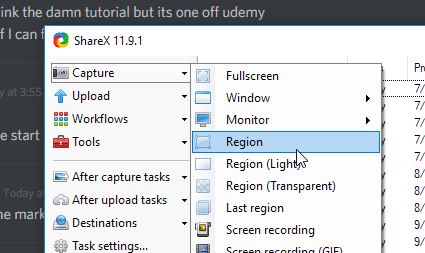
If you're in the market for a new program (it's free, haha), ShareX is great
dire storm
yeah I use dual monitor though so its gonna be both and tiny
glossy flame
You can select regions for the screenshot and it'll automatically upload it to an image host (I use imgur)
dire storm
hmm I'll have to look into it
@glossy flame Where is that regions thing you are talking about. In the ShareX?
 dire storm
@fiery token Was that helpful or do you need more?
@glossy flame Thanks I'm working on it now
dire storm
@fiery token yeah one sec. I was trying to setup shareX
plush yew
my progressbar is going to the right,, it does nto start at right and then go to left
fiery token
@plush yew , can you show your Widget Graph ?
fiery token
I just saw another tutorial with the exact thing..
dire storm
as yours?
fiery token

This video introduces the new splineMesh component and the concept of using it to deform geometry.
As yours..
dire storm
idk man. I know this one works. Just trying to help out
plush yew
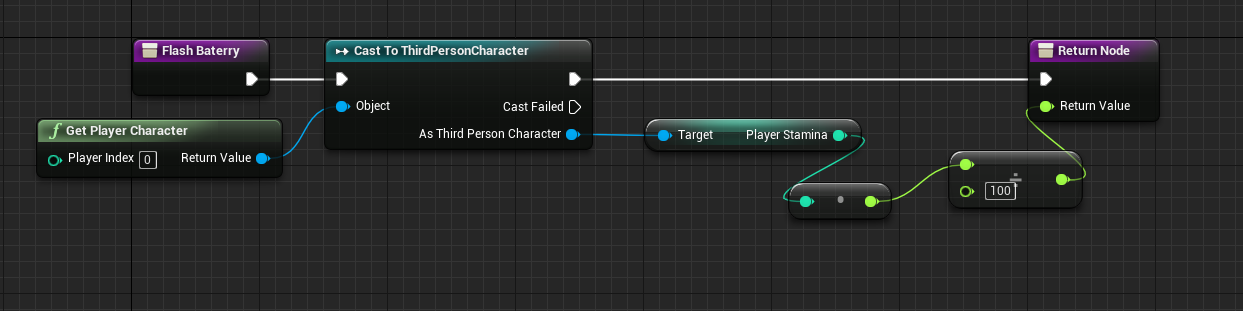 fiery token
Yeah, I know.. I was just telling that I found a similar tutorial. Thanks.
dire storm
I bought the 10 dollar tutorial off of udemy with the shit ton of good reviews by chris (the non C++ one) Anyways he walks through it decently enough and explains why. His explanations don't go into a whole lot of depth but it made sense.
dire storm
@fiery token Let me know if you figure it out. I'm pretty sure its because your loop is infinate or something similiar
fiery token
@dire storm Bruh, your BP acts on three different meshes ?
dire storm
The branches decide when to use each one
I gotta get back to work for a bit. Good luck and let me know if you figure it out and what you did to do it.
dire storm
Does anyone have a great reference for learning coding gameplay logic and features. I'm curious if there's a compiled list of how features are done. I'm able to follow along tutorials pretty well but struggling on understanding why things have to be done in certain ways in the first place. Like coming up with slope calculations of building placements. I can easily do the tutorial but I can't recreate that on my own if I was just starting my own project. What do people reference when they are designing features and how to implement them. I need to learn the implementation process.
 feral echo
you must start to experement and try out by you own @dire storm
dire storm
Yeah thats what I'm doing right now. 😃 I'm currently workin on an rts tutorial series and following along. trying to get my camera to ride ujp on the terrain as I move it in game
feral echo
try to think logical and break it down to simple algorithm
floral heart
Slope on buildings never looked that great to me. Unless you mean limiting max slope.
feral echo
tutorials are fine, but it is very easy to get into situation where you can easily repeat them, but cant do anything on you own
fiery token
@dire storm BRUUHHH !!! I got it working. I tried your method and it didn't work. Then I went back to the old method and then finally realized that around 60 objects were being spawned at the same location. Then I somehow fixed that. Whew.. Unreal can be a bitch sometimes.
Eve I am trying to do stuff on my own, I generally just set a goal, then go to the documentation and take out the technical guide to that particular topic and then get working on it. BUT, sometimes, you justget these mind-blocks and you have to find a work around.
dire storm
@fiery token Nice work man. What was causing all the spawning
@floral heart basically what the tutorial I'm using does it prevents you from building your rts buildings on hills and such. He doesn't exactly use slope equations and states why (basically some of the placements are valid however they are in areas where the AI can't get to). anywho my camera pawn just flies through the terrain thats elevated instead of riding above it which is annoying. trying to work out the collision on that.
@feral echo I agree but I got to start somewhere and picking up pointers from some people who have already figured it out is a good place to start for me
So in the tutorial I'm following I have the terrain set to colision enabled with block all everything. in my actual camera pawn I have a sphere that floats 100 units above the ground and you pivot the spring arm from it. So you can get the top down view. I'm trying to experiment with the camera. I want the sphere to ride up and keep the 100 units above it as it goes over the heightmap. Right now it just cuts right through everything thats elavated
floral heart
dire storm
@floral heart Thanks I'll take a look. I was cookin for the kids. I was wonderin while I was eating if I would have to do a linetrace the whole time or not.
next badger
Does it looks the same for you? https://docs.unrealengine.com/latest/INT/Engine/Sequencer/HowTo/index.html
A How To Guide for creating cinematic sequences with the Sequencer Editor.
dire storm
Ah I see it now. The tutorial permanently locked the Z location to 100 on the sphere to prevent prevent crazy camera rotations while zooming in and out or using his panning. So basically its locked to 100 no matter what or you get game breaking camera issues
 sinful forge
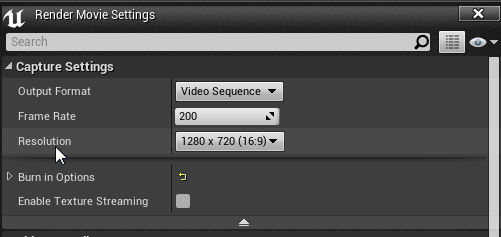
is there a way to render out sequences at >200 fps?
i've read that -fps -benchmark -dumpmovie could work but its used for built games as a launch parameter and idk if it would work with the sequence itself
floral heart
@next badger Pretty much, yes. My window is not as wide.
next badger
@sinful forge i think sequencer doesn't rely on actual fps...however i haven't tried it myself
@floral heart what res are You using?
 next badger
@sinful forge i see, i wasn't aware
@sinful forge oh, that one...hmm...
@sinful forge have you tried spinner and type input?
sinful forge
yea, it reverts back to 200
floral heart
On that page it looks like "Blending Multiple Transform Tracks" and "Blending Gameplay and Sequencer Animation" are supposed to be buttons to articles, but they're just plain text and don't have the right float properties.
There's another one, "Moving Actors with Sequencer".
next badger
@floral heart yeah, i think those supposed to me subcategory headers
but it's just my speculation
Yeah, my theme makes no miracle here
 light thunder
I want to get a pelican box that can fit my rig and VR set/accessories.... where on the Unreal Forums would be a good place? the VR subforum?
safe rose
unrelated to unreal
https://www.roadtovr.com/innoactives-vr-suitcase-is-a-portable-self-contained-vive-demo-station/ is cool

Innoactive has answered the call of nomadic VR developers on-the-go with a super slick portable pop-up, self-powered Vive station in a case, it’s called the VR Suitcase and it’ll put a serious dent in your wallet. Whilst the HTC Vive offers incredible room-scale VR experiences, no one could ever describe the SteamVR powered package as …

reddit
226 points and 38 comments so far on reddit
should get you started, that's how I got mine @light thunder
well made mine anyway
light thunder
@safe rose I appreciate it - I've read that post and almost ordered one! However, I wasn't sure about having everything in one huge case or two smaller cases...still undecided.
keen carbon
It depends, how is it traveling?
And where is it traveling?
If it's being shipped on it's own then I would say one big case. If it's part of a larger shipment like a pallet for a convention then smaller ones so you can play Tetris easier so you pay less
If it's going into your car it depends on how many trips you want to make and how much you like working out before playing it. Do you like dead lift or aerobics?
dire storm
Building a city building game == Making an UE4 editor with sounds and silly animations...
 half mango
sup
anyone ever get lightmap issues on a really complicated mesh?
doing interior stuff and the basic doors and chairs look really nice but a big traditional dresser with loads of cockbeads and cornice etc really struggles even with the lightmap resolution at 4096
with mad settings
and no overlaps
loads of shadow bleeds and patches
anyone clues?
any clues*
 tribal peak
Which program do you use to model with @half mango?
half mango
blender mainly, i start out in sketchup for more basic things which causes no issues really
then in blender i do the more complex stuff to the mesh and modifiers
tribal peak
Are you sure unreal is looking at the lightmap you setup in blender?
tribal peak
They look the same?
half mango
seems fine for everything else
tribal peak
Can you send a screenshot?
half mango
like things like this seem ok and small objects
but with a bigger one, sec
ill show the issues
this is the big dresser
lots of small issues
and it has an insanely high lightmap res, 4096 :S
0.1 static lighting, 10 indirect light quality, etc
pretty high settings
it must be the lightmap i guess
i'll get a screenshot
it's pretty huge
 oak tulip
WOAH
tribal peak
Spacing is important to for lightmaps
half mango
there's a decent space inbetween
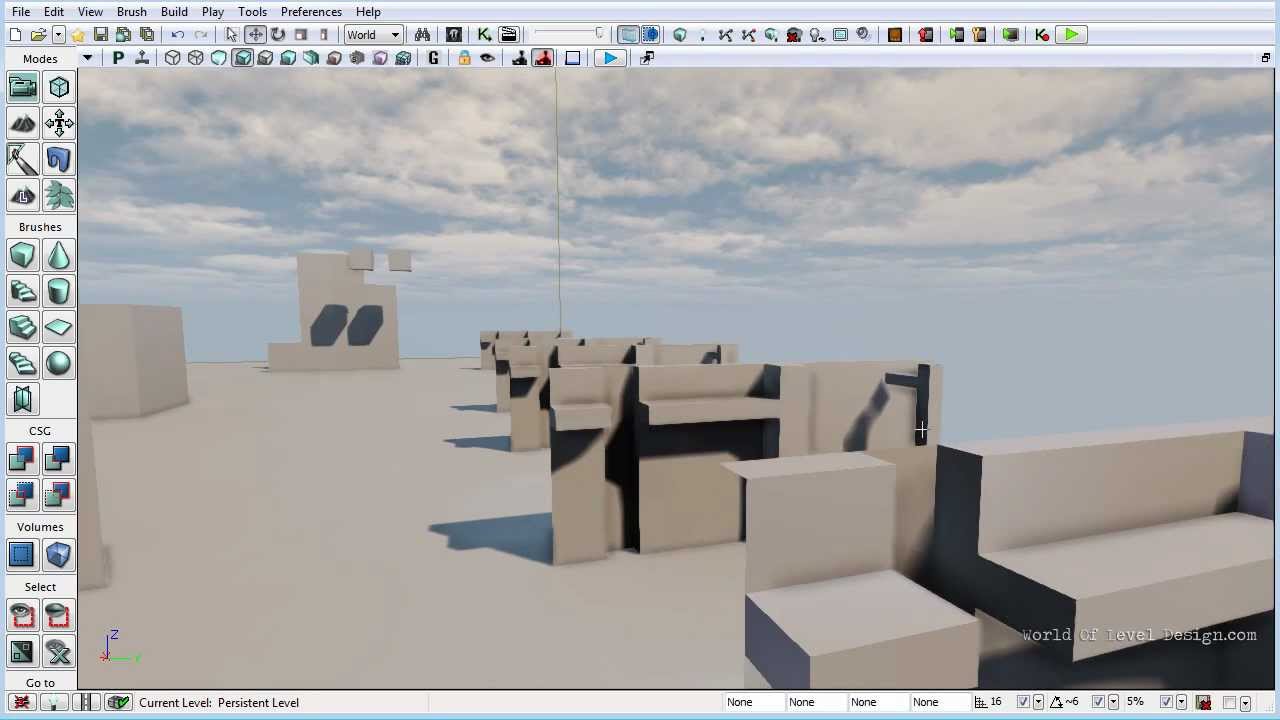 half mango
i'll watch the whole thing now
thanks man
ah yeah maybe i need more padding
for such a large mesh
ive had to increase the padding before for others but, maybe i need to increase it a whole lot for this
could be it
tribal peak
some faces can be shrunk but I would make sure that the more visible parts of your mesh had the largest space available to them in the lightmap space.
lightmaps shouldn't overlap but if there are surfaces that wont be seen they can be just be put in a corner and scaled down on the lightmap.
half mango
ok that's good i suppose
maybe i should also delete some faces that can't be seen
inside the mesh
there should be some from all the extruding
tribal peak
keep the faces that will be used to help calculate lighting.
Is your shelf one big mesh? Can you break it up into seperate meshes?
half mango
yes i tried that though
well
actually i tried splitting it into 3, i think
with 1024 resolutions on each
and had similar issues
i think there's lots i can do to it im just being dumb
just looking for quicker more simple ways for speed but i guess that's impossible
tribal peak
half mango
so split each cupboard into a different mesh?
tribal peak
After they are split you should redo the light maps with the new room you'll have to work with in the lightmap UV view.
How are you unwrapping your meshes?
floral heart
Looks like blender lightmap unwrap
tribal peak
yea
half mango
yeah this one is
tribal peak
I like selecting the front facing faces, going into orthographic view mode, and using "project from view"
half mango
i've done some UV maps myself cus i need the grain to run through each door so it looks like for example 3 doors were cut from the same sheet of wood
yeah i use project from view too for that
on wood grains
im pretty new to it
but not sure how to do a proper unwrap myself
seems tricky
tribal peak
I think the lightmap unwrap might have been meant for the blender rendering and game engine. I'm not sure what the back story there is but I've never really had luck with it.
half mango
most of the time i get better results wit hthe UE generate lightmap
but on this big mesh it's actually better with the blender one
strange
oak tulip
Substance Painter 2 doesnt like my UV maps
half mango
it's 5:30am where i am
spending mad hours on this shti
ruined my body clock
gf rages at me every day
tribal peak
lack of sleep doesn't help problemsolving. And lightmaps are such bitches anyway.
floral heart
Ew.
half mango
yeah they are bitches, i was trying some on my other PC when i first downloaded it
and every time i tried to bake 1 high pixel lightmap my PC had a stroke
but this one is powerful and powers through the light builds
tribal peak
1 high pixel lightmap?
tribal peak
oh.
tribal peak
ok that's weird.
you can run the example epic maps ok?
and build the lighting there?
half mango
what do you mean
tribal peak
Like the Epic content example maps.
half mango
well on this PC i can bake the entire room with every mesh at 2048
tribal peak
I guess I'm wondering if your PC is choking or if it's the assest you made.
half mango
in like 1 hour
like over 100 mesh
multiple threadrippers
3500mhz ram etc
that was the other computer i was using
when i first downloaded it at my gf's
didnt realize how much PC you'd need
tribal peak
Don't use that automatic lightmap unwrap.
half mango
i think i'll just do as you said and split into 6-7 mesh's
and use the auto generate in UE
even if that one is not great, i can just overcompensate with high res
tribal peak
Read this. Drink some tea, go and buy your gf chocolates, come back and unwrap your mesh again. Or wait for someone else to give better advice because shit I'd love not to have to push one button and be done LOL. http://www.worldofleveldesign.com/categories/udk/udk-lightmaps-01-basics-and-important-principles-for-creating-using-lightmaps.php
half mango
maybe that will work
tribal peak
high res should not be your answer, especially with that kind of mesh. I find it's best to save that for walls or something very flat and horribly obvious when there there's a lightmap error.
half mango
true but im gonna sturggle getting this right
if i keep it all as 1 mesh definitely
and from what i see those lightmaps from blender don't seem too bad in this situation
floral heart
The indented rectangles on the drawer have me puzzled. The rest is really easy with just putting seams on the corners and doing a smart unwrap.
half mango
well it's all tri's
so the rectangle is showing the lightmap on the split drawer
where there is a tri
tribal peak
@floral heart knows what's up .
floral heart
If they're coplanar there won't be a problem.
half mango
hmm
yeah ive thought that too but
if i go to blender now and look where the tri splits
an edge in the middle
it's in the exact same place
as on UE
not an edge, just a line
floral heart
Problem is the lightmap unwrap is making each triangle an island. If they're contiguous and coplanar they should be one island. That's blender's bad.
half mango
stuff like this is super easy i love it
just throw things in and slap materials on and smart unwrap
and low res
gotta fix those sharp edges too damn
3ds is better for UE right?
and if that's the case then
maybe i should export them as quads and ngons again
floral heart
They'll always end up as tris. And I don't have personal experience with 3ds. For solid geo I don't think there's a difference, but if you're animating, maybe.
half mango
theres some really nice archviz addons for 3ds now
that would h elp me for interior, but i cant afford that software really
anyway im gonna go sleep now
thanks for the help @floral heart @tribal peak ❤
tribal peak
Goodnight @half mango
 uneven fractal
how do I link a button to a key in a widget bp?
uneven fractal
ui channel seems to be kinda dead
tribal peak
Maybe all the juicy help is asleep right now.
uneven fractal
true it is kinda late
 quiet ravine
So im watching a tutorial series on how to make an RTS (Link in the description on the videos) and I have everthing working up until this point but I cant get the object to follow my cursor. So I made 2 videos ( https://www.youtube.com/playlist?list=PLnVL3XbuLC_Qr0Au1pQKfdSuft2716dBX ) one shows the blueprints I added while following the tutorial one shows the area I think is the issue. Ive also restarted and redone this part of the tutorial twice now. and have had the same result

Please @ me if you have an answer so ill see it or PM me
 jaunty zephyr
Hi can anyone help trying to put video on a mesh in ue4 but I think they have changed in the latest up date you used to be able to drag inthe video and it it would play then you mDe a material out of it then threw it on your mesh now I import a video and it doesn't even play
final owl
Hi
warm mountain
Hey guys any tips on how to go about modelling foliage that is curved?
is it still done on a plane or is it generally modeled as a mesh?
I don't really have a problem for straight grass using planes but when its curved on it I can't really see it in correct perspective from side angles
these are my straight grass
my curved grass attempt
 fair violet
@warm mountain depends how highpoly you want to go. You’ll never really have the luxury of having dense curved grass Geo with a reasonable polycount so doing it on a simple bent card is the next best option.
Also when you paint, you’ll fill in the angles- one or two individual cards will have their weak angles- all about making the big picture seem right to the user by balancing density with matching the underlying material to feel as seamless as possible
warm mountain
gotcha
most of this long grass are quite sparsely populated
Although some of it does appear near paddies or roads in the jungle around 200-400k polys visible at a given time
 leaden garnet
So I'm trying to learn how to animate, but all the tutorials I've come across so far expect some beginner level knowledge which I don't have... I'm trying to use Maya, but haven't had any success so far. Can anyone suggest any tutorial for animations? Bonus points if it's for UE4 specifically...
plush yew
@leaden garnet Is there anything you're trying to do specifically?
@warm mountain You can try modelling the foliage for up close shots and then using a curved plane as the next LOD
leaden garnet
I mostly want to learn how to animate weapon reload animations for now.
So far I have the Epic ART installed in Maya'17
plush yew
I'm assuming you already have the assets you want to animate?
plucky reef
I got some problem in Github with Nvidia GameWorks
Anyone know how to fix this? I badly need it
leaden garnet
@plush yew Yeah. I have the FPS_Arms (or the Mannqeuin used in UE4) and my guns. The thing is, My arms are already rigged, I don't know how to create bones for my weapons...then I don't know how to animate...
warm mountain
gotcha tommy
so model each blade and in the next LOD for it switch it to an image plane if I get that right?
plush yew
@warm mountain Yup, if the foliage has a lot of overlapping planes like a tree, you can switch to a billboard that changes its texture depending on the viewing angle (known as imposter sprites). You can find more about that here: https://docs.unrealengine.com/latest/INT/Engine/Content/Tools/RenderToTextureTools/3/
warm mountain
nice thx tommy!
plush yew
@leaden garnet First, you need to rig your weapons. I'm not the best rigger but I found this video to be pretty good: https://www.youtube.com/watch?v=Ah-Jk7d30ks

Get the EXTENDED CUT of this tutorial: http://wp.me/P3V1aP-TL Download the character used in the video here: http://wp.me/P3V1aP-Tm This basic Maya character...
leaden garnet
Got it. Looking into it now.
warm mountain
OH
is that the same way how sometimes in games
you find the grass following you or the leaves?
as you move the camera it seems the plane of vegetation rotates with you
plush yew
Yup, but in those cases I don't think the images are changing depending on the viewing angle. Only the geometry faces you
warm mountain
ah
so in this way we are creating iterations on the mesh when the camera is used at certain angles
so a plane can be substitued to emulate it as if it was the actual mesh but its just a plane
plush yew
Yup exactly
warm mountain
nifty
leaden garnet
Hmmm that tutorial was sort of helpful....
plush yew
If you have more specific questions, I can try to answer them
 vale halo
Does anyone know how ue4 does it's engine version registration? I'm pretty sure it's using some elaborate thing for for example the change version tool, as it can use custom source builds too.....but can't find where they're storing the engine versions (trying to build something that requires this information for the best experience)
viral cape
My animations are way off timing with my camera movements when I attempt to render. These are my settings what's wrong
 urban pumice
Unreal Engine 4 with Jumping AI.

Working Jumping AI .No AI helpers (not event Nav Link proxys), and no C++ at all. Just some naive code in the AI Controller class and a very simple Behavior ...
keen carbon
Nice
 vast pine


 tall pendant
quasi lake
tall pendant
quasi lake
What is CDO(Class default object)?
I know it's something about reflection,but I cant quite get it with answers I've found by google
 heady bridge
I'm having an issue trying to figure out how to actually use the data table in BP's, I have a function set up where the table gets all the variables, and I have an event graph to shoot projectile from weapon, but I'm not sure how child Bp's work as it doesn't have the event graph from the base weapon
do I just leave child BP's of the weapon base and only change the variables in the properties window? Or do I need to actually make the "shooting" event in each weapons event graph?
frank escarp
@quasi lake its a bit complicated, but its kind of the "default" object
when you spawn something from a class, it copies the CDO
you can also use the CDO to get "default" values from a class
 ionic sedge
@heady bridge It should do the same thing as the parent (if the parent event is connected).
heady bridge
I don't think I understand how it works, because it doesn't seem like anything is working in the child blueprints
quasi lake
@frank escarp Thanks .I'm still comprehending
ionic sedge
@heady bridge By default you should have Begin Play and another node after that saying parent something.
But you can add that with Call Parent Function or something too.
quasi lake
@frank escarp keke
heady bridge
Cast to "Base Weapon" class?
Okay, I managed to get the character to pickup the weapon from the ground by only using base weapon event graph, there is a Parent node needed on the specific event node in the child
next badger
@plucky reef Have you fixed your issue? with download
keen carbon
quick question. On my wifes mac, every time she opens unreal editor it compiles shaders. It takes about an hour, is there a reason for it? it only happened after she installed 4.17.2
frank escarp
shouldnt happen every time
its after you install a new engine vresion
or change some of the settings in the Rendering part
keen carbon
huh, it happens every time she opens it. I'm still waiting... 😐
frank escarp
did you really expect an AAA high end game editor to run in a mac?
keen carbon
XD
frank escarp
once it compiles all shaders it should be fine
keen carbon
no, but it's what she has. We'll see if it happens again, I may have to boot camp it so it doesn't compile every time. I'm a PC guy
frank escarp
it shouldnt be compiling shaders all the time
it should finish the compilation at some time, and then not trigger again
unless you start editing materials, but then it will only recompile that specific material
keen carbon
It threw an error saying xcode was out of date (it's not) and started compiling.
plucky reef
don't forget this one guys

Quixel Megascans
Megascans is the world’s largest online scan resource, containing thousands of standardised and physically based surface scans, vegetation scans and 3d scans.
keen carbon
Very nice. Thank you
quiet ravine
So im watching a tutorial series on how to make an RTS (Link in the description on the videos) and I have everthing working up until this point but I cant get the object to follow my cursor. So I made 2 videos ( https://www.youtube.com/playlist?list=PLnVL3XbuLC_Qr0Au1pQKfdSuft2716dBX ) one shows the blueprints I added while following the tutorial one shows the area I think is the issue. Ive also restarted and redone this part of the tutorial twice now. and have had the same result. Please @ me if you have an answer so ill see it or PM me