#ue4-general
1 messages · Page 44 of 1
 cursive dirge
there's also SDL based joystick plugin
initial one was directinput but it didn't have FFB in it
Hi.
I have created a little plugin to use joysticks with the unreal engine 4. The source is based on the hydra plugin.
The plugin is still untested but quite usable.
I'm still very new to Unreal Engine development, so please be clement, if the source code has architectural mistakes...
Any comment or suggestion is very welcome.
Resources:
not sure if SDL one has either
 tepid steeple
Thanks
cursive dirge
oh
SDL is in 4.14
having SDL built with UE4 helps
as it's easier to make joystick plugins for it now
I wish logitech shared the source code from their own libs
I know they are available online from 3rd party sources but not sure where they've been originated
maybe they shared them in the past but they definitely don't give them out publicly atm
with those sources, you could implement custom FFB stuff, now with logitechs system, you have to use their own functions for FFB forces (which work fine for games with vehicles though)
 wind epoch
strange question, how the hell do you create pitch black darkness with a skybox still existing?
 south ridge
Fog?
 jade lark
I feel stupid for asking this, but I'm having a difficulty with the concept of a 2d array in blueprints, I can't seem to understand how to make one to store XY data for a simple grid
 thin haven
Documentation over Blueprint Arrays, including creation, editing, and use.
basically you make a Vector array (yellow color)
 gentle ivy
@jade lark it's basically an array of an array of objects.
think of it this way. Variable X is an array that holds a variable of Y
Y is an array that holds APawn*
thin haven
@gentle ivy: you're talking c++, he's asked for blueprints
gentle ivy
Same concept right?
jade lark
@thin haven i make a vector array, simple enough, then what i do with it?
thin haven
@gentle ivy: AFAIK you can't have an array within an array in bp
@jade lark: then you can use it for whatever you need
gentle ivy
Well then how is someone having issues with a 2D array in BP?
thin haven
for instance, I use arrays for my AI finding points to navigate to
gentle ivy
sure but @jade lark said 2D array not just array
so first lets figure out why they are saying 2D
jade lark
I'm gonna quote the guy who tried to help me, I just don't understand exactly what I'm supposed to do:
"This involves making an array variable, putting it inside a struct variable, and then making an array from that struct variable. An array within an array"
thin haven
I assumed he said 2D because he wants it to reflect 2D space
gentle ivy
I would not assume that.
gentle ivy
Sickness, what is your end result, what do you want to do?
jade lark
I just want to store rows/colums data in a grid, so i can spawn things at specific tiles
like a chess board
jade lark
alright, done. I have a nice-looking Struct with an Int Array
gentle ivy
hmm you might be able to do this with vectors instead but instead of pushing that on you I will go further with this.
So from there you want to create an array of your struct
you then break the struct any time you need it
jade lark
what's the benefit of using vector array? I've been thinking about it since it is a grid I'm trying to make, but at the same time i'm not sure
gentle ivy
a vector 2D can hold 2 floats and a vector 3D can hold 3 floats
thin haven
^^ basically this
jade lark
well, how bout it, I did this like 2 hours ago, I just didn't quite understand it's what I needed (I swear i'm not a monkey)
gentle ivy
nah its cool everyone starts somewhere
So are you trying to hold more than a location in an array?
jade lark
not really, at least not for now, until I start understanding arrays a bit more.
gentle ivy
then make an array of vectors
jade lark
alright, thanks
gentle ivy
a vector holds X, Y, Z all in floats (basically just decimal numbers)
 vale osprey
@jade lark 2d grid address in 1d array is:
width * row + col
let's say your grid is 4x4 and you want to set/get element 2,3
then
4*2 + 3 = 11
0,0 element will be 0 element in array
0,1 will be 1 element and so on
but take into account that you don't use 1..4 coordinates in this case but 0..3
as 0 is a first element!
jade lark
read about that, not sure I completely get it, but I will
I understand the 0-based part
vale osprey
for example 2x3 grid will be stored like this:
[0,0] [0,1] [1,0] [1,1] [2,0] [2,1]
so 6 elements of 1 dimensional array
in brackets are grid coordinates of each element
jade lark
what if my grid isn't something as small as 4x4 or 8x8, what if it's 400x400, wouldn't it get a bit too confusing?
vale osprey
nah, that's why you have math
just make couple of functions to get and set your values into array
gentle ivy
why complicate it when you have vectors?
vale osprey
Sorry @gentle ivy perhaps I misunderstood what you mean
gentle ivy
he said all he wants in an array of locations
vale osprey
ok, I thought more like 2d array, which we don't have in BPs
jade lark
i need a simple way to store different locations on a grid, so i can spawn different tiles, based on location
for example if it was a chessboard, i'd wanna spawn a green tile on G4 and a red tile on G5
or maybe a purple tile on A2, i just need to know what "A2" is as a location, etc
jade lark
yep
btw, i made a small graph about what @vale osprey said widthrowcol, i finally get it, it's consequentual, but it just doesn't start from 1
vale osprey
yes, adress in array starts from 0
 safe rose
We can fake 2D arrays in BP though
vale osprey
grid coordinates in 2d space would be something like this
X = column_number * cell size
Y = row_number * cell size
safe rose
If you're having problems, glance at that
It's CPP implementation, but can be transferred to BP
jade lark
no, i meant, like if we take a 4x4 grid, the very first element is 5, cause width * row + col = 4*1+1=5, right? Or did i completely whiff on the logic
jeez, i really wish it hasn't been over 15 years since i last studied any math, i feel like i'm trying to re-learn how to walk
vale osprey
no, Row and Col are addresses you provide
very first element is zero because grid coordinates are 0,0
if it's easier for you to work in 1..4 as grid coordinates, then just use
width * (row-1) + (col-1)
jade lark
alright, thanks
 abstract hawk
does anyone know what it means when an object's rotation values have an asterisk next to them in the editor?
oh thats the degree symbol
nevermind I'm dumb
 hazy lynx
hai all!
all of a sudden when I try starting my project I get an error saying OculusRift could not be loaded
any suggestions
thin haven
@hazy lynx tried another project? might be the plugin is wonky
 leaden onyx
Can there be issues with streaming level while in VR? Like major slowdown which may induce sickness etc
Any idea?
So far I didn't see streaming being used, so I'm kind of interested why
 sand onyx
hmm is there anyway to destroy a actor and keep it destroyed when the game restarts?
 fast mica
does anybody have a weird issue in 4.13.2 (Windows 10, GTX 1080) where menus don't open when they're clicked? lot of weird strange UI compositing issues with the editor.
i'm about to test the preview to see if I still have it.
seems perfectly fine in 4.14 preview 3
 inland granite
Hi! Any idea how to test the "Sky Distance Threshold" in Skylight? I tried everything but nothing changes, no matter why i type. I read that everything behind the limit is treated as light-source. I moved actors fat behind the area but they are working exactly the same as any other object
 foggy valley
hey poppets
how does this source folder work for content?
the one where if it updates UE offers to reimport it automatically
is it in Content/Source?
 shut jay

hey there
so I am trying to read from this enum file
and the enum file already has 2 enums inside of it
but for some reason
the UI is outputting 0?
safe rose
?
Are you using a switch?
Are you using an eVar/
Like, how are you getting the values?
It would default to 0
because it starts as an int 0
shut jay
i have a foreach loop for the enum maps
safe rose
show
shut jay
lol alright hang on it's similar to this one system
safe rose
in your logic
safe rose
👍🏽
shut jay
 shut jay
hmm?
the enum values are inside the neum file?
enum file*
http://i.imgur.com/Fzg6QX2.png @safe rose
 shut jay
what really? the fuck
 shut jay
okay
safe rose
All those conversions...
shut jay
so I want players to select a gamemode they want
safe rose
k
shut jay
and a map of their choice
safe rose
So..
Switch case
They choose a Gamemode
bam
Then the next logic is pick a map from whatever
safe rose
sigh
shut jay
....gamemode 2 as in the second gamemode
shut jay
what's wrong with that? ;p
safe rose
your logic is messed up
shut jay
ok
shut jay
ok i am glad it isn't my logic ;p
safe rose
So...
Step 1: Player makes a choice (via what) to decide on the Gamemode
Step 2: A list of maps will populate the screen
That's it right?
shut jay
yes basically
safe rose
So
Make two buttons
Have them click on whatever gamemode they want
GGWP
Set the new GameMode
then
Bring up the Map List
or Screen
shut jay
so when i create the server
safe rose
GGWP
safe rose
You decide that
by your logic
however you want to save that
Like I said before, you could do a simple switchcase
And then set the case depending on what they choose
and then you could use your enums
Or, save them in some array and pick by int
or output the name/text/string whatever for each level chosen
Save each
There's a million ways to do it
shut jay
i don't get whats wrong with this way though
ive seen it work on this public community project
safe rose
Then continue doing it until it works
Public Community Project...
so any newb can just jump in there and mess with it?
That sounds like a great resource to use 😉
shut jay
well people just learn things from there or look at it if they're stuck
or people can copy pasta which is a no no
lel
i might just do it your way
when i have something selected for a button
does it stay selected
?
safe rose
?
What are you asking me?
YOU decide that
You should probably watch some beginner tutorials
Actually the BP Multiplayer tutorials
probably has something like this
 urban salmon
so, like.
how the shit do i use a parameterized blendspace in an anim graph?
so far the only way i've figured out of using a blendspace in an anim graph requires a specific blendspace to be used
is that just how things be
and i can create a struct for an AnimNode_BlendSpacePlayer but that doesn't seem to really help with anything
... nevermind. i'm a tool.
foggy valley
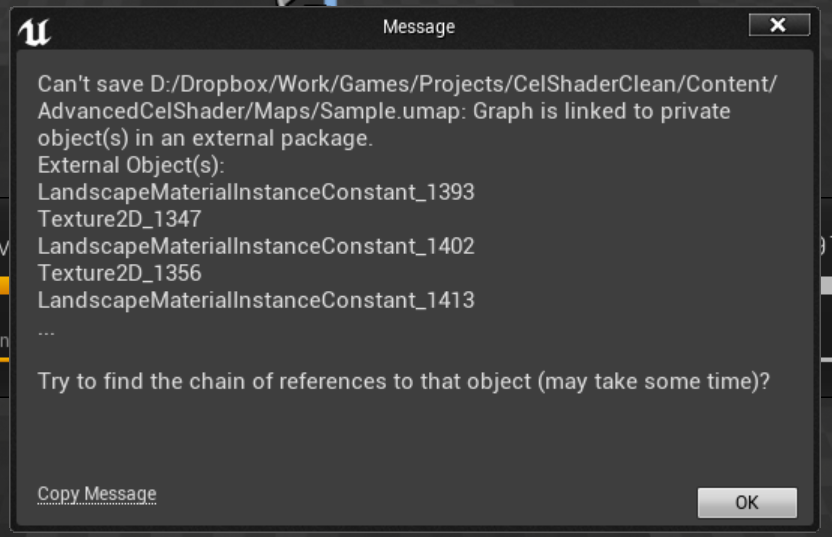
the fuck is this shit
oh I know what it is, it's why I can't move a map ever
D:
so what is an external package?
cursive dirge
better describe your issue more in detail or nobody will be able to help you
what you did to download it?
foggy valley
who me?
it's just an old project with a very old landscape in it
I have a couple of projects like that and I can't move the maps for them at all
I get exactly what you see above
some of them created the materialinstanceconstants for the landscapes as actual visible content browser packages too :/
 regal mulch
How would you guys and girls go about "blinding" the player if he tries to look outside a window?
So it's really really bright
Ok used a block with a emissive material
¯_(ツ)_/¯
 plush yew
does anyone know if using temperature or light color has a difference in performance for lights?
 tall pendant
i noticed no differences. But dont quote me on it 😃
safe rose
@regal mulch you figure it out?
regal mulch
@safe rose Well yeah like I said. Block with emissive channel
Good enough for hwat I'm doing atm
safe rose
😃
 daring saffron
hey guys got a problem, only got 2 classes added into my project and already i cant build the game (cook it)
(how can i add a neat log ?)
safe rose
Pastebin
inland granite
Good morning! Is there a way to set how much the actor takes the nav-volume? I want the nav-mesh to cut exactly where the actor ends. Now the nav-mesh is cut few centimeters after the actors.
 prisma field
sighs Gotta love it when your PC crashes on you while working in UE4..
 gloomy pollen
I have learned to save religiously
Upgrade to 4.13.2 today and conversion in place failed, project wouldnt open D: luckily I knew upgrades are the devil so I made a copy of project before
 worn granite
 gloomy pollen
😆
 ashen brook
I compulsively ctrl+s before entering pie or compiling blueprints
It's not even compile -> save anymore, it's save -> compile
 waxen vine
I turned on the save on compile setting. Took me about a week to stop pressing compile -> save
 errant lintel
Hi ! Somebody already try to use GameplayCue Editor ?
from Gameplay modules (Abilities, Tags, ..)
 dim geyser
Is there a way to change resolution scale on mobile?
r.MobileContentScaleFactor doesn't seem to work
 still solar
morning everyone, how do I set custom snap setting for the editor, like custom rotation angle snap?
gloomy pollen
Is there a bug that doesnt allow components to have settings applied? I keep hitting this damn glitch but no idea how to specifically reproduce it. Sometimes the components don't respect the settings until I close the editor and re-open, picture shows its compiled and saved but camera is using old position http://imgur.com/8BEkqLB

Imgur: The most awesome images on the Internet.
and when this happens, i cant move the component, but, if i try to, those changes only show up after restarting editor
lol i close the project again, open it and now I see this. http://imgur.com/IRUW3Ew

Imgur: The most awesome images on the Internet.
vale osprey
@gloomy pollen this one is specific to camera I think, another bug like that was with sockets
glitch with camera wasn't as agressive thoe, was fixeble by closing and opening BP
gloomy pollen
I tried rotating other component and it effects all of them - everything is set to default 0 position right now http://imgur.com/5LPbmMq

Imgur: The most awesome images on the Internet.
really screwy, it was a new project just modified the level BP and then was moving camera around and compiling to get the position I wanted
Project is literally unusable in the current state
I think I know what you are talking about though, in my other project I ended up making a UMG widget for modifying camera location/rotation in-game since I couldn't see my camera settings being applied sometimes.
 umbral trout
Does anyone have a good solution for drawing debug editor lines with dynamic updating?
I need to visually show connections between entities, currently using Construction BP to draw debug line for 999,999 seconds since I can't do it by tick. The biggest issue of course is the line will continue to draw in the old place if you move the actors, it wont update until you re-open the map. Is this not do-able in BP, would I need to make a code plugin?
I tried using the flush debug line BP node, but it kills everything and they won't render until re-open the map or move each actor
The UT jump pads achieve what I want to do, ideally I'd want a straight line to draw even when actor deselected
 bright arrow
Does anyone have any rough estimates on when 4.14 will be released? We need to QA all of our marketplace packs but don't want to start that process until the preview version is fairly close to release
 distant needle
@regal mulch, have the tonemapping settings such that Max is rather low
then have the exterior really bright light (with sun, skylight etc.)
in reality, sun-lit places can be hundreds times brighter than interiors
so it's nothing unrealistic to have them 10x brighter in UE 😉
some white atmospheric fog can help too
I'd rather go for overbright skyboxes, though, not full white (if the game style is not cartoon). Just because super white is even more rare than a pure black in photography, movies
 dawn crescent
im trying to spawn a sword and have it attach to a socket, the sword spawns at the socket but instead of attaching just falls to the ground. what am i doing wrong?
umbral trout
@dawn crescent Did you disable physics before attaching, Set Simulate Physics to false, and then turn it back on after you detach.
dawn crescent
i didnt work, i tried all of the simulate physics nodes that poped up
umbral trout
Try adding in a delay for a frame between physics simulation stop and attaching
Your weapon component heirachy would matter too for weap, like if your root is a scene component and the weapon mesh is parented under, when it spawns the weapon will fall to the ground and stop there, since the root is what would get attached to the warrior. Might be best to have the mesh as the root
 mint raptor
When should I use an Actor Vs a Comonent
 foggy delta
I think Actors are for "things" in the world, and components are for "parts of that thing"
mint raptor
ok cool
So right now it seems as though Unreal is ignoring the pivots i've set, any way for it to retain it?
inland granite
ignoring pivots?
safe rose
Finishing up the game jam playthoughs until completion or ragequit: https://www.twitch.tv/victorburgos_
 cursive dirge
What’s New
Unreal Engine 4.14 introduces a new forward shading renderer optimized for VR, enabling crisp multi-sampled anti-aliasing in your games. The new Contact Shadows feature renders beautifully detailed shadows for intricate objects. We've also introduced a new automatic LOD generation feature for static meshes that does not require a third-party library.
We’ve streamlined the animation tools to help you be more productive, and added many new features to Sequencer (UE4’s non-linear
inland granite
What does the Rotate Vector actually do in UE?
How that function could be used in some case?
 toxic cobalt
Hey, I'm trying to export a mesh from a blueprint to Blender– is this possible?
tall pendant
you can export meshes from the content browser to pretty much any 3d package that supports .fbx
toxic cobalt
But when I go to asset actions -> export, I can only export it as .T3D or .COPY 😦
I can't find a way to import either of those kinds of files into blender
 patent ibex
is 120mb executable size a norm for packaged template project?
gloomy pollen
@toxic cobalt you can export the mesh, not the BP. Find the mesh in the content browser.
 ruby chasm
I'm trying to create a new animation, I created it using a reference pose and I've added keyframes but I'm not sure how to SET a keyframe once I've moved the skeleton into another position?
(the animation channel is unable to help)
 mint birch
Had a very long debugging session... to prevent this from happening to you I thought I post it here: a custom GameInstance class/blueprint may take some time to actually load up. It is responsible for showing UI in my game. In editor everything was fine but in my packaged game the MainMenu was not showing. Instad of calling the Show Main Menu in the LEvelBlueprint's BEginPlay, I know call it after a .2 sec delay in the "Event Init" in my custom GameInstance class.
 kindred marlin
Did they remove the ability to make a BSP a static mesh??? I need a really small box to continue with a tutorial and I remembered that I used to be able to do that.
safe rose
@kindred marlin https://gyazo.com/c67100351d0d09b33e3074204467033f
 kindred marlin
I'm in 4.13.1 and it isn't there.
kindred marlin
I know it isn't supposed to be used in a professional environment, but I'm just using it in a tutorial. I could go through all the paces in 3DSMax, but I'd rather not.
kindred marlin
Sorry.
safe rose
if all you need is a box
there is a box in engine content
nice
Building the level
killed it
kindred marlin
Sorry!
Too big, and the static mesh is the root component so everything scales down to it. 😐


 kindred marlin
AFlightStopActor::AFlightStopActor()
{
     // Set this actor to call Tick() every frame.  You can turn this off to improve performance if you don't need it.
    PrimaryActorTick.bCanEverTick = true;

    SM = CreateDefaultSubobject<UStaticMeshComponent>(FName("SM"));
    SetRootComponent(SM);

    NextFlightStop = CreateDefaultSubobject<USplineComponent>(FName("SplineComp"));
    PreviousFlightStop = CreateDefaultSubobject<USplineComponent>(FName("PreviousFlightStop"));

    NextFlightStop->SetupAttachment(SM);
    PreviousFlightStop->SetupAttachment(SM);
}
At least that is what it calls for in the tutorial. :/
safe rose
ah I see
that's a static mesh actor though
the 1m cube
so you should be able to use it'
kindred marlin
Following this tutorial so I get a handle for splines: http://orfeasel.com/creating-flight-paths-using-splines/

In this post we're going to create some flight paths for our character (similar to the World of Warcraft flight path system). We're going to omit any UI
safe rose
Ah nice, yeah his tutorials are awesome
kindred marlin
Yeah, I've been working on them and they're really good.
 ember trellis
Hey, so not sure where this should go, but I'm wondering if anyone has a recommendation for build automation with Unreal4 and Subversion?
umbral trout
Does anyone else expierence bug in Sequencer when you have an Actor with a track, and you compile the BP for the Actor it loses reference in Sequencer and you have to re-add it back? This is on 4.13
Even if the Sequencer asset is read only / not checked out in repository, as long as you compiled the BP for said Actor it will lose all connections in Sequencer
waxen vine
Anyone getting about a second delay in 4.14 when ending simulation even on a blank project?
 crude perch
Sup guys! Can you give tips, how to make a wave system?
I mean, what I need to store inside Gamemode and Gamestate. And yes, wanna make it upgradeable to MP
For example, in gamemode I set that there will be 5 waves, and each wave has specific target points/score. Then pass this info to Gamestate, right?
 crude perch
@safe rose okay👌! Thanks
safe rose
Trying out procedural map generation: https://www.twitch.tv/victorburgos_
plush yew
Tried to build in 4.14, got this error, any ideas?
LogPhysics:Error: PHYSX: (D:\Build++UE4+Release-4.14+PhysX_Compile\Sync\Engine\Source\ThirdParty\PhysX\PhysX_3.4\Source\PhysXCooking\src\Cooking.cpp 198) eINVALID_PARAMETER : Cooking::cookConvexMesh: user-provided convex mesh descriptor is invalid!
 lyric canopy
Packaged build. How do I change the settings with a config ini?
graphic settings
I have a DefaultGameUserSettings.ini in the config folder but it doesn't seem to be updating
 sharp summit
Is there any way to generate a black glow? Like you'd get from an intense emission value?
Like with bloom turned on
sharp summit
Well that's the idea
safe rose
does it work?
sharp summit
Uh... no? Because I'm asking how to do it? 😛
safe rose
;0
Well, I assumed so
But maybe you tried some otehr background
Anyway
Black is not a color right
Not in regards to light
It is the absence of it
And in PBR
that means nothing
So, not sure if you can do it
Because technically, in PBR lighting, that would equate to 0
or nothing
sharp summit
Well, I mean the bloom effect is just gaussian blurring the material to hell
and putting it back on top
safe rose
Right
sharp summit
So I was wondering if you could grab that functionality somehow and do it
sharp summit
Yeah. Like a vacuum sucking effect.
safe rose
Like dark matter
sharp summit
Yeah
safe rose
I mean, I GET what he wants
But, I just don't think it's possible
Not in an easy way anyway
cursive dirge
I know how you do it
safe rose
You'll have to fake the effect
sharp summit
Obviously couldn't do it via the normal light way.
cursive dirge
you just invert all colors
safe rose
lol
cursive dirge
make white glow 😄
safe rose
troll
sharp summit
😛
cursive dirge
it works!
safe rose
But yeah...
That's a very good question, I just know it won't work, because that's techincally the correct way of rendering color in PBR
But, there's been black glow effects in games
Just not sure if any in UE4
cursive dirge
well
sharp summit
Yeah. I'm doing it for an exit portal. Because I have an 'entry portal' that's glowing and awesome when you approach it.
cursive dirge
bloom glow is just the basic color with additional alpha around the thing
safe rose
insteaf of a glow
cursive dirge
you can do that in textures for emission
safe rose
Black?
sharp summit
Hmm
safe rose
Well, I was going to suggest an overlay
Black
And reduce the opacity
Make it particle or something
cursive dirge
just need some gradient alpha on borders
but can you actually tell what you want
like is it a car exhaust?
or some magic spell
sharp summit
No. It'd pretty much be the like inverting an intense white glow in photoshop 😛
You get black with alpha fading fringing.
cursive dirge
yeah, so do it like that..
sharp summit
For a portal.
Gradient Alpha on borders... wouldn't that be clipped by Z-depth?
like if I had a door frame and put the material behind it
I'd just get a black plane right?
cursive dirge
sure if you have geometry on front of it
sharp summit
Where as the bloom effect sits on top of Z
cursive dirge
you didn't tell you had it though, that's why it's better to tell what you actually try to do so people can give better solutions
cursive dirge
you could probably do it on PP
sharp summit
Behind door A is a black exit portal
behind door B is a white next level portal
The white portal glows with high value bloom emission
cursive dirge
bloom is PP effect too
cursive dirge
you'd need to be able to isolate the portal material somehow on PP and then blur it or something
there are probably people here that would know that route better
never even done simple blur on PP
sharp summit
Alright. I'll ask on the forums. If there was a simple way that people knew about, I wanted to ask 😛
It's not a big deal, but it'd be nice!
cursive dirge
you could use stencil masking to find the portal on PP, but would probably need putting surrounding geometry into stencil buffer too, so portal wouldn't clip through
sharp summit
Yeah. Sounding quite complicated. Essentially I'd be reimplementing bloom
cursive dirge
pretty much
sharp summit
But allowing for arbitrary colors
cursive dirge
I'd just fake it with alpha
make portal to fit that purpose
so it doesn't z-clip
most of the issues are really design issues unless you insist of doing things in specific way
 brave horizon
Anyone here had any experience with scale with VR?
specifically moving from normal to king kong size?
sharp summit
@brave horizon what do you want to know?
brave horizon
@sharp summit Well, I was testing out something.
@sharp summit I simply increased a boilerplate VR pawn by a scale of 10.
sharp summit
Oh
brave horizon
So, it.. looks okay, but the head movement is a bit off.
I figure it's because it's moving at a scale of 10 fold.
sharp summit
You probably want to change the world settings scale instead of the pawn scale.
If you have tiny baby hands
brave horizon
I tried that via the editor at run time but nothing really changed.
sharp summit
Ah
brave horizon
Though maybe I could try it via a BP - reckon that's it?
sharp summit
Yeah, I got stuck there too.
Didn't mess around with it much further. I wanted to be able to pinch to zoom
'pinch to zoom'
And scale the world.
brave horizon
ah right.
A few alternatives are to increase the world scale instead of the player, but I can't see that being a good move.
sharp summit
But it was only a whim; not required for the stuff I was building.
brave horizon
It's almost like the camera bloats
sharp summit
Changing the scale in world settings before you start definetly works.
So try that direction and go from there.
brave horizon
ok
One other thing
Can world scale change during runtime at all?
Ideally I'd want my charactero morph from small to big
Actually just found I can, but has to be via BP
Thanks for your help!
plush yew
Has anyone been able to get Ansel working with 4.14?
sharp summit
@brave horizon Cool good to hear it worked
 cloud loom
Does anyone know if there is a way to copy paste the entire transform of objects, not just location and rotation etc individually?
Also, surface snapping does not seem to work on anything blueprint, is there a way to work around this?
 wintry prawn
Do changes to lightmass settings through your config files get saved when you update versions?
 pallid compass
Question, how do people texture grass when its made of 1 plane so there is only one face?
south ridge
You can have two planes for two-faces
pallid compass
How do i do that?
im trying to make some grass in maya but i just cant figure out how to UV both sides
 wary dew
Doesn't enabling two sided option in UE fix that?
 fierce tulip
^ hehe
even better, two sided foliage so it lets some light trough from other side
though might be a bit hard depending on how much grass you have
wary dew
Hey Luos, I was told you would be the one to ask for particle help. Do you have a few minutes?
wary dew
well, i'm trying to create the illusion of a far away army marching along hilly terrains.
the problem i'm coming across is that the particles sort of pop under the terrain after sliding along the surface for awhile.
i've got a couple photos if it might help visualize what i'm trying to do.
wary dew
what do you mean?
fierce tulip
im guessing you are using collision to make stuff move over the terrain
wary dew
yeah.
fierce tulip
after a certain distance collision is disabled for optimisations
wary dew
ah, is that it..
fierce tulip
i havent gone as in depth as to see if there is some things you can do to alter that distance though
you could try the answerhub but I tihnk its just a limitation
wary dew
well, my main goal is to just have little figures walking across the terrain. do you have any advice on how many to go about that? i felt i was really close with using particles.
 fierce tulip
hmmm
wary dew
indeed.
fierce tulip
you could partially fake it inside a shader i think
especially at the far distance
just have black line/dots move
on a plane covering the terrain
and when closer, you can use the particles
even closer have a brickload of grouped meshes (so 100 tiny things as one mesh)
etc etc
swarm would be overkill, and no experience with that
wary dew
my original idea was to just make a copy of the terrain and move it up slightly, then replace the material to have panning dots/figures in the perspective of the camera going across that. but it didn't quite give the 3 dimensionality of these figure particles, or the randomness of the particle spawns.
fierce tulip
if you uv it in a way where it gets thinner (uv wise) at the bottom it would look they get bigger when closer to bottom
wary dew
well thank you for the help and advice. you narrowed down my research quite a bit.
i might be back in a day or two if i can't figure it out lol
fierce tulip
sure, lemme know how it works out
i never tried anything like this
espeially not with particles
so its def. an interesting situation
wary dew
i only need it for about 5 seconds of a cutscene
but if i can figure out how to get around all the problems the particles are giving me, this would be a cool thing to have for multiple instances.
fierce tulip
yea
another way would be, but its very time-consuming
is make one entire animated set of planes of it
vertex animation has a max amount of 8192 vertices you can animate in one (rather expensive) texture
if you use triangular planes, you can have 2730 animated planes walking into screen hehe
wary dew
when you say animated planes, you mean like imposter cards with flip book textures?
fierce tulip
actual mesh triangles, if you want to animate a texture on it, sure
User guide for the 3D Max Vertex Animation tool set.
wary dew
okay i think i fixed the particle thing. I don't know what mesh distance fields are but enabling it and turning the particle collision seems to have fixed it.
wait nevermind, that just caused different problems.. lol
 crimson moon
Has anyone had any luck with engine scalability. The blueprint node "Get Overall Scalability" yields 3 for both AMD rx480 and NVIDIA gtx1080 which is strange because the SynthBenchmark GPU index is 164.4 and 369.3 respectively.
 fallen schooner
I have a general UE4 question
In Unity, an object is defined by its components, meaning that it was very easy to have a single object that can be treated as multiple types.
IE attach a "Hazard" component and have the player take damage when contacted, attach a "Hittable" component and have it respond when attacked.
But in Unreal, I'm unsure how to do that kind of composition
For example, I am making a beatemup. How do I differentiate a basic combatant, that can move around and take damage, from the Player character which responds to input.
One long inheritence tree?
south ridge
First of all, the difference between player who responds to input and a generic dude is that player is a dude with a player controller
Dude has an AI controller instead
fallen schooner
Okay, so they should be the same but getting their AI from somewhere else?
south ridge
Dude is simply an object which can move around and do things dudes do
Dude is the physical body
Controller is the soul of the dude
He makes dude do stuff
E.g. controller feeds inputs to the dude. Controller can be a player controller or an AI controller
gloomy pollen
Sounds like he is overall describing Blueprints, they are the actors which you add components to (like movement component)
south ridge
Components in UE4 add blocks of functionality to the actor
fallen schooner
So it sounds like the answer is composition (lots of objects referencing eachother) but without a central "GameObject" that they all attach to
Can you explain Components in UE4?
foggy valley
an actor is an entry in the scene graph
components attach to actors
they can be data components, or have position, scale and rotation, etc
a StaticMeshComponent attaches to an actor and shows a static mesh, so it has transforms
scenecomponents attach to actors and show in the scene
actorcomponents attach to actors and provide a service, etc
crimson moon
Hello all, I'm working with UE4s engine scalability, I have all but 'r.ScreenPercentage' being set automatically. It's being ignored as it is lower priority than the previous 'SetByCode' (3840x1200 probably because of Vive headset). Any ideas on how to regain control of this without code changes?
vale osprey
@fierce tulip you could pack vertex animation tighter, just need a bit more math to do this. Eventually limit will be 8192x8192 variations of vertices/frames
Which can be extended by adding more textures
With custom compression you could do even more
fierce tulip
yea, but aint nobody got time for that hehe
by that time, actual skeletal/morph animation is cheaper
and faster production wise
fierce tulip
its beyond my knowledge but still an interesting approach you suggested
dunno about instanced
but id make it all one big skelmesh :p
vale osprey
Ahh, in this sense
There is always an option to make it in Brigador style - render out flipbook with depth, roughness, normals
And render it as impostor as you suggested
Then it should match lighting and resolution can be selected to that specific view point
fierce tulip
yea
thats also what I like about gamedev (and in a sense movie editing stuff)
there is no one way
so many ways to smoke and mirror good results
or at least, interesting results
vale osprey
some good technical details are here:
https://www.youtube.com/watch?v=wEHKzneaOVs

this kind of approach would work supperb for pixel perfect tile based game, something like old X-COM for example
fierce tulip
bookmarked, imma lie down for a bit till face isnt numb anymore hehe
 green ridge
I accidentally(by buying a new PC) found hardware-dependent bug in one of my projects(a floating point precision issue, which affects physics) and now I wonder how other people find such errors? Maybe there is a service to test your project on all platforms and on a different hardware?
crimson moon
Hello all, I have engine scalability working in the editor but it work in a packaged build. The config files of the build look correct in both engine/config and project/config. Does anyone know how to get these settings to override internal defaults?
south ridge
@green ridge what kind of an error
Can you describe it a bit more in-depth
The general solution to these problems is to follow a certain set of rules on how to approach floats
E.g. not rely on the lowest bits in calculations etc, all to make it resistant to small precision errors
Also DirectX messes around with floating point settings
I think there are conditions (external to the app) under which you can get your application to run under different floating point settings
 warm trail
fallen schooner
warm trail
fallen schooner
I have a general UE4 question.
I created a basic blueprint with a camera and placed it in the level. My default pawn is currently set to None in the project settings. I could set it to my camera blueprint, but how can I ensure the the one I created is posessed instead of spawning a new one?
safe rose
https://www.twitch.tv/middlle doing some awesome UE4 work, tune in!

 bitter seal
@fallen schooner, there's a pawn property call 'auto possess'
Anyone know if 'keep simulation changes' (or editing while playing) is possible in VR?
plush yew
Unreal Slackers is a Discord community where Unreal Engine users come from all over the world to socialize, get help and share their work. All skill levels & backgrounds welcome.
fallen schooner
oh okay, thanks Jjjams
@bitter seal How can I make a camera draw to the player's screen without them possessing it?
bitter seal
Like a picture in picture? A little sub window with a second view? Or you want the whole screen to show what the other camera is showing
fallen schooner
I want the whole sreen to show what the camera is showing.
@bitter seal I want the user to be able to see through a camera without actually posessing that camera.
bitter seal
A How To Guide for using a static camera in Blueprints.
fallen schooner
Thank you
bitter seal
@fallen schooner, you're welcome.
 stiff sage
I'm experiencing graphical ghosting in high speed motion after I migrated my project to 4.14 (from 4.10). Anyone knows how to get around this?
safe rose
disable motion blur?
 fiery harbor
probably temporal AA changes that were made in between
I think those were in 4.11 or 4.12
stiff sage
@safe rose First thing I tried...didn't work
safe rose
hmm
fiery harbor
so you can't do anything against, other than not using TAA
stiff sage
@fiery harbor A'ight I'm not yet familiar with the post-process jargon yet, but could you tell me what diff it's gonna make? (disabling TAA)
fiery harbor
well you would need to use a different anti aliasing thing, and there is only FXAA
unless you switch to the forward renderer thats in 4.14, then you could use MSAA
stiff sage
@fiery harbor So what's the tradeoff in each of them?
fiery harbor
depends on your content
TAA has ghosting and blurs stuff but is fast
MSAA is quite perfect but only works with forward
fallen schooner
Should I avoid calling Character->AddMovementInput?
stiff sage
@fiery harbor Haha thanks, how does Fwd Render affect perf?
fiery harbor
the forward renderer should be ~25% faster, but MSAA is ~25% slower than TAA, so if you use both theres no difference
but forward has many missing features
fallen schooner
Doing so is causing my game to crash.
stiff sage
@fiery harbor OK then, why would I use one over the other?
fiery harbor
depends on what you need, forward is good for VR where you don't need many of the high end features since they are too slow anyways
stiff sage
And another thing, how come the same issues don't affect me in 4.10?
fiery harbor
because they changed how TAA works in between a bit it seems
made it better for some people and worse for others
stiff sage
@fiery harbor One last question, what're these 'high-end missing features' that you mention?
fiery harbor
dynamic shadows from movable lights, SSAO, SSR, contact shadows and some more stuff I forgot
stiff sage
@fiery harbor Thanks a lot for your help man. I'll try fiddling around with the AA types to see what I can get 🙂
fiery harbor
yeah
fallen schooner
Hey @fiery harbor I have a question
I'm using a character to move along a 2d plane.
One thing I noticed is that if I switch direction fast, he'll often get stuck not looking left or right?
How can I make my character keep turning until they're facing the last input? Even if the player stops pushing keys?
fiery harbor
I don't know, thats CMC related stuff and I haven't used that for a while
fallen schooner
Should I just remember the last input direction and have the actor rotate on tick?
fiery harbor
I don't know
safe rose
@plush yew Not really
#animation could be the closest
Or actually
Hmm
But no
Sequencer/Matinee is quite specific
plush yew
yup like I guess maybe they could set up a new thread for this one 😄
this might be a great help for cinematics aspect
plush yew
sure thanks man 😄
cursive dirge
I don't think that 25% faster for forward stands for low end hw
I saw a way bigger perf boost on my initial tests with crappiest hw I have around here
probably true for VR spec hw though
should probably do more tests now with 4.14
safe rose
@cursive dirge you got Vive?
safe rose
I see
cursive dirge
funny thing is, I've been developing a game for over a year that will eventually have a VR support and now all devgrant vives are gone
cursive dirge
yet only fraction of those 500 vives will be used for commercial game dev
so.. go figure
safe rose
Maybe Oculus is next
@cursive dirge how do you figure that?
You really think any dev who applied isn't using it on dev work?
cursive dirge
just by looking at peoples project they got devgrant vives for
sure they use them
but most I've seen have been just playing around with them
safe rose
Hmmmm, I'm very curious as to who you are talking about
cursive dirge
only seen few actual project that target release some day
safe rose
Ah, so you are assuming that the VR devs who have them do not use them for VR Dev Work due to not seeing any "actual dev progress" or something correct?
But, most VR Devs are going to not show any of their work
For fear of an idea to be stolen
VR market is still quite new
Everyone wants their idea to be unique, for as long as possible
Also, NDAs
If the dev grants went to VR Devs who are under NDAs, you won't see much from them either.
 dense ravine
is there a way to copy a terrain+folliage from one map to an other? Terrain worked but the folliage was lost :/
safe rose
https://www.twitch.tv/middlle MP Quest System
 river sierra
Hey does anyone know how to remove empty vault listings in the launcher? I have empty ones because of a drive failure and I'd like to just reset it to what I actually have downloaded.
 orchid sable
Anyone have experience with making a dedicated server? I am having trouble getting my new UBT Target to build: Creating library C:\Users\Mystic\Documents\Microdose VR\Binaries\Win64\MicrodoseVRServer-Win64-Shipping.lib and object C:\Users\Mystic\Documents\Microdose VR\Binaries\Win64\MicrodoseVRServer-Win64-Shipping.exp CVTRES : fatal error CVT1103: cannot read file
im using this template for my servers build target: https://wiki.unrealengine.com/Standalone_Dedicated_Server#Linux_Compiler_Toolchain
thanks for any insight :))
 wispy violet
Does assets in Developer folder gets cooked by default?
regal mulch
Does someone know what exactly this should tell me?
LogLoad:Warning: GameMode::GameModeClassAliases are deprecated, move to GameMapsSettings
I know that I'm using +GameModeClassAliases=(ShortName="Team-based",GameClassName="/Game/BPNetworkingProject/Blueprints/TeamDeathmatch/BP_GameMode_TDM.BP_GameMode_TDM_C")
But what the hell is "GameMapsSettings"
Uff, i can't find a single post on google about this
How can it be that no one came across this yet
GameMode aliases are so standard o.o
plush yew
@regal mulch You have the option to put them in Project Settings now!
You don't need to do it in the config
I'm doing exactly what you're doing still though, and I'm not seeing the warning
 plush yew
😄
I think I started using aliases just a couple of days before I noticed the new option, it's very useful
I am scared: An empty blueperint project is about 20 MB and an empty C++ project is 1,3 GB ?
safe rose
?
plush yew
Ok.. C++ is only 900 MB.. but I think the size difference is scary.
safe rose
symbols are op
plush yew
One precompiled header file is 830 MB. Do I need this file even on GitHub ?
Ah.. it's in the ignore file: Intermediate/*
Hmm.. but the projectName.VC.db file is not in the ignore list. :/
And it's 300 MB.
plush yew
I deleted the projectName.VC.db and Visual Studio recreated it and everything seems to work.
Hmm.. OK. *.VC.db needs to be added to the default GitHub Desktop ignore list for UnrealEngine.
plush yew
I reported it. Hopefully It'll be added to the next GitHub Desktop release.
 wheat spade
Someone did that 16 days ago actually.. .https://github.com/github/gitignore/commit/548fb984f7173dea0fbd572ef0ef3784019100c0

GitHub
as of visual studio 2015 update 2 this file stores the intellisense database. this file is typically huge and shouldn't be included in a repository.
plush yew
Oh great. Are these file atomatically added to the GH Desktop builds ?
wheat spade
I'm assuming that it does. It is the source of all of the ignore files they use.
plush yew
Ok.. then I just underlined this with my e-mail. 😀 But next time I'll check out the repository first. 😇
mint raptor
I'm confused why my debug line goes on forever and doesn't stop at line end?
is that normal?
fallen schooner
I have a Character that I'm having move left and right along a plane. However, if I make them reverse direction it's possible to have them stuck facing the wrong way by releasing the button.
Is there a way to force the character to always complete their rotation if give a movement command?
@anybody
 dark musk
store a direction state and update it when new key is pressed, but on release, force the character to face the stored direction state
that's what I'd probably do anyways
fallen schooner
I'm storing the last movement vector provided but am unsure what method to use to actually rotate teh character.
Just change the actor's rotation? Is there some character-specific value I can use?
character=specific method
plush yew
does anyone know if unchecking startwithtickenabled has any impact on cpu performance
fierce tulip
"There is a minor bug in 4.14 about material compiler failing to re-use duplicate material networks and calculate them several times. It is likely to be responsible for most of performance regression. It is due to be fixed in 14.1"
thin haven
minor bug. ugh. if they call such a thing minor, I wonder what qualifies as major
fierce tulip
at least they dont go "we'll fix it in 4.15" like some other breaking bugs
 feral echo
they pushing up new version too fast
vale osprey
@plush yew ideally one would disable tick on everything that doesn't need it
plush yew
@BoredEngineer#0100 yeah but the tick mode is disabled if you don't connect anything to it. But I have thousands of blueprints in this scene without anything hooked up to tick that's why I was asking. It doesn't seem to make a difference from my testing
vale osprey
@plush yew really? Good to know, I had impression that you need to shut it down manually
stiff sage
I got a question about the new exposed Vehicle Movement Component in UE4.14. When it asks for BoneName for my Wheel in Wheel Setup, does it have to be a bone in a SkelMesh or can it simply be a Child Actor? (Where I can use the Child Actor to mention the Wheel point)
 sand spear
Hello guys my project for adding support HTC VIVE + Adding options to ArchVis https://youtu.be/s1Q0-GXoA4M

 valid latch
Hey guys
brand new to UE. Anyone have a tutorial/video, any you'd recommend over say obvious search results, for learning the basics of making a game using this? I am not affaird of opening VS also. I am running through the intro vidoes currently
Thanks for any suggestions
 leaden perch
Hello all, I just updated my project from 4.12 -> 4.14 and now my InputActions that I'm listening for in my PlayerController correctly open my UI menus, but when the UI menu is open, that same InputAction is no longer triggered. What changed?
@valid latch This video playlist has been very helpful for me: https://www.youtube.com/playlist?list=PLZlv_N0_O1ga0aV9jVqJgog0VWz1cLL5f
 valid latch
Wow thanks! I bookmarked them, really apperciate it. They seemed to have released tons of tutorials themselves, their intro videos are really nice.
leaden perch
Unrelated to my original question: Using 4.12, when I play using PIE, collisions with my Pickups don't work
But when I play in Standalone Game, they work
WTF why?
 solar pasture
Hey, so I made a game menu, and it works when I run it in UE, but if I launch it, it doesn't work, like I can't click on any of the buttons or anything. Should I worry about this, or is it just a UE issue?
 lone salmon
Can anyone out there with HTML5 experience shoot me a message. I'm having Main Menu issues. Thank you!
 timber birch
Hey, Does anyone know why my 4.14.0 project does not show up in the launcher?
lone salmon
Opening through the directory won't bring it into the launcher?
 timber birch
Above issue fixed
still no projects found. even tried the game.ini solution. But didn't work either
cursive dirge
@timber birch what platform are you using?
timber birch
@cursive dirge I'm using Windows 10
 regal dome
Does everyone here work on Unreal Engine?
If so
I really need help with a project
So can you DM for it
timber birch
@cursive dirge Just letting you know, the issue has been fixed. Not sure how i just threw away everything i could find from epic ha 😃
cursive dirge
nice 😃
green ridge
Can somebody tell me why when I call SetActorScale3D node some of my scaled actors are destroyed randomly? If I'm not calling this method, everything is ok.
thin haven
I don't think they are destroyed - they might be offset by some weird amount or something
green ridge
@thin haven Nope. I see that actors were destroyed in World Outliner and if I try to do something with them by reference, I'm getting error - "...Actor X is pending kill..."
thin haven
maybe you're setting the scale to 0? I imagine this could destroy them
green ridge
@thin haven I already checked it. Scale is always > 0.
thin haven
they migth be moved out of bounds
turn on output log and check
changing scale of parent affects location of children actors/components
green ridge
@thin haven No, I have blocking volumes to prevent them from falling. I even tried to unposses pawn and focus on this actors - they just destroyed in random place. Output log is clear. I'm scaling the whole actor, not components.
thin haven
the only thing I can imagine is them being moved out of level bounds
green ridge
@thin haven Thanks for help anyway!
 floral pagoda

 frank escarp
now sure if someone knows this problem im having
im trying to attach a rigid body to a kinematic actor
using a physics constraint at the moment
if i move the kinematic actor, or rotate it
the constraint breaks
100% of the time
and my attached rigid body falls due to gravity
the constraint does not having breaking enabled
A user guide on using the Physics Constraint Component in Blueprints.
exactly the same as here
ok this is weird as fuck
i think i found a bug
in the exact same example as the documentation
if you place it on the level, do a "simulate" and then try to move the actor, the constraint breaks
if you place it on the leve, do a "simulate" and first move the "parent" mesh, the constraint wont break anymore
 visual parrot
Anyone know how to approach an on-rails camera like this? https://youtu.be/PYjAs7cVUmc?t=2m9s

 grand lake
Hi, I had a question about Source Control using SVN. I got it all working on my end, I was able to connect to SVN and do commits, and updates fine. I gave my friend my repo address, and an account on VisualSVN I made. The issue is everytime he tries to connect it says, that the project is not a working copy. Anyone know how to fix this issue? Thanks
thin haven
I'm not sure (I don't do SVN but git), maybe your friend doesn't have the access? AFAIR svn can be public/private just like git repos can
grand lake
What do you mean by having no access?
thin haven
what I said. maybe the svn remote repo is set to private only, then only you have the access
or maybe he failed to clone or whatever it is you SVN folks do to get the data to your HDD
grand lake
Yeah Im not sure whats happening.
 fleet pendant
Hmm, isnt the Cable Component supposed to have collision support in 4.14? Can´t seem to find how to enable it
fallen schooner
I have a custom component, HealthComponent, attached to my character.
I'd like to be able to change HealthComponent.MaxHealth on the instance in my scene, rather than needing to enter the blueprint each time. How can I do so?
HealthComponent is C++
 stuck garden
Maybe UPROPERTY(EditAnywhere, BlueprintReadWrite) will help
fallen schooner
I'll try EditAnywhere
stuck garden
It would look something like this
UPROPERTY(EditAnywhere, BlueprintReadWrite, Category = "Default")
int32 MaxHealth;
fallen schooner
It's already EditAnywhere. Or do you mean the Component reference?
stuck garden
The variable only
Also you need to click on your actor and then select the HealthComponent :p
fallen schooner
The component reference on the character is VisibleAnywhere, BlueprintReadWrite. The Maximum Health variable is EditableAnywhere, BlueprintReadWrite
The health component does not appear when I click my actor.
Which is what I'm trying to solve.
I can see it in the blueprint editor but not when an instance is selected in the actual map
stuck garden
gonna send a screenshot of what to select exactly :p
gimme a sec
In my case it's like this
 fleet pendant
wouldn´t you need to expose a property on the blueprint like Health, and then on BeginPlay set the health property on the HealthComponent?
with the value from the Health property on the BP
stuck garden
His variable is in C++ and it looks like it's already exposed
stuck garden
Yaay
leaden perch
Using 4.12, when I play using PIE, collisions with my Pickups don't work
But when I play in Standalone Game, they work
WTF why?
south ridge
Question on licensing and stuff
Do I have to say that my game is built with UE4
Do I need to put UE4 logo anywhere etc
I tried googling for it, but couldn't find any clear guidelines for when to use them or no
daring saffron
hey guys, just wanted to ask a general question on how in an FPS for example, would you set up weapons ( C++ ) , would you use Actors ( so like an Actor type WeaponBase.cs and inherit from that) or somehow use ActorComponents, but i dont know how that would work. I think im basically stuck on where you would use a component over an actor for example ?
fierce tulip

 floral heart
I've concluded the best trick to creating a quick scene is having the assets already made.
Unless you're these guys: https://www.youtube.com/watch?v=mVfeeuuw83Q


 plush yew
@daring saffron A component will always be a child of an actor. The weapon in this case would be an Actor, and it would containt a Static Mesh Component for the rifle mesh and possibly and audio component/particle component for effects
 glad cosmos
👋
I'm playing around with GearVR development
I'm using a cut-down version of the C++ FPS template
And it seems like any time I change engine settings, I have to wait for 5-10+ minutes of cooking
It seems to be cooking tons of stuff that isn't even being used in my project, like all of the plugins' content
 granite steppe
Not sure where this would go but what would be the best way to play out a special move? Should I use matinee to play the animation and camera movement?
south ridge
@granite steppe I have no idea about the best way, but many games have a special entity which plays a special camera movement etc
So for the duration of that, they just switch camera to that entity, the entity has camera moving by any animation means (can even be parented to a socket on an animated skeletal mesh)
granite steppe
Ah got ya.
south ridge
You can smoothly switch camera between different entities
With just one blueprint call
granite steppe
Oh damn, that's amazing. So If I wanted to I can link it to a shoulder button with like 2, 3 options?
south ridge
Hm?
I'm not sure what you want to do, but yes, you could smoothly switch camera around by buttons
Point is, the camera switch is automatically eased in/out, so it's pretty swell
granite steppe
Oh cool. Could I do hard cuts aswell?
south ridge
If you give it transition time of 0 seconds, it just gonna instantly jump
granite steppe
Ahh. Appreciate this man! I'll take this on board
Wanted to test this for an RPG.
south ridge
I forgot the actual call, but it's something like "set view"
granite steppe
Alright. Thanks
If you was to add another call to play a transition over the top @south ridge, I'm guessing it would work nicely design wise
timber birch
Could anyone tell me wich option would be better. What i want to work with is a FPS Project with Third Person aswell (by hitting a button going to third person mode)
But wich template would be best to start with? First Person Template or Third Person Template? the First person only has arms and can't figure out how to switch that to a full character. The third person has ofcourse a full character and switching the camera allows you to go to first person.
granite steppe
I hear TPS is better to start of with in comparison to FPS as its easier to make a first person camera whilst being able to retain the Full 3D Model
timber birch
Cool yeah ill go and use TPS than 😃 Thanks!
fallen schooner
Hello. I have a component "SpellPart". I am trying to have it reference another SpellPart on the same actor but it doesn't appear in the details dropdown. What should I do?
vale osprey
@fallen schooner pass reference in constructor or find by name in OnBeginPlay
 junior oar
Hey was there a way to make object/actor unselectable in editor? Someone asked this somewhere in internet like 2014 but had no answer.
 coral kayak
Did you find this post too? https://answers.unrealengine.com/questions/40500/can-you-lock-an-object-in-the-3d-view-so-its-not-s.html
Saying that
You can lock an Actor's movement. Right click on the Actor you want to lock, either in the level or the Scene Outliner, and go to Transform > Lock Actor Movement.
At the moment there is no way to lock an object so that it can't be selected.
--- I saw it was the 2014 post, so maybe they added it by now?
junior oar
Someone reasked it recently, seems like its well hidden
 green spear
Anyone that can confirm that Forward Shading and r.LightPropagationVolume not working together. My editor crash when I try it.
 brisk osprey
, I just updated to Unreal Engine 4.14 and having some issues the landscape tool is not working well ? I am on a mac osx anyone else getting this problem ?
Could that be cause of I dont have xCode ?
tall pendant
i dont own a mac anymore, but i doubt it has to do with xcode.
maybe gpu drivers? idk how its handeld on mac nowadays
brisk osprey
It worked perfectly before
tall pendant
hmm maybe its a good idea post your issue in answerhub then.
brisk osprey
yeah
timber birch
Hey, i have another question.
in CryEngine Proxies are used for collision. How is that controlled in UE4 and is it needed?
south ridge
#legacy-physics but also: UE4 components can create collision bodies for themselves, which are later handled by PhysX and stuff
For example the static mesh component uses collision from the static mesh
But you could create arbitrary collision if you needed to
timber birch
Alright cool
Thanks for the anwser 😃
Isn't it possible to make the collion boxes in 3dsmax?
and export it alltogether with the main mesh?
 tame ocean
I'm curious, does UE4 support 16k texture maps?
coral kayak
Why do I keep getting
DXGI_ERROR_DEVICE_REMOVED DXGI_ERROR_DEVICE_HUNG
on 4.14?
fierce tulip
why would you need 16k texture sizes? (unless you use Granite)
also @coral kayak might be an nvidia driver
i had that with 4.12
(or ati driver)
tame ocean
I came across some 16k scanned textures and was wondering if UE4 would support something like that by default.
timber birch
Glad there's a script to export multiple assets to multiple fbx files at once
Makes it alot easier
and using UCX is for collision, cool
Learning UE4 goes fast 😛
fierce tulip
you can enable 8k afaik @tame ocean but i dont think 16k is supported.
timber birch
Learning Again* haha
south ridge
@timber birch yes
Give objects UCX_ prefix and they will be treated as convex collision mesh pieces
timber birch
Cool. I have a question tho
is that possible with LODS aswell? or not?
LOD or LOD
south ridge
There are no LODs for collision mesh
timber birch
Aah fair enough, thanks tho 😃
 gusty summit
Anyone have any advice for lightmapping/unwrapping an environment with multiple meshes?
do I unwrap each one to its own lightmap, or put them all on one? I've tried both but I still get overlapping errors
fierce tulip
you unwrap each unique mesh
gusty summit
yep I did that both onto seperate lightmaps and the same
fierce tulip
mirrored uv's, overlapping uv;s, and uv's outside of 0-1 space are not allowed
gusty summit
i just found an addon called texture atlas im going to try
timber birch
Okay so 1 quick question
LOD's are seperatly exported as FBX?
and after importing to UE4 can you remove the lod fbx or does it need to stay?
tall pendant
with 4.14 you have a auto lod system. so in most cases you dont have to worry about lods anymore.
timber birch
@tall pendant Handy, however ive seen that, but when that happens with this mesh: https://puu.sh/spTnA/335373ea5d.jpg its just a big box around the whole mesh, wich in my eyes is kinda weird because you can walk in between the wooden posts.

 tall pendant
hmm thats weird indeed
south ridge
@timber birch LOD's must be packed into a single FBX if possible
UE4 can import LOD's from just the models FBX
And my personal suggestion is to not rely on any form of fully auto LOD'ing
You can do much better by running your modelling software's automatic decimation and simplification of induvidual parts of the model and not the model as a whole
I dunno, I find making LOD's quite fun
The only thing I need to figure out is how to transfer UV's from highres mesh to LOD in blender
timber birch
Yeah well these meshes are all ready, lods, collision etc. because i made it for CryEngine, but converting it to UE4. I don't want to rely on auto lods,
south ridge
But I know that is possible, just need to integrate it with my scripting
timber birch
Yeah but lets say
you have 5 lods
then you get something like this if i'm correct?
basemesh.fbx
lod1.fbx
lod2.fbx
lod3.fbx
etc
Correct?
south ridge
From Blender, yes
I've added a simple C++ handler in our games code that detects lod1...lod3.fbx and loads them
timber birch
Oh clever
south ridge
It specifically checks for presence of LOD levels when you import an FBX
timber birch
But you cannot remove those lods.fbx right? they need to stay there. Personally i don't like that way
south ridge
I mean
After you've imported the FBX, you can delete them
I don't store FBX files, when I need to export anything, I've got a script that generates FBX files based on a .blend file (a blender file with models/scenes/etc)
timber birch
But then again CryEngine uses .cgf for their meshes and lods are packed with the basemesh in .cgf. It just keeps the folder a bit cleaner haha
timber birch
Oh so
timber birch
basemesh and lod fbx's files are packed together in a .uassets file?