#ue4-general
1 messages · Page 35 of 1
 azure shore
yeah could just be that too but based on the grid size I don’t think it should be that small
helps to import the mannequin itself into blender to check
 cedar peak
 grand ravine
not sure why, im not a blender expert
grand ravine
not sure why, im not a blender expert
It's because they don't set the scale right. In Blender, in order to export to Unreal, you need to go into Scene Settings, change the measurement to Metric, and then set the scale to 0.01 so that the models are measured in centimeters. From there, set the dimensions to what you think is appropriate for the model, then it'll work. I got over this problem pretty quickly because when the models import really small, you lose rigging weights and the transforms don't work correctly. So for rigged meshes in particular, you want to set the scale correctly. But if nobody told you you had to, it likely wouldn't occur to you that you'd need to.
That said, I didn't think that was the issue because the model itself showed up fine but maybe it is a scaling thing.
grand ravine
azure shore
yeah could just be that too but based on the grid size I don’t think it should b...
it definitely has been antman'd

I had to rewatch a few times, i thought it was a spec of dirt on my monitor
grand ravine
cedar peak
It's because they don't set the scale right. In Blender, in order to export to U...
This is helpful, thanks, I'll do this
before I would just import a model I knew was "normal" scaled into blender from unreal
 hidden dew
I've learnt that UE4 has a feature where it throttles its own performance if it detects that it's on a device running on battery.
There's a Slate command to tell it to stop throttling, but for whatever reason my UE4 now starts up and thinks my plugged-in laptop is on battery every time, so it won't run to full performance until I hit that command. Every time.
Anyone know how to make it stop doing this?
 tall escarp
It's important to establish your base unit in unreal before adjusting blender to match (are you measuring in cm, meters etc)
cedar peak
While that is true, Unreal Engine by default works in Centimeters which is why this particular trick works for Blender users.
tall escarp
I used blender to create my modular architecture lol I know how both work.
cedar peak
I know. My comment was in reply to what you said but was more so for the people using blender who didn't already know it.
 past drum
please for any project let talk
 spice ruin
Is that meant to be you looking for a job?
 azure shore
the shadow option in the text options 
tall escarp
 quasi jackal
Like for example..
quasi jackal
Like for example..
I really recommend building your own subtitle handling system for text formatting etc. b/c the built in system is very limited for UE4
quasi jackal
azure shore
the shadow option in the text options <:robert:825376557610041374>
It don’t give me the blur I want
tall escarp
It's not hard you just need to get a handle on dialogue waves there's only a few variables to edit for each file
quasi jackal
tall escarp
I really recommend building your own subtitle handling system for text formattin...
I can do that?
azure shore
oh yeah sorry forgot it cant blur
quasi jackal
It’s all good
tall escarp
quasi jackal
I can do that?
Pretty much any dialogue system you see on the marketplace either uses a variation of subtitles or manually displays text based on conversations from a data table
There's manual calls in blueprints for subtitles so you should be able to cobble something together
For the type of blurred shadow you're describing I think you'll have to do some work and visual trickery b/c I don't remember that being one of the rich text font options or anything
quasi jackal
I see
azure shore
oh god, can you not import morph targets on static meshes??
azure shore
I have just gone to all the effort to convert my character model to individual pieces so that I can have more control over customisation and stuff please dont tell me that was all for nothing

ok guess Ill ask the robot
 azure shore
yeah I just dont know what Im supposed to do anymore
hidden dew
Anyone know why my UE editor is sometimes slow to respond? This kind of thing happens all over the editor. (Project isn't running in the .gif.)

The gif runs in slow motion for me (using Chrome), but ignoring that, it's the way the editor had fallen asleep for about a second before that Blueprint item woke up and jumped to where I was trying to drag it
 glacial pecan
How do I "explode" or "expand" or get a proper static mesh hierarchy from a "USD Stage Actor"? (I want it to look like when you import an FBX into the level...)
tall escarp
hidden dew
Anyone know why my UE editor is sometimes slow to respond? This kind of thing ha...
It could be a lot of things. Make sure you're managing your caches properly including deleting caches when you get slowdowns.
 raven river
Are there any friends here who are very familiar with the unity engine? Have cooperation
 weary ledge
Please help anyone that knows anything about the physical animation component: Link
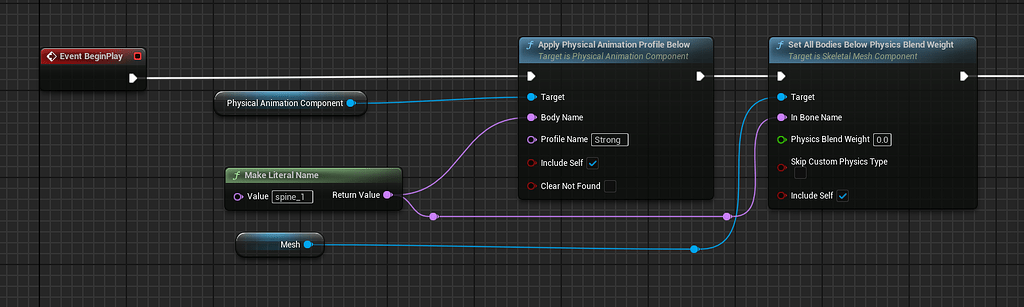
Epic Developer Community Forums
Like the title poorly describes, I’m having an issue with the physical animation component on my character. For some reason unknown to me, everything about the process works, until I need to blend my character back to its rigid kinematic state away from its simulated state. I have a physics asset set up with a physics profile that I call “strong...
 distant junco
when i get near to the center of the Postprocessing volume the fog becames less dense, how can i fix it?
tall escarp
weary ledge
Please help anyone that knows anything about the physical animation component: [...
I don't have a specific solution lemme just say that I found the performance in physical animation in UE4 to be horrible and so was the responsiveness on transitions
weary ledge
tall escarp
I don't have a specific solution lemme just say that I found the performance in ...
Thing has been frustrating as hell to work with so far.
I love its concept, but its implementation seems to be problematic.
Its probably just me being shitty at dev again tho
can never tell
tall escarp
I spent a good month trying my best to duplicate what's set up in the advanced locomotion system in my game for NPCs to be more reactive to different damage types. Things "worked" technically but not nearly up to my performance standards
and it also would randomly crash my standalone game on steam and i haven't had that problem since going to a simplified ragdoll system
I just don't think it's well done in UE4, haven't played around with it in UE5 yet
 keen tulip
hi, im very new to unreal and have just been following tutorials and such to get the grasps of things. how would i go about editing the default values of this? for example on defeating an enemy.
 tall escarp
weary ledge
Im in ue 5.4.3 source build
tall escarp
weary ledge
Im in ue 5.4.3 source build
Ah, you may get better help in the UE5-general channel for that then?
 regal mulch
keen tulip
hi, im very new to unreal and have just been following tutorials and such to get...
regal mulch
keen tulip
hi, im very new to unreal and have just been following tutorials and such to get...
Not sure what you mean by that.
keen tulip
no worries the problem is fixed now :)
 urban oracle
Hey!
I hope I'm posting in the right channel, I do not understand the issue I am having.
My ragdolls are glitched and sometimes freeze my game and I am not able to track down this issue
It appears randomly on some builds, and sometimes after launching a build that did not have the issue earlier
Unistalling the game from Steam and Installing it again solves this bug (I really don't get it)
The game is to ship for tomorrow's Steam Next Fest, if you have any idea on where I can look or what it could be, be sure to tell me 🥲
tall escarp
i really recommend (i keep saying this) having a robust print string system that you can turn on for finding out where the crash is likely being triggered, also look at your crash reports to see if you can tell what happened right before the crash
if the issue is specific to your project you're not going to get answers as good from people who've never played your game as you would from having an internal error printing system. it's just not the way to do things.
Forums/discord are for engine specific problems other people can reproduce easily and you need to have your issue narrowed down enough to ask correctly for that to be effective.
Good luck on the next fest though that's cool.
urban oracle
Thanks, i wish the game crashes, but it just freezes, so no minidumps :c
spice ruin
Attach a debugger and find out what it's doing.
past drum
I am a passionate and experienced game artist specializing in character design, asset creation, and environment art. With a keen eye for detail and a commitment to storytelling, I bring virtual worlds to life, transforming imaginative concepts into vivid, immersive experiences.
 lean jay
spice ruin
past drum
I am a passionate and experienced game artist specializing in character design, ...
lean jay
spice ruin
past drum
I am a passionate and experienced game artist specializing in character design, ...
Is that an advertisement?
 shrewd gulch
I'm looking for a precompiled build of unreal 4.27.2, I was told I could find it here?
spice ruin
Is it not on the launcher?
shrewd gulch
nope, only the rounded out version numbers which is frustrating
4.27.0 but I need specifically .2
it's for payday3 modding
(yes people still play it)
 sharp hemlock
Has anyone ever experienced, on 4.27.2, having the transform gizmos (rotate, scale, move) stop receiving hover/click inputs and consequently not working after playing around with actors on the level editor? Additionally, have this only happen to some actors and the number of actors where this happens increase over time?
spice ruin
shrewd gulch
4.27.0 but I need specifically .2
If you install 4.27, it will get you 4.27.2
raven river
Find modders who are familiar with UE4-UE5 and are familiar with replacing character models, rigging bones, and importing into UE. Work together🫡
 keen thunder
Is this size normal for UE4 built from source? I did exclude some platforms that I dont need

 oak patio
That's small for a source build
 random holly
Hey! I am looking for people to join our small group of developers dedicated to our Stylized RPG lifesim, This is NOT a paid role to begin with, but who knows what will come. It’s a simply to get practice, to work as a team, learn and to make work worth of presentations. This group can include anyone that has never worked in Unreal 5, if you do have experience we would love to hear from you too.
Cheers everyone, let’s put our print on history.
oak patio
random holly
Hey! I am looking for people to join our small group of developers dedicated to ...
This isn't a place for advertising jobs. Post to the job board.
past drum
spice ruin
Is that an advertisement?
i can
past drum
okay
 fading fog
random holly
Hey! I am looking for people to join our small group of developers dedicated to ...
fading fog
random holly
Hey! I am looking for people to join our small group of developers dedicated to ...
Hi can i join ive been using UE4 for some years but i also used UE5 but my pc is not optimize for it,so can i set my UE5 preview platform for a bit lower for my pc to handle smoothly i do know blueprints,including animation blueprints
if it possible for me to use lower preview platform,i would like to join
DM me if can
random holly
fading fog
Hi can i join ive been using UE4 for some years but i also used UE5 but my pc is...
Thanks for the reply! We would love to have you onboard man! Drop me a DM
fading fog
K
random holly
fading fog
DM me if can
Oh haha my bad
fading fog
is ok i dm you
 frail river
Hey all, does anyone know if this is the right way of doing something like this? Is it ok performance wise to call my custom event every tick even if the delay node says it is ignored? Or do I have to add let's say a bolean that gets set to true or false if the custom event is on cooldown? Would that be less costly in a strict best practices way?

 tough thicket

why is imt when i make my zombies in the red circle the animations are fine, the are perfect no issues
but if i build navigation near the yellow circle
the animations are all messed up like constantly reseting so its always spazzing out
they do the AI stuff fine, its just the animations are messed up ?
oak patio
frail river
Hey all, does anyone know if this is the right way of doing something like this?...
don't do a delay on tick
just use a timer
oak patio
a timer is exactly what it says on the tin. A way to execute an event after a set time interval, that is normally looping
A delay is more "do this bit, then wait a bit before doing this bit", you wouldn't use it for this sort of thing
You want the Set Timer By Event node in particular
frail river
Thank you I will investigate!
spice ruin
There are example projects that come with ue4. You can install them from the launcher.
 finite bison
Anyone know what this weird white shadows(?) are? im not sure

 crisp moat
is there a way to disable shader compilation completely using prebuild unreal not source ?
oak patio
Shaders need to compile, they can't not
crisp moat
i just need to delete old unused assets in one of the projects and everytime i do that shaders start compiling
crisp moat
oak patio
Shaders need to compile, they can't not
logic behind compiling shaders for an asset that is getting deleted ?
oak patio
I'd imagine they have to decompile in case you're removing a material
Or a mesh or something
But no idea, I didn't write it :P
crisp moat
isn't there a commandline in place cpp would probably be void FShaderCompiler::CompileShaders() { return; } just saying
oak patio
But again, it's not that simple. Shaders have to compile
 jolly mason
just found a solution to my last projects bottleneck, feels good man
yea no you guys are out of luck i need to talk about this, so my project for a while now has been a airship project, with modular parts, so every piece of flooring, every wall and every engine wing part were actors that were attached to the ships spine using attach to. this turned into a nightmare when those ships would move and each part had its transform calculated. not good for performance.
what i came up now is that each wall/ floor element, that makes up the mayority of all the parts, is one procedural mesh component
so i take a skeletal mesh, pose it into the shape of the ship , turn it into a PMC, each wall segment has its own material which means those would be its own section.theeeen i can use a sphere trace to get the face index and its corresponding material, and luck would have it the material section index is also the section index of the PMC so i can then update the section of that mesh and basically disable collision
imagine gmod blocks to be individual wall elements of a ship
not only does it change its visibility but also its collision
tall escarp
That's a good solution
jolly mason
Thank you 😄 I am so thrilled to work on it again
 tough moss
Hello all ! I use a modding tool for longvinter based on Ue 4.26 source .. And after an update on the tool all item present in the game are white in the inventory and i cant interact with !
i would like to know if its happen to someone and if someone can help me, i can share some screen or come in call
It would be great if we could fix this before the devs, who are more focused on content for casual players.
 spice ruin
We don't support modding games here.
If there are official mod tools, ask the devs about those and why they're broken.
frail river
Does anyone know why looking at my terrain from far away makes the fps drop to 20 😄

The only things visible in this shot is the terrain, I've deleted literally everything else
Going to ground level the fps goes to 120 😄
I can't find anything about this online
But for some reason looking at the terrain's lowest LOD is somehow more expensive to render than being up close and getting the highest LODs possible
Base pass goes crazy for some reason

 steep temple
hey all! fairly new to UE development
was curious on if anyone has run into this issue on UE 4.26 with the web browser? I scale the actual widget but the view port doesn't seem to resize the page content
 tall escarp
frail river
Does anyone know why looking at my terrain from far away makes the fps drop to 2...
tall escarp
frail river
Does anyone know why looking at my terrain from far away makes the fps drop to 2...
When you're at ground level how much of the terrain is occluded by view angle or elevation?
frail river
tall escarp
When you're at ground level how much of the terrain is occluded by view angle or...
Most of it, but how can that be the cause, Looking from above I am looking at like 10k quads, at ground level and at lod 0 of the terrain there's easily 100k polys on screen
tall escarp
if most of it is occluded that's the performance diff. you'll have to analyze it but tesselated landscapes are fairly expensive in ue4
frail river
Also exporting its highest lod as a mesh and placing it in the world works fine from above
Yeah but it's the opposite of what I'd expect 😄 Highest lod works the sloweest 😄
Eh god knows what insane things are happening under the hood, I'll make a level LOD and replace the landscape with a mesh, of the land scape, that somehow works faster than the landscape
 brittle gulch
Hey guys, do you know where I can find this plugin, or something similar? It's missing from Fab (like almost everything...)
 jolly mason
okay whomst knows a thing or two about the procedural mesh component?
i have a plane that i offset along its normal, after some math i combine two sets of data into one section


the result is two walls, inner and outer
heres the issue tho. the collision is all whack
the outer side of the wall has correct collision
the inner side however, well...
my theory is that the create mesh section function cannot handle to create complex collision for these two planes
jolly mason
after some more testing it appears that the inner normals face the wrong direction
my first thought was to multiply the normal array by -1 to flip them but it didnt work
tall escarp
by "break tradition" do you mean intentionally post in the wrong channel?
 velvet oracle
tall escarp
by "break tradition" do you mean intentionally post in the wrong channel?
velvet oracle
tall escarp
by "break tradition" do you mean intentionally post in the wrong channel?
I don’t know which channel people prefer to see the kind of post I put in, I’m simply looking for help and got pointed in this direction
tall escarp
velvet oracle
I don’t know which channel people prefer to see the kind of post I put in, I’m s...
UE5 general and the materials channel seem appropriate for what you're asking
velvet oracle
tall escarp
UE5 general and the materials channel seem appropriate for what you're asking
uhp I see the problem now, i will correct this mistake - thanks
jolly mason
jolly mason
my first thought was to multiply the normal array by -1 to flip them but it didn...
problem solved, heres the solution: not the normals make the collision or backface culling, its the triangle order, so reversing the triangle array of the inner plane did the trick
 pallid steeple
Hello! Not sure where to post this! I'm trying to package my game for android and I get the error: splash activity does not exist, build is successful but the game won't start, anyone have any ideas? Thank you!
 timber steppe
guys im using unreal engine 4.27. my graphics card is gtx1060 6gb. if i will update my version to 4 to 5. what will change? i mean like the performance. and why i would update to 5? please bring it to light (sorry for my english)
 brazen aspen
timber steppe
guys im using unreal engine 4.27. my graphics card is gtx1060 6gb. if i will upd...
brazen aspen
timber steppe
guys im using unreal engine 4.27. my graphics card is gtx1060 6gb. if i will upd...
Read the first pin in this channel
timber steppe
ooohhhhh okay thanks for the information
distant junco
why when the video plays there is that white screen for a moment? and why the video plays on my PC but not on other peoples PC?
before answering my question (YES it looks like minecraft but it's a slenderman adaptation of it)
jolly mason
Does each segment of a procedural mesh receive its own draw call?
brittle gulch
I get this error when trying to launch the Epic Games Launcher. Unreal Editor works fine when I launch a project directly or when I launch the .exe directly from the installed folder, Maya works fine, blender too. Actually everything works fine but Epic Games Launcher. Why is that?

 long goblet
I am Japanese. I can't speak English. This sentence uses a translation. I don't know what channel to ask on, so I'll ask here.
I tried to download Unreal Engine, but I got the following error and couldn't download it.
Cannot GET /error-500
How can I download it?
help😭
 jolly mason
long goblet
I am Japanese. I can't speak English. This sentence uses a translation. I don't ...
jolly mason
long goblet
I am Japanese. I can't speak English. This sentence uses a translation. I don't ...
did you download it from the epic store?
 tall escarp
strange i work a ton with HISM for my modular architecture and haven't seen that
long goblet
jolly mason
did you download it from the epic store?
yes. This is what happens when you try to download it from the Epic store.
long goblet
long goblet
I am Japanese. I can't speak English. This sentence uses a translation. I don't ...
oh, After a day, I was able to install it.
thx
 cedar radish
so im modding a game and one issue ive seen is that unreal only seems to load 1 buildata at a time. Is this just an issue with the game im playing or is this just unreal in general
tall escarp
Are you referring to lighting builds? You can handle multiple builds by using lighting scenarios
jolly mason
how to best handle many physics actors?
yellow spheres accumulating at the floor are place holders for the object that appears when you shoot off a wall element of the airship.
i have been stress testing my system and there were two things i noticed:
- lotta actors = lotta draw calls
- lotta physics actors = lotta ms
obviously in the end product it will never be possible to produce this many things, still id like to know some neat tricks to optimize this sort of thing
 tall escarp
Just personal opinion after experimenting: don't have a lot of concurrent physics actors in ue4, instead manage how many you have at once to optimize the performance.
On my game I have hard limits for that and factor it into design
jolly mason
interesting, thats one way to do it
how to best detect them? have one big sphere around any ship and if something gets removed it checks how many are already on the floor? this might lead to some issues cause a "get all of type" seems quite costly
tall escarp
Yeah you'll have to program an efficient way to track them it's worth the effort if you want physics with good performance (I use it for ragdoll and some other destruction assets but the logic is the same)
jolly mason
i found a solution thats quite simple, inside my gamemode i added a function to which i pass a reference of the added module, if the length of the array storing the modules exceeds the threshold then the first element in the array gets deleted
cedar radish
tall escarp
Are you referring to lighting builds? You can handle multiple builds by using li...
The _buildata files that control the shadows, with the level streaming for the game only one a single shadow map can appear at a time
so if i have 2 lighting maps loaded at once, one wont have any shadows
tall escarp
Did you look into the lighting scenarios I mentioned?
 gray basin
Has anyone used spreedsheets to keep track on sound effects being used in games ?
tall escarp
gray basin
Has anyone used spreedsheets to keep track on sound effects being used in games ...
I set up the excel spreadsheets on a couple of projects for it but always found it cumbersome.
 wooden heath
you can
 raven nest
is there a way to get UE4 to not block the screensaver on win10? 🙄
 forest crypt
Hey there, I'm Solomon Im a Skilled Unreal Engine developer specializing in gameplay mechanics, AI, and performance optimization. Whether you need custom blueprints, C++ scripting, or a full game system setup, I can bring your vision to life. From FPS to RPGs, I ensure high-quality, efficient, and immersive experiences. Let’s create something amazing!
DM ME!
tall escarp
forest crypt
Hey there, I'm Solomon Im a Skilled Unreal Engine developer specializing in game...
There's a freelancer board for posts like this FYI, this channel has a description for the appropriate content
cedar radish
Can light scenarios have 2 lighting maps attached too them?
 lilac cipher
Has anyone else experienced the right mouse button not working after working in an editor for an hour or so? Everything works in the system and other applications, but in the editor, when you click the right mouse button or try to open the main menu, the corresponding menu appears for a moment and then disappears. Anyone?
tough thicket

how do you fix camera clipping through the walls
especially on the side your camera is offset too...?
tall escarp
Anyone have a good Youtube tutorial series on creating original combat AI? The feedback for my game currently universally is that the AI is the area that needs improvement and multiple marketplace purchases have either been underwhelming or abandoned by the developers.
With the lack of UE4 support I'd rather just create something from scratch at this point.
Looking for something that's been used in a packaged game preferably deployed on a platform like Steam
 green acorn
tough thicket
how do you fix camera clipping through the walls
green acorn
tough thicket
how do you fix camera clipping through the walls
Hard problem to solve imo. Spring arm won't help you either.
I got mine decently working by snatching lyra camera.
tough thicket
green acorn
Hard problem to solve imo. Spring arm won't help you either.
I got mine decentl...
yeah just gonna cope with center
 spark hawk
Is there any way to edit bones of skeletal mesh? I have character made by CC4 I exported it into UE4.27 and the rig has bones in places I don't want them, so I need to adjust some bones, how can I do it in UE4? I know that UE5.3 has feature for editing skeletal mesh but I don't think it's possible in UE4. Any ideas how can I do it?
 restive ingot
Packaging projects gives me headaches
 bleak zodiac
Packaging always headache
restive ingot
like why


 bleak glen
in unreal 4.27
i tried to attach my thirdpersoncharacter to actor in world
it attached for sec then character drops to ground
in level hirachy i can see my character is still attached to actor
tried stop simulating capsule component before attaching
tried attach component to component
 tough thicket
bleak glen
in unreal 4.27
i tried to attach my thirdpersoncharacter to actor in world
it at...
tough thicket
bleak glen
in unreal 4.27
i tried to attach my thirdpersoncharacter to actor in world
it at...
set it to static or something
bleak glen
tough thicket
set it to static or something
thanks , i have fixed it by setting movement mode to none
cedar radish
for some reason i cant edit the textre multiplier


 bright grove
Can I get someones help here .
I didn't know where I could post this
raven river
Is there anyone here who is very familiar with UE4-UE5 game engines? I need a mod developer who can help me replace the main character model of the game Sorry for interrupting
tall escarp
raven river
Is there anyone here who is very familiar with UE4-UE5 game engines? I need a mo...
This isn't a forum for mod development. Not sure why this keeps coming up.
 tiny zodiac
In Unreal Engine 4 the shadows dont work for Orthographic view. Is this fixed in UE 5 ? I saw some videos that seem to show that, but it could be fake Perspective view with lower FOV ?
spice ruin
The latest on git.
spice ruin
5.6...
tiny zodiac
Im on UE4 and love it
tiny zodiac
spice ruin
5.6...
i see lots of tutorials, i never see something that UE4 lacks
im trying to hold to it
though there is this Packed Actor of UE5 that is super convenient
tiny zodiac
spice ruin
5.6...
but i dont see use for me for all the other features, because i do 2d games and stylized
 fleet jay
Does anybody know how to solve this error. Its not letting me package my game.
UATHelper: Packaging (Windows): LogWindows: Warning: Failed to set completion port for job object "UE.ShaderCompileWorker.JobGroup": The parameter is incorrect.
 drifting geode
just completely reinstalled UE 4.27.2, updated nvidia drivers and checked every setting on the system. but UE is running at 30FPS in the editor, sometime 40-50 in a blank level, while unreal 5 runs at 120 fps. anyone else every had this issue?
 strong lake
How to remove references from memory? MY 2 actors are not referencing each other no more. There is some in memroy 🙄

 tough thicket
strong lake
How to remove references from memory? MY 2 actors are not referencing each other...
tough thicket
strong lake
How to remove references from memory? MY 2 actors are not referencing each other...
Save and reload still in memory
if you made sure to delete everything... you will most likely be fine 90% unless it was in a buggy viewport then you may ruin your project forever
unless you obviously know the issue then reload with default map settings should be fine
strong lake
tough thicket
Save and reload still in memory
I did reload editor, but it persisted 😛
tough thicket
Yeah so ... Just delete it and see what the compiler says
chances are you wont ruin your project over that
tall escarp
strong lake
How to remove references from memory? MY 2 actors are not referencing each other...
Did you fix up your redirectors?
 quasi adder
Hi Folks,
Can Unreal handle placing a 3D Model/ 2-D Images on a running man in a video, or do I need additional tools? Also, I require headless rendering without a UI. In short, it is mainly Object tracking usecase.
 dense lance
Hey , Is there any switch/Xbox developer?
oak patio
dense lance
Hey , Is there any switch/Xbox developer?
Almost certainly. You won't get much help however, consoles are under a strict NDA
dense lance
So where can I find some help I am a certified console developer but still I dont have much information about that
oak patio
You're limited to the dev forum for that console.
If you've shelled out the small fortune for UDN, I believe that's an option too
Console development is very much "figure it out" territory sadly.
dense lance
Actually, I don’t want any help that goes beyond the NDA. What I did was download the platform files and add them to the UE4 source code.
After compiling the engine:
I can successfully build for PlayStation.
However, when I try to package for Xbox or Switch, it redirects me to the Unreal Engine documentation portal instead of proceeding with the build.
spice ruin
Even the dev kit, how to use it and any inter-console issues are probably under nda, too.
However, I'd suggest checking your output log.
dense lance
Ok thank you
 sand inlet
Does anyone know how to get the chorded action tied to an input action? This is for shortcut display.
 jolly burrow
tall escarp
sand inlet
Does anyone know how to get the chorded action tied to an input action? This is...
jolly burrow
tall escarp
sand inlet
Does anyone know how to get the chorded action tied to an input action? This is...
When you're working with this rebinding and display stuff it's important to learn how to manipulate InputActionKeyMapping which is a struct.
Here's the documentation, from here you should be able to do your searches against the Action Name which needs to match whatever the Action is named in your project's Input Settings:

Epic Games Developer
Make Input Action Key Mapping
cedar radish
Please ignore the absolute horrid compressiom but im modding a game, and for some reason certain settings in post processing volumes dont work when playing as the character ingame and only works when using unreals debug camera. Does anyone know what may be causing this to override
according to some more knowledgable modders then me it isnt the settings attached to the players camera, besides that they have no idea what the issue is
sand inlet
tall escarp
Here's the documentation, from here you should be able to do your searches again...
Great, thank you.
 patent dust
i know this may seem really simple but its got me stressing for a few days now with a deadline coming up fast:
im working on an unreal engine 4.27 version project (ill put the version in case it helps) and i cant program a door being destroyed after collecting 5 collectables, can someone help me please?
ive tried searching up tutorials but i cant find anything to do with collectables and destroying an object
oak patio
You need to think less specifically in your hunt.
Destroying an actor is always going to be the same, no matter the condition before it. You can break down your logic into "if (number of collectibles collected) is equal to (number of collectibles needed), then destroy the door"
Once you break it down it's much easier to think about. Destroying an actor is simple, it's just the Destroy Actor node. So you're probably going to want an event in the door, that perhaps checks if the number of collectibles collected in is equal to the number it needs to open.
You're then going to want somewhere to track the number of collectibles picked up. This could be in many places. You might put it in your character. If this value persists across levels you might make a GameInstance class. Wherever you put it isn't of importance. What is important is that your collectible increments the value and destroys itself on pickup.
Your final step there is to signal to the door that the variable has changed, and the doors should check again if they need to open. You could simply get all actors of the door class and call the event on them if you wanted a quick and dirty method. Another option might be to have an Event Dispatcher in the place that has the number of collectibles picked up. You'd then want a function in that same class that increments the variable and calls the dispatcher. Then instead of your collectible incrementing the variable, it calls that function.
In your door's Begin Play event, they would then bind to this event dispatcher with their event that checks if the door should open.
Break down your logic into small bite-sized pieces that you can focus on separately. You're not going to find many tutorials, or people talking about how to destroy a door when collectibles are picked up. You will find people talking about destroying actors, or tracking global values, or having objects listen for changes.
When you really break it down, a collectible is the same as a pickup, is the same as a trap, is the same as a lava pit. They all do {thing} when a player walks over them. Generalizing and then adapting your results to your usecase is going to be much more useful
patent dust
oak patio
You need to think less specifically in your hunt.
Destroying an actor is alway...
Alright, thank you so much
tall escarp
patent dust
i know this may seem really simple but its got me stressing for a few days now w...
Fwiw when you get stuck in really simple problems like this it's a good time to work out the logic on paper or a whiteboard. Sometimes you've been staring at a screen for too long.
patent dust
tall escarp
Fwiw when you get stuck in really simple problems like this it's a good time to ...
that makes sense yeah ive been looking at my pc trying to solve this quite a bit over the past few days its giving me a headache 😔
 pulsar quail
Anyone have an idea of how this would have been achieved? my guess is that they were loading in rooms as they entered each one but im not entirely sure https://www.youtube.com/watch?v=7J83QEww7wM&ab_channel=DeliciousWhales

Proof of concept for impossible space using Unreal Engine.
This video shows endless / looping corridor and stairs, as well as dynamically switching the rooms a door is connected to.
tall escarp
it's done through sublevel loading, there's some Unreal Engine learning samples that do a good of breaking the technique down using overlaps/volumes that trigger the needed sublevels
pulsar quail
tall escarp
it's done through sublevel loading, there's some Unreal Engine learning samples ...
This is level streaming, yes? From what I can tell, the streamed levels are built in a certain spot, unless its possible to re-orient the other levels dynamically
tall escarp
pulsar quail
This is level streaming, yes? From what I can tell, the streamed levels are buil...
Yes level streaming with overlap volumes check out the learning samples
pulsar quail
tall escarp
Yes level streaming with overlap volumes check out the learning samples
I understand the level streaming part as I've used it before, but I haven't seen the ability to reorient them dynamically. What learning samples do you suggest
tall escarp
pulsar quail
I understand the level streaming part as I've used it before, but I haven't seen...
Ah understood, what you're referring to is the endless rooms themselves, this old tutorial from UE should help:
https://www.youtube.com/watch?v=3om6yJiYMcg&ab_channel=UnrealEngine

Now that our player controls are done, we'll start creating a system to procedurally spawn a running course with randomly placed obstacles.
I worked on a couple projects with dungeon/corridor spawning systems and some variation of this is what you end up doing, it's just a matter of checking for position and whatever gameplay triggers you have
pulsar quail
I found that video as well but I wasn't sure if using actors as level pieces was the best way of doing things, guess it is. Thanks!
tall escarp
I really recommend diagraming your system like a grid and coming up with the best method based on your needs. There's a couple different ways to do things from what I remember.
Basically it comes down to "when the player triggers the load/unload event what is the list of gameplay and asset considerations" and as always destroy your garbage.
 haughty harness
For UE4 VR on quest 2, i'm having trouble building my project file due to what seems to be the virtual textures since it gives this error:
Package Fail: CompressedFormat == PF_Unknown || CompressedFormat == CompressedMip[0].PixelFormat
looking online, there was a solution involving editing the engine files, but it turned out to not work properly. Anyone else have this issue, and how to fix build issues?
 graceful shale
Question: So I'm using UE4 and when I edit my resolution from small to large my portals stay low res, could I dynamically change the resolution with the players?

 gray glen
graceful shale
Question: So I'm using UE4 and when I edit my resolution from small to large my ...
gray glen
graceful shale
Question: So I'm using UE4 and when I edit my resolution from small to large my ...
You can resize your render target’s texture.
There might be a blueprint exposed function for doing so, but if not you can always just destroy the current one and spawn a new RT with new dimensions.
graceful shale
Also, I'm having the problem of needing to restart the editor every 30 minutes or so, if I don't the UI breaks. Is there anyway to fix that?
 cursive anchor
Is there anyone that wants improve own site or bot?
Or Is there anyone that have creative opinion?
If there is , I will help you immediately.
I'm a full-stack developer with 6 years of experience.
I'm good at frontend and backend development with several AI integration and automation.
I am skilled PHP, most of JS(TS) Modern frameworks as frontend.
As backend, I have extensive experience in Node(Express), python frameworks(Django, Flask, FastAPI ).]\
hidden dew
I'm morphing a large procedurarl mesh, 50k tris using complex collision.
Unsurprisingly, if I try to update its shape every tick with UpdateMeshSection(), I get a big performance drop. In the editor it will go from 120fps to 45fps once I tell it to start updating every tick.
What I'm surprised about though, is that when I do everything I can find to disable its collider with the intent of just updating the geometry only, I see no performance change at all. I would have thought that not-updating the collider anymore would have created a noticeable boost.
Same story with a 576k tri mesh. Goes from 120fps to 10fps, with or without the collider enabled (as far as I believe, anyway)
 ancient gale
UE4 (4.27.2)
I try to make the sounds of footsteps, but for some reason I can’t hear them.....

 hidden dew
ty for the response
What should I use instead? Runtime Mesh Component? Or is there something built into UE that's better than PMC at least?
 shrewd obsidian
Not sure if this is the right spot to ask about legacy versions, but does anyone here have experience with 4.23? (I'm experimenting with it due to its HTML support).
My current project is mainly widget-based, but 4.23's scroll box seems to have a partly broken scrollbar. That is, you often need to click it a second time in order to go from the "hovered" state to the "dragged" state. Importing a working scroll box from a 4.27 project doesn't work, but opening the 4.23 project in 4.27 automatically fixes it.
Is there any workaround in 4.23 itself?
 gloomy iris
ancient gale
UE4 (4.27.2)
I try to make the sounds of footsteps, but for some reason I can’t...
gloomy iris
ancient gale
UE4 (4.27.2)
I try to make the sounds of footsteps, but for some reason I can’t...
is this using notify in the walk/run animation?
 bronze peak
you want to use line trace and get physical material, so you can have different footsteps based on that. switch on enum
 fluid harness
Hi everyone, hopefully this is the right place to ask a noob question. I am very new to the UE4 modding scene. I wanted to make a very simple mod where some numerical values in one of the game's .uasset file is changed.
What I did:
- Use fModel to inspect the pak files of the game and export copies of all of the files
- Use UAssetGUI to make changes to the target file
- Create a folder with the same subfolder hierarchy as the actual game, then put the modded file in the folder such that the relative file path of the both the original and modded files are the same
- Make sure the folder's name ends with the suffix
_P - Using UnrealPak, pack the folder and create a
.pakfile - For verification purposes, I also unpacked the created
.pakfile and used a hex editor to make sure the modded file actually contained my changes - For verification purposes, I opened the
.pakfile in fModel and confirmed that fModel recognizes the changes I made - I put the
.pakfile in amods/folder that I created, and I put that whole folder into the/Steam/steamapps/common/{gameName}/BBQ/Content/Paks/folder
The problem is, the changes I made are not reflected in the game. It's like my mods are not applied at all. I also have other mods that I downloaded from other people and also put them into the mods/ folder. Those seem to be working fine in game. Can someone kindly point me in the right direction? Did I miss a crucial step? Thanks in advance.
oak patio
fluid harness
Hi everyone, hopefully this is the right place to ask a noob question. I am very...
We don't provide support for underground modding here. You're best off in an unreal modding discord 🙂
fluid harness
oak patio
We don't provide support for underground modding here. You're best off in an unr...
Can you give me some examples of that kind of server?
spice ruin
Part of not supporting underground modding is not really doing that.
You're effectively doing things that basically everyone here doesn't want you to do. If they did want you to do it, they would provide you with official modding tools or have some information on their website or something. Try google?
 karmic seal
Hey guys! I recently converted my map to world partitioning. I built HLODs however they didnt get built for foliage despite enabling the hlod option in the individual foliage options. Any tips on how to get it to work? Otherwise is there a way to make foliage bot be affected by world partitioning?
Thanks!
raven nest
erm, is it possible to make Cascade sprites simply hold their spawned orientation? I don't want them to always face the camera.. seems like it's not an option? there must be a workflow..
 placid cedar
If you recently re-installed windows 10 or 11 and are running into packaging errors related to the AutomationTool.exe, and its "access being denied", you must:
- Enable Ransomware Protection Controlled Folder Access [Open Windows Security]
- Allow an app through. (AutomationTool.exe)[Located here: C:\Program Files\Epic Games\UE_4.27\Engine\Binaries\DotNET]
- Restart the Unreal Editor and try repackaging.
The reason for this is Windows has pushed updates that further protect system folders.


 tall escarp
raven nest
erm, is it possible to make Cascade sprites simply hold their spawned orientatio...
tall escarp
raven nest
erm, is it possible to make Cascade sprites simply hold their spawned orientatio...
Are your particle's emitters set to use "Camera facing" as their normals mode? IF so you can try changing that to cylinder or sphere?
raven nest
tall escarp
Are your particle's emitters set to use "Camera facing" as their normals mode? I...
this?
 tall escarp
That or something similar IDK the composition of your particle system. Anything that's facing the camera, look for those type of settings in each module within the emitter and change from Camera-based to something else
If nothing is set to "facing camera" then it shouldn't be doing it
raven nest
hmm, yeah seems like something is screwy
it's been upgraded from previous engines so maybe I should try it from scratch 🤔
tall escarp
you can also disable each module to see which specific one is facing camera
raven nest
having two emitters active causes them to interact in weird ways
raven nest
same thing with a band new system.. I dunno if I'm missing something, my system is screwed up, or I am losing it 🤪
couldn't get the mesh emitter to do it right either
if I check Use Local Space I can see it at a flat angle but it's on the wrong axis 😠
 wraith frost
Does anyone have any tutorials on how to create a party system like this where you can host a party and have people find parties ?
 wraith frost
I ain't never got ghosted this hard
tough thicket
wraith frost
Does anyone have any tutorials on how to create a party system like this where y...
i would assume Steam servers would have some support
if not maybe try hamachi or something because
someone has to host it and a vpn isnt free so
tiny zodiac
Is it really this painful to set up Chaos destruction in UE4.27?

UPDATE 15 Sep 2021: Instead of recompiling the engine, you can also use 4.27-chaos and UE5 EA/Preview, all of which are available from the Epic Launcher.
UPDATE 17 Dec 2020: As announced, Epic has just released a 4.26-Chaos Preview version available directly from the Launcher, so it is no longer necessary to compile from source to enable Chaos....
is it the same in UE5?
So basically you need to install a new engine version just for the Chaos ? what a PITA 🍑🔥
Isn't there a simpler lighter way to do this? I really dont want to install a new engine version just to have Chaos destruction in one project
I only need my building cube to break into different parts, maybe i can even do it in blueprints
oh there's fracture
Apex Destruction

thats all i need 
simple effective, and no bloat 🫄
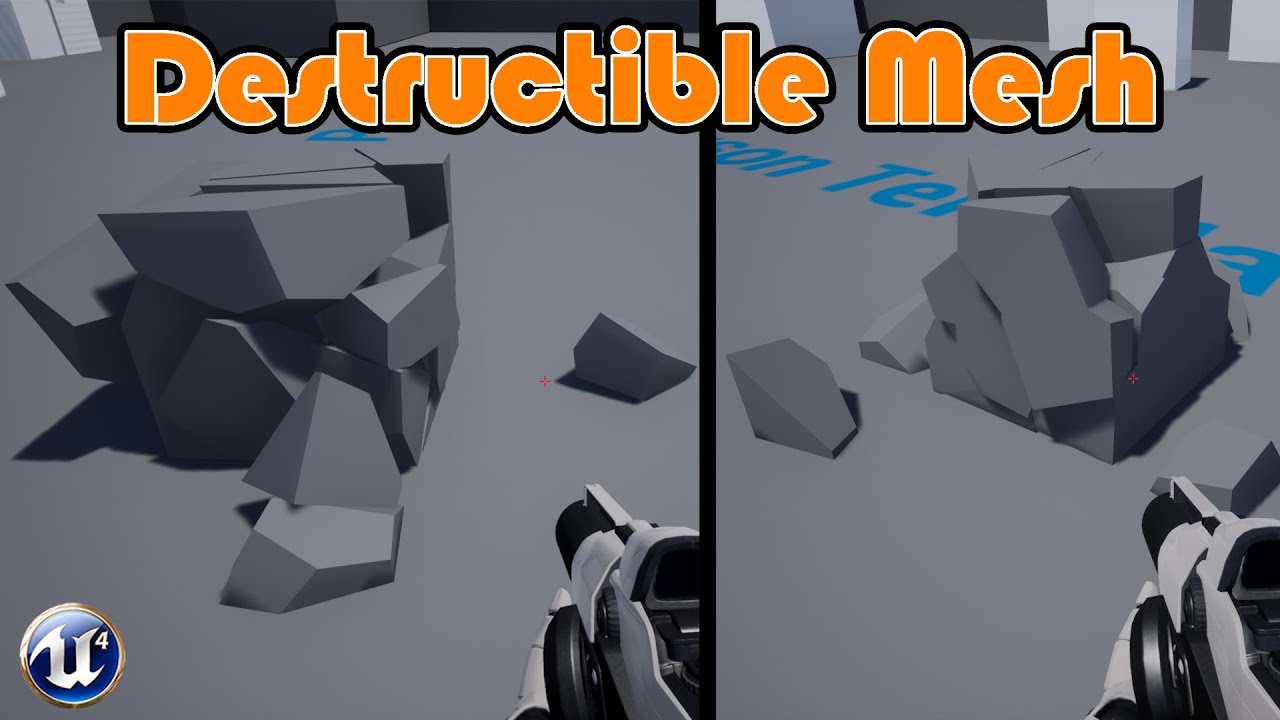
Hey guys, in today's video I'm going to be showing you how to create a mesh which can be destroyed in a random fashion every time when a player damages it. (Walks into it or shoots it, or anything else).
Unreal Engine 4 Tutorials Playlist: https://www.youtube.com/playlist?list=PLQN3U_-lMANOnnjfvEEVeAPE8mfrGr_VH
Blender Tutorials Playlist: http...
this is awesome. UE4 💪 simple and effective
 worldly trout
tiny zodiac
Is it really this painful to set up Chaos destruction in UE4.27?
worldly trout
tiny zodiac
Is it really this painful to set up Chaos destruction in UE4.27?
It's unusable, honestly, unless you only want the destruction to be purely cosmetic
tiny zodiac
worldly trout
It's unusable, honestly, unless you only want the destruction to be purely cosme...
hmm, what would chaos bring more to the table ? the debris have collision ?
for now yeah, i only need it to be mostly cosmetic because its for buildings destroying in an rts
but now that you say that, could be nice if the building debris hit the soldiers below
though i dont know if its necessary that much detail and accuracy, and im aware these things come with its performance cost
I can also damage nearby buildings and soldiers of the crumbling building by just getting the actors in the area
perfection is the enemy of rts games 
from what i tested its amazing so far
so unless there's some performance benefit in Chaos, or something that is 10x better, i think i will roll with this one
worldly trout
tiny zodiac
hmm, what would chaos bring more to the table ? the debris have collision ?
The main benefit is hierarchical destruction that can efficiently be woken up and interacted with at any time, even cached simulations can be interacted with. That's the promise anyway, in UE4 however there was basically no collision option that reliably worked with the player capsule without major problems
in recent versions of UE5 it is in a decently usable state
I don't think it's any coincidence that in Epics main tech demo for chaos destruction in UE4, the player couldn't actually move the character through the debris field
tiny zodiac
worldly trout
The main benefit is hierarchical destruction that can efficiently be woken up an...
🫡 got it
tall escarp
worldly trout
I don't think it's any coincidence that in Epics main tech demo for chaos destru...
One of the weirder things I ran into (my game features Chaos as a game factor so I wanted to have high destructibility environments) was that if a character overlapped a destructible mesh at a certain stage it would launch the character in whatever direction they were moving at a ridiculously high rate. It also caused big problems for NPC spawn waves, etc. Generally a nightmare to work with imo
 wispy bloom
fleet jay
Does anybody know how to solve this error. Its not letting me package my game.
...
wispy bloom
fleet jay
Does anybody know how to solve this error. Its not letting me package my game.
...
did you manage to fix this ?
strong lake
Im trying to read default variables for assed created in editor. But I often get zeros instead

Some of them are valid, but most are not ;d
im dum
i convert fractions to int
 winged notch
worldly trout
It's unusable, honestly, unless you only want the destruction to be purely cosme...
winged notch
worldly trout
It's unusable, honestly, unless you only want the destruction to be purely cosme...
yeah chaos sucks I moved back to blast
 modest whale
Does anyone know why the cable command is taking forever?

(and also the rendering part, but that seems to be something else I might be able to optimize differently or smth)
 dusty marlin
modest whale
Does anyone know why the cable command is taking forever?
dusty marlin
modest whale
Does anyone know why the cable command is taking forever?
Could u show GPU profile ?
modest whale
dusty marlin
Could u show GPU profile ?

 digital ginkgo
Do I need Visual Studio Installed for me to build my UE 4.27.2 game which uses only blueprints?
dusty marlin
digital ginkgo
Do I need Visual Studio Installed for me to build my UE 4.27.2 game which uses o...
If I recall correctly, u need it anyway
Ok mmm just out of optimisation and could help u with frame rate, do u need volumetric fog ? And plus are u using a cable component ?
digital ginkgo
dusty marlin
If I recall correctly, u need it anyway
Thanks!
 steady dagger
Hi all, I have a problem. playing animation of changing the scale of the object is tied to fps, for example, if 60 fps then the animation of reducing the scale is played normally. But if the fps is 5, the animation plays very slowly. what is it connected with? how to solve such problems?
 modest whale
steady dagger
Hi all, I have a problem. playing animation of changing the scale of the object ...
modest whale
steady dagger
Hi all, I have a problem. playing animation of changing the scale of the object ...
you have to multiply the speed of the anim by the global tick thingy (deltaTime)
idk how to do that rn but I'll load up ue4 and mess around till I can find a solution
usually the play anim shouldn't be fazed by fps, unless if maybe the play anim function is being called every tick?
prolly just make it play the anim once until it's finished
steady dagger
I created my own interpolation after update
modest whale
ok
 hasty mortar
Sorry for the random tag, but I found you talking about mods for steam here. You say it's a pain. But is it also a pain if it's just modifying and adding json files? I've set it up so they're not packaged but are present in the game files, I'm just not sure what we need to provide so that users can make and share mods modifying those files on Steam.
 wild crag
It's really not that bad, and most will never need to upload a custom engine build either, and just a uproject
the engine really honestly lends itself to this kinda stuff, given asset registry and all
wild crag
hasty mortar
Sorry for the random tag, but I found you talking about mods for steam here. You...
outside something short of making your own ui application in one form or another, you would probably just link them something like https://guifier.com/ to edit jsons, if they aren't tech savvy
Guifier
Discover Guifier: the interactive front-end toolkit that empowers data-driven apps with user-friendly processing of JSON, YAML, TOML, and XML data. Simplify real-time visualization, editing, and format conversion. Elevate your data manipulation with its intuitive GUI and seamless export features.
hasty mortar
wild crag
outside something short of making your own ui application in one form or another...
Oh but that's not what I meant. I was wondering whether we need to provide anything specific to make it work with the steam workshop? The file is quite easy to read and edit. They're different "Sandbox Profiles" and can also be created in-game with a clear UI. The idea is just that players could share these profiles using the steam workshop
wild crag
check out this https://partner.steamgames.com/doc/features/workshop
it's not that bad, specially if you're just doing some json stuff
hasty mortar
wild crag
check out this https://partner.steamgames.com/doc/features/workshop
Okay great thanks for the link, I'll check it out 🙂
azure shore
since instances can’t move or be attached to anything, how would you make something like a rope for example? and I mean an actual proper physics rope, not cable component, the only way I can see is to spawn an individual actor for each chunk of the rope which seems wrong but would it be an issue if it’s just a simple actor used for that? I always seem to think actors in general should be avoided when possible idk
tall escarp
"actors should be avoided"
huh?
wild crag
azure shore
since instances can’t move or be attached to anything, how would you make someth...
most would use a spline actor for this
 subtle escarp
Does anybody know if I can browse what's in Jedi Fallen Order .pak files with any standard archive software like PKZip, 7-Zip or another?
oak patio
subtle escarp
Does anybody know if I can browse what's in Jedi Fallen Order .pak files with an...
You won't get help with reverse engineering in this server, it's against the #rules
You're better off in a modding discord 🙂
subtle escarp
I thought that's what the purpose would be used for, modding. I have no intentions of reverse engineering anything.
oak patio
subtle escarp
I thought that's what the purpose would be used for, modding. I have no intentio...
to mod without official explicit support, you need to reverse engineer files. Those same techniques can be used outside of modding for asset ripping, which is why discussion of it is banned here.
Underground modding is not a topic supported here as mentioned. Asset ripping, reverse engineering and unofficial modding all fall under the same banner.
Plus, even ignoring all of that, such techniques are not things that the average developer will encounter, so you're better off anyway in a place dedicated to modding :P
wild crag
oak patio
You won't get help with reverse engineering in this server, it's against the <#8...
There is a discord for that specific game as well
 onyx viper
hey guys how do i make drop down variable like this ?
 tall escarp
onyx viper
hey guys how do i make drop down variable like this ?
tall escarp
onyx viper
hey guys how do i make drop down variable like this ?
Look up "combo box'
spice ruin
That's also probably a uenum.
If you just want a selectable value in the details panel.
onyx viper
tall escarp
Look up "combo box'
no i meant, i want it to be a customizable variable from details panel
to be more specific i want to select either one of these options

destructible or ragdoll from details panel
tall escarp
All variables are customizable. As mentioned if you want a list variable use an enum that has ragdoll and destructible mesh as the two enum entries
azure shore
tall escarp
"actors should be avoided"
huh?
yes “I always seem to think”, I feel very reluctant to make more in some cases like this because I keep thinking they have some kinda overhead, but I guess if it’s literally just the necessary components it won’t do any harm
wild crag
It really depends on the situation but there is already an actor/component type for the behaviour you described, the afforementioned spline stuff
 pulsar swallow
search for any germans i want to make a game and i cant pay u but the game will be great
tall escarp
lol
pulsar swallow
what
azure shore
wild crag
It really depends on the situation but there is already an actor/component type ...
splines for use with physics? again this was just one example, mainly wondering if just using more actors was ok
wraith frost
can someone tell me how to open a .ue4stats file ?
oak patio

Epic Games Developer
An overview on the Profiler Tool used to monitor game performance.
wraith frost
I thought the window I was look for was named "Profiling"
mb
thanks for the help!
oak patio
no worries!
spice ruin
You don't know about game dev, but do you know about discord etiquette and reading rules?
 woeful linden
Can you tell me how to call it? I just don't understand how to do it.
 tall escarp
I usually do "make struct" after "break struct"
You're asking how to call it but your screenshot shows you doing a set which is not the same
 lusty star
hi guys, does someone knows if is there a way to know if someone is talking (im using VOIP integrated is kinda meh)
 hollow dove
Is anyone using a Version below UE4.26 and if yes, why?
 late violet
i'm using 4.22, it doesn't randomly crash on my machine (ryzen 5 3500x and amd rx 6600)
tall escarp
hollow dove
Is anyone using a Version below UE4.26 and if yes, why?
I'm only using 4.25 bc the engineer I hired to build the back end made a mistake that would require a big rewrite to use the latest ue4 version. It's not by choice since some of the bugs are bad.
frail river
Hey all, does anyone know if there's a program that can apply a texture with an alpha to a high poly mesh, and bake that to a low poly mesh? I have an HD mesh with a lot of planes with an alpha texture applied to them, and I want to bake all that to a LD mesh. Blender can't do it, Substance Designer/Painter can't do it, and I even tried xNormal out of desperation 😄
 plush thicket
does anyone know what im doing wrong? when i bake it it looks like the one on the right which is very wrong


when I want it to look like the one on the left
 prime tulip
Hello. Does anyone know how I can get a word count of my project? Can't find any info, docs or tutorials on this.
tall escarp
That's an odd request. Like you want to count all the words in all ui, subtitles, etc?
 icy bluff
Does anyone know if its possible to mod the assetregistry of a packaged game? There is this dead game that I‘m running a private server for but we can’t add new content due to the Game ignoring the assets cause its not listed in the assetregistry.bin
Is there a way to inject something into it?
oak patio
Underground modding isn't something that's supported in this server
wild crag
Asset registry lets you scan new stuff in, though for iostore, it's current implementation with default packaging methods is frankly broken
though, you don't need to scan things into the reg for the game to recognize the assets, your issues likely are elsewhere, probably improper patch packing
icy bluff
wild crag
Asset registry lets you scan new stuff in, though for iostore, it's current impl...
game doesnt use iostore.
also i can load the assets they just arent recognized
they'll appear in the loaded in ue4ss
game just wont use them
jolly burrow
So my understanding is that you cannot use current versions of plugins if you are trying to export to html5 in UE4.23. Does anyone know if there's a way to access an older version of a plugin? (I'm specifically looking to use paperzd in ue4)
tall escarp
jolly burrow
So my understanding is that you cannot use current versions of plugins if you ar...
When I've needed older versions I check the official website to see if there's a way to get specific versions. If not I email and ask the dev if they can send it over. Usually if you can prove purchase they will if they have it still.
jolly burrow
tall escarp
When I've needed older versions I check the official website to see if there's a...
Awesome! I will try it out thank you!
tall escarp
NP it's one of the main reasons I want to move to ue5 for future projects. Getting old versions of plugins is a headache.
jolly burrow
tall escarp
NP it's one of the main reasons I want to move to ue5 for future projects. Getti...
True! Im just using it for html5 packaging
 sterile star
Hello, has anyone tried setting up UE4.27 to work on Linux? I am on Arch, and I get this when I run ./Setup.sh
$ sudo ./Setup.sh
Registering git hooks... (this will override existing ones!)
Fixing inconsistent case in filenames.
Setting up Mono
Corlib not in sync with this runtime: expected corlib string (1A5E0066-58DC-428A-B21C-0AD6CDAE2789) but not found or not string
Loaded from: /run/media/myname/Data/MyProject/Engine/Binaries/ThirdParty/Mono/Linux/lib/mono/4.5/mscorlib.dll
Download a newer corlib or a newer runtime at http://www.mono-project.com/download.
Result: 1
Googling isn't of much help, and I already have the newest version (I suppose, I have just downloaded via pacman a few minutes ago). Anyone has experience or guides? Thanks.
wild crag
icy bluff
game doesnt use iostore.
also i can load the assets they just arent recognized
t...
Your issue is not related to the registry
bad packaging/sig files I'd imagine
sterile star
sterile star
Hello, has anyone tried setting up UE4.27 to work on Linux? I am on Arch, and I ...
Update:
I had to install an older version of mono:
cd ~/Downloads
wget https://archive.archlinux.org/packages/m/mono/mono-5.18.1.0-1-x86_64.pkg.tar.xz
sudo pacman -U mono-5.18.1.0-1-x86_64.pkg.tar.xz
And then I had to copy the bin and lib folders to their relevant locations in UE:
rm -rf Engine/Binaries/ThirdParty/Mono/Linux/lib/mono
rm -rf Engine/Binaries/ThirdParty/Mono/Linux/bin

mkdir -p Engine/Binaries/ThirdParty/Mono/Linux/lib/mono
mkdir -p Engine/Binaries/ThirdParty/Mono/Linux/bin

cp /usr/bin/{mono,mcs,xbuild,ilasm,al,al2,csc} Engine/Binaries/ThirdParty/Mono/Linux/bin/ 2>/dev/null
Afterwards I had to download this file from their official repo and place it instead of Engine/Build/Commit.gitdeps.xml. Setup now passes (make sure relevant scripts are executable). I am now having trouble with the GenerateProjectFiles.sh. It is printing a lot of
WARNING: Library '/run/media/myname/Data/MyProject/Engine/Plugins/Compression/OodleData/Source/../Sdks/2.9.0/lib/Linux/liboo2corelinux64.a' was not resolvable to a file when used in Module 'OodleDataCompressionFormat', assuming it is a filename and will search library paths for it. This is slow and dependency checking will not work for it. Please update reference to be fully qualified alternatively use PublicSystemLibraryPaths if you do intended to use this slow path to suppress this warning.
but for many different files (my terminal is completely flooded with the number of warnings). The script passes, but running make eventually leads to the same warnings and an error:
ERROR: Could not determine version of the compiler, not registering Linux toolchain.
Anyone had this ^ issue befroe?
 manic pier
Does anyone recognize this crash error regarding Virtual Textures?
We're trying to figure out the cause of this crash in our most recent packaged builds, using UE 4.27.2.
I only recognize that it's an error with the tile padding, but I have no more context as to what the actual error is implying the issue to actually be.
SeamlessTravel FlushLevelStreaming - 0.001 s
[2025.05.08-21.26.05:556][913]LogOutputDevice: Error: === Handled ensure: ===
[2025.05.08-21.26.05:556][913]LogOutputDevice: Error: Ensure condition failed: InProducerDesc.TileBorderSize == VTData->TileBorderSize [File:E:/UnrealEngine_4.26_Source/UnrealEngine/Engine/Source/Runtime/Engine/Private/VT/RuntimeVirtualTexture.cpp] [Line: 608]
For context: Our project uses Runtime Virtual Textures for the landscape since multiple years back, and recently the only thing to prompt (to my knowledge) an error like this is we're now using larger landscape RVT textures (WorldHeight texture + BC,Normal,Rough,Spec texture) than before to accomodate larger levels.
Our landscape RVT textures use the settings seen in the attached image.
 wild crag
Does anybody know of a backport of the ue5 web browser widget/ browser functionality backported to unreal 4 versions?
I am trying to have a desktop app, that can also be ran in browser, that can be ran as an editor utility widget, but ue4 4.27 and below cannot load said pages while ue5 can. I am hoping someone else was bothered by this and backported haha
sterile star
sterile star
Update:
I had to install an older version of mono:
```
cd ~/Downloads
wget https...
Update:
When you add these to your environment variables
export UE_USE_SYSTEM_MONO=1
export MONO_PATH=/usr/lib/mono/4.5
export MONO_REGISTRY_PATH="$HOME/.mono/registry"
You can run make in the Engine directory, and it will build. It failed to build two files, which I will get to later. Upon running the UE4Editor I get:
./Engine/Binaries/Linux/UE4Editor
Increasing per-process limit of core file size to infinity.
- Existing per-process limit (soft=18446744073709551615, hard=18446744073709551615) is enough for us (need only 18446744073709551615)
Fatal error: [File:/run/media/myname/Data/MyProject/Engine/Source/Runtime/Core/Private/Modules/ModuleManager.cpp] [Line: 1032]
Unable to read module manifest from '/run/media/myname/Data/MyProject/Engine/Binaries/Linux/UE4Editor.modules'. Module manifests are generated at build time, and must be present to locate modules at runtime.
Signal 11 caught.
Malloc Size=65538 LargeMemoryPoolOffset=65554
CommonUnixCrashHandler: Signal=11
Engine crash handling finished; re-raising signal 11 for the default handler. Good bye.
[1]    104926 segmentation fault (core dumped)  ./Engine/Binaries/Linux/UE4Editor
Update:
I removed the directory Engine/Plugins/Media/BinkMedia and I have managed to get to the point where the Editor banner is showing. I don't need BinkMedia so I did not look into how to make it run. Will keep you posted.
 pallid knoll
I'm having some issues building my project, I get this error. As far as I can tell the plugin should be installed correctly, the one I'm using is: https://github.com/HoussineMehnik/UE4-PaperFlipbookWidgetPlugin


GitHub
Paper Flipbook UMG Widget. Contribute to HoussineMehnik/UE4-PaperFlipbookWidgetPlugin development by creating an account on GitHub.
spice ruin
Any build errors? Are you starting from your IDE or the launcher?
pallid knoll
spice ruin
Any build errors? Are you starting from your IDE or the launcher?
no errors when building, that error shows when opening the exe from the build
spice ruin
And how did you build?
pallid knoll
spice ruin
And how did you build?
file > package Project > windows (64-bit)
with the shipping configuration but it also happens using development config
spice ruin
And tihs happens when you run the packaged game?
pallid knoll
spice ruin
And tihs happens when you run the packaged game?
yeah, it shows that error and then closes
wild crag
wild crag
Does anybody know of a backport of the ue5 web browser widget/ browser functiona...
bump
 acoustic quarry
Hi there!
I have the exact same problem as here: https://forums.unrealengine.com/t/hierchical-instanced-static-meshes-not-occluding-properly-what-am-i-doing-wrong/123226/4
Group(s) of instances in the HISM disappears while I can see them. And invert, stay visible when I can't see them. Randomly... Probably due to grouping/cluster tree settings.
If I disable the cull distance the problem persists. I haven't found a situation where this problem goes away.
I'm going to have to code my own HISM... 😭
Ideas welcome!

Epic Developer Community Forums
Okay, I think I found the problem why the culling is not working “correctly”. The issue is that Unreal is grouping hierarchical instances to make it more performant. Those groups are splitted based on the distance of those assets. This works for most cases but fails when you have a bigger map with uneven asset-placement. I created a quick e...
(UE4.27 to UE5.5 + occurs in several scenarios, even with classic foliage, at different scales, and with occlusion disable at project scale)
acoustic quarry
With the CVar foliage.DisableCull set to 1, and a forced MarkRenderStateDirty() on the component : no occlusion problem! But I can't do this every tick...
tall escarp
So my workaround for this issue was to not use hism for foliage. I instead use blueprints to allow variety in foliage that needed it (wind effect etc) and just created low poly meshes for every other foliage and painted them
acoustic quarry
tall escarp
So my workaround for this issue was to not use hism for foliage. I instead use b...
So you use classical static mesh components?
Tomorrow I'll probably try to modify an ISM in order to add LOD support, and avoid HISM cluster tree and occlusion settings...
But if it's not efficient, I'll go with static meshes 😩
tall escarp
I had to. You might find better success but it was just too much for me to figure out and I needed to move on.
I reserved blueprints with static mesh components for anything I needed to modify at runtime as I said for things like dynamic weather
 jade bay
Hi everyone! Can someone help me to troubleshoot this issue I am having with attaching using the sequencer?
I am using "attach current" to attach a gun to my character's hand and it just pops it to another seemingly random position
 main shadow
what version of ue4 are you guys using? Anyone using a custom fork of some kind? Im looking to dip my toes into ue4, i dont specifically need any features from ue5 but is there any forks or plugins that are recommended for a more expanded feature set?
pallid knoll
Wasn't sure whether to put this in UE5 or UE4:
I'm having issues converting my project from UE4.27.2 to UE5.1.1
I've tried right clicking and choosing 'switch unreal engine version' and choosing 5.1.1, but it then won't open at all (when double clicking the uproject file is says "failed to launch editor", when opening it through the editor it just closes and doesn't do anything)
I did have a plugin, paperflipbookwidget which I tried disabling and deleting the files, but that didn't fix the issue
The reason I'm swapping is to make an online leaderboard, as I've found a tutorial for UE5 but can't find one for UE4, so help with either converting my 4.27.2 project to 5.1.1 or helping find a tutorial for a leaderboard for UE4 would be great
main shadow
pallid knoll
Wasn't sure whether to put this in UE5 or UE4:
I'm having issues converting my ...
wouldnt following the ue5 tutorial work the same way in ue4?
unless you interact with like niagara systems or some new features in ue5 it should work the same way
pallid knoll
main shadow
wouldnt following the ue5 tutorial work the same way in ue4?
it relies on a plugin that I don't think is available for UE4

in this tutorial we´re making an free online Leaderboard / Highscore system in Unreal Engine 5. Also check out my Unreal Expand Game Challenges.
http://dreamlo.com/
00:00 Preparation
00:30 Alternatives
00:40 Creating Widget
05:00...
main shadow
is this plugin responsible for like the ui elements and menu interactions or like some c++ to blueprints code translator like these EOS plugins usally are
reason im asking because if it mostly handles ui elements then you dont need the plugin work in ue4, just open a ue5 project with the plugin installed and re-create it in ue4 if its in blueprints
pallid knoll
main shadow
is this plugin responsible for like the ui elements and menu interactions or lik...
It's responsible for calling http requests, I've tried searching if that's possible in UE4 but most search results are just talking about UE5
acoustic quarry
tall escarp
I had to. You might find better success but it was just too much for me to figur...
I finally used an ISM coupled with Nanite and found myself with the same performance as the HISM, without the occlusion problem.
tall escarp
acoustic quarry
I finally used an ISM coupled with Nanite and found myself with the same perform...
You're using nanite in UE4?
acoustic quarry
tall escarp
You're using nanite in UE4?
UE5 🙂
tall escarp
acoustic quarry
UE5 🙂
Why are you posting in UE4 general?
acoustic quarry
tall escarp
Why are you posting in UE4 general?
Because I can't find the ue5 channel 😂
And, I had this problem since UE4, and I finally migrated a few months ago. So it's not specific to the engine
pallid knoll
tick this, the ue5 channel will be above this one
 woeful linden
I have such a problem, I have the interface menus appear on the level, I wanted that it would be the same on the settings, but I do not know how to implement it, while it was saved settings parameters
 torpid pivot
pallid knoll
tick this, the ue5 channel will be above this one
torpid pivot
pallid knoll
tick this, the ue5 channel will be above this one
This is such a stupid feature to hide channels.
pallid knoll
torpid pivot
This is such a stupid feature to hide channels.
Yep
torpid pivot
« Let's not overwhelm these advanced internet users / programmers with a list of more than 20 channels ! » Come on...
manic pier
Trying this again, anyone recognize this UE4.27.2 packaging error? I can't find anything anywhere regarding this and as a level artist have no idea what it implies or where to even start
We use RVT for our landscape and blending objects with the landscape, no other virtual texture streaming being used otherwise
[2025.05.16-15.30.08:133][746]LogOutputDevice: Error: === Handled ensure: ===
[2025.05.16-15.30.08:133][746]LogOutputDevice: Error:
[2025.05.16-15.30.08:133][746]LogOutputDevice: Error: Ensure condition failed: InProducerDesc.TileBorderSize == VTData->TileBorderSize [File:E:/UnrealEngine_4.26_Source/UnrealEngine/Engine/Source/Runtime/Engine/Private/VT/RuntimeVirtualTexture.cpp] [Line: 608]
This error has only showed up recently after never being present for the almost 5 years the project has been worked on
wild crag
"UE4.27.2 packaging error?"
yet the log says
"UnrealEngine_4.26_Source"
wild crag
manic pier
Trying this again, anyone recognize this UE4.27.2 packaging error? I can't find ...
.
manic pier
wild crag
"UE4.27.2 packaging error?"
yet the log says
"UnrealEngine_4.26_Source"
Yes, after upgrading from .26 we never renamed the folder the UE source is repo'd into to avoid conflicts.
 kindred creek
 wild crag
manic pier
This error has only showed up recently after never being present for the almost ...
wild crag
manic pier
This error has only showed up recently after never being present for the almost ...
Probably are just gonna have to check git diffs until you find the problematic issue starting
distant junco
Yo guys, did someone figured out how to setup android studio for 4.27.2? Cuz literally the official docs and a lot of tutorials didn't work for me, i always miss some files that i can't get (android.jar it's one of those)
I can't convert my project to UE5 cuz first i would lose a lot of performance, and a lot of stuff doesn't work properly after conversion
 molten lava
i tried to setup my project for visual code, changed the option in editor preferences, tried to create a c++ class, which failed because i hadn't installed dotnet sdk 4.6, then i installed it and tried to relaunch my project and now i get this error (module name is project name):

googled this and the common solution is to recompile source, but how do i do this?
uuh ok, i might be horribly wrong, but i just opened project file in notepad and changed this:

to this:

apologies for image spam tho
manic pier
wild crag
Probably are just gonna have to check git diffs until you find the problematic i...
Yeah this is my thought as well, engine source isn't edited in this case, so I don't think there's a point checking the engine source in this case. For the actual project files we use Perforce, but I'm not sure what even to start looking at.
The only thing that has changed is that we use a larger map in comparison to before this error started appearing, previous build the error disappeared seemingly on its own as well, before returning again in the next build, and we don't know the reason for this.
It also only started showing up since a few weeks ago
after almost a whole year of having the project upgraded from 4.26 to 4.27.2
tall escarp
molten lava
googled this and the common solution is to recompile source, but how do i do thi...
Did you open your project in visual studio --> select your project's parent folder --> right click --> build?
molten lava
tall escarp
Did you open your project in visual studio --> select your project's parent fold...
nah i didn't
i found only cpp and header file in /Source, no .sln or anything like that
removing modules part from project file seemed to work soo.. ill try it if it breaks for real
tall escarp
The solution file is generated by right clicking the project file --> generate visual studio project files. Once you do that open the sln file to do the above steps.
I'm a little confused on how you're working
spice ruin
Rider doesn't need sln files.
Or you can open the folder as a project in visual studio code, etc.
 olive vine
Good morning. Does anyone understand why an FTest would be failing despite hitting the success condition?
It's just a bool branching to finish test with successful and finish test with failed.
looking at the log, it's hitting the failed condition.
olive vine
 olive vine
The error was colleague's work, not mine.
Found out my issue was i needed to turn off the error handling in the details panel
 plush yew
Hi, I am making a multiplayer game, and I was wondering if I could send over a packaged build of my game to my other pc using the unreal engine device manager/ project launcher?
 hearty river
plush yew
Hi, I am making a multiplayer game, and I was wondering if I could send over a p...
hearty river
plush yew
Hi, I am making a multiplayer game, and I was wondering if I could send over a p...
If no better solution is available, you could consider using LocalSend to transfer your packaged build.
 magic wyvern
Is it possible for a attached actor to somehow contribute to the root component for collision checking? Aka, I have a certain item actor that can be picked up that attaches to my player actor, is it possible for it to contribute to the player's collision blocking movement, does anyone know :)?
tall escarp
magic wyvern
Is it possible for a attached actor to somehow contribute to the root component ...
Just treat it like an armor system and run a function when picked up that attaches the items and updates its collision
magic wyvern
I don't know what you mean, but I've since found another solution. Thanks!
 deft coyote
tall escarp
Just treat it like an armor system and run a function when picked up that attach...
deft coyote
tall escarp
Just treat it like an armor system and run a function when picked up that attach...
Making Armor collision is a headache if you are making it really realistic
 cerulean pine
Heres my idea "Scratchbones": Imagine poker, only:
-
Instead of cards you have Scratchbones: little trapezoidal cube thingies made of ivory that are taller on one side, on which is a number 1-12.
-
Hand supremacy isn't pattern/match based, its pure addition.
-
Each hand is 3 Scratchbones, and they're handpicked instead of randomly drawn. Theres 3 rounds including a draw, betting stage and showdown, and the expended Scratchbones don't return to your options for further hands until all 3 rounds are complete.
-
With each hand of 3 a fourth Scratchbone is picked and put in a dice rolling cup. After each betting stage completes (assuming at least 2 people haven't folded) right before showdown, the cup is shaken and the dice dropped over the pot. The closest one to each player is subtracted from the value of their hand before the winner is decided.
-
The fact its a video game allows some fun bullshittery to the mechanics. When you play there are fidgets you can activate from a wheel, like scratching your head, tapping the table, shuffling in your seat, yawning, stretching, whistling or eating the food served at the table. At the beginning of each game of 3 rounds (the expending if all 12 Scratchbones), a player is assigned a random [Tell], which is a fidget that will increase their [Luck] score by performing it. Higher [Luck] tilts the chance of getting a lower penalty bone to roll towards you. It would be best if the rolls toward each player were scripted instead of physics, so it would be obvious who got what.
---- I want the game to allow extensive customization of not only fur/feather color hair/beard style and clothing/armor, but also allow vastly differing anatomy. Hence I imagine the pieces would move through the air on their own, and the hands of the various character skeletons would attach to them and use IK to make it look like its the character driving the movement.
Could someone point me to tutorials on how to set up each of the required systems?
Or what to look up specifically?
Also advice on the blueprint architecture would be nice
How concerns should be seperated and kept modular
deft coyote
cerulean pine
How concerns should be seperated and kept modular
You are thinking of making a game of it?
cerulean pine
deft coyote
You are thinking of making a game of it?
Yes unless I get overwhelmed. Im open to collaboration and a smaller profit cut in comparison to others as long as I keep the rights to the IP (my fantasy world).
hands-on help of the technical variety would more than likely keep me from getting overwhelmed
It would certainly lead to an eventual release
look at this cute round birb and know we will be rolling in money coins


Youtube videos of cute animals rarely get dislikes
if so ur a monster
its also got sloth people, highland cow (those things with the hair in their eyes the internet incorrectly call yaks) people, kitty cat people, elephant people, mastodon people and mammoth people
people will love it
even if the gameplay is meh
you wont even be able to tell
especially with silly animations
azure shore
was this instanced mesh scaling problem never fixed? Ive found people talking about it 8 years ago and replies saying unreal team just isnt gonna fix it
first image is regular placed meshes, second images is instances placed on a grid


Im on 4.26
just slightly infuriating
 deft coyote
azure shore
just *slightly* infuriating
deft coyote
azure shore
just *slightly* infuriating
Maybe something to be done with material?
azure shore
wdym? this was in detail lighting viewmode just to see it easily, theres no reason the material would offset the meshes
deft coyote
azure shore
wdym? this was in detail lighting viewmode just to see it easily, theres no reas...
Mb I was confused
spice ruin
What even is that question?
 sonic drift
im new to unreal engine
ive seen many youtbers complaing abt how ue 5 reduces fps
so im planning to make games using ue 4
can ue 4 give decent graphics
oak patio
sonic drift
ive seen many youtbers complaing abt how ue 5 reduces fps
This is false. Youtubers like to create controversy for views.
Anything new in UE5 that can eat performance can be disabled and you can optimise your games. The engine doesn't do the optimisation for you though, you need to put in active effort of finding the right combination of settings as well as optimising your assets and gameplay
sonic drift
oak patio
This is false. Youtubers like to create controversy for views.
Anything new in ...
hmm i see thank you for you advice man!
i tried using ue 5
i made a basic fps game
sonic drift
oak patio
This is false. Youtubers like to create controversy for views.
Anything new in ...
is it diffuclt to optimize games?
oak patio
Absolutely. It can take a lot of effort, profiling, iterating, testing on different hardware.
That's not to say it's not doable, it's just something you should be aware of 🙂
sonic drift
oak patio
Absolutely. It can take a lot of effort, profiling, iterating, testing on differ...
alright man again thank you for the advice 👍 😃
tall escarp
sonic drift
ive seen many youtbers complaing abt how ue 5 reduces fps
Many of the features Epic is pushing with UE5 reduce FPS and make older machines obsolete. If you disable a large number of those features there isn't a huge difference between UE4/5 imo but the changes they made are enough that you should make a new project in UE5. Enhanced inputs and the improvements to sound for example (Sound Cues kinda suck)
There's also a fidelity issue, if you chase the UE5 realism look you drastically increase dev time and assets like animation and voice acting need to match that fidelity, which is why so many UE5 games feel "off" or don't come out at all
sonic drift
tall escarp
Many of the features Epic is pushing with UE5 reduce FPS and make older machines...
Hmmm I see, I'm just a beginner do u recommend using unreal 4 or 5
tall escarp
"you should make a new project in UE5"
 tough ridge
oak patio
This is false. Youtubers like to create controversy for views.
Anything new in ...
tough ridge
oak patio
This is false. Youtubers like to create controversy for views.
Anything new in ...
That's not entirely true
Things like the physics system has changed from PhsyX to Chaos and that's not easily changeable
oak patio
True, but physx being removed is never the focus of those videos :P
tough ridge
oak patio
True, but physx being removed is never the focus of those videos :P
Chaos performs significantly worse which is the point
frail river
Anyone know why my custom depth looks like this?


When I move the camera it randomly gets blocky
The stencil doen't seem to like me either

For reference, this is on unreal 4.15 😄 ((Modding an old game)) So maybe this is just a bug in this old unreal that got fixed later?
So this translates to, is there anything I can do to get it to work 😄
spice ruin
We don't really support modding.
frail river
Ok let me rephrase that, I installed vanilla 4.15 and it still happens x3
What do I do
...Nevermind, as always I find the solution after I spend hours and give up and ask on the discord 😄
restive ingot
Trying to fix a bug with Unreal

 simple gate
@winged crypt your dm is closed and can't send you a friend request how can we connect?
 winged crypt
simple gate
<@435597803629314075> your dm is closed and can't send you a friend request how...
winged crypt
simple gate
<@435597803629314075> your dm is closed and can't send you a friend request how...
My bad, added you
 versed lion
How can I fix window bug, when pressing mouse 2 on the blueprint editor sometimes the window just disappears, its open but not visible, same with the tools on top such as File | Edit | Asset | View etc...
its just opening the menu for split second then hiding in right away
 spice ruin
 sonic wasp
Check out my project
sonic wasp
Check out my project
Check out #1054845120236757103
 sour nexus
Does anyone know how to make a unit selection menu like Total War or Manor Lord in unreal Engine 4?

 tough thicket
sour nexus
Does anyone know how to make a unit selection menu like Total War or Manor Lord ...
tough thicket
sour nexus
Does anyone know how to make a unit selection menu like Total War or Manor Lord ...
with a decent structure can use the database handle nodes too for better oragnization
tall escarp
This channel is for UE4 questions
 zenith gale
Oh damn sorry. I must have posted in the wrong one for some reason
zenith gale
tall escarp
This channel is for UE4 questions
Thanks for the heads up
 haughty slate
Just trying to understand the garbage collector. I am prototyping something involving render targets and for now I am creating a new render target each frame (this will not be my intent with the finished product, just for now I am experimenting) and I noticed that when I check the name of the created render target (canvas), it's number increments each frame (rendertarget, rendertarget1, rendertarget2 etc).
I read up that the garbage collector should destroy these so long as there are no stored references to it when the next tick begins. I was storing a reference to he render target so at the end of my code I set it to null. I also set the material to something completely different as this will also ensure that the garbage collector does it's thing.
Problem is (at least I think it's a problem), the render target's number continues to increment each tick - which leads me to believe that the garbage collector is not destroying the previous version of the render target.
Am I correct in assuming this is the case because the number keeps incrementing? Any general advice regarding good practice in ensuring the garbage collector can do it's job?
spice ruin
The GC runs once every minute or so normally.
So for up to a minute your render targets will sit there, taking memory.
You can force it to run if you want by sending the obj gc console command or setting the GC.somethingsoemthingEveryFrame console var.
Or I'm sure there's a c++ method somewhere too.
haughty slate
Ah that's good to know that it's every minute or so. If garbage collector is running, am I correct in thinking that after a minute has passed it should start incrementing the number from 1 again?
So for example, if the current increment is 100 then and then the garbage collector kicks in, shouldn't I start seeing RenderTarget1, Rendertarget 2 again?
spice ruin
haughty slate
Ah that's good to know that it's every minute or so. If garbage collector is ru...
Possibly?
I think so.
haughty slate
I would have thought so but that doesn't seem to be the case, so maybe I haven't completely expunged al lreferences
The obj gc console command I can't seem to find, when I type it in it wants to prefill Object Classes
spice ruin
Maybe it wasn't in in the version you're using.
haughty slate
I'm on the latest version of UE4 but not to worry, I shall do some google-fu relating to the console command
Interestingly enough, the numbers continue to increment but I noticed that after 1 minute and 11 seconds the memory use - having climbed up to a whopping 11gb - resets to about 300mb! So garbage collector must be working, it just doesn't reset the increment count!
bleak glen
im using 4.27.2 and i cant design vehicles with 3 wheels it just drop to ground vehicle physics doesnt work
but in ue5 i can create vehicles with 3 wheels
is this limitation in physx?
haughty slate
bleak glen
im using 4.27.2 and i cant design vehicles with 3 wheels it just drop to ground ...
You can absolutely make a 3 wheeled vehicle work if you're setting it up manually. I don't have any experience with Unreal's vehicle tools (I don't even remember what they're called) so it's possible that is a limitation with the UE4 version but I couldn't honestly say.
 solid holly
I am a bit stuck. I need 2 data bases. I have a game about making drinks. So in one data base you have each item and their Flavor name and strenght. I want another data base that contains the compatibility of the flavors. Problem is I have a lot of items in my game and I uhhh don't know how to copy paste the row names for each. It's a bit tedious to name row names by hand.
Any ideas?
tall escarp
If you're referring to large data tables you can import the data from Excel for easier editing
prime tulip
Hello. Does anyone know a good loading screen plugin that works well with server travel and in a multiplayer environment. I've tried a few already such as Async Loading Screen, but all of the ones I tried lack features I need such as being able to show the loadingscreen on demand, allow for an animated throbber and have the ability to play background music that can be bound to a soundclass for volume control. Needs to be 4.27 compatible. My guess is, this doesn't exist and I'm not gonna find anything, but hey, worth a shot right?
 native sparrow
hey guys, i am trying to making a sequence in which i am trying to introduce charecter but i want that after the dialoges end then the cine camera switch to players camera but now after the sequence complete the camera switch to player camera and the sequencer also not being pause even i use the pause node mm plz any one can help
bleak glen
im looking for marketplace plugin which mostly likly gonna help me make old gta stlye kinda missions
regal mulch
prime tulip
Hello. Does anyone know a good loading screen plugin that works well with server...
The UE4 requirement is gonna make this tricky. Lyra has a LoadingScreen Plugin but isn't UE4. You can try manually backporting that I guess.
 frosty sun
Does anyone know how one can easily debug the HttpStreaming of a replay streaming in UE4? I tried Wireshark, but no success, just need to peek at how the data looks like from a local server before I build the web infra on top
 earnest prawn
so, i have alot of projects stored on an hdd that i need to re* format. I was just wondering how i can backupp all of my projects to my SSD
spice ruin
Copy+paste?
earnest prawn
spice ruin
Copy+paste?
wdym?
plush yew
Hey guys im having a little issue where UE 4 seems to think the client is in the background when its not, giving me exactly 8 fps. Do you know in which channel i could ask for help with this?
plush yew
It also does this for any blueprint editor window i have open
 west cedar
Have a UE 4.27 project that the only major change on an update was adding the binary headers to try to speed up load times, but now there's reports of some systems having no audio. All audio is default UE4 sound systems.
Any common potential causes?
(shipping builds)
west cedar
Turns out make binary config was the culprit and stopped audio working for some systems
bleak glen
how the hell im supposed to download these tree to ue4
bride app only shows trunks not trees
im downloading this tree pack from quixel megascan library inside unreal 5.6 fab plugin and idk how the hell im gonna get that to ue4 project,

 merry pilot
Is anyone familar with ultra dynamic sky?
tall escarp
merry pilot
Is anyone familar with ultra dynamic sky?
I use a heavily modified version of UDS for my game that updates dynamically based on world conditions
Big fan of the product
merry pilot
tall escarp
I use a heavily modified version of UDS for my game that updates dynamically bas...
I have a sphere reflection in my scene, it looks fine in editor, but when in runtime it seems to not work, i think UDS is overwriting it, and i cant find any settings to enable reflection capture in UDS, have any idea?
tall escarp
merry pilot
I have a sphere reflection in my scene, it looks fine in editor, but when in run...
I don't currently use sphere reflections much but i haven't seen any issues getting them to work with UDS
 rocky cobalt
hi, im having an issue with UE4.11.2, i cant access any menu, when i click on a menu it doesnt appear, any idea on how to fix it?
merry pilot
Does anyone know how to change the default movment for the advanced locomotion system?
tall escarp
Just dig into it and wherever it's walking for example change it to sprinting? You have to put the time in but it's pretty straightforward once you learn the system
merry pilot
Having this issue with grass shadows after building lighting, ive already tried disabling built lighting and rebuilding, which did not work, also tried disabling virtual textures which did not work, anyone have any ideas?
 merry pilot
fixed, was a raytracing issue
 opaque rampart
graduated game programming yay https://imgur.com/a/u2iqSUu

 spring oasis
opaque rampart
graduated game programming yay https://imgur.com/a/u2iqSUu
spring oasis
opaque rampart
graduated game programming yay https://imgur.com/a/u2iqSUu
congrats 🙂
onyx viper
how do i spawn this static mesh multiple times both ways, so i want to make procedural spike trap.
which we can easily edit by changing value or by changing spline
 tough thicket
onyx viper
how do i spawn this static mesh multiple times both ways, so i want to make proc...
tough thicket
onyx viper
how do i spawn this static mesh multiple times both ways, so i want to make proc...
an array i guess
oh shit is this unreal
you could use a Spline Component or program it up to you lots of ways
 glad forge
I'm having troubles with materials and textures, they have been varying the quality of the textures, and for some reason turn back to normal quality when I open the folders with the textures.
I don't know where to begin looking lowkey

also when I walk right up to the texture, it changes back into a higher quality, but not the full quality image
 grand yew
Is there anybody that good at doing horror Fortnite maps?
please DM Asap
tall escarp
grand yew
Is there anybody that good at doing horror Fortnite maps?
please DM Asap
Wrong channel there's ones for collaboration
tough thicket
no idea
 hasty prawn
Hello, I need help, not sure if this is the right channel. UE keeps deleting all compiled shaders forcing me to recompile. This is getting extremely annoying and it’s impeding my work tremendously. I’ve set delete unused shaders to false in baseengine.ini but this doesn’t seem to work. UE just deletes my shaders after some time and that’s it. I've just compiled shaders and made a build a week ago and now I launched my project and it's compiling them all over again which will take hours. I have a lot of free disk space so that's not the reason. It didn't happen before and now it seems to be happening more? Like 3 times in the past month it's just crazy...
tall escarp
You have a valid location set up for your derived data cache?
 solar stone
glad forge
I'm having troubles with materials and textures, they have been varying the qual...
solar stone
glad forge
I'm having troubles with materials and textures, they have been varying the qual...
are you still having this issue
solar stone
Not a problem swouse
glad forge
🙂
solar stone
 placid dirge
Does anyone have any personal recommendations for a good UE4 Quest/Dialogue system that I can buy from Fab?
 ruby island
does anyone know how to open any game in the unreal engine editor because I would like to edit hello neighbor 2 late night shift fan game and I would like to edit a few things I tried to open somehow through uproject and there is no source folder somehow it didn't work for me and of course I mean the project from the unpacked pak file and does anyone know how to do it And then for example export it so that I could change it in the game or does anyone know anything on this server?
oak patio
ruby island
does anyone know how to open any game in the unreal engine editor because I woul...
No one will be able to help you with that. Discussion of it is against the #rules
ruby island
Why?
oak patio
Because these techniques are are not officially supported. While often used for just simple modding, the same techniques can be used for less honorable means.
plush thicket

How would I do this? Allow people to change their microphone device in game
I know it’s not exposed to blueprints and would have to do C++, what method should I use?
cedar radish
Anyone here know how bp decompiling works?
tough thicket
what am i doing wrong why are the animations all glitchy i can never figure thi out without setting everything closer to origin
tough thicket

speed dropping to 0 for a single frame i assume its the AI tree but i didnt do anything wrong i thought

 sick escarp
Can I somehow recompile all blueprints within a folder?
 tulip berry
sick escarp
Can I somehow recompile all blueprints within a folder?
tulip berry
sick escarp
Can I somehow recompile all blueprints within a folder?
are you also willling to pay
sick escarp
tulip berry
are you also willling to pay
This is a general help channel, not a looking for freelancer. And I ended up manually doing it within like 15 minutes instead
plush thicket
tulip berry
are you also willling to pay
People like you are ruining this community
 wise trail
sick escarp
Can I somehow recompile all blueprints within a folder?
wise trail
sick escarp
Can I somehow recompile all blueprints within a folder?
You can try packaging the project if it fails it will tell you why.
https://forums.unrealengine.com/t/how-to-force-full-recompile-of-all-blueprints/419095/6
plush thicket
sick escarp
Can I somehow recompile all blueprints within a folder?
There’s no direct compile recompile option for an entire folder in Unreal 4.27, however, what you can do is right click the folder in Unreals content browser and click Asset Actions > Reload, that will refresh all the assets, but not recompile the blueprints themselves
You can also compile all by going to Window > Developer Tools > Blueprint Compile Manager, and in that window clicking “Compile all”
sick escarp
plush thicket
You can also compile all by going to Window > Developer Tools > Blueprint Compil...
Nice, are you aware if it just compiles things that are not compiled or if it will recompile? I don't dare doing it for fun atm if it's every single thing 😄
I'm asking because I added a WidgetCompilerRule so I had to recompile all existing widgets to get it to work as intended. Hence the recompiling
plush thicket
sick escarp
Nice, are you aware if it just compiles things that are not compiled or if it wi...
I think it recompiles everything. Only way is to try!
Yeah widgets are frustrating, sometimes they don't update, and you have to restart the engine
regal mulch
@plush thicket @icy lantern Our rules only allow discussing modding that is permitted by the game's creator. Given you need to work around the lack of official modding support I'm sure this doesn't qualify as such.
regal mulch
tulip berry
are you also willling to pay
Please refrain from asking this and also don't think about randomly sending DMs instead. We have a job board and that's the only allowed way to post and advertise your services.
plush thicket
@regal mulch sorry! Didn't know, will delete my comments
plush thicket
regal mulch
Please refrain from asking this and also don't think about randomly sending DMs ...
I've been seeing a lot of this in here lately, people messaging me to charge me $100 to fix a problem LOL
regal mulch
plush thicket
I've been seeing a lot of this in here lately, people messaging me to charge me ...
Such messages are also not allowed and you can report them. We don't want members to receive unsolicited DMs
 valid raven
hey all, my brain's short circuiting. can someone give me some keywords to google? i'm trying to give my first person character some animations. i don't want them all to just be a 1 off, where it plays the animation and then refers back to its default state. sort of like skyrim, i want to be able to change between a state of holding something, sprinting, idling, walking, etc. which all require an animation to keep looping until something else changes. is it behavior trees that i should be using? or something else?
oak patio
the animation blueprint
tall escarp
valid raven
hey all, my brain's short circuiting. can someone give me some keywords to googl...
In your animation blueprint there's an option to toggle if an animation sequence is looping or not. The thing that changes varies from booleans to any enums you'll have to write that logic or just use a template to start.
pallid steeple
Hello, I'm having a problem packaging my game for the quest 2, build is successful but the game won't open, I get this error which I believe is the culprit!

 mental parrot
Hello. I'm using unreal engine 4.27.2 and I'm trying to import an alembic from blender. ChatGPT says it should have a "export as curves" option but I don't see it. I've tried various settings and unreal throws an error and doesn't import and says to see output log but there's no error messages it just fails
it said if it doesn't appear as an option it's because I'm not actually trying to export curves but I am actually doing that so I don't know. my guess is that chatgpt is just wrong here anyway. But at any rate it still fails to import the alembic even though I can import it back into blender fine
mental parrot
nevermind I had the wrong importer plugin enabled
 sly sierra
pallid steeple
spice ruin
<#402958499660955658>
sly sierra
pallid steeple
spice ruin
<#402958499660955658>
Thank you!
 vale isle
Anyone know if its possible to add an item to a data table via mods, this game i want to mod handles its accessories through a data table and im wondering if its possible for me to add my own accessories to it
spice ruin
This server doesn't support modding.
onyx viper
how do i change material of destructible mesh in runtime created by apex destruction ?
regal mulch
spice ruin
This server doesn't support modding.
At least not unofficial modding fwiw.
spice ruin
Isn't the usual line, "if there's official modding, go ask the developers or their community" ?!
regal mulch
spice ruin
Isn't the usual line, "if there's official modding, go ask the developers or the...
Sure but if part of that modding means to actually learn UE and not necessarily related to the specific code of the project, it's probably fine to ask here too.
vale isle
Anyone know how i could add a map loader that searches a "Maps" folder with in the games directory, for any modded maps user might like to add
 pine rain
How different is it in terms of performance between ue4 and ue5
oak patio
check the pinned message
pine rain
pine rain
How different is it in terms of performance between ue4 and ue5
Like how demanding they are
 upbeat spruce
if i build an exe and run the game, level streaming works fine.
if i run from the commandline using:
UE4Editor.exe C:\devel\Project\Project.uproject -game
level streaming doesnt work.
in stat LEVELS the exe shows the levels and the project run doesn't.
any ideas?
 tawny coral
I'm a professional YouTube promoter and I specialize in helping content creators grow their channels with real organic promotion strategies With years of experience in digital marketing and audience targeting I offer a proven method to promote your videos to the right audience
 neon ridge
Anybody can help me make font mod?
 edgy holly
Hi, do you know how long UE 4.27-plus from GitHub sources will be developed? I mean updating the SDK to the latest version required by Google Play.
Will there also be an update to SDK 36 next year, for example?
oak patio
edgy holly
Hi, do you know how long UE 4.27-plus from GitHub sources will be developed? I m...
There is no way of knowing. It is a legacy version which means any support is not guaranteed
placid dirge
Can anyone tell me why my UI elemnts are not aligning properly? that text box and button are supposed to be within the grey box and they are under that border in the hierarchy but Im not having any luck with it.

 rustic panther
placid dirge
Can anyone tell me why my UI elemnts are not aligning properly? that text box an...
rustic panther
placid dirge
Can anyone tell me why my UI elemnts are not aligning properly? that text box an...
need more information, show the other widgets and their slot details
placid dirge
Like this?
Widget Switcher

Border above that

verticle box above that

border above that


@rustic panther is this the necessary info?
rustic panther
oh well then you probably should add the padding somewhere else
or some other way
placid dirge
you can see the "next" button is way in the bottom corner out of view, it should be in the greay box's corner
thats the goal at least
rustic panther
oh ok
placid dirge
if i add padding to either of the WBP's there it moves the other element so i cant align it
rustic panther
it's kind of hard to understand the problem just with all this
placid dirge
yeah sorry im not sure exactly what info to provide because im not sure what is wrong. the other elements are working fine...
rustic panther
you should probably be nesting the text box element and the next button element onto the "Name" element
placid dirge
that doesn't seem to work, the name element is it's own thing. The border Im nesting under is the right size and in the right place, it's just that for some reason the things nested under it aren't complying to that area correctly.

the elements in the widget switcher are aligning to the bordes top left corner as it was an entirely new canvas, i think
i think the problem stems from me following a ue5 tutorial when im using ue4, im assuming some behaviors arent the same. everything else has worked though, this is the only discrepancy.
rustic panther
possibly, you can add widgets to other widgets with something called a "Named Slot" btw maybe try that out
that might be a UE5 thing though I don't remember
solid holly
should I name these as T_Example or Image
or do I leave em like that
(asking in case I work on a larger scale project)
 tough thicket
im colliding with something in my cooked game after uploading to steam
its fucking my camera and i cant move and neither can my zombies
never had this issue before
my car can move cause its set to flying but the camera still gets pushed forward to the start of the springarm
placid dirge
anyone have experience with Ultra Dynamic Sky and can tell me why my height fog density isn't changing with this function?
 rustic panther
placid dirge
anyone have experience with Ultra Dynamic Sky and can tell me why my height fog ...
rustic panther
placid dirge
anyone have experience with Ultra Dynamic Sky and can tell me why my height fog ...
if you search "Set Fog Density" in the UDS blueprint you'll find out that it's being set on tick, so if you try to change it the change will be overwritten
you have to change the variable that sets it to whatever it is
if you change the density with whatever variable you're changing it with that's the name of the variable you want to set
so you might try changing "Base Fog Density" instead
or "Scale Fog Density"
not sure if the UE4 version of UDS has these variables though

but you should be able to figure out which one to use
placid dirge
thanks qwigs, thats very helpful
doesnt seem like the ue4 version has those, I may try decoupling the set fog density from tick but i think that will cause other issues...
keen thunder
Is there a feature that allow me to "skip/fast forward" physics simulation?


 frigid gate
Hi I have a series of line traces that simulate a bullet trajectory and I have a niagara system that spawns a particle with the same variables such as velocity, drag, mass, etc. But for some reason the particle only seems to line up at the beginning and end points, being slightly off on the arc. Any insight on why this is and how I can fix it would be great. I can share a video if needed
rustic panther
placid dirge
doesnt seem like the ue4 version has those, I may try decoupling the set fog den...
I would assume it'll break the time of day features
 magic trout
i can finally play fortnite
 mental goblet
Hey @rugged siren big apologies for the ping, could I ask you a question in DM's? It's not something that could be talked about here but I couldn't send you a friend request.
 rugged siren
mental goblet
Hey <@268124078563393539> big apologies for the ping, could I ask you a question...
rugged siren
mental goblet
Hey <@268124078563393539> big apologies for the ping, could I ask you a question...
Sorry I don't answer 1:1 here, I just join in discussions from time to time. What kind of question is it? I can redirect you to the relevant business email address.
mental goblet
rugged siren
Sorry I don't answer 1:1 here, I just join in discussions from time to time. Wha...
Understood, It's related to development stuff, just not something I'd like to ask in the server, would definitely appreciate if you could redirect me
rugged siren
you can email games-bizdev@epicgames.com for business related questions, but if you just want development help you're better off asking in public here or finding someone to consult for a fee
 cunning violet
Can I get some help with stencil depth? This is my blueprint (the end of it anyway, I don't wanna post the whole giant thing), it works for the most part, applying the PP effect only to static meshes with the custom stencil value of 1, the problem is that the effect's outline is visible through any other SM (tables, floors, walls, mountains), unless that SM has CustomDepth Pass enabled.

 copper parrot
we need lumen ue4 died
vale isle
any one got any clue why i keep getting these aggressive peaks when adding cloth physics?
ive tried smoothing it and it didnt help
it seams to get worse the higher up the jacket i paint
the actual mesh isnt like that and no matter the smoothing or strength i use i cannot get rid of it


it completely ruins the mesh

 serene sand
magic trout
i can finally play fortnite
serene sand
magic trout
i can finally play fortnite
LOL
tough thicket
vale isle
any one got any clue why i keep getting these aggressive peaks when adding cloth...
weight paint?
idk
looks like weight paint issue
 steep marsh
placid dirge
doesnt seem like the ue4 version has those, I may try decoupling the set fog den...
steep marsh
placid dirge
doesnt seem like the ue4 version has those, I may try decoupling the set fog den...
for the ue4 version there is a Fog Density Clear and Fog Density Cloudy from what i remember
setting those should change density but if not you might need to manually update active/static variables (should be good though)
 long tusk
hey can somebody help me with something?
I want to make ark thumbnails with blender, but im having trouble extracting the uasset files i need for it
spice ruin
We don't really support modding. If Ark wanted you to do that, they'd make the assets available.
long tusk
ah. well, thank you for your time
spice ruin
Good luck!
oak patio
I am curious though why that's needed, ark ships with a devkit
long tusk
oak patio
I am curious though why that's needed, ark ships with a devkit
devkit is over 700 gigabytes
or does it come with the game?
by default, that is
oak patio

Epic Launcher
long tusk
oak patio
No it's not
https://devkit.studiowildcard.com/getting-started/installing-the-dev...
how long ago was this website updated?
long tusk
because epic games launcher is telling me otherwise
oak patio
Which ark version are you trying to mod
The older mod kit should be much smaller
The devkit has everything it seems, so yeah that website is probably outdated
long tusk
i wanna do ASE.
oak patio
the modkit might do it from what limited information I can find.
If it doesn't though, just use the devkit. I know it's nearly 700GB, but the official tools are there for a reason
long tusk
oak patio
the modkit might do it from what limited information I can find.
If it doesn't ...
i see. and does the mod kit require the base game too?
oak patio
Doesn't seem like it
long tusk
im gonna uninstall ark and download the modkit then to test it out
 near sparrow
Hi! Does anyone know how to make a character transform into a car and back (like a Transformer) in UE4? I'm using the standard third-person mannequin and the default car from the template.
 steep solstice
guys iam new to this & trying to create a basic fps prototype. i HAve attached camera to character mesh head . when ever move camera in pitch axis to look up /down the camera colliding with character mesh and showing its inner parts .Can any one help me to solve this?

 pastel ocean
Help, everytime I add animations to this model it shrinks to this size. If I increase the size it shoot out of the capsule component area. Any ideas?
 plush thicket
I moved a plugin into my local project folder for messing around with editing plugin code, but now i dont have a use for it. how can i remove the plugins? when I tried to remove them from my project directory (so that the project would use engine-side plugins isntead) it broke everything, i tried everything, rebuilding,etc.
how do i do this? please help!!
 humble wagon
Hello guys, I was curious to know that do game studios using Unreal typically create two separate lighting setups—one using Lumen / real-time lighting for high-end platforms like PC and another setup with baked global illumination for lower-end platforms such as Xbox One,/PS4/ Nintendo Switch—for performance optimization?
timber steppe
Which channel can I use to talk about sessions (online, etc.)
 olive violet

 mental gulch
steep solstice
guys iam new to this & trying to create a basic fps prototype. i HAve attached ...
mental gulch
steep solstice
guys iam new to this & trying to create a basic fps prototype. i HAve attached ...
you probably want to constrain the rotation amount of your camera so it cant look inside the mesh. Most games you can only see the tips of your feet or just your legs. Looks like you are looking down really far
 small bane
Hey everyone,
To kick things off, I compiled a free sample of storytelling/ asset building AI prompts I’ve been using/testing – good for generating faction lore, NPC banter, quests, etc. If it helps even one person get unstuck, worth it.
Not trying to sell anything here ,
Would love to hear what you struggle most with on the writing side?
Let’s build cool things
Aryan.
 iron swan
RTX GI doesn't seem to be working anymore. Can anyone attempt to test it out ? https://github.com/ProjectBorealis/RTXGI-UE-Plugin

GitHub
RTXGI plugin for UE5. Contribute to ProjectBorealis/RTXGI-UE-Plugin development by creating an account on GitHub.
iron swan
I think its a vs msbuild compiler update issue
 ruby island
Do someone know UET for hello neighbor 2 and files to UET? Because I need help plisss.
haughty slate
Running into a frankly bizarre problem. I have a very simply project where I test prototypes - no marketplace extensions or assets are in use, just a blank project with no starter content and my own blueprints.
At construction script, I am getting component bounds of root (which in this case is a simple cube) and storing box extent to vector variable of default 0,0,0 rotation; this is used for a few things including box trace half size and also determining boundaries of the cube's face for determining where abouts an impact point from a colliding actor hits relative to the edge of the face. While using component bounds won't work for cuboids as it will still define the bounds as a square, the detection methods I have built will work for cuboids - component bounds is just a quick way for me to get to test this prototype.
I didn't realise that while the game is running, if you manipulate the actor's transform in the editor it will "refresh" the construction script, which overrides the initial box extent variable. If rotating the object, the new box extent does not give dimensions that conform to the new rotation because of how component bounds are determined.
Ok fine, so I move these nodes off the construction script and onto EventBeginPlay in the event graph. Using debugger, I confirmed - as expected - that EventBeginPlay will not "refresh" each time a transform is applied to the actor. However, if I rotate the actor to a 45 degree angle on any single axis, somehow the box extent variable is getting set to it's default value of 0,0,0 even though there is nowhere else in my code that this variable is being set.
So.... wtf? To make matters even more confusing, if I set the variable to public then it stops being reset to default value. Shrodinger's vector then, if you look at it it behaves as intended. If you don't, shenanigans happen.
Does naybody have any idea what is causing this? How coudl anybody work reliably with this engine if it exhibits behaviour like this? It would fundamentally break the game if the engine just forgets what a 3D vector should be.
Slight correction: 45 degree angles aren't the culprit, it's actually if I manipulate the rotation of the object in the editor window in any way other than using the rotation widget. Rotation widget does not reset the variable, but typing in andpressing return or dragging teh cursor over X/Y or Z does reset the value.
Same happens if I plug in a set actor rotation node, make the variable public and manipulate the same way in the editor window: Variable gets reset to 0,0,0.
spice ruin
The construction script executes any time you do anything.
placid dirge
Ok figured it out, Incase anyone else has this issue. I just put the collision onto the enemies instead of the player and that seems to work fine, I just have to destroy it when they die so it doesn't interfere with the ragdolls.
prime tulip
Hello. Does anyone know how to fix the annoying Nvidia menu disappearing problem? Both my brother and I are experiencing this problem and we've tried all the fixes we could find online (install studio drivers, use the MPO reg thingy, ...) The problem still occurs. This is incredibly frustrating. I'd be eternally grateful if someone could help us fix this.
modest whale
Up until semi-recently ago, my ue4 project has started crashing after the project is done loading, and happens when the log window pops up, usually freezing and then crashes. Then it give me the WorldContext error, and I can't open it for awhile. Anybody know how to fix it???
Also, this time i tried to edit the binary data (whoops big mistake) after actually restoring it back, it says to check if it's the right type. Also, it gave me a breakpoint in the set code in engine code.
here's the trecent crash log (idc anymore i've)
I hope no other money beggars give me a half-assed response from chat-gpt and then ask a large amount of money from my parents or friends or some bs.
I might lose years of work but whatever
modest whale
Ok I fixed it
sort of
I reverted a function library back to remove that worldcontext error
but a random plugin kept trying to retrieve incorrect data
so I disabled it
now to add the functions back in
 wide robin
Hey, so I'm currently trying to localize my game but when I try to gather text, the task fails but the logs don't have any errors.. which channel should I message in to get help for this ?
 winged cove
I'm new to Unreal and want to make a tower defense game. Can you recommend any YouTubers?
 spice zealot
hello
winged cove
spice zealot
hello
hello
fleet jay
Does anybody know about difficulty scaling through (UI settings in Menu) in Blueprints??
 trim turret
Yo, I’m building Unreal Engine 4.18 from source and getting a 403 error on this dependency file:
UnrealEngine-3512933-b8c77e7698834899a8e99121bf377ee8/0938f9e1ba8268f71da4612cd39cf4f06f6974fc
If anyone has this cached locally, can you please share it? I just need the file to put in my DependenciesCache folder
placid dirge
Has anyone here used this pack for flying drone enemies? https://www.fab.com/listings/094ed872-05c1-4783-98eb-1cada04e4d4e it looks pretty good but I'm hoping to find someone with experience using it.

Fab.com
Showcase -- Video tutorial for integration -- Documentation-- Discord Server-Website The Advanced Drone System with Flying AI is a comprehensive and ready-to-use drone mechanic system, designed for seamless integration into your project. Featuring well-organized and thoroughly commented blueprints, this system is entirely coded in blueprints, en...
placid dirge
is there any reason that scaling up a model would make its collisons inconsistent? Im using a mesh trigger different audio is regions around my level but I have the mesh scaled up 500% and it isn't working consistently. It seems to work fine when they are at their default size which is why im confused
Im using "complex collsions as simple" if that matters
 austere anchor
placid dirge
Has anyone here used this pack for flying drone enemies? https://www.fab.com/lis...
austere anchor
placid dirge
Has anyone here used this pack for flying drone enemies? https://www.fab.com/lis...
Ive used it before a while ago, i found it to be quite neat in terms of features, did what it told. I cant judge how clean the code is, as i cant write better stuff anyway ,_, Dont know any of the details anymore though, that memory is already a couple months old
pine rain
how to panning in unreal engine without using middle mouse?
 toxic berry
does anyone know any other **FREE **version control alternatives to GitHub?
since GitHub doesn't allow you to push files over 100MB (even if you use GitLFS, it has certain restrictions)
I need one specifically to work with UE
toxic berry
oak patio
But literally any source control can work with ue, it's just a bunch of files
the problem is the 100MB limit
regal mulch
toxic berry
does anyone know any other **FREE **version control alternatives to GitHub?
sin...
Azure + P4 I guess. Don't know the free instance limits. I started my whole journey with P4 hosted on a 5€/month droplet. There are less important things to cheap out on tbh.
toxic berry
regal mulch
Azure + P4 I guess. Don't know the free instance limits. I started my whole jour...
Thing is, I'm gonna be the only one using this
I'm deciding to make a repo so that I'll be able to easily test stuff out with 2 computers, without having to constantly copy over the whole project
I won't be needing testing on 2 different PCs that frequently, but still annoying to copy over the whole project 😅
regal mulch
toxic berry
I won't be needing testing on 2 different PCs that frequently, but still annoyin...
You should be using it to not lose your whole project one day. Not because you need it on 2 PCs
 topaz arch
hi, not sure whats going on, mesh looks fine in ue4 editor but then in game its deformed


 spice ruin
Bad normals?
topaz arch
gunna recalc normals to outside in blender see if that helps
topaz arch
spice ruin
Bad normals?
thx sir it works now!
spice ruin
Np
prime tulip
Hello. Does anyone know a way to change the global font at runtime? I have 2 different game styles in my game that use all the same UI. When swapping between the two game styles I'd want the font to change as well. Is this possible?
haughty slate
Anybody have any idea why UE4 is clearing my entire array when I remove an index? Array of 3 vectors (0-2 indexes): If I remove index 2, I get to keep 0 and 1 , which is of course what you'd expect. But if I remove index 1 it takes 2 with it, and if I remove 0 then it clears the entire array.
Apparently this is standard when working in C++, but I'm using blueprints where (again, apparently) arrays are actually linked lists, so you should be able to remove an earlier index and everything else gets bumped up. I know that's the case because I have done it countless times before.
From what I've said above, it should be obvious that the array is not getting cleared anywhere else. If I delete the remove index node, the array maintains all items and number of indexes.
Is the engine crapping out on me here?
spice ruin
Show code
haughty slate
And just like that, I finish writing this question, go back to UE4 and simulate (without changing a single god damn thing) and now it's behaving correctly. I swear this isn't the first time the solution to an odd quirk was to come on here and bitch about it. Wtf is going on? Is this engine just horrifically unstable? I am doing experiments on event graph that is full of code put to one side here and there, could this cause problems if the bp editor is trying to render too many nodes or something?
spice ruin
The engine (with tarrays) isn't unstable.
Using it impropertly can lead to instability. Such things include: not using the correct api, activating hot reload or live coding, if using a c++ project, not launching it from your ide. And so on.
haughty slate
This is as vanilla-arse a project can be, no custom api calls or anything. I'm using blueprints: I'll write some code, compile it and then simulate in the main editor window to test. Does this constitute as hot reloading or any other malpractice?
Like I said, this particular event graph is a mess with lots of disconnected nodes as I try things out - but there's not currently a whole lot going on with what is connected. As I experiment, everything is happening on event tick - so there aren't any overlap events or anything else triggering and overwriting any variables. It was reporting incorrect values, I opened discord, asked the question and without changing a single thing, it's working again.
spice ruin
haughty slate
This is as vanilla-arse a project can be, no custom api calls or anything. I'm u...
No. They're basically c++ things.
Just so you know, if you do "array -> remove index 0" on tick, it will remove every value over 3 ticks
haughty slate
Of course, this array is built earlier in the code (on the same tick) - so every tick it is rebuilt and then index removed later down the line
It's doing it again, this time as soon as it's been set

omfg it is user error after all. It always is! I had a similarly named array that was being set earlier on but not in fact this one. SO of course I was checking after some frames had past and the array has been obliterated. I hate my brain.
 tacit moss
Hey, sorry this is super basic, but I'm following a tutorial for UE4 for reasons over 5 and I'm having trouble duplicating a Niagara system, or even making another track that I could edit. I know this is something I have done in 5 before. I'm on 4.27.2
 surreal agate
hello y'all. Anyone here know how to add entries to a locres for a translation mod? im trying with unreallocres but that only update already existing ones, im unable to add any new key
 sage holly
hi, does anyone has any idea from where could I get the hdri images for pure sky [without any sun] to be shown as a material[in SM_SkySphere]in unreal editor... I am simply using a texture but the image is not that much good as an hdri image would be, kindly help in it
 hasty epoch
Hello, is there any way to do more bright 3D widget? It's too dark.

 glad orchid
BTW for anyone still rocking 4.27-plus like a champ I took care of this pesky lil issue
https://github.com/EpicGames/UnrealEngine/pull/13709 ❤️🔥
glad orchid
hasty epoch
Hello, is there any way to do more bright 3D widget? It's too dark.
feed an very small emissive into the widget material
technically all screens have a slight "backlight"
remember to make a new one and don't mess up and modify the default engine widget mat
 modern onyx
Anyone has experience with mod making ?
probably a noob question here
I'm following a simple workflow, but the game just refuse to load the mod
Extract → Edit in Blender → Export FBX → Import UE4 → Cook → Repack → Place in Mods folder
the only thing I edited is elastic grab on the mesh in blender
rack my brain to figure out why
 manic oracle
does anyone here by chance has the APEX PhysXLab tool . It seems you cannot find this anymore ?
 wet bobcat
hello, i want to ask, its something possible to do a circle slider than using Unreal Engine 5, only on Unreal Engine 4.27.2?
 gentle forge
yo question! What`s the asset pack you guys have used the most from a free bundle?
bleak glen
this function doesnt availble in ue4 is there similar function to this
 plush yew
hello
merry pilot
Anyone know why BPs randomly stop working without any errors, even after clearing engine and project cache, and recompiling?
valid raven
hello all, trying to build my project and running into an error i'm not quite knowledgeable on. "ing (Windows (64-bit)): LogInit: Display: LogPackageName: Error: DoesPackageExist: DoesPackageExist FAILED: '/HDRIBackdrop/Blueprints/HDRIBackdrop' is not a standard unreal filename or a long path name. Reason: Path does not start with a valid root. Path must begin with: '/Engine/', '/Game/', '/Paper2D/', '/AnimationSharing/', '/GeometryMo
de/', '/SpeedTreeImporter/', '/MagicLeapPassableWorld/', '/Niagara/', '/MagicLeap/', '/ChaosClothEditor/', '/ChaosNiagara/', '/ChaosSolverPlugin/', '/MediaCompositing/', '/DatasmithContent/', '/GeometryCollectionPlugin/', '/GeometryProcessing/', '/MotoSynth/', '/PythonScriptPlugin/', '/AudioSynesthesia/', '/PostSplashScreen/', '/Synthesis/', '/Config/', '/Sc
ript/', '/Extra/', '/Memory/', or '/Temp/'" what does this mean, and what steps do i take to remedy it?
 hidden schooner
Hi, I am packaging my game and have created many PrimaryAssetLabel in different folders but pak files are not been created, only 2 pak files are generating one is pakchunk0optional-WindowsNoEditor.pak and second pakchunk0-WindowsNoEditor.pak, I don’t why this optional pak is creating and why other pak files are not creating?
 latent sandal
heya, trying to make that heli into a mod for deadside, everything is working appart from 1 thing. the heli flies up and down no problem. but when i try to roll or pitch it, it sets the rotation back straight up. as result, it fly really really slowly, and is stuttering hard because of the tick resetting it does. at first i thought it had to do something with server RPC, but after trying it doesnt react at all on RPC. in deadside the player isnt possessing the vehicles but instead attachcing the actor in the vehicle and sens the input from the character to the vehicle. any advice to make it roll and pitch without resetting the rotation? and to check wether it was the character or not. i made it that i remote controlled the helicopter without attaching/entering the heli. and it does the same thing. so it must be something in the heli bp but i have no idea

 teal aspen
Is anyone here running UE4 on intergraded graphics? If so what is your specs and what is your average performance that you get out of it. I'm trying to make my game target lower end systems but the only system I have is Core i7-10700H with a 1660 Ti.
oak patio
Running ue4 on integrated graphics is much different to playing shipped ue4 games on integrated graphics
 white granite
I would like to ask if you guys know what is the current practice or ways to do asset localization.
context: blood censorship for specific region. initial assumption was that UE has a asset localization system, but those mainly for font and audio correct?
spice ruin
Why not for everything?
 acoustic kraken
Hello guys I am new here hope its allright asking this :
I know a group of modders who are working on a fine Battlefront Project (a game) and they are in need of UE4 programmers. Nothing fancy they just need a hand every now and then
oak patio
you'll want to post to the job board, recruitment outside of that is against the rules. #instructions tells you what you need to know 🙂
sage holly
how to resolve the darkening of other sides of objects due to directional light in unreal??
 rancid meteor
Hey guys
im checking diff servers for unreal engine modding
as i need help to mod a android game
Is Resident Evil 4 (Quest exclusive)
there's so many untapped stuff that me and another person we are trying to get to work
it runs 4.25
im trying to get a dump atleast to get a bit of understanding how it works with frida / ida
the ida lib4ue.so is not stripped at all
spice ruin
We don't really support modding of games where the developer doesn't explicitly allow it.
Do they?
rancid meteor
well , it doesn't have anything stripped
and it loads ~mods folder
without any issues
- there's skins mods for it already and some QOL stuff
but we want to go further than that
we want to be able to enable unused levels , clean some cutscenes , fix a couple bosses up
spice ruin
Probably good then!
 ruby robin
Hi! Does anybody know, what how to fix this build error?
/Unreal Projects/grand-theft-destroy/Content/PolyProUniverse/Maps/Demo_Desert.umap is too old
This map gets saved on the same UE version we trying to build it. Even on same machine.
worldly trout
sage holly
how to resolve the darkening of other sides of objects due to directional light ...
use a skylight
sage holly
worldly trout
use a skylight
Yes, I tried it,but around the cesium globe... It was only litting one side till where directional light was reaching..., But 1 directional light wasn't covering the whole globe
why does Ultra Dynamic sky appears like this??, like it is not exactly mapped/surrounded around earth

 stuck pecan
Any tutorials to prevent third person character and their attached weapons to clip trough walls and other objects?
Specially during animations.

 oak patio
Because that code won't make much sense. What you're intending to do is check if the object is of the correct class, you would do that by either checking == on the object's class, or by casting the object.
What you're doing there is checking if an instance of an object is equal to an empty object, which it won't be.
 naive turret
looking for client has blockchain project
game is possible
tough thicket
 analog ridge
jump is held
valid raven
probably a simple issue, anyone have any idea why i wouldn't be getting any gravity on my pawn? here's some generic info in the pics


as you can see collision is set and enable gravity is set
and yet she floatin
 bleak glen
how do i actually host a game in shooter game sample, hitting enter doesnt do anything

 hexed knoll
Hi how do I import uassets into unreal?
i've tried doing the content folder method and that didn't work
tough thicket
hexed knoll
Hi how do I import uassets into unreal?
if they arent your you cant unless you migrated them properly
yours*
hexed knoll
That’s pretty poopy oh well thanks!
stuck pecan
Can someone explain the sorcery going on in this old flash game and if it's possible to do in Unreal?
The dev somehow created a transparent cutout at runtime using the font's internal outline. I'm 100% the effect is done at runtime, the original font is untouched in the game files as you can see on the left.

 delicate dirge
stuck pecan
Can someone explain the sorcery going on in this old flash game and if it's poss...
delicate dirge
stuck pecan
Can someone explain the sorcery going on in this old flash game and if it's poss...
The Flash game is just using the font as a mask at runtime, not a special font.
In Unreal you can do the same with:
Material alpha inversion (text alpha → transparent cutout).
Stencil buffer (draw background only through glyphs).
SDF fonts for more flexible runtime effects.
So yes, it’s fully possible in Unreal. ✅
 carmine rune
Hi everyone
I want to do a simple mod for a certain game made with UE4
Just changing dialogs
So i used Fmodel to export the file i need as a json and did my touch-ups
Now how to make that the game can uses my file
oak patio
carmine rune
Hi everyone
I want to do a simple mod for a certain game made with UE4
Just c...
We don't support unsupported modding here
oak patio
No? Just that discussing unsupported modding is not something we do in this discord
pastel ocean
Why did my account get suspended after trying to answer someone's question? I didn't use vulgar language, no hostile intent, and was genuinely trying to be helpful.
oak patio
pastel ocean
Why did my account get suspended after trying to answer someone's question? I di...
What account?
pastel ocean
oak patio
What account?
Unreal Engine Forums
oak patio
carmine rune
Can you at least inform me where to get help with that please
Best off in a modding community, preferably for your game if there is one
pastel ocean
oak patio
We aren't affiliated with Epic
I know. I'm just wondering if anyone has the answers as to why. Some people are saying it has to do with their faulty AI. I'm in shock.
oak patio
Nah we won't have any idea as to a ban reason
Probably best off filing a support ticket
carmine rune
If the game files were in binary what tools to use to make it readable
 tribal river
stuck pecan
Can someone explain the sorcery going on in this old flash game and if it's poss...
tribal river
stuck pecan
Can someone explain the sorcery going on in this old flash game and if it's poss...
thats a material thing.
 inland epoch
Hello guys a tiny Question it is been a while I am developing a Game which is Like Assassinscreed but in a Ghost in the Shell Themed World
I´ve Also added a sand box mode which players can Edit the Environment Real time and Add quests and Enemies as well
but here is the Problem i am having.
for saving the Worlds that players make and Loading them there is no Sufficient way to save each actor and its properties.
I have to Save eg. the Transforms and Actor Location for each type of object Pool and then Sort them Manually in Loading Graph so they can load correctly and have no collision issues so Parkour can Detect them Realtime without Problems, does anyone have this Idea on how can i save/Load Static/Skeletal/BP_Actors as a whole in Realtime?
C++ or BP I can do both thanks.
tough thicket
inland epoch
Hello guys a tiny Question it is been a while I am developing a Game which is Li...
i use 2 save games and have no issues
i load save game Main which hosts all characters on it then each of them their own saves
its hard to read what you write
but it sounds like the problem i had when generating my endless city streets, where you would never load up the same street again because you had to save the formation of the streets
inland epoch
tough thicket
its hard to read what you write
Sorry, my English is not that good.
What I am trying to say is that I can’t save around 500 different actors and load them efficiently, but this is a must for sandbox mode so that players can load their levels.
The saving system is not efficient because Unreal’s saving method can only save variables such as transforms, etc., but not the full object hierarchy.
tough thicket
yeah sounds like the same issue
i actually didnt get that far though i stopped when i couldnt save my XYZ grid
oak patio
inland epoch
Sorry, my English is not that good.
What I am trying to say is that I can’t save...
Yeah there's not much way around a c++ save system for things like this
inland epoch
Thanks guys i will share the codes if i reach an answer.
oak patio
Tom Looman has a great starting point for a save system, it should be fairly easy to adapt to your needs
inland epoch
oak patio
Tom Looman has a great starting point for a save system, it should be fairly eas...
I will check it out thanks a lot
 loud berry
anyone here? just have a general question about event overlap begin/end?
 radiant cipher
Can I manually install and use OpenLand in 5.6?
Even just a few components like rvt setups?
 sage crescent
Hi, I am new to unreal engine 4.27, so I have to work with modifying the landscape mountains(https://fab.com/s/8ec2cfab70af), as part of ML project data collection. I am also adding airsim to it, with this guide(https://microsoft.github.io/AirSim/unreal_custenv/), so what I am facing , if I create a new project in unreal editor with no starter content and then I go to epic games launcher>unreal engine>library>fab Library and add it to the project, I am seeing two .uproject and two .sln files, how to over come it. I am attaching the photo of my project folder
Image

 real pine
Hello, is it better to use blender version 3.6.5 when exporting to unreal 4.27
or it does not matter much?
 sick junco
real pine
Hello, is it better to use blender version 3.6.5 when exporting to unreal 4.27
o...
sick junco
real pine
Hello, is it better to use blender version 3.6.5 when exporting to unreal 4.27
o...
you don't have to use any specific version of blender to export files for unreal engine 4.27, or any version in particular.
sick junco
here i have an older version of blender where i have exported this generic box and put it into unreal engine 4.7


here i have a model from a newer version of blender
 real pine
When saving a project, will there be significant differences for 4.27 and 5.6+ when they are doing the packaging?
 paper island
May not be the right channel for help, but kinda battling with this one. I changed some things within a level ive been working on, and now i have a pretty bad issue where i cant preview/play the level without a crash or delete any asset. The error is: Assertion failed: ReaderPos + Num <= ReaderSize [File:D:\Build++UE4\Sync\Engine\Source\Runtime\Core\Public\Serialization/BufferReader.h] [Line: 53]
According to google it has something to do with some dependencies? Or some confusion in unreals memory of a certain asset or corrupt asset or something?
 neon bough
paper island
May not be the right channel for help, but kinda battling with this one. I chang...
neon bough
paper island
May not be the right channel for help, but kinda battling with this one. I chang...
try duplicating the level, if you are lucky it will ignore any bad items and you'll be able to use it
gray basin
gray basin
Any good microsoft access alternatives ?
@oak patio ?
I am planning to include online leaderboards for my game and not just cataloging my game assets
 ocean moss
Why is the gpu lightmap doing this? I cant explain whats happening other than there are trees and you can see some of their shadows but for some reason it only goes so far. not only that but objects that are lit also have the same issue. Its like the lightmap issue applies to the realtime lighting as well. Oh yeah. lightmass importance volumes dont work, Disabling and re-enabling Dx12 doesnt work, and not even Uv settings (landscape uvs) seems to be a fix.

 balmy bronze
Is there some way I can set the Montage Section start times by typing in a frame number rather than having to scrub?
Additionally, is there some way to make the animation scrub button not overlap the Montage Section scrub button? I'm having a problem where I want to grab the red animation button and scrub across the montage, but whenever the red button overlaps or is near a blue Montage Section button, it is invariably the Montage Section that will get scrubbed. This is very annoying and I would like to avoid it.

 woeful trail
Does anyone have any advice or experiencing modding games in Unreal 3.
Would unreal 3 be similar to Unreal 4 modding?
I am trying to mod a game called subsistence.
I am trying to just add a simple recipe for crafting in game.
I did not see any tab for UE3 to post this in.
oak patio
woeful trail
Does anyone have any advice or experiencing modding games in Unreal 3.
Would unr...
UE3 isn't really discussed here because it's a much much smaller niche. Unfortunately modding games that don't have a modkit is also not something we discuss here.
inland epoch
Hey guys, this is a game I’ve been developing for a few months. It’s supposed to be like Assassin’s Creed, but set in a cyberpunk-themed city.
Do you think the climbing and parkour system has enough momentum, or should I change it?
 prime flare
inland epoch
Hey guys, this is a game I’ve been developing for a few months. It’s supposed to...
prime flare
inland epoch
Hey guys, this is a game I’ve been developing for a few months. It’s supposed to...
The movements are way too rigid, as you say it's a momentum issue - there's too much stop/start
Unrelated, I'm working on a racing game and noticed that the controls feel "heavier" when the framerate drops, like the radius to turn corners sharply decreases... Is this normal, and is there any way to make it constant without locking the frame limit?
neon bough
prime flare
Unrelated, I'm working on a racing game and noticed that the controls feel "heav...
do you account for delta time when applying steering from input?!
prime flare
neon bough
do you account for delta time when applying steering from input?!
Do I need to use more than the input axis value? This is what I have...


I have the input going into the function in the second image, then through the Lerp... The != check is just to prevent movement when there's no velocity
EDIT: Promoted Event Tick's float and multiplied that by the steering values and it seems to have worked, thank you!
 latent stream
I'm trying to get it to so part of the screen does not render to save performance. I want to permantly put a UMG Widget in the that area that does not render. Think the original doom or other similar old PC games that had a part of the screen that was purely UI. I have been struggling to do this and want to know if this is even a good idea or if it is feasiable without highly intricate work.
 drifting kettle
hi! is there a place i can ask for help when it comes to ue3?
ik ue4 is the one that ppl are using rn but i rlly need help for ue3 😭 asking bc it doesnt seen right to ask ue4 general abt it
tough thicket
inland epoch
Hey guys, this is a game I’ve been developing for a few months. It’s supposed to...
its fine but some kinks between animatinos
tough thicket
latent stream
I'm trying to get it to so part of the screen does not render to save performanc...
you could use a render target capture material
im not sure
 bronze agate
Hi,
Can someone help me with this?
https://forums.unrealengine.com/t/physics-asset-correct-setup/2663286
My physics asset is not correctly setup, I am getting wiggling arms

Epic Developer Community Forums
I have been following this Tutorial for setting up the physics assets. When I simulate the character gets dragged down. also, it is behaving like wiggly arms Can someone please help me setup correctly?
inland epoch
tough thicket
its fine but some kinks between animatinos
yes i had the same Idea i fixed them last week.
the faster the player is the better it looks
plush yew
hey, Is there a programmer who could help with programming the game? If necessary, could we agree on a possible payment?
(If anyone is interested, please send me a private message.)
spice ruin
 burnt cosmos
plush yew
hey, Is there a programmer who could help with programming the game? If necessar...
burnt cosmos
plush yew
hey, Is there a programmer who could help with programming the game? If necessar...
yeah, i and my friends can help u to develop ur excellent game
plush yew
spice ruin
<#780559951663857724>
I apologize profusely,
 sterile oyster
Hello, I've been seeing a bunch of discussions about companies and individuals still using Unreal Engine 4.27 to meet performance targets. As a person interested in learning Unreal Engine more, should I stay at UE5 or give 4.27 a try?
sterile oyster
oak patio
Read the top pin 🙂
Oh I didnt realize about the pin, thanks for pointing that out 👍
oak patio
No problem!
 reef lava
Got a bit of a strange question here regarding materials in UE4. I've been in the process of converting a Synty Polygon pack to ue4 from ue5 for one of my older projects, and I've come across some expected issues with things missing from ue4 of course that are now present in ue5. For most I have been able to work around effectively so far, but I am unsure about this part where a switch node is used for the overlay texture in ue5. Where ue4 does not have a switch node. Does anyone have any ideas of what could be done here to substitute for this? I am not super well versed in materials, but I know enough to get around most things, but this one's got me. Thanks in advance all.

 narrow osprey
inland epoch
Hey guys, this is a game I’ve been developing for a few months. It’s supposed to...
narrow osprey
inland epoch
Hey guys, this is a game I’ve been developing for a few months. It’s supposed to...
Well done, man!
Loved your work, this is really good…
If you wish perfect your work just make the transitions smoother
gray basin
Has anyone made their own attempts of building their own DRM ?
oak patio
It would be quite pointless. If a company dedicates millions of dollars to making something as ironclad and intrusive as denuvo and that still gets cracked, the average dev has no hope
restive ingot
Where can i get help with packaging
I keep getting this error which is stopping me from packaging my game
 spice ruin
restive ingot
I keep getting this error which is stopping me from packaging my game
spice ruin
restive ingot
I keep getting this error which is stopping me from packaging my game
I would try verifying your engine.
restive ingot
spice ruin
I would try verifying your engine.
This did not fix the issue
spice ruin
Try asking in #packaging
Though I would try packaging a fresh project to see if it's something relating to you or it's a general issue with the version of the engine you're on. Or perhaps your setup somehow.
restive ingot
Alr, thank you
analog ridge
someone help
 gray basin
oak patio
It would be quite pointless. If a company dedicates millions of dollars to makin...
gray basin
oak patio
It would be quite pointless. If a company dedicates millions of dollars to makin...
I don't care too much if the DRM gets cracked
It is so I can store achievements and update the game when it changes.
oak patio
That's not what DRM does, DRM basically is about making sure your game and it's assets don't get cracked
 white tulip
Hello everyone !!! I’m currently playing SCUM and I’d really appreciate some help with tweaking my engine.ini settings.
I’m trying to optimize visuals and visibility — things like better clarity, smoother edges, and less visual noise.
Does anyone here have an updated list of working commands or personal tweaks that actually make a difference in 2025?
Thanks in advance for your help 🙏
restive ingot
spice ruin
Though I would try packaging a fresh project to see if it's something relating t...
Yeah turns out a function which i copied and pasted from one of my other projects somehow duplicated the 'world context object' input and was causing problems, its now fixed and the project packages normally, thanks for the help :)
 autumn basin
is there anything i can do about the bugs in ue 4.11.2? the epic install is all sorts of messed up and i cant seem to be able to compile the engine from the source code (having issues generating project files)
gray basin
oak patio
That's not what DRM does, DRM basically is about making sure your game and it's ...
Then what it is called ?
oak patio
gray basin
Then what it is called ?
I don't think it has a dedicated name for what you're talking about.
For storing achievements remotely, that would be the purpose of the sdk for whichever platform you wish to launch on. For doing it locally, that would be the purpose of a save system
For updating the game when changes are made, that is handled by the platform you are launching on, however sometimes games use their own patching systems to skirt the review process for updates (I do not reccomend this path if you're relatively new to development, or don't have a decent funding net and legal budget)
gray basin
gray basin
Any good microsoft access alternatives ?
Can you answer this
I pinged you back then you didn't responded
you've said ms accesss wasn't a good database software so maybe you know something better.
spice ruin
Literally anything? 😛
 grand prairie
guys why do I get this issue
 gray basin
spice ruin
Literally anything? 😛
gray basin
spice ruin
Literally anything? 😛
I want to switch to a new database software, ms access is behind the others.
gray basin
oak patio
I don't think it has a dedicated name for what you're talking about.
For storin...
Please check my replies
oak patio
i do not know of anything better
gray basin
Thanks for responding to a nearly two month old question. 😆