#virtual-reality
1 messages · Page 239 of 1
 delicate isle
delicate isle
delicate isle
Looks like I don't need to bundle the latest OpenXR sdk headers anymore to get the newer extensions which is nice
 mighty carbon
so, wow, if I make a new project from TPS template (for example) - PhAT has no issues.
If I open project made of TPS template in 4.25 or earlier - PhAT will be messed up
any idea how to fix ?
 paper epoch
not stereo layer that I just said cuz I saw the splash screen source which used that. Although I want something cross platform. I couldnt find thr implementation of the function on Oculus VR tho
 lean forum
Hi there, Im new at Unreal Ecosystem. I am trying to setup a simple scene. A cube and a plane for Quest 2. When I create the APK everything looks fine (no red errors on the console) but when I try to run the app in Quest 2 inside the unkown sources it just crashes. I opened the Game folder but I cannot see any logs. Any ideas?
 sonic lake
@lean forumdid you follow this guide? If you are not setting all the necessary options you may get a successful build but it won't run inside the Quest 2. https://developer.oculus.com/documentation/unreal/unreal-quick-start-guide-quest/
Describes a quick start for Oculus Quest development in Unreal.
 keen prawn
did any1 try the new VR template in 4.27?
 unborn swift
I am trying it right now. But had no success getting it to run so far
unborn swift
Alright do I got it to work. Make sure to disable the openXR plugin when developing for quest in 4.27 Preview 1
Otherwise it will crash on launch
delicate isle
@unborn swift There was a bug for OpenXR in the 4.27 preview 1 build that has already been patched for the Quest. I pulled the latest 4.27 branch yesterday and tried it with my Quest project and it worked.
 floral otter
Anyone ever built a full body ik for ue4?
paper epoch
keen prawn
did any1 try the new VR template in 4.27?
wanna try it real bad once stable version comes with oodle
unborn swift
@delicate isle Ahh okay thanks for the info. I was just starting out with VR and didn't want to spend the extra time building from source, but I may have to if thats the case. Since I'm pretty new with VR development (in Unreal at least) what is the benefit of using OpenXR vs the Oculus Plugin? Is it just for cross platform functionality? Say if I only plan on targeting the Quest is it better to use the Oculus Plugin, or does OpenXR have the same featureset?
keen prawn
ahh i tried the new 4.27 VR template for a few min but it seemed sorta broken
 tribal lintel
this is a little nutty but do you reckon it'd be possible to somehow give unreal focus to a text box that windows can recognize and auto press WIN+H (activates windows voice to text in current selected text box) for voice dictation? EG if you wanted to walk around a scene and place text notes with your voice. I'd imagine doing this would require some kind of custom plugin that opens a text box, since there is probably no text box element that windows can recognize in a packaged product. then again there is support for mobile ios and android keyboards so how would they get the text box element?
delicate isle
unborn swift
<@!136606894465744897> Ahh okay thanks for the info. I was just starting out wit...
Moving forwards, I would say target OpenXR. It's biggest advantage is cross-platform functionality, but that's where we should be heading in regards to developing a healthy XR ecosystem. I have shifted all of my Oculus specific content across to OpenXR (for the Quest) and I'm only missing one or two features at this stage. Epic have also said that OpenXR will be the default VR plugin moving forwards and I would expect all the main VR manufacturers to continue to improve their OpenXR runtimes.
Also if you are just starting out with VR development, either wait for 4.27 to release officially or use 4.26.2 as I wouldn't call it stable quite yet.
unborn swift
Alright Thanks for the insight. Very helpful 🙂 . For now I am just testing and prototyping so I should be fine with the preview. No serious production for the time being.
 sturdy coral
@floral otter yes
 upbeat eagle
anyone ever run into this? My input for the buttons only take the first value. So like in the photo A or B gives me positive axis value. If i swap and put the negative first, then it only gives me negative for both. I have never run into this. It works like it should for the keyboard presses.

 drifting notch
Anyone know of any good tutorials for manipulating weapons in VR?
All I'm finding is very basic stuff; how to attach a weapon mesh to the hand, etc
I'm looking for something around cocking a gun, or pumping a shotgun, etc
 lethal kiln
I"m trying to set up a widget menu that allows the player to switch between levels. I got the widget setup to do that and have it interact with hands but I'm wondering how I set up the widget to appear in front of the player when they push for example the menu button. Any suggestions or feedback would be great.
 ember pumice
GetPlayerController()->SetTargetViewWithBlend
Something like that
lethal kiln
I set up a widget interaction and I think I have it all set up correctly but when I try to do the triggers or the grab after trying to change the buttons nothing seems to happen even though the buttons are setup to change levels. I named the levels exactly what they're named in the file folder is there something I am missing here?
 bright echo
Does UE4 Editor work with Index controllers in VR mode? Ordered some and wondering if there's any advantage over vive controllers other than the obvious attachment to your hands.
lethal kiln
Pretty sure it does.
lethal kiln
I have this VR game I made and when I switch to a new level it seems like I have this black remnant of the previous frame or something following me and another set of hands. Should I not have a VR pawn in each separate level?
 compact dock
is there MotionControllerPawn which is totoally C++?
ember pumice
Not that I know of but motion controller pawn is very simple you can write it in cpp in no time
lethal kiln
Anyone know what is causing this in my packaged game? This is after running through a box trigger and changing levels
 delicate isle
compact dock
is there MotionControllerPawn which is totoally C++?
delicate isle
compact dock
is there MotionControllerPawn which is totoally C++?
@compact dock VRExpansionPlugin has a VRCharacter that is entirely C++ that comes with motion controllers. You can also add MotionController components to a regular C++ pawn as well
compact dock
thanks
do you have any idea to dynamically switch between VR viewMode and 3rdPerson viewMode?
delicate isle
Third person in VR could just be a regular first person VR camera but drifting along behind a controllable character
Lucky's Tale and Moss both did this well
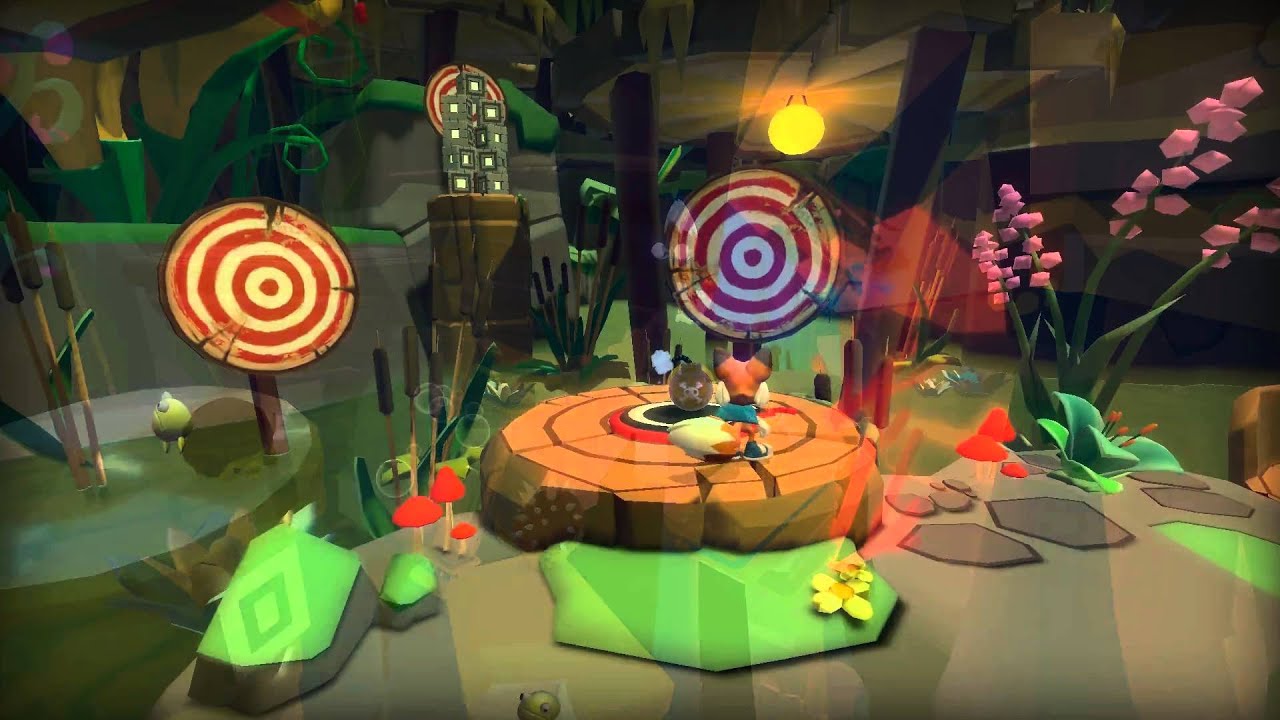
With third-person platformer Lucky's Tale, we take a cute anthropomorphic fox through a series of obstacles in a brightly colored, cartoony world. Listed as a moderate comfort level game, which means there’s a medium level of movement involved including jumping and running, the title is reminiscent of an old Sonic the Hedgehog or Mario game.
compact dock
thanks so much. i havenot considered this problem...the 3rdPerson View in VR is different from the normal 3rdPerson view in PC/MobilePhone
delicate isle
yep!
A normal third person camera would make someone sick in VR
Think of the player camera being more of a balloon that is gently tethered behind a character that moves around
compact dock
do you have any demo or tutorial for this?
watched the normal 3rdPerson view again, seems not different from the 3rdPerson view in VR except the control input of Rotation, right?
or could you please explain what's the difference? Thanks
and is there any demo or tutorial for VR 3rdPerson view
delicate isle
Not that I know of
You could attach the position of the camera to a very stretchy physics constraint with a lot of dampening to the position of the 3rd person camera
So it VERY gradually accelerates and deaccelerates. Normally acceleration is a bad thing for VR movement, but it it is gradual enough it can be OK
You don't want the VR camera to be parented to the character in a way that the VR camera is trying to copy the rotation and movement of the 3rd person character directly
I would start out by prototyping the camera movement in 2D before moving it to VR
compact dock
ok, Thanks so much!
I'll try to make a normal 3rdPerson view and see what's its problem, and then move on to optimize it
the video above doesenot show many view of start/stop movement, so not sure the disadvantage of the normal 3rdPerson view in VR
 polar valve
Can you use Oculus OS splash screens with 4.25 (not Oculus build)?
 pallid dagger
Niagara in VR is dope. I'm on 4.25 though. I don't dev on Quest.
Here's a little video demo (watch the end of the hall)
 mighty carbon
I am guessing particles in the hallways is Niagara @pallid dagger ?
pallid dagger
yeah. I don't think I'm using cascade for anything at this point
mighty carbon
cool
pallid dagger
I get really good performance from niagara
mighty carbon
I hope it works on Quest (although I hate Niagara)
pallid dagger
It's not so different from cascade. the interface takes some getting used to, but there's so much more exposure
*parameter exposure
Though I'm not an expert by any means
mighty carbon
yeah.. It's a tool made by programmers for programmers
😆
I guess I am just gonna have to try figuring it out or find someone to make effects.
lethal kiln
Anyone know how to disable android permissions like read/write external files I'm packaging for AppLab and Oculus and don't know wheret ofind these in the project settings.
 warm lion
Hi all - I'm switching to OpenXR from the oculus plugin. I'm haivng trouble finding any c++ documentation
My project works still - even after turning off Oculus plugin and turning on OpenXR. The camera appears to be much higher now. I decided to look into this openXR because I couldn't find a way to detect if someone had put the headset on. Only if a HMD was plugged in
warm lion
Another thing I notice is that if I launch the game with VR preview but I'm not in the headset already it crashes to "OpenXR call failed with result XR_ERROR_HANDLE_INVALID"
XR_ENSURE(xrLocateSpace(DeviceSpace.Space, PipelineState.TrackingSpace, PipelineState.FrameState.predictedDisplayTime, &DeviceLocation));
where before it would just popup the mirrored window in UE4 editor and I could then pickup the HMD and put it on
tribal lintel
lethal kiln
Anyone know how to disable android permissions like read/write external files I'...
https://answers.unrealengine.com/questions/950263/remove-android-permissions-1.html
dont edit the xml because it will be overwritten, you just need to hunt and peck each permission to see what needs to be unchecked from project settings, project setting names might not be as straightforward
 lethal kiln
tribal lintel
https://answers.unrealengine.com/questions/950263/remove-android-permissions-1.h...
lethal kiln
tribal lintel
https://answers.unrealengine.com/questions/950263/remove-android-permissions-1.h...
I’ve done that one I still have like media location and read still popping up.
warm lion
tmpTrackSys->GetHMDDevice()->GetHMDWornState(); will always return "unknown" - anyone know why?
lethal kiln
Beyond that I been trying to upload a new packaged APK to Applab and just been getting processing issues. Any idea if this is my problem or an Oculus problem?
 dark gate
Anyone has HTC VIVE and would like to test my game. Please DM me
drifting notch
I'm getting stutters on Valve Index, UE4.26
For seemingly no reason
I've done all the optimization I can find online
And have barely anything in my scene
upbeat eagle
Any blender users? Whats the best way to set up origins for use in UE4 and VR? In most cases it seems like its better to have the origin centered on the object (especially if you will interact with it) but it becomes a pain in the *** to set up the positions again in an actor vs if all the origins share a common origin. Is there a better way, or its just that tedious?
 tired tree
shouldn't be basing interaction off of the objects pivot if you can help it
should be a movable element, component or socket that you pull the location from
upbeat eagle
so setting the origins to all have a common origin and then just set up a socket on each mesh to grab from.
tired tree
doesn't need a common origin at all
if you are using a reference point for grip operations
upbeat eagle
right but i mean as far as setting up the mesh in the actor.
for instance
Say i have this cockpit
 tired tree
place the origin wherever makes sense for the model
upbeat eagle
if i set the origin for everything to the same origin then i can just drag into the actor and its in the proper place
so thats fine and i can then just add sockets to the mesh and use that as far as grabbing, rotating etc?
or like for the joystick, i would still need the origin at the bottom of the stick since thats where it will rotate from?
tired tree
if you are logically moving the joystick it would be easier to have the pivot at the bottom yes
but gripping can be based off of your choosen socket method to the top
upbeat eagle
Ok got it. Thank you for the confirmation!
warm lion
My camera in VR keeps getting pushed upwards when I enter VR. My root comp is a sphere that surrounds your head. Your eyes are exactly center of this sphere. This is how I want it. But when I enter VR the system moves the camera component upwards the exact distance I am away from my floor in the real world.
It doesn't appear to matter what I have the tracking origin set to - Eye, Floor, Stage, Unbound - they all result in the same offset.
 hollow tangle
Has anybody had issues with lighting in their Quest2 projects? I made a dark room and the lights slowly turn on (light intensity goes up). It works fine in the VR preview but the lights don't turn on when I launch it from the headset. I'm guessing I'm missing a setting or something.
warm lion
I'm on a rift S - sorry man
 flat python
Hey all, I started seriously researching vr for the first time since htc vive release a few years back. anyone have any opinions on the htc vive pro 2 and on the future of the company ?
 sullen moon
Anyone got any tips for having a few dynamic shadow casting lights? AS soon as I put one in it halves my FPS
from 4ms to 14 ms
pallid dagger
adjust your shadowmap bias. That's what I do to keep performance up with dynamic shadows
sullen moon
On the light?
warm lion
So this is my pawn setup - everything sits at zero FVector. When the camera moves - I move the root collision capsule and then move the beck back the difference. This keeps the collision around the head and everything centered to the middle of your head - as I want it. When I play the game the camera is where it should be on the PIE pop up mirror window. Once I enter VR - the VR system automatically moves my camera away from the collision capsule by the distance I am to my local tracking floor

No matter what I set the tracking origin to - this occurs.

That is a shot when I just play the game looking at the pop-up VR mirror window - before entering VR
and this next shot is after I have put the headset on
 sullen moon
I lowered the shadowmap bias and shadowmap resolution both to 0.01, didnt change anything apart from making it look like shit D:
warm lion
If I check the locations of the three components - the SphereCollision (Root) is unmoved, the CamNeck, is Unmoved, just the camera gets moved. This is a direct relation to my distance to the floor, and my slightly being off to the left of the center of my defined play space.
pallid dagger
@sullen moon how is your scene set up? Are you still blocking out your level or have you completed that? If you have many static mesh actors in your scene, you're going to have trouble. you need to find more frames through profiling. Merge your mesh actors if required.
My frame drops are always due to too many shadow casting actors or too high in the resolution for shadow maps
pallid dagger
Are you using Unreal's ini reccomendations?
sullen moon
and had 9ms of " CopyToResolveTarget(ShadowMaskTexture->ShadowMaskTexture) "
changed to TemporalAA
now the shadow casting light dosnt even affect the ms
even at max settings
pallid dagger
Great! Glad you got it figured out
sullen moon
googled and saw that MSAA was broken with dyn shadows in 4.26
Thanks for the help tho, didnt know those settings existed ^^
do you use MSAA?
and 4.26
pallid dagger
Not sure about MSAA. I follow epic's best practice guidance for VR. I think I must otherwise everything would have a sheen to it. I'm just not in my project right now.
If MSAA works with forward renderer, I'm probably using it. but I haven't noticed any dropped frams from it. That being said. I'm on 4.25 still
pallid dagger
I plan on migrating up eventually once metahumans are fully released. It'll be something to look out for.
sullen moon
from what I can read on google
pallid dagger
Well hopefully they fix it soon
Or better yet, hopefully they make Lumen work with VR
upbeat eagle
warm lion
So this is my pawn setup - everything sits at zero FVector. When the camera move...
whats your bp look like?
sounds like you want to set tracking origin to eye level maybe?
warm lion
I've tried both. They both offset the camera by whatever my current offset to the origin of my play space is
VR is forcing my camera to move away from my root component by that amount
Oh sorry I'm not using BP - using c++
IOpenXRHMDPlugin& tmpVRInterface = IOpenXRHMDPlugin::Get();
TSharedPtr<class IXRTrackingSystem, ESPMode::ThreadSafe> tmpTrackSys = tmpVRInterface.CreateTrackingSystem();
tmpTrackSys->SetTrackingOrigin(EHMDTrackingOrigin::Eye);
```Ah i think maybe i see why. Try adding a scene component call it "VR Root" or whatever you want. Then make the camera and controllers a child of it. Then put the vr root at whatever position you need. I think that should solve your issue
floral otter
warm lion
I've tried both. They both offset the camera by whatever my current offset to t...
The free VR expansion plugin is a must have unless ue4 updated there own VR. The plugin makes the camera the root in the player character.
warm lion
Going to try your thing first @upbeat eagle Then if that doesn't work I'll move onto @floral otter Thanks!
@upbeat eagle So in 4.26.2 there isn't a VR_Root Component. Only thing that even has VR in it is the VRNotifications - which is awesome because I'm pretty sure I can pull some delegates off it for entering VR and other events. Anyhow, I don't know where to look for VR_Root outside of adding it as a component
warm lion
So the hierarchy is going up Camera is child of CamNeck (SceneComp) is child of SphereCollision(USphereComponent - acts as the root)
upbeat eagle
make a new on child of the mesh
warm lion
Sorry what mesh? You mean the Root - SphereCollision?
upbeat eagle
The one labeled pawn torso. It looks like a mesh but the photo is blurry for me
warm lion
Okay - so by adding a child scene component to the skeletalmesh comp the vr stuff will obey the SetOrigin - eye?
upbeat eagle
It should. Thats how i normally set it up
warm lion
Interesting
upbeat eagle

 zealous torrent
anyone here know how to fix something like this? the rotation of the arm if it goes past 0 or -180 will flip, I cant find anything online about this lol using two bone IK for the arms and a modify bone node to control the rotation of the forearm, this is using the default epic skeleton as well
 upbeat eagle
can you clamp the value between the max and min you want?
zealous torrent
im not sure what that value would be honestly, the rotations are driven from a motion controller locator, im not positive if there is a specially mathematical way to continue a rotation after it exceeds those values
upbeat eagle
yeah but the rotation of the bone should always be the same if its relative shouldnt it
zealous torrent
im not sure I understand haha. if i clamp the value wont that just stop the hand from rotating? or do you mean clamp the arm value
it works fine on the right arm

but it will still flip the right arm if you rotate it unnaturally
upbeat eagle
show the anim bp where you setting the effectors
 upbeat eagle
hows the transform set up? bone space? or what?
zealous torrent
the MC Locator transform is world space but the rotations are set to bone space
the FABRIK at the end is used for correcting the wrist with a world space effector transform
I can throw up screenshots of each detail panel if that helps
upbeat eagle
then you should be able to clamp it before the make rotator i think
zealous torrent
like this? not sure what the default values should be
 upbeat eagle
yeah you will just have to play around to see what values should be
let me know if it works
zealous torrent
ah ok cool, it works for the right arm just fine, but the left arm it folds in on itself even more lol
upbeat eagle
go into the skeleton and manually rotate the bone to see what the values are
it sounds like maybe the left shouldn't be roll but yaw or pitch maybe
zealous torrent
it definitely seemed to help, i made sure that it is roll, but the wrist just folds in on itself haha
upbeat eagle
hmm thats strange
you getting the transforms from the motion controllers or something else?
zealous torrent
I have a hand locator that is parented to the MC but im using to attach to a physical constraint so the hands can collide with the environment
unless there is a better way to do that lol
upbeat eagle
why not jut get from the mnotion controller directly?
does the left have a neg scale?
zealous torrent
nope! left doesnt have negative scale. I suppose i could attach it to the MC directly, would that allow me to still set my hands to collide with the enviro?
been trying to figure out the best way to go about that
upbeat eagle
yeah you just getting the transform from the motion controllers
zealous torrent
now i remember why i was using the locator, if i attach the effector to the MC the wrist bone snaps to a gross location at the top of the controller. wasnt sure how else to offset the hands back to the controller
 zealous torrent
should i even worry about rotating the forearms? i guess the only issue without rotating them is the wrists will pinch and look unnatural
theres like 0 documentation about full body IK in ue4 so its like impossible to find anything on it haha
upbeat eagle
there are a few docs and tutorials. it just depends on the look you want
zealous torrent
I really like the saints and sinners look, with physics and weight, they did that really well
thats sorta what im going for but stylistically realistic
I will try the euler thing tho!
upbeat eagle
let me know if it works for you
zealous torrent
upbeat eagle
let me know if it works for you
thanks so much man, been stuck on this for a while, works great now 😄
upbeat eagle
awesome
zealous torrent
not really sure what the quat does but def going to research it now lol
im a 3d artist normally, i just got into blueprint scripting a few months ago lol so lots of things are new to me
upbeat eagle
nice. if you ever wanna collab on something let me know
i dm'ed you what im working on right now lol
 signal ocean
hey eveyone, pretty basic issue here
 timid cloud
I'm running into some nasty tearing on my Quest 2 using PCVR with deferred rendering -- I know that forward rendering is the preferred way to do it, but my friend I'm working on this with is interested in getting deferred rendering working for other reasons. Is there a way to fix the tearing that deferred rendering produces?
signal ocean
while using the AddMovementInput() function my movement slows down when looking up or down with the camera
let me send my code
`FVector ForwardVector = CameraComp->GetForwardVector().GetSafeNormal();
FVector Direction = ForwardVector * AxisValue;
Direction.Z = 0.f;
AddMovementInput(Direction, MovementSpeed);`
I tried to get the normal of the camera's vector but it didn't work, and the movement still slows when looking up or down, if anyone knows how to fix this it would be much appreciated
upbeat eagle
signal ocean
while using the AddMovementInput() function my movement slows down when looking ...
How is your character/ pawn setup?
signal ocean
upbeat eagle
How is your character/ pawn setup?
what do you mean?
upbeat eagle
is it a character or pawn? Whats your component list look like?
upbeat eagle
have you tried getting the vector off the capsule?
signal ocean
ive tried using the actor's rotation, and given that the capsule is the rootcomponent it is the same isnt it
it didnt work
upbeat eagle
I do mine like this.


Are you sure your speed is actually slowing? Did you try a debug message to see if the speed is actually slowing? One time i thought i had that issue but because my map was so big it was just an illusion
floral otter
signal ocean
while using the AddMovementInput() function my movement slows down when looking ...
It's slowing down because it's adding the pitch as forward. So the axis of it never goes full 1 because of it.
delicate isle
Anyone had luck with fixed foveated rendering on the Quest using Vulkan/OpenXR?
Or is it not implemented yet
signal ocean
floral otter
It's slowing down because it's adding the pitch as forward. So the axis of it ne...
is there a way to correct this?
floral otter
signal ocean
is there a way to correct this?
Hmm not really sure how to do it in C.
signal ocean
floral otter
Hmm not really sure how to do it in C.
i can usually translate from bps, if you could explain it from that
floral otter
BP seems so straightforward, Camera get forward vector and right into add movement.
But that's on a character bp
upbeat eagle
@signal ocean you using the floating pawn movement yeah?
 rich canopy
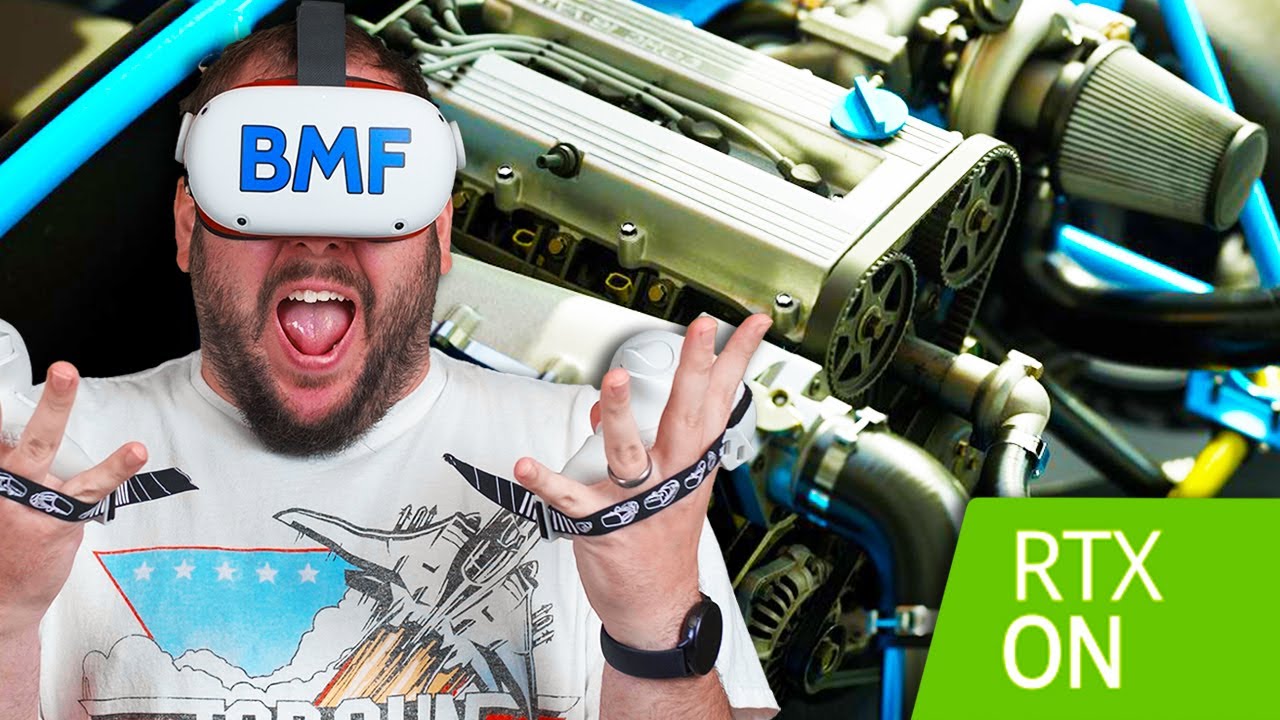
Today on BMF VR we are checking out the beauty of Ray Tracing in VR. Virtual Reality and Ray tracing are an insane combination. You can check out Wrench on Steam here - https://store.steampowered.com/app/936720/Wrench/
Subscribe To Keep Up To Date On All Things VR And Oculus Quest! - http://bit.ly/bmfvrsubscribe
Links:
Order the Oculus Quest ...
Oof i didn't know RT was working for VR
Good job to the guys from @patent nimbus
upbeat eagle
yeah so actor rotation forward vector should work then
 thick flume
Help please!=)
Is somebody know how (to make, or see anywhere) mocap glove with mpu6050?
I try to make so glove and mocap suit for unreal engine.

This is a tutorial on how to build your own Prototype 3.1 LucidVR gloves!!!
3D Print files and firmware:
https://github.com/LucidVR/lucidgloves-hardware/releases/tag/Proto3.11
Driver:
https://store.steampowered.com/app/1574050/OpenGloves/
Access glove resources here: (Will be updated)
http://lucidvrtech.com/
Live glove progress updates:
http...
 steady shoal
Hi guys! Just ran into a problem with an animated character for the Quest2. Suddenly I get an error saying "LogSkeletalMesh: Warning: Skeletal mesh SkeletalMesh /Game/Breach/Characters/Skeletons/SM_guard_v02.SM_guard_v02 has a LOD section with 107 bones and the maximum supported number for feature level ES3_1 is 75." Anyone know how to solve this, before I try to optimize the character rig? I read on answerhub that you can manually tweak this limitation if you edit some settings in the source code, but at the moment, I`m really not too keen on diving into that part of development.
 real needle
hi all, has anyone got the VRS/ foveated rendering working for 4.27? a better question might be...how do i actually access it. i cant find any docs on enabling it anywhere
upbeat eagle
real needle
hi all, has anyone got the VRS/ foveated rendering working for 4.27? a better qu...
Not sure what you are targeting but for oculus its here

 neon geyser
Hi everyone, someone encountered problem with UMG's with the 4.26 version of UE?

My second client has his camera stuck on the umg
 hallow knoll
real needle
hi all, has anyone got the VRS/ foveated rendering working for 4.27? a better qu...
hallow knoll
real needle
hi all, has anyone got the VRS/ foveated rendering working for 4.27? a better qu...
"HMD Fixed Foveation Level" in project settings and the cvar is: "vr.VRS.HMDFixedFoveationLevel"
sturdy coral
@hallow knoll I've got some fixes for it I will make a pull request for soon, it breaks with vr.pixeldensity (on steamvr) and r.screenpercentage
 nocturne wraith
Is it possible to attach vrPown to a moving object such as a platform?
delicate isle
upbeat eagle
Not sure what you are targeting but for oculus its here
I'm using OpenXR on the Quest so I don't have access to the Oculus plugin
sturdy coral
real needle
hi all, has anyone got the VRS/ foveated rendering working for 4.27? a better qu...
make sure you run with -dx12 too
real needle
@upbeat eagle @hallow knoll @sturdy coral I'm targeting vive pro eye for foveated eye tracking.
also hp omnicept has been ordered
whats with the VRSS / VRS articles all saying that each build needs to be sent to nvidia for profiling, i dont actually intend to release a game or anything (this is uni research stuff)
real needle
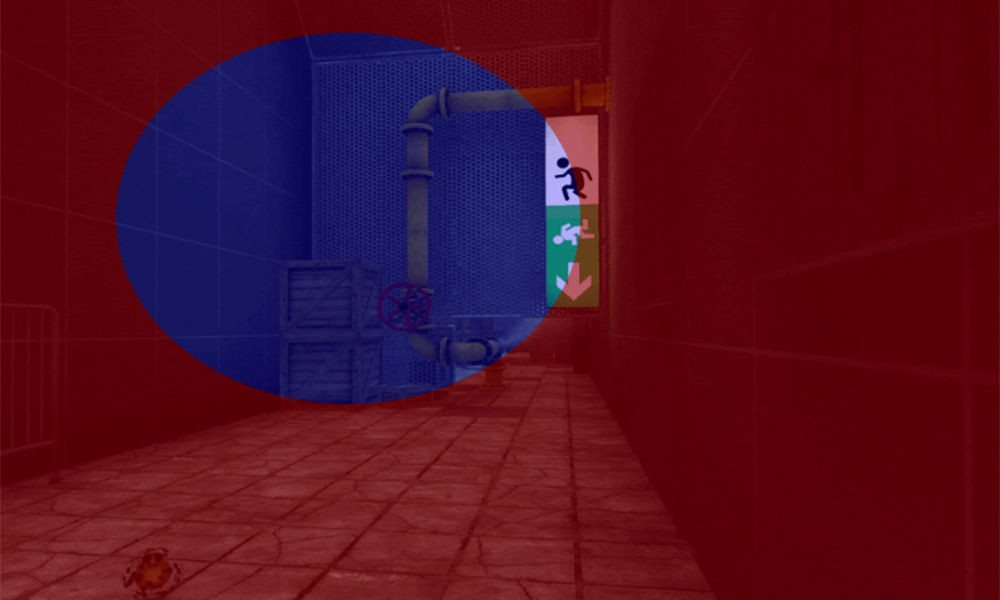
NVIDIA is releasing the latest version of Variable Rate Supersampling (VRSS), which now includes gaze-tracked foveated rendering.
sturdy coral
vrs is part of directx now so no weird Nvidia proprietary rules
ah that one is a kind of Nvidia injected thing
you can see vrs on its own, vrss may not be in the standard
real needle
i like the sound of no nvidia
sturdy coral
they have enough moving to a model of adding nonstandard features and not making them generally available without a watermark
then only allowing distribution if it meets a quality bar, to game the review process basically it seems
real needle
also,i have a quest here i can try it on. and a pico neo 2 eye. i would like to see if i can get fixed working on the quest, i would just be using it cabled /or wireless (full pc vr). does this only worked in packaged, or would in editor work?
neo 2 eye has its own plugin for it, ive just packaged i will test that too
oh i dont think the neo 2 eye plugin will work with 4.27, ah so many things to consider
 prisma sapphire
Hey guys does anyone know why I cant get video texture to run on the oculus quest? Everything works fine on PCVR version :(
 real needle
@sturdy coral so ive set RHI to directx12, and i have set fixed foveated rendering to high. vr preview, there is no FFR going on. is there something else that needs to be done?
sturdy coral
@real needle turn spectator mode to show both full eyes
restart with lower resolution from your VR runtime (pixeldensity is broken with it)
that should make it easier to see if it is working
real needle
roger, restart had to recompile shaders. waiting
i set steamVR resolution to 100% (it was on 150 for some reason) and now i can see something but to be honest, it looks worse in the centre
left eye seems to be working, but its like the FFR zone is mainly in the left eye, and the outer edge where it renders lower goes into the right eye, and wraps back aroudn =/
well, i guess it is experimental!
delicate isle
I'm just building for the Quest right now to see if HMD Fixed Foveation Level makes any difference in OpenXR.
It does keep crashing with my D3D device being lost - which is odd
However, I do see mention in VariableRateShadingImageManage.cpp that there is a GetMobileVariableRateShadingImage function - that looks promising
Looks as though it references a NeedReAllocateShadingRateTexture interface function, which is implemented in the OculusHMD class in the Oculus plugin - nothing in OpenXR yet
sturdy coral
@real needle there are some off-by-one errors and stuff in it as well, and they don't take into account instanced stereo padding. I should have a fix for most of it pretty soon. I don't think anything would cause it to look wrapped around though if you didn't touch screenpercentage/pixeldensity but it may be like that with some plugins other than steamvr. they are using an FSceneView resolution thing that doesn't get updated correctly at least by steamvr
real needle
interesting, good investigation. yeah im definitely not using any scaling at all
delicate isle
Tested on the Quest, as I thought - I don't think that VRS is getting called
Did find some interesting tidbits in the log, like Foveation: Vulkan FFR is supported, with density map size 32x32 and SwapChain: CreateTextureSwapChainFoveation: export failed
I guessing that I'll just have to be patient for either VRS to be implemented on the Quest, or figure out how to get OpenXR to use a GL_QCOM_texture_foveated swapchain - that texture type also shows up in the Quest logs
Wait no, that's for OpenGL. Whoops.
Looks like the VK_EXT_fragment_density_map extension is available
Oh boy, this is a rabbit hole now  . Strongly considering implementing the
 NeedReAllocateShadingRateTexture and AllocateShadingRateTexture functions for OpenXRHMD. If I verify that Vulkan is the active RHI and then return some new foveated swapchains to the VariableRateShadingImageManager then this could work.
 sullen vortex
hey guys! i´m having this issue, my vr project packaged for windows is about 370mb, but when packaged for Android (Quest) is about 580mb...already followed UE docs about compressing packages, but i still have this difference..any tips are more than welcome! i´m in 4.25.4 btw
 nova badge
i had the same problem when i was working on Vr apps. For me it was just a bug, but you might want to check and make sure you have all the proper components.
sturdy coral
@hallow knoll I made a pull request for those VRS fixes here https://github.com/EpicGames/UnrealEngine/pull/8170
@real needle
sturdy coral
I think a couple more changes could improve the VRS fixed foveated stuff a lot:
-
Instead of going straight 1x1 -> 2x2 -> 4x4, it should instead on supported gpus go 1x1 -> 1x2/2x1 (aligned radially since lens blur is often more distorted along line to center) -> 2x2 -> 2x4/4x2 (aligned radially) -> 4x4
-
The VRS combiner mode should be exposed on materials along with existing ShadingRate drop down, to be able to override minimum shading rate for problematic materials (thin neon lights for me get heavily degraded and could be exempted from the shading rate image without really affecting frame cost)
real needle
great work @delicate isle and @sturdy coral
sturdy coral
another improvement would be to tie it in to dynamic res so it can gradually fade in before resorting to any res changes, I think I saw a todo for that or changelog note
also VRS doesn't allow virtual texture feedback so it needs a stochastic thing needs to run tiles at full res perioidically, like 10% chance per frame in each tile of running full res regardless of setting
sturdy coral
@real needle I think the eye tracked stuff may not be in place yet:
void FVariableRateShadingImageManager::UpdateEyeTrackedFoveationParameters(FVRSImageGenerationParameters& VRSImageGenParamsInOut, const FSceneViewFamily& ViewFamily)
{
    VRSImageGenParamsInOut.bGenerateEyeTrackedFoveation = false;
    VRSImageGenParamsInOut.HMDEyeTrackedFoveationFullRateCutoff = 1.0f;
    VRSImageGenParamsInOut.HMDEYeTrackedFoveationHalfRateCutoff = 1.0f;

    auto EyeTracker = GEngine->EyeTrackingDevice;
    if (!EyeTracker.IsValid())
    {
        return;
    }

    FEyeTrackerGazeData GazeData;
    if (!EyeTracker->GetEyeTrackerGazeData(GazeData))
    {
        return;
    }

    // @todo:
}
it looks just stubbed out with a todo
zealous torrent
anyone know of the best way to animate hands individually if you are using a full body skeletal mesh?
 iron pine
@zealous torrent You can do layered blend per bone for each hand in your anim bp so you can blend your body ik with the finger animations
 wind beacon
Hello everyone,
recently I'm interested in VR optimization, for a project in prototyping phase, I'm creating a stylized sea. This sea must shine in the sun with small sparks and bloom, so I created a sea material with waves, color and sparks.
The problem is that the Post Process is expensive, so I abandoned this idea, and in the project manager, in mobile HDR many also recommend to uncheck bloom.
Is it possible to fake bloom ? ✨
 fickle sky
anyone used the mrtk for unreal yet?
I am wondering if I can use the mrtk for iOS too. I saw a mrtk unity example where the UX assets supported input from an ipad without changing much.
Wondering if anyone tried that on unreal yet
polar valve
wind beacon
Hello everyone,
recently I'm interested in VR optimization, for a project in pr...
One way to fake it is with sprites. I wouldn't recommend using mobile HDR for mobile VR
Don't think sprites would work for a sea though...
fickle sky
you can't just deploy from ue4 to the hololens2 emulator?
 little marsh
Is there any way to calibrate the Vive Pro Eye's tracking without bringing up the SteamVR overlay?
floral otter
Is it possible to make the headset the root of a character bp without using plugins?
 pale phoenix
Sorry for the late response lol but he's not, maybe some day a mod for Pavlov VR
delicate isle
Ok, so I'm working my way though porting Oculus's fixed foveated rendering across to OpenXR (for the Quest). Since there's no easy access to the vrapi runtime for the Quest from Unreal if you're not using the Oculus plugin, anyone have any ideas how to go about specifying the fragment density map manually?
I'm using https://developer.oculus.com/blog/vulkan-for-mobile-vr-rendering/ as a guide
I'm actually tempted to just download their sample image from that page and convert it to PF_R8G8 lol
Haven't yet figured out how to write to a FTexture2DRHIRef though - I kinda want to just throw some random colors to see if the VariableRateShadingImageManager will even pick up my new FFR textures
Maybe just create a manual Texture2D?
Do I have to queue render commands to write to an RHI texture?
 minor pagoda
Hi everyone! I want to package my project for oculus quest 2. I set up UE4.26.2 for android packaging (from oculus and epic docs). But when I try to package a project I get this error:
Could not GET 'https://jcenter.bintray.com/com/android/build/gradle/4.0.0/gradle-4.0.0.pom'. Received status code 403 from server: Forbidden
But the link in this message is corrupted. Does anyone know how to solve this?

 valid jolt
Since my issue is related to HoloLens I guess this might be the best place where to ask this... I need help with this error I get trying to open any 4.26 project I have, including those with no HoloLens installed
[Line: 269] Platform HoloLens didn't have a valid GlobalIdentifier set in DataDrivenPlatformInfo.ini
I have the same exact issue, about the same identifier and .ii file involved, about Android as well
I keep on googling and I find zero responses, it looks like I'm the only one who ever had this issue...
 small grove
minor pagoda
Hi everyone! I want to package my project for oculus quest 2. I set up UE4.26.2 ...
small grove
minor pagoda
Hi everyone! I want to package my project for oculus quest 2. I set up UE4.26.2 ...
Have you verified that all your paths are correctly set under Platforms - Android SDK? Setting these manually resolved several issues for my projects.

I'd also recommend deleting everything in the following directories before any package; Binaries, Build, Intermediate, Saved and your packaged folder. I almost always leave any config folders in those and have not had any problems as a result.
keen prawn
4.27 preview2 seems to have fixed the vr template
small grove
keen prawn
4.27 preview2 seems to have fixed the vr template
What hardware are you packaging it on?
for
keen prawn
ow havent tried to pack it
i tried the new template on 4.27 but it was a bit buggy
its fine now tho
small grove
ah, I thought you meant it had fixed issues with packaging it.
keen prawn
havent tried
minor pagoda
small grove
Have you verified that all your paths are correctly set under Platforms - Androi...
Thank you for your response.
Yes, I verified my paths and they are pretty similar to yours.
I deleted those folders you mentioned and packaged again but still got that error. It's trying to get gradle 4.0.0 from that link but the link is corrupt 😦
Are you using 4.26.2? Did you install android studio 3.5.3? or 4.0.0? Did you ever successfully manage to package a project for quest 2?
small grove
You shouldn't have to install gradle separately.
valid jolt
So... no clue about my issue even here? Is really me the first and only one who encountered those two issues!??
I'm trying to dig into them to fins a fix but I have no idea where to look at anymore.
I find no reference about that GlobalIdentifier thing, anywhere
small grove
minor pagoda
Thank you for your response.
Yes, I verified my paths and they are pretty simil...
I'm using 4.26.2 the Oculus Branch, but I've packaged with binary build from the launcher as well. Are you using Android Studio?
minor pagoda
small grove
I'm using 4.26.2 the Oculus Branch, but I've packaged with binary build from the...
Yes, I'm using Epic's official build. So should I change to Oculus branch? Does that branch have all the official features?
delicate isle
The GET is just an HTTP error, did it work later on?
4.26.2 shouldn't have any issues with obtaining gradle
Shouldn't matter between launcher or Oculus engine versions
minor pagoda
delicate isle
The GET is just an HTTP error, did it work later on?
No, even when I paste that link in my browser it keeps raising that error. I think the link is corrupted.
this link:
Could not GET 'https://jcenter.bintray.com/com/android/build/gradle/4.0.0/gradle-4.0.0.pom'. Received status code 403 from server: Forbidden
delicate isle
Oops, Bintray has shut down

To streamline the productivity of the JFrog Platform we will be sunsetting Bintray (including JCenter), GoCenter, and ChartCenter services on May 1st, 2021.
Well, that's going to be a problem...
minor pagoda
Oh really?
So I think I should change to oculus branch for now.
Should I submit this as a bug?
delicate isle
Oculus branch won't have anything to do with this
It will still attempt to download gradle, since it needs it to package your android app
minor pagoda
Oh yeah you are right. So what can I do?
delicate isle
I just installed 4.28 today and it didn't have any issues with getting gradle, so I don't know. Maybe this has been fixed in 4.27?
minor pagoda
I'm gonna try that. Thanks for your time @delicate isle @small grove
valid jolt
Can I get somebody's help!? I'm stumbling into the damn same issue over and over and all over again in the last 72 hours, it's driving me insane....
delicate isle
Hang on, there might be a way
As a temporary measure, apparently you can add mavenCentral as an alternate mirror oin your generated build.gradle
delicate isle
minor pagoda
I'm gonna try that. Thanks for your time <@!136606894465744897> <@!4257484386349...

GitHub
OneSignal is hosted on Maven Central with the latest version as well as all previous versions today! JCenter is deprecated Android Studio defaults to the JCenter repository for non-Google artifacts...
My build.gradle is located in ProjectFolder/Intermediate/Android/arm64/gradle/build.gradle
Unfortunately this folder is autogenerated, so I don't know if you modify it then Unreal might just clobber the changes
minor pagoda
delicate isle
Unfortunately this folder is autogenerated, so I don't know if you modify it the...
Yeah but I may be able to change the source. Anyways I'm gonna try that. Thank you very much!
minor pagoda
valid jolt
Can I get somebody's help!? I'm stumbling into the damn same issue over and over...
What is your issue?
delicate isle
On an unrelated not for anyone who's following my saga of seeing if we can get Fixed Fovated Rendering working on the Quest under OpenXR...

I managed to get something working! Definitely needs some work, but I can tell that the texture is definitely lower resolution
I can't get access to the Oculus runtime FFR textures at this stage, but I might be able to knock up some temporary ones for testing
valid jolt
minor pagoda
What is your issue?
I moved UE from the old HDD to the new SSD and troubles begun there. I mirrored there exactly the old installation but the launcher didn't recognize it so I was forced to redownload and reinstall both 4.26 and 5.0EA. Now... the 5 works fine but 4.26 keeps on crashing when opening any project, old and new ones. each time i get the same error
TRhye first time I had this one
Assertion failed: Info.GlobalIdentifier != FGuid() [File:D:/build/++UE5/Sync/Engine/Source/Runtime/Core/Private/Misc/DataDrivenPlatformInfoRegistry.cpp] [Line: 269] Platform HoloLens didn't have a valid GlobalIdentifier set in DataDrivenPlatformInfo.ini
UnrealEditor_Core
UnrealEditor_Core
UnrealEditor_Core
UnrealEditor_Core
UnrealEditor
UnrealEditor
UnrealEditor
UnrealEditor
UnrealEditor
kernel32
ntdll
The crash happened also with projects with no plugin installed/enabled yet
delicate isle
You should install the engine symbols to help track it down
valid jolt
it's a huge download... my wifi isn't good enough, would take me ages
apparently, the issue is always related to this GlobalIdentifier set in DataDrivenPlatformInfo.ini
I located where those files are and those ini files {the same error was given about Android Platform} and as a matter of fact there is no GlobalIdentifier
I just hoped somebody could help me comparing those .ini files to identify what's missing in mine
just in case nobody ever encountered my same issue
or has knows any possible fix
I kept on googling about those issues and found no related info
even in the documentation there is no reference to that
delicate isle
Did you install hololens or Android support?
valid jolt
I had Android platform installed, not the HoloLens platform
but not even unistalling them I got that fixed
delicate isle
And youd said you did a full reinstall from the launcher for 4.26.2? That should have fixed any issues
valid jolt
I know and i even used the Verify option in the launcher
What i don't get also is why both Android and HoloLens folders and files are still there after uninstalling them
delicate isle
I would remove the engine in the launcher, then nuke the folder on your machine
valid jolt
I thought the launcher was cleaning them up when I uninstalled them
delicate isle
Make sure that there is nothing left over that would break things
valid jolt
I try manually deleting them then,,, I was afraid of doing that
delicate isle
Eureka!

Might need a FFR image for both eyes at once though - my sizes might be incorrect
valid jolt
What I don't get, also, is why I never had that kinda issue in the previous installation
Holy***... deleted the Hololens left folders and now the issue moved to this
Assertion failed: Info.GlobalIdentifier != FGuid() [File:D:/build/++UE5/Sync/Engine/Source/Runtime/Core/Private/Misc/DataDrivenPlatformInfoRegistry.cpp] [Line: 269] Platform IOS didn't have a valid GlobalIdentifier set in DataDrivenPlatformInfo.ini
it seems any platform package is someway corrupted
delicate isle
Well building from source is also an option
valid jolt
Alright, at this point I'm leaving only the basic installation without any platform. What I don't get is why the old installation had no issue like that, notwithstanding being identical
valid jolt
This insane. Seriously. This is becoming a joke and not funny at all.
[Line: 269] Platform Windows didn't have a valid GlobalIdentifier set in DataDrivenPlatformInfo.ini
I'll move this to #ue4-general but I'm definitely very pissed off by all this. Thanks for the help @delicate isle I really appreciated that.
delicate isle
@hallow knoll I got fixed foveated rendering working on the Quest 2 using OpenXR/Vulkan! The video shows my generated fragment density map and you can see how the frame underneath renders tiles at lower resolutions as the render samples from the darker pixels in the density map. You need to open the video at full size to see the lowered resolution of the scene on the outer edges.
Unfortunately I only have the one texture for both eyes right now which is a little noticeable when you pay attention to the boundary. I've been using the Oculus plugin as a reference point, and they put the left and right FFR maps into a swapchain and pass that along to the renderer. I think that a swapchain isn't needed here, but I have to figure out how to create Vulkan textures with an array size greater than one so the single stereo render pass can pick out each map.
I also need to separate the fragment density map out and make it controllable via a CVAR or config file like how the Oculus plugin works. The ideal scenario is that we can copy whatever we want into the fragment density texture to specify areas that render at lower resolution - it doesn't just have to be an FFR texture representing just the outer edges of a lens.
The Oculus runtime gives some nicely formatted fragment density map textures that work well with the lens, but I can't access them from OpenXR. Would it be smarter to just generate some defaults and then expose a render target that we can draw to if we want to generate the patterns manually?
Could create a material to generate the lens texture via some instance values - this is the raw texture I'm using right now

I'll create a FFR patterns for low/medium/high to map to the HMD Fixed Foveation Level (experimental) project setting, but I wonder if I should instead just dump the existing patterns linked to those options from the variable shading rate manager. The mobile renderer asks for a fragment density texture directly, it doesn't bother to calculate its own.
Looks as though the VariableRateShading compute shader is doing exactly what I've been doing to generate my fragment density map, except much smarter and for both eyes 😂
 short laurel
OMG - Deploying native quest so much easier on latest Oculus Build 4.26.2.... Just finished building new PC and was dreading setting up the the build environment. So... much.... easier....
 brazen bone
Hi Guys. I'm trying to occlude falling object beneath the invisible plane, which is an actual static mesh plane, on which spheres are rolling. But I want this plane still to occlude the spheres when they are going behind the plane. Any tips what this is called? In a nutshell I need to apply background AR camera image to this plane in screen space. But technically I don't know where to start. Thanks for any help 👍
mighty carbon
why not to just use Oculus UE4 fork ?
 somber marsh
what is the best way to create ocean's and lakes in VR without performance hit, is it using the 4.26 water plugin from unreal?
 coral swallow
does anyone know why my grip position is always returning 0, 0, 0 even though my motion controller is at a completely different location?

 delicate isle
Is grip position supposed to be in world space or relative to the controller?
coral swallow
its a build in engine function so im not really sure
i tried copying the vr template to modify it for my own needs
delicate isle
If you want the location of the controller, just get the position of the motion controller component itself
delicate isle
Getting the motion controller data like you're doing is more about querying additional information from the motion controller on top of position
Like hand pose information for hand tracking etc
delicate isle
For anyone getting into OpenXR in UE, I've published a plugin containing implementations of some missing OpenXR extensions, mostly Oculus/Quest related - https://github.com/Mystfit/UnrealOpenXRExtensions

GitHub
Additional OpenXR extensions for UE 4.26.2 and above - Mystfit/UnrealOpenXRExtensions
If anyone wants to use any of these or test them out then please let me know how you go.
The implemented extensions are:
XR_KHR_android_thread_settings XR_KHR_composition_layer_color_scale_bias XR_EXT_performance_settings XR_FB_color_space XR_FB_display_refresh_rate
All of the extensions except XR_KHR_android_thread_settings have blueprint functions for controlling the HMD
 serene haven
are IES light profiles a big performance impact for VR?
upbeat eagle
Anyone use dacals much in VR? I don't see anything bad with the shader complexity. Anything to look out for here? Draw calls maybe?
small grove
Decals tend to use transparency which can be a problem with mobile so I guess it depends on what hardware you're targeting and what kind of rendering setup you have.
upbeat eagle
small grove
Decals tend to use transparency which can be a problem with mobile so I guess it...
Im testing on quest 2. Forward rendering. From testing i dont rally see any issues. These are small decals though so im not sure if maybe thats why.
small grove
I wouldn't worry about it then, unless it becomes an issue. I've been working with Quest 2 this week too. Testing out different setups and packaging them to see what works and what costs too much. So far I'm impressed by what can be achieved and still maintain 90 FPS.
upbeat eagle
small grove
I wouldn't worry about it then, unless it becomes an issue. I've been working wi...
cool. Yeah its a pretty good headset for the price
 pale juniper
hey there, i got a problem. i want to set rotation values for my hmd, i am using htc vive if that helps.
 graceful girder
anyone seen a bizare issue where quest 2 attached via airlink breaks button inputs? (works fine with the cable..)
playing in editor
 mystic tinsel
So are there any solutions for key selectors in VR (if you want to allow the user to remap which buttons do what) or are we limited to making some kind of drop down selection for each button?
 tawdry bough
can someone help me?
I set up a VR pawn with the mannequin's head movements following the camera
but the problem is, for some reason, when the simulation begins, the camera seems to be spawned a few inches from the right of the actual mesh
so the sim stars off like this

Does anyone know a way to fix this?
(and if it helps I used the instructions from "Unreal Engine VR Cookbook") if anyone just so happens to possess that book
 limpid widget
does the camera collide with the mesh? Or vice-versa?
compact dock
is it able to get VR hands’ velocity, directoin? and then based on these value to convert them to a Force value?
how to make VR hands(Player Character) won’t be pushed back while NPC running to Player, while Player hands are physical.
set Gravity to a very big value? or better way?
 twin elm
Hey! Need Help with something,
Does anyone know How to start AR Session in unreal engine?
I find Two functions,
- inside FARSupportInterface.h
==> void UARBlueprintLibrary::StartARSession(UARSessionConfig* SessionConfig) - inside ARBlueprintLibrary.h
==> void FARSupportInterface ::StartARSession(UARSessionConfig* InSessionConfig)
but both of them take UARSessionconfig Pointer as an argument,
So I want to know how to supply argument this functions?
do I have to create a new ARSessionConfing?
if so Then How?
tawdry bough
limpid widget
does the camera collide with the mesh? Or vice-versa?
The camera doesn’t collide. I can move back into sinc irl, but it’s allowing and I don’t think I can give it to others like this
tawdry bough
compact dock
is it able to get VR hands’ velocity, directoin? and then based on these value t...
I didn’t make the hands yet
small grove
Has anyone packaged with SM5 for Oculus? I've followed all the docs and other advice I can find and set the all the console variables in the BaseEngine.ini but it's still not packaging for it. Is it not possible?
 wispy cradle
Does anyone know of cool examples of VR games increasing the sense of speed? Most usual tricks such as altering FOV etc are not possible so my current ideas are to use sound design and perhaps some speed lines but all my tests are looking really goofy so far.
iron pine
@wispy cradle I guess you can slow down time for everything but the player
nova badge
i am working on a home renovation project, and just because i feel like it i want to be able to pint my phone at the empty space and see the new kitchen. I have already designed the 3d model of the kitchen, but how do i make it so i can use ar to view where everything goes?
compact dock
AndroidEGL:: ReleaseContextOwnership, thread releasing rendering context tid: 6565
AndroidEGL::ResetDisplay()
*** JavaEnvDestructor: 6565
Assertion failed: Result == 1 [File:D:/Build/++UE4/Sync/Engine/Source/Runtime/OpenGLDrv/Private/Android/AndroidEGL.cpp] [Line: 241]
ERROR: SetCurrentContext eglMakeCurrent failed : 0x300d
(0x300d == EGL_BAD_SURFACE )
SetRHIThreadEnabled(false, false);
anyone met this kind of error?
coral swallow
Anyone know how I might get the Velocity of the motion controllers? I've even tried getting the velocity of an attached component but it just gives the value (0, 0, 0). Any Ideas?
 frigid mica
@delicate isle hey, where did you install 4.28 from?
 viscid moat
coral swallow
Anyone know how I might get the Velocity of the motion controllers? I've even tr...
viscid moat
coral swallow
Anyone know how I might get the Velocity of the motion controllers? I've even tr...
You could attach a collision capsule/sphere to them and get the physics linear velocity from that.
coral swallow
viscid moat
You could attach a collision capsule/sphere to them and get the physics linear v...
I have a static mesh attached to it and its still returning 0, or does it only work with a collision component?
A sphere collision didnt seem to work either
viscid moat
coral swallow
I have a static mesh attached to it and its still returning 0, or does it only w...
Collision components are what allow you to read a velocity.
viscid moat
coral swallow
I have a static mesh attached to it and its still returning 0, or does it only w...
Make sure you have simulate physics ticked to on.
 summer geode
should I try to keep both vr and non vr functionality in the same pawn for testing or use 2 different pawns?
viscid moat
Seems completely preferential. If you want the player to be able to switch between the two during gameplay, then one. Otherwise, would make sense to have two different ones.
If it's just for testing, I have it in one and just turn things on or off or allow both
summer geode
I imagine it will be a bit harder to keep everything in one pawn. I'm thinking to start from scratch for the VR one and switch between them by spawning the other one
hmm ok
viscid moat
Just make sure you don't allow mouse movements when your headset is on... you will get instantly sick and it will mess with your axis
summer geode
Noted, thanks!
Also another question, use the default oculus and wmr plugins or enable openxr instead?
viscid moat
OpenXR is the future, if you're on 4.27 you should migrate to it. If not, just use default stuff. I still haven't migrated over yet.
Still fairly new adoption though so expect some bumps
summer geode
Hmm alright
viscid moat
coral swallow
I have a static mesh attached to it and its still returning 0, or does it only w...
coral swallow
viscid moat
Make sure you have simulate physics ticked to on.
Only problem with that is that it doesnt follow the controller then it just stays on the ground... I looked at that linked you sent in my research but that still doesnt give me anything
 celest basin
Does anyone know a good source where I can get information about how much money various different VR games have made?
I guess I'm not really interested in the big ones like Alyx, more the smaller ones that still well done but within reach of smaller studios
I.e. my fave vr game this year is from other suns.
summer geode
I think there was an article on gamasutra on estimating sales number on steam on the formula Nr.Reviews * 50 (or 20)
delicate isle
frigid mica
<@136606894465744897> hey, where did you install 4.28 from?
It's the version of the master branch on Github at the moment.
frigid mica
aha thanks!
zealous torrent
hey guys, im having trouble figuring out a way to make fingers collide with the environment or stop on a surface when grabbing. Currently im using a physics cube for the hand as a target to drive the IK on the arms so hands cant phase through stuff, but the issue now is how can i get physics colliders on the fingers so THEY dont go through stuff, also in the video im using a single capsule collider that i toggle collisions on and off only if the finger extends past a certain point. would it be better to do a trace on the fingertips to stop the animation when they detect a surface? just not sure how to go about it
not sure if i can attach colliders to the finger bones themselves because im using a separate cube for collisions on the palm of the hand
 obtuse spruce
celest basin
Does anyone know a good source where I can get information about how much money ...
obtuse spruce
celest basin
Does anyone know a good source where I can get information about how much money ...
You can check SteamSpy to see about how many installs a game has. Far from a perfect metric, since it's exclusive to Steam and doesn't know how much the game was purchased for, but it's something
pale juniper
hi again, i am still stuck with setting rotation values for my hmd. basically i am trying to create a rollercoaster ride, so i need to offset some rotation values. however, that is not the problem, the actual problem is simple, i can not control the rotation values (via bp, for example setworldrotation on the camera component), because they seem to be overridden somewhere. i am not using the vr template pawn as a base though. i was thinking of modifying the c++ code somehow, but i dont know where to start.
zealous torrent
pale juniper
hi again, i am still stuck with setting rotation values for my hmd. basically i ...
I feel like that would be as simple as parenting the HMD to your player capsule and moving the player capsule , but there could be a better way, not sure
 dull bane
Hey all! Has anyone had any problems with the UE5 VR template, where grabbing suddenly becomes inactive, and teleporting sends you to world origin? I keep rolling back files to stop it happening, but somehow keeps reoccuring. Navmesh is fine, but suddenly grabbing and teleporting just broken! Driving me mad! Kind regards (and thanks for reading this far!)
 white gulch
Attempting to figure out why a certain line trace isn't occurring for one Controller, but is for another, in WaveVR. Anyone around that's worked with that plugin?
dull bane
dull bane
Hey all! Has anyone had any problems with the UE5 VR template, where grabbing su...
This was to do with OpenXR plugin not being on. It caused crashes before when it was on so I'd disabled it, worked for a bit, but now it seems to cause instability with grabbing/teleporting when off, so I've enabled it again so i can move and grab. Will work around the OpenXR crashes 🙂 should've started this in UE4. Nice template though!
iron pine
@zealous torrent If I’m not mistaken you are using the vr expansion plugin. You should look at how the physics hands in the template project handle collisions and do something similar.
delicate isle
zealous torrent
hey guys, im having trouble figuring out a way to make fingers collide with the ...
Hey that's really cool! Maybe in your animation graph you do a trace from the pad of each finger downwards if the finger is extended? So when you curl the finger back, it stops if it detects an obstacle
 foggy pendant
Not sure if this is the right channel but i get this when trying to setup Oculus-VR ( Might be sleeping so just mention me and ill have a look in the morning )
Failed to download 'http://cdn.unrealengine.com/dependencies/UnrealEngine-4358751-16521f530c414728b289dbb71f593410/80c1ba699c3de9b0950a5521e587025e7f85f8bb': The specified path, file name, or both are too long. The fully qualified file name must be less than 260 characters, and the directory name must be less than 248 characters. (PathTooLongException)
 arctic saddle


Am I missing something? It doesn't work at all. It's just outputs 0 when I move the thumbstick in any direction. I have it teleport on InputAction just fine. But all the tutorials point to using Axis mappings.
small grove
yeah that's fubar.
Just look at any of the sample projects and the player input
You don't need those branches at all. In fact they would defeat the built in dead zone handling stuff.
arctic saddle
Even without the branches, they don't work
small grove
The delay is also a problem
arctic saddle
Was in a different tutorial for smoothing purposes, but either way, it doesn't work.
small grove
I wouldn't trust anything from whoever had that in a tutorial
There's good examples of basic axis input in just about every single sample project.
arctic saddle
I've looked into them. Like, it just doesn't work on any project
something is wrong
small grove
put a 0 second print string on the event and plug the axis value into it
arctic saddle
I'm just adding to the default VR template for testing and it doesn't read the axis input
I did. it's always zero
small grove
have you set your gamemode and pawn to spawn?
arctic saddle
but for whatever reason, it's detecting the up thumbstick for input action for teleport just fine
yes
uses the default motioncontollerpawn
small grove
is it possible the input is already being handled before that event gets a chance to fire?
by another event or controller?
arctic saddle
I don't think so. That event doesn't exist by default. I only just made it
There's no references to the input anywhere.
small grove
but something else could be handling the input from the device
you should be able to get the axis value from the device and print that on tick or something to see if it's changing. Not from the event.
arctic saddle
I did
it's constant value
it's wherever the player spawns and then just sits at that constant value
small grove
add a keyboard key to the inputs and see if it works
arctic saddle
that works on keyboard.
I've mapped to other buttons on the controller and it didn't work either
small grove
Are you launching it on the HMD?
arctic saddle
what do you mean? It should be VR preview launch.
small grove
What headset are you using?
arctic saddle
oculus cv1
small grove
and you can see it on the headset?
arctic saddle
I can see and move around in the headset just fine. I just can't get this snap turning for whatever reason.
small grove
My guess is one of two things. Either the input is being handled by another event somewhere or there is no input being registered from the devices.
My bet is the first one.
I'd look for other events that might be using the input form the devices.
If you find those, either delete them or uncheck handle input
arctic saddle
Ya, I don't know... The template is pretty bare.
Like I said, the default VR template doesn't work either.
arctic saddle
@small grove Found the problem. Found a solution from someone who had the same issue, it's how steamVR utilizes the vectors. It needs both x and y axis for it to work completely and auto assign on the joystick even if it doesn't use the other axis. man. lol. Thanks for the attempted help though. time is appreciated.
pale juniper
zealous torrent
I feel like that would be as simple as parenting the HMD to your player capsule ...
Muchos Gracias, that worked. I used the attach node for it. Had this stuff done with a physics cube before actually, but for some reason did not consider it. Anyway, thanks!
somber marsh
how do you get the right eye screen capture when playing VR preview on the PC?
currently it shows the left eye
zealous torrent
im curious too, couldnt figure it out lol
tired tree
there is no default method
have to change engine source to modify the clipping region
zealous torrent
iron pine
<@180854269837049856> If I’m not mistaken you are using the vr expansion plugin....
ye, I suppose the issue is that the grasping hands in the example project are separate skeletal meshes, since im using a cube for the arm IK and have a single skeletal mesh that makes it difficult. unless im misunderstanding, the cube is whats driving the physics, so in order for the fingers to take into account physics they would need to be parented/attached to the cube not the SK, but would definitely love to know if there is a better way to give the arm physics using the SK
 atomic creek
hey, i got a quick question, so im working with vr, and it turns out theres a maximum and minimum Y value for the game, i want to be able to go higher and lower than the preset, any ideas on how to change that?
thanks so much!! (please @ me with a response)
small grove
@atomic creekYou can turn off world bounds checking in the world settings panel of the level editor. I would suggest that you're likely better off adjusting your mechanics to work within those bounds though.
Unless you meant z then you can turn the kill z off in the world settings as well.
 lethal cradle
Hi ! Have anyone used the "OVRP_EXPORT ovrpResult ovrp_GetSystemBatteryLevel2(float* systemBatteryLevel);" function from the ovrPlugin ? I need to get the battery level of my Oculus Quest 2 and apparently that's the function that I need, but I am having a hard time figuring out how to use it, and I can't seem to find documentation about it online.
polar valve
@lethal cradle It might be fixed in the latest version but I was never able to get it to work. I just use BatteryLevel = FAndroidMisc::GetBatteryState().Level; instead
#include "Android/AndroidPlatformMisc.h"
#endif
okay thank you i'm gonna give it a try : )
polar valve
Also if you include AndroidPlatformMisc.h it might crash when you launch on the Quest unless you have google play online subsystem enabled FYI 🙂
Might be fixed now
lethal cradle
ah ok 😅 thanks for the tips
polar valve
No worries!
 mint smelt
Hey!
Is it possible to run an UE project with AR inside a web browser?
For example if visiting a furniture website that allows you to place the furniture inside your room using AR?
polar valve
@lethal cradle If you look in OVR_Plugin.h they added this block. I'm not sure if there's a way to get the original functions to work but I just used the function in androidmisc

 bronze vector
I've some weird problem. My left thumbstick logic somehow fires the left and the right one (not expected), while the right one only fires the right one (expected).

thats my mappings

and my bindings
 polar valve
mint smelt
Hey!
Is it possible to run an UE project with AR inside a web browser?
For examp...
polar valve
mint smelt
Hey!
Is it possible to run an UE project with AR inside a web browser?
For examp...
If it's possible at all, I don't think Unreal is ideal for it
mint smelt
polar valve
If it's possible at all, I don't think Unreal is ideal for it
Thank you
 uneven juniper
Did my post was removed ?
white gulch
Trying to package a VR game for the Android platform (Vive Focus +/3), is there info somewhere on what resolution my Splash screen ought to be, in either Landscape or Portrait?
small grove
bronze vector
I've some weird problem. My left thumbstick logic somehow fires the left and the...
Maybe start with fixing this:

and you don't need to use a dead zone variable like that. Dead zones can be set in project settings.
bronze vector
small grove
Maybe start with fixing this:
hmm the cosmos binding was the problem it seems. Thank you so much, i wanted to replace it with right cosmoms thumbstick, but i cannot find any cosmos bindings at all, searching for cosmos returns no results. However after removing them, it works
bronze vector
okay after restarting and reload the action manifest it now shows cosmos bindings
but why did my index knuckles used the wrong cosmos bindings? 
small grove
I'm not 100% sure that's what happened, but if it is there are many conceivable reasons it might have happened.
bronze vector
i am not even sure if i should continue working with unreal for VR now, if even simple mappings cause weird issues ._. That was the test project from steamvr github page tho 
and the dev of this plugin seems to misunderstand me, my english sucks, maybe thats why  https://github.com/ValveSoftware/steamvr_unreal_plugin/issues/189
small grove
You'll find it's not uncommon for sample projects to be a little fubar
bronze vector
i'm gonna try to bind cosmos wrong on purpose now & see if it behaves as before. Maybe it was just weird because i was not able to find cosmos bindings at all when this problem occured
small grove
You might look at the new input system stuff
small grove
No.
Enhanced Input
I'd think it might be more readily suitable for something that is going to have to function through that input binding from steam VR
bronze vector
Thanks a lot, i'll take a look at that ❤️
i was only focusing in searching problems with the index bindings, did not expected that other bindings can oversalt my soup ^^
bronze vector
steamvr examples and assets provided for unity are so much more helpful, i won't switch to unity tho, as i want to make a MP game and don't like unity's networking solutions. Also won't write custom netcode. I hope VR development in UE becomes more comfortable in future, to me it's a nightmare compared to unity, at least for VR
 wheat holly
I wish there was more documentation and examples or things such as live streams available for VR yeah, my biggest issue is that you have to figure out so much on your own or through very specific questions asked on for example the forums or in here. When you add multiplayer on top of that it's an even bigger pain, I haven't seen a whole lot of information about multiplayer when it's in general already difficult enough 😔
Although 4.27 introduced a new template for VR which is great :D
Does anyone know if that template supports multiplayer btw? I haven't seen it my self yet, but so far it seems to be singleplayer.
iron pine
@bronze vector I know the unity steam be template is so much more helpful compared to the unreal engine one. I hope they update the template soon
wheat holly
4.27 and UE5 have a new template 🙂
wheat holly
No idea, I haven't checked it out my self as well haha
I did see it showed off a bit a more than the old template though.
It had UI interaction for example.
iron pine
I’m more interested in hand physics and interaction but I guess it’s an improvement
wheat holly
The interaction seems a bit simplistic from the second GIF in this link: https://docs.unrealengine.com/5.0/en-US/ReleaseNotes/#redesignedvrtemplate

An overview of new and updated features in the Early Access release of Unreal Engine 5.
I wish they would add some more basic but also advanced stuff in there, more physics driven hands would be awesome yeah. I would still love to see walking movement and even if possible multiplayer support. Maybe some day 🤞
But it's cool they did it with OpenXR though 😄
summer geode
its very very basic, but better than the old vr template
summer geode
I'm going to mess around and build on top of it, bring in my own hands
wheat holly
Almost 2 hours later, but I have opened the level 😂
Frustration in one screenshot lol.

I hate that this has to exist, it's probably the best solution when using a regular pawn. But it just doesn't feel like this should be the way to go. I think everyone encountered this though, but it feels like such a lame solution to the problem 😔
iron pine
Is anyone using physics constraint for gun sliders? Im having a lot of trouble with getting the slider to obey its constraint movement when both constraint components are simulating, even small forces are able to push the slider out of its constraint path. This issue doesn't occur when only one of the constraint components is simulating, when only one component is simulating it will always obey its constraint movement no matter how much force is applied to it
small grove
bronze vector
steamvr examples and assets provided for unity are so much more helpful, i won't...
You're not wrong. The process of working with VR in Unreal has a lot more hiccups and is exponentially more complex than with Unity. I'm honestly not sure I would be using it if I hadn't spent the last 4 to 5 years immersed in Unreal. In the time I spent waiting for the Oculus branch to recompile the other day I installed Unity, created a simple project, packaged it and tested it on the Quest 2. I'm hard pressed to find what UE offers that is an advantage for VR development in comparison. Hopefully that will change. The down time from recompiles, slow packaging, and hard to track down errors all result in loss productivity which quickly begins to add up. I'm not ready to give up on UE but have to give serious consideration on whether to use it or not for future projects. Even the tools provided by Oculus are better for Unity. There's also a much larger community around its VR dev than with UE. I'd be extremely interested to hear what anyone finds are advantages of using UE with VR. For now though, after solving many of the issues I was having at first I am finding working with UE and VR to be fun and intuitive. I'd really like to see something from Epic that shows VR is a priority for the future and a push to increase Unreal's adoption for VR. I also think there's a lot of tiny quality of life changes that could make a big difference. I've been impressed by how quickly Epic has improved upon deficits before so hopefully there's some love for VR coming soon.
wheat holly
Depending on your game you may want to use multiplayer, Unreal is still miles ahead of Unity in terms of that if you ask me. But in general I get it yeah, it's not very easy to learn and is definitely not always very practical to make VR games. I've for example totally given up on asymmetrical games with Unreal because it's a mess. No other way to put it. If I really wanted to make an asymmetrical game I would switch over to Unity because it's much easier to work with. That being said it's not the end of the world to use Unreal. As an example a lot of aspects to VR are not related to VR at all, think of AI, sounds, VFX, performance, game mechanics in general, or like I said multiplayer etc. Unity has a lot less robust systems for a lot of things if you ask me compared to Unreal, which isn't the easiest to learn at first when you just want to start with Unreal, but it definitely helps in the long term. I for example didn't like a lot of the tools Unity had or lacked having, for me Unreal is nicer in that regard. But that's completely subjective of course 🙂
small grove
I completely agree about multiplayer. I've found Unreal's networking/multiplayer setup to be one of the easiest I've ever worked with.
small grove
wheat holly
Depending on your game you may want to use multiplayer, Unreal is still miles ah...
Thanks. That's a lot of good stuff to keep in mind.
 wintry jewel
small grove
You're not wrong. The process of working with VR in Unreal has a lot more hiccup...
wintry jewel
small grove
You're not wrong. The process of working with VR in Unreal has a lot more hiccup...
I dunno though I kinda switched to Unreal for a while because of the reason that I found so many simple tools were missing from Unity. Stuff like an auto LOD maker, that was in Unreal, that wasn't in Unity. But I haven't made enough VR projects to conclude which one is easier to make VR for. What do you think is easier to make VR with solo?
iron pine
@wintry jewel Unity is far better when it comes to vr mainly because there are more tutorials and resources. If you think of it most good be games are made in unity
But you can still make good be games in unreal it just requires more work
At least that’s my opinion
wheat holly
The Walking Dead: Saints & Sinners is made in Unreal, Moss, Robo Recall, to name a few. Those show that it can definitely be done, and done very well.
The only reason I think Unreal isn't as much used in VR is simply that the engine is complex and indeed does not have many VR related documentation / tutorials. But then again a whole lot features in games, think of AI etc. are not VR related at all.
Both Unity and Unreal can make amazing games, that's not the problem though.
somber marsh
does apex destruction package and work for oculus and android?
wintry jewel
iron pine
<@265425073769283585> Unity is far better when it comes to vr mainly because the...
Yeah we need more resources on the Unreal side eh
twin elm
Hey! Does anyone know when I track geometry in AR does that tracked geometry has collision?
I want to know that because when I try to spawn my character on the tracked geometry it's go through.
If I don't possess it everything works but I can't move it,
When I possess it it's just go through plain, so I thought the reason might be that tracked geometry doesn't have collision.
If you have the answer, please let me know.
 thorn flare
Hey, I've been struggling a little with this
Does anyone here know how to do Oculus Quest Multiplayer?
I have only ever developed singleplayer games before, but I want to be able to learn how to do all of the networking needed for Quest without spending money on an expensive plugin
small grove
Shouldn't be too different from desktop. With android you need to set and ask for permissions though.
tribal lintel
wheat holly
I hate that this has to exist, it's probably the best solution when using a regu...
Epic actually recommends that you do this in one of their VR courses on the learning portal. It’s due to how the character class was originally created. I went down this same road so you found the right solution
delicate isle
tribal lintel
Epic actually recommends that you do this in one of their VR courses on the lear...
What is this a solution for? To stop the character spawning then falling?
wheat holly
delicate isle
What is this a solution for? To stop the character spawning then falling?
If you're using a pawn with just a camera then you will end up flying because there's an offset when you spawn. So the solution is to just put the player start half way in the ground to get rid of that offset.
paper epoch
not a question but a point to be noted for those using scene capture 2d for showing stuff on a screen (imagine cctv camera) in mobile VR.
Disable mobile multi view or it would appear black. I had asked about this earlier and I finally solved it. Leaving it here for others.
summer geode
guys, let's say I want to add just a bit of realism to the 4.27 VR template, grabbing more specifically. I added a physics constraint with physics hands that work well, but is it feasible/possible to simulate weight of picked up objects by adjusting the physics constraint settings? so heavier objects lag more
keen prawn
i wouldnt do that
ember pumice
summer geode
guys, let's say I want to add just a bit of realism to the 4.27 VR template, gra...
I've been using physics handle and it works perfect
summer geode
@keen prawn why not?
summer geode
ember pumice
I've been using physics handle and it works perfect
Hmm I can give that a try
keen prawn
most delay on the motion sensors is gunna feel like the bad part of bein drunk
parhaps a lil when something gets more heavy over a certain distance like drawing a bow
summer geode
Yeah, thats what Im after, I just want to do it really simple
tired tree
@summer geode better to set the constraint settings to a good average strength and then manage the mass of the gripped objects
You have to change the max force of the constraint to limit it
Default setting scales with distance so it doesn't act correctly
summer geode
@MordenTral#2571 hmm ok I'm trying that
 dusky moon
Hey guys, I'm having hard time enabling collision for my VR pawn. I made a capsule component as the root of the Pawn. it works but I want it to attach to my headset location. it's now in the middle of the play area on the ground which is not accurate enough for my flying VR pawn..
tribal lintel
dusky moon
Hey guys, I'm having hard time enabling collision for my VR pawn. I made a capsu...
here you go! BP or C++, your pick!! hope it helps 🙂 🍻
 tribal lintel
dusky moon
Hey guys, I'm having hard time enabling collision for my VR pawn. I made a capsu...
tribal lintel
dusky moon
Hey guys, I'm having hard time enabling collision for my VR pawn. I made a capsu...
You can test this by downloading the blueprint office level and walking into the camera in VR, it will look at your capsule, which is now properly attached to the headset, it's under the learn tab
 lucid brook
Can anyone point me in the right direction of documentation or maybe you might know the answer. With AR object detection is there a limitation on how may objects you can detect at once?
wheat holly
tribal lintel
here you go! BP or C++, your pick!! hope it helps 🙂 🍻
Fun fact about this btw, if you enable the "sweep" for the actor offset you can prevent the player from going inside walls etc when moving along the X or Y axis. It's still an issue with moving up and down, but oh well 😛
It will push them back because of the VROrigin being moved (or whatever the root for the camera is called in the project).
 lofty iris
Hey guys, does is work to develop with PS VR?
tribal lintel
lofty iris
Hey guys, does is work to develop with PS VR?
yes, the default VR pawn is ready to be used with PSVR
lofty iris
how is the quallity?
tribal lintel
i've never tried it, I'd imagine you need a devkit from sony to actually try packaged builds
lofty iris
I think about it they are cheap on used stuff sites.
Oculus Quest is ok as well. Do I need a devkit for oculus or rift as well?
tribal lintel
no devkit for oculus, there is a oculus branch of unreal engine everyone can get
and lots of tutorials online how to create stuff with it
lofty iris
ah now I get it. you thought I want to dev for PS for the VR.
lofty iris
You can actually rent any VR headset for 30 bucks a mouth here.
nova badge
Hey all, im designing a 3d model of a garden that i am building, and i want to be able to see it in ar. I want to be able to have 4 markers around the property that i am building on, and it shows where everything goes. i.e. marker 1 is an x made from red tape and when i point at it with my phone it will always show the waterfall. How do i do that?
nova badge
never mind i found a tutorail https://www.youtube.com/watch?v=dSj6Gib7_bc
FOR UE4.26
!!!!!!CAUTION!! If you use ue4.26 use this variant for the rest is the same ...
https://imgur.com/a/OAAMV6C or https://blueprintue.com/blueprint/xq5-_ft9/
ARCandidate in UE4.26 now be found here: https://imgur.com/a/npa6PiS
Complete step-by-step tutorial to create AR Image Tracking unreal engine 4.25 ..
For those who want the FitToS...
 dreamy ivy
Hey guys, so im working with the Hololense to but im unable to connect to the rheadset using Open XR Holographic Remoting even though UE4 can detect the device. Does anyone have an idea of what i can do to fix this.

here it is connected through device manager so i know unreal can see it.

Also, both the pc and the Hololens 2 are on the same networks.
Any help would be awesome.
polar valve
Anything in the log?
dreamy ivy
IM getting some errors to do with OpenXREyeTracker and OpenXRInput. and the only thing to do with Remoting says handshake unreachable.


oh im also using 4.26.2 through the epic launcher.
polar valve
Not sure sorry. Could be firewall blocking a port? Worth trying with firewall disabled. Also found these https://forum.unity.com/threads/holographic-emulation-window-not-connecting-to-hololens.438861/ https://forum.unity.com/threads/device-remote-never-connects-for-hololens.501905/

Unity Forum
Hi. I have the 5.5 beta installed, and I'm having trouble getting the Holographic Emulation component to connect to my HoloLens. My build settings are...
Unity Forum
I've been running in the simulator (which is less than ideal) because my HoloLens will never connect in remote mode. Any suggestions?
I've tried wifi...
dreamy ivy
I thought it might be a firewall as well. that was my current attempt. Thanks for the help though. I'll check out the links and let you know what happens.
polar valve
If you can't figure it out I'd post in the forums or answer-hub
dreamy ivy
its weird because the Microsoft Hololens app on windows works fine.
polar valve
Hopefully it's not just broken in 4.26.2 then
dreamy ivy
hopefully. the last time i had it working i was in 4.25
polar valve
How can you browse files on the Vive Focus 3? It shows up on ADB but not in explorer. Can't find any settings on the headset
iron pine
Is there a way to add custom events which execute in the editor to actor components? If I add a custom event to an actor and select the execute in editor option I am able to execute that event through a button on the actor details panel when I place my actor in the lever. I want to have something similar for actor components. Is this possible?
polar valve
iron pine
Is there a way to add custom events which execute in the editor to actor compone...
Same thing works for actor components, just select the component of the actor in your level and you'll see the button
 iron pine
@polar valve Sorry my bad I meant scene component, in my case a static mesh component
Also I was hoping you could execute these events inside an actor viewport
polar valve
Still works with a static mesh component. What do you mean inside actor viewport? Without having to select the component?
dreamy ivy
If anyone has the same issue I've been having with the Hololens streaming, I figured it out.
It's something to do with the Microsoft OpenXR plugin avalible on the epic store. I found it's best not to use it but instead go to plugins, vr/ar section and enable the mixed reality plugins there instead. Also make sure to disable the oculus and steam plugins as well. Other wise you cant build and application I believe.
iron pine
@polar valve Your right it works on placed actors but if I open the actor and click on the component, the option isn't there
polar valve
iron pine
<@!198931879791951872> Your right it works on placed actors but if I open the ac...
Oh you mean without placing the actor in the level? Don't think you can use call in editor for that. Maybe you can do it with c++ or with editor utility widgets
iron pine
polar valve
Oh you mean without placing the actor in the level? Don't think you can use call...
I dont know if you are familiar with the vr expansion plugin but in one of the components it has a button. But I guess its only possible with c++
polar valve
Yeah I use VRE. But I'm pretty sure you'll need to use c++
 dreamy ferry
Okay so, who is familiar with UE4 VR game development?
I try to create a very simple experience where a Person picks up geometry and then has to place it in the right orientation and position. No teleporting or other movement. When the player has done it right, he will continue to the next lvl.
Now, I know how to create those enviroments and I already have a working one. I can spawn in and pick up objects. What I need help with is the logic behind the object placement and the automatic continuation to the next lvl when finished.
Please ping or message me, if you can help me out. :)
iron pine
@dreamy ferry You have to be more specific with what you are trying to achieve
Do you mean something like this https://www.youtube.com/watch?v=6Wco0zdeNj4

We are mostly into VR to toss objects in the air let's be honest, but there are times we need to snap those objects to certain locations. Let's have a look at how we can implement slots in VR.
My plugins
Hand Tracking Plugin: https://www.unrealengine.com/marketplace/en-US/product/hand-tracking-plugin
VR Inventory Plugin: https://www.unrealengin...
dreamy ferry
iron pine
Do you mean something like this https://www.youtube.com/watch?v=6Wco0zdeNj4
gonna check that out and then answer you, thanks! 
 foggy brook
Totally insane question: does anyone have SteamVR bindings for using Oculus (Quest or Rift) in VR Mode (fka VR Editor) in Unreal Engine ?
I get a bunch of 'suggested' bindings... but how can I accept those suggestions?
 wheat holly
I think those mean you can change them on the left and right panels if you want it? Not entirely sure though, but it seems like it 😛
foggy brook
yeah it seems like I can manually add everything in bit by bit. But there doesn't seem to be a binding to open the radial menu and some basic stuff like that.
Just hoping there's some other stray VR Mode or Steam VR bindings superuser out there who has encountered this before and knows the best course of action ! 😄
tribal lintel
how can I get bindings for devices I dont have? Like the Cosmos doesn't show up unless it's plugged in, only using steam vr
sturdy coral
@tribal lintel cosmos keys are defined in steamvr plugin, so they go away when it isn't loaded
you don't have to have a cosmos hooked up though, you could force launch with steamvr using the commandline parameter -hmd=SteamVR
I think openxr has broken some parts of hmd plugin priority and commandline overrides though
so you may have to disable openxr
tribal lintel
sturdy coral
so you may have to disable openxr
Hey, thanks for the reply, openXR is disabled, and I just tried to disable oculus plugin. Steam VR launches with my project but they still aren't there.
I also just tried disabling magic leap, I'll try and force launch with that param and see if it works
tribal lintel
sturdy coral
you don't have to have a cosmos hooked up though, you could force launch with st...
I also just tried launching the editor with that parameter, cosmos still does not appear
sturdy coral
@tribal lintel make sure steamvr input device is loaded
/mnt/c/git/UnrealEngine/Engine/Plugins/Runtime/Steam/SteamVR/Source$ ackpp Cosmos -l
SteamVREditor/Private/SteamVREditor.cpp
SteamVRInputDevice/Private/SteamVRControllerKeys.h
SteamVRInputDevice/Private/SteamVRInputDevice.cpp```it may automatically be as a dependency now
@tribal lintel I'm not seeming them now either, I'm not sure where it is going wrong
maybe an input device has to be plugged in to trigger the load of the module
polar valve
Has anyone here managed to get voice chat to work properly on the Quest? It's crashing after seamless travel for me. https://answers.unrealengine.com/questions/1039295/oculus-questwindows-voip-crashes-after-seamless-tr.html
 steel bloom
Hey guys, anybody got an idea on how to detect what kind of Motion Controller / HMD the User is using in OpenXR?
With native OculusVR / SteamVR you can retrieve that info, but on OpenXR I can´t get it to give me that info.
Using 4.27 Preview 2.
Thank you!
 safe plover
steel bloom
Hey guys, anybody got an idea on how to detect what kind of Motion Controller / ...
safe plover
steel bloom
Hey guys, anybody got an idea on how to detect what kind of Motion Controller / ...
I am probably wrong but could it be the runtime you are using? Are you using the Oculus flavor of OpenXR or SteamVR?
safe plover
safe plover
I am probably wrong but could it be the runtime you are using? Are you using the...
I've found I have had to use the Oculus OpenXR or I get strange behaviors but I'm running on Preview 2 as well.
steel bloom
safe plover
I am probably wrong but could it be the runtime you are using? Are you using the...
OculusVR / SteamVR Plugins are disabled, only OpenXR and Oculus OpenXR are enabled
Everything is working fine with Preview 2 on my side, except that I can´t find a way to detect what kind of HMD / Controllers the User is using 🙂
safe plover
steel bloom
OculusVR / SteamVR Plugins are disabled, only OpenXR and Oculus OpenXR are enabl...
Friiiiig. I didn't disable the SteamVR this is why.... WELL you helped me 😄 thanks.
steel bloom
Yeah, you should have the native Plugins enabled OR use OpenXR, but both at the same time can lead to chaos 😄
But the way to go with 4.27 onwards is to go with OpenXR 😉
steel bloom
steel bloom
Hey guys, anybody got an idea on how to detect what kind of Motion Controller / ...
So still, anybody got an idea? :/
wheat holly
Has OpenXR really been adopted by everyone finally? I only saw Steam about it lately. Do Oculus, Vive and WMR also support it now?
Also I have no idea how to do that, sorry 😔
steel bloom
wheat holly
Has OpenXR really been adopted by everyone finally? I only saw Steam about it la...
Indeed OpenXR has been adopted by a lot of vendors. Valve, Oculus and Microsoft support it fully, even stating that Devs now are recommended to use OpenXR instead of the platform native SDKs (Oculus and Microsoft did that at least)

UploadVR
Facebook now recommends game engines support Oculus headsets via the OpenXR standard, not its proprietary SDK (software development kit).

UploadVR
Microsoft is transitioning to the OpenXR standard for future new features it builds in VR and AR.
wheat holly
Awesome! 🎉
polar valve
Anyone using the Vive Focus 3? It just crashes on launch for me https://forum.vive.com/topic/9874-ue4-4262-crashes-on-launch-on-focus-3/
 jade kettle
I'm having issues with Vive trackers. I can't get it to work with a MotionController object, but I am able to see the tracker with the GetValidTrackedDeviceIds BP function
The tracker role is set to Camera in SteamVR and the MotionController's MotionSource is set to Tracker_Camera
steel bloom
jade kettle
Any way to reset bindings?
Are you working with the new SteamVR Input System or the legacy one?
jade kettle
How can I check?
steel bloom
Is it an old project you are upgrading or a new one started with UE4 4.25 or later?
jade kettle
It's a new one, 4.26
steel bloom
Okay, make sure that ofcourse SteamVR Plugin is enabled and go to the Project Settings:

Under Plugins go to SteamVR and in there check that checkbox saying that you want to see the Toolbar Button
After that restart the Editor
jade kettle
Oh that's where you activate that button
steel bloom
Having the Button in the Toolbar while using SteamVR makes some things a lot easier 😉
From the Toolbar Button (Or that panel you just saw in the project settings) you can reset bindings, regenerate the action manifest etc. etc.
steel bloom
But they are correctly paired in SteamVR and defined in there for what they function as (Camera, Hip, Feet, etc.) ?
 steel bloom
Looks good, yes
jade kettle
I can access the tracker via GetValidTrackedDeviceIds and get its transform
steel bloom
So now in Unreal when using a MotionControllerComponent you need to setup its Motion Source
Or you can use that GetValidTrackedDeviceIds, retrieve the current transform and utilize it for example in the Tick Event... also possible, yeah
jade kettle
The plugin I want to use requires Motion Source
Ah, wait, the script I've got that shows active motion sources says it should be active
steel bloom
Pick the Motion Source

I know that a few years back for Trackers it was the Special_* values
But I think they changed it
steel bloom
I think Tracker_Camera could work with your configuration
jade kettle
Does the player index matter
steel bloom
Leave it at 0
jade kettle
Ok it says its tracking

I might be an idiot
Does the MotionController automatically take over the transform?
steel bloom
yes, When the Motion Source is set correctly. Make sure that the Motion Controller Component is NOT the Root Component. If you like you can attach a Static Mesh Component to the Motion Controller Component. If Set up correctly that Mesh should move with the Vive Tracker
steel bloom
Yeah, as the Motion Controller Component only automatically changes the RELATIVE Transform of the Component it shouldn´t be a Root Component of a Blueprint Class, an Actor, etc.

That´s an example of how it could look like
The MotionController Component is not supposed to be the Root Component
If you need multiple Trackers share the same local space put all of them under the same Component in the same level of hierarchy
like this (for multiple Trackers sharing the same Lighthouse Tracking space)
 jade kettle
Thanks
It's really not working though, it can just be an actor in the world, it doesn't need to be spawned by the VR pawn or anything
steel bloom
No, it´s not needed to be spawned by the VR Pawn or anything. Just place it in the World. Hmm, maybe... I´m not sure of it... but maybe it´s only working when you start in VR. Not sure if Tracking happens without VR Preview

Oh, and ofcourse, Tracking only happens at runtime, not while being in editor, but I assume you know that 🙂
By the way, you could skip the step with the adding of a static mesh component for visualization and just use this over here:

Inside of the Motion Controller Component, right above the Motion Source
jade kettle
Thanks a lot! t's still not reacting but it's nice to see that I was somewhere on the right track
Going to start a fresh project and seee if it reoccurs
Ok I've got this set up now

And that gives me the following log message:
LogBlueprintUserMessages: [BP_Tracker_2] Tracker is being tracked: false```There's something contradictory there....
jade kettle
Arghhh right
Baffling
I've made a child blueprint from the default BP_MotionController and I have it listen to Tracker_Camera
And that works
Well, yeah, but I don't understand why it works in the BP_MotionController and not my own BP.... Oh well
 sly elk
Does anyone here have a game on the oculus store? we need to complete our data use checkup and the checkup wizard says we are using "user profile." We aren't intending to use any user data. Is this just a default thing with the oculus plugin for unreal? If we opt out of the data checkup, will it break?
 quiet swan
can someone help? How come when I un possessed my VR character but keeps its view with the set view target with blend node, my HMD ends up at the players feet? Is there any way to keep the HMD on and not at the feet while not possessing the VR player?

 trail pagoda
hi guys! im just about to finnish a project in UE4 for the quest, but cant wrap my head around the very last thing. I have a BP spawning an actor but everytime it does that it crashes. did somebody experience smth similar? when its connected to the pc its fine
im destroying the actor after each spawn so it cant be due to extreme amount of meshes etc.
small grove
trail pagoda
hi guys! im just about to finnish a project in UE4 for the quest, but cant wrap ...
Are you successfully spawning it in a packaged project on PC?, in standalone?
Also, if you're spawning and destroying it a lot , you might consider pooling it instead.
 fleet hinge
Hey there, got a bit of a problem with UE4 and my quest 2.
Set everything up like in this tutorial https://www.youtube.com/watch?v=sSdpPtlEk20 ,
but the VR preview isn't showing on quest2.
The preview shows on my screen and reacts to the movement of the HMD, but the quest 2 shows that the preview is still loading, and will show this indefinitely

A quick start guide to get you started using hand tracking in unreal engine 4.26.
00:00 Intro
00:09 What you need
01:40 Get your project ready
04:22 Implement hand tracking
12:24 End
My plugins
Hand Tracking Plugin: https://www.unrealengine.com/marketplace/en-US/product/hand-tracking-plugin
VR Inventory Plugin: https://www.unrealengine.com/mar...
fleet hinge
even the default motion controller map has the same problem for me. worked on my rift s, but quest 2 doesn't seem to work... EDIT: fixed, had to disable the steamvr plugin.

 twilit trellis
Hello Does anybody know how to get local or relative location and rotation of object on tick? somehow it just returns a static value back
 sturdy steeple
Hi, everyone! I'm pretty fresh to unreal and looking into something for a project. I want to do a camera movement like this in VR: https://www.youtube.com/watch?v=4sxxe9_w9Zs and I'm wondering if what is described here would work in UE5 and if there is potentially a template like this anyone is aware of for VR that I could dissect.

Some of you have requested a way to leave me a tip so I've created a PayPal and a Patreon.
PayPal: https://paypal.me/reidschannel?locale.x=en_US Patreon: https://www.patreon.com/reidschannel
Discord: https://discord.gg/PdvudWx
summer geode
hey guys, I want to make a VR specific asset pack for the MP, something like a cutlery/kitchen set inspired by HL alyx. how do you expect it to be set up in terms of materials, collision, etc so everything is optimized for VR and hand interactions? any do and do not's you prefer?
twin elm
does anyone know how I can check if features are supported for ar core or not for example occlusion, environment capture probe, object tracking
iron pine
@twilit trellis You can use the make relative transform node
@sturdy steeple I don't think its a good idea to smoothly move the camera like that cause it will give alot of people motion sickness. Also yes most things that work in ue4 will work in ue5 so I guess it will work but I haven't watched the whole vid so I can't tell you for sure.
small grove
A bit new to working with Android using Unreal. I can't find documentation on how to respond to Android lifecycle events like OnResume(), OnPause(), OnStop(), etc... Anyone have a link to documentation or anything else helpful?
 mellow stag
Did someone managed how to make oculus hand tracking work on ue5?
sturdy steeple
Thanks! I’ll dig in and see what I can make. I think there are different options for how to interpolate between camera. I more need the functionality of switch between camera than the movement piece if that make sense.
 cosmic venture
How can I use Oculus Air Link to test PC VR games in the editor?
coral swallow
anyone know why alot of my surfaces are black when i have my project exported to oculus quest. What lighting settings would i need to change to fix that?
 sharp forum
Hey guys, I am doing a quick test in VR.
I used a physics Constraint to make a dial, and I want to rotate it, but keep it lock in place. I am using a Physical Material so there is friction on the dial, and my hand. My hand rotates the dial, pretty well, but the dial jumps around a lot in it's transform. I can't seem to figure out how to get it locked in space, but rotate. I am not grabbing the dial. I am rubbing it, but the dial twitches around. Rotation is fine. I just want to get rid of the transition.
iron pine
@sharp forum you have to lock linear limits is you don’t want any linear movement
Also physics constraints don’t work well when both constraint components are simulating
real needle
anyone know if theres a way to find out the screen UV mapping for different HMDs? like for the vive pro, i think left eye is 0-1 but theres some offset applied to right eye. and in focus 3, the left eye is offset left, and the right is offset right. so it might be like -0.3 - 0.7 or something for let eye, for example. im trying to make a post process effect (gaussian blur) and in the material editor, since im dealing with teccords (or screenPosition) im getting strange results with the uvs....
sturdy coral
@real needle I think one of the members of the view structure probably has it, you don't want to hardcode something like that
different hmds/runtimes have different padding requirements and some other stuff
there is already a gaussian blur shader used as part of bloom and previously gaussian dof
    ViewUniformShaderParameters.BufferBilinearUVMinMax = FVector4(
        InvBufferSizeX * (EffectiveViewRect.Min.X + 0.5),
        InvBufferSizeY * (EffectiveViewRect.Min.Y + 0.5),
        InvBufferSizeX * (EffectiveViewRect.Max.X - 0.5),
InvBufferSizeY * (EffectiveViewRect.Max.Y - 0.5));```that may be what you want, but it is the stuff offset by half a texel to get texel center when sampling
real needle
yeah i found a few implementations of the blur, thats fine, its really just the VR weirdness that i need to fix, which means i need to apply manual offsets, or find a way to get the uvs proper
real needle
sturdy coral
```cpp
ViewUniformShaderParameters.BufferBilinearUVMinMax = FVector4(
...
you saying i should put that in a custom node?
sturdy coral
that's the cpp side passing it into the view uniforms, you can get at them with a custom node
many are already exposed with built in nodes
real needle
not sure if you care to look, but heres my latest try (using gradientradials changed the output too much so i just threw this together for testing, would like to programatically change the "ring" areas at some point but thats a later issue

i think this gauss blur is super slow so gonna use a better one, the one you linked, is that something i should use instead
sharp forum
iron pine
<@790997169998004235> you have to lock linear limits is you don’t want any linea...
Everything is locked. This is why I am confused. The only thin that is FREE, is the Swing 2. Only the dial is simulating physics.
I ran into another strange thing...
I can SetRelitive Rotation or use a MoveComponentTO node to move components around. My dial is a simple lock tumbler. 10 sides, so I can add rotation or just set it to values of 36, and they work only when the component is not part of a physics constraint. Strange, right. When the dial is part of a physics constraint, is goes crazy when asked to rotate.
real needle
sturdy coral
```cpp
ViewUniformShaderParameters.BufferBilinearUVMinMax = FVector4(
...
where did you find this code / how did you search for this, i would like to find docs/readme type stuff for EffectiveViewRect
sturdy coral
@real needle the view uniforms are populated in Engine/Private/SceneView.cpp
it is a weird thing where it creates a virtual file or something that the compiler includes
so when you see the include for it in a shader you can't actually find the file, but I think in there it is created, or somewhere else
search all the code for IncludeVirtualPath and it will find the shader headers that are generated in engine as virtual files and don't exist on the file system:
charles@DESKTOPC:/mnt/c/git/UnrealEngine/Engine/Source/Runtime$ ackpp IncludeVirtualPath
Engine/Private/Materials/MaterialShared.cpp
2086:           MaterialEnvironment->IncludeVirtualPathToContentsMap.Add(TEXT("/Engine/Generated/Material.ush"), MaterialShaderCode);

[...]```bit too low level for me unfortunately, i am not really following
sturdy coral
if you are looking in engine shaders sometimes they include a .ush (unreal shader header?) that doesn't exist in /Shaders
but instead it is generated in cpp
with that virtual path stuff
search the whole engine for IncludeVirtualPath and you will find the places it does that
SceneView.cpp is where all those view parameters are populated though
real needle
whats the difference between texcoord and screenposition?
i feel like they are the same?
sturdy coral
I think usually the tex* stuff I think is texel aligned and screen* stuff is pixel index
and tex* is 0-1 vs screen* 0-pixel_count
but it can vary with instanced stereo etc
real needle
yeah thats what im finding hard to figure out
forward shading might change it tooo
cant just print out co-ords i suppost
 dawn lark
anyone know how to make a small character able to stand on VR Hands?
real needle
@sturdy coral or anyone who knows about shaders, do these two incur the same cost?

applying a blur function onto the red part, so get the red parts uv's, and apply the blur function to the pp mat
1 has a smaller red area, so less amount of pixels, 2 has a lot larger area. but, do they both incur the same cost?
doh, reupload
 hallow knoll
@real needle You can see the cost of the Material if you plug the nodes in and compile it - just click the "stats" button to open the window that displays the statistics of the material
real needle
this stuff here?

thanks... i tried both, and it had the same results for each, so i guess that answers that
sturdy coral
real needle
this stuff here?
same cost, instead of multiplying after you need to early-out before the blur node or at the top of it; in 4.26/4.27 it is only possible in custom hlsl, but in 5.0 they added experimental dynamic branching to materials
for now you could pass mask value into your custom node and add
[branch]
if (Mask <= 0.0f)
{
   return scene_color;
}
else
{
    return Your_Gaussian_Stuff_From_Scene_Color();
}
([branch] is important and tells it to dynamically branch)
real needle
sturdy coral
same cost, instead of multiplying after you need to early-out before the blur no...
git link 404
sturdy coral
To connect your Github and Unreal Engine/Epic Games accounts: 1. Navigate to
your Connected Accounts page.
2. Click CONNECTunder GITHUB
you have to do that to see their github
real needle
i'll try your early return code, i am pretty new to custom nodes
oh right, i swear i had done that ages ago. cheers
sturdy coral
@real needle overall, what effect are you actually trying to achieve?
a translucent shape with the spiral blur node reading base color may work better than a full screen postprocess, if it is just a small area
real needle
i need to make my own "foveated rendering" (eye tracked), for visual acuity stuff rather than performance, needs to be tunable
so have a central good zone, then a zone thats blurred somewhat, then anothert, then the rest is the worst blur
spiral blur node seemed to always do the blur directions outwards from the centre, rather than left / right up / down, so it gave a smearing effect
ive tried several different ways and most of them screw up the UVs and give double vision in vr, which i have just fixed, i can show you if you want
@sturdy coral i can DM you if you want
sturdy coral
@real needle so you won't get much savings from dynamic branch I don't think, if center is clear and a large part is blurred
you are doing this for an experiment or something?
real needle
yep
any savings are worth it, in some passes the blur part is small and the non blurred part is large, can see that in my screen shot a few pics up
sturdy coral
for best perf I would do something like they talk about here, get at the mip chain/output from bloom and use it manually (you'd have to turn off any bloom threshold in post process settings or darker parts won't be included):
https://forums.unrealengine.com/t/possible-access-to-ue4s-bloom-blurs/111323/4

Unreal Engine Forums
Looks like this needs a bump - lacking any way to do a custom bloom with reasonable performance has gotten in the way several times over the past few months.
but they seem to say it isn't exposed by default and you would need source changes
real needle
seems beyond me at this point
sturdy coral
there is also a bunch of stuff built in for rendering a separate sharper inset view for varjo headsets now
that would be even more modifications though
real needle

added the branch
i tried [unroll(155)] before the loop, ehhh this might have been bad
might have forced a full shader recompile
 quiet badger
anyone use control rig for a vr IK?
real needle
if someone need a tester for a vr game hmu
real needle
cant seem to get nanite visualization to work in UE5 projects
 chilly pasture
Hey guys I am trying to a do text box where you can type from a virtual keyboard.. but i am having problem, with giving auto focus to the editbox, so whenever i write it always goes to the box, without clicking it, is it possible to do it like this ?
Need help, thanks
real needle
So you want it to only focus after you begin typing? Not make it so they click on it first? @chilly pasture
Think you would have to make all of your inputs start off by making the box focusable, like, the very first thing to do in your input event
Or do you have some button or event that makes the on-screen keyboard pop up
chilly pasture
i dont know how to make that box focusable,
keyboard shows up with UI which has input fields @real needle
real needle
i mean, im just guessing here, but, if its an editableText box, @chilly pasture

 desert hawk
Hello, where can I find information on how to setup HP reverb g2 with unreal engine? The headset works in the windows mixed reality portal app thingy, but how do I actually open ue4 projects on the headset instead of my monitor desktop?
summer geode
desert hawk
Hello, where can I find information on how to setup HP reverb g2 with unreal eng...
did you try opening the vr template project? should be setup to start in vr
 lean garden
Hello everyone !
I'm diving into VR with UE5 and I'm wondering if I'm the only one having serious lag / jitter issues with the new template (whereas it worked perfectly fine in ue4) ?
Anyones knows the fix ?
Sorry if it's been asked already, please educate me on where / how to get such info.
Thanks Slackers ! 🙂
 raw moat
ue5 is still in early access so bugs are normal in the land of beta
chilly pasture
@real needle i have tried this no one of them seems to work, i still have to click on the box in order to make this focusbale.
sullen vortex
hey guys, i´m trying to set in my Android manifest on Project Settings / Android / Advanced APK Packaging some tags that Oculus is crying when i try to upload to AppLab. It claims i need to set android:debuggable to false and The focus aware manifest meta-data tag must be set with required="true". Already added android:name="com.oculus.vr.focusaware" android:value="true" but still have the same notifications. Thanks in advance!
sullen vortex
So, already could fix the android.debuggable error, still can´t make it with the focus aware tag. Already tried un Extra Tags and Extra Settings but still same error: The focus aware manifest meta-data tag must be set with required="true"
chilly pasture
@sullen vortex this should be inside the oculus vr settings inside the project settings, you just need to check focus aware = true, and that should add this to the manifest as well
sullen vortex
chilly pasture
<@!310970043548827648> this should be inside the oculus vr settings inside the p...
I think that is only available on the Oculus branch source build. Im running epics 4.25.4 source that doesnt have that option, thats why im trying to add it as an extra tag (without success so far)
chilly pasture
I am not sure if without using source engine , focus aware will be a relevant thing, but you can add additional tag inside android section in project settings... you can add application tag.
sullen vortex
chilly pasture
I am not sure if without using source engine , focus aware will be a relevant t...
tried adding it as activity tag suggested in: https://developer.oculus.com/documentation/native/android/mobile-overlays/

Describes how to add focus awareness and overlay support to Oculus Quest apps. Similar to Dash.
chilly pasture
so when you package, you can go to your intermediate/Android/amr64orarmv7/AndroidManifestFile. and you can check if it is adding the tag correctly
<meta-data android:name="com.oculus.vr.focusaware" android:value="true" /> this should go inside your main activity
@sullen vortex

to this one
sullen vortex
didnt work either
 chilly pasture
did you check your androidManifest ?
sullen vortex
yes, it was added in the activity section but not as meta data
chilly pasture
can you send AndroidManifest
real needle
chilly pasture
<@456226577798135808> i have tried this no one of them seems to work, i still h...
Ah, sorry then I am not sure
chilly pasture
okay
 tidal crater
Looking for people who want to see their own content in AR without having to create an entire app. Let me know if you are intereseted 🙂
https://forums.unrealengine.com/t/lucidlens-augmented-reality/240433
Unreal Engine Forums
Hello Everyone! It has been a while since I’ve been on this forum and I just got out of covid, but I am would love to know if people are interested in trying this prototype. The goal of this prototype is to make it easy to create Augmented Reality experiences using Unreal. There are many AR tools such as Lens Studio or Spark AR, but these tools...
dawn lark
hi, does DeepLeaning this method to map VR tracking data to MotionCapture data work for realtime game?
could you please give some tutorial or demo for this? thanks a lot!
 tribal spear
Hi, can someone help me with a rotation issue?
I'm working on a project where you can grab actors and snap them on actors with the same socket names.
When it overlaps it finds the nearest socket, and when you release the actor it snaps in place. But... its not working when the actor is rotated.


any help is appreciated!
 tropic trout
Would vr motion tracking still work for a character that can walk around a planet/spiracle world
sturdy coral
@tropic trout yes, it is all relative to the root component the hmd and hands are attached to
so as long as you rotate that component along with the position on the world/gravity it should be fine
prisma sapphire
Hey guys, does anyone know if its possible to use mouse/keyboard keys as input for standalone VR games on oculus 2?
delicate isle
@prisma sapphire Which games are you thinking of? You would be hard-pressed to find a VR Oculus game that doesn't use motion controllers these days
Unless its from 2016
summer geode
prisma sapphire
Hey guys, does anyone know if its possible to use mouse/keyboard keys as input f...
https://www.androidcentral.com/how-use-keyboard-and-mouse-oculus-quest-2 maybe it is possible

Android Central
Pairing a Bluetooth mouse and keyboard with an Oculus Quest or Oculus Quest 2 is fairly simple, but finding the option — and knowing what to do with it once you've paired everything — requires a bit more explanation.
polar valve
Anyone know how to exclude the Oculus plugin from Windows builds but not Android builds? Aside from using separate build targets. I thought adding this to the .uproject is supposed to work? { "Name": "OculusVR", "Enabled": true, "SupportedTargetPlatforms": [ "Android" ] },
polar valve
WhitelistPlatforms/BlacklistPlatforms does seem to work
 storm flax
Anyone got a good way to stop VR players having super strength? If I just attach collision meshes to the hands, they can push stuff around regardless of weight
I tried attaching a mesh to the hand via a physics constraint, but then the meshes just seemed to dissapear
I'm using the VR expansion plugin in 4.26
summer geode
storm flax
I tried attaching a mesh to the hand via a physics constraint, but then the mesh...
that's probably the way to do it. the controllers move through objects, but the physical hands can't pass through. maybe a system to reset them if they get too far?
tired tree
@storm flax the standard grip in VRE is physics based, if you use them then they won't have infinite strength, also the example template for it has physically simulating hands as an option which also will limit strength.
storm flax
i'm looking at the template now, figuring out exactly how they get attached to the player
thanks for the advice
 obsidian anchor
Hey everyone! Does anyone know how to get a Bluetooth mouse to work in UE games for Oculus Quest?
As in, use outside of Virtual Desktop or similar.
 modest gust
I am trying to setup motion controllers, but i cannot get them to be aligned
a little help would be greatly appreciated
prisma sapphire
delicate isle
<@!317690547634438144> Which games are you thinking of? You would be hard-presse...
It’s for a game I’m developing, but I need more button inputs than what the motion controllers can offer.
Was curious if I can connect a mouse/keyboard to the oculus to get in game usage of my mouse/keyboard
tired tree
@storm flax via physics constraint
storm flax
trying to figure out how the options menu actor works to spawn the new hands
looking at the actor, it doesn't have any blueprints in it
just some widget component
modest gust
hello anybody know how to fix motion controller offset
 misty halo
Anyone ever get the 0xC0000035 error with oclus software being installed? My oculus software just started causing lag on everything not even VR like Unreal and non-VR games. Wiped windows and formated my drives only to see the issue is still around. If I Uninstall oculus, the lag issues go away in both Unreal and non-VR games. Problem is, I need oculus to run VR.... If I install oculus, the software breaks my computer. I spent over a year with VR and this issue only just started. Like the lag is super bad and the event viewer is throwing dozens of errors a second as the lag occurs in VR or a normal game or unreal.
Oculus Support is as useless as possible.
desert hawk
summer geode
did you try opening the vr template project? should be setup to start in vr
It works when i start it from inside the editor, but launching the compiled exe always starts it on the desktop as normal window
tribal lintel
desert hawk
It works when i start it from inside the editor, but launching the compiled exe ...
there are ways and tutorials for launching in vr and switching between computer screen and HMD in game and how unreal does it. for now you can create a shortcut of your .exe and add -hmd=SteamVR to the target section to make it launch in vr
desert hawk
tribal lintel
there are ways and tutorials for launching in vr and switching between computer ...
i cant find any single tutorial for reverb g2, its only the basic initial setup tutorials only. The launch option didnt help either. Pressing alt+enter or win+Y does nothing
the WMR portal seems to detect the exe

left side is exe in desktop, right side is the wmr portal
but how can i 'enter' the exe in the wmr
polar valve
Anyone successfully used the Vive Focus 3 with 4.26.2?
 queen rain
hey, i'm having a weird issue with streaming levels & Quest, whenever I launch a map with streaming levels on the Quest, the streaming levels break & selecting a different level in the content browser crashes the engine
Don't know if anyone has dealt with this?
 sage gulch
does quest2 support usb otg hardware?
 weary swallow
hello everyone, I am trying to capture cinematics iof my VR scenes to create some samples, how do I override the VR HMD camera view to Simulate Play through a Master Sequence of Shots?
viscid moat
weary swallow
hello everyone, I am trying to capture cinematics iof my VR scenes to create som...
Use take recorder to record your actions in game.
weary swallow
@viscid moat thankyou!
 eternal inlet
Hi Guys, I was approached by a french filmproducer, asking if i was interrested in making some AR. Unfortunately i don't have much experience within the field and since im soon to become a father again, i won't either have the time.
So i promised to relay her enquiry to the UE4 group i know. Is it against the rules to relay her message here in this channel?
wheat holly
I believe the Job section is the preferred way 🙂
paper epoch
for those of you who use thumbstick locomotion, how do you make sure the user stays inside the collision capsule?
 pliant nimbus
Hi all. I have an eye tracking line trace working in my scene that has a sphere at the end that collides with objects. I have recently added a widget interaction component to my pawn to interact with a 3D widget. This unfortunately stops the eye tracking line trace from working properly (getting some weird flickering of the sphere).
Any idea why these guys don't want to work together ?
delicate isle
@pliant nimbus Is the line trace colliding with the sphere?
wheat holly
paper epoch
for those of you who use thumbstick locomotion, how do you make sure the user st...
If you're referring to roomscale issues, what I do is have a scene component as parent for the camera. Then when the user moves I move the pawn / character towards the camera in a tick function and then after that pull back the camera scene component. This makes sure that the pawn / character always stays at the same origin of the camera. However I wouldn't recommend doing this on the Z axis (so moving up and down), obviously that won't end well 😛
pliant nimbus
delicate isle
<@!705095939723100161> Is the line trace colliding with the sphere?
Hey @delicate isle do you mean the eyetracking line trace or the secondary being created by the Widget interaction component ?
pliant nimbus
pliant nimbus
Hey <@!136606894465744897> do you mean the eyetracking line trace or the seconda...
@delicate isle looks like I have resolved the issue by checking "Trace complex" on the eye tracking "LineTraceForObject" function.
I am not going to pretend I understand why that has worked 😆
paper epoch
wheat holly
If you're referring to roomscale issues, what I do is have a scene component as ...
hmmm but the problem comes the user is not supposed to walk into say a wall but they still can and this could lead to other weird issues
wheat holly
paper epoch
hmmm but the problem comes the user is not supposed to walk into say a wall but ...
Then turn on the sweep option when moving the pawn / character, it pushes players back thus keeping them out of walls. Alternatively you can fade the camera.
delicate isle
pliant nimbus
<@!136606894465744897> looks like I have resolved the issue by checking "Trace c...
I meant that the line trace could theoretically by colliding with the sphere just after just spawn it, and if you had logic to delete the sphere if you weren't colliding with the thing you expect, then it would just end up respawning the sphere
hence the flickering
Trace complex sounds like it might by colliding with the complex collision hull which sounds expensive
paper epoch
wheat holly
Then turn on the sweep option when moving the pawn / character, it pushes player...
I mean using the approach of tracking the user walking
 kindred girder
Does anyone use OpenXR? If so, my problem is that I have VERY bad performance with it (a maximum of 40 FPS in an almost empty level), while without it I usually have 80/90 FPS... am I the only one experiencing this issue?
 distant spoke
hey guys whats the best way to smooth the motion of the motion controllers ?
they're a bit too shaky for my likings
steel bloom
kindred girder
Does anyone use OpenXR? If so, my problem is that I have VERY bad performance wi...
UE4 4.26 or 4.27?
They improved it a lot in 4.27
In 4.26 it was barely useable (But still great for experimenting)
In 4.27 I have no heavy performance issues with it so far (Though the Performance is a bit lower than natively working with SteamVR)
steel bloom
distant spoke
hey guys whats the best way to smooth the motion of the motion controllers ?
Attach a Spring Arm Component to the Motion Controller Component. To that Spring Arm Component you then attach the visualization (Hand / Controller Mesh Component or whatever you like). Make sure the Spring Arms Target Length is set to 0 and disable it checking for collisions. So in the Spring Arm Component there´s Lag and Rotation Lag you can activate and adjust by their speed values. By doing that you get smoothed Motion Controllers 🙂

 delicate isle
kindred girder
Does anyone use OpenXR? If so, my problem is that I have VERY bad performance wi...
delicate isle
kindred girder
Does anyone use OpenXR? If so, my problem is that I have VERY bad performance wi...
I'm using OpenXR on the Quest/Quest 2 and hitting 90+fps in a test level. Is this on PC?
tired tree
@steel bloom that is a very latency heavy way of smoothing hands
some well tuned low pass filters are going to be far better
distant spoke
@tired tree what do you mean by that ?
btw spring arm worked like a charm
thanks @steel bloom
 vocal aurora
I'm running into a problem with steam vr, I can see my correct custom bindings when I look at my game in editor, but when I try to play the packaged version or look at the controller bindings, their not there:
This is in editor, the current binding I want to set as the offical:

The current bindings for the released game however look like this:

Any idea on how to set that binding as the official one for the released game?
 desert rivet
Any reason my motion controllers just stopped working in the editor, but if I create a build they work fine? I'm presently using an Index and have tried both Vive wands (Pro) and Knuckles controllers. They worked fine up till now? They also work fine in Steam VR, just not the unreal editor?