#virtual-reality
1 messages · Page 221 of 1
 wide shard
Anyone know of a way to get the type of controller being used?
 last knot
is there some way you can change where UE4 expects the obb file to be? %STORAGE%/obb/com.foo.Project/name.obb
but using sidequest, it installs it under /sdcard/Android/obb/com.foo.Project/name.obb
telling people at work how to install it with sidequest is the much easier path
actually, i figured out I could just have it package the game data in the obb file, which is fine for this game and sidequest (in theory)
 sullen vortex
if you are planning to use sidequest as the installer bridge, i recommend you to build all the data inside the apk without the obb. We´ve had issues while using obb with Sidequest lately
 hallow knoll
@sullen vortex Do you have any resources for that to point to?
sullen vortex
What do you mean by resources Victor?
We ve had that issues with some clients using SideQuest on their macs. And they couldnt use the bat installers.
 mighty carbon
Macs?! Obb is for Android
sullen vortex
Using Sidequest on their macs for deploying to Quest 😉
Thats why they couldnt use the bat installers
Other issues we had with Sidequest were permissions that generally the bat installer manage
mighty carbon
well, I guess they can always get a Windows laptop 😉
sullen vortex
I wish they could at that moment, been struggling for two weeks via email giving them support with tutos and screenshots for installing the apk...🤨
In case you are interested this is the conversation i had with Shane Harris from Sidequest until he found a workaround
mighty carbon
cool, although I don't like Macs and I never owned one 🙂
sullen vortex
Agreed, my wife has two, she is a Designer, and its amazing how mac lovers just can't use a pc 😂
 idle osprey
I use a Mac and a PC....and Linux.
 mild trail
Hey peeps. Got a problem.. and it looks like according to google that alot of other people have the same problem.
In VR my character is about 20 cm/8 inches above the floor. If I move my collision down it affects my objects too. Any ideas to fix this issue?
 tribal coral
@mild trail have you tried raising/lowering the navmesh?
mild trail
no actually not but should it not be the collision on the floor that determines in which height I walk?
 obtuse condor
Hey, I want to scale my BP to fit inside an AR detected plane
Any idea how I could do it?
 digital musk
@mild trail Which headset are you using? - have you set the VR tracking origin accordingly? (floor level or eye level)
mild trail
changing the eye level does not change anything
just made a second floor below the other one and set the nav mesh just to cover that floor.
oculus quest
digital musk
have you tried changing the Tracking Origin?
mild trail
how do I do that?
digital musk
it's a blueprint node - put it in your pawn or level at begin play
Set Tracking Origin - chose Floor Level or Eye Level
mild trail
I am not much of a BP shark but found this is my default HMD BP
digital musk
yes that
mild trail
well by default it is floor
digital musk
Sorry - I'm Blueprint only
mild trail
im a 3d artist going into UE4 so I work around the bluerprints 🙂 but SHould I change it to eye?
@digital musk Looks like it automatically choose the right tracking origin depending on your HMD
digital musk
connect the "Default" pin to the top one as well
also....try change it to eye and see if that changes things for you
 magic bridge
I'm looking into developing an AR project on ios, which means that I'll need a tester device... so does anyone have any opinions if I should buy a minimum ARKit supported device like the iphone 6s or should I go for something a bit more newer/common?
I'm aware of current ARKit issues in 4.24, but I probably won't be done til 4.25 anyway
 eager pine
Anyone know how i can make the VR player fall quicker?
Ive tried editing the gravity scale, but it doesnt seem to do the trick
 tired tree
using what?
default ones don't fall at all
so you must be using some other pawn
from a plugin or hand coded
I would assume that they have a static gravity constant if editing global gravity doesn't do anything, so that would have to be changed
 thin solstice
Does anyone here use the VRExpansion Plugin? I downloaded it today and I'm trying to use it on the Quest. I know that Steam references do not need to be compiled in with the Quest. Searching the forum, I've seen suggestions like "Disable the Advanced Steam Sessions module" but I don't know how or where to do that. I tried to disable the OpenVRExpansionPlugin from the Plugins screen, but when Unreal restarts, I get like 23 loading errors. Please forgive my newbie question but is there a guide/video/tutorial that tells us how to remove these references?
tired tree
the big red box in the main character is the only spot that references the openVR expansion
you should be able to dev without that module removed though
I think only the AdvancedSteamSessions straight up won't compile for android
due to steams binaries not
last knot
well, my typos confuse once again
actually, i figured out I could just have it package the game data in the obb file, which is fine for this game and sidequest (in theory)
What I meant to say was APK file, not obb file. So yeah, bundled it all up into the apk and it works installing from sidequest. with the caveat of permissions, which brings me to my next question
I've figured out all the code to ask for appropriate permissions (android.permission.READ_EXTERNAL_STORAGE). What's considered the best practice place to put this prompt when starting up your (Quest) app?
last knot
I ask because I had it in my startup levels BeginPlay, and it didn't go well.
thin solstice
@tired tree that seems to be the case, but how do I remove references to AdvancedSteamSessions without breaking everything?
tired tree
its not used
in the template at all
just disable the module in the plugins section
thought I had already done that, you must have an older template
like 4.21 or something
mm strange, its enabled again
weird
last knot
ah, I see my permissions issue. Had wrongly assumed it was a blocking call but it looks like the thing to do is catch the permissions granted event.
thin solstice
@tired tree I'm using version 4.24. Here are the plugins:
and when I disable the first plugin and restart, I get this:
This is running the example template
Also, I really do appreciate your help here
tired tree
that looks like those errors are from when you had OpenVRExpansion disabled
thin solstice
Forgive me, but is that not what I'm supposed to do? Disable the OpenVRExpansion plugin?
tired tree
no
disable the advanced steam sessions plugin
I believe that everything in the openVR expansion plugin is locked behind compile time switches so that they just do nothing on an unsupported platform
thin solstice
Thanks so much! I had no idea to look for project plugins... I just didn't scroll down that list and figured they would be listed in the "installed" plugins if used. So much to learn...
 blissful bear
@tired tree Just seen your plugin and latest video featured on https://www.youtube.com/watch?v=09yWANtKmC8
Cool.

Creating a networked multiplayer game isn't easy, but Unreal Engine's gameplay framework is designed to set you up for success. On this episode of Inside Unreal, Technical Writer Michael Prinke will cover fundamentals such as the server-client model, various features of replic...
 real needle
Off topic, who here is interested in learning or working on a project using unreal engine?
tired tree
@blissful bear eh?
blissful bear
It was a short clip at the beginning of the stream.
tired tree
That's pretty neat,though wish they hadn't clipped the part where I am talking about the dagger having the incorrect stiffness at the time 😆
blissful bear
👍
last knot
does anyone know if putting a permission under Android > Advanced APK Packaging > Extra Permissions actually does anything on Quest builds? didn't seem to in my test.
 sturdy canyon
Yeah it works. But you don’t get that permission automatically. It just adds it to a permissions list that users have to flick on
I think when people install from store it asks them which ones to enable
I think you can't even request a permission without listing it there maybe?
But in game you still need to check if that permission was granted
There is an AndroidPermission plugin and an AndroidPermissionFunctionLibrary with BP accessible permission testing and requesting
it'll pop the user out of the experience to accept or reject the permission request
when you install with the .bat, it doesn't automatically give you any of those permissions.
But you can flip them in the library before launching the app or enable them at runtime by pulling up a permission screen @last knot
last knot
ah, maybe that's the deal. right now we're installing from sidequest, and it didn't do anything. I wound up just figuring out the code to request the permission, which was a bit tricky because you need to call your regular code outside of the event for getting the permissions
I didn't use any (non-default) plugin. Just used the android permissions blueprint nodes that came up
looks like by default (using the VR template and enabling android, at least) you get the "Android Runtime Permission" plugin
for whatever reason, the package bat was set up to give both READ and WRITE_EXTERNAL_ACCESS. which is weird to me. I don't have anywhere that actually writes a file.
last knot
anyone else have any tips for when UE4 editor loses the quest device, how to nudge it into finding it again? it shows in the editor's device manager as being connected. but it disappeared from Launch. has done this a few times before. Usually have to restart the editor
hallow knoll
@sullen vortex How to build all the data inside the apk without the obb 🙂
sullen vortex
In project settings, go to Platforms / Android and check
Package game dara inside .apk
hallow knoll
I could probably have searched for that but it seemed more complex than that. Thanks!
 left dawn
Hey, I'm working on a vr game that needs post processing but when I try to do it, many of the things won't work like depth of field, lens flare and a few other. How would I fix that?
mighty carbon
@hallow knoll are there any tutorials about connecting Android client to Android listen server (Quest to Quest multiplayer) and also connecting Android clients (Quest) to PC server ?
 sturdy coral
@left dawn some of those are disabled through scalability settings if you are basing things off of the default VR template
many of those thing you don't typically want in VR
but you can look at scalability.ini to see some of the stuff that is turned off
left dawn
@sturdy coral is there a way to turn it back on?
sturdy coral
@left dawn edit scalability.ini
or just remove it to go to engine defaults on it
@left dawn
[YourProject]/Config/DefaultScalability.ini
left dawn
So if I remove it, I'll still have the vr and stuff, it will just have the capability of pc games?
sturdy coral
@left dawn yes, if you remove it it will fall back to the engine's BaseScalablity.ini and other defaults set in code
left dawn
Ok, thanks
sturdy coral
it will perform much worse though
and many screen space effects are annoying in vr
@left dawn some features also just don't work with VR regardless of what you do, like DFAO
left dawn
I'm mostly just looking for lens flare and depth of field
sturdy coral
motion blur will be off by default too and you have to force it on in other ways, but shouldn't because motion blur can't work properly for VR without something like low latency eye tracking
@left dawn you should probably just base off of that DefaultScalability.ini and comment out the lines that say r.DepthOfFieldQuality and r.LensFlareQuality
sturdy coral
because there are other things you want off from there, like chromatic aberration/fringe which just adds distortion and stuff to VR that shouldn't be there
tired tree
Why would you ever want Lens flare for vr?
It's literally a lens flare, it doesn't make much sense from the eye perspective
hallow knoll
@mighty carbon There’s no difference between android/PC when it comes to listen server hosting. Simply create session/find/join. Sometimes on Android it doesn’t find the session the first time, so just try again. Or open map?listen to host and console command “connect <insert IP>” to connect
mighty carbon
Same for dedicated server on PC and Android connecting to it?
hallow knoll
I’ve as of yet not worked with dedicated for Android, but I wouldn’t suspect any issues
 sharp marlin
Hi, I was wondering what the best way to make a menu in VR is?
sturdy canyon
Connecting to dedicated servers from android works fine. The hard part with dedicated servers is voice chat.
mighty carbon
Ohh
sturdy coral
@sturdy canyon There is a small change to make voice chat work without a session, if that is the issue (if using “connect [ip]”)
 green galleon
Any recommendations on TAA settings for VR?
I am not going to use forward rendering, and fxaa is simply a no go imo, so I am left with TAA
what blurs the screen quite a lot and got a huge ghosting effect too (whats... not rly what you would want for vr :P)
I am using that rn (and the normal scalar param) works quite a bit better, but its still not what I would want :/
 pale juniper
hi there, i am curious to how vr multiplayer/replication works. So far i can create/find/join sessions, but the hmd avatar as well as the controllers are not replicated like for example in the thirdperson template? What methods do you use to replicate positions and orientations of hmd and controllers of each player?
sturdy canyon
@sturdy coral I think voip for online subsystem null didn’t work on android last time I tried, used an insane amount of bandwidth, and didn’t handle dropped packets well. So it was garbage voice when it worked, but i never got it working cross platform to android
This was back 4.18 or so. Might be better now
green galleon
I am using smooth sync for replication @pale juniper
That damn thing is a life safer
Its a plugin, that was free for a month a while ago
pale juniper
@green galleon so there is no built in support for vr hmd and controller replication? i was hoping these replication settings, especially movement, was working, but it seems they do nothing
so basically what i need to do if i want to roll it myself without the plugin is sending the transform data to each client, and do interpolation to compensate for lag. that is a tough thing for me to do
that plugin comes to the rescue there indeed
green galleon
Ohh
Those work too ofc x)
You are replicating an invisible object there tho
Its just the pawn you are replicating, not the hands, because they are spawned as actors and attached later on
You need to go into the motion controller blueprint and turn on replication there @pale juniper
pale juniper
@green galleon for the motion controllers i did that too, but whenever another client joins, it spawns them only at origin 0, 0, 0. on client 1 i can see them for client 2. i can also see my own movement.
the hmd indeed has no mesh representation, tried that too, whenever i make a static mesh, for example a cube, then ue4 first spawns in, detects there is something wrong, and then leaves me with a spectator pawn
green galleon
Dafuq
Prob cuz the hmd is in the cube
I am not rly experienced with replication and struggling a lot myself :/ So I only know the bare bare minimum
pale juniper
ok, gonna try that hmd is outside cube.
but you said it works when you turn on the controller replication, right? it replicates the movement of the players, right?
cause the controllers are attached to the hmd, so maybe the replication works only relative to hmd i think
green galleon
The controllers are attached tothe vr origin, like the hmd too
tired tree
replication is only servr down
motion controllers are moved client side
so they have to send up to the server, and then the server send down to all other clients the locations
smooth sync send the data from client to server and back with some smoothing
its a generalized version of what you want
it will work fine generally, you can get less data usage with a custom solution though
 tame locust
Has anyone here experienced an issue with the Oculus Go where the launched package build just stays at the "Unreal Engine" splash screen forever and never actually runs the game? I have no errors, and launching to my Android phone works fine. I'm using the Oculus fork of UE4.24.1
wide shard
Does anyone know how to get the steamVR menu to show without a headset connected?
 desert saddle
hey how do i make it so if you walk in room scale
to move the character(with character movement component)
and keep the hands attached
digital musk
I'm trying to implement a "tunnel vision" VR Comfort mode where I blur the peripheral vision while moving in VR - like in Google Earth VR
I've been following this tutorial
https://forums.unrealengine.com/community/community-content-tools-and-tutorials/114130-google-earth-vr-tunnel-vision-effect
Unreal Engine Forums
This is the place to show, share, and link to your stuff!
But the tutorial uses a mask for the material's opacity
using this mask, I end up with this
I then swapped to using a single radial gradient
 muted niche
Can anyone give me some tips on how to create a vr melee combat system?
digital musk
but using the single radial gradient gives me this
which isn't ideal, it becomes very uncomfortable in the centre of the VOF where the two eyes are overlapping
what I need is this (photoshopped) how would I implement such a mask?
Or is there a better way of doing a peripheral vision mask?
 keen prawn
shifting the focus point can blur stuff around the focus, its not the same tho but can give a cool effect
digital musk
@keen prawn How do I shift the focus point?
keen prawn
hmm it should be in camera settings, i only set it up in seq B4, where sequencer automatically takes the hmd as camera
but camera on the vr pawn should have a focus point setting too
you can check what the hmd sees and than pick an object you want to focus on
digital musk
I'm not sure it's going to do what I'm looking for though
keen prawn
yea prolly not, but somehow i doubt a mask over the camera like that is gunna look great
digital musk
But it's a known method for dealing with motion sickness, or am I mistaken?
keen prawn
thats more if u build a capsule around him i think
like a space helmet
a cockpit
something 3d to ground you
digital musk
Eagle Flight did it
Google Earth VR does it
keen prawn
hmm could be, im not sure
 slim karma
wouldn't it be easier to just caluclate a sphere mask in front of the player camera then?
digital musk
@slim karma I was contemplating applying the mask to a plane in front of the camera...perhaps that's the easiest way
slim karma
what are you applying it to right now?
@digital musk this creates a sphere mask with a radius of 100 units at 200 units in front of the camera. just move it so it intersects with whatever that material is applied to and change the radius and hardness until it looks right 🙂
digital musk
it's currently applied to a massive cube around my player - part of the character
 flat shoal
is attaching lenses to a mobile phone and faking VR with that still a thing?
digital musk
@flat shoal not in my world, but I guess there are use cases, schools perhaps 🤷♂️
flat shoal
but is there even support still?
anyone even sell hardware, apart from shady-no-name-Chinese crap?
digital musk
@slim karma Thanks - That's very interesting. That can work. I'll have to change my thinking a bit, the tutorial uses a massive cube with a grid pattern on to be revealed as the "stationary world" while you're moving. This sphere mask won't intersect the massive cube (except right below me) so I'll have to use a plane that's closer or also a sphere
slim karma
@digital musk well plane or sphere would both work, but then you'd have to find a way to simulate the static environment on them, but that can easily be down with some shader tricks 😄
digital musk
I'm happy to learn about these shader tricks 😆
I was actually thinking I could perhaps put a spherical map (like a 360 capture) of my "loading level" onto the sphere
slim karma
yeah I'm currently looking into that because I thought it was a bit simpler to do, but it seems that some stuff is different than I remember. 🤔
digital musk
This is the "loading level" - supposed to be some sort of "holodeck" and you load worlds into it
so my thoughts were to use a cube map of this level kinda as a sky sphere, but perhaps just applied to the cube discussed above
slim karma
yeah but I bet that would look off as you'd lose the depth of that holodeck if you use a map
digital musk
sure.
slim karma
also you wouldn't really be able to move inside of thise as it'd move with you since it's mapped, so the whole benefit of eliminating motion sickness would go out of the window 😄
digital musk
I was hoping that because you would essentially be stuck in the center of it and the depth of the features on the sides aren't too deep, that you won't notice it too much
that exactly the idea though - that it moves with you
the nausea combatting principle here is to create the feeling that you are stationary (in the holodeck) and the spawned world is actually moving around you....
Silly question, but have you played with this in Google Earth VR?
slim karma
yes I have and I get what you want to do
but being 'stuck in the middle' of your holodeck would pretty much counteract the effect you're trying to create. as a simple cubemap would move with the camera and could be nausea inducing.
a way of doing this would be to always center the player inside the actual model of the holo deck whenever you do the blending and then you'd basically stand indie it and even moving around a bit in your play area would still feel correct.
I'm currently just balcking out on how to create a centered sphere as a mask
digital musk
As I understand for "non-roomscale vr" (so you only locomote using joystick input) - being stuck in the middle of the holodeck is exactly what you want - you can look around it, but you can't travel inside it - exaclty as Google Eart VR impliments it.
slim karma
well unless you go with a standalone headset that has no tracking at all, then I guess, but even without a fully setup room, if you use something like a rift or a vive you'll still be able to track slight head movements like leaning and that'll look weird with a mapped environment that moves with you
digital musk
I believe if the mapped environment is large enough - it'll make no discernable difference.
I do agree that ideally a full 3D environment would be best, but I'm trying to mitigate the roadblocks I've been having and hoping that a mapped environment is probably cheaper on rendering than a 3D one
slim karma
well if you want to try if it's 'good enough' place a scene capture cube inside your holodeck at eyelevel and use the capture cube texture like this
might have to tiker with the custom world normal, I used an inside out sphere to test it and the 'reflection' was upside down and this flipped it right side up
but if you're standing inside a sphere with this applied you'll basically see the capture cube texture around you
you can also create a static texture from the capture cube target and use that
 little scaffold
Do you know if the Widget interaction component is calling OnHoveredWidgetChanged when it stops hovering a widget but don't hover another one? Because I feel like it doesn't so there is no way to know when I stop hovering a widget that stands in 3D space
last knot
love this message
when there is no Quest update being pushed out to me yet
of course, that's better than before, when it would just BREAK when they updated the Oculus software but you hadn't been pushed the HMD update yet 🤦♂️
 primal sky
@here We packaged our demo today and the VR runs signifigantly slower than it does in the editor (like 2x slower). Anyone have some similar experience with VR packed projects?
sturdy coral
@primal sky make sure you didn’t package a debug build
sturdy canyon
This is also a a potential culprit if you use scene capture components:
primal sky
MOTHER SON OF GOD
sturdy canyon
It’s a really shitty one, yeah
sturdy canyon
Perf is usually so much better in a shipping build..
The current release version of SculptrVR on PC drops to like 30fps if you pull out the camera. But runs fine on Quest, lol
primal sky
bizzare yeah.. we have made VR games but not for about 24 months now
so havent really seen the impact in engine builds till today of all the changes.
sturdy coral
@sturdy canyon is it spikey or consistently slow?
sturdy canyon
I think every frame you capture, it tears down all your frame buffers and makes new ones
Or something
It’s much worse on high res headsets
sturdy coral
ah that's bad
@sturdy canyon have you tried r.SceneRenderTargetResizeMethod and r.SceneRenderTargetResizeMethodForceOverride?
@sturdy canyon the forceoverride version looks like it was added around the same time as 4.23.1, might be related if 4.23.0 wasn't affected
sturdy canyon
Ooooooh. I tried the first one, but not the force override
sturdy coral
without forceoverride it has some stuff turning it off for VR I think
with an exception for editor
sturdy canyon
I’ll try it tomorrow
Jesus that’s probably it then
What the hell
Thanks @sturdy coral
sturdy coral
np, not sure it will help
        if (CVarSceneTargetsResizeMethodForceOverride.GetValueOnRenderThread() != 1)
        {
            if (!FPlatformProperties::SupportsWindowedMode() || (bIsVRScene && !bIsSceneCapture))
            {
                // Force ScreenRes on non windowed platforms.
                SceneTargetsSizingMethod = RequestedSize;
                bUseResizeMethodCVar = false;
            }
            else if (GIsEditor)
            {
                // Always grow scene render targets in the editor.
                SceneTargetsSizingMethod = Grow;
                bUseResizeMethodCVar = false;
            }
}```if setting the forced one doesn't help I'd try reverting part of that commit, f83ae4807afa
primal sky
interesting. cheers gents
digital musk
@slim karma Thank you that method you described yesterday worked perfectly
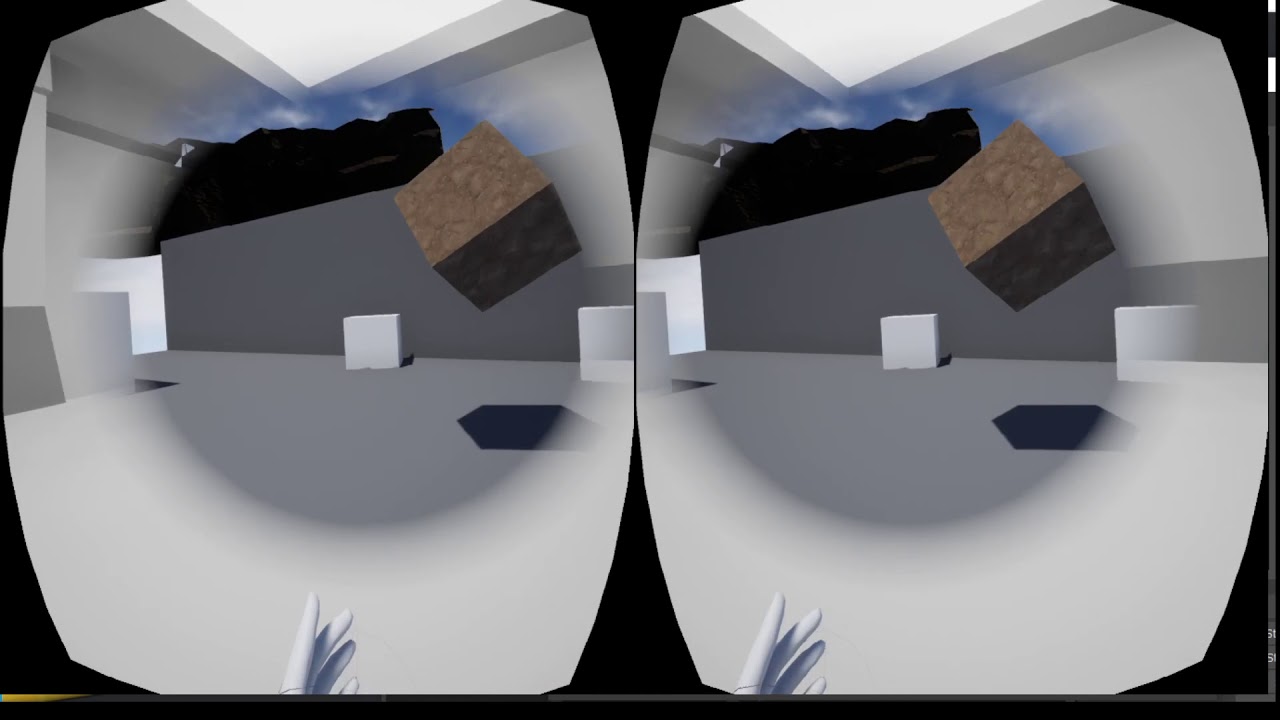
Testing blocking the peripheral vision while moving in VR using Unreal Engine
slim karma
cool
last knot
any suggestions on what to do to make the lighting shown in the editor most accurately reflect the lighting i'm going to get on the Quest? I mean, other than turning off all the lighting. 😄
mighty carbon
??
turn off tonemapper in the Editor and you should have same looking lighting in the Editor as in Quest
@last knot ^^
last knot
how does one do that?
mighty carbon
It's in the viewport settings, there is an icon(?) in the top left corner of the 3D view where you choose what to show
Explanations of the various options available within the editor viewports.
Go into "Show" menu https://docs.unrealengine.com/en-US/Engine/UI/LevelEditor/Viewports/ShowFlags/index.html
Descriptions of all of the available Show Flags for the viewports.
last knot
aha, it's actually under the [Show] button
well, that helped a little. the lights still seem way more "hot" in the editor than the are in the hmd. and lots of weird shadows (still working on understanding lighting) there that aren't in the editor.
mighty carbon
disable PP altogether then.. In my case lighting is basically identical between Editor and Quest
oohhh, 4.25 preview1 is out
probably going to be a clusterf#ck for Quest
mighty carbon
changes in rendering most likely (they added virtual texturing to mobile)
tired tree
well are you going to enable it? ;p
sturdy canyon
@sturdy coral Success!!!!!
I just added an #ifdef PLATFORM_WINDOWS to force Grow mode all the time instead of just editor
I owe you a 🍻
Next time GDC isn't cancelled maybe
It would have worked by setting that var to 1 and setting the resize method to grow, I guess
Maybe I should have just done that, but only on windows..
sturdy coral
@sturdy canyon nice, glad that worked, I have a scene capture thing in something I have on the backburner so that is good to know it fixes it. @primal sky
sturdy canyon
Hmmm setting both of those properties didn't work..
Maybe they have to be set in an ini file rather than at runtime?
Testing that
otherwise I'll just do my engine change thing
Yeah I tossed this in WindowsEngine.ini:
;This is a workaround fix for https://issues.unrealengine.com/issue/UE-86191
r.SceneRenderTargetResizeMethod=2
r.SceneRenderTargetResizeMethodForceOverride=True```@sturdy canyon cool, and it works when set there instead of console?
sturdy canyon
Yeah. It's possible I screwed up setting it at runtime maybe
for example, I did r.SceneRenderTargetResizeMethodForceOverride=1 instead of r.SceneRenderTargetResizeMethodForceOverride=True
But this is cleaner anyway
last knot
@mighty carbon I unchecked everything under Show > PP. Here's what it looks like in the editor:
versus here's an in-game screenshot:
(and before you suggest fixing the lighting, I'm working on it. I was just starting out and had just dropped a light and then went off to fix some other stuff)
This is much closer to matching than it was, though
mighty carbon
is that dynamic lighting ?
last knot
no
mighty carbon
no idea then.. I don't have this issue :/
do you have PP volume on the level ?
Any tonemapping going on in the camera settings?
 sly elk
Thoughts on these input image sprites?
sturdy canyon
I instantly understand all of them. Except maybe the difference between the two mouse ones
sly elk
cool. the mouse ones are just two different versions to see which one reads better in game
last knot
@mighty carbon yes, PP volume. which/where would the camera tonemapping settings be?
mighty carbon
kill that PP volume, you don't need it on Quest
last knot
k, good to know
mighty carbon
camera settings will be inside of your VR charcarer, when you select camera component
last knot
so hard to find good (or any) quest/mobile-specific lighting tutorials
i selected the camera on the VR pawn, but i don't see anything about tonemapping
is it by some other name?
sly elk
- nervermind 🙂
last knot
heh. knowledge fight!
primal sky
@sturdy canyon r.SceneRenderTargetResizeMethod 2 This worked for me in the console at run time
mighty carbon
for real @last knot ?! https://docs.unrealengine.com/en-US/Gameplay/HowTo/UsingCameras/index.html
A How To Guide for Finding Actors in your Scenes in Unreal Engine 4.
there are PP settings on the camera too
last knot
oh, i see that there are PP settings on the camera, sure. about nine million of them
sturdy canyon
Generally they don’t work without mobile hdr, and that should be off on Quest
last knot
none named "tone mapping" "tonemapping" or any derivative i can think of 😄
primal sky
@sturdy coral thanks for contribution. 
mighty carbon
@last knot then you should be good to go, assuming Mobile HDR is off (as Nathan said) and you are using forward rendering
sturdy coral
@primal sky np, did you have to set the force one too or did it work with just that one?
last knot
@mighty carbon yeah, mobile hdr off and forward
still never saw "tonemapping" under the camera, though 😄
primal sky
@sturdy coral jsut that one in the console
Ill try putting it in the level BP or defaultengine.ini
so if it works there.
sturdy canyon
Huh.. maybe I don’t know how to make console commands from blueprints or something
I just call the function from a player controller
primal sky
ive only tried it manually applied
mighty carbon
@tired tree I guess I am not too happy about 4.25 is due to the fact that all XR bugs I reported were moved to 4.26 :/
 lime gazelle
Losing my mind a little here in regards to AR for android. Could anyone point me in the right direction here please? I'm trying to find ways to control the Device Camera Exposure for an AR app developed in UE 4. I can't find any documentation on this.
 dry python
Hey guys,
as a beginner VR dev, would 64GB suffice for the Oculus Quest (I do mainly want to make VR games for Desktop)?
For an extra $120, it seems you would need it if you planned on installing a lot to your headset at once then it'd make sense for the 120GB but since u can just uninstall games/movies/etc . It seems pretty excessive?
any thoughts and advice is appreciated : )
 cosmic shoal
it's exactly that, just a convenience if you want to install several things without having to uninstall all the time.
dry python
@cosmic shoal ah ok awesome. Thats what I thought and frankly was hoping : P i'll save the money haha
1 last question, if you dont mind, if I have weak wifi in home but strong ethernet. This should only be an issue when downloading oculus games right? As for steam vr through the desktop , weak wifi shouldnt be an issue right (cuz the USB C cable [oculus link])?
cosmic shoal
shouldn't be much of an issue. You could always get a new wifi router 😛
dry python
haha true . was just checking. it'd be a shame i get Headset then cant play anything on steam vr and have to wait till my new wifi router comes in : P
THanks for your help again 👍 🙂
cosmic shoal
np
flat shoal
anyone in here using the enterprise developer options for the quest?
let me rephrase that: is there any business/enterprise option that allows you to put an unreal binary on the quest without creating an oculus/facebook account or have any other data transfer with facebook?
sly elk
We looked into this around the time quest launched. My understanding is that oculus will give you an app ID so you can serve business apps through the store system without them being public. Its not ideal.
 carmine yoke
@sly elk That's not what I've heard, I'm a business account holder and in the ISV
I've not heard anything about putting your app in the store system
As Far as I know you need access rights to clients' Business headsets, then using their OculusForBusiness platform you push your app to their headsets
sly elk
how long has that been a thing? We last looked into this over a year ago when we were quoting a training contract
carmine yoke
Since OC6

Enterprise VR continues to make waves and prove results as innovative companies leverage the technology for training, collaboration, design, and much more. The logistics of scaling this powerful tech can be daunting, but our solution can help. Join the Enterprise product team ...
sly elk
Oh yeah, that would have been about 6 months after we last looked at it. The website only mentions all in one headsets. Any support for rift S? We have done a few demos at tradeshows for partners and may do more. I like the oculus hardware and controllers best but we got burned on an automatic oculus update breaking offline play support and have been avoiding oculus hardware for these kinds of things as a result. Does this setup still rely on the same forced updates/service as consumer oculus store?
mighty carbon
no force updates on Quest 🙂
cosmic shoal
You'd have to ask them, at OC6 they were eager to hear from people in the professional side.
carmine yoke
@sly elk I expect you'd control the updates from the OfB software. There isn't much support for the rift s, you still need to buy business specific headsets though. And you get extended warranty and support and stuff. But the OfB platform is just for quest afaik
 rigid bear
is there a renderer setting to limit how many transparent materials can be rendered behind each other to cap the shader complexity in some way?
 uncut silo
Hey fellas!
Why Vive motion controllers stopped tracking after I enabled the Steam VR Input Plugin?
The project is in 4.22
 nimble edge
What's the secret to get a VR game (start in VR turned on) to be Windowed and not full screen?
 daring pasture
Believe its just an ini setting, or project setting. Depending on which engine version you're using, there was a bug that was forcing it into full screen and crashing if you changed it
primal sky
Just had a go on the moon lander project from epic on the HL2
pretty interesting stuff!
 subtle raft
did the latest steamvr update break vr inputs or is something else going on...
it used to work, then I updated SteamVR and now my inputs arent working
subtle raft
0]LogSteamVRInputDevice: Error: Error trying to generate application manifest in: ../../../../../../steamvr_ue_editor_app.json could this be related
ya whatever the heck that is was it
I deleted that file and it's fixed now
anyone want to explain what that file is?
nimble edge
Anyone here done local asymmetric VR? VR player in HMD with a mouse/keyboard player using the spectator screen?
last knot
on a Quest bug report I submitted, they got back and wanted me to try it with the 4.25 preview release. it seems they don't like the ndk r14b and want r21. I've always installed it from the nvpack before, but there doesn't seem to be one for r21. is there some non-obvious place to get it, or do I have to install from a whole different ndk source?
last knot
ahhh
sturdy canyon
Have not tested, but did see the note
last knot
thanks
sturdy canyon
Check the notes to make sure I’m not misremembering
last knot
will do
mighty carbon
Heh, I've always used Android Studio, since Gear VR support showed up in UE4
 near moss
How do I setup my quest with unreal engine so that when my application is launched, a seperate window on my monitor will show whats happening within the quest?
Ive tried the VR preview but does that require the oculus link?
nvm i did it
hallow knoll
@nimble edge Yeah I talked a little bit about it in the VR Spectator Camera livestream we did
There's a sample project to download that has a working menu for the mouse/kb-player
nimble edge
Thanks @hallow knoll , I know what i'll be looking at today.
hallow knoll
Since I set it up in a way that allows you to control the camera with mouse+kb, there's no reason why you can't make that Actor a "Player"
nimble edge
Cool. I have an "American Gladiator - Tennis Ball Cannon" concept I gotta get out of my system.
nimble edge
If you haven't watched this yet, there's a lot of interesting discussion about VR design. I especially liked the conversation about simulating arms even though they aren't rendered, as well as what happens "during teleport"
https://youtu.be/cRVXhA0-TI4
Half-Life: Alyx is almost here, the culmination of years of development and experimentation with VR gaming. Back in December, we sat down with Valve's Robin Walker and Greg Coomer for an in-depth conversation about designing the game to showcase the potential of virtual realit...
 rich pilot
hey guys, i need to host a VR project for our company
for a client, and im not really sure how/where to host it, and retain company branding
can anyone offer some insight?
 willow trail
Can I disable SteamVR without outright uninstalling it?
It starts everytime I start UE, but I'm not working on a VR project
nimble edge
It's on by default.
last knot
@mighty carbon well, I've switched over to using Android Studio instead of NDK. All it seems to have gotten me is that UE won't list my Quest in Launch, even though it shows it as connected in UE under Devices. Joy!
mighty carbon
🤦♂️
nimble edge
This is giving me anxiety. I have a quest port project coming up...
mighty carbon
 sturdy canyon
I generally wait for Oculus to push on their own branch, and then at least the basic features work fine
mighty carbon
@sturdy canyon do you happen to know when UE 4.24.3 + 14.0 is coming out ?
sturdy canyon
No, but the latest 4.24.2 is pretty damn sweet. Transparency subpasses in Vulkan bought me like a full milisecond
last knot
man, this is maddening. trying to track down what might be related to UE4 editor seeing the Quest. Do you think sdk/jdk/ndk would have anything to do with it showing up under Launch? seems like that'd be further down the line but it's such a house of cards
mighty carbon
I don't know why you went with 4.25
sturdy canyon
I highly recommend not using 4.25 until Oculus releases their branch
mighty carbon
it's barely in Preview 1
sturdy canyon
Sometimes it's useful if you know there's something you will want/need, and you want to be able to report bugs early to increase the chance they get fixed before launch
last knot
I'm not trying to port anything to it, but I am trying to repro a bug on it on request of support
but in the process of trying to use android studio, it hosed everything
tired tree
@sturdy canyon oh i know.... I have to port to preview 1 on every release
just pity anyone else that has a reason to do so as well
sturdy canyon
I usually wait until someone else posts a working VR build in preview 3 or 4 😛
To verify no breaking horrific bugs on my stuff
tired tree
i'm the one trying to get working vr builds ;p
sturdy canyon
❤️
last knot
😆
last knot
any idea what i need in my path sdk-wise if I'm going to use Android Studio instead of Codeworks, @mighty carbon ? I have ANDROID_HOME (and ANDROID_SDK_ROOT, just to try) set to where I installed the SDK.
the Quest is showing up in ADB, and in the Devices list in the UE editor.
i've tried rebooting everything, unplugging/replugging, toggling developer mode, etc. No luck
well, SHIT. NOW it works
oh, okay, it only worked because it must have required a secret UE restart after changing the sdk/jdk/ndk paths. I had changed them back to the NVPACK ones to try to fix it.
i love that the android sdk/jdk/ndk paths are under Project Settings, but they're clearly global between projects
mighty carbon
cuz they are read from your Windows PATH env var
last knot
i don't have it in my PATH now. that's why i was asking you what you have set up in the path. previously, it was all NVPACK stuff. i removed that out before installing all the Android Studio stuff (reinstalling, trying to figure out the problem)
okay, i finally got 4.25 to at least show Quest under the Launch list. I think part of the problem was that the "project" settings are global, so I had set it there, then fired up my other 4.24 and it was broken there. I though it was broken because of the changes I did on disk with the path and such, but I think it was just because the "project" settings got applied to THAT project, too, which did not like that new setup for 4.25
so now I can Launch and figure out why THAT fails. That's... progress.
pale juniper
Hi there, i am trying to implement a vr multiplayer game. The problems come whenever there is a dedicated server involved. First problem is on the pic, it does not print "MotionControllerOnServer 2", however, in vr preview it does. Second problem is that the navigation mesh does not generate at all, again, the same map on vr preview and the nav mesh works perfectly fine. What is it that seems to be wrong here with my dedicated server? Maybe the way i test it? I copy the same project to another computer, and start the server with the advanced session plugin by using a shortcut to the project with command line options. The client connects with the open project in the unreal editor by using vr preview. Should i go all the way to packaging to test every single change i made?
Also, when i use this same blueprint on the vr pawn from the standard template it prints it on the dedicated server, but for some reason when these nodes are on the motion controller blueprints they do not get sent to the server
 patent dagger
Hi All, I'm using 4.24 and trying to get the menu button on the left Touch controller to register. Has anyone had success with this? I've got it mapped in Inputs and it does nothing when the button is pressed.
last knot
@mighty carbon what do you have in terms of environment variables/path for your android studio setup for UE? now I'm getting errors with rungradle.bat, and I suspect that's it
mighty carbon
at work, can't look it up
last knot
okay. feel free to paste it here later if you remember
mighty carbon
I installed Android Studio ages ago. I simply update it with SDK/NDK and UE4 keeps working just fine 🤞
last knot
i now get ERROR: cmd.exe failed with args /c "C:\dev\AutoClearBug 4.25\Intermediate\Android\armv7\gradle\rungradle.bat" :app:assembleDebug
the stack trace isn't really very helpful
actually, wait, there were two stack traces. the other said Unsupported class file major version 57 Which version of java are we suppose to be using for 4.25?
 grand chasm
When I low near clip and look at any actor up close with one eye in VR they kind of jump around . Does anyone know why this is happening ?
Even if I attach it to my VR camera it happens
patent dagger
@grand chasm not sure but it could be that you're dipping below the minimum framerate for your device. or maybe a collision issue.
grand chasm
Framerate is good. It looks more like something related to stereo rendering . It doesn't occur on a flat screen i run it without VR. It's not project specific, any new project seems to do this.
last knot
well, that works. I stole the jdk1.8.0_77 dir from the nvpack and just pointed it to that 😄
subtle raft
whats the difference between Index Grip Force and Index Grip Axis
sturdy canyon
grip axis is capacitive, and is vaguely how curled the player's fingers are. Force is using the force sensor, and is how hard the player is currently gripping
subtle raft
oh axis is hover? like distance from touching
and force is squeezing
or you're saying it's backwards
sturdy canyon
you are always touching
axis is how curled your fingers are around the controller. Force is squeezing
sturdy canyon
This is specific to grip
subtle raft
Im slightly mistaken, you can hover like a millimeter away from the trigger and it activates the touch
last knot
🙄 well, looks like my 4.25 adventures end in this https://forums.oculusvr.com/developer/discussion/87073/unreal-4-25-x-changes-and-issues (by which I mean the error The requested API version in ovrInitParms (1.1.29.0) is not compatible with this version of VrApi Loader (1.1.31.0)!)
grand chasm
If i attach a mesh directly to the VR camera in blueprint close to the camera it jitters pretty heavily. If i put my hmd up next to the same mesh spawned into the level it doesnt vibrate nearly as much. Is there some issue with attaching things to the vr camera at close range in front of one eye? I cant seem to solve this.
grand chasm
it seem to be something with the render thread and game thread being out of syn when doing stereoscopic passes ? i am stumped
patent dagger
instead of parenting it, trying doing a vinterp to the camera's coordinates (or whatever offset you want from the camera). see if that smooths it out.
tired tree
There is an additional camera update post the game thread on the render view, but it should be projecting objects directly attached to the camera with it.
grand chasm
I think it might be a bug, unless something funny is known to happen like this when pulling in the near clip and putting something close to one eye. My friend submitted a report. Meanwhile I will mess with more indirect ways to try and accomplish this and see what happens
keen prawn
when i keyframe an actor in sequencer it shows a spline, all good
now when i do the same in VR editor that spline is a million times bigger
and i cant even select the object im keyframing, i can just select the keyframe indicators

Google Drive
this shows the problem. the spline indicators are blocking everything
any way to turn it off or make it smaller?
 novel gorge
A VR HUD (which is rotating with the camera/head) was not a good idea... I can see every little framedrop.
keen prawn
fixed my problem
mighty carbon
How @keen prawn ?
keen prawn
just exported the mesh scaled it down and reimport with new file
its in VReditor/transformgizmo
those gizmos are actually usefull now 😄
they are not actors in the lvl so took a while to find where they hiding 😛
i can recommend activating the virtual production plugin and take a look at the virtualsouting BP
its a diffrent beast but kinda interesting
its modular vr tools in BP
something makes my 4.25 preview kinda crashy tho, got a bunch of experimental plugins im usin
keen prawn
guess some1 made a lil joke 😛
took me a few min blank stare til i realized u cant split execution pins
 fervent sand
Hey guys, has anyone tried to use cubemap StereoLayers in PCVR?
I can make them work perfectly on the Quest but according to documentation they should work with PCVR
mighty carbon
What's the use case for them @fervent sand ?
fervent sand
For stereo 360s with high quality, which you cant obtain with normal materials
mighty carbon
Video or stills ?
fervent sand
Stills, but I understand you can put video as well
sharp marlin
Does anyone know if it is possible to change the properties of a camera in game with a widget?
fervent sand
@mighty carbon Its wierd, such an important feature and nobody is talking about it in any forum
I know there are other approaches but after seeing the quality that I can get on Quest I have to try it on PCVR
 hot willow
@tired tree Is it possible to allow the VR Player (On the Example Template) to simulate physics? For example, allowing the player to be pushed around by moving cars that are simulating physics.
subtle raft
Man I am having so many issues with VR in 4.24
I keep getting projects that stop tracking the Motion Controllers
gotta recreate the projects to make it work again (Index 4.24.3)
tired tree
@hot willow yes, check out the tips and tricks page on the plugin website
It's off by default because it can cause out of control stuttering and jitter of the user isn't aware that it can happen.
Like standing on a pile of simulating objects
subtle raft
Ok I fixed it by deleting SteamVR Input folder and Regenerating Action Manifest
hot willow
Thank you so much! It just keeps on getting better and better!
mighty carbon
@fervent sand I think it has a very limited use case (like a gallery viewer or some static'ish experience)
 ornate scaffold
every time I click Play in VR with the Oculus Quest, SteamVR opens up - is this supposed to happen?
does the Quest or UE depend on SteamVR?
fervent sand
@ornate scaffold It doesnt, just disable the steam vr plugin and it will stop showing
ornate scaffold
hm I see, alright thanks
obtuse condor
Unable to build obb larger than 4gb for Android (Oculus Go)
Im getting this error
Packaging (Android (ASTC)): ERROR: Stage Failed. Could not build OBB. The file may be too big to fit in an OBB (4 GiB limit)
I have 7 360 videos. I need all of these for the app
Any workaround for this?
mighty carbon
Package each video into its own obb
Then use DLC functionality (if going through Oculus store) to download each video on demand
Or store each video in a cloud (Amazon S3 for example) and download each video from there, on demand
obtuse condor
@mighty carbon
How can I package a video in its own OBB?
mighty carbon
no idea - that's something I need to look into myself (not for videos, but for packaging DLC).. You might want to ask in #packaging
obtuse condor
@mighty carbon Thanks!
 fluid cipher
does anyone have experience with the latest ipad minis and AR? No issue? It seems it should work but I'd rather know before buying a bunch of them. Thanks 🙏

 forest plover
Of course it happens after I spent my money...
slim karma
am I missing something? or is this about half life alyx being included with the index?
forest plover
probably... I mean there's a huge demand for the index because of Alyx...
slim karma
very true, but I wouldn't be surprised to see a discount on it as well
 ember totem
in 4.24 making an oculus Go project and having some issues with the touchpad. It returns 0 for x and y axis values, but other action mappings work fine. Wondering if I'm missing something obvious.
as you can see ive tried getting other motion controllers inputs just incase, including a left controller. also printing values from both the get values and events incase there was a difference
mighty carbon
SideQuest is a tool to help simplify getting content onto Quest and Go and other VR headsets.
(not SunShard) shared space MP
 rich canopy
Haha i tried it, its not bad
mighty carbon
as much as I'd love to play shared space VR games, it's not feasible for me (or nay average VR users)
rich canopy
Haha roomscale (2m by 1.5m) is tough enough for most ppl 😛
 gritty yew
Can someone tell me which android format to package for oculus quest? ATC, dxt, etc1?
last knot
@gritty yew ASTC
gritty yew
@last knot ty
mighty carbon
@last knot 4.25p2 is out.. I wonder if you can deploy to Quest with it.
last knot
i wonder as well. but can't lose another day to it 😄
grand chasm
Anyone here tried getting a Varjo XR1 working with depth and camera passthrough ?
mighty carbon
@grand chasm I would be surprised if anyone here spent $10k on that HMD
 calm quail
Hi, I'm currently working on generating head meshes for my VR avatars using an external API. I have connected it to UE4 fine and can build the downloaded mesh files using the procedural mesh tools in C++. I was wondering whether anyone had any experience animating procedural meshes? My plan is to make the mouths open and close but I'm struggling to get an FBX with morph targets to import.
 dense saffron
Hello everyone, I have an issue with a terrain while using an Oculus Quest: part of the terrain that's close to the camera look REALLY pixelated, while what is on the background looks good, is like an inverted LOD... Any advice?
mighty carbon
I couldn't even get Landscape running on Quest - it was invisible in-game (packaged)
 shy merlin
So I am developing on quest with vulkan. Im noticing a sort of blown out gamma effect in vulkan. Ive completely deleted the skylight, and have no indirect on the directional light. Anyone know why this is happening? I suspect mobile HDR being off has something to do with it, but ive seen plenty of mobile games that can achieve darker values than this.
mighty carbon
turn off tonemapper and you'll have same gamma in SM5 and Android
shy merlin
r.Mobile.TonemapperFilm 0?
mighty carbon
or just check UE4 docs about Editor's viewport and post processing effects ?
shy merlin
okay so
its looking like, when i turn tonemapping off on sm5, it looks just like vulkan
vulkan is not getting any tonemapping because mobile hdr is off
mighty carbon
and it should be off
 urban shell
anyone interested in testing an AR app i built on their iPad?
i'm getting rejected for a crash on iPad, but i don't have an iPad to test on
mighty carbon
you don't get to have PP/tonemapping with stock UE4 on Quest @shy merlin
urban shell
or does anyone happen to know if arkit is crashing on ios 13.3?
shy merlin
Would a LUT in post processing work with no mobile hdr?
shy merlin
yeah
There has to be a way to get this scene darker.
lights are just not acting right
mighty carbon
soo, if you write your own shaders (not materials), maybe you can have tonemapping working
shy merlin
everything is very washed out even at low light settings and no skylight
mighty carbon
sure, with lighting you can make it darker
shy merlin
no indirect from the directional either
mighty carbon
just work in SM5 without tonemapper to see what it looks like
I don't know about that.. Baked lighting doesn't care what platform you are working on/for - it's all the same for SM5 and ES3.1
are you using GPU Lightmass ?
shy merlin
not using gpu lightmass
sm5 with no tonemapping looks just like vulkan, which makes sense
mighty carbon
right, so you gotta tweak your lighting setup to achieve what you want without tonemapper
like in good ol' late 90s / early 00's, when there was no PP
shy merlin
yeah seems to be it
ive dialed the intensities and what not down so much, still getting reallllly bright shadows
 true magnet
This kinda fits all categories of unreal, but I wanna do it in VR.
Anybody know any good plugins / addons for good looking water?
 daring mural
seeing differently in each eye for some reason .. right eye seems to be brighter in the blacks, has a sort of green tint, left eye is darker in those same areas -- any ideas?
it's very subtle
mighty carbon
no @true magnet
true magnet
You didnt have to @ me for that haha
mighty carbon
🙂
I tried several and the major issue is transparency
unfortunately there is no opaque water that at least fakes color change with distance from the shore (simulating depth), nor with shore foam.. I am sure some material guru person can make such material.
sturdy coral
@daring mural which headet?
and check if you see it in the HMD mirror (check app mirror and compositor mirror)
sullen vortex
@hallow knoll otr just found the option that generated .sh installer for osx. Silly me was so blind didn´t realize it was under the command i was pointing at...
sturdy coral
@dense saffron check your landscape material textures to make sure they are power of two and have mips
it looks fine in editor?
dense saffron
@dense saffron check your landscape material textures to make sure they are power of two and have mips
@sturdy coral they have mips but no power of 2
gonna check that
 warm wasp
Hello everyone! I have been search and trying everything I can think of, but no luck. Please, if anyone can point me in the right direction I would really appreciate it. Thank you!
Question: How can I force an override of the camera focal length or FOV in VR (HTC Vive Pro)?
The reason: I am building the Vive into a physical periscope from a submarine for an installation experience. The periscope we are mimicking has a 1x and 8x zoom. Because the Vive is mounted in the periscope there will be no motion sickness associated with the zoom. But, the VR implementation seems to block any attempt to zoom in game.
tired tree
what makes you think that literally zooming their perspective wouldn't cause sickness?
warm wasp
It would have the same effect of looking through the real periscope
Because you are looking through something mounted to another object, not your head, you don't have the same brain issue of moving wrong, which causes the nausea.
 tame cypress
Can someone please help me to know how to get rid of this poppup message when launching my steamworks app from the steam library (without headset on). I think I've tried everything.. no command line option suppresses it, and i don't know what else to try. This message:
my app does the right thing to load into vr, or desktop mode based on whether headset is active blah blah, i would just like this message to go away
tired tree
@warm wasp ah I read that original paragraph wrong
warm wasp
No problem @tired tree - It seems like there must be something to allow this. I am combing through the DefaultXRCamera code now. Hoping some comments will be in here.
Or, maybe SceneView..
sturdy canyon
That sounds like a badass cool project raz. I can’t help, but best of luck!
warm wasp
Thanks @sturdy canyon - I will post more about it once it is deployed.
sturdy canyon
Ok i have a hacky way to maybe pull it off @warm wasp.
Attach a plane in front of the vr camera and show the output of scenecapturecomponent
The camera on the scene capture component can adjust its fov
warm wasp
I thought about that, but we are already at target FPS, that will add around ~25 decrease
sturdy canyon
Not if you change the VR camera to “show only actor”
The VR render pass will be cheap af
sturdy canyon
I honestly haven’t tried it with the vr camera, but show only actor works wonders on scene capture components
warm wasp
Nice, thanks Nathan
Alright, I need to get some sleep. If anyone has any ideas or where in the engine code to look to force VR FOV, please tag me. Thank you all! Have a great night
sturdy canyon
You also probably don’t need a very high resolution since it will fill a smaaal fov
Goodnight
 candid viper
@warm wasp I think you'll likely have to override the SteamVR plugin to do this. FSteamVRHMD::GetStereoProjectionMatrix is the function creating the projection matrix that has the fov in.
real needle
Hey everyone! I need to build to the same experience for VR and Desktop. It would be great if SteamVR didn't start when opening the desktop version. Does anyone know if this is possible without disabling the plugin (which causes some of my blueprints to break)? Thanks in advance!
warm wasp
Thanks @candid viper - I am looking through that now. Nothing too obvious yet.
candid viper
@warm wasp - FSteamVRHMD::GetStereoProjectionMatrix creates the projection matrix. Width is by default FPlane((2.0f * InvRL), 0.0f, 0.0f, 0.0f). The 2.0f is the +/-1 of clip space - it is scaling view. Change the 2.0 up or down and you change the fov. (The second line is the vertical one).
warm wasp
@candid viper Wow man. Thank you for pointing that out.
 formal ether
have somebody used renderdoc to optimize scene?
 craggy sigil
Hi 👋 Does anyone have experience working with modular environments using hierarchical instanced static meshes (HISMs) or have any general tips/best practices for building larger spaces for VR? I posted a question in #graphics with some issues I'm running into with my VR project
mighty carbon
for what kind of VR? Mobile or PC ?
craggy sigil
@mighty carbon PC, developing for the Rift S
warm wasp
@sturdy canyon @candid viper @tired tree Thank you all for helping!! What Brian showed me about the Stereo Projection Matrix worked. Adding a float var for the static value 2.0f and exposing that to the SteamVR function library allowed me to easily implement zoom functionality. As a side note, zooming with the HMD doesn't cause me to feel any sickness. Kinda feels like a super power of zoom vision/eyes. Anyways, I really appreciate you all taking time help. Thank you.
mighty carbon
@craggy sigil then it should be the same as for non-VR modular environments... HISM doesn't work on mobile, but shouldn't be a problem in PC VR
craggy sigil
@mighty carbon The issues I'm running into are warnings about lightmap sizes for instanced meshes being too large and lighting seems on larger grids on instanced meshes (my original post #level-design has a screenshot). From what people are telling me I should play with UVs to get the lightmap seams sorted out but building lighting currently crashes the engine on my laptop (razer blade 15, 16GB RAM) because, I'm assuming, the baked lighting for my larger HISM walls are huge -- but that's my uneducated guess 🤷♂️
mighty carbon
🤷
I never used HISMs because I work on mobile VR stuff.. However I used ISMs and never had any issues with lightmaps
craggy sigil
How do you go about building out areas with ISMs? I think my problem is that I'm trying to use a single HISM for the entire wall of a big space -- I'm going to try to chop it up into smaller segments to see if that helps but I'm just guessing at this point
warm wasp
VR Zoom with SteamVR (HTC Vive)
mighty carbon
@craggy sigil I don't build areas with ISM.. I use ISMs for small groups of objects that aren't too far apart.
craggy sigil
Ah, gotcha -- what's your strategy for building environments?
mighty carbon
just building it as is, no HISMs
just watching my drawcalls.. It shouldn't be a problem for PC at all cuz I don't think you are building something like Horizon Zero Dawn 😉
 boreal saddle
How hard is it to turn a finished first-person game into a VR game?
Or rather uh, can you literally just use everything you made and just add VR functionality on top?
sturdy canyon
You usually need a different collision system, and menus at least
But usually everything will render fine
boreal saddle
Alright thanks mate
sturdy canyon
Performance might not be great
mighty carbon
buuuut, the gameplay mechanics will not be geared toward VR
(interactions in particular)
sturdy canyon
First step is just launch in VR preview. Most games will just work. And you’ll be able to exist inside the world and look around you
Unless you start with a menu
 hazy walrus
HI fellow VR artist
boreal saddle
Hmm I see
hazy walrus
Im in a studio and we are currently using Unity , ( but at home i am a Unreal engine user )
we are in a meeting now discussing the possibility of moving over to unreal
feed me positive things to say so we can use Unreal at work T_T
We are a mixed reality studio, the majority of programmers are comfortable with unity and dont want to change to Unreal , is it realy that hard using C++ ?
hazy walrus
but we have programming team , all the artist want to use Unreal
they are talking now about how its hell to edit the engine even though its good they put out the sorce code
mighty carbon
why though ? What's there to do in C++ ?
If you are integrating a new piece of hardware, then yes, you need C++. If you need something that isn't in Blueprints or performs poorly, then yes, you need C++.
Otherwise, there is no reason to C++. You'll be fighting the engine and in that case you might want to just stay with Unity
hazy walrus
we try out alot of new tech,
im generalist but programming is my week point so im not fully sure about that area of things.
i just know as an artist i love Unreal
and i have alot more freedom to do what i want easier
mighty carbon
well, if your programmers don't know a thing about C++, then they will have hard time (and it doesn't matter what engine they use)
I am not really a programmer programmer, so I can't really tell you if C++ is hard in UE4.
however, there are a few folks here that are well versed in UE4 C++
 trail shale
Can I use Vive tracker power cables with the Index trackers? Just got a Valve index - I had run the power cables for the Vive trackers through walls. They do appear compatible and the trackers power on but I didn't know if it somehow would affect latency or tracking because it's an older power cable
didn't feel like re-running the new power supplies through the wall if I could avoid it
mighty carbon
wow, these guys are unstoppable https://antilatency.com/
Antilatency
Indoor positional tracking system for VR suitable for LBE, enterprise training, and Industry 4.0 projects. Unlimited area, unlimited number of tracking targets, user-friendly system.
(pricey though)
last knot
@mighty carbon so all that stuff you suggested I turn off in the viewport under Show>Post Processing, to get the lighting to match closer to what's actually generated on android: any idea how to keep it from constantly turning it all back on?
mighty carbon
not really.. I don't have this issue - once it's off, it's off
gritty yew
For quest how do I launch the game in head set, and not on the quest home screen moniter?
daring mural
@sturdy coral Oculus HMD, the difference doesn't show in the mirror ... does that mean my HMD is fucked? I don't notice any difference in Oculus home etc.
In one level where it's very noticeable, looking at the ground makes my left eye go almost completely dark. The scene is dark overall but the right eye can still see the floor fine, and that difference is enough to throw you off
Looking at brighter scenes, it's very hard to notice any difference but I do notice some tinting in some levels where one eye has more green, or is overall brighter in the darks
Still, Oculus Home looks fine. Even tested bringing things in Home up close to my face that were black or dark to see if it happens there and it does not.
tame cypress
@mighty carbon after an email conversation with antilatency it became clear that you must have access to very large spaces for their tracking equip to work well with multiple people in the same shared space. But I still want to try them when i get the chance... been waiting for someone to make a good wearable standalone SLAM tracker.
sturdy coral
@daring mural search reddit a bit on it, many people ran into it in the early days and I think maybe used that spud tool thing to lessen it
mighty carbon
f#cking Windows 10 update... Nothing Internet related works, except for Edge :/
 hushed nova
Guys, should there be release notes in the oculus UE4 github page?
I ctrl+f'ed through the code for finger and there's a section about finger tracking
so is this the finger tracking release on UE4 or is it just prerequisite code for the next release?
last knot
anyone else have a problem with things looking somewhat pinkish in their app on the Quest? we're talking white areas having pink tinges. I took a screenshot in the game, and the tinge isn't in the screenshot.
hmm, never mind. it apparently isn't UE specific. If I view that screenshot with another app in the HMD, it has a pinkish tink. bleh.
sturdy coral
@hushed nova they often leave out things in the preview release notes that end up making it into the final notes
last knot
@mighty carbon remember me telling you the lighting would never match what the viewport was showing? 🤦♂️ It was the damn pink tint.
I was tearing my hair out trying to figure out what material was fouling up my game. I put in a ticket.
blissful bear
@tired tree I've migrated the Vive pawn from your template into a project I've been handed that uses the VRE plugin. I can't grip any objects (I was testing with a migrated BP_InteractableCube.)
MultiSphereTraceForObjects returns true but with any empty hit array and the grip fails. Any idea why this should be the case? I've migrated the VRE collision channels, gameplay tags etc.
Thanks in advance.
tired tree
You just have to check if they actually collide with the trace @blissful bear , there isn't really anything else that is going to prevent a trace collision.
blissful bear
Thanks. There does appear to be a collision. The hand anim reacts to the cube and the debug draw on the trace shows the hit, however the hit array is empty. I suspect it is something in the project setup (it's not originally mine) that is causing this strangeness. I don't know what to do to find the cause. It seems like one of those Unreal 'features' designed to fustrate!
tired tree
Check the channel that the trace is using and that the object gets hit by it, turn on debug drawing on the trace @blissful bear
blissful bear
The trace is using the CollisionToCheckDuringGrip array and the cube is a PhysicsBody. The trace succeeds as shown below but the hit array is empty. ???
blissful bear
@tired tree Thanks for your time... The hit array being empty was a red herring/false report by the bp debugger. I've just compared behaviour to your template project and the difference occurs when ValidateGameplayTagContainer returns true for the template and false for me. Any idea on how I've screwed the GameplayTags up?
This is on gripping a PickupCube migrated to my project.
mighty carbon
@last knot what pink tint?
tired tree
@blissful bear you prob ported and opened the blueprints before setting the gameplay tags in the config. This would be one of the reasons I don't suggest fully porting the example template.
blissful bear
@tired tree Thank you. I've possibly done exactly that. I only want the Vive PawnCharacter BP working/migrated from the template and understand why you don't recommend basing stuff too much on the template but ya know reasons....
I'll try deleting Vive PawnCharacter and remigrating it from the template... Thanks
blissful bear
When I re-migrated the PawnCharacter I got this error but still can't grip.
The project is using 4.22.3 and your template for this version doesn't throw this of course...
Looking in the plugin folder does show some differences so I conclude that I have been given the project with a VRE version mismatch. Or something.
I'll attempt to fix it in the morning. Thanks for the help, it's allowed me to make some progress at least!
last knot
@mighty carbon described it a little earlier in the messages. was getting a pink tint to all my whites in the HMD, but not in the viewport. Finally realized later that it was in EVERYTHING in the HMD. I never really used it until I started developing in it. But that explained why I could never get my viewport to match even with all the PP off 😄
mighty carbon
oh, so hardware issue then ?
 ember forum
cant seem to find the right include file to call the function
 warm spire
anyone got an Oculus quest?
nimble edge
Several of us do, @warm spire , what's up?
warm spire
I'm having trouble launching my UE4 project on the quest, the ADB detects my quest, but not UE4 through the Launch options.
warm spire
all good, restarting enough times, and accepting the SDK agreement got it building at least! 😄
carmine yoke
Are any of you making online multiplayer experiences for the Quest?
 devout aurora
Not yet but getting there.
carmine yoke
@devout aurora Elaborate? Have you started doing it? Basically I'm wondering what resources to use, I'm reading through the ue4 docs and the oculus ones atm
devout aurora
@carmine yoke Not started yet. Still building some basic interaction blocks. Steppings stones for getting there. I will let you know when i get more into the actual Multiplayer parts. Quite sure this will primarily be for the Quest.
carmine yoke
@devout aurora That would be great, thanks. Let me know as and when 🙂
last knot
@mighty carbon yeah, seems to be an issue with the screen. found similar people talking about pink/red tints with Quest and Rift. I opened a ticket and *sigh* followed their instructions for factory reset. In a completely unexpected twist, this did not fix the screen tint.
@warm spire Just be prepared for it losing your quest sometimes and having to be restarted. Possibly killing ADB as part of the process. It happens every once in a while with me, especially if I've unplugged/replugged the hmd. Oh, and yes if you have the SDK set wrong, it won't find it as well.
mighty carbon
hmm.. Hopefully they have a spare HMD somewhere for you 🙂
last knot
@mighty carbon Oculus? Yeah, hopefully. At least I can keep developing and just ignore it. My work has plenty of spares. Unfortunately, I telecommute from 1000 miles away. Probably not worth the hassle/risk of shipping it.
last knot
In the Oculus Performance Check, under the "Dynamic Lights" it claims "LightComponent0" is not static. First, I don't have anything NAMED that. Second, when you click Select Light it goes to a light that was very much set to static. But I deleted it out of the scene and resaved and refreshed, and now it still claims LightComponent0 but it goes to another static light. Anyone else run into that? (Edited)
mighty carbon
corrupted project ?
ember forum
@tired tree can you help me? I want to know how to call the function get orientation and position in c++ but I don't know which include file to use?
btw, congratulations on your plugin being featured! awesome job!
last knot
@mighty carbon perhaps I should factory reset the project 🤦♂️
ember forum
thats so weird, i tried including exactly that one
thats the only hmd function i get
@tired tree
ember forum
ooooohhhhhh
Thank you !
that makes sense actually, why would it be in GEngine if i just included that fucntion library.. sorry , still new to c++
mighty carbon
@ember forum I thought you were done with VR 😉
ember forum
i have a job interview and they requested a code sample, they mainly want BP's
but i have to show off some code
pretty much rewriting my event tick from BP
in c++
for VR anyways i figure it will be a nice performance gain
mighty carbon
I see.. Good luck !
ember forum
thanks!
hallow knoll
tired tree
@hallow knoll danke
hallow knoll
Bitte schön mein Freund
 quick salmon
Hello Everyone
I have a problem with my VR project
Ive done all the VR programming well
but im only allowed to make VRPreview
not the actual Play
note I have HTC Pro
and I'm connecting it to my laptop via a converter which shouldn't be a problem I believe
last knot
when you package up the apk for the Quest, does it also do a production quality lighting build, or does it use whatever the last one you rebuilt yourself was?
 ornate raptor
Has anyone used ViveSW's Nvidia VRS branch of 4.23.1? There's a modification to postprocessing.cpp which disables tonemapping and I'm not sure why it's necessary. Looking for some insight, as the scene looks washed out without it
Oddly, that change isn't present in the 4.24.2 branch
 lucid ivy
I'm just getting started with AR, have some experience with VR. I'm wondering if anyone can point me in the right direction for figuring out why my BPs only place at 1.0 scale despite me scaling them inside the BP. The geometry in this blueprint comes in at the same size regardless if I have it set to 1.0 or .001: https://photos.app.goo.gl/LYjvjV8LFAbo39XM9 (try to ignore the breathing)
I'm also looking for information on how to disable the tracking of new points once I place the model. Thinking this will help the FPS.
Here's the scaling in the BP: https://i.imgur.com/YJonji6.png
 hallow knoll
@lucid ivy Check the scale value in your spawn actor function
lucid ivy
@hallow knoll thanks!
There doesn't seem to be a scale value in the function I'm using to spawn an actor. I'm reusing both the Handheld AR template and the Google AR Template and I'm not seeing anything. Could I ask you to point me in the right direction there?
quick salmon
Hello everyone,
we gotta make our VR community more lively than that
many people asks questions but only few gets answered
please guys give in
yesterday someone helped me from the main UE4 channel
and it made a difference
we all can make a difference
if anyone is facing the problem or being able to preview VR only not play mode also in packaging, the VR Preivew works with all the interactions but the problem is when I package it
It can't play
lucid ivy
does it package succesfully?
quick salmon
Yes
would it be related to changing between oculus to htc vive?
because before it used to work, one time ive done an oculus project and after that it havent worked ever since
maybe Ive changed a certain setting
lucid ivy
I'm assuming you loaded the appropriate plugins for the HTC Vive?
quick salmon
yes steam VR
I have all the plugins installed
Im going to try to reinstall the engine again
and see
.
.
.
.
lucid ivy
Thanks again, @hallow knoll . Adding this to my Actor BP solved the issue! https://i.imgur.com/gsJDvkM.png
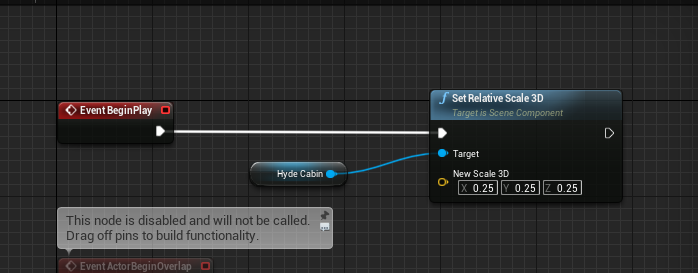

 tribal coral
@quick salmon verify that in your project settings “Start in VR” is checked. You can also add a launch option to the executable. Create a shortcut of it and add -vr at the end of the path
 smoky gazelle
4.24.3 my keyboard input working fine
but vive input has some issue
both controller getting same input value
 pure iris
Has anyone managed to use the AR template in unreal and recognize collision (or overlap) of the camera with other meshes? I tried to add a sphere collider to the Ar Pawn and check on begin overlap with other overlappable colliders, but it doesn't seem to work
edit: got it. Was pretty easy. Issue was that I needed to make the collider a child of the camera component and not the ar pawn scene root
tribal coral
@smoky gazelle https://docs.unrealengine.com/en-US/Platforms/VR/DevelopVR/MotionControllerKeyDeprecation/index.html does that maybe apply?
Overview of Motion Controller Key Deprecation and Migration
quick salmon
@tribal coral Thank you for reaching out
its already checked
@tribal coral You can also add a launch option to the executable. Create a shortcut of it and add -vr at the end of the path........I didnt get this one
@smoky gazelle try migrating your project into a UE4 VR template
carmine yoke
Can anyone think of a way to record video in UE4 on an Oculus Quest? (and then I would Ideally send that video to a server, one thing at a time though)
I've found some things for doing it on PC, but I can't find a way to do it on quest. Essentially it would need to work on Android.
Using the in build Oculus video capture isn't an option
mighty carbon
why not @carmine yoke ?
carmine yoke
Because we don't want our users controlling this functionality
We want it to auto record on app start, end on app end, and upload the video to a server
I've just asked in #mobile because I think its more of an android thing. I realised I can do it through ADB, but then how do I do it from within a packaged UE4 game where we wouldn't be controlling through ADB
mighty carbon
well, it's not quite Android thing.. Quest uses custom Android and whatever works for vanilla Android might not work on Quest.
carmine yoke
Yeah... I reckon we'd be able to do it uses the Oculus SDK, but... you can't use Oculus SDK on OculusForBusiness headsets 😒
mighty carbon

Android Authority
After you setup ADB in last week's Android customization, we figured we would put it to more use, here is how to take a screen recording using the ADB shell commands.
carmine yoke
Yep but that's through ADB, if we wanted it to happen on a standalone headset - how? 🤷♂️
mighty carbon
🤷♂️
carmine yoke
lol
mighty carbon
wouldn't that still require user's input ?
tired tree
or a chromecasdt
carmine yoke
That's not useful though unfortunately
tired tree
oh no user input at all?
sorry missed above the picture
you'll have to straight record output then
but sounds expensive and bandwidth heavy for a mobile headset
carmine yoke
I'm talking literally record the output of the game, save as .avi, upload that to a server
yeah, basically my company is asking me to look into it so I'm not entirely sure its feasable
My suggestion is include a PC to do it with ADB but then we have to send PCs along with a headset
tired tree
not even entirely sure oculus has it open enough for that to function to begin with
carmine yoke
You might be right about that ^ I can't see it in their SDK, but at least you'd be able to take capture and possibly upload it to a server seperately... Who knows

Stack Overflow
How can I capture a video recording on Android?
I'm trying to implement that atm
tired tree
@carmine yoke might want to just get a hold of an oculus rep
they have on board recording already
i don't remember seeing any public facing access to it
but you can ask for an SDK extension
if there isn't
carmine yoke
Is that a thing? I saw explicitly that the Platform SDK can't be used on Business headsets though because it relies on an APP id, which you get when you get greenlit for their store
But you're right.. If I can't get this js to work today I'll just contact them directly
tired tree
ask them about this particular use
its a valid buisness use of it
in their best interests to have a pathway
and they may already
last knot
Not sure if this is a general #ue4-general question or specific to the Oculus source code version, but in any case, has anyone else found the built-from-oculus-source version of the UE4 editor to be so much slower to compile your project than that binary version? I took the same project that generally takes 10-30 seconds and it takes 5+ minutes.
last knot
@mighty carbon yeah, the first time, it took somewhere around 20-30 minutes. Now even if I don't change anything, just hit cancel on one launch and immediately launch it again, it's about 5 minutes
Not sure if it's relevant, but my project is blueprint-only
mighty carbon
@last knot that's cuz Oculus (or maybe even stock source UE4) fork has to generate derived cache for each project you open and then rebuild shaders afterward.
my projects are also BP-only.. I don't think it matters.
last knot
okay, but I'm mainly saying the 5+ minute part seems weird. Even when I don't make any changes from the last 5+ minute launch.
everything just feels much more sluggish and laggy in the editor, as well
last knot
well, bugger. a reboot fixed it. back down to my 30 second launch times 😄
i mean, YAY!
sturdy coral
@ItsNotMeTrustMe#3448 do you have a link to that vivesw VRS branch? Or to announcement of it?
@ornate raptor
ornate raptor
@sturdy coral https://forum.vive.com/topic/7434-getting-started-with-vrs-foveated-rendering-using-htc-vive-pro-eye-unreal-engine/
Community Forum
In this post, I am going to show you how to integrate Variable Rate Shading (VRS) with your Unreal Engine project in order to enable Foveated Rendering using the HTC Vive Pro Eye headset. This article is going to focus on Unreal Engine. If you are using Unity instead of Unreal...
There are links in that article to the repo
sturdy coral
Thanks!
ornate raptor
Np
 novel tree
long deploy times for Oculus Quest UE launcher version, really hinders flow
on side note I feel desperate, I'm unable to get Oculus Quest thumbstick axis working.. it worked on blueprint template project but exact same mapping refuses to cooperate in C++ based project
feel free to point me to possible issues that might prevent this to work, I wasted good half of day trying to figure this out
 thin crescent
Hey has anyone else managed to get profiling setup correctly on the Quest?
I'm following the stuff from this video, but when I run the project launcher, it never manages to actually launch https://youtu.be/hEtu-ciPc7g?t=1312

This Unreal Fest Europe 2019 presentation by Oclus VR's Software Engineer Loren McQuade shows how to configure, build, deploy, debug, and profile your UE4 project for Oculus Rift and Oculus Quest. This talk assumes you are familiar with PC development on UE4, and focuses on co...
sturdy canyon
I just looked at macro statistics, honestly
last knot
has anyone tried to use the QuestHands plugin?
mighty carbon
not me
 somber lichen
@opaque gorge here xD
 opaque gorge
@somber lichen thank you
Okay everybody I have a few questions. First off this anybody know how to set up movement in VR. And I mean setting this up from scratch. I'm tired of YouTube videos just showing me how to use Locomotion and none of them showing me how to set it up from scratch
flat shoal
OMG, I think I know where my rare teleportation bug originates from... I wonder if it is when the WMR HMD loses room tracking, yet still are able to track the controllers...
I think I need to debug this at night, and turn off the lights in the room to simulate loss of room tracking! 🤣
mighty carbon
@last knot 4.25p3 is out 🙂
last knot
@mighty carbon now I'm hip deep in compling 4.24.1 so I can do hand tracking, so it'll be a while before I get to that 😄
opaque gorge
Does anybody know how to setup VR from scratch?
mighty carbon
@last knot why not 4.24.3 ?
last knot
because I can't get the QuestHands plugin to work in it, and it's built with 4.24.1 apparently
so, fascinating results. remember how my Quest has a pink tint to it? just got my office to test. ALL THEIR QUESTS DO TO. None of them ever noticed until I pointed it out.
If you want to not be able to un-see it, go to this in your Quest: https://bit.ly/2W6gJX0
 mighty carbon
meh... If I don't see it now, I don't see it
last knot
yeah, one guy I got in the office to try it before today didn't see it. I should have realized that was a bad baseline since he's colorblind 😄
but several people tried it just now on several headsets, and they can all see it. one of them is re-checking the colorblind guy's HMD
mighty carbon
I think your eyes are messed up and now you are messing with everyone's brain 😆
last knot
I'd settle for that super power
I did find a LOT of hits for people complaining about their Gos having a pink tint
opaque gorge
Is there a moderator for the VR side of this? I would really appreciate the help.😀
mighty carbon
@opaque gorge everything is in the docs
moderators are here to swing a ban-hammer at you 😛
opaque gorge
@mighty carbon I sure hope not because I really need some help with this because every tutorial doesn't seem to work because of the difference of code between 4 years ago and now
I just want to set up my controllers that's all I want to do is set up VR from scratch and it's been an irritation for the past 5 days
mighty carbon
I'd just find a plugin that does it for you tbh
opaque gorge
@mighty carbon is there any recommend? Because it seems that nobody on YouTube knows how to make VR controllers from scratch
tired tree
@opaque gorge what exactly do you want aside from just tracking?
there are tutorials on the docs sites that goes over the basic setup
but you seem to want more
you want more features than the vr template?
there aren't many direct tutorials on implementing from the ground up for locomotion for example, VRMarco has a few
generally people that don't want to use a plugin reference other work or know enough about the engine to do it themselves
opaque gorge
Doc site?
For the most part I would like to just learn to set up a VR controller from a blank sheet. That way I can actually learn and know how to do it if there's something I'm working on that I would like controller play and VR play or a switch between.
Also I learned that I just can't drag and drop the controller from the template which is very frustrating
If you all have a safe set up where I can just learn how to do this please link it.😭
tired tree
you can literally drop a motion controller component into a pawn
 past tiger
You will have to learn the basics of the engine or you will be very frustrated....like what is happening right now 😬
tired tree
Information on how to setup Motion Controllers for VR interaction.
agreed though, if you can't reference their template already you'll want to take it slow and learn the engine better
opaque gorge
@past tiger
I've been using this engine for well over 3 years hey. I'm just very new to VR and a little sad that some of the earlier tutorials don't really help me unless I'm changing motion. I know how to set up how the players touch and interact in VR it's just setting up the basic movement from scratch that's annoying
Well I'm more relaxed now.
past tiger
I learned to set things up from scratch by looking at the vr template. If you want something more than that, then you will have to search out specific tutorials or look at plugins that others have developed.
Just asking for VR tutorials is a bit too general
There are even several different ways to do movement
opaque gorge
Sounds about right.
Well at the start before it became frantic I was asking around to see if anybody just has a tutorial that allows me to just do nothing else but set up the controllers and movement. That was it. I didn't care if it was teleportation or locomotion I just wanted to learn how to set up basic movement.
Did tutorials I kept finding on YouTube or on the web was just how to get Locomotion but they always kept using the template. When I finally found somebody that did it on the blank from scratch. He was using a very old unreal to do so. So here I am
tired tree
what exactly is the problem doing it from the template? the template barely has anything in it
its almost a bare slate already
fairly easy to throw chunks out an change
opaque gorge
I've been using the template for a while but it just feels good to know how to do it from scratch if I'm trying to add multiple options of play. Especially for those that rather use a controller and sit down. Just one of those things.
Especially the project is already finished on a third person template or a blank template. It would be nice to know how to just add that option
tired tree
open up the teleport controller blueprint
its just a projectile line trace
and teleporting the actor after release
last knot
I was in a very similar place as @opaque gorge a month or so ago (granted, I didn't have UE experience, though). I was kind of flailing around and feeling like too much stuff was done behind the scenes. I finally went with it and after a week or so felt comfortable enough with everything else that I could go behind the scenes into the VR Template and understand all the stuff it was doing and neuter/tailor it to my purposes.
It's kind of a lot up front, because it's teleporting and also grabbing objects, and you have the motion controller pawn, the individual motion controllers, the pickupcube object, etc. But really, it's not as complicated as it seems.
 reef lily
Heya, does anyone here have any practical tips and tricks for developing VR comfortably? I find it such a hassle to take off and put on the HMD all the time for example
And then there's the fact that the Oculus Home needs to run, and the sensor has to detect something in the headset in order to be able to run VR in UE4
sturdy canyon
I built a VR emulation mode that uses wasd and mouse
reef lily
So I resorted to putting a beanie inside the Rift on my table, but now I have the constant sound from Oculus Home in my headphones 😛
Yeah that is a good idea
sturdy canyon
That's also how Epic handled it when building Robo Recall
sturdy canyon
They have a full flatscreen emulation mode in the mod tools
reef lily
Would be nice to know more of how they did with that
I've implented some debuggery things here in my project, like offsetting the camera to a 3rd person view that follows the right hand on the press of a button
It's disorienting, but helpful enough
@sturdy canyon do you know if the Robo Recall Mod Kit has a newer version than 4.16? (It's what I had installed locally)
sturdy canyon
I don’t think so
opaque gorge
@last knot
That's what I'm probably going to have to do. I'm getting tired copying and pasting the startup level. I know how to add movement instead of teleportation and even found a way to toggle between the two
Is there any books anybody with recommend because YouTube does not appear to be helping
last knot
@opaque gorge Not really anything VR-specific. I had to do a lot of general UE learning.
muted niche
If I wanted to create something like a ww2 anchored mg what would be the best way to do that?
novel tree
Does anyone have problems with vehicle not working on Oculus Quest? I have animation blueprint on vehicle that drives 2 bones and that 2 bones are animated by user input.. In editor they animate correctly but same does not transfer to Quest. I see on screen print messages output correct values but no animation is performed..
tired tree
@opaque gorge there are two specific ue4 specific vr tutorial books I am aware of, both on Amazon.
I haven't read them but they have good reviews, notches may be a bit dated he wrote it back in 4.16 or so
Mitches
rich canopy
Its quite beginner friendly. And comes in color for all the blueprint examples :) I think one of the chapters was on setting up locomotion like you mention but i always skip that one haha
 quaint lintel
is anyone having issues with the quest, where the right eye is flickering between rendering left and right
sturdy canyon
It does that with some shaders for me @quaint lintel
Mostly transparency stuff
But also wireframes
sturdy coral
@reef lily the oculus debug tool has a flag to treat it as if the sensor is always activated
lucid ivy
I'm looking for a way to better control the camera exposure while in AR mode. Any thoughts? https://photos.app.goo.gl/4qwck7tp7XK5GE3M8
 errant lynx
Maybe someone here has had this happen in the past and knows what's up, but quite randomly my VR tracking (vive) stopped working in my project. Even in the template map, which I never touched nor did i touch the template pawn/ controllers. It's a pretty big project rn with a full from-scratch IK body, but it kinda sucks that the controllers no longer track. The camera seems to still follow the HMD, but everything else points towards the pawn not being properly possessed or something, even though i manually posses in my gamemode and the character has auto-posses on player 0 enabled as well. I simply can't get the controllers to track/ give off input anymore.
 woeful sundial
@lucid ivy Control lights, instead of camera exposure. There is AR light estimate in BP, it gives you color, intensity etc... There is also the EnvironmentCaptureProbes for iOS (don't know about android) How to use: https://medium.com/@joe.j.graf/ar-environment-probes-in-ue4-4-20-afda05bcc587

Medium
In my previous post, I talked about the support for ARKit 2.0 that will be present in the UE4 4.20 release (link below). In this short…
New iPad Pro has built in LiDAR scanner! Precise Depth measuring for AR. https://appleinsider.com/articles/20/03/18/what-you-need-to-know-about-apples-lidar-scanner-in-the-ipad-pro

AppleInsider
Apple on Wednesday unveiled two new iPad Pro models that come equipped with a LiDAR Scanner, which will offer major improvements to ARKit and photography.
errant lynx
That's amazing
keen prawn
this is pretty dope
not a fan of apple but they have some fun features from time to time
if u wunna keep up with all the new gadgets its gunna cost some serious $$ tho 😛
lucid ivy
I don't think control lights will make the real objects more visible. You can see in the first video in that link I posted, the ground is almost completely black from underexposure. I'll take a look at that anyway though, @woeful sundial. Thanks for that resource!
woeful sundial
@lucid ivy it is not to make real objects / camera footage more visible, but to make your rendered scene match the look, so to make it as bight or dark. If you brighten the camera footage it will only burst grain and compression artifacts. You cannot make the camera get more exposure because the AR system controls it. It has to be that way because the room estimation needs sharp images, it cannot work with long exposure, those have motion blur. (By the way, this limitation is one of many reasons why apple included a laser scanner now.)
@keen prawn you're right. 😁 but over time it will be more affordable and other manufactures might join because, apart from AR, it also has benefits for photography.
keen prawn
yea that AR facekit looked super dope aswell
lucid ivy
Well, that's the issue: the camera view was underexposed so I wouldn't want my real objects to match that. I would if it were better exposed. I'll still be taking a look at that though. Thanks again
craggy sigil
Does anyone have any tips/suggestions for packing a VR project?
I'm developing for Oculus Rift S -- it's my first time trying to package the game
last knot
@craggy sigil what are you looking for? I can tell you to keep the size down, go to packaging settings, look at the bottom of the Packaging section and expand it out, then look at "List of maps to include in a packaged build" and add only the ones you use. If you have some stuff you're not using that uses assets (like in my case I had a couple of things with levels that used every asset so you could see all the stuff offered), you'll wind up with every material, mesh, etc. included otherwise.
dropped my (android) game from about a gig down to 120 meg 😄
craggy sigil
@last knot Nothing in particular tbh -- just any "best practices" or tips anyone might have learned from their own experience. I've found some things online about having to add a "stereo on" command on beginplay when making a shipping build of the project, for instance 🤷♂️ what you mentioned is a great start so thank you!
 vagrant sky
Hey everyone,
I'm building and deploying my AR project but it's giving me some errors. The Following is the last part of the Android Log:
Precache HighWater 384MB.
Assertion failed: Memory [File:D:/Build/++UE4/Sync/Engine/Source/Runtime/PakFile/Private/IPlatformFilePak.cpp] [Line: 4010]
Some Observations:
- It's working perfectly on Galaxy S8
- Crashing On Galaxy Tab 6 & Galaxy s20 ultra
Really need to get to the bottom of this. Any help would be appreciated.
 mystic idol
Hey everyone, wondering if anyone one knows if theres a way to switch which eye is rendered in the single eye spectator mode? It's left currently and I need it to be the right, looking to record some VR interaction
 heavy gull
Unreal Engine Forums
All things Virtual and Augmented reality. Development resources, news, tutorials, and discussion inside.
@mystic idol
mystic idol
thanks @heavy gull !
 brisk spade
While being in Home Office i wanted to develop an ineraction concept for viewing historical furniture in AR. This furniture is quite expensive with around 1.000.000€. The special about them is, that you can fold many trayers and doors to modify the exterior appearance. This mechanism isn't seen by any one who is visiting the museum.
The current Assets are the fbx of the furniture and alle foldings as animations.
Do you have any idea how to implement a good Userinteraction?
Maybe swipping right to trigger playing the animation to a specific point? swipping left to reroll, so the user can see the mechanism as often the want
tired tree
you could map moving something manually to play it as well
scrub back and forth based on a sliding control or dial
or direct interaction
brisk spade
atm i have 2 problems
First my object does spawn in the recognised planes not on them ok might be a simple z value offset
second i want my spawned actor always facing the user when he moves in the room