#multiplayer
1 messages · Page 519 of 1
 chrome bay
 grizzled stirrup
Thanks
chrome bay
Oh boy Network Dormancy
what a minefield
Turns out that you really don't want to be changing dormancy very often
Waking an object from dormancy sends all of it's properties - even ones with COND_Initial out to the now-not-dormant connections
And that's even if they haven't changed.
The More You Know
 eternal briar
Hi! In my multiplayer project, sometimes a client disconnects from the server. BUT that client still has the map loaded and has local copies of other clients in the map. Nothing else is working other than the local client's actions (basically becomes a non networked experience). Any ideas why that happens? An suggestions?
chrome bay
Likely the server crashes, client doesn't realise until they timeout
eternal briar
But other clients are connected to the server and everything is working there
chrome bay
If that's not happening then another explanation is that the network is completely saturated but not timing out.
i.e, sending too much data
Do a netprofile test to find out
eternal briar
Oh okay
chrome bay
Well UT only uses 20
Yeah that's why CMC is so unpopular 😄
You say that anyway, we have 100 in our game - and that's got a 15K limit
But we're using replication graph
And Rep graph doesn't give a crap about the bandwidth limit it turns out
eternal briar
Our clients are all connected using Oculus Quest if that helps
grizzled stirrup
Ah nice yeah I'd love a more minimal CMC but will look into the replication graph
I have my bandwidth caps at about 50K
Just to stop the horrible stuff that happens when you hit the limit
But I'm around 10 - 20 K usually
I think it's almost preferable to let the user hit his bandwidth cap than let the engine artificially limit it
chrome bay
Rep graph pretty much ignores it entirely and does what it wants
You can still saturate it, but there's no throttling or anything
grizzled stirrup
Ah that's very nice
The saturation with the default caps just ruin any experience
Things just stop
chrome bay
And it uses separate paths for actor spawning
grizzled stirrup
Even though most connections should EASILY be able to handle more than 10 kb / s
chrome bay
The biggest optimization you can make is to drop the Net Update Frequency of pretty much anything
grizzled stirrup
I have it at minimum to 30 for actors that need onrep stuff to go through
I noticed any lower than that and it's a dice roll if it makes it through
chrome bay
Most of my actors are at 1, with the single exception of pawns just because of Rep Movement
chrome bay
I do a lot of calls to ForceNetUpdate() instead
grizzled stirrup
Usually notice it on fast firing weapons
Ahhh
So you update when you need
Nice
chrome bay
it's been a slog to get to this point though I'll admit
grizzled stirrup
That is like doing one single update that the NetUpdateRate would be doing 30 times a second right?
chrome bay
Yeah tbh the properties themselves change very little so it's more about reducing the need to compare properties at all
eternal briar
Thank you @grizzled stirrup and @chrome bay, I have just one more question. Is there a way to increase bandwidth cap?
chrome bay
yeah
In DefaultEngine.ini
Like so:
MaxNetTickRate=60
NetServerMaxTickRate=60
LanServerMaxTickRate=60
bClampListenServerTickRates=true
MaxClientRate=10000
MaxInternetClientRate=10000```I strongly recommend fixing the server and listen server tick rates
Otherwise on listen servers you'll be spamming the connection at the clients framerate
And that eats up quite a lot
grizzled stirrup
Oh thank you so much I didn't know about the listen cap- is that NetServerMaxTickRate ?
chrome bay
Yeah that and bClampListenServerTickRates
grizzled stirrup
Huge tip thank you
eternal briar
Ah okay I am doing that! As all the clients are Oculus Quests, I set server tickrate to be 72
I will reduce that
Thank you very much!
chrome bay
I'm not familiar with the oculus I'm afraid but yeah keep it as low as you can get away with
Fortnite runs at 20, which is super low
But... 100 players so. whatyagonnado
eternal briar
wow
grizzled stirrup
I wouldn't have thought it was that low
Have a good experience whenever I play it
grizzled stirrup
Pretty impressive also considering the amount of stuff going on, like how fast you can build stuff
You making a BR?
chrome bay
(shameless plug) https://store.steampowered.com/app/686810/Hell_Let_Loose/
chrome bay
But because of the kind of game it is it's not so much about being super responsive so we can get away with quite a lot
 dark edge
@chrome bay how are you doing your bullets?
chrome bay
In HLL they are hitscan with bullet drop
with a handful using projectiles
can't say much more on it really because reasons.
but personally I am an advocate for projectiles
dark edge
You tried framewise hitscan?
Basically line trace projectiles?
I implemented it in my project and it works astoundingly well. Really well suited for a subsystem too for some good perf. A bullet is basically a struct with a location, velocity, lifetime, and other data. You fire a bullet by adding a bullet struct to an array, and each frame every bullet in the array is updated, updating velocity and tracing from loc to lock+vel. You tag the struct to indicate a hit and then process all hits at once. Super lightweight and can do gravity wind and drag really easily.
chrome bay
Yeah it's probably something we'll add later, just hasn't been the priority
 hexed merlin
Big fan of HLL btw! Working at Team17 and have already peaked at the source for a bunch of stuff 😛
chrome bay
Have done that before on other projects
The downside of the projectiles, even as hitscans, is the extra networking overhead it would add for us
hexed merlin
bit ot but ive always wondered, is there bullet time in HLL? Could never tell haha
chrome bay
Hey you have the source you could see yourself 😄
hexed merlin
I wish i had the source at home lol
chrome bay
It's a contentious topic among that games community. Only two programmers however, so usually tied up elsewhere...
Some of the stuff I'd like to work on just has to take a backseat. Such is life
hexed merlin
Dont wanna work on HLL?
chrome bay
Oh nah I like working on it, just a lot I'd like to experiment with but it's not up to me 😄
hexed merlin
ah gotcha, personally i would just like to have some kind of focus, im doing a bit of everything right now
which is fun and all but ya know
chrome bay
Keep it fresh and get a side project 😄 This is mine
Also... since we're talking about network projectiles
hexed merlin
Keewl
question that came up today at work: how much physics should be done on the server AND client? I argue it should be most of it for responsiveness but others disagree 🤔
chrome bay
All of it
chrome bay
That too
 bitter oriole
Or as I usually put it, don't do MP physics in UE4
hexed merlin
well im thinking more like "should client pawn overlap with this thing or just the server"
like collision/overlaps for gameplay visuals for example
bitter oriole
For that kind of physics, you should do it on both and synchronize
Play effects on client, wait for the server to confirm
Rollback of necessary
hexed merlin
thats my argument too but my colleague thinks the case where the server fails to confirm is going to be a problem for the player, like "why did that sound play if I didnt pick that thing up" or whatever
but i feel thats rare enough that its not a problem, and is purely cosmetic anyway
bitter oriole
Well, yeah, but it's better than the sound coming in half a second later, every time
You can also have two sounds and make the lag part of gameplay - progress bar, etc
So you have time to get the answer and you know you won't fail
"long press" type actions work well for MP because you know by the end whether the server accepts it
hexed merlin
Makes sense. Jeez I never knew how much design goes into making multiplay doable
hexed merlin
good ol naive end-user
haha to be fair thats how UE4 live training tries to make it.
"Literally just set replicated on the actor"
 obtuse forum
"It's just a checkbox"
bitter oriole
Multiplayer is very literally 3x more work on every feature
Sometimes 10x
Sometimes 100x
hexed merlin
Seems that way. I havent been on the project im working on since the beginning and it really shows how little they considered future features when doing the architecture
 worthy perch
Might be easier if you just do local multiplayer now that Steam's Remote Play is here.
bitter oriole
Easier, but much worse
hexed merlin
True
bitter oriole
There's no beating the instant feedback of actual MP games
 hoary lark
i love remote play. for playing turn-based rpg's. everything else it is ass
worthy perch
Yeah, proper client-prediction is nice, but wow is that painful to develop.
bitter oriole
Yeah, but it's also what people expect really 😛
hexed merlin
"negative latency" 😎
hoary lark
i have faint memories when i was a kid trying out Doom 1 on dial-up for the first time and wondering why my character was so unresponsive 
hexed merlin
machine learning will solve it for us
itll play the game for us

❤️ Check out Weights & Biases here and sign up for a free demo: https://www.wandb.com/papers
Their blog post is available here: https://www.wandb.com/articles/better-paths-through-idea-space
📝 The paper "Emergent Tool Use from Multi-Agent Interaction" is available he...
This one is pretty amazing
eternal briar
Hi, this keeps repeating in my server log:
[2020.01.29-22.15.50:969][765]LogNet: NotifyAcceptingConnection accepted from: 192.168.200.174:47142
[2020.01.29-22.15.50:969][765]LogHandshake: SendRestartHandshakeRequest.
The client gets disconnected after that
Any idea why this would happen?
 hollow stirrup
Did you override any of the login functions in the gamemode?
hollow stirrup
What did you change?
PostLogin shouldn't cause a problem though, because the server would have already accepted or rejected the player by then
eternal briar
I am just spawning a pawn and possessing it with the PlayerController coming from OnPostLogin
hollow stirrup
Will you post a full log? Not just that snippet. You can use https://hastebin.com/ so you don't flood chat
eternal briar
Sure give me 1 minute
It is not letting me add the whole log, So I have added the snippet related to the particular IP
here is the pastebin link of full log: https://pastebin.com/8Tyv58zj
 hollow stirrup
alright let's see
your connection is timing out
which is why the server can't accept the handshake from the client
eternal briar
Ah okay! How do I not let the connection time out
eternal briar
Yes I am using blueprints
I am doing servertravel mapname in execute console command node
hollow stirrup
If so, I assume you have a OpenLevel node that the server uses to travel to the map. You need to make sure you have ?listen in your options
Ah, well regardless of how you are starting your server you need to have append ?listen to the options string
eternal briar
I am doing that
hollow stirrup
Otherwise your server isn't going to actually start and the client will be left trying to connect to nothing
Can I see where you are doing that
eternal briar
Sure!
hollow stirrup
Alright
eternal briar
This is where I create a server
And when all clients have joined, I travel to another map using this
I am using non-seamless travel
hollow stirrup
Alright, so servertravel will only work if it's called by the server
eternal briar
Yes it is called by the server
All clients do travel to the new map but then the timeouts happen
 tight wyvern
question. Is anyone familiar with any attempts of creating an Engine Extension, Plugin, or custom engine build which allows for P2P support? I haven't managed to find anything after a cursory search on the internet, but if there ever was an attempt, perhaps somebody here would know.
 flint rose
Hi everyone, I'm having issues with AddControllerPitchInput. If the character is a Client it doesn't appear to be taking effect, yet AddConotrollerYawInput appears to be working correctly.
If I run as the server, it works as expected.
eternal briar
@hollow stirrup thanks for all the help!
flint rose
If I manually change a value in the spring arm in the Details panel while playing, it seems to update.
hollow stirrup
@eternal briar Did you get it to work?
eternal briar
no, the timeouts still happen
tight wyvern
nevermind, I just found the EOS SDK, looks like it has what I need
eternal briar
Are there any settings/ini values I need to change to make sure timeouts never happen?
hollow stirrup
You can't make sure a timeout never happens
Even if you could, you wouldn't want to
timeouts are a good thing
If your client/server never timed out, then it would continue sending requests indefinitely until it was forcefully stopped. Which is not good
You need to figure out what is actually causing it, from what you've shown me I'm pretty sure it's from how you are actually loading the map
You said it works up until you run that servertravel command?
eternal briar
Yes, after the servertravel happens, the timeout counter starts
hollow stirrup
will you paste the full command
eternal briar
And as the default timeout value is 60 s, the clients disconnect after 60 s
you mean "servertravel mapname"?
hollow stirrup
do servertravel mapname?listen
hollow stirrup
in the meantime, I'd recommend reading this https://wiki.unrealengine.com/Passing_Arguments_To_Server_During_Connection
eternal briar
Okay will do thank you
The timeouts are still happening
exactly 60 seconds later the client times out
hollow stirrup
try testing it PIE
eternal briar
Can't test it in PIE, it is a VR experience
flint rose
Anyone have any idea on my character movement issue?
eternal briar
@flint rose This might help https://forums.unrealengine.com/development-discussion/blueprint-visual-scripting/40591-how-do-i-replicate-pitch-input-no-blendspace
Unreal Engine Forums
Build powerful visual scripts without code.
flint rose
That's the odd part, I'm not trying to replicate it.
eternal briar
I don't know then, I am sorry
hollow stirrup
@eternal briar ah, I did not know that.
flint rose
Basically, I followed this: https://docs.unrealengine.com/en-US/Programming/Tutorials/FirstPersonShooter/2/4/index.html and am seeing the issue.
Learn how to implement mouse camera control for your First Person Shooter character.
Character can't move unless they're the server
Just seems like such a trivial thing to get stuck on unfortunately, I'm sure it's some boolean I'm missing or something.
flint rose
Oddly enough, if I convert the code to BP. It works.
Although they're calling the same thing.
I guess I'll try CPP channel.
hollow stirrup
@flint rose can you post your code
can't really tell you what's wrong if I can't see what you did
oh you moved channels, I'm slow today
flint rose
All good. lol.
 gleaming vector
does anyone have any good resources on using Repication Graph?
maybe @chrome bay ?
hollow stirrup

Traditionally, multiplayer real-time strategy games have used the lockstep approach to support larger numbers of units fighting their way across the battlefield.
In this Unreal Fest Europe 2019 session by Deadalic Entertainment's Technical Director Nick Prühs, you'll disco...
 ebon nimbus
I posted yesterday about an issue I was having with getting the client characters to face the direction of the player start they spawned at. I recreated the issue in a starter project and took some screens in hope that one of you would know whats the issue


this one is from inside my gamemode

It definitely turns after being possessed.
 teal python
I'm starting work on my first c++ multiplayer project and have had no luck finding any good examples of how a custom PlayerController subclass should be written to integrate with the player pawns. Seems everyone just adds the input layer within the player Pawn/Character subclass.
Does anyone have any good examples of how Player Controller subclasses should be written when building a multiplayer game?
 fossil spoke
Depends on your games needs.
If you have multiple unique characters/pawns that have also unique inputs, then implementing the unique inputs on the Pawn would make sense.
Placing shared Inputs on the PlayerController isnt a bad idea.
If you had an FPS game for example, you could probably get away with having Inputs on the Player Controller only.
Assuming the FPS game (as i mentioned above) doesnt have many unique Pawns.
teal python
Mostly I'm experimenting and learning. I would just like to use the Player Controller for encapsulation if nothing else.
flint rose
I'm still not able to get my character movement working (initial chat way up there). Runs fine with no dedicated server, with, I can't move or look around
flint rose
For some reason. Changing the Game State class fixes it.
I don't know why, but it does.
It looks like because it's stuck on the EnteringMap state.
Not sure how to get it unstuck
chrome bay
@gleaming vector No resources I'm afraid, ShooterGame has an implementation of it which is quite a good source to start looking at
gleaming vector
Alright
I saw your Twitter thread and thought you might be a good person to ask
You mind if i ping you with questions? Seems like the library of knowledge on the subject is pretty thin
Maybe like with gameplay abilities, if we start talking about it a lot more people will get involved
chrome bay
yeah sure thing!
eternal briar
Hi all, in my networked game, a client is able to connect to the server, but unable to perform handshake. i.e. this shows up in the log. Can anyone please tell me why that happens?
LogNet: NotifyAcceptingConnection accepted from: 192.168.200.38:53596 [2020.01.29-22.54.59:163][572]LogHandshake: SendConnectChallenge. Timestamp: 22.699997, Cookie: 142050052191010086085145203040151151146197172107157133209114 [2020.01.29-22.54.59:163][572]LogNet: NotifyAcceptingConnection accepted from: 192.168.200.38:53596 [2020.01.29-22.54.59:163][572]LogHandshake: SendRestartHandshakeRequest. [2020.01.29-22.54.59:196][573]LogNet: NotifyAcceptingConnection accepted from: 192.168.200.38:53596 [2020.01.29-22.54.59:196][573]LogHandshake: SendChallengeAck. InCookie: 142223093172181219099251158133049123187204161119165025018043 [2020.01.29-22.54.59:196][573]LogNet: Finding connection to update to new address: 192.168.200.38:53596 [2020.01.29-22.54.59:196][573]LogNet: Failed to find an existing connection with a matching cookie. Restarted Handshake failed. [2020.01.29-22.54.59:196][573]LogNet: NotifyAcceptingConnection accepted from: 192.168.200.38:53596 [2020.01.29-22.54.59:196][573]LogHandshake: SendRestartHandshakeRequest.
Then after 60 seconds the client disconnects and in the log, it shows up as a timeout
How do I make sure the client is able to perform handshake properly?
 vague veldt
Hi all,
I'm LAN mode.
I disable all firewall.
I try to find my session :
✅ node "Find Session" Work between 2 android devices
✅ node "Find Session" Work on windows with multiple instance on the same computer
⛔ node "Find Session" Don't work between 2 computers --> always return 0 session but Direct IP working (open IP), why?
any idea ?
is there a bug with "find session" node on windows device?
 spiral estuary
Both on the same network?
vague veldt
@spiral estuary Yes same network, connection work with "open 192.168.1.20" but the "find session" node make empty array session
this happen only with pc (try different pc), work between android devices
i disable the windows firewall and disable my antivirus
obtuse forum
are you hosting on android and trying to connect on PC ?
vague veldt
@obtuse forum
i try all and want all work :
android(server) - android(client) --> OK with openIP, OK with find session
pc(server) - same pc (client) --> OK with openIP, OK with find session
android(server) - pc(client) --> OK with openIP, FIND SESSION success but return 0 session
pc(server) - android(client) --> OK with openIP, FIND SESSION success but return 0 session
pc(server) - pc(client) --> OK with openIP, FIND SESSION success but return 0 session
obtuse forum
hmm, im learning Mobile and Multiplayer still.
For me:
PC(server) -android(Client) --> find Session and join works
Android(server) -PC(Client) --> find Session and join DOSNT work
pc(server) - same pc (client) --> find session and join works
obtuse forum
4.24
vague veldt
strange
obtuse forum
advanced sessions plugin?
vague veldt
yes i try with and without
in previous version, i was able to find session in all state
obtuse forum
i havnt tried in lower version
vague veldt
i'm surprise you are able to find session with PC(server) - android (client) and not me 😦
i disable all firewall
and success with openIP command
vague veldt
yes i package for tests
can you share your package project to investigate if come from my network
or i can share mine too 🙂
obtuse forum
mine is kinda broken ATM, making a big change
vague veldt
can i share mine and you test in your network ?
obtuse forum
sure, ill have min back up soon
i changed a struct and broke a bunch of pin connections
vague veldt
ok i upload
 tall pine
Hi guys,
So I'm trying to decide where I should put some of the MP logic of the game. Right now some of it in GameState, and I'm not sure if that is the right place for it.
For example, say in a racing game, if you race against AI, and they need to know if they pass certain checkpoint, they need to send out a call to say "I passed this check point". Where should that functionality go? Should that be in GameMode?
vague veldt
ok Ryck0Shae have test my build and all work perfectly on his pc and android, so error come from my pc or my network, have you any idea where i need to investigate ?
 grave tiger
With my ongoing delights of lights. https://youtu.be/j1Tx4YgtGzk client side issue. Have it working server and can see it on the client but client not updating server side. Have multicast set. any suggests cheers
Lights for Logi, progressing in multiplayer. Stuck
 twin juniper
Can I spawn and replicate something from controller? It never replicates
grizzled stirrup
@grave tiger Are you doing a server RPC before doing the multicast?
Multicast on client doesn't run on server
grave tiger
How do I do a RPC call thought thats whaht the custom event was
grizzled stirrup
Yeah do a server custom event, then call the multicast
if doing it from the client
otherwise the multicast only runs on the client
grave tiger
thanks
 turbid tree
Any idea how to enable the Networking Insights? My guess there is a flag needed for the engine/game to collect those stats...
tried standalone game in the editor and that did not help much
 honest scarab
Has anyone set up game lift servers?
 bold mica
@honest scarab Don't ask to ask, just ask whatever question you were going to ask, and if someone knows they'll answer
 hybrid zodiac
Hi everyone, I have a problem with the Orientate Rotation to Movement setting in the character movement component. I want to implement character turning using A and D by using this feature and then having the character strafe left/right so they end up turning
However, on server and clients it causes the character to jitter weirdly
Once motion has stopped, the character will sort of vibrate and jitter left and right
Upon starting play it's fine, it's only once the character has started turning that they will then start spasming
I'm not trying to override rotation anywhere else as far as I can tell, and I have "use controller desired rotation" unchecked, and in the character blueprint I have unchecked the boxes to have the character use controller pitch, yaw and roll
 winged badger
server shouldn't be correcting you if no movement is happening on server
hybrid zodiac
It looks like the jitter happens on all clients AND the server too. It also happens in standalone mode
So strange
Once the character has stopped turning, they just can't sit still
winged badger
if its standalone problem as well, it almost certainly has no relation to network
all RPCs would be interpreted as normal functions there
and no replication happens
if its a blueprint project, the OnReps would probably still fire, since that is not so much a replication as a setter callback in BP
its also indicated by the simulated proxies jittering - they normally do not do that, as they have no information that conflicts with the server (barring a non-synced collision here)
it is worth checking if your MovementMode in CMC is the one you'd expect
hybrid zodiac
Ok I'll take a look, thanks. It seems like the character is trying to get back to 0, but I've definitely checked and the "use controller desired rotation" is unchecked. It doesn't happen on my other character so something is definitely up
twin juniper
When I run dedicated server on 1+ players, only the server has the ability to move, when the server dies, then server has control over client 1 looking around and jumping only, no movement?
bitter oriole
What do you mean "the server has the ability to move" ?
twin juniper
I mean the pawn controlled by the server
bitter oriole
All pawns are controlled by the server
That's how servers work
Can you clarify ?
In particular, it sounds like you're talking about a hosting player, which doesn't make sense w/ dedicated
twin juniper
Oh true my bad, also realized wasn't running dedicated server, but then I can't move a single player anyway. im new, I think I will just redo the whole death/respawn code. But I mean when the player attemps to move. (non dedicated) Server moves server pawn, it moves no matter what. Other 2 clients attempt to move, half the time they don't have the ability to move in WSAD directions, but mouse input is taken, as is jumping. The other half the time, it is really laggy. But any time the server pawn dies, it takes over one of the 2 clients. Last bit happens with dedicated server
Player moves fine in standalone game
bitter oriole
Which kind of pawn are you using ? Character class ? Or Pawn class directly ?
twin juniper
character, it happens when i add stuff sometimes, the same issue comes up, clients can't move in any direction, but can jump and look around
bitter oriole
How do you feed input to the character ?
twin juniper
input func from project settings, I honestly dunno what is wrong. I made new project, redid the character, basic files, everything else is the same. When I have 3 or more players, the movement stops working
bitter oriole
So what does your input func does
 wise zephyr
can someone help me
I am using websockets
i can send messages to my server
but i dont know how to show recieved messages
bitter oriole
Not a multiplayer discussion, stay on #ue4-general
Don't multipost the same questions
 tame copper
ok
bitter oriole
Never used websockets in my life
wise zephyr
damnit
bitter oriole
Find some tutorials
wise zephyr
how do i call a delegate method that ue4 made
class FWebSocketMessageEvent : public TBaseMulticastDelegate_OneParam< void, const FString & >
i need to call this delegate method
https://docs.unrealengine.com/en-US/API/Runtime/WebSockets/IWebSocket/FWebSocketMessageEvent/index.html
FWebSocketMessageEvent
Delegate called when a web socket text message has been received.
Delegate called when a web socket text message has been received.
@bitter oriole do u know how to use a delegate function in c++ that ue4 made?
bitter oriole
Don't tag me please, I'm not your personal support here.
 jolly siren
@wise zephyr Don't post the same question in multiple channels. And don't tag people like that.
 meager spade
@wise zephyr its just a delegate, you don't "call it", it is fired when the message comes in
#cpp i will continue, its not relevant here
 rose egret
@wise zephyr u have to bind it.
 hot robin
is there somewhere a more detailed documentation of UE4´s Networking?
chrome bay
What details are you looking for
hot robin
Dedicated servers as detailed as possible
i cant realy wrap my brain around it yet
if u fire up a dedicated server of your project as console... what happens if i want the dedicated server to have multiple "instances"
chrome bay
There's Cedrics compendium, which is a pretty common go-to for getting a good overall view of how networking in UE4 works at the gameplay level.
There are example multiplayer projects from Epic that are built to demonstrate multiplayer, like the "Multiplayer Shootout" for a basic one and "Shooter Game" for something more complex.
You don't
Instance means another .exe running
hot robin
see
chrome bay
Typically you have one machine which runs the EXE multiple times, and assigns those to different ports
Those machines are often beefy boxes that sit in a data center somewhere usually
Which either you or your players pay for (or both)
hot robin
yeah i rented one before thats not the issiue ^^
chrome bay
As far as spooling up individual instances it all depends on who is hosting them, what backend is being used etc.
It's always quite specific
hot robin
yeah im not sure about the solution yet but something like if "Instance 1" is full -> Create another and make players join this one over and over again and i want to make so if u go from Level A to Level B u go onto another server
chrome bay
Well if you want to have a system that moves players between servers that's something you have to build yourself
Matchmaking is a huge topic, it's not really the sort of thing you find tutorials for you just kinda "find your way" I guess
In our game we just have a server browser. People search for games and join / leave servers as they choose
hot robin
i mean its not "realy" matchmaking only "kinda"
chrome bay
And when matches end the server picks a new map and server-travels to it, no different to any other game really.
hot robin
have u player wow?
chrome bay
No
hot robin
🤔
chrome bay
But UE's server architecture isn't really built around games like that.
hot robin
u can go on a ship and if it crosses the sea you in another level and by that also "sometimes" on a nother "realm shard" / "Server"
chrome bay
That's something you would have to build yourself
hot robin
its not mmo just the basiic idea of it
chrome bay
You could do a masters thesis on how to build a system like that
It's not something the engine natively has built-in systems for.
hot robin
yeah its quiet complex^^ but that makes it as much fun as it will be frustating 😂
chrome bay
I wouldn't expect any tutorials put it that way 🙂
hot robin
yeahh no problem ^^
i first plan out abit more and look into the api arent there extensions like Advanced Session?
hoary lark
ah yes, mmo's. the Sirens of game dev.
wise zephyr
Hey bitches i finally got communication between my websocket server and ue4 they can send and recieve messages woooot woooot
 wraith smelt
nice! and congrats! this stuff IS a real biatch
 limber gyro
guys does any 1 know how to set healthbars in multiplayer?
like floating healthbars above the players head
whats the best way to acess the HP of the player in front of you?
HP variable is replicating fine, the issue is everytime i hit the enemy player my own bar ends up going down
so i am assuming that every bar in the game is showing my HP instead of the networked players
limber gyro
no 1?
hot robin
from the last 2 things u sayed u could come to the awnser 🙂
u replicate your health across everyone
limber gyro
i managed to fix it but its not an optimal solution
HP is replicated properly i am 100% sure of it
the issue is that in UMG you cant get the player that actualy has the widget attached to it
it always returns the local player no matter what node i use
so i had to make a character ref variable inside the umg and set it inside the player itself and now its getting the correct player it should display the HP for
but it not the best way, idealy this should be done insdie the umg binding alone to avoid complexity
honestly i think it might be a bug or a weird design decision, "Get owning player pawn" should return whatever a widgetcomponent is attached to and it is not at the moment
 peak star
@limber gyro be aware that on each machine, playercontroller only exists for that machine. Exception is the server who has all playercontrollers.
If you try to have clients communicate to other clients' playercontrollers, it will not work. Have to ask server to communicate for you
So for healthbars do not store and replicate variable in playercontroller. Do it in playerstate instead, because all machines get updates on all other machines' playerstates (unlike playercontrollers)
Then have your healthbar widgets access the playerstate to find out how much health to display
So then the trick is how does it know which playerstate to access? Easy if you can get it from the pawn. I dont remember if you can.
limber gyro
i wasnt using the controller, i ver yrarely use it actualy, only the pawn(character)
turbid tree
Hi, I asked yesterday, going to ask again... How do I enable network profiling in insights, does the engine/game/dedicated server need to start with a speciffic switch? I am not getting any data
 molten pasture
I run editor with -server -log networkprofiler=true
and that gives me a dedicated server with visible log window and profiling
@turbid tree
turbid tree
That would not be Insights right?:)
 deft ocean
If I want money variable to be private information, but persist between deaths, it should go into player controller? Or is there better place to put it for owner/client access only?
turbid tree
Controller sounds fine, player state might also work...
deft ocean
ya i have bunch of stuff in player state, but its public info
 ember gale
So I'm trying to learn multiplayer stuff. trying to build a simple little game and I'm following along the network compendium. I ran into an issue with the virtual bool ReadyToStartMatch_Implementation() override; function. if it calls the Super::ReadyToStartMatch() it crashes immediately. seems like a violation occurs or something. if I don't call that super, no crash.
 cedar finch
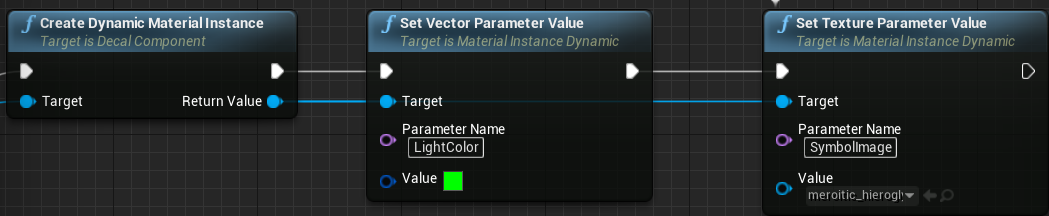
I'm trying to replicate a "decal component" but for some reason it only changes on host. Are you able to change a decal component and everyone see it change in game? https://i.gyazo.com/d98fc9c6b58bff3ff5db89f40135b9dc.png

It's done inside Event Begin Play. I've tried every way I can think of the make it work for clients
cedar finch
I'm getting a random number and then setting the the decal material based on that number.
hollow stirrup
@twin juniper hey so, there are is some stuff built into UE4 that will help you with what you are trying to do. First off, you are going to want to be familiar with the FJsonObject, FJsonValue and IHttpRequest classes. Those will allow you to handle POSTing data to your webserver and making json requests which you will need to do for a auth server.
If you are making a system that needs to handle user verification and then return something like a character list you are 100% going to need to be familiar with these classes plus the rest of the JSON library in the engine. As for the server side of things, PHP is really easy to get up and running. You can easily setup a AWS EC2 instance to work with a AWS RDS database, that can be done in a day. That is what I am currently using for my project, if you need more help setting that up you can ask me about that directly.
But if you don't want to use PHP, you could use asp.net which is a C# library for creating web api's. I'm using it right now because I am also working with Spatial OS so I have to in order to use their Platform SDK, and I really like it so far. It has a lot of great features, their Blazor framework is spot on.
If you are not working with Spatial OS or don't plan on it, PHP would be my recommendation. PDO is nice because of how many database engines it supports. Although I am a little bias towards PHP because of my background.
The FJsonObjectConverter class has everything you need to convert JSON to objects and vice versa
 gusty slate
Hello,
Just a simple thing, let's say I want to get the current client's player controller. How does one do that? without getting to the character.
For example, how do I get the player index? if I want to use GetPlayerController
 thin stratus
PlayerIndex is a LocalPlayer thing. In a network environment you aren't using that (at least usually).
GetPlayerController is relative to who calls it. If you are on Client 1 and you use it, you get Client 1s.
If you are on the Server, you'll get the Server's.
It's advised to retrieve the Controller relative to the Actor you are on, e.g. GetController on the Pawn/Character or GetOwner on the PlayerState.
But keep in mind the PlayerController is only valid on Server and OwningClient
 lean flint
im trying to learn how to assign PlayerStart points when players join a server. ive seen this following method on forums and youtube and it seems to work except for one part. if a player disconnects and then reconnects, the PlayerStart variable that i'm setting in their PlayerState doesn't get reassigned. it gets set on the initial connection though. any ideas what i'm doing wrong here?
 karmic briar
hey guys can u guys help me how to fix this im trying to attach the character to horse but it got rebound https://gyazo.com/e4f45f315b9ba74b0c84bdb9cb5b3e80

here the code https://gyazo.com/3c4e4d2e499d3132cb727c7551488c29

 grizzled stirrup
If you only need basic client authoritative movement and some simple AI movement, would it make sense to write your own very stripped down version of the character movement component, only replicating a basic location, rotation and velocity?
Judging by some tests, CMC is doing all kinds of stuff on tick including sending RPCs like crazy
karmic briar
im not good with c++
karmic briar
ouh
 vivid seal
@grizzled stirrup let me know if you do, I’ve been wanting to dump the CMC for a while, it’s hard to work with for anything complicated
grizzled stirrup
Will do. I think the hardest part to get right is making sure the state continues as you'd expect on clients (landing events trigger when they happen on the clients screen)
But other than that there's a lot of bloat that I don't think I'd need in this case
@chrome bay you mentioned you don't use CMC for your 100 player game, did you write a custom lightweight movement component for your needs?
chrome bay
Nah we do use CMC
dark edge
Is there an easy generalized approach to predicted shooting?
 ancient moth
Hello everyone ! I need some advises for my game. I'm currently on a Code Lyoko game, multiplayer, but I don't know exactly what is the limits of UE4. I would need an global AI acting on 5 maps to manage monsters strategy and objectives. Players can be on 2+ maps at the same time. Questions :
- Can i do this with one permanent map with the 5 area in level streaming ? Can I load only one sublevel for only one player ?
- If not, can I use an AI EQS on different levels at the same time ?
 trim flare
Hello, I ended up here because I'm trying to mod a game but my hands are severely tied by 1) the unofficial SDK we have been given, and 2) my own knowledge of several kinda complex topics.
Basically, we don't have a C++ integrated project, we have placeholder classes where we know some of the functions and variables in use but can only subclass them in BPs as we can't actually change any of the game's C++.
But by subclassing and subleveling existing key classes we thought we were getting somewhere...
So my restrictions rn are basically that anything I want to do has to be 1)entirely through blueprints (I think) and 2) I want to have it execute things on my dedicated server, through my custom level which I make, based on what the client is doing.
in case you were wondering why I want to do this: the devs are a very small team and entirely dropping the ball on supporting our favorite gamemode as well as making the lives of community server hosters easier.
The problem I'm trying to solve rn is:
If admins on my server use certain commands that I want to be able to track and audit, like kicking or banning a player, I want the server to store that in a centralized place. this currently doesn't get logged, it doesn't go anywhere. It's just been wired to store SteamID and remaining ban time in the Game.ini on the server, which is not nearly sufficient - the reason for banning is lost as well as who did it.
Unfortunately I can't replace those commands, but through inserting custom event commands into the level I could make something that logs what they entered into that command, and then executes the arguments as a console command.
I can get that done in a level that sublevels our own custom levels or other existing levels. The problem I'm facing is persisting that information serverside. I can create savegames clientside to store it, or I can use their function to save it to the client's Game.ini file, but I want it to be collected and saved serverside!
So basically, I want any call of the custom event in my level BP to be replicated serverside, and the String var I store the rolling ban command log appender in should be appended to the existing log serverside and stored. I have this working clientside, my problem is getting the server to accept my changed vars and execute the command that was triggered.
reading up on UE networking, I read that the only method calls that are replicated serverside are of the PlayerController class. Is this true? I tried to make my CE dispatch the event from my Level bp to a subclass of PlayerController and trigger the save from there... no dice or I did something wrong.
Does this approach even make sense?
(I made a subclass of the existing GameMode and PlayerController and set them as my world settings of my custom Level)
basically I'm trying to offer custom console commands that do what I want and allow me to do stuff serverside on my own dedicated server without being able to change the CPP or the original game's GameMode orPlayerController classes..
If someone could help me wrap my head around what I'm doing (am java dev, visual programming hurts, this isn't the kind of networking I know) I would be most grateful!
thin stratus
Well the LevelBlueprint isn't replicated afaik
And even if it is, it isn't owned by any client I assume, so ServerRPC won't work there.
You are required to call ServerRPC through a client owned actor, such as PlayerController, PlayerState or PlayerCharacter
@trim flare
trim flare
ok so that part I got correct?
or well, I read correctly that the client's actions in the level BP can't be replicated. but I could make it fire an event dispatcher that's being listened for in the PlayerController subclass and get that replicated to server?
I'm new to UE and one of the things that bothers me is so much stuff is hidden on the UI that's essential to get things done... only just discovered where the option to set variables to replicate is hidden :/
that aside, what I read here suggested that it was possible to have my stuff replicated serverside through using PlayerController, but then I think PlayerController may not have the authority to create a savegame serverside? that wasn't something they were trying to do... https://forums.unrealengine.com/development-discussion/blueprint-visual-scripting/30639-problem-with-client-server-custom-event
Unreal Engine Forums
Build powerful visual scripts without code.
 ivory lintel
Guys...we can't replicate a array variable(of a custom structure) from server to clients???
 rancid barn
You can
There could me a ton of things preventing it from working, but what comes to mind is making sure everything is UPROPERTY and that it is a properly set up USTRUCT
ivory lintel
i tryiing to create a array of custom struct in my actor component
and a every tick...the server flipflop a especific value to true and false
and client try to print on scren
screen*
using BP
trim flare
@rancid barn could you tell me something more about that? if I just add an extra var to a child BP of a playercontroller can I get it replicated?
ivory lintel
in tick event to test
 azure grove
If you're setting up a listenserver that other clients can connect to, would they all work the same as on steam?
ivory lintel
I notice that are irregular replication...the server changes value a each frame and the client take irregular time to get the new value
azure grove
I'm not sure if I should be watching tutorials on steam specific multiplayer or just multiplayer in general
ivory lintel
ivory lintel
objects can be replicated in ue4???
or just actors?
I can construct a object in BP and replicate him?
 copper grove
what kind of object?
winged badger
(they can be constructed in BP, but they need to be referenced from c++ and ReplicateSubobjects can't be overriden from BP)
ivory lintel
dammit
winged badger
BP networking is pretty limited
winged badger
bool UAttributeComponent::ReplicateSubobjects(class UActorChannel *Channel, class FOutBunch *Bunch, FReplicationFlags *RepFlags)
{
    bool WroteSomething = Super::ReplicateSubobjects(Channel, Bunch, RepFlags);

    for (USolsticeBuffBase* Buff : ReplicatedBuffs)
    {
        if (IsValid(Buff) && Buff->IsReplicated())
        {
            WroteSomething |= Channel->ReplicateSubobject(Buff, *Bunch, *RepFlags);
        }
    }
    return WroteSomething;
}

void UAttributeComponent::PreReplication(IRepChangedPropertyTracker & ChangedPropertyTracker)
{
    Super::PreReplication(ChangedPropertyTracker);

    for (USolsticeBuffBase* Buff : ReplicatedBuffs)
    {
        if (IsValid(Buff) && IsValid(GetOwner()))
        {
            Buff->PreReplication(ChangedPropertyTracker);
        }
    }
}
bool USolsticeBuffBase::IsSupportedForNetworking() const
{
    return IsReplicated() || Super::IsSupportedForNetworking();
}
there are 2 more functions to override if you want to send RPCs through
bool USolsticeBuffBase::CallRemoteFunction(UFunction* Function, void* Parameters, struct FOutParmRec* OutParms, FFrame* Stack)
{
    AActor* MyOwner = GetActorOwner();
    if (MyOwner)
    {
        UNetDriver* NetDriver = MyOwner->GetNetDriver();
        if (NetDriver)
        {
            NetDriver->ProcessRemoteFunction(MyOwner, Function, Parameters, OutParms, Stack, this);
            return true;
        }
    }
    return false;
}

int32 USolsticeBuffBase::GetFunctionCallspace(UFunction* Function, void* Parameters, FFrame* Stack)
{
    AActor* MyOwner = GetActorOwner();
    return MyOwner ? MyOwner->GetFunctionCallspace(Function, Parameters, Stack) : FunctionCallspace::Local;
}
void USolsticeBuffBase::PreReplication(IRepChangedPropertyTracker & ChangedPropertyTracker)
{
    UBlueprintGeneratedClass* BPClass = Cast<UBlueprintGeneratedClass>(GetClass());
    if (BPClass != NULL)
    {
        BPClass->InstancePreReplication(this, ChangedPropertyTracker);
    }
}
note this code is ActorComponent replicating Subobjects
not the Actor
its largely similar, and doing it via Actor is not subject to one of Unreal's landmines
ivory lintel
a wanna to create a single object that will be construct inside a actor component in BP
this objects will be my ability class
winged badger
buff here is a replicated UObject, IsReplicated just returns a boolean defined inside the class
AttributeComponent is an ActorComponent replicating it
landmine i mentioned is when Unreal replicates a UObject with something other then Actor as the Outer, it will swap the Outer on clients to the Actor whose channel has been used for replication
ivory lintel
i'm trying to avoid c++ at this moment... because have low experience with source code
winged badger
in my opinion, avoiding c++ and doing networking in BP is just not worth it
ivory lintel
this system it's for dummies like me only with bp...i will try to sell in marketplace at future
winged badger
to make a useful plugin for marketplace in BP, you really need c++ as well
ivory lintel
I'm not making a plugin...it's just a project
I getting a good results with objects class but, need to replicate information with multicast from server all time
if change a simple value inside object like a bool...need to change this with multicast
winged badger
multicast from server all the time is usually an indicator you're doing something wrong
hollow stirrup
There are ways to update a single variable on every client without using multicasts
Multicasts should be avoided unless you have to use one, or the use of one would not impact the performance of the game in anyway.
winged badger
multicasts are good only for non-stateful changes
ivory lintel
yea...
hate objects that are not replicated
what my option to create a object inside a actor component?
existe any other parent class that don't need to spawn in world to exist?
maybe this?
something like this
winged badger
that exists in the world, it is an actor
ivory lintel
existe any class that is replicate but don't have physical representation in the world???
winged badger
on their own, only actors can replicate
ivory lintel
i can create a actor without spawn this in the world?
winged badger
no
ivory lintel
I can have one actor component inside other actor component?
winged badger
you can't have an actor component on an actor component
ivory lintel
i need to create a replicated array of objets
winged badger
maybe you do, you haven't presented why
ivory lintel
I want to modifier a variable inside a object of array and this replicate to clients
winged badger
i gave you the code that works, has been tested and hasn't had problems for over a year
ivory lintel
yes...i will try to use this code later...need to understand because i want a simple object...not a component as you show
ivory lintel
i really appreciate you help but need to solve this problem with tools that I know
winged badger
solution to that conondrum is expand the array of tools you know
ivory lintel
if need to use c++...gameplay abilities framework is good...but don't domminate c++ at point to use
ancient moth
Hello everyone ! I need some advises for my game. I'm currently on a Code Lyoko game, multiplayer, but I don't know exactly what is the limits of UE4. I would need an global AI acting on 5 maps to manage monsters strategy and objectives. Players can be on 2+ maps at the same time. Questions :
- Can i do this with one permanent map with the 5 area in level streaming ? Can I load only one sublevel for only one player ?
- If not, can I use an AI EQS on different levels at the same time ?
winged badger
EQS and entire AI runs server side only
so it would have to have all levels loaded at the same time, or at least all levels relevant to any pf the players
ancient moth
The server can't be on 2 levels at the same time right ?
cedar finch
Can decal components be replicated in-game when you dynamically change their texture parameter? If so how?
winged badger
nothing can, but you can stream in sublevels
cedar finch
Wait. I got it! lol
winged badger
changing a texture of a decal sounds suspect to me
but it can be done by replicating the shader parameters
cedar finch
I just had a decal component in these actors I have on the walls. I wanted them to be random decals everytime you play the game. So I just set the texture parameter and color vector parameter. I finally got it replicating by getting the random INT on server and then setting the decal parameters in a multicast.
https://i.gyazo.com/dbe023af47178340fc8d3ed4e282db20.png

 winged badger
and is there any point in keeping those synced?
cedar finch
So that all players see the correct decal image and color
It's only set once at the start of the game
winged badger
if it has no gameplay effect
there is no point replicating it
not like they'll contrast and compare
cedar finch
It's a puzzle though so people will need to know
They'll have to tell each other what symbols are what etc.
winged badger
then you replicate them as integers
or bytes
you just need a mapping from a byte to decal material/texture
that you kidna need anyway if its relevant to a puzzle
cedar finch
I forgot about that. lol I did it the long way using a switch on int 😐
ancient moth
Sorry to annoy you again @winged badger , if I have 2 sublevels A and B, I can load only A on player1, load only B on player2 and load A and B on server ?
winged badger
that should be doable yes
ancient moth
Excellent, thanks you 🙂
winged badger
i am sure unreal has few landmines waiting for you along the way
like the one where always loaded streaming levels can break after seamless travel
ancient moth
Coooool...!
cedar finch
@winged badger Thanks for the help. I did what you said and added them into a mapping and repnotify the int selected so everyone can see it. 🙂
ancient moth
I will see this when this fucking node "load stream level" will decide to work... 😅
deft ocean
How do you guys implement a 2 player vehicle where both players have distinct controls (pilot/gunner)? Is making my vehicle into two attached pawns the way to go or create separate interfaces for pilot/gunner? What is a good practice for possessing multi-player multiplayer vehicles?
deft ocean
thats what i was thinking, but i dunno it seemed kinda hacky haha
so my vehicle class could have sockets for spawning turret pawns
winged badger
routing the input is tricky otherwise
especially if your players can walk around as humans when not in vehicle
deft ocean
well imma try it out, thanks mate
winged badger
this lets you encapsulate input on the pawn
so your humanoid character, vehicle pilot and gunner can interpret same input action in vastly different ways
the turret itself doesn't have to be a Pawn physically
you can have a separate Pawn with no shape whatsoever that just forwards the input controls to whatever the turret is (actor, static/skeletal mesh)
you would still have to attach it to the vehicle to be able to query location and calculate net culling
 long gale
I'm confused about dedicated server structure. Right now my suspicion (based on how setting things up in UE feels) is that .. say I have a game where many different maps load on the client - they need to be connected to the server controlling the correct map. Should I be spawning a separate exe for each map on the server? Does that also mean I should have an independent server for login/auth/etc that doesn't necessarily even get made in UE? Or is it meant to be a single executable for the server than can handle all of those aspects together
winged badger
one instance of the game = 1 map
long gale
ok cool, thanks 👍
deft ocean
@winged badger thanks thats exactly what i want. My vehicle is component based so I think I can use separate pawn with just those turret components.
 steady briar
so on a similar note to that... i am trying to work on a stationary turret that the player can control. i figured id make the turret a pawn and possess it. not sure the best way to replicate the turrets aim though. ive been using the camera's view and lerping the turret to that rotation, so its not just point and click... but im not sure if theres any kind of replicated variable i could be using, because it only works on the owning client (so it never moves and always shoots in the default direction). any thoughts?
azure grove
Is it possible to create a decent multiplayer game where you can pick up objects and interact with open door events, etc. Using only blueprints?
I was watching a tutorial where the guy said if something doesn't replicate properly in BP over the network, the game will just crash for the clients/server.
I'm speaking about a Listen-Client type of multiplayer game btw.
 pallid mesa
This concerns the core gameplay framework, get hooked to the conversation since this could "break/make work" lots of current systems https://github.com/EpicGames/UnrealEngine/pull/6576
grizzled stirrup
If you need to spawn lots of small value but unique pickups such as coins or ammo when killing an enemy, is the best way to go to spawn a barebones replicated actor with a net update frequency of 1 (as once it's spawned it doesn't change, the value and location is set)?
Say if it was possible for 500 or more of these actors to be active at once / in a short space of time
grizzled stirrup
At least visually yes (the magnetic effect you sometimes see in games with each stack of coins giving a new amount)
I could lump them together but even so if a group of 20 enemies all got blown up at once, they might all still drop 20 ammo and coins
Which is 40 unique actors
chrome bay
I guess having one actor, and an array that uses FFastArraySerializer might be quicker way to go, but only if the struct has the bare minimum of data
If you wanted to group them together that could work well.
grizzled stirrup
So the array would handle the sub stacks? and the actor would manage a bunch of coins at once?
chrome bay
Yeah
grizzled stirrup
Nice idea thanks I'll try that out
chrome bay
The key would be to keep the struct in FFastArraySerializer very small
I.e. just a location, count and ID or something
grizzled stirrup
Will probably raise the net update freq to about 10 then as the stacks would need to be updated for other players
Yeah would use FVector_NetQuantize for the loc, simple int32 (or even uint8 for the value) and then uint8 for ID
chrome bay
Honestly I'd keep it at one and just hit ForceNetUpdate() when someone picks something up
grizzled stirrup
Is there any downside to doing that? I feel like I could do that with a lot of my actors
No need to have them updating constantly
When they only need to update when something happens
chrome bay
So long as you aren't calling ForceNetUpdate() so often that suddenly every actor wants to send network updates each frame you should be fine 😄
I used it quite often though, no issues so far
grizzled stirrup
At the most I'd need to call it a few times a second
chrome bay
Just stops the server chugging over loads of actors which aren't doing anything
grizzled stirrup
Yeah that's a great idea
chrome bay
Just don't use Net Dormancy with it
As waking an actor from Dormancy sends all of it's properties again even if they haven't changed
And with an array that could quickly eat through the bandwidth
grizzled stirrup
I think I have most actors always relevant since my maps are quite small so it should be ok in this case, but good to know I'll make sure to look out for it
Did some fun research on barebones synced movement instead of the CMC yesterday, the bandwidth reduction is huge
I'm just missing simulating the CMC locally though
For the landing events
chrome bay
Just bear in mind that each time you update the FFastArraySerializerItem, the entire struct is sent - so even if the location doesn't change, that will be sent too
I.e. might be a case of premature optimization.. would have to test out using actors vs a combined actor to see which is really better
grizzled stirrup
Ok thank you, I've never used that type before so I'll have to research how it works
 hushed loom
there is a possibility to implement voice chat even without Steam
trim flare
is there a way to have simple vars or other values attached to a child BP of an existing PlayerController object, become replicated to the server?
I'm restricted to using BPs because I'm modding an existing game but we have an unofficial SDK
What kind of vars or properties could I potentially (replicate? repnotify?) to the server?
chrome bay
Replication is always Server->Client never the other way around
If you want the Server to change something that all clients will see, the client has to send a Server RPC to change a replicated property.
trim flare
then how does a user submit input if the server doesn't accept it
I don't need it replicated to all clients, just the server's copy of my PlayerControllerChild, then I can work from there (hopefully)
chrome bay
If a client wants to send data to the server it has to be done via RPC
Whether it's for other clients etc. or no
trim flare
pretend I don't know c++ and I just told you I'm limited to using BPs
chrome bay
It's the same principle, you create a 'Run On Server' event in the BP
And call that to send data to the server
trim flare
and the only BP type the server accepts such changes from are PlayerControllers, if I read that correctly?
chrome bay
One key point though, is that the Client must be the "Owner" of the Blueprint calling that event. Otherwise the RPC will be rejected.
The Server will accept the RPC from anything the Client "Owns", which by default is the Player Controller, Player State and the Pawn they currently possess.
trim flare
ok, well here's what I'm trying to achieve atm
chrome bay
I'd suggest checking out the Network Compendium, it's a good starting point:
http://cedric-neukirchen.net/Downloads/Compendium/UE4_Network_Compendium_by_Cedric_eXi_Neukirchen.pdf
trim flare
the game I'm trying to mod, we can run our own Level BPs on, I want to bake in a Custom Event used through the console, the only place I can get that to show up in game is if it's in the level bp
so that would have to dispatch the UserUsedTheCustomEvent to my PlayerControllerChild, along with the value that was passed
then the PlayerControllerChild would replicate that value (just a String) to the server
then based on receiving a changed value I want the server to log that value
which may require pumping it back to the level BP to get access to a savegame functionality or a save-to-config-ini command implemented by the devs
is this path even possible? let alone if specifically I could get this to work
thanks in advance anyway for your answer @chrome bay
I shall give that a read, but could you give me a heads up if I'm pursuing a path that's even worth pursuing? 🙂
twin juniper
Gmod has an addon that gives players prop protection so only they can move their own, I think it bases ownership on steamid, can I do this in unreal without steam, or would I need steam?
twin juniper
if they leave the server
thin stratus
Then you need at least something with an account in the background
Cause you can't uniquely identify the player otherwise
twin juniper
well I guess I will just put it off then for later lol, I tried getting steam to work but failed miserably.
thin stratus
Alright
twin juniper
unless anyone happens to know any barebone tutorial for getting steam working. and players connecting/disconnecting
thin stratus
For just listen server it is already pretty barebone
Given you have your own steamappID to avoid any problems
DedicatedServers are more tricky. Never fully went through the process myself
twin juniper
well its gonna be dedicated hah... oh well
long gale
So I'm working with a group of people, and I'm setting up a dedicated server. I've grabbed UE source, built my server target. The problem, however, is that now it seems everyone else in the group needs the use UE source in order to work with the project. Can't connect from normal UE editor to the built server, and opening with source UE has changed the version it defaults to. This feels very suboptimal... is there a better approach here? I'd like to have normal UE work with the dedicated server build as well.
thin stratus
Well either you all use the same version, or if there are no engine changes, one of you builds both client and server
You shouldn't connect with the editor to a packaged server anyway
Bigger groups usually have a build server for that
long gale
"You shouldn't connect with the editor to a packaged server anyway" so the only way i'll ever be able to connect to a server from the editor is by launching in server mode using the editor?
that sounds rather painful considering if I want to quickly trial something with getting a number of people connected, and if that doesn't make sense to host on my dev machine... now i have to install the editor onto a remote machine to run it
limber gyro
guys, i am having a server crash with a server log that doesnt say much, any tips on debugging issues like that?
 sly arch
Is there a way to store players inventory over an sql server hosted at home?
limber gyro
yes there is, the same way you store it in a remote server i think
limber gyro
databases are not really my thing, but i assume sqlite world be the ideal for a small home database
but its up to you
just install whatever you feel more confortable with and make a connection
twin juniper
ignore my question, stupid me forget to tick replicates
sly arch
Well my plan is to get VM's and host it from there. It would be a multiplayer game so would sqlite be good enough?
long gale
I'd recommend postgresql over sqlite
sly arch
Will that save over a file on local computer or online?
long gale
It's a full databases. You can connect to it and make changes to data from any remote computer with access to it
Not through a single file though. That part is what sqlite is strong at is being portable
long gale
Sqlite lacks some generic features (there are ways to handle it) that I just don't prefer to lose personally. And for something like a game server I wouldn't think you'd need portability
sly arch
Right
long gale
Postgres can easily dump the data to transfer to another location
sly arch

PostgreSQL Integration is a Plugin that lets you connect your UE4 projects with PostgreSQL Server. Easily execute queries from Blueprints to store and retrieve data from your database.
is this what you use?
long gale
I haven't used any databases yet with UE
My background is web servers
Moving to game Dev lately
long gale
Looks like that plugin supports writing queries as strings so you can write any command you want to the server. If you do it with c++ though you won't need to buy a plugin
long gale
Maybe
twin juniper
for 10$ could be a timer saver if you are new. good info though, I wasn't sure what SQL to use. 10$ for a noob like is a timer saver
limber gyro
Guys, my server is crashing when a player alt f4's any 1 has any idea on how to fix this?
long gale
The reason I say maybe is it depends on how versatile the blueprint nodes are. SQL data being worked with in object oriented manner can be problematic at times. The two don't always work together well
sly arch
Is it a dedicated server @limber gyro
limber gyro
yes
sly arch
Being hosted on the same pc as the player clicking alt f4?
limber gyro
no
sly arch
pc*
limber gyro
server is my pc
players are my friends in theyr respective houses
just testing stuff
sly arch
Oh. That's odd. lol Let me test on mine. I wonder if its an unreal bug
limber gyro
im doing some stuff on "logout" so it might be a crash from there
im just wondering if it could be some sort of option
sly arch
Is there an error code in the console? I messed up my database so I can't try it
limber gyro
theres an error in the log
sly arch
Which is?
sly arch
sly arch
Its in package settings
Which is the same if you build it with exe
Maybe not lol. I was looking at "local multiplayer"
limber gyro
Does any 1 know if "postlogin" is called again if a player recconects or if its only called once at the first sucessfull login?
Is there a way to debug a disconnect when you are in the editor at all?
chrome bay
@limber gyro it's called everytime
limber gyro
ty
limber gyro
Is there a proper place by design that i should be setting the players team?
if i call it on post login its gonna call it on a recconect and erase the previous team selection
im looking to make it like LoL or CS:GO ranked where the team is only set once
adn then the player state holds it for a recconect
 timid moss
I would say game mode. Pretty sure you can just cache the team the player is on in the game mode by associating their playerstate's playername variable with the team they are on. That way when they leave and reconnect you can do a check in postlogin that sees if the player was already assigned a team and if yea, then just assign them that team.
But then again a lot of online games don't remember what team you are on if you rejoin a game, because of autobalanceing (having same amount of players on each team). Not sure how your game works but in my opinion if they leave the server and then rejoin it's kind of their fault and i wouldn't bother trying to put them on the same team they were on before. Lots of games do it this way like team fortress 2
winged badger
@limber gyro HandleStartingNewPlayer override is what i'd recommend
PlayerStates persist through disconnects for up to 5 minutes by default
twin juniper
Can change the time? Was looking for something like this
limber gyro
@timid moss im trying to do ranked match making so rebalancing is not an option unfortunately
@winged badger i will check it ou
out''
@winged badger by the way how do i make the player state stay indefinetly?
other question, say player X connects, than disconects and 30 seconds later i get its player state from the controller in the postLogin function, will it return the same game state or a new one?
limber gyro
also i cant find anything usefull on HandleStartingNewPlayer, does this function only run once for each new player? does it not run on reconnects?
 half gust
Does anyone know why the dedicated server online stops working at 4.19? https://wiki.unrealengine.com/Dedicated_Server_Guide_Steam
limber gyro
ttry this
Content Visual Studio Download Set up Solution PsAllocator Build and Launch (client) Server Cooking Launching Joining Build Times Summary Use Visual Studio 2017, Visual Studio 2019 solution is mess…
oh might not, work u need it for steam
grizzled stirrup
Is it equal to have a replicated AActor* as it is to have a replicated int32 in terms of bandwidth? Both are 4 bytes right?
hexed merlin
The actor replication doesnt just copy the pointer, since the two actors are completely separate in reality, so the engine will (likely) do some behind the scenes stuff to correlate the two properly
in terms of bandwith, i dont know, might be just a pointer
or an id or whatevs
bitter oriole
@grizzled stirrup Pointers are 8 bytes on 64b
But pointers aren't replicated directly
grizzled stirrup
The IDs replicated are 4 bytes right?
Heard that around somewhere
Might be easier to just use a uint8 in this specific case ( I have a pickup that has a "PickedUp" state that needs to sync but previously other clients needed to know who picked it up hence the replicated AActor*)
But I don't need that anymore so can just probably do the cheapest thing possible which is a replicated uint8 OnRep function
Or replicated bool rather (uint8 = bool right?)
limber gyro
Guys i really need some help on this, my server is crashing anytime a player does alt+f4, is there any way to simulate this on the editor?
 modern bone
I added support for Steam into Multiplayer but when it opens the level, they get sent back to the main menu, how do i fix this?
limber gyro
check their logs to get a clue on whats happening
modern bone
where do i find the log?
limber gyro
urproject/saved/logs
modern bone
im not sure what any of this means ._.
twin juniper
What is a good networking solution for a FPS?
It seems like p2p is the cheapest but would require host migration
hollow stirrup
Unreal doesn't support p2p out of the box, that would require a lot of custom implementation.
Out of the box Unreal supports dedicated and listen. The best would be to do dedicated, and depending on how large scale your game is you might want to provide a custom Replication Graph (although it wouldn't be required, just recommended)
limber gyro
@modern bone u gotta find the part where u try to connect and get sent back, are you sure you are experienced enough to handle multiplayer?
modern bone
it works when steam is closed but when steams open it send back to the menu.
limber gyro
it looks to me that somethign is wrong in the way that you set up steam
modern bone
i think i may have forgot a file to code, ill let you know within 30 minutes
limber gyro
its complaining about broadcasting so i am assuming steam is not letting your players know that a server to connect exists
modern bone
well how would i fix it?
limber gyro
no idea dude, i havent done steam integration yet and i dont plan to haha
maybe you followed an old tutorial with missing steps
twin juniper
@hollow stirrup what is unreal engines default networking, is it not p2p?
hollow stirrup
@twin juniper client/server model
twin juniper
It’s going to be a 16 player multiplayer game, and games will last 15-20 mins
So kinda fast paced
hollow stirrup
You are going to want dedicated servers in that case
twin juniper
But I did the math and it’s like 64 servers for 1k people right?
limber gyro
true, my localy hosted minecraft server would lag with 4 players hahaha
hollow stirrup
What. Each server instance would be hosting their own session that the clients connect to. A single physical server (depending on the specs) could run two or three different server instances without any trouble.
limber gyro
hes propably talking about sessions
hollow stirrup
Even still, don't know where he got those numbers
hollow stirrup
Yeah, I got that.
limber gyro
thats how he got that number lol
hollow stirrup
I meant, I don't know why that is a problem. That's literally how dedicated servers work, the more players you have the more servers you need
That's a no brainer
limber gyro
@hollow stirrup do you happen to know how to debug a shipped server?
twin juniper
Well let’s just say a oc i7 from ovh is 120 how many instances do you think can run off the one dedo
limber gyro
it probably has more to do with your internet connection
hollow stirrup
Depends on your game and how well you developed it @twin juniper
twin juniper
Gotcha, guess it depends on how many messages are being sent to server
limber gyro
i dont think server are particularly heavy computation wise, unless your running world generation or some other weird stuff
hollow stirrup
You are not asking the right kind of questions
Asking how many instances can run on x hardware is a open ended question that no can answer expect you
hollow stirrup
bruh, I wasn't being rude. I'm telling you that in order for you get the most help you have to ask the right questions
limber gyro
Rude? is this twitter?
twin juniper
Has anyone heard anything good of photon?
limber gyro
whats that
twin juniper
It was a popular solution in unity
Saw they had unreal support
But don’t know how efficient there networking is, doesn’t seem like many ue users know about it
hollow stirrup
@twin juniper https://improbable.io/spatialos

Improbable
SpatialOS is a cloud development platform that provides networking, hosting, online services, and tools for developing and operating online multiplayer games, using any engine. It enables you to build and test early and efficiently, and transform gameplay at any stage, so th...
twin juniper
Unrelated side comment, I personally met some of the people working at Improbable/SpatialOS here in Guangzhou, good people 🙂
Dang ok, thanks @hollow stirrup
this is what I was looking for, paying only for what you need
hollow stirrup
Just have to ask the right questions
twin juniper
Damn spatial os supports so much
hollow stirrup
Yeah, I've been using it for a while. It's pretty fantastic
Takes a bit to setup, but once it's running it works really well
twin juniper
It has matchmaking and stat saving which is what i needed lol
hollow stirrup
It has full support for the gameplay ability system too
twin juniper
wym
hollow stirrup
GAS is a plugin in UE4 that adds support for RPG/MMO style stats and abilities. They used it in Paragon and are currently using it in Fortnite

GitHub
My understanding of Unreal Engine 4's GameplayAbilitySystem plugin with a simple multiplayer sample project. - tranek/GASDocumentation
twin juniper
oh gotcha
twin juniper
So if there are no players on my servers using spatialos, I dont pay anything?
 urban dew
how can I make it so when a player leaves the server, it saves their location, and upon rejoining, will start at that location, and on that note, if the servers shuts down, it needs to save these details in a text file or something?
twin juniper
Onpostlogin / something like that probably, youd probably want a database to store the files
twin juniper
No I am pretty sure spatial os is just cloud servers, not database, I mean like SQL
if its stored in a txt on a server, player cant change their location, if its on their computer, they can change the location they spwan
 wet oriole
Hello guys,
I set the SessionSettings.NumPublicConnections to X and after finding sessions I can see the maximum number of connection, but after server travel in the game mode when I try to read that number from GameSession->MaxPlayers that shows 16 not the X amount i set in the session setting.
I can read that property using the session interface but I want to know why GameSession is not update in the game mode?
 rich ridge
@twin juniper don't use spatialos. Please @hollow stirrup don't recommend this solution. If you do recommend this solution first ask the person whether he is son of Bill Gates or not.
Spatial os themselves say that they are damm costlier than other solutions.
bitter oriole
Not to mention SpatialOS isn't a get-out-of-jail-free card either for all multiplayer problems
rich ridge
@twin juniper if you use really high end server with 64 core CPU and 196 GB RAM, then you would basically host your all 1K players to one server.
16 player match means one session , not one actual server
You can have 32 players playing on single cloud server.
It's you who will have to design the solution for this.
twin juniper
@rich ridge hi, where is the 32 players hard limit coming from? I'm curious, I really don't know.
chrome bay
There is no hard limit
We have 100
In theory you could set it to 200 and 200 players will be able to connect
twin juniper
I have a background in systems engineering, including cloud, that's why I was wondering 🙂
chrome bay
What the experience would be however... I can't say 😄
bitter oriole
It's more that 200 players start being quite a problem
chrome bay
I would also say it would be utterly pointless investing time and money into Spatial OS when there's a good chance you won't be able to get enough concurrent players to make it worthwhile anyway
Multiplayer indie games in the 2020's ppl
twin juniper
A few years back in my day job I was working in a data center with very high end servers, not related to the gaming industry. But I've seen some really high specs on server hardware
I was just curious if the concurrency limit is software or hardware based
I'm hearing is hardware-based, based on previous statements above, correct?
I mean, this is my interpretation from the previous comments above, that the software does not come with a built in limit
and it's up to whoever designs the multiplayer solution to come up with a load-balancing farm solution, right?
bitter oriole
The biggest issue is that 200 players on your client isn't manageable
Even a small rate of update start being problematic, and if these are animated characters, the performance is going to be a nightmare
chrome bay
Yeah definitely. Maybe 200 spheres
twin juniper
Of course, I understand. I was just interested in hardware versus software limitation. I totally understand that five concurrent users hardware demands are significantly less than 200 concurrent users
five concurrent users may be able to be accommodated on one physical or cloud server
whereas it's all like 200 concurrent users can do the same on one physical or cloud server
but an elegant load-balancing solution at the front end can solve the concurrency problem, right?
chrome bay
I'm no expert on the subject at all, but from what little I know about our situation we have third-parties that players rent servers from. The same physical box may host multiple server instances all configured for 100 players. My guess is they have their own software that manages load balancing etc since that's more of a server-hosts responsibility than a game engine one IMO
twin juniper
My Systems engineering background Agrees with you 😄
rich ridge
@twin juniper I said you can have 32 players. If you use more powerful server you can increase the limit
twin juniper
No problem, meanwhile we had a lengthy conversation about this 🙂
chrome bay
You'd be surprised how much you can get away with even on not-mega-spec machine when you restrict the server rate etc. enough
Some of UE4's default server/networking settings are... questionable
But my guess is they expect people to just want stuff working more reliably at first before they start squeezing things down
twin juniper
I'm not too concerned about the default networking settings, OSI model is universal 🙂
chrome bay
Oh I'm talking more about the game-level settings, actor update rates etc.
twin juniper
ah, I see
rich ridge
The main bottleneck is with the protocol used in UE4. They all are deprecated now.
All the latest development is being done in new protocols like quic protocol, grpc
twin juniper
What do you mean?which protocols in particular?
chrome bay
Everything game-level is UDP in UE4
rich ridge
@chrome bayyes they all are deprecated
Let's assume your game is for mobile and your player switched from mobile network to WiFi
Does these protocol support fast switching
With needing again handshake
chrome bay
Aren't both quic and grpc both basically the same as TCP though? I.e, they ensure reliability of data transfer?
I can't see that being faster than UDP
twin juniper
Yeah, it's possible there's some misunderstanding, I think like an IT engineer, and TCP/UDP is layer 4
rich ridge
@chrome bay yes TCP don't support network switching
twin juniper
gRPC uses layer 4
bitter oriole
UE4 is all UDP with some logic on top
twin juniper
Again, I apologize, but my IT background doesn't understand what you mean by network switching, which to me is L2/L3
depending if you need routing or not
rich ridge
Network switching means from mobile network to WiFi network
And I don't want my gameplay to be affected by this switching
twin juniper
I probably need to get familiar with the concepts as used by unreal 🙂
I am too used with the concepts as I learned them many years ago
The way I see HTTP in my mind eye: L7 piggybacking on L4/TPC, routed via L3 😄
rich ridge
@twin juniper http is half duplex
twin juniper
in English: application transported and routed 🙂
rich ridge
You can't use http for multiplayer
rich ridge
And TCP and UDP drains more battery as compared to quic or grpc
twin juniper
This is such an unexpected statement, based on my former training... I don't know where to put the = sign...
Because there is TCP/UDP w/o gRPC, But there is no gRPC w/o TCP/UDP
rich ridge
@twin juniper whatever you learnt from books doesn't always apply in real world
rich ridge
All the apps by Google uses quic and grpc
This is what makes Google apps to be a standard for everyone
twin juniper
I understand what you are saying of course, But this is my problem: there is TCP/UDP w/o gRPC, But there is no gRPC w/o TCP/UDP
rich ridge
I didn't understand
jolly siren
Does anyone know what could cause a certain player to not be able to connect to a dedicated server within the 60 second timeout? It happens fairly consistently with one user. This user has fast internet speeds and good computer specs. So I'm not sure what could be going on here. The dedicated server is within their region as well.
twin juniper
@jolly siren At the hardware level, can be routing or firewall or something like that
because if all the infrastructure is ready before the application layer kicks in, there is no reason why it shouldn't work...
Have your user do a simple test : telnet IP Port from their local machine In the command line of their OS, Be that Windows or Mac or android or whatever
If it works, it should work in less than 200 ms
winged badger
agreed, its most likely a routing issue on the hardware that is not under your control
twin juniper
if telnet fails, try a ping and/or a trace route
As the background explanation of possible reasons, I'm currently behind the great firewall of China, and without VPN ping/icmp/dns/etc all give random false results, because the backbone of the Chinese routing infrastructure messes with any request on the other side of the firewall 😄
And usually simply stopping packets to cross the BGP 😄
jolly siren
This is a player in the united states. But I was thinking the same, that it was routing issues on the players end
ivory lintel
morning guys
twin juniper
@jolly siren It's still a good idea to go through some of those troubleshooting steps I mentioned, maybe you get a hint of where the problem is
late night here in China 😄 @ivory lintel
I'm from the future
twin juniper
I apologize, NDA about an answer
ivory lintel
WTF kkkkkkkk
twin juniper
read it as you want, but don't think too much about it 🙂
ivory lintel
well...about ue4
i'm trying to reach some results like:
https://www.youtube.com/watch?v=JElyHh_CwPg
in my project...the difference is the multiplayer

Late Upload :) sorry I'm a bit busy for my exam, this coming August 4 but here i drop a video for a new progress for RPG Metanoia Chronicles (Untitled Game)
Added 3 Different Weapon Combo for Air Attack but still in progress.
○ Great Sword/Hammer
○ Sword and Shield
○ D...
already get some results with launch character node
but i don't think that him use launch character because is pretty different in the air combo
someone have any tip of how get better results like WIP above?
maybe him uses set movement mode to flying when in aerial combo in the target
maybe setting gravity when in the combo???
thin stratus
Quick sanity check. The Role of a replicated actor that has the PlayerController of a Client as Owner is?
ROLE_SimulatedProxy or ROLE_AutonomousProxy ?
bitter oriole
No relation
bitter oriole
Replicated, server-spawned actors on a client should always have SimulatedProxy, except Pawn
Owning or not
thin stratus
So a Weapon owned by the player and used by the Pawn, under no circumenstances, would be ROLE_AutonomousProxy
bitter oriole
I don't think so, unless the weapon class goes out of its way to do it
thin stratus
Right, good. Then GAS really doesn't allow prediction outside of the pawn.
sad story
thin stratus
Yeah you do for GAS. They check the owner role of the GASComponent.
And if that's not Autonomous it won't proceed.
bitter oriole
Well you can just set it yourself then
Again, it's just a value
I've never used GAS so I'm unfamiliar with this
thin stratus
Let's say I do set it to ROLE_AutonomousProxy on the owning Client's version of the Weapon, wouldn't that break stuff?
bitter oriole
I don't think so. For instance, if you use GameModeBase, no class will even use ROLE_AutonomousProxy
Except PC I think
Which makes no sense anyway because PC is either locally owned, or authority
twin juniper
Multiplayer programming IQ is about 9999 in this server right now, two* of the best knowledged multiplayer programmers having a discussion lol
bitter oriole
Nah, I don't know much about multiplayer really
I'm just saying ROLE_AutonomousProxy isn't used a whole lot in the entire engine, it has maybe 10 occurrences, so I don't think a lot of behavior is baked into it
bitter oriole
@chrome bay AFAIK nothing prevents you from using it, though, right ?
bitter oriole
Right, that was my thinking