#multiplayer
1 messages · Page 379 of 1
 winged badger
 twin juniper
@winged badger You know any way to optimize replicated variables
winged badger
replicate only what you need to, calculate other stuff during OnRep ?
avoid replicating Strings if you know the list of possibilities at compile time
don't replicate stuff more freqently then human eye can notice
replicating enums is your friend, only 1 byte
 merry pebble
Okay so i just want my game to be Co-op... Where do i start and how do i do this?
Any help would be great, please DM
winged badger
read the pinned resources in this channel
merry pebble
Okay thnks m8
merry pebble
Yep
 fresh saddle
Should a users inventory exist on the Character itself or the Player State?
Having a few timing issues with it existing on the Character
 grand kestrel
Player state is kept alive after DC, if that helps
fresh saddle
@grand kestrel I actually think this is an issue with the way I'm making my HUD now
How should player huds be created? Atm im just making a HUD actor spawn a widget and "add to viewport" but it's not yielding the results I expected
The HUD is spawned by the Player Controller, right?
Hmm. Still can't work this out. How should player huds be created for multiplayer? Everything I've tried has some odd results
grand kestrel
@fresh saddle Sorry I'm pretty busy atm so can't involve myself much, but you should have a master widget created from the HUD class, and that widget should handle everything under it, keep in mind that anything associated with the UI should only send requests, it should never directly manipulate data
The HUD class exists purely on the local client and nowhere else so you don't have to worry about authority/local checks
fresh saddle
@grand kestrel No problems!
Alright. So I have it setup correctly then. The timing issue is odd. When I reset the player from the Player Controller, the Character doesn't exist yet but the Widget's construct is called.
fresh saddle
Interestingly Get Owning Player returns the correct Controller but the Controller's "Controlled Pawn" is None. So the Widget is getting created before the new Character is possessed?
This is all while using the Restart Player at Player Start Node btw
 thin stratus
Where exactly are you creating the Widget?
fresh saddle
Within a HUD class
Just a OnBeginPlay > Widget is valid then add to viewport, if not create widget then add to viewport
fresh saddle
 hasty adder
Anyone got tips for method of replicating a modular skeletal mesh to ensure current and new joining characters would know what should be showing up. Wasn’t sure if having 30 non visible skeletal references on a character and just a bunch of replicated booleonl to drive the setup is the way to go?
Or prob enums. eheadmesh eshouldermesh ect and onrep run the routine to hide and show
winged badger
i'd setup replication inside the SkeletalMesh component itself, not in the owning character
and if its simpler, replicate the values that cause the skeletal mesh to change instead of brute forcing the 30 or so variables over the network
hasty adder
Hmmms I watched a vid on that. So making your own skeletal mesh component class hmmm, unfortunately none of these go over replication :/
Then again is that as simple as ☑️ this component replicates
winged badger
well, if you are going to have a ton of replicated variables that drive that component
inherit from SkeletalMesh component, set it to replicate and add those replicated variables in it
hasty adder
TBH we’re talking heads and shoulder pads
 cedar aspen
figure you guys making shooters might know this, were the fortnight input lag improvements put in 4.19? i can't tell the difference
 inland pond
I want to overide the FindPlayerStart within the GameMode ... But unfortunately it will be called even before on construction on the game mode. Where to I have to search for the player starts on the map then?
 sweet spire
@cedar aspen define what sort of input lag
fortnite uses char movement comp, root motion & the GAS system's prediction system
cedar aspen
UT4 was averaging 20ms input lag on low settings, so I was wondering if this https://www.unrealengine.com/en-US/blog/unreal-engine-improvements-for-fortnite-battle-royale now applies

Unreal Engine
In the course of developing the Battle Royale game mode we’ve made many performance, memory, and workflow optimizations that not only benefit Fortnite: Battle Royale but every developer using Unreal Engine 4.
sweet spire
You mean ping?
input lag and ping are two different thing with the way fortnite functions
you need to be a lil more specific in what your asking, do you mean input from physical hardware to client side?
from a quick read over what u linked, by the looks of it maybe they mean on 30 ticks /sec games the input was sloppy to client maybe? so they made improvements to it
 manic pine
While working on Battle Royale we identified some issues with input latency in the engine that particularly affected 30Hz games. We were able to make improvements to thread synchronization, reducing latency by around 66ms (the reduction will be around half that in a 60Hz title) to address this problem. These changes make a noticeable improvement to the feel of the game, making it more responsive and easier to aim. (Will be in 4.19)
sweet spire
dont quote me on that tho as they are not being 100% specific with what they say
im assuming they mean hardware to > client do thing
manic pine
cant say ive noticed anything, but im running 100hz server and high client fps
didnt notice it as a problem before 4.19 either though, and im usually sensitive to stuff like this
sweet spire
il take a shot in the dark and say this might be aimed towards consoles
locked on 30hz
and low end pc's
sweet spire
perhaps
u ever played overwatch on xbox or ps4?
and played it on the pc
u can feel the input difference massively compared to pc
menu feel's how do i put this, heavy?
so i assume the console / 30hz games where feeling heavy
sweet spire
cant comment as i dont understand the low end of the engine enough
manic pine
yeah, and settings definitely enter into it too
 sly basin
@inland pond queue the joins into an array until construction is complete
cedar aspen
i also think input lag is reduced using the forward renderer
inland pond
@sly basin So you mean to not override the function FindPlayerSpawn and instead spawn them by myself?
twin juniper
So for some reason, my server is allocating memory to blueprints and foliage
is this normal? lol
Even widgets are being packaged lol
twin juniper
Servers have feelings and eyes too y'know
 dreamy rampart
Hello friends. someone available to help me in my video game (payment in between) if you have enough knowledge in programming
sly basin
@inland pond yes you'd have to build your own logic for when to spawn who - in my case iirc it was as simple as making the default pawn a spectator pawn that had rules placed on it (you could lock it's movement, blank the camera, or whatever you like) and when conditions were met (player joined a team and a new round starts or type was a free for all whatever conditions you like) find the spawn locations and spawn the regular player character. There's probably many ways to come at it.
in any case firing up a bunch of preview instances at once usually exposes a flaw where queuing multiple joins into an array and dealing with them one by one was necessary to make it work as expected
 slender cloud
Just upgraded my project to 4.18 and server travel stopped working for some reason? I have tried running it through game instance, player controller, and game mode. Anyone else have this issue before?
inland pond
@sly basin okay thanks 😄
sly basin
It came down to this on my end: Doing any action that requires any amount of time (for example searching player starts) would fail when multiple preview windows were launched at once. The event triggered too fast and needs some logic to handle this case. As well issues where clients were loaded before the server was "ready", (eg, begin play didn't happen yet etc.) So threw in some logic for that too. Whether this is necessary for real world implementation I'm not sure but it doesn't hurt to handle these kinds of things in a bulletproof way.
twin juniper
Anyone have a good method for testing steam create/join/find sessions?
im unable to find the session on another computer running steam (under a diff steam acc)
twin juniper
I know that?
slender cloud
He said he’s using 2 pcs though. @twin juniper is the game actually loaded onto steam? If it is there may just be something wrong in your logic
twin juniper
I have an actual steam app id (not the Spacewars test id)
I have that in my defaultengine config
slender cloud
May just be a logic issue then
twin juniper
i'm launching the game through steam (the steam "shift-tab" feature works)
Well, I followed the official ue4 blueprint multiplayer tutorial
@summer nova I'm using 2 pcs
 summer nova
2 acounts
twin juniper
Thomas - Today at 5:44 PM
Anyone have a good method for testing steam create/join/find sessions?
im unable to find the session on another computer running steam (under a diff steam acc)
slender cloud
Oh, did you download the example? Try copy pasting the logic in to make sure noting was missed.
twin juniper
@slender cloud Which example?
slender cloud
twin juniper
Didn't know it had a download for it
Downloading now, but it will take awhile to download
inland pond
Should I store my health of the character in playerstate? And is it better to call the ApplyDamage function on the PlayerController or PlayerCharacter same thing to the eventanydamage PlayerController or PlayerCharacter? :S
inland pond
Okay yeah that makes sense. And for the ApplyDamage if I have understand it correclty pawns are only living on the server and were replicated like the PlayerCharacter so using ApplyDamage would be fine there?
twin juniper
Now, storing it highly depends on what you plan on doing
Do you want health to be stored when you switch through characters? (I.e you have 3 pawns, and one client.. if you switch to pawn 2, do you want health to be seperated)
In that case, I'd use player pawn to hold health
inland pond
It is a fps like battlefield or cod where I only posses one pawn within the match.
twin juniper
I'd use playerstate then
inland pond
Okay thanks for you advise 😉
slender cloud
We just do health in the player pawn. It’s owned by the server
inland pond
Good to know! ... While I was implementing this on the playstate I have noticed a replication delay of ~1 second. So I have checked that and it turns out that the "Net Update Frequency" was set to 1 and on the PlayerCharacter to 100 times per second 😮 So either I switch to the playercharacter or increase the frequency on the playerstate. Maybe the playerstate should only be used for things which arent sooo important 😯
 brittle sinew
What you said above strikes me as a little off though: "It is a fps like battlefield or cod where I only posses one pawn within the match"
Don't you get a new pawn when you die? 😄
 severe widget
Naaaah, just reset all the things that may have changed
brittle sinew
I mean, that's another way to go about it, but personally the pawn vs PlayerState question boils down to what's unique to the pawn versus what's unique to the player.
Score is unique to the player. Health is unique to the pawn.
inland pond
@brittle sinew 😂 Thats definitly true and also should be the case 😉
thats cedrics statement on playerstate. I think Ill use the playercharacter 😮
twin juniper
Lethal, have you seen this issue?
Fatal error: unreal engine is exiting due to d3d device being lost
brittle sinew
Hmm...just looks like a generic "lost the rendering device" type of error...not a ton to go off of there
twin juniper
It just started happening on my laptop, not my pc
brittle sinew
What version are you on on your laptop?
twin juniper
I'm making my game & packaging it on my computer
then giving it a packaged file
It was working fine, like 2 hours ago
slender cloud
@brittle sinew in our respawn we don’t destroy any player pawns, just teleport and reset up the gear. Cheap and easy and it stays 1 pawn all match
twin juniper
Hey guys, I'm looking into building a multiplayer game with ue4, and am wondering how is the performance of the dedicated server, how many matches can and run concurrently on one box
Let's assume the game is DotA-like, running on a AWS compute optimized instance like c5.large
twin juniper
Hey guys. I'm sorry if this is coming off as asking to be spoonfed, but I've got some confusion regarding the proper use of GameState and GameInstance classes. I'm aware that GameState is meant to be functional and keeping track of a particular match, and that GameInstance is meant to be persistent data. However, I'm working on a sandbox game with a long-term, persistent world (think month-long wipe cycles), and I'm a little confused as to what this would mean for me. In particular, reading about GameState lead me to believe it's fashioned to be used mainly with round-based games. Am I meant to be rewriting this class to fit my own needs, or is there another accepted way of achieving the result I'd like?
It'd be neat if you could give me various examples of how GameState and GameInstance are meant to be used together. I'm just a little confused and I don't know where to even start with this at the moment.
Thanks in advance 😃
 fleet sluice
@twin juniper This is quite a good description for how the engine works in general:
In particular, reading about GameState lead me to believe it's fashioned to be used mainly with round-based games.
Imagine it constantly switches between levels. Every time a new level is opened (either locally or by joining a server), the entire "regular" gameplay framework from the docs gets re-created. AGameMode comes first, AGameState comes second. In contrast, the UGameInstance object gets created exactly once, at the start of the process (same for client and server), before even the first level gets loaded, and gets destroyed after the last level is unloaded.
In multi-player, the AGameState class is meant to offer easy data access to clients, from the server, because it's replicated and clients can read whatever shit is on the server's copy of the same AGameState actor at any time. This is where UGameInstance may come in handy: if the connection to the server is lost or the server switches to a new level, whatever data was kept in the AGameState actor will be lost. Maybe the clients want to save something for themselves, their stats etc. and maybe the server wants to save a summary of that game for itself? (long-term, persistent world just means this regular gameplay cycle lasts that long, but it's still going to work the same way)
In single-player, even though the exact same framework is used, UGameInstance, AGameState and AGameMode can be used interchangeably quite often because the process owns them all (it's wrong to call it a client now since it's not connected to any server) and can read/write to any of them. For example, you're in an AGameMode class representing a menu. Wherever you save the data, you have access to it. When you load a new level, you lose the data if you store it in AGameMode/AGameState, but you keep it if you store in the UGameInstance object.
twin juniper
That's wonderful. Thank you!
I feel like I understand much better now.
@fleet sluice Thanks!
fleet sluice
Anytime ✅
 heavy marlin
also, gameinstance lasts the whole time you have UE4 open, gamemode only lasts as long as you have the map open (and its server-only), and gamestate is server & client
i have a team game and i use game state to store team score seeing as everyone can see it
thats it
when dealing with multiplayer, gamemode may as well be called ServerGameMode
and game instance in theory shouldnt have anything to do with your map
i store factories in it that both the server and client need
and UI management stuff
all my database management crap is in GameMode because the client doesnt have to know about it
 bitter oriole
Fire and forget
Reliable will retry & keep sequencing
Unreliable might or not be received and maybe at the correct time
fleet sluice
Off-topic to the above, I'm curious: related to networking, what do people feel is most needed in UE4? What kind of objectives are hard or impossible to achieve with the current infrastructure and tools?
bitter oriole
Mostly I think documentation and tutorials would be nice
Networking is huge, it's hard to get into even when you know what you need and I believe most beginners don't
Dedicated servers shouldn't need a source engine build, other than that it's not bad
fleet sluice
I'm referring to potential technical improvements, not docs and tutorials (i.e. I know at least a few people asking for host migration as a feature)
grand kestrel
I wouldn't mind if they put in a shooting template, but I've already developed all that myself anyway, with fully predictive shooting etc
Can't wait for the day I'm allowed to show it off on that point
It would need to be tied to CMC though
Well, mine is
Since it has to track the player's location/rotation/shots and its integrated with the movement
Mostly I just need better debugging for dedi server, but evidently 4.19 had just that, no chance to test it yet
I think the biggest thing that is a specific answer to your question though, is world origin rebasing that's per client per actor not just per actor
I'm going to have to write that myself I suspect
Bring on the nightmare
heavy marlin
oh i know vlad!
choosing what replicates to who
controlling when it replicates is done, but to who - its either the owner or everybody
thin stratus
Well yeah we had that discussion once
Basically a way to say "Send the RPC or Variable etc. to exactly this Connection."
Instead of working with OwningConnection.
grand kestrel
Any idea what that would involve off the top of your head? Out of curiosity
thin stratus
Not really. I haven't looked into how the actual last steps of sending the data work
But I mean, the Server has all connections. It should be possible to target a specific one
grand kestrel
Mm
I think the reason Epic don't consider it any priority is because the bottlenecks occur from CPU not network bandwidth
And the fact that the vast majority of the load is on a single core
fleet sluice
No clue about origin rebasing (yet) but UNetDriver (and extensions) can be configured to use a particular UNetConnection class. Whether or not it's possible to decide when to drop packets and when not to, I don't know yet. I hard-coded this config in the last UWorks version because my UNetDriver makes no sense without the associated UNetConnection class
But also, wasn't it possible to set relevancy and achieve exactly that effect?
grand kestrel
Ohh you're the guy behind UWorks
fleet sluice
I am
thin stratus
Well, most people route their calls through the PlayerController
grand kestrel
We're considering using it, we want something to make Steam simpler anyway
thin stratus
Imagine a Chest that you can interact with but not own, as everyone needs to use it at the same time.
Sending exact callbacks for UI updates on the inventory usually go through the PlayerController
fleet sluice
And after the last 2 versions digging through networking at the lowest possible levels, it increased my curiosity ✅
thin stratus
Or any other owned actor/component
Being able to target a connection to send an RPC would be nice for that
Well or you Multicast "UpdateUI" and filter it on the receiving end if it's needed to update or not
grand kestrel
Maybe inventories that are relevant to your team only, as well
You only need to send that info to half the players
Y'know, give or take
But yeah, inventory is a good example
fleet sluice
Sounds interesting and possible
Also, let me know if you have any questions about the plugin! Finally made multiple listen servers and multiple clients work on one machine
grand kestrel
I don't know much at all about it yet, since we're still deep in development
Pretty much looked at it and 'yep that should help with steam integration'
thin stratus
@fleet sluice Haven't looked into it lately, but did you get the Subsystem Integration going?
Client considers it, but also wants future console subsystems. And having the interface working would help with a few things
fleet sluice
@thin stratus Not yet. I'm doing it in this next version. I couldn't get it to work as easily or as reliably as I wanted to, much less test it easily because I needed the NetDriver and sockets I added in the last 2 versions.
thin stratus
Alrighty. Will keep in eye on your updates
summer nova
@thin stratus any recomended way of debugging online sessions?
im adding sessions to my coop game
essentially im making the game host a match "by default", and then other players can join into the map of the host to kill monsters and stuff
got it working via ip, now sessions
thin stratus
Well, ListenServers won't give you much headache
summer nova
last time i did something like this i used 2 pcs
does null subsystem sessions (LAN) work locally?
for testing
thin stratus
Yes
summer nova
then i change to steam subsystem with 2 pcs
thin stratus
Yeah
summer nova
i have your tutorial + shootergame at the side XD
thin stratus
Well, generally there isn't much to debug
summer nova
last time i just did it with blueprint fairly shitty
thin stratus
You can enable the Logs for LogOnline I assume
That should give you some prints to the log files
[Core.Log]
LogOnline=VeryVerbose
LogOnlineGame=VeryVerbose
Maybe even LogNet? idk. I doubt that you'll have a lot of trouble anyway
Create the Session for the Host
Or just for all players
And if someone wants to join you first destroy his session and join the one he found
If you do c++ you can add some settings to the session
I once did a Dark Souls system for a client
Seems to work quite fine
(For invading other players)
@summer nova
summer nova
thats kinda what i want to do
just with coop
well, more like the player will have an option in a menu of joining a player from his friend list
and then he pops up in the game of the other guy
thin stratus
That's harder to test with NULL subsystem though
As you don't have any friendlists in that
summer nova
im going to use sessions search first
thin stratus
But you can follow the Video tutorial I made for the Steam friendlist stuff
thin stratus
There is a function to send invites and also a delegate to listen to that
summer nova
with PSN online subsystem
thin stratus
Giving you the ability to search for the friend session and join it
summer nova
i think a server browser could work well. Just show your friend sessions and some "open" public sessions
player session will default to "friends only"
but you would be able to create a match that is "everyone invited"
think something like Warframe
 manic agate
Guys, I'd like to replicate an object with physics (it's my first time with networking). Can you point me to any articles or something?
summer nova
@thin stratus sneaky, you copypasted the session stuff from shootergame XD
manic agate
I'm using a plugin which handles some of the stuff (it simulates physics on the server and not the client), but with ReplicateMovements on true it looks very laggy for a client, since there is no interpolation or anything involved
summer nova
its exactly the same naming and flow, except shootergame has no coments
thin stratus
@summer nova Yes and no. I learned it from there. But you can't really reinvent the wheel
summer nova
that too
manic agate
The thing is, I don't know how to start and where to put that interpolation, and oddly enough I can't find any decent article about this online
thin stratus
Well, "ReplicateMovement" does the Location Replication for you.
If that doesn't interpolate, then you'd probably want to disable that and send the location yourself
It also kinda depends on your using a MovementComponent or not
They could be used to interpolate it
summer nova
@thin stratus you have compiler errors
thin stratus
Interpolation is always kinda the same: You have to create a smooth transition between old and new location
summer nova
Join Session has no SessionName paramt
thin stratus
That#s why the supported engines are listed
I will rework that in the future. Currently too much to do
summer nova
shootergame to the rescue
manic agate
@thin stratus I think that it doesn't interpolate at all. So the best thing is just to make the server send the position with a multicast and interpolate myself? In that case, how should I interpolate? I mean, how can I determine the "alpha" value for the interpolation?
Also, no, I'm not using a MovementComponent. Basically it's just an object attached to a Motion Controller (it's a VR app), which follows it around
thin stratus
Well, that's probably a bit of math needed
You'll have an old and a new Location. They have a specific distance to each other, based on how long the last location update is ago
And based on that distance you can decide what to do
grand kestrel
Do you guys ever make something really awesome and want to show it but NDA 😦
Makes me crazy
thin stratus
Working as a freelancing contractor, yes, all the time.
grand kestrel
Haha 😢
thin stratus
:P
manic agate
Thanks Cedric, I'll try 😃
manic agate
One other thing, @thin stratus. What if the object has physics? Do you think that it's ok to just make the client stop simulating it altogether and just let the server do it and replicate the position?
twin juniper
someone want to explain to me
why textures are being cooked
into dedi servers?
i have 400mb of ResExcKB
which I believe to be "resources" for that mesh
doesnt make much sense
coonsidering the model is only 150 tris
bitter oriole
Dedicated servers need the information too
Since they also run physics and traces
You need the meshes and I'd guess you need the textures too ? Not sure if "visibility" traces account for texture masking, opacity etc.
bitter oriole
Literally what I just said
Textures might drive opacity which has an effect on traces
Or you might have complex game logic that depends on the dimensions of a texture - for a menu or something ? If you're doing a 2D game you might rely on texture size for gameplay, etc
Overall it just makes sense to have all the data on the server
thin stratus
@manic agate I think I have it on on both
But tbh that's still a refactor point in two projects of mine
Just haven't had the time to tackle it
thin stratus
Generally they include all needed information.
Materials are used for all kinds of traces, physics etc. and I'm half sure that if the Material is cooked, it also cooks the used texture
But can't say for sure
Didn't really bother me yet
twin juniper
But my little ferns are using 400mb of memory
It seems like it's not even "instancing" it
its literally loading those textures
hundreds of thousands of times
which makes no sense
400mb, 4k textures, instanced, onto 300,000 models (isms) only 150 tris
thats absurd
bitter oriole
So optimize them
Reduce the texture size to something that makes sense
Or look into forcing specific LODs for your server
hasty adder
So I have an event where a goal happens the goal then tells game state to get all players ps who then tell there pc to run an event to blend their camera and load a umg.. works fine if everyone is a client on a server, if it’s a hosted listen server, the host will only get the call to add the umg via his pc if he is alone other wise only clients do
hasty adder
Go figure I can’t at the moment had to run to work. I’ll see if I can rdp some screens in a few
twin juniper
@bitter oriole yeah but why are "instanced static meshes" not instancing textures as well
is this a bug?
it should only need 1 set of the textures
to load ALL instances
bitter oriole
@twin juniper Textures are always instanced, whether it's a static mesh or a skeletal of anything
bitter oriole
Well, how many instances do you have ? Where do the values come from ? etc
bitter oriole
Got a screenshot ?
bitter oriole
In any case, a 4K texture weights 67MB uncompressed, so 400MB would be the equivalent of 7-8 such textures. But they would be in the texture streaming pool, not in an ISM report.
twin juniper
Before:
Bullrushes_01_C 13 145815.22 175459.97 400975.53 400975.53 0.00 0.00 0.00 0.00
Now:
Bullrushes_01_C 13 38663.12 39661.25 400975.53 400975.53 0.00 0.00 0.00 0.00
or wait
thats backwards lol
bitter oriole
And what's the header for that table ?
twin juniper
Class Count NumKB MaxKB ResExcKB ResExcDedSysKB ResExcShrSysKB ResExcDedVidKB ResExcShrVidKB ResExcUnkKB
this lol
ResExcKB = 400975.53 mb
which is like all textures i think
bitter oriole
No idea what ResExcKB is, so maybe check that first
Very doubtful it's textures
Might be distance field
twin juniper
it has no distance fields
bitter oriole
Open the mesh in the editor and be sure to display all statistics
"additional data" IIRC
bitter oriole
And what's the size of the .uasset itself ?
bitter oriole
Try window -> Statistics in your level too
Look for your mesh and see what it says
Should have a "size" column
There is also right click on the asset -> size map
Maybe your material uses 5 4K textures ? If that's the case, the 400MB reading would be pretty normal
(and you would bring it down a lot by moving to 2K)
twin juniper
@bitter oriole its using 4k textures in the base material
but im using a material instance
and overriding it with 1k textures
is it still going to load those tho?
@bitter oriole https://i.imgur.com/xdtEPjl.png
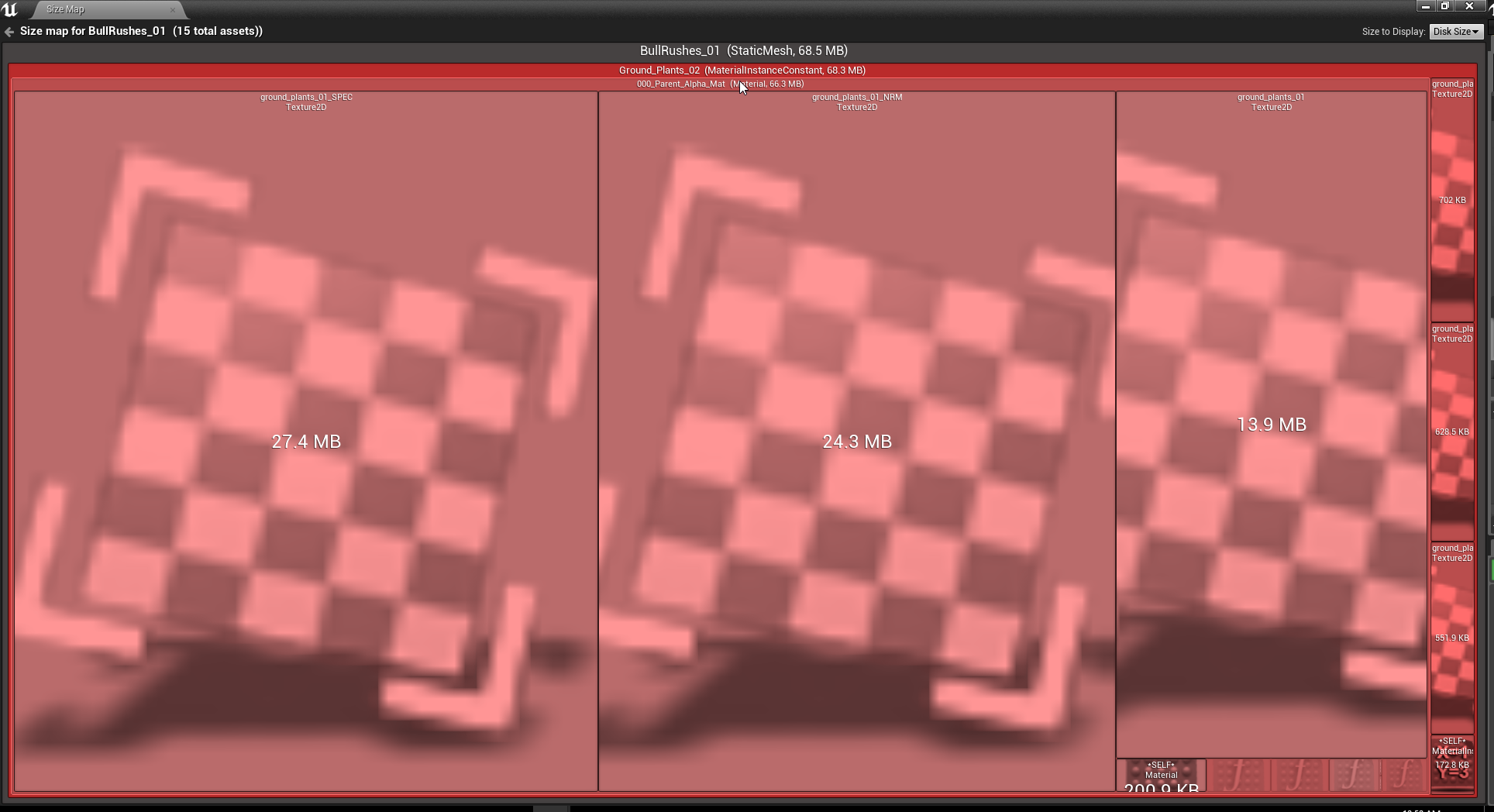
this is the sizemap
bitter oriole
Well, your size map says you're using three large textures
twin juniper
yeha but
i just changed it tho
to these 512x512 textures
so im wondering if its not updating?
bitter oriole
Not in real time no, you need to recreate the map
bitter oriole
Close it and do right click -> size map again
bitter oriole
Well, is the instance correctly applied to all LODs of your mesh ?
Try restarting the editor if you think it's a bug
hasty adder
Hmm taking screen shots is impossible but I think I know my problem. My ball casts to gamestate which multicasts a call to get all pc and have them run an event I suspect I should be running the event on PlayerState to ref there own controller
thin stratus
If you multicast
You can just do "GetPlayerController0"
Well if you Multicast in the GameState
Just be aware that a Multicast only calls for the connected players
So if you want all to get that you have to make sure everyone is connected
hasty adder
Yeah game state runs the show for most of these event driven gameplay ui stuff I just want the local pc to bring up the ui of course
Yeah these are like 5 second informational things not relevant to new joining players 😃
thin stratus
Yeah then Multicast -> GetPlayerController0 -> Show UI
hasty adder
I’ll give that a try when I get home. Strange a gs event using get actors of class mypcclass works so oddly 😃
 west rapids
Does anyone here have 10 minutes for me? Just need some clarification for ownership
twin juniper
So I don't get it
sometimes I boot my dedicated server
it only uses 2gb of memory
and others it uses 5gb
wtf is this?
hasty adder
Sounds like a Minecraft server
twin juniper
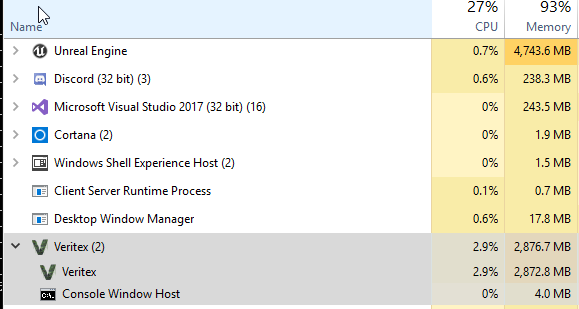
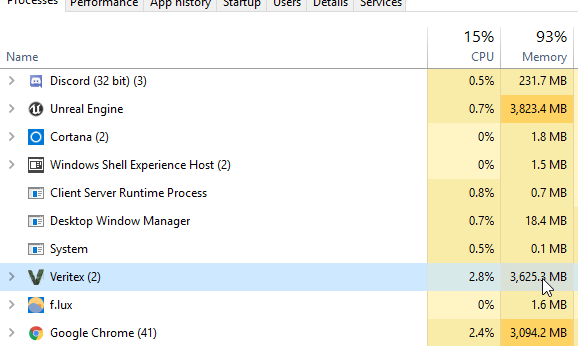
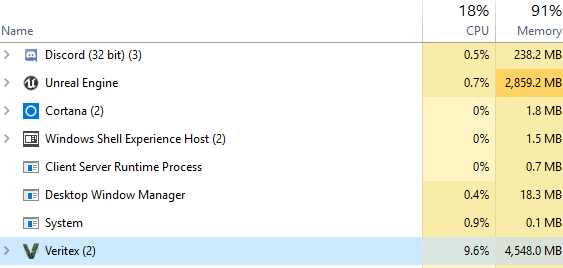
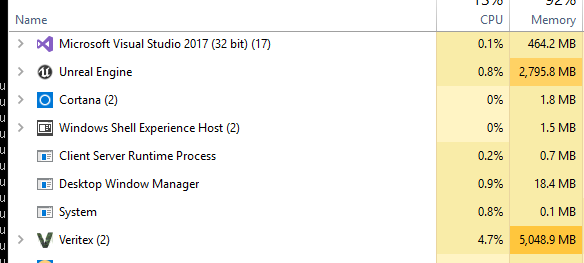
So why is the amount of memory being used so greatly different
when no code changes were made
Is this the engine just being shit?
2.8 gb, 3.8gb, 5gb
fully loaded each time
and no code was changed
unreal seems to have a pretty massive problem
this is not how software is supposed to perform
It only seems to occur when loading the map
west rapids
My guess is that you're not using seamless travel, in other words, instead of loading an empty travel map that uses virtually no memory, you load the next map. But that means that both maps have to be in memory, since you can't have players not existing on nothing.
west rapids
so ur streaming levels?
west rapids
yeah but what i mean is that ur loading all levels into the persistent one
ur not using volumes
twin juniper
i dont know what world composition does
i know that it loads and unloads levels on the client
and that
when u enable world composition
level streaming volumes
are actually turned off
like u just cant use them anymore
west rapids
aye thats for phat worlds
west rapids
mebbe ur tiling is too big?
twin juniper
but it shouldnt be using 5gb of memory
when games like rust only use 2gb
and have equally sized maps
this isnt even something under my control it seems like its an engine bug
twin juniper
are u trying to be disrespectful?
west rapids
so ur not loading the whole world
west rapids
oh, i thought it was client, mah bad man
twin juniper
no lol
the client
is absolutely fine
never goes above 2gb memory
the server goes up to 5gb~ just booting
which is absurd
and its an engine bug
i swear i never had this many engine bugs using unity
west rapids
it stays constant tho right?
twin juniper
it goes up to 7gb
when players connect
but thats fine
the issue is that the base line should not be 5gb
it shohuld be more like 2gb
or 3
at max
west rapids
well it doesnt sound like a memory leak, pretty cryptic
winged badger
that is a listen server or dedicated server loading textures and such?
twin juniper
dedicated
there is absolutely no reason
why a dedi server should be using 5gb
just to load
with 0 players
thats actually insane
west rapids
have you used memreport to see whats loaded?
twin juniper
yep
and its useless
i read that whole blog article
not only is it out dated
but it doesnt give u a full amount of information
that explains what everything means
for example
what does ResExcDedSysKB mean
that naming convention is utter garbage
KB = Kilobytes
i got that
Res = Resource
Exec = execute, dedicated system?
So Resources Executed on Dedicated System in Kilobytes?
Ok so what is "Resources"
west rapids
its very weird that each launch has different memory usage
without any changes
i guess one solution would be to slap 64 gigs of ddr and just roll with it 😄
inland pond
Is there something similar to BeginInactiveState() (c++) within Blueprints after I have called Detach from Controller Pending Destroy? Or do I need to fire my own "Pre Destroy Event" to the attached controller?
west rapids
@twin juniper how many clients have u tried hooking up at the same time?
maybe it maxes out after a few
twin juniper
no
like i said, if u read
it goes up to 5
with 0 players
all of those tries were with 0 connections
west rapids
@north stone might have a clue
hes dug alot in the engine, might know how the dedi works
bitter oriole
@twin juniper Makes sense for the server to require more memory - since everything is loaded all the time
No culling etc
west rapids
I found this, dunno if uve tried it or would be of any use
but there was a forum post by epic that this gives more info than memrep
 north stone
O_o i barely dug into the engine hehe @west rapids
west rapids
sorry bro i may have confused you 😛
i think Sion was the guy?
remember the name was long
bitter oriole
Sion is an Epic dev
north stone
sion yea, perhaps deathrey might know too
twin juniper
possible
what would be nice to know
is how much memory a real game uses
A game thats properly optimized i mean
bitter oriole
In any case, start by digging deep into all reports from UE
It's probably an issue on your side tbh - there are so many variables here, it's hard not to misconfigure a few textures etc
"Engine bug" that results in crazy memory usage is pretty unlikely
west rapids
A more brutish way of "troubleshooting" would be to make a dedi with an empty map, check memory, then add a box, check memory and try to figure out what an empty actor uses, and from there... 😄
or better yet, you could make a dedi with 1 chunk of ur world and load it
twin juniper
@bitter oriole i mean if u are not changing anything
why would u get different results
each boot
bitter oriole
If it's a bug in your code that could be random
You need to be methodical here, UE4 is just an engine and you have a lot of control over what happens, with lots of tools
Sure it's not well documented, but you can still see values, tweak stuff and test a lot
Tweak stuff, package, test - see what changed
And if you have crazy high differences between two runs of the same software, be sure to look into the log and compare them line by line
twin juniper
i mean like
what is the memory usage
for a game supposed to look like
on the server side lol
bitter oriole
More than the client, to start with
bitter oriole
That's not crazy, the crazy part is if the usage varies a lot between two runs
That should be a red flag
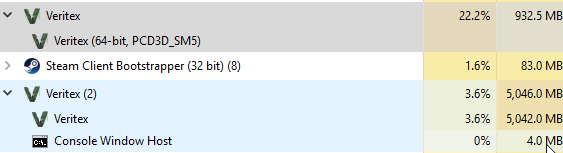 bitter oriole
Then you might want to investigate
Looking at my own game right now, might be able to help
twin juniper
cant
lol
like
i dont know what these mem reports mean
LOL
and the blog report
is out dated
bitter oriole
Well let's see
57474 Objects (Total: 35.538M / Max: 46.980M / Res: 871.140M | ResDedSys: 92.219M / ResShrSys: 0.000M / ResDedVid: 597.390M / ResShrVid: 0.000M / ResUnknown: 181.531M)
^ Here, it starts with UObjects
"Res" means content (resources)
west rapids
I have to say I can't figure out why would something load more, or less, without having anything modified.
bitter oriole
"Shr" means shared, "ded" dedicated memory - that's mostly a Linux thing IIRC, difference in memory for "dedicated" meaning "only your program" vs shared meaning "also libraries"
I'm on Windows so 0 shared
ResDedVid is probably VRAM usage
So I'd parse that line as 871MB in RAM, 597MB in VRAM
bitter oriole
So here it says 2GB for resources, 216MB for objects
2886MB total
That consistent with task manager ?
twin juniper
uh
for mine?
no the whole process is 5gb lol
Look up at the top
this one is right
bitter oriole
Right
twin juniper
thats how much its using
what are resources though
like is it just textures? i thought texture streaming was not on servers
twin juniper
so if i downsize alll of my textures
to like 1k
would it be less
at least...
in theory?
i resized a few from 4k to like 1k
didn't see much difference
bitter oriole
You might want to try the "noclient" UAT switch
bitter oriole
No idea, never used that
I work directly with UAT
Check in the log for the project launcher
west rapids
so
89796 Objects (Total: 215.901M / Max: 236.150M / Res: 2050.031M | ResDedSys: 2046.296M / ResShrSys: 0.000M / ResDedVid: 0.000M / ResShrVid: 0.000M / ResUnknown: 3.735M)
thats his info
but the OS allocation is 5 gigs
bitter oriole
You've got 3.735 unknown
west rapids
and i looked thru all of ur objects, nothing is big
bitter oriole
Yeah, something's missing
west rapids
i don;t know what the diff is between Large and Small, but both allocate significant memory
bitter oriole
I'm still looking at my own data
"RHI resource memory (not tracked by our allocator)"
This one explains my own difference between process mmory & objects °+ res
But it's 0 for you because no render
west rapids
OS Allocated: 2886.337814mb
Large Pool
Requested Allocations: 2075.528595mb
OS Allocated: 2112.187500mb
looks suspicios, why it allocates twice?
bitter oriole
First one is "including padding"
west rapids
afaik u cant just grab memory, system has to give you what you want, but dunno why twice
there clearly is a diff between large and small pool
twin juniper
WindowsNoEditor, LinuxServer, and WindowsServer
Dev for all 3
bitter oriole
Okay so here's a big nope
Development is for Development, it's not optimized for production
If you don't need logs you can move to Shipping right away
If you want logs, stick to the "Test" config
Test is basically shipping + console & logs
bitter oriole
It will
bitter oriole
I mean, dev builds are likely to not even work on some machines
west rapids
on that subject, @bitter oriole do you know the difference between release and shipping?
bitter oriole
There's plenty, but to start with, shipping removes log, console, move all generated data to the AppData folder
Meaning, @twin juniper 's going to lose all saves when moving to shipping
west rapids
ha, so u cant ship a game with enabled console, didnt know that
bitter oriole
You can't and you should never ever
Huge nope
Shipping (and maybe Test) are the only releases you should ever attempt
 twin juniper
no im just wondering
bitter oriole
An obvious issue with Saved is, you're writing to program files, basically
bitter oriole
This isn't fine and will trigger UAC warnings
twin juniper
what?
bitter oriole
%LOCALAPPDATA%/YourGame/Saved/
west rapids
i thought ue4 defaults any saves to that path when u package
twin juniper
to have a file be read
from my local directory?
lol
i want to load from somewhere
in the games directory
bitter oriole
What I'm saying is, ProjectSavedDir currently returns a local path, but will return a different one in shipping
Because no one sane writes data to the installation setup
Especially on a server, damn, security 101, no writable file near your program
west rapids
xcept cfgs 😛
bitter oriole
no
twin juniper
no what im saying is
bitter oriole
No sane server generates data locally
twin juniper
lets say i created a folder
called "Saved"
and added a file to it
i couldnt just use FPaths::ProjectSavedDir()
and get the saved directory?
bitter oriole
No, you don't
twin juniper
i do though
bitter oriole
You really don't, and you won't be able to in Test or Shipping
Same goes for your clients
bitter oriole
So you'll need to lose your client's saves, or tell them to manually copy the saves
twin juniper
on linux
so how do i read from a file
on my local machine
like it makes no sense
bitter oriole
You don't need to change anything at all, except move your data to the proper folder
twin juniper
lets say i have a project, why would the database be in /home/root/db.db
when my project
is in
/home/bdoom/mygame
absurd
thats absurd
bitter oriole
Because your /home/bdoom/mygame should be read only
west rapids
well that does make sense
twin juniper
idc about that
at all man
i have it setup to only allow access from my connection
west rapids
bit paranoid tho D
twin juniper
and actually
u cant even run
a linux server
without it being chmod at least 600
i believe
like it just will crash
bitter oriole
Look, I'm not going to spend the night explaining basic security practices. Here's the full story.
- Saved is the folder to write data to.
- Saved is inside the game folder in Dev, inside ~/.config/Epic/<gamename>/ in Test or Shipping
Now you're asking for help on memory size and you're running an unoptimized build
I'm just saying, you should be shipping shipping
Literally why it's called that
And yes, Shipping enforces sane practices on data location
Like if you have 10 users on a PC, you don't want one save per 10 users
You want to write in the user folder like every program since Vista
And if your server has a ridiculous security issue, you don't want it to be able to overwrite the executable file it's running from
You don't care, that's fine, I'm just telling you what people in the real world do
use shipping
read and write at the correct location
tell players to move the data after you've updated or create a new save
Good luck, i'll be here for help
twin juniper
thanks
merry pebble
Aye, so how would you set up a local play, with like maybe 2 poeples
twin juniper
@bitter oriole https://i.imgur.com/v7tnGQB.png



so just as i thought
the shipping build
wasnt much
of a difference lol
bitter oriole
Well, it's kind of 10% less
Don't expect to optimize by 90% overnight lol
You've just gained plenty of performance too
west rapids
@bitter oriole could you clarify something regarding ownership?
bitter oriole
Yeah
It's fairly easy, really
He's got something like 10 levels
Each got a separate report
twin juniper
hmm?
bitter oriole
Last line alone gives 1763.441M resources that were previously unnacounted for
bitter oriole
Looking for "ResDedSys" though the file, here's what it looks like :
- 2046.296M
- 0
- 0,7
- 0,03
- 0
- 1763
So we've got exactly 3.8GB here
Only in resources (textures)
Next up is objects... round 350MB
144 + 215
That brings us to 4.2GB
We had a development build that accounted for a whole 10% of 5GB too
Plus the executable size, and other alloc pools
So basically, 3/4 of the entire memory size is textures
Not an engine bug or anything
 magic helm
Not to be mean or anything, but there is a #packaging channel for this sort of talk
bitter oriole
Sure, but since no one's talking about MP and it's a dedicated server discussion, might as well talk here
bitter oriole
Yeah, with the noclient switch. Try first to see if your game does need texture (traces against Visibility channel, etc)
bitter oriole
Let me check
 lusty dust
what does specifying a map in the build command do exactly?
heavy marlin
pretty sure it only includes dependencies on that map
rather than your whole project
west rapids
I just noticed UMG variables have Replication settings. Wtf? I thought HUD/UMG is clientside only.
 tulip creek
Is it possible to allow cross-platform play using UE4's native networking system without paying for dedicated servers? Using one player as the host, for example. To clarify: let's say 2 players want to play together and they're both using the PC but purchased the same game through 2 different stores. Will UE4's networking work here without a dedicated server? Will they be able to find each other's lobby?
west rapids
U mean like PS4 playing with PC?
afaik u can run crossplatform pretty ez, and if its from linux to pc, should not be problem too. Don't qquote me tho 😛
 glacial hamlet
@Kensei#5407 UMG are client only without replication, its just editor left overs basically
cross platform is pretty easy between ps4 and PC, just gotta do open by IP
buuut once you bring sessions into it there is much more involvement
so yea @ face value you can test it quickly but in production its a ton of work
manic agate
Guys, is it possible to open multiple game windows in PIE and set their positions? Whenever I play in multiplayer with multiple windows they're size and position is kind of random :/
In the advanced options I set the new window size, but it doesn't take into account multiple game windows
hasty adder
Cedric, I finally got to try it just now - and wow what a simple change and it works
Now i gotta figure out why my custom playerstate name string doesnt replicate right.
thin stratus
Anyone using Oculus, 4.19 and Sessions?
thin stratus
Welp, nvm. If anyone runs into the issue that Oculus doesn't want to destroy your session in Standalone, it's broken.
It works in packaged versions though.
And in 4.19 we can finally join sessions properly again
 pallid mesa
Wait, are sesions broken on 4.18?
sly basin
... would be good to know ....
 slate veldt
Hi all, I'm currently trying to implement the networking on our game, and some of the default out the box movement component replication stuff doesn't appear to be working. For the pawn, I have bReplicates, and bReplicatesMovement set to true, and despite stepping through the code and seeing that the AddMovementInput function is being called and supposedly running, the character is not moving at all.
If I make a non-dedicated server, then the hosting client can move around and visibly replicates over to the other client.
Any ideas what I might have broken? 😛
slate veldt
Actually, might want to ignore that, there was a flag we use that ignores character movement component for reasons, wasn't being replicated so server was totally ignoring the correct context. May have fixed the above issue
thin stratus
@pallid mesa @sly basin Oculus sessions, yes
slate veldt
Ah nope, didn't fix it, still having movement component replication issues, if anyone can help out that would be great
slate veldt
So it appears that the "AddMovementInput" call is only happening on the client
tulip creek
4.18 has a lot of issues, you can't reduce drawcalls by merging actors, it still treats them as individual meshes
@west rapids Nah, Sony doesn't allow cross-platform - I'm developing for VR so I'm hoping to get people who play the game on Steam and people on the Oculus Store to be able to join each other's sessions and play together. Doable, I presume?
west rapids
Well the netcode should run the same on both. Sessions is another story probably. Cedric seems to be on the bleeding edge there, might have some tips.
slate veldt
Cross play between Steam and Oculus store should be doable, Arizona Sunshine does it (although it's build in Unity) via direct IP connection rather than using Steam friends or Oculus friends invites
I think therefore that you should be able to setup a system where you can connect from an Oculus store copy to a Steam copy via IP address, unless you had your own backend system that kept additional profile (so unique information for a YOURGAME bespoke login), but that would be expensive and effort to maintain haha
 cerulean rapids
we have a lot of lag in our game, would any1 more xperienced than me be able to take 2 minutes to look at some NPROF files and just say if anything is obviously bad? :p, pls pm, much love.
pallid mesa
@tulip creek are you sure about the drawcall issue? got a link or something I could check?
tulip creek
@pallid mesa I encountered the problem on my own in 4.18 and then found someone else experiencing it here: https://answers.unrealengine.com/questions/757623/actor-merging-bug.html
I upgraded to 4.19 and merging does reduce drawcalls now.
There's someone else confirming it
My drawcalls get cut in half when I merge a modular building together in 4.19. In 4.18 it stays the same 💩
pallid mesa
@tulip creek thanks, that's actually something great to know since I was planning to upgrade to 4.18 and I use merging
do you happen to know if this happens aswell on 4.17? @tulip creek ?
tulip creek
@pallid mesa Not sure, I went from 4.16 to 4.18 but didn't have to use merging until now
Do you know if merging to reduce drawcalls creates bottlenecks elsewhere? GPU maybe?
Or is it a viable way to boost performance alltogether?
pallid mesa
for sure, usually you would merge on meshes using the same material
to reduce drawcalls
tulip creek
What if I do it on meshes not using the same material?
pallid mesa
you will be creating a bigger mesh but not reducing drawcalls
tulip creek
What about in this case:
Mesh 1:
Mesh 2:
They do use the same material but Mesh 1 has an extra one
pallid mesa
I'm not very sure about this one, can't really answer
I have an idea of what could happen but I'm unsure if it's actually true
someone on #ue4-general could answer that one for you
tulip creek
okay thanks
 graceful cave
anyone know why this would only work until the first map travel the server does?
its in gamestate
and this runs at beginplay
game instance gets the password from config file at initialization
everything works perfect on the first map the server loads but after that, the password variable is blank
 vital steeple
if my skeletal mesh is replicated and is part of a replicated actor, shouldn't setting it to a new mesh with a server RPC update it for all clients?
west rapids
@satan u store passwd on gameinstance yeah?
west rapids
even4.19?
vital steeple
it doesnt say for this version but its the exact bug im experiencing and it says backlogged (so i guess they havent updated it)
west rapids
man quite a phat 4.19, havent even read any patch notes or anything
guess wait for x.1 😄
vital steeple
multicasting works around it though
so server RPC to set skeletal/static mesh on a replicated component doesnt work
but server->multicast RPC does
so basically, it sounds liek meshes dont support replication
tulip creek
so they want us to separate the different skeletal meshes into their own playable characters to possess based on selection instead?
was hoping to stop using so many pawns in my projects but since I'm doing multiplayer now, I guess I'll have to 🙄
west rapids
you could do what epic suggests in that post and use spectator pawn as intermediate
i mean its pretty much a camera
and when ur chaning meshes you probably have a few seconds to spare
could even play some fx or smthin 😛
Does anyone know if HasAuthority ever returns True when called on something that is not server exclusive, on a dedicated server?
Cuz i reaaaaly wana fire multicasts from there, but the damn thing doesnt like shared pawns/controllers
probably for a good reason 😄
graceful cave
is there a way to deal with "History overflow, forcing history dump" in server logs?
vital steeple
@tulip creek thats the recommended solution, yes. you can easily just multicast the skeletal mesh changes... which would stop you from having to spawn new characters and deal with replication delays of the spawning/swapping etc (and i assume its cheaper, network wise)
in otherwords just use your original server RPC to call a multicast RPC that sets the mesh
confirmed it works in my setup
 wary willow
damn,I still can't set score in PlayerState from BP
why do they tease with the getter
 lean river
Hey Guys!
Dedicated server able to run anim montages only on server, to get correct bone location for server validated hit detection for example?
I know skeletal mesh can do bone updates, this is just a theory question
 slim holly
@lean river iirc there was a checkbox under skeletal mesh details panel for updating bones at dedicated enviroment
but I don't see it as a viable option really, bone based hit detection should be done on clients for user comfort
server should just check was the hit even possible
lean river
Yeah i agree, question was this:
If i branch with getnetmode = dedicated server and play a montage what will happen?
As i know dedi dont have anim bp and anim data
hasty adder
question mates, if i have a custom fstring in a playerstate that is replicated, do i need to reload any of this data when traveling to a server?
thin stratus
So when connecting to one?
hasty adder
yeah, i'm in my main menu, i save some info to myplayerstate which will be the same ps used and then join a server
thin stratus
Connecting is a HardTravel
That will destroy you MainMenu PS and the Server creates a new one
So yes, the data isn't available on the Server
hasty adder
whats best method to update the server. I see a postlogin in game mode do i just run a on server get set?
slim holly
most likely
or just trigger the get from connection, having server to ask for the information just introduces some interface delay
hasty adder
Lets see what happens with this.
slim holly
something like that, but you can set replication to skip_owner
oh wait
you can't
GM only exists on server, so you can't do role remote
or, it would only trigger on host
thin stratus
Reminder: The old PS is killed. Your data is not on it at that point.
slim holly
that too
thin stratus
Whatever you grab from that PlayerState is the default value.
PostLogin calls on HardTravel
hasty adder
i do store it in a save game - can i have remote load the asve somehow and feed it to server to set its name
thin stratus
The only point at which PlayerStates are allowed to keep the data or at least forward it is in SeamlessTravels
Using "OnCopyProperties" event.
But you are joining, so it's a hardTravel and that option is not there
slim holly
well, you load save to GameInstance, that would probably be the place to get the info from
in client end that is
thin stratus
BP has two ways of handling this:
- Save in GameInstance (Client)
- Save in SaveGame (Client)
Both would need you to first do a CLIENTRPC on the Joining PC
Then load the data from either point.
And then SERVERRPC back
passing the data along
In C++ you'd be able to use the "LOGIN" function of the GameMode and the CLIENT TRAVEL function of the PlayerController
Being able to pass ?key=value?key2=value2 etc. via ClientTravel
And retrieving the options in the Login function
(PreLogin also offers them, but no PlayerController yet)
hasty adder
so earliest in bp might be the playerstate begin play as it'll get called when its created for the player on server?
slim holly
I would think so
thin stratus
Yes
Other topic: Did anyone play around with Procedural Maps and Origin Rebasing in Multiplayer?
What I found so far is, that the rebasing happens on the client and RPCs and stuff needed to take the shift into account
manic agate
Guys, is it possible to open multiple game windows in PIE and set their positions? Whenever I play in multiplayer with multiple windows they're size and position is kind of random :/
In the advanced options I set the new window size, but it doesn't take into account multiple game windows
hasty adder
think i may have got it
I wasnt when setting the players name on server also having the server MC back the names of the already there players
Outcome
The Logic
sure i could sum this up better but on the fly \o/
slate veldt
Hi all, in our networked game, I have an Actor pointer that I'm trying to pass through to the client on a client function, however, despite the pointer being !nullptr, and the object existing on the client, when the client function executes, the incoming parameter is nullptr
Anything special I have to do with the value? I thought that UE4 networking was smart enough to find the equivalent object in the clients world based on the pointer?
hasty adder
hmm close i guess, dedicated server still kinda does something funny with names
thin stratus
@slate veldt Actor that you pass needs to be replicated and I assume also relevant
slate veldt
That's fair, I'll try again now
@thin stratus Hmm still not working, there are 2 actor reference UProperties, both of them with Replicated metas, and the server is spawning them both, and that alone should be enough (as those values should be replicated across to clients) but even with the client function call afterwards passing the pointers through, the pointers are still coming through as nullptr
Trying again now with RepRetry meta
Never mind, RepRetry is deprecated, would be nice if someone updated the documentation for UPROPERTY
Ah think I resolved the issue, during the spawn process, the 2 sub actors were being given the same 2 names, for both players, so this meant there was only 1 pair on the server side, and it was screwing with everything
hasty adder
So names seems to work now. Can’t tell if it’s just the other pc I have to test with is so slow it’s@missing a rpc event as the characters already on the server do not update there skin and effects that are team based. Which on begin play set. They’ve worked before so guess I’ll just hafta test with a in spec machine
vital steeple
@heavy marlin sort of, they need to have either an owning connection for Server RPCs, which i use the most (for now). If you run a non replicated event on the server itself, it... runs with the same rights as a server RPC. a multicast must be run from the server to impact everyone. a client only RPC must be run from the server to run on the client, or on the client itself to run on itself.
https://docs.unrealengine.com/en-us/Gameplay/Networking/Actors/RPCs
its kind of confusing
RPCs can be run from controllers, player state, gamestate, gamemode (i think?), but they of course have restrictions based on what the server and clients cant see
so its not JUST player owned actors
i dunno ive been wrapping my head around it for months and i still run into scope issues
thin stratus
ServerRPC
- Called on Client version of Actor
- Reaches Server version of Actor
- Needs Client Ownership of the Actor
- Won't work for any other Clients calling it
ClientRPC
- Called on Server version of Actor
- Reaches Client version of Actor
- Targets the owning Client
- Will only be received on the Client owning the Actor
Multicast
- Called on Server version of Actor
- Reaches everyone (Clients and Server) of Actor
- Doesn't look for Ownership
- Can obviously only reach Clients that have the Actor. So a Multicast on the PlayerController doesn't make sense, as it would only reach the owning Client.
@vital steeple
 night jay
Has anyone managed to host a session with a dedicated server? I want something similar like "CreateSession" so the dedciated server shows up in my server browser.
thin stratus
Given you have Subsystem like Steam, you'd want to register the server.
Idk if pure BPs can do that
Because a DedicatedServer shouldn't have bPresence true
And the default nodes do that
So you might need to use C++ or a Plugin (Advanced Session)
 sonic frigate
Hey,
I know there is no Host migration in UE4, but i have read it is possibly to create your own,
Anyone could give me tip, or little guide how to make basic host migration, when Host left the match ... just another player get that , ( RIght now Im using Blueprint project for multiplayer game
If all of this possible , I appreciate any help
winged badger
there are quite a few things that don't exist on clients by default
and not just the GameMode and GameSession classes
also, all AI Controllers
and anything you made to exist on server only, because it just gets in the way being on client
even NavMesh is by default disabled or absent on clients
so you'd have to migrate all that, along with the connection itself... even if i had the idea how to do it, it would by anything but a "little" guide
 hollow pulsar
Hello Im having an Issue with Advanced Sessions where Im detecting Servers but none appear in my Server browser any help?
graceful cave
@hollow pulsar are you using an online subsystem?
hollow pulsar
Yes Im using steam
graceful cave
i was having issues with steam, anytime i got servers to show up they couldnt be joined via the joinsession node
dedicated or listen server?
hollow pulsar
Listen I believe
graceful cave
does your steam saying youre playing spacewar when you launch it as standalone?
hollow pulsar
Yes sir
graceful cave
doesnt seem too out of the ordinary then, lots of people seem to have issues with steam
youd have to share your server finding logic
graceful cave
haha yeah gotta love those kinds of mistakes