#multiplayer
1 messages · Page 372 of 1
 mild hull
 winter plover
specifically connect w/ someone else yea
among other things to test lag
but also just to generally play around n test stuff
mild hull
for testing lag there are some settings https://www.unrealengine.com/en-US/blog/finding-network-based-exploits
Unreal Engine
Recently, I had an email conversation with a Gears of War fan about the differences in networking quality between each of the three games in the series. One thing that we can point to in terms of increasing the quality of the networking experience is our use of the Unreal Engine’s built in network simulation features.
and when you open map with ?listen , than anyone can connect that knows your ip if your router lets them through with open ip
winter plover
Im guessing you can just do the connect command thru the session frontend console?
mild hull
open mapname?listen and open ip are console command, but you can also add some basic widget or launch the game with those commands
winter plover
ahh sweet
think I got it working
by opening the editor twice
happen to know what ports ill have to forward?
mild hull
in the play settings is a port
you dont need to open the editor
"Path\UE4Editor.exe" "Path\ProjectName.uproject" /Game/ThirdPersonBP/Maps/ThirdPersonExampleMap?listen -game
"Path\UE4Editor.exe" "Path\ProjectName.uproject" 127.0.0.1 -game
winter plover
aight cheers
 short whale
hey everyone! I have to create some real time multiplayer actor transform exchange via LAN but I don't seem to be able to smoothly sync via network. Even with local lerp to the set positions, it looks laggy. Are there some best practices that someone new in the engine does not know?
I send an event to the server and the server sends them per multicast to everyone else. I have tested it from every frame to every 4 frames, the lag is always there >.<
 rain coral
@short whale are you lerping positions of the other clients on Tick, or in the multicast function?
short whale
on the local update within each client in the tick
multicast does only set the target for the lerp
rain coral
and you lerp from current position to target position?
short whale
yes
rain coral
with an alpha value that isn't too high, it sounds in theory like it shouldn't be warpy 🤔
I got a question of my own - when spawning more than one client, they don't get possessed (sometimes they do after some seconds) and/or the Tick doesn't even run locally on the pawn. even with one client, it waits a second or so to get possessed. what could cause this? =/
 undone girder
Where can I find some information about host own server with game on vps (windows)?
 slender cloud
Anyone here have experience with AWS gamelift? Looks like they have a free tier for one year of the c4.large instance. Any idea of how many players that supports? Want to use it for internal testing before release. Has week CPU and memory, but Im not sure how dependent performance is for that for a hosted server. Also what size would people suggest I use?
 hidden thorn
Question, if I just open the game without joining a server I am in the MainMenu should I be able to access the GameMode? Because I am trying to access it but it keeps returning null
 serene umbra
Does main menu map have the gamemmode?
 manic pine
dont think you can be without a gamemode... if you dont set override on map, it picks the one from project settings
are you by chance trying to get a specific type of game mode and the cast is failing?
 onyx totem
Guys I seen that in an older post
That you cant replicate maps
And sets
Is this true?
 ripe raptor
So... I did a pretty stupid thing.
I made my abilities and my bubffs / debuffs UObjects. I mistakenly thought all this time that UObject contains all the replication functionality, not AActor. Question is now - how big of a general performance overhead would I bbe incurring if I switch all of my UObjects to be AActors?
 light grove
You don't need to switch them over to AActors, you can just send a copy to the client instead of replicating.
For example, Server_ManageBuffs calls a client function that sends a copy of the buff/debuff object to the client.
ripe raptor
er, a copy of a UObject?
 winged badger
why not actor components?
ripe raptor
Do those replicate properly if I instantiate them at runtime?
winged badger
they do, as long as they are set to replicate
they can also send Server or receive Client RPCs
being attached to the PlayerPawn which is attached to the PlayerController
and you can fetch the PlayerPawn by calling GetOwner()
 steady tendon
Usually they are attached to the player controller
Talking about actor components, anyone could answer me what i asked before? i dont know why it doesnt work...
winged badger
you need to replicate the event where you receive private message to OwningClient
at a glance
steady tendon
@winged badger I have it, but it calls that function, thats not the problem
winged badger
is the variable set to replicate as well?
ripe raptor
I know that components replicate just fine, but I am not 100% sure that it works fine when they're spawned dynamically, as opposed to being created in the construction script.
steady tendon
@winged badger Yes it is dude
steady tendon
Ok this must be an engine bug, its not normal
Server
Client
Result
Component set to replicate at beginplay, integer set to replicate with default value of -1, must be engine bug, otherwise i dont understand anything
 thin stratus
Have you printed the int on tick?
You can't directly assume the int replicates as fast as the RPC
steady tendon
Same result, even if i execute the same function 10 seconds later to let the variable replicate the result is the same
What i dont understand is why in the event tick there are 2 server and one of them has -1 as value, maybe thats the clue, but i dont know to understand it
 gaunt crown
So I was just talking in Physics Room about this issue, but got a big mind blank that Physics is perfect but the Replication side of this is not budging.. Any help ? 😄 Cheers guys
https://www.youtube.com/watch?v=-jOG95PhmIY&feature=youtu.be

 mild zodiac
Guys I need to understand something about spawn replication:
- Server spawns 100 replicated actors
- Server sends array of 100 actors to all clients via multicast
- Clients get the array of length 100 but some actors may not yet be valid
Is this a correct behaviour?
 magic helm
@gaunt crown have you tried, running the physics only on the server. And send the servers transform to the client and just set the client to that? Seems to work pretty well for me
gaunt crown
Can you show me an example of that ? I’m still iffy with replication here 😃
magic helm
Are you in BP or C++?
gaunt crown
Bp
C++ will take me a while :3
I don’t wanna head into that for now, staying in BP
magic helm
K so I can't actually do it right now because I'm not at my computer... I can type out the steps(one moment)
gaunt crown
All g , cheers maan
magic helm
In Begin play, have an authority check. If it's remote then set the component that's suppose to simulate physics to NOT simulate physics while the authority version should. Then make a custom event that occurs on the client only and has a transform (or if you prefer location and rotation only) input parameter(s) and set the actors transform to that input parameter from there. Then in Tick do an authority check and only on the authority call that custom event that just sets the client versions transforms and input the servers transforms. Compile and test
Also if you want to have less stuff happening on begin play, you could just not simulate physics by default and turn it on only on the authority(server)
gaunt crown
Ok thank you I’ll give it a try
I’ll see if I can understand what you are talking about haha
I’ll come back to you if I am stuck
 fleet viper
Hi im pretty new to online programming and im wondering what means A before a gamemode or U before a world and also how big is the difference between online and offline programming?
magic helm
@fleet viper I would suggest learning a bit more about UE4 before going into trying to setup online play. Here is a link to the answer for the first question: https://docs.unrealengine.com/latest/INT/Programming/UnrealArchitecture/Reference/Classes/index.html
Reference to creating and implementing gameplay classes.
 tall grove
@magic helm thanks forshare your strategy about phisycs multiplayer
magic helm
Yeh 😄 thats if you want it to be server authoratative, obviously the format would have to change a bit if you want it client authoratative and stuff
fleet viper
btw does anyone know how to disable the main menu in the shootergame sample?
 twin juniper
@fleet viper there's a lot of UI stuff in the game instance
all seems to be done with slate as it is pre UMG im guessing
For generic damage from weapons in MP would you prefer an interface or a component based approach? Alternatively the stock ApplyPointDamage functions are an option but it would be a waste to call them on every hit actor instead of just the ones that could be damaged
fleet viper
@twin juniper can you show me how to disable it? working on it now for days and still nothing happended
twin juniper
Sorry I'm not familiar enough with it
Building something on other peoples code will have lots of issues like this
twin juniper
Yes but if you need to do something custom, you won't be able to do it properly without understanding how it works, like this example
You might be able to get away with using a new gameinstance, but then you'll have to ensure you know how to still open maps, start matches and properly init the game
thin stratus
Repinned my compendium so it's not somewhere at the bottom.
We should really start setting up a Wiki for UnrealSlackers with proper Tutorials for each channel and then just pin that
thin stratus
We will first do that from within the mod team and then look into opening it up for you peeps.
Otherwise we will attracked all kinds of trolls and spammers
 cedar galleon
Hi @everyone I have strange problem....When I play in the Editor the project work, delete the "instanced foliage" but when run "Standalone Game" or "Build Project" not work, not delete Instanced foliage from Map...Why? where is the problem? 😭
 cunning stirrup
Show your code ?
 graceful lynx
Anyone have any issue with FHttp on OSX specifically when dealing with headers passed back on a 302 response before the 200 response where it ends up?
 real hound
Hi, I would like to ask if can I trust data in PlayerState when accessing it through gamemode(server)
Because I'm now thinking where should I store player specific data like health, experience etc without worrying about protection
cedar galleon
@cunning stirrup this is code
have solution?
but in the editor work all
with and without dedicated server enabled....
cunning stirrup
@cedar galleon You need to run thorugh the array in reverse order
oh wait no
try adding more debug
maybe the collision isn't setup right
cedar galleon
but in the editor work...why in Standalone not work?
cunning stirrup
what does Remove Instance do ?
 worthy wasp
When printstringing in a MP Standalone - is there anyway to log/see the output of SERVER ? It's hidden by default... cant ever get it to show 😦
cunning stirrup
yes
worthy wasp
i'm forced to test standalone because of steam implementation
cunning stirrup
use Developpement build
mild hull
when you start -log
worthy wasp
ok to my knowledge ti'm on Development build
and how do you mean Mizuki? makin ga shortcut?
cedar galleon
wait wait I don tunderstand
worthy wasp
currently - i'm doing Rightclick on .uproject file & LAUNCH GAME
worthy wasp
i'm sorry visualnotte - i'm not even talking to you.....
cedar galleon
oh
mild hull
create a bat file with "Path\UE4Editor.exe" "Name.uproject" /Game/ThirdPersonBP/Maps/ThirdPersonExampleMap?listen -game -log or a shortcut
worthy wasp
literally "Path\UE4Editor.exe" ? SysVariables should recognize this right?
mild hull
you could add it, otherwise needs full path to file
the project file also needs full path..
@cedar galleon i would add some prints, does your trace hit anything, is it even called, etc
cunning stirrup
@cedar galleon Show us the inside of the Remove Instance function, i think the issue comes from it
cedar galleon
@cunning stirrup yes! in the editor REMOVE instanced foliage
cunning stirrup
@mild hull I'm not the one asking it's visualnotte
cedar galleon
@cunning stirrup this function is default function Unreal Engine
mild hull
yeah i know
cunning stirrup
@cedar galleon I think you should make a list of the indexes that you need to remove, then in another loop, remove them all at once in reverse order
cunning stirrup
add a print when you delete the foliage to see if the code even runs
cedar galleon
@cunning stirrup yes! in the array I have all instanced, but not remove
cunning stirrup
yes
Are you sure your target is set correctly ?
Have you tried using DestroyComponent ?
cedar galleon
why in the editor work?
cunning stirrup
idk tbh
 jolly siren
Does anyone know how to update session settings (map, gamemode, etc.) after doing a servertravel? In other words, the match ends and players vote on the next map and gamemode.
winged badger
why would you even need to update them, unless you're advertising for other players to join?
winged badger
AdvancedSessions?
jolly siren
no, but I will look through their code too
winged badger
you can just change the values in those key/value pairs that are under extra settings
and have your UI properly present that to the late joiners
winged badger
(that was advanced sessions, haven't done default unreal)
jolly siren
no worries, I'm digging through advance sessions code now 😃
jolly siren
Any one coded a workaround to this yet? https://issues.unrealengine.com/issue/UE-44006
 wraith hornet
hey guys I have a question that I posted on the forums but thought I would run by anyone here as I dont know how much visiblity these things get on the forums
the gist of it is that my GameMode is not picking up new players joining the Level
and hence not triggering Pre/Post Login methods
looking over the various multiplayer material everything "looks" like it's setup correctly and I am certainly able to see my players after they join just my g
GameMode doesnt appear to be behaving as expected
thin stratus
@jolly siren isn't that related to how playersessions are registered?
Actually
Why is this steam related
This is a call inside the session
Thaz should work, and if not you can always increment and decrement on login and logout
jolly siren
I think it's only broken on steam. I know it's at least only broken on dedicated servers.
jolly siren
Ahh I haven't tested it in game, I'm debugging the session stuff. But yeah it looks like this specific bug is an in game call
thin stratus
The bug you posted
Says GetCurrentPlayers
That's for people that joined already or not
jolly siren
Essentially it's the same thing as the session stuff tho
thin stratus
Maybe it's related to the session
jolly siren
return Result.OnlineResult.Session.SessionSettings.NumPublicConnections - Result.OnlineResult.Session.NumOpenPublicConnections;
thin stratus
Yeah
jolly siren
It's using the same variables
thin stratus
NumOpen is updated
Guess it's not
Check where they Update the session after joining
Registerplayer or something like that
jolly siren
right, yeah there are 2 bugs open around this. And one is won't fix and the other backlogged
jolly siren
a target fix?
thin stratus
4.19 is kinda releasing soon
jolly siren
right, but it's also set to won't fix
so idk if it was actually fixed
there isn't a commit attached to it
thin stratus
Hm can you see the code?
Mäh
Well then idk
Can only look into how UE4 handles telling steam about the new player
jolly siren
yeah I don't see anywhere that NumOpenPublicConnections is incremented
thin stratus
Na that's filled by getting session info from steam
There needs to be a call to the subsystem for when a player successfully joins
jolly siren
okay yeah that makes sense
thin stratus
That's handled somewhere in the subsystem
Worth starting either in the session interface searching for player register stuff or for login /post login
jolly siren
Ahh yeah it uses m_nPlayers from the steam api
which always returns 0
I'm guessing it's because the players are never actually authenticated
And if that is the case it makes sense that the bugs were backlogged
thin stratus
Yeah cause ue4 doesn't handle authentication to steam at all atm :D
Not that it's hard to add as you have the steamapi at hand if needed
Only annoying if you want to adjust the subsystem
Event though that's a plugin now
jolly siren
Right, yeah wish steam stuff was on the roadmap. Some day maybe 😢
 wary willow
@jolly siren yea that steam authentication is real simple
I even have a tutorial
This tutorial is for those that use a backend service (usually a plugin), such as GameSparks or PlayFab and want to get Steam Authentication working in Bluep...
It was so I could use it for GameSparks, but I think they finally added the proper node to their plugin
(after seeing this)
thin stratus
That's only getting the ticket or? @wary willow
Authentication is usually to make sure the player owns the game
thin stratus
Na, it's for making sure that the game is run through steam + registering sessions when a player joins a server
Basically what that old crashy pr added
jolly siren
Yeah that pr was a mess
twin juniper
I don't think this is the correct channel but anyone knows how to setup steam achievements
Also I bought the steam sub configuration plugin if that makes it easy..
wary willow
@twin juniper oldie but goodie https://www.youtube.com/watch?v=ATdkoeSJ2WA

In this video I show you how to setup the Steamworks SDK for UE4 and then create Steam Achievements. Links: Main Code: http://pastebin.com/TzFvwyXh Achieveme...
twin juniper
Thanks A lot man !
 cobalt whale
Is there a way to call function just for one specific client? Not multicasting it to each client.
I have 1 client who shot 2 client and I need to shake screen only for that 2 client
cobalt whale
I raytracing from my client weapon to another character
Store this character to variable and pass it to server function
This server function should call desired screen shaking function at the character who got shot
It's all working fine, but only for listened server and not for client
 fossil spoke
Why not just use the Damage Events to determine when to Shake the camera?
These are already replicated for you.
cobalt whale
Just want to know how to call client to client function if I need that in future
cobalt whale
I know that, but in my case even going through server didn't fixes the thing
What i meant is how to call server function that calls client function for a specific client
 winter zenith
Tryint to get an idea for a best practice here and for the life of me I'm having trouble finding a good approach. Setting a players name when they've connected to a server. I've got a player name input on the main menu, so I've already captured the name. I feel that the process is something like storing that value someone (either sending it through using options ,but then how to access that later?) and then populate it on the PlayerController, which the server can then read during PostLogin. Would anyone be able to give a quick couple of line outline of the high level process (and then I can certainly go and work out the specifics), just where things should be stored and then transferred at what points - thanks! 😃
winter zenith
Ok - I've just found that GameModeBase::Login receives Options, which is fantastic - I think I can go that route to get it working happily
thin stratus
@winter zenith Yeah Login is good for getting options and giving them to the playercontroller
However passing ?Name= might internally already set the playerstate playername
winter zenith
hah. you know I never even tried to do that, I might give that a go
yep - literally just searched the engine for ParseOption(Options, TEXT("Name")) and found it happening in GameModeBase like you mentioned
thanks - seems that I was overcomplicating things for naught
though good to know about Login for other non-standard things I might want to pass along on a non-seamless travel 👍
thin stratus
Yeah i pass player ids from ThirdParty services like gamesparks with this
cedar galleon
@thin stratus hey bro, can help....I have strange problem....When I play in the Editor the project work, delete the "instanced foliage" but when run "Standalone Game" or "Build Project" not work, not delete Instanced foliage from Map...Why? where is the problem? 😭
 harsh sable
Does anybody know what would make a game slow down in terms of polycount? I'm trying to find out what the limit of polycount should be for the 3D models on a project I'm working on (and working with others on). For a game like a low-poly version of, say, GTA4 or Blade and Soul, you might have many characters running around at once. Does anybody know any information about this?
Please @ me if you do.
 vernal thistle
Hey , I'm having an issue with replicating damage consistently from server to client. At the moment, the way my damage works is it gets a damage integer variable , multiplies it by a random float in range of 1 to 1.25 and sets a new "damage modified" variable then decreases the health of the hit actor based on that damage modified. The issue I'm running into is that the server and client are both generating different random floats so the damage is different for both
winter plover
calculate the damage only serverside
and then pass on the final value
is this purely for client display too?
because if you are already replicating health there isnt really a strict need to pass on specific damage
unless you wanna give the player feedback
@vernal thistle
jolly siren
@harsh sable wrong channel. Try #ue4-general or #graphics
winter plover
Also got a quick q myself, how much is the playercontroller input replicated by default?
if at all
I am trying to get my FPS controls done a bit less hacky and would like to know about that
So far I have just manually rotated the player camera and passed on an RPC instead of using controller input
is that adequate or is there a better way?
jolly siren
Normally you use AddControllerPitchInput and AddControllerYawInput
winter plover
does the server receive those automatically?
I know that Yaw input makes the character move by default
jolly siren
yep
winter plover
but I think that's due to the movement component
jolly siren
ahh are you not using character movement comp?
winter plover
I am for yaw movement
but camera pitch input is causing some trouble rn
or some worries rather
what I did before was, manually rotate camera-> RPC to server -> replicate camera back
which on an actual network connection caused some ugly rubberbanding
but only for pitch movement
so far all I did was remove the last step
and that seemed to help with the rubber banding
but idk is there a "proper" way to do this?
Like are the controller inputs already automatically replicated, so that I can just derive stuff from them?
jolly siren
Have you looked at shootergame? They just use the 2 functions I referenced and everything is taken care of. They use character movement comp fully tho as well.
winter plover
does it work with networking too?
jolly siren
yes of course
winter plover
mhmm k ill take a look at it
 sterile pebble
@winter plover did you know about aimviewrotation?
this is internal pawn variable which is replicated
winter plover
I actually didnt
sterile pebble
take a look at shootergame example, there is method inside player character to get rotation values. Works pretty nice and you dont need to code anything. I would like to give you direct reference, but I dont have example on hard drive..
winter plover
ill try to
 faint fable
Anyone here that has been messing around with Clientside navigation ? Any lessons learnd ? My project is a peer to peer multiplayer with some AI features. It runs right now with replicated movement on the Tank ai that i have. Do i save myself alot of network load by doing Clientside navigation and setting replicated movement to false ?
winter zenith
Question - Is there an accepted/best-practices way to reference players genreally in networked games. Right now I'm passing around PlayerStates (or PlayerId, which I'll then use to find the relevant PlayerState), it seems ok but I don't want to dig in too deep if there's a more practical way. Thanks!
winter zenith
@fossil spoke good to hear, thanks 😃
thin stratus
In C++ you'd also have the FUniqueNetId.
That's mapped to the Subsystem you use and would also be valid outside of the session or after a map change
In case that's ever needed
Of course that needs a Subsystem with Accounts (like Steam)
manic pine
does uworld trigger some kind of event/repnotify for when gamestate is replicated?
hmm nvm, apparently gamestate registers itself with world on construction
 gleaming bobcat
Anybody know what is happening /
winged badger
no, but you'd probably have better luck in #packaging
gleaming bobcat
Ah I got it thanks :0
twin juniper
@thin stratus has epic fixed steam auth yet
been broken since ive started using this engine almost 9 months ago lol
if its still broken i think that's a tell that they dont care lol
thin stratus
It's not "Broken"
It's simply not implemented
And no, they didn't add that/fix that
 runic hamlet
assuming I have 60+ players online and I want to send a chat message filtered based on both location and team, which solution uses less overhead: A) performing a loop on the players and filtering messages then sending them individually, or B) sending a multicast to all players and letting the clients filter which ones they should use?
is there a way to filter a multicast to only specific clients?
manic pine
been wondering a bit about that myself... not the cheapness of it; filtering yourself should be a lot cheaper
but the disadvantage is you have to make it a playercontroller/state function,
would be nice with an RPC-type where you could input a player/playercontroller... so it calls the rpc on a replicated object, but only for that net connection
hidden thorn
When using sessions if I set like the server name
SessionSettings->Set("ServerName", MainMenuWidget->GetHostServerWidget()->GetServerName(), EOnlineDataAdvertisementType::ViaOnlineService);
How can I get the value?
I found SessionSettings-Get but I am not 100% sure how to use it
thin stratus
When you retrieve a session
You can get the setting by parsing in the used key "ServerName" and a FString variable that will hold it
runic hamlet
@manic pine yeah, selecting individual players would be nice :\
manic pine
well, a Client rpc to an object a specific player owns will do an individual call
thin stratus
Well tbh, in the cases where you would need to aim at a non owning client of an actor, you usually have some sort of reference to him anyway
manic pine
but the only default objects you have to work with is PC and PS
yeah ced, but for cases where you want to do e.g. something to an actor not owned by the player... but not a multicast
thin stratus
As said, usually you have some sort of reference to that one
manic pine
well the reference isnt the problem per se
but you have to multicast it, or run the function on something else
thin stratus
Depends
manic pine
e.g. you want to do something visually to player1's pawn, but only for player2
thin stratus
It's also possible to just handle on the client that overlapped/was traced etc
Gimme an example where you would need to target a specific client instance of an actor from server side
One the client doesn't own obv
I mean, I can see it for example for a chest that a player uses
Where everyone can access it and you want to only update the ui of the player who uses it
But then you can always go via a ManagerComponent on the PC
manic pine
yeah, there are ways to do anything, though i guess this option could potentially save some workaround
thin stratus
Yeah but how do you send the RPC to an Actor instance that the client doesn't own
manic pine
you see the point though yeah, like e.g. server calls player1spawn->ClientDoSomething(player2, args...);
thin stratus
That would probably, in the back, go the same way of using the PC
manic pine
player1'pawn
so the rpc is carried out on that object, but only for player2's instance of that object
it would really just be like a targeted Client RPC
whereas the current one only targets object's owner
if you wanted to achieve that effect with the existing system, you'd have to do something like player2PC->dosomethingtopawn(player1pawn);
thin stratus
I don't think the connection of each players is saved in an actor, is it?
I doubt you can, currently, actually ask "Gimme the Actor instance of Player X"
manic pine
well top actor owner is player controller which ahs net connection
it would be like temporarily changing owner of object to another pc
thin stratus
Yeah, but despite the owner there is no way to find a "route" towards a specific instance
Server would constantly need to know who has what instance
manic pine
there should be, i think all the channels are stored in net connection for every single actor
thin stratus
Well then okay
manic pine
so e.g. it would look at PC, find net connection, find channel for this specific actor, then run the rpc on that
thin stratus
It might be that we just don't see how difficult it is?
manic pine
yeah its possible... or maybe theyve just never needed?
thin stratus
Well as said, most times you are totally fine with owning, server and multicast RPC
manic pine
yeah, to be honest i kinda struggle coming up with examples where it would be very useful
but it could be a nice convenience feature for those few cases
thin stratus
e.g. a chest inventory
where you only target player sthat are using it
That is one usecase
If you have 30 players, you don't want to multicast a possible UI update
manic pine
yeah, the workarounds can get nasty if you have to resort to multicast and filter out on the client side, or re-route it through PC/PS
hmm maybe its possible to turn it into a feature request somewhere
im thinking either its very hard to do, which is why it doesnt exist, or its very simple to do and they just havent thought about it
twin juniper
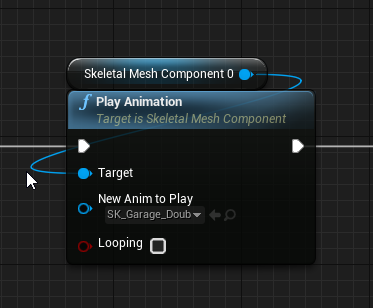
how do i replicate this animation
I have a door that opens and closes but its not moving the collision for some reason
any ideas?
lol
thin stratus
Is that a replicated actor and you are on the server?
Playing that in a multicast 100% should play the anim on all instances
twin juniper
ok i think im an idiot let me see
i forgot to set bReplicates = true lel
i believe
ill try
Nope lol
@thin stratus its playing the animation but not doing the collision removal
So I cant walk through the door lol
because it keeps bumping me back out
thin stratus
I don#t see any node that should deal with collision removal
Is the collision properly applied to the correct bones?
twin juniper
yeah
thin stratus
Is the collision working for the server?
thin stratus
I assume the collision isn't moving
You might want to show the collision ingame
There should be a console command for that
And check if it's moving along or not
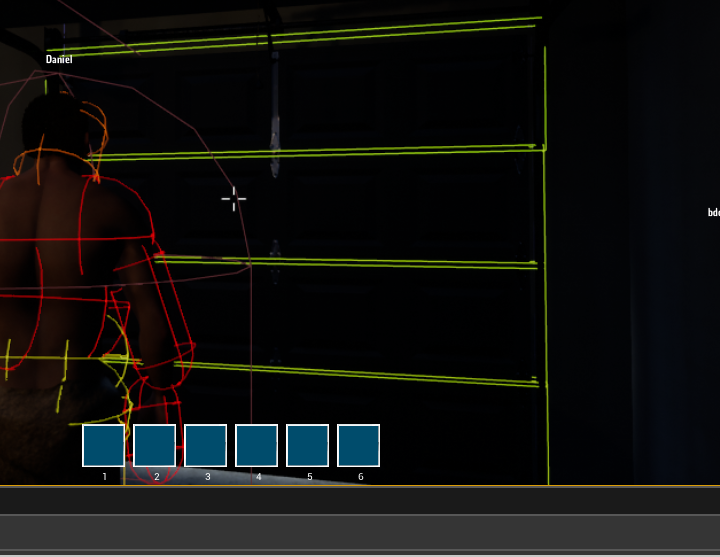
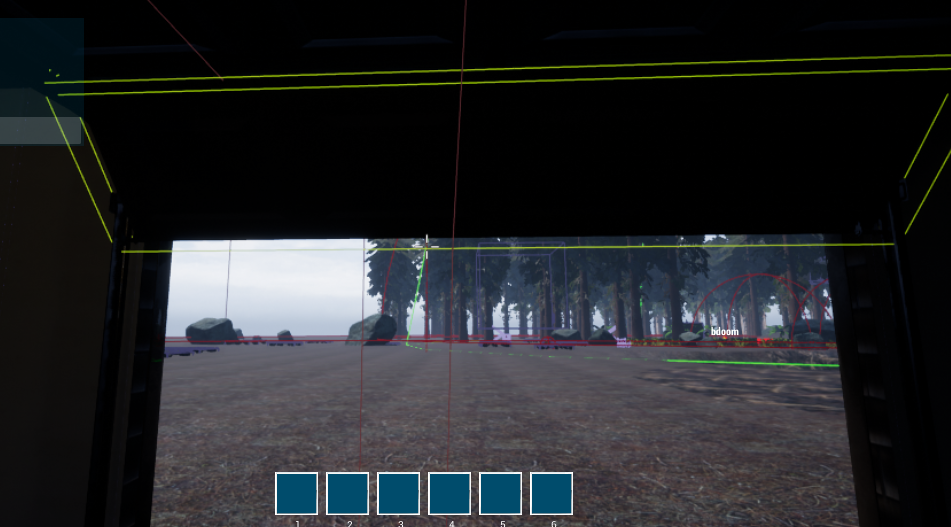 twin juniper
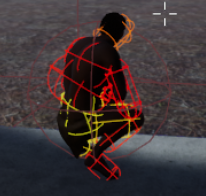
because when i crouch
the capsule gets shrunk,
lol
I dont know wh at it could be caused by lmao
twin juniper
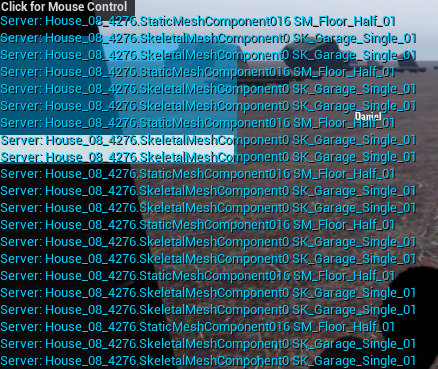
Well its the skeletal mesh component
of my garage door
i think ihave a workaround
just set the collision to no collision after the animation finishes
manic pine
maybe its not opening on the server
you need the tickpose thing activated on dedicated for that ye
twin juniper
@manic pine how do i enable that?
you mean this ? https://i.imgur.com/OpyMb5Y.png

i have it set to always lol
manic pine
GetMesh()->MeshComponentUpdateFlag = EMeshComponentUpdateFlag::AlwaysTickPoseAndRefreshBones;
and refresh bones?
be careful about using it though, if you do it for a lot of meshes with animation(and you dont technically need it), you could be wasting a lot of cpu power on the server
twin juniper
@manic pine could i toggle it on and off
based on if a player is within a collider?
i think that could be a good solution
(assuming this works)
ok it worked
lolol
manic pine
are you using that on every single mesh in the game?
manic pine
what about your characters and monsters
manic pine
what about your countless animals
manic pine
didnt you have some server performance problems with weird physics in the profiler
well anyway, make sure its disabled unless you know you need it
unless youre doing e.g. lag compensation for hitboxes and such, or stuff like your door here, its generally a waste to tick pose/bones on dedicated server
twin juniper
mhm
but ithink it might be possible
to toggle it
like tihs
when we open, enable it, then play animation
manic pine
it might, just a bit unsure how its gonna refresh
manic pine
yeah
just debug it thoroughly
could end up weird if, in the middle of opening/closing the thing, a player leaves the area and it stops refreshing
what happens at that point
then what happens when a player enters again
stuff like that
twin juniper
i tried lol
set it by default to use
"Only tick pose when Rendered"
and then in my multicast i did the above
and it still lets me through now
so it sounds like u can set it
manic pine
well, 'when rendered' wouldnt work since dedi doesnt render
twin juniper
exactly
manic pine
and it certainly doesnt render client's POV
twin juniper
but i set it to Always tick pose when u enter the door area
and the collision issue is still resolved
lol
@manic pine is this really the only solution tho
i feel like its kind of a bad one lol
manic pine
ye i think its a bad option
twin juniper
i mean it works...
manic pine
i'd just give the door a single collider, e.g. a rectangle, and enable/disable it upon opening
much more performant
manic pine
well it would
Door->OpenDoor();
inside which you'd disable collision
then you'd make a replicated boolean or something, with an OnRep_DoorState
if(open)disablecollision
for clients
twin juniper
yea
mild hull
cant you use the moving collision on client and the simple on server?
twin juniper
i need it to only disable collision
when the animation finishes
not WHEN enter
OnEnter
but instead
OnAnimationFinish
manic pine
what mizuki says is possible, but im always wary of moving colliders...
i have bad experiences where they suddenly throw your character miles awaay
mild hull
thats why automatic doors have safety functions :D
manic pine
haha yeah, epic forgot to include that
how about an enum of some kind with Open, Opening, Closing, Closed
when opendoor is called, start opening animation and set state to opening
animation finishes, state changes to open, etc.
state is replicated with repnotify, so clients can respond by playing animations and/or setting their colliders on off
twin juniper
i still am not sure if i understand rep notify lel
if i connect to the game late
do i get the notify
mild hull
when the var is relevant to you, than you get a update and whenever you get update the function runs
manic pine
and yeah, its sent on the initial bunch as well
so late clients will get current server state
the only potential problem with using repnotify is if youre doing listenserver too
cuz they wont be called for the player on the listenserver, since it doesnt receive notifications
since nothing was replicated
twin juniper
heres another thing
why can i not remove a replicated actor, on my client only when calling a client rpc
very strange imo
manic pine
because destroy checks hasauthority
manic pine
not without doing some really ugly stuff
mild hull
dont render it?
twin juniper
hm
manic pine
disabling its client tick and hiding it is the preferred option ye
but then you have to be careful with potential multicasts it could receive etc.
twin juniper
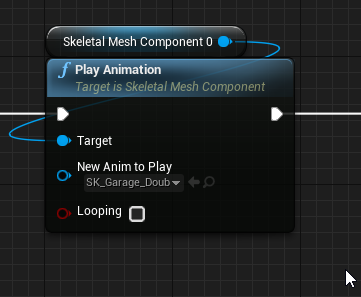
is there no way of like
knowing when this animation finished playing?
im just wondering lol
thin stratus
Use a montage
mild hull
not sure if its exposed but the animation assets should have a length
jolly siren
Anyone know how to get the region a server is within?
fossil spoke
You would probably need to classify them yourself. I dont know of any built in method that would have that type of data on hand.
jolly siren
Okay, yeah I wanted to display server regions in the ui
hidden thorn
What do these 2 settings mean more specifically
SessionSettings->bShouldAdvertise = false;
SessionSettings->bAllowJoinViaPresence = false;
bShouldAdvertise -> Should this Session be listed in Session Searches
bAllowJoinViaPresence -> Should other be able to join this session through Presence
Presence Basically everything that to do with the player. Groups, Friends, etc. (afaik)
 fresh saddle
Has anyone had any luck in using Advanced Session Plugins for Voice Muting? Seem to be having issue when trying to fake proximity chat by muting and unmuting players based on distance. Currently I'm executing it on Client only, should it be run on Server instead? Not sure. Lemme know
 junior tree
how would one go about implementing crossplay across pc, xbox, ps4 etc?
anything I google yields player guides on activating fornite crossplay in the options
 loud mountain
hmm I never programmed on a console, but Isn't it "just" connecting to the same server and done? As long as it is a public ip?
junior tree
should be, but not many games support crossplay, plus I would not know how you can match together players from the PSN and the Xbox Live subsystems
I mean, Monster hunter devs stated that the delayed pc launch is due to them having to implement matchmaking and stuff while on consoles you have their own systems
so I guess it wouldn't be that easy
 bitter oriole
It's more complicated than that
Some (haven't used all) consoles require your game servers to talk with their own
Some (think Sony) appear to require that they don't talk to others
And PC/Console crossplay is generally frowned upon, because PC has much more cheating, and because mouse + keyboard is often more competitive than gamepad
Matchmaking specifically is handled by the console developer, not you
mild hull
yeah but any build can connect to the same server, its mostly rules and matchmaking/session finding that hinders you
bitter oriole
Depends on your game, but yes, the red tape and online services are the most obvious blockers
junior tree
it's a shame for non mainstream competitive games like tooth and tail
(that one actually has crossplay, or at least it's planned)
when you need a critical mass of users splitting the community per console makes no sense
bitter oriole
PC / XBox can happen these days, for what it's worth
Sony has a 70M install base, most games on the platform are going to have at least dozens of hundreds of players
They don't need or want crossplay
loud mountain
in rocket league you can matchmake with or against PS4 players
bitter oriole
Not yet IIRC
loud mountain
and don't forget portal 2 with which you could play ps3/pc coop
 verbal wave
and final fantasy xiv has PS4/PC crossplay
junior tree
I don't think a huge install base justifies no crossplay. Some niche games are going to be used by 0.0001% of the players or so, which they need to be online at the same time for play to happen (think of battle royale games)
loud mountain
but of course they can sell more consoles, if you lock player groups on one system
mild hull
didnt fortnine accidentally allow cross play 3 times?
bitter oriole
The larger point I'm making is that you don't get to decide, you can only ask permission. Getting your game on consoles isn't granted and there are rules, that might or not be stretched depending on your game
Rocket League or Final Fantasy can get to bend the rules
verbal wave
Doesn't mean we shouldn't complain about it as devs. We should always complain. Crossplay almost has no downside for most non-FPS games.
but I gotcha
bitter oriole
If crossplay has value for your game you should definitely ask about it
Just pointing out it doesn't always has value / is possible
mild hull
dont forget RTS
verbal wave
how about Switch? It's relatively new and doesn't have a lot of info
loud mountain
Minecraft is or is coming crossplay on Switch, right?
verbal wave
I want starcraft 2 on switch wink
junior tree
thanks for the info, now I know it's not entirely up to the dev to allow crossplay
verbal wave
for now I'm stuck with
bitter oriole
@junior tree Just don't go around announcing crossplay for your game before you have the greenlight from Sony is what I'm saying 😛
That goes for anything console-related really
junior tree
sure
verbal wave
thanks for the talk
 eternal anchor
annouce crossplay between xbox and PC (;
manic pine
does anyone have experience with stamina systems for extra run speed in mp?
im struggling finding a decent solution that doesnt cause movement errors at low stamina levels, when deltatime differences on server/client causes stamina level disagreement
gaunt crown
New to the whole multiplayer side. So noobi questions.
Any reason why this doesnt work on Dedi? The Cast fails on Dedi but On SP it works perfectly and casts through.
manic pine
if its running on a client of the dedicated server, its gonna fail due to gamemode not being available
gaunt crown
Ah okay
So how would I fix that?
Place on another BP?
Like maybe the Client itself?
manic pine
only the server instance has access to gamemode
the server controls the 'rules' of the game
gaunt crown
Ah aight
Yeah I got a widget that does a timer to all clients for the countdown of the match
So I might aswell make it client widget only
No Gamemode needed
manic pine
could do that, or if you want the gamemode to control it you could have gamemode(from server) send the countdown to clients
gaunt crown
I mean what's less resource heavy?
Running it on clients obviously 😄
So I might aswell
manic pine
yeah, depends on your needs and the effect of the timer etc., how susceptible it is to hacking and more
gaunt crown
Ah right
By the way, I have another issue if you could help me with
I hope I can figure it out tonight 😄 but heres a vid
Wait wrong vid
There
Ive tried replicating ways that another person helped me with and it didnt work.
manic pine
oh no, not replicated physics
manic pine
replicated physics is a complete mess
really the only decent approach is to make it yourself, not as a physics implementation but as
gaunt crown
Wonder how many Golf Games did it in UE
manic pine
movement component
gaunt crown
Ah,
manic pine
but thats a ton of work to do properly.... hmm
you could try using the projectile movement component that already exists
i havent used it too much so im not completely sure how good it is
but i'd expect it to be a lot better than just doing replicated physics
it supports bouncing, so it should be pretty close... but how well it's simulated on clients ive no idea
gaunt crown
All g
I will have to think of something 😦
My Golf game has only been in the works for a few days so all good.
worthy wasp
I"m getting connection timeouts - cant execute this command.... is it even valid? I have a need to change the GameMode for a given map - each map supports different gamemode types.... due to the fact that HostGame works this way with the URL..... i was thinking i could do the same thing with ServerTravel?
ExecuteConsoleCommand:
servertravel MapName?Game=GameModeAlias?listen
thin stratus
@gaunt crown please read my compendium if you are new to networking
It covers common things like which class is available where
The compendium is pinned to this channel
@worthy wasp should be valid
thin stratus
 gaunt crown
Cheers
twin juniper
How can you sync the client and server random spread if you fire instantly clientside?
In shootergame the client sends the currentspread that was generated when he shot, but couldn't he just spoof that and send 0 spread?
 brittle sinew
Yes.
There really isn't a super great way to do that, as even if you generate it on the server and client in parallel (with a common seed), the client would still know the spread ahead of time and could account for that
In CS:GO, for example, the client-side spread really doesn't mean anything; it's completely visual, and the actual spread is calculated on the server
If you want instant feedback on the client, however, there really isn't a magic way to pull that off, as like I said, the client would still have to know the spread, and can cheat off of that
twin juniper
Thanks for the indepth answer! I see that makes sense. I was thinking about using an array of spread values per shot that is decided on the client and server on begin play but as you said, the player could just compensate... same goes for recoil I guess
So CSGO basically processes every clientside shot on the server and the client just visually shoots, even if it hits another player on his screen?
Gotta implement good lag compensation in that case
brittle sinew
Yeah, and that isn't perfect either. It often leads to "dusting" (a term used more often in BF games) where you see blood come from the player but no damage is done
In Battlefield (especially in the early days of 4), you could often hit vehicles on your end, see an explosion, and nothing would happen
twin juniper
I guess that can be prevented by only calling damage fx on server and the rest on client, or just let the server call everything and have the client shoot instantly but have a delayed impact response
wow that is pretty extreme
brittle sinew
Yeah, BF4 at launch is one of the most egregious examples of bad netcode ever, IMO
It was bad. Rofl
It got better over time, but the launch was pretty rough
twin juniper
I was playing battlefront a few days ago and the servers are filled with speed hackers who can run extra fast. As a AAA developer, how can that sort of exploit even be possible?
Aimbots / wallhacks etc are of course not possible to prevent but it seems games that need to give the player a little bit more freedom in movement shift some things clientside
thin stratus
Lots of AAA games do clientside stuff
- Cause they don't care that much
- They are on a strict time limit
Blame the publisher
twin juniper
That is fair enough
Ok I'm thinking of not even bothering sending the spread values on each shot like Shootergame does (it's an extra vector, int32 and float that is sent on each shot). Since it's only even used for remote FX, is there any reason that you shouldn't just replicate a single repnotify int every time a shot is fired, and have the remote clients run through a cosmetic trace and spawn FX?
For example shootergame sends explicit data for both shot start and shot end fx whether it is a miss or a hit
The only things that really matter would be damage data, in which case the hits need to be properly shown, but for general cosmetic replication of misses, I'm not sure it's worth replicating explicit miss impact points
 eternal fulcrum
what youre describing is a pretty common practice
having a count of shots replicate down then firing your fx off of it is perfectly acceptable
twin juniper
@eternal fulcrum Great thanks for responding. It just seems wasteful to have all the explicit data sent for missed shots when the clients won't notice either way, I think just a single int works nicely
manic pine
the positions and rotations are different though, so it could end up looking like a miss is a hit on the other clients
twin juniper
@manic pine That is true, but also comes with the problem of if you get the explicit data and the client does a fast 180 degree turn before the cosmetic FX is called, it will look like he is shooting through himself or at a very strange angle
At least if the remote clients simulate all the cosmetic fx themselves, it looks correct for all clients in terms of where the shots are going
Shootergame basically traces from the muzzle to the explicit impact point, so it would be possible to see bullets coming out at strange angles from remote clients for the sake of accuracy
manic pine
yeah, and imo its more important seeing the real shot
twin juniper
Is it? Even for misses?
Like think of how many times you are in a fast paced firefight with a player and you see where the impacts are going
Maybe for slow shooting weapons like snipers
manic pine
well this would be for potential spectators as well ye
twin juniper
But the majority of the time if you and another player are facing off at medium or close range and reasonable latency, you basically won't notice or question the fx
Well look at spectating in say fortnite
It's completely all over the place in terms of what actually happened
You get the idea if you see the hits
manic pine
yeah i havent played fortnite, im just referring to arena shooters in general i guess
twin juniper
It's just is it worth sending an int, a vector, another int and a float every time you shoot, vs a single int
Saves a lot over time I'd say
Unless you need it to be super accurate
manic pine
well, how often are people shooting
manic pine
one rpc for every shot?
twin juniper
If you want the shots to be accurate, yes
Well following shootergame, there is technically 2
But holding down the shoot button, there'd be 2 initially and then constant single RPCs
manic pine
right, but even at a server frequency of 100, that's still reasonably little traffic per client ye
it uses netquantize vectors i assume
twin juniper
Of coures, but you'd like to be as efficient as possible right?
Yeah it does
Like if you can scrap 3 extra properties being sent potentially thousands of times per match, you'd do it?
It also saves a repnotify call
manic pine
maybe... would have to test it, because as a player i know how weird it feels to have this awkward simulation going on
makes you feel like the game's netcode is completely undependable
twin juniper
Well you'd only really notice if you have trail fx- you could make players not collide with cosmetic impact fx
manic pine
im talking mostly from the perspective of someone who plays a lot of round based games though
twin juniper
Most games don't match the tracer fx with the actual bullet
Especially with hitscan
manic pine
i.e. you die then spectate everyone else for 20-30 seconds
twin juniper
Ah right
So it is important to have good spectating in that case
I'm more making something that will have all players in the game for the majority of the time
manic pine
i suppose in stuff like fortnite and huge scale stuff, its probably of less import
yeah, and if everyone's always playing, then they're too busy seeing where the visuals end up
they'll just think "lul this guy cant aim"
twin juniper
Yeah exactly
And if they get hit, they had seen the impacts all around them, regardless of that's exactly where the missed shots actually went, they won't question the damage
manic pine
if youre going that route though, might you not as well just replicate a 'fire' var?
so instead of rpc every shot, activate fire and deactivate when stopped
twin juniper
Well the server still has to test every shot to see if it hit something
This is just the cosmetic side of things that can run through a single int32 repnotify function
But yeah you are right that could actually work
manic pine
you could do a RPC specifically for the hit
twin juniper
INstead of replicating that int constantly it could just replicate once on pressed
twin juniper
I think that's basically what is already setup, except I'm changing the int every shot
The actual gun has to still fire RPCs for each automatic shot
twin juniper
Well the way I have my hit detection setup, the client tells the server if he hit anything important, and only then does the server validate (yes not the best way to do it, will implement proper compensation later)
manic pine
yeah, thats the standard way
just with turn back time on server before validating shot
eternal fulcrum
yeah so much of this is game specific, so discussions start to go beyond academic very quickly
twin juniper
Yeah I want to get that rewind stuff implemented
eternal fulcrum
heh, working on that today
its quite a bit of work to do it right btw
expecially depending on the fidelity you want
if animations come into play, even more work
eternal fulcrum
...?
twin juniper
Oh, by chance can you answer this? In my head, when the server literally moves all clients to the position of a certain client that shot to retrace the shot at a timestamp, I keep imagining they are actually being moved in the map- this movement doesn't actually affect their server position does it?
Or does it happen so fast, it doesn't affect anything
manic pine
im not moving clients at all
im binding X hitboxes to sockets on the character(make sure dedi is simulating animations/bones), and storing those hitboxes positions every tick
on turn back time, move every hitbox back to time X
twin juniper
If we simplify this to just the capsule collision, would that mean that the server just traces against the client's cached capsule collision at X time?
manic pine
if you use capsule then, assuming its root position, you'll be effectively moving the actor
root component*
but yeah, keep in mind its not ticking at that new position
twin juniper
You are right yeah
manic pine
you'll need to teleport though, there's two ways of moving
one does a sweep, the other just changes positions
twin juniper
You still do move the actual actor though to actually fire from the weapon right?
The firing actor that is
And then you can trace against thecached collision of the hit actor at timestamp X
manic pine
moving the firing actor? why
twin juniper
Well where he was on his screen at time X wasn't where he was on the server
manic pine
but its where he will be
twin juniper
So the server has to be where he was to do the shot no?
manic pine
keep in mind, by the time ServerRPC to fire reaches server
so will clients latest move
twin juniper
Right but that means it would trace from a different position on the server, wouldn't it?
Like client shoots at time 85, sends rpc, server gets it at time 92, the server has to know where client was at 85 and then shoot from that position surely?
manic pine
client sends continuous move updates to server, e.g. ServerPerformMove
assuming youre using charmovecomp
twin juniper
yep I am
manic pine
right, so at the same time as your fire RPC reaches server, it should have received a ServerMoveRPC right before
which would take server to same position client was at time of fire
twin juniper
Ok so server knows the position at the time of fire, and the hitbox position of the enemy at time of fire, however right now on the server the positions are different
manic pine
keep in mind client is ahead of server for his own character
twin juniper
So what does it do to call the trace? Teleport, call trace, teleport back?
Yep the client is ahead but wouldn't the server be off by a bit if he didn't move anything and just shot as soon as it got the update?
manic pine
right before the shot, server receives the latest move rpc... the one client did right before shot
so generally no, at least not without packet loss
keep in mind one weakness of the current implementation though, it uses netquantize for rotation
that makes you lose accuracy for servers character rotation
even at netquantize100, it can make a huge difference for long-range shots
twin juniper
Got it, thanks for all the info!
Did you learn how to implement this stuff anywhere in particular?
Looking to gather as much learning material as possible
manic pine
for moving the hitboxes(which in my case are just components), i use e.g. HitboxArmRight->SetWorldLocationAndRotation(PositionStates.ArmRight.Position, PositionStates.ArmRight.Rotation, false, nullptr, ETeleportType::TeleportPhysics);
the ideal would of course be to just store actor location, rotation, animation and animation time
mucuh less information
i didnt find a good way of accessing and setting that on the fly though
but remember to put the hitboxes back where you found it once server verification is done ^___^
twin juniper
UT stores Position, Rotation, Velocity, Time, Timestamp etc in an array of structs
Thanks for the info btw
So you do it in an instant so nothing really gets moved right?
manic pine
yeah, on the hit characters(as determined by the firing client), i tell them to set their hitboxes to WorldTime - FiringChar'sPing/2
then run the trace, then put hitboxes back
twin juniper
Got it
Yeah in essence it actually seems like a simple enough operation in terms of length
If you have the data stored and have correct timestamps, it's just a matter of changing the location and running the trace with that data at a certain time
manic pine
yeah, the only annoying thing here is i made a bit more hitboxes than i should
ive like 15 of them for every character ^___^
twin juniper
Wow damn..
Would it be unwise to trust the client if the server verifies the hit?
I guess so cause hackers could get legit hits but just tell the server it was a headshot every time...
manic pine
i just use the clients hit info for deciding which actors i should revert time for
so it cant really be hacked
twin juniper
Nice that sounds good
manic pine
for debugging it you can just make a net multicast which draws debug shapes of the hitboxes at the time of hit
twin juniper
Great idea
manic pine
i made a circular list for storing the hit information, to avoid massive reallocations
since server will need to do a StoreHitboxLocations() on every tick
of every character
oh and since WorldTime-Ping/2 will never correspond to the exact time when hitbox location was stored, you'll need to interpolate between the two closest hitbox histories
hmm was actually more work than i remembered
twin juniper
Yeah that's what I was thinking when you said you just used the moment the player sent the packet, thought there'd need to be some interp too
manic pine
the lerp is for the hitboxes of the target char, not the shooter
lets say server stored positions at world time 1.1 and 1.2 and current world time is 1.3, player ping is 250ms
desired hitbox time would then be 1.175
so you'd do a lerp between hitboxes at 1.1 and 1.2 with alpha 75% ye
twin juniper
got it, thanks for all the details!
manic pine
yeah, best of luck
 pallid mesa
@thin stratus hey eXi, I was re-reading your conpendium and I noticed that on the page 45 you don't have that last elseC void ATestPlayerController::BeginPlay() { Super::BeginPlay(); // Make sure only the Client Version of this PlayerController calls the ServerRPC if(Role < ROLE_Authority) { Server_IncreaseVariable(); } else { IncreaseVariable(); } }
pallid mesa
yep it is about server RPC later on gets addressed that part I mention but I thogh it was something you missed there, just saying just in case :P
thin stratus
Looking at the pages before
I'm simply redoing the Blueprints
And there was only the ServerRPC
So that "missing" was on purpose
pallid mesa
but in bp's you would need a switch has authority and plug the rpc on remote, don't you?
thin stratus
pallid mesa
👍
 heady delta
this is probably a common q, but replication condition on an inventory array in a component that can be accessed by people other than the actor owner. Might it be better to update the client array via RPC when they need to interact?
thin stratus
Well, the array itself should only sit on the server anyway
The client only needs the data needed for visualization it
manic pine
and there's the problem with interacting with it, since non-owning clients cant do server rpcs on that actor
heady delta
usually for inventory stuff I go through the player state since their own component is there
not directly calling RPC on another actor
hidden thorn
nvm issue sort of fixed
ripe raptor
Is "OnPossessed" only called on the server, or the owning client as well?
winged badger
I think server only, function is commented in Pawn.h
ripe raptor
Yeah just tested it out, that's unfortunate.
winged badger
you can easily send a client RPC from the server event
at the point pawn receives OnPossessed, it is owned by the controller
ripe raptor
yeah I did that
twin juniper
how to make a game MP able? want a video tut. max 20 minutes.
ripe raptor
hah
The best I can give you under those constraints is "hire someone who didn't limit themself to 20m of learning"
junior tree
any way to test dedicated server with builds in a local lan without having the engine source? Can the builds connect to a dedicated server project launch with uncooked content?
yes it can, apparently!
twin juniper
is there a way to load into a level
without using open 127.0.0.1
because this causes the player to stop playing any audio
that is currently playing
Personally... i think this is a very poor design
and seamless travel, has two paragraphs explaining what it does
so i dont even know if this would be a good solution for me, also i have never gotten seamless travel to do anything visible
mild hull
when you move to new server you unload most things, i would look into loading screen and continue the audio there
twin juniper
i have a loading screen working
but i want a real loading screen
@mild hull checkout this: https://www.youtube.com/watch?v=SC5OI7ifk6U


you see how Assassins creed is not a static loading screen
but an interactive one
where u can actually do shit
i want to be able to place things like particles, or have random NPCs being shown during my loading screens
not just an image and some slate widget
I don't think unreal has this, and especially not for multiplayer
mild hull
not to sure but there should be a world and you should be able to populate it however you want, but never did much with loading screens
twin juniper
yeah
i think its not possible
personally
but at a bare minimum i would like to keep my sound playing across level loads
and not just lose all sound
really ruins any type of immersion
Looking at UT, it seems that the hitbox is just the root collision capsule!
That is pretty interesting as it saves a lot of complexity when doing lag compensation
Is there any way to use the PHAT collision capsules as a hitbox (or is that what is happening automatically when not tracing complex?)
It seems that even with lag compensation, if you have hitboxes that cover the body and move with animations, there are problems that come in to play if a player dropshots while another player shoots him: the player that is shooting sees the enemy standing up on his screen, but when the shot gets verified on the server, it uses the correct client timestamp but the current animation state
And I think syncing animation states along with all the position and rotation data in each snapshot is a bit too complex for basic lag comp
 chrome bay
@twin juniper Sound can traverse levels if you want it to, but the audio component needs to be managed by something that isn't an actor.
UAudioComponent::bIgnoreForFlushing
You can't keep audio around that's owned by actors because the actors are destroyed
@twin juniper Syncing animation state isn't usually neccesary because the animations should be driven by what the character movement is doing anyway (which is synced).
@twin juniper If you want an "active" loading map, you can use a Transition map and use Seamless travel. All players will be moved to the transition map while the server loads the next map in the background - but transition maps should contain as little as possible.
And you'll probably have to jump through a few hoops to get an a-creed style loading screen working
twin juniper
@chrome bay Well if an enemy was playing a switch weapon animation on the cilent when he shot, which has his arm raised up, and he hit the arm, but then the server rewinds to that frame when it gets the packet, I don't think it'll also recreate that animation state unless you send explicit data no?
I thought it would play the current animation and just teleport the enemy
chrome bay
But yeah, hitboxes for projectiles are usually just the cylinder - otherwise different characters have different hitboxes and that's considered unfair
And no it won't - but switch animations etc. aren't driven by movement they're probably driven by RPC's
It's not worth the bandwidth cost to sync that kind of stuff
twin juniper
Yeah it seems like it would be VERY costly to caclulate on each bullet
I think I'll go with a nice simple capsule
I wonder how headshots are done with the single capsule approach though, maybe a second trace on a different channel just for headshot collision? Have to look deeper into that
chrome bay
You could just check the distance the the head bone I guess
twin juniper
Very true!
I also saw this method: http://blog.bluecurse.com/2017/09/18/lag_compensation_part_1/
Where he creates primitve boxes which would mean the hitbox would stay consistent over different meshes
Does that seems like an ideal approach for more accuracy?
So the mesh could be swapped out but the boxes would stay consistent on the pawn
chrome bay
Christ that looks expensive
chrome bay
I'd avoid that like the plague
twin juniper
But then again that data doesn't need to be sent, only timestamps need to be sent
You'd just have to cache all of that locally on client and server
heady delta
you could do lag comp with an animation pose snapshot maybe
twin juniper
I wonder how expensive that would be per bullet
chrome bay
It's not cheap, playing back the physics on the character is costly
And if you're doing it not only for correction but also for lag compensation, don't expect any more than 8-10 players in the match IMO. Might be acceptable with dedicated servers, can't imagine listen servers woud handle it well
twin juniper
Are you talking about the first link or the pose method?
twin juniper
I just wonder how CSGO gets away with all the capsules
UT seems to have a very solid hitscan rewind and projectile rewind technique in place
chrome bay
BRB
twin juniper
@chrome baydo you know any information about seamless travel? Do you go to that map when we call open ip address to connect to a server?
And if we do
Where does the camera spawn
Would it work if it was owned by a u object?
Seamless travel has never worked for me
twin juniper
Hmmm also seeing that UT has bTraceComplex = true for hitscan weapons, maybe they are tracing against the actual mesh on the client but on server they trace simple against the capsule?
 tough gyro
looking at that hit box position saving thingy in the link
I do wonder if animations are totally in sync across clients and server?
twin juniper
Yeah that's what I'm saying- the server would rewind and move the hitboxes back but with the current animation frame, not what it was at the time of shooting @tough gyro
tough gyro
that doesn't sound correct
twin juniper
Well you'd have to send more than the location, rotation and time if that was the case
COD had that problem up until black ops 3
And even then they said a lot more data had to be sent per shot
Normally it's not an issue but I'd say with extreme poses it can cause issues
chrome bay
@twin juniper I've never used Seamless Travel myself, but it's what a lot of the UE3 games used, particular Gears of War.
@twin juniper To be honest, the difference is probably so marginal it's barely worth the difference. You have to give the client some leeway otherwise the game would feel horrible
And I'm also paranoid about adding excess components but if you want more advanced / varied hit detection I guess there's not much you can do about it
twin juniper
I just want fair shooting, doesn't have to be super accurate. Also want the lag comp rewind to be as simple as possible
So a capsule seems like the easiest option
chrome bay
Yeah, I don't think simple lag compensation exists to be honest haha
twin juniper
Well it's not as hard as I thought it would be in theory at least: send constant timestamps, when shot is taken on client, the server moves the client to the position he was at when he shot, and also moves all other player hitboxes back, traces and if hit, the client gets his hit
Some of the clientside methods can be equally complex if doing stuff like creating bounding boxes around the clients on the server, and they tend to be way less accurate
But moving a single capsule and testing against that is certainly simpler than creating a heirarchy of box components and test against those
junior tree
so I got a bunch of instanced static mesh components in my game that the users edit (add and remove instances) and I would like it to work with reconnect feature. Is there any clever way to make this? Right now I'd be using multicast events with a lot of unnecessary data traveling around
basically when a player connects to a game it will need to have all the instance transforms from the server and place them
pallid mesa
@chrome bay in terms of leeway values, do you have any notion of how to properly choose a proper leeway value?
twin juniper
An overview of how travelling works in multiplayer.
the only article about seamless travel
and it literally trells me nothing
lel
nothing that i dont already know
thin stratus
It does pretty much tell you all you need :D
At the bottom it says how to persist actors via seamless travel
If you Uobject is part of a persisting actor, then I assume it will survive
twin juniper
@thin stratus but does the actor need to be replicated?
because ideally i would like to be able to just put an actor on the client, keep it until the loading ends
thin stratus
Well the PlayerController can call "GetSeamlessTravelActorList"
Which gives you a way of registering the actor that should survive
However, idk if that runs only on the server
If yes, then the actor would need to be replicated
Another way of preserving information would be adding a UObject to root and removing it later again
twin juniper
that would mean it wouldnt work as a way to transfer sound across levels
lol
ive also tried to spawn sound
on UGameInstance
doesnt work
twin juniper
exactly
so its essentially impossible
to persist sound
across level load
but ive seen ARK do it
lol
thin stratus
There is flag on sounds
That allows them to survive level changes
"bIgnoreForFlushing"
have you tried that?
twin juniper
yea, but u still need it to end, after level load
 harsh lodge
Can anyone help with Android app not creating or joining session if Google play is enabled?
 tawny parcel
If anyone has any experience with CORS and HTML5 games I would love some help right now!
https://answers.unrealengine.com/questions/756942/html5-cors-issue-to-my-hosted-server.html
 dense tree
Hey guys,
I'm trying to work with physics handle in multiplayer. At begin play I'm using -grab component at location (which runs on server). All the components are replicated. But when I play the game in Multiplayer, the grabbed component seems to shake. Has anyone faced a similar problem? Would appreciate any kind of help!
winged badger
replicating more then 1 component with FTransform per actor can have some weird side-effects
ripe raptor
Having an extremely tough time replicating arrays...
They just don't want to replicate on the initial pawn spawning
just a TArray of classes
replicates just fine if I change it when both players are in... but when the second player joins they don't get the state of the array from the first player
 mellow cipher