#multiplayer
1 messages · Page 260 of 1


 worldly needle
Take a look at MVC pattern and understand it in wide spectrum. It will give you idea on how
 woeful trout
worldly needle
Take a look at MVC pattern and understand it in wide spectrum. It will give you ...
woeful trout
worldly needle
Take a look at MVC pattern and understand it in wide spectrum. It will give you ...
so the code is wrong?
i mean the logic behind the replication
or im missing something
worldly needle
yes your code is wrong. You are expecting to change replicated value from UI.
woeful trout
i found another way to change visibility when it picks up a weapon from the weapon
worldly needle
and even you can achieve that “that replication is non necessary”
woeful trout

this bp is my actor (item pick up)
it works well on server but no on client so if i fix the replication maybe it will works
what do you think?
@worldly needle
 topaz knot
I'm still trying to learn multiplayer. So I've been doing server to client for everything, but it looks like mobs like chest or something that spawn mobs shouldn't go server to client? Multiplayer is a pain. Could someone nicely explain this to me.
This is a Cabinet that on game start picks some loot and an enemy to possible spawn when the play opens the draws.


 tame sapphire
Is there a better way of adding a widget to all player screens via the server than using the game state and a foreach loop on the player array and either calling a spawn widget event on player controller? or player HUD? or would a multicast in the game state be better? (Ideally id like this to delay and hold up the turn for the length of time the widget is on screen?)
think turnbased and a widget to say starting server turn and another for player
 dark edge
topaz knot
I'm still trying to learn multiplayer. So I've been doing server to client for e...
dark edge
topaz knot
I'm still trying to learn multiplayer. So I've been doing server to client for e...
spawn a replicated actor on the server
If you're learning, just delete all multicasts from your project. Use replicated variables and RepNotify.
worldly needle
woeful trout
this bp is my actor (item pick up)
sorry, I had take off. Look your function names and variable names are very vogue. I dont understand single thing to help you.
This is not going to help you either on long term project.
You need to give proper names to your functions and variables first which you can understand even you open this project 5 years later. And that will help you a lot even finding a help.
Right now I'm seeing bli, serv kinda function names, new var as variable name which is being replicated. What they are being used for. How you dont forget what these things are doing ? There are many question marks in your implementation and they are piling up on each.
But dont worry, you can fix and put them into perspective with doing some reading and understanding logic of producing, rather than replication. I guess you need to spend time on those.
woeful trout
worldly needle
sorry, I had take off. Look your function names and variable names are very vogu...
new var is the widget ref
the bli and serv is the custom event that i use to replicate the ssystem
worldly needle
you missing point. I know you have all the answers about functions 🙂
woeful trout
the bli is on multicast and the serv is on server
woeful trout
worldly needle
you missing point. I know you have all the answers about functions 🙂
ok i get it ill strugle alone and ill send you tomorow
worldly needle
just refactor with variables and functions and send them to me once again.
woeful trout
worldly needle
just refactor with variables and functions and send them to me once again.

the image 43 is the image that i want to be hidden

i take with my client and the resault is to make hidden the image on server
when i pick an item on server it works on server perfectly
 nova wasp
don't replicate a widget, replicate the information in it and if it's what you want visible
replicating an instance of a widget is not what you want to do here
you want to send information that each client can represent in the ui after receiving
also don't use RPCs for this (imo), onreps will be easier to work with every time as they are persistent won't break late joiners or require a chain of reliables
nova wasp
I think the simple thing would be a variable on the gamestate that represents the current state you want to show
then in that state's onrep create the widget LOCALLY
woeful trout
nova wasp
then in that state's onrep create the widget LOCALLY
So it will not be replicated on the details?
nova wasp
no, don't replicate a random object that doesn't have replicated state
woeful trout
Got it
nova wasp
the goal of replication is to send information, a UI widget is about representing information about the game in a nice way
so the information to send should be separate at least in the replication sense
woeful trout
Ok so in the game state I make a variable, I make the variable on rep and inside the on rep var (of I guess the widget var) I creat the logic behind the visibility?
I'm a little bit confused 😅
nova wasp
sure, that should work
it could even be a replicated struct or multiple variables, whatever
the on rep variable is not a widget reference here, it should be something like a bool or name or something that DESCRIBES the state you want to show
it could even be the class of the widget I guess if you wanted as asset paths are stable over the network
woeful trout
Ok and after I creat this var and I make the logic inside what have to do?
nova wasp
I'm not a youtube tutorial... you might want to check out the pins for starter resources
woeful trout
I mean some where must put this variable
nova wasp
ideally the onrep creates the widget and then the widget works as before, but represents state from this replicated thingy
the gamestate would be a decent choice here because it's replicated to all clients
woeful trout
nova wasp
I'm not a youtube tutorial... you might want to check out the pins for starter r...
True but if you have something on your head ( I mean an idea) on how to solve it I would appreciate that
woeful trout
nova wasp
the gamestate would be a decent choice here because it's replicated to all clien...
I'll try that
nova wasp
where it should be depends on who it is sent to and why
 raw trail
Has anyone worked with experimental MultiServerReplication plugin? This is a magic pill for MMO games?
 quasi tide
If you can't read the source, don't even bother. It is extremely experimental. But it is what they plan on using to achieve their goals for UE6.
 sullen sail
Is there a way to determine this directly from the engine source code?
For example, does BeginPlay run on the server only, or also on clients with simulated/autonomous roles?
I want to understand which built-in events are triggered depending on the network role of the actor.
Any tips on how to trace this in C++ or know where in the source this is defined?
quasi tide
Then you need to understand how networking works
All the lifecycle events will run on all machines
nova wasp
sullen sail
Is there a way to determine this directly from the engine source code?
For examp...
add {,,UnrealEditor-Engine.dll}::GPlayInEditorContextString to your debugger watches
this is nice because it lets you see if you are in a server or client when hitting a breakpoint in the editor
 lament flax
or standalone, etc
 river bobcat
Should I playandwait montages in GAS ability, on server side and relay on notifies? I noticed use multithreading must be disabled on AnimInstance to net getting notifies twice. Do you have any good rules or examples, documentation how to handled that in a good way? (Dedicated server)
lament flax
notifies is not safe ofr multiple reasons
for important stuff that needs save serve rauth, use timers
(read ntofiy time for given AM, and play timer)
 meager aurora
How would you handle spawning actor ( an arrow, while aiming) in multi action rpg. Would you spawn a client only copy for responsivenes, or just rely on server authority?
I am, inside my ability, spawning one copy for client and one copy for server, which is invisible for the owner. Wondering if it's correct apprach, or is there better?
 exotic wasp
client prediction is nice
 nocturne quail
Is anyone see a bug in this code?
UItem* UInventoryComponent::AddItem(class UItem* Item, const int32 Quantity)
{
    if (GetOwner() && GetOwner()->HasAuthority())
    {
        UItem* NewItem = NewObject<UItem>(GetOwner(), Item->GetClass());
        NewItem->World = GetWorld();
        NewItem->SetQuantity(Quantity);
        NewItem->OwningInventory = this;
        NewItem->AddedToInventory(this);
        Items.Add(NewItem);
        NewItem->MarkDirtyForReplication();
        OnItemAdded.Broadcast(NewItem);
        OnRep_Items();

        return NewItem;
    }

    return nullptr;
}
my doubt is i need to first NewItem->MarkDirtyForReplication(); and after add to items
exotic wasp
why do you need to mark it dirty?
 grizzled stirrup
lament flax
for important stuff that needs save serve rauth, use timers
grizzled stirrup
lament flax
for important stuff that needs save serve rauth, use timers
Just curious how do games with intricate enemy attacks (some boss that slams multiple locations on a specific animation rhythm) deals with this?
Surely they aren't doing magic number timer offsets for these?
I've found notifies to be very consistent but PvE game so doesn't need to be as strict
nocturne quail
exotic wasp
why do you need to mark it dirty?
to replicate the object, its not an actor
lament flax
grizzled stirrup
Just curious how do games with intricate enemy attacks (some boss that slams mul...
Designers use notifies, dev read them and programmatically create timers
Nothing to fancy or hard to setup
grizzled stirrup
lament flax
Designers use notifies, dev read them and programmatically create timers
Read them how? If you just mean hooking to the notifies to fire a C++ function then that's what I'm doing
Or you mean they are basically calling timers to fire off when each anim notify would have been called from the anim playing in case the notifies don't reliably trigger?
Seems complicated if you have say a big animation with lots of different damage points like an elden ring boss with 6 hands all slamming in different places at different times
lament flax
grizzled stirrup
Read them how? If you just mean hooking to the notifies to fire a C++ function t...
You can read notifies from a AM ptr
AM -> get notifies -> get time -> bind some lambda/member func with notify class/ID
Read my link
grizzled stirrup
However branching point notifies don’t fire if there are 2 on the same frame, especialy common when its the start of a montage ah this explains why I haven't ran into it
I tend to have notifies spaced out by at least a bit of time before and after
and haven't noticed one being dropped ever
But also on listen server, may be required on dedi server (not sure if anims run there)
exotic wasp
nocturne quail
to replicate the object, its not an actor
just use replicated subobject list
nocturne quail
exotic wasp
just use replicated subobject list
quasi tide
grizzled stirrup
`However branching point notifies don’t fire if there are 2 on the same frame, e...
Do note - branching point notifies and regular notifies are not the same thing.
grizzled stirrup
I've yet to notice a regular notify not firing unless very close to another or on the first frame of an AM
but may be other cases I'm missing
Maybe low frame rate or large amounts of notifies in a short time frame etc.
lament flax
I trust Vaei, who worked on big productions
Also, in a MP contexte it makes sense to use the time instead of the notifies
grizzled stirrup
lament flax
Also, in a MP contexte it makes sense to use the time instead of the notifies
Depends on the context, for PvE games it can be nice to have enemy attacks deal damage on every machine locally so that it feels fair for all players without them seeing the enemy wind up but on the server it has fired and they just take damage out of nowhere
But yes for PvP sounds like the server timer is the way to go for consistency
grizzled stirrup
lament flax
I trust Vaei, who worked on big productions
I just always like to see the actual issue happening in my project before doing workarounds, I think it's a healthy way to work
quasi tide
I agree to an extent. There are some things that are kind of obvious to avoid based on the issues. Like CACs 😅
grizzled stirrup
CAC?
quasi tide
Child Actor Component
grizzled stirrup
Ah yes haven't even tried to implement something with those after hearing all the problems 😄
lament flax
grizzled stirrup
Depends on the context, for PvE games it can be nice to have enemy attacks deal ...
Doesnt change the logic, just who execute it
grizzled stirrup
lament flax
Doesnt change the logic, just who execute it
right, well I guess I haven't come across a situation yet where I've missed a notify so it seems to work at least for most cases in practice
I'd find doing timers to add a good bit of complexity as you'd need to not only know when an event is due to happen but also where so you'd have to start doing delegates with socket names passed and such
lament flax
This issue aside, handling all kind of notifies in the ABP seems terrible
For versioning and organization
grizzled stirrup
To me it is very simple, animation plays and notifies happen to tell code to do things at certain points. I don't really see how moving to a complicated timer setup makes life any easier there unless you are doing very simple animations that only need to fire off a few simple notifies
Of coures assuming you aren't running into edge cases
lament flax
Timers are completly abstract
Allows you to do anything
Doesnt change how you place your notifies
grizzled stirrup
But say for a monster that has 6 hands that each fire off a notify is it not a lot of work to set up 6 timers when the animation starts that each pass a socket name to deal damage at a certain location and also you need to keep track of things like players slowing enemy animations with freeze or such?
notifies are great as they respect retiming
lament flax
It makes things a bit harder on the dev side once
grizzled stirrup
I'm not even sure how things don't get wildly out of sync when you have things that can retime or otherwise influence animations
lament flax
See vaei plugin
grizzled stirrup
You also then have to account for animations being cancelled and cancel the subset of currently running timers
lament flax
As an example
lament flax
grizzled stirrup
You also then have to account for animations being cancelled and cancel the subs...
Nothing complex
lament flax
grizzled stirrup
But say for a monster that has 6 hands that each fire off a notify is it not a l...
Setup would be automated with abstract methods
Not harder than comparing FNames in ABP
grizzled stirrup
I guess the way I see it, notifies fire off 100% of the time for me in code as long as I am not putting them on the first frame or on top of one another so it wouldn't make sense to move to a more complex system. Looking at the plugin now just out of curiosity on how it handles retiming
like an animation slowing or speeding up after the montage started
I'm not seeing retime support on the plugin, seems to assume the anim will play at a certain speed for the duration
lament flax
Its easy to have a notify played at the same time when multiple anims are played
Race conditions
grizzled stirrup
No like say an anim is played at play rate of 1, then the player inflicts freeze on the enemy which ramps down the play rate depending on the strength of the freeze
Suddenly all the timers are way out of sync from the anim
 bronze mauve
I would think as long as the anim notify logic checks for authority before applying damage it should be fine to have as a notify right
grizzled stirrup
Notifies work great for me aside from the known edge cases which I simply avoid (multiple on top of one another and very first frame notifies (even those work fine unless you are constantly restarting the same montage multiple times in a very short timeframe))
Otherwise they appear to be 100% consistent (I haven't had any issues where they don't fire off but my game isn't using dedi servers so maybe things are different there if the server doesn't actually tick the anims, not sure)
 halcyon ore
I've never had issues with notifies either, so this has me curious. 😛
 digital herald
The server doesn't tick them by default so if they depend on socket locations they won't update unless you change that
You can make the server tick anim skeletons though. It's just off as an optimization
quasi tide
But that is only an issue with dedicated
grizzled stirrup
halcyon ore
I've never had issues with notifies either, so this has me curious. 😛
Yeah I am more curious than anything because I wouldn't want to do a workaround with timers when the notifies are much more convenient (free location and timed events which respects anim retimes and slowdowns)
digital herald
yea
quasi tide
Listen servers will obviously tick them
I say keep doing what you're doing Kyle and if it does turn out to be a problem, you have a potential solution.
grizzled stirrup
Sounds like a plan 🙂
halcyon ore
Wouldn't meshes always need to be ticked on server, for like player collision and stuff? (I'd hope all the collision isn't just client side?)
digital herald
You'd need to enable it if your game depends on that
 thin stratus
You can, but in theory you'd only need the Capsule
halcyon ore
Oh, so if your game depends on it, then it doesn't really matter. ok
thin stratus
You can still be pretty strict on when it ticks. We have disabled tick on Dedi entirely for the MeshComp and the AnimInstance. Not even enabling it for RootMotionMontages. Also changed the ShouldTickPose to not tick the Pose if TickOnlyMontages is enabled and we aren't playing montages.
Does bring its own lovely set of problems, but well, performance > all
quasi tide
I'll just use the Engineer's motto to sum all this up, "it depends"
digital herald
thin stratus
You can still be pretty strict on when it ticks. We have disabled tick on Dedi e...
Not even for root motion montages? Do you just predictively play them locally and multicast from the server or use GAS ability task
thin stratus
Neither. I manually extract the transform. There are built-in functions for that already. Just need to keep the play position in sync
digital herald
thin stratus
Neither. I manually extract the transform. There are built-in functions for that...
Interesting.
digital herald
Perf gains tho
quasi tide
Just up the hardware requirements. Profit.
nocturne quail
using low quality animations don't need all these extra work stuff I think, just use AM thats all if your project depends on it
I have a struct with durations Start, End and points for all notifies... so just calling any function in code which is expected to be called by the notify in anim montage.
server using this struct, and client using the AM
thin stratus
Yop. We can't do that fancy stuff. Too many players. Gotta keep the server alive.
 mystic estuary
Hello, I have some pre-placed actors with cosmetic components that run some logic to update their state. I'd like not to have that on dedicated servers, and I was thinking about not having them on dedis at all. How would you go about it? I thought about either wrapping initialization code in #if WITH_CLIENT_CODE or destroying the component on begin play, but I'm currently looking around for possible solutions
 modest crater
mystic estuary
Hello, I have some pre-placed actors with cosmetic components that run some logi...
modest crater
mystic estuary
Hello, I have some pre-placed actors with cosmetic components that run some logi...
Depends on how you intend to package the game as a whole, simplest approach would be a GetNetMode on Beginplay/PostInitializeComponents and check for DedicatedServer
halcyon ore
Seems pretty stupid, but wanna see. 😛
Is there any form of networking (that be a UPROPERTY, or some UFUNCTION)
That has the same outcome of reliable (it will replicate), but without the super forced make it happen 24/ 7 nature of reliable?
basically, I want something to replicate, but I don't mind if it could take 1 second, 40 seconds, etc.
digital herald
Lower the net update frequency I guess
halcyon ore
That affects the entire actor?
But, also it would still not mean 100% replication?
Unless, lower it, and use reliable? (But, don't they run on different things?)
digital herald
If it's a replicated variable or a reliable RPC it will replicate.
You can also toggle on/off a variables replication with a replication condition of COND_Custom.
halcyon ore
Oh, variables will replicate?
I always assumed they could get lost in packets, just like unreliable functions
digital herald
They will replicate.
They aren't guaranteed to be as fast as possible but they will replicate - so basically that's what you're asking for.
halcyon ore
Oh, ok.
Good to know.
I didn't realize variables were a 100% replication thing.
I thought that was just like the existence of an actor, and reliable functions that was 100%
digital herald
Replicated variables specifically.
If they aren't marked for replication, they don't replicate.
halcyon ore
Yes, of course. 😛
digital herald
But yeah you can rely on them to always replicate, unlike an unreliable RPC
halcyon ore
Since your here.
Does that mean COND_InitialOnly means it WILL replicate on initial actor replication.
Or, just that it will only replicate once?
Since, UE docs says it will attempt
This property will only attempt to send on the initial bunch
digital herald
halcyon ore
Since your here.
Does that mean `COND_InitialOnly` means it WILL replicate on in...
Yes as the actor first replicates. If that replicated variables changes again after that on the server, it will not replicate
 amber stone
Anybody here got any ideas on this? #chaos-physics message
mystic estuary
modest crater
Depends on how you intend to package the game as a whole, simplest approach woul...
Check the net mode and then what? I thought to either not run any initialization code or to destroy components altogether
modest crater
Up to you, if you wanted to, make the components created on PostInitializeComponents then it only gets created on non dedicated to begin with. Components that do nothing but exist aren't really an overhead concern though so it really just depends on what you want to do
mystic estuary
Is there people using Redpoint EOS + Common Sessions? What is your experience? Does common sessions ease the workflow or not?
 steel anchor
Hey guys!
I’m having a problem with Blueprint Interfaces and widgets in multiplayer.
Basically, when my character takes damage, I want a widget to appear on screen (like a damage indicator or something). The issue is: the widget shows up for everyone, not just for the player who took the damage.
I’m not sure how to make the Blueprint Interface call only affect the specific client who got hit.
Thanks in advance for any help!
 latent heart
Send a message directly to teh player that got hit.
 dark parcel
Damage should be a server execution only, if that's not the case then you got a problem.
If damage is indeed a server executed portion, then all you gotta do is make the server tell the target client to run a function that show the widget.
steel anchor
Here’s my code, which currently doesn’t work as intended. Thanks for the answers, but I’m still not really sure what exactly I need to change. So I’m sharing my code for a bit more clarity 😅


 crisp shard
when you have a mesh in a blueprint, can you trigger one of the component overlap events in that blueprint (OnComponentBeginOverlap, or OnComponentHit) by overlapping it's trace response channel?
nocturne quail
possible to modify the state machine so it can have multi entry points based on some condition?
the issue is when you transit from one state machine to another, and if in the previous sm you were in the crouch mode and in a new state machine you start from the default entry point stand and will end in the crouch state
to make it short:
1: you are in unarmed state machine in crouch pose
2: you equip weapon and you transit to the armed state machine in crouch pose
issue: player will stand up and then go back to crouch since state machine default entry point in stand
or the dirty way will work fine: all states armed/unarmed in one state machine...
this is what i want it to work, so if previous unarmed state was crouch, the new armed entry point should be crouch...
┌───────────────────────────────┐
│ Combined State Machine        │
├───────────────┬───────────────┤
│ Unarmed        │ Armed         │
│ ╔═══════════╗ │ ╔═══════════╗ │
│ ║ Stand     ║ │ ║ Stand     ║ │
│ ╚═══════════╝ │ ╚═══════════╝ │
│ ╔═══════════╗ │ ╔═══════════╗ │
│ ║ Crouch    ║←┼→║ Crouch    ║ │
│ ╚═══════════╝ │ ╚═══════════╝ │
└───────────────┴───────────────┘
 lost inlet
steel anchor
Here’s my code, which currently doesn’t work as intended. Thanks for the answers...
lost inlet
steel anchor
Here’s my code, which currently doesn’t work as intended. Thanks for the answers...
Photos of a screen are certainly a choice over a screenshot, but in your first image the "test object" pin isn't even hooked up to anything
nocturne quail
nocturne quail
this is what i want it to work, so if previous unarmed state was crouch, the new...
well seems like i have to make multi SM's for crouch, stand, prone.... and crouch sm will have default entry point crouch.
void AActor::transitionToArmed(ECharacterPose previousPose ) {
    if (previousPose === ECharacterPose::CS_Crouch) {
        ActiveAnimInstance->enterArmedCrouch();
    } else {
        ActiveAnimInstance->enterArmedStand();
    }
}
Yeah i know just don't have discord in my computer ( I corrected and connected the node right after thank you anyway )
lost inlet
If you go to https://discord.com/channels/@me it's a web client
 lyric heart
What do you think about using the web and php as a service ?

for a simple game like this i think it's fine
latent heart
Nothing wrong with web/php.
lyric heart
it's just a lot easier i already know how to use the web
this multiplayer stuff is just so difficult lol
lyric heart
latent heart
Nothing wrong with web/php.
thats what i figured
latent heart
When I say there's nothing wrong with web/php, there's definitely reasons to use UE's multiplayer stuff. Right tool for the job.
lyric heart
ya for this little game i think if i can host a free php and just use the web stuff its pretty nice
it's long polling mostly so it's not very data intense
and i don't need live data of per character transforms
latent heart
Then you're probably fine.
lyric heart
it's all prototype so it's all a bit wonky, but it's very efficient and doesn't slow the game down at all
mystic estuary
How do you test dedicated servers if you want to verify the full connection from main menu to the game map? Do I have to build for that both the server and client?
meager aurora
Hi, I noticed that in my multiplayer setup, play as client, sometimes when starting simulation the camera is stuck inside the player and I am unable to move, sometime this happens for one player, sometimes for both.
 mystic estuary
meager aurora
Hi, I noticed that in my multiplayer setup, play as client, sometimes when start...
mystic estuary
meager aurora
Hi, I noticed that in my multiplayer setup, play as client, sometimes when start...
It should be related to how you manage your initialiazation
halcyon ore
Networking check. 😛
Do actors/ components use any traffic, if they legit never change? (No variable change, no movement, etc)
 fossil spoke
halcyon ore
Networking check. 😛
Do actors/ components use any traffic, if they legit never ...
fossil spoke
halcyon ore
Networking check. 😛
Do actors/ components use any traffic, if they legit never ...
If nothing changes, nothing is sent.
halcyon ore
Ok.
I wasn't sure if UE like re-sends info, thinking there could be an issue periodically (if a replicated thing doesn't change for some amount of time)
exotic wasp
I'm pretty sure they add a little computational need because networked objects need all their properties checked every tick
 bitter pine
Does DestroyComponent not replicate to clients?
nova wasp
halcyon ore
Networking check. 😛
Do actors/ components use any traffic, if they legit never ...
the cost would mostly be polling for changes on the server's net update
bandwidth wise I don't think it will add anything worth worrying about after their state settles?
thin stratus
exotic wasp
I'm pretty sure they add a little computational need because networked objects n...
No they don't. They have different poll rates and are also mostly push based by now
exotic wasp
thin stratus
No they don't. They have different poll rates and are also mostly push based by ...
i was unaware of that
modest crater
Net ticks are at a fixed interval different to the regular games tick as well as actors themselves have their own net update rate and other various factors - push based is still opt in and requires you to be explicit if a variable is push based
halcyon ore
Does they mean by default, it does take network just being idle (since you said push is opt in)
Or, do I have my idea backwards
halcyon ore
For context, if it helps.
I have a component that I have in a ton of actors.
I originally had the component all controlled by RPC networking.
But, a new idea would be too annoying with RPC, so now the component needs to have a constantly replicated variable on it.
On a ton of actors.
bronze mauve
Is it not possible to have a replicated UObject in Blueprint?
I know in C++ you can add a replicated subobject to the actor's list, but I don't think there's a way to do it in BP. You can mark a variable as replicated, and construct an object at runtime, but it doesn't seem to actually support replicated variables on it.
You can mark variables for replication on UObject Blueprints but they don't appear to actually replicate
The UObject itself can replicate apparently, but it cannot have replicated variables on it - they don't replicate when changed serverside
Blueprint Actor Components can have replicated variables no problem though. So I assume this just isn't supported in Blueprint for plain UObjects.
bronze mauve
If anyone with more experience could confirm that I'd appreciate it.
nova wasp
actor components are replicated subobjects already
bronze mauve
nova wasp
actor components are replicated subobjects already
Yes, that's what I'm seeing, and in Blueprint I assume that's why variables on my BP-only actor components replicate when they change.
But Blueprints based on the Object class don't appear to have a way to be added to an actor's replicated subobject list in BP
In C++, you need to manually do so with AddReplicatedSubobject but there's no corresponding function in BP that I can see.
nova wasp
bronze mauve
Yes, that's what I'm seeing, and in Blueprint I assume that's why variables on m...
it appears that you are correct in thinking that bp can't replicated subobjects like this
that said... just slapping on actor components would probably be decent enough
blueprint multiplayer is super simplified in general so I'm not surprised it can't do this out of the box
digital herald
Yes, it can appear confusing since you're able to mark variables as replicated in a Blueprint based on UObject - this won't work if you've constructed the object in BP - as you mentioned, there isn't a way to add to the replicated subobject list unless you're working in C++.
But yeah, if you want replicated variables on a subobject and you're working purely in BP - components are fine.
If you really need a UObject BP with replicated properties, it's time to start using some C++.
crisp shard
i just realized i can do a switch on a multicast for vfx/sfx and im considering doing this for a lot of these simple multicast events in the future but am i wrong to think that this is doing anything postive? it makes sense to me that i should not be bothering to spawn those effects on the server as well and the mutlicast does it on both, and i realized this by actually doing it in an onrep (BP one, so fires on server and client), and i had a switch to make an error go away and i realized i could do that on a multicast, and yea just thinking this through made me think i discoverd a thing to do for these types of events but wanted to bring it up and see if there's some flawed thinking in my approach
 shrewd ginkgo
https://blueprintue.com/blueprint/06aq24mf/
https://blueprintue.com/blueprint/ac3qzv7n/
steam overlay comes, I set up the server but when I search, the session result lenght is 0, it cannot find the server

No description provided
No description provided
 grand kestrel
@thin stratus @pallid mesa I'm gearing up to 'officially' release Predicted Movement 2.0 which has BP support including a single-cmc branch, movement modifiers, and partial client authority system
I could use your opinions tho, should single-cmc become main, this is a complete CMC/Character combo that has a typical setup, with sprint+stamina+a bunch of modifiers+client auth already setup, common to what most games would actually use, and is important for the BP support
I could make what is main now into it's own branch, but I think maybe having this single-cmc be the default for new users would improve accessibility
exotic wasp
bronze mauve
Is it not possible to have a replicated UObject in Blueprint?
I know in C++ you ...
you can't make replicated properties in bp for a uobject
why, idk
you can subclass an existing c++ class though
if you're doing something like an inventory system, I would make generic uobjects to hold state (like UFloatItemState) and subclass that to your item class (like UBatteryItemState) or something
grand kestrel
exotic wasp
why, idk
Because replication is tied to actor channels
When replicating UObject properties in C++ they get routed through an actor
I think Iris decouples this but IDK, haven't spent time looking at it yet
exotic wasp
grand kestrel
Because replication is tied to actor channels
When replicating UObject propertie...
right, but this is just a case of it not working in bp even though you can do it in c++ with no extra steps
feels like an oversight
digital herald
There are extra steps in C++
grand kestrel
Was doubting myself for a moment there, wondering if it was updated since I last had to do it lol...
digital herald
Yeah you still have to.
thin stratus
exotic wasp
feels like an oversight
Stuff not available in Blueprints is usually not an oversight but on purpose.
shrewd ginkgo
https://blueprintue.com/blueprint/06aq24mf/
https://blueprintue.com/blueprint/ac3qzv7n/
steam overlay comes, I set up the server but when I search, the session result lenght is 0, it cannot find the server. someone pls help
No description provided
No description provided
 prisma knot
Has anyone rolled out their own network for replication instead of using UE's default replication system?
nova wasp
prisma knot
Has anyone rolled out their own network for replication instead of using UE's de...
it's possible but it depends on what you mean
you can roll your own entirely or you can use pieces of it
I have my own extensions of Iris network objects but I do not see the point of changing how it works internally
at least not for my purposes
prisma knot
I was just doing some research into UE's default Replication system and it's limitation with max players/performance etc.
nova wasp
I would check out using Iris
it should handle quite a alot more than the default
the big overhead of unreal replication stuff is mainly that it has to poll for some things and that a lot of work is per-connection
prisma knot
I see you said you've extended iris a bit, how is it using Iris?
nova wasp
also a lot of it is still 1 thread
nova wasp
prisma knot
I see you said you've extended iris a bit, how is it using Iris?
It depends on what you mean
Iris for gameplay engineering is just a drop in replacement
prisma knot
Do you mean, enabling Iris is more of a "toggle" yes/no kind of thing?
nova wasp
Iris is the lower level networking backend and you just replicate properties and rpcs like normal
nova wasp
prisma knot
Do you mean, enabling Iris is more of a "toggle" yes/no kind of thing?
yes with some small config changes
you are better off reading the docs if this is news I guess
prisma knot
Ahh ok, I'll look into Iris and it's documentation then.
nova wasp
Iris replaces actor channels and is much more fancy as it is similar to raw arrays in C
the big downside though is that making custom serializers for it is VERY tedious
but that's not needed most of the time
prisma knot
I read about Iris a little while back, but It was listed as Experimental, so I didn't give it a good/fair reading into it.
nova wasp
it's quite close to being ready imo
but if it has issues you need to be experience with unreal engine source to mess around sometimes
Iris also kinda replaces the replicationg graph with prioritizers and filters
also no replays directly
it's ultimately just serializing bits
the part that I wonder about though is if you could make it do less work scaled by players
that is the big reason that unreal doesn't really just work for something like a 1000 player server
is because some work is per connection
that said it's not exactly an insurmountable problem... plenty of mmos ran on hardware from 20 years ago with more going on
but generally speaking unreal does not really fit being a huge MMO server in my mind
without changing something about the way it handles things per connection
or just heavily splitting up work on multiple servers (throwing money and complexity at the problem)
prisma knot
nova wasp
but generally speaking unreal does not really fit being a huge MMO server in my ...
With that being said, can't that be mitigated by Sharding or Zoning based on server to alleviate the loads?
nova wasp
yep, ashes of creation kinda has the tech to do this
prisma knot
Yeah, I've played Ashes, it's not the most stable but it's making waves and getting there
Thank you for the insight though, I appreciate it. I'll start digging into Iris differences and documentation 😄
nova wasp
if you want to see an example of an mmo server made from scratch there's novus core https://github.com/novusengine
it scales to an absurd number of clients
I've never worked on anything with more than like ~60 player servers
so take what I say with a grain of salt I suppose
grand kestrel
prisma knot
Has anyone rolled out their own network for replication instead of using UE's de...
I have worked on a couple of projects that did this
They always sucked to work on
And were never capable of client prediction
prisma knot
Interesting. Thanks for the feedback. Was it a mix of UE replication or full blown rewrites?
tame sapphire
Could I get some feedback on the following, I think ive made a match timer but would like feedback on improvements or changes
Func_Update Match Time

I think im more concerned around the multicast event in the blueprintUE upload
nova wasp
how often does this run
also why does it need to rpc if there's a replicated property already that can onrep changes?
tame sapphire
once a second, its for a match timer. I did want to do a second for a countdown that runs for 20s at a time when called and that would updated every 0.1s
it wasnt updating on client machines without the RPC so maybe i should be using the WBP for getting the time instead of updating via the RPC?
grand kestrel
prisma knot
Interesting. Thanks for the feedback. Was it a mix of UE replication or full blo...
I've seen both
I don't really have much input to add tho
Effectively they needed multiple servers simulating the same world
 dark edge
tame sapphire
on rep currently checks if the time is out of sync and if so updates accordingly
dark edge
tame sapphire
on rep currently checks if the time is out of sync and if so updates accordingly
There already is a synced network clock that probably works a lot better than this
It's not perfect but it's decent
tame sapphire
Im Guessing GetRealTimeSeconds (Did come across this in some other tutorials but there so many conflicting bits around I must admit I wasnt to sure)
dark edge
GetServerWorldTimeSeconds()
 queen cave
are we allowed to let people test games or is it considered advertising
nocturne quail
250 A`Is in the level calling OnRep_EquippedWeapon(); which is used to replicate UPROPERTY(ReplicatedUsing=OnRep_EquippedWeapon) AWeapon EquippedWeapon;, which sets a value in the animation blueprint to get in Armed pose.
The issue is only 180 AI's pose updated and remaining have weapon attached in unarmed pose....
so the bool value didn't updated on all AI's, what can cause it?
nova wasp
nocturne quail
so the bool value didn't updated on all AI's, what can cause it?
are you sure it's actually not set?
if not it might be the server didn't think they were dirty if nothing sent it
if the animation bp is set during init
it might also show up after the onrep
in which case the thing that comes last should always read the value
nocturne quail
nova wasp
are you sure it's actually not set?
yes, I printed when onrep is called and it should be true because it prints success and still the AI anim pose not updated
nocturne quail
nova wasp
in which case the thing that comes last should always read the value
I did a work around by replicating a bool bisholdinggun instead of the weapon actor and everything works
seems like all bots calling a heavy object actor weapon using onrep is making server missed the events due to high latency or whatever not sure
nova wasp
I would recommend not replicating the weapon itself as a distinct actor object unless it is dropped if you can
it seems a bit easier to have it as like a subobject (or even just like, a weapon mesh + ammo in magazine or something)
but if it being an actor works that's fine
nocturne quail
nova wasp
but if it being an actor works that's fine
New method works fine
old
void EquipWeapon()
{
    EquippedWeapon = SpawnAssignWeapon(bHoldingWeapon);
    OnRep_bquippedWeapon();
}

OnRep_bquippedWeapon()
{
    if(IsValid(EquippedWeapon))
    {
        currentaniminstance->UpdateArmedPose(bHoldingWeapon);
    }
}
New
void EquipWeapon()
{
    EquippedWeapon = SpawnAssignWeapon(bHoldingWeapon);
    OnRep_bHoldingWeapon();
}

OnRep_bHoldingWeapon()
{
    if(bHoldingWeapon)
    {
        currentaniminstance->UpdateArmedPose(bHoldingWeapon);
    }
}
instant crash when there's no valid anim instance
nocturne quail
nova wasp
instant crash when there's no valid anim instance
it means there will be no breakpoint?
and the EquipWeapon is called when there is a valid animinstance
nova wasp
when you dereference a null pointer it will crash the program
unless this just omits a check
an anim instance could be missing during async loading or for other misc reasons
nocturne quail
nova wasp
an anim instance could be missing during async loading or for other misc reasons
server validate it before calling EquipWeapon()
and i logged on onrep if not valid, nothing printed
it means the animinstance is fine, if i decrese the amount of bots to 180 everything works fine
bot number 180+ didn't update anim pose
and all bots are childrens of one master bot class
nova wasp
nocturne quail
server validate it before calling `EquipWeapon()`
this is an onrep
why would the server validate the client having a pointer
I am talking about what happens when this onrep is called on a client
you do not control that
you can kind of wait for init I guess but there's nothing stopping the client from losing the anim instance imo
nova wasp
nocturne quail
bot number 180+ didn't update anim pose
are they budgeted? might be just capping out
nocturne quail
the question is why it is valid on other 180 bots?
nocturne quail
nova wasp
are they budgeted? might be just capping out
i don't know if they are budgeted, i just make many copies of them pressing ctrl+d in level
nova wasp
budgeted would mean using the skelelalmeshcomponentbudgeted and registered with the budgeter
about why the anim instances didn't update
nocturne quail
nova wasp
about why the anim instances didn't update
how to make then perma not budgeted?
nova wasp
it isn't unless it is
you can change the anim budgeted with some cvars, iirc there should be one to outright disable it
just not registering them with the budgeter should be it
and this is something you would have had to add yourself, this is not default iirc
they could also be just ticking based on visibility
but I dunno, you might have to just breakpoint the skeletal mesh component tick and track down who's doing it
nocturne quail
nova wasp
but I dunno, you might have to just breakpoint the skeletal mesh component tick ...
I will look into it, and one more test i did where i override the beginplay in each child bot class and called to reinit the anim class and it works fine on all bot classes
dark parcel
Do we need to do anything special for UObject that lives in a replicated actor to replicate?
Say I have a SomeUObject* someObj = NewObject
Will that replicate to clients?
nova wasp
dark parcel
Say I have a SomeUObject* someObj = NewObject
Will that replicate to clients?
ah woops I meant this one https://dev.epicgames.com/documentation/en-us/unreal-engine/replicating-uobjects-in-unreal-engine
mystic estuary
Hello, I have an actor changes its OnRep properties right before begin destroyed, literally the same frame. Does anyone know whether it's going to reliably replicate all of that to clients along the destroy event? Are there going to be instances when client will get it destroyed with old information?
 karmic briar
nova wasp
without changing something about the way it handles things per connection
karmic briar
nova wasp
without changing something about the way it handles things per connection
MultiServerReplication going to change this.. someone tried using it and its pretty cool with ProxyServers and stuff.. MSR is similar to Ashes Of Creation MMO Server Meshing works..You can check out SabreDartStudios on youtube.. have some videos on MSR
dark parcel
does
#if WITH_SERVER_CODE
works in PIE?
nova wasp
karmic briar
MultiServerReplication going to change this.. someone tried using it and its pre...
I would not hold my breath
I would expect this to take years to be useful for the average dev
karmic briar
nova wasp
I would expect this to take years to be useful for the average dev
yup me too.. still experimental
 tardy fossil
dark parcel
does
#if WITH_SERVER_CODE
works in PIE?
tardy fossil
dark parcel
does
#if WITH_SERVER_CODE
works in PIE?
my guess is that preprocessor will always be true in PIE since the editor needs server code. UE_SERVER will always be false in PIE though, even if its running a dedicated server
 meager spade
Fortnite has its own mesh servers
So epic have a working system already
Hopefully this is what they learnt from fortnite
@karmic briar
karmic briar
meager spade
Fortnite has its own mesh servers
ah i didnt know that. i thought they just started since the MSR source code is quite barebone
hope that will be in engine in the future.. prob UE6 tbh
karmic briar
meager spade
Hopefully this is what they learnt from fortnite
have some fortnite comment as well if i remember
right now MSR theoretically have have large players, just need to play with the proxy servers.. although each proxy server limits is still 100 players. what make this interesting is the illusion of large players. player from every server can see each others. so so like a single server can have lots of proxy servers and player can connect to this proxy server and can see each others
that why i said MSR is similair to what Ashes of Creation server meshing does.. at least in this aspect
since ProxyServer job is to relay data from server to client and vice versa
if youre interested, check out sabredartstudios on it.. really kewl tech
the 100 server limitations is still there per server
idk how fortnite does it but i think its similiar to this
halcyon ore
mystic estuary
Hello, I have an actor changes its OnRep properties right before begin destroyed...
I'd 100% air on the side of client probably won't get it
IDK how exactly it works around destroying, and that such.
But, since UE plans for it to vanish from existence, so it may not even send the variable change.
crisp shard
if i want to have an actor give each player that's referenced in that actor the same widget, and have all the updates to that widget update to all of the references players what would be the best method in doing this?
currently, i just have the widget being created on each owning client, whenever it needs updated but each client is making their own widget instead of it coming directly from the actor. the actor just passes the variables, and doing it this way, i have to loop through all the clients to update each widget, and sometimes during bad connections some of those get dropped for the widget updates
it's like a "during game HUD" widget and it would update score, time, etc. so things that everyone would need to see but there's nothing personal directly related to any owning client
 weary jungle
crisp shard
if i want to have an actor give each player that's referenced in that actor the ...
weary jungle
crisp shard
if i want to have an actor give each player that's referenced in that actor the ...
Just to clarify instead of having multiple widgets of the same type being created for each player you would like a single widget that each referenced player would access so you can change that widget and have it update to all players so one widget reference from your actor that is displayed on multiple players from your actor?
crisp shard
weary jungle
Just to clarify instead of having multiple widgets of the same type being create...
yea exactly
not even sure if it would be more efficient but seemed like a better approach, and might help avoid dropping some clients updates
weary jungle
crisp shard
yea exactly
Are you creating your widgets with bp or c++?
crisp shard
weary jungle
Are you creating your widgets with bp or c++?
blueprint
weary jungle
crisp shard
blueprint
I am looking into it and I don't think it will be possible to have one reference of the widget and display it on muliple players viewports will come up with slate errors for the shared ref with viewport registration. I think only way is you have to create the widget for each player based on the player controller which defeats the purpose. You could create some delagates to update the players widgets from that actor though.
I could be wrong
crisp shard
weary jungle
I am looking into it and I don't think it will be possible to have one reference...
i was thinkning of doing it w delegates but realized i essentially be doing the same but with delegates
but yea, it does work and nothing that gets dropped, which is rare, is that imperative. if this was on the gamestate and was the entirety of the game, it would be slightly simpler but i am only doing it for the players that are involved in that particular game
thin stratus
if I only have access to a given PlayerController and nothing else, is there any way to check if it's the one of the Server? Roles seems to always be the same, as AutoProxy is more for Pawns. And I can't just compare it to the first PC in the UWorld Array.
Maybe I can check if the UPlayer is valid.
Yop, that worked.
tardy fossil
wouldn't HasAuthority also work? or would that return true on a client aswell
meager spade
thin stratus
if I only have access to a given PlayerController and nothing else, is there any...
Can always ask the player controller if it's a local controller
There's a function IsLocalController
Or listen server one then yeah that's a bit different
exotic wasp
IsLocalController and netmode check would work
unless you're trying to determine this as a remote
weary jungle
crisp shard
i was thinkning of doing it w delegates but realized i essentially be doing the ...
Ok so I have an idea it might be aweful but might work as sort of a hacky method you could try creating a single widget reference and then have a render target displayed of that widget for each player. They still have to create a widget but it would reflect changes from the one. Might not work I am not at home im at an airport atm just thinking about it.
This might only be good though for displaying, but perhaps not for interacting in the interaction case would prob need to be delagates
Also not sure how that would affect performance as well.
mystic estuary
halcyon ore
I'd 100% air on the side of `client probably won't get it`
IDK how exactly it wo...
But it needs to acknowledge the destruction
 rotund linden
Hi, I'd like to explain my setup before the issue:
When my character overlaps with the box collision of a seat (which is a child actor attached to a boat), the seat sends a reference to the boat actor, the socket name, and the seat reference to the character. I then locally set these variables on the character, and replicate them to all using a Server RPC. After that, I also set a replicated variable InBoat? to true, which has a RepNotify.
Inside the RepNotify, if InBoat is true, I disable the character's collision and disable the Character Movement Component (CMC). I also set some boat-related variables and enable Ignore Client Movement Error Checks and Correction on the CMC. The reason I enable this is because otherwise the character sometimes teleports or jitters while inside the boat, due to movement correction, even though the boat movement itself is smooth. This makes it appear laggy.
Finally, I attach the character to the boat only on the server, using Snap to Target (with attach actor to actor but I also tried attach component to component). I think attaching is already replicated, that's why I do it on server (also tried to do it locally, and on all players). I also printed out socket name and some other values and they are correct.
The issue:
Occasionally, as seen in the video, the character is attached incorrectly or in a weird position. I don’t remember seeing this in standalone or listen server. How can I fix this?


 quasi tide
thin stratus
if I only have access to a given PlayerController and nothing else, is there any...
quasi tide
thin stratus
if I only have access to a given PlayerController and nothing else, is there any...
I do an auth check + IsLocalPlayerController (for future reference)
quasi tide
Looking at it - looks like you can even skip the initial auth check in some cases.

 gloomy mango
crisp shard
if i want to have an actor give each player that's referenced in that actor the ...
gloomy mango
crisp shard
if i want to have an actor give each player that's referenced in that actor the ...
Widgets should be controlled by a HUD which sits on each player controller. You should create delegates that listen to changes and fire off a function that will update the widget. If you’re looking for something that updated extremely often like time, I believe there are specific functions that are predefined that can help with that, you’d have to research that tho. But as far as most interactions you’d need delegates. (I work with C++ and I believe in blueprints they are called events.)
Also never use the tick function for any sort of listening for updates on widgets
I don’t see a point why there should be one widget shared between players unless that widget exists in the physical game world, each player should have their own widgets
What is your particular use case and intention for this widget?
I think you need to more ask the question of where you need to store the information that each players widget can use. For example, you can store round timer info in the game state as it is replicated down to all clients by default and you can easily access it from HUD to be displayed to each players widget
Basically you can’t get away with sharing a widget between players unless it’s actually in the game world as from what I understand widgets are not supposed to work that way
nocturne quail
AI is behaving weird, what can be the reason ?
on 1km map the pitch is fine, and on 32km map the pitch is dropping to 0 on client from what ever pitch is the current on server?
MAP 32km
LogBlueprintUserMessages: PITCH Server: -18.762428
LogBlueprintUserMessages: PITCH Client 0: 0.0
LogBlueprintUserMessages: PITCH Server: -18.762428
LogBlueprintUserMessages: PITCH Client 0: -18.28125
LogBlueprintUserMessages: PITCH Server: 0.0
LogBlueprintUserMessages: PITCH Client 0: -18.28125
LogBlueprintUserMessages: PITCH Server: 0.0
LogBlueprintUserMessages: PITCH Client 0: 0.0
LogBlueprintUserMessages: PITCH Server: 0.0
LogBlueprintUserMessages: PITCH Client 0: 0.0
LogBlueprintUserMessages: PITCH Server: -18.762428
LogBlueprintUserMessages: PITCH Client 0: 0.0
LogBlueprintUserMessages: PITCH Server: -18.762428
LogBlueprintUserMessages: PITCH Client 0: -18.28125
LogBlueprintUserMessages: PITCH Server: 0.0
LogBlueprintUserMessages: PITCH Client 0: -18.28125
MAP 1km
LogBlueprintUserMessages: PITCH Server: 0.0
LogBlueprintUserMessages: PITCH Client 0: 0.0
LogBlueprintUserMessages: PITCH Server: 0.0
LogBlueprintUserMessages: PITCH Client 0: 0.0
LogBlueprintUserMessages: PITCH Server: 0.0
LogBlueprintUserMessages: PITCH Client 0: 0.0
LogBlueprintUserMessages: PITCH Server: 0.0
LogBlueprintUserMessages: PITCH Client 0: 0.0
LogBlueprintUserMessages: PITCH Server: 0.0
LogBlueprintUserMessages: PITCH Client 0: 0.0
LogBlueprintUserMessages: PITCH Client 0: 0.0
LogBlueprintUserMessages: PITCH Server: 0.0
LogBlueprintUserMessages: PITCH Client 0: 0.0
LogBlueprintUserMessages: PITCH Client 0: 0.0
LogBlueprintUserMessages: PITCH Server: 0.0
LogBlueprintUserMessages: PITCH Client 0: 0.0
void UArmaAnimationInstance::NativeUpdateAnimation(float DeltaSeconds)
{
    Super::NativeUpdateAnimation(DeltaSeconds);

    if (!IsValid(Character))
    {
        return;
    }

    Speed = Character->GetVelocity().Size();
    if (Speed != 0)
    {
        Direction = Character->GetCharacterDirection();
    }

    if (Weapon)
    {
        FRotator TargetRotation = Character->IsLocallyControlled() || Character->HasAuthority()
            ? Character->GetControlRotation() //keep server and local client synced
            : Character->GetBaseAimRotation(); //on other clients show replicated PITCH
        FRotator DeltaRotator = TargetRotation - Character->GetActorRotation();
        DeltaRotator.Normalize();
        Pitch = DeltaRotator.Pitch;
    }
}
we are closer, i can see him aiming on me but his pitch is going up/down continuously like some correction is happening
nocturne quail
nova wasp
Is the NPC getting net culled?
directly doing this FRotator DeltaRotator = Character->GetBaseAimRotation() - Character->GetActorRotation(); without any local/server checks... gives the same result
latent heart
A rounding issue?
nocturne quail
latent heart
A rounding issue?
not sure, because in level < 2km i don't have this issue
nocturne quail
latent heart
Every tick.
already printed,
LogBlueprintUserMessages: PITCH Server: -18.762428
LogBlueprintUserMessages: PITCH Client 0: 0.0
LogBlueprintUserMessages: PITCH Server: -18.762428
LogBlueprintUserMessages: PITCH Client 0: -18.28125
LogBlueprintUserMessages: PITCH Server: 0.0
LogBlueprintUserMessages: PITCH Client 0: -18.28125
LogBlueprintUserMessages: PITCH Server: 0.0
LogBlueprintUserMessages: PITCH Client 0: 0.0
LogBlueprintUserMessages: PITCH Server: 0.0
LogBlueprintUserMessages: PITCH Client 0: 0.0
LogBlueprintUserMessages: PITCH Server: -18.762428
LogBlueprintUserMessages: PITCH Client 0: 0.0
LogBlueprintUserMessages: PITCH Server: -18.762428
LogBlueprintUserMessages: PITCH Client 0: -18.28125
LogBlueprintUserMessages: PITCH Server: 0.0
LogBlueprintUserMessages: PITCH Client 0: -18.28125
on server it is 0, and i can see it the AI is tring to render both 0 and the current pitch he is aiming at me
in result his pitch is jumping up/down
 dawn cargo
So I am using Sublevels as a way to load subsequent sections/levels of a specific theme (each theme has 12 possible levels that 7 would be possible in any given "run").
trying to get the sublevel loading using a subsystem to control when and what sublevel to load and unload,
now I figured out that I have to RPC to client to get them to load the sublevel
however because the subsystem is replicated, where would be the best place/way to tell the client to load the sublevel.
I set the sublevels up in the editor so I am not making new Instances of the sublevels.
if this is a terrible way of doing this. what is a better way?
latent heart
Game state is a good place to send multicast rpcs.
dawn cargo
thank you
nocturne quail
nova wasp
nocturne quail
looks like something locally is fighting the value
track who changes it
nocturne quail
nova wasp
track who changes it
that value changes when bot starts aiming
since its an ai, and and pointing to target and i use his rotation.pitch to set animation rotation
also that issue is absolutely related to the level
because on other small maps this issue never exists
weary jungle
nocturne quail
we are closer, i can see him aiming on me but his pitch is going up/down continu...
Is worldoriginrebasing true?
nocturne quail
weary jungle
Is worldoriginrebasing true?
this config is project related or level?
 obtuse pivot
How to develop an Axis in Runtime mode? There are few tutorials on this function.
nocturne quail
weary jungle
Level
yes, p.EnableMultiplayerWorldOriginRebasing = true i have this in config file
dark edge
obtuse pivot
How to develop an Axis in Runtime mode? There are few tutorials on this function...
what do you mean by develop an axis?
weary jungle
nocturne quail
yes, `p.EnableMultiplayerWorldOriginRebasing = true` i have this in config file
Set it to false and test it on your larger map then tell me if anything changes.
nocturne quail
weary jungle
Set it to false and test it on your larger map then tell me if anything changes.
already did and no change
weary jungle
nocturne quail
already did and no change
Ok interesting ill see if i can check it out a bit later for you when i can get to my computer
 twin condor
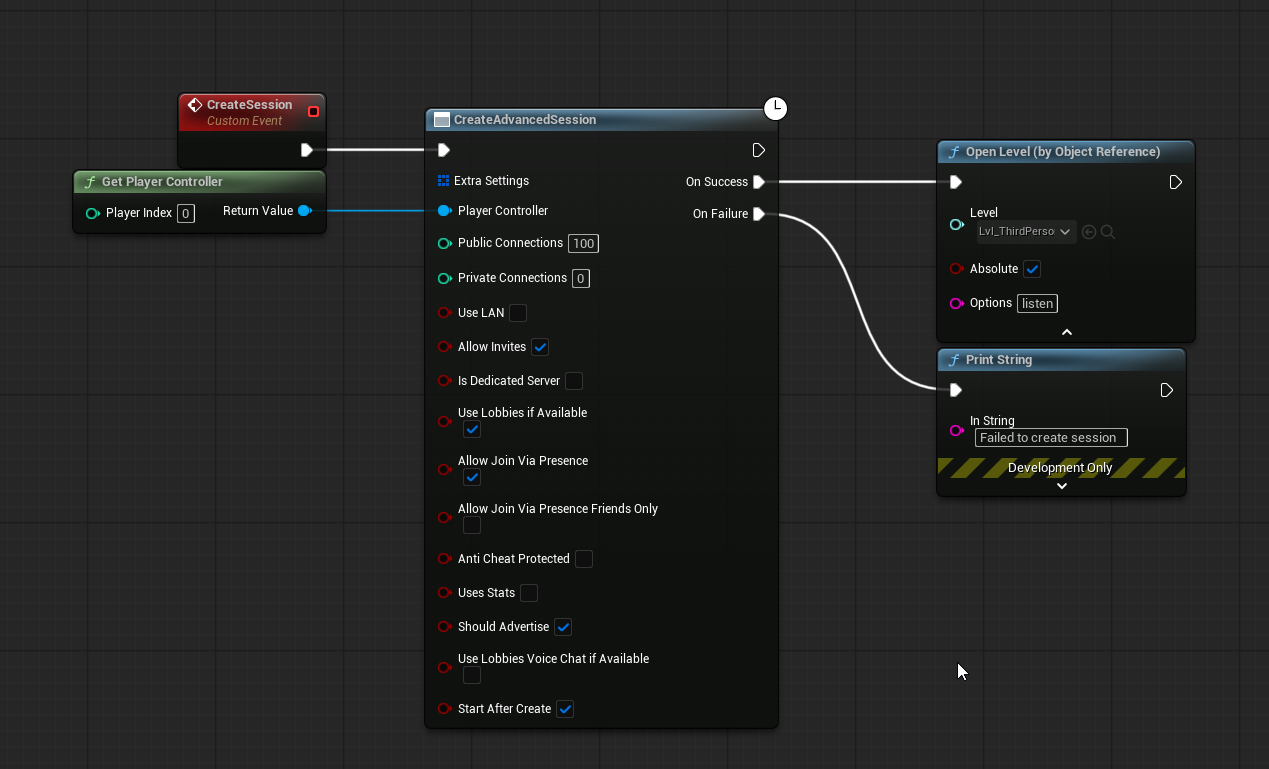
Hello, I was watching a video guide on how to setup multiplayer for steam and was trying to invite myself on a different computer. When I accept the invite it kicks me out of my current session but fails to put me back into a session afterwards. I have a print string on my Onsessioninviteaccepted for the fail and success for joining the session. On Accept I get the failed print string, followed by a success print string, followed by another failed.

Here is a gif of whats happening

 thin stratus
Why is it printing 3 times? Is that 3 times the join node?
twin condor
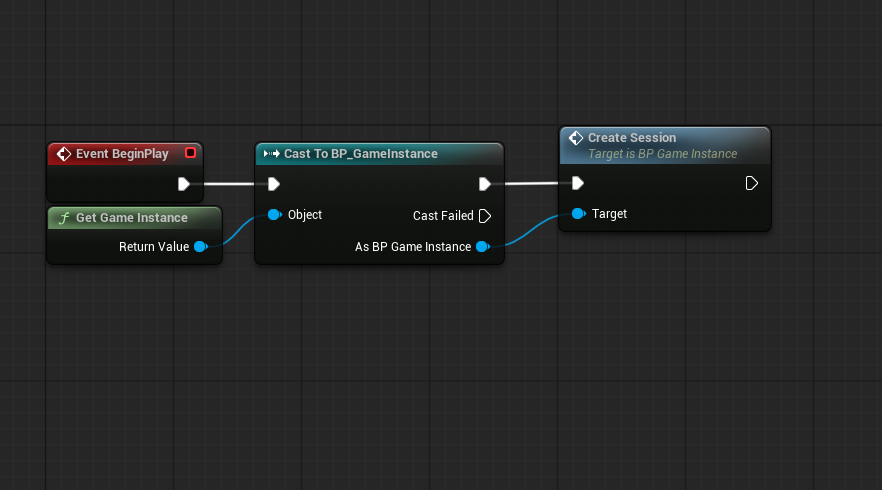
so its printing the print string twice from the 2nd photo and one print from the success on the top photo
why its printing twice im unsure
i have that custom event being called only in the lvl bp for the empty level which is my LoadInLevel
 twin condor
https://i.imgur.com/yUbABhy.png
twin condor
twin condor
https://i.imgur.com/yUbABhy.png
When first launching the game the code from this photo runs a success but when i try to join my other account it is failing
 knotty bane
twin condor
https://i.imgur.com/yUbABhy.png
knotty bane
twin condor
https://i.imgur.com/yUbABhy.png
isnt it always "listen?"
knotty bane
twin condor
Dont really get the destroy session node there
twin condor
knotty bane
isnt it always "listen?"
I'm unsure I just started messing with this type of stuff and was just following a youtube guide to set it up.
knotty bane
cause when you join you dont create a session, the hosts creates the session advanced
twin condor
yes but my on accept removes the player from the current session and should be joining the session that they were invited to. Or am I completely misunderstanding how that is supposed to be working.
or is there a different way for this to be done with me using 5.6
knotty bane
depends on how your game works normally you are in a menu and join a session, unless the player is already in a current session, but as long you are not the host there is no need to destroy session each time you accept and invite
are you using a server browser or only steam invites directly?
knotty bane
twin condor
or is there a different way for this to be done with me using 5.6
Its the same for most versions
knotty bane
twin condor
yes but my on accept removes the player from the current session and should be j...
there is no good or wrong it depends on what your are trying to make
twin condor
knotty bane
are you using a server browser or only steam invites directly?
Only steam invites
If you have any guides that I could follow to possibly setup multiplayer I would greatly appreciate it. I wouldn't mind starting back from the beginning again if it works.
 sand dagger
Has anyone had any success with Iris group filters in 5.6? I'm experimenting with team replication, only actors of the same team, represented as a group, should replicate to each other. The AddInclusionFilterGroup() / AddExclusionFilterGroup() and SetGroupFilterStatus() aren't working as I'd expect.
 royal pawn
so would really appreciate a response on this.
i added a second capsule to the cmc
and i did it in the same way how the basae cmc dous it in prepmove
were the savedlocation = getcurrentlocation;
so that u dont have to have a seperate location variable u have to change each time u wont to move the capsule aswel
but im doing it with a childcapsule and im using relativeposition
and is getrelativeposition save to use in this context?
maybe the server and the client dont have the same result when using it etc?
or should i just make an extra variable for the location i keep track of
tardy fossil
i dont think CMC works well for anything other than a single capsule
 torpid crest
any idea how to fix this?
[2025.06.29-13.52.45:322][364]LogNet: Warning: UNetDriver::ProcessRemoteFunction: No owning connection for actor BP_Character_Main_C_2147481933. Function DisableClientCorrections_Server will not be processed.
[2025.06.29-13.52.45:323][364]LogNet: Warning: UNetDriver::ProcessRemoteFunction: No owning connection for actor BP_Character_Main_C_2147481933. Function DisableClientCorrections_Server will not be processed.
 chrome bay
Don't call the RPC unless you're the net owner of the object
It's just warning you that it will be dropped because you don't have permissions to call it.
 latent flicker
What would be a good average byte payload size for a clients bullet shot? I just need something to go off. Right now I have about 30 bytes for a normal "shot" and within that its 23 bytes per "bullet" (shotguns or other weapons with lots of pellets cause me to have up to 12 bullets per shot.)
latent flicker
chrome bay
Don't call the RPC unless you're the net owner of the object
Are you familiar with what Hell Let Loose was sending roughly per client shot? I've seen you and others mention you worked on it previously.
I'm only sending damageable actors IDs the client thinks they hit, the direction, random seed and an some other things with each bullet. The server than of course validates this but I am using a trust and verify approach since playing anim instances on the server is costly and not in sync anyway so if I was to shoot an extended hand or leg it wouldn't align perfectly anyway.
latent heart
We send up to 21 bytes, but it can be less if it can encode is more efficiently.
chrome bay
ShotID, MuzzleOrigin, MuzzleDirection for a shot (reliable RPC)
Then for a hit, ShotID + FHitResult (also reliable RPC)
Client decided what limb etc. was hit. Not possible to validate that properly server side unless your playing animations on it AND perfectly syncronising all client anims.
latent flicker
Appreciate it, both of you 🙏
chrome bay
Biggest mistake people make with hit validation is trying to make it perfect. You're only trying to catch blatant cheating really.
Unless you've got an entire team to dedicate to it like CSGO or Valorant, I wouldn't bother. Also 100 players limits what you can do.
quasi tide
chrome bay
Biggest mistake people make with hit validation is trying to make it perfect. Yo...
Yeah, I pretty much just validate on the server, "is this shot even potentially possible?" if I want validation. Also helps that I make co-op games only.
steel anchor
Hi, I'm using AddIpulse in multiplayer, but il only works on the server. The object has 'Replicates' and 'Replicate Movement' enabled, but the clients don't see the effect. Any idea why ?


 eternal canyon
steel anchor
Hi, I'm using AddIpulse in multiplayer, but il only works on the server. The obj...
eternal canyon
steel anchor
Hi, I'm using AddIpulse in multiplayer, but il only works on the server. The obj...
what are these RPC’s for
and why are you trusting the client with sending an entire UClass
as well as a transform
steel anchor
The reason I’m using a class is because I’m doing some parenting — it’s a parent object meant to spawn different child objects properly.
As for the RPCs: the first one is a Server RPC to handle the logic; the second one is an Owning Client RPC to get the client’s position, so I can know where to throw the object and get the proper vector. The last one is another Server RPC that actually applies the AddImpulse.
That last part is where I’m stuck — I thought doing AddImpulse on the server would work fine since the object has ‘Replicate Movement’ enabled, but for some reason, it’s still not replicating properly. ( the transform is just for where the object will spawn )
gloomy mango
twin condor
Hello, I was watching a video guide on how to setup multiplayer for steam and wa...
I am pretty sure to handle steam invites you need to make your online code accomodate that, I am not exactly sure. From what I know it shouldn't just work like this without setting anything up
gloomy mango
thin stratus
Why is it printing 3 times? Is that 3 times the join node?
This is most likely because of auto retry
gloomy mango
twin condor
Actually now that I look, I am pretty sure you can't do this with steam ID for SPACEWAR
Do they do this in the turorial? I am skeptical that you can use SPACEWAR and features such as invites. I haven't tried implementing invites yet so I don't know yet. Right now I can just join session that is available on my game but haven't tried inviting
twin condor
gloomy mango
Do they do this in the turorial? I am skeptical that you can use SPACEWAR and fe...
Yes this use this is the demo
 steady onyx
so, I'm using the Advanced Sessions plugin to implement online functionalities, but whenever I Join Session, the URL/Map the Client is trying Travel To, is not the right one (it loads back into the MainMenu)
[2025.06.30-19.15.01:242][873]LogBlueprintUserMessages: [BP_MainMenu_C_0] Joined!
[2025.06.30-19.15.01:242][874]LogGlobalStatus: UEngine::Browse Started Browse: "XXX.XXX.XX.X:XXXXX/Game/Maps/L_MainMenu"
I'm pretty sure it should be loading "L_GameplayLevel?listen", right? Does anyone have an idea as to where I went wrong with it?
 floral abyss
Hello all. Had a question about releasing a multiplayer game on the epic platform made in Unity. Multiplayer is P2P with a matchmaking server used for initial connection. It's currently on steam, wondering if Epic has any policies for P2P communication for cross play?
dark edge
floral abyss
Hello all. Had a question about releasing a multiplayer game on the epic platfor...
 timid nymph
hey guys, very noob question.
My project is a c++ and blueprints project.
What is the best way to update the code of CharacterMovementComponent.cpp to always replicate the JumpMaxCount variable? It seems as though it only updates if you are the server.
Or is this all too much and I should just make a new replicated var through server RPCs to track this type of thing?
fossil spoke
timid nymph
hey guys, very noob question.
My project is a c++ and blueprints project.
Wha...
That variable is actually marked to replicate in the Character class.
In ACharacter::GetLifetimeReplicatedProps
DISABLE_REPLICATED_PROPERTY(ACharacter, JumpMaxCount);
Its disabled though
If you override the Character with your own class you can probably re-enable its replicated state.
With RESET_REPLIFETIME_CONDITION macro
timid nymph
Could I remove this line?
DISABLE_REPLICATED_PROPERTY(ACharacter, JumpMaxCount);
or should i subclass the character class and add this line:
RESET_REPLIFETIME_CONDITION (ACharacter, JumpMaxCount);
fossil spoke
You are better off subclassing, you shouldnt be modifying Engine code unless you absolutely have to.
Be warned, replicating that property may have unintended side affects. Im not sure how the CMC would react to it being updated over the network.
If its been explicitly disabled, there is probably a good reason.
timid nymph
got it, so probably best to just create my own new variable to track it haha
exotic wasp
timid nymph
hey guys, very noob question.
My project is a c++ and blueprints project.
Wha...
sorry if this wasnt what you meant, but property replication only goes from Server->Client
timid nymph
exotic wasp
sorry if this wasnt what you meant, but property replication only goes from Serv...
ah yea sorry i probably used the term wrong
I meant client calls -> server rpc -> multicast
 humble knot
My boolean variable doesn't do an initial replication or OnRep for joining clients only if it was set to non-default in the editor details panel. (ofc the variable was changed on the server before the player joined). Is this some known bug or am i doing something wrong?
chrome bay
@humble knot It should be sent to clients if it differs from it's serialized value. E.g if the bool is false by default, and you changed it to true at runtime - it should rep.
If that's not the case that does imply a bug I think
humble knot
The problem happens if i manually set at editor time to true, then at runtime to false. The runtime change won't get replicated to joining clients and caues a desync state. If the client is already ingame everything works as normal. If i disable "Net Load on Client" it also works for joining clients, so i'll use that as a quick fix for now.
chrome bay
Yeah, definitely seems like a bug
thin stratus
humble knot
My boolean variable doesn't do an initial replication or OnRep for joining clien...
That has been a bug for a long time.
If you have a property, e.g. a Boolean, that is set to X in the Blueprint, you then place an Instance into the Level and change the property to Y. If you change the property runtime to X, joining clients won't trigger the OnRep. The code that checks the value compares it to the Archetype for those initial calls and that will be equal then.
There is also not really a need to trigger the OnRep, tbf.
Cause you can just call whatever the OnRep calls on BeginPlay and it will update your Actor based on the current value of the property.
The assumption is that your actor, if the value hasn't changed, is already in the right state. So the actual bug would be that you aren't initializing the Actor based on the value properly.
Fwiw I also think it's an engine bug that it compares to the Archetype and not the instance. Pretty sure there is a UDN post that was opened years ago, where epic even explained it, but not sure what became of it.
@chrome bay ^
chrome bay
Yeah, I recall something similar on the forum as well but never got to the root of it
I so very rarely put stuff in the world directly that is replicated without defaults, maybe it's not just a widely tested case, IDK
 finite kernel
ive ran into that 1 month ago when trying to replicate lightweight uint16 id for some objects
where the first free id was 0 which was also the default value 😄 thus the onrep never fired
now i just make sure to put them to some commonly garbage/invalid value
It was frustrating to find out
in case of boolean i would guess a workaround could be making it into enum with initial value
 snow island
Hiya, glad to find this community! I'm pretty close to understanding replication in UE 5.6 with blueprints, but I'm having an issue now that I can't seem to resolve - I think it might be a misunderstanding in my head of how UE5 and Replication work.
I've been trying my best to solve this by myself for a few days now but I've been having no luck, would love if anyone could help please ❤️
My Setup is:
- Replicated Booleans for isSprinting, isAiming, etc
- I have an ENUM for movement mode that gets set inside the SetMovementMode function (Image 1)
- This function basically just contains other functions that will check the bool state and then update the movement modes accordingly, as well as setting a float called TargetMoveSpeed (Image 2).
- This function then takes that TargetMoveSpeed and calls a Reliable ServerRPC called SetMoveSpeed that then hooks up to a reliable Multicast for setting movement speed. (Image 3)
This then calls a function called SetPlayerMovementSpeed that uses World Delta Seconds to lerp between the player's current MaxWalkSpeed and their TargetMoveSpeed (Image 4)
All of this basically serves to smoothly update the player's movement speed depending on their current movement mode. Idle is slower than walking, which is slower than sprinting, but when aimed, they should slow down a bit.
The behaviour works correctly on the server of course, but on the client, I'm seeing jittery behaviour, and the client's move speed being capped unusually.
Any advice please? Thank you! (Also sorry, posted then deleted/reposted cus i messed up image attachments)


 dark parcel
@snow island there's no Blueprint solution for what you are doing.
https://www.youtube.com/watch?v=urkLwpnAjO0&ab_channel=delgoodie
^ for implementation and overview.

https://discord.gg/uQjhcJSsRG
In this video I am introducing a series I will be making which explores the character movement component and how you can extend it in depth.
0:00 Intro
1:00 What is the CMC?
2:00 Do you need a custom CMC?
5:35 What does the CMC provide?
7:10 Outro
snow island
dark parcel
<@185481990122897408> there's no Blueprint solution for what you are doing.
htt...
Thank you, somehow didn't find this one in my digging!
Unlisted, that's probably why haha
dark parcel
yea I don't know why. I used to be able to find it at the front page. Now I have to google it instead finding it from youtube.
modest crater
Yeah, doing what you're doing is going to have a bad time in BP land. It would be desync'd like crazy. You want to extend the movement components saved move and ensure the TValue is stored there and used for Phys move functions otherwise if you desync and it needs to reply moves it's going to use the current move speed for each move which is going to result in a different position.
To be honest a lerp'd speed is kind of really annoying to get right, set constants are better for this type of thing, it's why it's already set up how it is with just a walk and sprint speed and it doesn't lerp to it, it lets the cmcs acceleration handle approaching the max
snow island
Thank you both - feel like this has opened up a whole new world of stuff to learn UE wise now that I'm pretty comfy with blueprints
 jagged kernel
Is there any way to replicate camera transform while using the smooth sync plugin on my character?
dark edge
jagged kernel
Is there any way to replicate camera transform while using the smooth sync plugi...
why does anyone need to know where your camera is?
What are you actually trying to do?
jagged kernel
I am trying to replicate the line trace position things
The results are not correct when I use smooth sync. I think it is because of smooth sync just replicates actors. not components. But I need to know is there a way or not.

Or is there an easy way to use client authoritative network in Unreal Engine?
grand kestrel
jagged kernel
The results are not correct when I use smooth sync. I think it is because of smo...
Use GetViewLocation for location and GetControlRotation for rotation/direction
Edit: I don't think it gives you any kind of replicated view location that represents the camera's position
If you need control rotation on sim proxies then use GetBaseAimRotation instead
Typically if you need to do something from the view location away from the local client you're doing something that is misguided
grand kestrel
jagged kernel
Or is there an easy way to use client authoritative network in Unreal Engine?
With Character/CMC yes
UCharacterMovementComponent::ServerShouldUseAuthoritativePosition()
bServerAcceptClientAuthoritativePosition
AGameNetworkManager::ClientAuthorativePosition
Last one is a global config so you can put in DefaultGame.ini
[/Script/Engine.GameNetworkManager]
ClientAuthorativePosition=1
You can use my repo to either learn how to do this the CMC way, or just use the provided complete class -- which includes sprint, stamina, aim down sights, etc.
https://github.com/Vaei/PredictedMovement/
jagged kernel
grand kestrel
With Character/CMC yes
`UCharacterMovementComponent::ServerShouldUseAuthoritativ...
Thank you a lot!
bronze mauve
Why do I get errors when calling SetIsReplicated from an actor component's constructor? Is this a no-no?
quasi tide
It is weird - just set the field directly
thin stratus
bronze mauve
Why do I get errors when calling SetIsReplicated from an actor component's const...
The error should tell you what to do
It wants a different call. Something with Default
bronze mauve
thin stratus
It wants a different call. Something with Default
Doh! Thanks.
SetIsReplicatedByDefault(true);
for anyone who is interested
quasi tide
I've never used that method. I just set the field directly.
grand kestrel
Well, its not weird, it just doesn't like virtual functions in ctor
dark edge
jagged kernel
The results are not correct when I use smooth sync. I think it is because of smo...
don't just replicate the fact that you're casting the hook, replicate the hook direction and stuff
or maintain a replicated aim direction, Unreal already does part of that for you under the hood
 glad lotus
Hello, could someone help me understand something:
I have a UAnimNotifyState that i'd like to use to locally simulate some effects that are not game breaking if simulated incorrectly, so there is no point of doing any sort of replication for those.
But these notifies work for the autonomous proxies and do not seem to be triggered at all for simulated proxies, is this something that's just not supported? Or am i missing some checkmark somewhere?
 simple remnant
Could someone tell me why when I try to load up a listen server I can't control the player but when I have it set on one player I am able to control the player?
 nova wasp
Not without knowing anything about how you bind input
weary jungle
simple remnant
Could someone tell me why when I try to load up a listen server I can't control ...
Might be due to posession of the player controller
simple remnant
weary jungle
Might be due to posession of the player controller
I fixed it
it was just a setting but now I have a replication error as when i sprint the server shows me moving in place
weary jungle
simple remnant
I fixed it
Which setting was it if you don't mind me asking?
simple remnant
weary jungle
Which setting was it if you don't mind me asking?
i had auto possess player on player 0 so i set it to disabled
weary jungle
So was a possession issue. Also for the second issue is it only when sprinting?
simple remnant
weary jungle
So was a possession issue. Also for the second issue is it only when sprinting?
everything in general
weary jungle
Is the character moving at all with or without animations?
simple remnant
weary jungle
<@855689587666059304>
the client i cannot move
but server i can
it shows no idle animation of client from server
weary jungle
Do you have bReplicatesMovement set to true?
simple remnant
is that in the third person character or the cpp
weary jungle
You can do it in either the characters blueprint or a cpp character class
 weary jungle
One moment checking something out
Ignore what I just said because you had it on 0 before
simple remnant
👍
weary jungle
In the gamemode do you have the bp class or the cpp class set?
simple remnant
weary jungle
In the gamemode do you have the bp class or the cpp class set?
sorry will check later busy atm
gloomy mango
Question to you guys. @ me or reply to me so I see this tomorrow cuz for now I’ll just go to bed lol. Is there a thing like steam soft timeout when you call findsessions too much in a very short succession? I think I might’ve accidentally did that (it hasn’t been an hour yet and idk if I am timed out how long it is) but GPT suggested that I did in fact got timeout because I did kinda spam my find sessions button and it finds like a crapload (1000+) (yes I know it was dumb, I’m lowering it down to like 25). But my point is I haven’t changed any join/host code and suddenly sessions are failing to be searched where previously I was able to find my test session on another machine in a packaged game
simple remnant
weary jungle
In the gamemode do you have the bp class or the cpp class set?
It's a blueprint class @weary jungle
But I don't think thats the issue. I have a custom cmc set up so I'm not very sure where the problem is coming from.
thin stratus
simple remnant
It's a blueprint class <@269690252468158475>
One thing could be that you are mixing GameStateBase/GameModeBase and GameState/GameMode.
That has nasty side effects. But log would be throwing a warning at you if that's the case.
Other than that, how are you spawning and possessing those characters?
Feels like you might be possessing it locally.
simple remnant
thin stratus
One thing could be that you are mixing GameStateBase/GameModeBase and GameState/...
 simple remnant
thin stratus
Other than that, how are you spawning and possessing those characters?
simple remnant
thin stratus
Other than that, how are you spawning and possessing those characters?

Server 0 can move but client 1 cannot. Client sees server 0 moving but only in place and Server 0 sees client 1 completely still. And my animations doesn't follow which direction I move to.
thin stratus
simple remnant
Why do you select an AI controller as PlayerController
That's not correct
Also for multiplayer you might want to switch over to using the non Base version of both GameState and GameMode. Won't be the reason for your problem but the Base versions are more for simpler non multiplayer games
thin stratus
simple remnant
Server 0 can move but client 1 cannot. Client sees server 0 moving but only in p...
Moving but still meaning the location changes but the animation doesn't?
Can't view the video, sitting on a bike in the gym atm
simple remnant
thin stratus
Also for multiplayer you might want to switch over to using the non Base version...
When I switch over from the non Base version I cannot control my third person character
 verbal ice
Is there a way to open a special channel to transmit files to clients
nova wasp
verbal ice
Is there a way to open a special channel to transmit files to clients
there are sockets and you can send stuff over http from what I understand
if it's not huge you can just yolo an rpc across too
verbal ice
Yeah RPCs would work but not ideal
Was thinking like the Source engine's ServerDL stuff
Where players can download server content before fully connecting
Although maybe I can have the dedicated server host a web server itself for transfers
nova wasp
not sure how I would do it, it would depend on how huge they could get
verbal ice
but that's not really ideal
nova wasp
it seems kinda sad to force the host to upload a billion files but hosting it yourself is not so nice either
verbal ice
wdym
nova wasp
bandwidth upload speeds would can be quite restrictive
that said I suppose it could be capped low
verbal ice
Source caps it low yeah
That's why hosts have the option to serve content through a web server
Games like Garry's Mod still serve scripts through the game server though
I wonder if I could like
add custom net control messages
Might have to do that if I want to do stuff like sending scripts during the connection process and not when the player's connected
sullen sail
Hi, I’m working on a basketball game and using a Layered Blend Per Bone node in the AnimGraph.
I have 3 animation layers:
Main movement state
Upper body defense pose (Layer 0, applied at spine_01)
Head rotation (Layer 1, applied at neck_01)
The problem: when my character enters defense mode (activating the upper body blend at spine_01), the head rotation (on neck_01) stops working.
Does Layer 0 override Layer 1 in this setup?
If so, how do I make sure the head rotation still blends properly while the defense pose is active?
thin stratus
simple remnant
When I switch over from the non Base version I cannot control my third person ch...
You have to switch both
GameMode and GameState
If you have BPs of either already you simply reparent them in the class defaults of each BP
Your screenshot had only a custom GameMode, so reparent that to GameMode instead of GameModeBase and select the matching native GameState class for the... GameState class
But that's not solving your initial problem
simple remnant
thin stratus
Your screenshot had only a custom GameMode, so reparent that to GameMode instead...
could it be a cpp issue?
thin stratus
simple remnant
could it be a cpp issue?
What exaxctly?
If you have code in C++, then yeah of course. This is a user bug after all.
thin stratus
sullen sail
Hi, I’m working on a basketball game and using a Layered Blend Per Bone node in ...
Shouldn't there be a multiplier for the percentage of blend, aka the weight?
Also this is an #animation question. Why is this in Multiplayer?
thin stratus
--
Are there any known ways to display debug information (specifically debug rendering) on Clients if the data exists only on the Server?
nova wasp
yeah, unreal does this already for some things
thin stratus
Yeah I also remember having seen this, but it's hard to search for.
nova wasp
AGameplayDebuggerCategoryReplicator?
vlog is also nice for this as it can split per world in the editor
thin stratus
It needs to run in builds, so can't have it use Editor only stuff.
And what I remember is apparently this:
void DrawDebugLine(const UWorld* InWorld, FVector const& LineStart, FVector const& LineEnd, FColor const& Color, bool bPersistentLines, float LifeTime, uint8 DepthPriority, float Thickness)
{
    if (GEngine->GetNetMode(InWorld) != NM_DedicatedServer)
    {
        // this means foreground lines can't be persistent
        if (ULineBatchComponent* const LineBatcher = GetDebugLineBatcher(InWorld, bPersistentLines, LifeTime, (DepthPriority == SDPG_Foreground)))
        {
            float const LineLifeTime = GetDebugLineLifeTime(LineBatcher, LifeTime, bPersistentLines);
            LineBatcher->DrawLine(LineStart, LineEnd, Color, DepthPriority, Thickness, LineLifeTime);
        }
    }
    else
    {
        UE_DRAW_SERVER_DEBUG_ON_EACH_CLIENT(DrawDebugLine, LineStart, LineEnd, AdjustColorForServer(Color), bPersistentLines, LifeTime, DepthPriority, Thickness);
    }
}
But that stuff is Editor only too, which makes sense ,cause the Server has access to the Client Worlds. PIE is the easy thing thing here.
Will set up my own thing then I guess and will check the AGameplayDebuggerCategoryReplicator. Thanks!
That actor looks interesting. Thanks for sharing!
 lament cloak
Hey all!
So I'm building a custom vehicle using Chaos Modular Vehicles as a base. I've also built a custom simulation component for levitation (think Star Wars Pod Racer).
It feels really good for the controlling player, and impacts and shit seem to be all in sync. However, simulated proxies look pretty bad. It might be because of the speeds involved?
I see a lot of skipping and teleporting. Ping is ~60ms and stable, 1% packet loss.
Things I've tried:
- Increased min net update rate to 60hz on the vehicle (pawn)
- Set prediction mode to Full Re-simulation
- Set Simulated Proxy Network LOD to Forward Predict
- Increased fixed tick to 128hz (and then set it back to 60hz)
Questions:
- What is Network LOD? Is that Level of Detail?
- Does my custom simulation component (inherited from
UVehicleSimBaseComponent) module needChaos::FModuleNetDataand utilize custom net serialization? All I'm really doing is taking in the user's throttle and steering and applying forces... I also have no idea who precisely this data gets replicated to, is it for simulated proxies? Because for my own vehicle, it feels fucking amazing. So I'm not sure if I really need it or not. - Does anyone know what exactly
Chaos::FSimOutputDatais used for? I can't seem to understand this area of the code and why it exists. Maybe for debugging purposes only? I cant seem to find it being used anywhere, I'm now thinking there may be some reflection involved and therefore hard to grep. - It is unclear to me how simulated proxies are receiving data from the server. Like, are they receiving the controlling player's inputs too, or is it just receiving velocity, position, etc?
I understand all this shit is experimental and/or in beta, and quite advanced but literally any pointers would be helpful!
Also bonus question, does anyone know why the fuck there's so much networking config under the Physics section? And not under the Networked Prediction section? gah
You can see the teleporting on the right viewport especially near the end. Both of these are clients.
Bonus question 2: What are those visual artifacts on the ground? annoying
 fallen fossil
Net Load on Client,
is this relevant for joining players?
 chrome bay
No. It means clients won't load the actor locally, and instead will spawn it from replication.
(if replicated)
lament cloak
Fuck yes I found the solution to my problem above for networked physics simulated proxies. You add a NetworkPredictionSettings component and set "Focal Particle Physics Replication LOD" to true
snow island
dark parcel
<@185481990122897408> there's no Blueprint solution for what you are doing.
htt...
Just wanna say thank you again for this and wanted to 1000000% recommend this series to everyone else who has even a crumb of interest in dipping into C++, I watched the full series last night and it's a lot to take in at first (and I will likely need to go back) but really, this youtuber is great
https://www.youtube.com/watch?v=urkLwpnAjO0&list=PLXJlkahwiwPmeABEhjwIALvxRSZkzoQpk
https://discord.gg/uQjhcJSsRG
In this video I am introducing a series I will be making which explores the character movement component and how you can extend it in depth.
0:00 Intro
1:00 What is the CMC?
2:00 Do you need a custom CMC?
5:35 What does the CMC provide?
7:10 Outro
 fathom mural
Hey Guys! I'm very new to replication systems
Can anyone give me a hand on a Networking issue I'm having? I'm trying to use replication on a weapon inventory system, but for some reason, one of the variables is not being read, only by one client, and the variable IS being read and used on the character's anim blueprint without a hitch
nova wasp
fathom mural
Hey Guys! I'm very new to replication systems
Can anyone give me a hand on a Net...
how is it replicated?
fathom mural
nova wasp
how is it replicated?
Flagged as RepNotify and set in a Run On server event
To clarify
I have "CurrentWeapon" marked RepNotify in my InventoryComponent. When a player equips a weapon, I call a Run-on-Server event to assign it on the server. Then Client PCs receive it via OnRep_CurrentWeapon, where I use a direct reference to the player (also replicated IN the component) and set a replicated EquippedWeapon variable in the Character Blueprint
nova wasp
what is the InventoryComponent owned by?
fathom mural
By the Character BP
nova wasp
you are going to need to be more specific about what client is missing the replicated property
are simulated proxies not receiving it? just autonomous?
also " direct reference to the player" could mean many different things
also there is probably not much need to replicate the character inside of a variable in the inventory componenent but I am having trouble following
the character is already replicated, the component already has them as the owning actor...
also no clue what type "replicated EquippedWeapon variable" is
is it an object? an actor? an integer?
fathom mural
Believe me I have no Idea of what I'm doing, it's been three days since I started to use any replication at all.
When I start the Gameplay I set it to two players, and set it as a listenable server***, the second player is the one not getting the value that I need. The reference to the player is set on the component's begin play by getting the owner and casting to character's blueprint and storing the value. The way the inventory is set up (very likely not the best) is each inventory component has an array of weapons (object reference to weapon BP). When a weapon is swapped, I send an event to the inventory with an index to set current weapon. Let me see if I can take some screenshots (im working on Bp only for now)
fathom mural
This is the swap-to event. The run on server event i only use if the player is not locally controlled and doesn't have authority

On the OnRep for tha value I have it set up like this

And for some reason, this is the function where it reads None, but the blue print bind does read it normally.

 nova wasp
just because a property is replicated doesn't mean it represents something that can replicate
I have to go but I think you might be trying to replicate objects that aren't replicated
fathom mural
The weapon actors are set to replicate and so is the inventory component
nova wasp
replicating raw data like numbers and enums will work as long as the thing they are in replicates, but a reference variable to an object assumes one of two things
- it is network stable like an asset (for example, a static mesh asset)
- it refers to a replicated object
also there are two different current weapon variables here and I am confused
fathom mural
What I don't understand is how the client can read the "Current weapon type" value i'm setting from the current weapon properties but not the current weapon itself
nova wasp
fathom mural
What I don't understand is how the client can read the "Current weapon type" val...
read my message again
an object is not simple to send
you are not just sending a number here
which is of course not available for 5's version of the docs... I would say it's safe to assume this is largely identical in 5
nova wasp
I can't say much just seeing random nodes without seeing how they fit together
or what the weapons actually are
I have to go, hopefully someone else is around
fathom mural
No worries, thanks either way
nova wasp
I appreciate the effort in sharing the info I guess
an onrep is a good idea here because it's persistent and gets called when the value changes
might be useful to show how the gun actors are created
fathom mural
Got any tips on sharing blueprints without having to take awkard screenshots? hahaha
 blazing spruce
fathom mural
Got any tips on sharing blueprints without having to take awkard screenshots? ha...
blazing spruce
fathom mural
Got any tips on sharing blueprints without having to take awkard screenshots? ha...
blueprintUE is a tool for sharing blueprints for Unreal Engine. UE is a game engine which use visual scripting called blueprint.
crisp shard
When switching pawns during runtime, are there any approaches to making the camera switching feel a bit better? I find that the snapping to new pawn is just a bit jarring but maybe I could just add a simple widget to overlay while it’s happening but it’s so fast that I’d think like a screen fx or something would probably be more of a useful solution. But yea not sure what options there are to smooth out that operation
 teal heath
How can i make an inventory (array of three slots) thats different for each character and to work in multiplayer? (like when each person picks up a new weapon it gets added to their inventory seperately)
modest crater
You mark the array as replicated and ensure the actor/component who owns it has replication enabled
 modest crater
I think you should really take the time to read some of the pins in this channel like the Network Compendium https://cedric-neukirchen.net/docs/category/multiplayer-network-compendium/, trying to implement networking with no real idea sounds like a painful time.
teal heath
i have an idea i just don't know how to make it work
 sick estuary
Hello everyone, has anyone experienced the following issue? I've been encountering this recently in my multiplayer UE5 game.
When a player dies, they are possessed by a SpectatorPawn. Upon respawning, they are re-possessed into their Character.
The issue is that sometimes the server (host) cannot see the respawned client's mesh, although all other clients can see each other's meshes without any problem. Collision still works, and the Character actor exists—only the mesh is invisible from the host's perspective.
Has anyone come across this or have any ideas on how to fix it? Thanks!
 ionic sapphire
Hi, does anyone know how to go about getting a client to load in a map from a pak file? My sessions are currently being setup very closely to how they are in the example in the Network Compendium, but when the client tries to connect to the host's IP address in the TryTravelToSession call, it loads into our main menu instead of the map the server is actually on. This wasn't an issue before we started using pak files, but I'm unsure what I need to adjust to make it work. Appreciate any help you can provide on this 😅
 proper pagoda
ionic sapphire
Hi, does anyone know how to go about getting a client to load in a map from a pa...
proper pagoda
ionic sapphire
Hi, does anyone know how to go about getting a client to load in a map from a pa...
Usually if it opens the main menu (or whatever is your default map), this usually means that a step in the loading process (or even post loading) has failed and/or that the connection has been kicked out. You should look at the logs to find out if it's that the load has failed entirely or if the connection is being closed by the server (usually with a CloseReason alongside it).
worldly needle
How can I troubleshoot in multiplayer game when Character Movement Component fixes location of my character in code side ? Any documents anything you know ? I would be really appreciated.
ionic sapphire
Ok so I'm getting a ConnectionTimeout as the CloseReason in the client's logs. Are there any common reasons it could be timing out? Anything pertaining to loading from pak files that I could have missed?
ionic sapphire
proper pagoda
Usually if it opens the main menu (or whatever is your default map), this usuall...
Sorry, my message was meant to be a reply to this
proper pagoda
ionic sapphire
Ok so I'm getting a ConnectionTimeout as the CloseReason in the client's logs. A...
Honestly I'm not sure. We use .pak files in our project and I've never had connection timeouts due to them. If you're certain it's related to this (meaning you've done A/B testing with solely .pak files on or off) it would be beyond the scope of my knowledge.
In the logs, before the timeout you should check what the client and or server is attempting to do that repeatedly fails or just never happens
ionic sapphire
proper pagoda
Honestly I'm not sure. We use .pak files in our project and I've never had conne...
As far as I can tell, it finds the server's IP address just fine, but it tries to browse to the Main Menu Map as if it thinks the server is on the main menu map, despite it being on a different map entirely. I'm providing my client log here. It's connecting to the server around line 904, and it times out by line 993.
I have confirmed that this is solely related to us switching to pak files, but that's about all I've confirmed. I appreciate your help thus far nonetheless. Even just finding the ConnectionTimeout is further progress than I've been able to make the last few days.
proper pagoda
Wow that is strange indeed
ionic sapphire
Well at least I'm not crazy lmao
proper pagoda
Usually what happens during a connection is that the client sends a connect request, and the server responds with the Map (if it accepts the request)
ionic sapphire
Is there any common logs I can search on the server logs to see if the client connects to it? I can't immediately find anything on the server side.
proper pagoda
You could try and log what SETTING_MAPNAME is used for the session. And also what map is the server opening with the ?Listen argument
knotty bane
hey guys been trying to make a similar system like chained together but i keep glitching out these characters, can you see where im going wrong since my phyics constraint is not working at all

 dark edge
knotty bane
hey guys been trying to make a similar system like chained together but i keep g...
dark edge
knotty bane
hey guys been trying to make a similar system like chained together but i keep g...
Why would the CMC care about the chain at all?
knotty bane
dark edge
Why would the CMC care about the chain at all?
wym?
halcyon ore
There saying.
Why would the CMC know of what a "chain" is/ thus care about it.
CMC isn't physics based, so.
knotty bane
halcyon ore
There saying.
Why would the CMC know of what a "chain" is/ thus care about it.
C...
but where am i going wrong since players are not constraint and bugging out?
 swift violet
I'm having the same problem too and it has nothing to do with the CMC. anyone know if there is an alternative to what he does?
 formal solar
crisp shard
When switching pawns during runtime, are there any approaches to making the came...
formal solar
crisp shard
When switching pawns during runtime, are there any approaches to making the came...
Set view target with blend. But idk why you posted in multiplayer section this is irrelevant to MP
proper pagoda
knotty bane
but where am i going wrong since players are not constraint and bugging out?
If your pawn uses the the CMC then its movement isn't operating with the same system as the physics system. The physics constrain component is explicitly made for the physics system. It makes sense in that context that the players aren't affected by the constrain. However it looks like the constrain has some other issues in the video.
knotty bane
proper pagoda
If your pawn uses the the CMC then its movement isn't operating with the same sy...
ah, but how could i constrain 2 players together cause im lost at this point
proper pagoda
For multiplayer, without going through C++ I wouldn't know exactly.
Although, constraining 2 players is somewhat simple if the only rule is that they must remain within a certain distance of each other, as long as the max distance is replicated you can just enforce it in the movement function.
However if you want something closer to chained together it might be worth to look into replicated physics and physics based movement
knotty bane
proper pagoda
For multiplayer, without going through C++ I wouldn't know exactly.
Although, c...
thanks for the answer, but if you see the bp's am i doing something wrong since the constrains are not doing it? the chains are not really a problem
proper pagoda
Your constrain is trying to constrain the two "Mesh" components together, however since those components aren't simulating physics, it cannot actually enfore anything
gloomy mango
Hey people, is there some good way to make sure when you testing session search functionality on APP ID 480 you get back consistent results all the time? Lets say if I change my session name in session settings to something very specific, will I then be able to SearchSessions(5) for only 5 results and consistently get back the result set?
Reason I ask is because yesterday I did an oopsie and might've ended up getting timed out by steam cuz I sent too many session search requests cuz I was under the impression since I am testing on ID 480 I'd need to search far and wide to get my actual session. And I want to find some consistent result that doesn't involve sending crazy session searches since I am testing some multiplayer UI functionality rn (like looking for available lobbies widgets)
simple remnant
thin stratus
If you have code in C++, then yeah of course. This is a user bug after all.
I had written my cmc so that could be the issue
thin stratus
gloomy mango
Hey people, is there some good way to make sure when you testing session search ...
Probably not. Too many others are using this AppID. Your best bet is to simply get your own AppID.
You could try to set a special ServerSetting on it and then use as special QuerySetting that checks for that.
That might return it on Steam's end
But if that fails then you just gotta live with getting your own AppID
gloomy mango
thin stratus
Probably not. Too many others are using this AppID. Your best bet is to simply g...
I literally don't mind paying $100 if it wll allow me to just use that custom ID for development without having to make up a store page or anything like that
thin stratus
Store page is only needed when you releases
gloomy mango
Alright, so I can basically submit no code to Steamworks but process a custom ID and use that?
thin stratus
You can use the custom ID and you can submit builds to Steam, all without having to release or do the page yet.
Most studios have automation running that pushes builds to different Steam branches that are available to everyone added to the Developer group in Steamworks backend
So they can test the builds
But you can also ignore the builds stuff for now fwiw
gloomy mango
Alright cool, I wasn't aware of this workflow, I will look into this, thanks a bunch
thin stratus
You do need to add a second account to the devs group though, cause you gotta "own" the game to play it
Otherwise you won't be able to host and join :D
(hard to do that with just 1 player after all)
gloomy mango
So just add my secondary steam acc I use for testing to the devs along with mine
thin stratus
Basically, yeah
The Steam backend page is the most confusing shit there is
But I'm sure you'll manage
Lots of others did :D
gloomy mango
Thanks for the info, I just needed to know where to go cuz random spotty connections was starting to get me very annoyed
I tried using SearchConnections(10k) to circumvent that but apparently Steam didn't like that xd
It worked... FOR A BIT
I think I got timed out yesterday, I will double check today should be good but I am really testing the online code so my own app ID with like SearchSessions(5) temporarily will help a ton in avoiding steams spam logic
quasi tide
thin stratus
The Steam backend page is the most confusing shit there is
It is so damn confusing. Wish they would actually address it. But they never will.
thin stratus
gloomy mango
I think I got timed out yesterday, I will double check today should be good but ...
You can in theory do almost everything you want just locally with subsystemNull. Only if you really want to test steam you need to use steam
quasi tide
I have like 5 projects on Steam. I still get turned around and lost.
gloomy mango
thin stratus
You can in theory do almost everything you want just locally with subsystemNull....
Yeah I don't want to have local work only for nothing to work on steam side xd
gloomy mango
quasi tide
I have like 5 projects on Steam. I still get turned around and lost.
Document EVERYTHING you do. Its what I do lol
I have a literal physical notebook
It kinda helps
gloomy mango
quasi tide
I have like 5 projects on Steam. I still get turned around and lost.
Btw congrats on 2 releases! Thats wild!
I checked them out look cool!
tame sapphire
Would any one mind expanding a little on how to use GetServerWorldTimeSeconds() for a server/map network time?
As in it seems like I would need to call a game state event/function on tick to update (Just wondering if theres a better way)
Widget :

Game state function :

I imagine i could start a timer in the widget and loop it every 0.5 - 1 second which is fine for seconds (Or so i imagine) but I want to do a turnbased decision system and you get 20s for that timer and i would ideally like to show milliseconds so wondered if tick is ok here as its only 20s every 1.5 - 2 mins or should i go the timer route and just loop it every 0.01s?
proper pagoda
Calling a getter on tick is trivial in terms of performance cost, so it should be fine
proper pagoda
tame sapphire
Would any one mind expanding a little on how to use GetServerWorldTimeSeconds() ...
Keep in mind that GetServerWorldTimeSeconds returns approximatively the time the server is at when they sent the update. Technically by the time it reaches you, you're about half ping ahead
tame sapphire
Thank you, however just to be clear would a timer be better instead of tick so its only called when used for the ready time? the match time would run constantly so could see it being on tick but i don't think ready time should be but im guessing in the dark?
proper pagoda
tame sapphire
Thank you, however just to be clear would a timer be better instead of tick so i...
If you make sure the timer runs at most once per frame then it would be better, but kind of in the same way that standing on a sheet of paper makes you taller.
tame sapphire
@proper pagoda understood and ok great thank you
 glass plaza
Is there any way to start a Session without having one of the clients the Server? I would probably have to start a dedicated server?
formal solar
Dedicated servers are either very complex and time consuming or very expensive
fossil spoke
formal solar
Dedicated servers are either very complex and time consuming or very expensive
I disagree. They CAN be expensive, but that all depends on your game and where you choose to host.
Not sure how Dedicated Servers are more complex than Listen Servers though.
fossil spoke
glass plaza
Is there any way to start a Session without having one of the clients the Server...
Sessions dont really care what type of Server you are running.
A Listen Server has a Host.
A Dedicated Server does not.
Therefore if you want a Server without a Host, you need a Dedicated Server.
formal solar
Expensive for an average joe
fossil spoke
formal solar
Expensive for an average joe
I still disagree, there is nothing stopping you from using your own Hardware to host a Dedicated Server.
formal solar
That's pretty CPU intensive right?
fossil spoke
Which is probably more expensive than just renting something like an EC2 instance or even going more bare metal with a less elaborate hosting provider.
The point is, there are cheap ways to host Dedicated Servers.
It all depends on your game and your needs.
Scaling Dedicated Servers can get expensive, but again, thats relative to how expensive it is for you to just host 1.
grizzled stirrup
thin stratus
Most studios have automation running that pushes builds to different Steam branc...
Do you happen to know of any resources that show how to automate and upload to steam in one step? I have packaging automated and the steam uploading automated but it's still a manual copy paste job to put the packaged files in the correct places to upload
grizzled stirrup
fossil spoke
Not sure how Dedicated Servers are more complex than Listen Servers though.
Requires a machine running at all times for starters. Doesn't scale without you spinning up more machines. Listen scales infinitely depending on the userbase
glass plaza
fossil spoke
Therefore if you want a Server without a Host, you need a Dedicated Server.
Thanks! Architecture change time, I guess
fossil spoke
grizzled stirrup
Requires a machine running at all times for starters. Doesn't scale without you ...
None of that was part of the original question. He didnt ask which option was more or less complex to setup, nor did he ask which was more or less expensive.
Eitherway, I covered scaling in my response.
grizzled stirrup
Fair I just read your sentence to be fair 😄 I'd say they are also more complex just because you also need a source build and need a separate client and server exe
fossil spoke
Sure, but from the point of view of the original question, complexity of setup was not really part of it. Sessions for both Dedicated and Listen Servers are basically identical.
You are correct though
There is much more that goes into a Dedicated Server than Listen Servers.
halcyon ore
Any tips, or videos on how to optimize network size of RPC events?
fossil spoke
halcyon ore
Any tips, or videos on how to optimize network size of RPC events?
Depends on what the RPC is for and what Information you need to send through.
Generally speaking you want to ensure you are sending the minimal amount of information you need.
This is very specific to the RPC as well.
Optimizing anything can be tedious.
halcyon ore
Right now its not anything crazy, I have kept it pretty basic for my needs.
But, even now it feels a bit high, for the "basic" data i'm sending back and forth.
Class
int64
2 FString's
Array of Fstring
Array of Int32
fossil spoke
As I said above, optimization can be really specific. I have no idea what any of that means relative to your use case.
For all I know you might need all of that information and there is no way to optimize it.
dark edge
halcyon ore
Right now its not anything crazy, I have kept it pretty basic for my needs.
But,...
What's the actual thing you're syncing?
fossil spoke
Yeah, if you could explain what it is you are trying to do and why you think you need all of that, we might be able to help you consider some different approaches for cutting down on bandwidth
halcyon ore
Its for replicating data outside of network range.
So, there could be 1 entry of this, right next to the player, or 400 spread out everywhere.
So, I find it more "logical" to just RPC all 400 entries no matter where they are, so its all 1 shared handling.
The data is:
The class of the actor
Its custom ID, defined by me.
Its custom name
Its custom UI based description of it.
Then, the 2 arrays which are my method to replicate a TMap
Of various "generic" data. (not needing to be an explicitly handled variable, so I can just run a "find" on the TMap
The only optimization that I could think of, is that not all the TMap data needs to be int32, so maybe I could make like 4 different versions, or each int type?
For instance, I store 1/ 0's in the Tmap, just because its easier to run a find, rather then handle the shit for adding a new variable, personally.
dark edge
halcyon ore
Its for replicating data outside of network range.
So, there could be 1 entry of...
how often?
halcyon ore
Only main usage is on UI open.
I have RPC's setup, that handle just the data that changed, if data does change while the widget is open, so there far smaller, since its at most 1 int32 and FString
dark edge
Why not just request on UI open
or if it's not changing that fast then maintain all the data with normal replication
fastarray and such can just send deltas
halcyon ore
- Thats what i'm doing? (requesting on UI open, but its 400 entries, let alone if I add more data, since i'm still working on it)
- Wouldn't normal replication still have issues, if all 400 at once is too much?
- I assume fast array is related to #2, because idk. 😛
dark edge
halcyon ore
1. Thats what i'm doing? (requesting on UI open, but its 400 entries, let alone ...
When do you need to view 400 at a time?
I think your best options are to either maintain synced data or just request what you need when you need it
gloomy mango
thin stratus
Probably not. Too many others are using this AppID. Your best bet is to simply g...
By the way, so turns out I can just add a custom key like this:
on CreateSession logic:
LastSessionSettings->Set(FName("DevSessionTag"), FString("YourUltraCustomComplexStringHere"), EOnlineDataAdvertisementType::ViaOnlineServiceAndPing);
where LastSessionSettings is TSharedPtr<FOnlineSessionSettings>
and in FindSessions logic.
LastSessionSearch->QuerySettings.Set(FName("DevSessionTag"), FString("YourUltraCustomComplexStringHere"), EOnlineComparisonOp::Equals);
where LastSessionSearch is TSharedPtr<FOnlineSessionSearch>.
Then you can straight up specify your find session logic like this when looking for lobbies MultiplayerSessionsSubsystem->FindSessions(10); and it will work as just 10 results even for AppID 480 since now it will have an extremely specific filter in both hosted sessions and search queries.
This will avoid Steam shadow time outing you in case you are looking for a bunch of sessions on FindSession cuz of AppID 480
dark parcel
Any specific reason to use appID480?
gloomy mango
dark parcel
Any specific reason to use appID480?
Its the free one everyone can use and not pay $100 to register your own
But as a result a lot of devs use it to test
dark parcel
Yeah, i mean when you want to release your game you will have to cough that 100 anyway
gloomy mango
So you might not find your session without specific key filtering on doing something ridiculous like FindSessions(10,000)
dark parcel
Yeah you will end up seeing other game project session.
gloomy mango
I was not aware of that and got shadow time'd out yesterday, fix was simpler than I thought
dark parcel
I dont bother with appid 480 since i want to have ny own environment
Not to mention its inevitable to pay if you want to release
Also it sucks having steam pop out space war instead our own game name.
gloomy mango
Well if you want to just test multiplayer behavior nothing really changes if you use your own or 480 with custom filtering
dark parcel
Certainly thats what the 480 is for.
gloomy mango
dark parcel
Not to mention its inevitable to pay if you want to release
Well yeah, but this way I can pay this in 2 years, or 10. . . or 20. Or ever???
Not that I don't have the money, I don't mind grinding spacewar anyways
lol
I am in very early stages of my project I just decided to do multiplayer stuff first
dark parcel
Yeah back then when i did some testing, i just get all the session
But only push to U.I the session with special key
Just a setting / mode that my specific project specify to mkae it unique
halcyon ore
gloomy mango
By the way, so turns out I can just add a custom key like this:
on `CreateSessi...
I wonder if "Advanced Sessions" is broken, because I do this same thing, and it doesn't work. 😛
gloomy mango
halcyon ore
I wonder if "Advanced Sessions" is broken, because I do this same thing, and it ...
I don’t use any plugins outside of SteamSockets and SteamOnlineSubsystem I have my own session logic
thin stratus
grizzled stirrup
Do you happen to know of any resources that show how to automate and upload to s...
The Steam upload scripts just have to point where you packaged the game to.
 hollow swallow
Do overlap events only happen on the server? my client is never getting them
nova wasp
overlap events are from the a local physics query declaring an overlap
unreal runs on both computers in a similar fashion, physics/collision does not only exist on the server
hollow swallow
okay thanks, for some reason only the host is adding enemies on overlap with sphere and client isnt :/
nova wasp
you might want to consider if the sphere is the same on the client at all
or even present
(or the things you expect to overlap with)
hollow swallow
Yeah its the same on both, nothing changes it, the server spawns the "spell" which has the sphere on it to get the nearest enemy
 nova wasp
the server spawns the spell is not the same though
that is replicating it
is it being spawned on the client or not?
remember: the client is a distinct world
hollow swallow
Nah only the server. I thought only the server should spawn actors
nova wasp
by this I mean does it get received by replication on the client?
hollow swallow
the actor i spawn is set to replicated, so i thought so?
i can see the spell on the client
nova wasp
when it appears on the client, is it in right position to overlap the other body? do the bodies both have the overlap settings needed to trigger an overlap?
with this stuff timing can get weird
so it might be just moving too fast etc past something
hollow swallow
yeah spawns in the correct spot and everything, it doesnt actually move yet, just spawns on player location, and should get enemies within range of the sphere scaled by 20
nova wasp
if it doesn't move when would it update overlaps?
hollow swallow
ill try a reboot, have had it open a long time maybe its just bugging out
the enemies move towards the player at the start
they walk into the range
nova wasp
grizzled stirrup
thin stratus
The Steam upload scripts just have to point where you packaged the game to.
I guess I need to figure out how to upload automatically when UE is finished packaging, some kind of event to then run the steam upload scripts at the right time
tardy fossil
grizzled stirrup
I guess I need to figure out how to upload automatically when UE is finished pac...
does building through commandline with RunUAT.bat block the commandline? cause if it does you could make a bat file that runs packaging through the command line and runs steamcmd after
grizzled stirrup
Thanks I will try that
hollow swallow
Trying to just spawn 1 spell for each player. In my Actor Component (attached to player already) im running this. It spawns once for the host, but twice for the client. What am i doing wrong with my workflow?

 meager spade
setlocal

:: Config
set UNREAL_ENGINE_DIR=D:\Program Files\EpicGames\UE_5.5
set PROJECT_PATH=D:\Projects\MyGame\MyGame.uproject
set TARGET_PLATFORM=Win64
set TARGET_CONFIGURATION=Shipping
set ARCHIVE_DIR=D:\Projects\TwinStick\BuildArchive
set STEAM_UPDATER_DIR=E:\SteamUpdater

:: Build + Cook + Package
call %UNREAL_ENGINE_DIR%\Engine\Build\BatchFiles\RunUAT.bat BuildCookRun ^
 -project=%PROJECT_PATH% ^
 -nop4 -platform=%TARGET_PLATFORM% -clientconfig=%TARGET_CONFIGURATION% ^
 -iterate -crashreporter -cook -stage -archive -package -pak -prereqs -distribution -build ^
 -target=TwinStick -utf8output ^
 -archivedirectory=%ARCHIVE_DIR%

:: Copy to SteamUpdater
cd /D %STEAM_UPDATER_DIR%

:: Clean previous content
if exist "%STEAM_UPDATER_DIR%\Content\" (
    rmdir /Q /S "%STEAM_UPDATER_DIR%\Content\"
)
mkdir "%STEAM_UPDATER_DIR%\Content\"

echo Copying to SteamUpdater...
robocopy %ARCHIVE_DIR% "%STEAM_UPDATER_DIR%\Content\" /COPYALL /E

call "%STEAM_UPDATER_DIR%\UploadGame.bat"

endlocal``` @grizzled stirruptook out a lot of stuff we had
hopefully it gives you ideas
@hollow swallowofc it woul;d
host is spawning it for client also
so clients get 2
ran on server and client

so server will spawn it and so will client
hollow swallow
ah right, so do i just do a is locally controlled at the start?
so only the players version call to spawn it and not the server too?
or am i way off xD
meager spade
sure or just have the server create it?
and remove the rpc?
unless the beginplay is just for testing
literally just but a Has Authority
remove the server rpc
and voila
(assuming the spells are replicated actors)
hollow swallow
sweet that works. They are yeah

that spell will be creating another actor (projectile) but i only want local clients to create all of them, not have them replicated. For that when a player "casts spell" do i just do a multicast with the info, and each client will do the visuals themself? even for other players casting etc...
just trying to wrap my head around it all
grizzled stirrup
meager spade
```@echo off
setlocal
:: Config
set UNREAL_ENGINE_DIR=D:\Program Files\EpicGame...
Thank you so much this is very helpful
No more waiting around to copy paste builds 😄
grizzled stirrup
hollow swallow
that spell will be creating another actor (projectile) but i only want local cli...
Yes an unreliable multicast is fine for cases like that
hollow swallow
last thing before im off, when a client line traces and hits something, i spawn the projectile (only want clients to spawn it locally) it isnt replicated, and i pass through everything. When it hits i want the projectile to tell the server it has hit, and to deal damage. But the player reference is always invalid, even through i check its valid before it goes to the server call.

 grizzled stirrup
Why are you passing an enemy reference when spawning the projectile? The reason your player reference is invalid is likely how you are setting it via the spawn projectile function can you screenshot that part?
hollow swallow
im passing it on so the projectile movement can follow its location, and also to then tell the server once its actually hit it. It seems to follow the location though with homing turned on, so it must be somehow valid
 grizzled stirrup
In order to figure out why the player is invalid you'll need to log at each step the Player reference is used and see where it becomes null
Likely not getting set somewhere
hollow swallow
just before that section i check if its valid before even doing the linetrace
ooo actually i may have doubled my variables and used bp player instead of player xD
grizzled stirrup
right so it's valid when calling the server RPC but it's null in the projectile, how are you setting the player reference on the projectile?
hollow swallow
yep my bad, i doubled a variable and didnt notice. feel dumb now xD
quasi tide
Group Filters I believe?
siliex shared some info with cedric a little bit ago. Touched on relevency #1363850238376415366 message
nova wasp
meager spade
what is the iris
Filters and or net groups
meager spade
basically we have this ``` if (bWaitForReplication)
{
if (const AXX* WorldMapPlayerController = Cast<AXX>(RealViewer))
{
bool bGenerationFinished = WorldMapPlayerController->GetWorldGenerationLevel() == EWorldGenerationLevel::Finished;
return bGenerationFinished ? Super::IsNetRelevantFor(RealViewer, ViewTarget, SrcLocation) : false;
}
    // Should never hit this while using wait for replication
    ensure(false);
    return false;
}```
thats all we have lol
simple remnant
thin stratus
Your screenshot had only a custom GameMode, so reparent that to GameMode instead...
i switched it over but is auto possess player supposed to at player 0 or disabled?
meager spade
did they really make
NetRefHandleManager header private?
sooo i cant ever call it?
fk sake
 candid star
meager spade
NetRefHandleManager header private?
candid star
meager spade
NetRefHandleManager header private?
what do you need it for?
the bridge should be able to expose some things to help
nocturne quail
Finally completed to design the inventory system that few days ago i was talking about, now its time to code it

I think 2k lines will cover all this stuff
grizzled stirrup
nocturne quail
I think 2k lines will cover all this stuff
Does the amount of lines matter?
I just make it as clean as possible while doing the thing as designed
nocturne quail
grizzled stirrup
Does the amount of lines matter?
it depends and if done properly by applying high level c++ techniques i think it will be super cleaner and less code
meager spade
candid star
the bridge should be able to expose some things to help
what bridge?
candid star
meager spade
what bridge?
the iris replication bridge
you still dodn't describe what you actually are trying to do though
nocturne quail
grizzled stirrup
Does the amount of lines matter?
I mostly use templated parameters and avoiding Boilerplates
also one of my best technique to get the same result while keeping less code by using lambds
and local timers when it come to unreal where the timer no need to live longer or just a single call
this way no need to declare a new function to be called by timer
grizzled stirrup
local timer being the FTimerHandle is defined in a func instead of the header? wouldn't both require a new func to be called?
nocturne quail
grizzled stirrup
local timer being the FTimerHandle is defined in a func instead of the header? w...
yeah and use lambda along with it
nocturne quail
grizzled stirrup
local timer being the FTimerHandle is defined in a func instead of the header? w...
FTimerHandle UnusedLocalHandle;
GetWorld()->GetTimerManager().SetTimer
(
    UnusedLocalHandle,
    [this]()
    {
        //Code
    },
    1.0f, false
);
code will be called after 1sec
grizzled stirrup
Interesting I haven't seen that syntax before
meager spade
candid star
you still dodn't describe what you actually are trying to do though
i showed the code
nocturne quail
C++ is magic
meager spade
in iris filters you only have nethandle
grizzled stirrup
nocturne quail
```c++
FTimerHandle UnusedLocalHandle;
GetWorld()->GetTimerManager().SetTimer
(
...
curious what happens if you call this func twice in the same frame before the timer completes? Will it call // Code twice since the handle is local?
meager spade
i need to access the controller, but you cant
meager spade
grizzled stirrup
Interesting I haven't seen that syntax before
icas cause most normal people dont write it like that :p
grizzled stirrup
😄
nocturne quail
grizzled stirrup
curious what happens if you call this func twice in the same frame before the ti...
nothing, i called like few thousand times few days ago
grizzled stirrup
I mean what's the result, does it run twice or only run once?
I assume it runs twice like a local timer would
nocturne quail
timer inside inside you mean?
FTimerHandle UnusedLocalHandle;
GetWorld()->GetTimerManager().SetTimer
(
    UnusedLocalHandle,
    [this]()
    {
        FTimerHandle UnusedLocalHandle;
        GetWorld()->GetTimerManager().SetTimer
        (
            UnusedLocalHandle,
            [this]()
            {
                FTimerHandle UnusedLocalHandle;
                GetWorld()->GetTimerManager().SetTimer
                (
                    UnusedLocalHandle,
                    [this]()
                    {
                        //Code
                    },
                    1.0f, false
                );
            },
            1.0f, false
        );
    },
    1.0f, false
);
here every timer is setting a new timer
and it works perfectly 😄
you can even set it to true to loop it
just dont to redeclare the timers again
i jsut copy pasted it
nocturne quail
meager spade
icas cause most normal people dont write it like that :p
most of them afraid of writing code in my style, that's why they have extra unnecessary defined functions for timers
not talking about those who don't know
Lambda is part of C++ and should be used


 candid star
meager spade
i need to access the controller, but you cant
candid star
meager spade
i need to access the controller, but you cant
FReplicationSystemUtil::GetActorReplicationBridge
then bridge->GetReplicatedObject
candid star
meager spade
but it requires an actor
the filter should pass in the context to find the replication system
meager spade
no
all i have is ```cpp
struct FNetObjectFilteringParams
{
/**
* The contents of OutAllowedObjects is undefined when passed to Filter(). The filter is responsible
* for setting and clearing bits for objects that have this filter set, which is provided in the
* FilteredObjects member. It's safe to set or clear all bits in the bitarray as the callee will
* only care about bits which the filter is responsible for.
*/
UE::Net::FNetBitArrayView OutAllowedObjects;
/** FilteringInfos for all objects. Index using the set bit indices in FilteredObjects. */
TArrayView<const FNetObjectFilteringInfo> FilteringInfos;

/** State buffers for all objects. Index using the set bit indices in FilteredObjects. */
const UE::Net::TNetChunkedArray<uint8*>* StateBuffers = nullptr;

/** ID of the connection that the filtering applies to. */
uint32 ConnectionId = 0;

/** The view associated with the connection and its sub-connections that objects are filtered for. */
UE::Net::FReplicationView View;
};```
candid star
meager spade
all i have is ```cpp
struct FNetObjectFilteringParams
{
/**
* The conte...
the view literally just has the player controller in it
meager spade
struct FReplicationView
{
    struct FView
    {
        /** The controlling net object associated with this view, typically a player controller. */
        FNetHandle Controller;
        /** The actor that is being directly viewed, usually a pawn. */
        FNetHandle ViewTarget;
        /** Where the viewer is looking from */
        FVector Pos = FVector::ZeroVector;
        /** Direction the viewer is looking */
        FVector Dir = FVector::ForwardVector;
        /** The field of view */
        float FoVRadians = UE_HALF_PI;
    };

    TArray<FView, TInlineAllocator<UE_IRIS_INLINE_VIEWS_PER_CONNECTION>> Views;
};```?
candid star
let me see... I think the connection id should work
candid star
meager spade
all i have is ```cpp
struct FNetObjectFilteringParams
{
/**
* The conte...
which filter class is this
most of them store the replication system as a member on init
which you can obtain the bridge from
::OnInit( passes in the replication system
so just add your own that does that