#multiplayer
1 messages · Page 65 of 1
 serene furnace
 dark edge
serene furnace
Item struct Array into the inventory component is holding the items, and sending...
dark edge
serene furnace
Item struct Array into the inventory component is holding the items, and sending...
client doesn't own the body
is the array replicated?
serene furnace
dark edge
client doesn't own the body
my first step is "Im interacting with a lootable, open the looting windows and creat a Widget per Item into this window"
and yeah array is replicated
dark edge
ok that's what we're trying to get at
then NOTHING has to pass the network until you go to actually take items
serene furnace
just to set the client side array, clients dont actually have acess to server side array
dark edge
it's a replicated array
they have it
it's right there
If the items array is replicated, then the first time the server has to know anything is when you try to take an item
serene furnace
there is one array "Client side" and the array "Server side"
"Client side array is Set By server side array" ^^
serene furnace
for sure, its called learning xD
the more I progress and the more I have to remake
dark edge
ok so back up. Decide on if you want the inventory contents to be replicated or not
I'd say you want them replicated. Not having them replicated is mostly for a really big game or for secrecy reasons
serene furnace
Game is full loot, I dont want clients to have acess to inventory,ever 😄
 kindred widget
One core tip for learning networking. Anything a client needs to see, replicate it. Do not RPC it. Just replicate it. Avoid RPCs at any and all costs until you absolutely need them and even then, generally you mostly only need ServerRPCs from the client to request server actions, and stuff should replicate back to the client. Rarely will you actually need a Client or Multicast RPC for most basic implementations.
There are more advanced ways to optimize things using some RPCs and whatnot, but just starting out, those rules will get you pretty far.
dark edge
You would accomplish hidden inventories with replication by having a replicated variable in the pawn or playercontroller called CurrentViewedInventory and in the onrep for it, that's when you show/hide the window
kindred widget
serene furnace
Game is full loot, I dont want clients to have acess to inventory,ever 😄
Are you avoiding the access for hacking reasons?
serene furnace
kindred widget
Are you avoiding the access for hacking reasons?
Not really hacking more like Packet injection reason ^^
dark edge
The flow would be like
Clientside:
Input -> RequestToViewInventory
Serverside:
RequestToViewInventory -> checks -> set CurrentViewedInventory(Replicated, Repnotify)
Clientside:
OnRep_CurrentViewedInventory -> logic -> show/hide UI
Similar pattern for taking the items
serene furnace
dark edge
The flow would be like
Clientside:
Input -> RequestToViewInventory
Serverside:
...
yeah the more I learn the more I see that, it is exactly what I need to redo ^^
And move some more checks on client side as well
dark edge
Clientside:
Input -> RequestToTakeItem
Serverside:
RequestToTakeItem-> checks -> update MyInventory(repnotify or client RPC to do the popup) and OtherThingsInventory
Clientside:
OnRep_MyInventory -> logic -> show/hide popups and play sound
or
InventoryUpdateNotification -> play sound and pop up new items on screen
serene furnace
But for now I would like to know why is the server (listen server player) the only one able to actually fire my code normally, So I can learn more about passing items players to players and store them ^^
kindred widget
serene furnace
Not really hacking more like Packet injection reason ^^
If you set up your requests, that's a non issue. Server has the real data. Server can dictate what it does with that data. The only thing a client can ever affect is what they send, receive, or have. Server can validate data a client is sending, if a client's data is invalid because they're messing with it, that is on them and not a developer's problem, imo.
dark edge
kindred widget
If you set up your requests, that's a non issue. Server has the real data. Serve...
The only reason I can think of to NOT replicate inventories is for clientside hacking purposes like knowing what's inside chests etc.
and maybe data overload if you have a LOT of inventories hanging around
serene furnace
One server should be holding the entire inventories at the end of the game yeah, like session finishes, -> Client sends to an actual dedicated server that they looted some extra things, and it will be added to player index
dark edge
Just get the small stuff working first
Sounds like you're trying to make PUBG as your first project
serene furnace
Not really I keep shit really simple 😄
But I need players to be able to loot each others, search containers and stuff
Kill each others, heal each others, get some status effect like bleeding and stuff
dark edge
Think of the server as a database.
It doesn't need to know about your UI or anything.
It just needs to handle requests and replicate data. The less multicast/client RPCs the better.
"Mr. Server, what's in the box"
"Mr. Server, I want to take this item plz"
That's what your communication with the server should be like.
It doesn't need to know or care what's on your screen.
kindred widget
Inventory is admittedly a frustrating topic. 😬 And that's before adding multiplayer aspects.
dark edge
kindred widget
Inventory is admittedly a frustrating topic. 😬 And that's before adding multipl...
Have I told you about my idea for a global item/inventory system?
kindred widget
The guids?
dark edge
ye
kindred widget
Yeah. I'm still stuck on my UObjects. Which I need to fix. Apparently they've made a few nice changes to replicating subobjects.
dark edge
It's next on my list to prototype once I'm done with my graph/network plugin.
It shares a lot of functionality so might be a rational next step.
It'd basically let a Factorio factory run in the background without actors, just data shuffling around and shown on request.
kindred widget
That would be neat.
dark edge
It'd be useful for a long-session multiplayer survival project I think. Something where planting a farm and coming back days later is a thing, or putting a work order going in your 3d printer and coming back later, etc etc
serene furnace
dark edge
"Mr. Server, what's in the box"
"Mr. Server, I want to take this item plz"
That'...
Isnt that what I'm doing ? ^^
Like I clic the icon of the Item I want to loot, the data passes to the player with owning client event, then the data passed to owning event is triggering a server event to ask to spawn an item depending on data that I cliced on ^^
dark edge
serene furnace
Isnt that what I'm doing ? ^^
Like I clic the icon of the Item I want to loot, ...
You're going back and forth and passing widget references (which the server doesn't know or care about)
Make it this simple
RequestToLootItem(Container, ItemSlot)
serene furnace
my end game project is a FPS survival 😄
But I have a all bunch to learn, especially with multiplayer, I just learn about the existence of Replication graph for MMO projects x)
serene furnace
dark edge
You're going back and forth and passing widget references (which the server does...
where I'm I passing a widget to the server ??? Would be dumb and not working ^^
kindred widget
Yeah, the widget thing needs to be changed. Generally speaking networking should NEVER be mingled with UI. UI is strictly local only for the local player and meant to show data from and add input into actors and objects that exist on THAT local machine.
dark edge
You're passing a widget back from server right here
Make your whole system work without UI at all. Then add UI as a user interface (heh) for the system.
serene furnace
 dark edge
serene furnace
dark edge
serene furnace
What calls that event?
serene furnace
is that what your talking about ? Cause this event is fired From a widget to a Pawn, as an Owning client event
dark edge
If it's not called from the server to client it should just be a plain event
serene furnace
just a flat one, nothing changed ? x)
dark edge
and why do you have S Item Looted and S Spawn Item to Loot
which is it, is the item going from the inventory to the world or inventory to YOUR inventory?
or are you spawning an item just to immediately pick it up
serene furnace
I guess Im stupid and should be using "Owning clients" only in the case where is comes from the server ? x)
What does it do to call an owning client event from a client side action ? ^^
And one is spawning the item (S_SpawnItemToLoot) , and the other is accessing the inventory of the looted actor to remove it from the inventory on the server side, by doing a "Find"
dark edge
Why are actors spawning here? Should the item just be moving from the corpse's inventory to the player's inventory or dropped on the ground?
serene furnace
dark edge
or are you spawning an item just to immediately pick it up
Yeah it spawns an item, to use my looting code directly on it, so I dont reuse / remake anything, lazy coding ya know haha
dark edge
Yeah don't do that. Make TransferItem, DropItem, PickUpItem functions and get them working
Transfer goes inventory to inventory, Drop goes inventory to spawned actor, PickUp goes SpawnedActor to Inventory
Get those working
serene furnace
 dark edge
Yeah don't
serene furnace
The code is spawning the item, then applying the looting function to the spawned item
dark edge
yeah but why
just transfer the struct from corpse inventory to looter inventory
Get the fundamentals working
serene furnace
Yeah i guess your right and its needs a third round of reworking
I like making 3-4-6 versions on one code to see how the fook its working ^^
Like I had a kinda working way already but was a bit messed up 😄
This one is a bit cleaner, but I have this weird issues popping where my code does not fires xD
dark edge
Make a test level with a couple of chests with items in them,. no UI for now, just print the item count. Walk up to chest, press hotkey, take all items. Walk to other chest, deposit all items. Walk around, throw all items on ground. Pick them up.
Get that bulletproof
then add UI
serene furnace
Well, its working, like I can already loot items, drop them again of my inventory, and data is passed properly xD
My only problem ATM, it that because of that code not firing on client, the item is not deleted from dead player inventory, if I just close the window and open it again, I can loot another item and duplicate things ^^
dark edge
serene furnace
Well, its working, like I can already loot items, drop them again of my inventor...
because you're trusting the client
it isn't LootItem
it's RequestToLootItem
serene furnace
But when Server Loots the dead player, then dead player inventory is refreshed and cleaned from the item and everything actully works like a charm 😄
dark edge
the server gotta check that the item is there
You're trusting the client when you shouldn't
Never trust the client when they say what item they want to recieve, just trust which slot they want to take from
serene furnace
yeah I guess in the current state actually packet injection would work haha
but in the other end, Its the server telling the client what items are avalable to loot from dead player inventory 😄
dark edge
Your inventory management RunOnServer events should look like:
PickUpItem(actor ref)
DropItem(inventory slot)
TransferItem(Inventory ref, inventory slot, Inventory ref)
serene furnace
But the fact that this code does not fire, its letting the clients think that the item is still there, and it is since a part of my code is not firing to delete the item looted
dark edge
serene furnace
But the fact that this code does not fire, its letting the clients think that th...
Call the same code you did to look in the inventory in the first place
to refresh it
serene furnace
yeah I will remake it for sure, but for the sack of learning, I need to understand what exactly is up with this current issue I have, like remaking another system, is a 100% will do and worth it move, but its not making me learning why this specific code, that is actually working on server, is failing on client
And My code to open the inventory is called gain when I try to re-open the inventory, just interaction button code
Im gonna remake my post for help trying to explain better ^^
serene furnace
Alright so I have this code here, full of break points
It looks like when a client is looting something with this code, he is actually firing the entire code, all nodes of the left screenshot, but the Right screen shot that is just another Server request, does not get fired at all, the code behind that is another server request actually gets fired normally and everything works normally, except for the Orange part of the code that is supposed to remove the item from the looted actor inventory, this one is not fires on client request, making client able to infinite loot at item that is never removed.
In the other hand if its server looting the item, everything is fired and item does no longer exist to anyone, the server is now the only owner of the item. And the server deleted the item from the dead player inventory.
It makes me think to a "has authority" kind of issue, But im pretty lost here

 dark edge
serene furnace
Alright so I have this code here, full of break points
It looks like when a cl...
dark edge
serene furnace
Alright so I have this code here, full of break points
It looks like when a cl...
First off fix this. This should just be a normal event

That's the event that kicks it all off right? That's the event called by the clicked item widget?
serene furnace
dark edge
That's the event that kicks it all off right? That's the event called by the cl...
yeah it is thins one, Im back on my pc,I will change it now
dark edge
serene furnace
Alright so I have this code here, full of break points
It looks like when a cl...
What class is all this logic living in?
serene furnace
nothing changed, still same issue, exact same behaviour
Those events are directly into the player pawn
he is replicated OFC
dark edge
I mean your entire code is pretty fucked, just start from the beginning of the logic and make it right. We'll assume your starting state is an open looting window with items in it.
Your first call into the pawn should pass the item INDEX, not the item data. You don't want players telling the server the data for the item they're trying to get.
Basically widget tells pawn "hey try to loot item at index X"
Pawn tells SERVERSIDE pawn "hey i wanna loot item at index X"
Serverside pawn does the checks, updates MyInventory to add the new item, and optionally calls a run on client event passing over item data and other stuff to display a popup and trigger a refresh of the inventory that's open.
serene furnace
no its actually the server giving the data to the items that are into the inventory, then, the widget holds that data, when you clic, its sending back to the server to check if the data holded by the widget is really existing, and if it does, then its removed from the looted player inventory ^^
dark edge
serene furnace
no its actually the server giving the data to the items that are into the invent...
Just send an index. I can just inject a packet requesting to loot a BFG9000 from the body i'm looting and the server will just do it.
You don't say "I wanna loot this item", you say "I wanna loot what's in this slot"
serene furnace
but server is checking if data is actually existing, no ?
Look at the orange part of the code, the struct if requested on the event,
Then server checks if there is a match between requested data, and data holded by the inventory, worst case scenario, they can loot without opening the lootable
assuming they know whats in it
dark edge
serene furnace
but server is checking if data is actually existing, no ?
why even do that? Just send the index. You already have it
you're sending gobs of data back and forth for no reason
serene furnace
passing just an index is actually way less consuming I assume ? ^^
dark edge
Imagine if choosing your character sent all the character data over instead of just the class name or index
same idea
and also way more resistant to duping
serene furnace
I fail to see how
"I request to loot this index" and "I request to loot this data" is actually making a difference, as long as the server is checking if it exists I actually tend to think that checking existing data is more cheating proof, cause there is any variation like, the item class, the current dura of the item, the ammount of bullets in the item, then the server will not find a match and reject the request.
But if a guy asks to loot "Index 4" of the dead player inventory, how to prevent that ?
I mean on the resources cost its obviously making a big difference for sure, but safety wise, server will reject all variations on the item, unless you modify things in the server it self
dark edge
serene furnace
I fail to see how
"I request to loot this index" and "I request to loot this ...
You check if 4 is within the size of the inventory you're looting
Which is way less work than testing if 2 structs are equivelent.
What if you later have degradation or something that changes over time on your item structs
then they aren't equal
there's no benefit
What if you fail to incorporate a new field in your equality check and then people can request to loot a gun but turn the damage up 100x
serene furnace
the guy could always be looting index 0 and if there is any item we would be always stealing loot, i dont see both our solutions as an actual reliable way.
I think I would check current player body location and see if the guy is not too far away to actually loot
Might be a good start, but I really wish i could find this issue, to actually learn, cause I cannot fix my current issue, and that no good for learning purpose
dark edge
serene furnace
the guy could always be looting index 0 and if there is any item we would be alw...
How is that any different from just looting the first item over and over? Item in index 1 moves to 0 when 0 is removed.
you won't duplicate
serene furnace
yeah so if the guy spam 'looting index 0" then he can spam that and loot the entire inventory xD
I'm telling you a good way would be to make sure the guy is in range of the lootable, so he can loot faster than other people, but will not loot any items if he is far
dark edge
Exactly. That's what he'd expect
well yeah you check range and such on the server side
you can have timers and such to make sure you can't loot an entire inventory in 0.1 sec, up to you
serene furnace
yeah checking items overlapping with his collision sphere or something and ban that kid if he is triggering looting event even tho there is nothing into his capsule
anyway thanks for help and advice I actually screened shooted some logic and stuff, I will remake a proper version of looting tomorrow 😄
I'm still pretty sad that I could not understand where this error came from 😄
Got to go sleep 🙂
 junior yoke
Hi all, I'm begenning in UE and I have UE5 (source build), I wanna start with simple multiplayer game (many players, spawn in random pos in world) with linux dedicated server, can I follow UE4 videos tutorials or only UE5 tutorials (there are only EOS / Steam videos, I don't want use them)
thanks you
 hoary spear
When during startup is it actually safe to access a clients HUD ? tried after Onrep_PlayerState but that was no bueno
 wooden falcon
I tested multiplayer for my game today and movement is very laggy (even tho it works in the editor). I used blueprints, could that be the issue?
 ember dagger
Did you test it in the editor with leg emulation? What type of movement?
wooden falcon
ember dagger
Did you test it in the editor with leg emulation? What type of movement?

it's a vr project, in the editor as client works perfectly
 unkempt wing
junior yoke
Hi all, I'm begenning in UE and I have UE5 (source build), I wanna start with si...
unkempt wing
junior yoke
Hi all, I'm begenning in UE and I have UE5 (source build), I wanna start with si...
UE5 is, in many ways, just UE4.28; there are a lot of major added features so it's big enough to be UE5, but most of what works in UE4 (especially multiplayer) translates to UE5. As for platforms, you will need to lean on at least one online subsystem (OnlineSubsystemNull is an option). https://ikrima.dev/ue4guide/networking/online-subsystem/using-multiple-custom-online-subsystems/ This is the article that got my understanding of OSS started.
If all you want to do is connect to a server bare-bones, calling the console command open XXX.XXX.X.XX will connect a client to a server. However, I'd recommend looking into more stuff regarding OSS just to understand the systems at large and what they were built to do.
Programming with Unreal Engine, Houdini, Math, & Graphics
wooden falcon
ember dagger
Did you test it in the editor with leg emulation? What type of movement?
I'm using steam subsytem btw for multiplayer
junior yoke
unkempt wing
UE5 is, in many ways, just UE4.28; there are a lot of major added features so it...
Thanks you very much, I'll learn this 🙂 and yes I just wanna connect to a server bare-bones 😉
unkempt wing
In that case, just using direct IP connection should work fine. With OSS, just check through what they can do (friends, sessions, etc) and make sure you're not in need of any of those features before leaning on OSSNull.
Oh, one more thing. When you launch a game, you can use an IP as a console command input as well (i.e. {ProjectName}.exe XXX.XXX.X.XX -game)
If you intend to connect only and not use client-side UI, this would save you some time.
junior yoke
And can I set default arguments when I build the game please ?
unkempt wing
Not quite sure what you mean. If you want to build in a default IP for clients to connect to, you can make it a config variable or something adjacent to that and call open in the game code.
 twin juniper
thanks, where in engine network creates a new connection for dormant actor after flush?
junior yoke
unkempt wing
Not quite sure what you mean. If you want to build in a default IP for clients t...
thanks you very much for answers 🙂
 stray badger
Can I update the location of a server side projectile using the location vector from a client side projectile in ue5 blueprints?
 gaunt cliff
I am still looking into this issue since couple of days but I haven't found any clue why its happening, the clients get disconnected instantly from the server with the following error in the logs:
[2023.02.21-09.09.34:099][781]LogNet: - Result=ControlChannelClose, ErrorContext="ControlChannelClose"```the clients don't disconnect per se, they just see the map and the pawn but can't move around
or do anything but on the server side they're disconnected with the error message above
 old sequoia
Hi! I'm working on a multiplayer game and just added Sprint functionality to the movement component.
While sprinting I want to make your sideways acceleration different than your forward acceleration. I.e you move slower left / right compared to forward.
Does anybody know where it's suitable to add this logic, considering it's networked?
gaunt cliff
also it seems that UniqueID is set to INVALID for some reason
 plush mist
Hi! Any ideas what exactly can cause crash in on dedicated server? (clients are fine) It happens very vary rare , testers even cant describes steps to reproduce it. but its very very annoying.
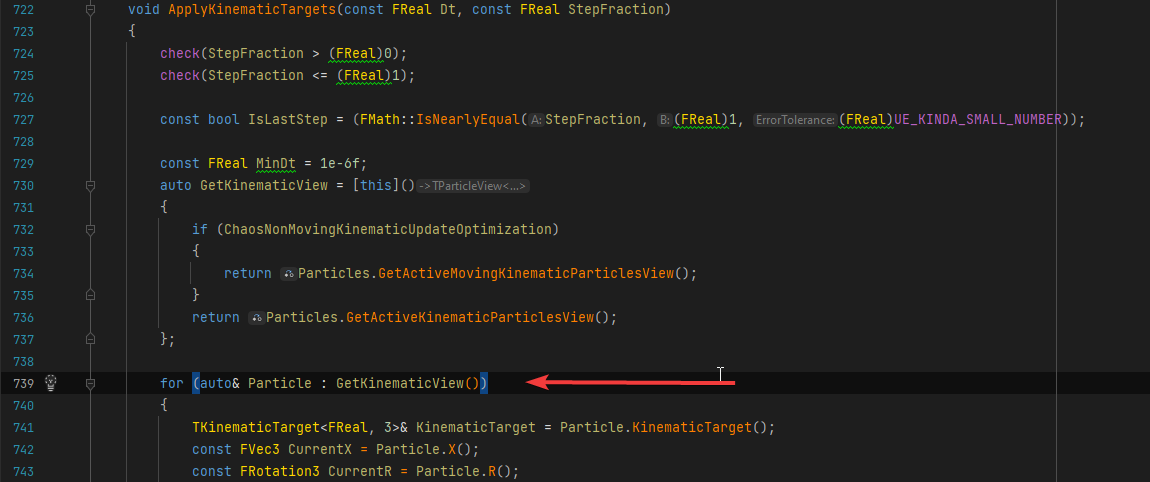
Chaos::TConstParticleIterator<Chaos::TKinematicGeometryParticlesImp<double, 3, (Chaos::EGeometryParticlesSimType)0> >::operator++() [/UnrealEngine/Engine/Source/Runtime/Experimental/Chaos/Public/Chaos/ParticleIterator.h:416] Chaos::FPBDRigidsEvolutionBase::ApplyKinematicTargets(double, double) [UnrealEngine/Engine/Source/Runtime/Experimental/Chaos/Public/Chaos/PBDRigidsEvolution.h:739]
crash is during array iteration FPBDRigidsEvolutionBase::ApplyKinematicTargets
https://i.imgur.com/Zf3eQdf.png
 dark edge
old sequoia
Hi! I'm working on a multiplayer game and just added Sprint functionality to the...
dark edge
old sequoia
Hi! I'm working on a multiplayer game and just added Sprint functionality to the...
C++
old sequoia
dark edge
C++
Well. Yeah.
Any more helpful tip?
 thin stratus
The big question would be if you are in fact using CPP for this or not
Because in BPs I would probably also not really know a proper answer
dark edge
You could just multiply input vector by some scaling vector before passing to CMC when sprinting but that's not gonna be well behaved in multiplayer
thin stratus
Yop. Probably better to override CalcVelocity in CPP instead
dark edge
If you're in BP then your sprinting might as well be scaling of inputs too.
thin stratus
The way it's worded I assume they use CPP though
So CalcVelocity would be my first suggestion
That's where the acceleration gets tied to the velocity
dark edge
Just have a vector InputMultiplier.
When not sprinting, InputMultiplier = 0.5, 0.5, 0
When sprinting, InputMultipler = 1, 0.2, 0
Tick -> make input vector -> multiply by InputMultiplier -> convert from local to global -> pass to CMC
Quick and dirty sprint for BP or multiplayer if you don't care about cheating.
thin stratus
@old sequoia
 fathom aspen
Quick question: If I mark struct as dirty, all its props will be sent (even those that I didn't really change)? (PushModel that is)
Seems like it, darn
 peak sentinel
i bet there is a hack to push one by one
with some reflection hacks
it should be either very easy or very difficult
fathom aspen
Haha yeah most prolly there is, but I have no time to find it now. Will just roll with the normal system ^^
 frail coral
I keep getting this in the logs, what could be the issue? I looked around the code and it seems they are not flushes so the engine simply erases all of htem
 fathom aspen
 prisma snow
afaik, full
prisma snow
afaik, full
No delta
kindred widget
hoary spear
When during startup is it actually safe to access a clients HUD ? tried after On...
Depends on your setup. Normally HUD is created from a ClientRPC from GameMode's PostLogin.
hoary spear
kindred widget
Depends on your setup. Normally HUD is created from a ClientRPC from GameMode's ...
Turns out i was just being not very careful, calling it onrep, without checking if it was the local owner
so i kept getting accessed none 😛
kindred widget
@prisma snow@fathom aspen Normal TArray does delta it's changes to a client.
 quasi tide
fathom aspen
No delta
quasi tide
fathom aspen
No delta
Commas are important, mkay'
fathom aspen
I can relate, I was just too lazy to edit 🦥
 mossy kindle
Hey guys, i have a modular character set up with different skeletal meshes for different body parts using a customisation screen. I am having problems in displaying the customised body parts for each player
for example
If a client is wearing a jacket, and the server is wearing a suit, the server will see everything fine but for the client everyone has the same clothing
how do i replicate the body parts such that they are replicated correctly for every player?
quasi tide
Onreps.
thin stratus
frail coral
I keep getting this in the logs, what could be the issue? I looked around the co...
When exactly are you getting those
quasi tide
You need some way to track the actual skeletal mesh they are going to be using, then make that an onrep. And in the onrep, that's where you change the correct skeletal mesh.
mossy kindle
The skeletal meshes are saved in the game save
dont know what to do after that tho
very new to multiplayer
quasi tide
Just told you what you need to do.
If you are saving the stuff locally, you'd do the following
- On load game, collect the stuff the clients want to wear and then do a server RPC asking the server to change the clothes
- Server changes the clothes through an onrep variable
- When client gets the change from the server, it updates the clothes in the corresponding onrep function
mossy kindle
Im currently using this setup

this is inside the player blueprint
and is called on begin play
and uhh
i think there is one more problem
i dont really know how to use repnotify 😅
quasi tide
That's the beauty of the internet. The information is easily accessible.
Definitely read the network compendium as well. And refer back to it frequently
It's pinned in this channel
mossy kindle
Ill have a look at it
mossy kindle
I tried it and it works only for the server 😕
 glossy kettle
frail coral
thin stratus
When exactly are you getting those
glossy kettle
frail coral
thin stratus
When exactly are you getting those
When a pawn just exists. I have tried to disable all input vectors and I still get this
thin stratus
frail coral
When a pawn just exists. I have tried to disable all input vectors and I still g...
Are you standing on something procedural?
Or something locally spawned fwiw?
frail coral
it is standing on a mesh that I have set to use the complex collision as simple
and no, it's not locally spawned, it's in the map
 devout granite
Is it possible to have a splitscreen while in networked multiplayer? The splitscreen option only works for local multiplayer and i could not find how to make multiple viewports side by side properly :/
 pallid mesa
eXi, can we update this pinned message so you add aswell my blog post for those that try to implement it?
thin stratus
devout granite
Is it possible to have a splitscreen while in networked multiplayer? The splitsc...
Splitscreen should work in Online Multiplayer. But I can't say I have ever tried it out.
thin stratus
pallid mesa
eXi, can we update this pinned message so you add aswell my blog post for those ...
Should be done
pallid mesa
looks kawl, thank you exi
 real ridge
guys is there any native function in game mode where I can set that match and all things happening inside map will start after first player join? or in given time bcs I have timer and a lot of events which are starting immediately when session is created but I am not joining immediately as it is dedicated server with session
twin juniper
real ridge
guys is there any native function in game mode where I can set that match and al...
game mode has OnPostLogin. You should make an array of logged-in players.
So OnPostLogin > Add player to your array > If Array is greter than 0 AND the game hasn't already started, start game
real ridge
twin juniper
game mode has OnPostLogin. You should make an array of logged-in players.
So ...
okay but I need create own bool lets say = ?GameStart
and then tell all events in my game and all pawns with that events
they can execute
its bit complex
there is no general function for it?
for starting match at certain point?
twin juniper
That should just be a RepNotify on your bool then, right?
twin juniper
that way all playrs connected will see that they should start and any who join will see it started
real ridge
ik ik I know make it by myself just asking if there exist something like function or general event by unreal which is handling this thing
if not
I am going use that boolean
by myself
twin juniper
Ohhhhhhhhhhhhhh sorry I see
yeah I'm not sure. Some sort of dispatcher I think? I've never used them though
real ridge
bcs I found something like this

but its doing nothing
I thought I can override event which has this logic and I dont need make anything own
😄
so I am now asking is someone know
thin stratus
real ridge
bcs I found something like this
That only works if you also tick the boolean "bDelayedStart" in the defaults of your GameMode
twin juniper
just tested in a fresh project. Boolean RepNotifies only work one way? I have a cube that sets its material based on the value of the bool
If the instance-editable value of the bool is set to FALSE and is turned TRUE by the listen server before players connect, joining players see that it's true. What I'd expect.
In the inverse scenario, joining players see that it's still true when they join. Even if they run out of relevancy range and back in, they still see it as true.
If a player hits the button that toggles the bool, player or server, the resulting value is what you'd expect
As in, if players can see that it's false, it turns true. And if clients can see that it's true EVEN THOUGH the server sees it as false, clients will wind up seeing it as true after the toggle, because even though they see it as true they should have seen it be false, so it toggling to true is what I'd expect
 dire tusk
Hi peeps,
I have a button and it has an overlap event in its blueprint graph.
I have an event that gets used when we get the on overlap.
This button was pressed' So I created a RunOnServer event for that.
Then that server call, ends up doing a multicast call to the object interacted with by the button.
The problem that I'm having is that when EVERYONEs version of the button receives the on overlap event and I'm not sure who should be making the server call?
In my case I have 2 players and the server. So this overlap ends up happening 3 times 1 per machine.
I can't tell how to determine who SHOULD be doing the server call?
The button is owned by distance, which is fine but how do I tell who the owner is or if not by owner then who ends up calling the RunOnServer function of the server press of the button?
I was thinking the HasAuthority methods and just allowing the button press unless it passes that but that just seems to allow client1 but not client2 from interacting with the button?
prisma snow
dire tusk
Hi peeps,
I have a button and it has an overlap event in its blueprint graph.
I ...
I am not sure I understand the setup 100%, but if this overlap is going to always happen in the server as well (it is not local, like a user input) AND is related to gameplay logic, then I would only do the overlap detection on the server and then do the multicast directly
quasi tide
twin juniper
game mode has OnPostLogin. You should make an array of logged-in players.
So ...
Having an additional array, on top of the one that UE already has built-in is silly.
real ridge
thin stratus
That only works if you also tick the boolean "bDelayedStart" in the defaults of ...
I did
but really didnt work meh
twin juniper
quasi tide
Having an additional array, on top of the one that UE already has built-in is si...
I do it so that I can have a list of my custom controllers rather than casting every time I need to reference the list but at that point its borderline personal preference, right?
quasi tide
Fair
twin juniper

Epic Developer Community Forums
So iv’e been battling with what the hell was going on, and i finally isolated what is happening, and how to reproduce the error, or is it intended behaviour? Tested with boolean only so far. The bug is: When client joins server, replicated variables are replicated as they should, but after that: On Actor a boolean variable that replicated is...
"Wanted to add found a work around by setting up two variables. One for instance settings, one for replication. On begin play they’re synced up."
I can't figure out what he meant by this.
dire tusk
prisma snow
I am not sure I understand the setup 100%, but if this overlap is going to alway...
I was thinking this would be the ok?
This is in the button blueprint.
From what I understood the server methods should be called from an object who can contact the server.
a client owned actor can make the calls to the server. If I'm understanding that correct.
And since this overlap is happening for all clients then the local clients controller could do the server call?
But the weird thing I'm seeing my print strings are showing
When client1 steps on the button 3 overlaps occur?
When client2 steps on the button 1 overlap occurs?
That Overlap event is the default built in one not one I made.

I added a print right after the overlap event starts and before that controller cast and this is what I get

 dark edge
dire tusk
I was thinking this would be the ok?
This is in the button blueprint.
From what ...
dark edge
dire tusk
I was thinking this would be the ok?
This is in the button blueprint.
From what ...
What are you trying to do here
High level gameplay. A button gets pressed and...... what happens?
dire tusk
dark edge
What are you trying to do here
Button attached to a door
Button has overlap event in BP.
Button gets stepped on by a player
Door opens
Networking wise I thought it needed to be
Button gets overlapped, send a server event used by a playerController (?) Event of "StepOnButton"
The player controller StepOnButton takes the button and calls the button "Press" server event.
In the button press event it calls a multicast event on the door for "OpenDoor"
twin juniper
dire tusk
Button attached to a door
Button has overlap event in BP.
Button gets stepped on...
I believe what you'd want to do is only have that "player controller StepOnButton calls..." setup to only happen on the server.
So you'd check if the pawn who stepped on the button was the server's copy of the pawn. If it was, then multicast.
"this will cause desync or delay if a client steps on the button, since it has to wait for the server to send the message out!"
Yes, which is why many developers opt to lie to the client and play all the animations or particle effects locally even though the server technically hasn't approved it yet
I really hope that addresses the issue, every day I wake up and find that something about my network understanding was wrong
dire tusk
twin juniper
I believe what you'd want to do is only have that "player controller StepOnButto...
I believe what you'd want to do is only have that "player controller StepOnButton calls..." setup to only happen on the server.
This is the part that I thought as well but from my message above I wasn't seeing JUST the server side it seemed everyone was getting it?
But the one player was also just getting alone? It got me a little lost.
So you'd check if the pawn who stepped on the button was the server's copy of the pawn. If it was, then multicast.
How can I go about that?
The second half yeah I understand many games will do a let local do its thing and send to server. like fighters do.
But this is just for quick proof of concept that some other assets are network friendly. So I'm not too concerned on the button server delay.
twin juniper
dire tusk
***I believe what you'd want to do is only have that "player controller StepOnBu...
SwitchHasAuthority I believe will only allow the Authority track to trigger if it's the server's copy. This is different than IsOwner
dark edge
dire tusk
Button attached to a door
Button has overlap event in BP.
Button gets stepped on...
Nope that can all be serverside.
Serverside character overlaps button (gate by HasAuthority)
Button tells MyDoor
Door opens
Door opening is a repnotify on bIsOpen
The reason why stepping on a button can all be serverside but interacting with a key can not is becuase the character movement is already serverside
the server version of the character is what triggers it
your input is NOT serverside, so you need a RunOnServerEvent between your input and anything happening on the server if you, say, wanted to press E to push the button.
For movement, the client -> server communication is handled for you inside the CharacterMovementComponent when you add movement input.
dire tusk
dark edge
your input is NOT serverside, so you need a RunOnServerEvent between your input ...
I thought all my input was server side?
The overlap from the general engine occurs.
I catch that and immediately make a server call from the player controller then stay in there until the last part where I use a multicast on the door
dark edge
dire tusk
I thought all my input was server side?
The overlap from the general engine occu...
Don't do any of that
detect the serverside overlap:
Button:
Overlap -> has authority? -> Is it your pawn class? (cast) -> Tell Door
Door:
Event TriggeredOrWhateverYouWantToCallIt -> set bDoorIsOpen(Replicated, Repnotify)
OnRep_bDoorIsOpen -> set door angle or fire off an event that plays a timeline
prisma snow
ye the general rule of thumb I follow is:
- if the event is locally generated (for example player click) then that player PC (or client-owned actor) does server RPC and then multicast if needed
- if the event is happening on the server (game logic etc) then just calculate on server, which is safer and more difficult to cheat, and multicast directly or change replicated vars etc
dark edge
prisma snow
- if the event is happening on the server (game logic etc) then just calculate o...
Honestly I'd suggest getting your game working with zero multicasts then add them for the non-stateful things
It'd be much more robust
dire tusk
dark edge
detect the serverside overlap:
Button:
Overlap -> has authority? -> Is it your p...
i'll try it this approach ty Adriel
prisma snow
dark edge
Honestly I'd suggest getting your game working with zero multicasts then add the...
true, I'm too used to multicasting 😅
dire tusk
dark edge
Don't do any of that
detect the serverside overlap:
what check does that involve? because I just have the button and the overlap event triggers.
Button:
Overlap -> has authority? -> Is it your pawn class? (cast) -> Tell Door
I was thinking that 'has authority' was the server detecting?
prisma snow
dire tusk
**detect the serverside overlap:**
what check does that involve? because I just ...
authority checks the ownership of the actor - a client-owned actor (such as the Player Controller) will return true in clients as well.
NetMode checks if the actual process is running as client, standalone, listen server or dedicated server
dire tusk
prisma snow
authority checks the ownership of the actor - a client-owned actor (such as the ...
I believe i tried that IsServer approach and one client was not sending an overlap on the button which was odd.
Will implement this updated approach you guys mentioned thank you for your help
just cleaned up what I have so far with the IsServer check and removed calls to the controller and did a direct server button press event then multicast event to the doors (I see how I can embrace var notifies. Its nice to see this all working a lil annoyed I was this close and its been days lol thanks guys!
 terse dirge
Hey! Getting started on multiplayer.
I selected listen server as the net mode in Unreal + added extra player.
Surprisingly, I can already see the 2nd player moving around and even destroy actor seem to be replicated. Is it just working by default on blueprint objects or am I just running this locally by accident, expecting an online setup?
twin juniper
If I feed the same initial position and velocity to an item over the network is it supposed to land in the same spot on all clients? Because it doesn't and I've always heard that it does
 mortal tusk
is this blueprint correct
seems like the client didnt catch the last one (set actor location)
 twin juniper
terse dirge
Hey! Getting started on multiplayer.
I selected listen server as the net mode in...
twin juniper
terse dirge
Hey! Getting started on multiplayer.
I selected listen server as the net mode in...
The movement and destruction would work over the network by default I believe, assuming the server is the one doing the destroying
I'd recommend the Kekdot video series and understanding the difference between RepNotifies and Multicasts ASAP
Multiplayer is by far the most frustrating thing I've had to learn with the engine but it's really not that hard. Just takes time to learn all the logic
There's also some quirks that just still don't make sense to me.
twin juniper
mortal tusk
is this blueprint correct
seems like the client didnt catch the last one (set ac...
I'm doing this right now actually
I just run a multicast for location/ rotation
Not sure how else clients would know what position to go to
If you're lucky this position can be inferred but for networked stuff I like to be pretty precise with certain things.
mortal tusk
twin juniper
I'm doing this right now actually
I just run a multicast for location/ rotation...
whoa it works
terse dirge
twin juniper
The movement and destruction would work over the network by default I believe, a...
Awesome thanks. Im actually checking his videos right now so this one is next on my list. Thank you for your help!
dark edge
dire tusk
**detect the serverside overlap:**
what check does that involve? because I just ...
The overlap happens on both sides. You use HasAuthority to only proceed on server side
On the server, HasAuthority is true.
On client, HasAuthority is false.
Not a hard and fast rule but generally applies.
dire tusk
dark edge
The overlap happens on both sides. You use HasAuthority to only proceed on serv...
NetMode checks IsServer is what we'd want since Authorize can send multiple on authorization.
But I see why its more general to use HasAuthority since in many situations you could style the design patterns to aim to safely use HasAuthority always.
I was also seeing some bugs that seemed 100% with some connection issues which turned out to be just that.
So I have to be careful I'm not developing late at night or I'll go crazy thinking something's wrong when it all was working minutes before lol
dark edge
dire tusk
NetMode checks IsServer is what we'd want since Authorize can send multiple on a...
Authority is fine. It'll be true for clientside actors spawned by client but they are the boss of that actor anyway so it's no problem.
Good thing about authority is it'll work in singleplayer and listen server too
 wheat whale
 dark edge
wheat whale
https://streamable.com/ahtb33
dark edge
wheat whale
https://streamable.com/ahtb33
Show your code
wheat whale
Okay will send in the morning, calling it a night, thanks
 abstract pike
Does anyone know how Replication Graph uses dormancy? I tried setting an actor to DormantPartial but it is never calling GetNetDormancy so I'm a bit confused by it all.
prisma snow
terse dirge
Hey! Getting started on multiplayer.
I selected listen server as the net mode in...
characters have their character movement component replication already setup, it is a complex piece of software 🙂
If you are new, I'd recommend to use the compendiums pinned here, starting with Neukirchen's
 native cave
wheat whale
https://streamable.com/ahtb33
native cave
wheat whale
https://streamable.com/ahtb33
The character name variable should be a replicated variable (rep notify)
when the client changes its name, it should use a custom event that runs on the server, not directly changing its own name.
Then the server will apply the value to everyone, and in the rep notify function, you can change your label to your new value

 terse dirge
prisma snow
characters have their character movement component replication already setup, it...
terse dirge
prisma snow
characters have their character movement component replication already setup, it...
OK thank you! Compendium is really not intuitive so I'll go through a few hours of videos first instead
prisma snow
terse dirge
OK thank you! Compendium is really not intuitive so I'll go through a few hours ...
sure, just be careful bcs the quality of video tutorials varies a lot and information could be wrong or outdated
 glad escarp
Good morning! I'm messing with splitscreen local multiplayer to get a feel for how it works. Right now I have a timer that creates local players one by one, then spawns a blank pawn to listen for input and possesses them. This works fine but it automatically splits the screen when a new local player is created. That's a great bit of functionality but if I wanted to make it so players could drop in and out, is there a way to create an input listener without spawning additional local players? I'd like to only have as many split screen panels as there are current active players.
Like maybe just creating an actor and enabling input?
I think I just answered my own question. I'll try it when I get home.
wooden falcon
Hi, I have two pair of hands that are supposed to interchange during an action (one becomes visible, the other invisible). It works well as standalone but doesn’t replicate correctly. This is how I set it up. Do you know what’s wrong? The replicated actions run on server.

 frank birch
question about the transition map of a seamless travel:
Is it the right place to put a loading screen? who should create / add the widget to the screen? 🤔
I feel dirty just thinking about it but... the level blueprint? 😨
 pale obsidian
wooden falcon
Hi, I have two pair of hands that are supposed to interchange during an action (...
pale obsidian
wooden falcon
Hi, I have two pair of hands that are supposed to interchange during an action (...
Are those RPCs? (I'm not super familiar with how Blueprints setup their RPCs) Could I suggest instead having a replicated boolean for which hand is visible, then using the RepNotify of that boolean to actually change the visibility instead?
 static flare
I'm calling a ServerRPC from Client to request to spawn a building. The Server then decides, spawns it if approved, and then calls a ClientRPC to notify the client of the decision. However, when the Client receives this ClientRPC, the newly spawned building doesn't exist for them yet. Is there a way to guarantee that this ClientRPC happens after a "sync" of the newlly spawned building?
glad escarp
I asked in blueprint but no one seems to know. Anyone know if its possible to listen/resolve input without a player controller?
frank birch
don't quote me on this one, but yeah, there should be
I am trying to use the loading screen from lyra in my game
and the subsystem implements something called IInputProcessor
and hacks away at the inputs
so it should be possible
glad escarp
hmmmm. Is that in a BP/Widget or is that C++?
I'm downloading Lyra now to check it out
frank birch
c++
since it's the loading screen, all it does is eat the inputs

my point being, slate sees the input before the playercontroller does
that's also how the enhanced input system works
it lives in the player viewport
glad escarp
hmmmm.. so I wonder if there's a way to accomplish this in BP's using Enhanced Input
frank birch
that's also how the enhanced input system works
I am wrong on that one, I am thinking about commonui
but the important question here... why?
glad escarp
I'm trying to do local splitscreen drop in/out. Can't get input without creating a local player but I don't want the screen to split unless another player presses a gamepad button to join. I could just Set Force Disable Splitscreen but that will still result in 4 splitscreen panes even if I have 2 or 3 players
Since the viewscreen will automatically split when I create the local players.
frank birch
I solved the exact same issue you have by overriding the local viewport so it no longer splits automagically but splits on my command 🤷♀️
So I do have the controllers
but I don't link the controllers directly to the viewports
I also needed to be able to link the first player to the second viewport or wacky stuff like that
glad escarp
Ah. Yeah I can't find the right nodes to do that in BP's so I guess I'll have to make this a C++ project to dig into that. Although in talking to you, maybe I thought of a workaround
frank birch
it's company code, I can't give it to you 🥲
but the gist is
class KILLAMULTIPLAYER_API USplitGameViewportClient : public UGameViewportClient
{

// override how splitting works
    virtual void UpdateActiveSplitscreenType() override;
    virtual void LayoutPlayers() override;

// add a bunch of bp nodes to control your stuff
}
oh, Extra care with SGameLayerManager, it will read into your viewport split screen type thingy to split the ui!
glad escarp
Yup. That's what I was thinking about doing too. And unless I'm missing something I'll have to go to C++ because although I can access and create the ESplit Screen Type Enum, I don't see a way to set the viewport
frank birch
yeah, it's not meant to be done by bp
also, UGameViewportClient is filled to the brim with debug draw stuff 😅
glad escarp
That's awesome. Wish I were better with C++
glad escarp
frank birch
yeah, it's not meant to be done by bp
Hmmm.. How hard would it be just to create a BP node from C++ that just lets me UpdateActiveSplitscreenType() with a ESplitScreenType as the input?
frank birch
UpdateActiveSplitscreenType reads directly the amount of local players and deciedes based on that
look:
https://github.com/EpicGames/UnrealEngine/blob/cdaec5b33ea5d332e51eee4e4866495c90442122/Engine/Source/Runtime/Engine/Private/GameViewportClient.cpp#L2288
uses: const int32 NumPlayers = GEngine->GetNumGamePlayers(GetWorld());
in conjuntion with: const UGameMapsSettings* Settings = GetDefault<UGameMapsSettings>();
to finally do : ActiveSplitscreenType = SplitType;
So, even if you could write ActiveSplitscreenType from the outside, the UpdateActiveSplitscreenType method would reset it back to whatever your player + config said it should be.
You need to overwrite the method and add a variable or something to store what you want to return
glad escarp
frank birch
`UpdateActiveSplitscreenType` reads directly the amount of local players and dec...
Ok. Well, guess it's hard-core research time then. This seems like something that Epic would have added as a basic feature for local multiplayer projects. 😉
frank birch
local multiplayer is not something that epic cares 😅
You will be overriding the same class that common ui uses, so if you want to use common UI AND overwrite how splitscreen is split, you have to do some inheritance acrobatics 😬
(fun fact, commonUI doesn't play nice with local multiplayer)
glad escarp
Of course it doesn't. 😉
glad escarp
frank birch
`UpdateActiveSplitscreenType` reads directly the amount of local players and dec...
Could I just make a new method like ChangetActiveSplitscreenType, make it BlueprintCallable and pass a SplitScreenType enum in rather than overriding UpdateActiveSplitscreenType? I don't care if UpdateActiveSplitscreenType runs as usual. I can just force disable it at the start and then run the ChangeActiveSplitscreenType method based on my desired conditions.
Am I out in left field with that thinking?
glad escarp
Like this:
void ImaginautsViewportClient::ChangeActiveSplitscreenType(ESplitscreenType NewType)
{
ActiveSplitscreenType = NewType;
}
ActiveSplitscreenType will get overwriten by UpdateActiveSplitscreenType 🤷♀️
glad escarp
frank birch
`ActiveSplitscreenType` will get overwriten by `UpdateActiveSplitscreenType` 🤷...
ok... But I'm trying to see where it's called and it doesn't seem to be something that is constantly updated, just called when other methods are called. So I know it's jenky from a real programmer's standpoint, but couldn't I just call my function after I call CreateNewLocal Player and RemovePlayer? I'm trying to wrap my brain around how I would override this function without completely breaking everything.
glad escarp
frank birch
`ActiveSplitscreenType` will get overwriten by `UpdateActiveSplitscreenType` 🤷...
And I'm also trying to figure out the right way, if I do override it, to check for a custom variable that doesn't exist in the engine framework. I don't really want it to update the type based on player count as you know. hmmmmm... what about using a blueprint callable method that passes my desired type and then override the UpdateActiveSplitscreenType to look for that var instead of the enum state machine it currently uses?
dark edge
wooden falcon
Hi, I have two pair of hands that are supposed to interchange during an action (...
This should be a repnotify
OnRep_bShowAlternateHands
abstract pike
I've had a dig through replication graph and dormancy in general and I'm struggling to see how to set dormancy per connection as it seems ReplicationGraph uses a global actor info to set connection dormancy even though there is a separate bool for whether a connection is dormant. Also it never calls GetNetDormancy and there is no obvious place to override to adjust as far as I can tell.
Has anyone here managed to get per connection dormancy going with Rep graph?
 eager jolt
I'm making an aim rotation system, so when a player looks up, they're model bends back.
But only the server can see the other clients bending, the clients can't see each other bending, nor can they see the server bending.
(This screenshot takes place in the AnimBP)
Any ideas? Control rotation isn't a variable so can't be made to be replicated directly, I've tried adding a custom event that broadcasts from server to a multicast and then runs the event but this doesn't work
 dark edge
eager jolt
I'm making an aim rotation system, so when a player looks up, they're model bend...
dark edge
eager jolt
I'm making an aim rotation system, so when a player looks up, they're model bend...
Protip, don't use multicast
you want REPLICATED STATE
Get Base Aim Rotation
wheat whale
anyone have a video for setting up connection via IP address with blueprints? having a hard time finding one
glad escarp
frank birch
`ActiveSplitscreenType` will get overwriten by `UpdateActiveSplitscreenType` 🤷...
In case you're curious, I solved the issue. It's probably a bit wonky if a proper programmer examines it closely lol but it worked.
- I created a C++ class that inherits from GameViewportClient and made it blueprintable
- I created a BP from that class
- I created a BlueprintImplementableEvent and a custom method called ChangeSplitScreenType which takes in a ESplitScreenType and sets it to a variable in the class.
- I created a method to override UpdateActiveSplitScreenType and I call the event and set the ActiveSplitscreenType to the variable that was set by my custom method.
- Since I can't get a reference to the GameViewportClient from another BP, I just called my custom method when the Event fires in UpdateActiveSplitscreenTime override.
- And in my GameInstance I set the SplitscreenType to a variable when there is player input and call ForceSplitscreenDisabled to force a call to LayoutPlayers, which of course forces the call to UpdateActiveSplitscreenType, which calls the custom Event, which sets the new splitscreen type. Haha. It works even though it's crazy.
Phew. Sorry for the novel, thought someone might be interested.
wheat whale
thanks, is there an easy way to set the session name to something ? when using create session
right now its like 500 characters from my computer name
 abstract pike
 arctic minnow
Not sure what channel to post this in but dose anyone understand this?
arctic minnow
Not sure what channel to post this in but dose anyone understand this?
Maybe #packaging
arctic minnow
ty sorry
frank birch
glad escarp
ok... But I'm trying to see where it's called and it doesn't seem to be somethin...
a bit late to the party, but it is called every frame, it's the first step of virtual void LayoutPlayers(); which updates and then reads the field to split the screen 🤷♀️
glad to see you survived tho 🦾
glad escarp
Thanks. Yeah it's not the most ideal setup but I need to work within my limitations and the limitations of the way the engine was built so... /shrug
 sage cape
why is the multiplayer bandwith so low?
why does sending at array with 2000 floats per second causes so much network lag?
dark edge
sage cape
why does sending at array with 2000 floats per second causes so much network lag...
Show how you're sending it
sage cape
replication is enabled on the array, but the array is edited every second
dark edge
You probably want fastarray at that point
https://ikrima.dev/ue4guide/networking/network-replication/fast-tarray-replication/
Programming with Unreal Engine, Houdini, Math, & Graphics
Thats 64 kilobytes, not completely trivial to replicate as there's a lot of acknowledging etc
dark edge
sage cape
replication is enabled on the array, but the array is edited every second
How much of it is changed per edit?
sage cape
dark edge
You probably want fastarray at that point
https://ikrima.dev/ue4guide/networking...
what if my array changes completely?
all of it changes per second
dark edge
What exactly are you doing here? That seems kinda crazy
sage cape
positions
dark edge
of what?
sage cape
i mean its only 666 object poisitions
i mean the array is only 8 kilobytes, and its updated once per second
nowadays people have upload and download speeds of megabits, why does it lag??
dark edge
Have you changed the bandwidth limits?
sage cape
dark edge
Have you changed the bandwidth limits?
how do i do that
dark edge
Lots of folks just pointing to some settings you can change
but I'd consider your design and instead break up the updates over time
so your bandwidth is less spikey
sage cape
dark edge
https://www.google.com/search?q=ue5+change+bandwidth
if i use the steam online subsystem is there a limit on that? or are the games directly connected to each other
dark edge
The subsystem has nothing to do with your actual network routing
it just plays matchmaker
your array is 16 kilobytes assuming it's 666 FVectors
sage cape
i thought a float is 4 bytes
dark edge
they're doubles
eager jolt
dark edge
Protip, don't use multicast
Thanks will give it a try when I get home
sage cape
dark edge
Have you changed the bandwidth limits?
thanks it doesnt lag anymore
i dont understand why the limit is set so low tho
considering nowadays everyone has > 1 mb connection speeds
 uneven kraken
I've got a delegate function serving as a callback function, that is asynchronously triggered (running soon after AGameMode::Login() is invoked).
Within this callback function, I am updating the player id via APlayerState::SetPlayerId(). However, this change is never replicated to the client.
However, if I create an additional function on my APlayerState child class as follows:
    // Header:
    UFUNCTION(Client, Reliable)
    void UpdatePlayerId(int32 NewPlayerId);

    // Implementation:
    void AMyGamePlayerState::UpdatePlayerId_Implementation(int32 NewPlayerId)
    {
        SetPlayerId(NewPlayerId);
    }
then calling this function does result in the RPC being triggered on the client and updating its local value for the player id.
My question is: why? I thought that maybe SetPlayerId() failing meant that the APlayerState object was not yet ready for networking. However, the RPC works. Could it be because my APlayerState object is not ready for replication, but is ready for RPCs to be invoked?
Where could I find more documentation on this?
dark edge
sage cape
i dont understand why the limit is set so low tho
Because if you're regularly transferring that high of bandwidth, well, you usually shouldn't be. Also that's per connection. The server has to do way more than that if there's a lot of players.
static flare
I'm calling a ServerRPC from Client to request it to spawn an actor at a specific location. If approved, the server also spawns it, and then calls a ClientRPC to notify the client of the decision. However, when the Client receives this ClientRPC, the newly spawned actor doesn't exist for the client yet. Is there a way to guarantee that this ClientRPC happens after a "sync" of the newly spawned actor?
 hexed pewter
static flare
I'm calling a ServerRPC from Client to request it to spawn an actor at a specifi...
hexed pewter
static flare
I'm calling a ServerRPC from Client to request it to spawn an actor at a specifi...
If you have a reference to that spawned actor, maybe you could make a rep notify function - so when the actor is spawned and replicated back to client you would get notified?
static flare
hexed pewter
If you have a reference to that spawned actor, maybe you could make a rep notify...
Hm.. I suppose I could use ReplicatedUsing on a "dummy" variable AActor* NewlySpawnedActor = nullptr.. It feels wrong though, as this is in a character-owned component meant to spawn many actors over time. I also don't need a reference to the spawned actor, I just need to know that it has been spawned. But I guess it could work..
If the client requests to spawn two actors nearly at the same time, I guess the OnRep could potentially be updated only with the latest, but since I don't need the reference this should be fine actually.. Hmmmmmm.. I'll try, but it feels wrong 😛
 heady python
static flare
Hm.. I suppose I could use `ReplicatedUsing` on a "dummy" variable `AActor* Newl...
heady python
static flare
Hm.. I suppose I could use `ReplicatedUsing` on a "dummy" variable `AActor* Newl...
you could use the actors begin play
or have the server instead replicate an int, which keeps track of how many actors its spawned. not sure exactly what youre using the notify for, but if its to keep a number on how many there are, this could be best.
uneven kraken
uneven kraken
I've got a delegate function serving as a callback function, that is asynchronou...
Same thing happens with other replicated fields on the PlayerState, including PlayerName. Anyone have any ideas? 😦
static flare
heady python
or have the server instead replicate an int, which keeps track of how many actor...
Wouldn't this result in the same behaviour as with the ClientRPC, that the replicated int could be replicated before the actor is spawned client-side? Or is there a hard order of events for "replication" making this save, which is just ignored by RPCs specifically?
static flare
uneven kraken
Same thing happens with other replicated fields on the `PlayerState`, including ...
Whenever "asynchronously triggered" is part of the description of an issue I assume the problem lies there. Are you perhaps altering these properties in a different thread?
uneven kraken
static flare
Whenever "asynchronously triggered" is part of the description of an issue I ass...
I'm making sure that the callback is being executed in the game thread with check(IsInGameThread());, before calling PlayerState->SetPlayerId(NewId)
(it's still the game thread that I want things to run on even if it's a dedicated server, right?)
prisma snow
sage cape
i mean its only 666 object poisitions
that's still a lot of data. I do something like that for syncing my RTS unit positions, but more distributed and compressed:
First, I only send 2D positions, and those are compressed into two int16 (x, y). The ID of the corresponding object is also int16.
Then, instead of sending all of them at once (which is up to 2k) I break them into chunks and send groups of max. 200 elements every 100ms
For 2 players and 1k units, it was working very well
hoary spear
So whats the limiting factors here
Since it must be chunked up like that
All in all its a tiny amount of data
prisma snow
hoary spear
All in all its a tiny amount of data
tiny? It's still 2k fragments of data being sent continously
So being careful is always good
Also, more players will increase the amount of data x player
hoary spear
Sure, careful is good, but im curious as to what exactly is limiting us
prisma snow
Hopefully bandwidth is not a limiting factor and I can reach 2k units with 8 players
but need to test in real conditions
hoary spear
Bandwidth is plenty, pps is plenty ...
prisma snow
Also, those are movement updates - other kind of updates will need to coexist
and suddenly it becomes more complicated
hoary spear
Move updates are probably one of the more expensive ones tho
prisma snow
hoary spear
Move updates are probably one of the more expensive ones tho
yep due to frequency
hoary spear
yepp
glad im not doing multiplayer on my citybuilder, i'd hate to have to tackle that rn
hoary spear
prisma snow
tiny? It's still 2k fragments of data being sent continously
are you sending the data in one packed array or as individual ?
hexed pewter
prisma snow
Hopefully bandwidth is not a limiting factor and I can reach 2k units with 8 pla...
as 16k in total as 2k max for each player? If yes then that would be wild - so many actors
prisma snow
hexed pewter
~~as~~ 16k in total as 2k max for each player? If yes then that would be wild - ...
ohhh no, 2k divided between the 8 players (250 per player in that case)
hoary spear
Ohh i was sure you ment 2k per player xD
prisma snow
in any case we are GPU bound so more than 2-4k units will hinder performance too much
prisma snow
hoary spear
are you sending the data in one packed array or as individual ?
packed, sending individual RPCs has a huge overhead and didn't work at all
hoary spear
thats what i'd imagine
hexed pewter
prisma snow
in any case we are GPU bound so more than 2-4k units will hinder performance too...
Curious how detailed your unit models are then. Are they low poly?
prisma snow
so everything goes through an actor manager that does the RPCs
prisma snow
hexed pewter
Curious how detailed your unit models are then. Are they low poly?
no, I don't have all the assets but the ones I work with have around 8k tris. However we use LODs and since the camera is far away (RTS camera) the actual LODs being rendered are around 1-2k tris, and the idea is to test less tris and see if it mantains enough quality to reduce it further
hoary spear
doing VAT?
prisma snow
hoary spear
doing VAT?
yep
hexed pewter
prisma snow
no, I don't have all the assets but the ones I work with have around 8k tris. Ho...
I have no experience in making RTS so i can only guess that making RTS in UE and getting to a point where GPU is the bottle neck is quite very impressive, personally I find all topics related to RTS very interesting. I wonder if you had some good sources on how to make it work or did it just take a lot of experimentation and research - probably both 🤔 ?
prisma snow
mixture of lots of things, and honestly just tackling one problem at a time. There are lots of resources on optimizing different parts of the engine for high agent counts, we were lucky that Mass came out at the same time we started the implementation of movement system.
Also a massive source of inspiration and direct support sometimes was other projects (Unreal or even Unity) doing RTS-like games and sharing their setups and learnings
Most of the CPU optimization was removing engine overheads and occasionally substituting it for faster replacements
@hexed pewter
also just to be clear, I'm still worried than bandwidth is limiting factor in multiplayer, haven't tested all the scenarios yet
want to build some profiling tooling that can measure how effective the movement update replication is, to be able to tune it and also to measure the "determinism" rate of the systems
hexed pewter
Determinism as in how accurate the positions are after cropping them for replication purposes?
prisma snow
hexed pewter
Determinism as in how accurate the positions are after cropping them for replica...
yes and overall how similar the simulations are regardless of the updates.
If I can gather meaningful data with it, we can test implementation changes and see if it improves or not.
For example, we have a bit of compression for the updates so we lose precision. I wanted to test compressing the positions on the server too and see if it makes a difference or not
hexed pewter
Thank you for insight, hope it turns out well - 2k units sounds like enough for most rts scenarios (thinking about sc2, aoe or cnc)
prisma snow
yeah actually 2k is a very very worse case scenario, usually games will be 100-300 for 1v1, 200-600 for 2v2, etc
to reach 2k you basically need to play in very non-standard ways such as spamming the cheapest unit and not build anything else
hoary spear
Isnt that what we always think, then the first thing player complaing about is "why can i only have 200 unts? i want 10k, atleast!"
prisma snow
hoary spear
Isnt that what we always think, then the first thing player complaing about is "...
yes lol
 tight isle
Hello
I have line trace that i make every tick on server only (on moving object)
On client it works well but on server it runs weird (rarely), does it relates to low server tick rate and is it ok to make trace results only on server? or make full checks on client and only proofing in server?
dark edge
tight isle
Hello
I have line trace that i make every tick on server only (on moving object)...
Show your code


 hollow swallow
What are some "bad practices" to know when making a multiplayer game?
dark edge
hollow swallow
What are some "bad practices" to know when making a multiplayer game?
Not starting in multiplayer from day 1
race conditions
not using repnotify for stateful things
prisma snow
dark edge
race conditions
in my experience (and taking into account that it might be worse due to the nature of the project I work on) race conditions tend to be the thing that slows down me the most
hollow swallow
I may have started multiplayer from day one :p but to be fair, it's going well so far. Just don't want to fall into any bad habits that will cost me down the line
I'll look into race conditions, cheers
dark edge
If you find yourself making stuff like
Input -> ServerDoThing
ServerDoThing -> MultiDoThing
MultiDoThing -> ActuallyDoTheThing
Then consider using RepNotify
 steady cape
dark edge
If you find yourself making stuff like
Input -> ServerDoThing
ServerDoThing -> ...
steady cape
dark edge
If you find yourself making stuff like
Input -> ServerDoThing
ServerDoThing -> ...
Depends
It might be a thing that just "happens right now" and have no consequences for the game state (like, visuals)
It might be a prediction thing that would need a correction from the server, where replicated variables would clash with the prediction itself
But aside from these two, yeah, probably should
hollow swallow
So far I've been using repnotify a fair bit. Still early stages. Following an inventory system guide
dark edge
steady cape
It might be a thing that just "happens right now" and have no consequences for t...
Yeah that's when it's aight
But I see people multicasting spawning of items and opening of doors and wonder why their shit breaks
 simple igloo
any mess around with FPS kits from the asset store and replicating multiplayer mind explaining the process between replicating server sided game modes to client? if this even makes sense.
I'm coming from years of unity/ godot and not touching blue prints/ asset store stuff as so i knew what exactly everything was/ did. so i feel insanely lost.
steady cape
simple igloo
any mess around with FPS kits from the asset store and replicating multiplayer m...
Client input goes to server, data that affect clients visually goes from server, everything else stays where it is
Unless I misunderstood your question
simple igloo
using the $35 FPSK from kelint, asked their server and been searching through everything to try and find some sort of connection. replicated 3rd person template and 1st person template with hud "relatively" easily and connected to a server.
steady cape
Yeah, I don't think I understand
simple igloo
Yeah im insanely sorry, i think this kit has me way too confused .
steady cape
Do you:
- want to know how to send the data from server to client and the other way around;
- want to know the best practices as to what data should be send where and how;
- you want to build a server;
- you want to figure out how the engine does it's networking stuff
?
dark edge
simple igloo
any mess around with FPS kits from the asset store and replicating multiplayer m...
Kits are almost all junk, and if they aren't junk, it's basically just as much work to make them interface with your own code in a sane way as it is to make the damn mechanics.
simple igloo
Also unreal 4 kind of has me a bit confused as well i guess.
The Game mode blue print looks like its set up for the server,
So host can connect , hop in map - play the kit like normal. (Shoot , has hud. can die)
But anyone that connects to the game/map, isnt the host, and does not have any of the features- but are still there as the 3rd person mesh from the kit
steady cape
dark edge
Kits are almost all junk, and if they aren't junk, it's basically just as much w...
 dark edge
simple igloo
Also unreal 4 kind of has me a bit confused as well i guess.
The Game mode blue ...
dark edge
simple igloo
Also unreal 4 kind of has me a bit confused as well i guess.
The Game mode blue ...
Core systems, such as game rules, player input and controls, cameras, and user interfaces.
steady cape
simple igloo
Also unreal 4 kind of has me a bit confused as well i guess.
The Game mode blue ...
The kit might be not multiplayer compatible btw
simple igloo
yeah thats basically what i'm grabbing from using this to be honest. I havn't had this many issues with godot or unity. but have also never used a kit either.
i didn't think it was but it looks like almost everything kind of works for it. just replicating all the game mode elements to clients not just the host
simple igloo
dark edge
https://docs.unrealengine.com/4.26/en-US/InteractiveExperiences/Framework/
oh word dude i didn't even see this , insane amount of documentation, huge props to unreal for that, when you can find it hah
steady cape
simple igloo
i didn't think it was but it looks like almost everything kind of works for it. ...
If you're trying to replicate things from GameMode blueprint then I'll let you know it doesn't replicate. It only exists for server
 rapid bronze
To understand how the framework is
steady cape
steady cape
If you're trying to replicate things from GameMode blueprint then I'll let you k...
Overview of the Game Mode and Game State
rapid bronze
GameMode can still handle Logins and call events on PCs from it when someone joins
Maybe seeing that
simple igloo
then i assume that setting up the HUD / Movement to the gamemode itself is what stopping connecting clients to not be able to use them? unless im misunderstanding all of this and just need to sleep on it lo
steady cape
simple igloo
then i assume that setting up the HUD / Movement to the gamemode itself is what ...
Yes
Setting up HUD and movement in GameMode is in itself a really bad idea
You'd probably move HUD stuff to special HUD class (https://docs.unrealengine.com/4.26/en-US/InteractiveExperiences/Framework/UIAndHUD/) and movement to the pawn (player-controlled object) (https://docs.unrealengine.com/4.26/en-US/InteractiveExperiences/Framework/Pawn/)
Guides and information for artists and programmers creating user interfaces such as menus and HUDs.
The Pawn is the physical representation of a player within the world.
simple igloo
seems like the easiest solutions would just be to make my own game mode and set hud to the pawn?- or would that mess with resolution resizing?
I'll keep reading into this and get some sleep to try again tomorrow i think then! thank you- already can see that helping a bit to understand this more after reading a bit
dark edge
simple igloo
seems like the easiest solutions would just be to make my own game mode and set ...
GameMode defines the classes to use like GameState, PlayerState, Pawn, HUD, etc

 waxen ferry
Is PlayerState::PlayerID consistent between server and client? Or will they be different depending on if i check it from client or server?
kindred widget
waxen ferry
Is PlayerState::PlayerID consistent between server and client? Or will they be d...
That is set via the OSS you use. EG if you use Steam, it'll be your steam ID number.
 noble sentinel
Im trying to make a moving wall, but problem is, when I multicast it, client can see the wall moving but wall wont push it, when I run in server into multicast, client cant see wall moving but wall will push it, If only cast it on server, nothing happens. What should I do?
dark edge
noble sentinel
Im trying to make a moving wall, but problem is, when I multicast it, client can...
why you multicasting
position of the wall is state
replicate state
noble sentinel
dark edge
why you multicasting
How to replicate state? I replicated everything of wall
Im using timeline for it btw
dark edge
noble sentinel
How to replicate state? I replicated everything of wall
did you replicate movement?
Is the whole wall moving or just a part?
noble sentinel
dark edge
Is the whole wall moving or just a part?
wall is a static mesh, and its moving with timeline
dark edge
You gotta remember that character movement is predicted but this wall movement won't be
so interaction with character will be a bit trickier then expected
noble sentinel
what can I do then?
It looks like this
It works on doors, so I dont get why It dont work on this
dark edge
It's probably moving just fine, but the interaction with the character is not
character won't just magically move every time something else moves and blocks it
try doing it when NOT standing still
noble sentinel
even host cant get pushed now
noble sentinel
dark edge
try doing it when NOT standing still
well
worked now
but I dont know how can I make it work when player just stand still
Isnt it supposed to work better when player standing
dark edge
basically the "dont be inside of something" code only runs when moving
dark edge
noble sentinel
Isnt it supposed to work better when player standing
why would it?
noble sentinel
dark edge
why would it?
because player just stand there it just needs to push it no calculations etc
noble sentinel
dark edge
basically the "dont be inside of something" code only runs when moving
Is there any way to give that code while standing?
dark edge
I found some hacky shit but nothing that feels correct
 noble sentinel
dark edge
I found some hacky shit but nothing that feels correct
noble sentinel
dark edge
I found some hacky shit but nothing that feels correct
this looks like a general problem and I dont understand how this isnt fixed for years
tight isle
dark edge
Show your code
Figured it out, im using anim montage and tracing from sockets so on server it just did not move until i set this
 noble sentinel
dark edge
I found some hacky shit but nothing that feels correct
noble sentinel
dark edge
I found some hacky shit but nothing that feels correct
this did the trick, thanks
hexed pewter
When implementing reconnect feature what is the preferred place to cache disconnected player information? Does Server's game instance make sense?
kindred widget
hexed pewter
When implementing `reconnect` feature what is the preferred place to cache disco...
Game Instance should never care about any gameplay state, ever.
Store it on their PlayerState. The PlayerState has a copy function that is ran when a player reconnects. It'll copy over the data from the old one.
There's an example of it's use in APlayerState::CopyProperties. I think there's also a BP implementable version as well. This is mainly called from AGameMode::AddInactivePlayer, but also called on seamless travels.
hexed pewter
Does that mean I would probably have to move majority of the stuff from pawn class and its component to playerstate? (atleast those i want to save / load)
kindred widget
Depends on your stuff. The default implementation is to destroy the pawn I think, but you can also override that and stuff the Pawn away somewhere safe until player return or PlayerState timeout.
I'm not 100% on memory, but I think something in controller is what blaps your Pawn.
quasi tide
WC's data persistence blog goes over this. It's pinned.
hexed pewter
i did read over it on span of 2 days. That was the mistake it was too much information and i lost track, probably should have binged it in 1 go
dire tusk
dark edge
Good thing about authority is it'll work in singleplayer and listen server too
This part is the one that might be messing me up a little.
Because I'm seeing at random launches my buttons will either send 3 overlap events or sometimes in a second player just one overlap.
Instead of always sending the 3 overlaps. So my approach to sending the "Press Button" on server is failing some times. It's just a character walks onto a button.
I was thinking maybe the over lap is occurring locally and the network is not receiving it and its just a network missed it. I see when it does do it when it works it send it to all 3 server, client1, client2. If not its just one client.
But that sounded wrong to me. I'd think the generic actor over lap event would always send to the server too. "if the actor was not specified an owner?"

 wheat niche
Hey, how can i get the error message why the player could not join the session?
{
Error = TEXT(""); // Session join was successful, clear the error message
}
else
{
Error = TEXT("Failed to join session"); // Return the error message
}``` winged badger
That is a request to join
Result is not sychronous
So bind a handler function to session join complete
Where you actually know if it worked or not
@wheat niche
dire tusk
This is the weird thing that I'm seeing
sometimes the client walking onto the button
- all 3 get the overlap server, client1, client2
example image1 shows client1 stepping on it and the overlap occurring for all 3
example image2 shows client2 stepping on the button and the overlap occurring for all 3
example image3 shows client2 stepping on the button and just client2 getting the overlap on button event
Why might that be the case? its just the generic overlap event from the actor class from a button on the ground.
 kindred widget
dire tusk
This is the weird thing that I'm seeing
sometimes the client walking onto the bu...
kindred widget
dire tusk
This is the weird thing that I'm seeing
sometimes the client walking onto the bu...
In event 3, it's possible that on the other two never stepped out entirely if you were already overlapping, left and then went back.
dire tusk
kindred widget
In event 3, it's possible that on the other two never stepped out entirely if yo...
oh no i just step and move far back.
The other characters collision blocks me from getting on the button so I just made it a habit of "press the button and walk back"
Then test the other character client.
I've also gotten case3 by just launching the game and 1 client going to the button location.
dark edge
dire tusk
This is the weird thing that I'm seeing
sometimes the client walking onto the bu...
Because on all 3 machines, the character stepped on the button
that's as expected
you only want to DO SOMETHING about it on the server machine
If you jump, it's not odd that all 3 computers see your character jump. Same idea.
 formal solar
Hi guys, is there a way to limit the distance at which different clients will see an animation play?
sage cape
dark edge
Because if you're regularly transferring that high of bandwidth, well, you usual...
if theres a server with 100 people thats only 100mbs for the server
with ethernet some people can have up to 500gbs
my old laptop has a limit of 25mbs
sure its not ideal for an mmo with 20000 players
but at least for a small online session with 10 players thats only 10mbs the server has to send
even for mobile phones 1mb is little
tiktok uses around 0.25mb and people are always watching that everywhere with their cellular data.
so i dont see why a computer connected to wifi should be limited to 10kb
 slow holly
Looking for a quick (~1HR) tutorial on some replication stuff and where I'm going wrong on my project -- willing to pay. Anyone able to help me out?
sage cape
prisma snow
that's still a lot of data. I do something like that for syncing my RTS unit pos...
i was actually wondering about compression
doesnt unreal compress the data before sending it?
if not, how do you compress?
i was also considering only sending the array every 5 seconds, and divide it into chunks because it seems unreal has an array size limit of 2000.
dark edge
No game server on earth runs at 100Mbps. Maybe Eve or Wow
you have multiple servers per machine
typically
dire tusk
dark edge
you only want to DO SOMETHING about it on the server machine
Yeah understand that part. And makes sense to me and that’s working for me. so in your example in the outcomes I’m getting one character jumps and sometimes the other two aren’t getting that event. Which is what I’m not understanding. Since the event is the generic overlap that you can’t set to RunOnServer it’s the default on overlap. I’ve seen so many videos now all doing exactly what I’m doing for the on overlap send it to server calling. I’ve also removed the IsServer since it shouldn’t matter since the server will be the one ending up sending the press anyways. Just to follow other examples identically but still there’s that off chance the server and other client didn’t hear.
dire tusk
dark edge
Because on all 3 machines, the character stepped on the button
This one. That doesn’t happen EVERY time which is what’s confusing me
dark edge
dire tusk
Yeah understand that part. And makes sense to me and that’s working for me. so i...
Just:
Overlap -> has authority -> Do the thing
dire tusk
Yeah it isn’t working lol
dark edge
dire tusk
This one. That doesn’t happen EVERY time which is what’s confusing me
Don't rely on the prints
dark edge
dire tusk
Yeah it isn’t working lol
Show your code
dire tusk
I know I’m relying on what I see. Which it doesn’t press lol
Here
#multiplayer message
dark edge
No need for an RPC here
dark edge
dire tusk
This part is the one that might be messing me up a little.
Because I'm seeing at...
Show the rest of this event chain
dire tusk
Yeah I removed it to test with and without but same outcomes. It works great 90% of the time.
I break pointed through it doesn’t get past the server call on those off chances only one instead of 3 receive. On phone not home. Working out lol will send in an hour or so. Ty for all this help btw.
But on the server event I just grab the door reference and call a multicast event of toggleDoor.
 pastel nacelle
Replication Graph appears to have slowed down my project. I'm not using spatialization, so I have 100 always relevant actors w/ 10 connections. Rep graph takes nearly 16ms to replicate those actors.
Dug down into the profiling and it seems like it's just time spent in ReplicateSingleActor, like you would have normally without rep graph. Seems odd. My graph is quite simple, just a relevant all connections node by itself.
dark edge
dire tusk
Yeah I removed it to test with and without but same outcomes. It works great 90%...
stop doing the server call
that's unnecessary
you're already on the server once you've passed HasAuthority
This is to tell some door to open right?
Button:
ButtonOverlap -> cast to YourPawn ->Has Authority? -> Tell Door (interface call or event on Door)
Door:
OpenEventOrInterfaceCall -> Set bool IsOpen(replicated, repnotify)
OnRep_IsOpen -> do the actual opening
dire tusk
dark edge
that's unnecessary
All that’s is fine. If the ButtonOverlap ever got sent to everyone always.
dire tusk
dark edge
you're already on the server once you've passed HasAuthority
Also would this info help? client1 walked onto the button and their authority is saying they dont have authority over their own character?

the local / remote was just me printing the roles of the button
wouldn't the client have authority over their own character? I figured they did upon the controller possession.
All of those steps are currently default set up on my project I didn't touch those besides just setting my character BP and its properties for replication are not changed just the default from inherited.
dark edge
dire tusk
wouldn't the client have authority over their own character? I figured they did ...
Client owns the character, does not have authority
server has authority
dire tusk
dark edge
server has authority
cool then the server isn't always getting the button on overlap in this case then.
I'll start looking into what determines the server listens to the button or not
dark edge
have you tried doing exactly what I've been saying?
dire tusk
dark edge
have you tried doing exactly what I've been saying?
yup tried them all
same result.
dark edge
Doubt it. Show your code as-is
dire tusk
dark edge
Doubt it. Show your code as-is
Thats the current 'as-is' second image is just me calling it direct since you said it would be already on the server from the authorizing.
the server is not getting all the 'on overlap' initial event which is what i last screen shared just the client1 printed when i had the printstrings.

 dark edge
dire tusk
Thats the current 'as-is' second image is just me calling it direct since you sa...
dark edge
dire tusk
Thats the current 'as-is' second image is just me calling it direct since you sa...
Keep showing the chain from the overlap event
dire tusk
you said as is those are old I just went from the main overlap to check authority to loop to connected doors to call multicast on the door
To test the most direct approach just to see where we are
dark edge
delete the multicasts
make a variable on the doors replicated, repnotify
the repnotify of that variable is where you do the actual local door opening stuff
Just set the variable serverside and it'll work everywhere
dire tusk
dark edge
make a variable on the doors replicated, repnotify
you're missing the part where no one is getting past the authorize though.
So i could call anything after that and nothing is going to happen.
the server is not getting the overlap event sometimes (this is the part i'm trying to figure out)
dire tusk
thats not the problem or else we wouldn't be seeing client1 or 2 printing they overlapped
dark edge
dire tusk
Thats the current 'as-is' second image is just me calling it direct since you sa...
Plug the output of that branch into destroy actor (self)
see if you can stand on the button without it deleting
dark edge
dire tusk
thats not the problem or else we wouldn't be seeing client1 or 2 printing they o...
Don't rely on those prints too much. WHere are you printing anyway?
dire tusk
i removed the prints for sake of it looking cleaner on the screen shot.
The prints are like attached to all my other attempts so they just weave down into the 2 sections I shared not pretty on the eyes.
I can have the actor delete.
you want it to be overlap -> check authorize -> delete self?
dark edge
These are Characters right? With character movement component
dire tusk
dark edge
These are Characters right? With character movement component
Yeah they are
also the delete approach is horrible for debugging this since I have to keep restarting to try to find that weird server not catching case.
Since it works 90% of the time. PrintString worked identically.
dire tusk
dark edge
These are Characters right? With character movement component
!!!!!!! omg Adriel I found one big clue that basically points to the overlap in relation to the player position detection "i believe"
if i slow walk to the button and overlap it the client gets their message.
If i slow go over it nothing else happens but if i shimmey left and right just a little more eventually client2 and the server get the player is on top of this thing then lets call the button overlap.
my player has default setup though. like replicate movement and such
soooooooo? buttons been good all along and its something with the overlapping plausibly with how mirroring the player on others machines is sending collision events
cool i was close on the start all your approaches work ty and I did have a decent understanding on the networking flow.
man all other sections of code i've been ok with so I was totally just assuming "i guess networking is just trash level on UE' lol
For this small project its not important for me to make sure the player is perfect. I'll look into the frequency at which the player sends info or smooth that side however possible. Thanks!
prisma snow
sage cape
i was actually wondering about compression
doesnt unreal compress the data befor...
Unreal might do some basic compression (for example, it will compress booleans to 1 bit iirc). You also have Oodle network compression.
But other than that I think you have to handle it
sage cape
prisma snow
that's still a lot of data. I do something like that for syncing my RTS unit pos...
how do you compress to int16 in blueprints, or that has to be done in c++?
dark edge
dire tusk
soooooooo? buttons been good all along and its something with the overlapping pl...
Why are you worrying about sending events etc. Who cares. All you care about here is if the player ON THE SERVER overlaps the button ON THE SERVER. There should be no info to "send" in your code.
If you're using Character with character movement component then the serverside version of the character is pretty much going to agree exactly with what the client sees on their machine.
hoary spear
Struggling a tad with creation/initing of the hud in a gas multiplayer scenario, getting access violation when a client tried to access the ability system component. It happened very rarely before, but now it happens consistently. What changed is that i added a replicated inventory component . I think this is some sort of race condition but can't really understand why
Im calling the CreateHUD during the OnRep_PlayerState in the playercontroller, verifying local control, valid playerstate and valid AHUDclass
Seems like i found the culprit. During some copy pasta the hud was also being intialized from the Character
 near granite
suddenly clashed out of the server and playing end,,what does it mean?
 waxen ferry
Shouldn't this return true on server and false on client? 🤔 Im calling this in a client function on a player controllers component and it returns true
thin stratus
Breakpoint it and check the roles
prisma snow
sage cape
how do you compress to int16 in blueprints, or that has to be done in c++?
I work in C++, dunno if int16 is exposed to blueprints, actually I think it isn't
tight isle
Hello, I have this setup:
-
player controller possess camera pawn
-
And actors that possessed by AI, so server has authority over them
-
Player control this actors by commands (player input -> call server to make actor do the thing)
And inside this actors, any rpc that i want to call from current client needs to be called from player controller that is not too comfortable.
Is there any workarounds for that?
prisma snow
tight isle
Hello, I have this setup:
1. player controller possess camera pawn
2. And acto...
which kind of RPCs are you making from the actors themselves?
 oak hornet
hi are there any way to test 30 simultaneous players?
tight isle
prisma snow
which kind of RPCs are you making from the actors themselves?
run on server, and multicast
prisma snow
tight isle
run on server, and multicast
I mean, what is the data/intent of those RPCs
prisma snow
oak hornet
hi are there any way to test 30 simultaneous players?
I guess packaging the game and conecting to server from 30 game executables
oak hornet
jajajaja
dont you say
are there any simplified way to simulate 30 simultaneous players instead of connecting 30 vr devices as i dont have 30 vr devices right know and its so time consuming install 30 times the apk
tight isle
prisma snow
I mean, what is the data/intent of those RPCs
its like use ability on target, go to place, etc
prisma snow
oak hornet
are there any *simplified* way to *simulate* 30 simultaneous players instead of ...
mmm what do you want to test? I'm afraid that for most scenarios a simplified approach (if exists) won't be close enough to the real thing as to provide meaningful data
oak hornet
i see your point, but its to verify step by step
but i guess i will need to test real when the devices arrive
prisma snow
oak hornet
i see your point, but its to verify step by step
well, in that case I would design some stress test scenarios that isolate worse possible conditions. Some of them won't be testable without the devices, but at least others will
for example, I can think of a testing scenario with 30 AI-controller characters (or whatever VR players use) doing something that resembles the real game, and see how it performs
in case you are worried about CPU/GPU performance
for network you might test with 4 players in editor but that won't give you more than a very rough estimate
I personally try to get tests as close as possible to the final product bcs otherwise other factors (OS, editor overhead, compiler optimizations) will weight in
prisma snow
tight isle
its like use ability on target, go to place, etc
are those very different from the player input orders?
you setup sounds similar to our RTS. In our case, we try to make everything that is similar to orders/commands an actual command that can be queued and RCPed from clients to server
we use a special actor to help with the RCPs to not write all the code on the PlayerController, but that's optional
oak hornet
Thanks max power i will try that the next week. cheers
prisma snow
oak hornet
Thanks max power i will try that the next week. cheers
hope it's a bit useful at least
😄
tight isle
prisma snow
are those very different from the player input orders?
you setup sounds similar...
ok ty, i understand that seems this works like i did it
prisma snow
tight isle
ok ty, i understand that seems this works like i did it
yeah, kinda. But we try to keep it clean by making everything an order with the same structure. Also our actors rarely need to generate orders, it will be their AI controller or another class that is "higher"up in the hyerarchy
also partially bcs our units are groupped in battalions so orders/commands only work at the battalion level, not for individual units
 torpid tree
can anyone explain I am hosting a multiplayer session only hosting car is playable when someone joins they cant play with their car but car is spawning
dire tusk
dark edge
If you're using Character with character movement component then the serverside ...
Yeah that's what I would assume as well, but that's not the case 😄 currently on mine, seems somethings off where the server isn't 100% of the time getting the button overlap.
 gusty slate
Are you sure you're checking the server side on the overlap?
prisma snow
dire tusk
Yeah that's what I would assume as well, but that's not the case 😄 currently on...
I think the only responsible to detect it should be the server and be authoritative about it. That's why we use client-server architecture generally speaking, so that there is a source of truth that can rule what has happened and what has now
gusty slate
Yes, make sure the overlap is processed by the authority
Then if you want somrthing to happen to the client (UI for ex)
You use an RPC
dire tusk
prisma snow
I think the only responsible to detect it should be the server and be authoritat...
I understand all of that and I agree. Its just the looking to why the server some times is not receiving Event ActorBeginOverlap.
I figure the character position isn't server refreshed for some reason at times. But still looking into that one.
prisma snow
dire tusk
I understand all of that and I agree. Its just the looking to why the server som...
mmm that's debug time hahah
if you are using characters the movement replication will be handled for you already shouldn't be the source of trouble
steady cape
steady cape
Anyone knows what does this even mean?
Ping
 torpid girder
I am trying to figure out this message, is this a pawn that was spawned on a client and not on the server?
LogNet: Warning: UNetDriver::ProcessRemoteFunction: No owning connection for actor BP_AI_Guard_01_C_1. Function SetStrafeMovement will not be processed.
 latent heart
That means that you're trying to run an rpc on an actor that you don't own. Or that you spawned on the client.
 surreal plaza
I am trying to view replicated traffic in my multiplayer game and cannot get network insights to show up on my insights panel. I am running it with the "-NetTrace=1 -trace=localhost -trace=net" parameters in my edit additional launch parameters. This is all running through rider. I expected to open a trace and have access to network insights in the dropdown menu. Is that the right place?
 gloomy tiger
Need some guidance on a problem I'm having here.
Player X is playing its singleplayer campaign. Got Weapon Y.
Player Z is now hosting a session and Player X joined Player Z. The Weapon Y Player X dropped in his singleplayer campaign needs to go along w/ him.
I mean, the Weapon is just an example, but Player X's entire character has to go along - stats, etc, etc.
(If you are familiar w/ Terraria or Borderlands, they're good references on what I'm trying to achieve)
Anyways - I guess the way would be serializing Player X's character, send it to the server post login, unserialize the character, spawn, etc, then give such character to the player. Am I in the right path?
peak sentinel
they only keep the data in host's computer
and load the inventory from profile of the player X from host's local/cloud data
gloomy tiger
Sorry, I didn't get it.
Pretty much - this is not a Dedicated Server situation. It's listen server. I can make my own progress, on my own character, and I want to play with that progress in whatever server/session I join.
prisma snow
gloomy tiger
Pretty much - this is not a Dedicated Server situation. It's listen server. I ca...
you need a way to persist the data between game plays
either in the local player computer, or I bet the industry standard, in a remote database
quasi tide
My lazy butt would just send the client's save game to the host and call it a day 😅
idgaf - cheat if you want
co-op ❤️
dark edge
gloomy tiger
Need some guidance on a problem I'm having here.
Player X is playing its single...
You presumably have a structure for saving the game.
Use that
surreal plaza
Has anyone had any luck loading network insights in Unreal 5.*?
winged badger
gloomy tiger
Need some guidance on a problem I'm having here.
Player X is playing its single...
No need to do it as early or awkwardly as post login
Its a local save on players disk?
gloomy tiger
winged badger
Its a local save on players disk?
Yes
winged badger
Have your PlayerState carry the info
Send it to server during PostNetInit
Spaen the pawn after data is serverside
Spawn
UE replication works fine for this
You just need a struct that carries entire player setup for this to work
gloomy tiger
winged badger
You just need a struct that carries entire player setup for this to work
That's the missing piece probably lol
winged badger
It has to go as a payload to server RPC
gloomy tiger
Yep
winged badger
Also makes it ridiculously simple to actually save
gloomy tiger
So one question on that
Would I have an entire struct (with inner structs) with the entire player state?
I guess nevermind my question - not having a struct to manage state feels like a bad symptom of bad design b/c I'm not decoupling behavior from state.
winged badger
Struct can also go as network payload
gloomy tiger
Yep
winged badger
And can be one line rurned into json string
gloomy tiger
You know how Unreal's built-in save system handles structs/nested structs? Does it work out of the box?
winged badger
I used custom archive with SaveGame
gloomy tiger
Gotcha
And you don't have actor references in these structs, right?
Just good, plain data, right?
 clever hound
UFUNCTION(NetMulticast, Reliable)
        void Multicast_UpdateHPBar();


void ABaseEnemy::Multicast_UpdateHPBar_Implementation()
{
    if (ActiveHPBar == nullptr)
    {
        ActiveHPBar = CreateWidget<UEnemyHPBar>(GetWorld(), EnemyHPBarWidgetClass);
        if (ActiveHPBar)
        {
            ActiveHPBar->AttachedActor = this;
            ActiveHPBar->AddToViewport();
            ActiveHPBar->HPBarHealth = CurrentHealth;
        }
    }
    else
    {
        ActiveHPBar->HPBarHealth = CurrentHealth;
    }
}
The server and standalone versions of the game can see and get updates on the HPbar but clients can't see anything about it:/
winged badger
gloomy tiger
And you don't have actor references in these structs, right?
You really dont need any
You want to save a weapon actor
You have inner FCharacterWeaponData struct for it
Amd then you spawn and configure everything you need
gloomy tiger
Thank you! 😄
Zlo - this is quite an unrelated question, but I'm reflecting on how to approach that. You know if storing a UDataAsset within a struct would serialize/deserialize as just a reference to that data asset or all the values would be serialized along?
clever hound
clever hound
```cpp
UFUNCTION(NetMulticast, Reliable)
void Multicast_UpdateHPBar();
...
Is there something wrong in how I create the widget?
twin juniper
hey, if I have dormant actors, then how can I send rpc? what is a good pattern for this?
latent heart
Send in which direction?
twin juniper
latent heart
Send in which direction?
it depends on actor (client -> server, server <-> client, server -> client)
latent heart
Well clients can only send from their owned actors, so how are they ever dormant?
And if you multicast from the server, it will only be sent to relevant clients (those for whcih the actor it's sent on isn't dormant) so that's probably a good thing anyway?
If you want to always reach every client, send a multicast from the game state.
steady cape
steady cape
Ping
Pgng
sage cape
if you host a session with the steam subsystem do you need to port forward?
prisma snow
latent heart
Send in which direction?
south
prisma snow
sage cape
if you host a session with the steam subsystem do you need to port forward?
I think steam already handles p2p connections but I cannot say it for sure
sage cape
prisma snow
I think steam already handles p2p connections but I cannot say it for sure
are the p2p connected directly after steam handles the connection?
would there be a steam bandwidth limit?
prisma snow
sage cape
are the p2p connected directly after steam handles the connection?
would there b...
I haven't used Steam, so I cannot say specifics. Afaik (not my specialty) in most cases once the connection is stablished, the traffic goes directly between the two players, but there will be a small percentage that need an intermediate server to relay traffic
 hybrid crown
Run trough the most strange bug i ever got with Unreal Engine.
A simple replicated bool, who doesn't want to replicate.
Tried everything, checked everything ten time.
Declared a new bool, and replacing all other references -> worked.
For some reason, this bool, doesn't want to replicate.
gloomy tiger
I have this custom UObject whose outer is the Player's Character. Via this UObject I'd like to call an RPC that itself implements (via UFUNCTION(Server)). Question - is this possible at all? The Player Character doesn't now about this object - the one who holds knowledge about it its a UActorComponent that the Player Character has.
BTW - my custom UObject is currently implementing this:
bool UMyObject::CallRemoteFunction(UFunction* Function, void* Parameters, struct FOutParmRec* OutParams, FFrame* Stack)
{
    if (AActor* OuterActor = Cast<AActor>(GetOuter()))
    {
        UNetDriver* NetDriver = OuterActor->GetNetDriver();
        if (NetDriver)
        {
            NetDriver->ProcessRemoteFunction(OuterActor, Function, Parameters, OutParams, Stack, this);
            return true;
        }
    }
    return false;
}

int32 UMyObject::GetFunctionCallspace(UFunction* Function, FFrame* Stack)
{
    if (AActor* OuterActor = Cast<AActor>(GetOuter()))
    {
        return OuterActor ->GetFunctionCallspace(Function, Stack);
    }

    return FunctionCallspace::Local;
}
(Which is a snippet taken from KaosSpectrum's post at https://www.thegames.dev/?p=45)
 verbal tendon
Shameless re-post from the C++ channel. I remember some people were interested when I talked about this last:
For anyone who's experienced Blueprint Corruption through Actor Component changes in C++ ... I have finally gotten around to open sourcing a helper plugin to deal with it: https://github.com/rweber89/BPCorruptionFix
GitHub
Contribute to rweber89/BPCorruptionFix development by creating an account on GitHub.
dark edge
Lowest complexity would be to fake it on one level
dark edge
Are these multiple versions of Field completely different levels right now or just data changes?
You can probably do what you're talking about by streaming in/out sublevels. I've never done that though, we use procedural generation.
simple igloo
Sorry not trying to be a complete nuisance, but was at this project for like 30 hours straight and got sleep , woke up still confused. last time i was here some one pointed me to really useful documents ive been using but am a little confused by personal terminology and was wondering if i could get a minute of explanation on reconfiguring pieces to work with MP.
dark edge
Just ask the question you gotta ask
simple igloo
Idk if i can get help with this kit actually, unless someone knows exactly what i;m talking about..
basically I'm using FPSK from the asset market, it has 3rd person and 1st person mesh, so seemed good to set up for MP even though its Single Player.
it has a firstperson character blueprint and main hud blueprint.
all the logic for shooting/hit detection/ health / hud is on the first person blue print.
all the animations for making the HUD work as intended are on hud blueprint syncing with the firstperson character bp.
Reading documents - having the HP and Hit detection logic on the FPCharacter BP is good, but setting up the HUD through that for client to client isnt.
Making a new PlayerController and moving HUD set up to that BP gets it to work with clients and host. but breaks the animation logic. I believe this is due to the HUD BP's sending animations to FPcharacter and not the new Playercontroller is whats causing this? im just super confused with this set up and unreal. I knew it wouldn't be easy but i have programmed for way too many years to be the hung up for this long on something :\
 stiff plover
Hey all. I creating a multiplayer session but i can't join it. If I do find session it shows up but not with the correct player count.


what am I missing?
nevermind. i wrote the wrong map name
thanks ducky XD
but why are the textures broken?

it looks like the host is loosing textures and the client has double meshes

 fiery eagle
Hi guys Ima Having A bit of a problem solving a problem iam having in passing a Enum State to Another state below is my Code for it
if (MyCharacter == nullptr) return; bLocallyReloading = false; if (MyCharacter->HasAuthority()) { CombatState = ECombatState::ECS_Unoccupied; GEngine->AddOnScreenDebugMessage(-1, 0.5f, FColor::Cyan, FString::Printf(TEXT("Unoccupied"))); UpdateAmmoValues(); } void UMPActorComponent::OnRep_CombatState() { switch (CombatState) { case ECombatState::ECS_Unoccupied: if (bIsFirePressed) { Fire(); } break; case ECombatState::ECS_Reloading: if (MyCharacter && !MyCharacter->IsLocallyControlled()) HandleReload(); break; }
I am calling the this function from using anim notify from a Montage and the problem is CombatState::ECS_Unoccupied is never being called also i have made the Combat State On_Rep. The problem occurs 3 out of 5 times and locks you in the occupied state, its inconsistent some time it can happen on the first reload some times or on the 3 or 4th but it happens surely, the Commented part seems to fix the problem of getting past this issue but it cause other problems like character not getting hit when fired on. Basically MyCharacter->HasAuthority() fails causing the problem is my guess Please Correct me if am wrong and Unoccupied is not being replicated on Client Consistently I think, is there a way to fix this.
tight isle
Hello, i use default character actor (with character movement component) and add widget component to actor
How can i fix this laggy widget movement and make it smooth?
Tried to turn on Ignore Client movement error checks to see the difference, but its still laggy (in standalone all works fine)

 distant turret
For event tick when player is rotating and 1 player is runnung 30 fps and 2 player is running 60 fps is there a difference or is in engine differences halted
prisma snow
distant turret
For event tick when player is rotating and 1 player is runnung 30 fps and 2 pla...
if the rotation is calculated using delta time, it will be independent of frame rate. Otherwise, one will be faster than the other
distant turret
prisma snow
if the rotation is calculated using delta time, it will be independent of frame ...
Right, this is handled by the engine i dont have to make seperate nodes for it
prisma snow
distant turret
Right, this is handled by the engine i dont have to make seperate nodes for it
I bet the character movement component does, if you are using characters
distant turret
Got it, thanks for clarification
steady cape
Make CurrentHealth a replicated variable with UPROPERTY(ReplicatedUsing="UpdateHPBar")
@clever hound
steady cape
steady cape
Anyone knows what does this even mean?
Pign
Alright, fine, I'll elaborate
I decided to make a team management system, and it seems like using UObjects is one of the best approaches, as it acts as an easily extendable data container. They do not replicate, but there are hacks to make them do so. I tried utilizing one of such, but it didn't seem to work
So, calling DOREPLIFETIME throws exception attached to the message I responded to
Here's the full code:
Has something changed in UE5 that prevents these methods from working?
slow holly
Hey all, qq:
Can anyone help me figure out why the SERVER BET AMOUNT (Variable being managed by the GameState) is out of sync between client and server?


 wheat niche
hey, how can i get the players name on postlogin in c++
kindred widget
wheat niche
hey, how can i get the players name on postlogin in c++
What do you need it for?
wheat niche
kindred widget
What do you need it for?
i want to print it to the screen and later on add my wishes do you know how i could get the name?
kindred widget
Hmm. Can't remember if Playerstate and the name is valid by then. If it is you can pull it from there. But I know Unreal has a welcome message somewhere. Maybe GameMode? I think it's valid by then.
 agile loom
tight isle
Hello, i use default character actor (with character movement component) and add...
agile loom
tight isle
Hello, i use default character actor (with character movement component) and add...
Attach the widget to the mesh
 unkempt current
Greetings, I would greatly appreciate any assistance in identifying potential bottlenecks or hindrances within multiplayer systems that may result in lag or other undesirable bugs. I am trying to learn and understand more of how the infrastructure works. I am fully aware that my following example is absurd, however it will be suitable to this discussion. I am looking at a Server / Client model used within Unreal Engine.
Let's say that I want to create a world 1000 times as large as GTA V and want to have 10 000 people able to play on the server at the same time. Without clever phasing of characters and reduction of polygons and any form of optimization.
I understand that the dedicated server will require hardware to host such a server as well as a good network connection. All clients would require a good connection as well to be able to retrieve all of the server information. How would someone calculate what hardware to use, how fast of a network connection someone must have to send so much information?
agile loom
wheat niche
hey, how can i get the players name on postlogin in c++
In the player state override
OnRep_PlayerName()
I assume the answer here is likely: You can use benchmarks and simulations to estimate the required bandwidth, CPU and RAM usage, and storage capacity. You can also consult with experienced developers and network engineers to help you optimize your system and ensure optimal performance.
I also believe that, Bandwidth, CPU, RAM, Storage, Latency, Network Architecture is all a big play in this. Am I missing something? Also, I apologize for such a large topic. I just don't know where to find out more about this.
 flint patrol
has anyone used beacons with EOS? my setup is working fine with Null OSS but when I use EOS OSS, I'm seeing the host beacon creation fail with
[1703.20][157]LogSocketSubsystemEOS: Warning: FSocketSubsystemEOS::GetLocalBindAddr has no local user to send p2p packets with
[1703.20][157]LogTemp: Warning: Could not bind local address
inside UNetDriverEOSBase::InitConnect
kindred widget
unkempt current
**Greetings, I would greatly appreciate any assistance in identifying potential ...
I highly doubt anyone is going to answer that question to your liking. There is no way to simplify the answer to that question in the way that you're looking for. The basic point is that no one knows because you're talking about unprecedented numbers here.
Even if you scale your question into realistic proportions. Coming back to reality where the deeds have already been done, such as a 100 player server with a fairly good size map. Basically you cannot know without benchmarking. And to benchmark, you need a game, and players.
Having said that though. 10k players on one Unreal server just isn't happening. 100 is rough. 200 is godlike. There is no MMO that has that kind of numbers in a single play area.
And the map question leaves a lot open to question. How is that map made? What actually needs replicated on it? I think before you consider running that on a server, you should make sure you can build a super machine for your map designer that can even load that thing within someone's lifetime so they can actually edit it.
 short arrow
unkempt current
**Greetings, I would greatly appreciate any assistance in identifying potential ...
short arrow
unkempt current
**Greetings, I would greatly appreciate any assistance in identifying potential ...
See:
https://www.youtube.com/watch?v=JOJP0CvpB8w
Then:
https://www.youtube.com/watch?v=mT8VUVuk-CY&t=2488s
Finally see also:
https://www.youtube.com/watch?v=hcxetY8g_fs&t=2158s

An overview of the essential concepts for writing multiplayer game code in Unreal, in under 25
minutes or your money back.
Sample project: https://github.com/awforsythe/Repsi/
Patreon: https://patreon.com/alexforsythe
Twitter: https://twitter.com/alexforsythe
00:00 - Introduction
01:24 - Net Mode
03:33 - Replication System Basics
05:13 - Acto...

This week we'll be joined by Ryan Gerleve and Dave Ratti to discuss general server optimization in UE4, as well as techniques and solutions to improve your Actors' performance in a networked environment.
NEWS
Unlocking Breach’s combat with Unreal Engine
https://www.unrealengine.com/en-US/tech-blog/unlocking-breach-s-combat-with-unreal-engine
...

This session by Sr. Dev Rel Tech Artist Zak Parrish explores performance concerns for shipping games, focusing on how to track down problem areas on both the CPU and GPU. Learn how to set up a test environment and how to employ the necessary tools to identify key performance problems as well as some guidelines on how to address these concerns on...
many of your questions will be answered if you search for them
 strange apex
Hey guys i have this SUPER SIMPLE ISSUE,
I have Text That displays the player name, the problem is it's only visible for the Host and NOT the Client, ( in settings I have Replication ticked to yes )
 torpid girder
If I have an actor that doesn't have a player controller and it starts spawning other actors, I think there could be replication issues?
short arrow
strange apex
Hey guys i have this SUPER SIMPLE ISSUE,
I have Text That displays the player ...
is the client even calling the function to set the names?
strange apex
short arrow
is the client even calling the function to set the names?
It's in the player character
so it should at least show their own name
but it doesn't
 heady python
strange apex
heady python
strange apex
what event is this on? my guess is its one that only gets called on the server
strange apex
event begin play
sage cape
if i send a replicated actor reference in an event from server to client, will that server reference work for the same actor in the client?
prisma snow
sage cape
if i send a replicated actor reference in an event from server to client, will ...
yes, but the actor whose reference is sent has to be replicated afaik
sage cape
prisma snow
yes, but the actor whose reference is sent has to be replicated afaik
oh nice, because i was making some messenger actors to hopefully bypass the unreal array size limit, was worried it would send the message back to the wrong actor
prisma snow
sage cape
oh nice, because i was making some messenger actors to hopefully bypass the unre...
what limit?
sage cape
prisma snow
what limit?
theres a array size replication limit of 2000 elements
prisma snow
idk if it's a good idea to send such a high amount of data
sage cape
and 60000 bytes or something
prisma snow
😅
prisma snow
sage cape
and i need to send 40000 elements
40000 bytes or 40000 elements?
sage cape
prisma snow
40000 bytes or 40000 elements?
corrected elements
prisma snow
what do those particles do gameplay wise?
sage cape
water
prisma snow
I don't see any sane way to do this in a client-server authoritative approach
replicating water sounds crazy
sage cape
true 😛
i mean streamers can send millions of pixels a second
idk why unreal multiplayer has a 10kb cap
prisma snow
those are buffered
sage cape
buffered?
prisma snow
what you want to do goes way above anything I've seen done succesfully
and I don't even understand why
prisma snow
sage cape
buffered?
the data for video streaming is buffered and latency spikes etc are hidden bcs you have data for the few next frames/seconds
that is not usually an applicable game scenario
hoary spear
Would give you terrible delay
sage cape
prisma snow
that is not usually an applicable game scenario
doesnt nvidia have streams where u rent their computers to play games and video is returned
hoary spear
Isnt that a very custom and specific setup tho
prisma snow
sage cape
doesnt nvidia have streams where u rent their computers to play games and video ...
idk, but you cannot just take a very specific setup whose inner knowledge you don't know and pretend that it works in the same way in your game
hoary spear
Dunno if this is helpfull at all but theres atleast 2 suggestions here
https://www.reddit.com/r/unrealengine/comments/cad3rd/rpc_vs_custom_tcp_socket/
tight isle
hello guys, just quick question, is there any guide to deploy for example template third person project with multiplayer to any place so i just can invite some one to test it in production?
I want to start making game but before that i want to see how to deliver game to production and how that will be (latency, free or paid, difficult etc.)
 karmic jacinth
Is there an easy way to limit FPS for a shipping dedicated server?
kindred widget
karmic jacinth
Is there an easy way to limit FPS for a shipping dedicated server?
You might be looking for NetServerMaxTickRate. Is an Engine.ini setting
karmic jacinth
kindred widget
You might be looking for NetServerMaxTickRate. Is an Engine.ini setting
Oh thanks! I'm gonna take a look at this 👍
karmic jacinth
kindred widget
You might be looking for NetServerMaxTickRate. Is an Engine.ini setting
I added it on my project DefaultEngine.ini like this but it does not seem to work. Any ideas? I set it really low just to be sure if it was working or not.
[/Script/OnlineSubsystemUtils.IpNetDriver]
NetServerMaxTickRate=3
You do not want to do water by syncing state lol
Why exaclty do you need everyone to agree on what the water is doing? You trying to do networked boats?
prisma snow
dark edge
You do not want to do water by syncing state lol
1000% of bandwidth budget spent on water, no room for any other replication 😄
kindred widget
karmic jacinth
I added it on my project DefaultEngine.ini like this but it does not seem to wor...
That looks fine if it's in the right config file. Not sure why it wouldn't work. You need to change this in the Ini file for a deployed DedicatedServer and then relaunch the server so that it'll read the config again.
karmic jacinth
kindred widget
That looks fine if it's in the right config file. Not sure why it wouldn't work....
Yes I repacked my project and everything, put it on my VPS, made a docker image and ran. Super weird. I even checked the hierarchy and this seems all fine. It only exists under Engine/Config/BaseEngine.ini which has a lower priority.
I might try changing it from the BaseEngine to see if it works.
sage cape
dark edge
Why exaclty do you need everyone to agree on what the water is doing? You tryin...
yeah lol
dark edge
sage cape
yeah lol
You'll want to sync what's driving the water aka random seed and time.
sage cape
dark edge
You'll want to sync what's driving the water aka random seed and time.
am already doing that
karmic jacinth
Oh maybe I have to restart the Editor actually.
sage cape
but i still need to send the water data once in a while in case it starts moving somewhere else
dark edge
Make your water system deterministic instead
sage cape
dark edge
Make your water system deterministic instead
deterministic?
dark edge
All you should need to sync for the water waves is time. That's it.
sage cape
dark edge
All you should need to sync for the water waves is time. That's it.
its not waves
its a 3d water simulation
dark edge
That's great. You are not going to be able to network the actual results of the simulation. You need to Network the initial and boundary conditions and make sure the simulation is deterministic if you want everybody to agree on it
prisma snow
or depending on how the simulation works under the hood, find another data level that can be synced up
for example some simpler wave representation or whatever (just giving random thougts)
even if you can sync 40k particles every once in a while, the frequency of update won't be high enough that the simulations are really in sync
(and I still don't understand why a water simulation needs to be in sync anyway)
or in other words
what happens to the players/gameplay if the water simulation goes out of sync?
strange apex
Anyone know how to make this work ?
Player name Text Replication...
The issue is... that the Host can see the name of them self and of the other player, but the player cannot see their name and only his.


 primal spoke
strange apex
Anyone know how to make this work ?
Player name Text Replication...
The issue ...
primal spoke
strange apex
Anyone know how to make this work ?
Player name Text Replication...
The issue ...
Where is this code running?
strange apex
On the character
as it should change the TEXT depending on who joins. ( it read's the players name )
dark edge
strange apex
Anyone know how to make this work ?
Player name Text Replication...
The issue ...
host playercontroller does not exist on client
strange apex
dark edge
host playercontroller does not exist on client
what should I replace it with then ?
( the host is a client )
primal spoke
Set the display name in the player state and replicate that?
dark edge
strange apex
what should I replace it with then ?
( the host is a client )
use GetPlayerName on Playerstate
its already there
primal spoke
Ah yeah, I was assuming he wanted to use custom display names
strange apex
dark edge
use GetPlayerName on Playerstate
i replaced the Player controller for the Player state but still the same thing
 strange apex
the class of the character is character not pawn
dark edge
character is a pawn
strange apex
dark edge
stop getting player state 0
so how would i do that? ( i am not too sure )
 strange apex
 dark edge
my man just plug into the get name node
strange apex
yeah i noticed
dark edge
self -> get player state -> get name
 primal spoke
It might be happening before the pawn is possessed so they don't have a state yet, call it after On Possess or add a delay
strange apex
Delay didn't work
strange apex
primal spoke
It might be happening before the pawn is possessed so they don't have a state ye...
the thing is everything is working except the client can't see host name
primal spoke
Player Name isn't replicated:
 dark edge
strange apex
dark edge
strange apex
Show your current code, going all the way back to the event that kicks it off
primal spoke
right?
dark edge
primal spoke
Player Name isn't replicated:
It sort of is. PlayerStates are weird
primal spoke
he sets his own variable though for player name and doesnt have that replicated
 dark edge
why are you rpcing here
Try this. There might be a race condition so try the 2nd option if the first doesn't work.
Begin Play -> Set Name and all the texts etc.
Done
idk if playerstate is guaranteed to be there before pawn begins play
but try that
strange apex
now i have the opposite issue
dark edge
you need to first check that you're setting player name in player state correctly. Are you even doing that?
strange apex
Host can't see client's name but client can see host's ( unless i mixed up the screens )
dark edge
Print this on tick, is it giving you what you'd expect?

 dark edge
ok so just set it on begin play, does it work?
literally Begin Play -> set text in the widget
no RPC none of that BS
Literally this
 strange apex
running of this

 dark edge
That will work if PlayerState is there in time. If not then you'll have to figure out how to work around that
strange apex
i guess i will have to do it the proper way then, as this won't work
dark edge
add a 1 second delay, does it work then?
strange apex
yeah
fixed it

i am guessing it is because there is a short delay before i acc join the game
primal spoke
You can probably call it from OnPossess then so you don't need the delay
dark edge
delay is hacky and dirty but it works, the proper™️ way to do it is probably to keep trying until it's there.
PlayerStates are weird because they aren't technically replicated
strange apex
dark edge
delay is hacky and dirty but it works, the proper™️ way to do it is probably to ...
does delay add some sort of negative side effects ?
( like for example if someones game took longer to load ... would that make it bug again ) ( as the delay wouldn't be long enough )
dark edge
who knows, probably
strange apex
primal spoke
You can probably call it from `OnPossess` then so you don't need the delay
where is the OnPosses
dark edge
You still don't know for sure that the playerstates are replicated at OnPossess
primal spoke
dark edge
You still don't know for sure that the playerstates are replicated at OnPossess
oh boy
dark edge
This is why multiplayer is hard, you never quite know the timing of things
primal spoke
I guess you could add a loop with a delay that checks if it's valid and breaks on valid with a max number of retries?
dark edge
I think a lot of people just check until it's there
or do some OnRep stuff through GameState to notify it's updated
because it's probably there just not replicated on beginplay
I don't think you have zero player states, you just don't have updated ones
but im not sure
strange apex
hmm, I guess I will leave it like it is atm and if I notice issues with it amma just remake it the proper way...
Thanks for your help guys, I appreciate it.
dark edge
People are doing stuff like this
https://forums.unrealengine.com/t/detect-when-gamestate-has-replicated/376704/6
Epic Developer Community Forums
Did you ever find a good solution to this? I’ve been struggling with it for a while.
strange apex
not exactly sure on all the nodes, but seems like a good way to do it ( someones pic )
 dark edge
strange apex
not exactly sure on all the nodes, but seems like a good way to do it ( someones...
dark edge
strange apex
not exactly sure on all the nodes, but seems like a good way to do it ( someones...
Yeah I'd use a timer probably since you presumably want your pawn to tick and not shut that off but it seems aight
strange apex
dark edge
Yeah I'd use a timer probably since you presumably want your pawn to tick and no...
yeah i am using tick for Object Outline.. so guess have to do it other way then. or maybe i should make the object outline not run on tick
dark edge
if Object Outline has to potentially change every frame then tick is fine
strange apex
dark edge
if Object Outline has to potentially change every frame then tick is fine
the reason why it's on tick it's because its doing a Sphere trace so when it finds object in front it make's an outline
but i guess there is much better ways to do this? and less performance heavy
dark edge
nah thats fine
 acoustic veldt
Finally had to dip my toes into C++ a few days ago to make server passwords work the way I wanted. Thanks to everyone who asked questions about this in this discord server so I could search for, read, and accept reality. ❤️ This discord is a wonderful resource.
 bitter swift
What would be a smooth way to change speed on tick in multiplayer? I worked out a logarithmic MaxSpeed increase that updates on tick, in addition, if control rotation is too far from actor rotation, MaxSpeed will drop back down. The design is basically, you run faster and faster as long as you don't turn too hard.
But as soon as I turn on Average Lag Emulation, MaxSpeed progressively become desynched. If I use a replicated variable, the client no longer feels smooth because the delayed updated property sets him back a bit.
I tried manipulating Velocity in the same manner, but it seems PhysWalking causes it to escalate.
Any thoughts?
dark edge
bitter swift
What would be a smooth way to change speed on tick in multiplayer? I worked out ...
You're doing all this in the CMC right? Not trying to replicate variables outside of it?
If not, you're barking up the wrong tree
But you can probably formulate what you're after with acceleration tuning
dire tusk
I have an actor that animates but it seems on the server its not processing it? all the clients look great the animation played for them.
But if a client1 walks through the space where the anim originally started, they walk right through the space perfectly but for client2 they are seeing client1 rubbing against invisible space and not getting across? Then client1's position data is desynced for a little.
Doing a print right up to the before doing the playAnim all the prints are showing the clients and the server are printing they are about to animate.
So I was thinking that would rule the animation not being played on the server?
dark edge
@dire tuskset “Mesh Component Update Flag” on your skeletal mesh to “Always Tick Pose and Refresh Bones”
bitter swift
dark edge
You're doing all this in the CMC right? Not trying to replicate variables outsi...
Correct. The replicated variables are in the character. Not the CMC
dark edge
bitter swift
Correct. The replicated variables are in the character. Not the CMC
yeah that won't work
bitter swift
dark edge
yeah that won't work
I made it work. I changed to update the replicated variable on server only. I thought it would be smoother to let the client update it too, but it's definitely better this way.
dark edge
It's still gross but if it works it works. Same problem as Sprinting, just replicating a variable won't do it. The CMC is special and picky
simple igloo
Does any one have any free / good docs for setting up techincal client to client damage for an online fps game?
for references- All i need to figure out is a way to set up server side damage and have it work client to client, i can find a lot of documentations explain how this works fundamentally . but The Kit i'm using has an Server Hit impact event that is kind of technical going into bullet penetration's and such. so its really hard for me to find any comparison to make this work client to client, instead of server to client :\
And i think there is an easy way to do this within the blueprints already made rather than trying to recreate it an breaking it further lolol
Sorry for the super basic and really hard to understand questions, probably shouldnt have started off with this within ue4 but grapsing mooost of it so far on my own after lots of fighting. just really cant make sense of why this isn't already technically working client to client, or if i'm missing something super easy
tight isle
agile loom
Attach the widget to the mesh
Ty, it works!, wonder why its work weird if attached to capsule
 red pollen
With Dedicated Servers, do they automatically start a session once they are opened? How do I set the custom settings and max player count etc on running it? I have been having a player use a menu to fill out the options in a menu then when they click a button, using the options to start a session, but how would I get this going on a dedicated server setup? (I have it all built and running etc just need to know how to start it right). Any help would be appreciated ❤️
Do I have to change settings in the ini files?
I know I can set the map different for the server in the options, but do I still need to be creating a session? I assume not?
 strange apex
Anyway to speed up finding sessions ? ( it always takes like 10 seconds to find a LAN hosted match)
With this set to Client Servers only it makes the search only about 3-4 Seconds which is much better but still feels quite slow.
 hollow swallow
should i not be using root motion in multiplayer?
strange apex
Hey so i have a small issue, i am trying to make Text rotate around the player who is viewing it
but the text is above the players head ( it's their name ) the problem is i want the Text to rotate for other people and not for the person who has the name.

i know the issue is in the ( SELF ) Node, but i am not sure how i would replace it as the players are the same.
kindred widget
strange apex
Hey so i have a small issue, i am trying to make Text rotate around the player w...
You shouldn't be networking a player name above someone's head moving. The name should be the only thing replicated, which is done in PlayerState for you. Everything else about this should be done locally.
strange apex
kindred widget
You shouldn't be networking a player name above someone's head moving. The name ...
so how would I locally move someone's else name ( just for the player that's looking )
kindred widget
What is the NameForOthers component type?

 kindred widget
To fix your immediate setup, first set the text justify on that to center, and center the component. Then in Event Tick, you can get the local player camera manager. If it's valid, get it's camera location and do a look at rotator from the text render to the camera manager's camera location and use that to drive your yaw.
For a slightly better alternative, WidgetComponents allow a ScreenSpace widget to be displayed at a place.
For the best option, look into Lyra's Indicator System which is a major step ahead of the widget component version.
strange apex
So i tried the " immediate setup " and there is no "Local player Camera Manager".. i managed to do it like this ( it might be wrong ) and i can't find the " look at rotator from text renderer"

I am looking at Valorant right now for inspiration, but from what it looks like .. it make me think of Widget that's above the head, but from what i see i cannot put a widget above the head.
 kindred widget
That's basically a widget component or indicator.
This was what I meant before though.
 strange apex
That works, just that for the host when the client is moving the Text is glitching..
thanks for you help ! :)
agile loom
tight isle
Ty, it works!, wonder why its work weird if attached to capsule
Sorry, I don't know the exact reason for this, maybe correcting movement errors cause this.
strange apex
What am I supposed to replicate ?
in terms of Movement and character Input
At the moment I have ( WASD / JUMP / SPRINT / SNEAK / CROUCH ) set to Replicate
Am I supposed to also replicate mouse movement ? and which ones are not supposed to be replicated?
I feel lag / or some sort of rubber banding when I play as the Client. ( my guess it's because the Look input isn't replicated )
thin stratus
strange apex
What am I supposed to replicate ?
in terms of Movement and character Input
At t...
With Character Movement you only need to replicate stuff that isn't build in. And if you do that in BPs you'll have problems anyway. WASD, Jump and Crouch don't need replication. Sprint and whatever Sneak is would need c++ to properly work. Minimum to make it work in BP is to replicate whatever the inputs do, e.g. the WalkSpeed value via OnRep/RepNotify variable
strange apex
thin stratus
With Character Movement you only need to replicate stuff that isn't build in. An...
Thanks! , I will look into the C++ implementation.
thin stratus
Well of Course an initial RPC to tell the server to change the value of the RepNotify WalkSpeed. But again, will be laggy. C++ implementation is very involved but we have some examples by now in the pinned messages