
#blueprint
402296 messages · Page 906 of 403
 teal lagoon
 icy dragon
Consider looking into granular synthesis for vehicle engine.
teal lagoon
I think that did it 🙂 Thank you again!
teal lagoon
icy dragon
Consider looking into granular synthesis for vehicle engine.
I will, is that all internal to UE5? I'm familiar with Ableton and such, unclear what's possible in the game engine though.
icy dragon
teal lagoon
I will, is that all internal to UE5? I'm familiar with Ableton and such, unclear...
Yes, it's internal since, what, 4.18?
teal lagoon
icy dragon
Yes, it's internal since, what, 4.18?
sweet, thank you, I'll check that out
 faint pasture
Make a cue that has parameters Throttle and RPM and feed it on tick
teal lagoon
faint pasture
Make a cue that has parameters Throttle and RPM and feed it on tick
This is my cue currently - I got the RPM events to fire, and can see them when I run the game. They don't seem to be firing off the crossfader
 icy dragon
Also since you use UE5, do consider using MetaSounds as opposed to sound cues
teal lagoon
icy dragon
Also since you use UE5, do consider using MetaSounds as opposed to sound cues
I'll try that, since I'm still hitting a wall here it seems, thank you.
teal lagoon
Got MetaSound installed but I think I was pretty close to having something work with the SoundCue for now, and I'm 2 days into this problem XD
Unlclear why its not firing as the RPM's should be setting off the audio :/
I'm going to crash for the night (Eastern Time) but thankyou for those that pushed me along 🙂
 late gorge
any clue why my pawn is getting placed at a random position? im not calling any set actor location anywhere and im even setting ignore move and look input while the widget is open (the code is really simple, im 100% sure of this)
this is on first person template with just the meshes removed and ability to fire disconnected


 surreal peak
Are you holding forward when you open the widget?
If you change the input mode you may never give the engine the chance to release the key
late gorge
oh lol the set ignore is supposed to be true
surreal peak
Try flushing input on the PlayerController
 late gorge
dont think that's possible in blueprints
surreal peak
It should
surreal peak
Also if you change the input mode to UI only and flush inputs it should also work just fine. But sure if it works now then don't worry (:
late gorge
 surreal peak
It could be that your character keeps walking when you close the UI again
Not sure
Hm I could swear I use this in BP
Maybe I exposed it...
late gorge
its likely the set ignore move input does the flush
never had an issue using this method to make sure pawns or characters stayed put
surreal peak
Iirc that only sets a boolean which is checked but would need to double check
Hm okay
late gorge
but always forget the true/false is tricksy xD
 soft peak
hi, in blueprints, how can i get the mesh played inside the playerstart?
what i got:

what i tried

but it does not found anything
i can use tag on "playerstart" istself, but how am i supposed to find the mesh then?
 trim matrix
Hey guys ! Do you know if it’s possible to run GC in a blueprint ?
 spark steppe
trim matrix
Hey guys ! Do you know if it’s possible to run GC in a blueprint ?
spark steppe
trim matrix
Hey guys ! Do you know if it’s possible to run GC in a blueprint ?
not without 3rd party plugin
and i think it's not recommended after all
trim matrix
Yeah but I would need that for a very specific type of test.. not for a game
Do you know any plug-in to do that ?
spark steppe
no, but there are some, i just cant recall which did add that
trim matrix
Ok will have a look ! Thank you for the info !
spark steppe
also it's just one c++ call iirc, so you could make your own node if you cant find anything
trim matrix
Awesome !
 spark steppe
well, you could look at 5.1 source and see what it does
so at least you got an official resource
trim matrix
Do you know why they say:
You should never ever allocate and destroy anything rapidly “At a rapid rate” - If you are doing this then you should be using a spare list. And reusing those allocations.
On thé forum
Why could he the downside of doing so ?
spark steppe
well either that, or memory allocation
and it may also depend on what you create/delete at a rapid rate

 olive sedge
hey guys! Is it possible to override blueprint custom events in child BPs?
 tight schooner
trim matrix
Do you know why they say:
You should never ever allocate and destroy anything r...
tight schooner
trim matrix
Do you know why they say:
You should never ever allocate and destroy anything r...
I couldn't give you a detailed technical explanation, but spawning stuff has a cost and can impact GC and memory usage (as resources used by the destroyed stuff isn't freed until GC), so "pooling" is a common strategy for that. There's also a built-in pooling system for Niagara VFX (it's on the spawn nodes) cuz it's typical to spawn/destroy a lot of them. And yeah, the Collect Garbage BP node has been in UE4 for years.
tight schooner
olive sedge
hey guys! Is it possible to override blueprint custom events in child BPs?
yeah, you can override events in child classes
just remember to "call parent function"
if you need it
spark steppe
click the override button at events or functions
olive sedge
if I want to name a custom event like in the parent, it doesn't let me
tight schooner
I think the node will just be available if you search for it
to slap that parent event on your child event graph
(remember to compile the parent BP first...)
olive sedge
where, search? and I don't mean event dispatchers, I mean custom events
tight schooner
yeah
right click on an empty space in the event graph and type?
I'm starting UE4 just to make sure I'm not losing my mind
yeah, if your parent function has (e.g.) MyCustomEvent in it
go to your child graph, right click, type MyCustomEvent, scroll up a little, and it'll be in the "add event" section
as an item named "Event MyCustomEvent"
merely adding it to your event graph overrides the parent event. Right click on the event node and "Add Call to Parent Function" if desired
Or like Ben said you can click the Override button in the functions rollout
to get a list of override-able functions/events
 remote meteor
construction costs
especially if you are trying to do like 60 times in a frame
if you have those cases, its either you should do object pooling or aggregate the spawn
soft peak
what is the correct way to clamp the movement of a player? via set location??
 quiet canyon
Guys do you know how I can, get FVector (of black object)based on the **rotation ** of my blue object
Bear in mind the goal is to find Black Object pointed and then SPAWN it there ... at the time of calc it's not spawned.
 trim matrix
tight schooner
I couldn't give you a detailed technical explanation, but spawning stuff has a c...
trim matrix
tight schooner
I couldn't give you a detailed technical explanation, but spawning stuff has a c...
Awesome ! Thanks for the explanations !
remote meteor
find look at > x vector from rotation
trim matrix
tight schooner
I couldn't give you a detailed technical explanation, but spawning stuff has a c...
So « collect garbage » node should empty the memory of all previous destroyed actors right ?
quiet canyon
remote meteor
find look at > x vector from rotation
Hey, i'm sorry the black obj was not spawned at the time of looking for the vector .. I updated the question.
remote meteor
yeah you just need to know the location
find look at takes in 2 location
not actor
quiet canyon
ok but I'm trying to find where would be the second location and then spawn the blck Obj there... I don't know where will be ..
remote meteor
oh
quiet canyon
all I have is localtion of Blu obj and it's rotation
quiet canyon
it must match the rotation of the blue obj... i.e. like Clock .. arrow's roation will point to where I would need to spawn the black obj
remote meteor

 mental trellis
UnrotateVector -> (Black.Location - Blue.Location) by Blue.Rotation
remote meteor
the usual way we calculate location offset is this
you need to know from where, which direction, how many units
then you can know the other location
mental trellis
mental trellis
UnrotateVector -> (Black.Location - Blue.Location) by Blue.Rotation
If you want the local offset of black in blue space.
If have an offset from blue, in blue space, and you want it in world space, use Blue.Location + RotateVector -> Offset by Blue.Rotation
quiet canyon
@mental trellis @remote meteor guys , sorry but I don't have Location of Black Obj ...
- I have location of Blue OBJ
2 I have rotation of Blue OBJ (Rotated -40 of Roll i.e. X)
My goal is to spawn black OBj in direction based on Blue Obj with some offset ...
so in order to spawn it I need to know how to find the future vector for spawning
If your answers are anwering this.. then just ingnore me until I figure out your answers
remote meteor
 mental trellis
See my last message
quiet canyon
mental trellis
See my last message
I'll try it now
remote meteor
The break is for comment purpose, not needed in the equation
 mental trellis
That would always move it in the +x direction, not an arbitrary offset
quiet canyon
@mental trellis if you meant this -> it's not working.. I'm spawining it in above the blue object and not in let's say 2 o'clock if we take analog clock with arrows
 quiet canyon
remote meteor
`The break is for comment purpose, not needed in the equation`
quiet canyon
remote meteor
`The break is for comment purpose, not needed in the equation`
I'll try this one now
mental trellis
quiet canyon
<@163374417634656257> if you meant this -> it's not working.. I'm spawining it i...
That's because this is not correct
quiet canyon
@remote meteor this on also not worked for me it was moving it in X derection as @mental trellis said
mental trellis
Do you want a clock solution where you want the black thing to appear at a particular hour on the clock?
remote meteor
uh
mental trellis
A yes/no instead of a heart might be a better response.
icy dragon
I guess the vocab goes like this
❤️ = yes
💔 = no
mental trellis
I'm not responding to those, though.
quiet canyon
Yes I would like, you were spot on .. and I don't expect anyone to take the time to help me ... I was emotional 🙂 @mental trellis
icy dragon
Can we make bool replacement with that tho? :pogU:
 wise tide
does the print node print on all clients? I am trying to make something client side and when I print it is printing on all clients and im not sure if thats because i messed it up or if print just works like that
icy dragon
quiet canyon
Yes I would like, you were spot on .. and I don't expect anyone to take the time...
Don't be emotional
icy dragon
wise tide
does the print node print on all clients? I am trying to make something client s...
Print String? It won't work in Shipping
wise tide
Yes, I am testing multiplayer in editor and it is printing on all "clients", not sure what they are called
when you press play and it opens 3 windows, one for each client. My print string is printing to every window, not just the one interacting with my object
 mental trellis
quiet canyon
Yes I would like, you were spot on .. and I don't expect anyone to take the time...
mental trellis
quiet canyon
Yes I would like, you were spot on .. and I don't expect anyone to take the time...
Okay, so, you want something like that: Blue.Location + RotateVector -> MakeRotator(hour * 30, 0, 0).Rotate(distance, 0, 0) by Blue.Rotation
icy dragon
wise tide
when you press play and it opens 3 windows, one for each client. My print string...
Ah, simulated MP.
Nothing said about Print String being client only
wise tide
I see, I didn't know if I just messed up my object and it was actually not client side or if print string just shows on all clients
icy dragon
Also since simulated MP is still under one editor, that'd be bound to happen
remote meteor
so if you are not going to bother to read the comments then i have no idea
what is wrong?

 icy dragon
remote meteor
so if you are not going to bother to read the comments then i have no idea
icy dragon
remote meteor
so if you are not going to bother to read the comments then i have no idea
Nobody reads the damn comments, just like compilers 
mental trellis
What are you trying to do with combine rotators?
remote meteor
remote meteor
`The break is for comment purpose, not needed in the equation`
Some Rotation You Want
quiet canyon
mental trellis
Okay, so, you want something like that: Blue.Location + RotateVector -> MakeRota...
I can't understand this.. pseudo code
- Blue.Location + RotateVector -> so RotateVector -> should I plug something there ? I have 2 input pins ?
- How should I understand MakeRotator(hour * 30, 0, 0).Rotate(distance, 0, 0)
- and then **by Blue.Rotation **
BTW if you type it in C++ I'll understand it
quiet canyon
remote meteor
what is wrong?
I read the comments ... but what I'm getting is the black obj is spawned in X direction (I'm talking the first code..). Thisi 2D sider scroller so forward is in Y and Z is up ... X is not used just as depth ...
mental trellis
- Add a make rotator node. Connect your require hour * 30 to the roll value. Then drag off the output pin and do rotate vector. In the vector part of that node, make the Z value (not X, sorry, that was a mistake!) the distance away from the centre you want.
remote meteor
oh yeah now we get more info
mental trellis
Then in the output of that rotate vector node, you get make another rotate vector node (don't use the one with quat)
In the rotator input put of that node, you put blue's rotation.
wise tide
Trying to make a changing room so my players can change skin in lobby. I made it so when someone enters the changing room it locks and other players cannot enter. I was going to freeze the player and change their camera to one in the changing room so they can see themselves using "Set View Target with Blend".
It doesn't seem to work how I expected though. It just makes them look from their pelvis. Any ideas?
remote meteor
your actor's scene component need to have a camera component, set view target with blend will find it automatically
or you can always have a fix camera in the levels and blend to them instead

 remote meteor
where is that camera?
wise tide
 remote meteor
new view target shouldnt be empty
 obtuse herald
New view target should be your camera you want to switch to
wise tide
you cant put in camera component, when I looked it up apparently you put self and it gets the camera from the actor
oh I see where I went wrong
remote meteor
you put self
quiet canyon
mental trellis
Then in the output of _that_ rotate vector node, you get make another rotate vec...
hm.. I tried to understand it,...so is this what you meant ?

 limpid bronze
I don't know if this is the right channel to post a question in
but how do you use flipbooks in widgets
I want to put an animated character on my title screen
mental trellis
quiet canyon
hm.. I tried to understand it,...so is this what you meant ?
Let me load the editor 😦
icy dragon
limpid bronze
I want to put an animated character on my title screen
That'd be #graphics realm
limpid bronze
icy dragon
That'd be <#221799195806400512> realm
thanks
icy dragon
(considering it'd be done with materials)

 serene bramble
How do I get/show and change keybinds with game user settings?
Also, is there a built in way to add hover/click sounds to buttons in my UI? Or do I just have to manually add sound?
quiet canyon
mental trellis
I had to do some modifiations ...... but that definatly worked ! Thank you very much>
Final BP ->
 mental trellis
quiet canyon
I had to do some modifiations ...... but that definatly worked ! Thank you very ...
mental trellis
quiet canyon
I had to do some modifiations ...... but that definatly worked ! Thank you very ...
So where is the "hour" part coming in? That'll always be at 12 o'clock.
 sly forge
Does anyone know why my bp loses its parent everytime i open the project?
i didnt rename my cpp class
quiet canyon
mental trellis
So where is the "hour" part coming in? That'll always be at 12 o'clock.
It's not needed.. let's say my clock has 1 arrow .. and its roation is used to decided where will spawn the black obj.
obtuse herald
serene bramble
How do I get/show and change keybinds with game user settings?
To change your keybinds in runtime you this plugin:
https://docs.unrealengine.com/4.27/en-US/InteractiveExperiences/Input/EnhancedInput/
You can add hover and click sounds to any UMG Button via the details panel.
mental trellis
quiet canyon
It's not needed.. let's say my clock has 1 arrow .. and its roation is used to d...
Right.
serene bramble
obtuse herald
To change your keybinds in runtime you this plugin:
<https://docs.unrealengine.c...
Hm, okay. I was told to use game user settings by someone else but I'll take a look into that. And thanks - I'm assuming I can just select actual audio files in the project?
Oh wait, is that system not for blueprints?
obtuse herald
serene bramble
Hm, okay. I was told to use game user settings by someone else but I'll take a l...
Yeah
obtuse herald
serene bramble
Oh wait, is that system not for blueprints?
Also seems like I was wrong, you can change keybinds during runtime without the plugin in blueprints
sorry
serene bramble
All good. Question still stands then
obtuse herald
serene bramble
All good. Question still stands then
https://www.youtube.com/watch?v=VqHEr2b6r5Q this explains it pretty well
icy dragon
serene bramble
Also, is there a built in way to add hover/click sounds to buttons in my UI? Or ...
One way to do it is to have the button's on press event do Play Sound 2D
serene bramble
At the moment I want click tones for buttons that open menus and buttons that go back (like most games) to give the UI some more atmosphere. Right now it's very bland and soundless
 obtuse herald
serene bramble
At the moment I want click tones for buttons that open menus and buttons that go...
obtuse herald
serene bramble
At the moment I want click tones for buttons that open menus and buttons that go...
Like I said, you can change the sound inside the buttons details panel
 serene bramble
Yeah, about to try it
 tiny garden
Hi, I saw someones bp configuration for a material and was wondering how to create this node /
I can't seem to find it using the search function or online, is there a shortcut to create it?
 icy dragon
Why does the images looked low res all of a sudden lol
obtuse herald
icy dragon
Why does the images looked low res all of a sudden lol
probably screenshotted a google search result (just like I did)
icy dragon
I thought Discord screwed up or we having low res hour lmao
 limber jacinth
tiny garden
Hi, I saw someones bp configuration for a material and was wondering how to crea...
limber jacinth
tiny garden
Hi, I saw someones bp configuration for a material and was wondering how to crea...
That is a function input node (Vector 3) in a Material Function. Search for Function Input.
tiny garden
Thank you
icy dragon
 solar needle
Most turret tutorial only target pawn
solar needle
Most turret tutorial only target pawn
It's the same, only the class is different
solar needle
Yes but i need my turret to fire spesific actor. I dodnt know what node it called
icy dragon
solar needle
Yes but i need my turret to fire spesific actor. I dodnt know what node it calle...
Show your BP
solar needle
i need to change get player pawn. into specific actor in BP
 serene bramble
Can I turn a string into a specific type of enum if I know the string will be one of them?
Doesn't seem it'll auto convert
 icy dragon
solar needle
i need to change get player pawn. into specific actor in BP
icy dragon
solar needle
i need to change get player pawn. into specific actor in BP
Just do cast as desired class before getting the location
solar needle
i check that later.
for now there is a bigger problem. i was using find look at location but orientation all wrong despite the socket


image number 1 is the real orientation
i use socket btw

nevermind the socket making the problem it seems
finally its finished
damn hard
@icy dragonbtw when i type cast. there is a lot of cast. which one should i use ?
icy dragon
solar needle
<@325627930484932608>btw when i type cast. there is a lot of cast. which one sho...
The class you want to use, of course.
solar needle
i mean the nodes
as long it can connect to get actor location
i dont have to connect executable ?
icy dragon
Well, you still have to have the Cast node to be executed
 mental imp
so basically im try8ing to get this animation to play where they draw their sword and the sword will follow the hand. i have this code but at some point it stops working. the green check marks are parts where i confirmed it worked, but the red question mark is where it breaks and i cant figure it out. any ideas on why this is breaking?


 tawdry surge
First cuz it's bothering me, why are you checking not equal to false? You could just plug the bool in directly and get the same result
And can you define "breaks"?
mental imp
i mean it stops working, the code is broken
mental imp
tawdry surge
First cuz it's bothering me, why are you checking not equal to false? You could ...
i put it there to make it set what it isnt but now that i think about it, its redundant i think
im pretty new to this stuff
tawdry surge
The set is fine. The check is just returning what the bool already is, so it's pointless
If you right click on the branch and add a breakpoint, when you hit play it'll stop the code execution there and you can step through to see what's happening
Or
You can use print strings to do it
mental imp
It’s just straight up not doing anything
Which is weird
do you think its a problem with my mesh
meshes
tawdry surge
If the mesh isn't compatible with the montage then it won't do anything. You sure it's using the right skeleton?
trim matrix
guyz, do you know how to solve that issue?
LogScript: Warning: Attempted to access glTFRuntimeAssetActor_10 via property CallFunc_FinishSpawningActor_ReturnValue, but glTFRuntimeAssetActor_10 is pending kill
mental imp
tawdry surge
If the mesh isn't compatible with the montage then it won't do anything. You sur...
How can I check
 cyan bone
Hard question:
I have group of soldiers moving into random positions. And need to form a overall collision for them.
So i have these blue lines already from the convex hull, in the figure 1.
But now i need to turn into a cylinder-like procedural mesh like in figure 2.
And then convert it to a complex collision.
How can i turn the 2d geometry of figure 1 into the cylinder-like procedural mesh of figure 2 ?
 tawdry surge
@mental imp open the montage asset and see if your skeletal mesh is in the list of preview assets.
You can also check the skeleton the montage is targeting is the same as your skeleton mesh from the content browser, by hovering your cursor over each and looking at the asset data
mental imp
its targeting a skeleton of the model, not a skeleton mesh. is that what i want?
tawdry surge
@trim matrix it's saying you tried to reference an asset that's been destroyed and is waiting on garbage collection to remove it. Just do an "is valid" first
@mental imp what do you mean skeleton of a model not a skeletal mesh?
 earnest tangle
cyan bone
Hard question:
I have group of soldiers moving into random positions. And need t...
earnest tangle
cyan bone
Hard question:
I have group of soldiers moving into random positions. And need t...
This might be possible using a procedural mesh component as you can use it to generate meshes and collisions at runtime. If that won't work, then you may have to look into C++ based solutions
trim matrix
tawdry surge
<@456226577798135808> it's saying you tried to reference an asset that's been de...
awesome! trying
cyan bone
earnest tangle
This *might* be possible using a procedural mesh component as you can use it to ...
Thank you. Could you give me some hints on how can i get the geometry right of figure 1 to figure 2?
How do i build this kind of cylinder like shape? Its the first time im doing something like this, i have no clue
trim matrix
guys, i'm trying to free the memory of previous glTF, using a destory+garbageCollector... the actor is properly destroyed, but the memory of previous one is not released.. any idea?
 mental imp
tawdry surge
<@763867089982586902> what do you mean skeleton of a model not a skeletal mesh?
mental imp
tawdry surge
<@763867089982586902> what do you mean skeleton of a model not a skeletal mesh?

 icy dragon
mental imp
so basically im try8ing to get this animation to play where they draw their swor...
icy dragon
mental imp
so basically im try8ing to get this animation to play where they draw their swor...
Wasn't I already suggested you somewhere else to use anim notify?
mental imp
yeah
mental trellis
cyan bone
Thank you. Could you give me some hints on how can i get the geometry right of f...
If you already have figure one, copy the vertices and add a Z offset - that is your vertex set for figure 2.
icy dragon
mental imp
yeah
What makes your weird delay setup more preferrable than anim notifies?
mental trellis
Then for every vertex, vertex+1, vertex+(initialsize of vertex list) and vertex+(initialsize of vertex list)+1, add in 2 triangles
(up to initial vertex list size-1)
icy dragon
mental imp
yeah
I don't know about you, but I'm doing equip/unequip logic for the weapons with anim notifies, and it worked fine
mental imp
icy dragon
What makes your weird delay setup more preferrable than anim notifies?
I’ll edit it in a second lol
I’ll see if it fixed it
which anim notifies
do i use
icy dragon
Make your own.
icy dragon
mental imp
i dont know what anim notify even is

Today we're taking a look at a very powerful tool that helps bridge the gap between animation and gameplay logic. Animation Notifiers, (known as "Anim Notify's") can fire events at specified points in your animations. They can be used for footstep sound effects, spawning particles when you walk, playing sound effects at specific points in your a...
20 seconds of googling.
mental imp
thanks sorry
earnest tangle
cyan bone
Thank you. Could you give me some hints on how can i get the geometry right of f...
No idea tbh :) I'd start by just generating a rectangle for a start, you can then look up algorithms on how to "tighten" it around your points
cyan bone
earnest tangle
No idea tbh :) I'd start by just generating a rectangle for a start, you can the...
im already making tests but this feels so confusing. hopefully its as simple as @mental trellis said
mental trellis
If you already have the vertices for figure 1, it's pretty damn simple.
earnest tangle
👍
mental imp
icy dragon
https://youtu.be/Wi4xlNULyWk
still doesnt work
mental trellis
cyan bone
im already making tests but this feels so confusing. hopefully its as simple as ...

Then triangulate the inside too and you're done?
 cursive cosmos
Hey would anyone be able to help me with a small problem im having. Will have to DM tho as its quite long :)
mental trellis
0,1,2 - 0,2,3 - 0,3,4 for the bottom
I'm assuming a hull like that is built like a regular mesh
earnest tangle
cursive cosmos
Hey would anyone be able to help me with a small problem im having. Will have to...
You are significantly more likely to get help on the channel than in DMs
cursive cosmos
oh oki!
earnest tangle
I wouldn't worry about the length so much, it usually isn't such a big deal as long as you can phrase the problem in an understandable way :)
mental trellis
90% of programmer problems are solved by trying to work out how to phrase it the right way
mental imp
@icy dragon a weird thing i should add is when i make the sword default to the hand instead of the back, it will work, but only once.
lemme try to get avideo
cyan bone
mental trellis
Thanks so much. I saved that. Now its just work until i get it right.
mental trellis
cyan bone
Thanks so much. I saved that. Now its just work until i get it right.
Don't forget this bit - and to repeat it for the top
 cyan bone
mental trellis
Don't forget this bit - and to repeat it for the top
cyan bone
mental trellis
Don't forget this bit - and to repeat it for the top
So i need to make 2 triangles per square, and then unite all squares? and that will make the mesh?
mental trellis
That will make a mesh. you may need to look at the triangle index ordering (ABC or ACB)
That will determine which way the triangle faces
mental imp
@icy dragon
 sly spade
Is set yaw input for chaos vehicle broken? giving -1(left) input doesnt react the same way as +1(right)
icy dragon
sly spade
Is set yaw input for chaos vehicle broken? giving -1(left) input doesnt react t...
cyan bone
mental trellis
That will make _a_ mesh. you may need to look at the triangle index ordering (AB...
thats the tricky part i think. but needs only testing and persistence 🙂
icy dragon
mental imp
<@325627930484932608> a weird thing i should add is when i make the sword defaul...
Show your anim notify setup
 radiant jewel
Quick question, hopefully, one-to-many versus many-to-many of same reference to diff node types.. any difference for performance?
would having a Sprite node per Set Flipbook worse, or same, basically
 mental trellis
Probably the same.
mental imp
icy dragon
Show your anim notify setup
 radiant jewel
mental trellis
Probably the same.
radiant jewel
mental trellis
Probably the same.
Thanks, hoping as much, then I can make less spaghetti graphs
 glass stump
I have a camera shake and material movement that plays when the player collides with a box collision, however I've noticed that the longer I go without colliding with it, the faster and more intense both the shake and the material movement is when I finally do. Any ideas why this might be?
 slate harness
Hi, I have a problem with my weapons sway, as you can see on the third image my gun is on the side and i cant figure whats wrong with the code above, can someone help me plz


 icy dragon
mental imp
icy dragon
mental imp
Oh, you're still using the delay setup
mental imp
What am I supposed to use?
cyan bone
@mental trellis So i have the first points array. And created the second points array with an offset of 200 Z.
Now how do i form a triangle from vertice 0 with its corresponding vertices?
The create grid mesh triangles only has some weird integer arguments. Wasnt it supposed to ask for points? Or thats the wrong node?
https://blueprintue.com/blueprint/6svpflej/


No description provided
cyan bone
mental trellis
Why are you using create grid mesh triangles?
because i watched it in a tutorial. what should i use instead?
mental trellis
Your second set of debug points don't seem to be right in that image.
I don't know, I've never used PMC in BPs.
However, that function isn't it.
cyan bone
mental trellis
Your second set of debug points don't seem to be right in that image.
they are right i think. They just distorted a bit because of 3D perspective. or is there something im missing?
mental trellis
Well, they should be directly above the other points, no?
cyan bone
mental trellis
Well, they should be directly above the other points, no?
yes they are its the 3d 🙂
mental trellis
Uh huh.
I guess I'm confusing your debug points with the weird black squares.
those are your army units I guess?
So what's the problem, I gave you the algorithm earlier.
Find the 'add triangle' or whatever method
cyan bone
mental trellis
I guess I'm confusing your debug points with the weird black squares.
the black squares are points that are inside the convex hull (not selected)
mental trellis
Meshes work by having a list of vertices.
They also have a list of triangles - those triangles are a list of indices of the vertices.
E.g. you have 4 vertices for a square (0,0,0), (1,0,0), (1,1,0), (0,1,0)
Your triangle array would be 0,1,2,0,2,3
With that knowledge, you should be able to create a mesh.
 waxen trench
Hey all 👋
I made a camera plugin for real time strategy / MOBA games that I'm hoping to release for free on the marketplace. I wanted to get some code review on the plugin before publishing and / or get some ideas for where I can go further with it.
I'm new to using the engine and I have a problem with starting and stopping too many projects and re-implementing things I've done before. 😅 I wanted to take a different approach this time and build out fully fleshed out mechanics that I can drag and drop into a game at any time. I'm hoping that open sourcing the project and taking in feedback from other developers will help me make the mechanics the best they can possibly be.
https://github.com/HeyZoos/OpenRTSCamera
https://github.com/HeyZoos/OpenRTSCamera/wiki/Installing-from-GitHub
https://github.com/HeyZoos/OpenRTSCamera/wiki/Getting-Started
I'm considering creating a selection / highlighting system next, but I'm not sure if I should build that into this project or make it another standalone plugin. Any and all feedback would be appreciated! I'm especially keen on getting advice about best practices both for the blueprint code itself, and also for how to make the plugin as a whole modular.
 gentle urchin
BP only?
mental trellis
Well technically anything BP could be used in c++ as well. How hard that would be would depend on how it's made!
gentle urchin
Can easily be ported anyways, so its not a big deal
waxen trench
Yeah all the source is in Blueprints, I was considering making it in C++ but thought not to to make it easier haha. Is it actually more generally usable if it's written in C++?
mental trellis
It'd be easier to use for everyone - because it'd be easily available in c++ and bp.
Plus people could browse your code without having to laod the engine and open all your blueprints.
waxen trench
Noted, okay that should be a pretty straightforward process, I'll be back in a few days with C++ haha
mental trellis
Lol fair enough 😉
gentle urchin
The last part is why i'd want it in cpp
To read the code without having to download anything :p
waxen trench
For sure, I also prefer reading source code - not sure why I had it in my head that blueprints was the community's "accessible" option so I implemented it that way
But if most people prefer it in C++ with the option of BPs then that does sound better
gentle urchin
As long as the necessary functions are exposed to bp, it's all good 😄
trim matrix
Hi everyone! question, how can i release all textures in the pool from the memory?
icy dragon
trim matrix
Hi everyone! question, how can i release all textures in the pool from the memor...
Unload every single mesh from the scene
trim matrix
icy dragon
Unload every single mesh from the scene
Other question, i'm trying to restart the game, but not sure how to plug the currect game in the target? any idea?
 glass stump
trim matrix
Other question, i'm trying to restart the game, but not sure how to plug the cur...
glass stump
trim matrix
Other question, i'm trying to restart the game, but not sure how to plug the cur...
I think you need to 'Get Player Character' instead of 'Get Game Mode', but I might be wrong.
mental trellis
trim matrix
Other question, i'm trying to restart the game, but not sure how to plug the cur...
"Get Game Mode" will get the game mode of the current game, that's what you need.
trim matrix
mental trellis
"Get Game Mode" will get the game mode of the current game, that's what you need...
but i can't connect it to the target..
should i do another step?
trim matrix
the message is odd lol
 mental trellis
Ah. You need to cast it to GameMode.
 soft peak
so i have this var in my thirdpersoncharacter blueprint:
 soft peak
how can i get the variable from another blueprint? i have that player1 variable reference:

how am i able to get "disable_y_pos"?
character object reference
mental trellis
Change it to a third person object ref like your other class then
soft peak
defined as:

ok i try it thanks
oh it kinda works....i just need to figure out why it always switches from "true/false"
thanks alot
teal lagoon
Hey folks - Struggling to get my crossfade by param to fire.


It does seem to fire RPM properly

I'm very new to this, and helping out with the audio side for a game jam, fwiw.
trim matrix
mental trellis
...Get Game Mode should really not return Game Mode Base...
well i can plug it, but it fail to cast..;
no idea.. i don't have any game mode BP in my scene
checking
oh yeah working! thank you!
 low marlin
teal lagoon
It does seem to fire RPM properly
low marlin
teal lagoon
It does seem to fire RPM properly
omg its a car
trim matrix
i did 😂
why? not good?
i tried but the memory does not release everything, i tried to kill all actors and no memory drops.. even after a Garbage Clean
well i tried, but for some unknown reasons, even after killing all the actors of the game, i can't get the memory usage to be as low as when i start the game
 hallow gate
Quick Query, if I delete all references to a Dynamic Material I've created during runtime, will UE4 automatically remove it from memory to save space?
I want to clear an array and save memory by deleting a series of dynamic materials and renders I've created before, BEFORE creating more, and I've noticed there's no "Destroy Material" or "Delete Material" nodes, which leads me to believe either my game will slow down in extended playtimes OR UE4 automatically garbage collects them during runtime?
Does it function on dynamic materials and dynamic renders?
If so that'll make my life infinitely easier
Assuming I'm creating them like this (which I am), simply clearing those arrays will then ensure they are deleted?

This is probably a super minor thing to get hung up on, but I'd rather not have 100 dynamic instances just floating around because I was lazy during cleanup haha
mental trellis
When there are no longer any strong references to uobjects, they are candidates for garbage collection.
That may not happen instantly.
gentle urchin
Erh, moving it to graphics*
low marlin
how do i wait until the player character is no longer touching any actor with the class "door"
 prime fulcrum
Anybody know how i can do this with my / a backrooms map? https://www.youtube.com/watch?v=2Yx4v8bICwA
For a project im working on the terrain is made with the procedural mesh component in blueprints
-Music-
Folk Round by Kevin MacLeod
 west gyro
has anybody a clue why connecting a controller causes the character to start moving a tiny bit and the camera to rotate as well?
its not only for me. Other team members have the same issue so its not my controller
 cobalt gulch
How can I recheck if the player is still in the box?

Because this only does the damage once
 crude isle
yo how can I make one camera shake blend to another
hallow gate
crude isle
yo how can I make one camera shake blend to another
Lerp + Timeline
crude isle
idk how to do that lol
hallow gate
Google! 😄
crude isle
oh god
hallow gate
Knowing the names of what you want to do helps a lot
west gyro
i would love to be at this point ;D
hallow gate

For example, I'm lerping from A (starting position) to B (end aim for rotation) using a timeline (a timer that outputs what you want at certain times) to act as the blend
 zealous moth
@cobalt gulch you mean like continuous damage while overlapping right? You need to trigger a timer and toggle it on and off. Timers will also loop every so often you tell them to
hallow gate
I could really use some assistance, I've been scratching my head on this one for hours;
Basically; I'm Creating a Dynamic Render 2D and capturing a scene to it. Then I am creating a Dynamic Material Instance and setting the Texture Parameter Value to the Dynamic Render 2D.
Then on a button press I am spawning an Actor (PaperA) and setting the material of that actor to the Dynamic Material
Unfortunately, it always comes out black and I have no freaking clue why
I've been banging my head on this for hours and honestly if someone knows what I've beggared up I'd love you forever


I have confirmed that the arrays are working fine

I should note the picture on the monitor is being handled by fixed versions of the Render and Materials as they are permanent, whereas the paper was meant to be temporary
Here's the monitor picture equivalent:

So doing it manually to manually created textures and materials it works flawlessly, somehow I'm not figuring out what the deal is with these dynamic ones
And doing it manually for every picture isn't plausible as I can't create 1,000s of blank materials just in case they need to be used
solar needle
making turret aim at AI. but it doesnt work. what went wrong ?
 tawdry surge
So basically you narrowed it down to the problem being with the dynamic material.
Is the dynamic material being created and is it printing the name from the print string? @hallow gate
 stable dove
Anyone know why this error is happening everything works perfectly whilst running the game, errors are just filling up the log

 hallow gate
tawdry surge
So basically you narrowed it down to the problem being with the dynamic material...
hallow gate
tawdry surge
So basically you narrowed it down to the problem being with the dynamic material...
Yes, it's printing the correct string
hallow gate
stable dove
Anyone know why this error is happening everything works perfectly whilst runnin...
Click on the link of the last error and it'll take you to where it's occuring
Something is returning "Null"
tawdry surge
Then it's a problem with the parameter value. Are you sure it's doing that?
hallow gate
tawdry surge
Then it's a problem with the parameter value. Are you sure it's doing that?
Do you want to hop in a call so I can show you the debugs? That might be more helpful
tawdry surge
I can't vc at the moment
stable dove
hallow gate
Click on the link of the last error and it'll take you to where it's occuring
yh its that set overall dice score node, but i cant figure out why its giving me an error, i dont think its returning null because the widget is displaying the correct score of the two dice
tawdry surge
It's pretty easy to figure out tho
hallow gate
 tawdry surge
You gotta get the parameter value and print it after you set it. If it's still at the default value (0) then it's not
hallow gate
Alright one sec


It's definitely setting them

And 2D8 is definitely in the array

Printing also confirms that the material is set
All that leaves is the potential that the scene capture 2D is failing? But that makes no sense
Either that or assigning "Final Color" to the texture is somehow not doing what I think it's meant to
(IE assigning Final Color in here to the texture)

I've had an idea, one sec
trim matrix
hallow gate
Assuming I'm creating them like this (which I am), simply clearing those arrays ...
What is that for ? Looks pretty cool?
hallow gate
tawdry surge
You gotta get the parameter value and print it after you set it. If it's still a...
Parameter doesn't include the parameter of the original freaking material, instead it points to a CUSTOM parameter in the dang material that I had to make

So I created a texture sample parameter and assigned it to that instead of directly to final colour and BOOM, fixed
 solar needle
i need help how cast properly work
hallow gate
trim matrix
What is that for ? Looks pretty cool?
Just taking photos, haha
solar needle
😢 just 1 more step and my project complete
hallow gate
solar needle
😢 just 1 more step and my project complete

He has a good series on casting
That's how I learned
solar needle
is it cover on AI ?
hallow gate
Right now that's casting to a widget, I can get you the right one, one sec

Unreal Engine Forums
cant find a solution for this, trying to cast from player-character blueprint to ai-character blueprint, what is the object i have to link here? what i want to do is fire a custom event in ai-character BP when i press a key as the player or is this not possible?
There, that'll show you what to do
 thin panther
solar needle
let me check hope it works
thin panther
solar needle
let me check hope it works
Casting is basically checking if something is the right type, it takes a reference, sees if it is the right type, and if it is guves you the specific reference
solar needle
basically it referencing to other blueprint
thin panther
Say i have a general actor reference and want see if it is a door. I cast to my door using that reference, and if it is a door, i can then use my now soecific reference to access the door
gentle urchin
solar needle
basically it referencing to other blueprint
a cast doesnt reference another actor, if thats what you ment
thin panther
Its a type check
gentle urchin
^exactly
thin panther
Is this pointer what i am expecting it to be
Thats all
The object on a cast node is where you put your reference to check
gentle urchin
Oh noes
solar needle
thanks for help
gentle urchin
I smell GetAllActorsOfclass
hallow gate
I use "Get Actor of Class" not "All" lol
Helps that I only spawn one actor to be fair
gentle urchin
How do you know which one lol
gentle urchin
yeah if its only ever one, but even then there's usually a better way 😛
 rich jungle
I'm having some really weird things happening in unreal to me right now. Classes from other projects appeared briefly, invalid data types and invisible variables. A rectangle with a squashed square in it displaying it as a full square.
is there any way to repair unreal?
solar needle
cant find get actor of class
hallow gate
Oh I've heard of passing variables too and from different blueprints but right now I'm settled and happy working in this way
If I ever work on a bigger game with a larger scope and more repeated actors I'll definitely advance my knowledge in that field
gentle urchin
It's the dirty way 😛
gentle urchin
can often work despite being dirty
hallow gate

About 3/4 of this should be in functions
Melt your eyes at my desperation to avoid them!
gentle urchin
You are, just not with returns 😄
rich jungle
I figure there's a reason why you're immediately told not to use it in the official documentation because it's performance heavy >>
hallow gate
Well I meant in the clean function area haha
rich jungle
it probably runs through every actor you have checking its class
hallow gate
rich jungle
it probably runs through every actor you have checking its class
Would it not just go to that actor class and grab it's spawn?
Oh
gentle urchin
^ along those lines yepp
hallow gate
Wait I see what you mean
solar needle
my simplified blueprint
 hallow gate
As long as I don't have a million actors it should be fine
rich jungle
so yeah, it's a really dangerous feature to rely on
solar needle
at least it work as intended
rich jungle
make a comment on it about this?
if you run into performance issues later so you'll remember this convo :)
solar needle
yes
hallow gate
Hehe, if I run into performance issues later I'll swallow my pride and eat the days changing every cast
I promise

 hallow gate
Out of curiosity, you got any reading materials I can look at to learn how to do it the other way?
Just for future learning
rich jungle
on how to reference other actors directly?
hallow gate
Yeah
rich jungle
you know how to expose variables on spawn?
hallow gate
gentle urchin
First question would be *why* do you need the reference?
Referencing them to access their widgets and their functions
rich jungle
lets say you make a widget
hallow gate
 rich jungle
make a "HUD" variable and expose it on spawn
gentle urchin
hallow gate
Referencing them to access their widgets and their functions
but from where? Usually one doesnt want outside actors to meddle with internal functionality, or widget they do not "own"
rich jungle
then when you're creating it, you slot in your HUD object
and you can now reference it inside your widget
hallow gate
From my drone to the drone control panel
hallow gate
rich jungle
then when you're creating it, you slot in your HUD object
Ahh
Interesting
rich jungle
pretty useful for a lot of things actually
play around with it :)
like telling a created actor what colour it is when you're spawning it
hallow gate
On a different project on a different day I definitely will
hallow gate
This time around I'm just re-learning all my forgotten C++ knowledge haha
And learning how to do basic things in UE4
I know what I want to do, but translating that into UE4 jargon can be tough
gentle urchin
Is this inside the Drone blueprint?
hallow gate
Yeah
rich jungle
aye, I've learned coding elsewhere trying to learn BPs now
and it's like
"but what do I google?"
took me a bloody hour to figure out if statements were called branches
 hallow gate
Trying to figure out this render issue
rich jungle
speaking of asking!
@gentle urchin you are my victim
my unreal's been acting really weird
like an actor I spawn that has a squashed square in it as a component right?
it spawns the square full size
even though I've done spawn actors like this before
I feel like my install got corrupted somehow
because this is super strange
gentle urchin
sounds unlikely
 rich jungle
 gentle urchin
But I bet it's not where the problem lives
rich jungle
see how the thumbnail and the rendering make it full size
gentle urchin
right, so the mesh is the root
rich jungle
but if you look at the viewport it shows it squashed
gentle urchin
now show how you spawn it
rich jungle
just with a blank transform
gentle urchin
right
gentle urchin
so it'll be the scale that its spawned with
rich jungle
ahhhhh
ok
I've had other weirdness
like classes from other projects showing up
and ghost variables I can't see or interact with
but this at least has a reason
thanks :D
rich jungle
"you can't compile, var_0 has an invalid type"
gentle urchin
ah
rich jungle
but var_0 doesn't exist in the vars tab
teal lagoon
Anyone around who can help me understand why my crossfader isn't firing?
 rich jungle
and restarting unreal unreal deleted it
gentle urchin
rich jungle
and restarting unreal unreal deleted it
are you by any chance doing c++ aswell? and HotReload? 😄
rich jungle
no, plugin free unreal with no C++
gentle urchin
version?
rich jungle
speaking of C++ my friend told me you have to restart unreal every time you edit C++ files
is that true?
rich jungle
5.0.0
rich jungle
erm, I'm in the epic stor thing and I can't get the right click menu you have
nor do I see an update option
gentle urchin
o.O
rich jungle
ah there we go, not the top right button it's in the library section
erm
alright well I'm updating and verifying now
thanks :)
low marlin
how do i create scene captures using a bp?
hallow gate
Add component by class?
 gritty elm
how this works?

I want to get path from one actor to another actor.
but it return velocity. Not location path?
gritty elm
but i need path
hallow gate
If you want the direction you'll want to "Get look at location"
gritty elm
Like array of world location
hallow gate
And it'll tell you the rotation from A to look at B
Array of world location?
Eh?
Explain what you want to do in layman's terms
 mild pine
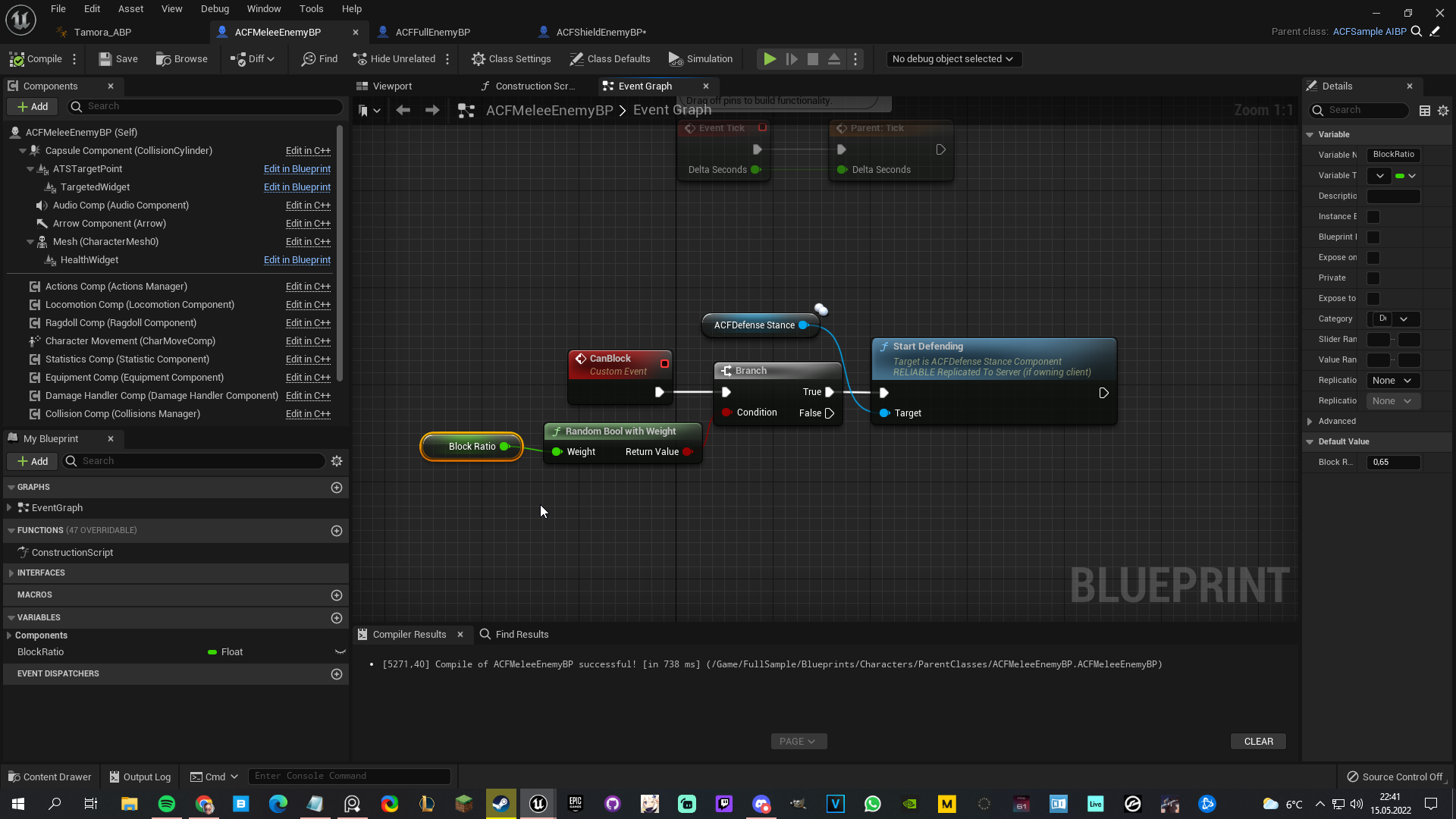
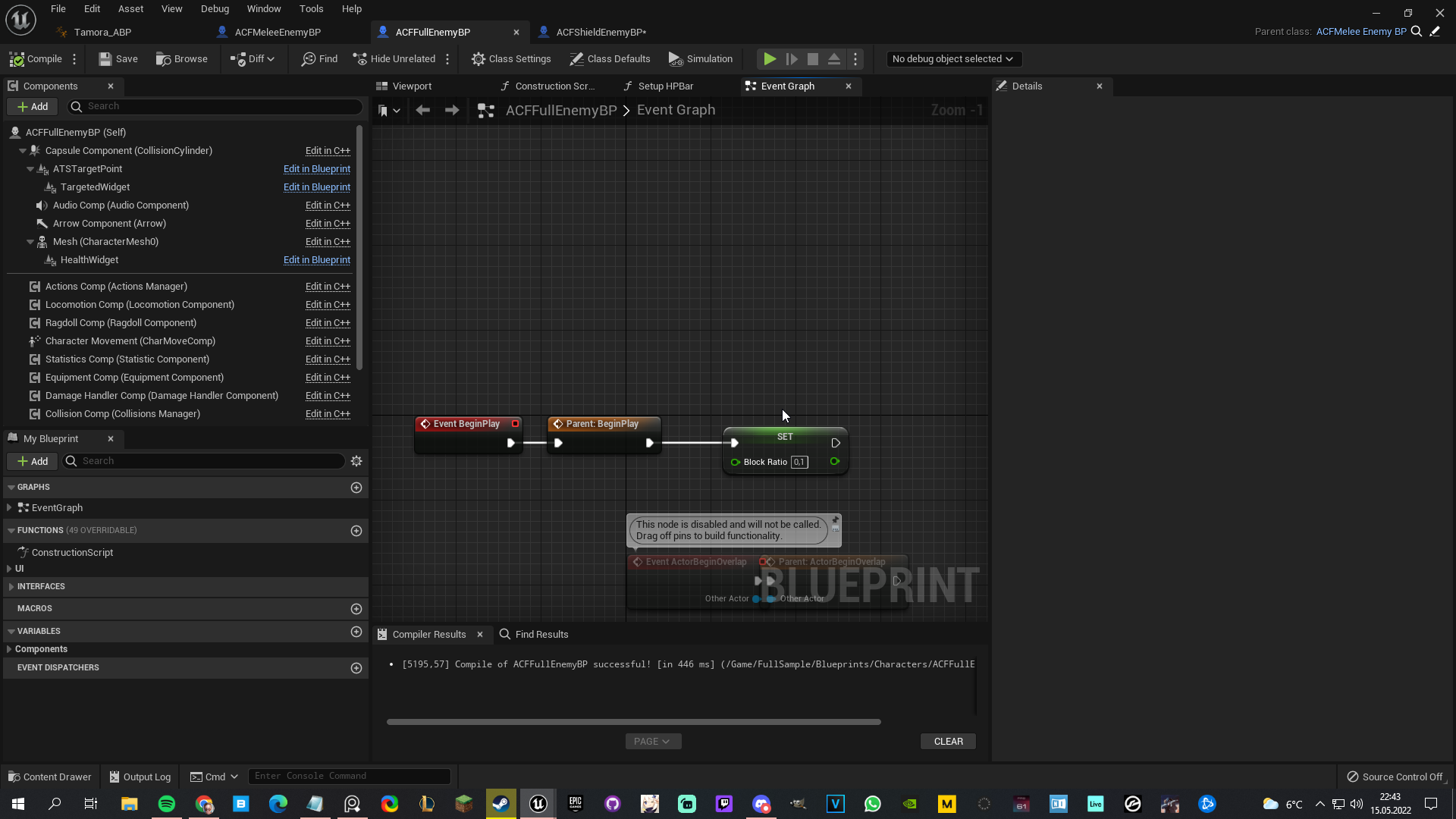
Hey guys, so I've got a parent class which sets an AI to block attacks if a random bool weight is true. Then, in each child of that actor I've got like... a sword user, a shield user, etc. Essentially the shield user's variable should be bigger as he's more prone to block, but when I set the value in each child its overriding eachother's variables. How can I prevent this? Im setting the defense mechanic in the parent because it's triggered by an anim BP, in which case I'd prefer not casting to every type of AI 😅
https://i.imgur.com/7yATxVa.png
 gritty elm
@hallow gate does this works? I'm running this on tick
 mild pine
Here's how I've set it up in the child: https://i.imgur.com/mz7N7QF.png
 hallow gate
gritty elm
<@578027545493241889> does this works? I'm running this on tick
hallow gate
gritty elm
<@578027545493241889> does this works? I'm running this on tick
Not a doggone clue I'm afraid, haha
gritty elm
so what method should be
I want to move my projectile to one location to other location
 blissful inlet
Hello ! I have this problem where one of my nodes in a blueprint made my game crash. It made it so that I cant open the blueprint anymore, and so i cannot correct what made the game crash. Do any of you have any idea on how to retreive the contents of this blueprint, or how to fix the crash. I know where the problem is, i juste cant access it. Thanks !
I'm not sure where else to post that question. Sorry if thats not the right channel
cursive cosmos
what would i plug in this? its casting to a widget
 thin panther
cursive cosmos
what would i plug in this? its casting to a widget
thin panther
cursive cosmos
what would i plug in this? its casting to a widget
A reference to the widget
cursive cosmos
like what?
thin panther
thin panther
Casting is basically checking if something is the right type, it takes a referen...
.
cursive cosmos
that doesnt help
thin panther
It does
You need to plug in a reference to the widget you wanna interact with
Casting is just checking if its the right tye
cursive cosmos
i done it another way
thin panther
How
blissful inlet
oof, wasn't setup, i'll do it. thanks
thin panther
cursive cosmos
i done it another way
Ideally for something like that you save a ref when you make the thing then you can access it easily
 tight pollen
any idea for a smooth transition from animation to ragdoll? when the character dies, it turns on the animations and after a while it goes to ragdoll, but this transition looks poor, there is such a cut
someone can help?
gritty elm
how to predict projectile path from one actor to another actor location?
 whole dune
How can i make my spline procedural like this? so i can change he position of the yellow thing after a spline point if thats possible?

would help a lot!
im thinking about having a variable that sets the visibility i just dont know how to do it after a spline point
 versed sun
gritty elm
how to predict projectile path from one actor to another actor location?
versed sun
gritty elm
how to predict projectile path from one actor to another actor location?
Check out these nodes
 gritty elm
should i run these function on tick?
i have projectile. and i want to move my projectile from spawned location to target
missile
gritty elm
how to move projectile from one location to another target?
like spawn missile and it will move in trajectory to target location
whole dune
gritty elm
like spawn missile and it will move in trajectory to target location
Id say you do it with a lerp. A is spawn location, B is target, Alpha is a timeline
 gritty elm
it will not work
whole dune
But it has no physics
gritty elm
it is custom arc.
whole dune
Is it more like a nuke or artillery?
 whole dune
just copy the first person projectile code
gritty elm
you can imagine it is missile
which move from one location to target. but in arc
first person projectile is not arc
it is just projectile which spawn.
whole dune
So you aim, and then it calculates the angle which it has to shoot?
gritty elm
it doesn't have to be aim. only spawn and then move to target
like mentioned above
this causing fps drop to 5-10

are all parameters correct?. or any thing need to change @whole dune
whole dune
I didnt suggest that
gritty elm
so what approach will be?
versed sun
if its not a moving target (Point B) , just fire it one time and save the data
gritty elm
it is moving and it should be move in trajectory
in other words i want to find path from one actor to other actor
@whole dune ok I tested. But it doesn't works.

sphere is only draw at start actor location. also it lag too much
 waxen gull
@gritty elm What exactly do you want to do ?
you want to make a projectile hit your target right ?
gritty elm
Yes
waxen gull
so
gritty elm
I have missile. The missile should move in parabola
gritty elm
gritty elm
like this
waxen gull
yea
gritty elm
from spawn location to target location.
but in curve. not just lerp location to target. which is unrealistic
exactly like this. but curve can be modified

you can imagine it is missile simulation
spark steppe
use a sine?
gritty elm
yes you can imagine it is sine.
but it should not look exactly like curve
i just gave an idea. it should not straight. it should be curved
like spawn missile and it attack to target
gritty elm
#blueprint message someone give this suggestion.
waxen gull
but i cannot remember how it is working anymore
waxen gull
basically you get the vector from your start and target
get the distance
divide it by two
gritty elm
to get mid point, right?

 spark steppe
the mid point is 1....
waxen gull
anymore
spark steppe
at 0.5 timespan, you know that already
spark steppe
you could drive a lerp vector with the result
waxen gull
sine is for circle
icy dragon
gritty elm
how sine can be used in locations?
Or multiply the vector with the parabolic curve
Which is not actually sine, but still
spark steppe
yea a timeline and that curve as actual unreal curve would do, too
gritty elm
basic starting point
 spark steppe
you can also make vector curves in UE
and add that curve value as offset
probably the easiest way^
icy dragon
I suppose he wants it completely mathematically
spark steppe
thats mathematically 😛
gritty elm
yes. it should be dynamically. since curve is variable
icy dragon
spark steppe
thats mathematically 😛
As in no authoring curves in curve asset or timeline
gritty elm
does timeline curve can be modified at runtime?
icy dragon
I don't think so
gritty elm
so what is the other way
icy dragon
Though what was the equation for parabolic curve again? y = x²?
My math is kinda rusty on that one lol
gritty elm
anyone can suggest solution?
 gentle parcel
Hello folks. I'm creating a little Walk/Run/Sprint with stamina ability for Lyra and I wanted to reduce the number of nodes to use. Basically I assigned 3 boolean variables, one per status and I've tried to use array because I thought it was the best practice for that. Unfortunately I'm not sure I'm doing it correctly. I dunno if I explained it well, I hoped in some help to figure out how I can do it.
Basically I wanted to have a single node where, in each status, I check the one I need.
trim matrix
gritty elm
anyone can suggest solution?
 icy dragon
gritty elm
anyone can suggest solution?
icy dragon
gritty elm
anyone can suggest solution?
I'm sure somebody can come up with better formula lol
But I'm thinking about tracing through X axis to get the parabolic curves
Also for context, a represent how wide the parabolic curve is, and b represent the height

 random plaza
question, what does this error mean?
 icy dragon
random plaza
question, what does this error mean?
icy dragon
random plaza
question, what does this error mean?
Are you using bind functions?
random plaza
yeah, and i just imported my ue4 project to ue5
icy dragon
random plaza
yeah, and i just imported my ue4 project to ue5
Yeah, don't use bind functions in widgets.
icy dragon
random plaza
bindings arent good?
They're bad.
random plaza
so i should use on tick instead?
icy dragon
Bindings are not only inefficient, also kind of chewing through performance
icy dragon
random plaza
so i should use on tick instead?
Update the widget only when it's necessary to do so
e.g. event on damaged for health bars
waxen gull
@gritty elm https://www.desmos.com/calculator/pfdwlq5qht?lang=de
The Formula is Y = X² + XB, The B Value is the Distance between your Start and End

just try out increasing the B Value

Actually Y = ax² + abx
B is the Distance between your Start and End Position
gritty elm
and what is a and c
waxen gull
A Is kind of the Angle you want to fire your Missle
gritty elm
and c?
waxen gull
c is not important
icy dragon
poor c, being neglected like that
zealous moth
@icy dragon y = ax^2 + bx + c. Typical parabola
gritty elm
what x will be
zealous moth
???
waxen gull
The position on the X Axis
zealous moth
Guys is is high-school functions... don't reinvent the wheel...
waxen gull
and Y is the position on the Y Axis
icy dragon
gritty elm
what x will be
Well, the forward distance
gritty elm
 icy dragon
zealous moth
Guys is is high-school functions... don't reinvent the wheel...
icy dragon
zealous moth
Guys is is high-school functions... don't reinvent the wheel...
I know you get the best grade in math at school 😔
icy dragon
What the frick
zealous moth
Good money, but that's besides the point

 gentle parcel
I know you guys are dealing with high level stuff {Maths has never been my thing 😅 } but I hoped somebody could help me with those basic stuff like boolean arrays for the problem I mentioned before
icy dragon
gentle parcel
I know you guys are dealing with high level stuff {Maths has never been my thing...
Bools are boring :P
(jk)
gentle parcel
I know! 😅
 wet surge
hello, It's been a long time that I've been searching about this topic and I dont seem to find any information. Could I create my own landscape based on random noise maps at runtime?, I also want to deform them but if i can create it i could deform it. thanks in advance
icy dragon
wet surge
hello, It's been a long time that I've been searching about this topic and I don...
You might want to look into Voxel Plugin to have some runtime landscape manipulation
WPO on static mesh won't affect collisions, so it's a bust for your purpose
gentle parcel
Basically this is what I'm trying to do
 wet surge
icy dragon
You might want to look into Voxel Plugin to have some runtime landscape manipula...
wet surge
icy dragon
You might want to look into Voxel Plugin to have some runtime landscape manipula...
There's no other way on doing it?. I mean i see it as a very practical solution but i would like to do it myself, because i want to learn how it done and also don't rely on plugins as much as i can
icy dragon
gentle parcel
Basically this is what I'm trying to do
Those bools could be condensed into enum, most likely you won't have more than one of them active at the same time
icy dragon
wet surge
There's no other way on doing it?. I mean i see it as a very practical solution ...
Procedural Meshes, if you want to look at it, but optimisation is also on your own for that.
gentle parcel
icy dragon
Those bools could be condensed into enum, most likely you won't have more than o...
it sounds like what I was looking for...
but I've never worked with them before
wet surge
icy dragon
Procedural Meshes, if you want to look at it, but optimisation is also on your o...
So what i thought about that is that i would need to create my own metods to assing each vertice to the noise texture right?
wet surge
gentle parcel
but I've never worked with them before
For what i understand they are like arrays i the way that you can select from a list the element that you want
icy dragon
wet surge
For what i understand they are like arrays i the way that you can select from a ...
Enum is just named integer, not an array.
wet surge
icy dragon
Enum is just named integer, not an array.
Oh ok, i was considering them as arrays that return the element index thanks for explanation
gentle parcel
I 've tried with arrays because it looked like the best way, from my little understanding how they work
icy dragon
Array doesn't make sense in that context
gentle parcel
I see. I used it because I saw it gave me the chance of making a list of different variables where I could check/uncheck them depending on the walk speed I need
I'm totally stuck there
serene bramble
So I made my settings menu allow you to change between fullscreen/windowed fullscreen and windowed however it seems regardless the resolution and window size won't change. How do I also change those depending? (in fullscreen/windowed fullscreen, set to screen max res, in windowed, set to something like 720p)
waxen gull
@gritty elm I got a solution PM me
i made this little Test Actor

working as intended
gritty elm
you are great
gritty elm
in video how your are testing with two objects?
waxen gull
with variables
on a vector you can check Instance Editable and then show 3D Widget
thats how i got those gizmos
you can even move them around if youre not setting them to a constant value in construction script
waxen gull
B is the Distance between those objects
you get a directional vector to your Target by End Position - Start Position



 limpid bronze
How do you detect when a flipbook is on a certain frame?
like I'm trying to make it so that the enemy damages the player on a specific frame of their attack animation
like I tried this to test when it was a specific frame

 solemn crescent
I’m having trouble with Set <variable> with an editor widget.
New to BP.
Any ideas on what I may be messing up?
 foggy escarp
With little context it could be anything.
limpid bronze
limpid bronze
like I tried this to test when it was a specific frame
fixed it
 hexed barn
Hi does anyone can redirect me to a tutorial of some sort about a basic ai for a 2d platform for a monster moving left and right and don't fall from the platform? thanks in advance
tawdry surge
Easiest way is to do a linetrace down/forward. Once it no longer hits the platform, you reached the edge and it's time to turn around
hexed barn
well I made a pawn but didn't manage to make him move for now that's the problem, tho your message will help me once I figure out why it don't want to move
 sudden nimbus
hexed barn
Hi does anyone can redirect me to a tutorial of some sort about a basic ai for a...
sudden nimbus
hexed barn
Hi does anyone can redirect me to a tutorial of some sort about a basic ai for a...
If you use the built-in navigation system (NavMesh, https://docs.unrealengine.com/4.26/en-US/API/Runtime/NavigationSystem/NavMesh/), then you have to define what surfaces will be navigable anyway. Using NavMesh, you could take some random points around the actor and use ProjectPointToNavigation (https://docs.unrealengine.com/5.0/en-US/BlueprintAPI/AI/Navigation/ProjectPointToNavigation/) to see if there's a suitable point nearby it that you could go to. You'd then use "AI Move To" or feed the selected point in as a Blackboard value to a BehaviorTree, where you'd use "Move To" as part of your overall logic
moving left and right and don't fall from the platform
If you just want it to "scan" left and right (ie move back and forth), then you can avoid any of that anyway, just define how far left and right you want it to go, and move the actor directly. Eventually you'd want to avoid it, but Tick will run your logic every frame. Use the Delta Time that Tick gives you to make the motion independent of framerate.
^^ This is a really simple approach, but you get a lot of performance and power out of doing that same thing using NavMesh and MoveTo
tawdry surge
That is way overkill.
Just "add movement input" either positive or negative along X axis.
Do your linetrace and be done with it
tawdry surge
Down and forward so that it hits the ground infront of the ai pawn. That way you can turn around if it stops hitting or hits an edge with a normal not pointing up and flip the movement direction
sudden nimbus
Guess it depends on how the 2D scene is composed, assuming that's what they meant.
tawdry surge
"basic ai for a 2d platform for a monster moving left and right and don't fall from the platform"
Whether it reaches a wall or a ledge the linetrace would handle turning the ai around
 runic parrot
Hi everybody! one question, does anyone know how to mesh all the static meshes of this actors into one actor?
(Each square is one actor with a mesh, i want to end up with one actor that contains all the meshes).

 pallid turret
I have a widget component attached above my characters head. My game is a local multiplayer and everything works fine. However, the widget components for each player are only visible on the first screen. Every character has a widget component above them from that camera on that screen, however you cannot see the widget components on all the other screens. Does anyone know of a solution?
 dark crow
runic parrot
Hi everybody! one question, does anyone know how to mesh all the static meshes o...
dark crow
runic parrot
Hi everybody! one question, does anyone know how to mesh all the static meshes o...
Select them all then Tools -> Merge Actors
runic parrot
dark crow
Select them all then Tools -> Merge Actors
I want to do this at runtime, not in editor.
dark crow
pallid turret
I have a widget component attached above my characters head. My game is a local ...
Probs you doing something with GetPlayerCharacter0 or so, so only the first player
pallid turret
dark crow
Probs you doing something with GetPlayerCharacter0 or so, so only the first play...
not quite, you can see the widget above every players head, just on the first screen. I think the issue has to do with maybe if I manually add a widget to the actor it refers to playercontroller0, but I can't see a setting to change it. I figured that as I replicate my character actor it should replicate the attached widget as well but I guess that is not the case
dark crow
runic parrot
I want to do this at runtime, not in editor.
Then you would probs need custom edits or generate your logic with Procedural Mesh system or such
dark crow
pallid turret
not quite, you can see the widget above every players head, just on the first sc...
Depends how you adding and all, are you running Listen or Dedicated for the test?
pallid turret
dark crow
Depends how you adding and all, are you running Listen or Dedicated for the test...
its local splitscreen multiplayer so I don't think that matters
dark crow
Splitscreen? Cause if not it still matters
pallid turret
dark crow
Splitscreen? Cause if not it still matters
I was just running as standalone
dark crow
Huh, then how are you testing it with other players
pallid turret
dark crow
Huh, then how are you testing it with other players
it is local splitscreen multiplayer. There is no networking players simply play using different player controllers on the same local device.
dark crow
Not very experienced with splitscreen, but I imagine you would just need to locally add it to every controller then
Fill the info for each player
 teal gull
how do I set a curve to loop like this?
 runic parrot
Red, green or blue?
 quiet shuttle
For some reason my physics actors aren't responding to AddActorWorldOffset, any ideas why they aren't moving?
 faint pasture
runic parrot
I want to do this at runtime, not in editor.
faint pasture
runic parrot
I want to do this at runtime, not in editor.
You're gonna want ISM/HISM
teal gull
runic parrot
Red, green or blue?
all of them, i want them to infinitely loop
dark crow
faint pasture
You're gonna want ISM/HISM
Yeah, but that's not merging per se, it's grouping same SM together, basically Instancing them
What I understood is that he wants a system to actually merge different SM to form a unique mesh
Surely ISM/HISM is already a step up from individual actors indeed tho
 heady jay
How can I get relative component velocity? For example, if I'm in VR, I want to see how fast my hands are moving without taking into account my character movement
runic parrot
faint pasture
You're gonna want ISM/HISM
i was changing it to just use a dic of static meshes and add them without spawning the actors, but let me check those first.
Also, does anyone know why my variable of type "static mesh Reference" brings me a full list of static meshes.
But if i change it to "Static mesh soft reference" i get none?
 serene bramble
How would I get this node from a key input?

Output is Input Action Key Mapping Structure

 worn kernel
hey i was wondering if anyone could help me with a problem im cant wrap my head around.
 worn kernel
Im trying to add percentages to items so that you can check its durability, the problem is that the system clumps up the main number of items you have.
spark steppe
then don't clumb items which have durability
worn kernel
the problem im having is that im having trouble storing the information for those that are pristine and those that are used. Since the the inventory reads the main array for the number of items you have.
runic parrot
your inventory system need changes if you want to include that functionality.
you need to add some "Quantity" and "Is Stackeable" flags to your items and stack them or create individual stacks depending on that.
after that you can do a "for each" on your inventory items and check quantity to check how many items on inventory
or just treat stacks as 1
whole dune
How can I make a spline vary after a spline point? I want to have multiple objects but each one has a variable to set its visibility… but can I change that after a specific spline point? Just like the yellow bars on the rail so i can set their side.. Help would be greatly appreciated
 icy dragon
worn kernel
hey i was wondering if anyone could help me with a problem im cant wrap my head ...
icy dragon
worn kernel
hey i was wondering if anyone could help me with a problem im cant wrap my head ...
Ew imperial units
serene bramble
serene bramble
How would I get this node from a key input?
Still wondering if anyone knows
 dawn gazelle
serene bramble
Still wondering if anyone knows
dawn gazelle
serene bramble
Still wondering if anyone knows
That's just a structure variable that's split or accessed using a "break"
 serene bramble
Ahh thank you :)
 tough yoke
yo, anyone know why my begin overlap event script isnt showing in child blueprint?
trim matrix
is it possible to destroy all the point light of the current level by using a blueprint function?
 prisma tree
I am trying to push a sound mix modifier while pressing down a button, and then when release return to default. But this is not working, what am I doing wrong? it doesnt work if I skip the clear node either...

Wait sorry, my bad. I had the Soundmix duration be posetive and needed to be negative....
 elfin wolf
trim matrix
is it possible to destroy all the point light of the current level by using a bl...
elfin wolf
trim matrix
is it possible to destroy all the point light of the current level by using a bl...

yep this will do it
trim matrix
elfin wolf
this doesnt work 😦
i made a loop and i added those point lights with the node "Add Point Light Component"
gentle urchin
Oh
Components
You could save their refs and destroy them when needed :p
The destroy node is simply destroyComponent instead of Actor
trim matrix
gentle urchin
You could save their refs and destroy them when needed :p
i tried this but on the construction script the array return null
 gentle urchin
Why have it in the construvtion script ?
You can also make a blutility for this if you want it at editor time and not runtime
 bleak rock
Hey guys i am currently having a hard time figuring out how i can own the rifle that i spawn to my player. for some reason only the server is allowed to fire bullets from it. This is how i spawn my rifle:

Now when firing i have a function that calls the server and spawns a projectile however right now only the server actually spawns the projectile:

It seems that my client is not allowed to call the "run on server" event can anyone see what ive done wrong?
gentle urchin
trim matrix
gentle urchin
You can also make a blutility for this if you want it at editor time and not run...
what is a blutility?
gentle urchin
trim matrix
what is a blutility?
Just a blueprint designed to be used in editor, as a utility tool :)
For things like destroying a set of actors, adjusting all lights in the scene etc etc
trim matrix
oh okay, thanks!
 fleet cedar
What do you guys name Blueprints in your scene if you're re-using them a lot, like BP_Collectable, do you rename each use based on the collectable type?
faint pasture
fleet cedar
What do you guys name Blueprints in your scene if you're re-using them a lot, li...
I don't use the BP naming but I do something like
Pickup_Base
Pickup_Health
Pickup_Speed
etc.
 thorny rover
Hi! Is there a way to get a list or reference to all Sub-Levels attached to Persistent Level?
obtuse herald
thorny rover
Hi! Is there a way to get a list or reference to all Sub-Levels attached to Pers...
Not in blueprints afaik
 tame pecan
thorny rover
Hi! Is there a way to get a list or reference to all Sub-Levels attached to Pers...
tame pecan
thorny rover
Hi! Is there a way to get a list or reference to all Sub-Levels attached to Pers...
No.
I wrote this function to get all levels to blueprints ```TArray<ULevelStreaming*> UOutpostBlueprintExtension::GetAllTiles(UObject* Outer)
{
if (Outer)
{
if (UWorld* World = Outer->GetWorld())
{
if (World->WorldComposition)
{
return Outer->GetWorld()->WorldComposition->TilesStreaming;
}
}
}
return TArray<ULevelStreaming*>();
}
Anyone know how I can play Facial Animation on top of a montage?
 left carbon
Hi! I remember I was able to merge blueprints before, but now it seems I'm not able to do so.. When Blueprint is in conflict, Content Browser does not even show it.
Is it something to do with latest UE versions (I use 4.26) or just git/lfs things?
trim matrix
left carbon
Hi! I remember I was able to merge blueprints before, but now it seems I'm not a...
How did u merge blueprints before 0o? I thought U can only override them
left carbon
trim matrix
How did u merge blueprints before 0o? I thought U can only override them
I simply merge two branches, and if Blueprint was in conflict, I open up Editor, open the blueprint, then File > Merge
But now if I merge, blueprint is 1kb in size and not visible in Editor. Maybe merging blueprints with LFS just not allowed
Because I'm not sure if I used LFS on old projects, where I successfully merged blueprints
fleet cedar
What's the simplest / cleanest way to limit this rotation? Just a clamp?
 cyan bone
@mental trellis I was able to generate the procedural mesh yesterday inspired on your algorithm. That will help me generate a custom collision. However the top part of the mesh still remains unconvered. Is that normal? Its the blue part in the image: Its invisible in my project. I guess i need to fill that with triangles too, right?

So maybe get the center, and then draw triangles towards the center?
mental trellis
The top part you make with 0+count, 1+count, 2+count / 0+count, 2+count, 3+count / 0+count, 3+count, 4+count etc
cyan bone
mental trellis
The top part you make with `0+count, 1+count, 2+count` / `0+count, 2+count, 3+co...
/ divided ?
mental trellis
Just a separator.
cyan bone
oh i see. sorry. i see
mental trellis
It's hard to make those stand out properly.
prisma tree
Im creating some sound effects and I want them to be in stereo (ie spatialization) but it then 100% so that when the left ear is pointing at the sound origin I hear 0% in the right ear. This does not feel natural for me and I would like some audio (20-70% ish) to also be heard in my right ear. But I cannot make this happen! I really thought I would be able to do it in the sound settings here:
Anyone has an idea?

 copper bison
Would anyone have a bare minimum example of Input Touch Enter , Leave , Begin , End ? Im trying out on a blank project and was expecing the Input Enter to be similar to Mouse Enter event, but when inspecting the values I feel like the input is not working same way .. just cant put my finger on it. Unless someone has used it and could explain it to a simpleton like me 😄
mental trellis
just cant put my finger on it
😂
copper bison
😉 clever use of words haha
im testing this with Mouse with settings Mouse as Touch input and in the default settings to allow hover over 🙂
Input Touch , pressed , released , moved work fine , keyboard and mouse events work i can see my silly logs 🙂 just not really getting anywhere with Touch Enter , Exit , Begin and End
and UE documentation isnt really helping 🙂
Also putting a breakpoint on it doesnt seem to trigger 🙂 but inspecing the finger index value i see it says Touch 1 so there should be something 😄 now i just feel like its a checkbox in settings or im not using it correctly
Ah nvm now i got it to trigger 😄 seems i had a invisible actor on my set i forgot to delete it triggered the OnEnter
prime fulcrum
Can someone help me with Something?
I nead help with Procedural Generation
So if anyone knows anything ab that. Please help me out
gentle urchin
There are plenty🤔
gentle urchin
'Good' depends on your definition

What exavtly are you proc generatingM
World? Landscape?
prime fulcrum
I want to create Infinity Backrooms you know?
gentle urchin
Sounds like proc rooms is a start
prime fulcrum
alright ill take a look at it Thank you
icy dragon
trim matrix
Anyone know how I can play Facial Animation on top of a montage?
Additive animations or layered blend per bone
trim matrix
how can i make a jumpscare that when player overlap the enemy then it makes the player face the monster?
prime fulcrum
gentle urchin
Sounds like proc rooms is a start
how can i get this one?

its an actor he says

In this video we will create an actor that procedurally generates rooms with randomly placed doors.
Discord: https://discord.gg/x4de7uPtrn
Oops
im very dumb xD
fixed
gentle urchin
If you've just started, id suggest going more basic ^^
prime fulcrum
yeah i was just stupid lmfao
icy dragon
gentle urchin
If you've just started, id suggest going more basic ^^
Well, backrooms is like current year's kids horror thing
Aside from something like Poppy Playtime and alike
trim matrix
icy dragon
Well, backrooms is like current year's kids horror thing
lmao i'm trying to do a backroom game too
stable dove
Any ideas why im getting this error? everything is working perfectly in game so im unsure why its happening. Any help would be hugely appreciated!

 gentle urchin
icy dragon
Well, backrooms is like current year's kids horror thing
gentle urchin
icy dragon
Well, backrooms is like current year's kids horror thing
Never even heard about it. Am I getting old lol
icy dragon
gentle urchin
Never even heard about it. Am I getting old lol
Maybe lol
At least I'm an old person who looks at YT every so often
 ancient topaz
Good afternoon!
Can you please tell me if there is any way to get information from Pawn sensing, that the character lost sight of the player?
gentle urchin
icy dragon
Maybe lol
At least I'm an old person who looks at YT every so often
If only there were enough hours in a day, i'd do that too
icy dragon
gentle urchin
If only there were enough hours in a day, i'd do that too
Well, I've seen it even though I mostly watch drumming and animation videos lol
 mossy summit
Im going to try it but I thought it would be worth asking can you give post processing volumes equal priority so they blend equally?
 astral epoch
If I have an array of set length, how can I check if certain elements are null data?
IsValid and == operations don't seem to be working.
Or at least treating null elements as valid things same as if they had data populating them.
fleet cedar
Hello, I'm trying to clamp my camera's rotation but I don't know how to calculate an angle limit when it flips on the poles like this
between -180 and 180
astral epoch
astral epoch
Or at least treating null elements as valid things same as if they had data popu...
Never mind, figured it out. Was using struct data to spawn characters (resulting characters were populating the array) and forgot to put a check to make sure that the struct itself was valid, so it was always spawning characters even when it shouldn't.
trim matrix
icy dragon
Additive animations or layered blend per bone
My issue is I'm playing a montage already but I also need another montage on top of it. Apparently only one montage can be active at a time so it won't help my case. Layered blend per bone on 2 montages also doesn't work 😭
Someone said state machine, but how would that fare for 100 animations, it's gonna be really bulky
prime fulcrum
gentle urchin
If you've just started, id suggest going more basic ^^
How can i get one like this?

If i create one myself i cant get the "Target"
I get this
