#blueprint
402296 messages · Page 902 of 403
 drowsy veldt
 runic parrot
that trashes all the benefits of using async calls 🧐
drowsy veldt
You can still take advantage of the throughput limit
 final lava
yea, I mean, it is possible in classic way without any problems but I am trying to use latest Enhanced Input Plugin that has much more nice features.
drowsy veldt
Yeah, events are not executed off-thread.
Or rather, each specific event is fired and executed on whenever the programmer that fired that event feels like.
 gusty axle
ive fixed the issue
i just installed a Runtime PhysX Cooking plugin lmfao
this

works on cooked project too

 covert schooner
When you do what is Print Screen in C++, you can control the amount of time the message persists for, is that available in blueprints, or do I need to expose it more with a BP helper?
 true valve
Let's say I'm playing a in-place animation that changes the player's location. And I want to use MoveComponentto on the player to keep the player at the end location so when the animation ends the player doesn't snap back to the starting location.
 hollow gorge
Hi, I'd like to build some menu navigation with the integrated focus system.
The goal was to have mouse over and keyboard navigation change focus between individual buttons, I was considering using the "Event on added to focus Path" on each individual button but I can't seem to find this or any events for my custom button class. Should I be using a custom event for this functionality or is there a better approach? I try to avoid ticking if possible.
hollow gorge
hollow gorge
Hi, I'd like to build some menu navigation with the integrated focus system.
The...
Solved, It seems like can achieve this functionality by using a custom widget that contains a button.
 cyan bone
How do i clamp a value to a minimum of 1 and maximum infinite?
I have an integer that i need it to be at least 1, but Clamp needs always Max. I need it to make sure it becomes if it is 0. But no limit on the max.
 lucid lynx
cyan bone
How do i clamp a value to a minimum of 1 and maximum infinite?
I have an integer...
lucid lynx
cyan bone
How do i clamp a value to a minimum of 1 and maximum infinite?
I have an integer...
Create a pure function that just if(Int<=0)return Int=1.
cyan bone
lucid lynx
Create a pure function that just if(Int<=0)return Int=1.
That worked. Thanks.
cyan bone
yup that also works and its more simple
 wild crater
Is there an easy way to convert a spline (or a set of points) into a mesh?
 onyx token
i wanna hold rightclick, and as soon as my "i get stunned" animation is over - i wanna move to the block animation
like i block - i get stunned - and if i keep rightclick pressed - i wanna go back to block once the stun animation is done
 grand briar
I need a good way to trace to the nearest surface to an object. Not sure how to go about it
 deep elbow
sphere trace and set start and end to be like 0.001 away from each other
then see where the sphere overlaps?
and a sphere radius as big as it needs to be for your uses
grand briar
yeah i was thinking in any direction. i havn't used sphere trace before it confused me a bit. i'll check it out thanks
any "visible" surface
 worthy tendon
not sure if sphere trace would give you accurate results to your problem but might be accurate enough
grand briar
yes, i mean any object. i just want to find what is closest to me, the point of any surface that is closest. and then i want to get the impact normal
worthy tendon
@trim matrix but center of the object could be further from you. for example tracing inside a mug, nearest surface is edges of the mug not inside of it
🙂
it depends on where you start the trace, you can try multiple sphere traces and get the closest hit but that might not be always correct
grand briar
hm, only problem i realized is i need to do it on a plane. (only x,y and not z)
deep elbow
you might need to just spray a load of line trances in a circle around your character, like, not that expensive
or tag things you want to overlap with the spehere
and ignore everything eklse
grand briar
i started doing that, but i wasn't sure how to get the average impact normal between several hits for accuracy. then i figured maybe i rotate a line trace around like a scanline really fast. seemed dumb but i guess that could work?
deep elbow
yeah depends how often you do it and how much stuff happens with the info you get from the trace i guess?
grand briar
only worried that it might "jump" over smaller objects if it's rotating too fast. can't have it too slow either
 lofty jungle
can anybody help me? I have created a health bar on top of enemy pawn/character, and am trying to bind the percentage, but i dont know what to plug in to the cast to wildcard. I have tried promoting to variable and plugging in the reference but im getting errors. I think it might be because the AI is spawned in and not existing on begin play until 2 seconds later, but not sure.


 deep elbow
where does the widget get spawned from?
you could pass in the owner as a ref if the alien spawned the widget
otherwise which alien is it supposed to be getting the health from? it doesnt know
 tawdry surge
Or don't use a binding at all and just call an update health function or event when it changes
lofty jungle
deep elbow
otherwise which alien is it supposed to be getting the health from? it doesnt kn...
The widget is a component of the enemy alien actor, so yeah the alien spawned it i think. I can see the bar, but its just stuck at zero. Which node/s do I need to pass in the owner?
deep elbow
uh, you could create a variable in your widget with the class of your bp_alien, then expose that on spawn and pass it in to the widget from the bp_alien
lofty jungle
i tried get owner, but error.
 deep elbow
but eh, im ill, so my brain is not firing correctly
lofty jungle
ok ill try that, thank you. im pretty new to game dev so a lot is unfamiliar to me at the moment.
deep elbow

Unreal Engine Forums
Thank you for answering! Yes, I’m using a widget component and I need to update enemy health only when its health is affected. Any suggestions?
and here a video: https://www.youtube.com/watch?v=BpTKS5-9KnE
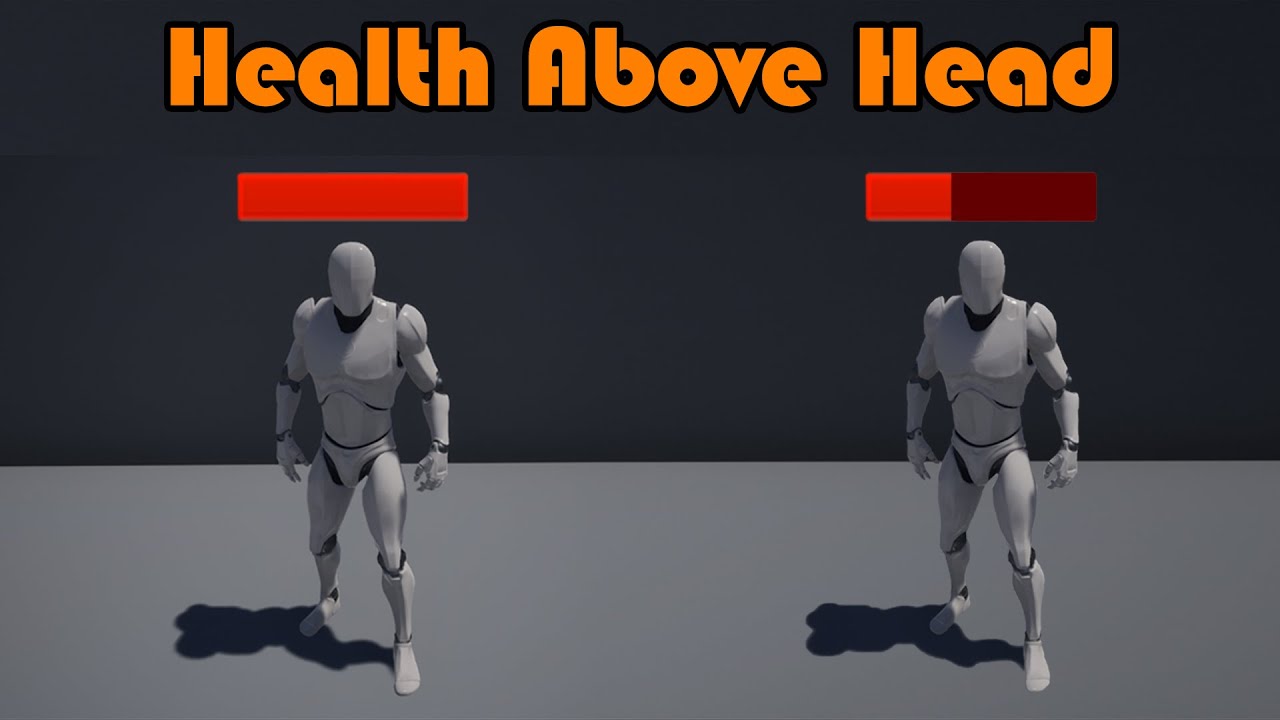
Hey guys, in today's video, I'm going to be showing you how to display a widget above the AI's head. We will create a floating widget containing a progress bar linked with the AI's health.
This is an improvement on a previous video, including only seeing the widget when you are close enough, and each AI has their own health in their own widget....
lofty jungle
thank you i will watch them now
lofty jungle
deep elbow
https://forums.unrealengine.com/t/how-to-bind-health-bar-widget-to-an-enemy/4747...
Worked like a charm, i found it really helpful to know to keep it in the character BP instead of bind it in the widget BP. Thanks so much 😄
deep elbow
awesome, glad it helped!
grand briar
so i'm not sure how to go about this. made a sphere trace. this is the result. this way it doesn't work well to find the closest surface
tawdry surge
Looks like you're just doing a regular sphere trace. If you do multi sphere trace instead it'll return an array of all things hit and you can evaluate which is closest
grand briar
ah, handy
 tiny meteor
hi, is there some way to show scenecomponents in the viewport
they used to show aswhite dots, but dont anymore?
 brazen pike
tiny meteor
they used to show aswhite dots, but dont anymore?
brazen pike
tiny meteor
they used to show aswhite dots, but dont anymore?
You might be in the game-view, try pressing G to switch
 jolly cairn
Hi all!
I have this blueprint for a decrease hunger event and i want to hook it up to a progress bar on my UI. I have the progress bar set up and ready to go and the HungerLevel variable is attached to the FirstPersonCharacter template i have. How can I make the progress bar on my UI read the hunger level from the player?

because the HUD that shows the hunger level is going to be removed and recreated on the viewport on the fly as menus are navigated between, i don't want to do the whole math on the UI blueprint
deep elbow
you get a reference to the widget in your player, you update the widget when you update hunger
make a function or custom event to blibbidy-bloop the hunger
 runic urchin
I'm looking to select all static meshes underneath Exterior, how would you go about it
 jolly cairn
deep elbow
you get a reference to the widget in your player, you update the widget when you...
jolly cairn
deep elbow
you get a reference to the widget in your player, you update the widget when you...
awesome, will give that a try, thanks!
tawdry surge
Open it, select the top one in the folder, shift click and select the bottom
runic urchin
I'm looking to select them or sort them into a group in a blueprint to force an lod
runic urchin
yes
deep elbow
cant you get the parent and get children and add them to an array and run a for loop on that shit
tawdry surge
You could use tags, but I don't think you can access them by folder in the world outliner
runic urchin
I've gotten as far as get children compents
and then able to filter by static mesh components
deep elbow
?
 runic urchin
the only thing is that static mesh components
deep elbow
i mena, what are you trying to do
 trim matrix
Hey is there a way to draw lines on the screen within a widget?
runic urchin
I'm trying to get all static meshes in a certain group and force LOD
jolly cairn
deep elbow
you get a reference to the widget in your player, you update the widget when you...
this is what i have now, the hunger progress bar does not deplete. Set Percent should be the right function to call, right?

 runic urchin
the other thing i'm trying to do with it is trigger a forced LOD when inside a trigger zone (that code I already have)
jolly cairn
jolly cairn
this is what i have now, the hunger progress bar does not deplete. Set Percent s...
im being dumb, im not telling my event to start XD
deep elbow
jolly cairn
this is what i have now, the hunger progress bar does not deplete. Set Percent s...
yeah, but thats uses a 0 - 1 value i think, so check what your float is, maybe its 0 - 100
ah
jolly cairn
ok the actual number ticks down but not that bar...
deep elbow
runic urchin
the other thing i'm trying to do with it is trigger a forced LOD when inside a t...
i find it weird that just getting children and casting to static mesh components wouldnt work
jolly cairn
deep elbow
yeah, but thats uses a 0 - 1 value i think, so check what your float is, maybe i...
righttt, so will need to divide by 100 then
deep elbow
what gets returned when you try, do the casts fail? do the lods simply not update
runic urchin
Casting to static mesh components is not finding the force LOD
 icy dragon
trim matrix
Hey is there a way to draw lines on the screen within a widget?
icy dragon
trim matrix
Hey is there a way to draw lines on the screen within a widget?
There is a Draw Line node for widgets
jolly cairn
@deep elbow working perfectly! thank you very much for your help 🙂
trim matrix
icy dragon
There is a **Draw Line** node for widgets
That doesnt work for me. Only when i replace the onpaint function
deep elbow
great!
 deep elbow
yeah, head issues with checking class like that, thats why in my image i just casted to the componenet, does the sdame thign right
runic urchin
that should work
 pine trellis
I have been having a hard time trying to get my dedicated server to load a map through a command line, this is my command line Mobile2?game=FFA -ServerName=PORT_KNOX_SERVER , it names my server but it wont load the map I tell it to am I doing something wrong? here is the code in my game instance I called event init, then command line parse command line,, execute command line and then suppose to host the game, is it possible to load maps using a bat file???/

 balmy vessel
wasnt fully sure if umg was the correct place or not
icy dragon
balmy vessel
wasnt fully sure if umg was the correct place or not
Don't crosspost, it can confuse people who frequent on multiple channels
balmy vessel
fair nw
jolly cairn
is it possible to read from a JSON file with blueprints? i want to store the inventory contents in a file and coming from mainly doing .NET stuff in Unity, I've always done it with a JSON file. Should it be handled the same way in UE or is there a better way?
 idle vale
Why did the Set Max Distance exist as a node & not the Set Min Draw distance ?
That the one i absolutely need...anyone have an idea/ solution to bypass that ? or maybe i'm missing something.

 willow gate
Uh, ok just started messing with UE5 and the FPS template is strange the way it uses an event dispatcher to fire the weapons. My question is, are the event dispatchers not replicable? Cause I'm having a hard time replicating the projectile spawning.
I can just fix the problem another way but I'm just curious now for future reference, if there's a trick to replicating an event dispatcher call from another object
 steel shadow
What happens if I call a 'timer by event/function name' at a higher frequency than frame rate allows? Does it then just execute per minimum ms interval?
 solar bison
willow gate
Uh, ok just started messing with UE5 and the FPS template is strange the way it ...
solar bison
willow gate
Uh, ok just started messing with UE5 and the FPS template is strange the way it ...
fire the event dispatcher in onrep, so then every client gets that event when whatever you need has successfully replicated
alternatively if you aren't using onreps, then you're probably using a multicast. Fire it in the multicast
 lost wyvern
My geometries made with Geometry Script for UE5 disappear when displaying in standalone or after packaging, but you can still see them in the editor and in PIE.
Any idea why this is happening?
willow gate
solar bison
fire the event dispatcher in onrep, so then every client gets that event when wh...
hmmm.. ok. I'm not sure I know what you mean but I'll do some research before I ask any more questions.
 boreal kettle
Is there a way to change RenderFocusRule during gameplay? I know it can be turned off/on in Project settings but how can I control it ingame?
 eager agate
does anyone know any tutorials for side scroller object grabbing? im trying to get my character to animate grabbing an object but i dont know how to make it
 real notch
I keep having issues with accessing "none" on actors I cast and store references to in beginPlay. I understand why it's happening, but it's a bit annoying. Is there a step after begin play? Like how unity has awake and start for example? Some place where I can be sure everything (actors, game mode, game state, player controller, player state) exists and is ready to find?
 calm citrus
Can anyone explain to me what this is doing? Trying to wrap my head around some of the BP's in Advanced Locomotion v4. I understand what its meant to do but im confused what all the wiring is doing

 dark crow
It's just a double tap logic based on on gates
or i guess it's a hold logic
Shortly releasing closes the upper gate and triggers tapped but only if you didn't trigger hold
Holding it will enter the first gate and return held closing the released gate ofc
It's a Macro so it remembers the states
grand briar
So.. i've managed to get the distance of all the hits.. i'm trying to get the closets surface's impact normal but i'm not really sure what to do from here. quite new to arrays so.

 faint pasture
grand briar
So.. i've managed to get the distance of all the hits.. i'm trying to get the cl...
faint pasture
grand briar
So.. i've managed to get the distance of all the hits.. i'm trying to get the cl...
Make a function that takes in an array of hits and returns a hit
Loop over all the hits, setting a local variable ClosestHit if the distance is less than the current ClosestHit or it's index is 0. Return ClosestHit
Or rather, set ClosestHit = Array.Get(0) then do the looping.
calm citrus
dark crow
It's just a double tap logic based on on gates
Ok so I am understanding it slightly. Im going to continue to study what you said. But I am also trying to implement this in my game. So the Macro from before is the Hold Input and the tap works perfectly from changing from walking to jog. But Im stumped on the held input and trying to make it to where when the player is no longer holding the button they stop sprinting and return to the previous state...
 dark crow
It doesn't do that
You would need to get rid of this

That closes the Released gate
dark crow
If you want Released to always, trigger, yes
grand briar
faint pasture
Make a function that takes in an array of hits and returns a hit
Oh man :D. let's see if i got this. thanks for the info though i'm gonna give it my best
dark crow
 calm citrus
Dude thank you so much it worked perfectly I am definitely gonna study this so I wont get lost later on
faint pasture
grand briar
Oh man :D. let's see if i got this. thanks for the info though i'm gonna give it...
Do you follow the logic?
Look at hit
Is it closer than the closest one so far? It's now the closest.
Done? Return the current Closest
dark crow
You may wanna change Tapped to Released so it's clearer to you what it does now
calm citrus
Will do thank you so much
grand briar
faint pasture
Do you follow the logic?
Look at hit
Is it closer than the closest one so far? I...
yeah, it's the execution i'm worried about
dark crow
calm citrus
Dude thank you so much it worked perfectly I am definitely gonna study this so I...
Just keep in mind that at that point you don't even need the Macro, you can just use the InputAction flow directly
Doing this is the same if you make that edit
 calm citrus
huh you're right... lol I feel like an idiot however there is one problem
dark crow
The Macro like you had before is useful if you want to keep continous input till you press again
Let's say I have a sprint key, I hold it then release, it will keep me sprinting till i tap it
Like in most modern FPS I guess
 lime moat
anyone know if its possible to change lock/rotation constraints at runtime using BP?
 dark crow
calm citrus
huh you're right... lol I feel like an idiot however there is one problem
dark crow
calm citrus
huh you're right... lol I feel like an idiot however there is one problem
With the edit you made it's only good if you wanna have a chargeup ability of sorts
For example I need to hold the key for 5 seconds for me to sprint and when I release it goes back to walking
But at that point there may be some more logic in between
calm citrus
Ok cool I'm writing this stuff down in my notes. I do have one more question if you can answer it.
So for the input I just used like you said. I don't know how easy it is you can tell. But the input reads my toggle at the same time as its held. Making it to where if I stop sprinting it goes to the next toggle action. Is there a way to make it if I stop sprinting it will go to Jog mode instead of going back and forth from jogging and walking
I dont know if I explained that correctly
grand briar
faint pasture
Do you follow the logic?
Look at hit
Is it closer than the closest one so far? I...
Would you say i did it properly? i'm trying it out now just gotta draw debug and all that
 dark crow
calm citrus
So for the input I just used like you said. I don't know how easy it is you can ...
dark crow
calm citrus
So for the input I just used like you said. I don't know how easy it is you can ...
You can use some bool logic if needed, really depends on how you want your run / jog / walk flow to go
calm citrus
dark crow
You can use some bool logic if needed, really depends on how you want your run /...
I basically want my sprint action to always return to jog state. Never the walk state
dark crow
And how would you go from jog to walk?
calm citrus
with the toggle I use now
dark crow
Use a bool then
bSprinting
If you sprint it sets to true then on the toggle it checks
if bSprinting True then Jogs
if false then Walks
It will be true only if you sprinted prior, if not it means you are jogging / walking
FlipFlop is basically do A then B and repeat so not really useful in this case
calm citrus
I swear I feel like an idiot more and more I go deeper in UE lol
thanks for the help
have a lot of notes
dark crow
You may wanna have a bool for each state just in case if future things can impact that
bWalking
bJogging
bSprinting
And you can create functions to change states
For example SetWalking where it edits your speed and sets bWalking to true and you can do whatever you want in there related to the state change
calm citrus
Would it be easier to use enums? I have enums to transfer me from walking to crouching
calm citrus
Cool, thanks
 bold shard
Weird question, I have a BP with several components on it. I can modify all of them, and I can save my BP, but when I reopen the project one of these components resets (a cube I use for some collision stuff). Anyone have any ideas?
 flat coral
This is stupid but try closing the editor tab before exiting the editor. It can force a "real" save for materials at least, probably works on BPs too
Also does anyone have any idea how I can figure out what class is still referencing this deleted class?

Clearly something has it as a parent but i have NO IDEA what
And weirdly nothing is breaking in game
Actually that's not weird, I replaced the parent class with a component system before removing it
flat coral
Where is that?
 surreal peak
I usually do that via command line and I'm on my phone so all I can suggest is googlung for this ):
surreal peak
Command line is something something UE Editor.exe projectname.uproject -run=CompileAllBueprints and then some optional settings
Yeah, memory on point today
flat coral
nice
flat coral
OH hold up! I just figured it out one sec
surreal peak
This also exists as an ineditor test with UI but that's a longer walkthrough to get access to that
flat coral
This is useful general knowledge: If you get that error, you can mouse over "inheritablecomponenthandler" and it says what it ACTUALLY is
 surreal peak
Nice
Well I would recommend the command line anyway
It's a strong tool to find broken bps before submitting to P4 for example
flat coral
The fuck? The class this references doesn't have that missing BP as a parent AND neither does its parent. The missing class is nowhere in the tree.
flat coral
surreal peak
Command line is something something UE Editor.exe projectname.uproject -run=Comp...
Wait do I run this in the UE4 command line or like the windows command line?
surreal peak
Windows
cyan bone
I need to remove a range of indexes from an array.
So i have an array of vectors. And sometimes i need to remove items from 3 to 9. So remove 3 4 5 6 7 8 and 9.
Other times i need to remove in the opposite direction. for example from 7 to 2, remove 7 6 5 4 3 2.
How do i do this?
 mental trellis
cyan bone
I need to remove a range of indexes from an array.
So i have an array of vectors...
mental trellis
cyan bone
I need to remove a range of indexes from an array.
So i have an array of vectors...
Is there some reason you want to remove them in specific orders?
cyan bone
It doesnt need to be removed in the order exactly. Only the range must be removed. But i had to say that sometimes the range comes in reverse.
mental trellis
If the range is in reverse, just reverse it and use the same method as before.
Is it always a contiguous set of indices?
cyan bone
yes its always like from 2-9 , or 7-19, or 17-5.
 spark steppe
for loop
iterate from max index to min index
there are math min/max nodes to determine the lowest/highest index
cyan bone
so it works both ways? i dont know why it is not working. i must be doing something wrong
mental trellis
Does the order of the array matter?
spark steppe
well, you have to remove from back to front
cyan bone
from back to front? You mean like as we do in a reverse for each loop
mental trellis
What I'd do is something like: count = end - start + 1 for (index = start; (index + count) < array.size; index++) array[index] = array[index + count] array.setsize(array.size - count)
instead of the min you could check for going past the end of the array
 golden pagoda
Hi friends, i change my project 4.27 to Ue5 and using PhysxVehicle. but now my Vehicle is not moving , Is anyone know how to fix this ?
cyan bone
mental trellis
What I'd do is something like: ```
count = end - start + 1
for (index = start; (...
Im doing it in blueprint. but i see.
What im trying to do is. I have a circle made by points. And the hidden part of the circle must be removed. I detect the line by comparing the angle with my target. I have now the 2 points beggining and end of the circle that must be removed.
mental trellis
That's just pseudo code
tawdry surge
Ue5 uses chaos for physics. Idk if physX has been 100% removed yet or if you can still change it from the project settings @golden pagoda
spark steppe
pretty sure that its gone
golden pagoda
@tawdry surge PhysxVehicle is Available in plugins but i think there is bug or something is missing for vehicles
tawdry surge

This guide explains how to convert an existing PhysX vehicle to use the Chaos Physics solver.
golden pagoda
@tawdry surge Thanks Checking this
 golden lotus

 golden frigate
any reason attaching an actor to a socket on the player would cause all WASD inputs to go wild?
specifically im attaching them to a mesh on the character
using the spawn actor function, and attaching to a specific socket
trim matrix

Good morning! i have an issue, when i Loop all Actor -> staticMeshComponent.. it does print only the latest one..
and the index only stops at 4
 gentle urchin
If this is inside a function it depends on whats to the right in the picture
After the print
 cyan bone
I have a Line from point A to point B. How do i know which points (green and yellow) are on each side?

 late gorge
so... this doesnt work... pretty sure this is how you setup a looping function execution?

the function is never called, setting by event doesnt work either
this is on a controller if that makes any difference
late gorge
well it wasnt starting so i tried to do unpause
it made no difference
starting didnt do anything
like this is supposed to be simple but the timer just isnt starting
gentle urchin
Is it the correct function name ?
late gorge
.> yes
gentle urchin
It is simple ✈️
late gorge
by event didnt work either
mental trellis
cyan bone
I have a Line from point A to point B. How do i know which points (green and yel...
You can do a cross product of A->B and A->point (assuming 2d plane,) the 3d coordinate (z) will be positive for the one side and negative for the other
Or unrotate the A->point vector by (A->B).GetRotator() and then compare Y values
cyan bone
i see. thank you. will work with this
late gorge
it even works if i try doing the exact same setup in the widget that i'm trying to call
but not on controller
.<
 dense mica
Is it possible to make function params const like how we do in C++?

Variable Array is coming from C++ side and I have to take some info from it in BP level
mental trellis
Show your code/bp?!
 zealous moth
@cyan bone dot product
dense mica
mental trellis
Show your code/bp?!
Sorry wasnt sure what to post. I was just wondering if there is an option to make a param const since I can not see an option for it

 mental trellis
Shrug
lime moat
anyone know if its possible to edit lock position/rotation constraints in BP?
 mental trellis
dense mica
mental trellis
dense mica
Unmark the method as const and maybe you won't get the error?
 mental trellis
Make the array not read only?
dense mica
Its about Melee Attack Montage being BPReadOnly but making it mutable in BP defeats the purpose
I was hoping to get away with a consistent const correction but anyway no biggie
God save me from idiot designers 
cyan bone
@mental trellis @zealous moth This worked like a charm with dot product:
Now i can split my circle my group of units in 2 with a line 🙂
https://blueprintue.com/blueprint/yew8bd41/

No description provided
willow gate
Is there a good way to store a reference of an actor that I'm spawning from a server replicated event? When I try to save the return value of "SpawnActor BP" in the Server RPC, it stays empty and I can't reference it and I don't know how to store it locally since the spawning happens in the server rpc.

 pine trellis
can someone tell me what this node is called?

it looks like a vector - float but mines doesnt have thoseextra add pin
 earnest mango
pine trellis
earnest mango
pine trellis
That's a Vector-Vector node with the second vector split. You can right-click input/output pins for structs and certain data types, like vectors, and use Split Struct Pin to split it into its parts. You can recombine after splitting too

 late cave
Weird that you can't reparent a macro library to the actor class...
 dark crow
 cobalt gulch
Which doesnt have a reference
cobalt gulch
Which doesnt have a reference
Why would you do that
pine trellis
@thanks @earnest mango !
@cobalt gulch get a reference to the widget at begin play
and then just drag it out and connect the dots
 carmine cypress
Hey guys not really sure where I should be posting this but I'm running into an issue getting my box collider to work properly on my character. I've set up a box collider so that it would block off my character from entering a specific area, but I realized that it only works when the box collider is located on the ground. If I raise my box collider slightly above the ground my character can go through it, whereas on the ground my character can't. Does anyone know why this may be happening?


 drowsy pumice
Long shot: Is there some workaround by which I can make maps (the variable type, not levels) replicated? It would be really nice if I didn't have to replace everything with object arrays/struct arrays
That's a no then >.>
 hazy grail
Instanced meshes would be better
 silk cosmos
cobalt gulch
Why can I not bind the image?
silk cosmos
cobalt gulch
Why can I not bind the image?
You'll have to set it manually in the widget blueprint
silk cosmos
willow gate
Is there a good way to store a reference of an actor that I'm spawning from a se...
Try #multiplayer
spark steppe
is there a way to make this possible?

i want to select scene components from the current actor there
cobalt gulch
pine trellis
<@213979297000456193> get a reference to the widget at begin play
I can't set variables in the widget though
I just want to remove a widget that was created before
And set an image in another widget


 high ocean
Here's a fun one: How would you lerp two curve assets that set a value on array elements?
Use case: I have an array of curves which get randomly selected. They are meant to add height variation to vertices in a procedural mesh in a certain section. Problem is, when a curve ends (on vertex section threshold) & the next one begins, the change in height may be abrupt. How would I lerp the end section of the previous curve with the start section of the following?

something like that 👆
 tranquil gorge
Hello im doing local multiplayer spawing system. when i press start for some odd reason the camera resets to 0,0,0 when i press play. Anyone know why this happens
 dense hamlet
@trim matrix ping
 forest timber
Anyone else have the issue of blueprints not working overtime? As in, my code will be working perfectly, but I'll relaunch UE4 and its decided to stop working lmao
 onyx frigate
Hi ! I have an issue with my collision ... as if they are broken
created a new object Projectile, got to spawn a projectile also but it never generates overlaps or hits ...
both static mesh and capsule are set to profile Projectile.
Both have generate overlaps and hits.
My EnemyPawn has a EnemyPawn Profile with blocking (I tried overlap, doesn't do anything more)


Projectile Actor:


The spawn actor node:

the only time I have a collision update is with the main pawn actually ...

what's wrong with my approach ?
That's the catching overlap on the projectile capsule:
 trim matrix
onyx frigate
what's wrong with my approach ?
trim matrix
onyx frigate
what's wrong with my approach ?
Does the static mesh you are trying to use even have collision? Open the mesh asset to check directly.
onyx frigate
well after 3h trying everything, it finally worked, somehow
OH. that may be the reason !!!!
 onyx frigate
thanks man, i'll look into it
 rough iris
this always returns false. The left click event works as expected...
 trim matrix
tranquil gorge
Hello im doing local multiplayer spawing system. when i press start for some odd...
trim matrix
tranquil gorge
Hello im doing local multiplayer spawing system. when i press start for some odd...
That sounds like an issues with the projects code. Sadly nobody else but you has seen even a single line of code in your project. Please provide as detailed of an explanation as you can. Also provide screenshots including the code you believe to be problematic.
trim matrix
rough iris
this **always** returns false. The left click event works as expected...
Have you checked that there is not something in front of the ItemButton widget?
tranquil gorge
trim matrix
That sounds like an issues with the projects code. Sadly nobody else but you has...
sure i can do that
true valve
If I play an in-place animation that changes the player's location by the end of the animation. How can I use MoveComponent to keep the player at the end animation location?
rough iris
trim matrix
Have you checked that there is not something in front of the ItemButton widget?
The [Overlay], [ItemNameText] and [ItemStackText] are set to Not Hit-Testable (Self Only)

 upper summit
@high ocean You could create a smooth curve between the end of the first curve and the start of the second curve with some lerping similarly to how you've drawn your picture. With a single interpolating value you can lerp between points 1 and 2, between 2 and 3, and between 3 and 4. Then you lerp the results of those three lerps together in the same fashion, and finally you lerp those two to get the final output value. You'll create a cubic bezier from the first point to the fourth point, and the 2nd and 3rd points will act as control points giving additional shape to your bezier.

This suggestion has been brought to you by my recent cubic bezier addiction.
Deciding how far inset into the curve you place the 1st and 4th points is probably just something you can tweak to find results you like.
trim matrix
rough iris
The [Overlay], [ItemNameText] and [ItemStackText] are set to `Not Hit-Testable (...
This is an item stack in your inventory widget. Can you click on other parts of the inventory widget? does that work?
high ocean
@upper summitThanks for your suggestion, i'll look into it 🙂
 astral epoch
Floating Pawn Movement doesn't follow navmesh right?
rough iris
trim matrix
This is an item stack in your inventory widget. Can you click on other parts of ...
clicking everywhere works, and the event is fired, it's just the IsHovered returning false
tranquil gorge
trim matrix
This is an item stack in your inventory widget. Can you click on other parts of ...
I actually ended up solving my own problem so thankyou very much for replying. To share, the solution was to make sure both in the blueprint and in the playerstart for both characters that 'auto posses' player number was set to disabled. 
trim matrix
tranquil gorge
I actually ended up solving my own problem so thankyou very much for replying. T...
Nice 
rough iris
also if I check Is Hovered on target = self it also doesn't fire
it's weird because the button "appears" clicked, like it changes color accordingly
trim matrix
rough iris
clicking everywhere works, and the event is fired, it's just the IsHovered retur...
I see, not sure then.
rough iris
no worries, thank you for your help still 🙂
cobalt gulch
How can I fix the camera clipping/culling objects which are very close?
 green briar
cobalt gulch
How can I fix the camera clipping/culling objects which are very close?
green briar
cobalt gulch
How can I fix the camera clipping/culling objects which are very close?
If you dont want it to clip check the camera options, its an option to Do Collision Test
cobalt gulch
green briar
If you dont want it to clip check the camera options, its an option to Do Collis...
which group is it located in i cant find it
green briar
cobalt gulch
which group is it located in i cant find it
Camera Collision
green briar
cobalt gulch
which group is it located in i cant find it

Actually its in the springarm
 elfin vigil
I have this block of code in a binding to populate a text block that appears above an actors head. I'm feeding the values in through a blueprint interface, but it's giving me back 0 instead of the values I set in the actor's class
I think the problem is the get player controller, but I don't know what to put in it's place.

I'm feeding in the default values from a parent actor, then making a child of that actor to customize the values per child

I set this actor to have a cooker rank of 8
 green briar
elfin vigil
I have this block of code in a binding to populate a text block that appears abo...
green briar
elfin vigil
I have this block of code in a binding to populate a text block that appears abo...
You are trying to have the players cooker rank appear over their head?
 green briar
Where are you setting cooker rank?
elfin vigil
as a variable in the actor
green briar
elfin vigil
as a variable in the actor
Then it looks like, to me, based off your pictures, that the widget isn't receiving your BPI values.
elfin vigil
I'm doing everything in a parent, then changing values on a child
 green briar
Are you casting to the widget or are you making sure to go through your actors widget instead?
green briar
elfin vigil
I'm doing everything in a parent, then changing values on a child
Why dont you PM me, I can help you better there
 cosmic kelp
I would like to set brightness for my game in an Options Menu using a slider and found this solution using a google search. When I tried this, nothing happened on my menu widget. I'm not quite sure I'm using this Post Processing Volume setting correctly. Can anyone think of what might be going wrong? Could I possibly need to set up my own GameMode instead of the default one to see this working?
 lucid lynx
I've got an actor BP in my level with a public variable referencing another actor also in the level. Something happens with these actors when my player spawns into the level. When running the game in the editor while the level is loaded, everything works. If I start the game in another level then load into the level with the actors, the public variable referencing the other actor seems to be void.
runic parrot
Hi! is there any way to update a datatable from the editor with blueprints? (not at runtime, just in edito mode)
lucid lynx
Any way to solve this? It's like the referenced actor isn't created yet when the script tries to do something.
runic parrot
lucid lynx
Any way to solve this? It's like the referenced actor isn't created yet when the...
If the actors are destroyed, the references are lost
trim matrix
runic parrot
Hi! is there any way to update a datatable from the editor with blueprints? (not...
There is not.
lucid lynx
runic parrot
If the actors are destroyed, the references are lost
There shouldn't be any destruction going on as far as I know. The actors are in the level file itself.
trim matrix
lucid lynx
Any way to solve this? It's like the referenced actor isn't created yet when the...
is this "script" the construction script?
lucid lynx
trim matrix
is this "script" the construction script?
No. It's a BP that moves some actors around when the player BP's BeginPlay activates it.
It works when I start the game with the level loaded, but it doesn't when starting an another level then loading into it.
trim matrix
lucid lynx
It works when I start the game with the level loaded, but it doesn't when starti...
how is the reference set? it is an instance editable variable that you directly set in the level editor details panel?
lucid lynx
Correct.
 lucid lynx
I know, right? lol
trim matrix
lucid lynx
I know, right? lol
What BP has a reference to what BP?
trim matrix
lucid lynx
No. It's a BP that moves some actors around when the player BP's BeginPlay activ...
since sounds like the player BP has this reference???? Doesnt make sense to me
lucid lynx
I have an actor BP in the level that acts as a "cutscene director." It has references to other actors in the level that it moves around and does things with. When the player BP loads it tells the game to begin any director BPs that are set to activate on map load. So player loads into map -> tells any cutscene actor that's set to fire on map load to go -> cutscene actor moves around some other actors like puppets.
trim matrix
lucid lynx
I have an actor BP in the level that acts as a "cutscene director." It has refer...
Ok good. Have you tried directly checking the value of that reference in game? You can use the F8 key to unposses your character and fly around. You can then click on the world outliner and find the cutscene director. You will be able to directly look at the value of any instance editable variables then.
lucid lynx
Okay, let me try that.
trim matrix
I would imagine the reference is correct and there is just some issue with the game code.
trim matrix
lucid lynx
Okay, let me try that.
After you click on the Cutscene director in the world outliner, check the details panel. The variable will show up somewhere in there.
lucid lynx
Oh wow, I'm super dumb. One of the references is literally null in the details panel. I think I changed it a while ago and forgot to put it back in. 🤣
Thanks for the help, I completely forgot about the F8 feature.
trim matrix
Well there you go then.
Make sure that value is also NULL on the level though.
There could be a peice of code that is for some reason, setting it to NULL
lucid lynx
Looks like everything is good in the standalone build too.
 drowsy crater
Evening gents
I'm using a blueprint that triggers a ragdoll effect when activated. However the camera gets reattached from the capsule to the mesh, even after reseting.
Someone suggested that after adding the mesh to the capsule, I should also add the camera to the capsule in the reset part, though I'm struggling to figure out how exactly to integrate that into my blueprint, since I've only recently started using UE5, and found the blueprint on blueprintue.com.
If anyone is able to modify the blueprint to solve this issue, or give additional suggestions/ideas, I'd be highly grateful.
https://blueprintue.com/blueprint/ptpb1p7w/
Cheers.
No description provided
cobalt gulch
How can I edit a keyframe on a timeline with blueprints?
 thin panther
cobalt gulch
thin panther
cobalt gulch
Aw
runic parrot
Does anyone remember if the "For each loop" reference is a ref or a copy?
 marsh seal
I think it depends on the the type of variable
some can only give you one or the other
 tawdry surge
Everything with a round pin is passing a copy. Diamond pins are passing by reference
 opaque acorn
Can we control variables of animation blueprint via ui or a general blueprint??
icy dragon
opaque acorn
Can we control variables of animation blueprint via ui or a general blueprint??
Yes, either the same way you pass variables from actor BP to anim BP, or setting it directly from anim instance reference variable.
golden frigate
Is there a general way to go about dual hand animation montages?
I hooked up one as I’ve done in the past with blend per bone and did 1 slot for left and another for right but if I play a montage on the left the montage from the right goes away
They don’t play simultaneously
runic parrot
Hi! does anyone know if there's a way to have multiple tags on the same actor?
I can only add one : (

oh you need a gameplay tag container for that
 torpid mulch
Is there anything I should know about changing character height in-game? I mean the capsule collision, can I do it without worries?
runic parrot
I think there's a linetrace from the Feets pointing to the floor so check if you are "grounded" or "flying".
maybe if you stretch it too much, that linetrace will become short in proportion and look wonky, can't think of anything else.
torpid mulch
I'll give it a try, to see if something happens haha
torpid mulch
Guys, If I have a function that is called only on two parts of my blueprint and will never be called outside of it, should I make it a macro? I mean, as it is only called on two parts of the blueprint, there will be no much repetition, but I like to make it something separated (like a function or a macro) just for organization sake.
 desert juniper
torpid mulch
Guys, If I have a function that is called only on two parts of my blueprint and ...
desert juniper
torpid mulch
Guys, If I have a function that is called only on two parts of my blueprint and ...
If you want to organize it, just give the function a category
 rotund marlin
ugh.. why does my character turns its movement forward location based on mouse when https://gyazo.com/45f641aa89b2dbbff0dc35ab7e43d097 is set in pawn..
 torpid mulch
desert juniper
If you want to organize it, just give the function a category
torpid mulch
desert juniper
If you want to organize it, just give the function a category
Yeah, but I mean, as from what I have read, the difference between Macros and Functions is that on compilation Macros are copied into the code where they are placed, where functions are read uniquely and separately, and for example Macros cannot be called from other blueprints while functions can, so my question kinda goes on performance as well, what fits the best etc.
desert juniper
torpid mulch
Yeah, but I mean, as from what I have read, the difference between Macros and Fu...
Performance isn't a consideration here
torpid mulch
Please correct me if I'm wrong on something
desert juniper
as for not wanting access on other blueprints, you can just set the functions to private
torpid mulch
So what's the best use for Macros? Like, where should we use them?
desert juniper
you're free to use them as you'd like
but most people just use functions once they get used to it
torpid mulch
desert juniper
but most people just use functions once they get used to it
Yeah I was doing that, was using macros for more simple things such as shortcuts for math etc
desert juniper
you can keep doing that if you'd like. nothing wrong with it
torpid mulch
I'll keep on doing it then xD Thank you so much for your attention :P
desert juniper
torpid mulch
I'll keep on doing it then xD Thank you so much for your attention :P
On a side note, if you ever start using any typed programming language like C++, macros don't function the same, and they aren't used for creating any game logic. They're more for compiler instructions.
I've seen most people who come from a typed language tend not to use macros in blueprints.
Only functions are used
torpid mulch
I used to code on Unity (c#), but on Unity there's nothing like that, so I was 100% lost about it lol
desert juniper
yeah. seems kind of out of place and dated, but 🤷♂️ they work if you need them
torpid mulch
Maybe they leaved it there on UE5 for compatibility sake, to me it automatically felt like "do quick shortcuts here" because of MMORPG macros having that usage
But yeah I'll keep using it for shortcuts, things without execution etc. Using functions feels more natural to me as I coded on c# before
surreal peak
They also allow for some stuff that functions can't
Like wildcard or multiple exec pins
A normal function would need CPP for this, so macros can be powerful
E.g. the "for loops"
desert juniper
oh that sounds like a good use of them
surreal peak
I honestly never use macros despite maybe an inverse loop or so but even that exists natively by now
silk cosmos
rotund marlin
ugh.. why does my character turns its movement forward location based on mouse w...
That just states that at all time your characters yaw will face the controls yaw. From what it sounds, you mean while moving? Check your add movement input; the movement direction is probably your control rotations forward vector.
surreal peak
silk cosmos
That just states that at all time your characters yaw will face the controls yaw...
@rotund marlin the CMC has a boolean for orient rotation to movement or something along the lines
silk cosmos
Yeah I believe they're referencing character facing the camera
torpid mulch
surreal peak
Like wildcard or multiple exec pins
Tried it right now and it can be indeed very useful
runic parrot
This keeps popping on the log every 1 second, even while on editor.

does anyone know what it's? i tried to look for the code, but nothing
(This is not a mp project)
surreal peak
This could be some other part of the engine trying to talk to something
Unrelated to the game code
 nimble talon
is there something like branch but for text variable?
 sly forge
My blueprint no longer has parent class and i cannot open it to reparent after i renamed my c++ class, is there a way to fix it?
Found this on the internet [/Script/Engine.Engine] +ActiveGameNameRedirects=(OldGameName="ODLCLASSNAME",NewGameName="/Script/NEWCLASSNAME") but not sure what to put in old and new gamename
 teal dove
Hey guys, does anyone know the blueprint math to create points evenly distributed on the surface of a sphere?
I know of the fibonnaci sphere method, but I have a hard time implementing it into blueprints.
rotund marlin
Hm.. Would flipbook question fall under here or animation?
trim matrix
If it’s related to blueprint code
rotund marlin
i mean its in blueprints, but it contains animation of 2d? :p
trim matrix
Just ask
rotund marlin
i think i figured it out >.< whelp
golden pagoda
Hi friends, I am using ue5 and Build the IOS file in Distribution but still the Print String Are showing, anyone know how to fix this ?
 dawn gazelle
nimble talon
is there something like branch but for text variable?
dawn gazelle
nimble talon
is there something like branch but for text variable?
Closest you can kind of do is Switch on String, but that's typically not the best way to go about something like that. It'd be better if you could use an Enumerator with a switch instead just so there's no spelling mistakes, and processing wise, switching a number is faster than comparing strings.
rotund marlin
hmm.. How do i prevent myself from sliding off.. a 2d world? like the tilemap if character collide with other they seem to slide off lol which looks very ironic but not good!
 wise tide
is there no blueprint node for checking if a blueprint is a child of "x blueprint class"
icy dragon
wise tide
is there no blueprint node for checking if a blueprint is a child of "x blueprin...
Uhh... Cast?
wise tide
it will work if I cast to the parent class? Didn't realise that, ty
icy dragon
It will work
Also (depending on the situation) you can have an object reference of that parent class, and any children class will valid for it.
Also casting do the valid check (if object reference not points to nothing)
wise tide
I see, that is extremely cool.
Is there something for going the other way where I can get all children classes of a parent class?
icy dragon
As in getting all in the scene or getting all possible children classes?
wise tide
all possible children classes
I have a blueprint base for pickup items, and each item you can pickup is a child of this class. I want to loop through all the children classes in my actor and spawn 1 at random
however I don't want to make a manual list of all the items to loop through as I want it to automatically change when I remove or add a new pick-up
icy dragon
wise tide
all possible children classes
 wise tide
however I don't want to make a manual list of all the items to loop through as I...
wise tide
wise tide
however I don't want to make a manual list of all the items to loop through as I...
^^ 🙂
icy dragon
Pfft lazy.
wise tide
What's correct solution for this then?
It is GAS so maybe the solution is within that system. I should probably ask in that channel
icy dragon
wise tide
What's correct solution for this then?
Array of classes, or data table if it's going to be static post editor
 pure garnet
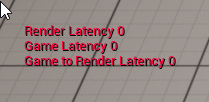
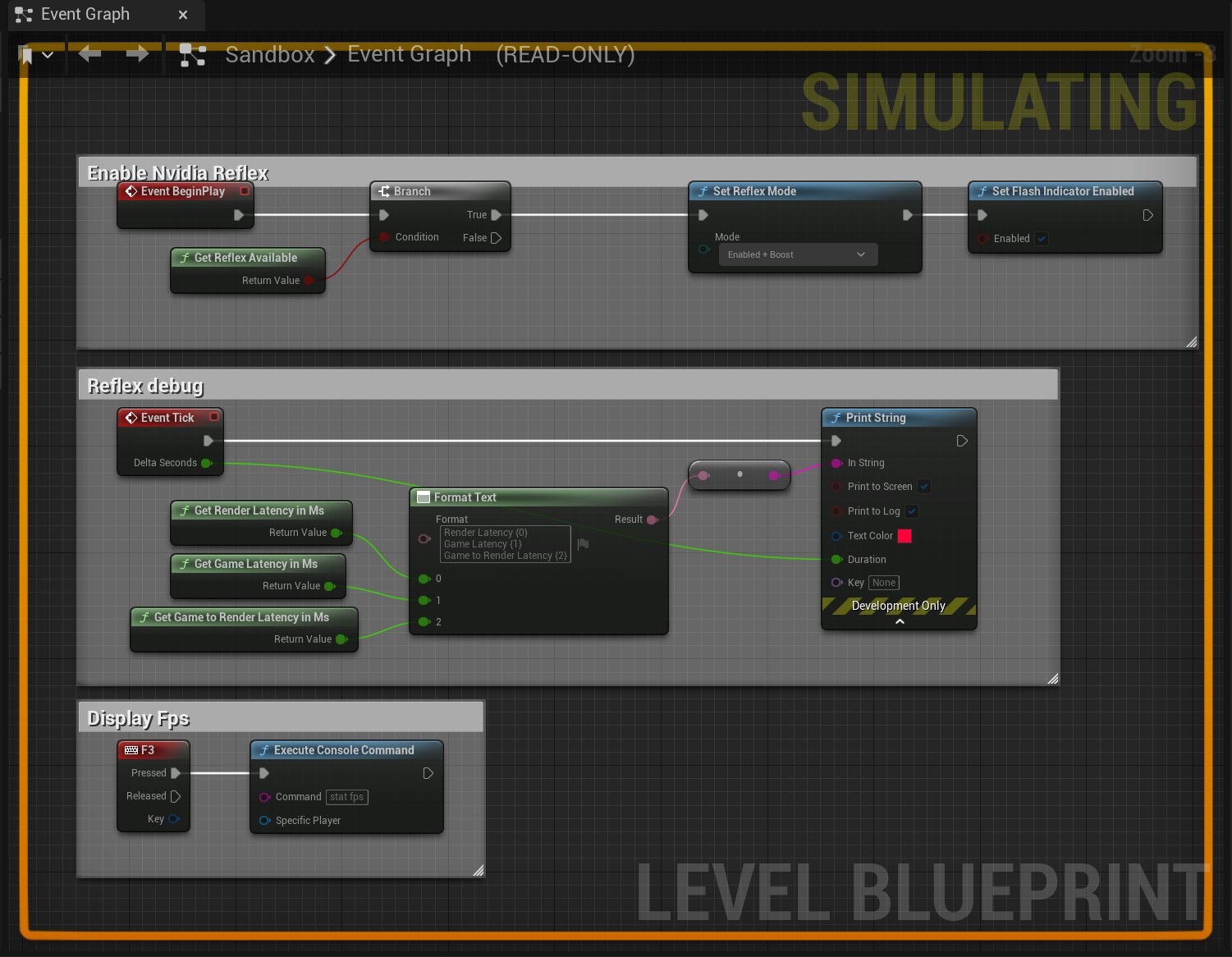
Hey back again with my nvidia reflex question in hopes someone here may have used it. I followed this guide, https://www.youtube.com/watch?v=BihuOz_earw. I talked with nvidia support earlier attempted clean driver install and disabling services for possible conflicts. Still nothing I load my game debug sits at 0 https://i.imgur.com/fUBRlV4.png. My code while simulating not sure if theres supposed to be indication of firing https://i.imgur.com/B1smog0.png. I have a 2080 super and i've used reflex on multiple games just not in unreal projects im creating. This is UE5.
 trim matrix

 gaunt viper
Anybody happen to know why the Enhanced Input system in UE5 just wouldn't be accepting any inputs? I've been following the Third Person Character Stack-O-Bot tutorial (this is my second time going through it, albeit this time on a completely new project as opposed to the Stack-O-Bot one) and I've set everything up as the course instructs but when I get into the game and hit play none of my inputs do anything. I've made sure the Mapping Context is set up properly, I've made sure that the characters is being possessed by player 0, and as far as I can tell I've set up every input action and blueprint as intended, and I'm just not getting any results when I press any of the inputs. I'm still fairly new to UE5, so go easy on me 
Don't know if these will help any or not but:


Based on the video, the character should be moving, but the game just isn't doing anything with the inputs. I tried adding a some debug text to each input and nothing came of that either
 fallen glade
How do you know you've possessed the right pawn? also maybe this?
 gaunt viper
That doesn't seem to work either, no. As for the possessing the right pawn part, I'm not sure, I'm still a really new to all of this, sorry 😦
fallen glade
have you setup your game mode?
gentle urchin
icy dragon
Array of classes, or data table if it's going to be static post editor
Array of soft class pointers* 😄
fallen glade
gentle urchin
Array of soft class pointers* 😄
Still don't understand what a softclass is. And I tried :/
gaunt viper
fallen glade
have you setup your game mode?
Yes, it's all set up as the course told me to
fallen glade
mmm let me have a look at one of my projects
gentle urchin
fallen glade
Still don't understand what a softclass is. And I tried :/
Rumor has it that its some string to the class on disc, which you can then load when needed
gaunt viper
fallen glade
mmm let me have a look at one of my projects
Gotcha. I've been looking at the Stack-O-Bot one while trying to solve this, and I can't seem to find anything wrong with my setup, myself. The only real differences between the two that i can see right now are the names of the mappings/input actions
gentle urchin
It doesnt load the class itself untill you explicitly load it, so its super lightweight
fallen glade
oh so you don't load loads of nested classes?
gentle urchin
Like soft reference pointers dont directly point to something, it doesnt tie them together(e.g. both must be loaded for it to work)
gentle urchin
fallen glade
oh so you don't load loads of nested classes?
You only load it when you need it
fallen glade
I see, maybe a bit too advance for my thinking. Thanks for the explanation!
gentle urchin
It goes down the drain once you cast tho
fallen glade
gaunt viper
Gotcha. I've been looking at the Stack-O-Bot one while trying to solve this, and...
If you print this do you get what you think you should?
 gaunt viper
Doesn't seem to be showing anything, no, but I also might have it set up wrong, lol
(Sorry again, like I said before still very new to Unreal)
gaunt viper
fallen glade
If you print this do you get what you think you should?
Okay I got it to print, it does print the character Blueprint
fallen glade
Why do your inputs look like this? mine are different just a sec


is that a UE5 thing?
gaunt viper
I'm not sure, it might be
I'm going off of this course/tutorial series: https://dev.epicgames.com/community/learning/courses/kry/build-a-third-person-character-from-scratch/lo4/setting-up-inputs-and-building-control-systems

Epic Developer Community
Using the "Stack-O-Bot" project to build a third-person character that includes movement, cameras, animations, and a jetpack.
I've already done it once using the example project, now going through it again as a refresher in an empty project, with my own model/animations
fallen glade
oh, I've never used an imput mapping file whatever it does sorry
gaunt viper
You're good, thanks anyway
 wanton galleon
Hey, I'am missing something ? I try to spawn an empty actor and attach a capsule component to it for a collision test, but whatever my transform is, the actor is always spawned at 0,0,0, it is normal ?
 trim matrix
what should i use to get the direction of my pawn in Anim blueprint
Get velocity + Vector length = speed
Get actor forward vector + ? = direction forward/backwards
 untold fossil
For some reason I can't see my exponential height fog in the editor, but when I play it works fine. I also checked to make sure show fog is enabled in the show menu for the viewports. The hell is going on?
I even tried a completely new scene with just a sky sphere, fog, a plane mesh and directional light
When I hit play fog works perfectly fine, but in editor I can't see it no matter what
Anyone have any idea what kind of annoying trick the editor pulled on me this time?
Gotta love random stuff just suddenly not working anymore
tawdry surge
@trim matrix easiest way would be to save your axis value to a variable and if it's >0 its forward <0 backwards
 blazing kiln
trim matrix
what should i use to get the direction of my pawn in Anim blueprint
blazing kiln
trim matrix
what should i use to get the direction of my pawn in Anim blueprint
Try using node get direction from movement comp
The other way is using math with dot product, but get direction should work fine
 bronze hill
Is there way to find out what is binding to Event Dispatcher?
 fair sun
Event destroyed gets called when an actor has been explicitly destoyed, is there a function/event that works when an actor is destroyed by travel/streaming?
 bronze hill
other things just press find referrence but it's not, i can't find
fair sun
bronze hill
other things just press find referrence but it's not, i can't find
I have BindEventTo when I press find reference, maybe nothing is bound?
 icy dragon
fair sun
Event destroyed gets called when an actor has been explicitly destoyed, is there...
icy dragon
fair sun
Event destroyed gets called when an actor has been explicitly destoyed, is there...
What are you trying to do?
fair sun
icy dragon
What are you trying to do?
I want to call stop music when my music actor gets streamed out
bronze hill
ah ha, that's could be? thanks i will try another
wanton galleon
#blueprint message Hey nobody ? :/
icy dragon
fair sun
I want to call stop music when my music actor gets streamed out
Stop the music before you do level travel?
 wispy star
Greetings!
Maybe anyone knows if there is some way to connect multiple nodes/pins at once? Like here:

 supple dome
NodeGraphAssistant does that
wispy star
supple dome
NodeGraphAssistant does that
I was looking at it, but i see no such example
https://github.com/pdlogingithub/UE4-Node-Graph-Assistant/blob/master/README.md
GitHub
A plugin to help you to create node graph faster and easier in unreal engine 4. - UE4-Node-Graph-Assistant/README.md at master · pdlogingithub/UE4-Node-Graph-Assistant
wispy star
Thank You.
 lapis inlet
Alright need help, I want this to run continuously but I want to check if the actors in the list have already been added (so that they are skipped), any thoughts on how to achieve this?
 icy dragon
wispy star
I was looking at it, but i see no such example
https://github.com/pdlogingithub/...
icy dragon
wispy star
I was looking at it, but i see no such example
https://github.com/pdlogingithub/...
I felt like I'm getting myself into a honeypot repository 🙃
wispy star
icy dragon
I felt like I'm getting myself into a honeypot repository 🙃
it's just docs repo, source only provided via marketplace
icy dragon
wispy star
it's just docs repo, source only provided via marketplace
Not the first time I stumbled into such repo.
Felt like they serve as honeypot repo, tricking search engines in the process for those who are looking for free (open source) versions of the tools (or alternatives that do pretty much same functionalities)
I say that's pretty cunning even if it's unintentional to that specific bait goal. Even though there are other ways to store docs.
Perhaps I should do that next time I'm selling plugins or other stuff
 remote meteor
fair sun
Event destroyed gets called when an actor has been explicitly destoyed, is there...
remote meteor
fair sun
Event destroyed gets called when an actor has been explicitly destoyed, is there...
endplay
wispy star
icy dragon
Not the first time I stumbled into such repo.
Felt like they serve as honeypot ...
i guess main reason for that is MP is SOOO annoying to update so people just don't bother
remote meteor
also you can point the owner of the sound to something within the streamed level
and it should destroy along when level is being unstreamed
icy dragon
wispy star
i guess main reason for that is MP is SOOO annoying to update so people just don...
The likes of Google Docs or Read The Docs do exists, but I digress.
Whoever did that first is a genius.
lapis inlet
Urggggg calling arrays is so difficult
icy dragon
Make a doc repo of a paid plugin, making sure none of the repo nor the description says it's a documentation, then somewhere a hidden message that says "hahaha you're getting jebaited now buy my product lmao"
Delightfully devilish marketing 😈
lapis inlet
Guys I would really appreciate the help
remote meteor
lapis inlet
Alright need help, I want this to run continuously but I want to check if the ac...
use AddUnique() instead
lapis inlet
remote meteor
use AddUnique() instead
Oh, that's a thing?
Holy shit
I think you just
solved a shitton of problems
wispy star
@supple dome well, it seems it doesnt work on anything except BP and Materials...i've tried Niagara, Audio, and custom logic nodes -_-
lapis inlet
@remote meteor Weeks of troubleshooting and nowhere close to completing, and turns out all I had to do was use AddUnique() instead of Add

 sonic moss
gaunt viper
I'm going off of this course/tutorial series: https://dev.epicgames.com/communit...
sonic moss
gaunt viper
I'm going off of this course/tutorial series: https://dev.epicgames.com/communit...
I might be able to help with this - you were following the course but on your own project, not the Stack O bot one, yes?
And your character is just straight up not moving at all?
lapis inlet
So I want to remove actors that the player destroys from the array
How do I set about in doing this?
gentle urchin
lapis inlet
Alright need help, I want this to run continuously but I want to check if the ac...
Use 'find' before add
lapis inlet
Well thing is
remote meteor
Bind on destroy
lapis inlet
The array is in a gamemode
gentle urchin
You can bind to an actors destroyed event
remote meteor
Remove from array
lapis inlet
And the player has a seperate blueprint
lapis inlet
I do this atm
 gentle urchin
Than running get all actors continously
remote meteor
gentle urchin
Its better having the bps register to the gm
This
lapis inlet
gentle urchin
Its better having the bps register to the gm
Care to explain like I'm 5? My blueprint knowledge is severely limited
gentle urchin
Making dinner so short on words
remote meteor
Enemies when they are spawned will add themselves to the gm array
Bind on destroy (will return you which actor is being destroyed)
Remove from array
gentle urchin
Like registering a car
lapis inlet
So is binding a process that needs to be run? Before removing?
gentle urchin
Imagine if they each day ran out chevking every damn car if it was registered
And if its not, then register it
remote meteor
Bind is an event listener
gentle urchin
Compared to every car owner being responsible for reporting in their car, and getting it registered
lapis inlet
Aaaaaaaah
So don't run continuously
Only run when an event triggers
Eases performance
I can understand the principles for that, just didn't understand the terminology
remote meteor
Yeah
gentle urchin
Generic actor input. Afterall, GM doesnt really care what type of actor it is
And can still register to its destruction event
remote meteor
Something like 'Report Gameplay Event'
And based on different game mode
They can be handled differently
golden frigate
Is there a way to play multiple anim montages at once for different blend per@bone bones? Mine just resets the others when it plays
lapis inlet
Oddly enough, the game runs smoothly even with the dogshit blueprints I have
remote meteor
Usually it wont tank to slideshow instantly
lapis inlet
And honestly? Can't be bothered with troubleshooting, considering the project needs to be submitted tomorrow
remote meteor
It takes a combination of dogshit to make it happen
golden frigate
gentle urchin
You can play it to different slots ?
I tried that didn’t work but maybe I setup the slot system wrong
remote meteor
:)
lapis inlet
remote meteor
It takes a combination of dogshit to make it happen
Previously it went to slideshow within 5 seconds
Now I don't see slideshow happen for, well, haven't checked
A couple of minutes of decent smoothness should be fine
It's not like my teachers are actually going to play the game anyways, they just want a video
remote meteor
😅 inb4 lecturer had fun and decide to play it at home
 remote meteor
Lol
lapis inlet
But seriously, thank you so so so much!
I might actually pass this course
Anyways, I need a system of movement for the player
My original idea is to project a raycast from the mouse on a holding mouse click to produce "thrust" in a direction
Imagine a spaceship, and where the mouse clicks the craft would travel using a set addforce modifier
Accelerating, but not travelling immediatelly
Oh shit the slideshow suddenly begins to appear at 10 seconds, probably fucked up
remote meteor
or you can just modify the movement component parameter on
maxacceleration
maxvelocity
gentle urchin
Dont be so logical
Make it as complex as possible
Im doing custom physics engines for my 2d paper plane game
Fun times
remote meteor
 balmy vessel
Hey guys, I have a part of a project where we have meta humans and we want to swap out their clothes.
A way to do this I thought was to have an array of actors which represent each clothing state (its not as easy as changing 1 thing for the outfit with metahumans so changing just the clothes may be harder/cause a bigger load) the issue im having is the player controller I'm putting this behaviour on wont let me edit the default values of an array of actors so I can add the blueprints from the content browser in.
Any ideas why or how to fix this
 silk sandal
Hello I want to make a fortune wheel blueprint so I was wondering if its easy or not
lapis inlet
remote meteor
or you can just modify the movement component parameter on
`maxacceleration`
`m...
Already have
but im more for the actually application of movement itself
Calculating the direction is proving difficult
balmy vessel
balmy vessel
Hey guys, I have a part of a project where we have meta humans and we want to sw...
For reference realised it needs to be a class reference not an object reference
lapis inlet
remote meteor
TopDownExample
Thats a thing?
 hasty dune
Hello everyone ! I ask for your help because I have trouble finding "simple" explanations of my problem on the Internet.
I am currently creating a cannon projectile, and I would like it to be able to fire in an arc (like a mortar). I managed to do it with the mortar with the function: "Suggest projectile Velocity Custom Arc" which varies the velocity of the projectile. But here it's different, I have two points that can change position (initial spawn projectile and the target location) and the initial forward speed of the shell, so I would like to calculate a trajectory that hit the target and get the initial angle.
I don't know how to do it, thanks to those who can help me !
lapis inlet
BTW what is square root in UE4? sqrt with 2.0?
icy dragon
lapis inlet
BTW what is square root in UE4? sqrt with 2.0?
Sqrt node?
bronze hill
should i use collapsed Graphs over functions for cosmetic purpose? or i can make function as many as i want?
i feel like function is superb but also feel like there is downside
remote meteor
bronze hill
should i use collapsed Graphs over functions for cosmetic purpose? or i can make...
either is fine, as you suit
there is only very few scenario where one can do something other cannot do
bronze hill
thank you, now I'm relieved
untold fossil
Does anyone know how to make a camera system like this? Click and drag https://www.youtube.com/watch?v=LjRY86YT8UM
 lapis inlet
@remote meteor ok just reaslied, how do I check and update actors in the array?
Like if one actor got more health from a pickup, and needed its health to be updated from the array
But not added, just changed
bronze hill
remote meteor
dont clutter your event graph
ok i got it. thanks!
remote meteor
you dont have to if they are Array of Actor reference
icy dragon
lapis inlet
but what value?
Whatever value you want to put in and do sqrt operation, I guess?
It's not like square root is also ∛ or anything
lapis inlet
Figured it out, but cheers regardless!
Also, screw it, imma redo the entire casting part of my blueprint
This is what I currently have


The delay at the end forms a pseudo loop by just rechecking it every second
But of course, its uneeded
Any thoughts on how to improve?
icy dragon
lapis inlet
Change the evil delay loop hack with looping timers
lapis inlet
icy dragon
Change the evil delay loop hack with looping timers
How do you make a looping timer?
icy dragon
lapis inlet
How do you make a looping timer?
Set Timer By Event (or Set Timer By Function Name)
lapis inlet
Oh, so if I were to have an actor collide with another, I can set an event to play and then call for it to happen inside the gamemode blueprint?
Would this work?

 random plaza
is there any way to make an onject visable to only one camera?
i have 3d menu parts and i dont want to have them constantly in the world
cyan bone
I have one line A-B and a group of 10 random lines. I need to find which one of the random lines is the most straight in comparison to my line A-B. Do i do this with cross product?
I tried it and failed. What value should i use to know which line is the most straight in relation to the A-B?
cyan bone
remote meteor
dot their direction vector
So thats the same a using cross product Z, right? So all i have to check is which one is closer to 0
remote meteor
yas
cyan bone
remote meteor
i suppose you need to test 1 by 1 in an array
yup thats what i did. And using abs with <. It worked so far :). my soldiers are going straight ahead 🙂
 rugged wigeon
@lapis inlet I think you are confused on math terminology. A square root is something to the power of (1/2). The inverse of it being squared, which is the power of 2.
x^(1/3) would be referred to as a cube root, for example.
lime moat
anyone know if its possible to edit lock position/rotation constraints in BP?
 lapis inlet
rugged wigeon
<@241524790161047552> I think you are confused on math terminology. A square roo...
lapis inlet
rugged wigeon
<@241524790161047552> I think you are confused on math terminology. A square roo...
Yea I figured it out
I understand what square cubed and square root is, just not what it was represented as in UE4
Which is the Sqrt call
But cheers!
random plaza
i have a recipe in the form of an array of strings, how would i check if one array contains another?
lapis inlet
Moving on, I need help with how custom events work - how do I call a custom event from one blueprint to another?
rugged wigeon
You need to drag out from a reference to the other blueprint
 jolly surge
so i've made a function like that, when i call the function, it doesn't actually give each item, only the first one.
I guess it's something with the way it execute, any way to make it work?
 lapis inlet
rugged wigeon
You need to drag out from a reference to the other blueprint
lapis inlet
rugged wigeon
You need to drag out from a reference to the other blueprint
So a "casttogamemode"?
jolly surge
Here i used it, but it doesn't actually loop and output, only once
 rugged wigeon
@lapis inlet it depends on context. Some way or another, you have a reference X, which you know is an instance of blueprint Y, and you can drag out the blue pin from it say X is calling some event
lapis inlet
Oh it, wasn't that hard
 gentle urchin
lapis inlet
So a "casttogamemode"?
gentle urchin
lapis inlet
So a "casttogamemode"?
Cast to MyCustomGameMode, sure
As input you can use GetGameMode
lapis inlet
Alright so now that the casting is done, I need to reference both the player actor and the colliding actor inside the gamemode
random plaza
i really do need to know a solution to this
rugged wigeon
That seems very suspect though. When something begins overlapping, the game mode calls an event called collision? It seems likely that the object doing the collision should be calling an event.
gentle urchin
But in general you can access an objects methods/functions/custom events / public variables by having a reference to it
rugged wigeon
@random plaza you'll basically just need to check if every element of A is contained by B. If order matters too, that's another can of worms.
lapis inlet
nods
remote meteor
random plaza
i have a recipe in the form of an array of strings, how would i check if one arr...
for each, contains, if not return false, after the loop completed return true
rugged wigeon
blueprints aren't a particular pleasant place to do a lot of operations on arrays
lapis inlet
So I need to call the parent blueprint (the actor) inside the gamemode now, how do I do that?
random plaza
rugged wigeon
<@618781195538268160> you'll basically just need to check if every element of A...
only issue is this is an array of strings, and some of them could have duplicates
gentle urchin
Recipe usually is a small array in this context tho
remote meteor
or you can look into set 😉
gentle urchin
So bp performes just fine
remote meteor

Creating and editing Set containers, an advanced container type, in Blueprints, including an overview of this container's properties.
gentle urchin
Set cant have duplicates can it
rugged wigeon
@lapis inlet you could add a reference to the actor as an input to the event
lapis inlet
rugged wigeon
<@241524790161047552> you could add a reference to the actor as an input to the ...
How does one go about and do that?
rugged wigeon
@random plaza I think you're confusing people with your requirements. You mention recipies.
Does order matter? Does the number of appearances of each ingredient matter?
e.g. if A needs 3 rocks and B has 1 rock, 1 sand
does B "contain" A?
@lapis inlet
 random plaza
my only issue is it would require 3 iron, and there's just one iron in the stockpile it would say "well, theres iron in there"
rugged wigeon
@random plaza so it sounds like you're saying you're comparing recipes and a stockpile.
If recipe needs 3 iron and stockpile has 1 iron, should this function return true or false
random plaza
i'm making a colony simulator with automated jobs for npcs
lapis inlet
Alright so, kind of confused here, how do I call for the sphere component from my Player Actor, inside the gamemode blueprint, using a reference through an event?
rugged wigeon
Honestly you should just stop using string arrays and do it properly.
Make a struct with one entry per resource.
gentle urchin
lapis inlet
Alright so, kind of confused here, how do I call for the sphere component from m...
This sounds very wardbacks
lapis inlet
Or maybe
Call the component in the player bp
And take it through the event
That could work
rugged wigeon
 balmy vessel
If i have an actor that has lots of different clothing options which are their own individual blueprints (each blueprint works as a seperate actor, they all have the body + clothes) is it a fine approach to spawn an actor in the same transform and then destroy the old actor? or should I look into just changing the cloth static meshes/materials and changing those, will it affect performance and be something i should worry about?
gentle urchin
TMap with GameplayTag and quantity(byte/int)
rugged wigeon
@random plaza
Something like this
Then your function for "does stockpile have everything the resource needs" is just checking if all the values of stockpile are >= the values of the recipe
balmy vessel
balmy vessel
If i have an actor that has lots of different clothing options which are their o...
atm i'm juist spawning and destroying actors as i go through the array of possible blueprints
random plaza
only issue is the system i have is using strings as shorthand for the actual item structs, i have a struct that has over 20 entries on it and it gets the items from its name
i can send you a pic of the item struct if you want
gentle urchin
balmy vessel
If i have an actor that has lots of different clothing options which are their o...
The last option keeps it more modular
So you dont need a char for every possible combination of clothing
random plaza

using this system i can bring the items from any inventory on the map, and do whatever with it
balmy vessel
gentle urchin
So you dont need a char for every possible combination of clothing
thats what i was thinking, my concern is how hard it could be to setup all the different meshes/materials
we're working with metahumans so its a bit more of a pain
gentle urchin
random plaza
using this system i can bring the items from any inventory on the map, and do wh...
Soft object refs
gentle urchin
balmy vessel
thats what i was thinking, my concern is how hard it could be to setup all the d...
Still its just a one time job
But if the sets are few then... idk 😄
Your job, your choise :p
balmy vessel
yeah, i'll talk to my line manager about it and see if its worth the time investment
random plaza
gentle urchin
Soft object refs
can you elaborate?
balmy vessel
but is spawning and destorying taxing to the system? id assume no as long as its not every frame haha
 hollow gorge
hey, do you mean chorded actions like Ctrl + L, where one key is only a modifier or are you talking about simultaneous button presses of buttons that have other actions bound to them usually? like LB, RB and LB+RB triggering abilities?
gentle urchin
random plaza
can you elaborate?
Swap the hard refs with soft refs to not load things that dont need to be loaded
remote meteor
in DataTable, it is recommended to use Soft Reference for any Asset Referencing
else
everything will be easily referenced and rip RAM usage
gentle urchin
balmy vessel
but is spawning and destorying taxing to the system? id assume no as long as its...
Nah not very taxing. Use soft class refs 😄
gentle urchin
remote meteor
in DataTable, it is recommended to use Soft Reference for any Asset Referencing
Yes when the asset is only needed on request
random plaza
i really am confused, im not using data tables for this. i'm storing the objects in arrays and saving them automatically to the save file.
gentle urchin
random plaza
i really am confused, im not using data tables for this. i'm storing the objects...
Ignore my comment then^^
random plaza
thats completely fine
rugged wigeon
Seems... unlikely that you need to store a lot of these variables. I would expect you could just store a reference to what class the object was, where it was located, and any unique properties of the item.
gentle urchin
rugged wigeon
Seems... unlikely that you need to store a lot of these variables. I would expec...
Exactly
balmy vessel
gentle urchin
Nah not very taxing. Use soft class refs 😄
wym soft class refs?
random plaza
i didnt know about data tables when i made this system, and if i gutted the whole thing it would set back my progress significantly
rugged wigeon
welcome to game dev lol
random plaza
yep
final lava
hollow gorge
hey, do you mean chorded actions like Ctrl + L, where one key is only a modifier...
thx, I did already found that it chorded action 😅
rugged wigeon
But I guess going back to your original issue, using maps or structs to count how many of a given resource you have isn't incompatible with using strings as lookups in a data tale or what not.
And that's what you should be doing
hollow gorge
final lava
thx, I did already found that it chorded action 😅
okay chorded action is the simple use case. did you also try with keys that are also bound to other actions? like LB being one action, RB another and LB + RB a third?
rugged wigeon
Yeah squize's suggestion is probably better here. Look into gameplay tags. They're basically pre-registered strings within a project.
gentle urchin
Requires a rewrite of a system, but it shouldn't be insane amount of work
random plaza
are data tables dynamic? can you add to them using blueprints?
random plaza
good to know
gentle urchin
Like item info is
random plaza
so arrays for save files, data tables for item classes
final lava
hollow gorge
okay chorded action is the simple use case. did you also try with keys that are ...
I am fine now. I just didn't check all input action options. So basically I just now discovered chorded 😅
gentle urchin
random plaza
so arrays for save files, data tables for item classes
Datatable for static sets of data
hollow gorge
final lava
I am fine now. I just didn't check all input action options. So basically I just...
ok if you find yourself doing simultaneous presses of already bound keys and find a solution that works... ping me 😉 because I'm having troubles with that
 wraith crane
can you somehow encode and decode a string in blueprint?
 restive tendon
Hey so I'm extremely new to UE and idk why but this simple function is taking me forever to figure out lol. I have an actor that when it's entered a widget will pop up that says "Press E To Scan" and the widget dissapears when exited. I want to make it so the actor is destroyed when you press E (which I have as an input called Interact). But my InputAction node isn't working. I can't even get it to print a string when I'm in the actors collision box. How can I fix this?
 wraith crane
can you somehow encode and decode a string in blueprint?
wraith crane
wraith crane
can you somehow encode and decode a string in blueprint?
i want to do this bcs i try to add multiplayer to my game and i want do encode host ip
so that when switching on the ip, only such a lobby password would be used
restive tendon
Like this? If so the string still doesn't pop up
 restive tendon
My God I knew it was gonna be something so simple lol thanks for the help I really appreciate it
 rigid mantle
Very new to UE5, If I want something to persist across levels, are there global variables or something similar? or do I pass the variables to each level?
(for example time of day)
gentle urchin
Alternatively save and load via saveslot
rigid mantle
That is not a bad idea either, at least that way it would be a save point at every map load and less to less potential data loss
Will do some research and thinking, thanks!
final lava
hollow gorge
ok if you find yourself doing simultaneous presses of already bound keys and fin...
do you mean by this? I do not use Chored Action for now. But for quick test I did add 2nd key to InputMappingContext to Jump Action as on pic example and it works. Player have to press space+N to jump. PS: this is just my working example. You can also add Triggers inside InputAction instead in InputMappingContext . But all keys should be inside InputMappingContext .

 harsh coral
Quick question:
Lets say I have copied a blueprint asset a few times in the level and changed a ton of settings on ONE copy of it....
Is there a way to copy/paste ALL settings from one copy to another one?
Right now I can only seem to copy/paste one setting at a time, which can become quite tedious.
gentle urchin
If it was a struct
I believe you could copy it in its entirety
Id just make a helper bp
With editor event
Copying between source and target(s)
harsh coral
Yeah, I´m a little less advanced, it was a bought market place asset...:)
Of course I can copy the whole blueprint, but I already placed it a bunch of times and animated it etc, so I really just wanna copy the settings.
gentle urchin
Exactly
Helper bp
Blutility, if you like
Takes a few min to setup
You know how to create new actors, custom events, and reference variables?
harsh coral
Nope.
I have messed around a bit inside the blueprint, but I haven´t done anything from the ground up.
gentle urchin
If i wasnt babysitting id show you
harsh coral
haha, yeah, I´m babysitting too, but mine are a bit older I guess..:)
trim matrix
Hey does anyone know why my screenresolution doesnt change? im executing it in the start widget that im loading at gamestart
 gentle urchin
harsh coral
haha, yeah, I´m babysitting too, but mine are a bit older I guess..:)
gentle urchin
harsh coral
haha, yeah, I´m babysitting too, but mine are a bit older I guess..:)
6 months, with a fever 😂
harsh coral
gentle urchin
6 months, with a fever 😂
Ouch. 8 years, no fever, but twins...:) Get well soon!
nimble talon
i know no one asked
but to create this points on lines(idk what are this called) you must double left click

 blissful grail
They're called reroute points. Can search for it as well.
So if you pull out the execution line and then let go (without connecting to anything), you can just search "reroute" and it gets this.
blissful grail
It depends on the situation on which one you go with.
green briar
Hello, I am having some trouble getting this capsule trace to be how I want it. Can anyone help me out? Not quite sure what to put here to make this work.

 cyan birch
green briar
Hello, I am having some trouble getting this capsule trace to be how I want it. ...
cyan birch
green briar
Hello, I am having some trouble getting this capsule trace to be how I want it. ...
Is the issue that it's casing from the center of the player, not the front?
green briar
cyan birch
Is the issue that it's casing from the center of the player, not the front?
Correct. Apparently simply getting my forward vector and increasing it for the Start doesnt work
cyan birch
green briar
Correct. Apparently simply getting my forward vector and increasing it for the S...
Really? Like you can't use the same math you used to determine the end for the start? That seems...odd.

 lone gull
hi, I have a question. I am making a multiplayer Game. I have one character and one Ki. I want that every Player have a amount of Ki. Like That when two Player join the Game that both of them have 20 Ki as an army. And then That the Ki fight against. How can I make that both Player get a Ki army? How can I make that 20 ki spawn at one Player and follow one Player and 20 ki spawn at the other Player and follow him? Right now the Ki only work for Singelplayer.
sorry for bad english
In the Ki I have a Character ref but it is not working with the Multiplayer
A ki that follow The player
I allredy program the ki
But the character ref dont work
gentle urchin
Ki -> AI?
gentle urchin
Kunstig intelligens
 icy pilot
Are there any tricks i can use to sort those components in this BP ?
Cuz right now the sorting is just a mess
 random plaza
can you sort an array of strings by size?
 flint shard
I'm using GetHitResultUnderCursorbyChannel to figure out what part of my terrain/landscape is being pointed at by the user. But the hit sometimes goes below the terrain. I've got Collision Mip Level and Simple Collision Mip Level both set to zero on the Landscape actor. If anybody can help me figure out a way of getting this to not happen, I would be super appreciative. Here's a picture of the problem:

 mystic ether
Hey i'm trying to get the dominant wind angle (WaterBodyOcean) in a pawn, how can i link this, do i need to create a manager? thanks
flint shard
flint shard
I'm using GetHitResultUnderCursorbyChannel to figure out what part of my terrain...
Hey nevermind, I figured out I was being silly and setting the icon location somewhere it shouldn't have been instead of the hit location.
cyan bone
Im trying to add text component in specific places in world location. But it seems there is only the option to set it as relative?
Is there a way to create it in world location?
 gentle urchin
harsh coral
Ouch. 8 years, no fever, but twins...:) Get well soon!
gentle urchin
harsh coral
Ouch. 8 years, no fever, but twins...:) Get well soon!
Finally asleep. I got a minute if you still want help
gentle urchin
unlikely

 hot ice
cyan bone
Im trying to add text component in specific places in world location. But it see...
hot ice
cyan bone
Im trying to add text component in specific places in world location. But it see...
anything wrong with (self -> world location ) - (target -> world location) = relative transform EDIT: or the other way round
onyx token
and i got this on my notify end
(and on my notify begin)
For some reason-
The weapon State gets sent
The animation doesn't get sent
but if i put a print in the overlay to print out the animation value - it works
icy dragon
lone gull
Ki = Ai
DVORAK typer eh
onyx token
And whatever i put below that - strings, bools, floats-
they all don't get sent
only the first bool gets sent for some reason

BUT
on my play it does get sent
but only the animation & the bool, nothing i put after
my NPC only sends the bool
even though they all share the exact same code 
icy dragon
lone gull
or?
Maybe you mean 地
 dark heron
Hey - new to unreal here coming from a Unity background. I'm getting my feet wet with blueprinting, specifically behaviour trees. How do I expose a variable on my controller that can be passed all the way through to the behaviour tree? I tried making an Actor variable and toggling Instance Editable, but I'm not seeing it anywhere (or looking in the wrong spot).
Once I have that variable, I assume I pass it to the blackboard which the tree has access to?
gentle urchin
onyx token
curious why you use an interface to the owner of the anim, cant you just cast ?
onyx token
gentle urchin
curious why you use an interface to the owner of the anim, cant you just cast ?
because it can either be an NPC duder, or the player, or an animal or whatever else
gentle urchin
onyx token
because it can either be an NPC duder, or the player, or an animal or whatever e...
aight
onyx token
I want to make 1 overlay to fit them all, which leads into 1 animBP which fits them all, which leads into 1 ParentClass which fits them all
gentle urchin
I guess a cow and a human npc dude share the same animation
dark heron
remote meteor
Blackboard yes,
I'm struggling to set that variable somewhere. I'd like to select another actor in the scene.
In Unity, I would make a transform property, then drag the other object to it. Not sure what the equivalent is here
onyx token
nope, because they get child animBPs
and there i change up the animation
But the code is the same
onyx token
ye it's just a notify i can slap on anything
 remote meteor
dark heron
I'm struggling to set that variable somewhere. I'd like to select another actor ...
remote meteor
dark heron
I'm struggling to set that variable somewhere. I'd like to select another actor ...
when you enable the BT in your AI Controller, you need to specify which Blackboard to use
after that
you can access the Blackboard variable from within AI Controller
you can set the values from there
dark heron
I'm not currently having issues communicating between the controller and the tree
I'm having issues setting the variable in the first place
cyan bone
hot ice
anything wrong with (self -> world location ) - (target -> world location) = rel...
Sorry i didnt understand. I need to create 3d text on specific points in the map. But i only have the world location. If i plug in the world location, then it will be off.
remote meteor
setting the variable?
dark heron
I would like my controller to be aware of another actor in the scene. I'm not sure what the way to do that is
remote meteor
hm may need a long way to do that
first i dont think controller will be manually placed in the level designer
so you cant exactly just item picker with a controller
 barren hill
Hello guys! I have a graphing question if anyone can help me.
Issue: I have two levels Level 01 = Main Menu and Level 02 = Actual Game Level, I'm attempting to change the FOV using a Widget Slider the problem I'm having is because my game level is different then my settings widget which is located in my empty main menu level it's not actually changing the FOV of the follow camera.
Question: How can I cast or change my BP_ThirdPerson_Character from a different level such as Main Menu Level?
Notes:
- My
Widget (Settings)is located in empty levelMain Menu 01{They are in separate levels} - My
BP_ThirdPerson_Characteris located inGame Level 02{They are in separate levels}

 dark heron
The controller is currently attached to two mannequins in the scene - not sure if that's the correct way to do it
hot ice
The add text render component should be attaching that text to an actor no? Hence the relative transform from that actor. If you use self -> world location that will get the world location of what you're attaching to so you can calculate the relative transform to your desired world location
gentle urchin
onyx token
For some reason-
The weapon State gets sent
The animation doesn't get sent
What about grabbing the anim from the weapon when the notify is recieved ? Instead of sending it over the interface
onyx token
well the weapon doesn't animate, it's just parented to the socket...
onyx token
i guess i could use normal skeleton-based notifies to grab it from the animBP 
but it annoys me that the interface doesn't work 
onyx token
yea because it does work for the player
remote meteor
hm anyway, if you want to do "item picker" style
onyx token
i'll look for it... If i can't figure it out because my brain not wrinkly enough, i'll work around it... thanks tho! @gentle urchin
remote meteor
first the object has to be in the level designer
onyx token
i just wanted to know if anyone knew situations where interfaces were just bugged sometimes, like blueprint structs sometimes are
dark heron
it is, so that condition is met
I just have two characters with the same AI controller that I would like to make aware of the other through a variable
 remote meteor
that axis is an ai controller?
dark heron
that's the plane
this is the controller, nested under each player

could be bad practice, I'm new
remote meteor
i can understand the confusion 😅
so you see, usually you setup your AI controller like this

in the class default of your pawn
there is an Auto Possess AI, with the class
dark heron
I assume SkeletalMeshActor doesn't have access to those fields?
I might need a different type of actor
remote meteor
A Controller can Control a Pawn
so it has to be a subclassof Pawn
it can be Character and so on
dark heron
That's where I get lost
I know the terms, but I don't know how to place pawns or tell if these things are pawns
I just saw a model and dropped it into the scene
remote meteor
when you create blueprints

you can see their class hierachy
for something to have an AI Controller
it has to be atleast a Pawn
dark heron
I believe the blueprints are pawns, but I'm not seeing how to properly link the blueprint to the actors now
My AI Controller does derive from pawn
 gentle urchin
You can also see parent class when hovering it in the content folder
remote meteor
 gentle urchin
Or up in the right corner as you showed^^
Pawn is good
Pawn is life
For controllers anyways
remote meteor
AI Controller is AIController
dark heron
gentle urchin
Pawn is life
Pawn is life. Noted
gentle urchin
Pawn is the intented controllable class in unreal
 dark heron
Now how do I go from 2 dumb models in my scene to having them use my AI?
gentle urchin
onyx token
<@231467939734355969>
Found the mistake?

 gentle urchin
LoL
remote meteor
are your model still in simple state?
dark heron
remote meteor
are your model still in simple state?
I just dragged and dropped things in
gentle urchin
onyx token
not one.
Time to quit buddy. 😂
dark heron
They're SkeletalMeshActors


