#blueprint
402296 messages · Page 862 of 403
 odd ember
 round plume
there we can see video, and camera settings
round plume
there we can see video, and camera settings
sorry why was I tagged?
 odd ember
round plume
i think there is more than high fps or first person camera
odd ember
round plume
i think there is more than high fps or first person camera
you asked for camera movement
round plume
i mean, its realistic movement
odd ember
round plume
i mean, its realistic movement
I don't know what you mean by that. I don't see any realistic movement
if you're talking about adding a collision to the camera, you can do that too
the rock tripping is scripted most likely
nothing to do with the camera anyway
round plume
The New Amazing TREE AND FOREST PACK 03 is a Photorealistic Unreal Engine Tree Pack with grass, stumps, rocks, plants, trees, everything designed and optimized for use in Archviz. Some assets can also be used in Game Development.
Everything set to you create Amazing Scenes!!
185 High Detailed and Realistic Assets ( Trees, Grasses, Shrubs, P...
slow motion blur and cinematic mode..
odd ember
there's a cinematic camera component
maybe you'll want to experiment with taht
but again that's nothing to do with the camera movement
if you're talking about the slight bobbing you can achieve that by having a timeline and modifying the camera position in relation to its parent actor
and it seems like there are some roll controls to that (or some VR esque steering)
but tbh if you want that camera
why not just buy that pack?
round plume
yeah maybe its just better to buy to improve my productivity
odd ember
I don't know how having or not having that camera can affect your productivity?
I think it's overkill even for archviz
round plume
I want that camera
odd ember
yea I'd suggest getting the pack then unless you're willing to sit down and reverse engineer it
 maiden wadi
Then your widgets don't have hit testability. Either because their settings are hit test invisible, or a parent has hit test invisible self and children.
 molten yew
Hey is there any way to add an actor to the empty slots of a actor array?
maiden wadi
Iterate over the array and add an actor to the first nullptr.
molten yew
Sorry a bit new to UE, what does that exactly mean?
 jaunty summit
maiden wadi
Iterate over the array and add an actor to the first nullptr.
jaunty summit
maiden wadi
Iterate over the array and add an actor to the first nullptr.
I think Add already does that?
maiden wadi
Empty slot implies a slot. Add creates a new slot and does not populate an empty one.
If you're just trying to add a new entry to the array, use Add as WizardCell mentioned. If you have an array of a set number of entries and some of them are null and you want to set those null entries to a value, you have to iterate over the array and check the slot's value validity and then set it if it's null.
molten yew
So have a loop that checks if the object at that index is valid then if it isn't insert an object?
maiden wadi
SetArrayElem. If there's an insert call I'd expect it to add a new entry.
It's worth asking though. Do you need a specifically sized array?
molten yew
yes I do
maiden wadi
In that case this'll be the only direction. Else you could have just removed all nullptrs and added the new one to the end of the array.
jaunty summit
Shrink would remove his nullptrs right?
maiden wadi
If you just call Remove with a blank entry it'll remove them all. Same as calling Tarray.Remove(nullptr);
molten yew
Well if I use a for each loop with the Array then insert would work if I just plug in the specific index?
Doesn't insert just replace whatever object (or lack of object) with the new actor
maiden wadi
Not likely judging the name. Insert likely adds a new entry, but at the specified index.
Insert for example, would add a new element to the array. If you have an array of 20 things, and insert at index 2. Indexes 2-19 get shifted to 3-20 and the newly added thing becomes index 2. Which would make your max index 20, and your array size 21 now.
molten yew
Interesting, thank you for your help
 spark steppe
do you mix 2D with 3D?
you may want to model that room in 3D and use an orthographic camera instead
well at least the collisions have to be somewhat represent the room in 3D space
or doesn't the character move on the depth axis?
ok, i have no idea how to approach that one then
 half token
Heyo. I'm struggling to get these blueprints functioning even though I'm following a tutorial (https://www.youtube.com/watch?v=jJbYr7eqd4I). I had a previous programmer on this game and I'm unsure how I should integrate the function.
I'm trying to get the crosshair in this first-person game to change images upon focusing on actors tagged as 'Interactable'.
his is what I've got under the FirstPersonCharacter

created the widget for the crosshair
 odd ember
for your own sake make your collisions fit your visuals
you'd have a much better time doing stuff like this if you set everything up to be 3d instead of 2d in either case
I'd encourage you to do stuff in 3D then and avoid 2D altogether
 raw orbit
so im having a similar issue to this guy here in this thread:
https://forums.unrealengine.com/t/change-character-direction-during-an-animation-montage/147401
namely id like to rotate my character between combo attacks which are all essentially montages but while executing the chain the character is locked in the same direction.
the answer in that thread is 'overwrite the root bone rotation in animation bp' but im not sure what that means, exactly

Unreal Engine Forums
Hello, i have an animation montage that has multiple fighting animations with root motion blending together to create a combo. What i am trying to do is to be able to rotate the character while the montage is playing. What happens right now is the montage starts and it keeps going until it finishes in the same direction the character was facing ...
odd ember
raw orbit
so im having a similar issue to this guy here in this thread:
https://forums.un...
it means not using montages but using the animBP instead, which IMO is a better solution overall
raw orbit
but montages offer so much control, would it be more cost friendly to use animBP?
odd ember
raw orbit
but montages offer so much control, would it be more cost friendly to use animBP...
if you do it correctly yes. and you have the same amount of control in animBP as you have in a montage. and in your case you can solve problems that you wouldn't be able to otherwise
 marsh bramble
anyone able to help me with a blueprint error ive been stumbling around for hour nor
raw orbit
odd ember
if you do it correctly yes. and you have the same amount of control in animBP as...
alright, thank you
 solar sequoia
marsh bramble
anyone able to help me with a blueprint error ive been stumbling around for hour...
solar sequoia
marsh bramble
anyone able to help me with a blueprint error ive been stumbling around for hour...
You should post the error
Just in general, I mean. Ask the question rather than asking if you can ask it
marsh bramble
i just was not sure if it was proper place to ask for help and didnt want to offend anyone

 solar sequoia
marsh bramble
i just was not sure if it was proper place to ask for help and didnt want to off...
solar sequoia
marsh bramble
i just was not sure if it was proper place to ask for help and didnt want to off...
So, "accessed 'None'" means that an attempt was made to read a value and there was no value set. You should click on the rightmost 🔎 icon to navigate to the node where the error occurs
And post a screenshot at that location, if you would
marsh bramble
 odd ember
marsh bramble
i just was not sure if it was proper place to ask for help and didnt want to off...
odd ember
marsh bramble
i just was not sure if it was proper place to ask for help and didnt want to off...
 marsh bramble
fair enough : )
i should also explain im in the process of moving this project from Ue4.19 to ue5
odd ember
probably a bunch of issues that are going to crop up based on that
marsh bramble
i think so as everything was going smoothed for a minte untill this
also i havnt touched unreal engine in almost 4 years
odd ember
well you're not exactly setting yourself up for winning here
anyway it's just double clicking every error step and step and fixing what's wrong
maybe functions have disappeared or been renamed
maybe connections are missing etc.
solar sequoia
marsh bramble
So with the reference that you're calling, is it a variable that you're supposed to have set somewhere, or how is that value meant to be filled?
marsh bramble
i currently have it set up as multiplayer and it is suposed to be calling inventory player controller
if im not mistaken
the migration to 5 definatly did something because its working fine in 4.19

ok i found a lot of errors in this blueprint
i may have to tart over
or clone this another way there is a lot going on here
 whole roost
how would I go abouts binding [E] to whatever keybind is set in settings

 mental trellis
I could tell you in c++ 😛
whole roost
would C++ not be able to pop into bp 😛
mental trellis
You could arrange it to.
Basically you get the FUICommand and it has a method to get the keybind string. Or something along those lines.
Command->GetFirstValidChord()->GetInputText(false)
marsh bramble
ue5 doesnt use factions and i think thats what has messed up my blueprint
solar sequoia
marsh bramble
i currently have it set up as multiplayer and it is suposed to be calling invent...
You're not trying to reference player controllers over the network, are you?
 dawn gazelle
whole roost
how would I go abouts binding [E] to whatever keybind is set in settings
dawn gazelle
whole roost
how would I go abouts binding [E] to whatever keybind is set in settings
The array is used if you have multiple keybinds.
 marsh bramble
im looking
solar sequoia
dawn gazelle
The array is used if you have multiple keybinds.
That's actually super cool. I'm glad you showed that
marsh bramble
the only thing factions is doing is accesing a dialogue system
marsh bramble
yes its a plugin
solar sequoia
Okay, well I don't know anything about that plugin, so I'm just gonna assume that the problem doesn't reside there
Can you send a better screenshot of the value that isn't being set? I can only see that you're getting the CMC of a character, but not what character it is

 solar sequoia
And which of those wasn't being set?
Assuming that's still the first error you're getting, I guess
marsh bramble
player view mode
solar sequoia
That's just not included in the screenshot then
Are you sure that the value is being set to something before it's being accessed?
marsh bramble
no im not sure
im going to look at the settings on ue4 and see if they match it maybe not accessing game mode correctly
 wicked magnet
I want to be able to trigger a Custom Event that runs a loop that makes a light flicker on and off. I'd prefer it not to run in Event Tick, as I only want to be able to trigger the light to flicker for certain scripted moments. Seems like a waste to run it in Event Tick when it's not needed most of the time.
I tried putting a While loop in my Custom Event based on the condition of a variable, but got the error "Infinite loop" detected, which is a bit confusing, because I do want the blueprint to perform the loop infinitely until the variable is set to false.

part of code
 solar sequoia
marsh bramble
no im not sure
solar sequoia
marsh bramble
no im not sure
Is it an object reference or a variable that's not working?
marsh bramble
it crashed
jaunty summit
wicked magnet
part of code
You shouldn't be implementing it this way
How do you trigger the light?
marsh bramble
me?
jaunty summit
Yes
marsh bramble
i was only importing models
jaunty summit
No sorry
marsh bramble
i have another version i did with clone
 jaunty summit
It says PlayerName could not be found in your ThirdPersonCharacter BP
jaunty summit
But I don't get why you have such a variable in a Character class. It should be in PlayerState, and PlayerState already has one replicated
solar sequoia
He's trying to call it in the character, for whatever reason, but it should be stored on the player state
wicked magnet
jaunty summit
You shouldn't be implementing it this way
That's what I figured. Right now I am triggering the light by casting to the light and calling that custom event Light Loop. I gave up and tried it the way I know works, where I put the code in Event Tick, and changed the cast so it set a bool FlickeringLight to true. So event tick checks for the bool and runs the flickering if it sees it there.
solar sequoia
jaunty summit
No
Is that not literally what it says in the compiler error?
wicked magnet
I had generally been under the impression it's better to avoid event tick for functions you're only calling in specific instances, but it works that way.
 solar sequoia
It's dragged off of a Player State reference, meaning he's trying to access it from the player state
jaunty summit
Oh shit didn't see that
But still why he has one there
There is one already from engine
jaunty summit
It is
jaunty summit
wicked magnet
I had generally been under the impression it's better to avoid event tick for fu...
But you shouldn't be doing it that way
solar sequoia
jaunty summit
It is
I don't really get the intent behind what he's doing there, but it should work unless it's just something that changed with UE5
jaunty summit
Don't go that way because it works
solar sequoia
I've never used it because it's unstable and migrating projects is a bad idea
jaunty summit
solar sequoia
I don't really get the intent behind what he's doing there, but it should work u...
Yeah. Migration shouldn't be the issue unless something got deprecated.
But I don't think that's the issue he got
solar sequoia
Maybe it's one of those "save and reopen and it just fixes itself" things
wicked magnet
jaunty summit
But you shouldn't be doing it that way
I shouldn't be triggering it via Event Tick either? What is the best way then.
marsh bramble
 wicked magnet
It definitely doesn't seem like the most efficient, but I'm not aware of which function would best serve my purpose.
marsh bramble
works as long as i dont use my other character player
jaunty summit
wicked magnet
I shouldn't be triggering it via Event Tick either? What is the best way then.
The best way is to have a volume around your light. Whenever you enter that volume, the light turns on, and whenever you leave it, the light turns off
So it turns on/off based on overlap events
wicked magnet
jaunty summit
The best way is to have a volume around your light. Whenever you enter that volu...
The behavior is being triggered by solving a puzzle. I have dozens of lights that then need to flicker as part of a scripted event.
jaunty summit
Then you should be using Event Dispatchers
jaunty summit
You bind the event dispatcher to turning the light on.
And you call that event once the puzzle is solved
wicked magnet
Ah okay, I knew I was just missing a different method. I haven't spent much time with Event Dispatchers, beyond using them as a hacky workaround to access the level blueprint. Thanks, I will look into learning about them more.
Ah okay, so its intended use is basically I can place it inside multiple blueprints, so calling it once will trigger it to run in all the correct blueprints. I think I get the gist of that, but I think I'm a bit unclear on then what logic I should be using to make the lights flicker in a loop until I tell it to stop the flickering loop.
jaunty summit
Why you still using a loop?
The whole idea of Event Dispatchers is that you don't use a loop
Solve puzzled -> Turn on the light
wicked magnet
I'm not looking to turn on a light, though, I'm wanting to start the lights to flicker. Each light will start flickering based on a random float value.

Like idea being the lights are malfunctioning.
That logic is running individually in each light so each light turns on and off at a different interval.
jaunty summit
There are other ways to do a light flicker
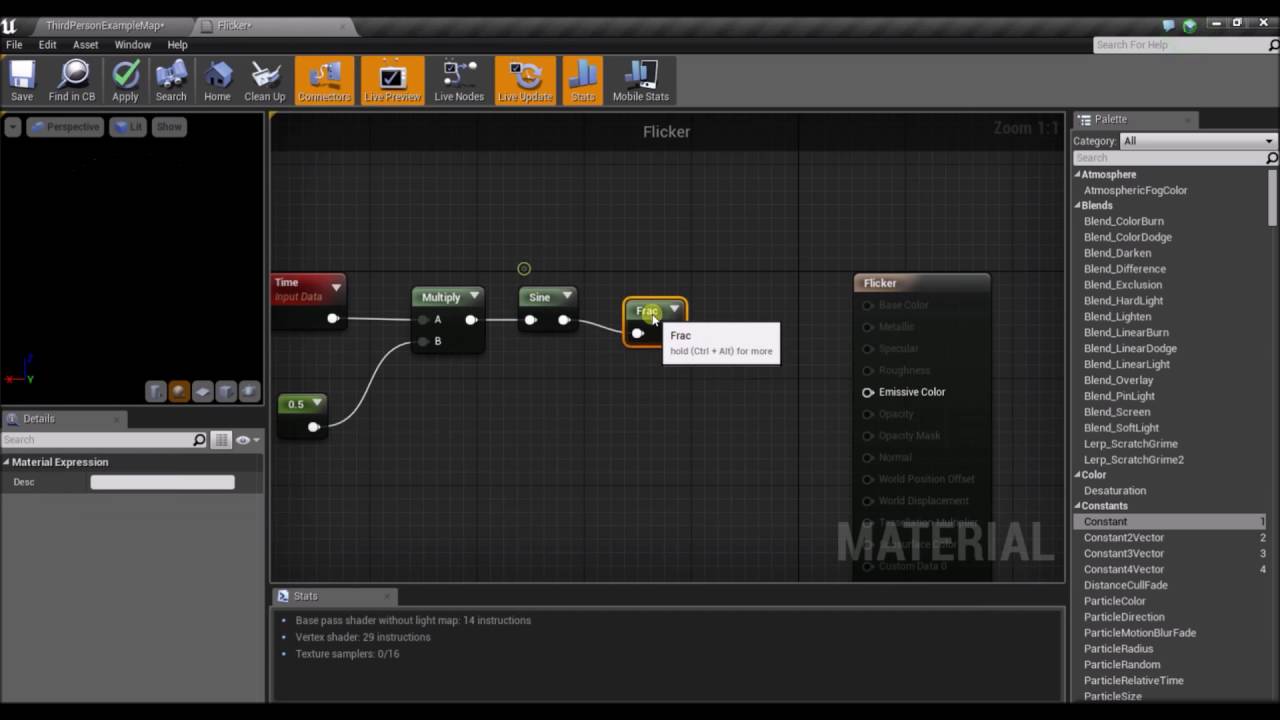
A quick tutorial on how to get lights flickering in Unreal engine 4.
It says at the end of the video how you would change the rate of flickering
wicked magnet
Hmm thanks, I wasn't aware you could script a form of that via a material. Looks like you can't pass a random float so their suggestion is to create a bunch of material instances with different intervals, but interesting to look into.
jaunty summit
Well you don't have to create a bunch of them and change that constant.
You can turn it into a scalar parameter and then you can access it from BP
wicked magnet
Okay I thought changing the scalar parameter of one material would affect all. So I could have a different value for each light using the same material via a scalar parameter?
jaunty summit
Your material needs to be a Dynamic Material Instance and then you get a reference to your DMI and call SetScalarParameterValue specifying the name of that paramater(FlickerRate for example)
jaunty summit
wicked magnet
Okay I thought changing the scalar parameter of one material would affect all. S...
You could be right. Test it 🙂
 minor wolf
is it possible to get the world or gamestate inside of a HUD?
oh it wasnt showing before but i guess Get GameState is available
half token
Can't seem to find the 'Set View Target With Blend' node in my version of UE4. Anyone know of a substitute?
jaunty summit
wicked magnet
Okay I thought changing the scalar parameter of one material would affect all. S...
Now that I'm looking at this, CreateDynamicMaterialInstance function makes a material instance only for that light flicker actor that this function is in, that lets you then SetScalarParameterValue.
Now what you could be doing is that you make an event dispatcher(In this actor BP) that turns on the light and what it does basically is it calles SetScalarParameterValue with a random integer provided.
Now when a puzzle is solved, you call that event dispatcher. So it calls all the events for all lights, and you simply provide a random number.
jaunty summit
half token
Can't seem to find the 'Set View Target With Blend' node in my version of UE4. A...
What version are you using?
half token
jaunty summit
What version are you using?
4.26.1
jaunty summit
I use the same version and I do have it
Set View Target With Blend has been there for ages
Where are you trying to call it from?
half token
From inside a level blueprint
 odd ember
half token
From inside a level blueprint
odd ember
half token
From inside a level blueprint
you need to call it with either a player controller reference or inside the player controller
jaunty summit
half token
From inside a level blueprint
You are probably doing something similar to this guy: https://www.youtube.com/watch?v=uW86ZGxesmc
How do I use the Set View Target with Blend node to change cameras during gameplay using Unreal Engine 4 Blueprints.
Source Files: https://github.com/MWadstein/wtf-hdi-files
half token
Thanks~ I'm putting together a main menu that uses a fixed camera in a 3D space inside of a unique level.
half token
jaunty summit
You are probably doing something similar to this guy: https://www.youtube.com/wa...
I thought about the idea of adding a secondary camera angle inside the level for the player opens the Settings menu so this video might come in handy.
Another issue I had spent all day trying to figure out is how to make the players' crosshair change depending on if the focused actor is interactable by using LineTrace in blueprints but to no avail

Tagging the specific blueprints that belong to the actors that have mechanics (Interactable) tied to them didn't seem to work.

 jaunty summit
half token
Tagging the specific blueprints that belong to the actors that have mechanics (I...
jaunty summit
half token
Tagging the specific blueprints that belong to the actors that have mechanics (I...
Draw the line trace and make sure it reaches the target actor, using Draw Debug Type parameter
minor wolf
anyone know why my C++ gamemode (AGameModeBase) does not tick without doing this in my blueprint?
 jaunty summit
Because that what the second node means. You calling the Tick of the parent
It's like Super() in C++
minor wolf
ye but if i remove the tick node it doesnt tick at all
jaunty summit
Because you are using the BP
minor wolf
so BP doesnt tick if i remove the tick node?
half token
A previous programmer on the project had set this up so that the player could interact with key actors. I'm trying to add onto it(?) so that the crosshair changes only for when the player is focusing on a key actor.

I'm a designer not a programmer so I've been smashing my head around trying to figure out how to approach it.
jaunty summit
minor wolf
so BP doesnt tick if i remove the tick node?
It does tick but it doesn't call the tick of the parent
minor wolf
jaunty summit
It does tick but it doesn't call the tick of the parent
oh thats dumb
jaunty summit
It's not. It's like any other virtual method you have out there
wicked magnet
jaunty summit
Now that I'm looking at this, CreateDynamicMaterialInstance function makes a mat...
Oh, I might have misread. So each instance of the BP actor, in each instance, the function will create a different dynamic material instance? So each light would have its own separate dynamic instance?
If it's the same value for all the lights, then it creates that more robotic look, where each light is flickering the same way.
jaunty summit
wicked magnet
Oh, I might have misread. So each instance of the BP actor, in each instance, th...
Yes and yes
Why would it be the same value for all of them?
Each actor has his own random function gets called
wicked magnet
I was reading the example in the documentation in a single use case, so I guess I misread how that applied. That's very handy to know, thanks!
minor wolf
jaunty summit
It's not. It's like any other virtual method you have out there
but even virtual methods default to a base/super call if you dont override them
wicked magnet
I wonder if that's more or less performant heavy to generate a separate material instance for each light. Either way, that's a super handy feature to make use of.
jaunty summit
minor wolf
but even virtual methods default to a base/super call if you dont override them
You're right. But this function is called by default 
minor wolf
blueprints make me sad
jaunty summit
I can relate
jaunty summit
wicked magnet
I wonder if that's more or less performant heavy to generate a separate material...
Of course it's more performant, as you create that material instance once and you turn them on and set the flickering rate when you want them to.
 faint pasture
minor wolf
blueprints make me sad
faint pasture
minor wolf
blueprints make me sad
Why tho
minor wolf
faint pasture
Why tho
if you read the discussion you would have the answer
odd ember
minor wolf
if you read the discussion you would have the answer
you can disable tick though
minor wolf
i dont want to disable tick
jaunty summit
He doesn't want to though
minor wolf
i want it to tick without me having to add a tick node with a parent call
odd ember
and it doesn't if you delete the tick node?
minor wolf
correct
minor wolf
thats right and i deleted it because i wanted it to just do a parent/super call but it didnt
odd ember
well it should come with the parent call present is what I'm saying
minor wolf
it did not
jaunty summit
minor wolf
i want it to tick without me having to add a tick node with a parent call
 minor wolf
funny because blueprints basically pushed me to C++. i guess thats the idea though but i got sick of not having access to public functions, and asking "how do i do this in blueprints" and the answer being "🤷 but you can do it in C++"
now im back and sadder than ever
odd ember
I mean you gotta play the hand you're dealt
I do a lot of cpp work but I also have elements are kept in BP
 steady orbit
Anyway to procedurally create new levels and determine what spawns in them?
minor wolf
odd ember
I do a lot of cpp work but I also have elements are kept in BP
ye ive read/heard that a combination is how you are supposed to use it. expose stuff to blueprints, keep the blueprint stuff inside of blueprints and dont try to use blueprint stuff in C++, etc. its a good system but sometimes blueprints is just... why
odd ember
minor wolf
ye ive read/heard that a combination is how you are supposed to use it. expose s...
well if you go in expecting to have a better version of cpp then you're going to be disappointed
work with what is there
minor wolf
odd ember
well if you go in expecting to have a better version of cpp then you're going to...
i dont, but im still disappointed
odd ember
then your expectations are still too high
minor wolf
🤷
odd ember
steady orbit
Anyway to procedurally create new levels and determine what spawns in them?
yes, i'd encourage you to google some approaches to this
minor wolf
im partially joking. i know that blueprints are not designed to replace C++ but rather supplement. im just over exaggerating my woes about blueprints
odd ember
I dunno it makes you come across as entitled but maybe that's just me
steady orbit
Ive definitely tried there doesn’t seem to be any blueprint nodes that can create and save a level.
odd ember
steady orbit
Ive definitely tried there doesn’t seem to be any blueprint nodes that can creat...
lol it's not going to be as simple as that
you're not going to find a MakeGame node either
steady orbit
It would be as simple as opening a map lol
odd ember
yes if you have all the systems in place
correct
but if you already have the systems in place, why are you here?
wicked magnet
minor wolf
funny because blueprints basically pushed me to C++. i guess thats the idea thou...
I'm starting to come around to looking into C++ more myself. Accessing Take Recorder's UI functionality via Blueprints has been kind of wonky, and as of 4.27 the methods I came up with don't work anymore, so I'm considering looking at the source code in C++ and just making my own way of accessing everything, as there's not much info online I've found regarding it.
minor wolf
wicked magnet
I'm starting to come around to looking into C++ more myself. Accessing Take Reco...
unfortunately it do be like that sometimes. ive spent quite a bit of time rummaging through the ue4 source looking for hints at whatever im trying to do. sucks but you learn tons
worst case, you learn how to do it. best case you make it into a plugin and/or write a blog article explaining it
odd ember
wicked magnet
I'm starting to come around to looking into C++ more myself. Accessing Take Reco...
if you can read code it's fairly easy to get into
wicked magnet
Yeah, I have a feeling at some point someone will post some clever workaround for 4.27, but in the meantime it would be a good learning experience either way. I've worked with the variants of C (C#/C++), but haven't had much need in Unreal, so am curious, as I have talked to other devs who say it does seem like the further you go, the more you just start rummaging through code, since the documentation just isn't ideal.
minor wolf
you can hit up #cpp if you end up in.. well C++ land. most of the people there are pretty knowledgeable with the engine internals
wicked magnet
Thanks, good point.
odd ember
just careful you don't get meme'd on
wicked magnet
haha tough crowd in there?
odd ember
wicked magnet
haha tough crowd in there?
depends™️
wicked magnet
haha got it
odd ember
if you ask silly questions and don't want to listen
silly is perhaps too judgmental of a word
wicked magnet
I know what you mean about people who don't listen.
odd ember
if you ask questions that make it seem like you're having tunnel vision and refuse to take advice, it's not going to be a good time
wicked magnet
Yeah I know what you mean, have seen that happen in various places. Someone has a fixed idea and won't accept the way a system works, etc
odd ember
it's sad that it happens so often, but I guess it's just human nature
the people who know how to ask are also the people that don't need to ask
 valid quest
Hey, I was wondering if there was a spreadsheet or some sort that listed commonly used unreal blueprints and showed a picture of the blueprints and what they do, as an easy way to see a bunch of different blueprints in one place for ease of reference, and as a way to learn about new ones
odd ember
valid quest
Hey, I was wondering if there was a spreadsheet or some sort that listed commonl...
I think the documentation pages are probably the closest you can get to this
valid quest
Dang, I’m pretty new so the documentation pages are a bit intimidating
odd ember
valid quest
Dang, I’m pretty new so the documentation pages are a bit intimidating
that's fair. most of the pages should show their difficulty level, and the most common ones have pretty thorough walkthroughs for what they do
so perhaps with that knowledge it's worth giving them a try?
 short pawn
valid quest
Hey, I was wondering if there was a spreadsheet or some sort that listed commonl...
short pawn
valid quest
Hey, I was wondering if there was a spreadsheet or some sort that listed commonl...
Unreal documentation was sometimes really useless to me when starting out. Like it would list what a thing was and the description would most often just be a sentence including the name of the field with no description.
The best bet is as you are learning to create your own text document with things you've learned, what different things do and what you've used to solve problems you've had.
Like when I first started out casting would trip me up, but there are people who have explained it out there in the forums, my document has links to go back to those pages for reference if I ever forget how to do it again
 gentle urchin
Automatic documentation tends to benlike that^
short pawn
Lol it's maddening to go to the official documentation and just have it say the name of the node and the inputs, I'm like, OK I literally read that on the node please give me a sliver more for my dumdum brain to understand
solar sequoia
short pawn
Lol it's maddening to go to the official documentation and just have it say the ...
for some of the more esoteric functions, you probably just have to go find it in C++ and read through the comments the devs have left
I ran into something like that with a couple of the Game Mode's player start functions
gentle urchin
short pawn
Lol it's maddening to go to the official documentation and just have it say the ...
Quite frustrating because reading the first hit on google gives you hope about the documentation 😅 and it lets you down over and over
 foggy escarp
gentle urchin
Quite frustrating because reading the first hit on google gives you hope about t...
foggy escarp
gentle urchin
Quite frustrating because reading the first hit on google gives you hope about t...
Indeed
It's quite useless actually
 trim matrix
hello, what blueprint node is this?
 jaunty summit
This is Material Editor not in BP Editor
 fiery glen
trim matrix
hello, what blueprint node is this?
fiery glen
trim matrix
hello, what blueprint node is this?
this could be a material parameter node if that helps
#graphics though
pobably a vector 3 input they added manually, not a node in the engine
unless this is a MF... no idea
gentle urchin
MF Input if im not mistaken , which i very well could be
 marble warren
trim matrix
hello, what blueprint node is this?
marble warren
trim matrix
hello, what blueprint node is this?

Unreal Engine
Learn the many ways to work with Materials in the engine, starting with an introduction to the general behind the scenes architecture, the concept of physically-based rendering (PBR), and how to work with textures.
 signal hornet
Seeking help! I've setup a system so that when a timer reaches 0 it should move to the next level in the array but for some reason it just doesn't work. Any ideas why?
 short pawn
signal hornet
short pawn
signal hornet
The console command should say open before the name of the map
signal hornet
oh sweet i'll give that a shot, thanks
short pawn

What should I put in these fields if I am uploading a game for sale on steam and want to keep all the rights.
signal hornet
short pawn
The console command should say open before the name of the map
It loaded the next map specified in the array but the other server players get booted back to main menu, also also only ever loads the first entry in the array and never the other? Any ideas?
 humble flume
Hey can anybody help me with this my gun location changes when i play it in game but I have placed the socket correctly


The 1st image is of my game where gun is spawning above head of my player
2nd is in skeleton mesh where i added a socket correctly

And this image is of my BP plz tell where I am wrong
 sturdy herald
humble flume
Hey can anybody help me with this my gun location changes when i play it in game...
sturdy herald
humble flume
Hey can anybody help me with this my gun location changes when i play it in game...
Hello. Pls use screenshoots instead of photos with ur phone
Mb ur EquipWeapon event is not called yet?
humble flume
no it is called it is working if it is not called then the pistol will not spawn or attach above the head
 dire frost
humble flume
dire frost
humble flume
Change the location rule to "snap to target"
And the rotation rule as well
humble flume
it is that only
trim matrix
It is that already
humble flume
all are snap to target
trim matrix
The issue is obviously outside the scope of the sent screenshots
dire frost
Oh couldn't see it lol sorry
humble flume
yeah my bad
trim matrix
If what your saying is true and the equip weapon event is getting called
humble flume
trim matrix
The issue is obviously outside the scope of the sent screenshots
so which screen shot should i send
 dreamy yacht
Hi, short and easy question. I am working on arcade racing game
dire frost
Well the only other problem i can think of is the socket changing position for some reason
humble flume
dire frost
Well the only other problem i can think of is the socket changing position for s...
yes that only how to fix that
dreamy yacht
Hi, short and easy question. I am working on arcade racing game. What's the best method to add/ activate car bash sound when one car runs into other ?
 dreamy yacht
Hit or overlap ?
dire frost
On hit
dreamy yacht
collision settings?
dire frost
There's a node that tells you how hard you hit an object
dreamy yacht
do you know the name ?
dire frost
It's not a node sorry it's an input for the hit event
trim matrix
I believe that information is returned by the OnHit event
humble flume
can anybody tell me what should i do now
dire frost
Did you make the gun in blender?
humble flume
no i am using a pack
dire frost
Oh ok. Well maybe check the socket position while in game and see if it's changed position or something
humble flume
actualyy few minute back it all working fine then i start using a a nim state to change from idle to pistol run then all this happened and now i delete that anima and make it look similar like before but not working
humble flume
dire frost
Oh ok. Well maybe check the socket position while in game and see if it's change...
how can i check that
humble flume
ok
humble flume
dire frost
attach a static cube to it
no it not changes it position
it stays there only
dire frost
Hmmmm
The gun is an actor right? Maybe try getting the static mesh of the weapon actor and attach that to the socket?
humble flume
yes it is actor but i dont want in that way i dont want that the gun stays with mesh all time i wanted that only when i ovelap that it should stay there
dire frost
Sorry but i didn't understand. Can you rephrase?
humble flume
if i use the gun mesh instead of cube then it will stay with my character mesh whole game i dont want that
dreamy yacht

doesn't work, what have I messed up ?
I am trying to to add/ activate car bash sound when one car runs into other

changed to mesh, still not working
humble flume
so u need to add a cast also tell when this particular car hit then play this sound hope u have created a base bp so that this will make it easer for u
if hit not work then use overlap it always work
dire frost
humble flume
if i use the gun mesh instead of cube then it will stay with my character mesh w...
The cube is just there until we figure out the problem
dire frost
dreamy yacht
Do you have the "generates hit event" enabled?
humble flume
dire frost
The cube is just there until we figure out the problem
okay so what should i do
dreamy yacht
Yes, sim. generates hit events is set to true
short pawn
signal hornet
It loaded the next map specified in the array but the other server players get b...
Hey sorry I didn't see the server travel. I've never used it before but I found this and it might help https://forums.unrealengine.com/t/how-to-use-servertravel-in-blueprints/422250
Unreal Engine Forums
Hi all, I am at a loss trying to get ServerTravel to work. I know it’s not exposed to Blueprints and that it can only be executed via C++ or command line, but how would I even go about that? What’s the syntax I use for ServerTravel, and how do I make it run on server? Where should I put the node and how do I make sure that it runs on the server...
dreamy yacht
still nothin'
 short pawn
Did you check the sound and the sound settings @dreamy yacht
dreamy yacht

yeah, the standalone sound does play fine
and the blueprint detaills you can see above
short pawn
Did u try adding a tag to the other car and trying something like this

I just copied that from Google but you could just put has tag in the other actor slot
dreamy yacht

I have inserted the Car_AI_Bus name into tag
The Car_AI_Bus is the car name, that the police car collides with
but still nothing
short pawn
Add a tag to the bus
dreamy yacht
how can I do it?
 earnest tangle
Are you not getting the Hit event or what's the issue?
dreamy yacht
yeah, seems to
earnest tangle
Did you enable "Generate Hit Events" on the collider for the actor?
dreamy yacht
yes
short pawn
dreamy yacht
how can I do it?
In the actor details in the editor
earnest tangle
Odd, it definitely should work if it's enabled 🤔
short pawn
Also add a print string before play sound to test if it actually is seeing the hit
 short pawn
You added the tag to the bus right
 humble flume
dreamy yacht
Maybe would be better with overlap ?
humble flume
dreamy yacht
Maybe would be better with overlap ?
yes try that
dreamy yacht
trigger method works fine
but
sound plays also once at gamestart, no matter if trigger is overlapped or not
I believe the "other" actor is the cause


 wind zephyr
Anyone know why get mouse input delta doesn't work in UE5 ? Cant find what the equivalent would be, maybe get mouse position by dpi ?
dreamy yacht
I suppose I should use is valid and branch
to check if the actor, that triggers is actually of wheeled vehicle type

do you know why the engine plays the sound automatically at the game start?
short pawn
dreamy yacht
This will aways play the sound because you've ticked the boolean
wind zephyr
well never mind, i was getting my player pawn, not my player controller which is why i couldn't find get mouse position >>
dreamy yacht
This will aways play the sound because you've ticked the boolean. How to fix?
 hexed oasis
does timers in bp run on a different thread and doesn't block execution?
trim matrix
Hello how can I do color mapping in ue4 for a material expression texture sample? I want to map for certain color a certain value and for all the others one uniform color
 hot lotus
Hello everyone,
I am adding static meshes to a instanced static mesh component on construct (with add instance). Is there a way to check if the added static mesh collides with all the other instances? I already tried a bunch of things but I am not able to have a collision test working. I want to add to instance only if it does not collide.
Or maybe there is a way to do it afterwards? Like a loop through all instances? It does not need to be really optimized.
Is it possible to access a specific instance? Something like a "get instance(index)" I could not find this.
 regal wraith
Does Anyone know how to integrate APIs in the game?
Is there any tutorial where I can learn that...
 grand valve
@hot lotus what does your code look which as adding the static mesh instances? Whenever you go to add, you could maybe try to loop through the already existing instances, finding their world location, then checking if your new location overlaps a sphere with the meshes radius as a bounds

oops, missed connection from for loop index to get instance transform
hot lotus
grand valve
<@!200010785815134208> what does your code look which as adding the static mesh ...
Sorry I don't have code example right now but the code can be reduced to something really simple: add instanced mesh component - > set the static mesh - > forloop(add instance)
grand valve
right, but you must have something for determining the position right? thats the important part
in the screenshot above, you would implement that into "isPointInBox"
and if it was, you wouldnt spawn the instance
or check radius like this instead of box

 jaunty drum
Clearly I'm not a mathematician... can someone offer some advice on what I'm doing wrong here?
I wasn't happy with the linear range mapping, so I dumped a log function on the inputs, in the hopes that the cutoff frequency would scale up from 100 HZ slower in the lower frequencies, and get fast once getting to 20,000 Hz.
Unfortunately every configuration I've tried doesn't get the results I need. This current setup bumps the cutoff to the max even when my VelocityCurrent is below 10...
 grand valve
there are also these, they could help you with culling instances after you place them maybe, but be careful about deleting instances during a for loop, since the indices could change during the loop, causing some problems
 jaunty drum
Sorry for breaking your flow, @grand valve 😉
jaunty drum
I didn't think it was an audio specific problem, rather with the BP logic.
grand valve
yea my bad, didnt read the question enough just saw audio stuff 😛
jaunty drum
😅
I tried logging the Out Value... but then the Out Range is broken... do I need to run the logged output through another Map Range?
grand valve
i havent touched sounds in ue5, which editor is this? is this the metasounds editor thing?
grand valve
what is your velocity max?
jaunty drum
15000
grand valve
the reason i ask about the metasounds thing, is there a way to debug inside this environment? can you watch any of those values or print them to screen?
jaunty drum
Good question... what's the keyboard shortcut again? F...
grand valve
meta sounds appears to have Print Log nodes for floats
not sure the shortcuts
maybe print those log 10 nodes, so you are sure your map range is what you expect
jaunty drum
Yea, I tried PrintLog... but I don't know how to view what I'm printing 😳
grand valve
maybe try window > developer tools > output log
hot lotus
grand valve
there are also these, they could help you with culling instances after you place...
Yes the location of the instances is known, no problem I have the transform. I did not try with the overlap spjere/box but Is it possible to check with the complex collision?
grand valve
nice, yea just make sure your max range is what you expect it to be i guess
jaunty drum
Ok
hot lotus
Because I tried with overlap component on component, spawning a simple static mesh and then destroying it it was not working, I don't know why
grand valve
@hot lotus I cant think of a way to do complex collision within the context of blueprint here...
jaunty drum
@grand valve Ok, I'm getting -8 on my logged VelocityMax 🤔
grand valve
😮
hot lotus
Hum ok, do you know if it's possible to get an instance specific instance of a instanced component?
odd ember
get instance mesh > integer to specify specific instance
hot lotus
Like I add with a add instance and get an index, can I use the index to access this instance?
odd ember
yes
grand valve
you cant access anything meaningful about the instance except transform
hot lotus
Ok
odd ember
 wicked osprey
Guys, I have a question, what is better to compare when finding a stack to an item, its type or class? The fact is that my cartridges have about the same PickUp class, as well as the same Object class.
grand valve
You could maybe try some really weird post spawn analysis. Where you could spawn a static mesh actors everywhere you have an instance, and see which ones overlapped other static mesh actors... Save the exact transforms of the actors that are overlapping... Then loop through your instances and check each one to see if they match the transform of the actors that collided.. save those as your ones that are "overlapped", and decide what to do with them...
could potentially be very slow to calculate depending on num instances
hot lotus
grand valve
You could maybe try some really weird post spawn analysis. Where you could spawn...
I was thinking about something like this, spawning static mesh actors at the same place than the instanced to do the collision test then destroy them
But can I spawn actors from constrcust? Or can it be static mesh components?
grand valve
you cant spawn actors from construct, but you can call editor functions to do so
they can also be static mesh components if you want
if you make a function in your bp called "SpawnActorsForEachInstance" and mark it "call in editor"
then you can call it from the details panel of that object
hot lotus
Oh ok
grand valve
and in that function you loop through instances, get transform, spawn actor (or component) at transform
i would use actors personally, components are a bit glitchy to spawn at runtime
or editor time***
grand valve
so then thats step 1. Step 2 is check each actor, check for overlapping actors, maybe at this stage delete all the actors that DONT overlap something, so you just have leftover the ones that do overlap
its definitely a complex thing 🙂
hot lotus
Hum, I think I need to do the test each time I delete, let's say two actors collide but not with anything else. That would delete them both
grand valve
yup its gonna require a lot of loops
hot lotus
wicked osprey
Guys, I have a question, what is better to compare when finding a stack to an it...
You could add to each cartridges an ID maybe? I don't know how you create them. If they really have different classes you could check by class
grand valve
first, get rid of the ones that dont overlap anything, theyre safe, then find the ones that overlap only 2, and delete one of them, but cache the transform of the one you deleted so you know you need to delete it later from the instances
but then you might need to run the test again, because you might have had multi overlaps i guess?
hot lotus
Just a loop on each actor and I check if it collides with something should be enough, if it does I destroy it
grand valve
just be careful deleting stuff inside of loops
hot lotus
Yes no problem
jaunty drum
@grand valve I think my problem is that I just need a different kind of curve altogether. The standard setup gives me the black line, log setup is giving me the green line, I need the gold line.

 main bobcat
hi there, trying to do this level sequence which has events that pauses and allow users to look around and then it returns the player back to the original look position, but for some reason whne the level sequence plays it returns back to where the player last looked at
grand valve
@jaunty drum is that an exponential function not logarithmic then? not sure what meta editor has available
main bobcat
jaunty drum
grand valve
<@!822529040664625223> is that an exponential function not logarithmic then? not...
Could be 😅 how would you achieve this in a normal BP?
grand valve
i use curve assets, you can draw your curves manually and then sample them, im not sure if metasounds accepts curve assets.... but if you can process velocity before you get into the sound asset?
faint pasture
jaunty drum
Could be 😅 how would you achieve this in a normal BP?
just map v to 0-1 range, square it, map to lowpass
How do you want your mapping to be?
You can do the algebra too but this would be more parametric
jaunty drum
grand valve
i use curve assets, you can draw your curves manually and then sample them, im n...
Yes, I can process it from the BP I'm sending the variables from.
jaunty drum
Thanks @faint pasture, I'll give that a try.
faint pasture
You'd think metasounds would have some linear -> exponential functions though as so much of audio works like that
It probably does
jaunty drum
I only jumped onto MS yesterday so maybe the function is there but haven't found it
... well, this has done the trick! 🤩

Thanks @faint pasture and @grand valve 🙇♂️ 🥰
gentle urchin
I think you could also just multiply the output by itself ^^
Since you wanted exponential, and not log , afterall
A small helper fun with exponent (or userfriendly enum) input could help with this for later^^
faint pasture
jaunty drum
... well, this has done the trick! 🤩
I would use 2 as the base, not the velocity input. But it depends on what you want.
 vague sierra
can i test, if sth. is inside sth. else on hierarchy scene, if there is only complex collision ?
faint pasture
say you wanted to map velocity in range 0-100 to a lowpass ranging from 100 to 12800 Hz (7 octaves)
You'd remap velocity from 0-100 to 0-7, then the output would be 100 x 2^X Hz
jaunty drum
faint pasture
say you wanted to map velocity in range 0-100 to a lowpass ranging from 100 to 1...
Sweet, yea this makes sense. I've also played around some more with the figures. The basic logic is now setup so can refine as I test. Really appreciate the solution.
 lime yoke
Hey, guys, got a question.
Do you happen to know how to get the value of this axis without using this node?
 dawn gazelle
lime yoke
Hey, guys, got a question.
Do you happen to know how to get the value of this ax...
dawn gazelle
lime yoke
Hey, guys, got a question.
Do you happen to know how to get the value of this ax...
Get MoveForward
lime yoke
Thank you very much!!
 random plaza
just fixed a bug ive had for like a month that was because i stored the HP precentage as a int, not a float and it was only outputting 0 or 1, so it didnt display correctly
 wicked lava
Hey all! I'm attempting to create a save system for my student project right now in a souls-like game. I have the foundation in place, you can walk into campfires and save the data relevant to the player such as location/health/etc. But I can't seem to figure out how to tie our potion system to it. I understand that is is a vague explanation, but I would immensely appreciate any possible help and would be able to explain it in further detail if possible.
Also if anyone has resources they can recommend for learning blueprinting in Unreal better I'd appreciate that too :)
faint pasture
wicked lava
Hey all! I'm attempting to create a save system for my student project right now...
Souls like is fairly easy because the save data is so small. What do you mean by potion system, like estus flasks?
I would approach a souls like by first making a save/load system that does just that. Then extend it to resting at the campfire. A rest is just a full heal, remove buffs, refill flasks, THEN save. You save the character in the rested state.
A souls like save would just be the character data, their inventory etc, and some world data (bells rung, quest progress, doors unlocked etc). Very small.
 small halo
how do i profile it?
faint pasture
 dreamy gulch
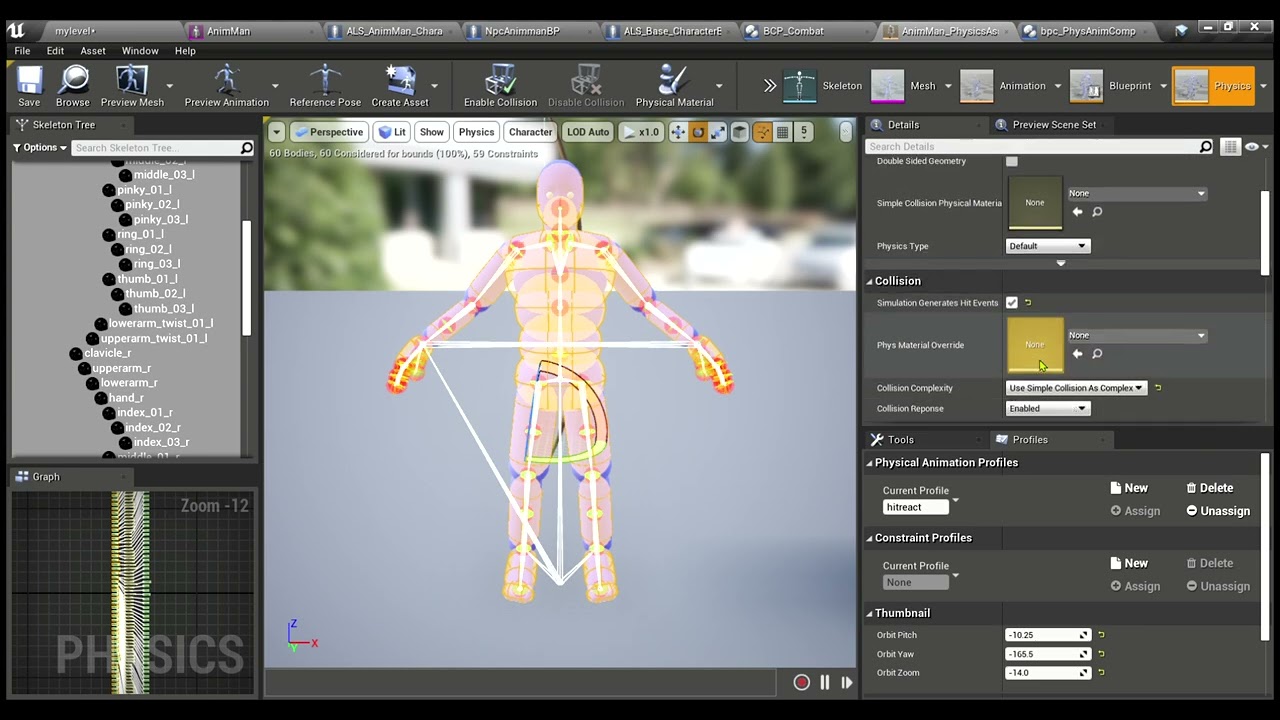
https://youtu.be/P-a4ywPc7OQ anyone give any advice why physical anim/simulate physics is doing this? It seems to be specifically simulate physics node thats doing it. Ive tried selecting all bones in physics asset and disabling collision in top middle of screen but nothing changed.
 gilded hazel
Chaps - so there is a Disable Movement node, but I can't find an Enable Movement node, does one such node exist?
 balmy vessel
SEAT All Assets is a custom enum value, why is my function being put under a drop down for it?

 maiden wadi
gilded hazel
Chaps - so there is a Disable Movement node, but I can't find an Enable Movement...
maiden wadi
gilded hazel
Chaps - so there is a Disable Movement node, but I can't find an Enable Movement...
All DisableMovement does is set MovementMode to none.
So in short, you just set a movement mode to something else like walking.
gilded hazel
Yep - found it, thank you!

 maiden wadi
 slim marlin
Casting to the class that has that value.
 mild crystal
what this means?

 hasty dune
Hello, I have a problem with my math xD. I ask for yout help on this server ! So my problem is that I would like to know how much my character is facing at a point (without line trace). I have at my disposal two actors : 1 which turns and the other are a (static) point. If you need more details I can give you. Thank you ! (sry for my bad english )
I already try a lot of thing, here is were i'm done but it doesn't work
 gentle urchin
Get unit direction
And ActorforwardVector
Dot product of those :)
Assuming actor forward is your forward..
hasty dune
gentle urchin
Assuming actor forward is your forward..
Work perfectly Thanks !
lime yoke
Hello ~
I've got an enemy that chases the player to an Acceptance Radius of 250.0f (See first picture). After that, I made a decorator (2nd picture) that gets the distance from both actors enemy and player using Get Distance To but the value is higher than 250.0f. Do you happen to know why this happens?


 light fractal
That's odd, yeah..
I assumed for a second that you were expecting an exact value of 250.00000 and didn't know about floating point precision, but 339 is way off.
gentle urchin
Is goal player char?
light fractal
You might wanna do a bit of an experiment to visualize what's happening.
I'd try temporarily adding a collision sphere to your actor with a radius of 250, and making it visible in game
then, just print the distance value you're looking for on tick. That might help you figure out if it's an issue with the AI's navigation (moving too close or too far depending on the environment) or something else
I throw together janky temporary experiments like that a lot when a bug is trying to ruin my day lol
gentle urchin
Or use debugline
light fractal
I'm a bit of a noob, what's that mean? lol
gentle urchin
Its prettier 😄
light fractal
oh ok it's literally just a visual line trace lol
 gentle urchin
Make a "stick" that goes from the NPC towards the target
light fractal
thx
gentle urchin
From npc loc to npc loc + getunitdirection(npc loc, goal loc) * radius
light fractal
ye
gentle urchin
On tick 😄
light fractal
off topic, but im so glad that people are friendly on here
lime yoke
Thanks, guys! I'll try to figure out what's going!
light fractal
np
lime yoke
I appreciate all of your advices.
light fractal
thanks
balmy vessel
how come my c++ blueprint native event isnt being called?


oh
im calling the function itself not the event
gentle urchin
Yupp
balmy vessel
duh doi
 fluid rover
Is there a "best" method to cancel out all movement input on a VR pawn? Or really just a character pawn in general.
I'd like to transport my character from one space to another with SetActorLocation
But when I do, if I'm adding movement input via trigger-pull flight (in VR), something goes wrong with the movement, and I get slingshotted across my level until I collide with a wall.
 charred berry
@peak wedge , sorry about earlier, it turns OUT ( argh embarrassing) that it was a mesh, I guess I had turned on do not render in game and forgot I had, so I just deleted it and no further issues OOPS o_0 :)(
 gentle urchin
fluid rover
But when I do, if I'm adding movement input via trigger-pull flight (in VR), som...
gentle urchin
fluid rover
But when I do, if I'm adding movement input via trigger-pull flight (in VR), som...
Disable movement
Waait, sorry
Didnt read it all 😅
Or perhaps it could work actually
grand valve
@lime yoke I think this happens because the get distance to is calculating the actors root locations from each other. And the move to actor usually includes the agent radius

Theres so many move to functions and nodes in UE now, and some of them have different options and stuff, its a bit confusing. Ill bet if you subtract your agent radius from your distance there you get ~ 250
fluid rover
gentle urchin
Or perhaps it could work actually
Would it work even if movement is continually applied with the trigger on the controller pressed?
gentle urchin
fluid rover
Would it work even if movement is continually applied with the trigger on the co...
Not sure really, havnt played with vr at all sadly
But i would think so
fluid rover
Hmm, okay, I'll give that a go, along with Disable Input
dreamy yacht
Hi. I am making an arcade racing game. Got some problem with toggling between main attached-to-car camera and various static action cam, placed in world actors

When I am the only car at the trigger, the blueprint works fine, but when there are opponents nearby when I am overlapping the trigger, the camera won;t switch back to default one
here is the blueprint


 north marten
Hello, is there a way for you to add to an array at runtime from a directory, like if i wanted to remake an array from a folder that has videos for a playlist, each time the thing is started? Im just making a widget "game" that plays a random playlist of videos and was wondering about it reading video files from a location that it is placed
dreamy yacht
I want to switch it back to player controller, but it's stuck once other car is nearby
maiden wadi
dreamy yacht
Your issue is the Delay.
dreamy yacht
Can you tell me more ?
maiden wadi
When you trigger a delay the first time, it starts a timer. Any subsequent trigger is entirely ignored. They mean nothing. At the end of the delay, it will use the very last trigger of EndOverlap. Which means the last car to have exited the trigger. If that was not the player, then kaboom.
dreamy yacht
is there another soultion I could use to make action camera last for example for 3 seconds and then switch back ?
maybe timeline ?
maiden wadi
I would consider just timering it. Ditch EndOverlap entirely. See how that feels.
OnOverlap, do everything you're doing now, but after your SetViewTarget, call SetTimerByEvent. Mark it for 3 seconds. Do not loop. Create a CustomEvent off of it's red delegate, and call SetViewTargetWithBlend on GetPlayerPawn.
It's also worth noting that this sort of system would probably best be put in the pawn or controller. Overlaps would trigger it's start. This way you could just call the trigger on your overlaps and not have to redo all of this logic on every trigger type. And controller or pawn could override it in certain cases. Like if you have two triggers too close, and one triggers after 2 seconds of another one triggering, the first wouldn't set the view back to the car, it'd restart the 3 second timer for the second jump.
odd ember
I mean I hate to say it, but this was one of the reasons I made my camera use behavior trees
though I suppose a state machine could also be viable
dreamy yacht

I think I've messed smth up
the trasition from car camera to action cam won't happen at all
odd ember
dreamy yacht
the trasition from car camera to action cam won't happen at all
can you try pulling out the PlayerController wire and GetControlledPawn and use that for your new view target?
dreamy yacht
won't work
only one of them at a time is allowed
but from player controller - the camera is at the height of wheels
and from getcontrolledpawn - the transition won't activate at all
odd ember
dreamy yacht
and from getcontrolledpawn - the transition won't activate at all
oops didn't notice you had a timer there, try executing your thing from your timer I guess?
balmy vessel
I'm trying to delete an unused blueprint, but it says one of my other blueprints still has a reference to it, but i cant for the life of me find it
ive tried the find references option but dont understand the interface
jaunty summit
In the refernce viewer window there is an option to go that BP you want
 manic seal
What's the BP equivalent of World::SpawnActor? the docs say Spawn Actor from Class but that doesn't seem to be in the list
jaunty summit
That's true. It should be
uncheck the Context Sensitive checkbox temporarily and see if it's there
 odd ember
manic seal
This is an Object bp, I presume that's fine.
odd ember
manic seal
This is an Object bp, I presume that's fine.
won't work, actors need world context and there's no way of getting that in an object without reference
manic seal
odd ember
won't work, actors need world context and there's no way of getting that in an o...
I actually have a world context
odd ember
if you have an actor reference you can try dragging that out and see if you can get spawn actor from class from it
or copy it from an actor class
but the compiler may complain in either case
manic seal
Mmm, I don't have a reference to an actor, just World and it appears as tho that doesn't have what I need.
odd ember
manic seal
Mmm, I don't have a reference to an actor, just `World` and it appears as tho th...
you have World in BP?!
manic seal
I guess I can create a static function in C++ that exposes what I need, that would be super stupid tho
odd ember
can you screenshot that?
manic seal
odd ember
you have `World` in BP?!
Yea, this is a interface implementation
odd ember
okay well I'm not sure that counts
like I said
try if you can drag out an actor or copy the node from an actor class first
manic seal
Hahah, ok, I can copy and paste the SpawnActor node from a ActorComponent BP, but the compiler complains that the world context pin isn't filled.
I have a world tho, I just need to expose that pin XD
Which might be impossible.
odd ember
manic seal
Hahah, ok, I can copy and paste the SpawnActor node from a ActorComponent BP, bu...
world context would be any actor
you don't need World specifically
in fact World doesn't exist conventionally in BP
so actors are the only way to imply world context
manic seal
Yea, I don't see a way to expose the world context pin
 odd ember
manic seal
Yea, I don't see a way to expose the world context pin
odd ember
manic seal
Yea, I don't see a way to expose the world context pin
yeah for some of the custom kismet nodes they aren't setup for this. I had the same issue with running timers in objects
manic seal
I guess I'll have to create a static function for Spawning Actors
Currently I'm using a UWorld* parameter on this interface function, which clearly doesn't play nice in BP. Is there another type I should be using instead?
I don't really want to pass an Actor if I can help it.
odd ember
manic seal
Currently I'm using a `UWorld*` parameter on this interface function, which clea...
I don't think you can get around that
half token
What are the blueprint console commands / nodes I can use to allow the player to change from Windowed, Borderless, and Fullscreen in-game?
I'm using a menu widget for the settings in-game.
half token
I can't quite tell if these work properly as testing the game through a popout viewport only seems to change the window size.
 odd ember
half token
I can't quite tell if these work properly as testing the game through a popout v...
odd ember
half token
I can't quite tell if these work properly as testing the game through a popout v...
you're not supposed to use the console commands
Get Game User Settings
manic seal
odd ember
I don't think you can get around that
You saying creating this wrapper function is a bad idea?

Because it should work, unless bp really hates UWorld*
odd ember
manic seal
You saying creating this wrapper function is a bad idea?
yeah the UWorld part of that I'd say you should replace with an actor
odd ember
manic seal
Because it should work, unless bp really hates UWorld*
BP really doesn't want you to be using UWorld
but you are free to try
half token
odd ember
https://docs.unrealengine.com/4.27/en-US/BlueprintAPI/Settings/GetGameUserSettin...
Strung these together and I'm uncertain if this would work as it doesn't seem to affect the game in testing through the popout viewport.
 odd ember
half token
Strung these together and I'm uncertain if this would work as it doesn't seem to...
odd ember
half token
Strung these together and I'm uncertain if this would work as it doesn't seem to...
you're not connecting the wires?
what's the point of the node if you're not going to use it
half token
odd ember
what's the point of the node if you're not going to use it
Sorry, I am a novice to blueprints. What do you mean?
odd ember
half token
Sorry, I am a novice to blueprints. What do you mean?
look at your screenshot
manic seal
half token
Sorry, I am a novice to blueprints. What do you mean?
You aren't using the return value of Get Game User Settings
So that node is doing nothing
FYI @odd ember My bp compiles 😁 , ty for the advice. And yes, would be so much simpler if I could use an actor here but I'm afraid I really can't.
odd ember
manic seal
FYI <@!224571781862653952> My bp compiles 😁 , ty for the advice. And yes, would...
cool. just be aware that what you're doing is a hack
 pliant jewel
I've got a door that is opening when a character walks up to it.
It then plays an animation to raise the door.
Currently, the nav mesh isn't updating when the door raises, is there something extra I need to do to support this?
odd ember
pliant jewel
I've got a door that is opening when a character walks up to it.
It then plays a...
navmesh probably needs to be dynamic
pliant jewel
I do have that already
odd ember
I would try and debug it over at #gameplay-ai
pliant jewel
Ty
 dense badger
Anyone here know if there are plans to change the way floats and doubles work in UE5? As it stands it's a huge pain in the butt to deal with. It's made working with vectors a pain since there's no Float(Single) * Vector anymore. But the default Float parameter type is single and I can't even find the Float(Double) type? The whole workflow has gotten really kludgy.
All the float math operators seem to only operate on doubles that don't exist? It's so weird.
You can create singles and wire them in, but you can't pull off the pin and create single... or pull off the single and access math operations... it's just a mess.
Basically the simple version is, none of the "pull off a pin" operations understand that a float will convert to a double. This means I have to manually add the math operation each time. Additionally in the case of some operations, like Float * Vector or Float * Int I can no longer type in constants into the Flot slot because the input has been replaced by a pin. So every time I have to use "make literal" or add a new variable.
odd ember
can't you right click the pin and change pin type?
 agile hound
I have a data table where all my job system is… everything works fine when it comes to warrior, ninja etc… but when it comes to Battle Mage it gives me blank results assuming it’s because of the space between Battle and Mage?
The class is called Battle Mage… can’t really change it, and the data table looks up the character’s job… any help? :S thanks 🙂
Can’t change it because the class name is in the UI and Battle Mage isn’t BattleMage haha
faint pasture
agile hound
Can’t change it because the class name is in the UI and Battle Mage isn’t Battle...
The class should have some text property that you key on
not the classes name itself
 thick marsh
I have a situation where I iterate over a set of objects and perform operations on them. Currently it works fine iterating over all of them at once. Now what I'd like to add is to do the same thing, but for each object, do the actions after some delay. Ex modify object1 to state 'red' after 10 seconds, modify object 2 to state 'blue' after 20 seconds, etc. It looks like using something like "Set timer by event" will do what I want, however, there doesn't seem to be any way to pass arguments to the event. (And If I make an event that takes arguments, then I cannot call the event with "Set timer by event" anymore. (with error "Delegate is not compatible with Delegate") How can I call a function with arguments after a delay?
jaunty summit
There's a Set Timer By Function Name
Probably what you want
Set Timer by Function Name
You specify the function name you wanna call
thick marsh
@jaunty summit thank you again for trying to give me advice. I don't think this node provides any method to give the function called a parameter, though. What if, say, the function has a single int parameter?
jaunty summit
I see, I didn't understand what you meant
faint pasture
Is there any way to do anything at runtime that updates the on-disk level? That is, any way to make any changes to default variables or anything beyond SaveGame?
jaunty summit
thick marsh
<@!393501253184913418> thank you again for trying to give me advice. I don't thi...
There is a conversation about this, with some solutions, so it can give you some insights: https://forums.unrealengine.com/t/set-timer-by-function-name-pass-parameter-to-function/366064
Unreal Engine Forums
How do I pass parameters into the function called by Set timer by function name blueprint? If it’s not possible then is there an alternative way to to implement server task processing logic as below Receive player A request to start task A which needs to be executed after 5 seconds. Receive player B request to start task B which needs to be e...
thick marsh
The only solution there seems to be polling, I guess. I do try to fully scour google before coming around to pester you folk.
jaunty summit
faint pasture
Is there any way to do anything at runtime that updates the on-disk level? That...

Updates Actor properties from the simulated or in-game state.
half token
If I want a specific widget to appear and close depending on if the game is paused or not, what strucutre/layout of blueprints could I use?
faint pasture
half token
If I want a specific widget to appear and close depending on if the game is paus...
Make a pause/unpause event on the playercontroller/gamemode/wherever, and have THAT event set the game world paused and show the widget
so it's not so much that it depends on if the game is paused, but that one event pauses the game and shows the widget
I think I just found a cheap and dirrrrrty workaround to data tables being editor only


It's dirty but it works for what we need.
2nd one is in editor widget bp
half token
With this, I'm able to get the widget to appear but it won't remove itself from the viewport after unpausing.
 faint pasture
half token
With this, I'm able to get the widget to appear but it won't remove itself from ...
faint pasture
half token
With this, I'm able to get the widget to appear but it won't remove itself from ...
Why is your logic split up
Do it all in one place. Handle the widget and the pausing in one spot
half token
Split? Sorry, I'm still learning blueprints.
faint pasture
half token
Split? Sorry, I'm still learning blueprints.
Where are you handling the actual pausing?
Do it in the same logic that you showed in your screencap
half token
This is the main blueprint for the actual pause menu itself. I have a separate secondary widget I am trying to create alongside the pause widget.

I haven't been able to find a simple way to create a second widget at the same time that follows the same logic as the main pause menu.
The secondary widget is just an overlay that is placed behind the pause widget.
faint pasture
half token
The secondary widget is just an overlay that is placed *behind* the pause widget...
Is that meant to be a common background?
Like all the menus share it?
half token
faint pasture
Like all the menus share it?
Only menus in-game i.e. through the pause menu
faint pasture
Ye, it should be the parent to the displayed menu. I'd do it all as a state machine, I've had great success doing it like that before. Here's how I do it.
Make an enum representing the menu state. In our game it's Gameplay, Main, Options, etc.
Make an Event UpdateMenuState that passes in the desired new menu state.
UpdateMenuState has a switch on MenuState that shuffles the widgets around and pauses game etc
 weary ledge
Game user settings question: I have an apply graphics settings button that opens a prompt that times out if you don't double-confirm your graphics settings. I can't get the quality settings to reset once you've clicked apply, but the resolution resets fine. Am I missing a function here?


Should I potentially actually be using the hardware benchmark settings to store the applied settings so I can revert? 🤷
The quality settings selections just use Set functions, so hitting the apply button does actually apply them but it kinda seems like that apply also saves.

 grizzled peak
@zenith pond Thanks Zac. I'm moving this conversation to the right thread. Unfortunately I'm on day 3 of learning unreal, so that is a little over my head. This is what i have so far. I was using a tutorial that generated roads along a spline but I wanted to use an actor component instead of the static mesh. Here's what i have in the Construction script.
I put in the Child actor node and class node... but I can't link it to the Set Start and End node because it wants a spline mesh component and not an actor. Do you know what I might be able to use in it's place?

 zenith pond
Here's a very basic example of how to get started with something like that

 zenith pond
grizzled peak
I put in the Child actor node and class node... but I can't link it to the Set S...
zenith pond
grizzled peak
I put in the Child actor node and class node... but I can't link it to the Set S...
No, I don't have a tutorial, just threw that together in a few minutes.
grizzled peak
ok. I'll dig around some more and try to figure out why the actor isn't facing the right way. thanks for your help
zenith pond
You can try changing the rotation in the static mesh editor under import settings, or add an offset to whatever axis you need to rotate it on before the relative transformation rotation
 whole coral
Hello everyoen
I'm here again
Who can help me with this problem
Unreal Engine Forums
Hello Community! I’m trying to get a windows environment variable in C++, but it seems to be that I cannot get them. FString _env = FWindowsPlatformMisc::GetEnvironmentVariable(*FString("SomeEnvironmentVariable")); In the WindowsPlatformMisc.h file, It does state this UE_DEPRECATED(4.21, "void FPlatformMisc::GetEnvironmentVariable(Name, Res...
'GetEnvironmentVariableW': is not a member of 'FWindowsPlatformMisc'
'GetEnvironmentVariableW': function does not take 1 arguments
It seems that the .cpp file uses processenv.h
but I cannot find where it uses
 wary shadow
Hi, is possible to ignore collision only between two pawn by maintaining the physic enabled?
grizzled peak
zenith pond
You can try changing the rotation in the static mesh editor under import setting...
so everything is done exactly the way you have it set up, but for some reason the mesh is not duplicating along the spline. It rotates and orients itself along the spline, but only shows up once. Is there a setting in the details panel that I need to be activating? or something that you may have done that I wouldn't be aware of?
 zenith pond
Just making sure the placement distance variable is something reasonable like 100 units
maiden wadi
whole coral
Who can help me with the problem
You're asking about a c++ issue in the blueprint channel.
 dusk dust
Hey did you ever figure this out?
gentle urchin
grizzled peak
I put in the Child actor node and class node... but I can't link it to the Set S...
you should avoid using ChildActorcomponent. Setting Start and End is a specific property of Spline Mesh Component, any reason why you dont wanna use that if thats what you need ?
grizzled peak
gentle urchin
you should avoid using ChildActorcomponent. Setting Start and End is a specific...
I am actually trying to figure out how to use actors in place of a mesh object and spawn them along a spline. My current setup doesn’t use that start end node, but I can’t seem to get the actor or mesh to duplicate.
But I need to try adjusting the placement distance. Just in front of my computer now
gentle urchin
grizzled peak
I am actually trying to figure out how to use actors in place of a mesh object a...
So unwarped actors?
Like this ?
grizzled peak
Oh that is what I’m trying to do.
Oh wait. The curves look off. I’m essentially trying to learn how to build a procedural road tool. But all the tutorials use meshes and I’m trying to substitute those for actors.
gentle urchin
The curves are off due to no morphing
Its just tiny versions of the very same mesh

Why do you want them to be actors btw?
If you want it to be actors, you'd be best of exposing some function for setting the start and end of its internal spline mesh component
half token
Struggling to get different footstep cues to properly fire off.
Game is in first person

No dice
gentle urchin
Isnt it better to handle this in the animBP with notify triggers?
half token
only the best
gentle urchin
So no sound play at all ?
also, is not valid, you probably want a different sound to play
if any
otherwise it'll throw errors
trying to read a mat thats not there
half token
Not with that above screenshot. I put together a second hellish mess of blueprints following a guide but this one just plays the same sound despite what physical material the player steps on.
 gentle urchin
I liked this better ill admit
but you should give yourself a lending hand
in debugging

false and default
should if nothing else give you print strings or a hint on whats going on
half token
you think I should plug some print strings and see if it's even registering the different physical materials?
gentle urchin
yes
i'd say thats a good start
if its not changing
it means we're either not hitting something
or we're getting the default materialsurface
half token


If the player location z was too short, it wouldn't be playing any sound at all, yeah?
 half token
Yeah, that's all that's been playing
grizzled peak
gentle urchin
If you want it to be actors, you'd be best of exposing some function for setting...
I might have to rethink how this is built then. Still learning how all of this works. Thanks for your help
gentle urchin
half token
how does one
On the linetrace, theres a debug option
gentle urchin
grizzled peak
I might have to rethink how this is built then. Still learning how all of this w...
Why do you need it to be actors tho?^^
half token
Hard to tell. It sort of looks like it's going through the floor.
 grizzled peak
I’ve built some more complex items with multiple meshes. And they’re all assembled in actors. Was using kitbash3d assets as a guide.
half token
B&W post process filter doesn't help but I walked off a cliff to see.
gentle urchin
Yeah it does, jut doesnt hit
half token
 gentle urchin
So collision om floor doesnt match collision on trace
half token
So I should keep fiddling with the z axis until it can get a proper hit?

Maybe leave the print strings on, too
gentle urchin
Its a channel issue
half token
Oh? What do you think I can do?
gentle urchin
Change channel to one that your ground gets hit by
So compare the collision response to trace channel
half token
It's looking like it's hitting the floor right on the surface
 half token
gentle urchin
So compare the collision response to trace channel
half token
gentle urchin
So compare the collision response to trace channel
Voila! It worked. I had to fenagle the linetrace z axis just right to make sure it was connecting proper just like you said. Thank you very much for the help.
 dull jay
anyone know how I can remove the warning
 maiden wadi
dull jay
anyone know how I can remove the warning
maiden wadi
dull jay
anyone know how I can remove the warning
Give it a pointer to cast.
gentle urchin
half token
Voila! It worked. I had to fenagle the linetrace z axis *just* right to make sur...
Gj!
dull jay
maiden wadi
Give it a pointer to cast.
wdym
half token

 hollow gorge
dull jay
anyone know how I can remove the warning
hollow gorge
dull jay
anyone know how I can remove the warning
watch this
https://www.youtube.com/watch?v=o-Hj29Wdsf8
 teal dove
Hey does anyone have an idea how to build a "zone painting" system like in this screenshot from the Foundation game?
 dreamy yacht
Hi, can someone help me? I want to add a counter force that would prevent a car from rolling on the side / roof
I've heard, that I should do it with add force
gentle urchin
increase force as the car rolls over
 tiny prairie
how would you setup a good automatic rifle system i have it currently with a timer. leftmouse button pressed start timer left mouse button let go i stop the timer but when i start /stop timer in the same fram it doesn't shoot
gentle urchin
Call the function instantly
tiny prairie
then you could spam it
gentle urchin
But make sure there's a lock on it :)
tiny prairie
what kind of lock a gate?
tiny prairie
and open it on timer i guess
gentle urchin
if people manage to click faster than the auto fires , isnt that just skill? 😛
odd ember
shoot once before starting the timer, then start the timer
tiny prairie
tiny prairie
then you could spam it
.
odd ember
you would have to click every time
tiny prairie
yes
gentle urchin
tiny prairie
and open it on timer i guess
Open on timer yes. Check if the player is still holding the button, and if not, clear timer, and reset the block
odd ember
that's gonna add a "hold" delay
it's not an elegant way of doing it IMO
but tbh it sounds like you don't know what you want
because you don't want it to shoot, but you want it to shoot
odd ember
tiny prairie
.
.
tiny prairie
i want it to just shoot automaticly like in fortnite
but you can't spam it just has intervals like irl guns
like certain amount of rpm
tiny prairie
you press mouse when you let go it stop firing if yo udont let go it keeps firing every 0.2 seconds or so depend on the rpm
odd ember
but I'm not making the design decisions
tiny prairie
it is elegant but not balanced
hard to balanced weapons and if you can spam every weapon there is no diversity between weapons
tiny prairie
same issue as before
odd ember
you can set tick rate to be a function of RPM as well
tiny prairie
could work maybe
odd ember
although I'm not sure if the enable tick call will allow for tick to tick on the same frame
but
actually
tiny prairie
i need it to so would have to check that first want it to be as instant as possible
odd ember
in your BP settings for your class you should be able to set tick grouping
because I think the issue is with the fact that tick happens before your start your event
so it doesn't trigger on the same frame
but if you change the tick grouping to be later, then you could have logic run before tick gets executed
and hence the timer will execute correctly as well
tiny prairie
does tick grouping affect timers?
odd ember
tick affects everything
timers only execute on tick too
as do delays, etc.
that's why a delay of 0.0 delays a frame
gentle urchin
heh my setup was bad
continously calling shoot with my lockup made it reset the timer
tiny prairie
if i change the tick i still have the same problem with timer
odd ember
basically timers execute on tick, but they can accumulate independently
gentle urchin
 odd ember
so if you run a timer rate lower than tick, it will execute multiple times on the next tick
tiny prairie
mayble i should use a delay node of 0.00 on the stop shooting
dreamy yacht
Hi, can someone help me? I want to add a counter force that would prevent a car from rolling on the side / roof
I've heard, that I should do it with add force
How to do that ?
I don't see rotation, but only X Y Z
like position
Should I use rather the vehicle mesh as target or movement component as target ?
 tiny prairie
that should work its just not the most elegant solution
idk if there is a better one tho
dreamy yacht
I want to add counter force, that prevents car body roll
odd ember
tiny prairie
that should work its just not the most elegant solution
the tick grouping would be the most elegant solution
tiny prairie
enable tick when i start shoot and disable when i stop you mean right
 tiny prairie
and change the tick grouping of the gun to a later one then the character?
odd ember
tiny prairie
and change the tick grouping of the gun to a later one then the character?
yes
the weapon matters because that's where the timer is
tiny prairie
how should i remember when i last shot
odd ember
why do you need that?
tiny prairie
imagine i have 2 sec between shot i enable tick on then after 0.1 i stop tick how would i know i can only shoot (enable tick) after 1.9s
bool with a timer?
odd ember
tick rate remains consistent
so as long as you don't change that it should be automatic
tiny prairie
ye but i mean if i stop shooting and disable the tick
odd ember
tick rate remains even when you disable tick
tiny prairie
and want to shoot again but i shoot before i am alowed to shoot
obh
thanks
didnt know that
odd ember
tick technically executes all the time, it just ignores your function when you disable it
the entire engine ticks all the time
tiny prairie
but that ruins it actually because i can't shoot instantly
odd ember
tiny prairie
but that ruins it actually because i can't shoot instantly
you can always set tick rate as you shoot
tiny prairie
then i can't use tick since i want it to shoot instantly if i haven't shot in a while
odd ember
but really
this is all just talk
all of this is easy to test out for yourself
so try it
see if you have issues
then come back if you do
tiny prairie
yeah il make a new project and try it out because dont wanna mess with multiplayer yet
odd ember
yeah I'd stay away from MP in general if you're at this level
it's squaring the complexity of your project
instantly
tiny prairie
i have it multiplayer right now and it work fine but im just trying to learn best practice first
only problem right now is the fram thing when i start and stop shooting at the same frame
otherwise it works fine
tiny prairie
will try
tiny prairie
gentle urchin
works solid 😄
do you have a initial start delay of -0.2?
nvm i didnt look fully
 lapis wharf
hi! so i want to make my camera tilt a bit when i go left and right similar to DUSK
i tried FInterp, Timeline and etc. but I'm not sure how to make it so it would change rotation to -15 / 15 not instantly - interpolate smoothly, you know.
 gentle urchin
tiny prairie
do you have a initial start delay of -0.2?
gentle urchin
tiny prairie
do you have a initial start delay of -0.2?
Its mostly an example, so adjust the values to your needs ^^
I'd have this in the gun blueprint itself , using a variable for the time, and the intial time if there's a "bootup" time on a gun
gentle urchin
dreamy yacht
Hi, can someone help me? I want to add a counter force that would prevent a car...
Do you have curved tracks?
tiny prairie
gentle urchin
I'd have this in the gun blueprint itself , using a variable for the time, and t...
yeah it think this one does perfectly what i wanted
 south pier
So I am struggling with radial damage. I have tried applying it several different ways. Right now I have this in the actual projectile that is causing the radial damage, but it' s a crapshoot why it works and why it doesn't when actually exploding around an enemy

 dreamy yacht
Guys can someone please help me with add force ?
I want to create counter force, that prevents car from falling on the side / roof

I don't exactly know how to set it up
I need to add force to X or Y axis from what I know
someone?
 lapis inlet
Hey guys I need help with setting up a gravity simulator
Btw how do I send screenshots from a computer to an android phone?
gentle urchin
dreamy yacht
Guys can someone please help me with add force ?
I think it's easier to just adjust center of mass actually
lapis inlet
I can send the blueprints I have setup to calculate forces if I can figure out how to share the screenshots to my phone
gentle urchin
dreamy yacht
Guys can someone please help me with add force ?
You'd also want to do some linetrace to verify that you're actually "in air" if you have slopes/loops and whatnot in your game
 lapis inlet
Ok, wait
I think my game won't let things move
All of my objects ARE set to moveable
Bruh
Nothing can or will move
I'm stuck
I need movement
odd ember
moveable just means that it is lit like a dynamic object
odd ember
it doesn't actually make it moveable
odd ember
you have to enable physics
odd ember
there's an option for that in your mesh detail panel
just look for the physics category
lapis inlet
Enable 2d physics?
lapis inlet
I mean the entire project
odd ember
that's not how you do it
lapis inlet
Ok enabled physics for all objects, still doesn't work
lapis inlet
Yep
lapis inlet
I don't know how to send screenshots to my phone
odd ember
can't you use web discord?
lapis inlet
University disables Discord
Or
Maybe not
Ok
This can work
Gimme a minute
Oh God fuckin
Two factor authentication
 molten crane
I have added a box collision via construction script. I want to use a component hit event for that box collision. How can I archive that? It would be more helpful if anyone knows the answer.
