#blueprint
402296 messages · Page 856 of 403
 keen wedge
 gentle urchin
Bg, ground and bird stands still
keen wedge
blue?!
the little angle lines on that grass move on the app I have... I used a material originally (to save the code) but I couldn't get the speed on the Panner to match the speed of the moving objects precisely... so changed it and went with this... I can control the speed of pipes/ground with the gamemode variable now.
keen wedge
yeah... I'm sure there's a way to convert the UV speed calcs so that I could still use a material, but honestly... this was quicker in the end...
Right... I'm dropping out again, making sure I'm not your excuse not to make some progress! 😉
gentle urchin
No worries, plenty of others to be my excuse ! 😂
 green lynx
Hey guys ! I'm just getting to grips with unreal engine 4 as a sound designer, I was wondering if someone here can help me troubleshoot an issue im having where my sounds stop playing when im on a particular surface ?
gentle urchin
What sound? Footstep?
green lynx
car tire sounds
green lynx
yeah i did think that, however on the said surface, which is a bridge it stops working unless im on the borders of it where (the sidewalk basically) then it resumes working whilst im on there, but all the materials have an assigned physical material
gentle urchin
And where you're triggering the sounds support the give physical material?
green lynx
the thing is the tyre sounds themselves are actually not related to the physical material
gentle urchin
Like, its an existing material ?
green lynx
like they have nothing to do with it, they are supposed to play regardless
which is why this is as confusing for me
gentle urchin
Right but the sound should change depending on material?
Asphalt sounds different from dirt
green lynx
not the actual tyre flapping sound, ive got other layers that change
gentle urchin
If its not that, then I dont know
green lynx
would it be ok if i upload a screenshot
green lynx

this is linked to a sequence node that comes out of event tick
i am using wwise but it works perfectly fine with wwise + ive got the exact same system for the engine and that works perfectly fine regardless of what surface its on
gentle urchin
Not familiar with this setup,
But this is not directly whats playing the sounds
I think you must inspect the ak game object?
green lynx
the post event is essentially play sound at location
it just posts the event in wwise which then plays the sound
gentle urchin
And its just a single sound que thingy?
Usually theres some swotch on phys mat but..
green lynx
its a looping sound
green lynx
this is one of them ! this is on the vehicle game
would it be ok if i show you when the problem occurs in the voice channel ? i can stream and we dont need to voice chat if youre not comfortable about it we can just write
gentle urchin
Making dinner , so cant right now 😂
green lynx
fair enough haha
gentle urchin
I remember struggling with sounds on it aswell when i added dessert
And atleast for me it was a physical material issue
You had to add support for the different ones
green lynx
hmm it only shows me two materials on the bridge and both of them ive added a material to, is it possible they consist of multiple ones or something
here is the exact same setup im using for the engine and it works perfectly

i will have a look now
yeah ive attached a physical material to everything related to the bridge now and it still wont work
gentle urchin
Have you found where it actually playes the sound?
green lynx
yeah one moment
gentle urchin
Also id expect engine to not change sound based on physical mats^^
 green lynx
gentle urchin
Also id expect engine to not change sound based on physical mats^^
green lynx
gentle urchin
Also id expect engine to not change sound based on physical mats^^
yeah but the sounds im talking about in particular are literally just tire friction sounds which i want to keep the same as i've got other skid sounds that change based on the material
gentle urchin
Exactly !
green lynx
and its weird as the material switches and everything its just that all the sounds + the skid sounds that are influenced by the material ONLY play when im on that part of the bridge
gentle urchin
Can you show a screenshot of the "play sound" part?
I cant recall wherr its located
I may have some time in a few hours to dl the project and take a look
green lynx
gentle urchin
Can you show a screenshot of the "play sound" part?
not sure what you mean, in the blueprint ?
gentle urchin
Yuss
green lynx
gentle urchin
I may have some time in a few hours to dl the project and take a look
yeah for sure that would be super helpful if you could
 gentle urchin
Theres more to it than that for sure
green lynx
so the way it works is i create events in wwise, which are then put into ue4 and that event you can, like an attenuation literally drag into the scene
heres how an event looks like
 green lynx
its really good yeah ! much more audio friendly and alot more possibilities
gentle urchin
So how does it differentiate what sound to loop? RtpcValue?
Or is it like a static singular sound?
Always the same, like an engine sound?
green lynx
no so let me explain
gentle urchin
Sorry about all the questions 😂
green lynx
not at all ! you need to understand to help haha
gentle urchin
Im really noob about sound setups
green lynx
the event ive made in wwise has it programmed in there that it will be looped, which sounds to loop and the RTPC value node controls a variable which influences the volume
a game parameter in wwise lingo
green lynx
i believe so
so the forward speed controls the rtpc (volume) and then it posts the event (plays the sound which programmed to be looping)
green lynx
yes it is cause its a loop so it will just keep coming in and out depending on the speed as ive programmed the volume to go to 0 on low speeds
and it works well and good everywhere else on the map besides on the bloody middle of the bridge 😄
like heres the weird bit right, as soon as i come off the bridge the tire loop resumes playing ?
im just lost 😄
gentle urchin
So like
What exactly triggers when one enter the bridge...
Is there some special attenuation applied on the bridge ?
Or whatever its called
Some trigger volume there
green lynx
no, its a completely different part of the blueprint and its in no way related to the sound in question
gentle urchin
So the sound in question is not affected by regular ue4 sound settings, is that correct?
Sound mixer is what i was looking for i think
green lynx
im not sure man it sohuldnt be but its my suspicion that it might be somehow
gentle urchin
I assume thats why you handle volume with throigh the rtpc...
green lynx
yes
 sleek wadi
Sorry if this is the wrong section to ask this. I am going through a tutorial on building crowds and the video at one point copies the location of a Target Point to paste into the target location of a character under Default. However, when I use 4.27 the Defaul seems to be missing and I am wondering if anyone happens to know where I can find this setting. Thanks!

 faint pasture
sleek wadi
Sorry if this is the wrong section to ask this. I am going through a tutorial on...
faint pasture
sleek wadi
Sorry if this is the wrong section to ask this. I am going through a tutorial on...
Does your dude have the TargetPoint variable?
 void mortar
Hello I'm trying to find someone who can combine to asset packs from the marketplace into a single character blueprint or creat a custom blueprint based on the EA game Anthems combat and flight mechanics
 slow pewter
void mortar
Hello I'm trying to find someone who can combine to asset packs from the marketp...
slow pewter
void mortar
Hello I'm trying to find someone who can combine to asset packs from the marketp...
Merging is Easy if u understand the Basics, just learn it
sleek wadi
faint pasture
Does your dude have the TargetPoint variable?
I got the target point but not sure where to find the variable
 faint pasture
sleek wadi
I got the target point but not sure where to find the variable
faint pasture
sleek wadi
I got the target point but not sure where to find the variable
Check if your dude class has a variable called TargetPoint
faint pasture
void mortar
Hello I'm trying to find someone who can combine to asset packs from the marketp...
#freelance-jobs And have about $10k minimum ready to spend if you want someone decent.
void mortar
faint pasture
<#780559987143213056> And have about $10k minimum ready to spend if you want som...
Anyone paying 10k to merge two blueprints together is an idiot
faint pasture
Anyone thinking they'll get a polished combat system like Anthem for even that cheap is one as well. Slapping a couple asset packs together is one thing, making something decent is another.
If all you want to do is merge a couple packs, just do it yourself. You need to learn how the engine works anyway.
 wicked magnet
Has anyone come across any good tutorials/guides on switching between characters using the Player Controller? I've been kind of surprised by how many guides I've seen use kind of janky methods like using the level blueprint, or switching characters within the actual character controller code, vs managing everything via player controller.
faint pasture
wicked magnet
Has anyone come across any good tutorials/guides on switching between characters...
Switching between different pawns that already exist or swapping your pawn out?
Something like jumping between pawns is just as simple as calling Possess on them
If you need a "swap back" mechanic just keep track of MyPreviousPawn in your Playercontroller
wicked magnet
faint pasture
Switching between different pawns that already exist or swapping your pawn out?
Switching between different pawns that already exist, including, yes, a "swap back" method.
Sorry, while I've seen examples using Possess, I'm unclear on how to reference the pawns in Player Controller. I only know how to cast to a pawn using Get Player Controller, but inside Player Controller I get '[pawn] does not inherit from Player Controller
faint pasture
wicked magnet
Switching between different pawns that already exist, including, yes, a "swap ba...
PossessPawn(PawnToPossess)
{
MyOldPawn = Self.GetPawn();
Possess(PawnToPossess);
}
PossessOldPawn()
{
Possess(MyOldPawn)
}
Add your IsValid checks etc.
Just need a variable MyOldPawn of type Pawn on your playercontroller
wicked magnet
Is there a blueprint equivalent to GetPawn()? I tried Get Player Pawn but that seems incompatible with MyOldPawn.
 misty tulip
Hello Everyone. I am having trouble solving a problem and I hope someone can help. I've asked on reddit and the unreal forum with no responses so far.
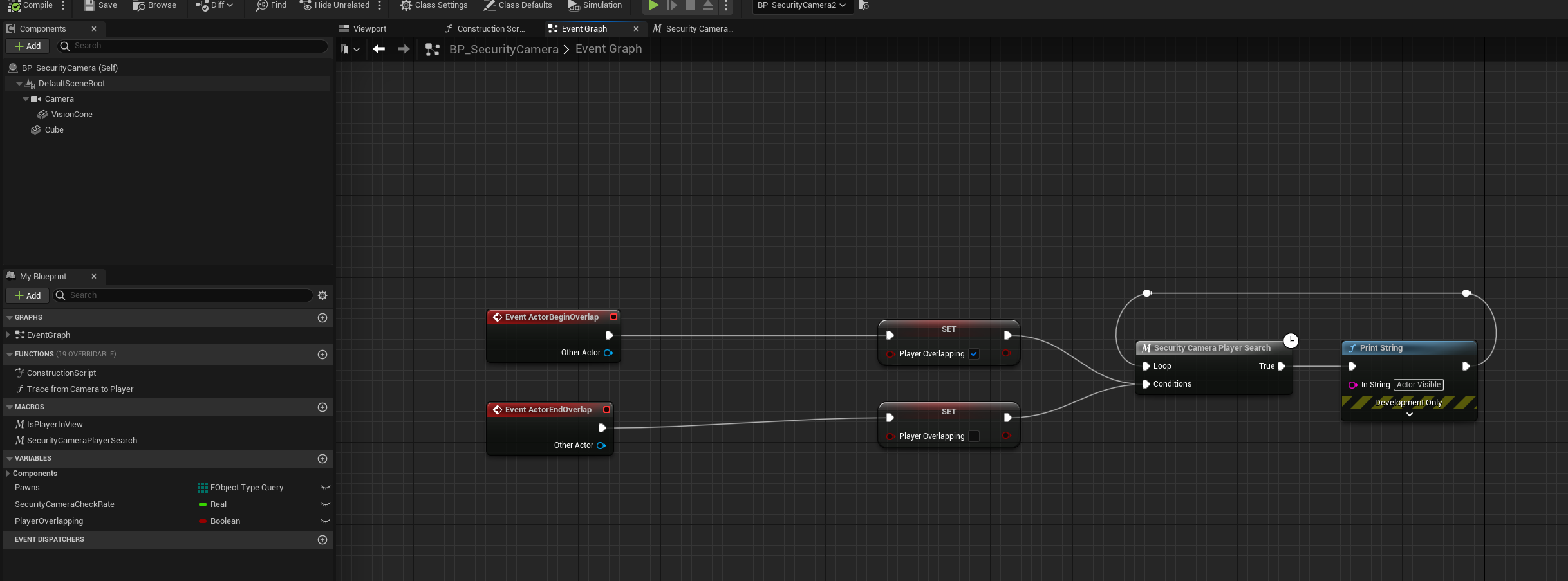
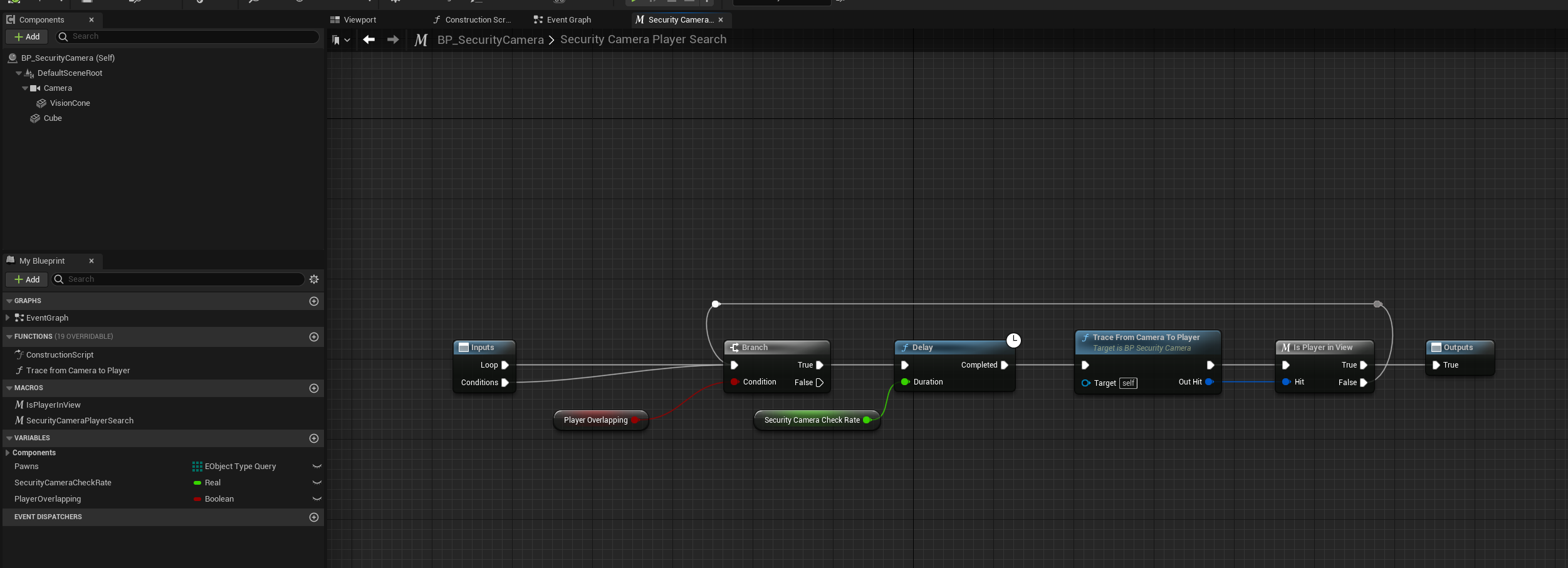
I am working on a security system blueprint setup. Currently I have line traces check if the player is not occluded behind any objects.
The line traces are only supposed to check when I’ve entered the collision mesh (Vision Cone). It checks every quarter second.
Here are the blueprints for that.
https://i.imgur.com/KMp1fDy.png
https://i.imgur.com/yBdXoA0.png
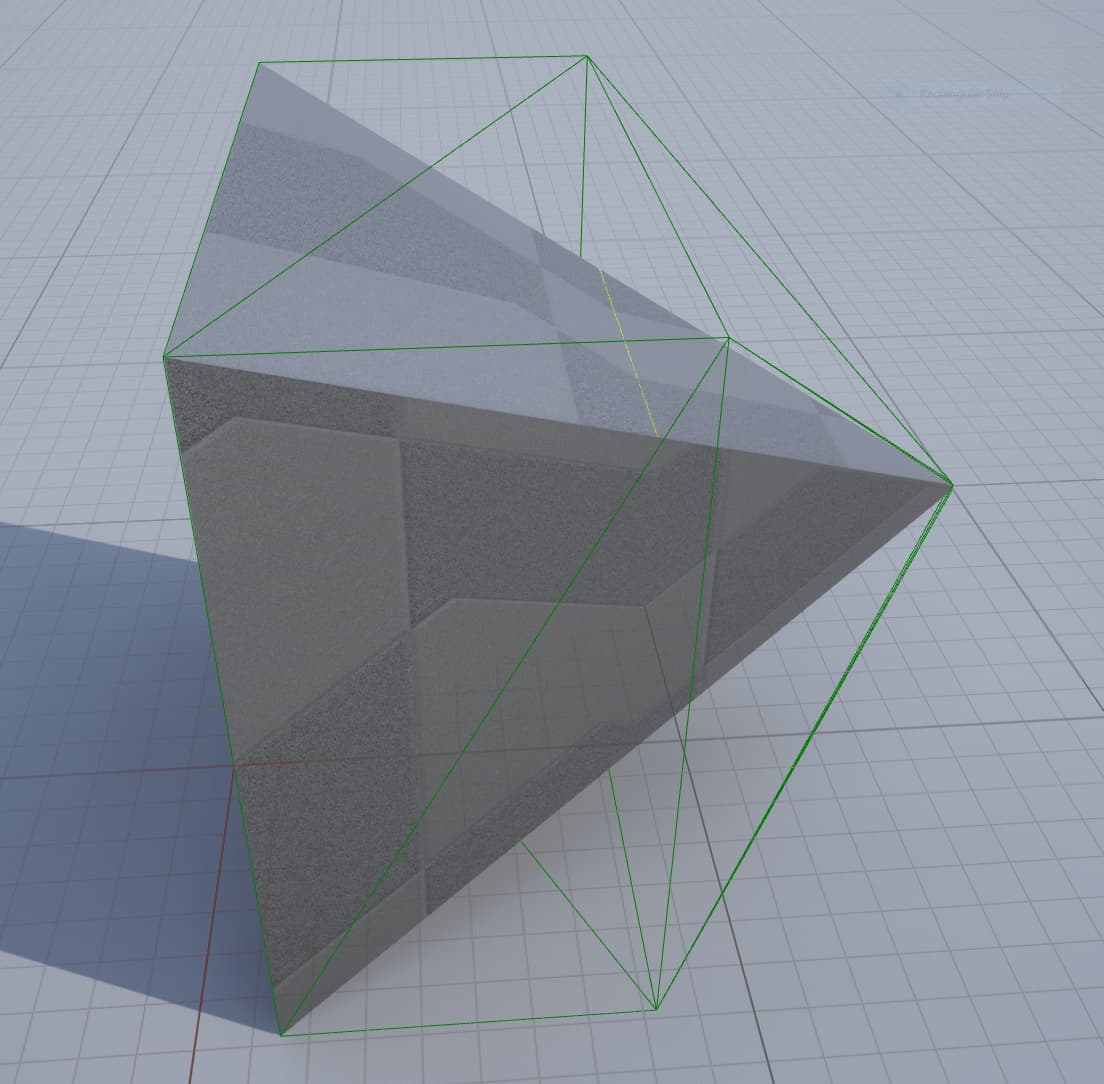
The Vision Cone is a static mesh I created in blender. The problem I am having is the line traces fire correctly when this static mesh is using a simple collision but its not the right shape.
Simple Collision Example
https://i.imgur.com/knLEpdn.jpg
When I switch it to use complex as simple collision the shape is correct but the traces only fire a few times when entering the mesh and not consistently when inside like it would with the simple collision.
ComplexCollision Example https://i.imgur.com/WXtorUU.jpg
Does anyone know what could be causing this?
Here is a video of me demonstrating what’s happening. The beginning of the video I’m showing it not working and then the second half I demonstrate it working with simple collision.
 wicked magnet
Like this is essentially what I'm going for, but I just don't know how to make these kinds of references to the player characters outside of the level blueprint.

 odd ember
wicked magnet
Like this is essentially what I'm going for, but I just don't know how to make t...
odd ember
wicked magnet
Like this is essentially what I'm going for, but I just don't know how to make t...
what do you want to do, in non technicalterms
 mossy mist
Hi I have a instanced static mesh (a torch) and i want it to replace itself with a full actor with lights when the player gets close. How could i acheive this?
 sturdy herald
mossy mist
Hi I have a instanced static mesh (a torch) and i want it to replace itself with...
sturdy herald
mossy mist
Hi I have a instanced static mesh (a torch) and i want it to replace itself with...
delete/hide the static mesh and use SpawnActor node?
faint pasture
wicked magnet
Is there a blueprint equivalent to GetPawn()? I tried Get Player Pawn but that s...
Yeah just get possessed pawn in the PlayerController
Self -> type in pawn and you'll find it
@wicked magnet Are you trying to do a Lost Vikings style thing?
mossy mist
sturdy herald
delete/hide the static mesh and use SpawnActor node?
buts its an instanced static mesh
sturdy herald
mossy mist
buts its an instanced static mesh
Create an actor blueprint with the same torch static mesh.
 trim matrix
Hi, I'm a semi-new UE4 user, I'm trying to reduce the error margin of my ground pound move at low-frame rates that shoots a sphere cast under the player every frame while the player launches down, any way I can use delta-time properly to make consistent results across different framerates?

If anyone could help me find a solution I'd really appreciate it.
 earnest tangle
What exactly is the trace for? Applying damage or something?
 bold phoenix
Hey ! I'm trying to spawn an actor under certain conditions but for that i need to access info about the actor before it is spawned. Is there a way to do that with tag ? Or by adding tag on a class ? I just need a lead to know where to search, because I haven't found anything yet
earnest tangle
What information are you trying to get from it before spawning it?
bold phoenix
For example if he needs a support
earnest tangle
Some things will be available if you have the class, and use the get defaults node
earnest tangle
If it's a variable on the actor class, get defaults would probably have it available
bold phoenix

This is my actual code but it doesn't work because the actor has to be spawned already for the interface to work
earnest tangle
Yeah the only way to pull info from an actor which does not exist at all is get defaults
bold phoenix
earnest tangle
If it's a variable on the actor class, get defaults would probably have it avail...
I'll try that thank you !
earnest tangle
It won't give you everything but it will give you some, so YMMV :)
trim matrix
earnest tangle
What exactly is the trace for? Applying damage or something?
when the player hits the ground they do a bounce where the player is stunned for a second
the trace is for impact
earnest tangle
Can you not detect when the players hits the ground just from collisions, without tracing?
trim matrix
hm I suppose, idk I'll have to see
earnest tangle
That would probably be the least annoying way of doing it
Since if it moves it should more or less move in a framerate independent way, and UE should be able to detect when it hits the ground, and do any depenetration and such if needed
For a trace based approach, if you want it to be consistent across framerates, you would manually have to ensure you always perform the same number of traces, so for example if the distance moved on high fps is 10 units per frame, you'd have to make sure that if the distance moved is say 20 units, you perform an extra trace at the appropriate location
trim matrix
thanks I'll try your suggestions
faint pasture
trim matrix
Hi, I'm a semi-new UE4 user, I'm trying to reduce the error margin of my ground ...
Does your pound happen over time or at a specific time?
That is, does it have a duration?
mossy mist
sturdy herald
Create an actor blueprint with the same torch static mesh.
no its an instanced static mesh
how do i delete / hide it
trim matrix
faint pasture
Does your pound happen over time or at a specific time?
It's overtime
mossy mist
based on where the player is
faint pasture
trim matrix
It's overtime
Please explain how exactly it should behave. Input happens then what?
trim matrix
It works almost exactly like any Mario game, when activated in the air the player freezes for less than a second then descends downward at a specific speed the sphere trace starts casting when moving downward and is supposed to register a hit when it collides with the ground which then triggers a small bounce @faint pasture
earnest tangle
Yeah that definitely sounds like a regular collision as a result of movement would do it :)
faint pasture
trim matrix
It works almost exactly like any Mario game, when activated in the air the playe...
Yeah use the capsule hit event for sure
No need for trace. I'd do a sphere trace on hit to know who to apply damage to or whatever but the movement mechanics do not need any tracing
trim matrix
faint pasture
Yeah use the capsule hit event for sure
Okay, thanks a lot everyone
faint pasture
"Pounding" is a state that you go into when you start the pound and exit when you hit something. When "Pounding" you are falling with no air control and when you hit something, you check if you're "Pounding" and apply DMG in area, spawn particles etc. In production a ground pound might look like a movement mode in the CMC but that's more complicated.
faint pasture
@misty tulipI wouldn't use a cone. Use a sphere and check the angle by dot product
Character is visible if they're overlapping the sphere, Dot(Normalize(PawnLocation-CameraLocation), Camera.Forward) > SomeNumber, and the line trace can reach them.
It's basically a distance check, angle check, and visibility check in that order.
misty tulip
faint pasture
<@!341274371991666689>I wouldn't use a cone. Use a sphere and check the angle b...
Can that be set up in a way so if I adjust the fov or aspect ratio of the camera component in the security camera it will also adjust the dot product?
faint pasture
misty tulip
Can that be set up in a way so if I adjust the fov or aspect ratio of the camera...
If you are using an actual camera component then there might be a frustum check you can use

That will make it exact
misty tulip
Ok I'll have a look at that. Currently I just have the line trace max distance as the a distance check but your way sounds more uniform. I'm new at this program so I imagine a lot of the ways I do things will be an ineffective way of doing it.
faint pasture
I mean it all depends on how many cameras are around and how many targets they care about seeing etc
misty tulip
Currently I'm only interested in it seeing the player
faint pasture
Is it like 3 cameras or 300?
misty tulip
I'd like to develop some blueprints that will allow many cameras
faint pasture
K then I'd do it like this.
BeginOverlap -> SetOverlappingPawn
EndOverlap -> ClearOverlappingPawn
On tick / timer -> if OverlappingPawn is valid -> Angle Check -> Visibility Check
You can do the frustum math yourself in the angle check, just transform the pawn location to local space of the camera component and do the trig. I'd dig around and see if there's a nice frustum test tho.
misty tulip
Yeah that makes sense. I don't want them checking if the player is nowhere even near in vview.
Is frustum a rectangular projection out from the camera viewpoint?
Thanks for your help btw
faint pasture
Yes, it's the 3d shape the camera can see
misty tulip
Ok yeah I just googled should have done that right away haha
faint pasture
There might be a function to convert a 3d point to clip space or whatever the camera space is called, that'd be a great shortcut to check if it's in it
Is this in 3d or 2d?
misty tulip
3d
faint pasture
ye thats a bit trickier. My game does a LOT of 2d visibility stuff but nothing in 3d
misty tulip
For aspect ratio I could just multiple the relative width of the frustum. So a 4:3 ratio is 1.33, I could maybe multiply the horizontal axis by 1.33
Then set that up as an adjustable variable
faint pasture
Something along theses lines is the key i think

I'm not sure what the 3 matrices mean really but I think the trick will be some function of the view and the position you're checking.
misty tulip
Ok Ill have to read up on these nodes
faint pasture
Coding Labs - Marco Alamia - DirectX 11 Compute Shader Tutorial
misty tulip
Thank you!
faint pasture
This looks to be headed in the right direction
 misty tulip
Yeah it does. It's way less hacky than using an actual cone geometry for collision
faint pasture
The cool thing about this approach is its all driven by the camera properties. Make the camera have a different FOV and it'll all follow.
misty tulip
This would also be great for culling anything out of bounds. Many uses for this.
faint pasture
If it doesn't work, try transforming the world position in question to the local coordinates of the camera component (Inverse transform position), then you can do Find Look At Rotation and check the yaw and pitch vs FOV angles.
 novel jungle
Hi guys I was hoping someone could help me with this. I have to enable use controller rotation pitch on my character as I need the
pitch to be replicated
however now when I look up and down the entire mesh rotates and it wont let me lock the rotation
 grand valve
im guessing what you want to do is replicate an aim offset, like where your character is looking up and down?
novel jungle
yes exactly
grand valve
You dont have to use controller rotation pitch, because that turns you into more of a spaceship :), you just need to store your pitch as a replicated variable
novel jungle
because its controlling another actor based on where its looking, however when use controller pitch is disabled, clients arent able to aim up
wait how would I do that
grand valve
not sure of the specifics in your situation, but usually you have a node called add pitch input when you look up, but that only controls a camera attached to your actor
novel jungle
so basically im using the world rotation of my character camera who is the insigator. Then in another pawn, im using getinstigator->getworldrotation to find a forward vector
but inside the other pawn, when I do getworldlocation, the client gets it correct but the server doesnt, so It doesnt replicated the pitch
grand valve
can you use the world rotation of your character camera and cache that value to a replicated variable somewhere?
novel jungle
So i couldnt do that, but i've now realized im just stupid and I can use getcontrolrotation of the insigator
ty so much tho that actually helped me figure it out lol just talking through it
grand valve
ya! was just gonna say, control rotation is what you want i think, np 🙂
faint pasture
novel jungle
So i couldnt do that, but i've now realized im just stupid and I can use getcont...
Double check, as I'm pretty sure control rotation isn't available on other clients. You probably want BaseAimRotation
That is, Client A can't see Client B's control rotation as they don't have Client B's PlayerController available.
novel jungle
yes i did run into that issue let me try baseaimrotation
that worked beautifully thank you
Is where is BaseAimRotation stored?
faint pasture
novel jungle
Is where is BaseAimRotation stored?
I think it's on the pawn.
It's like the pawn version of control rotation
Really poorly named tho
novel jungle
ty
 covert karma
Can someone help me figure out how to make a macro that detects if an input is pressed three times please? I followed this tutorial but can't figure out how to modify it to include a third button press. https://youtu.be/GziaROF2Z7g
In this Snacksize video I explain what Macros are and how they work. Howto use the Macro Library, and putting this all to use by showing how to make the player able to double tap/click/press an input to do different things.
Support me on my Patreon and see episodes 2 weeks early: https://www.patreon.com/ryanlaley
 foggy escarp
covert karma
Can someone help me figure out how to make a macro that detects if an input is p...
foggy escarp
covert karma
Can someone help me figure out how to make a macro that detects if an input is p...

The multigate gate chooses a new output every time
Macros wouldn't work for this entirely because of how they are copies of logic reran. They would be effectively ran the first time every time.
But you could use a variable or just do it in the graph
If done in the graph it would be pretty straight forward.
By having a delay you can reset the gate if the button isnt pressed in quick succession.
covert karma
foggy escarp
By having a delay you can reset the gate if the button isnt pressed in quick su...
Very helpful thanks!
 unborn compass
hmm anyone have a way to get one of 7 widget components based on an input from a custom event
ie i have "element1" "element2" etc and I want to set their color based on the input of a custom event
is there a way to append like "get element" + variable
i guess switch on int will work but its gonna be pretty redundant

basically is there a way to do this without just repeating "set brush color" 7 times
 tame hearth
Is there a way for a widget like a button to know which widget interaction component (pointer/virtual user index) triggered its events? (hover/clicked)
 civic mountain
unborn compass
basically is there a way to do this without just repeating "set brush color" 7 t...
civic mountain
unborn compass
basically is there a way to do this without just repeating "set brush color" 7 t...
 trim matrix
I wonder how an object can spawn in the air (off-camera character) and fall to the ground in a certain point. Any help?
 icy dragon
trim matrix
I wonder how an object can spawn in the air (off-camera character) and fall to t...
icy dragon
trim matrix
I wonder how an object can spawn in the air (off-camera character) and fall to t...
Simply spawn the actor and enable Simulate Physics? What's the hold up?
trim matrix
icy dragon
Simply spawn the actor and enable Simulate Physics? What's the hold up?
with simulate physics the object falls to the ground into a random point. I always want it to be falls in a certain point.
icy dragon
Although you mention character, the movement component should already handle the gravity
icy dragon
trim matrix
with simulate physics the object falls to the ground into a random point. I alwa...
Check if actor location in Z axis equals a number, then disable gravity?
 willow yacht
trim matrix
with simulate physics the object falls to the ground into a random point. I alwa...
willow yacht
trim matrix
with simulate physics the object falls to the ground into a random point. I alwa...
you can lock position and rotation to prevent movement on certain axis

 noble cargo
anyone have an idea why when i "use" an item from my inventory(putting my sword on my character, but not equipping) it spawns over my character? Here's a quick video. Following a tutorial, and ive went back 3 videos and im not seeing anything ive done differently to make this happen. https://youtu.be/Enr9M0k1Fbg
icy dragon
trim matrix
with simulate physics the object falls to the ground into a random point. I alwa...
Note that Character Movement Component has its own "physics" handling.
icy dragon
noble cargo
anyone have an idea why when i "use" an item from my inventory(putting my sword ...
Show code and the issue in action.
Also do not crosspost without prior redirected.
tame hearth
tame hearth
Is there a way for a widget like a button to know which widget interaction compo...
Actually my use case is that i want the correct motion controller to vibrate, left controller vibrates when it was the one that triggered the widget event. what i can think of would be to use the widget interactions's onHoveredWidgetChanged to set a call back on the widget, any easier way?
 noble cargo
icy dragon
Show code and the issue in action.
Also do not crosspost without prior redirect...
noble cargo
icy dragon
Show code and the issue in action.
Also do not crosspost without prior redirect...
i apologize. Which code would you like to see?
willow yacht
trim matrix
Collision Enabled settings need to be set to Physics Only or Collision Enabled (Query and Physics)
noble cargo
Im not 100% sure if this is where my issue is, but here is the blueprints for the "spawngear" funtion. https://blueprintue.com/blueprint/nzr07-js/ . Video to the problem https://youtu.be/Enr9M0k1Fbg

No description provided

 remote belfry
Does anyone know of issues with save game slots and map variables? OR if there is something specific I need to do to get save game stuff to work with a map variable? I'm trying to use a map do (Keys: String: Value:int) to save player inventory, but it's the only variable I can not for the life of me get to stick with a save/load system. Everything else works fine.
gentle urchin
Isnt there some thing about TMaps not serializing, thus not possible to save directly?
Nvm it appears it should be possible
Atleast in cpp
gentle urchin
Cant you just convert it to arrays and save it 😄
remote belfry
lol
remote belfry
I'm probably going to have to do something like that in general.
I jsut wanted to use a map bc its easy to stor item name as a string and then count as an int and be done with tit. lol
gentle urchin
Usually inventories are arrays due to multiple identical items, which a map dont support
remote belfry
Yeah my stuff is pretty simple. I dontl have to worry abotu all that stuff.
OR typing apearently.
If I could have it my way It would just dump out a csv and call it a day.
Thanks though
remote belfry
gentle urchin
You can !
Thanks for the rubber duck. I compleately forgot there are free CSV and file management plugins.
odd ember
gentle urchin
Atleast in cpp
in cpp everything is possible. save to slot functionality in BP is much more limited
keen wedge
Can someone sanity check my broken brain please...
I have a sprite - 1px per unit...
I want it to bob up and down on the spot moving 6px up, then 6px down... over 1 second (half a second up, half a second down there abouts) thus, that would be 6 units up and 6 units down...
I've created a Timeline, float track, added keys as follows;
0.0 = 0
0.25 = 6
0.75 = -6
1 =0
When run, the bobbing up and down is working, but its moving waaaay farther than I would expect... if I divide the value by 10 (0.6) it seems closer to what I want...
Any thoughts as to where I'm going wrong?
 odd ember
keen wedge
Can someone sanity check my broken brain please...
I have a sprite - 1px per un...
odd ember
keen wedge
Can someone sanity check my broken brain please...
I have a sprite - 1px per un...
probably your conversion. 1 unit is usually 1 cm. that's a pretty big pixel
keen wedge
I've just left them all set to 1px per unit for now... everything is in relation to itself so as long as all the sprites use the same it should be ok shouldn't it?
 maiden wadi
It's the addition.
Half of the timeline, you're adding to the Z value, the other half you're taking away from it. You're not going up 6, you're going up a lot more.
keen wedge
maiden wadi
It's the addition.
...but thats what I want to do isn't it? e.g. up by 6, then down by 6.... I assumed the Timeline was giving me the fraction of the value I wanted each tick?
odd ember
but I would also recommend that you use a lerp instead regardless. it's the best way of ensuring consistency
have your float track be only use alpha values from 0..1
and use that to lerp whichever value you want
plus you can use one track for multiple different lerps at no extra cost
keen wedge
..would the lerp approach give me a smoother curve too? so its less noticeable on the changes in direction?
odd ember
keen wedge
..would the lerp approach give me a smoother curve too? so its less noticeable o...
well it would be a linear interpolation from A to B. so it's not really dependent on the lerp itself but on how you structure the curve. you're essentially doing an animation curve right now
maiden wadi
keen wedge
...but thats what I want to do isn't it? e.g. up by 6, then down by 6.... I ass...
It's not. that will just return the actual number from the timeline each frame. This is why most timelines are 0-1 values.
keen wedge
odd ember
well it would be a linear interpolation from A to B. so it's not really dependen...
bit lost with that... ?
keen wedge
maiden wadi
It's not. that will just return the actual number from the timeline each frame. ...
...so each time this runs I just get "6" out, over 1 second?
(or minus 6)
odd ember
as far as I have understood from animators you can do a smooth movement by making it quicker and allowing the motion to pause at each end point
but I'm not an animator myself
odd ember
keen wedge
...so each time this runs I just get "6" out, over 1 second?
you get 6 per tick
so if your framerate is 60, you get 6*60 = 360
keen wedge
odd ember
you get 6 per *tick*
..so how will changing to to 0..1 help? wouldn't I just get 1 per tick then?
presumably I'd need to wire in delta seconds?
(or does the lerp do that?)
odd ember
keen wedge
..so how will changing to to 0..1 help? wouldn't I just get 1 per tick then?
if you're using a lerp it will linearly interpolate the two values. so it will consistently add or remove values to reach exactly the values you need to reach in a linear fashion
odd ember
keen wedge
presumably I'd need to wire in delta seconds?
no, the lerp handles all of that.
 shell smelt
Um, I got a little issue over here


 odd ember
maiden wadi
odd ember
maiden wadi
heartbeat? 
keen wedge
odd ember
if you're using a lerp it will linearly interpolate the two values. so it will c...
so, if the timeline is just giving me a value of 1 ever tick, why not just put that in the Tick event? thought timelines were supposed to be better/preferred over tick? I assumed the float channel would give me part of the value between 0..1 as it fired the Update execution pin... which I assumed would happen many times... and then eventually, by the end of the full 1 second, I'd have the full value etc..
shell smelt
shell smelt
Um, I got a little issue over here
When I tried to set this up, the character's camera spin around like there's no end of the line 😅 and then, while it is rotating, I can't move the character at all, except IF I move that Mouse Y.
The original concept was to make the whole character follow the camera while its rotating but it never stop rotating.
 odd ember
keen wedge
so, if the timeline is just giving me a value of 1 ever tick, why not just put t...
odd ember
keen wedge
so, if the timeline is just giving me a value of 1 ever tick, why not just put t...
they are, you have much more control over a timeline than over tick. you don't need to consider delta seconds. all you need is a lerp and a float track between 0..1
but everything in the game runs on tick
maiden wadi
Personally. I'd ditch the timeline entirely and just do a Sinewave math equation for this.
maiden wadi
It's a flapping animation which is constant. Should probably go on tick anyhow.
keen wedge
odd ember
they are, you have much more control over a timeline than over tick. you don't n...
ok, will rewire it now and see what happens, thank @odd ember and @maiden wadi ...
...the sinewave was actually what I had pictured in my mindseye... but my mindseye is far better at math than my mind... so wasn't sure how to do that... thought I could push a curve asset into the timeline to achieve it..
the actual animation is being managed by animation... this is just on the main menu, this little annoying bird moves up and down to look like its flying before the game begins...
(this little bird is a pain my arse)
I was wondering if I could have done the up/down movement via animation also, but couldn't see anything to manage "movement", without creating separate sprites... which doesn't work for me for another reason...
odd ember
maiden wadi
It's a flapping animation which is constant. Should probably go on tick anyhow.
I personally like separating stuff like this out into timelines as it's easier to manage. BP tick can get flooded quite easily
keen wedge
wired the lerp up, presumably wrongly, he's now still moving the same amount of distance, but has a kind of bounce..
lerp was used with values of 6 and -6
odd ember
keen wedge
wired the lerp up, presumably wrongly, he's now still moving the same amount of ...
did you change the timeline to be between 0..1?
keen wedge
yep
maiden wadi
Depends on the classes. I don't like extra components and I collapse major tick areas into functions. My tick is usually nothing but Tick->SomeFunction->AnotherFunction->SomeThirdFunction
keen wedge
1 as in "1"... not "0.1"
maiden wadi
I also don't have access to timelines a lot. 😄 I work in widgets a ton.
odd ember
keen wedge
yep
can you show the new code?
keen wedge
again, values of 0.6 and -0.6 seem better, but the lerp is giving it a "bounce" effect that wasn't there with the timeline previously...
?
odd ember
maiden wadi
I also don't have access to timelines a lot. 😄 I work in widgets a ton.
that's fair. for actors I think timelines are invaluable
maiden wadi
Still amused that tick as a function is 'slightly' faster than tick as an event.
 solemn lintel
I have a question/issue that is somewhat related to all this if you don't mind me butting in? 🙂
odd ember
keen wedge
?
and also show the timeline curve that you have. the curve itself should also stay inside 0..1
odd ember
solemn lintel
I have a question/issue that is somewhat related to all this if you don't mind m...
go for it
 raw orbit
hey guys, anyone know of a way to get whether an action input key is down without directly linking it to the inputaction event? or do i need to basically create a separate boolean
 keen wedge

 solemn lintel
I'm working on a top down shooter and I have a camera that slightly follows the cursor. I'm looking for a way to slow this down a bit, probably lerping it's previous location with its new one, however it runs on tick and I'm not really sure how I'd go about this.
odd ember
keen wedge
right you're still adding them. as stated previous that means you're adding 6 or -6 per tick
keen wedge
raw orbit
hey guys, anyone know of a way to get whether an action input key is down withou...
when I've seen that done before, its usually been with a bool being set... e.g True when Pressed, False when Released....
keen wedge
odd ember
right you're still adding them. as stated previous that means you're adding 6 or...
oh... what should I be doing in that bit then?
multiplying?
earnest tangle
solemn lintel
I'm working on a top down shooter and I have a camera that slightly follows the ...
Store the target position in a variable and lerp the current position towards it on tick
keen wedge
ooooh... where it is "+6" as A and then where it is "-6" as B ?
raw orbit
keen wedge
when I've seen that done before, its usually been with a bool being set... e.g T...
mmm yeah, i think ill resort to that as well, just being a cheapskate and seeing if i could get away with as few variables as possible lul
shell smelt
solemn lintel
I'm working on a top down shooter and I have a camera that slightly follows the ...
Ooh, I tried to make that but it ends up with unlimited rotating 😭 - sorry to ping you
solemn lintel
earnest tangle
Store the target position in a variable and lerp the current position towards it...
on tick as in delta seconds or.. what's the lerp input?
solemn lintel
shell smelt
Ooh, I tried to make that but it ends up with unlimited rotating 😭 - sorry to ...
No worries, I had a few issues as well but I think it's close to good soon
shell smelt
2 hours trying to make those, but it end up like this
solemn lintel
earnest tangle
maybe try using VInterpTo if you store it as vector
Wow, I had no idea these nodes existed, thank you! I'll try it out immediately
earnest tangle
👍
shell smelt
Ah.. It became mkv files..
odd ember
keen wedge
oh... what should I be doing in that bit then?
actually it should be working correctly, or my math skills are broken as well. it's scaling the values through the lerp, so at 0.5 it would add 0
how does it look?
keen wedge
odd ember
actually it should be working correctly, or my math skills are broken as well. i...
its looks b0rked...
I've changed it to this...

I set the StartPosition in BeginPlay... at the moment it moves up, then "snaps" back to the bottom...
so, no longe "bouncing", but now jarringly snapping...
odd ember
keen wedge
I set the StartPosition in BeginPlay... at the moment it moves up, then "snaps" ...
that's consistent with the curve that you've shown
keen wedge
the distance however is about 6px... so that part is resolved 🙂
thought I had to have a 0..1 curve? e.g. straight line?
odd ember
if you want it to go down, you'd need to move the curve back down to 0 at a third point
so 0..1..0
maiden wadi
This is far too complex for a thing sitting on the main menu for visual. 😄
odd ember
if you just loop 0..1 it'll snap back down
nah I don't think so, it's no more or less complex than tick

 keen wedge
..that is what it is supposed to be doing
odd ember
odd ember
if you want it to go down, you'd need to move the curve back down to 0 at a thir...
@keen wedge
earnest tangle
It actually lets me compile this without any errors or warnings... for some reason
odd ember
earnest tangle
It actually lets me compile this without any errors or warnings... for some reas...
spoopy
maiden wadi
 earnest tangle
It seems to be as if the EndStun event doesn't exist at all as far as the BP is concerned
keen wedge
odd ember
if you just loop 0..1 it'll snap back down
getting increasingly confused with the time line now... I thought earlier we were saying that every tick I'd just get the value of 1 out... why add a zer0 at the end with the 1 at 0.5, if I will never see the 0.5 value coming out of the timeline when it Updates?
odd ember
keen wedge
getting increasingly confused with the time line now... I thought earlier we wer...
the curve does what you tell it to do. you set the curve to go from 0 to 1, but never back down to 0 again. so when you start it goes from 0 to 1, and then snaps back to loop again from 0 to 1
keen wedge
..the 0..1..0 thing works... just don't understand why 😄
keen wedge
odd ember
the curve does what you tell it to do. you set the curve to go from 0 to 1, but ...
so when the Update exution ping is fired... and the value from my Alpha float track comes out - is it ever a fraction of 1 like I originally assumed?
odd ember
keen wedge
so when the Update exution ping is fired... and the value from my Alpha float tr...
yes, you can even see the exact value if you hover over the curve inside the timeline
also @maiden wadi is right in that -6..6 is a movement of 12 px, not 6
keen wedge
odd ember
yes, you can even see the exact value if you hover over the curve inside the tim...
lol... thats how I thought it worked when I posted originally... so the main issue with what I had, I think, was purely the addition node etc?
keen wedge
odd ember
also <@!143471961723371520> is right in that -6..6 is a movement of 12 px, not 6
I have the start position +6 for A, and then just the start position for B, so that should only be a movement of 6px now..
odd ember
keen wedge
lol... thats how I thought it worked when I posted originally... so the main iss...
yes. but again, you made the timeline loop without accounting for how you wanted it to loop. if you ask the timeline to loop it's just going to update until the end and restart, with no regard for what you have in your curve. if you want it to look like it loops perfectly, your start and end values have to be the same
keen wedge
odd ember
yes. but again, you made the timeline loop without accounting for how you wanted...
they were originally, I had the +6 at 0.25 and the -6 at 0.75 with 0 at 0 and 0 at 1... but I can see how that would have been a shift of 12 now...
this is what its doing now...not quite as nice as the original, but close... (ignore the b0rked UI... tomorrows problem) - and thanks again both for the help (@peak wedge / @maiden wadi )
keen wedge
maiden wadi
only just saw this... sorry I didn't reply!
odd ember
keen wedge
this is what its doing now...not quite as nice as the original, but close... (ig...
you can adjust the curve to be more smooth inside the timeline
maiden wadi
All good. 😄
odd ember
if you click a curve point and press 1 that's going to give you a smooth auto curve
keen wedge
odd ember
if you click a curve point and press 1 that's going to give you a smooth auto cu...
will give it a whirl now..
maiden wadi
It does.
All timers do.
Making a time dilation ignoring movement component was fun. 😄
keen wedge
odd ember
you can adjust the curve to be more smooth inside the timeline
did it on 3 of the keys, looks better 🙂
maiden wadi
Took me a little bit to realize that motion blur is totally screwed with time dilation. Had to disable it. 😄
odd ember
keen wedge
did it on 3 of the keys, looks better 🙂
you can also move the points further apart so that the whole cycle is longer, that will give each point more weight
solemn lintel
earnest tangle
👍
VInterpTo was the answer to everything, thanks a lot!
keen wedge
odd ember
you can also move the points further apart so that the whole cycle is longer, th...
I was wondering about that... feels like the 0.5 point could do with being a little wider... will try 2 seconds duration and see what it comes out like
maiden wadi
Motion blur is pretty much just a material. It's not set up to ignore it so it's time uses the dilation for effect. Incredibly funny because you end up with a crazy blurry camera only looking into the direction you paused from. If you turn the camera 180 degrees, you leave the range of the material and it's crystal clear.
keen wedge
odd ember
you can also move the points further apart so that the whole cycle is longer, th...
yeah, 2 seconds didn't work... slows it down too much... just held my mobile with it running against my version in UE4 on screen and might need to make it a bit faster anyway... the 1 second thing was based on me recording the app on my phone, then putting that into video editing software to see how many frames it took to move from up to down, and down to up... both parts were approximately 30 frames on a 60fps recording... hence the 1 second duration and 0.5 in either direction thing I mentioned at the beginning... but it doesn't seem to be 100% accurate... (not surprising)
odd ember
keen wedge
yeah, 2 seconds didn't work... slows it down too much... just held my mobile wit...
it's up to you and your needs. I'm just telling you what you can do expand the time at each point. you can scale that up or down collectively
keen wedge
odd ember
it's up to you and your needs. I'm just telling you what you can do expand the t...
Thank you 🙂
gentle urchin
maiden wadi
Making a time dilation ignoring movement component was fun. 😄
Cant you just overlap with custom time dilation? 😄
maiden wadi
Sort of did. I just subclassed the FloatingMovementComponent and returned a different deltatime.
 maiden wadi
Sort of does, but I don't want to keep track of it.
In this manner, the entire game's dilation can be set, and this one movement component can just literally ignore it without having to keep track of when it's changed and update it's own custom dilation accordingly.
Otherwise my time settings need hooks, and this has to hook into it. I have to worry about this updating from load, etc.
gentle urchin
Alot of worries, gotcha !
maiden wadi
I would just dot product the unit vectors.
It doesn't account for distance. But given you're talking about closeness to the center of the camera's view, that's not really a factor.
It's also much easier to do if you have C++ access.
Because being able to call this on an array is much easier than sorting in blueprint.
ArrayOfActors.Sort([CameraDirection, CameraLocation](AActor* LeftHandActor, AActor* RightHandActor)
  {
    FVector DirectionToLeftHandActor = (LeftHandActor->GetActorLocation() - CameraLocation).GetSafeNormal();
    FVector DirectionToRightHandActor = (RightHandActor->GetActorLocation() - CameraLocation).GetSafeNormal();
    return FVector::DotProduct(CameraDirection, DirectionToLeftHandActor) > FVector::DotProduct(CameraDirection, DirectionToRightHandActor);
  });
Ugh. Discord formatting.

I also did that slightly wrong.

That's a predicate function. It compares the entries against each other. Common to name them A and B or Lhs and Rhs (Left hand side, right hand side)
I'm just more verbose than most.
 eager plank
Hey everyone, I'm trying to make a blueprint that stop's player movement once a box collision is overlapped followed by a series of audio's playing. Anyone got a clue as to how I could do that? Thanks
odd ember
eager plank
Hey everyone, I'm trying to make a blueprint that stop's player movement once a ...
set max move speed to 0 on the character movement component
maiden wadi
AND THEN BOOM BOOM KABLAM
odd ember
just remember to set it back
gentle urchin
Theres a disable movement node
green lynx
@gentle urchin i wonder if youve got around to checking the vehicle game out ?
gentle urchin
green lynx
<@!231467939734355969> i wonder if youve got around to checking the vehicle game...
Sadly no, kiddo kept me busy all evening/night/morning so had 0 time at the computer yet :-/
Plus im not sure how much it'd help since you're using wwise? 🤔🙄
The original project doesnt use that does it ?
 left echo
Noob question - Do I need to do anything special to keep track of each objects variables after I spawn them?
- I spawn objects in my Game Mode
- I move them along a spline using a Timeline (in this image)
- If I press a correct button after certain distance along spline...it changes color
- this works fine for a single object...but if there are multiple...it only works on the most recently spawned
Any idea why??
 green lynx
gentle urchin
Plus im not sure how much it'd help since you're using wwise? 🤔🙄
green lynx
gentle urchin
Plus im not sure how much it'd help since you're using wwise? 🤔🙄
yeah it doesnt, i think the problem is in unreal though cause everything works fine in wwise, i can test all the events and how parameter change affects them
- it works everywhere else on the map
gentle urchin
And you didnt find any trigger volume was it so?
green lynx
yeah
gentle urchin
Should be possible to test it,
By just adding the asset
On a different place on the map
And see what happens
Purely for testing ofc, so dont bother about its looks
green lynx
yeah ill try that
 mellow folio
left echo
Noob question - Do I need to do anything special to keep track of each objects v...
mellow folio
left echo
Noob question - Do I need to do anything special to keep track of each objects v...
Are the spheres receiving that input themselves?
If so, make sure the input (the red node) does not have "Consume Input" checked on
 lime trellis
Hello ! I have problem with my character for days and i can't achieve to solve it :
- In my character blueprint, when i animate the character (modular skeleton, each body parts are linked with the "Set Master Pose Component"), i have an offset only with arms.
- But when i set no animation blueprint -> No offset with the T-Pose
- The strange part is that in the Animation Blueprint (or any animation), i havn't any body position problem
If anyone have an idea... 🙂
 left echo
mellow folio
If so, make sure the input (the red node) does not have "Consume Input" checked ...
left echo
mellow folio
If so, make sure the input (the red node) does not have "Consume Input" checked ...
That was it! Thank you for this glorious tip. I spent some hours scratching my head. And it was this simple checkbox. Woohoooo!
mellow folio
yeah so all input events will try to "Consume Input" which means they don't allow anything else (lower on the stack) to also receive it
left echo
mellow folio
yeah so all input events will try to "Consume Input" which means they don't allo...
ah yes, that makes sense. Gathering 1 little bit of knowledge at a time
eager plank
How do you play sounds one by one, Im trying to play multiple sounds one after another by just play sound at location and then connecting them to each other. They all play at the same time though, any clue how to fix?
gentle urchin
Binding to the sound variable, perhaps theres a 'on completed' node?
On finished? On stopped playing ?
 icy dragon
eager plank
How do you play sounds one by one, Im trying to play multiple sounds one after a...
icy dragon
eager plank
How do you play sounds one by one, Im trying to play multiple sounds one after a...
Are you using Sound Cue's Concatenate node?
eager plank
gentle urchin
it says i need an event to bind it to i believe
gentle urchin
create custom event
eager plank
 gentle urchin
If there are many of them, i'd consider doing an array and loop based on the callback,
maiden wadi
Same thing. One just creates a function for you.
eager plank
 maiden wadi
On a side note, having dealt with the finicky nature of audio drivers fucking up gameplay logic, I strongly recommend something like actor sequences for this sort of thing.
eager plank
it still plays at same time
gentle urchin
You need to use the new custom event to trigger the next one
which you'd need to bind to again, to trigger the next one... and so on
eager plank
maiden wadi
On a side note, having dealt with the finicky nature of audio drivers fucking up...
ill look into this, thanks for the recommendation
 patent ermine
I have a pawn blueprint with a spring arm and a camera attached to it. What I'd like to achieve is to add slight random movement to the camera without any user input. This works just fine. However, this will continuously apply movement to the camera. Any way I can clamp the maximum distance the camera can move from its original location? Imagine a camera focusing on a target and just slightly moving around in a random direction, but with a limit to how far from original it can move. Any help is appreciated.

 desert juniper
patent ermine
I have a pawn blueprint with a spring arm and a camera attached to it. What I'd...
desert juniper
patent ermine
I have a pawn blueprint with a spring arm and a camera attached to it. What I'd...
there is a clamp node

you can do something like this

just incase you weren't aware, you can right click, and split the struct of both the rotator variable, and the rotator input pin on the AddLocalRotation node
 eager plank
How do i show a widget on screen for only a certain amount of time, say 5 seconds
patent ermine
Thanks for the input @desert juniper . However, if im reading this correctly, this will also continuously add random movement without restriction. The angle is clamped thats being added. However, it wont restrict the movement from the original location. If that makes any sense. I'd still like to have a maximum distance the camera can move from its original location.
desert juniper

gentle urchin
you should have an "actual" rotation, and a relative offset to that,
restricting it to +/- X from "actual" rotation
almost sounds like a camerashake is better
like... its what it does, is it not? 😄
desert juniper
yup, going to have to add a clamp to the actual rotation then
There are a couple other nodes you can play around with
like

if you set instead of add, rotation it should get you closer to your desired effect
eager plank
How do i show a widget on screen for only a certain amount of time?
desert juniper
eager plank
How do i show a widget on screen for only a certain amount of time?
what do you want to handle that time?
eager plank
what or why?
desert juniper
? you're the one asking
do you want the widget to be responsible for removing itself, or some other actor?
 desert juniper
eager plank
widget responsible for removing itself
desert juniper
eager plank
widget responsible for removing itself
 wicked magnet
faint pasture
<@487410828878807041> Are you trying to do a Lost Vikings style thing?
wicked magnet
faint pasture
<@487410828878807041> Are you trying to do a Lost Vikings style thing?
Sorry delayed response, but yes based on the wiki entry, I'm wanting to do a Lost Vikings type system where I can switch between different characters that already exist on the map. So I can cycle between them, and control one at a time.
I looked up "pawn" under self and I did see Get Controlled Pawn, but not Get Possessed Pawn. Ultimately though I'm looking to not just find the current possessed/controlled pawn, but also able to cast to each separate one so I can decide which to switch to.
Since this is a little delayed, just re-pasting the screenshot of examples I've seen that do this via level blueprint. I'm looking to do it via playercontroller, instead of dragging each character into the level blueprint to manually assign which to switch to. I want a more flexible system that will work via playercontroller and no level blueprint code required.

 tribal stream
How would i go about making an object move indefinitely on a certain axis each frame?
 desert juniper
tribal stream
How would i go about making an object move indefinitely on a certain axis each f...
desert juniper
tribal stream
How would i go about making an object move indefinitely on a certain axis each f...
You're setting the relative location, setting it is overriding the previous location
you are probably looking to add instead
tribal stream
desert juniper
You're setting the relative location, setting it is overriding the previous loca...
yeah, but I was thinking on how to solve it
tribal stream
desert juniper
you are probably looking to add instead
how would I add it?
do i get the world location for the component and add to it?
tribal stream
tribal stream
do i get the world location for the component and add to it?
for each tick
gentle urchin
Simply add
tribal stream
tribal stream
do i get the world location for the component and add to it?
tried that, but it did not go well. I am doing something wrong.
desert juniper
when there's a set, there's always an add
desert juniper
 eager plank
Amaze
gentle urchin
in the desired direction
desert juniper
there's a few nodes, if you jut want to move the entire actor, then there's a node for that too
eager plank
theres an error with the add to viewport
tribal stream
desert juniper
Oh, did not know there is an "add" version of it.
Thanks, will try it.
desert juniper
🙂
eager plank
This blueprint (self) is not a UserWidget, therefore ' Target ' must have a connection. thats what it says
desert juniper
eager plank
This blueprint (self) is not a UserWidget, therefore ' Target ' must have a conn...
if you're trying to remove it from within the BP, use this one instead
earnest tangle
Is there some easy method of copying attributes from one blueprint to another en-masse? Eg. all matching properties and comps would get same values?
faint pasture
wicked magnet
Sorry delayed response, but yes based on the wiki entry, I'm wanting to do a Los...
Just make each of the 3 pawns a seperate subclass of some base class and at begin play, set your 3 local references in the PlayerController. Then you can swap possession between them at will.
tribal stream
Thank you, it's working @desert juniper
desert juniper
np
 dawn gazelle
eager plank
This blueprint (self) is not a UserWidget, therefore ' Target ' must have a conn...
dawn gazelle
eager plank
This blueprint (self) is not a UserWidget, therefore ' Target ' must have a conn...
This needs to be connected.
 earnest tangle
Easier in what way?
 tiny frost
kind of like ik but just for the arms
i really dont know what im doing when it omes to skeletons
comes*
icy dragon
tiny frost
anyone know how to make animations easyer with like swords/guns or what not?
Constraints?
tiny frost
ill look it up im not sure what that is
wicked magnet
faint pasture
Just make each of the 3 pawns a seperate subclass of some base class and at begi...
I realize I'm not 100% clear on a subclass. Is that similar to a child blueprint of a parent blueprint? I also should have specified this could involve looking at different instances of the same blueprint in the map (with each instance having different variables changed) - not sure if that impacts anything.
Ultimately I think I'm just missing the basic fundamental of getting that character reference from within playercontroller. Kind of surprised how unreal's documentation seems to only show the level blueprint method. Thanks again for the patience responding here.
odd ember
wicked magnet
I realize I'm not 100% clear on a subclass. Is that similar to a child blueprint...
child blueprint is really a misnomer I'm hoping epic stops using
subclass is the correct term
a blueprint is a class
to be clear
eager plank
the widget doesn't delete
 tiny frost
icy dragon
Constraints?
tiny frost
icy dragon
Constraints?
i think that that is a bit beyond me right no
desert juniper
eager plank
the widget doesn't delete
take a screenshot of the entire window
eager plank
it wont fit
wicked magnet
Okay that is what I thought. Got a little thrown off when I googled to verify and didn't get much in the documentation. But either way, yeah, that is do-able for me to do that with subclasses (aka child blueprints), but I mean I'm just missing the fundamental of getting the reference itself. Normally I would cast to the blueprint, but I am running into issues casting that way from within playercontroller. So looking how to basically get a reference to whatever character pawn is needed.
 desert juniper
wicked magnet
Okay that is what I thought. Got a little thrown off when I googled to verify an...
desert juniper
wicked magnet
Okay that is what I thought. Got a little thrown off when I googled to verify an...
not the bp
but the unreal editor window
like just take a screenshot of your entire screen
wicked magnet
desert juniper
not the bp
Did you mean to respond to Henry?
eager plank
i believe
desert juniper
ah yes, my bad
eager plank
 desert juniper
@eager plank
desert juniper
wicked magnet
Okay that is what I thought. Got a little thrown off when I googled to verify an...
casting requires you to have an object reference already.
to simplify it, think of you already have a ball in your hand, and you want to figure out if it's a basketball, or baseball, etc. it allows you to narrow down the type of object you have a reference to
as for getting the reference itself, there's plenty of ways to do so. but it depends on your needs
dawn gazelle
eager plank
If you're destroying actor at the end, then none of those timer events will last to execute.
desert juniper
how would you ideally like to reference that object?
eager plank
i need to destroy actor at the end
dawn gazelle
eager plank
i need to destroy actor at the end
Well you can't do it before those events fire off, otherwise they won't run.
desert juniper
destroy it after the widget gets removed maybe?
eager plank
could i delay it
desert juniper
eager plank
could i delay it
you're already doing the delay here right?

just destroy it after the remove from parent
 main pollen
I'm trying to rotate my character to my cursor location but he goes full beyblade mode. I think it's because my camera turns with my character as well. How do I make the camera stay and not rotate in it's position while the character turns??
 desert juniper
desert juniper
desert juniper
 gentle urchin
green lynx
a guy i had worked with on a gamejam helped out
gentle urchin
green lynx
a guy i had worked with on a gamejam helped out
So what was the issue ?! Well done! 🙂
odd ember
wicked magnet
Okay that is what I thought. Got a little thrown off when I googled to verify an...
I haven't been following your issue, what is it exactly?
faint pasture
wicked magnet
I realize I'm not 100% clear on a subclass. Is that similar to a child blueprint...
You'd make a Character BP Class BaseViking, then make 3 subclasses of it (Erik, Baleog, Olaf). Place those 3 dudes in your level.
PlayerController has 3 variables of type BaseViking.
On Begin Play in the PlayerController, Get actor of class Erik, set ErikRef, get actor of class Baleog, set BaleogRef, get actor of class Olaf, set OlafRef.
There. Now you have a ref to all 3 dudes and can do whatever you want with them.
green lynx
gentle urchin
So what was the issue ?! Well done! 🙂
not sure exactly what did it but we did two things - i was placing an object in the viewport of the buggy and i moved it up higher as it might have been an issue with the object being under the bridge when it gets on
object that plays the sound
odd ember
faint pasture
You'd make a Character BP Class BaseViking, then make 3 subclasses of it (Erik, ...
ah yeah, this sounds correct if it was the lost vikings query from last night
wicked magnet
desert juniper
as for getting the reference itself, there's plenty of ways to do so. but it dep...
Yes, I see I've been using the wrong search terms. It's less about the player controller, and more about the right way to get a reference. In my case, what I am looking to do is cast to do something all the lines of Get All Actors of Class - the big picture goal is to be able to cycle through a flexible number of instances of the same blueprint. For example, I could place just 1 character pawn, or 20 instances of the same character pawn, and the playercontroller would be able to cycle through whatever exists already on the map. Nothing is ever spawned.
For now I just want the basics of getting the reference the right way, but that is the goal.
green lynx
gentle urchin
So what was the issue ?! Well done! 🙂
and the other one, there was an attenuation of some tire sound that wasnt really playing but i just removed that, pretty confident tit was the first one actually !
wicked magnet
oh, just saw your second message
desert juniper
wicked magnet
Yes, I see I've been using the wrong search terms. It's less about the player co...
Yup, Adriel's suggestion is spot on in your case
#blueprint message
odd ember
odd ember
ah yeah, this sounds correct if it was the lost vikings query from last night
just to add to this, there is a special function you can override in the game mode called SetDefaultPawnFor. Here you can spawn the pawn and parse in information at the earliest time that both player controller and player pawn exists
faint pasture
wicked magnet
Yes, I see I've been using the wrong search terms. It's less about the player co...
There are a million ways to get a reference and the "right" way will depend on what you're trying to do. A trap gets a ref to its victim when it's stepped on by Event Begin Overlap. A gun gets a reference to what it's shooting by line trace, etc etc.
odd ember
odd ember
just to add to this, there is a special function you can override in the game mo...
if you don't do this you are likely being subjected to race conditions
desert juniper
heck, you can even grab the actor from the world outliner, and drop it right into your BP as a reference to the object
odd ember
desert juniper
heck, you can even grab the actor from the world outliner, and drop it right int...
yes but don't pls
don't solve systemic design issues on a level design level
wicked magnet
faint pasture
There are a million ways to get a reference and the "right" way will depend on w...
Sorry yeah I sent that message before I saw your second message there. Yeah, I'm not using overlaps or line traces here. Oh! So I somehow missed that Get Actor of Class does work in player controller. Can't believe I missed trying that!
faint pasture
odd ember
if you don't do this you are likely being subjected to race conditions
Yeah it gets tricky with there being 3 pawns on the level at once. I was picturing him starting with an empty pawn but could def. spawn him in Erik and spawn brainless Baleog and Olaf at Startspot(tagged Erik), Startspot(tagged Baleog), startspot (tagged Olaf) etc
odd ember
odd ember
just to add to this, there is a special function you can override in the game mo...
@wicked magnet
avoids using GetAllActorsOfClass
desert juniper
odd ember
don't solve systemic design issues on a level design level
it's perfectly fine way of doing so for quick prototypes. especially for beginners with no real concepts of programming. good way to have them learn and understand references 🙂
but absolutely agree that it's a terrible way to get a reference for anything other then that
odd ember
desert juniper
it's perfectly fine way of doing so for quick prototypes. especially for beginne...
by principle I would never teach someone to do this because it is a terrible habit
faint pasture
IDK why TF Epic uses persistent level references in their demo stuff. I have literally never used a level blueprint ever.
odd ember
faint pasture
IDK why TF Epic uses persistent level references in their demo stuff. I have li...
well you're not a level designer
faint pasture
Also all my projects are procedural and systemic so never really had a use case.
wicked magnet
odd ember
<@!487410828878807041>
In my case the pawns need to already be placed in the level before the level starts. Would this work with pawns already spawned?
odd ember
wicked magnet
In my case the pawns need to already be placed in the level before the level sta...
why do you need the pawns spawned already? this is the logic that executes when you use player spawn spots in levels btw
desert juniper
odd ember
by principle I would never teach someone to do this because it is a terrible hab...
I'd rather have someone learn a simple solution, and the proper one later, then get discouraged and give up.
I used to teach kids robotics & programming, and learned this at some point.
easier to teach the right way once they've grasped the main idea/concept
faint pasture
wicked magnet
In my case the pawns need to already be placed in the level before the level sta...
Quick/dirty way would be to tag one of them for auto possess and just grab references for all 3 at begin play with Get Actor of Class
odd ember
desert juniper
I'd rather have someone learn a simple solution, and the proper one later, then ...
strongly disagree with this. if they don't learn it properly there's a high chance of them attempting to push the same behaviors later on. this is how tech debt accumulates.
it's the one place in programming discipline actually needs to be exercised
wicked magnet
odd ember
why do you need the pawns spawned already? this is the logic that executes when ...
This is part of a virtual production project where the short of it is that the workflow is that the cinematics team will be placing the actors to be controlled.
odd ember
wicked magnet
This is part of a virtual production project where the short of it is that the w...
if they can place spawn points instead of actors, it's all good
desert juniper
🤷♂️
I think it's too much to expect beginners to learn everything the right way from the start.
It's just too daunting and causes so many to give up.
Hell, that's one of the allures with blueprints. Allows for a much easier visual way of programming, without knowing too many programming principals.
Let's be honest, someone that doesn't yet understand the difference between a cast, and an object reference doesn't also immediately need to be taught 'the right way'
What's next? Dependency injection?
odd ember
desert juniper
🤷♂️
I think it's too much to expect beginners to learn everything the right w...
I think if you teach them why, it's a much easier sell than just telling them to do it
wicked magnet
odd ember
if they can place spawn points instead of actors, it's all good
They definitely will want to be able to see the characters as they set up the scene. This will be tying into using sequences that references the characters as well.
desert juniper
tbf, it's all personal preference on their teaching style. I used to teach, and I personally found it to be way more effective to show the kids the easy way, and then teach them the right way afterwards
odd ember
fair enough. doesn't sound like a game friendly workflow, because it goes against how the engine wants to do things
but you do you
odd ember
desert juniper
tbf, it's all personal preference on their teaching style. I used to teach, and ...
it's pretty safe to assume we're not dealing with kids here
desert juniper
sounds like a workflow that can actually get games completed and published rather than stuck in analysis paralysis
odd ember
desert juniper
sounds like a workflow that can actually get games completed and published rathe...
well you're the expert apparently
wicked magnet
odd ember
strongly disagree with this. if they don't learn it properly there's a high chan...
I agree, especially when the documentation only lists the simpler solution that can end up being a bad practice long term. Can lead to frustration for users as they progress.
desert juniper
it's also pretty safe to assume that they don't yet know programming principals, since they don't know the difference between a cast, and a object reference
wicked magnet
odd ember
fair enough. doesn't sound like a game friendly workflow, because it goes agains...
Yeah this is for virtual production. We're using the game engine just as part of creating cinematics.
desert juniper
so a super basic explanation goes a long way sometimes
odd ember
desert juniper
it's also pretty safe to assume that they don't yet know programming principals,...
and the BP docs do them a terrible disservice by not explaining them well enough, agreed. but that doesn't mean they shouldn't learn them
icy dragon
desert juniper
it's also pretty safe to assume that they don't yet know programming principals,...
I'm in a strong proposition to teach the principals first
odd ember
game development isn't all fun and games sometimes. sometimes you have to understand that it's a job that someone has to do in order for things not to fall apart 3 months later
icy dragon
Just knowing BP alone is not exactly transferrable elsewhere.
desert juniper
icy dragon
I'm in a strong proposition to teach the principals *first*
kinda exactly what I'm arguing for here
odd ember
desert juniper
kinda exactly what I'm arguing for here
but you're not? you're saying "ah f it, just let them do it the lazy way"
desert juniper
I'd rather have someone understand where a reference can com from, and that there are tons of ways of obtaining one.
no. I didn't
All I said was something along the lines of 'heck you can even grab a reference from the world outliner'
i didn't even say to do it that way
all I did was show another way to demistify where references can come from
odd ember
wicked magnet
I agree, especially when the documentation only lists the simpler solution that ...
yeah the documentation is unfortunately super lackluster. it's not really different from other engines, but I think they just never expected this influx of users that are now crying out for more mentoring
tons and tons of autogen pages that say little about what code is actually doing
I can't count how many times I've had to go into individual classes to look at how certain functions are doing certain things just to understand what is going on
desert juniper
once again, principals are key, and trying to have someone understand the principals of obtaining a reference are more important that immediately showing the 'right' dynamic way of obtaining one, when they don't even know what it is
wicked magnet
faint pasture
Quick/dirty way would be to tag one of them for auto possess and just grab refer...
Yeah, Get Actor of Class seems like the simple solution here. Since you said quick and dirty, are there downsides to this path? i.e. once I make it the more flexible version where more characters are added, would there be snags there? I was thinking of doing get all actors of class, and adding each instances to an array I could cycle through, or something along those lines, but haven't looked too deeply into it.
Also, about documentation discussion in general - absolutely agree. I accepted a few years ago that UE had less documentation because it was used primarily by studios that knew it deeply and didn't need hand holding, but I am seeing Epic working on beefing up their learning resources, so it feels now in an awkward place where the documentation is better but also.... not great.
desert juniper
anyways to sum it up @wicked magnet, i was just trying to show you how you may obtain a reference to an object, since you were confused, and explain the difference between that, and casting.
odd ember
wicked magnet
Yeah, Get Actor of Class seems like the simple solution here. Since you said qui...
GetAllActorsOfClass is a crutch that should never be used. there is always a way that works better
faint pasture
wicked magnet
Yeah, Get Actor of Class seems like the simple solution here. Since you said qui...
desert juniper
GetAllActorsOfClass is perfectly fine
icy dragon
wicked magnet
Yeah, Get Actor of Class seems like the simple solution here. Since you said qui...
Get Actor of Class is like a blunt weapon in domestic violence scenario
desert juniper
it's performant enough, and looks through a list of cached classes, instead of the entire hierarchy. no need to get any more complicated then that
faint pasture
If you barely know what a subclass is it's fine. For a more extendable system, you'll figure out what you need as you go
odd ember
last I checked it did something like n^2 iterations
so I would not call that "performant enough"
and again
teaching the wrong thing
icy dragon
desert juniper
GetAllActorsOfClass is perfectly fine
Next time you tell me Get All Actors Of Class on Tick is fine
desert juniper
lol, no, not on tick
but i HIGHLY doubt the extra complication for someone who barely learned what a subclass is is worth it
odd ember
desert juniper
lol, no, not on tick
but i HIGHLY doubt the extra complication for someone who b...
but it is
desert juniper
🤦♂️
odd ember
it really is because you teach them how to fish
instead of giving them a fish
you can't both say "I'm all for principles" and then immediately after say "nah f it b lazy"
that's just being a hypocrite
desert juniper
I'm teaching em how to fish, instead of trying to tell them how to grow their own wood, and cut it down, to make their own fishing rod
odd ember
that's not at all what's happening
you are giving them a fish
if you don't want to teach, don't
but don't give people advice that puts them on the wrong path because of your own ideology
desert juniper
@wicked magnet if you want a simple solution, that WORKS and you'd like to move on, just use GetAllActorsOfClass
If you'd rather spend a week learning the 'proper' way, then go research dependency injection
icy dragon
What the fuck
dawn gazelle
I have to agree with CE.... It really is like giving them a fish, as you are literally giving them a stupidly simple means of getting a reference.
If you teach someone how to get references in the other methods, it's like teaching them how to use different bait, different lures, different strength line, all depending on what it is you're trying to fish up. 😛
faint pasture
Uh uh, somebody better tell Epic it's bad.
 wicked magnet
Thank you @faint pasture for the video - I understand that. I also understand that Get Actor of Class is considered not ideal - but my understanding is that it's okay if you're not using it all the time? I also know using Interfaces are more performant than Casting, but I know that we're not talking about casting or interfaces in this instance.
I have no problem learning the right method - I'm just saying is that the workflow will require that the actors are already placed on the map, and spawning would not work for what is requested. Just based on how everything is tying into Sequencer, Take Recorder, etc.
faint pasture
dawn gazelle
I have to agree with CE.... It really is like giving them a fish, as you are lit...
How do you think the gamemode finds the start spot actors?
icy dragon
dawn gazelle
I have to agree with CE.... It really is like giving them a fish, as you are lit...
I guess it's bullshit because it's for virtual production, not for games.
To be fair, I can slack with shitty instructions for cinematics
odd ember
wicked magnet
Thank you <@!127902729677963264> for the video - I understand that. I also unde...
interfaces are not more performant than casting. this has been debunked. the only difference between casting and an interface is that a cast retains a hard reference - a pointer - to your object. interfaces internally still do a cast
icy dragon
I do think it's pointless if he doesn't want to transfer the skills into game making at all
desert juniper
yeah, I think there's TOO much elitism here, that everything has to be done the 'right way from the beginning'
I can almost promise that there @wicked magnet will never see a performance hit from this single time these references have to be acquired. ESPECIALLY since this isn't event for games.
odd ember
desert juniper
yeah, I think there's TOO much elitism here, that everything has to be done the ...
how is it elitism to teach people the right things from the get go?
desert juniper
GetAllActorsOfClass is more than fine in this case
odd ember
is it elitism to give your children a good education too?
desert juniper
because you're saying that even epic is wrong, and that there's no other way, than your way
that's why
faint pasture
They both do the same thing.
 icy dragon
I know how people from those field behave, they're very very unlikely going to use UE for future game making anyway
odd ember
desert juniper
because you're saying that even epic is wrong, and that there's no other way, th...
that's not what I'm saying. I'm saying there is a way that sets you up to be successful, and a way that doesn't
desert juniper
and failure, since they're beginners, and you're telling them the 'easy' ways are worthless, and they shouldn't ever do them
odd ember
and now you're telling me I'm elitist because I'd want people to be more successful instead of less
come now
what is this
icy dragon
odd ember
that's not what I'm saying. I'm saying there is a way that sets you up to be suc...
But to be fair, it's kinda irrelevant if you say it to virtual production people
I know well how they behave
desert juniper
those easy ways are there for a reason. better to spend a few mintues, and move on, rather than hours for performance they dont' need
odd ember
icy dragon
But to be fair, it's kinda irrelevant if you say it to virtual production people
yes and no. I think if they are going to be working with game engines primarily, they will encounter the same things over and over again
faint pasture
Both GetActorOfClass and using start spots do the same damn thing, stop nerd fighting and go outside lol.
icy dragon
odd ember
yes and no. I think if they are going to be working with game engines primarily,...
For all it's worth, they can use Blender or other fucking renderer
odd ember
desert juniper
classic trap of over-optimization
it's tech debt avoidance, not over optimization
two vastly different concepts
icy dragon
I just only aware of the context after a bit of scrolling up
If this is a game making context, then I spank as well
desert juniper
no spank. nerd fight over
icy dragon
But with Virtual Production context, it doesn't matter much.
I worked for VP people before.
gentle urchin
It's not that GetAllActorsOfClass is gonna be a bottleneck if its only ever used like once (looking at you GameMode),
But if its the first thing people "learn" to use, its gonna be used everywhere...
Atleast that's what I've seen happening over and over and over
icy dragon
gentle urchin
But if its the first thing people "learn" to use, its gonna be used everywhere.....
Though with how linear production people behave, I doubt they themselves will branch out to game development.
If they did, there's a chance they'll hire proper game developers.
gentle urchin
icy dragon
Though with how linear production people behave, I doubt they themselves will br...
Hopefully 🤞🤞
Its like i can already smell the linetrace on tick followed by a get all actors of class to find, cast and compare.... ugh
icy dragon
Practically it doesn't matter much when it comes to linear media production
They can use Blender and cook up some Python script for some task automation.
dawn gazelle

 wicked magnet
faint pasture
Both GetActorOfClass and using start spots do the same damn thing, stop nerd fig...
wicked magnet
faint pasture
Both GetActorOfClass and using start spots do the same damn thing, stop nerd fig...
haha okay so in summary - in this instance, using get actor of class is fine. Spawning would not make a major difference. "Gameplay" in this case would be moving a character around and triggering animations. Very simple. I certainly don't want to take the bad/inefficient route, but sounds like this is fine.
@gentle urchin that was my understanding - like there are obvious Bad Things to do, like use GetAllActorsofClass all the time, or running everything in the event tick, but calling it once to populate an array, or trigger a one time event, seems like more acceptable use based on my understanding.
desert juniper
So my major point on this, is
Do things the easy way, and don't overoptimize (but don't do stupid things)
Learn programming patterns, and the appropriate tech as you go.
You aren't working on your final prokject if you're a beginner anyways
If you get far enough into the project where performance becomes an issue, use the profiler to start looking for those issues
You'll naturally start learning the 'proper' way of caching what you need to, and dropping the expensive operations when you dont.
I've probable seen thousands give up by now because they always listen to the elitists who tell them they can't' do some things one way, or another
The people I see that release games typically aren't even in these channels preaching one way or another, they're out there learning 'bad' patterns from youtube, forums, etc. BUT at least they're actually releasing content
I'd rather see someone actually finish a game/project, than give up halfway through it because they learned that a few things they were doing were 'the wrong way'
thanks for coming to my ted talk
gentle urchin
Imagine if you then see 368 instances of get all actors of class
And you now need to rewrite 366 of them
To fetch references appropriately
desert juniper
if it happens once in the game, especially when the game stats, or is loading, then what's the issue?
if it's happening each frame, then obviously it's a noticeable peformance hit. then take a look into something better
but why spend the extra time and resources on something that isnt' going to matter in the slightest?
again, worried about performance? why not instead just use assembly? why bother with an engine, or a modern language?
icy dragon
In my POV, project context matters.
For game development, some Asian parent style spanking is needed to avoid bad code ruining the performance throughout the gameplay.
For linear media production, game engine's realtime rendering is already faster than offline path tracer renderers, a bit of shitty code costing some ms didn't scale up much, as the frame rendering from MRQ will still take more time anyway. In this context, I'll cut some slack.
faint pasture
desert juniper
if it happens once in the game, especially when the game stats, or is loading, t...
Happens anyway in GameMode. It gets all actors of class PlayerStart.
Something somewhere has to iterate over the actors and find them. It's fine.
desert juniper
icy dragon
In my POV, project context matters.
For game development, some Asian parent sty...
don't know anything about media production, but agree with everything else. sometimes you need to be strict, and other times you don't. Context is definitely everything when it comes to making those decisions
odd ember
desert juniper
again, worried about performance? why not instead just use assembly? why bother ...
hate to break it to you, but most modern languages aren't optimized for games
nevermind the slippery slope argument
desert juniper
then just use assembly
odd ember
or you know, C++, which is right there and very well supported by the engine
funny that support matters for what you're doing with an engine
icy dragon
desert juniper
don't know anything about media production, but agree with everything else. some...
My daytime jobs deals with linear media production, so I kinda know the inside out and typical behaviours in that regard.
desert juniper
odd ember
or you know, C++, which is right there and very well supported by the engine
I'm not an expert in any language. Just know enough to be dangerous
My project is a cpp project.
it's what I'm most comfortable with. no gotchas there
faint pasture
odd ember
hate to break it to you, but most modern languages aren't optimized for games
Jai when?
It's looking pretty dope
millisecond compiles too
odd ember
faint pasture
Jai when?
ah yeah, one can only hope. but even then there's the question of widespread appeal and mainstream acceptance
no point in using a language nobody wants to work with
if Jai is good I'd love for it to succeed
icy dragon
faint pasture
Jai when?
Jai vs Lua
Which one has syntax closer to C
I still have love hate relationship with Lua
earnest tangle
the one which has its array indexes starting at 0 
icy dragon
earnest tangle
the one which has its array indexes starting at 0 <:alex:330044263201112066>
Wait that's illegal
odd ember
GitHub
Tutorials and Cheatsheet for Jai, written by it's community - Overview · Jai-Community/Jai-Community-Library Wiki
looks interesting, just going by the feature list
 stoic palm
One message removed from a suspended account.
maiden wadi
It's a few years old. Call back in a few decades.
icy dragon
stoic palm
One message removed from a suspended account.
Try doing this on construct
maiden wadi
Won't change anything. Will just move the error to gameplay and out of editor.
maiden wadi
stoic palm
One message removed from a suspended account.
What class is this?
icy dragon
I'm assuming it's not JRPG kind of HP system
So I'm not expecting infinite loop detection to trigger
stoic palm
One message removed from a suspended account.
maiden wadi
What all does the AddHeart function do?
grand valve
10 bucks it adds +1 to max health 😄
stoic palm
grand valve
10 bucks it adds +1 to max health 😄
One message removed from a suspended account.
grand valve
Yea, thats causing your for loop last index to increase, so the end of the loop never gets reached
stoic palm
One message removed from a suspended account.
One message removed from a suspended account.
maiden wadi
Yep. VaSSiLi got ya.
icy dragon
That is NOT what I expected
stoic palm
grand valve
Yea, thats causing your for loop last index to increase, so the end of the loop ...
One message removed from a suspended account.
icy dragon
Shit, I expect it to be less harmful function to create heart widgets
maiden wadi
Also. On this note. Do. Not. Ever. Affect gameplay code from widgets.
icy dragon
That is way worse than I thought
maiden wadi
Widgets should display gameplay values, and call functions on gameplay classes. Affecting their state directly like this is a big no.
gentle urchin
icy dragon
That is way worse than I thought
Now now, we just talked about this
stoic palm
One message removed from a suspended account.
icy dragon
Git gud ya <insert British vulgar word here>
stoic palm
maiden wadi
Widgets should display gameplay values, and call functions on gameplay classes. ...
One message removed from a suspended account.
icy dragon
no jk
gentle urchin
stoic palm
One message removed from a suspended account.
Widgets should only reflect
maiden wadi
I think you should just make MaxHealth's default what you need it to be and not affect it afterwards.
gentle urchin
Maxhealth needs to change
icy dragon
stoic palm
One message removed from a suspended account.
All widget do is just read the values from the gameplay side of things. It should not influence the gameplay code.
Like I was expected it to be.
maiden wadi
If you want 3 hearts. Max health's default should just be 12.
gentle urchin
Its based on heart cannisters
Or heart containers or whatever
So:
GetMaxHp => return base(3 hearts(12)) + (4*NbrOfHeartCannisters)
stoic palm
maiden wadi
If you want 3 hearts. Max health's default should just be 12.
One message removed from a suspended account.
maiden wadi
But yeah. Generally avoid setting gameplay class values directly like this. Try to make setter functions and call those. Your debugging and organization will thank you later.
gentle urchin
And refactoring^
stoic palm
One message removed from a suspended account.
maiden wadi
Trying to BP search for MaxHealth in a large project and seeing MaxHealth for 120 widgets and 16 gameplay classes is just a fuck nope. There went that day of progress trying to hunt for that needle.
gentle urchin
Only a day? Damn you fast boi
maiden wadi
Nah. Just don't like my PC, so I just start opening up everything all at once. 😄
Editor usually only crashes one out of five times.
gentle urchin
Hdd goes brrrrrrr
Mine crashes 10 out of 10
Due to video card memory (or so it claims)
maiden wadi
Haven't hit that one. 😄
Actually dropped money for a decent NVMe and a 5900x for work stuff. No regrets.
gentle urchin
Nvme and 6900xt ... must be a bug
1800x old cpu, waiting for am5
And a good payday lol
 echo salmon
Can i add in GameMode InputAction event ?
maiden wadi
You can. But you probably shouldn't.
echo salmon
Ok, i cant recognize where is the correct way to place them.
maiden wadi
What is the keybind for?
echo salmon
open locked door
maiden wadi
Sounds more like something triggered from gameplay logic than a player's input.
That's more like.. You press F, interact with some actor in the level and it's interaction unlocks the door.
echo salmon
yes
maiden wadi
Usually you have an interface set up. Things you need to interact with implment it. Keypads, Door unlockers, Doors, pickups, etc. You press F which is implemented in the player's Pawn class. this does a line trace, probably from camera. Or can do an AoE check, overlap thing in front of the pawn, either way. You decide which actor to interact with and then you call that interface event on it.
echo salmon
Ok buddy ty for the info
main pollen
How can I stop my camera moving with my character? It's not rotating but when character turns left, camera stays in the same position that is relative to the character. I don't want this.
Or maybe I can set a world camera that is not part of my character's blueprint but follows the player anyway. Is this possible?
 spark steppe
hard to give a good answer without really knowing what you want
do you have an example?
actually it sounds like it should follow but also not follow
maiden wadi
I think they want like a camera on a wagon. Camera follows movement, but doesn't move when character rotates on Z axis?
spark steppe
cmon give me a youtube link with timestamp (at least)
main pollen
a game your therapist wants you to play! its a awesome game just think it as a game nothing else destruction is superb!
Hatred fills your whole body. You’re sick and tired of humanity’s worthless existence. The only thing that matters is your gun and the pure Armageddon that you want to unleash.
You will go out for a hunt, and you will cle...
main pollen
maiden wadi
I think they want like a camera on a wagon. Camera follows movement, but doesn't...
Yes
icy dragon
Ah yes, the bastard child of Postal
maiden wadi
That's just a standard looking rts camera with a slight interpolation.
main pollen
icy dragon
Ah yes, the bastard child of Postal
just an example, I dont admire the game 😄
icy dragon
Vagrant Story would be a better example IMHO
And I did the camera for my canned megajam project
main pollen
FIXED it
maiden wadi
I want to do another Megajam. 😦
main pollen
main pollen
FIXED it
just checked "use pawn control rotation"
icy dragon
In Vagrant Story you can rotate the camera 45 degrees, and enter first person view
icy dragon
maiden wadi
I want to do another Megajam. 😦
My equipment is too weak to do competitive game jams lol
gentle urchin
I havnt done one yet 😓
icy dragon
I'm looking for more relaxed game jam, without prize at stake
maiden wadi
My last project was practically asteroid, except with scanning. 😄
 balmy light

does anyone know why this particle effect wont reappear after it has been turned off?
 astral epoch
Particle Effect has finished playing perhaps?
odd ember
balmy light
if it keeps triggering it won't ever fire
maiden wadi
Visibility set to false may disable it somehow. Would consider starting and stopping the system instead of visibility.
odd ember
the retriggerable delay will block it
astral epoch
Seconding Authaer. Do start/stop rather than visibility for this.
balmy light
what are the nodes i need for starting and stopping/.?
astral epoch
Personally I just use spawn emitter. It automatically starts and, as far as I'm aware, is deleted after its finished. Just keep spawning those in.
Though not sure how performant that is, might be awful if you're doing it literally every frame.
balmy light
I tried that but the emitter doesnt move
astral epoch
I believe you can attach it to the object?
balmy light
i need the emitter to follow the player so the fire enemy puts the particle on the player
maiden wadi
There is a SpawnEmitterAttached function.
astral epoch

At location will keep it where it is. Attached will, as the name implies, attach it to the bone.
(is it bone? attaches to something)
balmy light
ill try that
maiden wadi
Bone or Socket. Left unset will just set it to 0,0,0 of the attached component.
astral epoch
Nice to know.
 astral epoch
I believe the "location" is relative to the attached object.
balmy light
self is the player pawn
astral epoch
So if you're doing attach to mesh and then setting its location to the mesh's world location, it'll kinda multiply by itself if that makes sense?
balmy light
that does not make sense to me unfortunately
particle attatch to player so it looks like they have been set on fire is my goal
odd ember
balmy light
that does not make sense to me unfortunately
drop the location and see if mesh alone works?
balmy light
ill try that
astral epoch
Lets say your character is at x 500.
Particle attaches to that mesh, then you're giving it an extra 500 through that location. So the particle itself is at x 1000.
astral epoch
Location is relative to the object.
balmy light
however the particle is rotated 90 degreed gotta fix that
astral epoch
Just change the rotation value by 90 in whatever direction you need.
balmy light
i see what you mean now
location like the thing it is attatched to serves as 0,0,0 for the objects relative location
astral epoch
Yes
balmy light
it is working now thanks!!
now i just need to get it to go away after a bit but also come back
astral epoch
balmy light
now i just need to get it to go away after a bit but also come back

The return value is the spawned particles. You can destroy that directly. Best use a delay or something.
astral epoch
That too, though depending on how your particle system is set up you might want it destroyed sooner?
 fair magnet
Could someone explain the "SaveGame" Checkbox for me?
odd ember

 fair magnet
Yea but what does that mean :o
astral epoch
You'll need to look up tutorials for how to save games.
balmy light
uh about the particle effect
astral epoch
But a serialized value can be stored into binary.
Which is kinda what you need for saving data.
odd ember
fair magnet
Yea but what does that mean :o
serialization is the procedure of turning variables into binary data that can be stored on disk. later when you load a game you deserialize the data
fair magnet
I know how to use savegames but never had to tick that :o so how come?
balmy light
it was becoming persistent when being applied by multiple sources but i think i fixed that with a do once node that resets after the particle is destroyed, but now i think it is somehow causing a bug with anohter AI task of a different enemy
astral epoch
(I think. Its been a while since I did this)
odd ember
fair magnet
I know how to use savegames but never had to tick that :o so how come?
I don't know how relevant it is in BP tbh, I use it in my cpp save system
astral epoch
fair magnet
I know how to use savegames but never had to tick that :o so how come?
Depending on the type of data. Stuff like bools, ints, floats and strings are easily saved.
Like some things are already serialized.
odd ember
primitive types are most likely preserialized
fair magnet
However can't hurt to tick if I need to put it in savegames?
odd ember
and I don't know if BP allows for actor serialization
astral epoch
Suppose not. Don't know if there's any harm in checking it.
astral epoch
balmy light
it was becoming persistent when being applied by multiple sources but i think i ...
It... shouldn't? What's the bug?
balmy light
so i have an enemy that repeatedly throws grenades at a random interval between 3.5 and 4.5 seconds. It appears that after the particle effect is destroyed, he will throw two grenades and then stop completely. However, without having experienced the particle, he does it as normal.
i will test for this bug's exact cause further and then get back to you
astral epoch
I don't understand how a particle effect being spawned and deleted would affect an AI. Does he need to see the target or something?
(I don't know if particle effects can actually block AI visibility)
balmy light
he does need to see u yes
astral epoch
Okay it might be the particle effect is preventing him from seeing you.
balmy light
however it appears that this bug is more elusive and my tests are inconclusive, so the particle effect is unlikely to have been the problem
he working fine even though i have changed nothing about the code we worked on
astral epoch
Welcome to programming 😂
balmy light
whether he decides to throw grenades or not appears to be almost random
balmy light
astral epoch
Welcome to programming 😂
yeah lol, i been studying this in college for about 10 months.\
astral epoch
I've been studying for about 10 years
balmy light
dang thats like half my life
astral epoch
You never learn more about code, only how much you don' t know 😂
balmy light
its like dark souls
its hard but you do it because its easy
the mentality of a souls player
thanks for your help!!
 hushed gazelle
im doing directional rolling whilst in "combat mode" and im trying to figure out diagonal dodging, what would i put inbetween the nodes to determine which way im moving?
 odd ember
hushed gazelle
odd ember
hushed gazelle
in reality aren't there just two options? either it's a forward roll, or it's a lateral roll
gentle urchin
 odd ember
and in either case you can check the direction the player is facing rather than having to deal with x amount of variables
 hushed gazelle
odd ember
and in either case you can check the direction the player is facing rather than ...
hushed gazelle
odd ember
and in either case you can check the direction the player is facing rather than ...
i do have a direction the player is facing but this is for a lock-on mode for when im facing my AI
odd ember
hushed gazelle
i do have a direction the player is facing but this is for a lock-on mode for wh...
right even more so you only have two options
hushed gazelle
gentle urchin
with some binary-like math x)
im kind of a noob so i dont really know how i would implement that
 odd ember
just check this: is input vector == vector right? or vector forward?
 small halo
hushed gazelle
im kind of a noob so i dont really know how i would implement that
small halo
hushed gazelle
im kind of a noob so i dont really know how i would implement that
goodluck
odd ember
gentle urchin
if it's a lock on you can't roll diagonally
gentle urchin
odd ember
if it's a lock on you can't roll diagonally
true, then you'd only need 4 directions
hushed gazelle
yeah ill probably just go for the forward/backward and left/right
odd ember
gentle urchin
true, then you'd only need 4 directions
forward and backwards the same. right and left are the same
looks like a #cpp question
 gentle urchin
missed the lock part
small halo
but only triggers once
odd ember
gentle urchin
missed the lock part
even without the lock it's only 2 directions
hushed gazelle
thanks anyways for the help
gentle urchin
odd ember
even without the lock it's only 2 directions
Right and left would differ, would they not ?
odd ember
gentle urchin
Right and left would differ, would they not ?
left is inverse right
gentle urchin
so !right
odd ember
gentle urchin
so !right
well no on the animation itself
or rather I should say mirrored
nothing to do with values
gentle urchin
So then its only a matter of checking magnitude , no ?
odd ember
for values you just check which axis you are on
gentle urchin
which axis is 'biggest'
gentle urchin
Hm
sure its view direction directional dodge rolls?
Guess I missed that part too
odd ember
compare it with the camera vector (which is our screen) and determine from there
gentle urchin
🥱
Lock on -> fixed on target view. Sorta expected input being key to which way to dodge roll
odd ember
gentle urchin
sure its view direction directional dodge rolls?
right but you don't need one for every direction or you'd need a lot of different animations. generally you just have a sideways roll for lateral movement and a forward for back and forward
instead of 8 or 12 or 16 different animations for the same
gentle urchin
Yeah for sure
many just use one
and do some insta rotation
or very fast interp
at the 3 sec mark
instantly rotated, and dodge roll
anyhow
 tawny root
Hey I have been trying to make an in depth injury system for my main character (it's a robot) and I am trying to implement what I call a rusting effect. Where depending on just how much accumulated time has been spent in the rain the characters body begins to rust.
But as I develop just what are things I should consider while developing a more advanced injury system?
 vagrant lintel
tawny root
Hey I have been trying to make an in depth injury system for my main character (...
vagrant lintel
tawny root
Hey I have been trying to make an in depth injury system for my main character (...
Programmatically or gameplay-wise? You could have some sort of "game states" such as "is raining" or maybe volumes? Hmm...
tawny root
What I'm saying is what should I plan for when trying to design a complete injury system?
vagrant lintel
Can specific parts get injured or is it just one main health bar? Do different types of injuries do different things? Are there other stats involved like they have in RPGs?
tawny root
well specific parts do get damaged but most of the things that can kill you exist environmentally in the 3d environment.
can I swap out entire limb's should their health reach zero?
things like this matter due to the options you have in the game I think
Like regenerating limbs and vaccines that are specific assets for treating different conditions
To be honest I'm really unsure how an injury system is laid out without it getting too complex
vagrant lintel
Swapping out meshes?... that could be one way, or material editing.
Depends on how detailed you are making the graphics.
 native ice
hey everyone - so i have a few BPs in a level that all have the same trigger (action input map) that triggers a timeline and then a toggle visibility but in each one (bp) the timeline is different. When i go to play only one of the BPs actually work, is there a way to fix this or do i need to set it up differently? cheers
for example - i have two variations of this bp - and only one works when both are in the same level at run time

i'd really love some input
desert juniper
native ice
for example - i have two variations of this bp - and only one works when both ar...
I believe there's an option to not consume the input
native ice
i assume consume would mean that particular bp would take priority over any other ones?


