#blueprint
402296 messages · Page 852 of 403
 odd ember
 obsidian moon
Casting is probably one of the bigger contributors to the creation of hard references and tangled dependencies in a project. By casting to uassets, such as a blueprints, you create a hard references to them. Straight from UDN btw
odd ember
then stop telling people interfaces are the be all end all
obsidian moon
Do you know what the ref tree is?
how hard dependencies impact your memory footprint?
odd ember
sure
do you want to consider this in BP or are you wanting to move this to #cpp ?
where it's actually relevant?
 celest sierra
Can you guys stop questioning eachother's expertise and flexing knowledge and maybe spread it to someone who actually has no idea wtf he's doing atm?
obsidian moon
Do you know what the Size map is?
odd ember
because unless you're using casts extremely wrong, casting single objects is fine and won't have a bigger impact than using interfaces
obsidian moon
as your casting to things "just to check if its the class" and not using var get returns or event calls your increasing your size map which can grow depending on your project to gigs in size
odd ember
you're not casting to "just check if it's this class"
obsidian moon
there is a time and place for it with good OO practices and parent/child framework but its also nice to test against classes via "does impliment interface" for interactions and eliminate the hard ref
its all on knowing the pros/cons
odd ember
if you're using interfaces just to check against "does implement" you might as well use gameplay tags
obsidian moon
no reason to full on load a full class with tons of vars and events for a simple check via tossing a cast node in
and yes
use gameplay tags a ton
but interfaces already implimented allow for calling functions and even overriding functions
odd ember
interfaces are the poor man's hierarchy
obsidian moon
if you study any subsystem or module in the engine it sets good examples 👍
 bleak swift
So I have a Software Cursor hooked up with this wombo jumbo system that creates animation effects for hovering and stuff though even if I call the function through a cast in my main menu Hover Button it doesn't do anything. I don't know if I'm plainly doing something wrong or if Software Cursors can just not do that

It should play that code to do the Hover Animation from Default to Hand though all it doe's is act as a still image
bleak swift
bleak swift
So I have a Software Cursor hooked up with this wombo jumbo system that creates ...
 odd ember
if you're saying that the memory footprint will be larger of a cast variable than what the variable would be anyway then I don't know where you are coming from
and with a pointer you're at least not incurring costs for vtable lookups
obsidian moon
Lets say You have a BP_PlayerController that you’d like to access from BP_ControllerBuddy via a “Cast to BP_PlayerController” node, with the intent of accessing some data stored on the BP_PlayerController. this will create a hard reference which we don’t want. A way to avoid this is to create a AMyPlayerController C++ class that defines the data you need, then inheriting from that native class with your BP_PlayerController. BP_ControllerBuddy can then access the data via “Cast to AMyPlayerController” instead, which is perfectly safe and no hard reference is created.
 pale flare
well if there is anyway to help id appreciate it, im trying to do a burn effect that lasts for like 5 seconds
im new so im having alot of trouble with it
odd ember
are you done parroting information? can you actually dive into cpp and understand what interfaces are in UE?
obsidian moon
again it depends on what your doing and how your using it
pale flare
feel like there is a simple solution
obsidian moon
but telling ppl to just "cast at will" is bad advice
celest sierra
wish i could get some advice
pale flare
about what
odd ember
pale flare
well if there is anyway to help id appreciate it, im trying to do a burn effect ...
take your damage, split it into however many ticks you want, apply damage on tick until the effect expires
pale flare
how do i do that exactly
celest sierra
pale flare
about what
odd ember
obsidian moon
but telling ppl to just "cast at will" is bad advice
telling people to use interfaces for cases where you should not be using interfaces is bad advice
if you can use event dispatchers instead of interfaces > use event dispatchers
if you can cast instead of using interfaces > use casts
 odd ember
pale flare
odd ember
pale flare
create a timer using SetTimerByEvent
pale flare
oki
odd ember
I don't know what parameters you have
odd ember
but you should figure out how long you want things to burn for
right, but you should also have a tick rate
obsidian moon
one way you might tell the player to interact with the door, would be to “Cast to BP_Door → Interact”. The two big problems with that are, for one, you’ve created a hard reference, and even more importantly, every time you want to add a new interactable type to your game, you need to cast again, until you cover every possible interactable you have. Again if you can show me where I said use interfaces for everything then quote me .... but you are just wrong. with if you can cast instead of using interfaces > use casts
You "never" have to use interfaces technically as you can always cast
odd ember
the tick rate determines when the damage is administered
that's fine
as long as you know what it is
odd ember
obsidian moon
one way you might tell the player to interact with the door, would be to “Cast t...
what's your cpp experience?
pale flare
the other thing is im trying to put it in a damage type blueprint
odd ember
obsidian moon
You "never" have to use interfaces technically as you can always cast
untrue, interfaces are used between hierarchies that aren't compatible otherwise. you can have a "use" function for a NPC and a button, and those are distinct hierarchies that you cannot bridge otherwise. this is where you'd use interfaces
pale flare

where from here
or should i not put it in a damage type claas
actually idk why i am
odd ember
pale flare
so the event is another event you'd have to setup. you can use the CreateEvent node. but basically the event used by the timer node will loop over continuously until you turn it off. the timer node returns a handle. the handle is used to manage the timer (e.g. pausing it, turning it off).
obsidian moon
odd ember
untrue, interfaces are used between hierarchies that aren't compatible otherwise...
but again going back to your statement about casting and branching expenses then you can def cast -> fail -> cast trough any hierarchies technically
pale flare
thanmk you ima try
odd ember
obsidian moon
but again going back to your statement about casting and branching expenses then...
not in a way that allows you to use the hierachy you've made. if you have a subclass of character, and another subclass of object, you cannot bridge functionality between the two. you'd need an interface to do so
nothing untrue about this. it's just a property of hierarchies
obsidian moon
when you can rely on class parent/child hierarchy you do so... when you can avoid casting... you do so. When you can check against an object without needing to return data ... you do so ... when you can pure call functions. you do so.
odd ember
pure function calls aren't storing the data for more than just a single node. you'd know this if you were proficient in cpp
again just parroting UDN isn't going to do you favors. I'd encourage you to look at actual performance here
obsidian moon
if you want to create a huge hard ref dependency footprint, have hell migrating without dragging a huge tail, create circular dependency nightmares ... sure CE cast to your heart gives out
odd ember
and also, take a look at the code driving these issues
obsidian moon
I'm done here as I feel my feedback to offer a little help has poked somebody's ego
and for that I'm sorry ... didn't mean to make you feel some kinda way
odd ember
obsidian moon
I'm done here as I feel my feedback to offer a little help has poked somebody's ...
no ego. but if you're not willing to listen to reason, or even look at the code behind what you're talking about, can you really make a statement?
obsidian moon
I'm not parroting anything ... I've been around a long time but again ... I'm not here to sling credentials
odd ember
and if you're really teaching UE courses, I hope you're not the person behind the udemy ones
obsidian moon
assumptions are for !@# holes btw
odd ember
obsidian moon
I'm not parroting anything ... I've been around a long time but again ... I'm no...
you don't need to. you could just say that you looked at the code. but nowhere do I see you talk about that. you bring up UDN as a badge of honor and nothing else.
if you truly were worth your salt, you'd do the research
obsidian moon
i'd appreciate it if you didn't assume you knew something you have no clue about. If you wanna think your an UE4 god sure.... don't insult me and make it personal
odd ember
well seems like I've touched someone's ego
 trim matrix
 why this chat so salt
obsidian moon
I mentioned earlier you can look at ue4 subsystems and modules and see
interfaces and cast uses but again
i explained the differnce in c++ casting AND BP CASTING
and i wasn't parrioting UDN
that was me explaining it to you
obsidian moon
I used 1 direct quote and said "this is straight from UDN"
odd ember
I mean
obsidian moon
after you said i made up a phrase
odd ember
do you see how this looks
obsidian moon
which is basic UE4 understanding
everyone knows what dependancies are
hard obj refs, soft obj refs
ref viewer
footprint utlization
odd ember
a hard object reference is a pointer variable, is that what you meant?
obsidian moon
its literally 101
pale flare

this wont stop
like i cant stop the loop
in theory the loop should be set to fals
odd ember
pale flare
use the handle return value from the timer node. promote it to a variable. set it to stop when you want the function to end
odd ember
trim matrix
Each time the timer restarts itself, the looping value does not change.
odd ember
odd ember
https://www.youtube.com/watch?v=qc5WpNq7RFg
@pale flare
 dawn gazelle
That there is something you can pop into a variable, and that variable can then be used to control the timer using nodes like "Clear and Invalidate Timer"
 odd ember
you can also forego the wire directly to the event you want and instead use the CreateEvent node, which will let you pick events/functions that fit the bill
pale flare

this is what i tried
still didnt work sorry btw i just sometimes go brain dead on these
odd ember
pale flare
look through the video I posted
or just the screenshot above
whichever works for you
obsidian moon
pale flare
If you are calling this event multiple times your setting the loop status back to true and resetting the burn time.... pull a print behind the interface call and see if your multi calling it
pale flare
obsidian moon
If you are calling this event multiple times your setting the loop status back t...
oki
not being multi called
the timer is going below 0
lemme watch the video
obsidian moon
print your status time before your branch
 obsidian moon
but honestly you could pull the return on the timer store the ref handle ref and clear when its done
trim matrix
that is what he needs to do yes
trim matrix
none of the code in the custom event StatusDamage will effect the looping timer in any way shape or form.
dawn gazelle
I think you mean to have this as StatusTime >= 0 rather than 0 >= Status Time
 pale flare
if status time>=0 i want it to keep looping
if its less than 0 i want the loop to stop
obsidian moon
But clearing the timer handle will be more efficient vs leaving a timer there
pale flare
i figured
obsidian moon
it will remove it from the tick stack
pale flare
i just dont know how
odd ember
also just noticed you're pulling variables from a different execution thread down to use for timer event. even if these are stored you might find yourself in a situation where that won't work, and it's generally advised against. create a variable if anything
pale flare
odd ember
also just noticed you're pulling variables from a different execution thread dow...
I was planning to this was just a test, first time working with damage
so what should i do first
trim matrix
right click return value on SetTimerbyEvent, hit promote to variable
pale flare
set it to what
pale flare
mhm
obsidian moon
you can later ref this and clear to stop
another way is to set the timer back to 0.0
pale flare
 trim matrix
yes
obsidian moon
yes
pale flare
lemme try it
huh it still kept going
and the original event isnt being multi called
odd ember
can you screenshot your entire code block again
 odd ember
right well
you've still not hooked up the blue pin to a variable
until you do that, the timer will repeat indefinitely
odd ember
dawn gazelle
That there is something you can pop into a variable, and that variable can then ...
look at this screenshot here
this is the pin that needs to be a variable
pale flare
ahaaaaaaaaaaaaaaaaa
thank you
very swag
it worked
btw were you all self taught or took classes?
obsidian moon
I think most UE4 devs have a combination of learning techniques
youtube, classes, self taught through trial and error
odd ember
I learned code before I learned BP
obsidian moon
I have a CIS degree and was an application dev for many years before getting into game dev
pale flare
i know the absolute basics of coding
i was hoping bp would help me actually understand the process
besides its pretty fun
odd ember
I would encourage a decent understanding of object oriented programming. blueprint uses the same principles and it'll save you a lot of headache down the road
obsidian moon
ue4 dev was more of a hobby for like 5 years then I got serious for the last 4 and now It's my full time job and primary source of income.
pale flare
and how is that coming along
obsidian moon
but yeah just keep at it 🙂
pale flare
because i was planning on learning how to program in college anyway
obsidian moon
understanding some form of c syntax language will def help
programming in general no matter what will help
pale flare
i meant as a profession how is game dev?
obsidian moon
but node.js, angular, react, SQL, web front end are all used in some form in the industry nowdays
odd ember
well learning LISP or functional programming isn't exactly going to do you any favors if you're doing BP
pale flare
game dev is very tempting
obsidian moon
as a profession it is what you make it
put it like this you'll get what you tolerate
if you don't value your work/life balance and family you'll fail to set boundaries and your family will suffer
as everyone will make you feel the "crunch" and there is always more to do
 crystal pebble
hey guys, I'm trying to follow a tutorial but I'm not sure what the node on the left is called.
 obsidian moon
the camera blue thing is the camera object ref
pale flare
object reference?
trim matrix
GetCamera
crystal pebble
I'm sorry, I meant on the right
trim matrix
get relative rotation
obsidian moon
your pulling the relative rotation "broken out on axis"
pale flare
oh yeah on that note the only thing i struggle with is mcfookin references
crystal pebble
awesome thank y'all
trim matrix
pale flare
oh yeah on that note the only thing i struggle with is mcfookin references
thats exactly why you should learn objected oreinted programing fundimentals
obsidian moon
so your making adjustments/getting values within relative space vs world space
pale flare
trim matrix
thats exactly why you should learn objected oreinted programing fundimentals
Reccomend me a youtube channel or class and ill do it :)
obsidian moon
@pale flare you should probably sign up for UnrealLearning
trim matrix
not sure, I never learned from a channel or class so idk what to recommend
pale flare
obsidian moon
<@!292513363060195338> you should probably sign up for UnrealLearning
Ill look into it
obsidian moon
its free and a ton of us put time towards the courses ... sign into epic account
learn tab
all courses
obsidian moon

Unreal Engine
Unreal Engine offers well over 100 hours of free video tutorials so you can learn the skills to succeed in game development, architecture, film, automotive, and other exciting industries.
odd ember
pale flare
and then i also have to learn how to use blender💀
I'd be careful not to stretch yourself too thin. I'd recommend starting with one thing and familiarize yourself to the point where you can comfortably do it without tutorials before starting the next thing
pale flare
i will say tho, ive found most of this to just be initially understanding it
like once it clicks its actually pretty easy
odd ember
let's see if you feel the same after understanding OOP 🙂
obsidian moon
its great advice
pale flare
oh god whats oop
odd ember
object oriented programming
obsidian moon
biggest mistake ppl make is scope management
aim for something like pong start to finish
something very very small
do everything, menus, score, everything
obsidian moon
then get into gamejams
obsidian moon
yup
pale flare
was dat
obsidian moon
its like a group of ppl coming together to create a concept from start to finish in a small window of time
teaches scope/project management and team work, workflow, communication etc
pale flare
ohhhh ill look into that too
obsidian moon
most really good indie titles were born from gamejams
pale flare
my plan originally was to just make the bare bones version of my game and get it playable then maybe do a kickstarter or something and get people to help
if i ever got there
obsidian moon
I think some of the best mechanics and entertaining gameplay loops come from making the most of limitations
pale flare
oh yeah if you dont mind me asking what game have you been working on?
obsidian moon
Just remember if you can't go to market it doesn't matter how big the hope and dream is
pale flare
no worries if ye cant tell
obsidian moon
just make sure you have a release in mind and you keep scope in check to hit the finish line
pale flare
right now im trying to make a timeline
i just finished player stats and damage types, next is probably inventory
obsidian moon
I've released a few games but right now I'm employed by a global events company doing pixel streamed virtual events and designing metaverse server fleet infrastructure AArch64 dedicated IQfleet systems
obsidian moon
Sr. Unreal Dev/ Programming Director
obsidian moon
Its not games but there are alot of "game loops, gamemodes and game principles" involved
pale flare
that sounds fun ngl
pale flare
that sounds extensive
obsidian moon
and you get really tired of leadership meetings and scrum sprints
pale flare
but good money probably
oh god ive heard about meetings before
my dad always jokes that they have meetings about meetings
obsidian moon
its not a lie
 obsidian moon
I've walked into meetings where the first thing said is "we aren't here to solve probems"
and the engineer in me wants to scream
pale flare
 trim matrix

pale flare
btw those are the two main blueprints ive done by myself
trim matrix
at least they are commented
pale flare
thank you
pale flare
trim matrix
at least they are commented
if they arent it messes with my ocd

 signal hornet
Anyone able to assist? I've made a player attack knockback BP that works off a Trigger Box that I've added to the player controller ("AttackBox"), which uses an 'Is Overlapping Component'.. and at the moment if the a player enters another players Trigger Box and left clicks they punch / knocks them back but the end vector is all wrong. I'm not sure how to setup a knockback so the the attacking player hits the other player backwards correctly and not in a random direction. I've had someone suggest linetracing but I'm not sure how to do that. Any help much appreciated!

 surreal peak
signal hornet
Anyone able to assist? I've made a player attack knockback BP that works off a T...
surreal peak
signal hornet
Anyone able to assist? I've made a player attack knockback BP that works off a T...
You can't just drag pins of random nodes :D
The HitNormal of the EventHit is only set when EventHit calls. Since you aren't using its exec pin, this is not given
And why are you trying to Launch 3 different characters via the GetPlayerChatacter node? Is this a split screen game? Even then the 3 Characters will always be the same, potentially the player who executes the attack
Your attack should determine the Character it hit. Idk how your attack is supposed to work but most of the time anything attack wise is some sort of Animation Montage. And that either moves the character (RootMotion) or has some AnimNotify(State) to enable some collision or trace for a target.
Or maybe you have a system already that determines a target.
The Hit Event you are using is a physical hit, so when someone walks into someone else. You can't just use it from a button input.
The simplest way to make this work is to use some sort of Trace when you press attack. And using the HitResult of that to Launch the HitActor that the Trace returns.
Direction of the launch can be (HitActor.Location - Self.Location).Normalize
Also with the amount of basics you are lacking I highly suggest against working on a multiplayer project. :X you will just burn out on this
But that's up to you of course
signal hornet
Most of my project is finished, I have just been following tutorials and learning along the way. I know I'm still a noob but all I need is to fix this knockback function and and I'll have a working multiplayer game.
 echo salmon
i need to ask you something if u can help me out
I got a BP_Platform , which inside i created a transform variable (made it editable , and enabled the 3D Widget ) as you can see from the picture
Inside the Level i move the Obstacle position as you can see from the screenshot so i can get its location and spawn something there
How can i get its location thought ?


 surreal peak
echo salmon
i need to ask you something if u can help me out
I got a BP_Platform , which ins...
surreal peak
echo salmon
i need to ask you something if u can help me out
I got a BP_Platform , which ins...
The Transform itself is the location? Transform has Location, Rotation and Scale in it,.
Moving that 3D Widget modifies the variable itself
 unborn compass
surreal peak
Use an OnRep Boolean
unborn compass
surreal peak
Use an OnRep Boolean
sorry i'm really dumb could you explain this a bit more?
make it repnotify?
echo salmon
@surreal peak When i move it in the world it has different values than in the BP . I wantt to get its world location
 gentle urchin
unborn compass
make it repnotify?
gentle urchin
unborn compass
make it repnotify?
yes
Make a bool that is repnotify,
and on the event call toggle its visibility
unborn compass
in the pawn or the controller? the widget is a component on the pawn
surreal peak
unborn compass
make it repnotify?
Yes
surreal peak
echo salmon
<@!94211915902889984> When i move it in the world it has different values than i...
ObstaclePosition + GetActorLocation
(: It's a relative location
surreal peak
unborn compass
in the pawn or the controller? the widget is a component on the pawn
Pawn
 wicked crag
Thank you this is all really helpful
 tribal saddle
Hey all! Trying to Spawn an actor through a widget but all actors are spawning at spawn 1 out of many. (All Spawning at Index 0)
Any help would be great! Thank you all!
 maiden wadi
What is the actor you're trying to spawn supposed to be used for?
tribal saddle
Structures. Interacting with the object brings up a widget to choose a structure to construct at that location.
 knotty wraith
https://cdn.discordapp.com/attachments/906242236684058677/949941983844110387/unknown.png hey guys, why suicide doesnt works who knows?

I used blueprint 'Apply DMG" and wanted to do it on "self"
maiden wadi
tribal saddle
Structures. Interacting with the object brings up a widget to choose a structure...
Not sure. Would have to see logic to take a guess at it.
maiden wadi
knotty wraith
https://cdn.discordapp.com/attachments/906242236684058677/949941983844110387/unk...
From the look of this, you've called this on a client. At least I'm assuming that based on that ServerRPC in the middle of this line. Damage should be applied on server.
knotty wraith
@maiden wadihm, sounds true, but i can't understand logic, i tried to use in with initiliaze hud widget, widget works fine timer works fine and i wanted to make suicide in the same event graph of base game mode
and i thought it would work, but now i guess it's no, so how i can fix this? "self" doesnt works in this even graph, he tell me "it need connection"
and i tried to connect it with "bp base player controller"
because i want to make my player suicide randomly from server list , for example 6 from 24 will die when game begins
widget also dissapear "remove widget" works, but after dat, nothing works 😭
maiden wadi
I'm also more confused about this now that I've realized you're trying to make this in the GameMode. This is intended to be multiplayer, right?
knotty wraith
yes
maiden wadi
Kay. GameMode should have zero interaction with Widgets. It exists only on server, and will be null on clients.
knotty wraith
hm sounds true, but widget is works idk why ;0 when i put it in base game mode, it's "initiluaze hud"
simple blueprint to open timer in the game and makes 2seconds before match starts
maiden wadi
Is this for getting out of stuck spots sort of suicide, or?
tribal saddle
maiden wadi
From the look of this, you've called this on a client. At least I'm assuming tha...
 maiden wadi
tribal saddle
maiden wadi
tribal saddle
GetAllActorsOfClass is your issue here. The widget displaying this needs a reference to your plot that you're getting Transform from. PlotWidget should probably be Self. How do you show the PlotWidget? Is that a widget in a WidgetComponent on the actor itself?
knotty wraith
maiden wadi
Is this for getting out of stuck spots sort of suicide, or?
did u play cs go zombie?
it's for "when match begins, every players join survivals, and few random of them is gonna die" , when ppl die they turn to zombie team, dat's i already made
but i am stucked at suicide 😭 timer works fine but suicide doesnt works
tribal saddle
maiden wadi
GetAllActorsOfClass is your issue here. The widget displaying this needs a refer...
If I change the index to 1 from the "get" array it spawns the structure at the next spawn point. I'm guessing I need to tell the BP what index i'm interacting with?
maiden wadi
tribal saddle
If I change the index to 1 from the "get" array it spawns the structure at the n...
Not quite. Is this a widget inside of a widget component?
tribal saddle
maiden wadi
Not quite. Is this a widget inside of a widget component?
The BP I posted is inside a widget component.
maiden wadi
Right click your Get node's outpot, and promote that to a variable. Name it OwningPlot or something similar. Then go to your plot BP where the widget component is and get a reference to it, call GetUserWidgetObject->CastToWidgetPlots->SetOwningPlot
And actually I'd also recommend moving this spawning and widget hiding logic to the plot itself and have the widget simple ask it to do it.
tribal saddle
maiden wadi
Right click your Get node's outpot, and promote that to a variable. Name it Owni...
Not seeing GetUserWidgetObject as an option.
maiden wadi
In your plot actor, do this. Beginplay sets your widget's pointer to the plot. Then have a function that does your spawning.

Then in your widget's button click you can just call that with a class input.

 quasi forge
How to remove grass under this plane?
 trim matrix
Hi everyone.. i need some tips.. i have a forLoop inside a forLoopWithBreak. And i want the loop nested to break the main loop, except once it's completed. do you have any idea how to do that? i tried to use a branch but didnt work
 tribal saddle
maiden wadi
Then in your widget's button click you can just call that with a class input.
tribal saddle
maiden wadi
Then in your widget's button click you can just call that with a class input.
Blueprint Runtime Error: "Accessed None trying to read property OwningPlot". Blueprint: Widget_Plots Function: Execute Ubergraph Widget Plots Graph: EventGraph Node: Spawn Building for Plot
knotty wraith
maiden wadi
Is this for getting out of stuck spots sort of suicide, or?
btw if u tell me , it's server, not client, so where should i put this node? in base character? but it will kills me all the time ;D i need it only once
like once suicide in beggining of the game and no more, i made initualize hud for a new players
 jovial scarab
hello, with this blueprint I can move in the x axis. why can't I do the same with the z axis? how would i solve this?

 foggy escarp
jovial scarab
hello, with this blueprint I can move in the x axis. why can't I do the same wi...
foggy escarp
jovial scarab
hello, with this blueprint I can move in the x axis. why can't I do the same wi...
If this is a standard third or first person character you would first want to start with a new character movement component.
maiden wadi
tribal saddle
Blueprint Runtime Error: "Accessed None trying to read property OwningPlot". Blu...
What did you do on BeginPlay in the plot actor?
jovial scarab
Okay thank u very much i will try it again
knotty wraith
Guys could u help me plz, do u have any of examples how to make suicide blueprints? I would be appreciate it so much >_<
Tried to google it , didnt find anything
trim matrix
trim matrix
Hi everyone.. i need some tips.. i have a forLoop inside a forLoopWithBreak. And...
Any ideas guyz?
jovial scarab
Yes I will do that
ty
tribal saddle
maiden wadi
What did you do on BeginPlay in the plot actor?
 maiden wadi
That is really odd. Are you still removing the widget from parent or something? It shouldn't lose that reference.
 gentle nebula
Is there a shortcut to find the selected variable/macro/function/event dispatcher in the myblueprint list?
 sharp rapids
trim matrix
Hi everyone.. i need some tips.. i have a forLoop inside a forLoopWithBreak. And...
sharp rapids
trim matrix
Hi everyone.. i need some tips.. i have a forLoop inside a forLoopWithBreak. And...
connect from the Completed of the nested loop to Break of the main loop?
trim matrix
sharp rapids
connect from the Completed of the nested loop to Break of the main loop?
trying!
trim matrix
sharp rapids
connect from the Completed of the nested loop to Break of the main loop?
actually it has to be the opposite... once the nested Loop is completed, the main Loop needs to start Looping again...
that's where i struggle
sharp rapids
trim matrix
actually it has to be the opposite... once the nested Loop is completed, the mai...
do you mean, Run the nested loop in every cycle of the Main Loop?
trim matrix
yes exactly
 earnest tangle
been a while since I saw anyone spell guys with a z lol
sharp rapids
trim matrix
yes exactly
That is the default behaviour, you don't need to do anything
trim matrix
hmm, i see.. the pb is it do it so fast that i can't see all the steps and i need to see them
in the nestedLoops i'm moving stuff around, then the main loop change colors, etc...
right now the main loop loop so quickly i can't see the change of colors for each time it loops
 tawdry surge
Run your loop off a timeline update and lerp the position and color values on each object into place over time.
But definitely better done in c++
trim matrix
thanks! but not sure i have enought skills to do that
my question i guess would be more.. how to resume a loop that has been break?
gentle urchin
Custom forloop
Not sure if this qualifies as being on a break, but thats what you gotta do if so
trim matrix
hi @gentle urchin so i need to create my custom forloop right?
gentle urchin
Yeah
trim matrix
damn ok.. trying then
gentle urchin
Copy a regular forloop
But instead of the sequence ,
Map it as another input pin
So you externally must continue the loop
 icy dragon
Worth mentioning that blueprint loops are just regular BP macros, not C++ functions
trim matrix
gentle urchin
Copy a regular forloop
ok! sounds good, trying
 woeful dawn
https://www.youtube.com/watch?v=0lok-YK2mvw 12:38. i was wondering if anyone has any idea on how to make this enemy charge mechanic using ai behviour tree. I'm currently struggling on how to get the enemy to charge towards the player as a "move to" would be too slow.

Rhino boss fight in Spiderman: Miles Morales.
BFD, Boss Fight Database.
Marvel's Spider-Man Miles Morales PS5 PS4
if anyone could help that would be cool :))
earnest tangle
Increase movement speed when you trigger the charge
earnest tangle
heh
maiden wadi
I also recommend using AddMovementInput for the AI instead of a MoveTo. At least for me it was much easier to make a charging ability that way. Finer control on it.
woeful dawn
maiden wadi
I also recommend using AddMovementInput for the AI instead of a MoveTo. At least...
Thanks so much :))
gentle urchin
Does a datatable work as any other asset in terms of being loaded in memory when referenced, or do they somehow always stay loaded anyways ?
I assume it works as any other object / actor ref..
maiden wadi
Prior. They won't be loaded unless referenced.
knotty wraith
Guys could u help me plz, do u have any of examples how to make suicide blueprints? I would be appreciate it so much >_<
Tried to google it , didnt find anything
trim matrix
gentle urchin
Copy a regular forloop
that worked! thanks!!
@gentle urchin is saving the day!
as usual 😉
gentle urchin
maiden wadi
Prior. They won't be loaded unless referenced.
Thanks ! Figured i'd move all my npc data to a db and just load it in the widget when needed instead of having it internally in each npc .. micro optimization i guess 😅
gentle urchin
trim matrix
that worked! thanks!!
Sweet !well done
icy dragon
knotty wraith
Guys could u help me plz, do u have any of examples how to make suicide blueprin...
Don't make the blueprints suicide :(
jovial scarab
it works now but I always fly a little further although I no longer press the button. can I change this?
 quaint trail
Is there a common strategy to deal with this error in the material nodes? Currently it seems to amount to 130k characters.
fatal error: Too long source line

I did create a material function, but didn't help.
maiden wadi
gentle urchin
Thanks ! Figured i'd move all my npc data to a db and just load it in the widget...
Yeah. I wouldn't worry so much about static data being loaded always. I store mine in a DataAsset in GameInstance. Thousands of simple data structs won't touch your memory. Only real consideration needs to be any class or object ptrs that should be soft refs.
knotty wraith
doesnt works (
 frail meadow
knotty wraith
doesnt works (
frail meadow
knotty wraith
doesnt works (
do you want the actor to be destroyed?
or just respawn
frail meadow
do you have a health system?
frail meadow
does it respawn the player when it's dead?
knotty wraith
yes, but idk how to make a systems in base mod
thats will makes minus health and deal for examplt 500 damage
or -500 health for suicide
i kinda stucked
frail meadow
i'm confused
knotty wraith
i thought i can do aplly damage for
suicide
but it doesnt works
target "bp player controller"
jovial scarab
thankk youu now it works without flying mode
 crimson jolt
I was under the impression that it is always possible to access component variables that appear in the details window from blueprint calls, but I'm having trouble accessing several variables from the Control Rig component's details window in the blueprint graph.
Am I missing some obvious setting to be able to see them or are they simply hidden for some reason?
maiden wadi
Depends. Some variables are not accessible from BP and only marked as EditDefaultOnly or EditInstanceOnly.
Edit markers allow you to change settings in details panel, but you won't be able to get or set the variable in a blueprint graph.
What variables are you after?
crimson jolt
maiden wadi
What variables are you after?
Mainly the "Control Rig Class" and "Show Debug Drawing". I see no reason why these shouldn't be runtime modifiable, especially show debug drawing. In fact, it seems like pretty much all the control rig component specific options are inaccessible. Is it just me? It seems strange
jovial scarab
does anyone know how this works in the unreal engine? I can't find a tutorial for something like this
https://www.youtube.com/watch?v=3_CX-KtsDic&ab_channel=AlexanderZotov

In this video I will show a simple way how to move a 3D object by some surface by dragging your finger by the screen. You will be able to control a game object with touch. Useful Unity touch controls feature is here.
That's a TV set!
Insignia NS-32DF310NA19 32-inch Smart HD TV - Fire TV
https://amzn.to/3lCzxKy
TO BLAST! - My New Fun Relaxing P...
maiden wadi
crimson jolt
Mainly the "Control Rig Class" and "Show Debug Drawing". I see no reason why the...
Not sure why on either of those. May just be a lazy thing. The component is still in the experimental folders, and some of this code does look a little "lets just throw this together to make sure it works". This could change down the line. Possible you could subclass it and make setter functions if you wanted and are C++ capable.
 clever vapor
Is there any performance gain for turning off component tick in all components an actor? Why is it enabled in the first place? If I disable actor tick do the components still tick if enabled?
crimson jolt
maiden wadi
Not sure why on either of those. May just be a lazy thing. The component is stil...
Ah I see, well thanks for checking it out for me. This functionality is not really critical to my project so I'll just leave it as is for now. I do have some C++ experience (not in UE though), so maybe I'll see if I can get it working at a later stage.
crimson jolt
clever vapor
Is there any performance gain for turning off component tick in all components ...
I watched a live-stream where they talked about this, if I remember correctly the advice was essentially "turn off component tick unless the component needs to tick" (as in, you're using tick in the component). For a lot of things you don't actually need tick, it may be sufficient to use a timer. The reason it's on by default is to make blueprint more accessible to new users, so that you can just get straight to scripting without worrying about performance optimization.
clever vapor
crimson jolt
I watched a live-stream where they talked about this, if I remember correctly th...
yeah normally people just use actor tick though, i've never seen someone use a component tick like let's say a box collision or static mesh, not concerned about actor tick. So you think just turn it off even if you turn off actor tick?
pretty much everything you add into an actor as a component has its tick enabled lol so do you have to go disable tick on actor level + every single component?
 past girder
Hello once again. I'm attempting to smoothly rotate the camera between the Main Menu and the Garage. It works the first time, but when I try to return to the Garage the second time, it no longer works. The code is most likely a little messed up.
I would appreciate any assistance!
 keen shard
jovial scarab
does anyone know how this works in the unreal engine? I can't find a tutorial fo...
keen shard
jovial scarab
does anyone know how this works in the unreal engine? I can't find a tutorial fo...
first thing you could learn is whats in this tutorial. https://www.youtube.com/watch?v=P9xXMS8EoW4
then it should be much more clear how to do the thing in the tutorial you posted
crimson jolt
clever vapor
yeah normally people just use actor tick though, i've never seen someone use a c...
I actually haven't tested if turning off actor tick also disables component tick for all of its component, but I wouldn't think it does. But if the component you're adding has tick enabled by default, it probably needs to tick to function properly, so I wouldn't turn that off
clever vapor
crimson jolt
I actually haven't tested if turning off actor tick also disables component tick...
i would think that as well but i disabled component tick on a box collision and it still works lol
maiden wadi
Realistically I don't think you're going to notice a ton by just disabling tick. Maybe some if you literally have millions of components active in your levels. But a lot of the tick issue is simply designers don't usually program well and a lot of larger projects disable their blueprint ticks to avoid designers having access to it.
keen shard
jovial scarab
does anyone know how this works in the unreal engine? I can't find a tutorial fo...
actually this one is better. https://www.youtube.com/watch?v=P9xXMS8EoW4
what you're doing is basically getting a "touch start" event. then tracking the movement of that touch on tick. and applying that movement to your 3d object.
crimson jolt
clever vapor
i would think that as well but i disabled component tick on a box collision and ...
Huh well... then you're probably not gaining much from turning it off either xD I would just leave the tick bool at its default value for all the standard components. If you're making your own component you may want to consider if it really needs to tick tho
clever vapor
if i have 100 ticks queued (using stat game), how can i drill into it effectively what is being queued, trying to understand cause of this in my project. I know there is unreal insights and I've used that before but not sure where in there to look
jovial scarab
keen shard
actually this one is better. https://www.youtube.com/watch?v=P9xXMS8EoW4
what yo...
okay thank you but its the same link
keen shard
jovial scarab
okay thank you but its the same link
I edited the last message with the same one. didn't wanna lead you down the wrong path
keen shard
jovial scarab
okay thank you but its the same link
the other one just showed you how to use the built in touch stick controls.
jovial scarab
oh ok thanks
 last abyss
past girder
Hello once again. I'm attempting to smoothly rotate the camera between the Main ...
last abyss
past girder
Hello once again. I'm attempting to smoothly rotate the camera between the Main ...
you're accessing none off of the 1st branch in your tick when you've removed main menu from parent after you 'setrotationcamg', and since you're accessing none on tick I think it stalls the program.. you could go about fixing this but it looks very messy i would suggest trying to simplify your code by not using booleans and tick event that checks those booleans, also would recommend not using level blueprint for this. instead, you should do the coding for this in your widget's blueprint.
last abyss
last abyss
you're accessing none off of the 1st branch in your tick when you've removed mai...
personally I would go about it in this way:
in the main menu widget blueprint -> on click of the garage button -> get actor of class 'camera' (this should get the camera unless there is multiple cameras in the level) -> make a timeline for your rotation -> off the finished of that timeline, create your garage widget -> add to viewport -> then set the visibility of your main menu widget to hidden (or remove from parent, either way works). vice versa for your garage widget
past girder
Timelines don't work in widgets?
dawn gazelle
past girder
Timelines don't work in widgets?
You can't add timelines to widgets.
last abyss
well that sucks, then you can use a custom playercontroller class
past girder
I use the level blueprint since I can't put a timeline node in widgets. If I could achieve that, I wouldn't require bools or event ticks.
Thanks for the help anyway
maiden wadi
@clever vapor Decided to run a few tests. 😄 Turns out I was a little mistaken. Even empty component ticks do take a bit of a toll.
keen shard
jovial scarab
oh ok thanks
is there any obvious reason why left doesn't work in setting this custom parent variable, and right does?
clever vapor
maiden wadi
<@!186350532322000896> Decided to run a few tests. 😄 Turns out I was a little m...
Haha cool 🙂 I searched in discord and sounded like you researched same thing i am doing which is game stat + unreal insights? do you have any tips drilling into the world tick time/event tick time and tick queued things?
keen shard
 maiden wadi
Admittedly this test is a little skewed, I need to test a few more things, but I did a simple test spawning 50k components on three actors. Totals a little over 150,000 component ticks, all empty, no blueprint at all, pure C++ classes.

Top is 150,000 component ticks, bottom is 15,000 ticks.
For relevance, this is the 150,000 components with tick disabled.
 dawn gazelle
🤔
clever vapor
so the ticks disabled on component did help?
dawn gazelle
Big time, so long as they don't need to tick.
maiden wadi
Significantly. 150,000 with tick enabled was running at 11 fps for me. Without them ticking and still existing I was setting at the editor cap of 120fps
clever vapor
i know it doesnt disable per component but did you see same perf gain?
ah ok
cool test 🙂
it's hard for me to tell, i have around 100 ticks queued but i didn't see much of a gain but im sure if you do enough components it must
but i'm sure it just helps if it's not effecting anything anyway
gentle urchin
maiden wadi
Yeah. I wouldn't worry so much about static data being loaded always. I store mi...
Thats about all of them currently 🤣 fixing it now tho.
maiden wadi
It's worth noting that 100 ticks probably won't see a difference. Still getting at 70fps at 15,000 components I wouldn't start stressing over that number until it's closer to 1k.
gentle urchin
dawn gazelle
Big time, so long as they don't need to tick.
Even then it sounds like manually calling a tick-like function from native tick in some manager has performance gains
maiden wadi
Default spectator shouldn't have a walk speed? It utilizes a FloatingPawnMovmentComponent. Should be able to change MaxSpeed and Acceleration.

Also on a side note, people are apparently wrong about the greyed out part of nodes. Disabled tick nodes do not count towards ticking.
tawdry surge
Doesn't it say that in the lil comment
trim matrix
guys do you know if it is possible to spawn/generate staticMeshComponent in a BP, and have the Physics enable on them
maiden wadi
It does, but some people are convinced that it doesn't work.
ALSO YOU CAN CONVERT EVENT TICK TO A FUNCTION OMG 😄
Easy early returns, gg. That'll clear up some functions in the future.
gentle urchin
Also
With nothing connected
It doesnt override parent !
This was a big surprise to me
 hazy igloo
Hiho. What does the screenshot mean?
Did it save my variables in my savegame automatically? How can I use it with BPs?

I mean the SaveGame flag
gentle urchin
Afaik theres no logic for automatically saving variables, but I've never checked the saveflag specifically either..
maiden wadi
Okay.. Now I have serious questions. What the shit? Events are more costly than functions? O.o
Ticking 150,000 actors with a blank EventTick in graph is running me at a consistent 3.31fps. Literally doing nothing but changing that to a function jumps it to 4.37fps
gentle urchin
maiden wadi
Okay.. Now I have serious questions. What the shit? Events are more costly than ...
Probably pure editor thing?
Try in standalone
clever vapor
theyved mentioned before in a 6 year old live stream that events/macros and certain aspects of blueprints can be slower, thats why isnt blueprint nativization important?>
hazy igloo
gentle urchin
Afaik theres no logic for automatically saving variables, but I've never checked...
I have found this link: https://sudonull.com/post/74524-Saving-and-loading-a-game-in-Unreal-Engine
But can I use it with BP too?
 maiden wadi
gentle urchin
Try in standalone
maiden wadi
gentle urchin
Try in standalone
Same effect slightly less discrepency. Function running at 4.91fps Event runs at 4.29fps
gentle urchin
maiden wadi
Same effect slightly less discrepency. Function running at 4.91fps Event runs at...
Facinating.
maiden wadi
clever vapor
theyved mentioned before in a 6 year old live stream that events/macros and cert...
Generally speaking, I wouldn't rely on nativization. There's been talk that it's been deprecated, unsure if it's true. But writing C++ is exceptionally easy in Unreal to the point that if you're having performance issues it won't take long to drop that into a C++ base
gentle urchin
maiden wadi
Same effect slightly less discrepency. Function running at 4.91fps Event runs at...
I wonder if this is true for native tick / event / function aswell....
clever vapor
i thought wasnt the bigger issue that blueprints are in their own vm so its costly going from the blueprint vm to c++ native and vice versa?
gentle urchin
In my experience its extremely cheap 🤷♂️
maiden wadi
Probably not. NativeTick technically is a function. If I had to hazard a guess, it has something to do with accessing the blueprint graph versus accessing a function. Graph calls may incur an extra check or something somewhere.
clever vapor
they explain all this but its like 6 years ago... so idk lol but the engine developers mentioned it
gentle urchin
maiden wadi
Probably not. NativeTick technically is a function. If I had to hazard a guess, ...
Yeah probably true
clever vapor

Wes Bunn, Nick Whiting and Alexander Paschall discuss Blueprints and how to get the best performance out of them. The team goes in-depth with the do's and don'ts for getting your Blueprints optimized. Ever wonder if there was a better way to do something? Want to not be so dependent on Tick? Timers, Interfaces and Casting are demystified.
gentle urchin
clever vapor
they explain all this but its like 6 years ago... so idk lol but the engine deve...
Even if it is as you say, you generally would do the heavy lifting in c++, and just the simpler stuff in bp.. cosmetics and whatnot..
clever vapor
gentle urchin
Even if it is as you say, you generally would do the heavy lifting in c++, and j...
it's not what about I say, it's what the unreal engine team has said in past 🙂
gentle urchin
Assuming you know your way around c++ ofc
clever vapor
yeah i could look into c++ just think it's important to understand what other overhead there is
maiden wadi
Blueprints make accessing the engine much easier and they also make latent calls incredibly easier. Which is why I tend to do much of my widget creation and actor creation in blueprints. Much easier to handle soft refs in a lot of cases with async loading. But if I'm writing a heavy widget animation? That thing is getting a C++ subclass and I'm dropping it into code.
gentle urchin
clever vapor
yeah i could look into c++ just think it's important to understand what other ov...
Definetly a good point
clever vapor
https://youtu.be/RwbkvUEgCls?t=2862 ok here's the timeclip Nick Whiting, Lead Programmer at the time comments on the BP VM, he talks about the overhead i'm talking about
Wes Bunn, Nick Whiting and Alexander Paschall discuss Blueprints and how to get the best performance out of them. The team goes in-depth with the do's and don'ts for getting your Blueprints optimized. Ever wonder if there was a better way to do something? Want to not be so dependent on Tick? Timers, Interfaces and Casting are demystified.
they need to do another one of these lol thats almost 7 years old now
past girder
The Level blueprint contains a custom event, can I call the event from a widget?
gentle urchin
clever vapor
they need to do another one of these lol thats almost 7 years old now
Yeha this sounds a lot like the inlining in c++ really
When the functions are small enough, the basic overhead is bigger than the actual function call
Which makes sense
Id also expect it to increase by the amount of pins plugged into the node etc
 winter horizon
Hey, today I just wanted to learn a bit more about BlueprintPure and BlueprintCallable and discovered some behaviours I can't really understand for what they are good for, of find examples that would clarify their usecase.
In the picture you can see the C++ declaration and how they Nodes are represented later in Blueprint.
In general: BlueprintCallable is for calling a function inside Blueprint and BlueprintPure does the same BUT expect a result (void Function(Type& returnValue); or Type Function();.
It says BlueprintPure "does not affect the owning object in any way" a bit like const, but when testing it, BlueprintPure would let me change class properties.
So some questions:
1: Why can I affect the owning object by a BlueprintPure function? (In my Testing I just changed a float flagged as UPROPERTY(VisibleAnywhere))
2: By making the BlueprintPure function const I could ensure that nothing can be changed, but will effectively make it equal to a BlueprintCallable const function. Right?
3: When do you use Option 1 or Option 2? Is it just a visual preference or does it really have an effect on functionality?
(Hope the "blueprint" channel is the right one for this question ^^)
 maiden wadi
winter horizon
Hey, today I just wanted to learn a bit more about ``BlueprintPure`` and ``Bluep...
maiden wadi
winter horizon
Hey, today I just wanted to learn a bit more about ``BlueprintPure`` and ``Bluep...
That is a major misconception. Pure != Const. All Pure means is that any connection to the output on this node will run it. So if two things use the pure function it'll get ran two times. BlueprintCallable on the other hand runs only when it's execution input is ran and then the output can be used multiple times even though the function is ran only once.
Generally speaking, your pure nodes should be const. There's almost never a reason to alter an object when it's being used in a pure node.
gentle urchin
As i see it pure is more of a promise not to alter anything
The fact that it doesnt cache the output is , as i see it, not a fault of the pure node
Its not like its cached in c++ either
Its just a perk of the copy-mania that is bp when using a callable
maiden wadi
That is the reason why any node where I write a heavy filter or output an Array is why it gets marked BlueprintCallable, BlueprintPure=false
gentle urchin
Yeah its a few extra steps if you wanna cache a pure node like that ^^
winter horizon
Ok, so BlueprintPure functions will run multiple times for each time their output is used. Example the output goes inside 3 Print functions, the function gets called 3 times. Would it be a BlueprintCallable it would be called only once, right? So if it is a blue Node, it is cached, if it is green Node, it is not cached.
 dusk ember
anyone know how to set an item in a struc array?
gentle urchin
winter horizon
Ok, so ``BlueprintPure`` functions will run multiple times for each time their o...
Exactly
If you want it to be called once youd need to make several outputs a struct, and in turn save that in a variable...
gentle urchin
dusk ember
anyone know how to set an item in a struc array?
Get struct by ref -> set member in struct
winter horizon
Nice! Ok that is actually an answer that clarifies my questions, thanks! And their are just some redundant ways to display this as Nodes (like if you really want Target(self) to be displayed or not)
gentle urchin
Target is always relative to the owner of the function , is it not
maiden wadi
Depends. You usually use the WorldContext meta specifier to hide it if it's in a BP library. Other than that I've never personally messed with the target pins.
dusk ember
gentle urchin
Get struct by ref -> set member in struct
it gets the value and changes it but then it when i repeat it, it doesnt change the changed value
it changes the original value
dusk ember
gentle urchin
Sounds like u dont have the struct by ref
i couldnt get it
winter horizon
Right, I meant it that way, so for example: a getter function doesn't really need a Target. So you could just use BlueprintPure without const otherwise Target would be displayed in the Node. BUT you just need to trust that the programmer really didn't affect the owning object. To be safe you would need const. That was what I meant with "redundant ways". It is not the same but if you keep the promise as programmer I look simpler without the Target.
gentle urchin
You mean const function or const i/o?
maiden wadi
This conversation is making me realize how little I care about the target pin. 😄
gentle urchin
dusk ember
i couldnt get it
Show some code
dusk ember
gentle urchin
Show some code

 winter horizon
maiden wadi
This conversation is making me realize how little I care about the target pin. �...
winter horizon
maiden wadi
This conversation is making me realize how little I care about the target pin. �...
😄 I know it doesn't really matter but I was a little bit confused seeing the different "visual" options you have for your Nodes and was wondering if they have all a real functional usecase or just their to look nicer ^^
gentle urchin
dusk ember
If you try using the get directly instead, does that work?
winter horizon
gentle urchin
You mean const function or const i/o?
I was referring to those two:
UFUNCTION(BlueprintPure, Category = Testing)
void PureConstTest(FString& outputValue) const;

UFUNCTION(BlueprintPure, Category = Testing)
void PureTest(FString& outputValue);```
Sure their are not the same, but if you keep your promise, for simple functions I would use the second option just to don't confuse the user.Right, a const function ! ^^ I always use the latter tbh. And just stick with the promise not to alter any state in the owner
winter horizon
Ok, thanks again for your help, I don't know if I would have found an answer that quickly if I would have searched for it any longer in the internet ^^
dusk ember
gentle urchin
If you try using the get directly instead, does that work?
i'm 99% sure it worked, tysm!
gentle urchin
dusk ember
i'm 99% sure it worked, tysm!
So you were victim of bp's copying of variables, as we talked about 20 comments ago 🤣 glad it worked
dusk ember
gentle urchin
So you were victim of bp's copying of variables, as we talked about 20 comments ...
lmao
maiden wadi
Honestly, I'd consider the first option. Designers who use BP sometimes don't care about const or not. They just know a node does something. But those functions can also be read by other programmers, and used in C++ where const does matter.
gentle urchin
maiden wadi
Honestly, I'd consider the first option. Designers who use BP sometimes don't ca...
Const surely makes it less prone to mistakes
dusk ember
gentle urchin
So you were victim of bp's copying of variables, as we talked about 20 comments ...
an issue i'm having is that when i change the index in game, it throws out tons of errors and doesnt work
maiden wadi
There are also several useful places you cannot use non const functions. I use OnPaint in UUserWidget a lot, it's forced const. Just easier to use things in places correctly. You can always use a const function in a non const area to get something, you can't use a non const function in a const function.
gentle urchin
Its not clear to me what qualifies as a const function tho
maiden wadi
Pretty much anything that does not alter an object's state should be a const function.
For example. Getting an array of something and sorting it and returning a new array should be const. You're not sorting the original array or messing with it but returning a sorted copy. Stuff like blueprint library object getters should be const as they're just getters. Pretty much any information getter usually qualifies as const.
gentle urchin
Right, I think i just got it mixed up with pre vs suffix const
maiden wadi
As in these?
ASomeActorType* GetActorTypeThing() const;
Yepp
maiden wadi
Yeah, second is a const function which implies the function itself isn't going to alter anything's state. The second returns a const pointer, which means that you cannot use that pointer to alter the object it's pointing at's state.
 prisma sedge
i am making a top down movement system with sprites. I am trying to get the flipbook animation to change with the direction that the player is moving. The first set of blueprints to the left changes the players animation based off of the x axis and the second is changing in on the y. How would i combine the two so that if the player moves in the x the first blueprint plays, and if the player moves in the x the second one plays?
maiden wadi
Unsure if I'm understanding correctly, but it sounds like you're looking to get the X and Y of the velocity of the character and find whether X or Y is larger.
 maiden wadi
prisma sedge
maiden wadi
prisma sedge


If abs of X is greater than abs of Y, character is moving more in X direction, negative or positive doesn't matter for that check. Once you know that, you check if it's negative or positive for that axis. Return the correct object. C++ code says that does nothing if you pass the same one in as it's already using, so no need to check if it's the same one.
gentle urchin
maiden wadi
"Of course one sometimes needs to combine some of these different uses of ‘const’ which can get confusing as in
const intconst Method3(const intconst&)const;
where the 5 uses ‘const’ respectively mean that the variable pointed to by the returned pointer & the returned pointer itself won’t be alterable and that the method does not alter the variable pointed to by the given pointer, the given pointer itself & the object of which it is a method!.
"
Reply to wrong comment 😅
Was to our earlier talk
maiden wadi
What the shit is that function?
maiden wadi
Oh, it messed with me cause the pointer notation is missing. 😄 I don't think you can have a const int const. It needs to be a const int* const
gentle urchin
http://duramecho.com/ComputerInformation/WhyHowCppConst.html the source of this, if interested
 gaunt fractal
Got a problem with trying to move a spring arm.
I tried just setting the rotation, this worked, ish, but got funky issues that I attributed to having pitching and yawing combined. So I dropped it and tried to go for a "AddControllerPitch/YawInput" but it has not been working. At all.
I will screenshot everything I feel is relevent

 maiden wadi
gentle urchin
<http://duramecho.com/ComputerInformation/WhyHowCppConst.html> the source of thi...
maiden wadi
gentle urchin
<http://duramecho.com/ComputerInformation/WhyHowCppConst.html> the source of thi...
I can't connect with any of that. 😄 The style is so different from UE4 programming and they kinda comes off like someone who's never had to work in a team as a team player. Const in UE4 is simple because usually you only mark pointers, or functions const. You also pass larger structs into functions by ref as const as well if you're not changing them.
maiden wadi
gaunt fractal
Where is this being called from?
gentle urchin
Fair enough^^ i should prob mark up my functions as consts on the next review !
gaunt fractal
maiden wadi
Where is this being called from?
 maiden wadi
I don't feel you will run into the kind of issues that person is complaining about. Function constness will not ruin anything because you only mark functions that are getters anyhow. They're not intended to change anything so it should never be an issue. And once you get to the point that you're using const pointers to things, you understand why they're const and why they shouldn't be changed.
maiden wadi
gaunt fractal
Does this work at all if you remove the first two checks?
gaunt fractal
maiden wadi
Does this work at all if you remove the first two checks?
Nope
maiden wadi
Also what class is this in?
gaunt fractal
I started with the topdown template. This is being set from the TopDownController and should be applied to the TopDownCharacter
maiden wadi
I have a vague memory that you can't do this from the controller and I don't remember why. I'd consider moving this to the character itself anyhow. Having character specific control in the controller isn't good.
gaunt fractal
I started from here, as this is where the movement controls were
maiden wadi
Yeah.. I have no idea why they put default examples like that. But pawn specific controls should always be in the pawn. Part of it is organization. The character's class should know what affects it. This is more true if you have a game where you can possess multiple different pawn types, like a character, then a car, then an air vehicle. Controls vary wildly and you'll end up with a massive branching logic if you do it all in the controller.
gaunt fractal
I tried doing it from the main BP too, but that still does not work
 maiden wadi
Main BP?
gaunt fractal
Oh, sorry. The character BP
maiden wadi
In that case, control mode is in question. MouseX may be 0.f
gentle urchin
maiden wadi
I don't feel you will run into the kind of issues that person is complaining abo...
Right but even if the person writing it has a clear understanding of it, other programmers may not, or may not follow it as critically , and thus causes the same issue as bp pure would when some designer miss-use it etc
maiden wadi
Some control modes only run if your mouse is pressed for instance.
gaunt fractal
Ok, it is zeroed out, just confirmed with a print, How/Where do I fix this?
maiden wadi
Are you using Input Mode GameAndUI?
gaunt fractal
I am not sure where to find this
maiden wadi
Given it's topdown, I'd assume so. Been a while since I've messed with templates.
Does your MouseX print anything if you press left mouse down and move the mouse?

 maiden wadi
That starter project has some weirdness. Lolol It works if you hold right click but not left click.
Holy shit though. Indicator in the character and movement in the controller. This is a terrible mess and it's only two classes. :/
gaunt fractal
...Might be better to restart on a more functional example project?
gaunt fractal
maiden wadi
That starter project has some weirdness. Lolol It works if you hold right click ...
I am not that familiar with all the starting from scratch stuff. Would the 3rd person BP work as a better start?
maiden wadi
Hmm. Not finding a way around it. Honestly I'd just make your own simple system for it for now.
Shouldn't be that hard, sec.
Do this in the controller.


Then you can access it where ever you need to get how far the mouse moved.

 surreal coyote
I have a blueprint for my character and a playercontroller bp. I have action mappings that work in the character bp and then there's one that only works in the player controller. I can't figure out why and I really need it to be working in the character bp
maiden wadi
Sounds like you have the same input in both and have no unchecked Consume on the one in the controller.
surreal coyote
No results found in the controller
maiden wadi
Have you used it anywhere else?
By default input will run first in any actors that have had input enabled, then PlayerController, then Level BP, then in any possessed pawn. If anything consumes input before that, the possessed pawn won't do anything.
surreal coyote
Gonna check all bp related to the player

 surreal coyote
Only one input action
 maiden wadi
That is really odd then. Definitely should work if the pawn is possessed by the player controller.
gentle urchin
If everything in a DB is a bunch of FNames and soft pointers, is there any reason to have the DB itself as a soft pointer ?
Like... it would always be loaded anyways , and it would be as cheap as could be, right ?
maiden wadi
Yeah. Depending on size. Most common gameplay tables, there's not really any need for it to be a softptr.
gentle urchin
Right, but the only way to get around any issues with its size in the first place would be to divide it up , would it not?
Like.. If you cant handle loading that 32gb smoll db into memory, then you have to handle that differently anyways
maiden wadi
Yeah, don't cache line trace data. 😄
gentle urchin
😄 daym
Not sure why i worry anyways. This is a small lookup table for static building info
maiden wadi
But really. Simpler structs aren't large. you'd be looking at some massive tables before you need to start considering softptrs for them.
gentle urchin
Yeah, alright
this is like... max 100 rows
ever
Moving it to the DB in the first place already saved me many times the memory space that this db will take
 true valve
Anybody knows how to paginate loaded data from data-table? Any docs or articles or ref?
maiden wadi
true valve
Anybody knows how to paginate loaded data from data-table? Any docs or articles ...
Not really sure what you mean by that?
maiden wadi
gentle urchin
this is like... max 100 rows
To put this into better perspective, if you have a struct with an integer, float, FString, SoftClassRef, and then the Table's FName lookup, you would need over 2900 rows of this struct to match a decently compressed non mip 512x512 texture file.
true valve
maiden wadi
Not really sure what you mean by that?
So I've some data in a data-table in UE4. I load them and display them all in a scrollable widget. I want to load 20 at a times on page 1 then page 2 will contain another 20, so on.
The concept is how paginated data table appear on a web application.
maiden wadi
Sounds like you just want to get the row names, and for loop over them 20 at a time.
Are your pages separate widgets, or?
true valve
I will take the length then divide it by 20 and create buttons at the bottom. [1,2,3,4,5,...]. Clicking on the number will show you the data on the same widget scroll box. IDK how this is handled in UE4.
 runic parrot
Hi everybody! there's a sequence you can get on UE4 that gives you a random point with a preset distribution, i can't remember the name. does anyone remember?
maiden wadi
Personally, I'd just have the buttons pass back a number or self. You can easily get your page entries via PageNum20 then using that as the start of your for loop with that +20 as the end point. First should be 0. So 0 start, and 0+20 end. Second page is 1 so 120=20 to 1*20+20=39 as end.
true valve
maiden wadi
Personally, I'd just have the buttons pass back a number or self. You can easily...
That might work. Is there any caching mechanism so that I can cache the data. So that If I revisit one of the previous page. It doesn't have to load again.
maiden wadi
Not unless you make them all separate pages and load them all at once.
echo salmon
I have hidden the mesh , but the its collision is still in the game . How do i remove it ?


 rough cedar
I'm trying to find the positive and negative distance of my character from another actor. Similar to the problem this guys facing in the link attached. Here's an image from that link that describes exactly what I'm trying to do. I am using "MoveRight" to tell if my character is on the right or left side of another actor. What is the best way to do this? https://forums.unrealengine.com/t/solved-distance-to-positive-and-negative-values/108812

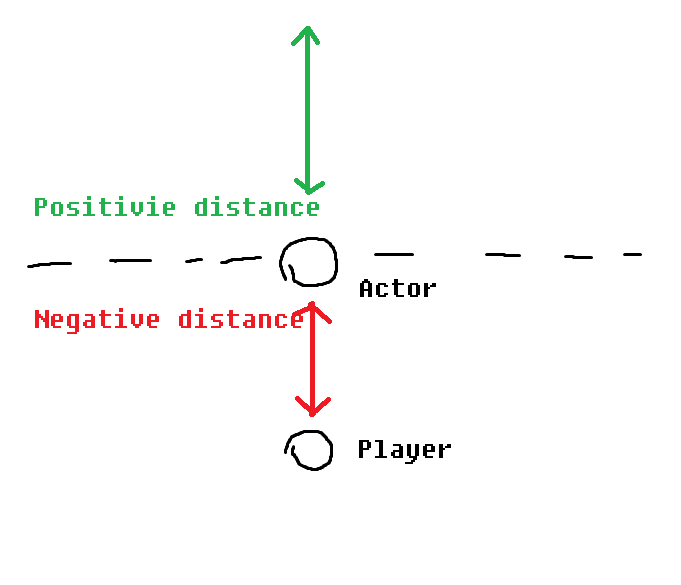
Unreal Engine Forums
I am trying to get a distance to an actor in the world. The problem is that the value is always positive. If the player is getting closer to the actor I want the value to be positive but if the player has passed it I want the value to be negative. This should depend on the world rotation of the object. How to achieve this? EDIT: Ignore the s...
trim matrix
guyz, how can i enable physic on an instance object generated from a BP?
wicked crag
So I’ve made a behavior tree with a lot of tasks. But when I create a child BP of that character BP all of the behaviors are the same. Can I not create child BP’s if there is a behavior tree?
How do I alter the behaviors for the child? I already changed the mesh and Anim BP but the child just slides across the floor
 jovial charm
I have a wave system that spawns enemies every round and increases.
I am having trouble with something,
I want to spawn a special enemy every 5 rounds, how do I find without manually entering: if round =5 spawn. If round=10 spawn etc…
I have infinite number of rounds it would take too long, how would I set up a system that automatically says every 5 rounds spawn enemy?
Many thanks
earnest tangle
use the modulo operator %
it gives you the remainder from a division operation
so for example, 5 % 5 = 0, 10 % 5 = 0, and so on
 shut hinge
adding blend layer to landscape not working in engine keeps crashing soon as it tries to create the file.
true valve
What's the best way to pass data from parent widget to its children widgets?
jovial charm
earnest tangle
use the modulo operator `%`
Uhhh alright, Ill try :)
jovial charm
earnest tangle
use the modulo operator `%`
 earnest tangle
Yep. If you wanted every 5th round, you'd set the second value to 5, and then compare if the result is 0
jovial charm
earnest tangle
Yep. If you wanted every 5th round, you'd set the second value to 5, and then co...
Alright :) ty, sorry if my questions are stupid, and eh.. sorta new.
you compare it with the is equal node?
jovial charm
 earnest tangle
You'd want to compare to 0, but otherwise yeah
jovial charm
tysm <3
 warm shard
Hey everybody. Is anyone here knowledgeable in how to transition map levels in VR? 4.27 MacOS for Oculus.
crystal pebble
Hey guys, I have some general FPS camera movement programmed, but I want to make it to where the player can only move around when a certain trigger box is hit. How would I go about doing that?
Like, I wanna lock the player in place until the trigger is hit
tawdry surge
Disable/enable input to the player from the controller
 mossy mist
anyone have good character movement component settings for third person?
quaint trail
[SM5] /Engine/Generated/Material.ush(2707): fatal error: Too long source line
Is there a way to circumvent this? 13k characters.
 whole coral
Hello everyone
I'm just wondering how can I open/load levels while the characters in it are not loaded in the viewport
I don't accept the method such as hiding using method of set invisible
But I found if I want the character to be unload, the map/level should not be loaded bc they are loaded together
 pine idol
So I've added about 10 AI actors with physics to my level. For some reason the forward thrust just KILLS my FPS, and I have no idea why. Anyone have a clue?

Effect is the same whether or not the last function "Enforce Max Speed" is called
 vale pine
What is a typical use of ChildActorComponent? Nesting actors?
 fiery glen
can blueprints not call .IsValid() on structs? man
foggy escarp
fiery glen
can blueprints not call `.IsValid()` on structs? man
You can make your own macro or function to do it....
Just choose the variable within the structs to do the valid check
fiery glen
foggy escarp
You can make your own macro or function to do it....
Just choose the variable wi...
oh well! we just have a quick C++ function for it
that would work too
weird omission
gentle urchin
Delay/timer yup
 gentle urchin
This should be event driven, not called on tick
Tick is called every frame
Also done in the levelbp...
Should be handled bh the pawn itself
The thirdperson character bp
 drifting fjord
but how do i fix it so i can reset more then once?
gentle urchin
Still I'd suggest moving your logic to a betrer suited location , and checking the health only when needed
-> whenever player takes damage
gentle urchin
Ye


 gentle urchin
You dont need get character either
Since char is self
So just get the health
And check if its less than or equal to 0
Just like you did before
drifting fjord
 gentle urchin
And not custom event , but even AnyDamage or something like that
 prisma snow
guys , I have a strange issue, when pressing the left shift button and holding it, other keyboard events not working, it is just for the shift button, what's going on here?
gentle urchin
drifting fjord
it says not compatible
How are you finding the dmg event then
It is compatible
Just an event + a few variables
prisma snow
prisma snow
guys , I have a strange issue, when pressing the left shift button and holding i...
when I use left CTRL it working but left shift not working! so left shift + jump not working but left CTRL + jumping working , !!
why left shift button not working when we want to press another keys when we holding left shift?
gentle urchin
Show some code
drifting fjord
gentle urchin
Just an event + a few variables
i figured it out thx
 naive python
gentle urchin
Delay/timer yup
naive python
gentle urchin
Delay/timer yup
Can I know which node is responsible for that
 fiery glen
naive python
Can I know which node is responsible for that
fiery glen
naive python
Can I know which node is responsible for that
You can even press D and click to get one faster!
and timers are a little bit more complicated
might want to look up an explainer
 untold mist
Anyone know how to remotely trigger the "on actor begin overlap" event WITHOUT overlapping the actor
untold mist
to trigger the event when its binded somewhere else
gentle urchin
If you need different behaviour than what it provides, i'd suggest using custom function/event/dispatcher instead
untold mist
I know about all that but to avoid over-complicated methods i really just need to trigger the overlap event
untold mist
in the sense i have structure arrays containing actor arrays which each contain arrays of reference to blocking volumes im useing as overlap events. the volumes overlap event is binded in a differant actor. I want to check if im in one of those volumes and if so trigger the event i created for when i would have entered it.
really not looking for a work-around just a way to "remotely trigger the "on actor begin overlap" event WITHOUT overlapping the actor"
maiden wadi
Just make a function. Make the overlap call it. Then you can call the function from elsewhere.
untold mist
the volumes are not in the actor. it has no way of knowing which actor it needs to call
gentle urchin
Sounds like a structure that's about to bite you in the behind 😛 You cant trigger an overlap without an overlap
prisma snow
Holding left shift + W + jump not working , but if I use Left CTRL instead of left shift it working , anyone dont know why?
 gentle urchin
what you show us is not related to jumping at all
prisma snow
if I use any other keys instead of left shift , it work
maiden wadi
Test it in Standalone instead of PIE.
sharp rapids
untold mist
I know about all that but to avoid over-complicated methods i really just need t...
Turn whatever code you have on your 'On Overlap' event into a function, then you can call that function from other places
prisma snow
gentle urchin
what you show us is not related to jumping at all
look , I press left shift button and holding with W to sprinting , then when I press jump button it does not work
untold mist
sharp rapids
Turn whatever code you have on your 'On Overlap' event into a function, then you...
again this wont work with my setup. It HAS to trigger the overlap event remotely
gentle urchin
rip..
prisma snow
maiden wadi
Test it in Standalone instead of PIE.
not work still
sharp rapids
untold mist
again this wont work with my setup. It HAS to trigger the overlap event remotely
I don't see any difference between both 🤔
You call a function when you trigger an overlap
You can call the same function from other places, So instead of Triggering the overlap which then calls the function, you directly call the function
gentle urchin
right, but they are bound to the overlap
the overlap dispatcher
and for some odd reason needs to manually trigger it at some point in time, without there being an actual overlap
which is an... interesting setup to have
prisma snow
when holding Left shift button and press W key to running , then want to jump , did not work , but I change left shift button to other keys like CTRL it working perfect
untold mist
^
prisma snow
why?
gentle urchin
prisma snow
why?
Show some code.
 lofty ravine
can someone help me with my code trying to spawn a dice where ever the pawn is

its just spawning in the playerstart and doesnt move
sharp rapids
untold mist
^
Something like this?
 prisma snow
this is for third person templete of UE4
 prisma snow
gentle urchin
Show some code.
prisma snow
gentle urchin
Show some code.
see
gentle urchin
sharp rapids
Something like this?
It still dont work with the binding
sharp rapids
gentle urchin
and for some odd reason needs to manually trigger it at some point in time, with...
Well, triggering the overlap without actually having an overlap, isn't it just the same as calling some arbitrary function?
gentle urchin
sharp rapids
Well, triggering the overlap without actually having an overlap, isn't it just t...
The problem is BP B is trying to listen to BP A's overlap
not actually calling a function in BP A
but Muffin wants to trigger the overlap when binding up to it for some reason
lofty ravine
gentle urchin
<#221799385611239424>
talking to me?
gentle urchin
lofty ravine
talking to me?
yes
lofty ravine
yeah thats what it seems like it tbh
prisma snow
I think anyone dont know what is going on with left shift button!!
untold mist
gentle urchin
but Muffin wants to trigger the overlap when binding up to it for some reason
algood. found workaround, "set owner" function after binding overlap event. then get owner of volume.
gentle urchin
prisma snow
see
Did you try it in standalone as suggested?
maiden wadi
Be careful with that if you're doing multiplayer.
prisma snow
gentle urchin
Did you try it in standalone as suggested?
yes not work
it work with other keys
you can also test it in you UE4 templete , left shift button not work at all
gentle urchin
4.27 ?
gentle urchin
untold mist
algood. found workaround, "set owner" function after binding overlap event. then...
Soo a workaround was appropriate afterall : D
untold mist
gentle urchin
Soo a workaround was appropriate afterall : D
I would still rather have an actual answer lol but we cant have everything.
gentle urchin
untold mist
I would still rather have an actual answer lol but we cant have everything.
The answer was "No, you cant trigger an overlap without an overlap"
gentle urchin
prisma snow
yes not work
works on my end
prisma snow
gentle urchin
4.27 ?
yes , problem is for UE4.26 , I tested it in standalone UE4.27 and it works
thanks
but why it does not work in 4.26?
gentle urchin
 prisma snow
gentle urchin
prisma snow
gentle urchin
did you test it in 4.27? right?
gentle urchin
ye
prisma snow
so why 4.26 not work?
gentle urchin
How in the world would i know xD
prisma snow
ok thanks
 sharp rapids
gentle urchin
But let me try 4.26
sharp rapids
gentle urchin
But let me try 4.26
you have two versions installed?
How much space do they take up?
gentle urchin
3*
gentle urchin
prisma snow
ok
would you look at that, it still works 😛
sharp rapids
gentle urchin
3*
 prisma snow
gentle urchin
would you look at that, it still works 😛
prisma snow
gentle urchin
would you look at that, it still works 😛
really?
gentle urchin
yep
prisma snow
it does not work for UE4.26 for me , just work for UE4.27
gentle urchin
4.26.2, just to be clear
fiery glen
binary versions aren't that huge, generally like 30gb without extra stuff
gentle urchin
the third is source...
fiery glen
nice to keep around in case marketplace assets need them to be downloaded
 sharp rapids
gentle urchin
4.26 and 4.27, combined
sharp rapids
gentle urchin
4.26 and 4.27, combined
 gentle urchin
fiery glen
nice to keep around in case marketplace assets need them to be downloaded
gentle urchin
fiery glen
nice to keep around in case marketplace assets need them to be downloaded
would be great if there was some lightweight version that could purely do the conversions
gentle urchin
sharp rapids
https://tenor.com/view/yuge-huge-donald-trump-gif-7357158
I hope you never plan on having source around....
 sharp rapids
gentle urchin
sharp rapids
gentle urchin


 scenic flame
would a first person bhop blueprint 'code' work the same way its meant to but in the third person mode instead?
 low birch
scenic flame
would a first person bhop blueprint 'code' work the same way its meant to but in...
low birch
scenic flame
would a first person bhop blueprint 'code' work the same way its meant to but in...
Bhopping isn't tied to camera so yes it should work.
There are different bhops though. Something like Counter Strike bhopping was achieved because of air acceleration. So everytime you jumped and were on your way down your speed increased past your base movement speed.
While Minecraft was just a movement speed increase through editing code.
If you are looking to simulate Counter Strikes surfing then you may find a bit of an issue with smooth movement as surfing required first person camera=>rig control to make smooth turns.
scenic flame
low birch
Bhopping isn't tied to camera so yes it should work.
There are different bhops ...
oh ok thanks
low birch
@whole coral please do not spam. If you need help just post your question and if someone is able to assist you then they will. But spamming the channel will most likely result in no one answering. So what's the issue you're having?
whole coral
I would like to open/load levels while the characters are not loaded
I know open level
but it directly load all actors/characters
I don't want the characters and their animations to be loaded
it is aimed to reduce memory
The destroy method is not allowed bc I will load it after I press 2
low birch
Are you trying to preload a level so you can transition to it later without much loading time?
To be honest I'm not too sure what you are trying to achieve. I may need some more explanation as to what and why you want to do it.
whole coral
ok
I explain again
First of all, after press play I will have an empty level
Next I press keyboard 1
the next level shows
but the characters and their animations are not shown
and of course they are not loaded or hidden bc I need to reduce memory
that's what I ask
afterwards I press 2
the characters and their movement/animations are shown
in the vieewport
now I have tried open level/ load stream level
they both failed
low birch
Okay. so let me get this straight.
You want to: Load a blank level and when you press a certain input (1, 2, 3, etc) it switches to another level without any characters inside.
So you are trying to cycle levels on the screen. Effectively trying to show a client a selection of levels.
Is that right?
Like a level selector? You don't actually want to play inside those levels you just want to show them on the screen.
whole coral
The another level contains the characters but I do not want them to be showed in the first time
I wanna press some key to let them be shown
whole coral
low birch
Like a level selector? You don't actually want to play inside those levels you j...
yes I dont wanna play inside
I just wanna show them on screen
low birch
Mmm. To be honest I'm not entirely sure what your vision is but I would suggest investing sometime into checking out Widgets and looking into a Level selector. Tutorials and docs may only show a small photo of a level you want to display, but you can always change the sizing. That's probably the best direction I can point you in.
whole coral
my vision is the entire viewport
low birch
Yeah, so you could definitely change the size within a widget to fill the viewport.
whole coral
for example, I will use the thirdperson example map
low birch
Do you want a camera to move around this viewport or is it static? (Like a photo)
whole coral
no
low birch
So like a photo/picture yes?
low birch
Mhm. So what I'm trying to figure out is what you are wanting to do with this level.
What is the purpose? Is it just to look at? Or are you doing something inside of it?
If you just want to look at it and not interact with it then Widget Level Selector.
If you want to do something within it then use the Open Level BP that you mentioned before and change the Player Controls within that map so you cannot control the characters.
gentle urchin
like cs does it ?
fiery glen
like some kind of preview thing?
whole coral
let the characters come in and out
gentle urchin
you're explaining this sorta weirdly tbh
got any games that does what you wanna do?
whole coral
they are not games
low birch
whole coral
they are not games
Oh okay. Any examples you can reference for us?
gentle urchin
got any reference material that has similar behaviour as you desire?
whole coral
I just wanna practice the switch of characters come in and out
gentle urchin
To aid you in this, we need some reference to what you want
your description is conflicting....
low birch
I may know what you are looking for. Just give me a moment to draw it up.
whole coral
I am in a project
gentle urchin
^ tells us nothing
gentle urchin
if i were to guess it almost sounds like a catwalk thing 😛
whole coral
I wanna load the level
low birch
@whole coral
Whatever blueprint you are using:
[ Input 1 -> Open Level ]
Inside your new level go to the World Settings and change the Player Controller Class so you cannot control the characters.


I believe this is the start of what you want. Within that level you will need to setup a camera for however you want it to be so you can view the level you switched to.
And if you want to switch to a new level then you will have to add that logic in aswell.
But I believe this is what you are looking for, or atleast the very basics of it.
Best of luck my friend. I am a simple man.
whole coral
after that
how do I open another level without showing the characters
open level shows everything
you dont even help me anything and just tell me I havent explained clearly
I explain very clearly
I wanna open/load a level while the characters in the new level are not shown
More specifically, the memory taken by the characters are not used
and you just ask for examples, saying it weird
whether I control the characters are not important
you all just skip my question
I have told you I am enrolled in a project
and it is one of the functionalities
I need to fulfill
if anyone can give me useful suggestion, I will pay him/her
just give me paypal link
bc I am a newbie
I just ask for help
but now I found more people here are more unfamiliar
gentle urchin
Its hard to help without the proper context or a clear example of the intended result
what does "open level while characters are not shown" mean
whole coral
I have told you the exact example
whole coral
if you open a level
whole coral
the characters in the new level will be shown
gentle urchin
you must not pre-place the characters in the level
you must load them dynamically, when needed
whole coral
but I want them to be unshown
whole coral
gentle urchin
you must load them dynamically, when needed
yes
gentle urchin
You can use extremely lightweight temporary actors for them instead
which points to the actor to be spawned
with a soft reference
whole coral
but how to dynamically load
open level does everything
if I load the scene such as walls
the characters are loaded at the same time
I cannot stop it being loaded
gentle urchin
They load because you've placed them in the level
gentle urchin
so the level will load/spawn all pre-placed actors automatically
whole coral
so thats what i wanna solve
gentle urchin
Instead of placing the Actors you can use placeholders
which basically just need its own transform for the location to spawn, and a soft ref to the actor you want there
Then you also need some logic to handle the spawning at the appropriate time
whole coral
gentle urchin
which basically just need its own transform for the location to spawn, and a sof...
how do I know the original position
if I remove
gentle urchin
I could suggest making a blutility for it
whole coral
the information of position is not known
whole coral
you mean I will remove it before the game starts
gentle urchin
