#blueprint
402296 messages · Page 805 of 403
 chilly swallow
chilly swallow
chilly swallow
Somehow I feel like generating the BP_Items as Child Actor Components is not the way to do it. Seemingly this leaves all the variables on the BP_Items components uneditable (maybe because changing the variables in the details pane re-runs the construction script, which then clears them and sets them back to default?). I'm also having to do kooky things to get the variables of the child actor components available to the BP_DisplayCase and then one step further to get them available to the editor for edit - basically having to duplicate the variables in the main Blueprint. I'm tearing my hair out trying to understand how best to set up this system in a smart way. Is it easier/best practice to just have the BP_DisplayCase spawn the BP_Items as individual actors? Or should I be using ActorComponents? Or SceneComponents? Or something else entirely?
 odd ember
generally you never want child actor components
but I don't really know what you're doing
because I can't see your code
 tidal marlin
Hello.
Why when i open new level the HDR Gistogram open as a default show?


 little escarp
Yea I fixed it. My weapon switching is solid. I can sleep now. But maybe…
chilly swallow
Construction script for DisplayCase:

When I create an instance, the variables show up in the editor
 odd ember
what you can do is spawn actors at runtime and pass parameters to them
that's the easiest way
expose the spawn parameters to the detail panel
then use them to spawn on beginplay
chilly swallow
yeah so this child actor component thing is just a terrible approach?
chilly swallow
so what's their use case?
odd ember
it's buggy and heavy on performance
chilly swallow
I thought it would be handy to have all of these individual items be inside the container of the displaycase
I was wrong
so then I could just e.g. drag around the displaycase and all the items would move around together in this box
odd ember
also I would see if you could expose the FName variable as is on the detail panel. if you have a static data table, then you actually get a combobox for your FName on the GetTableRow node
chilly swallow
odd ember
also I would see if you could expose the FName variable as is on the detail pane...
Oh what do you mean? Yeah I went with the enum as a janky workaround but i really couldn't figure out the best way to do the key on the data table rows
odd ember
there's also nothing wrong with setting up pre parameterized subclasses from your classes
chilly swallow
It seems redundant to have an enum that gives you unique item IDs but then you can't set the first column on that data table to be that enum
odd ember
the first column remains an FName, but if you remove the wires from the pin you should see a combobox showing the FNames of all the options within the datatable as a drop down
chilly swallow
odd ember
the first column remains an FName, but if you remove the wires from the pin you ...
okay I'll try it out. Thanks for the hint
chilly swallow
odd ember
there's also nothing wrong with setting up pre parameterized subclasses from you...
so when you say classes, are you saying I don't make these BP objects but classes instead?
I think I need to learn the distinction there
odd ember
basically you can have a subclass where the only thing you do is setup parameters exposed from the parent class
so all you modify is data
chilly swallow
ah okay so I do it the other way around
chilly swallow
so I would make the BP_Item into an Item class, and then set up a subclass for it that spawns a bunch of them from an array and sets their parameters?
 normal adder
Brilliant, thank you for the help!
odd ember
chilly swallow
so I would make the BP_Item into an Item class, and then set up a subclass for i...
you can do that, or you could just have it spawn something from a class where that is already setup
that class exists as a separate asset in the content browser
chilly swallow
so the structure would still be to have a BP_Item and a BP_DisplayCase but then to use the DisplayCase as the item spawner? I don't really understand
odd ember
you could have that yeah
chilly swallow
🥲
odd ember
and then just instead of setting up all the spawning and parameters at runtime and having to deal with the details panel
chilly swallow
I'd like to understand the approach you're suggesting, because it's probably ... better
odd ember
have a few actor assets in the content browser that inherit from BP_Item and have their parameters preset
chilly swallow
ah okay I see. So if I had different product variants, I'd make them all different subclasses inheriting from BP_Item
But I guess that wouldn't be as streamable/on-the-fly. I'd have to set up a subclass for every item variant
odd ember
@maiden wadi probably has something here about how DataAssets would be the correct way of doing things, but even just as actors you'd be fine
chilly swallow
rather than e.g. pulling it from a data table at runtime
odd ember
sure but in the end you're dealing with a finite amount of elements
chilly swallow
right. In this case
odd ember
and data tables are static data too
chilly swallow
but at some point, that may be 10000 different variants
ah so you're saying I can dynamically generate the subclasses?
odd ember
then have the subclass perhaps generate randomized values
chilly swallow
chilly swallow
so then I could just e.g. drag around the displaycase and all the items would mo...
So if going with one of these approaches, how would I then make all of these spawned actors part of a group that moves around inside a box together, so I can drag the whole display case around and position it in the editor?
odd ember
spawn actors inside of the display case, attach actor to the displaycase
odd ember
I think spawning the actors has to happen at runtime
chilly swallow
so instead of adding child component, I just spawn actor and it's more or less the same, but operating differently
odd ember
so it's off limits for construction script
chilly swallow
odd ember
I think spawning the actors has to happen at runtime
hm damn. So then I wouldn't know what the display case looks like before it gets into the game?
odd ember
however that doesn't prevent you from having the locations for their spawn as scene components inside the displaycase
chilly swallow
odd ember
however that doesn't prevent you from having the locations for their spawn as sc...
Right. Another question here. Is it better to make the spawn locations scene components or just an array of transforms as I've done in the example I sent?
odd ember
depends on your approach. I'd say scene components are easier to manage. but if you have a large amount of data then an array of transforms might be better
chilly swallow
okay. So no obvious performance benefits or otherwise?
Seemingly the Scene Components can be dragged around and manually edited after construction. The array I might have to clear again each time it's constructed
@odd ember thanks a bundle! Super helpful to get some pointers and at least a new approach to try
 plucky harness
i have a UMG combobox and i get a string out of it as value, how do i convert it to enum?
chilly swallow
🍕
odd ember
chilly swallow
okay. So no obvious performance benefits or otherwise?
nothing really that matters
chilly swallow
odd ember
however that doesn't prevent you from having the locations for their spawn as sc...
oh one question - is this a good use for an ActorComponent?
Then you combine the SceneComponent and the BP_Item?
odd ember
chilly swallow
oh one question - is this a good use for an ActorComponent?
actor components don't exist in world
so you need a scene component to get the transform
chilly swallow
oh really? So what are they used for?
odd ember
abstract logic
things that don't need a world
a health component for instance is common
chilly swallow
okay. Weirdly confusing name then
odd ember
🤷
chilly swallow

 outer pewter
guys how can i get the players location when he died and then transform it to a transform variable and then add a bit to it so the player will be able to spawn a few meters ahead
outer pewter
i know how to say it but i dont know the blueprint set up for it or how to link them all
i link the spawn point to this variable but idk how to make this variable equal teh players death location plus move it forward a bit

 gentle urchin

you've already casted
cast fails if object is not valid
thus
it is valid
if success
Castin AND isvalid is sort of wasted
you'd just use the regular cast then
instead of pure cast
So.. use the regular cast? 😄
 boreal marsh
is it possible to create an event for tiles on a tile map? For example when a mouse is hovered over a tile?
gentle urchin
Also.. Wouldnt it make sense here to have the aim transform as an input to the function/actor/event that spawns the projectile?
 graceful forum
Is it possible to debug blueprint utility widgets?
gentle urchin
the dual cast also doesnt make much sense to me
why cast to pawn and MyCharacter?
surely character is a pawn?
pawn might not be a character, but its not treated differently in this case
 zealous fog
Is there a more effective way to do something like this?

 icy dragon
zealous fog
Is there a more effective way to do something like this?
icy dragon
zealous fog
Is there a more effective way to do something like this?
Switches.
zealous fog
Yeah I was looking at switch on int but then the attack percentages are equal
gentle urchin
if only there was a case
 proud hedge
Hey quick question does anyone know how to get the Vector position of a bone in an anim blueprint?
gentle urchin
zealous fog
Yeah I was looking at switch on int but then the attack percentages are equal

Not as cool as i like them but it works
More generic
 zealous fog
Thank you! But thats basically the same thing as I made right but in a macro right? (I realise now I didnt need the third branch)
It will clean up the code thats for sure
gentle urchin
Yes, it is
Im confused. How does that change anything?

You'd swap the CastToPawn with your very own CastToMyCharacter, and fetch the transform
 winged thicket
so i was trying to make a blueprint using blueprint in ue4
but when i hold left mouse button i lose capture or focus or something like that and i cant get mouse position or hover events
so how can i.. fix this? or atleast workaround it
 gentle urchin
Im confused. How does that change anything?
gentle urchin
gentle urchin
Im confused. How does that change anything?
would surely have your custom transform instead of actor transform,
 gentle urchin
winged thicket
so i was trying to make a blueprint using blueprint in ue4
but when i hold left ...
gentle urchin
winged thicket
so i was trying to make a blueprint using blueprint in ue4
but when i hold left ...
probably easiest to do this with drag and drop operation ?
 maiden wadi
winged thicket
so i was trying to make a blueprint using blueprint in ue4
but when i hold left ...
maiden wadi
winged thicket
so i was trying to make a blueprint using blueprint in ue4
but when i hold left ...
That is not exactly beginner level. Don't have a ton of time, but in short if you want to try looking some things up, check out DragDropOperations. You're looking to basically create a Pin UserWidget. It needs to have OnPaint overridden and used to draw your lines. You can create a new Pin widget and pass it to the DragDropOperation's Drag visual to draw a line between the widget you were dragging from to the visual widget at mouse. OnDrop, link up the original dragged widget with the dropped on and start drawing lines there.
You can pretty much make the whole system with one single UUserWidget for the pin.
gentle urchin
The pin would just work as an interface between widget A and widget B, with some functionality to bind up a delegate , i think
winged thicket
maiden wadi
That is not exactly beginner level. Don't have a ton of time, but in short if yo...
..
is there a way to just make the hover event work when holding left click?
cant i reset focus or something like that
maiden wadi
Not without complicating the system further and relying on other classes.
 humble vine
I'm using FindLookAtRotation and it is lerping over time. However if my actor that the node is rotating moves to pass the target actor's up vector from one side to another (basically in relation to target passing from Y to -Y space), my actor flips. Any ideas how can I fix this? If I track dot product of the target's up vector and moving actors forward vector, it changes positive-negative at this point. I can do select rotator based on this but I can't seem to figure what would be the correct math to flip point back to the original direction after the actor has moved from one side to another
winged thicket
ok with the system i have here
what do i do?
the only thing i need is to make the hover event work so i can know if player's mouse is on the event or not
 remote meteor
isnt mouse enter the hover event 🤔
winged thicket
every event that has something to do with mouse doesnt work
while holding left click
remote meteor
its umg we are talking about right?
winged thicket
remote meteor
its umg we are talking about right?
uhh.. what does umg stand for?😅
gentle urchin
unreal motion graphics iirc
remote meteor
basically blueprint widgets
winged thicket
yes
gentle urchin
Looks like it could work. I'd suggest giving yourself something more to go on when you print failed tho ^^ Like inluding ActorName, and/or function name can help alot when troubleshooting alot of things
 topaz plover
Hi there, I have a bunch of BPs that need to be set up in order:
game instance: loads from game save

player state: copies from game save

game state: does stuff

pitch: builds self from game state

barriers: position themselves based on pitch dimensions

ball: spawns once barriers are ready
where would you put all this logic? would you call a function from one to the next in order? what do ya recommend?
i realised I can't call a "get ready!" method in the player state from the game instance - would you set this chain up in player controller maybe?
gentle urchin
you'd probably want the class executing, not any of the involved classes
so just "get display name" from "self" has atleast gotten you the class who's doing the shenanigans
remote meteor
winged thicket
so i was trying to make a blueprint using blueprint in ue4
but when i hold left ...
did you use a button for mouse click?
gentle urchin
self, as in the ability class ^^ not the owner of the ability
Anyways, no need when its working i suppose 😛
remote meteor
as in when you are holding the left mouse button, is it on a button widget
gentle urchin

Sometimes it's overkill to do this. But in large functions with many possible return or exit paths, it's helpfull to know where it failed.
The more descriptive your print is in such case, the easier it is to track
 cold sigil
Would someone knowledgeable be willing to let me pick their brain for a few and maybe help me out with creating some consumables and being able to use them from inventory? Im still new to UE and gamedev so any help would be appreciated tbh
winged thicket
remote meteor
as in when you are holding the left mouse button, is it on a button widget
yep
gentle urchin
Yes, append combines several strings. 🙂
gentle urchin
cold sigil
Would someone knowledgeable be willing to let me pick their brain for a few and ...
Remove from inventory -> Spawn Actor -> Execute its "OnUsed" function ? 🙂
 faint pasture
cold sigil
Would someone knowledgeable be willing to let me pick their brain for a few and ...
faint pasture
cold sigil
Would someone knowledgeable be willing to let me pick their brain for a few and ...
Depends on your item system but you'll either have a Use function which takes an item object/struct or an on use event for the item actor. Really depends on your architecture.
gentle urchin
Yeah there's like a million ways to do this
faint pasture
@cold sigil What IS a stored item in your system?
gentle urchin
and complexity depends on the requirements of the system
faint pasture
The simplest system would probably be
A stored item is a struct with a field for an actor class.
The base actor class has a Use event.
Subclasses implement the event.
Eating an apple would look like
Read struct, spawn actor from class Item_Apple.
Remove struct from inventory
Call Use on the spawned Item_Apple
Item_Apple's Use event applies -10 DMG to user
Sorry, im trying to get screenshots and put the system into words. Im such a noob 🤦♂️ lmao
 spark steppe
ideally the struct would just include the information of the applied effects
10 dmg from an apple. ffs
gentle urchin
-10 😄
faint pasture
spark steppe
ideally the struct would just include the information of the applied effects
Yes that would be the efficient way but it's depend on your system. It'd be hard to do really complex on use effects. Really depends on what you're trying to do.
spark steppe
nvm 😄
gentle urchin
including applied effects, you'd still want to spawn an actor for handling it tho wouldnt you
spark steppe
depends on how you implement all the things
gentle urchin
gives a lot more flexibility to what it can do, and how it does it
faint pasture
gentle urchin
including applied effects, you'd still want to spawn an actor for handling it th...
Nah not in a good/efficient system. You'd do it GAS style
spark steppe
you can have it either on the character, e.g. consume item from a struct, or handle it on the object (apple/fooditem) itself
faint pasture
But this guy's new, data driven gameplay is a bit advanced.
gentle urchin
faint pasture
Nah not in a good/efficient system. You'd do it GAS style
Sure, but that's still essentially spawning an actor to execute. Multiple even
faint pasture
gentle urchin
Sure, but that's still essentially spawning an actor to execute. Multiple even
No in GAS the execution is handled in the system. No actor spawning.
gentle urchin
So when you have an effect with an emitter, no spawn has taken place?
cold sigil
would one of you be willing to talk with me via DM? i gotta go afk for about 20 mins and ill be back. I gotta run the fam to school real fast but i really would appreciate going into this so i can gain some understanding
spark steppe
if you just started use adriel's suggestion, it works fine and you can apply that knowledge later on to other things
faint pasture
gentle urchin
So when you have an effect with an emitter, no spawn has taken place?
Particle effects don't require an actor.
 rose elbow
Will I be able to make a blueprint that places an image at the mouse cursors location? I know you can just use software cursors but that isn't working correctly for what I want to do
faint pasture
cold sigil
would one of you be willing to talk with me via DM? i gotta go afk for about 20 ...
I just laid out what you'd need for a simple system. If you don't already have a simple inventory system that handles moving items around then you need to back up and start there.
cold sigil
i have a spatial inventory system. Ill start with what you initially suggested and if i need some additional help ill come back
gentle urchin
faint pasture
Particle effects don't require an actor.
 rose elbow
faint pasture
I just laid out what you'd need for a simple system. If you don't already have a...
rose elbow
faint pasture
I just laid out what you'd need for a simple system. If you don't already have a...
search up Ryan Laley shopkeeper series he has an inventory system in there
faint pasture
rose elbow
Will I be able to make a blueprint that places an image at the mouse cursors loc...
You can do that in the HUD pretty easily.
cold sigil
thats what i tried, and got stuck
faint pasture
gentle urchin
You can spawn them with an actor but don't need to.
rose elbow
faint pasture
You can do that in the HUD pretty easily.
as in the default HUD BP?
faint pasture
cold sigil
i have a spatial inventory system. Ill start with what you initially suggested a...
Did you build that system or are you copying or implementing something someone else made? Make sure you understand the system inside and out before trying to extend it.
rose elbow
thats a C++ class 😦
faint pasture
rose elbow
as in the default HUD BP?
Nah you can make a BP HUD class
cold sigil
gotta run and take the littles to school, thanks for the help. ill be back in the chat here in a few minutes. I used a template from "Reids Channel" (https://www.youtube.com/watch?v=sWSECrtUu_g&t=1264s)

Support the channel through donations. Crypto accepted!
PayPal: https://paypal.me/reidschannel?locale.x=en_US
Patreon: https://www.patreon.com/reidschannel
Bitcoin: 1JFwWHr4X6uAeoZadukzqKjzFBj3Qjy7Sk
Ethereum: 0x2B2Bc108F1Cc0fF899959dEF3226637787d8C3dE
Dogecoin: DNQ33YnhpWoTBokBNVkZP5ub8KTLkpyjpv
Join our community discord!
Discord: https://dis...
rose elbow
faint pasture
Nah you can make a BP HUD class
would I do it with a widget BP?
faint pasture
rose elbow
would I do it with a widget BP?
Depends on what you're trying to accomplish.
rose elbow
faint pasture
Depends on what you're trying to accomplish.
just want the image to go to the mouse cursors location
faint pasture
In world space, in screen space, aligned to the XY plane, not aligned to anything, what?
rose elbow
wasn't sure if I could do that solely in a widget bp or a mix
rose elbow
faint pasture
In world space, in screen space, aligned to the XY plane, not aligned to anythin...
in screen space and just the xy plane its a 2.5d game
faint pasture
You can just draw an image in HUD, look at how the 1st person template does it.
You can prolly do it with a widget too
faint pasture
1st person template crosshair
rose elbow
that doesn't move the image to the mouse location does it? it moves the entire characters rotation
faint pasture
rose elbow
that doesn't move the image to the mouse location does it? it moves the entire c...
It still draws an image at a specific point on screen. It's up to you to get the mouse location and translate it to screen location
Can't you just override the cursor though, that would be a lot simpler
rose elbow
faint pasture
It still draws an image at a specific point on screen. It's up to you to get the...
ah well that first part is pretty straight forward
rose elbow
faint pasture
Can't you just override the cursor though, that would be a lot simpler
Yes but I ran into an issue with that no one seemed to be able to help me fix
I used a software cursor but it was weird af
faint pasture
That doesn't exactly describe the error but you do you
rose elbow
faint pasture
That doesn't exactly describe the error but you do you
I didn't want to get into it but I can if you want
rose elbow
faint pasture
That doesn't exactly describe the error but you do you
Hey guys so I'm running into a really weird issue with my project now. As you can see in the video below when I initially hold left click everything works fine. The line trace shoots off towards the mouse cursor (albeit a bit of axis). But for some reason after the first time doing I then have to double click to get the line trace to start working and when I hold left mouse the cursor then disappears and is locked in place. I have showcased the code I am using and the fact that I have set the input mode to game only to show mouse cursor in event begin play and this isn't changed with any code throughout the rest of the project. https://streamable.com/a4hq30

I just thought of a potential fix
 unique wasp
I'm confused by execution order of pure functions in Blueprints. I read in documentation: "a Pure Function will be called one time for each node it is connected to." I interpret that as that in this case, GetHitResultUnderCursor is called twice, since it's connected to two different impure nodes. Is that correct? Does that mean I should avoid connecting pure functions that cost a lot of performance to several impure nodes? (or just not make expensive calculations pure functions)
 winged thicket
so i was trying to make a blueprint using blueprint in ue4
but when i hold left mouse button i lose capture or focus or something like that and i cant get mouse position or hover events
so how can i.. fix this? or atleast workaround it

i just need to know if the mouse is hovering over seq_1 button
icy dragon
winged thicket
so i was trying to make a blueprint using blueprint in ue4
but when i hold left ...
...what the fuck is this BP?
boreal marsh
what is the world space boolean for? returning a tile location in world space?
 icy dragon
boreal marsh
what is the world space boolean for? returning a tile location in world space?
icy dragon
boreal marsh
what is the world space boolean for? returning a tile location in world space?
Paper2D?
boreal marsh
icy dragon
Paper2D?
yeah
rose elbow
so if I have the code like this the line trace shoots out but it doesn't go to the exact location of the mouse cursor whereas if I include the x axis it is exactly accurate. The only issue being that I don't want the line trace to move behind the character as it does when I include the x axis as it is a 2.5D game. Anyone got any ideas on how I can fix this?
 winged thicket
icy dragon
...what the fuck is this BP?
winged thicket
icy dragon
...what the fuck is this BP?
this is the bp i made xd
faint pasture
@rose elbow What X is that world space node returning BTW?
I don't use that node so how does it know the depth?
rose elbow
faint pasture
<@321662188995608586> What X is that world space node returning BTW?
what C?
faint pasture
X rather
Instead I do a line plane intersection just using camera location, mouse direction, and a plane through origin.
rose elbow
faint pasture
X rather
I actually don't know but for some reason its really far behind my character
faint pasture
I'm doing something very similar but top down. If there's no way to define the plane to project the mouse to, use my system.
You should be generating an AimPosition per frame then using that later to drive aiming.
rose elbow
faint pasture
I'm doing something very similar but top down. If there's no way to define the p...
could you share it?
faint pasture
I just did. Line plane intersection
The line is camera position + mouse direction x somebignumber like 2 x cameraposition.X
 astral estuary
This ain't working, am I missing something? It is meant to do this:
        n1 = texture2D(base_map,   uv).xyz*vec3( 2,  2, 2) + vec3(-1, -1,  0);
        n2 = texture2D(detail_map, uv).xyz*vec3(-2, -2, 2) + vec3( 1,  1, -1);
        n  = n1*dot(n1, n2)/n1.z - n2;
        color = n*0.5 + 0.5;
 faint pasture
Plane is at 0,0,0 and your plane normal would be 1,0,0
astral estuary
this is supposed to add two normal maps... and what you said sounds like it should make a lot of sense but I don't understand what you mean 😰
winged thicket
i have a problem where when i hold left mouse button is hovering/hover event doesnt work
 tawdry surge
They have a built in node for combining normals
winged thicket
i just want to know if the mouse is hovering above something
tawdry surge
Did you turn on hovering events in the player controller?
winged thicket
tawdry surge
Did you turn on hovering events in the player controller?
its working if i wasnt holding left click so ig yes?
tawdry surge
Pry switches from a hovering event to a click event while clicking
astral estuary
found my problem combining normals:
the texture sampler for normals in unreal by default makes them between -1 and 1. For my code to work I need to turn them back to 0 to 1
winged thicket
tawdry surge
Pry switches from a hovering event to a click event while clicking
wdym, i cant.. click if im holding left click xd?
boreal marsh
What is X and Y in this. The cords for in the tile map or world position?
 tawdry surge
I mean by clicking you aren't hovering anymore you're clicking. Try turning click events off and see if it works
winged thicket
tawdry surge
I mean by clicking you aren't hovering anymore you're clicking. Try turning clic...
i dont understand
i need the player to hold a button and hover above something
tawdry surge
The input event "left mouse button" will still work, it's the built in event call "on click" you want to disable from the player controller
winged thicket
tawdry surge
The input event "left mouse button" will still work, it's the built in event cal...
ok how do i do that?
odd ember
boreal marsh
What is X and Y in this. The cords for in the tile map or world position?
perhaps ask in #paper-2d
boreal marsh
ok
tawdry surge
Open the player controller and its a box in the details panel
odd ember
gentle urchin
Target is Tile component, so the coords are in its local space
it's probably screen space but I don't know how paper 2D works. I don't want to make assumptions
because assumptions are dangerous 🔪
odd ember
🔪 danger zone 🗡️
gentle urchin
true , it has more than once bitten me in the ass
odd ember
anyway screenspace resolution is the only place I've seen ints being used instead of floats
but what do I know
gentle urchin
I believe the tilemap just contains an array of tiles, and the XY input is basicly converted to an index
used it many moons ago
odd ember
could be as well

 boreal marsh
gentle urchin
Target is Tile component, so the coords are in its local space
boreal marsh
gentle urchin
Target is Tile component, so the coords are in its local space
oh ok. Also that Y value makes it more confusing as the tile map uses X and Z
 odd ember
but it has x, y, and layers
boreal marsh
odd ember
but it has x, y, and layers
^
odd ember
I suppose they look at it from a sidescroller perspective
winged thicket
tawdry surge
The input event "left mouse button" will still work, it's the built in event cal...
i cant find it
 onyx marsh
is there a good video explaining blueprints
boreal marsh
i also wish layers can be more easier to understanding. Layer 0 starts from the top then the bottom
onyx marsh
thank you
odd ember
boreal marsh
i also wish layers can be more easier to understanding. Layer 0 starts from the ...
well if it's meant to be a sidescroller perspective, then top would be the most forward
boreal marsh
odd ember
well if it's meant to be a sidescroller perspective, then top would be the most ...
true
gentle urchin
Layer 2 is above layer 1 ? is that not expected
 odd ember
🤷
onyx marsh
odd ember
learn.unrealengine.com
is this made officialy by epic games?
odd ember
onyx marsh
is this made officialy by epic games?
yes
or I would think so
read the fine print
outer pewter
how can i send the info of a transform variable to another transform variable ?
boreal marsh
gentle urchin
Layer 2 is above layer 1 ? is that not expected
the thing is its starts from the top down
layer 2 is layer 0
according to get Tile
gentle urchin
boreal marsh
according to get Tile
Interesting.
 glossy bane
Can someone clear up some confusion regarding the behind the scenes of event dispatchers, is it correct to assume that calling an event dispatcher will call absolutely all other actors in the level, looking for the ones that have the bindings?
gentle urchin
I would think the dispatcher keeps an internal list of who wants to listen to it
"caling" everyone sounds wastefull
glossy bane
gentle urchin
"caling" everyone sounds wastefull
Is exactly what I'm thinking aswell but I cant find any concrete info, like how would it have that internal list of who is listening without iterating trough all actors to see in the first place?
gentle urchin
thats the "bind" part
glossy bane
So every actor that creates the binding is essentially added to an internal list of subscribers, so when the call does come its only those that get called
gentle urchin
both singular and clearing all bindings
odd ember
glossy bane
right so its literally the observer pattern
well yeah. you could have started with that
glossy bane
yeah I was just unsure how unreal handles it and wanted to make sure I was on the right page
glossy bane
I understand that clears it up
 stiff raptor
I want to change the value of an element of an array. Which node to use?
gentle urchin
SetArrayElement
boreal marsh
Is there any better way to getting a tile in tile map then this?

The tile map will always be at 0,0 in world space
stiff raptor
boreal marsh
Is there any better way to getting a tile in tile map then this?
I don't think there it. But it is a function so you don't need to worry too much
gentle urchin
It can atleast easily be optimized later if it is a problem. It being a function by itself doesnt mean its nothing to worry about imo 😛
 ember oracle
Hey, anyone know why the linetrace doesnt always hit the center of the screen? https://i.imgur.com/tVip65t.png
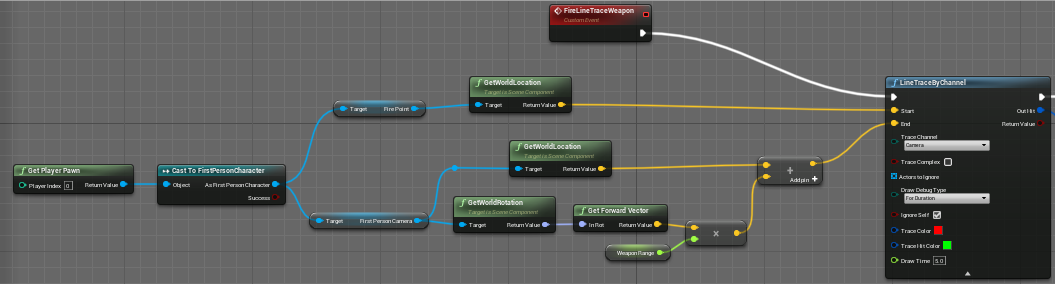
 winged thicket
ember oracle
https://i.imgur.com/a1UX6Pn.png
winged thicket
ember oracle
https://i.imgur.com/a1UX6Pn.png
you need to set "start" to the camera location
and not to the weapon
stiff raptor
use "ConvertMouseLocationToWorldSpace"
ember oracle
winged thicket
you need to set "start" to the camera location
I tried that but it still isn't centred on the crosshair
this is the closest i managed to get
winged thicket
can you show me what happens when you set it to camera location
ember oracle
You mean like this, right? https://i.imgur.com/rTR8AH0.png
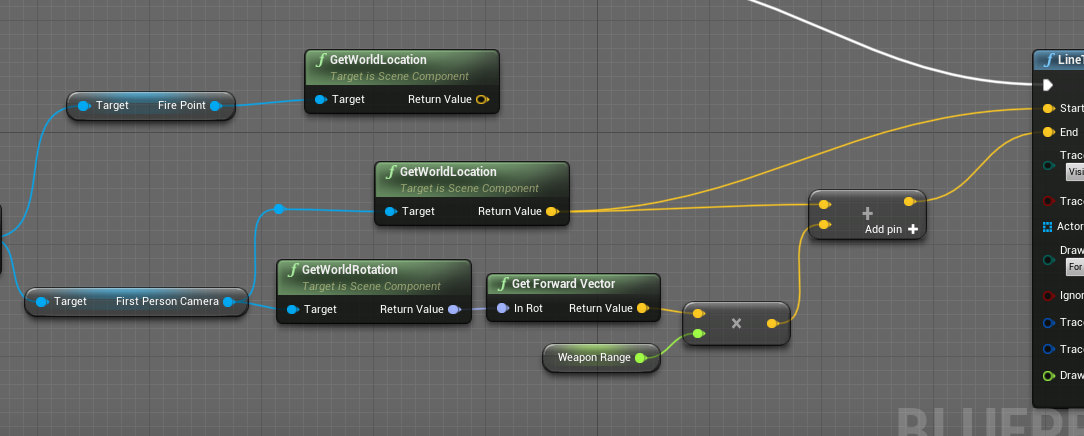 stiff raptor
if I use "make array" will it create a blank array?
ember oracle
it goes this high instead https://i.imgur.com/7gl5VZ9.png
 stiff raptor
first person camera location is different I believe
winged thicket
uhh.. its bcs the default hud is a bit down xd
try making a new widget and you'll see
maiden wadi
@ember oracle Your issue is that you need two traces.
ember oracle
winged thicket
uhh.. its bcs the default hud is a bit down xd
try making a new widget and you'l...
Just tried that and its still off centred 😦
ember oracle
maiden wadi
<@!245250135175593984> Your issue is that you need two traces.
What do you mean?
maiden wadi
When you try to shoot from a gun that is not the center of camera, but want to shoot what is the center of camera, you require two traces. The first is from center of camera straight forward. It should start from the camera, and end straight in front of the camera. The second trace should use the first trace's hit result if there was a blocking hit, or it's end point if there was not. Then do a second trace from your shooting point to that newfound vector.
ember oracle
ooooh okay! I'll give that a try thank you
winged thicket
maiden wadi
When you try to shoot from a gun that is not the center of camera, but want to s...
isnt that if you want the bullets to come from your gun?
i mean if the first trace impact location was wrong then wouldnt the second one also be wrong?
remote meteor
you want to get where is your center of the screen pointing at first
then only you trace from your muzzle to that point
winged thicket
ya, that if you want the bullets to come from your gun
but if the first point is wrong so would be the other one aswell
remote meteor
🤔 why would the first point be wrong
winged thicket
yo authaer are you here?
maiden wadi
Nope.
winged thicket
whats the diff if you make a second trace
it will end in the same point but from his gun
odd ember
winged thicket
whats the diff if you make a second trace
it will end in the same point but from...
not necessarily?
maiden wadi
It's entirely possible his crosshair could be off center. But you still require two traces for an accurate weapon shot.
remote meteor
because duh?
 maiden wadi
If you have a weapon held at the hip, and you shoot, but your view is a foot and a half higher, and you trace in the same direction as the view, you'll never hit the center of view.
winged thicket
maiden wadi
It's entirely possible his crosshair could be off center. But you still require ...
if you want to shot from your gun to that point
the problem that first trace isnt working from the start
odd ember
branch on false
ember oracle
OH WOW
odd ember
 winged thicket
was the problem from the crosshair?
maiden wadi
Also another easy way to make crosshairs is to make a Userwidget. Add it to viewport and change it's anchors and offsets by 0.5.
winged thicket
that what i was saying from the start!
maiden wadi
Much prettier than HUD's drawing.
remote meteor
and you can recoil move it
winged thicket
just make a new widget
remote meteor
anyway ye
the problem was
the crosshair in the template project
is offset'd by 20 in the y axis
ha
winged thicket
winged thicket
uhh.. its bcs the default hud is a bit down xd
try making a new widget and you'l...
when you say a joke and someone say it louder :(
maiden wadi
Oh, that's what you meant by default hud. That's not the hud being off, that's someone not accounting their math correctly. 😄
stiff raptor
I'm using delay but still why is it printing at once?

 maiden wadi
First, your print is on the wrong side of the delay. You're printing before calling the delay. But also even if you put it on the right side of the delay, you're only going to call that delay eleven times instantly, and then it'll just print 10 once after two seconds.
odd ember
loops happen at instant speed
you cannot slow down a loop
if you want repeated behavior use a timeline or a timer
stiff raptor
oh ok
 brazen merlin
or put a delay in the loop😈
 brazen merlin
not for the faint of heart
odd ember
true, I guess loops in BP aren't true loops
but I would generally avoid that type of behavior
remote meteor
i usually do make another foreach macro but with get(ref) instead
odd ember
if only for debugging reasons
 terse elm
what would be the cleanest way to reverse add movement input in a game where the player only goes right/left when chars switch sides? i thought about adding an isFlipped variable and changing input D from pressRight to pressLeft and then in the movement input, add a second addmoveinput if ifFlipped+isLeft but seems convoluted. wondering if theres something cleaner
terse elm
true yea hmmm...
i have a move_forward and move_backwards input (which are D and A respectively), which do set the axis to 1.0 and -1.0.
remote meteor
something like this i guess
 terse elm
the issue im running into is that the movement part isnt too tricky i suppose but playing the appropriate states. since right now moveForward plays walk forward state etc. so on right side (when char switches) hes walking backwards (with the original 1.0 axis of course cause i havent changed it), but playing the walk forward state.
odd ember
if the movement scale goes from -1..1 you don't need to flip it
odd ember
it's already flipped with the scale value
if you need the character to rotate on its axis that's different
terse elm
so that forward on left side = left? instead of right?
maybe im rotating it wrong then hmm
terse elm
yea
odd ember
or scale even
terse elm
yea maybe im flipping them incorrectly

thats what im using at the moment
other versions i tried had my root motion roll continue going right. this version allows the roll to switch directions once on other side
and run etc
terse elm
so theres really 2 things i have to solve. 1 is getting the right states to play (as mentioned, right pressed = "forward" states right now, no matter the side), and 2 is just swapping the movement amount if flipped. since walkback is like .85 or .8 of primary walk speed
guess theres a few ways to do it actually
odd ember
state should be a product of facing direction
which is what you have done
so far so good
terse elm
hmm ok im missing something then in there for the facing. its just taking the button pressed atm
odd ember
where are you using SetPlayerFacing?
terse elm
im actually not at the moment. so that could be a prob lol
 sturdy loom
Hey everyone, I have a quick question
terse elm
im just flipping the guy on the right side
sturdy loom
I wanted to make a Blutility to move all the actors in the scene at the same time
What should the SupportedClass be ?
terse elm
wasnt sure if setplayerfacing would have an effect or if that was just another way to rotate the char
odd ember
terse elm
im just flipping the guy on the right side
try it then? you'll also need a callback for when the other player switches side
terse elm
hrm do i need that? i ask because my guys already flip if they are considered on the right side, and default back if on left
odd ember
ah fair
terse elm
so i wasnt sure if playerfacing did anything there or what really
odd ember
I suppose if set facing is used on both it makes sense
but this looks right
so what's the issue?
terse elm
would isfacing change what my actual forward is in that case?
well the prob right now is that when the male robot gets on right side, and you hold RIGHT, he will play the walk forward, and dash forward states, yet move to his right (his new "back")
terse elm
was trying to come up with a good way to just flip those. because as it stands now, "move right" is really just... add movement input in that direction, and "move left" is .8 of the walk value in the left direction. (so when hes on right side, he walks away from center at 1.0 speed, and walks towards at .8 speed, and also plays the "im still moving forward" anims while walking to the right)
2 issues but one i know how to fix pretty easily, which is the movement speed variable
terse elm
no, right is right. like actual right all the time
odd ember
that sounds correct?
 cold sinew
Guys if anyone got this issue before i can't save when i call Macro in graph
 terse elm
movement wise absolutely yes (and i can fix the values so when going backwards hes always .8, and when going forwards hes always 1.0). the issue is the states being played
sturdy loom
cold sinew
Guys if anyone got this issue before i can't save when i call Macro in graph
it's a private object, see if you can make it public
terse elm
since "am i pressing right" just says "im gonna play walk forward". but if you are on the right side, right = walk away from opponent, and should be playing "walk backwards" states
odd ember
the states should be a product of your facing direction
terse elm
hmm
terse elm
hm not sure how to do that. right now im rotating the mesh. capsule still probably facing to the right then
odd ember
where are you setting your states?
terse elm
in an event tick. a chain of events, which is basically CHECK TO SEE IF BOTH BUTTONS ARE PRESSED > RETURN TO IDLE > RUN > DASH > WALK in that order. goes down the line
based on input pressed, current state, what tags are valid/invalid etc
odd ember
that doesn't sound right
generally you'd want states called on callbacks
can you show code?
cold sinew
sturdy loom
it's a private object, see if you can make it public
there is nothing talking about private or public in the function
terse elm
well movement wise, when im on the left it works properly. so its really about just flipping what forward means when on the right side. movement wise the char moves and dashes and rolls and runs and runstops well. i just have to figure out how to change what his "forward" is when on right side of opponent
does facing actually change what your relation to Y is ?
or is it just making me turn around and face the char, but add movement input 1.0 would still be in the direction it was originally
then again i guess i can just try that
odd ember
look I can only help you if you're willing to listen. feel free to use breakpoints and the debugger otherwise
sturdy loom
cold sinew
there is nothing talking about private or public in the function
where is your macro graph stored ?
cold sinew
in Macro Library
terse elm
ce is that to me? not sure what you mean
odd ember
it was yeah
terse elm
no idea what that is in reference to. breakpoints for what? listening ? i am listening
odd ember
doesn't seem that way
terse elm
uh ok
odd ember
the breakpoints would tell you when you switch your states
terse elm
im asking a question and you are saying you cant help me if i dont listen wtf
odd ember
I tried
terse elm
seems pretty random
tried what? i asked a question and you replied with "i can only help you if you're willing to listen".
that doesnt seem like helping. that seems like a misunderstanding
odd ember
if you read what I said before that
odd ember
terse elm
well movement wise, when im on the left it works properly. so its really about j...
this is not a reply I can do anything about
you've set your mind to what you think the problem is
terse elm
wrong
completely
im telling you the current outcome
and im also explaining what the goal is
thus trying to give you more information
odd ember
certainly not how it reads
terse elm
quite an interesting interaction lol
maiden wadi
@terse elm I'm curious. If you camera always faces the same direction, like a traditional fighting game or side scroller, why not just use basic hard coded values? Right on keyboard/controller is +Y, left is -Y, rotation could be as simple as orienting rotation to movement in the character movement component, or being set by the last axis input that wasn't zero.
terse elm
@maiden wadithats what im trying to do yea. right is -y in this case cause of the way the level is positioned, left is +y. they are both inputs that set max axis to -1 or +1 respectively.
so regardless of what side they are on, they play the appropriate y movement based on the button pressed (regardless of them moving 1.0 speed or .8 speed when walking back, easily fixable based on is flipped or not)
maiden wadi
I would just base it on some simple math from the camera. Get whether the right vector of the camera is more + or - Y.
terse elm
interesting
thats a cool idea yea. the real problem for me atm is just figuring out the best/cleanest way to flip the states that are being driven, so it knows that when you are on the right side, pressing right (which moves you -y to the right) should be playing "walk back" and not "walk forward" as it currently does on the left side. i had some ideas how to do it but they felt extra clunky so wasnt sure if there was a better way
maiden wadi
What you just pointed out has nothing to do with the movment code. That's rotation stuff and should be handled seperately.

 terse elm
yea definitely its two diff probs that im trying to solve. the actual movement direction stuff does work as is, though walking towards player when on right side is .8 speed just due to how the char is setup but thats easily fixable
ah let me look
maiden wadi
This will move your pawn along Y axis based on your camera's vague direction.
 verbal bobcat
Is there a node that can toggle use input as touch?
 flat coral
Is there a better way to get a reference to an event delegate, other than dragging the red line all the way over? This graph is going to get GROSS if I keep at this
 maiden wadi
flat coral
Is there a better way to get a reference to an event delegate, other than draggi...
maiden wadi
flat coral
Is there a better way to get a reference to an event delegate, other than draggi...
CreateEvent
 maiden wadi
You'll love that in widgets. Bindings. Everywhere.
Oh, Destruct. That is a Widget. 😄 See?
flat coral
Wait wait wait you can CreateEvent on an event that already exists?!
odd ember
yes
flat coral
🔥
maiden wadi
As long as it shares the signature.
maiden wadi
terse elm
yea definitely its two diff probs that im trying to solve. the actual movement d...
But handle the movement first. This is in world space, not relative. So this won't change based on where the character is facing. After this, you can do something as simple as a Tick, get the other character you're fighting against to decide if the character should face world 90 or -90 yaw.
odd ember
maiden wadi
But handle the movement first. This is in world space, not relative. So this won...
it is relative to the other character. you walk away from other character > your character slows down
otherwise you can use axis values and leave it at that
maiden wadi
Sounds like something you'd handle with velocity dot to forward vector. Can be handled after the rotation.
 small oracle
Lol yes, sorry
terse elm
ok ill give it a try, ty
 fair spoke
how do i get the spring arm to follow the car and still be controllable with the mouse
fair spoke
ill see what i can do
odd ember
the basic idea is to have something running per frame to check if user has moved the mouse
and if so, stop the automatic camera
fair spoke
fair spoke
how do i get the spring arm to follow the car and still be controllable with the...
wouldnt that just do this
odd ember
it would snap back to the direction you're going in
fair spoke
what i meant is if i do that
wouldnt that camera move like this when i look around while the car is turning or something
odd ember
so you dont want the camera to move at all?
fair spoke
no move mouse
camera follow car
yes move mouse while car is turning in circles
camera stops following car and does this weird free move thing as car moves until the cool down finishes and the camera goes back to following the car
 tawdry mural
how to stop this looping montage?
 fair spoke
tawdry mural
how to stop this looping montage?
fair spoke
tawdry mural
how to stop this looping montage?
theres a thing called stop montage
tawdry mural
its from anim instance
this one called from char bp
its not stopping if called anim instance stop montage
fair spoke
is there an end montage
tawdry mural
i tried
 odd ember
tawdry mural
i tried
odd ember
tawdry mural
i tried
you haven't set the montage to stop
anyway why not just use the animBP instead of trying to wing it through montages?
tawdry mural
nah i need it that way
odd ember
it also allows you to use the anim thread so it's faster
tawdry mural
my anim bp
 odd ember
that looks very wrong
brazen merlin
yeah, there's a lot of empty space at the bottom, you totally have space for more
odd ember
who knows
 vivid swan
is there a good tutorial out there for specifically character movement and animation blueprints if you could dm me the link to those resources it would be appreciated
odd ember
like I said you didn't specify the montage variable
tawdry mural
still doesnt work
odd ember
🤷
anyway I'd still work on consolidating and blending your anim states properly so you don't end up with a massive starburst issue
tawdry mural
those anim states are ok
odd ember
just a suggestion
tawdry mural
works that way
 brazen merlin
tawdry mural
works that way
brazen merlin
tawdry mural
works that way
i would think you would stop the loop based on notify event
odd ember
tawdry mural
works that way
didn't I say that you needed to set the montage to stop?
tawdry mural
i changed play montage to montage play 😄
but now i tried and it works with both lol
ill go hide in the corner
flat coral
tawdry mural
my anim bp
BE NOT AFRAID
 agile wren
flat coral
BE NOT AFRAID
agile wren
flat coral
BE NOT AFRAID
LMFAO
flat coral
Is there a good way to trigger some other action when a widget animation COMPLETES?

 dawn gazelle
flat coral
Is there a good way to trigger some other action when a widget animation COMPLET...
dawn gazelle
flat coral
Is there a good way to trigger some other action when a widget animation COMPLET...
 flat coral
Niiiiiice
zealous fog
You can also create an animnotify
gentle urchin
For user widgets?
 digital ember
I am following this tutorial (https://www.youtube.com/watch?v=VmRggTwhiew) to create a procedural scene
Just the first node is instantiated, for some reason all the others are invalid and don't get instantiated.
Create dynamically generated levels in under 15 minutes! This technique is super easy to expand upon and I personally feel is a nice mix between 'true' procedural and allowing your artists to have some more control.
For this tutorial I've made a short demonstration using the cave pack by Luos which is available here: https://forums.unrealengin...


What can I do to fix this?
digital ember
gentle urchin
Need unique name ?
Thaanks 🙂

I thought that was purely to differentiate nodes by name 
onyx marsh
how do i get these orange lines to work?

mine never fire
in ue5 and ue4
even if everything is working
 gusty shuttle
onyx marsh
how do i get these orange lines to work?
gusty shuttle
onyx marsh
how do i get these orange lines to work?
Is the actor/thing you want to use in the world?
onyx marsh
nvm
figured it out
i ahd this set to none at first
but i set it to my bp
and now it works
gusty shuttle
Cool cool
 zealous moth
@onyx marsh wait how?
gusty shuttle
Question, when walking up stairs, my anim loop gets stuck on Jump Start. Any tips on how to not have it be stuck?
 odd ember
gusty shuttle
odd ember
gusty shuttle
 gusty shuttle
odd ember
<#221798806713401345>
gusty shuttle
odd ember
<#221798806713401345>
Cool, you can help me there ;P
odd ember
gusty shuttle
Cool, you can help me there ;P
do you want answers or do you want to troll?
gusty shuttle
Answers would be faster. You trolled first technically
By the time I ask a question on here, It's usually because I checked forums, videos and tried multiple things. Plus I posed on Animation first but most channels other than Blueprint or cpp is slow at getting back.
So yeah, I posted here
Plus there is an off chance you have someone that dealt with this problem already and knows a quick solution
Might as well take the shot and posting in a different category channel.
I can understand if I was a spammy dude, but I am not
maiden wadi
gusty shuttle
Just needs a way to exit. Your only exit is Fist_Jump_loop. You either need a direction out of that for quicker falling transitions, or you need your IsFalling to be changed to something more deliberate for jumping so it doesn't transition on falling. Maybe an "InAirTime" check as well as the IsFalling.
gusty shuttle
maiden wadi
Just needs a way to exit. Your only exit is Fist_Jump_loop. You either need a di...
Cool, I'll try that, thanks!
gusty shuttle
@maiden wadi That fixed it, just needed a simple return to walking if not falling
Thanks man
I swear I tried something like that but it didn't work haha
But it does now so ima run with it!
maiden wadi
Literally, instead of flying up stairs.
gusty shuttle
Legit was doing some Casper the Ghost flying up them haha
odd ember
gusty shuttle
Answers would be faster. You trolled first technically
I don't have the answers. I'm pointing you to the channel that does
not every issue you have is going to be a blueprint issue
gusty shuttle
All good, someone helped and was usefull
 umbral ginkgo
what does accessed none trying to read property mean?
umbral ginkgo
Any ideas as to why the AIChosenOne variable is coming up as null with more than one ai?

 uncut lark
So for a savegame system like half life, I want to save map data, player location, and variables, right?
flat coral
What's the right way to get the current game time that WORKS while paused
icy dragon
flat coral
What's the right way to get the current game time that WORKS while paused
Get Real Time Seconds
 hexed barn
Hi is there a way to redirect the velocity? Basicly if I apply a force to the left while the character move to the right I want it to go to the left lose no speed AND have the new force too (so it go faster)
tawdry surge
Add them
flat coral
hexed barn
Hi is there a way to redirect the velocity? Basicly if I apply a force to the le...
What happens if they're moving forward and you apply the force to the left? Do they move left with the full velocity, or do they move forward and left?
hexed barn
So to be more clear my character have almost no friction, and I push him where I want with my mouse it's top down and so if I apply an opposite force it slow down
hexed barn
flat coral
What happens if they're moving forward and you apply the force to the left? Do t...
My character move forward and left
flat coral
hexed barn
My character move forward and left
So what you want is it to bounce
You want elasticity on the impacts so that hitting a surface in the direction of your motion doesn't stop you, it redirects you
hexed barn
No it already bounce on wall etc, I just want that If I move on the opposite direction it change the velocity angle and then apply the new impulse

SO let's say all my "push" are at 500 speed, if I push 3 time to the right and one to the left it will go at 1000 to the right
But I want it to go at 2000 to the left
The problem is if I add the velocity to the new push it don't work since the velocity is not in the same direction
flat coral
But what i mean is you want it to simulate the same effect as if it was bouncing
Essentially, if you push left with force of 0, you want it to go 1500 left (in your example)
flat coral
In a sense I am, that's the point. What's the difference between the object encountering a directional force with 0 magnitude, and it hitting a wall in that direction?
And I bring all this up because adding them, as was suggested, won't work. You're trying to simulate impacting a moving object with 100% elasticity (meaning that the impact absorbs zero momentum). So first, see if Unreal has some tools to help simulate bounces, it just might. But, failing that, it should set you on the right track
hexed barn
For the bounce of the wall I just put a physics material
And I think I know what I have to do, I need to angle the velocity to the new vector but that's the problem all rotate vector things I tried don't work
 unique yoke
This is a loaded question but I’m trying to better understand OOP and encapsulation. I have a health component that I want to attach to characters to handle taking damage. I’m still confused on best practices to have the component communicate with other systems.
The component needs to communicate state changes to its owning actor so I figure event dispatchers on the actor can handle that. What I’m less clear on is 1.) how communication should be handled in determining if the character is player controlled for the purposes of accessing their hud 2.) the path of updating the health widget on the hud in this case and 3.) how communication should be handled for talking to the component to attempt to apply damage.
Where im getting caught up is what should be pushing and pulling data and what should be using interfaces vs dispatchers.
flat coral
hexed barn
And I think I know what I have to do, I need to angle the velocity to the new ve...
Basically your options are either to find a way to get Unreal engine to do it for you, or do a lot of fuckin vector math. Like find the component of one vector along the direction of another and add it to the inverse of... some shit like that. You'll probably have to use a dot product at some point. It'll be nasty
hexed barn
flat coral
Basically your options are either to find a way to get Unreal engine to do it fo...
Well im pretty sure im gonna do some math for the next few hours
just to know what dot product do?
flat coral
hexed barn
just to know what dot product do?
I have to google it literally every time lol
hexed barn
I used it once in a tutorial but I wasn't really understanding what it does
hexed barn
flat coral
I have to google it literally every time lol
then I will google it don't bother thanks ^^
flat coral
unique yoke
This is a loaded question but I’m trying to better understand OOP and encapsulat...
Have you considered instead of making a component for the health, making an abstract parent class that handles functionality like health which all your characters will need?
unique yoke
I haven't. Would you be able to explain that a little bit more? Still new to a lot of blueprints so I get the idea behind attaching components and inheritance with classes, but not familiar with how a separate parent class would handle this and be used in this case. Thanks 🙂
flat coral
these are actually just coding principles, it's the same in blueprints or anything else pretty much
If you get inheritance with classes, this is just that. The only thing special is the idea of an Abstract class, which is simply a class that cannot be directly instantiated as-is. This restriction that it can't be instantiated frees it up to declare functions that are not implemented - After all, what does the implementation matter, if you can't have an instance of the class?
To use an abstract class you need to create a "concrete" subclass of that abstract class. Most languages (but NOT blueprints, to my frustration) will insist that you implement all declared functions in the child class, assuming the abstract class didn't do so
Compared with interfaces, Abstract classes are nice because where an Interface simply declares a bunch of functions with no implementations, you CAN implement stuff in an abstract class
umbral ginkgo
odd ember
try without removing it from the array
It didn't help 😦
Are there any ways I could try to debug it?
odd ember
umbral ginkgo
Are there any ways I could try to debug it?
breakpoints. do a youtube tutorial
odd ember
flat coral
Have you considered instead of making a component for the health, making an abst...
an abstract parent class WITH a health component*
flat coral
odd ember
an abstract parent class WITH a health component*
Oh I like that
odd ember
actors should be considered managers for their components
is a good way of thinking about it
and keep the responsibility of a class within itself
umbral ginkgo
odd ember
breakpoints. do a youtube tutorial
Breakpoints are awesome
tawdry surge
@hexed barn dot product returns a value of -1 to 1. 1 if both vectors are pointing the same way. -1 if they are pointing opposite directions. Some value in between if the vectors are perpendicular
hexed barn
Well I will surely have to use it, tho I still have a LOT of math to do 😅
flat coral
hexed barn
Well I will surely have to use it, tho I still have a LOT of math to do 😅
My shitty advice: When it comes to vector math in UE, it takes far less time to just plug in some operators and test it to see if it works how you want, than to actually understand vector math
tawdry surge
0 is perfectly perpendicular.. usually you use it to check if the value is between .8 and 1 and that will tell you if you're facing something.
And that is shitty advice
flat coral
Yes. But also, in another way, it's very good advice
odd ember
all of the dot values can be converted to degrees of separation between the two vectors
hexed barn
flat coral
My shitty advice: When it comes to vector math in UE, it takes far less time to ...
Yeah that's why im doing ^^
tawdry surge
No. Purposely not understanding what your doing is always bad
flat coral
tawdry surge
No. Purposely not understanding what your doing is always bad
There are many levels of understanding
I just prefer to operate on the level which makes the game do the thing, and no further
tawdry surge
Then you can't modify or scale your code very well and after a few months won't really even understand your own work..
You don't need to learn things that don't apply but basic algebra from middle school is pretty essential
odd ember
pretty sure vector math is in calculus... 🤔
flat coral
Isn't vector math linear algebra?
odd ember
I guess 2d
or no, not really
you don't learn about vectors until you learn about the unit circle
and that's trig, which is calculus
flat coral
tawdry surge
Then you can't modify or scale your code very well and after a few months won't ...
I mean I already don't understand my own work but that's never stopped me from modifying or scaling it
flat coral
I could swear I didn't hear about a dot product until college at least, but I could be wrong
I mean, we've already established I don't know shit about stuff
odd ember
it's pointless to learn about vectors when you don't understand that vectors carry direction and magnitude
and to do vector direction you need the unit circle
if you're talking about drawing a XY point or a line between two points, sure, but that's not vector math. even if some of it applies
umbral ginkgo
Should this trigger work with multiple ai? It works with one so far
 hexed barn
Well I never learn things about vector, just like really basic stuff in math that's all
odd ember
well now you know: vectors are a combination of a direction and a magnitude
odd ember
umbral ginkgo
Should this trigger work with multiple ai? It works with one so far
potentially. you're not sanitizing your inputs
GetActorOfClass is a really bad way of doing things
in general
use a cast instead
umbral ginkgo
So cast to other actor?
umbral ginkgo
K
odd ember
just remove both of those GetActorOfClass nodes and their branches
you don't need them
umbral ginkgo
But without the branch, how will it check to see if its the correct actor?
zealous moth
@umbral ginkgo use either "isActorOfClass" or cast
flat coral
odd ember
well now you know: vectors are a combination of a direction and a magnitude
though in UE that's a little confusing because vectors are really just 3 floats that can be INTERPRETED as having a direction and magnitude. In other cases they're used in other ways as everything from a position on a grid, in the case of a location, to a fucking color
odd ember
flat coral
though in UE that's a little confusing because vectors are really just 3 floats ...
all vectors are floats
whether in unreal or otherwise
umbral ginkgo
Ok, my code is sort of working now
except ive discovered the issue was actually multiple issues
but hey at least im not getting errors anymore 😐
Well, thanks for the help as always
flat coral
odd ember
all vectors are floats
But outside of unreal you can express a vector as an angle and a float, OR as 3 floats, whereas Unreal only really does it the one way
hexed barn
flat coral
But outside of unreal you can express a vector as an angle and a float, OR as 3 ...
in Unreal you can convert in angle (I think) using vector heading angle
odd ember
flat coral
But outside of unreal you can express a vector as an angle and a float, OR as 3 ...
you can do that in unreal too
math used in unreal isn't different
there are functions that do exactly what you ask
hexed barn
I think I sort of get it work
actually when I go right and apply a left force the character go up
without loosing speed
so that mean I just need to correct the rotation

I just need to do another adjustement to the velocity rotation
and I think im good
Well the direction is fixed but not the speed
little escarp
I did it
flat coral
I know I'm a bad person, but I kinda love it when you end up doing stuff like this

 coarse forge
Hmm in the level blueprint.. any reason I wouldn't be able to promote things to variables?
coarse forge
They are UObjects
odd ember
show code?
 odd ember
coarse forge
odd ember
coarse forge
don't you have to drag it out? right now you're selecting the pin, not the variable
coarse forge
most of the time i guess if its an actor I can right click and promote to variable
not a big deal
just wondered
coarse forge
 tawdry surge
Promote to variable is still an option if you right click the pin. His is just grayed out for some reason
 spring kayak
I'm trying to make a dialogue system that plays sounds and subtitles one after the other, but it's only playing the last structure in the array. Does anyone know what I'm doing wrong here?

 timber berry
I need help implementing a mining system. Where you can automatically mine a rock/minerals etc when near it for mobile
tawdry surge
Well off top it's a little odd you're using the timer variable b4 you set it
spring kayak
tawdry surge
Well off top it's a little odd you're using the timer variable b4 you set it
Just so the first one plays with 0 seconds of delay, then increments up for the following dialogue
 muted dust
Okay so I'm having a hell of a time here with something really basic. For whatever reason, no matter what I do, the variable just...doesn't set on the spawned object, and I have no idea what I could be doing differently here.

 tired geyser
Hey so im having trouble making a cloud spawner and its just not spawning anything.


This is the game mode (top) which spawns it, and the bottom is the actual spawn box
oh no
i got it nvm
lmao
tawdry surge
@spring kayak wouldn't you want it to set the delay to the specific time of each dialog track?
This looks like it is gonna end up making the delay very long after the first few lines
spring kayak
Yeah, I thought I was by getting the duration of the sound and adding it to the timer, no?
tawdry surge
Yeah so if the first one is 3 seconds and the second is 5 seconds when it gets to line 3 it'll wait 8 seconds b4 starting
spring kayak
You can select a custom resolution from the "Fill Screen" button on the top right, if you're developing for a specific resolution.
spring kayak
tawdry surge
Yeah so if the first one is 3 seconds and the second is 5 seconds when it gets t...
Yeah, that's what I want
tawdry surge
I think you just want the timer to be the duration
Doesn't make sense to accumulate the durations unless they're running concurrently.
spring kayak
The idea is that I have an array of dialogue sentences on a trigger, then when the player walks through it, to play each bit one after the other until completed. I want the array to work with any size
My main issue is it just seems to be firing off once, and not delaying at all
Even through I have 3 array elements at the moment
muted dust
How is it set up within the BP? is it set to only access a specific index?
spring kayak
I've tested that it's going through all of them by printing the index, and the index prints out 0,1,2 so they're all firing pretty much at the same time
 tawdry surge
Hmm that's odd. Id understand if they didn't all fire. Skipping the delay and firing the rest is weird tho
muted dust
What do the nodes that activate it look like?
spring kayak
Yeah, it's confusing me a bit
All the nodes light up once (or maybe 3 times very quickly) and ignore the delay
 compact anchor
what's the longest y'all had to wait for shaders?
spring kayak
So, I tried it this way and it's working, but the last strings don't get updated, but the sound does??

Same if I add more array elements, the sound updates, but not the strings...
tawdry surge
That was actually gonna be my next suggestion. Set up a manual loop like that.
Try using a break point and step through it to see what happens
spring kayak
This is the play event if it helps


It seems to be running through the nodes fine when I simulate it, just not sure why the strings fail after the first two :\
tawdry surge
Thats why I'd step through and watch it go node by node and you'll see exactly when it starts to skip
spring kayak
Ahh, I fixed it. I added some extra time to the delay node after Play, it seemed to be overlapping a little bit
Thanks so much for your help MW!
flat coral
How do I make an EXISTING function on a BP the implementation of an interface function which as the same signature?

I cannot delete this function and remake it, it's used everywhere
brazen merlin
OnUsed is defined in a bpi?
flat coral
Basically, OnUsed was first defined in this object. I need to move it to an interface, so that other objects can also do this
Shit I guess I could sneaky add an abstract class layer and remove the.. .fuck this is gonna be gross
tawdry surge
I feel like there's a way to find and replace
unique yoke
Is there a good general rule for when to use Is Valid? I know conceptually it's when you don't know if an actor exists - should I just get used to checking that anytime an event is passing around actors where there's any chance of the actor not existing?
The random example I ran into is I called apply damage and didn't feed the instigator into it, so the binded events elsewhere threw up a runtime error for being None.
tawdry surge
Yes, basically
 split orbit
I've made a struct that has a Subclass field
The SubclassID is based on the ClassID so how do I make something like
Class ID 0
Subclass ID 0
Subclass = Consumable
Class ID Id 1
Subclass Id 0
Subclass = Bag
Like this

I have the Struct, and a ClassID Enumeration
Do I just need to make an Enumeration for each Subclass or is there an easier way to do this with Arrays or something
maiden wadi
@split orbit I strongly recommend you take a look into GameplayTags.
split orbit
maiden wadi
<@!247515491738845184> I strongly recommend you take a look into GameplayTags.
Sent you a discord PM
maiden wadi
I generally don't do PMs
split orbit
Oh well, I have a rough idea how to use GameplayTags, but don't think they will end up doing what I want
Considering I need to be able to take the data generated and export it to the database
maiden wadi
Possibly. What is the data in the datatable? Just integers?
split orbit
Uhh Integers, Floats, Bitmasks, Strings
I am attempting to create my ItemDatabase for my game XD
Trying to get it to work in engine before writing to the DB
 vast lion
FDateTime will only use my time zone? It won't let me use UTC?
maiden wadi
split orbit
Like this
Judging from what I can see, I'd still use tags. All a GameplayTag is, is a glorified FName with a system in place that lets it tier. I don't fully follow the use of your ClassID and SubclassID, but you could keep the identical use with just writing "0.0.Consumable", "1.0.Container", "1.0.Bag". You can convert these to FNames, and then to Strings, or you can break them down by their categories and store them that way by getting parent tags. Getting parent tag on "1.0.Bag" for instance would return you a tag of "1.0"
 trim matrix
so why my music stops when there are sfx playing same time?
gentle urchin
When in doubt -> Use GameplayTags
 tight schooner
trim matrix
so why my music stops when there are sfx playing same time?
tight schooner
trim matrix
so why my music stops when there are sfx playing same time?
Is it sharing a concurrency group?
In any case, try #audio
 pearl swallow
I'm not really sure which channel this question pertains to, so here it is:
I'm having trouble understanding what player controllers are for and what their bigger picture is in a game's framework. Unreal Engine documentation says very little about it so I only have a very loose idea of what it is(it's an interface between the player and the pawn, whatever that means). I need some concrete examples that are explained step by step to really understand what they're for but I couldn't find any satisfactory videos or articles about the topic online. Can someone point me in the right direction?
 worldly pasture
Hey guys. I have a Text3D component in a blank project and performing a multiline trace on it, which works as expected in PIE and standalone. But the trace goes through the Text3D component in the packaged build. Would love to know if anything can be done about it. Any help would be appreciated, thanks 🙂
 opaque blade
pearl swallow
I'm having trouble understanding what player controllers are for and what their ...
opaque blade
pearl swallow
I'm having trouble understanding what player controllers are for and what their ...
They are used for pawn independant controls and functionality
Also in MP they are replicated and are present, for every player, on the server
They have some more use for control rotation etc which is useful in camera setups
PlayerControllers also decide which Pawn is controlled by the specific player
And can come useful for stuff like implementing RTS controls
Also a PlayerController is the player dependant alternative to AIController
Also sometimes PC can be used for more generalized input shared between multiple pawns
Rather than implement it for every subclass
 fiery swallow
Less relevant but important. don't get into the habit of putting controller related things into your character
 vital prism
Just found UE4 does not support nested sublevels....
Have been transitioning between levels using steaming, an empty persistent level that loads/unloads levels.
This of course broke when dividing individual levels into sub-levels - Only the persistent level is loaded.
Is there a good solution to this? it seems like main options are to
-Try and load/unload each "subsub" level manually, feels like it could work, but suspect it may cause trouble in actor references...
-Drop the main level streaming.
Neither of these sound like great options, is there a better way I'm not aware of?
uncut lark
Is leaving the persistent level empty and loading/unloading via streamjng an issue?
Im curious too because I was under the impression that method was the way to do it

System for managing large worlds including origin shifting technology.
https://docs.unrealengine.com/4.27/en-US/Basics/Levels/LevelsWindow/
Also this. Not too sure what youre doing but maybe this will be helpful
Use the Levels window to manage your persistent level and sublevels.
vital prism
uncut lark
Is leaving the persistent level empty and loading/unloading via streamjng an iss...
This is what I have been doing, and is fine- so long as the levels you are loading don't have sublevels of their own.
uncut lark
Sorry, but what do you mean by sub levels?
vital prism
Levels inside levels, that can be streamed or set to always loaded
As mentioned in 2nd doc you linked: https://i.imgur.com/1UbJLFB.png


 uncut lark
Well like give me an example
Im not 100 percent sure the implementation youre aiming for
 onyx token
idk where to ask this...
is there a way to reset the rotation of a socket? 
 vital prism
So, I have a level
FirstLevel which is a just about an empty level, it contains FirstLevelLandscape, FirstLevelActors, FirstLevelCinematics - all set to "always loaded"
This is fine if I open the level directly
But I also have another level LevelStreamingController - that attempts to stream FirstLevel, then later load SecondLevel
However, streaming FirstLevel does not pull in FirstLevelLandscape, FirstLevelActors, FirstLevelCinematics
uncut lark
onyx token
idk where to ask this...
is there a way to reset the rotation of a socket? <:roo...
Probably animation
vital prism
onyx token
idk where to ask this...
is there a way to reset the rotation of a socket? <:roo...
in what context? if you are in SK asset window, you can close and open it again
onyx token
well i'm using the socket to attach my weapon to my hand.
The problem is, if it's rotated, the weapon will be rotated and i can't animate it predictably...
vital prism
uncut lark
I see what you mean
Right - It seems "nested sublevels" aren't supported, but docs even mention "level Hierarchy" - feels like I am missing something
onyx token
since i can't see the socket in my 3d animation program
uncut lark
vital prism
So, I have a level
`FirstLevel` which is a just about an empty level, it contain...
I mean it looks like maybe it is something hierarchical, what it sounds like to me is maybe theres something wrong with where the player is spawning? Like with the streaming volumes?
uncut lark
onyx token
since i can't see the socket in my 3d animation program
You could try just importing the rigs and models into UE4 and just animate within? Might be easier to do that?
onyx token
uncut lark
You could try just importing the rigs and models into UE4 and just animate withi...
LOL
uncut lark
It's 1 AM Im trying lmao
vital prism
onyx token
since i can't see the socket in my 3d animation program
You can probably get the socket into your 3d anim program, and do it that way, or work out relative angle for gun and set bones to match
Check out content examples for one method, blends two aimoffset anims
vital prism
uncut lark
I mean it looks like maybe it is something hierarchical, what it sounds like to ...
Not even getting to issues with player spawning yet, most of the level does not stream in (due to being in sublevels)
uncut lark
Yeah that, to me, sounds like something fucky with level streaming volumes
vital prism
or, subsublevels as they would be once loaded in
Not touching streaming volumes - just making a bp call
Don't think its a bug, so much as a feature (nested levels) that does not exist
uncut lark
Ah. Okay
Yeah thats beyond my understanding unfortunately 😕
I thought I knew, but I dont
vital prism
oh well, thanks for the discussion anyhow! given me some more food for thought
uncut lark
Ofc
Maybe take a break from it for a little bit and come back to it
I cant get a simple save system to work so I just finished a couple other things, and Ill try to mess with saving tomorrow. Dunno if Ill get it but heyo
vital prism
Whats not working with your saving system? UE's save class and slots seems a bit weird at first, but will probably make sense after it is working
uncut lark
So I tried doing ryan Laleys newest save tutorials and I got the UI system working, but the game wouldnt save the slot and would spit out errors. Im just gonna start from scratch.
I just need the engine to save location, health, what weapons the player is carrying and ammo.
Like it should be fairly straight forward, but Its the UI part thats sort of tripping me up
vital prism
Could be worth seperating logic from ui, have a couple of keybinds to test save/load - get that working, then link it to a UI
uncut lark
Yeah. Im gonna try that tomorrow. From what I understand, one savegame blueprint is for the actual stats and another stores the actual save slots
vital prism
I'd say one blueprint is the data that you save (inherits from SaveGame object)
Another will control saving/loading that to a name+slot
uncut lark
Yeahxexactly
 tacit maple
If anyone has some knowledge on navmesh generation pls dm me! I really need some help with dynamic generation. Thanks so much! 🙂
zealous fog
I have a bit of a broad question, but I don't need a specific answer just something to get me started. How do you handle the flow of the game? Like I have basic enemies, AI and I have combat, now I need to set up objectives/goals and script the order of the game. And a system so if you finish the goal the next things happens. Where/how would you do this? Where would I start learning about this
 proper vale
Hi, guys!
Is anybody know how to write 8 as a below index in chemical formula?
for example NaAlSi₃O₈
Number 3 work perfectly as a below index, but number 8 have some problem and is written as a cube in text or string variable
 unreal token
I'm sorry can someone help me with this error? I downlaoded this marketplace asset and got this error when i put it in my project
 spark steppe
proper vale
Hi, guys!
Is anybody know how to write 8 as a below index in chemical formula?
f...
spark steppe
proper vale
Hi, guys!
Is anybody know how to write 8 as a below index in chemical formula?
f...
i would look for a font which supports those and ship it with your project
spark steppe
does that also get rid of the metal index? otherwise rightclick the metal index and pick "reset to default value"
unreal token
the metal?
odd ember
unreal token
I'm sorry can someone help me with this error? I downlaoded this marketplace ass...
remove the wire from the red pin, and clear the reference of the other red pin
unreal token
the index?
odd ember
paste/metal
spark steppe
just do what CE said
unreal token
"input action crouchinput unknown"
odd ember
that's a different issue
spark steppe
no, it was already on your other screenshot
unreal token
i'm a nub
maiden wadi
It didn't show up after that, you already had that.
unreal token
it's not allowing me to compile
odd ember
calm down and add an input in your project settings for crouch
spark steppe
yea, because you reference things that don't exist
odd ember
problem solved
proper vale
spark steppe
i would look for a font which supports those and ship it with your project
It happens before text get the specific font.
It happens when I am writing below index 8 inside input field of text or string variable in data table
spark steppe
proper vale
It happens before text get the specific font.
It happens when I am writing below...
that's because the Unreal UI's font doesn't support those characters, however if your font does have them they should show up fine in the designer and on runtime
spark steppe
and you named it exactly like the one which showed up in the error, right?
CrouchInput
spark steppe
up to you, you can also save and call it a day
unreal token
testing streaming pool over 271.800
spark steppe
texture streaming pool
spark steppe
depends, it will just use lower res textures
spark steppe
r.streaming.poolsize 4096 in the console
to give it 4GB
it's the amount of vram which unreal reserves for textures
if your textures exceed it, it will show the warning
unreal token
everything came into view
i have 64gb of ram and 8gb of vram, does that help?
i mean can i crease it more?
zealous fog
Thanks, you use this plugin? What's the general standard method of doing it, level blueprints? Or it depends heavily on the project?
unreal token
NEW QUESTION: i have been trying to fix the animation to go straight and turn, by shuffling the feet, but no one I ask that helps me does it correctly, so i'm walking around with the mannequin body turned 90 degrees to either the left or right, and occassionally it's forward. This was after doing a staming / sprint system
I assume since you all are blueprint experts you can help?
unreal token
spark steppe
`r.streaming.poolsize 4096` in the console
thank you sir
unreal token
odd ember
problem solved
thank you sir
 sturdy herald
Hello! I have a rotation problem in Control rig, but i ask it here too, because its happening in every BP. So rotation around Y axis has a bug, when it reach the -90 or 90 degrees then it start to back in this intervalum and the X,Z axises get a +-180 value. How can i solve this? This little video shows the problem.
odd ember
what is the replacement?
 storm vigil
Do you think the physical animation component of UE needs more exposure or improvement? Not sure if it is at par with the physics animation and ragdoll from unity.
I tried to approach some devs here and on fiverr for contract work improving my zombie physics animation to be blended with hit reactions or death animations and even ragdoll but it seems a few only have delved on it so much. I am not saying they are not good but probably it just needs more exposure or needs an updated tutorial from Epic itself. Even the youtube tutorials about it seems few and old or some are only showcases. I have not polished it to my liking given my noob knowledge.
 hexed loom
One message removed from a suspended account.
hexed loom
storm vigil
Do you think the physical animation component of UE needs more exposure or impro...
One message removed from a suspended account.
One message removed from a suspended account.
storm vigil
hexed loom
One message removed from a suspended account.
Yeah I mean I was comparing it with the equivalent from unity. 🙂
hexed loom
One message removed from a suspended account.
One message removed from a suspended account.
One message removed from a suspended account.
One message removed from a suspended account.
odd ember
as in, no standardized solution then?
as in, we cannot quickly reference actors and delegates through the level BP anymore?
yeah that's exceptionally terrible
whole point of level BP is easy hookup in a centralized place for level unique events
now you're forced to deal with weird actor managers
I see
yeah I was thinking WP wasn't optional
sounds terrible
I mean the level blueprint solves problems that can't be solved by actor managers is my biggest gripe
zealous fog
I've heard someone say they also gave post processes less functionality and more focused on realism, is that true too?
odd ember
sure but you cannot place refs in regular actors
zealous fog
For ue5
maiden wadi
Not personally that sad to see the level blueprint gone.
odd ember
you can if you expose the variables
you don't need that level of exposition if you use the level BP is my point
level unique things
should stay in the level BP
the entire point is having a manager that works
the fact that they have issues separating that from the levels is IMO the big issue here
I can't imagine doing stuff like patrol points in a details panel
let alone sift through 30 instances of this
it's just one of those things where if 🍴 doesn't use it, it's not well thought out
proper vale
spark steppe
that's because the Unreal UI's font doesn't support those characters, however if...
Thank you!
You're right! I've changed font from roboto to another one, and the index 8 showed up
 dim robin
i need to be able to connect to server http rest api. the server i need to connect requests apikey, timestamp and a signature for authentication.
I need to:
1- concatenate all the public parameters in the query string format
2 - use hmac_sha256 algorithm to sign the query string and convert it to hex string to obtain the sign parameter
3- append the sign parameter to the end of the parameters string and send http request.
any way to do this through blueprints?
spark steppe
is there any difference between those two when forwarding an event from my character to a component? should one method be prefered?

 swift pewter
When should I use a DatatTable vs a PrimaryDataAsset for e.g. storing weapon variables to display in the UI? Or should storing data in general
maiden wadi
swift pewter
When should I use a DatatTable vs a PrimaryDataAsset for e.g. storing weapon var...
Realistically, it doesn't matter so much. Consider that a Datatable is functionally the same as a TMap of FName and SomeStruct. You can also put that in a DataAsset. The only real bonus that a Datatable has is it's UI. Some might find it nicer to input data into a Datatable. But they do require a struct made for them. Datatables are just more primitive. DataAssets allow you to add code in them as well which can be great for filtering out information on more complex data. At work we use a combination of both. On personal projects I tend to pretty much just go with DataAssets.
swift pewter
maiden wadi
Realistically, it doesn't matter so much. Consider that a Datatable is functiona...
So if it's just a very simple set of data then a DataTable will suffice? As there isn't really a difference functionality-wise between the two
maiden wadi
Sure. Either would work just as easily.
swift pewter
Got it, thank you
zealous fog
gentle urchin
Found a cleaner way btw (easier to scale): I put a servicer on the behaviour tree that will pick that task if the random int is between 2 values, the values can be read from a blackboard key which can be set per enemy

It's not in the blueprints but it works
zealous fog
If I want to add more attacks I don't need to adjust the macro