#blueprint
402296 messages · Page 788 of 403
 smoky marsh
This way you garuantee it's loaded, since it's sending the message instead of hoping the timing is correct on the levels side
 mossy mist

how do iget rid of
bp_rifle_c
and rename to
rifle
im doing a print to screen with a get name
 icy dragon
mossy mist
im doing a print to screen with a get name
icy dragon
mossy mist
im doing a print to screen with a get name
Should not be that detrimental for print string, because it's development only and won't appear on shipping builds, but to compensate for possible OCD...
(leave the To input blank)
 mossy mist
icy dragon
Should not be that detrimental for print string, because it's development only a...
mossy mist
icy dragon
Should not be that detrimental for print string, because it's development only a...
tysm
 gusty cypress
Thats where I started a year ago here I am still looking for a good method
I'll try this and lyk, also my code would work like 70% of the time ranging from 1-2 seconds off which I found odd since theres 99 miliseconds it could be off but it was only 1 or 2 seconds off always
 umbral ginkgo
This is strange, but how would I go about checking to see if a number is an interval of 2 (for example)?
 tired cypress
umbral ginkgo
This is strange, but how would I go about checking to see if a number is an inte...
tired cypress
umbral ginkgo
This is strange, but how would I go about checking to see if a number is an inte...
Are you wanting to test if a number is divisible by 2?
umbral ginkgo
Yeah thats a better way of putting it
tired cypress
There's a node for modulus
It will tell you what the remainder of a division statement is, so check for that to be zero
umbral ginkgo
ok so, this is going to sound very strange, how do I put a number to (lets say the power of 5) then for each time its multiplied, make a variable for that number and then check to see if a different number number is one of those variables
tired cypress
You're right, that does sound very strange lol.
Could you reword what you are trying to do?
If I am understanding correctly, it sounds like you want an array and run a foreach loop that will perform an operation and store that result into one of the array elements
Then later, if you need to, you could run another foreach loop to check those array element values against a given number
umbral ginkgo
Dont arrays just get a random number?
or do they have more use cases?
Ok lemme explain this better
Lets say in a hypothetical situation, every time the player presses e they are given one cookie. When they have 50 cookies they make 2 cookies per e clicked. When they have 100 cookies they make 4 cookies per e clicked, and so on
Thats kind of the same general concept of what im trying to achieve
Except with a weird example
 tight schooner
Divide by 25 and then truncate. If the remainder matters there's a node called Division and Remainder or something like that. Modulo (%) gives you the remainder on its own
So if you have 80, divide by 25 & truncate will give 3. Modulo (by 25) will give you 5.
An integer division does the truncation automatically iirc...
umbral ginkgo
tight schooner
Divide by 25 and then truncate. If the remainder matters there's a node called D...
What does truncate do?
tight schooner
Turns a floating point value into an integer by keeping only the whole number
3.75 truncated is 3
(rounded is 4, e.g.)
umbral ginkgo
Ok, so the numbers being divided are all ints
tight schooner
I think Divide (Integer) throws out the remainder automatically
So no need for truncate iirc...
umbral ginkgo
yeah, thats what I was thinking
So whats the difference between divide and modulo
They seem to be similar
tight schooner
Modulo gives you the remainder in integer form
umbral ginkgo
ok
tight schooner
So if you have 80, divide by 25 & truncate will give 3. Modulo (by 25) will give you 5.
umbral ginkgo
ok
tight schooner
Like khade said earlier, you can modulo by 2 to check if a number is even or odd, as another practical example
umbral ginkgo
Ok, but what would I do if I purely want to check if a number can be divided by lets say 100
tight schooner
Then use Divide (Integer). 355 divided by 100 (int) will give you 3
If you just want to know if it's at or over 100, then the >= node exists
umbral ginkgo
Yeah
my problem is you can have an infinite amount of numbers in what im working on
and doing >= is really innefficewnt
tight schooner
If you want to know if it's exactly at 100, 200, 300, 400 etc then mod by 100. If the result is 0, then it's at one of those intervals
Cuz mod gives you the remainder of a division
umbral ginkgo
tight schooner
If you want to know if it's exactly at 100, 200, 300, 400 etc then mod by 100. I...
is this kind of what your thinking?

 brazen merlin
I see upgrade... so is this experience or something?
tight schooner
umbral ginkgo
is this kind of what your thinking?
Probably, as long as your system never skips over the 100th value when it's incrementing. I find it easier to check if dividing by (e.g.) 100 the current total vs the new total produces a new whole number
umbral ginkgo
k
umbral ginkgo
what do you suggest instead
tight schooner
Then check if [3] ≠ [4]
And if that's the case, you leveled up
Otherwise you have to make some level up system that increments numbers one at a time if you're doing the modulo-by-100 approach
Modulo is good for updating a progress bar though
(g2g)
umbral ginkgo
brazen merlin
I see upgrade... so is this experience or something?
Kind of but not really
think of it as selling ice cream
except after you have a couple hundred customers people start paying you more for the ice cream
and after a couple hundred more they pay double whjat they did before
brazen merlin
So based on certain milestones, the cost of ice cream increases by some degree? And they are always at increments of 100?

 thorn fiber
mossy mist
thorn fiber
mossy mist
From Player Controller?
mossy mist
yes
thorn fiber
Did you put a break point there? Are you sure it is getting called?
Are you adding the Widget to viewport btw?
mossy mist
thorn fiber
Are you adding the Widget to viewport btw?
yea

breakpoint getting called
its just not showing up
thorn fiber
Before that call can you try doing Set Input Mode UI Only
mossy mist
sure
thorn fiber
and feed it the new widget you make
mossy mist
ok so it made it so i cant move my character around but i still cant see a mouse cursor
 thorn fiber
Hmm I'm not sure atm
mossy mist
yea
thorn fiber
if I think of something else I'll let you know
mossy mist
aight thanks
 fiery swallow
mossy mist
fiery swallow
mossy mist
See if you can get the mouse cursor to show by using an input action
mossy mist
even running it through a widget through tick seems to not work


oops
discor dlag
fiery swallow
Just put it on a random key, and when you select the key call set show mouse cursor
mossy mist
aight ill try
fiery swallow
Just need to find the issue
just go to your character blueprints and do this

@mossy mist it won't immediately fix your problem but it should let us know immediately if set show mouse cursor is working at all
mossy mist
fiery swallow
<@!420429209060769806> it won't immediately fix your problem but it should let u...
ty
so i
was able to get it running through character by pressing e
actually through even tick
so it only works
if run through character
for some reason
fiery swallow
it should work in the player controller as well
however you're using a replicated event when you call "set show mouse cursor" and that might be causing the problem
fiery swallow
try it in standalone
mossy mist
aight
fiery swallow
mossy mist
aight
do you have multiple clients open?
If you are using multiple clients then you need to do it this way

do not use get player controller
 barren relic
is it possible to attach a hitbox to a bone/socket?
mossy mist
fiery swallow
do you have multiple clients open?
no only listen server, and unfortunately doesn't work in standalone either
brazen merlin
barren relic
is it possible to attach a hitbox to a bone/socket?
sounds possible
fiery swallow
mossy mist
no only listen server, and unfortunately doesn't work in standalone either
Did you try the new method I just told you?
mossy mist
yea
fiery swallow
That didn't work for you?
mossy mist
couldnt move but no mouse cursor
fiery swallow
Can you show me the event that calls show lobby menu
barren relic
thanks conrad
brazen merlin
barren relic
thanks conrad
i believe in you
 barren relic
brazen merlin
i believe in you
barren relic
brazen merlin
i believe in you
appreciated!

 fiery swallow
Is that game mode?
mossy mist
yes
fiery swallow
Can I suggest call that setup lobby menu somewhere else like on possess
 fiery swallow
No possess on player controller
mossy mist
ohh
fiery swallow
When the Controller posses a pawn it should setup the lobby menu itself, it doesn't need to be replicated by the server


 hollow scaffold
Very noob question incoming: How can I reveal the type of a blueprint node input/output parameter?
For instance, how can I see what kind of thing needs to be input into UVs in this pic?

Looking and clicking around the UI, I don't really see any type info for it
Even the docs don't seem to give type info? https://docs.unrealengine.com/4.27/en-US/RenderingAndGraphics/Materials/ExpressionReference/Parameters/#texturesampleparameter2d
icy dragon
hollow scaffold
For instance, how can I see what kind of thing needs to be input into UVs in thi...
That accepts float2, and Material graph isn't the same as regular BP.
https://youtube.com/playlist?list=PLZlv_N0_O1gbQjgY0nDwZNYe_N8IcYWS-

YouTube
Video Tutorial Series Categories: Materials
hollow scaffold
Thanks, I did find what it accepts by searching around the internet... but is there no way to reveal type information directly within the blueprint editor?
tight schooner
Generally you'll want to ask material node graph questions in #graphics cuz it ain't BP. To answer your direct question, idk. The material graph nodes aren't strongly typed. Sometimes the inputs say what they expect, and sometimes they don't; you just have to compile the material and observe the error.
UV coordinates are definitely float2. A lot of other things are implied, like RGB is float3 and RGBA is float4, etc.
hollow scaffold
Gotcha, thanks for that!
tight schooner
and if you multiply a constant (float1) by a float3, the output is a float3, etc.
you'll figure it out as you use it more
hollow scaffold
Gotcha. Sad to hear that it's not explicit about types because that means I'm going to make a bunch of unnecessary mistakes, but if that's the only way then that's the only way
Thanks!
tight schooner
I wish there was more consistency across the different node graph systems of UE4
wait until you see Niagara 
 dawn gazelle
mossy mist
dawn gazelle
mossy mist
OnPossess usually only occurs on the server, so that still wouldn't work for you. Could it not work on BeginPlay of the client's copy of the player controller seeing as it is a lobby UI?

 vagrant flicker
Hey guys. Trying to do pretty basic stuff but I am failing somewhere in the middle
https://blueprintue.com/blueprint/z5eewsk2/
basically, I am trying to move a platform based on its state (true or false)

No description provided
I tried to plug select in on/off conditions but with no success either
 gentle urchin
since you reverse it, assuming its gonna move at the same speed both w ays, you dont need two lerp curves
just one
0 to 1 will go 1 to 0 in reverse
vagrant flicker
Its not starting at all 🙂
gentle urchin
Still dont need that node at all
vagrant flicker
the select?
 gentle urchin
Then make sure your target location != 0,0,0
lastly make sure your curve in the timeline goes from 0 to 1 over given duration

 gentle urchin
curve goes higher than 1 it seems

more like 1.6 or smth ?
this wont break it, but im not sure if the lerp is clamped or if extrapolates
gentle urchin
Now the last thing is to trigger it
for testing the timeline itself (the logic in the platform) you can simply use beginplay to start the timeline
it should work as expected, in one direction
vagrant flicker
Yes, it triggers fine. My problem is somewhere in this branch with the on/off
If I remove it and plug the toggle on off state directly in the play node, when I trigger using the laser it's working fine
But I need when the laser is not on the right spot, to reverse and lift up again the platform
gentle urchin
so... show that logic?

 gentle urchin
Its fine
Windows + Shift + S = Snippet : )
very helpfull so you only post what you want to 😛
so is this part triggered? the interface event?
vagrant flicker
Yes
vagrant flicker
oh fuck me
gentle urchin
what im seeing is that the actor doesnt use the interface event
so
thats one hickup
vagrant flicker
I tried to debug the branch and after true node print something, after false print another, and it's seems to not work as expected 😄
fiery swallow
dawn gazelle
OnPossess usually only occurs on the server, so that still wouldn't work for you...
You have no idea how many times my lead programmer has had to remind me that on possess and on unpossess is server only  oops.
oops.
vagrant flicker
For some reason on the true side it prints me "false" and when I remove the laser from the trigger it prints nothing
It's not handling the on/off switch properly I guess
gentle urchin
you're calling the wrong event
so
atleast the one im seeing on the screenshots you sent
vagrant flicker
how so
gentle urchin
you're calling an interface
yet not using the interface
(and you shouldnt need to i guesS)

interface message

Native event
interface event is marked like this
 vagrant flicker
hm
Oh, I found the little devil 🙂
This was the issue. For some reason plugging this directly and changing the material from the receiver BP it was screwing my on/off switch states

And it goes "on" forever
Have to find a smarter way 😄
 burnt citrus
Hey I have a question
How to change visibility of particles between cameras?
I want to make shooter game with switchable cameras between first person and third person
Then I have to change visibility like "only owner can see" of particles, but I have no idea
icy dragon
burnt citrus
Hey I have a question
How to change visibility of particles between cameras?
I w...
I think you set that property on the Particle Emitter component (or Niagara System component)
Though that's mostly used for multiplayer views, probably not switchable local camera
burnt citrus
icy dragon
I think you set that property on the Particle Emitter component (or Niagara Syst...
I know there is "set visibility" node for particle system
but I want to know is how to change visibility of particles between local cameras
or do you know how to sync the particle effects of guns between TP and FP?
FP and TP have different arm positions so I have to change location of particles, or I have to spawn particles for each positions and change visibility of particles
 spice smelt
ue docs being as useful as usual... Can anyone explain what's the difference?
 icy dragon
burnt citrus
I know there is "set visibility" node for particle system
but I want to know is ...
icy dragon
burnt citrus
I know there is "set visibility" node for particle system
but I want to know is ...
You could get away with moving the particle around, minus the replication part (if your game is multiplayer)
From what I learned in GTA V, the player switches the animation set and stuff from third person to first person, but this behaviour doesn't get replicated from other player's point of view. This is one of the reason why you can't change the camera angle in Rockstar Editor (the game's replay editor) if you record yourself in first person.
burnt citrus
icy dragon
You could get away with moving the particle around, minus the replication part (...
hmm, sounds interesting, thank you!
is there source video or something what explains about that? I wanna watch the theory
icy dragon
burnt citrus
hmm, sounds interesting, thank you!
is there source video or something what expl...
Sadly I removed my installation of GTA V to make room for custom UE4, so I can't give you the exact screenshot of that.
burnt citrus
icy dragon
Sadly I removed my installation of GTA V to make room for custom UE4, so I can't...
oh it's ok, thank you

 icy dragon
vagrant flicker
Hey, Any thoughts on why my casts are failing?
icy dragon
vagrant flicker
Hey, Any thoughts on why my casts are failing?
Isn't Get Owner returns player controller class?
vagrant flicker
Oh.. How to get my actual class then 🙂 I dunno
I thought It would get the actor which the cast points to
 spark steppe
why did i read "my cats are falling"?
icy dragon
vagrant flicker
Hey, Any thoughts on why my casts are failing?
If this is done in the LaserBeam class (should use naming conventions next time), no need for casting to get self.
vagrant flicker
icy dragon
If this is done in the LaserBeam class (should use naming conventions next time)...
This is done in my LaserReceiver BP, not in the beam itself. That's why I am trying to get the beam and change its material :/
spark steppe
so the beam is on another actor?
vagrant flicker
yep
spark steppe
and did you get that actor reference or stored it somewhere? because you'll need it to get the actual beam
icy dragon
vagrant flicker
This is done in my LaserReceiver BP, not in the beam itself. That's why I am try...
You might looking for one of these
 spark steppe
those don't work if he has 2 separate actors
icy dragon
Implying that one actor is attached/parented to another
vagrant flicker
Nope.. The Beam class actually isn't placed in the scene or declared anywhere. I was able to get it in my third BP which is the emitter by using Spawn Actor From Class
But here it would not work like that
 cosmic loom
Please ping me when this channel is free. I don't want to interrupt anyone. Thanks.
vagrant flicker
spark steppe
and did you get that actor reference or stored it somewhere? because you'll need...
Which is the most easiest way of doing that?
icy dragon
cosmic loom
Please ping me when this channel is free. I don't want to interrupt anyone. Than...
Just ask right away.
icy dragon
vagrant flicker
Which is the most easiest way of doing that?
The most naive way would be Get (All) Actors of Class, but this can cause a hitch if you have a lot of lazors
Depends on how you actually setup the lazor systems
Gotta redirect this to #animation
cosmic loom
ok, sorry
spark steppe
vagrant flicker
Which is the most easiest way of doing that?
for your use case i would also consider making the whole laser thing one actor
vagrant flicker
I'll try that. Thank you guys
gentle urchin
Snake
icy dragon
Some idea from @torn kettle

Maybe Unreal Slackers should have some kind of relaxed game jam where you make game based on @torn kettle's !gameidea suggestion 🤔
 faint pasture
vagrant flicker
I thought It would get the actor which the cast points to
faint pasture
vagrant flicker
I thought It would get the actor which the cast points to
You need to read up on what exactly casting is. What are you trying to do here, you are trying to establish communication between what and what?
vagrant flicker
Between my laser receiver part and the beam itself. the system consist of 3 parts.
Emitter, Receiver and Beam
I am trying to change the beam material to green when I hit the target
Not the smartest way to build it I admit 🙂
spark steppe
but why does the receiver have to do that?
could also be the beam which linetraces, and checks if the hit result is a receiver
vagrant flicker
That may even be better.. Dunno, I've started that way because I've checked in the nodes before if receiver is hitted and if so - I've change its material and I just continued the nodes to check for the beam itself
faint pasture
@vagrant flicker the emitter should do a line trace, see if it hits a receiver, then set the color on the beam. There's no reason for the beam to be a separate actor. It should be a component of the emitter
vagrant flicker
Thank you. I'll try to re-do my work
 iron bone
Anyone have links or suggestions for making a ghost / time trial type of situation? I want to have a ghost version of my main character chasing my player and re-creating all of my maneuvers
Would I be able to have that playing while my game is playing though? Like have the replay happening just seconds behind me and have it be live reacting
Yeah I'm seeing that some more advanced uses of this require C++ knowledge
 mild jacinth
does anyone know how can i set persistent level player spawn position? and how to ensure that the player does not fall through the ground as soon as the sublevel has been loaded/streamed?
icy dragon
Yeah, figured.
As Lorash said, recreate a game from the late 70s to early 80s.
Those games are old and simple enough, and in most cases, well documented.
3D Snake is going to be more difficult though, good luck.
Making the snek bendy-bendy.
vagrant flicker
It really depends on what your level is and what are your game preferences. If you like 2D games, we can give you some ideas for 2D games, if you like 3D games etc... And the genre ofcourse. My preferable way is to do platformers since I am learning a lot of them. But in there for example, it's missing a lot of the combat systems nowadays. So really depends on your taste
icy dragon
Space Invaders, Pacman, Breakout
Those games are simple enough and the workings are well documented.
Pacman is the more advanced bit among them, in particular the pathfinding
vagrant flicker
You can try some basic platformers then. Really shallow mechanics -> Crash Bandicoot for example
icy dragon
Damn, pong is almost 50 years old now 😦
mild jacinth
mild jacinth
does anyone know how can i set persistent level player spawn position? and how t...
.
icy dragon
mild jacinth
does anyone know how can i set persistent level player spawn position? and how t...
World Composition?
mild jacinth
icy dragon
World Composition?
thanks will take look
icy dragon
mild jacinth
thanks will take look
No, I mean, are you using World Composition with the issue?
iron bone
Regarding the ghost/ time trial thing, this is what I'm trying to set up but in 3D- Having a ghost character mimic the players every action and move until they catch up. Anyone have suggestions or tips on if this could be done in blueprints?
mild jacinth
icy dragon
No, I mean, are you using World Composition with the issue?
no, I just created persistent level, then added sublevel to it, persistent level blueprint has a very basic loading screen and then the game starts. persistent level has the gamemode which tells what type of pawn to spawn
If I use world composition right now then it doesn't fall through the ground
 icy dragon
But as food for thoughts, yeah, record the input
It's how Doom's replay system did it
iron bone
This seems like something I might try considering my limited knowledge this seems the least stress and hair pulling inducing
 fiery glen
Variable tickrate might make input playback dicey
icy dragon
mild jacinth
If I use world composition right now then it doesn't fall through the ground
It will fall through the ground, on standalone process.
iron bone
That would probably require some C++ though?
icy dragon
iron bone
That would probably require some C++ though?
Yeah, Demorec did require going through C++. at least no BP functions exposed by default on it
iron bone
okay thats definitely more hair pulling then lol
icy dragon
I think even with input recording mode should be done with C++, because with BP tick, it may affect performance. However, for prototyping purposes, feel free to do it in BP.
iron bone
I have never touched C++ so I'm just trying to avoid it for this game which is my first project and introduction to unreal
it's a bit overwhelming for me atm but i do understand i will have to learn it eventually to do some more advanced things in unreal
iron bone
yeah I decided for the time being to just use a simple move ai to type of situation
vagrant flicker
@trim matrix Are you trying to import mixamo animations? You have to do additional config
iron bone
thanks for the feedback btw, it's super helpful having more experienced users to bounce ideas off of!
vagrant flicker
Look for "Mixamo retarget for ue" in youtube. Sorry, I am on the phone now
You will find a lot of tutorials
faint pasture
Sure, just pay DC comics $1 million to license their character first
Yes it sounds like a great idea. Go ahead and pre-order your Lamborghini
icy dragon
Hope you win competition against Dreamworld
Dreamworld singlehandedly defame our beloved Manny
 pastel rivet
How can you get the overlapping static meshes of an actor, if they are spawned at the same time? It doesnt seem like the "get overlapping actors" or components is working. Setting the generate overlap events + overlap events during level stream works AS LONG youre doing it from editor. Setting these to true by blueprint isnt working
None of these will trigger the print, i guess the overlap event check box doesnt happend before AFTER both objects are created causes the issue

is there anyway to refresh or make the collision recheck for actors overlapping?
 unique wasp
When object pooling, what's the proper way to enabled/disable an actor? Will calling this pair disable everything, or do I need to do more, for example in case of animations or Tick events?
 spark steppe
you may also want to disable ticking for the actor
or just destroy the actor and respawn it when necessary
unique wasp
is there no "removeFromWorld" or something like that?
spark steppe
no
unique wasp
I need to spawn and remove dozens of actors simultaneously, so I figured object pooling would be the right thing to do?
spark steppe
remove from world is like destroying it
if you don't need the actor destroying is the way to go
they'll be marked as garbage and removed on the next garbage collection run (and until then they basically have no cost, as they don't get ticked or something)
unique wasp
in this case the same actors are repeatedly made and removed, when the user enters or leaves a certain UI mode
tight schooner
Visibility, collision and Set Actor Tick Enabled are the only considerations for a custom pooling system that I can think of
pastel rivet
Would toggling the visibility retrigger overlap events?
unique wasp
will for example particles and bone animations automatically stop then?
tight schooner
Oh, good point. I never tried hiding a particle system so idk if they still simulate while hidden.
Couldn't tell you about animations either
unique wasp
(not that I have that in this case, but I'm trying to understand in general how object pooling works in Unreal)
pastel rivet
Yes, figured it you can retrigger it
icy dragon
Depends on what you want to achieve
That includes project specifications, jobs, etc.
If you want to use UE4, start with BPs.
And on the topic of getting started
https://www.unrealengine.com/en-US/onlinelearning-courses

Unreal Engine
Unreal Online Learning is a free learning platform that offers hands-on video courses and guided learning paths.
That depends on your mesh.
No need to flex your JoJo stand 🙃
Again, depends on your mesh. You create the material slots in your DCC tools.
dawn gazelle
Materials are assigned on a mesh. It's not something you can just "add" to an existing mesh without defining what part of the mesh the material needs to apply to.
You can open your mesh in 3D editing software, assign a material slot to the appropriate faces of the mesh, then reimport the mesh into Unreal.
icy dragon
You do that with particle effect
Achievement: Opened a new can of worms
Don't watch that indian tutorial lmao (I'm guessing CGHOW here)
Oh, that one, still terrible tutorials tho 🙂
Niagara can do that, just spawn particles on skeletal mesh and it's flash time
Try getting the hang of it here, and start improvising from it
https://www.youtube.com/watch?v=syVSRDQxrZU&t=52s

In this demo, Chris Murphy covers the fundamentals of Niagara, Unreal Engine's new VFX system, and extends what begins as simple functionality into an advanced character disintegration effect. This presentation acts as a primer for new developers looking to create effects in Unreal Engine and provides a demonstration of the kind of advanced syst...
tight schooner
Only for mesh particle systems
 lyric relic
QQ, just to make sure, If I connect an object to the FPS player actor that comes with the FPS template, using physics constraint, it's not gonna work coz the FPS player needs to move with physics, is that correct?
icy dragon
Sexual innuendo
Sorry if you're younger than 17
 dark crow
🔥
 hallow wraith
every time I compile my main char BP, UE jumps to 100% memory consumption and the whole thing freezes. if I kill it and restart, the compilation seems to have worked.
... is there anything in particular I can do to debug this?
hallow wraith
dark crow
Does it only happen in the char BP?
yes... well i have compiled a couple other BPs successfully.. haven't tried a bunch of them
dark crow
Can't really give you a proper answer since I know nothing about the class
Look for circular dependencies
hallow wraith
aight
thanks
can you "comment out" or disable sections of code in a blueprint?
i guess i can just unhook it
aha unhooking it works... found the offending section
tight schooner
hallow wraith
can you "comment out" or disable sections of code in a blueprint?
There is a way to right click and disable/bypass nodes... IIRC it requires some option to be set in the project or editor settings
hallow wraith
anyone see anything that would break stuff in this section? lol

respawn upon destroy char
brazen merlin
hallow wraith
anyone see anything that would break stuff in this section? lol
so you spawn the same class when it gets destroyed?
hallow wraith
that was my intention.. is that a problem?
when char dies... make new copy of char
i see the circular dependency now tho that you mention it
icy dragon
hallow wraith
when char dies... make new copy of char
When character dies, change the state to dead
dark crow
hallow wraith
can you "comment out" or disable sections of code in a blueprint?
Yes, there's a very useful feature
Editor Preferences -> Enable: Allow Explicit Impure Node Disabling
Then right click and you'll have the options
brazen merlin
hallow wraith
anyone see anything that would break stuff in this section? lol
the only time i see this even firing (or should fire) is when player meets killz
hallow wraith
thanks @dark crow
brazen merlin
but you should just teleport the player
 dark crow
You can make a Print String show in a shipped build like that too if you want
 storm lagoon
Hi everyone!
I have this actor blueprint class called "BP_Log", with an actor component blueprint class called BP_CraftableItem (where this stores it's object name so i can use later on a crafting widget).
The thing is, when the user press "C" , it opens an widget called W_BuildMenu. This widget, on Construct, executes a for each loop within a actor class array and tries taking it's "Item Name" in the BP_CraftableItem. I've tried a lot but can't find the exactly castings to be done. Can anyone help me?


 graceful holly
hello! whe i'm using an if statement do i always need to link it to a trigger event? What if i need the if statement itself to be the trigger?

 sinful moth
I'm kinda new with blueprint so I don't understand everything. How can I simply create a boolean variable and set its value after clicking a button? Something like this in written code
foo = true

if button.clicked = true
  foo = false
end
Nvm. I actually need to toggle the boolean value when I'm pressing M
Or can I just use the FlipFlop node to toggle between 2 states?
dawn gazelle
graceful holly
hello! whe i'm using an if statement do i always need to link it to a trigger ev...
Whatever triggers the event (say an increase in score in your scenario) should be what triggers the check.
spark steppe
dont use a flipflop
just set the boolean with the currentvalue running through a "not" node
so foo = !foo
sinful moth
how can I create foo?
 uncut lark
So I have about 4 weapons that draw ammo out of the same ammo pool. Is it going to be okay if everything is just housed inside the player blueprint
spark steppe
sinful moth
how can I create foo?
there's a variable section in the blueprint where you can define variables
but this sounds like you should watch/read some basic starter tutorials
sinful moth
Yeah I think that's a good idea, thanks anyway!
faint pasture
uncut lark
So I have about 4 weapons that draw ammo out of the same ammo pool. Is it going ...
I would have ammo live in an Inventory Component especially if other inventory things are gonna be a thing, but sure.
faint pasture
graceful holly
hello! whe i'm using an if statement do i always need to link it to a trigger ev...
If is just a conditional. You gotta decide WHEN to do your score check. I'd do it whenever score is modified.
 ruby cobalt
is it normal that print string doesn't show up on screen in unreal 5?
also where is the "log" exactly?
 olive cloud
Open the output log tab
ruby cobalt
ok got it.. and I just tried to print something else and it works
so the print is not my issue.. hmm
I'm trying to receive OSC
it might be because I'm trying to use UE5.. I still don't understand why game engines cannot be upgraded as easily as other softwares
brazen merlin
ruby cobalt
it might be because I'm trying to use UE5.. I still don't understand why game en...
other softwares? what like maya? photoshop?
spark steppe
maybe, just maybe don't expect from something in development that it works out of the box
also UE4 => UE5 compatibility is already pretty good considering that it's a major engine upgrade
ruby cobalt
got it.. I'm following a tutorial for 4.25.. something changed in 4.26.. at least now it works but yeah I feel like with UE.. this happens A LOT
you can't just open a project from 4.25 and use it in 4.26.. chances are something changed and you're screwed.. it's hard for noobs
brazen merlin
ruby cobalt
got it.. I'm following a tutorial for 4.25.. something changed in 4.26.. at leas...
try watching maya tutorial videos on how to model or uv.... good luck translating maya 2011 to maya 2022
ruby cobalt
you almost never get this with other softwares
oh maya suffer from this plague as well?
spark steppe
because they barely improve existing things
 modern musk
I get this:
brazen merlin
ruby cobalt
you almost never get this with other softwares
more dev software than you know
ruby cobalt
what about blender? you can still open old projects, no problem
touchDesigner.. I could open a patch from 3 years ago and maybe have to change 1-2 things max
I'm annoyed by it but I will over come it.. it's just harder to get into Unreal because of this.. you can't use older plugins or tutorials
brazen merlin
ruby cobalt
what about blender? you can still open old projects, no problem
yeah, you can usually open old projects - if you're saying Unreal cant open old projects well, then go try in Unity - Blender is a 3d software, Maya can open old projects as well, no problem
ruby cobalt
what makes it trickier as well is that I'm not trying to make a forest level lol.. there isn't much documentation covering what I'm trying to do
brazen merlin
ruby cobalt
what makes it trickier as well is that I'm not trying to make a forest level lol...
this all just sounds like a personal learning curve, nothing to do with software
ruby cobalt
yeah it's definitely subjective.. but most tools don't suffer from this
at least not as much
I'm dedicating most of 2022 to game engines and I will get outside help.. I'll overcome this.. I'm just wondering why it happens
 muted edge
Is there a way to add a weapon to the players screen where you can add attachments? im trying to make a weapon system
 trim matrix
At what point in the level load is gamemode reset? Im creating a player then spawning that player in the gamemode and storing the spawned actor as a reference. I can print the reference in the gamemode and it prints but in my camera in my level, which is referencing the variable in the gamemode, its empty. I'm doing the same thing for player 1 and it's returning player 1, but not player 2.
I should add the player is actually spawning and is controllable
graceful holly
how can I write a logic that does this " if value X is higher than 10000, 20000,30000 (and so on) do something". I tried creating a array but I can't check one integer and one array of integers
 trim matrix
Are you checking them sequentially?
brazen merlin
graceful holly
how can I write a logic that does this " if value X is higher than 10000, 20000...
you need a for each loop to work with arrays, to the process each index
trim matrix
For each (array of integers) if highscore > array value then do this
graceful holly
like this?
 trim matrix
That will probably give 1 for every array value if its true. Is that what you want?
You probably want to break out of the loop once it hits a true statement. Maybe not though.
storm lagoon
storm lagoon
Hi everyone!
I have this actor blueprint class called "BP_Log", with an actor co...
Can anyone help?
faint pasture
graceful holly
how can I write a logic that does this " if value X is higher than 10000, 20000...
Divide by 10,000, truncate, switch on it
muted edge
Can anybody help me?
graceful holly
trim matrix
You probably want to break out of the loop once it hits a true statement. Maybe ...
the thing is that if highscore<20000 then nothing should happen no?. right now hisgscore is 10000
faint pasture
muted edge
Is there a way to add a weapon to the players screen where you can add attachmen...
Yes there's a million ways and it'd be way too much to feed you step by step. Find a tutorial.
trim matrix
Yeah but if the score is 50,000 every iteration through the loop will give 1 life. 20,000 30,000 40,000 50,000 giving a total of 3 extra lives
the*
And it will do that every time you check the score
modern musk
Rephrasing a previous question: Are exposed vector variables always local in relation to their owning actor?
When I expose a vector variable and toggle the "show as widget" feature (in order to debug) and then set the vector variable to the owning actor's "WorldLocation" the two do not align.
muted edge
looked for one, they only showcase it not really go into how to actually create it
graceful holly
trim matrix
Yeah but if the score is 50,000 every iteration through the loop will give 1 lif...
ohhhh, ok
faint pasture
Start with adding a weapon then experiment with attaching things to it. You sound new, don't just dive gung ho into trying to implement some big system, start with the absolute basics.
modern musk
muted edge
looked for one, they only showcase it not really go into how to actually create ...
I'd recommend looking at inventory system tutorials. Most of them will be for character's, but the underlying process will be the same (if I'm understanding you correctly).
muted edge
I'm not that new, i know how to attach things to the mesh etc, im trying to display it on the screen but thanks anyways ill have a look see if i can find something
muted edge
modern musk
I'd recommend looking at inventory system tutorials. Most of them will be for ch...
Kinda, have you ever played Escape from tarkov?
faint pasture
Define "display on screen". Do you mean UI?
muted edge
Its something like that
where you can customize the weapon, like stocks, scopes etc
i have the UI, on the screen
with the buttons
faint pasture
You're going to need a whole framework for the concept of a gun having accessories.
modern musk
@muted edge I haven't but I know of it. I just checked out the weapon mod system in a video. Definitely look for an inventory tutorial, you should be able to create a similar effect using UE4's UMG.
muted edge
ill check it out thank you
faint pasture
@muted edge One thing to keep in mind is to always start with the data. What does the definition of a gun look like? You'll probably want something like a struct with a gun class and array of attached part classes or something of the like. Start with the data, and the code for manipulating it will be obvious.
modern musk
muted edge
ill check it out thank you
Just as an added search term, looking into character equip sheets would probably be helpful as well.
For instance, the project I'm working on lets you open a character sheet to equip items, the character sheet has a 3d animated model of your character and that model updates when items are added and removed. Modding the gun in Tarkov should be able to use nearly identical logic.
 zealous fog
Is there an easy way to move certain functionality from a child to a parent class? I added some code to an intractable BP class but I wanted to move that code to the parent instead of it being limited to that class
Or will I have to copy every function
faint pasture
zealous fog
Is there an easy way to move certain functionality from a child to a parent clas...
Do yourself a favor and put it in a component
brazen merlin
though i like class based inheritance for certain cases, this Interactable BP sounds like it would benefit from being a component so it can be a component of any actor you'd like to be a part of @zealous fog
muted edge
modern musk
Just as an added search term, looking into character equip sheets would probably...
Appreciate it
zealous fog
What's the benefit of components vs inheritance?
trim matrix
Components can be attached to anything and reused.
brazen merlin
zealous fog
What's the benefit of components vs inheritance?
the problem you have right now is one with inheritance
brazen merlin
zealous fog
What's the benefit of components vs inheritance?
making the code work in a self-contained component makes it like a piece of code you can tack on to anything
zealous fog
brazen merlin
the problem you have right now is one with inheritance
Makes sense when you put it like that haha
Thanks for the help
umbral ginkgo
Is there a way to see if something is equal to any whole number?
trim matrix
If you made the component an intractable you could essentially make anything intractable instead of requiring it be a child of the base class
interactible *
zealous fog
umbral ginkgo
Is there a way to see if something is equal to any whole number?
My first idea would be to round the number and see if the rounded number is the same as the original number
umbral ginkgo
Thats one way of doing it
zealous fog
Might be an easier way out there
 blissful grail
I prefer interactables to be interfaces instead of components. Much more lightweight.
ruby cobalt
I want to move my first person character using OSC.. at the moment I can set the actor location of an actor as long as I specify it.. however, my first person character is created on Play.. how does that work? Could I just set it to use an existing actor as my player?
brazen merlin
blissful grail
I prefer interactables to be interfaces instead of components. Much more lightwe...
i would also say interfaces are the more flexible object than components if possible
zealous fog
Yeah im using an interface to interact with the object
brazen merlin
zealous fog
Yeah im using an interface to interact with the object
blueprint interface?
zealous fog
Yes
brazen merlin
not umg
zealous fog
No
brazen merlin
nice
faint pasture
brazen merlin
i would also say interfaces are the more flexible object than components if poss...
You can do something like interaction with an interface or a component. We use a scene component because then you have the point of the interaction happens at, and also can store some State about interaction on it
brazen merlin
faint pasture
You can do something like interaction with an interface or a component. We use a...
ah right, use both
trim matrix
Hi, I don know why but I have a anim bp but it stucks
I want to play first a animation but after I play that animation the character can not communicate with the anim bp anymore
 brazen merlin
umbral ginkgo
Is there a way to see if something is equal to any whole number?
brazen merlin
umbral ginkgo
Is there a way to see if something is equal to any whole number?
you can try this and see if there is anything in the remainder
 faint pasture
@trim matrix anim montage
trim matrix
Should I use it insted of my shiet bp code ?
umbral ginkgo
brazen merlin
you can try this and see if there is anything in the remainder
thsnkds
brazen merlin
umbral ginkgo
thsnkds
nr plobrm
uncut lark
faint pasture
I would have ammo live in an Inventory Component especially if other inventory t...
Why do you say that? I just need the player to have one ammo count and a quick heal object. Is it going to not be as efficient if I just tie the ammo to the character blueprint and say "If weapon 1 is selected, then fire it this way and take ammo out of the ammo pool"
Like it seems simple enough
trim matrix
faint pasture
<@456226577798135808> anim montage
any tutorial ?
trim matrix
brazen merlin
nr plobrm
Rofl
faint pasture
uncut lark
Why do you say that? I just need the player to have one ammo count and a quick h...
If it's one and done then sure, do it like that. If you plan on having like more stuff in your game, then start thinking about a decent inventory system. I don't know how big of a game you have planned.
uncut lark
faint pasture
If it's one and done then sure, do it like that. If you plan on having like more...
Yeah its just an FPS. just 4 set weapons, healing items and one type of grenade. Its not going to be ground breaking
blissful grail
Also keep in mind, if you respawn (not reload) the character, it won't remember the previous pawn's state.
 young sandal
Help me please:
- Create Actor Class + Begin Overlap (Trigger) + dispatcher.
- Create Anim BP and call trigger dispatcher.
Door model in a separate Actor class. In it I call Anim BP
Get error:
Blueprint Runtime Error: "Accessed None trying to read property TriggerReference". Blueprint: Gate_01_Anim_ABP Function: Execute Ubergraph Gate 01 Anim ABP Graph: EventGraph Node: Bind Event to Trigger Activate Dispatcher

 trim matrix
Maybe somebody can help me with this:
I have a game mode which 'creates' a second player, and on my handle new player event in the gamemode, I spawn in the second player, then store the actor in a ref. The character spawns in.
On my camera, I reference the game mode and the player 2 reference I made, but it's empty.
I do the exact same thing for player 1, and player1 has a valid reference. Am I missing something?


 dawn gazelle
ruby cobalt
I'm dedicating most of 2022 to game engines and I will get outside help.. I'll o...
dawn gazelle
ruby cobalt
I'm dedicating most of 2022 to game engines and I will get outside help.. I'll o...
I'll take a shot at answering this, though if I'm wrong, I'm sure others may jump in.
When you are dealing with regular applications, they change the format of the file and give it an entirely new extension or some sort of version code within the file. So when dealing with things like photoshop psd files, or blender files, when they're going through versions, they can keep code meant to open different versions of files relatively easily as they can just read what they need to from the file and recreate it in the new structure. It's not a huge hassle as it's a known format. It's probably fairly easy to just read the file and display it as it's a known format, always.
When dealing with an application meant to help you design an application, such as Unreal Engine, you're dealing with a much larger beast, especially since it has a visual scripting layer on top of everything.
For one thing, you're not dealing with opening single files, ever. You'll literally end up dealing with thousands of different files in an Unreal Engine project. The majority of these files won't have problems loading up in a new engine version as nothing would have changed with how those files are handled, and the underlying code for most things doesn't change much between versions, but of course, there are exceptions to this as the engine gets changed over time.
The reason why you have trouble is you're dealing with both a visual scripting language, and a text-based language that requires you to feed in the right instructions in the right way. An analogy would be instead of you drawing something in photoshop with the provided tools, you're telling photoshop to draw a specific set of pixels a specific color, and it's expecting a certain format for how you're telling it to do it, and if it's not right, it can't do it. There's no "previous version" of a file format in this sense either, as you would need previous versions of every single function created which would cause extreme bloat of the already 60GB+ engine, and it would make it near impossible to expand and maintain.
Unreal Engine then helps you convert your code to machine code so your computer can work the magic and display what you want it to display. If the Engine expects something a certain way, you need to make sure your thing is that certain way. There's no "fix it for me" in this sense - it can't just open an old version of your code and make it work with the new code in the updated version of the engine.
trim matrix
young sandal
Help me please:
1) Create Actor Class + Begin Overlap (Trigger) + dispatcher.
2...
Is Trigger Reference set already?
dawn gazelle
trim matrix
Maybe somebody can help me with this:
I have a game mode which 'creates' a seco...
Looks like you're missing setting Player2 Ref. Nvermind
trim matrix
@dawn gazelle third screenshot at the end (The Spawn Player 2 function)
I can reference P2 reference inside the gamemode, but for some reason the camera can't reference it. But it can reference player 1.
dawn gazelle
So the problem could be your begin play is firing in the last image before the ref is being set in the game mode.
trim matrix
Yeah that's why I asked at what point gamemode is created. I'd think it would be before anything else was, but who knows.
The beginplay is attached to the camera object placed in the scene, so I wouldn't think that would be created and available before the gamemode was.
young sandal
trim matrix
Is Trigger Reference set already?
Yes, I created an object and called the trigger dispatcher.
 dawn gazelle
The camera is placed in the scene, not spawned?
trim matrix
Yeah, it's placed in the scene
dawn gazelle
So that means it can still exist before your player 2 is created.
trim matrix

Player2 is created on gamemode beginplay
Scene objects would really load in before gamemode is finished executing?
I guess the 'handle new player' event could be firing after the camera is loaded in
Would it be more accurate/work if the logic was placed in the level blueprint instead of the camera blueprint? I can't really think of another way to reference player 2
I should also note that even the 'tick' event doesn't print p2, even after some time has passed making me think it's not actually being set.
faint pasture
trim matrix
Would it be more accurate/work if the logic was placed in the level blueprint in...
Make or hook into a Player added event on GameMode or GameState, have that event notify camera to recheck the player list
zealous fog
I've found that YouTube isn't the best place for tutorials on proper code lol
Except for the unreal channel which is actually really good
trim matrix
dawn gazelle
So that means it can still exist before your player 2 is created.
@faint pasture One that is triggered after p2 is created?
zealous fog
YouTube tutorials can help out grasping the basics or giving you an idea for how to do it but it's not how you would write blueprints if working on a large game
blissful grail
I think you'd be quite surprised at how often perceived bad code makes it into the production code of a large game that you might be purchasing.
trim matrix
^ If that weren't true, you wouldn't see extreme issues like Battlefield 2042 and Vanguard.
dawn gazelle
I'd imagine that's because of time constraints more than anything - someone set something up quickly to get it working with the intention of refactoring it later, but never got around to it.
umbral ginkgo
Im trying to make this so this can only happen once using the "Upgrade 1" bool. Any idea why its isnt working?
 blissful grail
dawn gazelle
I'd imagine that's because of time constraints more than anything - someone set ...
blissful grail
dawn gazelle
I'd imagine that's because of time constraints more than anything - someone set ...
Yes. That's how it always is. That's why there is that mantra that "temporary code isn't"
Prototype code - more than likely making it to production code.
trim matrix
Yeah, I make it a habit to refactor as I go. I guess that's why it takes me so long to get things done.
 magic mountain
Anybody got solution for Save Game NOT working in android 11 devices using sdk 30???
blissful grail
Ugly shipped code > beautiful non-shipped code
trim matrix
@dawn gazelle Wow, would you believe me that suddenly player 2 ref is available?
magic mountain
ok :-)thnx
umbral ginkgo
umbral ginkgo
Im trying to make this so this can only happen once using the "Upgrade 1" bool. ...
Nevermind im an idiot
trim matrix
err now it's back to being invalid
blissful grail
I am. I use both engines.
Godot is fine for some games, not others and UE fills in the gaps.
Just depends on the project.
 vale pine
Am I setting myself up for an eventual optimization nightmare by making a blueprint-based character controller (capsule controlled on Tick by adjusting velocities, ground/wall detection, etc)?
Or do people do that all the time?
uncut lark
blissful grail
Also keep in mind, if you respawn (not reload) the character, it won't remember ...
Right so no weapons, etc etc, right?
Is this applicable to soft saves and hard save states as well?
faint pasture
blissful grail
Godot is fine for some games, not others and UE fills in the gaps.
Is Godot's scene heirarchy as cool as it seems?
faint pasture
uncut lark
Right so no weapons, etc etc, right?
Is this applicable to soft saves and hard ...
If you destroy and respawn the character, it'll just be at default state. If default state is full ammo and all 4 weapons then that'll be what it is.
faint pasture
vale pine
Am I setting myself up for an eventual optimization nightmare by making a bluepr...
You're basically rebuilding CMC with maybe 1% the performance but go ahead.
blissful grail
faint pasture
Is Godot's scene heirarchy as cool as it seems?
In my opinion, yes. It's one of its strong points. A big advantage that it has, that people don't think about, is that it has a very deterministic call order. So you know exactly when an initialization-style function (such as _ready, equivalent to BeginPlay) is ran.
You know which node is getting the current tick call as well.
But if you have questions about Godot, you can shoot me a DM. Don't want to clutter this channel with too much Godot talk.
faint pasture
blissful grail
In my opinion, yes. It's one of its strong points. A big advantage that it has, ...
I'm working on a highly modular vehicle building game and the multi layered scene heirarchy looked interesting. Shame the 3d and physics isn't as far along as hoped.
vale pine
faint pasture
You're basically rebuilding CMC with maybe 1% the performance but go ahead.
My reasoning is to make a character orientable with a varying gravity vector, although maybe I dove too deep into that pool before figuring out if CMC could do it as well.
Basically this:
https://i.imgur.com/teOnRR4.mp4
Context: Not making anything specific. I'm coming from Unity and trying to re-make all the character stuff I did, but in unreal.
 faint pasture
Ya CMC wouldn't be great for that. Singleplayer or multi?
icy dragon
faint pasture
I'm working on a highly modular vehicle building game and the multi layered scen...
My Summer Car clone 
blissful grail
vale pine
My reasoning is to make a character orientable with a varying gravity vector, al...
Though, I would recommend eventually moving something like this to C++. Doin' that port wouldn't be too difficult.
iron bone
vale pine
My reasoning is to make a character orientable with a varying gravity vector, al...
have you tried this? it's a plugin and uses the cmc
https://www.unrealengine.com/marketplace/en-US/product/directional-planet-gravity

Unreal Engine
Free vector gravity for planets and directions. GravityMovementComponent allows you to control gravity direction and force for physics and movement.
vale pine
faint pasture
Ya CMC wouldn't be great for that. Singleplayer or multi?
Almost surely single, but looks like I got my answer on whether or not to continue this c++ course that is kicking my ass 🙂
vale pine
iron bone
have you tried this? it's a plugin and uses the cmc
https://www.unrealengine.co...
That looks cool! I'll definitely download that and pick apart their process
iron bone
the creator has a discord server as well, i think there is a link in one of his youtube videos
 quick lance
I have a particle effect that I want to stay on the player as they move, but attaching it to the player doesn't seem to solve the issue. Does anyone know what I can do? It's supposed to be an aura that pulses occasionally https://imgur.com/a/skE04jC
 brazen merlin
quick lance
I have a particle effect that I want to stay on the player as they move, but att...
brazen merlin
quick lance
I have a particle effect that I want to stay on the player as they move, but att...
particle needs to be in local space since its attached to the player it will maintain that
ruby cobalt
@quick lance I think I have a similar issue
quick lance
brazen merlin
particle needs to be in local space since its attached to the player it will mai...
That worked, thanks
ruby cobalt
I have a blueprint that sets "FirstPersonCharacter" actor's location but when I "Play" it spawns a copy of that actor.. how can I target the copy?
also I will be using two (split screen) and I would need to target them independently
 vital aspen
I have an variable called "PlayersSlots" and it's a Init. I wanted to setup a BP that will add the number of slots to the UI from the number "PlayerSlots" has. can some one help me with how to do this. I need to add the slots UI to a Grid panel.
 winged sentinel
can i set actor location and have it so that it wont move into an object with collision
For example, if it moves inside of a car mesh, itll move to the outside of the car
vale pine
That's what the Sweep checkbox is for, I believe
winged sentinel
yes i did try that but it was not moving after i hit that
it would like inch forward
 wild echo
How can I find which blueprints are using a certain function in the editor? I know how to search inside a blueprint but is there a way to find out where its being used in all blueprints?
brazen merlin
Find in blueprints
wild echo
I had to click on the binoculars to the right of the search bar.
winged sentinel
vale pine
That's what the Sweep checkbox is for, I believe
is there a way i can have it teleport then do a check where it is
and teleport to the best nearest spot?
zealous fog
wild echo
How can I find which blueprints are using a certain function in the editor? I kn...
Ctrl shift f
 meager wasp
anybody know why my images arent showing in here?
 zealous fog
Ctrl shift f
zealous fog
zealous fog
Ctrl shift f
This will actually find all references on all places in the editor I believe but I'm sure it will atleast go through any and all blueprints you have within the project
Oh I now see you found a button that works too lol
 meager spade
meager wasp
anybody know why my images arent showing in here?
meager spade
meager wasp
anybody know why my images arent showing in here?
Is the variable an image or texture2D?
Because it should be the latter
meager wasp
meager spade
Is the variable an image or texture2D?
paper sprite o. reference
i changed it ito texture i see them now
meager spade
Sorry then I have no idea, I've never worked with the paper2D system
meager wasp
thanks
ruby cobalt
I'm trying to move my player using external data.

it works.. but it's moving my first player character.. in the map.. not the actual player when I press play
I don't understand how to refer to those yellow created actors
meager spade
ruby cobalt
it works.. but it's moving my first player character.. in the map.. not the actu...
A bad fix but try to change the 0 to a 1 in get player character node
ruby cobalt
I just did.. it gives me an error. I'll copy paste it 1s
PIE: Error: Blueprint Runtime Error: "Accessed None trying to read property CallFunc_GetPlayerCharacter_ReturnValue". Blueprint: OSC_SERVER Function: Execute Ubergraph OSC SERVER Graph: EventGraph Node: SetActorLocation****
so no player index 1 I assume
meager spade
Hmm, you'll need some way of accessing the second character
I dunno about your setup so hard to tell you a good way of accessing it
ruby cobalt
yeah I understand
I actually need two players (split screen) and I think player index 1 would work with the 2nd player
I think if I apply the change in the player blueprint it would work but idk how to fetch the data
i wish I understood better how the created players stuff works
yeah when I enable splitscreen, setting player index 1 affects the 2nd screen so that's not bad
umbral ginkgo
What should I use as object? Spawn box trigger is a class but there's only one of the actor in the scene.
 thorn fiber
umbral ginkgo
What should I use as object? Spawn box trigger is a class but there's only one o...
thorn fiber
umbral ginkgo
What should I use as object? Spawn box trigger is a class but there's only one o...
Target actors wants an object that is an actor
umbral ginkgo
How would I get a reference to an actor in the scene?
thorn fiber
Get all actors of class or get actor of class or make an actor variable that is public by clicking the eye looking thing and in the world directly reference the object
umbral ginkgo
Thanks!
umbral ginkgo
thorn fiber
Get all actors of class or get actor of class or make an actor variable that is...
Wait, but when doing get actor of class, the class doesnt show up for some reason
trim matrix
Is the class created in the project?
 devout kelp
is anyone here familiar with Va Rest? I need some help structuring a PUT request.
 round shale
Can someone help me with a laser BP problem? i want to make the laser hit multiple actors behind each other, but it just causes damage to the first one.
trim matrix
Iirc there is a bool you tick on the line trace
trim matrix
Multi line trace by object is the node you need

This how-to guide covers using a Multi Line Trace by Object Blueprint node to return all World Dynamic Actors it hits, and prints their names.
round shale
ill look into it thx
 runic parrot
Hi! i'm having the engine crash because of some modification i did to a blueprint file, i identified the file, but i would like to avoid restoring it to the backup i have, because it's from 5 days ago and A LOT has been done on that file.
Is there any way to edit the file so i can remove the changes done that caused the crash?
I'm able to load the engine with a copy of the file, but as soon as i click the file on the engine, it crashes.
round shale
trim matrix
Multi line trace by object is the node you need
the same issue still comes up, just hits the first enemy
trim matrix
It shouldn't be. That specific one is for tracing through multiple items.
 carmine iris
Hi guys. I have a crowd of a controller and a couple of Persians on stage, I want to separately set a point for each Persian to which you need to achieve at one given point (Help please, how can such a mechanic be implemented?
round shale

it doesnt even print the debug string
the collision i put for the laser is overlap to the enemy, and i put that as the object type array too
nvm i had something else causing damage from the same bp
but this bit of code still doesnt work though
brazen merlin
Whats the start and end of this trace?
round shale
from my first person sphere component, to the geometry and landscape
generating the laser from the trace is fine, but it only collides with one enemy at a time
 oak timber
has anyone had a Behavior tree flicker like this? https://i.gyazo.com/bea9a2083c0d060add51bb63aa3d369a.mp4
round shale
ok i tried to modify the line trace collision to simulation generate hit events and made it so that the trace is the only thing that should collide, now none of them are getting hit
 brazen merlin
oak timber
has anyone had a Behavior tree flicker like this? https://i.gyazo.com/bea9a2083c...
brazen merlin
oak timber
has anyone had a Behavior tree flicker like this? https://i.gyazo.com/bea9a2083c...
Yes. I cant remember how to solve it as a general advice. Something to do with an improper fail. Could be a decorator, task, even the priority order or selector vs sequence use
oak timber
brazen merlin
Yes. I cant remember how to solve it as a general advice. Something to do with a...
Thanks guess ill keep looking lol
brazen merlin
I know vague but thats what i remember looking at
 frozen spear
get random point in bounding box doesnt seem to care about the rotation of the box, anyway to fix this?
 oak timber
frozen spear
get random point in bounding box doesnt seem to care about the rotation of the b...
oak timber
frozen spear
get random point in bounding box doesnt seem to care about the rotation of the b...
yeah you have to adjust it by hand
 granite copper
Hello, I got my third person character to hold a pistol but now I have no idea how to make it shoot. I've searched through the internet but still don't understand how I can make the projectile shoot out from the pistol.
frozen spear
thank you, this was my solution, the last thing you forgot to have on there is adding the actors location back on after you rotate it....why isnt this just built into that node by default?
oak timber
frozen spear
thank you, this was my solution, the last thing you forgot to have on there is a...
the node is meant to be used locally
frozen spear
yeah, the box i was grabbing the extent from was inside a BP
oak timber
frozen spear
yeah, the box i was grabbing the extent from was inside a BP
No origin is always zero you convert it to world getting the correct location/rotation
frozen spear
...no?...i was agreeing with you...ill rephrase..."yeah i see that now, the box i was grabbing the extent from was a child component in a blueprint"
oak timber
frozen spear
...no?...i was agreeing with you...ill rephrase..."yeah i see that now, the box ...
yeah but if you want to convert it to world space you do like so

origin is always zero as its local
 dry stone
Hello! Does anyone know how do I set up character jump velocity in my project in version 4.26? It works in 4.22 easily but in 4.26 it just doesn't work.
brazen merlin
should be the same as it has always been - through cmc - im on 4.26
dry stone
Yes it works in the previous version but in my current version when I set the jump velocity in the character movement tab it remains completely unaffected.
brazen merlin
well............. it shouldnt
winged sentinel
Is it possible to destroy and AI but leave its body on the ground
brazen merlin
dry stone
Yes it works in the previous version but in my current version when I set the ju...
you try big numbers?
brazen merlin
dry stone
Hello! Does anyone know how do I set up character jump velocity in my project in...
so this was updated from 4.22 to 4.26?
faint pasture
granite copper
Hello, I got my third person character to hold a pistol but now I have no idea h...
Look at how the first person project does it.
dry stone
@brazen merlin Yes indeed!
granite copper
faint pasture
Look at how the first person project does it.
Okay I will take a look at it
dry stone
Yes, in 4.22 I can set the same character's jump velocity and the velocity changes, in my current version it doesn't. 😦
Is there some world setting that is wrong?
faint pasture
dry stone
Yes, in 4.22 I can set the same character's jump velocity and the velocity chang...
You setting jump Z velocity in the character movement component?
dry stone
Yes!
brazen merlin
dry stone
Yes, in 4.22 I can set the same character's jump velocity and the velocity chang...
might be some weirdness between versions
dry stone
I will try another character.
brazen merlin
just about to recommend that; a fresh 4.26 version
dry stone
Interesting, it works with the third person character!
Seems that the problem is with the character.
brazen merlin
not sure how you can "update" the cmc
dry stone
It is compatible with my project.
lyric relic
QQ, is there a way to get Actor[Begin/End]Overlap event fired on Blocking Collision?
brazen merlin
lyric relic
QQ, is there a way to get Actor[Begin/End]Overlap event fired on Blocking Collis...
probably want on hit
be sure to check the box
dry stone
No problem, solved it! I was using the wrong version of my character, there we're two of them with the same name! 😄
lyric relic
I wanna be able to detect End too
brazen merlin
dry stone
No problem, solved it! I was using the wrong version of my character, there we'r...
well.. who woulda guessed that
dry stone
@brazen merlin Thanks for the help! 😄
brazen merlin
lyric relic
I wanna be able to detect End too
the point of block is that, so there is no entry
otherwise it is the overlap events, if one of your objects overlaps while the other blocks
lyric relic
my use case is: using a physicsHandle I wanna make it know if the object grabbed is hitting something or not, to tweak the strength of the grab (coz objects jitter when they hit a blocking object if force is high, and can even pass through) and drag slowly if force is slow when there's no blocking hits.
brazen merlin
lyric relic
my use case is: using a physicsHandle I wanna make it know if the object grabbed...
reference to a game that does this?
lyric relic
I think I'll use a timer to detect if hit events has fired in the past x seconds
I mean knowing if an actor is currently colliding with something or not, is a useful thing for many use cases, even VR
brazen merlin
if its something like a sphere collider, then on the hit event, you could measure its distance and compare against it's radius to see if it is farther than its radius
lyric relic
I dunno what other games do that, but in my game, if my physics handle has low forces item moves around slowly (so I need to increase forces) but when I do that Item jitters when hitting an object
brazen merlin
lyric relic
I dunno what other games do that, but in my game, if my physics handle has low f...
#legacy-physics is your best bet
lyric relic
brazen merlin
<#221799426820276226> is your best bet
Thanks! will check it out
 junior citrus
How can I track a crash after a change in a Structure?
brazen merlin
suppose from the logs
junior citrus
It's weird, my Unreal says a lot of things related to a D:\ disk, but it's the partition reserved for the win10 system
 ornate linden
Is there a way to take an existing character blueprint and make an abstract class for it? Like I made 1 npc character, but my codes getting more complicated and i need to make the npc character a essentially instantiation of a abstract npc character class. so i can cast any type of npc character to the npc character abstract class, etc.
round shale
@brazen merlin literally the dumbest reason i kept having issues with the line collision lmaooo i put the line at the wrong coords so it didnt go anywhere
but it works now 😁
ornate linden
For my question I just ended up changing the name of my npc, and removed the "hard-coded" values i had for that npc and now it's just "abstract" in my mind. then I just made a new bp and used my "abstract" class as it's parent. not sure if that's the right way to do it, but seems to work for me
gentle urchin
Sounds like a solid way to do it ^
 obsidian moon
hey guys
Does anyone know why z kill doest respect pawns when their world position is updated via actor world offset?
Am I missing something simple here?
Characters, simulated static mesh actors or any pawn with any type of movement component seems to fire z kill
If simulated or updated via movement component
But if you tick or timeline a pawn base it doesn’t destroy when passing z kill
trim matrix
Hey guys, I was wondering if it's bad to make an array with 500 elements ? would the game crash at some point or it's all good ? It's for a raffle system btw.
obsidian moon
@trim matrix your fine with 500 array elements
unless its like a blob datatype running on a toaster
you should be fine
trim matrix
thanks for the quick answer 😉
obsidian moon
no worries
I'm assuming its a standard data type?
if your doing a 500 array struct
gentle urchin
obsidian moon
Does anyone know why z kill doest respect pawns when their world position is upd...
Are you moving the entire actor? Not just a component of it, right?
gentle urchin
Is this some flying mechanic?
obsidian moon

Easy enough to test
I'm working with the VR template
made my own custom movement component and added a gravity function
my game isn't complicated enough to really need to go with a full blown character class
gentle urchin
so its a child of pawn
obsidian moon
its a pawn yes
parent is pawn
in my component on component tick
I'm running a gravity calc
 obsidian moon
my kill z is at -2000
gentle urchin
Lol
i misread the problem
i thought you wanted it to ignore it 😄
but
cant you just manually check killz ?
you're doing manual gravity anyways so not exactly a big extra step
gentle urchin
Not directly, youd have to make your own
obsidian moon
and compare current z loc to it?
gentle urchin
Yes^
obsidian moon
well that's hogwash
gentle urchin
Iirc its not exposed to bp
obsidian moon
why do i need to make my own when its a world setting
gentle urchin
Bet its accessible in c++
obsidian moon
there is a kill subsystem
there is a getworldsettings too
but I don't know how to ref world to feed it correctly
brazen merlin
@obsidian moon what is the root component of this thing?
obsidian moon

yeah world is out of context as it requires some capture object
@brazen merlin my root component is a scene
but I've tried a capsule collision copied off the character with no luck
you can do the same with a static mesh actor as well
brazen merlin
 obsidian moon
that doesn't matter
brazen merlin
on a different note, you should not destroy your player character
brazen merlin
it will respawn them
obsidian moon
you then get gamemode -> restart player
obsidian moon
yeah if you have a default pawn set
in networking you manually do this
as only the server can spawn clients
 lament ginkgo
Hey question - if I call Launch Character with a Z velocity, then have a check for Is Falling on Event_Tick, is there a world where Is Falling would fire on the same frame as the launch and therefore return false?
obsidian moon
your logic won't work with replication
brazen merlin
ah, no it wont, and i did not know this was mp
brazen merlin
lament ginkgo
Hey question - if I call Launch Character with a Z velocity, then have a check f...
is falling is when the player is in the air, so it would fire as soon as they get launched or jump
obsidian moon
but yeah @brazen merlin a static mesh actor "root component" is the mesh
the mesh fires overlaps
and blocks all
brazen merlin
obsidian moon
but yeah <@!568839944970174501> a static mesh actor "root component" is the mesh
ah, thought you said it was scene comp
obsidian moon
yet this same logic will not fire kill z
kill z seems to only respect "actors with movement components or simulated actors"
actors or any child actor without movement components regardless of the root component will not fire kill z if updated location is via actor world offset
brazen merlin
obsidian moon
kill z seems to only respect "actors with movement components or simulated actor...
thats my familiarity but ive also overheard kill z does not "work" with mp but i dont know if thats correct
obsidian moon
it does
brazen merlin
it should right?
obsidian moon
I have a VR game right now that is built off "character class"
brazen merlin
so its just the uniqueness of your setup?
obsidian moon
kill z fires
lament ginkgo
brazen merlin
is falling is when the player is in the air, so it would fire as soon as they ge...
Ohhh I see what the issue is - Launch Character doesn't apply velocity until next tick
obsidian moon
character has a movement component
pawn does not
I don't like bloating my projects with unnecessary components that handle tons of logic for something as simple as "move this actor here" or "calc gravity"
the movement component is amazing .... but way too complicated for what I'm doing
brazen merlin
im not a fan of bandages either
gentle urchin
One would expect pawn to react to killz aswell by default
obsidian moon
I can literally save tons on the cpu on a quest build by using a pawn vs full blown character
hell the VR template itself uses a pawn
when you open the movement component cpp its literally a trace executed in line with input vector to find the floor
add in gravity
brazen merlin
sounds pretty good
obsidian moon
that's what I did
minus the 15 different modes, settings for everything under the sun
brazen merlin
so does your pawn have physics enabled?
brazen merlin
id imagine physics actors can register with killz since non-physics assets dont move so i figure they're excluded
just trying to rationalize why your pawn wont register but actors in general do
actors with physics fall so i assume its linked
brazen merlin
right
brazen merlin
it literally says it destroys actors
obsidian moon
a pawn is a child of an actor
brazen merlin
and id imagine falling phys objects should be cleaned up instead of fall forever
KillZ: "any actor falling below this level gets destroyed"
obsidian moon
when you simulate a static mesh it doesn't simulate the actor
unless the mesh is the root
the actor will remain in the world
if you simulate the mesh "which is the root" then yes
depends on the actor setup
but a pawn which is an actor can't simulate at the root
I mean it can... but all its children will break away
wouldn't make any sense
would be like simulating the root capsule on a character
he'd go glitching off into oblivion
obsidian moon
brazen merlin
it literally says it destroys actors
exactly
which is why I'm here saying that it doesn't appear to do what it says
brazen merlin
yeah, right, and im thinking its because physics isnt on
gentle urchin
Wouldnt be the first time
brazen merlin
why check a static actor?
brazen merlin
actors can be static....
gentle urchin
Cant find any info about a kill subsystem tho? Are my googling skills that bad
brazen merlin
oh you know what i didnt
obsidian moon
an actor is literally the parent class of all things in the world
movable or static
each child has a class default
pawn which is an actor is "movable by default"
which is why it doesn't yell when you send it an input vector or add actor world position
@gentle urchin its "auto destroy subsystem"
I thought it was something else
it looks like a way to dig deeper into actor life span or destroy functionality
gentle urchin
I see. I thought it was something else aswell by its description

@obsidian moon

seem to work
obsidian moon
@gentle urchin yes sim physics on a static mesh root will work
but you can't sim physics on a pawn
expecially if your "controlling" it
and if it has child components
as they will "tear away"
but I did figure out a way around the issue
I got the world settings in my custom movement component
on begin play
stored it in a var
pulled get z kill
gentle urchin
I see
obsidian moon
then compared it to the z after the gravity calc
if it was less than the z kill i destroyed the owner of the component
and kill component tick
so it wouldn't continue to try and calc velocity or gravity and give a null pointer
but yeah I looked into the cpp side as well

This def looks like it should work
gentle urchin
I dont see why it shouldnt really
gentle urchin


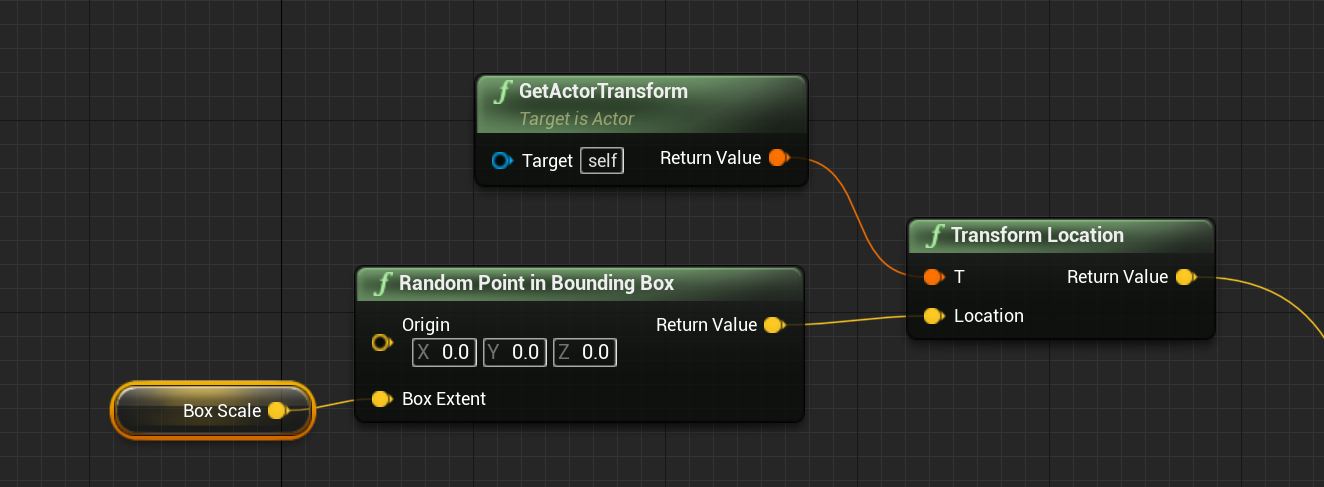
 gentle urchin
Yepp
obsidian moon
without an movement component or a simulated root
so yeah
I had to implement the check in my custom component anyway.
or at least return !CheckStillInWord() in my component
just stuff like that isn't readily exposed

Gotta do crap like this
haha
gentle urchin
Sometimes I wonder if they're just lazy not exposing it,
or if they do it with intent
to gate people into doing specific stuff in cpp
like a movement component. It should be driven on tick, and surely benefits from being done in c++
obsidian moon
yeah I'll likely move this over
probably should have started there
its just so basic right now
but this function I surely will be adding very soon to my project module
         if(GEngine) return GEngine->GetFirstLocalPlayerController()->GetWorld()->GetWorldSettings();
         return nullptr;
}```Just so I can grab worldsettings alot easier
I think this will work too?
if(GWorld) return GWorld->GetWorldSettings();
gentle urchin
return GWorld ? GWorld->GetWorldSettings() : nullptr ;
but yes.... i usually prototype out and move all ticks over to cpp
gentle urchin
makes sense
obsidian moon
I actually already have the cpp component made
gentle urchin
bp wins the proto race
doing the same really. making the systems initially in bp, then moving them over to c++
gentle urchin
being brand new to c++ it's alright to have a base to go off from 😛
obsidian moon
yeah the thing I keep forgeting to do
is create a cpp class first
then make a bp child
obsidian moon
then move from bp into parent
just one of those things you learn over time and keep forgetting
like darnit
gentle urchin
i did a few mistakes doing this tho. Naming the c classes horribly
and it haunts me every damn day
Also since this is my first conversion project, i wanted to keep function names more or less identical to the original, so i could keep tabs on what i've done and not (and replace in bp while i went along before deleting it all)
so now they're prefixed with c

rip
obsidian moon
So if I need to grab an enum I made in engine
in my component
in bp its pretty easy
but in cpp I'm like htf do i get it
lol
gentle urchin
 obsidian moon
still learning little stuff like that
gentle urchin
Yeah i still have a lot to learn really
just recently discovered bpgetters and setters,
and i sort of want to use them,
but then i dont really want to, because it just hides code from the user?
gentle urchin
    UPROPERTY(EditDefaultsOnly, BlueprintGetter = GetHealth, Blueprintsetter = SetHealth, Category = "User defined settings")
        float Health;

void AC_Master_Placeable::SetHealth(const float Value){ Health =  Value >= 0.0f ? Value <= MaxHealth ? Value: MaxHealth : 0.0f; }
Like this one
obsidian moon
the more i improve with cpp the more I kick myself like "where the hell is this happening"
gentle urchin
Auto clamped, but i got no way of telling anyone about it
obsidian moon
and yeah
sometimes you gotta expose a returned function just to "Show" something
or have a public var in some category
so they can see its getting updated
gentle urchin
Yeah
But like, in this example ,
it's alot more obvious to the guy doing the bp
if "set health" or "update health" is a function call,
and not just a "set health" like a regular variable
obsidian moon
yeah i don't have "set health"
gentle urchin
set health could be anything really
obsidian moon
yeah i get you
gentle urchin
it was mostly to test if it was what i thought it was,
obsidian moon
and usually all my math functions are =/-
gentle urchin
and to see if i atleast could expose some comment to the bp
obsidian moon
+/-
its a plus value that can accept negatives
and clamps at 0 / 100
less code
lol
gentle urchin
less is more, i've been told
gentle urchin
readability has a value aswell tho
obsidian moon
I've also changed to interfaces across the board
and slam a return in
for function overrides
😄
make it very very easy
no more casting and hard refs all over
and huge huge dependancies and memory chewers
doing VR games that have flat support that literally have 2 classes for most things
slam a player interface in there and fix that
and a controller interface
pretty much handles everything you need