
#blueprint
402296 messages · Page 786 of 403
 south turret
 dark crow
It really depends on your setup, not enough of a description, explains your setup and how you want it to work step by step
south turret
oh yeee of course,
Well I basically have a float variable that is the health of an enemy, if I press a button it should get down or up... well, it should just change to be honest.
The Variable itself is stored in another widget [A], so what I wanted to do here is that the blueprint of the widget[B] that displays the "Damage" Button deals the damage to the variable, but after completing the "Set" Health" step in the picture that didn't do it's work, I thought maybe I need to cast it to the variable in the other widget so the change does get noticed?
So I Implemented the "Call" part with a reference to the widget so I can call the function but nada. I just need a way that I can change the value of a variable that lies in a complete different Widget//Blueprint.
The other widget with the health, is a normal progress bar that is displayed above the head of the enemy.
 elder junco
Hey guys how can I load a blueprint from path? I get a Blueprint instead of an Actor Class or anything at all.
 gentle urchin
south turret
oh yeee of course,
Well I basically have a float variable that is the health of ...
gentle urchin
south turret
oh yeee of course,
Well I basically have a float variable that is the health of ...
The variable should usually be stored with the actor that can take dmg. You could use a eventdispatcher in siad actor that informs anyone who cares about the health update. On applydamage, the player would subscribe to the health change event of said actor, and can react to it (wheter it lose or increase health)
The actor in question probably creates its own widget aswell eother at beginplay or on event anydamage, and thus would subscribe its own widget to its dispatcher
south turret
Ahhhhhh Thank you!
Will try to change the thingies accordingly. thank you.
 unique falcon
Hello i'm trying to make a multiplayer tank game, each tank consists of 2 parts the hull and the turret i have different hulls and turrets
so the question is how i can make a system where player can choose which hull and turret they want to play
each hull and turret has different mechanics
it's not just a static mesh to change
consider this example:
2 hulls:Light hull and medium hull
3 turrets: single cannon, double cannon and triple cannon
i have to make a blueprint for each combination?
so single cannon+light hull,single cannon+medium hull and so on... ?
total of 6 blueprints?
 tight schooner
@unique falconI've not made a system like this myself so take what I'm about to say with a grain of salt.
There are two viable approaches I can think of off the top of my head. They mostly relate to the complexity of the hull and/or turret. Approach #1 is make custom static mesh components. Approach #2 is make hulls and/or turrets full blown BP actors, and use AttachTo to to attach actors to actors.
Approach #1 is decent if you can represent a hull and/or turret with a single static mesh, because component classes can't have their own components. You'd make a BP subclass of Static Mesh Component that serves as the base class for turrets and/or hulls; you're basically making a static mesh component that has custom BP logic on it. And you'd make child classes of those base classes for each individual type of turret/hull. The host tank actor casts to the base class to interface with every type of turret, e.g. the base Turret class would have an event called FireCannon, and the host tank actor can cast-to and call that event on the Turret base class, instead of casting to every conceivable type of turret. Inheritance is handy that way.
Approach #2 is if hulls and turrets are complex enough to need their own components, e.g. animated treads on a tank hull. The setup is similar to Approach #1 but with actor classes. You have a base class for turrets and hulls, and all of the interfacing happens via those base classes, i.e. the foundational tank actor casts to the turret base class and calls FireCannon. You use AttachTo to slap the tank together out of individual actors.
 eternal flax
how to convert Vector to Vector2D (Screen Position)?
tight schooner
Short of anyone with more experience making modular vehicles suggesting something, that's what I got.
 rigid fractal
is there any component that emits something when any button is clicked? is that i have several buttons but i didnt want to create a 'clicked' event for each of them manually
unique falcon
eternal flax
how to convert Vector to Vector2D (Screen Position)?
using the project node
unique falcon
tight schooner
<@!553942208865239040>I've not made a system like this myself so take what I'm a...
so here is what i'm thinking about:
BP_BaseHull
LightHull, inherited from(BP_BaseHull)
SingleCannon inherited from(LightHull)
that is one combination i should repeat that for each combination?
eternal flax
i'm using it to Draw to Canvas Render Target at Specified Position but it don't work

 unique falcon
so here is what i'm thinking about:
BP_BaseHull
LightHull, inherited from(BP_Bas...
unique falcon
unique falcon
so here is what i'm thinking about:
BP_BaseHull
LightHull, inherited from(BP_Bas...
the hulls share the same controls(movement) thats why i have a base hull
rigid fractal
rigid fractal
is there any component that emits something when any button is clicked? is that ...
@unique falcon do you know if this is possible?
tight schooner
It ultimately comes down to where you want the code to live, how much of it is shared between different types of things, and how you want different BPs to interface with each other. Like every turret can shoot, so the framework for shooting should live on some parent class. It's hard for me to suggest an exact structure without having a clear picture of your game concept.
unique falcon
tight schooner
It ultimately comes down to where you want the code to live, how much of it is s...
got it thanks
unique falcon
rigid fractal
<@553942208865239040> do you know if this is possible?
Sorry no i don't have much experience with buttons and UI generally
rigid fractal
ah ok, np
 dusky harbor
Big Thanks for you!!
gentle urchin
unique falcon
got it thanks
This is mostly the setup i went for aswell. Consider the turret head a 'weapon' in a fps game. It can be swapped at will. So wether you have hull x or y doesnt really matter when it comes to firing shots
So there's a Master_turret and a Master_hull bp
all variations is child of master head

in the master_hull you got the reference to the head, which calls the fire event in the turret bp

 remote belfry
Hey guys, I have a scroll box that gets automatically populated with a list of BP-based buttons based on entries in a data_table. I'm trying to get those buttons to send their "on clicked" command using a BP interface and it's just not working. Here is the simple setup just to test whether it's working or not.

the "Events" target is the BP that creates the button
 faint pasture
tight schooner
Short of anyone with more experience making modular vehicles suggesting somethin...
faint pasture
tight schooner
Short of anyone with more experience making modular vehicles suggesting somethin...
I have a lot of experience with modular vehicles and the 2 options are Part Actors or parts as bundles of components added at runtime. I went with parts as actors.
 thorn fiber
remote belfry
Hey guys, I have a scroll box that gets automatically populated with a list of B...
thorn fiber
remote belfry
Hey guys, I have a scroll box that gets automatically populated with a list of B...
Are all the buttons supposed to do the same thing when clicked?
remote belfry
thorn fiber
Are all the buttons supposed to do the same thing when clicked?
Yeah. they eventually will operate a widget switcher index, but I can't get the button click to send in the first place.
Which is driving me nuts bc I'm using interfaces else where that are working fine.
 dawn gazelle
remote belfry
Hey guys, I have a scroll box that gets automatically populated with a list of B...
dawn gazelle
remote belfry
Hey guys, I have a scroll box that gets automatically populated with a list of B...
Are you certain your events object is populated? Like, are you setting that value on creation of the widget or...?
 vagrant flicker
Hello. Looking for a while online but nothing popped up.
I am looking for a way to rotate platforms during runtime. I imagine the things like that:
My character goes up on the platform, pressing a key button -> The camera changes its perspective -> The character becomes a child of the platform -> pressing "a" or "d" rotates the platform on the "Z" axis. and freeze the character
That would be the perfect case, but starting small, I am trying to just rotate the platforms during runtime pressing a key. Can you hint me a little bit about how to start?
I have a cube that I wanna rotate and in a certain player range (I assume using invisible collider with OnBeginOverlap) pressing keys I wanna rotate it freezing axis besides "Z"
Designing laser turret system to be more specific
remote belfry
dawn gazelle
Are you certain your events object is populated? Like, are you setting that val...
Yes, I can actually see the objects in the scroll box.
I have no doubt it's because im an idiot. lol
dawn gazelle
Sorry, that's not what I'm asking... I mean, the "Events" object you're feeding into your interface call - where are you setting this value? Do you have it exposed on spawn, or are you doing something on construction of the widget?
 remote belfry
@dawn gazelle That is just a reference to the BP where the scroll box resides and where these buttons are created.
dawn gazelle
Right, but that is where you're trying to get your interface to print the value yes?
dawn gazelle
Ok, so even though the "Events" thing exists as a variable, are you actually setting its value somewhere?
remote belfry
I think I see what you're saying and no. It's just the widget where I want the "on click" to be sent to.
dawn gazelle
Ok, so that's the issue. That object needs to be defined. Take the screenshot below as an example - it stores a "First Person Character" object, however, you'll also see that it has no default value, nor does it even let you set one as this type of object does not exist yet when editing it within a blueprint.
So for your Events object, all you likely need to do is check the "Expose on Spawn" and "Instance Editable" options. Then go to the spot where you're creating the widget, right click on the widget creation node and select refresh - you should then see the "Events" pin appear, to which you could plug in a reference to "Self" which should then make this whole thing work.

It'll end up looking like this if you do it right.
 remote belfry
Hold on. I have that already. Let me do a better SS of my spaghetti.
Okay this is the BP where the button gets created, and as well where I want the "on click sent"
 dawn gazelle
You have nothing set in Events

Put your reference to self into there and it should work.
remote belfry
GOT IT!
I knew i was an idiot
ref to self fixed it
I was so lost in it I didn't realise what you were saying before lol thanks
thorn fiber
That should have shown an error in output as well, best to look there when first having issues to identify the source of the issue.
remote belfry
On what part because I wasn't getting any errors
vagrant flicker
Any thoughts? #blueprint message
❤️
Tried to apply this on my cube, but nothing happens

 maiden wadi
Your interp speed is 0. And you're not actually using the degrees variable.
Delta time also needs to be much smaller, use DeltaTime from the tick event.
vagrant flicker
Yeah I've set interp speed to 30, but nothing happens again https://blueprintue.com/blueprint/yoja1vw0/

No description provided
You mean to remove the multiplier from the delta tick?
gentle urchin
Delta time should be frame delta , from the tick
vagrant flicker
how to get it
gentle urchin
Get world delta
vagrant flicker
Okay, I removed the delta seconds from the tick and added get world delta seconds, but my cube is not responding to any X key again.
Do I need to turn on Simulated physics for that?
 nova tartan
Hi there So I am trying to merge a quest system to my game but it there are a bit of errors that I dont really understand can any of you please help me.
The first one is.

Those are the variables

2nd 1
Is how do you get the first picture to


3rd 1
How do you get it like the variables over.


 white field
gah, navmesh again
I had a problem where the DefaultEngine.ini file was holding different data than the Project Settings window was showing in the editor,.. took forever to figure out, and managed to figure out how to put out streaming levels with navmesh, but now I've got a new take on the problem where I get navmesh output on my first map, but it's not working on the next levels I stream into.. any suggestions are welcome 😦
can I see some screenshots of Project Settings -> Navigation Mesh and Project Settings -> Navigation System or some .ini files that work for you guys plz
thorn fiber
nova tartan
2nd 1
Is how do you get the first picture to
If you hover your mouse over the error it will tell you why
thorn fiber
nova tartan
3rd 1
How do you get it like the variables over.
If you are copying blueprints from one class to a new one. Then the variable names will copy over but the creation of the variable won't. If you code then...
MyNumberVar = 1 + 1;```
That would be like copying the second line without copying the first.
Without the first line what the heck is MyNumberVar?

Thankfully with BP you can right click it and click create variable ...
But you still have to set the value to something somewhere.sometimes you can just update the node via right click depending on what the issue is. the variable types need to be the same to plug into eachother
nova tartan
white field
I had a problem where the DefaultEngine.ini file was holding different data than...
That for me
white field
no
nova tartan
Ok
white field
is it required to manually unload a navmesh when transiting streaming levels or something?
nova tartan
thorn fiber
If you hover your mouse over the error it will tell you why
So I hovered over it and it said that. But I cant find where the variables are located cause they arnt on the working folder
 nova tartan
thorn fiber
If you are copying blueprints from one class to a new one. Then the variable nam...
nova tartan
thorn fiber
If you are copying blueprints from one class to a new one. Then the variable nam...
Also my issue is that I cant create it.
So the first one is how its suppose to be.
But if I do Begin
The 2nd one is how it does. But it says "NPC" not "NPC DIALOGE"


 hexed cloak
Is the Max Range on Report Noise Event a 1:1 with the Falloff Distance on Attenuation settings?
 vagrant flicker
Okay, I removed the delta seconds from the tick and added get world delta second...
vagrant flicker
vagrant flicker
Okay, I removed the delta seconds from the tick and added get world delta second...
If anyone wonder, I was able to make the desired effect and rotation using this.
Now, If I wanna make another key for the opposite rotate direction, can I somehow invert the results and not copy / paste the whole blueprint logic twice?

 zealous fog
Make it a function
Have a bool input so that you can day whether its one direction or the other
And then change a variable so it will either go in one direction or the other
 icy dragon
vagrant flicker
If anyone wonder, I was able to make the desired effect and rotation using this....
icy dragon
vagrant flicker
If anyone wonder, I was able to make the desired effect and rotation using this....
Maybe it's just me, but I feel like you could save some nodes with axis mapping.
vagrant flicker
Thank you very much, guys! I will try to make it less confusing and reusable now 🙂
zealous fog
Input mappings will make your life much easier
vagrant flicker
Like instead of "X" for example -> "Rotate X" and bind it to an input key? You mean that?
zealous fog
Easier to change, easier to use in code, and easier to be searched with ctrl shift f
icy dragon
Yeah, axis mapping events could be much less cluttering and more elegant.
You can have multiple keys bound to one axis mapping, and one of the keys can have axis scale to -1
zealous fog
Or
"Interacr"
With input mappings you can then make an event node "interact" and it will be will be a on xbox and e on pc
vagrant flicker
So, In this case, Do I need to set up an Action Mapping, or Axis Mapping? (sorry for the stupid questions)
icy dragon
vagrant flicker
So, In this case, Do I need to set up an Action Mapping, or Axis Mapping? (sorry...
Axis Mapping would be what you're looking for.
zealous fog
Input mappings are for key presses axis mappings can have ranges of values
 lilac haven
let's say I have a character actor attaching another actor (a gun) to one of its SKmesh sockets through a template, on begin play
I have an easyballistics barrel with the inputs for fire on the gun blueprint that was selected through the template
what are good ways to make that attached gun fire when possessing the character?
I think in C++ in theory you can just make it a static function for this, right? but for my purposes it's best to stay on BPs for now I think
basically this is on the gun actor but I don't know any ways to make this work when possessing the character actor

 tropic pecan
Hey there, I ask anybody on a way to scene capture behind characters? I'm trying to create a battle transition of changing levels in a crossfade. I'm having a little bit of trouble on having the enemy character go through the crossfade without having scene capture on the character itself. What I'm saying is I want a scene capture and avoid the character in front and then fade to the other level. Could anybody have a solution? I have some screenshots of an example game for it.
tight schooner
There is some way to exclude an actor or component from the capture. I'd have to look it up later but it might've involved some "set owner no see" shenanigans
tropic pecan
tight schooner
There is some way to exclude an actor or component from the capture. I'd have to...
Would you like the screenshot examples?
tight schooner
Imma boot up the PC and look up what I did in my project if it's helpful
tropic pecan
tight schooner
Imma boot up the PC and look up what I did in my project if it's helpful
Just for a little bit of a hint. You see how enemy character attacks player and they still show but the level fades in between. I'm guessing the scene capture fades to show the battle level just to make it clear.

 tight schooner
P5 
I'm still unclear what's going on
but fwiw these nodes exist if you want to exclude stuff from scene capture
 tropic pecan
tight schooner
P5 <:alex:330044263201112066>
tropic pecan
tight schooner
P5 <:alex:330044263201112066>
I'm actually trying to remake it. Did you know that the Japanese voice actor to Morgana was the same voice actor to Pikachu?
tight schooner
didn't know that...
https://en.wikipedia.org/wiki/Ikue_Ōtani how about that...
anyway
tropic pecan
tight schooner
didn't know that...
It took me a bit to find out too but I found out that. Though the English one is a different voice actor which is the reason I found out about Persona 5 to begin with. I love Joker and Morgana!
tropic pecan
tight schooner
didn't know that...
Ok sorry about off topic. Will these really give me a hint of that?
tight schooner
I was in Japan at a Cospa store and I couldn't resist buying this Morgana shirt saying "You must be tired! Let's go to sleep!" 😂
like wow they knew how annoying that was
anyway I don't really know what the issue is or what you're trying to achieve. I took you wanting "a scene capture and avoid the character in front" as excluding an actor from the capture.
If that's not it, then sorry for misunderstanding
guess I'll look up some P5 gameplay...
tropic pecan
tight schooner
I was in Japan at a Cospa store and I couldn't resist buying this Morgana shirt ...
For my opinion, I do think that many people symbolizes that but that's only cause he was made to talk a lot on the player's choices. I will try to make him talk less about the player's choices and only speak at certain points he's involved in if I'm ever there. I'm also going to improve his confidant functions so you can get Mercurius sooner at least after dungeon 5. As well as know him even better about the world that kind of thing. The issue I'm trying to achieve is I'm trying to setup a battle starting. I have a JRPG Turn base blueprint I'm re-editing to make a project of Persona 5. My intentions is to improve the game with more things as well as make a longer storyline.
tight schooner
oh ok
I'm checking out actual Persona 5 and yeah, the battle transitions are clever https://youtu.be/Rqma3RaQt-w?t=1500
tropic pecan
tight schooner
oh ok
Well, I'll analyze the blueprints you've shown and see if I can get around it. Thank you Nya-haha!
 trim matrix
hmm. Should I put logic for starting a game, keeping track of rounds, and keeping track of win conditions (Checking if a player hits 0 hp) inside of a gamestate class, or handle it somewhere else?
tight schooner
That's actually pretty tricky and maybe you want to ask in #graphics or #visual-fx cuz I never tried pulling off something like this. You want the background to crossfade from scene 1 to scene 2, while keeping an animated enemy on top of the crossfade. You'll need a capture of scene 1 that excludes the enemy & player character. You might need some sort of custom post-process material that does the fade? And some sort of g-buffer cutout of the enemy actor to superimpose (or rather, exclude) it from the PP crossfade?? @tropic pecan
tropic pecan
tight schooner
That's actually pretty tricky and maybe you want to ask in <#221799195806400512>...
That's a lot to look into but I'll screenshot this and look into.
tight schooner
trim matrix
hmm. Should I put logic for starting a game, keeping track of rounds, and keepin...
The game start stuff could live in Game Mode. Maybe rounds & conditions too. If anything needs to persist between level loads, then GameInstance is the only class that survives loads; everything else gets destroyed and reconstructed.
The built-in manager classes are there for your convenience so you can use them however you want and stuff will just work
trim matrix
Nope, it's a fighting game so nothing should persist. I just wasn't sure if each level should keep track of the game state. (How much time is left in each round, how many rounds have been played, and when a round ends (time runs out or somebody dies)
but I think saving it in gamemode would be easier since I don't have to recreate the logic for each level.
 neat stream
When working with widgets and events Like a cinematic where you want all your widgets hidden then showed... do you... change the visibility or do you remove from parent?
 vapid ibex
Is "SetActorPosition" a correct way to move actor in a single tick? I'm creating a moving platform, and the issue is that when it moves, the player appears to be lagging a bit behind of it (depressing into it when platform goes up, levitating a bit over it when it goes down). Changing Tick Group had no effect.
vagrant flicker
Is there any way of doing 2 conditions before execution?
For example:
if Event ActorBeginOverlap occurred and If Key is pressed. If I am in the range of overlapping actor
basically trying to do something if I am in the colliding range and if key is pressed
vapid ibex
vagrant flicker
Is there any way of doing 2 conditions before execution?
For example:
if Event...
On begin overlap set a bool param to "true" and on end overlap set it to false. Then make button press check the bool via Branching.
white field
got it.. config file mismatch between the editor and the ini file.. so annoying
vagrant flicker
vapid ibex
On begin overlap set a bool param to "true" and on end overlap set it to false. ...
Thanks!
 haughty nymph
i try to make a ai attack but it dont work
 lusty shard
any way to make changes applied to a masterBP apply to children placed within the level?
I have been testing physics values and pretty sure changes have not been getting passed into the level 😦
trying to make a tree feel heavier to push when the player walks into it. Feels like paper light atm and anything i change is not seeing a difference in the game
hexed cloak
Is there a node to get all foliage instance somehow?
tight schooner
lusty shard
any way to make changes applied to a masterBP apply to children placed within th...
generally speaking if you edit and compile the parent class, the children should inherit those changes unless they've overridden the values
lusty shard
@hexed cloak Sounds like you want to get all foliage instances similar to the node that gets all actors of class?
if so, not sure atm.
 hexed cloak
Pretty much
lilac haven
i'm gonna try to ask this just this one more time, bear with me
how do I make it so that these nodes on my gun blueprint can be used while possessing the character holding an instance of the gun?

do I cast to playercontroller? I have no idea
vagrant flicker
Is the only way of changing cameras runtime possible via the level blueprint?
For example, my character goes into some invisible zone where the camera has to be changed to camera from the world. I hate using level blueprint and if it's possible will avoid it 😄
 tired cypress
vagrant flicker
Is the only way of changing cameras runtime possible via the level blueprint?
Fo...
tired cypress
vagrant flicker
Is the only way of changing cameras runtime possible via the level blueprint?
Fo...
The level BP is probably the easiest way to accomplish this. If you don't want to actually write any logic in there, one thing you could do is just get a reference to that camera object and store that in gamestate or wherever, then you'll have it to use from other BPs
vagrant flicker
I was imagining:
OnActorOverlap -> Turn off the third-person camera -> Activates world camera and vice versa.
Is there any down sides of using level BP for that? I've heard mainly optimization issues may occurs
trim matrix
Anyone have any idea why this won't disable movement? Even after calling it, players are still able to continue moving.

I even attempted to use 'Set Movement Mode' set to None, and players can still move.
lusty shard
@lilac haven and @trim matrix both are asking questions about functions that we cant see into lol
trim matrix
The only relevant part is the 'disable movement' the rest of the stuff works.
It's just a 'set bool'
gentle urchin
Players? As in Multiplayer?
trim matrix
No, everything is local. It doesn't even stop the first player
gentle urchin
Tried with just get player character -> disable movement ?
trim matrix
yep
gentle urchin
Are you using the cmc for movement in the first place?
trim matrix
I am using the default 'playercontroller' for control movement
gentle urchin
But how are you applying movement for the pawns?
trim matrix
You mean what triggers the movement? Using inputs and 'add movement input'
gentle urchin
Try deactivate instead of disable movement
trim matrix
yeah, deactivate works
gentle urchin
Sweet
trim matrix
Weird, I am using disable movement in another level and it works but won't this one for some reason. Oh well, at least 'deactivate' works.
 winged sentinel
hi, im trying to make an ai spawn system that will spawn randomly in the nav mesh (which works). Im now trying to make it so that they will only spawn in areas that cant be seen by the player. I currently have this bp that tests the area around it and the green shows the area cant be seen from the actors location. But how would i get the area behind the hit? So that i can use it as an available spawn location
gentle urchin
Wouldnt it be better to pick a location and test its visibility, then repick?
Instead of ... 350 traces
Guess it in theory could end with the same but..
Eqs could probably help you out aswell
winged sentinel
gentle urchin
Wouldnt it be better to pick a location and test its visibility, then repick?
probably more performant yes, but i couldnt figure out a way to do this
hmm
eqs might work but is that going to be phased out it been in like alpha phase forever
gentle urchin
Doubt it but dont really know
winged sentinel
true
problem is there arent really any great videos on learning eqs from what ive seen
but it does sound better than 350 line traces killing my fps
gentle urchin
winged sentinel
gentle urchin
<https://answers.unrealengine.com/questions/492943/is-there-a-cheap-way-to-check...
i see thank you ill see if i can make something like that
lusty shard
remind me how I can alter a material instance parameter from a bp event graph?
gentle urchin
Set parameter for the dynamically created material instance
Or alter the material parameter collection
dusky harbor
Hello people,
When i step on the mesh it has to change its location. At the end is a Print String, who shows me how many times is printed.
Unfortunately, sometimes the static mesh is overlapped and i receive the printed word too many times and this leads to infinite loop detected.
Does anybody know, how can i fix this problem
I just want , when i step over - the static mesh has to change the location and to be only one time printed. If i step on the new position again - it will change again.... and as long as i play
 winged sentinel
@gentle urchin There happened to be 1 video that was exactly what i wanted with eqs, it wasnt really a tutorial but it gave me enough context to figure it out
 dusk cave
how do i make the cube collision ignore itself?
for some reason, when it collides with the player, it prints out that it is colliding with itself
 gusty cypress
@dawn gazelle Confused how this method works

If I switch my custom event and event tick it counts but very wrong and the mil will reach .99 a few times before 1 second is added
 odd ember
gusty cypress
odd ember
gusty cypress
set the print string on your timer event
gusty cypress
odd ember
set the print string on your timer event
EDIT* I can only get that "time handle" to return floats and this whole purpose of this was to avoid floats since inaccuracy
odd ember
???
take the print string node, put it on the white execution thread of the event (red node) connected to the SetTimerByEvent node
 odd ember
it prints that because you've not given it any other input
gusty cypress
oh wait Im continuously setting the time elapsed to zero I think
odd ember
there's something like this node

and this:

you can probably use either of those to test it
if you want a stop watch, you probably need to consider how you want to add seconds every second
gentle urchin
Delta*1000 can go straight into ms if you wanted
gusty cypress
odd ember
there's something like this node
would this allow me to get milliseconds tho
gentle urchin
It handles overflow aswell
odd ember
I assume partial seconds include milliseconds
gusty cypress
but the whole point is to avoid floats bc float inaccuracy messing up everything
odd ember
but basically you have to figure out how to synchronize your timer with frames
what kind of float inaccuracy are you experiencing
gentle urchin
Partial seconds probably is converted from the ints of the time struct
odd ember
generally float inaccuracy only starts being an issue at very large numbers
gentle urchin
But accuracy isnt a problem untill it is one, so make sure thats the issue before you try and solve it
odd ember
I don't think it's float inaccuracy that's getting you, I think it's how you've setup your timer
gusty cypress
odd ember
what kind of float inaccuracy are you experiencing
I have 2 times, split times and final time, after a level is done 99% of the time the split times do not add up to the total time
gentle urchin
Why would that be two times?
Or timers
A split time
Is a snapshot of current time
odd ember
you're more likely to get what you want by using event tick
 odd ember
timers will update multiple times per frame
if their invocation time is set lower than frame time
gentle urchin
0.0076* which by 3 decimal should be rounded up
Looks more like a float conversion issue than precision
gusty cypress
well floats also can't display certain values like (not real exp) but 32.5 = 32.499999
gentle urchin
No they cannot, and neither can your display with 3 decimals
Your display would round that up
gusty cypress
thats why im trying to use 2 decimals using ints
gusty cypress
I like timespans because I get to use ints and easily convert to text

even the milliseconds are ints
gentle urchin
Still it'll be rounded
gusty cypress

Ok even if it will be rounded whats the sollution to math being done for splits that don't line up with a continuous timer
gentle urchin
Id just use the same timer.
gusty cypress
I do
gentle urchin
Then it cant not add up
gusty cypress
heres my old code that would be off by 1-2 seconds but lots of time would add up correctly
gentle urchin
Unless the math is off
gusty cypress

math is not off it would be off by random amounts each time but exactly the same sometimes
they both use same timer (bottom right) bottom code is the stopwatch for the level, top code is when its then next stage and uses SAME timer to do quick math to find what then ew split time is
odd ember
this will give you a DateTime struct that you can break to make a TimeSpan
 gusty cypress
sometimes worked fine sometimes didint worried its the engine issue since it can't all be calculated at the same time
gusty cypress
odd ember
this will give you a `DateTime` struct that you can break to make a `TimeSpan`
I used that
gentle urchin
The day the engine struggles to handle simple math like here is the day ill stop using it :p
gusty cypress
then it shouldnt be off, but it is...
odd ember
gusty cypress
Ok even if it will be rounded whats the sollution to math being done for splits ...
make sure your timer is synced to frames
gentle urchin
Ill give it a crack tomorrow when im at the pc if you havnt gotten a solution working by then
odd ember
a timer can trigger multiple times per frame
gusty cypress
odd ember
a timer can trigger multiple times per frame
How do I sync it?
odd ember
the closest equivalent is using DeltaTime
in truth you may be better off using tick in this case
and just enable/disable tick
gusty cypress
but delta time is a float
I've already tried using delta time it didnt work
I even used a linear graph
 odd ember
0.01 as you've typed it into the SetTimerByEvent is a float as well
gusty cypress
yea, Im not sure I can fully avoid floats but they cause inaccuracies
gusty cypress
my math works 80% of time tho
gusty cypress
but when it doesn't work 20% and can be off by .01 milliseconds it leaves me to believe its a float/engine issue
my math is so basic lol
odd ember
try this
instead of using timers or tick
when the event starts, measure the time
when the event ends, measure the time
compare them at the end
gusty cypress
If I compare at the end how would I display the timer in game
all motorsport games accomplish this but I assume because code gives more flexibility
odd ember
what kind of flexibility would you expect?
more than likely all you're looking at is getting the current time every frame, and subtracting that from the time Now, and that will be your stop watch timer
you're still bound by a margin of error because delta time can fluctuate
gusty cypress

thats exactly what this code did
also I used UTCNow instead of NOW but its the same thing
odd ember
odd ember
you're still bound by a margin of error because delta time can fluctuate
⬆️
not every second gets the same amount of frames necessarily
gusty cypress
so your saying try the code above but do not use event tick, but delta game time
odd ember
event tick by default fires at every frame
gusty cypress
So do you think theres a way I can make split times work and add up to final total time
gusty cypress
wdym? that last pic is my stopwatch the bottom comment code returns "time since start text"
 still pumice
Trying to disable the main capsule collider on my character when they enter the "sliding" state, would anyone know why this simple node group doesn't work? https://i.imgur.com/ORnmYnT.png
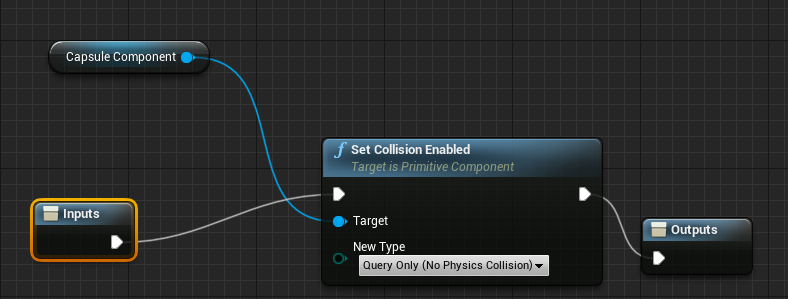
(I have to leave it on Query Only else it breaks movement, though that shouldn't really affect anything when it comes to disabling collision as far as I know)
gusty cypress
Also @odd ember I was asking in here before and was advised to stay away from UTCNow and NOW because then when I pause during the timer I would have to find the time elapsed and subtract it once the player resumes
gusty cypress
I think I'm gonna cheat a little and make the last split timer add all the previous timers get the final time and make it the remainder for them to equal each other so it will at most add 1-2 secs to final split
gusty cypress
odd ember
when you pause
When using pause game I believe it does
dusky harbor
Hi,
As you can see , when I step on a puddle, it changes location.
Sometimes, however when I step on a puddle, it changes its location and that of other puddles.
Any idea how can I fix this..?
gusty cypress
 dusky harbor
Every puddle has its own On component begin overlap.. but still not working as I want
gusty cypress
I never knew time accuracy would be the most difficult part of making a game
 undone sleet
dunno if this is the right channel but im still very new to this stuff in general so im using a template but for WHATEVER REASON these models im replacing all are at 90* angles, and for most things thats fine, but for the jump gates, stations and player fighters its not working, any clue how i can fix my fighters and such so they face the proper direction?
 odd ember
gusty cypress
odd ember
gusty cypress
I just looked at the code for that node, and nowhere do I see it pausing time
undone sleet
im just trying to get a feel for how a lot of this works in general and the fact i cant seem to rotate the fighter when i can rotate the weapons kinda bugs me
gusty cypress
odd ember
I just looked at the code for that node, and nowhere do I see it pausing time
are you referring to my code pic?

Also I Get timecode seems perfect but when I break it instead of mil it gives frames??

It count to like .2 then repeats?
odd ember
gusty cypress
are you referring to my code pic?
no I meant the cpp code for SetGamePaused
gusty cypress
odd ember
no I meant the cpp code for `SetGamePaused`
Oh yea well regardless of figuring out pausing I still need to fix the times not lining up
also If I use game time I get a float and to display a float as 00:00.00 i need to do this...
 odd ember
there are built in nodes for this
gusty cypress
What nodes?
odd ember
if you search for timespan you can check the functions
there's a bunch of them
all to do with how to manage time

here's an example
gusty cypress
I know but floats...
odd ember
you're still using floats in your function
game time is still written as a float
etc.
your issue isn't with floats
your issue is almost certainly with your setup
 odd ember
just one of them
FromSeconds is probably the one you want here
then split the time code to get hours/minutes/seconds
 odd ember
gusty cypress
odd ember
gusty cypress
there's also
 gusty cypress
that doesn't format the text tho so 1 second is 00:01 not what I want 00:01.00
tropic pecan
Hey there, I've made an enemy AI MoveTo with an animation. One of the functions I'm making when successfully move to, it should be focused onto instead of the player. I've attempted to make it but nothing I'm doing is working. I've added a camera to the AI for this as well. Can anybody give me an accurate solution for changing focus on an AI after success in AI MoveTo?

 odd ember
what do you mean focus?
tropic pecan
odd ember
what do you mean focus?
I mean like looking at the enemy AI instead of the player now. It's just a piece of what I'm trying to do cause I'm trying to make a crossfade transition which characters still in front while loading but I can't find a structure that will switch cameras from player to enemy AI. All my attempts are failing so far and the structure I believe should be after the AI Moveto.
It seems I chatted in blueprint instead of ai, should I go there?
odd ember
tropic pecan
It seems I chatted in blueprint instead of ai, should I go there?
up to you. I'd use an event dispatcher to get notified
with the current AI as a parameter
tropic pecan
odd ember
up to you. I'd use an event dispatcher to get notified
I wonder how I can make that work.
odd ember
do you know how event dispatchers work?
tropic pecan
odd ember
do you know how event dispatchers work?
A little bit. Mostly I've seen blueprint control menu functions of in and binds though I don't quite have a clear understanding in all of it I'm sorry to say.
odd ember
tropic pecan
A little bit. Mostly I've seen blueprint control menu functions of in and binds ...
then I would suggest looking into getting an understanding of them
tropic pecan
odd ember
then I would suggest looking into getting an understanding of them
Yea, I'll look a little further into it. It seems I can't easily get an answer it seems from this. Anyway, thank you for some hints.
odd ember
the easy answer is event dispatchers. you're at a point where you're dealing less with individual code blocks and more with the architecture
so the answer isn't as simple as "use this node"
gusty cypress
gusty cypress
@odd ember Okay so using this unfortunately was my worst result by far it was off by 1.96 seconds

 dusky harbor
sorry to write about this problem again...
does anyone know why when I step on a puddle - the locations of the other puddles change, although I have not stepped on them and their On Component Begin Overlap. Every puddle has its own On Component Begin Overlap.
Sometimes the location of only a given puddle changes, and sometimes a few are affected and I have no solution to this problem
 odd ember
gusty cypress
<@!224571781862653952> Okay so using this unfortunately was my worst result by f...
odd ember
gusty cypress
<@!224571781862653952> Okay so using this unfortunately was my worst result by f...
what is "off" in this case?
are you adding up the times?
dawn gazelle
gusty cypress
<@!218956378654507008> Confused how this method works
Don't put your timer on event tick. It is not necessary. Put it on a separate event that you call when you want your stopwatch to start.
When you want to get the elapsed time, get it and save it in another variable, then you can reset elapsed time to 0.
gusty cypress
odd ember
what is "off" in this case?
I do math to get the split time every time new stage is triggered but the added split times are +1.96 more than the paused final time
gusty cypress
dawn gazelle
Don't put your timer on event tick. It is not necessary. Put it on a separate ...
If I didn't use event tick how could I keep the ingame timer updated
dawn gazelle
The timer itself updates
odd ember
gusty cypress
I do math to get the split time every time new stage is triggered but the added ...
how do you get the final time
gusty cypress
I'll trace it
odd ember
???
gusty cypress

Its a constantly running time once stage over I stop timer and "close" the event
the final time is an ingame timer that just stops when I need it to making it "final"
odd ember
why isn't the final time just all the split times added up?
seems like your setup is weird
gusty cypress
I have an ingame timer displayed and the split times also displayed how could I wait until each split is added to display a time? I need a constant time
the final time is the same as my continuous in game timer displayed
@odd ember also I cannot just add up split times using floats since 2 splits of 0.044 and 0.034 would display splits .04 and .03 but added to show a final time of .08 NOT .07
odd ember
but that would be correct?
gusty cypress
yes its correct but a player would see .04 + .03 resulting in a final time of .08 so what I need is it to at least appear right
odd ember
also in that setup, TotalTime is unnecessary. you could try and see if using GameTimeInSeconds in lieu gives the same margin errors
dawn gazelle

 odd ember
gusty cypress
yes its correct but a player would see .04 + .03 resulting in a final time of .0...
odd ember
gusty cypress
yes its correct but a player would see .04 + .03 resulting in a final time of .0...
sounds like a design problem, not a technical one
gusty cypress
odd ember
sounds like a design problem, not a technical one
I guess but I use totext(int) and set max digits at 2 and min digits at 2 yet different resulting numbers which appears to be rounding even tho it shouldn't have any numbers past .01
dawn gazelle
CE, if you use GameTimeInSeconds, isn't that from when the level starts? For example, what if he had a countdown timer before starting a race? That countdown time would be included in the game time, no?
odd ember
gusty cypress
I guess but I use totext(int) and set max digits at 2 and min digits at 2 yet di...
you have to figure out yourself how you want to solve this problem, but as far as the code is concerned, it is doing what is intended
odd ember
dawn gazelle
CE, if you use GameTimeInSeconds, isn't that from when the level starts? For ex...
it doesn't matter since all they need is a delta
it's setting a variable at time x, then comparing time x with time y at the end
 brazen merlin
get GameTime , set as StartTime var, when the player finishes, get GameTime - StartTime, there's your elapsed time
still doesn't address the fun of floats!
odd ember
dawn gazelle
I think this is fairly elegant, the only caveat being that timers less than frame time will update at the next frame. so you'll end up with a bunch of updates happening all at once
gusty cypress
dawn gazelle
How can I set UI from a datetime I want to format it and not simply use AsTime
NVM I break it
dawn gazelle
And if I recall what DEX was looking for, he wasn't too concerned with the actual time, just so long as the times add up, which with the timer method, they would without running into float accuracy issues popping in which he has encountered a few times.
I also tested using the pause system built in, and it pauses the timer along with it, so no need to manually pause it, unless of course you want to pause just the timer.
odd ember
yeah like I said the only caveat is the multiple updates per frame
dawn gazelle
1000FPS when?
I see what happened... Add just 1 millisecond to total time as well, not elapsed time. I messed that up.
gusty cypress
dawn gazelle
I see what happened... Add just 1 millisecond to total time as well, not elapsed...
is elapsed time a datetime or timespan
dawn gazelle
All timespans.
gusty cypress
@dawn gazelle how can I pause/stop timer without resetting it?
dawn gazelle

 mortal cradle
What's the way to go about all the bp's firing off their BeginPlay even while starting the game with a different map that only has main menu? The solution that doesn't sound perfect is to pause the game while in main menu, it doesn't stop begin play but stops the ticking.
brazen merlin
mortal cradle
What's the way to go about all the bp's firing off their BeginPlay even while st...
? Im not sure what you're doing but begin play fires when the level is opened
 flat coral
Also, BeginPlay is an Actor event, and it only fires when the actor is present in the current level
mortal cradle
@brazen merlin I'm doing a main menu and I don't want my character or inventory begin play to fire off when starting the game with main menu
brazen merlin
Your main menu level should only have the actors necessary
flat coral
I bet your main menu right now is just an overlay on your starter level. Make a new empty level just for the main menu which then loads the selected level
brazen merlin
I typically make a custom controller and game mode
flat coral
brazen merlin
I typically make a custom controller and game mode
I've been EXTREMELY on the fence about doing that... In theory it makes sense but I've got a lot of custom logic for menu navigation in my player controller and I'd have to duplicate that. Or do some subclass bullshit
mortal cradle
I have a new empty map where the main menu widget is spawned and additional bp's like character or game mode are created automatically
flat coral
Wait why create the character in the empty main menu map?
mortal cradle
It gets created automatically when I start the game
flat coral
It shouldn't be capable of firing the BeginPlay event until it gets created
trim matrix
how do you start a WebBrowser component inside the editor? im trying to do live compositing inside of the editor and the only thing keeping me back is that the web browser component wont initialize until i run the game (i cant run the game since the web controller doesnt seem to like it being in a game mode)
brazen merlin
flat coral
I've been EXTREMELY on the fence about doing that... In theory it makes sense bu...
Well my main menu has no relation to the gameplay/world. It is purely a menu system. Though in game, there is a different menu. Thats how i did it because it doesnt take long to make and compaetmentalizes inputs. Since its just a widget that listens to inputs, it is that part which (theoretically) can be reused
flat coral
brazen merlin
Well my main menu has no relation to the gameplay/world. It is purely a menu sys...
Do you have like a back stack in your menus or is it all hardcoded navigation?
brazen merlin
flat coral
Do you have like a back stack in your menus or is it all hardcoded navigation?
Backstack?
flat coral
yeah, like you can click through menu after menu, and then repeatedly pressing "back" will bring you back up through the menus
Each menu page you visit gets added to a stack, then popped off the stack when you go back
brazen merlin
mortal cradle
<@!568839944970174501> I'm doing a main menu and I don't want my character or in...
Since begin play gets called when a level is loaded, you may be able to check which level is loaded or put your "begin play" login on a different event and then call it precisely when you need to
brazen merlin
flat coral
yeah, like you can click through menu after menu, and then repeatedly pressing "...
I guess i have that through hiding/showing the specific widget. There is no change of level
flat coral
Oh I dont change level, it's all just swapping out widgets. The reason I bring it up is my playercontroller manages the back stack
trim matrix
I use widget switcher on my menus
brazen merlin
flat coral
Oh I dont change level, it's all just swapping out widgets. The reason I bring i...
For the ingame i just hid and show
flat coral
(Honestly I probably don't need the back stack to be THIS robust but I the last thing I did before this was app dev so it was just sorta second nature. New UI system -> better build a back stack)
brazen merlin
trim matrix
I use widget switcher on my menus
Sounds helpful
trim matrix
Yeah it's nice. Its like a widget array and you just set the active index and it automatically switches for you
So I just set switcher index - 1 on back
brazen merlin
trim matrix
Yeah it's nice. Its like a widget array and you just set the active index and it...
Definitely going to look at this when i actually make my menus - just rough atm
flat coral
I've got a NavigableWidget abstract class which defines NavigateTo and NavigateBack, each holding the reference to the previous thing in the stack

And then all my fullscreen widgets subclass NavigableWidget
trim matrix
I'm glad I found it. Saved me a whole lot of time. It saves your widget state too from what I've seen.
brazen merlin
trim matrix
I'm glad I found it. Saved me a whole lot of time. It saves your widget state to...
Thats cool. Hiding and showing sounds like the same thing but seems convient to manage which goes to which
mortal cradle
I just did a quick test on a brand new project, using FPS pattern, I added an empty new map, on level blueprint I created a widget with a button that opens the main fps map and engine still creates 12 additional actors on start even in empty main menu
 flat coral
mortal cradle
I just did a quick test on a brand new project, using FPS pattern, I added an em...
flat coral
mortal cradle
I just did a quick test on a brand new project, using FPS pattern, I added an em...
Yeah definitely whatever's spawning those is creating your problem. No reason to do that on the main menu
flat coral
Total aside, which approach do we like better for a full-auto weapon:
Approach 1: Tick and Checks
- On FireStart: Set
isFiring = true - On Tick: Check
isFiring == true&&timeSinceLastShot >= refireRateand if so, call theFireOneShotfunction. - On FireEnd: Set
isFiring = false
Approach 2: Self-referential Timer
- On FireStart: Set
isFiring = trueand then immediately callFireOneShotfunction - In
FireOneShot: First, checkisFiring == true. Then, after everything else, create a TIMER to callFireOneShot(itself) after the refire delay - On FireEnd: Set
isFiring = false
I guess it comes down to which is more expensive, repeatedly creating timers or having a lot of ticks which bounce of basic boolean checks and no-op
brazen merlin
mortal cradle
https://gyazo.com/e4b5ee092512b29551cdb6114a4b900d
Im sure game session and net manager can be disabled as all templates are mp by default
brazen merlin
flat coral
Total aside, which approach do we like better for a full-auto weapon:
**Approa...
I assume this is linked to input vs anim
flat coral
Input calls FireStart and FireEnd on pressed and released
There's no animation on this
nah, just niagara effects
and physics
I guess it comes down to consistency. Is it guaranteed that a timer's function call is picked up on the frame that the timer resolves?
brazen merlin
Honestly not sure
flat coral
The timer SEEMS okay? hm. It's probably cleaner. Ideally i'd set up a loop timer.
brazen merlin
flat coral
The timer SEEMS okay? hm. It's probably cleaner. Ideally i'd set up a loop timer...
Are there any input events that run on tick besides moveForward and such?
Maybe one already allows this
flat coral
Well the gun's its own actor actually separate from the player pawn, so I can easily swap guns out
So its tick event is all its own
brazen merlin
Oh. Woulda thot itd be in the player, regardless of gun but that kinda seems like you could do tick then
flat coral
yeah... maybe my first instinct was right. These boolean checks are not expensive.
brazen merlin
If you dont tick many thing it seems safe enough to havr a tick for gun so the code can react at the soonest moment
flat coral
I mean I use tick for a TON of stuff in other places, is part of my worry
brazen merlin
Player may want to shoot the gun as a single shot, burst, or in odd intervals
Timer should achieve the same but i dunno
My game has melee so when damage happens is based on anims. So i use anim notifies
flat coral
Nah mine's more like a flight sim, so largely just static meshes shooting at each other
faint pasture
I'd use timers since you can just hook directly into the shot frequency
flat coral
Is there a quick way to turn a local variable into a class variable, or am I just remaking this shit
 iron bone
Anyone have suggestions for setting up smooth transitions for third person characters doing animations like pressing a button or opening a door? I want to make it so my character lines up the animation every time but having a hard time doing it other than placing a target actor in the world and moving actor to that location
I saw at one point someone had brought in a reference model in their blueprint for lining up the actions but I can't find that video any more
brazen merlin
i think i see that sort of thing often: where the player is close to the "button" or whatever and then slide to it - its not pretty, but i see it - and in other cases the player actually paths to it, independent of player input for that moment
iron bone
I'm having the player path to it but it looks kinda messy still even when I lerp between their location/rotation and that of the button/door
odd ember
some pros have their animators export helper meshes for their anims so it's easy to line up
iron bone
that's a good idea!
 static charm
are you using any ik
iron bone
No ik
static charm
ik solves some issues and will save time making perfect animations/alignments
iron bone
thanks for the tips m8
 lucid lynx
I have a player controller catching inputs for a button and doing a thing. How would I be able to pass the input to the controlled pawn? So under a certain context my controller would consume the input, but if I wanted it could also just pass the input down to the pawn.
Is there some kind of built in way to do that or do I have to cast or use interfaces?
static charm
if the input gets passed to the pawn more often that not, i'd probably just have the input events in both, (with consume input turned off)
and then have a boolean check in the pawn, if the controller is letting the input pass
this way all you have to do to get that boolean is Get Player Controller- Cast to Your Controller Class and pull the boolean from the cast.
lucid lynx
static charm
if the input gets passed to the pawn more often that not, i'd probably just have...
Sorry, I'm not sure I follow. I have the same input action in both the controller and the pawn, but only the controller catches the input.
static charm
you have to select the Input Action itself,
then on the right side bar of screen
you'll see a setting - Consume Input
disable this
lucid lynx
Ahhh, I never knew about that. Thank you so much, that clears things up a lot.
gusty cypress
How do I add variable to an array so that each time it adds a new element
icy dragon
gusty cypress
How do I add variable to an array so that each time it adds a new element
Do you mean adding new element? Or you actually mean adding new variable to a struct?
gusty cypress
adding new element? I have an empty array to start and a calculation that each time its added I want it to be a new element
brazen merlin
Add...?
 meager spade
Arrays don't keep references of for example ints so if you use add with the same variable but it changes value each time you'll have an array with a bunch of different values
icy dragon
gusty cypress
adding new element? I have an empty array to start and a calculation that each t...
No magic nodes needed
 static charm
can also insert array, set array with a make array, for loop/counter with a Set element and resize turned on...
icy dragon
gusty cypress
adding new element? I have an empty array to start and a calculation that each t...
Also AddUnique if you don't want to clutter an array with duplicate values
 static charm
can also append a string
 brazen merlin
what data types are these, structs?
meager spade
Looks like it might be Vector2D
brazen merlin
thats what im thinking.... so i guess the confusion is adding two values of a 2d vector?
thats right though
wth are doing? 😆
dawn gazelle
It's likely timespans based on what he's been working on. It should be ok.
gusty cypress
Ok I think I've finally concluded the engine is at fault for timing inconsistencies
I have my split times being added to an array and the final time is the sum of that array, I got all the values and it adds them up to be sometimes right sometimes 1 sec off

bottom right = final time, blue print = all split times
the math is strait up wrong but sometimes is correct?!
brazen merlin
gusty cypress
Ok I think I've finally concluded the engine is at fault for timing inconsistenc...
ahhh, you change your profile pic recently?
gusty cypress
 gusty cypress
brazen merlin
ahhh, you change your profile pic recently?
gusty cypress
brazen merlin
ahhh, you change your profile pic recently?
yea chose random photo on desktop
brazen merlin
lol i go off of most ppls pictures, so that throws me
gusty cypress
but after hours I finally have proof the engine is wrong and not my code
these 2 pics are from the same code and first is 1 second off second they add up correctly
brazen merlin
sorry, not really sure whats wrong in these
gusty cypress
first one shows all values added and it should equal 15.01 but it prints 14.01
gusty cypress
yea
min 60 sec 60 mil 100
and here is all the proof of my code which should work fine, it gets all split times adds them to an array then the final time is the sum of that array SO theres no reason it shouldnt work


I know I didn't need an array to add them all but I wanted to see every value added to make sure it was the same as the splits displayed
which it was then proceeded to add it wrong as seen here
 dawn gazelle
I'm fairly certain the issue lies in here...
 gusty cypress
how can there be a mathematical issue if it works sometimes?
dawn gazelle
You can have another counter on the timer itself to count your split time, and when you want to log that time, you put it into the array, and then reset it to 0.
 dawn gazelle
I already gave you the code for it.... Like this.

The timer itself is counting two values... Basically counting a total time, and an elapsed time. The elapsed time is your splits.
When you do your split (the Lap event in the screenshot above) that stores the elapsed time into an array, and resets the elapsed time variable.
gusty cypress
oh I miss read and removed setting time elapsed after you said "I see what happened... Add just 1 millisecond to total time as well, not elapsed time. I messed that up."
gusty cypress
@dawn gazelle Sorry but using that code it worked 4 times in row then didn't work

No description provided
trim matrix
practically 50% of all solutions in this space really 🤣
dawn gazelle
gusty cypress
It consistently adds up correctly on my end - total time always == calculated total time. (Attempted about 30 times with varying split times)
I would say try moving your timer stop to the front of the event, just to make sure that the timer is stopped before doing anything else which may be throwing off the value somehow.

 timber knoll
Timer isn’t very consistent tho...
dawn gazelle
It's consistent in the context that he needs it. He doesn't need 100% accuracy all of the time, just so long as the times add up.
timber knoll
Fair enough idk the context 🙂
gusty cypress
dawn gazelle
It consistently adds up correctly on my end - total time always == calculated to...
still no somehow


I'm going insane the math is correct it just doenst work
I'm going to look other places in my code like stage triggers and splittime display
timber knoll
gusty cypress
Your math is off tho
gusty cypress
how
timber knoll
The seconds alone add up to 20
Or wait was i looking at wrong screenshot lol
Nope my bad 😄
Screenshots on phone 😅
Is it always 1 second off? When it’s wrong
gentle urchin
You could also check epics learning template for the racing game
There's a lap timer
 burnt jasper
I've been looking into some optimizations for my game and I realized that I used a fair amount of casting to run functions on components on actors. Example would be to cast to specific player character blueprint and get a component and run a function from the component. This created a lot of hard references between blueprints. Since all functionality lives in components I turned the castings into getComponentOfClass instead and checked if it was valid before trying to call a function. Is this better practice? There are no hard references now in the Reference Viewer, but I'm not sure if there are other hidden problems with GetComponentOfClass?
burnt jasper
The flow was: General actor->Cast to playercharacter->weaponComponent->Shoot. But I turned it into: General actor->GetComponentByClass(weaponComponent)->IsValid?->Shoot.
This removed all the references between blueprints in the reference viewer, which is good, but I can't find much information if this is good practice or not.
timber knoll
Honestly both are fine
First flow you are guaranteed to only have components that already exist, second one is more flexible when changing the source reference
 river plover
Hello, I'm trying to implement a save/load system inside a multiplayer game. I don't know why my PlayersDB variable returns 0 when called from outside of PlayerJoined,RefreshPlayers or the LoadGame function. While getting the varibale inside those events/functions works, trying to call it from 1 Pressed doesn't work. Here is my blueprint.

This doesnt work

 karmic shadow
Does anyone know hot to implement a player positioning system in a sprint Race?
timber knoll
can't you just use distance for that?
so you keep track of all the distances travelled and based on that sort them
karmic shadow
No... I can't for a curvy path
icy dragon
karmic shadow
No... I can't for a curvy path
Add value based on velocity, over time.
karmic shadow
Explanation please😅
 hybrid ether
I have all trees blueprints because you can cut those. How to paint these trees to level? foliage tool doesn't support bps?
timber knoll
a sprint race guarantees every single one will have travelled same distance?
otherwise it's unfair
so distance = position
icy dragon
karmic shadow
Explanation please😅
Basically deriving from basic physics 101, velocity is the difference from one point to another in a given time frame.
The crude way would be to calculate distance from last position to the current position, getting the velocity, and add the result to the distance value, in every tick.
timber knoll
icy dragon
Add value based on velocity, over time.
you're basically saying the same 😅
if you can't be 100% sure distance will be position
then you can do the opposite
distance away from finish
and estimate that distance for position
gentle urchin
Accumulate the velocity in a single variable 😎
Whoever has the highest accumulated velocity is bound to be first in a straight forward race :p
timber knoll
why are we all saying the same but some using velocity xd
gentle urchin
Think distance is the safer option tho
timber knoll
gentle urchin
Think distance is the safer option tho
yeah you're not guaranteed for physics to not change async with event tick
especially if you start using substepping etc
gentle urchin
thats just asking for trouble 😛
karmic shadow
If we take distance from starting line.... what if a player simply does a merry go round in the same place?
timber knoll
karmic shadow
If we take distance from starting line.... what if a player simply does a merry ...
that's why I wouldn't do velocity
distance can be along a spline for example
what Lorash said is also a good idea
karmic shadow
So Like... Place a spline along the track and deduce position based on that?
timber knoll
that would work similar to checkpoints
karmic shadow
Ok... I'll stick to that.... Thanks for your thoughts
icy dragon
karmic shadow
So Like... Place a spline along the track and deduce position based on that?
Yes, and if you need more accuracy, just increase the rate.
gentle urchin
So whoever is in lead is whoever is closest to the checkpoint after the last checked checkpoint
timber knoll
yeah it helps avoid weird issues, like in GTA where you can be in front of people due to a loop lol
gentle urchin
wether they somehow teleport ahead of the checkpoint or not is not really a concern i'd think
nor if they came from the "wrong side"
technically they'd still be in lead, albeit not for long
criteria being passing the checkpoint
Yeah i think so too. For passing checkpoint 2 you must've passed checkpoint 1 as your last checkpoint
so basically check for whatever marker you have for the previous checkpoint
river plover
river plover
Hello, I'm trying to implement a save/load system inside a multiplayer game. I d...
Anyone?
icy dragon
river plover
Anyone?
#multiplayer might have better idea on it.
gentle urchin
@gusty cypress did you figure it out ?
Tested with delta and a custom struct , and it seem to work consistently

could be cleaned up some but the idea remains
 river pine
HI Guys, how can i check not on overlap instead if the player is actually in the collision box
timber knoll
IsOverlapping
river pine
yes i trz it but unfortunatly i couldnt get it right.
so i have a character with his capsule.. he stands in a room, and the room changes a bollean to true
then he shoudl react...
ah i got it
Nevermind, well i think i cant cast to before that right? or he only updates when overlapping again
trim matrix
burnt jasper
This removed all the references between blueprints in the reference viewer, whic...
From what i have learned, it is best to avoid hierarchies when it comes to performance and optimisation. Look into ''Data Oriented Design'' as a paradigm. I'm not sure if this answers your question but i hope it can help in your quest for optimisation. Perhaps instead of putting functionality in your components you should be thinking of putting functionality outside of components? From what i've been studying it seems functions containing data is better than data containing functions. I am a novice however so maybe someone always ask around / do your own research etc
 wary shadow
Hi there, sorry for the simple question, but which is the best way to access pawn data (e.g. position, velocities …) from the level BP?
burnt jasper
trim matrix
From what i have learned, it is best to avoid hierarchies when it comes to perfo...
Yeah that's what I'm trying to do, I think? By using components I can attach them to any actor and only the components know what it does. This way I have no hierarchies inside actors. So by using interfaces and components at least I thought that I was going more data oriented.
wary shadow
Yup You’re right, but the main problem is that via API I can send a console command, so I created a custom event triggered by it but this custom event works only inside the level BP
dusky harbor
Hi people,
As you can see , when I step on a puddle, it changes location.
Sometimes, however when I step on a puddle, it changes its location and the location of the other puddles
Any idea how can I fix this..?
gentle urchin
gotta see some code to have any clue what you're doing
dusky harbor
Every Puddle has its own On Component Begin Overlap
 gentle urchin
this was an interesting setup
dusky harbor
Yeaaa 😃
gentle urchin
Seems like all you want to do is Cast "other Actor" to Puddles, and set world transform of the actor itself (not the component)

the rest is just garbage
dusky harbor
Yes, when I step on the puddle, the puddle changes it’s location, but you saw the problem how sometimes the others are affected
I think in this case could lest to infinite loop detected error but I will try
gentle urchin
Unless you have some shady logic that you're not showing, this wont give an infinite loop
 brazen pike
dusky harbor
I think in this case could lest to infinite loop detected error but I will try
brazen pike
dusky harbor
I think in this case could lest to infinite loop detected error but I will try
you only begin overlap once, its not on a tick once you begin overlap
gentle urchin
worst case scenario will be that the random location multiple times will be exactly on the actor, triggering it again,
but that will be exponentially less likely for each time it happens, let alone trigger the 10k infinite loop detection
or is it 100k? cant recall
 forest forge
can anyone help me with trying to loop a dynamic material? My current one is binded to R key and it changes color. I want to automatically make it loop as soon as i run the game

 spark steppe
you should promote the result of the create dynamic material instance to a variable which you can reuse later
i'm not sure if it's currently in scope of your timeline like that
dusky harbor
gentle urchin
still the same problem, when i step on one puddle, it changes sometimes the location of the other puddles also
😩
gentle urchin
Guess you gotta show how you spawn the puddles
and if you changed the moving of them to actor instead , assuming each puddle is an actor
dusky harbor
gentle urchin
Guess you gotta show how you spawn the puddles
the puddles are added as Static Mesh Component. On the photo you can see everything

 tawdry surge
Shouldn't puddles be a render target/ material effect on a plane?
This seems overly complicated
gentle urchin
being components like this in the first place... is suboptimal imo 😛
very little flexibility
each puddle should at the very least be its own actor imo
with a collision volume
wether you represent it as some rendertarget/material effect is ofc up to you, but for starters, just using a simple mesh like now in each actor should get you started
dusky harbor
i will try , just i don't have to much experience with BP and sometimes i don't know how it's gonna work.
You think i have to make a new BP actor for each puddle?
gentle urchin
As long as all puddles should behave the same (which they should in this case) they can all just be instances of the same blueprint
instances of the same blueprint are still unique, and will not affect any of the other instances unless you explicitly set up some logic to make it happen
dusky harbor
gentle urchin
instances of the same blueprint are still unique, and will not affect any of the...
thank you , i will try
tawdry surge
I have a weird collision issue.
For some reason my character capsule clips through and sometimes gets inside of walls, and other meshes. Even made a blocking volume around them and it still happens.. (yes I checked the collison settings and everything is set to blocking everything)
Mostly just curious if this is a known bug or did I break something?
gentle urchin
It could depend on how you move , but assuming CMC is used.. i wouldnt think its a bug
tawdry surge
First person template.
Only difference is I got rid of the skeleton mesh and added a sphere mesh as a marker
gentle urchin
Meaning you derived from pawn instead of character?
tawdry surge
No.
Meaning I opened the fps character and set the sk mesh to none, deleted the vr stuff, and added a static mesh component, set it to a sphere, and made it moveable
gentle urchin
I see. Got rid out sounded like you deleted it which led me to think you derived from pawn since you cant delete inherited components
gentle urchin
What does the collision setting on the capsule look like
gentle urchin
and the blocking volume is default i assume
Using the very default setup in a character, i atleast get expected behaviour.
Character:

and Blocking volume
 tawdry surge
Did that, even set them to custom and blocked visibility too.. it's driving me nuts. Bout to delete it and start over
gentle urchin
sounds like less work at this point
tawdry surge
Probably
 lime goblet
Is it possible to run a bluescript when the game is launched? Like Event BeginPlay, but for the whole game instead of a specific level
tight schooner
You could put your script into Game Mode, or have Game Mode spawn a custom BP actor which then runs your BP script
odd ember
or game instance
tight schooner
UE4 has a number of built in manager classes like Game Mode, Game State, Game Instance, Player Controller etc
odd ember
if you need it pre game
 torn kettleBOT
:warning: Failed to send a DM. User will not be notified.
:no_entry_sign: Draxis🔋#6652 was banned.
tight schooner
But yeah you should look into that built in framework
lime goblet
tight schooner
You could put your script into Game Mode, or have Game Mode spawn a custom BP ac...
Ok, thank you! I have to study how these work 😅 I'm very new to UE
odd ember

The process of starting the engine and launching a game or play-in-editor session.
great minds etc. @trim matrix
dusk cave
I keep getting an error from my branches everytime my character jumps because the raycast detects None. How can I fix this?
 dusk cave
thank you
 vestal acorn
trying to modify the ai from someone so I need to get the upper node to be like the down one, having this success node if the cast was true - whats the way to do this?

a pure cast
maiden wadi
vestal acorn
trying to modify the ai from someone so I need to get the upper node to be like ...
Right click the upper node and convert to pure cast.
trim matrix
Hmm, is it not possible to call a macro from another blueprint?
maiden wadi
vestal acorn
trying to modify the ai from someone so I need to get the upper node to be like ...
Can I ask why you are doing that though? The upper node is the same as the pure cast and the branch.
vestal acorn
I guess the only reason im doing it is to stay consistent to what the other guy did so he can take it later again
maiden wadi
trim matrix
Hmm, is it not possible to call a macro from another blueprint?
No. Because a macro is just condensed code. It's not an actual function.
trim matrix
yeah, looks like I have to create a custom event and use that to call the macro
odd ember
sounds like you need something else than a macro
maiden wadi
If you're not using latent nodes or local variables that need to keep state, you can just use a function.
trim matrix
I can't use a function because I have things triggering at certain intervals/delays.
specifically 'play animation with finished event' on a ui widget.
odd ember
sounds like you either want a macro library, or something to take the place of macros
but I don't know your code
maiden wadi
I always just used PlayAnimation and bound an event to the animation ending.
trim matrix
I mean, using a macro and calling an event does what for performance? It's a single use case that I doubt is a big issue doing it the way I am.
odd ember
well if you're wanting to use it in multiple classes that doesn't seem like a single use case
trim matrix
It's single use because it's only used once.
I 'could' destroy the widget and re-make it when I need to, and tie it to the on construct.
maiden wadi
It's fine the way that it is. Just that a macro is useless in that case. It was just a confusion because a macro implies intent to copy the code for use somewhere else.
trim matrix
I'm essentially using it to create a 'delayable function' that I can call from another blueprint when I need to.
odd ember
isn't that what SetTimerByEvent can do for you?
trim matrix
So can what I am currently doing.
odd ember
well if you wanna stick to your guns, then by all means do, but you seemed to have an issue
just trying to offer a solution here
trim matrix
Yeah, I got it figured out. Thanks.
 mild jacinth
can't find the right category but does anyone know how to optimize character 3D model? how many triangles and vertices are normally acceptable?
odd ember
there isn't a set limit, it's an ebb and flow of what works and what doesn't
maiden wadi
Enough that it looks nice on your intended view camera in most places, not so much that you need Nanite to render it.
odd ember
if something's important you might want to give it more polygons. if something is in the background, you might give it less
dusk cave
how can I freeze my character's position?
maiden wadi
Stop moving it.
odd ember
freeze how?
are we talking about the actor's location? is it the animation? is it time in general?
dusk cave
location
because it keeps falling when im not in the game level
and i have the game level load everytime the player falls to a certain point
odd ember
well the level should load before the character
I'd double check if your collisions are set correctly
or if your character maybe spawns inside a collision
dusk cave
those should be fine. how would i load the character after the level?
odd ember
it does automatically
unless it's some weird setup where you stream in levels manually
gentle urchin
In the menu level i usually just use some spectatorpawn or the like since i dont really want the character loaded at that point
Default pawns can be set in a custom gamemode class
dusk cave
well i guess i found a way. i just set the gravity scale to 0 if the current level isnt the game
trim matrix
hi everyone, how can i have result printed out from an array float? i'm indexing 0 wich i set at 51,79 , but it print out 0

i specify that i'm calling the array from an object type reference
tawdry surge
You try getting the value from the element and printing it directly
trim matrix
yep, want to print out 51,79 and not the index number
tawdry surge
So out of the "get", get the value b4 printing it
trim matrix
tawdry surge
So out of the "get", get the value b4 printing it
mmm , shouldn't the get node already take the value of it and print out?
tawdry surge
You'd think
Id just try it and see if that works or if the value isn't being saved in the first place
trim matrix
wich node should i use to get the value after the get?
if i drag out i can see only this get
 tawdry surge
Pull from the output of the get node and try getting the value from that element directly
 maiden wadi
@trim matrix The only reason that won't work is if your Cube-Ref is invalid for some reason, or if you set the value in the array wrong on that cube thing.
tawdry surge
Delete the wow part in the search bar
trim matrix
i have set array like this:
 maiden wadi
How have you set the reference pointer?
trim matrix
 maiden wadi
If you try to access a value like that in blueprint, it won't crash like it will in traditional code, it'll simply return a defaulted value, which for a float is 0.0
You didn't set it. You've created a defaulted empty pointer that points to a type of something. But you haven't told it which instance to point to.
maiden wadi
What is your boolean array set to?

 maiden wadi
It's not working. It's printing false. You don't even have an index in slot 2.
trim matrix
ah yeah you're right, i set to 0 or 1 but always show it false

yep told me that also
maiden wadi
when you access things from an invalid pointer in blueprint, that are property based, they will always return as a default.
integer = 0
float = 0.0
boolean = false
text/string/name = "" (Empty string)
trim matrix
thanks for clarification, so eventually to access value and create a pointer , what's the right way to call , it my Cube-ref wrong ? or i can't just simply call an object type that doesn't have pointer?
maiden wadi
You just have to set the cube pointer to the actual instance of the cube object.
If it's an actor and you're just testing, call GetActorOfClass, if it's dropped into the level
trim matrix
yep cube is into level, while if is not in level is there any other way to call?
tawdry surge
Save the ref when you spawn one
 spark steppe
get the actual scale and multiply it by 1.25
or add 0.25
depending on if you want to scale by 25% of current or 25% of 1
spark steppe
get world scale from the capsule
trim matrix
okay?

that stops me from growing
i want to make them in crease by 0.25 everytime they press e
im really new to unreal
but how do you tun it though an addition whenh they dont work
omg
thank you i found it
i wasnt using a vector one
 rough eagle
BP beginner question, here, i want to trace a line from my character to his from, but upper. like the red line on this picture. how can i get that vector ?
the blue line is for from a "get forward vector", but i dont know wich node to use to get another angle

thx :)
trim matrix
Hello, I have 10 objects that need to be at some distance (e.g. 4 8 15 16 23 42 50 60 70 100) from origin, and I want to be able to scale these positions (e.g. make them * 10x) from a variable which is easily modifiable. So I created an empty actor A to store a "global" variable S for the scale, and in the construction script of the objects, I used Set Actor Location using the positions (from a variable that I manually set in each instance to one of 4 8 15 16 23 42 50 60 70 100) multiplied by S (that I get using Get Actor of Class). This works great when I change the default value of S and recompile, but it doesn't work when I just change the value of the instance of S in A. I'm thinking maybe this is because the construction script of A is executed after the construction script of the objects, so the construction script of the objects uses the default value of S instead of the value I set in the details panel? Any idea on how to fix this?
trim matrix
trim matrix
Hello, I have 10 objects that need to be at some distance (e.g. 4 8 15 16 23 42 ...
When you simply change the Scale value on ActorA, the only construction script that gets called is the one on ActorA. No other construction script will be called when you change that value.
What you need todo is make ActorA store a reference to each OrbtingActor.
Then during ActorAs construction script, you can for loop through the array of all ObritingActors and call logic on them.
You could call a function such as “UpdatePositionAroundCenterActor”
@trim matrix thanks a lot for the quick answer! Won't I have the same issue in reverse? The logic here will take into account the "distance" variable that I edit on each instance manually in the details tab? I don't get why the distance variable of the OrbitingActor will be good here in ActorA, while the Scale value of ActorA isn't when we're in an OrbitingActor construction script
(sorry for wrong ping)
I did not mean to say that Distance should go on ActorA if I said that.
Distance can stay in each OrbitingActor if you would like.
It might make it simpler for you.
We might be misunderstanding each other here as I still don’t fully understand your second concern. 
In the for loop of ActorA, I'll loop over each OrbitingActor, and use "Get Distance" on it (and then Set Actor Location), but will I get the "right" distance that I set for the instance, or will I get the default distance of OrbitingActor? I guess I'll try and see 🙂
It should be the right one I believe.
if array get value is equal to 51,79999 -> print string (string) , how to execute the print screen only when equal node is fired?

(logic start with begin play)
Why isn't the right one when I do it in reverse? (use "Get Scale" on ActorA in the OrbitingActor construction script)
icy dragon
trim matrix
if array get value is equal to 51,79999 -> print string (string) , how to execut...
Branch node.
brazen merlin
trim matrix
Why isn't the right one when I do it in reverse? (use "Get Scale" on ActorA in t...
pic of const bp please
trim matrix
trim matrix
Why isn't the right one when I do it in reverse? (use "Get Scale" on ActorA in t...
Oh yea I’ve run into issues like that before.
I don’t fully understand why but I believe you could solve this problem by also including Distance on ActoeA
trim matrix
icy dragon
Branch node.
it's working thanks, i tough after beginplay and sequence would not do, but yes

is correct to use sequence node in this case? or there is another node?
trim matrix
brazen merlin
pic of const bp please
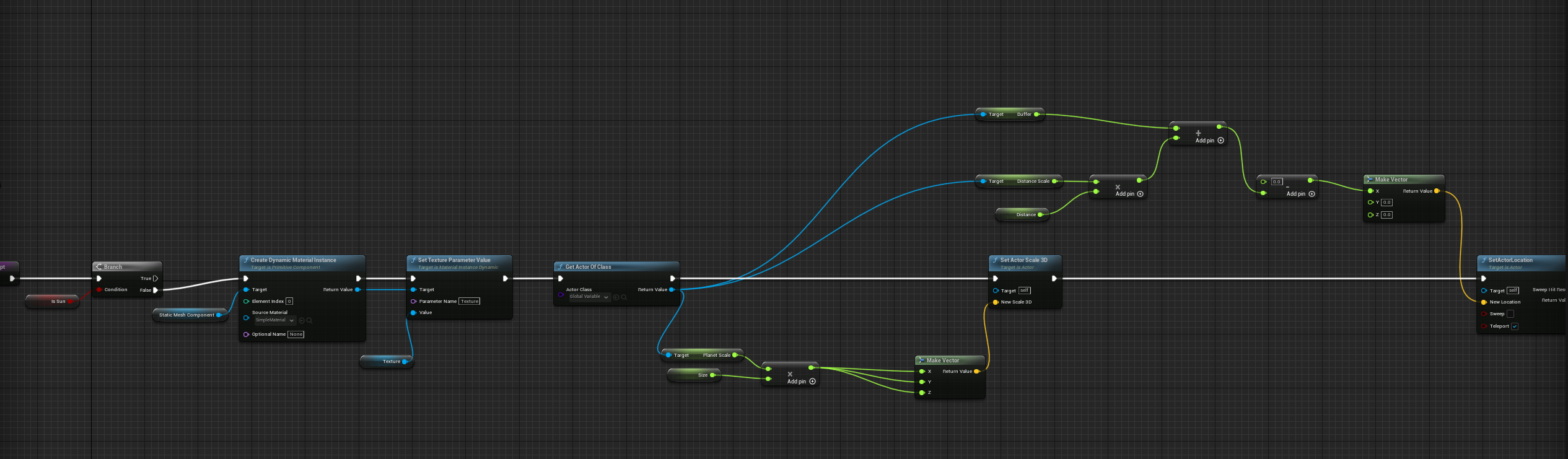


And so it returns default size when you simply move the OrbitingActor around?
icy dragon
trim matrix
is correct to use sequence node in this case? or there is another node?
Could've directly connect from Get Actor of Class to Branch, but if you want to do something else and don't want to make a "node snake", then Sequence is an option.
Though do note that Sequence ignore latent nodes.
trim matrix
icy dragon
Though do note that Sequence ignore latent nodes.
gotcha thank you : )
zealous fog
Is casting to something that will always be loaded bad (or you know will be loaded at that moment)? So casting to the player character for example
trim matrix
I get all the correct positions, but the values from Global Variables are the one I set as "default". If I change the global variables of my actor instance in the details panel, nothing happens. If I want the distance to change, I need to change the default value of the variables in Global Variables, and then compile the Gloval Variables blueprint
brazen merlin
trim matrix
https://i.imgur.com/Gdds9Gv.png
why cant you do this all within one actor?
trim matrix
Yes I wasn’t going to suggest it since it’s deriving from the path your already taking. But you also could do this all in one actor
Anyways m
You can do it either way
brazen merlin
trim matrix
https://i.imgur.com/Gdds9Gv.png
from how i understand this, its a const script on each planet mesh where Distance is defined on each planet, so each planet you have in the level offsets?
trim matrix
trim matrix
I get all the correct positions, but the values from Global Variables are the on...
The only construction script that gets called when you change a value on any actor, is the construction script of that actor.
Nothing else is affected
Unless you directly tell it to be affected
Vía a reference and calling direct logic
odd ember
what does loaded bad mean?
trim matrix
If you want that functionality you Will have to update the position of each orbiting object during ActorAs construction script.
odd ember
zealous fog
Is casting to something that will always be loaded bad (or you know will be load...
see my above question
trim matrix
Now the questions is, how you you get Distance?
The two options are either, storing the distance of each OrbitingActor on ActorA. Or storing the distance separately on each OrbitingActor.
Try storing them separately first, if that does not work, resort to storing every distance value in an array on ActorA
brazen merlin
zealous fog
Is casting to something that will always be loaded bad (or you know will be load...
you can cast on Begin Play so you have a reference of it through the session, do not cast on tick
trim matrix

trim matrix
trim matrix
Now the questions is, how you you get Distance?
I have one Distance stored on each OrbitingActor, and one unique Distance Scale stored on ActorA to be able to scale the distances. (so in the end the distance is OrbitingActor.Distance * GlobalVariables.DistanceScale (+ some initial value)
Yes
Try it like this first
Just update the position of each OrbitingActor on ActorAs construction script
Try keeping the data separate first, and if that fails, store all data on ActorA
Thanks I'll try! But do you see why my current script fails?
The issue has todo with retrieving data from outside sources during construction script i believe
I still don’t fully understand it though.
That’s why the alternative is to store all data on ActorA
And have ActorA solely in charge of all the logic
Yes this makes sense, I'll try all your suggestions, thanks a lot
I really need to sit down and fully understand the details of construction script. Cause this problem has also plagued me before
I always figure it out without actually figuring out the root cause
Maybe it’s time for me todo that.
 onyx violet
I'm having an issue when i'm using save and load for a players settings. sometimes it loads as certain values as 0, other times it switches 2 certain values. It's most likely an error in my programming, but is there any sort of circumstance that could cause save files to not load correctly? I'm noticing this with a couple specific variables.
dawn gazelle
From what I've seen you usually do this the other way around - using your animation blueprint and casting to your pawn/character and getting the values from there.... but... I believe you can do it like this (of course using your own cast instead of what I have there) and then you can set the values in it.

Just make sure you select the appropriate anim class while you have the Add Skeletal Mesh Component node selected:

 carmine iris
dawn gazelle
From what I've seen you usually do this the other way around - using your animat...
carmine iris
dawn gazelle
From what I've seen you usually do this the other way around - using your animat...
Thanks))Thanks, it works. I'm trying to implement a crowd spawner with some logic, and I see that this node is not available in the construction script.
as I understand it, it only works in the event graph
 glass crypt
I feel so stupid, how do I spawn 4 box collisions inside a larger box collision? Basically need to spawn 1 for each quadrant +X +Y, -X +Y, +X -Y, -X -Y.
odd ember
construction script is much more limited than the event graph
onyx violet
glass crypt
I feel so stupid, how do I spawn 4 box collisions inside a larger box collision?...
spawnactor of class, attach to larger box, set relative location
dawn gazelle
carmine iris
Thanks))Thanks, it works. I'm trying to implement a crowd spawner with some logi...
From what I understand, animations blueprints have a "preview" instance that can run before the game starts allowing you to see things, but once it starts, the actual animation instances are created which can have their values properly manipulated - so I don't think it's possible to do what you're trying to do in the construction script.
onyx violet
glass crypt
I feel so stupid, how do I spawn 4 box collisions inside a larger box collision?...
you could use the for loop node, tell it for every loop, spawn it, then based on the index with a switchonint node, you could tell it to use the specific position for each box, or also if u want it to be simple, you could just have it do it manually in the same line of code 4 times
carmine iris
dawn gazelle
From what I understand, animations blueprints have a "preview" instance that can...
I think I understood you, thanks again for your help)
glass crypt
onyx violet
you could use the for loop node, tell it for every loop, spawn it, then based on...
I get that.. I just need to know the position within the box to spawn them
glass crypt
n dimensions, and they need to fill each quadrant based on the size of the parent box
onyx violet
you need to know how big your large box is if you want to know the position to put the smaller ones
 wanton knoll
does anyone have a blueprint where you can change the direction of gravity
zealous fog
brazen merlin
you can cast on Begin Play so you have a reference of it through the session, do...
Thanks!
flat coral
wanton knoll
does anyone have a blueprint where you can change the direction of gravity
I've looked into this and from what I've found, changing the gravity direction of a level during play is not possible. I'm really hoping I'm wrong about that because I'll need it later and there is no hack that isn't horrific
wanton knoll
flat coral
I've looked into this and from what I've found, changing the gravity direction o...
is there a way to go around this?
flat coral
The only way around it I can think of is to have every mobile object in your level be a custom actor which handles gravity in your own way. Set the level gravity to 0 and have your custom gravity method read from a different value somewhere
And then every other BP you make subclasses that instead of going straight from Actor.
What would you do for pawns / characters? No fuckin idea. That's as far as I've thought it out
dawn gazelle
wanton knoll
does anyone have a blueprint where you can change the direction of gravity
There is several free plugins that allow you to manipulate gravity direction, but I don't think it's something you can accomplish without some C++.
"Dynamic Gravity Character"
"Directional & Planet Gravity"
even "Ninja Character Plugin"
odd ember
ah yes, ninjas, famous for not obeying the law of gravity
dawn gazelle
lol
odd ember
true criminals that break even physical laws
wanton knoll
im pretty new to ue where can i donwload these plugins?
dawn gazelle
Oh boy...
odd ember
have you tried google?
dawn gazelle

Unreal Engine
Visit the Marketplace for free and paid assets for your next project.
Prepare to be lost among thousands of assets. Get free ones every month even 😛
iron bone
Anyone know if I can cast from a widget to another blueprint that's in the level? Or am I approaching this situation wrong
Trying to have a button prompt cue a custom event
odd ember
you're approaching it wrong
iron bone
any tips?
odd ember
event dispatchers
flat coral
Is there a way to add an offset to AddForce, so it applies rotation as well as acceleration?
NM, Add Force At Location exists lol
odd ember
like rotational force?
iron bone
Would I be able to bind an event from a blueprint that is not the player character and have that called when I hit a button on a widget?
having trouble casting to the blueprint from the widget
flat coral
I mean yeah you can do anything
ALTHOUGH be careful about events on widgets
Widgets, much like the superhero Wolverine, can be tough to kill
If you remove a widget from the viewport or its parents, it can still catch events
iron bone
idk what to plug into the "object" slot when I cast to my blueprint from widget
iron bone
flat coral
If you remove a widget from the viewport or its parents, it can still catch even...
Good to know!
flat coral
honestly I go the other way, I have a lot of input events in my PlayerController which then call functions in widgets
iron bone
yeah it's a pretty menial piece of the overall game and trying to keep my main character blueprint as decluttered as possible
flat coral
So I dunno how much it'll help exactly but i'l show you what I got
odd ember
where are you spawning the widget
because the widget should already have the information it needs
that's how you can setup the bindings to it
iron bone
spawning it from a box collision that is part of a blueprint I've placed in the level
odd ember
why not call an event on the player controller to spawn the widget?
flat coral
In my player controller I've got input events like this:


 odd ember
then you can set up the binding
iron bone
so i don't need to cast from my button to the blueprint that has the collision:?
odd ember
I have no clue what you're trying to do
I assume if it's a trigger that brings up some UI
you can catch the player controller from the player character
and go that way
iron bone
i see
flat coral
flat coral
In my player controller I've got input events like this:
And then in the Widget's Event Construct I've got this event binding, which then calls this custom event

 gentle urchin
There's also the option of listen to input node
Which works for anything but the axis inputs
gentle urchin
custom input component ftw
flat coral
Advantage of my approach is you can rebind them if you want
odd ember
not even input bindings, just all imaginable keystrokes
gentle urchin
So can I 😛
I've replaced the focus system with it
now i can navigate my menus with a controller with ease 😄
custom behaviour on a per widget basis
flat coral
Honestly the last thing I want is custom behavior on a per-widget basis. I want all my widgets to handle nav events exactly the same thing and do no additional work for each one
odd ember
yeah custom per widget setup sounds like a pain
gentle urchin
Its an option, not mandatory
odd ember
it's up there with raw inputs
gentle urchin
as in you can override it
odd ember
but fair enough if it works for you
gentle urchin
Tbh its the best setup i've had so far
says more about my previous attempts i suppose
odd ember
thankfully I don't have enough widgets in my project that I need to consider anything massive widget wise
flat coral
odd ember
thankfully I don't have enough widgets in my project that I need to consider any...
Honestly I've probably wasted a LOT of time on my widget infrastructure but now it's rock solid
odd ember
I like your solution as it gets around bindings quite well
though with the new input system coming in UE5 I'm going to wait before making substantial changes
flat coral
It's cool but for later things I just ended up calling functions on the widgets
Like this is how I manage back / escape now

No dispatching, no event binding, just function calls. It's less fancy but it ends up being so clean
gentle urchin
Instead of letting your widgets handle it directly
Guess theres ups and downs with all methods
trim matrix
Hello everyone, I am making a runner game and I just want my camera to follow the player in X direction. Anyone have any idea ?
icy dragon
trim matrix
Hello everyone, I am making a runner game and I just want my camera to follow th...
Look up the side scrolling platformer template.
 umbral ginkgo
How can I best get a reference to a variable in a different blueprint
I tried casting but forgot how it works
 last abyss
umbral ginkgo
How can I best get a reference to a variable in a different blueprint
last abyss
umbral ginkgo
How can I best get a reference to a variable in a different blueprint
fastest way is get actor(s) of class granted you want to avoid using that if you can , if you're spawning the actor you can set the variable to expose on spawn and instance editable
zealous fog
umbral ginkgo
How can I best get a reference to a variable in a different blueprint

Announce Post: https://forums.unrealengine.com/showthread.php?101051
This Training Stream takes a look at Blueprint Communication. We find that Unreal Developers of all levels can sometimes struggle through the concepts behind moving data between objects. So in this video we'll take a look at the different ways to make Blueprints talk to one an...
 lyric relic
Hello, I'm trying to get a basic physics constraint to work, the constraint is set to locked for linear and angular motions, Item has Simulate physics and collision enabled, Anchor has collision set to query only.
My problem is.. whenever I move this Actor or even the Anchor component, the Item doesn't follow it. Does anyone know what I'm doing wrong?
(Cross Posted)


 daring path
quick question, how do i add a component as default to something in my explorer
 eternal gate
Is it possible to have a parameterized animation notify?
found my answer: https://dawnarc.com/2016/10/ue4animation-notifications-animnotify/

玄冬Wong
keyword: AnimNotify、Animation Notify、动画的事件通知
Add Custom Parameters in AnimNotify Steps:
Add Custom C++ AnimNotify Class
UCLASS()
class TOWERDEFENSE_API UAnimNotify_Test : public UAnimNotify
{
GENERATED_BODY()
protected:
virtual void Notify(USkeletalMeshComponent* MeshComp, UAnimSequenceBase* Animation) override;
protected:
UPROPERTY(EditAnywh...
 topaz badger
Is it normal for arrays to just clear themselves of all items in them? I currently have an array in a player state and it seems to clear after a minute.
Context is, i am using an array to store item references for an inventory
eternal gate
probably not, are you sure you're referencing the same array all the time?
topaz badger
yeah, i have a key input event that casts to the player state and prints its array
eternal gate
hm, and I guess you'll repeat that input to check the inv status, and suddenly it just goes empty?
weird
topaz badger
yeah exactly
topaz badger
topaz badger
Is it normal for arrays to just clear themselves of all items in them? I current...
asking this question in #multiplayer as I think thats more fitting, so ignore this
 quick kettle
The riverbed is eroded by water, and the river course is becoming larger.
flat coral
Ok let's play this stupid game again, can anyone figure why this line trace isn't hitting this component?

 flat coral
Ok let's play this stupid game again, can anyone figure why this line trace isn'...
flat coral
flat coral
Ok let's play this stupid game again, can anyone figure why this line trace isn'...
Huh this time the answer was actually interesting. The mesh in question has no complex collision mesh. I'd previous had "Use Simple Collision as Complex" set on the entire actor level, but I disabled that because something else was having problems and needed a complex mesh. That had the side effect of making this mesh fall back on the nonexistant complex mesh. Fix was just to set "use simple as complex" on this one mesh
 foggy escarp
flat coral
Huh this time the answer was actually interesting. The mesh in question has no c...
foggy escarp
flat coral
Huh this time the answer was actually interesting. The mesh in question has no c...
If simple collision isn't working, have you given it collision?
Reverting to complex will work but shouldn't be necessary.
Not for certain, but I think tracing with visibility still requires collision to be set.
flat coral
I actually have no idea where the simple collision mesh came from, but it's complex enough for my purposes. We got no problems here
Well except that rotating my angular constraint isn't working
foggy escarp
You can generate it or add them manually in the static mesh
 wooden rapids
Does someone know why some of my Skeletal Mesh Component cast weak Shadows , someone write Texture or Material but there isnt any Shadow Adjustments
remote belfry
Anyone here familiar with the Not Yet Dialogue plugin?
brazen merlin
Nope. Not yet