
#blueprint
402296 messages · Page 783 of 403
 icy dragon
 odd kiln
and then I have to open my UE project into VS?
to compile it ?
or can I do it in the editor
?
icy dragon
Once you make the classes, close the editor and open the .sln file. Do the coding in VS, and compile there once you're done.
odd kiln
but I don't have .sln file
so I'm looking for open my UE project in VS
but I can't figure it out
oh I will do it from editor I think
icy dragon
It should be in your project folder and generated the moment you make C++ class. If not, try generating Visual Studio project from the .uproject

 odd kiln
it's ok I opened it from File -> Open Visual Studio from edit
thank you so much !
I have to reopen the UE editor after compiling in VS ?
 dawn gazelle

 fleet raft
well I guess I'm wrong then lol
also is there a way to make it so that when I'm flying my character follows where I'm moving
like so that if I look up with the mouse then my character would point towards the mouse and also move up
dawn gazelle
To move towards where your camera is looking, you need to take the forward vector of the camera * by your scale (how much you want it to move) and feed that into your movement input.
 steel zealot
Hey guys. I have an In-Game settings menu that pops up on 'Tab' press and disappears on a 2nd press, but my issue is that it's only working once. Once I close the menu, when I press tab again, it just causes the mouse cursor to appear but no menu. Not sure why this is happening. Am I missing something?

 sonic crow
I got an interesting problem that probably has a quick fix (famous last words, haha). My collision mesh is obscuring my view instead of my mesh. how would i fix this?
 mild citrus
Why when I start the game I see a quarter of my screen

I tried to press f11 on viewport but it still show the same
 fierce birch
@mild citrus try shrinking the widget
question, trying to make my main character ref valid but its not working, this is in a weapon anim bp

 mild citrus
How can I apply the changes?
fierce birch
compile
fierce birch
is this played in a new window
mild citrus
but nothing happen
mild citrus
fierce birch
is this played in a new window
?
fierce birch
are you playing this in a new editor window
mild citrus
mmm
I don't think so
I'm pushing the play button

but nothing happened when I pressed compile

and saved
 fierce birch
no
mild citrus
Ok
Yeah it works, but the other problem is that I'm not able to see the cursor
Only if I press on the credit button
And return
fierce birch
well you have to set show mouse cursor
fierce birch
?
mild citrus
 mild citrus
where?
mild citrus
fierce birch
replace with add to viewport
What's named the blueprint?
because I'm in level blueprint
fierce birch
why
fierce birch
this is in level bp
nvm
check the box in set show cursor
and replace add player to screen with add to viewport
mild citrus
 fierce birch
yes now check the next block over
fierce birch
see the red block
mild citrus
Oh
fierce birch
its called a bool
mild citrus
Thanks 🙂
mild citrus
Can I bother you with one more thing?
it's everything easy
for you I guess
hahah
fierce birch
yes?
 fierce birch
?
mild citrus
I mean when I press R key again
fierce birch
flip flop


 fierce birch
toggle between hide and show correct
fierce birch
you want to hide and show the flash light by pressing r correct
mild citrus
yes, I do
fierce birch
one sec
mild citrus
Ok
an one more thing is pretty difficult to make a simple animation with blueprint like move the flashlight move it back from camera viewport
Because it's not realistic that it shows up and hide suddenly
 fierce birch
no
mild citrus
hehe
I wonder if there's a way to animate the flashlight
when I press R instead it appears and hides


like this
Animate in the X axis
mild citrus
fierce birch
Thanks 😄
so should I use actor location and timeline?
Well I think I'll keep it simple for the moment
 mild citrus
@fierce birch Thanks a lot
fierce birch
np
a is current loc
b is new
add a float curve
add a key at 0
and a key at 1
give it the time you want
fierce birch
@mild citrus wdym
fierce birch
Yea
mild citrus
For one hand I have the light and on the other I have the flashlight visibility

How can I create a condition
I would not be able to turn on the light if I before press R (take out the flashlight)
mild citrus
Let me show you
with images hehe
I can turn on the light

but before I want to take out the flashlight

Because it doesn't make sense turn the light without keep the FL at hand
fierce birch
get rid of the top code and integrate it with the bottom code
plug in spot light for both targets as well
i believe you can use multiple
if not than add a spotlight visibility at the end of each visibility
mild citrus
Yeah I could
but there's no chance
with a blueprint
do that condition?
I don't like
fierce birch
?
fierce birch
you want to enable the light when you have your flash light out correct
mild citrus
I want to have the possibility to take out the flashlight but without turn it on
fierce birch
ok
under event tick branch and is on
wait nvm
isnt the way you have it good with you
i mean if i were doing it i would make it turn on as soon as i take it out but
mild citrus
Nvm I'll do like you said
mild citrus
Using delay BP I can slow down when the character take it out?
because I have an audio
fierce birch
up to you
mild citrus
but delay is the blueprint?
fierce birch
its a node
fierce birch
np
sonic crow
How do i change my LOS system to focus on meshes over collision meshes? (demonstrated by the bridge
sonic crow
does anyone know why the words preview shows on my mesh?

 lost solstice
you have to bake lighting for that to go away
sonic crow
lost solstice
you have to bake lighting for that to go away
ty
lost solstice
np
 trim matrix
sonic crow
does anyone know why the words preview shows on my mesh?
trim matrix
sonic crow
does anyone know why the words preview shows on my mesh?
woah what shader is that lol
lost solstice
looks pretty cool ngl
icy dragon
Looks like toon shading post process to me
sonic crow
icy dragon
Looks like toon shading post process to me
yep i used a cel shader post processing for the cel shader, the outlines and the line of sight
sonic crow
trim matrix
woah what shader is that lol
its a basic toon shader tbh
 azure smelt
Hey there good people, I am trying to implement some IK to my player pawn for a VR game. Everything is working as it should except for the head of the mannequin. It seems that the headbone of the skeleton is offset by 90*degrees, so is there a way to fix the skeleton headbone and rotate it to it's correct position? or can someone help me with fixing some blueprints I made to compensate for the offset?

The nodes at the bottom are what I added to deal with the offset nature of the characters head. I added a -90 to the z axis which is where the offset rotation is occurring, but then when I would look up or down the head would rotate to the left or right instead of chin up chin down. So I connected the "X and Y" of the Break rotator to the make rotator and swapped them around. But now there is an inversion going on, so if I look up the characters head moves down.
I'd really appreciate some help with this.
lost solstice
@azure smelt i followed this tutorial from a book by Mitch McCaffrey called Unreal Engine VR Cookbook which talks about inverse kinematics and i managed to find the chapter online talking about it at this link https://www.informit.com/articles/article.aspx?p=2767093&seqNum=2. I have seen other tutorials online like this https://www.youtube.com/watch?v=EKR8ogonD68&feature=emb_logo which follow a very similar process but this is what I have used and it works great. See if you can fit it into what you have
Creator of the community Virtual Reality (VR) Template for UE4, Mitch McCaffrey, discusses techniques built into Unreal Engine for interpolating the user’s current pose from known information about the player’s location.

This is the easiest way I found to get yourself a VR body with arm Inverse Kinematic (requires Motion Controllers) and full thumbstick locomotion. This step-by-step tutorial shows exactly how to do it. Note that room-scale movement is not supported and you will end up out of your VR body. Standing/walking in place works after the initial re-cent...
azure smelt
I appreciate this. I will have a look
 spare vessel
How do I get these scene capture components to only display their own camera?
 azure smelt
spare vessel
How do I get these scene capture components to only display their own camera?
azure smelt
spare vessel
How do I get these scene capture components to only display their own camera?
Create a second Material for the 2d plane
then choose the camera you want to use, and under "Scene Capture->Texture Target" and change the Texture target to that second material you made
azure smelt
lost solstice
<@!587853239009935362> i followed this tutorial from a book by Mitch McCaffrey c...
This doesn't seem to handle Head IK stuff. The tutorial video doesn't seem to.
lost solstice
the just look at the article i sent that covers it all
azure smelt
lost solstice
the just look at the article i sent that covers it all
yeah it seems to be a good resource, Thankyou for your info 🙂
lost solstice
No worries! 🙂
 dry seal
sonic crow
does anyone know why the words preview shows on my mesh?
dry seal
sonic crow
does anyone know why the words preview shows on my mesh?
'Preview' indicates that a stationary light is casting a shadow that will be baked when you build lighting, but is currently dynamic. You can either bake lighting, or turn it off in the viewport, Show>Visualise>Preview Shadow Indicator
 atomic salmon
@azure smeltI have not implemented head IK in my video tut above but the principles and the technique are identical to what it is done for the Motion Controllers. The most difficult part is to figure out how to adjust the rotations depending on the orientation of the head bone.
lost solstice
omg i had no idea that was you but now the name makes so much sense
atomic salmon
lost solstice
omg i had no idea that was you but now the name makes so much sense
No worries! Thanks for the mention BTW. 😉
lost solstice
haha your vr tuts have helped me a lot so of course I would spread the love
atomic salmon
I have been doing mostly vehicle stuff lately, need to go back to VR at a certain point. Or do a bit of both.
 rugged epoch
Hey guys, is there any curve editor tool where the X axis is not based over time so we can edit it freely?
 gentle urchin
isnt time just relative to location on X axis, and could be anything you wanted really?
 stable plume
Can anyone help with this?: it seems if material slots are swapped in order (ie if Element0 = Slot Name 02-Default on one mesh and = Slot name 07- Default on another) Set Material by Name doesn't work properly but seems to be using the Element No.
rugged epoch
gentle urchin
isnt time just relative to location on X axis, and could be anything you wanted ...
Yes it is, but I want to put dots on the left and the right side without following a logical time sequence
like that
 gentle urchin
I'm not grapsing at all what you want to do 😛 what would the curve look like in your example, and why cant it fit in a regular curve?
rugged epoch
the curve could look like this
 gentle urchin
looks loke a regular curve, tilted
rugged epoch
okk I'm gonna try again to do that with the existing tool but I tried before but no success
gentle urchin
and if you add another point which would be "lower" than 3 in that example, it's no longer a curve
also a ton of help here;
rugged epoch
oh ok, I saw the issue, I was thinking to do the pattern vertically like on the image
but I can only do that pattern horizontally, and yes it can work lol
@gentle urchin thxs for your help anyway
 pure valve
Hi!
I have repeatable crash, when I try to delete component in BP editor. (see screenshot). I have no any idea how to fix it or get workaround. uasset files doesn't have human-editable text.

 stray moat
how would I trigger a jump start animation then check if it has land on the ground using line trace, character controller or physics collision the play the jump end animation afterword's , I'm using these animations
JumpIdleStart & JumpIdleLand
pure valve
pure valve
Hi!
I have repeatable crash, when I try to delete component in BP editor. (see s...
I just have found workaround. Copy problematic uasset file of BP in Content Browser. And then delete required component by BP editor. But this method breaks any relationships, maybe it can be fixed by Replace References
gentle urchin
rugged epoch
but I can only do that pattern horizontally, and yes it can work lol
thats usually how curves work tho.
having it upwards or sideways doesnt really matter, its just a plotting point
rugged epoch
@gentle urchin I'm trying to do a spray pattern for my weapon system, and even though I can draw points like that, it's not very flexible like that free graph editor I told you about
I'm starting to think that I will have to use some external tool or a plugin
gentle urchin
spray pattern for a gun ?
rugged epoch
gentle urchin
spray pattern for a gun ?
yes, the main difference is that having a spray pattern each dot is enumerated and can be anywhere without any restriction on the graph
just an example

 visual hamlet
downloaded a project, whenever i press play i get these errors. Not sure how to fix it 😞
 gentle urchin
rugged epoch
just an example
gentle urchin
rugged epoch
just an example
If you added a few more points i guess i could see the spray pattern, and possibly understand why it wouldnt work, but it kinda sounds like a curve is not what you're after
rugged epoch
visual hamlet
downloaded a project, whenever i press play i get these errors. Not sure how to ...
there are methods inside those bps that are causing that infinite loop
rugged epoch
gentle urchin
If you added a few more points i guess i could see the spray pattern, and possib...
yess, but I was thinking to use the curve editor tool since it has the basic tools to add points but it wont work for that case
 zealous moth
@gentle urchinI fixed that vector issue btw, it had to be non-relative rotation rather than relative. Relative rotation off the speed vector doubled the direction
gentle urchin
rugged epoch
yess, but I was thinking to use the curve editor tool since it has the basic too...
I see.
gentle urchin
zealous moth
<@!231467939734355969>I fixed that vector issue btw, it had to be non-relative r...
Sweet! Glad you got it working 🙂
rugged epoch
visual hamlet
downloaded a project, whenever i press play i get these errors. Not sure how to ...
click on show and it'll take you to where the errors are. You can just unplug whatever is causing the loop and figure it out how to solve that
visual hamlet
rugged epoch
click on show and it'll take you to where the errors are. You can just unplug wh...
alright thank you, i'll see what i can do. Though im still a beginner with blueprints
rugged epoch
visual hamlet
alright thank you, i'll see what i can do. Though im still a beginner with bluep...
you are welcome!
stable plume
Can anyone help with this?: it seems if material slots are swapped in order (ie if Element0 = Slot Name 02-Default on one mesh and = Slot name 07- Default on another) Set Material by Name doesn't work properly but seems to be using the Element No.
 humble vine
I'm using timeline to lerp from one location to another (don't mind the Update note connected, it actually is, this is just replication of the setup) but what ever float I place in the timeline to return, I always arrive to the destination from the Lerp before. First I used logical 0 to 1 float on the timeline... but I was arriving to target when that variable print screened about 0.4. Then I changed the ending float on the timeline to that and now I was arriving around 0.16... Change to 0.16 and I was arriving at 0.1. What am I not understanding with the Lerp node? Isn't it suppose to be strictly 0 alpha at original location, 1 at destination? It just always gets from A to B in about 40% of the end value set regardless of what that value is
 gentle urchin
humble vine
I'm using timeline to lerp from one location to another (don't mind the Update n...
gentle urchin
humble vine
I'm using timeline to lerp from one location to another (don't mind the Update n...
0 to 1 yes, as you say
 earnest tangle
What are you doing with the lerped value?
humble vine
yes, but regardless what the end value is on the New Track 1... it always arrives to B at 40% of that value
gentle urchin
Otherwise the delta would change for each evaluation
humble vine
so when timeline from 0 to 1, I'm at B fully in 0.4
earnest tangle
Are you using set location or something with the return value?
humble vine
if I make the timeline from 0 to 0.16 max, I arrive at 0.1
yes set location behind the lerp
gentle urchin
as zomg asks, we need more context
humble vine
linked to update
earnest tangle
You're not doing any other math like using + on the vectors?
most issues I've seen with Lerp similar to this where the target location is reached too early tend to be because the lerped value was being added to some other value (via + or add relative location or such) instead of using it as an absolute value
humble vine
this should be all related nodes to the location change
 gentle urchin
well there we go
both your inputs are constantly changing
caching them will solve it
humble vine
ah i see, because i'm flying towards the goal the start value constantly gets changed
gentle urchin
Yupp
stray moat
stray moat
how would I trigger a jump start animation then check if it has land on the gro...
could anyone pls help
humble vine
Awesome guys, thank you so much for quick reply
gentle urchin
stray moat
how would I trigger a jump start animation then check if it has land on the gro...
Wouldnt using the "isfalling" check suffice?
With pure linetracing you'd need to check the distance to the ground i guess. Sounds prone to errors tho
stray moat
yeah the animation package i bought requires the jumps to use system like that ], im think of using another jump now
if you look at the pdf in my post
icy dragon
@stray moat Usually that kind of jumping wasn't done with root motion, or not moving the character capsule upwards with the animation
So your character has the jumping animation, but the character capsule isn't actually jumping, just disabling gravity temporarily, and only line trace downwards if the capsule don't touch the ground
stray moat
icy dragon
<@521234817442906112> Usually that kind of jumping wasn't done with root motion,...
I found different anims that match and it has jump start_loop_end , thanks tho I will note for next time
stable plume
Can anyone help with this?: it seems if material slots are swapped in order (ie if Element0 = Slot Name 02-Default on one mesh and = Slot name 07- Default on another) Set Material by Name doesn't work properly but seems to be using the Element No.
atomic salmon
@stable plumeIf you open your mesh in the static mesh editor you can change the names of the material slots
SetMaterialByName uses those names to match the material slot ID
Same for a skeletal mesh
 wispy star
Is there a way to make a BP out of selection of actors?
icy dragon
wispy star
Is there a way to make a BP out of selection of actors?
This?
 wispy star
icy dragon
This?
wispy star
icy dragon
This?
well, this doesn't seems to work, it can only make HISMs
as exmaple i have this:

and i want to convert it to bp
atomic salmon
@wispy stardon't think is possible with parented actor in a scene
wispy star
@atomic salmonwhat if i select several w/o them linked? can i attach light particles, etc and merge them into bp?
atomic salmon
Try it
If it works it works. I don't think it does though
What you have in the level are actors and you want to convert them to components
 brazen merlin
Isnt there the convert to bp option in the details window?
wispy star
atomic salmon
Try it
tried, does nothing
 rustic zealot
Hi, i was wondering how i would make each go thought each one of the nodes on the left one after another, from multiple inputs, but in a way that is exc one of them and then on the next execution it will do 2 and so forth. almost like a sequencer but not doing all of them one after another
 atomic salmon
@brazen merlinworks only if a single actor is selected because then it knows what to turn it into as root component
@wispy starI am afraid it is not possible as suspected. Maybe we some editor automation but not out of the box
 tawdry surge
@rustic zealot switch on int. Just increment the 'case' value after each execution
rustic zealot
tawdry surge
<@286907960607768580> switch on int. Just increment the 'case' value after each ...
Cheers bud!
stable plume
@atomic salmon - I didn't change the names but kept the default names from 3DMax - but all the models have the same name for the same Material. I set the Material at Begin Play also - but as some came over from Max in a different order my code seems to be ignored and it uses the previous order 😦 - it's gotta be a bug - was hoping there was a work around
atomic salmon
@stable plumeit is unlikely. Can you show a screenshot of the material slot names from the static mesh editor and your code with SetMaterialByName?
stable plume
@atomic salmon

@atomic salmon

@atomic salmon

@atomic salmon See they're swapped in order (First 2 images)
atomic salmon
@stable plumeyes the order doesn't matter, that is the whole point of using the name instead of the slot ID
stable plume
That's what I thought 😄
atomic salmon
When setting the name in the SET node did you copy/pasted it from the material slot name box?
stable plume
Jeez -can't remember
atomic salmon
Just to make sure there are not trailing spaces or something
Which would prevent the name from matching
The other thing to try is to completely remove any space character from the material slot name and try like that
Next is to remove the leading number and use a name starting with a letter
Even if it should work regardless
 silk hinge
ahah I'm having a pretty weird Issue, I got a "Begin play" not getting trigger when I spawn an actor, I've been checking, i'm spawning the right actor x)
stable plume
@atomic salmon I just copied and pasted the names and it still doesn't work as intended 😦
atomic salmon
@stable plumewhat are you assigning to the slot? A dynamic material instance or what?
The problem may be on that side of things
silk hinge
Engine reboot, problem solved wtf x)
stable plume
@atomic salmon A Material Instance
atomic salmon
@stable plumelet's do a simple test.
Use GetMaterialSlotNames to retrieve the slot names then assign new materials to them based on those names. See if that works.
So you do GetMaterialSlotsNames-->Get(0) for the first slot and Get(1) for the second one
and use those returned names into SetMaterialByName
 atomic salmon
@stable plumeok what's up?
 spark steppe
can't you put the text in an array, always set the 1st element, and remove it after you have set it
and when the array is empty, stop
@rustic zealot
stable plume
@atomic salmon They seem to be permanently changed now
stable plume
@atomic salmon sort of - I need to do more testing but it certainly made a difference. The 3rd material is used on certain meshes but not all so I guess I'll need to set this on each Child rather than just on the Parent?
Thanks for your help btw
atomic salmon
@stable plumeok sounds good. Then print the names out of the array and double check them with those you were using before. You need to assign the material to the mesh actually having the slot and living in the level.
You are welcome.
 rain egret
I have encountered something weird. I have a parent pawn with an attack event, I made a child of this class and linked it to the tick event with a bool triggering it.
Here’s the weird part, the parent pawn runs the even per tick now
The parent does not have this code tho
 maiden wadi
Does it stop if you disconnect it in the child?
stable plume
@atomic salmon Yer the names are all correct - still not working as intended - any other ideas?
rain egret
maiden wadi
Does it stop if you disconnect it in the child?
no it doesnt stop, lmao what is this
basically the parent executes the childs event
how
and it only happens when the child is in the scene
 onyx frigate
HI I have a simple problem but yet strange: I have a timer with an handle, and it seems it's going faster than what it should be
Tried to find some information on internet but I don't get what is the problem ...
It's set to Looping every 1/10s, and I based my calculation on TimerElapsedByHandle. And the timer is going faster by 2/3 on a 15s base
brazen merlin
so it repeats at 0.1 intervals but you noticed it is actually going at 0.066?
onyx frigate
well not really that
atomic salmon
stable plume
<@!399916238098137098> Yer the names are all correct - still not working as int...
Which version of the engine are you on?
You should try to reproduce your problem in a new standalone project and see if it still happens.
onyx frigate
I calculate the elapsed time this way on the Timer By Function trigger:

which seems to work, but it's actually going faster than it should
brazen merlin
i dont think thats right
onyx frigate
I take the duration, set it up. calculate elapsed time like this at each trigger of the timer and then check etc ...
brazen merlin
thats going to add the time elapsed to an increasing buildup of time stored
onyx frigate
GetTimeElapsed is basically getting the time between the last trigger, which is fine IMO
brazen merlin
GetTimerElapsedTime should be all you need, shouldnt add it
 night sparrow
Hi,
after i close widget (webbrowser) i cant do nothing in my window - its frozen. Can someone help?
https://www.youtube.com/watch?v=zU5NbZWYmbg

Can't do nothing after exit browser - viewport frozes
onyx frigate
That's what it returns:
 brazen merlin
onyx frigate
That's what it returns:
brazen merlin
onyx frigate
That's what it returns:
are you clearing the elapsed time variable at some point?
onyx frigate
Well, when the cooldown (which the timer is used for) is finished yes.
But while it's on, it's 0.1s + Elapsed = 0.1 + 0.073... = Elapsed
brazen merlin
oh okay, whats the timer bp part look like
onyx frigate
yeah, that's what GetElapsedTimeByHandle is returning.
My timer is set to update each 0.1s
brazen merlin
so its just a timer with 0.1?
onyx frigate
0.1s, looping for 15 seconds, with Elapsed time = Elapsed + GetElapsedTime
brazen merlin
when does the get timer elapsed call happen?
 brazen merlin
alright, so its not 0.1, but something dependant of framerate update
not sure what you are doing or how you are setting update fps
though that explains the fluctation in values
 brazen merlin
well a timer is not quite frame or tick dependant, so again, when are you calling the check to see elapsed time?
as it might be better to check the time at a more reliable moment
onyx frigate
In the method UpdateCooldown linked to the timer
 vital aspen
Trying to figure out this inventory system and the pickup is a pain in the butt. Giving me a headache. anyway. I wanted to add something like a stove to my project. It's just I would have to use a new letter "F" to interact with it. The issue is how. Would I have to setup a new linetrace and go threw thew old setup. Or is there another way to do this.
onyx frigate
when the timer triggers it
brazen merlin
gotcha
onyx frigate
0.2s delay doesn't change the fact that the timer is faster than what it should do
well "delay" ... 0.2s update rate
brazen merlin
i have to get to work, but i would test, in a separate bp in a blank scene, this specific situation - check timer time
onyx frigate
good idea
brazen merlin
gotta run
onyx frigate
Have a nice day 🙂
maiden wadi
night sparrow
Hi,
after i close widget (webbrowser) i cant do nothing in my window - its froze...
On your Widget's Destruct event. Override that event and make a call to set your controls away from UI Only.
It's usually best to put the actual call in somewhere like the PlayerController or HUD, and get that and call it. Allows easier setup, and any widget can set that on destruct. Destruct is ran when widget is removed from it's parent.
night sparrow
@maiden wadi Can u navigate me? i can play stream. Im non programmer.
maiden wadi
Open up your widget class that you add to viewport.
Hover here over Functions. Override should show up. Click it and you'll get this list.

Select Destruct there.


Then you can do one of these. whichever is used for you game. That should allow input from controller again.
This event should run when you call RemoveFromViewport.
Er. RemoveFromParent.
gentle urchin
onyx frigate
Have a nice day 🙂
According to what you show it does seem you're calculating elapsed time wrong? In the last screenshot you say the values are what the timer handle elapsed time is, but that doesnt make any sense unless you're resetting the timer every time, which just makes it even more wrong
Elapsed time is already internally handled in the timer manager, so there's really no math to do. If you wanna chec how much time it actually took, the closest thing i can think is on tick doing elapsed time, and reseting on timer function (printing its value right before the reset)
onyx frigate
I just wanted to avoid on tick :/
gentle urchin
Or trust its internal elapsed
onyx frigate
well I just changed elapsed to be Elapsed + 0.1 with a 0.1 trigger and it'S actually accurate
night sparrow
@maiden wadi it took me some time. But i tried both options and it doesnt work
onyx frigate
but I am wondering if it's not wrong doing that ...
gentle urchin
onyx frigate
but I am wondering if it's not wrong doing that ...
What was the original issue anyways
Like.. why are you calculating elapsed ^^?
onyx frigate
0.1 trigger, is trying to calculate the elapsed time in the triggered function and update a cooldown on the UI
Cooldown is 15s, want to show a decreasing 15s down to 0
gentle urchin
Elapsed time would accurately display this
If only called once
So cd - elapsed = remaining cd
onyx frigate
Yep. And I was doing that in the called method from the timer
 stoic narwhal
I'm trying to do a box trace based on an mesh's size and orientation, I can't figure out how to get the orientation of the physical mesh, any ideas?

*please dont say "GetWorldRotation"
onyx frigate
because even though the timer has a 0.1 frequence I didn't want to trust the precision of it to calculate the remaining time but rather trust the timer internal clock
which would be working in this case if I used the tick, but all I've seen about it is: try to avoid it
gentle urchin
onyx frigate
because even though the timer has a 0.1 frequence I didn't want to trust the pre...
It surely is accurate enough :p not atomic precision but good enough ^^
onyx frigate
yeah, ok then 🙂
gentle urchin
Especially for something like ui update
But i wouldnt use it to decrement the actual cd
onyx frigate
I had another option, which is querying the cooldown gameplay effect remaning time, but it seems a bit too muhc performance wise
gentle urchin
Id have another timer for the actual cd
onyx frigate
(didn't tested it but I heard gameplay tag queries are not the fastest)
gentle urchin
But thats me doing easy solutions 😅
onyx frigate
guess you're right. if it leads to an actual precision issue then i'll have it changed ... !
gentle urchin
But unless this is the next big competitive game to play, it doesnt matter that much imo
 flat coral
stoic narwhal
*please dont say "GetWorldRotation"
flat coral
stoic narwhal
*please dont say "GetWorldRotation"
Wait what's wrong with GetWorldRotation?
gentle urchin
And as you say, if you later findnout that the precision must be dealt with, well.. then you can do it at that point^^
stoic narwhal
flat coral
Wait what's wrong with GetWorldRotation?
getworldrotation doesn't care about the component bounds, which is what I'm looking at here
gentle urchin
Components bounds are rotated with its world rotation tho so whats the issue
Pretty sure thats all im doing aswell
Could double check but... stairs..
stoic narwhal
these are two static meshes, their rotations are exactly the same, the box traces would look pretty much exactly the same if I input getworldrotation into the orientation pin
 onyx frigate
@gentle urchin Thanks !
gentle urchin
stoic narwhal
these are two static meshes, their rotations are exactly the same, the box trace...
Ehh ? What am i missing
Or rather, what did you do to it, if not alter its rotation
flat coral
^
gentle urchin
Vertex offset?
stoic narwhal
Both of the pivots for the mesh components are the same
flat coral
what's different about them, then?
stoic narwhal
So both of these items have the exact same rotation in unreal

their rotations are 0,0,0. One of them however is at a 45 degree angle (as it was imported like that)
if I do a box trace for each of the items using the code above, it gives these results.
flat coral
You don't want a box trace I think, you just wanna know if your mesh is overlapping something. Right?
 unique falcon
Hello i'm making a tank game and i have problems with rotating the tank turret.
I use physics constraint i'm not sure why it's not working
 gentle urchin
Not sure you can solve this without fixing the mesh import really
 supple dome
stoic narwhal
So both of these items have the exact same rotation in unreal
supple dome
stoic narwhal
So both of these items have the exact same rotation in unreal
Can't you use a geometry sweep instead?
stoic narwhal
flat coral
You don't want a box trace I think, you just wanna know if your mesh is overlapp...
For this operation I would like to do a box trace
Thats a good idea, but it will not work for this case as I'm tracing by a specific channel, and at a specific size
 exotic warren
stoic narwhal
For this operation I would like to do a box trace
exotic warren
stoic narwhal
For this operation I would like to do a box trace
you're not allowed
stoic narwhal
Snaps i stg
flat coral
I think what you need to be looking into is the collision system. You're basically checking if an arbitrary mesh is overlapping your target, the fact that the mesh is box-shaped is just sorta coincidental, it doesn't help you if the "box" is rotated like that
gentle urchin
Isnt bounds auto generated aswell?
stoic narwhal
The collision system would be a good way of doing it... if it didn't specifically have to use a box trace. Trying to find a solution here for the box trace orientation
gentle urchin
You'd somehow need to read out the mesh vertexes to figure its size
Assuming you already know its box shaped
stoic narwhal
I'm also not using the exact bounds of the item too, I'm using one slightly smaller, for another reason. It's a bit of a faff
unique falcon
unique falcon
Hello i'm making a tank game and i have problems with rotating the tank turret.
...
Without physics i can easily turn the turret using AddLocalRotation but i need to use constraints to make some other stuff working
 flat coral
stoic narwhal
I'm also not using the exact bounds of the item too, I'm using one slightly smal...
flat coral
stoic narwhal
I'm also not using the exact bounds of the item too, I'm using one slightly smal...
heh the case that's breaking my brain on this is what if you rotated your not-rotated red box so it LOOKED like it was grid-aligned but actually was at 45 degrees
stoic narwhal
unique falcon
Without physics i can easily turn the turret using AddLocalRotation but i need t...
you're not using add in your first screenshot, you're using set.
unique falcon
stoic narwhal
you're not using add in your first screenshot, you're using set.
well using physics constraints you can't add to it... you can just set it.
stoic narwhal
flat coral
heh the case that's breaking my brain on this is what if you rotated your not-ro...
I can't go into too much detail due to NDA and shtuff... but basically its because it relies on the world grid system and the mesh just happens to be that, ain't no changing it unfortunately
stoic narwhal
unique falcon
well using physics constraints you can't add to it... you can just set it.
store the variable, then add to it, then use that variable.
flat coral
stoic narwhal
I can't go into too much detail due to NDA and shtuff... but basically its becau...
I think if you absolutely need a box trace, you get world rotation then add a constant offset to that which aligns the box trace to your weird box
gentle urchin
Guess you could always hardcode stuff but where's the fun in that
flat coral
^
stoic narwhal
Yeah its annoying because there's literally hundreds of things that will use this.. and hardcoding would take a while
gentle urchin
Surely
 rigid fractal
is it possible to show/hide an element that ta inside the ui widget? without having to remove the entire ui
which blueprint component should i use?
stoic narwhal
Thanks anyways folks, I'm going to bash my head against the wall until one of my few braincells will figure it out
gentle urchin
I'd argue that meshes rotated like this at import is the original issue
But if it cant be helped
Whelp
stoic narwhal
gentle urchin
I'd argue that meshes rotated like this at import is the original issue
they're specifically rotated in a certain way for a gameplay feature
gentle urchin
And for sure couldn't be rotated in game like its normally done?
Ngl gotta be one hell of a feature
I think theres a node for fetching mesh verts kinda
And if it doesnt already exist, it most likely can be made
unique falcon
stoic narwhal
store the variable, then add to it, then use that variable.
Thanks it's working but for some reason it stops rotating
 stoic narwhal
Save it as a rotator not a float, I think its because you're hitting the max angle 🤔
Not 100% sure
unique falcon
nope still same thing
 neat stream
We all agree that you can't have A BlueprintCallable function that you can trigger without putting it in world ?
brazen merlin
Ill disagree but its vague
neat stream
If I don't drag and drop my actor in world I can't get to see the button in the properties panel
Basically I was trying to put buttons in my DataAssets 😉
flat coral
neat stream
Basically I was trying to put buttons in my DataAssets 😉
Wait so what would press the button
Because it wouldn't be visible right
neat stream
MySelf cause I'm lazy to reference gameplaytags by hand ahah
flat coral
Wait so you just wanna change some configuration at runtime?
neat stream
No Basically to explain, I am working on an inventory system and wanted to reference each object with a unique gameplaytag .. composed of Inventory.Items.[ItemName] ...
I hate the gameplaytag window
flat coral
I've actually never heard of gameplaytag before
brazen merlin
The window is rather off putting to use
flat coral
how do I see this Evil Window ?
brazen merlin
I think theyre a solution to nesting structs
Ive not worked with them lol pretty recent i think added in .24
maiden wadi
@neat streamWhat is so bad about the gameplay tags window? I haven't ever had an issue with it and I use it almost daily. O.o
 pulsar rampart
HI I have a problem i made a simple movement code that make the player move but when i press the key W it goes backward and S goes forward and D goes left and a goes right so can anyone help me plz?
 neat stream
maiden wadi
<@!103664066140057600>What is so bad about the gameplay tags window? I haven't e...
neat stream
maiden wadi
<@!103664066140057600>What is so bad about the gameplay tags window? I haven't e...
I don't know I think it's awfull 🙂
maiden wadi
@brazen merlin@flat coral GameplayTags are basically a super version of FName. For starts they're specified in an ini file which allows you to easily specify them in the editor via the window. They're used for tagging data mostly but they can also drive gameplay logic. The basic idea is that they're a hierarchy of FNames.
Inventory stuff is a good example. You can have a base tag of like InventoryItem. Then something like InventoryItem.Consumable. Anything using that parent tag could be consumed with some specific logic for it. EG InventoryItem.Consumable.HealthPotion could be used to look up data in a DataAsset or Datatable, get the row struct and apply effects to the character. Another tag could be InventoryItem.EquipItem. That could send the inventory data to a different function to attempt to equip said item.
You could do this same thing with FNames, or even Strings. But those both require parsing through the FNameToString, or the String. GameplayTags on the other hand are extremely fast to compare or use because at their core they're just numbers.
flat coral
maiden wadi
<@!568839944970174501><@!187795234615328768> GameplayTags are basically a super ...
What version of UE did they come in with?
flat coral
pulsar rampart
HI I have a problem i made a simple movement code that make the player move but ...
For SURE it is whatever you're doing with those rotators
pulsar rampart
flat coral
For SURE it is whatever you're doing with those rotators
I solved it thank you
maiden wadi
flat coral
What version of UE did they come in with?
Unsure. Google says something like 4.15. They've been in at least as of 4.24 when I first started using Unreal.
neat stream
are you using the HUD class from the game mode ?
flat coral
BTW is there any way to get around the limitation that we can't have Delay in functions?
I've got a lot of things that REALLY should be functions, but instead they're events in the already-crowded Event Graph, just because they need a Delay
brazen merlin
flat coral
I've got a lot of things that REALLY should be functions, but instead they're ev...
yes, timers, they can be called in a function and can call functions
you can also make multiple graphs
flat coral
brazen merlin
you can also make multiple graphs
oh god how did I not know that
zealous moth
@flat coral the while point of functions is complex inputs and outputs. It is meant to be working as one without timings. If you want delays, then you have to use events. The difference is that events do not have outputs.
flat coral
brazen merlin
you can also make multiple graphs
This shit legit just changed my life this is amazing
awww you can still only have one tick even tho
zealous moth
Tick is a singular event you can use for multiple triggers.
The issue with many is that they put things that shouldnt go on tick
Alternatively if you dont need tick but a specific interval you can use timers.
flat coral
I'm PRETTY careful with Tick in general but still if my multiple graphs are different "Categories" of functionality, it's sad that I still need a "master" graph where any tick-related functionality has to be, cross-category
brazen merlin
flat coral
I'm PRETTY careful with Tick in general but still if my multiple graphs are diff...
like i said, use timers
they are ticks with names you can fire and clear when needed
flat coral
No I'm just happy about the multiple graphs because right now I"ve got some horrorshow shit like this lol

And like... no one of those events is THAT bad, but it's just a LOT to have in one place
zealous moth
@brazen merlin they are even better since they are time dependant not frame dependant
brazen merlin
flat coral
No I'm just happy about the multiple graphs because right now I"ve got some horr...
its not that bad 🙂

and thats after breaking other logic into 6 other graphs
flat coral
I probably have EXACTLY this same function lol
 brazen merlin
if its tps template, then yes, i didnt really touch it
oh wait, thats my graph LOL
flat coral
Oh no, all my stuff is custom. Blank slate
Oh hey, what's the call to create a timer then?
brazen merlin
set timer
you can plug in delta seconds to essentially run it as a frame-behind tick
hang on i got an example
brazen merlin
flat coral
Oh hey, what's the call to create a timer then?

remember it can also be a function instead
flat coral
Oh rude that it calls the function by name though, that's just asking for trouble
brazen merlin
yes, the name you type it must match the function exactly
therefore copy+paste the name after making the function
and no, it cannot be a variable
but its also not hard to search for all timers in a bp
I usually go with
Function: MyTimerFunction
Timer Handle: MyTimerFunctionTimer
That way if i change the function, i have to change the timer and that reminds me of what the name should be for the timer since every time can make a handle
and if its not world delta seconds then Time: MyTimerFunctionTime
 brazen acorn
in the reference viewer, is there a more direct way to actually see why a reference is being pulled in? E.g.

I want to see why mainmenu functions is directly referencing the MGH_Instance
I need to break this reference.
odd kiln
Hi all
I have a Camera (TPS) in my Hero BP and I have a SceneCapture2D in my Enemy BP
how can I make to link my TPS Camera (Hero BP) to my SceneCapture2D (Enemy BP) please ?
I tried to "SetWorldRotation" of my SceneCapture2D with the rotation of my Hero BP Camera
but it's weird, it does not follow my Enemy Character like my Hero
brazen acorn
odd kiln
how can I make to link my TPS Camera (Hero BP) to my SceneCapture2D (Enemy BP) p...
"link"? what do you mean link? Like look at?
flat coral
odd kiln
how can I make to link my TPS Camera (Hero BP) to my SceneCapture2D (Enemy BP) p...
The camera shouldn't be separate from your pawns. Each pawn should have its own attached camera, and then in your PlayerController you switch between them with SetControlledPawn
odd kiln
What I want is that when I move my Hero Camera, I wanna that my Enemy SceneCapture2D move too
Like if I control the 2 cameras at same time
flat coral
I mean you can put as many cameras on an actor as you want I think? I'm not sure what determines which of them you see through, though
odd kiln
I'm trying another method
Does anybody know how to make an Arrow (in BP Character) always pointing to the north, and never rotating with CapsuleComponent please ?
brazen merlin
on tick, you'd be setting the rotation to counter the rotation of its parent
brazen merlin
you could use a timer instead
odd kiln
it's better performance than tick you think ?
brazen merlin
yes, timers you call when to fire and can stop them
odd kiln
great! thanks a lot !^^
 fluid stratus
Any way to beable to add a delay between loops in a for loop? There was a task wait delay in the macro but can not use a delay node.
odd kiln
I need a little help please^^
I get the distance between 2 components of my BP
Does anyone know how to copy this distance and paste it for 2 others components please ?
brazen merlin
 zealous fog
Does the add input events run on tick?
zealous fog
Does the add input events run on tick?
Add inputs event? Like MoveForward?
brazen merlin
fluid stratus
Any way to beable to add a delay between loops in a for loop? There was a task w...
I have made this but am not at my pc. I found the solution online, keep searching for loop with delay
brazen merlin
odd kiln
Does anyone know how to copy this distance and paste it for 2 others components ...
This has to deal with bp communication, if youve not done this before learn about it first as there are 3 methods. You can store a variable in order to access it
odd kiln
I already know how to communicate
@brazen merlin
The problem is that to have the distance between two components I finish with a "VectorLength" that has a "float" output
brazen merlin
That gives you distance, yes
odd kiln
but I don't know how to convert this VectorLength to Location again
between two others components
odd kiln
I want to get the distance between an Arrow and the Camera
and copy/paste it to another Character which has Arrow and Camera too
to place the Camera of the second Character like the first Character
fluid stratus
brazen merlin
I have made this but am not at my pc. I found the solution online, keep searchin...
going to have to do some dee digging as so far each one I see has the normal delay node. But when I try to replicate it does not show, copy and paste fails and the only "functionally similar to delay" task wait delay needs some connection that is making it a pain.
odd kiln
the problem is that the Camera and the Arrow are not parent or child
I have an Arrow that does not move or rotate, always pointing in the same World Direction
when I move my mouse, my camera is moving too
like basic TPS
I just want a simple thing I guess but I can't explain myself x)
 meager spade
Do you just want to show the distance between you and arrow like Xmeters?
odd kiln
no I will explain better in few seconds, I will try ^^
I have Camera TPS of Character1, and another Camera for Character2
meager spade
Also, fuck I didn't know arrow components are editor only
odd kiln
My Character1 is looking forward and my Character2 is looking on the left (he's on the right of Character1)
I just want that the Camera of Character2 point in the same direction of the Camera of Character1
meager spade
I'm just using it to show what's forward in a ghost building mesh so I could easily change it to a decal
Yeah I'll change it to a decal then, quick and easy
meager spade
odd kiln
I just want that the Camera of Character2 point in the same direction of the Cam...
The easiest would probably be to
A. have Char2 have a reference to Char1 and get the rotation of the camera that way
B. use an interface and call it whenever the camera rotation updates or on tick
It's just for construction, it's not like you're going to be constantly placing buildings ^^
odd kiln
but my Character2 has a "SceneCapture" Camera not Standard camera,
is it ok if it's SceneCapture ?
odd kiln
to get the rotation of the camera of Char1
which node should I use please?
GetRelativeRotation ?
it always give me the same result
meager spade
WorldRotation
fluid stratus
hmm tried to to make a for loop. But sadly I will keep trying.
 meager spade
fluid stratus
hmm tried to to make a for loop. But sadly I will keep trying.
meager spade
fluid stratus
hmm tried to to make a for loop. But sadly I will keep trying.
Recursion? 😉
odd kiln
and then I just paste the result of WorldRotation to the other Camera of Char2 ?
with "SetWorldRotation" ?
fluid stratus
meager spade
Recursion? 😉
I am just hoping to shorten this xD and 6 others like it.
 meager spade
Are you calling it in tick or in begin play?
odd kiln
in tick
the camera of Char2 is rotating but on itself
should I set RotationAndLocation ?
meager spade
I'm not entirely sure what you are trying to do but their rotations should be the same
odd kiln
I'm just trying to sync two differents Cameras
meager spade
Should they be in the exact same location? If so yes set them to be in the same location as well
odd kiln
the same location but relative to another component
the "arrow" lol
and each character has an arrow
meager spade
Then I think you should be fine setting world location to the same as Char1 but also have the relative location that you need
odd kiln
so I can set the World rotation of the Char1
but I have to find the Location of Char1 relative to the arrow
right ?
and set it to Char2
odd kiln
but do you know how can I find the relative location between two components ?
meager spade
Don't you just want the distance?
odd kiln
Can I make it with distance only ?
meager spade
Or does the components themselves have relative locations as well?
There might be a get distance to for components as well. I don't have the editor open, if both components have a relative location of 0, 0, 0 you could just use get distance unless you don't wanna account for Z
odd kiln
the two arrows (of each character) has 0 0 0 in location
meager spade
Should be able to use get distance to or w/e it's called with the two actors then
odd kiln
GetDistanceTo is just for actors no ?
meager spade
I have no idea if there's one for components as well
But if their relative locations are 0 0 0 they are the same as the actors
If you haven't changed their locations they are the same as the actor
odd kiln
yes for the arrows they are the same but for the cameras the location is changing because I move the camera
maybe I can subtract two "WorldLocation"
to get distance ?
meager spade
It's too late for me to do this kind of math rn, sorry
odd kiln
no problem, it's already nice to help me, thanks a lot ^^
meager spade
Yw, hope you'll resolve it soon
odd kiln
thank you ! I'll try !
brazen merlin
fluid stratus
I am just hoping to shorten this xD and 6 others like it.
holy crap. well i found it, it's a macro, its a ForLoop macro with the delay.
 meager spade
brazen merlin
meager spade
brazen merlin
Wont that freeze the game?
Or will it force the loop to do execute in multiple frames?
brazen merlin
meager spade
Wont that freeze the game?
the loop doesnt progress until after the delay
brazen merlin
meager spade
Or will it force the loop to do execute in multiple frames?
bingo, delay between each element
works for when i want to see series of tiles generate one after another instead of at once
odd kiln
I solved it thanks all ❤️
spark steppe
thats some crazy spaghetti
usually you would do delay, and then let it call itself with the new index
 obtuse herald
spark steppe
thats some crazy spaghetti
obtuse herald
spark steppe
thats some crazy spaghetti
Inbuild macros are all spaghetti
spark steppe
PastaEngine
brazen merlin
yeah, thats the ForLoop spaghetti with a spicy delay
gentle urchin
Is that macro reliable ?
brazen merlin
only one way to know 👺
gentle urchin
True that. I've had success with it myself aswell (altho i moved the delay outside ), but its not super clear to me how reliable it is 😄
being a macro, using a local variable
brazen merlin
well i use it to see my tiles spawn
~2000 meshes
they spawn in an instance for my game, but when i debug i like to turn that on
used in a few places
also nice for demo vids
gentle urchin
Yeap! I havnt seen any unreliable behaviour from it, my tilegen made about 1m tiles with ease ,
This macro saved me from a 10 minute editor freeze
brazen merlin
ah i see, never thought to use it as an anti-freeze, maybe it is reliable
purely for testing, code works in either case
gentle urchin
yepp. just surprised how it retains the value. Guess im just put off by local variables in functions 😛
brazen merlin
local vars in macros are wacky, not like in functions, but they work, just have to be wired
learned from the best though (epic macros!)
just look at this beautiful DoOnce, courtesy of epic

reverse forloop is pretty tasty too
 gentle urchin
I hope thats not an original macro
gentle urchin
yes yes
brazen merlin
yes
gentle urchin
epic original ™️
brazen merlin

Array to HLSL Float Array
never ceases to amaze me
if these macros work, then i can make my own for sure
delay doesnt seem that bad anymore
gentle urchin
I agree, they seem pretty nice now that i've seen this 😛
looks like some auto generated macro by some untrained AI
humble vine
Is it possible dynamically change the duration of timeline? ...as in change the ending time while keep the value it returns at that time
gentle urchin
You can adjust its playrate, yes
 tight schooner
humble vine
Is it possible dynamically change the duration of timeline? ...as in change the ...
tight schooner
humble vine
Is it possible dynamically change the duration of timeline? ...as in change the ...
Put the timeline component on the graph, and Set Rate
brazen merlin
gentle urchin
looks like some auto generated macro by some untrained AI
they do now that you mention it
few are this mad
humble vine
Sorry I didn't quite understand, it only gives me these inputs
 gentle urchin
get the timeline component reference -> set playrate

both playrate and playback position (if you for some reason wanted to adjust that aswell) is avaliable
humble vine
Ah, I feel dumb now, of course it can be called like this
Isn't the playback position same as "new time" btw?
humble vine
Thanks for the help
tight schooner
Play Rate is a speed multiplier. I find it handy to make timelines of 1sec. duration and set the play rate like, 1 ÷ intended duration in seconds = play rate
gentle urchin
^yeah same. Makes them very flexible
humble vine
That makes sense use timeline length as constant. Makes easier to keep track relationships with other timelines when they all have the same base. Thanks for the tip
brazen merlin
math
gentle urchin
is powerfull^2
 light token
Hello. I have a problem. When I try to make an Event Dispatcher in the Level Blueprint, it's set to READ-ONLY mode. Is it even possible to create an Event Dispatcher in the Level Blueprint?
maiden wadi
I doubt it. The level blueprint isn't really meant to be referenced by anything else, so you wouldn't be able to bind it anyhow.
light token
Ah alright, then I'll make a variable in the player character for it. Thanks a lot!
rain egret
Can I have a blueprint make a variable automatically?
gentle urchin
Not really
For what purpose?
Closest thing is adding to an array afaik
But very limited
 opaque river
anyone know much about stencil outlines? because i made it, it works on one test level, ported it over to another project and now changing the depth doesnt change the color like it did on the previous
no idea why it wouldnt port over
rain egret
I have a actor component that automatically generates a damage model and attaches it to the parent. It also does all the calculations over a event dispenser. Like you got a kiln, engine room and etc. and when I want to add a new airship to the game I’d need to either limit the new airships stuff to what the first one had, example only two cannons, two motors etc.
I am just tryna make a smart system
https://youtu.be/VQ-ZlaYrgWM basically this
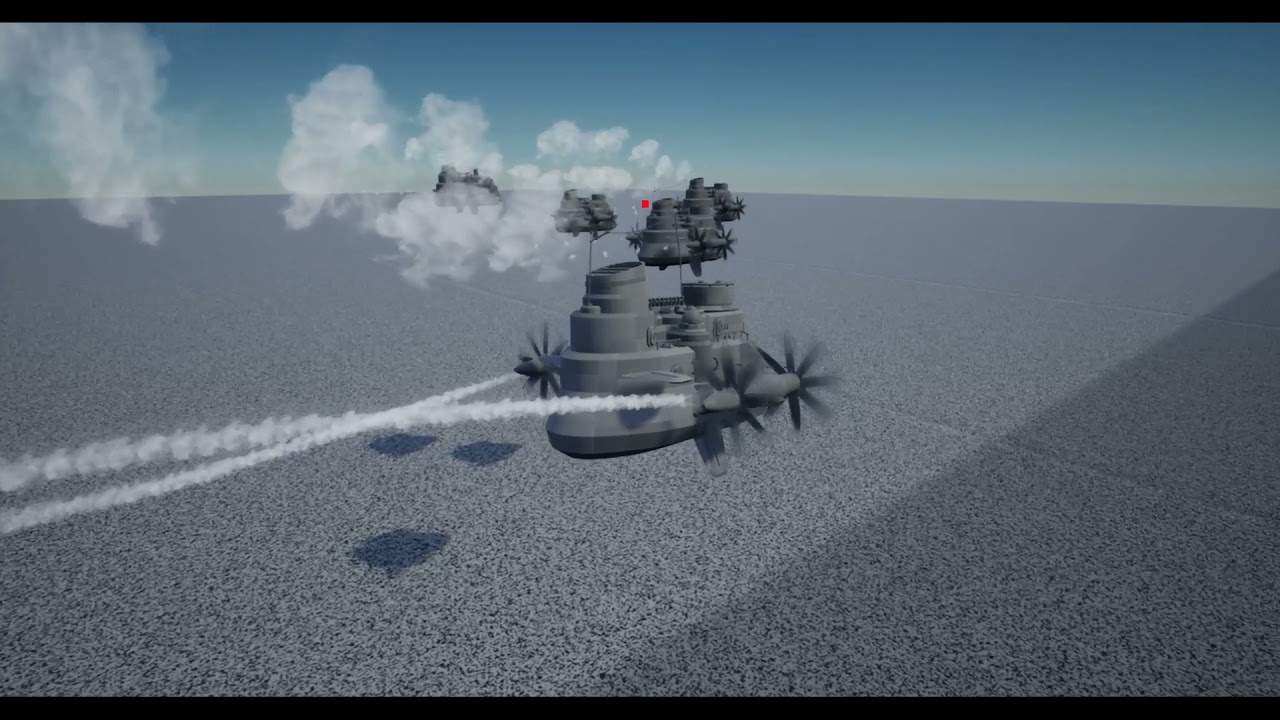 tight schooner
@rain egret Dunno if this helps but I do something similar, where I have a damage model component for enemies that have different groups of physical components with HP pools and stuff. I use a custom struct array for that.
So I can always define a new shootable group by adding another index to that array ofc
rain egret
That’s actually a pretty good idea. Thanks
 dapper bramble
Is there a way to get occlusion culling via an see-through plane?
Like I want to hide actors that are behind a plane (between the camera and the actors) but I wanna see through that plane
I tried distance culling volumes, but they don't seem to work on moveable objects
neat stream
Hey guys, quick question, For an advanced inventory system with item durability.... Is an Array of Structs a good option?
 wary shadow
Hi there, sorry for the dumb question, but is it possible to import plug-in function inside a custom BP function library?
neat stream
wary shadow
Hi there, sorry for the dumb question, but is it possible to import plug-in func...
yes but I would just make these functions "BlueprintCallable" directly in the C++
wary shadow
neat stream
yes but I would just make these functions "BlueprintCallable" directly in the C+...
Thank you, I didn’t think about that
maiden wadi
neat stream
Hey guys, quick question, For an advanced inventory system with item durability....
Array of structs is the best option in my opinion.
Some people do do arrays of UObjects though. Just depends I suppose.
neat stream
arg I don't wanna save objects 🙂
maiden wadi
I like structs. But I also use FastArrays, and I don't want to translate that shit back and forth. It's easier just to leave it all in a single struct.
neat stream
maiden wadi
I like structs. But I also use FastArrays, and I don't want to translate that sh...
FastArrays ??? woot?
 elfin phoenix
Hello, Im developing a procedural powerline system using a spline component, and Im almost done (using multiple resources found online and putting them together, because my coding skills are so-so.) After few days of development i find myself blocked because of one feature i wish i could add to this system.
- right now my blueprint spline system spawns a static mesh whenever I add a point on a spline
- rotates the spawned static mesh actor taking the rotation from the direction of the spline, and it can be adjusted
- spawns a cable component between each spawned static pole (using the sockets inside power pole)
- cable component is using its own custom shader that imitates wind using WPO ( time + sin method)
- system is using two variable structs (one with main variables and one that holds and overrides the main variables) you can add some slack to the cables to the intersection you choose, make the cable more thicker etc
what i want to do?
- I wish i could add an option to add a another static mesh (another pole variant) into a desired point on spline instead of the standard spawned pole. I know i should use a static mesh component in my "override cable struct" but i dont know how to wire this up together to make it work
here is my section that spawns a poles along spline and defining their rotation

i know i should add something to the "set static mesh" node into "new mesh" slot but how 😄
spark steppe
so what you want is to define the pole mesh variant for your current actor?
or should one actor be able to spawn different poles?
elfin phoenix
here is my struct

i want to be able to chose for example "point 2" on my spline and define that i want another pole here


right now it works like this
first i need to define the index to generate the cables - so i type in a cable socket name - that corresponds the name of the socket inside, after that it spawns a cable components
and second struct can override the actual parameters - i put the socket name, number of the spline point and then i can add more slack to that cable or change its width
i wish i could add to the "cable override settings struct" a possibility to add a different mesh and say "i want this mesh to spawn on the second position on the spline instead the main one"
here is the struct that overrides the parameters
 spark steppe
then add a static mesh object reference to the struct, which by default has your standard pole
that can be used on the set static mesh node to set the corresponding mesh
elfin phoenix
i add it here but right now i want to override it and be able to chose where i want to override this
 spark steppe
i just told you how to do it
elfin phoenix
ok, so i probably missunderstood you 😄 sorry 🙂
 haughty crypt
is there a way of getting an event to fire when moving an actor in Simulation?
maiden wadi
neat stream
FastArrays ??? woot?
It's a C++ thing. They're more or less a struct with an array in it. But they differ from normal arrays because instead of sending the whole array at once, it sends the array's struct's one by one and also has callbacks before they leave the server, and after they arrive on the client. Very useful.
haughty crypt
I tried get velocity on a tick event, but velocity doesn't change in simulation when moving an actor
to be specific, I'm not moving this actor through code, I'm moving it using the gizmo in editor
maiden wadi
@haughty cryptBy Simulation do you mean that you set a component on the actor to simulate physics, or?
Oh.
haughty crypt
no I'm simulating the game
and if not, is there any way of binding a specific value in an asset to the location of said actor
rain egret
haughty crypt
no I'm simulating the game
if i remember correctly construction script does that
haughty crypt
during simulation??
rain egret
yes
haughty crypt
I tried it recntly just by adding a print after the construction script
it didnt work
rain egret
alright in this case try the n tick variant and set it to replcate notify
a function should appear. whenever the location changes this function is now called
haughty crypt
I'm really sorry for asking but how do we change the n tiock variant?
 molten hound
Hello awesome people. I am making a game that takes place in an arena and I have meshes that look like real speakers all over the map. I am trying to do positional audio which is the easy part but I want it to work like a real sound system ie, one audio source but have it sound positionally from the speakers position. I have dragged in cues for each speaker with the same sound file but it just replicates. Any ideas?
 haughty crypt
thank you!
rain egret
select it in the variable option
neat stream
maiden wadi
It's a C++ thing. They're more or less a struct with an array in it. But they di...
ok so it's mostly for network then
haughty crypt
@rain egret didn't seem to work... maybe I'm not implementing it correctly, but I've added a print to the OnRep_Location function
the variable is a vector
rain egret
thats weird
sorry bt if that didnt work i dont know either
why are you running it in simulation anyway?
haughty crypt
how is it calling when the location changes?
oh I'm making a tool, trying to cheat my way a little by skipping some C++ steps
 granite gull
Hey, ppl. I have a c++ component that I inherited from a plugin and made little custom modifications on. For some reason my blueprint actors keep resetting their component upon engine restart / etc. Anybody got a clue?
icy dragon
granite gull
Hey, ppl. I have a c++ component that I inherited from a plugin and made little ...
Are you using Hot Reload, or compiling the C++ when the editor is still open?
granite gull
@icy dragon , I did compile with editor still open but my actors reset after that
icy dragon
granite gull
<@!325627930484932608> , I did compile with editor still open but my actors rese...
Seems you did use Hot Reload, which is the issue. Hot Reload is unreliable, and BP resetting after restart is one such issue.
You should compile C++ codes with the editor closed, or enable Live Coding if you're just modifying the functions in .cpp file.
granite gull
@icy dragon , thank you. I will close the editor, open it again and do the adjusments, I hope it works this time.
icy dragon
granite gull
<@!325627930484932608> , thank you. I will close the editor, open it again and d...

Hi! You're probably here because you've used Hot Reload in UE4. So… don't use Hot Reload in Unreal Engine 4 because: Data corruption in Blueprints: it can reset and mangle any variable at whim.
(it seems like hotreloadsucks.com redirect no longer works)
tawdry surge
Live coding is the future (Although I still just close the editor and recompile cuz im paranoid)
granite gull
@tawdry surge , I bet there has to be an option to disable HotReload
tawdry surge
Yeah, just don't do it
icy dragon
granite gull
<@!682451546646380567> , I bet there has to be an option to disable HotReload
There is, in Editor Preferences. That'll at least prevent auto Hot Reload when creating C++ classes or Plugins in editor
 grave relic
Anyone that could help me spot the issue
 meager spade
tawdry surge
Live coding is the future (Although I still just close the editor and recompile ...
meager spade
tawdry surge
Live coding is the future (Although I still just close the editor and recompile ...
You are fine doing cpp changes, but not constructor changes or header changes
icy dragon
granite gull
<@!682451546646380567> , I bet there has to be an option to disable HotReload
 tawdry surge
@grave relic you don't have any aic npc's
 thorn ermine
tawdry surge
Live coding is the future (Although I still just close the editor and recompile ...
thorn ermine
tawdry surge
Live coding is the future (Although I still just close the editor and recompile ...
I find Live Coding to bug out quite a lot though as well. on 4.27. It just does not pickup the change always. \0/
tawdry surge
Do an isvalid check
grave relic
That fixed it
maiden wadi
@granite gull If you enable livecoding, you can set a setting for it to not show the console until you specifically use it. You can find it in EditorPreferences -> LiveCoding -> General -> Startup. I have mine set to Start Automatically but hide console until summoned. Doing this stops and form of HotReloading, and optionally allows you to livecode if you want without the console always being in the way.
@thorn ermineI can't say I've personally had any Livecoding issues. You just can't change any form of function declaration(This is everything in the .h file and also the function declaration above the function in the .cpp file, or any code in a class constructor. If you're only modifying the body of a function it should perform fine.
thorn ermine
maiden wadi
<@!733183497988079627>I can't say I've personally had any Livecoding issues. You...
Yeah, "should", but I dunno. I dont have good results. just changing the body either. specially one liners. 😆
zealous fog
Is there a way to assign a custom depth stencil value through blueprints? I wanna have everything black and white through a post process but when I press a button I want to exclude a few items from that post process and have them be in color.
If that makes sense
icy dragon
meager spade
You are fine doing cpp changes, but not constructor changes or header changes
I personally just close the editor everytime I make C++ changes. I keep the editor open while typing the codes or creating new classes, but right before compiling, I close the editor and build in VS.
 sharp fox
where i can post water problem
granite gull
@icy dragon , @maiden wadi and all who helped. Thanks - I got it - that was the issue. I enabled Live coding now. For everyone that might be interested here is a nice article about these things: https://unrealcommunity.wiki/live-compiling-in-unreal-projects-tp14jcgs
Compiling with the Editor Open Do's and Don'ts
 acoustic tundra
hey, I'm trying to spawn my BP_Rocket with the SpawnAIFromClass node, but it doesn't spawn. Any other AI I select does spawn. Does anyone know the issue?

 timber knoll
probably collision
acoustic tundra
of the rocket, the bp it shoots from or both?
oh yeah it spawns now by removing the rocket collision
 willow phoenix
"get hit result under cursor by channel" goes straight through my wall and ~~blocks ~~ cubes i placed behind that wall because i thought it was a collision problem. results in my character (top down character setup, using the "Simple move to" Node) going on a super long walk around the entire gym-level.
Can anyone explain to me what is going on with that hit test? (it works fine on on all the other block and walls, even thou it "blasts through" it seems to go to the nearest point. except for the lower third of this wall)
 zealous moth
is there a way in the engine to change a texture's base rotation or flip?
icy dragon
zealous moth
is there a way in the engine to change a texture's base rotation or flip?
Yes, just add something after TexCoord.
#graphics
zealous moth
bleh i wanted to avoid doing that
gentle urchin
wrong skeleton?
 haughty nymph
no i found my problem
gentle urchin
k
haughty nymph
i forgot somthing
trim matrix
I have a question. When I am creating a variable and am able to select specific class/object references how can I also allow children to be included? If I make a variable of type character i cant set a character_child to it
haughty nymph
i dont no what the problem is
 twilit heath
trim matrix
I have a question. When I am creating a variable and am able to select specific ...
twilit heath
trim matrix
I have a question. When I am creating a variable and am able to select specific ...
subclass references can be assigned to a variable of superclass type always, and it can't be turned off
gentle urchin
So any child of "Character" will be assignable to that variable, or show in such class list
trim matrix
It doesn't though
gentle urchin
better show some inheritance and lack of options then
trim matrix
I'll send screenshots after my meeting
acoustic tundra
I'm trying to track my mouse cursor with a trace by channel. However, as you can see in the video it looks like it resets its location when it's far away from the center of the screen, any help with this?
 zealous moth
icy dragon
Yes, just add something after TexCoord.
<#221799195806400512>
zealous moth
icy dragon
Yes, just add something after TexCoord.
<#221799195806400512>
fyi there's a free export png plugin that works
zealous moth
acoustic tundra
I'm trying to track my mouse cursor with a trace by channel. However, as you can...
what are you doing??
you want to track it as a function of where it points IRL or on the screen?
willow phoenix
acoustic tundra
I'm trying to track my mouse cursor with a trace by channel. However, as you can...
track the line trace

and be amazed what happens
😄
 balmy light
Does anyone know of a tutorial that can show me how to make a "minecraft style" respawn menu?
Where when you die, a menu appears and you can either respawn or go to the title menu
 main lake
Does anyone know how I can compare 2 arrays of boolean with 1 array being the current state of each lever (6 levers in total) and the second array is the win condition if all the levers are in the correct state (0 or 1 for each lever).
If all the levers are in the right state, I need to open a door.
 balmy light
Okay, thanks!
zealous fog
It's basically just a pause menu if you think about it
balmy light
Yeah
tight schooner
main lake
Does anyone know how I can compare 2 arrays of boolean with 1 array being the cu...
Make a new custom function with a For Each Loop With Break. The loop will check if each boolean in array 1 matches the corresponding index from array 2
If there's not a match, set a local boolean variable to false and break from the loop
Make the default value of the local boolean variable "true"
And then on the return node of the function, output that local variable
earnest tangle
you can also directly return from the loop
this simplifies it a bit since you can avoid the break :)
earnest tangle
it's fine, a common pattern in C++ too
tight schooner
Oh ok
 sand shore
tight schooner
Never tried that... Seems kinda icky
sand shore
tight schooner
Never tried that... Seems kinda icky
I can vouch that it is well supported.
tight schooner

@main lake if you do the no-local-var approach, you can put multiple function return nodes on your function graph
tight schooner
main lake
Does anyone know how I can compare 2 arrays of boolean with 1 array being the cu...
Another subtle thing about your screenshot is you need to have Get node connected to "levers win condition" array and the index to get is the loop's Array Index
main lake
I found a node called "Identical" it's checking if 2 arrays are the same or not
tight schooner
I never knew
main lake
same I just discovered it now
but now I'm really confused by my code because I'm using a Dispatcher
Like is it possible to see the properties of my Player class, because I have a variable being an object reference and I set it to Instance Editable, and I want to drag and drop the door in the scene I want to open if all the boolean are the same as the WinCondition booleans
 wheat herald
How can i create a variable that stocks hits numbers ?
icy dragon
wheat herald
How can i create a variable that stocks hits numbers ?
By creating a variable that stocks hits numbers.
Simple int ought to be enough.
wheat herald
I mean, i want a variable initially equal to 0, and on each hit, it increases 1 by 1
main lake
wheat herald
I mean, i want a variable initially equal to 0, and on each hit, it increases 1 ...
an int variable does that
brazen merlin
"counter" is the concept
icy dragon
wheat herald
I mean, i want a variable initially equal to 0, and on each hit, it increases 1 ...
See the second line in my reply above.
Actually now that I think about it, someone never dealing with programming before might never heard of int
But might be familiar with the term integer
wheat herald
np, I know what's an int. But i just don't understand how to mess with the Event Hit node and a int Variable node to get it increase 1 by 1
icy dragon
Just use IncrementInt node on the variable.
 sand bloom
Does collision just not work if you make the mesh/cube too small?
I have it on

but as you can see it's ignored

i'm so confused
although if I scale the actor it still doesn't work
Has anyone ever had this weird issue before
No matter what I do it refuses to work and i'm just using the unreal engine cube mesh so idk what's up
timber knoll
what about the sphere? does it have collision set up correctly
collision will work no matter the size, it will just become less accurate
sand bloom
The sphere works, with anything else besides this that is
hence why i'm so confused
the sphere does have physics enabled
but it's just a cube that doesn't move so it should block like everything else
timber knoll
sure but have you checked if it collides with the objecttype that the cube uses
in the collision details
sand bloom
I did change it to worldstatic a few min ago to check but it didn't seem to change anything, neither worldstatic or worlddynamic seem to do anything
And it should block
It says so in my sphere and has done so for countless other meshes and blueprint actors
🤔
I really don't understand what's up lol
this should be basic functionality
timber knoll
could be that the physics ignore too small collisions but that would seem weird to me
sand bloom
Yeah
I scaled the actor to test but still nothing
So i'm officially stuck
I had this system in the construction script which would save me a ton of time
I guess I could try making it outside of the actor later
:/
 fossil linden
hm
for pyhsic & projectile stuff they collider should be in top in the hierarchy @sand bloom

then it should be working fine
sand bloom
It does work for everything else just not this thing for some reason
haughty nymph
im trying to make a enemy attack with animation but the animation dont work
wheat herald
"Hit Count" initially at 0. Why is this always printing "1" for each hit. Isn't it supposed to increment by 1 for each hit ?
 maiden wadi
wheat herald
"Hit Count" initially at 0. Why is this always printing "1" for each hit. Isn't ...
maiden wadi
wheat herald
"Hit Count" initially at 0. Why is this always printing "1" for each hit. Isn't ...
What is this in?
wheat herald
respawning nodes .. so yea i understand this issue now. How can i split in 2 the Exec from Event Hit, so it goes in the Print nodes, and the spawninig nodes ?
 blissful widget
You're adding to the variable? What did you expect?
Do you have to store the result? Don't think ++ reassigns, just adds one I believe.
icy dragon
blissful widget
~~You're adding to the variable? What did you expect?~~
Do you have to store th...
IncrementInt should reassigns.
It's basically int++ in BP macro form.
blissful widget
Ah fair, I guess would need to see rest of the function then. Or just set breakpoints to look at how the data changes there.
I'd step through all references to that variable and ensure nothing funky is happening though
wheat herald
Yea it reassigns, it just that after the print node, i have respawning nodes, that's why it keeps showing "1". I've tried without the respawning nodes, it shows "1, 2,3 ..."
icy dragon
wheat herald
Yea it reassigns, it just that after the print node, i have respawning nodes, t...
Okay, try passing the variable to PrintString's InString instead of using the output from the Increment node.
wheat herald
But i need to keep the respawning nodes, how can i solve that ?
icy dragon
You can use the same getter node
trim matrix
yo guys you know of making blueprints easier to connect to
wheat herald
did this, it keeps showing "1"
 trim matrix


is there any extensions that would connect an execution pin if I drag it into a node instead of aiming it to the execution pin 😂
trim matrix
wheat herald
did this, it keeps showing "1"
try using an event component being overlap instead of event hit, might make a difference
maiden wadi
@wheat herald Your variable needs kept somewhere that isn't being destroyed. I presume this is some form of projectile or something. You're spawning it, getting a hit event, incrementing from 0 to 1, then destroying it. Next instance of this that is spawned starts at 0, does hit event, increments to 1 and dies, repeat.
wheat herald
maiden wadi
<@!404115988804534272> Your variable needs kept somewhere that isn't being destr...
Yep, I shoot a projectile on an enemy, hits the enemy, enemy is destroyed and spawns again. All these nodes are inside the enemy actor's BP. The re spawning nodes works great, i only need to store the hit values without it being reinitialised each time i touch the enemy. Or I need to store the number of respawns, i don't know if it more complicated than detecting hits .. idk
maiden wadi
You have two choices. Either reset all other state and keep that actor and set it's new location instead of destroying and respawning. Or, make this actor's death event NOT call destroy actor. Instead make it get a spawner manager, pass itself in. Manager can get that hit count, and pass it into the constructor of a new enemy, or store it for later spawning. Then destroy the actor after that. That way your integer persists.
One is.. more performant. But completely unnecessary unless you're spawning a ton of things. Spawning code is heavy if you're doing it dozens of times a second. Two is simpler, allows much easier state control, simpler code, and should be used to avoid potential bugs unless you absolutely need the performance.
 random plaza
how do you dynamically make instances of levels? say i have a small house level and i want to be able to place versions of it in the workd and enter them.
icy dragon
random plaza
how do you dynamically make instances of levels? say i have a small house level ...
sublevels?
random plaza
ive never heard of sublevels, can you create them procedurally in blueprints?
icy dragon
Oh, sublevels are not for procedural map.
random plaza
so what would i do for a procedural level that you can add to your save file dynamically?
brazen merlin
random plaza
how do you dynamically make instances of levels? say i have a small house level ...
i suppose you could make a house in a bp then spawn that around in the world
icy dragon
random plaza
ive never heard of sublevels, can you create them procedurally in blueprints?
If you're going to make roguelike, you'd have to have your own actors generate the level based on seeded randomiser.
random plaza
this isnt a roguelike, the house would be generated as an instance by me for a buildable house. its the only thing loaded when you enter a house.
brazen merlin
for me, i would need to back up and understand the bigger picture to this idea
icy dragon
random plaza
this isnt a roguelike, the house would be generated as an instance by me for a b...
So in a sense, map editor?
 regal basalt
Hello everyone 🙂
I have a little question about Blueprint events, let me know if I'm in the wrong channel.
This could help other people as well ^^
I'm trying with DoOnce, but the fact I have to reset it doesn't allow me to do only once.
How to Fire Event Only Once in EventTick ?
 maiden wadi
Why do you need to reset it if you only want it to happen once?
 trim matrix
@icy dragonhave you seen any plugins or anything of what I mentioned lol
regal basalt
I thing a plugin would be overkill 😄
So this is a working way :
 maiden wadi
regal basalt
here you see there is 3 "states"
maiden wadi
regal basalt
here you see there is 3 "states"
Can I ask what your actual intention with this is? The logic is slightly confusing. As I don't even think your FadeOut is doing anything since you're calling FadeIn directly after, and you're immediately setting your DoOnce back to reset in the same execution. Those nodes aren't async, so that doesn't wait til FadeIn is done to execute, it's immediate.
random plaza
icy dragon
So in a sense, map editor?
it's a town building game where you can build houses that you can go into
regal basalt
@maiden wadi On that last image you see the exact intention
But instead of doing Reset by hooking, I would like to do Reset as a on call function
maiden wadi
But what is the FadeOut for? Won't that just be overridden by FadeIn?
regal basalt
Cause the way I do is not clean
haughty nymph
how can i make my character that you can't shoot through it
i forgot how i can do it
maiden wadi
Block Collision/Trace Channels.
regal basalt
okay maybe this way is less confusing :

 golden frigate
is there a way to apply a spawn transform to a geometry collection
regal basalt
I tried this but it doesn't work :
 maiden wadi
regal basalt
I tried this but it doesn't work :
maiden wadi
regal basalt
I tried this but it doesn't work :
I do wonder if an integer comparison check might help? You're saving the selected sound as the integer. So for like OnCityFly, you could check if SelectedAudio != 1, then do your sound stuff.
regal basalt
bascially the idea is everytime I switch a sound, it switches only one time by setting a new parameter in the sound Cue component.
maiden wadi
Same for the others, but replace the SelectedAudio != Num with the number you're setting before setting the number and doing to audio.