#blueprint
402296 messages · Page 778 of 403
 quick grove
 digital palm
Hey, little problem with a line trace and a knife. As you can see on the picture, there is only one line trace, it's not working on every tick. I'm doing the linetrace inside a base weapon class so when the left click action is called, I'm firing the line trace function. Any idea?

 velvet dagger
I have a question that might be a littleee stupid but, does the amount of code affect a games size?
 willow phoenix
velvet dagger
I have a question that might be a littleee stupid but, does the amount of code a...
willow phoenix
velvet dagger
I have a question that might be a littleee stupid but, does the amount of code a...
1 letter = few bytes or something like that. 0 and 1 beeing the cheapest... but i guess thats kinda neglegtable if you use ue4
velvet dagger
Thank you guys :)
willow phoenix
digital palm
Hey, little problem with a line trace and a knife. As you can see on the picture...
its actually good practice to reduce the line trace and not call it on every tick. what are you trying to achieve? you can always get a timer or a timeline to blast out more line traces, but that affect performance
digital palm
willow phoenix
its actually good practice to reduce the line trace and not call it on every tic...
The goal of that is to make a linetrace to make damage
willow phoenix
with the knife??
digital palm
yes, no?
willow phoenix
you want to have a lasergunknife that is permanently shooting?
you could have a box collision on that knife and on overlap deal damage.
i guess that would be more suitable for a knife
 eternal drum
Help
Why does this move the uv map

and this tile it /make it bigger?

does it have to do something with the U and Vtiling values?
 earnest tangle
think of how the maths and values work
 brazen merlin
eternal drum
Why does this move the uv map
brazen merlin
eternal drum
Why does this move the uv map
think of TexCoord as getting the UV space which is 0-1. Adding a number to it offsets it. Multiplying it increases the range of 0-1 to 0- whatever you multiply it by
earnest tangle
in ths first example you always add the same amount into the coordinate
so for example 1 + n, 10 + n, whatever, so you get an offset
the second one works much in the same way but with multiplication
eternal drum
brazen merlin
think of TexCoord as getting the UV space which is 0-1. Adding a number to it of...
Would the n adding 2 to the texcoord be the same as multiplying it by 2?
brazen merlin
adding and multiplying give two different results as you have posted
TexCoord + 2 would look like TexCoord. TexCoord * 2 would show you the texture tiling twice
earnest tangle
You need to understand the maths and how it works
1 + 2 = 3, 2 + 2 = 4... but 1 * 2 = 2, 2 * 2 = 4, and so on
brazen merlin
yes but TexCoord + any whole number won't look as anything as really changed
earnest tangle
Yeah it's just an example because it's easier to do maths in my head with full numbers lol
brazen merlin
it is, but to understand what adding does (in the case of uvs), it shows its effect with decimal numbers
brazen merlin
eternal drum
Would the n adding 2 to the texcoord be the same as multiplying it by 2?
the texture is shifted around when adding
eternal drum
earnest tangle
1 + 2 = 3, 2 + 2 = 4... but 1 * 2 = 2, 2 * 2 = 4, and so on
🤦♂️
earnest tangle
this is a great video on this topic btw, with very good visualizations that will help you get a better intuition for the math https://www.youtube.com/watch?v=IUZ1exyk6hw

In this episode of 5-Minute Materials we look at the basic math operations; Add, Subtract, Ultiply & Divide. These are THE most common shader math nodes you'll be using in the shader graph and are vital to achieving any level of success with your materials. I've tried to keep this as broad as possible to try and offer a basic understanding of wh...
 umbral ginkgo
hi y'all
Yesterday I asked on here how I would use an array to randomly select a random actor of a certain class and disable all of the other actors of that class temporarily (I have already managed to get the array working). Someone suggested I use the for each node to check each actor and use a tag for the one I don't want disabled.
how tf do i use a for each loop to do that
brazen merlin
so you've got a bunch of actors and some have tags?
brazen merlin
and what you want to do is get just one actor from that array at random?
umbral ginkgo
i misread that
I just realized that this is very confusing to read
Ok, what i need to do atm is assign a tag to an actor chosen by an array
which sort of leads into what I wrote previously
earnest tangle
so you have the actors in an array? and you need to pick one from this array at random, and disable the others?
umbral ginkgo
but the problem is the array only gives the number of the chosen actor
umbral ginkgo
earnest tangle
so you have the actors in an array? and you need to pick one from this array at ...
yes
except the array already works
i just gota disable them
if that makes sense
earnest tangle
use Random From Array to pick a random one, then foreach loop the array and disable any actor which does not equal the one you picked at random :)
brazen merlin
you dont need a for loop
it sounds like all you need to do is pick one and give it a tag
umbral ginkgo
yes sort of
earnest tangle
You don't even need a tag for this.. just stick the selected one into a variable
(important to do that from the random from array node, otherwise it will keep getting new ones at random)
brazen merlin
earnest tangle
You don't even need a tag for this.. just stick the selected one into a variable
i guess were reading this in different ways, now im not sure whats needed
umbral ginkgo
Yeah I realized how poorly written it is
earnest tangle
yeah it sounded to me like the tag was just a suggestion previously :)
brazen merlin
is the tag important to determine if it should be disabled or something?
umbral ginkgo
no the tag was what someone else suggested to assign to the actor chosen by the array
umbral ginkgo
ok, I have a bunch of actors in the scene and one is randomly selected by an array. What I'm trying to do is disable the other actors except for the one selected by said array
umbral ginkgo
So the actors are triggers
and I want only the selected one to be able to be triggered
brazen merlin
the last node isn't right, but i think you have already
umbral ginkgo
 brazen merlin
this is actually more preferred
 umbral ginkgo
this is what my code looks like atm for the array
umbral ginkgo
umbral ginkgo
^
 umbral ginkgo
Oh, could I use random instead of last index?
umbral ginkgo
huh came here to try and implement a new function and ended up neatening up my code lol
brazen merlin
always a good byproduct
btw, in case the one that is chosen is also disabled, it would be to be enabled, so:
 brazen merlin
rgr
umbral ginkgo
(expect me to come back in 10 minutes completely and utterly confused)
brazen merlin
10 min? thats not too bad
umbral ginkgo
Could be worse...
 true marsh
Is there a way to check if an AI is on a navigation mesh?
earnest tangle
you could try projecting its position to navmesh and seeing if it's different by a sufficient amount.. might be some other ways besides this too
brazen merlin
true marsh
Is there a way to check if an AI is on a navigation mesh?
maybe?
 eternal drum
earnest tangle
this is a great video on this topic btw, with very good visualizations that will...
eternal drum
earnest tangle
this is a great video on this topic btw, with very good visualizations that will...
Thank you @brazen merlin and @earnest tangle !
true marsh
@brazen merlin Perfect thanks!
umbral ginkgo
brazen merlin
rgr
I have the feeling I did something wrong

this'll probably be more helpful on second thoguht

what'd I do wrong?
brazen merlin
hmm, it might be the wrong data type
right click that warning node and refresh, might also be bugged
refresh it then compile to double check
brazen merlin
umbral ginkgo
huh didnt know abt that
np, you'll find that useful when you start making and modifying function output/inputs
umbral ginkgo
Yeah, that will probably save me many hours of confusion as to why something isn't working
also it worked
brazen merlin
great!
brazen merlin
for sure
 flat coral
Any advice for cleaning up blueprints like this, which aren't completely fucked, but are definitely still a little fucked?

(Other than "less inputs", I know it's got too many inputs 😦 )
 cunning hornet
That honestly doesn't look too bad in my opinion
I know that's probably not what you were wanting but, I'm unsure of what I would change :/
flat coral
Honestly that's actually useful feedback. I'm self-taught and working alone, so I have no idea where the bar is for how messy a blueprint can be
cunning hornet
I was wondering if anybody would have advice on how to fix this unwanted behaviour? Currently I have set input bindings to help pan the SpringArm of my camera to rotate either 90.0 or -90.0 degrees based on whether the user uses the L/R triggers (Q and E on keyboard).
However, whenever the SpringArm's rotation is set to 90.0 or -90.0, the character's rotation will snap back suddenly and I'm unsure how to fix it.
The game has the rotation and shoot mechanics tied together.
I use the Arrow keys to control the rotation.
Here's a video showing the unwanted behaviour (will show it working at first then the unwanted snapback after)
brazen merlin
flat coral
Any advice for cleaning up blueprints like this, which aren't *completely* fucke...
yeah that looks pretty normal, not too hard to read. functions can have local vars which can help organize, but honestly not sure if it would make it more confusing for you
cunning hornet
flat coral
brazen merlin
yeah that looks pretty normal, not too hard to read. functions can have local va...
Haha there's already a local var in there. But if you set more than like 2-3 of those it looks just as bad.
brazen merlin
flat coral
Haha there's already a local var in there. But if you set more than like 2-3 of ...
exactly, all hail reroutes
flat coral
cunning hornet
I was wondering if anybody would have advice on how to fix this unwanted behavio...
Lemme see the BP?
cunning hornet
Sorry for how outrageously large and messy this is (I've had to split up screenshots into 3 images)


 flat coral
Haha suddenly I feel better about my little BP
Hold up, am I reading it right that this starts with a "turn left / turn right" input, and ends with firing a rifle? sorry if this is too into what your game is, but are those... separate things usually?
cunning hornet
it's supposed to be a twinstick shooter, so whenever the character rotates they will also shoot (like Geometry Wars)
flat coral
Actually that's my advice is to break this all up into different events / functions. Like unless I'm wrong the last screenshot is just literally the exact same thing 4 times. Whenever you find yourself duplicating logic like that, it's an indication that you should consider making it a function
Also iirc input axis events fire once per tick while the axis is held right? If the tickrate is shorter than those delays, you could run into weird race conditions
umbral ginkgo
If anyone is familiar with unity, in it is a system where next to each game object (actor in ue4) is a check box which enables/disables the game object it belongs to. When it is disabled, the game object is not visible and cannot carry out any scripts attached to it. Is there anything similar to this in unreal engine?
cunning hornet
flat coral
Actually that's my advice is to break this all up into different events / functi...
Okay, I will try to make this into a separate function!
flat coral
cunning hornet
Okay, I will try to make this into a separate function!
Honestly, if you've got a piece of code that has a bug AND needs a refactor, just do the refactor. Even if you don't find the bug while refactoring, it'll be a lot easier to debug after you clean it up.
(And half the time, you'll fix the bug by accident and not even know what happened)
 cyan token
Can i switch to c++ as i learn it more if i want or is it all one?
flat coral
You can defs mix and match blueprints and C++ in the same project. In fact, I think most have to: Some stuff like the UI system doesn't really have C++ support, or at least it didn't when I first looked into it a looooong time ago.
Now what I'm NOT sure about is what actually changes when you pick C++ vs Blueprints when creating a project.
earnest tangle
afaik all it does is it just creates some source files for you
 quick lance
are timelines the only alternative to event tick if you want to do something very often?
earnest tangle
nothing of actual consequence differs
@quick lance just use tick if it needs to tick
 winged sentinel
Would anyone know how to implement look acceleration? I tried a time line and a float curve and neither do look acceleration correct
quick lance
earnest tangle
<@!156228017318789122> just use tick if it needs to tick
Guess I should've clarified, very often in a specific scenario that might not happen very often. For example, a knockback. It seems bad to check every frame if you're being knocked back when that could potentially not happen for a multi hour play session
earnest tangle
That's a very very cheap check if you use a bool or an enum or something
 spark steppe
also timers exist
earnest tangle
you can also disable and enable tick, no reason to use timers to emulate it
(and unless you manually uncheck the checkbox, all your actors tick by default)
spark steppe
but it can get quite messy with a lot of frequent things
earnest tangle
Yeah it's one of those "it depends" things :)
spark steppe
and if you don't want to do something every tick, timers are way cleaner to implement
quick lance
so far I have basically nothing using tick, and i was hoping to keep it that way.
earnest tangle
something like checking if the actor should receive some kind of knockback physics effect or such based on if(BeingKnockedBack) { stuff } is so cheap you won't even know it's there
flat coral
Actually that brings up a question I had the other day, which is, if a tick pipes right into a branch to nothing, is that as cheap as it sounds?
earnest tangle
Set Actor Tick Enabled can also be used to manually turn it on and off at runtime if you find it useful to be able to do so
quick lance
that makes sense. My ultimate goal with that question was in search of a way to have my character move forward during an attack animation. like dark souls or DMC
earnest tangle
@flat coral yes, empty branch does nothing, so the cost of this would depend on what the condition for it is
flat coral
Let's say it's just a boolean on the class (of course you could disable tick in that case but y'know)
earnest tangle
Yeah boolean checks are very cheap to do
 azure smelt
Hey can someone please help me with some blueprint stuff? I'm using a plugin called "VRExpansionPlugin" and I am trying to set up the player pawn in my game. I copy pasted the player pawn from the example project but the blueprints are coming up with errors. My first problem is that the Variable type "Enum MovementMode" Doesn't exist in my project but does in the example project. I couldn't find where this Enum came from or how it was made. What do i do here? I would really appreciate a hand.
These are the nodes from the example project.

These are the nodes from my project.

Don't worry haha i found what i need
flat coral
For future reference, I always like to port the example project over in its entirety, and then delete what i DONT need
 mint grove
hello everyone im trying to set up 2 handed weapon handling for my assault rifle ive followed vr macros video to the letter but it doesnt seem to want to work i cant get the overlap to work

No description provided
 velvet dagger
I feel bad and lazy for sticking to the 3rd person template, does it make me lazy if I were to finish my game with the main character built off of a template?
 rapid robin
velvet dagger
I feel bad and lazy for sticking to the 3rd person template, does it make me laz...
rapid robin
velvet dagger
I feel bad and lazy for sticking to the 3rd person template, does it make me laz...
No 🙂
velvet dagger
I really hope that's the case because I don't want people to play my game and be like,"Wow this character is literally built off the third person template? Man that's low quality AND low effort"
azure smelt
flat coral
For future reference, I always like to port the example project over in its enti...
I prefer the opposite
azure smelt
velvet dagger
I feel bad and lazy for sticking to the 3rd person template, does it make me laz...
It depends, if you alter the movement speed and use a 3d Modelled character who isn't the UE4 Mannequin then no one will notice.
brazen merlin
velvet dagger
I really hope that's the case because I don't want people to play my game and be...
there's a lot of parameters inherent to the 3rd person character, the default is pretty floaty imo and the movement alone does a lot to make it feel like something else. Animations and a different model change that even further, and ofc the camera fov and its motion. There is in fact a lot to adjust without adding that can make it feel incredibly unique
velvet dagger
Thank you guys a lot for the feedback and the tips :)))
flat coral
azure smelt
I prefer the opposite
So I could specify, the reason I port the whole thing then delete is so I can leverage the reference finder tool when deleting, it'll automatically make sure the deletes are safe
So I don't accidentally remove something I actually need
 lucid ingot
LOL im sorry but as a dev this looks like a BP to me...

 gusty axle
lucid ingot
LOL im sorry but as a dev this looks like a BP to me...
gusty axle
lucid ingot
LOL im sorry but as a dev this looks like a BP to me...
you can optimize it by removing everything but first and last graph lmao
lucid ingot
gusty axle
you can optimize it by removing everything but first and last graph lmao
its weird how we think now xD hahah
gusty axle
the filth of ue blueprints 🗿
 winged sentinel
im trying to use a timeline to make accelleration only for my xbox controller, and it works except when i release the stick im still spinning

is there a way i can get it to scale up, just like games with aim acceleration?
lucid ingot
winged sentinel
im trying to use a timeline to make accelleration only for my xbox controller, a...
ue5 or 4?
winged sentinel
lucid ingot
ue5 or 4?
ue4
lucid ingot
winged sentinel
ue4
issues like this are fixed with enhanced input on ue5.
but let me look
winged sentinel
lucid ingot
issues like this are fixed with enhanced input on ue5.
ya it def needs fixing im glad its in ue5
lucid ingot
on finished your never completing a cycle
it will always update the rotation and never finish
winged sentinel
i see, i thought stop was suppoed to take care of it
lucid ingot
look at your graph 🙂 your adding the yaw to the update
thats a crazy way to calc accel tho!
winged sentinel
lol ik i tried this too but nothing happened
 lucid ingot
what are you overall trying to accomplish?
winged sentinel
lucid ingot
what are you overall trying to accomplish?
like in halo when you turn the joystick all the way to the right or left, it will gradually increase
lucid ingot
acceleration over time with stick input?
winged sentinel
not just linear input
winged sentinel
lucid ingot
acceleration over time with stick input?
yes
it makes it a lot easier to aim with a joystick, at least for me
lucid ingot
man. I remember my xim4 days trying to prevent this LOL
i remember a solution
let me see if i can find it
winged sentinel
thank you, ive been like scanning google for hours now lol
gusty axle
gusty axle
the filth of ue blueprints 🗿
Is it a good way of "item using"?
It just check the item player has in hand and does the code
lucid ingot
winged sentinel
thank you, ive been like scanning google for hours now lol
the only 2 stupid things i can find is ARG ( the shit free plugin) and https://www.unrealengine.com/marketplace/en-US/product/gamepad-aiming-aim-assist-deadzones-and-more..
where did i find this video.. this is going to drive me nuts!
 vocal sand
hey sry yall, i came for some expert advice, i know nothing about the program, but have a friend who is taking a class and going insane cuz he cant figure out a problem that is probably easy for yall
winged sentinel
lucid ingot
the only 2 stupid things i can find is ARG ( the shit free plugin) and https://w...
that plugin looks exactly what i need but $20 for it is a lil steep lol
vocal sand
he is trying to have his character step onto a platform and then the platform forces him in a certain direction, anyone that can help ill pay
but need asap, like let me pull you into disc to explain
winged sentinel
lucid ingot
the only 2 stupid things i can find is ARG ( the shit free plugin) and https://w...
wait is the shit free plugin AGR PRo
lucid ingot
winged sentinel
that plugin looks exactly what i need but $20 for it is a lil steep lol
Yeah! there is a free one of the internet. the guy has like 46 subs on youtube
vocal sand
ill pay 50 right now (just dotn tell him im payin gyall)
gusty axle
vocal sand
he is trying to have his character step onto a platform and then the platform fo...
Like a conveyor?
lucid ingot
winged sentinel
wait is the shit free plugin AGR PRo
LOL YES!
winged sentinel
lucid ingot
LOL YES!
lmfao
vocal sand
gusty axle
Like a conveyor?
again im sadly a smooth brain when it comes to this, and dont know any of the terms
winged sentinel
lucid ingot
LOL YES!
i may or may not have that plugin installed lmfao
gusty axle
Well literally conveyor like you said, you step on it and it moves the character\objects
lucid ingot
winged sentinel
i may or may not have that plugin installed lmfao
the coding for that plugin will ruin your game.
winged sentinel
lucid ingot
the coding for that plugin will ruin your game.
thats scary to hear
vocal sand
ok, with that his "conveyor" is based of an arrow that slowly spins, and hes trying to force the player to move based on the current rotation
lucid ingot
winged sentinel
thats scary to hear
a lot of things cause minor issues, a lot of replication issues.
winged sentinel
lucid ingot
a lot of things cause minor issues, a lot of replication issues.
im already knee deep in it lmfao, but i dont remember seeing it had aim accelleration
gusty axle
You can make a box collider that has the same boundaries as platform itself (same size basically) and when any object overlaps the box it adds it to an array. In tick function make ForEachLoop, get object location, add to object location platform direction vector multiplied by DeltaSeconds and multiplied by Speed. If object ends overlap just remove an object from array
lucid ingot
winged sentinel
im already knee deep in it lmfao, but i dont remember seeing it had aim acceller...
ahh man, you poor soul. You got sucked into a endless abyss.
gusty axle
gusty axle
You can make a box collider that has the same boundaries as platform itself (sam...
But it depends on your code, its just the simplest solution lmao
lucid ingot
The way its coded, you either do it his way, or nothing works btw.
winged sentinel
lucid ingot
The way its coded, you either do it his way, or nothing works btw.
at this point i could probably just rewrite the sections and remove the plugin, i started this project so long ago as a noob and now i can write everything no problem
except for god damn aim accelleration lmfao
lucid ingot
winged sentinel
at this point i could probably just rewrite the sections and remove the plugin, ...
I would 100% recommend this. Drop that code immediately. Down the line you will thank me for telling you this
winged sentinel
lucid ingot
I would 100% recommend this. Drop that code immediately. Down the line you will ...
yes i will, tbh its running stable for now so ill put it on my list and avoid using it for new mechanics
gusty axle
gusty axle
You can make a box collider that has the same boundaries as platform itself (sam...
wait hol up dont remove it from array, just use Find function, get item index, SetArrayElem and set element as empty, then after ForEachLoop completes use RemoveItems for array and dont plug any object, it will remove all empty instances w\o interruptions and errors hh
winged sentinel
lucid ingot
I would 100% recommend this. Drop that code immediately. Down the line you will ...
ive already had major issue with inventory items not appearing correctly on screen, items not attaching to player state etc
lucid ingot
winged sentinel
yes i will, tbh its running stable for now so ill put it on my list and avoid us...
ARG pro is like adding the crouch and uncrouch options in ue4. there is no client/server options
you have to do it all yourself with even more code.
winged sentinel
lucid ingot
ARG pro is like adding the crouch and uncrouch options in ue4. there is no clien...
could it be killing my framerate? I randomly get worse frame rate out of no where
like ill go from 80 to 40 back to 120
lucid ingot
that i have no idea.
winged sentinel
eh i gotta check it out then maybe im doing too much shit on tick
lucid ingot
but like i said, write your own tagging system, write your own movement component. forget what he taught you. recoil is a breeze.
winged sentinel
lucid ingot
but like i said, write your own tagging system, write your own movement componen...
100% ill flush it all out, ive noticed some weird stuff with it, its okay for messing around but not any production work
lucid ingot
winged sentinel
100% ill flush it all out, ive noticed some weird stuff with it, its okay for me...
Don't get what i am saying twisted tho. He is an amazing creator. I am not bashing him. BUT so many flaws i seen as a novice, that i can not continue using anything created by him. I followed Dev squad to get me to my 100%
winged sentinel
lucid ingot
Don't get what i am saying twisted tho. He is an amazing creator. I am not bashi...
true dev squad got me started as well
lucid ingot
winged sentinel
true dev squad got me started as well
hmmm
MovementAccelerationRate
winged sentinel
lucid ingot
https://docs.unrealengine.com/4.27/en-US/API/Editor/UnrealEd/FCameraControllerCo...
interesting thats on the camera controller
 lucid lynx
Is there any reason why an AnimBP's BeginPlay event would fire twice? I first thought it was just two of the same actor, but it's not that.
winged sentinel
lucid ingot
https://docs.unrealengine.com/4.27/en-US/API/Editor/UnrealEd/FCameraControllerCo...
would that be exposed to bp?
 cursive barn
hello, everythings gone to not nice
so lets say im making a game, right? movements ok you can look around properly blah blah yadda yadda
Then i notice "oh shingleberries on a bush, my health regen script isnt working
brazen merlin
thats quite a jump from the template "blah blah". so that means you have a health/damage system right? and that works regardless of regen?
brazen merlin
so whats the problem with the regen?
cursive barn
no idea
i think its calling upon an unknown variable but i checked and its definitely calling upon the right variable
brazen merlin
well there's got to be some idea of the problem
throwing errors? nothing happens? works too well?
cursive barn
well i think the problem is that the engine is calling upon the wrong variable, cus i have it set up as if "if SHP=0 then wait 2.5 seconds then add 5 to SHP"
brazen merlin
alright, well i guess its time to post the bp in question
cursive barn
im opening it up the bp rn
cus ive kinda set it aside
worked on other stuff like animations and weapons
ok
so
brazen merlin
glad to hear it works?
cursive barn
nah
brazen merlin
lol ok
 brazen merlin
alright, well a tick and delay is not great
not sure where that picked up from, and the sequence i assume was doing something at some time
cursive barn
im bringing up the damage node
brazen merlin
to understand - you want to allow health regeneration when health reaches 0 right?
cursive barn

when shields reach 0 i need it to wait 2.5 seconds without damage to self to regen the shields
brazen merlin
because its me, ill suggest you use (maybe also learn) timers
when shields reach 0, which fires off the branch, you set hp and shield, thats fine, after that you can call a set timer
that timer would run for 2.5 seconds like you want, and once it does, it would fire an event or function (whichever you prefer) to start the health regen
i guess you could do it with tick, but id recommend a timer for the regen as well
cursive barn
ok, ill try that
brazen merlin
let me know if ya get stuck
cursive barn
oh i found it
when calling the function, the game needs the shields to be less than 0, but 0 is the base number
nevermind
im dumb
its asking for the item to be less than 0
cursive barn
yeah
brazen merlin
yeah, i guess a =< to get that
cursive barn
i just set the number to be .99
 tulip mason
cursive barn
its asking for the item to be less than 0
tulip mason
cursive barn
its asking for the item to be less than 0
Yeah shouldn't be equal or less than zero sign thingy
Or yeah that
brazen merlin
cursive barn
i think it makes sense to check for less than or equal to because you only want this firing if it is 0 (or less in certain cases)
suppose you could also change the number in the < to 0.01 and might be good
cursive barn
i made it fire if the number is less than 1
therefore the shields would recharge completley
i need to add a delay tho
cursive barn
oh trust me something is bound to go wrong
but this was helpful, thanks
actually
quick question how do i do a "check if a function is active" sequence
cursive barn
If function "Damage Modifier" is active then dont fire current function
i was gonna use a branch
brazen merlin
dunno what damage modifier means as a function
or how its call
sounds like it would be a one off sort of thing
cursive barn
here
 topaz badger
cursive barn
If function "Damage Modifier" is active then dont fire current function
topaz badger
cursive barn
If function "Damage Modifier" is active then dont fire current function
set a boolean when that function is active
and then in order to break out of that current function, use a gate
cursive barn
do i use "is tracker active?"
topaz badger
gates dont have anything like that
cursive barn
im confused
i shoulda just used c++ but no i had to go with the drag and drop mess
the blueprint literally looks like multicolored spagetti
 gentle urchin
once gotten used to, bp's are great for quick iterations 😛
cursive barn
it still looks like multicolored spagetti
gentle urchin
Proper organization handles that 😎
 dreamy basin
https://youtu.be/QKFOH7vEGMM
I'll be quick. I was watching this tutorial, and @ 15:30 there is this node to get the player view called "Get Player Viewpoint". I cannot find it in my UE4 4.26.0. Any idea why? How can I solve this?
Sorry if there's anyone who can help me out or show me how this blueprint is made would be a big help for me
#Niagara #Tutorials #Laser
Salut ! Dans ce long tutoriel Niagara (Unreal engine 4), je présente une méthode pour créer un système d'arme à Laser complet à partir de rien. Nous allons créer les différents emitters et systems Niagara et nous allons ensuite les implémenter dans le template "FirstPerson" pour être utilisé dans des FPS. Vous pourrez...
brazen merlin
cursive barn
it still looks like multicolored spagetti
windows > color filters > grayscale 😛
brazen merlin
dreamy basin
https://youtu.be/QKFOH7vEGMM
I'll be quick. I was watching this tutorial, and @ ...
that's a custom function, you can see it in the left side panel area under functions
cursive barn
brazen merlin
windows > color filters > grayscale 😛
well then itll look like grey spagetti. i dont wanna be colorblind
dreamy basin
brazen merlin
that's a custom function, you can see it in the left side panel area under funct...
ya but in this tutorial he is not showing the nodes how he did that custom function but in his comment section he had tagged a document for the get player view point
i am new to unreal that y i dont knw how to create that
https://docs.unrealengine.com/4.27/en-US/API/Runtime/Engine/GameFramework/APlayerController/GetPlayerViewPoint/
Returns Player's Point of View For the AI this means the Pawn's 'Eyes' ViewPoint For a Human player, this means the Camera's ViewPoint
 icy dragon
cursive barn
well then itll look like grey spagetti. i dont wanna be colorblind
icy dragon
cursive barn
well then itll look like grey spagetti. i dont wanna be colorblind
Learn some cable management xD
cursive barn
i have
 jaunty pond
hello guys is there a way to change the weight (mass) of skelatal mesh
 trim matrix
hello folks, if there's any mixed BP/Cpp users here, can you enlighten me on how BP and C++ mixes together? or advanced BP users, why BP's your preference
icy dragon
jaunty pond
hello guys is there a way to change the weight (mass) of skelatal mesh
Probably, but mass numbers often don't make sense in Unreal.
gentle urchin
jaunty pond
hello guys is there a way to change the weight (mass) of skelatal mesh
Isnt there a set mass?
jaunty pond
gentle urchin
Isnt there a set mass?
Its not doing anything
brazen merlin
yep, that'll change change the number 🙃
jaunty pond
ohh thanks for advice ill try this ❤️
icy dragon
trim matrix
hello folks, if there's any mixed BP/Cpp users here, can you enlighten me on how...
Start with something like this in your C++ header.
For variables
UPROPERTY(BlueprintReadWrite, EditAnywhere)
FString InheritedVar;
For functions/events
UFUNCTION(BlueprintCallable)
void SomeFunction();
The rest is C++ business as usual.
trim matrix
ah, no no. I mean how you usually work with both of them. percentages of Cpp to BP, where and how you use them, etc
trim matrix
yep can relate with ya there but i've asked the Cpp folks on their opinion and they did say Cpp's better for a larger mainframe/project for multiple reasons
icy dragon
trim matrix
ah, no no. I mean how you usually work with both of them. percentages of Cpp to ...
Well, C++ for making custom function or something that needs to be done on C++ tick for performance reasons, but usually that goes after I have solid foundation built from BP
gentle urchin
And gives you s ton of tools thay bp wont, atleast not out of the box
icy dragon
Most pro people use BP for prototyping, and use that as reference to translate into C++ code.
gentle urchin
Any heavy operation should likely be moved to cpp, and probably most of the other functions aswell
trim matrix
icy dragon
Well, C++ for making custom function or something that needs to be done on C++ t...
so basically create the functions required in c++ instead of a spaghetti hell in BP
gentle urchin
As i just experienced myself when working on my AI, anything counts
icy dragon
trim matrix
so basically create the functions required in c++ instead of a spaghetti hell in...
In most part, yeah. BP can also useful to handle some hard tasks in C++, like asset loading.
Expect a lot of crashes when loading assets in C++, wrong reference and boom
gentle urchin
my current workflow is make the stuff in bp, Then translate that to a parent class written in c++
trim matrix
icy dragon
Expect a lot of crashes when loading assets in C++, wrong reference and boom
true that
gentle urchin
About 90% is moved to cpp
trim matrix
gentle urchin
my current workflow is make the stuff in bp, Then translate that to a parent cla...
doesn't that mean you're doing twice the work?
unless it's prototyping
gentle urchin
Indeed
It is
Im probably very inefficient at it aswell
Litteraly just sat down started with c++, very noob at it
trim matrix
same!
gentle urchin
(Yet gained 80% performance purely from the transition)
trim matrix
hence me asking both cpp and bp chats their opinions
icy dragon
trim matrix
doesn't that mean you're doing twice the work?
At least BP have faster iteration time and easier debugging, so at least you have solid reference to translate.
There's also Nativization but eh...
trim matrix
nativization? heard of it but never looked into
gentle urchin
Its deprecated in ue5 tho isnt it?
icy dragon
trim matrix
nativization? heard of it but never looked into
Better not spend your time on it :P
gentle urchin
Had a lot of issues
trim matrix
mmm...
icy dragon
gentle urchin
Its deprecated in ue5 tho isnt it?
It is.
icy dragon
trim matrix
nativization? heard of it but never looked into
Think of nativization as a sloppy decompiling from a sloppy reverse engineering tool
trim matrix
i see
"I encourage BP usage in my project but with some ultimately strict rules, for example core-gameplay loop related things can not be coded in BP. Frequently spawned, tickable things can not have a BP base class
BP usage for coding/logic is only an option for me if it's not causing a performance impact and if it is faster to achieve than C++"
you agree with this?
gentle urchin
Im not as strict, but it makes sense
As I said, at the end of the day everything has an impact
trim matrix
yeah, just gotta balance out how it impacts
gentle urchin
Wether you can take the cost or not is sort of up to you and your project
icy dragon
trim matrix
"I encourage BP usage in my project but with some ultimately strict rules, for e...
Make sense, but I personally won't go that strict. BP can still harness C++ tick without hogging with its own tick
Just make sure not to use Event Tick in that case.
icy dragon
trim matrix
timers would work perfectly, right?
Depends on how frequent it is.
I've seen some people tried to use insanely low looping timers just to circumvent "tick is bad" statement, not knowing it's worse than that.
gentle urchin
The entire premiss about tick being bad is mostly made for newcomers abusing it for no reason tho
 maiden wadi
Even blueprint tick is perfectly fine in a lot of circumstances. I use it quite often for widget animations. Tick only really needs to be avoided in the sense of how many of something is going to be ticking at once. If you're making a city builder, of course you want your 300 citizens to tick in C++. But the one graph display for food production is perfectly fine to tick in BP most likely.
gentle urchin
Tick has its purpose
icy dragon
maiden wadi
Even blueprint tick is perfectly fine in a lot of circumstances. I use it quite ...
I'd still give the widget anim load to C++ tick (I used benui's tweening plugin and added BP support on top of it)

GitHub
Unreal Engine UMG UI tweening plugin in C++ and BP - GitHub - TheHoodieGuy02/UE4-UITween: Unreal Engine UMG UI tweening plugin in C++ and BP
^ I have yet to work on making the functions more "universal", atm you need to reparent the widget to use them
maiden wadi
I'd probably move it to C++ at some point, but there's really no need to stress over it. If your game has performance problems, fix them. Otherwise you're just wasting time that can be spent making another system. Iteration is an important tool that isn't expressed enough to newer developers.
gentle urchin
Dont optimize untill you need to -ish
Even then, learn about the profiler, figure out the culprits, and go from there
Its hard to optimize if you dont know the cause
maiden wadi
Sometimes it's hard to optimize even if you do know the cause. 😄
gentle urchin
Hehe yepp. Some operations are slow no matter what
spark steppe
icy dragon
https://github.com/TheHoodieGuy02/UE4-UITween
mind to elaborate what you added on the fork?
icy dragon
spark steppe
mind to elaborate what you added on the fork?
Mainly exposing functions to BP.
spark steppe
i see
does it work on 5.x?
but from what i can see, it only allows one tween at a time for the BP nodes, right?
also wtf did he implement all easing methods on his own Oo
maybe hoodie, if you want to add some polishing to it https://docs.unrealengine.com/4.26/en-US/API/Runtime/Engine/Kismet/UKismetMathLibrary/Ease/
icy dragon
spark steppe
does it work on 5.x?
I don't know, but it's fairly simple, it should work.
maiden wadi
@swift pewterWhen you break a struct in blueprint, you're creating a copy of all of it's properties. What Squize is saying is that you need to get the copy's array, modify it however you want and then call SetMembers on the struct to use the copy's array to set the array on the original.
No. On the original struct, call SetMembers. You can click on the SetMembers after creating it to checkbox the array property. It'll add the struct's array as an input pin and you can set it there.
That won't work either. You're creating a new array every loop from the struct's break and adding one thing to it. Then getting the struct's own array and setting it's array to it's own array each loop. This should probably be dropped into a Function where the HitActors array can be copied to a local array of pointers before the loop, and the loop can add to that. Then at the end of the loop, you can set members in the struct.
Structs are probably one of the most fantastic things in Unreal. But using them in Blueprint is downright infuriating unless you're just pulling data from them. 😄
 lost pecan
ive added a new component to one of my native classes.. im initializing it in the constructor as usual
the component is showing up as expected in the first blueprint class that inherits from the native class.. i can select it, see its default values, etc. however, in the child blueprint class the component is showing up as just an empty reference, and its also reading as nullptr at runtime
making a new child blueprint class seems to fix the issue, but is there any way i can fix it for my existing child class? ive tried duplicating it, without luck
 eager ridge
hey gyus little question here but i cant get it to work 🤷♂️
i wanna do a super simple "set bool at animationstart and end" thing but this time it wont work and i dont know whats the problem.
as i said its rly simple but something dont wanna work here ...


well it turns on animationstart to true like it should but at tzhe end it wont turn back into false
thats the whole problem here and i dont get it 🤷♂️
unrealdocs and the forum dont have anything useful here for me
 cold raft
Is there a way to call a function by name from Blueprints without using a SetTimerByFunctionName?
earnest tangle
Don't think so. Any particular reason why you want to do this? It frankly sounds a bit iffy
cold raft
I have a list of strings (what is mouse hovered over) that map to what function is called - eg Plant > fnHarvest, Ore > fnMine, Tree > fnChop
 wheat herald
@atomic salmon #blueprint message
earnest tangle
@cold raft ah - tbh this sounds like a case for polymorphism, but if you only have a small number of them you might have a simpler time with a switch
cold raft
Thanks, I currently use a nasty IF statement which works, and isnt that performance limiting but it would have been nice to have a callFunctionByName

 obtuse herald
Already heard of Interfaces?
spark steppe
jesus christ
switch on string is a thing
how did you even take this screenshot? 😄
cold raft
for my code I need 8 screens
spark steppe
yea i can tell
cold raft
🙂 Thanks all, yes I have heard of interfaces but was focused on getting things running first.
obtuse herald
cold raft
🙂 Thanks all, yes I have heard of interfaces but was focused on getting things ...
Yeah try to use interfaces instead of trying to call a function by name
spark steppe
also event dispatchers are a thing
so what ever the mouse is hovered over, could subscribe to an "onInteraction" event on the player
which just generically can be fired by clicking or something
obtuse herald
Honesty there are so many ways
spark steppe
yea, anything is probably a improvement at this point 😄
 atomic salmon
@wheat heraldif you want to spawn a target actor in your level and then have the actor re-spawn itself in a random location when it is being hit by a projectile, the best thing is to have the target actor manage its own life. So the target actor will be spawned once by the level blueprint (or it can be placed in the level directly). Then as soon as it recognizes being hit be a projectile, it spawns another instance of itself somewhere else and then destroys itself. This is the cleanest approach in my opinion. Or you can define an invisible target manager actor which spawns and re-spawns target actors as needed.
spark steppe
why not just teleport the actor?
azure smelt
Hey everyone, I'm working with quite a complex blueprint system for a VR pawn. When I'm trying to fix some errors with it but when I change a variable type or add a new variable the engine crashes? what do I do?
atomic salmon
@azure smeltwhere is it crashing? Can you show the crash log? You can try a project clean-up.
 wary shadow
hi, does anybody know why if I open the project directly from Unreal there are these errors in the BP and therefore if I play it crashes. If instead i build the project from Visual Studio everything works properly :/
 azure smelt
atomic salmon
<@!587853239009935362>where is it crashing? Can you show the crash log? You can ...
azure smelt
atomic salmon
<@!587853239009935362>where is it crashing? Can you show the crash log? You can ...
Yeah give me a sec
@atomic salmon I checked out these lines in VS and they seem fine.

 finite flax
Hi everyone, quick question if i may. How can i remove the selection icons above? And force it to play in VR immediately without having to choose between the different game modes?
What you’re seeing right now is from Collab viewer, i know a regular VR temp already exists but i need to use this, thanks for understanding

 atomic salmon
@azure smeltdifficult to help as the crash seems to be coming from a custom plugin (probably a null pointer somewhere)
--> UnrealBodyPlugin
azure smelt
I will try a debug tomorrow and see if something comes up. I don't think it is the plugin in though. I will disable the plugin and see if I can fix the BP errors.
atomic salmon
@azure smeltwell it looks like the plugin is crashing probably because of a missing reference to an animation instance
that's what I can tell from your screenshot above
but not having seen the code it is hard to be more specific
azure smelt
It's an IK for fingers, body, hands and head in VR. I set it up on a simple pawn and it was working fine except the head was rotated 90* so I decided to follow some further instructions and copy a file of a Pawn.uasset that is based around the "VRExpansionPlugin", to see if the same error would occur.
The Vive Pawn from the VRExpansionplugin is quite heavy with blueprint nodes and the errors I'm trying to fix aren't even related to the "UnrealBodyPlugin"
I think to fix it I will need to disable the UnrealBodyPlugin, Then edit the blueprint nodes so I get 0 errors then re-enable it.
I appreciate the input, you might be right.
atomic salmon
@azure smeltyou can set a breakpoint before the crash and back-track from there. See if you find what is causing the null/invalid pointer.
quick grove
guys do u know how can I just cast a widget into a function?

I mean... which object should I choose?
atomic salmon
@quick grovenot 100% sure you understand what Casting means. What are you trying to achieve?
quick grove
atomic salmon
<@!569286090905878541>not 100% sure you understand what Casting means. What are ...
I need the "As ... Widget" to use the variables inside the function
atomic salmon
@quick groveI assume you want to "talk" to a widget. For that you need a reference to it. The reference can be stored in a variable at the moment the widget is created or it can be retrieved in other ways, but it is hard to tell from what you posted above.
quick grove
atomic salmon
<@!569286090905878541>I assume you want to "talk" to a widget. For that you need...
I tried to cast the widget and create a variable in the ThirdPersonCharacter BP, then I reused that variable here, but it didn't work!
atomic salmon
@quick grovein general: you create a widget from within your character, you store a reference to the widget instance (return value in the Create Death Widget above). That reference is your widget, so you can use it to talk to it directly, there is no need to Cast it.
Casting is used when you have a generic reference and you want to make it specific, but this is not your case here.
quick grove
atomic salmon
<@!569286090905878541>in general: you create a widget from within your character...
ok, thanks I'll try, because I'm not using the Create Widget just because I create an event that create that for me, and in that event I set "Run on owning Client" to show the widget only to the character who died
and not to all the other players in the server
this is the entire function
 atomic salmon
@quick groveUI elements are supposed to be local to the client anyway, but the same principle applies.
If you still have troubles it is more a question for #multiplayer
quick grove
ok thanks
 hasty river
Hey! Does anyone have some idea how can i make that the player squeeze between objects like in this example ? https://www.youtube.com/watch?v=qC5KtatMcUw 3:39

Unreal Engine 5 empowers artists to achieve unprecedented levels of detail and interactivity, and brings these capabilities within practical reach of teams of all sizes through highly productive tools and content libraries.
Join Technical Director of Graphics Brian Karis and Special Projects Art Director Jerome Platteaux (filmed in March 2020)...
spark steppe
that's just "normal" movement, like make an animation sequence and control the playback speed with the player movement
 median phoenix
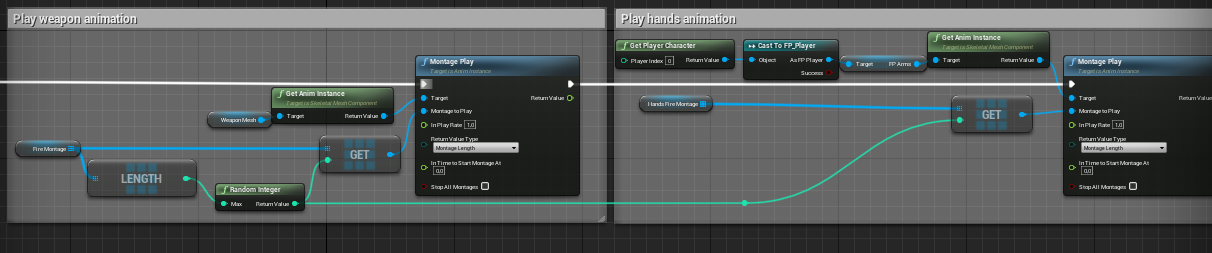
Hello. Is there a way for the random integer to return the same number? I tried doing from stream but with no luck
I need both of the montages to sync with each other
https://i.imgur.com/BtAEzRp.png
 willow phoenix
@median phoenix just promote it to a variable
lucid ingot
median phoenix
Hello. Is there a way for the random integer to return the same number? I tried ...
if you are trying to get 2 anims to sync, why aren't you doing this inside your animbp with layered blend per bone? You can do this by making the montage a slot and blending with the anim.
willow phoenix
i gues atomik got a good point here 😄
lucid ingot
willow phoenix
i gues atomik got a good point here 😄
lol i spent a week doing this, 2 weeks ago xD
median phoenix
But I need these montages for firing and stuff
gusty axle
cold raft
Thanks, I currently use a nasty IF statement which works, and isnt *that* perfor...
bruh
blueprint interface curled up in the corner lmao
I remember ive did something like that before but using Case
lucid ingot
median phoenix
But I need these montages for firing and stuff

choose a slot

blend the slot with your locomotion
and it will sync.
or you can do it this way
 median phoenix
Thank you
lucid ingot
median phoenix
Thank you
If you have an issue do not hesitate to ask. trying to understand this the first time was like learning chinese
median phoenix
I have so many issues that at this point it'd be a wiser choice to hire a programmer, but I keep trying...
lucid ingot
i feel you bud! Don't give up tho! I went from not knowing a damn thing to atleast understanding things. Once you play around with things, it becomes second nature to you 🙂
Anyone did i calculate velocity correctly here?

 night flare
Quick question: I want to define a blueprint which only contains a structure as variable, so I can create as many subclasses as I wish only to hold different values for that structure. Is there any way to do that without using actors? At the moment, I have to spawn an actor, use the stored structure values and then destroy the actor which seems like a bad way to do things. Suggestions?
spark steppe
you can extend UObject
 soft mulch
night flare
Quick question: I want to define a blueprint which only contains a structure as ...
soft mulch
night flare
Quick question: I want to define a blueprint which only contains a structure as ...
Hi! Try looking at DataTables, maybe they would be a better option
spark steppe
however, why do you even use a struct if you have an object?
night flare
I'm working in blueprints
night flare
soft mulch
Hi! Try looking at DataTables, maybe they would be a better option
going to check that, thx
spark steppe
yea, but you can still just define variables in said blueprint object
be aware that data tables can only be changed in the editor, not on runtime
night flare
yep, suits me perfectly 😉
spark steppe
then they might be the best choice
night flare
Job done, thx folks 😉
 zealous moth
when i start my project, I get several warnings that will disappear on compile. The annoying part is that they always reappear... is there a way to remove them?
for context, I borrowed some logic from another project and pasted it in.

 tawdry surge
In general ue doesn't like that. If you remake the things listed it will stop
earnest tangle
What functions?
tawdry surge
If it's a function you made in BP then you just pull off an execution pin and type the name of the function to get the function call.
If you made it in cpp then you have to expose it to BP
 void needle
i got it from one of plugins
and it says i cant use this function because its not blueprint callable
it says that graph isnt editable
so i cant set it to bp callable
is there any other way to call functions without adding them ?
 tawdry surge
Then it's probably not meant to be used in blueprint.
If the graph isn't editable it means it's read only. That wouldn't stop you from calling it tho, just keeps you from changing it
void needle
how can i call it then?
tawdry surge
That picture is from inside a function, so I'm not sure what you mean, unless that's just a random thing you made..
If it isn't meant to be called in BP then you're probably supposed to use cpp, but you can always make it BP callable and see what happens
void needle
i cant make it bp calllable
look at the graph

that is what i was sending
that i cant even edit it
o
h
you mean to make it editable through vs
earnest tangle
Why do you need to be able to call this function anyway? It seems it must be part of how Dungeon Generator works
void needle
its the start of the dungeon
im not so sure, maybe i dont need to call it
but without calling it, nothing happens
earnest tangle
Yeah you probably don't if it's not bp callable
void needle
then how can i use it
earnest tangle
I would assume it's meant for you to be able to provide your custom implementation to choose the first room, and it's just used by default by the plugin
void needle
sorry for probably stupid questions
void needle
earnest tangle
I would assume it's meant for you to be able to provide your custom implementati...
yeah, thats the thing
i added my first room
but it just doesnt spawn
earnest tangle
If the plugin isn't doing what it's supposed to you probably need to consult its documentation, it's pretty hard to say because I've not used this one
 karmic shadow
I got a group of AIs and when they run towards a certain point.... they collide with each other and the running animation is disturbed... Is there any way to solve this?
void needle
earnest tangle
If the plugin isn't doing what it's supposed to you probably need to consult its...
maybe i can send you the plugin?
gentle urchin
^ would be better if you studied the plugin/documentation yourself. Thats quite a big ask.
 drowsy flame
hey guys how consistent is timeline? Sometimes it seems it doesn't work for me
drowsy flame
its bp no code 😄
tawdry surge
BP is code
void needle
gentle urchin
^ would be better if you studied the plugin/documentation yourself. Thats quite ...
i looked through whole doc
drowsy flame
nvm turns out I had to use play from the start and reverse from end. Else it would snap to position when I was going back and forth between two positions
 lost solstice
I know you cant do multicast delegates in blueprint for unreal engine but what would be the closes equivalent that would have similar functionality to that of a multicast delegate?
 safe iron
Hey guys, I have run into a problem with AIs and guns
winged sentinel
@lucid ingot enhanced input is gonna work I think 4.27 has it exposed for blueprints, it’s experimental but im sure it’ll be okay to use
safe iron
So as you can see I am casting to the First Person Character to get the rotation and the Forward Vector the gun should fire the projectile, but I have made AIs use the same character class as the player, the player uses a child actor of First Person Character and AIs use child actors of First Person Character as well, this to make it more simple for me to code Health and Death, as well as bots for multiplayer modes, but when AIs try to shoot, the projectile gets shot in the same direction the player is looking at, I was aware of this for a long time and I found a temporary solution for it, which was not casting at the First Person Character at all but instead to fire the projectile from the Scene I have put in the weapon actor getting the forward vector and rotation of the actor, the thing is that it didn't work, the projectile was fired sideways so I had to adjust manually the rotation in order to make the gun shoot forward, but this method is inaccurate and unpractical, so my question is if is there a way to cast to the First Person Character actor or child actor that is using the gun, whether it is an AI or a player, and get its rotation instead of always getting the player's rotation? I know this issue is caused by the node "get player pawn" being the target but every other targets I tried ended up giving an error or a warning, I also tried setting a variable as target and setting the value as self everytime an entity used a gun, the projectile didn't even spawn with this method

Also sorry if I have not been 100% clear, I am not english, I am italian
 faint pasture
Is there any sort of data source I can write to at runtime? I need to make something analogous to a map editor, but it's more of a texture editor. I think my options are either making an editor mode Plug-In or just making a level for doing this. If I can write to a data table or data asset at runtime, that would be what I need
 winged holly
how to get name of current element of an BP enum ?
'enum to name' outputs wrong name
faint pasture
Are you sure it's out putting the wrong name, what is it outputting?
 fossil crystal
GM, VR trying to modify my Level_BP so i can teleport inside (green nav mesh seen on left) What am i missing ? its not working on the right
 winged holly

I know but I want to map value to its name
that 'enum to name' should output G3A3
🤔
faint pasture
@winged holly convert to string first.
safe iron
help?
fossil crystal
am I posting my VR issue in the right place?
winged holly
@faint pasture lol enum to string works fine, logically they should output the same
faint pasture
Yeah that's freaking weird.
faint pasture
fossil crystal
am I posting my VR issue in the right place?
#virtual-reality if it's VR specific
That sounds like a navigation problem though, what's different between the right and left? Did you make your level bigger?
faint pasture
Did you move the navmesh or the navmesh bounds volume
fossil crystal
it was a level BP from a NON vr game
faint pasture
Have you tried rebuilding navigation?
fossil crystal
so im assuming i need to do something specific to it to make it VR compatibly
have not, unsure on how to do that. ill google
faint pasture
Just hit the build button up top
 trim matrix
https://www.youtube.com/watch?v=WdGg5QYybJU Good time. Need tutorial how to make tentacle similar to this in video. Thanks in advance.

https://www.playstation.com/games/returnal/
Take a fascinating look at the evolving VFX magic that brought Returnal to life in this brand new deep-dive from developer Housemarque.
 fluid compass
Hi I'm trying to set the actor location and rotation of a primitive object anyone have any idea why the node is not working?
this is for AR i set a pin then set the actor location of the primitive object to the pin's location

level is an actor object that holds the "starting platform" which is a primitive cube placed in the level and has children which are the remaining platforms
trim matrix
this is my add item to inventory function
safe iron
Nvm found a fix by myself... probably...
wheat herald
atomic salmon
<@!404115988804534272>if you want to spawn a target actor in your level and then...
So in the level bp I made it spawn once from "begin play", an then in the actor bp i litteraly copied the same nodes but changed "begin play" to "event hit". Basically Event hit > destoy actor > spawning nodes ... and it seems like it works. Thank you
atomic salmon
@wheat heraldexactly, well done!
 calm mesa
How in the frick do you disable automatic tangents on newly created spline points?
all I want is to be able to add new spline points without being given a completely different tangent every time
gentle urchin
You can set them to linear if thats what you want
calm mesa
that doesn't solve my issue
as soon as I create a new spline point by alt+clicking, no matter what I do or how I set it up, it's immediately gonna calculate a new tangent first thing
I want it to keep the tangent of the point before it
gentle urchin
think you'd need to manually do some work with the splinecomponent then
trim matrix
faint pasture
Is there any sort of data source I can write to at runtime? I need to make somet...
Make an object and create the data structure yourself on this class. Have this object just exist in the background of the game somewhere. You cannot write to data tables at runtime.
trim matrix
winged holly
<@!127902729677963264> lol enum to string works fine, logically they should outp...
It might be helpful to think of it something like this.
NameType variable - back end data storage/transfer. NameType variables only support basic text characters. Alot of back-end systems will take NameTypes. This is because name variables are more basic and do not have all the extra text features that are unnecessary for simple data storage.
StringType variable - any text that a user will input into the game. String variables are designed to support anything a user could type pretty much. A example for when to use a string: if your game allows you to set a HeroName for the main hero, it would be best to store that HeroName in a StringType variable. That way the custom HeroName could technically support any text characters the player tries to type. This also applys for things you type into the editor. Its important to remember that you typed the EnumName G3A3 into the editor.
The NameType variable can be kind of misleading in name lol. I hope you might see why if you want to get that user inputed value of G3A3 you would need to turn that enum into a string type.
 leaden helm
Framework question. Making a singleplayer game, need to store variables that stay in memory between map changes. I forget if they should be in PlayerController, or PlayerState ? I also forget where is best to do the save/load operations, likely the same spot I store the persistant variables
 hardy fable
leaden helm
Framework question. Making a singleplayer game, need to store variables that ...
hardy fable
leaden helm
Framework question. Making a singleplayer game, need to store variables that ...
The Game Instance is usually where that stuff tends to go. Simplest solution for single player + blueprint.
Player controllers can transfer info from one to the next, but it has to be set up manually to copy the data, whereas the game instance is never destroyed ever, so it's always safe
leaden helm
Ok that makes sense. Just read player controller and state both get destroyed on level changes. But I'm very likely to have my player switch between a town and overworld level
and likely to have a different pawn in town vs overworld
hardy fable
Yeah. Best go with game instance then. Again technically when you transfer from one player controller to the next there is a time to cast from one to the other to transfer state in a function called OnSwapControllers but I don't remember if blueprint has access to this
leaden helm
Ok thanks. I've had this sorta thing set up before, but havent done gamedev in over a year 🙂
brazen merlin
leaden helm
and likely to have a different pawn in town vs overworld
you could have the same character class with an overworld child and a town child version for whatever specific needs. It would also be better to use a player controller to handle all input logic so its not bound on the character class (although with class inheritance, all input logic could be on the base character class since both children would draw from that)
leaden helm
right now I'm thinking town will be a FP or 3rdPerson character, but overworld is a vehicle
brazen merlin
design wise, you dont need to worry about different characters until you see the differences needed, i.e., you can just work with the character class in full and then child out later
ah, forget what im saying then lol, didnt know it would be that different
leaden helm
np, I didnt specify 🙂
brazen merlin
then it would be better to keep input on the controller and not the characters
personally, i would make a function library for things that fetch from the game instance, like inventory or money or whatever
leaden helm
Thats a good idea 🙂
I just got the engine code modifications that make my game viable working this morning, so I'm still planning things (mostly in my head, terrible storage medium)
brazen merlin
yeah, too bad there's no kind of document that can contain the designs of your game....
leaden helm
some ideas are going in a txt file, but others are floating in the noggin
K Thanks for the help 😄
 cold sinew
What can i use to build a pawn from many parts and when its done will be possessable ...
Other than Collision box
I saw Game call Wrench using Scene Component as socket
gentle urchin
As long as you start with some pawn baseclass the rest can easily be modular
 mild flare
Hello,
having an issue where a muzzle-flash is supposed to be attached to the weapon of a player, server sees the client do the shooting and the muzzle-flash moves along with the muzzle of the weapon - but the client-side (if the server shoots) spawns the muzzle-flash emitter in the world where the weapon's muzzle was at the time but doesnt move along (hope it's clear what i try to say lol) will attach the blueprint and a video of the issue. anyone sees what i am doing wrong?
 cold sinew
Its Tower crane i want to snap parts and use bolts to attach it and when all parts connected player will be able to possess it
brazen merlin
cold sinew
Its Tower crane i want to snap parts and use bolts to attach it and when all par...
if the end result is the same (that once assembled it has one look) just swap it for an alternate version
 unreal wing
Hey everyone, does anyone know how to make a third person character jump, bu the camera not move with it? I always found it annoying when the camera moved when the third person player jumped. Any suggestions?
faint pasture
unreal wing
Hey everyone, does anyone know how to make a third person character jump, bu the...
What happens if they jump on to a higher elevation then start walking?
The camera has to move eventually.
unreal wing
yah that im aware of, but like when the player is in a static jump, the camera automatically moves
faint pasture
Well that's because it's attached. Either use lag in the spring arm component or use a separate camera.
unreal wing
like instead of using a spring arm?
 hallow harness
you could just play an animation without root motion
unreal wing
hmm that might work
hallow harness
on second thought thats probably not what you want, you have to just detach the camera and make it follow on xy axis only then reattach when the jump is finished
 sage magnet
Could somebody help me out with my task here. I need to detect a collision between a button and another component located on another actor. I've noticed Begin Overlap have an output in a form of "Other Component", but I can't figure out how to use it.
 hallow harness
dont you just cast to your component
sage magnet
Do I have to get the reference to actor first though?
sage magnet
But that would include every primitive component of that type regardless who have it, correct?
hallow harness
yes
sage magnet
hmmm, alright, thanks
winged sentinel
Quick question, are structs basically interfaces but just for variables so u can share them across multiple bps
winged sentinel
Aha like a black board
Thank you
Are there any extra steps to replicating a strict or is it the usual procedure like any other variable
hallow harness
its the same, but make sure to replicate only the variables that you need
i remember i used to have this 50 var struct and i repd the whole thing
it lagged really hard
i only needed to use 3 in the end
gentle urchin
winged sentinel
Quick question, are structs basically interfaces but just for variables so u can...
No, structs are not interfaces in any manner. A struct is just a collection of variables
sage magnet
winged sentinel
Quick question, are structs basically interfaces but just for variables so u can...
if you want them to be unchangeable (static)
Honestly, structs are a pain in the ass to deal with.
I'd make a global actor (let's say game manager) and use maps instead
gentle urchin
They do require a tad extraz but as long as you keep in mind that any read from it is a copy, and cant be directly manipulated, its fine imo
sage magnet
yes well I'm speaking from a perspective of storing stuff and changing it dynamically. It was pain, we moved to maps.
Again, every case is different.
gentle urchin
I got the same perspective, yet a totally different experience by the sound of it
Maps are also a hastle in bp
gentle urchin
Tried iterating over a map?
winged sentinel
sage magnet
I'd make a global actor (let's say game manager) and use maps instead
I do have one, but I’m stumped on setting up to work well, what are maps?
gentle urchin
Cant directly foreachloop them is just the tip of it :p
sage magnet
tldr it's a collection of whatever the fuck you want with unique identifiers.
hallow harness
I use maps inside my structs 😎
gentle urchin
Map is a container of keys paired with a valie
winged sentinel
hallow harness
I use maps inside my structs 😎
I see, would that be a solution to shared variables across bps
sage magnet
hallow harness
I use maps inside my structs 😎
 gentle urchin
Global actor with the variables should be way easier
hallow harness
i've never tried that
gentle urchin
Never used them myself either (never had the need) but the idea is pretty straight forward
winged sentinel
Basically I have an AI Director bp and an AI service and I want to get a value from the director to the service
gentle urchin
Do the director have a ref to the service?
If so you could just make the service function take the inputs from the manager
winged sentinel
this is how i have it rn

i did a cast
but it doesnt replicate those variables
even tho in the director i have them exectute on server
but when i run get all actors of class inside of the service itself it works just fine
gentle urchin
Replication.. pff 😅 not my forte
 gentle urchin
Gonna dodge it for as long as possible :p
hallow harness
ok so i might be able to help
make the variable you need an input
on the server function
then plug it in before when you call it
winged sentinel
checking now
hallow harness
oh actually
if that doesnt work try adding a delay with value of 0 between begin play and get all players
gentle urchin
Doesnt gamestate contain an array of players(via playerstate?)

 hallow harness
can you print string the players array
winged sentinel
yes
 winged sentinel
okay thank you
gentle urchin

Exi's answer a while back. Probably still very valid
Through the controllers the pawns should be accessible
hallow harness
i did get the other way to work tho
you just spawn the detector from the character and save it as a variable
umbral ginkgo
I had a system which made an array out of actors from a specific class which would choose a random one and then disable collision on all of the other actors apart from the selected one, except I cant seem to get collision to work. Can anyone help?

 winged sentinel
gentle urchin
winged sentinel
gentle urchin
so its returning the player state but how can i get the actor the playerstate is controlling
hallow harness
umbral ginkgo
I had a system which made an array out of actors from a specific class which wou...
you want to disable collision for all the others in the loop body, and make sure not to clear the array first if you want to use things in it
winged sentinel
my ai is trying to check for the nearest player to it
 brazen merlin
umbral ginkgo
I had a system which made an array out of actors from a specific class which wou...
brazen merlin
umbral ginkgo
I had a system which made an array out of actors from a specific class which wou...
what i recommended was a bit different, #blueprint message
winged sentinel
nvm got it its
 gentle urchin
winged sentinel
so its returning the player state but how can i get the actor the playerstate is...
gentle urchin
winged sentinel
so its returning the player state but how can i get the actor the playerstate is...
Get pawn is accessible from playerstate
winged sentinel
thank you, get pawn private is returning the correct value over a string, but now my ai wont move lol
it might have to do withg something on my end tho, as the values are fine
@gentle urchin @hallow harness Thank you both for your help, AI is fully replicated now with all players
hallow harness
nice 👍
 bright harbor
so i'm trying to run a while loop that checks the players location and runs nothing until the player hits a specific goal point, but when i try, it says it's an infinite loop
umbral ginkgo
brazen merlin
what i recommended was a bit different, https://discord.com/channels/18721764300...
I Integrated your original suggestion into the current one and it sort of works(?) All the triggers except the one that is selected are disabled but when the index changes, all of the triggers get disabled.

I think it could be an issue with updating the actors
brazen merlin
well the string after the clear isn't suppose to be there. that's the enable collision logic, i wasn't sure exactly how you were doing it
sorry, that is confusing
umbral ginkgo
Where should I put the string then?
brazen merlin
nah, just remove it, replace it with enable collision for the Target actor since that is the one chosen out of the array at random
umbral ginkgo
I cant do that cause the string is (temporary) player feedback. It tells the player atm which trigger works
 tiny prism
How do I create a blueprint like this? I am new to blueprints so any help would be appreciated.
 brazen merlin
tiny prism
How do I create a blueprint like this? I am new to blueprints so any help would ...
brazen merlin
tiny prism
How do I create a blueprint like this? I am new to blueprints so any help would ...
that is a set node
tiny prism
yeah, but how do I get the bottom Target?
I only can get the first variable tunnelspawner to get set

How do I get it to where the Next Tunnel can be set to "Target" variable?
brazen merlin
umbral ginkgo
I cant do that cause the string is (temporary) player feedback. It tells the pla...
that string is there because I don't have your DisableTrigger function, but that should be called after the Clear array for the ChosenActor so that it has collision
tiny prism
I solved my own question. I had to make it instance editable
umbral ginkgo
brazen merlin
that string is there because I don't have your DisableTrigger function, but that...
here is the function

But do you have any idea why after one index, all the triggers disable
brazen merlin
umbral ginkgo
here is the function
i dont need the function, you need to call that function after the Clear
umbral ginkgo
Oh i thought you were asking for me to send it
brazen merlin
umbral ginkgo
Oh i thought you were asking for me to send it
sorry no, trying to explain why i had to put a print string in my example
brazen merlin
i honestly dont know how you did it, but you don't want the array plugged into the disable trigger function
use the Array Element output of the for loop
 frank salmon
hey all, does anybody know how to orbit the camera around an object but without the spring arm?
icy dragon
frank salmon
hey all, does anybody know how to orbit the camera around an object but without ...
With a hacky vector math.
brazen merlin
frank salmon
hey all, does anybody know how to orbit the camera around an object but without ...
sounds like some custom camera manager stuff 🤯
icy dragon
I think ALS did use custom camera manager stuff (which admittedly is frickin painful to work with, but it's something I had to get used to)
frank salmon
indeed, but it seems that ALS uses more anim oriented, rather than vector oriented
brazen merlin
so like, why cant a spring arm work though?
frank salmon
i need many functionalities on a single camera, and the spring arm is bringing more issues to the table
umbral ginkgo
brazen merlin
i honestly dont know how you did it, but you don't want the array plugged into t...
Im going to take that as a compliment lol
Should I put it in after clear?
icy dragon
frank salmon
i need many functionalities on a single camera, and the spring arm is bringing m...
As in what issues?
frank salmon
distances, snapping on collisions, interpolations, control, etc
brazen merlin
umbral ginkgo
Should I put it in after clear?
like that (ignore the red scribbled out area)
 frank salmon
icy dragon
As in what issues?
frank salmon
icy dragon
As in what issues?
would be nice to have something like cinemachine from unity
icy dragon
frank salmon
would be nice to have something like cinemachine from unity
I don't use ||Unity|| lol
It's been like 5 years since the last time I used that P.O.S.
I won't be able to relate to Unity stuff aside from very basic terminologies
umbral ginkgo
brazen merlin
like that (ignore the red scribbled out area)
All of the triggers still get disabled when an index gets chosen more than once
brazen merlin
yes, the loop will turn off all of the colliders in the array. the chosen one will not, and if it accidentally does, when the array loop finishes (completed) it will enable the chosen one's collider
 crimson depot
How can I get an array of files in the current folder that an editor utility is in? I'm thinking I can use the asset registry and then loop through everything until I find the editor utility and parse the directory but that seems kind of hacky
 zealous fog
Hey guys Im a beginner in Blueprint and made my first code without any tutorials, and I was wondering, is this a good way to handle taking damage on an overlap

also have on end overlap that it sets the boolean "Is overlapping" to false
winged sentinel
Seems good, to me at least
brazen merlin
zealous fog
i think the delay will keep firing even after you've left the overlap area
zealous fog
Hmmm you are right
But why? hehe
I get why, but how do I stop it lol
Putting the branch before the delay?
brazen merlin
that would allow for the case to cease, i think you'll also need to have an end overlap event so you can turn of IsOverlapping
zealous fog
zealous fog
also have on end overlap that it sets the boolean "Is overlapping" to false
Yeah I forgot to screenshot that part
moving the branch worked! Thanks!
Lmao I just found out there exists a "pain-causing volume" 😆
 hybrid ether
Hello, I have multiplayer where every player have replicated variable "team" red or blue. Players spawn projectiles and my goal is to make same team minions "no collision to that projectile". Example shoot behind your own minion to enemy minion, then projectile would go throught minions but hit enemy minions?
tiny prism
What is the "GET" component called?
 spark steppe
get array element? or something
or just "get copy"/"get reference"
the projectile will probably still be stopped by the collision?!
i've not worked with projectiles yet, but for actors you can set them to ignore the collision of specific other actors
 dusky harbor
Does anybody know how can i take the coordinates into 3 different Print String.
One Print for each of X, Y, Z

 reef tinsel
zealous fog
I get why, but how do I stop it lol
reef tinsel
zealous fog
I get why, but how do I stop it lol
Set Timer by Event (or a function), you can save the timer to a variable and then call Clear and Invalidate Timer to stop it
umbral ginkgo
I was trying to get this done earlier but realized I explained what I'm trying to fix poorly. In simple terms, I have a bunch of trigger actors and one is randomly chosen when your player interacts with a separate trigger. The rest of the triggers are supposed to be disabled except for the chosen one. Once your player interacts with the chosen one, the whole process can be done over again. The problem is this can only be done once with my current code before all my triggers are disabled. Anyone know why?
 reef tinsel
dusky harbor
Does anybody know how can i take the coordinates into 3 different Print String.
...
reef tinsel
dusky harbor
Does anybody know how can i take the coordinates into 3 different Print String.
...
disconnect the vector pin, right click (on the output of the / ) and there's an option to separate the inputs, it will be floats
reef tinsel
hybrid ether
Hello, I have multiplayer where every player have replicated variable "team" red...
You need a custom collision channel for objects, go to project settings/collisions (you will then have to set every class manually to this collision type. From pawn to redminion for example, etc)
every other class that react to this collision will also have to be set, the overlaps and stuff
reef tinsel
umbral ginkgo
I was trying to get this done earlier but realized I explained what I'm trying t...
I'm not sure, but I think you're disabling the triggers in the actors ? they'd have to be reenabled to work again
reef tinsel
it must be that
if not, it has to be something else, I seen no problem in this function
 heavy lion
ok. I am going out of my mind trying to rotate a moon based on the time of day
i have an alpha of 0-1 for the length of the day
Im plugging that into a lerp rotator and then set actor rotation
reef tinsel
and what happens ?
heavy lion
if I set the x Rotation to lerp between 90 to 270, the moon rotates through the sky from east to west correctly
But If I alter the other angles, to apply a tilt. It goes in reverse
I just cant seem to apply a tilt to it
reef tinsel
the moon is an actor? I'm thinking the pivot is in the 0,0,0 of the world ?
x rotation is a roll, so if that is going from east to west, the forward vector of this actor must be to the left of the moon ?
a pitch should be the y rotation
heavy lion
The moon is a BP actor which just includes a moon mesh which is far away from 0,0,0.
But the actor itself is 0,0,0
reef tinsel
yeah, it should work. try to lerp the x and y rotation individually and then make the rotator to feed it to the rotation node
reef tinsel
the last time i messed with rotators, the x and y went from -180 to 180 but the Z went from 0 to 359, I don't know if it's still like that
a spring arm should work, but this should work too
heavy lion
I cant get it to work at all
If I enter any other values it gets to a point and then pops to another location
crimson depot
The only reason I say that is I was trying to do something similar with a camera and it was giving me weird behavior and I just gave up and used a spring arm
heavy lion
I dont get why that would be different. Still setting the rotation in the same way no?
reef tinsel
you can also try rotating the actual actor in the level and then do the bp rotation just in X
 eternal gate
I'm putting together an Animation Blueprint using a state machine. I'd like to provide animation data for the output pose by getting animation data from an actor. Is there a way to do this?
Below is basically what I'd like to do. Is this possible one way or another? The "Fire1Anim" is a UAnimationAsset object
 brazen merlin
heavy lion
if I set the x Rotation to lerp between 90 to 270, the moon rotates through the ...
brazen merlin
heavy lion
if I set the x Rotation to lerp between 90 to 270, the moon rotates through the ...
the issue you are dealing with is euler rotation vs quaternion rotation, and they are a pain in the a**
 barren relic
Im trying to make a checkpoint system and respawning works, but when it tries to spawn at the checkpoint location I get pending kill errors even though the only thing that changed was the spawn transform


 devout latch
eternal gate
I'm putting together an Animation Blueprint using a state machine. I'd like to p...
devout latch
eternal gate
I'm putting together an Animation Blueprint using a state machine. I'd like to p...
Yes. I have mine set up so when a variable is changed on my actor, the animation changes automatically. I have an enumeration that stores all the animations and I set it - which changes the animation state. Is that something you are looking for?
trim matrix
guys what's the difference between subsystem, game instance and game instance subsystems??
eternal gate
devout latch
Yes. I have mine set up so when a variable is changed on my actor, the animatio...
I don't think that's exactly what I'm looking for. What I want to do is have my state machine play animations based on which weapon I have equipped. Like, each weapon will have an idle, walk, attack, etc. animations, and the state machine will use the animations tied to whichever weapon is equipped
 brazen merlin
barren relic
Im trying to make a checkpoint system and respawning works, but when it tries to...
brazen merlin
barren relic
Im trying to make a checkpoint system and respawning works, but when it tries to...
maybe its the delay
barren relic
brazen merlin
maybe its the delay
think i should remove it?
brazen merlin
barren relic
think i should remove it?
fingers crossed
barren relic
ill try it
brazen merlin
eternal gate
I don't think that's exactly what I'm looking for. What I want to do is have my ...
inside your idle, walking, etc are the anims used, you can expose those pins and have a variable plug in instead
brazen merlin
trim matrix
guys what's the difference between subsystem, game instance and game instance su...
subsystem is the platform module, like if its the steam subsystem, that allows the engine and steam to talk network info. Game instance is the active session, it handles session connecting and disconnecting, it maintains the session and data relevant for it. Not sure about GIS, maybe that's a newer thing added when I did mp last year
eternal gate
brazen merlin
inside your idle, walking, etc are the anims used, you can expose those pins and...
What's a pin and how do I expose them? Still pretty new to UE4
brazen merlin
open up your idle
 brazen merlin
nah thats right
select your animation node
in the details there should be a "make pin" checkbox or something
 brazen merlin
eternal gate
brazen merlin
eternal gate
i dont see it either, hang on
ah, thats right, its a bit different now - go to bind, then expose as pin
that will give a pin on the anim node, drag off that and promote to variable, give it a name
eternal gate
ah, I think I see now, ty
brazen merlin
you can now set that variable to whatever animation you want
eternal gate
awesome, tyvm
brazen merlin
sure thing
 brazen merlin
 strange comet
you might need to make the widget a variable
strange comet
brazen merlin
you might need to make the widget a variable
How would i go about doing that (I only got into ue recently)
brazen merlin
the return value of the create widget, promote that output to a variable, then reference that
 brazen merlin
yeah, not quite
strange comet
Yea im kinda dumb lmao
trim matrix
hello
 thorn trellis
Hi anyone who is still learning ue4 and is relatively new!
I was once like you
I was only able to use casting and didnt understand interfaces
I just learned how interfaces work
oh my god is it so much better than casting
you should learn interfaces too and save yourself the headache of refactoring that I'm about to deal with to get size maps and references down
Dont be like me
trim matrix
I was wondering if someone could help me im trying to make it so that the player cant jump before the landing animation fully plays
trim matrix
thorn trellis
Hi anyone who is still learning ue4 and is relatively new!
I was once like you
I...
casting has its use cases...
thorn trellis
trim matrix
casting has its use cases...
Definitely. But it's not for literally everything lol
icy dragon
thorn trellis
Dont be like me
Hahaha no
trim matrix
can somebody help me fix this
icy dragon
trim matrix
I was wondering if someone could help me im trying to make it so that the player...
Just add a delay to control a gate, with the duration being the length of your landing animatiom
trim matrix
im trying to make a tribe/group/clan system right now and i got a pretty good idea of what i want and how im going to do it, but how to save infomation of the groups? im going to run server with database in the future so i just need a temporary way to save the info until im ready to implement database.
well I did something here but honestly dont know what im doing lol
@icy dragon
brazen merlin
immediately after the OnLanded event, before IsJumping, put a RetriggerableDelay
trim matrix
how many seconds @brazen merlin
brazen merlin
well, 1 second will mean that when the character lands you cant jump until that elapses
trim matrix
how about when im falling
brazen merlin
on landed fires when you fall and land
it is not tied to jump
jump is another form of causing falling
thats what i got for my character jump
strange comet
trim matrix
@brazen merlin
brazen merlin
try a bigger number, like 3
trim matrix
it is 3
brazen merlin
that is 0.3 sir
 trim matrix
im stuck in the air
brazen merlin
?
brazen merlin
strange comet
😆 ue5 be drunk
trim matrix
Do i need to create other variable?
trim matrix
my issue is that its possible to jump again as soon as you land, even before the landing animation is played
brazen merlin
just a moment ago jumping didnt keep you in the air, now you say it does, the retriggerable delay is onlanded, so jumping shouldnt be possible, i havent a clue dude
you know what it is, you're using delays to re-enable bools, and thats a no no
your bools should enable when the anim or action finishes
thats something to link up with it specifically, using delays wont solve it
not with input events
so for the jump input, lose the delay
all you should need for the on landed is this
 brazen merlin
do this for the jump

one of the branches is missing to check that jumping is already active
 marble violet
Is there a better way of removing widget from viewport? cause when I remove from parent and then check is in viewport it returns true.

I can add delay, but it doesn't seems efficient
 south notch
Hi!, im pretty new in unreal and i need help with this, when i convert the float to this ToText Node, i don't know why but, i can't get the float with the dot, i want an 1.000 but always get 1 000, sorry if i can't explain myself, idk how to talk eng
There's a pic of the Healthbar with numbers and the BP

 trim matrix
why is this false
im so confused
nvm
I get it
you're a legend dude
it works
thanks so much
Big shout out to Conrad
💯
brazen merlin
south notch
Hi!, im pretty new in unreal and i need help with this, when i convert the float...
instead of to text use FormatText
trim matrix
does anyone know how i could make dedicated server save files?
or can refer me to documentation on it
 chrome fractal
If I attach two actors with attach actor to actor node and I have parent actor how can I found the other attached actor.
atomic salmon
@chrome fractaluse can use Get Owner to get the topmost actor owning a component or actor component
From there you can use Get Children and similar to get the attached actors
chrome fractal
I have the parent in hand I want to get the actor which is attached to it via attach actor to actor node
atomic salmon
chrome fractal
I have the parent in hand I want to get the actor which is attached to it via at...
Get Children Components
If you get into a Child Actor Component you can use this:
https://docs.unrealengine.com/4.27/en-US/BlueprintAPI/Actor/GetAllChildActors/
Get All Child Actors
chrome fractal
atomic salmon
If you get into a Child Actor Component you can use this:
https://docs.unrealeng...
It isn't work
for me
atomic salmon
@chrome fractaldoesn't work is hard to interpret. What happens exactly? Your attached actor is not listed or what? Can you show your code?
chrome fractal
Both arrays length are 0.

 languid linden
guys whats difference between creating a duplicate and a child actor? don't they both work in same ways?
atomic salmon
@chrome fractalyou are getting the list of attached actors before the attach to takes place
 timber knoll
languid linden
guys whats difference between creating a duplicate and a child actor? don't they...
timber knoll
languid linden
guys whats difference between creating a duplicate and a child actor? don't they...
A duplicate is just an exact copy, while a child inherits everything from the parent
Meaning that a child will change when the parent changes
A copy on the other hand, will not
chrome fractal
languid linden
guys whats difference between creating a duplicate and a child actor? don't they...
No, in duplicate you just create a copy of that class and you can modify its basic structure but child class can't modify the basic structure like components defined in parent.
chrome fractal
atomic salmon
<@!742508311043244093>you are getting the list of attached actors before the att...
getting the same result after 5 sec delay
timber knoll
And as an extra on inheritance: you can also extend parent functions or complety change their implementation inside the child actor.
languid linden
timber knoll
A copy on the other hand, will not
is instance also a copy?
timber knoll
Not quite
An instance is what you have in your scene when you place the blueprint
Every object is an instance of your blueprint class
It’s very similar to copies
Usually you have child actors for things like: weapons, enemies, ...
Where you have a base weapon/enemy and then each specific enemy is a child from that base
languid linden
chrome fractal
No, in duplicate you just create a copy of that class and you can modify its bas...
i created a character as AI, it has death function. then i create a duplicate, it posses the function and dies when death function is called. i create a child of original AI, it inherited death function and when i call it, child is not dying.
languid linden
so what should i do to make death function work in child actor?
timber knoll
In your case you want to extend, so right click the node in the child
Then you can add a call to the parent node
languid linden
where do i extend this? in construct script?
timber knoll
Which is basically copying the logic (but if it changes in the parent, it will change in the child)
Where you have the event or function
languid linden
can you give me example?
timber knoll
How have you set it up? Can you show us parent and child
languid linden
because i have that function in child and when i call the that function it not working
wait should i make a vidoe or screenshots?
timber knoll
Just screenshots are fine 🙂
languid linden
this is in parent

this is parent

my child zombie AI

i created a grenade actor which has collision and on overlap calls death function in zombie child


 timber knoll
you should actually not even cast if it's the same function
just call the function from AI
 sharp rapids
languid linden
sorry i was checking it let me change it
sharp rapids
languid linden
sorry i was checking it let me change it
Can you show the Death function in your child
timber knoll
don't think he overrides it
sharp rapids
languid linden
my child zombie AI
I see death on the left here
languid linden
like this? now it not working
 sharp rapids
don't know if it's overriden or a separate function
languid linden
that death function is from parent which is not working in child zombie.