#blueprint
402296 messages · Page 749 of 403
 trim matrix
trim matrix
trim matrix

 grand hawk
Do you check the current speed on condition node?


 grand hawk
I mean, this node
 trim matrix
grand hawk
I mean, this node
trim matrix
grand hawk
I mean, this node
 grand hawk
What is your desired result? I thought that is to stop the IdleBreak when player start to move
trim matrix
idk im so confused
grand hawk
If it is, you should check current speed on that node
Then if the player start to move, it will play walking animation
 dusk cave
Hey guys, my player keeps falling into the ground while the menu or game over screen is loaded. How can I fix this?
 static charm
it would be good to find the actual reason, but one of several possible work-arounds would be to disable gravity in the character when opening menu/screens. then re-enable.
dusk cave
I'm having trouble finding which node would do that.

 odd ember
dusk cave
Hey guys, my player keeps falling into the ground while the menu or game over sc...
odd ember
dusk cave
Hey guys, my player keeps falling into the ground while the menu or game over sc...
a bit of a hacky solution, but: set custom time dilation to 0?
afaik that should not affect menus
trim matrix
grand hawk
Then if the player start to move, it will play walking animation
where and what do i put in the code

 dusk cave
odd ember
a bit of a hacky solution, but: set custom time dilation to 0?
dusk cave
odd ember
a bit of a hacky solution, but: set custom time dilation to 0?
Thank you.
 odd ember
if for some reason you need the slightest amount of movement to be available, 0.01 value will also work
trim matrix
@grand hawk
grand hawk
If your want is to prohibit to move the character until that IdleBreaker motion end, you should write the code about it on some other place like your character blueprint
trim matrix
damnnnn
grand hawk
If it isn't, remove that code and paste the nodes what i told
It is always hard to complete the work. Good luck 🙂
trim matrix
yeah
but my goal is to make the character move even tho he's in the middle of the animation
static charm
its okay buddy, thats how ive felt the last two years
static charm
lol wat
trim matrix
nothing is working
been literally trying to fix this shit for 2 hours
check this shit out
static charm
yeah that looks about right


 worthy frost
calm down.
worthy frost
well swearing and posting lots of pictures is not going to help. And you have not even clearly explained your problem is.
trim matrix
worthy frost
well swearing and posting lots of pictures is not going to help. And you have no...
I did
trim matrix
Basically when I start running I'm still in the idle breaker animation
it doesnt stop the animation
so the walking animation needs to start after pressing W
at any time during the idle breaker animation
worthy frost
right, so what is telling it to move from "Idle Breaker" state to "Walking" state.
show me the transitions.
trim matrix
its all in the screenshots dude
worthy frost
you did not show transitions..
trim matrix
blendspace
worthy frost
wow, i am not scrolling 20 pages up.
trim matrix
trim matrix
sigh
trim matrix
ok thanks
worthy frost
and stop with the rudeness, was no need for that "sigh" right there.
People help here cause they want to help, they do not NEED to help you.
worthy frost
well it seems that way, and to other people it can also seem that way
trim matrix
wasnt my intetion to offend anyone
trim matrix
sry
worthy frost

in your transition from Idlebreaker to Walk
then you want if Speed > 0
set IdleBreaker to false.
trim matrix
where do I put that code
worthy frost
 trim matrix
 worthy frost
?
trim matrix
its broken
try it on my project and you will see

MediaFire
my idle breaker animation is just not playing anymore
@worthy frost so?
 robust crescent
I'm trying to make an Ocarina of Time inspired game and I'm wondering where the code for the functionality for all the different items should go? Surely I'm not putting everything in the Character event graph, but Functions can't seem to do some of the things I'll need. Right now I can equip a hookshot/grappling hook from a menu but I have no clue where to start with making it fire and function like a grappling hook. Can anyone help guide me?
The important part is that I'll need to be able to rebind items to different buttons on the fly. I can already equip them from a menu but I dont know how to organize their use code in a way that it can be used and called easily.
 ripe rose
robust crescent
I'm trying to make an Ocarina of Time inspired game and I'm wondering where the ...
ripe rose
robust crescent
I'm trying to make an Ocarina of Time inspired game and I'm wondering where the ...
components
speaking of which,
is it not possible to do a "run on server" event from within a component? when i try to do it, it like deletes the actor or something
if i switch it around to where the component calls its owner's "run on server" event to do the same thing, it works fine
like, i have the component telling its owner to do a "run on server" event which tells the component to do something, and it works. but if i have the component do a "run on server" event to do the thing, it doesn't work
 dawn gazelle
ripe rose
like, i have the component telling its owner to do a "run on server" event which...
dawn gazelle
ripe rose
like, i have the component telling its owner to do a "run on server" event which...
Make sure the component is set to replicate.
robust crescent
ripe rose
components
I've made a parent class for the items so that I could attach them as components but I'm still not sure what you mean. Does attaching something as a component just make it easy to run blueprint communications to the character?
ripe rose
i'm not 100% clear on what it means for a component to replicate or not
vs. the owner replicating
dawn gazelle
ripe rose
i'm not 100% clear on what it means for a component to replicate or not
If the component is not set to replicate, replicated variables and RPCs will not function.
Similar to any other actor.
ripe rose
what about character movement component? that one doesn't seem to need to be replicated?
or is that just because other clients simply see the actor's new position and not its CMC variables?
dawn gazelle
The CMC is a bit more complicated... It has replication built into it's C++.
ripe rose
robust crescent
I've made a parent class for the items so that I could attach them as components...
yeah you can have code for each weapon
i'm in the process of moving my weapons over to components right now
realized i wanted too many things and i should probably not stuff it all into the character bp
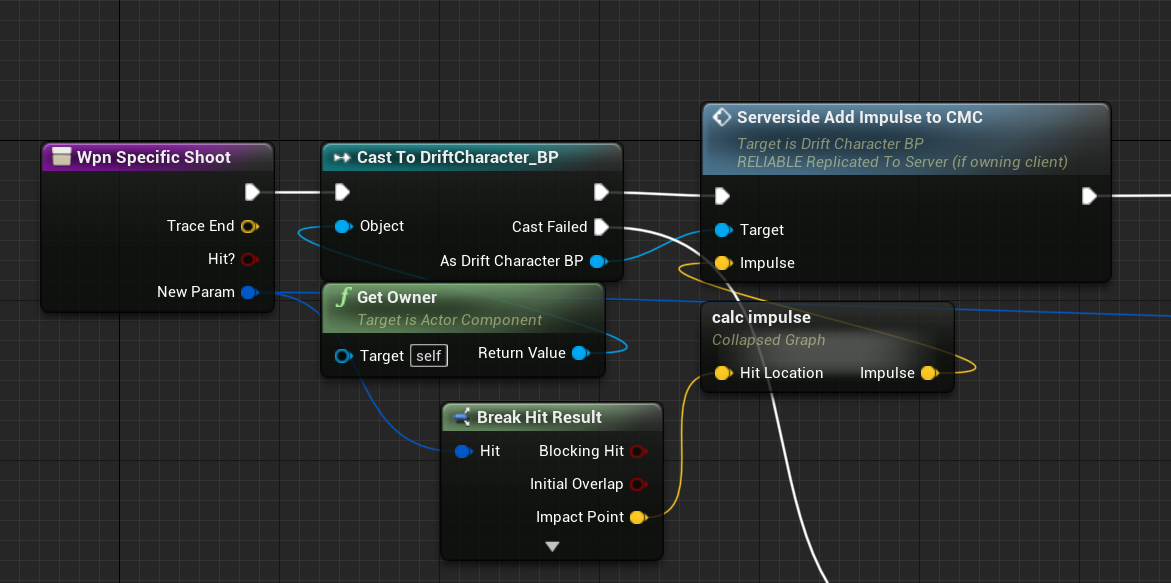
i'm making an fps. for me i have a parent weapon which has a "shoot" function. each individual weapon (children) has an override function to do specific stuff on shoot
robust crescent
ripe rose
yeah you can have code for each weapon
The component will need a lot of control over the character it's attached to, do I just need to be ready to call a lot of events on the character? Like, I need my component to be able to drag me through the air.
ripe rose
shouldn't be a problem
robust crescent
Another one will need to stop tick on everything so that it can run a quick isolated action, lots of them will need to do camera management
ripe rose
my weapons each calculate their own physics impulses that they then apply to their owner via the CMC
robust crescent
Ok so then I just need to start thinking about it from the other direction probably, like the items need to be controlling the character.
ripe rose
well you can think of it like the weapon is part of the character
like the CMC is a component and it controls your character's movement (if you use it)
robust crescent
Hm...
ripe rose
the nice thing about components besides being good for organization is that you can add them to other actors which don't have the same parent
so in my game i can give the same weapon components to NPCs enemies which don't have the same parent as my player bp
robust crescent
Do components need to cast to their owner?
Like, is all the character-component communication going to be the same kind of call-and-forget that happens between most actors? Sorry if I can't word this right.
 robust crescent
Like, they can only communicate with events, right? I press E and they're just going to call events on each other until one of them stops execution?
Oooooh ok so it is a lot of casting and back and forth action. I think I got it now, thank you so much.
ripe rose
i think once you start messing around with it you'll figure it out
robust crescent
I got as far as making each item print a different line, didn't realize I should have been doing stuff up the chain to its parent.
ripe rose
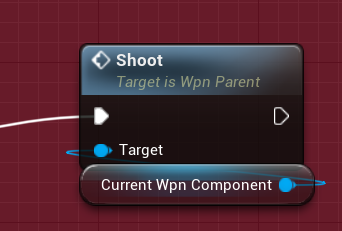
this is in my player bp
just tells the current weapon component to shoot
they jsut handle the shoot function in different ways
robust crescent
I had something similar, it was getting the item class from an array and calling one if its functions. Functions are one frame only I think and I knew I needed something else. Event graph it is.
I'm still not 100% on object oriented programming but I just have to say, OOP does some weird stuff to the brain. My brain feels like I'm slowly becoming computer.
ripe rose
I am also a noob just trying to figure things out as I go
robust crescent
I feel like Megamind after I solve anything. Like I'm an transcendent form of human being because I can have a small chat with a CPU.
 maiden wadi
And then the brick of realization that there's a billion other things to learn. And by the time you get through 500 of them, you've forgotten 1-57 already. Get used to that. It's here to stay. 😄
robust crescent
maiden wadi
And then the brick of realization that there's a billion other things to learn. ...
That too. I learned only one thing about Projectile Components and that is this: Lots of the settings can conflict! Make sure you know which settings you need. I have no idea which settings those are though.
One answer turned into 10 more questions. I gotta Google it every time now.
And I still didn't even figure out what I wanted...
maiden wadi
On thing I find when I was starting was to find things that work. Simplest examples of how to set things up. For instance a projectile with nothing but velocity set will make it fire when spawned. You know this works, so you copy it and then start playing with the settings.
robust crescent
I was trying to make a bullet bounce off a wall and keep it's velocity and rotation in a perfect reflection off the impact face. I tried a few blueprint solutions too but all of a sudden I was trying to learn trigonometry.
We should all be learning trig and vector math, just so everyone knows it's almost required.
ripe rose
for making a game yeah you should know those things
 sharp rapids
Wait till you take a look at Procedural Generation 🙂
It's mind blowing
I spent like 4 months just trying to make a good algorithm on Terrain Generation 😅
And I still didn't get it
ripe rose
that's closer to an artform i think
robust crescent
sharp rapids
I spent like 4 months just trying to make a good algorithm on Terrain Generation...
Algorithms are another thing I want to learn but probably won't for another decade. Rubix Cube mathematicians use algorithms to figure out how to change cube states and it's just too complex for me.
You can solve a cube using pre solved algorithms, but solving your own is like abstractly difficult.
It's like theoretical physics.
sharp rapids
I didn't even try anything that complex
I was simply using Perlin noise to generate.a terrain mesh and a navigation system
It took me ages
 earnest tangle
procedural generation is just a fancy word for "pick a random number" 
...I guess it somewhat depends on what you're generating but a lot of it is just that lol
 spark steppe
and combine noise/patterns in a meaningful way and smooth it out
sharp rapids
That's when I realized making a No Man Sky like game isn't a job for one guy 😁
earnest tangle
I have a procedural movie synopsis generator in my game which is basically just a set of lists where stuff comes from at random :P it works surprisingly well
No Man's Sky is impressive
would certainly be interesting to know how they do it... or something like RimWorld
maiden wadi
Also on that note. Complexity is also the enemy of any good program. If you can't keep it simple, there's very likely a better way to solve your problem.
Also vector math is incredibly easy once you get down the differences of local, world and relative space.
And point vs direction vs lengthened direction.
robust crescent
It seems like OOP is just stacking a bunch of simple solutions into other simple solutions until you have one final Main() solution, and then you can compile and export your program. If anything fails to be simple then that problem could have an impact on a lot of other objects and you'll probably have to rewrite.
earnest tangle
This is pretty much how programming works in general not just with OOP lol
robust crescent
Sorry if I'm rambling. I'm getting really bad tetris effect with Unreal.
maiden wadi
Partially. It's also about organization. If you cannot personally go back and look at something you've done after five months and pick it up fairly quickly, then you're doing something wrong.
sharp rapids
earnest tangle
...I guess it somewhat depends on *what* you're generating but a lot of it is ju...
Agree
robust crescent
Oh. That's a thing about programming languages. I've heard that some are hard to read, even if you wrote them. Apparently all C+ programs look the same at the surface or something. You gotta organize and comment your code.
maiden wadi
Well written C++ doesn't even need commented.
Write out your variable and function names well to express them. You don't exactly need to name them UHierarchicalInstanceStaticMeshComponent, but still.
robust crescent
I found that python is very easy to scan if you know what all the keywords are already.
robust crescent
maiden wadi
Write out your variable and function names well to express them. You don't exact...
That's better than my variables names, hahaha. A few of the actor names in my practice project: MyGuy, Mover, Item, FirstItem, GameStater, CharacterController06, and ThisOne.
earnest tangle
Majority of languages look the same, and they also tend to work mostly the same too
Perl is a bit notorious for being "write only" as they say, but if you avoid using the features that make it so, it's fine
robust crescent
I think there are different "genres" of programming language that look relatively similar to each other depending on what their purpose is. I would love to see the spiderweb inforcharts like they do for music genres. HTML, Java, Python 2, ASM, C, and BrainF*** are all pretty distinct.
earnest tangle
Well, the structure in Java, Python and C is the same. The most distinct of the three is Python because it uses whitespace for block separation instead of braces, but the program structure is still the same
robust crescent
Well yeah you got me there. They're visually distinct tho.
But you see, they all relate to each other like a web
earnest tangle
Yeah that's true they do differ a bit visually, but it's useful to recognize those kinds of structural "patterns" which makes it easier to jump between languages if needed :)
maiden wadi
robust crescent
That's better than my variables names, hahaha. A few of the actor names in my pr...
I meant more the people like like to write their code.. in code. No spaces, no expressives.
float cn=gcn();
float nm=m*gnm();
return cn/nm;
I remember going from the PRGM function on my graphing calculator to a Java IDE and I was like "wtf... What is Main(String args[]);{"?
earnest tangle
lol
maiden wadi
maiden wadi
I meant more the people like like to write their code.. in code. No spaces, no e...
No one knows what the shit this is.
robust crescent
static? What does that do?
earnest tangle
static is just a glorified global
robust crescent
I know what they all mean now, I'm just joking
earnest tangle
Yeah
robust crescent
I mean, I at least know enough about inheritance the explanation of static or public would make sense to me.
sharp rapids
I have a question,
Why does the 'OnMouseDown' event feels unresponsive on a user widget?
Compared to the native button widget
(I know this should be in #umg , but it seems to be barren atm)
earnest tangle
I've not noticed this myself, I don't think it should because as far as I know it should execute from the same mouse down event as anything else does
sharp rapids
I'm trying to make a custom button widget
It works as expected
But, If I click really fast on it, It only picks up every 2nd click
earnest tangle
Does the default button widget not behave like that?
sharp rapids
Nope, It works no matter how fast you click on it
sharp rapids
earnest tangle
Have you considered just using the default button and changing its styles?
I did.
But I want to be able to detect both Left and Right click
Default button does not have that
earnest tangle
Ah
Yeah, that would be kinda odd for it to behave differently, my guess is that it ends up registering doubleclicks or something which is affecting it for some reason
I don't remember for sure but maybe see if there's a doubleclick event you can handle, and just set it to always return Unhandled
sharp rapids
earnest tangle
Yeah, that would be kinda odd for it to behave differently, my guess is that it ...
Yeah, I think that might be the case
Because, The 'OnMouseButtonUp' event fires all the time
'OnMouseButtonDown' is the one which doesn't fire
The problem seems to go away, If the widget captures the mouse
Then it reacts to every single click
robust crescent
Maybe check ProjectSettings>Input for something about double clicks idk 💩
sharp rapids
earnest tangle
I don't remember for sure but maybe see if there's a doubleclick event you can h...
Unfortunately, that does not seem to work
earnest tangle
Another thing that could in theory be happening is text selection but I'm not really familiar with how that functions in UE
Eg. if you doubleclick or triple click in a text field in many programs, it triggers it to select the text
I'm just guessing here tbh, your best bet might be to look at the code for UButton
sharp rapids
earnest tangle
Eg. if you doubleclick or triple click in a text field in many programs, it trig...
There's no text though, I only have a single Image inside Canvas Panel
earnest tangle
Yeah but the events might be firing for "just in case you do have text since you didn't handle it"
maiden wadi
OnMouseDown should run fine. Even if DoubleClick is implemented or not. OnMouseDown should run first click, and doubleclick should run second click if you're double clicking. But OnMouseDown will still fire immediately.
sharp rapids
robust crescent
Maybe check ProjectSettings>Input for something about double clicks idk 💩
There's a setting about Double Click Time, But I don't think changing that would be a solution
maiden wadi
What is your widget hierarchy?
sharp rapids

I've set all the children to be non-hit testable
Only the Canvas Panel is visible
maiden wadi
Odd. And if you put a print in OnMouseButtonDown, you don't see that immediately when pressing on that widget?
sharp rapids
maiden wadi
Odd. And if you put a print in OnMouseButtonDown, you don't see that immediately...
I do see it immediately. But only the first time
If I rapidly click the second time, The event just does not fire
It's like I have to wait a few milliseconds for the button to become responsive again
maiden wadi
Hmm. Would probably be easier in C++. Just have OnMouse double click call OnMouseDown. You could just make a new function and input the parameters. Do your click logic there and call that from both OnMouseDown and OnMouseDoubleClick
sharp rapids
I'll try that
 sharp rapids
Yeah, that works!
Thank you 😄
It was indeed taking the 2nd click as a double click
maiden wadi
UMG has it's quirks. They're frustrating at first, but you get used to them.
Except for Retainer boxes. Absolutely fuck retainer boxes.
sharp rapids
maiden wadi
Except for Retainer boxes. Absolutely fuck retainer boxes.
I don't event know what they are
I've just started diving into UMG stuff
maiden wadi
Retainer boxes allow you to draw a widget into a material and then manipulate it with a material editor. This gets you cool shit like scan lines over a whole widget, or fading effects.
Visually, they're absolutely fantastic.
Two serious caveats though. DO NOT wrap a large widget with many many subwidgets in them. We have a main widget at work that acts as our main viewport. All of the normal widgets that go on screen go in this. It was wrapped in a Retainerbox for a visual effect. Some widgets are simple popups though so we just add them to viewport at mouse location, right? These go OVER the widget with the retainerbox.. Yet the retainerbox takes mouse inputs... from something on top of it.
Also, they do not play well with the Background Blur widget at least in 4.25
Even with no effect going, it makes the blur widget draw as a black box.
So, I had to literally go wrap all of the small widgets everywhere else in retainerboxes, then at construct these call HUD, register themselves, and HUD iterates over them to play the effect instead.
sharp rapids
That sounds ..... cumbersome
maiden wadi
It was semi fine. HUD was already being called to play to effect. Just annoying to have to go through three dozen subwidgets to wrap them and then add the register call. Oddly, the smaller widgets don't have that problem. It's something to do with the two main canvases main added to Viewport.
sharp rapids
Yeah, It's annoying and kinda exhausting
I've had such a thing happen to me a few times and after doing it, it feels like I did a lot of work but it's really just nothing, lol
 lost solstice
I've just loaded up this 4.27 project after a while and now my skysphere looks like this. SHaders have completely compilde. Any idea what is happening and how I might fix it?
trim matrix
when i rotate camera it only goes to when mouse hits border of screen , even with mouse cursor not visable, how can i solve this?
 torn kettleBOT
:triangular_flag_on_post: SimplyClueless#3401 received strike 1. As a result, they were muted for 10 minutes.
 surreal peak
trim matrix
when i rotate camera it only goes to when mouse hits border of screen , even wit...
surreal peak
trim matrix
when i rotate camera it only goes to when mouse hits border of screen , even wit...
You usually set the InputMode to "GameOnly". Then it shouldn't happen anymore.
trim matrix
That drives me to my next issue, if i use gameonly, the mouse bugs out of detecting fast clicks/double clicks or hold down mouse buttons stuff.
trim matrix
how do i do if i want like having a ui of a mmorpg, where u usualy use mouse, and cant rotate camera, but if i hold right mouse button i can rotate and mouse dissapear, and when i release it, it goes back to ui mode
surreal peak
Then you can use "GameAndUI" as an InputMode, where you have options to consume the mouse when clicking
trim matrix
what is that option called? i tried using that but unsure of what option handles that
surreal peak
It's part of the SetInputModeGameAndUI node
surreal peak
Cheers
 stable oak
Hi guys,
quick question: I'm trying to use Project World to Screen and having 2 questions:
The output is pixel coordinate or something else?
And it takes a Player Controller as input. In my usecase I only have 1 actor in scene and a fixed position camera. And this camera is the one I'm looking through. How can I use the camera as Player COntroller toget the pixels of some key point of the actor?
https://docs.unrealengine.com/4.27/en-US/BlueprintAPI/Utilities/ProjectWorldtoScreen/
Many thanks in advance
Project World to Screen
 eager peak
im having trouble with detecting the range my ai is from the player -- im using this task as a service to update my IsPlayerInRange bool, but it doesnt detect if the Get Distance To node is <= the range variable i set, but it will work the other way round?

this is the output when the service is set up how i have it above

then simply swapping the values makes it work but not the way round id like

i dont understand why the bool wouldnt get updated the way round i am intending
maiden wadi
@eager peak ControlledPawn, not OwnerController
Controllers don't have a transform normally.
eager peak
I did try with that originally, but the behaviour tree then gets stuck on the follow player sequence and doesnt swap even though the bool is set to true

the right sequence should activate as its set to Is Set and the left one gets stubborn and doesnt want to stop, even though its set to Is Not Set haha.
 brazen pike
Print what the distance is to see if thats the issue
eager peak
it looks like its taking the distance from the position that i put the npc rather than its current position
brazen pike
eager peak
it looks like its taking the distance from the position that i put the npc rathe...
When it's on controlled pawn?
eager peak
Yeah
because its returning true when im here which is less than 300 units to where i placed the npc originally

Still looks like its getting stuck on the move to player sequence though lol
Oh wait no it wasn't on controlled pawn, but it still gets stuck
my bad
brazen pike
yeah that's cause the get distance to node checks the distance to the origin of the actor
maiden wadi
You have to finish the task execution if you want it to do something else. Otherwise you need to run parallels.
brazen pike
You might be more successful if you try a line trace, although I've never tried that in AI
eager peak
maiden wadi
You have to finish the task execution if you want it to do something else. Other...
the tasks cant be swapped with setting the bool like ive done? this was from a youtube tutorial but it doesnt seem to be working in 4.27
brazen pike
Its just one extra node to let the task know it should do something else
eager peak
finish execute?
brazen pike
yep
eager peak
in the current context it wont allow it, shoots errors. do you mean replace the update value with it or just add it to the end?
brazen pike
Add it to the end

An example of an old task I made a while ago
when I want it to stop, I add a finish execute node and mark whether it did what I wanted it to do or not
maiden wadi
eager peak
im having trouble with detecting the range my ai is from the player -- im using ...
Err. Wait. Is this a Decorator or a Service? Because that looks like a Service.
brazen pike
Ah yeah that'll be because you aren't using it in a task
maiden wadi
If you use a Decorator, you can just have it return the condition true or false.
Then have the decorator allowed to abort execution below it.
 compact vapor
Do you guys recommend any YouTube tutorial series for understanding blueprints and using them in a game?
brazen pike
compact vapor
Do you guys recommend any YouTube tutorial series for understanding blueprints a...
Unreal sensei's stuff is pretty good
compact vapor
@brazen pike thanks i'll check it out
brazen pike
maiden wadi
If you use a Decorator, you can just have it return the condition true or false.
They do have a decorator
maiden wadi
He just said it was a Service.
brazen pike
I might be missing something but it looks like both
eager peak
ive got both
eager peak
they seem to be working fine, when im close enough to the ai the bool gets updated, it just doesnt abort the task
maiden wadi
You're checking it once right now.
brazen pike
In the task, do you have a finish execute
maiden wadi
IE, implement the service's tick overload and use that instead.
Use that to update player in range.
eager peak
brazen pike
In the task, do you have a finish execute
yeah they all do
brazen pike
So its going through and doing all the tasks in the sequence?
just not aborting the sequence?
eager peak
yup
maiden wadi
Just set the value on the service's tick.
brazen pike
then yeah listen to Authaer
also you shouldn't be using a "get distance to" node for a moving object afaik... It wont give you the numbers you're looking for
maiden wadi
Activation runs once per time that goes through. It's like a beginplay. Tick will run more often and allow you to detect changes.
eager peak
these values?
 maiden wadi
Those are fine. But you have to use the function. Override it in the function list in the top left.
brazen pike
Event receive tick
maiden wadi
Something tick something AI or whatever.
eager peak
oh yup gotcha
maiden wadi
The distance check is fine as well. All it does is takes the actor's root component, gets their location, does (Actor1Location - Actor2Location) -> ChangefromLengthVectorToFloat
brazen pike
Really? does it not take the origin where it began play?
maiden wadi
Actor won't even save that. It's useless data.
brazen pike
I see... Alright my mistake then
maiden wadi
The reason he's seeing it like that is because that's when his distance check was done and it was never repeated.
eager peak
Ive got it set up like this now - it does send it over to the next task (yay!) but its shooting out an error that it accessed none
 brazen pike
accessed none of what
 safe flame
Hey @maiden wadi , i tried yesterday for over an hour fixing it but still the blueprint doesnt seem to change the language and yes, it is el-GR, i searched it but for some reason nothing is changing, only from editor.
brazen pike
eager peak
the set blackboard value
Have you set it in the behaviour tree too?
 eager peak
oh yeah they're both set
brazen pike
or wait the service sorry
eager peak
yeah both set
could it be because its going off every tick and its not keeping up with the service interval
odd ember
you could have that block of code you've shown as a decorator FYI
no need to make it a service
just set it to abort lower prio/both
all of this doesn't need to happen on tick either, because the BT already runs on tick
eager peak
isnt working without the tick event
odd ember
can you show your behavior tree?
eager peak
 odd ember
I would suggest starting playing and put the behavior tree somewhere where you can see it during play
then you can see why it stops
most likely your decorators aren't set up correctly
also
your setup is not entirely correct
eager peak
it would get stuck here

even if the bool updates, it doesnt go to the next task
and doesnt abort the current one
odd ember
behavior trees go from left (highest priority) to right (lowest priority)
odd ember
eager peak
even if the bool updates, it doesnt go to the next task
have you set the task to finish execute successfully?
eager peak
yes, they all have it
odd ember
show me that task
odd ember
did you mean decorators, and not task?
you have InPlayerRange as a decorator, that is inverse and aborting self
that won't work
odd ember
eager peak
Which one?
show me what you have inside the SetMovementSpeed
because to me that looks like you don't have a FinishExecute
eager peak
 odd ember
so that means the cast fails
and since you don't say Finish Execute on cast fail, it won't proceed
or Finish Abort for that matter
eager peak
doesnt matter what task its on, as soon as the isinrange bool gets updated to true it gets stuck on that set of tasks
odd ember
yeah but you understand the tasks themselves are the issue?
you have a task that has a path that does not abort or finish execute
so it will go on indefinitely
if your other tasks have the same issue
then you aren't getting anywhere
eager peak
i see, ill try adding abort task on the ones that cast fails
still nothing, just getting stuck
odd ember
now it should at least execute
are you getting a lot of flickering as it is aborting and restarting the same task?
 autumn latch
Hi guys, i'm having problem with Blueprint compiling
It compiles successfully, but if i look at the logs
These show up

But everything works as expected, all functions etc...
But the "Not Valid" string always shows up
 odd ember
have you checked only to pass your value through when it's valid?
you'll have to show your code
autumn latch
The problem is that idk where is the point that generates that error
And i mean, it also appears when i compile, without play in editor
odd ember
odd ember
you'll have to show your code
.
autumn latch
Oh nvm i found the issue, there was a function inside the construction script
Because, it's not my code
I'm refactoring it
odd ember
just saying it's hard to help you if we can't see what's wrong
eager peak
odd ember
are you getting a lot of flickering as it is aborting and restarting the same ta...
yeah, until the isinrange gets set to true, then it just stays on one task and doesnt update
odd ember
eager peak
yeah, until the isinrange gets set to true, then it just stays on one task and d...
that means the tasks are behaving as they should
now you have to work on fixing your decorators
they should be blocking that path until in range
eager peak
what do you mean?

the path to circling player is blocked until isplayerinrange is IsSet
odd ember
it's blocked because a higher priority path is more viable
circling the player should be leftmost, not rightmost
and you should test your decorators one by one, if they actually work as intended
eager peak
ive tested them, the results dont really change. the only solution that has actually worked at swapping between the tasks has been adding the event tick on the is player in range service
but then it is just shooting out errors saying that the blackboard variable accessed none even though ive set it in the services
lost solstice
Is anyone able to tell me the difference between these blueprint calls from a pin for an interface function? I'm worried im going to accidently use the wrong one!
 odd ember
eager peak
ive tested them, the results dont really change. the only solution that has actu...
odd ember
eager peak
ive tested them, the results dont really change. the only solution that has actu...
tbh I'd re evaluate your tree entirely. to me it looks like you need to reconstruct it entirely
start with a few tasks, and maybe one decorator, and see if you can get it working
eager peak
i didnt build it myself, its from a youtube tutorial but ive rewatched it like three times to double check i didnt make any errors and now im just trying to work around it
odd ember
I wouldn't trust a youtube tutorial
behavior trees are very high level structures that aren't easy to do properly
unless they are extremely simple
eager peak
i know. its been pretty simple to follow and their other vids have helped me learn unreal a fair bit, and ive never been so stuck on a tutorial before
at this point i dont know if its just the version difference
as someone mentioned to me that 4.27 has broken some parts of people's BTs
odd ember
I doubt very much this is broken on the side of the engine
sharp rapids
lost solstice
Is anyone able to tell me the difference between these blueprint calls from a pi...
The 'Interface Call' requires a direct reference to the Interface
The 'Message' does not require a reference to the Interface, It just sends a message to the target BP and prays that the target BP has implemented the interface functions
lost solstice
sharp rapids
The 'Message' does not require a reference to the Interface, It just sends a mes...
What would the difference between these two be then since one is calling targeting the current component which has implemented the interface and the other is directly targeting the interface
 sharp rapids
The upper one seems to be a function in a class?
Is 'BP VRGrip Component' a Blueprint?
lost solstice
yes its the current blueprint where thes nodes are being called
well its a scene component
that is implementing the interface
sharp rapids
lost solstice
yes its the current blueprint where thes nodes are being called
And you have created the function in the Blueprint also?
lost solstice
no
i think its just the reference from the interface
nvm
i just answered the question
its if i am overriding functionality from the base interface
👍
sharp rapids
Well, In the first pic you posted, It shows the function in 'BP VR Grip Component' also
eager peak
@odd ember thank you very much for all the help earlier. debugging it helped me learn alot and I think ive sorted it now :)
maiden wadi
Day two is a good day. Fresh perspectives.
odd ember
it only really starts going downhill after day 25 😏
sharp rapids
odd ember
it only really starts going downhill after day 25 😏
more like day 5 😶
@trim matrix btw, you haven't said what your issue was
trim matrix
well cause im tired of always repeating it
but I guess ill go ahead and copy and paste
The character wont break out of idle breaker animation when I start walking
maiden wadi
Anim BP?


 maiden wadi
trim matrix
https://cdn.discordapp.com/attachments/455044559240429568/904541654252412938/unk...
maiden wadi
trim matrix
https://cdn.discordapp.com/attachments/455044559240429568/904541654252412938/unk...
Is the bool at this ever getting reached?
trim matrix
idk
maiden wadi
Would be a good place to start debugging if your state change gates are correctly set. Since I assume that's the variable that needs to be true to start running.
 halcyon nova
can anybody think why I might be getting this error for some blueprints?

it's suddenly started happening to a select few
nothing happens when I double click and when I right click I get "failed to load assets"
odd ember
trim matrix
well cause im tired of always repeating it
have you tried asking in #animation ?
 leaden sleet
Sounds like broken redirectors
maiden wadi
Really depends. At the very least though if you're going to leave it on the inputs, move it to Tick. No need for it to run twice a frame.
odd ember
the most efficient place to handle animations is the animBP
by far
it's a built in place where you can have the BP side on the game thread feed directly into the animation thread
not to mention it's made for it
maiden wadi
Probably. Which would also have access to the character's movement component.
odd ember
the animation graph has transitions set up specifically for this
trim matrix
Hi! Noob question: i need to store and edit somehow a tens of pairs of Skeletal animation and audio files. How do i store/edit them so blueprint could access it?
 fresh charm

 tawdry basalt
how do I possess an actor on collision + pressing E? The actor detects if player collides with collision box, but it doesn't detect if the player presses E


 tawdry mural
E event have to be in players BP
tawdry basalt
tawdry mural
E event have to be in players BP
then how do I do it?
I tried this, but it doesn't work


 tawdry mural
E doesnt work at all?
tawdry basalt
E works, but it doesn't work after casting to rocketbp
I tried to print string after casting to rocketbp and the print string didn't work
tawdry basalt
coding language ig
tawdry basalt
not sure, but there are probably some limitations
tawdry mural
Cast is failing , you have to store rocket as variable where you spawn it
Then cast from that variable
 candid raven
Last question YALL got any ideas on places I can hire developers for general engine
tawdry mural
You can cast only to playerBP from getplayercharacter
candid raven
I’m kinda new
tawdry basalt
candid raven
Last question YALL got any ideas on places I can hire developers for general eng...
tawdry mural
Or you can do get all actors from class for now and cast from it
 quaint night
Hi everyone, I hope your day is going well. I have encountered a huge problem in my game and I needed help. I wanted to know if there is a way to transfer the authority over to a client. In my game you can open rooms and people can join it just like Among Us. This works fine but when the person that opened the room quits, all the clients also get kicked out. I wanted to know if I can transfer the ownership of the room to another client. Thank you all (:
tawdry mural
But its not the best practice
tawdry basalt
quaint night
Hi everyone, I hope your day is going well. I have encountered a huge problem in...
yes, there is
tawdry basalt
tawdry mural
Cast is failing , you have to store rocket as variable where you spawn it
so, like that?
 quaint night
Omg really???? I have been looking for hours for a solution!!
tawdry mural
Set rocket after you spawn it
tawdry basalt
tawdry mural
Set rocket after you spawn it
I mean, it's already there. It doesn't spawn, it's already there
quaint night
Thank you so much I greatly appreciate it, I will try it and get back to you. Enjoy the rest of your day!
Whoops sorry, do you know the solution to my problem? I looked at someone elses BP
tawdry mural
You just put it in the level?
tawdry basalt
tawdry mural
You just put it in the level?
yep
tawdry mural
Have you used game instance before?
tawdry basalt
quaint night
Whoops sorry, do you know the solution to my problem? I looked at someone elses ...
nope, I don't
quaint night
Do you know where I could find the solution?
tawdry basalt
tawdry mural
Have you used game instance before?
in the variable?
tawdry basalt
but like, for what? I am kinda confused rn
 tawdry basalt
done
quaint night
So does anyone know where I could find the solution to my problem?
tawdry mural

promote it to a variable just to see what type it it
i have static mesh

then go to game instance bp
tawdry basalt
 tawdry mural
create a variable of that type
tawdry basalt
I've created the same variable in playerbp
tawdry mural
type rocket bp
do it 😄
then save it
then back at your level bp drag from gameinstance cast
and find Set RocketBp
comprende?
 tawdry mural
yea and set it to that rocked bp from scene
 tawdry mural
ok now at player bp
do same
get game instance cast to game instance
and now Get your rocket bp from that
quaint night
Quick question, is this the right chat for server related questions or should I go somewhere else?
tawdry basalt
quaint night
Quick question, is this the right chat for server related questions or should I ...
#online-subsystems I think
or #multiplayer
quaint night
thank you]
tawdry mural
quaint night
Quick question, is this the right chat for server related questions or should I ...
 tawdry basalt
 tawdry mural
get not set
tawdry basalt
ohhhhhh
tawdry mural
you set it in level BP
tawdry basalt
 tawdry mural
now game instance holds your rocketBP
and you can use it in any other BPs
just getgameinstance and cast
you can also convert to pure cast
tawdry basalt
it's stuck again after casting to the game instance (NewBlueprint)
tawdry mural
if you rightclick NewBlueprint
if its stuck after the cast it means its not "colliding"
 tawdry mural
it can only get stuck b4 the node 😄
tawdry basalt
the colliding value changes to true when player enters the collision box

the value changes
tawdry mural
thats rocket bp?
tawdry basalt
yep
tawdry mural
do you have only one rocket bp in the scene?
tawdry basalt
yes
you know what? Maybe I'll just make a new variable in playerbp called enteringRocket which will set to true if player presses E. I will make a new variable in rocketbp as well which sets to true if enteringRocket is true
robust crescent
tawdry basalt
Sorry for entering the conversation late, but you're pulling a variable from an event for an event that's in a different execution order. I see that the top should always execute first, but does that Create Widget node keep its output until the second row is called? Do you need to set/get that as a variable instead of passing it between events?
 obtuse herald
robust crescent
Sorry for entering the conversation late, but you're pulling a variable from an ...
obtuse herald
robust crescent
Sorry for entering the conversation late, but you're pulling a variable from an ...
non-pure nodes always keep their return value cached
robust crescent
obtuse herald
non-pure nodes always keep their return value cached
Didn't know that, thank you
obtuse herald
robust crescent
Didn't know that, thank you
(until they get re-executed ofc)
robust crescent
Right, they keep their last return value cached
 queen inlet
Hello everyone, is there any way by which I can implement google sign in for my game through Blueprint?
Or there is any other way through which I can implement google sign in for my game?
odd ember
obtuse herald
non-pure nodes always keep their return value cached
that doesnt mean you should greenlight situations where you use a non pure node for another execution thread
it's a great way to get nullptrs
obtuse herald
yeah, cross exec return values are never really a good idea
 high ocean
Is there any way to check if a level has been fully loaded? By that, I mean, the world exists and I can safely spawn stuff and create widgets.
obtuse herald
high ocean
Is there any way to check if a level has been fully loaded? By that, I mean, the...
BeginPlay?
odd ember
in blueprint?
high ocean
@odd emberyep
high ocean
nope, won't do
high ocean
that's exactly the problem
I have one level which on cooked builds only, sometimes loads - probably a ms or so - before the player which makes it "fall through the world".
odd ember
that shouldn't happen
the level loads before its actors
so unless the actors aren't part of that level
high ocean
I don't want to do shenanigans like disabling gravity n weird stuff like that, I want to have a reliable, clean solution
odd ember
I recommend cpp for that
high ocean
😐
 devout lodge
so i was trying to set a condition if a character has a key to open a door or not
 high ocean
well, thanks for the info @odd ember &@obtuse herald
devout lodge
and this is what i get al the time
 odd ember
devout lodge
so i was trying to set a condition if a character has a key to open a door or no...
odd ember
devout lodge
so i was trying to set a condition if a character has a key to open a door or no...
where is that logic
devout lodge
heres what the key does
 devout lodge
so i was trying to set a condition if a character has a key to open a door or no...
devout lodge
devout lodge
so i was trying to set a condition if a character has a key to open a door or no...
this is door bp
devout lodge
devout lodge
heres what the key does
this is key bp
door checks if the character has the "has key?" boolean variable true
odd ember
yeah but where does the door get the player character variable from 🤔
devout lodge
character's component hierarchy
 odd ember
high ocean
well, thanks for the info <@!224571781862653952> &<@!173083707962294272>
odd ember
high ocean
well, thanks for the info <@!224571781862653952> &<@!173083707962294272>
just to be clear: whatever you're doing shouldn't happen ordinarily in BP. it seems you're spawning the ground that the character is walking on on beginplay. I don't recommend approaches like that in general
devout lodge
 odd ember
you do understand that the variable can be empty, right?
devout lodge
right
odd ember
a variable is like an empty container for a type
so if you never set it
it continues being empty
devout lodge
look
odd ember
and you get an accessed none error
devout lodge
the key changes the "has key?" from false to true

this is what the door bp branch should check
odd ember
I just told you why
devout lodge
ok
odd ember
I'd recommend reading up on blueprint communications
there's a link in the pinned posts
 odd ember
how much time do you have
obtuse herald
odd ember
that link should get you started
some casting and collision to capture a variable should be good 👍
devout lodge
thanks
 tawdry surge
Anyone know off hand how I set an image in a widget to be the same as the image texture of a selected mesh?
tawdry surge
I assume its not hard either but I can seem to find the right reference type for the set node
maiden wadi
@tawdry surge The image in the widget.
You get it as a variable in the graph and call SetBrush(WhateverType) function

 maiden wadi
Likely that Beginplay was called before the player had a Pawn.
 onyx token
sadly this doesn't work either

i'm trying to talk from the player character bp to the thirdperson_animBP
maiden wadi
If you want to save a reference, just do a validated get first, on fail do TryGetPawnOwner, cast, set the thing you're validated getting and set it. Then do your other variable setting logic.
 maiden wadi
Right click the AsThirdPersonCharacter node you have.
onyx token
maiden wadi
Right click the AsThirdPersonCharacter node you have.
and then?
odd ember
convert to validated get
onyx token
but i only have a pure cast tho
 maiden wadi

 odd ember
spicy
onyx token
not good? 
odd ember
almost as if you just created an impromptu singleton
it's good but what if...
you put all that in a function
that would be pure
onyx token
but functions are smelly tho 
 dense nebula
anyone know about random bool?
 dense nebula

i want when i press f = random from these 2 bools
it is all false
i want random true
odd ember
you know
maiden wadi
 odd ember
yeah that
dense nebula
no i want these 2 becuase print in tick
earnest tangle
Are you trying to randomly set one of them to be true?
so that it randomly picks an attack type?
dense nebula
as specefic bools
dense nebula
earnest tangle
so that it randomly picks an attack type?
yes
maiden wadi
Select based on random bool?
earnest tangle
Right, you would be better off using some other variable type for it
onyx token
maiden wadi
thanks guys  @maiden wadi @odd ember
earnest tangle
For example, you can use a random int where 0 is attack 1, and 1 is attack 2
odd ember
funny that there isn't a native bool select node
earnest tangle
then you generate a random int and choose in your logic based on that
dense nebula
so if 0 - 5 int if its = 4 (random) play attack. thats what you mean?
maiden wadi
Are you planning on having more than two bools?
dense nebula
yes
odd ember
tbh it would be good to future proof it anyway
maiden wadi
Engine version?
dense nebula
5
maiden wadi
 dense nebula
thats won't work for tick
maiden wadi
You want to print all of them on tick too?
earnest tangle
He wants to select a random attack from the possible attacks
That's the real goal here
maiden wadi
Right. MakeArray, Random.
dense nebula
yes sorry my english is not very good but i think the int will fix it
earnest tangle
I don't really know how an array of bools is gonna do this because that'll just select a random bool? :P
odd ember
but like... RandomIntInRange exists
earnest tangle
it really should be an array of attacks and then random from array
maiden wadi
Wasn't that the intention? To pick a random boolean?
dense nebula
odd ember
but like... `RandomIntInRange` exists
i wish lol
dense nebula
oh sorry i thought random bool range 🙆🏼♂️
earnest tangle
But yeah easiest way to do it would just be to use an int and generate a random in in the range you want
 sand shore
wait this seems more like you want to have a better construct than a if else chain.
maiden wadi
I mean to be fair, what Zomg said is true. bools aren't going to go very far here.
earnest tangle
then you can use switch on int in your code to select appropriate action
sand shore
so you can do logic based on existing state
not as much like you're choosing a new state
sand shore
this seems like youd want to make a struct to contain information on a given attack (including whether it is presently active), and then you want a tag or name which you can Switch On Name with
plain bools cannot help you here if you stuff them into an array
Unless you find the first true and then use the index of that first true
then that can drive a switch on Int
I think that's a fantastic way to trap yourself in misery btw
odd ember
I feel like we've now crossed several rivers in search of water
sand shore
Yeah I would say so. it would be better to let them figure out what they're looking for, and rephrasing to clarify
 heavy ibex
I have a UMG widget that was working perfectly. I am overriding the On Mouse Button and On Mouse Wheel to detect and handle input events from the mouse. They were working fine with little/no effort to configure them to do so. Then I tweaked the UMG style a bit, added a border, removed a border, maybe a couple other things. Now I find these functions aren't firing at all. My mouse events do not seem to be triggering on this widget at all. I don't know what I could have done to cause this and can't seem to get back to that state. Is there anything I should check for on my widget panel properties aside from making sure they're Visible?
I feel like maybe this is the result of using the Replace With functionality and something not behaving correctly under the hood
maiden wadi
I'm not sure about the mouse wheel, little experience with that one. But OnMouseButtonDown should run for any widget that is able to accept hit test visibility.
maiden wadi
Triple check through the Widget Reflector.
heavy ibex
It seems UE renamed these functions .. they're no longer overriding anything

I don't know what caused this
heavy ibex
Nope. Well, not intentionally. I'm assuming it was the Replace With that caused this, possibly it did some reparenting under the hood
maiden wadi
That shouldn't have replaced the Userwidget's stuff.
At most you'd have broken graph bindings.
At least in UE4
heavy ibex
I had tested it, decided I wanted to make a border transparent, added a border and removed another one. Tested again and it was broken.. within a ~45 second window
And without leaving the UMG editor
Just UE weirdness I suppose
maiden wadi
Ew. I'm 97% sure that doesn't happen at least in 4.25.4 or 4.27.1
heavy ibex
Ok, UE5 weirdness maybe 🙃
maiden wadi
As someone who has to deal with widgets all day, that makes me not really like UE5. 😦
heavy ibex
Well, it is still the preview release. I wish I could reproduce the issue consistently, I'd submit a bug for it
odd ember
heavy ibex
It seems UE renamed these functions .. they're no longer overriding anything
did you change the inheritance chain?
ah my bad
discord stops scrolling
✊😠
heavy ibex
it's weird, it renamed my OnMouseButtonDown and OnMouseButtonUp and OnMouseMove but OnMouseWheel is still the same and working
odd ember
I've seen it happen before
I'd replace the binding manually
and kill the new function
but perhaps you can also check if there's an inherited function that it's not showing
maiden wadi
To be fair, I rarely use those in Blueprint. I have a habit of doing most of my control overrides in C++. Most of it involves a ton of screenspace math most times.
odd ember
eventually I'll port mine to cpp as well
but I've got 2 in total
so not the end of the world
maiden wadi
I literally just spent the weekend and thisevening finishing a slider's code. I found this amazing plugin. Allows screenspace niagara effects. So of course I had to go make a little sparkle effect and make it follow a slider when the user is moving it.
odd ember
nice
haven't considered screenspace niagara, that could potentially save a bunch of performance
trim matrix

Hey guys
Anyone know how I can add an exec point extension so I can connect it to the direction node?
heavy ibex
Not really sure what you're asking .. you just want to have the direction node execute as well?
brazen pike
trim matrix
just... move it next to speed?
 tiny swan
trim matrix
tiny swan
trim matrix
Use a "sequence" node.
heavy ibex
I've always hated sequence nodes. The name is extremely misleading
tiny swan
yeah, i wish they were called something else, but i dont have a better suggestion
tiny swan
nah, and it implies multi-threading
Synchronous Execution Split
lol, even worse
"Do, Then"
heavy ibex
I'm actually not sure how the threads are handled under the hood with the sequence node. It certainly seems to behave as though it's multithreaded
Do, Then implies it's blocking though
tiny swan
naw, sequences happen directly one after the other in order
heavy ibex
But they won't wait for the previous one to complete before continuing
tiny swan
do they not?
heavy ibex
they do not (EDIT: THEY DO)
odd ember
just waiting until y'all come full circle to the idea that "sequence" might probably be the best name
tiny swan
huh. i gotta test that
lol. sequence might actually be the best name, but then they should rename sequencer to something else
odd ember
to be fair sequencer used to be called matinee
tiny swan
much better name for that
heavy ibex
though, i don't know how 'delay' is handled under the hood either
 tiny swan
i was about to say, i think delay breaks that
odd ember
delay/latent actions are event bindings under the hood
tiny swan
ima do a for loop that counts to 10k
heavy ibex
tiny swan
ima do a for loop that counts to 10k
Hmm. hahaha I was just thinking the same thing
But of course for loops aren't blocking either so..
 tropic pecan
Hey there, does anybody know a way of making two Palettes in a widget blend together when in between?
tropic pecan
A sequence?
heavy ibex
I don't think that was in response to your question
odd ember
it was not
tropic pecan
Sorry
 odd ember
that may perhaps indeed look sequential
 tiny swan
Implies thats its totally synchronous, which is great; because i now dont need to change all my projects. I use sequence all the time, purely to clean up my graphs
You worried me for a minute there, lol
heavy ibex
Haha sorry. I stopped trusting it once I found some inconsistencies with it
tiny swan
😆
odd ember
 heavy ibex
I stopped trusting For loops too. In a number of places I use my own iterator and route the execution back to a branch to check the "loop" condition
tropic pecan
I'm searching a way to make this effect in a scroll function I'm making, already figured animation timeline but I require to blend the two together in this way. Does anybody have an idea on how to make the effect of blending two palettes together without effecting anything else besides each other.

 tiny swan
Maybe we should call it "Thenner"
heavy ibex
tropic pecan
I'm searching a way to make this effect in a scroll function I'm making, alread...
I'm not seeing what effect
odd ember
tiny swan
totally sequential
🤝 theory confirmed. SCIENCE!
tropic pecan
heavy ibex
I'm not seeing what effect
Well, can you see the two pallets that are blue and red? in between, they become a different color and I'm trying to solve that way. I've tried asking in Unreal Engine but so far the past 6 days, no one is still answering my questions.
heavy ibex
Eesh.. seems like it would be easiest to just have the whole thing in a single image
odd ember
isn't that just... using an overlay?
heavy ibex
I don't think blue and red = white though
odd ember
whether an overlay in photoshop or in unreal
tiny swan
tropic pecan
I'm searching a way to make this effect in a scroll function I'm making, alread...
This is outside my realm of expertise, but I think you're looking for a blend mode. You probably want to render these textures to their own buffer, then use the output of that buffer as your menu texture to stop them from interfering with everything else. Maybe look at render textures or targets. not sure what unreal calls it
i've done this before in raw c++ and opengl/glsl, but not for like 10 years
tropic pecan
I'll look into it. Thanks
odd ember
heavy ibex
I don't think blue and red = white though
I'm pretty sure the color we see is the color of the two dithered against each other
(which would suggest an overlay/screen/multiplication effect)
@tropic pecan you may want to ask in #graphics
tiny swan
for sure
tropic pecan
odd ember
I'm pretty sure the color we see is the color of the two dithered against each o...
I'll look into these, Thanks. I'm just want to know how to make this effect.
odd ember
tropic pecan
I'll look into these, Thanks. I'm just want to know how to make this effect.
there is also a literal widget called Overlay. you can try that with a 50% opacity color
and see how close you get
tropic pecan
odd ember
there is also a literal widget called `Overlay`. you can try that with a 50% opa...
I'm aware of the palette Overlay. Though I cannot say I'm aware of the 50% opacity color.
heavy ibex
I'm sitting here trying to prove to myself for loops are non blocking and I can't seem to do it. I know I've had issues in the past with them being non blocking. Either I was wrong or it's been fixed .... 🤯
maiden wadi
What do you mean by non blocking?
heavy ibex
Not waiting for the previous iteration to complete before starting the next iteration
odd ember
I'm not sure how it works with the engine doing updates per frame generally. maybe there's some syncing issues
but I have heard that macros in general are not very stable constructs
heavy ibex
I think maybe this is just another scenario where it is broken because I used a delay. I've been operating on some wrong assumptions for a long time ...
I was so sure..
tiny swan
heavy ibex
I'm sitting here trying to prove to myself for loops are non blocking and I can'...
Things should be synchronous unless stated otherwise, generally. Like if you hover over delay, it does mention "latent"
odd ember
delays inside of loops would absolutely break execution flow
latent actions are delegates in disguise
maiden wadi
If you want some real amusement, test out the supposed loop limit. You'll never be able to hit it.
tiny swan
i'd hate to imagine how much over-engineering you might have done to prevent issues that werent there
heavy ibex
tiny swan
i'd hate to imagine how much over-engineering you might have done to prevent iss...
You're telling me ..
it's been .. 6 years ..
tiny swan
is the loop limit a number of iterations, or a nesting depth?
static charm
depends on the engine version beacuse it was broken
odd ember
you can set it per project or in the editor. it's basically max amount of loops before it counts them as "infinite"
static charm
increasing the limit didn't work either
odd ember
and stops game (thread) execution
static charm
but pretty sure its all fixed now
tiny swan
ohh yeah i've run into that before
 unique smelt
Is the spring arm only meant for cameras? I wanted to use it for an xp orb that circles the player and slowly gets closer. Would this be feasable?
 faint thicket
Question about the Variables in my blueprint.
I'm updating BPs in a project by copying and pasting them from another project, not bad except the Variables don't come along, just broken references to the variable.
What's the better option here please?
I've been remaking them and ctrl+connecting the noodles to update them manually 'easily enough'
FYI - I built this all in the Level Blueprint.
 devout kelp
Hi everyone. I'm making a program to use on streams, and i"d like for it to be running during the whole show for integration purposes. This means that I need to find a way to make a 'run in background' mode that uses signifigantly less cpu/gpu, so i can run other games while it's minimized. could anyone point me in the right direction to set this up?
 young canyon
What could be the reasons for getting this note saying "Source pose was visible but ignored"

 hexed inlet
Can anyone describe what's happened here with this SET node? I don't understand how it's taking that Target input of a CanvasRenderTarget.

Found from this thread: https://forums.unrealengine.com/t/feeding-material-with-world-position-offset-data/78304/7
The author wrote: "[This actor] creates an instance of the CanvasRenderTarget2D and casts the location array to it."
worthy frost
@young canyon cause you have nothing plugged into source pose?
young canyon
@worthy frost I see similar set up used in ALS but that one is not showing any note for some reason. That bit confused me a bit
worthy frost
i can only tell you what the note means, not how ALS setup the node
seems weird you would modify a curve without passing in the source pose tho
dawn gazelle
hexed inlet
That thread looks like it is missing images that would actually explain what they did, that said... Don't create just a CanvasRenderTarget2D.... Go to create a "Blueprint class" and search for the "CanvasRenderTarget2D" option.

Then you can modify it and add in your variables you need.
 spark steppe
worthy frost
seems weird you would modify a curve without passing in the source pose tho
spark steppe
worthy frost
seems weird you would modify a curve without passing in the source pose tho
why? wouldn't modifying the curve just set values which can be used for later evaluation in the animation process?
ALS does store a bunch of stuff in curves on the skeleton, like lean values
worthy frost
like i said, i am not familar with that node
maybe there is a bool or something to not require source pose
 bright frigate
Hey, any idea why I am not getting the transform/rotate/scale gizmo?
 spark steppe
bright frigate
Hey, any idea why I am not getting the transform/rotate/scale gizmo?
spark steppe
bright frigate
Hey, any idea why I am not getting the transform/rotate/scale gizmo?
you probably have the mode set to selection in the overlay menu on top
bright frigate

I try to click on the overlay buttons for transform but nothing happens
if I add a cube it will show it

but not for the other meshes 😵
worthy frost
seems like its not attached to your root component


 bright frigate
spark steppe
bright frigate
spark steppe
ya, if I click those, nothing happens
worthy frost
maybe the mesh is just broken
spark steppe
pivot must be 0,0,0 as it doesn't have a location transform
worthy frost
i have never seen that though in 5 years of using UE4.
bright frigate
yea it's strange, this isn't the first bp I've made with the imported meshes so it's odd. Guess I'll try reimporting with new pivots
spark steppe
i don't think that the pivot is an issue
bright frigate
Although in the original mesh (non-BP) the pivots are fine
 spark steppe
what happens if you add the mesh as a child of itself, does it also bug?
bright frigate
spark steppe
what happens if you add the mesh as a child of itself, does it also bug?
you mean add the clock to the clock?
worthy frost
tho the buttons not even being selected is weird.
spark steppe
bright frigate
you mean add the clock to the clock?
yea just for testing
bright frigate
lol
 bright frigate
worthy frost
only time i see that
bright frigate
worthy frost
only time i see that
same
worthy frost
as root component can not be moved/rotated
bright frigate
 bright frigate
same hierarchy, different mesh, but doesn't show the transform lol
 bright frigate
spark steppe
like setting the mesh as root?
bright frigate
spark steppe
like setting the mesh as root?
not as root, I'm just assigning custom meshes
 bright frigate
I'm deleting them all let's see
bright frigate
ok after deleting the nodes it's fine
what should I do instead to assign custom meshes?
spark steppe
use the set static mesh method on the real component
bright frigate
okay thanks
spark steppe
and your variables aren't probably valid values then
bright frigate
I'll reimport this mesh anyway to fix the pivots because for some reason the clock is facing properly but the other components are facing upwards so something is wrong
spark steppe
which you have to change to static mesh references
hexed inlet
hexed inlet
I think what has happened here is that the Vector Array -> Set Float Data node was used, which you can get by extending from the CanvasRenderTarget2D pin and deselecting the Context Sensitive option
But in the example, the SET input pin was renamed. Doing this FloatData thing doesn't let you change the name, and it was from NiagaraDataInterfaceArrayFloat.h, so I don't know if it's right. Will test.
Also that thread I referred to is years old, so shrug
tawdry basalt
anyone knows how to make space rocket physics or at least give me a tutorial?
 icy dragon
tawdry basalt
anyone knows how to make space rocket physics or at least give me a tutorial?
icy dragon
tawdry basalt
anyone knows how to make space rocket physics or at least give me a tutorial?
Rocket physics don't really exist in space due to lack of air for mid space thrust to work.
Physics lessons aside, you could improvise from plane/flying logics.
 pure walrus
"November Hair" - Digital ink on blueprint 2021
 pure walrus
icy dragon
Rocket physics don't really exist in space due to lack of air for mid space thru...
pure walrus
icy dragon
Rocket physics don't really exist in space due to lack of air for mid space thru...
wtf
i thought u were serious my bad
bright frigate
Anyone wanna help me with some PITA maths to figure out the rotations to set for an analogue clock depending on the value of current seconds? 😄
So essentially, each second is 6 degrees, minute is also 6 degrees and hour is 30 degrees of rotation on a clock.
Current Seconds from the SunBP is throwing out the current time.
So I need to figure out how to chop that up and set the beginning positions of the clock. i.e. if I change the start time of the game from 6 AM to 12 PM, it should likewise calculate the new positions for the clock hands.
Right now I have the clock running fine, just need to figure this being-play part.
pure walrus
gl !
bright frigate
pure walrus
"November Hair" - Digital ink on blueprint 2021
Might I suggest, digital ink on blueprint canvas
pure walrus
my brain is totally burnt
pure walrus
bright frigate
Might I suggest, digital ink on blueprint canvas
nice one
pure walrus
pure walrus
"November Hair" - Digital ink on blueprint 2021
saved :p
bright frigate
bright frigate
Anyone wanna help me with some PITA maths to figure out the rotations to set for...
@spark steppe naturally I am thinking millions of Branch nodes but I'm sure you'll blast me into orbit for that, so lemme know if you have a better suggestion 😄
pure walrus
bright frigate
<@!280376753363353600> naturally I am thinking millions of Branch nodes but I'm ...
u considered modulo ?
double
bright frigate
pure walrus
u considered modulo ?
Yeah I have hours, minutes, etc. all nicely there, I'm just looking for other views from experienced people on translating that into rotational value
e.g. I have a GTA-style widget on the screen but that doesn't calculate anything that just draws the time on the screen, which uses those hours/mins/seconds values but doesn't actually do anything with them other than print
pure walrus
bright frigate
Yeah I have hours, minutes, etc. all nicely there, I'm just looking for other vi...
just count the number of hours full then the rest in minutes then the rest in second
and convert in angle