#blueprint
402296 messages · Page 712 of 403
 maiden wadi
 trim matrix
anyone have any ideas on my math issue haha at all
 grave hornet
so, those make literal floats are just standinds for the input axis?
maiden wadi
Yep.
trim matrix
plus UE5 dosen't like * or / with different FLoats or Int's
grave hornet
trim matrix
anyone have any ideas on my math issue haha at all
divid current health by max health to get a decimal under 1?
maiden wadi
Don't use UE5 if you're learning. Don't even use 4.27 yet. You'll ruin your own progress a lot.
grave hornet
maiden wadi
Don't use UE5 if you're learning. Don't even use 4.27 yet. You'll ruin your own ...
whoops
trim matrix
in all fairness learning can be done on any as long as you know bugs may occur
trim matrix
grave hornet
divid current health by max health to get a decimal under 1?
Awsome so how would I get the 0.15 damage amount float to and Int to - of the health ??
 grave hornet
rule 4 of programming. it wont work till someone else is watching
trim matrix
fqair enough hahaha
maiden wadi
Er, why are you setting health after calling the damage event and not on the damage received event?
maiden wadi
But nah. For real. After 4.26 I won't touch new engines immediately. 4.26 is good now, but on it's first release, you literally could not see C++ interfaces in blueprint. Any of them. That was frustrating. 😄

 maiden wadi
@trim matrix
 trim matrix
what different between Int and Int 64 seems I can only floor or ceil or round to Int 64
nevermind
seem to be working now
maiden wadi
Integer is 32bit. Int64 is 64bit. Int32 goes to 2,147,483,647. Int64 goes to 9,223,372,036,854,775,807. Twice the memory cost. Int64 isn't really used a lot in blueprint.
trim matrix
atleast i know all i need to do to show on progress bar is divide by 100 but that shouldn't be that bad to sort
 raw dew
whats the best way to store teams? show i save the players with an int 0 and 1 or is there a better way?
grave hornet
this appears to always return 0
was i supposed to keep in that make literal float?
nope, still 0
maiden wadi
Let me see what you have?
grave hornet
 maiden wadi
@raw dewDepends on how many teams you want. If it's pure 1v1. I'd just store the playerstates in the gamestate in two differnt arrays of playerstates.
@grave hornetOh. My screenshot was bad. The 135 is a +
maiden wadi
Yaw is made from -180 to 180. Converting that to 0 to 360, minus half of a segment.
grave hornet
thanks, working great now
maiden wadi
So. It could have been BreakRotator, +180, -45, /90, but same thing.
 signal warren
why variable inside AnimNotifyState BP is read-only and cannot be set guys

i want to get a reference to a Sword Actor attached to the player so I can deal damage from the Actor to enemy
am i doing anything wrong here
 fluid lance
Yeah. Sorry it took so long. I just managed to reproduce it on a clean project
signal warren
do Cast To Type during Tick event affect performance?
fluid lance
signal warren
do Cast To Type during Tick event affect performance?
In the long run, yes. Casts aren't cheap. If possible, cache the cast beforehand instead of casting every frame
signal warren
thank you
i tried to save the casted variable in the Begin event of the Anim Notify State
signal warren
signal warren
why variable inside AnimNotifyState BP is read-only and cannot be set guys
but i dont know why this told me the variable is read-only
trim matrix
So can anyone help as to why the Damage amount should be 15 varified is being sent

Isn't getting over to here and setting on this BP

 dawn gazelle
trim matrix
Isn't getting over to here and setting on this BP
dawn gazelle
trim matrix
Isn't getting over to here and setting on this BP
Because as soon as you spawn the actor, the Begin Play is firing, and then you're setting the value after it has already run the begin play.
To correct this, you'd want to make "Damage Amount" an "Expose on Spawn" and "Instance Editable" variable. Then on your Spawn Actor node you'll have a direct input to feed the value in so when the begin play is fired, it'll have the value.

 raw dew
Anyone can tell why i cant spawn the player and i get this error no matter what i select?


 shell echo
How can I get the screen space coordinates of an image in a widget blueprint?
dawn gazelle
raw dew
Anyone can tell why i cant spawn the player and i get this error no matter what ...
If there are no actors of the defined class you're using in the "Get all Actors of Class" in the level, there will never be any value in the array at all. You could also potentially use just the "Random" array node to clean it up a bit.
 dawn gazelle
Put a print string in there and print out your length to see.
raw dew
hmm it did said 0
dawn gazelle
Your error is specifically about an Array "Get Item" call, and "None" being accessed.

 quick lark
Anyone have an idea as to why this is adding 7ms to my game thread?
 quick lark
 raw dew
i had that seamless travel ticked tho
should i add an openlevel in there so the players move to that map with the spawnpoints?
i just created the widget directly in the playable map (in the map blueprint on begin play), and when i create the server i open that map directly(skipping the lobby map) and it seems to work fine now
the only problem is when i press play only the server gets spawn, not everyone on the server
trim matrix
Can anyone help me understand why the fps system dowsnt work. I created a text binding in a widget and did everything the video told me to do
I think the problem why it doesnt work, the float / float is incorrect but that's what it has in the video. Everything is mostly correct but it shows me FPS: 0. That is all it shows me. I move the character around jumped and still showing 0 fps. Anyone understand why it is like that?
 zealous moth
Whatbis your default value?
 orchid garden
could someone show me a example of how to properly use this node? doesn't seem to be saving the input settings:

plase @ me if you can show me a example, ty 🙂
zealous moth
Save Key Mappings
I wonder if you can make it a variable of that type or make
No computer atm ^^"
 bleak rose
does anyone know how to implement a version of Move to Location that has the pawn follow a curve when turning corners, rather than snapping towards a straight line?
zealous moth
@bleak rose change the nav mesh obstacle collision like make your character bigger
bleak rose
That doesn't quite do what I want it to do. I basically want to specify a Turn Radius for the pathfinding
bleak rose
not that I can see, unfortunately :(
 honest forge
Hi all, is it possible to edit the size of a box collision in a BP by using splines? I have a bp actor that has a box collison in it only. When players walk into it their temperature goes up or down. Currently when i drag it into the level I have a variable that allows me to set the box extent but i would like to be able to edit the size and shape of the box using splines. Is this a thing that can be done?
 opal sinew
Why is simulate physics greyed out for a static mesh?
grave hornet
bleak rose
not that I can see, unfortunately :(
i do believe there is a rotation speed you can set
bleak rose
grave hornet
i do believe there is a rotation speed you can set
there's a speed for rotating in place, but that isn't the same as turn radius
grave hornet
i done did something wrong, and now my view goes to the middle of my characters chest and not where the camera is

auto activate was off
got it
 tired cypress
honest forge
Hi all, is it possible to edit the size of a box collision in a BP by using spli...
tired cypress
honest forge
Hi all, is it possible to edit the size of a box collision in a BP by using spli...
Usually this can be done in the level editor itself by clicking on the object and adjusting its dimensions. You shouldn't need splines for this.
tired cypress
opal sinew
Why is simulate physics greyed out for a static mesh?
Probably your collision on the mesh is set to None which auto disables Physics. Set it to something else and you'll have the option to enable.
honest forge
@tired cypress I was hoping to use splines so I could make the volume’s shape fit the area I want to affect(which is usually not a box)
orchid garden
zealous moth
<@458977415176257536> https://docs.unrealengine.com/4.26/en-US/BlueprintAPI/Sett...
what its suppose to do is after a key mapping has been altered outside of the default keymappings, take the key mappings from the "Get Input Settings" and save them to inputsettings.ini in the config/windows folder, but for some reason i can't seem to get it to write the file, file is always empty.
ue 4.25.4
 tired wolf
Does anyone know why when I start a Session and open a level with the option '?listen', the player can't move around at all? When I simulate the level directly the player can move (UE5)
tired wolf
Nvm I just hadn't set the input mode to game only
maiden wadi
@orchid garden It should work via just adding/removing mappings and then calling save.
@orchid garden Something like this for instance, should remap an input action named Jump to Spacebar.


Last function is to differentiate between like PC and Controller controls.
 fluid burrow
does anyone know how to make a static mesh switch to a skeletal mesh when equipped?
 worthy tendon
fluid burrow
does anyone know how to make a static mesh switch to a skeletal mesh when equipp...
worthy tendon
fluid burrow
does anyone know how to make a static mesh switch to a skeletal mesh when equipp...
why?
you can have one static mesh and one skeletal mesh. you can't convert in blueprint afaik.
fluid burrow
well the physics for my skeletal mesh is wonky compared to the static, plus ive seen a lot of other games have static meshes for weapons until equipped.
i asked in physics about the skeletal mesh problem, but isnt it better to have static for guns until equipped as well as in their inventory?
or maybe skeletal mesh is the way to go, idk
 pulsar arrow
Skeletal mesh is the way to go, you don’t have to run animation so it will be just like static mesh
worthy tendon
I think you would need two assets for it. but I would first measure drawbacks before making my game more complicated and guessing it would make my game better.
fluid burrow
since its a pistol scaled to real life size, it gives me the bones are to small to create physics, and when i create a UCX in blender the physics in ue4 are a bit wonky, but this is the wrong place to ask about physics. thanks for the help 🙂
worthy tendon
you can make simple collision in UE4 and also simpler collision behave much better than complex collisions with many polygons.
in my experience complex collision only works good with queries. like line trace and stuff. but phyiscs are better to be simple (box and spheres or capsules). @fluid burrow
fluid burrow
@worthy tendon let me try reimporting the model without the custom collision box
@worthy tendon ty the physics work perfectly on the skeletal now, just switched it to simple instead of complex
but now the gun just falls out of my hand lol
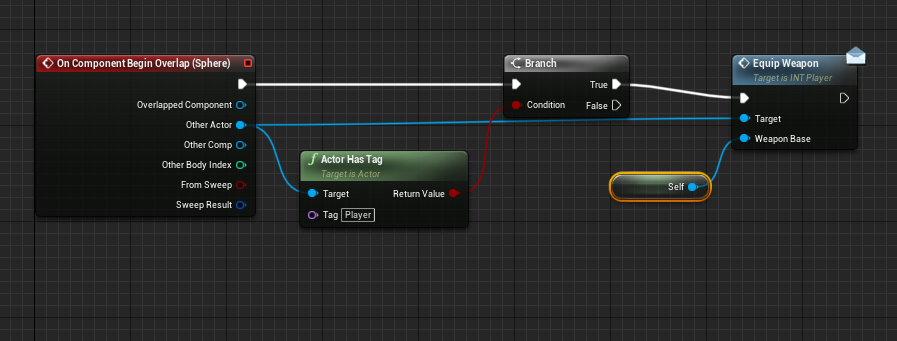
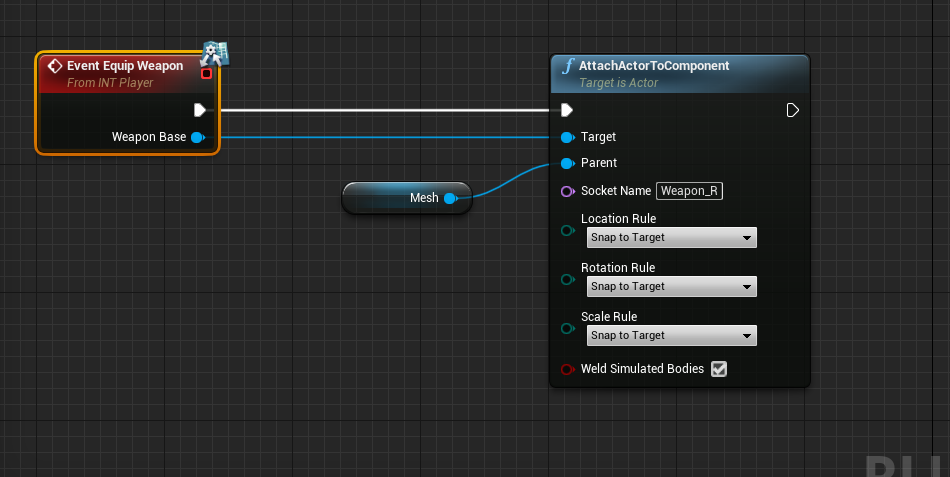
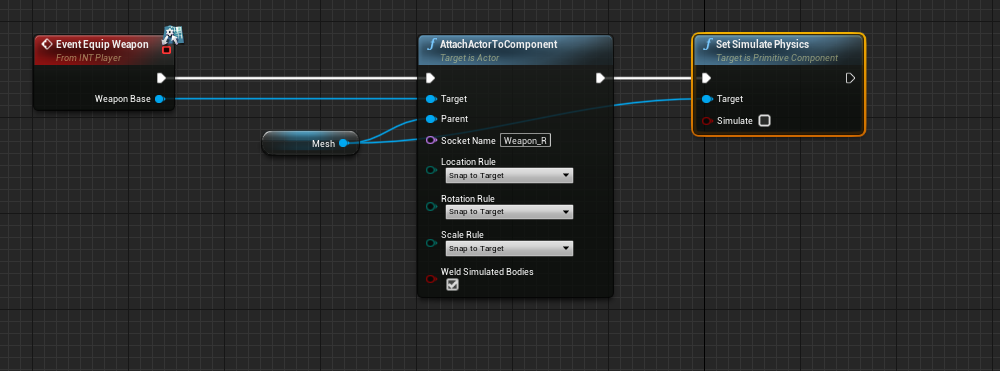
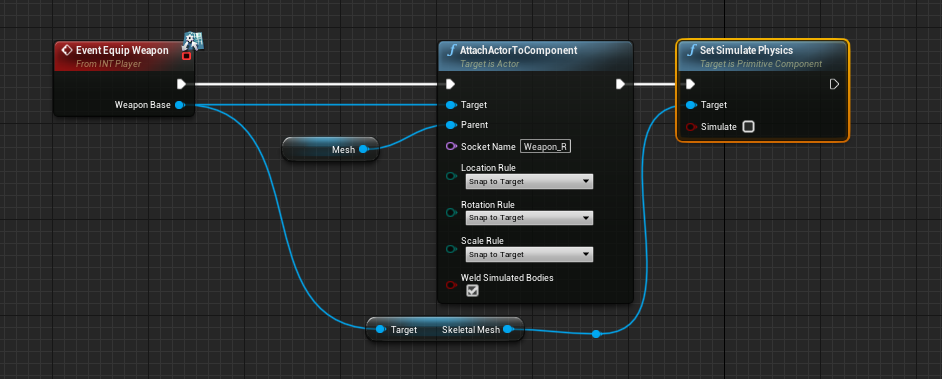 orchid garden
maiden wadi
orchid garden
maiden wadi
i did like this one, the key is getting set in the game but for some reason its not getting saved to the file, restarting the game the key is the default key again 😦 idk whats wrong.
 brittle plinth
How can I do a linetrace for the whole duration of this Move Component To node?

 surreal peak
Every frame?
brittle plinth
Yeah
surreal peak
I mean, the dirty way would be setting a boolean at the start and then on completed and using that to guard some tick logic
You could also set a timer to loop and kill the timerhandle on completed
With a lower rate
Like 0.1 sec or so
brittle plinth
surreal peak
You could also set a timer to loop and kill the timerhandle on completed
Hmm, I think this is a good solution. Thanks!
surreal peak
Just multiply the vector directly?
(End - Start) * Percent?
To the Start, but yeah
Unless you go backwards
In 1D, if End is 5 and Start is 3. Then End - Start is 2, so you need to add 2 to Start to get to End
The result should 100% be the same
Unless you are doing something different to begin with
It doesn't matter if you multiply Length * Percent * Direction or Leave the Length in the direction and * Percent
 sharp pike
Could anyone point me towards making this post-processing material work with custom depth? I'm trying to "pixelate" an object. Currently it works if I apply it to everything, if I change the ScreenTexture to customdepth my entire scene becomes white.

 worn lily
Is it possible to make object reference variable invalid? I want to put reference in it and when I dont need it I want to make it invalid for check "isvalid" return false.
surreal peak
worn lily
Is it possible to make object reference variable invalid? I want to put referenc...
Just set it and don't pass anything in
surreal peak
sharp pike
Could anyone point me towards making this post-processing material work with cus...
worn lily
surreal peak
Just set it and don't pass anything in
like this one ?

 storm dove
why cant i divide by zero? im getting warnings in my log
surreal peak
worn lily
like this one ?
Yes
surreal peak
storm dove
why cant i divide by zero? im getting warnings in my log
Because division by 0 is not a thing in Math
worthy tendon
dividing by zero is undefined in math. use SafeDivide
before using safe divide, see if there is a problem with your logic. otherwise if you think it's ok to ignore it then use SafeDivide.
surreal peak
Is SafeDivide a thing in BP?
orchid garden
@maiden wadi idk, i think somethings broke in my project, it refuses to save the bindings to the ini file. i'll start a new one tomorrow and see if it does the same thing in that. dl'ed someone elses that was suppose to do the same thing, they are using the same logic and it seems to work, so not sure, has to be something messed inside the project stopping it, no errors tossed, tracing it passes through. nothing in the logs.
maiden wadi
@storm dove You cannot divide by zero because of the way that it's handled. Think of it more like, "How many times can I slice this thing up in this size?" If the slice size is zero, you will never finish slicing, because you will infinitely continue making zero size cuts. To get around it, just do a select. If Divisor nearlyequal 0, use zero, else use number/divisor.
@orchid gardenAre you testing in editor builds? I can't remember off hand if they don't save there. I can check in a bit, but it might also be a game options thing. Uncertain.
surreal peak
I think they save
orchid garden
maiden wadi
<@!458977415176257536>Are you testing in editor builds? I can't remember off han...
@maiden wadi yeah running in pie, gamesettings.ini is saving just fine, just the inputsettings.ini isn't. been working on a menu system, but kinda stuck on this one lol. i'll tackle it in the morning with a fresh mind, might just be over looking something simple.
surreal peak
Is there a chance that your project sits on some SourceControl path and your file is marked readonly?
@orchid garden
orchid garden
surreal peak
Is there a chance that your project sits on some SourceControl path and your fil...
nah no source control path or read-only folders, drive specifically used only for UE projects.
surreal peak
There goes my nice idea
orchid garden
surreal peak
There goes my nice idea
had issues before with that, is why i did that 🙂
storm dove
maiden wadi
<@!222022817208598528> You cannot divide by zero because of the way that it's ha...
thanks for explanation!
@surreal peak @worthy tendon very nice!!

thanks
time for divide hunt
 late cave
Is there a way to make variables from parent classes appear in child blueprints so you know what you have to play with?

I mean, I can see the list of overrideable functions, but not any variables... which is weird
worthy tendon
late cave
I mean, I can see the list of overrideable functions, but not any variables... w...
Do you see the little eye icon behind search bar on top?
To left of compile button
late cave
worthy tendon
Do you see the little eye icon behind search bar on top?
THANK YOU!
This is the second time in a very short time that someone has told me of a little checkbox that makes Unreal amazingly easier to use for a beginner!
 viral sundial
maiden wadi
Don't use UE5 if you're learning. Don't even use 4.27 yet. You'll ruin your own ...
viral sundial
maiden wadi
Don't use UE5 if you're learning. Don't even use 4.27 yet. You'll ruin your own ...
What's wrong with 4.27?
surreal peak
For a new and fresh project to learn or so, probably nothing
We usually don't update engine to .0 versions, unless we reeeeeaaally need something we can spot merge
:D let others find the bugs
viral sundial
😄 True
I try to do it just to find bugs relating to my project
Have been lucky so far though
And 4.27 is tempting as it's the last UE4 version most likely and has a lot of fixes
Feels like a nice stability update with Oodle added
raw dew
hello again, so now when i press start only the server player gets spawned into the game, how can i get that array of player controllers i get from the login event into my startgame event that i call in the widget?
 maiden wadi
viral sundial
What's wrong with 4.27?
maiden wadi
viral sundial
What's wrong with 4.27?
Possibly nothing. Possibly everything. It just came out. I made the same point about 4.26. A few major things were broken. Which is fine if you know your way around. But for people learning, that is a terrible environment when your 4.21 tutorial is telling you to do something with interfaces and you can't see them in 4.26 and have no idea why.
 errant crown
Question - In a regular Blueprint function, I'm able to use a delegate reference as an input parameter like so...

... is it possible to do the same in a blueprint interface?
 maiden wadi
errant crown
... is it possible to do the same in a blueprint interface?
maiden wadi
errant crown
... is it possible to do the same in a blueprint interface?
I don't believe so. Usually you put your delegates somewhere more easy to reach, or store the caller somewhere easier to reach, so that all relevant things can bind to it/call it.
 gilded pebble
hey there
what would be the best way to save actor components on actors using the save system?
Like I have an actor with an attached HISM and I want to change that, delete instances and the like, then save it, so it remains saved when I reload the game
 runic terrace
Do you want to save the properties of the actor components or what components an actor has when saved?
Either way you can create a struct that includes any data to be saved per actor and store it as an array in the savegame
Then when you load the game iterate through it to spawn and restore the actors to their saved state
 earnest tangle
I would highly recommend a save game plugin like EasyMultiSave or others if you can afford one, they make it super easy to do savegames in BP's :) Otherwise it's a bit fiddly because you need to do all that struct stuff (it's less fiddly in C++, but plugins still make it a lot more straightforward)
 spark steppe
i think they're always worth it, considering how much time you would spent otherwise to make your own
unless you just have a few variables to save
 void needle
looks beautiful
gilded pebble
I'm using the HISM to place items around my game world and I would like to save their number and position, so the only way is that I have to save the variables and spawn a "clone" on load then write the variables of the HISM one by one?
spark steppe
yes
 mild jacinth
Hi does someone know if its possible to get somehow audio files from purchased Unreal Engine Marketplace assets? I can only see that they are in file extension called .uasset. Not sure if the right place to ask. I would like to convert them to .waw or .mp3
gilded pebble
I see, thank you for answering
spark steppe
mild jacinth
Hi does someone know if its possible to get somehow audio files from purchased U...
you can export them as wave files (+ bulk export if you want to export a bunch)
mild jacinth
spark steppe
you can export them as wave files (+ bulk export if you want to export a bunch)
how would I do that? and will that get me .mp3 or .waw files? because essentially im looking for original files, but authors usually take so long to respond
spark steppe
rightclick the asset in unreal and chose asset actions => export, it'll give you a wave file, not sure if mp3 is supported
mild jacinth
I can see .T3D and .COPY file extensions when trying to export
earnest tangle
Are you selecting the sound asset?
I don't think a t3d is a sound 🤔
If you can't get it working, you could also ask the marketplace asset author. They might be willing to provide you with the originals
mild jacinth
its a soundcue
surreal peak
The Sound Cue has sound Assets in them
You will have to export those
The Sound Cue is something from UE4
mild jacinth
ahh, thank you! this made my life much more easier, I saw .ogg was there, so I can easily convert that to .wav or .mp3 and edit them to my liking
 candid nest
hey i created a timer it is an intiger my timer increases when i reach checkpoint but when i died it start from begning i want to store my timer into a variable according to the checkpoint it reached then add in save game data so how can i do that or how can i store integer value
 small swift
Hello, I've set up a spline system off of a road building tutorial, it works great when the code is only ran once when the game starts, but not for the application I'm trying to use it in. I've got the spline to add points behind my character when he moves every 'X' distance, creating a trail behind the character. As there are a lot of spline points being generated (to get a smooth spline/mesh), after a short time the FPS start to chug, I assume it's because it's trying to run the whole code for each spline point each tick. I can't delete the spline as enemy AI will use it to follow/find the character. I'm not sure how to resolve this issue. Any help is appreciated.
 runic terrace
If you just want to create a trail behind the character then this is pretty much an overkill
small swift
What's the better approach?
surreal peak
Usually if it's just a visual trail, you do that via a Particle Effect
small swift
I need the AI to follow the spline to the player, unless AI can find and follow particles but I doubt it.
surreal peak
The FPS aren't dying from the points though
The are probably dying from the visuals that are connect to it
So you can just do both?
Or save the vectors in an array for all it matters
small swift
The points are the problem, if I delete the points the FPS is stable, no matter how many meshes are created, I can run for ages and no FPS drop.
surreal peak
Hm, then you should create less points ):
small swift
Not really a solution. Eventually the FPS will drop. :(
 tight schooner
Use a ribbon emitter particle system for the VFX and some abstract data that you update sparingly for the gameplay
I've never tried updating a spline with a monstrous number of points... If that's the cause of the slowdown regardless of the spline being visible or not, maybe you have to chop it into segments. Idk.
Its hard to say w/o knowing the exact cause of the slowdown
small swift
I severely underestimated how difficult this was going to be :')
worthy tendon
small swift
Hello, I've set up a spline system off of a road building tutorial, it works gre...
Your issue is not spline points. you can have thousands if there is no mesh.
your issue is draw calls.
each spline mesh adds to number of draw calls. and they can not be instanced
so a solution would be to add some very good LOD for your meshes.
how many material id does your spline mesh have?
small swift
I've just tested where I create no mesh, only creating new points. FPS still tanks. If I test where I delete the spline points after they've been created so I'm only left with the static mesh it's much more stable.
surreal peak
Can you just not use the Spline though?
It should be enough to have the points and let the AI follow those
opal sinew
tired cypress
Probably your collision on the mesh is set to None which auto disables Physics. ...

I made a static mesh from a skeletal mesh. I am trying to make a grenade.
It is not set to none yet simulate physics is still greyed out.
small swift
surreal peak
It should be enough to have the points and let the AI follow those
Not sure I follow 🤔
surreal peak
Why do you need the Spline
If you an generate points, you can just store them in an array
small swift
And have AI go from point 1 to 2 to 3 and so on?
surreal peak
Yeah
small swift
Hm
surreal peak
What else are you doing with the Spline?
small swift
Nothing
 sand shore
You can even calculate a smoother path to follow where the AI isn't going to sharply turn
Drop a series of "breadcrumb" actors (if you must - you can also do this with no extra components or actors)
surreal peak
If I'm not mistaken you also have a out of bounds issue
Cause you loop from 0 to n-1
And go +1
If you do +1 you have to go from 0 to n-2
Otherwise the next point of the last point will be nothing
worthy tendon
small swift
I've just tested where I create no mesh, only creating new points. FPS still tan...
something is wrong with your spline component. I've never had issue with spline component causing fps problems. it's just array of points and some component visualization that only happens in editor.
small swift
Thank you everyone for your help, I believe I've figured out a solution thanks to your input. I believe the cause of the issue was the code I included in the image earlier, it was being calculated with every point on the spline every 0.1 tick. So when I eventually racked up enough spline points it was just too much. What I'm going to do instead is delete points off of that mesh spawning spline so I'm only calculating like 4 points, then I'm also going to spawn a normal generic spline with no calcs tied to it that the AI will follow.
candid nest
hey my ai can shoots me through walls does anybody have any fix
 hexed parrot
Left is spawned with SpawnActor: Owner:Self; Location, Rot is 0, Scale is 1;
Right Bow is put in the world by myself.
Why does the Left bow offset every Component attached to it, if it's owner is the player? I really don't get it and getting a headache by that.
The Owner (Player) has a scale of 1 as well- nothing special added and mostly vanilla

Any idea would be greatly appreciated
tired cypress
opal sinew
I suspect it's related to the fact that you made the static mesh from the skeletal mesh. I believe a skeletal mesh requires an additional physics asset assigned to it for physics to work. Either this wasn't on your original skeletal mesh, or it didn't come over. If you are just making a grenade, I would make that as its own static mesh and not derived from a skeletal.
tired cypress
hexed parrot
Left is spawned with SpawnActor: Owner:Self; Location, Rot is 0, Scale is 1;
Rig...
Don't quite have enough info to go on here. Could you share how the component nesting is setup? Most of the time, offset issues are related to root and nested components having their own properties
hexed parrot
hexed parrot
Left is spawned with SpawnActor: Owner:Self; Location, Rot is 0, Scale is 1;
Rig...
Seems like a cached issue- duplicating the exact same bp and spawning it resolves in it's expected behavior with the components not being messed up.
I reimported the fbx before with a new pivot point and even tho it clearly updated in the Viewport, it somehow didnt while spawning and messing up some stuff
@tired cypress
 surreal kite
i want to change this to numbers
 tired cypress
surreal kite
i want to change this to numbers
tired cypress
surreal kite
i want to change this to numbers
Change the variable type from boolean to something else like a float
surreal kite
tired cypress
Change the variable type from boolean to something else like a float
yeah thx <3
i forget to compile it XD
candid nest
hey is anybody fre i need some help
surreal kite
@candid nest ask here for help
no body can dm u cause everyone should learn here
if they had a problem like u
candid nest
yes i will ask here only
surreal kite
ask
maiden wadi
On a side note. https://dontasktoask.com/
candid nest
so my problem is that i created a system in which my timer increases as i reach checkpoint so i want to save the timerfor particular checkpoint but when i died my timer start from begining not from where i reached the checkpoint
i tried to added but not working it get stop and not moving forward
surreal kite
@tired cypress help here XD
maiden wadi
What class is your timer in?
candid nest
its is an integer
maiden wadi
In which blueprint?
candid nest
so basically my timer is shown in event tick of my actor but it increases on overlaping of checkpoint actor
i just wanted that i can store value of it in my save game and when i respawn it start from there only
maiden wadi
Okay. But what class/blueprint is the integer in that you want to save?
GameMode, GameState, Character, Controller?
candid nest
i created a save game load out it is a blueprint class and my all save functions are executing in game mode
maiden wadi
So the integer itself is in the game mode?
 formal inlet
Hey, I'm trying to add a healthbar widget to a game, but can't manage to show it on the viewport. Anyone knows how to do it?
 maiden wadi
@formal inlet Add it to viewport after creating it.
trim matrix
how do i show all classes?
candid nest
no not yet i was following a tutorial and he said that no need to add in game mode u just dd save game to slot and load game to slot function where the intiger is so i do this in checkpoint
formal inlet
maiden wadi
<@!361279547548631042> Add it to viewport after creating it.
I tried it already, but didn't show up. Maybe I added it at the wrong place
candid nest
formal inlet
Hey, I'm trying to add a healthbar widget to a game, but can't manage to show it...
on begin play create widget and add to viewport
formal inlet
Event construct?
maiden wadi
@candid nestDo you have more than one checkpoint?
Construct happens after the widget is added to the screen.
You need to use a CreateWidget function somewhere else, and then call AddToViewport on it's return value.
candid nest
i have only 1 but i duplicate them
so that i can save game as i go ahead in my level
maiden wadi
How are the checkpoints saving the data?
candid nest
they are also using same method
formal inlet
Ok, I was looking in the widget, I imagine I have to add the event elsewhere
candid nest
i can save the data but it not resume it get pause there only like my time is 130 and i respawn it stuckm on 32 or 75 only
maiden wadi
Each player has a HUD class, I tend to favor using that for instantiating UI. It's beginplay would work for you
candid nest
https://blueprintue.com/blueprint/k-tme1m_/ this is my checkpoint

No description provided
formal inlet
Ok, it worked, thanks!
candid nest
maiden wadi
Each player has a HUD class, I tend to favor using that for instantiating UI. It...
so basically save loadout is a char or actor which have all variables and which get loaded when i pass the checkpoint value of saving variable of save load out is doen in game mode
maiden wadi
Wait, is all of this from a tutorial?
candid nest
saving system and checkpoint is from tutorial and timer system is mine and i created a timer system from diffrent tutorial
maiden wadi
Does the checkpoint actually destroy itself from the save?
In general, saving pointers is a terrible idea.
candid nest
yes chekcpoint get destroy and i spawn to the last checkpoint i passed
maiden wadi
To try and explain why. The blue variable types are called memory pointers. These small variables save a tiny number that points to a specific location in Memory. This is so you can pass these around easily and quickly and still have access to the full large object they point to without having to copy that object around all of the time. When you write these to disk, they're saved just like they are in your memory. But if your world changes, these same objects may get created, but they will be put in a different place in memory. So when you load your savegame back up and pull that pointer out, it's pointing to the same memory spot, but the object it was supposed to point to is no longer there in most cases.
candid nest
okay so it is due to checkpoint getting destroy
 rigid tundra
Guys i got a color timeline in project settings, thats illegal

 midnight bone
hey, can anyone help me solve this? I don't know to phrase it to google
I want to shrink actor in blueprint. The shrinkage should not be instant (imagine it like a little animation)
runic terrace
midnight bone
hey, can anyone help me solve this? I don't know to phrase it to google
I want t...
You can vector interpolate (Vinterp) the scale of the actor
midnight bone
runic terrace
You can vector interpolate (Vinterp) the scale of the actor
I'll take a look and let you know
could you tell me to which node I am supposed to connect that?
runic terrace
midnight bone
could you tell me to which node I am supposed to connect that?

This would make the cube shrink to its 10% size smoothly
midnight bone
godly
orchid garden
so... im guessing here, you can't save custom Ini files via blueprint classes?
 glad python
midnight bone
hey, can anyone help me solve this? I don't know to phrase it to google
I want t...
glad python
midnight bone
hey, can anyone help me solve this? I don't know to phrase it to google
I want t...
Can also use a timeline to shrink scale gradually
 pine trellis
there is anyway to set up continuous line traces? would tic be the only way?
midnight bone
I'll take a look into it tomorrow
 wispy star
midnight bone
hey, can anyone help me solve this? I don't know to phrase it to google
I want t...
wispy star
midnight bone
hey, can anyone help me solve this? I don't know to phrase it to google
I want t...
I recommend to make a timeline in bp and use that for transition
runic terrace
pine trellis
there is anyway to set up continuous line traces? would tic be the only way?
You can use timers
 atomic salmon
@pine trellis@runic terrace line traces are anyway relatively inexpensive unless you have thousands of them
runic terrace
Yeah
 blazing moth
Is there a way to stop running all blueprints? Trying to write a game over screen and noticed that the game is still taking place in the background. I don't want to have to cast to the player to find out if it's in the game over state, is there a better way?
orchid garden
trim matrix
Anyone know how to make a Tanh in blueprints?
 surreal peak
blazing moth
Is there a way to stop running all blueprints? Trying to write a game over scree...
surreal peak
blazing moth
Is there a way to stop running all blueprints? Trying to write a game over scree...
You could just pause the game.
blazing moth
wait, there's a way to do that in blueprints?
surreal peak
There should yeah
SetGamePaused or so
But that will also stop ticking iirc
Or effects
Something something
You can try if that breaks something for your project or not
Other idea with more control would be making an Interface
Imlementing that on Actors that should do something when the game is over
orchid garden
blazing moth
wait, there's a way to do that in blueprints?
 surreal peak
And getting all actors of the interface class
sand shore
You can specifically have some things still tick when the game is paused
If you need to
orchid garden
i.e. like widgets for your pause menu.
blazing moth
Just gave it a try, and I can tell that the game is still running, I'm getting hit sounds still
orchid garden
did you tick 'paused'?
blazing moth
nope, haha
orchid garden
heh 😉
blazing moth
now it's working
surreal peak
sand shore
You can specifically have some things still tick when the game is paused
There are things that don't have the "Tick when pause" stuff iirc
blazing moth
Thanks
trim matrix
orchid garden
I mean how do i make the Tanh function? in the simplest way. The math function.
orchid garden
you'd need to setup the math for it:
https://brenocon.com/blog/2013/10/tanh-is-a-rescaled-logistic-sigmoid-function/
trim matrix
I saw that Tanh = Sineh / Cosh. I know UE4 BPs have Sin and Cos, but how do i get them to be Sinh and Cosh?
I'm a complete noob at math so need helpt to make it the simplest way possible
I think it stands for Hyperbolic
orchid garden
yep hyperbolic
trim matrix
orchid garden
yep hyperbolic
Any idea how to make Sin and Cos into Sinh and Cosh?
Saw you can convert to Tan to Tanh
The relation between tan function and tanh function is tanx=−itanhix x = − i tanh .
What does this even mean?
orchid garden
here's a cpp solution to it:
 const float arrowSpeed = 1.0f; // This is just some constant for our arrow acceleration. Since arrows don't have motors, just set this to 1.0f.
 const float flightTime = 1.0f; // Reach our target in 1 second.
 const FVector& arrowStart = Launcher->getActorLocation();
 const FVector& arrowEnd = Target;
 const FVector distanceVec = arrowEnd - arrowStart;

 // Construct our acceleration. This assumes there's no Pitch/Roll to the "Launcher" actor.
 const FVector& arrowDirection = Launcher->getActorRotation().Vector().SafeNormal();
 const float gravity = GetWorld()->GetGravityZ();
 const FVector acceleration(arrowDirection.X * arrowSpeed, arrowDirection.Y * arrowSpeed, gravity);

 // Solve for Velocity
 const FVector velocityInitial = (distanceVec - (0.5f * acceleration * flightTime * flightTime)) / flightTime;

// Apply the velocity to your arrow and away it goes!```looks pretty simple, should be able to do that in blueprints.
heh yeah i realised i didn't do it right 😉
orchid garden
trim matrix
tanh(z)=−itan(iz),
that cpp example above gives you a solution for working out the tanh
trim matrix
orchid garden
that cpp example above gives you a solution for working out the tanh
Thanks a lot
I understand nothing
Conclusion. The unit imaginary number, i, equals the square root of minus 1. Imaginary Numbers are not "imaginary", they really exist and have many uses.
You can't even square negative numbers?
atomic salmon
You can square negative numbers... -1^2=-1*-1=1
While taking the square root of a negative number introduces the imaginary unit i = sqrt(-1)
This said, you rarely need imaginary numbers in games programming
Except maybe in Quaternions
trim matrix
When i sqrt -1 in UE4 it outputs 0
atomic salmon
The output of sqrt in Unreal is a float while an imaginary number has a real part and an imaginary part
trim matrix
Then the i in the tanh formula is useless because no matter what my output will always be zero if i read the formula correct. Which i probably didn't
atomic salmon
Why do you need it anyway?
Didn't read above sorry
You may have explained already
Or use a Taylor's expansion
Should be more than enough
trim matrix
think so what do i do with it?
atomic salmon
 trim matrix
Okay i don't understand any formulas. Because i haven't been taught on how to read formulas. Maybe i'm dumb for asking
Basically i have done right now is tan(input) and i'm stuck at that. Just simply want it to be tanh
i just want tan to be tanh

This is where i'm at
tanh(z)=−itan(iz)
so i should be able to use tan to get tanh
😦
 atomic salmon
For the records, the Math Expression node still has issues with e() of a negative number...
 lone needle
Hello, i'm making a event system like Hammer. (inputs / outputs)
Imagine having a event type like "Change Color", so i want a "Color Variable" appearing
And if i select "Play Sound" event, i want a "Sound Base" variable appearing. It's possible in blueprints ?
Thanks in advance 🙂
Oh ok i see
Or maybe
its possible to have a "Actor Selector" like this :

And under this
have the properties of the actor ? (public variables) ?
runic terrace
The closest you can get to that would probably be if you create a custom Editor Utility Widget with your own logic
lone needle
Ok but

basically i want "this"
I want to make a s ystem like the distribution
like
custom properties
runic terrace
There's no built in way of doing that without C++
The closest you can get is to create your own editor utility widget
runic terrace
editor utility widgets are just like widgets but for the editor itself
lone needle
I can make an event based system i think with that
runic terrace
if you know how to work with the user widgets you can pull it off
runic terrace
lone needle
I can make an event based system i think with that
you can
lone needle
Like Hammer
 ocean kayak
https://www.youtube.com/watch?v=M5RnDBNnjx4 I am using this video to create sounds that persist over level changes. I did the same thing in video but my sounds just start over if they get to a new level instead of continuing where it left of in the first level. (I am working with an ambient and a timer that ticks while the sounds get worse and worse want both to continu over doing the levels). I hope this is the right channel to ask

Hey guys, in today's video, I'm going to be showing you how to play music across level transitions, so if you are playing music, or audio of any kind, and change levels, the audio will continue playing.
Main Menu Tutorial: https://youtu.be/K1vVbwMJCTQ
8-Bit Music Theme: https://freesound.org/people/michorvath/sounds/412343/
Original Thread Idea...
since it mostly has to do with game modes and so
runic terrace
This has nothing to do with the game mode but the game instance
Did you make sure "Persists Across Level Transition" is ticked in the Create Sound 2D node?
If your sound starts over I'm guessing you used a game mode instead of a game instance
ocean kayak
I was so stupid
I needed to edit it in the level blueprint while I was editing it in the gamemode (been crunching for the past few days and a noob in this as well. Thanks eitherway :D)
runic terrace
ocean kayak
I needed to edit it in the level blueprint while I was editing it in the gamemod...
You can call the event on the gamemode as well, it would just run twice if both of your levels share a gamemode
that might be the cause
runic terrace
ocean kayak
now to make it stop at a certain point
If you saved it as a variable when you spawned the sound in the game instance you can stop it with that reference
Variables in the game instance persist until you close the game unlike in game modes
ocean kayak
like promoting the persist to a variable and turning it off and on per level. That wouldnt work right because its in the level blueprint
tired cypress
How I handle it is I spawn it in the level blueprint, then save that instance into a GameInstance variable. When I want to stop it, I simply get my GameInstance and I can stop the sound from that saved var
blazing moth
How do I remove an actor from an array, and then call from that same array? This blueprint here doesn't seem to work :/

It's part of a routine to spawn enemies from random locations, but to eliminate the location closest to the player. It's still spawning at the location closest, though I know my check routine works properly, it's these nodes here
 signal oracle
https://www.youtube.com/watch?v=heXvbVbq_mM Incredibly basic way to create smooth camera movements and weapon sway

There are probably better ways to tackle this but in the short term just using a bunch of spring arms gives a floaty nice effect,
also my first tutorial 😎
 whole marlin
This error keep showing up when I try to open the main menu level. Im running as client since its a multiplayer game, and some reason i cant get the player controller. Any fixes?
 tired cypress
blazing moth
It's part of a routine to spawn enemies from random locations, but to eliminate ...
tired cypress
blazing moth
It's part of a routine to spawn enemies from random locations, but to eliminate ...
From the partial screenshot, it looks like you remove the actor, but then your reference to the array for the spawn is happening before the removal event.
blazing moth
So, is the best way to promote the array to a variable and then call it later?
It seems to be working since I promoted the array to a variable and used the set node
 blazing moth
tired cypress
From the partial screenshot, it looks like you remove the actor, but then your r...
blazing moth
tired cypress
From the partial screenshot, it looks like you remove the actor, but then your r...
Never mind, I guess it's not working. I tried getting the array after the remove node, but to no avail. Do I need to set the array after remove, or does the remove node do it?
 dusty wind
I'm trying to set a skeletal mesh component at runtime. Its definitely getting to it and triggering the break point. Any idea what I could check? Its a client side only actor and its running on the client.
tired cypress
blazing moth
Never mind, I guess it's not working. I tried getting the array after the remove...
Probably gotta troubleshoot here. Make sure that your FIND node is indeed returning the index position of the element you want to remove.
blazing moth
I know it is, because if I spawn the enemy at the closest spawnpoint, it works like it should
 fierce birch
Hello all trying to spawn an actor but it can’t access the controller, anyone know why?
 tired cypress
blazing moth
I know it is, because if I spawn the enemy at the closest spawnpoint, it works l...
tired cypress
blazing moth
I know it is, because if I spawn the enemy at the closest spawnpoint, it works l...
Probably would need to see the whole BP. I troubleshoot arrays by running a foreach loop and looking at each element at different steps to ensure the array looks as it should as it progresses through the logic
blazing moth
tired cypress
Probably would need to see the whole BP. I troubleshoot arrays by running a fore...
So, As far as I can tell, the change just isn't being sent to the array. The current closest variable is updating as it should, adjusting as I move around

 covert arrow
hey guys how do you check if a trace is overlapping an object?
fierce birch
@covert arrow a trace hits. Drag off the return value and break it
Then branch the blocking hit
covert arrow
thanks
fierce birch
If you want breaking the hit allows for some control over events
@covert arrow my apologies break the out hit then drag off of the initial overlap

 hazy linden
fluid burrow
and does it matter?
hazy linden
fluid burrow
and does it matter?
doesnt matter, dw
fluid burrow
thank you!
 hazy linden
 low anchor
How do I set jump force?
low anchor
How do I set jump force?
u mean jump height?
in that case it is under the character movement component settings

could you send a clip of it maybe?
worthy tendon
looks like a fight between gravity and radial force
perhaps disable gravity when enemy is under effect of radial force.
and enable after it's finished
you could play with linear damping as well. increase it while under this effect, it might help reduce bouncing issue
if not good enough, try physics constraint instead of radial force, so if enemy overlaps with sphere, add a physics constraint to enemy character, you can set a position and speed target.
low anchor
hazy linden
u mean jump height?
Yeah, also speed
hazy linden
low anchor
Yeah, also speed
mess with that jump z velocity value and gravity scale, u will get the result u want
 worthy tendon
what does the error say
hazy linden
 prime bone
I think u are editing another class, u need an object of the class in which the function is defined.
if u are in the same class, go to file->Refresh all nodes
grave hornet
Trying to make a camera that adjust boom length and rotation based on zoom, with mouse wheel.
When zoomed in, i want length of 100 and rotation on Y of -33 and location (raised to see past character of 105
when zoomed out, i want a length of 1000 and Y-rot of -72 and camera to raise on Z by 105
Something is making my mouse wheel up jump to about a Z location of 5000.
any ideas whats going on?

end of the day, i can just set my Z to always be ~100 and forget changing the height i guess
 jovial dirge
Hello! I am trying to make a dungeon crawler, I don't want the player to be able to enter the portal until all monsters (actors are killed in the room) how would I check for this?
candid nest
hey do anybody know the name of the pack in which there is smoking animation
 broken furnace
Hey Guys i am trying to make an AI that patrols and chases when the player is seen (im new to UE4) and my behavior tree keeps getting caught at wait and failing to execute any other task
 candid nest
i also make that same ai but without bhevaiour tree
broken furnace
yeah im trying to learn the behavior tree system so i can use it in the future and it just fails no matter what lol
candid nest
i also want to learn but it is time consuming i just made with variable and events but i will learn it when i will be fre
broken furnace
yeah its very challenging for sure
prime bone
Whenever I have a Keyboard input like F it does nothing. But if I have an overlap event with the lever it does it, im so confused
 broken furnace
How would I integrate that into a behavior tree?
orchid garden
woops i replied to wrong post Jax, my bad 😦
broken furnace
Lol
I figured ur good
I was like I don’t know anything I’m gonna assume you’re right
orchid garden
it must of jumped when i clicked reply :/
orchid garden
grave hornet
Trying to make a camera that adjust boom length and rotation based on zoom, with...
this works
 orchid garden
broken furnace
I was like I don’t know anything I’m gonna assume you’re right
orchid garden
broken furnace
I was like I don’t know anything I’m gonna assume you’re right
which wait is it getting stuck on? you've got several in there
prime bone
prime bone
Whenever I have a Keyboard input like F it does nothing. But if I have an overla...
anyone?
atomic salmon
prime bone
anyone?
Place a print string after the F input event, see if that triggers
prime bone
It does, I have tried
atomic salmon
Ok next check the Cast
prime bone
sweet
atomic salmon
Does it succeed?
prime bone
trying now
atomic salmon
Or does it fail?
broken furnace
orchid garden
which wait is it getting stuck on? you've got several in there
The one under the patrol branch
Even after multiple adjustments to the branch order etc
prime bone
atomic salmon
Or does it fail?
Yes it fails there
atomic salmon
prime bone
Yes it fails there
So either the reference to lever is invalid or you are casting to the wrong class
Use IsValid to check the reference to lever
orchid garden
broken furnace
The one under the patrol branch
sent ya a link that might help you figure out whats breaking it Jax
 atomic salmon
@prime bone There is also a validated get that you can activate with a right click on the Lever get, at the bottom
prime bone
like this?
broken furnace
orchid garden
sent ya a link that might help you figure out whats breaking it Jax
Thanks!! Much obliged
atomic salmon
prime bone
like this?
Yes but you need a branch before the cast
orchid garden
or just do a printstring off cast failed.
atomic salmon
And the usual print string to understand what is happening
prime bone
orchid garden
or just do a printstring off cast failed.
that did something
orchid garden
if cast failed that means the lever reference is invalid
atomic salmon
Or that it is casting to the wrong class
 atomic salmon
You have no execution on Is Valid
fluid burrow
Is it possible to add a 3rd or 4th blend pose to Blend Poses by int
prime bone
How do I get the correct reference?
atomic salmon
Go back to where you set the reference variable and check what’s wrong
atomic salmon
You must be assigning it somewhere, either in code or from the exposed variables of your BP
 atomic salmon
Running a cast doesn’t assign anything
prime bone
sorry if im dumb im tryna learn this stuff
atomic salmon
You need to store the result to the reference variable with a set
prime bone
Ok
atomic salmon
Sure no worries
But I recommend you follow one of the blueprint basic trainings on learn.unrealengine.com
prime bone
Yeah ive been going some slowly
prime bone
atomic salmon
You need to store the result to the reference variable with a set
How do I do this?
atomic salmon
Drag the variable to the event graph and choose Set
prime bone
What variable?
atomic salmon
Then connect it to the cast after the overlap
Lever
It works in this way
Your pawn overlaps the lever in the level
On overlap event is triggered, but you don’t know what has overlap until you test it with a cast
prime bone
 atomic salmon
The white lines are the execution lines
prime bone
yes
atomic salmon
If a node is not connected it won’t execute
prime bone
do i just plug it in the middle?
atomic salmon
The execution follows the sequence or flow
No because logically first you cast and then you assign the result
So it goes after the cast
 prime bone
Done
atomic salmon
In this way the value is passed to the set
Now you should have a valid reference to the lever once your pawn overlaps it
And you can use it later on
orchid garden
i use a sphere trace by channel when the player presses the activate key, then with the hit result, check to see what the player is trying to activate by what interface its using, and if its a valid interface then do whatever:
 atomic salmon
Also you already know it is a lever now, so you don’t need to cast it again
orchid garden
casting to on every overlap event can get expensive
prime bone
@atomic salmon is there a way I can make it without doing the whole overlap?
atomic salmon
@orchid gardentrue but our friend @prime bone is a beginner just experimenting, so it is fine 😉 eventually the code will need to be optimized but at this stage is not a concern.
@prime bonedo what? Detect when the pawn is getting close to the lever?
prime bone
im gonna explain to you what I am trying to do
atomic salmon
ok
prime bone
When the character enters the collision of the lever, I want to make it so I can press F and it rotates the lever 180 degrees.
But only when he is near the lever
atomic salmon
That is what the overlap is for
orchid garden
you need a overlap event for that, or a line trace to see if the player is pointing at the lever.
prime bone
Yes but when the player overlaps it he has the choice to rotate the lever
he doesnt have to
atomic salmon
that is done with the F
orchid garden
same with a line trace, its all done inside of the pressing F
atomic salmon
Line Traces are a bit more advanced than overlaps, so I would stick to overlaps for the moment
Here is the logic:
- Your lever has a trigger volume around it
- When your pawn enters that trigger volume, an overlap event is fired (for both of them, but you are handling it inside the pawn)
orchid garden
atomic salmon
Line Traces are a bit more advanced than overlaps, so I would stick to overlaps ...
scratches head they seem about the same to me Marco
 atomic salmon
- When the Begin Overlap events is triggered, you need to check what has overlapped the pawn. You want it to be the lever, so you cast whatever actor has overlapped to Lever. If the cast is successful, you know it is a lever
- Now you have a valid reference to the lever and you wait to see if the player pressed the F
- When the F is pressed, you check the reference just to make sure, because someone could press F also when not near the lever
orchid garden
prime bone
after your top one, set the lever to be the casted leverr object
atomic salmon
- If the reference is valid, you rotate the lever
--> Important: you also need to handle the End Overlap with the lever and set the reference back to null, so you know the pawn is now away from the lever
prime bone
So what would I set it to?
atomic salmon
@orchid garden line traces include working with position vectors and direction vectors
prime bone
Nothing?
 atomic salmon
Yes, but you are also using a bool variable to check for the same condition, so it is a bit redundant
orchid garden
atomic salmon
<@!458977415176257536> line traces include working with position vectors and dir...
not too hard to do, depending on which camera your using.
atomic salmon
but good
prime bone
It works
atomic salmon
@orchid garden well I know, but think for a beginner
prime bone
Thank you so much @atomic salmon and @orchid garden you have made this so much easier for me
i would not have figured that out
orchid garden
i litterally wrote a simple routine to get the trace depending on which camera is used:

start and end for a line trace that is
atomic salmon
@orchid garden sure, but you would agree with me that doing something with vector math is a bit more advanced that triggering a simple overlap
I still see people that don't understand the difference between a location vector and a direction vector
prime bone
Thanks guys I’ll probably never speak to any of you ever again but I hope I do I like you both
orchid garden
lol @prime bone never know you might come back in and ask another when we are here 😄
prime bone
atomic salmon
Why not? Are you dropping Unreal?
Nah I would never but I’m a genius now
Jokes I’ll be in here a lot more
Hope to see you guys
orchid garden
best of luck with your project 🙂
atomic salmon
@prime bonethat's how it works, you try, you fail, you learn...
prime bone
Thank you guys
orchid garden
(with lot of hair pulling, and beating your head on the desk)
maiden wadi
I actually thought I was a genius five months ago.. then I got hired onto a company and had to deal with actual problems in a timeframe. 😄 Humbling experience.
atomic salmon
Yeah, I can relate to that. What I love about Unreal is that it is so huge and complex that there is always something new to learn. 😉
orchid garden
maiden wadi
I actually thought I was a genius five months ago.. then I got hired onto a comp...
timeframes are killers
atomic salmon
timeframes (aka deadlines) are how businesses are run
orchid garden
my last job i actually got things done quicker when i didn't have a time frame set then when i did, i think the boss figured that out, he stopped giving me set time frames.
it adds stress to the job, and can throw of concentration.
atomic salmon
@prime bone little gift for you
orchid garden
Hey @maiden wadi I have a question i think you might be able to answer
is there a way to save custom ini settings to the usergamesettings.ini without using cpp?
maiden wadi
Maybe. Input setting stuff I assume?
orchid garden
things like volume levels, multipliers the player can adjust before launching the game, etc.
i couldn't really find anything on it except cpp examples.
well other then using s save game slot, but thats not a ini, thats a binary file.
maiden wadi
Hmm. There are ConfigVariables. Those seem useful.
Haven't personally used them, but they seem like they'd be easier to use for a lot of systems than even the options subsystem we currently use. I have no experience with them though.
Not finding anything on how to change them from within the application though. 😦
orchid garden
looks like those may be cpp based,

Text files containing property settings for configuring gameplay or engine behavior.
maiden wadi
Hmm. The things I saw showed it was accessible from Blueprint. Checking. But I'm fairly sure that just sets the object's default to the ini file one. Not sure how to write to the ini file though.
orchid garden
ah i see yeah found a example, blueprint specific
only for loading them though and seems to be linked to defaultengine.ini
okay, depends on which bp the variable is in, to what config it would be in.
i.e. game instance they are saved to game.ini
question is.... how to get it to save the value when they are changed in game.
jovial dirge
Hello! I am trying to make a top down game controlled with a joystick to move, I also want the rotation of the player to work with the same joystick as well, how would I accomplish that?
orchid garden
in project settings, and setting the forward / left / right / backward axis movements to the joystick
project settings -> input -> axis inputs
jovial dirge

Yes I have htis
and the movement is fine with the joystick
but now I want the player to turn with the joystick as well
for example rn the player can move in all axis but the player is always facing forward
orchid garden
i think thats related to the camera rather then the controls, your camera is always to the back of the player?
jovial dirge
yes
orchid garden
in the default topdown, there is a TurnRate under axis mapping for the gamepad right thumbstick X-Axis set to 1.0
jovial dirge
Hmm I don't think that's what I need
orchid garden
you want the camera to be in a set angle while the player moves around the screen but the camera still follow the player yah?
jovial dirge
No
Okay so
you know how on joysticks the right joystick usually rotates the player in place
and the left would move
I just want that all to be in 1 joystick
I can get the move working fine but the player is always facing forward

player facing forward
orchid garden
with a single axis it would be like using the mouse.
jovial dirge

for example if I were to pull down on the joystick i'd want the player to turn around
if I were to turn left, player face lef
etc.
orchid garden
and how would you move forward?
jovial dirge
using the joystick as well
orchid garden
see... this is where your losing me... 1 stick for turning and moving forward?
jovial dirge
Okay
I'll show an example
this mobile game
Uses only 1 joystick and it makes the player face the direction the joystick is going in
 orchid garden
so then it would be a fixed camera angle.
jovial dirge
yes the camera angle is fixed
top down
Sorry for the bad explanation...
so how would I accomplish this?
orchid garden

 orchid garden
that will keep the camera on the actor at a fixed angle and rotation. you can run that off of 'event begin play'.
then for moving forward and turning
 jovial dirge
I'll try it out thanks! 🙂
 jovial dirge
I copied it exactly player still runs while facing forward
any specific camera settings I would need? @orchid garden

or any of these?
 orchid garden
did you remove the inputaxis turn?
or atleast disconnect it?
is your camera attached to a boom?
@jovial dirge
jovial dirge
Yes
jovial dirge
orchid garden
did you remove the inputaxis turn?
and yes it is removed
orchid garden
and you set use controller yaw to false on begin play on the pawn actor?
 opaque blade
i think to help here, can you show us a screenshot of "what" you want to spawn (Static mesh editor window) - because it might be the pivot casuing it spawning it way outside if the socket has a huger absolute scale inherited @true valve
jovial dirge
orchid garden
and you set use controller yaw to false on begin play on the pawn actor?
yes
here is my camera boom camera settings

if that matters
orchid garden
the camera shouldn't be following, the player then, yeah the camera boom and camera settings are right for both from your snips
jovial dirge
 orchid garden
well turning with the player i mean
 true valve
opaque blade
i think to help here, can you show us a screenshot of "what" you want to spawn (...
true valve
opaque blade
i think to help here, can you show us a screenshot of "what" you want to spawn (...
sorry got it fixed. Can you help me with the c++ issue. pls
opaque blade
true valve
sorry got it fixed. Can you help me with the c++ issue. pls
i try, already answered 😅 at #cpp
orchid garden
jovial dirge
this is mine
 jovial dirge
yeah I used same
opaque blade
orchid garden
this is mine
can you show your setup of components in the character bp?
orchid garden
well mine has multiple components and camera views so its abit more involved.
just a sec let me reopen it
jovial dirge
Just found this in my character movement componenet

would this have anything to do with my issue?
opaque blade
jovial dirge
yeah I used same
Can you show your component setup and you want to have the camera fixed angle and then if you pull down move down not that the camera moves behind the camera all the time?
orchid garden
wee bit involved....
 opaque blade
Rotation Rate defines how fast a character rotates yeah
jovial dirge
opaque blade
Can you show your component setup and you want to have the camera fixed angle an...
the camera will be in the same place the entire time I just want the player to face the direction I am moving, it's always facing forward
opaque blade
but that only makes it "snappier" or your character moving angles, so nothing to do with the camera if you want to have typical top down view for twin stick (kinda fixed camera)
One easier solution to this would be to attach another actor with absolute rotation which is actually the camera
jovial dirge

see how 1 joystick can control the direction the player is facing AND move the player in that direction in this example game
opaque blade
but if you want to have it combined you can also just set the camera boom to absolute rotation
orchid garden
Sebastian might have a thought here though, show your component setup @jovial dirge
jovial dirge
 opaque blade
i think if you have no luck with unticking the inherit rotation stuff it might be anchored
but i would just set the cameras rotation to the rotation you have and not have it relative but absolute
orchid garden
nope your camera boom is set right too...
opaque blade
way easier to control
orchid garden
wtf..
opaque blade
So just click the boom, and next to rotation click the dropdown and select Absolute rather than Relative
 orchid garden
mines relative
opaque blade
mmmh no that should always make it the same rotation, but with the inherit stuff it might mess up stuff, so might be worth unticking all
#blueprint message here you have all ticked
which does propagate the (control) rotation to the boom
orchid garden
he wants the camera at a fixed rotation while the controls move the player about
jovial dirge
the player is able to move fine, he's just always facing forward
opaque blade
inherit here means inherit from capsule
orchid garden
i gave him instructions to set it up just like mine (Which works) but for some reason his camera is turning with the player where mine isn't.
jovial dirge
I unticked those, and still same results
orchid garden
mine:

 opaque blade
orchid garden
i gave him instructions to set it up just like mine (Which works) but for some r...
opaque blade
orchid garden
i gave him instructions to set it up just like mine (Which works) but for some r...
Yes I agree that it should work with that setup but there is difference how you and he might control the camera he is using control rotation for example to rotate the character as it seems
orchid garden
so your pawn isn't turning
jovial dirge
yes
opaque blade
i thought the camera was rotating with him, so yeah misunderstanding 🙂
jovial dirge
sorry, bad explanation 😂
orchid garden
i gave him the bp setup for the movement im using as well.
opaque blade
you need to check Control rotation in the Class settings
for Use Control Rotation Yaw or smth like that
orchid garden
@jovial dirge looks cool btw 🙂
jovial dirge
opaque blade
for Use Control Rotation Yaw or smth like that
just checked that same issue still
 jovial dirge
orchid garden
<@131628378728955904> looks cool btw 🙂
jovial dirge
orchid garden
<@131628378728955904> looks cool btw 🙂
Thanks 😄
opaque blade
jovial dirge
which axis does this turn?
or you want to turn in the movement direction?
like auto-turn?

 opaque blade
yeah i get you now
so just no strafing at all (except maybe later when you input a 2nd stick / mouse input to aim or smth - like twin stick usually does)
opaque blade
I am not sure as it was some time ago
Lemme check something
There might be a check box for "orient to movement direction"
but iam not sure, otherwise you would have to interp the rotation on tick in the last input direction
but letme check

in the CMC
 opaque blade
jovial dirge
yeah I had that checked 😦
opaque blade
jovial dirge
yeah I had that checked 😦
 tawdry forge
how do i make my Z axis content but X and Y from player real position? any function?
 opaque blade
jovial dirge
yeah I had that checked 😦
opaque blade
jovial dirge
yeah I had that checked 😦
sorry for potato quality but thats
CMC
Orient Rotation to Movement checked
Use Controller Rotation Yaw, Pitch, Roll unchecked in Class Settings
Boom just being Absolute Rotation
opaque blade
tawdry forge
how do i make my Z axis content but X and Y from player real position? any funct...
Right click and break or "Make Vector"
tawdry forge
opaque blade
Right click and break or "Make Vector"
thank you!
jovial dirge
opaque blade
sorry for potato quality but thats
CMC
Orient Rotation to Movement checked
Use...
Just tried that no difference again-

orient checked

yaw pitch roll unchecked

camera boom using absolute rotation

and this is the movement input logic
opaque blade
can you maybe stream I think there might be more code to it, or try it in a blank pawn with just movement logic and this setting?
 opaque blade
just the default 360, it just defines how fast one turns / snaps into that direction
so the lower the rotation rate, the more sliding you have or turning space
so its angles per second, really low (10) can be used to have someone walk bigger circles (if you use the forward to calculate where to go)
jovial dirge
Hmm ok thanks for your help still confused why I can’t seem to get it to work 😦
I’m probably gonna call it a night do you mind if I ask you about this further tomorrow you’ve been a huge help 🙂
opaque blade
might be worth doing a barebones version of your character
so just BP_Character, implement just that and see if it works, like said maybe you have different code or smth that is changing stuff
opaque blade
jovial dirge
I’m probably gonna call it a night do you mind if I ask you about this further t...
but here is another implementation more to what you have with usual Input
added QE to rotate the camera so to make sure it stays always relative to the camera (up is always up on screen)
jovial dirge

Could I use this node?
I plugged it in and it allowed my player to rotate (sort of but had tons of issues)
opaque blade
jovial dirge
I plugged it in and it allowed my player to rotate (sort of but had tons of issu...
this can be used to rotate on point / in place
orchid garden
you know.... this is just a silly thought.... sense your still having issues with it....
I once had a issue with my arm for my camera, and no matter what I did it ignored all the settings, I removed it and the camera, redid them and they were working properly.
was just a thought.
anyhow best of luck @jovial dirge i hope you get it working
 visual dune
Is there a way to bypass the infinite loop caused by calling a function inside of it self?
I tried duplicating the function, but that didnt work.

 fiery swallow
visual dune
Is there a way to bypass the infinite loop caused by calling a function inside o...
fiery swallow
visual dune
Is there a way to bypass the infinite loop caused by calling a function inside o...
use a timer instead?
visual dune
Could you elaborate for me?
 gentle urchin
The problem isnt it calling itself but it being a loop calling a new loop calling a new loop
fiery swallow
I'd use a timer by event in that case and set it to tick every 0.1 seconds or something until it's the for loop is completed, and then pause the timer after that
The only other method would be to put that function inside of an a macro and then add a delay to it yourself
visual dune
Alright thanks, Ill try that.
hazy linden
hi there
is there like... a setting somewhere to make the mesh stay on ground all the time and not move vertically with the capsule
earnest tangle
if the mesh is a child of the capsule then it will move when its parent moves
you can move children separate from their parents, but you'd need to implement this yourself, or find some other way of doing it - for example, if the mesh is a child of the capsule, but has simulate physics enabled, it will not follow the capsule
 ocean radish
@hazy linden did you want the capsule to still move vertically still or you just want the mesh to not move
 jaunty solstice
Good morning guys. Need to save a reference to a previous string value to properly parse an OSC message. How can this be accomplished?
 hazy linden
ocean radish
<@!442335410144804874> did you want the capsule to still move vertically still o...
hazy linden
ocean radish
<@!442335410144804874> did you want the capsule to still move vertically still o...
I'm adjusting the half height of the capsule, but no matter what i do the character moves with the capsule's adjustment, at worst, it just clips thru the ground
prime bone
atomic salmon
<@!567523478698197003> little gift for you
THANK YOU
ocean radish
@hazy linden are you just trying to crouch a character or are you implementing somthing different?
ocean kayak
any tips on how to make a countdown timer persist through levels. I kinda wanne use a game instance but is that best way to go?
ocean radish
that would be one of the only ways to have it other than having that store the information in game instance for said timer and re initializing after new load
prime bone
Is there anyway I can make it so when a character walks away from an object the widget disapears. The widget apears when the player colides with the object
ocean radish
@prime bone multiple ways, could use a linetrace to only show it when they are looking at it or pointing to it and within a certain distance, could use overlap event, so triggers when you run into it, have a larger overlap box that triggers to delete it when you leave said area, depends on how you want the gameplay to be
prime bone
ocean radish
<@!567523478698197003> multiple ways, could use a linetrace to only show it whe...

this is what ive got
dk what i need to do to the bottom
ocean radish
best way would prob be to create the widget at the start, then just hide/show it when applicable rather than creating it and deleting it all the time
prime bone
How would I do that?
 ocean kayak
ocean radish
that would be one of the only ways to have it other than having that store the i...
ocean kayak
ocean radish
that would be one of the only ways to have it other than having that store the i...
will look into storing information in game instances seen it come by some where. I am mainly an artist but need to work alone on my graduation project on my design study :p
 night scarab
does anyone know how to accomplish a predict projectile path trace but with an input of both a start and end location? Id rather it be performative (fake) than be like a real time physics type deal since its for a mobile game
 lofty quartz
Can I create threads?
I have this in my custom blueprint game mode

BP_PlayerController is my custom player controller class
I have my default classes set up in the game mode settings

However, when I play, the print string for "Cast to controlled pawn failed" runs
ocean radish
@night scarab sounds like you just want a visual representation?
look into creating a spline between the 2 point
night scarab
pretty much with an arc
lofty quartz
Feel free to @ me
prime bone
Can you have 2 Begin Overlap events?
 boreal ether
lofty quartz
Can I create threads?
boreal ether
lofty quartz
Can I create threads?
Pawn won't be possessed yet at that point. It's not the ideal place but this would work:
 surreal peak
prime bone
Can you have 2 Begin Overlap events?
surreal peak
prime bone
Can you have 2 Begin Overlap events?
No, only one. Why? You can use a Sequence if you want to have a second exec line
prime bone
idk
 sharp sigil
Can I bind a single event to several dispatchers? I have several actors created at runtime with the same dispatcher and I'm just trying to see if one of them calls this dispatcher
 native willow
yes
 astral stirrup
hey guys, i am trying to transition from rotations using interpolation to something more stat based. was using find look at rotation but cant seem to find a way to apply that as a target to rotate towards without the interp, should i use delta rotator somehow?
lofty quartz
boreal ether
Pawn won't be possessed yet at that point. It's not the ideal place but this wou...
Yes, the delay works pretty well so far. Just trying to get it to work in multiplayer. Thank you
boreal ether
lofty quartz
Yes, the delay works pretty well so far. Just trying to get it to work in multip...
Not sure what you're trying to do but game mode only exists on the server fyi
 boreal ether
create widget
 radiant bone
Hello, everyone! I'm currently having an issue with moving my files around my project folder. When I try to move Data Tables around I always get an error in BP (See screenshot). I've tried using "Fix Up Redirectors in Folder" and I still get the same issue. Thanks and have a nice day. 🙂

 candid nest
hey is anybody familiar with menu builder carousel
 whole dune
Hi, can someone explain to me why my mesh (thats connected to the bone „Drehgestell1“) vanishes ingame? It should actually follow the spline but it doesnt seem to work... i tried only „Set Bone Rotation By Name „ and it worked. Only when I added „Set Bone Location By Name“ it vanished... why? I want to have that bone rotating by itself
 radiant bone
prime bone
idk what im doing wrong
radiant bone
prime bone
idk what im doing wrong
Try adding a "Print String" node on the "Cast Failed" and see if it's failing
And another one at the beginning to check if it is even called
visual dune
visual dune
I tried duplicating the function, but that didnt work.
I solved this issue by just rewriting it in c++.
opaque blade
whole dune
Hi, can someone explain to me why my mesh (thats connected to the bone „Drehgest...
are your bone scales actually 1 or maybe they are 100 ? if coming from blender they usually are if you aren't preparing them correctly
whole dune
opaque blade
are your bone scales actually 1 or maybe they are 100 ? if coming from blender t...
I‘ll try..
But i would still see a tiny thing, right?
orchid garden
so... i can't figure out how to access this node:

you need it in conjuction to setting vars to configureation varables, but can't figure out how to get to it.
anyone know?
 faint pasture
prime bone
idk what im doing wrong
faint pasture
prime bone
idk what im doing wrong
Why are you doing that cast?
 still panther
Hey guys sorry to inrerrupt but i have a problem where i have a playercontroller, and a ball, the ball is a seperate pawn.
i can use the playercontroller but it cant recognize kebinds in the blueprint of the ball and i dont want to do everything in the leve blueprint
i know that it hast something to do with player 0 and Auto process player
but i can only get one to run
sand shore
Sounds like a misunderstanding of the input system. Pawns (which have been possessed by a controller), Levels, and Controllers can directly bind to the input stack.
Any event responding to a particular key or InputAction/Axis can "consume" an input - that will cause any other events to not be able to respond to that key.
You can push other actors onto this stack. But that's a bit advanced and not causing your issue.
I think you're trying to respond to the same event in two places, however both of your events consume the input.
Select the node and go to the details panel
still panther
i already tried that and im having a completely seperate key that i made for testing
and that dosnt work
But thank you for your Resonse! :D

i also tried to make an input mapping and even that didnt work
 sand shore
Then your ball is never possessed
maybe you're still using a default spectator pawn or something
 candid nest
hey guys i got a small issue i created a menu widget which work fine when i start but did not work fine when i pause the game and come to menu through widget plz help it is a samll issue i think
still panther
@sand shore
Hey could we tak about it for a second?
 tribal ruin
PackagingResults: Error: An explicit Category specifier is required for Blueprint accessible functions in an Engine module.
faint pasture
still panther
Hey guys sorry to inrerrupt but i have a problem where i have a playercontroller...
What is your players Pawn in this setup?
tribal ruin
PackagingResults: Error: An explicit Category specifier is required for Blueprint accessible functions in an Engine module.```if anyone clould talk please
native willow
still panther
if anyone clould talk please
the input is first passed though the controller, check his class out
whole dune
opaque blade
are your bone scales actually 1 or maybe they are 100 ? if coming from blender t...
It was 1
opaque blade
whole dune
It was 1
ok, not sure then 🙂
whole dune
Should I try scaling them up?
Tomorrow
As I said, i tried doing set bone rotation and set bone location separately and set bone rotation worked until I added set bone location then the mesh disappeared
 analog hill
Is this a bug or am I missing something? I have a "Timer by Function Name" that needs to loop. It works great, unless the function's return has any output (float, bool, etc), then it stops working... I've checked in 4.26 and UE5.
earnest tangle
analog hill
Is this a bug or am I missing something? I have a "Timer by Function Name" that ...
Most likely this is by design. In C++ the functions need to have a specific signature (eg. what params they take and what they return) for it to be valid for timers and other event based things, so this is probably a similar situation in BP side
maiden wadi
There isn't really a point to return a value in a function called by name anyhow. It's not like you're going to do anything with the return value in a timer. If you want to do that, you should just have the timer run a simple event, and then call the function and do something with the return value.
 lusty galleon
Does anyone know how I can have my main level map open and open another map (that holds meshes of characters) so I can copy that skin and place it over on my main mesh in the first map?
earnest tangle
Have you tried just selecting it, ctrl-c, opening your other map, ctrl-v?
Another method might be to temporarily add the other level as a sub level into your main level
lusty galleon
Well idk I am watching a video and the person opens a map and grabs what he needs and then closes the tab (his original map tab) is open and then he just plugs it in and boom done, but when ever I open any map it just closes the current one and opens the one I clicked on
earnest tangle
Yeah I have no idea if there's some way to open maps in tabs like that, I've never seen that happen
the sublevel method should allow you loading the second map into the first one though, and access stuff inside it
 runic plinth
real quick question, where can I find the animated mesh component in the player character?
 hushed pewter
 earnest tangle
you probably need to cast it to the appropriate type first in order to call that function
earnest tangle
Well it doesn't really, but you can use it to check whether the overlapping thing is the right kind of thing :)
earnest tangle



 twin abyss
earnest tangle
https://dontasktoask.com/ :)
twin abyss
earnest tangle
https://dontasktoask.com/ :)
Seriously?
earnest tangle
Sorry I just realized the site is rather cranky
maiden wadi
Seriously.