#blueprint
402296 messages · Page 704 of 403
 white lynx
one of the issues with Blueprints is that all their nodes get re evalulated every tick
regardless of whether they actually run their functionality
 fading wren
so using timeline for rotation is only with tick ?
white lynx
I don't think I understand that sentence. Rephrase?
fading wren
using timeline to rotate, will work onmly with Event Tick
white lynx
if you're setting any values after CDO has been defined, there's not much I can do there 🤷
Timelines as in the fancy (play/pause/etc) Node are actually components
fading wren
ok, how to not use a tick to rotate character using Timeline ?
white lynx
white lynx
if you're setting any values after CDO has been defined, there's not much I can ...
you will have to spawn an instance, get its value, and if you're not using the value anymore after fetching that element, you'll have to destroy it right after
which, for smth as simple as what you're after, I suggested doing it inside the Tick function directly (@ Plex)
fading wren
 fading wren
what ?
white lynx
Input Events run every tick
white lynx
white lynx
Input Events run every tick
even if you're not pressing it, it will still run with input value = 0
So that code right there is trying to play that timeline every tick
fading wren
ok, so i dont need use InputAxis to rotate character by timeline ?
 ripe tiger
axis mappings vs action mappings
white lynx
(and almost every tutorial that does setting up a character in blueprint shows how to do this)
fading wren
ok, how to use it properly?
 fleet cedar
Does the "overlapped component" in a component overlap refer to the Box Collider (or whatever it is), or the component of the other actor that specifically overlapped?
fading wren
it use a timeline to rotate ?
do we talking about rotation a character ? not like how to use animation of character rotation ?

this is from thrid person character example
i asked how to use a timeline properly, you said check third person example ?
fleet cedar
fleet cedar
Does the "overlapped component" in a component overlap refer to the Box Collider...
It's the box!
ripe tiger
timelines are used to smoothly transition between two separate individual states. Like crouched or not crouches. Things that go with action mappings.
fading wren
so if i understand correctly, i should not use timeline to rotate a character ?
there is only one correct way - input axis ?
but if i dont use constant values, since player control a character ?
ripe tiger
theoretically if you wanted to have a limited number of directions to move in like a grid movement system, it could work. but not for an axis mapping.
fading wren
i want to modify rotation. i need heavy/long rotation and make it more easy/light/quick if player still rotate more then 0.5 second. Timeline usable here ? spirng arm and desire rotation is not what i searching for
is it possible to do in blueprints?
or it possible only in CPP
if c++ only i will just forget about it
 orchid garden
basically you want the rotation speed to increase depending on how long they are rotating for
fading wren
orchid garden
basically you want the rotation speed to increase depending on how long they are...
YES 🙂
fading wren
orchid garden
basically you want the rotation speed to increase depending on how long they are...
do yu know how to do it ?
ripe tiger
Global delta time perhaps
orchid garden
^^ then increase rotational amount based of key held time
fading wren
what node can track time of rotation ?
ripe tiger
can you Rinterp to maybe?
fading wren
sorry, what does it mean ?
fading wren
orchid garden
^^ then increase rotational amount based of key held time
i am not using key to rotate i am using Axis Value in Input Axus Turn
orchid garden
basically same thing
fading wren
you mean increment ?
fading wren
orchid garden
basically same thing
how to track time of using axis value ?
ripe tiger
float + float, increment only increases by 1 and I think is for integers
fading wren
you mean variable speed = speed + 1 ? whilee Axis input != 0 ?
orchid garden
i'd grab a little routine but i just opened a learning project and its compiling shaders... probably a video with it, but you'd basically be using the same routine as a 'key held' to count the time for time passed.
fading wren
i should google it 🙂
orchid garden
this might of just gave me a idea on how to resolve one of my problems 🙂
fading wren
orchid garden
i'd grab a little routine but i just opened a learning project and its compiling...
routine is special term ?
orchid garden
well routine/custom function.
i have a little custom function wrote up in my project that counts time a buttons held, if they tap/double tap the key.
i think @maiden wadi helped me optomize it if i remember right.
but for key held and axis rotation, you could easily change it, so that if the value is out of 0 with x tollerance, it counts rotation time.
 maiden wadi
Sounds like a clamped increasing float based on key time held.
orchid garden
yeah it was awhile ago @maiden wadi that sound right though.
fading wren
if AxisValue != 0 then variable time of rotation = deltatime * ?
what does it mean factor ?
i was trying to find a time of rotation
am i doing it correct ?
maiden wadi
Damn blueprint feels awkward after working in C++ for a while.
But this, then use the multiplier to scale the rotation.
 fading wren
ok, but i will decrease a vaule of Time_of_speed variable. if i understan correctly, for example 2*0.1 = 0.2. But we ok with that, since we just need to check if it differs from global delta second ?
fading wren
maiden wadi
But this, then use the multiplier to scale the rotation.
thanks for that example, could you tell me why you multiply to Get World delta seconds ?

why add Multiplier not enought ?
maiden wadi
Mathematically speaking. If your player is running at 120FPS, you need things to increment at smaller spaces than a player running at 60fps. Player at 120 FPS will have 120 iterations of MoveFoward per second. A player at 60FPS will have 60. If you don't multiply by delta, the player at 120FPS will spin faster quicker than the player at 60FPS.
fading wren
maiden wadi
Mathematically speaking. If your player is running at 120FPS, you need things to...
ahhh
ok
understood
thanks 🙂
so player with 120 fps will have smaller amount in Get delta second, thats why Input axis will multiply by smaller amount
maiden wadi
Delta is nothing more than the time between frames drawn to screen. So 120fps delta is 1/120 = 0.0083, 60FPS delta is 1/60 = 0.0166. So multiplying by this will cause things to happen at smaller increments for the 120FPS player, because they update twice as often.
fading wren
maiden wadi
Delta is nothing more than the time between frames drawn to screen. So 120fps de...
yeah, means i understood everything correctly now 🙂 i write it above 🙂 great, a lot of thanks for help 🙂
i think my additional problem was, to understand that branch that using every tick - will not kill a performance
so ones again, do i understand correctly, if i use one branch, without heave performance calculation in it - it will NOT kill performance. it is acceptable?
maiden wadi
When you find out that the game's viewport is set up to have it's size calculated every tick, you really stop worrying about performance.
fading wren
maiden wadi
When you find out that the game's viewport is set up to have it's size calculate...
nice, thanks for that example
maiden wadi
To some extent. I still stand by the "Just make it work, then optimize." You learn more that way. Specially when you hit the profiling wall and have to learn that.
fading wren
maiden wadi
To some extent. I still stand by the "Just make it work, then optimize." You lea...
sounds like something scary
orchid garden
@maiden wadi how about rotating the character slower then the camera? i.e. camera does a 360 but it takes x seconds for the actor to catch up to the camera?
i.e. the default 3rd person mannequin will instantly turn whichever way the mouse moves, rather then slowly turning to match the camera
😐
fading wren
@trim matrix @maiden wadi really thanks for help 🙂 also thaks for other person, that asked not tag nickname
orchid garden
"keep poking around till you break something else, you'll find out how some day"
guess throwing a wrench at at 5 year old and telling them to rebuild a engine is 'learning how'...
forget i even asked.
white lynx
fading wren
<@456226577798135808> <@!143471961723371520> really thanks for help 🙂 also tha...
LurkingFromTheShadows.exe
Tagging me is fine; just don't overdo it 👍
Sorry I left early the dog made a mess in the kitchen.
Glad that you solved your thingy!
white lynx
orchid garden
"keep poking around till you break something else, you'll find out how some day"
I guess that depends on how you learn
Some people do learn the best by just trying to break stuff
maiden wadi
@orchid garden I'm not entirely certain, but I think you can just check UsePawnControlRotation and uncheck the Inherits under it in the spring arm. Then just set UseControllerDesiredRotation to true, and set the setting you want in the MovementComponent.
orchid garden
white lynx
Some people do learn the best by just trying to break stuff
some things thats fine, others not so much.
 fiery escarp
They've been banned. Thanks for the heads up. I'll clean up any remaining messages.
white lynx
I was this close to winning Cs go skins for free
fading wren
Btw what is quick way to check what influence to performance make modifying in my blueprint ?
 loud badge
Hello everyone,
I have a question regarding world composition and level streaming, is someone available to give me a hand please? Been searching a lot couldn't find an answer yet, maybe someone here knows about it, thanks in advance!
 trim matrix
Is there a way to modify material mask in runtime?
white lynx
if you're talking about changing the texture sample, yeah just make that texture a texture param and modify it
 celest oar
is there a way to use animation notifies in the character BP?
white lynx
if you're talking about changing the texture itself, only with c++
white lynx
loud badge
Hello everyone,
I have a question regarding world composition and level streamin...
Hehe... don't ask if you can ask  . If someone is around with knowledge on it, they might answer. If no one does, you can always just ask it again at a later time
orchid garden
anyone know a decent program for splicing maps for world composition?
height maps that is...
trim matrix
white lynx
if you're talking about changing the texture sample, yeah just make that texture...
No I want to modify texture realtime
white lynx
Right...
So you're saying that say you have a Wall Texture... you want your material to have a different texture
or you want to change the wall texture's pixels
orchid garden
i think they mean they want to 'edit' the texture i.e. draw on it, real time
white lynx
if it's changing pixels, you can't do that with Blueprints
Well you caaaaan... sort of... but it's way easier to do it with C++
(And doing it in c++ is actually pretty hard if you don't understand what's going on)
loud badge
basically I am trying to persist actor after streaming level out and then streaming level in.
I have a cube which spawns in the air and then (have physics enabled) it drops in the ground.
If i get out of the level and then enter the level again i see the cube spawning in the air again.
So how I can i see it on the ground next time?
white lynx
that depends on how you load the streaming level
iirc correctly Load Stream Level has some "absolute" or smth like that
as a parameter
which dictates whether you want to load the streaming level as a new instance
or as an existing instance
loud badge
yes i am using world composition with stream distance, so i guess i dont have control on that?
white lynx
That's not what I meant
loud badge
yes i know what u meant, using the blueprint node (load stream level with the flag), but I dont manually open the levels
thats my issue
white lynx
wdym you don't manually open the levels
if you're using the blueprint node
😐
if you're using the UGameplayStatics function, you are manually loading them
loud badge
i dont open any level, world composition takes care of that
white lynx
oh; are you on ue5?
loud badge
no, ue4 🙂
white lynx
Hmmm. you're using this to handle loading in and out?
 loud badge
yes basically
white lynx
I see. Can't really say, then. I usually make my own loading in and out systems for levels so that I do have control over how levels get loaded.
loud badge
ok great thank you, will continue investigating
white lynx
You can try to look at the source code for more info & details on how they do stuff
 brazen acorn

question: so apparently in the old UE4 you could just do like event tick and it'd jump to the existing event created
which still works but apparently input actions you can just create as many as you want?
trim matrix
Anyone know why this would be happening the Turret points almost at player but not fully

Thats the code

I have the Turret Top Comp getting the relative Rot and world location matching with Enemy Tar Player location for look at rotation
then interp to along with setting relative Rotation at end
??
 dark crow
Uhmm, delay? (?)
ripe tiger
Is there like a setwidth node in blueprints to make it so I can set a textbox with a variable output to have that output always take up the same amount of space? So for example if I have a series of textboxes linked to different outputs they can all take up the same amount of space.
I found it. I was looking for a node when it is just a setting for text itself.
Which I should be able to set with a node, if I drag out from the reference.
 weary crown
I'm setting up a system where people can extend the game by writing scripts in LUA. However I also want them to be able to add/replace the models, maps, materials etc. What would be the easiest way to set it up to allow for those custom assets to be included alongside the lua scripts? Not really sure where to put this tbh, but majority of the core game systems are BP so figure it would be something in there.
 icy dragon
weary crown
I'm setting up a system where people can extend the game by writing scripts in L...
icy dragon
weary crown
I'm setting up a system where people can extend the game by writing scripts in L...
In theory, you could assemble runtime mesh importers (like Assimp libraries) or reading .uasset from external source.
weary crown
icy dragon
In theory, you could assemble runtime mesh importers (like Assimp libraries) or ...
Is it possible to read in a uasset after the game was built?
icy dragon
weary crown
Is it possible to read in a uasset after the game was built?
Theoretically yes, but that would be up to C++ scripting.
weary crown
Hmm alright, I looked at the UGC stuff that unreal has, but since I am using LUA for mod scripting, I feel like it would be a bit strange with the blueprints and stuff that can be done through UGC.
Perfect system would be a way to create the assets, then be able to dump the assets and scripts into a folder which the game loads
icy dragon
weary crown
Perfect system would be a way to create the assets, then be able to dump the ass...
Well, Soulcalibur 6 modders swapped models with (almost) homebrew means.
 candid blade
anyone know why add child to wrap box doesn't work ingame but i can clearly populate it in the UI normally?


ingame vv
 fading wren
Thanks :) is this a console command ?
fading wren
One more question, if i plan to release first game in the middle of next year, should i start to use UE5 ? I know it could be not stable right now, but will i get some benefits in future because of transition from ue4 to ue5? (I am not planning do even any builds this year )
icy dragon
fading wren
One more question, if i plan to release first game in the middle of next year, s...
Largely no practical benefits if you already got far enough in development within UE4.
Making use of UE5 new features would mean redoing many things from scratch again.
fading wren
icy dragon
Making use of UE5 new features would mean redoing many things from scratch again...
I am only start. Made couple blueprints
I also can say, i am only start to learn blueprints
So, maybe i would like to learn more fresh software. I just have no idea how much unstable ue5!right now
 sudden nimbus
if you are just starting to learn unreal, do not use ue5 yet
fading wren
sudden nimbus
if you are just starting to learn unreal, do not use ue5 yet
I am start to learn blueprints, have experience with ue4 as 3d artist
sudden nimbus
fading wren
I am start to learn blueprints, have experience with ue4 as 3d artist
it's not that blueprint in ue5 is different, but assuming you are building a project alone, you don't want to go to ue5 while you are still learning the fundamentals, at least not yet
fading wren
Ah ok
sudden nimbus
despite what the YouTubers seem to say by releasing tons of ue5 content, they are riding the hype wave
I have a good amount of all around ue4 experience and I'm carefully planning any transition to ue5
sudden nimbus
don't crosspost
orchid garden
sudden nimbus
I have a good amount of all around ue4 experience and I'm carefully planning any...
UE 5 being early access release, i'd stick with UE 4 until UE 5 is out of early release and has had some major bug fixes first before transitioning to it. UE 4.25 -> UE 5.26 when it first came out was a good example of why not to jump right on a engine release right away.
 fiery glen
sudden nimbus
despite what the YouTubers seem to say by releasing tons of ue5 content, they ar...
fiery glen
sudden nimbus
despite what the YouTubers seem to say by releasing tons of ue5 content, they ar...
it's kind of dishonest because every one of these videos would be identical in ue4
 gentle urchin
candid blade
gentle urchin
candid blade
Are you doiing this in a function library or something? Seeing how the print node asks for world context object.....
 stuck burrow
Hello everyone.
I'm currently prototyping something on the action roguelike side (it's a topdown, say like a Diablo for the best idea), and I've never actually coded the combat. And I'm wondering what would be the best approach to check for hits (character -> enemy and vice vertsa). Is it a collider on a weapon and then just go with the animation and check for collisions normally when swinging it? Or maybe do a short sweep during the animation? Or is there anything else?
 fleet sinew
Does anybody know what get function is this? I found the image solution for my problem but can't find what this is

oh
alright I think i found it thank you:)
stuck burrow
Thx mate, sounds good
 thin iris
Just a quick ask about the UE5 valley of the Ancients project incase anyone knows how this works.
I am attempting to find what drives the sounds of the columns being destroyed. I have found that the SFX_Destruction_first and second are referenced in the level blueprint. I also have simulated the level and selected the column, which appears to be a Chaos Cache Manager asset driven by the Targetable Chaos Blueprint. So what i've gathered from the BP is that when the object is destroyed by the player is plays a sound which is driven by a variable. But I cannot see where that variable is set and does not appear to be obvious in the reference viewer of the BP. Any help would be greatly appreciated.
Here is a screenshot of the Targetable Chaos BP and the Play Sound event in question.
https://imgur.com/a/InhXPSY
Thanks!
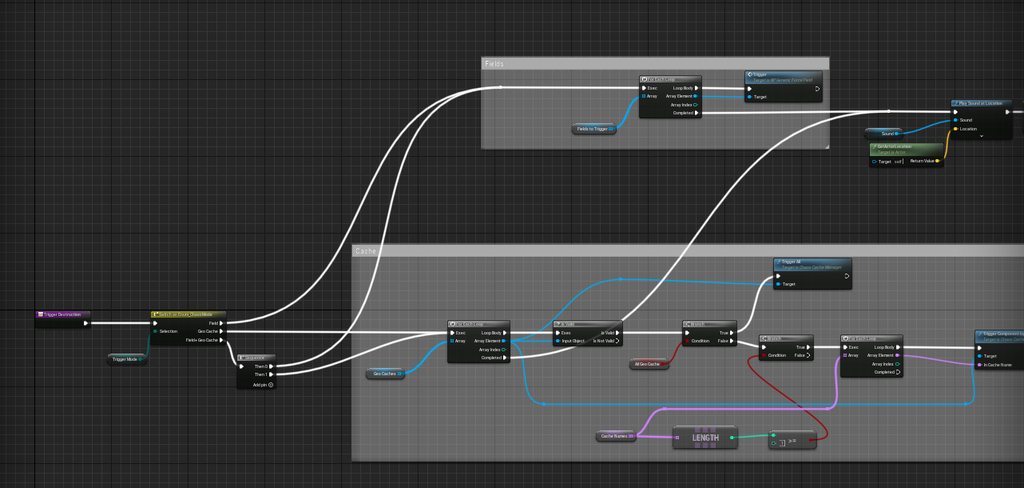 candid blade
gentle urchin
Are you doiing this in a function library or something? Seeing how the print nod...
candid blade
gentle urchin
Are you doiing this in a function library or something? Seeing how the print nod...
i ended up fixing it by just having a main HUD and add children to it
 lament ginkgo
Might not be the right spot to ask, but I'm making a minimap using a Scene Capture Component. I added a sprite for a minimap icon, but while I've got it invisible to the owner of the actor, I can see the icon on every other actior in the main camera. Any way I can make them invisible to everything BUT the scene capture component?
 hoary orchid
Is there a way to increase projectile speed over time?
 atomic salmon
@hoary orchidif you are using a projectile which is simulating physics you can add a force to it, which will result in an acceleration and hence increasing speed over time.
hoary orchid
atomic salmon
<@!119298253765214212>if you are using a projectile which is simulating physics ...
Possible to Increase without using physics simulation?
as I am using projectile movement
atomic salmon
You can use projectile movement also with a projectile which is simulating physics.
If the projectile is not simulating physics I don't think you can alter its speed during gameplay as it is moved by the movement component directly. Unless it exposes a movement event you can plug into. Would need to check the source code.
hoary orchid
awesome worked, thanks alot man
atomic salmon
@hoary orchid Also check the homing option. That accelerates it toward the target (as long as the speed is < MaxSpeed)
hoary orchid
ahhh
atomic salmon
Plus it turns out I was wrong. You can set the velocity during gameplay with SetVelocityInLocalSpace(FVector NewVelocity);
 pliant tendon
hoary orchid
pliant tendon
https://answers.unrealengine.com/questions/1043177/want-to-rotate-an-actor-on-it...
pliant tendon
hoary orchid
pliant tendon
https://answers.unrealengine.com/questions/1043177/want-to-rotate-an-actor-on-it...
Just change the value of Z

 still needle
Hey guys! Anyone knows how to do to play a widget animation calling it in another blueprint?
pliant tendon
hoary orchid
Just change the value of Z
thats not how it works
that will rotate on world rotation
hoary orchid
then what do u want?
still needle
sorry to interrupt XD, you can answer me later
hoary orchid
still needle
Hey guys! Anyone knows how to do to play a widget animation calling it in anothe...
u need reference to widget that contains the animation
pliant tendon
hoary orchid
then what do u want?
it literally says it in the question
 wise raven
is there no way we can add a delay inside a function?
atomic salmon
@pliant tendontypically you would use AddActorLocalRotation.
pliant tendon
and i explain why i dont want to use that in the question ;/
atomic salmon
@pliant tendonallright let me read your full question then.
pliant tendon
alright thanks bro
 thorn ermine
wise raven
is there no way we can add a delay inside a function?
thorn ermine
wise raven
is there no way we can add a delay inside a function?
Not the delay node, from inside a function no. But there are other ways you can cause, or make use of latency.
It depends on your use case, you could trigger a timer with a wait to call a function, that can raise an event for callback mechanism
you could write your own c++ delay and call it form bp
you could use time in blueprint and make your own delay function counting milliseconds for example too.
you could call an event and perform something in there, that calls another event when its done for callback
so quite a few options, but the std out of the box delay node, is only available in main graph
atomic salmon
@pliant tendonjust for clarification, are you using the standard Character Movement Component for your player? Or something custom made?
pliant tendon
standard
 quasi frost
I am having an issue where my for each loop is populating things multiple times from an array of which there is only one thing in atm. So I am trying to populate my hand from cards from my deck, atm there is a single card in the deck array, but it is populating twice. Anything obvious that would cause this?

 left oracle
anyone have a solution a weapon clipping on object?
quasi frost
@left oracle If you are talking about a gun clipping through a wall the way AAA games tend to do it is by changing animation when clipping would occur. You can do something similar by adding a collider and checking collision with walls and changing to a different idle animation which moves the gun up etc.
atomic salmon
@pliant tendonok because the Character Movement Component is designed to work (in general) with a vertical capsule. Did you follow any tutorials to implement a wall runner with it? Because there are different techniques and the answer may depend on which one you implemented. In general, if you want to locally rotate your character to match a specific direction, you can combine the rotator for the current control rotation with a rotator like (0, 0, Delta Z angle), then apply it back to the character.
 marsh crescent
can someone help me with this
pliant tendon
atomic salmon
<@!336785086064099328>ok because the Character Movement Component is designed to...
i watched some tutorials, but i didnt copy anything from them
atomic salmon
@pliant tendon to get the Delta Z angle, you can use the ACOS of the dot product between the two forward vectors (representing the current and target directions). The result of the dot product will in radians, so you need to convert it to degrees before making a rotator our of it.
pliant tendon
sorry i dont understand what you quite mean
left oracle
oh ya one more question is ho wto disable a sprinting backwards?
pliant tendon
why would we combine the control rotation with some random rotator?
pliant tendon
left oracle
oh ya one more question is ho wto disable a sprinting backwards?
add a branch that checks if your velocitys size is greater than 0
in your sprinting thing
left oracle
left oracle
oh ya one more question is ho wto disable a sprinting backwards?
any solution?
pliant tendon
pliant tendon
add a branch that checks if your velocitys size is greater than 0
@left oracle
 heady marlin
Hi guys, i have to manage keyboard input every few seconds to avoid multiple keyboard clicks. Anyone has an idea on how i can do it ? I try to use set timer by event with a delay of 0.25 but seems doesn't work well
 chilly jetty
Hi there, is there a way for a line trace to detect a decal when it hits one?
 burnt nest
chilly jetty
Hi there, is there a way for a line trace to detect a decal when it hits one?
burnt nest
chilly jetty
Hi there, is there a way for a line trace to detect a decal when it hits one?
I doubt that a decal has or even can have a collision of any sort for that to work.
So you would need to place a collision where a decal is where you want the line trace to consider it a hit, give that its own collision type and then check for that.
atomic salmon
@pliant tendontake the forward vector of your actor (character) and another vector which is the new direction it should be looking toward. Calculate the dot product between these two vector, then do an ACOS (deg) (arc cosine in degree) of the result. That is your delta angle between the current facing direction of your character and the desired facing direction. At this point you can Add that angle to the local rotation of your character so it will make it face the desired direction.
pliant tendon
oh i gotcha thanks ill give it a shot
pliant tendon
atomic salmon
<@!336785086064099328>take the forward vector of your actor (character) and anot...
its just spinning in place xd
 atomic salmon
@pliant tendonthat happens if you are orienting the character to a direction which, in turns, depends on its orientation. It is like a dog chasing its own tail...
 cold raft
Lets say I have been building a game and adding lots of systems over time, so that EventTick is now getting "busy". Does adding a delay [shown] actually help reduce the time that code is called or am I kidding myself?

 frail inlet

 brazen pike
cold raft
Lets say I have been building a game and adding lots of systems over time, so th...
brazen pike
cold raft
Lets say I have been building a game and adding lots of systems over time, so th...
would that not delay it the first time, but after that it wouldn't delay?
atomic salmon
@cold raft not really. If you have a portion of code that you would like to call less frequently you can use a Timer for it
 worthy tendon
cold raft
Lets say I have been building a game and adding lots of systems over time, so th...
worthy tendon
cold raft
Lets say I have been building a game and adding lots of systems over time, so th...
you are very good at commenting blocks of logic. just use that skill and put those logics into separate actors/components/events. don't put everything in a single tick event, you only have to think about where you should put those logics but it will be worth it.
cold raft
Damn - I did not realise the impact of my poor coding - I will learn how to use Timers instead of being lazy 🙂
Thanks all 🙂
 stuck fossil
Good morning all, I got hung up all night trying to fix an AI navigation issue to realize I've got some actors with sphere collisions that are blocking my AI pawn from moving. Does anyone know if I need to change the collision preset or perhaps the navigation area class? I want the AI to move through it without stopping the sphere collision overlap/end overlaps for the player character. I feel like the answer is right in front of my face so I apologize if I'm asking a dumb question.
worthy tendon
do your spheres affect navigation area?
stuck fossil
They do currently but they shouldn't. They're just collision zones for triggers.
 stuck fossil
Okay thank you! One sec, let me test it now
brazen pike
oh my god, I had been trying to work out why my fps had been tanking whenever my AI would chase the player and I think sphere collisions was my issue... was just about to ask what might be causing this
apparently a sphere collision that covers most of my map lowers fps to 6
crazy how someone solved my problem before I even asked it
worthy tendon
you can uncheck this one too
 stuck fossil
It seems like they are still getting hung up even after changing the navigation class, I think that box might do the trick though let me try it real quick
seems like its still blocking my AI unfortunately. I thought for sure that'd do the trick.
I'm gunna mess around with it a bit more and see what I can come up with. I wonder if I have to reload my project or something
worthy tendon
press P in world and see if the green area is affected by your spheres or not. it should't be after you uncheck that option
stuck fossil
OH
Oh I just figured it out
I have a custom collision set for interactable* objects and I forgot to set it as world dynamic by default so its just been listed as block the whole time
I feel really dumb sorry lol
I had this feeling in the back of my head that it was because I did or didnt do something earlier on lol. Thank you for your help though!
worthy tendon
No worries 👍
stuck fossil
Yep just tested it out and that is absolutely what happened lol
If only you knew how long I spent last night trying to figure out what I did wrong. I cut and paste entire sections of my level to new levels and ran all kinds of tests... ugh lol
worthy tendon
stuck fossil
If only you knew how long I spent last night trying to figure out what I did wro...
I'm like you as well. I was always smarter after a good sleep! 😅
 spark steppe
does anyone know what view/trace is used to determine which actor has the mouse focus? nvm, seems like my mouse is moving around in FPV
 gritty elm
cold raft
Lets say I have been building a game and adding lots of systems over time, so th...
gritty elm
cold raft
Lets say I have been building a game and adding lots of systems over time, so th...
well, you can set tick interval value to desired value, so your tick interval will be changed, search for "Set tick interval"
the other solution is to use timer events, in timer events you specify the time that will trigger after specific seconds is given, for example 0.2, so it will run event after 0.2 seconds in loop, or any desired value
spark steppe
so my next question obviously is: is there a way to keep the mouse cursor centered for first person view?
 hallow moon
Hey all, im probably considered a novice at blue print. I have create a Niagara FX for this crown. When I hit F I want it to appear then when I hit ctrl+f I want it to disappear. Similar to this gif. I would like to just use the one Niagara system which by default is spawning the crown on. I was thinking I could use Time Dilation maybe? The idea would be to activate the niagara system when I hit F then reverse the system when I hit ctrl+f. Any idea, tips, or tutorials to point me in the right direction?

I have actually done it with a material but I'm controling the FX through niagara
Have I gone about this the wrong way?
spark steppe
well, the FX could be done in the material, too
think of a gradient which moves while you scale up your value which controls the visible area
hallow moon
spark steppe
think of a gradient which moves while you scale up your value which controls the...
Thanks Ben, ill re do my thinking and control my material instead
chilly jetty
hi there
 onyx violet
I have some players with small monitors, 1024x768, and it seems to be crashing their game on startup, anyone know anything about this or how to fix?
chilly jetty
is there a way for me to get whether a sphere trace doesnt hit an actor so I can trigger a boolean?
 earnest tangle
A specific actor or any actor? @chilly jetty
chilly jetty
specific
I have a projectile that will stick whatever it hits
I want the actor to appear when the sphere trace hits it but disappears when it doesnt
earnest tangle
well you could just compare the sphere trace's result and see if it hit the actor you wanted or not
earnest tangle
no worries :)
chilly jetty
wait no sorry
i dont think that will work cause there will be several of those projectiles
and if the sphere trace isnt on the actor it won't it for that actor
earnest tangle
so you're running the trace to test if the projectile hits some actor or?
chilly jetty
wait that worked, I was overthinking it lmao
earnest tangle
heh
onyx violet
if I wanted to detect if a physics object is going to overlap with a hitbox, before it does, how would I do that?
I'm making a soccer game, and need to be able to calculate after every kick if the ball is on target to go into the net
atomic salmon
@onyx violet you can use a trace in the direction of motion. E.g. a Box Trace from the ball along its velocity vector.
Or a sphere trace given the shape of the ball.
If the trace hits the box guarding the net, it means the ball is traveling toward it and may get into it.
onyx violet
atomic salmon
<@!244618926363770880> you can use a trace in the direction of motion. E.g. a Bo...
ok ty for the info
 heady burrow
literally unusable

 rain egret
hey i have a question that i havent found any info on, i want to have my character rotate 360. i am using the control rotation to set the actor rotation and it works, however i am limited in an 180 arc instead of a 360.
how can i fix this?
id also like for the camera to behave according to the rotation, so when i pull the mouse down to look up it would look up from the players perspective
 heady burrow
@rain egret rotating it 360 equals not rotating it at all
rain egret
heady burrow
<@!305108890381451264> rotating it 360 equals not rotating it at all
man i am an idiot
so i figured it out
make a new playerctrl
make a new camera manager
set this camera manager in your playerctrl
change the max and min rotation of yaw pitch rot to -359.9 and 360
also set this playerctrl in your game mode
which still leaves me with the camera behaving incorrectly, hrmm
heady burrow
I think its a better idea to explain exactly what you are trying to accomplish.
rain egret

a plane game for example, you fly level and pull the stick up, the plane (camera) goes up
now imagine flying at a 90 degrees, if you pull the stick up the plane(camera) should go up in a sideways way
this is the best example i could think of to explain what i am trying to get
 slender idol
Anyone else used sequencer for gameplay animations? Is it feasible?
rain egret
 rain egret
a plane game for example, you fly level and pull the stick up, the plane (camera...
rain egret
rain egret
a plane game for example, you fly level and pull the stick up, the plane (camera...
something like this
urgh, this should be a easy thing to fix
why is it so diffuclt
 late cave
What happens when you have a bunch of sublevels and one actor does this?

Do you get all actors from all currently loaded levels?
slender idol
Do I have to create a new Level Sequence Player every time I want toplay a level sequence?
late cave
slender idol
Do I have to create a new Level Sequence Player every time I want toplay a level...
No, but I think you have to rewind "manually"... (been a few years since I last had to do it, but I remember that one wasn't super obvious)
 compact raven
Hey, I used an array to multiple buttons multiple times, but it only stacks the icons vertically. I was wanting it to stack horizontally then vertically while keeping my scroll bar? Can someone please help me?
 sweet coyote
I am working on creating a blueprint for a door that use ui widget to enter a passcode to open the door when i place the widget into the level i get a warning. LogUObjectBase: Warning: Object is not registered LogUObjectArray: Warning: Other object in slot. I'm not sure what this means. Can anyone point me in a possible direction to understanding it
late cave
how do you log something in an editor utility widget? I can't find my print node output in any log...
 scenic galleon
hi everyone, im starting to learn about spline, can some one explain the concept of loop index for me?
im talking the index in the forloop node specifically
 last abyss
you can double click on the macro and it will show you exactly what it does
scenic galleon
last abyss
you can double click on the macro and it will show you exactly what it does
im an art student learning spline for my environment with little programming background so that is even more confusing for me sr 😅
i do know basic node based workflow from substance designer so the other stuff makes sense to me, im just not sure what this variable represent
last abyss
it represents the current index of the loop
so if first index is 50, last index 100, it will loop 51 times and index will keep changing on every loop
scenic galleon
ok so how understand it, if i have a pipe and it repeats 50 times, each pipe is a loop and each pipe/loop has a unique id(index)?
last abyss
yeah that sounds about right, on each iteration of the loop (which is whenever all the code beyond the loop body is executed) index is being increased until its greater than last index
scenic galleon
last abyss
yeah that sounds about right, on each iteration of the loop (which is whenever a...
neat! thanks
 urban solar
How can I have a projectile travel to a crosshair in 3rd person perspective?
 zealous moth
@urban solar
Trace from camera forward vector get hit location
Lookat from your projectile origin and make rotator towards that location.
Run it everytime you shoot
 open crypt
I have a function that was working fine for months (and I've even had to check it out from source control to be able to debug it, so I haven't recently changed it) however, today it is saying it's an infinite loop - it iSN"T, it randomizes materials and will loop through the materials, removing each one from an array until there are no more and then it resets the array to a copy which was set at begin play - (basically serves as a library)
How do I get this infinite loop to shut up, I'm in a function so I can't set a delay for a dirty loop
The code is a bit long so I'm trying to talk it through before I start posting it
open crypt
wow, even still I didn't think it would be this much

that means it's looping through that much huh?
zealous moth
I dont know could be
open crypt
must have been - I increased to to 100000 from 50000 and it works
zealous moth
Hi5
open crypt
I have like 6 meshes with about 20 materials each - and I have a BP 'dead body" that chooses a random mat removes that mat, and then the next deadbody chooses a remaining material
zealous moth
I have had happen to me before and it isnt related to actualnloops but perceived loops. Increasing made it work and my performance was fine too.
open crypt

urban solar
zealous moth
<@276092126847041536>
Trace from camera forward vector get hit location
Lookat ...
This is my current blueprint for my projectile

 buoyant gate
hello - gas pump, pick it up and walk away, how do i make a rope trail behind?
 earnest tangle
buoyant gate
hello - gas pump, pick it up and walk away, how do i make a rope trail behind?
earnest tangle
buoyant gate
hello - gas pump, pick it up and walk away, how do i make a rope trail behind?
You could try attaching a cable component into it and mess with that. They can be kind of janky though so YMMV.
 high ocean
I've got an array of these structs:

How would I go about identifying those entries which have the same affinity, and merge their bonuses? 😐
buoyant gate
earnest tangle
You could try attaching a cable component into it and mess with that. They can b...
thanks will try, what do those letters mean
earnest tangle
your mileage may vary
buoyant gate
ok
thank you
@earnest tangle nah thats just locking the pump trigger to the floor
 burnt nest
Then do it the opposite way. Attach the other end to the barrel.
fleet cedar
There's a cable component actor that you can drag out of the outliner and it's a little easier to use
urban solar
How can I delay the stamina regen for a few seconds?

 elder girder
Hello everyone
I'm a traditional programmer looking for resources to learn rapid development and design with blueprints. Anyone have any recommendations?
last abyss
urban solar
How can I delay the stamina regen for a few seconds?
pause timer by handle then unpause when u want it to start again
urban solar
How do I unpause?
last abyss
there's a pause/unpause timer by handle function if you drag off the return value on the timer
 ionic sand
Can anyone help me please?
I can't find a solution to my stupid problem.
I have an even graph (on fire) witch goes into my little ammunition function check
It branches out for two outcomes and goes back to the event graph. Is there a way to stop one of the branches to continue execution? Because right now they both execute at the same time.
 elder girder
I have a simply character with a clamped camera attached on a boom. I tried to develop a simple transition using blueprints to set the location and rotation of the character based on a timeline. I'm having an issue where the rotation snaps back to the original orientation at the end of the transition. Not sure what would cause this, but any help would be nice.


Look forward to getting to know all of you.
last abyss
ionic sand
Can anyone help me please?
I can't find a solution to my stupid problem.
I have...
add a return value to your function of type boolean, then branch after you call ammo update
urban solar
last abyss
there's a pause/unpause timer by handle function if you drag off the return valu...
Im still confused
ionic sand
last abyss
add a return value to your function of type boolean, then branch after you call ...
Thank you. It worked!
last abyss
urban solar
Im still confused
How so? where do you want to delay your stamina? when your stamina reaches max? when you're using stamina?
urban solar
last abyss
How so? where do you want to delay your stamina? when your stamina reaches max? ...
Right after the player stops sprinting, wait a few seconds, then regen stamina
 quaint dagger
Hooking up a widget for time of day, but somethings a miss as it doesn't appear through the widget despite binding it to it. Any help 😦
 last abyss
urban solar
Right after the player stops sprinting, wait a few seconds, then regen stamina
last abyss
urban solar
Right after the player stops sprinting, wait a few seconds, then regen stamina
So what you could do is make a timer for stamina regen delay, whenever you use stamina clear and invalidate that timer and when you stop using stamina set timer by event where the event is your stamina regen event.
otherwise you can do a retriggerable delay when you stop using stamina (e.g. when you release a button), add a boolean to check if the player is using stamina and if they are go back into that retriggerable delay. if they aren't you can then execute your stamina regen event.
theres probably other ways, but these are the ones i could think of
last abyss
quaint dagger
Hooking up a widget for time of day, but somethings a miss as it doesn't appear ...
there doesn't seem anything wrong in this, I'd see if the append returns something through print string first
quaint dagger
Tried print string and nothing 😟
last abyss
is the reference valid?
quaint dagger
sorry as in get time of day in real time format? if so then yes I've checked also.
urban solar
last abyss
So what you could do is make a timer for stamina regen delay, whenever you use s...
I cant understand why this or a delay isnt working
 last abyss
quaint dagger
sorry as in get time of day in real time format? if so then yes I've checked als...
last abyss
quaint dagger
sorry as in get time of day in real time format? if so then yes I've checked als...
I don't know, I just tried it on my side and it works fine for me :/ if you print the hours/minutes straight from the struct does it actually return the values?
last abyss
urban solar
I cant understand why this or a delay isnt working
that wouldnt work because a retriggerable delay will return to the duration value anytime its being called, and its being called every 0.002 seconds
urban solar
I see
quaint dagger
Ok well i managed to get the print string to show but "clock" is throwing errors.
last abyss
urban solar
I see
this is what I meant with the retriggerable delay way
 last abyss
quaint dagger
Ok well i managed to get the print string to show but "clock" is throwing errors...
last abyss
quaint dagger
Ok well i managed to get the print string to show but "clock" is throwing errors...
I guess your clock variable is not referencing a valid widget then?
quaint dagger
Lovely jubbly! got it working thanks @last abyss
candid blade
hi y'all
so whats the best way to approach this? I'd like the item in the inventory, on drop, to populate a different slot
last abyss
candid blade
hi y'all
so whats the best way to approach this? I'd like the item in the invent...
on hover of the slot set it to be a 'current hovered slot' and then on release set it to populate that slot?
candid blade
the slots are being populated through BP though, there's only 1 slot BP
i've set the slot number through a function on begin play
 last abyss
I see, is there no on mouse hoovered event for that slot you're creating though?
candid blade
there is, but its for the main slot widget which is being populated multiple times on begin play into a wrap box in the inventory panel
i got the sound+border appearing on each slot (when hovering on it as you can see in the video i posted) by just doing on mouse enter on the main slot widget
basically, how do i get ishovered to know which slot i'm hovering over?
urban solar
last abyss
this is what I meant with the retriggerable delay way
Yea I tried that, and it didnt work for me
 dense citrus
hey, i'm trying to make a sorta complex node tree for movement, and i was jsut wondering if there's a better way to do this; (note, i still wanna switch on specific ints)
so i was wondering if there was some sorta switch on int if in range type thing?
\

(sorry if i cut anyone off)
 remote belfry
Hey peeps. Is there a way to do something like right click > Connect selected nodes? EX: Connecting multiple variables to one a Set Visibility node on multiple Widget buttons. A curiosity more than anything.
 sonic pine
Hiho i have a little Problem.
I want to change my skill Button Style if im changing the Character or the MainClass but nothing happened.

I have 3 Different MainClasses and 13 Different CharacterClasses
icy dragon
dense citrus
\
This is honestly as elegant as you can get with BP.
It could be much more elegant if done in C++, but that's out of the scope of this channel.
urban solar
last abyss
this is what I meant with the retriggerable delay way
Thanks for the help, but Ive decided to figure this issue out later as ive been working on it for hours
open crypt
If I want to ensure a level is fully loaded - all the assets and textures are loaded/cleanly - and I want to stream it in, right now it is a bit jerky - how can I reduce this?
last abyss
candid blade
basically, how do i get ishovered to know which slot i'm hovering over?
you could pass in the main widget (inventory) when you're creating the slots and then in your slot widget, on hovered you could set self as a reference on your main widget? and on unhovered clear the widget? then on release you check if that reference is valid and do the stuff you're trying to do. I don't know if its the best way, but it should be a way to get it to work.
dense citrus
tthat'sa valid, and i feel like learning c++ when i'm 90% of the way here, is the best i can get lel
urban solar
Anyone know a way to only decrease the stamina when I jump, currently, the stamina is decreased when I click space
 open crypt
dense citrus
tthat'sa valid, and i feel like learning c++ when i'm 90% of the way here, is th...
open crypt
dense citrus
tthat'sa valid, and i feel like learning c++ when i'm 90% of the way here, is th...
what kinda of movement are you talking about?
open crypt
urban solar
Anyone know a way to only decrease the stamina when I jump, currently, the stami...
You have to execute that branch on the left - it's not connected to anything
You are literally telling it to just take 5 away from it everytime - the other one doesn't matter because it doesn't get connected to anything else
dense citrus
@open crypt just to fill you in ig, is i'm making my own physics based player character, and to allow quick and easy switching without 50 "if" statements, i'm doing this to switch between them all, so for instance;
0; null inputs
1; crouch pressed?
2; sliding?
4; airborne?
etcetc
so instead of having 4 ifs, basically i'm saying if this and this are happening, do this, if not then one of these instead
think of it like a huge if sheet, but with wayyyyyyy less functions
open crypt
dense citrus
<@!273265779175194624> just to fill you in ig, is i'm making my own physics base...
No man, do this with behavior trees and animation blueprints
dense citrus
thsi is for logic tho
open crypt
look at the way they have setup the animation blueprints, they use logics
dense citrus
like, switching movement controllers and jazz
open crypt
literally it's called a state machine
open up the third person animation blueprint
but also you'd need to watch some videos on the system
and if you haven't taken a class yet, do that too
icy dragon
dense citrus
<@!273265779175194624> just to fill you in ig, is i'm making my own physics base...
I never heard someone came up with this ridiculous setup 
icy dragon
dense citrus
self taught bb 😎
I suggest you to go take a look at Content Examples on physical animations.
It's in the launcher's Learn tab inside Unreal Engine section.
dense citrus
and for context, i don't even know how to open the animation blueprints. ik materials, particles, most nodes i need to know to "code" etc. but nothing about anim blueprints
doesn't help 90% of what i try to learn, defaults to in blueprints, so woo
ripe tiger
Hello, I posted a problem I am having with a widget in the UMG channel several hours ago, but have not received a response and have not found any solutions from various testing and googling. Does anyone here think they could give my problem a look?
dense citrus
keep in mind; this is just for logic, not animations (if that matters)
open crypt
dense citrus
and for context, i don't even know how to open the animation blueprints. ik mate...
So, if you could time travel back and give yourself good advice, assume that's what I am doing FOR YOU, right now - go take a class on udemy, they are 15 bucks and have like 20 hours of footage and will walk you through EVERYTHING step by step
and no, you are saying "just for logic" because you aren't aware of other systems - you are sticking to something you feel more comfortable with, which is natural, I did the same thing
Ryan Laley also has a great FPS tutorial series
sonic pine
sonic pine
Someone have any idea?
icy dragon
dense citrus
self taught bb 😎
Being a self taught is not an excuse to not look for good learning resources.
open crypt
sonic pine
did you hit a break on the event , f9 on your node/function you want to check, the system will tell you
dense citrus
open crypt
So, if you could time travel back and give yourself good advice, assume that's w...
see, i'm not saying you're wrong, but i've only ever seen this done with animations, not to do with any sorta logic like should i do x or y
open crypt
I'm telling you to spend the time to do one of those courses before you do anything else
dense citrus
icy dragon
Being a self taught is not an excuse to not look for good learning resources.
you assume i said that out of ignorance, when in reality i just really didn't know
open crypt
**out of ignorance**, when in reality **i just really didn't know**
that literally is what ignorance means, you don't know - I'm not placing a value judgement on it, HOW could you possibly know if you haven't learn or been taught?
dense citrus
that's fair, i've mostly just followed vague tutorials piecing together broken knowledge and piecing what i learn together.
icy dragon
dense citrus
see, i'm not saying you're wrong, but i've only ever seen this done with animati...
What tutorial you're following for that ridiculous logic you're attempting?
sonic pine
open crypt
did you hit a break on the event , f9 on your node/function you want to check, t...
What should the function tell me? ^^
dense citrus
open crypt
that literally is what ignorance means, you don't know - I'm not placing a value...
to me, ignorance has always been "fuck that, imma pretend it doesn't exist to get by"
when for me, it's just i've only saw it ever used for animations in tutorials, so i had no reason to assume it can carry logical functions.
after looking it up, my definition was wrong of ignorant so yee
icy dragon
dense citrus
to me, ignorance has always been "fuck that, imma pretend it doesn't exist to ge...
Which tutorial are you following?
dense citrus
but that's my point, it wasn't out of malition, just bad knowledge
open crypt
sonic pine
What should the function tell me? ^^
Hit F9 on it and you can "step through it" and then hover over the variable values of that instance (instance meaning that copy of that asset you are running in the game)
dense citrus
icy dragon
**Which tutorial are you following?**
i'm replying the best i can to multiples, gimme a sec, about to reply now
sweet coyote
Good evening all
Looking for someone that can point me in the right direction on these warnings I'm getting when I place my blueprint into the level.
LogUObjectBase: Warning: Object is not registered
LogUObjectArray: Warning: Other object in slot.
dense citrus
icy dragon
What tutorial you're following for that ridiculous logic you're attempting?
none specifically, i've pieced together what i've been told across multiple people and channels (people being here).
the main 3 channels i could say my knowledge is from is from;
mathew wadstein,
dean Ashford,
and
matthew palaje
remote belfry
@dense citrus "to me, ignorance has always been "fuck that, imma pretend it doesn't exist to get by" That's obstinacy.
sonic pine
open crypt
Hit F9 on it and you can "step through it" and then hover over the variable valu...
aha ok
dense citrus
remote belfry
<@!837263332406591498> "to me, ignorance has always been "fuck that, imma preten...
thx, always sucked most with english lel
the logic for my thing, is a way take in multiple inputs, and do a specific thing based on the conditions, so instead of having 5 if nodes, to me this seems more logical and efficent
given what i know
also, sorry for the double ping, @open crypt you have any courses you can personally reccomend?
remote belfry
I call that jamming sh!t together till it does what you want. It's messy AF, but works for me. lol
open crypt
Any of the highly rated ones that look interesting for you
dense citrus
remote belfry
I call that jamming sh!t together till it does what you want. It's messy AF, but...
exactly, i'm actually like 95% done my movement, ALL of it. from shooting to wallrunning and so forth.
and a big reason i'm doing this instead of getting a digree in computer sciences, is because it's the classic example of the donkey that's both hungry and thirsty.
better to fail then not try at all the way i see it. and even if it is botched code at the end, if it works, and runs well enough, what does it matter?
icy dragon
Those three are good sources, so the blame is on you.
Go study animation blueprints, and dissect the Content Examples project. The latter contains comprehensive examples on using Unreal Engine features.
 open crypt
He needs something with structure though
icy dragon
Botched code will affect teamwork, so it won't be noticeable in absolutely one man projects.
remote belfry
dense citrus
exactly, i'm actually like 95% done my movement, ALL of it. from shooting to wal...
I mean I wouldn't take it that far, but kind of. Should always keep refactoring in mind.
dense citrus
open crypt
He needs something with structure though
ive been doing my best to keep structure and not go too crazy. making sure to not have everything be a jumbled mess, and so far, i feel like it's pretty well steuctured, good tags explaining what's going on, plent of comments, etc etc.
dense citrus
icy dragon
Botched code will affect teamwork, so it won't be noticeable in absolutely one m...
long term, i don't even plan to be a coder, technical artist at best tbh. still good to know/learn what you're talking about, butt i don't really feel like getting a degree in computer sciences will be worth it for me and this
open crypt
dense citrus
ive been doing my best to keep structure and not go too crazy. making sure to no...
I mean like structure like a - step 1 -
it's 15 bucks
dense citrus
remote belfry
I mean I wouldn't take it that far, but kind of. Should always keep refactoring ...
true, I've redone my code like 6x trying to make it better
ripe tiger
dense citrus
to me, ignorance has always been "fuck that, imma pretend it doesn't exist to ge...
The term ignorant is typically only used to insult people so you are correct in that feeling.
dense citrus
ripe tiger
The term ignorant is typically only used to insult people so you are correct in ...
yeh, the definition according to google is just "lacking knowledge" basically. but i see theor point if they wanna get into semantics
remote belfry
Only dolts use ignorance to try and insult people.
dense citrus
valid lel
urban solar
open crypt
You have to execute that branch on the left - it's not connected to anything
How would I go about doing that?
 clear osprey
is this a stupid bug in ue4.26.2 not changing the color of the tint of a user created widget by Setting the tint of the widget using set color and opacity node? this affects all child widgets.
Target is User Widget.
 open crypt
urban solar
How would I go about doing that?
open crypt
urban solar
How would I go about doing that?
What do you want to have happen?
urban solar
open crypt
What do you want to have happen?
Energy gets taken away once the character actually jumps, not click space
open crypt
You need to first make a boolean to see if they CAN jump
so basically every time they jump, you set the energy to a certain value
and on that end of that, you keep checking if the energy is = whatever your minimum threshhold is
energy less than or equal to 4, (because 5 was your amount) then from that branch you execute a "set Can jump to false"
sudden nimbus
also note that Movement component can tell you if you are on the ground or not (IsFalling)
urban solar
sudden nimbus
also note that Movement component can tell you if you are on the ground or not (...
This actually fixed the issue of spamming space and still cosuming energy although you're in the air, my only issue now is that even if I'm under 5 energy which is needed to jump, when i click space my character doesnt jump the energy is still consumed
clear osprey
clear osprey
quick fix to this bug, dont set the tint opacity in the editor if you want to set it using set color and opacity
 pallid radish
anyone know why blueprint function library cannot be created? New project (c++ and Bp)
 candid blade
last abyss
you could pass in the main widget (inventory) when you're creating the slots and...
candid blade
last abyss
you could pass in the main widget (inventory) when you're creating the slots and...
not sure how do any of this node-wise ): there has to be an easier way to know which slot is being hovered
clear osprey
pallid radish
anyone know why blueprint function library cannot be created? New project (c++ a...
maybe you can create this inside the code by modifying the engine source internally
last abyss
pallid radish
anyone know why blueprint function library cannot be created? New project (c++ a...
because you can make one this way I guess?
 pallid radish
thank you haha
clear osprey
last abyss
because you can make one this way I guess?
you can't it to any thing in case it needs
creating on code side is more functional
last abyss
yeah but if you're creating a c++ class you can choose to create it by blueprint function library, just not when you're making a blueprint class
open crypt
What's the quickest way to make something move in an orbit through blueprint -?
I can point it at something and probably lerp between two points but I'm not sure how to do that to go around in a circle
 terse latch
Hello, I have been working on a project for alittle but now. But I ran into something that I am not sure how to get around or get working. Tho it might not be the best I am attempting to make a ranged weapon (pistol) with projectiles. I am hoping to make it simple but how might I add accuracy/inaccuracy to a spawned actor? I have been trying to mess with the spawn location and rotation. But sadly no change.
 mental badge
I have made a base material with textures for different material properties. Problem is, some of my material instances want to be able to not specify all textures. But I get an error saying that "Found NULL. Requires Texture2D". I can work around the problem by adding a Static Switch Parameter and then the instance can set the parameter to true or false, and when false, there is no error if there is no texture. But how can I make it such that it can just detect if no texture is specified, and if so, do nothing (as if the 'false' case happened on my switch)?
trim matrix
terse latch
Hello, I have been working on a project for alittle but now. But I ran into some...
is the spawned actor the bullet?
mental badge
I can't find anything like an IsValid or IsNull etc.
terse latch
trim matrix
is the spawned actor the bullet?
Yes it is a tracer/proj
trim matrix
One way to do it would be to change to pitch and yaw of the spawn location
Use the world location of an arrow component as the spawn location
And you can get random angle in range to change the direction on fire
Alternatively there is a plugin called "Easy Ballistics"
Comes with some good tutorials as well
 balmy hamlet
is the on unposses node in the player controller run on the server, owning client and server, or everyone?
terse latch
I will see if i can get the easy ballistics and mess with the pitch and yaw. Will it still work if the proj is spawning from the muzzle socket?
urban solar
How can I make it so that the projectile goes towards a crosshair or the center of the screen? This is the current system for testing purposes
 balmy hamlet
urban solar
How can I make it so that the projectile goes towards a crosshair or the center ...
balmy hamlet
urban solar
How can I make it so that the projectile goes towards a crosshair or the center ...
you would want to get the camera's rotation and location
 runic terrace
^
balmy hamlet
or, if you want to shoot from somewhere else, you either have to shoot parallel and accept that it'll never completely line up, or raycast and have the rotation be set by the position of the barrel and the hit location of the raycast
urban solar
Its from a third person perspective
runic terrace
get forward vector of the camera and plug it into the rotation, it will get the rotation facing the X direction
balmy hamlet
go with a raycast from the camera, and set the rotation with thatwith that
runic terrace
urban solar
Its from a third person perspective
Then make a linetrace from the camera's location to the crosshair's direction. Then get the hit location and make "get look at vector" from the muzzle to the hit location. Then plug it into the rotation
balmy hamlet
so raycast from camera to get target -> set rotation based on position of the launch, and position of the target
oh yea its called linetrace, sorry lmao
runic terrace
same thing just different names lol
urban solar
Do I need to split the start and plug it into the X
 orchid garden
this is what i did to make a laser always hit the center of the screen on a drone

that gets the position of the laser start from a socket attached to the mesh.

that creates the laser
hope it helps.
balmy hamlet
I'd plug in camera location into start, and (camera location + forward camera vector) * line trace length into end
orchid garden
being its a projectile, he doesn't want it firing from the camera, rather the gun, hense why i showed the full laser routine.
balmy hamlet
then break out hit, and find the impact point, and then use that as your target point
and your player as the start point, and use that to calculate the rotation to launch
orchid garden
being its third person as well, you'll want to modify the animation for the held gun so it points at the center of the screen as well.
candid blade
trying my luck here again, i'm really stuck on this one tiny thing in my inventory. I've managed to drag an item in my inventory (cursor is hidden cuz of screencap but i'm holding that smaller icon) but I cannot manage to understand the functionality of dropping it on an empty slot to populate it. the slots are being made into a wrap box on begin play, from 1 main slot BP so I can't reference all of them separately (or can I?). if I add for each loop on the 'on drop' function inside the main slot BP, i'm able to get a print of all empty slots when I try to drop an item in them but I'm unable to get it to show up on said empty slot
 worthy tendon
candid blade
trying my luck here again, i'm really stuck on this one tiny thing in my invento...
worthy tendon
candid blade
trying my luck here again, i'm really stuck on this one tiny thing in my invento...
how are your slots populated?
candid blade
i have a function running in begin play alongside the main hud being created

it's basically adding children to the panel in my inventory widget, it's populating a wrap box

slotspanel is the wrap box being populated by the main widget slot
 worthy tendon
You can use the Drag and Drop Operation to pass an information on how to move item to the new slot. I wanted to know how you populate those two items in to your slots.
create a new blueprint based on this

call it something like ItemDragDropOperation.
candid blade
oh the 2 slots being used in the video? those have been populated with items by a add item function that scans for an empty slot, once it finds one it runs an update UI function that is inside the main slot widget that basically applies texture and more information from datatable onto it
i hope i'm explaining this correctly, I've followed a tutorial for this inventory system and kinda changed things around, i'm still new to all this. my bad if it makes no sense I can continue sending pics
worthy tendon
you should override OnDragDetected for your slot widget. there you create the operation. you need to pass your current item as the payload. then, override OnDrop function, get payload from the operation so you know what item was being moved, then do the actual moving.

if your item is not UObject (for example it's an struct) then you create a custom variable inside ItemDragDropOperation and expose it on spawn and use that instead of payload.
candid blade
and once I have the custom variable from the dragdrop operation, how would i go about moving it to specific slots?
how do I populate a slot without a reference that is being created on begin play with this variable i'd make from the dragdrop operation (considering my item is a struct, just visual information)
worthy tendon
it depends on your current implementation. each slot can have a index. you can pass that index into drag and drop Operation as well. so in OnDrop function, you know from which index the item is coming from.
candid blade
I'll try to make this work with all the information you provided, hopefully I can make this work. thank you very much for your time!
worthy tendon


@candid blade something like this. but again, it depend on your current implementation
candid blade
how would you set the variable payload inside the new dragdrop operation?
worthy tendon
payload is uobject. it can be anything, usually it represents the item being moved.
you can leave it unset.
or you can pass reference to self. later when you want to use payload you have to cast.
but it's better to create a custom class with well defined variables (my example above is DraggedItemIndex)
candid blade
can't get it to work unfortunately
 mint turtle
I need a help with that bug
`Blueprint Runtime Error: "Accessed None trying to read property Persistent_UI". Blueprint: SaveLoad_State_Controller Function: Execute Ubergraph Save Load State Controller Graph: EventGraph Node: Save Game to Slot
Blueprint Runtime Error: "Accessed None". Blueprint: SaveLoad_State_Controller Function: Execute Ubergraph Save Load State Controller Graph: EventGraph Node: Save Game to Slot
Blueprint Runtime Error: "Accessed None trying to read property Persistent_UI". Blueprint: SaveLoad_State_Controller Function: Execute Ubergraph Save Load State Controller Graph: EventGraph Node: Bind Event to Saving State
Blueprint Runtime Error: "Accessed None trying to read property Persistent_UI". Blueprint: SaveLoad_State_Controller Function: Execute Ubergraph Save Load State Controller Graph: EventGraph Node: Bind Event to Load State
`
maiden wadi
@mint turtle It looks like you are trying to access invalid pointers.
mint turtle
maiden wadi
<@!165634459209695232> It looks like you are trying to access invalid pointers.
But he cast to controller and the controller has the value (i believe, isn't my code)
maiden wadi
Dunno. But judging from the error, somewhere there is a blue variable named Persistent_UI, and it's being used without an IsValid or Impure Cast.
 maiden wadi
Yeah. But the blue variable after that.
It's not being checked.
You got a controller pointer, casted it to another pointer type, then got a pointer out of that, and you're using that pointer without checking it's validity.
mint turtle
I put the check "is valid" and it keeps giving the error.
maiden wadi
Then you didn't put the IsValid on the right pointer.
 maiden wadi
This thing here.

That needs to be IsValid checked after the cast.
The controller isn't the problem.
The pointer coming from the controller is.
mint turtle
I'll try
maiden wadi
Just needs this.
 trim matrix
What could cause an event not firing up? Funny thing but with name LookUp it works perfectly. I am working on blueprint that wasn't entirely made by myself.

 paper galleon
trim matrix
What could cause an event not firing up? Funny thing but with name LookUp it wor...
paper galleon
trim matrix
What could cause an event not firing up? Funny thing but with name LookUp it wor...
Check that the event is actually bound to the mouse movement in the project settings.
Input bindings are usually stored in the engine.ini file to use external bindings you have to import the ini file of that project/ plugin
trim matrix
paper galleon
Check that the event is actually bound to the mouse movement in the project sett...
The mappings are present in DefaultInput.ini
 paper galleon
Nothing should prevent that from working unless it's in an actor that doesn't have an input component. Basically anything that is not a pawn and it's subclasses. Or a player controller and it's subclasses.
trim matrix
haha, other events are working XD but this one doesn't
paper galleon
trim matrix
The mappings are present in DefaultInput.ini
Yeah. Sorry, I mix up the .ini names sometimes.
paper galleon
trim matrix
haha, other events are working XD but this one doesn't
Then I don't know what could be going wrong, sorry.
trim matrix
paper galleon
Then I don't know what could be going wrong, sorry.
Thank you very much for an effort ♥, my colleague doesn't know how to deal with this too.
paper galleon
Np. Hope you can sort it out
open crypt
How do I keep track of all the spawned actors on a level - for some reason, when I unload the level they are not immediately deleted (and the effect is obvious) so I want to delete them first before removing hte level
atomic salmon
open crypt
How do I keep track of all the spawned actors on a level - for some reason, when...
Get All Level Actors
Should also work at runtime but give it a try
Otherwise there are other ways
Sorry disregard the suggestion above, I just checked the source code for that method and it is checking if in Editor or in PIE
You can always use GetAllActorsOfClass(AActor)
 rough sinew
I have multiple types of objects in the game which have open/closed or used/unused states. Any idea how can I save/load these states (a bool) in a save game slot without manually adding a unique ID to each one?
(I am also using level streaming so they will be over multiple levels, but on a single map)
 tough plume
is there a nicer way of doing this?

 floral quail
I work as a .net dev and want to play with blueprints for fun. Every tutorial I've found seems very focused on programming basics. Can anyone recommend a blueprint tutorial aimed at programmers?
atomic salmon
@tough plumeyou can use a Select as an alternative
tough plume
@floral quail also have programming background and decided to just work on something and learn while i do it, try to set yourself small goals, take the topdown project and change movement to wsad for example
rough sinew
tough plume
is there a nicer way of doing this?
You can change your variable type to map and use FIND.
floral quail
tough plume
<@!240756376832442368> also have programming background and decided to just work...
Yeah did a few things that worked completely as expected, but some of the behaviour still eludes me. I tried to inspect the source for default player movement, but it's not included in an accessible way
tough plume
ue comes with some basics implemented, so there are functions for movement, taking damage, etc, ready for use
huge surprise for anyone who worked with unity before, lol
floral quail
Yeah, but I can't tweak the movement
Wanted to implement crouching
Change jumping height and so on
tough plume
I’ve just learnt how to let a player character crouch. It’s a little complicated so I thought I’d take some notes in the intricacies. All credit for this goes to Mathew Wadstein a…
floral quail
Cool! Will check
tough plume
floral quail
Tried to stay clear of tutorials, but will check it out
 limber jacinth
@floral quail The source is C++, is that what you are looking for? If so DevEnabled has some good videos on explaining how Pawn Movement works.
tough plume
if you dont want to create character controller from scratch itll just take some trial and error to figure out existing one
tough plume
atomic salmon
<@!741407045227511938>you can use a Select as an alternative
how do i do that? is it a node?
 knotty fox
Guys Im pretty new to UE4 so I have a question.. Can you cast to a blueprint FROM the level blueprint?
to get a value
floral quail
@tough plume ah so it's not properties but setters
atomic salmon
@tough plumeyes it's a node which allows you to produce an output value given an input value with a 1:1 association
tough plume
@atomic salmon i cant seem to find it
atomic salmon
@tough plumeif you created your own Enum there will be a select automatically created for it
 junior totem
https://youtu.be/ommD3qgCrnI?t=523 in UE 4.26.2 is posible to not find Cast to LobbyPC?
In this video we work on providing a method for our players to chat with one another inside the Lobby. This allows the server to communicate with clients and vice-versa, taking user input and replicating that across the network to all connected.
tough plume
but that still makes me end up with enum

so id stull have to use switch to assign it stuff and return
 atomic salmon
@tough plumeno, you plug in your other variable and the output will be one of them, which you can send directly to the output node
so one output node instead of 7

 meager spade
Is there an event for when any widget is added to the viewport?
tough plume
rough sinew
You can change your variable type to map and use FIND.
also an option but most likely less performant, though it wouldnt matter that much here
rough sinew
meager spade
Is there an event for when any widget is added to the viewport?
I think only for individual widget adds to the viewport (Construct or OnInitialized depending on the case)
meager spade
rough sinew
I think only for individual widget adds to the viewport (Construct or OnInitiali...
Okay
 faint pasture
knotty fox
Guys Im pretty new to UE4 so I have a question.. Can you cast to a blueprint FRO...
faint pasture
knotty fox
Guys Im pretty new to UE4 so I have a question.. Can you cast to a blueprint FRO...
That's not a valid question. What do you think casting is?
tough plume
is there an event that happens at the end of tick? id like to have a variable with mouse position from a preview frame
limber jacinth
Doesn't the Construct() of the Widget BP fire when it's added to the Viewport and Destruct() when it's removed? Or have I not have enough coffee yet?
meager spade
tough plume
is there an event that happens at the end of tick? id like to have a variable wi...
Wouldn't this be solvable by having two mouse position variables and using a flip flop?
Nvm, I read previous frame
rough sinew
limber jacinth
Doesn't the Construct() of the Widget BP fire when it's added to the Viewport an...
I think they mean any widget added regardless of what it is. If not, you are right.
limber jacinth
Ahh, yeah that makes more sense.
tough plume
if i wanted to have a global blueprint with a bunch of functions that i want to use everywhere, how could i do that?
paper galleon
tough plume
if i wanted to have a global blueprint with a bunch of functions that i want to ...
Blueprint function library
meager spade
tough plume
if i wanted to have a global blueprint with a bunch of functions that i want to ...
Do you want variables as well? Otherwise use function library
paper galleon
paper galleon
Blueprint function library
Don't need a class instance to call the functions
tough plume
it is not possible to access variables in level blueprint from other blueprints?
fiery glen
you are probably better off storing "global" state in the gamemode
tough plume
and where should the ui be constructed?
ive been following some guide which told me to expose ui variable from level bp
so i imagined it is so that i can access it from somewhere else later
paper galleon
Depends on the kind of ui
fiery glen
you will probably have it inside a widget blueprint?
that reads information from where the game score etc is stored?
tough plume

i have added it in level blueprint
should it be done in gamemode? or maybe character itself?
paper galleon
What is the UI for? Is what I meant
tough plume
displays image on screen which indicates from which direction the attack will be executed
 paper galleon
That is most likely to be on the player. I would hold reference to the UI on the player. Create and hide it from the player bp.
 cursive path
Hi how to fix when i keep jumping on wall it throw me to space i think it is collision problem
tough plume
how do you detect grounded state? ie when player can jump
limber jacinth
Could use IsFalling from MovementComponent - Returns true if currently falling (not flying, in a non-fluid volume, and not on the ground)
paper galleon
Also, is your jump a custom implementation?
 spare vessel
getting infinite loop error with this how do I get around it?
 fiery glen
the loop is entered once and nothing inside the loop makes it not held
I assume you want to branch off tick to do whatever this loop is supposed to do
based off of "Is Held"
(also funny username coincidence)
 sand shore
And you get around this by starting/stopping a timer
then the event the timer calls can have the loop body logic
 lofty hound
Is there a way to organise functions into categories on BP like variables?
fiery glen
lofty hound
Is there a way to organise functions into categories on BP like variables?
yep, set the category
fiery glen
spare vessel
getting infinite loop error with this how do I get around it?
you could do something like this to trigger an event every second
 spare vessel
fiery glen
you could do something like this to trigger an event every second
spare vessel
fiery glen
you could do something like this to trigger an event every second
Thank you figured it out was messing with my head:
 fiery glen
funk solidarity
spare vessel
Also are you more funky than me?
fiery glen
unsure
cursive path
My problem is with power ik when i jump i get sink down land scape and back yo normal position
fiery glen
cursive path
My problem is with power ik when i jump i get sink down land scape and back yo n...
better off asking the official Power ik discord https://discord.gg/VHhXTTj
 fallen glade
what's the fastest way to know if a point is at the left/right of a specified direction vector?

 proud gulch
fallen glade
what's the fastest way to know if a point is at the left/right of a specified di...
proud gulch
fallen glade
what's the fastest way to know if a point is at the left/right of a specified di...
Which dimension does your vector have?
fallen glade
3 @proud gulch
proud gulch
Then you'll need another vector to calculate that. Do you have an 'up' vector, for example?
fallen glade
proud gulch
Then you'll need another vector to calculate that. Do you have an 'up' vector, f...
in this case the direction vector is pointing towards secondary points on another actor so I can get anything from their relations
 proud gulch
Do you use a camera to calculate the direction vector, for example do you want to determine if something is either left or right from the camera's point of view?
If so you could use the camera's up vector and take the cross product of that and the normalized directional vector. That'll give you another vector, also normalized. Then you create a directional vector to both points, one vector each; and take the dot product of each one of those and the previously calculated vector and then you can determine with that, if that point is either left or right.
atomic salmon
@fallen gladeill posed question as a direction vector has no location in space, so there is no left or right respect to it
fallen glade
atomic salmon
<@!458765232911810570>ill posed question as a direction vector has no location i...
right... oh. makes sense haha I forgot
atomic salmon
so you need a location and a direction from it, then it makes sense
or you have two directions and you want to know if the second one is pointing to the "left" or to the "right" of the first one
for that you can use the dot product between the two direction vectors
(namely between the first vector and a vector normal to the second one)
open crypt
I've done a new build and I tested it for over 30 minutes, visiting every level there was and I closed it down and everything was fine - when I opened it up, it begins to run and about 5 seconds into the level, it crashes my entire computer instantly - I've not updated my drivers today and this happened in between running it just fine for the first time - I can't recall loading any save data but how could I find any logs if the computer immediately seizes up
a really, really shitty way to start a day after working for the last 2 months - every build was fine but maybe I'm asking to much of my older machine
fallen glade
This is all I have access to that I think it's relevant plus A forward and right vector. I've been trying for a while without success. I think I need to go home and try again tomorrow I'm tired
 fallen glade
open crypt
I've done a new build and I tested it for over 30 minutes, visiting every level ...
fallen glade
open crypt
I've done a new build and I tested it for over 30 minutes, visiting every level ...
maybe engine files got corrupted? skeaky windows update?
open crypt
in between running it - I mean I ran it fine for 30 minutes, closed it down, and then started it back up again
and after that it's like stuck in loop
I have no idea how to even begin to debug it
it doesn't crash in the editor
fallen glade
is it unreal or your pc committing seppuku ?
open crypt
bro I don't know but I've spent the last 3 years of my life working to this point
fallen glade
so it's just the built game that doesn't work?
open crypt
yes but it's not just that, I used it for like half an hour fine
proud gulch
fallen glade
This is all I have access to that I think it's relevant plus A forward and right...
Is 'A' an actor as well?
fallen glade
proud gulch
Is 'A' an actor as well?
yep
open crypt
performance tanked in a few spots but it still ran
fallen glade
open crypt
performance tanked in a few spots but it still ran
sounds like your pc is failing
if you haven't changed anything
open crypt
fuck I don't have money to fix that - but if it is an instant crash, how can I monitor that
I'm going to take a breather, meditate, and then try uninstalling MSI afterburner - it's caused issues before but I can't figure out how to max my fan speed without it, what a stupid issue that you can't control your fans any other way
fallen glade
open crypt
fuck I don't have money to fix that - but if it is an instant crash, how can I m...
sorry to hear that I hope you fix it!
orchid garden
open crypt
yes but it's not just that, I used it for like half an hour fine
your whole pc shuts off or windows just crashes?
proud gulch
fallen glade
yep
As long as A's up vector - I'm guessing we're looking top down - isn't parallel to the AtoB vector, then it shouldn't be a problem. But you should be mindful of the order in which you use the vectors.
Calculate the cross product between A's up vector and AtoB, but normalize AtoB first. You can then use the resulting vector, let's call it C, it'll be a normalized vector as well. Calculate the dot product of C and AtoB1, if it's positive then it's on the left, otherwise on the right, you can do the same for AtoB2, calculate the dot product of C and AtoB2.
open crypt
orchid garden
your whole pc shuts off or windows just crashes?
entire pc
it didn't crash the first time
ran it absolutely fine for 30 minutes
i mean performance was choppy but I'm aware of it, nothing 'abnormal' just need to optimize
orchid garden
open crypt
entire pc
if the entire pc is shutting down then your processor is getting too hot. this can result if UE is running at 100% cpu usage while your running your game. It may just be something inside the game causing extreme cpu usage.
open crypt
maybe i should delete saved
open crypt
orchid garden
if the entire pc is shutting down then your processor is getting too hot. this ...
why didn't it happen the first time?
orchid garden
something changed?
open crypt
not sure what could have? it happens basically a few seconds into loading
wait can I just delete saved folder of hte project?
orchid garden
honestly the first thing i'd check is make sure your cpu fan is still working, the cpu itself isn't coated in dust (dust holds heat in).
open crypt
 orchid garden
I won't tell you what to delete/not delete.
open crypt
it's an AIO, i've sprayed it out
i'm going to delete the saved folder in the packaged build -
orchid garden
hehe i use that program as well.
open crypt
I was literally going to go back into editor and fix the changes I had noted when moving through the build so it's okay if I lose this build but I need to learn what this means
is there any other program I can quickly grab that can max out my fans?
orchid garden
couldn't tell you, i don't use MSI boards, my mb has the ability built into the bios so i can toggle it on / off.
 orchid garden
if the graphics card overheats you can end up with a mock shutdown, the displays will shut off, but the pc will still be running, usually you get artifacting before the graphics card(s) crap out though.
open crypt
no, it's not a gpu crash, I am very familiar with those
orchid garden
ouch thats huge 162mb for a log file??
open crypt
[2021.08.03-14.41.17:175][463]LogOutputDevice: Error: [Callstack] 0x00007ff62c335b00 MyProject.exe!UnknownFunction []
[2021.08.03-14.41.17:175][463]LogOutputDevice: Error: [Callstack] 0x00007ff631d4f942 MyProject.exe!UnknownFunction []
[2021.08.03-14.41.17:175][463]LogOutputDevice: Error: [Callstack] 0x00007ffff6357034 KERNEL32.DLL!UnknownFunction []
[2021.08.03-14.41.17:175][463]LogOutputDevice: Error: [Callstack] 0x00007ffff6602651 ntdll.dll!UnknownFunction []
[2021.08.03-14.41.17:175][463]LogOutputDevice: Error:
``` not exactly a clear errorlooks like your builds got a issue
open crypt
odd
the folder is read-only
that can't be helpful
okay so deleting save foldeer seemed to work so obviously this log file is the culprit
ran it just fine , need to turn off the logging or somethign
orchid garden
or cut back on what your logging. still with the size of the file you'd think something was causing a issue. might want to watch your logs for awhile.
open crypt
It is ticking out some warning messages regarding divide by zero - while the engine doesn't actually try to divide by zero, it's basically giving me 5 lines a tick -
orchid garden
if its giving you a divide by zero error sounds like maybe you have a empty var in one of your math functions?
i'd check your most recent changes to the game. (should always backup builds in series so you can roll back to a previous working build if needed)
maiden wadi
@open cryptWhere is this log from?
Oh, UE log.
This is one reason that it's very good to run your project from an IDE instead of launcher startup, and run with debugging symbols. Much better crash logs.
 torpid scroll
 maiden wadi
That's probably a question better placed in #source-control. People there will know better.
 runic urchin
Is there a way to make an actor hidden to a specific camera?
 late blaze
So I've ran into an issue when it comes to the Slider in WidgetBP. Basically I have 5 different sliders linked to 5 different stats. Now these slides have a min of 0 and a max of 200. There is a step size of 1 and I want the maximum amount of points being able to be invested to be 500. I looked at the behavior for the slider, but when it checks if the remaining points are less than or equal to 0, then it locks, but that doesn't stop me from putting the points to the max before I release my mouse button. Any solution to this?
 glossy bane
Anyone that can advise, I'm using the character location in the Z-axis as my score system, and this works fine until I have to teleport the character back to a location that has already been passed, making the score then reduce to that location, while I want it to just keep counting as normal. Ive tried multiple solutions and none seem to hold up if I want to repeat this process n-amount of times.
orchid garden
( get player Z - get last TP Z ) + Score = current score?
glossy bane
orchid garden
( get player Z - get last TP Z ) + Score = current score?
but in this case the player Z and score are interchangable, which is kind of the issue, I have tried using a bool which gets set to true when the teleport occurs, then use it as a condition to get player z + teleport distance = score but it seems to fetch the last score which was at the teleport and add it ontop of that instead of adding it on the score after the teleport
orchid garden
something along that lines anyway, it sounds like when they are tp'ing back your resetting the scoreboard to the current Z.
glossy bane
orchid garden
something along that lines anyway, it sounds like when they are tp'ing back your...
yeah exactly
orchid garden
sounds like you just need a var to store the score in, then add the player Z from tp to that score, if they tp again, set that stored score again, and repeat?
glossy bane
orchid garden
sounds like you just need a var to store the score in, then add the player Z fro...
yes I've been trying different variations of what you described but I would either end up adding the tp distance ontop of the score pre-teleport (resulting in it being too large) or it would add it and reset it back to the char Z for some reason I cant wrap my head around how exactly to set it up, but I will keep trying thanks
 pine trellis
can someone help? I am trying to make my character jump when it lands but it never jumps it just lands
 paper galleon
pine trellis
can someone help? I am trying to make my character jump when it lands but it nev...
paper galleon
pine trellis
can someone help? I am trying to make my character jump when it lands but it nev...
So what you're doing is contradictory. AFAIK, all jumping related processes are stopped when event on landed is triggered. I suggest a delay? it might work.
ripe tiger
Isn't there a node that could do this easier? Asking for a friend.
 last abyss
select node
pine trellis
@paper galleonok thanks will try that work around
paper galleon
ripe tiger
Isn't there a node that could do this easier? Asking for a friend.
Switch.
Check if a switch on int node exists
gritty elm
is procedural slice possible on skeletal mesh? and how
paper galleon
gritty elm
is procedural slice possible on skeletal mesh? and how
I think I saw some tutorials on YouTube. A quick search should get you what you need
 broken wadi
When you hover over a Cast To it says "NOTE: This will cause the blueprint to always be loaded, which can be expensive." Which blueprint is it referring to? The blueprint I have open and am currently working in or the one being cast to? Also, will this still happen even if the cast failed?
 broken wadi
Here's my scenario: I have one parent character with 6 children characters. Only one can be possessed per playercontroller at a time. The game is server authoritative however it also has an offline "practice mode". I already setup the blueprint for the main parent character to handle respawning with server side checks, but now the practice mode respawning doesn't work. So I decided to GetGameMode then CastTo practice_mode and check if its valid before respawning server side or respawning for practice mode.
Basically everything the characters need to interact with is the same on every level, just arranged in different locations.
But it sounds like Casting will cause everything on the casted to blueprint to load, which I suppose in my case is okay?
paper galleon
It's not so much the casting as asset management
broken wadi
I'm making a CTF game, so every level has the same interactive stuff.
paper galleon
Sometimes, casting is inevitable. It's how you manage references and assets and loading that really matters.
broken wadi
So here I can see some duplicates on the right side. Should I create a separate parent character just for offline (practice mode)?
 late blaze
Is there a way to control whether a slider handle can move left or right?
broken wadi
Then I won't have to even bother with casting in this case....hmmm thanks for the tips @trim matrix
gritty elm
i have a character, when i attach static mesh to my character and enable collision, it won't attach to character anymore
i want to keep attach to player and enable it's physics as well
because i have an static mesh component ( procedural mesh component ) and i want to slice it
open crypt
maiden wadi
This is one reason that it's very good to run your project from an IDE instead o...
How do I do this from a packaged build though?
crap how much space extra is that?
gritty elm
does anyone works with procedural mesh component ( slice mesh )
i have an static mesh attached to my character hand, i want to slice it when it touch anywhere
but when i enable physics on that object, it doesn't attach to character hand anymore
maiden wadi
You can also attach debuggers to other processes as well. But this is venturing into C++ territory.
 warm swallow
Hey there, I put together this simple blueprint to launch an actor, but it does not work

I've enabled the simulate physics option
I've also attached a sphere shaped static mesh
gritty elm
enable the physics, set simulate physics before add impulse, also check collision, try to check vel change and increase value
 remote belfry
I've been trying to test if a widget is visible. This is the only way I could get it to work, but it only works once. Any ideas?

 glass crypt
What's the difference between instanced static meshes and hierarchical instanced static meshes?
glass crypt
Thanks!
pine trellis
can someone p lease tell me what these 2 nodes are?
 spark steppe
they just compare the value of 2 enumerators
paper galleon
warm swallow
Here's the current blueprint
Input will not work in a regular actor. It has to have an input component to register inputs. Even then, it may not work
warm swallow
paper galleon
Input will not work in a regular actor. It has to have an input component to reg...
Ohh, thanks
pine trellis
how do I call then @spark steppe
spark steppe
drag out from an enum output and search for equal
warm swallow
How do I add an input component?
spark steppe
or search enum equal, idk if you'll find it like that tho
paper galleon
warm swallow
How do I add an input component?
You usually don't do that for an actor. And you can only do it in cpp.
warm swallow
Oh
paper galleon
I'm not sure it's even possible for a regular actor. Maybe, maybe not.
Use a pawn or a character. Or find a way of sending the input event from the above named to the actor in question
paper galleon
warm swallow
Ok
You can check tho. If you can add the component from Bp. Just to make sure. It's a very long shot.
paper galleon
paper galleon
You can check tho. If you can add the component from Bp. Just to make sure. It's...
Input component
scenic galleon
how can i move the spline tangent indepently to achive this kind of shape?

 paper galleon
warm swallow
I recreated the blueprint as a pawn
paper galleon
warm swallow
I recreated the blueprint as a pawn
Makes sense if you want direct control
warm swallow
It's just a test for now
paper galleon
warm swallow
Nothing comes up
Ok. Like I said cpp.
warm swallow
I want it to bounce up when I hit 'E'
 wooden sapphire
how i animate my 3d models
warm swallow
right
 prisma iron
Hey everyone - looking for some advice. We are having crashes on build with an android device (Quest 2) the crash occurs when making a level change after recording user audio. It works fine in editor and we can't seem to find the issue. Any pointers would be phenomenal. Thanks. Here is the tombstone crash log Timestamp: 2021-08-02 15:40:38-0500 pid: 17713, tid: 17846, name: AudioRecord >>> com.[Studio].[Project] <<< uid: 10070 signal 11 (SIGSEGV), code 1 (SEGV_MAPERR), fault addr 0x1 Cause: null pointer dereference r0 00000001 r1 00000000 r2 b5065ca0 r3 00000180 r4 bd07b110 r5 00000180 r6 b5065ca0 r7 c4d57ed4 r8 ef84a260 r9 00000000 r10 00000000 r11 ab6ce0c8 ip c4d57ed4 sp ab6ce050 lr c4d580c4 pc c4d580e0
And the backtrace backtrace: #00 pc 072fb0e0 /data/app/com.[Studio].[Project]--T3k6tYYCR5wE7O5bSAlFw==/lib/arm/libUE4.so (oboe::AudioStreamAAudio::callOnAudioReady(AAudioStreamStruct*, void*, int)+92) (BuildId: a6ad9b3e5ab6a43a038f6f4c3673a148f68d12c4) #01 pc 00013e79 /system/lib/libaaudio.so (aaudio::AudioStream::maybeCallDataCallback(void*, int)+44) (BuildId: 50e7f0033aac3a9cf133de2e08c7d0f2) #02 pc 00015217 /system/lib/libaaudio.so (aaudio::AudioStreamLegacy::processCallbackCommon(int, void*)+318) (BuildId: 50e7f0033aac3a9cf133de2e08c7d0f2) #03 pc 00031015 /system/lib/libaudioclient.so (android::AudioRecord::processAudioBuffer()+788) (BuildId: 3161bca2fda3372c9c3a6d5a71ef78b8) #04 pc 00031957 /system/lib/libaudioclient.so (android::AudioRecord::AudioRecordThread::threadLoop()+122) (BuildId: 3161bca2fda3372c9c3a6d5a71ef78b8) #05 pc 0000e8a9 /system/lib/libutils.so (android::Thread::_threadLoop(void*)+312) (BuildId: 93e563413029b25892ee0148b2d8b3f2) #06 pc 00080661 /system/lib/libandroid_runtime.so (android::AndroidRuntime::javaThreadShell(void*)+84) (BuildId: 8f7945bf3ff3fae739d8b4b88561981c) #07 pc 000a553f /apex/com.android.runtime/lib/bionic/libc.so (__pthread_start(void*)+20) (BuildId: 7e897e5635aa3ef130be5057e9ba1df0) #08 pc 0005f673 /apex/com.android.runtime/lib/bionic/libc.so (__start_thread+30) (BuildId: 7e897e5635aa3ef130be5057e9ba1df0)
 rough blade
what is the best way to calculate where to aim for a projectile to hit its target? I currently have a construction script that runs a "Predict Projectile Path" and records the drop (from 0,0,0) for every 100 units but it really only works for direct fir weapons. How would indirect work?
 proper umbra
hey is this correct? When I start my game the image ends up just being completely white.

 grave relic
Need your guys help, im thinking of doing a eco system that evolves around the sun, so when the sun is out the flowers bloom and animals are out, and when the sun is down the flowers are down and animals are asleep. This means that almost every entity needs to track the sun and its state. But i dont know how i should do that without it being super heavy on the system. So the help i need is if i should make the sun and its system a actor, gameinstace, gamemode or something else. Thanks for the help in advance! 🙂
grave relic
Sun dispatcher? 😮
earnest tangle
Yeah an event dispatcher on the sun actor or whatever manages the time would be one way, another would be using an interface which has a function that is called when the sun status changes
clear osprey
why this casting is always failed?
 earnest tangle
clear osprey
why this casting is always failed?
earnest tangle
clear osprey
why this casting is always failed?
Did you change your player state class in the game mode or world settings to be the one you're casting into?
grave relic
So like i make a sun interface and then when for example the time is 12:00 i could have a function in the sun that sends out to all who inherits from the interface?
earnest tangle
Yep
clear osprey
earnest tangle
Did you change your player state class in the game mode or world settings to be ...
yes
earnest tangle
How did you determine the cast is failing?
If you changed the state class to the correct type, it should always be the correct type
clear osprey
I am sended here directly after stopping the game
 earnest tangle
What is the error you're getting?
clear osprey
 earnest tangle
the player controller is invalid judging from the highlighted error
grave relic
@earnest tangle Would you say that a interface is better to use than a dispatcher in this situation? 🙂
earnest tangle
"accessed none trying to read GetPlayerController ReturnValue" meaning that the returned value from GetPlayerController is None
earnest tangle
grave relic
<@!286140789304721417> Would you say that a interface is better to use than a di...
It doesn't really make much of a difference, they both can be used so it's just a matter of which one you think is simpler to use for your needs
 fervent bramble
I appear to be getting no result when using the Set Simulate Physics function
earnest tangle
the component needs to have collisions enabled
fervent bramble
I've setup a door basically, I can enable simulate physics and it will swing and everything with collision, however I'm trying to make it so I can right click the door and it will disable the physics simulation unless right clicked again
I tried setting this up by attaching an inputaction to the set simulate physics function while also attached to a flipflop switch to hopefully kind of be a back and forth
earnest tangle
it kinda sounds like the problem isn't the set physics, rather it's just not being triggered
only certain things like the player pawn will receive inputs, so if the door isn't the player pawn, it won't receive that
fervent bramble
but I can't disable physics on an actor?
spark steppe
i think some people had problems with actors which start with physics disabled
so what you could try is set simulate physics to enabled, and disable it in the beginPlay event of that door actor
rough blade
gentle urchin
indirect as in ?
yes - artillery
open crypt
LogPhysics: Warning: UWorld::FindTeleportSpot called with an actor that is intersecting geometry. Failed to find new location likely due to movement component's 'UpdatedComponent' not being a collider component.
How can I find what thing is calling this? LogPhysics: Warning: UWorld::FindTeleportSpot called with an actor that is intersecting geometry. Failed to find new location likely due to movement component's 'UpdatedComponent' not being a collider component.
 mild jacinth
does anyone know if its possible to loop anim notify play sound? when i hold w and player is in walk animation then footsteps play only for limited time, then cease to play until i let go of w and press w again
open crypt
mild jacinth
does anyone know if its possible to loop anim notify play sound? when i hold w a...
yes, that's how anim notifies work
spark steppe
mild jacinth
does anyone know if its possible to loop anim notify play sound? when i hold w a...
you would be better of with anim notifies^
spark steppe
they are basicly events that fire on a certain frame of an animation (e.g. when the foot hits the ground)
mild jacinth
aight thanks for help
gentle urchin
rough blade
yes - artillery
You must calculate launch angle based on distance and initial velocity
Not sure what defines the "best way" to do it but there's some stuff popping up from google
fervent bramble
spark steppe
so what you could try is set simulate physics to enabled, and disable it in the ...
If I do that, I'm no longer able to even grab the door
spark steppe
so your grabbing mechanic relies on physics?
spark steppe
then you could set linear/angular damping to a oddly high value while it shouldn't move
spark steppe
is there a method which can check if an item is of a specific class, while class is a variable input?
kinda like a cast to check would do, but more dynamic
gentle urchin
sounds like just comparing two class inputs ?
not outputing anything usefull tho 😛
spark steppe
no, but i found a way i guess (which is Class is Child Of Node)
gentle urchin
Hmm... how is it more dynamic than a cast?
Casting a child to a parent would also result the same
 spark steppe
they share all the same base class for the usual inventory stuff, but some provide extra functionality and so are childs of the base
open crypt
this is still a good IsValid check right?
 spark steppe
open crypt
this is still a good IsValid check right?
spark steppe
open crypt
this is still a good IsValid check right?
theres a random array item node, just btw
which also provides a bool of it's success story
spark steppe
yea it provides an index actually (i was wrong)
but still cleaner than the 4 nodes in the screenshot
gentle urchin
True
open crypt
I keep getting accessed array of 0 in my log
spark steppe
the isValid check is okay i guess, idk what the GET node will do when accessing an empty array
is your array empty by chance?
open crypt
ah, I'm subtracting
spark steppe
yea thats correct
open crypt
so, do I want a valid index at 0 as a check first?
spark steppe
well, you can check for length > 0, but why all the hassle?
use the get random item node, and check if the output is a valid object and you are done
open crypt
what's the random item nodE?
spark steppe
pull out from the array variable and search for random array item
open crypt
?
 spark steppe
what unreal version are you on?
open crypt
4.25
spark steppe
oh, maybe that didn't exist there... sorry then
 spark steppe
uhm, thats not random at all
does the is valid index node exist for the array element?
could put that before your GET node as sanity check
spark steppe
what didn't? the last index thing? because it's kinda obvious to fail on an empty array

 spark steppe
idk what you are trying to do, but that makes no sense to me
open crypt
I just want a random one of that array lol
never try to program when you're sleep deprived kids
spark steppe
your first screenshot wasn't that bad
it just missed the valid index check for the random index that you generated
before getting an object of the array from that index
open crypt
 open crypt
hah, I wish that was all it was
spark steppe
just ignore the name of my array, it's what i had right there

on the other hand, i'm never sure with those pure methods actually... it might not do exactly what was intended but still work ;>
it might get a random int twice, but whatever... if one succeed, the other will too...
 tight schooner
Just noticed BP components have no construction script. Gonna call a function via the host's construction script but lmk if there's a Better Way ™
open crypt
spark steppe
just ignore the name of my array, it's what i had right there
Thanks for your help - now can I have another lol 🙂
LogPhys```Even if I could find the blueprint that'd be swell
 haughty wing
 Hi guys so i'm pretty basic in terms of UE4 and coding in general. I tend to not use this discord since my questions are stupid and i'm even worse at wording them haha. I'm stuck so i'll try anyway.
I'm trying to create a master camera BP which will allow me to change settings on multiple camera actors on my level (Same BP of camera just multiple instances of it in world outliner) I want to get a reference of all the cameras i have on the master camera BP and am struggling on how to get it done without doing it one by one.
I got as far as doing a get all actors of class and then a loop for each array element to try and save it as a variable on the master camera BP, but ofc saving them all as one variable isn't helpful. Is there a better way of doing this? My aim is to have the ability to lerp between the multiple cameras when i click a UI element on the HUD i have. (I can do this part but stuck at the start as always)
 dawn gazelle
haughty wing
<:PepeHands:592426199406346290> Hi guys so i'm pretty basic in terms of UE4 and...
dawn gazelle
haughty wing
<:PepeHands:592426199406346290> Hi guys so i'm pretty basic in terms of UE4 and...
You're placing your camera master in the level, right?
And your "camera actors" are all placed in manually as well?
haughty wing
Yes
dawn gazelle
Ok so what you can do is make the array variable on the camera manager "expose on spawn" and "instance editable"

Then you can add the cameras to the array on your camera master through the details panel in the viewport:
 haughty wing

dawn gazelle
If you want to reference the cameras by name, you can add tags to them.
Or better yet, make a map variable:


 blissful gull
how do you get stuff to overlap on spawn?
im doing overlap checks on begin play but it doesnt seem to work
open crypt
there's an "is overlapping actor"
you can us
@blissful gull use this at begin play or spawn

 woeful pelican
Thought I had, say that I wanted to make a pawn where the direction of it's weapon for instance is facing where the cursor is. Say that I also want to include controller support and have the weapon face the direction a joystick is being held at (or was last held at). How would one implement these multiple control schemes?
 rough blade
When looking for the angle to fire a projectile at i came across this equation
float getAngle(){
float gravity = 9.81f;
float angle = 0.5f*(Mathf.Asin ((gravity * distance) / (speedspeed)));
return angleMathf.Rad2Deg;
it was built for unity but i tried it in unreal anyways and it doesnt seem to work. Does anyone know if this is the equation to use?
fiery glen
rough blade
When looking for the angle to fire a projectile at i came across this equation
...
perhaps check the math behind this node https://docs.unrealengine.com/4.26/en-US/BlueprintAPI/Game/PredictProjectilePathByObjectTyp-/
Predict Projectile Path By ObjectType