#blueprint
402296 messages · Page 701 of 403
 ocean pollen
mmmmh welp, thats one thing though! still useful to reduce the incredible size length
 ivory brook
you want size? give me a sec
I need to go back to troubleshooting this at some point
 ivory brook
I bet someone comes along now and dwarfes that with one of their own
problem is, it sometimes works... sometimes
but I'm going to go back to that once I've learnt a lot of other stuff, splines do my head in when trying to make them during runtime
ocean pollen
ahah, im not into splines yet so ill see how bad it is
ive started learning 3 days ago approx. I've watched tutorials and copied what they did, tried to remix it by myself, and then running back learning how things work
ivory brook
making them pre-runtime is... "easy enough", but to make a dynamic one mid game is a horrible experience
 white lynx
ivory brook
making them pre-runtime is... "easy enough", but to make a dynamic one mid game ...
white lynx
ivory brook
making them pre-runtime is... "easy enough", but to make a dynamic one mid game ...
it's pretty easy in C++ though 
 elfin inlet
ivory brook
I need to go back to troubleshooting this at some point
elfin inlet
ivory brook
I need to go back to troubleshooting this at some point
competition
 ivory brook
^our current reigning champion.
Who dares step up to the podium to challenge the one and only @elfin inlet with a total of 46 nodes?
ocean pollen
By trial, ive figured it out: i had to delete my actor after the cast item, so now i just gotta time it with animations XD when actor is destroyed, it inputs the score
ocean pollen
elfin inlet
competition
its not neat, my brain no likey
elfin inlet
i had even worse stuff

No description provided
This is currently getting refactored, haha
ocean pollen
it looks quite more neat tho xD
ivory brook
what even is that
elfin inlet
It looks neat but it was a point of failure and PITA, because you can't iterate through a struct of integers
It's supposed to calculate the missing resources for a construction, then fill up the citizen's "bag" struct
But the way I did it was unmanageable
If i decided to add a new resource type....
 faint thicket
I've made a scene to test image sequence and animation sync.
It's a traditional clock which is animated and a digital clock with an image sequence as a texture.
In the Level Blueprint I use 'Set Global Time Dilation' for the animation and 'Set Rate' for the image sequence, bound to keys.
I will lose sync over time, is there a better method to keep this sync and interactivity tight?


 faint pasture
@elfin inletYou're going with the Map type right?
elfin inlet
Yes, I'm converting the containers and functions to work with map
so far its working
i'm also working around using heavy nodes on ticking stuff
most objects register themselfs into an array on creation
and unregister on destruction
so i can avoid stuff like get all actors of class
faint pasture
Ya there's no reason an inventory system s hould ever need anything to tick
 fleet cedar
trying to get this chain to follow the character when he animates, using a Physics constraint actor... I specified the bones, any ideas?


 swift jay
Hey folks, got a question to ask. How do you select all the spline points of the actor in BP?
Context, I've made walls with them and a dynamic material instance of it, but so far only the 1st point gets affected by a scalar parameter, every other point doesn't follow the scalar parameter that's set in the BP.

 faint spire
Hey so I have a box collision in a bp that triggers a 2D sound when the character overlaps it. When the character overlaps it a second time, the audio turns off (which is what i want it to do). When I try to use two of them, like having one at the start of a hallway and then the end so that it turns on when you enter and turns off when you leave, it doesnt work. Any ideas how to fix this?
 royal rain
hey how do i edit the twin stick shooter so that instead of it stopping on a dime it drifts a bit, or is there a tutorial where theres a way to make a better one
the one i found from unreal is 1 or two hours long
faint pasture
royal rain
hey how do i edit the twin stick shooter so that instead of it stopping on a dim...
Turn down acceleration on the Character Movement Component
 copper slate
Does people uses both cpp and blueprints in one unreal engine project ?
 dawn gazelle
Yep
royal rain
this is in the template
copper slate
I've done bit and pieces of blueprints in unreal engine
So I got project that's like half way done can I do the rest in cpp ?
dawn gazelle
You may need to refactor some code from blueprint to C++. Like you can't access functions and classes that were made in blueprint in C++
but otherwise, yes
royal rain
@faint pasture cant really find it
copper slate
Well I'm not up to scratch with bp myself but will I understand things better as continue learning that.
royal rain
yeah i need to get the ship to drift a bit when moved in whatever direction
it is for a project for school
copper slate
royal rain
it is for a project for school
Wait they teach unreal engine at your high school ?
copper slate
Are you at a high school age studying this during the summer or you are doing this after graduation
from hs
royal rain
and yes technically there was a specialty course and a special highschool where game dev and cooking counts for highschool classes
no im 20 just kinda graduated
copper slate
The high school I go to teaches fucking scratch
And makes a big deal out of that
Like you made the next greatest game
royal rain
idk i just kinda need to get the twin stick to not stop on a dime
copper slate
Well I know it's scripting like blueprints
royal rain
or just get a good video which i cant find
copper slate
Good luck with your assignment and I'm going to join a proper game dev college myself. When I finish HS but still gonna warm myself up. To have a head start with the other students when that time comes.
 autumn grove
I have a silly question. Say I have a Bejeweled style game where u can gain energy by getting combos but it's also a tower defense where u spawn units to defend Ur base. Is it possible to make and A.I the enemy with ue4 blueprints?
U spawn units via collected energy
royal rain
i need help just getting the game to drift like it would in asteroids
faint pasture
royal rain
i need help just getting the game to drift like it would in asteroids
You using physics?
ocean pollen
Okay I need help with 2 Blueprints:
-
Basically, I've made a "score" system which changes the blend weight of my post process, but when the changes are made, the change is too abrupt, i want the post process change to go smoothly like a slider, if anyone knows a way for me
-
When in the Collision sphere of the items to pick up, when i interact and get out of the sphere, the item doesnt get picked up and creates error, what can i do so the character can move out of the collision and the item still does its tasks
Here's the blueprint for the score/delete actor

 pulsar path
ocean pollen
Okay I need help with 2 Blueprints:
1) Basically, I've made a "score" system wh...
pulsar path
ocean pollen
Okay I need help with 2 Blueprints:
1) Basically, I've made a "score" system wh...
for #1, you could replace the abrupt change with a looping piece of code with a delay, that takes the goal value, and slowly increments the value until it reaches the goal value
then just adjust timing/increments until its what you want
ocean pollen
pulsar path
for #1, you could replace the abrupt change with a looping piece of code with a ...
Well, thats basically what i want to do in short, just, i dont know how to? a delay would simply delay the abrupt change overall?
pulsar path
you loop a tiny delay (say, 0.1 sec) and increment the blend weight by a small value until the blend weight is at the value you want it to be at
instead of directly going to the value you want, it takes a bunch of tiny steps
ocean pollen
okay, so the blend weight starts at 1 (so its grey/white) and throughout the game, you gotta pick each items for a value of -0.1 What I mean is, its like the color is slapped on there. I want it like a fade
pulsar path
im afraid youve completely lost me
ocean pollen
What you suggest is to put a looping delay which would slowly bring color 0.1 by 0.1 up to a full 1.0
dawn gazelle
Just use tick & finterpto
ocean pollen
No no i know what fintopto is
its gonna switch the whole thing in an instant
thats not what i want
ocean pollen
I've done it like you showed me last time and it still did it last time
sorry, wrong person
i had that, but it would change it to the fullest
dawn gazelle
That's the way I was about to suggest. Did you try adjusting the interp speed?
ocean pollen
it would simply bring it back to the fullest
but ill try again, i know i had a math issue last time
lemme check
Kinda weird, it doesnt lemme target it
yeah uh
its weird, i cant target?
ocean pollen
dawn gazelle
That's the way I was about to suggest. Did you try adjusting the interp speed?
How do i do the "target blend weight" like the picture? i dont seem to have that
dawn gazelle
ocean pollen
How do i do the "target blend weight" like the picture? i dont seem to have that
You would drag off from your Post Process reference and begin to type "get blend weight"
ocean pollen
omg im stupid 
thanks
im too used to the float just give one nod sided
what would be a good interp speed?
dawn gazelle
You've got to try it out yourself and find a value you like. 0 is instant, but 1 isn't 1 second from what I've seen.
ocean pollen
riiight gotcha
pulsar path
set actor relative location was bein funky for me so i decided to do the big brain move and just calculate the relative position and plug it into set location 
works like a charm in <10min and i feel like i just wasted a ton of time trying to get relative location to work
ocean pollen
Argh still the same result

yet i dont think ive made any mistake
eh, oh well, ill forget about it, anyway the items are each .1, its not a major change i guess
dawn gazelle
It looks right, and that scale (1000) I think is super slow
or super fast... one of the two @_@
ocean pollen
lmao
ill try like 50
oh damn it do work now
nice 😄
Would you have an idea of how i could fix my 2nd problem?
dawn gazelle
What does the error say, and can you show the code for the overlap start/end?
ocean pollen
dawn gazelle
What does the error say, and can you show the code for the overlap start/end?
sure thing


the overlap basically is for seeing a text pop up saying "press e to interact"
thats the end overlap
 dawn gazelle
Ok and what about your interact input from the player?
ocean pollen
the interact input?
dawn gazelle
yeah that one... gimme a sec
ocean pollen
 dawn gazelle
Right click on both of the "Interactable Object" references and convert them to validated gets.
 ocean pollen
yup?
dawn gazelle
Hook it up so only if they're valid does it continue with the remainder of the code. So should be InputActionInteract > ValidatedGet > Cast, then the Delay one - Delay > Validated Get > Destroy Actor

 ocean pollen
so now it forces the character to stay put
ah ahhhhhhhh iseeeee
well
erm
might be a bit contradictory
if i wanted to add a line where the player is stuck after interacting
what would i need to add?
"Disable input"?
 fleet sinew
totally same setup to set reference doesn't work on some blueprint. Why is this happening?
So the blueprint below is the thing that is not working right now

and while this is working without notvalid errors

 dusky harness
How can i make widget blueprint ignore time dilation? I mean the delays in it
 azure sparrow
Hey guys
How do i check for if any mouse button is down?
like any key for keyboard?
Shouldnt there be a way for the mouse also?
 true valve
Is it possible to do a root motion jump without using the fly animation mode?
 maiden wadi
@azure sparrowYou can check if any key is down by getting the local player controller and calling IsInputKeyDown
 viscid python
Hello, hope you're all well 😊 I want to create a small prototype where my enemies will be translucent and harmless unless I point a flashlight at them for some time, which will make them visible and aggressive. Any advice on how to do this efficiently with blueprints? Thanks!
 gentle urchin
Some trace method for the lightsource , incrementing a value on the hit target
Maybe a cone trace is appropriate
Using distance and coverage to define value of the light or something
ocean pollen
gentle urchin
Some trace method for the lightsource , incrementing a value on the hit target
pointlight attached to the hand socket + raytracing + a cone/cylinder extended collision perhaps?
gentle urchin
Yes exactly^^ I regard the actual light as just a visual thing so didn't consider it for a proposed solution here, but you're definitely right.
ocean pollen
gentle urchin
Yes exactly^^ I regard the actual light as just a visual thing so didn't conside...
it would save time on the coding parts honestly, its just the light to help you see. But the values can be changed straight in the actor/parent
gentle urchin
ocean pollen
it would save time on the coding parts honestly, its just the light to help you ...
Surely, it would help for the visual stuff. Not sure what rules apply in regard to coverage etc tho, or if its just one target/focus at the time (single centered linetrace) or if several can be hit at the same time etc
 sonic frost
Would anyone know why my characters z velocity only changes when it's off the ground and not while running up or down slopes?
 gentle urchin
sonic frost
Would anyone know why my characters z velocity only changes when it's off the gr...
gentle urchin
sonic frost
Would anyone know why my characters z velocity only changes when it's off the gr...

Lag, mb for the spam
sonic frost
@gentle urchin, Thank you! I've been working on this for an hour or two trying to figure out what the heck was going on
gentle urchin
I notice this was for the "NavWalking" mode, but i assume the same is true for regular walk movement
ocean pollen
sonic frost
Would anyone know why my characters z velocity only changes when it's off the gr...
Because velocity is the speed theoretically, if you want the speed for when its running, it would be the X and Y (left, right, front, back) Z would be like in this instance, a fall
 tired latch
Hey all, I have this SplineMeshComponent tool that creates the points procedurally. Sometimes I get these twists. How can I maintain a more straight approach between the points? To clarify, it's ok for the mesh to bend in a curve manner like in the upper points but I just want to avoid these twists.

 surreal peak
Ah, the good old Up vector Twist
Not sure how that was fixable sadly, but it's a problem with the UpVector of the spline at that point
tired latch
Thanks, I'll do some googling now that I have a keyword 🙂
 zealous moth
is there a way to set the default value of a variable? so that the yellow arrow disappears?
tired latch
zealous moth
is there a way to set the default value of a variable? so that the yellow arrow ...
Open the BP, click on target variable, set default value, recompile.
As for the spline twist, one can do this and feed it the component.


Fixed 90 percent of errors
viscid python
Thanks to @gentle urchin and @ocean pollen I'll experiment with that 😁
 novel robin
ok hopefully someone can lend a hand please
My BP lighting - a candelabra - was working just fine,
i went to upgrade the lighting on it to make it photo real, and all the sudden it seems the BP is broken and I am unsure why
the sceneroot shows up, but the mesh is somewhere completely off from zerod-center
and the widget gets thrown entirely different spot without the ability to adjust the mesh
after a few times, i am now finally getting an error call

 surreal peak
Is that UE4 or UE5?
 rustic hill
anyone know why a variable in the GameInstance would return wrong information? I'm trying to store the games current version in there so it can be pulled/checked in various places in other blueprints but it sometimes returns the correct current value and sometimes returns old values that it used to be. When i open the GameInstance and look at the variable its set to correct version but still get old version about half the time.
novel robin
surreal peak
Is that UE4 or UE5?
it is ue5 but i am getting the same in 4.26
surreal peak
BP or C++ parent?
surreal peak
rustic hill
anyone know why a variable in the GameInstance would return wrong information? ...
If it's singleplayer, then not sure.
Probably a bug in your code
At which point no one can help until you post the relevant code snippets/screenshots
 rustic hill
surreal peak
If it's singleplayer, then not sure.
rustic hill
surreal peak
If it's singleplayer, then not sure.
This is the variable set in the game instance along with a function created to return it (because i was experiencing this issue just accessing the raw variable
https://gyazo.com/8bb7018a6213957b431bd4e2beed23fd
Ive tried both accessing the variable directly
https://gyazo.com/3cf37c0dfd72e318e725d7396a2c407a
And accessing it through the function
https://gyazo.com/005773871fdf74708d9f01af001e37ee
In both cases, it sometimes properly returns 1.0.03 and sometimes returns the old value of 1.0.02


 rustic hill
surreal peak
Is that a Multiplayer Project?
rustic hill
surreal peak
Is that a Multiplayer Project?
If you are referring to my issue, it is a multiplayer project but this is happening in the menu before any replicated or server stuff is even involved
an no its not being adjusted at runtime, the only time it gets adjusted is when i make a new build, then i update the value in the GI so the client can easily check the version number
surreal peak
Then either your packaging has a problem or you are using old data
There should be no other reason
Never heard of the GI reporting old values cause of engine bugs
rustic hill
this happens in the editor both running as pie and standalone not just in packaged product. its baffling me
surreal peak
Hm, you aren't using C++ and hot reload?
rustic hill
its so simple and straight forward i cant even imagine why its reporting wrong, there is literally a variable in the GI that only gets set inside the bp never at runtime, and it is only accessed to either show the version on the ui, or check version against server version.
its a mix c++ and bp project, i will check if hot reload
surreal peak
UE4 has a build in thing for Client vs Server version
Or it should at least
uint32 FNetworkVersion::GetLocalNetworkVersion( bool AllowOverrideDelegate /*=true*/ )
{
    if ( bHasCachedNetworkChecksum )
    {
        return CachedNetworkChecksum;
    }

    if ( AllowOverrideDelegate && GetLocalNetworkVersionOverride.IsBound() )
    {
        CachedNetworkChecksum = GetLocalNetworkVersionOverride.Execute();

        UE_LOG( LogNetVersion, Log, TEXT( "Checksum from delegate: %u" ), CachedNetworkChecksum );

        bHasCachedNetworkChecksum = true;

        return CachedNetworkChecksum;
    }

    FString VersionString = FString::Printf(TEXT("%s %s, NetCL: %d, EngineNetVer: %d, GameNetVer: %d"),
        FApp::GetProjectName(),
        *FNetworkVersion::GetProjectVersion(),
        GetNetworkCompatibleChangelist(),
        FNetworkVersion::GetEngineNetworkProtocolVersion(),
        FNetworkVersion::GetGameNetworkProtocolVersion());

    CachedNetworkChecksum = FCrc::StrCrc32(*VersionString.ToLower());

    UE_LOG(LogNetVersion, Log, TEXT("%s (Checksum: %u)"), *VersionString, CachedNetworkChecksum);

    bHasCachedNetworkChecksum = true;

    return CachedNetworkChecksum;
}
The second if is the thing that allows you to provide your own value
Just in case you are doing custom stuff
The default stuff should already take care of things though
rustic hill
ya it handles outdated clients trying to connect fine, im using it to notify the players that they need to check Steam for an update if they try to start a game with an outdated client. When I put a new server build up I set a title variable (in playfab which im using for the servers and data backend) that has the current build version. The client simply pulls that value from playfab when it logs in, and compares it to the client version stored in the game instance so it can notify the player an update was pushed if they are out of date. and all of this happens in the main menu before any multiplayer code is run
 tawdry pawn
guys how i can do a game time
like this
UI : {Day} : {Hour}:{Minutes}:{Seconds}
any idea?
i using UMG function that will be change the sky color depend the time
tawdry pawn
but once i doing this thing the mintues incrase by 10 and not by 1
you want to see the function?

 rustic hill
tawdry pawn
but once i doing this thing the mintues incrase by 10 and not by 1
rustic hill
tawdry pawn
but once i doing this thing the mintues incrase by 10 and not by 1
Don't know if it will help but this is my macro for formatting time into minutes:seconds for showing countdown times on ui
https://gyazo.com/5c34707b9fb2236dab42a6377cd96ccd
 tawdry pawn
ok i will check it thanks
surreal peak
Why so complex
You can just turn your seconds into a Timespan
And break the struct
That gives you all info
And when you convert the parts of the timer to text you can, in the convert node, just say it should have at least 2 digits
Which causes it to have the leading 0
 trim matrix
Hello, i've got a problem with camera spring arm, when i'm enabling camera lag with car camera its starts to flicker and its not looks smooth
surreal peak
@rustic hill @tawdry pawn
 surreal peak
trim matrix
Hello, i've got a problem with camera spring arm, when i'm enabling camera lag w...
surreal peak
trim matrix
Hello, i've got a problem with camera spring arm, when i'm enabling camera lag w...
Does it collide with something maybe?
trim matrix
Nah, its not. I saw that people was reporting about this on forum
Saw about 4 popular posts
rustic hill
surreal peak
<@!154985229298302977> <@!381467354590085123>
hmm, much simpler, thanks ill give that a try
trim matrix
Someone reported it at version 4.8 and its still not fixed
The only way is to make own camera system with Vinterp? Right?
surreal peak
Would probably give you more control, yeah
You can look into the PlayerCameraManager
custom class to handle the camera
can be set on the PlayerController
That allows specifying the location and rotation of the camera
by hand
trim matrix
Easier to make the script on cpp
surreal peak
100% :P but you posted to #blueprint so I couldn't know
 blissful hazel
Is it useful to use soft object reference inside data asset?
surreal peak
Yeah
That way you can load only the parts you need
If the data holds 3D and 2D stuff, e.g. Mesh, Texture, UI Text, UI Icon etc.
But you only need UI Text and Icon, there is no need to load the Mesh and Texture into memory
You should also look into these packages you can define
I forgot the exact name
But you can group the together
blissful hazel
Ok, I understand, but could we not just use bundle inside data asset to load the necessary stuff without having to use soft object reference?
surreal peak
Bundle was the thing I meant
Couldn't come up with the name
But yeah, you can, but SoftObject allows full control of course
In case you ever need a single asset or so
blissful hazel
Ok thank you!
trim matrix
I am trying to add tail-lights to my car, I know you could use spotlights but these doesn't seem decent so I have implemented material with layer parameters. Layer parameters have a layer with Layer Asset in which you could pick an asset that enables you to see lights on and off.
The question is: How can I change Layer Asset in blueprint/C++ so that I can switch between on and off tail-lights?

 burnt nest
trim matrix
I am trying to add tail-lights to my car, I know you could use spotlights but th...
burnt nest
trim matrix
I am trying to add tail-lights to my car, I know you could use spotlights but th...
I would make a material with a parameter that you can change, probably emissive strength. Then make two material instances, one which is the "on" version and the other the "off" version. Then just change the material. Or you could use a bool parameter and turn that on or off. I have no idea what a layer asset is.
faint pasture
@trim matrix tail lights should be emissive, and you can drive it by a parameter. You could also add actual lights if you need to, depends on if you need the light to actually be cast into the scene or not.
 gusty shuttle
For using a controller in a widget, do I need to run SetKeyboardFocus on a tick? It seems like I am trying to set a button to be focused but it's not keeping focus

 slender idol
Hello not sure where to post this but I've got an 2D Sprite attached to a springarm with camera lag enabled and everything is nice and fine however whenever I have OBS running in the background the 2d sprite jitters around and doesn't move smoothly, is there any reason this is happening? I just have to have obs running in the background its not actually recording anything
gusty shuttle
@slender idol Sounds like you're a bit low on RAM?
 white field
is there a way to translate a quaternion rotation from a given forward vector to an arbitrary forward vector?
gusty shuttle
@white field As in, going from relative to world rotation? or vice versa?
slender idol
@gusty shuttle still got plenty going

this is with 2 editors open and a packaged game open
and obs
 unique hollow
I'm making a Pawn from scratch for a game
I can't get it to move


camera moves just fine
but the pawn doesn't
white field
@gusty shuttle yeah kinda.. I get some weird behavior with my setup and I think I want to get a forward vector from a child component, rotate around the axis there, but applying it to a parent component that has a different orientation
so translating the relative rotation from one forward vector to another but keeping the original orientation, if that makes sense
I have some euler to quat conversions in place so I could maybe so some of it with eulers, not really sure though
gusty shuttle
@white field That makes sense. So your child comp will have a relative rot while your parent actor has world rot. Then you want to take the child rot and transfer it to the actors world rot.
white field
think so
gusty shuttle
So you would need to record the child's relative rot (make new rot variable), and then when you need, SetWorldRotation to the parent actor as a target (self) and in the rot pin, hook up the childs relative rot
Oh, but then you'd have to somehow convert the relative rot to the real world rot. I see
gusty shuttle
Perhaps using InverseTransformRotation
gusty shuttle
np
zealous moth
is there an easy way to add an array to another?
white field
that node might get it about halfway
 sudden tusk
hi guys - would you be able to help me with an issue using projectile movmement component along with a static mesh?
i am spawning my projectile - and then trying to fire it off after another event, but it just stays in place and does not move.

if enable physics on the static mesh (arrow mesh) then it fires it off in random direction, and thats not what i want - is there a way to make this work?
 unkempt musk
Does your projectile have a projectile component added to it?
 faint pasture
white field
is there a way to translate a quaternion rotation from a given forward vector to...
faint pasture
white field
is there a way to translate a quaternion rotation from a given forward vector to...
Any particular reason it's a quaternion? Anyway, what you're looking for is transform Direction and inverse transform Direction, I'm sure there's a transform rotation as well
sudden tusk
i solved that through the actor - to set the transform
faint pasture
sudden tusk
if enable physics on the static mesh (arrow mesh) then it fires it off in random...
You should either use physics or the projectile movement component to move your arrow, not both. It's like trying to use physics and the character movement component on a character.
sudden tusk
yes i saw that error when i did google search - so physics is off for the component
but what i am trying to achieve is to load the arrow mesh into the char's hand - a socket, .. wait for an animation event to fire off (bow draw effect) and then fire it off
faint pasture
sudden tusk
but what i am trying to achieve is to load the arrow mesh into the char's hand -...
Yeah that's fine. Just enable the movement component when you want to fire. Gotta make sure the arrow and character don't collide
sudden tusk
for test purposes, i disabled collision fully on char.. its not on now
white field
using quats to avoid gimbal lock
faint pasture
white field
using quats to avoid gimbal lock
If you use regular ass rotations you won't get gimbalock, just don't break them
white field
I dunno about that
sudden tusk
i could think of another way of solving my particular issue, - which is to not add projectile component till the last part (firing trigger), and add it to the mesh, and hope it fires it off.. is that a good way of solving this issue?
white field
you can add it later, just specify the velocity at that time
 heady burrow
I created a blueprint, added movement to it, then a particle system from Niagara, but the particle part doesnt move
is there a setting or something I have to add to my blueprint actor in order to move?
(if instead I put a cube, it moves just fine)
sudden tusk
i tried to create projectile movement component for the fire trigger.. still same issue, it just do not want to move
 heady burrow
yes, I also use projectileMovement
maybe there is a system setting in Niagara that Im missing
sudden tusk
lol not very easy to use for sure
unkempt musk
Have you checked if the ShootArrow function is firing?
heady burrow
what function?
unkempt musk
Sorry, I meant that one for Paladin
gusty shuttle
OKay, I've been bashing my head on this for an hour.
I construct a widget, and I can press the button correctly IF I press play without mouse clicking inside the game window.
If I click inside the game window, then I can't press any of my widget buttons that should have keyboard focus. What gives man

I tried SetInputModeGameAndUI to
 drowsy anvil
Hello, how do I group multiple white wires from different outputs to one input node in blueprints?
sudden tusk
@unkempt musk it is firing - it was an interface call - moved it as a local variable now the update is it firing - but just falling to the ground
unkempt musk
@sudden tusk If it's moving now, up the velocity. 50 isn't a lot for an arrow
sudden tusk
Playing around with velocity - now i can see it is falling off - even setting gravity off is not having an effect 👀
 unkempt musk
Have you tried testing a new projectile blueprint with stock settings?
heady burrow
Yes
Fresh blueprint, added a Niagara component, put a ProjectileMovement component, set initial speed -> doesnt move.
the Niagara system is just a reused one from the templates ones
sudden tusk
Thanks everyone for your inputs - I think I need to keep playing around with this component to make it work
 fluid rover
Is there a way to ignore specific actors for a line trace? My teleport functionality currently views one of my widgets as a linetrace object and enables some unfortunate OOB situations.
unkempt musk
@sudden tusk Does the static mesh of your arrow have physics enabled? That would override your velocity and gravity.
sudden tusk
No - i have turned it off..
i guess now i have 2 more issues solve - it is falling off - and it keeps falling off into same direction, a transform may be required
 fossil crystal
is there a console commmand i can add in my startup blueprint to force window mode
gusty shuttle
@fossil crystal Yes, there is, just have to look up console commands for it. I don't remember off the top of my head, but you can
Anyone know why my mouse cursor keeps showing up EVEN though I tell it to hide?
 faint pasture
white field
I dunno about that
faint pasture
white field
I dunno about that
I made a 6dof flight model just fine by compositing rotations. Just don't try to actually break into Euler angles. They aren't Euler angles under the hood I don't think.
unkempt musk
@fluid rover The line trace has an Actors to ignore pin, you can drag off to make an array, and add anything you want to ignore. However I would set your widget to no collision if possible.
faint pasture
@gusty shuttle Is it the game cursor or OS cursor?
gusty shuttle
It's hard to tell @faint pasture I tell the game cursor to stop showing, clearly, but it seems to always show reguardless
fluid rover
unkempt musk
<@!594305575677067305> The line trace has an Actors to ignore pin, you can drag ...
I may need to utilize that, yeah. The way it is set up, it utilizes interaction in VR to allow the controllers to click on its' buttons
gusty shuttle
Even if I click inside the game, it still shows
unkempt musk
@fluid rover I haven't gone down the VR rabbit hole yet. Are you line tracing with channel, objects or profile?
 open crypt
**How to determine if they are entering or leaving street? **Trying to determine whether the pedestrian is leaving the street or coming in, I need to know this so I can tell the ones trying to go in that they can't if the light is red - I could use a Sphere on each side of the intersection to do a DOT Product check, but shouldn't I be just use a sphere in the middle, even if they aren't close to 1 or -1, shouldn't their direction as they face away be consistent?
 fluid rover
@unkempt musk By channel
faint pasture
@open crypt How are you representing your street logically? Are they splines?
open crypt
Most are meshes
But the traffic lights themselves are just BP actors
I've prefer not to overhaul the entire system
and because it will be modular this way I think
faint pasture
How are the pathfinding, does pathfinding just work on the sidewalk?
open crypt
Nav meshes, the cross walk is the only real cheap way to do it
they navigate fine in terms of that, so they never wander into the middle of the street
 faint pasture
Just put an obstacle in the way when not allowed to walk
Or otherwise disallow the crosswalk
open crypt
what about ones that are leaving the cross walk
open crypt
I've spent a considerable amount of time thinking about about this but I can't think of a better way to do it that is both flexible for the AI (for example, one can still walk in the street if the OTHER crosswalk's light is free)
unkempt musk
@fluid rover I find by Objects more reliable. Just trace for statics and/or pawns.
faint pasture
I don't know a whole ton about navigation but if there's such a thing as a one-way portal, that's how I would do it. You can always leave the crosswalk, but you can't enter it unless light is green
open crypt
What is that called?
fluid rover
@unkempt musk I'll look into that one, thanks!
faint pasture
However you do it, you will want your crosswalk to interface on the navigation level. That'll make things very organic and elegant.
open crypt
They do, sorta - I draw nav modifiers in the streets that make the cost higher, but I don't draw them in the cross walks
but to my original question, I don't think i can compare to a sphere in the center, because someone walking left across the street and leaving the street, vs someone walking RIGHT from the street and leaving, would have different directions relative to the sphere, but I'm not good enough with spatial/vector stuff to be sure
faint pasture
@open crypt just set the cost high on the crosswalk when closed. They won't enter, but they will still exit
fluid rover
@unkempt musk In any of the Line Traces, can you identify the object being traced to?
open crypt
how would I do that as a blueprint actor though, I want this to be modular but can't figure out how to draw nav modifiers on this actor - if I do, every volume becomes a modifier on it (and I'm using them for other collision events like traffic control )
faint pasture
Later on if your game has AI complex enough to handle it, one might decide to jaywalk in an extreme circumstance, which could be hilarious. Imagine some little Sim about to s*** his pants deciding to play frogger to get to the bathroom
open crypt

faint pasture
open crypt
how would I do that as a blueprint actor though, I want this to be modular but c...
Can't have modifiers be placed as components inside of an actor? And I'm sure you can change their cost at runtime
open crypt
If had a nav modifier component to a blueprint actor, currently it will turn EVERYTHING on that bluepritn (everything that is a box collision volume) into that nav modifier's class)
only thing I haven't tried to just making a collision box act as a placeholder, and then spawning a nav modifier to the same location/size and doing it that way
faint pasture
@open crypt it looks like nav modifier is pretty crap to use in Blueprint. If you're comfy in c++, it looks like it can do what you want
You could probably hack around by making the Crossing strip its own actor.
And just give a stoplight intersection four crossing strip child actors
I'd start with that TBH
open crypt
I'm doing something like this (standby sketching)
faint pasture
ACrossingStrip would have a decal, size variables, and nav modifier, and Boolean bCanCross
Event UpdatebCanCross would set the bool then update cost based on bool.
gusty shuttle
Why....Can't...I...Get....Keyboard focus on my bloody button? The issue is when the widget pops up, I can press the button fine, but my mouse cursor is on screen (which is not what I want). However, if I click on the screen, then I can't press the button (bad) and my mouse cursor goes away (good)
- This is the first and only widget that is in viewport
- I tried SetInputModeGameAndUI and SetInputModeUI, still nothing
- If I hook up the button to the tick to get focus, my mouse cursor always shows (even though I tell it not to show via player controller AND Widget children)
- If I disconnect the button from the tick, it never get's focus thus is not able to be "clicked" or "pressed".
I'm pulling my hair out over this focus BS and I have tried a bunch of variations. Any assistance would be lovely
The most basic code set up

I tried unplugging InWidgetToFocus to the button, self and none...still nothing
unkempt musk
fluid rover
<@!260270008712560643> In any of the Line Traces, can you identify the object be...
The hit results has a Hit Actor pin
open crypt
faint pasture
ACrossingStrip would have a decal, size variables, and nav modifier, and Boolean...
Looks more complicated than it is really -

Right now the system knows when they are in the street or not (I call a variable that based on when they step into the street (it changes their animation so they hurry a bit, like people usually do when in an intersection)
Look at this, I may not need those spheres/DOT if I already have an InStreet boolean but I seem to remember having problems with just using that bool itself
unkempt musk
gusty shuttle
Why....Can't...I...Get....Keyboard focus on my bloody button? The issue is when ...
Try set input game only instead of game and ui.
gusty shuttle
@unkempt musk The fuck.....it actually worked
lol
Man, like 2-3 hours of my life

haha
unkempt musk
gusty shuttle
<@!260270008712560643> The fuck.....it actually worked
It didn't sound like you wanted to focus on the widget.
fluid rover
unkempt musk
The hit results has a Hit Actor pin
Perfect. Bless, i'll give that a go. I can even get the Object name and just run a bool check
unkempt musk
fluid rover
Perfect. Bless, i'll give that a go. I can even get the Object name and just run...
That's what I do
gusty shuttle
@unkempt musk I wanted focus on a button so I can "press play" and cont to the next widget. For some reason it was not working. I don't know why, I made buttons before and every tutorial and their grandma says to use UI only or GameAndUI so I never imagined just Game was enough
unkempt musk
I slap in every option like a maniac and then work with what I have left.
gusty shuttle
lol for sure. Dude I was getting physically ill from the frustration of this. I looked online, watched videos and tried (almost) every combination out there before you mentioned it haha.
faint pasture
@open crypt if you're using navigation cost modifiers to keep the pedestrians out of the road to begin with, I would keep that same language and use cost modifiers to keep them out of the crosswalk. No need to have a bunch of disparate systems all sort of doing the same thing, keep it consistent.
fluid rover
What's the best way to "wait until the end" of a playing video via a Media Player? Is there a duration I can pull somehow?
trim matrix
how do I turn off the construction script while editing a bp? I cant do shit like that lol
hey i have a question
i am trying to do a game but i am not that good at unreal engine so might someone could help or support me while doing the game?
i am not able to pay but you'll get lots of credits
@please
faint pasture
trim matrix
i am trying to do a game but i am not that good at unreal engine so might someon...
Brutal honest take here, you have to learn how to do it. Everyone here is working on a game, nobody is going to work on your project for credit.
 jagged spade
 maiden wadi
@trim matrixPretty much what Adriel said. Also that the discord here is large, but it's worth reading the channels. There's an #volunteer-projects channel for things like that. If you want help learning something more specific or with problems you're having, then ask in the content creation or programming channels.
 high ocean
Is there any safe way of letting the gameinstance know that my world exists, level has been loaded and it can spawn a certain actor? So far, I've tested with frame delays on "isvalid" on the PlayerController, did the same with seding a bool from the player controller to the GI on spawn, but it breaks, doesn't report any errors, but the spawned blueprint doesn't work properly. I threw a 1 sec delay before spawning it and all problems went away. Any ideas?
maiden wadi
Controllers can be created pretty early. Chances are you should probably let whatever is doing the level loading do the game instance call.
high ocean
@maiden wadiI'm just opening levels "OpenLevel", only from the GI. Problem is, after I open the level, I want to spawn a procedural enemy spawner. Sounds pretty easy, but since it needs correct vars from the GI, I see now way of properly managing this:
- If I call on the PC (or idk, something else - GM/PP?!) to spawn it, I might not yet have it valid. For some reason delay+validated get can misfire 🤷♂️
- If I call on the GI from the PC/GM/PP, it spawns too early, before GM runs prepares/changes the vars according to mechanics 😐
tried both methods before asking here so idk...
maiden wadi
Is this multiplayer?
high ocean
no
maiden wadi
Then just call it after whatever is running in your game mode that's setting the variables.
high ocean
GM is empty 😂 Most general/management code is ran by the GI, because of a "live-save" system I've implemented & because with every battle, I'm loading battle maps then world maps back.
maiden wadi
But you just said the issue was that your code runs before the GameMode changes variables.
zealous moth
You should consider loading the battle map onto your permanent map and swap cobttollers and cameras
Controllers**
high ocean
@maiden wadiawwww crap! yes, sorry, I misspelled that 😭 it's GI not GM.
Uhm...stream? Never used multi-level in one world. What about music+sound+lighting? I would have to re-write 1/2 of the game system I think
zealous moth
Well if you level stream it not really but you would cut down a lot on loading levels
high ocean
they load instantly since all the game is virtually dumped in memory since it's referenced in the GI. ~2gb of ram, so far it's ok.
maiden wadi
Where do your variables come from that your game instance requires for the spawner?
high ocean
Something like this:
- World level, overlap encounter (enemy) > Load Battle Level & PC etc
- After battle, the battle ***PC reports all data back to GI
- GI loads world map while keeping the data changed in the previous battle.
reloads, keeps track of changes, respawns everything, destroys marked pickups and defeated encounters etc
Now, the problem is that I have a mechanic that is supposed to spawn X encounters in the world map. After each victory, I mark defeated enemies for destruction, load the world map AND (here is the problem) I need the spawner to spawn again, so it can spawn the remaining encounters. Here is where I fail to spawn it properly, without hardcoding some arbitrary delay to make sure everything exists & is loaded.
maiden wadi
Right. But some code has to run that is spawning this other stuff that you require. So you should be able to run your spawner code after it. At worst you'll have to write a checker function for multiple calls, and only run the spawner code once that check succeeds.
high ocean
The world map is static, everything is placed at design-time 🤦♂️ Only the dungeons+encounters are procedural... But I could try and check for...something that has to be there - a widget maybe? I can control the widget creation accurately. Would that be safe? check against the existance of a widget in viewport and spawn "after" it?
maiden wadi
But you already have your code line. You said you're marking things for destruction, and then after that you need the spawner to spawn. Can't you just run that after whatever code is running that destroys the defeated enemies?
high ocean
Victory Widget - Click on "Confirm", calls a function in the GI to register GUID of actor. The GI holds them in arrays. When each of them spawn in the world, they check their GUID against the array in the GI. They suicide basically if they are registered in the GI, so that won't do...😆 Jesus I messed up the entrails of this game
Basically, all I need is to find a way to replace the delay:
 maiden wadi
Why is it messing up currently? What does the delay solve? What happens if you spawn that directly after calling RemoveCurrentAssualtEncounter?
high ocean
If I remove the delay, the actor will not spawn at all. If the delay is just 0.1, then it will spawn, but not work properly (will not spawn as many enemies as it should). Nothing is reported in the output log as being wrong. My only guess was that it's too early and the level isn't fully loaded by then.
With this delay it works as intended, that's how I know the assault spawner was malfunctioning
maiden wadi
@high ocean Personally. I would restructure this a little. You should always consider OpenLevel as a hard break. Check if the UnderAssault is true, if so call the GameInstance function, then after that call OpenLevel. Perhaps have a property in your GameInstance that holds the RemovedAssaultEncounter thing, and at level load after your stuff is set up correctly, then call an event in GameInstance that'll spawn the spawner.
high ocean
@maiden wadiThe code I've SSed is in the gameinstance.
maiden wadi
Same idea though. It should set some values locally and then call Open Level. Something in the new level should make a GI call to set the spawner back up when the level is ready. That would solve your delay issue.
high ocean
@maiden wadiBad practice aside, say I left it with the delay like it is now. Is it possible on various machines/different circumstances to have the game break/bug out because of it? I assume so, but I have no idea really.
maiden wadi
If they load slow. Have a hitch. Person alt tabs at the right moment and causes too many frame delays, sure.
You should always program in mind that stuff will break. You can be running your program on the next generation super computer, or a shitty 333. Framerates are not promised, which means the time between timer checks aren't promised. Load times Can be anything from a few milliseconds to a second for even simple gamemaps depending on machine and the user and what they likely have running in the background.
Which is why I'm saying to put a callback to the game instance after the level is setup after openlevel to conclude the spawner code. You stuff should be valid by then after the rest of the stuff is created, destroyed, affected etc.
Also one thing as well. I hope your game instance is also storing the data in savegames. If it's only saving it locally, you're going to have some crash related data loss that'll really harm player progression.
Despite how a lot of people use it, GameInstance is not really a good place for progression data.
high ocean
Given my level jumps every 3-10 seconds, it was the only place i could store data in, except for save containers before every load. But yes, it does autosave before loads and works well.
I'll try to see a check-back to GI from some actor, maybe even try spawning a dummy actor, or just timestamp shit to figure out when exactly things get spawned/become active. Thanks alot for ur time, it took awhile. Thank you @maiden wadi 🙂
 minor merlin
Hello everyone, I use the spawn transform rotation to spawn my character looking the direction I want, but when a client possess it it just reset his angle to 0. Any solution?
 maiden wadi
@minor merlinSet the controller's Control Rotation.
@fleet cedarDepends on your use. Don't recreate the same material, just set it's parameters different. If you're actually changing actual materials, then fine. But might still be best to cache and check between creates and reuse same materials depending on how often you're creating them.
fleet cedar
I'm just changing it back and forth I guess
Once it's changed back, will it exist in memory I guess?
maiden wadi
Most of the time you'll use that node to create a dynamic version of a material instance, so that you can affect that one instance's properties. Like, create a material instance of an armor's material, so that you can set primary and seconary colors in it.
maiden wadi
Depends on what the end goal is visually.
fleet cedar
Just want an all out material change, not parameters
maiden wadi
Don't create a whole new material instance then. Yeah, probably just SetMaterial.
minor merlin
maiden wadi
<@!207894908063842304>Set the controller's Control Rotation.
Thanks, I was using add controller and wondered why it wasn't working x)
maiden wadi
Yeah, if your pawn is set to use Controller's Control rotation, and rotation you do on the pawn will be instantly overwritten with it's controller's control rotation.
 pseudo narwhal
Hello, I cant figure this out! I have my skeletal mesh blueprint, it is a character. I also have my widget and I need to cast that SM Blueprint from there. What do I have to put in the Object? I tried player controller, pawn.. but none of them are working
 pseudo narwhal
Its not my character, its a npc. Im not controlling him
get player character gives that warning message
 zealous moth
Lets go back a notch. What are you trying to do?
Casting on tick isnt a very usual thing to do.
pseudo narwhal
Im getting a health bar on that npc, so Im using an event tick node for everytime he gets hit
zealous moth
Ok. I see.
- Dont put it on tick. Make it a custom event you call.
- The widget can be set to the npc character and referenced there. If done so you can use get owner in the widget
- I would use a bp interface and send the message to the widget but thats just me
pseudo narwhal
https://www.youtube.com/watch?v=vg5v4sDipnI I was following that tutorial, but instead of my character Im doing it on my npc. It makes sense doing it inside the npc's bp

Hello beautiful people!
In this video I'm going to show you how to create smooth color changing health bar with full control over the colors!
Follow me on Twitter go get notified when new video drops out!
https://twitter.com/StupidGameDev
All Downloadable Content
https:...
But in any case, for future references, is there any easy way for casting that kind of skeletal meshes? I always have to try different ways for doing that
This kinda works, but Im not sure about it. It doesnt give any warnings though

Get parent actor + get player controller
ivory brook
if it's on an NPC, does it need a get player controller?
pseudo narwhal
yes, that one
pseudo narwhal
ivory brook
if it's on an NPC, does it need a get player controller?
Well I guess that works, Im too confused about casting, need more study 😅 . Im going to keep trying
Thanks for the tips
In theory its not that hard to understand, but somehow it always give me headaches
fleet cedar
Is casting the same terminology in other programming languages?
zealous moth
No....
You get and set but you specify the instance.
Hah i never heard people cast in c#
maiden wadi
Biggest problem with understanding casting for coding beginners is that they don't understand how class inheritance works and you need to grasp that before you can understand casting. Biggest problem for people who understand class inheritance but not casting is that too many people use the phrase "Cast to this to get this other thing", and it gives people new to C++ or Unreal the impression that they can use a cast like a static function.
zealous moth
Usually they create instances and save their references and then call it. Again never heard of casting
Then again im a friggin microbiologist. The heck do i know
You got me
ocean pollen
fleet cedar
what in the cartoon type of frick is this xD
ocean pollen
zealous moth
3. I would use a bp interface and send the message to the widget but thats just ...
just wondering, thats how he'd make the widget + the custom event correct? a BPI to call the widget and the bp made into the npc character's bp, if i understood right?
ocean pollen
pseudo narwhal
https://www.youtube.com/watch?v=vg5v4sDipnI I was following that tutorial, but i...
Wait, you want a smooth value change? You could use Finterp To for that along with the damage/health variable
faint pasture
@pseudo narwhalWTF is that. Presumably this widget is spawned by the owning character/NPC/whatever. Set the reference to whatever it needs to get the HP value from after spawning.
Why would the parent actor of the player controller have anything to do with it?
Also the NPC should update its health bar when hp changes, rather than the bar constantly fetching health from the NPC unless HP is something that's constantly changing.
zealous moth
Yup did the test. After 35 of those you lose 20 fps in cpu
 pine trellis
does anyone here have a work around to the C++ parent movement bug? basically I had my character parent as a C++ character but then when I reparemt it to a character the movement component gets bugged and cant crouch and other things, so the only way I know is to parent it to a pawn and then back to a character and it can then crouch and such but it ruins all the character stuff and everything it all over the place and even if I put it back it wont work the same
 astral ravine
Hello, can anyone help me with a blueprint question?
I have a 60 foot bus in my simulator that I want to "bend" in the middle when turning.
 pure marsh
how do i spawn an AI and immediately make a reference to it?
gentle urchin
The output pin from the spawn node is your immediate reference.
trim matrix
How can I change a parameter in layered material?
I've created dynamic material instance already (I want to change parameter in runtime). These are my layers:

When I pick for example this layer asset. I can see a blueprint for it.

And In blueprint of this layer asset I have a parameter:

But when I try to access this dynamic material and set this scalar parameter I get. If I could access this parameter I could turn on and off my car lights.
 gentle urchin
You must create and assign a material instance to the car lights
trim matrix
I thought I've assigned it in my construction script
 gentle urchin
Construction scripts can get invalidated
Safer to do it at beginplay
But yes, that should seem to work
Its often safest to get the node by draggin from the variable type
That way you always get a contextual node
maiden wadi
Just realized I've been using Unreal for almost two years now and I don't think I've had to turn off the context sensitive option once.
trim matrix
@gentle urchin So I have copied the code to the BeginPlay, and have dragged the variable from here, I still get the error.

With mesh it seems to work with blueprint, but doesn't reflect in the game.
 gentle urchin
maiden wadi
Just realized I've been using Unreal for almost two years now and I don't think ...
gentle urchin
maiden wadi
Just realized I've been using Unreal for almost two years now and I don't think ...
Soemtimes you know the node, but forget or dont have the context as easily accessible 😛 Or the other way around, you hope there's a node for something , and if it exist, want to know the context for it
gentle urchin
trim matrix
But when I try to access this dynamic material and set this scalar parameter I g...
What does the rest of the error here say
trim matrix


 worthy kernel
This is probably a dumb question, but is it possible to have an exec output go to multiple inputs?
For example, I'm basically trying to make a delayed loop. The goal is to turn the gun in the first person example into a fully automatic gun. Though, I don't want the gun to fire infinite times per second with a while loop. I want there to be a delay.
This is basically what I have so far, but I can't drag "true" to both "Fire" and the input on Delay.
 gentle urchin
sequence
worthy kernel
I did try that, but it only fired twice. Unless I need to ad 30+ (up to 100 or more) pins?
This is what I had for sequence
 gentle urchin
you want the delay to retrigger the sequence
worthy kernel
Yeah
gentle urchin
thats not what you're doing
worthy kernel
LOL, thanks. I'm dumb 
gentle urchin
 worthy kernel
yeah
gentle urchin
Hd paint skills
worthy kernel
For some reason I had it in my head that the sequence iterated on input, and not running all at once on input.
gentle urchin
even if it did, it would only fire twice
worthy kernel
Yeah
gentle urchin
Yepp 😛 So it wont be picked up by the editor/thread
got external stop atleast
post sequence tho, so the sequence loop will still be there ..
Sequence should be after the branch
and delay plugged into the branch again
breaking the loop
astral ravine
astral ravine
I have a 60 foot bus in my simulator that I want to "bend" in the middle when tu...
anyone?
do I need to spawn two viechles or is there a trick to have them spawn as one but the rear act as a trailer?
gentle urchin
sounds like something you could use a spline for, if the bus was made by sections
astral ravine
the model is one continuous car
gentle urchin
alternatively it would need bones i think
possibly some nifty material expert could make something with vertex offsets aswell
gentle urchin
Not familiar to how wheels are rigged
surreal peak
gentle urchin
and delay plugged into the branch again
Or just use a Timer with a TImerHandle so you can kill the looping timer from everywhere :D
gentle urchin
^ Surely that'd be a cleaner way to handle it
 tepid cipher
astral ravine
ah
tepid cipher
astral ravine
ah
You have a few options at your disposal:
1: Export the FBX and add a bone is the 'correct way'.
2: On your material you could create a transparency of half the bus, and spawn another one in but that is creating a 2nd bus that is problematic with physics.
3: Find out if there's a perspective warping with render targets you could do.
4: Fiddle with virtual bones.
Why do you need to bend the bus?
tepid cipher
gentle urchin
^ Surely that'd be a cleaner way to handle it
Delay's are dirty, but there's no other way with BP I would create a macro with delay for now, so if you find a better solution you can easily edit it
gentle urchin
Setting it up with a looping Timer , with a regular event instead? Should be as easily callable as an event i would imagine
tepid cipher
wait another solution would be to create a custom cooldown for the gun/item, and update that through event tick, but it's still updating through event tick, not sure what would be more clean though, loads of delays are problematic
gentle urchin
Event timer is what eXi suggested, and surely thats a good way of doing it
tepid cipher
use event ticks VS delay halts
or compare through time since last cast, but you're comparing which is math, which might be bad
it's hard to say what's worse, lol
 earnest tangle
those kinds of comparison are cheap
unless you have tons and tons of them it's not going to be a problem
 gentle urchin
This is a good use of it 😛
earnest tangle
Yeah they are handy for organizing flow control when you have latent actions
tepid cipher
my brain would find cooldowns easier
custom event trigger for action then do that action
gentle urchin
this also allows you to trigger the fire event if a gun were to not use autofire aswell. reusable logic, love it
earnest tangle
it depends on the implementation
some of my gun logic uses a bool to keep track of "is firing" and does logic for it on tick
tepid cipher
I use gun stats and customization
gentle urchin
delays dont give you an option to quit early or anything
tepid cipher
yeah
tepid cipher
I don't like them either
i'll manually code things in
same as event ticks, or bind events
earnest tangle
delays make sense for actions you don't ever want to cancel but I think that's mostly it
tepid cipher
i avoid all of them like the plague
gentle urchin
Yeah exactly
 vernal oar
Hey guys, I just encountered one incredibly weird issue.
I have a parent actor class (PaintingActor) written in C++. A blueprint class (BP_Painting) from that actor class. If I change any of the values on the blueprint instance in the world (for example, change the static mesh), all of my changes get reverted to the default values when I play it as a standalone or launch it.Same happens if I exit the project and re-enter it, the blueprint instance values get reset to default. In the editor, the data persists, and if I play it in the editor, everything looks nice and dandy. Has anyone dealt with this issue? I read some forum posts about people losing their instance values and some unsolved bug that was causing it, but that was from 2016. Has anyone dealt with this sort of issue?
tepid cipher
vernal oar
Hey guys, I just encountered one incredibly weird issue.
I have a parent actor ...
Yeah that happens in BP too, if you alter some variable they default, or add an actor into the scene, there's a few cases, it's just one of those things you gotta live with unless you use the construction script to set variables
I know i've had to do that when making stuff that's in editor controls
 tight schooner
I could maybe see the values getting reset if you have construction scripts doing stuff / dynamically spawning things. That's all that comes to mind (though my knowledge doesn't extend beyond BP).
 turbid thicket
Hey everyone. I need to change the lightsource angle of my directional light via blueprint but you can only get it not change it. Since I am not a programmer but I really need that feature what should I do now?
tight schooner
turbid thicket
Hey everyone. I need to change the lightsource angle of my directional light vi...
I think you take that directional light and rotate it directly. Like, Set Rotation.
turbid thicket
The name light source angle is a bit confusing. But this value is not the orientation of the light source. It actually controls the shadow softness
tight schooner
I'm looking at it in my own current project, and the parameter is grayed out because it's a lightmass setting (I have lightmass disabled). So maybe it can't be modified at runtime by design? Sorry, I don't have a good answer. If nobody else gives you one, you could try #graphics
tepid cipher
turbid thicket
Hey everyone. I need to change the lightsource angle of my directional light vi...
Where are you trying to change it?
turbid thicket
Thanks for answering! I am working with dynamic lighting only. It should still work. I already know that it's not possible. But maybe there are tutorials or custom nodes available to enhance blueprints. I am trying to change the source angle in my direct light via blueprint widget.
"Set Sun "source angle" from widget BP - Development Discussion / Blueprint Visual Scripting - Unreal Engine Forums" https://forums.unrealengine.com/t/set-sun-source-angle-from-widget-bp/125988

Unreal Engine Forums
Hi all, I’m trying to figure out why I can’t acces to source angle in a widget BP. I can get other settings like intensity of course, temperature and so on. But no acces for “source angle” settings. Is it the expected behavior? If so, Why? (my directional light source is set to movable, so I can’t figure out why I couldn’t do it) Thanks, (I’...
tight schooner
It pains me to even suggest this last-resort hackish workaround, but you could maybe have a series of directional light components with different settings and have a BP script that controls which one of the series is active, lol
if there truly isn't a Better Way, then...
turbid thicket
That's a bad bad place we don't wanna go there :D but yes that was also the last idea i have fitting my skills
tight schooner
Is this a raytracing thing? I wonder if Epic never thought that Source Angle would be used outside of lightmass and thus locked BP out of modifying it
turbid thicket
Virtual shadow maps and normal cascaded shadows (to a limited amount) can be adjusted this way. You can change the value and shadow softness changes in realtime. So yeah. Makes no sense to me as well.
There is another source angle parameter in the lightsource controlling the raytraced shadows. Pretty sure cou can't access this one as well.
trim matrix
How do i turn a Structure into array? Without having to plug in all the members manually into a array? Why isn't there a node to just hook up to the Structure that outputs the structure as array?
trim matrix
Okay what about DataTable then?
 olive sedge
Hey everyone!
I'm wondering right now when I should use a function and when to just collapse nodes. Any guidelines on this?
tight schooner
yeah, a function can be called from another BP or overridden by a child class
or otherwise reused throughout the BP; have timers set on them, etc.
they can also use local variables
trim matrix
can I turn of the construction script while editing a bp? every time I change sometime the script starts and messes everything up lol
gentle urchin
most stuff can be stuffed into functions even if its not reused, to chop up the code and make it easier to read and maintain
gentle urchin
trim matrix
can I turn of the construction script while editing a bp? every time I change so...
add a bool in front of it. turn off the bool while working on it
trim matrix
yea I just disconnected it but it seems such a crude annoying way
 heady marlin
Hello guys, sorry but i got a problem.
On my widget i call the gameinstance function that store and saved my variable.
This variable are on SaveGame class.
The problem is then when i start the PIE, on load, my GameMode load this variable but they are not set. Seems that nothing can change it. But on my project when i change this variable i used a print debug and effectively they assume the correct value that i want.


 celest steppe
Hey all, if I return a struct in a function, is it automatically a reference?
What I want is, return the struct and then be able to set members of that struct
yeah, but can I make it diamond shaped myself?
gentle urchin
Pass by Reference does that
 celest steppe
because now it seems like I have to create an object just to hold the data, and return that object, so the caller can change some values of it
celest steppe
gentle urchin
Pass by Reference does that
does only exist on inputs
gentle urchin
 celest steppe
hm..., well than, thanks
celest steppe
that works?
gentle urchin
hmm, not 100% sure
celest steppe
it looks like that, at least...
gentle urchin

on the inside it looks like it
but
why would you return a reference?
I would think a function with a reference input is a generic one, suited for a specific type of object, doing some generic stuff to it?
celest steppe
yeah, I see it
celest steppe
gentle urchin
why would you return a reference?
in this case I want to return a structure and the caller should then be able to change one or two values inside that struct. This works with "set members", but without references I have to pass it back to a function
gentle urchin
Ah so you use the function to return a struct, which you then want to modify ?
celest steppe
yeap
I could encapsulate it in an object and change it directly there, but hm.....
gentle urchin
sounds like extra 😛
celest steppe
I think for now I'll just make the variable itself visible and modify it directly. It's not really clean and what I like, but it's just for a demo
later in the game we won't use this system at all
gentle urchin
Tested my method by dragging pin btw; didnt work.
celest steppe
yeah, I also tested it to some point.
gentle urchin
when i copy the function itself it suggests that it works (pasting it in notepad with the properties)
but when i copied the instanced function , it was set to "false" on "isReference"
tepid cipher
You might need to actually get/set a local varible
because return nodes should be confirmed but may not always be returned if you don't have one
olive sedge
tight schooner
they can also use local variables
So in turn if I need local variables I should be using a function
tight schooner
olive sedge
So in turn if I need local variables I should be using a function
Yeah. I think philosophically, which was already somewhat suggested by Lorash, is that a function is a canonical, discrete thing that your class does, where collapsing nodes is purely for styling/organization
olive sedge
Cause right now I would like to keep it as a set of collapsed nodes but I need local variables. I've used local vars in collapsed nodes before but that turned out pretty buggy
tight schooner
You can also make it a function but set it to "protected" or "private" so that it doesn't show up in searches, override-able functions, etc.
if you want it to be as collapsed-graph-like as possible
tight schooner
@olive sedge documentation on the "access specifiers" https://docs.unrealengine.com/4.26/en-US/ProgrammingAndScripting/Blueprints/UserGuide/Functions/
Node graphs that can be executed, or called, from another graph.
olive sedge
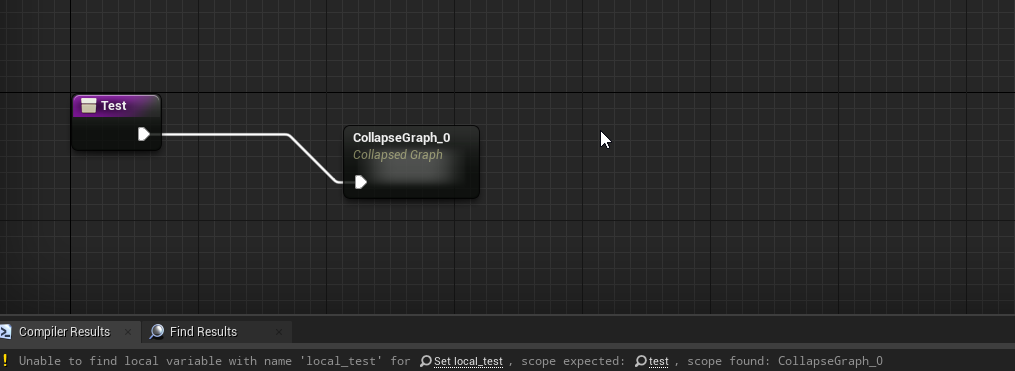
@tight schooner ok.. last question: is it considered bad to collapse nodes inside a function?
Cause I get issues with local vars if I do that
heady marlin
heady marlin
Hello guys, sorry but i got a problem.
On my widget i call the gameinstance fu...
Solved, i just create a function on Save Game Blueprint that set the variable (i don't know why in this case i need it because in other case i stored the variable without the function)
tight schooner
@olive sedge idk. Weird that that happens though
olive sedge
 gentle urchin
dont think thats inteded use of collapse
also, one could say that the function is to big and can be parted if it's subjectable to a collapse
olive sedge
yes, parted into collapsed graphs ;P
gentle urchin
parted into several functions 😛
olive sedge
nah.. I mean: it's no big deal, I just won't collapse function nodes
While I'm here: is there a good way to switch on a Material? I don't want to have a series of branches out of GetMaterialFromCollisionFaceIndex
and casting to string is ugly
gentle urchin
think you can switch on surface type if that helps
well.. if its physical material i suppose
 tepid cipher
Good luck using physical material on auto landscapes 
gentle urchin
tepid cipher
Good luck using physical material on auto landscapes <:DogeSmile:855692987249721...
Doesnt work at all, or complex to setup properly?
tepid cipher
gentle urchin
Doesnt work at all, or complex to setup properly?
That was the point, they were going to add it in 4.16 (I think) which would've been great, but now you just cover your landscape with meshes or collision boxes 
i was going to post this too
 tepid cipher
olive sedge
https://i.imgur.com/MyvWzf1.png
tepid cipher
olive sedge
https://i.imgur.com/MyvWzf1.png
you're trying to collapse a local variable, from what I can see collapse nodes must be in a new function/node and local variables are specific to that function, which you're still operating in that function but it's in limbo land.
olive sedge
yea, well.. The issue is that the collapsed nodes don't recognize that the local variable is not in the collapsed context but in the function context
Appearently the collapse has its own context with own local variables
so it can't properly access parent context local variables
tight schooner
If you gotta then maybe have inputs "by ref" on the collapsed graphs and maybe you'd be able to set them by ref
But otherwise my gut reaction to collapsed graphs in functions is the function might be getting too complicated
Im a big fan of collapsed graphs in general though. Makes the overall flow more discernable when they're used right
olive sedge
Well, yes.. set X (by ref) works
yes, same @tight schooner it makes everything just a bit more tidy if you use it right
 hushed pewter
Is there a way too bind the software cursor too a variable?
Im making a point and click and need the software cursor too change but the hardware cursor selection is too small for what im trying to do
The only idea that comes too mind if changing the brush of the widget


 tepid cipher
i've never attempted to deal with custom cursors
hushed pewter
Gak, but you guys are supposed to be all knowing
tepid cipher
but I imagine you could have a list of textures to swap around
hushed pewter
Yeh but then Id need too make alot of blank space too matchup with the . whatever that * is called
trim matrix
engine
trim matrix
ya i do
hushed pewter
Just
trim matrix
i made
hushed pewter
Until your confident with working from blank
trim matrix
game
hushed pewter
Try making a platformer
hushed pewter
Innit
tepid cipher
@trim matrix wrong chat and you're spamming
hushed pewter
Now my problem is losttoo the void
Ik you can swap hardware cursors in bp
but thatd mean setting the Click to a right
Drag to left
Its confusing and im not sure theres enough
Like
Im going off old point and clicks
Hovering over a spot you can move into cahnges the sprite of the cursor into a ⬅️ or a ➡️
Ik for the inventory I can just use brush swaps one another
But it seems messy too tie the arrows too hardware
tepid cipher
hushed pewter
But it seems messy too tie the arrows too hardware
I'm not really following what you're saying
hushed pewter
Need too change software cursor
Or an alterntative
So i want the cursor too change too an arrow asset when it hovers over something
But the point of the refrence * thing dosent work if it just changes the image
I need to be able too swap between these

Widgets
But i can tchange software curosr in blueprint
Yeh in UI ive set a software cursor
*cantq

I have the cursor working
But need an idea for how too change it into ⬅️

When hitting this left box
tepid cipher
is it because the hit detection is too good?
hushed pewter
Im gonna use on mouse over
😔
Im not explaining myself right
Basicalyl I need too turn the mouse cursor into a left arrow
Ive set it up as a software cursor
But need too know how too change it other than cahnging the widget image with brush
tepid cipher
@hushed pewter

just make the cursor a widget
and change the widget to what you need
that way you can tie in how accurate you want to click detection
hushed pewter
So
Dont use software cursor at all
Just use a widget thats attache dtoo invisible mouse
wait
Fuck
Can I change the enum attached too set widget?
*set cursor
tepid cipher
someone just had a eureka moment
tepid cipher
you'll get there
he doesn't like things cause they appear to be horrible, well, welcome to widgets
gentle urchin
Parent/child setup with a "add effect" event is what id be doing
Parent just holds the event, while all the child classes do the coded stuff
tepid cipher
Parent blueprint with child actors, your parent should hold your common stats
gentle urchin
Stats and events*^
tepid cipher
or have special ammo that has the stats for it
gentle urchin
Parent have the common functionality in it (calling the generic add effect event at the appropriate time etc)
tepid cipher
Parent = Damage, Effects, Mesh
gentle urchin
If you have guns and swords then those probably fit in two different parentclasses, but still derived from a master weapon class
Parent would have the effect event, but likely no code in it
So the child would override this
If several children should share the same effect, i'd consider having another "parent" class for those
Master weapon -> master slowing weapon -> specific slowing weapon
gentle urchin
Np 😂
gentle urchin
Yepp
So master weapon would have the "attack" event
But for the child master sword(no pun intended) it would mean playing a montage with a sword swing
While for the child weapon it would be spawning a bullet etc (i just realized they can both just do a montage, where the montage handles the potential spawning of bullets but oh well)
 fierce axle
Hi there, is there a known issue with Unreal resetting variables (float) to "0" in playmode on child blueprints ?
It seems like "watch this value" fixes it ?. never mind then 😀
tepid cipher
hushed pewter
putting everything in one widget and changing there visibility
That's what I do for a main UI, to avoid UMG's horrible garbage collection, but I have child widgets
hushed pewter
🤤
 sonic pine
Hiho is it a good way to trigger a Data Table with a structure or an other Data Table?
If
set CharacterClass: Mage -> Structure/DataTable Row Mage = Skill 1, 4, 7, 10
set CharacterClass: Hunter -> Structure/DataTable Row Mage = Skill 2, 5, 8, 11
set CharacterClass: Warrior -> Structure/DataTable Row Mage = Skill 3, 6, 9, 12
This numbers will trigger the Skill_Data_Table with all Skill Settings
The correct skills would be ordered by the correct Character Class. Maybe i could set the correct skills to the skilltree?
hushed pewter
Shid
Sorry too come back here but how can i update a software cursor mid game
I looked online and found barely anything about it outside of binding it through code
Anyone dont this before?
high ocean
@sonic pineSounds solid to me. Still, depends on what the structs contain (if it also contains anims, fx, spawns etc alongside raw data like stats), but yes, if you're a man with a plan, and know what data will be required, do a data table/class.
tepid cipher
hushed pewter
I looked online and found barely anything about it outside of binding it through...
 hushed pewter
Nana
Im using a custom enum now

All the mouses are in one

And i have some spagheti that hides the last one and shows the previous one
But i just need too updat ethe software cursor mid way

This one dosent work sadly
Just dosent update
 sand shore
I think that only works:
For the context specified (eg, hovering a link won't show the default cursor)
If you set your project to use software cursors in the settings
hushed pewter
Wait
Ye na that dosent update it
Welp
Byebye 1 hour of work
Since I forgot to give the cursor in set hardware cursor a name
sudden tusk
hi guys - any idea how to get rid of this graphical artifact appearing in my character blueprint - seems to be the floor from the level
 hushed pewter
If your just looking to hide it in editor there should be an option too make it visible in editor
But if your wanting too remove it entirely then you should just need too compile, close and then re-open
That is if youve already removed it
sudden tusk
i dont know what this is ..
i compiled; closed the editor and restarted pc even
my editor did crash twice
it doesnt contain anything - atm, i removed it - to check if it was bringing it in via some glitch
but the thing though, - it literally appears for any new character blueprint i am trying to create
i will try that - apart from reinstalling the engine, i guess thats the best option atm
 sly spade
Hi has anyone had any luck with ue4 world location to wheel rotation? in blender/maya/max its seems it can be done through contraints
i can get distance to rotation working fine in a particular 1,0,0 0,1,0 axis etc
but when 0.5,05,0 etc the rotations arent local
and change speed based on the z rotation
zealous moth
is there a way to fetch all the sockets from a static mesh? I can get all socket names from a scene component but can a static mesh variable be converted to a scene component somehow?
 sly spade
tried casting it?
zealous moth
i could cast but it would not return the sockets
it can find a socket, sure but not get all sockets
faint pasture
@zealous mothYou're trying to get all socket names WITHOUT instantiating the mesh right?
faint pasture
Once the mesh is instantiated by a mesh component you can get the socket names from the mesh component
mesh component IS a scene component
zealous moth
yes, that i saw
 hot linden
So I've followed some tutorials regarding auto landscape materials, and I've gotten kinda stuck when I want to automatically apply a grass mesh on one of the textures that gets automatically applied, it applies it to all slopes and textures in the auto material and not just the grass one, what can usually be done about it?
zealous moth
@faint pasture oof this is a tough one... i have a static mesh component, it has a variable based on an SM in my folders and it's a component child of my mesh in my character BP.
then how would i access it the SM component from the sM?
faint pasture
@zealous mothShow your setup. If you're gonna instantiate the mesh anyway, just set the components SM to the vairable and then get the socket names from the SMComponent
hot linden
Thanks again @trim matrix , you always come to the rescue 😂
zealous moth
i mean this is what i have

oh i see where the issue lies
I'm setting it in an actor component
but that property doesnt exist in AC, only in Actor
what a bummer
faint pasture
@zealous moth what exactly are you trying to do? Are you trying to have any sort of modularity to your weapons or the ability to swap them out or just the one sword?
From looking at what you have there, you should be able to just grab the sword static mesh component and get the sockets. If you have some sort of actor component that you want to do all your damage calculations or whatever, in the character actor, you should pass the sword static mesh reference to the actor component.
zealous moth
yeah so on the actual character, it works, but I wanted to keep it off the character and into an actor-component
however the actor component has limitations
and it seems that non-instanced objects cannot have their sockets probed
faint pasture
I would just use the actor to do the linking between components, it's sorta the point of having an actor as container for componenets anyway
 dreamy river
I want to have mouse position on tick. Normally Get Input Mouse Delta would work, but this is widget and I turn on UI Mode only when I'm inside it, so Mouse delta is not working. Instead I want to use Get Cursor Delta which works in widgets, but I don't know what to connect to Input to get my cursor position.
 faint pasture
dreamy river
I want to have mouse position on tick. Normally Get Input Mouse Delta would work...
faint pasture
dreamy river
I want to have mouse position on tick. Normally Get Input Mouse Delta would work...
You don't want delta, you want the actual position. You trying to get mouse position in the world or in screen space?
dreamy river
Screen space. It was working great with Mouse Delta but then I can't use UI Input mode
faint pasture
There should be a node like Get Cursor Position Screen Space or whatever, use that.
 unique finch
why can't i add to my player state array like this??? im very confused i try Adding it to the area but it doesn't change the length

 woeful pelican
unique finch
why can't i add to my player state array like this??? im very confused i try Ad...
woeful pelican
unique finch
why can't i add to my player state array like this??? im very confused i try Ad...
Is the event triggering?
unique finch
Yeah yeah the event is triggering, i figured it out
off of the get from the array struct i used get by copy and not by reference
which is wrong obviously
woeful pelican
Ah
Meanwhile I'm having fun trying to do proper velocity inheritance
Anyone able to help with this vector/rotator shenanigan?
unique finch
@woeful pelican btw is get array ref bad?
woeful pelican
I wouldn't know. It doesn't seem bad?
astral ravine
tepid cipher
You have a few options at your disposal:
1: Export the FBX and add a bone is the...
Thats the way it runs in real life
It dosent actually bend tho
unique finch
woeful pelican
I wouldn't know. It doesn't seem bad?
i thought it was something people should avoid but in my case i guess it's fine 🤷♂️
 spark steppe
is there any builtin method to check if an angle is between two angles, where it would work with crossing the 0 area (e.g. angle1: 270°, angle2: 90°, where everything between 270° - 90° will return true)
 zealous crescent
Ive a querstion ya'll, in my animation blueprint, play rate is NOT affecting anything (nor when i change the playrate in the orginal animation asset). Thoughts/ What am I missing?
 wanton ginkgo
anyway to speed up the 'create drag drop operation' node? Got it set as the pivot centre, it moves fine but it kinda glides to the pointer instead i want to it snap to pointer any ideas?
maiden wadi
@spark steppe Only thing that comes to mind is the InRange node for floats.
faint pasture
spark steppe
is there any builtin method to check if an angle is between two angles, where it...
You can just as easily get from 270 to 90 the other diretion, which doesnt cross 0. What then?
woeful pelican
woeful pelican
Meanwhile I'm having fun trying to do proper velocity inheritance
Here's the relevant blueprints
 maiden wadi
@woeful pelican First note is that you're using the Instigator's velocity, but not specifying an instigator?
maiden wadi
Does that return a valid velocity?
woeful pelican
It does. Did you see the video attached? It works in one direction (shooting from the left side) but I haven't got the direction correct for the other 3
I am doing something horribly wrong with vectors and rotators here
maiden wadi
Ah. I see.
gentle urchin
What was the expected result ?
woeful pelican
Velocity inheritance. I want the cannonball to properly (or properly enough) inherit the velocity the ship is currently moving at
Shooting from the left works as I want it to
maiden wadi
I would, instead of rotating the vectors, transform them.
woeful pelican
hmmm, could try to figure out transformations
Might make things a little more simplier
gentle urchin
Cant you just apply current velocity in current ships direction at bulletstart?
maiden wadi
Specifically the instigator's velocity. I would just transform that into the cannonball's local space.
woeful pelican
I'll have a go at both ideas
gentle urchin
If it doesnt work i can check what i did on another project
A tank-like prototype
Pretty sure we calculated the angle there
maiden wadi
Might also be worth noting that setting velocity directly might be a little easier than doing it in local space.
Setting it directly will leave you working in world space. Setting it in local is useful for some things, but you're already working with two world space directional vectors.
gentle urchin
^ i could be missing somethiing but its not obvious to me why it wouldnt work ^^
maiden wadi
@woeful pelican These two should be doing the same thing if I've woken up enough to math. One is inherently less complex than the other. 😄
 faint pasture
woeful pelican
I am doing something horribly wrong with vectors and rotators here
faint pasture
woeful pelican
I am doing something horribly wrong with vectors and rotators here
Local vs global velocity probably
Does your projectile have "initial velocity in local space" checked?
gentle urchin
Would it get it during spawn in any case unless attatched and unattached to the spawner?
Just because something spawns it shouldnt mean that it should get its spawners velocity(even if it would be practical here)
faint pasture
gentle urchin
Just because something spawns it shouldnt mean that it should get its spawners v...
Attachment has nothing to do with it. Either translate the base velocity to local space or use world space for your cannonball velocity. Right now you're all over the place. It should be as simple as CannonballVelocity = CannonVelocity + DesiredRelativeCannonballVelocity
If you must use local space instead of world (hard coded initial velocity?), Just rotate the world velocity into the local orientation.
gentle urchin
Right right, but it wouldnt get it automatically, was what i was commenting on
Atleast i wouldnt expect it to
Damn typos. Mobile, sry
faint pasture
In my case I do everything in world space, just spawn the projectile and set velocity.
gentle urchin
Makes sense. Keeping it clean and consistent 👌
 fading wren
does it possible to rotate character by using timeline ?
gentle urchin
It is possible yes
Either using it as a lerp or adding constant (or variable) rotation for duration
fading wren
gentle urchin
Either using it as a lerp or adding constant (or variable) rotation for duration
thats great, i need something as lerp, but with ability to set a curve of animation. So i think, timeline is really fits for that. to be clear, i am talking about, could o use mouse for rotation and use for it a timeline.
how can i do it ?
what node should be in input
and output of timelinde node ?
fading wren
rotation but with inertia
yes, i would like to use Timeline node instead of InputAxus Tunr -> Add Controller Yaw Input
fading wren
maiden wadi
What are you animating on mouse movement?
because i would like to control a curve of character rotation
i would like to have like hard to start to rotate, and really easy on end
InputAxis Turn node, have float output Axis Value, but it is giving a linear result
you know what i mean ?
maiden wadi
Sounds a lot more like using a curve or basic square root math on a lengthened vector on tick than timeline.
fading wren
but it much easier for me to edit curve
as i have experience in character animation
so if it possible, how would i do it by Timeline node ?
maiden wadi
Dunno. I rarely use timeline nodes. With the exception of rare cases, they're fairly useless since they're just an extra component on an actor using it's tick instead of the actor's.
fading wren
"using it's tick instead of the actor's." what does it mean ?
maiden wadi
The timeline node adds an ActorComponent to your actor and uses the ActorComponent's tick function to update the timeline node.
fading wren
maiden wadi
Sounds a lot more like using a curve or basic square root math on a lengthened v...
coul you explaine more of this ?
maiden wadi
You can create Curves in the content browser, and use them anywhere you want as a property. If your goal is to create an effect where if you move the camera right and then stop abruptly, but the camera keeps turning right for a short time, you can achieve that via simply setting the control rotation as normal on input axis, but on tick, do a few checks like whether the control rotation was changed from player input last frame, if so don't do anything, if not, start setting control rotation based on your curve in the same direction as the last direction they moved, slowly scaling it back based on your curve each frame.
If you're just looking for camera lag smoothing on the other hand, you can just use a spring arm and use it's settings.
spark steppe
maiden wadi
<@!280376753363353600> Only thing that comes to mind is the InRange node for flo...
yea ty, using that now if angleA < angleB, otherwise i'll return the result of the checks if currentAngle is smaller than angleB XOR larger than angleA, kinda weird to look at but it works ;P
fading wren
maiden wadi
You can create Curves in the content browser, and use them anywhere you want as ...
wow thaks
will try
fading wren
maiden wadi
You can create Curves in the content browser, and use them anywhere you want as ...
It sounds a little bit heavy for performance
fading wren
maiden wadi
If you're just looking for camera lag smoothing on the other hand, you can just ...
Yes, spring arm is perfectly fit for it. But i would like to have more control for it. Could i mix spring arm and my curve somehow ?
Or spring arm have setting that allow me to create somekind of curve ?
faint pasture
@fading wren Is this meant to be continuous or something that happens over a discrete time frame? Like "constantly follow mouse cursor with inertia" or "rotate when this thing happens"?
 sudden shale
Hello,
I currently make an puzzle game in 3D voxel with an level editor and for that i have 2 choices. For info the level probably should be limited to an box 128x128x128 blocks.
So i'm curious to have your opinion.
1️⃣ Use multiple Instantiate Static Mesh (1 by blocks type), and 1 actor for each dynamic blocks (like button)
2️⃣ Use an custom mesh (generate by my hand), and 1 actor for each dynamic blocks (like button)
Thanks.
(sorry if is wrong place)
faint pasture
sudden shale
Hello,
I currently make an puzzle game in 3D voxel with an level editor and for ...
I would use instanced static meshes, they should be cheap
woeful pelican
maiden wadi
<@!169190582059663360> These two should be doing the same thing if I've woken up...
Thanks, this is doing what I want.
 sudden shale
faint pasture
I would use instanced static meshes, they should be cheap
sudden shale
faint pasture
I would use instanced static meshes, they should be cheap
yes but i need to limite to X if i want prevent lag when remove block, no ?
faint pasture
sudden shale
yes but i need to limite to X if i want prevent lag when remove block, no ?
Profile it. You would only need visible blocks, or maybe a layer 2 deep so you can remove a block and not have to instantly add another behind it.
woeful pelican
faint pasture
Does your projectile have "initial velocity in local space" checked?
Oh, and it was checked. Unchecking it made the initial spawning incorrect though.
faint pasture
I would 100% suggest the game model NOT be made of actors tho. You need a background model and just have ISM for visualization.
faint pasture
woeful pelican
Oh, and it was checked. Unchecking it made the initial spawning incorrect though...
It just changed it all to world space. It looks like your last setup should work in world space just fine. Why the 1.1 multiplier?
 steel sequoia
anyone know keybind to hide navmesh?
woeful pelican
faint pasture
It just changed it all to world space. It looks like your last setup should work...
In my original setup, the projectile was still slacking behind a bit. I might not need it anymore
Yeah I don't
sudden shale
faint pasture
I would 100% suggest the game model NOT be made of actors tho. You need a backgr...
Ok, that look like more complicated then make my own static mesh
faint pasture
I know the projectile movement component is notorious for 1 frame delay before updating.
faint pasture
sudden shale
Ok, that look like more complicated then make my own static mesh
Unless your game world is very sparse, 128x128x128 of anything is going to he a nightmare for perf. You do NOT want millions of actors.
What you want is a data structure representing the game world, and something generating the instant static meshes to visualize it. Look up MVC
sudden shale
faint pasture
Unless your game world is very sparse, 128x128x128 of anything is going to he a ...
when i said my own static mesh is generate only 1 mesh for static blocks (like chunk in minecraft)
faint pasture
sudden shale
when i said my own static mesh is generate only 1 mesh for static blocks (like c...
You still need some sort of data representing the state of the map/world
sudden shale
Yes i know but with the custom mesh is look like more easiest for check if i need render the block or not because i don't have to manage multiple ISM
faint pasture
True. It'll render a bit better but you'll have more trouble changing it at runtime, would have to recalculate a lot more stuff vs just adding and removing ISM.