#blueprint
402296 messages · Page 678 of 403
 jolly oriole
 the bed then I'll have a crack with GenericGraph! @severe turret @zenith escarp Thanks for the help
 dry pewter
Guys i'm a bit lost here
I have 2 boxes on my map, they're the same blueprint, but i want to modify the blueprint of 1 of them already placed in map without alterating the class blueprint, how do i do that?
 dawn gazelle
dry pewter
Guys i'm a bit lost here
dawn gazelle
dry pewter
Guys i'm a bit lost here
What are you wanting to manipulate about it?
ie. A behaviour? A value?
dry pewter
dawn gazelle
ie. A behaviour? A value?
Trying to make it resact different to a player input, but if i can nor modify the "instance" of the actor i should make a new child class
dawn gazelle
dry pewter
Trying to make it resact different to a player input, but if i can nor modify th...
You have a couple of options:
- Make a child class.
- Make an exposed variable (possibly a boolean or an enumerator) - you can then set this value when you've added the instance to the viewport, and then have your blueprint react differently based upon the value that was set on the actor.
 nimble schooner
Hello everyone, trying to create a Thirdperson/Topdown RTS game.
I am quite new to Unreal Engine and know really only how to traverse the UI of the engine.
If anyone can help me as to how I might go about using blueprints to allow switching from a third person character view to a top down RTS view to perform RTS tasks like for example: placing structures and moving the camera around with WASD but not moving the actual character on the ground and being able to see and move a cursor to click on UI such as a building menu.
A great example that is similar to what I am trying to accomplish from a camera system standpoint is from the Steam game: "Nuclear Dawn".
I have taken a testing map I have created and implemented the ThirdPersonBP that comes with Unreal. That is what I am trying to build this camera system on.
I understand that this may be a lot of blueprint nodes and may be complicated to explain but if someone could at-least nudge me in the right direction, I would be very grateful.
Anyways, thanks for reading and any help is appreciated!
Steam game: https://store.steampowered.com/app/17710/Nuclear_Dawn/
Nuclear Dawn is the first game to offer a full FPS and RTS experience, within a single gameplay model, without crippling or diluting either side of the game. As a soldier, explore war-torn post-apocalyptic landscapes, modelled on modern cities, and take the fight to your enemies as armoured, assault or stealth infantry, using various weapon...
Price
$9.99
Recommendations
1447
Metacritic
71

 icy dragon
nimble schooner
Hello everyone, trying to create a Thirdperson/Topdown RTS game.
I am quite ne...
icy dragon
nimble schooner
Hello everyone, trying to create a Thirdperson/Topdown RTS game.
I am quite ne...
If it's a single player game, it's as simple as possessing other pawn that has RTS controls.
 lime sphinx
how would I go about have the side scroller character only face left or right and not being able to face the camera?
 gentle urchin
Lerping rotation?
lime sphinx
not sure how to do that :/ can you guide me please?
 white crypt
open up sidescroller template?
lime sphinx
Im using the side scroller template.
Basically when you move the character he is able to face the camera instead of turning 180

so he faces the camera as you are turning left or right.
gentle urchin
Could be something as silly as a bool for rightfacing, which is set based on the last velocity direction or key input (velocity probably is better)
Then on tick if current direction != rightfaced value, then lerp it
gentle urchin
2 sec, opening project
lime sphinx
I think im getting closer but could still use some help. Thank you
white crypt
one method would be setting a crazy value here https://prnt.sc/14h3azv
 gentle urchin
Power outage...
 surreal siren
Ok ill try. Ty
lime sphinx
so would you recommend that or something like this Also idk how to set up the timeline on this suggestion I found so im stuck there.
 gentle urchin
Id just use tick tbh but... up to you i suppose
lime sphinx
so use what @dawn gazelle suggested?
gentle urchin
Ye
lime sphinx
Alright will do thank you guys
dawn gazelle
lime sphinx
Alright will do thank you guys
Simplified it a bit...
 nimble schooner
Okay so I tried to mess around with some blueprints and here's what I got.

I am trying to spawn a camera object above the character and then blend to that camera from the third person camera to the RTS camera/build camera. Yet when I press "B" which I have set to execute the function, it just blends into the player location and not the camera.

Here is what the view port for the third person controller looks like.

I have added two cameras, which I believe is one of my mistakes since in the blueprints section I am trying to spawn in a camera. But I dont know how else to get a reference for a camera to spawn in one.
dawn gazelle
nimble schooner
I am trying to spawn a camera object above the character and then blend to that ...
If you already have a second camera in the blueprint, you shouldn't need to spawn another. Grab the second camera from the list on the left and drop in your blueprint - this is your reference to the camera.
nimble schooner
How would I go about switching between the two though? Do i just not need the spawn actor node and just blend between cameras?
I am loosely following what this other guy did, I will show his blueprints. The only reason why I say loosely is cause he does not include a lot of info regarding how he got his ref. and what not.

There it is.
As you can see under spawn actor, he has a class called building camera, no idea how he got that.
lime sphinx
@dawn gazelle where am I going wrong. the A and D keys are backwards now lol

 dawn gazelle
nimble schooner
How would I go about switching between the two though? Do i just not need the sp...
dawn gazelle
nimble schooner
How would I go about switching between the two though? Do i just not need the sp...
You don't need it at all.... You have two camera components in your blueprint already - you don't need to spawn anything else for it. At the top left of the screen, you have the listing of components. You can drag and drop those components into the blueprint graph, and this give you a reference to that component.
 lime sphinx
gentle urchin
lime sphinx
gentle urchin
whats the node thats cut off a bit at the top lol
so many different ways to do this ol
gentle urchin
horrible screenthost i suppose xD
 dawn gazelle
As you can see, I have a component called "FollowCamera" on the left, and then there's a "Follow Camera" node in the graph - this is the reference to that camera.
lime sphinx
gentle urchin
horrible screenthost i suppose xD
lol no worries
dawn gazelle
lime sphinx
<@!218956378654507008> where am I going wrong. the A and D keys are backwards no...
Try swapping the booleans around on the sets.
nimble schooner
Yes, but where would I link "FollowCamera" to in order to get it to switch between the third person camera and this camera because when I try to link the reference of my RTS camera it wont let me link it into the target with blend mode.
It seems to only take actor reference
Is their a way I can convert it from object to actor reference?

Trying to put it into new view target
lime sphinx
neither of them are working :/
 lime sphinx
On yours @gentle urchin i cant move at all and when I do @dawn gazelle it swaps the A and D keys even by swapping the booleans
gentle urchin
If movement doesnt work, then my method wont work either
velocity comes from movement
lime sphinx
Well i can move with @dawn gazelle method just not on yours
its just the keys are backwards on his lol
lime sphinx
Ah ok
gentle urchin
using the sidescroller template, movement is already implemented

this is probably the issue with Daturas aswell. World Direction -1
dry pewter
Hey guys, how can i detect the position of a mouse click on a widget?
lime sphinx
i deleted that like an idiot lol
but i must be messing something cause rotation dont work at all
gentle urchin
i started this on a blanc sidescroller project,
dawn gazelle
nimble schooner
Is their a way I can convert it from object to actor reference?
Ah - ok, so then in this case, he would've created a new blueprint actor called "BP_BuildCamera" I suppose.
gentle urchin
so if it doesnt work, i'd suggest you did something to it 😛
lime sphinx
lol im going back through it now to see where i went wrong
nimble schooner
@dawn gazelle Yeah, I guess, no clue what he used in it. Is their any work around? Maybe their is a way to use an actor in the components tab as a target and maybe it will automatically find the closest camera if I link it to said actor? Idk, just trying everything here.
Found this on a forum, might help.
 lime sphinx
ok maybe you can see where I went wrong cause I cant haha @gentle urchin
 dawn gazelle
nimble schooner
<@!218956378654507008> Yeah, I guess, no clue what he used in it. Is their any w...
dawn gazelle
nimble schooner
<@!218956378654507008> Yeah, I guess, no clue what he used in it. Is their any w...
So i'm not super familiar with it myself... But I made a simple actor that just had a camera in it.
 gentle urchin
nimble schooner
<@!218956378654507008> Yeah, I guess, no clue what he used in it. Is their any w...
gentle urchin
nimble schooner
<@!218956378654507008> Yeah, I guess, no clue what he used in it. Is their any w...
Self should be sufficient if you're already in the player RTS pawn
dawn gazelle
 gentle urchin
lime sphinx
ok maybe you can see where I went wrong cause I cant haha <@!231467939734355969>
gentle urchin
lime sphinx
ok maybe you can see where I went wrong cause I cant haha <@!231467939734355969>
The vector comparator should be !=, not "Exactly match" (===)
lime sphinx
I just seen that haha
works great so thank you. Im off to bed. Gotta start my new job tomorrow but I knew it would bug me if I didnt get it working lol so thanks again @gentle urchin and @dawn gazelle
gentle urchin
Np. Gl
nimble schooner
@dawn gazelle Trying that now
Okay
Here is my new attempt

I pretty much did the exact same in the Build Camera BP except I added a SpringArm
As you can see I get an error when I promote the Build Camera BP to a variable from the spawn actor node.
gentle urchin
You're not setting the variable
nimble schooner
*warning
gentle urchin
thats the warning
meaning
the variable will stay empty
you need the white wires connected for it to work
nimble schooner
oh lmao
gentle urchin
Also,
new target on the B side of the flip,
should be connected to player character or player pawn , not controller...
dry pewter
Guys, on a Widget can i detect if there was a mouseclick over a texture without it being a button element?
dry pewter
gentle urchin
Yes, <@!270307292912549888>
How?
gentle urchin
Just create a new widget
with whatever you want inside,
and override the on mouse button down event
dry pewter
So the paddlock thing is my image, and the event there, is that like a "on clicked" event?
 gentle urchin
I'd put the image in a new widget, and do the logic for the click there
If you want to expose it back out in the main widget you can create an event dispatcher for it
dry pewter
gentle urchin
I'd put the image in a new widget, and do the logic for the click there
But will it work if i just do the logic in this widget?
gentle urchin
Possibly
dry pewter
Aye, will make a try, thanks
nimble schooner
Okay so it works, it transitions from the third person to the rts camera very smoothly, but when I press B again to make it blend back, it just straight up almost teleports back to the player controller, I would preferably like it blend smoothly back if that's possible. And thank you both @gentle urchin and @dawn gazelle for the assistance so far, so happy I actually accomplished something on this software.
gentle urchin
There's the blend time input in the set view target node
but
you're destroying the build cam actor
so it doesnt have anywhere to lerp from
you should delay the destruction of that camera untill after the blend is completed
so delay with the same time as blend time should do the trick
dawn gazelle
OR just leave it alive and check if the variable is set before creating another one.
gentle urchin
Or that ^
Didnt really follow the general logic, so wasnt sure if he made it reusable or not 😛
nimble schooner
How can I check if the variable is set
gentle urchin
check if it is valid
nimble schooner
Is that a node?
gentle urchin
IsValid -> True -> do the blend
-> False -> Spawn the class, update the reference -> Do the blend
dawn gazelle
You can also convert a "get" node of the variable to a "validated get" by right clicking on it.
gentle urchin
yepp
 scenic scroll
how can I reliably tell the server to do something?
I keep running into really annoying replication problems because sometimes the server's like "No fuk u i wont listen to you" despite events being set to "run in server" or as "replicated"
i am worried this has something to do with authority or owning player but i don't know how to reliably tackle it and it's getting to my nerves
gentle urchin
depends on some ownership rules etc
Probably better asked/explained in #multiplayer
nimble schooner
The is valid stuff is confusing me so I just put a delay, it worked that way so its all good. Thank you again guys for your patience.
dry pewter
gentle urchin
Possibly
Working well, thankyou
 stray island
If i pack 100 textures inside a Texture Array variable , but will end up choosing one of them on run time and wont change it , will the 100 textures be in saved memory causing load??
Like i will choose one of the textures from construction script exposed variable in the editor before the game starts , then it will only use that texture in run time
 tight schooner
@stray island yeah anything the class references will be loaded into memory whenever the class is loaded AFAIK
Look into "soft references" to get around that
where you explicitly control what gets loaded
stray island
Alright will look soft reference up thank you
 near flint
hey guys, how can i prevent from AIs to walk in a row? they're gathering together one behind another
They all have the MoveTo node
 gentle urchin
With the same destionation
nimble schooner
So I am trying to get WASD to move the camera instead of the player when in RTS/Build Camera mode
Here is the blueprints I am trying to replicate.
 gentle urchin
I think it would be easier to just enable input @nimble schooner
then you can setup custom controls for the build actor
but it would require a fix to get you back in the default pawn
nimble schooner
Thats true
near flint
gentle urchin
With the same destionation
How can i give them other destinations if they're all seeking for the player char?
Random floats?
near flint
Any method that u'll recommend on?
 peak plaza
Thought I saw a familiar name lol
You want boid or flocking if I remember the names right.
gentle urchin
Lurking mostly :p
nimble schooner
@gentle urchin So I don't entirely understand what you mean by enable input, could you clarify please? Do you mean map out new keys instead of already using WASD?
gentle urchin
Theres a node named enable input
It uses an actor as input. What it does is moving the (i assume local) players inputs over to that new actor

This is probably easiest done from the playercontroller in your scenario
 gentle urchin
self is when you return to the default pawn
but not really...
because the next transition would then come from the default pawn class
2 sec ill see if i can do a mockup ..
nimble schooner
Okay, thank you.
gentle urchin
It also seems some notes could be wrong
i was double checking for input stack but im not sure its correct

 surreal peak
gentle urchin
surreal peak
gentle urchin
It puts the Actor ontop of the Input Stack
gentle urchin
In my testing, Playercontroller seem to be above input enabled actor
surreal peak
Which means it's the first to get a chance to handle input
If it consumes the input it would even be the only one handling it
gentle urchin
thats what i mean
surreal peak
Last enabled input actor is the highest on the stack and the first
gentle urchin
it seem to have changed
surreal peak
Yeah, just throwing in some trivia
gentle urchin
playercontroller wins the input match
surreal peak
It shouldn't

 surreal peak
Is that pawn possessed?
gentle urchin
I checked with a new input in the Camerapawn, and can confirm that the input is enabled..
no, not possesed
surreal peak
Try the same with a generic actor
Might as well be some shitty pawn specific problem
gentle urchin
wait, i lied, it is possesed ofc
surreal peak
Well
Then it might not get put onto the stack
Cause it already is in the stack at the bottom
nimble schooner
Okay so should I use the input action key that I used to transition between cameras as the same to enable input?
I could do a flip flop aswell to re disable it right?
gentle urchin
Thats what wouldnt work
because the input would be moved to the new target
i would assume it auto disable input on the old one .. .
i should do some more testing really
nimble schooner
Sorry which player controller?
 gentle urchin
understandably
nimble schooner
Since their are multiple refs to player controller
gentle urchin
So
Enter Build would not need the branch
the lower part of the branch would be moved to the new pawn (build camera ref)

Seems i need to investigate some more.. it didnt work as expected
Seems like i cant get it to work .. new actor totally ignores the input
nimble schooner
Damn, yeah I am not sure.
The other guy though who did the other method seem to get it to work according to his post

He used this blueprint schematic
nimble schooner
The only issue which was pointed out was "You would have to either add local offset or set relative location on your camera.".
The only thing I cant seem to figure out though with this is how to connect the build camera ref to the get controller rotation as it only takes pawn reference. No idea how he got it to connect.
gentle urchin
not get controller rotation, control rotation ...
camera ref should be a pawn tho
since its movable?
 lyric onyx
Hi, got a question about the migrate tool, am I at the right place to ask my question?
nimble schooner
But camera ref is referencing the Build CameraBP which consists of a camera and a spring arm.
Which I dont think either are pawns
nimble schooner
How would I do that lmao
gentle urchin
 nimble schooner
I do not see the parent class option, are you selected on a class or an object?
gentle urchin
class
nimble schooner
Okay, I don't have a class to select, would it be in the BP for the camera or in the event graph?
nimble schooner
OH
I am so dumb, I thought you were looking at a specific node, I didn't realize you had to click the cog. xD
Should it be default pawn or just pawn?
gentle urchin
just pawn is fine
nimble schooner
Cool
 chrome sundial
Can I use a custom island mesh with the 4.26 water system? Do I need do add someting to my island so the water doesnt go through?
gentle urchin
nimble schooner
Cool
Apparently im not the only one with an issue with EnableInput etc. Turns out they're not ment for pawns. Pawns respond to Possess instead
nimble schooner
Ah, so what are they meant for?
gentle urchin
regular Actors.
Classes that are not ment to be possessed directly
So this stuff now works


 gentle urchin
Probably doesnt work
nimble schooner
When I try it just freezes my Build Camera, yeah
gentle urchin
because when you disable input on self,
you've disabled input...
so you need the flop part of the event in the actor that has the input enabled
 nimble schooner
Where does this custom event build come in?
Oh I see you just made a custom event
I don't seem to understand how you are able to reference build cam ref in its own blueprint?
Because in my project Build Cam Ref is a reference of the blueprint
gentle urchin
by using "self" , you're refercing the bp you're currently working in
nimble schooner
Ahh
But what about new view target
You are using build camera ref
as the new target
As well as for the input object you used the same reference
on the is valid node
gentle urchin
So inside the original BP we spawn a new Actor , which is saved into the "Build camera ref"
nimble schooner
So I got two BPs, one being the Third Person Character BP and one called Build Camera BP
gentle urchin
Then we set our viewtarget and enable input to that actor. While also disabling input on our currently possessed actor
After this logic, our next player input will come inside the Build Camera BP
nimble schooner
gentle urchin
So your saying this image is in the First BP which is the third person BP
gentle urchin
Sounds about right
 gentle urchin
freezes?
nimble schooner
Yeah, like I cant move
gentle urchin
well you need to add movement to it
nimble schooner
input is disabled
gentle urchin
this is the benefit
nimble schooner
Oh
gentle urchin
you can now have whatever custom movement you want when in build mode
gentle urchin
without it cluttering your default pawn stuff
since ur changing input enabled actor, u dont need the bool with the build mode
B must be set up in the build camera BP
nimble schooner
Ahh okay, let me try
Here is my Build Camera BP

Its got the input Action
for B
gentle urchin
Not connevted wont work
destroy actor should be self
aand you dont need a new bool set to not build mode..
nimble schooner

Okay so I have removed the boolean
Destroy actor is fixed
But it is still not connected right
 gentle urchin
should be ok
nimble schooner
Because it still seems to not want to switch back
So my input on the character is getting disabled
When I press b
I am no longer able to move the character
nimble schooner
Yes
gentle urchin
if so, then thats the issue 😂
Switch it back to Actor and we're good to go
pawn was for the other guys method ,
nimble schooner
Ahh
gentle urchin
actor is for this method
nimble schooner
lmao nice catch
gentle urchin
sorry for the confusion
nimble schooner
ITs okay
Thank the heavens
It works
It switchs
Now all I need to do is add the movements
right
So I just re add the Input Axis mappings I believe right?
nimble schooner
And I do that inside of the Build Camera BP
gentle urchin
but by switching the input to another actor (or possessing another pawn) you can easily do very custom movement for them
yeah correct
So temporarily controlling a vehicle or a boat or a plane could be done in a similar fashion aswell
nimble schooner
Interesting
gentle urchin
Or if you wanted to let the player manually control a tank or whatever
nimble schooner
And to add movements again with WASD I would just take the current ones from the Third Person BP and paste over in BuildCameraBP Correct?
nimble schooner
So like get control rotation
gentle urchin
you could add a floating pawn movement component
then I think it'd work
or you can simply add actor offset
nimble schooner
Like a local actor offset?
gentle urchin
not local
nimble schooner
GLobal?

Here is what I got
I have it zero'd out on x
cause the camera is angled down
gentle urchin
control rotation only works on pawns
nimble schooner
Ahh
gentle urchin
this is what im doing for my rts movement,

its in the playercontroller, but it definetly should work inside a camera actor aswell
nimble schooner
So move camera forward is a function right, could you show your BPs for the function?
OR wait
This is the function
Ahh
nimble schooner
Im losing my mind
gentle urchin
was just for keeping it clean
 nimble schooner
Okay so move camera forward
Do I need to reference that somewhere
?
Because I am confused as to how it knows what inputs are what without any reference to them
gentle urchin
Move camera forward must be called by the moveforward input event
nimble schooner

But isnt that the function
Oh
Wait
I see
Now we include the usual inputs
but instead of applying force to the camera
we just call this function
got it
gentle urchin
Yupp exactly
nimble schooner
And I repeat the process for move camera right correct?
So I make another function
ANd jsut do the same values
gentle urchin
Correct ,
except direction right

Since you're doing this inside the actual camera pawn ref, you can just use "self" instead of a variable
nimble schooner
Yep

So I made the functions
and called them to their respective inputs
is their anything else?
gentle urchin
Remember to connect the input value aswell
nimble schooner
How do you mean?
nimble schooner
Ahh I see
And target can remain self right
Okay so when I press B and enter build mode
My screen just goes black
I think and object is spawning on the camera
but I am not sure
I dont know why else everything would go black
What values do you have for normal speed multiplier and increased speed multiplier?
Got it
it was the values
had them set at 600 and 1000
vause those are the defaults
didnt account for the multiplying nodes
nimble schooner
Yeah I adjusted them
Well then
This has been an experience
Thank you very much for you patience
your*
My head feels like its about to break, I am new to this Blueprints stuff so this is a big achievement lol
Seriously though, thank you Squize, couldn't have done it without you.
gentle urchin
No problem
 violet wagon
is there a way to make my widget component (3d widget) have the correct opactity/alpha? It always shows at 100% opacity reguardless of what i set it to
 pale orbit
What is the best way to handle different characters using weapons? for example i have a pistol that when i press R i want it to reload and play a animation on the character mesh but i dont have a way to tell the engine which one of them has the gun and to play the animation on the pistol blueprint
icy dragon
 trim matrix
hi guys anyone can help me with this issue?
trim matrix
hi guys anyone can help me with this issue?
Consider rephrasing your question. I'm having hard times trying to comprehend it.
trim matrix
icy dragon
Consider rephrasing your question. I'm having hard times trying to comprehend it...
yeah, basically i have downloaded a platformer template wich have inside some animated mesh, i would like to give those mesh a sort of collision damage, when the player touch them (example player hit by spikes he take damage)
so i have created a health variables in the thirdperson blueprint with value 100 float
then i have created the logic from the images i posted but for some reason it isn't working
i tried to create a new mesh simple box with a collision and with that it's working , every time the player hit the collision it reduce -10 from health variable
the spikes im referring is this . it goes up and down i can't make it work with this object

here i created a new functions take damage with dmage variable

here in character blueprint i have setup the logic to listen the takedamage

and this is the action on being overlap when player collide

this a short video as you can see in the top left i can see health going down hitting the box, but nothing happen when i hit other meshes with same logic applied https://streamable.com/y6x1dd
ok i think i got the issue, i created a new collision box for the other objects and now it's working but why the mesh itself is not working as collider?

ok.. another steps further i tried add component hit and now is listening the event, i'm starting understanding the logic, sorry for all those questions i just likely started unreal :S
 round grotto
Good day boyz, this is a section of my wallslide/walljump BP. What i want is that while you're wallsliding, if you hold your movement input in the opposite direction of the wall for more than X consecutive seconds, you drop from the wall. It works right now, but the keys (A and D) into the GetInputKeyTimeDown are hard coded in, which meansit doesnt work for a controller. Is there a way i can
 round grotto
Good day boyz, this is a section of my wallslide/walljump BP. What i want is tha...
round grotto
round grotto
Good day boyz, this is a section of my wallslide/walljump BP. What i want is tha...
Is there a way i can replicate this same thing by taking the Axis value instead of a Key? What matters is that it needs to count for consecutive seconds, so delay doesn't work (i think).
gentle urchin
If pressed -> accumulate time in tick -> react after timelimit
round grotto
Thank you, any insight on how to implement that?
 coarse orbit
Hi, Is there anyway to set the slider & value range of an Int variable dynamically????
gentle urchin
Not to my knowledge.. probably in c++
coarse orbit
ah thanks, figured, I hate when I get stuck in most basic things but seriously they need to fix it, it's a very simple feature
 lost solstice
Is there a way to make the line trace be the same length no matter where the controller is placed? No matter how far away the controller was from the centre of the disk (Grip Start 1 and Grip Start 2) the line trace will be the exact same length.
 gentle urchin
round grotto
Thank you, any insight on how to implement that?
gentle urchin
round grotto
Thank you, any insight on how to implement that?
just throwing something out here

on an axis input you dont really need to put it on tick, but it makes little difference
icy dragon
coarse orbit
ah thanks, figured, I hate when I get stuck in most basic things but seriously t...
How simple do you think it's going to be?
Remember that C++ headers are not dynamic.
coarse orbit
I've no c++ experience but probably as someone with little knowledge in programming language it is fairly simple, just expose those values to bp
gentle urchin
You could do it manually in BP , just clamping it with another variable
slider range not so much , but general value, for sure
coarse orbit
yeah the problem is I need to use the variable as a slider to change somethings
gentle urchin
dynamically?
coarse orbit
yeah
gentle urchin
Dynamically updating slider ranges sounds like a wasted slider range
how about combining it with another relative value?
So slider sitll goes 0-1 f.ex, but the actual value is scaled by some method
coarse orbit
What else can I do? I just needed to set the maximum slider value of an int variable but that doesn't seem possible
gentle urchin
If you'd explain what you need it for, perhaps we can find another solution
coarse orbit
problem with slider is 0-1, I need something that can go to range of 60
gentle urchin
0-1, 0-60... doesnt matter, it was an example number 😛
icy dragon
coarse orbit
I've no c++ experience but probably as someone with little knowledge in programm...
Here's the reality check: Slider ranges are defined in header files.
Blueprints are basically interpreted C++
 fiery swallow
bless you
round grotto
gentle urchin
on an axis input you dont really need to put it on tick, but it makes little dif...
Turns out i was just completely disregarding the existence of DeltaTime. Many thanks sir 😄
 gentle urchin
No prob 🙂 easy to forget
 gritty plover
How do I set the first person character as the player start?

This feels like something I should know, but I forgot.
 gritty plover
Thank you!
 civic tree
I'm trying to build my game with blueprint nativization turned on to inclusive. However I want some blueprints to be excluded (because they cause errors I can't fix). Does someone know what the right naming convention is to specify the blueprints I want to exclude?
Currently I have written that in the defaulteditor.ini :
[BlueprintNativizationSettings]
+ExcludedAssets=Content/ShooterSimplifiedAI/Blueprints/AI/BP_ShooterEnemyAI
But the blueprint is still nativized..
surreal peak
I would actually not use BlueprintNativization anymore. UE5 will drop it
But in case you still need it for UE4, go ahead of course
civic tree
I see... Still any ideas to fix my problem? I'm not sure how I should reference the blueprint exactly to exclude it
surreal peak
Try rightclicking it and getting a reference form the context menu
That might be the string you need
 lunar holly
How can I run an event when an variable value has changed?
surreal peak
Wrap it in a Setter
 twilit heath
or if you're in exceptionaly ugly hacks and its single player, turn on the RepNotify 😄
surreal peak
I wish the gifs could be smaller
gentle urchin
^Agreed. They're huge, for no reason
civic tree
surreal peak
Try rightclicking it and getting a reference form the context menu
Thanks will give it a try 🙂
gentle urchin
its way smaller doing a video file...
round grotto
Still working on that walljump, I'd like to know why, when jumping off a wall, the Y component of the launch is instantly applied in one frame while the Z one is "gradual". Is it because of gravity? How do you handle this?
(Not shown here but the Launch is actually connected :D)

 fair sun
is there a way to replace a component with a child class without having to replace all of the references to it manually?
 proud sable
Do text and percentage bar widgets update differently?
I have a game with 3 characters, if the first character takes damage his "HP" number text goes down and so does the percentage progress bar.
If I swap character the HP number goes back up normally, but the bar stays the same. If they take damage the number goes down, but the bar stays the same. The bar is bound to the same "Health_Percentage" attribute as the first character which they both use.
gentle urchin
Some screens would help ,
you've manually set up the update of text and percentage, so...
proud sable
Sorry, wasn't sure what to screenshot. This is how the health is updated and it seems to work fine for the first character

 gentle urchin
the bound funtion aswell
btw, you're already driving it by event, so i'd suggest to unbind the bar and to it on the same event aswell
proud sable
Oh wait yeah, I just realized it should be a function for it to work the way I have it set up. I just realized it wasn't
Sorry 😅
gentle urchin
devils in the details 😛
 fiery ridge
was paper2d template removed from UE5?
 sand shore
debugger showing flow
maybe it got stuck on via hovering
that's too pinkish to be orphaned pin
 novel ice
Why actor can't take RadialDamage? I launch a projectile which applies RadialDamage and declaring Event RadialDamage in actor's BP, but there is no effect. It can't even print a string!

That's a projectile BP

It breaks when it hits the enemy but it doesn't apply any damage
Please help
It still applies Point Damage
 viscid atlas
Hi everybody! Could you help me with a question? I'm looking for a way to duplicate existed material instance within the editor scripting utility. I need to duplicate existed material instance and assign it for a static mesh. (not in runtime, so it isn't dynamic material instance) Thank you for any help!
 dapper dagger
Thank you for the explanation @ember veldt. Actor was just a quick example I was using but that's an interesting point. So if I understood correctly, casting is looking at the base class and not the child class? If I had an Actor class called BP_SomeVeryComplexCharacterWith500Properties and I cast to it in another class, am I loading up AActor?
 unkempt musk
@viscid atlas Can you not apply the MatInst directly to the static mesh? Material Instances are essentially a copy/paste for the parent Material Class.
viscid atlas
unkempt musk
<@!444436292483416064> Can you not apply the MatInst directly to the static mesh...
I have several different meshes, which is a sort of constructor kit, each of them has material slots with a particular slot name. I need to create a unique material instance (from several parent materials) for each of that slots and assign textures. I have a bunch of that sort of object, and I'm looking for an optimising way do not to assign materials by hands.
 ember veldt
dapper dagger
Thank you for the explanation <@!176135130245496832>. Actor was just a quick exa...
ember veldt
dapper dagger
Thank you for the explanation <@!176135130245496832>. Actor was just a quick exa...
It will have a hard reference to whatever the cast type is, so having casts to a lot subclasses means those will become dependencies. If those are soft references and are loaded and cast as actor, or any other base class, they dont become a dependency
unkempt musk
@viscid atlas If the materials change under certain conditions, you can set the material elements in the construction graph. I'm not sure if they would save that much time, but it's an option.
 olive sedge
Please, someone help! I absolutely need the roll of my mesh at the closest spline location. https://i.imgur.com/ABwQ88H.png
This always returns 0.0. I looked into the source. Appearently it doesn't read whatever I set with SetStartRoll / SetEndRoll but it reads from the spline point rotation values: https://i.imgur.com/b0uNRem.png
But those don't seem to be doing anything and come back 0.0 as well
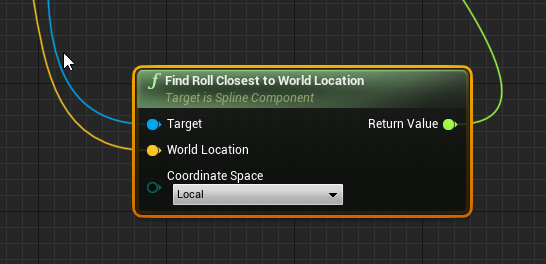
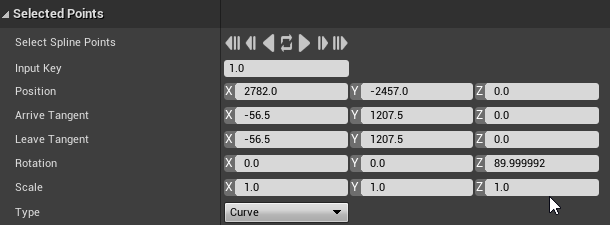 novel ice
Why actor can't take RadialDamage? I launch a projectile which applies RadialDam...
novel ice
novel ice
Why actor can't take RadialDamage? I launch a projectile which applies RadialDam...
Pleaseeee help
viscid atlas
unkempt musk
<@!444436292483416064> If the materials change under certain conditions, you ca...
I found a way, so thank for your help!
 dapper dagger
novel ice
Why actor can't take RadialDamage? I launch a projectile which applies RadialDam...
dapper dagger
novel ice
Why actor can't take RadialDamage? I launch a projectile which applies RadialDam...
who's applying the damage? make sure the server is the one doing it otherwise the function just won't work
novel ice
The problem is that one actor with exact same logic takes radial damage as intended, but that one doesn't
 fathom widget
How to setup properly an Uniform Grid Panel ?
I added one directly in the editor (Designer) and few images in it. It works well
But in blueprint I can't do anything with it because it's "Invalid"/"None"
 nova ledge
Having trouble using the "Destroy Actor" node in a blueprint. So what's going on is I have Character A attaching to Character B, and after Character B eats Character A, I want to destroy Character A so it doesn't clog up the game when Character B grabs more characters like Character A. However, the destroy actor node isn't destroying Character A
olive sedge
@nova ledge are you sure it's not destroying? Might have to wait for GC
nova ledge
olive sedge
<@!486912429536575488> are you sure it's not destroying? Might have to wait for ...
GC?
olive sedge
Overview of the features of the UObject system.
proud sable
How can I get an attribute variable for a specific pawn in the HUD? I can get the controlled pawn with Get Player Character but I'm a little confused on how to get a specific AI companion's
icy dragon
proud sable
How can I get an attribute variable for a specific pawn in the HUD? I can get th...
Is there a reason not to refer to the AI companion pawn directly?
proud sable
icy dragon
Is there a reason not to refer to the AI companion pawn directly?
Not that I know of, I have their stats stored in the player controller blueprint since the companions are instances of that. I'm not too familiar with the options I have available yet 😅. I just realized get actors of class works in the HUD editor so I'm gonna try that first
icy dragon
proud sable
Not that I know of, I have their stats stored in the player controller blueprint...
My approach would be storing their stats in Game Instances, as it persists as long as the game is running, and can be used for reference to the save data.
nova ledge
olive sedge
<@!486912429536575488> are you sure it's not destroying? Might have to wait for ...
Oh, I read the link and tweaked the settings a little bit in project settings, but it's still not destroying...
 river wigeon
so, i have a enemy and a player char, i set up both the same, now comes the weird part, the enemy sphere trace can detect my char, but my char sphere trace cannot trace the enemy, althou it can detect static meshes. what am i doing wrong?
 verbal bobcat
@plain helm you go to window in the editor then go to load layout all the way down the you hover over it. It then shows an option to reset to default viewport
 soft plinth
@plain helm watch this... https://www.gifyourgame.com/SeekingUnscathedJellyfishsisters
 verbal bobcat

 stray wagon
Hello, is there a way to get an overlay to add a white "highlight" when cursor is hovering? (it's for an inventory slot)
I tried with a button, it works but the button is hijacking the left click even from OnMouseDown
And the overlay does not appear to be able to have an actual OVERLAYING colour + doesnt have a hover event (or any event for that matter)
any solution?
(Also button onclick cannot be used in place of OnMouseDown since it does not have the input object)
chrome sundial
With the 4.26 Ocean I get this strange shadows in the distance. Anyone know where the problem is? Reflection in general or is it coming from the ocean edge?

 thin cradle
is there any way to use step / smooth step in actual blueprints? I can find it in materials but I can't find corresponding nodes when editing blueprints
nimble schooner
Hey, quick silly question. Can I rotate an asset in the viewport of its own file? And would it permanently stay rotated?

Just need to rotate it but I dont know how lmao
 hollow cape
No. You would either need to rotate it in the program it was modeled in, or you need to adjust the import rotation settings in the details panel, and hit re-import @nimble schooner
nimble schooner
Cool, thank you for the assistance.
When you say re import, you mean reimport base mesh correct?
olive sedge
If I collapse nodes in a function, can I not set local variables that are scoped to the function?
Oh, nvm. Compile errors vanished when I compiled again (whyever)
 prisma iron
can someone help me what i have to change here?

 crimson saffron
I've been trying to make a brightness slider but I can't figure out how to do it
dawn gazelle
prisma iron
can someone help me what i have to change here?
I can't event find that event dispatcher.... There is this node though.
 prisma iron
dawn gazelle
I can't event find that event dispatcher.... There is this node though.
prisma iron
dawn gazelle
I can't event find that event dispatcher.... There is this node though.
this one fixed it, thx
 shrewd cedar
int x = 10
char s[2] = " "

switch (x)
{
    case x > 1 000 000 000:
        s[0] = "B"
    case x > 1 000 000:
        s[0] = "M"
    case x > 1 000:
        s[0] = "K"
}
Hey what would be an equivalent of this in blueprint? Just something like the switch case.
Let me actually explain what I am going to be doing with this
I am making a damage indicator.
And I want to basically cut down the number being displayed
So if some damage amount is like 1,000,000 then it would turn into 1 M
Which normally I would just divide down the number
Turn it into a string and append a M to it.
But I am struggling to get the same thing done here in blueprint ://
 errant snow
The same thing as in code, a series of if-else-if's.
Because that construction of a switch isn't legal.
shrewd cedar
Hmm I guess I will mess around with it a bit more.
Wait am I crazy or have I wrote that switch case example wrong? (You can switch case with logic as a parameter right?)
dawn gazelle
This may be the cleanest
errant snow
I guess in blueprint you could use the CompareInt node instead of if's, but you'd still have something that is basically if-else-if
dawn gazelle
 errant snow
shrewd cedar
Wait am I crazy or have I wrote that switch case example wrong? (You can switch ...
errant snow
shrewd cedar
Wait am I crazy or have I wrote that switch case example wrong? (You can switch ...
The cases for a switch have to be compile time constants. At least in C++.
and integral. no switching on floats or strings (which is sort of annoying)
nimble schooner
Hey so I am trying to be able to have a ghost building overtop of my cursor when in RTS mode. I have created an interface and made a function called Build this building which contains an actual building mesh and a ghosted building mesh.
For some reason, it does not seem to work, I first thought it was not calling the function but I put a print string on the HUD for when you press the button to see if it was calling the function. It was since the string printed. So I am not entirely sure.

Here are some close ups since that image kinda doo doo

 thin cradle
thanks @trim matrix
nimble schooner
Here is the bps for the button to call the function

I also changed the collision on spawn in the spawn actors from default to always spawn, just in-case that was causing some issues, didn't seem to work.
So tbh, I don't know whats causing it to mess up.
nimble schooner
The video I was following along to make this is here:

Fix for pending kill error and placing building at 0,0,0.
https://www.youtube.com/watch?v=JnqG_zR0NRM
A simple way to place building RTS style. You can use this as a foundation to build the more complicated one that involves money and building timer. I recommend watching the building units after this one.
Any help is appreciated
PS: Where I go wrong is around 20:00 Minutes I believe. He is able to show the ghosted building and able to place, I am not.
 supple night
Hey there, I'm sure all of you know this 12 tank problem. I'm actually thinking of how to implement this. I don't care so much about the rendering aspect right now, it can just be a "progress bar" in the shader. My idea was to have a FluidContainer component which holds a volume and which has a Fill function to fill it. Then the fill() needs to be kind of recursive to fill "child" containers through pipes. Any idea?

 weak grove
hey i am creating a side scroller game
i want my character to face forward when i press w
how can i do that please help
 quick grove
guys sorry for the disturb, do you know what I have to do to make that the progressbar every second increase of 1?

 quick grove
yes, exact!
quick grove
gentle urchin
Does it have to be accurate ?
is not important, I mean... isn't necessary
gentle urchin
Then regular timer should do the trick
Custom event "start progressbar" into a looping event timer set to 1 sec
quick grove
I've tried to use a loop and a delay, but it didn't work
quick grove
and how can I add 0.01%?
gentle urchin
A float variable
Before you start the timer you set the value of the float variable to 0
Then on the custom timed event, you take the variable and add 0.01 to it, then set it. After that you update the progressbar percent (or just use the variable in the binding u created)
weak grove
hey i am creating a side scroller game
i want my character to face forward when i press w
how can i do that please help
gentle urchin
You must implement the functionality by the input events in the character bp
Sidescroller only handles left/right, and uses up to jump
weak grove
yeah how to do that, i dont want him to move forward, just face forward
gentle urchin
Set rotation
quick grove
gentle urchin
Not loop and delay , event timer
you mean this, right?
 gentle urchin
Yes
weak grove
but in set rotation the rotation to be set would be variable
how would i determine that variable
quick grove
and what's the event? (sorry I'm a BP beginner)
gentle urchin
weak grove
how would i determine that variable
Play around with it. Figure out whats forward and whats not
gentle urchin
quick grove
and what's the event? (sorry I'm a BP beginner)
A new custom event. The new event is the "second" ticker (in case you need it for something else)
Remember to set time to 1.0, and check the "looping" box
unkempt musk
@quick grove Try this in the event graph.
 weak grove
gentle urchin
Play around with it. Figure out whats forward and whats not
weak grove
gentle urchin
Play around with it. Figure out whats forward and whats not
like when i am facing left then it will require rotation to be 90 and when i am right then i need it to be -90
how would i do that
quick grove
thank you all guys!
weak grove
i figured it out
i imported the third person code and constrained the character to plane
thanks for helping btw 🙂
proud sable
This might be a bit redundant but could someone explain why this fails at the second (highlighted) cast? I'm trying to get the Health Percentage variable from the BDO_ThirdPersonCharacter blueprint as the appropriate character. The Get node prints the character's name but I can't figure out how to retrieve a variable from it
 dawn gazelle
proud sable
This might be a bit redundant but could someone explain why this fails at the se...
dawn gazelle
proud sable
This might be a bit redundant but could someone explain why this fails at the se...
Why are you getting parent actor?
 unique harness
proud sable
This might be a bit redundant but could someone explain why this fails at the se...
unique harness
proud sable
This might be a bit redundant but could someone explain why this fails at the se...
the length of the array you're casting from probably only has 1 element
proud sable
dawn gazelle
Why are you getting parent actor?
I was trying to adapt from a post I saw about the process, the get node won't plug directly into the set percentage node
proud sable
unique harness
the length of the array you're casting from probably only has 1 element
If I print the other two get nodes I get a different (expected) result for each of them, if that's what you mean? There's definitely 3 entries in the array
dawn gazelle
proud sable
I was trying to adapt from a post I saw about the process, the get node won't pl...
The "Get All Actors of Class" node.... You're getting all actors of "BDO Third Person Character" right?
proud sable
dawn gazelle
The "Get All Actors of Class" node.... You're getting all actors of "BDO Third P...
Oh sorry, yes. There are 3 characters using that blueprint that I wanted to pull variables from for the HUD
dawn gazelle
proud sable
Oh sorry, yes. There are 3 characters using that blueprint that I wanted to pull...
Ok, you don't need the get parent actor, or the cast. The get node will return the right object to be able to get your values.
Eg. I have a class named "BP Female Hero Character". In it has a few variables:

 proud sable
As far as I can tell I can't get the variables directly from the get node, that's what the subsequent nodes were (supposedly) there for
 proud sable
Oh, that works!
trim matrix
Anyone Know How To Fix This Problem
 sand bloom
Would anyone know how to make this second body mesh a child?
it's modular character pieces
so body mesh works fine
and if I child bodymesh 1 to bodymesh supposedly that should work fine too
thing is I got no clue how to child it
 gentle urchin
Drag one over the other ?
sand bloom
hmm so it is just that
alright I guess it's that simple mb
i guess i expected it to work but i need to do some more
thanks lol
 fiery glen
stray island
fiery glen
stray island
Can you remind me whats the name of the little white sphere for actors so i can find it to control its size
 autumn yarrow
stray island
autumn yarrow
stray island
So if i put 100 Textures inside An array texture variable (Soft References) It wont load the 99 textures in the memory and will only load the current texture im using right?
Thats whats the soft reference for?
tight schooner
@stray island https://youtu.be/K0ENnLV19Cw

This week Christian Allen will provide an overview of Hard & Soft Object references in Blueprints, why the differences are important to know about, and how you can utilize Soft Object references in your project to help with memory management.
Watch Inside Unreal live at twitch.tv/unrealengine, Thursdays @ 2PM ET
DISCUSSION THREAD
https://forum...
I've never used soft references myself but here's an Epic Games training thing
tight schooner
If I recall correctly, in the video they demonstrate your use case of loading skin textures on a character
stray island
Thank You for bringing it up
 vestal apex
Hi everyone, looking for some advice on some blueprint logic I'm trying to implement. Basically I want to do some basic movement logic where an object travels to a number of waypoints one by one. After it reaches one waypoint, it turns towards the next one and moves on.
My initial idea is to have a user defined array of waypoints that an actor will move to, so use a foreach loop to iterate through these waypoints and visit them one by one.
However, I'm unsure of how to keep the foreach loop from just blasting through each item in the waypoints array. My approach would require that the forloop does NOT move to the next index until the object has reached its destination, which is the current waypoint location for the index that I'm currently on.
Is this something I can accomplish with blueprints?
I'll include my current blueprint for reference so far. It currently will rotate the actor to face towards the current waypoint in the forloop. I was then playing around with maybe a while loop to keep the object moving until it reaches the current waypoint, then the forloop would move to the next index and repeat the process. This is where
I'm unsure if this is a sound approach

 desert juniper
vestal apex
Hi everyone, looking for some advice on some blueprint logic I'm trying to imple...
desert juniper
vestal apex
Hi everyone, looking for some advice on some blueprint logic I'm trying to imple...
Absolutely.
I recently did just this with the Logic Driver plugin, but this can easily be done without that as well.
What I would do:
Create an actor BP for waypoints. we'll call this BP_WayPoint
Create an array variable your BP_Character class of object type BP_WayPoint
Drag and drop all waypoints you'd like to add from the scene, into your character's instanced field
You now have a list of all the waypoints.
Then just setup your logic
Psuedo code:
1. Pick next waypoint (either next from list, random, etc)
2. Walk towards waypoint
3. Once arrived at waypoint, repeat step 1
My approach would require that the forloop does NOT move to the next index until the object has reached its destination
2 local variables
1: CurrentDistance Current from target (waypoint)
2: DistanceRequired Minimum allowable destination from target
And the question that allows you to traverse through your loop is CurrentDistance <= DistanceRequired
I probably wouldn't do it in a for loop, but a tick that is constantly checking.
Either that, or a collision component around your waypoint that lets the character advance to next waypoint
And to wrap it all up, move all this logic into it's own ActorComponent
 spark steppe
if it's AI walking it has a completed output which can retrigger the event
desert juniper
even better
vestal apex
Thanks for the feedback @spark steppe @desert juniper !
Quick question on the BP_WayPoint for @desert juniper . Is this basically a way of visually placing waypoints in a scene in-editor, and then using those locations for the character's waypoint array? Whereas my current approach is basically just an array of vectors that I enter the coordinates in for each waypoint.
@spark steppe , the "completed" output, is this referring to one of the blueprint looping mechanisms like for-loop? or is it something else? Still fairly new, but this is all great info!
desert juniper
vestal apex
Thanks for the feedback <@280376753363353600> <@!106621971705380864> !
Quick qu...
Quick question on the BP_WayPoint for @desert juniper . Is this basically a way of visually placing waypoints in a scene in-editor, and then using those locations for the character's waypoint array? Whereas my current approach is basically just an array of vectors that I enter the coordinates in for each waypoint.
Yup, this way you can move them around wherever you please, and don't have to update anything else.
The code responsible for collecting their information at runtime will automatically do so
spark steppe
no, i meant the completed of "simple move to" node for AI controller for example
 lament ginkgo
Not specifically blueprint related, but does anyone know if there's a preset I can use for a pawn to prevent it from falling through the floor but otherwise not block anything? I'm going to be doing some custom collision stuff
desert juniper
Another way would be to auto add them at runtime
Have a text variable on the waypoint
Something like "Patrol1Waypoint"
and at runtime, have the guy patroling look for all of the waypoints with that text in the variable
vestal apex
Good stuff, thanks @spark steppe @desert juniper , this gives me some solid starting ground to work from!
desert juniper
you can get creative and have an int for the order they should be in too, and after your list is populated you can run through a sorting algo to sort them all
vestal apex
OPTIONS! 😁
desert juniper
Got to try em all
soft plinth
supple night
Hey there, I'm sure all of you know this 12 tank problem. I'm actually thinking ...
F?
sand shore
stray island
Can you remind me whats the name of the little white sphere for actors so i can ...
the default scene component visualization
stray island
sand shore
the default scene component visualization
Actually i meant the billboard scale , but i want to have a specific 2d in editor Icon for my Blueprint is that easy
proud sable
Would it be difficult to have an ai "follow" in front of the character? An example would be a character with a shield up that protects the player character and moves with them. I can't think of any games that have that so I'm wondering if it'd be a headache to implement
 open crypt
I want to get the name of an the level an item is placed in - I am using it as a debug/camera footage actor, and want to be able to just drag it into a level and have it load that appropriate level in my main logic - I have it half built, my main logic receives a level name sent by this actor and loads it and the corresponding assets - I have an array for my levels that exist and i am trying to figure out how to use my construction script (which populates this array from a data table) to select based on another variable, but aside from typing it in, I can't think of a way to drop down or select from a list
 dense citrus

anyone know why my character slides off the ramp liek this instead of having a proper arch?
open crypt
maybe check his physics material/quality, that or how much gravity affects them
basically his weight/mass
and probably check #legacy-physics
though they aren't as active as here usually
dense citrus
mass is at 100kg, fiction is set to 0, gravity is set to 1x, and i think this is probably jsut a dumb toggle idk, so it's proabbly something liek that
i'll toss it their too ig tho
open crypt
maybe try it with a default editor pawn
and put a trigger volume that fires a break event when he clears the ramp, and check the velocity - it may just be that he is moving slower than you think
so less inertia
But I rarely mess with physics in unreal so take what I say with a grain of salt
dense citrus
that's fair ty, i appreciate the suggetioons and i will try them in a second
 manic knot
Hey how can I make an accurate Rotator from the LookUp and LookRight Axes inputs? Using Make Rotator and leaving the third axes empty seems to result in weird diagonal movement
 worldly dew
What's the best way to have an object (in my place the player character) attach to something in a fixed spot, while the something that the player is attached to moves around
I've tried attach actor to component but it's sloppy and even with snap to target isn't consistent every time
prisma iron
idk if someone can help here, but i downloaded an older post process shader for a hatch shader but it isnt connected correctly.. maybe someone can help what i have to connect to make it to work
you can also download it here https://github.com/tostegroo/UnrealShaders

GitHub
My repo with some shaders for Unreal. Contribute to tostegroo/UnrealShaders development by creating an account on GitHub.
manic knot
@worldly dew have you tried attach actor to actor? Also have you made sure to change actor collisions while attaching?
 limber seal
When I use the set actor location node and have it teleport, its causing my behavior tree to break like 1 in 10 times. it usually works. any idea why lol
manic knot
How can I properly Make a Rotator from Look Inputs? I keep getting diagonal movement. Do I need Make Rotator from XY or something?

 frozen needle
Can someone help? I have all of this going on and I still can't prevent the button spam

Do once doesn't work nor do the bools
Delays didn't work too
dawn gazelle
DoOnce you place before the things you want to do once.
frozen needle
dawn gazelle
DoOnce you place before the things you want to do once.
even then, doesn't prevent the key spam
 pine girder
frozen needle
Can someone help? I have all of this going on and I still can't prevent the butt...
pine girder
frozen needle
Can someone help? I have all of this going on and I still can't prevent the butt...
this is like "press button to interact with object" right? what are you trying to prevent the player from doing?
gentle urchin
as long as you dont reset it, a do once will block whatever's next untill reset.
frozen needle
pine girder
this is like "press button to interact with object" right? what are you trying t...
yeah pretty much
when I spam the key button the branch with set dialogue is firing again


 woven kelp

how do i create one of these parent call nodes?
I have a function from an interface. A parent class implements it. I want to call the parent class's implementation from a child class override, but unreal doesn't automatically create one when you override an interface function
NICE
👍
 smoky wasp
Q: I have an array of Static Mesh Components (Cubes) that is created in Construction script and saved in an array. I have another BP with mesh "Invisible finger" that i want to turn those Cube static meshes visibility off when touched by the 'finger'. How can i do this? ActorBeginOverlap? BindonComponentOverlap? Im trying variations and nothings working so far, not sure where to start
smoky wasp
No, theyre just static meshes as seen in pic below. im spawning about 200 cubes so was hoping i could check if its overlapping without adding a collision box to each.
https://d9k7ugc3ks4h3.cloudfront.net/optimized/3X/d/9/d9005e1fea07c20cf0b6a6a536f4bd895d90d8de_2_690x247.png
 gentle urchin
smoky wasp
No, theyre just static meshes as seen in pic below. im spawning about 200 cubes ...
gentle urchin
smoky wasp
No, theyre just static meshes as seen in pic below. im spawning about 200 cubes ...
Make sure that collision on the mesh is set properly then 🙂 Selecting the Add Static Mesh Component Node should give you the options avaliable to it in the details panel
 devout geyser
Hey guys, I know this might be a wierd question maybe, but how can I calculate cooldown time? For example I shoot a projectile now the player can't shoot for 2.3 seconds, I want to display the 2.3 seconds counting to 0 in 2.3 seconds. How can I calculate it?
fair sun
Hi, I want to attach a specific bone on a static mesh A to a projectile B and have it update its physics based on the velocity of B, attach component to component does't work because if I attach A to B I cannot specify the socket name of A and physics don't get updated(B has physics disabled it uses projectile movement component)
 icy dragon
devout geyser
Hey guys, I know this might be a wierd question maybe, but how can I calculate c...
icy dragon
devout geyser
Hey guys, I know this might be a wierd question maybe, but how can I calculate c...
Decrease the counter with world delta seconds, and execute the function in While loop
devout geyser
@icy dragon Thx for the quick response, as always. I will try
gentle urchin
For some reason i avoid while loops like the plague, and rather just run stuff like that on tick 🤐
identical principle tho
 pliant thistle
Morning. So I am trying to rotate a directional light, but it isn't responding the same as other objects i try to rotate. The 1M_Cube will continue rotating, but the directional light will stop at 90 or -90. When i turn the day speed up to about 7 or higher it works fine, at speed around 6 it will stop until i do something to reduce frame rate, below 5 it seems to stick permanently (or i don't have enough stuff in environment to lower tick rate enough). Any ideas what is up ?
 icy dragon
gentle urchin
For some reason i avoid while loops like the plague, and rather just run stuff l...
icy dragon
gentle urchin
For some reason i avoid while loops like the plague, and rather just run stuff l...
At least While loop can be terminated and executed within a custom event
gentle urchin
For sure. there's also the option of doing looping event timer with 0 time
I just feel the while loops are so fragile (they're not really any more or less)
 azure bolt


 dawn gazelle
The branch is checking for == 0 but your GetWorldDeltaSeconds is likely outputting fractions of seconds.
It should check for <= 0
Even still, while loops for several seconds isn't really a great idea.
devout geyser
Yeah.. I guess I will use event by timer like he suggested
gentle urchin
there's no guarantee you'll be nearly equal either...
you could clamp it but.. nah
Also, I dont think a while loop can do it in this case?
since a while loop loops potentially infinitely inside that same frame...
stopping the code from progressing, and then also framelocking it.
pliant thistle
yeah, nearly equal is better that equal for float, but greater or less than are the most reliable
devout geyser
Apart from the loop, I am still having the main struggle which is calculating the timer and projecting it to the screen, like the countdown
gentle urchin
Seconds = Seconds - WorldDeltaSecond
pliant thistle
so you are trying to take an action, trigger a countdown, then reopen action?
pliant thistle
is it working without the display?
devout geyser
Yes
gentle urchin
During update of Seconds, simply call a function in the widget for "update countdown" or whatever name you'd like for it
devout geyser
but doesn't it needs to be called repeatedly to update itself?
gentle urchin
The event timer will update it
called once per frame, which is as often as you could possibly need
you could also have some logic make sure it only updates when the change is noticable (0.1 sec), but thats sort of up to you
I dont think it'll make the world of a difference
pliant thistle
i think the math to determine that delay would be more expensive than just updating it, could be wrong

 smoky socket
hi, is there a way to filter assets by sublevel name?
devout geyser
@gentle urchin Thank you for the example
gentle urchin
smoky socket
hi, is there a way to filter assets by sublevel name?
Like this?
 pliant thistle
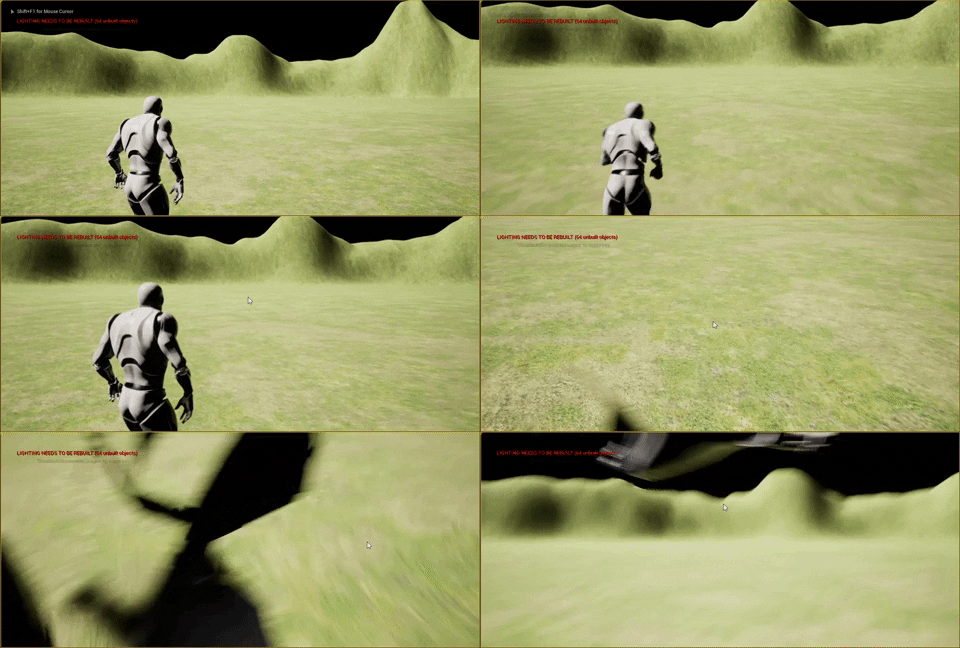
Still not sure what I'm missing, when my day speed is lower than 6 it stalls at noon or midnight. It seems to be trapped in "nearly 90" or "nearly -90" but i don't use that comparison anywhere
 smoky socket
more like this 😄
 pliant thistle
that is pretty blatant, lol
gentle urchin
pliant thistle
Still not sure what I'm missing, when my day speed is lower than 6 it stalls at ...
Is this for a day night cycle?
pliant thistle
yeah, but mostly i just want to figure out what is stopping it, there are other ways to do the cycle
even if i get rid of the update sun is still does it on shapes i try to rotate slowly
gentle urchin
This is what i ended up with
 pliant thistle
what does add time do?
icy dragon
pliant thistle
what does add time do?
That's a custom function for his BP.
Though what's inside is likely a simple float addition to the time struct.
 gentle urchin
mkv.. discord doesnt like it 😛
pliant thistle
it gets to p= 90 or -90, then spazzes out on other dimensions
i have dropped mkvs in others servers, weird

 gentle urchin
what is 6 anyways?
gentle urchin
delta * 6 ?
pliant thistle
yeah
 pliant thistle
if i set it to 7 it works fine, if i set it to 5 or lower it fails completely
at 6 i can make it work by lowering my framrate
 pliant thistle
ha, i have been setting it at 70 for testing
gentle urchin
 pliant thistle
stalls at 90?



 pliant thistle
that is with sped set to 1?
gentle urchin
yeah
pliant thistle
hmm, still stalled but eventually moved
gentle urchin
probably just some rounding stuff going on i would think
same happened when flipping back
stayed at 90 /0 /0 for a while
5-10 times longer than the average movement
pliant thistle
if i tab out and my framerate dives it makes it past the hump
but at 80 fps it seems like it will stay there forever
pliant thistle
i have tried both, same behavior, i was just using roll for east west vs north south
hmm, just need to figure out how to push it out of the rut automatically so i don't have to worry about this behavior
gentle urchin
Sounds hacky 😛
icy dragon
@pliant thistle Here's how I approach time of day stuff.

The function executes on tick, along with operation to add World Seconds var with World Delta Seconds.
gentle urchin
Are there obvious benefits to doing relative rotation (on anything) vs world, in terms of performance ?
pliant thistle
that is nice and simple
icy dragon
gentle urchin
Are there obvious benefits to doing relative rotation (on anything) vs world, in...
No difference, tbh.
It's just a way for me to have some tilt, since the time range is northern hemisphere
pliant thistle
mine works, more or less, i just can't figure out why it hangs at low speeds
icy dragon
As for the time speed, I simply multiply World Delta Seconds on the Update Time function

The branch is simply a way for me to reset the Seconds after 7 in game days.
pliant thistle
same behavior with set rotation instead of add rotation, which is expected

much uglier because I didn't rearrange anything, lol
 elfin abyss
Can the return node of a function be the body of a for loop like this?
 pliant thistle
try hitting win key to tank framerate and see if it advances
gentle urchin
elfin abyss
Can the return node of a function be the body of a for loop like this?
Yes, but it means you're exiting the loop as soon as it hits the return (in your case, just the first index)
gentle urchin
pliant thistle
try hitting win key to tank framerate and see if it advances
It probably does, but im not sure why it matters
pliant thistle
i think it is getting trapped by a nearly comparison that is runs into with super low delta time. was just curious if that was machine dependent or not
gentle urchin
While i agree it sure looks like that, how come it works for m with my method running at a sixth of the speed
elfin abyss
How do get my function to return the loop body then?
gentle urchin
elfin abyss
How do get my function to return the loop body then?
Every single loop body? it cant, unless you output an array
icy dragon
pliant thistle
same behavior with set rotation instead of add rotation, which is expected
Consider improvising my method instead.
elfin abyss
Lame, i was hoping i could make the looping function which adds an instance mesh for every loop so that my blueprint doesn't look like a giant spaghetti mess
gentle urchin
Hide the loop events inside the function 🙂
icy dragon
elfin abyss
Lame, i was hoping i could make the looping function which adds an instance mesh...
And hook the return node to Completed
pliant thistle
icy dragon
Consider improvising my method instead.
thanks, i might take up up on that, but mostly my curiosity is into why the flip seems to have an escape velocity
gentle urchin
Can be helpful to know that Returning in a loop body, will exit the loop instantly tho! Neat little trick, if you found what you were looking for and just wanna stop the loop, and return what was found
elfin abyss
That's what i tried to do, add the loop events in a function but if i add the completed to the return node it only places a mesh at the final point in the loop as opposed to adding a mesh for every loop
icy dragon
elfin abyss
Lame, i was hoping i could make the looping function which adds an instance mesh...
If you dissect the loop macro, you can see how messy it is.
gentle urchin
elfin abyss
That's what i tried to do, add the loop events in a function but if i add the co...
Sounds like you're doing on complete what should be done on loop body
there are many ways to do it, 2 of them can be seen here ;

Either do a loop in the main graph, and use a function for the stuff it should do,
Or hide it all inside a function
 elfin abyss
I got this which takes a starting position in a 3d space then loops for every axis to fill the 3d space for now
 elfin abyss
What i wanted to do was shove all those in a function like this so it's more clean

My main graph would end up not looking like the spaghetti monster
gentle urchin
I feel like you dont really want them nested like that either
combine X Y Z to get a single loop
X * Y * Z
elfin abyss
How can i do that
gentle urchin
multiply them
then you use division and modulo to identify the X/Y/Z value from there , in a single loop
elfin abyss
That's more than the 5th grade math i'm used to
gentle urchin
So cube 0 will always be located at 0/0/0
cube 0 + X will always be 0/1/0, relative
cube 0+ x*y will always be 0/0/1..
pliant thistle
i'm a little confused, so you are making a vector that is starting coordinate - index # * starting coord?
gentle urchin
He's adding displacement relative to tile number in each direction
elfin abyss
^
I'm adding displacement based on the size of the mesh multiplied with the index of the loop
pliant thistle
and returning a single vector
gentle urchin
This is the math you're looking for

the incoming value is the current tile index, among all tiles (x * y * z)
elfin abyss
pliant thistle
and returning a single vector
It's returning a single vector for every body loop
pliant thistle
ah, okay
fair sun
Hi guys, I'm trying to attach a mesh that simulates physics to a moving object using a physics handle like this. The problem is that the mesh flies around my attach point freely and I want the attached bone to stay snapped to the attach point


the sphere is the attach point
pliant thistle
@gentle urchin it stalls at 90 with value of -0.077104 and doesn't with value of -0.077105

is that some important trigonometry value that I don't remember ? lol
i need to get better are organizing my blueprints, i usually say i'll do it later, then when i go to work on it later, i can't figure out what i did =(
elfin abyss
gentle urchin
the incoming value is the current tile index, among all tiles (x * y * z)
Thanks, i'll try to understand it
I am not a very smart person
devout geyser
@pliant thistle, @gentle urchin Thx for the help with the timer, really appriciate it
pliant thistle
i didn't help much, but you're welcome for me trying =P
gentle urchin
Did it work?^^
devout geyser
Yeah its counting from the point to 0.003
gentle urchin
The frame delta, yeah
If its not accurate you could change the timer to 0.1 and remove 0.1 from the countdown instead ofc
Then itll happen on the first frame after 0.1sec
devout geyser
Thanks, I didn't know that exists
pliant thistle
i guess truncate function turns it into an integer, i'm pretty sure there is a function that just lowers decimal display
devout geyser
There is Round function as well, works perfect both ways for me
pliant thistle
if you want 1 decimal point apparently you can multiply by ten, then round, divide by ten =)
jolly oriole
I'm trying to understand the purpose of UE's GameMode blueprint. I come from Unity. Is it effectively Unreals intended implementation of the singleton pattern?
devout geyser
too much math, no thx 😛 ( thx anyway )
icy dragon
jolly oriole
I'm trying to understand the purpose of UE's GameMode blueprint. I come from Uni...
Game Instance would be something parallel to Unity's singleton
twilit heath
unreal has a GameSingleton class, that you can assign from ProjectSettings
and its not GameInstance
 solid grove
RInterpToConstant seems to mess up when trying to interp to pitch above 90 or below -90
Any idea why?
twilit heath
GameMode is the class designed to control the match @jolly oriole
it spawns Controllers, Players, starts and ends the match
there isn't more then one at a time active, but i wouldn't go so far as to call it singleton
pliant thistle
solid grove
RInterpToConstant seems to mess up when trying to interp to pitch above 90 or be...
I've actually been working on that problem for most of the day, lol
twilit heath
each world/map when opening instantiates a GameMode
solid grove
pliant thistle
I've actually been working on that problem for most of the day, lol
I'm just going to make my own implementation using AddWorldOffset as a rotation modifier
pliant thistle
out of curiousity how is it messing up for you?
solid grove
I am trying to rotate a cube 90 degrees when I press a button
it keeps stopping at 90 and -90 and won't go any further
pliant thistle
i noticed earlier that you can't change pitch by less than 0.077966
so for rapid very small changes it hangs up, haven't figured out why
between -0.077104 and 0.077966 stall
but you use case is different, hmm
are you locking the values for yaw and roll?
if you are just changing pitch, leave the other 2 alone so they can flip if needed, that is another thing i had issues with, if i was trying to control all 3 they would mess up.
 steel dune
How could I derive imaginary control input (x and y axis awsd) from AI movement?
gentle urchin
devout geyser
too much math, no thx 😛 ( thx anyway )
You can also just use the converter to define how many fractionals you want

 fervent swallow
hi! I have a pause menu widget and a subtitle widget for cinematics. inside my pause menu if I play it while subtitles are being played there is a button that get's overlated with the subititles and makes it unsuable for some reason. am I explaining myself? could anyboday give me a hand on this?
devout geyser
gentle urchin
You can also just use the converter to define how many fractionals you want
Thank you! you are very helpful, I appriciate it
elfin abyss
@gentle urchin lets say i don't try you way cause i'm a little too dumb to understand it and it might not work for my final vision, what's the worst that can happen with a nested loop like mine?
gentle urchin
Nested loops can be fine, but they can be messy to keep track off. easily spirals out of control 😛
in terms of number of iterations they'll end up with exactly the same amount , so there's little difference there
elfin abyss
I'm trying to make a proc gen volume. First i measure how many tiles i get on each axis and then where to place them, that's why i'm only filling up the volume for now, then i want to make a random array for every axis base on the number of tiles and finally have a filter to make the proc gen smoother
I'm sure your way works perfectly fine with all that but i'm not smart enough to work around it, for now
gentle urchin
The result is exactly the same, its just combined to a single loop
elfin abyss
A friend was telling me that 3 nested loops are n^3 complexity and i was afraid it might end up affecting performance once it's finished
gentle urchin
might, it depends on your execution really
surreal peak
Well, nested vs non-nested is a big difference actually
It's O(3n) vs O(n³) (given all 3 use n as max)
gentle urchin
In terms of number of calculations?
pliant thistle
the complexity looks high, but for small data sets, it is pretty trvial by modern standards
surreal peak
Yeah, but still has to be said
pliant thistle
yup
gentle urchin
Amount of executions should end up being the same ? Im not seeing how it differs 😛
pliant thistle
because algorithms class says so =/
gentle urchin
3 x 3 x 3 will always be 27 executions ?
surreal peak
If they are outside each other, each loop runs n = 10 times.
So 20 in total
gentle urchin
Ah
surreal peak
If they are inside each other, the outer runs 10 times, and for each of those, then inner runs 10 times
gentle urchin
now i get it.
surreal peak
Which is 100
gentle urchin
In the case above tho, we're talking about 1 single 100 loop, or a 10 + 10 nested loop