#blueprint
402296 messages · Page 677 of 403
 fiery swallow
 novel ice
Oh
novel ice
Oh
Do you know what I mean by that?
In your situation it doesn't look like a montage is necessary, a simple play animation should be fine
Destroying an actor in the middle of a line executes everything else immediately. Maybe moving it to the end will fix your problem
 pale orbit
does anyone have any idea why is my movement like that when theres a camera on the actor?
in the second part i take the camera off
and its smooth
 proud sable
I'm very new to UE and trying to set up a HUD switching system. The game has 3 characters, with eight total abilities each. The player can switch between them and hold shift to access the other four "secondary" abilities.
Right now I have 6 different HUDs that I swap between when a different character is possessed and when the shift key is held. I know this is probably super incorrect but I haven't been able to find anything digestible for a beginner online to help with this.
How do I improve this system and hopefully get it to work with only one HUD blueprint? At the minute the main hurdle is figuring out how to swap out the icons and portraits for the appropriate player character, and bind the AI health/ability cooldowns to their widgets.
Is there somewhere I can read up on this to get up to speed and do this right?

 shut hinge
having a problem with a state machine in the commander pawn. Doesn't appear to be working. I think hes using third person character's inherited state machine because when I plug in the state machine in the commander, hes not responding to it.
Anim instance is listed as his parent class for his state machine.
proud sable
Thank you! I don't fully understand but knowing it's possible and the terminology to use when I google it helps. Before I look into it more I'm guessing this button is how I reference a variable for the image?

Oh sorry I didn't see the bind button above the image selection, thanks 😅. I'll watch some more tutorials, the course I was following only covered the attribute bars and cooldowns for the main player character
 unkempt musk
Anyone have an idea as to why my camera wiggles to the side for .5 seconds when I change directions?

 odd nova
hi. im trying to implement easy balistics, but the bullet dont go to the center of the screen (TPS). any ideas where to look? cant find any option for that
 shell ember
odd nova
hi. im trying to implement easy balistics, but the bullet dont go to the center ...
shell ember
odd nova
hi. im trying to implement easy balistics, but the bullet dont go to the center ...
if you want the bullet to go to the center of the screen then you should use camera for aiming not the player
odd nova
ok thx
 faint pasture
@odd nova first or third person?
 fluid rose
What's this node?
 faint pasture
If it's third, welcome to hell. Getting the design tight will be a bit of work but it's doable. You need to think about how to determine the depth of the intended hit.
 faint pasture
fluid rose
What's this node?
faint pasture
fluid rose
What's this node?
Vector x Float
odd nova
@faint pasture, TPS. i have a working solution, but i wanted to use easy balistics, but, no, going back to my working solution lol
fluid rose
I can only do Vector x Vector
faint pasture
@odd nova the ballistics don't matter. Presumably you just feed it a start point and direction for the shot. Calculating those is what you have to worry about.
fluid rose
Found it, thank you 
 faint pasture
fluid rose
Found it, thank you <:RemYes:644338670232535080>
faint pasture
fluid rose
Found it, thank you <:RemYes:644338670232535080>
Is that ue5?
 sand shore
the best way to do TPS OTS aiming with the projectile leaving the gun is
- Run a sim from the gun itself
- Run a sim from the camera
- Do some kinda lerp between the two and have the visual element follow that
And you can do some magic to get a better aim point for the gun
 smoky elm
Does anyone know how to use the AI MoveTo function on a model which doesn't have animations?
faint pasture
smoky elm
Does anyone know how to use the AI MoveTo function on a model which doesn't have...
Animation shouldn't matter but.i think that node only works on Character
Don't quote me on that but I think it uses the CMC
sand shore
AI Move To should be using pawn interface (eg, SetMovementInputVector or w/e)
smoky elm
Any way to do something similar not on a character?
sand shore
Ought to be able to consume that input vector and drive locomotion that way
 delicate folio
hi just a question that i was wondering - is it possible to involve the landscape design into the blueprint for example if you have a forest landscape can you make it so when the player character goes into the forest their movement is slowed due to the landscape they have entered?
sand shore
But you have to play nice with the navigation mesh too - so no flying stuff
sand shore
delicate folio
hi just a question that i was wondering - is it possible to involve the landscap...
easily a dozen ways to do this
probably no single best way to do it, try out your first idea for how to do it
delicate folio
sand shore
probably no single best way to do it, try out your first idea for how to do it
i havent really got an idea of how to do it in the blueprints i just thought of it being possible right now tbh but i shall try if anyone does know of a way or has any tips then much appreciated and thank you
sand shore
I could give you a solution, but I prefer to nudge others along the path instead of just teleporting them
Also my solution is going to be harder for you to understand/implement
 zealous cave
Good morning everyone, I'm not understanding how to reference actors. I've reviewed, https://docs.unrealengine.com/4.26/en-US/ProgrammingAndScripting/ProgrammingWithCPP/ReferenceAssets/ , but this hasn't been very helpful.
The level I'm working on is a basic ThirdPersonExample. I have a character starting on a small platform above the floor ready to drop, and a cube floating next to him with physics enabled so it'll fall at start.
The idea is when the cube touches the floor it disappears, but when the player touches the floor it gets teleported to the start platform.
I'm hesitant to create all of these conditions at the Level Blueprint level, thinking its best to create these actions per object in either the class or the object. Since they are class specific. This would also be helpful if I have multiple players or objects that should respond in different ways to colliding with the floor.
A How To Guide for Referencing Actors in Unreal Engine 4.
sand shore
zealous cave
Good morning everyone, I'm not understanding how to reference actors. I've revie...
Start here https://www.youtube.com/watch?v=EM_HYqQdToE - don't use C++ stuff if you're doing it all in BP
You want to take advantage of "natural" ways to gather/store references to objects.
Eg. Begin Play -> GetGameState -> GameState->RegisterTrackable(this)
Eg. SpawnTrackable -> SpawnActorOfClass -> RegisterTrackable(SpawnedActor)
All that is reliant on Game Framework knowledge
You can also GetAllActorsOfClass but it is the laziest way to do things
(other than GetPlayerCharacter(0) which is great until you do multiplayer)
zealous cave
sand shore
Start here <https://www.youtube.com/watch?v=EM_HYqQdToE> - don't use C++ stuff i...
Thanks @sand shore I'll check this out.
zealous cave
sand shore
You can also GetAllActorsOfClass but it is the laziest way to do things
the tooltip says its slow, so I'm opting to stay away
 slate apex
Does stuff like this take too many resources?

i'm making a 2.5d Game
so nothing really takes alot of muscle to run
but then i have event tick like this

yes even italians are mad i murdered spaghetti like this
but uh
yeah.
 maiden wadi
Realistically, you should avoid using any GetAllOfSomething calls. Create the widget once, place it in a pointer. On overlap check if that's valid, if so if it's on screen, do nothing. If not on screen add to screen. Then on end, check if it's valid and if yes, remove from parent.
Even better. Put this functionality somewhere common like the HUD or Controller. Then you can reuse it multiple times for multiple interaction things instead of putting it in every interactable.
 last abyss
well its not a loop, you only disable the outline on the last stored target
you could use an array, store the enemies in it when they are hit by the multisphere trace then when you disable it use the array with a for each loop
and ofcourse clear the array when the loop is completed
nope. So you check if you hit an actor with the branch (hit actor == none). Off of the true you can do the for each loop the same way you're doing it right now.
 olive sedge
Guys I've been at this forever now, I'm not getting a reading on my spline rolls. I have made a minimal example here: https://blueprintue.com/blueprint/e975kcyq/
I would expect a reading of anywhere close to .17 but I'm getting 0.0
BlueprintUE
last abyss
yeah, that's what that would do. is that not what you were trying to achieve?
And how are you calling the 'set target enemy' function? on a timer, tick (i guess tick is a timer xd) or on click?
 frozen needle
Need a quick help. What am I missing? This worked fine before, but now it gives me an error on end overlap

 sand shore
When you cross wires between the major paths, you are using the other reference
frozen needle
Should I set a reference to the character after cast then?
sand shore
So, say you have many things overlapping your actor after you start overlapping the right thing.
That cast node failed on anything that isn't a BH_Milo_BP - when you use the reference on End Overlap (when Moving In is true, notice the top node references the cast which is from Begin Overlap) you get nothing
Or vice versa
frozen needle
should I use get all actors of class instead?
sand shore
Oh actually you're always using the other reference
sand shore
frozen needle
should I use get all actors of class instead?
No
frozen needle
sand shore
No
What is the solution then? If I have multiple casts going on
sand shore
I'm getting to that
frozen needle
Oh ok
sand shore
I've split this into two sections, 1 and 2.
The sections are roughly defined by the output of the nodes (Say the result of the Casts) and whether they originally run from Begin or end

Orange here represents a typical End Overlap path
See how the node you hit at the end of 2 references data from the start of 1 - all the time?
The solution is to only reference things from a like path - either 1 references 1 or 2 references 2
That means you can't do this thing where you cross execution wires over this line
frozen needle
Oooooh
sand shore
do this
 sand shore
and don't do these (at least like this)

If you need to do a return, you need to find a way to not cross data
frozen needle
I just want a way to prevent my camera from snapping if player goes out and back into the trigger box quickly
sand shore
sand shore
do this
Maybe just doing the data wire fix here will be enough.
Try keeping your call to Return
(but, the reason why that might work is because the values of the move are stored when you start it... maybe)
(Not real familiar with that node)
(in general, what I've said is true - you don't ever want to call a regular node with crossed data wires -- async nodes are a little special)
async nodes always have this icon (so you can tell the difference)
 frozen needle
The thing with bools don't work 100% cause it still doesn't help from rapid spamming, but hopefully in normal ADHD-free conditions it will do the job
Why is it bad anyway?
sand shore
Crossing wires?
frozen needle
Yeah
sand shore
You can easily get the error you just got lol
frozen needle
ah
sand shore
But also you can easily get bad data (that is either stale or has not been initialized yet)
If you want to cross data wires over execution lines - store them as variables
olive sedge
Can someone confirm for me that this is broken?
https://blueprintue.com/blueprint/e975kcyq/
or tell me what I'm doing wrong
BlueprintUE
sand shore
frozen needle
ah
you can click on these, btw

take you right to the node reporting an error
frozen needle
sand shore
you can click on these, btw
Yeah it didn't really show what exactly is wrong
sand shore
It does though, hah
frozen needle
I mean it didn't stop on the vector and rot variables which were the issue, just snapped to the "move to"
sand shore
olive sedge
Can someone confirm for me that this is broken?
https://blueprintue.com/blueprin...
you make a spline mesh that has no length (starting and stopping at point 0)
you make a second spline mesh that covers the entire spline length (but uses local space coordinates)
If the issue is that you don't see any spline mesh at all - you either forgot to specify a mesh (click on the Add Spline Mesh Component node, see if you configured the template properly), or you should be working in world space coordinates (check right next to world origin - if you see the spline there, that's why)
olive sedge
@sand shore oh, you're right. what should be the end position of the second (last) spline then?
sand shore
olive sedge
<@!112221040666542080> oh, you're right. what should be the end position of the ...
play with it?
Change the coordinate spaces?
Get the final point along the spline?
olive sedge
I did all that
olive sedge
the issue is just that I get 0 readings on the roll
but yes.. I probably need 3 spline components anyway
I'm gonna update and report back
 lament night
Good people I need help.
Seems simple maybe but I run out of hair to pull.
I have set BP for RTS camera to switch to 3rd person character.When I'm in RTS mode everything is fine(camera movement,edge screen movement and rotation).But when I posses 3rd person character my Mouse X and Mouse Y do nothing.
As you can see in image ,event are called and values are set 1 in binds,but there is not rotation.
When I change binds to random keys, rotation works fine.So rotation logic seems Ok.
If it's needed I can upload image of Possesion BP.
 zealous cave
sand shore
Start here <https://www.youtube.com/watch?v=EM_HYqQdToE> - don't use C++ stuff i...
zealous cave
sand shore
Start here <https://www.youtube.com/watch?v=EM_HYqQdToE> - don't use C++ stuff i...
This was super helpful! Casting was a massive help. I'm only 30min in, and I've already solved both original questions.
This might be a n00b questions, but why is the ball sinking into the floor? I should clarify that it fell from above and thats where it stopped after bouncing a couple of times.
 olive sedge
@sand shore I updated the post
BlueprintUE
the generation is sound now but the reading is still 0
to everyone.. I can't get a reading from the GetRollAtDistanceAlongSpline and it seems to me like this is a bug. Can anyone confirm this?
sand shore
zealous cave
This was super helpful! Casting was a massive help. I'm only 30min in, and I've ...
The channel pins have some useful things
 dawn gazelle
lament night
Good people I need help.
Seems simple maybe but I run out of hair to pull.
I hav...
dawn gazelle
lament night
Good people I need help.
Seems simple maybe but I run out of hair to pull.
I hav...
It maybe has something to do with this setting - it would be on your spring arm or on your camera.
 lament night
It's on,
Thing is,when I set for example Q key for x rotation it works fine.Only when I set Mouse x for rotation it doesn't work.But Mouse X works for camera when I'm in RTS mode.
I'm guessing when I posses new character player controller still hold mouse x for RTS camera interaction,but can't find issue.
here is my Bp for character possesion

 narrow kelp
@lament night If you're possessing a new pawn, then any input code will need to be on the new pawn too
or on the controller instead
maybe thats whats going on?
lament night
I'm possesing default third person character(which has movement component) and rotaion BP is there, and Possesion BP is on controller
narrow kelp
Could be a couple things, might not be possessing it correctly, might not have your inputs set up right, or it could be a problem with your camera setup
those would be the first things I'd check
lament night
is one character automatically unpossessed when another is possessed?
sand shore
lament night
is one character automatically unpossessed when another is possessed?
yup should be
 eager agate
hello! is there a way to check the collision of a specific component in a blueprint?
i am trying to cast to a character, but i dont know how to check the certain component that needs to be passing
 dawn gazelle
eager agate
hello! is there a way to check the collision of a specific component in a bluepr...
dawn gazelle
eager agate
hello! is there a way to check the collision of a specific component in a bluepr...
You mean at runtime?

The "Other Comp" would tell you what component it was that caused the overlap/endoverlap.
 unkempt fjord
Dumb question here! I’m using completerpg as a game template. I’m duplicating the main character blueprint renaming it and plugging in my mesh and anim bp. BUT some functionality is broken. In general should I avoid ctrl c ctrl v of complex integrated blueprints and as a general rule create a child instead?
Or at least use the original blueprint but overwrite the skeletal mesh and animbp?
dawn gazelle
unkempt fjord
Dumb question here! I’m using completerpg as a game template. I’m duplicating t...
Probably best to make a child if you're not entirely sure what you may mess up. You can always override functionality if it's not behaving how you want it to.
 loud cipher
Hey guys what is the blueprint to set an anim class?
I want to set an anim class on begin play
 loud cipher
Thankk youu
eager agate
dawn gazelle
The "Other Comp" would tell you what component it was that caused the overlap/en...
would you mind sending an example? im trying to check if a specific component is overlapping but i cant get it right
 dawn gazelle

This would be how you could check for a specific component on a specific character.

 desert juniper
lament night
Good people I need help.
Seems simple maybe but I run out of hair to pull.
I hav...
desert juniper
lament night
Good people I need help.
Seems simple maybe but I run out of hair to pull.
I hav...
Don't know if you've solved this or not, but check the level or game mode BP
eager agate
dawn gazelle
This would be how you could check for a specific component on a specific charact...
tysm
desert juniper
Sometimes they have an event for the input action of that key and it doesn't allow the input action event to propagate correctly
lament night
@desert juniperHave no BPs there yet.All clear.
desert juniper
lament night
<@!106621971705380864>Have no BPs there yet.All clear.
If you're able to change the binding to other keys, then likely something is hijacking the keypress event, and not allowing the event action to be called
also, though you may not have written any code, the BPs have to exist
lament night


it looks like it's being called
and since other actor is unpossessed,the rotation for it shouldn't interfere with this
frozen needle
@sand shore So what about crossing stuff if it's something like this?

should I still make a copy and do it all separately or these variables are fine?
dawn gazelle
frozen needle
<@!112221040666542080> So what about crossing stuff if it's something like this?
Generally pure nodes (like the GetPlayerController and the Self reference) are fine to span across like that. For cleanliness in your BP, especially if other people are going to be working on it, it's nice to keep whatever variables are required on your execution path to that execution path, and in some cases, it's required as you may be trying to call a reference to something that doesn't exist on your execution path which may cause errors to pop up that will be harder to track down.
As it is, there is nothing specifically wrong with what you have right now in that image - it will work 100% of the time, so long of course as your casts succeed 🙂
frozen needle
dawn gazelle
Generally pure nodes (like the GetPlayerController and the Self reference) are f...
I see. Thanks!
sand shore
sand shore
I've split this into two sections, 1 and 2.
The sections are roughly defined b...
@trim matrix
because the pure node isn't triggered from an exec line
due to the nature of how they work
I'm explaining it terribly
but it's the thing
ykno.
THAT behavior
Anyone who needs a better explanation of the thing... I did a video that actually explains the mechanics
dawn gazelle
There was this audio software I used to play around with some time ago...
 sand shore
in the pins
 trim matrix


I used level streaming for foliages so instances would be handled seperately
anyways I set it up looks okay in editor when I play none of the levels get loaded
couldn`t find any thing online about it ugh
and its not even client side yet
it does this on offline as well
sand shore
sounds like you need to load your levels (because they aren't always loaded)
there's a node to do it
trim matrix
yeah i kind of found something about initally loading but that option no longer exists
I thought world composition handled this automatically tho
sand shore
oh I have no clue on WC
 tall jacinth
Anyone know where I can find some good tutorials on Blueprints/Visual scripting with Unreal 4?
 icy dragon
tall jacinth
Anyone know where I can find some good tutorials on Blueprints/Visual scripting ...
icy dragon
tall jacinth
Anyone know where I can find some good tutorials on Blueprints/Visual scripting ...

Unreal Engine
Unreal Online Learning is a free learning platform that offers hands-on video courses and guided learning paths.
unkempt fjord
@dawn gazelle thank you
loud cipher

Hey all
I have setup a system where my game displays the coins gained from picking up a coin
I have created a text binding that gets a reference of the coin
then gets the integer of the coin amount added
and then its plugged into the text bind output node

However i was wondering
it just displays the full integer value
how can i have it display a +
along with the integer
desert juniper
append the text
have the display text bound to a text variable instead of an integer variable
and use an Append String node to append "+" to the coin count ref

 daring cradle
So...the event Blueprint Initialize Animation in my AnimBP has just stopped working
Cant seem to figure out why 🤔 wondering if this is a shared issue?
 dry pewter
daring cradle
So...the event Blueprint Initialize Animation in my AnimBP has just stopped work...
dry pewter
daring cradle
So...the event Blueprint Initialize Animation in my AnimBP has just stopped work...
Maybe sharing a screen of the node setup might help to picture the situation? or telling wym by "stopped working"
trim matrix
Is there any way to split foliage instances.
I have too many and removing / transforming one of them gives massive drop to FPS
daring cradle
This event just stopped firing. And this AnimBP is used on a spawned character...so you'd think it would initialize 🤔
Stopped firing as in previously it would function as a "beginplay" type event. Now it doesn't fire, even put a breakpoint on it
 trim matrix
I tried level streaming with foliages split into different levels but that didn`t work as it still dropped even with 1 instance on one level
daring cradle
Hm...nevermind it does fire! But...well there's some other issue now lol i'll figure it out
dry pewter
daring cradle
Hm...nevermind it does fire! But...well there's some other issue now lol i'll fi...
I think you don't want to use the "get pawn owner" node but the "get player pawn" node, pretty sure!
Isn't that a question for #cpp ?
 smoky wasp
Q: Hey guys, im trying to create a 'repeating conveyor belt' of cubes but when i 'teleport' object at end of line to the start, theres a lag in the timing. I uploaded a youtube vid that makes it easier to understand than any description i can come up with. Even if delta speed is constant there will be gaps in between cubes:
https://www.youtube.com/watch?v=YmKTKiz0fb4

trying to get it working
 rough blade
@dry pewter wasnt sure - I can move the question there.
dry pewter
rough blade
<@!270307292912549888> wasnt sure - I can move the question there.
Maybe someone there can help you 🙂
 ripe rose
i have a thing in a bp that i'm trying to rotate to face each player looking at it. meaning, on your screen, you see it facing you. on someone else's screen they see it facing them.
how do i get the actor or controller owned by the local client? i need to get that so i can get the owned player's camera location so i can rotate the object to face them.
or maybe there's a different way to do this that i'm not realizing
edit: solved. seems to be "get player controller(0)" -> get controlled pawn, to do what i want
 opal ivy
If I've got a Static Mesh component in my Actor, how do I make it so that the component's variables show up in the editor?
Specifically the mesh and material(s)
 thorny relic
opal ivy
If I've got a Static Mesh component in my Actor, how do I make it so that the co...
thorny relic
opal ivy
If I've got a Static Mesh component in my Actor, how do I make it so that the co...
You mean when you have an instance of the actor selected in the world?
You can select the component from the tree on the right, above properties
 thorny relic
Or are you asking how to make them appear on the properties of the actor itself, without selecting the sub-component? Because I wish I knew that myself
opal ivy
I want to be able to click on the instance of the actor in world and edit the mesh inside a static mesh component
thorny relic

Click on the mesh component in the list to view/edit the properties of that component, instead of the actor
opal ivy
Right, I want it to be doable on a per-actor basis.
I don't want to inherit an actor just to change a mesh
thorny relic
This is on a per-actor basis
You select the actor in the world, and change its instance of the sub-component in the world
dawn gazelle
ripe rose
i have a thing in a bp that i'm trying to rotate to face each player looking at ...
Your player controller can do "Get controlled pawn" to get reference to the actor they are controlling, this will work on both server and client.
On server, you can do "Get controller" on your pawn. You can't necessarily do this on clients as they don't have access to all controllers, so in the case if you're doing get controller on a pawn, and it's controlled by another player, you'd get a null pointer reference.
If you're dealing with UI, you can use Get Owning Player which would return the player controller.
opal ivy
That does lots of weirdness with my construction script.
ripe rose
dawn gazelle
Your player controller can do "Get controlled pawn" to get reference to the acto...
yeah those are all in reference to the pawn of the bp you're looking at though, not the pawn owned by the client
whereas what i was doing was getting the controller of the client from within a bp not owned by the client
opal ivy
How about this then... Is there a way to create an HISM that takes all the properties from a static mesh?
 prisma stag
Hello, I have a 3rd person game and am currently setting up a placement system with it. As of right now you can make a selection, the menu disappears and you can click somewhere to make you placement. However, when the cursor is enabled for this, it moves the camera as well which Im okay with, but if you right click, it stops the mouse from affecting the camera and in order to make a selection you have to double click.
opal ivy
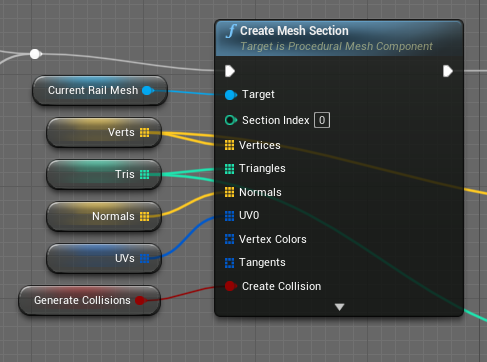
https://i.imgur.com/1Keufyw.png okay, but if Generate Collisions is true, why no collide-y?
 dry pewter
prisma stag
Hello, I have a 3rd person game and am currently setting up a placement system w...
dry pewter
prisma stag
Hello, I have a 3rd person game and am currently setting up a placement system w...
Sounds like you want to set up your actor controller rotation
prisma stag
dry pewter
Sounds like you want to set up your actor controller rotation
Its not the rotations thats bad, its the fact that when I right click I have to double click the viewport to make the selection.
dry pewter
prisma stag
Its not the rotations thats bad, its the fact that when I right click I have to ...
Are you playing on the unreal engine viewport or standalone game? when playing on the viewport you gotta make some extra clicks
prisma stag
dry pewter
Are you playing on the unreal engine viewport or standalone game? when playing o...
Oh I didnt know that. Let me test real quick.
prisma stag
dry pewter
Are you playing on the unreal engine viewport or standalone game? when playing o...
The issue still persists.
dry pewter
Maybe the cursor is getting caught in some transition between affecting the menu or the placement system, is your "set input mode UI/GAME" correct?
 main halo
Guys, please. I am on a frustrating problem here. I am for the first time doing melee combat and I have set a collision preset to Enemy, Player, Weapon.
I want to the weapon hit the enemy. Simple and generate a hit event to simply print on my screen (HIT)
I have create a blueprint to my weapon and when the game starts that blueprints is spawned in the world and attached to my player hand. That is working fine.
My Enemy is on my front and when I walk on my enemy I cant generate the hit event. I havent even filtered to only show me the hit when hit the enemy by casting.
Both the enemy mesh+Capsule component are with hit event and with type Enemy. Collision enabled (Query and physics) and hit result + overlap events true.
My weapon is with a skeletal mesh. Why it dont work? I know I can use a box collision but I prefer to not.
dry pewter
main halo
Guys, please. I am on a frustrating problem here. I am for the first time doing ...
Yo i think i can help, wanna pm me?
main halo
dry pewter
Yo i think i can help, wanna pm me?
Sure
prisma stag
dry pewter
Maybe the cursor is getting caught in some transition between affecting the menu...
Ok. So I kind of fixed the problem, but it brings 2 new ones, one I think I should be able to find online, the other is one I need help with.
I have it set up so that when tab is pressed, the input mode is changed to ui so that I can make a selection, then when it is released it goes back to game. Now for some reason it is still toggle, but that's what I will fix later.
The problem is, if I set the released to change inputmode to game & ui the placement works, but it doesn't make sense as when you make your selection for some reason the ui and cursor automatically disappear, and then when you place your selection it seems to be set back to game mode on its own.
dry pewter
prisma stag
Ok. So I kind of fixed the problem, but it brings 2 new ones, one I think I sho...
Remember to follow the "set input mode" node with a "show mouse cursor" node
prisma stag
dry pewter
Remember to follow the "set input mode" node with a "show mouse cursor" node
Yea, Im looking at my code and following the steps to see what is happening. Might have found it.
 near flint
Hey guys, Is there a way to launch a character to a specific location? I want to make my dash action more accurate - and set the lunch by distance and not by force
dry pewter
near flint
Hey guys, Is there a way to launch a character to a specific location? I want to...
Maybe "move to location"?
But that moves the actor in a straight line, so maybe setting various move to location to get the effect you want, there might be a better solution tho
narrow kelp
@near flint You could use some kind of interpolation. Theres lots of ways to move a character, it really depends on what exactly you need it to do.
dry pewter
I've got a question guys, so i have my Widget created and added to viewport, now can i "spawn" a text block on that widget?
 spark steppe
yes but no
you would have to make your own custom widget which has an textblock in it
as you can only create userwidgets on runtime
dry pewter
spark steppe
as you can only create userwidgets on runtime
kk, will try
frozen needle
the gate doesn't close on end overlap, which results in me being able to use interact outside of the trigger box. What is the issue?
 spark steppe
did you debug if the event doesn't fire or if something before stops it from running through to the gate closing?
e.g.: if you change your mission bool in the area, your branch wouldn't go to false
 trim matrix
I have a question I already know how to make a basic fighting combo system but I want to make it so that if I press the attack button and im in the middle of the first one then I hit the attack button again whilst in the middle of the first anim itll play out the last 2 no matter what.
narrow kelp
@trim matrix make a queue
 rough wing
When I change the relative rotation of PerkScene, FloatingPerkSphere doesn't rotate relative to PerkScene but rotate as if it was a seperate object.

Doesn't make sense at all. When I rotate PerkScene in the blueprint, it works as it should (FloatingPerkSphere revolves around the center), but in-game it acts as if it isn't relative to PerkScene
 sonic pine
Hiho I have a problem about Add to viewport on servers. I have already been told that widgets do not work on the server, but the UE forum tells me something else, but it says you just have to set the widget correctly. Unfortunately I can't find anything specific about it and I would have liked to have fixed it, I've been annoyed with that for long enough ...
-
Why do I get the Add to Viewport error before logging on to the server ???
-
What EXACTLY do I have to change so that add to viewport works (Healthbar, Minimap, Inventory, Character stats and so on)?
Oh yes, please talk about widgets if you mean widgets and HUD if you mean HUD and not widgets ^^
 dawn gazelle
sonic pine
Hiho I have a problem about Add to viewport on servers. I have already been told...
dawn gazelle
sonic pine
Hiho I have a problem about Add to viewport on servers. I have already been told...
If you're doing dedicated servers, widgets don't exist on them, so you can't create them and add them to the viewport. They should only be created and added on clients.
Example: Begin Play -> Has Authority (remote) -> Create Widget -> Add to Viewport
 dawn gazelle
Nope
Your third person character exists not only on your client, it also exists on the server, and any other clients.
So each of them would fire begin play when that actor begins play.
sonic pine
ok...
but the thrid person character is the point who should be able to see the widgets
trim matrix
narrow kelp
<@456226577798135808> make a queue
thank you and uh Can you elaborate on that
narrow kelp
Sure, you could for example make an array of inputs that you add to while the action is going on, and when the action is finished you look at the first input and do what it says
dawn gazelle
Eg. I join a dedicated server. I'm the only player online. The server spawns a Third Person Character for me to posses- this Third Person Character is replicated to me. The "Begin Play" fires on both the server copy and the player copy.
You join the same server, now we're both online. The server spawns a Third Person Character for you to possess. The server replicates your Third Person Character to me, and mine to you. The "Begin Play" fires on the server for your copy, on my copy, and the begin play fires for my character on your copy.
narrow kelp
Then remove that input. You can add timestamps or limit to the last input depending on what you want
dawn gazelle
So it gets even more complicated when you're using Characters to create UI.... Because MY character will create a UI for me. Then when your character joins, it's going to create ANOTHER copy of the UI for me...
sonic pine
ok should i use something like a "widget_Component" to include to the ThirdPersonChar?
 white crypt
if you want to add widget to the owner then make a custom event, set owning client
and add widget on that event
or you can also use is locally controlled and a branch

or
 sonic pine
ah ok
white crypt
and read this
it's a must
@sonic pine pinky promise me that you will read it
and do your widget stuff inside player controller not your character
for second example to work you would need this, but better if you stick with the first example
 dawn gazelle
I had to reference this diagram so much while I was learning... Now it's second nature XD
 white crypt
i've learned it's much easier to work with dedicated servers
don't have to deal with the client/host being on the same machine
and you can use get pc/character
 jaunty orbit
anyone know why this doesn't work

 jaunty orbit
No how do I go about doing that?
jaunty orbit
so like this right? But it wont let me add the montage to it
 white crypt
yup like so
now go back to your character bp
drag from mesh and type - get anim instance
then drag from anim instance and type play montage
and use that montage node, then it will work
jaunty orbit
still nothing :/
jaunty orbit
 jaunty orbit
it prints
white crypt
does your montage works when you open it?
jaunty orbit
i did retarget the animation from a paragon character by following a video
white crypt
because my last guess would be that you are using montage on the wrong skeleton
jaunty orbit
and yes it works
 restive dagger
When I rotate the spring arm the camera does not rotate
any reason for that?
even the spring arm does not rotate
white crypt
@jaunty orbit does this slot inside your montage

is the same as in your animbp?
defaultslot
jaunty orbit
no in the montage it says upperbody and not defaultslot
 white crypt
awesome, np
 soft plinth

 tidal marlin
Hello.
How i add random float in material?
Pls, without using dynamics.
white crypt
that should probably go in #graphics , i could only give examples using scalar parameters
since i dont work with that stuff so no idea if there's another approach
dawn gazelle
tidal marlin
Hello.
How i add random float in material?
Pls, without using dynamics.
This generates a random float between 0 and 1 per instance of the material without creating dynamic material instances.
 white crypt
you no longer need to create dynamic mats though
i know its irrelative, but learned this recently myself 😄

 white crypt
you are asking for unreasonable things, better if you state what kind of problem you have and provide some pictures
otherwise people will just ignore you
icy dragon
Not to mention, this Discord is not meant for personalised teaching.
white crypt
aaaaaand its gone
trim matrix
is there another discord for programming help?
im using blueprints but I wanna make sure im in the right place before i ask my question
icy dragon
trim matrix
im using blueprints but I wanna make sure im in the right place before i ask my ...
This channel is specifically for BP stuff.
trim matrix
okay
Im trying to create a Weapon swap system in my project much like how Enter The Gungeon works. it rolls through a list of weapons in order then once it gets to the last weapon it starts the list over again.
ill send pictures of what i have so far
one minute
Logic for checking Which weapon is Equipped

oh wait i think i just figured it out myself
Function for switching Weapons

Im not trying to save the Current ammo or mag size of the weapons at the moment. I would like it to just switch
Currently it switches from the Rifle to the Shotgun fine, but it wont switch from the shotgun to the Sniper
I think im missing information on how switches work, or im using enums improperly. but i cant find much on it.
dawn gazelle
Don't convert an enum to string. It's bad form and it won't work in a packaged game ._.

You may also want to use a select node rather than several branches.

As for what you have not currently working, your branching logic in the screenshot is broken.
You're checking if the current weapon is rifle, and if false, checking if the current weapon is again, rifle.

Last bit of advice is to not use tick at all for this. Wherever you're setting those booleans is where you should be calling a function to swap the weapons.
trim matrix
Thank you for pointing that out
Ok, I have it hooked up to a on key press, so instead of having the logic outside the function running on event tick, i should run the logic inside the function correct?
that makes sense when i type it out
Thank you again
dawn gazelle
Ooh and when doing the swap to the different class - that can be simplified too:

No need to use a switch statement if you are doing the same thing for all weapon types.
 shadow saddle
i have no idea why launch chara only works well in Z direection
but never in x and y
in Z if i put 700 i can see i jump high
if i put 5000 on x or y it moves a tiny bit
fiery swallow
dawn gazelle
Ooh and when doing the swap to the different class - that can be simplified too:
Wouldn't the simplest method be to use a multi gate and eat time it's called the weapon changes to the next one?
shadow saddle
if i put 50k to 100k it teleport to the desitnation
trim matrix
dawn gazelle
Ooh and when doing the swap to the different class - that can be simplified too:
Oh what,
fiery swallow
Did you try overriding xy? @shadow saddle
trim matrix
sorry ill wait
shadow saddle
ye
fiery swallow
shadow saddle
ye
What are you trying to do? Launch character isn't really for XY only
It's kinda meant for launching which is Z
shadow saddle
ok so basically
im trying to add some force to my AI boss so when my chara is far away from boss, it perform an attack( animation) that launch himself to me
but the animation distance is short
im trying to push the chara in the animation
to make the AI travel further

@fiery swallow
check 0:20
fiery swallow
Launch Character is Additive. This is mind you'll move further XY depending on z
 fiery swallow
depends on if you use override
shadow saddle
should i overide or not if i want to do whwat u said
shadow saddle
fiery swallow
Launch Character is Additive. This is mind you'll move further XY depending on z
this
fiery swallow
If you are falling and then try to launch your character, without overriding, you'll likely just keep falling


One is with Z and one is Without Z, You can see the effect Z has on launch character
fiery swallow
shadow saddle
should i overide or not if i want to do whwat u said
If you're already on the floor, and not moving then you don't need to override. If you want the same launch results almost every time then yes you'll want to override
fiery swallow
shadow saddle
what is ur default global gravity z
I don't know what you mean, All characters have a gravity scale and the default is 1.0
 fiery swallow
Yeah you should probably just keep things default unless there's a specific reason you need to override it in the world
shadow saddle
ah yes
now i know why things wouldnt work
i set gravity scale to 5000000

becuz last time jumping up took too long to drop to ground
thanks anyway
fiery swallow

 azure sparrow
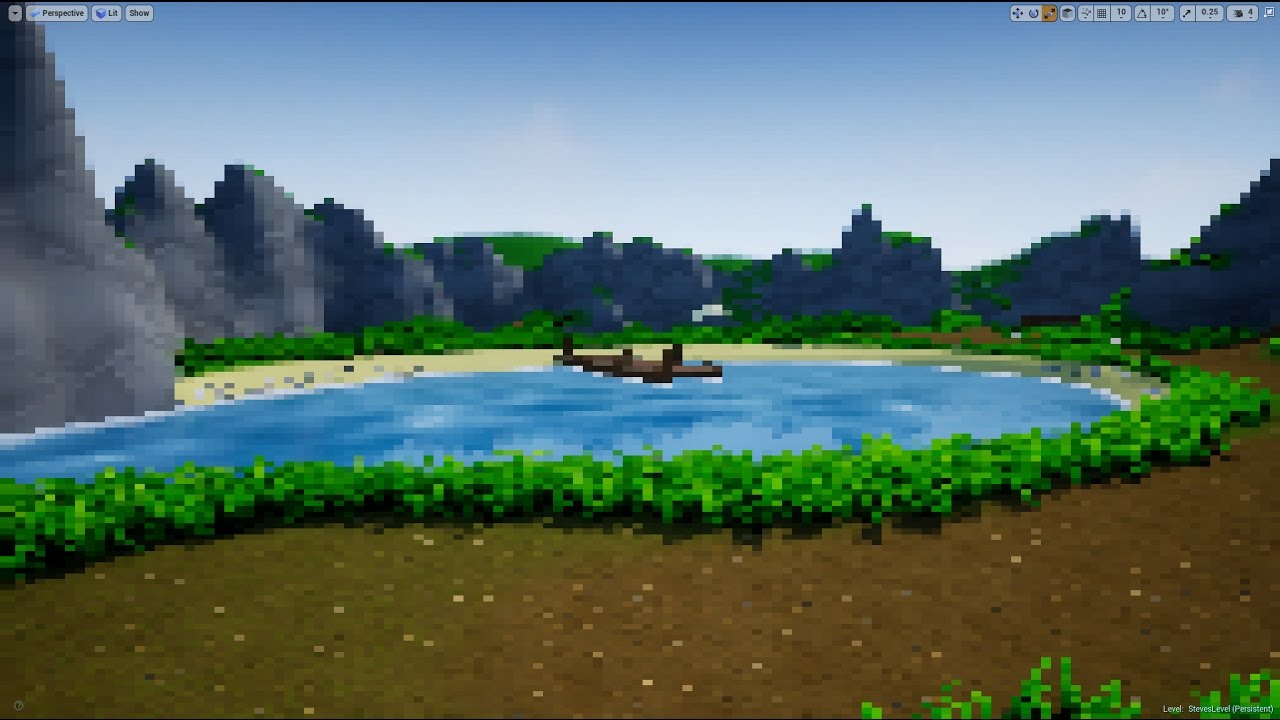
how to make the resolution of viewport so bad that things get pixelated? i want to give my game a retro feel
white crypt
you can try r.screenpercentage
Scalability options, properties, and console variables.
and check this
azure sparrow
white crypt
and check this
ok i will ty! : D
 elfin abyss
Why does my cast to always fail?
 icy dragon
azure sparrow
how to make the resolution of viewport so bad that things get pixelated? i want ...
icy dragon
azure sparrow
how to make the resolution of viewport so bad that things get pixelated? i want ...
This might help:
https://youtu.be/fVFo52cDKXY
 tidal marlin
dawn gazelle
This generates a random float between 0 and 1 per instance of the material witho...
tidal marlin
dawn gazelle
This generates a random float between 0 and 1 per instance of the material witho...
Thank you
fiery swallow
elfin abyss
Why does my cast to always fail?
Because an actor is not a level. (Assuming that cast is a level due to it's name)
elfin abyss
They're both actors, i just named the other one ProcLevel cause i'm bad at naming
fiery swallow
elfin abyss
They're both actors, i just named the other one ProcLevel cause i'm bad at namin...
is the actor overlapping that component either a parent or child of the actor you are casting to?
elfin abyss
No
fiery swallow
elfin abyss
No
There's your problem my guy
fiery swallow
"other actor" grabs a reference to the actor that overlapped it
elfin abyss
I want my current blueprint to be a trigger collision box and once the third person character starts to overlap i want to call a function from BP_ProcLevel
fiery swallow
elfin abyss
I want my current blueprint to be a trigger collision box and once the third per...
You'll need a different way to get a reference to the bp_proclevel actor in the world
elfin abyss
A variable like this?
 icy dragon
elfin abyss
A variable like this?
icy dragon
elfin abyss
A variable like this?
Yes, then in BeginPlay, use Get Actor of Class node to get object reference to the BP in the map.
trim matrix
Hey I have a problem after my first Animation is ran and the attack is saved when I press my Left mouse button to execute the othe animation nothing happens here are pictures


 storm vigil
May I ask regarding how to disable certain inputs? I am playing an animation after using an item so it hides the active UI to show the FPP character animation but I want only those related to movements to be enabled like WASD and mouse look around. Is there a way we can disable the rest of the interaction/keys? Thank you
fiery swallow
trim matrix
Hey I have a problem after my first Animation is ran and the attack is saved whe...
You're setting your attack number to 0 after you use 0 so 1 will never be hit
it's just gonna be 0 everytime
trim matrix
fiery swallow
You're setting your attack number to 0 after you use 0 so 1 will never be hit
Ok ill set it to 1 and 2 rn
elfin abyss
Is there a way to remove all the instanced meshes from an actor?
fiery swallow
storm vigil
May I ask regarding how to disable certain inputs? I am playing an animation aft...

Or you can add a boolean
trim matrix
Hey moxie after I finish the second attack now he just keeps doing the second attack only it never resets back to 1/first anim do you have an idea on why
 pine idol
I want to create a inventory system, where every item is unique. Like items will stack in inventory slots, such as apples, but each apple, could have a different level of freshness, poison, etc. What would be the best way to do this? I don't mind using mysql or the built in save system to do this, I'm just not quite sure how I should go about this, as I know I'll have a ton of different properties for different items.
Just looking for some suggestions. 🙂
fiery swallow
trim matrix
Hey moxie after I finish the second attack now he just keeps doing the second at...
set the second one to 0
trim matrix
k
fiery swallow
trim matrix
k
Do you understand what's going on?
fiery swallow
pine idol
I want to create a inventory system, where every item is unique. Like items will...
First you need to determine how fast the apples last before becoming rotten
trim matrix
I seem to be getting consistent frame rate drops in the editor and in game every 5 sec or so. I looked it up and someone suggested to change the input pooling settings in the .ini file but before I try changing it, i was just wondering what it will actually do?
fiery swallow
You can do that with a timer, a day cycle, it can randomly go bad, etc. You'll need a integer that holds the number of fresh and bad apples you have
fiery swallow
trim matrix
I seem to be getting consistent frame rate drops in the editor and in game every...
I would open a new project and see if you're getting frame drops there too
trim matrix
fiery swallow
I would open a new project and see if you're getting frame drops there too
It looks like i am getting it in both projects. so its got something to do with my computer.
fiery swallow
trim matrix
It looks like i am getting it in both projects. so its got something to do with ...
You can try setting the graphics to minimal, like PS1 graphics, if the frame drop keeps happening then yeah it's your computer and not the engine
trim matrix
fiery swallow
You can try setting the graphics to minimal, like PS1 graphics, if the frame dro...
I think my graphics card is overheating but ill try that as well
trim matrix
fiery swallow
Do you understand what's going on?
Um not really Not matter what number combination I put in it continuously plays one of the anims
fiery swallow
trim matrix
Um not really Not matter what number combination I put in it continuously plays ...
So you press it once and it just keeps on looping?
 trim matrix
fiery swallow
So you press it once and it just keeps on looping?
trim matrix
fiery swallow
So you press it once and it just keeps on looping?
no like I press it and for example if i press it again itll only keep doing the second or first anim
fiery swallow
 elfin mauve
i want to jump while crouching but animation dont want. what should i do
elfin mauve
i want to jump while crouching but animation dont want. what should i do
It's likely that your delay is not long enough, try to use launch character instead
Your jump animation will automatically play when it's ready, assuming you are using "isInAir?" Boolean in AnimBP
fiery swallow
trim matrix
no like I press it and for example if i press it again itll only keep doing the ...

You have 0 and you have 1
Switch on int will output whatever Attack number is
so if attack number is 1, it will always output the second animation
trim matrix
Ok I see what you mean now I will test my possible solutions now
 obtuse plinth
Hi,
I want to set the visibility of static meshes with tags, but nothing is happening:
 fiery swallow
obtuse plinth
Hi,
I want to set the visibility of static meshes with tags, but nothing is hap...
fiery swallow
obtuse plinth
Hi,
I want to set the visibility of static meshes with tags, but nothing is hap...

Your problem is that set visibility only works on scene components, without casting it to a scene component it won't work
2. I don't know why you're able to connect an array to a single target. Didn't know that was possible
 blazing delta
hello,
has anyone seen a timer video on youtube that uses timespan variables?
 lunar holly
Where should I put the functions which keeps track of the levels? I have an array of levels that I use to play the levels in a specific order. If the player has completed one level the game loads the next level. One problem I have is that the function is written on the my custom "GameMode" class, which makes so I can not access the function if I am using another "GameMode" class. For example when I am in my MainMenu level I'm using another "GameMode" class. Where should I put the functions which keeps track of the levels?
 obtuse plinth
fiery swallow
https://gyazo.com/d05857ef40d772dbe0cc467505742006
obtuse plinth
fiery swallow
https://gyazo.com/d05857ef40d772dbe0cc467505742006
Thx, but I get a Note, that I already have a scene component and I can still set no visibility.
 lunar holly
@trim matrix Okey thanks. I can try with game instance, because I don't know c++
fiery swallow
obtuse plinth
Thx, but I get a Note, that I already have a scene component and I can still set...
It means you don't need to cast it because it already inherits the scene component class, so that means it will always cast successfully, so you can remove it
Connect Array Element straight to visibility
 obtuse plinth
fiery swallow
It means you don't need to cast it because it already inherits the scene compone...
obtuse plinth
fiery swallow
It means you don't need to cast it because it already inherits the scene compone...
Somehow it stops within the last loop. Also checked the spelling of the tags.
 fiery swallow
obtuse plinth
Somehow it stops within the last loop. Also checked the spelling of the tags.
fiery swallow
obtuse plinth
Somehow it stops within the last loop. Also checked the spelling of the tags.
Then theirs no components with whatever tag you typed in
obtuse plinth
fiery swallow
Then theirs no components with whatever tag you typed in
In the Outliner they are "static mesh components (inherited)" and got tags
fiery swallow
Did you accidentally put any spaces in the tag or something?
I just tried this and it worked for me
obtuse plinth
fiery swallow
I just tried this and it worked for me
No. Copy and pasted it. Maybe the issue is, that the meshes are parented/linked to the default scene root component?
fiery swallow
obtuse plinth
No. Copy and pasted it. Maybe the issue is, that the meshes are parented/linked ...
Probably, you could just set up one custom event that will set the visibility of the parent
 lusty basin
Hey guys! What's the best way in multiplayer to bind a UMG nameplate to each player ?
fiery swallow
lusty basin
Hey guys! What's the best way in multiplayer to bind a UMG nameplate to each pla...
Widget component inside of the actor bp
 dusky harness
So i have InputAction event on R key that works both for weapon reloading and level restarting. My issue is that when character respawns he immediately starts reloading. How can i avoid that?
 devout geyser
@dusky harness Use a branch maybe? | Can reload? True \ False | True -> Reload | False -> "Can't reload magazine full"
dusky harness
Well yes, it makes sense. But when respawning character saves it's current ammo variable so there easily might be a case when character respawns + able to reload
fiery swallow
dusky harness
Well yes, it makes sense. But when respawning character saves it's current ammo ...
Upload a picture of the line
devout geyser
@dusky harness Is valid node? maybe
dusky harness
Valid what?
devout geyser
it will check if the character is valid (exists) if so it will go with true else false
dusky harness
Welp. Player Character is always valid. It never deletes him. Just loads all saved data in it
devout geyser
The respawn event, right after that you can tick the can reload node to True,
dusky harness
Yea. CanReload boolean might the most simple solution
obtuse plinth
fiery swallow
Probably, you could just set up one custom event that will set the visibility of...
No, got nothing to do with parented objects. Tried it with a static mesh as root (UE4 2.62), same issue.
fiery swallow
obtuse plinth
No, got nothing to do with parented objects. Tried it with a static mesh as root...
Did you insert skeletal mesh or static mesh?
You'll need to insert the correct component type
I believe yours are static meshes but I dont know. You'll have to click on them and see
obtuse plinth
fiery swallow
Did you insert skeletal mesh or static mesh?
My class (from get all class) is "static mesh actor" and the component Class is "Static Mesh Component"
fiery swallow
If the walls are static meshes then you need to select that in the class option
Get components by tag
shadow saddle
can u launch chara during the animation?
icy dragon
shadow saddle
can u launch chara during the animation?
As in propel the character upwards?
shadow saddle
yes
any form
i added anim notify

so what next frame does is plunge atk
but it doesnt push my chara forward
launch my chara forward i mean
icy dragon
Yes, either using root motion or add impulse.
shadow saddle
 shadow saddle
icy dragon
Yes, either using root motion or add impulse.
shadow saddle
icy dragon
Yes, either using root motion or add impulse.
only Z axis ?
icy dragon
shadow saddle
only Z axis ?
All 3 axis if you want to.
shadow saddle
but my chara when doing the anim wont launch
oh nvm it seems that if rm is on
this wont happen
tq
obtuse plinth
fiery swallow
If the walls are static meshes then you need to select that in the class option
In the component class, you can only choose "static mesh comp" or "scene comp" without errors - both do nothing. When I delet the last loop I can at least print a string, but no change in the visibility. Maybe a bug?
 dusk ether
Can I change the number of outputs on a Function's Return Node based on an editable integer?
loud cipher
Hey guys im recieving an error on my bp setup


I have setup a system whenever i overlap a sphere collision it retrieves a name variable that is set in my parent ai
then in the children bp which are these cats
i have named the name variable cat
So then in the UI widget i get a reference to the parent and get the name and plug into the bind text
It works well but when one ai dies
then it gives me a pending kill error
I was wondering how can i make it see them as individuals so i can retrieve data from each individual cat not making them rely on one
so if one dies then it doesnt affect my whole bp setup
elfin abyss
In an actor, i'm using a box collision and from that i get the extents and divide them by the size of the mesh to get how many of the mesh i can fit inside the box. From there i just place an instanced mesh at the coordinates its supposed to be in order to fill the box collision(for now). Is there a way to remove all the instanced meshes inside the box collision or, even better, remove instanced meshes based on coordinates?
frozen needle
I've been trying to solve it for hours and I can't figure out what's wrong
I have a door that should unlock after certain dialogue with the character, then behind that door I save the game
All my variables are saving except the last one that says if door is locked or unlocked, and after I load the game this variable is false again
Here's the blueprint of the character that I need to talk to

this is after that line that opens the door

the door itself

variables I'm saving

and variables I'm loading

I check this "foyer unlocked" on loading the game and it says false

and I can't figure out why this variable isn't saving
all the others are saving and loading just fine
trim matrix
how to play a sound that follows an actor as it moves
icy dragon
trim matrix
how to play a sound that follows an actor as it moves
Spawn Sound Attached
 icy dragon
trim matrix
icy dragon
trim matrix
You need to have a component to be attached on (that Attach to Component input)
The location input is largely for relative offset to the component that the sound is attached on.
pine idol
fiery swallow
You can do that with a timer, a day cycle, it can randomly go bad, etc. You'll n...
Yes, I know that I can simply add a property to every single item, such as apples having a freshness variable. But let's say I have a gun, and I need them all to have unique serial numbers too. The gun doesn't need the freshness variable. I'm trying to see if there's a good way to create meta data for items without every item possessing every single possible variable that might exist.
dry pewter
Hello everyone, i have a widget with 100-ish text blocks, i need to do a for each loop with those, how can i get a reference to the 100 things?
 odd plume
Make an array?
dry pewter
Yeah, but how do i get the text blocks in the array?
On the event graph i can get the images in the widget but not the text blocks

 dry pewter
They're in the widget blueprint where i intend to make the loop
Tought i don't need to cast to the self class?
odd plume
Can you share your screen in Programmer Parlor?
dry pewter
Aye let me see
icy dragon
dry pewter
Aye let me see
Message @torn kettle with !stream command if you're unable to stream in the voice channel.
 gentle urchin
You could also get children from the parent container of thr 100 text blocks
 twilit heath
@dry pewter select your textblock in the designer, and top right, above the details panel, check IsVariable
dry pewter
twilit heath
<@!270307292912549888> select your textblock in the designer, and top right, abo...
Yeah, made that with the help of @odd plume , thanks 😄
dry pewter
gentle urchin
You could also get children from the parent container of thr 100 text blocks
Tried but couldn't figure it out
Also as the parent container, in this case the canvas panel contains other like 10 elements, this solution fitted better
odd plume
👍
gentle urchin
Sounds weird that the parent is canvas for 100 text blocks but ok
dry pewter
gentle urchin
Sounds weird that the parent is canvas for 100 text blocks but ok
Maybe i get it wrong but this is the hierarchy
 gentle urchin
Yuppyupp. Im surprised you added those manually in the first place 😅
dry pewter
I tried to "spawn" them but idn't find a way of doing so
Now that i added them manually i had to make more work yes, but the blueprint will be much much simpler
gentle urchin
Possibly
dry pewter
Working as a charm now
 dry pewter
Looks like Widget anchoring issues
 subtle dust
Does anyone know how I would make a inventory similar to the one in minecraft dungeons?
pine idol
Where is the best place to put my login functions if I want to have a welcome level, that loads the multiplayer game world on successful login? The game mode bp?
 pine idol
clamp or min
 night scarab
whats the best way to approach interchangeable abilities all bound to the same key? A switch on enum works but it seems kinda shoddy
loud cipher
Is there a way to save variables in an array and then when i reopen the game they are loaded again?
 tight schooner
Overview of how to save and load your game
near flint
Does anyone know, why one AI is not getting Radial Damage? It gets Point Damage, But the Radial Damage is not working on this AI. I have another AI with the same "AnyDamage" event - which gets Radial Damage.

That's how the radial damage is hooked up
 frozen needle
quick question -- when it comes to 3D audio, what actually is receiving the sound -- player camera or pawn or something else?
 verbal bobcat
How do I cast to a pawn that is not controlled by the player?
I need an object for the cast @trim matrix
and idk what that object is if that pawn is not controlled by the player
 dawn gazelle
Casting is only meant as a means of making a less specific reference more specific so you can access the variables and functions of the more specific reference. For example, you can have an actor reference and cast to "Drone" so that you can access those variables you want.
What you need is a reference to the specific Drone object that you're looking to get those values off of.
 trim shuttle
Quick question does anyone know if a layer blend node will work with a break material attributes to the final master material output
verbal bobcat
dawn gazelle
Casting is only meant as a means of making a less specific reference more specif...
Ok good to know ,but how exactly do you do it so I cast only to that specific Drone object?
dawn gazelle
You need a reference to that drone object.
verbal bobcat
just a drone reference? like the variable one
dawn gazelle
You can create a variable but it needs to be populated with the reference to the drone that you're trying to pull these stats off of.
Checkmate
 verbal bobcat
🙂
 full hare
Heya its me again so i am making a tower defense and i need to spawn a wall but i also need the nav mesh to update when the wall spawns that would be fairly easy but how do i update nav mesh (setting nav mesh to dynamical breaks the ai they basically move in the correct direction but twitch to sides) is it possible any ideas?
 earnest tangle
dynamic should work.. just make sure your actors that aren't supposed to affect navigation have the "affect navigation" checkbox turned off
that's most likely the cause of the weird navigation problems
since that checkbox defaults to on for most things
full hare
they bug out even if they walk fowards thats what makes it weird and it only happens if i set dynamic even if i dont add anything at all with static they walk foward to end point with dynamic they walk there but they keep twitching even if i dont spawn anything else
randomly turning around and etc (the goal is right infront of them they are standing almost beside it

could it be because they themselves make a hole in nav mesh ? (i never noticed it until i used the dynamic so it would check out)

its fixed 😄 thank you so much it turns out i had a tiny cube of scale less than 0.01 in all of them to act as like a center point for hitbox and i forgot to turn off collisions
also i am using on component begin overlap to target enemies the problem is It always targets the last enemy to enter range any idea how to make the turret attack the first one ? or to attack the one thats closest to the end (The map isnt a straight line so if its possible that the closest to end calculates distance using nav mesh and not just a line)

 fiery lark
Is there any way to fire an event when a boolean changes?
I have an animal I sacrifice and when I sacrifice it I want the horde mode to start, but I can't figure out a way to do that
dawn gazelle
fiery lark
Is there any way to fire an event when a boolean changes?
Fire the event instead of changing the boolean.
dry pewter
full hare
also i am using on component begin overlap to target enemies the problem is It a...
I think on turret defense games the defenses attack the closest enemy in a straight line, going above walls and holes?
full hare
they attack enemy thats closest to the end (counting by the path)
dry pewter
full hare
also i am using on component begin overlap to target enemies the problem is It a...
In such case, use get overlapping actors to have an array of every enemy in range, then make a for each loop and have some math to calculate which one is the closest
 sonic silo
 full hare
closest to the end or to itself ?
sonic silo
Wtf are this nodes
dry pewter
full hare
closest to the end or to itself ?
What do you want the turret to attack? the closest to the turret or the one further ahead?
full hare
the one thats closest to the end but it needs to be calculated by the distance needed to get there
not just a straight line since 1 sec i show you

the turns are the problems since if turret checks distance to the end it will think the one where i said -further away- is well not first even though its closer to the end than the -closer-
dawn gazelle
sonic silo
Wtf are this nodes
Make literal float is exactly what it says it is - you're just creating a node that has a float value defined in it that isn't stored as a variable.
Max will select the highest value out of the inputs.
Normalize converts a vector's x y z values to a range between 0 and 1, where the highest value input is considered 1.
dry pewter
full hare
the turns are the problems since if turret checks distance to the end it will th...
I understand that the map changes during gameplay and the route might not always be the same, right?
full hare
yep the black line under the start is the only place u can rn build a wall
dry pewter
I don't know if there's a way of calculating the distance needed to traverse that but i can think of a workaround
sonic silo
dawn gazelle
**Make literal float** is exactly what it says it is - you're just creating a no...
Thanks for help
dawn gazelle
sonic silo
Wtf are this nodes
Negate Vector is literally the negative version of the vector (so each axis is multiplied -1 basically)
Vector Length Squared is basically XX + YY + Z*Z;
Ceil rounds a float up to the next nearest integer (-1.6 becomes -1, 1.6 becomes 2)
dry pewter
@full hare What i think, make a grid on the ground, with invisible no-collision actors that work as "checkpoints". now make another invisible AI actor that has to walk the same route the enemies would, but much faster, like, isntantly, and have that invisible enemy give an increasing number to each "checkpoint" it touches. Now you have the checkpoints every enemy will need to traverse where the highest numbered is the closest to the finish line. from there, you can check every checkpoint to see if there's an enemy above it's location, start counting from the last numered one to the lowest and attack then... i don't know if i am clear
full hare
maybe i get it 😄 i think
also the invisible enemy that increases their number walks there only once right ?
dry pewter
full hare
also the invisible enemy that increases their number walks there only once right...
Once everytime the map changes so it cna find the route
dawn gazelle
COSd is Cos(PI/(180.f) * InputFloat). Has to do with trigonometry.
full hare
phew that will be a tough one to do especially with me being a beginner
dawn gazelle
sonic silo
Dot is a bit more complex than I'm willing to explain... https://mathworld.wolfram.com/DotProduct.html
dry pewter
full hare
phew that will be a tough one to do especially with me being a beginner
Some things on UE can be much simpler than they sound on paper 🙂
Other things might be much harder tho...
sonic silo
@dawn gazelle thanks for help
full hare
well i will maybe try it later (i am running low on time deadline soon so i have to finish up the rest first and then i will try to do it haha thank you for help lets hope )
 cinder smelt
i'm trying to play a sequence and swap to a character after but the camera seems to switch back to the viewport camera and not the one attached to the character controller

it switches properly on the keypress though
dry pewter
cinder smelt
i'm trying to play a sequence and swap to a character after but the camera seems...
Try this: before the posses node make a get player pawn and unposses
cinder smelt
thanks @dry pewter
 unreal token
am i asking too much for a noob?
Vampire game: how would i go about creating a very customized day / night cycle, such that day is only 10% of the time and night is 90% of the time.
is this too advanced for me?
someone told me i need to be a full on programmer for that
icy dragon
unreal token
Vampire game: how would i go about creating a very customized day / night cycle,...
Not really.
You can pull it off in BP.
dusky harness
How can i delete all particles on level from blueprint?
icy dragon
dusky harness
How can i delete all particles on level from blueprint?
Get All Actors From Class -> For Each -> Destroy Actor
dusky harness
Well, particles are not actors. They're just spawned emitters so i can not delete them that way
 cobalt slate
Hey guys. i haven't found an answer to this online so i thought i would ask on here. Is there a way to enable/disable something in the project settings/defaultengine .ini through Blueprint? Specifically, i want the option in my menu to turn raytracing on or off. I want to be able to trigger r.raytracing = true/false in the ini, and then prompt the player for a restart, all from BP if that's possible?
fiery lark
Hi guys, I'm doing an overlap and I want to make a special event happen ONLY when it overlaps the player character, not when it overlaps the enemies. How could I do this?
cobalt slate
i'm guessing out of the overlap "other actor" it's casting to the enemy BP?
@fiery lark
fiery lark
I figured it out right after I posted it lmao, but it doesn't cast to it it just plays a sound on where it overlaps
I fixed it by setting a branch, and making overlap actor == player char
cobalt slate
You can do it that way or you can have it cast to the player BP to verify that it's the player if it is, then execute command, and on the "cast failed" pin, you could have it cast to and enemy BP to see if it's them, then execute it's code.

if both fail, then it does nothing
this is techinically better in case UE decides to change how the player name is displayed on the == in a package build. I've had that happen before
fiery lark
I hope that doesn't happen in a packaged build lmao
Also, do you know how to clear a timer by event?
cobalt slate
yes. one sec

just make in event timer a variable then you have all kinds of options for it. you can even pause and unpause it.
and yes, in a package build, UE names things slightly different when called. For instance, in the editor, if i were to print "get object name" it would say BP_Hero. In a package build it would print BP_Hero2736538294
i believe it does this for unique instance for multiplayer
dawn gazelle
cobalt slate
and yes, in a package build, UE names things slightly different when called. For...
If you're doing a straight comparison of two objects, I'm pretty sure it would be comparing them by pointer reference, not by the display name of the object.
cobalt slate
exactly what i'm saying. that's why i do a cast to off of an overlap as shown above, vs getting an object name. I've seen lots of people make this mistake and even i made it back when i didn't know.
spark steppe
cobalt slate
Hey guys. i haven't found an answer to this online so i thought i would ask on h...
there's a node which can run console commands, maybe that helps?
so you would save a bool for raytracing in your custom config and run the console command on start to turn it on/off
cobalt slate
But how do I access the custom config? That’s what’s getting me. Console commands only seem to work in the engine will the editor is running. Once you exit out of the editor, those commands default back to what’s in the config file.
spark steppe
for my project i just made a custom save game which contains the config variables
and yea, you would need to run the console command everytime you start the game, that could be done in custom game instance in the Init Event
i'm just not sure if it will work for raytracing, but it's probably worth to try
 stuck fossil
Im not sure if this is the right place to ask about material blueprints, but I was wondering if anyone knew a way to set up a material where only part of it is emissive? For example if I wanted to make a building that was all one texture, if I had say a separate image file with just the insides of the windows, could I make my material emissive on only those sections?
icy dragon
stuck fossil
Im not sure if this is the right place to ask about material blueprints, but I w...
#graphics is also for material
But in regards to your question, yes, you can have a part of your texture emissive, and multiply it. Though extra workaround is also needed, because you have to mask away potential compression artifacts.
stuck fossil
icy dragon
<#221799195806400512> is also for material
But in regards to your question, yes...
Okay cool, thanks for pointing me in the right direction! I'll fiddle around with it some and see what I can come up with
 amber nova
is there someway for a child actor to be parented by a different parent actor . because my dumb brain been working on an AI_npc_Enemy that is a child actor of the player actor blueprint . the thing is , i wanna replace all the attack animations and such but if i do that , it will affect my player character too cause i put all the attacking animations in the player parent actor blueprint . so i was wondering , if i just duplicate the parent actor , is there a way for me to reparent the child actor to the duplicated parent actor so i can change stuff in there instead
trim matrix
Hey I have a question would I make the hurt boxes first or the health system first
dry pewter
amber nova
is there someway for a child actor to be parented by a different parent actor . ...
Now, you need to double click a blueprint to open up the editor, and from there you click File >> Reparent Blueprint
This is taken from answershub from a topic where the user deleted the parent class, try and see if you can work this
amber nova
dry pewter
Now, you need to double click a blueprint to open up the editor, and from there ...
thanks it works
 ashen basin
How do i grab interface output data?
i have set input data in another blueprint and i want the output in seperate bp
dawn gazelle
Implement the interface and use the provided pins?
ashen basin
says i need to add input
dawn gazelle
So if you have it set up like this on your interface, when you implement it in another BP, it would have "interactor" as the output from the interface node.


If you have it set up like this, then it would return the value to the calling BP.


 ashen basin
dawn gazelle
So if you have it set up like this on your interface, when you implement it in a...
ashen basin
dawn gazelle
So if you have it set up like this on your interface, when you implement it in a...
yeah i dont have the event as a option
removed the output and was able to get the event
though doesn't work out
 surreal peak
With the output you have to check the interface section on the left of your bp
It will list the interface function there
Usually rightclick and then implement function does the trick
sonic pine
white crypt
Hiho i did this in the Playercontroller, but the errors are the same ^^
dawn gazelle
I think this might be what you want to do? The hit results seem to return several hits of the same actor on my end, and can hit multiple actors, but it projects forward from the point on the screen where you're clicking. Just make sure your trace channels are ones that overlap the actors you're concerned about.
 white crypt
@sonic pine im pretty sure if you sent an image of your code, it wouldnt look the same as mine
so try comparing them again and read Cedric's networking guide
sonic pine
My Problem is the Login
surreal peak
ashen basin
you saying add interface in the class settings?
Yop
ashen basin
surreal peak
Yop
yeah done that
white crypt
@sonic pine i've only helped you on how to add a widget for a local controller, don't know anything about your login issues
sonic pine
This code is in the game instance. I think that it has to be in the gameinstance, because the login menu has to be loaded before the actual game is loaded.
Login-> Server selection -> Character selection -> start game

I know ^^
 violet wagon
My camera rotates with the player model, but i want the camera to rotate while the player model stays still. any solution?
surreal peak
Make your camera use control rotation and the character not use it
azure sparrow
I am trying to access the rotation of the sun, i already have accessed the direcional light (sun for me) and trying to access the y axis value of the lights rotation how can i do that?

i dont think i am even doing it right
dawn gazelle
This is why you need to change the collision profiles so that any intended targets of this trace are set to overlap and any not required are set to ignore, with only possibly the ground set to block.
 hushed flame
If I'm having 2 different Blueprint actors (like BP_Foo and BP_Boo) which only has InstancedStaticMeshComponent as their root, will they be good performance wise?
surreal peak
Ehm
I guess? :D
You should probably just use it and only worry about optimization once you need to
And then use the profiler/unreal insights to check what is actually expensive
delicate folio
delicate folio
hi just a question that i was wondering - is it possible to involve the landscap...
hi so about this question that i asked and was told it is possible , the easiest way i can think of doing this is obviously with trigger boxes and overlap events but this wont be as accurate to the landscape so i was wondering if theres a way to directly reference the layers from the landscape in order to slow the player down once they overlap with / walk onto one of the specific layers
hushed flame
delicate folio
hi so about this question that i asked and was told it is possible , the easiest...
Your Landscape can have Physical Materials applied on them and when the player is walking, trace down to find which physical material is being hit. If it is your forest physics material, slow down the player
hushed flame
surreal peak
You should probably just use it and only worry about optimization once you need ...
Yeah I think I'll do that 🙂. What if I place multiple instances of same Blueprint (like 100's of BP_Foo)
surreal peak
You will have to find out :P
 formal dagger
Hey guys, go another big wall in front of me right now. So i'm trying to do a common dialog system with ST and DB.
I managed to set the ID of the DB to the next one, my prob is... the line (text) doesn't follow. Any tip?
 azure sparrow
how do i update this i didnt get them

Launch on menu in the main menu means?
found the answer here https://forums.unrealengine.com/t/unreal-engine-5-packaging-error-on-windows-10/231912

Unreal Engine Forums
Packaging a project works well in UE4 on my pc, but when I try to build a project in UE5 I get the following message: “The SDK for Windows is not installed properly, which is needed to generate data. Check the SDK section of the Launch On menu in the main toolbar to update SDK.” I have never had an error like this before, and generally work in...
delicate folio
hushed flame
Your Landscape can have Physical Materials applied on them and when the player i...
thank you very much i have managed to get it working as someone who doesnt do much with landscapes i didnt even know about the physical material thing but that is really useful thank you very much
proud sable
Is there a way I can access a variable from the level blueprint in other blueprints? I've read the documentation on casting and I don't fully understand it. I have a character switching node tree in the level bp that cycles between 3 characters and I need to reference which character is active in another bp. I'm pretty new to UE4 so this is a bit of a struggle for me, sorry for the basic question
hushed flame
proud sable
Is there a way I can access a variable from the level blueprint in other bluepri...
I wouldn't suggest using Level Blueprint at all. Instead you should use Player Controller to switch between your characters. That way you can always use GetPawn to get the active character since Player Controller can only possess one pawn at a time.
proud sable
hushed flame
I wouldn't suggest using Level Blueprint at all. Instead you should use `Player ...
Thanks, I'll give that a shot instead. I was adapting some methods from a tutorial I had seen and they used the level blueprint for some reason. I would still need to communicate the GetPawn result to my HUD blueprint though, would that be a job for Cast To or am I going down the wrong rabbithole?
hushed flame
proud sable
Thanks, I'll give that a shot instead. I was adapting some methods from a tutori...
Is your game multiplayer?
proud sable
Single player
hushed flame
Then in your HUD Blueprint add a Get Player Controller node and then from it add GetPawn node.
proud sable
hushed flame
Then in your HUD Blueprint add a `Get Player Controller` node and then from it a...
Sorry yeah I confused it with something else, thanks! That gets the active pawn, how would I get the individual non-controlled ones? I can do this in the level blueprint but not in the HUD one which is why I've been wondering how to cast to other blueprints
 hushed flame
Your non-controlled ones, are they dynamically spawned at runtime or you placed them in level?
proud sable
They're placed in the level yeah
hushed flame
Then in your Player Controller Blueprint in Event BeginPlay node create a Get All Actors of Class node with class set to your pawn. Save the result to an array and you can use it to get non-controlled pawns
proud sable
Thank you 😊
ashen basin
Speaking of communication between blueprints
Can some one send me a demo of interface
Need array from one bp on another thanks
Either dm me or tag me as ill checking back tomorrow appreciate the help
 woven kelp
How can I "lock in" the value of this array?

when I print it I get a different result each time

The random float node is being evaluated each time the array is accessed
dawn gazelle
woven kelp
Create a float array variable and set it to the value of the array you're making.
 woven kelp
thanks! I ended up making a macro that just sets a local variable and then returns it
 sand bloom
Hmm does anyone know a good way to handle rotation, I got left and right rotation of something to work fine with a lerp rotator and timeline, but the issue is when I want to do up and down rotation it doesn't work
i'm assuming because i'm using another timeline and lerp rotator
and it leaves the other values 0 instead of ignoring them and only using the values i want to change

the top part is for up and down rotation
should i try and use break rotator
im not sure how to do it
as you can see up and down works fine

but it resets when using left right

does anyone know of a good way to do this?
like if I split it I do get separate axis which is great but they are floats..

like how do I use a float to set rotation
🤔
ohh ill give that a try
omg I got it to work thank you so much, I didn't know that node existed
I used make rotator because it seemed the easiest route haha
ah that's good to know 😄 thanks
i'll have to keep that in mind for the future
It's not something that would constantly happen, it's just a cannon object that won't get used much but that's fair yeah. If this was something constantly being used like a character i'd probably have to make it less wasteful like you said
ah yeah true haha
I'm just not very good at blueprints and this works, i'm not quite sure how to get it to become one line
 surreal siren
im following a tutorial "How To Make An Animation Blueprint And Blendspace - Unreal Engine 4 Tutorial" but when im trying to add "calculate direction" to the third person it dosent work

ok ill try that
Ty
which ends do i have to connect
Ty for the help but what does it mean " you connect the two ends of the red blob to each other "
https://www.youtube.com/watch?v=1K-Hyu4Xn3g&t this video 7:41 in @trim matrix

Hey guys, in today's video I'm going to be showing you how to create an animation blueprint and blendspace to smoothly transition between your animations in your game, such as idle, walk, run and jump.
Previous Video - Creating The Character And Animations: https://youtu.be/Ht0ekszftsA
More In-Depth Explanation: https://youtu.be/A6L_8vAx-M0
Un...
ahh
So what do i have search for or do
sry for being dumb here but its my first time
yes it does
ohh ok
TY
@trim matrix if you have time can you help me. im making a walking running ect animotion for my metahuman charetar. Animotions dowloaded from mixamo
odd nova
what course/tutorial would you guys suggest to learn about saving/loading pretty please? 😄
too much choice 😦 😄
icy dragon
odd nova
what course/tutorial would you guys suggest to learn about saving/loading pretty...

How to save and load data in your UE4 games.
OH GOD ITS NEARLY CHRISTMAS? DO I SEND ONE OF YOU A GIFT? I JUST DON'T KNOW!!! DO PEOPLE EVEN READ THIS?!
proud sable
If I'm trying to cast a variable what is the object input for? The cast node is still a mystery to me as a beginner. I have a boolean variable in BP1, I need it in BP2 for a branch node condition, but I need the object input for the node to work.
I know it doesn't work but, why isn't this enough to get the value?
 odd nova
thanks!
 coarse lantern
When binding events in a loop how can i use the object reference of the element inside the event? Right now it always uses the reference of the last element of the loop
 fluid rose
coarse lantern
When binding events in a loop how can i use the object reference of the element ...
fluid rose
coarse lantern
When binding events in a loop how can i use the object reference of the element ...
Does it print out the last element of the loop several times or only once?
coarse lantern
It's printed once the OnClick event is fired but it's always using the Button reference of the last element of the looped array
 formal prairie
hello ! i'm starting to work with gameplay tags now, the issue is that it dosen't work. i've set up my tags, set it inside my actor, and ask the other actor tio check the tag of the actor that entered the collsion with i, but it dosen't react... the collsions are working i checked with prints. did i forgot something ?


 pale orbit
What do u guys think is the easiest way to spawn a projectile that moves in the air as i move the camera
to make something like this
unkempt musk
Are you going for a laser guided missile effect?
fluid rose
If he sends the projectile by pressing X, he also wants to be able to send it left by holding X and moving his mouse left, even if a wall's blocking a raytrace from the player to where the projectile is
trim matrix
Hi everyone, i am using a platformer template to prototype something so i'm trying to add an health blueprint when the character "touch" some spikes, the spikes are already animated within the template so i have added health variables ecc now i'm watching a tutorial wich show that i should attach the event actorbeingoverlap to the "takedamage" class i have created
but i have already an event beginplay node
i'm trying to figure out what should i do

the actor is called BP_Spikes but inside of them there are other staticmesh that are currently the arrows

 true marsh
proud sable
If I'm trying to cast a variable what is the object input for? The cast node is ...
true marsh
proud sable
If I'm trying to cast a variable what is the object input for? The cast node is ...
The cast node is to communicate with other blueprints. The object is the target of the cast and the cast type is a compatible actor class.
Based on your screen shot you would need to save the character as a variable than connect it to the object input.
unkempt musk
@trim matrix Maybe something like this?
 fluid rose
Is there a variable type for any keyboard key? I'm trying to create a map using keyboard keys as the key and want to listen to any keyboard press (found the "Any Key" event) and see if any of them are within the map
Key -> listen to Any Key, thank you regardless 
maiden wadi
@true marsh Careful with the phrasing, that wording confuses a lot of newer people when learning object control. That is not technically correct. Casting just changes a pointer type. It doesn't actually communicate or do anything. An object that is a character is also a pawn, and an actor and an object because character inherits from those. If this character is passed around as an Actor pointer, you can cast it to Pawn or Character to get access to those variables and functions, but it is still the same object, just treated different. Think of casting nodes as a "Treat as" node.
 zealous spruce
hey guys! i was wondering if i could get some help?
im trying to make an interface so people can connect to an ip or host from their ip, and i was wondering if anyone here knew how to make it so the input mode is UI only, and make it so that the mouse cursor is visible
i already know that it works i just need these things for quality of life
unkempt musk
In your player controller, use these nodes
 unkempt musk
Same place. They only show up in the controller class, or when you drag off one.
 unkempt musk
When you spawn your widget, after AddToViewport, have those two run immediately after.
surreal siren
i made a a jump walk run animation but its like looping very bad. i can sendt ss of blueprints
zealous cave
Hello All, I'm following the "How to make Pong in UE4" tutorial that is in the channel pins. I'm on Part 4, "Finalizing Paddle Movement." The problem I'm having is my paddle is continuing halfway into the top while his stops right at the paddles edge. I don't know if over the past 6 years since the video was made that coordinate system has changed. A simple solution would be to adjust the value of when the paddle stops to half the size of the paddle from the limit. But I'd like confirmation that it was a change since his 4.7 vs my 4.26 or if its another reason. Maybe I missed a step. https://youtu.be/u8KOg-IZtQk?t=283


Complete Playlist: http://bit.ly/1HrKqEG
In this tutorial series I teach you how to create a clone of "Pong" in Unreal Engine 4, using Blueprints.
The series will cover everything you need to know from creating meshes, scripting functionality, setting up menus, adding audio, loading levels, creating menus, and deploying your final game.
Plu...
zealous spruce
unkempt musk
When you spawn your widget, after AddToViewport, have those two run immediately ...
soooooo... my addtoviewport is in the level blueprint, not in the character controller, as this is a thrid person game
unkempt musk
I'd recommend moving your logic to a GameMode(better) or GameInstance(best). UE4 has a built in controller associated with all players. But that's not accessible from the level blueprint without additional steps.
zealous spruce
this is a bit more complicated then i thought it would be
i was litteraly just following this tutorial https://www.youtube.com/watch?v=1MA9_U3XRZs and he said to do these things so i was like, cool idk how to do this, ill ask some people on this discord

This video will show you how to create a multiplayer game using Unreal Engine 4.
- Links -
Website: https://elias-wick.com
Patreon: https://www.patreon.com/EliasWick
Twitter: https://twitter.com/EliasWick
Instagram: https://www.instagram.com/EliasWick
unkempt musk
@zealous spruce It does work in level blueprint. My bad.
 zealous spruce
:00000 Thanks dude! :]
wait now i cant click back into the game
how do i switch back to the game :[[[[[
 nova ledge
Hello everyone! I'm trying to make it where my flying character can land only above a certain height from the landscape (if I don't do that, when the main capsule component hits the ground and you try to land, you'll be stuck in flying animation). I was going to use line trace by channel once, but it would only get the coordinates of the landscape and not the actual heightmap of it, so I ended up using box collisions. However now that's acting weird. I was using 4.26 before but now I'm using ue5, so I don't expect everything to run smoothly, but I wanted to know if this looks right, or if I should add/subtract something from it. Or is there another way to fix this by somehow using heightmap?
 unkempt musk
@surreal siren Try clicking this button on your animation sequences and see if that helps. If not, change it back.

 sturdy herald
Hello!
I try to use a button on widget to rotate something.
When the button is pressed, then the rotation should start to determined direction, and when released, the rotation should stop.
I tried this method, but it only add 1 to the rotation, the loop doesnt work well.
On the link u can check the actor's blueprint and the photo shows the widget.
https://blueprintue.com/blueprint/-nx0sew0/

BlueprintUE
unkempt musk
@sturdy herald Maybe something like this?
 frozen needle
What could be causing the Cast failure to player character? On the screen I have an object that player hides behind. The object on the right works perfectly, but the copy of that object on the left returns failure of Cast on leave the hiding. What am I missing?

here's the blueprint

It's the same object, but for some reason it doesn't work in that particular spot where the left copy is
So is there a way to check why exactly the cast is failing or something
I found out it's somehow related to the area this object is in because the cast fails on the other blueprint as well IN THIS spot
But I can't figure out why exactly
Because it worked all fine before
unkempt musk
Try GetDisplayName of the "OtherActor" and see if that gives any clues.
*Then print it
sturdy herald
unkempt musk
<@!329646835239223307> Maybe something like this?
I need 12 buttons thats works like this, so i thought its better to avoid event tick, but if i cant make this timer thing work, then i dont have choice. Thanks for advice.
frozen needle
unkempt musk
Try GetDisplayName of the "OtherActor" and see if that gives any clues.
Thank you
 true quartz
If I wanted to make a level end when all objects are collected how would I do that?
unkempt musk
@sturdy herald There is also a rotating movement actor component. Changing the RotationRate will change the speed. Anything that rotates will have some form of tick to get it to update.
@true quartz collected how? Total number? Specific values with each?
true quartz
Yes so I have x amount of each object to collect and when all are collected I want the game to end.
To be specific I have two balls three spacemen and five pieces of laundry that I need to collect for the game 10
For game to end
sturdy herald
unkempt musk
<@!329646835239223307> There is also a rotating movement actor component. Chang...
Thats true. Thanks for answers:)
unkempt musk
If all important items are the same BP class (I reccommend), you can use this.
 true quartz
@unkempt musk it's a game for school in which a character goes and collects all the items and then after doing so is awarded a gold star per set of items. I am trying to figure that out and the finishing the game
Ahh I c
unkempt musk
Ahhh... give me another moment then
true quartz
Ok ty
unkempt musk
It the character I add this. It gets the list of object references to collect...
 true quartz
Ok
unkempt musk
I made a BP_Collectible that can be laid wherever. Once you overlap it, it'll remove itself.

If you want to store individual names in the items, you can add variables for a more specific checklist. But that should be most of the functionality.
true quartz
Ok thank you. I didn't know if there would be a way that would work with the HUD or not. I have the collectibles set up and a HUD that displays count. I thought there would be a way that when items in his = 0 trigger game over. And then I figured I could award the star per set of items.
See like this and then I reveal the hidden widget.
 unkempt musk
You'll have to run a check function after each pickup, or bind to an event, but that's a bit more technical.
true quartz
O... Well damn
unkempt musk
Computers don't know anything changed unless you tell them
true quartz
Yes I just figured I could hide the stars and in hide them upon the count reaching 0 per item set
Then I could make a variable has 3 stars to end game
proud sable
Is there a simple way to mark a character as active/possessed with a bool variable in the player controller? I have character A B and C and want to appropriately mark the "Active_A" "Active_B" and "Active_C" bools as true/false when the player is controlling them. I've been pulling my hair out with this, I've tried so many things to get it to work
 dawn gazelle
proud sable
Is there a simple way to mark a character as active/possessed with a bool variab...
dawn gazelle
proud sable
Is there a simple way to mark a character as active/possessed with a bool variab...
You can test whether or not a pawn is controlled by a player:

 snow halo
i'm fairly certain it is not in my graphs
When i double click it, it opens the bloody timeline under it which i am actually using
dawn gazelle
snow halo
When i double click it, it opens the bloody timeline under it which i am actuall...
Right click on it and select "Find References". It'll give you a listing of where it's used and you can double-click on the results to find where it is. Nevermind... doesn't work 😛
snow halo
@dawn gazelle ya i did that o course
it's def not in my graphs
Even if it was, i should still be able to delete the comp
No it's def not inheriting a timeline either
it's base class is AActor

 dawn gazelle
You typically can't delete components this way. If you did it with a mesh component it wouldn't let you delete it directly.
dawn gazelle
Try typing the name in the search:


 true quartz
Yes I just figured I could hide the stars and in hide them upon the count reachi...
true quartz
true quartz
Yes I just figured I could hide the stars and in hide them upon the count reachi...
Would that be possible @unkempt musk
dawn gazelle
snow halo
just renamed it to Timeline_0
Did you hit the compile button afterwards?
snow halo
yup yup o course
tried rebooting the project also
It's gotta be some bug because there's no scenario where i should be double clicking that comp and it opens a different timeline
trim matrix

Just checked it out yes it seems like a bug
it happened after I deleted and undo it
dawn gazelle
trim matrix
it happened after I deleted and undo it
Try searching just for the name of the Timeline.
proud sable
dawn gazelle
You can test whether or not a pawn is controlled by a player:
How would I use that to toggle the appropriate boolean though? I'd show what I have right now but I feel like I'd just get laughed at lol.
dawn gazelle
Whenever you need to check if the pawn is controlled by a player you can call that function and it'll tell you if it is controlled by a player or not.
unkempt musk
@true quartz Something like this?
 unkempt musk
What does it do?
dawn gazelle
proud sable
How would I use that to toggle the appropriate boolean though? I'd show what I h...
So what you can do for your test, is just check by reference of the character that you want to test. This boolean will be set true/false automatically based upon whether or not the character is possessed by a player.
 proud sable
dawn gazelle
So what you can do for your test, is just check by reference of the character th...
proud sable
dawn gazelle
So what you can do for your test, is just check by reference of the character th...
Thanks, I had something similar but I think it's an issue with my array. I'm not in the level bp so I can't reference the pawn directly, I'll give that setup a shot soon and see if I can figure it out
dawn gazelle
What BP are you in?
proud sable
I'm in the player controller blueprint, but I'm trying to cast from the HUD blueprint
 untold dust
Hello everyone, newbie question here, I created a script that load widget directly without passing thru a Hud and for myltiplayer I use the function get all widget of class and I select the widget I use, but I try to implement my code to a hud, but my function get all widget of class return nothing because the widget is in the hud... someone know how to get all particuliar widget in the hud ?
dawn gazelle
proud sable
I'm in the player controller blueprint, but I'm trying to cast from the HUD blue...
You can get a reference to the specific character you're controlling, in which case you wouldn't need to test which pawn the player is controlling. The Get Player Character node is fine to use single player, not great to use in multiplayer.
 untold dust
It's a chat BP that I made and I loop from all the player widget to send the text
but in the hud can't find the widget
true quartz
@unkempt musk nothing
snow halo
@dawn gazelle i found out how to reproduce the bug
So if you try and copy some BP logic that contains a timeline to another BP, but a custom function you are trying to copy does not exist in the destination, you will then get a message asking you what u want to do about that... if you then hit cancel, nothing gets copied EXCEPT that bunk timeline component variable (with no actual timeline in the destination graph)
dawn gazelle
oof
snow halo
so you are then perma screwed w a corrupt BP or at least that stupid variable
 solemn musk
is there a way to change a game sessions name?
trim matrix
i have on overlapp begin on a missile , i check owener of other actor, it say "pc_gameplay" if its the host and "pc_gameplay1" for client 1 and so on. wich is great. but i als want to check owner of the missile itself, if i use self reference on get owner i get "bp_character" instead of "pc_gameplay" how to check owner of the missile itself?
dawn gazelle
trim matrix
i have on overlapp begin on a missile , i check owener of other actor, it say "p...
I'm going to assume that pc_gameplay is actually your player controller. I imagine you're spawning your missile from your character and setting the owner there (with a reference to self) which means the owner would be the bp_character.
That said, when dealing with multiplayer, owner should be the character, not player controller as clients aren't aware of other player controllers so checking for owner when it's set to a player controller may return null references on other clients.
Same with your overlaps - you don't want to check the owner of "other actor" if the owner is a player controller. The "other actor" reference itself should be sufficient.
I'm going out on a limb here, but I think you may be trying to figure out if your missile is hitting the person who fired it and if you want to make sure your missile isn't hitting the owner, then all you would need to do is check if "other actor" is != the owner of "missile".
trim matrix
exactly, how to check owner of "missile "
 keen prairie
is there a way to swap out textures in a material graph using a blueprint? or change a const3vector value?
 dark crow
Dynamic Material Instance?
spark steppe
keen prairie
is there a way to swap out textures in a material graph using a blueprint? or ch...
yes, if you create a dynamic material instance you can change texture/scalar/vector values
dawn gazelle
trim matrix
exactly, how to check owner of "missile "
That would be "Get Owner". To set the owner when spawning it, the spawn actor node has an option to set the owner, though it's hidden unless you click the little triangle at the bottom. If nothing is set there, then no owner is assigned it looks like.
 keen prairie
spark steppe
yes, if you create a dynamic material instance you can change texture/scalar/vec...
keen prairie
spark steppe
yes, if you create a dynamic material instance you can change texture/scalar/vec...
thank you very much! i'll look into this :)
trim matrix
thank you
 covert arrow
Hi i wanted to know if there was a better way of Un Crouch to sprint without having to use a delay basically i have a crouch BP that uses a timeline to lerp between the normal capsule half height to the crouch height and the only way i made this work was delaying the 0.5 or else the sprint code isn't ran?

 dapper dagger

am I missing something?
was just watching https://youtu.be/K0ENnLV19Cw?t=3116 and Mr. Allen showed this little example but his pins wouldn't connect and he blew past it.. so I decided to try for myself and yeah, needs that cast which kinda defeats the purpose if I'm thinking about it correctly

This week Christian Allen will provide an overview of Hard & Soft Object references in Blueprints, why the differences are important to know about, and how you can utilize Soft Object references in your project to help with memory management.
Watch Inside Unreal live at twitch.tv/unrealengine, Thursdays @ 2PM ET
DISCUSSION THREAD
https://forum...
 ember veldt
dapper dagger
was just watching https://youtu.be/K0ENnLV19Cw?t=3116 and Mr. Allen showed this ...
ember veldt
dapper dagger
was just watching https://youtu.be/K0ENnLV19Cw?t=3116 and Mr. Allen showed this ...
It depends. Soft references for something like meshes/sounds can be useful. Soft referencing things like data assets and casting it to its class only makes a hard reference to the base class, not the individual assets
For example i can have a dat asset of Item that stores a string, mesh, icon and sound. The mesh, icon and sound are soft references. When an item spawns it takes the soft reference of the asset, loads it, then loads the dependencies only if they're necessary. For example only the icon needs to be loaded if its in the inventory. If it's then put in the world it will load the mesh.
I can have 500 items with different meshes and icons and sounds, and none of them will be loaded until they are actually instantiated, and even then they only load the specific necessary assets instead of loading everything involved with it
Casting to actor class in this case does not create a hard reference as actor will already be loaded and is not a specific different class.
 jolly oriole
Hey guys!! I'm looking at creating a choose your own adventure game which practically amounts to creating a binary tree via blueprints. I had a look at structs, and while they're what I need, they seem incredibly bulky and unmaintainable. What are some of the better ways I could go about creating a binary tree data structure so that it's maintainable into development?
I've tossed up making a class object but that kind of has the same issue - authoring and managing the binary tree. I also considered using something like JSON or XML but it seems there's only C++ versions of those tools available.
 severe turret
@jolly oriole creating a Graph system is the way I've seen it done best. I'd check out some of the free plugins like Not Yet Dialog Plugin. Its a good example
 zenith escarp
jolly oriole
Hey guys!! I'm looking at creating a choose your own adventure game which practi...
zenith escarp
jolly oriole
Hey guys!! I'm looking at creating a choose your own adventure game which practi...
I've done it with structs and data tables before, but it was not the most user-friendly thing. For that kind of stuff now I tend to use a free plugin called 'GenericGraph' which works better for trees/graphs and is blueprint accessible.