 rancid zephyr

#blueprint
402296 messages · Page 661 of 403

 maiden wadi
Is STAMINASYSTEM function called on tick?
maiden wadi
First note, is that you have way too many state variables. Systems like this should really rely on getter data. Like you're doing with the GetVelocity->VectorLength. Don't use input keys to tell your system that you're sprinting or not, use the speed. Input key should only affect the max walk speed and maybe acceleration. Otherwise doing something like just pressing shift and not moving turns your stamina on.
For instance. Sprinting? bool, should generally be replaced with a pure getter function like IsSprinting, that returns a boolean value that is GetVelocity->VectorLegnth >= BaseSprintingSpeed
Not doing this will result in buggy behavior, like a player being able to hold shift, and tap W repeatedly, and still drain stamina even though they're not moving that fast.
Well, you have the check there for that with the length so that wouldn't happen in this case.
 tough ocean
Guys, I wish to create cover system for my units, for that i want to make capsules witch has to be phantom cover points for my units in all potential cover actors. If I click on that capsule - unit will take cover in same place behind actor that capsule is attached to. But there is potential issue - if I will place actor and my cover capsule will colliding with another mesh - capsule should be destroyed before game started (I check on Begin Play Event if it colliding and destroy it). So will it lag if like 50-80 actors on map, on a game start, destroy colliding capsules and if it do - will be it lagging rest of the game when all colliding capsules destroyed?
(P.S. Sorry if it difficult to understand, ask me if something is not clear)
 dire sonnet
can anybody help me out?
I've been trying to update an older project of mine
and I'm having trouble with some basic variable access functionality
maiden wadi
@tough ocean Not really certain why you're destroying the capsules?
tough ocean
maiden wadi
<@!340186976722354186> Not really certain why you're destroying the capsules?
cose if it colliding, player could not click on it and unit shouldn't be able to take it like place for cover
maiden wadi
But why not just set it's state? Destroying and creating is costly. You can disable clicking on it with some collision settings.
tough ocean
if it stay existing on a map it will continue generate overlap events (and that i thing will be heavy for system), but ur proposition is good
@maiden wadi
 trim matrix
I need to make a widget with a button in it draggable but the button stops onmousedown from firing... How can I fix this?
trim matrix
Not sure what you mean
using OnPreviewMouseDown seems to work
Except now my button requires a double click in order for the click event to fire..
 vapid ibex
Does anybody knows what's best option to alert actors to some event?
For instance a player attacks one enemy, and all enemies in the given range around the attacked one (or all on the level even) should become hostile as a result. I feel like "event dispatchers" are key to this, but I don't quite get how to work with them.
maiden wadi
@trim matrix You can't really do draggable widgets with buttons. It's a hassle, but do yourself a favor and just make your own clickable button widget out of borders that you can expose variables to change and alter on preconstruct for styles, and handle the mouse buttondown/mousebuttonup stuff yourself.
Epic really biffed it on UButton UMG
trim matrix
Mmmh seems like it's by design. I thought about that workaround but I need hover/unhover which borders doesn't seem to do. I might get away with disabling the button where I need the drag functionality.. but we'll see in a bit if it works or not.
 trim matrix
Ah, missed those
 dark crow
iirc Mathew gave source files on already made dragable widget you can use anywhere

Weekly whatever on Wednesday (or whenever lol) when we do what you wanted!
A few weeks ago I wanted to see if I could create a resizable widget and after a bit I extended it and made it movable as well. Today I went ahead and cleaned up for release the Widget and hopefully you can get some use out of it.
Link for the Google Doc with Topics ...
maiden wadi
But yeah. Like Button Onclick, all you really need to do is set the widget's translation a few pixels down and reset it on mouseup/mouseleave. Everything else is pretty hover. or styling. Can easily make a bunch of functions to get and alter it easily. Then you can just reuse the same widget everywhere with multiple styles.
 mint comet
Cast to is equal to an object reference, right?
 paper galleon
Not necessarily. It returns an object reference tho
 tight schooner
@vapid ibex Event dispatchers are useful where you have some centralized event that a bunch of other actors can individually listen to. Epic's example is a boss that dies and causes all of the minions to die, which are subscribed to the boss' death event.
But in your case it sounds like that information isn't centralized — any enemy needs to alert other enemies in some radius — so an event dispatcher may not be the most natural approach
trim matrix
maiden wadi
But yeah. Like Button Onclick, all you really need to do is set the widget's tra...
I have problems even when I remove the button, I've bound mouse up and down on the widget itself instead but my OnMouseButtonUp requires a double click for it to fire for some reason... 😕
Found this https://forums.unrealengine.com/t/widget-onmousebuttonup-only-activates-on-double-click/88127 but the images are broken, rip lol

Unreal Engine Forums
It works as expected apart from the fact that it will only respond to a double-click: Any ideas why? The widget has only one element - border, and nothing else. [HR][/HR] Solution: one needs to capture the mouse first, and by default it’s captured by the viewport (in most cases I guess). Handling it in OnMouseButtonDown first seems to wor...
vapid ibex
tight schooner
<@165539945526722561> Event dispatchers are useful where you have some centraliz...
What would be a better solution? Except "get all actors of class", of course...
trim matrix
Adding this in my mouse down fires the onmousebuttonup the second time I click but not the first one.. 😖

 icy dragon
vapid ibex
What would be a better solution? Except "get all actors of class", of course...
icy dragon
vapid ibex
What would be a better solution? Except "get all actors of class", of course...
Blueprint Interface can be used for "one for all" cross info management
BPIs only communicate with other BP classes that shared the same BPI.
maiden wadi
Interface might be needed if all of your enemies cannot inherit from the same base class. Like if some are flying pawn drones and some are characters. Otherwise it's just a simple inheritance thing of getting all enemies in a radius via something like SphereOverlapsActors, and calling the event. Event dispatchers would be used if you needed this to apply to ALL enemies, but that would be a waste to run the check on every single enemy.
 acoustic locust
aight
 lost canopy
Hey again everyone.
Earlier today I posted the question Im answering to now and got the help I needed to get the "is overlapping actor" node to work.
It works if I only have one copy of my AI spawner, but if I create a replica of the spawner one them wont recognise the actor that its overlapping
Anyone know what Im doing wrong here?

First blueprint is the ai spawner
second the AI
I have checked the the self actor is unique when the game runs and I have also checked that both instances of the ai blueprint runs through all actors of the spawner class in the for each loop
icy dragon
Array of bools will suffice.
 last abyss
lost canopy
Hey again everyone.
Earlier today I posted the question Im answering to now and ...
last abyss
lost canopy
Hey again everyone.
Earlier today I posted the question Im answering to now and ...
what is it you're trying to do? the problem is potentially that because you're saying 'get all actors of ai spawner' it will check the overlap 2 times, 1st time it may be true 2nd may be false (depending on the order it checks in) which could cause the issue you're having?
lost canopy
last abyss
what is it you're trying to do? the problem is potentially that because you're s...
Hey thanks for responding again.
I want to have one AI spawner that I can place in separate places on a level and have them patrolling different areas depending on the array of locations they will be able to pull from the actor that they are overlapping and thus semi pairing them with. The locations they will end up receiving would be customisable depending on where I place the arrays 3D widgets. I have the rest of the code ready once I can get the spawned AI to recognise the actor it spawns on
icy dragon
I would define the skills in the player character BP, and store player stats in game instance, of which the character BP can refer to at any time.
The game instance would store all the variables that could be serialised for save data, including skill points.
tight schooner
@vapid ibex maybe a Sphere Overlap Actors or something? https://docs.unrealengine.com/en-US/BlueprintAPI/Collision/SphereOverlapActors/index.html
As the actor is dying, make it do that and filter for your enemy base class & call a function. Can maybe even put that functionality into a BP component
SphereOverlapActors
last abyss
lost canopy
Hey thanks for responding again.
I want to have one AI spawner that I can place ...
You could feed a reference of the spawner into the AI so that it knows which spawner its spawned from and then get the variables from that reference. My thoughts would be on the spawner plugging self into the owner pin of the Spawn AIFrom Class node and then on beginplay of the AI you could get owner and cast it to the spawner class and storing it as a variable if that makes sense.
lost canopy
last abyss
You could feed a reference of the spawner into the AI so that it knows which spa...
Thanks, I'll try and see if I can pull that off. I tried casting before but I didn't try casting to the class, that might work!
last abyss
no problem, feel free to tag me if it doesn't work out 🍻
lost canopy
last abyss
no problem, feel free to tag me if it doesn't work out 🍻
Thanks appreciate it 🙂
maiden wadi
@swift pewter Don't you have a level variable? O.o
Depends on what it is you want to do. Usually players only level up in one direction. So presumably if a player levels up and their new level is 25, they've made 5 levels from 20.
Oh. Well in that case that's easy. Level up should set level, and then call bindings or other event functions. And then your SkillTokens should change based on the level.
So if you have TotalSkillTokens and levels are your only factor, you'll do this. LevelUp->SetLevel->UpdateSkillTokens. And inside of UpdateSkillTokens, you just need to do TotalSkillTokens = Floor(Levels/5)
This will set your TotalSkillTokens to 4 for 20,21,22,23,24. And 5 tokens for like 25,26,27,28,29.
Correct. And you can eventually add other factors to the UpdateSkillTokens function, and simply call that function to refactor your skill tokens whenever anything that might update them would change.
lost canopy
last abyss
no problem, feel free to tag me if it doesn't work out 🍻
So I tried some different things based on your feedback and Im sure Im doing something wrong 😄
First I tried with just casting to the class and it gave the same location to both of the spawns instead of looking at the unique actor.
Secondly I tried setting owner on the spawner and getting the owner to get the locations, but the cast fails.
Third I tried the object reference which doesn't return any vector just null 😄
Every information has to be able to be fetched by the spawned AIs at runtime and they will be two parallel running AI blueprints from the same blueprint. The only fixed point of references are the ai spawners and I can't reference them directly within the BP_Enemy as it'll just return none as a vector

 storm dove
does anyone know anyone who knows how to use blutilities? (blueprint editor utility) im looking to change all fonts in all my widgets
 dawn gazelle
lost canopy
So I tried some different things based on your feedback and Im sure Im doing som...
dawn gazelle
lost canopy
So I tried some different things based on your feedback and Im sure Im doing som...
There would be no need to cast in this situation - you have "Get Actor of Class" which allows you to define what class exactly it is you're looking for. The trouble is, you're not really defining which actor of that class in this scenario. What you want to do as Kira pointed out was to add a reference variable of the AI_Spawner to your enemy BP that is exposed on spawn. When your spawner goes to spawn the enemy, you can feed in a reference of self into the new exposed variable on your enemy. Then on your enemy you can reference details about the spawner that spawned the enemy.
lost canopy
dawn gazelle
There would be no need to cast in this situation - you have "Get Actor of Class"...
Thanks for responding. I'll do some more testing based on your feedback 🙂
lost canopy
dawn gazelle
There would be no need to cast in this situation - you have "Get Actor of Class"...
I feel like Im getting closer, but Im still doing something wrong it seems.
Both are returning Accessed none
 last abyss
https://prnt.sc/12e6p3v https://prnt.sc/12e6u1f this is what I was talking about, but making a variable and exposing it on spawn would also work. ofcourse assuming thirdpersoncharacter in my case would be spawner in your case
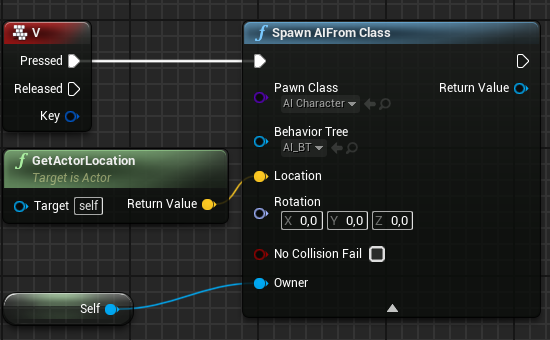

so you'd get the owner, cast it to the spawner and then promote it to a variable and with that variable you can get any variable on the spawner when you need it.
 pulsar halo
Hello, I'm following through a local multiplayer tutorial and have set 2 playerstarts as my game only has 2 players. even though I have set the default pawn class to None, the editor is still spawning an extra player. why is that?
 lost canopy
last abyss
so you'd get the owner, cast it to the spawner and then promote it to a variable...
lost canopy
last abyss
so you'd get the owner, cast it to the spawner and then promote it to a variable...
The only problem with casting is that it pulls from the actual blueprint at runtime rather then the instance of the blueprint that is spawned right?
pulsar halo
 maiden wadi
@lost canopy It doesn't matter if you cast or use a pointer. The object will get loaded. If you already have instances of that object around, casting won't make a single bit of difference.
pulsar halo
in thr first image i disabled the spawning of the 2 players, but still got 1 player..
lost canopy
maiden wadi
<@!485109841711464449> It doesn't matter if you cast or use a pointer. The objec...
Ty, I'll see what else I can mess up while Im at it 😄
maiden wadi
@lost canopy To try and explain it a little better, Unreal only loads what things need. Classes are actually an object, they're a version of a blueprint that is created and stored as a "default". Say you have your spawner for instance, but no AI, but you have stuff like SpawnAIFromClass that spawns a specific class of AI. That AI class is created in the background before you can even load the spawner. Casting to the AI class after that will make zero difference. The one and only time you could concern yourself with casting, is when you're casting to a lot of different things in different places and things that don't need to be loaded are. Like if you have four levels, all with different AI, all with different managers. But something in level 1 casts to a specific class in level 2. Now you're not using this class in level 1 but it gets loaded. If that class casts to or stores pointers to other things in level 2, all of those get loaded, and anything they cast to, etc etc etc. This leads to major memory problems on larger projects later when you have a ton of things loaded that don't ever need to be just because of careless pointers.
lost canopy
maiden wadi
<@!485109841711464449> To try and explain it a little better, Unreal only loads ...
Thanks for clarifying, that's really helpful!
lost canopy
last abyss
https://prnt.sc/12e6p3v https://prnt.sc/12e6u1f this is what I was talking about...
Sorry to bother you again, tried your suggestion and the cast fails
 last abyss
lost canopy
Sorry to bother you again, tried your suggestion and the cast fails
last abyss
lost canopy
Sorry to bother you again, tried your suggestion and the cast fails
it shouldn't fail if you plugged self into the owner pin on the spawn ai from class node
lost canopy
last abyss
it shouldn't fail if you plugged self into the owner pin on the spawn ai from cl...
Maybe the AI_spawner can't be the owner as its not a character?

 devout dove
Can i convert the interp speed of finterp into seconds or ms? So i want something to interp from 0 to 100 in 1s or 3.5s etcv
maiden wadi
@devout dove What is your use case? Because it seems like you want a simple modifier, which you should be able to get from (TotalDuration/CurrenTime)*100
last abyss
you can try debugging it. on the spawned ai you can do a print string of the get owner node and see what it returns. it should be returning the spawner if it doesn't then there's something else that may be interfering with this code
lost canopy
last abyss
you can try debugging it. on the spawned ai you can do a print string of the get...
Thanks, I'll try that!
lost canopy
last abyss
you can try debugging it. on the spawned ai you can do a print string of the get...
It returns my AI controller as owner. If I remove the AI controller it works perfectly and thanks for that. But I can't use a behavior tree if there's no AI controller attached
 last abyss
lost canopy
Thanks, I'll try that!
last abyss
lost canopy
Thanks, I'll try that!
never mind, seems like I misunderstood what 'owner' represents. I thought it would represent the actor that spawned it but it seems its actually the controller.
lost canopy
last abyss
never mind, seems like I misunderstood what 'owner' represents. I thought it wou...
Thanks for trying. I'll see if I can figure out what Datura meant. This has brought me a lot closer though in understanding how the BPs perform at runtime when there are multiple instances
last abyss
instead of using spawn ai from class you can use spawn actor from class and as mentioned earlier you can expose a variable on spawn. then when you choose the class (inside the spawn actor from class node) that variable should show up as a pin. but you'd have to change where you run your BT, which you can do in the controller using the Run behaviour tree node
lost canopy
last abyss
instead of using spawn ai from class you can use spawn actor from class and as m...
Thank you again for your patience, I'll try that 🙂
 river wigeon
how do i get all actors of class and store it as a list?
lost canopy
river wigeon
how do i get all actors of class and store it as a list?
Use the get all actors of class, it'll assign them all into an array you can do with what you want
 river wigeon
yes i know that, but i have no clue how to save the names of the actors to a list, i need it to save and load it
something like this?

 worthy frost
why are you storing names tho? what is the purpose?
river wigeon
to destroy the actors by name, i dont need to destroy all
worthy frost
you should never need to destroy actors by name
actors also have a thing called ActorTags you could use to identify unique actors
lost canopy
last abyss
instead of using spawn ai from class you can use spawn actor from class and as m...
That did it, its working perfectly with my behavior tree now, tyvm!
river wigeon
but how can i add a tag to them after they are destroyed?
at the beginning i need to spawn all actors, but when i load the game i need some to be destroyed. I finally managed everything with saving and loading i need, but i cant destroy actors, i think i got the wrong thinking path in my mind <.<
worthy frost
but you should not be using names for that, i never trust names
river wigeon
i used integr, for it, but it only destroys one
worthy frost
but if they exist in level, then they should be name stable, so you can get away with it
but its not optimal
river wigeon
i thought so too, thats why i started with " get hearts (the number collected) then get all actors of class, then i get a copy, and put the number of hearts in it, but it only destroys the actor that is the number. But i need the number to destroy the count of the actors
dawn gazelle
No
Object references cannot be saved. You need to store information about the objects and when loading, recreate them.
Doesn't matter if it is in a structure. The objects themselves cannot be stored within a save game. When you're dealing with an object reference, you're dealing with a pointer to the object in memory. When the game exits, that pointer would no longer be valid as the object no longer exists in memory. Trying to store the reference is just trying to save the pointer, and if that pointer is no longer valid, then the object for all intents and purposes, no longer exists.
Goes for any type of object reference - like, you can't store a Texture2D reference that is created from a TextureRender object. However, you could store the image that the Texture2D has created in bytes and reconstruct it when needed.
So in that sense, you have to create your own "Save Object" functions - these functions would collect the data required from the object in question, and if you're loading the game, you would then read the necessary values to place that object where it should be and with whatever values it should have that you've stored in the save.
 late cave
Before I submit this repro project in an bug report, there's no non-C++ thing I can put into World Context Object to make this work, right?

(It's an Editor Utility Actor, btw)
 severe geyser
Happy Sunday, folks. Took a day off and now I am back on the grind. Today's task - limiting the amount of enemies that are allowed to be spawned in world.
My wave game is really coming along and it is quite fun, but once you get to Wave 13 and up, the amount of enemies that gradually spawn eventually lead to significant frame rate drop. I've experimented with lods, but the maps are such close quarters that they can only do so much. My solution - check how many enemies are in world, and if it's >= 100 or so, I want to temporarily stop spawning and then resume again once enemies are < 100, until the wave is over. I heard get that "get all actors of class" can be expensive. Anyone have some advice for how to best handle this?
 burnt berry
Hello!
Is there a way to refer to any of these Scene Components inside the Details panel of the Actor Component named "Component"?

 unique harness
GetOwner, Cast to Actor Type
dawn gazelle
severe geyser
Happy Sunday, folks. Took a day off and now I am back on the grind. Today's ta...
Create a control actor that all your spawners report to. In this actor, have an integer value that keeps track of how many enemies are spawned. Before spawning an enemy, have them check with the control actor to see how many enemies are spawned and if < 100 go ahead, otherwise, keep track of the spawner requesting to spawn the enemy - when the next reported enemy is dead, have the control notify the spawner to proceed and remove it from the tracker. When an enemy is spawned, have your spawners report to the control actor and add 1 to the number of enemies spawned. Have your enemy actors report when they are dead to the control actor to remove 1 from the spawn and notify the next available spawner to spawn an enemy.
Basically - have one master that controls all the spawners.
burnt berry
dawn gazelle
Create a control actor that all your spawners report to. In this actor, have an...
I second this solution 😄
burnt berry
unique harness
GetOwner, Cast to Actor Type
Was this an answer for me?
unique harness
burnt berry
Was this an answer for me?
yes
burnt berry
I mean is there a way to reference those components in the details panel of the actor component.
unique harness
ah, no there is not
maiden wadi
@late cave GetEditorWorld
burnt berry
So if I wanted to write a component that helps communicate two other components, I would have to get their references at runtime inside BeginPlay or something.
severe geyser
thanks folks, I will work on this @dawn gazelle @burnt berry
unique harness
burnt berry
So if I wanted to write a component that helps communicate two other components,...
components typically shouldn't need to interact with other components best rethink your design
late cave
maiden wadi
<@!149623011199156225> GetEditorWorld
Thank you so much! 👍 I searched for world and yet missed that, and then someone on answerhub said that the only solution was C++
burnt berry
unique harness
components typically shouldn't need to interact with other components best rethi...
Why should that be?
maiden wadi
Eh. A lot of people still go by what they've learned half a decade ago. 🤷♂️
unique harness
burnt berry
Why should that be?
There are a lot of different reasons. What if the manage component gets deleted for some reason? By design Actors manage their own components because they are
"children" of the actor, children shouldn't be managing siblings, the parent should. These are two off the top of my head
burnt berry
Well I am the one writing the code, so I do know the managed component won't get deleted for some reason 😄
Thank you though, I will look for alternative approaches
unique harness
instead of breaking structs, you can split them
but I don't think you can hide members that way
right click the pin
when nothing is connected
I think it lets you not use the Make node too
burnt berry
Looks pretty clean to me, whats the issue? 😄
You mean like going saveable_data->remaining_xp?
getting exactly one variable instead of breaking?
maiden wadi
@swift pewter SetMembers makes it easier to set individual struct values.
For instance. I'm not even sure that your level is going up, is it? Doesn't Break return by value?
Yeah. Don't use the Set though.
Just input your SaveableData into the SetMembersInEtcEtcEtc, and click on the SetMembers node.
In the details panel on the right, you can checkbox which values you want to set there.
They'll show up on the node, and you can set them directly that way without having to break and make everywhere.
 somber linden
 late cave
maiden wadi
Eh. A lot of people still go by what they've learned half a decade ago. 🤷♂️
late cave
maiden wadi
Eh. A lot of people still go by what they've learned half a decade ago. 🤷♂️
Interestingly, Get Editor World didn't make a difference... I still can't get anything after a Delay to execute in an Editor Utility Actor
maiden wadi
I dunno. I avoid delays as much as possible. I wonder if SetTimerByEvent is affected?
late cave
Good idea, I'll try that next.
 hybrid dragon
Hi guys, So i have an issue with blueprints. I have 0 experience with blueprints and this is starting to be really frustrating. My idea is to have a billboard which shows two lines of text on the screen when the F key is pressed. And the issue I have is that in the screen it is showing a part of the text, and the other problem is that the text is still showing even when the F key is pressed outside of the overlapping box. Here is my BP

hopefully someone could give mme a hand bc to behonest i dont know what else to seach on google
late cave
Weird... I don't even get settings for "Call in Editor" on the second event...
 late cave
maiden wadi
I dunno. I avoid delays as much as possible. I wonder if SetTimerByEvent is affe...
late cave
maiden wadi
I dunno. I avoid delays as much as possible. I wonder if SetTimerByEvent is affe...
and Set Timer by Event doesn't seem to execute either, but it was worth a try 🙂
made the bug report now
I'll just use the bool to block while saving, but it would be nicer to have the delay while you're tweaking values
 summer bolt
Is it possible to use bps to add rows to datatables
dawn gazelle
summer bolt
Is it possible to use bps to add rows to datatables
data tables are read-only, they're not meant to be used as a database.
summer bolt
Gotcha 👍
severe geyser
you beauties. Enemies limited to 100 spawned at any given time. It works perfectly
I had planned to work on this throughout the day. It was so simple. Now what do I do?!?
with 100 enemies, the fps sits around 56-62. That should be fine, yeah?
icy dragon
summer bolt
Is it possible to use bps to add rows to datatables
If you want to, you could just use array of the struct instead of data tables.
The rows are basically the array elements, and the columns are the variables within a struct
maiden wadi
@summer bolt If you want to mass edit a datatable easily, do yourself a favor and export it as a CSV and edit it somewhere like Apache or Excel.
 royal kraken
Hey all, I've got a billboard in my scene, I've got it to face towards the camera but when I'm on top of it, it spins round and round as it properly doesn't know which was to face, is there a way to stop this?
unique harness
If it's going to be used more than once, use visibility, otherwise destroy
so can the player pop up the widget once or more than once?
So visibility
unique harness
severe geyser
with 100 enemies, the fps sits around 56-62. That should be fine, yeah?
Is this with the editor open or closed? All profiling should happen with the editor closed as it consumes a lot of resources
severe geyser
that's with editor open, so I guess it would be better?
 sturdy galleon
Hello, Im having some issue with sending Interface Messages to my weapon after I switch it's Mesh. So I have a spear, that I transforms into an Axe if a button is switched but when I switch the mesh my interfaces stop telling the weapon when collision should be on or off. Its just always on. I narrowed it down the the "Mesh Comp" Im unsure how I can switch the weapon's mesh and still receive interface messages. Any help on this would be greatly appreciated!

 summer bolt
maiden wadi
<@!508566496562380800> If you want to mass edit a datatable easily, do yourself ...
summer bolt
maiden wadi
<@!508566496562380800> If you want to mass edit a datatable easily, do yourself ...
👍
sturdy galleon
Also this might be helpful to know, im using the notifies for the following State. When it starts, the weapon's collision turns on, when it ends, the collision turns off.

 wary tinsel
Hey guys, any advice on widget Leaderboards creation? Would be possible to add a row according to the number of players automatically?
 neon forge
Hey all, so is there a way to set up the default 1st person character to grab objects in the environment? I was following a tutorial and they are grabbing cubes and moving them around and as far as I can tell this function does not come by default and want to find the easiest solution.
for reference, this is the tutorial I'm following: https://www.youtube.com/watch?v=--xR0aQ2rB0
He does have a tutorial for his own "gravity gun" but just curious if there was a quick way to get the grabbing part up and running.

In this free step by step Unreal Engine 4 tutorial video (UE4 how to) you will learn how to implement physics based monopole and dipole magnets that attract or repel each other. This is using physics constraints.
All my UE4 tutorials: https://www.youtube.com/watch?v=BT0jFArPtGM&list=PLEp7216xGGILh3i2BZe2E0ZEuiIGa-VQT&index=1
Join me for Live St...
 gusty cypress
When you import a static mesh is there any way to edit its geometry alignment? trying to make it "align surface fit" so it stops breaking my material
I only see this feature available in geometry
 indigo merlin
Is there a way to check if the Actor that a LineTraceByChannel has hit is a Character?
 daring willow
Any idea how to prevent this? When an NPC dies I wait a few seconds and remove the controller and pause or delete all blueprints/components. Usually it works fine, but sometimes they get this super fast vibration/ghosting go on.
 daring willow
indigo merlin
Is there a way to check if the Actor that a LineTraceByChannel has hit is a Char...
daring willow
indigo merlin
Is there a way to check if the Actor that a LineTraceByChannel has hit is a Char...
Cast to the character class. The 'Cast Failed' or 'Success' output will tell you
gusty cypress
Can you remove collision from geometry brushes, can't find the options
 gritty elm
daring willow
gritty elm
daring willow
could just check the array length
 violet flax
what does "variable is not in scope" mean?
 lone dome
Can someone please help me out with this? https://forums.unrealengine.com/t/tree-view-keeps-recreating-a-check-box-on-each-initialization/224784
Unreal Engine Forums
Hello, Im creating a rhythm game where you can create you own song/Maps. Everything works perfectly but when I create a checkbox for the corresponding object, and scroll up or down on the tree view, it creates brand new check boxes regardless if its for the right “lane”. Thus if I press the create check box button once and you scroll around, you...
Im so lost
its been days
if you need me to join call and share my screen, i could do that
lone dome
violet flax
what does "variable is not in scope" mean?
It means that the compiler cannot find the variable you're calling. Out of scope means that you're trying to call a variable that's most likely outside the object.
violet flax
Thats weird... i create that variable inside the same blueprint, like 2 nodes before i reuse it
severe geyser
hey folks, quick question. I have save slots that I use for storing certain things (graphics settings, high scores, etc). When I package my game for shipping/distribution, where are those saved? I can't find them in the packaged folder
lone dome
violet flax
Thats weird... i create that variable inside the same blueprint, like 2 nodes be...
Are there multiple variables that have the same name?
severe geyser
I've packaged out my game for testing. I used Shipping/Distribution. I have it set so that the first screen will be setting up your graphics settings. Once you hit apply, it saves your settings and loads the main menu. The reason for this is so that the next time you open the game, those settings are saved. On my entry level, I have a branch setup like the below. The hope was that the second time you open the game, it would go straight to opening the main menu level. This is not happening. It keeps opening the widget off the false branch. Any ideas?

do I first need to cast to the SaveGameSettings that I created?
 visual echo
Hey I am trying to disable a keybind when a key is pressed but i cannot get it working can someone help me here is the blueprint
 dark crow
severe geyser
I've packaged out my game for testing. I used Shipping/Distribution. I have it...
dark crow
severe geyser
I've packaged out my game for testing. I used Shipping/Distribution. I have it...
Where is that code located
severe geyser
level blueprint
dark crow
Does it work in the Editor first of all?
severe geyser
works in editor, yes
I should note that the packaged game is correctly saving high scores, and loading them when I open the game again
I found where it's saving these slots to (C:Users>ME>AppData>Local>GameName
it is saving them
just on that level blueprint it always goes false
dark crow
You could try moving that Logic into the GameInstance
Never know if it's a Level Blueprint problem
Event Init and do the check
 cloud dagger
Hi, so first off I'd like to say I'm quite new to Unreal Engine so forgive me if I made some obvious beginner mistakes. I have been having an issue where I'm making a Survival/Hack n Slash game and as of now I'm trying to make a system where my character actually deals damage. (I've been doing this off of this tutorial from Ryan Laley https://www.youtube.com/watch?v=BQ7X01SmQJA&t=526s ) See my problem is I've followed the full video and followed every step but my damage hitbox only appears underneath my character and not on my sword. Does anyone know how to fix this? (btw I am using a weapon mesh reference instead of a character mesh reference because I imported the character without the weapon on it)

A new set of videos where I explain and teach you how to make it so you can deal damage to enemies. This first episode covers how to use notify states and a trace to determine if you can deal damage or not.
Support me on Patreon and get access to videos early, join our developer community on Discord, get exclusive behind the scenes videos on my...

 trim matrix
How could to make them a single material?
 lone dome
trim matrix
How could to make them a single material?
lone dome
trim matrix
How could to make them a single material?
Can you explain? They're all different materials
trim matrix
lone dome
Can you explain? They're all different materials
I have a model with 4 materials, how could I turn them into a single material?
lone dome
trim matrix
I have a model with 4 materials, how could I turn them into a single material?
For example, if you had a cube you'd want each side to be a different color?
trim matrix
lone dome
For example, if you had a cube you'd want each side to be a different color?
yes, exactly
lone dome
trim matrix
yes, exactly
You would have to go and make a new element map if im not mistaken
trim matrix
lone dome
You would have to go and make a new element map if im not mistaken
Oh okay thanks for help !
 uncut island
Im wondering how to make a basic crosshair/dot that you point at say a door, and when you click the door opens. Probably really easy I just can't figure it out on my own.
icy dragon
uncut island
Im wondering how to make a basic crosshair/dot that you point at say a door, and...
Use a line trace, and compare the classes
trim matrix
I want to change 4 materials in an object
Any help about Element Index ?

 static charm
element index is just the element/material slots number of the object
so if a mesh has 4 materials, then 0 would be the first, 1 the second, 2 the third ,etc
trim matrix
static charm
so if a mesh has 4 materials, then 0 would be the first, 1 the second, 2 the thi...
Oh nice thank you but I want to change all materials in object no only one.
static charm
to change all 4 at once, you can make 4 separate nodes. or use a For Loop
trim matrix
yeah change all 4 at once
static charm
 trim matrix
static charm
trim matrix
static charm
 static charm
yup, just add the For Loop like in my pic
between your ChangeObstacle and SetMateiral
trim matrix
static charm
between your ChangeObstacle and SetMateiral
Oh yeah true, thank you very much
I need select node?
static charm
its only if you want 4 different and new materials
otherwise you can just set all 4 to just one
trim matrix
 icy dragon
Select node can save on nodes, and looks better than 4 Set Material nodes with Switch on Int.
trim matrix
icy dragon
Select node can save on nodes, and looks better than 4 Set Material nodes with S...
Thank you
trim matrix
static charm
otherwise you can just set all 4 to just one
Ok thank you
 chilly jetty
Hi I have a question
For the default FPS projectile it will delete itself after a few seconds
where can i find the option to prevent it from deleting itself?
 royal badger
Has anyone encountered this error when sometimes opening, panning or zooming in and out on a certain blueprint "Assertion failed: OutPin->LinkedTo.Num() == 1 [File:D:/Build/++UE4/Sync/Engine/Source/Editor/GraphEditor/Private/BlueprintConnectionDrawingPolicy.cpp] [Line: 506]"
It causes a crash
trim matrix
royal badger
Has anyone encountered this error when sometimes opening, panning or zooming in ...
I have switched my graphics driver from "Game Ready to "Studio" in the Geforce Experience.Hope it works for you too.
 midnight kiln
@chilly jetty I was gunna try and find an answer for you, but for some reason I cant get any templates to load. But my assumption is there is a destroy actor node with a delay node just before it in the projectile BP.
royal kraken
royal badger
Has anyone encountered this error when sometimes opening, panning or zooming in ...
Have you updated your drivers for your gpu
royal badger
Yes, i did that when switching to the studio driver
royal kraken
What card is it
royal kraken
royal badger
Yes, i did that when switching to the studio driver
Are you using any plugins
royal badger
A few, but ive tried disabling them, same result sadly
royal kraken
Does it do it in new files or just the one project
royal badger
Just the one blueprint
royal kraken
Are you using c++
royal badger
No
royal kraken
Does it give you enough time to copy any of it across to a new bp
royal badger
It does yea, let me try
royal kraken
Try copying all of it and see what happens, if it keeps crashing try just copying parts of it across and see which bits cause the problem, or duplicate it and start delete parts of it and see if you can find the thing that is causing the problem
royal badger
Will do
royal badger
Oh, think i fixed it, deleted parts, found what crashed it and there was a wierd double connection going on with the execution pin
I have no clue how that happend though
Thank you very much!
royal kraken
royal badger
Thank you very much!
No problem, glad to have helped
 ancient topaz
Friends, I have a question.
Here I have an object on the map, which blocks the passage.
When there is a battle, one of the opponents destroys this object, and then he must run through the opening passageway. But since there was an object, there is no navmesh under it and the enemy can not run there. Is it possible to make the navmesh information update after the destruction of the object or some other solutions?
 icy dragon
ancient topaz
Friends, I have a question.
Here I have an object on the map, which blocks the p...
icy dragon
ancient topaz
Friends, I have a question.
Here I have an object on the map, which blocks the p...
Either:
a. Set the object to not affect the navigation mesh, and make the AI not trying to go through the collision by doing collision check every few steps forward.
b. Use navigation invokers which only calculate the navmesh for the proximity of the AI. I'm not sure about the performance implications though.
ancient topaz
@icy dragon Thank you! I did so, the object is two-part. The bottom object has no collision, so the navigation under it goes through, and the top object blocks everything. It is below the capsule and enemies and character and so no one can pass through it.
maiden wadi
@ancient topaz You may also need to enable runtime nav generation if you haven't already in project settings.
 river seal
hello! does anyone know why the line trace won't hit the moving part of the skeletal mesh actor (landscape and squab are imported as one alembic..)
 gentle urchin
Does it have collision ?
river seal
no collision mesh but i am tracing for complex (which should hit per poly if i understand correctly) and for the landscape (which is part of the alembic/skeletal mesh) it works
gentle urchin
Think you gotta set that in the mesh aswell ?
2 sec, opening
I cant even find collision setting for skeletal. thought complex was for static meshes, but dont quote me on it

then you have regular collision settings in the mesh in the bp its used
 maiden wadi
Complex just means that it isn't using the faster simplified geometry but is tracing against the mesh itself.
gentle urchin
^so does that work towards a skeletal aswell ?
maiden wadi
Should be.
Judging by google though, there seems to be plenty of people with issues relating to alembic cache meshes and collisions.
gentle urchin
Sounds like one could be better of with collision capsules then?
river seal
gentle urchin
2 sec, opening
where did you find this entry?

ah project settings
mhm no looks like a different enty
gentle urchin
I found this in the static mesh viewer
So i dont think it applies to your mesh as it's a skeletal
river seal
mhm ok
 solid grove
how would i create an object like the game instance or game mode, the ones which do not have a physical existence in the world?
 elfin hazel
Object, or Actor Component (not scene component). Though these are not "globally accessible" like game mode or game instance.
 earnest tangle
solid grove
how would i create an object like the game instance or game mode, the ones which...
earnest tangle
solid grove
how would i create an object like the game instance or game mode, the ones which...
What do you mean create those? You don't really spawn them because the engine does that for you
Yeah I had a few "manager" objects which were just actors with no components on them, it works pretty well... Subsystems are also an option but you need to use C++ for those
uh oh, I did hear a rumor you could extend one if it was exposed to BP's in such a way but sounded to be full of gotchas
I did and gave up
:D
I got reasonably close but it just never worked in packaged
Ah
 manic vessel
Hi Im working on a magazine eject from a VR Pistol . I want it to look good so I move the magazine to the weapons exit socket so It follows the correct path out without clipping the weapon. I did this with a lerp transform/ timeline But there is a noticeable delay after the mag reaches the exit point and is supposed to either simulate physics or I add impluse and it pauses in the air for a fraction of a second before falling. Im not sure why this is happening. Ideally I would love to move it in a simulated state so its the velocity of the transform is applied to the mag and it seamlessly slides out with velocity But I just get the trying to move a simulated mesh without the teleport flag.
 earnest tangle
Wow that sounds like it leads to some really confusing behavior lol
manic vessel
I dont really know why this one is giving me a hard time as I have done much bigger things. and I think this should be simple. 3 days and I cant solve the issue
It feels like when the timeline ends there is a delay before executing the finish pin
earnest tangle
Perhaps you can try to calculate the velocity of it as it's being lerped, and then adjust the velocity manually at the end?
since it won't have any velocity from the lerped movement applied to it as it's just being "teleported" in a sense
manic vessel
I tried to do that before the Timeline . and also on the first pin of a sequence and it just fell to the floor
Ideally I would like it to be seamless transition from move to simulate. I have also tried to just use impulse to eject it But getting it right is difficult as its either to powerful or dont clear the weapon..
I am also messsing about with set tick groups on the timelime like pre/ post/ during physics but Im not really sure what Im doing there tbh
Lorash Is there a node that could help with that?
earnest tangle
Yeah so what you could probably do is just calculate how fast you're moving it during the lerping
then apply it as the object's velocity, and it should continue smoothly at that speed
manic vessel
Thats what I want it to do , look natural
I might be able to do that As I have a BP i do something similar with to look at
earnest tangle
I'd just try setting the velocity to some random number first to see if it will continue moving using that method
Won't have to spend so much time figuring out how to calculate the correct velocity if it just won't work :D
 earnest tangle
Yeah, tho if you wanna simplify it a little you can just copy the current frame to the previous frame at the end :)
 drifting socket
Hi, im trying to make a skill tree that auto generates its layout, i got the icon position working but now i need to generate lines to connect the skills, does anyone have any idea how i would do so?
 summer bolt
You could draw the line in another program and link all the things together
 supple plank
Is it possible to spawn actors while also giving it a specific public variable?
summer bolt
supple plank
Is it possible to spawn actors while also giving it a specific public variable?
I think that's expose on spawn
unique harness
drifting socket
Hi, im trying to make a skill tree that auto generates its layout, i got the ico...
There is a DrawLine method you should have access to within the widget
supple plank
summer bolt
I think that's expose on spawn
i don't really know what that means
unique harness
Call it OnPaint
unique harness
supple plank
i don't really know what that means
There are settings to expose variables on spawn in the variable details panel
drifting socket
unique harness
There is a DrawLine method you should have access to within the widget
Ok thank you
summer bolt
unique harness
There are settings to expose variables on spawn in the variable details panel
r/beatmetoit
summer bolt
unique harness
There is a DrawLine method you should have access to within the widget
I thought there was something like that but didn't know for sure lol
supple plank
Where exactly do i need to be looking then? in which actor or is it somewhere else?
summer bolt
supple plank
Where exactly do i need to be looking then? in which actor or is it somewhere el...
So you want to spawn an actor and set a variable on that instance right?
supple plank
Yes i have a vector variable to set the color but i want to be able to spawn it in different colors
the variable is already public
summer bolt
Alright
So
Where you selected the type of variable
Look down a bit
Should be something like expose on spawn
supple plank
oh i see
summer bolt
Tick that
summer bolt
supple plank
oh i see
Yup
And refresh nodes on the spawn actor node
And you should expand it and see an option for that variable
supple plank
Awesome thank you!
summer bolt
Np
 neat prairie
i have a skeletalMeshComponent, and for some reason it plays an animation (looping) all the time by default. how would i make it not play any animation other than when i tell it to?
unique harness
neat prairie
i have a skeletalMeshComponent, and for some reason it plays an animation (loopi...
show the animation settings for the component
neat prairie
unique harness
show the animation settings for the component
what do you mean exactly?

 unkempt valley
anyone know how i can get a stationary foliage asset to flow with wind?
unique harness
neat prairie
what do you mean exactly?
In the actor component list click on the component that has this mesh
unique harness
neat prairie
what do you mean exactly?
 neat prairie
ah ok. it's set to Use Animation Blueprint but i havent made one for it. do i have to,
unique harness
neat prairie
ah ok. it's set to Use Animation Blueprint but i havent made one for it. do i ha...
you have to tell it how you want to animate
if you're just making the trap activate, you can probably use PlayMontage
neat prairie
unkempt valley
anyone know how i can get a stationary foliage asset to flow with wind?
you will need to use a material, which offsets the vertices of the mesh back and forth over time
supple plank
What do i need to link to the object in the cast node so that i can measure the distance between two blueprints?
 last abyss
you need to get a reference of an object in the world
supple plank
and how would i do that?
last abyss
there's many ways, a simple way is to have a collision box or sphere on your character (or the npc) and on begin overlap you cast to bp_npc with the other actor pin. then promote as bp npc to a variable and then you can use that reference (variable) to get the actor location.
this is just if you have 1 npc though, if u have multiple you could do the same thing but instead of promoting it to a variable adding it to an array.
supple plank
i'm just not going to use a cast i guess and rather a for each loop with get all actors of class
 gusty shuttle
Hey folks, I'm doing a "simple" find look at rot, but I'm getting wacky results. I checked it on relative and world, made sure my axis' were correct too. What gives?

Aye, so I should +90 on the Y?
Cool cool, I'll give it a shot
Yeah, well that could be my bad now that I think of it. Inside the BP the cannon is pointing up

So I should rot it so the arrow is to the right. Thanks mate!
 sand shore
easier to conjure a random actor and get the distance to that
trim matrix
Anyone know why UI elements that are anchored move slightly when i switch my viewport from window to full screen with F11?
Shouldn't anchored means they wont move from that position regardless of screen resolution?
 prisma stag
Hello. When I add an arrow component to my players mesh, it is pointing left when facing forward. Is there a way to reset the meshes forward rotation?
 stray rain
why don't you just reimport it correctly? (the player mesh)
 wary gazelle
Hey, my name is ben and I render out actors with looped animations to create animated tokens for my pen & paper game. So i have different cameras in seperate level sequences and render everything out with the render movie queue. So far so good. I have two questions:
- When I change the sekeletal mesh (one of the cameras films) and render out the same render movie queue It still shows the old model even though its not there anymore. Is there any way to "update" every sequence without going in and change something and save it.... or something?
- Do you have a hint how I connect the Last Frame of several sequencers to one variable so i can chnge them comfortable without open every single one and set it up manually? I dont need a solution, just a hint i can chew on. -> Use case is that I film/render out different animations (With cine actors/Render queue) that have different animation lenghts
stray rain
trim matrix
Anyone know why UI elements that are anchored move slightly when i switch my vie...
where are they anchored to?
prisma stag
stray rain
why don't you just reimport it correctly? (the player mesh)
Thats what I was thinking but I dont know if that will affect the bones and animations?
 signal mango
Hii everyone, I'm fairly new to unreal engine. Now im trying to make an sort of fps with it to gain some experience with the engine, now im running in to an issue where when I have the ai shoot and I shoot my self the sounds gets messed up. Does anyone has an sollution for this problem? Thanks in advance!!
Turn youre vollume down! 🤣
unique harness
signal mango
Hii everyone, I'm fairly new to unreal engine. Now im trying to make an sort of ...
Show where you're playing the sound
 keen seal
What can I change the event tick for?
I need the actor to always look at the player.
 unique harness
If you always want to face player, Tick is correct
keen seal
It's getting a little choppy when many actors are on screen though.
unique harness
Then you can either limit how often it's called through the tick interval or create a manager actor to update them all together
 calm gull
Does anyone know where I can find some more information on the Return Value of the Apply Damage function? Is it possible to influence this? For example if a player has some kind of damage resistance.
 neat prairie
calm gull
Does anyone know where I can find some more information on the Return Value of t...
neat prairie
calm gull
Does anyone know where I can find some more information on the Return Value of t...
you will have to make your own Damage Type
stray rain
prisma stag
Thats what I was thinking but I dont know if that will affect the bones and anim...
Uh I do not know :/ havent worked with animations yet in unreal
calm gull
neat prairie
you will have to make your own Damage Type
I suspect you misread the question. I wonder what the "Return Value" of the "Apply Damage" node is
neat prairie
calm gull
I suspect you misread the question. I wonder what the "Return Value" of the "App...
it must be the Base Damage with some calculations applied relevant to the Damage Type. to influence it, make a Damage Type
calm gull
To my knowledge the only thing I can influence on a damage type is these things. Where can I put any custom calculations?

 restive token
are there any events similar to "on focus received" or "removed from focus path" but for buttons, not widgets?
dawn gazelle
calm gull
To my knowledge the only thing I can influence on a damage type is these things....
I think you may be looking at this the wrong way.
When you apply the damage, you would then use an event like "Any Damage" on the receiver's end - from there you would do your calculations to determine how much damage was done.
If you're looking for visual #s to appear or something similar, then have the actor that received the damage perform that function.
If the person dealing the damage needs to know the value, then it can be reported back after calculating it on the actor and reported back to the instigator by using the Damage Causer or Instigated By node on one of the damage nodes.

(The damage report is a custom event I created)
calm gull
dawn gazelle
I think you may be looking at this the wrong way.
When you apply the damage, you...
Guys, I appreciate the effort, I really do, but this is not my question. I only wonder about what the float that is returned from the Apply Damage node is.
dawn gazelle
It is based around the calculations within the damage type class.
calm gull
This was introduced fairly recently, and I haven't seen it before. Can this be influenced? I find it strange, that's all.
dawn gazelle
Yes, by the settings that you see within the damage type class, and that's it. I believe it has to do more with destructable meshes.
calm gull
The only documentation I can find on it is "Actual damage the ended up being applied to the actor."
dawn gazelle
Eg:
 calm gull
So perhaps it was introduced with Chaos to determine more fine-grained damage?
dawn gazelle
Possibly. The damage type definitely is not for doing any calculations outside of tweaking some values - like there's a setting in there for damage falloff which would be useful for AoE damage like an explosion, so the closer you are, the more damage is dealt.
calm gull
dawn gazelle
Possibly. The damage type definitely is not for doing any calculations outside ...
Totally, except the apply radial damage does not have this output, only "Apply Damage" and "Apply Point Damage" has it.
calm gull
restive token
are there any events similar to "on focus received" or "removed from focus path"...
Could you use On Hovered/On Unhovered events?
 dawn gazelle
restive token
are there any events similar to "on focus received" or "removed from focus path"...
dawn gazelle
restive token
are there any events similar to "on focus received" or "removed from focus path"...
If you made a widget that was specifically just your button, then you could probably use the focus path events.
restive token
calm gull
Could you use On Hovered/On Unhovered events?
Not for keyboard or gamepad
restive token
dawn gazelle
If you made a widget that was specifically just your button, then you could prob...
Yes but then I’d have to remake everything
which I guess is what I have to do
trim matrix
Hello, I would like to update my HUD's ability Icons depending on which unit is selected. Do you know how I would go with that ?
I was able to display the text and character's image by binding, but the binding option is not displayed on the class. Would you know if there is a way to manually update the HUD somehow ? My selected unit is stored in the gameMode so I can get it from anywhere:


 marble lantern
idk where to put this but i got this error building lighting and i was wondering if any of you all could help

 soft peak
Hey there 😄
i somehow managed to understand the third person controller a bit,
but is there a way i can "disable" the "build up speed" while running?
have a look here (after sliding is done):
https://i.gyazo.com/4b504985c54022b42a848194c4d1f73a.mp4
gusty cypress
should water materials cast a shadow? does this make sense?
dawn gazelle
soft peak
Hey there 😄
i somehow managed to understand the third person controller a bit,
...
If you have a character movement component, select it, and change the max acceleration to something really high?
violet flax
gusty cypress
should water materials cast a shadow? does this make sense?
Real Water do cast shadows, but not like a human would.
 pastel sinew
What's the best way to implement hitstop? (freeze frames seen in action games, upon landing a hit. usually accompanied by a screen shake)

 unique harness
signal mango
<@!209383767322656768> this is how I call the sound
unique harness
signal mango
<@!209383767322656768> this is how I call the sound
and what exactly is the issue?
 signal mango
unique harness
and what exactly is the issue?
signal mango
unique harness
and what exactly is the issue?
As you can hear in the clip, when the player shoots and the ai shoots you hear a weird i dont know how to call it. ?clipping?
signal mango
signal mango
Turn youre vollume down! 🤣
at around 10 seconds in to the clip
unique harness
What happens if you remove the attenuation?
signal mango
That doesnt help
unique harness
What is ShootSound?
dawn gazelle
That sounds like it has to do with the concurrency.
signal mango
unique harness
What is ShootSound?
Just an ak sound, so you can plug in more sounds
unique harness
signal mango
Just an ak sound, so you can plug in more sounds
is it a SoundWave?
if so, try creating a sound cue and using that instead
 fast blaze
hi all have a quick question, what node is outputting float from X to Y in given amount of time? I need to output x=100 y=200 during 0.5 seconds. thanks!
 lime ridge
fast blaze
hi all have a quick question, what node is outputting float from X to Y in given...
lime ridge
fast blaze
hi all have a quick question, what node is outputting float from X to Y in given...
Do you mean you need to lerp between the two values over a period of time?
fast blaze
ok good thank u
mm I thought maybe it's not a lerp between two values but I need to increment it... so it's like from 100, 101, 102 ... till 200 in given time
 eager agate
fast blaze
eager agate
fast blaze
ok I got with timeline what I need but it plays once, but with "play from start" input it's strangely not playing while activated
timeline starts playing when air time is false...
 trim matrix
What node I need to make an Array for Element material?
 dawn gazelle
Nvm.. That was wrong.
trim matrix
dawn gazelle
Nvm.. That was wrong.
It's ok no problem sir
trim matrix
dawn gazelle
Nvm.. That was wrong.
 dawn gazelle
So this would be right. This would set all materials on a mesh to whatever you've defined in the material option on the Set Material node.
 trim matrix
dawn gazelle
So this would be right. This would set all materials on a mesh to whatever you'...
trim matrix
dawn gazelle
So this would be right. This would set all materials on a mesh to whatever you'...
Oh thank you very much sir
trim matrix
dawn gazelle
So this would be right. This would set all materials on a mesh to whatever you'...
The nodes looks fine but in game I can't see the materials
severe geyser
how many booleans can you use in OR?
my shield was working fine, but now that I've introduced a second shield type, it's no longer working. I have all 4 plugged into an OR boolean
here's the code that WAS working prior to adding the last two booleans

once I added in Exploding Shield On and No Starting Exploding Shield, it stopped working
right now the functionality of both shields are the exact same, really. I haven't coded in the exploding part, so essentially I recreated the same thing with it's own variables
one is available at wave 3, the new one is available at wave 8
dawn gazelle
trim matrix
The nodes looks fine but in game I can't see the materials
Sorry, can't be much help there - I've never used the Set Material node in such a way so not too sure what needs to be done to use it properly.
trim matrix
dawn gazelle
Sorry, can't be much help there - I've never used the Set Material node in such ...
It's okay no problem
 weary forum
My button inputs are working to rotate my character, but the mouse inputaxis doesn't work. Does anybody know why this would be?

 molten gate
@weary forum in the "class defaults" section check to make sure these are selected

My guess is only yaw is selected
weary forum
wow
i don't know why that was ticked
thanks
 weary forum
molten gate
<@!204158346717167616> in the "class defaults" section check to make sure these ...
weary forum
molten gate
<@!204158346717167616> in the "class defaults" section check to make sure these ...
Much appreciated
 brittle sky
do timelines loop no matter what

like after they have been executed
because its still working when it shouldnt
dawn gazelle
You have to stop them by feeding an event into the Stop exec line.
dawn gazelle
Execution paths typically only execute once unless there's something that is making them fire more than once - like a timeline, tick, loops etc.
So Begin Play fires once, starting the timeline, then it continuously loops until you feed something into the Stop pin.
trim matrix
I need some help
I use this nodes for change 4 materials in an object but don't work in game

 woven wing
trim matrix
I need some help
I use this nodes for change 4 materials in an object but don't...
woven wing
trim matrix
I need some help
I use this nodes for change 4 materials in an object but don't...
Have you confirmed that it's actually running?
And that it's looping once per material?
I'm also interested in why you're making your obstacle's into glass.
Yeah, that would probably not do anything bad but also not anything useful.
As it would be in the same evaluation, probably the last value.
severe geyser
for the life of me, I cannot figure this out
I ran print strings like you mentioned @trim matrix the value for the first shield seem to be false, same as the second shield


here is the working code for the first third that unlocks at wave 3. It gets cast to in my enemy bp, which feeds into apply damage

the top two are the first (working) shield. The bottom are the second (not working) shield
here is the code for the second shield.


it's basically the same, but the variables are different for each shield
woven wing
You seem to have two different variable names?
You have "Explosive Shield" and "Exploding Shield On"
severe geyser
I need to. They are two different types of shields with different cooldowns and timers
woven wing
So Explosive Shield and Exploding Shield are different?
severe geyser
sorry, updated here

I tried rebuilding it from scratch to find out where I was getting an incorrect true/false
the first image I sent was from the first version
how it is now, neither actually work. The first shield was working fine before this. Feeding the 4 into the OR boolean seems to mess something up
woven wing
Do you know how to use the debugger and break points?
severe geyser
Not as well as I should
woven wing
Well, it's pretty simple. If you click on that "Branch" node and hit "F9" you'll get a break point.
If you run the game, and get to a point in the game where it would be relevant, the game will pause, and you'll be pulled over to this BP.
You will, then, be able to inspect all the variables.
Which will, hopefully, tell you which nodes are true.
It's very unlikely that the OR node is broken.
As that is a fundamental logic node.
And if it didn't work, a great deal more than your damage code would be broken.
severe geyser
how do I inspect the variables. I did the breakdown, I got hit and it brought me to the breakpoint
woven wing
You just mouse over the nodes.
The connection nodes. It should pop up as a tooltip.
(it's not the best design that epic could use to display variables tbh)
severe geyser
Shield On = False, No Starting Shield = False, Explosive Shield On = False, No Starting Explosive Shield = True
which is correct at this point. No shield is up and I am able to take damage
woven wing
Cool!
So you can remove the break point by hitting F9 on the node again, and you can click "Resume" which will bring you back into game.
When you get to the point in the game where the behavior is not matching what you think it should be, pause the game, tab back over to this node, and re-add the breakpoint.
You should then be able to test the new values.
severe geyser
Okay. The Shield is now up, the values are as follows:
Shield On = False, No Starting Shield = False, Explosive Shield On = False, No Starting Explosive Shield = True
woven wing
And are you still seeing the correct result?
severe geyser
I am going to revise this so it's easier to read and write it.
When no shield has been unlocked or used yet here are the starting values:
Shield On = False
No Starting Shield = True
Explosive Shield On = False
No Starting Explosive Shields = True
woven wing
OK, but I don't understand your game, so none of those values mean anything to me.
You need to test the point where there is an error. Where you think you should be getting through that 'branch' node, and you're not.
Test that.
severe geyser
Values when the shield is on:
Shield On = False (incorrect)
No Starting Shield = False
Explosive Shield On = False
No Starting Explosive Shields = True
severe geyser
the weird thing - it works just fine on its own. Without this new shield, everything functions correctly
woven wing
So you've broken something.
Or something was accidentally working.
(hope it's the first, the second is usually harder to figure out)
severe geyser
accidentally working is more like it
gusty cypress
Hey, I've created a split timer and it doesn't always lineup with the final time because each time a split time is shown it takes the time float and converts it into text, thus it is rounded up and down sometimes so its usually only off by .001 by really trying to think, I've tried using a clamp and it doesnt work still rounds the number
woven wing
gusty cypress
Hey, I've created a split timer and it doesn't always lineup with the final time...
Is it that the number is inconsistent or that it's wrong?
And is 0.001 second really something a player is going to care about?
gusty cypress
I just tested and found the margin of error was much larger 1 sec
gusty cypress
 woven wing
Are you using a Timer object in unreal?
Or are you actually storing time values?
gusty cypress
so the level is comprised of different stages. While the player plays there is an on going timer, when a stage is complete it gives the split time (time it took to complete that stage alone) as you can see in my poorly cropped pic the splits add up to 18.86 yet the game final time is 18.89 and I printed the float which is 19.89377
 woven wing
Timer objects tend to be not very good for timing things. They tend to be better for intermittent updates.
If you need a toad enemy to hop every three seconds, a timer is appropriate.
gusty cypress
heres my timer converstion, my timer works of an timeline
woven wing
If you need to calculate split times, use GetGameTimeInSeconds and store the float value.
gusty cypress
should this be in parralel with my using a timeline as my timer?
woven wing
Timeline's are even worse for timing, as they're on the animation update thread, and cannot be relied on to always tick.
gusty cypress
damn I copied this system from an official ue4 tutorial made about a racing game
gusty cypress
I'll start the process of changing it
woven wing
Store the results of GetGameTimeAsSeconds when you pass a split marker.
gusty cypress
okay if ur not sure but could I pause stop and start a timer using gettgametimeasseconds?
woven wing
I don't... know what possible situation that would be beneficial.
You want to store the results of the amount of time between when a race starts and when you hit specific locations, right?
gusty cypress
well the time wouldnt start until the player crossed the starting line
woven wing
So you take the time when the race starts, and you store the time when you hit the split markers.
Then you subtract the split time from the start time and you get an accurate 'amount of time since the start'.
That is what you want, right?
trim matrix
When an object has to fall to the ground then it will bounce and move according to physics. But in this case I need the natural one as it falls. Then I want it to remain stable on the ground (like a stone). How could to do that?
 icy dragon
trim matrix
When an object has to fall to the ground then it will bounce and move according ...
icy dragon
trim matrix
When an object has to fall to the ground then it will bounce and move according ...
I'm not with my computer right now, but there's settings to adjust the amount of bounciness and friction of the physics object.
trim matrix
icy dragon
I'm not with my computer right now, but there's settings to adjust the amount o...
I know but sorry, I really did't find any relevant settings.
unique harness
trim matrix
When an object has to fall to the ground then it will bounce and move according ...
I think you want to disable Simulate Physics when you want it to remain stable
trim matrix
unique harness
I think you want to disable Simulate Physics when you want it to remain stable
Exactly
unique harness
trim matrix
Exactly
so you want to know when it stops moving?
icy dragon
You could just do a collision check with static meshes ad hoc, and disable physics if it hit something, but it might suspend in vertical obstacles.
unique harness
Yea OnHit, disable physics after a period time to let it bounce/roll
trim matrix
unique harness
so you want to know when it stops moving?
Yeah
trim matrix
icy dragon
You could just do a collision check with static meshes ad hoc, and disable physi...
I have to do that with nodes in mesh?
It's something from here?
 trim matrix
unique harness
Yea OnHit, disable physics after a period time to let it bounce/roll
trim matrix
unique harness
Yea OnHit, disable physics after a period time to let it bounce/roll

Simulation Generates Hit Events?
unique harness
trim matrix
Simulation Generates Hit Events?
yes
trim matrix
unique harness
yes
Only that?
unique harness
trim matrix
Only that?
no you have to hook up logic to the OnHit event
trim matrix
unique harness
no you have to hook up logic to the OnHit event
OnHit event in blueprins?
unique harness
trim matrix
OnHit event in blueprins?
yes on the component you have selected that you turned hit events on
trim matrix
unique harness
yes on the component you have selected that you turned hit events on
Could you show me a sample?
unique harness
trim matrix
Could you show me a sample?
yes in a few minutes
trim matrix
unique harness
yes in a few minutes
Thank you
icy dragon
@trim matrix If you want the object to not stick on any angle of surface or suspended mid-air because of ad hoc OnHit event, you can define the bounciness and the friction of the mesh with Physical Materials.
 trim matrix
icy dragon
<@456226577798135808> If you want the object to not stick on any angle of surfac...
trim matrix
icy dragon
<@456226577798135808> If you want the object to not stick on any angle of surfac...
How could I define this in an object?
unique harness
trim matrix
Could you show me a sample?

so after 0.5 seconds, physics will turn off
icy dragon
trim matrix
How could I define this in an object?
Create a new Physical Material asset, adjust the friction to high numbers (don't go above 1 million just to be safe), set the restitution/bounciness to 0.0, and tweak the density if necessary. Save the asset, then in your mesh's or collision's detail panel, look for Phys Material Override, and use the Physical Material asset.
unique harness
you probably want to check Other Actor for what you're actually hitting though
icy dragon
You can also improvise Dirtsleeper's method, by doing check on velocity instead of on hit. Because high friction and no bounciness would mean the mesh practically stop moving when landed on horizontal surface, you can disable the physics if the object velocity is near zero. You can also enable physics again if the object's received normal impulse is larger than certain value. (You don't want to compare with exactly 0.0, due to floating point imprecisions)
trim matrix
Thank you very much guys I will try all of these @icy dragon @unique harness
 timber terrace
hey anyone know if you can get an actor reference from self?

because this doesn't work and Im trying to see if the player is looking at the actor
i've made sure that the line trace is working properly, i just wanna compare the two actors
icy dragon
timber terrace
Try checking what the Hit Actor actually is, by either watching its value or print string the name
timber terrace
Thanks!
trim matrix
icy dragon
<@456226577798135808> If you want the object to not stick on any angle of surfac...
It works, thank you very much
 sweet swan
How would I find the location (ie 100 units) to the left of my character's forward rotation?
trim matrix
icy dragon
<@456226577798135808> If you want the object to not stick on any angle of surfac...
But why you have more options than me ?

Where is the static friction?
icy dragon
What engine version are you using? I assume it's before 4.26
trim matrix
icy dragon
What engine version are you using? I assume it's before 4.26
4.25
icy dragon
I guess the additional options are added in 4.26, probably in tandem with the Chaos physics.
trim matrix
icy dragon
I guess the additional options are added in 4.26, probably in tandem with the Ch...
Ohh Okay then, thank you
 weary crown
I have a system where the interior of a space ship is located within a level, I then have a separate level which includes the world that I want to fly said spaceship around in. This is because I want the player to be able to walk around inside of the ship, and physics to behave as if there is artificial gravity. So the actual interior will stay still. What I need to do however is get the view outside from a render target in the main level back into the ship level. How do I do this? Is there a way to have a proxy of the interior level inside of the larger one?
 fierce oar
Hi everyone, wondering if anyone knows the best way to make a dialogue system in ue4?
 twilit heath
there are literally dozens of ways, and it very much dpends on your game
i suggest browsing the marketplace plugins for inspiration (don't need to use them, but you will get some idea whats out there)
fierce oar
@twilit heath Ace thanks heaps will do! 🙂
 cinder stratus
Hey is it possible to use the gamepad input to rotate the camera not around the player but around itself?
Like I want a camera that follows the player, so it's connected with a spring arm, but I want the right stick to rotate it around itself
 severe turret
you mean simply rotating the camera? That can be done with a rotation offset sure
cinder stratus
I've tried doing something like this but it's not moving

Edit: I've connected the set world rotation
but still not working
last abyss
cinder stratus
I've tried doing something like this but it's not moving
well you're rotating the camera boom (spring arm) not the camera itself?
cinder stratus
Oh I thought it was the same thing
What actor do I need to use to get the camera itself?
last abyss
the camera is (probably) attached to the camera boom in the actor's component list
cinder stratus
Why is it that when I try the camera setup in the viewport everything is fine, but when I try it in a standalone window it's so messed up?
 rugged flame
Hello. Trying to control the Sunsky time of day with a UI slider, modified from this video: https://www.youtube.com/watch?v=_Sdm_gsbaos.
Creating accurate and realistic patterns of sunlight and shadow is critical to some scenes, especially for large architectural and construction projects, and Unreal Engine's Sun Position Calculator Plugin provides a method to do this. In this Unreal Engine tips and tricks video, you'll learn how to modify the time of day with a slider during run...

I then load it with this separate BP:

It doesn't work, pulling the slider does nothing at runtime.
Log:

"LogSlate: InvalidateAllWidgets triggered. All widgets were invalidated"
Any tips?
 spice shore
is there a way to randomly select a sequence to play out of an array?
maiden wadi
Haha.. When even Epic employees can't use GetActorOfClass, over GetAllActorsOfClass->GetIndexzero
 turbid valley
how can i connect those?
 maiden wadi
@spice shore If you have an array of sequences, Just get a random integer in range from 0 - LastIndex of the array and use that to get that index from the array of sequences.
@turbid valley Custom events in the part with the Timeline, and call them where you're setting the bool.
spice shore
maiden wadi
<@!687758994793562315> If you have an array of sequences, Just get a random inte...
like this?
 maiden wadi
Sure. Might have been easier to do that via array of the left column and then get the sequencer after selecting it.
Also don't hardcode the length.
Just drag off the make array and do LastIndex. Then you can resize it later without having to alter the random integer part.
spice shore
ok lemme try that
maiden wadi
Use LastIndex count for the Max of RandomIntegerInRange
turbid valley
maiden wadi
<@!178437191981203457> Custom events in the part with the Timeline, and call the...
thanks, i got it working!
spice shore
is this right @maiden wadi ?
 maiden wadi
@spice shore The LastIndex count needs to be the max of your RandomIntegerInRange
rugged flame
maiden wadi
Haha.. When even Epic employees can't use GetActorOfClass, over GetAllActorsOfCl...
I don't know much BP, but that struck me as a bit strange. I suppose it's ok if there's only one object of that class, but..
 dusk flame
How do I create a struct in Blueprint?
I have an input that accepts a struct, and I have all the details for that struct.
Is there something like "CreateStruct" that would allow me to combine inputs into a struct?
Like the opposet of "break"
spice shore
maiden wadi
<@!687758994793562315> The LastIndex count needs to be the max of your RandomInt...
like this?
 maiden wadi
Yeah.
spice shore
it seems to play one spefically
dusk flame
make ! Thats what I was most likely forgetting
trim matrix
Besides using event tick and always tracing the line, Is there any other way to show "press "E" to interact" widget when i look at the object and hide it when i look away.
icy dragon
trim matrix
Besides using event tick and always tracing the line, Is there any other way to ...
You could limit it by using collision trigger overlaps
So the line trace from camera would only occur every tick when the player is in the interactable's sphere/box collision area.
trim matrix
@icy dragon Thank you, that's smart way
I know it's nothing but as a rule of thumb, i'm trying to limit event tick as much as possible.
 patent ermine
I'm calling FreezeGameRendering blueprint node, which is part of RamasVictoryBP Library. All it seems to do is call FViewport::SetGameRenderingEnabled(true). My issue is, whenever I call this, my memory usage keeps incrementing at around 8-10MB persecond. As soon as I call unfreeze, this memory usage clears. Any ideas as to what might be causing this accumulation of memory while the game is in "freeze" mode?
 icy dragon
It's not like player should be able to interact with something from far away, unless it's a telepathic interaction anyway
I reckon empty branch result is cheaper than actually doing something.
trim matrix
sure, i just had bad experience of using it too much then ending up with collosal amount of code that was performing bad, optimization at that stage was struggle to say the least.
icy dragon
patent ermine
I'm calling FreezeGameRendering blueprint node, which is part of RamasVictoryBP ...
Freeze rendering is not necessarily freezing all the other stuff that's going on under the hood.
patent ermine
@icy dragon Correct, however, If i dont call Freeze, there is no memory accumulation...memory start accumulating/being allocated when i call freeze, which is why its strange.
trim matrix
Currently i'm not at stage, where i can intuitively know when too much is too much, that's the reason i'm limiting it wherever it's possible. i'm sure it'll get easier as i go on.
spice shore
is there a way to reverse some of the sequemces in the array?
 sweet lintel
Hi, I am trying to set a textbox color in a widget based on a variable stored on the PlayerState of the owner actor of the widget.
However when I perform the SetColorAndOpacity operation in the blueprint, it changes the text color for all the widget instances held by all the actors instead of only the one attached to the owner.
How should I do this please?
trim matrix
Is there an event which fires whenever bool updates from true to false and vice-versa?
icy dragon
trim matrix
Is there an event which fires whenever bool updates from true to false and vice-...
I guess Event Dispatcher.
spice shore
what would i need to do with swap array elements
no i dont want to reverse the range mainly the speed
trim matrix
Yeah, it also needs to know if it updated from true to false, not from true to true. Since i'm setting at "LookingAtWidgetable" bool from line trace, i want to activate/deactivate widget "Press "E" to interact" - whenever bool updates its state.
spice shore
no the speed of the individual sequences
no i meant it as reversing play rates when i said "is there a way to reverse some of the sequemces in the array?"
 high ocean
Any idea on why my loading screen widget added in GameInstance still gets removed when loading another level?
What I'm doing:
- Creating+adding "LoadingScreenWidget" to viewport in GameInstance -> Calling A load level function
- Load level function: - [OpenLevel] -> [Delay] -> [RemoveFromParent"LoadingScreenWidget"]
The problem is that the delay is ignored and the widget gets removed as soon as the level is loaded. I want a delay because sometimes it's almost instant.
 onyx pawn
I am following this compass tutorial and I got it so the compass texture rotates withe the player view, but I am trying to figure out how I can set it so it gets direction of North from direction actor in level then sets the N north from that then offset the correct player view offset from that. https://www.youtube.com/watch?v=R0Iz49UVxXE&t=267s any suggestions.

In this video I quickly want to show you how to create 2 different compasses in Unreal Engine 4! :D
Hi, I am CAPTNCAPS -at least that is my internet pseudo- and I love making tutorials! I make them for the fun, and because I like helping people! I hope you like my tutorials, I am always open to criticism, so don't forget to leave a comment if y...
trim matrix
i dont know if this is the right place but im having issue when i fired the projectile it works but my particle go through walls Thx 🙂
high ocean
@trim matrix Look into particle collision (beware though, it gets expensive fast)
trim matrix
high ocean
<@456226577798135808> Look into particle collision (beware though, it gets expen...
where is particle collision ?
high ocean
@trim matrix Search google/youtube to see how it's setup, it's more than 2-3 mouse clicks but there are plenty of tuts out there
sweet lintel
Any idea about how I would change the color of a text in a widget only for the widget instance held by a specific actor?
 smoky socket
After I created a Material Instance like this, how do I assign the parent material to it? Or how do I create the Material Instance from the Material?
 smoky socket
Like this? I can't connect them because the Set Material Instance Parent nodes Instance input expects a material instance constant object reference

 supple dome
ah yes, its called material isntance constant, cast to that
also make sure to select constant in the asset class too
 smoky socket
that's not working
supple dome
what is not working?
supple dome
definitely works


 smoky socket
same
can I set the parent before I create the material instance?
I think it would be better if I can create the instance form the parent material, not create the material instance and then assign the parent
supple dome
smoky socket
well you selected the wrong class

its material instance constant
not editor
it wont go through the cast
so its obv not setting it
smoky socket
well f me 😄
thanks, now it's working
I got another one 😄 I have a Skeletal Mesh asset with bones (obviously 😄 it's just a rig for a car) and I want to get the position of a bone, but the Get Socket Location node expects a Scene Component as input and I can't cast a Skeletal Mesh to a Component

 dusk talon
Hi, how can i create a variable like Timer handle( which decrease overtime to 0)?
 boreal ether
@dusk talon
 dusk talon
@boreal ether but the timer handle is unique for a single event, i can't create multiple timer handle without create multiple event 😄
 fallen glade
Can someone explain to me what Valid and Partial path actually mean ? Valid is just if there is a path to the given location right? What about partial?
 dusk talon
@boreal ether oh wait, maybe i dont needto create multiple event if i use that create event node
boreal ether
@fallen glade There's a setting in "move to" to allow partial paths. Then the AI will just walk to the closest possible point to the target
fallen glade
boreal ether
<@!458765232911810570> There's a setting in "move to" to allow partial paths. Th...
but here I have a path object and I'm asking it if it's partial? I don't get it
boreal ether
Is partial is true if something is blocking the path
I think is valid is false if for example the AI isn't on the nav mesh and it can't generate a path at all
dusk talon
@boreal ether nah, that delegate is still unique, i still need create multiple event
fallen glade
boreal ether
Is partial is true if something is blocking the path
like what? is it testing for collisions?
boreal ether
dusk talon
<@!198931879791951872> nah, that delegate is still unique, i still need create m...
Can you not use a single event and pass it an enum for different behaviors?
boreal ether
fallen glade
like what? is it testing for collisions?
For example if you have an AI that wants to go from the left sphere to the right one:

it will get a partial path and stop at the wall
If "allow partial" is true
and I think the path would be valid, not sure on that one
but if the AI starts outside your navmesh it can't generate any path
 dusk talon
@boreal ether then i cant create multiple timer handle :<
fallen glade
boreal ether
For example if you have an AI that wants to go from the left sphere to the right...
oh I see it, thanks. Do you perhaps know what happens when you "get path points" on a partial path like the one you showed?
boreal ether
I'd assume you just get multiple points along the path until the endpoint which would be the wall
boreal ether
dusk talon
<@!198931879791951872> then i cant create multiple timer handle :<
Can you describe the intended use a bit more?
fallen glade
boreal ether
I'd assume you just get multiple points along the path until the endpoint which ...
so it wouldn't go past it, neat. thank you for the help, I appreciated it!
boreal ether
fallen glade
so it wouldn't go past it, neat. thank you for the help, I appreciated it!
np!
dusk talon
@boreal ether im trying to create a key-value variable, like skill - cooldown ( with cooldown is a variable like timer handle)
boreal ether
@dusk talon Here's a possible solution. Not the most elegant. Reverse for each loop so you can safely remove items. Then just call this function in a loop
 gusty shuttle
Hey folks, do you guys also have a issue showing a niagara particle effect using the ortho camera? IF so, what work arounds did you use to get past it?
fallen glade
gusty shuttle
Hey folks, do you guys also have a issue showing a niagara particle effect using...
As far as I know orthographic camera is broken, shadows etc
sweet lintel
Regarding my earlier question, here is some additional information that might help answering :
 gusty shuttle
@fallen glade Aye, seems to be so. There is a few hacks to get around it, like changing the camera angle or switching to perspective and setting the FOV low
boreal ether
@sweet lintel you're only returning the color for team 1
Add another return node for team 0
sweet lintel
oh you need two different return nodes ?
boreal ether
That or a select node
sweet lintel
ty for the answer, sorry for the noob question, am quite new to this
boreal ether
No problem, everyone has to start somewhere!
turbid valley
https://youtu.be/MzIuGkUYEmM how to make drunk effect like this?

Texturing, terrain modelling, programming - Przemyslaw Zaworski
Source code:
https://github.com/przemyslawzaworski/Unity3D-CG-programming/blob/master/drunk.cs
https://github.com/przemyslawzaworski/Unity3D-CG-programming/blob/master/drunk.shader
sweet lintel
turbid valley
https://youtu.be/MzIuGkUYEmM how to make drunk effect like this?
as a generic answer i'd say i would apply some kind of shader to distort render based on a sin wave, however i'm quite new to unreal and have no idea how i would do that or if there's a simpler way to go
icy dragon
turbid valley
https://youtu.be/MzIuGkUYEmM how to make drunk effect like this?
This can be done with post FX material.
You would distort the screen with a noise texture, but not too extreme.
In GTA 4 and 5, the drunk effect is done with mix of actual camera shakes and slight noise distortion on the screen.
spice shore
is there a way to dectect collision and overlap events on a static mesh cube without making a blueprint for each cube
icy dragon
spice shore
is there a way to dectect collision and overlap events on a static mesh cube wit...
What do you mean by "blueprint for each cube"? You can have multiple instances of a single Actor BP placed in the map.
spice shore
icy dragon
What do you mean by "blueprint for each cube"? You can have multiple instances o...
instead of adding a blueprint for each cube is there another way i can detect collsion between a collection of cubes and the player
 icy dragon
spice shore
instead of adding a blueprint for each cube is there another way i can detect co...
icy dragon
spice shore
instead of adding a blueprint for each cube is there another way i can detect co...
Why not just make a new blueprint with a cube in it, code in the collision detection, and then duplicate them around the map as many as your framerate can handle.
Instead of having a generic Static Mesh actor.
spice shore
because theres over 100 each diffrent shapes, sizes and indivually animated in the sequence manager
gusty shuttle
Hey folks, what's the best way to scale a mesh (laser) based on a line trace. I'm getting wonky results. Any quick ideas?

I just need help with adjusting the scale length based on impact point
gusty shuttle
Aye, in this instance I am using Z for up and getting Up Vector
 mortal dagger
oh, speaking of, I have a really stupid question because I keep second-guessing my math

 supple dome
looks like it should work fine
gusty shuttle
@supple dome The pivot is at it's base
Yeah man, I thought so too haha but it still comes out really wonky
mortal dagger
if a mesh is 100x100x100uu the world scale is essentially going to be in meters, right? i.e. setting world scale to 100 would make it 100 meters across
supple dome
yep
mortal dagger
okay, thanks
mortal dagger
gusty shuttle
Yeah man, I thought so too haha but it still comes out really wonky
do you have any pics of what the laser looks like in 3D?
gusty shuttle
I can grab one really quick

It should be starting at the base of the cannon and ending at the white box, but it doesn't. It starts like 10 feet away from the base and then keeps going even if it hits a object
mortal dagger
Does it do the same thing if you trace complex? May have something to do with the collision
Keeps going, I mean
gusty shuttle
Hummm. what do you mean trace complex though?
mortal dagger
there's a little bool checkbox on the LineTrace node
 supple dome
if i had to guess the pivot would be a little off, scaling from it would push the mesh further away
gusty shuttle
The system is not that complex but it seems like it's ignoring the trace end
hummm, so the pivot point should be at 0,0,0?
mortal dagger
how tall is your laser staticmesh?
If you hover over it in the content browser it should give something like 100x100x100
 mortal dagger
take your VectorLength you get from subtracting your two hit result vectors and try dividing it by (separately, not at the same time) 20, then 200 and see if the laser still goes too far
I think you're not factoring in the height of the object in world units so you're really setting your laser length to (trace start - hit result) * 200 without realizing it essentially
gusty shuttle
200 was the magic number! Thanks a bunch dude!
 mortal dagger
yeah no problem, I just happened to be working on a similar issue atm
gusty shuttle
Dude thanks so much, man. I tried niagara effects, learned that the stinking ortho camera can't render them good, then tried this technique yesterday and couldn't solve it. Now I have it working haha
supple dome
gusty shuttle
200 was the magic number! Thanks a bunch dude!
math would only work with 1cm meshes, your mesh had 200cm
gusty shuttle
Now if I rotate it, it stops working hah
That checks out, you were right on the 1cm thing
wait, it works if I rotate it, just won't show the laser before I hit something. That means on the False I need it to beam the distance of the trace
smoky socket
what type do I need to set the property value for a texture?

nevermind I found it
 spice shore
anyone got anyidea why i got the error "level sequence player not compatible with level sequence object actor" when trying to make a random sequence player
 cerulean summit
I'm confused about how to set references to other objects in the same class blueprint in my components. I want to just have a saved reference in one component to another e.g. TestSimulation Has a reference to VoxelFluidSimData. Technically I don't need to save a reference because the component can do... GetOwner()->GetComponentByClass but I want it saved.as part of the asset for convenience. Is this possible?

 dreamy gulch
Hey ive got a 'spell' that involves spawning two actors, how would i set it so after spawning the second one, any new spawn destroys the last two?
dawn gazelle
cerulean summit
I'm confused about how to set references to other objects in the same class blue...
In one of my blueprints, I have two components, a Main Inventory and a Mission Manager component.
Whenever an instance of this particular blueprint is spawned, these components are loaded.
So let's say this blueprint was my "Character" blueprint.
When a Character is spawned, they would then have the components loaded. Now lets say one character wants to reference the inventory of the other.
First, you'd need to know which Character it is that you're wanting to reference the component on - again, each Character in this instance has their own components being loaded.
Once you have a reference to the Character that you're wanting to manipulate, then you can get the component from it and save a reference to the component. The Components do not exist until the actor that has them is spawned in, so you're not able to reference them specifically in the blueprint editor - though you potentially could if you're manipulating the values from within the scene editor and are directly setting them on an actor you've dragged into the scene.

 astral fiber
I just got this error, does anyone know how I can avoid this?
LogNavigationDirtyArea: Warning: Skipping dirty area creation because of empty bounds (object: ProceduralMeshComponent
 pastel echo
Hi, there is a way to check if a mat or texture is black at runtime ?
dawn gazelle
dreamy gulch
Hey ive got a 'spell' that involves spawning two actors, how would i set it so a...
Keep track of actors spawned in an array. When casting, loop through the array, checking if the element (which would be the actor) is valid, and if so, destroy it/set life span
astral fiber
dawn gazelle
Keep track of actors spawned in an array. When casting, loop through the array,...
Just store it in the GameInstance
dreamy gulch
dawn gazelle
Keep track of actors spawned in an array. When casting, loop through the array,...
i wish that made sense. i know what each of those things are but putting it together i just dont get the rules
dawn gazelle
 dreamy gulch
is thier a counter function? after every spawn function, add 1 to counter, then at the end with the other things that decide to kill the spawns, timelimit or when they do thier job, kill them, put like a when counter reach 2 kill actors, i appreciate that you put that into a bp but i dont understand where on it it kill previous spawns after 2 have been spawned?
ah i see it now
last abyss
setting lifespan to 0 doesn't destroy the spawn though?
dawn gazelle
Oh whoops, yea... Set that to like 0.1 or something 😛
dreamy gulch
how do i screenshot my bp so i can check where that should be put in, or will be done seprate to the code i have that sets the spawns
i have a linetrace thing to spawn them in certain places and rotate them
cerulean summit
dawn gazelle
In one of my blueprints, I have two components, a Main Inventory and a Mission M...
I was hoping there would be a shortcut for things you know will spawn together (Unity prefabs have this, where objects in the same heirarchy can reference each other in a Prefab), but I'll just have it get the other component in BeginPlay, thanks
Right, that's better than BeginPlay for sure
 dawn gazelle
dreamy gulch
is thier a counter function? after every spawn function, add 1 to counter, then ...
dawn gazelle
dreamy gulch
is thier a counter function? after every spawn function, add 1 to counter, then ...
This one will do it so one is spawned at a time, and if there are 2 out already, the oldest one is destroyed.
 astral fiber
Can I tell an actor that it is not relevant for NavMesh Creation?
dreamy gulch
dawn gazelle
This one will do it so one is spawned at a time, and if there are 2 out already,...
im essentially spawning a paired portal, its a spell to counter other spells so you cast, place entry exit portal and redirect it, so im trying to make it either time out in like 10 seconds, destroy if something goes through the portal, or destroy if you cast it again
im trying to do the other guys version but changing all the actor variables to an array is giving issues
ok making it an array has now broke the game
i changed the array back and the code looks like it did but now it doesnt work like it did
you held the button while you placed now it spawns thousands
pastel echo
Hi everyone, there is a way to check if a mat or texture is black at runtime ?
 regal crag
Hello, can someone help me with vectors? I am trying to get my boat to pass this buoy but it only crashes into it. Right now it does the dashed arrow. I want it to be the green line. Any help appreciated!! (Right now I have the boat tracking the buoy with a vector. Maybe I should manipulate that somehow)
 woven wing
regal crag
Hello, can someone help me with vectors? I am trying to get my boat to pass this...
woven wing
regal crag
Hello, can someone help me with vectors? I am trying to get my boat to pass this...
You're going to want to look up "Pathfinding".
woven wing
pastel echo
Hi everyone, there is a way to check if a mat or texture is black at runtime ?
Retrieving that kind of information is going to be expensive. There is almost certainly a better way of doing whatever you're trying to use that for.
drifting socket
Hi, so i made it so that my skill tree auto generates from a data table but now i've been trying for days to connect the skill slots with lines without success, i also need them to change color according to their parent skill slot, does anyone know how to do this?
 regal crag
woven wing
You're going to want to look up "Pathfinding".
regal crag
woven wing
You're going to want to look up "Pathfinding".
thx! i'll look into this soon
drifting socket
As of now i have tried overriding the on paint but ran into some position issues, tried creating a new widget for the line and ran into some angle issues
woven wing
drifting socket
As of now i have tried overriding the on paint but ran into some position issues...
You can use "Draw Line" like here:

What is the UMG: Draw Line Node in Unreal Engine 4
Source Files: https://github.com/MWadstein/UnrealEngineProjects/tree/WTF-Examples
Note: You will need to be logged into your Epic approved GitHub account to access these examples files. https://github.com/EpicGames/Signup
No need to deal with angles, you just put in the start and end points and it will draw a line.
drifting socket
the issue i had is that for the skill slot i set the anchors so its a vector2d between 0 and 1
woven wing
drifting socket
the issue i had is that for the skill slot i set the anchors so its a vector2d b...
Just convert that into screenspace.
drifting socket
so i tried getting the screensize on paint and multiplying values but ended up with some very weird behaviour
ill recreate it real quick to see
 heady marlin
Hello guys i have a problem, i set on a world settings level a custom gamemode and player controller. Then i create an interface to get the object reference of playercontroller and gamemode to avoid cast operation. Then on the widget i can use get owningplayer - call the function to obtain the ref of PC and then call a function inside it. The problem is blueprint at runtime give me an error , seems he get None from get owning player.. how i can resolve it? with cast operation all works fine
 narrow kelp
Not 100% sure, but I believe widgets run twice, once when you make them in game, and once in the editor
so try minimizing your widget window or adding a valid check
heady marlin
so could be a "visual" problem?
narrow kelp
I'm just thinking the version of your widget with the null reference could be the one in the editor window
that one doesn't really matter
closing the widget editor window or adding a null check might prevent the error
drifting socket
woven wing
Just convert that into screenspace.
How would i convert it into screenspace?
i tried to do it with an array of a struct that contains the start and end position and drawing each lines using a for loop but by printing the index of the loop all it says is 0 even though the lenght of the array is 12
woven wing
I would make a 'line' widget, and have one of those per connection.
Rather than having one widget with all the lines in it.
drifting socket
A widget with only a line inside?
woven wing
Sure, and make one of them per connection.
Have two slots for the two things you're connecting.
And just pipe their pixel position into the DrawLine box.
drifting socket
sorry im a bit new to umg, what do you mean slots?
woven wing
Properties on the widget that you would assign while spawning them.
Make a property "Exposed On Spawn" and you can supply them when creating the widget.
drifting socket
oh i see so the widget would be completely empty in the designer
and the only thing making lines is the on paint
that makes sense
thank you!
woven wing
👍
drifting socket


So new issue, the shape of the lines looks good but changing the size of the viewport messes up the position completely
woven wing
Apparently, Local to Absolute returns a value that assumes your viewport is full 1080p.
No idea why.
But it does.
At least according to this thread:
Unreal Engine Forums
It’s not simple. Slate does not allow access to widget geometry outside of the event/layout pass where the geometry is stable and you can make the correct calculations without introducing layout loops. The only widget who gives you access to their geometry is your own, during the Tick or the events where the geometry is available.
drifting socket
 woven wing
You'll need to take that value and modify it by the size of the viewport.
drifting socket
so anchor position > local to absolute > * viewport size?
woven wing
Possibly?
You know where the problem is: you need to convert your scalar value to pixel coordinates.
Figure out how to do that.
drifting socket
which one is my scalar value?
woven wing
A 'scalar value' is a value between 0 and 1 that represents a range.
You say you have one of those for the position of your nodes.
You need to convert that into screenspace.
Or, you need to pass your actual nodes, and read their geometry.
drifting socket
ok ill try that out
heady marlin
narrow kelp
closing the widget editor window or adding a null check might prevent the error
not work
narrow kelp
what happens after you add the null check
woven wing
narrow kelp
what happens after you add the null check
Hehehehe, this is always the question. "What did it do instead of work?"
narrow kelp
ya
heady marlin
narrow kelp
what happens after you add the null check
means use node ? is valid , sorry for the stupid question
btw ?is valid return me that the reference obtain is not valid
narrow kelp
if is valid returns true, then it is safe to use and won't cause an error
smoky socket
Why there's no promote to local variable option for me when I right click on a pin?
maiden wadi
@smoky socket Local Variables in blueprint, are only available inside of contained functions. They can't be used in the event graph.
smoky socket
geez, I'm stupid 😄
heady marlin
narrow kelp
if is valid returns true, then it is safe to use and won't cause an error
but never return true this is the problem
 thorny hatch
Why can i interact with guns and stuff like that on the default thirdperson map but not if i change map =
last abyss
your question is not clear, which effect do u mean? the animation? climbing the rope? ui stuff?
severe geyser
newbie question. On a boolean variable, checked is true or false?
 flat quartz
A bool can be true or false
narrow kelp
checked means true
severe geyser
@narrow kelp thank you
keen seal
Hi, why does my NumOfEnemy degrade in value over time?
https://blueprintue.com/blueprint/p_gyi82_/
BlueprintUE
I want to keep EnemyNum constantly at MaxEnemies
narrow kelp
it might be safer to keep your enemies in a set
that way you could never count one more than once
keen seal
Should I? It's just one type of actor.
severe geyser
another question. I packaged my game out to test it. It works. Is there any reason why I shouldn't continue to build my game from the same file that I packaged out?
I noticed that the folders now include a Build folder
shouldn't be any issue, right?
unique harness
severe geyser
shouldn't be any issue, right?
correct
severe geyser
thought so. Just wanted to make sure before I keep pushing forward, only to find out I'll need to do it again on a version prior to packaging
thank you 🙂
 robust cliff
last abyss
your question is not clear, which effect do u mean? the animation? climbing the ...
robust cliff
last abyss
your question is not clear, which effect do u mean? the animation? climbing the ...
climbing the rope?
earnest tangle
I wonder if there's a simpler way to do this if you want something to face towards the player but only on one axis? (the line to left is the location of the thing that needs to face player)

(Find Look at Rotation pivots the object in multiple axes)
last abyss
you can break vector or split the pin
earnest tangle
True, zeroing them would probably be a bit more straightforward
trim matrix
Guys, can you reccomend software design patterns that i could look into, which work well with blueprints. I'm still finding out head and tails of it.
earnest tangle
Kind of depends on what exactly you're trying to do with said patterns
I'm not sure if a lot of the sort of "gang of four" patterns are something you'd apply a lot
trim matrix
@earnest tangle Most important thing is modularity for me. So i can reuse as much of the work done, as possible.
I've heard about software design patterns just a while ago and they are so many, i'm deciding where to start. I'll look into "gang of four" patterns. Thank you.
earnest tangle
yeah the so called gang of four patterns are from the Design Patterns book which is usually what most folks refer to when they talk about design patterns
But I don't really know if it helps much with UE... maybe some of them are kind of applicable but at least in my experience the best thing you can do is try to keep things simple
Simple means it's easy to modify later, which is quite likely something you'll need to do :)
trim matrix
Without proper approach, i end up with problems like events coded into player begin play that must be fired on first level only but they also fire on every other level because they're attached to player and so on - functionalities which aren't modular. I hoped patterns would give me some clarity and outlines regarding these kinda problems.
earnest tangle
Hmm
I feel like you'd need UE specific patterns tbh, since a lot of those types of scenarios that you described are caused by the specific kind of architecture used in UE projects
but I guess also basic object oriented design where you can use subclasses to contain more specific functionality, or components, or using event listeners
(eg. you could have a PlayerPawn and then have a child class SpecialPlayerPawn which contains that initialization you need in just that one level)
trim matrix
Here's an example. I coded this dialogue onto player because i didn't had any other level in mind when i was coding, but when i finished and added another level it started firing every level, so i had to create branch and check if it was firing on the first level.

My code is full of rubberband solutions like this, so i'm trying to get better at it.
trim matrix
earnest tangle
but I guess also basic object oriented design where you can use subclasses to co...
I'll look into these terms aswell.
earnest tangle
Yeah there's a few ways you could solve that type of problems
Instead of hardcoding the dialogue into the player, you could for example use a trigger in the level itself to play the dialogue
But using a branch like that can work too, it's usually just a question of what's a simple way to solve the problem
if you had many different levels and then need complicated branching because of that, then perhaps some other way of doing it could be easier
trim matrix
earnest tangle
Instead of hardcoding the dialogue into the player, you could for example use a ...
Yes, that's what i'm looking for, some kind of design pattern which sorts for example pickupables, meshes, interactable meshes, sounds and so on into different categories and gives optimal basis of reusing them. Just something to start with and build upon.
earnest tangle
well it's not necessarily just that, it's more about "UE patterns" - how do you approach these typically in a game project with UE's architecture
trim matrix
earnest tangle
well it's not necessarily just that, it's more about "UE patterns" - how do you ...
yup
earnest tangle
unfortunately I don't think there's a lot of "UE patterns" type resources out there, I sometimes wonder about this as well when doing something even though I'm pretty experienced in programming and OO design in general
Yeah, but there's tons of features in the engine that you just randomly discover by complaining about it on #cpp lol
like UDeveloperSettings
that seems like such an obvious thing
I guess browsing the UE community wiki and just skimming the articles could give you at least somewhat of an overview of common things to do
yeah that's why I was saying it's "UE patterns" not GoF :D
well a pattern is just a typical way to solve a certain problem
Eg. how do you configure a subsystem easily? UDeveloperSettings and GetDefault it
the whole idea of GetDefault is so foreign to "typical" OO design as well
:D
 soft scaffold
A quick question. How can I "turn off" the AttachToComponent?
earnest tangle
You mean detach?
 warm shuttle
How can i run multiple sessions/rooms on the same server?
im making a simple multiplayer game
soft scaffold
earnest tangle
You mean detach?
Yes, thanks for the "detach" word, I find the solution.
 ripe rose
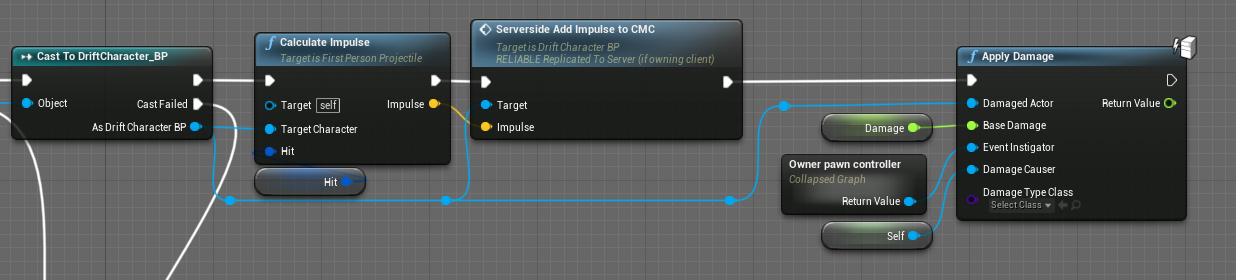

is this going to cast multiple times
if i save the output of the cast to a reference variable and read that variable for each of the 3 following nodes, would that be more efficient?
earnest tangle
it casts only once
nodes with the white exec pin connection only produce their outputs once per execution
ripe rose
ah ok
earnest tangle
however nodes that don't have the exec pins will run multiple times per each connection from them
ripe rose
okok thanks
 urban zodiac
https://d9k7ugc3ks4h3.cloudfront.net/original/3X/9/9/99d79576a33d39da444b57071edb4e117bf5c60e.png
is this some sort of bp theme that can be switched in engine or something?

 severe turret
yeah you can switch themes.
icy dragon
You can get this PS4 lightbar esque theme too
 trim matrix
If I have two widget, how could plug it?
 supple dome
 trim matrix
supple dome
trim matrix
supple dome
Thank you
supple dome
alternativelly theres a sequence node, for organization
warm shuttle
Is there any server hosting solution that can use UE4's built in replication features for multiplayer?
and supports HTML5? (im on 4.23)
trim matrix
supple dome
alternativelly theres a sequence node, for organization
Thank you its fine done
robust cliff
any tips on how to achieve this climbing up effect, not the animation just going upwards/downwards on the rope?
severe turret
get a direction and move the player. Pretty basic stuff. If you want to make it more dynamic (like the rope swings) then get the normal direction between the rope and the player and rotate it in the direction you want to climb.
 haughty egret
Hey, is there a way to run code for an actor only when it's placed on the level?
 minor galleon
Anyone else have a child gamemode with which players can't move?
minor galleon
haughty egret
Hey, is there a way to run code for an actor only when it's placed on the level?
how are you spawning the actor?
haughty egret
So normally we have a "spawner" that does the spawning but we want to be able to drag and place them in a level too
But doing this misses some of the code running in the spawner
So i'm wondering how I can tell which ones are placed in the level and run the code for them
minor galleon
have the spawner set a variable in the actor blueprint maybe?
could expose the variable on spawn and have false be placed, true be spawned?
haughty egret
Yea wondered about that, just thought i'd check for any built in thing
minor galleon
 weary forum
Hey, so I'm trying to set up movement with 6 degrees of freedom, and my Character Movement is limiting the Pitch rotation to not go further than -90 degrees or 90 degrees. AKA, It won't let me look further than fully up or fully down.
Does anybody know how to let it rotate past that?
severe turret
there is a Limit Pitch View function in the player camera manager. There is also a Player Camera Limit Pitch node in the character.
icy dragon
weary forum
Hey, so I'm trying to set up movement with 6 degrees of freedom, and my Characte...
I don't think Character Movement is the right option for 6DOF movement. You may want to improvise from the flight template instead.
severe turret
I agree but you can switch the character movement in the CMC to a viable method and go from there too.
honestly starting from scratch is even better because you don't need all the bloat and you will be wanting to work in some quaternion calcs to avoid euler gimbal lock.
icy dragon
Also starting from pawn is a good idea, because Character uses capsule collision by default, and games like Descent or Forsaken don't work like grounded character.
weary forum
Okay, thanks for the tips! As a relative noob, I'll ask, are there any good resources for learning how to build your own movement component like that?
severe turret
dont make it as a component. That's a whole discipline in itself. Just use actor rotations etc
 opal ivy
If this isn't the place for newbie questions, I'll happily move it to wherever is most appropriate.
Is there a good way of getting a 2D array of ints in and out of UE via blueprint? Specifically, I've made my own heightmap generation tool that's not really like other heightmaps, and breaks down to a 2D array of ints. I'm trying to figure the best way to get that data accessible to my blueprint that I'm using to build that a mesh in my level
icy dragon
weary forum
Okay, thanks for the tips! As a relative noob, I'll ask, are there any good reso...
Handling the movement right in the BP wont hurt.
You don't have to make component, unless you want it to be reusable.
opal ivy
How would one go about getting a JSON or CSV as a variable in a Blueprint? I didn't see any File IO functions when searching
severe turret
I'd check out the json plugin for more details on that. CSV can be imported to datatables and such.
icy dragon
opal ivy
How would one go about getting a JSON or CSV as a variable in a Blueprint? I did...
Perhaps you could have a string variable that contains the path to the JSON file instead, and use Load Asset node to load it.
You can also convert it between absolute path and relative path.