
#blueprint
402296 messages · Page 657 of 403
 blazing delta
 viscid raven
So I'm trying to load an array of levels, and need to get references to some actors that are in those levels. My problem is however that when the levels are loaded, it's not guaranteed that the actors are loaded yet. Even a one second delay is not always sufficient.
Are there any smart ways to know when all the actors of the given levels have been spawned?

 trim matrix
hi all, in a few of my small projects i have made i have stored a reference to my game mode/game instance from begin play like the image below... but now (4.26.2) this does not seem to work when using that ref like on the 2nd image. i get the error.
blueprint runtime error: accessed none trying to read property as Main GM
But it all works fine if i cast to the GM and then start server... its just the ref is not working


the start server just sends a print string to screen
 sullen turtle
guys, I think I disabled the player input somewhere because my character is not moving but I don't remember how I did or where. I can find anywhere. any tips on how to debug this?
already spent 1h looking at the bps but I don't understand why my characters is not moving
I dont want to just try to set the game mode and enable the input to try to override this before I find where I put this unwanted behavior
 pulsar valley
Does anyone have a guide or something to the Blueprint search filters? Something is mentioned in the official documentation, but there's very little: https://docs.unrealengine.com/en-US/ProgrammingAndScripting/Blueprints/Search/index.html
Getting the most out of searching in Blueprints, from indexing all Blueprints to advanced search syntax
In particular, I would like to be able to find references to a particular functions across Blueprints... doing it by simply searching the functio name gives problems, since other classes that are not related might have a function with the same name
 dawn gazelle
trim matrix
hi all, in a few of my small projects i have made i have stored a reference to m...
dawn gazelle
trim matrix
hi all, in a few of my small projects i have made i have stored a reference to m...
If you're doing something multiplayer, game mode only ever exists on the server. Trying to reference it on a client won't work.
 feral shore
hi guys. if I have a blueprint with parameters that arent able to be keyframed by default, how do i make them keyframeable? i need to keyframe an offset value coming from a vector 2d node. The blueprint I'm using is 'BP_Volumetric_Cloud_Layer' from the volumetric content folder. thank u !
 primal smelt
Hey all, wonder if anybody could possibly help me with this? I am working on tweaks for when a vehicle should flip when on a slope. This code gives me exactly what I need.... in the player character blueprint, which in it's current state is just for testing (the code is running off a line trace). The player character (depicted as green oval) doesn't adjust it's angle based on the slope - which is fine for it's current purpose. The vehicle PAWN (depicted as green square) however does and has physics enabled.
Right now the pawn is not giving me the information I need, so how do I get this cross>dot product to essentially ignore the pawn's rotation other than on the Z axis?

 glacial eagle
Project the actors' forward vector onto the world up vector and normalise?
You'll probably get less accuracy as the slope get's steeper though, so maybe just take the actors' world rotation, get the yaw component, and rotate (1, 0, 0) around (0, 0, 1) by that yaw value.
primal smelt
glacial eagle
You'll probably get less accuracy as the slope get's steeper though, so maybe ju...
Hi thanks for responding. Sorry to be a pain as I'm still in my early days with Unreal but how would "get the yaw component, and rotate (1, 0, 0) around (0, 0, 1) by that yaw value" look in bp? I'm not sure how to go about doing that
Thank you for also responding, is this what you mean?

Awesome thanks, now going to give it a shot. Hopefully where it gets inaccurate will be at an angle where realistically I don't want the player to be sticking to it anyway. The vehicle in question is actually a wheelchair so it'll probably be bouncing off down a slope that's virtually a cliff edge!
primal smelt
There's a certain amount of "plugging in stuff and see what happens" going on at this point! I've been using cross product to get the downward direction of a slope and have just been experimenting without really knowing enough of the maths that is going on. I just actually realised that the promising results I mentioned weren't actually all that promising so back to the drawing board! But I have checked the results of just zeroing Z and normalizing the vector and that does offer what I was after in essentially ignoring the rotation of the pawn when on a slope. I think that will come in handy for what I'm trying to do, which is detecting when the wheelchair is facing perpendicular to the downward slope direction based on the impact normal (there's a line trace from base of wheelchair). I've managed to get it working to a point although impact normals with both X and Y values other than 0 are causing a problem. I'm trying to figure out a way to get this to work irrespective of which way the slope is facing towards.
glacial eagle
The only thing you need actually, thinking about it - is to just get the actors' rotation, make a new rotation that only has the yaw component, then convert it to a vector.
That will give you the red arrow on the left
 onyx pawn
Working with unreal 4.22 since I need to export project to html5.. on running my project I keep getting this error..


 dark crow
You may not be setting it anywhere aka empty reference aka None
 charred breach
Hello! Does anyone know how to give the full input to the character after the node: (Switch View Target With Blend)
 primal smelt
charred breach
Hello! Does anyone know how to give the full input to the character after the no...
primal smelt
charred breach
Hello! Does anyone know how to give the full input to the character after the no...
What is it you're doing? Are you transitioning from a pawn to a character class?
If that is the case you'd use the Un Possess node on the pawn you're switching from and then Possess node with the character reference plugged into "in pawn". If that isn't the problem then perhaps you have a disable input node for the camera transition? If so just put an "Enable Input" node after it has completed.
 unique hollow
How would I change the velocity of a scene component
primal smelt
Ok now I am thoroughly dumbfounded. Started looking deeper into the maths I really should have learned years ago and the vector cosine angle 2D node seems to be exactly what I need. So can somebody please point out if there is a glaring mistake here? Why is it printing "Flip" when it is outside the in-range node parameters?

ohhhh hang on
I'm a complete idiot
why do I not see the obvious until I have posted the question!!!!
For some reason those subtract and addition nodes (which were from a previous attempt at a solution) just didn't register at all. I think I need to take a break...
primal smelt
unique hollow
How would I change the velocity of a scene component
If you're trying to speed up a scene component there is add force (on tick) or add impulse(as a single fire thing, like a "push"). There are also thrusters but I have never used them so don't know anything about them. If you're trying to slow a scene component you can also use force and impulse (just in the opposite direction) or you can set linear damping. I could have sworn there was something similar to "set physics max angular velocity" but for linear instead but I admit I couldn't just now find it.
unique hollow
ah, I forgot the linear damping stuff
 onyx kelp
Hey, Just a quick question. I'm trying to use SetRelativeLocation from a timeline to move a static mech on the Z axis. Works great on the parent class, but any child classes do not seem to update the location, they are stuck at 0. Not sure what else to try
primal smelt
onyx kelp
Hey, Just a quick question. I'm trying to use SetRelativeLocation from a timelin...
can you post a screenshot of your code?
onyx kelp
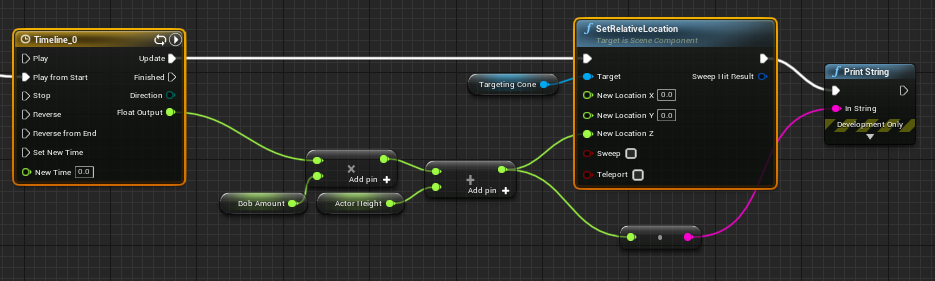 primal smelt
onyx kelp
https://i.imgur.com/F97Cncm.png
primal smelt
onyx kelp
https://i.imgur.com/F97Cncm.png
I take it the targeting cone reference is the parent actor?
onyx kelp
Its just a static mesh component on the parent
sullen turtle
I had disabled the player input in the level blueprint of a level and started working on another level the other day
but my character won't move. I had made other changes and had no idea what could be the issue
spend hours trying to figure it out
only after I remove the disable input on the level blueprint of the other level the issue was fixed
is this how the level blueprint is supposed to work?
it affects all maps?

this how I was doing. this map was not even loaded first
I opened and closed the editor many times
still, I only manage to make my pawn move after I unpuggled this
 maiden wadi
@sullen turtle It shouldn't affect all maps. Not without inheritance. How are you opening your new level?
sullen turtle
@maiden wadi only by clicking on it. this is the reason why it took me ages to try to look at this level and see if the issue was there. It was not even set to open by default on the editor. super strange.
maiden wadi
Are you doing world composition with multiple maps, or?
maiden wadi
Then all of the level blueprints will run that are included in that level.
sullen turtle
I hope one day I have your knowledge haha. you debug this in one minute
I got stuck for hours. I enabled this but I was not using yet
now that you mentioned I remembered
maiden wadi
Haha. Just a year and a half of general understanding. You'll get there.
sullen turtle
thanks a lot for the explanation. now I know the reason.
trim matrix
Didn't know where to ask this but, im making a mario cart like game with people in my course but the car in ue4 slides too much and the handling is pretty crappy, how would i change this
maiden wadi
I don't have a lot of car experience. But most of them have friction or braking settings. The physics car might be even more involved.
trim matrix
where are those settings?
primal smelt
Thanks for the heads up although using vector cosine angle 2D seems to solve my problem entirely. It ranges from 1 to -1 and I have a dot product for the right vector so any angular force to cause the wheelchair to flip is properly accounted for.
 ripe cave
Anybody good with splines?
I am trying to get a plane to move along and conform to a spline. I have it working alright, but if the bend in the spline is too sharp it the plane wont conform as much as I'd like.
Is there a way to push it to more closely align the spline? My I need to modulate the start and end tangents of the splinemesh(plane) but I am unsure with what?

 faint pasture
ripe cave
Anybody good with splines?
I am trying to get a plane to move along and conform...
faint pasture
ripe cave
Anybody good with splines?
I am trying to get a plane to move along and conform...
Does it only do that when you are crossing a spline point?
Like can you get it to differ from the spline between points?
It probably has something to do with the actual spline points being where tangents and locations are set. You probably have to at least have one mesh edge at a spline point
It's usually a good idea to have your mesh edges coincident with your spline points
Because those are the only places where tangent is explicitly defined, everywhere else it is interpolated. So if you think of your mesh as interpolating between two interpolated points, it's not going to necessarily line up with the spline point in the middle
ripe cave
It happens in between points as well, it has to do with the curvature by the looks of it, if this is too extreme the alignment is not as desired.
The tangent direction is perfect as expected, I believe there is something I need to do to the magnitude of this vector. if I manually tweak these I can get pretty close, def a lot closer. But I have yet to crack the code in terms what should modulate this magnitude.
ripe cave
I guess I would have to sample more points on the spline and deform the plane according to these
But the spline component only conforms to start and end points, so either I cut up my mesh and spread across multiple splinemeshes, which sounds like lunacy, or I make my own splinemesh component which has more precision.. does that sounds like something which makes sense ?
 fluid rover
Anybody know why a widget blueprint floating in the air could be cut off when compared to its 2D version?

 ripe cave
@fluid rover I guess the aspect ratios and or uv maps don't align
umg widgets are just textures basically
it can either choose to squash or to cut depending on your settings

 ripe cave
what does the draw at desired size toggle do?
I dont really use umg much so not clue what setting you need
charred breach
@primal smelt Hello! Thanks for the response! I want to make like a door and when you pass it "box trigger" to go to a point the return and play again as your character?
fluid rover
@ripe cave Interesting. It morphed the size a good bit:
 trim matrix
Hello, im working on setting fps limits with t.maxfps Value, but when i open settings menu i want to set my fps slider to current value. is there any way to get t.maxfps current value ?
charred breach
Hello! Does anyone know how to give the full input to the character after the node: (Switch View Target With Blend)

@maiden wadi Sorry for the ping but can you help me?
 lime ridge
Is there a way to Set this Swich Parameter inside a Dynamic Material Instance via Blueprints?

 marsh seal
charred breach
marsh seal
charred breach
@marsh seal How? I want to play this and then go back to normal to play with the character!
faint pasture
lime ridge
Is there a way to Set this Swich Parameter inside a Dynamic Material Instance vi...
Yes, dynamic branch, but only worth it if it's masking a lot of instructions.
Otherwise just lerp
 wary tinsel
hey guys! I'm having issues with media texture. In editor and standalone game is working fine, when I package my game for some reason it doesn't work and I just see a blank plane. Any idea on what could be the reason?
 frigid ether
Is it possible to create variables that when ticked, expose more variables?
For example, I click on a door in the editor, go into it's settings and check "Door locked" and only while it's true, will it show a "Key ID" name option?
lime ridge
faint pasture
Otherwise just lerp
Thank you, is there any reason you wouldn't use this to mask less instructions? In this case I was only looking to switch between two texture types, External or Color. From what I can see, the Dynamic Branch is just an if statement?
 tired vigil
hello people
i am back with another question
so

this node system
right
it works
problem is, when i press play the lights are on
instead of off
is there a way to fix that?
im not tryna start the game with the rear and front lights of the car on
and bright
😭
lime ridge
@tired vigil In the components of the blueprint are they set as visible by default? Because unless they are being set on Beginplay they will be visible.
tired vigil
lime ridge
<@!315611214929592320> In the components of the blueprint are they set as visibl...
uhh
how do i check?
lime ridge
left click on your scene component in the components window, then in the details panel search visibility
 lime ridge
Yes, if you check that off now for all the components you want to be invisible on start. Let me know if that works 🙂
 tepid pike
I am making a 2d platformer and I've gotten the type of movement controls I've wanted to have but for some reason when I turn around when jumping they lose all of their momentum.
 fallen glade
stupid question, do I need to clear local arrays in functions? or they get restarted each time?
thanks!
 keen condor
Anybody know how to use curves? I want to put a curve on a control input.
dark crow
I mean, depends
You could access a curve key at a certain time (?)
 exotic warren
Anybody know how to get CMC to not instantly stop when you're flying, for whatever reason even with these settings my stopping speed and deceleration is near instant

I'd like the character to drift after you stop moving for a bit
 sand bloom
Hey i'm new to blueprints and tried out something simple, I have a function that adds a timer basically. It adds a bit to the plant growth value every few seconds, once plant growth exceeds required amount it will toggle the visibility of a plant model

except.. nothing happens
so the only thing I can think of is that the timer doesn't work right? but when I press play the string part does update ingame? I can see it increasing in the top left of my screen

like here

I've tried everything I can think of but i'm stumped
oh I see
That makes perfect sense thank you such a silly mistake, the only issue is that I can't seem to use event begin play twice
but now I can try to figure that out i'm no longer stuck
😄
Hmm I see, I figured I could just keep dragging white lines off the same event but I guess I need to work around that then like with a sequence or keep chaining nodes, thank you i'll have to experiment with this.
I've been following unreal's timer example I found online so i'd rather not mess around with the function for now
i'm very new so I just want to make something work even if it's not efficient
~~I totally ripped it off unreal engine's documentation thing which is probably why ~~
 ruby surge
Why would this result in accessed none issues on the add to viewport? I get 3 accessed none errors so 1 for every widget it seems 😛

Just connected that to owning player controller and does not make a difference :/
And the errors
 faint pasture
ruby surge
Why would this result in accessed none issues on the add to viewport? I get 3 ac...
faint pasture
ruby surge
Why would this result in accessed none issues on the add to viewport? I get 3 ac...
Every time that add to viewport is hit, it tries to add all three of those widgets, of which two will not exist yet. Use three add to viewport notes
Well the first time, two are missing, second time, one is missing, third time all three are there. Then in total, it tries to add widget 1 three times, and widget 2 two times. That's why it's saying they're already added to viewport
ruby surge
ahh ok
Is it better to chain it like this ? Or should I just put an isvalid node after the creates?
 faint pasture
ruby surge
Is it better to chain it like this ? Or should I just put an isvalid node after ...
faint pasture
ruby surge
Is it better to chain it like this ? Or should I just put an isvalid node after ...
That should work, although owning player is disconnected. Probably need that
ruby surge
It works without the owning player (even in multiplayer) Looks like it just uses the PC from where the HUD was called orso
faint pasture
Yeah I don't know where your code is living right now so if it's in HUD it should probably work
ruby surge
ok thanks!
maiden wadi
Owning player is only absolutely necessary in local coop games to differentiate player's widgets on the same screen. In normal singleplayer or multiplayer, it won't matter because you can simply use GetPlayerController0 anywhere in your widgets to get the local controller.
ruby surge
ahh nice thanks for that info 🙂
 charred latch
im not sure if this is the absolute right place to ask, but I was making a simple game that has 2 attack functions, only a gun and a throwing knife, I programmed them from the character, since I will never be swapping them or not EVER switching off of them. is that okay or should i program them as their own entities?
maiden wadi
It'll be fine. Til you decide you want to do more. 😄
charred latch
for me its really about practice and skill building, so it might be fine for now, but next time i do anything similar I should probably code the weapon functions themselves then.
thanks i did need the affirmation ❤️
maiden wadi
I mean if it's about skill building, I'd say just do it correctly and make them their own equip able actors. You'll get the experience of handling it, and also have an easy to extend project if you decide to do more.
Time is usually the one reason that'll keep you from implementing stuff well. So if you're not hard pressed for it, may as well.
charred latch
Yeah you might just be right, i guess implementing it a second time might not be too difficult
maiden wadi
Not even sure what those files are. No extention.
 exotic cradle
Ahh crap. Was supposed to be screenshots.
maiden wadi
If you're on windows, it's much easier just to WinKey+Shift+S
exotic cradle
Thats what I used one second
Nvrmnd. Solved it. If I dont use a function for this operation Im trying to do than it works but if I try to convert to function than it doesnt work and gives me a not in scope error
maiden wadi
Odd
exotic cradle
This is inside my "Event Construct" comment

And this is the function im using. The "get value" value doesnt change until I click on the slider. Now if I make all of that a function and leave out "On Mouse Begin Capture" and "On Value Changed" and use them to execute when the slider changes it gives me "Not in scope error" for both the "get value" value and the "slider object reference"


Wierd. Now it works. Lmao...
maiden wadi
I'm not really sure. I'm not a huge fan of the Blueprint Debugger system. I tend to just print what I need and very very rarely use breakpoints.
exotic cradle
Yeah it seems the debugger is buggy itself
 clear ravine
hey guys, i'm using this block in my material to control my material opacity to fade a 3d widget depending on the player distance, but when the widget is moving or the player is moving the widget gets too blurry and slowly fixes back when both are stopped, how can i fix this problem?

 supple dome
are you sure its that part of the material causing the problem @clear ravine ?
cuz it appears you are just describing motion blur or Temporal AA on a translucent material
you can use r.PostProcessAAQuality 0 to test for AA, and a PP volume for motion blur
 hoary gazelle
Hey, im looking for some assistance on making a pretty specific inventory system.
One only for weapons
and its only used while in a lobby of sorts.
Theres only 3 Categories (being Main, Sub, and Special)
And making different weapons so they can work with said system.
Ive never worked on an inventory system and others that ive seen online
are all the samey either not being an "inventory" but more of a pickup weapon
swapping thing or its an inventory strictly for item usage.
I have a struct and a data table set up for everything and im thinking of using actor components to try to make each weapon different and being called from a weapon ID, but i dont actually know how to connect the actor component to the data table so when a certain ID is selected it automatically changes that weapon to the one matching the ID
supple dome
common approach would be having a DataAsset that has a WeaponClass, your inventory is a list of DataAsset, whenever you select a weapon you will be selecting a DataAsset, this calls a function that reads your WeaponClass and spawns it
 severe geyser
Hey folks. Anyone here know a lot about making Wave Games? I completed a small online course for making a wave game. Lots of fun and I'm pushing through with my game. I've got all the functionality I would like and now (before building more levels) the last thing I want to be able to do is include more powerful enemies as you get higher-up in the waves. I currently only have 1 enemy type. I want to create a similar one, scale it up slightly, change the material colour and change his speed and damage he deals. The issue I am running into to is my functionality is really focused on the single enemy I had made. I've got a system for counting kills, counting (and saving) waves/highest wave you've gotten to, etc. For the life of me, I don't know how to get different enemies to spawn and still have the wave system work correctly, as well as all my counters. After writing all this out, I can now see that likely, no one will be able to help
I've spent days poking around, trying random things. I just have no direction or idea how to fix it
this is my current blueprint I use for spawning the enemy

 plush ridge
@severe geyser This should be easy, even with your current set-up. There are a few ways you can do it.
One approach would be to just use BP_Evil as a universal enemy pawn and always spawn that (like you are now). But, inside of that BP, use variables to determine how the enemy behaves, what it looks like (by overriding the mesh and materials), etc.
One variable that you can use for most of determining the enemy's behavior is your "Level" variable. How you use that to vary the enemy's damage output, and what mesh/material is set, is up to you. There are lots of ways to do it.
If level 1 = set mesh to A.
If level 2 = set mesh to B.
Or, if level value is in range of 1 and 10, set mesh to A.
If level value is in range of 11 and 20, set mesh to B, etc.
For damage output, you can do the same.
If your game has a potentially infinite number of waves, you can use the level value to do some basic math to make things like damage output grow with time, infinitely. Or with a cap.
severe geyser
@plush ridge by doing that, each enemy I make inside BP_Evil can have its own speed, damage dealt, HP, etc?
this is exciting, I never even thought about this
 brittle sky
how would i set this up to loop

 mental sail
Double click on timeline, should have loop option for curve

Whats the best way to save class types in order to know what actor to spawn, say when loading a game... I can't seem to persist "Actor Class Reference"
plush ridge
@severe geyser Yes, on BeginPlay in BP_Evil, you can set the character's movement speed, HP, damage dealt etc. and that instance of the character will live on with those values. You just need something to base them off.
So in my example, it uses what "level" the player is currently on (assuming it's an integer), and you can set everything up about what that enemy "is" using that value 👍
We recently shipped a game that has lots of enemies, bosses etc. and the entire game uses only one enemy BP
@mental sail GameInstance persists through level loads, if that's what you mean by "loading a game" -- you can store it there if that's all you need
mental sail
I can't assume the saved state is from the current game session
I guess, I could use a switch and an enum to predefine the actor types I can spawn, I was hoping I for a "cleaner" method
plush ridge
@mental sail Are you trying to store this class for different sessions (the game is closed, started back up later)?
mental sail
yeah
plush ridge
hmm, is there a reason you're not using a save file to do it?
mental sail
just because the spawner needs a class type
I am using a save file, but how can I tell the spawner that I want this type of class to be spawned?
plush ridge
You can store an Actor > Class variable in the save file. Or like you said, you could also store an enum and use that to determine the class type. Lots of ways, depends on the complexity of your final goal
 mental sail
Hmm, it wasn't persisting for me, always comes out blank...
plush ridge
🤔 are you sure the save file is being populated and saved correctly at all? do other variables load correctly?

 plush ridge
I'm not sure how you're using the save game in general. Are you setting the variable, saving, closing game, opening game, loading save, getting variable from save?
mental sail
I'm a dummy
 mental sail
Thanks for bearing with me through these challenging times
 dusk belfry
guys any help or some info on how to make a hex grid for a turn based game? Im struggling to make it from scratch
 true valve
What are some ways to parent a bp component?
faint pasture
true valve
What are some ways to parent a bp component?
What? That's not really a valid question. What are you trying to do.
true valve
nvm I should ask that in c++ section. I have a BP actor Comp and c++ actor comp. I want the c++ to be the parent but editor kept crashing
charred latch
alright i have a real weird question i cannot even concept how to fix.
When I used an asset from Mixamo, the character appeared in my project as turbo gigantic, so in engine I scaled it down to .1
now when I am using weapons, when it attaches to the socket, its scaling it down I THINK to .1 scale, and I have no fuckin clue how to handle it
this might not be the right channel to ask either, but I couldnt think of another that it would fit in.
 tired cypress
dusk belfry
guys any help or some info on how to make a hex grid for a turn based game? Im s...
tired cypress
dusk belfry
guys any help or some info on how to make a hex grid for a turn based game? Im s...
What I would do first is create your hex mesh and make it into a BP. You can do this outside Unreal or you could get creative and do it by combining cubes in the BP Viewport for the object.
Then you could snap these together in the level editor to create your grid levels
dusk belfry
yeah maybe a parent hex and then diferent childs for diferent terrain or something like that
will i be able to make pathfinding for units in the grid that way?
well at least you gave me something to start with
thx man
 deft sonnet
I made this code but when i press play i only get the default character's code and mine is not there, how do i fix that?


 gusty cypress
Is there a way to set the selected text for input key widget, the node "set no key specified text" doesn't work
dawn gazelle
gusty cypress
Is there a way to set the selected text for input key widget, the node "set no k...
Yes it does.


 fiery swallow
Children can't share parent macros or am I bugged?
dawn gazelle
fiery swallow
Children can't share parent macros or am I bugged?
They can't, but you can create a macro library for the parent class which can then be used in children
fiery swallow
dawn gazelle
They can't, but you can create a macro library for the parent class which can th...
Bet, thanks
gusty cypress
dawn gazelle
Yes it does.
It works with event construct but I have an event bound to update the text in run-time and it has no affect
dawn gazelle
You're sort of limited to doing something like this as you're storing object references in your inventory, however, you can't compare one reference to another unless it is the same object. You'd need to get the class of the object, then you can do a compare without needing a reference object, and if you did something like this, then you can use a switch statement instead of a bunch of branches.

But, you need to get all the display names of the classes to put them into the switch statement.
dawn gazelle
gusty cypress
It works with event construct but I have an event bound to update the text in ru...
If you're using a binding, then the binding overrides everything. set the return value in the binding to what you want it to display.
Couldn't really tell you that one. I think it depends on how you handle things. In my game the items in the inventory are typically never physical things once they are picked up, so they can just be stored as data rather than an object. So my inventory contains slots of structure "item". the "item" structure can contain a class reference to indicate what the item is (name, description, etc.), if it can stack, how many are currently stacked in the inventory. etc.
But like.. if you had an inventory where say you were just keeping track of what is available to the character, an object may make sense - like, maybe you hvae a rocket launcher strapped to your back and the rocket launcher contains some data like the ammo remaining or what not.... And you can easily drop the object on the ground for someone else to pick up, etc.
I would think ease of saving / reloading data is probably the biggest one. You can literally save the inventory structure array directly so long as it doesn't contain object references, where if you store objects, you'd have to iterate over each object and pull out the relevant data that is needed to save their state, then you also need to store the what object is saved in any particular inventory slot by reading what the object is and doing the reverse when loading.
 elfin forge
hi guys, when i click on open level blueprint, unreal engine just crashes. Anyone know a fix for it or whats causing this?


 dense tulip
is it possible to merge 2 meshes to make 1 mesh in ue4?
dawn gazelle
 storm dove
No. You are getting a copy of the object from the array. If you got a ref rather than a copy then you have a reference to the specific structure. next, you'd have to store your array as a temp variable and make changes to it, then you can add it back to the referenced structure using the "Set Members in" node.

 dense tulip
interesting, my current issue is that my fbx import makes separate parts instead of a full mesh, i should get this, but i get the following

 gusty cypress
dawn gazelle
If you're using a binding, then the binding overrides everything. set the retur...
gusty cypress
dawn gazelle
If you're using a binding, then the binding overrides everything. set the retur...
I'm not using a binding. My BP is for changing the key bindings within controls, when I hit reset it works but is not immediately displayed, if leave the widget then come back (reload it in run time) it updates with the initial set but the run-time (while widget is open) set no key doesn't change anything yet it shows
@dawn gazelle


the last pic shows what happens if I go back in my settings thus unloading and reloading my widget
dense tulip
@swift pewter ok thanks !
dawn gazelle
gusty cypress
<@!218956378654507008>
You have a branch in there with some values being checked. Are you sure it's returning true?
gusty cypress
I have a print to show it runs the set no key specified
notice the 2nd to last pic prints "worked" which is shown in the first BP pic
I even confirmed this buy making it when I hit the reset button I remove the widget and then immediately add it back so they player sees essentially what I want but that feels wrong
Also note for testing purposes Im only using the left input to see if it gets working and then repeat for all
dawn gazelle
This probably has more to do with the bindings themselves rather than the Set No key Specified text. From what I can see, it looks like you're removing the action mappings and then adding them back again in the UI? (the sequence 0 path)
 dawn gazelle
ok.... so if you're unbinding and then binding them again, that would mean the No Key Specified wouldn't show as there is one defined.
gusty cypress
I thought this so I instead used "set key selection Text" with no luck
off an input key, typing "set text" shows options, none of which I think will work
dawn gazelle
Are each one of these individual widgets or are you creating these individually within one widget?
 gusty cypress
They are all templates, the Input key selector is part of a widget switcher
to reduce redundancy I only apply these changes to widget switchers that = input keys
 spark steppe
brittle sky
how would i set this up to loop
spark steppe
brittle sky
how would i set this up to loop
holy shit, no! dont do that, you can get a time value within the material, there's literary no reason to update it like this
not that i'm aware of, but it's possible to spawn it somewhere out of sight and just bind to the camera within it
but that would also work with a normal blueprint actor, up to you if you want to make it an actual level
well, you put a camera in there, and just bind it to the playercontroller
sure that
set view target with blend is the node name to change the camera
no, you dont move the character at all
you load the level, once its loaded you disable movement input on the character and bind to the camera
when he leaves the scene you switch back to your old camera, enable character movement again and unload the scene
you might want to use level streaming for that
unless you really have to keep budget on gpu/cpu resources
it's not much more complicated than normal level loading
but be aware that with level streaming your current game will keep running, so that might be a reason against going that way
yea thats what its usually used for, but theres no reason to not use it for something like you want to
dawn gazelle
gusty cypress
to reduce redundancy I only apply these changes to widget switchers that = input...
BlueprintUE
spark steppe
you could still do the initial setup in an own level, as its easier to edit in my experience, and then combine all those actors to a blueprint
if you go with a BP actor
maintaining scenes in BP is only fun to a certain point 😄
yea you select all objects, and then in the main menu the Blueprint dropdown has an option to convert it to BP
basically the one that is grayed out in this screenshot

this works for static mesh, lights (cameras probably, too) but not reflection captures
which can't be part of an BP actor for some reason
exotic cradle
So from my perspective this seems excessive and Im working on making it more efficient. Im sure there is a better way to get the functionality I have now but alot smoother process and less wires? The first image is functionality for the 9 buttons on the first half of the gif.
 spark steppe
xD
exotic cradle
How to get results and waste processing time
Tried do it through the widgets themselves but wanted to get the idea working first before minimalizing things
spark steppe
could you show at least one row without zooming out?
exotic cradle
Oh crap yeah lol forgot taking pictures on this monitor is crap
spark steppe
and yes, this can certainly be made more procedural
exotic cradle

I remember awhile ago while following the UMG Live Tutorial Series they had something for switching styles of the buttons when selected I just didnt feel like going back and trying to find those specific instances
spark steppe
i guess your best bet is to make an userwidget for your buttons
exotic cradle
The buttons themselves are widgets. For each enum on my list a button is created
spark steppe
custom widgets?
 exotic cradle
Okay I shall
 icy hamlet
I am trying to figure out the logic of how to create a custom relative movement for and object. I need to be able to place actors in the scene and then move them towards the mouse cursor in either world or in relative mode.. Any help about that? World is easy but relative not so
 earnest tangle
what do you mean towards the cursor in relative mode?
if you're moving something in the world towards the cursor that movement is in world space
 unreal hollow
wondering if anyone has any thoughts on this
almost every bit of documentation is saying to avoid using EventTick and either use timers or timeline components
however
if i'm wanting to control the player camera in some way, surely using anything other than EventTick will cause unresponsiveness on considerably low or considerably high framerates?
unreal hollow
good to know, thought I was going to have to go down some kind of rabbithole to accomodate for that
 topaz estuary
I created a child class in c++ and I overrided the function that is called in BP. How can I call the overriden function in BP instead of the parent one?
supple dome
just call the function, it will call the correct one
if you called on a object of the child class
topaz estuary
I tried that but it calls the parent function
I probably messed up somewhere I'll try to find the mistake
supple dome
it can only call the parent if your object is of the parent class, or if in the child function you have a "Call parent function" node
topaz estuary

I just did this
and it is the child class
and if I right click and go to definition of pickup node, it leads me to the parent function aswell
supple dome
this is inside the child pickup class?
supple dome
can you show both parent and child overlap events and Pickup functions
supple dome
what was the problem?
topaz estuary
So basically I was using AddOnScreenDebugMessage to print text on screen so I can be sure it is overriding and for some reason I put time as -3.f instead of 3.f idk how
It's always those simple syntax error that take the longest to fix
dark crow
Well, look at the display name
Classes have a _C at the end iirc
earnest tangle
Hrms, shouldn't making array parameters pass by reference allow them to not be defined by the caller for custom BP funcs
Mildly annoying if I have to keep passing an empty make array into everything
 worthy frost
@swift pewter i would not use display names for matching stuff
you want some Enum or maybe use Actor Tag to distinguish them.
 void cobalt
does anyone know how i could make the launch character node not set the character to a falling state?
im trying to implement knockback on hit by a bullet
but whenever i hit an enemy, it pushes them back AND into the air
i want them to only be pushed back
and to stay on the floor
i tried just making the z axis -200 on the launch velocity
but thats very buggy
and doesnt work very well
i noticed that the node sets the character to "is falling" state, and i wonder if theres a way to turn that off
 hearty lintel
guys i know it sounds super stupid:
I have to interpolate a value from 0 to 1000, i used "finterp to" but somehow it doesn't reach 1000... i don't understand why
i connected "world delta seconds" as well.
Depending on how i set the interpolation speed it stops at lower values and not at 1000
does anyone know how i could achieve such interpolation?
maiden wadi
@hearty lintel Are you actually needing to interplolate towards, or do you strictly want to interpolate between 0-1000? Because FInterpTo will increment towards 1000 at smaller and smaller numbers the closer to 1000 it gets. If you're just trying to go from point a-b over a time, use Lerp
hearty lintel
maiden wadi
<@!535391293426106368> Are you actually needing to interplolate towards, or do y...
what i'm trying to achieve would be transforming the score from what it was to what the new score is and do it while displaying the counter that goes up instead of changing it straight away
maiden wadi
I would advise LERP instead. I do something similar in some of the UI I've done recently. I save the old number, calculate the new number and save it and then lerp between them. In my case I use a widget animation value.
hearty lintel
maiden wadi
I would advise LERP instead. I do something similar in some of the UI I've done ...
ok i'll have a try at that, yeah it is for the widget thank you dude
how do you do it with the animation track?
i don't have any slot available to just animate a random value
maiden wadi
If you want an easy helper. Put a canvas somewhere useless in the widget and set it's visibility to collapsed so it won't interrupt any other widgets drawing. Then use that in the animation. and change it's pivot's X value from 0-1 over your timeframe. Then set your old and new values and play the animation, and update the score with the lerp on tick. Works more or less like a timeline.
hearty lintel
lol that's hacky at its finest! alright dude ill try that way!
maiden wadi
Welcome to UMG.
Side note. Add some extra slack at the end of the animation for the animation to go past your 1.0 set. Sometimes it'll actually stop at 0.95 or 0.99 if you don't. Kind of annoying.
void cobalt
no one can help me?
hearty lintel
maiden wadi
Side note. Add some extra slack at the end of the animation for the animation to...
i'll give it a try dude thank you really much!
maiden wadi
@void cobalt I don't think that you can launch without being put in the air. You could try altering the pawn's movement ground braking/friction values and just move their velocity in the knockback direction. Dunno if it'll work, never tried it personally. But if it does, it'd be like having "Running on ice" settings for the pawn, and running in one direction and then stopping. Would slide them along for a bit.
With some decent settings, and a high enough knockback velocity, it should look like a forceful knockback with some slide but not slide forever. 🤷♂️
void cobalt
maiden wadi
<@!162876591087681536> I don't think that you can launch without being put in th...
thats exactly what i want
when the enemy gets hit i want them to move like they are on ice, fighting against the knockback from the weapon
trying to walk forward
never thought of wording it like that tbh
maiden wadi
Try it. See how it works. Should be as easy as setting some CMC values on a timer/timeline/tick. Not quite certain about the knockback effect.
maiden wadi
Hmm. I doubt it. Setting the velocity might work. I haven't tried that with the CMC.
Cause you don't really want to affect their movement modes with Launch. You just want them forced in a direction and for the CMC's systems to calculate that. So if you set their velocity in the same direction as the force at a great enough length, and set braking/friction settings low enough, they should slide along I think.
 rugged flame
Hello. Newb here. I'm planning the best course of action for an interactive presentation. The subject is technical installation, and the product will be a presentation of step-by-step procedures. I'll be animating translation and visibility of a bunch of objects, and need to segment and trigger these via a simple menu system. What should I look into?
- Keyframing in another app and import as skeletal meshes in Unreal? Seems cumbersome..
- Animating in Unreal?
- A bunch of lerping logic strung together?
Would really appreciate it if someone could point me in the right direction.
 wind sequoia
hearty lintel
guys i know it sounds super stupid:
I have to interpolate a value from 0 to 100...
wind sequoia
hearty lintel
guys i know it sounds super stupid:
I have to interpolate a value from 0 to 100...
Are u calling it on tick or a timer
 serene kiln
Another question, how would we go about exchanging information between two seperate materials? For example masking an objects color based on another object's position
kind of like copying relative references in Houdini, or promoting to detail attributes that can be read by other nodes
void cobalt
@maiden wadi ok so it kinda works
it doesnt launch the character into the air anymore
it only pushes them back, which is great
but im not sure which variables on the cmc i should change
lime ridge
Is Event Begin Play inside a Level Blueprint called when the level is loaded or when the level is made visible?
 icy dragon
lime ridge
Is **Event Begin Play** inside a Level Blueprint called when the level is loaded...
icy dragon
lime ridge
Is **Event Begin Play** inside a Level Blueprint called when the level is loaded...
When the level is loaded (which also made them visible)
icy dragon
serene kiln
kind of like copying relative references in Houdini, or promoting to detail attr...
Use Material Parameter Collection.
lime ridge
icy dragon
When the level is loaded (which also made them visible)
If I load the level in this format it will still call the begin play functions? And then I can make it visible later using set visibilty?
 icy dragon
lime ridge
If I load the level in this format it will still call the begin play functions? ...
icy dragon
lime ridge
If I load the level in this format it will still call the begin play functions? ...
It'll execute Begin Play upon load
lime ridge
icy dragon
It'll execute Begin Play upon load
Amazing, Thank you for the advice!
 brittle minnow
is there a way i cna connet both of them? ive been trying to fing the right node but i cant
 dawn gazelle
brittle minnow
is there a way i cna connet both of them? ive been trying to fing the right node...
dawn gazelle
brittle minnow
is there a way i cna connet both of them? ive been trying to fing the right node...
Is there a reason why you would need to cast to the same thing twice? You should be able to get or set any values from the single cast node.
brittle minnow
its not the same thing its just created the same way
dawn gazelle
These two casts are the same thing.
 lime ridge
I'm attempting to call a Remote Event from the persistent level to run an event in a sublevel, there is a check to see that the level is loaded before the event is called but the run fails every time. Is there any reason why this might happen. Or a better solution?
 dawn gazelle
brittle minnow
its not the same thing its just created the same way
dawn gazelle
brittle minnow
its not the same thing its just created the same way
and if you're looking to connect both of these to the same execution path, then you'd be casting to the same thing twice.
dawn gazelle
just trying to save you trouble down the line is all. connecting two paths that should be done on the same execution path can be done via a sequence

 stable smelt
Hi, after I implemented foot Ik my character started floating (or stepping in?) the character blueprint floor instead of his pivot, does anybody has any clue of why?

 chrome rock
Does anything look wrong with this for loop? It is running really slowly

It runs once at BeginPlay. Takes 17 s
dawn gazelle
Importance Sample calls many while loops.
chrome rock
It does?
I don't see how I'm supposed to use it properly
It's definitely that node that is causing the slowdown
@dawn gazelle Do you know ho it's supposed to be used?
dawn gazelle
Nope, I just looked at the engine code to see why your loop was slow 😛
chrome rock
fuck
I've been at trying to get this to work for days
What is it looping over?
I'll see if I can find the source...


 gritty elm
so i'm using cine camera, but how to fix the ratio?
 chrome rock
I have a 5k image texture....and it looks like it's looping over every pixel. FML
gritty elm
i want full screen
right now the cine camera ration is not correct
i want full size screen in cine camera

 foggy imp
Anyone know if SetResolutionScaleNormalized is bugged?

This spits out values fine, going from 0.13-something to 1.0, but the screenpercentage does not change one bit
i've checked both visually and in the GameUserSettings
it does not budge one bit
 maiden wadi
I think you need to apply the settings, or save them or whatever after altering them.
faint pasture
I'm trying to get as seamless a transition from main menu to gameplay as possible. The intent is for the player view target to be a faraway sky camera until they hit a few buttons (load or new) and THEN spawn a pawn for them and change view target and possess. What would be the best way to handle that transition?
Basically, where would I want to hook into GameMode to make it play as nice as possible with the stock functionality, and what would be the function to call to trigger the transition. RestartPlayer?
lime ridge
I am trying to run a LevelSequence via a blueprint event. But I am getting a Blueprint Runtime Error: "Accessed None trying to read property CallFunc_GetSequencePlayer_ReturnValue". Blueprint: Scene_03_A Function: Execute Ubergraph Scene 03 A Graph: EventGraph Node: Play Error.
Seems that it can't access the Level Sequence player for some reason. Has anyone encountered this before? I have tried using a variable reference and a hard actor reference and neither is working
 maiden wadi
@faint pasture Do you mean like a camera overlooking the level and then on button press, smoothly lerping the camera down to the new pawn?
faint pasture
maiden wadi
<@!127902729677963264> Do you mean like a camera overlooking the level and then ...
Yeah. I have that functionality worked out pretty well. I'm mostly just trying to figure out where to hook in to the GameMode to handle it.
maiden wadi
Assuming multiplayer. Guess it depends on the game style. If it does this for every spawn, or you only spawn once, easiest to put it in RestartPlayer or SpawnDefaultPawn stuff.
faint pasture
I also need to store some sort of State somewhere of whether or not a player currently has a pawn.
I'm thinking it'll be fairly common, it's for a multiplayer rogue like so whenever you die you do not have a pawn and you're just viewing through that camera
Im trying to have the only hard load be the transition from singleplayer to joining another game as client
maiden wadi
You can just do a simple getter function for the pawn state. If PlayerState PawnPrivate ==nullptr or is your skycamerapawn if you're using it that way, then player has probably no pawn.
faint pasture
Would you do it as Pawn / no Pawn or Character / SkyCamPawn?
That is, would you have the no pawn state be a static pawn or none?
maiden wadi
Personally I'd do the SkyCamPawn. I don't like loose controls. I'd rather have an AnyKey or specific keybinds in the SkyCameraPawn to allow the player to spawn a new pawn with like RestartPlayer logic making the player possess that after they die.
Otherwise you'll need keybinds in the Controller, or MapBlueprint or whatever.
dark crow
gritty elm
which function is best of those?
One just returns world location, the other anything that was hit like a linetrace does
lime ridge
lime ridge
I am trying to run a LevelSequence via a blueprint event. But I am getting a *Bl...
I have discovered that the sequence is a valid object but the sequence player is invalid for some reason. I have copied this over from from another level where it is used in the same way and it is working correctly there. So I am unsure why this would work differently.
foggy imp
maiden wadi
I think you need to apply the settings, or save them or whatever after altering ...
After tinkering some more with it, i got it to work. You were right, i was not applying the settings
sullen turtle
guys, I want my button to have rounded corners and a imagem inside

how do I do that? I want the image to have rounded corners and the border, not square corners
 lapis hornet
hello, im having an issue in finding smth; when i hit the play button, it shows the text down the play window(like in the photo), how do i change that?

 dry blaze
Hey when I type the console command SetRes my ue4 crashes on my mac if I type anything apart from 1920 x 1080 but this command works perfectly on my windows pc with any res, does anyone know how to fix this, thank you!!!
maiden wadi
@sullen turtle Margins need to be changed to like 0.25-0.5
 maiden wadi
Oh. I see what you mean. You're in materials domain. You should make a material with a texture parameter. Set the parameter to the image you want. Make an opacity mask for the outside edges, and then put that in an Image widget inside of a Border widget, make the border widget have the correct margins and paddings to hold the Image widget correctly.
sullen turtle
maiden wadi
Oh. I see what you mean. You're in materials domain. You should make a material ...
thanks, you are always very helpful
going to try that
 burnt nest
I'm looking to make a library of strings/texts. Going to use them as different thoughts a character will show when doing certain things.
Kind of like a Map type variable as in the screenshot. Except a map can only have one value per key, and I need multiple ones.
So I'm not really sure what sort of data asset I'm looking for?
 dawn gazelle
burnt nest
I'm looking to make a library of strings/texts. Going to use them as different t...
dawn gazelle
burnt nest
I'm looking to make a library of strings/texts. Going to use them as different t...
Create a structure that contains an array of texts. Then you can make a map with the enumerator and the structure.

 burnt nest
Brilliant! Thank you very much! ❤️
 sinful zealot
Is it possible to access the Level an actor finds itself in from the Actor's Blueprint?
 warm summit
In a Material we can get a quick read on Performace impact just by the Instruction Count. Is there somethign similar to look at with BPs?
Is 1 BP, vs 3 BPs doing the same thing... any performance impact? I like the 3 for organization and just keeping it straight in my head
thx
 candid dirge
Totally negligible, I wouldn't worry about performance where you're at right now, within reason obv
 urban salmon
warm summit
Is 1 BP, vs 3 BPs doing the same thing... any performance impact? I like the 3 ...
urban salmon
warm summit
Is 1 BP, vs 3 BPs doing the same thing... any performance impact? I like the 3 ...
The performance profiler can dig very deep into your BP cost.
I usually just run stat game and use the profiler when I see suspicious performance.
 calm cargo
Hey, I'm trying to setup my transition rules for my animation's state machine, and I'm wondering how I should be setting them up so that they are enum-based. My problem is that so far every method results in blueprint performance warnings, even in CPP defined functions: https://cdn.discordapp.com/attachments/221798806713401345/834879680300711966/unknown.png

Any best practices of dodging those warnings?
mental sail
calm cargo
Any best practices of dodging those warnings?
I think it's telling you what you need to do right in the message you highlighted
calm cargo
Afaik the only way to do that would be to cache booleans for every enum, aka instead of keep a single 'Animation Style' (Rifle, Pistol, etc) I have to cache bools (IsAnimationStyleRifle, IsAnimationStylePistol)
Which means doubling the work I have to do when scaling upwards and adding more styles
mental sail
Question about projectiles and Capsule Collision, I find that when using a capsule collision for a projectile, it has to be the root component, the problem I have is that the orientation of the capsule cannot be adjusted, and the length of the capsule is pointing "up", while I need it to point "forward".
So what I'm doing as a hackey thing is to use a sphere as the root and have the capsule inside the sphere, however this creates issues with the capsules reporting of any "overlap" events, as it's reporting 0,0,0, (since it's embedded at 0,0,0 inside it's parent... which makes sense, but I wonder if there's a way to have the capsule rotated in a horizontal way inside of the projectile, and I can't figure that out.
mental sail
calm cargo
Afaik the only way to do that would be to cache booleans for every enum, aka ins...
You can make use of "selects" "switch" nodes.
You can also set the value in the Event Graph, off of "Event Blueprint Update Animation", and reference that variable in your Anim Graph.
I'm not sure if this is in any way helpful, but it's an example of some more complex variable setting I'm doing myself.
 calm cargo
Oh, interesting
But I don't think this solves my problem unfortunately
The switch per enum node lets me change execution flows, while I need to be caching bools, or - I'm starting to realize this - abandon state machines all together for my usecase
mental sail
What transition are you entering? I moved those types of anim poses into using BP to set them, not in the graph that uses those transition types, that graph only handles my movement / dead state
 calm cargo
mental sail
What transition are you entering? I moved those types of anim poses into using B...
calm cargo
mental sail
What transition are you entering? I moved those types of anim poses into using B...
The states I wanted to be entering (if that's what you meant) in my state machine corresponded to different animation styles (for different weapons)
So say, a rifle state, then a pistol state, etc
Originally my intention was to have each state an entire encapsulated anim graph
complete with locomotion, weapon stuff, etc
mental sail
calm cargo
The states I wanted to be entering (if that's what you meant) in my state machin...
Right, I do it like I showed, here, not using the state machine myself, except for movement. Maybe there's a way to do it with state machines as well, you would just figure out how to set a boolean value for that switch type, instead of calling a function.
calm cargo
Yeah. I think that to keep stuff encapsulated and avoid complex anim graphs, I'm better off using linked anim graphs. That way I also get to enjoy caching of poses inside each would-be state (now a linked anim graph), etc
mental sail
Maybe instead of the function, you could check the value of an enum and set that enum in your event graph
calm cargo
mental sail
Maybe instead of the function, you could check the value of an enum and set that...
that also results in performance warnings unfortunately
mental sail
Anyone have any tips on how to have a capsule collision be the parent, and be in horizontal rotation?

As soon as I make it the parent, it stay vertical, without any way of rotating it...

 fleet quest
What would be the best way to accomplish a health bar that on hit, drains down/recolors a little rather than the tick mark just straight disappearing? Talking about like an HP bar impact in a way.
Below image is best example I can find. Basically, his entire HP bar is red, but when I hit him, it shows the damage in yellow, which then drains down to the empty black
 dawn gazelle
fleet quest
What would be the best way to accomplish a health bar that on hit, drains down/r...
dawn gazelle
fleet quest
What would be the best way to accomplish a health bar that on hit, drains down/r...
Two Overlapping progress bars, one that goes down immediately to the value (this woudl be the red bar), the other bar should finterp to or finterp to constant to the new value on tick.
faint pasture
warm summit
In a Material we can get a quick read on Performace impact just by the Instructi...
Once you have a working vertical slice, do some profiling and see if there's any hot spots. Typical hotspots would be heavy math on tick. I wouldn't worry about it though until you start doing some really crazy stuff.
faint pasture
dawn gazelle
Two Overlapping progress bars, one that goes down immediately to the value (this...
To extend this, we do it with one material, one bar, and a couple of parameters. We use MaxHealth, CurrentHealth, and LerpedHealth. You could also add SegmentSize but we have it hard coded. Basically, you draw red from 0 to CurrentHealth, draw yellow from CurrentHealth to LerpedHealth, and black from LerpedHealth to MaxHealth. Divide all values by MaxHealth to get a 0-1 coordinate (UV)
Then just FInterpToConstant LerpedHealth towards CurrentHealth. You can even do a bit more trickery to draw the difference green to have similar behavior for healing@fleet quest
 quick osprey
Im having an issue where I am using a Line Trace By Channel node where it changes the camera's foucs based on the object it hits. When I hit an object whose name begins with _ (example: (underscore)Box) it has issues recognizing it and will not recompute the focus. Is there a rule against using _ at the beginning of an objects name?
faint pasture
quick osprey
Im having an issue where I am using a Line Trace By Channel node where it change...
How are you passing it to the focus logic? By reference or by name?
quick osprey
by name
faint pasture
Yeah do it by reference
I'm not sure what the problem would be but there's really no reason you can't just pass by reference and call it a day. There might be some weird stuff with names that doesn't like the underscore
tired vigil
hey guys, quick question
https://www.youtube.com/watch?v=2jeiVSx4QZM is there anyway that i can get a car camera acting like this
Official Gtoofast Discord:
https://discord.gg/PRKwAsvzRZ
Driving and drifting the Chevrolet C8 Corvette Stingray in Forza Horizon 4 (FH4) using Thrustmaster TX steering wheel + shifter setup. Steering wheel settings for Forza Horizon 4 https://www.youtube.com/watch?v=uwDbfZw1cJY
Thrustmaster Shop (EU):
https://bit.ly/gtoofast_thrustmaster
Thru...
at the least i want to have my car be fixed to the front view when driving
just gonna put this question out whilst i forum hop
maiden wadi
I might be mistaken, but it doesn't really look like anything more than interpolation with a possible modifier of how close the foward vector dot products with the velocity.
tired vigil
maiden wadi
I might be mistaken, but it doesn't really look like anything more than interpol...
uhh
Can you go into
More depth
If u may
maiden wadi
As in interpolating the spring arm's yaw towards 0. This makes it rotate faster towards the center the further it's away from the center. It also ends up clamping technically so that it doesn't go too far.
Like. Make the spring arm free. Don't make it inherit from the car's rotation so that rotating the car doesn't rotate the spring arm. Then just interpolate it's yaw value on tick towards the car's foward yaw value.
@tired vigil Hmm. On watching it again, it seems that the camera direction may be more based on the velocity than the car's orientation. Something as simple as this could work and be altered to feel nicer. Might need more control over the pitch for up and down hills.
 tired vigil
maiden wadi
<@!315611214929592320> Hmm. On watching it again, it seems that the camera direc...
tired vigil
maiden wadi
<@!315611214929592320> Hmm. On watching it again, it seems that the camera direc...
i'll try it out when i got the time
thank u sir, ur very epic
even if it doesn't work, im greatful for the attempt ❤️
 slate hare
does anyone have any resources for creating a win screen? the jist of it is that when you press 'E' on this character, you win the game

ive been trying to do this for the last few days, but i cant find anything online that does it from scratch...all the tutorials i could find either have you dupe a lose game blueprint, or has a win condition for another thing entirely
faint pasture
@tired vigil the stock spring arm lag can probably closely approximate that.
@slate hare start with making a widget that just says you win, and then when you press e, add it to the screen.
I mean what exactly do you want your win screen to have?
slate hare
just a screen that says "You Win!", with a restart and exit button. its just the code that needs to be implemented
faint pasture
@slate hare just make a widget with the buttons and the text, and then on click for restart, call open level. On click for exit, call exit game
And then in the character or player controller, when you press e, have it create that widget, and add it to the viewport
slate hare
faint pasture
<@152116384292274176> just make a widget with the buttons and the text, and then...
i have open level down, but im not seeing any 'exit game' options
slate hare
gotcha...just tried Quit Game, and it popped up
 autumn tulip
Im trying to add blink and dash to a 2d 3d level how do i adjust the event graph accordingly

 obsidian cave
Hey guys how are you doing very quick question I am facing an issue when switch from one level and opening another level and there is a crash below are the logs for the same
Crashed: RenderThread 3 0 PhotonDemoParticle 0x104ed9408 FInstancedStaticMeshSceneProxy::~FInstancedStaticMeshSceneProxy() + 33448040 1 PhotonDemoParticle 0x104ed40c8 FHierarchicalStaticMeshSceneProxy::~FHierarchicalStaticMeshSceneProxy() + 33426728 2 PhotonDemoParticle 0x104ed40c8 FHierarchicalStaticMeshSceneProxy::~FHierarchicalStaticMeshSceneProxy() + 33426728 3 PhotonDemoParticle 0x104589960 FScene::UpdateAllPrimitiveSceneInfos(FRHICommandListImmediate&) + 23684544 4 PhotonDemoParticle 0x1045b7a4c TGraphTask<TEnqueueUniqueRenderCommandType<FScene::Release()::FReleaseCommandName, FScene::Release()::$_51> >::ExecuteTask(TArray<FBaseGraphTask*, TSizedDefaultAllocator<32> >&, ENamedThreads::Type) + 23873196 5 PhotonDemoParticle 0x103a588a4 FNamedTaskThread::ProcessTasksNamedThread(int, bool) + 11949316 6 PhotonDemoParticle 0x103a584c8 FNamedTaskThread::ProcessTasksUntilQuit(int) + 11948328 7 PhotonDemoParticle 0x1041428e8 FRenderingThread::Run() + 19199304 8 PhotonDemoParticle 0x103a8961c FRunnableThreadPThread::Run() + 12149372 9 PhotonDemoParticle 0x103a7b9a8 FRunnableThreadPThread::_ThreadProc(void*) + 12092936 10 libsystem_pthread.dylib 0x1f5b2fcb0 _pthread_start + 320 11 libsystem_pthread.dylib 0x1f5b38778 thread_start + 8
Same as this link
https://answers.unrealengine.com/questions/978894/view.html
But using the same method I am unable to resolve it.
We are using is 4.24.3
This issue is not reproducible and occurs 4/10 times.
I have a persistent level which has 2 sublevels which close and open a different level. I have tried the solution on where I unload the current level before loading the next level.Looking for a solution as this is a major roadblocker.
Any kind of inputs are appreciated,thank you in advance.
tired vigil
@maiden wadi hi again 😄
i finally got to trying it out

some of the options arent showing
maiden wadi
Right click the purple pins and break them.
autumn tulip
Is this directed to me
tired vigil
ah nice
maiden wadi
Also, Use the actor's tick, not a custom event, unless your main tick has been redirected there.
tired vigil
yeah im using main tick for drift
3:
hm
nothing seemed to happen
Oh NVM it worked
But now it goes front and back
Over and over
slate hare
faint pasture
And then in the character or player controller, when you press e, have it create...
so would i have a new player controller hooked up to the win screen widget? or just disconnect the current one and move it over?

 winter garnet
maiden wadi
winter garnet
maiden wadi
@tired vigil While moving?
tired vigil
maiden wadi
<@!315611214929592320> While moving?
Want me to screenshare
No need to talk
maiden wadi
If it's while you're staying still, just add a select and choose the car's world rotation's yaw.
 marble tusk
I'd like to make a camera which works similar to Criterion's, but I'm not experienced enough with velocities and springs and stuff to know how to replicate it https://youtu.be/n_A0RqeGado?t=1583

In this 2018 GDC talk, Criterion Games' Matthew Harris explore good principles for video game vehicle design that can apply to everything from racecars and X-Wings.
Join the GDC mailing list: http://www.gdconf.com/subscribe
Follow GDC on Twitter: https://twitter.com/Official_GDC
GDC talks cover a range of developmental topics including game...
maiden wadi
Select Float

 rich trellis
Hello, I have a problem, maybe someone had it and knows how to fix:
I have a struct Item Data that contains all needed parameters like Name, Icon etc.
I have Master Item BP that represents item and has Item Data as editable variable.
I have Child BP's for all my items.
But sometimes I open UE and all my Item Data parameters are empty, all variables values just blank. Sometimes it helps when I select all of them and use Right Click -> Reload, but in few cases it does not help and I need to restore everything from scratch 😦
earnest tangle
perhaps look into creating data assets instead of using a struct
they would function similar to a struct in that you can store some data in them, but they are actually saved as proper asset files so they won't just go poof on their own
 late holly
Where is the correct location for the player UI/HUD(GameMode, Player BP...)? In general and for a single player survival horror game like RE. Thanks!
tired vigil
maiden wadi
If it's while you're staying still, just add a select and choose the car's world...
i really hate bothering people but how do you select the car's yaw? ;_;
trust me this was my last resort, im sorry for disturbing u again
maiden wadi
Would probably be something like this.
 tired vigil
i see, epic

 zealous bear
Evening, everyone. Say I have this program. It goes through the for loop and and runs each statement nearly instantly. So, when on Begin Play, we see 'Start 0', 'Start 1', and 'Start 2', then a delay, then 'End 3'. What am I missing here? What I want (and what I expected) is for the program to print 'Start 0', then a delay, then 'End 0'...'Start 2', then a delay, then 'End 2'. Could anyone explain how to do that and/or why this program doesn't produce that result? It's probably staring me in the face.
https://pastebin.com/3pjXmBu4

Pastebin
Pastebin.com is the number one paste tool since 2002. Pastebin is a website where you can store text online for a set period of time.
earnest tangle
You can't delay in a for loop
or any of the other loops
If you want a delayed loop, you need to implement the iteration manually. Eg. keep track of which index you're looping, delay, increment index, repeat
zealous bear
I'll give it a shot. It's not like the delay flat out didn't work, though, the confusing part was that it did work, but only ran the second print statement once. In a for each loop it printed all three of the first print statements, then a delay, then the last print statements.
zealous bear
earnest tangle
You can't delay in a for loop
Also, any idea why not?
earnest tangle
it's the nature of how latent actions work in the event graph
if you double click the for loop node, you can actually see how it's been implemented as a macro
a single delay node will only ever trigger one delay at a time so the loop would just keep hitting the same one repeatedly until it triggers
zealous bear
Okay, I made my own for loop and the exact same thing happened
I want to go through a loop where a delay is called and finishes, then a function is called and returns, then the next iteration occurs. Is that not what happens in a for loop?
I'm probably not understanding latent actions, but I don't understand how they would work differently than I imagine
I'll probably just use a timer. Annoying that something that should be simple is overly complicated.

 zealous bear
Thanks, that's a great start. I'll modify it slightly since I need an separate delay var for each index.
tired vigil
@maiden wadi i have some bad news to tell ;_;
the solution kinda made it worse. now that i put that in, my camera is kinda going in circles everytime i move my mouse
im prob gonna like
do a regular free cam thing unless i figure this out
feel free to ping me at anytime
OH YEAH
if u want me to screenshare my problem
just dm me
zealous bear
Perfect.

Got the structure from an answer on the forum tbh but if it ain't broke *I was initially going to put the delay inside the loop macro, but decided against it. Why not make it useful for all sorts of situations
faint pasture
@tired vigil show a screenshot of your car blueprints component layout
tired vigil
faint pasture
<@315611214929592320> show a screenshot of your car blueprints component layout
yeah sure, lemme open up ue4 rq
however iirc
it should be this
 faint pasture
Are you using the spring arm or no?
I meant the layout of the components from root to camera
faint pasture
Anyway, if you're using a spring arm, try this. Turn off all the check boxes that say anything about using the control rotation. Turn on location lag, and turn on rotation lag.
Disconnect your tick stuff for now
Also uncheck inherit roll and maybe uncheck inherit pitch
Depends on if you want your camera to pitch up and down as the car does or not
tired vigil
0jwdioqjdwq sorry for responding late
kk

these are compnennets i use
alsoi see nothing about location lag
@faint pasture same thing sob
@faint pasture HOLYSHITITFUCKINGWORKS
I JUST HAD RI REMOVE THE TIC
Wait oml
Sorry for the language
I got excited
worthy frost
Yeah calm down with the caps and language 😉
tired vigil
worthy frost
Yeah calm down with the caps and language 😉
yeah i apologies
i won't do that again o7
apologize*
charred latch
in an anim bp, what is the reason this is not correctly casting, the red line isnt pulsing

it works perfectly fine in the same format with a different animBP
but this one is just bricked for some reason
nvm, fixed it
small dumb problem 😉
faint pasture
charred latch
in an anim bp, what is the reason this is not correctly casting, the red line is...
That's not what casting is.
charred latch
is that exec pin not called casting if its connected?
faint pasture
You could say executing or running but don't say casting to mean execution, a cast is a very specific thing.
charred latch
thank you for correcting, i do need to know the correct term LMAO
yeah, something along the lines had a copied variable, so the execution TO cast wasnt working
wouldnt work until i made a new specific variable.
that sound more correct?
sorry im new, i appreciate the help 🙂
faint pasture
Basically just remember that casting is basically asking "Is this thing an instance of this type? If so, let me treat it as that type"
You could cast a Dog to class Animal, and that would always work. If you had an Animal and wanted it to Bark, you would have to cast your Animal to Dog to see if it IS a dog and also to be able to treat it as one.
 flint vector
so i want the player to face a wall before playing a death anim but i can't figure out how to rotate the layer towards the wall
faint pasture
In UE4 you end up using casting a lot because you almost always know that what you have is an Actor, but you don't know it's class beyond that.
charred latch
@faint pasture that helps a ton man, i really appreciate that.
 summer plinth


 north hedge
@summer plinth
Top right hand side of your screen there will be a button next to the name of the Text, called "Is Variable?" or something along those lines, tick that
north hedge
All good, it tripped me up as well for a bit
flint vector
 bleak sable
hello, I am trying to make a recoil recovery system where the control rotation goes back to where it was on the first shot and I have figured it out sort of but when the player looks downwards the pitch is 360 - 270 not -1 -90 and it makes it hard to lerp. What would help that?
flint vector
flint vector
https://discord.com/channels/187217643009212416/221798862938046464/8349756608455...
figured it out
 simple berry
hello, i have a bit of an odd question. basically, is there a way to make a image texture trigger events? im making a rythem minigame and i was trying to make the beatmaps modular with a system that would be like an image with rows and a black dot on each row signifies when a note happens, basically im wanting the blueprint to be able to read that and spawn one when it detects a spot if thats possible, if its way too complicated, how can i make this system super simple?
late holly
I created a new Player Controller BP and placed all the movement nodes from the Third Person Template into the new PLayer Controller BP. Everything seems to work except the movement. The rotation from the mouse moves but not back and forth movement.
flint vector
ok i have to exec pins and i need one to wait for the other one to be on, how would i do that?
flint vector
late holly
I created a new Player Controller BP and placed all the movement nodes from the ...
can you show a screenshot?
maiden wadi
@bleak sable Which pitch are you referring to? That's not normal behavior unless you're replicating a rotator over network, which will be different than it was on the server do to compression. It will still work the same when used correctly in rotator functions, it's values are just wrapped.
trim matrix
@late garnet
 gentle urchin
For the rotator , couldnt you also remap them to fit the original range, if needed? Remap 360-270 to -1-90 or whatever range it should be ?
 rugged trellis
I feel like this issue is super dumb and i shouldn't be having it, but for some reason i can't get my npc shop ui to turn off when i call the function from the player's input. within the merchant blueprint I have 2 functions which are basically what is in the picture, with A being EnableShopUI and B being DisableShopUI. Both of the functions work when executed from within the merchant event graph, but as soon as i try to call the functions from anywhere else they just don't work.

like this. why doesn't it work? should i not be getting the player pawn there? Thanks for any responses and sorry if it's dumb. I'm new 🙂
 dawn gazelle
rugged trellis
I feel like this issue is super dumb and i shouldn't be having it, but for some ...
dawn gazelle
rugged trellis
I feel like this issue is super dumb and i shouldn't be having it, but for some ...
Is your player the merchant?
rugged trellis
dawn gazelle
Is your player the merchant?
negatory
dawn gazelle
Then why cast the player pawn to merchant? Also, your flip flop isn't hooked up to an execution path.
rugged trellis
dawn gazelle
Then why cast the player pawn to merchant? Also, your flip flop isn't hooked up...
the flipflop is just to show what the two functions do. I got the player pawn because that is what would compile 😬
dawn gazelle
Casting is a means of taking a generic reference and getting a more specific reference on the output pin - for example, you could take the output of "Get Player Pawn" which gives you a generic Pawn reference and then cast to "BP_PlayerCharacter" so that you can access the functions and variables that exist within the "BP_PlayerCharacter" class.
What you've done right now, is basically get the pawn the player is in control of, and casting it to merchant - so unless the player is of "Merchant" class, the cast will fail. You can hook up a print string node on the "Cast Failed" and it'll probably print when you try to use your Attack input.
What you need to do is get a reference to the object that you want to use, through overlap or hit events, line traces, or other ways of "detecting" the actor that you're trying to interact with before casting to its specific class.
gentle urchin
In this case you already have some method of interacting with the merchant in the first place (getting the UI to show ) so you should be able to save and use that reference
rugged trellis
gentle urchin
In this case you already have some method of interacting with the merchant in th...
what do you mean by that
gentle urchin
You're getting the shop UI to show, right? By some means
rugged trellis
yes through a function that merchant has
gentle urchin
Care to show how? Is it with a linetrace, or box overlap or another method?
 gentle urchin
Usually i'd suggest exiting the widget by using a button on the widget for removing it from the players screen, since this is an on-screen widget, and you probably already show the mouse cursor
rugged trellis
i plan on having a few ways to exit it
gentle urchin
If you want to remove it by playerinput, you will need a reference to the visible widget in the actor that recieves the player input (pawn or playercontroller)
If its a 1 player game then there's a few ways you could achieve it
 somber linden
anybody have any idea why a landscape being level streamed in, only can be level streamed in one time in Build ?
rugged trellis
yeah no multiplayer
gentle urchin
Not a perfect example but should work
Inside the Merchant BP, with the event "on clicked" , we create the widget, add it to the viewport, then update the "Shop Widget Ref" in the playercontroller

Then in the playercontroller you have your Input ActionEvent. We do a simple check if the widget reference is valid, and if it is, we want to remove it from parent (screen), and clear the variable reference

personally i'd create the widget in the player pawn or controller instead, since there probably can only be one shop widget visible at the time, and letting the merchants "inform" the widget about its content before displaying it, but that may be more than needed
rugged trellis
gentle urchin
---
*personally* i'd create the widget in the player pawn or controller instead,...
i am confused by your above messages but i'm going to do my best to figure it out
thank you
gentle urchin
Didn't mean to confuse, probably should've left that out 😛 Np
rugged trellis
no the bottom message made the most sense
gentle urchin
I updated the pics, so the text didnt fit anymore..
There we go. Hope thats better
rugged trellis
yes that makes a lot more sense
okay so i remade the functions so it creates the widget in playercontroller and now it actually works
i don't know why i thought it was a good idea to do it in the merchant pawn (i mean i do know why i thought it was a good idea but it certainly was a bad idea). thanks @gentle urchin 🙂
gentle urchin
I think it's fairly common to do it that way, no worries
rugged trellis
god now i can get rid of the flipflop and everything. life is great
 mint comet
hi guys hope you can help me out
was testing some stuff about custom events and had a problem:
using BeginPlay works but if I hook it up to L, it doesnt work. Project settings doesnt have the L key binded to anything
 dawn gazelle
mint comet
hi guys hope you can help me out
was testing some stuff about custom events and ...
dawn gazelle
mint comet
hi guys hope you can help me out
was testing some stuff about custom events and ...
What blueprint is this contained in?
mint comet
dawn gazelle
What blueprint is this contained in?
blueprint x
and this is blueprint y:
 dawn gazelle
and is your blueprint X a player controller or a pawn or something?
mint comet
dawn gazelle
and is your blueprint X a player controller or a pawn or something?
it's just an actor
dawn gazelle
is your player possessing that actor?
mint comet
nope
dawn gazelle
Did you set the actor to receive input from a player?
mint comet
mint comet
hi guys hope you can help me out
was testing some stuff about custom events and ...
no, but i tried to with the L key event (which didnt work)
dawn gazelle
That's not how it works. Just adding an L key input doesn't mean that your control will be routed to that actor.
If you've dropped the actor into the scene, you can select to auto receive input from Player 0.
 dawn gazelle
Basically, anything in the game that you want to have control of, you either need to have the player controller posses it, route controls from the player controller to the object itself (if the player controller has a reference to the object, you can control it from the player controller like a puppet) or set it to receive input like above.
mint comet
will keep that in mind, thanks again!
earnest tangle
Why is the weapon inventory thing even needed in the menus if it isn't available?
I see... a common approach would be to use subclasses
you have a class and a subclass for each of your gamemodes
then the appropriate subclass is spawned in the gamemode in question
Yeah, subclass is same as child class
Tbh if you only need to concern yourself with two modes, what you have now seems entirely adequate. It's simpler to maintain than several separate classes
If you had more modes with bigger differences in behavior of your object, then having subclasses could make sense
Yeah it all really depends on which you think will be easier to work with
rugged trellis
If i want the player to be able to sell items should i put the SellItem function in the player class or the merchant class? right now i have it in the merchant class but i can't get it to work with widgets at all
see now that is something i did not think of
 nova hare
How can i check if the button was clicked with left or right click?

or how do i make an event for the button being right clicked
that event is left click only i belive

i supposed it should be something like "on hovered -> if right click > do something
 shrewd sinew
Hello there, I want my third person character to rotate several times as part of a transformation animation
just spin around a few times, then poof transform
I already have a blueprint for the transformation itself

just need the spinning
 summer harness
shrewd sinew
Hello there, I want my third person character to rotate several times as part o...
summer harness
shrewd sinew
Hello there, I want my third person character to rotate several times as part o...
Timeline with add relative rotation
 summer harness
shrewd sinew
summer harness
shrewd sinew
Kinda, you dont need to set your mesh on update though and you need to define something in your timeline
shrewd sinew
oh
so just get rid of where it says mesh?
sorry for being a noob
and what do I define on the timeline?
okay, do I get rid of the mesh variable?
okay, so do I delete the mesh variable or move it?
so what do I do to change it?
where do I move what thing?

?
oh wait

like that?
okay
so the second image
what does that go to?
what should it go to?
can someone just send me a screenshot of what it should be?
thanks
believe me I understand your frustration, its just as frustrating to me not having the mindset to be able to follow complex instructions
none at all honestly ^^;
summer harness
this is one way of many to do it
 shrewd sinew
I studied Unreal programming at University, but none of it stuck, I excelled at the artistic side of game development though
summer harness
Inside the timeline
 shrewd sinew
I'd love to find someone happy to do programming for me for free, but until then I can just rely on what simple tutorials and explanations I can find online
thanks
what type of track is that?
ah

oh okay
thanks
charred breach
Hello how can I make it darker? It is a cube with material in the the level!
 shrewd sinew
okay now my character transforms then rotates
trim matrix
how can you get it ?
 shrewd sinew
how do I set it so that it rotates then transforms?
 hushed pewter
Is there a blueprint piece i can use too reset my balls collision.
It sometimes hits an unfavorable angle and loses all collision.
 odd veldt
Can someone please tell me why this is not working after possessing a other actor:

 rigid cape
I need some help with Enums. Can anyone voice chat?
icy dragon
odd veldt
Can someone please tell me why this is not working after possessing a other acto...
Does Get Player Pawn/Character fails you?
Make a check to determine if Other Actor overlapping with equals the player character/possessed pawn.
rigid cape
Or well i guess its child problems. Im literally about to pull my hair out.
odd veldt
icy dragon
Make a check to determine if Other Actor overlapping with equals the player char...
changed it to this, it works now:
 ruby surge
If I want to have 1 button to toggle between different versions of a scoreboard (off, on(global), on(detail team 1&2), on(detail team 3&4)) should I use a widget switcher for this? Or is there a better way to implement this?
icy dragon
ruby surge
If I want to have 1 button to toggle between different versions of a scoreboard ...
Maybe just set visibility between each component, to save you from having duplicate scripts (which is more difficult to maintain)
That is unless each scoreboard widget have vastly different design between each other, in that case, Widget Switcher is the way to go.
 charred breach
Hello! How can I show widget from input action and then when I press the button for the input action again the widget to destroy?
icy dragon
charred breach
Hello! How can I show widget from input action and then when I press the button ...
Use Flip Flop node.
icy dragon
Yeah, your BP script should look something like this
 sullen turtle
guys, my widget is changing the active widget but it is also keeping the other one. overlaping

am I doing this wrong?

 charred breach
@icy dragon How do you get your nodes to look like this?
icy dragon
charred breach
<@!325627930484932608> How do you get your nodes to look like this?
You mean, the theme?
charred breach
yeah
icy dragon
charred breach
yeah
It's from this repo:
https://github.com/S-ed/UnrealEngine/tree/MinimalUI
Note: It's a fork of Epic's UE repo, so you need to bind your GitHub account with your Epic account.
charred breach
Thank you!
But I did it and it is nit showing?
Can we chat privet so we don't fill the chat?
 supple night
Hey, does anyone know how I can grab all the actors that are currently on screen (respecting the cameras FoV)?
 summer bolt
nova hare
Why is this not spawning anything
summer bolt
nova hare
Why is this not spawning anything
For testing run a print string from the event
And then
If its working
Try spawn the actor somewhere else
icy dragon
supple night
Hey, does anyone know how I can grab all the actors that are currently on screen...
Maybe try raycasting along the camera view?
The way you would did it is like BFG9000 tracers - get the leftmost angle from a forward point and iterate through every few degrees until you reach the rightmost angle. Same goes for the vertical angle.
supple night
That doesn't sound pretty performant 🤔
supple night
Trying to set up that algorithm in the significance manager, so I can set significances based on whether objects are visible or not
I've just read something about getting the LastRenderTime of objects in C++
but that requires retrieving all actors on tick
icy dragon
That's obvious, because the player can look at any direction, and who knows if something is on the camera sight or not at any given frame, especially since you want to involve the camera FOV, so faster and approximated cone trace is out of the question.
 last jolt
Hey All, I seem to be having an issue with a bunch of my BP actor's Begin play event doesn't fire when level streams are made visible or not. To my knowledge Begin play should be called when loading level streams and also setting their visibility. Has anyone else run into issues like this too?
 severe kettle
How can I change the size of a cylinder/sphere increasing or reducing its radius? Unreal only lets me modify its scale and I can't figure out where the radius is
I'm using an actor with a basic shape as static mesh
maiden wadi
@severe kettle The Cylinder in Unreal is just a Static Mesh. You can make your own and import it and use it in a StaticMeshComponent, or scale the component appropriately. The default cylinder is 100x100x100. So it's radius is 50 by default and height is 100. If you want a 500wide by 1000high capsule. Set scale to X/YScale = 5.0, Zscale=10.
 vapid ibex
Do enumerators retain their user-friendly names after packing dev\srelease game version? They are so handy to create drop-down lists of fixed variants that you then turn to string...
earnest tangle
What purpose are you turning them into strings for?
 opal crane
simple question.. what would be the best way to have characters of mine be able to have weapons (each character has to have a selection of weapons)
 sand shore
vapid ibex
Do enumerators retain their user-friendly names after packing dev\\srelease game...
sand shore
vapid ibex
Do enumerators retain their user-friendly names after packing dev\\srelease game...
no
faint pasture
opal crane
simple question.. what would be the best way to have characters of mine be able ...
Depends. That's an insanely open ended question.
sand shore
Yeah. Do you have any restraints? Are you starting with existing weapons? Existing characters?
Is this a fresh slate, project-in-a-vacuum question?
 hybrid ether
Hi, What would be best way to lock player to enemy even while root motion anims?
sand shore
There's not even a universal best method, even if you have no constraints at all @opal crane
opal crane
faint pasture
Depends. That's an insanely open ended question.
I thought it would be too, im kinda new to this 🙃
opal crane
sand shore
Yeah. Do you have any restraints? Are you starting with existing weapons? Existi...
I have made a 3 characters and all of them are capable of the animations they require and yes I have weapons
sand shore
Might I suggest starting down the most common paradigm then?
Weapons are an actor, they implement an intractable interface and can be dropped into the world. You can equip them and they get snapped to a bone. While equipped, the character can fire them.
faint pasture
opal crane
I thought it would be too, im kinda new to this 🙃
I mean it all depends on what your definition of a weapon needs to be. Can every character use every weapon, or are they more like skins for each character like League of legends, or what?
opal crane
thank you but, if its not a problem with time it takes to explain, i'll be able to learn this pretty quick
I can record whatever you tell me to do as well for the "ideal" way
faint pasture
opal crane
thank you but, if its not a problem with time it takes to explain, i'll be able ...
Start with trying to make an actor that is just a box mesh, and pick it up and have it attach to the hand
opal crane
faint pasture
I mean it all depends on what your definition of a weapon needs to be. Can every...
no so, there are 3 teams and 2 teams have main characters and have their own weopons. The rest of the normal characters have a selection of weapons
opal crane
faint pasture
Start with trying to make an actor that is just a box mesh, and pick it up and h...
is an actor a skeletal mesh?
what is an "actor"
faint pasture
All right, you need to start from like the absolute bare basics.
opal crane
I have characters and they can all animate properly
(shooting, walking, the normal stuff)
waitt
sand shore
First, familiarize yourself with the Game Framework
Then, watch https://www.youtube.com/watch?v=EM_HYqQdToE

Announce Post: https://forums.unrealengine.com/showthread.php?101051
This Training Stream takes a look at Blueprint Communication. We find that Unreal Developers of all levels can sometimes struggle through the concepts behind moving data between objects. So in this video we'll take a look at the different ways to make Blueprints talk to one an...
opal crane
is an actor what enables each character to be controllable?
sand shore
No
opal crane
ok 😪
sand shore
Your Character is a type of Actor
opal crane
mhmmm
sand shore
Actor is the base type of things that can be in the world
You're thinking more of the input system
sand shore
opal crane
there are just different types?
mhmm
sand shore
sand shore
First, familiarize yourself with the Game Framework
Lots to learn, I suggest you strike out on your own and spend time learning the Game Framework
opal crane
have controllable characters or give them weapons
sand shore
Even if it seems really basic and simple
If you start too complex you might run into a wall later
opal crane
sand shore
If you start too complex you might run into a wall later
yep
quick question
how can I control different characters by clicking
(not by pressing a button)
sand shore
Even following something like ... say https://www.youtube.com/watch?v=0Cmr4maZEyYv (not saying this is a good tut, just giving an example) would be a good exercise
sand shore
opal crane
(not by pressing a button)
fundamentally, pressing a button and clicking a mouse are the same as far as software is concerned...
Guessing you want to do RTS style move commands?
opal crane
i thought so but when i tried to use a mouse input it didnt show up in the grid thing
sand shore
That's gonna involve line traces
opal crane
sand shore
Settle in with a coffee and start on Game Framework
yep
ok so in your opinion
what is the first thing i should do right now
(i want to make a single game for my lifetime) so learning everything is unnecessary
just a heads up
i just wanna dive straight into it and construct
sand shore
Well
 wind tartan
Some people just have to learn the hard way
sand shore
Do that, then. That's what I did.
faint pasture
The first thing you should do is make a pawn and have it move around
opal crane
wind tartan
Some people just have to learn the hard way
i was trying to avoid it but i just couldnt 😭
define "pawn"
faint pasture
Not a character, a bare pawn.
sand shore
Literally threw myself at ideas until I couldn't understand something and then I googled what to do
opal crane
ok
sand shore
Or I asked here
opal crane
is that a character but in a super basic form?
sand shore
If you refuse my suggestions, I suggest you learn to google properly
You're failing to understand Game Framework stuff; therefore, google that.
opal crane
sand shore
If you refuse my suggestions, I suggest you learn to google properly
im listening to everything you say, i just wanna dive straight into the complex stuff
faint pasture
Okay the first thing you should do is learn what an actor, a pawn, a component, a controller, an event, a function, an interface, a struct, a class are.
opal crane
im fine with running into walls
sand shore
(so, the method you want (and that I used) and my suggestions line up here)
Yeah you need vocab to ask the right questions
opal crane
ok
sand shore
Otherwise you'll end up like me, making dozens of materials when a param would have been better
faint pasture
Seriously start with making a pawn with a cylinder mesh move around. Or dig into the rolling ball template.
sand shore
So, understand I'm not trying to be condescending. It's literally what I did starting out ... ue4 bp <thing>
opal crane
would you guys be cool with coaching or is that too much
opal crane
sand shore
So, understand I'm not trying to be condescending. It's literally what I did sta...
i got u man
sand shore
That doesn't sound like what you want tho :D
opal crane
na man i do
and i really appreciate the first pieces of advice
its just i got school
faint pasture
You're asking how to sprint when you haven't learned how to stand up yet.
opal crane
at school takes up a lotttt of my time
sand shore
Well good news
opal crane
faint pasture
You're asking how to sprint when you haven't learned how to stand up yet.
if i mess this up
its on me :)
sand shore
BP Communication is already a complex video if you are coming from no understanding
opal crane
you guys can show me the basics on stream if you want
whatever I can really learn from
but dive right into it
sand shore
And you can use what you learn there to stand up the most ivory tower BP setup in the world
 upper adder
[QUESTION] I have an event begin overlap on my projectile but it only fires with foliage but not placed meshes.. The collision is on overlap all.. Any ideas? 😦
opal crane
no super long basic courses
wind tartan
Many people have worked hard on making videos to coach you
opal crane
just step by step and explainations
wind tartan
Find them
opal crane
wind tartan
Many people have worked hard on making videos to coach you
very true
sand shore
Okay, so. Here's a quick pitch. Let's say I could give you an hour of dedicated coaching and I wanted to.
I'm literally an expert on the BP graph and how things work generally at UE4.
Would you rather I teach you the fundamentals, or would you rather get there on your own and then be able to ask the right questions?
sand shore
wind tartan
Many people have worked hard on making videos to coach you
This! Videos have far far more patience
opal crane
i would rather be around all the information and just learn
it can be the basics
i just cant stay on basic videos all day
you guys can teach whatever you please
i just want information to do what i gotta do asap
sand shore
upper adder
[QUESTION] I have an event begin overlap on my projectile but it only fires with...
Collision setup on both the projectile and the placed meshes? it is a two way street
opal crane
immutable and everyone else that jumped in
i know ive probably been sounding super arrogant so far lol, but i appreciate the help you guys have given so far
thanks guys
means a lot
immutable, if your willing to coach me, ill listen
whatever it might be
basics, advanced
sand shore
Advanced term generation theory, framed in the context of supporting generics natively in BP?
(pulling your leg)
sand shore
I'm not taking offense here, no need to justify yourself.
I'm just not convinced you'll get anything out of a topic I wanna ramble on
opal crane
what is the topic your referring to ?
sand shore
Go, dive into the fireworks
sand shore
Make the game. Do the work.
What is the tiniest thing that is stopping you from shipping the game to people, right now?
Sounds to me like understanding Game Framework is top of the list.
opal crane
the fact that i cant even control my characters
sand shore
I have given you the resources to figure that out as it stands
opal crane
1 on 1 stuff is much easier to learn than from videos so
if you cant coach, just give me the best video recommendation you can
sand shore
Show me you are willing to help yourself here
opal crane
and how can i do thaat 🤧🤧
opal crane
sand shore
I have given you the resources to figure that out as it stands
I didnt see this


 opal crane
holy coow 2 hours
time to be sleep deprived 😞
ok, immutable
you said to prove that im willing to help myself
do you want me to come back and say something?
faint pasture
This looks pretty good, run through this.
https://youtu.be/Y1iWAxoSWLg
Check out my Unreal Engine 4 courses:
►Souls-Like Action RPG with Multiplayer: https://devaddict.teachable.com/p/souls-like-action-rpg-game-with-multiplayer
►Multiplayer First Person Shooter with Dedicated Servers: https://devaddict.teachable.com/p/multiplayer-fps-inspired-by-cs-go
►Multiplayer Top-Down Dungeon...
upper adder
[QUESTION] I have an event begin overlap on my projectile but it only fires with foliage but not placed meshes.. The collision is on overlap all.. Any ideas? 😦
faint pasture
upper adder
[QUESTION] I have an event begin overlap on my projectile but it only fires with...
Show the collision settings for the projectile and the thing it should be hitting but isn't
Although are you meaning your projectile to overlap things or hit them?
 white field
how expensive are sockets?
faint pasture
white field
how expensive are sockets?
Not
sand shore
upper adder
[QUESTION] I have an event begin overlap on my projectile but it only fires with...
We can't solve the problem without more information
If you're not willing to provide more information don't ask the question again
have some basic respect for your peers
severe geyser
hey beautiful people. I am working on a landmine for my wave based game. Right now, when I run over it nothing happens (good) and when the enemy runs over it, it explodes, applies damage and kills the enemy (also good). What it doesn't do is damage any other enemy that is around the one that triggered it. I want to to damage and kill all of them within the radius. Here is my current simple code. Anyone know what I've got to do?
 sand shore
Seems you wanna get actors within a radius and apply fall off damage
 shy path
Hello 🙂
Will my Event Actor begin overlap be run by the server, or client?
sand shore
severe geyser
you can do that with a multi sphere trace/overlap and only damage enemies
sand shore
shy path
Hello 🙂
Will my Event Actor begin overlap be run by the server, or client?
both
shy path
I want to make a change on my mac edition of my game, would i have to the same for both windows and the server for it to work together.
severe geyser
@sand shore any chance you can walk me through this?
shy path
it doesnt need to run on the server, only the client
faint pasture
@severe geyser quick and dirty way would be to make another overlap area that represents the explosion AOE. When the inner one is overlapped, get all overlapping actors in the OUTER one and damage them.
 gusty shuttle
When using a data table for a dialogue system. How many rows is to many rows until the system bogs down?
severe geyser
@faint pasture any chance you can walk me through it? I've now made another Sphere Collision to represent the explosion AOE
faint pasture
severe geyser
<@!127902729677963264> any chance you can walk me through it? I've now made ano...
I pretty much already did. Do everything the exact same as you already have it, except for instead of just applying damage to the one actor that ran into your trigger, apply it to all of the actors that are overlapping the outer sphere. Just get a reference to the sphere, drag off of it, type in get overlapping actors, and then just apply damage to them. You probably don't even need a for each loop I bet you can just plug the array right into applied damage
severe geyser
@faint pasture I am unable to plug the Overlapping Actors array into Damaged Actor
faint pasture
Show what you got. If you can't just do that, then do a for each loop on overlapping actors and then damage each one in turn inside the loop